#⚛️┃physics
1 messages · Page 41 of 1
 light temple
light temple
light temple
Someone in another Discord figured it out for me; using the hinge joint is wayyy different from the configurable joint. Hinge joint doesn't have those weird glitches.
 shy glen
So my sphere collider trigger on a 3D character's hand is not being detected.
And yes, "IsTrigger" is checked, and the colliding object has a rigidbody.
...So at some point I disabled the Sphere Collider. Dear past me: Why??
 stuck bay
Can you guys see the bush that is jumping behind the tree. its flickring. can anyone tell me how I can fix that plz

Anyone?
shy glen
At a guess, they're at the same z-coordinate - they look like sprites - so you're probably seeing z-fighting.
Try moving either the bush or the tree further towards you.
stuck bay
Tried, it still does it with other things
is there a way to make sure it dosent happen at all
shy glen
Only way to do that is to make sure nothing is ever at the same z-coordinate.
Also this isn't a physics question.
And don't worry too much about it - I've seen professional games with z-fighting here or there, and with 2D sprites in a 3D environment, it's basically going to be impossible to eliminate it entirely.
You'd basically have to ensure that at no point do any 2D sprites get close enough to touch.
stuck bay
Ah ok... well thank you 🙂
shy glen
You're welcome. 🙂
 torpid prism
In configurable joints when setting the target angle is it using forces ?
I'm trying to understand what is the best approach to simulate muscles
I was thinking to use a hinge joint combined with two spring joints instead of a configurable joint in the current setup
 tranquil pine
I want to spin the six middle ones individually and I want to be able to drag them. How do I do that?
Should I change this code from position to rotation and if so how do I?
using System.Collections.Generic;
using UnityEngine;
public class DragObject : MonoBehaviour
{
private Vector3 mOffset;
private float mZCoord;
void OnMouseDown()
{
mZCoord = Camera.main.WorldToScreenPoint(
gameObject.transform.position).z;
mOffset = gameObject.transform.position - GetMouseAsWorldPoint();
}
private Vector3 GetMouseAsWorldPoint()
{
Vector3 mousePoint = Input.mousePosition;
mousePoint.z = mZCoord;
return Camera.main.ScreenToWorldPoint(mousePoint);
}
void OnMouseDrag()
{
transform.position = GetMouseAsWorldPoint() + mOffset;
}
}``` timber prawn
Hi, I tried making my rigidbody spaceship bank when it turns (I'm not going for realistic) and it looks pretty good, however, when it collides with another object it kind of spins around and doesn't behave as expected. I've got a rigidbody and then a child of it which has the mesh/collider, and I change the angle of the child in order to bank. Here's relevant the code:
.....
    public Transform body; // the child with the mesh/colliders
    public Rigidbody rb; // the rigidbody with movement script(s)
    void Start()
    {
        rb = GetComponent<Rigidbody>();
    }

    void FixedUpdate()
    {
        float moveSteerYaw = Input.GetAxisRaw("Yaw");
        float moveDrive = -Input.GetAxisRaw("Drive");
        float moveStrafe = Input.GetAxisRaw("Strafe");
        float moveRoll = -Input.GetAxisRaw("Roll");
        float movePitch = Input.GetAxisRaw("Pitch");
        rb.AddForce(transform.forward * driveForce);
        rb.AddRelativeTorque(Vector3.up * steerForce * moveSteerYaw);
        rb.AddRelativeTorque(Vector3.forward * rollForce * moveRoll);
        rb.AddRelativeTorque(Vector3.forward * tilt * moveSteerYaw);
        rb.AddRelativeTorque(Vector3.right * pitchForce * movePitch);

        // Banking
        Vector3 localVelocity = transform.InverseTransformDirection(rb.velocity);
        body.localRotation = Quaternion.Euler(0.0f, 0.0f, 15 * localVelocity.x);
    }
}
 burnt dagger
hmm well i mean if it collides with something and its a physics based object without frozen axis since u are rolling and all these flight controls then its gonna react the same way something would in real life.
 dusty tangle
Hey, I want to make a sort of chain of rigidbodies: as in a train where only the front one is controlled and the rest leads. I currently have the car in front simulated by a rotating sphere, but when I try to have a jointed rigidbody it uses the rotation of that sphere too. How can I prevent this and what joints do I need to use?
timber prawn
@burnt dagger it was working realistically before I added the banking code, but now I don't know how to fix the problem
 proven mantle
hi guys, questions/suggestions/advice about Deformable Terrains. 1) Unity's native Terrain generation from heatmap, and deforming that at real time with certain colliding objects and using separate Meshes for Tunnels/Caves. 2) Generating Custom Terrain (square grid/hex grid) and deforming and extending the same mesh to make tunnels/caves like the inside of a torus and similar or 3) using Marching cubes terrain altogether. (but my idea is mostly(90%) surface based and does not really involved mining or carving the world. Just need to terraform the surface and make tunnels/ditches. Which technique has what pros/cons according to expericne. Please direct message me! thank all!
heatmap = heightmap *
tl:dr pros and cons of different approches to making a deformable/terraformable terrain which might have a few tunnels/caves/ditches but the game is not all about mining. its mostly surface
 oblique marsh
Hey ! I've 2 game object with colliders and 2d rigidbody components. When the first one is colliding with the second one, an external force is applied to the second one as a result. What is the best way to modify the external force resulted on an object collided by another one (but keeping the same mass for both) ?
 coral mango
@timber prawn maybe make the banking entirely cosmetic, not affecting the physics body but only the visual mesh?
timber prawn
@coral mango how would I do that? Also shouldn't that be what's it's doing now since only its parent has a rigid body?
coral mango
Putting the art in a separate child of the rigidbody, and animating that I suppose
timber prawn
@coral mango I think I fixed it by putting the collider in the parent object which has the rigidbody. This makes banking visual only.
coral mango
nods.
stuck bay
Does anybody know an asset that can do a Gmod style weld tool for connecting rigid bodies at runtime
coral mango
no, but you can add joints to objects at runtime pretty easily. Of course, joints in unity are pretty bad at 'solid' connections but it's that or parenting.
stuck bay
Yeah fixed joints definitely won't cover it tried that before
 grizzled jacinth
@stuck bay for what it's worth... Half Life 2 / Garry's Mod uses Havok physics (well Valve's custom version of it, anyway,) which is now available a preview package for Unity if you want to go that route.. hypothetically you should be able to create a similar interaction with the same base physics engine.
stuck bay
Good looking out @grizzled jacinth appreciate it
 uneven shore
Is there a way to use a non-trigger collider without affecting physics (without blocking) ?
Or other way - use a trigger collider and get the collision contact point normal?
 cunning vault
does anyone have any resources/tutorials on adding physics-like behavior to a character controller?
I've decided to go with the CC for my game in interest of predictable and responsive controls, but still anticipate things like speed increasing downhill, responding to explosion forces, getting bounced off of other objects, etc. I'd like to read anything related to this to make sure I'm on the right track
 amber gulch
my player box collider2D is not reacting with my ground collider2D. hows this happing?
 civic raven
I hope someone solves this because I had this problem and I just ended up leaving the project
 fiery lion
@amber gulch what exactly do you mean ‘reacting’
As in your player is falling through the ground?
Have you attached a rigidbody 2D?
And in the project settings under collisions, have you checked the box for collisions between the layer that the box is on and the layer that the ground is on?
amber gulch
@fiery lion the 2 objects are not hitting each over
done both of those things, the samething
 cinder hill
so basic question on transform.Rotate
if i have a series of parent child cubes to model orbiting, the cubes rotate with respect to their parents, but the cubes themselves rotate faster as they go
is there a doc saying why
 lapis plaza

This session gives an overview of the physics systems and workflows powering our Data-Oriented Technology Stack (DOTS). Get insight into design consideration...

This session gives an overview of the physics systems and workflows powering our Data-Oriented Technology Stack (DOTS). Viewers will gain insight into design...
 glacial swallow
 rapid moth
): It wasn't private yesterday and I didn't watch it yet
torpid prism
any way to get signed angle difference between two quaternions ?
like Vec3 got Angle and SignedAngle
Quat only got the Angle method
@me plz
 gusty sleet
Mathf.Acos(Quaternion.Dot(a,b)) iirc @torpid prism
torpid prism
@gusty sleet Just tried it, and it yields similar * results to Quaternion.Angle(a,b)
Green is Vec3.SignedAngle
Red is your suggestion
[ top right is Quaternion.Angle ]
( oh and there is a slight shift but that's not a problem )
torpid prism
any way around it ?
gusty sleet
Let me look up how I did it
torpid prism
I tried this link: https://answers.unity.com/questions/26783/how-to-get-the-signed-angle-between-two-quaternion.html

Unity is the ultimate game development platform. Use Unity to build high-quality 3D and 2D games, deploy them across mobile, desktop, VR/AR, consoles or the Web, and connect with loyal and enthusiastic players and customers.
didn't have much luck
gusty sleet
        {
            float angle = Vector3.SignedAngle(from * Vector3.forward, to * Vector3.forward, axis);

            return angle;
}```hmmmm but that's using Vector3.SignedAngle
torpid prism
wanted to keep the computation in quaternions
I'll keep using Vec3.SignedAngle for now 🙃
gusty sleet
There's probably a way, I just don't know it out of the top of my head
And that code I linked should work just fine
torpid prism
plz tell me if you find one, been looking for one over 2 days now
ok ill try it now
torpid prism
@me if you find it, thanks 🙂
oh wow your code seems to be working ( i just had to flip the to and the from )
@gusty sleet why the multiplication by forward vec ?
gusty sleet
To convert a Quaternion to a vector
It just rotates the vector by the rotation of the quaternions
torpid prism
sure, why not Up or Right ?
gusty sleet
Because those are already rotated
It's like transforming world forward to local forward
torpid prism
i mean Vec.up
 hollow echo
it is literally irrelevant as long as you choose the same direction
gusty sleet
That's also true
gusty sleet
Because that's how linear algebra works
torpid prism
ok
lapis plaza
oh, they took the havok one offline :/
wonder if there were things on the talk they didn't want to show
I saw the talk live so I know what is in there
@glacial swallow @rapid moth
I wonder if the worst case comparison between Unity Physics and Havok Physics was too much 😄
or if some of the AAA games physics debug stuff wasn't all greenlighted for public sharing
 tardy spear
guys - if there is anyone opinionated or affected by the physx's trigger-trigger overlap deprecation, here is a build where I tried to revert their changes back, essentially. Any help testing out is welcome: https://forum.unity.com/threads/ontriggerenter-not-fired.719165/#post-5056790. Anthony.
Unity Forum
When update unity version, our project seems having this issue. Two triggers can't fire an ontrigger event when colliding. I'm pretty sure every...
 cedar dagger
The documentation is lewd
 last fulcrum
So... for the life of me I cannot get decent ping pong in VR. Just the ball-paddle interaction
And I was curious if anyone had any thoughts on how to pull this off
If I “gravitate” the paddle to the hand (with a capped maximum velocity ofc), upon hitting the paddle, the ball goes flying easily and unpredictably, lowering the mass helps but if you hit the ball anything other than dead center, it rotates the entire paddle.
I wrote a script that basically capsule casts from the ball ahead its trajectory, and if it will hit the paddle as a trigger volume, it runs some custom stuff to find its bounce velocity based on the hand velocity, the normal of the paddle, and the ball velocity (circumventing collision entirely)
But it has all sorts of edge cases, I’m definitely not doing it the “right” way...
I feel like this general concept is the way to go overall. But maybe I don’t have the knowledge to make this go? Feels like it should be super simple.
Or maybe doing it all physx is the way to go and I’m just messing it up.
All thoughts are appreciated
I’m not looking for a super high bar, just “functional”. Google doesn’t yield much that ends up being good :/
Thanks for reading this weird ramble in any case
 thick brook
hey guys! Im coding a spring system but how do i achieve equilibrium with the spring and gravity? Do i need to include air friction?
coral mango
I suppose it depends on how large the spring is
 naive crown
hi, how to add components by reacting on collisions/triggers?
ITriggerEventsJob don't have job index and I don't know what to pass to CommandBuffer. Or there is other way to do it?
Or just pass 0?
naive crown
Solved, I found attribute [NativeSetThreadIndex]
 sour willow
Hi, I'm learning unity and have a basic 2d physics question that I couldn't find any definitive answer online to after hours of experimenting - I'm making a basic Breakout clone for a course, and I've got all the collisions & bounce working, but the problem arose when I wanted to have the ball stop once it enters in a collision with the paddle (I'm just setting its velocity to zero).
What seems to happen is that before the ball stops, it always bounces back a certain distance, seemingly randomly. Sometimes it bounces a tiny bit before stopping, sometimes it bounces a bit more, sometimes a lot. Now I've tried using onTriggerEnter2D instead of onEnterCollision2D, but I have the same inconsistency except it stops a random distance either touching the edge with or inside the paddle instead of bouncing off of it (as you'd expect since it's a trigger now). I also tried setting isKinematic to true after the collision following some suggestions of that, but no change.
From the research I did online, some people fixed similar problems by changing the Fixed Timestep, and I did that by lowering the number quite a bit (from 0.02 to 0.007) and it worked, kinda - it was more consistent. But I feel like I'm going about this in the completely wrong direction if I'm changing something as major as the physics calculation interval for such a tiny simple project as a breakout clone, right!??
There's nothing that should affect the ball in the Update() and the only time the code is affecting the ball is when I initially launch it once, and this attempt at stopping it on the paddle.
Any advice appreciated, I'm ready to move on with the course but this question has been bugging me since I'm worried I'll encounter the same problem later on with no idea what to do. Thanks!
coral mango
@sour willow Have you tried disabling the collision in the collision event? It might sound silly, but you might get two physics ticks happen while the velocity is altered. You might also try setting it to kinematic and a child of the paddle while it is on the paddle.
sour willow
@coral mango do you mean through Physics2D.IgnoreCollision ? I tried that following your advice but it didn't seem to affect anything if I put it either before or after I set the velocity to 0. If there's another way I haven't found it yet. I'm not really sure about how to do the child thing and haven't learned that yet but I'll do some more research about that. Thanks 🙂
coral mango
basically, if you set the rigidbody to kinematic you can use transform.SetParent(hit.gameObject.transform); (with hit being the Collision2D)
And you can unparent it and set it to non kinematic when launching it again
Basically, stops simulating the ball.
sour willow
Oh okay, I think I understand. I'll check that out, thank you very much
 upper badge
I've been banging my head because of this one for so long:
Been programming w/ Unity & C# for 4 years, so I consider myself Intermediate,
I'm basically trying to make a Rigidbody First Person Controller (Can't use character controller for project reasons)
The problem comes in when you try to include velocities other than the velocity caused by user input in the X-Z Plane (e.g. WASD).
To visualize, imagine if you were on a train, this means that you are moving not only at your walking speed and direction, but also the speed and direction of the train.
I've successfully been able to get my character to move around using a input vector (moveVelocity) and the velocity of the platform that the character is standing on (relativeVelocity). My code is successfully able to move around on moving and non-moving platforms, but when I jump off a moving platform and land on the ground, instead of sliding with the platform while friction slows me down, I instantly stop. This is caused by my code assuming that the platform I'm on has no velocity and so it slows me down instantly. However, I don't know a way to avoid this.
Another way to describe the problem is that the code basically sets the velocity to what it would be if only the movement code was taking effect.
Code here: https://pastebin.com/iX7di9Ab
 strange raven
@upper badge
 ocean horizon
@sour willow To me what you're describing sounds like you're using discrete col-det on the rigidbody (this is the default). This means you'll nearly always get some overlap (you can even get complete tunneling over colliders) at which point the physics system solves the overlap by moving it out of overlap. Discrete moves the body then detects contacts. Is this perhaps the "bounce" you're describing? If so, set that rigidbody to use continuous collision-detection which is more expensive but will stop overlap/tunneling. Continuous calculates the new position then sweeps the body to the point of contact.
torpid prism
@gusty sleet In unity implementation of the quaternions is that true that the w components represents the a value ( 1st value ) in mathematical notation, while the x,y,z represents the i,j,k complex values ?
or is it the other way around, where it uses the order of x as the real component, and the y,z,w as the imaginary components ?
gusty sleet
No clue
torpid prism
ah ok thanks
@gusty sleet seems like it was the 2nd one
Input (componenets)     | Output (angle axis)        | = equals to
-------------------------------------------------------------------------------------
( 0.96f, 0, 0, 0.29f )  | 146.3826 (1.0, 0.0, 0.0)   | < -0.83 + 0.55 i + 0 j + 0 k >
( 0, 0, 0.29f, 0.96f )  | 33.61741 (0.0, 0.0, 1.0)   | <  0.96 + 0 i + 0 j + 0.29 k >
Quaternion quaternion = new Quaternion( 0,0, 0.29f, 0.96f );
Vector3 axis; // should be = <0,0,1>
float angle; // should be = 33(deg)
quaternion.ToAngleAxis( out angle, out axis );
Debug.Log( angle + " " + axis );  /// = 33.61741 (0.0, 0.0, 1.0)
so W is the real component and XYZ are the complex numbers, i was confused by the order of the constructor arguments
sour willow
@ocean horizon Thanks for the suggestion, unfortunately (and I did forget to mention this, my bad) I'm already using continuous detection on the rigidbody. That said, it didn't seem to make a difference when I play with or without it.
strange raven
@sour willow I would try setting a bool to true inside the OnCollisionEnter2D and then in LateUpdate() do the actual ball stopping if the bool is true, and after stopping it, switch the bool back to false. I don’t know much about how Unity works internally in terms of when built in physics are applied, but it’s probably worth a shot
sour willow
@strange raven Tried that out but it seemed to just do the exact same thing as stopping it in the collision event.
 lime iron
Im having struggles with physics and especially gravity
Somehow myp layer falls down very slowly
But everything is scaled to 1 and it got a mass of 1
oh wait
might have found the issue
When i walk mid air it falls down fast
Probably something to do with my move function
 drifting sleet
@upper badge can you clarify what your objective is? to conserve momentum?
@upper badge you need a heuristic to keep track of your "reference frame," so that you know when to properly add/remove "platform momentum" instantaneously to the character on collision. the simplest way to do this is to keep track of the last collided platform. whenever you collide and the platform has changed, subtract out the old platform's momentum (i.e., go from platform reference frame to world reference frame) and add the new platform's momentum (go from world reference to platform reference)
if your platforms have changes in momentum, this is a little more complicated, since the platform needs to somehow impart those changes to the character in a natural way
that's pretty much it. it's like your character has ultra-sticky shoes.
if you want to have a super clean behaviour, especially on moving platforms, you will probably want to use a constraint that is turned on whenever the character is stationary
moving platforms meaning platforms with changing momentum, like a platform that goes in circles or slides back and forth
@torpid prism what is your objective?
@sour willow it will not matter if it's collision or trigger. the trickiest thing to understand in unity is when callback functions evaluate. my suggestion is that your OnCollision ... methods "queue" an event, "collided", that you later process in the right order inside your Update, because you are almost certainly glitching an interaction between Update, FixedUpdate and OnCollisionEnter
does that make sense?
@sour willow you should also try melv's suggestions, but generally you aren't stopping the object the right way anyway. did you consider modifying the bounce to zero, so that 100% of the momentum of the incoming ball is lost when it collides with a static object?
that's what is actually happening when you want something to stop or stick
if this is all too frustrating, consider even simpler approaches, like just instantiating a game object with the graphics you need
at ther ight place
and hiding the physics object
sour willow
How would I go about doing that per-object? Like I have the bounce material on the ball itself, I know I could just make the bounce on everything /not/ the ball or paddle, but that seems reversed.
Can I turn the bounce off before the collision itself? if I have to do it after then wouldn't that be late the same way?
sour willow
Currently I have the ball bouncing on everything. Blocks, screen edges (box colliders), paddle. I wanted to stop the bouncing on the paddle so that I could start to implement the breakout behavior where it changes direction based on where it hits the paddle.
So I thought step 1 was to stop the bounce behavior, then apply the other movement. But I never got past step 1
So I could do it by just putting bounce on blocks, screen edges, and not on the ball. But that sounds reversed to me?
and messy
upper badge
@drifting sleet yeah, I figured out something that i'm currently refining
drifting sleet
okay
my suggestion is if you want a custom magic physics interaction
don't use a collider on the paddle, use a trigger, once the trigger has been entered, disable the rigidbody on the ball, queue a "custom physics" event inside the script, that you later handle at an "appropriate time", if that makes sense. you consume this queued event inside, e.g., an Update. set the velocity to whatever you want at that point in time, then turn the rigidbody back on.
if you want it to stick, it's the same thing. it doesn't matter what you concretely want to do, but basically, the paddle has magical behaviour, so temporarily take the ball out of physics to do that
you would place the ball, fix its rigidbody, etc.
do everything you need to do
while physics are off
do not attempt to continously modify the physics
sour willow
I was trying to do that, but using a trigger instead and stopping the ball ontrigger kept the same inconsistency where sometimes the ball would stop at the edge (like I'm hoping) and most of the time it would stop halfway inside the paddle. Essentially it had the same "Random" delay before the physics turned off
drifting sleet
then you have to hide the ball instantaneously to the collision
you have no alternative
use a new ball
in the right place
sour willow
oh, I get what you mean
drifting sleet
if you know where the right place is, always move the ball there
or use a new ball, in the right place
don't worry about the fact that it stops somewhere inappropriate
that's a scheduling issue
sour willow
And I guess to be clear, am I trying to use physics somewhere that it's really not designed for? Like I said I'm really new to unity so I'm not sure what's appropriate etc
drifting sleet
that update, i.e., the render loop, is faster than the physics loop
no it's the right way to use physics
it's just that the paddle doesn't really respect physics 🙂
so cheat a little bit
sour willow
Okay, I'll try that out. Thanks for the advice, I really appreciate it!
drifting sleet
np
 spark swift
Hello. I have an airhockey-like game with 6 pucks and one ball, and I want to play an audioeffect when they collide with either another puck, the ball or a wall. How do I handle the collision on this event? Do I attach an "OnColliderEnter" script to each puck and simply play the sound upon colliding? I'm just afraid that when two pucks collide with eachother, will the sound play twice?
Edit: I tried it and it doesn't seem to play the sound twice
 round hinge
Hi. Can someone tell me how colliders work in unity? What would happen if we use a collider with no way inside? Does colliders work only with faces or do they recognize their inside?
upper badge
The outside face of a collider is what everything will collide with, if you have a rigidbody inside another object's collider, it'll get pushed out. @round hinge
 ivory vapor
With Physics.OverlapBox, is center world or local space? Is orientation referring to orienting the box around the center? Is +z forward in local space in Physics.OverlapBox?
Also, the parameter is Vector3 halfExtents. But the documentation says half the size. So is it half the size, or half the extents?
coral mango
That is a very good question; yay for unity's incredibly vague docs
 harsh vessel
Quick question about colliders, is there a better way to do detection/vision then using colliders and rigidbodies? I feel like I'm not quite using them in the expected way.
For example, I want a object to "See" objects that collide with a bounding box around, and it seemed like colliders would be useful for detecting that, but I don't want them to actually interact with the built-in physics systems.
stuck bay
Hello! I've got a basic controller where you've got a running curve that handles the desired velocity and I'd like it to switch from a velocity set to an addforce setting. Anywhere I could start from?
Nvm just had to go back to highschool
gusty sleet
@harsh vessel You can set layers so they don't interact with the other colliders
stuck bay
Quick question: is the default speed in Unity 1 second per meter?
I'm using transform.Translate if that helps
gusty sleet
Transform.Translate doesn't care about physics
And it depends what speed you tell it to move at
stuck bay
True. So if my float speed was 1f, would that mean 1 meter per second?
gusty sleet
It'll move by 1 every frame
You gotta multiply by deltatime if you want 1 every second
stuck bay
Yes. Okay, that's what I did: transform.Translate(transform.forward * 1f * Time.deltaTime)
gusty sleet
That'll be 1 per second then
gusty sleet
If you built your game on the basis that 1 unit is 1 meter yes
stuck bay
Thank you, Navi
gusty sleet
Which is the default way
 rigid furnace
Hello everyone, I'm trying to implement the Pacejka Magic Formula into my wheel solution, and so far my car has no slip whatsoever. If anyone's able to help, I'd be really happy! Thanks in advance! :D https://hatebin.com/qqlgywkbbz
If someone has a simplified version of this, that'd be appreciated as well! :)
lapis plaza
@rigid furnace I don't get your slip angle math
you don't use relative to last heading for it
slip angle is just difference between your wheel direction (which you get from velocity) vs the direction it's pointing at
basically this: https://www.euromotor.org/pluginfile.php/2920/mod_resource/content/0/pres5/single-slides/img19.jpg

in that the actual direction of movement is the diagonal arrow
just to iterate, the formula doesn't care one bit what was your previous value at all, all it cares is what happens now
 full vale
Wait is it the angle between movement and actual movement or just any angle
lapis plaza
it's angle between direction the wheel (basically the car too in this case) is moving and direction the wheel is aligned at
It is literally what the name says: slip angle. If the tire doesnt slip it means the wheel is going exactly in direction it is turned into
If cars velocity direction differs from wheels forward direction, it means there is slip
rigid furnace
Ohhh, so then how would I get slip angle? @lapis plaza
 weary wind
Trying to figure out RB physics a little better with a problem I'm having. I have a "dash" ability in my project, I'm simple using AddForce() to simulate this, as below:
_player.Rb.AddForce(
    _player.PlayerMovement.GetDirectionFromMovement().normalized * BopDashForce,
    ForceMode.Impulse
);
When the player is moving (e.g. right -> ) and I dash, he moves substantially further than if he is stationary and dashes. I imagine this is affected by my RB movement, which looks something like
    var movement = new Vector3(_moveInputValue.x, 0f, _moveInputValue.y) * Time.deltaTime * MoveSpeed;
    _rb.MovePosition(transform.position + movement);
I'd like to get to a point where the dash moves the same distance regardless of this movement position. One obvious way I could think of doing this is just disabling movement during a dash, but I like to have the fine grained control during the dash (e.g. player can dash left and during the dash move upwards). Overcooked'd dash mechanic is very similar to my desired end goal.
Any thoughts? Thanks!
weary wind
Perhaps addforce isn't the right way to do this if I want some finer controls..
lapis plaza
oh wait, nevermind, you use impulse already
but yeah, doing character controller using rigidbodies is always going have things like these
if you really need precise movement, don't use RB simulation at all
just queries and do the movement on your own code
 dusk prairie
I have a trigger collider as a child of a parent rigidbody.
I enable and disable the trigger collider gameobject and ontriggerenter and exit seems to be called accprdingly
But when I re enable the gameobject ontriggerenter is not called even though there is an object inside the collider
Is this a bug or intended behaviour?
 foggy phoenix
is there a way to make 2d cloth physics
like robes with collides with legs for example
gusty sleet
I'd use joints/bones
 tender gulch
@foggy phoenix there's a cloth component.
foggy phoenix
oh nice
foggy phoenix
thanks
stuck bay
Does anybody have a solution for getting the closest point between two bounds (ideally not AABB...)? I'm trying to get the closest point between two colliders (without the use of rigid bodies) and from what I've seen so far, it appears that I'd need to create my own GJK implementation o_O
 brave niche
Does anybody know what could cause a Quaternion to be NaN, NaN, NaN, NaN?
i've looked at like 8 threads now without an answer
i'm not dividing by zero, I promise
brave niche
JK i got it
the axis from Quaternion.ToAngleAxis(out angle, out axis) is (Infinity, Infinity, Infinity) if the quaternion has a magnitude of 0.
gusty sleet
That's an invalid Quaternion
You should use Quaternion.Identity rather than new Quaternion
 pallid jasper
Hey.
I need help with why my vector calculations aren't working properly.
so this code is made to give you Euler angles of a force with respect to the horizontal axis.
given the x/y components are given.
but from the results I'm getting..
I only see that if X > Y, direction2D is positive and if X < Y, direction2D is negative.
(and yes these calculations are taxing. They were intended to be).
Also I highly doubt that a force vector with the i (x component) = 2 and j (y component) = 1 would give a direction of 104.8 degrees. That just sounds very weird to me.
and this just seems disturbing.
Magnitude is right however.
nevermind fixed it
Instead of calculating the ArcTangent myself.. i decided to use Atan2() and then convert it's radian result to degrees.
lapis plaza

Unity Technologies Blog
Unity 2019.3 beta brings quite a few updates to our PhysX integration. This will make the current implementation more precise, faster, and more robust.
...
 steep sable
So i'm trying to align my player to the surface normal and rotate the player along the y-axis with mouse X in fixed update. The problem is that mouse X gets a choppy feel when the player is being aligned at the same time. At high frame rates it becomes unbearable. Here's a short version of my code. Currently im using torque to align the player, I thought it might help but it has the same problem as using "Quaternion.Slerp()" for the alignment rotation.
***The player is moving around a sphere.
***Angular drag and drag are both set to 30. This gives it a snappy feel when applying forces for movement and alignment rotation.
Here's a link to the code
https://hastebin.com/dahamozavo.cs
torpid prism
anyone here is interested in dual quaternions ?
i have implemented the class, but didn't test it
pallid jasper
@torpid prism needs evaluation since single quaternions are already hard to understand.
steep sable
Yeah I know right. They're in a number class more abstract than imaginary numbers. They're known as "hyper complex numbers"
 zealous jewel
Hey, any idea how to make a big seaweed that is both animated when idle and still get collision interaction with the player like in ABZU ? https://youtu.be/CWU1pZVw0xM?t=208
Can slope do that in unity ?

ABZU Walkthrough Part 1 and until the last part will include the full story of ABZU on PS4. This ABZU Gameplay will include my review of the game! Get the ga...
 bold ibex
Hi, can anyone help me with this box collider issue? I'm working on a Jenga-like game and the colliders are going through each other, which is affecting the stability of the structure.
 drifting wind
@zealous jewel Honestly, you'd have to do some sort of shader for that. You might be able to find good examples of this where people create grass with collisions.
 grand kestrel

ey so I got rigidbody based movement and rotation
how do I make it so I can't clip through geometry all willy nilly
coral mango
How are you moving/rotating? By adding forces or directly changing the transform?
grand kestrel
well before I was using position and rotation directly
but now i'm testing with addforce and torque
but I'm having trouble using it 🤔
no matter how high i turn my mass up my character is still sliding in increments
but I still have yet to test movement (still tryna get it to work)
aight so I have this
I just won't move though
not even an increment at all
 sly violet
@grand kestrel : Well first get that MyRB.position factor out of the AddForce. I don't know if that's your problem but it can't be helping.
Most likely your problem is something else. What's the ratio between your Mass and your Thrust? You mentioned cranking your mass... And force is divided by mass to get acceleration...
sly violet
Lol well that should move.
grand kestrel
even if my thrust is too low
it should at least increment
yeah
well what the transform.right is doing
is taking the current transform axis
so that I can move relative to my rotation
I don't think it would make a difference, but I'll test n see
sly violet
Hmm? Don't take out transform.right. Take out MyRB.position. AddForce is automatically relative to position. Doesn't explain why you're not moving, though.
grand kestrel
ohhh
ok I didn't know it already did that
I lowered it to just this
simply to test
and it still does absolutely nothing
sly violet
Yeah with that kind of thrust it should be doing SOMETHING so here's some basic checklist stuff:
- Is the Rigidbody kinematic? AddForce won't work if it's kinematic.
- Is anything else setting the velocity or position?
- Is it connected to any Joints that could be constricting it?
- What are the drag and friction values?
- Is it stuck in some collider?
grand kestrel
- nope
- nada
- nay
I did play with the drag
still nothing
- the only collider it's interacting with is a flat plane
at default rotation
(completely flat)
sly violet
It's still dropping onto the plane, though, right?
grand kestrel
Yes
What's odd is that .AddTorque works
I can rotate my cam
and character
Ima try simply restarting unity
sly violet
I mean, it's less odd that AddTorque works than that AddForce doesn't. ;)
Wait the code you showed me setting the thrust is a public that's using the direct set. That won't work in a Monobehaviour, it'll get overwritten
Maybe put in a "Debug.Log(thrust);" right before the call to see what it is at that point.
 dim sentinel
grand kestrel
dim sentinel
grand kestrel
It's supposed to be 500
Hmmm...
Is it supposed to say Debug:Log (Object) in the console
Debug.Log(Thrust); in the script
sly violet
Yeah that's fine. Even 10 should still show some movement. But still you should make sure you're setting it correctly.
grand kestrel
Should I make the variable a private?
sly violet
Well, normally I'd leave it public, don't put in a default value in code, and set it in the Unity inspector.
grand kestrel
I MADE IT A PRIVATE AND IT LAUNCHED ME LMFAO
sly violet
That way you can change it around really easily.
sly violet
Lol, yeah, if it's private the code default value works.
If it's public it gets overwritten by whatever's in the Unity Inspector.
sly violet
That's a pretty core feature. You set a variable to public and then you can set it by looking at the script in the Inspector, just like you set the Mass of the Rigidbody.
The side effect of that feature is that setting a default value in code doesn't work, since the default value gets set before the Inspector value sets it.
sly violet
Hopefully you can get it working now. BTW if you want it to stop more quickly when you release the control (most people do) you can just increase the drag.
grand kestrel
it fixed my character sliding around
that's nice
ah ok
ah crap I attached my input and all that good stuff and it suddenly just decided to do the not working thing anymore
oh wait it does work it's just doing it in REALLY small increments
lmao I increased it so high I flung out to the point I started contorting
damn
sly violet
Welcome to tuning.
grand kestrel
I am whole heartedly convinced my unity is cursed
BOTH the vertical and horizontal axis's do the same thiiiiiiing
if I set it to vertical it uses a and d also
I didn't even touch Input
this is insane
grand kestrel
I finally did it
I DID IT
YES
It feels so damn good now
collision is 100% solid
@sly violet thank you for your help
also btw that odd input bug just... kinda fixed itself
sly violet
You're welcome, glad you got it sorted!
grand kestrel
Honestly I don't wanna question it at this point
Guud stuff
one (maybe) Small thing is still lingering tho
When I colide with things it affects my rotation
is there anyway to make it so it doesn't do that
I just kinda roll on things
I'll look it up first tho
sly violet
Well, that's what you'd expect from the physics.
You can totally just set it to not rotate based on physics. (Then you'll have to rotate it without AddTorque.)
 agile latch
hey physics masters, i am quite new to unity and i am strugglinbg to understand physics interactions
i have a bunch of no gravity balls floating around
and a stick which i am holding in my hand (in vr), this stick is kinematic while i handle is
when i hit balls with this stick the balls are being pushed away, but they stop immediately, momentum is lost, but when other non kinematics objects hit balls they behave as intended, floating away and keeping momentum
is there a way i can fix non kinematic with kinematic interactions?
if i set the stick to non kinematic its kinda hard to get the handling with hands right
for some reason steamVR does not support movement of the stick with velocities while also supporting hand attachment offsets
to me it feels like i should use a non kinematic stick, even when i am controlling it as a player, but that also doesnt work right...
sly violet
@agile latch : It sounds like you're using "myRigidbody.position = newPosition;" when you probably want to be using "myRigidbody.MovePosition(newPosition);"
The former acts like a teleport, while the latter, when used with a kinematic rigidbody, acts like it's really moving. The description states that it's to support interpolation, but in my experience it does a lot more than that.
 eternal cave
Hey, pretty new to unity. I've got some weird behaviours with a tilemap, composite collider and my 2d rigidbodys Y Velocity. For some reason when i run along the Composite collider it messes with the Y velocity, but along a standard box collider it doesn't.
sly violet
"Messes with"?
eternal cave
Sends it into the negatives
Not sure why moving along a composite collider would change the Y velocity but a box collider it wouldnt
they are both level
sly violet
Yeeeah but most likely the composite collider is composed of multiple smaller colliders. Two box colliders in sequence seem perfectly level, but the physics system doesn't work that cleanly and there's a tendency to hit the seam. I'm guessing you're running into the fact that the seam is still there, even after you composite them, but tilemaps and composites aren't something I have much experience with.
eternal cave
Ok, makes sense. Yeah tilemaps are really bugging me at the moment. Never seem to work like i want them to. Thanks anyway
sly violet
A good idea is to avoid having a flat bottom on your agents. That's why Unity usually uses capsules. But you can also use two circles such that the width works out more nicely.
eternal cave
When you say agents, you mean my player? Haven't heard of things called Agents. Im new to this haha
going to play with tilemap colliders for a bit and see if i have any luck. Definitely something to do with them >.<
agile latch
@sly violet yes well i dont do it manually, its part of steamVR stuff, but yeah the problem is that when using velocity movement instead of parenting that the object will not follow my VR hand exactly, and fixing this is astoundigly hard. but i am on this right now.
So you say there is no real way to fix it using kinematic right?
sly violet
No, I said you need to use MovePosition (and MoveRotation) instead of setting the position and rotation directly.
If the position and rotation is being set by SteamVR and you can't control how it's being set, then separate the functions; basically let SteamVR control a GameObject without any colliders. Then you can set another GameObject with a kinematic rigidbody that uses MovePosition and MoveRotation to mime that movement.
For potentially even better interactions, have a THIRD non-kinematic GameObject that connects to the kinematic object through a very stiff, very dampened Spring Joint.
agile latch
steam vr gives me the option to use move position (velocity movement) and parenting. to by using velocity movement i use moveposition, i jsut let valve handle all the math.
I kinda got it to work with it now, i just cant use another valve feature and i implemented something myself.
 mighty sluice
anyone know of a replacement for anisotropic friction?
mighty sluice
@lapis plaza im looking for a way to get "directional friction"
apparently that feature was discontinued in physX back with Unity 5
lapis plaza
yeah, that got removed on PhysX 3
PhysX 2.8 still had that which was used in Unity 4
basically you can do that via custom forces
just set your linear drag or whatever nonsense Unity called it to 0 and add your own friction forces each fixedupdate
lapis plaza
basically you could just separate the two axis yourself and implement Coulomb friction for them separately
mighty sluice
i see
i think i might be able to just make a simple calculation in onCollisionStay in the specific objects that i need the behavior in
since i only really need friction to be increased in a certain direction, i can basically just put it right ontop of the existing friction model
(assuming oncollisionStay happens according to fixed updates)
lapis plaza
you should get those callback basically after each physics simulate run, so if you use the stock stepping for physics sim, it'll be once for each fixedupdate afaik
mighty sluice
perfect
 stable minnow
adding a simple jump script to an object and giving it rigid body is making my object freak out
just starts viciously rotating
stable minnow
figured it out
 narrow whale
Im working in Unity 1.3 for a class assignment and one of the requirements for the class is to have a jump mechanic. Right now I have the code for jumping placed in OnCollisionStay2D. Basically, as long as im on the object I've tagged ground then when the player hits W, a jump is performed. The issue that Im running into is that if the players holds down W, after a certain number of frames, OnCollisionStay2D no longer applies and the player shoots upwards. Is there a way to fix this?
I either want to make it so holding down W doesnt do anything or move the code out of OnCollisionStay2D but I dont know where to put it
sly violet
...Unity 1.3...
Wait, what?
I either want to make it so holding down W doesnt do anything or move the code out of OnCollisionStay2D but I dont know where to put it
Event processing can get a bit messy. Best practice is to collect inputs in Update, and have physics calls in FixedUpdate.
This way, in Update, you can check Input.GetKeyDown and be sure you'll only get one jump per keypress, without missing keypresses, either. Then set a bool flag to true when you get the keypress.
In FixedUpdate, you'll check that bool, and if it's true, you'll set it to false, then check your contact. I'd recommend using Rigidbody2D.GetContacts rather than putting code in OnCollisionStay2D (as the latter will run every frame and frankly complicates the event processing). Most people actually run a cast down from the player instead, makes it a bit more robust. If you're on the ground, activate your jump!
 covert sluice
Unity 1.3?! 
 thin solstice
unity 1.3? 🤔
narrow whale
yea its the professor's requirements, not mine
After playing around with it a bit more, I realized that the problem actually only occurs when my player is next to a platform wall, for instance, where I've placed the highlighted pickup. If I jump at the right place, instead of jumping with an impulsive force of 4 like in my code, the player shoots up to hit the ceiling of the level.
its a basic unity intro class, most of us, myself included, have little to no coding experience. So basically I need to create a variable in Update that registers the keypress and switches the variable to true. Then in FixedUpdate, I would set it back to false, in case the player presses more than once. After that, I check to see if I'm still on the "ground" (?) and if so, my character jumps?
@sly violet
narrow whale
A completely separate question. Im running into an issue where my sprite gets stuck on "something" while running across the platforms. My professor suggested it had something to do with the friction/speed/gravity variables but no matter how much I tinker with them, I still run into the same bug. Any ideas on where to start?
Im also using a tilemap to create the walls/platforms/floor which is what I originally thought the issue was, the sprite "catching" on the edges of the tiles
 lost quarry
Hello guys. Im building my first game in unity and I have a little problem. I have two gameobjects that I connected using fixed joint 2D, the problem is when I try to push something using those gameobjects, which is a human and a shield, they space out or the shield moves away. Please anyone help me 😭
The shield and the human both have colliders and rigid body
agile latch
hey physics gurus, i am struggling here, badly.
So we have this billiard game, with balls and a cue. We move that cue with rigidBody.MovePosition() and let it interact with the balls physically, so we thought.
but it seams like when we push a ball that its position is just changed, and no velocities are used for that.
So even with 0 drag the balls just stop immediatly after not being pushed anymore. No inertia... what are we doing wrong?
(sometimes it workes fine btw, and it works muuuch better with lower default velocity iterations. If it crank up that value the balls are just kinda stuck, they move but never roll around in any way
which is weird because you would think higher -> better
so okay when the ball is rolling towards me, and i punch it away from me, it will stick to the Cue and continue its velocity it had before i punched it (towards me)
so it seams like there is no physics interactions at all! what is going on.
both bodies are not kinematic, and are moved by MoveRotation()
so okay. if i set the cue to kinematic it workes perfectly. now i really REALLY dont understand kinematic anymore.
sly violet
@narrow whale
Lol you're using 2019.1.3, not 1.3. Big difference.
So basically I need to create a variable in Update that registers the keypress and switches the variable to true. Then in FixedUpdate, I would set it back to false, in case the player presses more than once. After that, I check to see if I'm still on the "ground" (?) and if so, my character jumps?
Yeah, that's it.
Im running into an issue where my sprite gets stuck on "something" while running across the platforms.
...
Im also using a tilemap to create the walls/platforms/floor which is what I originally thought the issue was, the sprite "catching" on the edges of the tiles
You're probably correct, that's a very common problem. If your player also has a box collider, it'll catch on tile corners, even when those corners are the same height as each other. You can solve this by using a capsule collider for the player; alternatively, you can add a couple small sphere colliders on the bottom corners.
@lost quarry Looking at that video, it looks like you got into an overlap-eject situation. Is that ogre's animation driving a collider or something? You might try increasing the Physics2D property "Min Penetration For Penalty".
@agile latch so okay. if i set the cue to kinematic it workes perfectly. now i really REALLY dont understand kinematic anymore.
Lol I was about to tell you that. Here's the thing: MovePosition (and MoveRotation) only work properly for kinematic rigidbodies, if you use them on a non-kinematic body, it's just another "teleport" effect, and it won't act like it's moving.
If you need the cue to move with you properly but not be kinematic, you'll need to create a kinematic non-collider "ghost hand" which moves by MovePosition/MoveRotation, and attach the non-kinematic cue to it with a Joint (preferably a highly stiff and highly dampened Spring Joint).
 gritty pewter
can someone here help me
agile latch
@sly violet this is just confusing :D
but i kinda got it to work now: https://www.youtube.com/watch?v=tVSD3gz0ymg&feature=youtu.be
sly violet
@gritty pewter Just post your problem. Nobody knows if they can help you without knowing what you need help with.
gritty pewter
i already got help thanks for responding anyways
narrow whale
@sly violet thank you!
lost quarry
@sly violet hello! Yes that golem also has a collider. Where can I increase the Min penetration? I tried searching but I cant understand
Oh I see now,it was changed to contact offset
 wary island
Sorry to barge in and spam...(I posted this in another channel)
Anyone familiar with the Analysis > Physics Debugger tool?
Fsr, in Unity 2019.2.6 I have to reset it every time I go into play in order to use it (for it to allow me to select/sort colliders in the scene).
In 2018 I didnt have to reset it. It was always there once I launched it, and I could open and close play in editor w/o ever having to reset the physics debugger.
Other people on the same project and Unity version don't have to reset it. Just me, so far. Our lead programmer doesn't know wtf is wrong, and he's been using Unity for over 10yrs.
lost quarry
@sly violet Hi! How can I set the contact offset or Min penetration for penalty? I really cant find how
sly violet
@lost quarry Go into Project Settings->Physics 2D settings. Which parameters you see will depend on the version. You might also try decreasing the Baumgarte scale.
I'm still curious how it's happening, though. Is the golem a single collider? How is it moving? Is there an animation that effects a collider?
'Cause what I'm seeing looks an awful lot like the result of a "short teleport" style movement.
lost quarry
@sly violet the golem has a rigidbody2d and circle collider2d
The golem simply moves towards the position of the wizard (not the player)
I could ahow you a longer video but discord limits me with 8mb
 last forum
is a mesh collider with a box mesh the same as a box collider performance wise?
 golden terrace
@cold hazel I don't have proof, but it can't be.
A mesh collider can be concave where a box collider will never be.
last forum
alright thank you!
 supple dagger
I'm having an issue with a sphere collider being set as trigger. I tried using OnTriggerEnter so I could have the sphere collider detect when an object enters it
but it doesn't seem to detect anything
The other objects have a capsule collider
I feel like this is extremely simple so I have honestly no idea what I'm doing wrong
Never mind... found out a trigger won't be activated unless the object entering it has a rigidbody
uneven shore
my character sometimes falls through my terrain. how do I fix it? what is even the problem?
p.s. character (the ball) is a rigidbody with circle collider 2d. tiles are using tilemap collider 2d + composite collider 2d
golden terrace
My guess is that your character is penetrating deep enough through the tilemap collider that the center gets positioned on the opposite side of the collider boundary.
uneven shore
make sense I guess. How do I solve it though?
golden terrace
To try to solve this in a simple way, I would recommend that you take a look at Physics 2D under your project settings. Mouse over the options there and see what you can play around with.
uneven shore
oh wait, I'm using continues collision detection. Shouldn't it be impossible in that case?
golden terrace
Nah, everything in physics is an approximation.
uneven shore
yeah but on a small scale. This shouldn't be possible
The reason I don't want to play with the settings in the Physics 2D in Project Settings is I believe they will be fine for the moment, until they don't. Either at some later time, or at someone else's pcs.. but if it can happen, making more iterations for example sounds like a temporary solution
golden terrace
The clipping seems to occur at the intersection between that slope and the flat surface. I'm sure that the issue has something to do with that interaction between tiles, but you probably already knew that.
uneven shore
yup. I took a look at the outline of the collision shape, it looks fine to me.
Do you see anything problematic?
I can try and make it more fit, perhaps.
nope, still happening.
I think I even fell through the "top tile" and not the corner this time.
golden terrace
This is one reason why I don't really like using rigidbodies for players...
uneven shore
what should I use then?
golden terrace
CharacterController is essentially like a rigidbody, but you have to program much of the physics behaviour yourself. It's way more stable, which is why it exists in the first place.
uneven shore
mmm k, I'll give it a shot. We'll see how it goes. Thanks!
golden terrace
CharacterController.Move() is how you interact with the game space. If you want to implement simple gravity, try this:
Vector2 motion += Physics2D.gravity;
CharacterController.Move(motion);
etc.... that's pseudo code, mind you.
Declare the motion Vector2 somewhere else lol.
uneven shore
yeah that's cool. I'm aware of it. and btw, you should multiply that gravity by Time.deltaTime (twice).
My problem is a bit more complicated due to my script; I'm using the rigidbody velocity, playing with it..
I'll do it, it will just take some time.
golden terrace
Yeah, of course... my example is hardly complete.
If you're editing your rigidbody velocity directly, that's good. Adapting to a character controller should be simpler than if you were using AddForce, for instance.
 unborn narwhal
hello, does anyone know of any information on how to craft a custom spherecast against a triangle? I'm not looking or Unity's built in one, but information on how to make your own.
uneven shore
@golden terrace mm it seems like I can't use character controller for 2d. At first my object was falling through the terrain.
I then tried to add it to the same object that had the collider (it was on the parent before), and I got an error saying they can't both exist together.
Is there an other way?
golden terrace
@uneven shore Whoops, I thought a 2D variant of the CC existed. I'm sorry. As far as how to fix that behaviour with a rigidbody2d player, I'm not sure what to tell you. My solution, I think, would be to make the rigidbody2d kinematic and build my controls around that, using a lot of OnCollisionStay2D to implement physics on the player myself.
sly violet
@uneven shore I'm using the rigidbody velocity, playing with it..
That's why you're clipping through. Stick to AddForce.
golden terrace
:O Pyrian is right.
uneven shore
But AddForce makes the player move in a bit "too much physics" way, if you know what I mean.
That is,if I'm using AddForce to move the player left/right, when stopping the player, he will keep moving.
I want a game like a platformer; player stops pressing right - the character stops moving.
 orchid kelp
hi guys, i'm using this code for movement and animating
        animator.SetFloat("Move", Input.GetAxis("Horizontal") * speed * Time.deltaTime, 0f, 0f);```
but it only plays the animation for walking left and not right, why is that?I was going to say that I don't like how Physics2D is so I deterministic and solve lots of edge cases by being able to iterate through all the rigidbody's contacting collides in OnCollision****() and average their normal- myself.
@orchid kelp Your code is pretty self-explanatory. Is the Move float getting the value you expect?
orchid kelp
@golden terrace lol idk, coz i stole it from a tut 🙂
uneven shore
@golden terrace I don't like that solution. It sounds like a lot of manual physics code. I might as well implement CharacterController2D my self (which I really don't want to do either)
golden terrace
@msh91 That's exactly what I am doing, and yes, it is a lot of manual physics code. The advantage gained is that the behaviour of my player is completely exposed and I can get as exceptional as I want with my movement and feel.
Like networking or other "standard" systems, controllers get easier and quicker to write the more you work on them. I do this because it let's me build a game out from a place of simplicity rather than start off by wrangling Unity's default behaviour.
uneven shore
I just feel like It's something unity should handle. It just makes me thinking of trying UE4 for 2d in this case. If I have to implement every system my own, what's the point of using Unity anyway? ..
golden terrace
I'm pretty sure that there are example scenes with complete 2d platform examples available - I can look in a bit.
uneven shore
mm that might be a good idea. I can take one and add my tiles, see if it works there. If it does, I can check the difference. I'll try that I guess
golden terrace
My biggest issue with Physics2d in practice is it's determinism in multiplayer. There's far too much deviation in what different players see compared to a homebrew solution, but I'm certain that's true of UE4 if you were to use physics-driven pawn motion there too.
uneven shore
actually UE4 uses prediction. I haven't tried multiplayer other than 2 instances on same pc, and even then not much, but it's amazing how great it is.
It is in 3D though. I'm not sure how 2d is.
golden terrace
It's a general game design concern and not really engine-specific. Maybe it's somewhat easier to get started in another engine; I don't know for certain.
On a note regarding multiplayer, you should always use prediction/reconciliation on any engine, as far as my experience goes. Unity is currently in a stage between official multiplayer codebases. UE4 sure would be easier to develop on out of the box for that kind of thing.
What I like about Unity is that it doesn't come with a lot of bloat out the door, but all the tools are there to add on and build up to a AAA game. It's also easy to keep organized as your project grows in scope.
uneven shore
mm ok so I can't find any free platformer sample with tiles. I found one, but it's not with tiles. I'll try to play with it anyway, although I think I'll just be copying most of what I'd do, so I doubt it will work
uneven shore
it's "Tilemap Collider 2D" and "Composite Collider 2D"
btw, I just changed the property "Sleeping Mode" on the Rigidbody on my character to "Never Sleep". Not sure if it fixed the entire issue, but it fixed some of it for sure.
sly violet
But AddForce makes the player move in a bit "too much physics" way, if you know what I mean.
Like stopping on a wall/floor? ;)
You can stop from lack of Input with drag and/or friction.
At the end of the day, those old-school platformers didn't use Physics.
uneven shore
@sly violet what about the initial movement? using AddForce makes it looks like the character is accelerating. Which I understand it does, but I don't want it
and I'm fine not using it either; I just want the collision, not the "other stuff".
btw, just tried with AddForce, and although I didn't tweak it enough to get the result movement I want, I'm still seeing the issue.
Hence AddForce() doesn't resolve the issue anyway
golden terrace
That is literally the statement that got me making custom controllers for important objects lol.
uneven shore
I understand, but it still sucks.
I might end up with living with this result tbh. It's my first game anyway, and I'm doing it mostly for experience.
My 2nd game I might move on to UE4. I've been playing with for 3d for a while now, and I haven't seen a single issue. Also, you have the entire source code there, so no suprises.
golden terrace
In retrospect, I'm glad I took the dive either way. My code now exposes way more of the behaviour that I want to control and I always have a way to diagnose artifacts, because anything that creeps up is ultimately my creation anyway.
Also, I know how to program a working 2D platform controller like all my favourite SNES games, or I could copy Celeste, etc. The amount of control really is better.
uneven shore
@golden terrace / @sly violet btw, since you watched the video: Do you notice that when I'm moving the ball up the ramp, then stopping, the ball "jump" in the air? Why is that happening, and how do I stop it?
p.s. Just to clarify, I'm not using any jump code/button. I'm simply walking left towards the ramp, then stopping at some point
sly violet
My guess is that the code you put it in to make it stop when you stop input, stops its horizontal momentum but not its vertical momentum. But really, consider posting your code if you want better feedback.
uneven shore
most of it comes down to this:
Rigidbody2D.Velocity = new Vector2(input.Movement.x * Speed * Time.fixedDeltaTime, Rigidbody2D.velocity.y);
And you're right, I'm not stopping the vertical momentum. You think I should? Just use 0.0f instead of the current one?
sly violet
Well... You'd also have to make sure you didn't do that mid-jump, lol.
uneven shore
yeah "ended" up with: (!mIsGrounded && !mIsJumping) ? Mathf.Min(y, 0.0f) : y, where y is Rigidbody2D.velocity.y.
And as you anticipated, jump looks really weird once I stop it. I'll keep playing with I guess; thanks!
uneven shore
how do I rest rigidbody2d y forces to zero? using velocity doesn't seem to do it
golden terrace
Really? rigidbody2d.velocity = new Vector2D(rigidbody2d.velocity.x, 0f); doesn't work for you?
@uneven shore
uneven shore
well it is if I do it every frame. But when I do it on one frame, specifically on the same frame that I'm jumping on (since that is when I want to add a "clean" jump force), it seems to add jump force to the current existing force, even when I set velocity to 0 like you just showed
golden terrace
It sounds like you might need to refactor your code so that these kinds of collisions can be caught and resolved.
uneven shore
there's no collision.. what collision are you talking about?
The closest thing to collision in here is ground, and I have a method to check if I'm on the ground or not, hence I'm catching it. Not sure what else you're talking about
 valid hearth
@uneven shore " if I'm using AddForce to move the player left/right, when stopping the player, he will keep moving. "
easy problem to solve. when player is NOT holding down related movement keys and their velocity IS > 0, then apply an opposing force (to their current movement)
uneven shore
yeah I thought about it. But before I got to the point of implementing it, I noticed the issue I'm having also happens with AddForce(), so I have no reason to use it over .velocity anyway..
thanks though
valid hearth
np. i didn't understand what you just said, but i don't need to i guess. 🙂
uneven shore
(a) I had an issue with the physics. Not important now, but the issue was about character falling through tiles
(b) when I had this issue, in order to move my character I was setting the velocity on the rigidbody directly, e.g. Rigidbody2D.velocity = new Vector2(movement * Speed, 0.0f);
(c) Someone here suggested I'll use AddForce() instead of setting the velocity directly, like above, and that should solve my issue.
(d) I tried using AddForce(), but initially I didn't like the movement. Before getting to fixed it, I noticed the issue still exist.
(e) here we are 🙂
valid hearth
thx for explanation 🙂
lost quarry
Hi @sly violet! I forgot to thank you. Your suggestions solved my problems! Thank you 😁
sly violet
Glad I could help.
@uneven shore I'm not too surprised that setting the velocity directly and using AddForce in the same frame doesn't behave the way you'd expect. You might try using an AddForce to cancel out your momentum as corpusc suggested, as those will add up properly. Or bump the jump to the next fixed update.
I'd still like to know why you're getting through that tile, though. It looks very much like the physics system is getting some sort of override, and not like a failure to collide, nor like you're going too fast before you hit.
Is there a way to switch to volumetric colliders? That would make the situation as we saw it straight up impossible.
uneven shore
what are volumetric colliders?
And how can I use AddForce to cancel a velocity?
sly violet
rb.AddForce(-rb.velocity * rb.mass, ForceMode2D.Impulse);
In that snippet, we're adding a force opposing the velocity vector and scaled by mass. We're using Impulse because we don't want it divided by the fixed time step.
Volumetric colliders are colliders that you can't be inside of. The whole thing is collision, and not just the edges.
In the standard 2d physics, I think only the Edge collider isn't volumetric? Not sure about the tile system.
uneven shore
well I'm using tilemap collider 2d with composite collider 2d. I don't think I have any choice to switch to another collider tbh?
and cool thing about the force, I'll try that. thanks!
sly violet
Let's see, it looks like Tilemap Collider's are meant to be used with a Composite Collider 2D? Can you find that Composite Collider 2d? It has a a setting called "Geometry Type" which can be Outlines or Polygons. Polygons will mean things can't be inside (while Outline means just the outline colliders).
golden terrace
@uneven shore I meant "collisions" as in, you're trying to set your object's velocity explicitly, but your assignments are colliding with each other before the end of the Update(). 😄
uneven shore
@golden terrace oh ok
@sly violet oh true. But assuming I do set it - there's no way the character is gonna go inside. What do you expect to see?
sly violet
It might just stop happening. But there's a really good chance we'll see it blast up into the sky instead, lol. Something's pushing it too far into that collider. Ultimately I'd prefer to know what that something was.
uneven shore
yeah me too. Ok let me try, hold on
@sly violet I'm afraid nothing happens; character never seems to fall inside, and all behavior is good.
I'm assuming it has a performance cost relative to outline, so I would prefer to use outline, but that might be the solution overeall
sly violet
Yeah, there is a performance cost. In my experience it's minimal compared to the hassle of clip-through glitches - especially for little 2d games where you're not expecting heavy CPU use anyway.
uneven shore
yeah true. But then again it depends where you're going to run those little 2d games. Might be expensive on phones.
To be fair though, I'm not currently planning on deploying to phones. But who knows.
Either way that's a good solution for me now, so I'm going with it. Thanks!
 summer glen
guys has anyone tried the new visual effect graph ,how do you make particles stop being bound to the pivot of the spawner after being generated ?
 graceful grove
Is it possible to ignore collisions? I have a problem throwing out the gun magazine. Instead of dropping it down, sometimes it crashes left or right in a collision. I have a slightly larger boxcollider than the magazine itself, because of the possibility of hovering with the mouse.
 crisp monolith
Yes, you can ignore collisions with layer.
graceful grove
And how can I do that? I found only IngoreCollision but I dont have original collider but I have only Collider from OnCollision and it is collider object witch going through
crisp monolith
@graceful grove You can make use of layer. You can change how the layer works in Project Setting -> Physics/Physics2D
graceful grove
Thank you for the directions. When I will came home, I try it
graceful grove
@crisp monolith Thanks. Working perfectly!
lost quarry
Is there a proper code to play the death animation of a gameobject on collision? I cant seem to make it work
 zinc furnace
@lost quarry you would want to set up a trigger somehow, it depends how your object dies. If your code kills it via something maybe recognises 0 health, then you could make the object invulnerable for a time period equal to the length of the death animation, then call the animation controller to change the animation state, then after the time period, disable or delete the object. Depending on your game, you might also with to disable collisions during the death animation, although if you do that, you'd also want to fix it in place so it doesnt fall through the floor.
 trail yarrow
going to try with a new project in a non beta verision of unity
 sleek prairie
two Kinematic Rigidbody Trigger Collider should collide with eachother according to the Unity docs
so check everything related to them, that they both are in the same layer or if they are on different layers that the Collision Matrix is set correctly
trail yarrow
they're on the same layer and it collides with itself on thw matrix
sleek prairie
@trail yarrow when you checked the collision with a non-trigger did you use the same script?
or a different one?
trail yarrow
same script
sleek prairie
is the rigidbody correctly assigned on both objects on the inspector?
trail yarrow
bpth are on continuous discrete but im going to check that as fast as i get back to working on it
sleek prairie
@trail yarrow according to my Unity, Kinematic bodies only support Continuous Speculative
maybe try that
sleek prairie
I just tried your code with 2 Kinematic rigidbody triggers and it works without issues
do both of your objects have a collider attached?
a screenshot of the inspector of both of your objects showing the top part where the name and layers is and also showing the full collider, rigidbody and script components
to make sure you set them up correctly
otherwise is hard to help
sleek prairie
hmmm, did you change something in the Project Settings on the Physics tab?
can you share that aswell?
trail yarrow
i tried changing contact pairs modes but it did nothing and i reverted it
sleek prairie
@trail yarrow could you share a screenshot of that tab?
trail yarrow
going to an older verision of unity it works so it could simply be an issue with the 2019.3.0b4
sleek prairie
everything seems normal
trail yarrow
if that doesn't work i am going with a solution that i can apply to the game that is a bit messy but fine
sleek prairie
@trail yarrow yeah probably an issue with the version you are using, I'm curious, why are you using a beta version instead of a stable release?
2019.2.11f1 is the latest stable version that shows up on my Hub, maybe you should stick to that
trail yarrow
because i liked the ui more but yeah
 grizzled plover
i have a 3D character with a bunch of collider hitboxes located in various parts of the body, in the children objects with multiple levels of nesting. i want to fire a projectile from this character but i want the projectile to ignore every single one of the colliders on my character. How can I do this?
the projectile itself has a trigger collider
coral mango
You can use a collision event script that ignores the collision if it detects that the collider is part of the object
sly violet
As it's a trigger, you could just make the distinction in the event code.
You could use Layers.
You could use Physics.IgnoreCollision.
coral mango
I've only done it in 2d, but I'm sure there's an equivalent to it in 3d
            Physics2D.IgnoreCollision(hit.gameObject.GetComponent<Collider2D>(), GetComponent<Collider2D>());
            return;
}```thanks
sleek prairie
I suggest using Collision layers for that @grizzled plover
it's easier to manage and make changes when needed
grizzled plover
does that mean i have to go through every single child in my character?
sleek prairie
yes, you need to set whatever objects you need to a certain layer
so for example you could put all the player child objects in a layer called "Player" and the projectile on a layer "Projectile"
then you set the Player and Projectile layers to ignore eachother by unchecking the collision layer matrix
 neon kelp
also when setting layers to gameobjects that have children, it will prompt you if you want to automatically change them all
sleek prairie
you could put the enemy projectiles in another layer like "EnemyProjectile" and let those collide with the "Player" layer
@neon kelp oh I was wondering about that, It's been long since I did anything with layers on my project
grizzled plover
i was able to achieve what i want with this
// Ignore all child colliders of the object that fired this projectile such as hands and shield
foreach (Transform child in m_instigator.GetComponentsInChildren<Transform>())
{
    if (child.gameObject == other.gameObject)
    {
        return;
    }
}
you can change layers either via the Inspector or at runtime via code, depending on your needs
yes, that's one way of doing it
however using the collision layers is recommended because it's more manageable
neon kelp
and less costly
sleek prairie
^
neon kelp
instead of actually testing a collision if it's the right collision, they never get tested
grizzled plover
i see
sleek prairie
in most cases the computational cost would be negligible, but there are exceptions
neon kelp
yea, with what you are doing you may not notice any impact
sleek prairie
and if you for example do a lot of checks like the one in that code snippet in for loops or a lot of times per frame, you can slow down your game
so it's good to get used to working with layers
instead of hardcoding things like that
grizzled plover
gotcha, i'll see what i can do
neon kelp
as soon as you start multiplying how many characters in a scene need to check all of those children, plus collision, it just escalates
sleek prairie
also, the way you are doing it now can cause problems in the future if you decide that some child object of your player needs to actually collide with the projectile
just as a random example, if you have some kind of energy shield bubble around your character and you want to detect when the projectile goes through it to play an animation or a sound or something
you would have to hardcode again to recognize that child object
with layers you just change the layer of the object and you are done
grizzled plover
yeah that's a good point
thanks, i will try adding layers and find the configuration that works best
sleek prairie
np, good luck 🙃
 golden eagle
if i turn off the collision for two objects in Edit > Project Settings > Physics > Layer Collision Matrix, they no longer collide and bounce off each other or anything. however, will this still register a collision if the two objects are touching?
sleek prairie
@golden eagle that's not possible
either you set up something wrong or in the correct layer
or something is overriding your Collision Matrix settings
but that last one is highly unlikely
 viral pond
I have a question about the ECS system, was wondering if anyone knew how to answer:
https://twitter.com/prvncher/status/1190718020798337024?s=21

Do I know anyone at @unity3d working on or with the new ECS physics system? A few questions:
- Is there a way to manually take control of the physics tick?
- Is there a way to set tick frequency?
For a system built for networking - it sure keeps important pieces a mys...
 Twitter
torpid prism
Twitter
torpid prism
anyone knows the rough performance difference between DOTS-physics and DOTS-Havok (?)
viral pond
Havok performs better because it isn’t stateless afaik
But you can hot swap unity physics for havok as they’re both using the same API
stuck bay
Should I always use delta time with addForce on rigid body?
I assume, say if my FPS increases the force applied on Update() would also
unless I use delta time, am i correct?
 rb.AddRelativeTorque(up * yawSpeed * Input.GetAxis("Yaw"), ForceMode.Impulse);
 rb.AddRelativeTorque(right * pitchSpeed * Input.GetAxis("Pitch"), ForceMode.Impulse);
 rb.AddRelativeTorque(forward * rollSpeed * Input.GetAxis("Roll"), ForceMode.Impulse);
and torque of course
How could I produce a semi-realistic flight model using physics? When I bank my aircraft the nose doesn't tip down and the lift doesn't seem to turn it into any direction it just wants to stays straight. I'll post code

Pastebin

I wanted to show something more meaningful than just code, maybe this will help you help me. Sorry about the music i got carried away xD
sleek prairie
@stuck bay you probably don't want to ever use deltaTime with AddForce and similar methods
stuck bay
Is it nothing like using transform.position ?
sleek prairie
Physics calculations called on FixedUpdate already apply time calculations by themselves
as far as I remember
stuck bay
I've seen others using it, thanks I thought something was up
I've got the slightest idea on how I can produce a better flight model, by shifting COM (center of mass), COL (center of lift) and COT (center of thrust). I am guessing when i addForce, its always relative to COM?
pic is of simplePlanes, red=COM, yellow=COT
sly violet
The truth is that AddForce:Force is just AddForce:Impulse times fixed delta time. So if the underlying force is in units of "force per second", e.g. thrust, you should be using AddForce:Force. But you won't really notice any difference between AddForce:Thrust and AddForce:Impulse*deltaTime because under the hood it's the same calculation.
AddForce is relative to center of mass, but there's also an AddForceAtPosition method that let's you control exactly where the force applies. ...If you don't know exactly what you're doing, this will tend to send your rigidbody spinning.
Flight models can be very complicated.
stuck bay
Do you think I should let the physics do the work for me and add an individual lift force for all the surfaces and controls? For example, pic related
Any good resources for physics based flight models?
Think I just realised that left roll should be pointing up 🙄 but you get the point
stuck bay
Sorry to bombard with questions, weirdly i figure out more by asking than googling 👀
coral mango
I think that unless simulation/realism is top priority, some level of abstraction is almost always helpful with vehicles.
 native plover
would anyone be able to help me create a rigidbody character controller for a first person shooter? I don't want to use a character controller, because the game will revolve around the use of physics, which will be easier to implement with a rigidbody. I have tried just about all the resources that I can find, but the results are not working how I would like them to
viral pond
I have a question, formalized on this forum post - if anyone knows how to answer it
https://forum.unity.com/threads/controlling-physics-tick-on-unity-ecs-physics.771635/
Unity Forum
Reading through the resources provided, it is clear that the new experimental physics package is designed to be usable over the network due to it being...
 flint tendon
Hi, I'm testing physics. I've added an addForce at a GameObject (capsule) in my scene when I click on it.That's works fine ! :)
I've also a cube controlled by arrows to move in up,down, left and right. (myPlayer)
When myPlayer touches Capsule, opposite normal force is applies on myPlayer and can't be canceled by moving with arrows.
(my myPlayer is moving with movePosition())
Thanks
Is there an option to avoid that ?
stuck bay
@coral mango Very good point, you hit the nail on the head with that. 👍
@flint tendon I'm literally a noob but are the masses same? Maybe make the cube heavier 🤔
Not sure if isKinematic is an option but try it anyway 🤷
flint tendon
@stuck bay ok thanks, I'm going to try this parameters 🙂
flint tendon
@stuck bay isKinematic is the solution, thanks 🙂
stuck bay
:o wow what a guess, no problem
 little lagoon

trying to make a corn stalk with a configurable joint. i want it to bounce right back to its upright position after you push it, what would i have to modify to give it more tensile strength
nvm, got it by messing with position spring
 low canopy

can someone help me fix that? The issue is that the ball is not colliding properly with the boxes when it's to fast, I assume I need to adjust the physics 2d settings but im unsure which values and how high is still acceptable for mobile
sly violet
I can't even tell what the problem is from the video.
The first thing you should try is setting the Rigidbody2D Collision Detection Mode to Continuous.
...I kinda think you'll still have problems at that speed, so next up is lowering the Fixed Timestep in Project Settings->Time. Bringing that down will cause more physics steps to be calculated, effectively making everything "slower" per time step.
In either case the performance impact should be pretty negligible based on the number of objects I saw in that video, but it could quickly become significant if your game starts involving hundreds of moving rigidbodies.
low canopy
The problem is that all red blocks should have been hit (and "explorde") but only a few did.
using continous made it much better already, thank you! still missing blocks sometimes though
and fixed timestep from 0.02 to 0.01 fixed it completely. AWESOME
ocean horizon
@low canopy The time-step won't matter. Continuous in 2D is very very reliable. If you're "missing blocks" then I would suggest detailing how you're moving things i.e. are you manipulating the Transform on GO with physics objects? (don't do this btw). You should be directly modifying velocity or using Rigidbody2D.MovePosition.
low canopy
it's my first game so don't cringe too much at the answer: The ball is moved properly by adding velocity, the enemies are moved using an animation 🙂
changing the time-step did improve it though
ocean horizon
the enemies are moved using an animation
These "enemies" are the things you're trying to hit in the video? (the video is kind of confusing). Anyway, moving them via animation is just repositioning them so I hope they're kinematic. Anyway, if time-step is improving it then something is going wrong. A sweep doesn't work better if you increase the frequency of the simulation. Sure, things will take smaller steps but that should only improve discrete collision-detection.
Continuous wouldn't go through those blocks. If the ball is Kinematic then continuous won't make any difference as it won't be repositioned at the point of impact. Nor will it work with triggers. It seems to me you're only getting improvements because it's just discrete col-det
I would highly recommend that you perform something like Physics2D.CircleCast (or Collider2D.Cast) for the ball and not rely on the collider collision-detection. This way the ball can be kinematic and you can detect everything it'll hit in the time-step you specify. Or at least do this for your enemy detection.
low canopy
My Ball is dynamic, the enemies are kinematic.
both are set to continous but still miss collision if the ball is very fast. you can shoot it more slowly which never had a problem. I don't think circlecast would be more accurate than normal collision?`why would it
sly violet
Are the enemies triggers?
stuck bay
How to simulate a gliding plane with limited energy once the throttle has gone?
https://pastebin.com/ATtmjQWg
my Rigidbody.drag seems to slow it down and then it drops
sly violet
Oh geez I can't get over these lines...
private Vector3 up = new Vector3(0, 1, 0);
There's a builtin static called "Vector3.up" (and .forward and .right) which are exactly the same.
You could write "private Vector3 up = Vector3.up;"
(Sorry.)
sly violet
Ooof, and you're using Impulse everywhere, even though all your forces are force/time.
Keep in mind that slowing down from drag and then falling from the sky is basically how gliders work in real life.
You have a lift parameter but you're not using it.
Is this your "lift"?
rb.AddForceAtPosition(-transform.up * Math.Max((speed - 100) / 100, 0.1f), transform.position + transform.TransformDirection(rb.centerOfMass) - transform.forward * 1f, ForceMode.Impulse);
...It really looks like it's pointing straight down?
stuck bay
I think my lift is behind the center of mass, so pushing down pitches up, yes maybe I should make my center of mass behind the lift 🤔
I kinda forgot about that, it thought it didn't make sense
I'm now thinking that when i press O, I should do something to the throttle to give the effect of potential energy
Yes btw

- improved flight model - added destruction on crash
uneven shore
I'm using the rigidbody velocity x to set my animator horizontal value.
However, when I hold the 'right' button, while the character it self keep moving right continuously, the velocity seems to be reset to a really small number close to 0 some time, which makes the animation looks really weird. Why is that happening? how do I fix it?
sly violet
Need more details. Like, lots more details. How often is it happening? How often are you setting the value? Are you setting it in an Update loop? Or FixedUpdate? Is something happening in the physics at the time?
uneven shore
in the Update() loop I'm updating the animator (each time), and updating a variable.
In the FixedUpdate() loop I'm updating the velocity of the rigidbody. Nothing in physics is happening other than that, not that I can see anyway
How often is it happening? around 2 or 3 times each second
mm perhaps I should also query the rigidbody velocity value in the FixedUpdate() loop rather than the Update() loop? could that be the issue?
Just to clarify, I am setting the rigidbody velocity value in the FixedUpdate() loop. But I'm querying it in the Update() loop, on the same line I'm setting the animator value
sly violet
@stuck bay An airplane has substantially less wind resistance/drag in the forward/back direction than it does in the up/down direction. (The left/right is somewhere in between.) If you model that, you'll have an object that behaves more like an aircraft, especially when you're not applying thrust (a brick will fly with enough thrust).
Take out the Unity drag. Add drag parameters per axis. Separate out the velocity by using Vector2.Project, and then use a standard drag formula to apply it:
// Separate drag values for each axis
public float XDrag, YDrag, ZDrag;        // Medium, high, and low, respectively

// Divvy the velocity up by axis
Vector3 rightVelocity = Vector3.Project(rb.velocity, transform.right);
Vector3 upVelocity = Vector3.Project(rb.velocity, transform.up);
Vector3 forwardVelocity = Vector3.Project(rb.velocity, transform.forward);

// Add up the drag on each axis. Drag is proportional to the square magnitude of the velocity.
Vector3 drag = rightVelocity.magnitude * rightVelocity * XDrag;
drag += upVelocity.magnitude * upVelocity * YDrag;
drag += forwardVelocity.magnitude * forwardVelocity * ZDrag;

// Apply (drag opposes velocity, so minus)
rb.AddForce(-drag);```Will take some tuning to get it just right.@uneven shore You might try setting the animator value in FixedUpdate instead of Update. It seems to me that shouldn't be the problem, though. I'd be interested to know if it was. Typically you can get multiple Updates between FixedUpdates which can cause weird issues like that, but just reading velocity should be fine.
uneven shore
should I update the animator in FixedUpdate though? I was actually on reading the .velocity value in FixedUpdate(), saving it, and updating the animator with that value in Update().
mm nvm that. looking at the debug info when running, I can see the velocity is 0 sometimes. So it actually make sense it should happen, I need to see why it's 0.
@sly violet ok so I found my issue, sort of, but still need to design it better. This is how I handle input, in more details
(a) Input is detected in Update(), and a struct InputState is updated. Let's assume it contains only movement for now.
(b) In FixedUpdate(), I'm "consuming the input"; meaning I'm copying the class variable to the method, resetting it, and using it
(c) When handling horizontal movement, I'm setting the velocity dependent on input state
This works, but since FixedUpdate() is happening more than once per Update(), the first FixedUpdate() is consuming the input, and the 2nd (and more) are setting the velocity to 0. How should I handle it then?
sly violet
Good job figuring that out.
You probably shouldn't "consume" and reset continuous inputs like horizontal movement. Things like Jump and Fire, sure. But I think in this case just not resetting the horizontal movement should fix your issue.
uneven shore
Well that was a really quick solution. You're right, I get why now; it also works great. Thanks!
sly violet
Glad I could help!
stuck bay
@sly violet thanks a lot for your insight I'll have a go implementing this later and will post results 👌
sly violet
Good luck. ...I didn't test that code, lol.
 jade comet
Hey I want to create a 3d sword fighting game where the player always sticks out 1 hand and the (yellow) sword on the end should be able to move freely withing the red cone. but it shoult always tend to stay in the middle and have some kind of resistance (like some kind of hinge) i have tried hinge joints and spring joints both have worked somewhat but i cant geht them to work exactly the way I want because i do not understand what all the values do
stuck bay
I'm very very new to the cloth physics. I do not understand this pain tool for cloth. If I wanted the ends of this model to have cloth physics, but not the rest of the model, how would I go about that?
 opaque ledge
Got a question for you guys.
Lets say I have a rigidbody with a sphere collider.
I set that rigidbody's collision detection mode to continuous speculative.
I have two planes perfectly aligned, so they form a smooth surface.
When that sphere slides (not rolls but slides with no friction) across where the two planes meet, it bumps against it.
But if I set the rigidbody's collision detection mode to continuous dynamic, it smoothly slides across.
Here's my question and bug I'm encountering:
If I change in the collision detection mode in code from speculative to dynamic during gameplay, before it gets to where the two planes meet, it bounces when it slides over as if the mode is set to speculative still. (Confirming in editor on game object that the rigidbody component shows dynamic after code switch before crossing the seam of the two planes)..
It still behaves as if it's speculative if set to speculative first, then changed in code, despite the component saying it is dynamic.
TL;DR: Changing a Rigidbodies Collision Detection Mode in script from Continuous Speculative to Continuous Dynamic seems to behave as if it's still set to Continuous Speculative, despite the component reflecting the change in code, saying it's set to Continuous Dynamic.
golden terrace
@opaque ledge Ooh, I'm not sure. Are you switching collision modes in FixedUpdate()?
opaque ledge
I've tried in FixedUpdate as well as on state changes which fire independently and it makes no difference. Behavior is the same. Also the change in code happens with ample time between the change and hitting the seam. So many fixedupdates are firing, I don't think that's the issue.
opaque ledge
Found a similar bug in the bug tracker #784529
jade comet
hey
i want to do somehting with a gameobject as long as the first person player is looking at it. (making it visible/invisble)
i know how to do raycasts but i think it does not work for my case since the logic that makes it visible/invisible is in a script attached to that object
sly violet
@jade comet What I like to do is have a C# Interface called something like "IGazeInteractable". Throw the raycast from the camera, and then check if the target has an IGazeInteractable script (via GetComponent). Then call the appropriate IGazeInteractable method.
jade comet
omg thats amazing :D
thx a lot @sly violet
jade comet
i am casting a ray (camera dir) and i made this layermask that only checks for "Selectables" yet i am still getting a collision with my player in the output. this does not happen when i am moving forward (only forward)
sleek prairie
@jade comet how are you using that mask in code?
ocean horizon
Seems you're passing the LayerMask (int) to the MaxDistance (float) arg. The LayerMask is the next argument along: https://docs.unity3d.com/ScriptReference/Physics.Raycast.html
Try Physics.Raycast(ray, out hit, Mathf.Infinity, mask)
jade comet
oh thank you that worked 🙂 @ocean horizon
ocean horizon
Np.
jade comet
now I have the problem that my camera does not render the object unless i remove layermask (selectable)
it works in the inspector though
sly violet
Cameras have their own layer mask for what Layers they render. Maybe it needs to have Selectable added.
jade comet
oh thx i though it is also called layermask but its culling mask thats why i did not find it
thx @sly violet
ok I can not find a solution to this myself even with the heaps of help I got here
my situation is the following
this table has a child object
i want to make this child object visible as long as the player is looking direktly at the invisible object
as soon as he does not look at it anymore i want it to disappear. My not really working idea is the following
selectionBox is the object I want to make visible
the problem is i have no way of making it invisble again
I have found a youtube tutorial that achieves that but the setvisible/invisible logic is in script attached to the player
i would like to have it be attachet to the object i want to manipulate
and i can not check if the ray hits something else since I am using a layermask
ocean horizon
Don't deactivate the whole GameObject. Disable the renderer.
jade comet
ok but how do I check if the ray does not hit it anymore ?
sleek prairie
@jade comet why do you want to make the object invisible when the player is not looking? what is your motive for doing that?
jade comet
i want to make a crafting system
3 crafting slots appean on the workbench if you look directly at the slot
sly violet
Put some code in the target's script that sets it back to invisible after a couple frames of not being seen.
Something like:cs private int UpdatesSinceLookedAt = 4; public void SetSelectBoxVisible() { selectionBox.SetActive(true); // or "selectionMesh.enabled = true", I agree with melv on this point UpdatesSinceLookedAt = 0; } void FixedUpdate() { if (UpdatesSinceLookedAt == 3) { UpdatesSinceLookedAt = 4; SetSelectBoxInvisible(); } else if (UpdatesSinceLookedAt < 3) UpdatesSinceLookedAt++; }
jade comet
that works really nicely :D
thank you for all the help
to all 3 of you
@sly violet
@ocean horizon
@sleek prairie
 daring shoal
Hi! In general how do you deal with a rigidbody bumping on the transition between 2 colliders? I tried lots of things like changing the collision detection mode or the default contact offset but nothing seems to work... I would guess that's a very common problem though, even on non tiled based games you can't simply have one single giant collider for the whole level?
sly violet
you can't simply have one single giant collider for the whole level?
Not a great plan, but keep in mind the problem isn't any seam, it's just flat seams. The outer wall depicted certainly doesn't have to be multiple colliders. (Or is it the inner wall overlapping?) If each flat section was one collider, you wouldn't have a problem.
I would be interested if anybody has a more convenient solution, though. This gets asked a lot, and while it's been enough for me to just "not do that" it's not always easy to recommend.
daring shoal
Well it's a procedurally generated maze so I have prefab for each type of wall sections with its own collider, that's why there are lots of them. I guess I could try to fuse the colliders when adding the prefabs, not sure how hard it would be, but I would have prefered another solution.
Only flat seams you say? So if I were to add a tiny slope at the end (like a 0.01 offset), that could work? (though I can't rely on Unity collider editor anymore then)
daring shoal
I tried to add a little bevel on the simple wall sections and use a MeshCollider instead of a BoxCollider but that didn't work, it's still bumping :/
I just switched from Godot and I didn't have this problem... (but lots of others ^^' )
opaque ledge
Seems with Continuous Dynamic it'll ride over seams of two planes that are perfectly flush, but not two cubes that are perfectly flush. It'll snag on the inside faces under the seam
daring shoal
Actually setting the default contact offset to a very low value (0.0002) does help. The issue is still present but it happens a lot less.
Not perfect though.
uneven shore
Is there a way to get the sum over 2 points in an AnimationCurve object? (I can only see Evaluate() method on it)
 stable shadow
HI GUYS! sooo im reflecting a normal via a spheracast, in gizmos for quick testing..
Gizmos.DrawLine(transform.position + Vector3.Reflect(delta.normalized, lastHits[i].normal.normalized), transform.position);
im trying to figure out why this code is rotating the reflected vector when I rotate the transform the script is on 😦
heres delta and pos vars
var pos = transform.position;
var delta = (lastHits[i].collider.bounds.center - pos).normalized;
Gizmos.DrawLine(transform.position + Vector3.Reflect((lastHits[i].transform.position - transform.position).normalized, lastHits[i].normal), transform.position);
Even this line rotates the reflected normal with the transform 😦 WHYYYY
sly violet
@stable shadow I'm pretty sure that the hit.normal returned from a SphereCast is not giving you the value you're expecting. It doesn't give the same sort of result that it does from a raycast. More info here:
https://forum.unity.com/threads/spherecast-capsulecast-raycasthit-normal-is-not-the-surface-normal-as-the-documentation-states.275369/
Unity Forum
So the documentation for RaycastHit says that the 'normal' property is the normal of the surface hit by the cast:...
Maybe once you've established the hit, fire a raycast directly at the collider via Collider.Raycast, and pull out the normal from that. (These are relatively cheap because they only check against the specifically targeted collider.)
BTW, I suspect this is because a spherecast can swallow an entire collider instead of intersecting it at a single point like a true raycast.
daring shoal
After more testing I can say that changing the default contact offset would work well with a 3rd person camera... unfortunately I am planning a first person game. Because a side effect is the camera is often going past the walls and everything is flickering... With a big enough rigidbody and a low enough FOV and near clipping plane value that I am happy with it could be avoided but it's big constraints.
I really feel like I am trying to make some exotic game that Unity is not built for so there are lots of weird issues but no, it's just a perfectly standard first person game, I don't understand ^^'
round hinge
Hey, there's been a quistion that everyone would love to kno
Is there any way to detect two objects collision from a third object?
Somethin like
if ( the2.isCollidingWith(the3)){..}
tho i dont mean the exact codes up there, just the meaning of it
Its super important, so please leave your theories if not the true answer
daring shoal
From what I understood that would be two separate collisions, not a single one (that's exactly the cause of my original problem)
sly violet
@round hinge You can use GetContacts.
round hinge
Thats 2 collider with 1 collision,,, well, that doesnt matter,,, i just wanna detect the collision of object 1 amd object 2 , from object 3 @daring shoal
GetContacts... never heard of it, thanks, i'll look it up
sly violet
Hmm, it looks like that's just on Collider2D, not on Collider. Annoying.
You might just have to track the contacts yourself.
...It's weird to me how many features are in Physics2D but not in the 3D physics.
@daring shoal You might consider some sort of "suspension system" in which the player's collider on the floor is connected via a Spring Joint to the player's camera rigidbody. Tuned right, that'll smooth out little bumps.
round hinge
Just looked it up, its somethin else( about GettContact)
i was askin for some code like
Public Collider col1, col2 ;

void update(){
if( col1.OnCollisionEnter( col2)){
...}
}```It appears to me that nothing comparable exists in 3D physics. You'll have to build it; a script that adds to a List upon OnCollisionEnter and removes it from that list in OnCollisionExit should suffice.
round hinge
No easy way then,...
I hope they brimg this feature later for the engine,,, thanks @sly violet
daring shoal
@sly violet Thanks for the suggestion, I will try that. You have to agree though it's quite the workaround for something so standard 😄
sly violet
@round hinge ...It's pretty easy, really:cs public class TrackContacts : Monobehaviour { [HideInInspector] public List<Rigidbody> Contacts = new List<Rigidbody>(); void OnCollisionEnter(Collision collision) { if (!Contacts.Contains(collision.rigidbody)) Contacts.Add(collision.rigidbody); } void OnCollisionExit(Collision collision) { Contacts.Remove(collision.rigidbody); } }
...Bonus points if you replace the public List with a method to do the check, lol.
@daring shoal Yeah, I agree. I wonder if there's something in the Asset store to do this. If not, maybe someone ought to put one there... I think Unity expects people will use the CharacterController?
daring shoal
Well the CharacterController doesn't use any physics but I am still seriously considering it yes, since I just really need basic physics anyway. I went with RigidBody since it seemed to be the "standard" way and that's my first Unity game so I wanted to avoid problems... goal that I failed greatly ^^'
light temple
Do you need to use ECS to use Unity.Physics?
sly violet
Oh heck no.
round hinge
@sly violet well, thats somethin else totally 😬 tho thanks
uneven shore
I have a jump where the player jumps as high as I want, but when jumping and moving it's jumping too far to the right, but I don't want to decrease the speed of the character when it's not jumping.
I was thinking on adding some JumpHorizontalSpeedMultiplier. Anyone has a better idea perhaps?
 soft ruin
any idea why the mesh assigned to my car's wheel collider faces the wrong direction after ```Vector3 position;
Quaternion rotation;
collider.GetWorldPose(out position, out rotation);
visualWheel.transform.position = position;
visualWheel.transform.rotation = rotation;```?
and please don't tell me it's because of the blender coordinate thing, because that's what i'm using
sly violet
Presumably the orientation of the mesh isn't matching how the collider figures things. Can't you just adjust it?
You could modify the rotation in code.
soft ruin
i feel like i've tried everything
i can modify the rotation and position of the wheel mesh, but it doesn't render correctly
it's flickering
sly violet
Flickering? In what way?
soft ruin
like it tries to change the orientation right after it set the rotation
which is pretty much what i think it does
i also tried using parent game objects and tweaking their rotations, nothing works
sly violet
Hmm. Is that in Update or FixedUpdate? Maybe switch it. Are you sure nothing else is moving that mesh? Have you tried logging the pose values to see what they're really doing?
soft ruin
it's in FixedUpdate
hmm
is there really no solution for the blender coordinates thing?
sly violet
I don't know anything about the blender coordinates. Is that the program that made the mesh? If so, I don't see how it could cause flickering.
...Is the pivot misaligned? That wouldn't flicker, but it would look hilariously bad. Maybe post a video.
You might try moving it to Update. If another script is resetting the position in Update, that would explain flickering.
soft ruin
you know what, i just managed to make it work
the mistake was to set the rotation of the wheel and then overwriting that
now i'm just taking the "target" wheel collider rotation and set the mesh rotation to that + 180 on the y axis
solution seems so easy
still, i'd prefer not having to fix that via script in the first place :/
sly violet
the mistake was to set the rotation of the wheel and then overwriting that
That's why I was asking if you set it in another script. You reset it every Update, but only set it every FixedUpdate, it'll flicker.
soft ruin
that wasn't the case
sly violet
?
Anyway, you can fix the rotation in blender, or give it a pre-rotated parent, to get the adjustment out of code.
soft ruin
yeah, i tried using parent game objects with rotations that are supposed to cancel eachother out
like i said, i tried a lot of things
it seemed like none of those rotations even made a difference
sly violet
it seemed like none of those rotations even made a difference
Ummm... Then maybe you did it wrong. The parent transform would get the position and rotation from the wheel collider. The child transform would contain the mesh and have the transform adjustment that fixes the position.
soft ruin
that's what i thought
but it didn't work out
i couldn't even rotate the wheel or its parent when the game was running
it would still be the wrong way
 visual notch
ive been trying to get the physics working correctly when walking down slopes for a while now
initially i thought i had it fixed
but turns out that after some time the slope goes back to being all jittery
so i remade it, and still doesnt work
i now made an entire new character controller by using simplemove instead of move, once more stuff doesnt work

 swift arrow
I'm making a voxel game (like Minecraft), and am curious the best way to do collision detection. For each chunk, would it be better to use many box colliders or just a mesh collider for the chunk? Since everything is rectangular, box colliders could give an equal amount of precision as a mesh.
 steady tapir
I'm making a game with an airplane made of multiple Rigidbodies jointed together, and I want to figure out a way to calculate the linear velocity of that airplane(as many games, such as Kerbal Space Program, do). How would I go about doing that?
I want basically a readout that tells you the speed
sly violet
@steady tapir Real airplanes' airspeed indicators just come from a sensor mounted in a specific location. Can't you simply pick a central Rigidbody and use its velocity?
steady tapir
That's what I'm doing, but I'm not sure how to get a single speed number from that vector
Do I just use velocity.magnitude or what
sly violet
Oh, yeah. Just use velocity.magnitude. Unless you have a wind speed.
unborn narwhal
hello, i have a vector problem which i haven't been able to solve for about 2 hours, perhaps someone could help. https://i.imgur.com/qAaGxgA.png
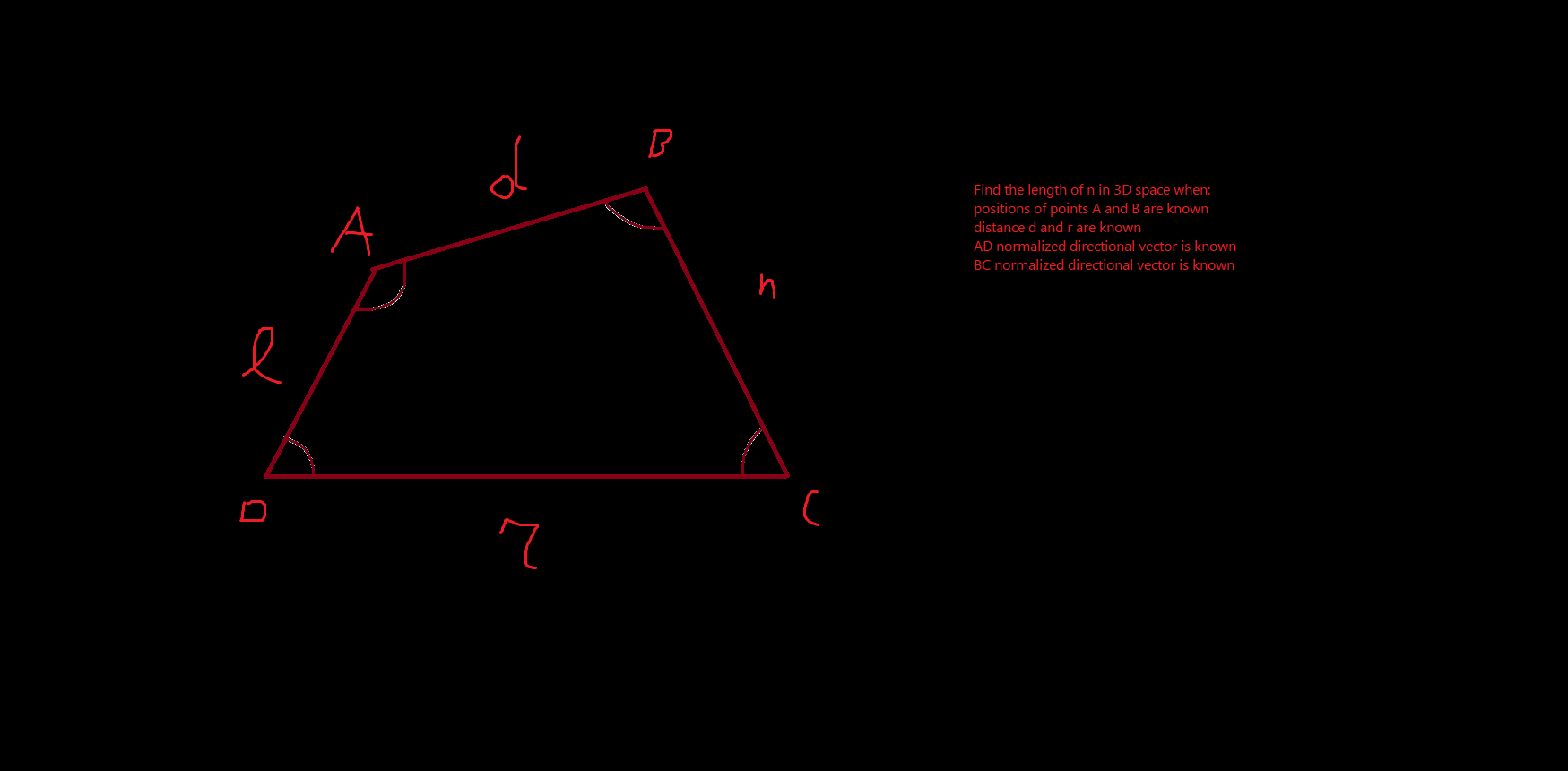
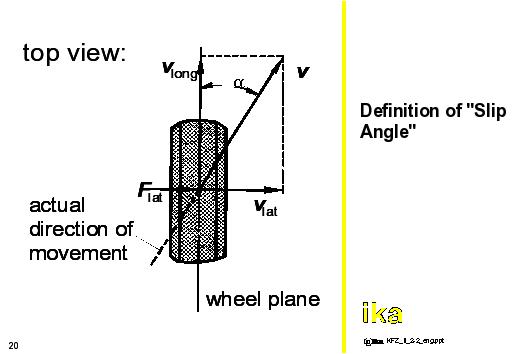
 cedar dagger
Hey, quick question
I have a transform moving in one direction, and i have another transform that i want to move towards the first rigidbody's future position ( if it doesn't change direction ) with a fixed speed. How do i find the intersection point?
stuck bay
Hi all, got a question.
@cedar dagger Calculate the position as a product of the first object's velocity and time, is probably what I'd think to do.
Suppose you wanted a missile or something to predict where a player would be two seconds in the future, you could use a formula like:
predictedPosition = player.velocity * framesPerSecond * seconds;
This is pseudocode but you get the idea.
How do I do mesh-based gravity?
cedar dagger
Hey. Thanks for the suggestion. It would work if i was controlling the projectile's speed ( and therefore time to impact) it'd be straightforward, but instead i'm not touching anything other than giving the projectile an initial velocity.
Turns out SO post is exactly what i needed https://stackoverflow.com/questions/29919156/calculating-intercepting-vector

Stack Overflow
I have 2 objects (i'll refer to them as target and interceptor).
I know the target's current location and velocity.
I know the interceptor's current location and speed it can travel.
From that, wh...
stuck bay
I think I might have an idea as to how I could make mesh-based gravity work.
sly violet
What is mesh based gravity?
@unborn narwhal I don't think that problem has a very clear answer set. You could get no answer, one answer, or a whole function of answers (n as a function of l).
stuck bay
It's gravity that makes your character stick to a mesh. You know like the planets in Super Mario Galaxy?
Where you stuck to little sphere planets? Imagine that but for something that isn't a sphere, like a torus.
sly violet
Hmm. I think there's a method to find the closest point of a mesh collider. Should be adequate; you probably don't want total accuracy anyway.
stuck bay
Yeah, too intensive.
sly violet
The method is MeshCollider.ClosestPoint:
https://docs.unity3d.com/ScriptReference/Collider.ClosestPoint.html
 solemn siren
heeey
yo i got a problem involving 2D colliders (i think?)
ok so i have a bunch of "blocks" arranged next to each other (think 2D minecraft) and i have a player object on top
the problem im having is when i try to move the player across the top surface of the blocks, the player randomly stops moving
like its hitting the side of the block
all of the blocks are placed perfectly by script - not by hand
so idk whats causing the player to stop
ocean horizon
It's a well known artifact of physics engines. Multiple colliders don't form a continuous surface no matter how well you align them. Physics systems solve collisions between collider pairs, not a collider and multiple colliders that you want to be a large surface. You need to use a single continuous surface so something like an EdgeCollider2D. Failing that, use the CompositeCollider2D to merge multiple colliders into a single collider and set it to use outline (edge) mode. Boxes are used a lot for platforms however a lot of the time the edges are completely redundant anyway and are wasteful so merging them together using a composite can produce less geometry.
If you turn on contact visualisation (project settings > 2D physics > gizmos) you'll see contact normals from the corners or side edges. You can reduce the effect by using a rounded edge for the thing contacting the surface so CapsuleCollider2D or BoxCollider2D with an edge radius however it won't completely eliminate it. If you're using your own character controller for movement you can also intelligently determine how to move along a surface as opposed to just using the standard collision response.
solemn siren
ummm
ocean horizon
https://www.iforce2d.net/b2dtut/ghost-vertices is a nice explanation
solemn siren
the thing is though
i want the blocks to be destructable and placeable by the player
i will implement that later
so adding everything to one big collider wouldn't work as well?
ocean horizon
You wouldn't want your whole level to be one big collider. The composite can change dynamically but it would be insane to have thousands of colliders as part of it.
You can use multiple composites
solemn siren
im planning to have thousands of blocks potentially
ocean horizon
Using box colliders that way is just brute force.
solemn siren
so how do i do it then
how do i calculate when a player touches a block without colliders
ocean horizon
I cannot easily design your tech based upon a brief description you gave me. If you've got a regular grid then why not use tilemaps? You can add/remove tiles and more importantly you can have multiple tilemaps to again reduce the overhead if you intend to use a composite with it.
solemn siren
why not use tilemaps? because im a begginer who compleately forgot they existed and forgot how to use them
ocean horizon
It was more of a suggestion than asking why you were not using them. It wasn't meant to be critical. 🙂
solemn siren
my problem with tilemaps is they require sprites/textures to use
i dont want that yet
with boxes i can just slap on a material
for prototyping
ocean horizon
You can do that with tilemaps with a single tile if you like.
Anyway, go ahead and try the compositecollider2d. Don't discount it until you've done a test.
The problem using BoxCollider2D is more that you're having to add a whole new GameObject just to add a collision shape. that won't scale well on its own ignoring anything else
Tilemaps obvs get around this.
each tile has a tiny overhead and can each have a specific physics shape or just use the regular grid shape and you can use it with the composite
solemn siren
wtf is a composite
ocean horizon
As I said above, CompositeCollider2D
hollow echo
The docs are your friend https://docs.unity3d.com/Manual/class-CompositeCollider2D.html
solemn siren
before i was doing my programming on a Ti84+ calculator
ocean horizon
Probably best to use google, there's a bunch of videos on it. In short it can take the geometry of multiple colliders and blend them into one.
When I was developing it I put out a few videos like this one (it's not a tutorial though): https://www.youtube.com/watch?v=H6RdrEb77cc

Adds the ability to composite multiple colliders into outline(s) or a group of polygons.
What you loose however is the ability to identify which specific collider you contacted so you won't get a physics callback on each box for instance but only on the composite. It's therefore particularly useful for static collider geometry.
hollow echo
luckily if you're doing a grid you can already figure out what's what with the coordinates
solemn siren
but if the player is capable of rapidly altering the blocks then wont i run into more issues there
ocean horizon
^ Agreed. And tilemaps provide the ability to work out easily which logical tile was hit.
solemn siren
do you know any particularly good online tutorials for tilemaps?
or is the info just kinda everywhere
ocean horizon
There's the official Unity 2D tutorials: https://www.youtube.com/watch?v=fmNtibNWPhc

Learn more about the Tilemap tools and other 2D features at https://ole.unity.com/UnityFor2D
But there's a fair many others online.
solemn siren
thanks
ocean horizon
np
stuck bay
Is there possibility to move NavMeshPlayer collider to other layer?
 sharp coral
So it seems like every time I use Rigidbody.MovePosition() my character will bounce off the ground, seen here (blue lines are the raycasts done before MovePossition() which I use to keep the player a certain distance above the ground) How can I prevent the bouncing effect? i assume it's because the fast moving rigidbody hits a static object so all the momentum goes into the player rigid body
stuck bay
tried rigidbody.velocity?
sharp coral
What, reassigning it the frame after?
https://github.com/TheCliffStudios/Mach-Engine/blob/master/Assets/Scripts/PlayerControler.cs here's the code, the problematic line is at 246

GitHub
Contribute to TheCliffStudios/Mach-Engine development by creating an account on GitHub.
stuck bay
_Hit.point + _GroundNormal * Height doesnt this part just move you to a point that is above the ground?
sharp coral
Yes, but when I comment out this line I don't get this bouncing effect
stuck bay
You want this effect or what do you want?
 cedar badger
Anyone can explain these lines to me from the documentation? please?
        // the second argument, upwards, defaults to Vector3.up
        Quaternion rotation = Quaternion.LookRotation(relativePos, Vector3.up);
transform.rotation = rotation;```I know that Quaternion is a way to store orientation without the gimbel lock problem
so I only also understand the last line but I can't understand so much the first and second line
I can write and ship it but I will be very glad to understand it deep
If anyone can help me I'll appreciate it 🙂
sharp coral
A quaternion consists of a forward Direction, and an angle around that Direction. So what LookRotation does is create a quaternion with the forward as the first argument and the angle is gotten by compairing the Up to the normal to the first line, or something like that
honestly that explanation fell apart on me
hopefully it helped somewhat though
sly violet
@cedar badger
First line gets the vector that points to the target from the scripted object.
The second line gets the rotation that would cause the scripted object to face along that vector.
The third line assigns that rotation to the scripted object.
cedar badger
Thanks @sharp coral and @sly violet 🙂
 placid pumice
I'm trying to implement my own gravity for a character.
But for some unknown to me reason the character's landing speed is higher landing than when jumping, by quite a lot (~15 initial jump speed, ~24 final land speed). I'm ultimately trying to replicate behavior shown on the gif below.
Code: https://pastebin.com/J7qFiaw5
Been stuck at it for hours.
\/
placid pumice
I'm dumb nvm
sly violet
ySpeed += gravity*jumpTime;
Gravity is a constant acceleration. Here, you've made it a linear function of the time spent in the air. So, you start the jump with no gravity and end the jump with very high gravity.
placid pumice
Yeah
I just figure it out
I was thinking Physics not Unity.
👍 @sly violet Thank you for your help anyway.
stuck bay
Hi all.
Trying to make a wall-running script that rotates my character (a capsule) to face the normal of the wall, but the normal vector also switches the other rotations so when I touch the wall, the capsule's z turns 90 degrees from where I want it to be.
 valid nexus
When I get a contact point from Collision, what is that point exactly?
The point in the 1st object, or the second one?
I want to apply a force at the contact point
Unity doesn't support rigidbody with a non-convex collider, so i remove the collider and apply the collision manually
stuck bay
Second one I think.
The collider you're hitting.
You sure a mesh collider won't work?
valid nexus
@stuck bay If you want to use a non-convex mesh either make the Rigidbody kinematic or remove the Rigidbody component.
This is what it says. "Non-convex MeshCollider with non-kinematic Rigidbody is no longer supported in Unity 5."
stuck bay
ohhh
valid nexus
So it's impossible to use physics with non-convex? @stuck bay