#⚛️┃physics
1 messages · Page 34 of 1
 tropic hamlet
I quite like GTA V's handling on vehicles, and I notice that it doesn't have any special accuracy to it
 jagged shale
but i just don't like how those get stuck on things you drive over
tropic hamlet
can go up ridiculous slopes and has pretty much infinite torque
jagged shale
yeah, there's usually a degree of fakery to any vehicle
i think the most fun game vehicle i ever played was the game Driver
tropic hamlet
I just sort of want a one file wonder, something super simple to use for cars... might have to do that some point
 jagged shale

Gameplay for Driver, PC game produced by GT Interactive in 1999 - http://www.squakenet.com/download/driver/5220/ Playing the first mission to be hired and fa...
1999, wow time flies ;p
tropic hamlet
It's strange really that decades later, still the majority of Unity's users don't make games this good
it's really not the engine's fault
jagged shale
for the time it was really cool how the car moved like it had suspension
back then it was really a novelty
tropic hamlet
Driver is full game that is in the realm of possibility that a single developer could make now
with better visuals
tropic hamlet
heh super sprint plays terribly and ruins lives
it's just how racing was :P

Pole Position. A clip from the classic arcade game.
jagged shale
they actually made several sequels to Driver
including, wait for it
Driv3r 😛

gfx improved but the gameplay actually got worse somehow
cars weren't nearly as nice to drive
tropic hamlet
I think that's probably the max amount of content for a typical indie
it's amazing just how much work is involved even for a simple thing
tropic hamlet
I think it's a bit crap, and also don't like GTA as a game, just the online racing scene is my gig
jagged shale
i get bored of racing too easily
i played the Forza horizon demo
and wasnt' long before i was ramming people instead of racing them ;p
jagged shale
doing donuts in the middle of the lake
it's funny how you can basically continually do donuts forever
they should make your tires pop and catch fire like RL 😛
 elder warren
I'm playing around with https://github.com/JustInvoke/Randomation-Vehicle-Physics. It has a pretty nice feel to it. But I fear it's not very optimised for multiple vehicles or ai
tropic hamlet
You'll have a bigger problem finishing anything before you worry about perf
 lapis plaza
only worry about perf if you can benchmark it being an issue
that being said, I'm super focused on making my own vehicle stuff as optimized as possible
but that's kinda what you get when you do mainly vehicle physics for past 5 years
but it's very different when you design your own framework vs use something ready made
when you do your own things from scratch, you know what is where and why and can also make more educated calls on what to change if needed as you'll now exactly how the thing is put together
tropic hamlet
I've never found car systems to be the bottleneck generally, but I do drop to approximations as early as possible for anything really. LOD isn't just for art
I try not to optimise what's really close that much because you can't really fit that many things in that are expensive, close anyway
I used to optimise so much and wasted so much time doing it
That's unity's job tbh
lapis plaza
I disagree
optimization belongs to all (Unity can't safeguard devs from doing stupid things)
but you should only optimize things that matter, that's for sure
tropic hamlet
Yeah but I've been doing it so long I don't make crap code by default, so I pretty much never make bad perf decisions
But me not optimising probably means intensive optimising to anyone else
I have to bear that in mind... perspective is hard to retain
OT sry ;)
 deft crypt
I'm trying to snap an object to the collider beneath it in the editor but am running into some problems. My code works fine when the ground is a cube, but when I tried it on a terrain it didn't work.
Does anything seem off in my code? https://pastebin.com/vN4ApgKY
Here's a quick recording of the problem in case the code isn't clear https://streamable.com/2m8nh
deft crypt
The floor or the cube being snapped?
 hollow echo
the floor
oh you do that further in the video, sorry
for a start your script shouldn't move if there was no penetration computed 😛
deft crypt
oh it returns a bool! yet again my assumptions get me in trouble. I thought it would just set distance to zero if none was needed
 vernal raft
I'm using Physics.BoxCast, it isn't mentioned on the BoxCast page on the docs, but on the SphereCast page it mentions it won't detect colliders for which the sphere overlaps. I'd assume BoxCast works the same way, and that lines up with some of the issues I'm having. Is there any way to include the box when checking for collisions? I have a way to work around it but it's gonna be pretty inconvenient
vernal raft
Ah, thanks! I'd found CheckBox but just returning a bool wasn't very useful, returning a collider should help a lot
lapis plaza

In this 2017 GDC talk, Naughty Dog's Edward Pereira breaks down individual physical elements that went into Uncharted 4's 4x4, such as tire collision respons...
 hidden blade
Hey, any idea how to fire a Raycast while ignoring certain collider?
 pearl warren
put that other thing in a layer that you ignore in the raycast layermask
 sly violet
If that's not an option (there's only so many layers) you might try RaycastAll (which gets every collider in the ray) and sort through the results yourself.
pearl warren
Yep, and if you want to go for max performance without GC hit use RaycastNonAlloc
tropic hamlet
Anyone have tips about smoother terrain collisions? I'm finding that it's pretty janky at times for a lower resolution terrain (4096+1 heightmap and 4096 units scale)
Physics settings have Unified heightmaps option (toggling off would improve it) but I'm not sure that's going to stay around as an option......
pearl warren
We ran into the same issue
the only option i found was higher terrain res
but that does hit the physics engine harder
tropic hamlet
it's obvious where it happens but it's not feasible to really address it on the terrain side of things as we are at the max size :D
I guess we could break it down into multiples but like you say... worse perf
tropic hamlet
I was told it would improve performance, but in all our tests we found reduced performance with multiple terrains.
pearl warren
Some guy suggested somewhere on the forum before to go for just mesh colliders instead of terrian colliders
those are obviously also taking quite a hit.
tropic hamlet
I don't think there's any sanity to using a mesh collider for our purposes but it might be going mesh if they're doing terrain holes? or at least locally
hmm
pearl warren
yeah i would suppose
it would be nice to try
getting rid of terrain collider, making it a mesh one and adding detail on troublesome spots
maybe ending with a colision mesh of 6000 verticles instead of your 4000
but that works better?
personally I have not tried this
afaik in the new physx were converting to soonish there is no terrain colliders anymore
they only have mesh colliders internally
terrain.thickness is going to be dropped soon anyway
tropic hamlet
I'm surprised people don't encounter problems all the time. This is the first game we're doing with Unity terrain though as previously it's performance was too bad to bother with
pearl warren
yeah true
we don;t use unity terrain perce
just the physix part
the visuals are asset ofc.
tropic hamlet
it's going to a much better place rendering wise with hdrp so we can't really ignore it now
just this collision thing is completely rubbish
no access to the data, no way to set it properly...
I guess I'll just fix it at the character controller level however you get these "stretched diamond" patterns that are bumpy long triangles and play really badly
or the char goes up and down along a steep slope
I think I could just nuke the wall limit code for terrains (it's perfect for actual colliders)
and on terrain handle that differently
tropic hamlet
well I've fixed it for now
I cast from the head forward with spherecast and construct a fake wall in the physics code for the character controller
it's not something that's ideal for general levels or buildings etc but a special case for terrain ... for now
until someone comes along with better or i have to polish it
jagged shale
fake wall? do you mean a fake floor?
tropic hamlet
my char controller (it's custom) has the concept of a slopelimit
anything over an angle threshold is a wall
jagged shale
oh ok, yes
tropic hamlet
so I tell it "this thing is a wall or slope" whenever the spherecast hits something at head height that's terrain at all (it doesn't care what angle it is)
it could care but it won't matter cos the cast won't reach
jagged shale
so wait, you could have something that high and the terrain collider wasn't registering it?
head high is very high
tropic hamlet
no , this situation is for preventing movement if there's an obstacle at head height
when you have a terrain which is essentially a resolution of 1 unit per pixel
and your char is roughly a unit too
terrain can get spikes where you have the character straddling accessible terrain and inaccesible terrain via the regular normals
so to help out a bit, i hint with the head height cast
jagged shale
I see
tropic hamlet
it only kicks in very rarely but prevents the artefact of char controller going up, falling down, going up as it slides along a mound etc
jagged shale
and you can't increase the terrain resolution because of performance?
tropic hamlet
i can't increase the resolution without replacing 1 terrain with 4 terrains.
jagged shale
got it
tropic hamlet
I don't think it's worth it
jagged shale
yeah probably not
tropic hamlet
visually, it's not improved much either, or at all really since we're authoring 4096 heightmaps
jagged shale
and you know, you could also scatter a few invisible box colliders around where there's problem areas
tropic hamlet
and even in the case where i make 4 of them, this issue still occurs
so i'd have to double that again
it happens for all terrains i think
just it will be more pronounced here, so i would need to account for this anyway
nope
can't do the box thing when it's 4 miles worth
jagged shale
lot of games 'fudge' with colliders like that
tropic hamlet
was 8
lol
but one man? entire huge game?
my bro does a lot of art but he can't do this either
jagged shale
well yeah 4 miles is a lot to deal with
tropic hamlet
was 8 a couple nights ago!
jagged shale
but are you literally making all 4 sq miles walkable?
jagged shale
ambitious
tropic hamlet
its ok
did a LOT of research on how to make that quicker to do
everything is controlled... yet automated so we only need to say this goes there etc, and the computer fills in the stuff
(tm)
jagged shale
I don't plan to have any of my maps be larger than you can fit on one terrain, (however big that is) but I know it probably will all be within 1 sq mile at most
pearl warren
that's great, but why diden't you decide to stream terrain slices in and out?
tropic hamlet
yeah good plan but we had to decide: 100 levels or 1 big level? this is actually the easier option
jagged shale
well I will only have like, 10 levels
or chapters I call them
though there could be multiple locations per chapter
tropic hamlet
as for streaming terrain slices in, i would still encounter the issue, even with more terrains, i would just be bloating everything just to fix one small glitch....
jagged shale
so I guess the # of maps will be larger
tropic hamlet
yeah i had similar conundrums as you
jagged shale
I haven't really sat down to enumerate. Still been working on the game's story (last chapter in progress right now)
jagged shale
I think 12 maps in total
tropic hamlet
(also my view distance is > the terrain size and i need shadows for ALL of it so having 1 terrain will probably pay off, HDRP still culls dir light quite well for cascades)
jagged shale
by rough count.
It's a story about a group of people and their struggles to leave earth and start a colony in space.
oh yeah space, that's map 13 lol
can't forget that one 😛
tropic hamlet
unlucky
jagged shale
there's probably a 14 i'm not thinking of atm
tropic hamlet
i like the group of people heading to space
jagged shale
it's just an idea I had and it's grown since I hired a writer
we've churned out around 10,000 words per chapter
tropic hamlet
it starts with them beheading musk and throwing his head down steps before shouting "tally ho" and nipping inside the stolen spacex capsule which actually doesn't move since it's all computer controlled and someone just pressed no
jagged shale
I started out with just 4 characters across the whole of the game
tropic hamlet
remember starglider and elite? those games had novellas with them and I enjoyed them very much
tropic hamlet
love it, the best kind of dev is something ambitious and meaningful to you
jagged shale
yeah I'm excited to move the project forward, though Feb I didn't really get much done, I had other focuses
will get back on it this month soon
feb was hard because I had to come up with the ending of the story, last chapter
and endings can be hard
but I finally pulled out an outline so she could get started.
it's going to be longer because of all the ground to cover, chapter 8 and epilogue, she predicts around 15k words
tropic hamlet
but its creativity so all is good
 rotund sentinel
Hii there, i just want to ask a quick question, if its possible to make a boat sail around a spheric water, soo what i thought it would is make first a sphere with attached gravity that applies to all game objects with riggedbody, and than make another sphere with water shader, can than my ship sail in that water??
jagged shale
a boat moving is no different than a person moving
so yeah should be no problem
just have to code it to do what you want
but that's like asking "can I go to Jupiter"
jagged shale
answer is 'sure, you just need to make a spacecraft capable of getting there"
sounds eaiser than it might be to actually do 😛

In this video you will learn how you can walk around a 3D sphere. Download Code : https://drive.google.com/open?id=0B__1zp7jwQOKdjhMb3lhVFhXSFU New Video - W...
i'd probably start with a tutorial like this and build on it
rotund sentinel
my problem is thr water, i never seen a spheric water, and specially making it soo that the ship floats on it
Never tried it
jagged shale
water is just a mesh plane withi a texture on it
so pretty sure a mesh sphere would work just as well
lapis plaza
if you never have to fly on the planet, it's super easy to do on shader
rotund sentinel
Ohh thats what i needed to know, im to lazy to turn on my pc and try it out right now 😂
jagged shale
lol
rotund sentinel
Will try it
But what im question is why there isn't a game that is speric, but all flat planes
jagged shale
there are a lot
rotund sentinel
With water i mean
jagged shale
well, i'm sure there are some
lapis plaza
I'm thinking about this kind of effect https://assetstore.unity.com/packages/vfx/shaders/curved-world-26165

Curved World offers shader bending effects known as:
• Cylindrical roll-off
• Cylindrical tower
• Exaggerated horizon curve
• Horizon bending
• Spherical world
• Little planet
Try PC build
Curved World is not Image Effect. It's simple, but ver...
rotund sentinel
Doesn't the sphere make the game more realistic??
Yeah, i saw this, was about to buy
jagged shale

This is no marketing video. It's an honest, glimpse behind the scenes for our fans. Work is still being done with the core gameplay features, and an inventory system is now in place.
Let us know...
rotund sentinel
Will definitely check it for more
jagged shale
someone linked to this in WIP the other day
doesn't have water but it does have a pond lol
lapis plaza
there are free solutions too
 void pelican
if you can tell you're on a spherical world it's probably less realistic, not more 😄
lapis plaza
I just don't remember them by name
jagged shale
and a waterfall
rotund sentinel
Sphere games just make it better it my opinion, thats why i never understand why open world games are called soo, they should be called open map, open world would be a spheric one
void pelican
what
rotund sentinel
Really?
lapis plaza
unless you fly to near space where you see the planets curvature 😄
void pelican
well nobody's going to make a game at a real world size lol
jagged shale

Medium
Several years ago, I started working on the Poly Universe project — an experiment to procedurally generate low-poly planets. That…
this one has water
void pelican
not really sure how it being spherical would be better
rotund sentinel
I will make the ship sail on it, and post it here
jagged shale

A tiny band of settlers land on a remote planet. With you as their leader they will either build a new civilization, or be consumed by the foul creatures which inhabit the furthest reaches of space.
Price
$9.99
rotund sentinel
I don't know, it just makes the game morr open without limits going somewhere
jagged shale
this one is on steam and has water
(actually those kind of look the same lol)
I wonder if it's the same guy, or they used his tutorial lol
ah yes, it's the same creator. funny
guy who wrote the tutorial made that game
rotund sentinel
Soo basically i can make a spheric water exactly the same as an flatten one that we see mostly, with the same effect for example swimming , going underwater and so on.
Im new in unity, 2-3 months or soo and i want to make just a small planet just for me and thats why water is really important

This is what i have done
My next step is make this ship float in a spheric water 😄
lapis plaza
what I've been trying to tell is that you don't have to treat anything code wise differently if you do curved world with shader. Actual physics would happen on a flat plane
jagged shale
that's true
lapis plaza
of course you can make custom gravity too if you want to simulate on round world without shader tricks
it's not super hard either
disable the existing gravity, apply F=ma each fixedupdate where m = mass and a = 9.8
and then multiply that with direction to your planet core
rotund sentinel
Im really not familiar with shaders in unity, the one link that was send before of the shader asset, isn't it just simulating a sphere in a flat plane but it isn't really a sphere?
jagged shale
it really looks like a sphere, so that's what's important
jagged shale
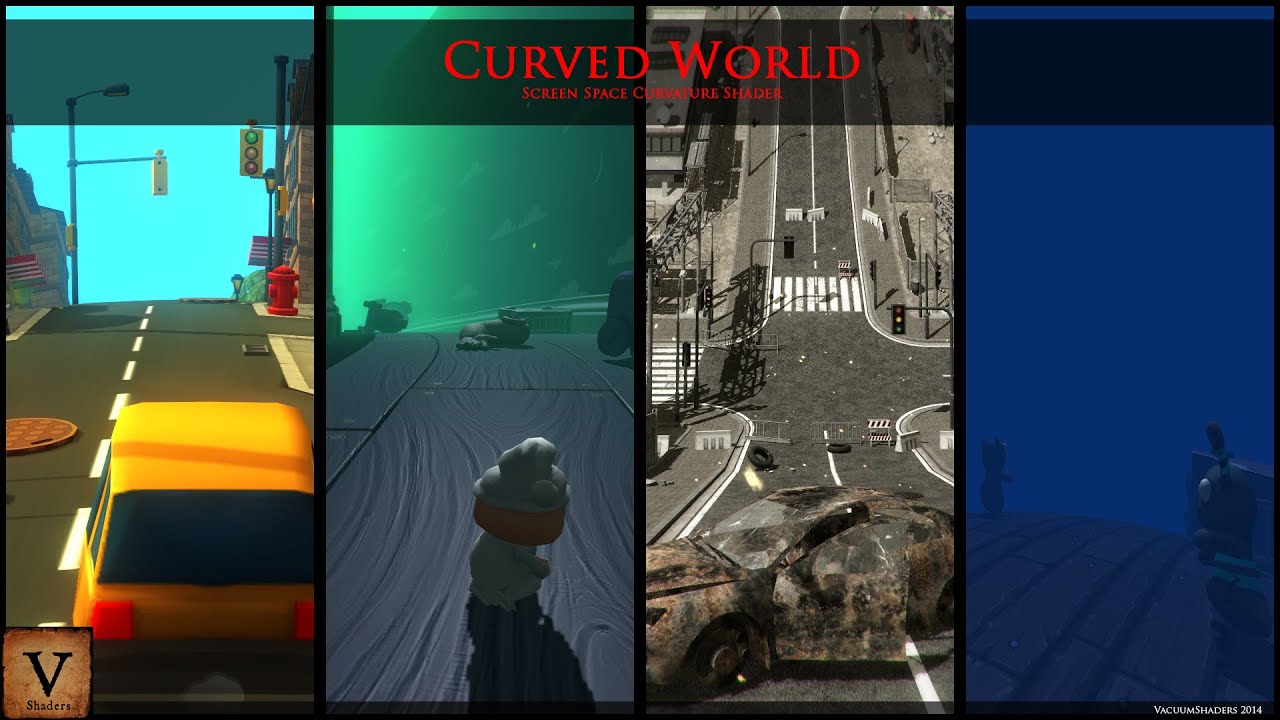 rotund sentinel
In all directions?
jagged shale
look at the video, that's how it looks
can be curved outward, or inward, your choice
 rotund sentinel
But i don't get how this works, dosent it have an edge?
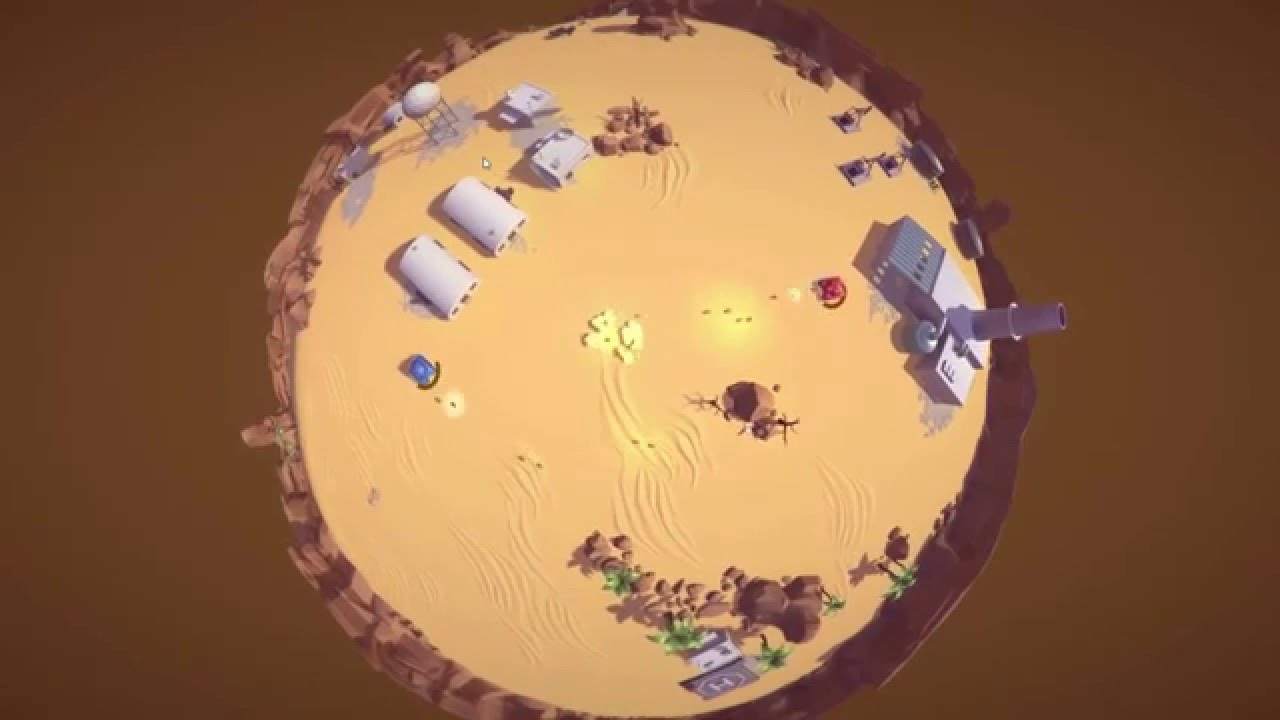
Horizon Bend (HB) is an editor extension for Unity3D, which will help you to create «horizon bending» effect AssetStore: https://www.assetstore.unity3d.com/e...
At the end, the one scene has an edge
jagged shale
I think it may have an edge, but there's likely tricks you can do to overcome it
there's a demo you can DL and try
Google Docs
rotund sentinel
Soo it only simulates a sphere, but it doesn't make it into a sphere
jagged shale
gonna try it myself because i'm curious
yeah you'd have to handle edge teleporting yourself
or it may have a solution included I don't know
the demo has 3 demos and one is called "LIttle Planet" so maybe they show this
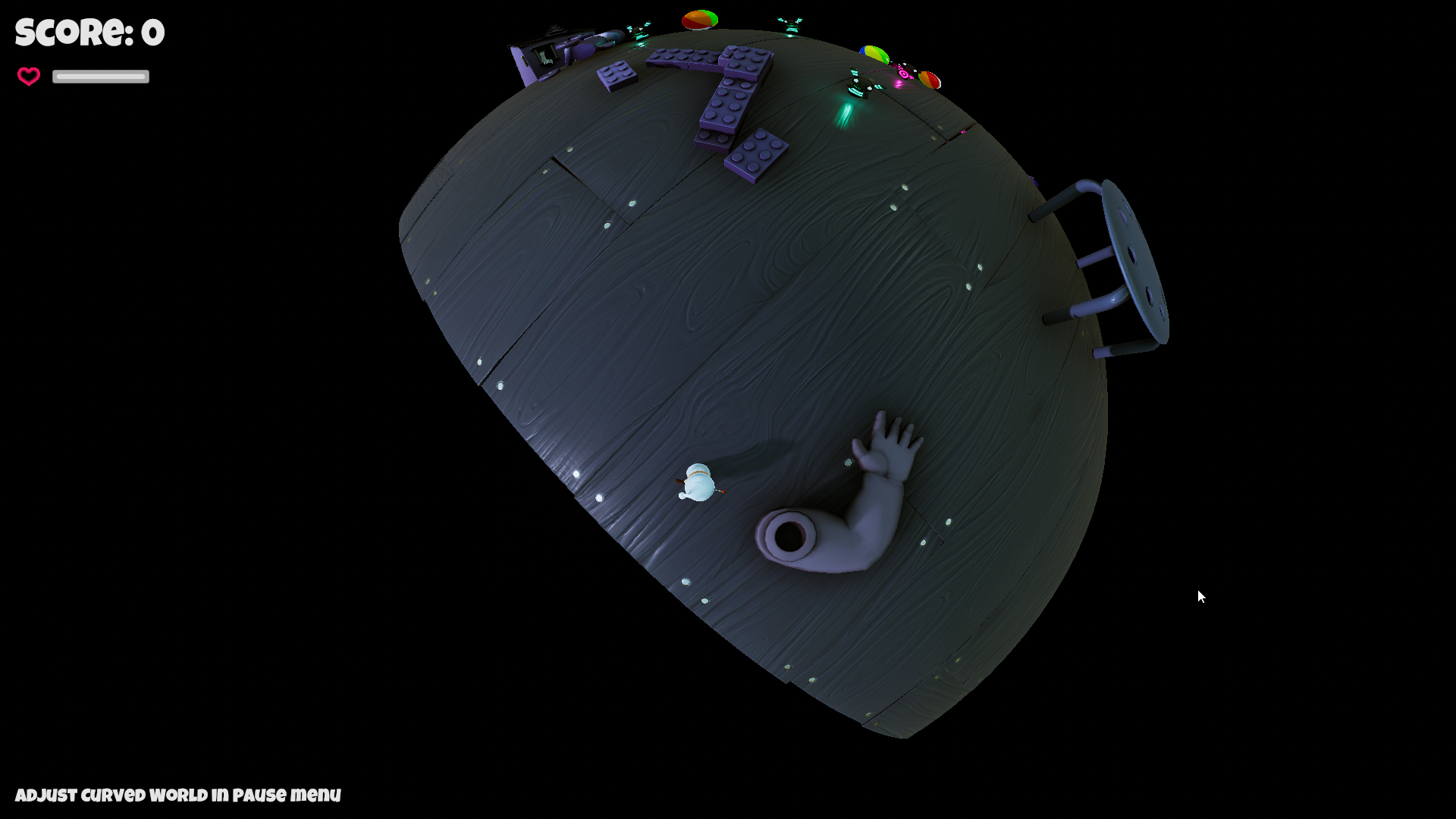
ok yeah, it does have an edge
rotund sentinel
But i don't think they have something that makes a plane into a sphere, it doesn't make sence how that would work
I knoe you can make a cube into a sphere
jagged shale
still it's pretty impressive
jagged shale
well then you'll have to do like one of the tutorials I linked to
rotund sentinel
Yeah, thats the one what im looking for, but still don't know if water physic works in a sphere
lapis plaza
I don't see how the physics is difficult
you have to apply custom gravity
but of course if the current setup it faked, then yeah, that could be more involved
rotund sentinel

A customer asked me if Smart Water 3d (http://www.smartwater3d.com) could be applied on a Sphere, and I answered "of course". But when I tried I found it was...
This is what i could found
jagged shale
games work because developers use tricks, not because they make everything 100% realistic physics.
seems to be the theme I see with new developers, they expect everything to work 100% like the real world and it's just not so.
rotund sentinel
@jagged shale im not really a developer 😄, didn't develop nothing, i just got into unity game develop in these last months but i like how things worke out
jagged shale
@rotund sentinel I was talking about the guy in the video 😃
 stuck bay
I have a question. In the last days I tried to fix an issue with my space ship rotating the nose up after launch. Today I could figure out why. It is the 70Kg character I put into the ship. It took me days because the ship rotates in the wrong direction. When I put 70Kg into the cockpit the nose should go down and not up. If the pilot enter the ship I set the grvity to zero and the ship is still rotating.
My questions are:
- Why roate the ship at zero gravity?
- Why rotate the ship in the wrong direction?
 rich sundial
question. Do composite colliders on tilemap2ds act like lines? As in they dont work with oncollisionstay2d unless your collider is intersecting the lines? I was trying to check if an object was inside of a composite collider. Would raycasts be my best bet if thats the case?
Or maybe its an issue with using a kinematic rigidbody as well...
 ocean horizon
Outline mode for CompositeCollider2D produces edges yes although that has nothing to do with tilemap specifically, it always produces edges in this mode therefore there are no "insides" as it produces open shapes. It also isn't related to any specific callback either. From what I'm getting from your question I believe the answer is that using discrete collision detection, you can easily step over lines whereas it's much more difficult when using closed/solid shapes like polygons. If you have fast moving objects then you should use continuous collision detection for those.
 tardy spear
Just a heads up that I've just published a new preview build of Unity with PhysX 4: https://forum.unity.com/threads/physx-4-0-in-unity-experimental-builds.634960/

Unity Forum
Hi everyone,
(this post will be edited to reflect the latest changes)
We're aiming at updating our PhysX version to 4.0 this year. PhysX 4 was...
lapis plaza
Oh nice! New solver and win editor :)
Will definitely try it out
I can't really try it on my actual project due to 2018.3 but will do some experiments with it 😃
tardy spear
Anything you do helps to identify issues before they hit production and it's too late, thanks for your help
tropic hamlet
Thanks a lot, auto box pruning sounds rather tasty.
Any reason we shouldn't use it by default?
pearl warren
If I understood correctly if you have a LOT of sleeping rigids?
pearl warren
same
hell i even set them just kinematic
or even remove the rigidbody if were done with them
tropic hamlet
I pool most things
tardy spear
Look - I'd love to collect some usability ideas at least from early adopters before making ABP broadphase default
I think this is a new feature of PhysX 4 and I don't know if any titles ever used it yet
like - it may have bugs 😉
tropic hamlet
My problem is my main physics project is on 2019.1 with hdrp, so I can only test an old version
I guess I can strip it out and just run it without
tardy spear
OK, there will be a 19.1 version once it's public after GDC or so
tropic hamlet
Should I wait till then or I guess can spend time this weekend
tardy spear
I'd rather getting any feedback earlier, that's the whole point of the forum thread
but I don't really mean to be intrusive -- whatever works for you is great :unity:
tropic hamlet
:P
I know what you mean hehe... but your job isn't exactly easy getting it tested
attracting people to test is a problem. I guess you have a lot of internal test scenes but it's the real world projects where we do things badly that cause issues
tardy spear
yeah
one of the struggles here is that it's not actually tested before some big projects move over and encounter all of the corner cases and stuff
I mean PhysX itself has a rather big test set, then we have our own on top, then we do a lot of manual testing and the worst cases are still discovered late when everything is released and it's "too late"
tropic hamlet
Also there's a real problem when encountering decent developers too
they will do everything right and have already got optimised scenes
That's life :D
tropic hamlet
Perhaps developers should have an option built into their account to "test project upgrade performance" where the user can be sent a link to experimental builds, whenever unity staff want something tested (max frequency every month or so) - it's basically just marketing spin but it also pushes the experimental build in front of them, they likely wont visit forums much at all you see?
And there could be a "feedback reporter" that pops up whenever the experimental build is quit
currently the situation with experimental is far from ideal for staff and customers
pearl warren
I make a professional game on Unity, I don't have time to screw around with unstable Unity builds, we just have 2 versions behind current one and hope for the best.
tropic hamlet
OK but that's not intended for you.
pearl warren
Sometimes I randomly install latest unity and import our 200 GB project, it usually dies and i un install it again
tropic hamlet
you are at finish, you would never be part of this convo
tropic hamlet
too late to change at 70
pearl warren
but like 2018.3 released and we tried our project, and it all died.
tropic hamlet
Well the idea of experimental is to prevent that much early on
and the reason it does not is because like i said... ppl dont know its there.
pearl warren
If unty wants proper builds they should invest in better testing
throwing a alpha build out there doesent make people test more
usually these cases happen with big projects
I won't upload 200 GB of data for an bug report
tropic hamlet
I am 100% sure unity agrees but if life was that simple, AAA games would ship bug free, and they have 10000x easier time (they have source, they have typically way less platforms and they know what they are doing)
but even AAA piss the bed
Sure, well I have 2 accounts, a bug account and my main hippo account, I use the bug account mostly with bug repro projects (small examples)
and hippo account if i need something on this game for fixing, this could take a while i guess
tardy spear
I'm not here to argue. I'm sure Unity does a lot of various types of testing. It's not my first time asking for early feedback, I do know early interaction helps, and I'm aware there are actually plenty of people that do have time to try out the early builds and then share their thoughts. It's totally fine not everyone can do that.
tropic hamlet
I think it would be nice for unity to consider having opt-in to advertise the experimental builds to make your life easier @tardy spear
tardy spear
That would be above my pay grade to arrange that, unfortunately. This delivery and promotion stuff is already complicated as hell and there are enough stake holders atm.
I was told to go with the forums -- which is already a step up from attracting devs through my twitter and direct mails 😉
jagged shale
i'll test it on my game, simply because it seems lately every new version of unity the physics breaks on it in some fashion. I'm sure if there's a bug I will find it.
lapis plaza
@tardy spear tbh, I'd love 2019.2 beta too 😄 but yeah, we can't always get what we want
but even 2019.1 is easier for testing as right now 2019.1 HDRP is at least somewhat similar to 2019.2 + ECS still works on it (2018.3 is now too old for ECS Hybrid Renderer)
I also agree new things shouldn't be enabled by default
that's sure way to break peoples things, or alter the functionality when people upgrade their engines
jagged shale
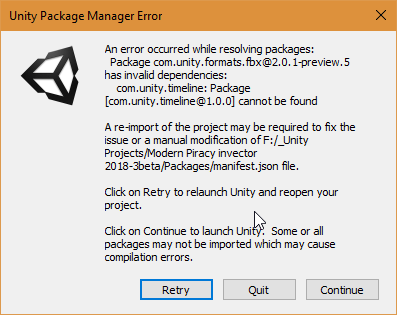
since when does fbx exporter depend on timeline?
never got this error with normal unity
guess i'll try removing the fbx exporter, not sure what that's all about
trying this beta is taking me backward from 2018.3.8 to 2018.3.3 so maybe that's why, but I still don't know why timeline would be involved.
jagged shale
after reimporting the whole project i got so many errors it went to 999+
most are "[Physics.PhysX] RigidBody::setRigidBodyFlag: kinematic bodies with CCD enabled are not supported! CCD will be ignored."
i have no idea what is causing it though, it doesn't take to anything
not even sure what "CCD" is
oh continuous collision detection
must be in some of the demo stuff i have in the project, I don't use CCD for anything myself
tropic hamlet
i use ccd for my main character and anything that is important
it's much more important to use CCD for terrain when physx 4 arrives
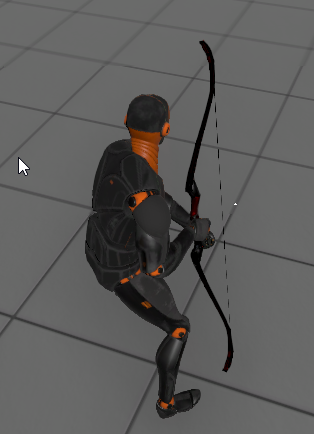 tropic hamlet
HELP MY HAND IS GIMBLE LOCKED
jagged shale
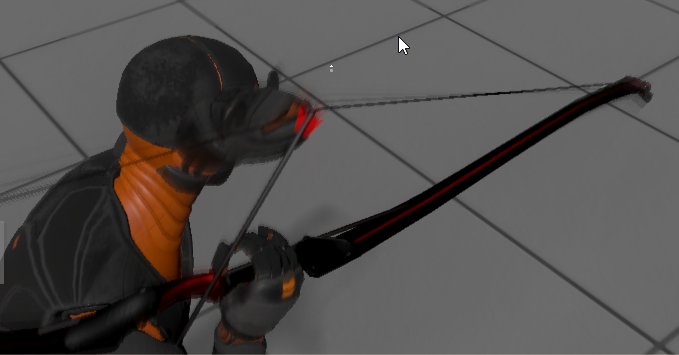
and when he tries to draw the bow lol
his hands go all through his body
i'll have to compare the bow's transforms with the regular 2018.3 and see why it's different
works fine with PhysX 3.2
pearl warren
Isen't it just animation ffing up from re-import? and linked to quat rotations or something
i had such flipping before in our game
jagged shale
it's a rigged object so odd it's rotated
pearl warren
it was linked to anim import
jagged shale
maybe, i did delete the library due to that odd FBX exporter issue
but I didn't touch any meta files, so everything should import exactly how it was
let me check standard 2018.3 and see. i may have just not tried that weapon and it was already broken
i did recently upgrade form 2018.2 so there could be pre-broken things I've not noticed yet
ok yeah, it's pre-broken heh
damn it
i'll ignore that then and focus on other things
(but that's what i mean, every unity version seems to break something like that)
from 2017 to 2018 it was child rigidbodies as i recall
you'd hit something with your sword and it would move the weapon out of place, was annoying
pearl warren
yeah i know it breaks randomly stuff for us too
jagged shale
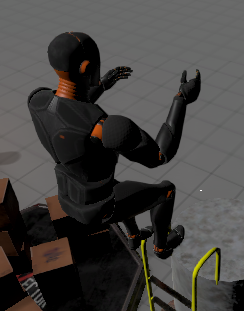
he's no longer triggering the dismount the ladder event
but I think that's due to something mentioned in the thread about two triggers triggering each other
i guess I was using it and didn't even realize
pearl warren
show your dismount ladder code
jagged shale
it's not the code
He stated this would break
3) Trigger versus trigger events are no longer supported by PhysX. We need to understand how crucial is it for us to support that, and if yes - make a workaround.
all other physics so far seem fine
now what was the specific things in this version
Temporal Gauss-Siedel solver,
yeah my game really hates Temporal Gauss-Siedel solver
lapis plaza
tested simplest scenario I could think of:
physics running at low refresh rate (20Hz) and big mass ratios between dynamic objects
cube has a mass of 100, sphere has mass of 1
temporal gauss siedel fails on that if I go to 1000:1 ratio
but it does go way further than the old solver
jagged shale
i have some punching bags, they go nuts
start flying around without even touching them and then eventually fly off into space never to be seen again
funny enough how they move seems related to how my character moves
even though they aren't even touching
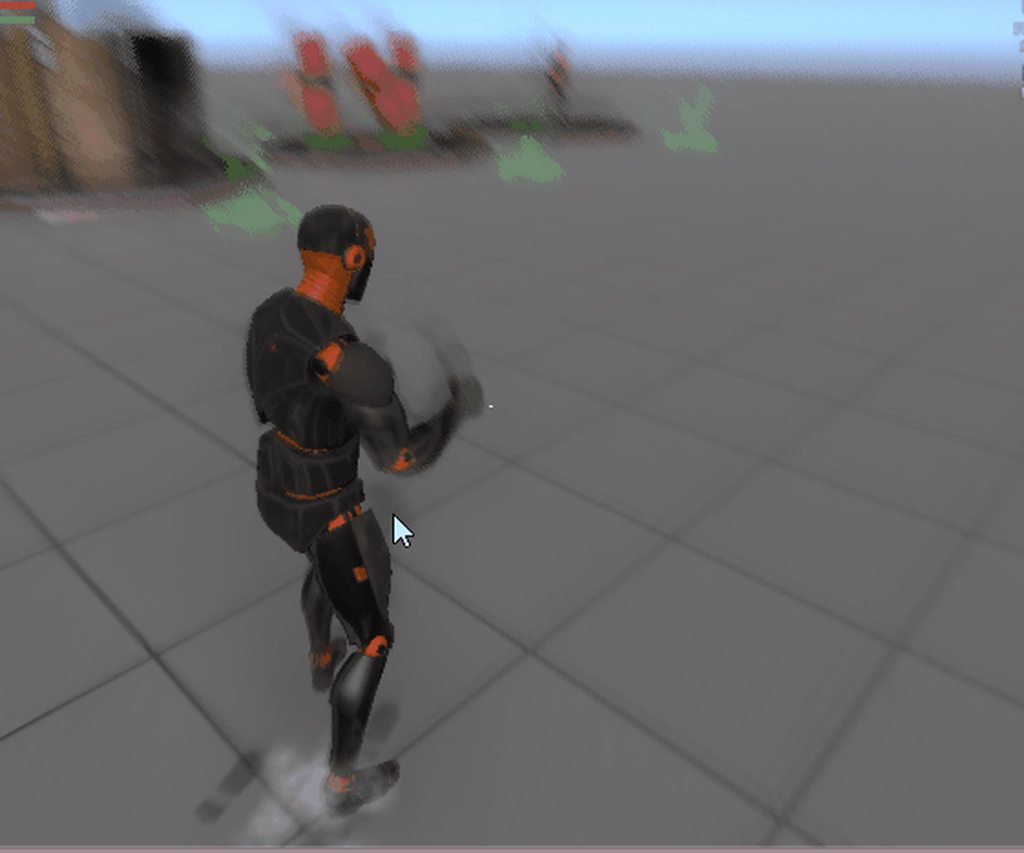
ok so so much for that. let me turn it off and try the other: Automatic Box Pruning
I don't see any functional difference using Automatic Box Pruning So if it's a performance gain, that's all good.
sly violet
Those punching bags though 😄
jagged shale
yeah they were really going crazy
i think they use a joint of some type
must be a problem with joints and that Temporal stuff
tropic hamlet
perhaps references or some weirdness
lapis plaza
@jagged shale it doesn't happen with the old solver (on that same engine version)?
jagged shale
no it's fine with the old solver on the beta
lapis plaza
could be nice to get some simple repro project for that
to see where they issue is at
lapis plaza
it probably requires a different setup
saw some comments on physx repo itself on the new solver not being stable on similar values
jagged shale
but it's odd it's being affected by the character movement
it's not even anywhere near them
Base is set up like this
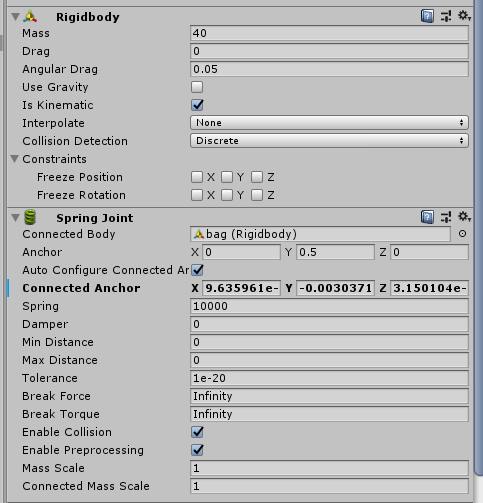
it's just a cube with a box collider
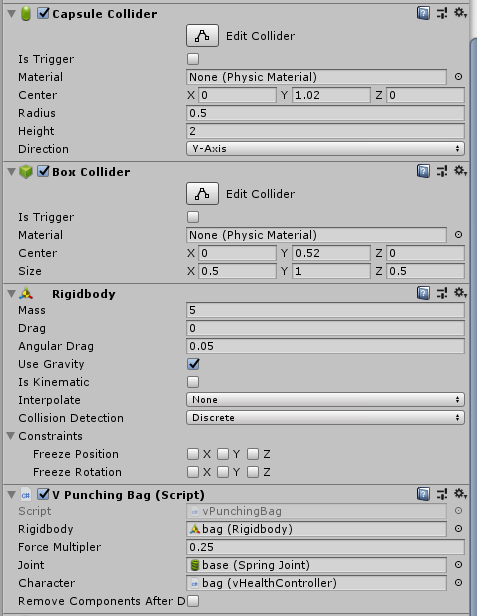
bag is like this
the script just breaks the joint should it's 'health' reach zero
it doesn't do anything at runtime otherwise
 violet veldt
Q: I got a flag which has one erroneous tether point and it is really giving me a hard time. I can't select it, not paint it off.. It's either that or the flag is limited somehow by a bounding box that I can't change either. any ideas?
 green sage
Hello, I'm trying to make a 2d platform but kinematic body doesn't detect collision, should I use dynamic body for 2d platform?
lapis plaza
I dunno about unitys 2d physics but physics engines in general dont generate hits for kinematic objects alone. You can check for overlaps tho
Hit is usually result of collision but manually moved kinematic objects alone dont really collide
(Unless there is dynamic physics object it collides with)
rich sundial
in my experience, you would need to combine some sort of Raycasting with kinematic rigidbody2d in order to detect collision. Especially if you're using tilemaps and composite colider2d. https://unity3d.com/learn/tutorials/topics/2d-game-creation/player-controller-script
Here's an example of a character controller w/ a kinematic body

Unity
Unity is the ultimate game development platform. Use Unity to build high-quality 3D and 2D games, deploy them across mobile, desktop, VR/AR, consoles or the Web, and connect with loyal and enthusiastic players and customers.
raycasting will basically cast a line (or in the case of this example controller, it would cast the shape of the collider2d attached to the object) in a direction. The raycast will keep track of the distance between the object and any object it collides with (you can specify which layers you want the player to basically be blocked with by using the contact filter 2d and layermasks)
basically you could use raycasts to see if that distance is close to 0, then stop the player from moving if they are close enough. At least these are some the ideas of how you would use kinematic rigidbodies to detect those collisions
 mental island
Me has question
As you can see below I have 2 boxes with both of them colliders attached. I have also attached a rigidbody and a script that listens to OnCollisionEnter on the blue box. If the blue box collides with the red one it should move away. This does work but it triggers way to soon. What could be the cause of this
 gusty sleet
What scale is that?
mental island
0.2 0.4 0.2
It has to do with vuforia so that means 0.2 is 20 centimeters irl
So i cant really scale up
But scaling up did seem to fix it now that i tried it
Is there a other way to fix this without scaling up
gusty sleet
I think it has to do with this setting in the physics settings
tardy spear
note that you can override contract offset per collider, which is a much future-proof approach than setting artificial values globally
lapis plaza
someone made this https://forum.unity.com/threads/nvidia-physx-plugin-preview.645004/
that's official?
pearl warren
Nvidia made it themselves
lapis plaza
"Viktor
NVIDIA "
pearl warren
o.O
pearl warren
I wonder why
lapis plaza
they got articulation demo too
pearl warren
maybe they don't like the unity implementation
lapis plaza
I dunno, if they can make it stable, I'd always favor it instead of the built-in
because that comes with the dependency to the engine
pearl warren
@tardy spear you know anything about this?
lapis plaza
heh, they got gpu solver there too
but otherwise the graphics settings are super streamlined
wonder if it polls the value from unity settings for rest or if the simply hardcode those to default
hmmm, they must use unity settings and layers
as there's no special setup for them here
pearl warren
You can just access those unity things from code so that makes sence
lapis plaza
yeah I guess, PhysX shipped this with native dlls and precompiled managed side dll's
so it's kinda closed box unless you go to the gray area :p
pearl warren
Let's decompile the managed dlls
lapis plaza
that's what I meant by gray area :p
pearl warren
It's not forbidden
lapis plaza
depends
there's no license attached either, and this isn't distributed under Unity's terms
pearl warren
if it isen't forbidden it's allowed? 😄
lapis plaza
that's not quite how licensing works 😄
if you don't have any permit, you can't really do anything
tropic hamlet
Yep it's impossible to guard against everything legally so usually it's a case of seeking permission. Like, someone's door is open? you wanna walk in? you take the risk.
I prefer to knock and wait a bit :P
tardy spear
So I guess the thread wasn't exactly phrased right about that Nvidia plugin...
- It is official actually, Viktor is an Nvidia employee who made that plugin
- It's fully maintained by Nvidia. They aim at having it support the latest PhysX - compare to Unity's integration where we wait for a while before shipping.
- Robotics is a focus of course - that is new Featherstone articulations, tgs solver, etc
- To the best of my knowledge, the plan is to release their plugin on the AssetStore, pretty much as it is now with Flex. Integration is made by the same guy if you're curious enough.
Not sure if I should attempt to drag in Viktor here
tropic hamlet
Perhaps could leave a note on forum if you can though in that thread so people don't assume he's a stranger with funny sweets
tardy spear
Indeed, I posted to Viktor that he might benefit from introducing himself. I understand it's confusing when someone with HerrVR screen name comes out of the blue and reveals big stuff.
jagged shale
So going forward PhysX will be a plugin and not built into the engine?
tropic hamlet
ultimately having the engine have as little built in as possible has no downsides
so long as by "built in" it's covered with package manager
although with strong dependencies like SRP/LWRP/HDPR/VFX/ETC ... can be problematic with semantic versioning :D
jagged shale
i'm all for a modular engine, as long as it doesn't incur increased overhead to implement it
pearl warren
Won't it have a bigger overhead though since it's not build on native calls like the current engine is?
Like, somebody made a Bullet Physics port for unity, but it performs much worse than Physx for this reason
tropic hamlet
No, I doubt it's relevant to be honest. Bullet always performs worse than Physx.
In fact overall, I don't know of a physics engine as fast as Physx is (overall)
lapis plaza
I'd really like having physics engine as a separate thing from core
it would guarantee that future version of the engine can't break or change physics functionality
it's no secret that I like modular things
jagged shale
that's my main worry, @pearl warren
they claim C# is catching up to C++ in terms of performance
but I still remain skeptical.
i'm a 'see it with my own eyes' kind of person 😃
and I haven't seen that yet
Maybe GDC will have some proof to share 😃
tropic hamlet
well it's not C# for long
pearl warren
But they only push that stuff in jobs
normal C# code in your monobehaviours or even normal structs cannot use the burst compiler
it HAS TO BE in a job
and the job system sucks
Unity 2018.2.10f1 TPL (IL2CPP) -> 190,657
.NET Framework 4.7.2 TPL -> 28,958
.NET Core 2.1 TPL -> 25,790```.net core Task system is so so so so so much faster than jobs it's insane
I'm all for HPC#
but make us have it outside of jobs
and even better please upgrade the runtime to .net core
or at least the latest mono runtime that runs 4 times as fast on floating point operations
and that has Span<> build-in
that will help all your clients so much more
than forcing them to switch to ECS
hint, no current project can switch to ECS without full rewrite
/rant
jagged shale
what do the numbers represent, disk size?
pearl warren
execution time
jagged shale
oh 😦
jagged shale
I thought jobs was supposed to be much faster
pearl warren
yes that's a bit OH 😦
lapis plaza
afaik, Unity's long term plan is that Burst would run outside of jobs too
pearl warren
Jobs is super slow compared to the build-in C# task system in .net core
lapis plaza
but obviously if you write high performance code, you'd want jobs too
pearl warren
The article writes how great jobs is compared to C# tasks but that is in the shitty mono runtime.
jagged shale
i'm so confused now
jagged shale
0lento says jobs is great for high performance, but Vincennzo says Jobs is super slow
it can't be both LOL
pearl warren
Jobs is great for high performance, naturally its better than having nothing
 maiden grove
Yeah, I think Vincenzo is comping against .net core tasks
pearl warren
but you can't jobify everything
maiden grove
which isn't an option available to us atm
pearl warren
sadly.
jagged shale
ok so Jobs is faster than component based Unity C#, but slower than .net Tasks
maiden grove
.NET Core Tasks > Unity Jobs > Mono Tasks
jagged shale
ok got it
pearl warren
yep
maiden grove
Thanks for the article link - hadn't seen that
pearl warren
besides you cannot just jobify everything
it adds overheads
jobs is not meant for IO tasks for instance
Also the job system spawns a thread per logical core in your processor, and there is no way to limit that, if you have your own C# threads you're working with it will become thread contention
I kind of decided not to use jobs at all for our game
jagged shale
hmm can't limit it? yeah that's bad
pearl warren
its stupid
jagged shale
I have some other libraries that use threads
pearl warren
i have a 64 core 128 thread machine i want to run a bunch of servers on
jagged shale
and they have a way to set how many thread are used
pearl warren
oops they all poop in eachothers thread pools
maiden grove
it doesn't use a thread pool?
tropic hamlet
fair bit of misinformation spread in this chat tbh.
pearl warren
yes please
tropic hamlet
there's no case where system threading will outperform unity jobs, where job are used correctly
this means you have ecs + burst + jobs enabled and you remove the slow safety checks
and if you're using data from a wesbite dated 23 sep 2018, well I don't know how to explain more?
if you are just having a job without the other 2 that make up DOTS then I wouldn't imagine any gain from it
pearl warren
by all means you can re-run this task code in .net core and compare it?
.net core 2.2 has some great new instricts 😄
jagged shale
well, I know nothing about all this but I have to say it sounds unfortunate you have to use all 3 to get benefit from any
tropic hamlet
ok if you want to use that why don't you :)
pearl warren
Hippo i was just pointing at the fact that unity spends way too much time trying to re-invent the wheel badly
jagged shale
like Vegetation Studio Pro we were talking about yesterday uses Jobs, but of course it's not ECS
so did they waste their time doing that?/
maiden grove
fwiw I don't think you guys are meaningfully disagreeing on above notes - only whether or not a hypothetical world where we swapped the .NET runtime out for DNC whether or not tasks would be more competitive with jobs
lapis plaza
I was going to say you can do all kinds of things if you have time for it
maiden grove
I tend to agree w/ hippo - academically on paper I think a bespoke jobs system should still be faster - mostly since it dodges xcompile overhead in IL2CPP
jagged shale
should I not use Jobs based systems if I don't plan to use ECS?
pearl warren
Jobs can help anything @jagged shale
if you have anything that is jobyifyable you can get speed upgrades now
jagged shale
oh right, because it's still faster than monobehavior
pearl warren
much faster
tropic hamlet
it also packs data in a way that allows jobs to really work properly, vs a proper example of tasks where tasks will have no choice but to stall the cpu at a macro level non stop and woefully underperform. you could use structs and go through the same hell though
jagged shale
hippo's bone of contention is it not being as fast at .net tasks
tropic hamlet
burst is also designed specifically with a unityengine context in mind and tasks are not
so when applied in the real world, I would say it's night and day tbh
pearl warren
yes hippo you are right so why is it so much slower
tropic hamlet
yeah enjoy your choice, np
pearl warren
I am stuck in unity server side
I'm mostly just smashing my head against the keyboard why unity is focusing on the wrong things
and ranting
lapis plaza
what is slower?
using only jobs ?
it's not really meant for that
it's meant to be coupled at least with burst
pearl warren
.net core C# tasks is significantly faster than unity jobs
lapis plaza
and one of the core points is that it makes things easier to use
pearl warren
that was the topic
lapis plaza
it makes no sense to compare dots if you don't use it to your advantage
maiden grove
that code shows jobs being faster for mono based tasks
lapis plaza
this whole discussion is silly
maiden grove
lol
lapis plaza
it serves no point
pearl warren
jason, run it in .net core
maiden grove
I mean - I'd actually love a world where unity swapped mono 4.6 for DNC
pearl warren
8 times faster
tropic hamlet
you will need to run it inside unity doing a proper task instead of basically nothing, so that it can fetch your monolithic monobehaviour class inherited data every time it needs to calc pretty much anything + busy main thread
then you will want to see how well that fights with unity's ENGINE threading, something jobs entirely works with, not against.
Finally you will want to have it in an ECS + burst context for engine specific optimisations with IL2CPP
...should be around 2-10 times faster than task.
but by all means make an unrelated test
The problem here isn't task's standalone performance with pure C#, it's how well it's going to thread with the engine too
pearl warren
yep your right about that
tropic hamlet
they will fight.
in the real world I expect "up to" 1.5 to 2x perf with ECS in use, but I have seen some of Unity's internal tests go pretty super high and I'm not at liberty to talk about it - but feel free to ping if you are in dots external
as for if Unity is doung the right thing.... I guess that changes per project :D
tropic hamlet
I dont like it either.
pearl warren
It makes sence, a performance orientated game works like ECS
tropic hamlet
it is a lot simpler to throw some code into regular C#
pearl warren
but previous build games around monobehaviour have no benefits, and could get plenty of benefits if some focus was put in fixing that up
tropic hamlet
yeah but it's all or nothing imho... if you don't use job+ecs+burst there is no point
pearl warren
They could extend burst to non job code
tropic hamlet
it breaks down individually
pearl warren
they could fix long standing problems with monobehaviour everybody keeps running into
tropic hamlet
they could... and I hope the will improve other parts tbh
pearl warren
They should have made build-in pooling of objects years ago for instance
every single unity starter is needing to pool something
because instantiate > destroy sucks
tropic hamlet
I spoke to unity about that, I think I had similar ideas to you a few years back
I guess really the main performance problem with C# is the memory
pearl warren
yes it is
tropic hamlet
we can cure a lot of it just with sensible struct usage but again this begins to push my code toward a mess
pearl warren
so please unity give us Span <>
Please unity upgrade the runtime to use Float32
it's only a compiler and runtime build flag
tropic hamlet
Unity had two directions to go... improve mono or make something new. I think with the rate of progress in hardware it makes sense to make something new because mono based games do serve mobile even and have done for many years, and nobody really worried too much - I mean in 2010 even I was making 60fps mobile titles in unity
pearl warren
This is a year ago and is still not merged in the unity mono
Miguel de Icaza's Blog
tropic hamlet
I am likely to release my game using monobehaviours and classic C# but parts of it will be accelerated by DOTS, including rendering, audio etc, some lite custom physics...
I think that's the proper place for me, not all or nothing because my hair is getting less over time and I don't want to lose it :P
Unity is moving to net native i thought, away from mono?
jagged shale
those pics are awesome there
next time someone asks about being far from the origin, i'll use those to illustrate lol
tropic hamlet
love the pics
I guess whenever I want a retro mode I'll just origin shift to the moon
tropic hamlet
I am with you vince, I think that there is much they can (and should) do with classic C# and mono
but also I think it matters to make something that, over time, is the most efficient way to use a cpu
both matter to me
pearl warren
yes
but why not both
99% of projects are not going to be ECS in this year
or next even
and 100% of big AAA projects
lapis plaza
we'll see
but it makes sense that people will not adopt it yet
as it's not even done yet
tropic hamlet
well DOTS (ecs/burst/jobs) is something that improves your game even if your own code uses none of it - for example you might use vegetation studio pro and never know it uses that behind the scenes... many do right now
unity at GDC is showing a lot more about subscenes, convert a regular scene into a subscene and DOTS will render it.
this also does not require the developer to dip into ECS
maiden grove
I've actually got a follow up conversation on this - but will post this in #archived-dots where it's a little more appropriate
tropic hamlet
yeah lets try to be on topic :P :D
lapis plaza
Viktor from Nvidia replied to the plugin thread
he asked for more feedback on what people would want from physics in unity
I had to drop a note about DOTS
jagged shale
yeah being able to feed some data to a solver and get a result back directly from your code would be handy
no scene required
could probably speed up my Verlet Integration stuff for instance
tropic hamlet
ecs is best for that but your hate is complete
jagged shale
hate?
I don't hate ecs 😛
I can see jobs applying to verlet, sure
but having a dedicated physics solver with every advanced trick in the book behind it, seems better 😛
i'd rather not reinvent the wheel
lapis plaza
I'd love ECS physics too
if someone else made it :p
Yes, I was thinking about this too. To expose the lower level API to allow users create rigid bodies, colliders, joints, etc. without creating physics components and game objects. And the traditional physics components would work on top of this API. I can do this if it seems useful.
I hope that happens 😃
but technically, if nvidia just releases the sources, exposing that stuff is super trivial at this point
 inner wedge
see #archived-dots for ecs physics hype
lapis plaza
======

Unity Physics is a deterministic rigid body dynamics system and spatial query system written from the ground up using the Unity data oriented tech stack. Unity Physics originates from a close collaboration between Unity and the Havok Physics team at Microsoft.  ```
## Design philosophy

We want to provide you with a complete deterministic rigid body dynamics and spatial query system written entirely in high performance C# using DOTS best practices. The design of Unity Physics follows from the overall DOTS philosophy of minimal dependencies and complete control. Many experiences today do not need a full monolithic physic package like PhysX or Havok. Instead you often want simpler subset of features that you can freely control and customize to achieve your vision. Unity Physics is designed to balance this control without sacrificing on performance in areas we feel it is critical. In order to achieve this goal we've made a number of design decisions described here

### Stateless

Modern physics engines maintain large amounts of cached state in order to achieve high performance and simulation robustness. This comes at the cost of added complexity in the simulation pipeline which can be a barrier to modifying code. It also complicates use cases like networking where you may want to roll back and forward physics state. Unity Physics forgoes this caching in favor of simplicity and control.

### Modular

Core algorithms are deliberately decoupled from jobs and ECS to encourage their reuse and to free you from the underlying framework and stepping strategy. As an example of this see the immediate mode sample which steps a physical simulation multiple times in a single frame, independent of the job system or ECS, to show future predictions.```### Highly performant
For any physics features that do not cache state, e.g. raw collision queries, we expect Unity Physics performance to be on par with, or outperform, similar functionality from commercially available physics engines.
### Interoperable
We keep data compatibility between Unity Physics and the Havok Physics integration into unity (HPI). This give an easy upgrade path for those cases where you do want the full performance and robustness of a commercial solution. We split a single simulation step into discrete parts allowing you to write important user code like contact modification or trigger callbacks once and reuse this with either engine. In the future we intend to allow both Unity Physics and HPI to run side by side.
## Code base structure
|Collider|Description|
|---|---|
| Base | Containers and Math used throughout Unity.Physics |
| Collision | Contains all code for collision detection and spatial queries |
| Dynamics | Contains all code for integration, constraint solving and world stepping |
| Extensions | Optional components for characters, vehicles, debugging helpers etc. |
| ECS | Contain the components and systems for exposing Unity Physics to ECS |```yeah as expected hehe
 blissful shore
good
hollow echo
the package got put on staging
hollow echo
nope
 blazing scarab
is there a way to track what gets added to staging
or do you just have a hawk eye
 hollow echo
ah, right yeah, what do you use to track it?
lapis plaza
^those let you search for packages on their individual registries
staging is the most interesting for upcoming stuff
blazing scarab
hmm i don't see it in package manager on regular registry
on 2019.1.0b8
can add it manually so nbd but how'd you get it to show up @hollow echo
hollow echo
I added it manually
lapis plaza
physics part of the keynote: https://youtu.be/YlcX-O7fRic?t=6606

At GDC, we're celebrating all creators. Tune in to our GDC keynote for an evening centered around our latest technologies, exciting announcements, the future...
lapis plaza

Unity has partnered with Microsoft-owned Havok to update its game engine with two new physics systems: one new default option and a 'high-end' option backed by Havok's proprietary physics engine.
Announced today at GDC 2019, the new default Unity physics system will be open-source and available to all, while Unity's freshly-added Havok physics system will be proprietary and available to devs willing to pay for the privilege, though how much you'll pay is yet unclear.
well, I guess it makes it easier to just dive in to the Unity's Physics package, considering the full Havok will be $$$
 elder pelican
Hum I wonder how much of Havok we could do by ourselves (in a somehow less good version) so that we won't need to use their Physics
lapis plaza
there is broadphase and all basic physics things apparently on the Unity Physics package
biggest question mark is how the broadphase itself scales
physx and havok etc have pretty sophisticated caching systems for making static queries quick
I dunno how this would perform but I'm sure some users will benchmark it 😄
lapis plaza
ummm
the Unity Physics is tied to framerate? 😄
if I keep burst enabled, those vehicles more at ridiculous speed
blissful shore
The problem is the whole simulation group is tied to LateUpdate due to some issues with the way the engine handles the player loop
they're going to fix it later
lapis plaza
I honestly don't quite get why they even want this to run on fixedupdate
they could do simulation stepping internally on ECS
wonder if they need it for some anim etc stuff
but otherwise it sounds like you'd only get baggage of the old system
blissful shore
This post has some background on the issues/rationale for the current Simulation step:
https://forum.unity.com/threads/why-is-simulation-the-default-system-group.639058/#post-4289911
Unity Forum
In regular Unity you use Update for the game logic while FixedUpdate is recommended for physics-related things. Is this different in ECS? Why?
This article has some more general info on the problem and is referenced in the post: https://medium.com/@tglaiel/how-to-make-your-game-run-at-60fps-24c61210fe75

Medium
Here’s the deal. You got a game, and you want to run it at 60 fps on a 60hz monitor. Your computer is fast enough that both rendering and…
lapis plaza
ah, I'm aware how fixed timesteps for physics work
I've implemented it myself on game engines at engine level + for countless own projects
and I did saw that earlier post on the forums too, it also made me worried
because I don't really see benefit of running things on Unity's own fixedupdates
in fact I really really don't want that to happen
as with physics you want full control when and how you step it
blissful shore
Ah, I'm specifically just pointed out what the current issue with the way the update ticks work on the new stuff.
Honestly it sounds like they're moving away from the rigid structure of how it's been done in the past, but that will require modifications to how playerloop works to make it easier to customize for whatever the project needs. With the default being the old behavior for people migrating existing projects.
lapis plaza
I'm mainly afraid they hardcode some silly setup there which I'd then need to bypass for my own things all the time
having a stock setup will make people build things taking that into account
including Unity's own systems as well
so changing the default behavior may get really tedious to change
of course I don't know if it will happen
that's just my main worry here
blissful shore
I hope it's more like SRP, where here's a distinct set of "good enough defaults" but if you need to customize or completely rewrite, we'll at least give you the toolbox to do so
lapis plaza
yeah, will see
I'll get some sleep now, will examine these more after I get some rest 😄
tropic hamlet
what advantage is there over physx
I'm guessing simply they will not have a dots version of it
tropic hamlet
hope havok is free with unity pro :P
 tacit crater
say is the new unity physic have shape cast?
tacit crater
whoa the planet gravity demo are heavy af
oh wait no, it only slow at couple first frame
hollow echo

Unity Technologies Blog
At our GDC Keynote yesterday, we announced our partnership with Havok to build the next-generation physics system of Unity. Today, we want to give you more...
tardy spear
Well yeah, this happened. 😉 It's massive, isn't it.
pearl warren
I'm not so excited about havoc though
last time somebody tried to intergrate havoc as an indy company they asked 20k per component
 fiery elbow
I have a 2d sprite with an collider. On mousebutton down I do a raycast, and if it hits it interacts with the balloon. However, sometimes it doesn't seem to hit (while I can see through debug that I clicked inside the collider, and it correctly saw the ray) , but sometimes it does - it doesn't seem consistent. The problem is not within my layermasks => every balloon has the exact same layer, and there are no conflicting raycast layers. Also the length of the ray is math.infinity, so that shouldn't be the problem either. Does anyone know what I can try?
ocean horizon
For 2D physics, you should use OverlapPoint because well, it's 2D and a raycast through Z doesn't really exist. This is fast and accurate. There is a pseudo raycast that approximates Z here though: https://docs.unity3d.com/ScriptReference/30_search.html?q=getrayintersection
OverlapPoint however is fast and accurate. GetRayIntersection costs more as it has to do all sorts of extra work.
fiery elbow
thanks, and I think that might be my problem: I have a background with a lower sorting layer, but probably that doesn't matter for raycast then, and that would explain any 'inconsistancy' because the background is hit at the same time as the balloon
i'll try the overlappoint
ocean horizon
The GetRayIntersection will sort by the Z order of the Transform the collider is on. It knows nothing about other render sorting however. Nothing in physics will give you render-related ordering excluding the Transform ordering in GetRayIntersection.
lapis plaza
I'm hyped for Unity Physics itself
but kinda worried about the Havok's $$$
so will not really jump from joy with that one until they announce the cost
this also makes me wonder why PhysX isn't wrapped in this same format? Surely you could do something similar with PhysX too
I'm guessing it boils down to some deal made with MS considering Havok and the new physics implementation as they were pretty involved in all this
pearl warren
That's what you get if an ex EA games CEO runs the show
Wallstreet dollahs
investor pleasing
Havok is notorious for big bucks licences
I don't expect something difirent
and ofc Unity their implementation will be worse than Havoc
pushing Big studios to the dollar signs
lapis plaza
I'm not jumping in the hate bandwagon
we don't know the terms yet
and frankly, having paid Havok integration is fine, it's one more option
What is not fine if they drop physx in favor of paid Havok
If I had to make a guess based on currently available info, I'd assume Unity will keep PhysX as the physics engine for the gameobject scenes but might not port it to dots, it would then get phased out eventually.
This would also explain why all the sudden nvidia started doing their own PhysX plugin for Unity
tardy spear
Until further clarifications -- PhysX is not getting phased out immediately, it's not planned. For those who know me, I'm staying with the old PhysX integration, will maintain it, support, improve, etc.
pearl warren
The reason is PhysX is impossbile to become a DOTS system?
lapis plaza
that's what I expected
what is not clear if physx could be moved into new DOTS system
as I quickly don't see any good reasons why it couldn't
I mean, obviously the new system has been designed with Havok's terms
tardy spear
It's possible to have some PhysX available in the dots ecosystem (via immediate mode) -- however through different APIs than Colliders/Rigidbodies + GOs we have now.
lapis plaza
but physx does let you run the solvers individually too so you'd think it would be possible to integrate it for it too
tardy spear
Also, the new Unity Physics is completely in C#
lapis plaza
you know what's the deal with the framerate dependency atm?
I'll check the code soon so I guess I'll know
yeah, the determinism and stateless design are great for multiplayer 😃
tardy spear
It's an easy fix, I think it's just a leftover in the rush for GDC
lapis plaza
yeah, I wrote on the other channel that fixing the timestepping is probably few lines of code
tardy spear
they just call physics update with Time.fixedDeltaTime while triggering the update from within Update() timeframe
lapis plaza
yeah, that's what I expected
tardy spear
I wouldn't pay much attention to it, it's no biggie
lapis plaza
you know why they even want to run this on fixedupdate on ECS?
that kinda worries me
when you get full control over the physics, why would you still rely on the old update event
that sounds like asking for trouble
tardy spear
That's not the point is it. Users will be able to trigger simulation as often as they like
lapis plaza
yeah, I suppose, but ECS is designed to run simulation group at fixedupdate
and that's what I don't really understand
why not have ECS specific stage in playerloop where you can run whatever stepping model you want
for simulation
tardy spear
I think that's an evolving field, and that simulation group was moving to update recently -- that's how the bug occured I believe
lapis plaza
of course you can change everything
but if something is setup by default some way
that's how majority of the systems will work
and that's how Unity builds their own blocks for it
so being able to change it yourself is one thing, but having somewhat flawed design (for this specific purpose, I think fixedupdate is great for stock physics right now) out of the box is another
ocean horizon
Not a flawed design, a simple mistake that's caused by a separate change to where the systemgroup is run from. Just a bug.
tardy spear
I don't follow. It's important to have a solid job dependency chain and good core saturation. Surely it's not a problem to move code that starts the simulation sequence from one place to another provided the source
lapis plaza
oh didn't mean that specific bug now
I guess I wasn't all that clear on what I meant. That bug reminded me of Unity's plan to run ECS physics using the traditional playerloops fixedupdates (they recently had to move the simulation group away temporarily out of there, which is probably why this bug in the new package got introduced in the first place)
this wasn't any kind of rant about that specific bug, that's no biggie like you mentioned
I'm more worried why Unity wants to keep the fixedupdate loop on the playerloop and less accessible to the users
technically this also splits the ECS execution more but probably isn't a huge deal in the bigger picture
I'd just love to keep ECS things more contained without jumping back and forth in the playerloop for things that could be implemented on pure ECS too
oh wait, I think I get it now, I keep forgetting Unity wants this DOTS physics setup to work even for people who don't use ECS at all
well, that explains it
it's just not the most optimal way for people who run it on ECS
ocean horizon
It'll have to be in the fixed-update loop for determinism or in this case, to ensure simulation time = game-time. As to the defaults, I have no idea.
lapis plaza
yeah, the core thing I'm wondering is why they want to use Unity's built-in fixeduptdate rather than implement ECS specific one
but maybe I'm assuming too much
ocean horizon
Because it's there, nothing saying it won't change later. The player-loop is evolving.
I just wish it wasn't called "the player loop". 😉
lapis plaza
yeah, but the fixed timestepping code is rather trivial
and now it gets additional dependency on the engine code
when it could be fully contained in the packages you use instead
ocean horizon
Well the packages are depending on system groups. It's the system groups that can be ordered and depend on playerloop updates so there's that abstraction.
In some of the stuff I'm doing, I can do to my system-group and say, hey ... update before/after this/that and update per-frame instead of fixed-udpate.
lapis plaza
I'd still rather not have to mod the groups myself to get rid of the engine side dependency on this case
ocean horizon
You have your own system group and depend on what you like.
lapis plaza
yes, that's what I mean, I have to alter the default implementation now
ocean horizon
In this case it's defaulting to the simulation group but they'll probably add their own system-group
lapis plaza
that's fine as long as people don't rely on the built-in way too much
but after time goes by, there will be a lot of systems that expect these things to be there
but yeah, maybe I worry over nothing
just don't like this particular approach in general
ocean horizon
I still don't follow what you mean by approach. 😉
Do you mean using attributes to define when things get updated?
lapis plaza
that I as engine user have to modify the source code of the physics package and modify playerloop to get the simulation stepping to not trigger on closed source engine side
I want to have full control
and getting more source code access is great
but then getting dependencies on things that I have no control is not great, and to bypass that, I have to modify the stock setup
when the design could be done so that you'd have the physics stepping all contained in the ECS/physics package alone
would probably be better for the burst determinism too
altho I don't think really doesn't matter for determinism how you calculate the stepping in this case as the simulation itself always uses fixed timestep that is deterministic
ocean horizon
But you will be able to change it. I am not sure where you're getting this "modify the source code of the physics package" from.
lapis plaza
well, I'll check the code and return to this topic 😄
it's more about this https://forum.unity.com/threads/why-is-simulation-the-default-system-group.639058/#post-4289911 than the physics package itself
Unity Forum
In regular Unity you use Update for the game logic while FixedUpdate is recommended for physics-related things. Is this different in ECS? Why?
ocean horizon
There are so many things changing. Physics is hot-off-the-press, ECS is running towards an initial release. Mistakes are made. It'll get there this year.
lapis plaza
yeah, I know, it's very WIP
talking of WIP
you guys know if the physics package will appear in unity's github? 😃
or stay in bintray only
ocean horizon
Honestly, I have no idea. I'm not in the loop for this stuff although I've been using the ECS physics for a while now.
There's likely to be a lot more detail after GDC.
lapis plaza
right now I keep local git repo's for Entities changes
I'll need to make one for physics package too
would just be fancy to have it on github for such WIP things instead of having to wait for small releases
pearl warren
5 fps with 100 of physics bodies on new unity physics
lapis plaza
with Burst?
pearl warren
ye
ocean horizon
Something is wrong there. I can run 10,000 bodies here at 30fps.
lapis plaza
you run that on some specific demo?
pearl warren
might be the hardware, laptop I5
ocean horizon
Make sure you have the Stack Tracing off. Catches me out sometimes and it can be very slow on some machines.
Sorry, I mean Jobs > Leak Detection > Off.
lapis plaza
not relevant to this but people have noticed that the first pass isn't that stable on stacking
I'm sure it'll improve upon time
https://cdn.discordapp.com/attachments/497874303463850004/557402971269496832/Unsettling.gif
https://cdn.discordapp.com/attachments/497874303463850004/557459297412317184/exampleMovement.gif
https://cdn.discordapp.com/attachments/497874303463850004/557460050717704192/mass.gif


 ocean horizon
I've not tried stacking set-ups myself yet but yes, it'll improve quickly. There's a huge amount of progress each day.
lapis plaza
those gifs are from @odd bough
 bleak folio
the first one looks like the blocks are alive 😛
lapis plaza
also don't get me wrong, I'm super hyped this is a thing now 😃
ocean horizon
No, it's your right to be critical of it. It's a release and it certainly isn't perfect but yeah, it's early
Main thing is that it has a crazy amount of activity on it each day
lapis plaza
yeah, but that's also fine (that it's not all stable yet), I don't want to sound negative when I'm truly super happy this is happening now 😃
ocean horizon
The ability to snapshot the simulation then simulate that separately is great.
Note though that anything I say here isn't too official. Whilst I work at Unity, I'm not part of the team that worked on this. All I can pass along is what I see as a user of it myself. 😃
lapis plaza
btw, not that it concerns me in any way, but curious if you have 2D only setup planned for this?
ocean horizon
2D is WIP. Unofficially official.
lapis plaza
heh, ok
ocean horizon
On that note, I better get back to it....
lapis plaza
oh, I kinda like that you can set the physics body to static, kinematic and dynamic
pearl warren
@ocean horizon with burst, with all safteys off and all debug off its 15 fps
It's alpha stuff so its fine i guess it will improve over time
tardy spear
just for a data point -- what do you get with PhysX in the same setup? Any different?
lapis plaza
how did you setup the test scene?


 lapis plaza
oh
you measure it from the beginning?
there's always some small warm up period when you hit play in editor for all burst/ecs things
I'm getting 350 fps in editor for that scene on my 6 year old i5
390 if I disable leak detection
pearl warren
something weird is happening then
only when everything stops moving it goes up to high fps
lapis plaza
well, it does chug down for me on the start too
but like mentioned, that happens on all ECS demos afaik
kinda wish they did some warmup period in the editor play to prevent this
I haven't noticed it on the builds
pearl warren
build is still bad perf
ocean horizon
@pearl warren : Both the profiler and probably the entity-debugger will tell you what is taking up most of the time though.
pearl warren

 ocean horizon
Yeah, I think that's the downside to the entity debugger, it's showing time-spent in the system Update (AFAIK) which isn't useful if all it's doing is scheduling jobs. The EndFramePhysicsSystem is waiting on world-build, simulation-step and body-pose write-back. You'll have to check the profiler.
Hold on, how did I become 3D physics ECS support. 😃
pearl warren
dont bother i also have other things to do
exciting things happening
good luck on it!
lapis plaza
Unity Forum
Hi everyone,
With the Unity Physics integration now available we would like to use this thread as a means of getting feedback, requirements, and...
lapis plaza
@pearl warren wait
does burst even work for you?
like, do you see any difference with it enabled or disabled?
I think you need VS with c++ tools to build even Burst, I dunno if the limitation is there in the editor too but one would assume so
pearl warren
yes burst is 3x time speed
elder pelican
How old is your computer ? Like it was said in the forum, it's running on Update loop which may be way slower on old computer
When they will switch to FixedUpdate loop, it should be better
elder pelican
Not that old, it's weird. Maybe vsync or wrong version of Unity ?
lapis plaza
my computer is year older, altho not a laptop
elder pelican
Real question: have you tried a reboot ?
The other possibility would be to delete all Library and other temp files
Just to be sure
pearl warren
quite useless sugestions
tropic hamlet
what is more performant, C# physics in Unity or Physx right now?
pearl warren
Physx