#⚛️┃physics
1 messages · Page 33 of 1
 crude radish
in short: physx 3.4 and nested prefabs should't have gone into 2018.3 - since they are new and 2018.3 will eventually become LTS - which means more bugs to fix until LTS becomes stable, but - and probably mainly - people won't upgrade to 2018 LTS from 2017 LTS immediately, but 2017 will not be supported in short time; ( that's why they upgrade max. to 2018.2 - which is even worse from longevity standpoint :)
but I guess the phrasing was wrong - it should have been more like - no significant changes into .3 release (and LTS subsequently ), but some features should go into .3 release, of course )
I get it's easy to complain now though
nevertheless - we can ! :)
I'm not affected directly, but the state of physx in 2018.3 gave me a little pause, so I'll have to act accordingly
 lapis plaza
ah yes
that I fully agree on
I think major API breaking changes should be postponed to the next years first version if by any means possible
but then again, Unity cutting TECH stream support super early (when next TECH release is out) will eventually send people a message that they should stay on previous LTS as long as they can unless they are prepared to get surprises that might halt their projects and leave them without support
crude radish
yea as they should - but what if they can't upgrade to next LTS as in this case ? 😃
it's easy to write 'significant' changes, but to actually define them is different thing entirely though
lapis plaza
2018.3 changed a lot of things, prefabs, new physx, no legacy particles, new terrain system
also deprecated UNET
but they reversed that
and UNet is now valid till 2019.2 I think
I still feel that it would be more fair if people knew the upcoming major API changes early on before they jump into next years cycle
that way they can be prepared and not get surprised when things get broken in the last release of the year suddenly (by broken, I don't mean just instability but major change in workflows etc which can break a lot of existing codebase)
all these things considered, I now treat TECH streams as betas
and LTS as the real release
crude radish
yea.. that's what I roughly had on mind with the first post - it's more complicated than that for sure, but "some kind of" a year closure with LTS would be definitely nice
I bumped into few bugs with tech releases in last cycle so I'll be definitely less eager to download new stuff too often (sad panda)
but they were not physics related so I'll stop ranting on physics channel now ]
lapis plaza
@tardy spear re: PhysX 3.4: Is Unity setup with this flag: http://www.codercorner.com/blog/?p=1316 (PxConvexMeshGeometryFlag::eTIGHT_BOUNDS.)?
 tropic hamlet
Oh I thought it was already a tight-fit as the option for inflating them changed
lapis plaza
it's a new flag in 3.4, just curious as the blog post made it sound like it should be defaulted to on (unless you offer it as option)
and for the context if people don't know, that blog post is written by a guy who has worked for a decade on PhysX at Nvidia
tropic hamlet
I do have piles of convex objects (serious amounts actually, it's my main use-case)
so I would probably benefit from this.
I have a lot of destruction objects and bits
it's why I was thinking about moving some of it to ECS for the simpler (smaller) bits
 tardy spear
that blogpost on codecorner - yes, PIerre is actually a co-founder of PhysX, alongside Adam Moravanszky
tropic hamlet
I guess from NovodeX ? that was entirely rewritten I think at some point if my memory isn't faulty
 clear fern
So for underwater physics...
Is setting the drag enough to make it realistic? Which value would be the closest to real life?
lapis plaza
built-in drag in Unity = linear damping
so no, it's not enough for making it realistic 😃
https://en.wikipedia.org/wiki/Drag_equation should get you started
that'll not give you fluid dynamics but you can at least model believable drag force in different types of fluids (you can use that equation for air drag too)
that being said
if you don't really need realistic, don't do realistic 😃
clear fern
ok
clear fern
i'm trying to make an object with a rigidbody buoyant
how would I do so?
well actually I want to make it neither float nor sink...
 split cloak
you make the density of the rigidbody equal to the density of the fluid @clear fern
tropic hamlet
that doesn't work if you put things on it
use addforce to counter it's downforce instead
clear fern
okay, is there like a formula or anything to do that? i've tried that but struggled to get an exact number
tropic hamlet
change forcemode to ignore mass
or divide by mass for force multiplied by fixed delta
clear fern
this is very strange
the smaller cube is my fish (placeholder) and the large cube is a wall for testing pathfinding and stuff
I did something wrong and the two cubes are like magnets or something
 sly violet
You've got a pile of critical warnings and an error there.
As for null buoyancy, technically all you need to do is disable gravity. Is there a particular height you want it to tend to or something?
 crisp panther
Hi all, I'm making a pool game, and it's the first time I have to deal with small scale objects. what's the usual practice when it comes to small objects physics?
I can see two approaches:
- Scale everything down to real life size => This gives me more realistic physics, but the lighting is really bad (shadows don't look good at all)
- Adjust physics settings to simulate smaller size objects => not too sure what exactly I have to change, was thinking to just multiply gravity by the scale factor (10x in my case)
what's the usual approach for this?
 hollow echo
Make sure the near and far planes of your camera are suited to the scale and shadows will improve to match it
crisp panther
ooh right, didn't think about the near plane thanks
@hollow echo actually it's definitely not the camera, because adjusting the near/far planes didn's change anything, and also I don't see the shadows in scene view either
this is what it looks like scaled and unscaled
hollow echo
Hmm, well, usually if the shadow quality is low you can adjust them to fix it. But if there aren't any that's another issue entirely. Perhaps bias settings on your light
crisp panther
Actually that's it. Bias (0.0001 instead of 0.3) and near plane (0.4 = minimum) on the lights fixed it. However those are still pretty big objects (10cm balls) I guess if I was making a marbles game this fix wouldn't have done the job
lapis plaza
@crisp panther physx actually hates small scale physics objects so scaling it up to 10x would probably only make it work better
Just change the gravity to 98 instead of 9.8 and put bigger impulses for the poolstick
If you do manual impulses that is
crisp panther
Actually my goal is to use this as a case study for ML 😃 so the agent will have to figure out the impulses themselves
thanks for the info though 😃 guess I'll re-scale everything back to 1:1 then
tropic hamlet
Use 1m = 1 unit. It will suffice from pea size to roughly the size of a city before float precision craps out.
(or 0.001 to 10k)
an extra nought (0.0001) is pushing it a bit much that would reduce precision quickly as you move away from 0,0,0
So it's not really physx more than physx just being set up for floats. Also, worth noting is that the convex hull routine does not work well at small scales like this either.
The manual probably hints that 1m = 1 unit is a good fit, in fact HDRP is set up for real world scales too, so it's a decent habit.
lapis plaza
@tropic hamlet I once tried to make pinball game with realistic sizes and physx totally freaked out on the paddles if there was any angle to it, it was directly related to the world and object scale there but I spent ages trying to figure it out (as I thought originally it was just my own fault on the joint)
this was on another engine that uses 1cm=1 unit on physx though, but same physx nonetheless
that being said, in pool game you don't have joints/constraints, but you still do want as high fidelity for the collisions as possible
if it's like a bigger project, I'd just test different scales and see how they feel and play
you can even script this so it's easy to toggle between few options for testing purposes
 inner cloud
Anyone got a problem with platformers type of games where going through a loop flips your controlls when you reach 90° thus making you fall ?
 blissful shore
are you talking about a sonic-style loop-de-loop?
inner cloud
Yup 100%
Here is an example
Well i think its the problem
I have tried to tweek the ground check and the stick to surfaces rays but it doesn't seems to be the problem
 stuck bay
looks like he is not rotating fast enough. Have you tried it with a ball.
inner cloud
uhh not really the character is not rolling im just adding forward velocity and the stick surface script rotates the rigidbody so it thinks i am always on flat
it just doesn't want to go through even going through clamping the character at the horizontal like at the end of the video
stuck bay
could that be the problem that you add forward velocity instead of adding a force
inner cloud
what do you mean ?
stuck bay
he is always falling down at 90 degrees
rb.AddForce()
at 90 degrees gravity let him falling down to the ground
inner cloud
you mean that the gravity is stronger than the velocity applied ?
stuck bay
I think there is no force pushing him to the ground and then he is falling down like in real live if no force is goind to the ground
inner cloud
i dont get it
i'll try rb.AddForce
What the hell is that brainfuck 😄
i doesn't work
stuck bay
😄
inner cloud
it just made me mega slippery for some reason
but by some witchcraft it kicks him off the slope at the same point
and its not the slope itself i got an other that go on the side and it pulls me back...
WhY
 bleak folio
looks like you're only accelerating forward, not into the direction your character is facing
inner cloud
you mean in the world forward ?
stuck bay
looks like the same problem
inner cloud
i wouldn't be able to turn if it was world forward
stuck bay
from what I see in the video I would say there is no centrifugal force
inner cloud
🤔
bleak folio
How about posting the code that actually sets the velocity ?
Centrifugal force is a force that only appears in rotating coordinate systems
inner cloud
rb.velocity = (transform.TransformDirection((new Vector3(rb.velocity.x, rb.velocity.y, newDelay * 40))) * Time.fixedDeltaTime);
i dont think that this setup even produce centrifugal force
stuck bay
and centrifugal force is the force that hold you in the slope if you are running. It always points to the ground
inner cloud
yeah but i would be able to pass it
why am i being pulled away
also is it the right way to leave the x and y values untouched in the code ?
i still get floaty when im near the ground while moving
bleak folio
You're basically transforming your direction from a local to a world direction, not too sure why you're doing that
you probably just want it to be transform.forward, so the velocity always points into the forward direction relative to your character
I don't know if your character & rigidbody are aligned
inner cloud
yup it is the model is a child
rb.rotation = Quaternion.Lerp(rb.rotation, Quaternion.Euler(transform.eulerAngles.x, targetRotation, transform.eulerAngles.z), 0.5f);
thats the rotation part
bleak folio
If they're aligned, just replace all that stuff with something like
rigidbody.velocity = transform.forward * input * someSpeedConstant;
@Dirk and @bleak folio seemed to have you covered, but if you want to deep dive into the underlying logic of how the old sonic tile collisions worked, you can take a gander here:
stuck bay
@blissful shore thanks
inner cloud
@bleak folio i tried your thing surprisingly the player moves the same but the problem persists
bleak folio
Well, either the rotation is off (the code you posted above just lerps between some rotations) or there's a different problem. Kinda hard to tell with the information you have provided
your best bet is to visualize the direction you're moving into, e.g. by using Debug.DrawRay or something similar
inner cloud
im trying that to see where the controller points
uhh you mean the player or the controller input ?
bleak folio
I’d start off by drawing the velocity, that’s basically just a directional vector multiplied with some constant
So you can do something like
Debug.DrawRay(transform.position, velocity.normalized * rayLength, someColor)
something like that ? Debug.DrawRay(transform.position + Vector3.up * 3, transform.forward * rb.velocity.magnitude, Color.white);
oh ok
Lol it worked at some point i got scared and let out of the controller
stuck bay
is it working?
inner cloud
nope 😄
stuck bay
😦
bleak folio
The direction seems to be right, kinda hard to tell at that speed. Looks like you need to go faster to make it through
stuck bay
yes, give him more speed 😄
inner cloud
really ? ok i'll crank that blue blur 😄
bleak folio
Might also be a problem with your input. Thats something that often confuses me in games where theres such things as loopings 😄
inner cloud
yeah must the inputs that flip or something :/
i tried with more speed it goes further in the loop but its the same result
well that is if i can get to the loop with a speed of 200 😂
stuck bay
is the gizmo in the video from the character?
 naive summit
@inner cloud are you having issues with running the loop?
naive summit
I assume holding forward should keep him going through the loops?
inner cloud
yep
stuck bay
if that is the gizmo from the character it doesnt rotate
naive summit
I did something to combat this with 2d recently, might still apply to 3d. Try checking the angle of the forward you're running on and - forward against your velocity
inner cloud
im in global
naive summit
Or input perhaps in your case
Whichever is smaller is what you should apply as the velocity direction for forward
Youre basically checking whichever direction the object is facing has the least resistance to your input
Then using that as your velocity direction
You could also apply force towards the hit normal and character forward
Might be an easier solution
Hit point, sorry
Hit point being what's below ur character
So -transform.up
Not at my computer and working this out from 2d to 3d...have you tried applying force of transform forward and down?
Maybe less force on the down
inner cloud
hold on i am trying to understand 😄
stuck bay
yes you could fake a force down to hold him on track 😄
inner cloud
a constant one ?
stuck bay
constant or depending on his speed
naive summit
Try what I just suggested first.
Add force equal to transform forward and - transform. Up
I feel like that should work
inner cloud
something like rb.AddForce( transform.forward - transform.up) ??
naive summit
maybe something like
Vector3 force = (transform.forward + (-transform.up * 0.5f)).normalized;
addforce(force * speed)```note Im only adding half of the downforce so help prevent him from possibly sticking to the ground, making it harder to climb loops
how that behaves would depending on your drag and speed though
inner cloud
i'll try
naive summit
you know what would be better
something like this
Vector3 downForce;
if (grounded)
    groundForce = -transform.up * 0.5f;
else
    groundForce = Vector3.zero;

Vector3 force = (transform.forward + groundForce).normalized;
addforce(force * speed);```that way you arent adding upside down force if hes not on the ground
stopping him from running upside down in the air lol
or you would have to manually flip h im and keep adding the ground force
slow down his speed and reduce the gravity modifier on him. maybe youre jsut steering him into the walls.
are you using a joypad?
or mouse for direction at least
naive summit
does he only turn the direction youre moving the joypad?
or that of velocity
because you cant really turn him based off velocity
stuck bay
for me it looks like the force is not going in the direction he is facing
naive summit
try slowing him down and do traces the direction youre adding velocity to
I feel like my suggestion would have worked. why is he flipping directions in air
me thinks its an input thing
inner cloud
yeah we came down to this conclusions earlier
i'll still try what you just said but it really feels like a input thing
stuck bay
it looks like you roate him with an animation but you don't rotate his parent where you adding the force
inner cloud
no root animation + the model is a child of the actual "player" its just cosmetic
and it works every where even on almost 90° surfaces because i am only adding forward velocity and the rotation is from the hit.normal
naive summit
tbh his movement seems to be exactly what Id expect with his facing
so im thinking steering
inner cloud
what do you mean ?
naive summit
in the video he turns right, and cruises in the right direction into the wall then falls off
thus movement is probably working as intended
makes me believe the steering is wrong
naive summit
shrug
naive summit
I can take a look later tonight if you still need. I'm trying to get some work done atm.
inner cloud
yeah np i need to go too i got work tomorrow
thx guys
@naive summit @stuck bay @bleak folio
stuck bay
np
naive summit
aye see ya
 lilac lark
Does Rigidbidy2D.position just pull from transform.position? (And same with rotation?) They wouldn't ever be different, would they?
(The docs don't mention anything other than The position of the rigidbody.)
naive summit
@lilac lark You're correct. But if you need to move the transform it's more efficient to set position by modifying rigidbody.position
lilac lark
Cool, thanks.
 ocean horizon
@lilac lark If you use interpolation/extrapolation on the RB then the Transform is updated per-frame and won't be the same as the RB position/rotation. Without that, it's always in sync. Interpolation means "Update the transform per-frame from the previous RB position/rotation to the current RB position/rotation". Extrapolation means "Update the transform per-frame from the current RB position/rotation to a future position/rotation based upon the current RB linear/angular velocities".
If you're manually simulating per-frame then you don't need to use interpolation at all and the transform will always be in-sync with the RB position/rotation.
Rigidbdody2D.position/rotation is stored on the RB itself and is the authoritative position/rotation. It gets written to the Transform. during write-back (post simulation update). If you change the Transform directly (avoid this if possible) then we have to update (amongst other things) the RB position/rotation.
lilac lark
Very good to know, thanks! 😃
ocean horizon
Np at all.
 serene tartan
Hi @ocean horizon nice explanation! Could I ask you If Do you know , having a large number of rb, with animations , in terms of performance, is better to not interpolate at all?
 pearl warren
interpolate does generate some small overhead, it will animate the object every frame to show smooth movement
but it's not a radical performance hit
if your running in physics performance problems
you could try tunring down your fixed update rate
and keeping interpolation to keep it looking smooth
by defeault unity is having a physics update rate of 50 times per second which is a bit weird to be honest
cause most games target 30/60 fps
so you rather just set your physics to that..
for instance you could put your physics update to 30 times per second
and even run your game at 60
 autumn jetty
Wont having 60 hz physics update with 60 hz framerate cause double physics update on some render updates, and on some zero? That would probably cause more visual artefacts than having it at 50.
 jagged shale
it wouldn't matter, as unity samples physics at a point after FixedUpdate, which runs faster than framerate anyway.


basically framerate and physics are completely independent of each other.
lapis plaza
@autumn jetty well, 60Hz physics would appear smoother than 50Hz physics, and yes, sometimes it means you get zero updates for one frame unless you use interpolation or extrapolation unless you substep your physics simulations manually
what happens by default on Unity is "Free the physics" part on this article: https://gafferongames.com/post/fix_your_timestep/ (and last part if you do interpolation)
and just to avoid confusion: there's no separate physics thread that runs the simulate commands totally isolated from main thread, it's literally running just accumulated physics steps in series from the main thread, just like that execution order graph shows
jagged shale
yeah if you ran physics at 50hz, the same thing would happen at 50fps
so there's no magic number that is going to always guarantee a physics update every frame
(and nobody can guarantee their game always runs at 60fps on every PC heh)
lapis plaza
well, the physics steps will overlap at some point always, regardless if you run them at lower or higher Hz
autumn jetty
What I meant was in regard of not using interpolation
lapis plaza
well, running physics at 50Hz will not help at all on the stuttering, it's actually worse
tropic hamlet
Interpolation sorts it fine, been doing fixed timestep ever since mark sibly introduced us to the concept in Blitz3D, it's realy solid and scales, just need everything outside of it to be interpolated. That's kind of how I'd like my ECS worlds set up too.
a world for doing logic at a fixed timestep would mean one could even just remove delta time multiplications from everything and simulate at 60, interpolate to refresh
lapis plaza
if you do ECS, I'd try doing the interpolation on jobs, might get some perf boosts on that
(instead of using the built-in lerp)
tropic hamlet
yeah that was the plan
but thing is trying to do ecs at a lower granularity is also a bit shit at the moment
lapis plaza
that is, if you can even measure the interpolation cost (doing extra optimizations for sake of doing them isn't really great plan) 😄
tropic hamlet
for example doing ECS updates at 1/30
lapis plaza
but I've seen some overhead from Unity's interpolation in past
(on some low end computers)
could be some user error though, interpolation shouldn't be that expensive
tropic hamlet
there's also a nice idea I just had...
what if the interpolation was moved to the gpu?
should be feasible actually
lapis plaza
vertex shaders?
lapis plaza
I'm mainly worried about the rotation as you'd probably need to recompute all the normals then too?
tropic hamlet
I don't think the steps will be large enough to see those errors
still, interpolating on cpu isn't a big deal either
and if it's all deterministic it might be smoother
physics + dots + networking? very fun man
does big lebowski far out look
lapis plaza
still hoping they'll release that HPC# physics soon :p
tropic hamlet
how far along is that anyway?
lapis plaza
only Unity employees know
tropic hamlet
Yeah look at them sniggering in the background all secretive like.
lapis plaza
but that grin on Joachims face at last Unite when he talked about this .... 😄
tropic hamlet
I really freaking loves Joachim's expression when he revealed megacity on a mobile too. It was as if it was justification for how kickass DOTS was, and a dream come true.
proud father of a digital mutant that would one day grow up to terrify the world, artist and programmer alike, spreading through visual sctipting, and even taking over sound itself...! there would be no escape from performance by default.
lapis plaza

Joachim Ante opens the ECS track by presenting what he and his team have been working on for the last 6 months. More info: https://on.unity.com/2Q5KxR1 Joach...
jagged shale
heh, yeah that expression was loaded with many emotions hehe
 median frost
If have 3 different objects of type A, B, C
how can I do it s.t.:
- A and B have trigger only collision
- A and C, B and C have resolved collisions
- A and A, B and B have resolved collisions ?
sly violet
@median frost : Basically A&B don't collide, but you need to detect the case where they would. I'd do this by getting creative with Layers and child objects. You give A&B two layers and use the collision matrix to prevent them from colliding. Then, you give each A a child object in B's Layer with a trigger collider... Alternatively, you could have a non-child object complete with its own massless Rigidbody that's simply connected to A by a FixedJoint, and place the B-trigger on that.
median frost
@sly violet thanks, that sounds very good
median frost
how do I make a 2d rigidbody perfectly bounce of a surface?
I have set the surface physics material bounciness to 1 and friction to 0
but it still looses velocity every time it hits the surface
serene tartan
@median frost
I guess that is Is the rigidbody the one who slows down, not the material
The drag value is the one you want to change
sly violet
Is bounciness 1 on both colliders' physics materials?
tardy spear
Just in case anyone's interested - the PhysX 4.0 builds are going to start appearing in this thread: https://forum.unity.com/threads/physx-4-0-in-unity.634960/
Unity Forum
Hi everyone,
We're aiming at updating our PhysX version to 4.0 this year. PhysX 4 was released last December and I'm wondering if there's anyone who...
pearl warren
Hey @tardy spear what kind of extras does 4.0 bring over 3,3 for unity?
tardy spear
FYI we have 3.4 in Unity 2018.3
pearl warren
yes sorry 3.4
tardy spear

NVIDIA Developer News Center
The engine has been upgraded to provide industrial grade simulation quality at game simulation performance. In addition, the PhysX SDK has gone open source! It is available under the simple 3-Clause BSD license. With access to the source code, developers can debug, customize ...
I'll be sharing more details on that thread I mentioned above, as the PhysX 4.0 features get exposed
pearl warren
btw, is this ever going to be made? https://feedback.unity3d.com/suggestions/separate-physics-and-render-laye
Having physics and rendering use the same layers is counter-intuitive, leading to sometimes complex setups for simple cases. ie. Wit...
We are having a giant problem with the layer limit in our game
tardy spear
Some gifs of what's coming soon

Articulations!

this is articulation too
the red spheres are 200kg heavy, the blue ones are 1kg light
(see -- no springy-stretchy stuff at all)
I don't yet have articulated drives, but they're coming. For now, here is a stickman dude for inspiration https://gyazo.com/e1d81f5b67938e311c24d693e0888fc6
Layers - I think that will get solved but won't be able to share when exactly
pearl warren
Alright, another question, any idea how to make two rigidbodies collide with eachother whilst not pushing eachother, and they have to have the same mass,
because in this example its two players that for game play reasons shouldent push eachother
pearl warren
we don;t use the character controller because it is way too cpu intensive to have even 100 players in the game
their just rigidbodies that get forces applied.
tardy spear
yeah, that would have been solved if we had contact modification exposed
no way around hacks today, perhaps
pearl warren
My current hack is to capsule cast non alloc into the direction movement and if hit another player dont move
but it's not an ideal solution cause it creates unsmooth movement if lets say two characters are folowing eachother
because if they get to close one freezes caus we hard set velocity to 0
an option to smooth out the movement dident work either
cause they start pushing eachother again
it's a mess really
It's actually a very very common use case and i think many guys are running into this problem
all you basically want is to bump into an object but not push it at all
Any chance on getting contact modifications exposed?
lapis plaza
@tardy spear really cool that articulations are coming!
about that physx 4.0, can you tell what feats will be on that special build?
would love to try it anyway, just curious if batched queries are included 😃
tardy spear
batched what?
there will be just a raw mac build of 2018.3 just with PhysX 4.0
in updates - articulations, bugfixes, temporal gauss-siedel option, new broadphase option (an automatic multi-box pruning stuff)
lapis plaza
I mean stuff like raycastcommand etc (what I try to ask, is all old functionality there?)
also, will there be windows builds? 😄
tardy spear
I had to exclude Cloth for the moment. Everything else should be reasonably there
lapis plaza
ah, that's cool
tardy spear
I'll start with Mac and expand to other platforms in the coming weeks
lapis plaza
also looking forward to especially to testing the new solver when you get that added as option 😃
it's the highlight of 4.0 after all
 fiery elbow
I do have an object X which is stacked, and thus has a Rigidbody and a BoxCollider. My input (raycasts) needs to detect in a smaller hitbox than the hitbox the Rigidbody is using. How can I solve this? I tried using a child with a smaller boxcollider, and setting 'Ignore Raycast'layers (and masks) on the parent, but that does not work either.
(2D)
lapis plaza
you have separate (kinematic) rigidbody for the inner collision?
I dunno how this works on 2D side, you'd need that on 3D for all dynamic collision objects
@fiery elbow
fiery elbow
oh that makes sense
ill try that, thanks
solved it! I accessed the wrong collider + didnt setup the boxcollider the right way. still thanks 😃
sly violet
@pearl warren : Maybe instead of a hard stop in all situations, use Vector3.Project (with the velocity of the character you bumped as "vector" and your own velocity as onNormal) to get a new velocity in the same direction, clamping the result somewhere between the current velocity and stationary? That way, if you run into someone going more-or-less the same direction, it'll only slightly lower your velocity.
tropic hamlet
@tardy spear you told me YEARS ago you had this stuff in mind :D do you really plan your to-do list so far in the future ?
lapis plaza
you mean the articulations?
tropic hamlet
I am soooooo excited for articulations because currently nothing truely feels right when doing any form of joint as we have to reduce mass as we go along the chain
yeah anthony mentioned wanting to do it about 4 years ago ...
lapis plaza
afaik they bring their own limitations but actual joints should be super stable
tropic hamlet
Yeah I have an idea how they work, done a few of my own but I prefer this done by someone with far better maths than I
lapis plaza
I almost started implementing these for UE4 at one point but didn't want to go through their UI hell
tropic hamlet
I used them for anim bones, grapple, blendable ragdoll etc
I still do, just now I can remove my code it seems
lapis plaza
you mean like custom physics implementation?
tropic hamlet
Is he using temporal gauss-siedel to solve the rb positions from articulation?
lapis plaza
there's not been any way to get access to physx articulations before in Unity
tropic hamlet
yeah it's been a pain
tropic hamlet
at least I could move my character controller from using overlap+compute penetration hack to just using oncollisionstay, something that was impossible before with allocations. It's still less perf than the compute pen approach, but the code is so much cleaner and extensible I have chosen to just go with that
lapis plaza
I dunno if that is even used in articulations tbh
tropic hamlet
yeah well i'm always 100% excited for physics, it's my main gig
lapis plaza
but I'd love to see the new solver in regular joints
lapis plaza
yeah, nice to get sneak peeks for sure 😃
tropic hamlet
i wantings
my physics christmas list goes like this:
- perf
- unlimited strength chains and grapples!
- convex hull improvements
- some more perf and faster on collision stay style stuff (for char controllers or other things that need every frame contact info)
- anthony back massage in exotic location of his choice
lapis plaza
mine is
- HPC# Physics
- contact modifications for PhysX
- exposed physics stages for physics
- direct convex sweeping in jobs
- split convex baking in editor
1 and 2+3 can kinda make each others bit obsolete in my own use cases, depending on their implementation. Getting full source access over everything is going to make easier to change the core functionality instead of relying on Unity exposing needed bits (and keeping them functional from release to another)
tropic hamlet
- is going to be a while. Subscenes are with us now so that's a vital step
lapis plaza
for sure
tropic hamlet
I dunno if HPC# can be compatible with regular physics in unity, do you know?
that is, will unity make them work with each other?
box hits hpc box
lapis plaza
I really hope it's a things built from scratch
Anthony would know, we just need to trick him telling us that 🤔
tropic hamlet
I think it has to be for DOTS but it does not exclude the two systems from passing info back and forth
lapis plaza
well, the exposed physics stages thing would allow us to utilize physx betting in jobs and ECS
as we'd get the raw data then and could set it on jobs too
tropic hamlet
likely we will have to do it ourselves but the problem here is access to the proper data at the proper stage
and physx isn't exposed like that yet
like needing contact info before it reaches everything else
OH
u said before me :(
it seems you're actually after the same things I am!
lapis plaza
well, I need certain things from physx which Unity doesn't expose right now
I'm currently ignoring that and focusing on other things
but I need to tackle this one point or another
my earlier setup relied on Bullet physics
that's always an option for me even still if things don't happen fast enough on Unity's side
(which is very likely to happen)
my physics solver needs aren't that difficult though, so will wait for GDC before I make any bigger changes to my physics code (besides my ECS experiments)
tropic hamlet
WHAT IS BEST IN LIFE, CONAN?
To crush your enemies with #HPC physics, see them HDRP rendered before you, and to hear the lamentation inferior compilers!
lapis plaza
I can make custom solvers for my rigidbody needs just fine, but I'd rather not implement the broadphase on ECS myself as there's a lot of fancy voodoo magic people can make there when they know ECS internals better
tropic hamlet
Currently I've used ECS to create physical objects with limited use because I lack the experience to do a proper implementation in ECS yet. For example nothing rotated
and things like joints were pretty much impossible as I was still stuck in the ordered mindset required to solve
 somber bison
Does anyone have a good resource on dampened follow cameras getting the jitters when targeting physics objects? I have found countless threads online over the years that all seem to end in "Unity's fixedupdate system will never look smooth with a dampened follow cam".
 elder pelican
@tropic hamlet I'm working on a IK solution with ECS and the order issue was a nightmare. In the end I gave up and stored a few things on the system
somber bison
So far, I have used rigidbody interpolation, smoothdamp function, and written my own timestep interpolation, all of which produce noticeable interference patterns between the two timesteps. My custom interpolation is the smoothest so far, but it is noticeable none the less.
elder pelican
The good thing about that was that it gave me a performance bump since I was only using 1 rig = 1 entity in the end
I like to think that sometimes, not trying to make EVERYTHING an entity is actually a good practice
tropic hamlet
@somber bison for cam follow rb, rb must be interpolated. If it's cinemachine then I have no idea what they're doing.
also cam must be done in lateupdate, or rather that's where I do it and I follow my rb controller all the time and it's silky
somber bison
The targetted rb is of course interpolated, but does not produce smooth movement for the camera's update
tropic hamlet
put cam in late
somber bison
also no affect on the issue
tropic hamlet
are you following transform.position or rigidbody.position? only transform will get the interpolated data
somber bison
it is caused by an interference pattern between fixed and update (or late update)
once each time cycle (a second or so depending on fixed timestep), it will either not run a physics sim, or run two
in that frame, you get a very jarring stutter
tropic hamlet
that's fine - that's what interpolation will deal with...
somber bison
it does not
this behavior is reproducable with a single bouncing ball and a camera set to interpolated tracking
tropic hamlet
is it a cinemachine camera or your own?
somber bison
my own
tropic hamlet
and the camera is in late update for sure?
somber bison
yes
tropic hamlet
what's the camera code for the simple test?
question, the bouncing ball is run via physics sim and not your own code, right?
that is, it's just left alone and is bouncing
somber bison
transform.position=Vector3.lerp(transform.position, target.position-transform.forward*distance, dampfactor);
you get a stutter hitch once every half second aproximately, when running at default physics timestep
at 60fps
somber bison
meaning built? not in editor? I can see the behavior in both build and editor. vsync is on
tropic hamlet
(0 sync per frame)
somber bison
there are dozens of threads with exactly this issue
somber bison
eventually someone always says "Unity just isnt built to smoothly show physics in the update timing"
tropic hamlet
yeah but please - 99% of people posting aren't doing much right to be honest
so i have to be clear
somber bison
I am almost 100% certain it is not a vsync issue. physics is updated 50 times per second at 0.02 fixed timestep
graphics are updated 60 times per second
tropic hamlet
yeah sure but there are actual problems with vsync right now
somber bison
oof, I did not know that
tropic hamlet
yep unity calcs it like shit.
somber bison
Well that is good to know. Is it good practice to run unsynced?
tropic hamlet
they can eliminate that micro stutter which is evident anyway, I'm guessing it just amplifies the physx problem you're having
i think a game should run synched to be honest
somber bison
Yea, I can minimize the issue pretty substantially by running fixed timestep at 0.15
tropic hamlet
but I run unsynched and don't get the camera issues, and my fixed timestep is 1/60
somber bison
But the issue isnt gone, and I have to believe there is some best practice, as interpolated camera on a physics object must be very common
pearl warren
i have the same problem actually
the game became livable with motionblur to hide this
using unity postprocessingstack
tropic hamlet
it's very common, I've done it for 10 years in unity. thing is the ball will always not have arrived at it's destination for even a double frame to cause a problem, which is why it's probably not a fixed timestep problem.
pearl warren
but its shit to have this jerky movement
tropic hamlet
that is, interpolation is still covering that gap in time
somber bison
Yea.. It is frustrating for sure. I appreciate you sharing your experience @tropic hamlet
What is your fixed timestep @pearl warren ?
Bumping mine just a bit so it is above 60 helps dramatically (though not perfectly)
tropic hamlet
for a pause or hitch you need interpolation to have the same source and destination parameters during the time 2 physics updates occur, and this basically never happens in reality, with the worse case having the camera perhaps change velocity ever so slightly in 1 frame. but this would be gentle and not a stutter
somber bison
I feel like the correct answer is to keep a log of positions over the last quarter second of fixed updates and just.. do some sort of dramatic dampening yourself
pearl warren
my fixed is on 30
somber bison
I just wish that is what the interpolation option did
somber bison
that should be enough 😦
tropic hamlet
all interpolation does is a classic lerp from old pos to current pos, there's no kung fu here
how big are your objects? assuming 1 meter
somber bison
yea, so a lerp that takes more frames into account could be a good bet
yea about 1 meter. character controller 😛
sly violet
Hmm. I don't seem to have these problems. I'm using a Rigidbody not a CharacterController, and LTS.
tropic hamlet
there's 0 cam problems here, i work on cameras a heck of a lot so this issue, I think it might be deeper than just interpolation
somber bison
If your camera is parented to your rigidbody, you dont really get the issue
only if you want a dampened follow camera
tropic hamlet
no, mine's properly separate and the camera code is in late update
my camera is not damped at all
somber bison
interesting. the dampening might be making the hitches more visible
tropic hamlet
if your cam is damped it needs to be temporal
somber bison
I tend to use lerp with a timestep in the last parameter to produce a % per frame ease.. its a bit of an abuse of the lerp function but should be mathematically sound
pearl warren
lerp shoulden't be used like that though
tropic hamlet
I'm ok with that but you need to multiply by delta if you're "abusing" lerp - which isn't really abuse imho, just another use
but doing that, you defiantely need it in late update and need to multi by time.delta
it's not called a lerp any more when used like that but you'd use the same math so it's just semantics mixed with different developer experience levels that causes people to shout about it
lapis plaza
@somber bison you sure the stutter is actually from physics movement and not some GC spike?
current HDRP for example generates a ton of garbage
somber bison
Good question. I can profile for it
The behavior though is very predictable. and fluctuates with fixed timestep
lapis plaza
2019.1 has incremental GC on builds as option, it will help a bit if that's issue
but what comes to the vsync thing hippo mentioned, it's an issue that runs quite deep
somber bison
good to know, ill look into the option, thank you
lapis plaza
what Unity does there actually is technically correct, they measure the deltatime between the two frames
but since we render things into buffer, it's not all that straight forward
somber bison
Yea thanks @tropic hamlet, I am using delta in the progress parameter as you described.
lapis plaza
the issue is that the moment we get some variance in update times, it doesn't mean the renderer will have it when it displays those frames
which causes the difference and jitter if you still compensate for it
somber bison
Interesting. this seems to also point to smoothing over a larger set of frames being a good bandaid solution for the issue.
lapis plaza
it's not a trivial thing to solve and it's been discussed here https://forum.unity.com/threads/time-deltatime-not-constant-vsync-camerafollow-and-jitter.430339/

Unity Forum
I'm running with VSync at a constant 60fps which is a calculated dt of 16.667ms (blank project with just a cube).
When I call Time.deltaTime it varies...
somber bison
My camera does not need to be snappy, I can spare a quarter second to aggregate frames
lapis plaza
they have a test script there but I've seen this on other profiling tools as well
somber bison
Thanks for the link, putting it on my reading list
lapis plaza
when you run Unity with vsync you get this kind of alterations on the frametimes: https://forum.unity.com/attachments/upload_2019-1-15_18-53-35-png.359692/

when you'd expect that to be straight line
this was linked on that thread: https://medium.com/@alen.ladavac/the-elusive-frame-timing-168f899aec92

Medium
Finally, an explanation for why some games stutter on your PC (and a glimpse of hope that this might stop happening in the near future)
somber bison
yikes.. that looks startlingly like the interference pattern I thought I was seeing..
lapis plaza
it explains the underlying issue
tropic hamlet
smooth delta won't fix it either, it needs to be measured properly
But I think this is the real problem, not fixed timestep, although when fixed fires might be worth tweaking
(player update)
lapis plaza
"Six consecutive frames from the comparison video, with precise timing. Top is correct, bottom is heartbeat stutter."
https://cdn-images-1.medium.com/max/2600/1*50pqw1PofTAJdqmZR2JBgA.png
tropic hamlet
"Ah they said they closed the 977641 bug ticket because they consider it a feature request, not a bug."
so the stuttering, unity is happy to leave it as something unimportant to them.
tropic hamlet
lame
lapis plaza
so, roll out your own solution if this happens with your project
somber bison
That hurts
tropic hamlet
it is lame actually since it's totally fixable their end
lapis plaza
but... there's like ton of different reasons why Unity games can stutter
that's only one of them
tropic hamlet
and it is a bug not a feature. in what world does correct frame timing mean "feature" ?
lapis plaza
their current timing is technically correct
tropic hamlet
yeah but this is the one that nobody can fix without source.
lapis plaza
that's the issue
I've clocked the deltatime myself manually and it's in like with Time.deltaTime
tropic hamlet
its not technically correct unless in a void. last i checked unity isnt a void
so it's broken for its common use cases
lapis plaza
what they'd need is some perceivedDeltaTime or renderingDeltaTime etc
somber bison
What is Time.smoothDeltaTime?
lapis plaza
funnily enough, I don't see this in UE4 at all
tropic hamlet
just an average I think
lapis plaza
and they measure the deltatime there EXACTLY like Unity does right now
somber bison
Documentation is hilariously tautological
lapis plaza
there's just some inconsistency on the rendering side in Unity that causes this I think
somber bison
I love those doc pages "Time.smoothDeltaTime: a smoothed delta time"
lapis plaza
smoothed just averages few frames if I remember right
pearl warren
@somber bison that's basically taking the last x deltatime values and average them
tropic hamlet
funny how UE4 doesn't have the problem
somber bison
Would this be a poor man's "perceived delta time"?
tropic hamlet
no, it's a red herring. it's useful if your stuff is already smooth but you want to handle bumps in the road without much care. it doesnt fix this problem..
pearl warren
take your game
put camera down in the scene
dont have any scripts on it
put in front of it an object
some mesh you have
doesnet matter what
add a script to this with this in update:
tropic hamlet
we should mo e this chat into #💻┃unity-talk
pearl warren
transform.rotation = transform.rotation * quaternation.Euler(0,90f*Time.DelaTime,0);
then let it run
voila stutter as HELL
somber bison
Good point, the physics portion of this conversation was based on my first guess at the issue
That is a really interesting test case @pearl warren .. :/
pearl warren
look at result here

Just like his companion in the previous video, the enlisted in this video decided to ditch his knapsack and wear a blanket roll instead. This particular sold...
this is exactly that in our game
Time.DeltaTime is weird
if you change example script to this:
transform.rotation = transform.rotation * quaternation.Euler(0,90f*0.01666666666f,0);
its much smoother
somber bison
yikes
pearl warren
but not frame rate independant ofc.
lapis plaza
that makes sense
pearl warren
it makes no sence to me
why it's so jerky
fps was 60
there was no GC spike
rigidbody interpolation is based on this Time.DeltaTime
so it also stutters
so when you use a camera in late update
it also stutters
yay
somber bison
This is really good info. I know it is frustrating, but I really appreciate the learning experience. I can bandaid this crap better now 😛
Thanks ya'll
pearl warren
The question is does anybody know a good solution
lapis plaza
You could check the deltaTime and if it's around the same ballpark consistently, just use some avg (and/or your own set values for common figures) that stop the fluctuation while it's around that ballpark. If you actually get some real spikes, you just drop out of the fake setup and use whatever Unity is telling you then
it's bit hacky for sure
this would only fix the cases where people run with vsync enabled of course
if you have something like g-sync/freesync/adaptive sync, there's not much you can do (but I dunno if this issue is as noticeable on those displays even)
Also worth noting that afaik, the exact refresh rate on most monitor panels isn't 60.0 Hz but something near it and the exact refresh rate can probably vary between computers
so, you'd still need to occasionally correct the drift from real measured time to what you told your game it was at
or adjust the preset "fake" refresh speed to compensate on that
everything here of course only applies if the jittering truly comes from Unity's rendering and not from your GC spikes, bad input data, broken interpolation code etc
I mentioned input as previously the mouse input data could be horrible in Unity's input, had huge jittering issues with mouse look on mouse which didn't happen at all when doing the same movement on gamepad
input issue isn't trivial as gamers can have really different mouse hw and sensors
jagged shale
you shouldn't be making physics updates in update. It should be in FixedUpdate.
that's why you're seeing stuttering.
and moving something is a physics update 😛
though this guy argues camera movements should be in LateUpdate(), and he may have a point:
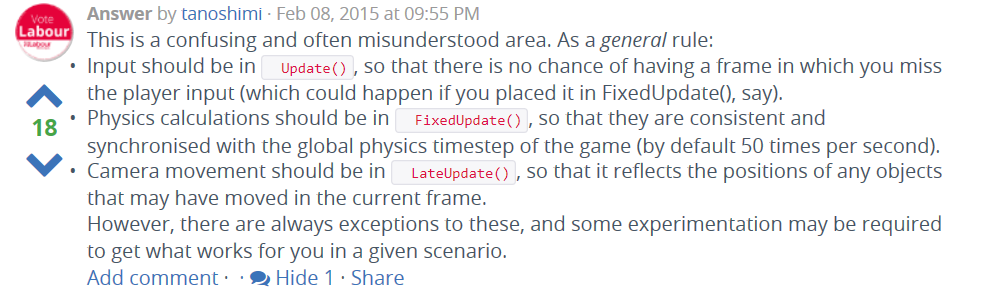 lapis plaza
That wasnt really for making physics updates in fixedupdate bit rather updating camera that follows rigidbody object
jagged shale
well camera updates should be in fixedupdate or according to this guy, lateupdate
I just ran into this issue with someone's asset 2 weeks ago
they had terrible camera stuttering and said it was due to a bug in 2018.3
but I found the same issues in 2018.2 and came to find it was just their code. They had all the camera stuff in update. I moved it to fixedUpdate, and smooth as silk
(but now I may try lateupdate and see if it's better/worse)
I think I learned this from Unity's character controller, they make a point of explaining how camera stuff should be set up. (Or It may have been one of Unity's tutorials I did years ago. but in my brain it's become an indelible fact that camera goes in LateUpdate() )
I wonder if that's why Cinemachine camera stuff is so stuttery
would be ironic if they don't follow their own advice with that.
but I assume it's because it's so process heavy
they tack a ton of stuff onto that camera movement.
lapis plaza
You cant have fully smooth camera movement if you only use fixedupdate for it
Also using fixedupdate doesnt make any sense for most camera scripts as you end up calculating extra stuff that is never used if that main loop has more than one physics update
jagged shale
well that's probably why he suggests lateupdate
and really you make the point for that
so i'll definitely have to try it
somber bison
late update IS update. it only ensures that it happens after your other monobehaviors call update
it is not its own separate update
somber bison
fixed update and update happen on an entirely separate clock
update and late update happen in a predictable order every frame
lapis plaza
Well.. Technically fixed updates run on same main loop iteration too :p
@somber bison not true
somber bison
yes, but not predictably per frame
jagged shale
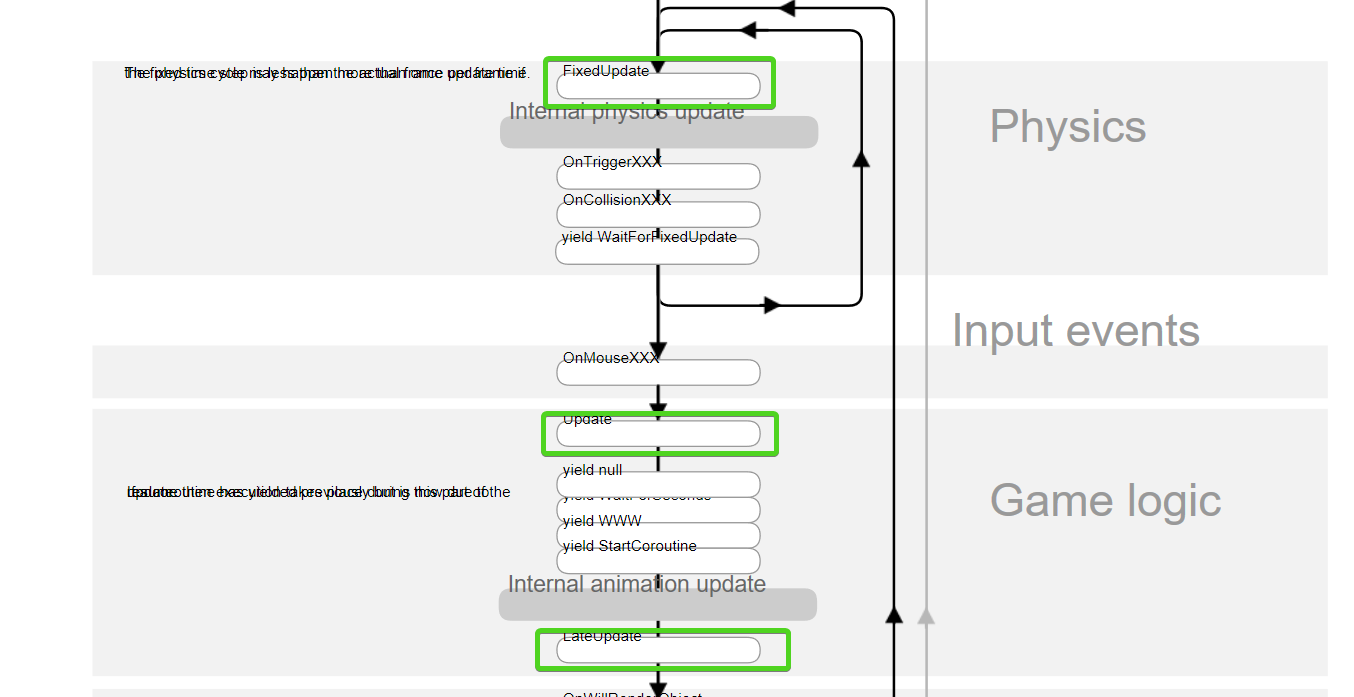
the key thing being it happens after animation updates
which at least for some things, probably is best
somber bison
notice there are no conditionals in that flow between update and fixed update
jagged shale
it's not a 100% accurate representation
somber bison
physics can run, then outright run again without ever running a lateupdate
lapis plaza
Not sure what you mean by that
jagged shale
it's just a guide for order of execution
jagged shale
yes fixedupdate can execute multiple times in the space of one update
I never disputed that
somber bison
It does get more complicated when monobehavior execution orders and stuff get considered
lapis plaza
I'd disagree on that too
tropic hamlet
why not use player-update ? you can contol the order of all of this yourself with the player API.
then you will realise you aren't fixing it still
lapis plaza
Well.. That makes things more complicated
jagged shale
man this page renders so badly on my browser
lapis plaza
And yeah, it is not solution here
jagged shale
let me try another
somber bison
My only clarification was that when the question is "How do I solve for an unknown amount of fixed updates causing jitter in motion" is very often answered with the suggestion "put it in lateupdate", which does not help the situation.
tropic hamlet
- you can control when physics update, or even trigger it manually
- you can control the exact loop order and when too
you have zero limitations in that respect.
the problem is deeper than physics
jagged shale
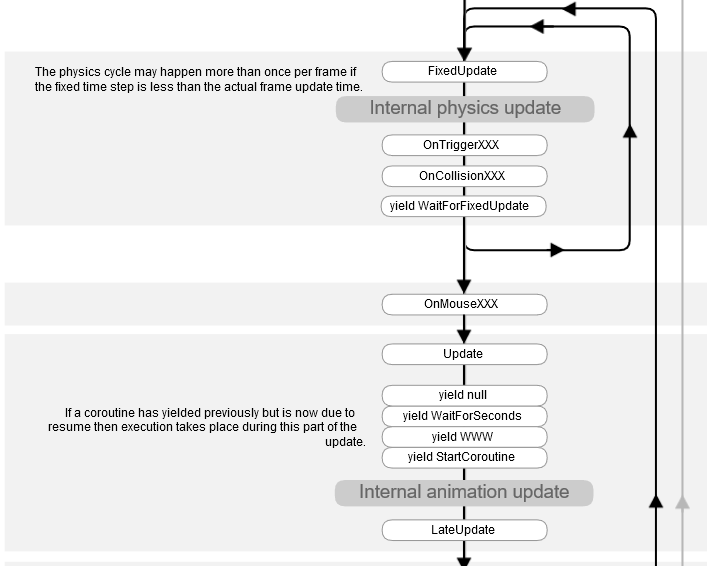


coroutines is another thing.
I think that guy's code used a lot of corutines
i feel like i tried lateupdate though and it didnt' work either.
tropic hamlet
I don't have a single co-routine, they suck bad for perf and have zero purpose other than waiting for a web query
jagged shale
but i'll have to try again to be sure
lapis plaza
I dislike coroutines too, people overuse them
jagged shale
i the end getting a stutter free camera is the goal, not what is technically right 😛
tropic hamlet
honestly it gets on my tits that even Unity's own docs championed co-routines for so long when time slicing it manually is more efficient
somber bison
I like coroutines for "asynchronous" batch behavior, like instantiating a set of things for future use
tropic hamlet
but it's not...
lapis plaza
I've seen people using them to implement "update" again
tropic hamlet
thats why they're so bad. people think co-routines run off the main thread or something. they just get called in playerupdate like any other at set times
somber bison
I know it isnt asynchronous, so I put it in quotes
it just spreads the call across frames
tropic hamlet
its just time sliced and creates garbage by default, setting you up for pauses.
jagged shale
coroutines aren't async, so why would they use it to make 'update' lol
lapis plaza
I guess some people just feel they do good when it is different from stock
jagged shale
i truly try to stay away from corountines
tropic hamlet
why not just set a var by current time, then each frame compare var subtracted by current time and that will tell you when to call a function. you don't even need to tick each frame
somber bison
do you prefer something along the lines of
if (doindex<dothing.length) {
dothing[doindex];
doindex++;
}
if i need to do stuff across frames, that's what update is for
somber bison
That feels like a messy way to avoid coroutines
tropic hamlet
that's what the compiler is doing but it also carries along a lot of cpu memory fetches, allocations and more that it doesn't need to do
its actually slower than the same job
somber bison
True, but I enjoy coding for readability and maintainability as well as efficiency
tropic hamlet
its basically thinking about ECS and going.... this is the EXACT opposite of ECS
in fact unity pobably started all this thinking looking at how to evolve coroutines and threading
I know people like them but just take the pain and stop it. use ECS
be powerful nerds of STEEL
somber bison
Ha
tropic hamlet
fists of logic and google
somber bison
making a short ECS exploration project has been on my to do list for a while now
tropic hamlet
I shipped a mobile game that did these horrible crimes and I knew about them at the time too:
-
moving mesh colliders (this is very old physx so you could have moving mesh colliders)
-
using invoke
this was 2010 on mobile 😂
60fps as well
I think we try too hard overall and should stop caring :D
somber bison
- shrug. sounds slow
- GASP
lapis plaza
Yeah. Move all to 2019.1, enable incremental GC and pool nothing
tropic hamlet
I mean I talk a big game for the right thing to do but in the end I do a lot of wasteful stuff as well because... there's just no time really and you get worn out being mr perfect code practise guy
somber bison
Yea, I like to think "fix what is slow", not "fix what you think might be slow in theory"
tropic hamlet
love that too... I mean we pick a good starter algorithm usually so no optimisations are really needed. if they are I'm far more likely to time slice at the end with some kind of little manager gnome smoking cigs and going "ok mate your turn to run... who's next?"
its an easy fix
I will HPC# all later when unity's finished wondering why their nuts have been bolted
somber bison
void OnTriggerEnter(Collider other) { //handwritten collision response }
tropic hamlet
moving mesh colliders are fine but they must be convex now. before they did not need to be, and would incur horrible performance .. I believe I only used it for raycasts anyway - wanted a one-sided raycast shape you couldn't move into but could move out of
it didnt incur horrible perf because it was basically just a few polys in a specific shape :)
I was lazy and let physx do my heavy lifting
jagged shale
hehe
blissful shore
Unity Coroutines need to be relegated to the archives if history, only to be used as an example of what not to do.
 bronze token
It would be nice if unity could implement awaiters for async to replace the coroutine yields and make people's transition to async easier, currently you have to make up your own or use a third party asset.
sly violet
Maybe throw events?
tardy spear
Any Mac folks out here? Here is a build of Unity 2018.3 Mac Editor with PhysX 4: https://forum.unity.com/threads/physx-4-0-in-unity.634960/
Unity Forum
Hi everyone,
(this post will be edited to reflect the latest changes)
We're aiming at updating our PhysX version to 4.0 this year. PhysX 4 was...
pearl warren
any chance the unity team will look at this: https://feedback.unity3d.com/suggestions/physics-contact-modification
The PhysX SDK allows developers to modify contacts so they can: "... implement sticky contacts, give objects the appearance of float...
tardy spear
Yes, we will.
pearl warren
That's great news, any time frame? 😃
tardy spear
Yes, any time frame. Thanks.
lapis plaza
lol
tbh, I'm afraid by the time that happens, it might be irrelevant to me :p
but would still be fancy to have it
lapis plaza
this is one of the major downsides when you use Unity
I implemented physx contact modifications on UE4 in few days
pearl warren
yeah cpp
lapis plaza
(yes I have public github fork of UE4 that has this if anyone is interested)
pearl warren
why is it not in master
lapis plaza
I've only sent Epic PRs that they are likely to merge
pearl warren
its great though that they OSed
the unity source comes with a SUPER restrictive EULA
lapis plaza
funny thing is that UE4 now actually got partial support for them but they only did half of the implementation and I'm fairly certain that they based it off my fork as they use exact same naming conventions on places where it makes no sense 😄
(they needed that for Fortnite so they just threw in a stub they needed for that internally)
I've extended their setup on my fork for newer ue4 versions too
pearl warren
only reason UE gets so much love right now is fortnite anyway
lapis plaza
pretty much yeah
pearl warren
once that dies UE is back in the sack
lapis plaza
well, they always evolve the engine based on their own projects
tardy spear
you gotta claim your share of Fortnite for that patch Olento 😃
lapis plaza
ha
pearl warren
i really realy love unity
I only have two gripes with it
- move to .net core. please. now.
lapis plaza
I actually did apply for their devgrants but I think I've trashtalked too much about UE4 on their discord to have any chance of getting that 😄
naive summit
@lapis plaza come live near me. You can walk up to their HQ and tell them how much their engine sucks
lapis plaza
I've also implemented fixed timestepping for UE4 and maintained nvidia blast for it
well, it's not all bad
it just doesn't work like I'd want
but no existing game engine does
pearl warren
unity has fixed time step by default but somehow under the hood some things aren't right and things stutter a lot
lapis plaza
that's not the fault of the fixed timestepping code tho
pearl warren
interpolation is bugged
because interpolation is based on time.deltatime, which is spikey and jerky
lapis plaza
technically yes but it's not even issue on the interpolation code itself but how deltatimes are handled
you can't really mess up interpolation code easily, it's fairly simple
tardy spear
with Physics.Simulate() you can go variable if you like FWIW, since Unity 5.6
pearl warren
yes but that makes it way too undeterministic
lapis plaza
we could debate about physx determinism too 😄
pearl warren
it's not
lapis plaza
but yeah, I'm hugely favoring fixed timesteps myself
it's just more consistent on custom physics
tardy spear
another is - could it be possible to simulate manually and override interpolation with our custom code?
lapis plaza
that's what you have to do today if you want butter smooth physics on unity
that deltatime issue still makes me wonder
it has to be some inconsistency on how Unity delivers rendered frames
as Unity measures the deltatime itself just like every other game engine out there
naive summit
Is interpolation based on average frame rates or last?
lapis plaza
like, rendered frames get displayed at even pace but deltatime is varying
so this will make it jitter
naive summit
It would make more sense if it was sampled off say 10-30* frames
pearl warren
yeah Olento your right, but we have no way to access the interpolation values in unity engine
tardy spear
there's been a few bugs in interpolation that I fixed in 201 7 - we were apparently using float instead of double in a few crucial spots, a mad russian hacker sent me an incredible repro that proved it I recall
lapis plaza
you can smooth the deltatime but you need it still to react to sudden framedrops
I think it was broken on 5.6
at least people ranted a lot about it
naive summit
Sample 30 frames should be fine if you really think about it
tardy spear
the code I fixed was like that since the beginning of time
pearl warren
hmm
lapis plaza
btw I've tried smoothedDeltatime but it's not enough, I don't think it samples that many frames
naive summit
If your game is running at 30 or under fps your game is going to look crappy anyway
lapis plaza
it does help a bit but not enough
tardy spear
as in - I tracked it down back to when Joachim committed Unity 2.0 from svn 😃
lapis plaza
you guys use perforce or git now?
pearl warren
you can make your own deltatime, and own deltasmoothedtime if you wish but you can't submit those values to the unity interpolation
lapis plaza
or still svn? 😄
naive summit
@lapis plaza til unity already implemented my idea lol
tardy spear
we're mostly on Mercurial actually
lapis plaza
@pearl warren if you make those yourself, just step the physics simulations yourself
naive summit
Didn't know smoothdelta was a thing
tardy spear
however the new ecs stuff happens on git
pearl warren
Yeah its great
lapis plaza
yeah, I'm a fan of that
pearl warren
I only don't get why multiplayer is kept in the dark
lapis plaza
I like to tinker with code
naive summit
Speaking of packages, does the new post processing stack (v2) also add 15,000 shades to be compiled into your build like v1?
lapis plaza
gives me confidence that if there's a breaking bug, I'm not helplessly at the mercy of Unity fixing them for me
tardy spear
Punfish - off topic I'm afraid
naive summit
Can't tell you how annoying that is. Every time I have to rebuild a project post processing takes up an insane amount of time.
pearl warren
V2 is depricated sooner than later I think, it moved to SRP
lapis plaza
in that other engine, I usually fixed minor bugs and just PR'd them as it was faster than writing details issue report and get anyone to react there for it for few engine versions
at Unity, I could only do that for few minor SRP bugs
pearl warren
yes i agree with Olento
Unity should def move to open source on github
with a restrictive licence or whatever
just like how the competition is doing it
pearl warren
you can keep those bits closed
lapis plaza
my hopes are that they'd do slim DOTS engine core that they could share at some point
but
this would also require major licensing changes which Unity is not wanting to make for sure
altho this isn't as big of an issue now like it was on Unity 4 days where free side was totally limited
and knowing unity, if they even did that, it would be for Pro users only :p
this is funny btw
because if you watch any recent ECS talk from Joachim, he keeps saying Unity is giving ECS etc packages (c#) source codes to Unity Pro users
this has puzzled me a lot, like, doesn't he know the terms they operate under or is that some plan that has never realized for them?
because right now, almost all new package manager packages ship with c# sources
for all users
I really hope they don't do anything stupid and move the source access of those again to pro only because that was the mistake they did before Unity 5 and lost a lot of users to other game engines
(they limited all the useful engine feats to pro customers on Unity 4 and before)
pearl warren
that worked fine
i was on pro licence back then and still am
no right now they do give unity source
but only to big companies
that pay big
lapis plaza
I'm on plus still
I wouldn't even need to be atm 😄
oh I'm now talking about things like ecs source code
Joachim has mentioned many times on Unite talks that c# source code is available to Unity Pro customers
when in reality it's available to all Unity users
pearl warren
yeah its just on git
lapis plaza
actually ECS code is not
(in package manager, full sources)
kinda wish they had that on git because now I just maintain local git repo to see the diffs from version to another
lapis plaza
noticed this on FPS Sample update that just dropped into github: HitCollision no longer uses Unity collision system for queries against moving colliders. For lag compensation server needs to do queries using different historical data and moving Unity physics colliders multiple times per frame is very inefficient. Now queries are handled using custom collision primitives and burst jobs. The structure of the collider and history data is still WIP.
that's.. interesting
wonder if they use this on megacity sample too now
blissful shore
that's what I want.
All I need are the spatial query stuff for my game. All the physics is custom anyway since it's a platformer
tropic hamlet
I don't see why a thing can't be simply simulated until more complex simulation is needed, such as 1000 ecs characters, but only the nearest ones have a full physx representation, etc
 fallow gorge
that fps sample update is cool, tempting to try and cut and paste all the ecs collider stuff into my project but I should probably hold off for official ecs physics 😬
lapis plaza
could be that they use this as some proto platform for some of the systems on it
but yeah, really curious to see what happens with megacity if they deliver the project on GDC like they hinted they might
at the reveal, it looked like there was no collision at all for it
fallow gorge
does megacity even need physics?
lapis plaza
but if they have system for it now, they could setup one for it
well, you'd fly through buildings if you don't have queries
fallow gorge
i guess i never thought of how they'd handle a public demo vs just a video presentation
lapis plaza
for the movement they probably have naive RB physics integrator
like you can do thing that handles that in really small amount of code
for example, physx's vehicle substepping code has first order euler integrator that's like 20 lines of code
and yeah it doesn't really "need" physics but it would be nice touch to have collisions
even if it didn't even make collision responses but just turned the vehicle away from walls
fallow gorge
i think i kinda assumed that you would just go through buildings but now youve gotten my hopes up for basic physics
lapis plaza
and since they have basic setup for fps sample now, they could reuse it on megacity too
but who knows 😃
oh right, that new system was only for dynamic collisions
hollow echo
The mega city demo had no physics when they showed it and you could fly through buildings
lapis plaza

GitHub
A first person multiplayer shooter example project in Unity - Unity-Technologies/FPSSample
tropic hamlet
hm
stuck bay
@manic portal If you use Houdini I have V-HACD plugin for it with export and setup script for Unity. I wrote it around 3 years ago to have engine agnostic version.
I didn't looked at it lately but it still works and have many additional things you will not find anywhere else.
tropic hamlet
That sounds really cool, is the plugin freely available or?
it might be a nice share for @tardy spear if he hasn't seen it and it has source. All things help ofc
The additional features part is interesting
Regarding "flying through buildings" I don't really think it's a problem to fall back to local monobehaviour game physics + local representation as you move through the world as an interim solution.
in 2015 I generated a 5 mile wide city / env which did this fine with the same granularity as the megacity demo. The differences were that I simply pooled everything in sight, used umbra on proxy vis and used a basic grid (not even a quad tree). Ran around 400fps on my 780 ti back then, so the visual aspect of megacity could always be approximated but what interests me about megacity's physics is that it'd lead to much more DYNAMIC stuff, such as destruction and so on........ physics in this case are usually baked or even an animation so it's definately going to be about how dynamic or even how unique the visuals are (mine did not stream, but pooled)
What excites me about ECS/DOTS physics is just how dynamic this stuff could be.
stuck bay
I don't share my stuff openly anymore, but I can add collaborators to my private repo.
 thin halo
I'm trying to implement a pause button in a VR game which relies heavily on physics. The most simple solution would be to have Time.scale = 0, but .... I would still want to have a physics based UI during a paused game. One approach I've seen is to grab the velocities of rigidbodies and add .sleep() to each object. But I have a feeling this would also cause quite a few glitches and doesn't solve the problem of pausing all spawners, animations etc.
Is there a third option?
Is the new multi-scene and multi-physics functionality in 2018.3 capable of handling such a case?
pearl warren
why not set all rigidbodies to iskinematic = true?
animations can be frozen too by disabling the animator i think
about your spawn script, well thats simply by having a check there if the game is paused?
thin halo
I can see several edge cases where this might not work as expected (the player obviously wants the same effect as hitting a pause button on remote), so things shouldn't get reset, just freeze. I have some objects that are spawned and use an animation, so disabling and enabling the component would just reset the animator controller.
even setting the animation speed at runtime just resets the FSM of the animator
pearl warren
if you disable an animator on a skinned mesh renderer the state will be frozen, enable it again animator will go on where it left off afaik
about multi scene physics, i suppose you can seperate your physics UI like that, i'm not sure if there are specific time scales.
You also pause your particle effects etc
it's going to be hard to get this right.
thin halo
So the animator pause with speed works from script (I've just tested it quickly by typing in the editor ... wrong approach). But as you mention there are so many things in a scene that depend on the time scale, like particles, audio etc.
so it's setting one value vs. writing a ton of sripts to hold and release values , with many potential problems
I haven't found so far anything concrete about the multi scene physics(since it's a new feature), but if they could have separate time scale that would be ideal. I could then have all the UI buttons, knobs and sliders on one scene and all the game play objects on another.
fun little thing I also found was that as SteamVR keeps tracking, using just the Unity XR also freezes the controller tracking when you set Time.scale to 0 😃
pearl warren
😦
pausing audio works too
and particles can be paused too
it's a lot of work i agree
i dont know about multi physics scene time scales
i havent found something in docs so far
thin halo
I'm aware this is doable step-by-step, it's just such an overhead for something that could be setting 2 parameters.
pearl warren
I think i saw it requested on the forum somewhere actually
I don't see a way to set physics time scale per scene so far
so i doubt this is an option for you
thin halo
Well .. this would be super useful for many VR projects, where you want to slow down, or stop time and expect the player to still interact with the scene. Doing something like bullet-time means that your player moves with some crazy speeds and adds enormous forces to the slowed down objects. So again something that could be handled with one variable requires a really complex system of clamping the interactions of the player., dealing with all the edge cases.
thin halo
I'm wondering if recreating the physics of the few buttons I have wouldn't be easier at this point 🤔
pearl warren
nevermind they just kicked out the feedback from their website -_-

Unity Forum
On February 28th the Feedback website will shut down and be redirected to the Unity forums. This will be the primary source of community feedback until...
thin halo
oh wow ... they removed it completely? 😕
lapis plaza
@thin halo just disable the automatic physics stepping and call physics.simulate on your own
If it is a desktop vr game, you could do that on each update anyway to get solid 90Hz physics that match your gameplay
thin halo
Could you clarify? How would a set-up like this work?
lapis plaza
that autosimulation is enabled by default and Unity steps your physics updates automatically
but you can turn it off and run your physics steps on yourself
Unity also uses FixedUpdate for physics stepping by default but if you do 90Hz VR game, you'll get more responsive physics if you only do one Physics.Simulate(Time.deltaTime); on Update
if your own gameplay scripts rely on physics, make sure your physics update script runs first by either altering the script execution order (https://docs.unity3d.com/Manual/class-MonoManager.html) or by manually modifying the playerloop to run your physics step right before Update (this is more complicated)
@thin halo
so with a setup like this, to pause the physics, only thing you have to do is make sure your physics update script doesn't run that Physics.Simulate while paused
that's it
lapis plaza
from 2019.2.0a7 release notes: Physics: Upgrade cloth lib from deprecated PxCloth to NvCloth.
tropic hamlet
noice... apparently just a surface change and refactor more than perf
lapis plaza
it's different lib
Nvidia Cloth has replaced PhysX Cloth
and this is basically a required change so we can eventually get PhysX 4.0 which doesn't have the old cloth lib
but it's a good to update it to more recent lib anyway
for example UE4 moved to NvCloth ages ago
pearl warren
apparently NVcloth is simply PhysX cloth fork
jagged shale
as long as it does cloth well, they can call it Shirley for all I care 😛
lapis plaza
@pearl warren it's nvidias new cloth lib, it's replacing Apex Cloth
nvidia deprecated the whole Apex set like year or so ago, including Apex Clothing, Destruction, Particles and Turbulence
new cloth solution is NvCloth, new destruction solution is Blast, new particle thing is Flex and turbulence is replaced by Flow
lapis plaza
afaik, yes
lapis plaza
was looking at upcoming GDC talks, spotted this: https://schedule.gdconf.com/session/physx-4-raising-the-fidelity-and-performance-of-physics-simulation-in-games-presented-by-nvidia/864958
but if they don't put that vehicle talk behind paywall, I'm genuinely surprised :p They tend to do that always as these seem to be the talks people want from physics talks
only exception I can remember to this for recent years have been the rocket league physics talk from last GDC
pearl warren
There is apparently a new Vehicles physx sdk for Physx 4.0
tropic hamlet
will have to see how it goes really, no guarantee it'll be all that useful
lapis plaza
@pearl warren I doubt it
I've read their changelogs almost religiously, haven't seen anything major new for vehicles
lapis plaza
pearl warren
that's what triggered my intrest
lapis plaza
ah
it's probably something that's still coming up
wonder if it's totally separate SDK now
I hope so
also hope it'll not be as messed up thing as physx 3.x vehicles have been so far
that thing would require a rewrite
lapis plaza
it's not just Unity's implementation
even if they exposed everything, it wouldn't be great
there are just so many things wrong in their vehicle code
I'd rather have no vehicle code in physics engine internals personally
but rather things that let you implement better vehicles easier on your own
I don't really know any physics engine that has great vehicles out of the box
they are just wasted resources IMO
pearl warren
that;s quite sad really
i would disagree
good vehicle code can help many developers
lapis plaza
that I don't deny
pearl warren
besides it should not affect performance of the physics engine
unless you actually use them
lapis plaza
I just don't want to see stuff like that in the physics engine core if it's half baked implementation like I've seen on every physics engine I've seen vehicles at so far
tropic hamlet
Like Character Controllers, Vehicle code is typically going to ship in prototype state, because they're super unique really, to each game.
the nvidia CC is recognised by nvidia as a prototype tool, a starter library for characters. But Unity just implemented that way back when as a first class citizen (which wasn't that good as you know). Same for wheel collider. Same rationale from both companies.
I currently have rolled my own character controller which is just a capsule and normals, and it does everything I could ever want. It's somewhat a special hack but it allows to go from physically correct to arcade in response
jagged shale
well... there's recognized good ways to do things and recognized bad ways. I don't think it's asking too much they do it the good way, if at all.
tropic hamlet
not even a big file, just one script. stuff is simple if you know what your own game needs
well my grandfather was a royal engineer
and he used to say stuff like "don't do a job if you won't do it well" and "no good comes from a bad start"
which kind of makes sense for an engineer in the army back then
haha
jagged shale
yes
tropic hamlet
thing is young hippo looked up to him and took these lessons
jagged shale
the pogo sticks unity uses for wheel colliders are just bad
tropic hamlet
lol
tropic hamlet
They are alright but I have way better vehicles just moving a rigidbody and knowing normals. The rendered representation doesn't match the physical one
so the suspension's faked a tad but it's super usable etc
I just do all my physics like that I guess
jagged shale
someone shared a pic somewhere of what someone did for their vehcile
and i wish i still had the pic
basically they just put it on 4 spheres lol
tropic hamlet
lol ye olde spherecar
jagged shale
but it worked better than the default lol
tropic hamlet
the key to all this stuff really is getting the movement right, it doesn't matter if its a sprite or whatever
then you just get good info from the env and off you go, give it a good old rub
jagged shale
yes, only problem with spheres is, it's just as happy to roll sideways as forward 😃
tropic hamlet
Sounds sort of fun
blissful shore
I recall a contract project I worked on when I was just starting, and we still used Torque.
I tried for hours using the sample vehicle to get it to play nice with my Fuzzy logic driving AI.
It bounced once, twice, and then into infinity and hard crashed the entire engine.
We faked everything after that. Vehicles, like a lot of character controllers, are a special breed of RYOC
tropic hamlet
Can't agee more if I tried :)
Obviously for a Forza thing, that's actually quite a bit safer, you can stay in sim land, like Edy does
Gta's cars are really probably just way simpler than people expect
jagged shale
I've tried some car controllers in unity that were actally pretty nice