#archived-networking
1 messages · Page 59 of 1
 vital hawk
also do note that you can run multiple physics scenes in unity nowadays, it's bit tedious to setup tho
 unique anvil
I'll watch it now. If I don't have to reinvent the wheel, then I won't but I can't find any good alternatives to RBs for collisions/physics
I figured people crashing cars online wouldn't be such a rare case of examples to find
vital hawk
it's the hardest thing to do well on any online game with vehicles
so wouldn't expect tons of nice examples around
unique anvil
I'd love even a trash example to work off of at this point 🤣
vital hawk
the main issue is that there has to be a dynamic collsions response from two dynamic objects where others position is unknown at the time of impact and even one floating point digit difference can bounce the collision on opposite direction
fps etc online games usually don't have to deal with this at all
it's quite like this when it comes to networking: https://pbs.twimg.com/media/BySFUKIIAAAwS4k.jpg
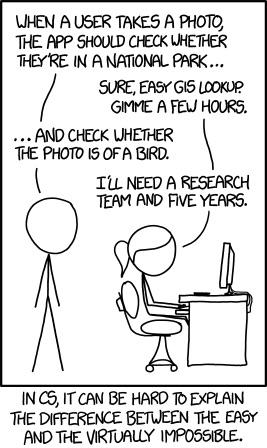

altho that example is now outdated as it's quite easy now to tell if some image is a bird :p
unique anvil
in your professional opinion at this point -- think chaos like destruction derby style -- plan on ditching the RB?
vital hawk
although most collisions between vehicles are not that hard
unique anvil
haha true. I have the FPS portion of the game done...it's now the cars
vital hawk
I wouldn't ditch RB unless you make some online tank game or something where vehicles move really slowly
unique anvil
nahhh typical vehicle speed...nothing absurdly slow
alright so plan on keeping the RB...just dig in further about the best way to get the collision physics to work well. Hopefully those GDC vids will give me some pointers
vital hawk
thing is, even some high profile racing games have horrible player vehicle collisions online... it's just hard problem to solve properly and always super custom to your gameplay
if you can let players sim their own collisions and try to sync other players collisions soon after your local sim, you'll get best feel for the individual players
but there are always hacks needed to hide the artifacts
unique anvil
Sorry to be dense about this topic, but what kind of artifacts are you referring to? Like playerobjects getting out of sync during the collision?
vital hawk
I mean that since you can't make this 100% deterministic and if each player simulates their own vehicles collisions, they will differ between eachother.. like if player A collides player B, you need to sim locally both on player A and B and then sync other players data shortly after the collision somehow (remember that each player would simulate their own collision responses in the end), that WD video has example of this
there are some things that you can do to force the collision responses seem closer to eachothers on both player sides, but these are all hacks
basically you could just use some past data which you know is known by both players and predict the collision response from that if it's within the margin of 100% hitting the player.. you could try to heavily quantize the data prior to impact to force more similar values to both players (but this could go horribly wrong if not done right)
unique anvil
ahh. sheesh. I'm definitely in over my head here with this. I'll go watch those videos now and hopefully come out of it with a better grip on what I should/need to be doing
vital hawk
I dunno if this is any help but could give some ideas: https://gafferongames.com/post/networked_physics_in_virtual_reality/
that has Unity example too
unique anvil
hey anything could help. Some suggested turning the RB kinematic in oncollision and then applying force from there to simulate the physics and another VR example showed them doing that with throwing a ball but it was mainly for just when attaching the ball to the hand...but your example seems to be different than that
if I could turn both players kinematic onCollision, add force, then turn off kinematics very fast it might work out -- I haven't ruled that out yet -- although I'm not sure addForce works on kinematic RB....but even getting the RBs to move over the network barely works right (stuttering, lag, etc.)
unique anvil
I was thinking that if I had the server RPC the force on the colliding cars, it might translate well to all clients
but again, I'm not well-versed on networking physics (or networking in general) at this point
 graceful zephyr
@unique anvil the way to go is a custom deterministic physics engine purpose built for this, it can replicate and predict the physics perfectly
unique anvil
so an engine on top of unity's?
I haven't researched anything along those lines at all. I'll check now.
graceful zephyr
i mean make your own physics engine yes
or just fake it
via client auth and fudgeyr
those are the two options
unique anvil
are you able to provide an example of doing this? Right now I'm using RBs (non-kinematic) and things get out of sync once a collision's relative velocity is anything too high. Each player is local authority over the vehicle. No player is server. The RBs eventually sync back up, but we are talking about a 5 second difference between the point of impact and the reaction
and then possibly 20-30 seconds for the syncing to finish so all clients see the same thing
say I fake it - could you give an example of what that would look like? Is this sending CMDs/RPCs in OnCollisionEnter? Or am I not sending anything via CMD/RPC and letting each player run their own collisions and letting the NetworkTransform sync it? That's what I'm doing now, and the NetworkTransform is getting out of sync brutally
 jade glacier
There is no cheap and easy way to do extrapolated networked physics. There is a reason all of the free libs available either do no syncing of rbs, or only sync as interpolated states. @unique anvil
NetworkTransform will faceplant hard, its not even good at state interpolation.
But my asset and Whale's (which are like NetworkTransform only much better) still only do it with state interpolation... all non-owner instances are made kinematic and moved with interpolation.
unique anvil
what about SmoothSync? It helped with basic movement significantly right out of the box. They told me to either have the server own everything or to fake the physics...but again, I can't find a good example of how to fake the physics because changing the kinematics on collision/adding force doesn't seem too viable
ah ok didn't see your last line before I sent that
jade glacier
That is whale's, its still state interpolation
same as mine, which is Simple Network Sync
that is the only way to sync physics without moving to tick based input syncs and extrapolation
you aren't going to fake out a cheap answer that works like Rocket League, that is a finely tuned system based on the game mechanics and complete control of the input system and its interaction with the physics simulation
To get close with PhysX you will want to be in 2018.3 or newer and make use of the ability to call Physics.Simulate() yourself... but even then its not deterministic, so it will get spendy on the resims
And if you haven't done basic networking stuff yet, I wouldn't even think about going into ANY of that yet.
you need to first build out an entire tick engine and handling for tick/buffer alignment over the network and such. Learning to do this stuff takes years.
unique anvil
oh no the networking stuff is basically all done (aside from matchmaking) at this point -- even have the dedicated servers up. The major issue now is of course syncing the collisions. If I can even get it so where the vehicles aren't shooting through the air or diving in and out of the ground like mermaids I'll be happy. I'm not looking for GTA-level physics collisions, just something reasonable.
I'm just getting caught up on how to actually "fake" the physics, when I have non-kinematic rigidbodies. OnCollision = kinematic, server add its own force, OnCollisionExit = non-kinematic? Is that even "faking" the physics as people speak?
Trigger-only colliders with raycasts?
jade glacier
any kind of faking physics usually results in hitchyness, since all of the disagreements and corrections make for ickyness
unique anvil
I like that song
jade glacier
you shouldn't have those issues with kinematic interpolation
Main issue with using my asset or whales will be just the latency
you are always ahead in time of the world around you
That and if you ram into another player... they won't budge locally
you can't predict their reaction, because you are seeing them in the past - so your prediction has a ridiculously low chance of being remotely correct
which is why deterministic sims like fholms extrapolate other players based on their previous inputs, and corrects nearly constantly for wrong guesses
But you don't just tack that on.. your entire system has to start based on that system.
unique anvil
yes the local player budging is what made me think of sending AddForce via CMD/RPC to the collision point -- to at least make a push towards a collision. Won't be accurate, but might be good enough. But then I'm not taking into account Unity's physics.
jade glacier
the latency involved will make that cascade into a complete mess though
what you just described is the entry point into rubberbanding hell
unique anvil
oh yes -- that's the stage I'm at now. Plus right now I'm having an issue with multiple OnCollisions firing on both sides, so that's probably 20 CMD/RPCs being sent out to a couple colliders, which is probably leading to the ~5 second delay between hit and reaction
haha yes -- that is pretty much what is happening right now
jade glacier
yeah, you are just making race condition hell because your underlying tick system doesn't exist
the only way to do what you are trying to do is to extrapolate other players (or remove local prediction of the player)
and you won't do that unless you move to tick based syncs and syncing with inputs, and using states just for the corrections
The reason for syncing with inputs, is because they are much easier to predict than trying to predict state results
All of that though involves resimulation, and lots of it
unique anvil
To get close with PhysX you will want to be in 2018.3 or newer and make use of the ability to call Physics.Simulate() yourself - I haven't looked into that yet at all. That might be my best option without reinventing the wheel here for something that isn't critically important
jade glacier
resimulating isn't a small task in that case
For that to even be a thing, you have to move your entire system to extrapolating other players physics
graceful zephyr
@nocturne bay this channel is for networking questions
not 'networking' with people
 nocturne bay
Oh okay...I didn't know that. Thanks
 neon rampart
Hey, a quick quistion :
Now that Unet is being deprecated, what should we surf for if we R new to networkin?
Whats the name of the new networkin system? Is it even out yet? Or should I still learn networkin by surfing for "Unet" ?
 void burrow
There isn't an official networking system production ready atm.
You could search for things like Photon, Mirror, LiteNetLib and other kind of systems, those are some of the network solutions people use these days. 🙂
jade glacier
I think its referred to as netcode or multiplayer, but honesty don't even follow at all its so far from production ready.
 weak plinth
Is working on local mySQL database any different than on a cloud one? Or is it more or less the same
 gleaming tangle
With Mirror, the Server & Client are ONE project (hence the name). Instead of having one code base for the server and one for the client, we simply use the same code for both of them.
does this mean that mirror is peer to peer?
or like, is it just using one thing to host server, that can also act as client
 gray pond
@gleaming tangle It's server-client model. That just means you don't have two separate unity projects. You do everything in one project. From there, you can do a server build, of course.
gleaming tangle
ehm
how would that work
the copies of the game are clients
but like, I will also have to implement server side stuff into the game as well? and then run it on my server?
jade glacier
You have tests inside of your Unity scripts that check for things like IsServer, IsClient, IsOwner etc
gleaming tangle
ah I see
 burnt axle
Happy new year guys!
I emailed photon to figure if they provide servers or only the api or both, and they said they do NOT provide servers - i have to do this myself. But they did say they provide photon cloud, isnt the cloud some form for hosting since its connected across multiple servers?
jade glacier
Servers for hosting your exe? Nope. They have servers with their own server APIs that you can make plugins for, but pretty sure they won't host your Unity or custom EXEs, that isn't really their particular business. @burnt axle
Realtime is their server API, which you would make plugins for. Its what all of their own stuff runs on.
I have no idea what the restrictions are with Server, I ASSUME its the same API they run, but you run it yourself
burnt axle
Ok, so what do they really use the cloud for then? I might as well just build my own server setup then since it seems like they only provide the API
neon rampart
@void burrow thanks, which one d u prefer for simple networkin stuffs?
jade glacier
Exit uses the cloud for Quantum, Bolt and PUN
Not sure how Bolt works though
PUN doesn't need any server plugins, the cloud server is just a relay
Quantum uses plugins that let their servers do the authority handling of player inputs, so its a smarter relay.
Bolt... no clue.
burnt axle
What does relay mean? And what is the role of the cloud server for the pun framework?
jade glacier
PUN and Quantum don't do any kind of punchthrough or P2P type stuff, all clients send their updates to the server (the relay) and that then sends it to all other clients, or targeted clients
Server plugins are dlls you make that will/can deserialize those packets and do stuff to them them, or in response to them
Without the plugins, each client just bounces its messages off the relay to other clients. The server setup is all about the load balancing, room/game creation and such
For PUN, since the sever(relay) is dumb as a brink without any plugins... it designates a player as "Master" so that you can call someone the final word on things if you want.
Quantum, clients have no final word since its deterministic. The server/relay is primarily there to just be the final word on what each users inputs were each tick.
burnt axle
I see. I think i got a little lost thinking about how the multiplayer framework was supposed to work - i had the impression that an headless game instance was running in the cloud acting as a an authority, but there is of course no need for this because all the game data can be synced across clients and a master server (photon in this case) fine without running an game instance in the cloud acting as a authority
jade glacier
Bolt is server auth, but I have no idea how they integrated that
It originally was a standalone, not sure how they adapted it to work with Realtime
I am not the final word on any of this stuff, I work with PUN2 for my Assets I am making for Exit, but I skirt most of this and just make OnEvent calls of my own
burnt axle
Thats fine, you cleared up how the relay (cloud) part works within photon for me.
I do like the PUN architecture because of the host switching feature.
jade glacier
It has merits and drawbacks for sure
the big drawback being its not a straight up server auth, so for fast competitive games you have to fight with it. The perk of it being that its all very straight forward on the syncing stuff side of things
That and there is no difference between dev and deployment
burnt axle
What do you mean by no difference between dev and deployment?
jade glacier
I'm trying to get my PUN2 extension for Exit into Beta soon, if you want to play with that
burnt axle
The host switching can be bad because your multiplayer experience depends on players network setup, thats a drawback i see with pun
jade glacier
What you write for testing is the actual same servers and everything that you will have with 2 players or 10000 players
burnt axle
I see
jade glacier
You don't have to set up any server stuff
burnt axle
That sucks, it would be nice to have some test servers.
 gleaming prawn
I don't see how that sucks (having exactly the same setup for testing as production, it's actually a strength, no surprises)
In more complex deployments with photon enterprise plans we give as many environments (clusters) as requested by the customer, and that can include isolated ones for any kind of load test.
You can ask me anything regarding Photon @burnt axle
 weak lava
@jade glacier im curious on what you are working with pun2?
jade glacier
I'm extending out Simple Network Sync into a whole component library @weak lava
All tick based so with deferred timings and all like good networking should be.
Currently the Alpha has Vitals/Heath syncing, hitscan syncing, projectile syncing, pickups and such
weak lava
Oh thats pretty nice! Im definitely interested in!
jade glacier
Just cleaning the handling for picking up items and the mounting system. Should have the first beta in the next couple weeks. @weak lava
That's connecting to Asia servers from the US to make the connection reasonably meh
weak lava
Interesting, im excited to read through your code.
jade glacier
its mostly just uncompiled cs, so its all visible
burnt axle
@gleaming prawn I understood what @jade glacier said as test and production servers are literally the same (not just sharing same setup). I think i misunderstood, @emitron probably meant that the production and test servers share the same setup so you can deploy and be sure that it will work exactly like it did on the test server. That of course, is a good thing.
jade glacier
I think you get it
Unless you are making custom APIs, there is no real logic on the server, its just a relay and doesn't care if you are doing a test or hosting a real game
burnt axle
So are the test servers separate from production servers, but share same setup? Thats my understanding.
jade glacier
Sounds like you can get access to isolated ones as needed from what Erick was saying, but that side of things I don't touch so not sure why you would want to or what is needed for that.
The average small user like myself just treats them all the same... you request a room, you have players join it... done. The loadbalancing API deals with making sure all of the rooms are spread around is my understanding.
Not my area of knowledge really though, @gleaming prawn spends a lot of time on that side of things and is a way better resource.
Disclaimer - I am just doing contract work for Exit, I am not an Exit employee, so take everything I say with a grain of salt.
burnt axle
Doubt i will buy enterprise for my game in the beginning. Thinking about it, its fine testing on production servers since i dont need to make the game public yet.
jade glacier
The servers are invisible to anyone not running a client of yours, you aren't putting game logic up on the Photon servers anyway
burnt axle
Exactly. So its fine for testing 🙂
 unreal bramble
Super quick noob question. I'm about to start on a project and am on the fence about making it single player or co-op (I've only ever done small single player stuff). Would I be able to start on it and work on game mechanics and then later implement a multiplayer option if I feel it's needed or will I need to learn how to work with networks and multiplayer from the start?
jade glacier
Adding MP later rarely ends well
But if you insist on doing it that way, be sure to separate out your game into a fixed tick simulation
burnt axle
@unreal bramble It depends a little. Are you a newbeginner to game development? Then its probably better to learn the basics of game development without doing any multiplayer features first. If you are familiar with game development and know how it works, then you could probably just start right away with the multiplayer features. I have thought about this before, and concluded that you spend alot of time refactor your code if you do multiplayer last, so you might want to do it right away if you already know how game development works.
jade glacier
as in do all game logic in Fixed() and only use Update() for interpolation
But even then, making a standard Unity game sloppily ends up with gamelogic spread all over the place in MonoBs
Which when it comes time to networking is going to expose all kinds of race condition problems. And that is ignoring just having to redesign the entire game to play nice with the latencies involved.
So the real answer is don't do that. Start your games as MP if they will become MP
unreal bramble
👍 That helps quite a bit. Thanks guys!
jade glacier
The REAL answer is before thinking about networking, go make a version of 2 player PONG that actually feels good. That will teach you volumes about the issues you will face with networking
unreal bramble
I knew it was a pretty big step, but I don't think I'm quite ready for it just yet.
jade glacier
I would start by just allowing yourself time to go play with tutorials. Your first attempts will fail miserably so don't entangle a dream project with those inevitable failures. Just embrace the fun of making a few garbage fake net games.
That will give you some of the language needed to even start asking the right questions and understand a lot of the jargon thrown around in the networking channels
weak plinth
i am trying to build a network game with dots netcode + dots physics
It seems that there are 2 ways handling the physics timesteps because dots physics has per default no fixed updated loop
- Multiplying each physics velocity by the DeltaTime to compensate the variable timesteps
- need to adjust physics velocity each frame
- Adding an entity with FixedClientTickRate which calls all systems at 60 ticks/s
- needs interpolation for frame rendering which is already build in with CurrentSimulatedPosition /CurrentSimulatedRotation
Which one is the preferred option? Cons/Pros?
jade glacier
DeltaTime being the frame rate based delta time? Definitely not that. You want callbacks for Pre and Post simulaton
You can make your net rate a subdivision of that, like send your state every X ticks
But you do not want to mix fixed time with frame dependent time, that puts you right back in the hell that HLAPI was
@weak plinth
weak plinth
yes, DeltaTime in solution 1 is the framerate based deltaTime
So do you recommend solution 2 where i separate simulation time (i.e. 60 tick/s) from frame rate? (Have never tried out the HLAPI)
Maybe i should add:
The question is referred to the client only. The server is running at at fixed timestep per default.
jade glacier
If that fixed tick is what you do your simulation code on, then yes - that is the way you do it
Update() / DeltaTime is for interpolation/extrapolation only... its purely cosmetic to the local machine
For networking, the reality of your game should be 100% confined to the fixed ticks, unless you start doing some REALLY radical tween-based/cure-based tick system - which you very likely are not.
@weak plinth
weak plinth
k thats nice to hear. then i will go with the fixed timestep approach. Seems alot easier! Thanks!
jade glacier
I recommend not even wiring up any interpolation at first, so you can see clearly what the ticks are doing
Or give yourself an easy way to disable interpolation/extrapolation at the very least
gleaming prawn
@jade glacier and @burnt axle I don't like to simplify photon and say "there's no logic on the server" because that is not true:
- the very basic photon realtime API allows you to upload a server plugin DLL extending the room logic with anything you want, just requires enterprise plan or self hosted photon servers;
- photon quantum has a lot of logic going on in the servers, including full game simulation of needed.
- room plugins is not the only way to implement server logic in photon server, the baseline SDK allows you to wrote everything you want (Albion online for example is not based.on rooms and 100% custom logic running on photon servers).
jade glacier
I should be clear that I mean none of your game logic is on the server unless you are making plugins
gleaming prawn
The only case.in which that applies (just relay logic, interest channels, etc), is PUN...
You don't need to make your own plugin in quantum to have a lot of logic running on server
Including logic you define with data driven options
I just like to clarify, you are correct when refering PUN
jade glacier
of course, the server has no real use for user plugins with quantum, since its all deterministic
gleaming prawn
Which is even more restrictive. Due to it encoding unity data, it's not even practical to write server plugins together with a PUN app
Also wrong emotitron, quantum also allows.custom user plugins...:)
And there is A LOT you can do with that
jade glacier
What kind of stuff would you have the server doing?
I guess all of the metrics scoring and other meta game reports and such?
gleaming prawn
Intercepting commands, validating data, checking back with backend to validade user choices
Sending data for match results
Whatever fancy your mind
jade glacier
Would the determinstic sim not disallow bad user choices?
gleaming prawn
Just during gameplay
jade glacier
Seems like that would cause immediate dsync
jade glacier
Interesting
jade glacier
NP
Though I figured PUN was the basic API + its plugin
Though I suppose more complexity has to exist for like Bolt to exist
jade glacier
Does Bolt have its own server plugins?
yeah, I definitely knew relay wasn't a thing for Bolt, it would make no sense
gleaming prawn
Basic photon server allows.you to write anything in C#; photon realtime is great combined with room plugins (several top grossing titles we have use this combination); and quantum also depends a lot in server logic
Relay makes sense with relay yes
It uses the relay for punch through signaling and as a fallback (just like steam does, as punch only works around 85% of the time)
Bolt makes sense, sorry
It just doesn't make sense with plugins, just like pun
jade glacier
The site indicated Server was for self hosting - does exit host for that at all?
gleaming prawn
Photon server?
jade glacier
I assume for Bolt you build out an exe for the server that is .net
jade glacier
Just trying to figure out how Bolt fits into the whole hosting scheme
gleaming prawn
Bolt is pure unity.client server, so there are two setups
jade glacier
That I didn't know, I thought bolt created a non-unity server build
gleaming prawn
1 - players host the games (listen servers), Inthis case punch and relay come to your rescue)
2 - authoritative servers running the bolt headless builds, that's up to you to host on Amazon, Gamelift, etc
We do not run unity instances on our servees
graceful zephyr
Bolt can only run inside unity, Bolt has support for using photon cloud as a relay for the connection though.
gleaming prawn
That's like any unity headless
graceful zephyr
No erick is correct
gleaming prawn
And even in case 2 there's a use for the relay (help with matchmaking, as it comes with a simple solution for that)
jade glacier
I figured part of the whole integration was making a non-Unity build that ran as a plugin
so... I was very wrong in my assumption
gleaming prawn
This is normally what you do with the free version of bolt
jade glacier
For some reason I thought you built out the entire engine for bolt outside of Unity... so yeah - I totally misguessed
Thanks for the clarification
gleaming prawn
Non unity builds are not possible either with pun or bolt
Quantum or photon realtime (transport layer + photon server) yes
jade glacier
That answered my questions about how Exit could possibly host Bolt servers
gleaming prawn
We don't
jade glacier
yup
 solar tendon
when trying to install MySql.Data from NuGet packages in visual studio i get this recurring error, cant seem to find anything online about whats causing this. any help appreciated
 shell relic
Hey, I'm wondering if anyone would like to go into a call with me to discuss a problem I've been having with instantiating objects over the PUN network? I have asked and done research on this, but after a couple days of no progress, I have no idea what do. Could anyone go in a call with me in the future?
Thanks so much
jade glacier
Typically doesn't work that way in these channels, as everyone is busy with their own work and projects. Best to just describe your problem and show your code here using hatebin.com or other similar service, and if anyone has an idea where you are going wrong they will tell you. @shell relic
 stray scroll
Would you generally simulate player at framerate or physics/tick rate?
; Trying to wrap my hear around the new input system and dots; would you ever need input for framerate or can you poll at a fixed rate?
jade glacier
Absolutely at physics
graceful zephyr
@stray scroll you can technically do either or
jade glacier
You can poll inputs on update
graceful zephyr
Depending on exact system
jade glacier
If you are using a physics engine, that is your tick though
The inputs can be collected whenever it makes sense
If I get your question, are you talking about simulating the predicted player locally?
Since you may be asking multiple questions there @stray scroll
If you are just asking about the input polling only, then probably what fholm is saying, since the new input system I think is more framerate independent than the old one... But haven't used it so dunno
stray scroll
Yeah, I guess I'm asking a bit of everything.
Would generally do partial ticks for predicting client? And if not, would you then instead generally smooth between last two simulated frames in your framerate to keep things smooth or you simply let positions and rotations stick on last simulated tick during the extra render frames?
Yeah, you can run the new input system manually. But I'm not sure what implications it have. They have been talking about framerate independent inputs, but I haven't found too much on it, and if it is only supported through automatic updates.
jade glacier
The typical pattern unless you are doing some totally non-tick based system is you are treating the simulation (physics or whatever logic) as your tick based "reality"
every tick you are [new player inputs + Prev State] -> Simulation -> New State
So the capturing inputs can happen wherever and whenever prior to your simulation, what matters is that you capture them into a struct or whatever that is used locally for prediction and by the server in the same way.
With the old unity input system you generally had to capture inputs at the top of Update() to dance around weirdness with Fixed missing KeyDown and click events
during FixedUpdate() Input.KeyDown is going to return the values form the previous Update() anyway. I assume that has changed with the new input system and you may be able to get more current input values during the pre-simulation callback
@stray scroll
 jade wharf
Word of note, if you want to replay those actions accurately they need to be tick based
jade glacier
To not lose your mind in complexity as well
tween/curve based is possible but reality becomes insanely hard to pin down
jade wharf
I just use tweens and curves to supplement tick based
Makes the time between ticks smoother
jade glacier
yeah, that is interpolation/extrapolation
this is more variable ticks, where they are treated as curves
So you generate ticks at arbitrary times, and they are given more of a timestamp than a tick stamp, and you interpolate/extrapolate from those rather than from even ticks
Its not common, but it is done. Erick posted something about a system in here a while about that did that.
It uses more data and adds complexity, but it does make things very flexible
Another alternative to that would be a higher tick density, where you just skip sending ticks at different intervals for different things, and your system knows to just interpolate using whatever it has. I did that with NetworkSyncTranform I think.
jade wharf
Imagine a variable tickrate like that in a hyper competitive game lmao
People would be raging so hard
weak plinth
The new dots netcode uses some sort of variable tickrate for the prediction which is adjusted constantly
Like in this video here: https://www.youtube.com/watch?v=W3aieHjyNvw&feature=youtu.be&t=1966

In this 2017 GDC session, Blizzard's Timothy Ford explains how Overwatch uses the Entity Component System (ECS) architecture to create a rich variety of layered gameplay.
Register for GDC: https://ubm.io/2yWXW38
Join the GDC mailing list: http://www.gdconf.com/subscribe
Fo...
the adjustment is often +- 1 /2 ticks. Still curious if this affects a fluent movement
jade glacier
That's not actually the same thing
That is clients having variable sim rates in order to make the server happy with its buffer size
There tick rate is the same, it just happens slightly sooner or later on clients, but the average rate is the same
The variable tick for curved based still has fixed clocks. It's just the keyframes can sit between ticks
Talking about 2 different things here though. OW isn't curve based keyframes as far as I know. It's traditional fixed tick with some flex.
weak plinth
i don't exactly know what curve based keyframes are, not an networking expert :D
But isnt the variable tickrate affecting the movement?
jade glacier
It's rare, not really something you want to explore
Variable rate for OW is just speeding up and slowing clients in small amounts is all
OW actively is always trying to shave the servers buffer down to thinnest as possible
To do that, the server asks clients to constantly modify their sim rates
stray scroll
@jade glacier Yeah, update and fixed update input management is a mess. As you say I should be able to input fetch whenever. 🙂
But if you sim at fixed rates, would you interpolating the two previous result in rendering loop, or you stick with your last sim?
jade glacier
For state interpolation yeah
stray scroll
So for local predicted players as well?
jade glacier
Ticks are the history of reality... You interpolate between those in update
You can try to get more complicated on the owner, but I don't recommend it
weak plinth
@stray scroll do you use the new dots netcode?
 spiral glen
whats the recommender framework for making turn based multiplayer games?
I've used PUN 2 but it feels more real time focused
is there a better one for turn based games?
heard of socketweaver but couldn't really find any comparisons
stray scroll
@weak plinth yeah
weak plinth
do you send your inputs directly with the commandata? And how do you deal with inputs like jump or abilities which are only pressed once? Do you send them also once per event or just stream the holding key?
just wondering how you did this 😄
jade glacier
Christ phone
Keys are bools
So turn them all into a single mask, or bit pack them.
jade glacier
How are you dealing with lost packets?
stray scroll
I send all input in the Command stream. And as emotitron said you can simply bitpack them to use barely any bandwith
This is for predicted player ofc
weak plinth
@jade glacier had exactly that problem. Or also the problem that some packets received really late and the server had already simulated the tick
even though i am wondering that this sould even happen because the input data is always sent as an array of the last x inputs
so you can catch up if an packet is lost (afaik)
jade glacier
Late inputs you typically discarded at the server, and force the owner to resim
There is no catch up on the server, that would f all clients.
The server extrapolates the missing input, and that becomes reality. Typically.
weak plinth
with catch up i mean something like in the video
jade glacier
Phone typing here... Lots of errors
weak plinth
i am not 100% sure if this is implemented by unity (have to look into the code)
seems like it is implemented in the commandSendsystem
so it sends the actual input + the last 4 inputs
i assume if a packet is lost then there are 4 more packets which also contain the same input
jade glacier
Only of value if your buffer is that big on the server. The extras are likely so numerous because they are so cheap to send.
weak plinth
yes they are compressed
still struggling to understand the whole prediction system 😄
weak plinth
so i think i found the problem:
if the ping is really high (200send/recv delay = 400 ping) then the commands receive sometimes after the server has simulated the tick
the orange line is the command age (netdb from unity)
if it is higher than the white line, therefore the command age is positiv = bad
This does not happen at 100ms but is out of control at 500+ send/recv delay
not pretty sure if this is correct
jade glacier
yeah, on buffer underun and late packets you generally need to grow the server buffer
either by repeating consumed frames and changing the offset for that client, or by the OW method and asking the client to speed up its sim a hair for a few ticks to grow the server buffer
weak plinth
seems that unitys netcode is not made for higher latencies 😄
jade glacier
latency shouldn't matter for this
weak plinth
it shoudn't i agree, but it seems that the servertick is calculated wrong for higher latencies
jade glacier
Typically the offset is picked by the first frame arrival
for my system I have a target buffer size, so when the first tick comes in, I offset it so that it is that many ticks in the future in the buffer
So unless that first tick was a wild outlier (came early or later than typical for packets from that connection), its a pretty close starting point and then I let the buffer resizing clean things up if its a tick or two from ideal
weak plinth
makes sense. i think the problem is more on the client side, because unity estimates the servertick on the client. And when this estimated tick is smaller than the time to travel to the server than the server has already simulated this tick
jade glacier
Not sure what they made for a choice there, I haven't looked at the new net code stuff (assuming that is what you are starting from)
For mine the client doesn't change its ticks, it just starts counting at zero. The server maintains an offset value for each connection is what I did, and it applies that since it is easy math, and allows for me to change that offset without any lengthy conversation between server and client.
weak plinth
on which project are you working on? is it open source?
the new unity dots netcode has a constant tick on the server and each client tries to predict the tick when a packet arrives on the server
jade glacier
Its a library I am making for Exit to augment PUN2
though the timing engine is from my server auth stuff as well
weak plinth
ah nice i already tried pun2. thought it is p2p only
jade glacier
I use the same stuff in my Simple Network Sync transform
Its relay, so there is a server - its just a very specific kind of server where you don't keep your logic (unless you write plugins for it)
So the model is largely client authority, with one of the clients being designated as "Master", and that master can be used as the final word for things.
It is part of why I use an offset for ticks, rather than trying to chase one client (or host)... everyone ticks on their own count. Right now every connection creates an offset for every other connection - but eventually the plan is to create a server plugin that manages ticks so the server can align messages better.
weak plinth
at first i wanted to use pun2 and tried it out a little bit. After a while i tought that the gamestate which can be stored in the server like dictionary is not enough for my game.
Right now when i look at the unity netcode, i am not sure if it would be easier just to go with pun2 or a similar approach.
Especially because i don't need an anti cheat proof server right now 😦
(my first network game)
jade glacier
Nope, that is something I have been talking to Tobi about adding to the API, basically "Relay-owned objects"
Currently one of the clients has to own objects, which isn't always desirable. The nature of Photons servers is to keep as little of anything on the server, so that it keeps costs and complexity down. But I would like to add some options for giving the relay a little more power.
weak plinth
some sort of relay owned objects would be really nice. but i think if you want to do something like AI enemys you need to host a full unity Application on the server
jade glacier
you would want to make an API for that if you are doing Photon
API plugin that is
I don't know that much about the APIs outside of PUN2 though, so I REALLY can't speak to what the big clients using Photon Server and Photon Cloud are doing. That is more a question for Erick
weak plinth
would be nice to hear. i also tested a little bit of forge remastered and litenetlib
jade glacier
They are all messaging layers, so very little about any of the choices should really change what you are doing
they all leave it to you to create your tick based sim, loss handling, and latency handling
The built in components for syncing transforms and animators reflect that, they make no effort to respect or create a simulation. So best to not rely on that layer at all if there even is one.
Bolt being the only exception. Bolt and Quantum are the only two full stack net libs I am aware of.
weak plinth
havn't really tried out bolt and quantum. Even tough i think bolt is what i will need (server-client). Haven't found any real information about quantum (but i think it is more for rts games)
jade glacier
can't try out Quantum, there is no free versions of it
Bolt was made back in like Unity 3 or Unity 4, so some parts of it haven't aged well, but its still likely the most solid server auth option out there regardless.
weak lava
Is unity working with async stuff? I want to write some sockets with async instead of threading to use in unity.
graceful zephyr
@weak lava async sockets are shit in Unity, the mono implementation of .nets async sockets isn't good
weak lava
@graceful zephyr alright , thanks
weak plinth
If I have server source code from an online flash game, is it possible to utilize it in unity project?
weak plinth
For the netcode package, I did the entire "Getting Started" part of the tutorial but it isn't creating the client and server worlds; Convert To Client Server Entity isn't working. The tutorial: https://docs.unity3d.com/Packages/com.unity.netcode@0.0/manual/getting-started.html
However if I load up a scene included in the netcode sample, it works as expected.
Why is Convert To Client Server Entity not working in one of my new scenes?
weak plinth
Figured out the problem
The sample package has a bootstrapper and uses the scene name string
So the solution is to either add your scene name to this or just call initialize somewhere else
stray scroll
@weak plinth Not sure why they added a custom bootstrap to enable "normal" mode in other scenes. But for your own code I don't see why you would want to add a custom bootstrap
 amber ice
Hello somone already test nakama with unity and can give me his feedback ?
Heroic Labs builds Nakama - an open-source social and realtime server for games and apps. It includes a large set of services for users, data storage, and realtime client/server communication; as well as specialized APIs like realtime multiplayer, groups/guilds, and chat.
weak plinth
@stray scroll I guess the custom bootstraping is the problem, and that you might just be better off commenting out the whole file. I just left what worked for me in case anyone else on this discord searches for the problem
gleaming prawn
@weak plinth Quantum is for Action games (although it also supports RTS, that's not the main genre we developed it for). It implements deterministic predict/rollback (aka Rollback Netcode), which is good for twitchy, super accurate gameplay like brawlers, fighting games, physics based games, etc
We do have a 1-month free trial in place. Send us an email if you think it might be an interesting option for you (it really depends on your gameplay and ambitions). I can also answer you any technical question you might have.
jade glacier
Good to know the trial is a thing now, I'll be sure to mention that when the topic comes up
 hollow sandal
Does anyone know if we license Photon Server, and we want to use PUN2 to connect, do we need to pay the license for Server AND Photon Cloud? Or is it just the server license we pay to Photon?
 teal heron
Is there a way to simulate physics for multiple lobbies in the same server?
gleaming prawn
@hollow sandal when using self hosted photon server you pay for the server licenses only.
Notice we do not offer Bolt or Quantum in that setup (self hosted photon servers).
For Photon Realtime and/or PUN/PUN2 yes
@jade glacier Quantum trials have been a thing since a long time. Anybody who thinks Quantum is a fit should just contact us.
stray scroll
How do you work with the camera rotation of the predicted character. Maybe I'm overthinking it, but only sending delta's and let simulation and prediction handle it will cause surely cause twitches in camera if packet is dropped. But sending full rotation with input will make stuff like teleporters, and logic that sets your rotation problematic. So do you split it up to send pitch as angle, and yaw as delta?
hollow sandal
@gleaming prawn thanks. For Photon Server how is the game logic written? Do we extend the provided server code or use a plugin?
gleaming prawn
For PUN you don't... For realtime there are two SDKs: room plugins (easier to work with) or photon server basic SDK (what Albion Online uses).
But I think you should only go for this cases if you really really know this is what you need
What is the gameplay like, what is the platform, what is your end goal?
Because more specialized SDKs like Quantum and Bolt are normally better...
Notice self hosting photon server is NOT cheaper than cloud (in the end) @hollow sandal .
It only gets cheaper for companies like Epic, when they end up with tons of servers... Even Ubisoft/Nintendo use our clouds
When you add license + servers on Amazon/Gamelift, our clouds are cheaper on a per-player basis
hollow sandal
That's cool - I thought initially self hosted would be the only way to add custom gamelogic, server routing, etc.
gleaming prawn
No
hollow sandal
But now maybe plugins can do all that.
gleaming prawn
you can add gamelogic to plugins
And host with our enterprise cloud plans
Yes, plugins are designed for that
hollow sandal
Can we dev/test plugins on the free tier?
hollow sandal
ok, so if we wanted to create a persistent world (for example like Rust with each server having 250 player capacity), could this be done with the plugin architecture and Realtime cloud?
gleaming prawn
No
250 at the SAME time in the same match?
Maybe yes, but it would be a LOT of work for you to develop culling/scoping, etc
hollow sandal
yes.. ok
gleaming prawn
That's essentially developing the whole framework... Only get into this if you really KNOW what you are doing
This is the same as re-developing Photon Bolt, from scratch, with capacity for 250 simultaneous players in one match.
Notice this is not an easy problem. Epic is not capable to do it with Unreal...
Albion Online holds a lot more than that with Photon Server SDK, but that is an MMO, and they worked really well to design/develop the server code.
So the answer to "Can this be done" is YES... But it depends on you
hollow sandal
Hmm ok thanks. What's the max players you would expect for Realtime normal usage?
gleaming prawn
API wise it's fine...
That's a hard question, it depends on WHAT you call normal usage
hollow sandal
does the problem mainly come down to bandwidth? assuming all player states are communicated to all other players?
gleaming prawn
Realtime with a room has ability to:
- send messages from a client through server directly to another client;
- send messages from a client through server directly to all other clients;
- send messages to server only;
- send messages from server to one client;
- send messages from server to all;
The problem with bandwidth is not PERFORMANCE, is that you should limit bandwidth because:
1 - the clients CAN'T handle;
2 - it gets expensive for players;
3 - it gets expensive for you
That's the whole point of scoping/culling
So I don't know exactly what you mean by "normal" usage
I don't know what you expect the APIs to do... Realtime just has Send/Receive messages (with reliability options, etc)
PUN handles state synchronization for you... Same for Bolt.
Quantum handles 64 players per game FYI.
But again, it also depends on what kind of gameplay, and how you implement it, etc
If you want to implement a survival like Rust now (based on the gameplay), I have only two immediate suggestions:
1 - limit to 50/64 players
2 - use Photon Bolt or Unreal...
I say this because if you had the experience to build the 250 players one you would NOT be asking here...:)
hollow sandal
yes, 100% agree with that 😂
your suggestions are very useful, and thanks for your patience explaining this to me (again) !
I'm relatively new to networking, a whole new set of tradeoffs and understandings required...
I think adjusting the game design to limit players in a single area to 50 is feasible.
hollow sandal
So, does anyone know of any middleware suitable for something like Realm of the Mad God, or Steambirds Alliance? Is it going to have to be custom tech?
weak plinth
@gleaming prawn thanks for the info, maybe i try out quantum if i struggle with the dots netcode 😀
weak plinth
how much latency/RTT/ping can you except from a normal game played within the eu? Measuring from Client -> Server (16ms tick) -> Client
50-100ms
100-150ms
150-200ms
200ms +?
weak plinth
@stray scroll Do you mean with delta the direct button input of the camera? (+1/0/-1 for pitch and yaw input?) As far as i see, unity uses the last received input if the current input has not arrived (or lost). So if you have a continuous input like 11111 then the dropped backed will not affect the movement, only if you have a transition from 1 to 0 for example
stray scroll
No, but I saw how they fixed it in dotssample. What I mean is mouse movement delta xy, that will be converted into rotation of camera/fps character.
weak plinth
but is the input not always 1 / 0 / -1 for x and 1 / 0 / -1 for y?
stray scroll
No, you can rotate your character in any speed you want, like in any fps game.
weak plinth
ah now i know what you mean
stray scroll
And the problem with sending deltas is if there are any hickups, the player will not be aiming at where he/she was aiming. So to solve it you can send the actual rotation of the camera/player. But the question I asked how to solve for e.g. teleportations, and you can simply sync a teleportation with a tick, pos, rot, and check vs local previous teleport tick, which will set position and rotation of future predictions.
weak plinth
ah i see they send the yaw and pitch angles
stray scroll
Yes. And they reuse the same command struct, but don't reset those parts of it. And on teleport they simply set those values
        if (commandComponent.resetCommandTick > commandComponent.lastResetCommandTick)
        {
            commandComponent.lastResetCommandTick = commandComponent.resetCommandTick;
            m_world.EntityManager.SetComponentData(controlledEntity, commandComponent);

            localPlayerState.command.lookYaw = commandComponent.resetCommandLookYaw;
            localPlayerState.command.lookPitch = commandComponent.resetCommandLookPitch;
        }
I'm thinking shouldn't this however at least cause a few predictions to use the old rotation after a teleport? Since they only update the upcoming commands and not the queued ones?
weak plinth
ah ok. haven't looked into the samples alot just yet. Do they also use these angles for aiming? Is this still cheat proff then? Just wondering
jade glacier
I would assume the teleport flag is part of the simulation, so if it fires, the simulation already will be setting the look direction on both ends.
I don't know if they are serializing the look direction into the input struct... but that is a no-no if they are
stray scroll
I can only see the server system doing it.
jade glacier
look direction is the result of the sim... NOT an input
I suspect they are doing it right
They seem to be doing most of the new networking stuff correctly
Done right, the server will be applying the exact same inputs as the player did locally for its prediction sim
So it should get the exact same outcome for a direction
stray scroll
Well, the problem is if there are packet loss etc. Then it won't happen, what is your solution to the camera of player jittering around and not aiming where the player was aiming when bad delay and packet loss?
jade glacier
How are they handling teleports? I assume as server event only
In a server auth environment, teleports for the player have to be server auth.. meaning any player teleports will have to come in the form of an input... like "I Hit T, please teleport me"
So if that packet is lost asking for that... no teleport should happen anyway
stray scroll
Yes, they check distance, and then cause server even that triggers a value change on synced variables as I said before, containing the tick and rotation. The position is synced normally.
jade glacier
predicting teleports on the client means you will have some ugly desync handling to have to put into place
Distance check for server auth with teleport seems like a bad idea
The distance check teleport is something you see for client auth movement
weak plinth
[UpdateBefore(typeof(GhostSimulationSystemGroup))]
[UpdateBefore(typeof(A2DotsShooterSendSystem))]
[AlwaysUpdateSystem]
[AlwaysSynchronizeSystem]
public class BeforeClientPredictionSystem : JobComponentSystem
The CommandReset is updated in the ghostprediction group, therefore it should update for each prediction on the client --> All queued commands are reseted
jade glacier
For server auth, any teleport should be pretty strictly indicated by the server
weak plinth
so i think the teleport should work correct
jade glacier
Might be talking about differnent layers here though
If the teleport in question is just being used by clients when trying to clean up desync... that is a bit different
But clients in the sample I assume are getting states, not inputs for the other players?
stray scroll
Yeah
weak plinth
ah i had a wrong look. it is only the ghostsimulationsystemgroup
stray scroll
                if (math.distance(na_positions[i], teleporterPos) > teleporter.triggerDist)
                    continue;
so i think you are right yaws
jade glacier
Where is that logic happening? @stray scroll
stray scroll
TeleporterSystemServer
stray scroll
jade glacier
A teleport should be a very specifically called event... not something that is loosely decided on by distance travelled
if you hit a teleport pad... that is a very specific deterministic event
and it should trigger teleport handling
stray scroll
Not sure what more logic is needed though.
jade glacier
Does the system give the player some kind of authority over its movement?
stray scroll
What do you mean? As a whole?
jade glacier
that kind of teleport code suggests that the server takes the players word on position to some degree
stray scroll
Nono, the positions are simulated from input
jade glacier
That would be the only reason I would want to see that kind of distance check on a server
Hmm, yeah. That code choice smells funny to me.
It will work, just... asking for later trouble
If the server is full authority, teleports aren't squishy things that need a distance check. They are or they are not... something triggers them.
stray scroll
I don't really follow your logic, the distance is what triggers it, I mean it's a simple sphere collider check tbh? What more logic do you want in the scenario?
jade glacier
I might be reading the code wrong
stray scroll
You want a physics system to trigger it instead?
jade glacier
I think I get the context now, that isn't comparing last position
its distance checking to the teleporter itself... nm then
perfectly valid
stray scroll
Ah, yeah, I understand your confusion x)
jade glacier
My bad for skimming too fast
stray scroll
But back to point, is it not a valid solution to send rotation as part of input stream?
jade glacier
I am always too busy coding when I participate in some of these convos and don't read stuff as fully as I should
I would not
rotation is a sim result
stray scroll
Camera rotation, for fps game?
jade glacier
you can do it, but its not really an input any more, so just be aware of that
you are now sending a state
All networking comes down to syncing inputs and states... you can mix the two, it just does lead to some messes like where I think you are going with some of this... the teleport resets the rotation... meaning it is treating it as a server state.... but you are sending it as an input as well
You can do what you are doing there, just be aware of it
stray scroll
Yeah ok, but how would you solve it for sending deltas and bad network? Would you leave the clients camera jittering around?
jade glacier
I personally for anything twitch based would be fine with give the owner state authority over rotation
it just will reconcile back on desyncs a little differently
which is what you are running into
weak plinth
if you directly send the state, do you even have to send the state back to the client? Why would you do this?
jade glacier
when you teleport, how does the server and owner get back into full agreement when both are dictating state
you can use that return value to check for server intervetions
if for tick 10 I sent rotation 222, and it come back as a zero for tick 10...
weak plinth
so you only perform some checks like delta ranges?
jade glacier
that means the server overwrote my state and the player needs to deal with that
I think the first thing to really just decide is how the authority is being handled
Sending player rotation as your input, means you are sending a state... which means you basically are giving clients full rotation authority. The messiness just comes in because the server has the ability to override that in the case of teleports for example.... so your code for that is going to be a little atypical
The alternative is icky, which is like you said... sending mouse deltas... but now you have the server correcting your look direction on lost packets, and that is ick..
So I think client authority is the way to go for mouse look
You just will have different desync handling for that, since its NOT an input, its a state
You can still resim on server desync if you stored your mouse deltas
stray scroll
Yeah, hmm makes sense.
jade glacier
But I think in most cases, when you get the command from the server that you just teleported... its all going to work itself out
because the player will know which way to face after that teleport, and that will match what the server said as well
weak plinth
ok, don't know how aimbots exactly work but don't they manipulate the camera/aim rotation?
jade glacier
There are different kinds, but you aren't going to solve that problem with this
aimbots often use the video card to make things like players heads a magenta and then use that video card info to produce the mouse info or whatever
Not much you are going to code in here that is going to help on that front
weak plinth
ok nice, is it also recommended to send the translation to the server directly? seems much easier this way
jade glacier
@stray scroll I think the main thing that matters is that the server and the owner respond to the telport in their simulation the same way
ie: they result in the same player direction and position. As long as that happens, they should be in sync even if you are syncing the mouse as a state rather than an input.
@weak plinth Depends what you mean by that
Basically for FPS you are doing a mix... the position is fully server auth and predicted locally. The mouse you are sending the player rotation STATE as an input, so rotation is client authority.
weak plinth
i mean i calculate the translation and rotation on the client and then send it to the server. So the server does not have to calculate both on the inputs
jade glacier
There is no reason to give the player position authority, since that simulates fine on the server. The issue with mouselook is it is fully unconstrained, so there is no benefit in making it server authority. I can't move 200 feet in a direction in one tick legally... but I can turn 180 degrees in one tick legally.
weak plinth
ah ok this makes sense
jade glacier
The main thing is just to make sure you have the same order of operations
ie : apply rotation.. THEN apply position inputs.... or vice versa
Generally with all parts of the sim.. make the order of exec rock solid
ei Apply Rotation, Apply movement inputs... Apply Weapon fire
that order matters
stray scroll
Yeah. Now I just wonder if they are making it proper. It seems to me that when they are doing the teleport, they server say "tick, yaw, pitch" for a command reset, but it looks like it only resets the "main" command, i.e. it wont affect all current commands that are being predicted, which logically happened after the teleport - but have rotation from before.
command = input
jade glacier
Its a tricky area with teleports and dealing with all of that, I know for my system I have spent a lot of time working and reworking it to avoid the headaches involved in a teleport
weak plinth
i think they should run the HandleCommandReset() function in the ghostpredictiongroup then it would be correct -> would be applied for all queued inputs
jade glacier
Mostly what a teleport is is a flag letting interpolation know that it should not fire between those two frames
In this case, its also an event from the server the owner/clients that you should make deterministic
rather than just having the clients get a suddenly new position and rotation, would be better that their simulations get a teleport flag or event or whatever you want to call it, letting them know to simulate the same thing the server did in the same way.
They may be doing that, no idea
For my teleport handling, I found I actually have to extrapolate the interpolation for a tick
because a teleport actually creates a gap in the data that you actually need
Because on the authority side, the object moved for that tick, then got the teleport command, and then had a new position.... but all that gets sent is that new position
So you end up missing that last movement before the teleport. That however may not be an issue if they are treating the teleport fully as an event...
Meaning that packet would actually send the position of the player before the teleport for that tick... AND the teleport event flag.
This is the kind of minutia involved in teleports
Also why all of the HLAPIs like Mirror/MLAPI/UNET all face plant a bit on this stuff
stray scroll
Tried stepping through all their lines with predicted position. Couldn't find anything where they handled teleportation to fix the interpolation, they seem to tunnel it to animation and physics systems, so not sure if it's handled behind those curtains, but seems weird not to handle it directly.
weak plinth
is the predicted state even interpolated? i dont think so
or do you mean the interpolation on the other clients for you player?
jade glacier
Predicted states should be interpolated yeah
because interpolation is the frame rate depending dealing with smoothing out motion and such
Tick based will never line up with the rendered frame ticks, so you typically need to interpolate or extrapolate in Update() to keep things smooth. Unless you are chasing zero input lag and are willing to eat some jitter for it
stray scroll
But the interpolation artefact of teleportation will not be on the local client, but for other players.
So I was looking at the wrong parts of the code x)
jade glacier
I haven't looked into their code, so I can't comment at all
I just know for my stuff, I had to produce a OnTeleport callback since every component had its own little quirks for how to deal with teleport events
weak plinth
yeah i think you have to look at InterpolatedData
jade glacier
I'm not using dots in any way shape or form, so going to be a different animal.. but the problems are still the same
stray scroll
I will not even have teleportation in my game, so time for me to stop look this up x)
jade glacier
yeah, or just that 🙂
stray scroll
@jade glacier thanks for input
weak plinth
do you guys have any recommondation for books/tutorials on client side prediction? especially what states are handled on server/client?
weak plinth
I am using photon pun 2 but and when I instantiate my player it creates a double! HELP!
jade glacier
I would start by posting a hastebin of all of the code you wrote involved in that process @weak plinth
jade glacier
``` your code ```
 dire crater
put together a basic/introductory tutorial for mlapi, but prob need to redo in 1080p https://www.youtube.com/watch?v=-nS1gqSk458

This is a brief introduction to MLAPI, a networking library for Unity, demonstrating how to setup a minimal working example of a networked Character Controller, along with how to run two instances of Unity side-by-side using symlinks.
jade glacier
I would say always have an active camera
jade glacier
I mean, pretty much by coding your stuff to change cameras when a player object spawns
OnStartLocalPlayer()
Have you made any Unity games yet? @weak plinth Because if you aren't super comfortable dealing with all of the stuff involved in making a single player game, a MP game will completely ruin your day.
burnt axle
@gleaming prawn How much work is needed to put up "pseudo-authoritive" mechanism in the pun framework?
burnt axle
@gleaming prawn I meant pseudo-authoritative.
gleaming prawn
I understood the word
Just don't understand what you mean by that...:)
What are you trying to do?
- where you want the authority to be (one of the clients, or the photon server)?
- authority over which things?
- etc
But for PUN in general it is only possible to do authority on one of the clients (usually the master-client), as it encodes Unity data and that cannot be decoded on plugins unless you do a lot of effort to replicate all of Unity's data with custom types.
If you go with Photon Realtime only, then you can do pretty much anything you want on the server plugin... But it is essentially a transport layer (a very complete though) + a server API, not more than that. So you'd write pretty much everything yourself.
With Bolt or Quantum you get authority out of the box.
burnt axle
i meant how i can create it like bolt, but i know thats alot of work because ive seen some of the bolt features.
@gleaming prawn with pun (and all other photon multiplayer frameworks for that matter), clients/hosts transmits data THROUGH a server and then back to the client/host and not directly p2p right? And the server is in the photon cloud. If so, then it makes sense because its much easier for clients to communicate with public servers then to configure their own device which just seem unstable because of all devices have different OS, firewalls and setups.
I guess thats what the relay server is for, acting like authority controlling the inputs and making sure all clients/hosts share the same game states.
gleaming prawn
Yes, but PUN ecodes Unity data, so not simple to intercept and decode
Quantum we control the data ourselves, so no Unity types go through... Then we can do everything we want
burnt axle
You mean encode as serialize?
gleaming prawn
PUN sends for example Unity's type Vector3 data...
You can't decode that into a photon server plugin unless you reference UnityEngine.dll from inside Photon, and you CAN NOT do that for legal purposes...
So there are two solutions if you really really want to do this:
- You create mirror data structures for ALL unity types that PUN encodes/decodes (vector, queternion, animations, etc etc)... Then you are legally safe to encode/decode on photon server
- Or, you license with Unity to run their types on the servers, which is a legal entangled thing I would NOT get into...:)
Remember the whole Improbable/SpacialOS issue?
There's a reason we were NOT affected at all by any of that... It is because we do NOT infringe Unity's EULAs.
burnt axle
Wait, Unity has restrictions on external use of their data types in C#? So how does PUN sync the unity data (vector3, gameobject etc) by default?
gleaming prawn
PUN only reads/writes from the clients
Which are Unity instances from the players machines, which is normal use
Photon server doesn't know about unity DLLs
From Photon perspective it's just Byte[]s going up/down
It's unclear what kind of legal restrictions exist BTW...
As the SpacialOS thing showed...
We do not touch Unity types on our servers, so we're 100% safe...:) With quantum we only decode types that are 100% written by us.
Always read your EULAs...:)
For example, with Mirror, Bolt, Unity FPS Sample you need to make sure you are legally covered by a Unity license when you run Headless instances (of Unity) on hosting companies...
burnt axle
But you are allowed to serialize an unity object, transfer it to another client, make that client deserialize it and interpret what the type is and make some decision right?
gleaming prawn
Yes, that's what PUN does
That's what ANY library does if it let you trasfer state
Including Steam, Photon (PUN and Realtime), Discord, Forge, etc
Playfab, etc
burnt axle
I do read EULA, but i havent gotten this far yet, im currently just trying out different multiplayer frameworks for my game - or rather, trying to do some research on which fits and how they work in long term
gleaming prawn
Whatever you use that serializes unity state is based on that... it's just DATA,
As long as you do NOT include a copy of the Unity DLL in the "server" enf
end
They are all mostly fine... The frameworks...
burnt axle
Yes, i can see thats probably a restriction from Unity as it breaks their software license
gleaming prawn
I'm just letting you know WHY adding photon server plugin code to decode PUN stuff is not super interesting
We're super careful with this
As we expect other companies to be with our EULAs...:)
burnt axle
Interesting. Thanks for telling. I guess PUN out of the box is probably good enough for simple games. BOLT definitly seems good enough out of the box, as its also alot easier to set up
gleaming prawn
PUN is super easy to work with, and there are plenty of commercially successful games written on top of it
burnt axle
Yeah it seems like a well thought out product that fits for most simple games out there
 obtuse spire
is there any networking solution from unity in 2019.2 version ?
stray scroll
You can try netcode but not production ready
 neat salmon
You can try forge networking remastered
gleaming prawn
Forge is not FROM unity...:)
obtuse spire
I mean... can it sync values for 30 people at once without a huge delay ? Taking into account that its probably localhost
As far as it is not too hard to learn and can manage a lot of players it is fine.
gleaming prawn
Can you describe a bit better what you are trying to do?
What kind of gameplay, how many players, how complex is the game...
Unity officially only has the super basic FPS sample, which targets that specific genre (low player count competitive FPS)
But there are several other tools that cover a lot more.
obtuse spire
well... I'm using mapbox sdk and I need to render stuff on the map like 3d models or markers. Another thing is that players should be able to edit this stuff as well... Since all positions of objects are based on geo position that is calculated from mapbox sdk I just need to sync the geo coordinates for all these objects and their properties and then client is supposed to render those after syncing it.
obtuse spire
depends on the players really, but I'd say no more than 100
obtuse spire
no, objects
gleaming prawn
and players?
obtuse spire
I meant objects
gleaming prawn
30 you said?
obtuse spire
no more than 50 and they will be split up into teams
so there is no need to sync all 50 at once
gleaming prawn
50 is already a lot (IF this is an action game
gleaming prawn
hmm
Our stuff is more for realtime
Although our Photon Quantum works great for turnbased as well
obtuse spire
can it be deployed on localhost ?
gleaming prawn
But depending on the pace, you can just write your stuff directly with even web rest APIs
can it be deployed on localhost ?
No, online multiplayer
obtuse spire
I still need to sync all this stuff for teams separately with the top of 10 players a team
gleaming prawn
Have you ever made a multiplayer game?
gleaming prawn
And this new one, is it also a personal project or are you part of a group/studio?
obtuse spire
currently I'm alone, but maybe I'll get someone to help as this project scales
gleaming prawn
Understood
I suggest you first try something very simple before venturing into more complex MP
Just don't do the mistake of Building the SP version and then trying to make it MP (doesn't work, it will just be a PITA)
obtuse spire
ok, thanks
jade glacier
Using PhysX? its part of a much larger system usually involving authority, input sync and state sync
How you deal with RBs also largely depends on if you are being deterministic, doing snapshot interpolation, snapshot extrapolation, or some other thing.
But typically the answer is that syncing RBs for the first time networking person is you make them all kinematic on non-authority versions and you move them by their transform to replicate the physics results of the authority version
jade glacier
There is no way to "send" a bump is the issue, because of latency all machines will see that differently
The only easy way is to make the server the only physics scene, and have that send state results to everyone... with players only sending inputs.
The obvious problem there being now all players have a lot of input lag.
So the next step is to employ prediction, which is allowing players to apply inputs immediately locally, and they assume they will get the same results as the server.. if they don't you have to do a bunch of advanced stuff to get them back into agreement
The other way is fully deterministic physics, but that still has to fight with latency, as the player still only knows the PAST of all other objects, so it has to predict the future of those objects, and when it gets that guess wrong.. it again has to do some advanced work to get back into agreement
...
So the simple answer really is you don't just sync physics, at least not for your first attempt at networking. It is very hard.
 rich flame
Is there gonna be a p2p official alternative for unity after unets death
If not i might have a go at mirror
graceful zephyr
@rich flame not for monobehavior
jade glacier
any mirror people around @dusky storm @gray pond ? I am getting pms about breaking changings to the messaging system, so going to try patching that. But I need to know the ifdef to use.
jade glacier
NetworkClient.handlers is no longer a thing
inaccessible at protection level, so its no longer public
gray pond
static readonly Dictionary<int, NetworkMessageDelegate> handlers = new Dictionary<int, NetworkMessageDelegate>();
jade glacier
so my previous fix to deal with breaking changes to registering handlers is toast
gray pond
stand by
jade glacier
NetworkServer.handlers is still accessible, so I assume its just a mistake
and should be public
gray pond
taking to PM's
 bright pelican
Hi! (Sorry for my english) Im new to unity and im working on my first game. Its a lan multiplayer space shooter. I have been working on it for about a week. The host player shoots normaly, but the client shoots at the hosts rotation
 vague ravine
Using Photon and trying to setup the game timer, everything works except from the fact that only the first client gets the customroomproperty and where the callback runs, but when connecting from another client they dont get the property at all and the callback isn't ran
    void StartGame()
    {
        if (!PhotonNetwork.IsMasterClient) // If the player is not a master client, leave function
            return;

        //Load a new scene
        PhotonNetwork.LoadLevel(multiScene);
        PhotonNetwork.CurrentRoom.SetCustomProperties(new Hashtable() { { "StartTime", PhotonNetwork.Time } });
    }
Where I set the property ( I assume the master client must set it, read up it syncs across all clients but idk if its buffered )
Might be because the callback is
OnRoomPropertiesUpdate
but it's not updating so it's never ran 🤔
 unkempt egret
Hey guys not really the type of networking that most of you are familiar with but i use sql as a backend to save something i have had everything on a local hosted server and now i want to put it on a actual server does anyone have any recommendations as for a good place to host it thats relatively easy to convert over to
 onyx pelican
Get a VPS, they're like $5/mo. The lowest tier should be fine during development.
 grim summit
what's a good way to smoothly sync navmesh agents using p2p/steamworks networking? Any suggestions?
(One peer is the "host" and i need the host to send the positions/enemy data to every other client and make the clients interpolate the zombies smoothly)
 maiden sundial
Hello, i heard that Unet is being deprecated and i can't seem to find any info but according to this picture that unity gave us. It seems that the replacement should be kinda ready according to the picture.
Is there any documentation or news letter from 2020 about this?
maiden sundial
@light jackal Thank you i will look into it! 🙂
 light jackal

Unity Forum
Blog post
Github
Github - NetCode
I'd like to start a discussion on the DOTS networking framework currently being developed (not just the Transport...
 wild tapir
Has anyone gotten the DOTS Sample project to work with a dedicated game server across the internet? (not on LAN)
I've got the server build running on a dedicated windows PC with a static IP address and I'm trying to connect to it from a client build running on a gaming laptop in another location.
I can't tell if I'm doing something wrong (port forwarding, wrong IP address, idk) or if this DOTS Sample project is only works for LAN connections at the moment.
 frosty crystal
Hello.
When I instantiate "PlayerControl_UI_Prefab" (inputs come from ControlFreak2) in the PhotonScene;
- Only one "PlayerControl_UI_Prefab" has been instantiated. (in the "editor scene", there was no in the "build scene") How can I instantiate for every people in the room? (I am using "photonView.isMine" but as I said, Only one prefab is instantiated)
- If every player has their own "PlayerControl_UI_Prefab". There would be any bugs in the game? Because every people can mess with others?
I know that it can be hard to explain, but I am ready to learn, thank you for your time and effort for the answer.
Most people comes from USA, so it was bad time to ask 🙂
frosty crystal
I solved it.
vital hawk
@wild tapir that does sound like an access issue
wild tapir
I'm investigating it right now, actually
 heavy rapids
hey all, anyone here ever deal with trying to sync up animation cycles? I made my own network animator a while back because Unity's built in one was a performance hog and hardly worked. Problem is, if I dont call any triggers to play different animations, my AI starts to desync on the animations slightly do to framerate variation. I figured that changing the updatemode to animate physics would fix this, however only slightly. This is a huge problem for background AI that stay idle and loop thru animations for minutes. Is there any property that I can check on the animator to see if they're synced or not on the current animation?
jade glacier
I have one I made that is on the Asset Store under the name of Simple Network Sync that work on a few of the HLAPIs. I was able to solve for all of that so the short answer is yes.
@heavy rapids
But my system has a hard applied FixedUpdate tick system, adhoc timings are kind of trouble all around.
heavy rapids
@jade glacier taking a look right now, thanks a ton for the reply!
jade glacier
Are you using a HLAPI or just a transport? @heavy rapids
jade glacier
Should still play nice with that all the way up to 2019.3
Though they are starting to test my ability to maintain support with the quantity of stuff they have been breaking lately
jade glacier
Its still around, but you have to explicitly add it to your projects and deal with deprecation warnings
heavy rapids
lol yeah the warnings in 2018.4 are a bitch tbh. Gonna be honest I believe I just solved my problem and I have a pretty sophisticated network transform system I already integrated thats very specific to my software or I'd probably pull the trigger. Im in a little too deep at this point. Greatly appreciate the help and from the looks of it your asset is a steal. I will recommend to others in the future. Thanks a ton for the help.
jade glacier
You can snoop around how I handle some of the issues are dealing with keeping the trans sync and anim sync 100% in sync
But the cliff notes are.. do all networking in Fixed
heavy rapids
yeah that will for sure help, I knew from the start switching to animatePhysics would be inevitable. Do you have a github or are you just suggesting from screen shots? Thanks again!!!
heavy rapids
You can snoop around how I handle some of the issues
im not sure how I would do so unless you're saying look at unity docs for the animator
jade glacier
Oh, I thought you just picked up the asset. If not then nevermind. But the trick is to do everything on a fixed tick.
heavy rapids
haha I apologize, I appreciate the help
jade glacier
assuming we are talking about doing this all as snapshot interpolation
heavy rapids
yep. Thats the plan
 little grove
Any thoughts on the state of Unity's 'official' networking solutions? Do you think the DOTS Netcode will be deprecated like Unet, or will it stand a chance to grow? Also, do you think that starting a new project utilizing DOTS Netcode is viable?
grim summit
what's a good way to smoothly sync navmesh agents using p2p/steamworks networking? Any suggestions?
(One peer is the "host" and i need the host to send the positions/enemy data to every other client and make the clients interpolate the zombies smoothly)
graceful zephyr
@little grove No its not viable to start a project on it ATM imho
 foggy crystal
Hey guys,
It is a general question but I should ask.
Any one here play Sonic Force on mobile ?
I want to know if its multiplayer is possible to be implemented by Mirror or any other Unity package ? Also what about other online parts like lootboxes and so on ?
gleaming prawn
Lootboxes, etc, these are normally implemented on top of Player Profile services like Playfab, etc...
Mirror and other realtime multiplayer solutions are for the "in-game" gameplay mechanics, etc
synchronization of movements, projectiles, etc
 hard sun
which is the easiest to add networking?
i tried mirror, its so fragile. Slightest change and the asset breaks beyond recovery. even setting it back to how it was rarely fixes it. Sometimes when importing it breaks etc.
gray pond
Don't blame Mirror for your incompetence and unwillingness to learn and your awful attitude and childish behavior.
little grove
Mirror shouldn't have anything to do with your assets breaking, I've used it before and it's been pretty straightforward...
 spring crane
Jeez MrGadget. But yea didn't have any additional problems using Mirror that weren't related to my poor reading comprehension 😛
spring crane
I see there is some missing context from the Mirror discord
jade wharf
MrGadget fucking ripping the guy like a savage holy f.
 steady kite
I have a question about a little concept that i created. The networked players would spawn at different locations on a small map with a house and villagers. The way I sepearted their control over the villagers is by renaming the villagers. So basically the villagers that you create will be named after ur player name and therefore only controlled by ur name.
Is this a good concept or should i reconsider?
 slow dune
why not use the connection id instead of name ?
spring crane
You probably wanna use names when communicating it to the user, but under the hood you most likely should be using IDs
gleaming prawn
Damm mrgadget, That was a helluva summary for the context...:) no need to explain.
 granite otter
I am building a game project around networked multiplayer and am exploring a complete multiplayer deployment including master server, load balancing, etc. My plan is to use Unity for both the client game as well as the server for a specific match instance. I have heard mention that some people run multiple game servers from within one Unity process by either loading multiple scenes or layering scenes. Is this viable? Should I even bother looking into this?
steady kite
Yeah I am using connection id to name the objects @slow dune @spring crane
I’m setting the player id to their name and then doing that
Unless connection id is different
jade glacier
@granite otter It raises the question of what you are doing that requires the Unity part for the server if you are able to host multiple. Typically you would use Unity as a host if you are running a scene and physics of some form on the server that needs to match the clients. Doing that for multiple "rooms" would get very convoluted (and really fight with how Unity runs its Update and FixedUpdate off of a single thread).
I would say typically if you have a game that can run any number of instances, it likely is NOT making use of Unity specific anything on the server side and you should consider rolling your own.
granite otter
See, that's exactly my impression. I am using unity physics on the server.
@jade glacier My preference would be to have one active game on one server instance anyway. The plan is to have servers start and shutdown as directed by an outside tool using -batchmode -nographics, but I was wondering if maybe I was missing some hidden technique.
Thanks! I didn't think there would be a good way to do that, but I've heard talk...
jade glacier
Typically you would make use of a hosting service that spins up instances as needed
yeah, those instances run without graphics and such
granite otter
Yeah, I'm writing one for this. I was wondering how many games I could stick in a single Unity process (figured it would be 1).
jade glacier
I would expect game instance per unity instance
trying to squeeze more in will make a hell of a mess to code, and may be impossible if you have any scene requirements on the server (which I assume you do)
granite otter
Well, actually I don't use scenes except to layer objects on the client. The active game is always one scene.
So that's where I figured I might have a distinct reason why I should consider this.
 harsh dew
I don't really see the point in running multiple instances in a Unity Process, you add so much complexity if you use Unity Physics and such. If you want multiple instances in the same process you should separate the Server from Unity. Or am i missing something?
jade glacier
That was pretty much where the convo landed yeah
if you can run your server without Unity, that is bonus, since then you can use .Net core and such which is much faster. But you do give up all of Unity's types and methods
weak plinth
Is there a way to setup TCP/IP so computers which aren't on the local Wi-Fi can connect to the server, and what do you need to accomplish this?
 dawn crater
@weak plinth you would need an outside server other wise routers will just block the mesaages
dawn crater
i am no expert i just tried the same
weak plinth
So what, do I need to buy a server from Amazon or something?
jade glacier
for outside you need your server to have an opened port to it on your firewall, or use a punchthrough server, or use a relay service.
dawn crater
you could change some router settings to do port forwarding
but then everyone would have to do that
jade glacier
Typically if the server is parked in one location, then yeah - you just port forward
If you have users creating games, then you need punchtrough or a relay
weak plinth
Wait, but if people connect to you, I don't think they need to do port forwarding or else stuff like RATs wouldn't work
dawn crater
you could host a server on your computer i think most routers will allow port forwarding but your computer must be on to play the game then
jade glacier
The server needs the port forwarding
dawn crater
yeah
jade glacier
The server needs to be accessible from anywhere in the world with just the ip and port number
dawn crater
yep
jade glacier
which just means that the firewall needs to know to route traffic on that port to that machine behind the firewall
To other gamers, they just connect to that ip, and don't know or care about any of that
dawn crater
but a p2p connection is not really possiable
jade glacier
Nope, not without Nat punchthrough or a relay
dawn crater
what is punchthrough emotitron
jade glacier
You'll want to google that
weak plinth
How do I do port forwarding, tried doing it but I think I put in the wrong info, it asks for a Service Name Source Target Port Range Local IP Local Port and the Protocol what should I type into these fields to say forward port 9000
dawn crater
well you’re router must have a proctol thath supports oppening ports from the inside
and what are you using that ask this?
is this your router ore a unity libray ore c# .NET
weak plinth
it's my router
dawn crater
a oke
i geus name is just for organizing
local ip and port shoud be your computer
i geus
weak plinth
So the local port should be 9000, what about port range and source target?
dawn crater
port range is (i geus ) all the ports you want to foward
but source target idk
yes well range 1 and source target i would googol that
but srry i gtg ill check this back as soon as i can
weak plinth
Alright, but thanks for the info
dawn crater
np
vague ravine
Anyway with PUN to not interpolate the rotation of an object? I have a gun that I want to move using mouse position but if they're too erratic / mouse movement is fast the other clients see the shot go somewhere else than the client who shot, this is due to it not being snappy but I assume this can be due ot lag too?
vague ravine
Using Photon, so syncing with Transform View
jade glacier
I'm actually close to releasing a beta of Simple Network Sync for PUN2 that will handle most of what you are doing. I can invite you to the discord if you would like.
I'm working for Exit to build it, so it will become part of the PUN2 once its out of beta @vague ravine
vague ravine
Oh yeah That'd be nice, dm me the link :)
steady kite
anyone good with photon?
I dont understand the problem that causes Photon.Instantiate to spawn objects twice for each player
jade glacier
might want to paste the whole code you are using to call that, along with the context of where you are calling it
I call it after OnJoinedRoom() with no issues
I assume your player prefab doesn't exist in your scene when you build? @steady kite And are you doing anything like scene changes after making the object?
steady kite
yes
I fixed it by setting the object that each player owns to a certian tag, and then deleting any other object without that tag
is this bad for bandwidth you think?
jade glacier
seems like a bit of a hack
https://hatebin.com/dsrawcirkf
That is my boilerplate basic launcher code, it spawns correctly
 dapper night
Hello Guys,
i have created a netwroking communication between Clients & Server based on ECS and the Transport Protocal (ECS),
it's a TOP-DOWN Game:
im synchronizing Players over the network by Sending their inputs ( 2 joysticks 2 sbytes each ) from Clients to Server. then the Server sends these inputs + position XZ and speed. knowing that ECS is Data Oriented and everything is linear, it's super easy to collect the Data.
Server to Client Messages buffer looks like : byte messageId; uint Mask (concerned players); [posXZ_speed_inputs, posXZ_speed_inputs, posXZ_speed_inputs,...]
every client is simulating all other clients using their inputs, and correcting if something is incorrect by multiplying the position* directions from joysticks * speed * (RTT/2). for the moment at 15 ticks per second it's enough smooth + joysticks are helping me simulating the whole gameplay ( animations, extrapolation, predicting Shots...)
the problem:
we decided to rething about the Projectiles hit detection system to access new features. our actual ProjectilesHitDetectionSystem logic is: each bullet has it's (weapon data index + Owner Id and a life countDown) this logic is running in the FixedUpdate and each time it makes a raycast from it's current position and the next frame position, if something is returned or countDown elaped it goes to the hit position otherwise it continue it's travel.
this is bad for few things:
- most important one! the server and clients knows about the hit at the Same time. so it's impossible to tell other clients in time.
- not really a problem for ECS but it can be better: each bullet is doing around 30 raycast call.
the new features we are looking for:
we want to create a Critical Damage logic, knowing it's random case and value we want our server to know about the hit in advance so we can send data Like the random hit damage and show the hit popup in Client side.
so we decided to make a single raycast from source to it's max distance in order to know about hits and have the time to notify Clients about it.
what is the your the best approach to sync the data sent from server with the projectile shot predicted from Client using joysticks ?
do you have better solutions for this ?
jade glacier
"The same time" is elusive and depends on how you are interpolating/extrapoling
It sounds like you are nearly if not deterministic, are you extrapolating inputs and resimulating missed predictions?
If you are interpolating on the server and clients, you aren't going to ever have a concept of "same time", the server and clients will all see a slightly different reality
@dapper night
If you are predicting the client and interpolating the world around them from snapshots, then the local player is always going to be in the future. If that is the case you may want/need to resort to some time bending of your predicted projectiles
They will still be non-deterministic out of the barrel, but you can have them fire at a lower velocity on the player so that they merge with the server timeframe as it arrives 100ms or whatever later
That however does put it on the player to have to lead their shots based on latency still.
you can cheat on the other end and have the server originate the shots farther from the barrel based on the RTT, and do some messy math to check for a point blank shot that that would miss.
My point with all of this is that it sounds more like a prediction problem than a how to get inputs to the server problem
..
If you are deterministicy enough, you can use player inputs on all clients to extrapolate other players movements, so you get the world around the player into a "best guess" of what the server will say
dapper night
hi @jade glacier, im interpolating/extrapolating only in Client Side, for the moment it's enough deterministic at 15ticks, and im already using players inputs to extrapolate all players in all clients from the last snapshot received from the Server
each client is extrapolating based on his RTT
normaly our weapons do not have high shoot rates
like 10/s
is the maximum
jade glacier
If you are already extrapolating, you should be in the ballpark, but I am sure you get some rubberbandiness?
For critical damage I just have components I make that I attach to nodes with colliders
and I send along the hitmask created by those - but pretty sure that isn't your question
You are trying to predict crit damage before the server actual does a proper sim?
That will break your simulation model a bit, so I would recommend against making that mess
dapper night
for the moment im testing on my server and didnt had the time to simulate bad connection: il testing with various latencies with various devies in the same game: between 50ms ~ 150ms
it seems enough acceptable
jade glacier
So I probably am missing the actual problem you are trying to solve, because it sounds like you are doing a lot of things right
dapper night
the real problem (im pretty new to networking XD)
im predicting my shots from client using received inputs, but i want to receive hits Data from server and sync them to predicted shots
i dont see any good enough solution
jade glacier
That is kind of the problem with extrapolating without doing a fully deterministic sim with lots of resims
It gets VERY messy because you are always dealing with bad guesses, but you need to present to the user something that looks like it is getting them right
If you don't predict the shots, but rather just let them fire when the actual snapshot from the server is consumed, how off are they?
dapper night
i think the biggest problem with this, is it get's me out of topic with ECS 😦
in this case ill have to deal with manually synchronizing animations ..
which will lead to a more complex behaviour and less linear logic
jade glacier
They really are separate anyway
dealing with prediction is a messy thing that ECS won't save you from
Where ECS can save you is that you should be able to afford to resim pretty aggressively
But you will still have to come up with how to deal with hiding the missed guesses from users
With movement that is just a lerp and some rubberbanding
with weapon fire, its a little harder to hide
Your best bet for cosmetics (Which is what things are on clients other than what that client owns) is to just take advantage of determinism where you can
projectiles are deterministic, outside of player affected objects interfering with them
I haven't done what you are doing, so I don't know how I would solve for it for sure - but I would definitely be doing some time bending with the cosmetics where possible
dapper night
i see Thanks!!!
i think ill use our game logic as an advantage. for the moment ill let all system working with Inputs (not the FiringSystem), and ill make it run using events from Server in this way i can create projectile with the correct data from the beginning. pratically as you suggested before
jade glacier
The main thing I recommend is always keep everything restricted to ticks... and for each there there are inputs and states
Don't let how you deal with hiding prediction touch your sim
What the server sims should become the word of god, with no trying to guess that in advance or revising it in the future
All of the predictiony stuff with your extropalation is just cosmetic slop trying to get what the users sees as close to reality as you can get, but it never really will be
grim summit
Anyone know a good way to sync NavMeshAgents across networks?
vital hawk
hmmm, there's a new package: https://bintray.com/unity/unity/com.unity.playerid/0.1.1-preview
package description doesn't tell much:```## Player Identity (com.unity.playerid)
This Unity Package facilitates user login and authentication with an arbitrary Identity Backend and a supported set of Identity Providers.```
steady kite
I found the problem, turns out the Engine doesn't like the tag "terrain" although its never being used in script
hmm
frosty crystal
Hello. How can I instantiate my Control Freak2 prefabs (player controller) for all my remote player in the PhotonNetwork. What I want is all the player in the game should have their own game controller. But I could not figure it out to associate prefab and script.
 solar garden
Im trying to sync my players, i have player classes (gunner, sniper...) as a component im adding the component with a buffered RPC but i am also notifying in the chat that the player changed class so when a player join he gets flooded with messages because of the buffered RPC, is it the way to go to sync player states ?
 near cairn
using UnityEngine;
using UnityEngine.Networking;
using System.Collections;

public class PlayerMotor : NetworkBehaviour {

    public float movSpeed;
    public float rotSpeed;

    void Update ()
    {
        if (!isLocalPlayer)
        {
            return;
        }

        float xInput = Input.GetAxisRaw("Horizontal") * Time.deltaTime * rotSpeed;
        float zInput = Input.GetAxisRaw("Vertical") * Time.deltaTime * movSpeed;

        transform.Rotate(0, xInput, 0);
        transform.Translate(0, 0, -zInput);
    }
}
ive watched a tutorial on making network stuff in unity. for some reason this beautiful script does not work. when i move player 1 around on player 2's screen nothing happens, in the tutorial it worked fine for the guy. any help?
 little talon
@@near cairn Network transform on player prefab with local auth?
little talon
Ok, so on my players child object it tells the parent what object to spawn and the player runs a command to do that. Only problem is that because the server side of the game objects doesn't have these same game objects assigned nothing spawns. I know this is the problem because when I manually change it on the host side it spawns what I assing. Any help giving the client control over the variables would be nice.
 high finch
Because uNet is deprecated.
near cairn
@little talon i didnt put an online scene lmao
but anyway when i solved it
i found another problem
the lan is not working in different pc's
it's pretty obvious
but how can i fix it?
i've seen some outdated fixes
like going to some unity3d.com/networking or something
but the page doesnt exist anymore
they closed it
so what is an alternative?
burnt axle
@gleaming prawn Im doing the PUN tutorial and my game never connects to the Photon server but the game successfully pings the Photon servers. Im stuck at this stage: https://doc.photonengine.com/en-us/pun/v2/demos-and-tutorials/pun-basics-tutorial/gamemanager-levels
Photon Unity Networking framework for realtime multiplayer games and applications with no punchthrough issues. Export to all Unity supported platforms, no matter what Unity license you have!
This conditional should evaluate to true but it never does all though everything is set up just like in the tutorial (i eventually copied everything just to make sure its excatly like the tutorial).
if (PhotonNetwork.IsConnected) // this never evaluates to true
{
PhotonNetwork.JoinRandomRoom();
}
Could this be due to my firewall or something locally configured on my computer? I wouldnt think so since im trying to connect as a client to a public server.
high finch
@near cairn Oh yea, i actually forgot that. You needed to set a online scene lol. Well to be honest if you are planning to make a real game i would use Photon 2 PUN instead of the deprecated uNet.
@burnt axle Try the tutorial from Info Gamer on YouTube. Im following that now.
near cairn
@high finch would you mind elaborating on Photon 2 PUN
high finch
You mean explaining? (im not that good at english)
Photon 2 PUN is kinda the same as uNet but in cloud.
Take a look at their page: https://doc.photonengine.com/en-us/pun/current/getting-started/pun-intro
Photon Unity Networking framework for realtime multiplayer games and applications with no punchthrough issues. Export to all Unity supported platforms, no matter what Unity license you have!
near cairn
@high finch i just looked up a tutorial it seems really complex, isnt there another option to fix the problem?
also i already started using the unity networking api and i dont want to abandon the project
high finch
Its not that complex, its just a bit more coding than uNet. I dont know another option as this is my first time touching multiplayer stuff too. But i really recommend learning Photon because afaik is this the most reliable and easiest option that you can choose. There is a replacement to uNet called DOTS but i have no clue in that.
You dont need to abandon the project, you just need to convert most of the networking stuff.
near cairn
exactly
high finch
But yes you can use uNet for development things but for a game you want to publish i would really recommend Photon 2 PUN.
uNet just isnt reliable anymore because its deprecated.
near cairn
alright then
thank you very much for the advice
ill stick to that if you are really recommending this
high finch
No problem, if you want to know more about it i recommend watching this playlist (which im doing now too): https://www.youtube.com/watch?v=phDySdEKXcw&list=PLWeGoBm1YHVgXmitft-0jkvcTVhAtL9vG
How to make a Multiplayer Video Game
Discord: https://discord.gg/UaSVbJJ
In this video, we discuss why it is better to make a multiplayer game then just making a single player game. One of the biggest challenges game developers face is audience retention. There are many way...
near cairn
what version of unity is the best for using the api?
high finch
You mean Photon? Well i use 2019.2.4 (i know it outdated but im too lazy to update) but ill just say use the latest version of Unity.
high finch
np, if you need help shoot me a dm.
Ill say you one thing, which i struggled on for an hour.
near cairn
spill it out
high finch
In every script that uses Photon, change MonoBehaviour to MonoBehaviourPunCallbacks or change it to whatever they say in the video (such as the rooms one, ep 5 (the updated one)).
near cairn
oh yeah i saw that in the tutorial
high finch
In the second ep he didnt say you needed to change it, hence the reason why the override functions didnt work because the callbacks didnt got called.
Nevermind, it was ep 3.
In ep 3 he didnt say it, and in ep 5 he did.
near cairn
a little silly
weak lava
https://github.com/SradnickDev/Photon-Template here is a template for pun2 with basic stuff

GitHub
Project contains some default mechanics to provide a quick start with a new Project or Prototype. - SradnickDev/Photon-Template
little talon
@near cairn using the land connection won't worck. You'll have to go into services and add multiplayer via that method. It's very easy. Then the ui will auto update to show online Multiplayer matchmaking.
burnt axle
@near cairn feels bad man...
near cairn
@burnt axle you didnt have to ping me kid
burnt axle
@near cairn It was a joke based on your pepe avatar 😉
near cairn
@burnt axle amazing but when i saw a red circle in which was a 1 on the server i thought it was important information but you FOOLED me
little talon
Rip
burnt axle
@next hatch Oh no... It was a joke, dont be so serious about it
little talon
can anyone please help me with this...
Ok, so on my players child object it tells the parent what object to spawn and the player runs a command to do that. Only problem is that because the server side of the game objects doesn't have these same game objects assigned nothing spawns. I know this is the problem because when I manually change it on the host side it spawns what I assing. Any help giving the client control over the variables would be nice.
also, ive tried RPC's but i cant seem to do that right.
near cairn
bois i don't wanna flex but.....
burnt axle
@little talon Are you using UNET hence the use of the RPC method? If so, i strongly recommend going over to a new multiplayer framework like Photon f.ex.
little talon
ok thx but isnt that much mor complex than unet...
ill give it a try but i dont even know whare to start
jade glacier
PUN is relay based, so server authority isn't a thing. It is good for easy networking without having to host, but it does come with downsides for competitive game types.
little talon
ok
im downloading it right now
also, the probelm i stated ive been stuck on with zero progress scince early december
burnt axle
Its true what emitron says, but its the same for UNET, and in that case Photon is better because its not deprecated and has better pricing and more server architectures to choose from. Its as easy as UNET.
jade glacier
I am doing work for Exit on expanding PUN2 to have a full set of tick based just work components, I can invite you to the channel if you would like to be part of the beta @little talon
little talon
ok thanks for the help
jade glacier
Or if anyone else would like an invite just ping me
jade glacier
The channel was made very recently by Christof, but it will also just be the general Discord home of PhotonEngine, except for Bolt and Quantum... they have their own discord servers already
little talon
ok
burnt axle
@emitron do you have knowledge of how PUN works under the hood? Im stuck at this tutorial trying to establish a connection the the Photon server.
jade glacier
Some, but I typically bypass most of PUNs guts and talk directly to the lower messaging API
Do the basic templates like the one someone posted above not work?
burnt axle
What parts of PUN do you use? I just want the game to work with the PUN interface and no, the basic templates provided by Photon themself doesnt work.
jade glacier
I make use of the PhotonView for its object ID mostly
And I use the callbacks for things like OnJoinedRoom and some other timings
but outside of that I serialize and send using raised events directly to the loadbalancing server
burnt axle
How do you connect to the photon server? In the demo templates, i dont see any code trying to connect, it just checks if its connected or not
jade glacier
I can paste my basic demo template, one sec
burnt axle
Thanks
jade glacier
There are some external methods that will be broken for you, but they aren't important, just replace them with your own stuff.
burnt axle
It uses the same methods as my templates. So i guess photon just automatically tries to connect when you start the game? It looks like it
jade glacier
what is the problem you are having?
yeah, my template is super basic... it immediately tries to connect, then see if a room exists.... then connect to that room or make a new one.
A common problem, though likely not yours is that the editor and built games often try to connect to different countries
so for testing I hard set the region in the PUN settings to a region like US or EU
burnt axle
The game now connects to the Master by raising the OnConnectedToMaster() event but it fails and joining a room, so it tries to connect forever
burnt axle
Weird, after i tried the built in demo from the Window > photonunitynetworking > built demo (this worked right away), then tried my game it worked
 versed rock
Hi, i want to create a example of game like a Brawl stars, 3vs3 matchs and i want to use Photon for the online.
Any know what type of Photon use for this purpose?
without dedicated servers
versed rock
or any backend service?