#archived-networking
1 messages · Page 48 of 1
 empty elk
 jade glacier
Or are you actually trying to have every player connect to one another?
empty elk
Im looking into solutions right now, but am leaning towards forge
jade glacier
NPCs ideally are handled deterministicly as possible, to avoid having to send piles of transform/animator and such, but depends on the quantites involved, tickrates, need for accuracy, etc
 opaque dew
@hard bronze This may help you. This video shows how to use custom types and send misc data as a byte array for photon https://www.youtube.com/watch?v=MP0aGhj6mEs&list=PLkx8oFug638oMagBH2qj1fXOkvBr6nhzt&index=26 and this one shows how to use RPCs https://youtu.be/51W7tnnvzbs?t=306&list=PLkx8oFug638oMagBH2qj1fXOkvBr6nhzt
 hard bronze
Okay, it already work on that path.
But now having problem is, it can't send it to the MasterClient.
It will auto disconnect the Player from the MasterClient due the the file bytes size are too large to send over.
 copper quartz
Hello guys,
I found this library. Since I'm new to networking, I'd really appreciate, if somebody with a experience, could take a look at it for me
and tell me if this is good for making an online game in Unity

GitHub
Reliable UDP networking library extended for the .NET environment - nxrighthere/ENet-CSharp
 gray pond
@copper quartz You could also look at using Mirror, which uses ENet in one of our transports, so you get that protocol with a HLAPI on top
https://assetstore.unity.com/packages/tools/network/mirror-129321
 lusty crow
for large amounts of enemies, what I could see is.
- delta compression - only send the data that has changed and be smart about stripping bytes whereever possible
- decrease your package send rate, maybe it is enough to send state 5 times per second to keep the players in sync?
- if all else fails and there are simply too many units to handle for a standard network bandwith: rts games often still use deterministic lockstep as networking model, which only needs you to send your inputs and an occasional checksum, but it has the restriction that 1. players can't join an active game, and 2. if you run out of sync, you are usually kicked out from the game instance
enet is fine from what I have seen, but it depends on how much abstraction you want, if you look something more high level, mirror is pretty good yeah
copper quartz
how did you guys learn networking?
lusty crow
reading articles, checking out libraries/frameworks, and experimentation, trial/error.
and some fundamental stuff during education, it is a pretty vast topic
 zinc ravine
how would i go about finding a certain game object with a certain component by its Photon View ID?
 fallen apex
@zinc ravine avoid using FindObjectOfType, its very slow. You can just use PhotonNetwork.GetPhotonView(id)
jade glacier
If they are all in a resource folder or bundle, that can speed it up
zinc ravine
@fallen apex
Not exactly sure what you mean though. How would I grab the gameobject OF THAT photon ID?
I want to assign a public game object (weld_parent) TO the object with the ID.
i want the null gameobject to Equal the game object found in the scene with that very ID.
fallen apex
var o = PhotonNetwork.GetPhotonView(id).gameObject;
PhotonView is a monobehaviour, so you treat it like any other UnityEngine.Component type and access .gameObject
jade glacier
You are trying to find all PhotonViews in a runtime scene?
 fresh coral
Hey guys, where can I learn to code with Photon a basic multiplayer game (a recent tutorial/guide if possible, oriented for script-kiddies)
 inner acorn
Google says the official documentation. :P https://doc.photonengine.com/en-us/pun/v2/demos-and-tutorials/pun-basics-tutorial/intro
Photon Unity Networking framework for realtime multiplayer games and applications with no punchthrough issues. Export to all Unity supported platforms, no matter what Unity license you have!
 trail parrot
Anyone good with names of "game genres" ?
So WoW would be called "open world", the most complete out of all. It tracks each player's quest progression, and can also make instances for dungeons or runs that needs to be entered/finished only once
DragonNest are instance based
Diablo multiplayer is... world-based? Each player's quest prog is tracked but other players can join in and "help" another player's quest
For the diablo one, i wonder if there's some writing about it and how the matchmaking(if any) is tracked, how the quest (in online) is tracked and updated within a multiplayer session, etc
inner acorn
I wouldn't even call WoW open world to be honest. ^^
diablo is more session based
It's basically a session with all the data of the person who started the session.
and then it plays just like single player only that more characters are on it.
trail parrot
Diablo's characters are not story-bound at all, right.
Is there a game that has this sorta multiplayer story progression, with say, players playing as Tifa, Aerith, etc during this session?
inner acorn
you mean taking specific roles?
trail parrot
So like, exposing the story from other character's point of view, multiplayer RPG
inner acorn
I think there are some, can't think of a good example right now though.
 faint fern
Looking for some good examples projects for basics on the new unity3D Networking stuff?
Does anyone know where I should be looking?
@lusty crow Perhaps you might know?
inner acorn
The new DOTS networking stuff? There is the first person shooter project and the multiplayer example git, but no real good documentation or anything
lusty crow
there are many projects, you can check out unitylist.com, it is like a register to look for open source projects around unity.
other than that, unity3d networking is a vague description, because you can use a lot of frameworks to do networking in unity,
like necromantic said, there is the fpssample project for the new transport layer in unity, and an approx. 1 hour long video/talk about the project.
but there are other alternatives,
high level and similar to the old UNET hlapi -> Mirror
https://vis2k.github.io/Mirror/
Photon offers some services, but read through the restrictions first, I think most of their products you cannot self host and you are restricted to max 20 concurrent players for the free tier
jade glacier
The MP lib is a transport last I looked. And the FPS example is a hard coded game - with good practices, but its by no means a generic engine.
lusty crow
a bit lower level,
there is telepathy - a tcp framework mirror is built upon (but you can change the underlaying communication layer in mirror)
Enet,
and what I personally am gonna use: LiteNetLib
@inner acorn
jade glacier
LiteNetLibManager can bridge the gap if one is inclined to make their own HLAPI
lusty crow
good input, yeah that project does offer that.
and about the new unity networking layer, I haven't really looked into it, but i know someone who has, it looks like it mostly handles just plain udp transportation, so if you want to have delivery channels among other stuff, you have to build it on top of it, so there is a lot of stuff you would have to do manually.
I hope he will release his library when it is ready though, sounds like it was pretty good
jade glacier
The main thing everyone gets wrong with networking is thinking its about messaging... but its not. Good networking is about creating the simulation that is conducive to being networked. The main reason I don't actively endorse Unet, Mirror or even PUN (even though I am working with the Exit guys) is that they encourage adhoc messaging instead of driving devs to build simulation systems.
https://assetstore.unity.com/packages/tools/network/simple-network-sync-134256 On that note, I actually make assets that try to make better tick-based use of those libraries
Not pushing them here, just saying I have some experience in trying to undo the bad practices RPCs and Syncvars encourage.
empty elk
Ok whats the catch with SpatialOS, I'm taking a look at a bunch of different stuff, and it seems too good to be true
empty elk
From what i saw from the GDC demo, i could see a bit of desync/lag, im guessing its that combined with high operating cost?
lusty crow
I assume the price might be a downside, but not sure
it seems pretty great for a network simulation with a lot of players
lusty crow
parsec is pretty cool, but for games where low latency and good reaction is required, it is not a viable solution imo. Iirc it basically takes your inputs remotely and streams the game of the host back to your system?
 vital hawk
@jovial quail see the pinned message on this channel
of course that blog post only covers what Unity is offering
there are many 3rd party options too
faint fern
Thank you @lusty crow @jade glacier and @inner acorn
for your replies
I have reviewed the code for the fps. It was written pretty much exactly for that situation. To really understand it I'd have to take what feels like the whole project apart and look at it. I've watched the video, I've read the blog posts etc.
faint fern
The links to third party options are interesting
but honestly, I was hoping that there would be more support for things that are part of the unity3d solution itself, because they are going to be around for a while still. All of these other solutions are small teams, sometimes one man teams, that may or may not be here in a couple of weeks.
Unless you have a recommendation of something more then that.
inner acorn
@faint fern As I said, documentation for the new dots networking it is currently pretty bad. Even for someone with networking experience etc. I mean there are tutorials etc. for pretty much all third party solutions and also the unity native ones even if some of those will at some point become obsolete.
faint fern
Thank you for the reply @inner acorn
 stray scroll
@inner acorn There are some docs that explain stuff though : ) https://github.com/Unity-Technologies/multiplayer/blob/master/sampleproject/Assets/NetCode/netcode.md
inner acorn
I know there are, they are just not... well... good yet. ^^ Though I guess it has improved recently.
vital hawk
give it few years :o)
I mean, that's what it will realistically take to be something you should consider
inner acorn
I'll still play around with it beforehand though. :P
 astral ingot
Hey guys. Is there a way to use unity networking outside of unity to code a standalone authority server or would I have to code a 2nd client acting as server?
 weak plinth
You can put a Unity server into headless mode
 still atlas
Hi guys, i am having problems with unwanted player duplication , any ideas on how to fix this would be much appreciated! -> https://answers.unity.com/questions/1644867/player-duplication-when-testing-on-android-mobile.html

Unity is the ultimate game development platform. Use Unity to build high-quality 3D and 2D games, deploy them across mobile, desktop, VR/AR, consoles or the Web, and connect with loyal and enthusiastic players and customers.
 glad canopy
Hi guys!
I implemented Photon chat yesterday, but my Boss want I have to send message to server with format JSON.
How can I send text to server with format JSON and get message from JSON with normal string.
Like send {"message":"Hello world"} and get Hello world in chat box.
Please help me. Thanks a lot!
jade glacier
Because he heard JSON was the hip thing... And decided he wanted it for no real reason?
inner acorn
Before you go using JSON, read up on how to serialize/deserialize it.
jade glacier
JSON will be a bit pointless if all you are sending is messages
So I would hope he has reason, like intending to send other value or data types on that same message id channel
 slow dune
what about machine learning chat
 fading crystal
Hi everyone!
We are still looking for awesome games to showcase at our GTR Conference 2019 🙂
Every year we invite publishers and investor from the gaming industry to give lectures about operations, marketing and publishing. On top of that, they get to play the top 20 games selected on our demo day, so it’s your chance to network and for your game to be noticed!
The deadline for the event is 14th July, so if you’re interested check this link http://www.globaltopround.com/globalprogram.html.
For any question, please feel free to DM me!
 compact bramble
What does that have to do with networking?
This channel is for actual computers sending data to each other :P
inner acorn
well, not entirely, one computer can send stuff to itself and then it's not plural!
 chrome rover
It is normal the big lag for no master client players ?
chrome rover
with photon
jade glacier
depends on distances mostly
speed of light will always be a thing
Number of hops is pretty hard to predict or calculate, so there is no easy answer for typical
a wifi user in an overloaded coffee shop, vs a kid hardwired to a college lan, vs a mobile data user will be wildly different. but I would plan on your game playing reasonably well in the 300ms RTT range as starter
 knotty dawn
alguem ai sabe como instanciar um gameobject no multplayer como filho de outro?
to travado nisso faz tempo, na instancia servidor funciona normal mais nos clientes o gameobject fica solto no mundo
 knotty timber
Hi guys I have a sql database for my game data. I have user accounts table and also 3x skills tables. I want to link these tables to my player data. Like when he logs in the skills are displayed along with the players current values. So when a user logs off, the data is stored. I have a server set up and a Client and I have half of my market set up. So I am looking for someone to help set that up for me. I am using unity 2019. Any help would be appreciated
 spare ridge
Someone familiar with Photon Networking able to give me some assistance?
@knotty timber https://docs.unity3d.com/Manual/UnityWebRequest-RetrievingTextBinaryData.html This would be a good start I believe.
knotty timber
ok ill check that out
opaque dew
@spare ridge can you be more specific? otherwise I just finished this series, its really good. https://www.youtube.com/playlist?list=PLkx8oFug638oMagBH2qj1fXOkvBr6nhzt
the author replies pretty fast to questions that I can tell too
weak plinth
fix pls for scp sl
weak plinth
photon unity networking
 lament bough
How does Photon differ from Mirror/UNet? From what I've seen Photon provides a third party through which you can set up a multiplayer match, but architecturally speaking does it change anything in the development workflow?
I mean, apps developed with the UNet/Mirror framework have all that stuff about being server-authoritative, RPC calls, and the fact that client and server are basically the same project
Does Photon change all this?
jade glacier
Pun users a relay for all traffic, so all clients are aware of other clients and talk to one another through the relay. @lament bough
One client is flagged as the master, and can be used as the authority for some things you want it to, but the relay environment adds a hop, so generally you want to treat PUN more like p2p than server/client
lament bough
@jade glacier thanks for the reply
Unity networking still gives me some headaches, I'm used to classic server/client patterns where the server is completely separated from the client but with Unity there's this thing where both are mixed together by design
jade glacier
Only if you want to make use of Host (server that also has a local client)
You can make a standalone server with unet/mirror/forge/bolt
 rich flame
When doing an FPS lan game in school a yr ago, just as a project, i got stuck dealing with cameras in unet for a good 2 weeks, those were great days. I eventually got multiple separate cameras to work
Do most people use photon?
 jade wharf
Hi, when you need to encrypt you just encrypt it, latency has nothing to do with it, if you mean compression, it is useful where bandwidth and.... you deleted your message because you saw me typing
Lol
vital hawk
heh, this was an easy "fix"
(reported Bolt's steam integration being broken with IL2CPP
was expected tho
 undone sigil
@vital hawk lol
 silent anchor
Hi
jade wharf
Wait why would it break when il2cpp but is when its just c#
It works?
that dont make sense
 graceful zephyr
@jade wharf IL2CPP has tons of little niggling quirks and issues still
that causes code to not execute properly or behave weirdly
espc. when interoping with other native libs (like steamworks is)
etc.
jade wharf
Rip
zinc ravine
In pun2 , How would I make it that when someone collides with an object, such as a rigid body, that client becomes the OWNER of that block?
I want a client that touches a rigid body to be able to own the physics simulations of that block, making the client run the simulations so it looks best on their screen.
jade glacier
@zinc ravine https://doc.photonengine.com/en-us/pun/v1/demos-and-tutorials/package-demos/ownership-transfer
Photon Unity Networking framework for realtime multiplayer games and applications with no punchthrough issues. Export to all Unity supported platforms, no matter what Unity license you have!
 little turret
Hey, im currently working with Photon and im trying to modify the "head" reference of the newBodyPart on all the clients using a RPC but somehow its now working.
Im getting this error:
UnityEngine.Debug:LogError(Object)``` hollow mountain
I am working on a small project in which I have to control game object in my PC through android phone via WiFi.
There were couple of tutorials but it's using "NetworkServer" which is deprecated.
What is best alternative option ? Is there any tutorial link since I am noob in networking.
stray scroll
@little turret Not been using photon for a while, but maybe the Rpc method and script has to be on the same gameObject as the one you're sending it to?
little turret
Im sending the RPC to the other client right? Not to the gameObject
Or am i dumb now?
stray scroll
I can't see where and what script you're sending it from? It's connected to a view no?
little turret
This script is the Playercontroller on the PlayerObject
The playerobject got a Photon View and Transform View
the Body object got a Photon view
and the body object got the BodyScript with a public variable "head"
stray scroll
And the gameObject you're sending it to doesn't have this playerController script?
little turret
No
oof
First time trying photon/networking
If i add the exact same RPC to the BodyScript it doesnt give me that error anymore!
stray scroll
Neat! : ) And it calls it?
little turret
BodyScript.sendHeadObject (System.Int32 newbodyID) (at Assets/Scripts/BodyScript.cs:46)
and
You probably need to assign the head variable of the BodyScript script in the inspector.
UnityEngine.GameObject.GetComponent[T] () (at C:/buildslave/unity/build/Runtime/Export/Scripting/GameObject.bindings.cs:28)
BodyScript.Start () (at Assets/Scripts/BodyScript.cs:15)
So the "head" variables is still not assigned
stray scroll
Uhm, maybe send the bodyScript in some pastebin : )
 stray scroll
It might be some race thing, that spawn is sent ahead of the rpc
little turret
I need to pass the "gameObject"'s viewID
in the RPC
because PhotonView.Find(photonView.ViewID).gameObject; is getting its own gameobject
lol
    public void sendHeadObject(int newbodyID, int headViewId)
    {
        Debug.Log("Test");
        PhotonView.Find(newbodyID).gameObject.GetComponent<BodyScript>().head = PhotonView.Find(photonView.ViewID).gameObject;
}```So i guess soemthing like this
and then i need to change the reference accordingly
oh my god
It all works now 😃
Thanks!
I think i fixed it myself but you made me look at it again 😛
 stiff ridge
A RPC is targetted to a specific GameObject. The one that has the particular PhotonView on it, on which the view.RPC gets called.
So in theory, you don't have to pass a viewID just to "target" the RPC.
It's a different matter, if you want to pass the ID of some related networked object, of course.
little turret
^
hollow mountain
I am working on a small project in which I have to control game object in my PC through android phone via WiFi.
There were couple of tutorials but it's using "NetworkServer" which is deprecated.
What is best alternative option ? Is there any tutorial link since I am noob in networking.
gray pond
The obvious option is to switch to Mirror https://assetstore.unity.com/packages/tools/network/mirror-129321
@hollow mountain
jade glacier
I missed a @stiff ridge drive-by
stiff ridge
😆
little turret
I see a lot of people using:
PhotonNetwork.player.name in photon
but when i try this it says that the type "player" does not exist
jade glacier
@little turret did it become uppercase in pun2?
little turret
No its PhotonNetwork.Nickname now
jade glacier
Ah
vital hawk
multiplayer repo got update few hours ago: https://github.com/Unity-Technologies/multiplayer/blob/master/CHANGELOG.md

GitHub
Unity multiplayer packages and samples. Contribute to Unity-Technologies/multiplayer development by creating an account on GitHub.
# 2019-07-17
## New features
* Added a prefab based workflow for specifying ghosts. A prefab can contain a `GhostAuthoringComponent` which is used to generate code for a ghost. A `GhostPrefabAuthoringComponent` can be used to instantiate the prefab when spawning ghosts on the client. This replaces the .ghost files, all projects need to be updated to the new ghost definitions.
* Added `ConvertToClientServerEntity` which can be used instead of `ConvertToEntity` to target the client / server worlds in the conversion workflow.
* Added a `ClientServerSubScene` component which can be used together with `SubScene` to trigger sub-scene streaming in the client/ server worlds.
* Added a new *Ping-Multiplay* sample based on the *Ping* sample
    * Created to be the main sample for demonstrating Multiplay compatibility and best practices (SQP usage, IP binding, etc.)
    * Contains both client and server code.  Additional details in readme in `/Assets/Samples/Ping-Multiplay/`.
* **DedicatedServerConfig**: added arguments for `-fps` and `-timeout`
* **NetworkEndPoint**: Added a `TryParse()` method which returns false if parsing fails
    * Note: The `Parse()` method returns a default IP / Endpoint if parsing fails, but a method that could report failure was needed for the Multiplay sample
* **CommandLine**:
    * Added a `HasArgument()` method which returns true if an argument is present
    * Added a `PrintArgsToLog()` method which is a simple way to print launch args to logs
* Added a `TryUpdateVariableWithArgValue()` method which updates a ref var only if an arg was found and successfully parsed```## Changes
* Changed the default behavior for systems in the default groups to be included in the client and server worlds unless they are marked with `[NotClientServerSystem]`. This makes built-in systems work in multiplayer projects.
* Deleted existing SQP code and added reference to SQP Package (now in staging)
* Removed SQP server usage from basic *Ping* sample
* Note: The SQP server was only needed for Multiplay compatibility, so the addition of *Ping-Multiplay* allowed us to remove SQP from *Ping*
* Made standalone player use the same network simulator settings as the editor when running a development player
* Made the Server Build option (UNITY_SERVER define) properly set up the right worlds for a dedicated server setup. Setting UNITY_CLIENT in the player settings define results in a client only build being made.
* Debugger now shows all running servers and clients.```
## Fixes
* Change `World.Active` to the executing world when updating systems.
* Improve time calculations between client and server.
* **DedicatedServerConfig**: Vsync is now disabled programmatically if requesting an FPS different from the current screen refresh rate
## Upgrade guide
All ghost definitions specified in .ghost files needs to be converted to prefabs. Create a prefab containing a `GhostAuthoringComponent` and authoring components for all required components. Use the `GhostAuthoringComponent` to update the component list and generate code.```Sweet! It was a bit annoying to add the prefabs to the code and fix it up manually : )
 fading pawn
👻
stray scroll
GitHub
Unity multiplayer packages and samples. Contribute to Unity-Technologies/multiplayer development by creating an account on GitHub.
 jovial escarp
im a newbie at programming, also a student at full sail university, is there anyone here who can help me develope my programming skills, specifically C# with Unity 3d
jade glacier
you'll just want to hit the tutorials mainly, and ping the discord channels when you get stuck on something. Overly general questions rarely get much in the way of answers.
@jovial escarp
weak plinth
Heyo. I need help with syncing variables for Photon Unity Networking.
I am trying to sync a variable that is constantly changing, as in per frame. The variable starts to change when a player is near a certain object. The variable increases, and will increase quicker if more players were to be near it. How do I sync this accurately with every player without any sync issues?
still atlas
if u want to sync values multiple times every frame in photon you need to serialize values.You do this in function OnPhotonSerializeView. Here is a working example: https://stackoverflow.com/questions/30874161/how-could-i-use-onphotonserializeview

Stack Overflow
I am currently to to instantiate a box when the player drops it (using "PhotonNetwork.Instantiate"). Now this box, when the player drops it is given data about that box, in the form of an Enum and ...
the last comment at the bottom of post is what you are looking for
opaque dew
@still atlas @weak plinth that information is outdated. PUN 2 changed how calls are received now.
This video is part of a larger series, but in this video OnPhotonSerializeView is covered. https://www.youtube.com/watch?v=RGb0_o691jo&list=PLkx8oFug638oMagBH2qj1fXOkvBr6nhzt&index=22
weak plinth
I use Photon Classic, never switched to V2 and I don't plan on doing so
opaque dew
why is that?
 winged musk
I'm looking for thoughts on how to manage simple statistics on a per level basis for a project that I'm currently brainstorming for.
What I need to track are the XY coordinates of players per level (only once per level) on a low-res level (like maybe 10x10 grid), like a 2D histogram more or less. Players will need to be able to read and write these values. As an example, think of how Mario Maker shows the positions of each player death per level.
I was looking into whether I could leverage something like Playfab or Firebase. However, from a high level overview of those services, I'm not sure if they are suitable. Maybe Firebase since it now has an increment method which help eliminate race conditions of players writing to the same XY space. But Firebase seems to really be for mobile whereas I'm looking to do this on desktop.
Any suggestions?
I'm cross posting this with #💻┃code-beginner
fading pawn
you want a live feed of all players in a level?
winged musk
Doesn't necessarily need to be live. Kind of a database
fading pawn
well they move so do you want their most recent position or just death locations for example
winged musk
Just the death location. So after a player dies, the previous deaths can populate on screen
Don't need to see any players actively playing through levels
fading pawn
You probably need some combination of CloudScript and Entities, I would ask on the PlayFab forum
Firebase might be more straightforward
winged musk
Thanks @fading pawn
fading pawn
winged musk
Thank you kindly @fading pawn 😊
weak plinth
@opaque dew Because I used PUN v1 about a year before v2 was officially released, so I'm too used to v1 than I am with v2.
opaque dew
oh. there's hardly any difference between the two. the main difference is that v1 simulates unity api while v2 c#.
eg: v2 uses overrides and interfaces while v1 uses reflection
it may not actually be reflection, I havent looked into it deeply, but behaves similarly. v2 is also better in the sense you cannot screw up methods via typos like you can in v1.
 verbal fulcrum
I wanted to make an offline multiplayer game (where players connect on lan wifi) but am confused which one to learn ...
Unet ?
Photon?
Mirror?
Please suggest any other networking system which can help me.
lusty crow
if it is only an offline game, you don't really need a network library, just make sure that you can have multiple inputs for multiple players
weak plinth
I can definitely vouch for TNet - ever sense I tried it I fell in love with it. But it isn't a cloud solution rather it allows people to host their own dedicated servers. How you deal with connecting the players is up to you I suppose. But there's no fees involved with it and can host as many players as your machine can handle depending how you optimize bandwidth, etc.. But TNet can certainly do LAN gaming. Comes with full source code too.
 drifting meadow
Hello,
I'm new to networking in Unity. I'm trying to understand something out - Can I have a simple linux dedicated server I can run myself and easily integrate networking with that or should I go through Unity Services which hosts the server themselves etc?
I want something similar to UE4 where I can start a server easily and have everything replicated out of the box
jovial escarp
hello ever1
gray pond
@drifting meadow Unet and their services are deprecated. You can use Mirror or other networking solutions though to run a dedicated server for hosting your own games and back-end services. Which solution depends on what fits your game and needs.
fading pawn
@winged musk The post got a response, I may mess with what was suggested later
winged musk
Thanks @fading pawn. I had just seen that as well. Let me know what you discover with it 😁
Are you decently knowledgeable with PlayFab? I'm like two days into it so there's a whole lot to learn is all I can say haha
fading pawn
I'm currently experimenting with the preview features that aren't available to the public yet
 rose mountain
does anyone here has work with the fps sample ?
weak plinth
What's the best way to learn how to integrate photon into your game?
 safe robin
Hello fellas! Did anyone use SignalR with Unity? I seem to have trouble making a SignalR client in Unity and would really appreciate any help. I use Microsoft.AspNet.SignalR.Core v2.4.1 for the server side and need to use Microsoft.AspNet.SignalR.Client v2.4.1 for the client side within Unity3D. Could anyone help me achieve this?
I tried installing SignalR client using NuGet plugin for unity, but this doesn't seem to work at all
opaque dew
 spark escarp
Hello, can you take me a doubt ?? For a beginner to create an MMORPG is photon 2 recommended or a mirror?
fading pawn
neither
jade glacier
The correct answer is to not even think about an MMO for your first networking projects.
survive making pong that survives on the real internet with any of those first.
spark escarp
Yes..I'm going to start from the basics, but I already want to study the implementation of mmo.
 lean onyx
Photon: We have a map editor that creates grid-based map. Whats best way to load it up for other players? considering these grids may be destroyed in-mid-gameplay
We are trying few different solutions now but I want to hear opinions
We are using json to save maps locally.
 jovial rapids
@spark escarp search for atavism online
spark escarp
This asset is my dream, but there is no such investment. I bought uMMORPG for studies. He is very interesting and uses a mirror. so I was wondering if it's worth investing in this system.
weak plinth
What is the better approach in networking UI Windows, such as inventory, crafting window, character window etc. Place the UI window in the scene and create logic in scripts that only local player can use the window, or Instantiate clones of UI Windows prefabs for each client? Also im using Photon PUN.
jade glacier
you never network UI
the best approach to any networking is to reduce your game to tick based states
PrevState + UserInputs = NextState over and over
you serialize when possible only user inputs and or state values
UI should be getting notified of state changes with callbacks locally
or the UI checks the values it is monitoring on regular intervals, that is more up to you
But the actual UI <-> data connection should have nothing to do with networking
weak plinth
Alright, thanx for your advice
 nimble grove
Hey guys, I've been learning PUN2 and am looking to make a test demo game similar to the old Crossfire game: https://www.youtube.com/watch?v=rCwn1NTK-50
I'm trying to figure out the best way to handle the physics sim/sync between the balls hitting each other. Photon Quantum costs too much, so I'm looking at setting it up as best as I can with PUN2.
One thing that I imagine would make networking the physics a bit easier with this game is that the players can't effect the balls after they are fired, which I'm hoping will help concerning the non-master client predicting the collisions. I was thinking that maybe all of the balls would be 'owned' by the Master Client, instead of having Player 2 'own' the balls that they shoot.
Anyone have any tips or suggestions? 😄

None of the 14 second missing bullshit here!
 karmic wing
hello I'm looking for a solution for servers to store achievements/ inventorys / leaderboards etc on but I do NOT need any other multiplayer capabilitys
any sugestions or experiences that might help me to find sth
 torpid flax
hi just a very quick question;
i can make unity games multiplayer with server connection without the unity multiplayer function itself, right?
 astral portal
Does anyone know how to make a post request to a website server outside of unity like say when someone clicks a button I want it to post 100 points to the website
 last torrent
Unity multiplayer function..?
You mean unet?
If so. Yes. You can.
I prefer photon.
 idle vine
@oak flower Do you have an example of adding data rather than just a form but raw POST?
when we do a test via lua, browser, or even post simulator it works fine, but unity just gives us an OK and the server says it got the post but part of the data is nothing fed correctly or even returned
but we are passing variables not forms within unity
or could one take this:
        WWWForm form = new WWWForm();
        form.AddField("myField", "myData");
and then have
string apikey = "foo";
string  gold = "moo";
WWWForm form = new WWWForm();
form.AddField(apikey, gold );
 oak flower
It doesn't change the nature of the string. Check that you expect the right fields
idle vine
if we did it that way... it should in theory do a communication without srambling the post into json or something like that?
the receiving server is just a basic Apache
and general webform posts seem to work
oak flower
Yep, it would work the same way.
torpid flax
@last torrent ah thank u
it's just that i heard unet isn't the best
and i'd be even willing to use paid third party functions to run the game
last torrent
free version of photon works fine.. it'll get ya started
from there, the skys the limit
last torrent
i personally liked the old unity networking - previous to whenever they changed stuff around and added implemented the NetworkManager... after that , it just kinda sucked , imo
 fervent narwhal
The new ECS based networking is interesting
weak plinth
Hi everyone! I am new here. I finished learning the concepts of Unity and I now wish to start learning Unity networking. Which tutorial do you guys most recommend to start with?
With what I understood, Photon 2 is the most recent networking protocol in Unity ?
still atlas
@weak plinth i recommend infogamers course on PUN2, its begginer friendly and has active community
 vernal remnant
It isn’t a protocol. Perhaps you want to start with actual networking basics
still atlas
u got even that in infogamers tutorials
Important concepts about PUN2 and networking in general
weak plinth
@vernal remnant I know abit about networking protocols
Where can I find that course ?
still atlas
How to make a Multiplayer Video Game Discord: https://discord.gg/UaSVbJJ In this video, we discuss why it is better to make a multiplayer game then just maki...
weak plinth
THanks @still atlas
still atlas
your welcome
hollow mountain
NetworkServer.RegisterHandler(756, RecieveMessage);
.
It shows that this code is deprecated. How to fix this using mirror?
    {
        StringMessage msg = new StringMessage();
        msg.value = message.ReadMessage<StringMessage>().value;
    }```

How to call this function when a message arrives ??Should UI objects, such as panels have photonview attached ? I will use panels for inventory window, character window etc. Is it better to set them in the scene on Canvas or instantiate them in the scene over network? Right now if i open a panel on 1 client it gets closed the moment i open another client. I'm using PhotonPUN2
jade glacier
UI should not be networked. You can do anything you want, but that is about the most entangled you could possibly make your simulation, data and UI
- three things that you want COMPLETELY abstracted from one another for any sane networked project @weak plinth
weak plinth
@jade glacier That is why i'm looking for a way to separate UI. If i just set any UI object in the scene without any networking scripts my clients still share that UI object. Every time a new client opens the scene all UI resets to start point across all clients
jade glacier
You generally want your UI totally separated from the data anyway
a typical patter is data is just data, but it has properties, so you change values through those... and those fire callbacks to anything monitoring that data value
So you would have UI subscribe to UI events for that data
Networking -> Passes State value to buffer
Tick pulls state from buffer and Sets Data Property
Property Generates OnChanged event
UI responds to OnChanged event
weak plinth
Alright, i will see what i can do with this information, thank you for your time
 median yarrow
I'm currently working on an AR app that downloads an assetbundle containing a few mp4 files. Using UnityWebRequest.Get(url) since it still allows me to access the request.downloadHandler.data as bytes[] to save as a file in the phone.
But I ran into a bug regarding a way to show the download progress.
The DownloadHandler.downloadProgress value smoothly goes from 0 to 0.99 in my editor when I am downloading something, but once I am on the built version on my phone. The downloadProgress value starts at 0.5 instead of 0 and constantly loop back to 0.5 after reaching 0.99. Is there any reason why is that happening?
Edit: To be clear, the download is going through, but the progress feedback is not working properly in Android.
public IEnumerator GetBundle()
{
    UnityWebRequest request = UnityWebRequest.Get(uri);
    request.SendWebRequest();

        while (!request.isDone)
            {
                progressInBytes = request.downloadedBytes;
                progress = request.downloadProgress;
                //The progress value is passed to a Text in the Update function
                yield return null;
            }
}
 halcyon vessel
i have a simple question, I'm using Photon. Well I detect collision with an object, when that happens I take it out some lifepoints. I know that this function is played since the log "entering hitvehicle" is shown in console, but "taking out 1 hp" is never shown, as well as the debug in die function, even after enough shots to theoreticaly destroy the object. Any idea ? (the object has 2 hp and the damage given is 1)
I think i'm doing wrong with photonviews but can't get what
 midnight latch
it's possible create a dedicated server with photon 2?
opaque dew
@midnight latch No
I suppose you could run a client in headless mode to act as the server, but out of the box it's client auth.
@halcyon vessel The photonView must not be yours then.
If the object is placed in the scene its owned by the master (unless you change it manually). If its spawned, by default its owned by whoever spawns it.
@weak plinth here's another series as well, that from what I can tell covers more aspects https://www.youtube.com/playlist?list=PLkx8oFug638oMagBH2qj1fXOkvBr6nhzt
halcyon vessel
@opaque dew if i do not set the photonview to be mine, all the vehicles are going to be taken 1 hp then shouldn't it ?
opaque dew
You definitely want that check in there.
I'm saying if that code isn't firing it's because the view isn't yours.
halcyon vessel
ok thanks for help !
weak plinth
@opaque dew Thank bro'! I've completed the recent. I will try this one as well
opaque dew
most of the later episodes you can just watch without needing the previous ones.
nimble grove
Quick question - using PUN2: Players have a gun that shoots balls. The game starts with the balls on the ground and the player has to pick up the balls to add them to their guns "clip" and then can fire them. Instead of destroying the BallObject when the player picks it up, and instantiating a new one when the player shoots it, I'd like to just keep the ballObjects in the scene at all times.
My question is how to handle what happens to the ball (visually + physics) when the player picks it up off the ground. I'd like for it to just disappear, but I don't think I can setActive(false) to the ball, since it needs to be ready network-wise to be fired from the gun. (AKA if it was set to inactive and Player 2 received an RPC that it was fired from Player 1's gun, the BallObject would be inactive so it wouldn't process anything)
Is there a way to just temporarily disable the visuals of the ball, and remove it from the physics simulation? Like... a crude solution would be to just hide the ball underneath the ground until it is fired, but I'd prefer not to do that if theres a better way 😉
Honestly this may not even be a networking question now that I think about it 😝
Whelp, I guess I should have tried the rubber ducky approach before typing all of this out - I think I can just set the Physics Layer to one that doesn't collide with anything, and then set the MeshRender.enabled = false
jade glacier
You will still have to sort out where authority lies/remains/changes, and how to deal with the desync due to latency. The classic problem being what happens if two players grab a ball at the same time.
@nimble grove
nimble grove
Thanks @jade glacier, I'm making a game similar to the old board game Crossfire, so the players can only pick up the balls in their own area
I don't know what happened with my project, but 2 hours ago it suddenly just started lagging. The balls in the game have their PhotonTransformView and a PhotonRigidbodyView attached to their normal Photon View. I've been working on this project for a couple days, and it was running amazingly smoothly with 20+ balls and the physics simulation was working great (basically the master client was running the show). It looked great on both master client and the non-master client.
The balls are now jumpy (on the non-master client only), even when they are just rolling slowly in a singular direction with nothing else effecting them. Almost as if the transform was being updated but not the velocity. I created a new empty Scene and created a new Ball prefab that is literally just a sphere with the Photon View components attached. Its STILL laggy, with absolutely nothing else even in the equation.
Are there any project settings that could be effecting this? I played around with the Quality/Graphics settings, but havent touched anything PUN related as far as I know. I also tested an online game so I know its not just my network being laggy. I've restarted my computer/etc
jade glacier
Laggy might need better definition, it has like 5 different meanings in game making
nimble grove
(and fwiw I've read the entire Pun documentation and done multiple test/practice projects so I'm not 100% noob)
ball is rolling in a straight line at medium speed -> on non-master client it teleports forward 4 or 5 times every second, and its speed appears to be slower
jade glacier
that would be hitchy, not so much laggy
nimble grove
ah, haven't heard that term
yeah, its almost like the velocity is wrong
if the velocity was correct it wouldn't be jumping forward (since it'd be in the correct place)
jade glacier
laggy is used for everything from input lag, to network latency, to hitching, to jerkiness, to anything else not smooth or immediate... so you mostly need to isolate WHAT exactly is not right
because that will tell you were to look
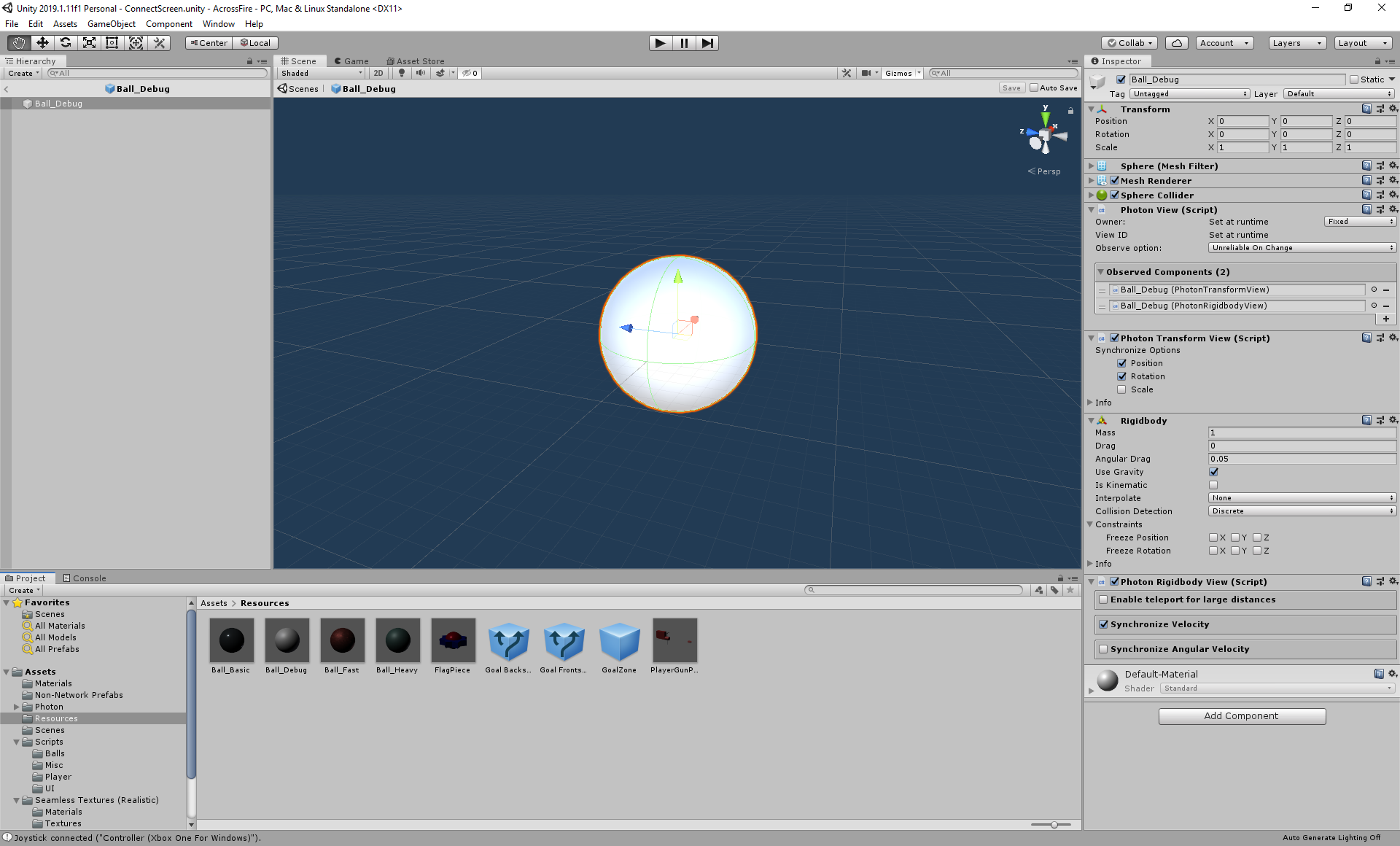
I have no idea how you are syncing things either, so it may be a problem with your controller fighting with the networked transform. Might be that your particular transform sync is trying to move an RB but that RB isn't kinematic and needs to be....
 jade glacier
I never use the Photon rigidbody sync - so can't speak to what it needs
nimble grove
right now its literally a scene where two players join a room (nothing else happens there), and then switch to another scene with game board (just static 3d objects) and the master client PhotonNetwork.instantiates a couple of these balls
jade glacier
I just suspect that its something to do with the transform sync and rb fighting one another or your settings
nimble grove
are there any photon network "project settings" somewhere?
the transform view syncs the transform, the rigidbody syncs the velocity
they're meant to work together
jade glacier
That's going to be more how your RB is set up, and what the correct usage of those two components together is.
https://assetstore.unity.com/packages/tools/network/simple-network-sync-134256 I personally use my own, so I never really touch their defaults
But the concepts are probably similar
I generally don't ever encourage trying to sync physics
without a tick based or deterministic system, that's going to usually just result in a mess and a lot of data. Have you tried just making the objects rb.isKinematic = true on all instances that are not the authority version?
and moving with transform sync?
nimble grove
i understand, but the fact of the matter is that it was working amazingly well up until a couple hours ago
jade glacier
A setting changed somewhere, do you have an old git you can pull up and see what changed?
nimble grove
and as far as i know i did nothing to change it besides mess with some stuff in the Project Settings (mainly graphics)
jade glacier
graphics shouldn't affect that
nimble grove
project is so new I might as well just start from scratch
just frustrating that it was working so well, and now even with all other factors removed, its acting screwy
like... its gotta be some project setting or something
jade glacier
could just be a race condition exposing itself, for some odd reason like component order or god knows what
nimble grove
yeah, i remember reading about component order mattering for a certain thing with Pun, but couldn't find it
jade glacier
It very likely will with those two components
nimble grove
yeah i guess i'll mess with them some
jade glacier
the default components have no deferment, they are very simplistic
nimble grove
thing is, i 100% did not do anything with the two Observed Components
jade glacier
That's the nature of race conditions... if its not hard defined anything can tip the balance wherever its not hard coded as deterministic
nimble grove
hmm yeah, but aren't the components updated in-order? I didnt change their order
ill mess around with the 3 main photon view related components and see if anything happens
jade glacier
The order is deterministic, but what happens inside of those in relation to the rb simulation... no idea
Not sure how they are coded specifically, I just know the defaults have no real deferment or simulation... so without going in and debugging, no clue.
it may not even be them, it may be your controller is fighting them.
nimble grove
thats the thing, this new scene i made has no controllers
it literally has nothing
except a couple balls that fall down and roll
and the balls have photon view components
i mean, the balls are instantiated from a script, but nothing besides that
jade glacier
you are on PUN2 the latest and all I assume
nimble grove
the script does nothing else
yeah
well, not the unity update that came out a couple days ago
jade glacier
also, are you sure you are supposed to use both?
nimble grove
yeah
jade glacier
and your interpolation settings are set so the two aren't fighting to interpolate?
sync RB is automatically suspect for me, because that means moving the object with physics on all clients, and hard setting the transform as well.... There is no way that is going to be pristine how PUN fires its updates in LateUpdate()
nimble grove
the Transform View and Rigidbody View for pun 2 don't have any interpolation/advanced settings
jade glacier
a good smooth sync would require some luck on the timing of your updates lining up well
nimble grove
the RB sync is velocity only
jade glacier
yeah, but velocity means non-kinematic
on all dumb clients
you are moving with forces there... and you are at the same time trying to move an RB with transform.position as well
There is no sane way to make the parts in play add up to a good smoothed out sync
nimble grove
i see what youre saying - im not applying any forces except that the balls drop from above
jade glacier
Doesn't matter, the syncRB is velocity based
nimble grove
(for this stripped down test to figure out whats going on)
jade glacier
unless that thing is doing interpolation internally, I suspect its trying to set velocity
on the RB
easier for me to just open the file and look here
nimble grove
well, im not a mega expert on it, but until a couple hours ago everything looked pretty much perfect on the client's side
including multiple balls colliding/getting clustered up
jade glacier
its applying the networked values in fixedupdate, and is moving its position
I don't see this as being compatible with TransformView
nimble grove
moving its position too?
jade glacier
{
    if (!this.m_PhotonView.IsMine)
    {
        this.m_Body.position = Vector3.MoveTowards(this.m_Body.position, this.m_NetworkPosition, this.m_Distance * (1.0f / PhotonNetwork.SerializationRate));
        this.m_Body.rotation = Quaternion.RotateTowards(this.m_Body.rotation, this.m_NetworkRotation, this.m_Angle * (1.0f / PhotonNetwork.SerializationRate));
    }
}```That is what it is doing
rb.position =
Its not doing anything with velocity, other than coming up with positions
I don't even see interpolation code
jade glacier
I would advise against using that component, its is bare bones sample code
its applying velocity as it receives it
its not buffered
nimble grove
isn't it setting the velocity in OnPhotonSerializedView?
jade glacier
didnt even notice that, because I didn't expect to see it doing that
yeah, it is
so that is also very not compatible with anything
but regardless.. it is hard setting a position in Fixed
so its going to be fighting with TransformView
nimble grove
ok lemme try without transform view
jade glacier
I don't see how these two can be meant to work together at the same time.
nimble grove
I agree - but i read in at least 2 places that you're supposed to use both (they might have been wrong)
i mean, based on what you just said... they were wrong it seems
jade glacier
Unless that came from the PUN team, I would ignore most internet advice on this stuff. 1% of the people using PUN understand PUN
nimble grove
Im starting to think that it did not, lol
jade glacier
I am working with Exit right now on building components... I don't know what theirs do - but I know tranform syncing pretty well
Tobi is the first to admit that their Transform and RB syncs are just starter code and has never been a focus, same as UNet, Mirror and Forge.
for all of the HLAPIs you really have to build your own and buy a third party asset
I literally work on this stuff, and I couldn't even tell you the right answer until I looked.
nimble grove
youre a God!
jade glacier
working better now?
nimble grove
yes
jade glacier
cool
nimble grove
fk
lemme re-enable my main stuff
if this fixed it i owe you a pizza or something
just send your address to me, a stranger on the internet
jade glacier
If you find it coming up short, you may want to check out the asset above - but only if its failing you
My asset is slated to become part of PUN2 down the road, but that timeline is very unclear atm
nimble grove
ooo ill check it out
jade glacier
Or don't - its a paid asset so I don't mean to sound like I am pushing it
just letting you know it exists
nimble grove
oh nice, animator syncing too
I've been wondering about that - I'm coming to Unity from 5 years of working with Libgdx, and I used the 2D animation program Spine a lot
If I made a 2D game, I've been wondering how to handle syncing the animations
jade glacier
The animator is a pain to sync, but the Unet and PUN syncs do a pretty decent job
my animator sync is like 4000 lines of code, there are a lot of permutations once you start building in compression schemes
nimble grove
yeah, I wonder if Spine's unity setup has some integration with unity's animation stuff
jade glacier
I would expect not 😃 Being Unity and all
nimble grove
i think i read about it having some mechanim implementation or something (im still new)
lol yeah probably not, i just remember reading about some integration aspect that worked with one of Unity's animation controllers or something
jade glacier
I actually know very little about the Animator landscape - my only focus was on syncing all of the things that could be synced in it
The Animation Controllers are really what is being synced
heading off, hopefully you are all good now
nimble grove
thanks again dude!!
nimble grove
For anyone reading, after playing around a bit further this is my final setup:
Photon Transform View: Use this only for Rotation (uncheck Position)
Photon RigidBody View: Use this for Position (automatic) and Velocity (checkbox). Can also use for Angular Velocity
 craggy sequoia
hello i have a problem
i have internet connection on but unity says no internet
how do i fix this
i cant access asset store 😦
rich flame
Are you on a school/work internet or at home
nimble grove
Using PUN2: Is there any way to get the ping between clients (namely between the masterClient and others)? I see that there is a built in way to get ping to the Photon Servers themselves, but can't find anything about ping between players. Do I need to implement it myself with an RPC?
nimble grove
Alright, I was able to calculate ping using an Event and PhotonNetwork.Time
weak plinth
Hey
I am using public override void OnPlayerEnteredRoom(Player newPlayer) to know if a player has joined a room, but this callback doesn't occur when the room is first created and the master is joining it. Is there another way to determine who are the players in a room ?
oak flower
@weak plinth How is this relevant to #archived-networking ?
 untold reef
hello, I have the problem that a unity android build can not receive multicast, anycast, broadcast, ... but that should be activatable; https://answers.unity.com/questions/250732/android-build-is-not-receiving-udp-broadcasts.html
I've added the "CHANGE_WIFI_MULTICAST_STATE" permission, but how do I use the code (take a look into the first answer in the thread)?
or is there an alternative to broadcast etc.?
Unity is the ultimate game development platform. Use Unity to build high-quality 3D and 2D games, deploy them across mobile, desktop, VR/AR, consoles or the Web, and connect with loyal and enthusiastic players and customers.
 young mica
hello, anyone familiar with WebSockets? those from System.Net namespace. I couldn't find any topic that is related to my issue: opened socket throws the "The remote party closed the WebSocket connection without completing the close handshake." on ReceiveAsync call in unity frequently, while the very same code launched through regular C# console application executes without a single error per same amount of test calls. (All test calls are consecutive, and all are awaited before next one will be executed)
Before moving to the other socket libraries I would prefer to confirm if any bugs exists with system ones, because I like async\await approach more than event model which somehow other libs prefer.
 cyan mango
hi guys, my team is working for the first time on an online project, and we are using photon networking, I had a question about how it works because one of the programmers was asking how can we handle lost packets due to a bad connection, when players hit a monster, that monster will target the player and start attacking him, but we were thinking if there was 2 players that attacked the monster at the same time, 1 had a bad connection so he missed the packet saying that the monster was attacking player 1 , so on one player's screen it might look like the monster is attacking player 1 and on the other player's screen it might look like the monster is attacking player 2, but since it's online, the monster should be doing the same action for both players, how can we handle if a packet was lost in this way?
 past wren
^ FYI to answer your question about photon. There is 2 i believe
Photon PUN and Photon BOLT.
Bolt is a higher level API (Used for like MMO servers etc)
Pun is a bit like Unet
graceful zephyr
@past wren Bolt is not for MMO servers.
cyan mango
my lead programmer suggested that monsters need permission from the master client (run on the server) before they can take any action, so if the master client already gave permission to a monster to attack a certain player then if another request comes from a lagging player to make the monster attack a different player then it will reject it
past wren
Why would you not use bolt for MMO? "BOLT offers truly unique support for authoritative games" Isn't an MMO an authoritative game (IE the clients are dumb and server rules with an iron fist)
cyan mango
our programmers have only used photon realtime before but I will definitely look into bolt to see if it's more useful
weak plinth
That seems a bit expensive though
graceful zephyr
@past wren considering I made bolt, I'm pretty sure it should not be used for mmos lol
past wren
I wasn't disputing what you said, just asking why it wouldn't be suitable when it states it offers authoritie game support.
vernal remnant
Bolt seemed to be a session based authoritative result of master host (COD/BF type games i think)
If you were making a game with a long lifetime you would want to program up your own server alongside the client; at least for an MMO, if you were interested in the development process yourself it would also be feasible to do so.
weak plinth
yeah because u dont have to pay monthly for bolt then 🤑
vernal remnant
Another solution for MMO's would be spatial
Their costs are questionable though for a small team or small game
weak plinth
thats why i make my game small in networking code and not mmo for now 😂
you have to think about so many things in an mmo
vernal remnant
ye but a lot of fun to make
weak plinth
tru i tried some "mmo" stuff before with "areas" and stuff
its fun to experiment with and test performance
but i never got to more than that . just some position and rotation stuff
this small one will have more stuff sent but in a small lobby scale 2-4 players
 solar garden
What networking solution would be the best choice for a fast paced fps with a dedicated server setup, authoritative movments, client prediction etc...
jade glacier
Photon Bolt @solar garden
Its literally for just that
Hosting it with a dedicated I am not sure the process, since its tied to PUN now, but self-hosting is still an option as far as I know. Best to ping their channel though for details.
solar garden
i was thinking more of the middle level frameworks like litenetlib, enet, mirror...
jade glacier
Then all that you just described doesn't apply
those are all messaging layers
Server setup will be in your hands, but nothing relating to server auth/ prediction are part of them. You have to write all of that yourself.
solar garden
Yes i am aware but one must be easier to work on for this kind of setup right ?
jade glacier
The question itself implies a bunch of things that I think indicate a wrong approach
its really two questions
Any discussion about server authority with client prediction has little to nothing to do with the messaging layer
that is all about creating a tick based simulation and reducing your game to inputs and states on that tick
That solution doesn't care about your messaging layer
None of them do anything for you in relation to making that, the only exception being Bolt, which is the only full stack solution.
The transport layer is more about how your want your stuff hosted, and the protocol you want to use for messaging.
But the messaging is nothing more than sending your inputs and states between machines. It has no concept of or interaction with your simulation.
solar garden
i know all of this but i have been stuck for ages because of all the things you have to account for like tick system, input redundancy, client prediction etc...
i though i just didn't used the right framework thats why i was asking if there was a framework better suited for this setup with maybe a doc
jade glacier
None of them are conducive to tick based sims other than Bolt and Quantum sorry. In the case of Mirror/Unet/PUN2 they actively encourage the opposite
as their tools are all inherently ad hoc time based
solar garden
i kind of get the system but i can't get miself around this notion
jade glacier
Its the hardest part of networking, few touch it because its not something you just dabble in
you have to do it 100% right or you are just making garbage that is going to tie you in knots
Bolt is the only one that does it because fholm took two years to make it
And it requires you to make the entire stack
solar garden
but bolt isn't free and requier to rent photon servers right ?
you can't host on your pc
jade glacier
I built a deterministicy PhysX server auth setup with client prediction, but never shared it are released it because it requires SO much manhandling of everything, from input sampling to the Character Controllers to the Physics ticks.
I don't know the details of the financial model of Bolt, you will have to ask them for that
I'm just saying it is the only box solution for that. Other than that you are going to need to get your hands dirty and learn all of this stuff for real.
solar garden
i understand
what did you meant when you said that the transport layers are ad hoc ?
solar garden
you mean they dont have a tick system ?
jade glacier
Nope, nor any hooks that make making your own play nice with their HLAPI code
for example Mirror's SyncVars and OnSerialize methods are all based on the sendrate for that component
So there isn't any inherent sense of deterministic serialization order that you can have those state syncs fire post simulation, nor have a way to identify when those syncs happen what tick they happened on.
So you can't tie them into a ring buffer system in any way
making them useless for tick based rewind and resim
solar garden
ohh that sux
jade glacier
It just is what they are
they aren't meant for advanced tick based deterministicy sims
they are meant for the most basic form of state sync, which is all most new networking people care about.
but they break quickly if you try to start applying advanced concepts to them
solar garden
Ok good to know
what about exotic frameworks like Racknet or even Sockets
well no not sockets
jade glacier
Again... those are messaging layers
Not tick based simulation systems
You can network your game with email if you want
solar garden
Yes but the problem with unet, mirror, telepathy... is that they are all based on the same core preventing the use of a tick system, but they aren't so isn't it a solution
haha funny concept
jade glacier
They don't prevent it
they just make no efforts to support it
https://assetstore.unity.com/packages/tools/network/simple-network-sync-134256
This guy runs on Unet and Mirror and is fully simulation tick based

A more robust component system for syncing Transforms and Animators with UNET and Photon PUN2. (Mirror is not officially supported, but currently is compatible)
Documentation
Aggressive Compression Options
Range-based float compression, bitpacking, and key/delta ...
But I don't use ANY of their HLAPI outside of the NetIDs
All of the libs let you send byte[] messages, and that is all you are really going to be doing
I made that to run on Unet and PUN2 both, which is possible because it ignores all of their adhoc stuff and just does it all on its own update manager timings
solar garden
oh then its ok then just incredibly hard
solar garden
they aren't yeah but somehow they are
jade glacier
- separate your game from the networking. Your game needs to be reduced to tick based states. Similar to PhysX
State[x] + Inputs[x] = State[x+1]
unless you have that working, any networking is going to just be spinning your wheels
For advanced stuff, like client prediction, rewind, resim etc
- Use networking just to share inputs and state results
jade glacier
yup, networking is nothing more than sending and receiving byte[]
All of the libs are JUST that
They try to hide it from you, but that is all they are doing
solar garden
i guess at this state even Sockets would be enough heh
weak plinth
i use sockets for my 2d coop game
jade glacier
The transport layer has more to do with the hosting environment, platforms you will be on, and the protocol you want (udp vs tcp)
you REALLY have to separate the two in your head
weak plinth
used litenetlib once before but i didnt like it
jade glacier
the transports should be abstracted entirely
weak plinth
i like making it myself tho so thats personal
solar garden
you dont have some tick system or server side simulation and all that jazz ?
jade glacier
I do in my personal lib
solar garden
what is it based on ?
jade glacier
2 years of me writing code
solar garden
yeah but don't it use some base like sockets ?
jade glacier
One of the tests of my giant mess in action
It is abstracted. I was using UNet or PUN2 for the test, but it doesn't matter
Asking me which protocol is like asking which email server we use to run our company... its incidental and unimportant
weak plinth
what is your goal ?
solar garden
me ?
weak plinth
Yes!
solar garden
I would like to have a dedicated sever setup
basically a 1:1 recreation of what you could have in csgo
jade glacier
The question being do you want to become an ace level networking guy, or just get your game done?
Because if you just want to get your game out - just go look into Bolt... it LITERALLY is for that use case.
weak plinth
cs:go servers are not flawless btw
jade glacier
If you want to start a career as a game net dev - then set aside two years
weak plinth
saw someone do a defuse hack where he defused the bomb instantly
solar garden
being an ace level networking guy would be a blast tho
jade glacier
Then set aside two years, and half a dozen attempts to make your own system
And forget your game
jade glacier
CS was also made quite a while ago, net code best practices have evolved quite a bit since then
solar garden
really ?
jade glacier
But even the best like Overwatch still have ghosts, because the internet is a noisy lossy mess.
solar garden
i think cs is pretty tight
jade glacier
The main voodoo of networking is learning how and where to hide the latency artifacts
everything is in desync, and you have to bend reality to make it seem like they are all in sync to the user
weak plinth
but then stuff gets bad at places which you don't notice as easily
solar garden
physics is the main problem
dont you have some sources to read ?
i feel like i have seen everything on the internet i think i didn't search right
solar garden
trying is the way to go as always right ?
weak plinth
well do what you want basically
weak plinth
you are free
whats your goal with all this as he asked u already
decide and move on 😎
 wild badge
@jade glacier That graph is cool, home made?
jade glacier
yeah, its a monitor of how long things have been on the buffer for each frame in the ring buffer @wild badge
The purple bars indicate loss/late - I was hitting it pretty hard with Clumsy induced packetloss to see how well determinism of physx could be restored
The whole thing has an Overwatch like buffer management thing going on, so clients change their sim rates based on the server telling each client how over/undersized its buffer is for that client
wild badge
What do you use the render this?
I've been wanting to display some similar data, but wasn't sure what would be the best approach
jade glacier
Mine was just a bunch of UI image elements I think. Not particularly efficient since it's only for testing.
 latent mountain
http://unity3d.com/files/master-server/MasterServer-2.0.1f1.zip <--- has anyone gotten that to make on amazon ec2?
lean onyx
Is photon viable choice for a game where you need to identify players across sessions (already somewhat do this through playfab and steam auth)
Just wondering if there will be any issues in future though
stray scroll
Anyone who've got the interpolation of the new multiplayer system to work?
stray scroll
nvm, the quantization was too low..
 split jolt
Anyone know a good solution for P2P coop multiplayer, we dont need servers or anti-hacking. Just some good old fashioned mine-craft like thing?
Been looking for ages and cant find a solution, so sad that UNet is RIP. I did a year of networking in Uni so reckon I could pick it up if I get a good library or something 😄
got my eye on https://github.com/lidgren/lidgren-network-gen3

GitHub
Lidgren Network Library. Contribute to lidgren/lidgren-network-gen3 development by creating an account on GitHub.
stray scroll
If you like Unet you can go Mirror.
You can check out DarkRift 2, kind of a socket wrapper with some serialization tools. (they have a active discord channel for help etc as well)
split jolt
okay thank you will check them out 😄
split jolt
@stray scroll been researching Mirror, looks awesome thanks
torpid flax
Hi;
If I'm using photon and I'm trying to get cinemachine to follow my networking player avatar, how can i possibly do that?
(so that each player that connects will have their own cinemachine following)
 spice void
Hey is the NetworkManagerHUD still working? I'm trying to get through the Multiplayer services tutorial, but I don't see the NetworkManager or the NetworkMangerHub in the add component menu.
jade glacier
Are you using unity 2019? @spice void
spice void
@jade glacier yes I am. I heard it was getting deprecated but there doesn't seem to be a replacement yet. Did I pick the worst time to try to make my first multiplayer game?
spice void
where do I enable the module?
jade glacier
don't recall, I would just end up googling that for you
spice void
okay thanks 😃
 formal marsh
Hi guys! Having a problem with my game server, hoping you can help.
My latest server build for some reason doesn't allow me to connect.
I get this error message:
No connection could be made because the target machine actively refused it.
Full error message below
||Client Recv: failed to connect to ip=108.61.199.110 port=7777 reason=System.Net.Sockets.SocketException (0x80004005): No connection could be made because the target machine actively refused it.
at System.Net.Sockets.TcpClient.Connect (System.String hostname, System.Int32 port) [0x0019d] in <3845a180c26b4889bc2d47593a665814>:0
at Telepathy.Client.ReceiveThreadFunction (System.String ip, System.Int32 port) [0x0000d] in <fb98ddc638164e4aa83fb2a91f8b14d9>:0
UnityEngine.Debug:Log(Object)
Telepathy.Client:ReceiveThreadFunction(String, Int32)
Telepathy.<>cDisplayClass9_0:<Connect>b0()
System.Threading.ThreadHelper:ThreadStart()
||I don't get why it would suddenly not allow me to connect anymore.
It's not the server I'm hosting on (Vultr), because an older server build still works fine
Any ideas why this occurs? 😃
weak plinth
compare the changes
formal marsh
Well, that was actually not a bad idea. I've been backtracking what I've done and found the change at fault
That leads me to another question, because what caused the crash was a change in the network manager.
I made a script that inherits from : NetworkManager, and replaced the old network manager script in the inspector with this one.
here:
And I guess I must have done something that is not allowed when you make that change, although I don't know what that could be
stray scroll
Hmm, if it's a built version you are running try close down unity. Or if you have multiple unity up that uses same port.
formal marsh
I found the fix
In a custom network manager that derives from NetworkManager, if I do something in Awake(), I need to do
public override void Awake()
{
base.Awake();
//Whatever I want to do
}
What I had was just
void Awake()
{
//What I wanted to do
}
stray scroll
Anyone been using the new Network System combined with Input System? Or in general, if you would lack a simulation frame behind on client, would you use the same input as last frame (e.g. delta on mouse), or reset it ? Or consider the client to have authority on the rotation and send the current rotation instead of delta mouse? (e.g. fps)
 native fossil
Does anyone know of a good reverse proxy for tcp or udp traffic?
 ivory current
HAProxy?
native fossil
Unfortunately that would not work for me, you see I am not looking for software but a service or server that will act as a reverse proxy for me.
ivory current
https://aws.amazon.com/elasticloadbalancing/features/#Details_for_Elastic_Load_Balancing_Products
You need Network Load Balancer

Amazon Web Services, Inc.
native fossil
Yes this might work. But how much is it?
ivory current
Amazon Web Services, Inc.
Pricing details of elastic load balancing.
native fossil
Thank you for your help this may be just what I need.
stray scroll
Anyone would have any idea why this isn't working correctly? At high frame rates it simply hacks at bits, but at lower (below 60) it won't rotate at all.
                for (uint tick = snapshotData.Tick + 1; tick != predictedTick + 1; ++tick)
                {
                    var playerCommandDataBuffer = chunkPlayerCommandDataBuffer[i];
                    PlayerCommandData commandData;
                    playerCommandDataBuffer.GetDataAtTick(tick, out commandData);

                    if (tick == predictedTick)
                    {
                        CharacterMovementUtilities.Rotate(ref rot, commandData.frameInput.playerRotationAxis.x);
                    }
                    else
                    {
                        rot.Value = commandData.frameInput.playerRotation;
                    }

                    //.....

                }


                PlayerCommandData cmData;
                chunkPlayerCommandDataBuffer[i].GetDataAtTick(predictedTick, out cmData);
                cmData.frameInput.playerRotation = rot.Value;
                Debug.Log("Predict tick:" + predictedTick + " " + rot.Value);
                chunkPlayerCommandDataBuffer[i].AddCommandData(cmData);
I send rotation with my commands to the server. The idea above is to only calculate the rotation on the predicted tick.
stray scroll
Think I solved half of my problem, where GetDataAtTick default sets the rotation to 0, 0, 0, 0 at the first ticks where there are no commands.
 gray ether
hi all, using UNet here. when i use NetworkIdentity.Instantiate it worked on the host (because this was done on start) but not on the client connecting afterwards, any idea how i can get this working? e.g. when i instantiate an object, it is shown on clients connecting afterwards
stray scroll
Isn't that server only thing?
gray ether
Maybe... not sure where to go from here
stray scroll
usually I think you instanciate it and then use NetworkServer.Spawn(object)
gray ether
hmm... thanks! i will try that now!
stray scroll
But you need to do this on the master client I think. So you'd have to either check that a new client has connected, or send a command to it.
 glacial totem
Hey guys, in a physics based networked game, the client needs to be ahead of the server so that the by the time the input command packet reaches the server, the tick has not already passed.
However, I’m having trouble finding something that actually explains how to get the client ahead.
During the initial connect, the server sends the client its tick number so the client can start at the same tick, but latency obviously means that the client will be behind, so if the client is able to know it needs to speed up, how is that speed up achieved?
My client knows how far behind it is because i coded the sever to notify it when it is, just not sure what to actually do with that information. If the client is 5 ticks behind, do I just simulate physics for 5 ticks all at once with the last player input to catch it up?
jade glacier
At a glance it seems like you might be thinking about things a bit backwards
You want client prediction I assume
what that usually means is you apply your inputs locally immediately, and you send those inputs to the server along with a tick number, and the server applies those input tick values to its simulation ticks
So basically you have the owner and the server both applying the same simulation to the player object
The server broadcasts the state results (transform values) along with the tick number... and the player compares its old results for that tick with what the server got.
jade glacier
If they disagree, the server is considered right... and the client needs to resim
So if you have that... your player is already in the future
it sees the world around it as history (because of buffers and net latency)
glacial totem
It's not tho, because by the time tick 100 reaches the server, the server is already on tick 105, for example
jade glacier
you have to reconcile your tick numbers of course, since you have multiple timeframes
The server is reality though
What the player sees is a lie
The only exception is that you can make server checks favor the player... for like hitscan weapons
glacial totem
So the client connects to the server when it's on tick 100, so the server says start at tick 100. But by the time the client receives that info, the server is already in the future from latency right?
jade glacier
And the server will rewind the scene to its best recreation of what the player likely was seeing
I personally don't do that
Personally, I just let every client have its own tick
glacial totem
server can't rewind
jade glacier
Then the client has to deal with desyncs
glacial totem
Right, so I'm dealing with that via prediction and rewinds on the client
jade glacier
no server rewind just means that what the client sees when it fires may not be reality, unless you just allow client authority for hit claims
glacial totem
But i guess the problem I have is that the server doesn't know when to process the buffered input because the ticks are already behind
all it can do is process the latest command at that point
jade glacier
its just sequential being pulled from the buffer
I personally just have a dict<netid, offset>
So all incoming and outgoing frames can be converted to and from the local tick values
Trying to get them all on the same tick is pointless
because the player lives in the future on clients
so you have two timeframes going at all times
Most of the work is in sorting out how to convert things between the timeframes
glacial totem
So the client needs to be ahead right? The client needs to be on tick 105, for example while the server is on tick 100, so that by the time the command for tick 105 reaches the server, the server hasn't already processed tick 105.
jade glacier
Not so much needs to be ahead... it just SEES itself as ahead. You are moving instantly, knowing that the world you see around you is NOT the world the server will see around you when you make that move in its sim
glacial totem
A physics simulation has to stay perfectly in sync, so maybe it's a different way of thinking than you're used to?
jade glacier
Perfectly in sync is not possible without determinism
If you want full determinism, you have to extrapolate
so that the player is not in the future
But rather is always in the best guess of the present
extrapolation is notoriously WRONG though, so you have to resim constantly
glacial totem
That is correct. but i mean the timing needs to stay in sync. What the client is applying to the physics simulation has to be what the server is applying at the same physics state.
So the physics state and simulation entirely needs to be ahead on the client
jade glacier
That will just happen, as long as your server is consuming your input frames at the same rate as your client is producing them
The needs to be ahead part I am not getting, I think you are trying to control something you have no control over
The server keeps a small buffer of inputs, and pulls from it on the tick
How many frames of buffer and frames are moving on the network will vary, and you have some control over that
glacial totem
the client also buffers inputs too
jade glacier
client shouldn't buffer inputs, other than the hold time between Update and the next Fixed
that would just be producing input lag
Every fixed you should capture the input values, and you use those values for your local sim and to send to the server for its sim
Clients will buffer states however
the server sends out its resulting scene state to all
and you want to buffer that, so things are smooth
glacial totem
The client isn't gonna be sending a packet per input tho....
jade glacier
But those states are numbered as well
That isn't really buffering though
that is just batching
If you send every 3 ticks...
you are locally applying inputs for all 3 of those ticks
glacial totem
ahhh terminology misunderstanding there sorry
jade glacier
you just aren't sending them right away
Keep in mind though of course, that is going to increase your latency quite a bit
Because now you have a MIN buffer of that SendEveryX value
The server has to be at least that many ticks behind
What is your physics tick rate?
glacial totem
But let's look at this situation:
Server sends the first state update to the client and says Object 1 is at this position at tick 10
A bunch of input happens and on tick 20 the client input effects the object
When the server gets that input command, it needs to know that it was for 10 frames in the future at tick 20
So the scenario you're describing leaves that matching purely up to timing
instead of selectively applying the input for the tick at the correct time?
jade glacier
Actually more the other way around
the server doesn't care - it will maintain the smallest buffer you can get away with
and it will pull inputs from that buffer at a fixed rate
The results of its sim it sends out as a state
you will want to have a way to reconcile WHICH player tick that result corresponds to
I personally send out two tick values
the second one being the origins tick id
So that the player easily can just know which of its own ticks in the past this lines up with
So basically at the start of every outgoing server packet I have a [ServerTickID][OwnerTickId]
That way if the server had to do any buffer corrections, the client doesn't have to get crafty about detecting that
It just says "you sent me Tick X - I am giving you back Tick X results"
You can get away without the two values, and have it only send back the translated owner tickID, depending on your needs. I need the server tick ID because I use that for modulus stuff that tells me if I have forced keyframes and such
glacial totem
So where does latency detection come into play on your end?
Like using the reported latency to move the client further or less into the future?
jade glacier
That whole packet on the client side just goes on to a buffer... HOWEVER it does something different with the part of the packet that is for its owned objects... since its not going to actually apply those values - for those it goes back to its history and checks for a desync
No need for latency info, this is all tick based, not time based
glacial totem
maybe that's the problem then?
jade glacier
You are tick based I assume? You want to be.
glacial totem
Overwatch and RL both do active predictions based on latency on the client's end
jade glacier
There is no solution to the problem - the server and the owner will ALWAYS be in disagreement - but that doesn't mean desync
If you extrapolate a bit you can start to apply that stuff
Basically cheat the visuals
You are talking about the client extrapolating other objects I assume
rather than interpolating
glacial totem
Yeah they don't cheat the visuals either. The client's entire simulation is like legit ahead of where it should be. Which is why with 300 ping in RL, as long as it's just you and the ball without any other players, there is 0 desync ever
Because client's entire simulation is identical, just in the future and no outside forces are changing that simulation
Maybe I just misunderstand the entire concepts tho...
This is all new to me.
jade glacier
You are describing the impossible, the simulations can only be identical
Determinism tries to fake that
it extrapolates the world to get the time frames in sync, but that means its is constantly in a state of guessing
glacial totem
what's impossible?
jade glacier
it is impossible to have immediate client inputs locally and have identical simulations, unless you are extrapolating
but then it is cheating
Quantum does it by CONSTANTLY resimulating
glacial totem
I don't understand why that would be impossible?
If nothing else is acting on the simulation
jade glacier
Because there is no way to know what other players are doing 300ms in the future
jade glacier
yeah, but for that model to work - you have to sort out what happens when you are desynced
You and the ball isn't the game - you will see other players
glacial totem
once you have any other players it's terrible because your client is so far in the future, that any state corrections are drastic
but that's expected
jade glacier
yeah, because you are extrapolating
Typically if you are using player inputs, extrapolation works reasonably well
glacial totem
Okay extrapolation is what I need then
jade glacier
because players tend to hold buttons down and generally do predictable inputs
glacial totem
it has to be what they do
And whatever they do is the best in the world. It's the most successful networked physics game there is.
jade glacier
Just be aware that with extrapolation, you have to constantly resim - because it means what you are showing the player is a guess
jade glacier
Then I don't see the question, because you understand the problem
glacial totem
My state corrections reset the state and then re-extrapolate forward back to the frame the client was on with the same inputs from the past
The problem is that the original state isn't extrapolated yet
only the corrections
So I'm wondering how to go about extrapolation when the client is behind
is it as simple as just taking the current state and simulating physics for as many ticks as I want to get ahead?
jade glacier
You should know by the tick delta if you have the server giving you back results in your local tick value
Player send Tick 10 ... Server buffers Tick 10... Server applies players tick 10... server adds "10" to the header of the state it sends back to the player
glacial totem
yeah so maybe my original question didn't make that clear. I have everything ready, I already know how far behind the client is where it should be, for example 5 ticks behind, I'm just not sure how to extrapolate those 5 ticks ahead to correct it
jade glacier
Player is now on tick 16 when it gets the servers results for state 10
glacial totem
I think it's as simple as I was assuming, but i just wanted confirmation from someone more experienced
jade glacier
You seem to get the problem, the answer will vary a bit depending on your other mechanisms
like how you are number, offsetting, and predicting
glacial totem
Player says what results did my siluation produce back in the history for state 10
Player says it looks good so continue, or it says wrong prediction and performs a rewind correction
jade glacier
they just all have to be on the same page
The issue you will have is your player is PREDICTING all of the other clients
glacial totem
right exactly
I guess the probkem right nowe is that it's not actually predicting others
because the simulation isn't ahead
jade glacier
So to do that well you want it to be simulating all of them probably, not just be extrapolating states
states extrapolate poorly, inputs extrapolate well
glacial totem
It's behind the server's simulation because of latency
Right, so it sounds like i need to include each player's current input in the state updates
So that i can use those inputs to keep extrapolating with them ass if they don't change
jade glacier
As long as you are still calling the server god, yeah - you basically have to be extrapolating out to what frame your player currently is creating
glacial totem
or what RL does i think is that it decays the inputs?
jade glacier
Depends on the input, but that is very game specific
glacial totem
okay
jade glacier
You just have to play with how to extrapolate specific to your game and see what breaks the least
or breaks in the least offensive way
glacial totem
So basically i need to advanced the physics simulation ahead to get the client ahead, but i can't do that without also being aware of each player's last inputs
Otherwise the player's velocity will slow down from gravity or other physics instead of continuing on
as if they were keeping the same input
jade glacier
I wouldn't so much say advance the physics... so much as extrapolate a guess for the inputs
you are nearly full deterministic here
If you want to extrapolate with inputs, you would pass all player input structs to everyone
and your local sim would apply all players guessed inputs
And whenever it guesses wrong, it has to go back for a resim
glacial totem
When i exyrapolate, i want it to be the entire simulation extrapolated, so that if there's no corrections, all the visuals were untouched and the server "visuals" were the same
okay extrapolate with inputs sounds like what I want
And I'm pretty sure RL does that too
jade glacier
Keep in mind that you already have two worlds
FixedTime = simulation inputs and states
Update = cosmetics
glacial totem
They just decay the inputs over time if a new state doesn't come in to give updated input values
jade glacier
Resim goes back and reworks the history of Fixed/States
glacial totem
like if the player was steering left, over time they will center out
jade glacier
Your Update loop can be a lot more mushy
glacial totem
Yeah all of this is happening in Fixed Time
jade glacier
since its basically lerping things from where they are to where they should be
The main thing most people have trouble with there is they have one sim going - the visible one
glacial totem
So going back to the original convo, instead of keeping different tick counters, I'm forcing the client to adjust the tick number to match the servers instead as if the server was ahead where the client is
jade glacier
rather than the sim being a totally virtual world - separate from the rendered world
and I would add some extra tick info if need to be to make it easy to sort out which tick lines up with which on the client vs the server
For my stuff I ended up with two tick values
you may need something different
glacial totem
i haven't lerped anything yet but for state corrections am I correct that I should take the original position and the updated position after the simulation has been rewound and replayed and lerp that?
Like i don't need to lerp anything in between that right? Just the original value and the corrected value once the rewinding is done?
jade glacier
That is actually totally up to you - how you cheat the corrections is subjective as hell
the main thing is to keep the cosmetic world separate
glacial totem
okay makes sense. Some games might not lerp at all
jade glacier
don't let it affect your simulation world
glacial totem
yeah I'm not. I'm talking about this entire discussion as if it's all numbers without any graphics tbh
i think I'm getting it now and I think my code changes this morning accounted for what I needed to fix. Just wanted a second opinion
jade glacier
then sounds like you mainly just need to sort out how to get the various tick timeframes to reconcile and agree
Its a good idea to avoid the cosmetic stuff like you are
glacial totem
I'll keep playing with it, but it's a lot different from the server just applying whatever input it can when it gets it lol
jade glacier
making it pretty bloats and complicates things too early
its good to see it raw in this step... ugly corrections and all
makes it easy to tell how your code is working
glacial totem
It probably helped that I watched like 8 hours of GDC physics networking conferences from Rocket League and Overwatch before getting into this....
jade glacier
yup, very important
but also hard to get your head around until you make a couple failed attempts
glacial totem
Basically my game is another physics based networked sports game, so I want to do whatever RL did since they were the most successful
It can be argued that no game had it figured out before they did probably lol
with some of their techniques
jade glacier
I don't fully know RLs code choices - but I have to assume they extrapolate all kinds of stuff
Overwatch is mostly traditional, but they take advantage of determinism where they can find it to extrapolate
glacial totem
They apparently buffer the inputs on the server so they can apply them at the correct time,., but they actively do stuff to let the buffer shrink or grow dynamically to keep it at a sweet spot
jade glacier
you have to buffer the inputs for sure
glacial totem
If the buffer is low, they repeat inputs and process them again, if the buffer is full, they skip inputs
I still don't fully get it
jade glacier
its a tick based sim, you can't consume inputs any other way
That should be rare
for OW it doesn't toss inputs as far as I know
glacial totem
They handle it on the server, and Overwatch does the opposite.
jade glacier
OW doesn't toss them,it just asks the clients to change their sim speed to try and get its buffers back to a better size
glacial totem
Instead of the server skipping or duplicating inputs, the sevrer tells the client to actually run slightly slower or faster to keep the buffer adjusted
jade glacier
tossing and repeating an input = instant desync
glacial totem
a 120hz simulation will dynamically change to 119hz or 121hz, etc.
which is just wild
jade glacier
its actually not too hard
My test lib does that
I have the server send a byte that indicates how happy it is with its buffer size
So the client adjust its sim rate. Only works with Unity 2018.3 or newer though
glacial totem
jade glacier
yeah, I would not have done that - but their game
glacial totem
Overwatch uses an Upstream throttle, which RL already implemented and is changing to
you can actually switch via client settings
which is interesting
jade glacier
none of it is super hard, because the desync is handled elsewhere
glacial totem
Yeah even if they made the wrong choice, it's still probably the most enjoyable and least error prone physics based game out there
jade glacier
I just would rather avoid creating desyncs
glacial totem
It's no doubt a large reason for their success
jade glacier
of course, there is no one right answer
They are also using cars, so they aren't as twitchy
jade glacier
so a lost input and correction probably aren't that noticable
glacial totem
120hz physics simulation with 60 tick servers too
jade glacier
Forcing a resim is a bit of work, but it does let them stick to a fixed tick rate
glacial totem
So that also helps it be less noticable
add in interpolation on the corrections and it's pretty damn good i guess
jade glacier
its all going to get glossed over with the cosmetic layer yeah
glacial totem
Really appreciate the time you took to explain some stuff tho. I think it helped me understand a lot.
jade glacier
np, keep everyone posted on your progress
glacial totem
i thought i was way further off than i was i guess
jade glacier
I'm still always learning this stuff as I go
glacial totem
yeah it's interesting stuff and always love a new challenge.
this game is gonna be a hockey-based physics game
it's early but i've been focusing on the physics networking because it can certainly make or break the game
Wanted to know I was capable of figuring it out and making it an enjoyable experience before I went any further
jade glacier
definitely the right approach
halcyon vessel
i'm struggling to play sounds for every player in my game using photon. Once the projectile meets a player collider, i want to play a "hit" sound, but calling
    private void playerHitSound(Vector3 pos)
    {
        AudioSource.PlayClipAtPoint(playerSound, pos);
    }```
it does only play the sound for the player who shot the projectile
(i precise that this function is in my player script, and is called from the projectile script)@halcyon vessel And you do something like photonView.RPC("playerHitSound", RpcTarget.All, pos) ?
stray scroll
If you target all I can't say what is wrong. Haven't used Photon in a while. I would write a debug line as well, check if it's both ways. Is the player removed as well from the collider, making an invalid target for RPC? Is there any error/warning messages?
halcyon vessel
I used a debug to verify if the function is called, and it is, no errors or warning. It looks to be the normal behavior of the function
 carmine dragon
Hey guys, sorry for being probably the 100th guy asking this this week but.. is the FPS sample really the way to go for making a multiplayer game with Unity 2019.2? I've yet to find some solid documentation about the networking part and it's weird to use a library from copypasting a couple of scripts from another project. Normally in software development you give at least one solid choice.. you deprecate libraries when others are ready to replace the need. It's not like MonoBehaviours are deprecated because DOTS has arrived in preview right?
halcyon vessel
what are you using, photon or unity network ?
stray scroll
If you're not into ECS stuff, you can also go with Photon, mirror (like old UNET) https://assetstore.unity.com/packages/tools/network/mirror-129321, or some other third party like DarkRift2 (which you might need to write a bit more code for)
 nimble berry
@carmine dragon Have a look here: https://github.com/Unity-Technologies/multiplayer
These are the latest multiplayer samples.
GitHub
Unity multiplayer packages and samples. Contribute to Unity-Technologies/multiplayer development by creating an account on GitHub.
carmine dragon
@stray scroll Yeah.. I'm thinking about one of those.
@nimble berry Well... I looked at the repo and the trouble people were having with the basic examples.. I'll try that first then. And take Photon as my Plan B. thanks guys!
nimble berry
Yep, DOTS Multiplayer is not easy atm. A few samples and almost no documentation. Though i got it up and running with my project and it works so far. But i hope there is a preview version available soon. Was promised for Q3.
carmine dragon
Is it based on the same codebase as the FPS Sample? Would be nice to see them using it as a package as well.
stray scroll
for the multipalyerRepo you can check out this as some really basic guide https://github.com/Unity-Technologies/multiplayer/blob/master/sampleproject/Assets/NetCode/Documentation~/quickstart.md
nimble berry
It's based on the transport they used in fps sample. But there are more feature in their new NetCode. See above post 🙂
carmine dragon
Aye, I'll check out the link! 😊
nimble berry
@carmine dragon Hint: Check the asteroids sample in the multiplayer repo.
carmine dragon
Will do
 thorn dagger
Hey guys, new here, bit of a discord nut so i don't know why i wasn't here already lol. I have an issue though deploying a linux server build to a unbuntu server using putty and ssh. When i run my server with the -nographics parameter it starts loading up then aborts due to 4 unknown errors that report that the Internal-ErrorShader.shader could not be loaded. Anyone got any clue on this and can I copy a snippet of the errors in question here?
solar garden
When you host a game on a service like idk Amazon, what does this means ? do you have a virtual machine on a distant server where you run a instance of your game in server mode or is it something more like using the server as a relay for better connection ?
weak plinth
i have a vps where i host the server
which right now is not a unity made server
but it is c# (.net core)
solar garden
but it is a instance of you game righ t?
weak plinth
what?
solar garden
you were answering me ?
solar garden
what is a server ?
weak plinth
google it
solar garden
is it a instance of the game ?
weak plinth
depends how u define it 1) a remote machine which u can run stuff on 2) a program which runs on a network to which clients connect
solar garden
i mean for unity 😫
weak plinth
i told you my server is written in .net core
a crossplatform version of c#
and no its not made with unity
solar garden
for csgo you have a application that is using the same game files as the original game to run a server but it still acts as a game instance
weak plinth
well ofc it uses same game files for calculating stuff
solar garden
but its a application on a remote machine right ?
weak plinth
not always as you can run a server and client on the same machine
solar garden
yeah but the remote server is made for better networking perfomance
but its no different
weak plinth
i really dont get what u want
solar garden
when using a service to host games
the service is a server (a computer) where you launch a instance of your game set in hosting mode right ?
you know like with a desktop and all
that you can access remotely like with teamviewer
stray scroll
depends on what your service is?...
I mean a basic thing is that you go to something like digitalocean, buy a virtual machine, upload and run your application(server).
solar garden
thats what i am wondering when peoples make games in unity on the internet they talk about Photon hosting or distant servers, now distant servers are just virtual machines where i gues you would launch a instance of your game in hosting mode simple enought, but for things like photon hosting they dont have your game so how do they host things for you ??
weak plinth
go to photon support ?
solar garden
its not unique to photon unity was also doing something similar
you could choose players number in a game and you were all set
weak plinth
🤷
again it depends on what u wanna do
if u just want info about some asset go ask their devs
Global cross platform multiplayer game backend as a service (SaaS, Cloud) for synchronous and asynchronous games and applications. SDKs are available for android, iOS, .NET., Mac OS, Unity 3D, Windows, Unreal Engine, HTML5 and others.
stray scroll
I haven't used photon too much, but I think their default thing is that they have relay servers and room listing. But make a google search on it 😛
solar garden
ohh so they are relay servers
they are not hosting your game only forwarding your connection
but you host your game yourself on your machine
stray scroll
Well, the basic idea is that you have one master client, if he/she leaves another one will be assigned.
solar garden
like back in th call of duty days
stray scroll
Check the link I sent, there is a server option as well.
solar garden
But the actuall hosting is from any of the clients thats what i didn't understood in either case on a dedicated server or local hosting like UNET or Photon, one instance of the game is launched to actually host the game
Photon just redirect the connection but it is peer to peer
stray scroll
I don't know how their server solution works, you have to check that out yourself.
 maiden sundial
Hello, iam using photon 2. I can get the editor and a standalone to connect to the same room. But when i try with a friend we connect to different. I tried with 2 friends and they get into the same room while i get into another. Geograpically this shouldnt be a issue. Any tips or thoughts?
stray scroll
You're using the same room name?
maiden sundial
Well i have "JoinRandomRoom" but as i understand it, it should fill the room before going to another room?
My standalone and editor always join the same room
stray scroll
And when you use two standalones?
maiden sundial
giving it a go now
maiden sundial
Ye they connect to the same room
Ill have a look at the site you posted
I don't have that issue, both my standalones joins the same room.
maiden sundial
@stray scroll Thanks Jaws the code didnt work but i am past that now.
I am making a multiplayer game, my problem is when the second player joins the camera switches to him. How do i give the induvidiual players induvidual cameras? Thanks!
halcyon vessel
@maiden sundial in the start function of your code, if you use photon, you only activate the camera if photonView.isMine is true
maiden sundial
@halcyon vessel Thanks alot! 😄
halcyon vessel
actually you will need photonview.ismine a lot, for example if you shoot, you want only your own player to shoot and not others. In fact i put almost all my code into that if(photonview.ismine)