#archived-shaders
1 messages · Page 175 of 1
 sly breach
 amber saffron
C# side you can assign the same buffer to multiple computes
sly breach
what about when a read / write is happening on one but it multithreaded
would there be a lag
or is it more about how i read / write to those buffers ?
anyhow thkx ill try sharing the buffer and see what i get
 low lichen
Only one compute shader can be running at a time
sly breach
what .. about multithreading
low lichen
It's doing the work of the single dispatch in parallel
sly breach
does it work like a stack / queue ?
low lichen
But it still only does one dispatch at a time
There's already a lot of work in a single dispatch, it can only parallelize so much
sly breach
sounds like its safer to code everything inside a single compute then
amber saffron
I wonder how it would behave when using dispatchindirect
sly breach
dispatchindirect is what i use
amber saffron
My compute shader fu is not very advanced
low lichen
I don't think you'll run into any issues with two dispatches reading and writing to the same buffers
sly breach
normal Dispatch for the compute
low lichen
Are you reading and writing to the same buffer in a single dispatch?
sly breach
im thinking to do so
not yet
looking into ComputeBuffer.BeginWrite now
which suppose to be faster ... ?
low lichen
I'm talking about writing to the buffer in the shader, not in script
sly breach
ah right
 steady schooner
Can someone help me make a gradient shader? My goal is to create a gradient based on two colors so that I can use it on UI.
This is what I have, but it doesn't work. I just want to change the color of the gradient on the left and the right, having it be a smooth transition between for the rest.
low lichen
And you want to have a gradient property to change the properties of the gradient?
Or is a regular linear gradient all you need and you just want to change the colors?
A regular gradient between two colors would just be a Lerp between the two colors with the X or Y UV coordinate as the T value.
steady schooner
Okay thanks!
Wait... how?
I don't want it to be a single color. I want the shader to display the range of colors along the gradient for the albedo
low lichen
@steady schooner I hope you appreciate my ASCII art
           |   Lerp   |
[Color1]-->|[A]  [Out]|--->[Albedo]
[Color2]-->|[B]       |
[UV.x]---->|[T]       |
No, I think you'll have to split the UV node into just using the X
 sonic iris
_CameraDepthTexture is just blank when using Graphics.Blit, any idea how to fix?
my volumetric cube goes through walls!!
low lichen
@sonic iris At what point during the frame are you doing the blit?
And what render pipeline are you using?
low lichen
Edit > Project Settings > Graphics
sonic iris
https://files.jam.cx/(+2.jpg
 low lichen
Then you're using the built-in render pipeline
sonic iris
Seems so
low lichen
Are you just testing it in the scene view?
sonic iris
Doesnt work in game view either
amber saffron
So you're drawing your volume in a post process ?
sonic iris
Yep
steady schooner
@low lichen The shader works in the PBR graph great now! However, it only shows one color on the actual image... any suggestions? Can u @ me, I have to leave now and want to find the message easily 😄
 coral mountain
Is the standard shader not affected by light probes? When I walk into a dark area my materials appear lit up. Switching to a mobile shader seems to fix this. Arms materials are set to mobile/bumped diffuse and gun is standard. Both mesh renderers are set to blend probes.
amber saffron
@sonic iris Depending on your current setup of post processes, it might be possible that the depth was overwriten :/
maybe
low lichen
@coral mountain It looks to me like it's showing reflections there, while the mobile shader doesn't calculate reflections.
Do you have a reflection probe in that dark area?
coral mountain
i do not
low lichen
Depends on the shader. But _CameraDepthTexture is a texture from a depth-prepass which is rendered before the scene
It can't be modified by post processing unless some shader specifically wanted to do that for some reason
coral mountain
Changing the environment reflections intensity modifier darkened the gun
sonic iris
Oh nevermind it works i just didnt use it properly...


i feel so stupid i used the wrong variable in the conditional that checks the depth
low lichen
@sonic iris Couldn't you just use the post processing shader on a cube mesh? Have the cube calculate screen UVs
Then you can just use ZTest and not have to sample the depth texture
amber saffron
You'll still have to sample when the ray is inside the cube to check if it's intersecting with something, but indeed you'll have free depth testing
low lichen
And the shader is run on only the pixels that actually contain the cube
sonic iris
well, initially i thought it'd be easier to do it this way if there are multiple volumetric objects in the scene
low lichen
Instead of full screen
sonic iris
but yeah you're probably right
low lichen
You mean because you'd have to do your own blending if they are overlapping?
 nimble cloud
is there anywhere I can read up on RWStruturedBuffers for compute shaders? I don't really know how to interact with them and it's my current stumbling block in converting a block of code to a compute shader
I can share the pseudocode if that would be helpful
 fair sleet
@nimble cloud do you know how to interact with a StructuredBuffer ?
fair sleet
@nimble cloud
With a StructuredBufffer you can use ComputeShader.SetBuffer to assign the buffer to the compute shader and ComputeBuffer.SetData to assign data to the buffer. This will send the data to the GPU.
With a RWStucturedBuffer the process is the same but you can also use ComputeBuffer.GetData to copy the data from the GPU back into memory after you dispatch/run the kernel
Keep in mind on the c# side you use the ComputeBuffer class for StructuredBuffer and a RWStructuredBuffer. Unity doesn't make the distinction between these two
nimble cloud
right, I was mostly unsure of how to handle writing on the HLSL side.
fair sleet
on the HLSL side you can use it like an array
Here's an example
// constants
int size;
float testValue;

//buffers
RWStructuredBuffer<float3> vertexPos;

[numthreads(64,1,1)]
void HeightCompute (int3 id : SV_DispatchThreadID)
{
    //we ditch this tread if its bigger than the buffer
    if (id.x > size || id.x > size)return;
    float3 pos = vertexPos[id.x];
    float h = 0;

    //proccesing here

    vertexPos[id.x] += normalize(pos) * h;
    return;
}
It's time for me to get some help.
Is it possible to set a constant struct? You can set struct buffers but I can't find a way to set a constant structs
 rugged verge
Anyone know how I can access the Chromatic Abberation shader code? Where is it located? I'm using it post prcessing and want to modify it
 west fulcrum
Hi! I'm making an outline shader in Shader Graph, with the classic "move in 4 directions" and add color. But I want the outline to only affect 100% alpha parts. I have shadows that are 20% black, that I don't want outline around. How could I remove that from the outline?
 mossy lintel
Hello, is there a way to use a ComputeBuffer a surface shader?I have found several approaches, but none seems to work. I tried this https://github.com/mgstauffer/UnityComputeBufferExample/blob/master/Assets/Shader.shader but i always get "Shader error in 'IR/IRVisualShader': Unexpected identifier "StructuredBuffer". Expected one of: const uniform nointerpolation extern shared static volatile row_major column_major sampler sampler1D sampler2D sampler3D samplerCUBE or a user-defined type at line 61" At this line there is "uniform StructuredBuffer<float> _ObjectTemperatures : register(t1);" I tried to put #ifdef SHADER_API_D3D11 around it but it doesnt work

GitHub
A simple example of using a compute buffer in a vertex-fragment shader (i.e. not in a compute shader) - mgstauffer/UnityComputeBufferExample
steady schooner
Can someone help me? I made a gradient shader that works properly in shader graph, but it only shows one color.......
Works in shader graph. I can change colors appropriately
@low lichen Can you help me?
sly breach
is it possible to generate mesh data in a compute shader without passing the data to the cpu ?
@steady schooner look at your graph , there it only take out the red node to the 2nd one , is that maybe you only have 1 color ?
steady schooner
There are two colors... but @low lichen said to put the X from the Split node into the Lerp node
 safe gate
i guess remove the split node and connect it straight to the lerp?
maybe that'll help idk
sly breach
it looks like it does what it suppose to do
u got uv .x as the gradient
and you 2 input colors : black and red
what's the problem ?
steady schooner
The colors are going to change in script so that I can have a custom RGB selector in my lobby.
Problem is that it's only showing one color
sly breach
u can change color in material is that what u mean ?
i would suggest changing the reference names to something more readable
steady schooner
Okay. Give me a minute to work on it. I'll give u more info then
I think I figured out the issue. Give me a little more
How can I change the shader's colors through script
So that I can edit the lerp colors
the problem was in my code. I was setting the color, not changing the variable
fair sleet
So I have this compute shaders that's making me pull my hairs out. If I remove h+= it compiles but If I keep it it gives me:
Shader error in 'HeightCompute': Unknown parameter type (0) for testNoise at kernel HeightCompute
Also I had to use cbuffer instead of CBUFFER_START because for some reason it wouldn't recognize the macro and won't compile
#include "noiseSimplex.cginc"
#pragma kernel HeightCompute

//helper functions and structs
struct NoiseSettings
{
    int layers;
    float3 mainOffset;
    float3 mainFrequency;
    float frequency;
    float amplitude;
    float hscale;
};

float LayeredNoise(float3 pos, NoiseSettings settings)
{
    float h = 0, a=1;
    pos += settings.mainOffset;
    pos *= settings.mainFrequency;
    for (int i = 1; i <= settings.layers; i++)
    {
        h += snoise(pos)*a;
        pos *= settings.frequency;
        a *= settings.amplitude;
    }

    return h * settings.hscale;
}

// constants
int size;
float testValue;

//i should use CBUFFER_START but it doesnt compile
cbuffer noiseSettingsBuffer
{
    NoiseSettings testNoise;
 }

//buffers
RWStructuredBuffer<float3> vertexPos;

[numthreads(64,1,1)]
void HeightCompute (int3 id : SV_DispatchThreadID)
{
    //we ditch this tread if its bigger than the buffer
    if (id.x > size || id.x > size)return;
    float3 pos = vertexPos[id.x];
    float h = 0;

    h = LayeredNoise(pos, testNoise);

    vertexPos[id.x] += normalize(pos) * h;
    return;
}
ok i was too lazy to change from post processing to normal shader but
i have a new problem
steady schooner
So. Here is the problem. The shader works. However, when I go to try and change its properties through script, it only shows one solid color, not the gradient. Here is the code: ```
redMaterial.SetColor("RightColor", new Color(0, g, b));
redMaterial.SetColor("LeftColor", new Color(255, g, b));
Here is the shader.
Any suggestions?
r, g, and b, are floats variables btw
@sly breach
sly breach
@steady schooner idk looks fine to me
btw your right and left nodes are swapped
maybe check what are the g, b values represent in your script ?
steady schooner
I think I got it. I was using 255 instead of 1. Let me see if that worked
That was it. OMFG
UGHHHHH
sly breach
lol i also didn't notice this one
no standards for colors nowdays eh ? 255, Hex , 0..1 , html string xD
sly breach
( there might be a bot - that filters naughty words )
steady schooner
dang....
 cerulean mesa
(I posted this earlier, but still haven't found a solution)
In my water shader, I'm using a GrabPass to grab the image of everything below the surface. I want to blur it based on the water depth, so I need to generate Mipmaps for the contents of _GrabTexture. Is that possible, or is there a workaround, maybe with a custom render texture or something similar?
sly breach
how does grab pass work ?
cerulean mesa
It grabs the current content of the frame buffer into a texture, entirely on the GPU
sly breach
relative to what viewing angle ?
im looking for something to scan the depth data of the world for a water simulation myself without constantly writing data from the CPU
cerulean mesa
Ok, I already made that part, and I'm using it to add "fog" dependent on the water depth
 compact jasper
Hey all, I was able to get a shader working that reveals an object in front of the player character using a point light, but I'm having trouble trying to get the shader to also accept the "shadow" from that light. I'm wondering if anyone is around that can take a look:
This screenshot shows with the custom shader off - you can see the shadow of the truck on the red box. The next screenshot will show the custom shader on, but it does not account for the truck shadow
cerulean mesa
@sly breach Is it okay if I tell you more in PMs?
sly breach
yes i would like that
cerulean mesa
@compact jasper This may be dumb, but does your shader have all required include files and passes the shadow on in the vertex shader and v2f struct?
compact jasper
I doubt it. May sound dumb to you, but I'm a total beginner with shaders
I can post it here or hatebin or something
cerulean mesa
Okay, there's indeed some lines you didn't include
compact jasper
Ah good to know
Yeah, my two issues are that 1. it doesn't receive the shadows (to make that section transparent as well) and 2. the the box's shadow is always there
cerulean mesa
I'm uploading a version that should be capable of receiving shadows to hatebin
Casting shadows is more complex though. Your shader currently runs on the transparent queue, so it is rendered after all opaque objects. That means that all these objects have their shadows already rendered as well, with no way to easily modify them afterwards.
Moving the shader to the opaque queue is not a good option either, since that will likely lead to draw order problems...
compact jasper
aaah that makes sense
cerulean mesa
semi-transparent objects casting shadows is a surprisingly tough problem, I don't think many games do it at all
compact jasper
Hmm, I wonder what the best way to accomplish what I'm doing is. It's almost like I'm trying to do selective occlusion culling, but then transferring that information to a secondary camera.
cerulean mesa
@peak spear You need to declare _DepthFactor both as a property and as a variable on the specific pass that uses it
add float _DepthFactor; below sampler2D _CameraDepthTexture; and you should be good
The same goes for _Color and _EdgeColor, you should get the same error with it as well
cerulean mesa
No, inside the shader they're float4. "Color" is only the way they'll be exposed in the material editor, which is why you write that in the property declaration.
When declaring them as variables, you'll need to replace it with float4
 peak spear
Thanks
but this tutorial for me is not working lol

A tutorial on how to create a water shader with a foam line and wave animation.
Like my object is not in the water
cerulean mesa
Is that the code you were working on before? I had assumed the shader is not done yet
There are a couple of things missing it would need to become a semi-transparent shader
The most important one is that the fragment shader has no return statement, so it defaults to white
cerulean mesa
You'll still need to set the RenderQueue of the shader to transparent and enable Alpha Blending, then everything should work
Right now it should produce the right color, but be opaque instead of semi-transparent
peak spear
where do you enable alpha blending?
cerulean mesa
It's a line you write at the beginning of the shader pass

You will need to use SrcAlpha and DstAlpha
 ruby meadow
is there any way to obtain info about vertex normals in a shader graph?
low lichen
@ruby meadow Yep, through the Normal Vector node
ruby meadow
doesn't that give me the face normals? aren't there vertex normals as well which are different?
low lichen
If you're accessing that node in the vertex stage, it will be the normal for that vertex
In the fragment stage, it will be the interpolated value for that fragment
ruby meadow
ooh nice
 tranquil fern
I don't know where to ask this question... So I'll try here. I want to create an impact effect. When my player's sword hits an enemy I want the enemy to blink white for a bit. It's 3d.
I was thinking a bool on a pbr graph maybe. Would that be good for performance though? Also what if the enemy has multiple materials, do I need to make all of them use the same shader, and also update all of them?
A lot of assumptions here, I know.
Follow-up, what's the property type I'd need to use to accept sprites and colors as the "Base Map", like standard lit does (urp)?
rugged verge
Is there a simple way to apply a Shader/Material to an entire Canvas? Or do I need to output the Canvas to a camera which outputs to a render texture which outputs to a RawImage?
 simple violet
OnRenderImage
rugged verge
OnRenderImage
@simple violet So I still have to have my own dedicated Camera and use Camera.OnRenderImage? Would this still work with transparency?
My old solution for this was:
- Canvas for the UI images I want to apply shader(s) to. (Transparent holes/parts of the image)
- Camera to render that canvas to.
- RawImage <- I should apply the shader here.
cerulean mesa
You could try Blit
rugged verge
You could try Blit
@cerulean mesa So I Blit on my Camera (similar to my old solution except my old solution was on the RawImage) or Canvas? I can try this and see if it works
tl;dr i want to apply a material (shader) to a canvas, i will experiment with:
- Camera -> Graphics.Blit (not done this method yet but hope it works)
- RawImage -> works but I have to set up Canvas + Camera + another Canvas with RawImage.
- Other: TBD
simple violet
isn't canvas just a holder of ui objects?
cerulean mesa
Forget what I said, I mean a different method, but that wouldn't have worked
rugged verge
isn't canvas just a holder of ui objects?
@simple violet probably. I wondered if there was a way to hack it
but I guess the only way I found/heard was (tested, it works):
- Canvas #1 -> Camera just for this -> Render Texture -> Raw Image in another Canvas, then apply Shader/Material to that Raw Image
I guess I will go for this solution, and look into resizing the render texture with the resolution of the game
i wish there was a sneaky simple way to apply a material/shader to a "Canvas Group" or "Canvas"
cerulean mesa
My suggestion was to use Blit to apply a shader to the entire image, including the UI. It could use the texture passed to it to get the screen contents, and use the stencil buffer to distinguish between UI and non-UI elements. The UI would get the shader code applied, everything else would just get passed through. I'm not sure though if you can move this whole procedure so far back in the render queue that the UI elements are all included
rugged verge
My suggestion was to use Blit to apply a shader to the entire image, including the UI. It could use the texture passed to it to get the screen contents, and use the stencil buffer to distinguish between UI and non-UI elements. The UI would get the shader code applied, everything else would just get passed through. I'm not sure though if you can move this whole procedure so far back in the render queue that the UI elements are all included
@cerulean mesa my shader knowledge is really limited. So does this mean I have to add the same material to every UI GameObject? I need to learn more about Graphics.Blit
what is the flow, is it just:
Normal Canvas (with shader applied to all UI images), and a Blit (only 1 camera in the entire scene)
nvm i think i need to learn more
this is beyond my knowledge
oh. So I am new to stencil buffers. So I just have a "shader" on the UI images that apply a stencil to mark it as a "UI image", then in my main camera, I apply a shader (e.g. blur) to those?
cerulean mesa
The stencil buffer is basically a buffer on the GPU that can store up to 8 bit for each pixel. You would need to adjust the shader(s) used to render the UI so they set one of these bits to 1.
Then you can use a simple blit script (I can send you the file) to apply any material to the entire image, so also one that uses a custom shader. This would be the only shader you'd have to make; It would need to do whatever post processing you want when the stencil buffer is 1, and otherwise just pass through the texture it receives from the blit script
rugged verge
Thanks I will try this out when I get the time, it will be a good learning experience for me to gain more knowledge about shaders
Great explanation, it has motivated me to learn more
steady schooner
Can someone help me add a white outline to the end effect?
I GOT IT!
I ACTUALLY DID SOMETHING GOOD WITH A SHADER!
 vital idol

 grand jolt
I have a question if anyone knows
I am doing a vertex offset using scrolling noise
and the higher the intensity, the more it is displaced from the origin of the mesh
Here's intensity 0
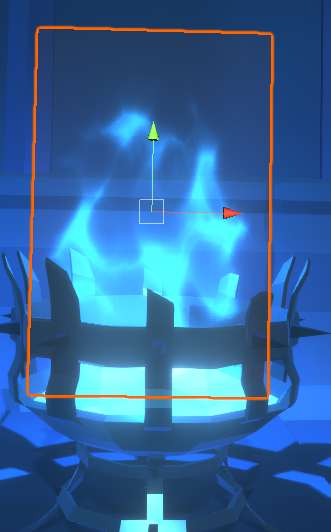
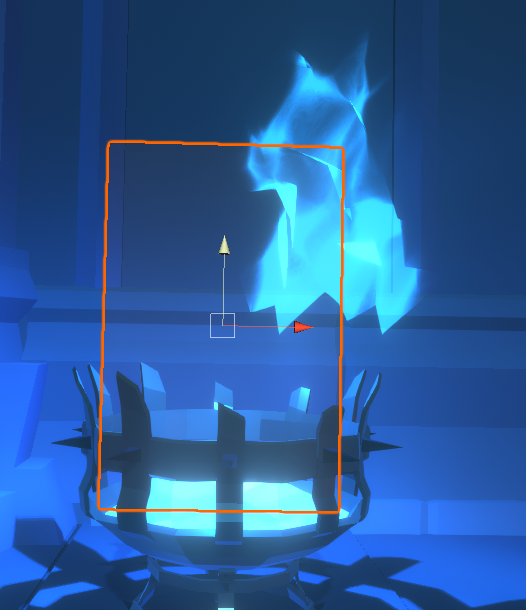
and intensity 1.5
And here's the shader graph if this helps
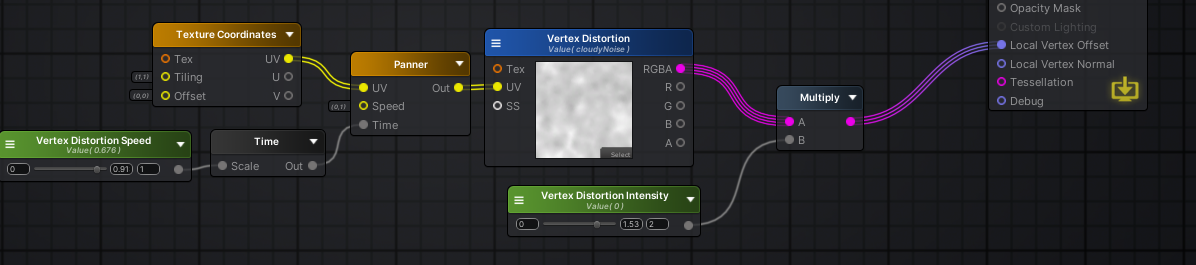
I think I know what's going on, I am just not sure how to fix it
 vocal narwhal
 tame trench
hi, everyone I want to ask, I got some problem when writing a shader, I really need some help, I've been stuck for 3 days, so I just wanna get a value from 0 to 1 depends on _WorldSpaceLightPos0, so when the sun at the bottom its return to 0, at middle its return 0.5, and when at the top its return 1
 hazy ether
Anyone has tried raymarching in hdrp through a custom post process code based shader? I'm stuck at getting the ray direction from the camera to the pixel it renders. Anyone has an idea? I watched quite a few videos and read some doc about it but I can't seem to get it right. In the standard library I was able to do it with unity_CameraInvProjection and unity_CameraToWorld by getting the pixel position using UnityObjectToClipPos, but it's not in those helper functions are not in the hdrp utility files anymore
west fulcrum
Why does my sample texture look like this?
It looks like this in the sprite preview..?
amber saffron
Because the sample texture preview doesn't display alpha.
 wraith haven
hi, everyone I want to ask, I got some problem when writing a shader, I really need some help, I've been stuck for 3 days, so I just wanna get a value from 0 to 1 depends on _WorldSpaceLightPos0, so when the sun at the bottom its return to 0, at middle its return 0.5, and when at the top its return 1
@tame trench if _WorldSpaceLightPos0 is your sun it'll be directional, so the Y component is basically the vertical tilt value between -1 and 1. you can just remap to [0, 1] by doing _WorldSpaceLightPos0.y * 0.5 + 0.5
tame trench
@tame trench if _WorldSpaceLightPos0 is your sun it'll be directional, so the Y component is basically the vertical tilt value between -1 and 1. you can just remap to [0, 1] by doing _WorldSpaceLightPos0.y * 0.5 + 0.5
@wraith haven thanks, i just started writting a shader.
 jolly adder
Hey everyone,
Any ideas about creating this effect in URP ?
https://www.youtube.com/watch?v=SMLbbi8oaO8&feature=youtu.be
Hey everyone,
Still no idea ?

Support me on Patreon ➜ https://www.patreon.com/DanMoran
Follow me on the Twittersphere ➜ https://twitter.com/DanielJMoran
Get the Assets for this Video here ➜ https://goo.gl/LJQRFl
sly breach
@jolly adder maybe try a more specific question ?
jolly adder
I want glow outline effect like what is it in this video in URP. I'm not that much familiar with this kind of image effect shader in URP.
@sly breach
sly breach

This is a tutorial that show three ways to achieve the outline effect in Unity 3D using Shader Graph, sadly three of them are not that nice/good
New Outline Tutorial with better results:
https://www.youtube.com/watch?v=xgZ0NpaMByU
Checkout my new Floating Islands Asset:
http...
you mean like this ?
jolly adder
@sly breach No. It is a material on an object. I want image effect shader like what it is done in that video above.
I have tried to implement it based on outline shader in this repo (https://github.com/Unity-Technologies/UniversalRenderingExamples) but I'm not happy with outline and I think the technique for implementing glow outline is different.
 thick fulcrum
slightly different approach used in unity examples, perhaps that will give you some direction https://github.com/Unity-Technologies/UniversalRenderingExamples/wiki

GitHub
This project contains a collection of Custom Renderer examples. This will be updated as we refine the feature and add more options. - Unity-Technologies/UniversalRenderingExamples
 rustic talon
anyone knows why every single tree material is pink, if im using a unity shader?
i've download the asset package from asset store "Dream Forset Tree", and it is pink
thick fulcrum
you need to use the Universal / HDRP version of the shader, whichever pipeline you are using
rustic talon
im using urp
thick fulcrum
if you use the dropdown list and browse into the Universal branch you should find a suitable similarly named replacement
rustic talon
oooh i think it has work, but why if i go to edit --> render pipeline --> Urp --> Upgrade materials it doesnt work??
thick fulcrum
it does usually, but it's not perfect so sometimes you have to manually update
rustic talon
@thick fulcrum i've change every shader to urp shader but now i've all this errors, and if i click apply my shaders become the same shaders before the upgrade to urp
first time working with trees and this shader and dont know how it works...
thick fulcrum
@rustic talon ah :D
well that's a pain in the rear. Which shader did you pick under the Universal branch?
I've not played around with that aspect of it tbh
thick fulcrum
to work with the tool it may need all speedtree shaders, worst case you may have to edit the editor code behind the tool to override the errors and default shader it picks
rustic talon
this time both, barks and leafs are using speedtree7 shader and errors still
its normal that this is so dificult to use trees from asset store?XD
rugged verge
Is it possible to apply a "shader or material or Blit" to a particular "Sorting Layer" in a camera?
E.g. I have 18 sorting layers, I only want to blur the 8th sorting layer, or something.
 tardy warren
Hi,
I can't find any example of surface shader with custom Deferred Lighting function as described in documentation : https://docs.unity3d.com/Manual/SL-SurfaceShaderLighting.html
Does anybody already achieved this implementation and could share an exemple?
Thanks
 serene creek
Hello, so Im reading a texture file from disk and Im creating a Texture2D, how to I set it to be a normal map?
tardy warren
@serene creek Look at TextureImporter class. Here is an example :
 proper raptor
How do i enable shaders
rugged verge
they're enabled by default right, you just put it in a material and drag the material onto your sprite or UI image or whatever

Unity Learn
Get an overview of the lighting features new to Unity 5 with this lesson covering realtime global illumination, light types, the lighting panel, as well as emissives and probes.
Canvas Group can adjust the opacity of a group, but I wonder if it's possible to produce a non-hacky/similar component that would let me apply a material to.
 uncut robin
Hey, is there a node to manipulate the intensity of the color (HDR) in shadergraph?
serene creek
@tardy warren does TextureImporter also works with images I load at runtime from the user's files?
tardy warren
@serene creek No, Texture Importer is part of the Editor API and is not available in build
serene creek
@tardy warren I see, so do you know of any way to change the texture type of a texture loaded at runtime?
tardy warren
@serene creek Why do you need it?
serene creek
Im allowing the user to import textures for albedo, normal and specular
albedo and specular work fine
but normal needs to be set the type of normal
same as if you do it on editor where you set the type to be normal
but at runtime I need to set this type before asigning it to the material or else wont look right
tardy warren
Are you sure that it makes a difference at runtime?
serene creek
adding the normal?
well yeah
I set the same image on the editor and looks good
when I import ito at runtime it looks very bad
tardy warren
Unity is the ultimate game development platform. Use Unity to build high-quality 3D and 2D games, deploy them across mobile, desktop, VR/AR, consoles or the Web, and connect with loyal and enthusiastic players and customers.
serene creek
yes Im doing that
but the format of the image needs to be set even before you assign it to the material
tardy warren
You use Unpack Normal function?
serene creek
Im not familiar with that
low lichen

Unity Forum
Hi everyone, I'm new to shader scripting and I have attemped to create a shader that will unpack my tangent space normal map correctly but what i have...
serene creek
well, thats on the gpu side
Im trying to change the type to normal even before it gets to the gpu
most shaders accept thge same type of normal format
low lichen
There's a reply there that explains what Unity is doing to the texture when it's imported as a normal map
serene creek
this is why we set it on the editor
right, but they seems to fix it on the shader
Im trying to set the type of the texture before it gets to the shader
so it seems I have to change the compression and then copy the red channel to the alpha channel
low lichen
The solution isn't there, but I shared it since it seemed to explain how Unity packs it
serene creek
got it
Was wondering if anybody knew what exactly needs to be done to the Texture2D to replicate what Unity does when packing normals
 merry valley
Is there a way I can bake a shader-based material into a texture?
serene creek
Ok, just fyi @low lichen @tardy warren
Found out how to process a Texture2D simiar to what Unity does when you set it as normal texture
so first you have to read the image as DTXnm which stands for a special DTX format for normal maps
you do it with: Texture2D newTexture = new Texture2D(2048, 2048, UnityEngine.Experimental.Rendering.GraphicsFormat.RGBA_DXT5_UNorm, -1, UnityEngine.Experimental.Rendering.TextureCreationFlags.MipChain);
Or as explained here:
DTXnm is a DTX5 texture with the red channel of the normal map stored in the alpha channel of the texture and the red and blue channels blacked out. The green channel of the normal map remains as the green channel of the texture.
because of that I need to convert this DTXnm to a RGB in which I copy the red chanel to the alpha chanel
created this function:
        Color[] colors = tex.GetPixels();
        for(int i=0; i<colors.Length;i++) {
            Color c = colors[i];
            c.r = c.a*2-1;  //red<-alpha (x<-w)
            c.g = c.g*2-1; //green is always the same (y)
            Vector2 xy = new Vector2(c.r, c.g); //this is the xy vector
            c.b = Mathf.Sqrt(1-Mathf.Clamp01(Vector2.Dot(xy, xy))); //recalculate the blue channel (z)
            colors[i] = new Color(c.r*0.5f+0.5f, c.g*0.5f+0.5f, c.b*0.5f+0.5f); //back to 0-1 range
        }
        tex.SetPixels(colors); //apply pixels to the texture
        tex.Apply();
        return tex;
}```thet function will spit a Texture2D that you can assign to the material's _bumpMap slot
it was not obvious but now that I understand it it makes some sense
Thanks for pointing me to the right direction
grand jolt
So I'm sort of making a wrapper around MeshRenderer that lets me animate its texture using animation window without leaking materials at editor time.
And copying over material properties to local cached material every frame gets real expensive at 600 renderers.
What do?
I'm doing it every frame because there is no callback for checking if material's properties changed.
grand jolt
Judging by the silence my question isn't the easiest one 
grand jolt
Just like sprite animations.
 shrewd crag
do you mean a movie texture
i see
so question
did you look at how a sprite shader works
you should see how a sprite shader works
grand jolt
Yeah. It's a dumb frag vert. MainTex is marked [PerRendererData]
But the forums say that that attribute does nothing at this point.
shrewd crag
well concretely it basically animates UVs to pan around an atlas
that's how it makes an animation
you don't actually want to set a texture2d
you want a single image that contains all the frames, just like a sprite
grand jolt
The shader itself doesn't modify uvs OUT.texcoord = IN.texcoord;
I can't really atlas my animation textures cause they will be FPS weapons covering half the screen.
And my asset iteration times would plunge if I had to pack em.
Honestly, I'm just losing framerate to comparing material properties.
I can fix that for builds by putting the update under unity editor define but I still need painless material sync in editor.
I know that material property blocks break SRP batcher.
But then I instance every other material in any case.
I mean instantiate.
Oh wait, SRP batcher only cares about the shader, looks like a shitton of materials doesn't matter.
 errant ocean
hey guys I need a hand with some shader stuff, any channel for paid work ?
I need someone that can quickly make some stylized water in HDRP please DM me
thanks
errant ocean
ty
grand jolt
There's also UDC and GDN but I'm not active on those so I don't know how big they are.
Got work channels as well though.
errant ocean
thanks a lot
jolly adder
http://wiki.amplify.pt/index.php?title=Unity_Products:Amplify_Shader_Editor/Parallax_Mapping
Is this node available in Shader Graph ?
amber saffron
jolly adder
It can be used for parallax effect ? I mean giving depth to the image and based on camera position.
amber saffron
Yes
jolly adder
Hmm, I can't find it in URP 7.3.1
amber saffron
Only available for HDRP (for the moment) though
amber saffron
You can't really for the moment ...
Or if you're brave enough you can code you own parallax mapping node using custom function
 real topaz
jolly adder
real topaz
jolly adder
Any resources for creating custom one ?
amber saffron
Here is the code of the future universal parallax mapping node : https://github.com/Unity-Technologies/Graphics/blob/master/com.unity.render-pipelines.core/ShaderLibrary/ParallaxMapping.hlsl

GitHub
Unity Graphics - Including Scriptable Render Pipeline - Unity-Technologies/Graphics
Still not parallax occlusion mapping, but parallax offset
Here is how parallax occlusion mapping is done : https://www.gamedev.net/articles/programming/graphics/a-closer-look-at-parallax-occlusion-mapping-r3262/
jolly adder
Thanks
amber saffron
And here for the parallax occlusion mapping node code : https://github.com/Unity-Technologies/Graphics/blob/master/com.unity.render-pipelines.core/ShaderLibrary/PerPixelDisplacement.hlsl
GitHub
Unity Graphics - Including Scriptable Render Pipeline - Unity-Technologies/Graphics
jolly adder
And here for the parallax occlusion mapping node code : https://github.com/Unity-Technologies/Graphics/blob/master/com.unity.render-pipelines.core/ShaderLibrary/PerPixelDisplacement.hlsl
@amber saffron It is HDRP Parallax Occlusion Mapping ?
GitHub
Unity Graphics - Including Scriptable Render Pipeline - Unity-Technologies/Graphics
 plain sinew
Sorry if I'm interrupting anyone but could someone help me out with these shaders and a fog problem?
When I upgraded my project to use the URP, all my imported materials from Blender are using the correct shaders but Unity's default materials aren't.
There are odd shadow artifacts now on some models; I've triangulated the faces and recalculated normals but nothing.
And finally, I'm trying to decrease the amount of light with depth but for some reason, it is not decreasing, even when using Environment Lighting source as my custom shader skybox
The skybox shader graph
P.D: The fog in the Lighting tab doesn't work. How can I recreate it?
 odd oriole
I'm trying to understand the basics of toon shading and I'm checking out unitys youtube tutorial on making a toon shader that reacts to the light settings in the scene. It works when nothing shadows the GO, but if the GO is behind something that shadows it no shadows are applied. How do people usually handle this?
ah sorry I found out myself. using a lit shader and using the emission instead of albedo,
fair sleet
Do I need to include something to use constant buffers because I keep getting this error: unrecognized identifier 'CBUFFER_START'
(I'm making a compute shader and I'm using 2020.0b5)
CBUFFER_START(constantBuffer)
int test;
CBUFFER_END
could be wrong but don't believe that is used for compute shaders, just surface / frag shaders
or you need to include a relevant unity helper file
fair sleet
oh
you might be right
The compute shader class has the function SetConstantBuffer but it's not documented. I though they forgot to document it but it may just be broken and accidentally left in
I actually wanted to use Constant Buffer as a workaround because I never figured out how to set a struct constant. You have setbool, setfloat, setint etc but I want to set a struct. How do I do that?
thick fulcrum
it's been about a year since I experimented with compute shaders... so good question 😄
have you managed to setup a struct and pass the data over?
I used the following site which covers the basics, hopefully it's still relevant. http://kylehalladay.com/blog/tutorial/2014/06/27/Compute-Shaders-Are-Nifty.html
I build shaders, renderers, games, and other stuff that's fun to stare at.
fair sleet
Thank you but I've already read that article
thick fulcrum
had to grab some food, interesting problem as this question clearly says you need to do as you have and define the CBUFFER_START etc. so why it's unrecognised is confusing. https://forum.unity.com/threads/how-to-set-my-constant-buffer-to-compute-shader.953108/
Unity Forum
Hello
I have a buffer which i want to declare as constant since i only need to read from it, but i get an error when i attempt to set it.
In the...
@fair sleet have you included #include "UnityCG.cginc" as I think this links in the macros
fair sleet
huh
it compiled
If this file was important why doesn't Unity include it when you create the compute shader
thank you!
thick fulcrum
np... just one of those things I guess your supposed to know 😄
was just glancing at some other examples... not sure if just #include "HLSLSupport.cginc" would suffice / be better than #include "UnityCG.cginc" perhaps someone more knowledgeable will step in and confirm which is appropriate to use and why.
fair sleet
the plot thickens
I now get Unknown parameter type (0) for testNoise at kernel HeightCompute
Here's a link to the code if anyone wants to help: https://paste.myst.rs/8wo

A simple website for pasting text, mainly code snippets.
the plot thickens even more
if I don't include this file I get no compile errors
https://gist.github.com/fadookie/25adf86ae7e2753d717c
the plot thickens even more
if I comment out line 23 or line 50 I get no compile errors even if I include the file above
Apparently if I add anything to the variable h in LayeredNoise() I get the compile error
It compiles if I multiple h though.
Can somebody help me I think I am losing my mind
 strong tinsel
https://youtu.be/AlCJc05nkwc
How can I recreate the background which is used in this game

We participated in Ludum Dare 46, and it was a blast!
► Check out and join CORE for free! https://bit.ly/CoreBrackeys
● Play and rate "Party Killer": https://ldjam.com/events/ludum-dare/46/party-killer
● "Body Issues" made by Ventus: https://ldjam.com/events/ludum-dare/46/b...
grand jolt
I managed to hack a solution together to hook into editor application and only force material sync when any sort of material is selected or saved in the project.
So I've gone from 40 FPS with 600 mesh sprites to 100 FPS with 1200 animated mesh sprites.
Can't even use the bloody animator to change a texture on a custom script.
(Needed spritelike meshes in 3D that don't necessarily billboard and also can be animated)
west fulcrum
Can I create something like this in 2D, using shader graph?
Either a shader that follows the edge of a sprite and fills it depending on the distance from the edge, or a sprite shape with splines would be even better.
 slow bear
I'm curious, what's _ScreenParams.wz used for? It seems like if it gets multiplied by a UV coord it returns the UV position of the pixel (or texel?) placed down on the right
Can I create something like this in 2D, using shader graph?
Either a shader that follows the edge of a sprite and fills it depending on the distance from the edge, or a sprite shape with splines would be even better.
@west fulcrum use the scene depth node
wait, you mean in 2d; the easiest solution would be using the alpha channel to store a SDF of the sprite (that is, a very blurred version of the sprite mask)
and sample that in a custom shader in order to get both the rim and the transparency
west fulcrum
@slow bear aha cool, i was consider an extra sprite but didnt really know. Thanks!
Then I guess it’s not as easy to do this with sprite shape?
 supple leaf
hey guys, im currently setting up the outline shader from brackeys. the problem is when i use differen sprites my shader looks different even when my sprites have the same pixels per unit size. the palm outline looks twice as thick
grand jolt
Hi all.
I have two nodes inheriting different maps with 2 seperate color properties, is there any way I can combine these so I can output to the emission output?
low lichen
@grand jolt How do you want them combined?
grand jolt
@low lichen well the idea is, i'm effectively doubling the emission maps on a sprite, both texture 2D nodes have different maps, but obviously the output node only takes an RGB(3), so i'm wondering how to output both maps on the same shader
low lichen
Emission is usually additive
So you would just add the two colors together
You could also try adding a Blend node and try different modes till you get one you like.
For example, specular highlights is emissive and so is the emission property. In lit shaders, you would add those together and output to emission.
grand jolt
@low lichen Thanks, using a blend node with Screen worked
fair sleet
Can somebody explain me why I get this compile error?
Unknown parameter type (0) for globalStruct at kernel CSMain
#pragma kernel CSMain

struct testStruct
{
    int a;
};

testStruct globalStruct;

RWStructuredBuffer<float> Result;

[numthreads(1,1,1)]
void CSMain (uint3 id : SV_DispatchThreadID)
{
    Result[id.x] = globalStruct.a;
}
I believe you should define your buffer for the struct so either StructuredBuffer<testStruct> globalStruct; or to read and write RWStructuredBuffer<testStruct> globalStruct; but I am very rusty on compute's
fair sleet
@thick fulcrum
but I don't want a buffer I want a struct constant
low lichen
I don't think you can pass a single struct. I've only ever seen structs passed through buffers.
thick fulcrum
well as I understand if you define similarly:
{
    int a;
};```
But this is for really small dataif it's anything more than 64kb it's better to use StructuredBuffer if read only
fair sleet
it's under 1 kb
I managed to fix the compile error by making the struct variable static. I'm not sure why I don't need to do that with the global int though
#pragma kernel CSMain

struct testStruct
{
    int a;
};

int test;
static testStruct globalStruct;

RWStructuredBuffer<float> Result;

[numthreads(1,1,1)]
void CSMain (uint3 id : SV_DispatchThreadID)
{
    Result[id.x] = globalStruct.a + test;
}
if I can't send them individually can I use a constant buffer to send these structs?
I will have like 5 of them and I will be sending them to the compute shader only once
thick fulcrum
from what I read the CBUFFER_START macro should be ideal to use here, but that wasn't working out for you.
fair sleet
I'm trying to send the structs using a constant buffer but I get a stackoverflow when executing SetConstantBuffer on the C# side.
ComputeBuffer noiseSettings = new ComputeBuffer(1,NoiseSettings.GetSize());
NoiseSettings[] ns = {testNoise };
noiseSettings.SetData(ns);
cs.SetConstantBuffer("noiseSettingsBuffer",noiseSettings,0,noiseSettings.stride*noiseSettings.count);
noiseSettings.Release();
struct definition:
public struct NoiseSettings
{
    int layers;
    Vector3 mainOffset;
    Vector3 mainFrequency;
    float frequency;
    float amplitude;
    float hscale;

    public static int GetSize()
    {
        return sizeof(int) + sizeof(float) * 3 * 2 + sizeof(float) * 3;
    }
};
Should I do theese operations in another order? Maybe do SetData after SetConstantBuffer?
 fallen osprey
will gradient noise always be the same if i input the exact same numbers on another instance?
rugged verge
I render out to RenderTexture, and have a RawImage.
BUt when I render to RenderTexture via Canvas, I have 3 images, the front image is 50% transparency, the middle/back are 100% opaque, but the front image causes a "hole" through the 2 other images for some reason when I render the raw image to another camera
nvm
ill debug it
knight -> 100% opaque alien -> 50% opaque alien
The 50% opaque alien causes a "hole" in the 100% opaque alien causing the game to see the "knight" when you shouldn't.
The alien is rendered to a rendertexture, then the rendertexture is output in the RawImage (which is in a canvas that renders to camera overlay, but if i set to screenspace overlay it's fixed).
rugged verge
nvm its too h4rd
I think it will be solved in a later version of Unity with overlay cameras (maybe those will work) but will wait and see. I have tried a few solutions and they had meh results. It seems to have been a problem to be solved for years with long workarounds https://gamedev.stackexchange.com/questions/112032/unity-apply-an-image-effect-on-one-layer-only

Game Development Stack Exchange
Please consider this simple scene.
It’s composed of 3 different game objects. 1 background image + 1 static character image + 1 small part (with the pet) that is changed at runtime to perform an
 shell cradle
has anyone ehre successfully implemented fft water? im implementing one in scenekit right now but i need to udnerstand each of the steps, and some help would be delightful
 coarse path
Is there a triplanar terrain shader for HDRP?
thick fulcrum
@coarse path there are some products on the asset store which provide this feature or the brave can create one 😉
 ruby field
I've been trying to figure out how to get a shader that overlays a texture that doesn't move with the object for the past few hours
There's GOT to be a simple way to do that I just don't know about, right?
I want the texture I'm drawing with the shader to remain locked to the current view, even as the object I'm drawing it onto moves around
thick fulcrum
generally this is what happens with UV in object space, depending on the shape of object this will change. Someone wanted similar with spheres and overcame this by "billboarding" the sphere, made them always face camera. but there are probably other ways involving some maths
ruby field
I'm using a rectangular repeating tiled sprite that I want to appear locked in place as the object moves, sort of like the effect you'd get from masking something

TV Tropes
The Unmoving Plaid trope as used in popular culture. A subtrope of Cheated Angle. Oftentimes in cartoons if a character is wearing clothes with a complex …
thick fulcrum
ah now that's a little different, it's more world space and probably tri-planar if on a 3D object
you can create this effect in shader graph easily enough if using URP / HDRP
Otherwise you will need to do it in code
if your not confidant with shaders, you will need to find one and I'm not up-to-date on asset store offerings in this regard
actually it's probably just a tri-planar effect you need, keeping it simplar
ruby field
I'll have to look into tri-planar effects; thanks for the advice
thick fulcrum
maybe able to do something by having the UV rotated to camera, getting the projection correct could be fun
tame trench
does anyone here know how to calculating skybox UV on unity, I have tried calculating sphere UV float2(atan2(dx,dz)/TAU+0.5, asin(dy) / PI ) it doesn't help at all
grand jolt
@ruby field (in HDRP) just change the UV channel on your material to triplanar:
that should result in the desired effect. remember to match your emission map also if applicable
 warm coral
does anyone know why my shader preview isn't work as it should be ?🥺
slow bear
you mean that's it not printing the glowy rim on the dissolve holes?
warm coral
yeah
 left rose
I'm new to shader and I looked up on Google about 2D Ramp. The closest search result I found is BRDF. Are maps on slide BRDF map?
left rose
*source: miHoYo
warm coral
Found that color node cause the problem
the white one is working properly ,but the one with hdr color part will disappear.
but i don't know how to fix this.
 somber blade
Hi All. Anyone ever used a shader to display a circle of a given radius? I am trying to use the shader from solution 3 in this, but it doesn't give me much help on how to configure it. https://gamedev.stackexchange.com/questions/126427/draw-circle-around-gameobject-to-indicate-radius
Game Development Stack Exchange
I have a tower in my tower defense game im making with an upgradable radius and i would like when the user clicks the tower to show the radius as a circle around the tower
My original thought was to
This is as far as I could guess, I don't know what to choose for a texture
thick fulcrum
is this for RTS type game? selected units, range etc?
somber blade
Just to show range from a single object, not a mouse selection
So I just want to draw a circle around an object, and be able to update the radius
thick fulcrum
so for option 3 you need a black texture with a white circle drawn on it, keep it small ish size 256x256 probably ample
although you may find some issues with it in certain circumstances, maybe better solutions out there.
somber blade
Oh I need to draw this in paint or something?
I mean I could use line renderer, but seems that might be inefficient to draw so many lines
thick fulcrum
Yea draw or sometimes google can provide 😉 a simple PNG image of a circle on black background
seem to think I tried these a while back myself and I wasn't happy with the solutions, I ended up going using Unities deferred decal example until I swapped to URP. I still use decals for this and other features
somber blade
oh a decal hmm
thick fulcrum
I just scale the gameobject which holds the decal for different ranges, at highest it can look a bit distorted.. but I will fix this before release 😉
somber blade
yea I was thinking stretching what is essentially a sticker would deform it
I liked the idea of a shader because it is more like a ring of light
thick fulcrum
the only downside of decals (projector too) is that it will affect other objects not just terrain. Some asset store decals I believe can use layers to mask the effect.
But they are nice and lightweight practically no cost in scene
can rotate them at runtime etc no issues
somber blade
the projector has an option to ignore layers
thick fulcrum
seem to think I found it distorted too much or something but you may have better luck 😉
ah it broke on instanced terrain.. that was my problem now I remember 😆
somber blade
oh they have a solution for terrain, but im not using any terrain objects at the moment
thick fulcrum
then you should be safe
somber blade
I think the problem is this shader was built for a really old version of unity. I need a shader that can project a circle, even when I added the circle PNG it can only project in a straight line
thick fulcrum
have you tried rotating the projector?
I know some implementations I tried of various things needed a 90deg rot on X
 molten summit
i'm really confused with the semantics and use in shader code in appdata ( Vertex Input) and v2f ( Vertext Output)
could anyone explain this to me?
somber blade
Yup, tried changing every setting on the projector, it wants to project any image I draw into a straight line only, I can rotate the line, but it will not fill a circular space
oh on X, let me try
molten summit
like i don't get the reason behind input and output and how they link
thick fulcrum
hmm not sure will need to look at that thread again
somber blade
Yup found it in there, gotta change the texture (the paint image) to type Cookie
haha, the width of the circle expands as the radius expands, that WOULD be a problem
I might have to go line renderer
thick fulcrum
if you don't mind getting hands dirt and doing some shader code, you can code in a dynamic circle which should avoid that issue... but shade code is black magic to me 😄
somber blade
yea I made a blur shader once, it was a lot of work
was pretty cool though, could make any UI background look awesome
thick fulcrum
😄 yea they good when they work
somber blade
I could never get it as perfect as the windows start bar though, I don't know what Microsoft did. It takes a crap load of passes to blur that much
thick fulcrum
@somber blade you could try that example 4 code, (I didn't notice it earlier) but that is the "dynamic" circle approach, assuming it works it should get around the scaling issue
somber blade
oh I don't have terrain, it looks like it requires terrain
I found one that doesn't expand so much
will probably do the trick for now
thick fulcrum
don't believe it's terrain specific, but if you sorted one np 😉
 noble tree
im using shader graph and it doesn't seem like setting the opacity works with Additive blend mode. is there something that will work the same or is there something im doing wrong?
the texture itself works fine but i'd like to multiply it by a manual opacity, which doesn't do anything
it works fine with Alpha blend mode though
 regal stag
With additive, outputting black as the colour output is fully transparent. So rather than using alpha you should be able to multiply the opacity with the colour part.
noble tree
ah yep that works. thanks a bunch!
molten summit
how do you convert vertex color into a 2d texture then put that into a albedo from shader code?
slow bear
Has anyone tried to implement a Jump Flood Algorithm in Unity? I did almost everything, but I have some issues regarding the final distance field
the problem I'm having is that JFA tends to degenerate into voronois around texels, instead of doing a continuous area
jolly adder
Is it possible to lerp from opaque to transparent color for outline ?
https://github.com/Unity-Technologies/UniversalRenderingExamples/wiki/Toon-Outline
GitHub
This project contains a collection of Custom Renderer examples. This will be updated as we refine the feature and add more options. - Unity-Technologies/UniversalRenderingExamples
jolly adder
This outline shader looks like this on my model.
Any idea on how to fix it ? (I made a little change into it, make it work on silhouette of the object)
 royal sluice
Guys, how i do to place an procedural sky in HDRP volume ? why they only accept image in texture shape "cube?
procedural sky material*
amber saffron
@royal sluice The sky texture is expecting a texture of type cube, also known as cubemap, because it needs a 360° map
royal sluice
but an material skybox procedural isn't it? @amber saffron
amber saffron
You want to use the old skybox material in HDRP ?
Can't do that
You can tweak the procedural sky by using the procedural sky volument component override.
grand jolt
can i have help
my code is https://hatebin.com/wpcvafnzlk
it give me Shader warning in 'Hidden/Post FX/Screen Space Reflection': value cannot be NaN, isnan() may not be necessary. /Gis may force isnan() to be performed at line 753 (on d3d11)
Compiling Fragment program
Platform defines: UNITY_ENABLE_REFLECTION_BUFFERS UNITY_USE_DITHER_MASK_FOR_ALPHABLENDED_SHADOWS UNITY_PBS_USE_BRDF1 UNITY_SPECCUBE_BOX_PROJECTION UNITY_SPECCUBE_BLENDING UNITY_ENABLE_DETAIL_NORMALMAP SHADER_API_DESKTOP UNITY_COLORSPACE_GAMMA UNITY_LIGHT_PROBE_PROXY_VOLUME UNITY_LIGHTMAP_FULL_HDR
Disabled keywords: UNITY_NO_DXT5nm UNITY_ENABLE_NATIVE_SHADOW_LOOKUPS UNITY_METAL_SHADOWS_USE_POINT_FILTERING UNITY_NO_SCREENSPACE_SHADOWS UNITY_PBS_USE_BRDF2 UNITY_PBS_USE_BRDF3 UNITY_NO_FULL_STANDARD_SHADER UNITY_HARDWARE_TIER1 UNITY_HARDWARE_TIER2 UNITY_HARDWARE_TIER3 UNITY_HALF_PRECISION_FRAGMENT_SHADER_REGISTERS UNITY_LIGHTMAP_DLDR_ENCODING UNITY_LIGHTMAP_RGBM_ENCODING UNITY_VIRTUAL_TEXTURING
when i click colorResult = float3(0.0, 0.0, 0.0);
amber saffron
Not sure, but when looking at your code, colorResult is always the result of a texture sample, and this can not be a nan ?
royal sluice
You can tweak the procedural sky by using the procedural sky volument component override.
@amber saffron but I didn't find the procedural component volume in the volume I'm using
@amber saffron
amber saffron
Sorry, the name is "Physically Based Sky"
 frosty holly
what's a good way to combine shaders? I'm fairly new to the code behind shaders (as in I barely understand it) and I'm trying to combine the first shader from this article https://ericeastwood.com/blog/20/texture-tiling-based-on-object-sizescale-in-unity with the built in unlit/texture shader. Is there any good way to go about that?
low lichen
@frosty holly There is no custom shader in that article
They're just using some "Diffuse" shader, which seems to be a basic textured shader. The thing that they are doing is changing the tiling property of the material in a custom script.
That should work for any shader that supports tiling&offset
Which is most of them
 bronze basin
 crystal light
Hello. How can I provide a user with Alpha Clip option in newer versions on URP and HDRP graphs? Seems like it's just preset in a graph itself. I want a boolean option in Material.
amber saffron
It's an option on HDRP materials that use shadergraph, but not on URP for the moment
crystal light
I see, thanks
thick fulcrum
@somber blade you inspired me to finally sort out my range circle decals, made a dynamic circle which scales correctly with object keeping same thickness regardless of object size. The textured based decal is so much blurrier in comparison
low lichen
Don't forget to add some anti-aliasing with fwidth/ddx ddy. It's a little too crisp.
thick fulcrum
yea I have that issue, it's more pronounced when zoomed out. currently just using step to get circle.
I found an example using smoothstep but I could only get it to soften the inner edge do you have any suggestions? @low lichen
nvm think I sorted
 signal rapids
Hey! In HDRP, I'm trying to make a script for creating custom spherical harmonic values that will act as the ambient light of the mesh it is on. But how do I actually tell the mesh renderer to accept and apply these values? I have the SH values ready, and I just need to get this across to the renderer.
low lichen
@signal rapids MeshRenderer has a Light Probe setting where you can set it to Custom Provided
Then you put a MaterialPropertyBlock with the SH values
But they need to be converted to a specific format, not the same as the SphericalHarmonics struct type
signal rapids
Could you guide me through that a little bit? I have the custom provided-setting on and the SH struct set to a light color @low lichen
low lichen
@signal rapids This script has methods for converting SphericalHarmonics to material properties
https://github.com/keijiro/LightProbeUtility/blob/master/Assets/LightProbeUtility.cs

GitHub
Unity example: applying light probes to a mesh drawn with Graphics.DrawMesh - keijiro/LightProbeUtility
You just need to modify it to take a SphericalHarmonics struct instead of a position
signal rapids
Awesome, thanks, I'll look into this!
crystal light
@amber saffron perhaps I could use a custom shader GUI to set those by myself? I mean two-sided and alpha-clip mainly.
Some kind of keyword is available for those?
amber saffron
I don't think it would work.
You can technically expose the culling mode in shaderlab, but not in shadergraph, so a custom editor would not change it.
crystal light
I thought that the culling mode and/or alpha test is just some keyword to set
amber saffron
Nope, culling is set here : https://docs.unity3d.com/Manual/SL-CullAndDepth.html
Alpha test can indeed be enabled/disabled by a keyword, as its only a clip() command. But ideally, it also has a dedicated queue tag : https://docs.unity3d.com/Manual/SL-SubShaderTags.html
 copper veldt
 grand jolt
atleast 5K ppl on this discord chan, not a single one knows?
amber saffron
@royal sluice Terrain grass is not supported for the moment.
@grand jolt Multiple scrolling textures in different directions
Could as well be done by using multiple spheres that rotate in different directions, with a transparent additive material.
 golden glade
I am creating a volumetric-lighting like effect in screen space, so basically i am ray casting through the depth texture and returning a hit wherever it detects a non zero depth value. The thing is that i am offseting ray direction based on the screen space position for the perspective effect and when doing that, i get a duplicated shadow at the opposite side, i remember having this problem in 3D with a ray tracer i once made and the solution was limiting the shadow ray distance to not go through the light itself, but im not sure of how to solve it here. Thanks
this is the raw output of the effect from another perspective,notice how there is a ghost shadow at the right
jolly adder
Hey guys,
Still no idea how I can make this effect in URP ?
Support me on Patreon ➜ https://www.patreon.com/DanMoran
Follow me on the Twittersphere ➜ https://twitter.com/DanielJMoran
Get the Assets for this Video here ➜ https://goo.gl/LJQRFl
I have tried to use outline example in this repo (With modification), https://github.com/Unity-Technologies/UniversalRenderingExamples/wiki/Toon-Outline
but it I don't know how to make it glow (Like lerp from opaque to transparent) and it doesn't work on more complicated models like purse and bags.
GitHub
This project contains a collection of Custom Renderer examples. This will be updated as we refine the feature and add more options. - Unity-Technologies/UniversalRenderingExamples
So is it possible to make the camera view blurry and substract it from the actual one ? Like the Makin' Stuff Look Good tutorial ? Because I don't find how I can do it in URP. At least how to make the camera view blurry 😄
low lichen
You certainly can and the recommended way to do it is with the Render Features API. It's more extendable than what you can do in the built-in renderer but it's more complicated as well.
There's a lot of boilerplate to make a Render Feature
jolly adder
Yup, I almost know how to make but I don't really find anything useful for creating this shader.
Any references or suggestions ?
jolly adder
Yup
low lichen
What's the lowest hardware you want to target with this?
A fullscreen blur pass is no joke
You'll probably find similar cost as bloom
jolly adder
Yup, I think it is heavy for mobile devices.
low lichen
I would recommend either doing a fresnel inner outline, which doesn't work great for non-round objects
jolly adder
So do you think it is possible to lerp outline color from opaque to transparent to have something like that glow effect ?
low lichen
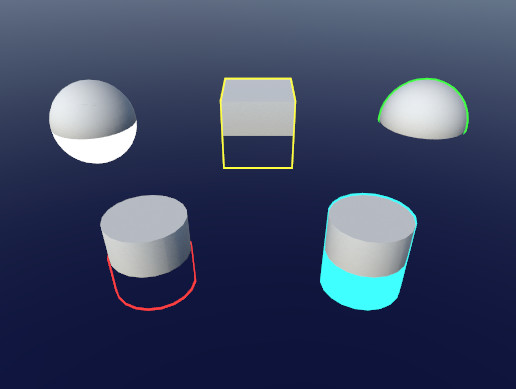
Or a harder outline using something like this:
https://assetstore.unity.com/packages/tools/particles-effects/quick-outline-115488
Use the Quick Outline tool for your next project. Find this and more particle & effect tools on the Unity Asset Store.
jolly adder
Yup, I have tested it and I don't want it to be inner.
low lichen
Is this for VR by any chance?
jolly adder
No
Or a harder outline using something like this:
https://assetstore.unity.com/packages/tools/particles-effects/quick-outline-115488
@low lichen Is it usable for URP ?
Use the Quick Outline tool for your next project. Find this and more particle & effect tools on the Unity Asset Store.
low lichen
Hmm, I guess not. But if you're shader savvy, it doesn't look like a very complicated shader to convert to URP
Since it's unlit
This is the main shader in question
https://github.com/chrisnolet/QuickOutline/blob/master/QuickOutline/Resources/Shaders/OutlineFill.shader

GitHub
Unity asset for adding outlines to game objects. Contribute to chrisnolet/QuickOutline development by creating an account on GitHub.
I would think you would just need to add a tag there to tell Unity it works in URP
jolly adder
Okay, thanks. I will check it out.
Is it a same technique like that Unity repo outline example ?
Also what is your suggestion to make it glows ? (Not by HDR color and bloom)
Because I have this problem by that github repo one.
https://cdn.discordapp.com/attachments/497874081329184799/765214636102123530/unknown.png

 devout quarry
@jolly adder this is done with a blur pass
just do a simple box blur if you want to get started
here's a tutorial
like mentallystable said, renderer feature is the way to go
- render objects to texture 2. blur texture 3. combine with camera buffer
also like mentallystable said, blurs are expensive, but you can optimize in a lot of ways (make it separable, precompute kernel etc)
or downsample the rendertexture before doing the blur
This is the main shader in question
https://github.com/chrisnolet/QuickOutline/blob/master/QuickOutline/Resources/Shaders/OutlineFill.shader
@low lichen or this shader mentally linked
GitHub
Unity asset for adding outlines to game objects. Contribute to chrisnolet/QuickOutline development by creating an account on GitHub.
can also give you neat results
much cheaper than a blur and can still look good
honestly I would try that first if I were you, far easier, and I think you don't need any custom code for that but can just use the existing RenderObjects feature with an override material?
amber saffron
Has some drawback when used on object with hard edges/low poly
low lichen
The asset just uses a second material on the renderer
@amber saffron I think it's modifying the mesh on startup to help with the scaling up of low poly meshes
devout quarry
sure the method is not ideal, but I think it's good as a start, if you just need an outline on very specific objects you can try it out and see how it looks
low lichen
A script is calculating smooth normals for each vertex and storing it in the fourth uv channel
devout quarry
cool trick
jolly adder
Thanks guys, I will check them tomorrow. I appreciate it.
Just for this approach. https://github.com/chrisnolet/QuickOutline/blob/master/QuickOutline/Resources/Shaders/OutlineFill.shader
Any idea on how to make it glows ?
Is it possible to lerp color from opaque to transparent and looks like it glows ?
GitHub
Unity asset for adding outlines to game objects. Contribute to chrisnolet/QuickOutline development by creating an account on GitHub.
devout quarry
I just do HDR + bloom but I think you mentioned that you don't want that?
jolly adder
Yup
Is it possible to have bloom on just specific layers ?
And Bloom is not heavy on mobile ?
devout quarry
I think bloom is indeed heavy on mobile
low lichen
Bloom is heavy for the same reason a blur glow is heavy
They're both heavy. You're going to have a hard time getting a glow effect running on mobile.
devout quarry
there are some 'bloom for mobile' effects on the asset store, but I'm not sure how good they are, but maybe worth looking at
 brittle owl
hi guys! i made a toon shader in shader graph today and it works great, but I had a problem
i tried to add the shader as a render feature, so i wouldnt have to make a new material for every single object, and it works perfectly, but that makes everything one color/texture (as expected), and i was wondering if there was a way to get the original objects texture and put it into the shader
jolly adder
Okay, thanks guys. @low lichen @devout quarry
So it is not possible to lerp outline color from opaque to transparent on ? (I'm not even sure if it gives glow effect or not)
thick fulcrum
think about what you are suggesting, which is fading from opaque to transparent, it will do literally that afraid, there are some good suggestions to explore though from the guys.
low lichen
@jolly adder You certainly can, but the issue is calculating what pixels are close to the edge and which are further away
sly breach
what does it mean to define a function ? im looking at keijiro/NoiseShader NoiseTest.shader
#define NOISE_FUNC(coord, period) (Bcc4NoisePlaneFirst(float3(coord, 0)).xy)
... vs
#define NOISE_FUNC(coord, period) snoise_grad(coord)
what type of chaining is this ?
low lichen
This is a macro that has parameters. A regular macro is very simple. #define x y. For every instance of x after this define, replace it with y. Adding parameters makes it a little smarter:
#define add(x, y) x + y
...
int sum = add(0, 1);
// is converted to:
int sum = 0 + 1;
@sly breach
It's not an actual function, it's just a way to define a search and replace the compiler does before it compiles the code
sly breach
thanks
 slate lake
Hi all. I have a lot of sprites using the same custom shader and material. I only want to change a color property on the shader for each object.
I am using URP. For standard, I think I'd use a MaterialPropertyBlock. Is there an equivalent for URP and Shader Graph?
My current plan is to simply do a different material for each color needed, but I'm unsure if this is a bad idea for performance or my own management overhead.
Thanks!
brittle owl
Hi guys! I made a toon shader using urp's shader graph and its working totally fine, but I was wondering if instead of using the object normals for the dot product node (to get the lighting), how would i be able to use a normal map instead?
low lichen
@slate lake MaterialPropertyBlocks work in URP as well. But it doesn't mix well with the SRP Batcher. It will break batching for objects using material property blocks.
odd oriole
How do you go about combining shaders without making a total mess? Say that I have five shaders and now I want a few instances that uses them to also use my wind shader, I dont want to have to add wind as a permanent subgraph of all shaders when it will only be used in a few places. I.e. can a material have a shader as an input somehow or are there any other method?
low lichen
@brittle owl Can you share a screenshot of the graph, or at least where you're getting the normal and using it to calculate the lighting.
@odd oriole Mixing shaders is not a thing unfortunately. What you could do is add this wind subgraph (which I assume is changing the vertex position based on some noise) and from script change some multiplier property to seemingly turn the wind on and off.
odd oriole
@low lichen thanks anyway! 🙂
it would be really nice to be able to stack them or use them as inputs...
jolly adder
What is equivalent of UnityObjectToClipPos in URP ?
jolly adder
Thanks @devout quarry
Is there any page for finding these equivalents ?
Also equivalent of UnityObjectToViewPos(input.vertex) is TransformWorldToView(TransformObjectToWorld(input.vertex)) ?
Another question is why fixed4 is not recognized in HLSL ?
jolly adder
Any idea why it happens ?
Pastebin.pl is a website where you can store code/text online for a set period of time and share to anybody on earth
BTW I have this warning for TransformObjectToWorld: The implicit truncation of vector type
But as I know it is because of assigning a float3 to a float4 and I don't do that.
I think I should replace TransformObjectToHClip with TransformWViewToHClip
 hollow mica
is it possible to make stencil masks in hdrp? just upgraded to hdrp and all my stencil shaders are unusable :(((
basically what i want to do is to hide an object behind an invisible object, how does one do that in hdrp?
jolly adder
what is smoothNormal ?
low lichen
That's what the QuickOutline script is calculating and adding to the mesh at runtime
jolly adder
Hmmm, so because of that I can't get same result like in build-in one.
I can use that script directly in URP ? Or I should change anything ?
low lichen
I can't imagine the script is doing anything that won't work in URP
jolly adder
I didn't know smoothNormal is calculated by that script so it looks weird.
Wow, It works now 😐
That smoothNormal is baked into the model ? And it is just needed for the first time ? @low lichen (Sorry for pinging)
low lichen
Yes, each vertex is given a smooth normal and it's calculated on startup
It's used the whole time by the shader
If I remember correctly, there was an option to pre-calculate the smooth normals in the editor in that script as well
jolly adder
Thanks
 hard mortar
hey, how can i add opacity map to may new material , i am using URP and don't see opacit or transperency section, there is transperency inside surface type but when i choose , i can see wheels too from back
amber saffron
The Opacity map is by default the alpha channel of the albedo texture
hard mortar
 oak dagger
https://stackoverflow.com/questions/64370595/unity-pbr-graph-vertex-displacement-not-affected-by-z-axis Could need some help

Stack Overflow
Unity 2020.1.8f1 with Shader Graph Version 8.2.0.
I am working on a tile based village builder game and want to create a low poly water effect by displacing the vertices of the water tile on the y ...
regal stag
@oak dagger Since you are using the Position node (Vector3) as the UV input (Vector2) on the Gradient Noise node, it is truncating the value so it only uses the XY from the vector. You probably want to use XZ, so need to Split, and combine them into a Vector2 node before putting it into the UV input.
(Also if you use World space rather than Object, multiple planes that are next to each other should use the same noise values, so connect seamlessly)
@hard mortar Transparent objects don't write depth so can't always be sorted correctly. If you need transparent parts you should probably split the model up and use two materials, so it doesn't also affect the opaque parts.
oak dagger
@regal stag Thanks a lot! It is working fine now 👍
hard mortar
okay i will seperate it, thanks lot
fair sleet
Is it possible to do custom post processing effects in URP 2020.2? I can't seem to find a way
 supple heron
Is there a way to use a shader directly on the main camera to distort the entire camera view?
fair sleet
@supple heron What you want is probably a post processing effect/volume
supple heron
@grand joltPrinter I've been messing around with that while following a Unity tutorial, but so far it seems to just be affecting gameobjects the camera sees. Ie, applying a green filter turns either the opaques or transparents green, but not 'everything' / the space in between those.
low lichen
Distort the view in what way?
regal stag
@fair sleet Can't do custom post processing effects with the URP volume system yet afaik, but you can do full screen effects by applying a Blit via a Renderer Feature on the Forward Renderer. I've got a small example here : https://cyangamedev.wordpress.com/2020/06/22/urp-post-processing/#CustomEffects
fair sleet
I've seen that article already and I must say it's very well done. I was hoping there would be a way to make custom post processing effects though but this will do I guess. Can I access the depth texture? How would I do it?
regal stag
Should be able to access depth texture as you would normally. Either using the Scene Depth node in shadergraph, or for code I'd include this : https://github.com/Unity-Technologies/Graphics/blob/master/com.unity.render-pipelines.universal/ShaderLibrary/DeclareDepthTexture.hlsl and use it's SampleSceneDepth function.
fair sleet
Thank you!
brittle owl
Hi guys! I made a toon shader using urp's shader graph and its working totally fine, but I was wondering if instead of using the object normals for the dot product node (to get the lighting), how would i be able to use a normal map instead?
@low lichen its just a custom function that feeds out the direcitonal light direction given the world position as an input, which then gets fed into a dot product with a normal vector in world space, which is how my lighting calculation is made
regal stag
Should be able to sample a normal map with the Sample Texture 2D node, set to Normal mode. It'll be in Tangent space so I think you just need to use the Transform node (Tangent -> World, Direction) to convert it to World for the dot product (since that's the space the light direction is in).
brittle owl
That worked! Thank you so much!
Oop, another question:
im currently using a fresnel node in conjunction with a step node to achieve rim lighting around the edge of the object, but it appears on all edges
is there a way to make it so that the rim lighting only shows in the lit sections of the shader?
low lichen
If you have some float value between 0-1 of how lit a pixel is, you could use that to multiply the rim lighting color before adding it
brittle owl
i hate to ask so many questions, but is there a way to get shadows within an unlit graph in unity? The MainLight script i use for the lighting through a custom node looks like this:
#if SHADERGRAPH_PREVIEW
Direction = half3(0.5, 0.5, 0);
Color = 1;
DistanceAtten = 1;
ShadowAtten = 1;
#else
#if SHADOWS_SCREEN
half4 clipPos = TransformWorldToHClip(WorldPos);
half4 shadowCoord = ComputeScreenPos(clipPos);
#else
half4 shadowCoord = TransformWorldToShadowCoord(WorldPos);
#endif
Light mainLight = GetMainLight(shadowCoord);
Direction = mainLight.direction;
Color = mainLight.color;
DistanceAtten = mainLight.distanceAttenuation;
ShadowAtten = mainLight.shadowAttenuation;
#endif
and it gives 4 outputs, direction, color, distance attenuation, and shadow attenuation, and i was wondering if maybe shadow attenuation has something to do with it?
but i tried making a shader that directly outputs that shadow attenuation to the color of an unlit graph, and for some reason, no matter where, it always shows as pure white
regal stag
@brittle owl Yea. I've got a blog post about that since someone else here asked something similar, need to clean it up a bit but it should help : https://cyangamedev.wordpress.com/custom-lighting/
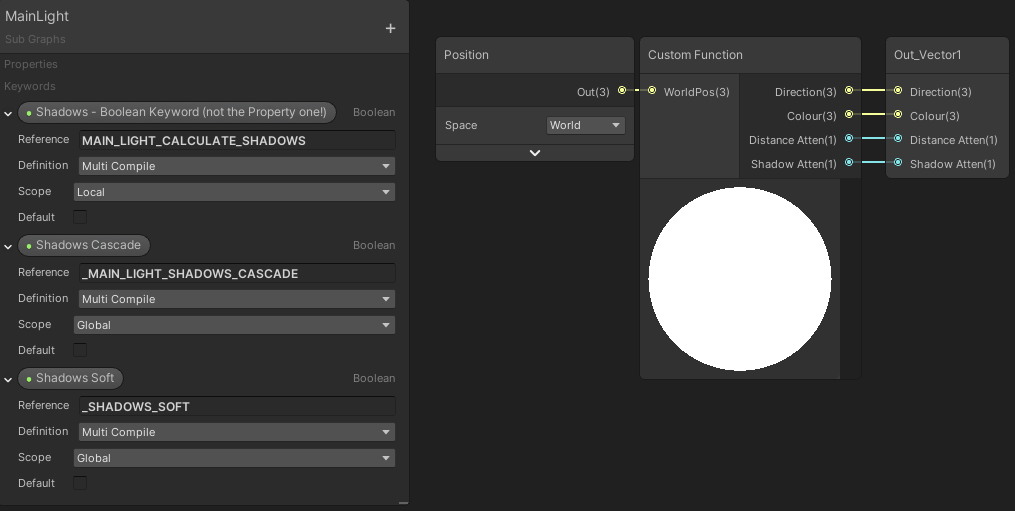
Hey! This is a “quick” answer to someone on the Unity Discord. I plan to extend this post further at a later date, but for now it’s a bit of information about getting shadows to w…
brittle owl
oh cool!
with this method, does it just overlay default unity shadows on top of my objects, or is it possible to take the shadows and manipulate them?
regal stag
I've actually found the best way to use a bit of both methods i mention in the post. Use the alternative code at bottom to bypass the need for the MAIN_LIGHT_CALCULATE_SHADOWS one, but still rely on the other two keywords in graph, as unity sets them automatically.
It samples the shadowmap using the shadowCoord / world pos passed in. You can offset that position to manipulate them a bit
brittle owl
I'm a little confused as to how to set this up
So, from what i've seen, i should make a sub graph that has the keywords "main light shadows cascade" and "shadows soft", and then make the custom function code this?:
    out float DistanceAtten, out float ShadowAtten){

#ifdef SHADERGRAPH_PREVIEW
    Direction = normalize(float3(1,1,-0.4));
    Color = float4(1,1,1,1);
    DistanceAtten = 1;
    ShadowAtten = 1;
#else
    Light mainLight = GetMainLight();
    Direction = mainLight.direction;
    Color = mainLight.color;
    DistanceAtten = mainLight.distanceAttenuation;

    float4 shadowCoord = TransformWorldToShadowCoord(WorldPos);
    // or if cascades are needed :
    // half cascadeIndex = ComputeCascadeIndex(WorldPos);
    // float4 shadowCoord = mul(_MainLightWorldToShadow[cascadeIndex], float4(WorldPos, 1.0));

    ShadowSamplingData shadowSamplingData = GetMainLightShadowSamplingData();
    float shadowStrength = GetMainLightShadowStrength();
    ShadowAtten = SampleShadowmap(shadowCoord, TEXTURE2D_ARGS(_MainLightShadowmapTexture, sampler_MainLightShadowmapTexture), shadowSamplingData, shadowStrength, false);
#endif
}```oh and i was wondering if the shadows could be manipulated because i want to try and feed the shadows into the same nodes that define my lighting, so i could have the shadow as the same color as the toon shader's darker parts
also, if i wanted hard shadows, cause its for a toon shader, do i just make the keyword "_SHADOWS_HARD" instead of soft?
regal stag
Yea the code goes in a .hlsl file that is saved in assets somewhere. The custom function can then use that file and the same function name (MainLight) and float precision mode (which is default anyway)
It'll just make the shadow atten return 0 where shadows are
Or might be higher if shadow strength isnt 100%
Can do whatever you want with that output though, colouring them should be quite simple if shadow atten is put into the T of a Lerp node
Or find a way to combine it with the existing lighting calcs
brittle owl
oh perfect, should be pretty easy then!
regal stag
The _SHADOWS_SOFT should be kept as is. It is just needed to support the hard/soft toggle
 hazy sequoia
Evening, gents!
So I have this 3D model that I'm trying to plop into my scene:
.obj
But all the textures/materials are greyed out in Unity
This is after I extracted the materials
brittle owl
do these materials have textures when you click on them?
 heavy ermine
Does anybody know where to find the fragment function of an HDRP unlit shader (or lit)? I need to write some custom depth data and I'm drowning in structs and includes trying to find it in the code.
 thorn ore
How can I apply a shader to a texture2d ?
 river ibex
hi all, I'm getting started with shaders in unity, i do have basic glsl experience but I'm not able to figure out how to get started with unity shader, the syntax of HLSL is different little bit, I've also took unity's courses ( rim lightening effect, anatomy of shader in unity) but they just give a very small overview, where can i read more about syntax ?
no, i dont want to use shadergraph atm, im specifically looking for more general data-flow, how unity shader receives input (and in what format), etc, any good book or utube video or anything ?
 vocal vale
Hello!
I want to add a "_RecieveDecals" boolean to my custom shaders, there is one on HDRP/Lit shaders, and the code is hte following: ``` [ToggleUI] _SupportDecals("Support Decals", Float) = 1.0
How do I add this to my custom shader?(Also I cannot access the custom shader code, it compiles forrever on 105/114 progress)
hard mortar
Can someone explain me what is wrong with black-white and transparancy mode ?
When it will be gone 😄
low lichen
Is your texture set to be transparent?
There's a checkbox you need to fill to say that Alpha is Transparency
hard mortar
@low lichen is that box sir ? black color still there
low lichen
Oh, this image doesn't have an alpha channel
Then you want to generate the alpha from grayscale
But that's not going to very accurate, I think the leaves themselves will be a bit transparent
If you're using alpha clip, you'll get away with that
brittle owl
Alright so, i was looking at
https://blogs.unity3d.com/2019/07/31/custom-lighting-in-shader-graph-expanding-your-graphs-in-2019/
to try and get additional lights working with my toon shader, and I am quite confused as to how i should do this

Unity Technologies Blog
With the release of Unity Editor 2019.1, the Shader Graph package officially came out of preview! Now, in 2019.2, we’re bringing even more features and functionality to Shader Graph. What’s Changed in 2019? Custom Function and Sub Graph Upgrades To maintain custom code inside...
I'm not sure what inputs/outputs the custom node for AdditionalLights should have
regal stag
The custom function input/outputs should match the parameters on the function. So,
half3 SpecColor,
half Smoothness,
half3 WorldPosition,
half3 WorldNormal,
half3 WorldView,

out half3 Diffuse,
out half3 Specular
Doesn't have to use the exact same names, but needs to keep the same order.
half3 = Vector3, half = Vector1
Custom Function node probably needs setting to Half precision to be able to find the AdditionalLights_half function. Or you could switch them all to floats.
 tall chasm
Can someone help me. I'm using shader graph for a material in urp unity 2019.4.4
My material is working well in editor and on Android 8+
But older phones, below Android 8, its showing pink
Idk what is wrong or how to troubleshoot it
brittle owl
hmm, so it gives me an output of diffuse and specular but im not sure what i can do, given those outputs
actually, is there another way to get additional lights with custom lighting lol, im super confused
 high hemlock
So I created cubes from scratch using vectors, vertices, etc. I set it so a plane is created, and then all parented into a cube formation. Though, there is** zero shading** on any of them. Why is one side not brighter than the other? There is no sense of depth. Each self-made-plane has its own mesh on it- but I'm assuming this is where the problem lies. Do they all have to be put into one cube-like mesh for shading to work? I would appreciate the help. Thanks.
low lichen
@high hemlock You need normals! Each vertex doesn't know anything about neighboring vertices, so it has no idea which way the triangle it's a part of is facing
And since it doesn't know that, it can relay that information to the pixel shader and so the pixel doesn't know if it's facing the sun or not.
To fix that, every vertex needs to be given a normal, a Vector3 direction of which way it's facing.
low lichen
To get correct shading on a cube, each corner has to contain 3 vertices, for each face it's a part of
Instead of sharing the same vertex for multiple triangles as you are doing now.
high hemlock
okay, i'll look into it. Thanks! @low lichen
Boy oh boy... can't wait to rework all of this
high hemlock
Haha, thanks for the visual. I'm not quite sure on how to go about creating a 'normal' though.
mesh.normals?
low lichen
Yeah, you'd be setting that
And it would be in the same order as the vertices array
That's how it knows which normal goes with which vertex
And in this case, the normals would just be Vector3.up for the ones pointing up, Vector3.right, Vector3.left, etc...
low lichen
3 vertices for each corner. 4 corners, so 12 vertices and normals
high hemlock
and then assign each array index the corresponding vector3?
low lichen
If you think about it as if you are building this triangle, all 3 vertices making up that triangle would have the same normal, maybe Vector3.left
But each of those vertices are also a part of 2 other triangles
And you can only store one normal in one vertex
high hemlock
But lets say I wanted to do this for one plane at a time, would it still work?
Because I have planes disable (like minecraft) if a face isn't showing. Thats why i seperate them
low lichen
Oh, my bad. I thought the code above was for creating the whole cube
Then yeah, it's very simple
For the bottom face, make a Vector3 array of length 4 with each normal set to Vector3.down
And etc for the rest of the faces.
Was the message removed?
If you're posting code, it needs to be in a code block. Otherwise, a bot will remove it as spam
low lichen
It looks like you're just copying the vertices into the normals array
All those vertices face the same direction
Down
But you're setting them to different directions
high hemlock
So they all need to be 0,-1,0
low lichen
Yes, which is what Vector3.down is
low lichen
You know, I think you could make one method that creates one face and reuse it for each face
high hemlock
so just "= vector3.down"
low lichen
I can't imagine how long that method is with all of that for every face
high hemlock
haha!
low lichen
And yes
low lichen
Pretty sure, yeah
high hemlock
Alright ill add to them all
low lichen
But let me help you combine it all into one method
You can rotate each vertex and normal around the center in the method
Then you just need to pass in a rotation and call the method for each face.
Game object for each face 😬
high hemlock
This is odd.
Mesh.normals is out of bounds. The supplied array needs to be the same size as the Mesh.vertices array. UnityEngine.Mesh:set_normals(Vector3[])
@low lichen
low lichen
Well, it's a bit weird how you're setting the normals in the last screenshot
You can't set the mesh normals to an empty array, and then modify that array
It isn't referenced by the mesh
It copies it when you assign it
high hemlock
I suppose I don't understand then. How do you assgn the normals properly?
low lichen
The same way you're assigning every other mesh array
Make an array, fill it with data, give that array to the mesh
high hemlock
Well I removed the top line where I made an empty array because that was unnecessary. But is this not good enough?
It's setting every normal, within the mesh to down
@low lichen
The blocks now load in again properly, but still no shading.
low lichen
Well, do you think every face is facing down?
Or maybe just the bottom face is facing down?
I feel like you haven't grasped what normals are for if you think it's right that all the faces should be set to down
high hemlock
Yeah, I'm an idiot, thanks for reminding me
brb
@low lichen Fixed them all to be correct but unfortunately no results.
I did notice though that if I change the angle of light, they all glow
But there's really no differentiation in side obviously
 quasi bluff
this isn't exactly shaders, but if I want to animate UV Offset, can I increase it to infinity, or should I limit it in some way?
I'm trying this stuff:
uvOffset += ( scrollingSpeed * Time.deltaTime ); uvOffset = new Vector2( uvOffset.x % tileSize.x, uvOffset.y % tileSize.y );
but for this particular tiling to work, I need to have the UV Offset start from negatives instead
 fast skiff
Hi! How can I learn to use compute shaders?
@quasi bluff I think it should just repeat with values going up, but maybe the float limit could get a problem sooner or later?
quasi bluff
yup, float limit was what I was afraid of
damn can't copy the code properly here
that's what I'm going with for now
it goes from -1 to 1, when scale is 1
and -4 to 4, when scale is 4
etc
fast skiff
if it is just between 0 and 1, you could try to dump the number before the comma
fast skiff
hm, then repaeat, so like if it is >4 then subract 8 i.e.
quasi bluff
I'm clamping the texture, and then repeating it, so the black border repeats for a while
 grave kraken
Hey guys how do you get started with scripting shaders?
quasi bluff
so if the tiling is 4, the texture's width is 4 times the normal, but because it's clamped, it's 1 line per 4 texture widths
I don't know enough about shaders to say I've started it
but I looked into editing existing stuff
Book of Shaders on the web
PixelSpirit deck is math and shader-code and creates geometric tarot cards
grave kraken
alright thanks man i'll check it out
fast skiff
hm. one thing that is quite annyoing is that Visual Studio does not seem to recognise the compute shader code.
on this site (shoud be a HLSL reference), it says, Visual Studio should be able to debug the code, anyone knows how to set this up for Unity?
https://docs.microsoft.com/en-us/windows/win32/direct3dhlsl/dx-graphics-hlsl-debug-visual-studio

The latest tool for debugging shaders now ships as a feature in Microsoft Visual Studio, called Visual Studio Graphics Debugger.
low lichen
@high hemlock The different sides don't have rotation, as game objects, do they?
Oh, they do, don't they
The normals are on local space, relative to the mesh
It seems like you're creating identical meshes, but rotating them differently
In that case, the normals are the same for all of them
Or maybe not...
I can't tell if your script is rotating it later
fast skiff
btw. I am on a Mac, maybe that's why it is not set up properly? I would be quite happy, if Visual Studio could have autocomplete for .compute scripts
here is a small screenshot:
you see that it even shows code in green that is not comments
(the code is not my own - it is from github)
high hemlock
I don't, @low lichen. Everything is set up to face the right direction
fast skiff
@high hemlock Did you try: mesh.RecalculateNormals();or do you want to get flat shading?
high hemlock
Uhhh, no I have not. and what exactly is "flat" shading?
fast skiff
it does not smooth at edges or corners
high hemlock
That did not work either @fast skiff thanks though
fast skiff
i.e. this is smooth:
high hemlock
Yeah thats what I thought
fast skiff
this is flat:
high hemlock
Here is everything for one face that I'm creating.
fast skiff
@high hemlock Maybe something else is wrong? you could have Vector3.up for top, Vector3.down bottom, and so on.
high hemlock
Right right, I've tried diff. combinations already, unfortunately
fast skiff
hm, I now wonder if flat shading in Unity is possible with the use of triangle normals, or do you always have to have new vertices for each triangle?
@high hemlock don't really know what's wrong, seems to be ok, if you use the right vectors for each face.
slow bear
I am at my wit's end: I rewrote my jump flooding shader 10 times already, and every time, no matter the way I implement it, I always come across the same silly problem
there's some screw-up in the lower corner and I don't know what could be causing it
the weird thing about that corner is that it looks like it copies whatever's in the middle, as some kind of sub-UV
it happens at any resolution, I've disabled mipmapping, sRGB, everything but that corner haunts me
tried bgolus' implementation, demofox's, even one from LEAP motion, but I can't get rid of that spot
fast skiff
Is this the right thing for writing shader scripts, or is there something more official?
https://marketplace.visualstudio.com/items?itemName=MarcinODev.ShaderUnitySupport

Extension for Visual Studio - This is Unity CG Shaders Support. It has code completion support and uses C/C++ like highlighting for *.shader files.
no, seems to be to old
thick fulcrum
@slow bear just a shot in dark, but when you do your neighbour comparison. you are checking it's within x,y bounds and not just a valid index?
slow bear
@thick fulcrum at the "uv + offset" step I've tried abs(), frac() and clamp()
none works
thick fulcrum
seems odd it's confined to just that corner, but been a while since I've played around with that sort of thing. was just thinking back on some silly issues I had
slow bear
clamping the neighbour UV (not the seed) between (0,0) and (1,1)-TexelSize
abs'ing the neighbour UV, notice the fanning in the corner and the change in the center
abs, then frac
here's an intermediate step from the Frame Debugger, notice the corner
since the corner is not perfectly circular, the only thing left for me to check is whether there's some stuff happening in the vertex program
 normal shuttle
I tried adding multiple uniform parameters inside a HLSL file that is shared between multiple shaders. Then I used Shader.SetGlobal* on these parameters. And only some of those work./.. no errors, just some parameters are never set by the Shader.SetGlobal calls... Does anyone have any idea as to WTH?
slow bear
@normal shuttle are any of those parameters exposed as shader properties, like do they have their own line in the Properties Block?
normal shuttle
@slow bear Nope, they are just put inside a .hlsl file like this
the first one doesnt work. The second one does. The thord one doesnt work... and then the fourth one does work
what a weird pattern
No other files define these parameters
any of these
devout quarry
@slow bear ben golus code worked fine for me so my guess it that it's not something related to your shader code, but related to your custom pass/feature?
slow bear
@devout quarry I'm bouncing back and forth between shader code and render pass/feature code, and I think I got the C# side of things down correctly (almost?), at least standing to what the Frame Debugger is spitting out
fast skiff
@normal shuttle Hi! Do you know how to set up visual studio to recognise compute shader files like real code?
devout quarry
Yeah then I'm not sure what's wrong, I think I pretty much used bgolus code and didn't have any issues
normal shuttle
@fast skiff I use ReSharper for C++
fast skiff
ok, that sounds interesting
slow bear
@devout quarry I don't know whether it's a precision error or a uv sampling one: I mean, that area in the bottom left of all the screens has a weird shape, and I think there's still something I'm missing in the shader code that causes the screw-up around the (0,0) point
fast skiff
@normal shuttle Damn, does not seem to work on macOS, although the HLSL-support looks nice
only some command-line tools seem to be available, but don't think any of them will help 😦
normal shuttle
@fast skiff Then try full blown IDE from ReSharper devs - Rider
That should be able to do the same thing
fast skiff
@normal shuttle thx - at least I can try it for 30 days, before deciding to buy or not to buy. maybe I can find another (best free) solution, mainly for compute shaders/HLSL, as it is just a hobby at the moment.
for all other stuff i am quite happy with visual studio (community edition) and BBEdit to open scripts from other projects simultaneously.
But both lack any support for compute shaders/HLSL.
i need to speed up my own implementation of marching cubes. the implementation i found, that uses compute shaders is so damn fast, i need to adapt that speed improvement.
I am sure, I could optimise C# scripts a little, but don't think very much. CS are like 100x faster.
slow bear
I did it! Gorsh I did it!
the problem lies in the anti-aliasing of the initial mask, a value that's not exactly 1 or 0 introduces some fake positions around the edges, once I've stepped the edge away the screw-up disappeared
brittle owl
Hey guys, how would i go about adding multiple light support to my toon shader in shader graph?
heavy ermine
Does anybody know where to find the fragment function of an HDRP unlit shader (or lit)? I need to write some custom depth data and I'm drowning in structs and includes trying to find it in the code.
@heavy ermine Answer to this for an HDRP shadergraph generated code shader is: Inside the included file near the bottom of each pass. ShaderPassForwardUnlit.hlsl, ShaderPassGBuffer.hlsl, ShaderPassDepthOnly.hlsl, etc. Replace those files or copy and paste the code to the main shader to edit the frag function.
jolly adder
Hey guys,
https://github.com/sebastianhein/urp_kawase_blur
This blurring technique (Kawase Blur) could be used for fullscreen blurring ?
And is it performant that the others ?
GitHub
URP renderfeature test project. Contribute to sebastianhein/urp_kawase_blur development by creating an account on GitHub.
 haughty glen
why this looks darker than material?
planes original color is white but its shows grey
 echo tusk


 tranquil fern
The done did change shader graph again yo
Why, I was finally starting to understand it haha
 winged roost
roxy
haughty glen
?
 mortal kiln
hey guys I need some input on shaders and the possibility of using the burst compiler. so im working on a raymarcher to generate lots of randomness and it starts to lag if I do too much math so I was wondering what if I do some of the math on the cpu side of things? i read somewhere that having too many ifs in a shader can slow things down so im having trouble understanding why I should do all that math on the gpu why not just send it the data it needs to draw only after I compute it with burst compiler etc
safe gate
you probably wanna use a compute shader for raymarching
mortal kiln
i tried using one before and couldnt figure it out perhaps ill give it another go. i am using a compute buffer I got a compute shader working with raytracing when I was looking into that
ill try my hand at a compute shader first and see if the speed gets better before diving into anything else.
 tepid cliff
im trying to setup 2d shaders but i keep getting this eror
undeclared identifier 'BuildSurfaceDescriptionInputs'
rugged verge
Is it possible to apply a Shader or Post Processing Effect to one specific sorting layer only?
I tried using depths instead of sorting layers but I come across this problem...
If I try cameras + buffers, it affects all the other camers "below it".
E.g. cam 1 (low depth) -> cam 2 (used for UI) -> cam 3 (highest depth)
If I apply post processing to cam 3, it affects cam 1. So the culling solution doesn't work.
I want to be able to apply a shader OR post processing effect to "UI Layer" without affecting Cam 1.
Or can I apply a post processing effect to "All Layers below X sorting layer"
 prime pasture
Hey, I am trying to create a skybox shader (6 faces) that will have a "depth" mask, I have some stuff in the skybox to appear in front of everything, so I am trying to write to the depth texture but couldn't find how to do it with Unity
I tried using a struct that has SV_Target and SV_Depth and wrote to that custom values but nothing happened.
Another idea I thought could work is to render the skybox to a render texture (with one channel for depth) and use it for all my shaders
 spiral bay
Guys I'm having a bit of a brain fart
tranquil fern
Toot
spiral bay
Is it possible to use a Text or TextMesh UI directly in a shader material?
Or even, assign a material "space" as a canvas of sorts for a GameObject that contain those, for alignment purposes?
 civic jolt
Are there any shaders around that allow projecting a texture inside a volume? Or is there even a way to do it? Eg, I have an invisible cube and anything inside the cube receives a texture applied to the cube material (let's say coming from the top)
low lichen
You mean like a decal?
civic jolt
Like a decal, yes, but as a shader
low lichen
Sure, but it would kinda be like a localized post processing effect
The shader on the cube would have to be able to sample at least the depth of the pixels behind it
I don't know the exact math behind it
civic jolt
Hm, anywhere I can find it?
Examples / resources
I am quite sure the shader can read the depth buffer
low lichen
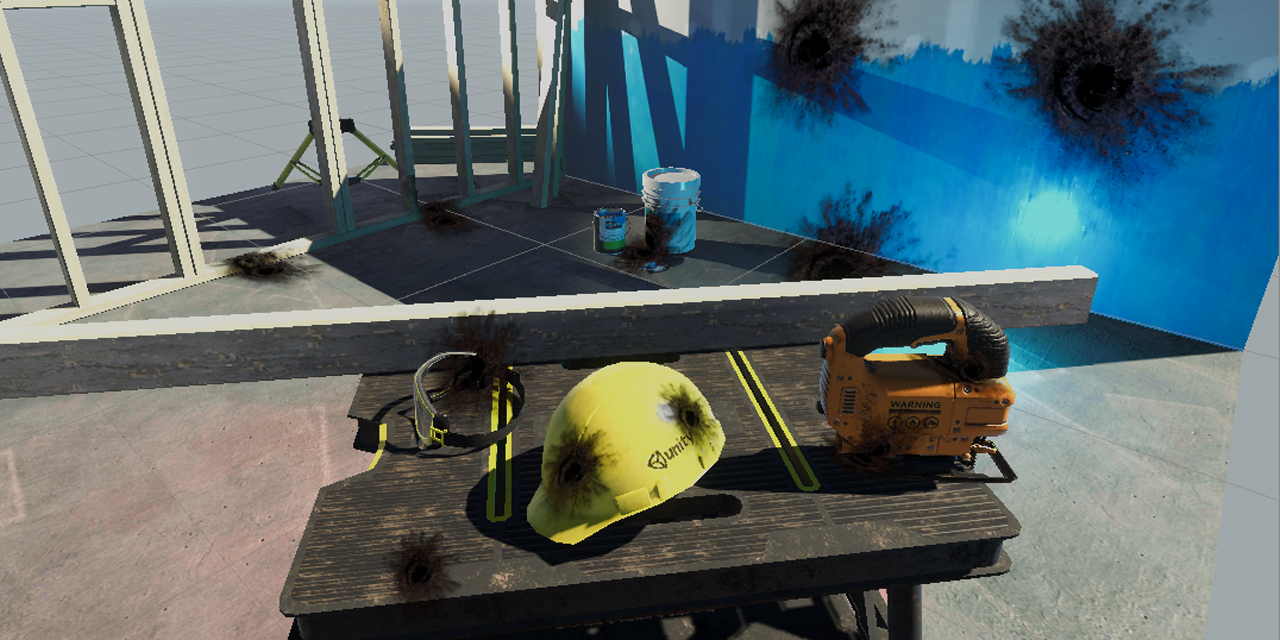
GitHub
Unity unlit screen space decal shader for URP. Just create a new material using this shader, then assign it to a new unity cube GameObject = DONE, now you have unlit decal working in URP - ColinLeu...
civic jolt
Oh this is awesome, thanks
Will test it, but I was searching for something like this all evening
I need a shader because I am not using gameobjects, but instead using draw-calls
And a ton of them, so projectors or any other intensive solution doesn't work for me
I wonder if it can work/ I can rewrite it for unity renderer
EDIT: if anyone is interested this is the one I think I'll be using (for now)
https://github.com/douduck08/Unity-ScreenSpaceDecal/blob/master/Assets/Shaders/UnlitDecal.shader
EDIT2: The one above doesn't support transparency, but changing blend modes fixes the problem right away

GitHub
Contribute to douduck08/Unity-ScreenSpaceDecal development by creating an account on GitHub.
 thorny pelican
is possible to use shader graph in an old 3d template project - say we create shader material in urp project and then export it to a simple 3d project
regal stag
No, if you copy the shadergraph file it probably won't be recognised. And copying the generated shader code won't work as it's specific to URP.
 thick cradle
Guys what is wrong with unity bloom effect... fps killer
anyone know how to optimize it much better any tricks?
sly breach
why is the viewDir is a POSITION1 type ?
for shader input struct
and when do we need to specify the 2nd type ? i seen it been used before without the POSITION keyword b4