#archived-shaders
1 messages · Page 166 of 1
 wraith wing
 wary horizon
yea, alexanders looks pretty much what you want, increase the vector1 abbersion amount to fit your needs ::P
wraith wing
still learn this thing. i thought it's use position and somewhat i can blend position so there's like 2-3 object.
wary horizon
@amber saffron sorry for the ping, How did you learn the shader graph? I find it enjoyable but i cannot fix things i break 😅
 amber saffron
I learned writing shaders by head before working with graph based editors 🙂
wraith wing
@wary horizon maybe this help, not yet check it but promising.
https://twitter.com/danielsantalla/status/1262159940606742530

-THREAD-
A lot of people keep asking me how to get started with shaders, VFX, and generally how to get good with game graphics, so here's a thread of devs and resources that will help you on your journey :) #Gamedev #VFX #indiegame https://t.co/4txAo8WBIP
Retweets
289
Likes
960
 Twitter
I did this
@devout quarry may i know the node after vector?, where it's connected? i assume use blend but not really sure. also what's inside the chromatic abberation property?
 devout quarry
the property is just a small value
and the output can just be connected to color output of the shader
and then the render texture input could be the _CameraOpaqueTexture that you then Blit back to the camera target
wraith wing
@devout quarry ok thanks alot for the explanation, i'll try it
 noble plinth
so I upgraded a project with HDRP from 2018something to 2019.3 and suddenly all my simple mesh particles are glowing like the surface of the sun. (Plus all kind of wacky post processing I didn't expect) How do I cool this off so it's not just a radiation glow around the system? Scene is just a camera, a light, and a particle system spraying out <500 meshes.
look what they've done to my cubes
They're just supposed to be green cubes in a black alpha-zero void
 ripe trail
is there a way in Shader Graph somehow compare whole textures and not just by pixel ?
I am trying to draw on a mask and after some modifications check if my drawn mask is same as preset mask to see if drawing was finished. Maybe I need better way to check that
 sour valve
I'm having some issues with shadergraph. I have a toon shader that uses the _WorldSpaceLightPos0 variable to get the direction of the main light, and it was working perfectly in an old LWRP project, but I copied it over to a URP project and the lighting is "frozen". I move the directional light around, but the shadows and light on the models never change
 honest bison
When I specify the render order in a shader it doesn't seem to work. Do I need to set it through code?
 brisk gull
I'm trying to create a dissolve shader, that dissolves from the top to bottom -- I got most of the affect achieved, kind of like dissolving by a plane, but without the plane but just can't figure out the UV positioning -- anyone done this? I basically want object based UV positioning, that always goes from top to bottom regardless of objects rotation
 real basin
make sure the render order setting on the material is set to "from shader", if it's not set to that the material will override the shader
 rustic dragon
@brisk gull you can get the surface position on the object based on the objects coordinates like, then remap that gradient based on the height/extents of your object, and use it for whatever
brisk gull
thanks @rustic dragon
rustic dragon
with a 2nd set of UV's you can set it up so it flows across the body, like it starts out from the head and then when it reaches the shoulders it kind of forks and goes down the torso to the legs, then down the arms to the hands, no matter how the asset is animated (I presume a character).
 tough axle
Where can I get the source for Unity's standard shader?
I want to turn off backface culling for a material, but it uses the standard shader.
 grand jolt
Looking for an artist for my game who can disign 2d charecters from side view, msg me for info
 distant pawn
Is there a way to make depth texture include transparent objects?
 drowsy stirrup
hey guys, i have 2 questions, first, I have a shader i did
#include "Packages/com.unity.render-pipelines.core/ShaderLibrary/Common.hlsl"```
for, so that i can use the CBUFFER_START and CBUFFER_END macros, but now my shader throws https://i.imgur.com/uAjxDvi.png
i dont quite get why though, as theoretically the codeblock causing that is in an ifdef https://i.imgur.com/mZBN6f0.png
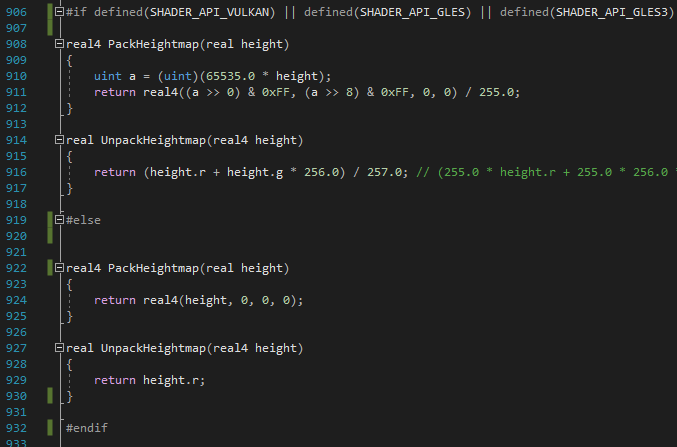
and as my test compilation is in d3d11 this should not be an issue
so what do
note that the error is thrown in a file from the "Core Render Pipeline" packet, which is even more baffling as this should be a unity vetted and maintained library, so i'm certain this is my fault but i have no idea what im doing wrong here
devout quarry
@drowsy stirrup do you have a 'packheightmap' function in your shader?
drowsy stirrup
no
devout quarry
Weird
drowsy stirrup
ik :/
i just commented that out for now, lets just hope that i wont ever need packheightmap
devout quarry
You commented it out in the common.hlsl file?
Aren't those files read only by default?
drowsy stirrup
/shrug, nothing stopped me from doing it sooo...
 harsh radish
I'm using a couple compute shaders for my marching cubes. Right now, its structured so that one compute shader finds the density value at all points in a chunk, and another compute shader does the actual cube marching for all the cubes in that chunk. I was wondering if it would be faster if one compute shader did both of these. Like, it calculates the density at all corners of a cube (only for the corners that weren't previously calculated) and then generates the triangles for that cube
Also, is there any way I can map a pair of integers in a shader to a value without using an enormous two dimensional array?
 mortal kiln
hey can anyone help explain this to me. I followed a raytracing tutorial and the guy kind of touched up on this but not much i did some research on it but still dont quite grasp it
 low lichen
The guy probably didn't say much about it because he didn't know much about it, like most people writing compute shaders, including me.
mortal kiln
so I tried changing the 8 to something like 256 and got errors then I realized its like screen space or bit rates they double. so 2 , 4 , 8 , 16, 32, 64 etc
however the numbers get multipled and have to be under 1024.
thats all i learned through trial and error so was hoping someone here can actually explain
 sleek granite
it looks like he wants to have a single thread group work on more than just one pixel, which might be reasonable depending on what you do as there's a overhead for starting a thread group
So I assume there's a loop in your compute shader where he iterates over multiple pixels
@harsh radish The only real way to find out is to test & profile it.
There are some things we can reason about, of course. But in the end profiling is the best you can do.
Some things to consider:
- There's a overhead for dispatching a compute shader
- There's a overhead for copying memory from host to device memory & vice versa
- Work in a compute shader is always a balancing act. It should have enough work to perform to neglect the overhead of dispatching it & copying memory, and it should not have too much work so that it is still reasonably parallelized
I think my old MC implementation has a 2 pass approach as well, but not sure if I profiled it back then
harsh radish
Ah. I assumed I'd actually have to try it out, but I thought might as well ask here
sleek granite
Another thing to add:
- The overhead on modern GPUs is much lower nowadays. Some games run a 10+ pass pipeline
harsh radish
Do I need to set compute shader parameters every time I want to dispatch a job?
Or can I just set stuff once, and only reset whatever changes
Like for my MC, a lot of the parameters are identical for all the chunks. The only thing that changes is the where the chunk samples from
sleek granite
what do you mean with parameters? Your buffers?
harsh radish
Offset, octave parameters, seed
number of points
Also buffers. Do I need to set the same buffer to the same shader every time I dispatch it?
sleek granite
No, you can just set those initially & then keep queueing dispatch calls
harsh radish
Oh. That saves me a lot of work, computationally
If I recreate my buffers, do they need to be set again?
sleek granite
yes, that's basically when you're copying your memory from the host to the device
so if the memory changes, you need to copy it over again
harsh radish
Aight, thanks
low lichen
@urban sand I'm curious what you need that for
 urban sand
İ typed a shader for gpu instancing
it is not workin gon edit mode obv
bcs of the instanceID
low lichen
Is there a reason why you're not using the instanced properties macros from Unity and MaterialPropertyBlocks? That should work in edit mode, too.
urban sand
idk what u mean can explain
idk what is instanced properties macros
huh the thing we see in shaders "enable instancing" ?
i call the draw function my self with
Graphics.DrawMeshInstancedIndirect
low lichen
It's explained here:
https://docs.unity3d.com/Manual/GPUInstancing.html

So you're generating the different properties on the GPU rather than in a script?
urban sand
unity's automatic instancing wasnt enough for me
i draw for example 5000 cheese in a single call
low lichen
Where are you calling Graphics.DrawMeshInstancedIndirect? If you call it in an editor loop, I don't see any reason why it shouldn't work.
urban sand
well for example it is not working or pref viewing mode
prefab*
act the GPUInstanceDrawer script that i typed is executing in edit mode and works but
for example it is not working on prefab mode
the objects that i draw are pizza ingredients
and designer migth wanna preview the ingredient before seeing it on pizza u know
low lichen
You have 5000 ingredients on a pizza? That's-a big pizza!
urban sand
no i migth have 5000 small cheeses on the scene
containing multiple pizzas
as long as ingredients have same mesh and material i call them in a single call
while i drawing the ingredients
i dont use shared material bur create another clone of the material
so maybe i can just set a macro and handle with it ?
low lichen
You don't think the issue is that the Update in your script just isn't being called in the prefab preview mode?
urban sand
no
it does not fallback
I mean yes
the problem is the update doesnt call the transform matrix doesnt get set
thats why there is no uv for text
uv = unitClipPos(uv)
it is working so a macro should be working
low lichen
There's the EditorApplication.update event that you can hook into to get the editor's update loop, but from what you're saying, it doesn't sound like that's the issue.
https://docs.unity3d.com/ScriptReference/EditorApplication-update.html
urban sand
nah the instance shoudl be created and subscribed to the drawer
none of them ahppens in prefab scene
i must act diifferenct in prefab prewiev
on the shader
sour valve
Hi! Question, I'm getting a warning message in a toon shader I'm doing in ShaderGraph, it reads
Trying to set builtin parameter "_WorldSpaceLightPos0". Will be ignored.
It's set up like so:
And now my shader doesn't update lighting information. It recalculates the lighting on the models once when I create a new URP asset and assign it as the active one in the project settings, but once I rotate the main directional light, the light/shadows on the map never change.
amber saffron
I think you need to use custom function nodes to get light data : https://blogs.unity3d.com/2019/07/31/custom-lighting-in-shader-graph-expanding-your-graphs-in-2019/

Unity Technologies Blog
With the release of Unity Editor 2019.1, the Shader Graph package officially came out of preview! Now, in 2019.2, we’re bringing even more features and fun...
 meager pelican
@harsh radish But be careful with compute shaders, as some things (buffers and textures) are set on a per-kernel basis. ;)
https://docs.unity3d.com/ScriptReference/ComputeShader.SetBuffer.html
harsh radish
@meager pelican I only have two kernels, so everything seems to be working fine
I'm working on modifying my noise to make some interesting terrain
 somber quest
Hello everyone, I am wondering if anyone know how to correctly add a "shadow rendering pass" I have noticed that the custom shader I am working on does emit shadows but does not let light to go through them. The shader I am using has a vertex and a surface shader in one shader file. To include the shadows I had added the addshadow on the #pragma. Right now after googling I found out a way of including a vertex/frag shader inside a surface shader (https://forum.unity.com/threads/achieving-a-multi-pass-effect-with-a-surface-shader.96393/ by Farfarer). I included the default Shadow rendering pass before my stuff and it does not change the result. Is there anything my shader is missing? I have also included the shader I am using with the extra pass from the standard shader.
Unity Forum
Heya! I've been scratching my head over this and was hoping someone might be able to point me in the right direction.
I'm trying to add a silhouette...
Here is the shader
 regal niche
hi everyone sorry i still don't understand how to have a shader for a terrain it returns the error : "cant use materials with shaders which need tangent geometry on terrain, use shaders in Nature/ terrain instead" Any idea ? thanks a lot!
 tall chasm
I'm using shader graph to have a small icon tile and scroll on my background image. This screen space uv works fine on canvas that is in screen space - camera but not on screen space - overlay. Anyone knows why?
harsh radish
can I read a value from a compute shader apart from through a compute buffer?
tall chasm
select nodes then right click group selection
 limber violet
Yo people, I'm a CS student and I have a pretty solid grasp of Unity and C#, and I was wondering how to approach shaders. Are there any resources that cover it from the ground up pretty well?
 shadow kraken
Check the pinned messages @limber violet. I would also recommend looking at catlikecoding's shader tutorials which cover it from the round up
limber violet
thanks @shadow kraken
 rustic zinc
is it possible to use use a texture for vertex displacement in shadergraph?
oh i see
gotta use LOD
grand jolt
Not sure if anyone here is familiar with imphenzia, but I was wondering. In blender he enables this edge highlighting effect. I'm curious if there's a shader out there to emulate that effect in unity? My attempts to Google lead me to failed toon shader examples.
 shy wigeon
does anyone have a link to an example of a UI element shader in CG?
wary horizon
haha me again. i have a shader thats used with 2 textures. (2 seperate materials) on one of them, the alpha works fine, it "fades" perfectly, but on the other, it doesnt fade? its like instant 0-100 at around 0.5 opacity
Anyone know why?
Never mind, neither of them fade properly. xD
Heres the graph
if you know, can you @ me please
 regal stag
@wary horizon Set the Alpha Clip Threshold to 0. If the alpha goes below that value it is clipped.
wary horizon
@regal stag oh that completely breaks it
the textures are no longer transparent
regal stag
Is the master node set to Transparent mode?
wary horizon
Transparent multiply
regal stag
Does it need to be multiply? What about the other modes
wary horizon
lemme test
Bright boi
@regal stag setting it to alpha worked fine, but i weanted it to still be a little transparent like the above screenshots
since it no longer is anymore
regal stag
Oh, the background is using the same shader
Well in that case you can still use the multiply mode but I think alpha is basically ignored. You want to lerp the colour to (1,1,1,1) for "no effect", (since multiplying by 1 gives the same result). The T of that can be the fade property.
harsh radish
Are compute shaders executed with a certain order in mind, or is it a bunch of parallel computations? Like, does id(0,0,0) get executed first, or something? I want to optimise my marching cubes algorithm by not going through empty cells
wary horizon
@regal stag Wha? do you want to see how im lerping it?
        Renderer img = lavaDeathEffect.transform.Find("LavaScreenEffect").GetComponent<Renderer>();
        Renderer BGimg = lavaDeathEffect.transform.Find("BG").GetComponent<Renderer>();
        while (time < MaxTime)
        {
            float progress = time / MaxTime;
            float lerpedVal = Mathf.Lerp(0.0f, 1.0f, progress);
            float BGlerpVal = Mathf.Lerp(15.0f, -0.5f, progress);
            img.material.SetFloat("_alphaFade", lerpedVal);
            BGimg.material.SetFloat("_dissolveAmount", BGlerpVal);
            time += Time.deltaTime;
            yield return null;
}``` BasicallyNo, I'm saying in the shader you need to lerp the colour to white.
For it to fade, rather than using the alpha input
wary horizon
im not really shader savvy, how do i do this?
it fades fine now, but its not as transparent as it was anymore, without multiply
regal stag
Switch it back to Multiply mode. Take your current master node color input, put it into a Lerp (B input), with (1,1,1,1) as the A input, and T as your AlphaFade property. Then put that into the master node color input.
wary horizon
@regal stag not the emission node ive currently got it in?
regal stag
I mean, I'd say this should probably be in an Unlit graph. It doesn't really make sense to have lighting for a 2D screen effect.
regal stag
Right okay, then emission is probably fine. You need to switch it around though - the lerp needs to be after that multiply node.
wary horizon
@regal stag ?
regal stag
Yea, that should hopefully work
wary horizon
the one with the texture is still broke
regal stag
Maybe multiply the RGBA output of the texture with the A output before the other multiplies too
regal stag
Put it into that other multiply node at the bottom, not alpha
Hmm although that's probably just going to result in black actually.
wary horizon
Correct
regal stag
Okay, remove that and instead try multiplying the texture A output and AlphaFade property, before it goes into the T on the lerp
wary horizon
that worked! 😄
regal stag
Good 😄
wary horizon
Got em
regal stag
Nice!
Working with different blend modes is a bit confusing sometimes. With multiply the result is the colour on the screen multiplied with the colour from the graph, so anything dark the graph outputs will darken the screen, while white doesn't change it at all. That's why the lerp with white is needed here.
wary horizon
thank you for your help. this has been a 4 day mission 😅 ❤️
regal stag
And add to that the texture which is based on alpha, rather than being greyscale black/white. In completely transparent areas the texture colours sometimes stretch weirdly
Oh and I think you might want to set the graph's Albedo to black (and maybe Smoothness to 0), otherwise it would also likely affect the screen colour.
wary horizon
@regal stag legend. Set it to red rather than black and it looks sick
 pearl jetty
I am having an issue in shader graph where the shader works on mac but not on android mobile. The material is showing dark areas on a 3D sphere on mobile when it doesnt show up on mac. The issue only occurs with 2020.1. It works fine with 2019.3 (for 2019.4.8f, it doesnt even build properly. All i get is a black screen. No Unity splash screen). Any ideas what might be causing this issue? The shader is very simple. I'm following a Brackeys tutorial and was trying to build the first 5 minutes of the video. I'm getting three different results using the same code.
mac
the bottom one is on mobile on an actual phone, top is the game view on Unity
2019.4.4f also doesnt work. Just tested right now. Based on those versions, it seems to work when using LWRP but not URP? Is there a setting I'm missing in URP for mobile or shaders?
 cunning geyser
can somebody help me with compute shaders?
im using a compute shader to make procedural planets like sebastiam lague but if i want to make more planets all use the same compute buffer i think
so if i change one all changes to that
amber saffron
Aren't the planets a regular mesh once generated ?
 lusty badger
Hi, I'm using HDRP and trying to make simple Stencil outline shader.
First pass writes to the Stencil with Comp Always and Pass Replace the geometry of the model.
Second pass checks the Stencil with Comp NotEqual with a little expanded model using the normals.
Both passes use Ref 64 (Write/ReadMask aswell) as that is one of the two unused bits by HDRP
Problem is only the first pass goes through even if I put Comp Always on both and stuff like ZTest Always.
I'm using the deferred rendering but Unlit shaders should still be rendered by forward. :-/
https://pastebin.com/TzAcHRsc
Pastebin
Pastebin.com is the number one paste tool since 2002. Pastebin is a website where you can store text online for a set period of time.
amber saffron
HDRP doesn't handle multi pass shader on it's own
But, you can do multipass effect using the custom passes feature
 naive mural
Hello, is there a way to "#include" another shader in a shader file without specifying the full location, but only the file name instead? Similar to how in c# you can do that with namespaces? Current notation - "#include Assets/Data/Shaders/Compute/name.compute", preffered notation "#include name.compute".
amber saffron
You can use a relative path also, but else no, you'll need a path, not only a file name.
In c# namespaces are unique, but multiple shader include files with the same name can exist.
lusty badger
Oh, that's good to know. Another problem is I'm using GPU Instancer asset that basically replaces the renderers on runtime with it's solution. It has support for custom shaders (normal ones and shader graph) but it doesn't have a layer like normal renderers/gameobjects do. And the pass I would need is the DrawRendererCustomPass right?
Or do you think I could accomplish this with only FullscreenPass and a singlepass shader.
I was thinking if I could write to the custom color/depth buffers from the shader on my characters.
amber saffron
Indeed, the DrawRendererCustomPass could work.
If you're adventurous, you can also write you own custom pass.
devout quarry
@lusty badger you're working on custom pass + outlines?
You can pm me if you want
I might have some insights
ah although I see you use HDRP, then not so much maybe, I'm working in URP
devout quarry
I"m having an issue with a stencil mask
Pastebin
Pastebin.com is the number one paste tool since 2002. Pastebin is a website where you can store text online for a set period of time.
In a first pass I do this
and then in a second pass this
in the first pass I write the color red in frag shader, and then in the second pass, I want to write green, only where stencil value is equal to 2, but the color green is written to the whole screen..
Am I misunderstanding stencil masks?
I'm using GraphicsFormat.R8G8B8A8_SRGB, for my buffer, does that not support stencils?
regal stag
@devout quarry Your first pass would be writing 2 to every pixel that the shader is drawing to, so for the second pass it's always going to be equal to 2 and draw green.
 vestal saddle
Is there a way to use some of the functions included in shadergraph in shaderlab?
shy wigeon
hey guys, are there any special requirements for writing a shader for a UI object, such as adjusting the vertex transform? I thought that I'd have to take out o.vertex = UnityObjectToClipPos(v.vertex); but no matter what I do my shader isn't drawing, I think it's transformed offscreen.
regal stag
@shy wigeon As far as I'm aware you still need UnityObjectToClipPos for UI. The source for the default UI shader might provide some info : https://github.com/TwoTailsGames/Unity-Built-in-Shaders/blob/master/DefaultResourcesExtra/UI/UI-Default.shader

GitHub
Unity Built in Shaders. Contribute to TwoTailsGames/Unity-Built-in-Shaders development by creating an account on GitHub.
regal stag
@vestal saddle Which functions do you mean? A lot of the node library/documentation pages have the generated code for the node which you could copy into a code written shader. https://docs.unity3d.com/Packages/com.unity.shadergraph@8.2/manual/Node-Library.html
You can also view the entire generated code from the graph by right-clicking the master node (but it isn't exactly the easiest to read)
devout quarry
@regal stag yeah but I'm using context.drawrenderers with an override material using that shader, so wouldn't only those renderers write 2 to stencil buffer?
mortal kiln
im converting glsl shaders to Hlsl (unity version shaders) and was wondering what do i do about iMouse
cant seem to find anything online in reference to that
regal stag
Unity shaders don't really have access to mouse coordinates as far as I'm aware. If you needed them, you probably need to pass them in through a Vector property.
vestal saddle
@regal stag I meant things like the scene color function and things like that which don’t have documented generated code
mortal kiln
thats what I figured I tried that earlier but had no luck
shy wigeon
is there a different sampler type/compression type that should be used for normal textures?
regal stag
@vestal saddle The Scene Color node samples the _CameraOpaqueTexture. You can include and use the SampleSceneColor function here : https://github.com/Unity-Technologies/Graphics/blob/master/com.unity.render-pipelines.universal/ShaderLibrary/DeclareOpaqueTexture.hlsl

GitHub
Unity Graphics - Including Scriptable Render Pipeline - Unity-Technologies/Graphics
vestal saddle
Thank you! @regal stag
shy wigeon
I should ask what format I might want this in too. I'm rendering out a motion vector and from what I've got in front of my 8-bit PNG isn't getting any motion data at all. it might be too subtle? can I use a 16-bit PNG or a 32-bit EXR?
regal stag
@devout quarry Hmm, I guess.. It seems odd that the whole screen/buffer would be green if it's just rendering those renderers though, and not a fullscreen quad or something. Unless those renderers are covering the entire screen that is.
The stencil buffer is related to the depth buffer though, so maybe check the settings for that? I think the depth/depthBufferBits needs to be 24 or 32 for the stencil buffer to exist. (24 bits for depth, 8 bits for stencil).
vestal saddle
Shader error in 'Custom/GlassTestShader': failed to open source file: 'HLSLSupport.cginc' at line 2
does anyone know why i would get this error? unity docs say it should be auto included and adding an include doesnt help
regal stag
@vestal saddle If you are writing a shader for URP you should be using HLSLPROGRAM and ENDHLSL rather than CGPROGRAM / ENDCG. The CG ones includes that file (and a unity variables one) automatically as the docs mention, but they aren't needed for URP. If you are already using the HLSL versions I'm not sure why you'd get that error though.
shy wigeon
I have three texture parameters in my shader and only the second two are showing in the material for assignment. does anyone know why that might be?
        _T2("Next Texture", 2D) = "white" {}
        _Motion("Motion Vector Texture", 2D) = "white" {}
        _CurrentFrame("CurrentFrame", Range(0,1)) = 0.0```
_MainTex isn't showing in the inspector at allPretty sure the [PerRendererData] hides it.
shy wigeon
aah, thank you. that was it. 🙂
 smoky bridge
I am doing chunked marching cubes
I have:
one ComputeBuffer instance
one Material instance
per each chunk
I have a custom shader that draws ComputeBuffers.
When i render 216 chunks,
(voxel count of each chunk : 16x16x16)
It lags just to render the thing, and it's gpu bounded
(WaitForPresentOnGfxThread %70 in profiler)
I have high setpass count, it looks like i have one setpass for each drawn chunk
(around 200)
Is there anything i can do to optimize the situation?
Is there anything you might think i am doing wrong?
Is there a way i can lower my setpass count?
I run all that on gt940mx, it runs at 30 fps when i make sure all chunks are in my viewport
 rocky helm
hey guys, is there any way to get one shader graph shader onto multiple objects without creating a new material for each? i have a death effect on an object, but whenever i apply that material to another object, the two objects both use the same variables for their shader
rustic dragon
if it's done in game, when you instantiate both death effect objects they become instances, and you can edit their properties in the game via script
shy wigeon
I'm getting some vibration in my shader. It uses a value from CPU to interpolate between two images, and the images come from a sequence.
when does Unity draw the next GPU frame? Is it reliably after Update() has run, or is it somehow async or something? is Update() run every frame?
could it be that the textures are taking more than a frame to go to the GPU? should I pre-load them somehow? right now I load them from disk and push them to the material in the same update call.
does it matter if my gameobjects are UI elements? does that possibly affect it?
rustic dragon
what do you mean vibration?
shy wigeon
I'll try to explain. it's a bit complicated.
I have two images out of a sequence, and a motion vector that contains the motion of the pixel between image A and image B
the image is driven by logic other than time, so I sent a CurrentFrame float. when floor(CurrentFrame) changes I load new images in, usually advancing the sequence by one
if I sit there dragging a slider it's smooth and acts as expected, but at runtime when it's loading images in it appears to snap back every frame change
I think the texture update is lagging behind the currentframe update
so the frame might go from 19.89 to 20.05 but the textures haven't changed yet
rustic dragon
so the two images you want to swap are different textures?
rustic dragon
what does the shader look like?
why not just have both textures in the shader and lerp between the two
shy wigeon
that's what it does
oh I don't think I pasted the shader
one second
I've just switched from frac() to clamp() along with a value set when the textures are pushed, to see if that would help, but obviously the float value I push goes immediately even if the textures don't
rustic dragon
is it always the same 2 images?
shy wigeon
no, that's kind of the issue
rustic dragon
is it like a billboard or advertising thing you are doing?
rustic dragon
ok
shy wigeon
it uses the motion vector to interpolate the pixel position as well as the colour between frames
I've debugged everything and the values being passed are smooth
so it's not like currentframe is snapping back a few decimals
I think it's just that it thinks it's started the new frame, so the lerp value goes from something like .9 back to 0.1, but the images haven't changed yet
this is lower level than I can get to just in C# alone
it'd be nice if I could get the GPU to wait until the image is fully sent
the other thing is just testing it with two images is smooth
rustic dragon
hrm, unsure about motion vectors
shy wigeon
there's no problem with that part, I've gone through it pretty thoroughly
rustic dragon
so basically you just want a higher resolution flipbook
shy wigeon
yeah. I was planning to double the resolution of the textures I'm using in fact
rustic dragon
what are they now?
rustic dragon
madman!
shy wigeon
yeah
that's why it only loads three textures at a time
I'm using Resources.Load() to get them
so it's not async
rustic dragon
well 512x512 isn't that much mem, try loading them all before
shy wigeon
ok
rustic dragon
I imagine they are 4 channel images?
meager pelican
Could you just play a video for that animation?
meager pelican
OK
shy wigeon
it ends up invalidating a lot of compression schemes
rustic dragon
what is the x3?
rustic dragon
so it's a 32 bit image
shy wigeon
and the motionvector isn't using any compression, it needs to be precise
8 bit but saved as RGB24
rustic dragon
oh, that's more expensive
shy wigeon
yeah
it's a bummer that it has to be that way, I can experiment
and it's going to run on mobile
rustic dragon
I am not familiar with motion vectors, what do they do?
shy wigeon
it's basically a vector that indicates in camera space where a pixel is going to go
so you unpack it and use it like a vector
rustic dragon
yeah, you are looking at 146 megs, not horrible if that's most of what you need
shy wigeon
I really only need the RG channels though
that's basically everything
single animation on screen all the time
shy wigeon
the motion vector is yes. I should look at that soon, but it won't matter until I try to get it running on mobile
rustic dragon
ok, so if the first image is compressed, you are in a better position
shy wigeon
it's also for a targeted device, not intended to run on anything else
the diffuse/alpha image is standard DXT5
rustic dragon
1x73 and .17*73 = 85 megs of texture
shy wigeon
but you sort of see why I'm careful about what I load
rustic dragon
yeah, sometimes it's better to get it all into memory than to stress out streaming and loading
shy wigeon
is there anything I can improve here?
rustic dragon
I am not familiar with which is better/worse with mobile
shy wigeon
the delay seems really consistent
almost like it's taking a frame to get the texture on to the GPU
maybe I can do it early
rustic dragon
a frame is a lot I think
shy wigeon
feels hacky though
rustic dragon
modelling it out might be cheaper
shy wigeon
tried that, it's quite a complex animation. I wasn't sure how to animate it
rustic dragon
then you can do blend shapes
shy wigeon
plus it loses a lot of visual quality
rustic dragon
hrm
shy wigeon
I'm gonna try to send it early. thanks for the rubber ducky guys
rustic dragon
yeah, see if loading all will get rid of that frame issue
meager pelican
Why motion vectors, what does that buy you?
In traditional animation, even if you're tweening, you'd use time index...so you have to do that texture by texture, but still, you'd have time index between the two textures, and when it's time to swap them you swap new to old, and add a new-new.
I don't understand why you need motion vectors for that much of it. You may need them for other effects, like motion blur decisions or effects.
rustic dragon
rubber ducky to you too 😛
rustic dragon
you might be able to double your frames and have them stay DXT1 but so much cheaper and faster to load
shy wigeon
aside from the animation not playing at a consistent rate (it's driven by a neural interface) 73 frames is still really jerky for what might take 30 seconds to play
shy wigeon
it'd need thousands of frames to fill out 30 seconds
rustic dragon
ah
shy wigeon
it's a really weird and tricky situation
if the visual fidelity drops the exercise tends to fail
shy wigeon
aw man I thought motion vectors were a cool challenge 😉
shy wigeon
hit me with them
rustic dragon
your lotus flower is very repetitive
shy wigeon
yeah
rustic dragon
maybe just animate a section and dupe it
shy wigeon
that's an idea
rustic dragon
like one petal area
shy wigeon
but yeah if it was procedurally animated I could do more with it
rustic dragon
what other flower?
rustic dragon
do they all 'bloom' as effect?
shy wigeon
yeah
the final one is a lot more fancy as a kind of reward
I originally tried alembic as I wasn't going to rig a whole flower
didn't think of blendshapes
rustic dragon
ok, so I imagine it's not as rotationally repetitive?
shy wigeon
it sort of corkscrews as it opens
rustic dragon
blend shapes can suck as they are linear as far as I know
rustic dragon
but your top down look might hide that
shy wigeon
I figured I can delay the base frame coefficient update for a frame, that'll stop CurrentFrame from jerking back to zero for one frame
might work
¯_(ツ)_/¯
rustic dragon
yeah, that square peg will fit into some hole, keep trying
shy wigeon
haha
rustic dragon
you'll probably discover something cool to use later too
shy wigeon
yeah
shy wigeon
fixed it. It needed a five frame delay
and it won't hurt it visually if the delay isn't needed, can't detect it
unclamping the motion vector lerp will probably disguise that delay anyway
shy wigeon
nope, I had a plus and a minus symbol swapped. the delay just hid it. that's this week's biggest fail for me.
rustic dragon
@shy wigeon so it's good to go?
shy wigeon
yeah man. want a copy?
in the end I was just sending the wrong textures
rookie mistake
rustic dragon
doh, copy of?
rustic dragon
oh cool
shy wigeon
making motion vectors is tricky. in cinema4d it's a multipass option
it's far easier to render them out of something than detect them with something like twixtor
 patent mason
Hi guys, getting a "Failed to create Object Undo, because the action is too large. Clearing undo buffer" when painting the terrain. Seems to be an ongoing issue. Anyone run into this before?
 full sierra
Greetings.. I was wondering if I could pick peoples brains that are more familiar with shaders than I. I am working for a studio who purchased this blend mode asset https://assetstore.unity.com/packages/tools/particles-effects/blend-modes-28238 but we were using it on a tetris like grid so every tetris blocks got the shader and it looked like it was using the grab pass material (I'm making the general leap here that the grab pass was doing a full screen grab for each block) and dropping our FPS from 68 to 21. As I said I'm making the leap that the grab pass is getting every thing on the screen for each block, I'm wondering if there is a way shader wise to just get the local pixels in relation to the sprites coordinates? Or maybe a more optimal solution of doing the grab pass once then passing that data onto the shader.

Use the Blend Modes tool for your next project. Find this and more particle & effect tools on the Unity Asset Store.
drowsy stirrup
hey guys, i'm still having some problems with a shader im cooking up and i thought you might be able to help me
here is the shader in question, now my problem is in the vert() function
when compiling the shader it cuts out the u_xlat0, u_xlat1 and in_POSITION0 variable, making the compiled code look like this
https://i.imgur.com/UroJwp1.png
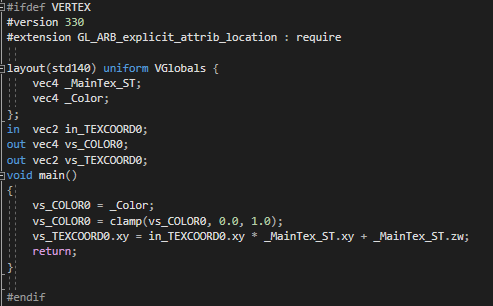
although it should be looking more like this
https://i.imgur.com/xJhUXRC.png
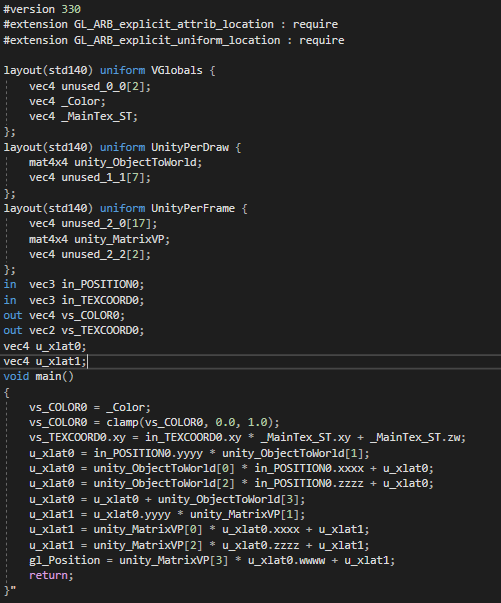
now, i assume it does that because the u_xlat variables end up equal to null, and i also assume that happens because unity_ObjectToWorld[] is null, as the line that first starts using the unity variables is the first to be thrown out in the compilate
so i was thinking that maybe unity_ObjectToWorld is not correctly set or defined for my shader, but whenever i try to buffer it with cbuffer unity throws a "redefinition of unity_ObjectToWorld" error at me
so what am i doing wrong here
like, here https://catlikecoding.com/unity/tutorials/scriptable-render-pipeline/custom-shaders/ they do what i want to do by adding
float4x4 unity_MatrixVP;
};
cbuffer UnityPerDraw {
float4x4 unity_ObjectToWorld;
}```
but when i try it unity complains :/ neat bridge
Greetings.. I was wondering if I could pick peoples brains that are more familiar with shaders than I. I am working for a studio who purchased this blend mode asset https://assetstore.unity.com/packages/tools/particles-effects/blend-modes-28238 but we were using it on a tetris like grid so every tetris blocks got the shader and it looked like it was using the grab pass material (I'm making the general leap here that the grab pass was doing a full screen grab for each block) and dropping our FPS from 68 to 21. As I said I'm making the leap that the grab pass is getting every thing on the screen for each block, I'm wondering if there is a way shader wise to just get the local pixels in relation to the sprites coordinates? Or maybe a more optimal solution of doing the grab pass once then passing that data onto the shader.
@full sierra The more performant way is to use Grab Pass with a texture name. That way it will do the grab pass once per frame per texture name. Its described here at the top https://docs.unity3d.com/Manual/SL-GrabPass.html
Use the Blend Modes tool for your next project. Find this and more particle & effect tools on the Unity Asset Store.
full sierra
@neat bridge thanks!
 light anchor
folks, I have a small issue, which is driving me insane. I want to replicate this in shader graph: fixed4 swapCol = tex2D(_SwapTex, float2(c.r, 0));. The idea is to sample a pixel at a coordinate taken from another texture R channel value. I will be using this for palette swapping. I did a pass in shader graph, which works but it samples the pixel at a wrong position. I am sure it's a really dumb mistake. Here's the relevant part of my graph:
any helps would be greatly appreciated
amber saffron
Your graph is correct.
Myabe it's the first texture that has an issue ? Have you disabled "sRGB" in it's import settings ?
amber saffron
I think I have an idea, but before, could you show the two textures and the result please ?
light anchor
sure
here is the color data texture, with a pink line drawn at index 18 (R channel value 17)
here is the original sprite (main texture)
R17 is the almost black area around her boots
but instead the result is:
it replaces the greyish eyes (R value 75)
amber saffron
Oh, I didn't understand it like that .
So you're picking the red channel from the character sprite, and want to replace the color from it with the color palette, if the color from that palette is not transparent, right ?
light anchor
yes, exactly
I am lerping each pixel from the original color to the swap color based on alpha from the swap color
amber saffron
So, here is where the gamma correction comes in 🙂
1 : I was wrong, you don't have to change the color palette settings, keep it sRGB.
2 : the red value of the sprite is indeed 75. But this is in sRGB, so it is indeed 17 once converted to this colorspace : 255 * (75/255) ^ 2.2 = 17
This explains what you are seeing.
So an easy fix is to power the red channel value by 2.2 to change the colorspace, and have the good index value.
amber saffron
You might also want to do some math operations to be sure to pick the right pixel in the palette :
- red value power 2.2 => color space change
-
- 255 => get the index value
- floor => keep the integer part of the value
- / 255 => remap to the 0-1 range
-
- 1/256 => offset of half a pixel to be sure to sample at the center of the pixel instead of the edge
light anchor
let me try
amber saffron
What if you plug the output of the power directly to the vector 2, is it at least replacing the expected pixels ?
maybe I was a bit wrong, the last add should be 0.5/255 (sorry for that)
light anchor
it doesn't work with the updated 0.5/255 add and it also doesn't work with the raw power
amber saffron
hum, I'm a bit surprised ...
Let me try that myself quickly
So, I did my color conversion wrong
sorry about that, it's the other way arround. Power to 1/2.2 (0.45454545)
light anchor
let me try
amber saffron
but it is still a bit offset due to precision :/
light anchor
yeah, no cigar
maybe it would be easier to place pixels in the swap texture based on their srgb R value
amber saffron
What is the intended use of all this ?
light anchor
palette swapping for pixel art
amber saffron
Maybe there's a better way to do it
Well, than you should have a sprite that represents only the palette index, and apply a palette texture to it
light anchor
can you explain?
amber saffron
issue here is that you're trying to do a palette swap based on only one channel. So if two pixels have the same red value, but a different green for example, they will be replaced by the same color, and this is probably not what you want
light anchor
this is true, but the sprites are operating at very limited color palettes (<20 colors)
amber saffron
Instead, you should have a sprite composed of a one channel greyscale texture that is the color index, that you import as linear.
And use it like you intended initially to sample a palette texture.
light anchor
so export a sprite in red channel only?
amber saffron
But you'll need some processing in photoshop for example to convert your colored sprite to a sprite + palette
light anchor
okay, thank you. one more question. When I am doing the RGB -> sRGB conversion, the R17 is 3.6248910563 after the conversion, should that be 3 or 4 in sRGB?
amber saffron
r17 in srgb should be 74 in linear
amber saffron
255 * (17/255) ^ 0.454545 = 74
So, maybe my colorspace conversion was a bit wrong :/
light anchor
yes, I am trying to figure it out 😄
it doesn't work correctly yet
pink pixel at 74 doesn't work
amber saffron
Like I said, because of precision issues the color if slightly off
I'll show you my "working" result
amber saffron
btw, the pink line is at x = 18, not 17 🙂
light anchor
yes, since if I understand it correctly the range is 0-255
so red 17 is index 18, no?
amber saffron
consider that the indexes also go from 0 to 255
When looking at your palette image in photopea that counts the pixels starting with 0, the pink pixels are at 18
light anchor
ok, so to be clear
if I wanted the R17 swapped as it is right now, if I put a pink like at x=74, it should work, right?
amber saffron
light anchor
wow, so there is a colorspace conversion node
that will help 😄
thank you very much, this is going to be a massive help
amber saffron
Without altering the color, you had the pink sampled when r=74.
That means that the r value of the boots was sampled around 0.65.
So, to make this back to the original value, we needed to convert it to the correct colorspace
light anchor
without you I wouldn't even know about the rgb/srgb thing 😄
amber saffron
I naively used the power 2.2 as conversion, but the maths are a bit more tricky
So using the node is better
@royal field Sorry I didn't answer directly. What is the "fairy" shader you're showing here ? The post process effect ? I don't see anything particular in that screenshot.
 royal field
@amber saffron
 tidal rover
oh, an outline shader if its backlit. they say its an internal name so it makes sense we have no idea what it meant xd
amber saffron
So, it is a kind of fresnel effect based on the view and light direction
royal field
Yeah lol
light anchor
@amber saffron it does work, I am super happy, thank you again
tidal rover
im just gonna joink that shadergraph cuz im gonna need to do that for my own stuff
light anchor
I was trying to adapt this tutorial in the shader graph https://gamedevelopment.tutsplus.com/tutorials/how-to-use-a-shader-to-dynamically-swap-a-sprites-colors--cms-25129 that's where the idea of swapping based on the red channel came from

Game Development Envato Tuts+
In this tutorial, we'll create a simple color swapping shader that can recolor sprites on the fly. The shader makes it much easier to add variety to a game, allows the player to customise their...
tidal rover
ooh
neat
gonna store both of those things for future reference, thx! @light anchor
 sly breach
i got a shader where it has a boolean property
[MaterialToggle] AM("Alpha Mask Mode", Float) = 0 //Triggers alpha masking
the only place the "AM" field is being used is the
CGPROGRAM
#pragma multi_compile AM_OFF AM_ON
and
#ifdef AM_OFF
...
#ifdef AM_ON
How do i change the property of a material during runtime ?
i tried this :
spriteMask.material.SetFloat("AM", alpha_mask_mode ? 1f : 0f );
but i have to manually disable and enable this field in the inspector field to see it change
regal stag
@sly breach Should be able to use material.EnableKeyword("AM_ON"), (also DisableKeyword)
harsh radish
Got my compute shader based marching cubes working finally, tho it basically destroys my GPU
 cyan hare
hi i'm making a water shader for a speed boat game, there's a tutorial on making waves but its in code and i need help translating it into the shader graph https://catlikecoding.com/unity/tutorials/flow/waves/
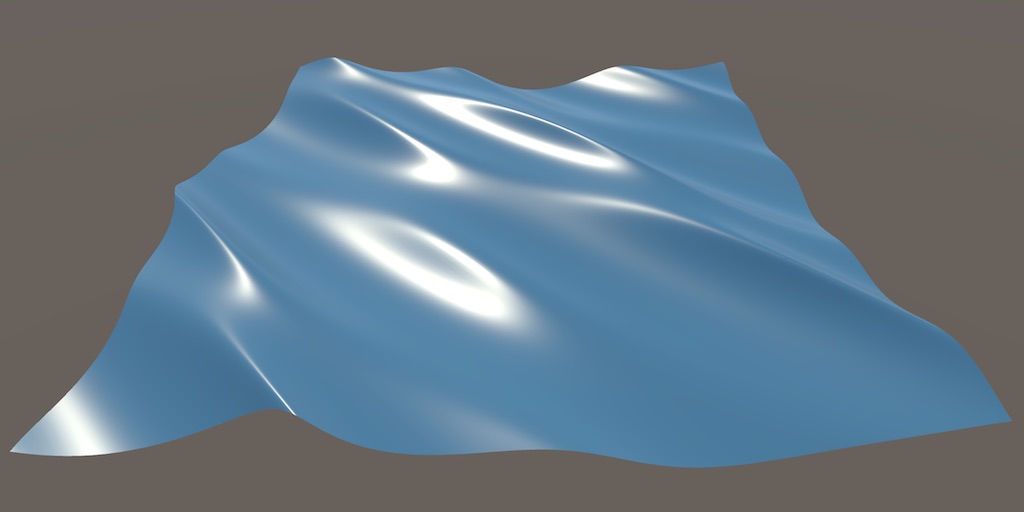
A Unity Flow tutorial about moving vertices to create waves.
sly breach
@regal stag thanks didn't know its a thing
 fervent tinsel
@cyan hare I've done that exact tutorial in past with SG but I'd really recommend using the custom nodes instead of just wiring everything
naive mural
hello, does anyone know if there's a general way to handle time truncation in shaders when the values get pretty big without cutting/changing continuous effects? Already at ~10000 seconds i see floating point precision problems occurring. I can think of an oscillator workaround to make values go 0->5000, then back to 5000->0 repeatedly. Or just modding the value by 5000, but before transitioning back to 0, make the shader effect fade and unfade at the start for a smoother transition. Both solutions in one way or another would break the shader effect slightly.
cyan hare
@fervent tinsel ok I’ll try that
cyan hare
did the shader graph update cause i'm following a tutorial exactly and i'm getting errors for it
nvm i was looking at a older version of unity
ok i have no idea how to make a custom node can someone help?
 pearl frigate
Hey guys. I have absolute no experience with rendering or shaders in Unity (This is about a 2D project)
Was hoping that someone could help me get into it. I tried following a video, but since i am using sprite sheets, these guides are not too helpful unfortunately.
cyan hare
@fervent tinsel i have no idea how to translate the tutorial into a custom node, can you help?
fervent tinsel
I'd recommend going to file approach immediately, that tiny box is kinda painful as code editor 🙂
cyan hare
it only excepts C# code not shader code and i'm still getting errors from trying to make it one
fervent tinsel
it's definitely hlsl
anyway, you got the tutorial there
it has example
otherwise, you have to show us what you've done and what errors you get if you want some help
regal stag
Might be some confusion with the old CodeFunctionNode method of producing custom nodes. That was C# and is an old method that no longer works. The Custom Function node that 0lento linked is the newer in-graph method.
fervent tinsel
ah, that could be but that's not been around for over a year
I guess if one still uses Unity 2018 it could be there
regal stag
Yeah, but if they've been looking up custom node tutorials they might have stumbled across that old method
sly breach
what's the difference between those two ?
sprite.material.EnableKeyword( "AM_ON" );
Shader.EnableKeyword("AM_ON");
@regal stag @fervent tinsel yeah that's the problem I'm having when looking up tutorials for custome nodes that are too old
regal stag
@sly breach Shader. method would probably be enabling that keyword globally, while material. would only enable it for that material.
sly breach
is there a way to fetch all the global keywords ?
regal stag
Not that I'm aware of
pearl frigate
Hey guys. As i wrote up higher as well I have absolute no experience with rendering or shaders in Unity (This is about a 2D project)
Was hoping that someone could help me get into it. I tried following a video, but since i am using sprite sheets, these guides are not too helpful unfortunately.
sly breach
@pearl frigate - ask a specific question - its much easier to help u if you know where you are stuck
pearl frigate
@sly breach I was trying to follow brackeys guide on setting it up for 2d. But when it gets (early on) to setting the texture back on the character after adding the new material, i got stuck because i am using a sprite sheet and not a texture for the element
wary horizon
i there a simple tutorial to get an outline of a 3D object? Im using URP
(a teddybear) for instance
@regal stag lol came across your website while looking for post processing layers for urp 😛
cyan hare
@regal stag @fervent tinsel i'm sorry i'm completely clue less to make a node. i can send you guys the scripts for the wave and node and give me an example to get started if thats alright?
wary horizon
i there a simple tutorial to get an outline of a 3D object? Im using URP
@wary horizon
devout quarry
@wary horizon https://alexanderameye.github.io/outlineshader.html
I'll be updating that article in the future also, I've done a lot of research into outline shaders since then
wary horizon
@devout quarry i think i saw this many months ago, is there a way to do it purely based on shader graph?
oh. it was in this project too. i tried it and failed miserably :p
i have everything from the previous attempt months ago. ill give it a go tonight and ill report back here if im struggling
grand jolt
erm, when using MaterialPropertyBlock, can you use it with standard HDRP lit shaders? each tutorial I see says to create a custom shader 0-0
amber saffron
MPB don't really like the SRP batcher. But they work, and with any shader
cyan hare
hi @regal stag @fervent tinsel @ anyone else who could help. i'm trying to create a custom node but i ran into problems even trying to do the basics, here's my script for the node so far https://pastebin.com/mgVuZpvM
Pastebin
Pastebin.com is the number one paste tool since 2002. Pastebin is a website where you can store text online for a set period of time.
regal stag
@cyan hare Your function should be in a .hlsl file, not a C# script. What 0lento linked earlier should provide the info you need to use the Custom Function node : https://docs.unity3d.com/Packages/com.unity.shadergraph@8.2/manual/Custom-Function-Node.html
I think it's also important that the function name ends with _float (or _half for half precision), so WavesFloat probably needs changing to Waves_float for the node to be able to find it.
cyan hare
got im still a bit clueless but i'll crack at it some more
grand jolt
@amber saffron thanks, and i'm using GPU-I so it's all good
cyan hare
do you have to use notepad to create a Hlsl?
amber saffron
Yes, there is no "create/hlsl" menu
cyan hare
😰
wary horizon
@devout quarry this is where i got stuck with your tutorial. how do i make a .hlsl file?
on looking, im not sure this is what i want, i dont want to outline all objects in my scene, just specific objects.
regal stag
HeroArt just asked the same thing. Use a text editor like notepad (I use notepad++ personally), and save a file as name.hlsl
For outlines on specific objects, I'd look into the "inverted hull" technique. Like the one here : https://github.com/Unity-Technologies/UniversalRenderingExamples/blob/master/Assets/_CompletedDemos/ToonOutlinePostprocessCompleted/Shaders/ToonBasicOutline.shader
This could then be applied as a second material on the meshrenderer, or better to use the RenderObjects feature on the URP Forward Renderer to re-render objects with that material as an override. That link should provide an example of that too.
wary horizon
does this work with urp?
regal stag
That link/shader is written for URP yes
wary horizon
eek. i feel so useless. what do i name the shader file? what one do i pick?
Unlit shader?
regal stag
The technique is basically, render the object again, but slightly larger (by pushing vertices out by normals), and cull front faces.
Unlit shader yea. Surface shader option is only for built-in pipeline. Though it's probably still a .shader file and if you are replacing the contents it doesn't matter.
regal stag
That's because you've probably replaced the material it had before. It's meant to be used with both applied
wary horizon
eh
regal stag
Or with the RenderObjects forward renderer feature, which could allow you to apply the outlines to all objects on a specific layer.
wary horizon
oh like this
regal stag
Yea
wary horizon
does this warning matter? plus i hope theres a way i can disable / enable the outline in code
i guess i can just set the outline width to 0 in code
_Outline by referencing this
regal stag
Could probably set the meshRenderer.sharedMaterials list to add/remove the outline material to enable/disable.
wary horizon
would that be more performant than setting _Outline to 0 when not needed?
regal stag
Probably yeah. Even setting the outline to 0 it will still try to be rendered / cause a drawcall.
wary horizon
            {
selection.GetComponent<Renderer>()[1].material.enabled = true;``` something like this?it has errors currently like. 😅
regal stag
Eh, I don't think materials have enabled. I meant more like removing or adding it to the sharedMaterials list.
It might be easier using another gameobject though, and enabling/disabling that.
wary horizon
no idea how any of that works. selection.GetComponent<Renderer>().material.SetFloat("_Outline", 0.0004f); i've done this alot and it works well
regal stag
Or using the RenderObjects feature and swapping the layer of the object to enable/disable it.
I'd personally use the RenderObjects method. It's on the Forward Renderer that would be somewhere in your project's assets. You'd need to set up a Layer for the gameobject to be on, then add the feature and select that layer as the filter, and add the material on the overrides.
To enable/disable it you should then be able to change the layer the gameobject is on from a C# script. When it's on that "Objects" layer the feature will cause the outline to appear, while any other layer (e.g. 0/Default) it won't. (https://docs.unity3d.com/ScriptReference/GameObject-layer.html)
Bit easier than awkwardly swapping out materials or setting up extra gameobjects for every selectable object
wary horizon
 vague sinew
Hey guys! I'm completely new to shaders and am trying to follow some tutorials. I could get the water from Brackeys working like this... It moves and etc. However I've noticed that with the same values I get more strenght on the movement of the water for example... What could be causing that?
cyan hare
omg i'm working on that exact same boat movement, i'm as lost as you are but eh well
vague sinew
Also, I've tried adding the "foam" by using the fresnel they taught on the force field video, but I get this effect here
All that inputting to alpha. I'm afraid I'm doing something terrible wrong here. How should I proceed?
 fallen cypress
Bidirectional texture function (BTF) is a 6-dimensional function depending on planar texture coordinates (x,y) as well as on view and illumination spherical angles. In practice this function is obtained as a set of several thousand color images of material sample taken during...
What is the different between btf and this

In this video, we're going to use Shader Graph with the High Definition Render Pipeline, or HDRP in Unity, to create realistic materials with HDRP!
Learn more here! https://on.unity.com/2CsLn5G
vague sinew
Yeah, kinda
cyan hare
@vague sinew are you trying to get this effect? https://www.youtube.com/watch?v=gRq-IdShxpU

In this video, we'll take a look at how we can use the Shader Graph feature in Universal Render Pipeline, or URP for short, with Unity to create a water shader! The water shader can be simple or complex, and include the features you desire. Let your imagination get wild in thi...
 sour swan
hey so my vfx isnt showing ingame
only in the scene editor
im on 2d and using URP
ingame
scene
when i zoom out
 desert orbit
switch to 3d mode and look where it is located
sour swan
its a bit back but
desert orbit
positive Z would normally place camera behind elements
sour swan
nothing behind it
oh u meant the cam
i made the cams Z like that so it works consistently
desert orbit
check in 3d if it is in front of the game effects
desert orbit
camera has near clipping plane as well, it can't be too close
sour swan
should i reduce this?
and its basically on the same Z as player
maybe the vfx settings are wrong?
its the default one
desert orbit
I can't tell anything on that picture without vectors. Make sure camera is in front of everything at some distance
desert orbit
If that's in order look at draw order of things that are in the line of sight of the effect
including on what layers they are
Also create an empty scene and put effect in-front of the default camera to make sure it renders it at all, i.e. has supported material/shader
 mint pine
Hey, I have a quick question. I've got a very simple shader with a single float on the blackboard, properly exposed. Changing it does what I want. I've a material that uses it, and I've applied it to some things. However, this doesn't seem to be instanced like everything else; I change the slider in the inspector of a objects to which it's been applied, and it changes it for all. Is there a way to separate this, without making a ton of shader graphs?
 vocal narwhal
When you change things via accessing .material it instances the material and will only affect that one
but it's not extremely performant, so you can look into Material Property Blocks if you're doing it to many objects
mint pine
I'll take a look at that, thanks. 🙂
 little seal
shaders failing to find cginc files even though it has worked before and nothing relevant has changed, even have a back up project with working shaders:
any ideas how to fix? reimporting didnt fix it
 past viper
i'm new to shaders, and i want to create a highlight shader for my characters, when i hover my mouse over them they are highlighted. any guides to get me started with this idea?
little seal
this does something like that, it's related but not exactly what you're looking for https://catlikecoding.com/unity/tutorials/hex-map/part-16/
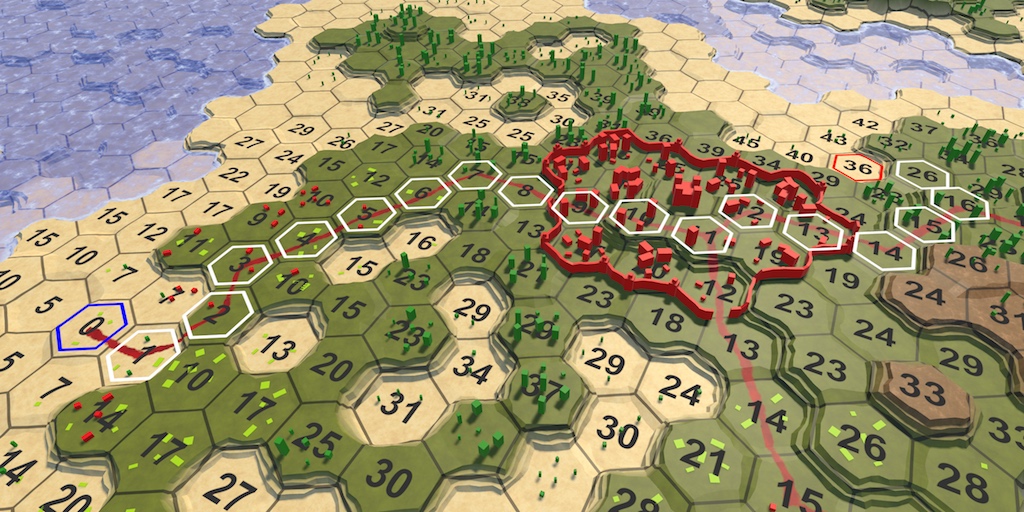
A Unity Hex Map tutorial about adding support for pathfinding. Part 16 of 27.
past viper
taking a quick look this looks like adding another sprite on top of the previous one, it wouldnt work for me, im in a 3d project and have multiple characters with different meshes
 patent goblet
any good intro tutorial for coding shaders?
grand jolt
Anyone know how to show a wireframe with the shader graph from the package manager? Every tutorial I come across keeps using a grid texture, which isn't the same thing.
meager pelican
Wireframes are trickier than you might think.
One cheat is to simply iterate through the mesh and do line-draws over them in C#.
Another is to have barycentric coordinates in your meshes so you can tell how close to an edge you are in your shader. Or if your mesh is of a type that changes quite a bit at each "seam" you can detect that with ddx/ddy type of changes (normal, color, depth, whatever) but it produces kind of "splotchy" aliased results in most cases.
One problem is that you have to build barycentric coordinates into the mesh vertex color data, since SG doesn't have a geometry shader stage. And don't share verts.
https://catlikecoding.com/unity/tutorials/advanced-rendering/flat-and-wireframe-shading/

A Unity Advanced Rendering tutorial about flat and wireframe shading, using derivative instructions and a geometry shader.
 uneven sluice
What shader shoud i use if i have hdrp and want to make a particle system? The HDRP/Lit gives me an error (MinMaxAABB, and with other shaders i cant controll the Emmisive color?
 nimble cloud
hmm, I haven't worked with hdrp but in urp there's a separate particle lit shader; maybe look for something like that?
uneven sluice
Under Particle i can only find only Standard Surface and Standard Unlit? I know there shoud be more but idk why i have only those 2
 tall trench
Hey guys and girls, i'd like to ask where i could look for a toon shader graph workflow for the current urp 7.4 in unity 2019.4.7f1?
Or how can i get a light note to work with or without a custom function?
 winged sable
May someone help me understand how to archieve such result in Shader Graph by pointing me what nodes should i look to interact with? ahh and what input of the PBR should i use it for this kind of result?
rustic dragon
is that a texture for that AO type rendering?
 cosmic prairie
looks like some type of screen space effect to me
mortal kiln
I dont think you can make that in shader graph. I could be wrong but shader graph doesnt actually morph meshes
if it does though can someone point me the right way
I was trying to get it to generate meshes for me recently but couldnt figure it out
winged sable
That's the cavity options in blender to add AO and SS in the modelling object. I think if i could replicate it in unity shader graph would add a nice touch to the game.
the game Planetary Annihilation uses the same shader effect in their models.
rustic dragon
@mortal kiln you can morph meshes in shader graph, meaning you can modify the vert placements
low lichen
It looks like a screenspace AO effect that handles outward corners differently from inward ones.
low lichen
Won't be as dynamic though
rustic dragon
yeah, tradeoffs for sure
winged sable
yeah. dynamic is better for even smaller texture as i use a palette texture to address each face UV in a pixel of the texture.
rustic dragon
2 sets of UV's would solve that
but either way it works
or for the coloring you could use vert coloring too, options
 eager folio
So I tried downloading a shader graph off of github and apparently that totally broke the metadata to the point that unity won't even open the file.
Anyone know how to deal with that sort of thing?
winged sable
Okay... first attempt, fail.
Gonna take some notes and redo again.
Not giving up 😁
tall trench
@eager folio maybe you could search for your project in your files on your pc and delete the shader there and then try to open it again?
eager folio
@tall trench I did.
mortal kiln
is it wise to move everything from OnRenderImage to Update? OnRenderImage doesnt work in URP
rocky helm
for shaders that use sine/cosine time, is there any way to make it start at a different/random point of the sin(t) graph? im trying to make a glowing bubble effect, but everything is too uniform
 ocean spade
if the world positions are unique for bubbles, you could use that as a seed in the random range node
using position from the object node that is, (not world position from the position node)
rocky helm
i decided to add a random number 0f-6.28f to the time and take the sine of that, effectively giving a sin(t + random) graph, but your method is probably simpler. thank you
 real venture
Hi all, quick question: One shader, multiple objects, unique properties?
Using Brackey's dissolve shader on a few objects in my scene, changing the dissolve property changes all objects. Do I have to create a separate copy of the material for each game object, or is there something I'm missing?
low lichen
@real venture Yes, you can either use separate materials, use the renderer.material property to automatically create a duplicate of the material at runtime, or use MaterialPropertyBlocks on the renderer to override specific properties without having multiple materials.
real venture
@low lichen Beautiful, thank you, I'll look into that 🙂
low lichen
I like the MaterialPropertyBlock route the most
 raw hemlock
Hi, just a quick question, are Unlit sprite shaders from URP broken in 2020.1.1f1? It goes blank the second I link any nodes
 neat wyvern
Does anyone know of any break downs of the default sprite shader and/or information on how to implement secondary textures? I'm searching around and can't find anything, and I'm interested in learning...
low lichen
@neat wyvern You can see all the built-in shaders here
https://github.com/TwoTailsGames/Unity-Built-in-Shaders/
The default sprite shader is here
https://github.com/TwoTailsGames/Unity-Built-in-Shaders/blob/master/DefaultResourcesExtra/Sprites-Default.shader
neat wyvern
Yes, I'm looking through an editing the code to sort of trial-and-error learn
But it's not going too well 🙂
low lichen
But the issue with it is that it doesn't really define anything in it, it just includes another shader file where that stuff is defined
How do you want this secondary texture to work? Just overlayed on top of the main texture?
neat wyvern
I'm looking to implement a team-colour highlight of some sort on a variety of sprites. There may be a better way of doing it.
low lichen
So you want to be able to change the color of specific parts of the sprite?
neat wyvern
In simple terms, yes! 🙂
I tried accessing the secondary texture in my own copy of (probably an older) default sprite shader, and it's clearly working because I'm getting the colour, but no matter where I sample I get the colour, so I've done something hilariously wrong.
low lichen
So this secondary texture is grayscale and you want to multiply the team color on it and then overlay that on top of the main texture?
neat wyvern
That's the plan
low lichen
Can you post your non-functioning sprite shader?
neat wyvern
I'm going one step at a time, though. At the moment I'm just trying to get a coloured secondary texture to render overlaid over the original sprite
(I should be clear I'm entirely new to shader programming)
(Though not to low level programming at all)
low lichen
In that case, assuming mainColor is a variable containing the color of the main texture and secondaryColor contains the secondary color, you can lerp between these using the alpha of the secondary color:
return lerp(mainColor, secondaryColor, secondaryColor.a);
well
I have no idea what I was doing wrong before
But thank you 🙂
Yep, and all hooked in for runtime, too. I've sort of re-attempted what I was trying before we started talking, and it works, so I don't know what I did wrong, but thanks anyway, and I wasn't lerping correctly anyway!
 cobalt bolt
Is anyone good at converting srp shaders to urp shaders here?
 full sail
Any way to set the alpha across multiple sprites to a consistent value and ignore overlapped sprites
or is that essentially nonsense
rustic dragon
you'd have to do that in a single shader I think
 tranquil fern
Is there a reason why (PBR) sine time wouldn't work in-game?
It's working in the shader editor, the preview is perfect. But in game it just doesn't seem to... "run". It's stuck on the start value of sine time
full sail
@rustic dragon all the sprites share a single shader at the moment
I'm adjusting the opacity through the colour tint
of the spriterenderer component, but it's adding the opcaities together
rustic dragon
what does a single sprite look like?
rustic dragon
I don't know if you have control over the way they blend together as single entities
but you can do it as a material in the shader graph to get what you want
meager pelican
If you're blending, you're blending. If you're not you're opaque.
Use a stencil, and only write the blended value once, don't overwrite it again if it's already written. How to decide on the opacity is up to you.
 narrow niche
hey guys, working on a custom vert/frag shader, and when trying to make it work with shadows, this ends up happening
the implementation is identical to unity's example shader, and the light settings are default as this is a new unity project
rustic dragon
@full sail like this?
rustic dragon
if you are using URP or HDRP you can do that, or get a shader written to do the same thing
shader graph, but it can be done with hlsl
it's pretty simple as far as a graph
full sail
just max of the alphas, nicely done
very slick - URP is appropriate for mobile platforms if I'm not mistaken?
full sail
superb, I'll look into that
cheers, yeah I understood exactly what I wanted to do via a shader, but couldn't achieve it with individual sprites
rustic dragon
people say it's not quite ready for prime time, though, writing this in hlsl would be simple too I imagine
on thing, is your UI needs to be in camera space
at least for this
hope that isn't a make or break
maybe there is a way with URP to make materials work in Screen space, but I don't know
full sail
shouldn't be an issue - I may look into getting it done in HLSL, there's a keyword for the alpha blending I believe
rustic dragon
yeah, you just sample the one sprite a few times, shift the UV's to get the diff peaks and then take their alphas and max them
low lichen
I'm interested in how this issue would be solved if each sprite remained individual. I suppose the best way would be to use stencils like @meager pelican mentioned.
But you could also write to depth, assuming you don't need a correct depth buffer after drawing those sprites.
full sail
do you have access to any of the per-sprite data? like the render order?
low lichen
In the shader? I can't imagine the render order would get passed to the shader.
rustic dragon
yeah, that'd be cool to have something like blend modes for sprites
I think it's only additive?
 undone plover
i'm trying to create a simple outline shader for 2D textures, but running into difficulty
my strategy is to subtract two step functions to create the outline
the problem is that the subtraction will go outside of the bounds of the texture
and using a Tiling And Offset node to rescale everything doesn't seem to be working
pearl jetty
Could anyone point me in the right direction on how to replicate the shader/effect shown at the 0:23 second mark of this trailer? You might have to slow it down to .5x or .25x speed to clearly see it but it's when the ball bounces off the wall, it distorts multiple meshes simultaneously. Thank you!
 rustic dragon
you should be able to do that with just vert displacement if there is enough spans in the geo, but this might just be a distortion particle

In this video, we are creating a Distortion Shader using Shader Graph in Unity 2019!
Download the project here: https://ole.unity.com/DistortionShaderProject
Shader Graph in Unity 2019 lets you easily create shaders by building them visually and see the results in real time...
pearl jetty
ah, thank you!
I am quite new to shaders, I will take a look
what does "spans in the geo" mean?
low lichen
It's definitely not a screen-space effect. You can see those vertices being pushed out.
rustic dragon
yeah, you can do it a few ways, but that does look like it's just pushing verts out from the point of impact
pearl jetty
Similar to this?

Download the demo project here: https://ole.unity.com/sgvertex
To learn more about Unity, check out some of our available courses on our Learn website: https://ole.unity.com/unitycourses
To check out some other cool effects, feel free to also browse the Unity Asset Store: ht...
rustic dragon
yeah
if you take in the position of impact, you basically push the verts away from it and back in, you feed the impact point in script to the shader
pearl jetty
Thank you so much!
low lichen
Looks to me like those verts are being pushed up their normals. The top part would be moved a little to the left if it was from the point of impact, but it's going straight up.
rustic dragon
yeah, you can base it on the normals or just distance from point of impact, one would keep the verts touching, the other would replicate that effect
pearl jetty
so you might not base it on the distance from the point of impact? how would it know how far to displace/warp?
rustic dragon
well you feed in a point of impact, then you get the vert position in the world and based on that with some math (not sure at the moment) you push the points out from that point of impact
rustic dragon
I am trying it out
pearl jetty
oh nice!
shy wigeon
my sprite is being cut off before it reaches the edges of the mesh. I don't think it's something in my shader. what might be doing this? image is RG=UV and B from the sprite (which is supposed to look like that, don't worry about that.)
there's a slightly less confusing image
it's not reaching its full UV value so I'm guessing that there are definitely bits being clipped by something else after my shader has run
that's what's wrong, it's being clipped at the sides
rustic dragon
@pearl jetty https://gfycat.com/bewitchedgeneralkatydid this is kind of what you'd want with some adjustments

@shy wigeon what does your shader look like?
shy wigeon
it's the default UI shader with anything to do with clipping removed, then this:
color.r = IN.texcoord.x;
color.g = IN.texcoord.y;
color.b = 0;
return color;```there's other stuff being overridden but it's still being cropped even with forcing the result
the debug values being shown aren't reaching full brightness so it's definitely being stencilled or something by something
ZTest[unity_GUIZTestMode]
Blend SrcAlpha OneMinusSrcAlpha
ColorMask[_ColorMask]```
this stuff is still there from the original UI shader. could any of that cause rect clipping?unsure, if you put your image in anything else, like drop it into a panel as it's sprite, does it fill the rect?
shy wigeon
lemme try
yeah that doesn't clip
oh
it's cropping to the original sprite image bounds
I can fix that easily with a larger image, but why would it do that?
I guess it's actually changing the size and UV scope of the mesh
rustic dragon
what is the image size?
shy wigeon
512x512
rustic dragon
weird
rustic dragon
@pearl jetty https://gfycat.com/sophisticatedflashyalbertosaurus another go at it, this one respects the assets original position, not in love with the falloff math (it ends too abruptly), but this has the general ide and includes the split vert thing


 shy wigeon
since I changed the sprite image my thing shows in editor during play, but then disappears from the runtime 😦
and for some reason VS can no longer debug it
shy wigeon
restarting fixed it ¯_(ツ)_/¯
pearl jetty
@rustic dragon That is so cool! Did you follow a reference video? Or is there existing code online/tutorial that I can follow? I'm super fresh with shaders so I don't know how much I would be able to do on my own. I've just been following tutorials to get started. That is perfect though
@rustic dragon Also, did you use shader graph?
rustic dragon
yeah, shader graph and some scripting, I will do you later with what I did
dm you that is
pearl jetty
Thank you!! That would be outstanding!
undone plover
can anyone help me create a simple outline for my sprites using Shader Graph?
i've been following some youtube tutorials but they aren't working for me because I'm using a single sprite, not a spritesheet
the approach is straightforward -- i am creating 4 offsets (top, right, bottom left) and subtracting them to get the outline
the issue is that the outline goes outside the texture area
i tried scaling the texture via shadergraph but that caused all kinds of weirdness
rustic dragon
just 1- the alpha and go the other direction @undone plover , just make sure you clamp or saturate when you are using adds and subtracts
undone plover
@rustic dragon i am offsetting in all 4 directions. the issue the bottom offset gets clipped because its outside the texture bounds
to be clear the approach works correctly for shapes that have padding (transparent pixels) around them
rustic dragon
that would be easiest, but there are a few ways to get this to work, one way is to shift the UVs around, the other is to use the alpha mask with a ramp to get the outline
I can demonstrate both ways
here is the offset way
here is the texture alpha
any thickness (within reason 🙂 )
undone plover
Nice!! That’s exactly what I’m shooting for. Are those mockups or shader graph?
rustic dragon
ya
let me get you a graph
I fixed that internal corner 🙂
you know of way to save and share these beyond just images like this?
but the top part is the inward push on the UV's, the bottom part is capping the edges then a lot of adds 🙂
that is a mess too, I can walk though the left part 😮
undone plover
Wow, thanks for putting that together. That’s a very different approach than I was taking (I’ve been using tiling and offset nodes)
rustic dragon
you might be able to do the same thing, the idea is there
tidal rover
@rustic dragon you can share the actual shadergraph file instead of images. but idk if tahts what you mean
rustic dragon
@tidal rover yeah, how do you do that?
undone plover
Need to sleep now but will implement it tomorrow - much appreciated!
tidal rover
you just kinda grab it from your filesystem?
@rustic dragon its just a .shadergraph file, idk if you can upload to discord directly. may need to zip to bypass security fro unknown file types
rustic dragon
I will dm you @undone plover with the shadergraph file, you can try that too
 teal breach
I came across this post (https://forum.unity.com/threads/how-can-i-add-an-extra-pass-to-a-shader-graph.796503/) in which bgolus says that The SRPs don't support multi-pass shaders. - but so far I've been using multi-pass shaders on SRP (written in shaderlab) with no issues. Is there something I should be aware of?
amber saffron
If it works (I guess a regular unlit vertex fragment shader ?) it's a happy accident.
teal breach
Basically I have a pixelisation shader which renders 3d objects as pixel art, and it uses a second rendering pass in the SRP to store some additional information used to create outlines and other things
I have a pass which just spoofs a LightMode=Outlines tag
It just worked and so I assumed that was expected behaviour
regal stag
From experiments I've done before, multi-pass shaders work in URP but can't be batched with the SRP Batcher. So if you were doing the inverted-hull outline technique on many objects for example it would likely be better to have it as a separate shader and use the RenderObjects feature on the forward renderer to achieve that second pass instead - as that could still all be batched together.
teal breach
I could quite easily make the change over to RenderObjects, as I already have it setup as a second pass - but then I would need to ensure all my pixelisation objects are selected for that pass, I guess through layering, which just seems messy compared to a pass in the pixelise shader
this is the effect -> https://elliotb256.itch.io/pixelshader?secret=hxVtRnK9f6B7oObJSFrzZbDIs
I haven't checked whether batching works, I probably should 😛
I think I had disabled that for other reasons while writing the shader, it's a good point I'll need it back on
 soft jacinth
hey guys so this seems odd but I'm curious how I can change the color of a smoothness highlight, I find it "pushes up" my soft edges but it's in the wrong color
before smoothness = 0, second one smoothness 1
smoothness.rgb = color that wouldn't be it would it? I ask because unity has froze attempting to make this change lol
yep wasn't it obviously, anyone know a thing or two about what is I'm sure basic shader knowledge please feel free to drop a line 🙂
low lichen
@teal breach @regal stag @amber saffron When converting a multi-pass shader to URP, I found I could separate the passes into separate shaders and materials and then put multiple materials on the renderer to achieve the same effect. In my case, I had a depth only pass before a transparent pass for a ghost effect.
teal breach
That's true, but also makes the workflow quite restrictive - only single material models, which I'd rather avoid if I intend to publish an asset
I'm just slightly bewildered that it works as a multi-pass shader without any issues in SRP 🤷♂️
I can't tell if it's going to implode at some point in the future, or whether its a feature in development
low lichen
I think you can still make the workflow work with submeshes, you just need to keep the order correct. For two meshes, this order (DepthPass,Transparent) would turn into (DepthPass,DepthPass,Transparent,Transparent). But yeah, it's not very user friendly for published assets.
teal breach
cheers, I'll keep it the way it is for now but bear in mind for when it no doubt breaks on whatever is the next SRP update 🙂
devout quarry
Hmm for multipass shaders can't you just use a custom renderer pass?
And then blit stuff
Each time using a different pass of the shader, that's how I do it
low lichen
That'll use up a layer, won't it?
teal breach
yeah that's what I do Alex, but I interpreted bgolus' statement as saying that was unsupported - am I wrong? bgolus is my prophet
As a separate gripe, I've noticed the SRP Blit behaviour has changed each time there is a version update for the last three versions - but that is a grumble for elsewhere 😄
narrow niche
not using any scriptable rendering pipelines
unity version is 2020.1.2f
when writing a custom frag/vert shader, shadows are completely broken. here's the code: https://paste.myst.rs/qio
the shadows on my sphere (just a unity sphere, not a custom model): https://cdn.discordapp.com/attachments/497874081329184799/744673618939740261/unknown.png


A simple website for pasting text, mainly code snippets.

any idea whats going on? the shadow related code was taken directly from one of unity's example shaders
how could the shadows possibly be this broken using unity's own macros lmao
is this just a flaw with the old built in renderer?
teal breach
by broken, I suppose you are referring to the jagged line around the rim?
narrow niche
yeah
teal breach
hard shadows and low res shadow map?
narrow niche
ive already checked all that, this is a brand new project at ultra settings, soft shadows just blur this jagged line, but it still looks awful
also, this almost looks like the normal is completely incorrect, but the normal i calculate is actually never used (which can be verified by just commenting out the normal property of the v2f thingy) which of course is correct because this shader's normal is for doing some matcap stuff, but its weird that its acting up so badly
raw hemlock
Could somebody help me? I'm writing a shader for some 2D sprites that are in a sprite sheet, however when using the sheet the texture doesn't render properly.
nevermind, forgot to plug in alpha 
narrow niche
still have not been able to figure out the shadow issue
i have increased the shadow resolution, then lowered the shadow distance, to get the most detailed shadow possible
and this is the result
this should never even be possible
real venture
Hi all, tried to add a little fading shader to blur the top edge - Guitar Hero style.
I'm not very good at this, why is it inverting the colours in the sprite behind?
And because I'm not very good at discord, here's the mini Shader Graph in a different comment
real venture
Huh, it's got something to do with HDR being enabled...
cosmic prairie
@real venture try to make sure that Alpha is less than 1 and more than 0
(or equal)
real venture
@cosmic prairie Peter thanks so much, saved me hours of headscratching
cosmic prairie
glad to help, this one took me a bit too when I first saw it happen hehe :)
teal breach
@narrow niche did you try increasing shadow bias? might be a self intersection problem?
narrow niche
I did, none of the light settings helped
In the end, i just hid it with a simple lambert calculation in my shader
low lichen
You can make a circle in a shader without a texture
rustic dragon
@bronze basin why are you using rectangle with UV input being the image? what effect are you going for?
 bronze basin
I just want a selection circle.
And for some reason sprite felt like a right choice, hence I have a texture - it requires _MainTex.
low lichen
You just want to make a hollow circle?
rustic dragon
yeah, why are you using Rectangle
low lichen
It's somehow hollowing out the circle
rustic dragon
yea, it leads to that chunkiness
if you kept it this way you'd have to up the resolution of the input sprite
bronze basin
OK, so how can I make it without a rectangle?
rustic dragon
if you want a hollow circle you can do what MentallyStable is saying, if you need a particular sprite just make sure your image is high enough res and has what you want to see
bronze basin
Sure, but I don't know how to make a circle without a texture...
rustic dragon
you don't have to, you have a sprite that is already a circle right?
low lichen
Use the UVs, calculate the distance from the center of the UV (0.5, 0.5)
rustic dragon
are you just trying to make a ring?
low lichen
Use that distance to make the circle
grand jolt
I'm in a bet with a buddy of mine, we're trying to see who can create the most 'over rendered' shader/setup possible. He sent me his shader to compare to mine, but due to z-fighting I can't tell who's winning. His is the yellow sphere, and mine is the red.
bronze basin
@rustic dragon yep.
rustic dragon
why can't your input texture just be what you want it to be, a ring?
bronze basin
Well... true.
regal stag
If you want to make a ring without a texture you can do it like so :
low lichen
But if performance is a concern, a ring mesh with a simple unlit shader would be the most performant option.
grand jolt
Hi
I am looking for someone to write a shader on unity
The shader should be a metaball shader which can be applied to any object
I saw some implementations on twitter https://twitter.com/klemen_lozar/status/1136504201029259267
But this guy didn't wanted to share it
He explained the way it works as: I'm just distorting vertices towards each other and blending normals.
So
Any recommendations? I don't have much money, so it better be free
low lichen
I doubt the shader he made would work for any object. It's a sphere for a reason, to simplify the distance calculation.
Most likely he's passing information about all the spheres in the scene to all the other spheres in the scene and for each vertex seeing if they are close enough to a sphere, if so he pushes them towards that sphere.
Calculating the new normal would probably require calculating where nearby vertices would be transformed to and doing a cross product
But thanks for sharing this, this looks very interesting.
3D metaballs are usually not really an option because they require raymarching or some voxel based approach.
This seems really simple and cheap.
grand jolt
So where could i ask for writing a shader at low cost?
low lichen
I don't know, I've never paid for freelance. I've heard Unity Connect mentioned here before.
teal breach
That effect looks cool, I wonder to what extent you can do it screen space
Use a separate pass to render larger spheres to form a texture that maps screen space to the nearest centre, then use this texture to deform spheres in a subsequent pass - should work if restricted to something like 2D top-down
 tight finch
the up one is my shader graph and the bottom is what it looks like on a object wtf
teal breach
saved asset?
 stoic bear
HI, anyone can show me a deformation method to implement a 2D road like this ?
rustic dragon
tricky one as the creatures would need to follow it, so you'd have to account for that in code, might be better to just make a curved model for the road and use the shader to scroll a tiled ground texture
stoic bear
that's exactly how I implemented it in Godot but now I'm looking for an alternative way in unity
 lime viper
So in theory you can set up your camera projection matrix to solve this, but I'm afraid outside of pointing you to that I don't have the knowledge to really get you across the finish line there.
looks like maybe this: https://assetstore.unity.com/packages/essentials/tutorial-projects/endless-runner-sample-game-87901

Get the Endless Runner - Sample Game package from Unity Technologies and speed up your game development process. Find this & other Tutorial Projects options on the Unity Asset Store.
might have some of what you need
stoic bear
Isn't that a 3D game ?
lime viper
I mean most "2D" games are still 3D in that they have a depth value
rustic dragon
why do you need an alternate way?
meager pelican
This seems really simple and cheap.
@low lichen Yeah. He said he's passing an array of metaball positions (maybe with radius) and messing with verts. I'm wondering how he did the surface normal calcs, and about his mesh.
Pretty cool.
 unique oar
I'm having an issue with my scene color node. It's making everything low-resolution. What's causing this??
 frigid delta
how do i get the gear icon to appear in shadergraph?
like this
oh wait nvm it moved in 9.0
Is there any way to know from the hlsl custom node what render pipeline it is running in?
like #ifndef URP
or something
 ashen trail
hi everyone
could someone help me with this?
my final output/preview is not the same as what im plugging as final output. any idea why?
rustic dragon
your alpha in that sprite is clipping away the red looks like
probably need to split your alpha at the start, then add that bottom left node to it and recombine it
ashen trail
ok lemme try that. shouldn't the preview be the same as the output of the last node though?
rustic dragon
it should, but that LERP window won't show the 4th channel (alpha), so you don't know what is going on there
you could put a split node and then preview the A channel to see
ashen trail
nice thanks
cool. I managed to get my desired result with this thanks to your input 😄
rustic dragon
ah cool, you didn't want the transparency where it's black?
rustic dragon
heh, yeah you should split at the start, take that alpha and add this to it, saturate it, then put that in the combine
the A in the combine that is
ashen trail
yeah I had that sprite alpha channel to the left outside the screenshot i had to use that one
thanks again🙇♂️
rustic dragon
np 🙂