#archived-shaders

1 messages ยท Page 155 of 1

meager pelican
#

But the input isn't doing what I'd expect as a result, so it's getting "fixed up" somewhere. If I input a BaseColor of (.5, .5, .5, 1) and an AddedFloat of .5 I should get white (1, 1, 1, 1)...but I don't!!!! I get 0.86274 for the RGB channels (with 1 alpha).

Color Space is linear.

Any clue as to what's going on? I'm rather surprised. Probably something stupid simple I'm missing.

simple frost
#

I BELIEVE the color input is assumed gamma. Have you tried converting between spaces?

#

Not on my work computer to confirm

meager pelican
#

That could be! I checked the player settings, but didn't check that it would assume gamma in the node/input.

simple frost
#

in which case you would use .73?

#

ish?

#

or theres probably a node that does it

meager pelican
#

Yeah. If I switch the project to gamma color space I get real close to 1. So that's it. I'd need to convert the .5 gamma to linear because "it's just a float". ;)

Thanks @simple frost ๐Ÿ™‚

simple frost
#

and since Im here @winter sinew not easily, gradient defines end up being written into the shader as a hardcoded struct. Better solution wanted but currently thats what it is. Otherwise passing in multiple colors to lerp between is next best bet, or using a custom function node to create gradients from colors yourself

#

@meager pelican Happy to help citizen! Up up and awaaaaaay

meager pelican
#

๐Ÿ˜‰

#

@winter sinew I'm lazy about this, so what I did was write a function that converts unity C# gradients to Nx1 textures to pass into samplers (which lerp for breakfast) and just sample the gradient that way with a UV.x as % in. Can set the texture to point or not. But that chews up a sampler vs "the math" way.

crisp trellis
#

@winter sinew found out about it? : )

#

nice solution carpe

soft harness
#

how would i make a shader that cuts off when there's no ground beneaths that point.

#

The problem i'm having is that my splats go over the edge, which is not what i want. if there's a better solution that cutting off the mesh, please let me know

thick fulcrum
#

@soft harness are they just flat sprites?
You could look at using "decals" depends on situation and requirements but I think they are better than a sprite quad.

soft harness
thick fulcrum
#

yea that is just a flat sprite, are they temporary(spawned blood / bullet) or part of level design?

soft harness
#

tempory

thick fulcrum
#

then consider how close the user is going to get to it and are they going to be focusing on it or doing game related stuff. What I'm saying is it's probably "good enough" ๐Ÿ˜‰

soft harness
#

The players going to get pretty close to them

thick fulcrum
#

most fps games suffer with this at one point or another, just have to look close enough

soft harness
#

But these are pretty big. It's a large part of the game. How do i make a Decal?

thick fulcrum
#

but if you want to try better then reseach "decals" you can get some free decal shaders to try

soft harness
#

I've made my own shader, which is meant for the splats. I should make that a decal shader

thick fulcrum
#

the basic principle is it's a "cube" which projects your texture, anything within the cube gets painted. So you have to have it close to surface and correctly angled.

#

google will probably give a much better description though ๐Ÿ˜‰

soft harness
#

How do i make that?

thick fulcrum
#

I forget which render pipeline you using?

soft harness
#

standard

thick fulcrum
#

near bottom of page is project files, the image shows how the decals would look... see there is no stick outisde of the box etc.

#

There are better implementations on the asset store and maybe a few on git

soft harness
#

I'd like to learn how to do it myself

thick fulcrum
#

then research is best way, the internet awaits! ๐Ÿ™‚

soft harness
#

How does this script work?

thick fulcrum
#

best way is to download and try in a separate project, to avoid messing anything up. See if they will meet with your needs first. Although this implementation uses an extra element (render plane) which is not needed if shader done differently.

soft harness
#

you know what, nevermind

#

This is too complicated for me

#

I just waned it too stop rendering when there was no ground under it

thick fulcrum
#

which is why I said you could just live with it, there are solutions but I never said they are easy.

pliant finch
#

Is there a way to make a 2D tilemap cast shadows onto itself?

soft harness
#

screenshot?

pliant finch
#

Height is done with Z values, so in theory it should work, but much like coliders, I think if I add a shadow component to the tile map that it will treat the tilemap as one plane

#

I might consider using the gameobject brush, where each object has an individual shader component, but I fear this will be killer for my performance ๐Ÿ˜

thick fulcrum
#

have you looked at the 2D light features, there are some youtube vids which help show how to set it up.

pliant finch
#

Yeah, I've been looking at the Lightweight/Universal render pipeline videos, but none actually covered this part ๐Ÿ˜ญ

amber saffron
#

I'm not sure that it would help, as what you're asking is basically 3D projected shadows

pliant finch
#

Yeah, so that's another option, to make everything in 3D but use 2D sprites

amber saffron
#

You could also you a "shadow layer" tilemap, that overlays with this one. But will have to hand place the shadows yourself

pliant finch
#

That's what I wanted to avoid, as it is not only error prone, but also wouldn't cast a shadow onto the player if they were to walk into the shade

coarse sage
#

How can i use white values of Gradient Noise to change Y position of the plane mesh ?

regal stag
#

@coarse sage Put the noise output into the Y on a Vector3 node and add/subtract it from the Position (object space). Then put that into the vertex position input on the master node.

coarse sage
regal stag
#

Uh, I mean that will work, but the Vector3->Split isn't doing anything at all, you could remove that.

#

The first one here is more what I meant, but the second which is similar to yours will work too. I usually prefer the first method as it's less overlapping connections, but both work.

coarse sage
regal stag
#

You could also do the Multiply before putting it into the Vector3, to remove the whole Split->Combine part

amber saffron
#

I think the multiply by 4 node should go between the noise and vector 3

#

not only because it will be more clear, but also because if you keep it like this, you will deform the whole object ๐Ÿ™‚

regal stag
#

Ah yeah, because it's multiplying after adding it with the object space, when you likely only want to scale the offset part

#

I guess for a flat plane where Y is already 0 for most vertices it doesn't make much of a difference though, but for other meshes it certainly would

molten prairie
#

Not sure if this question belongs here but:
I made a unicode font and imported it into a material which i then used on a 3d text mesh and it came out looking like this, i've tried different settings and everything but i just cant seem to crack it, any help offered is greatly appreciated

#

(i thought this would go in shaders because i was trying to get a shader to prevent text from being visible through solid objects)

hidden burrow
#

Hm...is it possible to have a sprite react to light, but as if it was one point in space, rather than a plane?
(Close to light->gets uniformly brighter on all pixels and on both sides)

molten prairie
#

and therein lies my problem, this new font texture seems to be completely broken

hidden burrow
#

I asked a separate question, it's not related ๐Ÿ˜‰ Unfortunately I don't know how to help you ;)
One thing that catches my eye is that the letters aren't uniformly spaced. Unity expects a uniform grid I think.

molten prairie
#

(i also dont have an answer to your question unfortunately)

#

i've noticed the letters seem all over the place but i have no idea how to fix that

meager pelican
#

Hm...is it possible to have a sprite react to light, but as if it was one point in space, rather than a plane?
(Close to light->gets uniformly brighter on all pixels and on both sides)
@hidden burrow

Yes. ๐Ÿ˜‰

hidden burrow
#

Now a nudge in the right direction, where to look. And would it be possible in ShaderGraph. ๐Ÿ˜‰ #shadernoobs

meager pelican
#

Instead of using the pixel's position, use the sprite center for calculating light for ALL pixels. You're looking at some kind of light-attenuation calc, if I understand you. So if you only use one point for all pixels, you get a uniform result.

#

IDK about how SG will do it though. So we'll wait for more answers.

coarse sage
#

I make a procedural map with oceans and islands, but it breaks when i scale up the mesh. Am i need a mesh with more vertices ?

hidden burrow
#

Yes, light-attenuation is the buzzword. And you described the problem precisely

meager pelican
#

Or just use SG for some form of sprite shader, but calc the falloff and just multiply that times the color. So it would get dimmer as you go.

#

so some distance-to-light function, maybe with max and mins.

#

When you multiply a color by a fraction < 1.0 you end up reducing it toward black. Just multiply all rgb by the same value to keep the same ratio between them.

#

BTW tinting is multiplying the light color by the object color if you care about light color.

#

@hidden burrow

hidden burrow
meager pelican
#

It can be as easy or as hard as you want to make it. But results will vary accordingly. Sometimes (most times) there's no free lunch.

It could be as simple as passing in the light's world-space position radius and intensity, the sprite knows its world-space position, so if you subtract the two you know the range and can finagle some light falloff yourself. But it's better to go with a "unity standard" so it gets passed in for you if you can.

hidden burrow
#

Yeah, I remember I tried the shader from the article, but it ends up looking like something from the 90's ๐Ÿ˜‰ Unity's built-in stuff is much better. If I could only say "this sprite is like 1 point on the floor, facing up. Get me the light for that one pixel, and apply it for the whole sprite on both sides". That's the dream.

coarse sage
#

I have a cube mesh, and i want to change only position of pixels from top face, to make some water shader. How can i achieve that?

coarse sage
simple frost
#

The normal vector is a direction vector that is orthogonal to the surface of the object

#

less mathy description, if you were to stand on the surface of the object at that point, the normal would be "up"

coarse sage
#

Okay, i guess i understand

#

thanks

#

if i will add 1 to normal vector of a cube, all faces will be moved perpendicular in their ways

simple frost
#

to the position yes

coarse sage
#

normal vector is like in blender normals

simple frost
#

correct!

#

same thing

coarse sage
#

thanks : D

lavish sierra
#

I haven't upgraded to URP (still on legacy) because I rely on a custom postprocessing outline effect that uses the camera's depth texture

#

Is there a way I can do the same thing on URP?

regal stag
#

URP has a depth texture too, but if you are using the "normals" part you'll need a custom renderer feature. That tutorial goes through it, was about to link it

lavish sierra
#

I don't need anything other than depth, so I should be ok...but in that case, why does everything say that URP doesn't have custom postprocessing effects?

regal stag
#

Because the post processing solution doesn't support it, but you can use a render feature to blit it to the screen.

lavish sierra
#

Does it make sense for me to switch to URP?

#

Everything is working fine atm

regal stag
#

Eh, Idk really. If everything is working fine then I probably wouldn't switch over. Depends if you want to use features that only URP can provide, like shader graph.

#

If you have custom shaders, they might need rewriting if you switch, especially surface shaders which aren't supported by URP

lavish sierra
#

I'm still pretty early on, though - for me, the main reason to switch would be performance on mobile, if it's better - is it?

#

I'm just rendering a bunch of quads (about 100 tris max)

#

I guess I'll go the "don't fix what isn't broken" route

#

I spent a long time wading around in shaders last year so I can do without shader graph

regal stag
#

I have no idea about how URP performance compares to built-in, maybe someone else knows. Could make two simple builds if possible and profile/compare them.

lavish sierra
#

what a PITA though, I wish Unity (2020 beta) would've just started me off on URP if it's better

thick fulcrum
#

it's not so clear cut though and depends on your target devices, some have reported worse performance. it is probably best to test as it's still evolving

coarse sage
#

Guys, can u give me some links to understand better what is UV in shader graph and how to manipulate with it? Thanks

meager pelican
#

UV is just "different letters" for the XY coordinates, expressed in 0-1.0 format, for coordinates of on a texture.

#

So UV of (0,0) is one corner, (1.0,1.0) is another opposite corner, and (.5, .5) is the center of the texture. That way, you don't have to know the size of the texture, just it's "relative location". Sampler's use this to "sample" the texture.

#

These are assigned to vertex positions on a mesh, so you can "texture" a mesh.

coarse sage
#

How can i imagine these coords if mesh is not a cube?

meager pelican
#

Are you calculating them, or assigning them in a mesh editor?

coarse sage
#

calculate

meager pelican
#

Well, the lower left is (0,0) or maybe upper left depending but LL as far as I remember. Then do the math for the x,y position of a pixel that you want in the texture. so divide the x by the width, and the y by the height. (maybe with width/height -1 to deal with the zero offset).

So for a 256 x 256 texture, at pixel location (5, 10) you'd get (5/255, 10/255).

#

Because pixel locations start at 0.

#

These are assigned to each triangle's vertex, and interpolated across the triangle.

coarse sage
#

Ok, so uv's are the mesh coord of vertexes

meager pelican
#

Texturing for the verts.

#

The position is the vertex's location.

#

So a guy with "armor" on the model, has the triangles assigned in a modeling program...their positions, their texture lookups (UVs)

#

And there would be a texture for the UV lookups that has armor art.

coarse sage
#

Okay, so i have this example of grass, how can i move the top of the grass using UV's information

meager pelican
#

OK, that's a bit different.
You probably don't want UV's but you might.
You adjust the POSITION of the grass according to the Y world-space height relative to the ground. The higher, the more you move it. At ground you don't move it. So it "scales by height". The UV coloring is the coloring.

#

If you want to assume that the UV is mapped like that, so the 1.0 Y of the uv is at the "tallest" grass, then you could use that to scale the move. But you're better off using wordspace height in some calc.

coarse sage
#

Okay, so in this example UV's are not so usefull

meager pelican
#

They are for coloring. ๐Ÿ˜‰

coarse sage
#

Oh, so i can to make a gradient with it

meager pelican
#

Sure!

#

๐Ÿ™‚

coarse sage
#

Oh, and if i take X from split of UV's, i get a horizontal black white gradient

meager pelican
#

Sometimes UV's are flipped, I think. My head hurts right now. ๐Ÿ˜‰

#

Yep. From 0 to 1.0

#

Or maybe the texture is flipped. DirectX flips stuff

regal stag
meager pelican
#

I'll have to look up when it does that for what. So I'm kind of talking out of school right now. Just don't be surprised to see some things flip sometimes, or for checks in shader code for flipping the Y value.

coarse sage
#

Thanks guys, a lot!

outer glade
#

Hey guys, I'm kinda new to lighting in unity and I was wondering why my game is not casting shadows. I'm using the URP with post processing but even with post processing disabled, shadows don't cast.

#

I'm pretty sure my directional lighting is setup properly

regal stag
#

Are shadows disabled on the URP asset?

#

There might also be a option on the camera, I can't quite remember

#

Post processing shouldn't really affect shadows

outer glade
#

Shadows are enabled on the URP asset

meager pelican
#

And on the light?

regal stag
#

Might also want to check the materials are using a lit shader, rather than an unlit one

outer glade
#

yes

meager pelican
#

There's also a "receives shadows" thing in Standard, IDK about URP off the top of my head.

outer glade
#

they're using a lit shader

#

i had to migrate all my materials for URP though if that makes a difference

meager pelican
#

Then there's shadow distance....after a certain distance it won't cast them...for performance (shadows are expensive).

outer glade
#

Shadow distance is 50 which is more than enough

#

for this scene

regal stag
#

Is Lighting disabled in scene view maybe? I can't really see any shading on the objects in the scene. I think there's a lightbulb icon in the top left of the scene view window?

#

Or do shadows also not appear in game?

outer glade
#

lighting is enabled and even in game view there are no shadows

meager pelican
#

Run render doc and check if you see a shadowcaster pass. Or the perfmon will tell you too.

#

IIRC

regal stag
#

The frame debugger would also show if there's a shadowcaster pass

#

Also yeah, there's a "Receives Shadows" option on the URP/Lit material

outer glade
#

that's checked

#

this is what i get with frame debugger

#

i dont see any shadow caster pass, but i've never used this before

meager pelican
#

Do you have multiple cameras?

outer glade
#

no

meager pelican
#

Oi

#

Cyan is right, I don't see lighting on the cube. Try putting a standard shader on the cube and on the ground plane.

#

Just temp.

regal stag
#

Or even better a sphere

outer glade
#

standard shader or urp lit?

regal stag
#

URP lit

#

The standard shader won't work in URP

outer glade
#

aight

#

thats what i get

#

for some reason that happens too

regal stag
#

Can you show the light's settings?

outer glade
#

nvm that border in the sphere is just my selection

meager pelican
outer glade
#

yeah but theres also standard shader

#

so i didnt know if you meant standard for urp or just standard

meager pelican
#

I mean a canned lit one from URP. Sorry. lol

regal stag
#

Maybe switch mode from Mixed to Realtime?

outer glade
#

realtime changes nothing

lavish sierra
#

does it cast shadows in-game, if not in-scene?

outer glade
#

ive never had this issue before with urp so im so confused

lavish sierra
#

and there are also a bunch of buttons on top of the scene to change what is shown

outer glade
#

yeah it doesnt in either @lavish sierra

regal stag
#

It doesn't seem to just be shadows though, your objects aren't even shaded. It's like they are unlit entirely

meager pelican
#

Is "auto calculate lighting" off? Calc in the lighting tab...see if baked lighting is the issue.

outer glade
#

im using an unlit shader graph for the sprite, but I wouldn't see what that would change for other materials

regal stag
#

As long as they are using different materials it would be fine

#

I'm quite confused as to why the lights aren't working

outer glade
#

where is that @meager pelican ?

regal stag
#

Lighting tab/window

meager pelican
#

Go to WIndows/lighting IIRC. There's a tab for it.

regal stag
#

It's 'Window/Rendering/Lighting Settings' now apparently.

#

It shouldn't really affect realtime lights though

outer glade
#

could this be the issue?

meager pelican
#

Yeah. Bake lighting or switch to realtime lighting.

outer glade
#

that's odd though cause neither baked or realtime works as well

#

i switched it to this

meager pelican
#

Is your main light set in the lighting window? You still have to bake lighting if it's not set to auto.

outer glade
#

yes

meager pelican
#

OK

outer glade
#

yes it is set there

meager pelican
#

ยฏ_(ใƒ„)_/ยฏ

regal stag
#

I haven't got a clue why the lights + shadows aren't working either. You might have to make a new project, see if lights work there and move stuff over to it or something.

outer glade
#

yeah ill try that since i don't have much going on yet

lavish sierra
#

this is why I'm hesitant to move to URP lol

regal stag
#

I've definitely never seen this before ๐Ÿ˜…

outer glade
#

i need urp for what im doing though so rip

#

k i made a preset for urp instead of adding it later and i completely imported everything into it and lighting works good now

#

thanks for all the help guys

shy spruce
#

i have a shader applied to some particle trails that i'm using, and when I look at them from one side, they look orange, which is what I want, but the other side looks white

#

i have bloom applied which is working fine, and the shader i have is simply a PBR graph with the fresnel effect applied to the emmision

soft harness
#

Fresnel effect in standard render pipeline?

shy spruce
#

uh

#

i'm using LWRP

#

im not sure what the standard render pipeline is

meager pelican
#

@soft harness Interestingly the Shader Graph documentation provides some sample source code on how nodes can be implemented. They also publish the source I guess on github. Anyway if you look at their docs for the fresnel effect they give this sample code:
Out = pow((1.0 - saturate(dot(normalize(Normal), normalize(ViewDir)))), Power);

soft harness
#

So would this be the best way for a "Selected" effect?

meager pelican
#

IDK, that's an opinion. "Best". If you like it, you like it. If not, outlines or glows or something.

outer glade
#

Are there any known reliable ways to apply shadows onto a sprite renderer? I've heard of using a textured quad, but I'm having difficulties with that.

soft harness
#

How would i make an outline?

soft harness
#

@meager pelican How do you use this?

soft jacinth
#

Howdy, I'm looking for a solution I assume would be shader related

#

basically I've got a situation between factions where I need to see clearly the edges of a dynamic border

#

any idea how that would go down? even an asset you're familiar with that does this well would be appreciated

#

@outer glade I did this a while back but it required a 3d mesh lol, definitely some assets that accomplish what you're looking for even third party ones baking bump maps off your sprites worst comes to worst

outer glade
#

hehe i just figured it out actually

#

i made a shader with alpha clipping

soft jacinth
#

awesome!

soft jacinth
#

oh shadows

#

right yea

#

I was thinking on the sprites themselves

#

that works!

outer glade
#

shadows work on the sprite itself

#

as well

soft jacinth
#

oh ok I can't tell with a still image, glad you got it working though looks neat

outer glade
#

ty โค๏ธ

#

thanks for the response tho

soft jacinth
#

I'm still looking for a solution I assume would be shader related,
basically I've got a situation between factions where I need to clearly see the edges of a dynamic border- possibly using points on the map as "zones" the border edges can morph to, if that makes sense.
anyone have any idea how that would go down? even an asset you're familiar with that does this well would be appreciated

thick fulcrum
#

@soft jacinth sounds a bit like an "influence map", this might be something you need to research. It depends a lot on how you have defined controlled zones / areas.

soft jacinth
#

yea the thing with influence maps there is only a couple sources for learning and implementing and they just don't feel as necessary to implement.
currently leaning into more of how a dissolve/reveal shaders work in world position, and how I might work with that to create a unique border

#

I've defined areas in custom mesh tiles btw

#

but could just as easily switch to terrain if absolutely necessary

thick fulcrum
#

have you got data which backs / defines if an area is occupied?

soft jacinth
#

almost directional in nature, the thing is the tiles are hexagonal, so if I can define the edge hexagons for my border

#

yea I'm using some nodes

#

so I know where my borders are but like the shader part

#

clueless

#

I'm just brainstorming but, if I could get a second hexagon mesh stacked on top of the border tile right

#

and then reveal only the edge facing the outside of the border ? perhaps that would line up

thick fulcrum
#

well there is either convert that data to a texture in C# which is how I do mine, or you could pass the data onto say a shader to make the texture.
Once you have it as a texture you can then overlay this onto your map, just a large quad is very basic.. or a decal projector to map it onto the terrain. Many options, you can also use this texture as a mask to create an outline if you don't want it filled in etc.

soft jacinth
#

yea I was looking at how civ was doing it came across some stuff

thick fulcrum
#

hmm hexagons, see I went with squares for my map ๐Ÿ˜† pixel's are square so was simpler
but I'm sure you could make a little script which creates a hexagon, I imagine there's a few examples on net.

soft jacinth
#

yea definitely thanks!
It will be a lot of trial and error but I'm sure it'll work out lol

royal gazelle
#

Anyone know why a default standard shader comes out darker than a slightly modified version that I'm using for a Texture2DArray?

#

fixed4 c = UNITY_SAMPLE_TEX2DARRAY(_Textures, float3(IN.uv_Textures, UNITY_ACCESS_INSTANCED_PROP(Props, _TextureIdx))) * UNITY_ACCESS_INSTANCED_PROP(Props, _Color);

#

I don't think I'm doing anything fundamentally differently

#

I thought maybe it was me mismatching setting linear to true/false when I create the textures, but it doesn't seem to be that (though it does effect the lightness of the textures)

#

For just fixed4 c = UNITY_ACCESS_INSTANCED_PROP(Props, _Color);

#

I thought it might be Metallic/Smoothness, but I included those too and it doesn't make a difference

#

Oh, OK, if I change my project to Gamma not Linear colour space they're they same

royal gazelle
#

I think it's something that I need to account for when I do Graphics.CopyTexture

meager pelican
#

@royal gazelle You'll normally want to keep linear color space if your target platform supports it well. But yeah, color space conversion can suck. If you have a texture, though, I'm surprised you can't import it into linear. IIRC there's a GammaToLinearSpace() macro/function in UnityCG.cginc that you can explore if it helps you.

#

Anyway, "math" with these things can be tricky.

#

Like I just did a SG that added .5 float to a .5 color and got .8-ish. ๐Ÿ˜‰

#

Because of color space converstion.

royal gazelle
#

@meager pelican Thanks, I'll have a look into it. It's desktop only so I'd like to keep linear color space if I can. I'm pulling in images at runtime/for now can't control what type of image I'm going to get. I'm also compressing them and saving them to disk at runtime/reloading them with GetRawTextureData if it gets run again... then copying them into a Texture2DArray... basically I don't know what I'm doing and it's probably the wrong approach, but batching works and my framerate is much improved, so that's good ๐Ÿ˜„

#

I really need to do more reading, I barely know what the difference in outcomes is between gamma/linear, let alone the math

meager pelican
#

Hang in there, it's doable. But yeah, you have to dig through the info.

#

@soft jacinth Can you build these borders into your texutres and just "display them or not"? Maybe use alpha channel or some color clipping?

royal gazelle
#

@meager pelican Will do ๐Ÿ™‚

molten halo
#

If I name a property reference in two different shaders the same, will that cause issues? Or is it like naming a variable the same in two different scripts?

meager pelican
#

The latter. It's per "script/shader", it's a property of that shader.

#

It's a good idea to keep consistent names too, particularly for properties, as there's some global cache of names that are indexed. That's why there's the C# side's GetPropertyID() function call.

molten halo
#

k, thx

grand jolt
#

hey people... I am looking for a shader, that will show only intersections with another mesh. I have found examples and tutorials around for that utilizing the depth buffer. But I am unable to get any of those shaders to work...

So... does someone maybe already have a shader, that works in the current unity version or can someone tell me what I have to do to achieve my desired results?

It should look simmilar to this: https://www.youtube.com/watch?v=vwo3AHzagvg (only the color version is needed, don't need textures or rim)

Download:
https://github.com/BLINDED-AM-ME/UnityAssets
This only works with Direct3D9 and openGL
for windows go to Edit - Project Settings - Player - other Settings
uncheck the auto graphics API, then move it to the top of the list
you can add one or all the openGL option...

โ–ถ Play video
royal gazelle
#

@meager pelican Thanks a lot, all good now. Wrapped everything in GammaToLinearSpace() and also seems like I had to set linear to false instead of true (?!) when doing a new Texture2D(4, 4, TextureFormat.ARGB32, true, false) then LoadImage to get parity between both of the shaders I'm using, but everything looks the way I want it to and works, so whatever

soft harness
#

disable shadow casting?

snow ice
#

Can Color Grading be disabled?

#

In URP

simple frost
#

@snow ice yeah its just a post process setting, can be enable/disabled/changed

golden crest
#

was TransformViewToProjection replaced by something? It keeps giving me undeclared identifier when i use it

cursive ibex
#

any way to set a normal facing direction absolute upwards?

#

I've made it work relative but when I rotate the mesh normals will follow the rotation

#

I tried something like this but doesnt work

o.Normal = normalize(UnityObjectToWorldDir(WorldNormalVector(IN, float3(0, 1, 0))));
regal stag
#

If you remove the ObjectToWorld conversion it should be an upwards world normal

cursive ibex
#

Nope, doesn't work :/

#

I tried that already

snow ice
#

@simple frost unfortunately there is no color grading toggle in post processing settings in URP

#

You can set the grading mode but cannot disable it

knotty juniper
#

can you not enable / disable the override?

regal stag
#

@cursive ibex Is this in a surface shader?

cursive ibex
#

Yes

#

My idea is that the surface normals always point up

#

Even if it's rotated

regal stag
cursive ibex
#

Do you think this can be achieved with a fragment shader as well ?

regal stag
#

You'd have to do lighting calculations yourself with a fragment shader, but it does tend to use a world space normal rather than needing to convert to tangent space.

cursive ibex
#

Well the thing is my idea is to have a flat light over all fragments

regal stag
#

Then maybe you don't need lighting/normals at all and just use an unlit fragment shader.

cursive ibex
#

I'm not importing the model normals

#

No, it's not unlit, it should have shading

#

But all the same in all faces

#

This is how it looks like with normals, maybe you can give an idea of the difference

#

With my solution the problem is that if the mesh is rotated, then the normal is not facing upwards, so it doesn't light

regal stag
#

Is this with a single directional light or does it need to support point lights too?

cursive ibex
#

Points

regal stag
#

Right, well point lights use the vertex position in the light attenuation calculation. If you want all faces to be lit equally you might be able to just use the object's origin instead. I'm not too sure how the built-in pipeline handles lights though.

cursive ibex
#

I don't mind about the attenuation, in fact I l ike how it looks like, but I'm not able to make it detect the light source when it's rotated (last screenshot)

#

I think it's a normals problem

#

check how when the upwards normal looks towards the light source it lights the mesh

#

I want to achieve this but the normal should always point upwards relative to world

regal stag
#

Yeah, did you try out the world to tangent space for the surface shader o.Normal, like in the post I linked?

cursive ibex
#

I'll try that

regal stag
#

It might not be the most efficient way, but a surface shader is probably easier than having to write custom lighting in a fragment shader.

cursive ibex
#

good part is that the mesh technically has only one surface to calculate

#

Yeah, that worked Cyan

#

Thanks a lot

molten halo
#

My asteroids are spawning backwards, even though the rotation is 0.

#

I'm 99% sure this is because of something in shader graph

#

but I have no clue what

molten halo
#

Fixed it. Enabled "Double-sided" in the master node.

molten halo
#

Now I'm having an issue where the color's brightness determines the alpha of the texture.

#

I tried to fix it and this is what I got so far.

#

can't find any way of extracting the alpha from a color.

stone sandal
#

split the color and use the W component for the alpha

#

like, use a split node

molten halo
#

works! thanks

grand jolt
#

is there any good site for houdini project files?

soft harness
#

Disable shadow casting in standard render pipeline?

meager pelican
#

@soft harness Hi a.c.

#

Do you have baked shadow maps?

#

Not sure what I'm looking at again. Is that inset supposed to be there, or is that the shit/problem you're having. Or is it just the shadows?

shell ice
#

How would I outline a gameobject in the world?

meager pelican
#

Uh... Sprites? Regular meshes? What pipeline? What type of outline?

#

@shell ice

shell ice
#

Regular 3d mashes, and just a standard blakc outline

meager pelican
#

Regular 3d mashes, and just a standard blakc outline
@shell ice Pipeline matters. Built in or URP or what?

shell ice
#

im not too familiar with that tbh, im unsure how to answer that

meager pelican
#

Oh, OK. I don't mean to be difficult! ;)
What template did you use to create your project? Or do you know if you're using shader graph?
Do you know if you're using things like unity's Standard shader?

#

There's "normal unity" and then there's the new Scriptable Render Pipelines (SRP). The new SRP's have URP - Universal Render Pipeline (formerly light weight render pipeline LWRP) and HDRP (High Definition Render pipeline).

#

Lemme see if I can grab a screenshot of the setting and tell you where to check.

#

OK, so Navigate to Edit > Project Settings... > Graphics.
What do you see in the Scriptable Render Pipeline Settings field?

shell ice
#

aight thanks man

meager pelican
#

So this:
Navigate to Edit > Project Settings... > Graphics.
What do you see in the Scriptable Render Pipeline Settings field? If anything?

shell ice
#

give me a bit

meager pelican
#

Just didn't know if you saw that pop in just before your post. ๐Ÿ˜‰

soft harness
#

No baked shadow maps

shell ice
#

checking it now

meager pelican
#

OK, a.c.
IDK. Let's see, standard pipeline, right? So did you use a surface shader? If so, there's a pragma for generating a shadow caster pass (but IDK why it would even get called if turned off).

#

For vert/frag there's a shadowcaster pass you'd code or a fallback.

shell ice
meager pelican
#

Again, shouldn't be called.

shell ice
#

looks like that for me

meager pelican
#

OK, @shell ice Built-in pipeline. :)
Thanks.

#

That's actually a bit easier in some respects.

shell ice
#

how would using a different render pipeline benefit me?

meager pelican
#

It supports multiple passes easier.

#

What type of outline do you want?
Just around the outside of the object?
Or around all the edges (like for toon outlines) too?

#

Like for a cube, do you outline all the edges regardless of texturing? or just put an outline around the outside edges?

shell ice
#

around the edges

#

lemme find a reference pic

#

or actually

#

if I were to make it so theres an outline around all the major edges id have to tweak my models right?

meager pelican
#

Maybe not.

#

There's this thing called "edge detection".
Write many shaders?

shell ice
#

havent before

meager pelican
#

OK, outlines aren't necessarily easy. But sometimes you can use code if allowed from online sources, or buy assets. It's a lot to describe in a discord. Here's one often-cited article that can do edge detection:
https://roystan.net/articles/outline-shader.html

The other way is to "just" do the outside. The way that's done is with multiple passes, rather than post-processing. You draw the object normally, then in a 2nd pass, you draw it only in the outline color, but you clip to the depth buffer or a stencil, and you draw it slightly BIGGER in screen space. Often that's adjustable to give you some adjustable size for the outline.

Either way, it isn't always considered "simple". Probably why Unity doesn't include a standard one for generic purposes.

You can look at their outline shader source if you wish too...they have built-in editor source shader code you can download from their archive.

Sorry, I hate to make this sound too hard...google around a bit...but it often isn't easy either depending on what you want.

Unity's Toon shaders have outline capability though, IIRC.

#

And if you want to outline all triangles, you can look into geometry shaders and using barycentric coordinates. Or you can modify the model to "store" the barycentric coordinates in the UV's and not share vertices. Then, without geometry shaders, you'd have to modify the meshes.

Then there's kind of an iffy way using something called derivatives in the fragment shader and looking for changes in the model's edges somehow.

winter sinew
#

@simple frost @meager pelican I went with the Custom Node approach to the gradient problem I was facing, and am pretty happy with how it turned out. Thanks for the suggestion ๐Ÿ˜ ๐Ÿ‘

shell ice
#

@meager pelican thanks for the help man, ill go read it

cunning remnant
#

Anyone know how I could create a material that applies one color to the top and another color to the sides? Iโ€™ve been grayboxing a level design and itโ€™s hard to look at everything just one color. So itโ€™d be nice to have a material like this. I have pictures on how to do it in Unreal, but not sure how to make it in Unity

lavish sierra
#

well what is "top"?

#

if you mean world vector up, just compare the normal angles

simple frost
#

Youโ€™re looking for triplanar materials @cunning remnant

#

Should be similar making it in unity

dawn lion
#

Before I switched to HDRP I had some nice reflective materials (not using cubemaps, just reflecting lights in the scenes) but now they don't seem to work. Anyone know how to get shinies?

amber saffron
#

"Triplanar Sample Top Sides Bottom"

#

Sorry, the repo is still lacking a lot of documentation

cunning remnant
#

Thatโ€™s awesome! Thank you for that. Iโ€™ll see what I can do

full sentinel
devout quarry
#

with shadergraph?

#

you can try something like this

full sentinel
#

Thanks, i'll give it a shot

tall chasm
#

Anybody know what is canvas injection index?

dusk ravine
#

hey! I think this is the right channel for this. say I've baked a shadowmask texture -- how does unity know which channels of which texels correspond to which lights?

#

what i'd ultimately like to do, in theory, is take the shadowmask and recolor it with the colors of the lights that are actually in the scene, and then feed that directly to a shader so that I don't need extra add passes for the lights

golden crest
#

okay so i've been working with an outline shader for a while and most tutorials do the thing where you move the vertex in direction the of the vertex normal, which results in weird gaps on hard egdes but today I found out you can just do this and it works perfectly on hard edges. is there a reason people dont normally do this?

regal stag
#

I think that method will only work for shapes where the vertices lie roughly on a sphere, since it's pushing them out from the origin of the mesh.

golden crest
#

oh i see

#

i could see that

feral gate
#

hello, guys. i'm searching for implementation of wireframe shader for Unity, better via visual shader graph. maybe you can point me to the any github projects / tutorials / samples?

meager pelican
#

Wireframe is tough in SG/URP.
You can either draw each line manually in C# on top of the thing if it's a front-face, or you can use geometry shaders and barycentric coordinates. But SG won't solve either for you.
You CAN build the barycentric coordinates into your meshes, then you can use SG.
That's all off the top of my head. Maybe someone else knows of a way with SG without modifying the meshes, but I don't, given that it can't do geometry shaders right now.

#

@feral gate

feral gate
meager pelican
#

Well, like I said, if you want to alter your meshes to not share verts, and to have barycentrices stuffed into a uv...you can do it in SG.

feral gate
#

Well, like I said, you you want to alter your meshes to not share verts, and to have barycentrices stuffed into a uv...you can do it in SG.
@meager pelican i'm not that good in maths ๐Ÿ˜ฆ so, i need to google everything what you said before))))

feral gate
#

Well, like I said, if you want to alter your meshes to not share verts, and to have barycentrices stuffed into a uv...you can do it in SG.
@meager pelican found one, but it requires geometry shaders 4.0 (geometry), so not my cup of tea (i'm building a mobile app). so, quest continues.

simple tartan
#

Hey! I had a quick question, what's the best way to debug shaders? I am writing a shader but there are a few problems with it and I can't figure it out. I wanted to print a few vectors but I am not sure how to do that inside a .shader file or from a C# script. Any resources on this?

unique warren
#

question, i try changing shader to my materials but after i choose the shader nothing happens

lavish sierra
#

@simple tartan go to a different room, sit with your legs crossed and close your eyes

#

ruminate for a few minutes

simple tartan
#

lmfao

#

Is there a way to print out shader variables in C# scripts?

lavish sierra
#

alternatively, log values by returning colors

#

nope

#

unless they're C# controller properties

#

*controlled

devout quarry
#

I sometimes do that for debugging, just control values with C#

simple tartan
#

hmm i see

#

i think i might do that then

devout quarry
#

otherwise I just change the output step by step, see where it goes wrong

simple tartan
#

thanks!

devout quarry
#

or switch to a visual shader solution ๐Ÿ˜‰

#

then you can see the result step by step I guess

simple tartan
#

computer can't handle it

#

shader graph always crashes

#

i have no idea why

devout quarry
#

what version?

simple tartan
#

latest

#

2019.3.12?

devout quarry
#

I only get crashes with very large graphs

simple tartan
#

oh it crashes the moment i open it

devout quarry
#

you might try updating your SRP version

#

there might be some bugs that were fixed

simple tartan
#

but it's fine, i like writing code

#

i'll try that

#

thanks!

devout quarry
#

good luck

simple tartan
#

actually i have a small code q:

#

float3 lightDir = normalize(_WorldSpaceLightPos0.xyz); // Light Direction float3 oLightDir = normalize(mul(unity_WorldToObject, lightDir)); //in object space and not WorldSpace

#

Is this the correct way to get the light direction in the frame of the fragment - where the z axis is the normal 0,0,1

spiral knot
#

Is there a way to open/edit existing shaders in the Shader Graph (i.e., shaders not originally created in Shader Graph)? I purchased some assets and would like to modify their shaders.

knotty juniper
#

@spiral knot nope you can recate them by hand if possible

spiral knot
#

@knotty juniper OK. Thank you for your quick reply.

knotty juniper
#

would be nice to have a tool that analyses shader code an generate graph data but thats not easy hack

regal stag
#

Editing the code might be easier than rewriting the shader in shader graph. (Assuming the code is written for URP/HDRP, if it's built-in code you might need to rewrite it anyway).

spare sinew
#

Hi, I posted this question on stackoveflow yesteday, but it hasn't been getting any traction there so I was hoping maybe someone here might have some ideas. Basically, I'm trying to texture meshes and when the textures are 512px*512px it works fine every time, but if the textures are 1024px*1024px or 2048px*2048px, my meshes will show up as black most of the time, but occasionally render my textures. Sometimes when they're black I'll see the textures render for a frame or two and then they pop to black. Otherwise they stay permanently black or permanently textured. I haven't figured out a way to reproduce one or the other, it seems to be totally random... this is a procedural terrain generation unity project but even when I use the same seed sometimes the textures will render and sometimes they wont

supple stratus
#

Hey all.
Does anyone know (or can point me to) how to upgrade a shader to work with Single Pass rendering ?
I adapted a shader from the web but it only renders to one eye unless I switch to Multi Pass.

upper kite
remote mauve
#

How would I go about making the background stuffs blurred when player opens a popup UI?

soft harness
#

@meager pelican I've tried to implement the fresnel shader code you showed me, but i'm not getting a desired result. is this compatible with the Standard Surface Shader that comes with unity? To get the normals, I used struct Input { float2 uv_MainTex; float3 worldNormal; float3 viewDir; INTERNAL_DATA };
And then to view the fresnel i use:

o.Emission = pow((1.0 - saturate(dot(normalize(IN.worldNormal), normalize(IN.viewDir)))), _FresnelPow);```
thick fulcrum
#

@remote mauve you could just have a panel with a shader on that applies a blur, placed in hierarchy of GUI so rest of gui renders ontop. I just have a faded panel at moment myself. I also use it to prevent click through to game stuff.
If it's for a mobile platform, might be best to just take a screen capture before menu is shown. Then you can use this as a background texture for a panel and apply a filter to it for blur effect. This allows you to disable rendering of game objects too potentially, saving even more performance.
Many ways to do it, question of which is best for your situation

remote mauve
#

I am actually doing it for mobile, and I read GrabPass doesn't work.

#

Texture way wouldn't allow real time though.

#

I'm just wondering if there's a tried and tested approach to this for mobile, if there isn't I'll just give up on the idea and use a simple darken effect instead, it's not too big of a deal.

thick fulcrum
#

๐Ÿค” you could probably blur the whole camera input, but would need a way to mask the gui section. I'm sure it's doable.. perhaps someone with more experience will chime in ๐Ÿ˜‰

remote mauve
#

Yeah I read something about having a camera specifically for the popup, and the camera for rest of the stuffs gets blurred.

#

I don't feel like that's a good way to do it though, you would need to specifically set up the scene for it to work.

shell ice
#

anyone got a good resource for me to check up on to understand shaders?

#

following a tut rn and i dont understand what the function of i.texCoord, texelsize and such are

meager pelican
#

@soft harness do you need INTERNAL_DATA? Does your vert() or Surf() write to o.Normal?

#

You could just use a float3 myWNormal instead and in a custom vert() function do:
data.myWNormal = mul((float3x3)_Object2World, v.normal)); or whatever that O2W macro is called now.

wicked grail
#

Hi Everyone, When exposing a vector 2 in shadergraph it's being exposed as a vector 4. Anyone else experienced this?

meager pelican
soft harness
#

I looked at that. still unsure how to integrate it

meager pelican
#

It's early here, hang on, firing up Unity.

meager pelican
#

OK, I had this in my Surf() function:

float fresnel = saturate( 1. - dot(IN.worldNormal, IN.viewDir));
o.Emission =  fresnel * pow(fresnel, 1. - _FresnelIntensity) * _FresnelColor;

and my input structure looked like this:

struct Input {
  float2 uv_MainTex;
  float3 viewDir;
  float3 worldNormal;
  INTERNAL_DATA
};

with some properties for _FresnelColor and _FresnelIntensity elsewhere.

#

@soft harness

mortal tree
#

Hi, could anyone point me to some tutorials on getting shaders (pref graph) working with 2D Tilemaps/spritesheets . The effects appear to be propegating over the entire sprite sheet and so dont look right at all on individual tiles. And i cant seem to figure out how to get position or UV's of the individual tiles i want the effect on ๐Ÿ˜ฆ

frank steppe
#

i have a question, in shader graph, if you use a Time node as an input into a UV offset, will there ever be an issue since the number just keeps getting infinitely larger, like is it best to do a modulo before that or does the uv offset itself already do the modulo? I know visually it restarts the texture after the offset exceeds the texture width.

meager pelican
#

The uv in wrap-mode sampling pretty much is doing the mod for you. Or I suppose frac().

#

Since uv goes from 0 to 1.

#

@mortal tree Did you try a graph with the sprite sample node first?

mortal tree
#

@meager pelican Hmm I dont seem to have that sample, ive been using sample Texture 2D in a "Sprite Lit Graph (experimental)"

meager pelican
#

Sorry, I was just looking for it too. It's a subgraph thing someone had. My bad.

#

Lemme see if I can find a tut on sprites. But basically it's a flipbook thing, and you can do it with UV calcs as input to your sampler.

#

@mortal tree Are you in a 2d or 3d project?

mortal tree
#

2d

frank steppe
#

ok cool thanks

meager pelican
#

@mortal tree

mortal tree
#

Hmm, ok i can try play with that.. Is the "Sprite Lit Graph (experimental)" not one of the dedicated 2D ones ? it is under Shader -> 2D Renderer

meager pelican
#

I meant outside SG. But yeah, you can use that.

mortal tree
#

oof how am i going to the index of the particular tile in the sprite sheet, the material is applied to the whole tilemap renderer

meager pelican
#

Well, "what index" that's you programming. YOU get to figure that out. You could supply time as an input into it, for example.
But it picks out the index's UV's out of the whole spritesheet.

Now, tilemaps may be a bit different. You said Tilemaps/spritesheets and IDK if they deal with a tilemap any differently than an animated sprite in this context.

#

I'd have to dig, or maybe one of the 2D guys/gals will chime in.

mortal tree
#

Yeh its not say a sprite sheet animation its more a tilesheet with all the different tiles im placing into the tilemap. Yeh hoping one of the 2D peeps who have dealt with similar can shed some light on it. So say i have a tilemap with all sorts in it, dirt, grass , paving stones , water . And then i want to add some shaders to the water. I can layer my tilemaps and have the water in its own tilemap and then apply a material to the "Tilemap Renderer" but that covers all the tiles in that tilemap.

meager pelican
#

Oh. I see. You want to selectively apply an effect by tile index.

#

I thought you were having problems picking out the uv.

mortal tree
#

Part of my problem at this stage, I dont know quite whats wrong which is making googling for answers harder

mortal tree
#

Let me see if I can mock something simple up to demonstrate

stone ibex
#

anyone tried packing data into a UV for shadergraph (HDRP) for use in calculating the base color?

#

my values are consistent for each board (so each board should be the same color)

#

so it seems something is messing up UV3 between the VS and PS?

orchid briar
#

the UV is being clamped by the gpu

stone ibex
#

hmm, do you know how i can work around that?

orchid briar
#

i don't know how you tell shader graph that "this data is not actually UV coordinates, but something else that i need as it is"

#

i have no idea

#

how to do that in SG, sorry

stone ibex
#

i guess if it's clamping.. if i made the value 0..1 it would work?

orchid briar
#

if you can normalize it to 0...1 range yes

#

or -1, 1 range

#

or w/e it accepts

#

i have never bothered to use SG much, it's too cumbersome, annoying and missing too many features

#

maybe in a few years

#

ยฏ_(ใƒ„)_/ยฏ

stone ibex
#

yeah this is my first attempt at doing anything complicated

#

i can't say first impressions are great ๐Ÿ™‚

orchid briar
#

no, it's really not

stone ibex
#

it seems like to do everything shaders can do, it needs separate nodes (or even graphs) for vertex/pixel shading

orchid briar
#

I've pretty much given up on using any of the 'new' unity stuff until they have stabilized it

stone ibex
#

so i can do stuff in the VS and output it into whatever semantic i want, then 'receive' it in the PS

orchid briar
#

I just stick to the old way of doing everything for now

#

At least it works

stone ibex
#

true

#

do you use SRP with custom shaders?

#

or just not use SRP at all?

orchid briar
#

i have tried, and given up

#

many times

#

I am using the legacy render pipeline

#

As it actually... well, works.

#

I tried to make an URP asset out of the toon shader i built

#

but well

#

it's just...

#

i gave up

stone ibex
#

non-shadergraph hdrp shaders aren't really supported are they?

orchid briar
#

its possible, techncially

stone ibex
#

well not documented at least

orchid briar
meager pelican
#

@stone ibex What the heck are you trying to do? What's in the red channel?
You did two completely different things between the two graphs, so of course it's different.

stone ibex
#

it's just a test.. each plank of wood should have the same value for all vertices

#

but when using the UV3.z directly for a pixel shader output (not Vertex outputs), each plank flickers between 2+ values

#

the one passing it through the tangents is just to show that the data is correct at that point

meager pelican
#

OK< but you're using a random value node.

stone ibex
#

yeah, using the packed float as a seed

#

(so if the seed is consistent, the colour should be)

meager pelican
#

What is it you want to do?

stone ibex
#

basically making a wood shader that has an offset and a grain direction for each plank (it's all 1 mesh)

#

so i'm trying to pack the grain direction into a float so i can fit it all in UV3 (a float4)

meager pelican
#

And you don't want to assign that at modeling time, you want it random per board or something?

stone ibex
#

but i can't unpack it consistently (it gets that weird effect that looks like zfighting)

#

i am assigning UV3 at modelling time, the randoms are just to produce a visible colour from different values

#

(the directions are similar, so if i just use them then the problem is harder to see)

meager pelican
#

Forget what you did. I'm just asking what you want to do. :)
Do you want them randomized or something?

stone ibex
#

no, not necessarily

#

(i can pack any randomization at modelling time if i can get this working)

meager pelican
#

OK, this will probably sound dumb, but if you don't want it randomized, and you can assign it at modeling time, why not just assign the UV's on the mesh, directly.

stone ibex
#

because i have 6 floats and want to fit them in a float4

#

so i'm packing 3 of them into 1, but something happens (possibly clamping as fholm suggested) during the VS > PS stage that's messing with the packed value

meager pelican
#

Fine, but UV0 already has the uv's assigned for texturing. If you're not changing them.
I'm sorry, maybe someone else can comment, I'm not following because you should just be able to assign them like normal in uv0.

stone ibex
#

they're not actual UV coordinates, i'm just using UV3 because you can't add custom vertex streams in shadergraph (or I couldn't work out how to)

meager pelican
#

I know that. But I don't know why you're jumping through these hoops.

stone ibex
#

instead of just using 2 sets of coords?

meager pelican
#

Why do you need TWO sets?

stone ibex
#

(2 float4s)

meager pelican
#

Grain can be custom for each board in the model.

#

with one set.

stone ibex
#

it's a procedurally generated wood shader (there's no texture involved)

#

if that's what you mean?

meager pelican
#

Ohhhhhh

#

lol

#

You left that out

stone ibex
#

so each plank needs to know where the center of the tree is, and what direction it goes in

meager pelican
#

๐Ÿ˜‰

stone ibex
#

sorry, my bad

meager pelican
#

S'OK.
What's in UV0?

stone ibex
#

nothing atm, but other parts of the model that use different materials will have normal UVs

meager pelican
#

OK, so UV3 it is.
You're stuffing some direction, and some offset into it?

stone ibex
#

hmm i might try just using UV0 and see if the same issue is there

#

yeah, that's correct

meager pelican
#

OK, how are they expressed? What are you trying to pack?

stone ibex
#

3 vector3s

#

from -1...1

#

basically making them 0..1, then using (int)(x*128) + (int)(y*128*128) + (int)(z*128*128*128)

#

but the packing method doesn't seem to be the issue because the packed value is clearly different on different pixels somehow

meager pelican
#

There are float packing functions in unity (IDK about SG yet)...that can pack one float into a vector2 but that's more about textures and packing into RG channels.
But even then you'll only get 2 per float4.

stone ibex
#

even though all 3 vertices are the same

meager pelican
#

I see

stone ibex
#

UV0 works the same unfortunately

meager pelican
#

Yeah, I assumed so.

sterile warren
#

is it hard to rewrite a custom shader from legacy to LWRP ?

stone ibex
#

not the best time to ask me that ๐Ÿ™‚

meager pelican
#

IDK that you can pack 2 float3's into 1 float4 and still pull it off. Even if you use halfs. Did you have this working in built-in/legacy?

stone ibex
#

no

sterile warren
#

are you doing this at the moment @stone ibex ?

stone ibex
#

i think i mightve just got it.. i got it consistent at least

#

by using ((int)v.x + (int)(v.y * 128) + (int)(v.z * 128 * 128)) / (128 + 128*128 + 128*128*128f);

#

which makes the packed values 0..1

meager pelican
#

Yeah, that's 1 xyz set into 1 float. So you'll have 2 left over after the 2nd one is done.
that's 7 bits per value. Eh?

regal stag
#

I think this is likely down to some floating point errors, perhaps with the interpolation of the uvs between the vertex and fragment stages.

#

If the seed put into the Random Range node is even the slightest amount off, I think it produces a different output

stone ibex
#

yeah it likely has some bits left over, i was trying to be safe

regal stag
#

By going through the vertex tangent, the random range code is being run per vertex rather than per fragment so isn't interpolated

meager pelican
#

I was going to say, you should unpack in the vertex stage, but IDK how you tell SG to do that without manual edits.

stone ibex
#

@regal stag yeah that's exactly my problem, and @meager pelican yeah that would be a simpler solution if i could do it

meager pelican
#

So that forced it into the vert function, basically?

regal stag
#

Yeah

#

It might be possible to do it in the fragment stage too, but you would likely need to round/floor/ceil the values to the nearest integer

#

Before going into the Random Range

stone ibex
#

yeah i'm just not sure how it changes.. why would interpolating between 2000000 and 2000000 not always == 2000000

regal stag
#

Probably because of how floating point numbers work

#

I don't know for sure if it's the interpolation, but that's what it looks like to me looking at the result

stone ibex
#

hmm yeh true.. i gues 0.5 * 2000000 + 0.5 * 2000000 might be slightly off

meager pelican
#

What's stopping you from using UV3 and UV4?

stone ibex
#

i read that unity uses 1 and 2

meager pelican
#

lololol

#

๐Ÿคฆโ€โ™‚๏ธ

regal stag
#

One day there'll be more uv channels support for shadergraph, it's on the roadmap (well, "under consideration").

#

But there's likely no reason why you can't use the other ones.

#

Perhaps Uv1 is used for lightmaps or something?

meager pelican
#

Yeah, light maps and shadow maps or some such.

stone ibex
#

yeah UV1 was lightmaps i think

regal stag
#

What about UV2 and UV3 though

meager pelican
#

Crap. And it's per vertex, or per-board?

regal stag
#

Or even UV0 if you aren't doing any normal texturing

#

Could also use vertex colours maybe

meager pelican
#

Yeah, that's good.
Use vertex color, and UV3

stone ibex
#

yeah, i think i might just resort to something like that

regal stag
#

Wait why do you need 2 channels? Did I miss something in the convo?

stone ibex
#

obviously using less would be better.. but not at the expense of days work ๐Ÿ™‚

#

it's a procedurally generated wood texture

meager pelican
#

Well, he's got a float3 direction, and a float3 offset of some procedural thing.

stone ibex
#

so i need the center of the 'tree' for each plank, and the tree's 'up' direction (along the plank)

regal stag
#

I see

meager pelican
#

And the discussion started (after some back and forth) with "How do I pack 2 float3's into 1 float4), and the answer is probably "you don't with any accuracy, even if normalized".

stone ibex
#

yeah, i don't need accuracy for both

meager pelican
#

Can you derive the 3rd coordinate from the other two somehow? Maybe with passing in some plane normal or something?

stone ibex
#

possibly.. but i don't know how ๐Ÿ™‚

meager pelican
#

Well, I'd go with what Cyan said and borrow vertcolor and also use your UV3

lavish sierra
#

Why can't you pack 2 float3s into 1 float4?

meager pelican
#

Seems like the tree's up vector is unform.

#

IDK, can you?

lavish sierra
#

Sure you can, all you have to do is a bunch of math

stone ibex
#

because the interpolation screws up the packed vector between the VS and PS

meager pelican
#

That's what he did

lavish sierra
#

It does depend on how much precision you want exactly, but I doubt you want precision with 10+ sigfigs

meager pelican
#

It would probably work if he could force unpacking into the vertex stage.

stone ibex
#

yeah, this shows that the value stays consistent in the vertex stage, but goes whacky in frag stage

regal stag
#

What if you Round/Floor/Ceil the number before going into the Random Range though

stone ibex
meager pelican
#

I'm still confused on if he really needs per vertex or just "per board".

stone ibex
#

just per board

#

but.. it's all 1 mesh

meager pelican
#

OK Wait.

stone ibex
#

so i need the same value for the whole board

meager pelican
#

lol. ๐Ÿ˜‰ How many boards per mesh?

stone ibex
#

umm.. a lot ๐Ÿ™‚

meager pelican
#

That's all one frigg'n mesh?

stone ibex
#

yeah

meager pelican
#

no

#

....;)

#

You realize that it will submit every triangle for that huge mesh, even if it isn't on screen, right?

stone ibex
#

yeah

#

it's better than having 1 mesh per tile like it was ๐Ÿ™‚

meager pelican
#

You sure you don't want to gen multiple meshes?
Anyway, doesn't matter. Sec.

stone ibex
#

i can break it down into edges later if need be

meager pelican
#

Can you support "compute shaders" on your target?

stone ibex
#

yeah

#

it's PC for now at least

meager pelican
#

OK, What you actually want is NOT to submit all that redundant data per board. What you want is an index per board. But you may hit a limit.

#

Then you look up the values FOR THAT BOARD in a table. And do your calcs.

#

Then you only need one int per board, plus a data table.

stone ibex
#

but how do i know which board it is?

#

it's not instancing

meager pelican
#

You assign the index and stuff it into, say, UV3.x

stone ibex
#

ah ok

#

so each vertex has the index

meager pelican
#

And then look it up PER BOARD

stone ibex
#

i'm not sure this is possible with shadergraph either? ๐Ÿ˜ฆ

regal stag
#

How would you do the data table? Like a float array?

lavish sierra
#

I just went and looked at your original shaders and there doesn't seem to be any surprise

#

One shader is outputting essentially random values per frag and you get speckles

meager pelican
#

Probably a compute buffer from C# and custom code node, but 2 float3 or float4 or color arrays would work.

stone ibex
#

@lavish sierra it should be the same seed for all the randoms on a board though

lavish sierra
#

The other shader is using tangents which means you get one value per plane and that is making your colors more consistent despite the randomness

#

I haven't yet tried to understand what you're trying to accomplish though

regal stag
#

I already explained most of why the original shaders had problems. The UV.x input into the Random Range wasn't consistent likely due to floating point errors in the interpolation between the vert and frag stages.

stone ibex
#

basically the part i'm having trouble with is trying to pack a vector into a float, because the packed float value changes from VS > PS (which seems to dramatically effect the unpacked vector)

meager pelican
#

So don't. ๐Ÿ˜‰

lavish sierra
#

It shouldn't change, but then I haven't used URP/hdrp

stone ibex
#

yeah, the 'speckels' show that it's changing ๐Ÿ˜ฆ

#

i think i'll just use up 6 floats to work around it

#

wait for unity to improve shadergraph before optimizing it

regal stag
#

It probably doesn't change by much, but I think the random range produces completely different results for even the smallest change. Rounding the value to the nearest integer might solve that though.

stone ibex
#

yeah i just tried rounding because you suggested it.. it doesn't help noticably ๐Ÿ˜ฆ

lavish sierra
#

Hmm?

#

Let me look at the shader again...

stone ibex
#

actually.. i think rounding with lower numbers worked

#

i guess i was going over the point where floats have a value per integer? was around 2 mill

regal stag
#

Yeah, perhaps with larger numbers the error was still larger than an a single integer difference

meager pelican
#

There's only so many digits of precision in a float32

#

like 6 or 7

stone ibex
#

yeah, i'm not sure at what point precision gets less than 1

#

it's 24 bits for the significant, so i would've thought it'd give 2^24 (16777216)

#

anyway thanks fellas, i think i at least understand why it's doing it now

#

and got it consistent (even though it's wasting a bunch of bits)

stone ibex
#

(atm all boards face along Z, but they don't need to)

stone ibex
mortal tree
#

you can see in the 3by3 and other tiles that are next to each other in the spritesheet, the effect flows, but for other tiles its broken

regal stag
#

If you base the texture sample off the worldspace position rather than UVs I think it might connect better. (e.g. Position node (world space) -> Split -> take X and Y (aka R and G) into XY on Vector2 and use that in place of the UV node for sampling the water texture).

mortal tree
#

Thanks @regal stag I will give that a go, Came across your tuts too that I have bookmarked ๐Ÿ˜‰

#

MADLAD! I think thats done it!, thank you so much

#

lol Thanks, dont want to be spoon fed everything but the next think im off to try and learn is how to mask the effect area, I believe I can have a seperate texture, maybe another normal that I use somehow ?, but can I use a step function on one of the channels or something and then multiply that by the effect ?. In the above screenshot I just tried to use a add node at the end and some alpha but it obviously isnt correct. Any advice on some tutorials, or I may go through your bookmarks and see what I can find

#

You wanna see some Butchery, check this out

regal stag
#

It's usually better to use a Lerp node, with T as the mask input. When T=0, it shows A, and when T=1 it shows B.

mortal tree
#

wow... jsut like that it falls into place.. I think i had some serious gaps/misunderstandings on the earlier tutorials i was going over..

#

I know this probs isnt quite right, but its the most progress I have had all day! ๐Ÿ˜›

devout quarry
#

water looks good

#

fits the style

#

Are you using the 2D renderer?

alpine holly
#

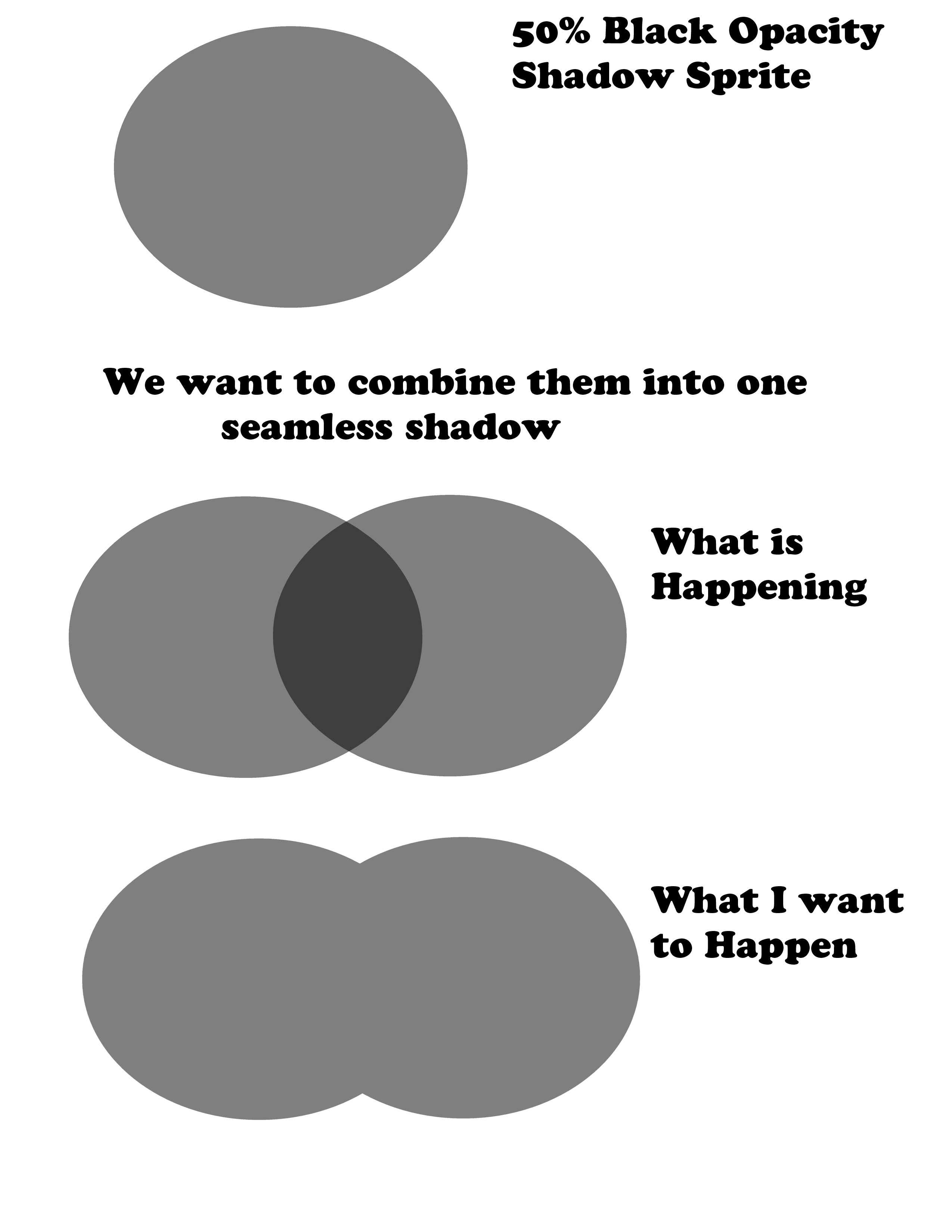
Could someone help me create a shader that overlaps shadows? I found this image that shows what I want to do:

#

I don't really have a good understanding of shaders at all which is why I ask

#

Also in researching this I have discovered shader graphs and am wondering if I should learn to use them, because writing shaders has always been a pain to me

mortal tree
#

@devout quarry Yeh 2D Renderer, the screens were just from a small tyleset while i was trying to learn some into things on the shader

grand jolt
#

Anyone know any UI Image shader tuts? Trying to make an outline for my cards.

devout quarry
#

@alpine holly in shadergraph for things like these I use a saturate node

#

if your shadow represents a value of 0.5, you need to limit the value of the output to 0.5

alpine holly
#

Thanks :D

regal stag
#

Are they are multiple transparent sprites overlapping to produce shadows?

alpine holly
#

They are multiple sprites with a set opacity that overlap and create a darker shadow, when I want them to merge into one shadow

grand jolt
#

I got the outline going in theory but I have two problems.

  1. Corners of the card are rounded yet the shader makes them opaque.
  2. Outline goes past the UI image and is not rendered.

https://i.imgur.com/UDYBC48.gifv

regal stag
#

@alpine holly Right yeah, someone else had the same thing a few weeks ago and I suggested a solution using the stencil buffer : #archived-shaders message

#

The Sprite Mask would work for the built-in render pipeline, but they were using URP so I wrote a couple shaders that also used the same idea (as the sprite masks weren't compatible with the SRP batcher).

alpine holly
#

Oh that's smart, I did something like that back when I used Game Maker Studio 2

#

Which solution would make more sense do you think? I won't be using many shadows

regal stag
#

The Saturate node won't really work for multiple transparent sprites.

#

It's more for if you have two things in the same shader that you need to add together, but you don't want it to go above 1. e.g. 0.8 + 0.8 = 1.6, but saturating that clamps it to the 0-1 range.

alpine holly
#

I will try yours first then

regal stag
#

I think the only problem with the stencil buffer solution is that the edges might be quite jagged / aliased.

alpine holly
#

How come?

regal stag
#

Well with the transparent sprites you are using the alpha from the sprite texture which could be a gradient between 0 and 1. But with the stencil buffer, it can only store an integer value, so it's 0 or 1.

alpine holly
#

I do not have access to rendering layer mask like in your picture

regal stag
#

I assume you are using the built-in renderer then? I'm not really using that layer mask anyway though, only the Sorting layers, which I think built-in still has?

alpine holly
#

Oh ok cool

#

And then I need a giant sprite to cover my whole screen right

regal stag
#

Yeah, that's what I did. It could just be to fit the screen and parented to the camera or something

grand jolt
#

Ok, the opaqueness issue is not present in the actual game and corners are properly round so my only issue is outline going outside the available alpha of the source sprite and therefore it doesn't render. Should I just export a sprite with some padding to have space for the outline?

#

ah, nope, the opaque corners are still there.

#

Hmm.

#

I can get the space for the outline via sprite extrude edges.

#

:/

soft harness
meager pelican
#

That doesn't tell me enough. And you don't have color. Try power of .8 or something.

#

@soft harness

gaunt helm
#

So I'm a complete shader noob, as in I'm just now diving in recently. Ultimately I'm wanting to convert an existing vertex shader I have to work with VR. I've been following the instructions at https://docs.unity3d.com/Manual/SinglePassStereoRendering.html but am hitting a wall at what is wrong with my conversion attempt. I take it the best thing is to just paste my shader I'm trying to convert as well as my attempt? It's a very simple shader as well

#

The shader itself is essentially a screen overlay

meager pelican
#

@gaunt helm Tell us, or show us, what's wrong.

gaunt helm
meager pelican
#

Is it a post process shader or what?

#

Oh, sec.

soft harness
gaunt helm
#

It doesn't look like frag2 is being used so I suppose it can be ignored

soft harness
gaunt helm
#

Here's my attempt, since the world of shaders is very new to me, it was hard to know if I needed to go the "UnityStereoScreenSpaceUVAdjust()" route, the "UNITY_SAMPLE_SCREENSPACE_TEXTURE" route, or to use both. Anything that is commented out is my other attempt: https://pastebin.com/raw/BBfnD66p

#

When running the shader as you see there, my view in VR looks fine, and whenever I activate the shader using Graphics.Blit the screen will temporarily turn white and shift, rather than showing the material

meager pelican
#

Firstly, I'm just trying to help, since nobody answered. I don't do vr, so grain of salt. But I did read the doco you referenced.

#

OK, still reading your changed code.

gaunt helm
#

Whereas if I instead use the code that's commented out, the material actually shows fine when using Graphics.Blit but 1) the scene can't be viewed, it's all grey 2) it's stretching the texture overlay across both eyes rather than copying to each eye

#

Sure thing, I appreciate any help I can get ๐Ÿ™‚

meager pelican
#

OK, firstly, I think your vert() function needs to do that conversion you have commented out. Or something similar as in the doco.

gaunt helm
#

Weirdly enough, uncommenting that doesn't have an effect when I use it

soft harness
#

Who? Me, or AggieDev

meager pelican
#

AggieDev

soft harness
#

'ight

meager pelican
#

With stereo single pass enabled, of course. Eh? Weird.

gaunt helm
#

Yep, stereo rendering mode is set to single pass instanced

meager pelican
#

So this is a full-screen post-process like effect?

gaunt helm
#

Yep

meager pelican
#

So output something to see what's going on. Like output the uv's or offsets or something. Make sure they're not zeros or some dang thing.

gaunt helm
#

If I use UnityStereoScreenSpaceUVAdjust, I'm actually pretty close to getting this working, I think the main issue there is that the screen is grey

#

Rather than rendering the scene

meager pelican
#

Grey? In the standard/build-in pipeline? Huh. Is that a camera clear color?

#

BRB AFK for a min

gaunt helm
meager pelican
#

Back.

#

OK in the frag() just output the result of the first blendcolor result. So add
return blendColor;
as the 4th code line in the frag shader.

gaunt helm
#

That makes the whole screen the texture

meager pelican
#

One version for each eye? Or both showing up "wide"?

gaunt helm
#

Which in this case is all one color

meager pelican
#

oh. So you can't tell anything, eh? Can you feed that a real blend texture?

gaunt helm
#

Ah okay

#

So I think it actually is showing the texture in both eyes rather than stretching it

#

I guess the reason it doesn't look right is that each one should be shifted to account for the seperation of the eyes

#

I actually am fine with editing the shader to make it all one color if that makes this part easier, just not sure why it makes the whole screen grey. But returning early in the frag is a good way to debug this

meager pelican
#

Yeah, that's a first-level debug technique (as in 1st go-to) because it's so easy if you can SEE what's going on in terms of colors.

#

The other options get harder faster.

#

OK, I see what you're saying. That blend texture needs to be "split" for each eye somehow.

#

And I suppose, so would whatever you're blending on top I guess.

#

Is this like some "dirt on lens" type of thing? A full screen effect, right? Lemme read again.

gaunt helm
#

Yep that's exactly right

#

The final effect I want is just a red blur around the screen to indicate a player taking damage

#

I'm just trying to do it in the simplest way possible. I already had a shader for a 3d game that does this (and the normal map makes it look like blood) but the final effect I want doesn't even need to be fancy

meager pelican
#

IDK what happens if you try moving the uv calcs to the frag.

#

Oh wait!

gaunt helm
meager pelican
#

Why use a vert-frag? Can you use a surface shader to do this?

#

I get ya. Quake time.

gaunt helm
#

I'm sure I can, and the docs were indicating that's probably the proper way to do this ๐Ÿ™‚ I was just seeing if I could get the shader working in VR that I had

#

Since the effect looks pretty good in this shader

meager pelican
#

What sucks is their example of what you want is in a surface shader. But there's a way out. Surfface shaders are code generators. It's a PITA but you can make a surface shader, paste in their stereo changes from that doco, see that it works AND THEN...look at the code. It generates a vert-frag shader. That might tell you what-goes-where and how it compares to your edits.

#

You can then go back to your vert-frag, compare/fix.

#

You may find that one of those lines are in the frag function instead. ๐Ÿ˜‰

gaunt helm
#

I'll give that a shot next, good idea

#

Thank you for the pointers!

meager pelican
#

np. Just take it a chunk at a time. Start simple. Blend in some default texture from the example in the docs or something. Then build on it.

#

@soft harness you still there?

soft harness
#

yup

meager pelican
#

dude, I can't tell what's going on with your all-white fresnel result. Are you comfortable pasting your code, or what? I mean, I gave you a whole shader that worked from my side. So IDK what's going on.

soft harness
#

I gave you my code, i'll send the hatebin link again

meager pelican
#

Oh sorry. Don't mean to be unobservant.

#

Sec

#

Where did you get that calc for view direction?

soft harness
#

the what

#

where's that?

meager pelican
#

In Vert()

soft harness
#

uuh

#

I don't remember

#

should i comment that out, see if that works?

meager pelican
#

Well, I think you'll need o.viewDir = v.viewDir or something. IDK, lemme check, but before I do, do you remember why you needed a custom vert() function?

soft harness
#

yes, the booths have a tarp roof, which can be viewed from two sides.

meager pelican
#

OK, skip that for a sec. Comment out the vert function, and get rid of the thing in the pragma that tells it to use one...just comment it out by breaking the line or something.

soft harness
#

BRB, i need to eat breakfast

meager pelican
#

What I'm thinking is that something is FUBAR on the normals or view direction and that's why the fresnel isn't working, because that's what it's using.

Enjoy breakfast. ๐Ÿ™‚

#

Oh, and you can't just multiply the normal by -1 to invert it. You only need to invert the GREEN component IIRC.

#

if it's tangent-space normal like from a normal map.

#

Oh, and your last lines are overriding your earlier emission settings (you're setting o.emission twice)

#

You may want to either add or multiply that last one.

soft harness
#

'ight, i'm back

#

What is FUBAR

meager pelican
#

Never mind. It just means it's messed up, but we'll fix it.

#

๐Ÿ™‚

#

Bad figure of speech

soft harness
#

So, how do we fix it

meager pelican
#

Try getting rid of the vert() function for a min (comment out)

#

and the pragma that tells it to use one

soft harness
#

It kinda works, but the fresnel intensity doesn't work

meager pelican
#

OK, but our detective work is paying off.
on the last lines, where you do the fresnel, change it to either add or multiply by the fresnel value...don't just blow the old value away with an assign.

rich flume
#

Is it possible to change the shader/material of the cursor ?

soft harness
#

o.Emission = fresnel * pow(fresnel, 1. - _FresnelIntensity) * _FresnelColor;

#

Like this?

meager pelican
#

That line. Make it a += instead of =

#

Or *=

soft harness
#

So o.Emission += fresnel * pow(fresnel, 1. - _FresnelIntensity) * _FresnelColor;

meager pelican
#

Right

#

Because you calculated o.Emission with a texture lookup earlier.

soft harness
#

Cause i wanted it to glow on the black parts of the texture

#

But also, that line doesn't help the _FresnelIntensity problem

meager pelican
#

But the fresnel is based on normals. I suppose you can ignore it "if not black" on that mask texture or something.

#

OK, intensity. Lemme see.

soft harness
#

Yeah, i ignored the "If not black" part

meager pelican
#

OK. Dump the 1. - part on the pow() intensity calc, and change the rage in the properties to something wider.

#

And the fresnel still looks weird, it should be "around" the ball in the material inspector, not top-bottom gradient

soft harness
#

So how can i fix that?

#

Hmm... I made a new shader, threw in the code, and it seemed to work

meager pelican
#

Blink. Blink.

#

lol

#

OK

#

lol

#

IDK

#

So, now we have to deal with your backface normals, or something, eh?

soft harness
#

So I needed the Fresnel for a highlighted effect. Maybe i could just assign the shader when the cursor goes over?

meager pelican
#

Yeah, or set a uniform bool for ActivateFresnel. And add an if statement on those last two calcs. It's a uniform, it will be fine.

soft harness
#

There are bools in shaders?

meager pelican
#

So what about backfaces?

#

Sure there are.

soft harness
#

the backfaces are good

meager pelican
#

Cool

#

Sure, just add
bool FresnelActive = false;
to the shader variables.
OR you can use a toggle property and do it (might be a float).
Then you can do your if () {} stuff at the end of the Surf() funciton around the emissive for the fresnel.

dry oasis
#

Hi, this may not go here but anyways... any ideas on why motion blur is so BLURY and maybe how to fix it. In window and my project runs at 400 fps in windowed mode and 18 fps in fullscreen... its so weird.
ill send vid if needed

soft harness
#

and the AO is gone

soft harness
#

All right, so the top one is caused by this line of code: v.normal *= dot(viewDir, worldNorm) > 0 ? -1 : 1;
But without it it causes this:

#

Hi, this may not go here but anyways... any ideas on why motion blur is so BLURY and maybe how to fix it. In window and my project runs at 400 fps in windowed mode and 18 fps in fullscreen... its so weird.
ill send vid if needed
@dry oasis Maybe turn down the shutter speed?

shell ice
#

can someone explain whats going on here lmao

#

was messing around with shaders and i dont know where to look to see where I couldve caused this

soft harness
#

code?

shell ice
#

ill throw it in a pastebin

#

heres the script

#

first is the shader

grand jolt
#

I've got a raymarching fragment shader generating this beautiful depth map here, which is output to the render target. How do I get this custom depth texture to my second shader pass to use for SSAO or other screen-space effects?

#

@grand jolt I hope you find a solution, good luck

dry oasis
#

@soft harness Iโ€™ll have to try tomorrow its VERY late for me, thank you

stone ibex
#

anyone know why the 'Normal from Height' node would return 0 on any faces pointing in either direction along the X axis?

#

the face normals and tangents are generated by unity

stone ibex
#

Ah nevermind, it was because there's no UVs, so the tangents didn't calculate properly. Manually adding tangents fixed it

thick fulcrum
#

normal from height is just a conversion node, you need to pass in the normals from object I assume

stone ibex
#

yeah, you don't manually pass in anything, but i guess it uses at least the tangents (probably normals too.. they were valid already)

meager pelican
#

All right, so the top one is caused by this line of code: v.normal *= dot(viewDir, worldNorm) > 0 ? -1 : 1;
But without it it causes this:
@soft harness
That's the backface issue we were discussing, right? Where you have to reverse the normal vector.

#

Maybe go look at the generated code to get the proper vertex function, or at the examples in Unity's doco, I don't think you need to calc all those normals, since they're in your input struct you can "just" do the normal flip code I think but I haven't tried it.

#

And if it doesn't work right, you can try multiplying the negative one by (1, -1, 1,1)

#

The input values might already be initialized in v.

royal gazelle
#

Will 32GB RAM give me anything 16GB won't in this scenario: my motherboard just popped so it's time for an upgrade... I'm working on a 3D project that won't be for general release/other hardware. It pulls in a lot of textures at runtime (png from the web, compressed to DXT5, then cached with GetRawTexutreData for future loads). The scene has about around 4000 images displayed now, will slowly creep up to 10,000 maybe? 20,000? 100,000?. I'm using Texture2DArrays and everything is pretty snappy/takes up about 5-6GB memory. Will 32GB RAM do anything for me before I reach a ton more images in the scene? Will Unity happily use 32GB of memory for textures if I do have 60,000 textures in a scene? Or does it hover at a certain level for some other reason I can't think of

torn widget
#

Hello, I'm extremely new to the Unity Shader Graph (and, well, Unity in general) and as I was trying to make a triangular function of time to use for a shader I suddenly ran into the following Power node problem (see screenshot).
Does Unity not do powers of negative numbers ? What's the logic behind that and how can I fix it ?

devout quarry
#

In your blackboard, is the default flicker frequency set to zero?

torn widget
#

no it's set to 1 at the moment

#

so for some god-forsaken reason Unity uses its own power method that doesn't work with negative numbers ???

regal stag
#

Yeah the power doesn't work with negatives. It's not just a shadergraph thing I think hlsl in general doesn't allow it?

torn widget
#

what the

devout quarry
#

didn't know that

torn widget
#

so basically triangle functions and other such functions that alternate between two states are impossible ?

devout quarry
#

x < 0 results in NaN

regal stag
#

Isn't there a Triangle Wave node?

devout quarry
#

there is

#

implemented like this

#

Out = 2.0 * abs( 2 * (In - floor(0.5 + In)) ) - 1.0;

torn widget
#

oh ffs xc

#

I didn't see it

#

welp, thank you

#

I'm not experienced with this shader graph system but as of now I much prefer the one in Blender >_> (I know it's not the same system in the background, but ye)

torn widget
#

I've seen that alpha clip is the default setting for a PBR graph, is there a way to use alpha blend ?

regal stag
#

There's a small cog at the top of the master nodes, where you can switch from Opaque to Transparent and select a blend mode

torn widget
#

ah, nice thank you

soft harness
#

@soft harness
That's the backface issue we were discussing, right? Where you have to reverse the normal vector.
@meager pelican should i send you my code?

astral pelican
#

Hi, I look for the screen depth in normal units

#

for a screen position

#

I want to say something like if the distance is below 100 units (=100m) than apply this color

#

It appears that screen position z position is not what I am looking for

#

mm maybe y/z swapped like normal in unity

#

nope does not work

#

So I still do not know how I can get the distance of the current pixel to fill in unity units...

meager pelican
#

@astral pelican What pipeline are you using? Are you asking about shader graph or built-in shaders? (Answers are a bit different)

#

@soft harness I can't recreate your scene anyway. Did you try what I said, did it make sense?

soft harness
#

I'm not experienced enough in shaders to know what you mean. Could you explain in simpler terms, with code examples?

meager pelican
#

Show me your current shader (the one without the vert I guess, and whatever changes you made). Pastebin or hatebin or whatever is fine.

soft harness
#

Ight, i'll just fire up unity

meager pelican
#

sec

#

OK, that one still has the vert function in it. IIRC once you removed that everything "mostly worked", right?

soft harness
#

IIRC?