#archived-shaders
1 messages · Page 149 of 1
 frank steppe
what do you think could account for this?
nevermind i see, its the "environment reflections" nevermind don't worry about it, I guess these "environment reflections" are just on by default in shadergraph
just out of curiosity is there a way to turn them off in shader graph ?
how do i make the metallic variant? so for specular i have the specular texture going into specular and then the alpha multiplying with smoothness. Do I do the same for metallic?
metallic input seems to be only 1 value, should it be r g b or a ?
looks like r works
 half robin
.
 slender birch
Can I somehow get the tris normal?
So, not the vertex normal, because I have that set to something to smooth it
But the normal formed by the three vertices
 wet venture
@slender birch you can calculate it
it's essentially Vector3.Cross(v1 - v0, v2 - v0) if I remember correctly
slender birch
how do i get the vertex positions tho?
wet venture
oh rite, we're in shaders
slender birch
yeah
wet venture
you usually don't fetch a flat tri normal
just the interpolated one
so you want a flat tri normal for a smoothed mesh?
wet venture
you could bake the normal into a UV channel
slender birch
UV channels are float2
slender birch
I can also calculate the smoothed normal in the vertex shader, and pass both
the smoothed and non smoothed
to the vertex
wet venture
how would you compute the smoothed normal? Afaik you could only to that in geometry shader.
since you only have access to 1 vertex in vertex shader
slender birch
I can cheat it in my shader
its for tree leaves
the leaves have a normal that points outwards from the center of the mesh
wet venture
right
wet venture
don't know about shader graph, sorry
you could do it in amplify shader editor though
slender birch
yea amplify looks great
it aint free tho :C
and its not like im making any money with gamedev xd
 jovial onyx
Hi! I created a shadergraph with a time dependent output, but in my scene/game don't see any change over time with a mesh using a material with that shader
I'm just getting into URP
 lime viper
so the Time value is just time in seconds since the application was started
jovial onyx
yes
 regal stag
How are you using time? What does the graph look like?
regal stag
Are you sure you've saved the graph?
You also might not get constant updates in scene view unless this is enabled
jovial onyx
Are you sure you've saved the graph?
@regal stag I think that was the solution! I pressed ctrl + s to save but noting happened, had to close the graph to unity ak me to save it
I also added the animated materials
Thank you!!
regal stag
Yeah, there's a button in the top left of the graph "Save Asset". You need to use that to save the graph
jovial onyx
Ohh cool thanks!
regal stag
Ctrl+S will likely just save the scene
 swift forge
any good tutorial / shader script for a crispy 3D outline?
i want to have outline without making duplicate object
[1] the actual outline, [2] the object
i want to put the shader or what ever on my object and have a outline
@ me
 fluid lion
@fluid lion No, now you are using your circle and i.pos variables before they are initialised. Vertex offset should also be +/- not *. Multiplying is for scaling vertices, but if it starts at Y=0 it's not going anywhere. You likely want something along the lines of ```circle = pow(v.vertex.x - _Mid.x, 2) + pow(v.vertex.z - _Mid.z, 2);
float yOffset = 0;
if (circle <= pow(_Radius, 2)){
yOffset = _Amount;
}i.objPos = v.vertex + float3(0, yOffset, 0); // assuming you want this as the offset pos
i.pos = UnityObjectToClipPos(i.objPos); // otherwise, do the offset here instead (i.objPos + float3(0, yOffset, 0))```
Note that i.objPos is now the offset position, so in the fragment shader you don't really need the circle check, you could just check if the i.objPos.y is equal to _Amount (or i.objPos.y > _Amount-0.001 in case of floating point errors).
@regal stag I'm trying to use this on a vertex manipulation script that creates waves with perlin noise but its not working. I can't seem to figure out the problem.
 twilit dune
I wonder if anyone is around that could try and help me?
Trying to help a friend with some shader graph stuff which I have limited knowledge of... He's followed a tut to make this:
But the problem we are having is when you reduce the R value to 0, (or pick a deep blue) it becomes completely transparent. Am I missing something blindingly obvious?
this is the graph for context
 meager pelican
Split the result color out so you can isolate the alpha. The red is probably going into alpha, so when you set it to blue (no red) you get alpha = 0 which is transparent. you have to break the color RGB and A out and feed them separately.
@twilit dune
You might want to make the alpha a separate property so you can play with it dynamically anyway.
twilit dune
Amazing, thank you so much. That has worked so well

 hushed urchin
@grand jolt https://youtu.be/34detVy-Hiw?t=711 x)
 wraith haven
you compute the moon circle, just substract it from the stars? or did you end up using a separate mesh?
 grand jolt
Gives me way more control and lets me layer stuff on to the background
I could put (just as an example) a spaceship and it will show up in my skybox
It's the same technique source uses
wraith haven
as long as it doesn't pass in front of the moon then I guess 🙂
grand jolt
well right now the stars do
which is the issue
I could actually make the moon a 3D model and parent it to the sun
that would work too
wraith haven
and it would be cheaper
grand jolt
yep
grand jolt
and be in front of the stars xD
 amber saffron
French Warning !
Shameless advertising here : I'm doing french livestream where I experiment with shadergraph to either create utility nodes, or do community asked stuff.
People can propose subjects and vote here : http://www.tricider.com/brainstorming/3Dd4uT97Uvh
Apparently, next one will be trying to redo the look of the clouds of Sky: Children of the Light
Should be tomorrow end of afternoon.
 fervent tinsel
youtube's autotranslated subs from french->english aren't that helpful in this case 😄
(tested on previous live stream there)
amber saffron
On youtube
Technicaly I could totally do it in English, but I'm also on some french unity communities, and people feel that there is a lack of french content, in particular regarding shader 🙂
 devout quarry
My French isn't perfect, but I should be able to understand what you say, looking forward to it
swift forge
@devout quarry thanks i'll check it out!
grand jolt
i am not getting color option in material after connecting
3
Can anyone helpme out
regal stag
@grand jolt Have you saved the graph? (top left, Save Asset button)
regal stag
Hmm, okay. If you click the Blackboard button in the top right it should give you a list of properties, including the two colour properties you have set up.
Are those Color properties set as "Exposed"?
regal stag
You mean the properties? Should be able to right-click the property name in the blackboard and rename it.
grand jolt
i can`t see blackboard in me graph
regal stag
The "Blackboard" button in the top right of the graph window toggles it
grand jolt
thank u. i am new
regal stag
That outline technique relies on normals. If the normals are flat rather than smooth it does that.
swift forge
so how can i fix it?
regal stag
You'd probably need a cylinder mesh that has smoothed out normals.
wet venture
Create outline shaders for Unity that have a stable screen-space width, specified in pixels, regardless of distance from the camera.
 river dawn
Hello!!, I was reading on shadergraph documentation, I don't understand exactly what this is: "the current Camera's depth buffer using input UV"
regal stag
@river dawn Scene Depth node right? It samples a buffer/texture containing depth info (how far a pixel is from the camera), at the input UV coordinate.
river dawn
Right @regal stag, now I got lost in "at the input UV coordinate"
regal stag
A texture has many pixels but a shader runs per fragment/pixel. The UV is the coordinate to sample from the texture, it's two numbers between 0 and 1. (0,0) being the bottom left of the texture and (1,1) being the top right.
For the Scene Depth node it automatically uses the Screen Position if the UV input is left blank.
grand jolt
how to get render q from shader
@grand jolt you're gonna need to add more context if you want help
ok
river dawn
For the Scene Depth node it automatically uses the Screen Position if the UV input is left blank.
@regal stag Ah ok!! thanks, the node has an input jaja. So if I give an UV input to Depth Node, how does the depth buffer of the camera deal with the UV input?
regal stag
The node just returns the depth value at the specified UV. It's the position of the pixel on the texture. (the texture being the "camera's depth buffer/texture" in this case).
river dawn
I don't really get it, I thinked I knew what a UV was but seems like I don't fully understand it. I'll keep researching, thanks by the way @regal stag
half robin
I tried putting this in general code but no response so I thought u guys could help
Is there any way for unity to just create its own variable and shaders by its self? I’m trying to make a thing where each and every time a character is generated it has a different randomizes texture/color (shader) and stats (determined by the randomized variables in the shader. And then the facial parts are random too but that’s something I can do by myself
 shy igloo
Was hoping someone could help me answer a slightly odd question, I'm creating a toon shader utilising a shading ramp, however I am currently torn as to whether to rely on the ramp being supplied by a texture or a gradient. From my understanding, storing the ramp as texture would occupy more memory than storing as a gradient, however, I was unsure whether or not the operation to sample from a texture would be less expensive than sampling from a gradient
amber saffron
Are you using shadergraph ? If yes, I would recommand going for the ramp for the moment, as gradient input is not exposed in the material UI
shy igloo
I'm not using the shadergraph, I would be using a custom shader editor that takes a unity gradient and then converts it into a half4[8] array stored on the shader which I was then using to sample utilising the same method the shader graph sample gradient node uses
From a control perspective either option seems fairly viable, I was just curious purely from a performance standpoint as I am trying to get this running as cheaply as possible
amber saffron
Hard to tell which method is the more costly, performance wise :/
One is a single sample operation, the other is a 8 iteration loop with fairly simple commands
shy igloo
The main reason this came into question for me is that digging into the shader graph code, the shader graph gradient struct will only store a max of 8 color keys, which seemed fairly low. So I wondered if perhaps the operation of actually sampling the gradient was quite expensive
amber saffron
Would need to check, but I think this is a limitation of the gradient window UI 😄
shy igloo
... Yep, you are right. I literally never thought to check that
Okay, now I'm back to square one as to which would be more suitable 😅
amber saffron
Well, you could empirically try both and measure ...
shy igloo
That was my next go to, I just wanted to see if anyone had any thoughts before I start testing
amber saffron
But I would got with the ramp route to start, less code to write to make it work, and should still be pretty light
shy igloo
Thanks for the advice
On a totally unrelated note, anyone have any ideas as to why URP uses separate textures and samples for Metallic, Occlusion, Smoothness etc when the HDRP uses the mask map?
amber saffron
To mimic built-in standard shader input layout
Fun fact : you can use HDRP mask map in built-in Standard directly and it would work
shy igloo
I'm assuming that's because the individual texture samples use the same color channels?
amber saffron
yep
shy igloo
I did notice that in the URP source the sample occlusion function it only used the green channel and I did wonder why that channel had been chosen
If that's the case it would be cool to get a variant that used the mask map, as I am assuming, unless I'm totally wrong, that using a single sample for all maps would save a little bit of time over sampling per map?
amber saffron
you're totally right
Bunt instead of adding more and more shaders, our general guideline is : you can make your own using shadergraph
 lapis chasm
Is there a way to offset a float3 or whatever based on uv coordinates? I can do SAMPLE_TEXTURE2D(_Texture, sampler_Texture, uv Offset) for textures, but can I do something like that for floats? or would I have to bake the results to a rendertexture and go from there?
 gleaming moss
elaborate what 'based on' means
are you trying to add some noise? just add the UVs together?
lapis chasm
I am trying to shift a float3 using uv coordinates. so 1 texel to the left for example
but I would need some way to tell it what coordinates I am assuming the float is in first I guess
gleaming moss
you can scale the offset by 1/texture resolution to do that
GetDimensions should be useful if you're writing HLSL
so you would take a float offset in pixels and apply it directly to the UV
it's probably easier to just use the offset methods though, unless you're specifically after bilinear filtering tricks
 heady pewter
random question... just how much c# can i use into shaderlab??
gleaming moss
0
heady pewter
oh 🙃
gleaming moss
you can crunch numbers in C# and feed them into a constant ^^
which is a totally practical strategy
heady pewter
hmm
lapis chasm
that is what unity does with all those unity given values etc
heady pewter
i'll look into it
lapis chasm
which version of unity are you using? any render pipeline or so?
heady pewter
ah 2017.4 just attempting to write stuff in .shader files
for the most bit i gotten what i wanted done, there's just slight hiccups/unintentionals i wanted to get sorted out
gleaming moss
on the C# side you want to look into https://docs.unity3d.com/ScriptReference/Material.SetFloat.html and friends

making C# things visible to ShaderLab/HLSL is pretty trivial
heady pewter
that's good to know
gleaming moss
best advice I can give though-- GPUs do not look or work much like CPUs and there is almost always a reason why certain things seem kind of hard or clunky
heady pewter
i appreciate the information you gave me and for you hearing me out, thank you ❤️
river dawn
These are modes of the screen position node, is this like ortographic and perspective projections respectively?
regal stag
@river dawn No, not really. But the values would vary between the two projections. If I'm not mistaken, in an orthographic projection the W component is 1. (Therefore I guess the Raw and Default modes would be equal?).
The Raw mode is useful when using a perspective projection as it allows you access to that w component. Which I believe is equal to the view space depth. (While Default is more useful if you actually want to obtain the XY position on the screen for example).
lapis chasm
Screen space I think is projection onto the flat screen. Not sure. Clip space is like a trpezoid shaped 3d space in front of the camera limited by clipping space
river dawn
@regal stag ah ok so default mode is like normalized by depth
lapis chasm
View space is turned into homogenous clip space which is then distorted by perspective of I'm correct
regal stag
I think these two articles are quite good at explaining the different spaces & projection matrix stuff.
https://learnopengl.com/Getting-started/Coordinate-Systems
http://www.codinglabs.net/article_world_view_projection_matrix.aspx
Learn OpenGL . com provides good and clear modern 3.3+ OpenGL tutorials with clear examples. A great resource to learn modern OpenGL aimed at beginners.
Coding Labs - Marco Alamia - DirectX 11 Compute Shader Tutorial
river dawn
Yes I was studying from the first, thanks
 woven loom
Heya, uh, is there any way to grab the shadow map textures for the scene's additional lights from a Shadergraph custom function?
I know that shadow maps are a thing, and what I've got rn is based on a Unite Copenhagen 2019 talk about using ShaderGraph for stylized lighting styles
https://www.slideshare.net/unity3d/learn-how-to-do-stylized-shading-with-shader-graph-unite-copenhagen-2019
 regal stag
regal stag
This article has some info about additional lights https://blogs.unity3d.com/2019/07/31/custom-lighting-in-shader-graph-expanding-your-graphs-in-2019/

Unity Technologies Blog
With the release of Unity Editor 2019.1, the Shader Graph package officially came out of preview! Now, in 2019.2, we’re bringing even more features and fun...
woven loom
I'll start checking there then
regal stag
That said, it seems to end up using AdditionalLightRealtimeShadow from the ShaderLibrary/Shadows.hlsl
woven loom
Is that a bad thing?
regal stag
If "ADDITIONAL_LIGHT_CALCULATE_SHADOWS" isn't defined, it will just return 1
You might be able to create a keyword with that name, I've done some sort of workarounds for the main light in a similar way (https://twitter.com/Cyanilux/status/1240636241252679681)
Otherwise, you'll probably want to look at the Lighting.hlsl and Shadows.hlsl source and copy out the functions needed, removing the part about that define.
woven loom
Where are those located?
 stone sandal
you'll need to copy the function regardless
regal stag

GitHub
Unity Graphics - Including Scriptable Render Pipeline - Unity-Technologies/Graphics
stone sandal
the keyword turns on other things that you're not going to be able to access and it'll error out right now
regal stag
@stone sandal Really? The only time "ADDITIONAL_LIGHT_CALCULATE_SHADOWS" is mentioned is in that function according to a search of the github
woven loom
Let me grab some pictures
regal stag
_ADDITIONAL_LIGHT_SHADOWS might be elsewhere though
stone sandal
the shadows were re-done with new keywords in 7.3
when you try to update to those it will stop working iirc
regal stag
Is that a point light?
woven loom
I wanted a spot light
But the pile of book's too high
More importantly, the shader works with additional lights. What's missing are the cast shadows
So like, my goal was to sample the shadowmap data in the code I had
Which, after research, figured I could do because shadowmaps are apparently a per light thing
regal stag
If it's a point light I'm not sure you'll get shadows. URP doesn't have point light shadows yet.
woven loom
Then I'm gonna use a spot light, point is I still need to grab the shadow maps
or the shadows cast
regal stag
Yeah, so you'll want to look at the article I first post as a template, but instead of using the GetAdditionalLight from the ShaderLibrary you'll need to copy the required functions out so you can change them to not require the keywords (like the ADDITIONAL_LIGHT_CALCULATE_SHADOWS one in AdditionalLightRealtimeShadow that I mentioned before).
woven loom
Aight required functions required functions...
Got it, I'll try putting that in
Oh, I probably should've asked but is it safe to assume that if my custom functions are inside their own files, they can access functions that were declared within that file?
I'm guessing so but I'd rather not have any surprises
regal stag
I haven't done much with custom functions but I think so
woven loom
Aight, here goes nothing
Hm, unrecognized identifier 'shadowSamplingData' error
Oh right the keywords
Not just one of them
Wait no that has nothing to do with it... probably need to include some stuff
grand jolt
hi guys, is someone who is quite experienced with shaders available to answer a question? just throw me a DM and i'll ask, wont take long.
woven loom
Okay so the code break because it doesn't recognize a certain identifier
half AddShade(int lightIndex, float3 positionWS)
{
    ShadowSamplingData shadowSamplingData = GetAdditionalLightShadowSamplingData();
    /*...*/
}
That's the part that breaks, like, the first line
It doesn't recognize ShadowSamplingData
regal stag
There's a ShadowSamplingData struct in Shadows.hlsl. You might need to copy it too, (or include Shadows.hlsl)
woven loom
Ya just did that, it works but now it's a different thing that breaks so yeah I'll just include Shadows.hlsl
Aight entirely new problem, that's progress
Okay wow
Sooooo including the entire thing, that's a no go
fluid lion
@regal stag I'm trying to use this on a vertex manipulation script that creates waves with perlin noise but its not working. I can't seem to figure out the problem.
woven loom
@regal stag When you said earlier that the article seems to end up using AdditionalLightRealtimeShadow, where did they do that?
regal stag
@woven loom The GetAdditionalPerObjectLight function in Lighting.hlsl uses it
woven loom
Yeah but I'm talking specifically about the article
Unity Technologies Blog
With the release of Unity Editor 2019.1, the Shader Graph package officially came out of preview! Now, in 2019.2, we’re bringing even more features and fun...
That one
regal stag
I was referring to the part about "Working with multiple lights". Their function calls GetAdditionalLight(i, WorldPosition); which uses GetAdditionalPerObjectLight, which then uses AdditionalLightRealtimeShadow.
woven loom
Oh
...So basically the fact that this keyword might be missing is why there's no cast shadows?
regal stag
I think so. If the keyword isn't enabled then AdditionalLightRealtimeShadow returns 1.
I don't think it's possible to just swap that function out though, you need to replicate the whole chain which is a little annoying.
woven loom
So.... having the keyword in the graph should make it work?
regal stag
That's what I suggested too but sparajoy said it might error.
woven loom
Well I tried doing that anyway and I don't think it threw any errors
But it didn't do anything either
regal stag
Well, it might not error on the version you are using currently but they mentioned it might break if you update to URP 7.3
woven loom
That's cool, don't intend to update any time soon either way
regal stag
Looking at the error you mentioned above though, you are using URP 7.1.1 and I don't think it actually uses that keyword until 7.2.1 :\
regal stag
I think it used to use #if !defined(_ADDITIONAL_LIGHT_SHADOWS) || defined(_RECEIVE_SHADOWS_OFF) instead
Using those keywords might also error though due to changes elsewhere, which is why copying & editing the functions would be better.
regal stag
Well, I think defining the keyword isn't the only thing you have to do. Even if it's defined in the graph it doesn't get enabled by default, (even if the Default is ticked 😦 ).
woven loom
How can I enable it then?
regal stag
A workaround that I used was using the debug inspector on the material. https://twitter.com/Cyanilux/status/1240636243060408321

However, the Default value in the blackboard doesn't seem to work unless the keyword is exposed in the main graph.. (but that requires the _ON suffix which would change the keyword).
So to enable them, I'm using the Debug mode on the Material inspector to set them instead :

 Twitter
woven loom
Twitter
woven loom
Hm, still nothing
Dunno if it's relevant but have I mentioned that the shadows work correctly with the main light?
Like, when there's a main directional light, it works, it's just with the additional lights that it doesn't
regal stag
@fluid lion I'm afraid I don't know how to fix it. If you are doing vertex manipulation through a C# script already though, why not just offset it there rather than using a shader too?
@woven loom If you use the regular URP Lit shader do you get additional shadows then? Perhaps additional light shadows are disabled in the URP asset?
regal stag
It happens 🙃
woven loom
Okay but
regal stag
Hmm, did you change the light to a spotlight?
woven loom
Yeah
regal stag
I can't think of anything else why shadows wouldn't be appearing :\
woven loom
Dammit it was that the entire time
I had this issue for like
Months
Still though, "additional lights won't cast shadows" is much easier to look up than "get shadow maps for shader graph"
regal stag
True, getting them to even work with the normal URP Lit shader is the first step
Perhaps you should try updating the URP package if possible?
woven loom
Can't access my package manager because of a few shenanigans
Question btw, are mesh renderers supposed to have "cast shadows" and "receive shadows" as separate settings?
Hmm
Wait actually
Which renderer am I supposed to have?
I'm just going through the Unity Documentation section about troubleshooting that issue
regal stag
MeshRenderers are for rendering a mesh yeah, I think the Receive shadows part might be to do with baked lighting looking at the docs page? Not too sure, I don't think I even have that option on my renderer unless you are using the debug view.
woven loom
Hmm
Also I just realized something, if I switch to a directional light, the shadows still won't be cast on an unlit material
regal stag
I take it the Cast Shadows option is enabled though
woven loom
Yeah
regal stag
Unlit shaders won't receive lighting/shadows
regal stag
Is that the only light in the scene?
woven loom
Yeah
regal stag
Could you screenshot the light inspector?
woven loom
Light inspector?
regal stag
I mean the light component in the inspector window
regal stag
Just want to make sure the settings look okay
Yeah looks fine. I'm not sure why shadows wouldn't be appearing
woven loom

regal stag
I'd probably try creating a new project and see if it has shadows then. If it still doesn't, might have to update the URP version. Maybe there was some kind of bug or something.
lime viper
oh man nothing like after hours of debugging finding out you put in "frament" on the shader
woven loom
I opened a level that was working previously
It no longer does
Same issue
So that's most likely a global thing
 noble rapids
is there an HLSL/cg reference guide, for unity somewhere?
lime viper
there isn't much that is specialized about their implementation to my knowledge, was there something in particular you were looking for?
noble rapids
mostly just looking to learn, right now I'm trying to sample the shadow map, but it only seems to be sampling from the first cascade
lime viper
which rendering pipeline are you using?
noble rapids
URP
lime viper
Probably the best information is to just go to the source: https://github.com/Unity-Technologies/Graphics/tree/master/com.unity.render-pipelines.universal/ShaderLibrary
GitHub
Unity Graphics - Including Scriptable Render Pipeline - Unity-Technologies/Graphics
noble rapids
thats definitely better than nothing aha
lime viper
you might try some tutorials here: https://catlikecoding.com/unity/tutorials/
A collection of tutorials for people who want to learn C# and shader programming in Unity. Useful to both novice and experienced developers.
not sure on other URP stuff, the URP is pretty new and I think it still suffers from the impression that it might have a major shift that will invalidate previous work on documenting the lower level stuff
noble rapids
it definitely seems like someone who isn't that experienced in this area of unity, that it's difficult (or can be) to get around in shaders
lime viper
Personally for me the way into learning shaders was to work with shader graphs first, but I can understand wanting to jump to the direct code stuff too
noble rapids
I have a bit of experience with shader graph itself, I am dipping into the code itself because the shader graph doesn't allow multiple passes 😛
jovial onyx
Shader Graphs are so cool, i'm a newbie in this but them are easy to understand, im playing with my first graphs
grand jolt
can anyone tell me any good tutorial where i can learn shader ,
noble rapids
@lime viper Thanks for your help man, looking at the source, it appears that _MAIN_LIGHT_SHADOWS_CASCADE wasn't defined, so
-  float4 shadowCoord = TransformWorldToShadowCoord(WorldPos, 1.0);
+  half cascadeIndex = ComputeCascadeIndex(WorldPos);
+  float4 shadowCoord = mul(_MainLightWorldToShadow[cascadeIndex], float4(WorldPos, 1.0));
fixed it
lime viper
nice
fluid lion
@fluid lion I'm afraid I don't know how to fix it. If you are doing vertex manipulation through a C# script already though, why not just offset it there rather than using a shader too?
@regal stag Manipulating vertices in C# script was killing my performance so I was looking for alternatives.
grand jolt
which type of format does normal map need to use in shader
lime viper
@fluid lion are you hand writing the shader or trying to use shader graph?
fluid lion
@lime viper Hand-written.
lime viper
ah, I doubt I could help much there, are you wanting to add to the perlin noise or override it?
fluid lion
@lime viper Override it. Add on to it to be more precise.
lime viper
hmm do you have the vertex shader I could take a look at?
fluid lion
@lime viper https://hatebin.com/qavsvwkshk
lime viper
objPos is the point you want to affect the mesh?
fluid lion
Yes.
lime viper
did you want to encode that data per-vertex or is it just a single value you want to pass in?
fluid lion
Well what I'd intended to do was displace vertices within a red circle by making them appear higher than they were.
lime viper
so this is what I get:
fluid lion
Yes. It works on a flat plane but it doesn't work once you modify the waves.
Err I worded that wrong.
Once I modify the vertices from the outside using Perlin noise to make waves.
lime viper
e.g.
lime viper
so the only thing I see is that your _Mid value will always have to be in object space
grand jolt
anyone know a tutorial on adding Specular AA in shader graph?
grand jolt
Hey guys, I may be going mad, but i'm trying to add this fresnel effect to my emission map and make it toggle on / off via boolean. Can anyone help with where it fits in?
 regal stag
@grand jolt Could put the Fresnel Effect output into True and leave False as 0. (Could also take the output after the colour multiply as True and have false as a Vector4 (0,0,0,0) instead).
Then I assume use as Add node with the output of the Branch (*fresnel color) and the other emission output.
grand jolt
@regal stag I almost got it, the standard glow works with the branch but the fresnel still doesnt
 regal stag
You are multiplying your fresnel output by 0
grand jolt
ah, one too many multiply nodes?
regal stag
Probably? Unless you planned on multiplying it by something else, idk
regal stag
Your current branch setup is with the normal emission OR fresnel though, is that what you intended?
grand jolt
it was, but now you mention it, would it create any interesting effects if I overlap them?
regal stag
Maybe try and see. You could either Add the two before the branch or have the branch between the fresnel and 0 and add it after.
grand jolt
I could add another branch, if "mix emission" is on, combine the two...
hey i have no idea where to ask this... i have a problem with a texture appearing transparent when i import into unity. it shows no transparency in blender no matter what i do so i cant figure out how to remove the transparency. everything on google is about adding transparency, not removing it.
does anyone have any ideas of how to remove the transparency?
the texture itself has no transparency, so it must be some setting in blender. can an obj file even hold alpha channel information?
regal stag
I don't think .obj files have texture/material data, I think it's usually paired with a .mtl file or something which handles that. Personally I never import materials when importing models from Blender into Unity, I make them myself in Unity for more control.
grand jolt
fair enough. maybe i could try add the material itself within unity and export from blender as fbx without any textures or materials
 thick fulcrum
@grand jolt is this standard shader? when I imported from Blender for some reason the alpha on base color gets set to half or something. Just crank it back up
grand jolt
honestly im not using a shader, sorry. i just dont know where else to ask the question :\
regal stag
All materials use a shader. When you import it likely selects the standard shader.
thick fulcrum
^^
grand jolt
oh okay. i see. yes it would be standard then. Ill have a google to see how to turn the alpha back up
thankyou
regal stag
You could also try a different file format for exporting from blender, .fbx is used normally
grand jolt
Rendering mode "transparent" but greyed out, i cannot change any values
all the options are greyed out
oh yeah, cyan i am using .fbx 🙂
when i mention obj, that was for when i exported into blender
regal stag
Yeah, that's why I don't import materials with the model and create them manually
grand jolt
well at least i know is causing it! thankyou draydak ill try that now
regal stag
Yea, You should be able to right-click in the project and add a new Material. That way you can change the values.
grand jolt
if i re add the material by new material, will the fbx still retain its UV mesh?
im very new to fbx i dont know anything about fbx
regal stag
The UVs are completely separate from the material. It will retain the mesh data.
We are referring to creating the new material in Unity though, not blender, in case that wasn't clear. I don't think it will change the fbx at all.
grand jolt
@regal stag This is how I got things set up, the standard glow works, standard fresnel also, but when I try activating the Emission Mix I only see the fresnel :(

unless it wont stack effects like that...
regal stag
Your "Emission Strength" node has a connection missing. Possibly when you copied it? You shouldn't need to copy them though, you can just use what you had already and add them.
grand jolt
@regal stag I know this is basic stuff to some people, but check out my balls 😍

2 months ago, I was struggling to make a pixel guy run to the right.....now i'm creating shaders and stuff....i'm going to see if I can make it pulse!
hey cyan i got it working thanks all!
shy igloo
Performance / optimisation question. I know this may be a little extreme but I was wondering whether or not it is worth wrapping hlsl variables in pre-processor directives for shader keywords. Say if I have a _SPECULAR keyword that is responsible for determining whether or not the shader would calculate specular highlights. Within the logic wrapped within the directive I am performing a texture sample from my specular map. Is it worth wrapping my texture variable declaration within a directive checking for the same keyword?
I only ask as looking at the URP lit shader, the variables for each texture map are not contained within the same directives used to prevent their samples from occurring, say with the _EMISSION keyword and corresponding variables
Or is this something automatically handled by the compiler, as they are no longer referenced are they optimised away?
grand jolt
cancel that, works
@shy igloo I can't say this universally for all vendors, but a self-respecting graphics driver will find out that you take unnecessary inputs in your shader and optimize it away
this is one of the big reasons why modern efficient gfx apis like dx12 and vulkan require you to specify your entire pipeline with all shaders at once, so this optimization work (and others) can be done up front
source: I literally worked on graphics drivers
shy igloo
@grand jolt Thanks, I had suspected that it would be optimised away but I wanted to make sure before continuing on
really useful response though, greatly appreciate it
grand jolt
if you're on a decent platform it will do things like "oh this vertex shader is calculating something for the pixel shader that it will not use, better erase this code path from the VS then entirely"
I'd say the only place where this is not virtually guaranteed is if you're on some kind of weirdo cheap android phone
on your development PC your GPU vendor (unless it's Intel) will have some low-level tools that are specific to their products that will let you see the final generated shaders
AMD is more open with what gets generated in the end while NV has beefier tools
shy igloo
Ahah, thanks, hopefully this isn't the case then, the target platform uses a tegra x1
grand jolt
mmmm tegra yeah that's something I'd not be sure about
tegra was a side project for nv and they didn't put as much development effort in it as their mainline geforces
you need to use some kind of tegra profiling tool to double-check
although if they reused this part of their mainline driver code (that I hope) it shouldn't be a problem
this is generally low-hanging fruit for drivers
some game engines tend to have a lot of wasteful shaders
like... serious engine from one of the large gamedev shops that I cannot name
@regal stag sorry for the ping, but im wondering. if i import a level model i made in blender... it has like 50 different textures... do i really have to remake and re allocate all 50? it seems like a weird work flow! and its a simple N64 type level. what if i imported a more modern level model with hundreds of textures.
if you manage to bake your textures into a single atlas then you can avoid this
no idea how to do it in blender though
but generally speaking if you have 50 textures then yes that's 50 textures
huh. ill look into it. i dont know much about baking textures. thanks 🙂
in theory you want blender to make an atlas for you and adjust your UVs
but 50 textures is not that big of a deal
shy igloo
@grand jolt hmm okay, thanks for the info, I've got a fair amount of experience with shaders but never had to dig into the optimisation side of things quite so heavily
grand jolt
@shy igloo don't forget the first rule of optimization, don't optimize 🙂
its not a big deal. but its 50 more than if unity didnt automatically make the alpha channel 50% by default and then also make the automatically allocated materials unable to have settings altered. is it a bug? it leaves me wondering what is the purpose.
@grand jolt you can use import profiles or whatever they're called to easily apply the same settings for a bunch of textures
i saw a video from 2017 explaining about it and it seemed like it started back then and it still hasnt been changed. so weird. ill have to check out import profiles as well. thanks Lorash!
@grand jolt I just double checked, they're called presets
cheers
meager pelican
@shy igloo use the keywords (like in shader features) that's what they're there for. Compiling out code YOU know you don't need is always better than trusting some driver-gods divine optimization. If you're not going to need to do something, just don't do it. The fastest calcs are the ones you don't perform.
That said, be wary of too many options as that can balloon the number of variants you have to compile.
Shader_features strip out unused variants. Multi_compiles do not.
shy igloo
@meager pelican Thanks for the tips, in regards to shader variants, is the only real impact to having a large number of variants an increased compile time?
Or is there some runtime cost in having lots of variants
Looking at the URP lit shader that generates about 1740 different used variants
And 6.29M if you include the unused
 low lichen
SRP shaders try to keep shader variants to a minimum so that the SRP Batcher can better batch them. Because that batcher batches the same shader variant draw calls together, instead of the same material like the default batcher.
meager pelican
Minor if any runtime cost. Once it's selected, shipped to the GPU and cached, it's there. I mean, unless you're flipping around constantly, then YMMV.
It's all compile-time impact, since it is basically conditional compilation at build time, building a repository of shaders.
As I understand it.
shy igloo
Okay thanks for clearing that up, that's pretty much what I expected but it's always good to double check
meager pelican
@shy igloo Also the more variants you have, the larger the distributable will be.
 maiden stag
can you get the lit shader in urp ?
low lichen
@maiden stag Can you get it?
low lichen
What do you mean "get it"
maiden stag
if i use hdrp there is a lit shader with urp there isn't is there anyway to ALSO get the lit shader in urp
regal stag
There is a lit shader in URP. 🤔
regal stag
low lichen
Do you mean can you select that shader in a material?
regal stag
Use the PBR Graph option
maiden stag
is that the same?
regal stag
It has physically based shading, lighting/shadows
maiden stag
oh oke i just wanted to make a grass shader
i saw a tutorial since im new to shaders and he uses lit shader
and also hdrp
thats why i asked
 covert ivy
hI
could someone help me with an error on shadows?
only appear on game, not in editor
 delicate finch
Hi everyone,
For a couple of weeks now I have been trying to wrap my head around how I would go about this and have gotten so close yet so far. I have been playing around with the Oculus Utilities, specifically the ToyCubeOutline which renders an adjustable glowing line around the shape.
What I am trying to do is only have it show up when the player hovers over it. I had it to start however the DistanceGrabber script I have been using has some RefreshCrosshair lines in which I have no clue what they are doing.
I have got it to the point where it the outline starts OFF when hovered over it turns ON and remains on until you hover over it and it turns OFF. Which is the opposite of what I am going for?
If anyone could help it would be much appreciated
ToyCubeOutline Shader - https://hatebin.com/kynnqkbcvj
Distance Grabbable Script - https://hatebin.com/szwrprpoqg
Distance Grabber Script - https://hatebin.com/grfbqqdcqf
slender birch
is there any way to pass a vector from the vertex shader to the fragment shader, in shadergraph?
shadergraph doesnt really distinguish between vertex/fragment shader, but in a way, it still does
im changing the vertex normals in my shader, the problem is that in the fragment shader part/albedo stuff, I need the unchanged vertex normals
and if I just plug the modified vertex normals to the vertex normals node, when I access them with the normals node, they are the modified normals
regal stag
Shadergraph doesn't currently have a way to pass custom data from vertex to fragment stage. It's on the roadmap https://portal.productboard.com/8ufdwj59ehtmsvxenjumxo82/c/59-custom-interpolators
You will be able to perform custom calculations in the vertex stage & pass the results to the fragment stage.
regal stag
You might be able to encode the normals in mesh vertex colours or another UV channel though
regal stag
It would require editing the mesh, e.g. at runtime using Mesh.colors (https://docs.unity3d.com/ScriptReference/Mesh-colors.html)
 silk wharf
hello, how can I make a custom node for shadergraph in HDRP 7.1.8?
slender birch
@silk wharf custom function node
grand jolt
hmmm, so I added a pulsing effect to my fresnel, does anyone have any idea how I would increase the speed of the pulse? I tried adding to the B slot of the multiplier and the in / out of the remap, but it doesnt seem to increase the frequency of the pulse, just how fast it goes when it does:
 regal stag
@grand jolt If you want to increase the speed (aka frequency), you'll need to take the Time output -> Multiply -> Sine node, instead of using the Sine Time.
grand jolt
cool, ill give it a shot!, thanks
regal stag
@silk wharf Does HDRP shadergraph not have the "Custom Function" node? That's what ficolas was referring to, not the old C# CodeFunctionNode thing.
slender birch
im a bit confused with hlsl shaders, in the URP, I created a new standard surface shader, and that is broken from the beginning
even thought it looks like a working passthrough shader
regal stag
URP doesn't support surface shaders, only vert/frag ones
slender birch
oh, I see
well, I need a vert/frag one anyways
is there any default template?
that has the lit shader code
I expected to have that when creating a new shader
regal stag
There's an example of a PBR/Lit shader for URP here (has some nice comments to explain it) : https://gist.github.com/phi-lira/225cd7c5e8545be602dca4eb5ed111ba
You can also check the source for the URP shaders https://github.com/Unity-Technologies/Graphics/tree/master/com.unity.render-pipelines.universal/Shaders
GitHub
Unity Graphics - Including Scriptable Render Pipeline - Unity-Technologies/Graphics
slender birch
thanks!
also, one last question, hopefully
the lit shader, doesnt cast shadows when the surface type is transparent
but the shader graph does
it just needs alpha clipping enabled
how can I make the lit shader, or my custom shader cast shadows?
regal stag
There's a "ShadowCaster" pass in the shader which determines how shadows are handled I believe.
slender birch
UsePass "Universal Render Pipeline/Lit/ShadowCaster" ?
regal stag
Yeah, in that template, instead of writing the pass they use the pass from the Lit shader.
slender birch
so, I should be able to copy the pass from a compiled shadergraph shader?
regal stag
Possibly, I'm not too sure.
I think I've had the Lit shader also casting shadows when transparent though
lime viper
If you plug in the vertex and fragment shaders you want to use there it should work
regal stag
@slender birch Hmm perhaps not, just checked. I must have remembered incorrectly.
slender birch
@lime viper wym?
lime viper
to cast shadows you need to have a pass in the shader marked with lightmode = shadowcaster, then the fragment and vert shader you reference there will be used for the shadow pass
you can reference existing vert and fragment shaders there e.g. the ones from the URP
regal stag
It'll use this : https://github.com/Unity-Technologies/Graphics/blob/master/com.unity.render-pipelines.universal/Shaders/ShadowCasterPass.hlsl
GitHub
Unity Graphics - Including Scriptable Render Pipeline - Unity-Technologies/Graphics
slender birch
ok so, I just need to use that pass{ } code?
it fails on #include "ShadowCasterPass.hlsl"
says failed to open source file
sorry that im probably asking very dumb questions, I have very very little experience with shaders
lime viper
it's all good
sorry I was copying from my project, you will need to have the include go to the unity package portion
regal stag
#include "Packages/com.unity.render-pipelines.universal/Shaders/ShadowCasterPass.hlsl"
lime viper
yep that!
regal stag
This is probably basically equal to using UsePass "Universal Render Pipeline/Lit/ShadowCaster" though, as both will use that ShadowCasterPass vert/frag
slender birch
so, it wont really fix anything?
im now getting
undeclared identifier 'LerpWhiteTo' at ...
Shadows.hlsl
lime viper
think it needs this too: #include "Packages/com.unity.render-pipelines.universal/Shaders/SimpleLitInput.hlsl"
the problem with transparents probably stems not from the shader though but rather the pipeline
slender birch
but I can get shadows on transparent materials using the shadergraph
lime viper
you can try setting render queue to something below 3000
on the material that is
were I to venture a guess the pipeline may submit the shader graphs at a different point than other shaders
regal stag
Ah, I think the Lit shader inspector disables the shadow caster pass on the material when switching to transparent.
lime viper
ah that probably makes more sense
regal stag
I'm able to use the URP Lit shader in transparent mode, and in the debug inspector I can re-enable the shadowcaster. But as soon as I go back to the normal inspector it disables it again.
I would assume though, if you had a custom shader using UsePass "Universal Render Pipeline/Lit/ShadowCaster" or the shadow caster pass, it would cast shadows even when transparent.
slender birch
the template you sent doesnt
guess its doing the same thing somehow?
yeah
its using the same editor
regal stag
There might be a line in that template that you can remove to stop it using that editor
Yeah, right at the bottom
slender birch
yeah
but it still doesnt cast a shadow
even when setting the render queue to below 3000
regal stag
Probably because the pass is still disabled
slender birch
so I... create a new material?
regal stag
Create a new one, or switch the inspector into debug mode and see if you can remove it from the disabled passes list
lime viper
do you have SRP batching on?
regal stag
Then switch back to normal and see if it stays enabled
regal stag
Yea, the previous inspector would have added it to that list
regal stag
Probably because in most cases it doesn't make sense for a transparent material to cast a shadow
slender birch
transparent materials cast shadows
also sharp edges look ugly on things like leaves
regal stag
Problem is that the way shadows work, you can't have semi-transparent shadows. It's either has to let all the light through (no shadow) or full shadow.
So for materials like glass, you usually wouldn't want it to cast a shadow
It is a bit annoying that there isn't a way to override it from disabling the pass with the Lit shader though
lime viper
or at least the way realtime shadows are calculated doesn't lend itself to them
worth bugging honestly
slender birch
ok so now, the default template doesnt work for me, because the editor seemed to be doing way too many things I dont know how to do xD
its opaque
if I create a new material
to set it to transparent I should just be able to change Tags{ "RenderType" = "Opaque" ...to Tags{ "RenderType" = "Transparent"...?
but that doesnt work
or.. the blending
    [HideInInspector] _Surface("__surface", Float) = 0.0
        [HideInInspector] _Blend("__blend", Float) = 0.0
        [HideInInspector] _AlphaClip("__clip", Float) = 0.0
        [HideInInspector] _SrcBlend("__src", Float) = 1.0
        [HideInInspector] _DstBlend("__dst", Float) = 0.0
        [HideInInspector] _ZWrite("__zw", Float) = 1.0
        [HideInInspector] _Cull("__cull", Float) = 2.0
all these must be things the editor took care of?
I need to change this Blend[_SrcBlend][_DstBlend]
to... Blend SrcAlpha OneMinusSrcAlpha
ok got almost everything
my only problem now, is that the shadow is being casted by the whole polygons
ignoring the texture
lime viper
is the alpha clip value set?
lime viper
the shadow pass can leverage it
slender birch
_AlphaClip right?
regal stag
I think it should be _Cutoff
lime viper
yeah _Cutoff, and your texture with the alpha test needs to come in as _BaseMap
regal stag
The shadowcaster pass should also have #pragma shader_feature _ALPHATEST_ON, and possibly also #pragma shader_feature _SMOOTHNESS_TEXTURE_ALBEDO_CHANNEL_A
slender birch
the shadowcaster pass is just "UsePass "Universal Render Pipeline/Lit/ShadowCaster""
regal stag
Ah okay, it should already be using them
slender birch
it doesnt tho :C
what is
#pragma shader_feature _SMOOTHNESS_TEXTURE_ALBEDO_CHANNEL_A
for?
lime viper
it's a shader feature that sets a value that the shader code can use to turn off or on features
In this case I believe it makes it so that the alpha value of the Albedo texture is used to set the smoothness of the material
slender birch
_Cutoff("Alpha clip", Range(0.0, 1.0)) = 0.5
modifying that in the material should do stuff right?
because it does nothing at all
as if it was always 0
noble rapids
Does anyone know how to change the Universal RP defines? i want it to include _ADDITIONAL_LIGHT_SHADOWS
slender birch
oh, also, its not receiving any shadows :c
grand jolt
@regal stag Nailed it!, also looks a lot sleeker now 😛 thanks for the help!

going to add that pulse to the base emission too I think
slender birch
oh my god how do you even learn this stuff is such a fucking mess
xD
im trying to strip down that template
because without the editor/compiler I cant use it, it would be really inneficient
and it works, but I have somehow removed shadows
also InitializeBRDFData(surfaceData.albedo, surfaceData.metallic, surfaceData.specular, surfaceData.smoothness, surfaceData.alpha, brdfData);
this kinda stuff that bundles everything
idk if I shouldbe using it
I dont need anything, no emission no normal maps
just want lightning, and vertex normals
and alpha, with shadows
but I cant find any simple stuff
its all so cluttered
grand jolt
I just watched tutorials lol, I actually became someones patron for a month because he shows you how to set up all the maps in a shader, once I had that nailed I just add to it by looking at other tutorials, the more you do it the clearer it becomes tbh.
and I have no idea regarding your problem sorry, pretty new myself 🙂
slender birch
its ok
thank you anyways
I was so happy with the shadergraph
its so damn easy to use
but it wasnt enough for what I need, so I had to get into shader programming again, and the experience is being as painful as last time xd
grand jolt
Yeah, I doubt i'll ever be good enough to actually code a shader, so thank god for this graph XD
might need to ask someone to do Vertex Displacement and adding a height map though, I can't find any tutorials on it 😦
well theres a few I havent tried yet, so ill go through those
slender birch
I dont think thats hard, ask if you need any help
is there any way to fix the ragged edges on an opaque material with trasparency?
antialiasing does nothing, the only thing I have been able to do is to increase the render scale to 2, but that is super bad for perfomance
oh, actually, using a post processign anti aliassing, (SMAA) seems to work
FXAA looks like shit tho
noble rapids
finally finished and got my sub shader working, to get all of the lights in a scene with 0 c#
 orchid peak
anyone know what's up with alpha-to-coverage and surface shaders? I can't find anything newer than 2016 referring to whether it's possible, or if it still needs editing of the generated code
slender birch
with shadergraph?
no, its not possible to ulse alpha-to-coverage
and what about surface shaders?
orchid peak
nah, surface shaders, using the standrad pipeline
I can't find any official documentation on whether they support using alpha to coverage
slender birch

Unity Forum
Good day community, I've been searching for a solution, but couldn't find one.
I am using the "Cutout" rendering option getting that nasty pixelated...
grand jolt
hey guys, does anyone know how to remove the chosen colour for a shader? see picture below
once you have chosen a colour it doesnt seem possible to remove it
i want the base texture by itself
i accidentally added a colour
grand jolt
is white considered "no colour"?
noble rapids
white, in terms of albedo is considered no color filtering
grand jolt
okay thankyou 🙂
grand jolt
Hey guys, i'm trying to add a node to change the min / max of my remap node, currently it pulses between completely unemissive to completely white, I wonder if it's possible to add a slider to the inspector so I can change the max and min strength?
 grand jolt
yeah, I imagine I need to change the In Min / Max and Out Min / Max but wasnt sure if they should always be identical?
in which case, a single slider effecting both?
or do I need two, one for each?
lime viper
without writing some custom property stuff I believe you have to have two sliders
grand jolt
no worries, so a couple of Vector 2's yeah?
grand jolt
thanks!
lime viper
lime viper
oh yeah I forgot how they did their remaps, yeah you are going to want to pull a vector2 out of the Out Min Max field
the In min max should be set to whatever range you expect to be coming in
so for instance a sin wave will be going from -1 to 1
grand jolt
Works like a charm! thanks! I can duplicate that for my emission pulse too :). You have any clue where some tutorials are on adding Specular AA / Height Maps with Vertex Displacement / Mask Map?
@lime viper
lime viper
there is a good tutorial on Unity's site about vertex animation(covers displacement). Specular AA is a bigger topic maybe look up LEAN mapping if you want a purely shader based solution, I tend to like toskvig maps but that requires processing normals and gloss maps together
grand jolt
am I missing out by not bothering with it? this shader basically replaces the need for maps in the actual material slots, but I could always just enable Specular AA and use Heightmaps on it too if it can work like that?
actually no I cant, forgot it overwrites the default
still, are those vital for much?
lime viper
I'd say you can probably just post process out most of the specular AA issues if you aren't hurting on performance. On displacement do you mean like you want to have mesh tessellation and displacement?
covert ivy
Can someone help me with a problem in the shadows?
objects on the ground are transparent
grand jolt
@lime viper yeah I take it the standard HDRP - Lit shader does that when you select Vertex Displacement?, i'm not sure what circumstances I would need it, just thought it would be good to have it, does that tutorial you mentioned cover that I take it?
lime viper
I've not done much with Tessellation I'm a URP prole so no geo shaders for me
grand jolt
ahhh no worries, i'll give it a look anyway
lime viper
that looks like Unity's grass system, I would personally avoid using it for anything that is of any really height, it has a bunch of issues
grand jolt
yeah if your using terrain painter the only thing i'm told it's good for is adding wind sway lol
lime viper
oh ok I see you aren't talking about the grass you mean the shadows are drawing on top of the terrain?
covert ivy
down of terrain
but it only happens to me in the compilation
in the editor it looks good+
It's very strange
lime viper
what pipeline are you using, and are there any custom shaders you are using?
heady pewter
void surf(Input IN, inout SurfaceOutput o)
{
    o.Albedo = tex2D(_MainTex, IN.uv_MainTex).rgb;
    o.Normal = UnpackNormal(tex2D(_BumpMap, IN.uv_BumpMap));
}
this particular field in a surface shader that has an inout.. is there a way i can stll use this without actually using the inout?
i'm looking for a way so i can manually return a value or call another function and get the returned value from there?
long story short, i got a palette switcher and it's set in a way that if the single value isn't returned, for every single color that seems to have a similar value will react to it.
so if i could find a way to rewrite the function so i can use a return value, or receive the values through another function via booleans
grand jolt
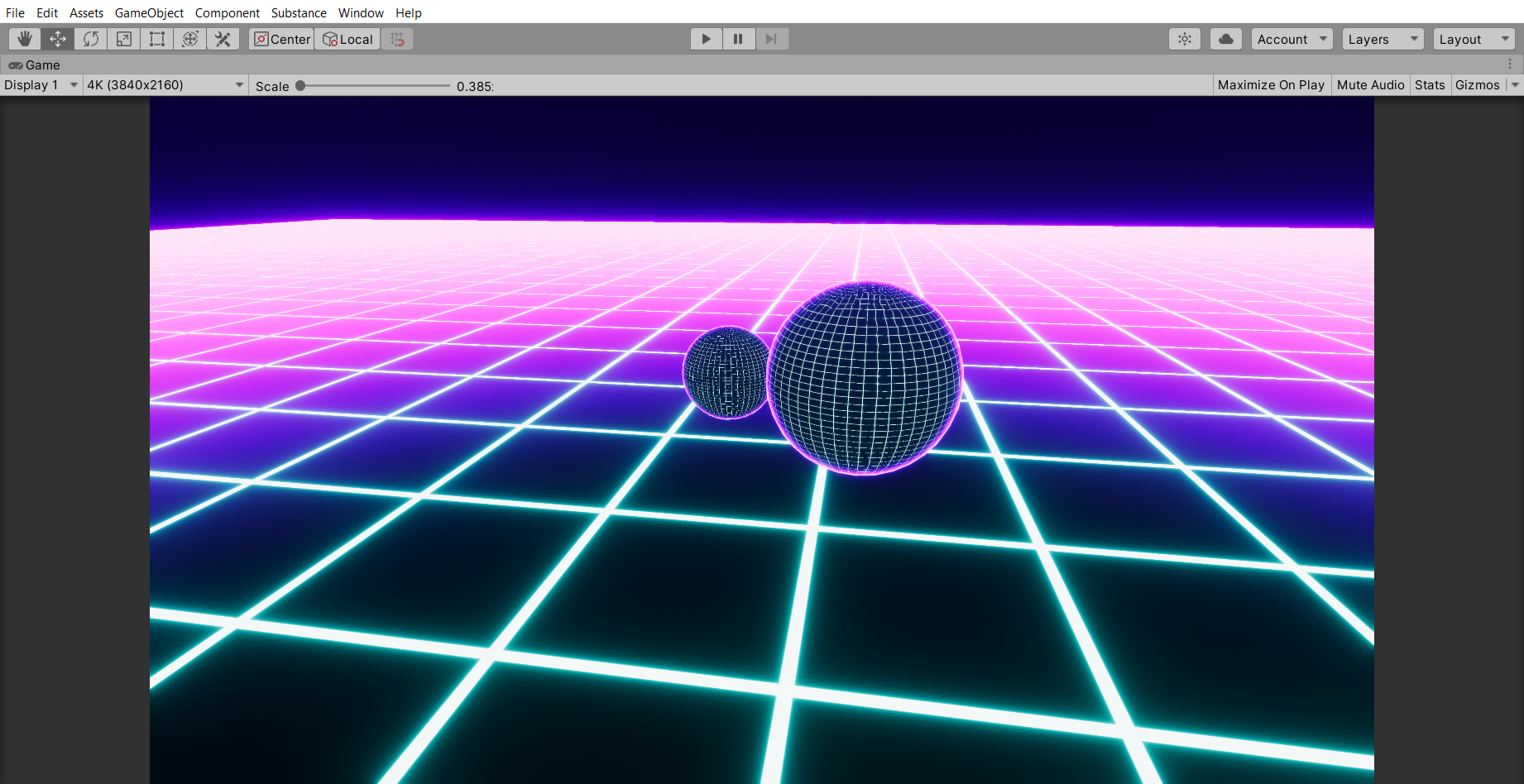
Tron style gridding combined with Fresnel effect, grid animates and moves, can also add standard emission on top 😍
 grand jolt
hey guys im struggling to get enough light on my character. seems like the environment is always standing out more. any recommendations?
hey doomPriestK how did you get the grid to glow and not be static?
devout quarry
that new zoom level ❤️
covert ivy
@lime viper Change Rendering Path to Deferred and work. but the fog doesn't work on opaque objects. 😩
grand jolt
@grand jolt that grid youasked for, heres the shader graph for it:
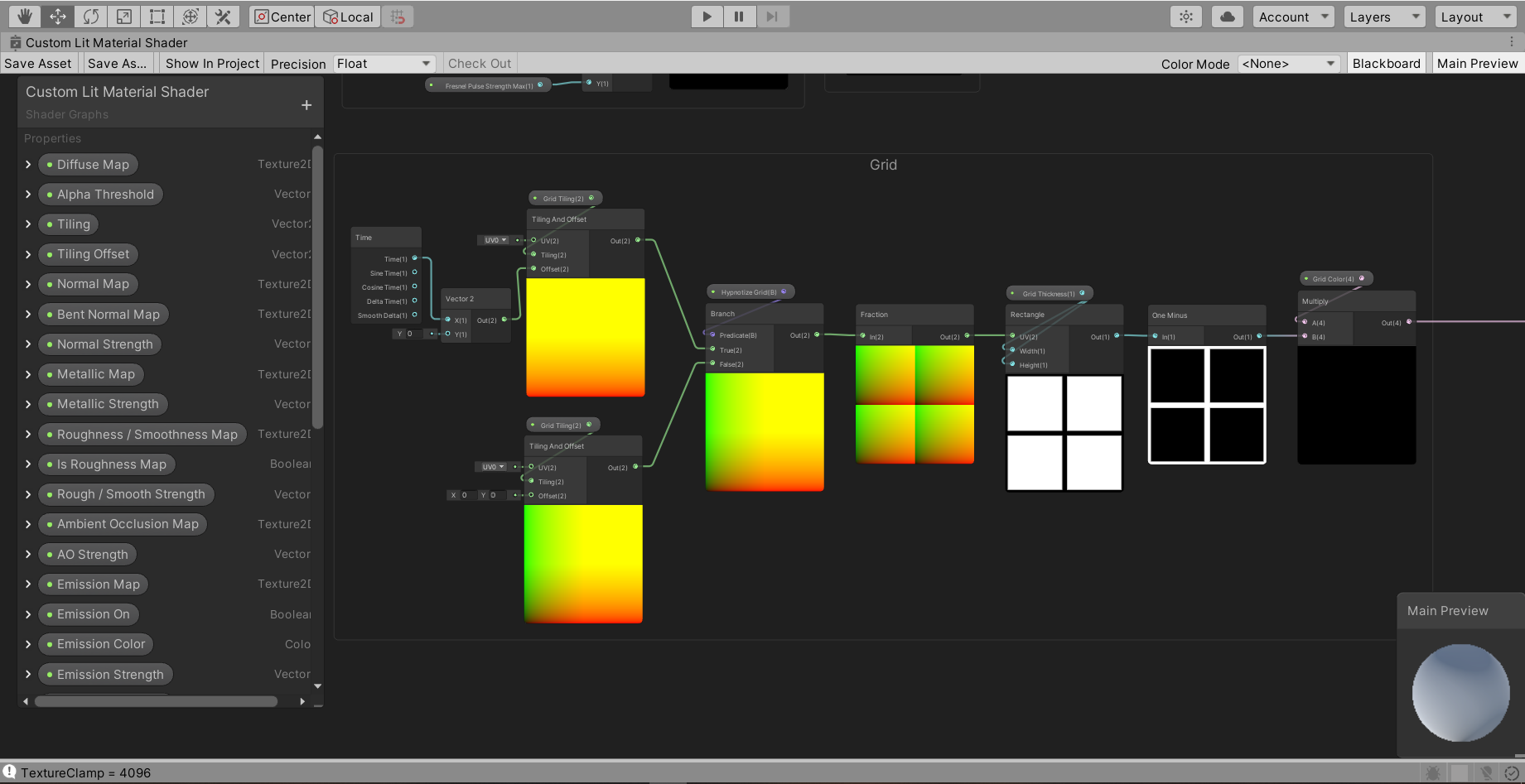
hectic ive never even used a shaders graph. ill download the pic for later reference. thanks 🙂
devout quarry
there also is a grid example in the procedural samples that you can get in the package manager
grand jolt
it's quite fun once you get the hang of it, and just to let you know how hard it is, I started yesterday 🙂
0.0
i started messing lighting today and my character is too dark lol. i want the darksouls low light vibe but my character is...
truly a ninja of the shadow
 proven sundial
still taking in ideas for shader breakdowns/tutorials @regal stag ?


I'm working on a stylized explosion vfx, but not quite there.. Would love tips&insp on volumetric-looking shaders in shadergraph!
Speaking of shaders - Here's what twin MGs (and zeroed armor values) will do to your spitzy paintjob. #screenshotsaturday #indiegame #gamedev #uni...
Twitter
noble rapids
Huh, never knew Rectangle was a built in function
heady pewter
is it possible to use a surface shader without an output in void surf?
 frail salmon

This Pause App is really good for relaxing. It costs ₹10 around 15 cents.
Buy Pause App Review for iOS https://itunes.apple.com/us/app/pause-video/id856883891?mt=8
Buy Pause App Review for Android
https://play.google.com/store/apps/details?id=com.ustwo.pause
Support this c...
how can i make this effect
frank steppe
what node(s) would i use to treat black as like no color when blending ?
ive got a black and white mask file to multiply with a color and then overlay on top of albedo
but i dont want the black part to show up, it should be the equivalent of no color
 shadow kraken
Lerp
 cunning harbor
I did not had a single intention of making this and it moves like a rope like if i move it right it rotates left and when moved left it rotates right and you get what happens for other directions
the white thing is the material of it btw
and also turns out no matter anything i do it moves like whenever i change the texture it moves and stuff
frail salmon
how do I copy materialtextureoffset materialoffset in my own shadergraph
mainTextureOffset
do I need to add tiling and offset part?
they using unlit/texture unlit/transparency I want to make the same scrolling effect work with my own replacement shader
low lichen
The property Material.mainTextureOffset will set the value of a Vector4 shader variable called _MainTex_ST to where XY is the XY tiling and the ZW components is the XY offset.
So I believe you can just create a non-exposed Vector4 property in your graph called _MainTex_ST
frail salmon
And then split it and connect it to tiling / offset node?
low lichen
Yep
frail salmon
hmm, that seems to work perfectly except not connecting with the script. let me try and figure it
ok got it, although there is a strange zig-zag shape, and when I put their tiling values its in the corner
also the motion is reversed but I guess I can fix that
Its strange cause they didnt use any shaders themself
in their addon
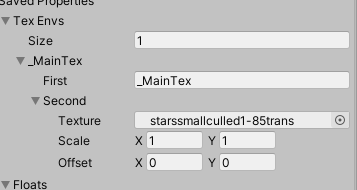
vs my ones
shy igloo
Just trying to wrap my head around constant buffers and how to optimise logic that really only needs to be called once per object
I'm running the following code to calculate the camera's direction in my fragment shader
but I'm assuming that performing this calculation in the fragment shader is wasteful
my first instinct was to move the code into the vertex shader but realistically it only needs to be calculated once for all objects, does anyone have any advice on what the most performant method for implementing this would be?
I was thinking that putting the variable in the per object constant buffer would resolve some of this but the calculation would still run?
low lichen
@shy igloo You could pass it as a global shader variable using Shader.SetGlobalVector
frail salmon
I did ultimately get that working in some dodgy way, using z / w of 0.5 makes it work for whatever reason,
and multiplying by -1 to correct the direction
do you know what is the similar extension for
Base RGB Trans A ? I think its still maintextureoffset
do I use the same stuff-- about to try tht now
shy igloo
@low lichen I did consider that but if possible I was trying to find a solution that wouldn't rely on writing external c#
low lichen
@shy igloo There's no other way to do the calculation just once
frail salmon
i dont understand why it keep being set back to negative -0.5 in editor
Same code-- I hav another shader modifying unlit/transparent. With voronoi / noise controlling alpha to make stars flicker. It works in the grapj
but when you play it on the code/scene
it doesnt change alpha at all
grand jolt
is anyone here quite experienced with shaders and is able to answer a couple of questions for me? i'll do it over DM so I dont spam.
gleaming moss
asking to ask is never a good idea-- "experienced with shaders" can mean a lot of things and you never know who else might be interested in the answers
grand jolt
shrugs not wanting to spam the Discord would take priority I would think, but here goes: I followed a Brackeys tutorial for a forcefield shader, and all the nodes are set up, the problem is: A) He uses a transparent shader, mine needs to remain Opaque unless theres some sort of way to toggle it during runtime. B) the output uses the Alpha channel and my shader is already set up to use the alpha of the diffuse map for transparency. C) Same problem with the emission, I have several effects added together and they all stack according to which is toggled on or off, so i'm not sure how this would combine with the forcefield shader, which uses both an alpha and emission output to work correctly.
I dont mind actually making this a seperate shader, so I can achieve the effect, but my plan was to try and make a master shader with all these effects stacked, so I guess I need to know, is that possible?
I could always add a toggle to completely seperate the effect so its solo, but that doesnt deal with the transparency issue
gleaming moss
so, starting off, I'm not sure how you anticipate using a translucent forcefield effect in a purely opaque shader
can you elaborate on this? Are you trying to modulate color based on depth?
this is doable with a translucent shader, FWIW, just don't feed the alpha from the result
set it to a high value and forget
grand jolt
the shader is set up to effectively replace a material, you need a basic reference material created but you can input all the maps, then stack these effects on top, unlike most shaders that are just simply effects, so theres a few other bits going on in mine, and I wasnt sure how it would all interact, on the transparency thing I thought maybe just fiddling with the alpha value or something may achieve the same effect, but i'm new to shaders and just wanted someone to clarify, I may just create a seperate shader, it's no biggie
gleaming moss
you can use shader keywords from a graph, which should work the way you want
meaning you can blend out (and generally not calculate) the forcefield intersection amount based on a keyword
the exact specifics are going to vary on how some of the basic effects actually work-- consider additive/'emission' based forcefield stuff vs. something that obscures things behind it, i.e. clouds/smoke
grand jolt
shader keywords? i'll look into them, havent come across them yet, but i'm definately having fun experimenting with effects, like this I made yesterday, did a tron grid + fresnel and made a hypnotize effect (so the grid animates sideways on the spheres, but towards you on the ground plane)
gleaming moss
you can change the amount of virtual light given off in the emission, hide it by blending that value to 0 and add individual effect pieces together
transparency follows different rules and you get different visual feels by using different operators (adds, multiplies, blends, etc.)
grand jolt
yeah I was worries each type behaved massively different, i'll give everything a look and see what I can come up with
thanks for the advice anyway (as you see, it took some talking so wasnt sure I was going to irritate a moderator lol )
gleaming moss
the larger question of "can things be combined" is almost always "yes" but you might have some other, more specific rules to how that combination should work
that's what's deemed "technical art" 🙂
much like modeling people deal with effective animation topology or rigging tricks
grand jolt
yeah, I dont think a forcefield would work very well with other effects, like dissolve (which i'm trying next)
i'm also planning to get used to timeline and cinemachine etc, going to try and make a video showcasing it all, that would be fun 🙂
gleaming moss
and building from some of the earlier points, you occasionally have natural effects that do both the light emission and obscurance at the same time
fire being a really classic example
grand jolt
they usually an effect? or is it mainly shaders in games? i've seen both used in places
gleaming moss
there are a lot of cheats to make it look good without simulation, it's just an example of how adding and blocking light are independent things
opaque surfaces are boring since they just do one or the other 🙂
grand jolt
lol, I remember one of the first things I tried to go was create a glass window in Unity, pain in the damn arse 😛
gleaming moss
dirty glass is another one of those neat effects where you can both partially obscure the background and also add in some more light
grand jolt
I find lens dirt can also be quite beautiful where light is concerned, as long as it isnt used all the time
heady pewter
is it possible to use a fragment shader and a vertex shader on the same shader? been trying to add some normal mapping, but i don't think i can bring color switching over to a surface shader so i figured if i could just render the color switching in a pass that has a fragment shader, then use a surface shader to apply bump mapping on it.
frail salmon
I adapted two shaders (default transparent and default texture) to work with a script that is adjusting them based on MainTextureOffset
They both work and move and etc fine. But the one based on default texture isn't repeating / patterning. But the transparent one is.
the shaders and code is relatively simple
is there something obvious about transparent vs texture?
because what I have built is basically the same as each other
 wintry mauve
Hey guys, so I recently updated a project to use HDRP and converted a couple of shaders to shader graph, but I'm having a weird issue with my terrain shader where the textures are shifting across the mesh as the camera moves. I've looked over the shader multiple times and fixed some logic errors but I still can't seem to find whats causing the shifting. Can anyone experienced with shader graph/HDRP help me?
@heady pewter Maybe i'm misunderstanding, but can't you just a vertex/frag shader? They have both vertex and fragment functions
heady pewter
well i want to include normal maps, so i figured i'd need to use a surface shader to use it
but if i can use normals without a surface shader, that would be awesome @wintry mauve
wintry mauve
grand jolt
Hi guys, i'm watching a shader tutorial and he's selecting his pipeline asset and enabling "Depth Texture", I can't seem to find it on my HDRP pipeline asset, anyone know where it is? my shader doesnt look the same and I have a feeling it may be because I can't find this setting..
wintry mauve
I'm gonna repost this
Hey guys, so I recently updated a project to use HDRP and converted a couple of shaders to shader graph, but I'm having a weird issue with my terrain shader where the textures are shifting across the mesh as the camera moves. I've looked over the shader multiple times and fixed some logic errors but I still can't seem to find whats causing the shifting. Can anyone experienced with shader graph/HDRP help me?
thick fulcrum
sounds like your UV's are they in world position?
wintry mauve
@thick fulcrum I'm not using UV's, its based on world position
give me a minute and I can post the code
thick fulcrum
to display a texture it requires a UV, which sounds like it's in world position. Just need to be careful no offsets are getting applied based on view position assuming it really is set in world space.
wintry mauve
Sorry I was confusing the mesh UV for texture UV. How would I check if I'm using world position UV's?
@thick fulcrum
so I'm looking at the documentation and I only see a way to switch modes if i'm sampling a texture2d, how would I check for a texture2darray
thick fulcrum
in code I'm not certain, I'm just aware of the theory and shader graph side of it. There should be some examples of how to code in UV world space on unity / forum
wintry mauve
the forum seems pretty lacking when it comes to shader graph unfortunately
wintry mauve
use sin or cos with time as the coordinate? @frail salmon
180 + sin(Time / speed) * 180 possibly?
thick fulcrum
@wintry mauve you could pop into the existing unity terrain shader in the HDRP folder to look at their code. Should give you some pointers
wintry mauve
thanks, that should help 👍
wintry mauve
im not sure what you mean
frail salmon
im usure it can be shift
grand jolt
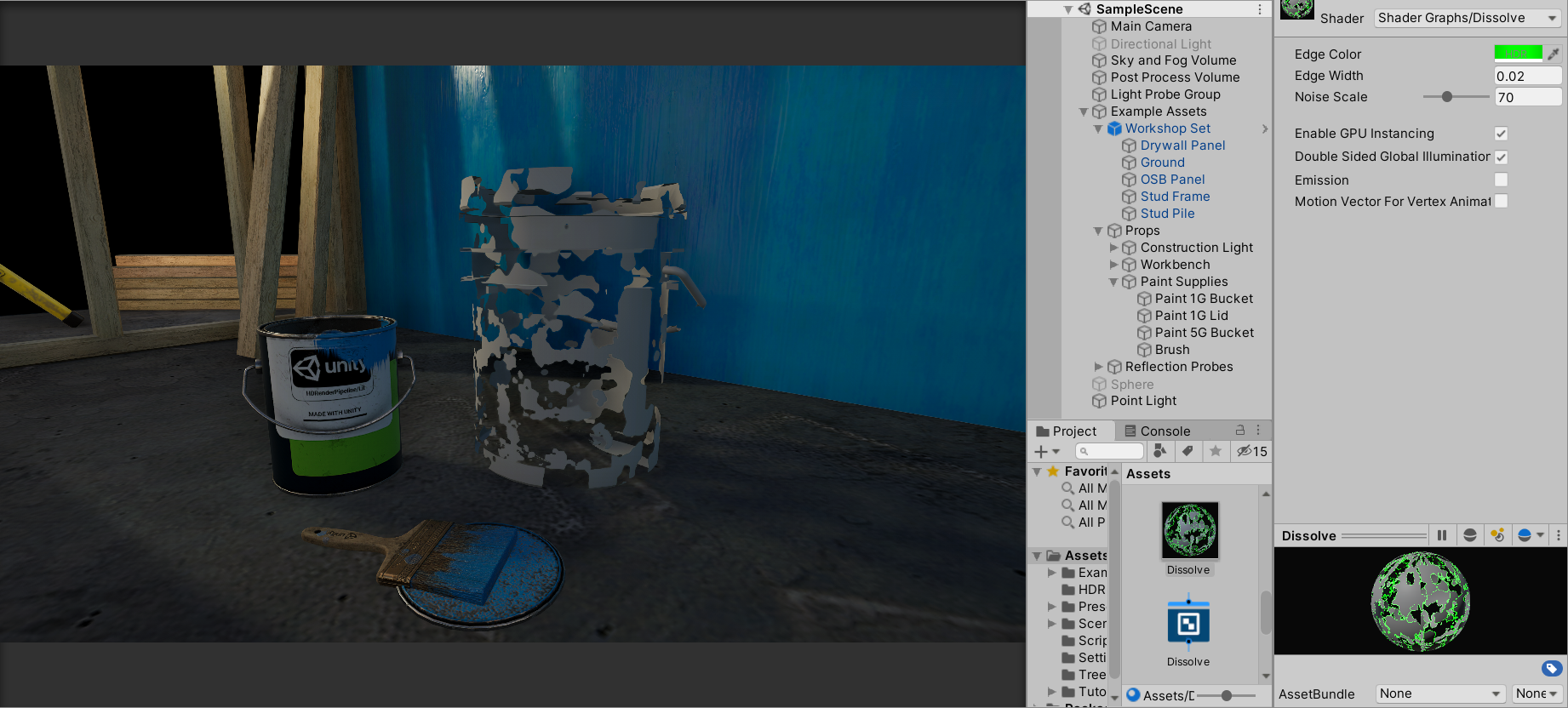
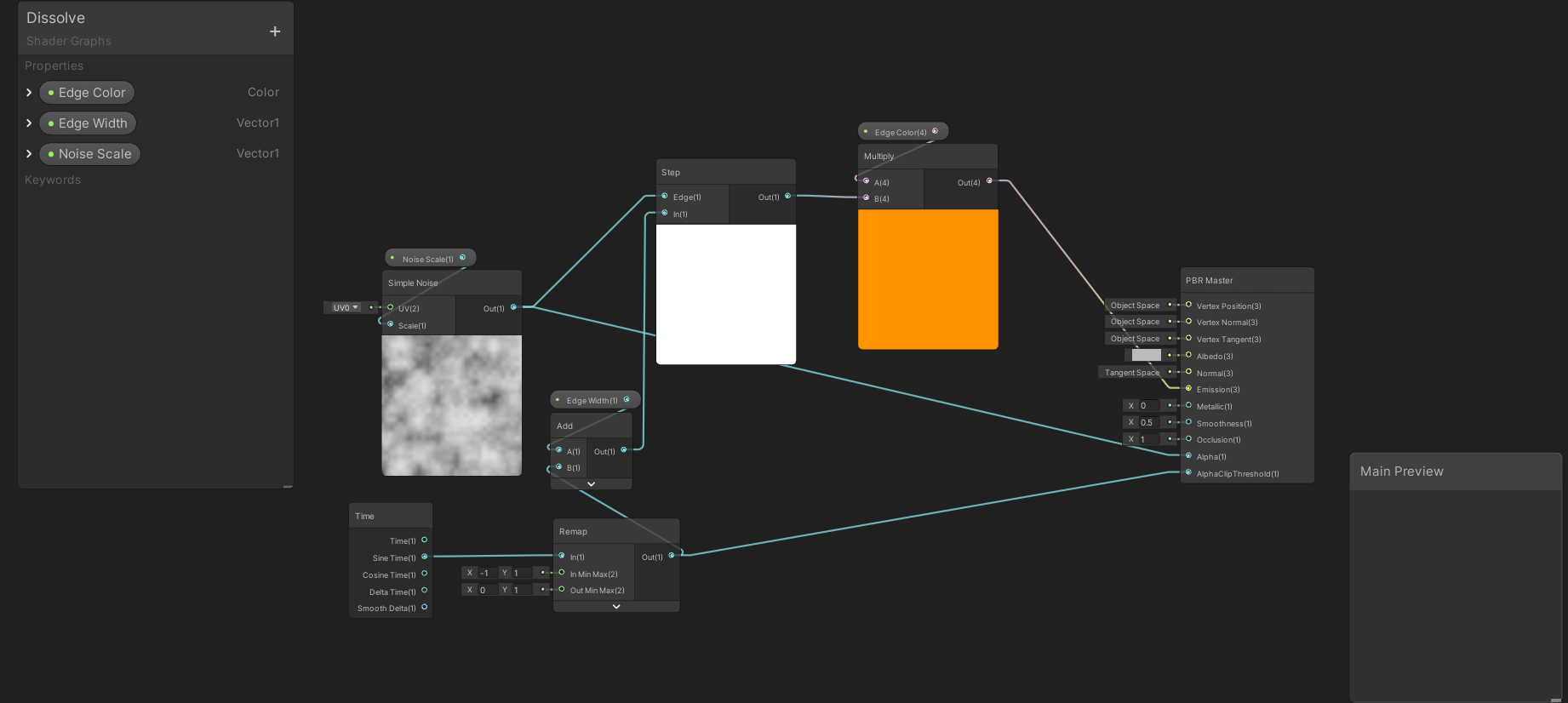
Guys, got a problem with this shader, I followed it to the letter but unlike his A) I can't see the edge glow on the model, even though it's clearly showing on the shader and B) the model starts half dissolved at the start instead of completely solid, and once it completes the dissolve you can still see tiny bits of mesh in places, anyone have any idea how to fix these issues? screens below:
 hushed urchin
@grand jolt shooting out ideas, but have you checked that it is correct material on the object, and what happens if you check the emission boolean?
grand jolt
@hushed urchin Definately correct material, emission bool doesnt effect it
hushed urchin
@grand jolt So what happens if you increase noise width, or try change the color output from emission to albedo?
grand jolt
@hushed urchin hmmm, it works if I change to the albedo slot, weird, he puts it into the emission slot on the tutorial lol
hushed urchin
Ok, so seems like for some reason it doesn't output the emission on your material...
grand jolt
the noise width just increases the areas that start going transparent quickest (so kinda looks like more holes), if you catch my meaning
hushed urchin
While having it on albedo, could you try giving it an emissive color?
High intensity on some color etc
grand jolt
this is the weirdest thing ever lol, I added an emission color and I can see it on the preview, actual model doesnt show it at all though!
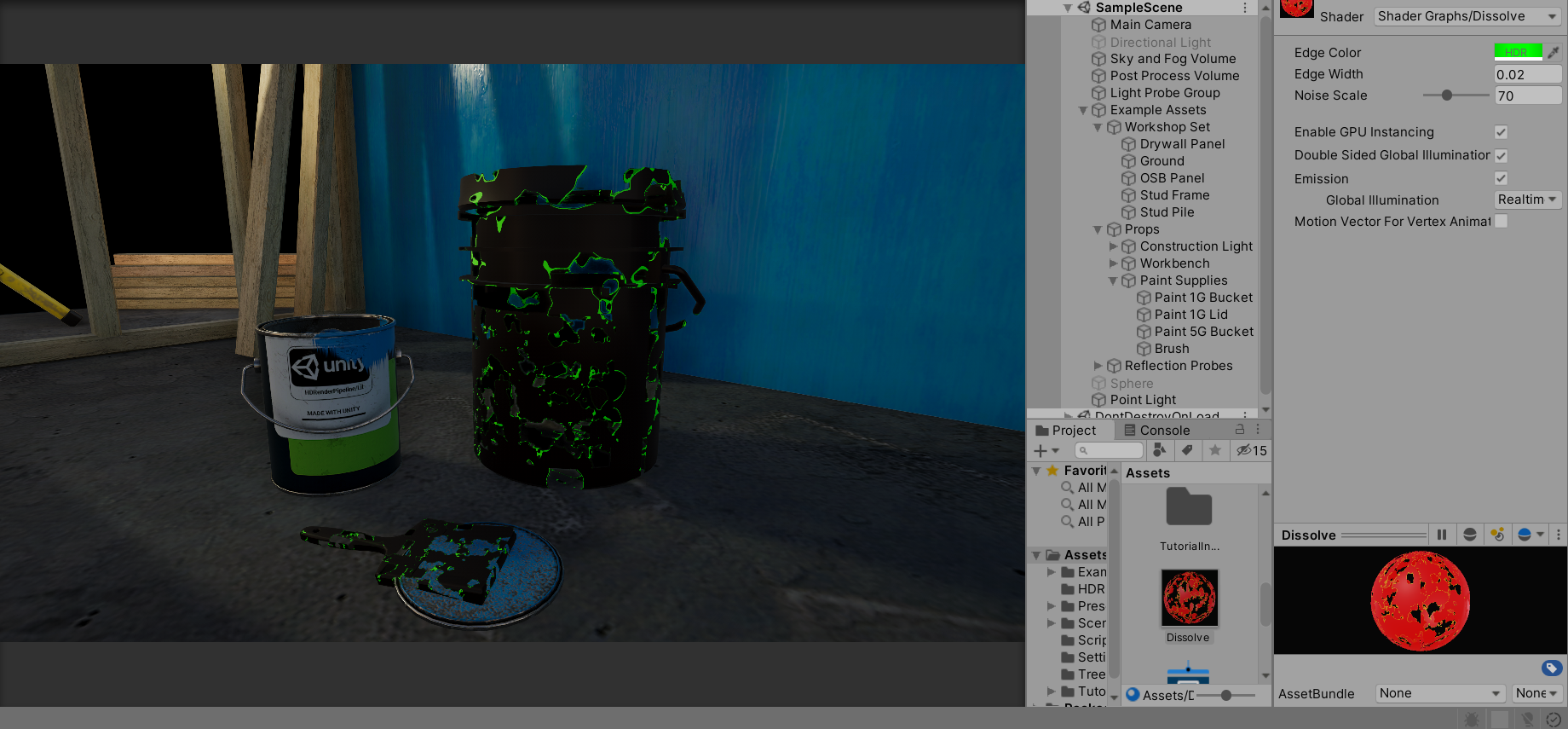 grand jolt
@hushed urchin ok, somethings wrong here.....
I just created a brand new material and simply gave it a red emission color.....it doesnt show
which could explain why it didn't with the shader, but I have no idea why emission isnt working, im going to restart Unity
grand jolt
works perfectly in my other project.....weird, thankfully that project was just a default
grand jolt
Got my dissolve shader sorted :)


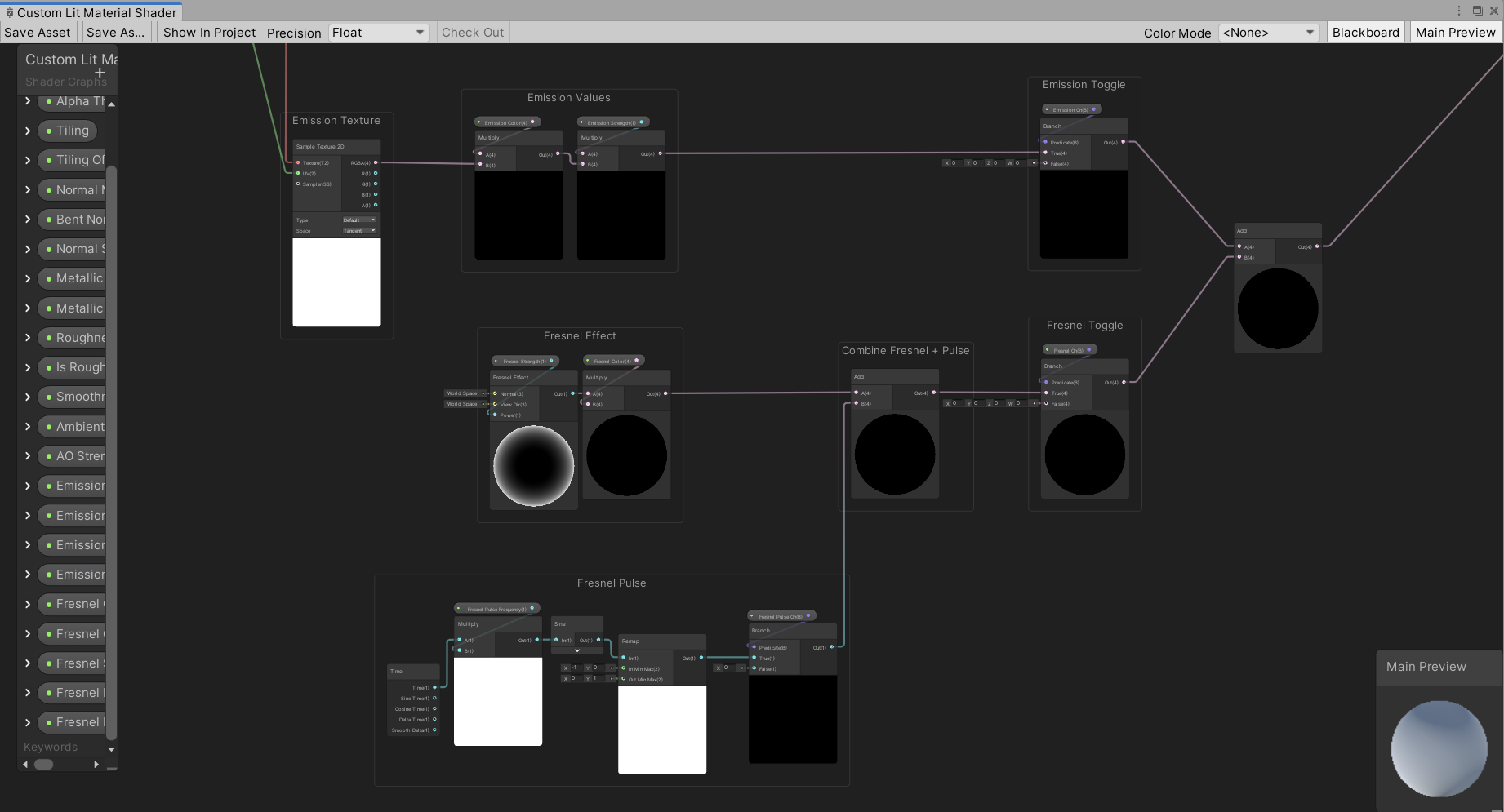
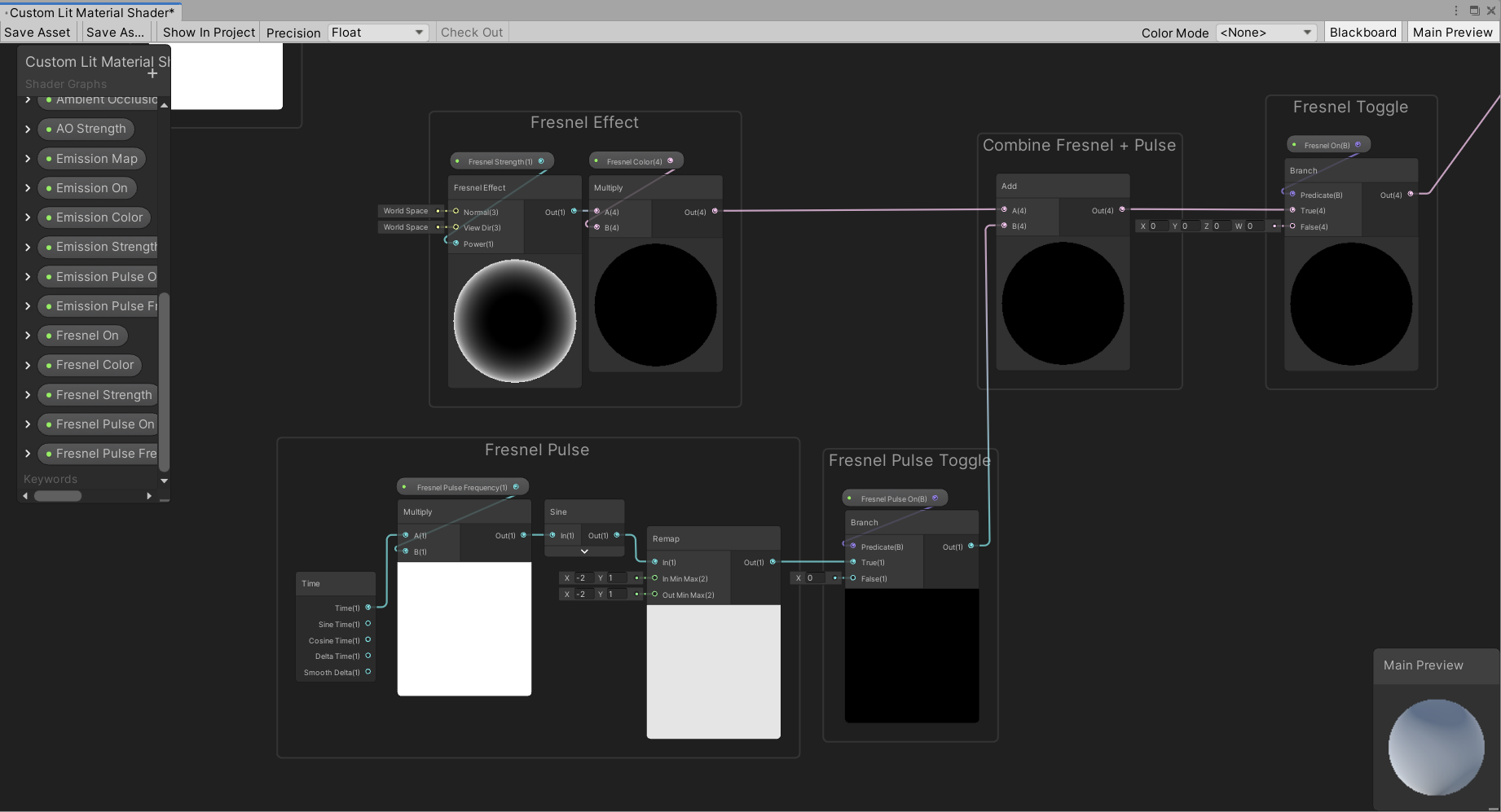
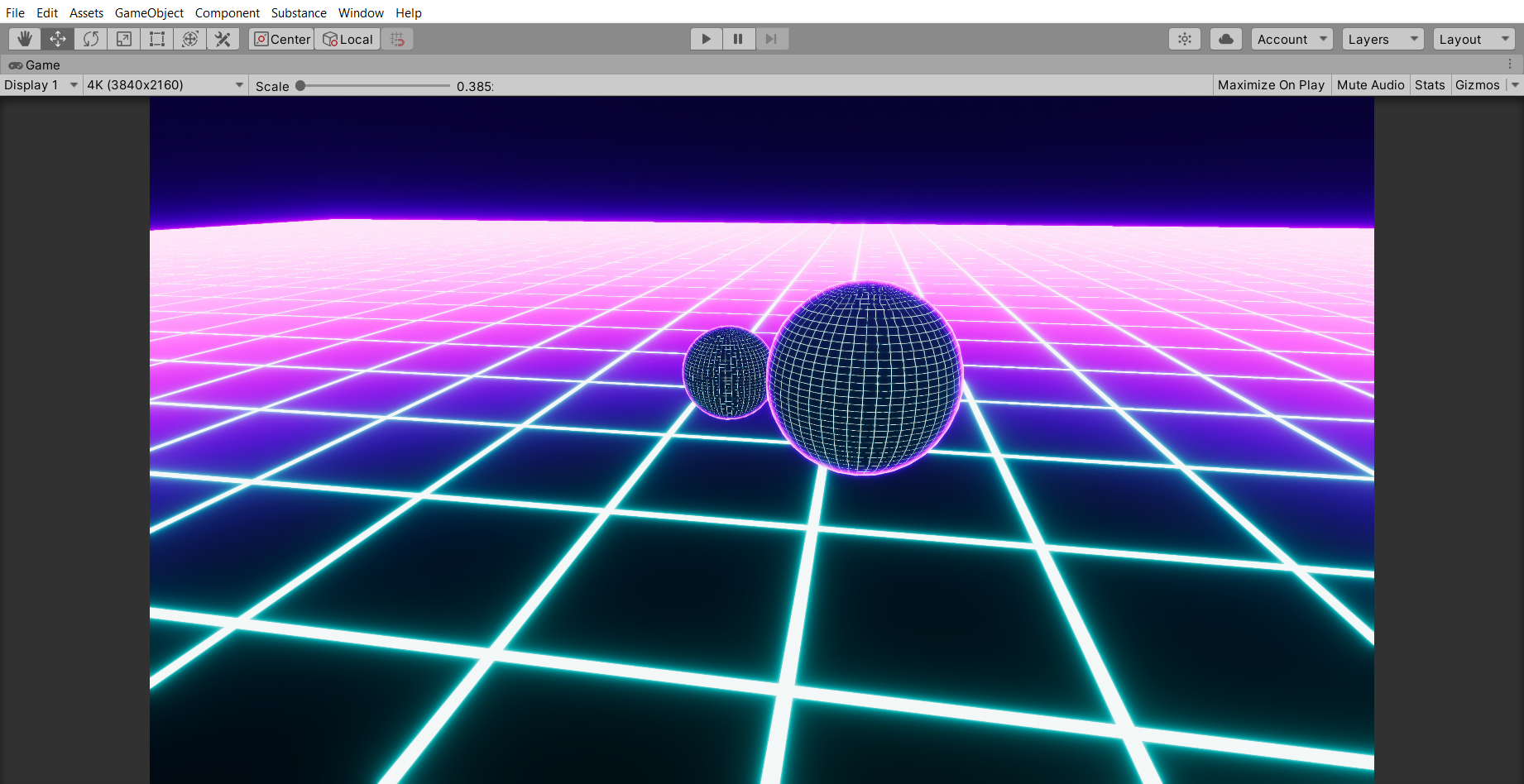
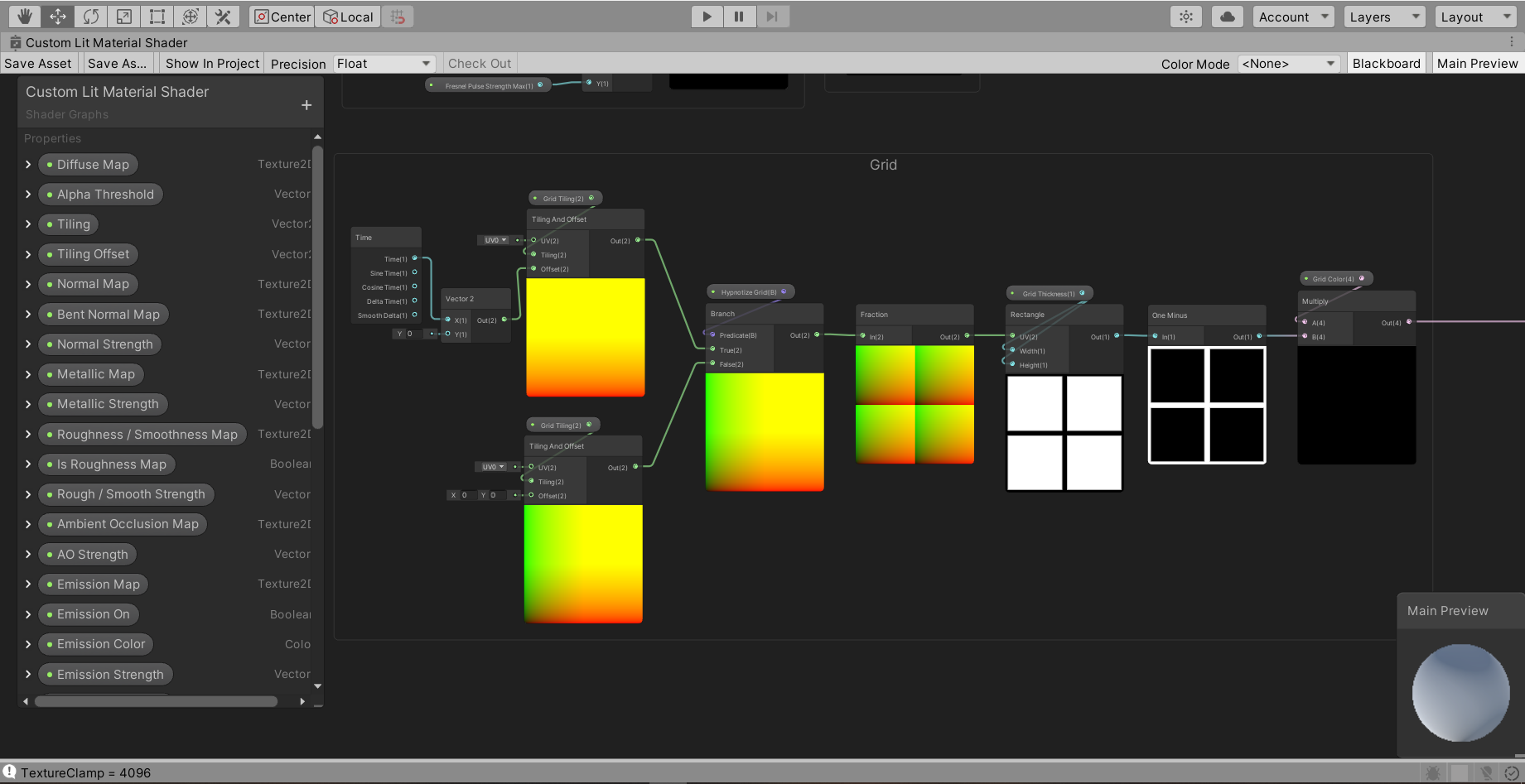

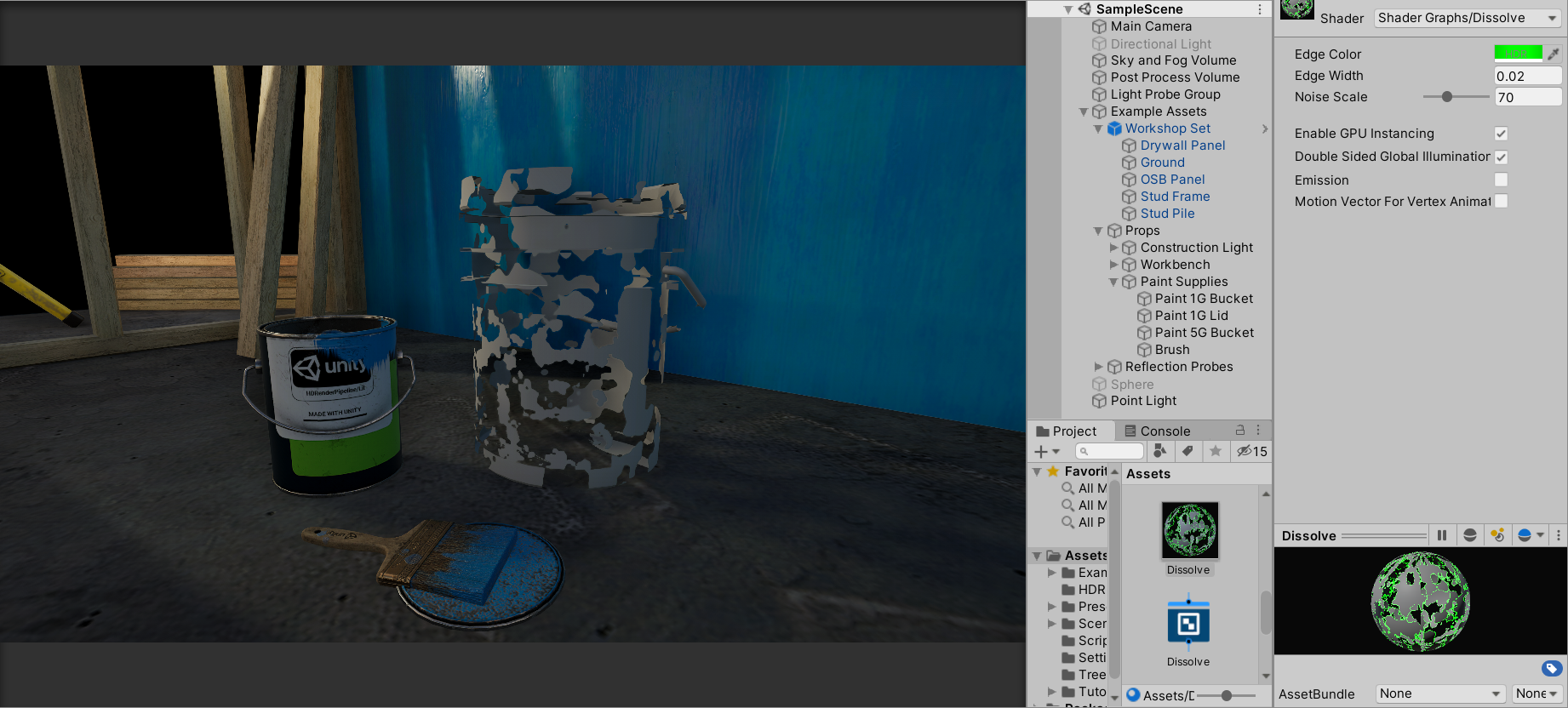
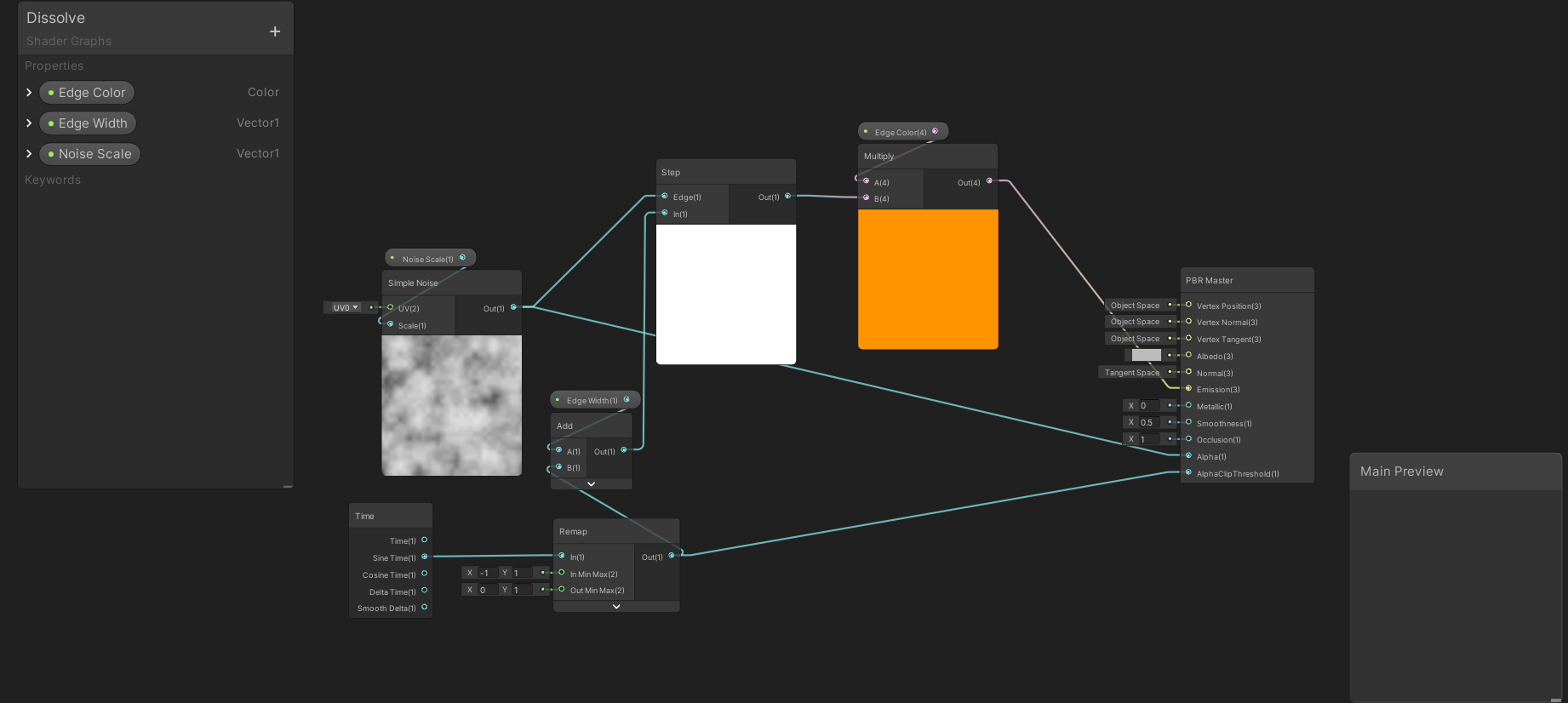
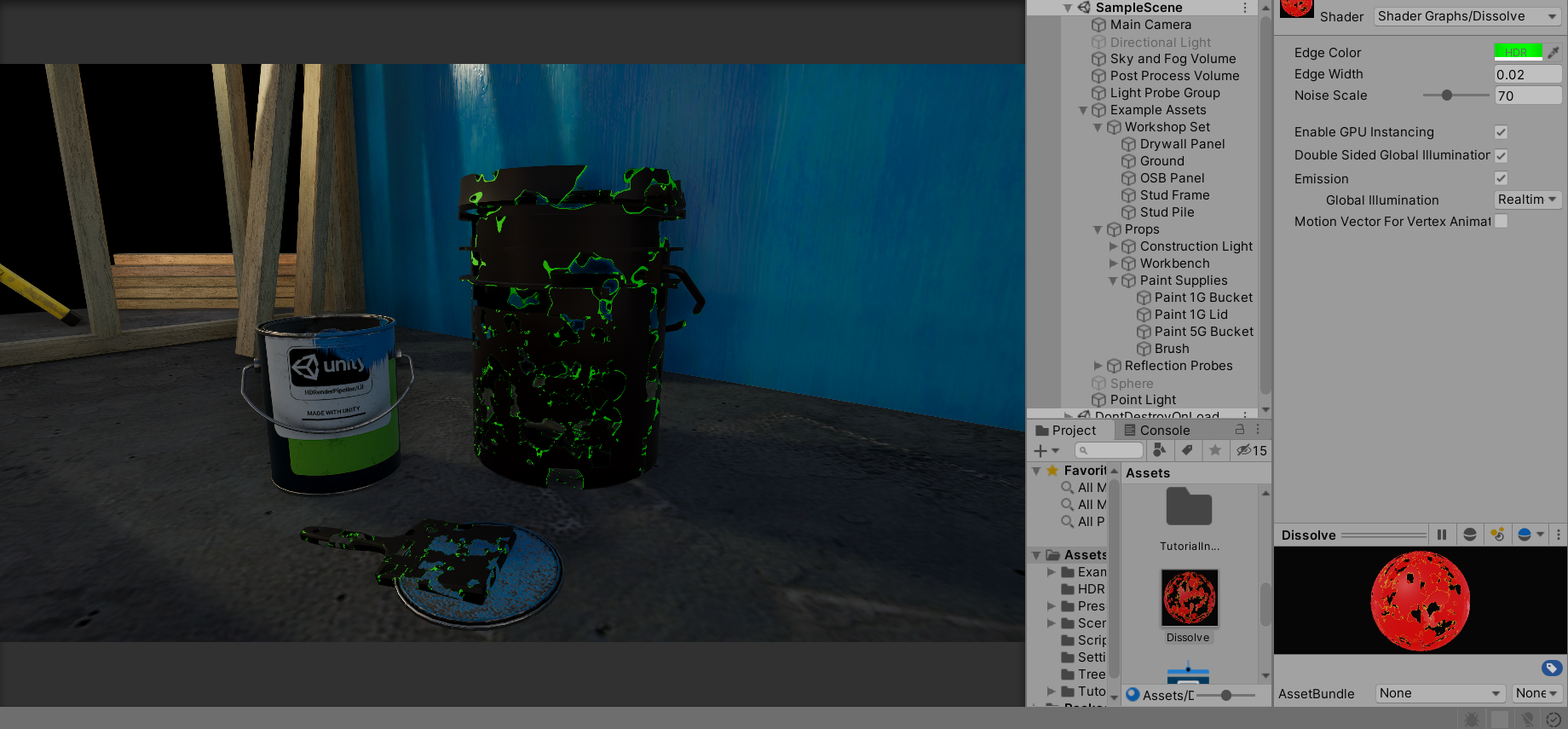 hushed urchin
Anyone know if it would be possible for me to use Triplanar node to modify position in shadergraph?
Basically I want to modify position in pixel shader and not vertex shader
hushed urchin
I see default shaders have options of Displacement Mode, but I can't find it on shader graph.
thick fulcrum
normal map displacement?
not sure you can do full parallax type mapping at moment, if that's your aim
regal stag
I think HDRP has a Parallax occlusion mapping node, but not URP
hushed urchin
Basically want to do an affect that assembles an object from shards. So I'm gonna sample from voronoi texture/noise and do displacement in pixel shader.
Found it...
Had to enable depth offset
Hmm, isn't what I want anyway. I want to move the rendered pixels, and not just modify the depth of them.
thick fulcrum
assembles from shards... sounds more like a VFX graph thing
you would need to do it via ray's in a shader to stand a chance, which can be done via a custom function.
hushed urchin
stand a chance? 🤔 I don't think you can produce the exact same effect in vfx graph no. You would need to do some combo of vfx and normal shaders and produce some seam that you put in some over the top effects to keep the eyes off from the user from the mismatching.
 winged pelican
from the left side normal via noise(shader graph), right texture normal via texture. What am I missing, why mips/lods not working on noise ?
low lichen
You're not generating any mip maps there
With textures, they're generated beforehand
And then the Sample Texture 2D node is choosing a mip map level for you
winged pelican
oh, okey, so I guess I dont need them, I just need to reduce normal strength ?
low lichen
Sure, you could get the depth of the pixel and use that to reduce the strength of the noise
That should have the same effect of reducing aliasing as mip mapping has
winged pelican
thank you sir 🙂
hushed urchin
If I set color to world position, it shouldn't change depending on my orientation right? Am I going mad or have my brain stopped working...
low lichen
Color to world position? I don't know what that means
You mean using world position as the output color?
low lichen
Are you using HDRP?
hushed urchin
Yes
low lichen
The world position there is relative to camera
You need to use Absolute World Position
 wary stump
is there a header that i would need to use the Texture2d or RenderTexture constructors? like using unityengine.texture or something? cause its not showing up
low lichen
@wary stump No, they're in the UnityEngine namespace. The fact that you said header makes me think you're new to C#. How are you trying to create these textures?
wary stump
public Texture2D varname = new Texture2D(128,128);
low lichen
Unity probably doesn't want you to create it in a field initializer like that
It likely won't happen in the main thread
And are you sure you have the right amount of parameters?
wary stump
thats why im unsure if it needs a specific namespace
low lichen
What is the error you get?
wary stump
well its not syntax highlighting.. so...
low lichen
Surely you're getting a compile error somewhere if you know it's not working?
wary stump
well im not getting any errors, its just it would normally highlight as if it were recognised but its not and idk if thats supposed to happen or if its an error
low lichen
Other Unity types are recognized?
low lichen
It does
wary stump
ok nothing works i think there might be a different problem, try adding from navmesh and camera just to test
not even coming up in intellisense
low lichen
Is your IDE set as the default editor in Unity > Edit > Preferences... > External Tools?
 timber carbon
if u build a shader, say to remove green screen -- if I want to add say -- fade out alpha using a slider -- should I buuild that into the same shader -- os should I add the initial object to an empty, then create a new shader for the empty? (just asking if it matters which way I do it)
 alpine holly
Hey, I have a really simple (I think) question. I want my mesh particles to change in alpha over time, but I can't figure out how to do this in the particles material shader
    Properties {
        _Color ("Color", Color) = (1,1,1,1)
        _MainTex ("Albedo (RGB)", 2D) = "white" {}
        _Glossiness ("Smoothness", Range(0,1)) = 0.5
        _Metallic ("Metallic", Range(0,1)) = 0.0
    }
    SubShader {
        Tags { "RenderType"="Opaque" }
        LOD 200

        CGPROGRAM
        // Physically based Standard lighting model, and enable shadows on all light types
        #pragma surface surf Standard fullforwardshadows

        // Use shader model 3.0 target, to get nicer looking lighting
        #pragma target 3.0

        sampler2D _MainTex;

        struct Input {
            float2 uv_MainTex;

            // Vertex color paramater?
            float4 vertexColor : COLOR;
        };

        half _Glossiness;
        half _Metallic;
        fixed4 _Color;

        UNITY_INSTANCING_BUFFER_START(Props)
            // put more per-instance properties here
        UNITY_INSTANCING_BUFFER_END(Props)

        void surf (Input IN, inout SurfaceOutputStandard o) {
            // Albedo comes from a texture tinted by color
            fixed4 c = tex2D (_MainTex, IN.uv_MainTex) * _Color;

            // Multiply by vertex color I think
            c *= IN.vertexColor;

            // Albedo over here for some reason...
            o.Albedo = c.rgb;

            // Metallic and smoothness come from slider variables
            o.Metallic = _Metallic;
            o.Smoothness = _Glossiness;
            o.Alpha = c.a;
        }
        ENDCG
    }
    FallBack "Diffuse"
}
I passed through the color, but I need to pass through the alpha
low lichen
@alpine holly The alpha comes with the color. It's a float4. The fourth component is the alpha.
low lichen
I think it needs to be called color, not vertexColor
alpine holly
I will try that in a hot second and get back to you
No luck, seems to have the same exact effect :/
Also isn't that just the variable name? Correct me if I'm wrong, I really don't know much about shaders
low lichen
According to this thread, surface shader seems to specifically be expecting color
https://forum.unity.com/threads/getting-vertex-color-data-in-surface-shaders.70578/
Unity Forum
I simply can't get vertex colors to work using the "with COLOR semantic" line in my suface shader Input struct.
This is what it says in the docs:...
alpine holly
float4 vertexColor : COLOR;
I'm using that here aren't I
"The idea is that you can call your per-vertex colour variable anything you want, as long as you use the COLOR semantic."
The 'colour' variable he mentions is the "vertexColor" or "color" doesn't matter what you name it as long as I use COLOR as the semantic
Which I have no clue what that means
Regardless, neither variable worked
But I can use color as the name just in case
 mystic geyser
you can use any name for variable. Binding Semantics does the job of assigning correct value to it
also pretty sure you are missing the vert stage function required to pass the color to surf
@alpine holly
check the surface shader eg at bottom
alpine holly
I'll read that in a sec, but I want to clarify that the colors are being passed through, just not the alpha
low lichen
Well, your shader is opaque
alpine holly
Should it be set to "Transparent"
low lichen
More importantly, it has to have some Blend operation
The RenderQueue determines when it's drawn. Transparents are drawn after opaques so they can blend on top.
alpine holly
fixed4 c = 2.0f * IN.color * lerp(colA, colB, IN.blend) * _Color;
This was in the article Bot posted, is this what you mean by blend operation
low lichen
No, put this line before CGPROGRAM
Blend SrcAlpha OneMinusSrcAlpha
That's traditional transparency blending
Blend One One would be additive blending
alpine holly
I also set my material that has the shader applied to 'Transparent' in the render queue, which is ok right
Still no transparency :(
low lichen
@alpine holly Just as a test of whether the alpha value is actually changing, try adding this before setting the Albedo:
c *= IN.vertexColor.a;
It should turn black as the alpha goes down
 nocturne escarp
Can anyone help me with where can i find MK glow free asset?
(I saw a video and it was free few months back, but now its paid... and am pretty new to Unity and hence don't wanna spend)
alpine holly
No black
    Properties {
        _Color ("Color", Color) = (1,1,1,1)
        _MainTex ("Albedo (RGB)", 2D) = "white" {}
        _Glossiness ("Smoothness", Range(0,1)) = 0.5
        _Metallic ("Metallic", Range(0,1)) = 0.0
    }
    SubShader {
        Tags { "RenderType"="Transparent" }
        LOD 200

        Blend SrcAlpha OneMinusSrcAlpha
        CGPROGRAM
        // Physically based Standard lighting model, and enable shadows on all light types
        #pragma surface surf Standard fullforwardshadows

        // Use shader model 3.0 target, to get nicer looking lighting
        #pragma target 3.0

        sampler2D _MainTex;

        struct Input {
            float2 uv_MainTex;

            // Vertex color paramater?
            float4 color : COLOR;
        };

        half _Glossiness;
        half _Metallic;
        fixed4 _Color;

        UNITY_INSTANCING_BUFFER_START(Props)
            // put more per-instance properties here
        UNITY_INSTANCING_BUFFER_END(Props)

        void surf (Input IN, inout SurfaceOutputStandard o) {
            // Albedo comes from a texture tinted by color
            fixed4 c = tex2D (_MainTex, IN.uv_MainTex) * _Color;

            // Multiply by vertex color I think
            c *= IN.color;

            // Albedo over here for some reason...
            c *= IN.color.a;
            o.Albedo = c.rgb;

            // Metallic and smoothness come from slider variables
            o.Metallic = _Metallic;
            o.Smoothness = _Glossiness;
            o.Alpha = c.a;
        }
        ENDCG
    }
    FallBack "Diffuse"
}```Updated code just in case I'm doing something royally wrong to what you said
low lichen
@alpine holly Oh, you renamed it to color, so it should be c *= IN.color.a;
mystic geyser
Can anyone help me with where can i find MK glow free asset?
(I saw a video and it was free few months back, but now its paid... and am pretty new to Unity and hence don't wanna spend)
@nocturne escarp apparently developer has removed free version. now replaced with a paid LITE version. you can look into other post process solutions for bloom if you need
low lichen
@alpine holly Actually, surface shaders are different. For transparency, you need to add alpha to the #pragma surface ...
nocturne escarp
@mystic geyser can you provide me the link ?
low lichen
@alpine holly So that line becomes: #pragma surface surf Standard fullforwardshadows alpha
alpine holly
So no adding to the tags?
low lichen
The tags should also be there
mystic geyser
@nocturne escarp you can use the Unity's Post Process Stack for Bloom alright. does the job. also has Fast Mode for mobile. YMMV for mobile performance depending on how you use it. accessed via package mananger. https://docs.unity3d.com/Packages/com.unity.postprocessing@2.3/manual/index.html
@nocturne escarp you basically need this effect https://docs.unity3d.com/Packages/com.unity.postprocessing@2.3/manual/Bloom.html
low lichen
No problem. You can remove the Blend line, because that's what the alpha thing does
wary stump
im trying to implement a fog of war, i know of the vertex based method, but im wondering if i can somehow use a camera projection and raycasting to possibly map onto a texture and use that to render to a quad, is it practical to do this or just use the vertex method
wintry mauve
I still need help from anyone experienced in HDRP/shader graph if anyone like that is around
My problem is basically just that the textures on my terrain mesh are shifting with the camera position, and I can't for the life of me figure out why
wintry mauve
That was my first thought, its set to world, which unless im mistaken is what I need
low lichen
You might be using World Position, which is camera relative in HDRP
You want absolute world position
wintry mauve
huh
didn't know that, but I've tried absolute world position and it does the same thing
low lichen
Then either you didn't save or you're using World Position somewhere else
wintry mauve
let me try it again real quick
yeah its still happening even with absolute world, im also using normals but theres no absolute world type for that, could that be the issue?
@low lichen here is a video of whats happening, plus my shader https://www.reddit.com/r/Unity3D/comments/g83qhg/what_is_causing_this/

 willow timber
Quick question (I'm very new at shaders): So, I made a shader the other day called ToonShader, and I've been testing it. Now, I wanted to experiment with it, so I made a duplicate of ToonShader, called TerrainToonShader (The two are exactly alike).
I'm going to experiment in the new one, TerrainToonShader: However, when I made a material and tried to select it, it is not appearing: How do I get TerrainToonShader to show as a choice for the shader of my new material?
(SOLVED! Turns out I needed to manually change the name in the code too haha)
 sinful salmon
Why i cannot connect Out and Y ?
willow timber
So, I'm following this Terrain Shader tutorial here, and I've hit a problem: His method uses "surf()", but mine uses "frag()" since it needs to be an unlit shader! (Mine needs to keep it as "frag()", since I am doing other stuff too)
https://www.youtube.com/watch?v=9rSP-ozPs0A
At 14:05 is where I am having trouble: He puts "uv_Splat0" into the "Input" struct, which is passed into his "surf()" method. However, I am not using a surface shader, and instead my main logic is in my "frag()" method (See picture attatched). How can I do a workaround to get the "uv_splat0" variable in the specified location? Is there another way to pass in inputs like that to "frag()"?
We've built a lot of shaders, how do we attach these to our terrain though? Let's take a look at how you can build a basic shader that integrates with Unity's pre-built terrain tools.
To do this we'll need to build a shader that accepts the Splat maps and Splat's that Unity ...
low lichen
@willow timber So uv_TextureName is short hand for the mesh's UV that has been tiled and offset based on the tiling and offset settings of that texture.
So in your v2f struct, you can define those specific UV values for each splatmap, but you'll have to populate them yourself.
You can use the TRANSFORM_TEX macro for that. You just have to define a float4 _Splat0_ST uniform in the shader, which is where Unity assigns the tiling and offset values for each texture.
@willow timber So all in all, it would look something like this:
float4 _Splat0_ST;
float4 _Splat1_ST;
float4 _Splat2_ST;
float4 _Splat3_ST;

v2f vert(appdata v)
{
    v2f o;
    o.uv_Splat0 = TRANSFORM_TEX(v.uv, _Splat0);
    o.uv_Splat1 = TRANSFORM_TEX(v.uv, _Splat1);
    o.uv_Splat2 = TRANSFORM_TEX(v.uv, _Splat2);
    o.uv_Splat3 = TRANSFORM_TEX(v.uv, _Splat3);
}