#archived-shaders
1 messages · Page 143 of 1
 fervent tinsel
it's pretty much what I did on the custom pass
it also gives linear blur control on pixel shaders, so no stepping between lod levels
@delicate badger
just make sure to set the master node to transparent and make sure the material is set as well
 harsh marsh
How can I convert object space to tangent space in a shader?
 delicate badger
@fervent tinsel how did you get the blur only on a square in the middle? When I put it on a GUI Image in the middle of the screen, it blur the whole screen :/ In addition, I have a error in the console
 regal stag
If you create a Texture2D property with the _MainTex reference that error will go away. You could also sample that texture and take the alpha property into account if you don't want the blur to be square.
As for it blurring the whole screen, are you sure the UI image you are applying it to isn't the size of the full screen?
delicate badger
yes :/
 simple frost
@harsh marsh there should be a transform node to do this, let me double check
delicate badger
If I remove the material and put a source Image
It works
As soon as I put a material on it, it blur the whole screen :/
simple frost
@delicate badger Shadergraphs on Canvases are not supported at the moment, but its on our roadmap
Product roadmap and feature requests. Welcome to our product portal.
simple frost
no worries! if its important vote for the issue 🙂
regal stag
If the shader is always applied to the entire screen, might be able to mask it using the UVs (/Rectangle Node?), probably not an ideal solution though.
simple frost
I mean a single quad in front of the camera is not horrid in terms of overhead, but I would recommend it be an unlit material
there is also single-pass-post effects on the roadmap too
harsh marsh
@simple frost I'm not using shadergraph
simple frost
ah, then youll need to multiply by the transform yourself. Which SRP?
harsh marsh
default.
            float3 objGravity = mul((float3x3)unity_WorldToObject, _Gravity);
            float3 objTangentGravity = mul(objGravity, tangent);
like this?
simple frost
youll need the object to tangent space matrix
 calm carbon
@devout quarry , thanks. I probably should've said that I'm not using shader graph for this. I have shaders that I'm porting over from previous versions that I don't want to convert to SG.
simple frost
which I'm not sure if thats provided by unity default, so you may have to construct it yourself
harsh marsh
idk how to get the object to tangent space matrix
simple frost
                o.pos = mul(UNITY_MATRIX_MVP, vertex);
                o.worldPos = mul(_Object2World, vertex).xyz;
                half3 wNormal = UnityObjectToWorldNormal(normal);
                half3 wTangent = UnityObjectToWorldDir(tangent.xyz);
                // compute bitangent from cross product of normal and tangent
                half tangentSign = tangent.w * unity_WorldTransformParams.w;
                half3 wBitangent = cross(wNormal, wTangent) * tangentSign;
                // output the tangent space matrix
                o.tspace0 = half3(wTangent.x, wBitangent.x, wNormal.x);
                o.tspace1 = half3(wTangent.y, wBitangent.y, wNormal.y);
                o.tspace2 = half3(wTangent.z, wBitangent.z, wNormal.z);
                o.uv = uv;
return o;```thats how you get the basis vectors
regal stag
@calm carbon To do alpha clipping in code you'd do something like clip(alpha - clipThreshold);, Or if (alpha < clipThreshold){ discard; }
calm carbon
Thanks. I'm also relying on their shadow pass that relies on that alpha clip property, and it doesn't seem like I can control that specifically.
UsePass "Universal Render Pipeline/Lit/ShadowCaster"
I believe _AlphaClip is used in here. I probably could just rewrite this pass 🤷
simple frost
@harsh marsh if youre not as familiar with matrix math you can also calculate it in C# and pass it to the shader
 rapid acorn
CG has matrix multiplication functions
regal stag
@calm carbon It looks like they might use a "_Cutoff" property? Looking at the code
simple frost
@rapid acorn I dont recall a provided conversion matrix to tangent space though, so best I can guess is constructing it from the space basis
calm carbon

GitHub
Scriptable Render Pipeline. Contribute to Unity-Technologies/ScriptableRenderPipeline development by creating an account on GitHub.
seems like that ( _AlphaClip) controls whether alpha clipping is done or not in that pass, and the _Cutoff is the threshold used.
regal stag
Ah, I see
calm carbon
exposing that property in my shader doesn't seem to make a difference though
rapid acorn
@simple frost Ah! Didn't read messages above. CG has multiplications like cross and dot.
regal stag
@calm carbon The shadow pass fragment seems to be using Alpha(SampleAlbedoAlpha(input.uv, TEXTURE2D_ARGS(_BaseMap, sampler_BaseMap)).a, _BaseColor, _Cutoff); are you also using _BaseMap for the texture?
calm carbon
Correct
fervent tinsel
@delicate badger oh I didn't have it on UI canvas, just put it on a quad mesh in front of camera
regal stag
What about #pragma shader_feature _ALPHATEST_ON? The shadow pass seems to already be using that though, but I'm running out of ideas. 😅
calm carbon
I also tried leaving it in/commenting that out 😂
Since I saw _AlphaClip turns that on/off
simple frost
@rapid acorn all good, thanks for the help though!
regal stag
@calm carbon I'm struggling to find what the _AlphaClip property actually does in the Lit shader, I can't seem to find a mention of it, (except it being declared as a property in the actual Lit.shader file)
calm carbon
Thanks for taking a look. I'll look at it more in detail later today 🙂
simple frost
@regal stag I believe _AlphaClip is used for at what point the clip function call gets made call gets made with the alpha
I can take a look though
regal stag
That's what I assumed, but the Alpha function in SurfaceInput doesn't seem to actually use it, it uses #if defined(_ALPHATEST_ON) instead
Oh it looks like it's used in the Editor/Shadergraph/Includes files : https://github.com/Unity-Technologies/ScriptableRenderPipeline/search?q=_AlphaClip&unscoped_q=_AlphaClip
GitHub
Scriptable Render Pipeline. Contribute to Unity-Technologies/ScriptableRenderPipeline development by creating an account on GitHub.
simple frost
looks like its used in universal but not HDRP
as far as I can tell
wait no
its just used as
#if _AlphaClip
clip(surfaceDescription.Alpha - surfaceDescription.AlphaClipThreshold);
#endif
so its just a flag
calm carbon
I wanted to control _AlphaClip from my custom shader
doesn't seem like I can when I make it a property
simple frost
or just call set float on the material
regal stag
@calm carbon From what I can see the _AlphaClip property isn't used at runtime, possibly only by the editor/shadergraph. Even in the custom ShaderGUI, it uses this : bool alphaClip = material.GetFloat("_AlphaClip") == 1; if (alphaClip){ material.EnableKeyword("_ALPHATEST_ON"); }else{ material.DisableKeyword("_ALPHATEST_ON"); } The runtime/shaderlibrary seems to use those keywords instead, so try using them like MentallyStable said.
calm carbon
gotcha.
#pragma shader_feature _ALPHATEST_ON
Commenting this out from the shader though also doesn't seem to make a difference though.
regal stag
If you comment it out I assume it then doesn't have it defined, so ignores all alpha clipping code?
calm carbon
That's what I thought. But still performs alpha clipping
regal stag
Or maybe it always runs? No idea 😛
calm carbon
xD
regal stag
Wait but are you using UsePass?
regal stag
Because I think that pragma is already defined in the shadow pass too, so removing it from the normal shader won't affect it
calm carbon
#$%^
regal stag
But you don't need to remove it, just use material.DisableKeyword?
 low lichen
What is it you're trying to do?
calm carbon
I am porting shaders over from previous Unity versions and using their lit shader as a template so I can use their shadow pass that we used before. I want to be able to control the Alpha clipping flag from the inspector, but I don't have access to it--it was exposed only through their customeditor gui.
regal stag
I think you can also do this to change the keywords per material, without using a script/custom gui
I assume removing the keyword from that box will disable it?
calm carbon
Interesting! though I'd feel wrong doing it this way 😂
that works though
I'll reconsider and just make a custom gui script. It'll be good practice anyway. Thanks all for your help. 🙂
 plush bane
Hi! Im trying to write a Unlit shader that receives shadows by some examples I found online

The object turns out pink :/
regal stag
The link works, they just posted it twice
 winter aurora
Look at the url
regal stag
I mean, they posted the link twice, use this https://pastebin.com/HgthcXT4
rapid acorn
Yeah yeah noticed it's back to back😂😂😂
plush bane
SOrry
🙂
Im progressing a bit with mo code
The problem is I cant get the normal
v.normal gives error :/
regal stag
Or add it to the appdata struct, is it float3 normal : NORMAL; (not sure off the top of my head)?
rapid acorn
Yes that's correct too.
Ah! Didn't notice @plush bane has made an vertex struct too
Better go with @regal stag method
rapid acorn
It ain't rendering at all.
plush bane
@rapid acorn works for me. I think it works only with univeral rendering pipe
rapid acorn
Oh yes there's a tag in the shader for that.
Although I can't see the mesh, I can see the shadow 😅
plush bane
The code is from Unity manual
Whata heck
I guess different code needs to be for Universal piplen 🤦
 thorny bronze
Hi guys! I am new in Shaders and created a new topic on Unity Forum about SpeedTree and custom property block. Can someone help me to figure out how to solve it (if there is)? Here is the link to the topic: https://forum.unity.com/threads/speedtree-wind-stops-to-work-when-materialpropertyblock-is-applied.849136/#post-5603047

Unity Forum
Hi,
I am using SpeedTree Shader in order to render some vegetation, and I wish to use a custom replacement shader to render the vegetation differently....
It looks like Vegetation Studio had to inject their own function to work with speedtree
regal stag
@plush bane For the Universal RP the code would have to be different. But if you are using URP, you also have access to use shader graph instead of writing code.
plush bane
@regal stag but shader graph is for composing shaders (looks and stuff). I can't make in it my object to receive shadow
regal stag
If you use the PBR Master it should receive and cast shadows. You can also use the Unlit Master node and do lighting calculations yourself with the help of custom nodes though. https://blogs.unity3d.com/2019/07/31/custom-lighting-in-shader-graph-expanding-your-graphs-in-2019/
plush bane
@regal stag my goal is a Unlit shader that casts and receives shadows
regal stag
@plush bane I haven't really done much custom lighting stuff. Last time I tried I struggled to get shadows working properly (through shadergraph custom nodes like the above link).
As for writing code, there's a bunch of differences between shader code for the built-in vs URP pipelines though, and hardly any (if not any at all) tutorials for it. You might need to look at the source for the URP Unlit & Lit shaders as an example : https://github.com/Unity-Technologies/ScriptableRenderPipeline/tree/master/com.unity.render-pipelines.universal/Shaders
GitHub
Scriptable Render Pipeline. Contribute to Unity-Technologies/ScriptableRenderPipeline development by creating an account on GitHub.
plush bane
@regal stag Ok, thank you for input 🙂
 fast rose
hey gang, simple question
were using URP and for our UI, we want to 'grey out' various buttons
is anyone aware of a URP compatible shader to do this anywhere?
plush bane
So I have a more correct code: https://pastebin.com/3GRTD2p1
Problem now is that mainLight.shadowAttenuation is not changing. It's always 1,1,1
I tested it similar with build in Lit shaders, and mainLight.shadowAttenuation is varying
Any ideas?
regal stag
@plush bane Looking at the Lit shader, and the ShaderLibrary/Shadows, (https://github.com/Unity-Technologies/ScriptableRenderPipeline/blob/ee1d82542baf38281b794769572e4ef0e6a18378/com.unity.render-pipelines.universal/ShaderLibrary/Shadows.hlsl)
It looks like you might need to add
#pragma multi_compile _ _MAIN_LIGHT_SHADOWS_CASCADE```
So it does shadow calculations. If it's not defined, most of those shadow functions return 1.Also unrelated but you might want to switch the UsePass "Legacy Shaders/VertexLit/SHADOWCASTER" out to use the shadowcaster from the URP Lit shader, rather than a legacy one. Universal Render Pipeline/Lit/ShadowCaster maybe?
plush bane
@regal stag 👍
 hot olive
i remember seeing a tutotrial before that detailed with a shadergraph shader getting info from a component so it could use it's data in a shader
plush bane
Works but its self shadowing, what I dont want.. have to find a way around
hot olive
now that was a while back and before it was URP, and was for the global light, which is easy to sort now, have a neat custom node for that
now i just wanna know if there's a way to deal with general data from components/gameobjects, so shaders can interact with stuff better
i have a script that finds the closest light to the player, and i want my shader to take the data from that light so it can use it for it's shadeing, since the node only really deals with the directional light
regal stag
@hot olive You can create shader properties and set them from a C# script from the material reference to send data into a shader. e.g. material.SetFloat, material.SetVector. If the property isn't exposed it counts as a global property, which can be set using Shader.SetGlobalFloat/Vector/etc
If you want to deal with lights though, this post goes through custom functions. See the "Working with Multiple Lights" part to support more lights than just the main light. https://blogs.unity3d.com/2019/07/31/custom-lighting-in-shader-graph-expanding-your-graphs-in-2019/

Unity Technologies Blog
With the release of Unity Editor 2019.1, the Shader Graph package officially came out of preview! Now, in 2019.2, we’re bringing even more features and fun...
hot olive
ooooo thank you, didn't realise that this article existed!! also thanks for the shout on global variables, thanks!
regal stag
No problem. That article is a little old now, but I think the functions still work.
hot olive
yeah trying to like, interpret the shader_preview and LWRP terms and hoping none of the names have been changed besides them
hot olive
this is probably a common question re: this but how do i fix this, lol
regal stag
It means that the SpotDirection hasn't been assigned in the function (in all paths)
hot olive
ooooh just realised my mistake i thiinkkkk
regal stag
If you are using an #ifdef thing make sure both sides have SpotDirection = float3(0,0,0) or whatever.
regal stag
No, but you don't want the half4 there if it's a out parameter
regal stag
Right, so everything in that #ifdef is initialising the out parameters, but if that isn't defined, there's nothing to say what to output. You'll need to add something like :
SpotDirection = float3(0,0,0);
Color = float3(0,0,0);
ShadowAttenuation = 1;```
before the `#endif`That's assuming you actually need the UNIVERSAL_LIGHTING_INCLUDED ifdef at all
hot olive
ahhh thanks a million
i didn't realise that was necessary
so it basically needs a backup on what to output if the UNIVERSAL_LIGHTING isn't there?
makes sense
regal stag
Yeah, if that isn't defined the function would be blank, and it wouldn't know what to output
 warm cove
any idea on how to create a shader like cuphead ?
regal stag
Is there a specific reason why shadergraph boolean keywords must end with _ON to be exposed? 🤔
It also seems like the Default for the keyword only works when it is exposed
 grand jolt
Hi there! I'm trying to make a material double sided via script, however it won't update until I edit the material in the editor.
        bspMaterial.SetFloat("_Smoothness", 0);
        bspMaterial.SetTexture("_BaseColorMap", newTex);
        bspMaterial.EnableKeyword("_DOUBLESIDED_ON");
bspMaterial.SetFloat("_DoubleSidedEnable", 1f);```This seems outdated tutorial > https://blogs.unity3d.com/2019/07/31/custom-lighting-in-shader-graph-expanding-your-graphs-in-2019/
Unity Technologies Blog
With the release of Unity Editor 2019.1, the Shader Graph package officially came out of preview! Now, in 2019.2, we’re bringing even more features and fun...
Heh maybe not
How I create new file for shader include GRaph?
rapid acorn
You gotta test n try yourself @plush bane
plush bane
Yeah I did
AS clearly ShadowAtten is empty without #define _MAIN_LIGHT_SHADOWS, I did that
But then I got an error: Shader error in 'Unlit Master': invalid subscript 'shadowCoord' at /Projects/Unity/ShiftBall/Library/PackageCache/com.unity.render-pipelines.universal@7.1.8/Editor/ShaderGraph/Includes/Varyings.hlsl(118) (on d3d11)
Can't figure oout how to get around this currtenly
 devout quarry
Are you making a toon shader?
devout quarry
But you're trying to get shadows to work right?
okay
On here there is a .unitypackage
with custom node code
if you give me 2 seconds to start up Unity I can share here as well
plush bane
Oc I give u 2 sec
plush bane
@devout quarry where do you define _MAIN_LIGHT_SHADOWS ?
devout quarry
nowhere else
that's just the code
Unity defines it for me is my guess
I think it's just whether or not your main light has shadow casting enabled
plush bane
Problem is that Im casting shadows, but not rceiving
devout quarry
does the code not work?
plush bane
And it becouse _MAIN_LIGHT_SHADOWS is not defined
But when I define, it gives error 😦
plush bane
no
Shader error in 'Unlit Master': invalid subscript 'shadowCoord' at /Projects/Unity/ShiftBall/Library/PackageCache/com.unity.render-pipelines.universal@7.1.8/Editor/ShaderGraph/Includes/Varyings.hlsl(118) (on d3d11)
devout quarry
and if your object is set to not receive shadows but you still want shadows from the shader, just remove the || defined(_RECEIVE_SHADOWS_OFF) check
hmm
if you want you can get the unitypackage from the link I sent, check if that works
plush bane
ok
Light GetMainLight(float4 shadowCoord)
{
    Light light = GetMainLight();
    light.shadowAttenuation = MainLightRealtimeShadow(shadowCoord);
    return light;
}
half MainLightRealtimeShadow(float4 shadowCoord)
{
#if !defined(_MAIN_LIGHT_SHADOWS) || defined(_RECEIVE_SHADOWS_OFF)
    return 1.0h;
#endif

#if SHADOWS_SCREEN
    return SampleScreenSpaceShadowmap(shadowCoord);
#else
    ShadowSamplingData shadowSamplingData = GetMainLightShadowSamplingData();
    half4 shadowParams = GetMainLightShadowParams();
    return SampleShadowmap(TEXTURE2D_ARGS(_MainLightShadowmapTexture, sampler_MainLightShadowmapTexture), shadowCoord, shadowSamplingData, shadowParams, false);
#endif
}
if _MAIN_LIGHT_SHADOWS is not defined, bye bye receiving shadows
@devout quarry how do I use that simpletoon.unitypackage ?
Oh Yhink i got it
Yeah your things is receiving shadows
I found my error thanks to you
regal stag
I was looking into this yesterday and had the same issue when defining _MAIN_LIGHT_SHADOWS, but there was another one that didn't error.
It was like "MAIN_LIGHT_CALCULATE_SHADOWS" or something.
You also need the shadow cascade one or the shadows look weird at a distance
plush bane
@regal stag can u look into MAIN_LIGHT_CALCULATE_SHADOWS ? How you define thouse
regal stag
So.. I'm defining them as keywords in a subgraph, in the shadergraph blackboard.
The Lit.shader uses Multi Compile, so that's what I've set it to.
(I'm using the custom function from the 'custom lighting 2019' article btw).
plush bane
@regal stag I can't find a place where MAIN_LIGHT_CALCULATE_SHADOWS is used
regal stag
Annoyingly though, the default values aren't taken into account at all. So when you create a material you need to set the keywords in the debug mode of the inspector
GetMainLight uses MainLightRealtimeShadow, which uses MAIN_LIGHT_CALCULATE_SHADOWS
When _MAIN_LIGHT_SHADOWS is defined, it looks like it automatically defines it
But it errors because the Varyings struct doesn't include "shadowCoord"
plush bane
@regal stag main code is different. So I have some newer or older version?
Mine
half MainLightRealtimeShadow(float4 shadowCoord)
{
#if !defined(_MAIN_LIGHT_SHADOWS) || defined(_RECEIVE_SHADOWS_OFF)
    return 1.0h;
#endif

#if SHADOWS_SCREEN
    return SampleScreenSpaceShadowmap(shadowCoord);
#else
    ShadowSamplingData shadowSamplingData = GetMainLightShadowSamplingData();
    half4 shadowParams = GetMainLightShadowParams();
    return SampleShadowmap(TEXTURE2D_ARGS(_MainLightShadowmapTexture, sampler_MainLightShadowmapTexture), shadowCoord, shadowSamplingData, shadowParams, false);
#endif
}
Un ur URL
half MainLightRealtimeShadow(float4 shadowCoord)
{
#if !defined(MAIN_LIGHT_CALCULATE_SHADOWS)
    return 1.0h;
#endif

    ShadowSamplingData shadowSamplingData = GetMainLightShadowSamplingData();
    half4 shadowParams = GetMainLightShadowParams();
    return SampleShadowmap(TEXTURE2D_ARGS(_MainLightShadowmapTexture, sampler_MainLightShadowmapTexture), shadowCoord, shadowSamplingData, shadowParams, false);
}
Maybe you need to update then to do this, unless you can just bypass it by copying the function but removing the !defined(_MAIN_LIGHT_SHADOWS) || defined(_RECEIVE_SHADOWS_OFF) part. Seems a bit hackish though (probably no more hackish than what I'm doing though 😅 )
plush bane
Heh, still shadowAttenuation is emoty
regal stag
Did you do everything I mentioned? Add keywords + set them on the material using the inspector's debug mode?
plush bane
They work well when defined in hlsl
#define MAIN_LIGHT_CALCULATE_SHADOWS
#define _MAIN_LIGHT_SHADOWS_CASCADE
#define _SHADOWS_SOFT
regal stag
Oh really? When I defined them in hlsl it wasn't working 😦
Unless you mean editing the generated code?
plush bane
No function code
regal stag
And it makes shadows work too?
plush bane
Shadow receiving not working
regal stag
Right yeah, that's what I had too. While I could define it in the custom function, it didn't make receiving shadows work. I assumed it was maybe to do with the order of things being included. (or perhaps the defines don't go outside the scope of that file or something?)
plush bane
My code
#define MAIN_LIGHT_CALCULATE_SHADOWS
#define _MAIN_LIGHT_SHADOWS_CASCADE
#define _SHADOWS_SOFT

void MainLight_half(float3 WorldPos, out half3 Direction, out half3 Color, out half DistanceAtten, out half ShadowAtten)
{
    #if SHADERGRAPH_PREVIEW
        Direction = half3(0.5, 0.5, 0);
        Color = 1;
        DistanceAtten = 1;
        ShadowAtten = 1;
    #else
        #if SHADOWS_SCREEN
            half4 clipPos = TransformWorldToHClip(WorldPos);
            half4 shadowCoord = ComputeScreenPos(clipPos);
        #else
            half4 shadowCoord = TransformWorldToShadowCoord(WorldPos);
        #endif
            Light mainLight = GetMainLight(shadowCoord);
            Direction = mainLight.direction;
            Color = mainLight.color;
            DistanceAtten = mainLight.distanceAttenuation;

        #if !defined(MAIN_LIGHT_CALCULATE_SHADOWS) || defined(_RECEIVE_SHADOWS_OFF)
            ShadowAtten = 1.0h;
        #else
            #if SHADOWS_SCREEN
                ShadowAtten = SampleScreenSpaceShadowmap(shadowCoord);
            #else
                /*ShadowSamplingData shadowSamplingData = GetMainLightShadowSamplingData();
                half shadowStrength = GetMainLightShadowStrength();
                ShadowAtten = SampleShadowmap(shadowCoord, TEXTURE2D_ARGS(_MainLightShadowmapTexture,
                sampler_MainLightShadowmapTexture),
                shadowSamplingData, shadowStrength, false);*/
                ShadowAtten = mainLight.shadowAttenuation;
            #endif
        #endif
    #endif
}
I'm just using ShadowAtten = mainLight.shadowAttenuation;
Like the one in the custom lighting article
regal stag
Oh right, I didn't notice sorry
regal stag
Yeah I couldn't get it working when defining it in the custom function. Defining them as keywords inside the subgraph worked though, but the default values aren't taken into account, hence the need to set them manually on the debug inspector. (I suppose you could likely also set them from C# using material.EnableKeyword though)
see the two images I posted in messages earlier
plush bane
Ok I try that
regal stag
(You can right click the inspector tab to switch it into debug mode btw, since I may not have made that clear. I'm setting those keywords on the Material in that second image above).
Will be afk, so hopefully it works.
 regal stag
see above message 😄
plush bane
@regal stag yeah, but I can NOT find that
plush bane
@regal stag found it 😄
@regal stag wonder if there a way to prevent self shadowing
@regal stag MAYBE i should report a bug about that _MAIN_LIGHT_SHADOWS usage
plush bane
Because it think there are some more check on _MAIN_LIGHT_SHADOWS on the way
Altought _MAIN_LIGHT_SHADOWS should really come from URP definitions
 pseudo schooner
Has anyone used Substance B2M with HDRP so far? It doesn't seem to generate all the textures and material always defaults to Standard instead of HDRP/Lit.
fervent tinsel
either repack the textures yourself or make a shader graph that accepts the textures in way you need them to
 lunar depot
hey! Anyone know their way around the LWRP and post-processing shaders?
I'm using Graphics.Blit but having some issues with my shader in LWRP.
low lichen
@lunar depot Where/when are you doing the Blit? What event are you hooking into?
lunar depot
lemme check
doing it in OnRenderImage
        void OnRenderImage(RenderTexture src, RenderTexture dst) {
            if (enabled && fadeMaterial != null)
                Graphics.Blit(src, dst, fadeMaterial);
}```And this is the relevant part in the shader
            fixed4 frag(v2f i) : SV_Target
            {
                fixed4 col = tex2D(_MainTex, UnityStereoScreenSpaceUVAdjust(i.uv, _MainTex_ST));
                col *= (1 - _Fade);
                col += _Color * _Fade;

                return col;
}```That method is never called in LWRP
lunar depot
Are you sure? I fiddle with the shader some and got it to do the fade, but with fucked up coordinates.
which led me to believe it was a shader issue - but I might be misremembering. It's been a week
low lichen
It isn't supported in URP at least, maybe some older versions of LWRP still have some support.
https://docs.unity3d.com/Packages/com.unity.render-pipelines.universal@7.1/manual/universalrp-builtin-feature-comparison.html
lunar depot
fair enough. That seems definite.
Any idea how to do something similar with the URP/LWRP then?
RenderPipeline.EndFrameRendering?
low lichen
I think the recommended way is to create your own "renderer feature"
The URP/LWRP scriptable object asset should have a reference to a "forward renderer" asset (slightly different setup in URP and LWRP). This asset has a list of "renderer features" it can optionally have. A built-in one you can choose is the "Render Objects" feature, but that isn't usable for this.
lunar depot
Do you have any documentation on that handy somewhere? Doing custom renderer stuff like that is totally new stuff for me.
also , urp/lwrp are the same thing at this point, right? the lwrp got changed to the urp?
low lichen
Yeah, but older Unity versions will only be able to use LWRP and not URP.
lunar depot
Ah, okay. That's pre 2019 basically?
low lichen
Somewhere around there, yeah
Here's a premium Unity tutorial which you can get for free because of COVID-19
https://learn.unity.com/tutorial/custom-render-passes-with-urp

Unity Learn
In this tutorial, you will learn how to use custom render passes to render a toon outline post processing effect on selected objects
lunar depot
ah. Convenient 😄
regal stag
There's also a blit pass example here, from the same tutorial I think. https://github.com/Unity-Technologies/UniversalRenderingExamples/tree/cf22099e49c5578230505630c1c91e7c8ea2c884/Assets/Scripts/Runtime/RenderPasses
Might need some tweaking if you want to use it in LWRP instead of URP though
low lichen
I'm seeing that this tutorial doesn't go into creating your own feature, just using the Render Objects feature, which you won't be able to use for a post processing effect.
The Unity course, I mean
Still, might be a good introduction on how the renderer feature setup works before you make one yourself
lunar depot
well, I think URP only would be fine at this point.
and yeah, probably helpful to learn more about the thing before I try and plug anything into it
Thanks both of you! That should be enough to get me started!
plush bane
Everything about Shader Graph is frustrating and turns out like crap on medium quality - fallowing Unity own tutorials 😦
low lichen
That's just low shadow settings
regal stag
You can up the shadow resolution / adjust cascades on the pipeline asset
low lichen
Maybe you've confused it with HDRP?
plush bane
No I haven't confused
low lichen
It's designed for mobile, where realtime shadows are rare.
regal stag
Haven't realtime shadows always looked like this anyway? (like in the built-in pipeline too)
low lichen
Shadow acne is always an issue with realtime shadows and good resolution at larges scales is only solved by using cascades which can easily multiply the cost of rendering the shadow map.
regal stag
We weren't saying it was a texture. You can probably adjust the shadow depth bias & normal bias in the pipeline settings asset to reduce it.
plush bane
On left they own simple lit shader. Looks as should
So its not settings issue
Its My graph issue, or overall shader graph issue, or tutorial issue 😛
regal stag
Yeah but that cube might not have the issue because it's not in the same place/rotation
 amber saffron
Maybe precision ?
plush bane
@amber saffron if you create a URP Shader Graph that casts and receives shadows & donesn't look like crap on default Medium quality, you are my hero!
amber saffron
You can also force the precision (half vs float) by node. It might be enough
 stone sandal
Well unlit graphs right now have a known limitation on receiving shadows. You have to copy the attenuation functions out of the shadows file in URP because of keyword guarding and vertex requirements that the graph doesn’t yet account for
regal stag
I've been trying to dodge those limitations by setting up appropriate keywords in shadergraph. 😛
plush bane
@amber saffron your advice is to abstract
regal stag
There's a cog on nodes to switch between float and half precision. I'm not sure if it will help or not though. You'd also probably need to change the custom function code to use float instead of half.
So like, MainLight_float, out float ShadowAtten. But even then, the shadow attenuation calculated from ShaderLibrary/Shadows.hlsl looks like it uses half precision.
plush bane
Changed everything to float, same
amber saffron
There is even banding in the screenshot of your graph.
I guess it's coming from the dot product node.
plush bane
@amber saffron Banding?
low lichen
This appears related
https://forum.unity.com/threads/why-is-shadow-acne-much-worse-on-default-lwrp-shaders-and-amplify-shaders.686122/
Unity Forum
Shadergraph has great results visually, but doesn't have certain features so we use Amplify sometimes. But Amplify has the same terrible shadow acne as...
amber saffron
Yes, "bands" are visible here :
plush bane
Hmm, and why?
regal stag
I'm not sure that's related to this issue though. And it doesn't look as bad as that in my graph, it might be that discord has compressed the image or something.
low lichen
trsh's screenshot doesn't look like banding to me. It's not a gradient, it's a repeating pattern.
regal stag
Also for the cube the normals would be flat, so wouldn't produce any banding like that.
plush bane
The preview looks smooth an clean
Those bands are produced by Discord
Non on my screen
The preview is Perfect
regal stag
I assumed that was the case
plush bane
Buuuuuuuuuuuuuut
😄
I guess it's the normal's foult
Because it built in Shaders they are calculated more complex
VertexNormalInputs normalInput = GetVertexNormalInputs(input.normalOS, input.tangentOS);
 output.normal = NormalizeNormalPerVertex(normalInput.normalWS);
I deleted Libraries folder
Restarted Unity and now it looks good
Oh no, its not receiving shadows
Thats why
Cool suddenly that is gone again 😄
stone sandal
@plush bane look at the include file for custom lighting from this demo project: https://github.com/natalieburke/ShaderGraphDemo_ComicShader/blob/master/Assets/Include/CustomLighting.hlsl

GitHub
Example Project that demos how to make a comic book style shader with Shader Graph - natalieburke/ShaderGraphDemo_ComicShader
it has examples of the code needed for unlit shaders to receive cast shadows
i also recommend just giving that demo project a look through anyway, there's good examples of custom lighting in shader graph that we made
plush bane
@stone sandal this kind of works
tnx
Btw _SHADOWS_SOFT produced the Ugly bands
@stone sandal wonder if there is any trick to prevent self shadowing
stone sandal
you would have to modify the nDotL calculation, I'm pretty sure that's where the self shadowing is coming from
plush bane
Not really
 hard wasp
I'm looking to put a shader on an invisible sphere, and have that sphere overlap my players head. The shader should cull anything inside of it, meaning it will cull the players head. I know there are other methods to do this without a shader, but they don't work for my use case. Is this possible with a shader and if so can anyone point me in the right direction?
 gleaming moss
filterable shadow representations (ESMs, VSMs, etc.) don't generally have issues with shadow acne
unfortunately, we can't really implement any of that for built-in shaders
@hard wasp in the general case, hard no via the method you describe. The sphere has no control over whether or not other draw calls will write to the render target. You can implement a sphere distance test in the respective other shader(s) to do about the same thing
but that is a very different approach and also has some tradeoffs
hard wasp
issue is that the head is one mesh a part of the body, otherwise I would just hide the head directly
I was hoping I could hide part of the mesh
rapid acorn
To hide a Part of mesh, you need to use another 3D object to mask it
Or somehow make the alpha to those vertices go 0
simple frost
@hard wasp could just set it to an unlit transparent material 🤷♀️
hard wasp
I can't unfortunately, the head is not a separate mesh. If I do that it will hide the whole body (I use full body awareness not a separate set of animations)
rapid acorn
Then you gotta mask it with another object.
Easiest way
Or normal based clipping (too much conditionals maybe)
gleaming moss
SDF clip on the player mesh will do what you want
specify a local-space position and get the distance in the vertex shader if you have an interpolator to spare
hard wasp
I found this article, which works. But only when the camera is outside of the object the shader is on, is there any way to do this but with it masking even if the camera is inside the sphere?
rapid acorn
I was also talking about this type of mask. You will have to use another object with mesh to hide the target object.
And the behaviour you are seeing is due to back face culling.
 dapper plover
Is there any thread way to get "Vertex ID" in ShaderGraph?
gleaming moss
what are you going to hide with the depth mask? I'm pretty sure this is intended to make the head disappear in a first-person context, that's the edgiest edge case for that technique
past a certain point, just consider doing it correctly if you have to spend more time on hacks anyway
 rich echo
Is there any thread way to get "Vertex ID" in ShaderGraph?
@dapper plover Well, I wanted to that too once, and someone said I could use uv channels to sort of do that, but I never tried it
 umbral tulip
what are these lines?
this is a wall made of separate cubes, with no texture and a solid color
same thing happens on the player
 shrewd crag
might be your geometry or texture then
i mean, it could be a million things unfortunately
if you create a new scene and a cube in it, i assume you will not see this artifact
low lichen
It's from the realtime shadows
@umbral tulip
You can adjust the shadow bias on the light to affect this, but it's not possible to completely remove it
 cunning geyser
hello, why is my materials turning white when i change them colors via script?
 blissful pebble
Is there a version of ShaderGraph available for 2018.3 and if so where do I find it?
 cosmic prairie
hello, why is my materials turning white when i change them colors via script?
@cunning geyser the colour that you are trying to use might be white, I think colours such as (5.0f,10.0f,23.0f) are white because it's not from 0-255 but 0.0-1.0, but I haven't used this feature in a while, I may not be right (amúgy szia :D)
cunning geyser
szia 😄
 woven plover
hey um i dont know if im doing something wrong, but i set my directional light to intensity 2, and if i start the game it resets to zero. also in the editor. Any help?
well, deleting it and readding fixed it. very wierd
 proper raptor
Hi all!
I am working on a Scope shader, that allows me to zoom, add a crosshair, and a vignette.
But I'm locked down on the Magnification part. The shader zoom well, but pixelates everything behind him, any way to increase the resolution behind the shader?
low lichen
Well, I assume you're using GrabPass or the Scene Color node if you're using Shader Graph, which gets the texture of the scene. The resolution of that texture is the size of your game window. You can't increase that.
So you'll have to render a separate camera for the scope, which has a lower field of view, making it more zoomed in.
devout quarry
! @proper raptor I've been working on exactly that
proper raptor
i'm using Std surface shaders.
low lichen
So you're using GrabPass then?
devout quarry
I tried using the opaque texture or grabpass, but it's indeed blurry when zooming
Now I use secondary camera rendering to a texture
and it adjusts the FOV
proper raptor
Yes GrabPass!
Yeah I've think about using a second camera, but I can't get the effect that I want (Parallax correction) as IRL.
devout quarry
this is with secondary camera
is parallax correction when you don't look right at he scope?
proper raptor
Yep! "sight" stay on target!
devout quarry
Why can't you do that with secondary camera?
You can change the render texture however you want in shader
for example in the video I change the UVs to get the 'lens' effect, as well as some chromatic aberration
you should be able to do parallax stuff as well
proper raptor
Let me make a quick draw.
The camera will render what's in front of it. But IRL it's showing what's in front of your eyes.
devout quarry
Okay
maybe you can offset the camera's transform then based on viewing angle?
you think that would work?
proper raptor
Hmm, that can work yeah! So no more shader needed? Just coding?
devout quarry
Uh yeah that could work I think, but honestly I'm not 100% sure, never tried this 🙂
But I do think it would, shifting the position of that secondary camera based on the viewing angle
proper raptor
Let me try! 😝
devout quarry
And cool that you have a scope lying around! Nice reference
proper raptor
Haha, some old Aimpoint one!
devout quarry
ah really cool!!
devout quarry
@proper raptor so this is by offsetting the camera?
proper raptor
No I've just cheat a bit with a second vignette haha plus a little correction to the Sight shader!
proper raptor
Yep secondary cam, but I'm working to have that parallax correction on the second camera too!
 tall chasm
Is there a way to have 3d models using unlit shader materials to have ambient occlusion on lwrp?
 tawdry zodiac
I'm experimenting with shader graphs, and now I arrived into situation when shader works as I want it to work in Scene screen, but renders black in Game screen. It's a kind of a lowpoly shader, so I have this Position -> ddx/ddy -> cross -> normalize subgraph. The rest of pipeline needs WorldNormal, and if I just use Normal Vector (world) everything is good in Scene and Game views. But if I replace Normal Vector with that low poly subgraph it doesn't. I tried everything I could find, transforming object->world (direction) and what not. Any ideas where to look?
The rest of pipeline is a bit customized basic shaders from https://blogs.unity3d.com/2019/07/31/custom-lighting-in-shader-graph-expanding-your-graphs-in-2019/
tawdry zodiac
Okay, if I swap the order of cross product, then it shows correctly in Game view, but show as black in Scene view. 🤔 What could it be?
tawdry zodiac
If I enable Opaque Texture, or HDR, or MSAA, or tick the post processing checkbox in camera properties – it starts to work as expected… I probably don't understand some important part of how shaders work. Does these properties enable something that in turn enable ddx/ddy to work?
woven plover
is there a way to read the amount of light an object gets?
low lichen
@woven plover You mean how much of it is in shadow?
woven plover
more like the intensity it gets at a point
low lichen
You mean you have more than one light?
The lighting is computed on the GPU. It's separate from the CPU, where your scripts run, so you don't have access to it directly.
woven plover
i have a point light and a sphere that rotates around the camera. i want to notice in my script if the sphere is blocking the light to the camera
low lichen
Could you just raycast from the camera to the point light's position?
woven plover
hm yeah i guess raycast will do for now
the sphere has a 2nd, slightly bigger transparent sphere (its a planet with an atmosphere) so i guess ill try to measure how far the raycast passes throught the transparent sphere and reduce the light intensity according to that
 solid ravine
I'm trying to make a wall semi transparent when my player is behind it, but I get that ugly result. Any idea why ? I'm using the Standard shader.
the normal wall is on the left, while the transparent one is on the right
 lavish stream
@regal stag so i saw this on your twitter. was wondering, what do you have to do to the rest of the scene for it to work?
like, i guess in this example, what do i do with the water
oh wait, i should set the "water" to transparent - 1
im using it for digging holes in sand
only problem now is, shadows of the hole mesh get rendered above the ground
regal stag
@lavish stream I don't think I had to do anything special to the scene.. can't really remember though. While I used the URP forward renderer a shader like the following would also work. Shader "Unlit/DepthMaskShader" { SubShader { Tags {"Queue" = "Transparent-1" } Pass { ZWrite On ColorMask 0 } } } (sorry about formatting)
I guess if you want to mask sand it might need to be on Geometry-1, assuming this technique will still work on opaque geometry, maybe not? (That way shadows shouldn't be visible through the ground too). Might also be able to look at stencil shaders to produce holes, I think theres some examples on the docs page.
In case that's not clear, I mean the mask would be on Geometry-1 as it needs to be rendered before the sand.. but maybe the hole mesh would also need to be rendered before the mask? (Think you can override the queue on the material). If it doesn't work you might want to look at stencils instead though.
 swift totem
hi, i dont know if thats the right channel to ask, i have a window blinds texture, which has transparent parts in it. i wanna make it so, that light can passes through it. how can i achieve that?
i use baked lighting
do i need to do something with the light maps or is it a shader thing?
 naive mural
@swift totem I think you're looking for alpha cutoff. Not sure how to do to it in coded shaders, but in shader graph it's on the big node.
 vocal narwhal
@solid ravine you can't really use normal transparency for that sort of effect. What you've got to do is use Alpha Clip and dithering for the transparency
transparent things don't write to the depth buffer and so sorting is busted. ^That is the common solution
swift totem
you can set custom lightmap parameter, where you can say "is transparent"
that worked for my case
solid ravine
@vocal narwhal thank you, I'll dig into that solution !
 floral kindle
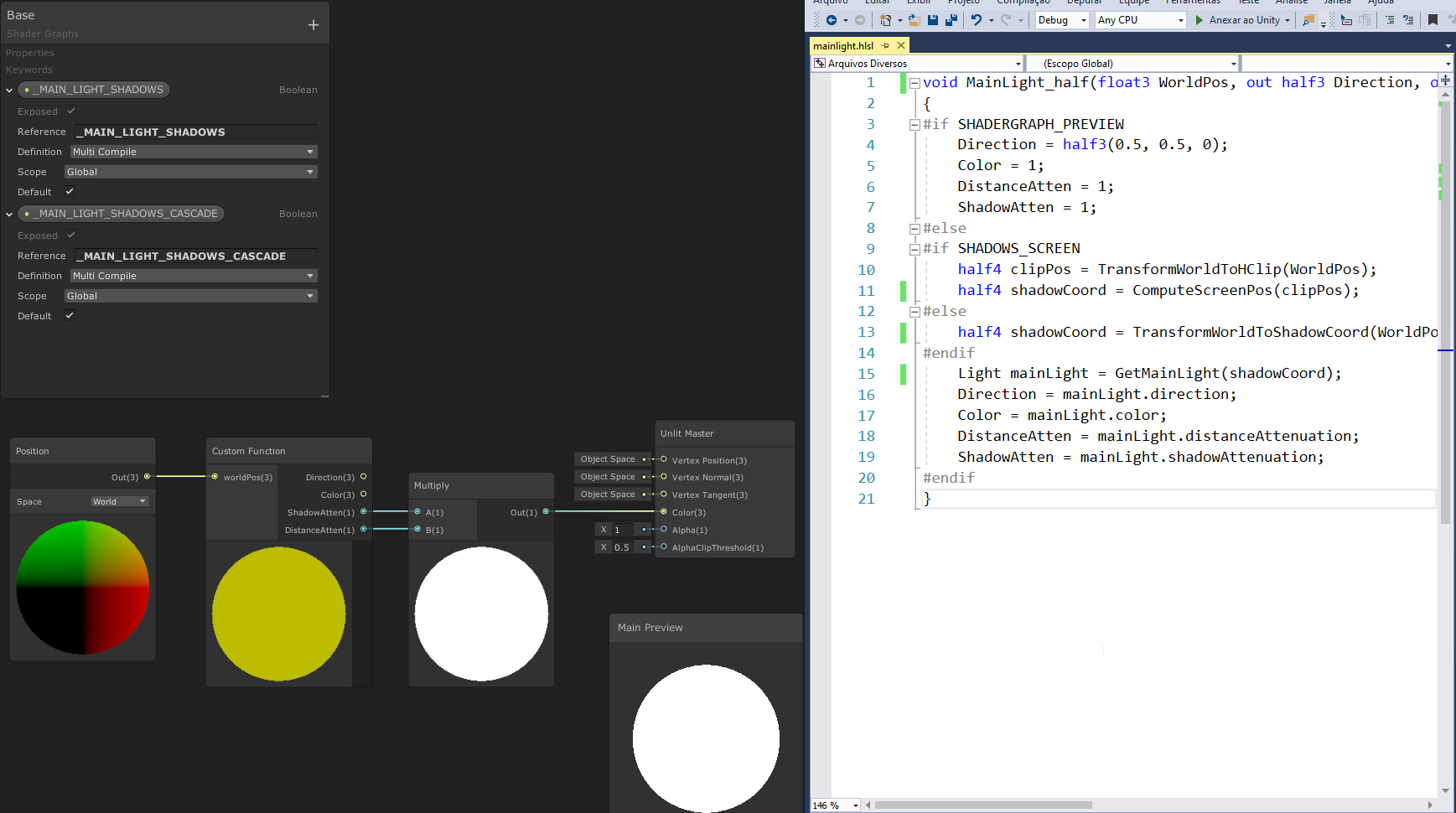
Howdy! I am using shader graph with Universal Renderer. I am trying to fetch the main light shadow information from an unlit shader graph, so that I can implement my own lighting, but having some issues as discussed here..:
https://forum.unity.com/threads/shadow-and-distance-attenuation-do-not-work-in-urp-unlit-graph.803025/#post-5615980
Hoping for any assistance!
Unity Forum
Hi!
I'm using Unity 2019.3.0f3 and URP 7.1.7
I'm trying to follow this tutorial:...
devout quarry
I use this in my project
using 7.2.1
shadow is being cast by the object in top left corner
regal stag
Alternatively, this tweet thread goes through a method I used (using URP 7.2.1, I don't think it works in 7.1.7 so you may have to update if possible) https://twitter.com/Cyanilux/status/1240636241252679681
Apparently you can also just use the PBR Master node, but set the Albedo to Black, Smoothness & Occlusion to 0 and use the Emission input for your graph color/lighting output. To me that sounds like it needs to do the lighting calculations twice though, although I've heard someone mention the complier strips the PBR one out, can't confirm that though.

Been looking into custom lighting for Universal RP (v7.2.1+) & #shadergraph (see thread)
This article is pretty good, but the Unlit Master won't receive shadows - unless you also use the keywords :
MAIN_LIGHT_CALCULATE_SHADOWS
_MAIN_LIGHT_SHADOW_CASC...

 Twitter
@devout quarry Do your shadows look good at a distance using that? I think I've used something similar and I had some glitchy looking shadows past a certain distance (something to do with shadow distance & shadow cascades I think. Might be because of something in the ShaderLibrary/Shadows.hlsl that needs _MAIN_LIGHT_SHADOW_CASCADE?)
devout quarry
yeah after a certain distance the shadow is removed
while for other shadows on 'normal' objects, they go to a lower resolution at that distance
regal stag
For me it wasn't just removing the shadows though, I had other shadows appearing like it was sampling the shadowmap incorrectly.
devout quarry
has to do with shadow cascaeds indeed
ah, I don't have that I think
this is with 'no cascades'
I'll try your approach also! Haven't tried it
regal stag
It's a little annoying as the default value in the blackboard isn't used for non-exposed keywords, so you have to set the keywords manually on the material with the debug inspector (or C# material.SetKeyword). I think I prefer using the keywords and Shadows.hlsl functions over having the custom function to sample the shadowmap though.
floral kindle
thanks @regal stag i am trying it out now, it seems annoyingly janky, the way we need to enable keywords manually 😦
I am getting thispipeline ready for our artists, who is fully capable of working with shader graphs, but needs to be given the tools to do more advanced stuff like this
Ill just implement the custom function to give him access to light data and he can do the rest. But this additional step is an annoying step in his workflow, since normally he doesnt have to deal with keywords directly like this
devout quarry
They should just provide us a 'main light' node 🙂
floral kindle
Yes agreed
I couldn't get it to work
I added the keywords manually, in debug material view
but the frame debugger still says my things are being rendered without the keywords, bleh
regal stag
Need to also have the keywords added to the main light subgraph, and I'm using the custom function from the link in that first tweet.
floral kindle
ah yes thanks my dude, it works now
I mistakenly 'corrected' MAIN_LIGHT_CALCULATE_SHADOWS to _MAIN_LIGHT_CALCULATE_SHADOWS
woven plover
hello, how do i get my red stained glass ball to look red when the ball is between camera and light?
right now its only showing red when light and camera look from the same direction
woven plover
i figured i will likely have to flip the normal of the glass, so it will be lit when light falls through it instead of on it
woven plover
hm nope that is not the effect i wanted.
i need to have a texture that is rendered when its illuminated from the back.
devout quarry
Use dot product between surface normal and light direction
 lost prairie
Hey a noob question; I'm using HDRP and shadergraph and..... there really isn't global variables? To change a value in all objects do I have to keep track and update each separately? or is there an easier way?
rapid acorn
There is @lost prairie
in shader graph you need to add variables.
It's all via shader graph window
lost prairie
@rapid acorn really? how? I couldn't find it 😦
rapid acorn
That's it
you have made a variable of type Vector2
That Exposed check makes it visible outside in the inspector
lost prairie
@rapid acorn I'm asking about global variables, shared by all materials using same shader
changed by Shader.SetFloat instead of Material.SetFloat
lost prairie
thanks anyway 🙂
devout quarry
I mean
Does it not work? Setting a variable by script
SetGlobalFloat
and then sampling it like you are doing shader graph _VerticalScanRange
lost prairie
I'm not sure if it's HDRP or shadergraph (or I'm doing something wrong) but I'm not getting SetGlobalFloat in my project. I think it's hdrp?
devout quarry
you need to disable 'exposed' as well btw
And does disabling the 'exposed' toggle do anything?
lost prairie
oh wait what it's working now >< I have no idea what I was doing wrong but it's there now
I was so sure I checked this dozen of times
lost prairie
I don't think it's about the exposed, I haven't changed that. but I guess I was doing something else wrong all the time somehow
lost prairie
hmm maybe it's overwriting global? I'll test that as well, thanks a lot @devout quarry and again @rapid acorn 🙇♂️
@devout quarry yep, just checked it. exposed overwrites so had to disable that. but my main problem was I wasn't even getting the method in intellisense probably because I was doing some silly syntactic mistake.
devout quarry
I often have my IDE acting up and not showing me certain methods
 pine iris
Hey! I need help making a stylized hair shader in the universal render pipeline. I want to use the tangents of an object's uv map to determine the direction of an anisotropic shader. If anyone knows how to do this and would be willing to tell me or point me to a tutorial I'd be extremely grateful (I'm still trying to figure out how to get anisotropy to work in unity so any information is helpful).
 knotty juniper
@mossy kestrel In general transparent shader do not recive or cast shadows, the shadow casting reqires wrinting to the depth buffer what transparent shaders do not do.
for a leef shader you can use a Opouqe shader with coutout to cut away any parts of the mesh you do not like to have drawn.
devout quarry
I'm trying to do something that is probably relatively common, but I'm puzzled on how to do it or what to search for. Basically I want to assign a texture to an object. The texture should ** not be visible in game view**. I want to use the texture to store 'information' that can be sampled by a shader for visual effects.
If you have an answer, feel free to tag me
low lichen
@devout quarry Well, if you add a texture property to your shader, then you can sample the texture and use that color for anything in the shader.
It sounds like a pretty simple question. Isn't this just what normal maps are? Textures that store directional data and used in lighting calculation.
devout quarry
That sounds very logical indeed haha
Although the exact thing I wanted to do was a bit different
You know how there is a camera opaque texture right
I have a post processing effect that samples that texture for some visual effect (outline). What I want to do now is instead of using the camera opaque texture, I want to use that secondary texture that I assigned to the object
So like an extra 'pass' where the shader looks at the scene, but only sees these secondary textures on all of the objects that have them, and samples it and uses it for some effect
low lichen
If it's a post processing step, then you need to have a separate render texture which you draw this secondary pass into. How you do this pass is up to you. You could add a second pass into the shader (which rules out Shader Graph) that has a certain LightMode tag and make a custom render pass that draws just that light mode, which is how the depth pre-pass is done.
That's making the assumption you're using URP
low lichen
@devout quarry I'm guessing you are using URP, then?
devout quarry
Yes! So for example the camera color texture or camera opaque texture (forgot the name), in the frame debugger you can see it. Basically what I think I want is that a custom texture shows up there in that list, and it shows all of the objects in the scene as black, except the ones that have a special secondary map applied to them with a specific name. And then I can sample this texture in my shader just as I sample the camera opaque texture
So instead of using the camera color texture as 'data' for my post process effect, I can choose per object what the 'data' is by assigning an additional texture
low lichen
So, there's always a target render texture which objects are currently being drawn to. Sometimes it's null, which means it gets drawn directly to screen, sometimes it's a render texture you've created in Unity and assigned in the camera, sometimes it's a temporary render texture you create and assign in code during rendering. The way URP does the color texture is it draws everything into this _CameraColorTexture you see in the frame debugger, then after rendering the opaques and skybox, it copies this texture to _CameraOpaqueTexture, which is what you end up accessing in the shader.
So you need to create your own temporary render texture, set it as the target at some point before the post processing step, then draw the objects that have this secondary map.
Then you can set _CameraColorTexture back as the target and you can read your temporary render texture after that.
If this secondary map doesn't require full color, you could make use of the alpha channel, which is of course unused in the opaque part.
Then you don't have to worry about any secondary render texture or passes, just draw the object as normal while also setting the alpha as whatever you want. It doesn't matter what it's set to for opaque objects.
In fact, Beat Saber uses the alpha channel to determine glow, so an alpha of 1 means full glow and 0 means no glow.
 fallen cypress
Hi
I don't know much about shaders , but Can we just convert the new principled ultimate shader from blender to unity if it's written in hlsl
?
oh its a node
Its compatible with unreal engine why not unity ?
unity new hdrp lit shader isnot designed for every materials ain't it?
Unty lit shader doesn't support IOR index of refraction
 outer whale
no idea, but blender's shader setup is really nice
im wanting to increase the black levels/decrease contrast of a night sky image to simulate light pollution. Is that possible with shaders, or would it have to be done programmatically?
harsh marsh
Trying to make a blood shader like in overgrowth but I'm confused on how to start. If you've never played overgrowth or don't know what I'm talking about, here's a diagram.
Lets say this guy got shot. The red dot appeared and from that red dot came smaller red dots that slowly made it's way down a random distance while making a trail behind them.
I'm not entirely sure how to tackle this. How would I map this blood onto the object? I can't really use the models uv coordinates so I need something else.
 remote mauve
This might seem like a very stupid question, are all values in the input struct received by fragment shader always interpolated from the 3 vertices' outputs?
outer whale
where can i find a list of shader keywords? it really hard writing a shader if you dont know what you can include/use
keywords may be the wrong name. im talking things like uv_MainTex, uv_BumpMap and worldRefl
i found this: https://docs.unity3d.com/Manual/SL-UnityShaderVariables.html, but it doenst seem to have all of them
 heady sierra
Hi, I'm trying to find and create Lightweight RP here, but there's none in the list.
They said Create > Rendering > Lightweight pipeline asset
But I cant find the rendering in the project area
already installed but cannot create 😦
vocal narwhal
there's an error in your console that looks important
heady sierra
What is it ya?
Ok solved, took me an hour. So basically I searched through the net, it was Lightweight RP. I searched through discord, it was renamed > Universal RP.
I installed, and it was conflicted. Then had to delete both and reinstall, then it fixed
cosmic prairie
@harsh marsh try using decals or a projector for projecting the effect on the mesh. for the effect's texture you need to make a compute shader I think that updates the blood every frame until its done flowing
devout quarry
@low lichen thank you for the explanation! I'll try to get to work
remote mauve
Is appdata.vertex.w used for anything?
Position data only contains xyz right, so is it fine to use w for something else like vertex alpha?
 prime pasture
Is it possible to do a layered rendering with URP? like have 2 camera, one that renders the X objects with Y processing effects, and another camera that only render the background?
 signal rapids
Hey, Shader Graph question. I'm trying to use a voronoi, generated in the graph, as texture for a triplanar node. But triplanar only takes a texture input. How can I use something generated in the graph as texture?
regal stag
@signal rapids You can't. You either have to use a (preferably seamless/tileable) Voronoi texture, or rebuild the Triplanar node functionality - I have a blog post which does this, see 'Multi-texture Triplanar' heading (It's only for the albedo/color triplanar, not normals though) : https://cyangamedev.wordpress.com/2020/01/28/worldspace-uvs-triplanar-mapping/
You will want to replace the Sample Texture 2D nodes with the Voronoi node. (You'll have to test both to see which is more performant, I'd probably go for textures unless the Voronoi angle needs to rotate).
signal rapids
Alright thanks, I'll check this out! @regal stag
regal stag
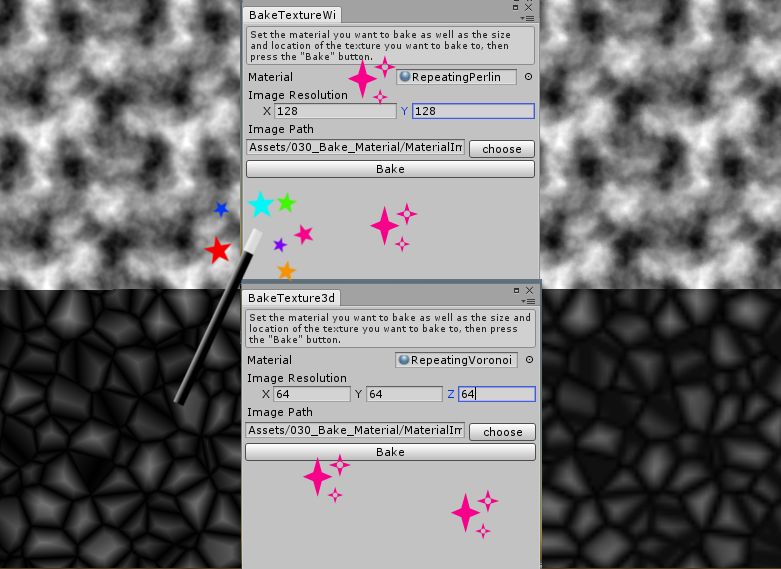
For the texture option, you can also make a shader that outputs the desired texture and bake it into a texture using something like this : https://www.ronja-tutorials.com/2018/10/13/baking_shaders.html
Ronja's Shader Tutorials
Calculating everything ony the fly in the shader gives us the most flexibility and is even needed for many effects, but if we don’t need the noise to...
But the output likely won't tile perfectly
signal rapids
It has to animate, so I think I'll try your triplanar rebuild with voronoi as texture!
naive mural
hello, does anyone know if there's overhead of creating a subgraph versus creating a custom node in shader graph?
remote mauve
https://cdn.discordapp.com/attachments/656274548366508044/691565043019546654/unknown.png
https://cdn.discordapp.com/attachments/656274548366508044/691565054545625108/unknown.png


Thanks for all the help, got it done now.
 meager pelican
Is
appdata.vertex.wused for anything?
@remote mauve Yes, it is used for the perceptive divide. I think.
This might seem like a very stupid question, are all values in the input struct received by fragment shader always interpolated from the 3 vertices' outputs?
@remote mauve
Not a stupid question at all. "Always" is a strong word. Usually, yes. There are keywords that can tell the shader compiler not to interpolate certain values though (google "flat" keyword). However it might be platform dependent so use caution.
remote mauve
Thanks, that answers both.
I need some values in fragment shader that belong to the quad, I ended up having those same values in all vertices so interpolation won't change.
meager pelican
Not uncommon. However if you can use "flat" it will save interpolators. I think there's data-size issues too with efficiency, so YMMV. I read/heard somewhere to try to keep your total amount of vert->frag data to size of 4 x float4 for efficiency. But that might be mostly a mobile issue.
packing the data into float4's is pretty common to keep it all "tight".
remote mauve
Hmm, I'm targeting mobile platform 😅
My current v2f struct:
struct v2f {
    float4 pos : SV_POSITION;
    float4 color : COLOR0;
    float4 data0 : TEXCOORD0; // u v
    float4 data1 : TEXCOORD1; // q b1
    float4 data2 : TEXCOORD2; // b2 b3
};
IDK....that SV_Position is it's own thing. So maybe not too bad! IDK about color0, but meh. Some hardware guru will have to comment further.
How's it performing?
If you can pack uv into an xy of data0 and q and b1 into zw of data0 and eliminate data1, I suppose that's more efficient.
remote mauve
All of those are float2 being packed into float4 so yeah, those are tight already.
meager pelican
cool. That's the best you can do.
remote mauve
Yeah
I actually only use the alpha of color, hence why I asked about position.w earlier.
I thought if it wasn't used I can pack alpha into there instead of having another float4.
meager pelican
Your comments are confusing me, but your posts make sense.
e.g. UV is a float2 so that would go into data0.xy, so what's data0.zw?
remote mauve
u and v have a minimum and a maximum
meager pelican
ok, cool. 🙂
remote mauve
Since I'm using only the alpha of color, should I change color from float4 to just a float?
I'm under the impression that internally it still uses a float4.
meager pelican
I think it's more efficient to float4 align the memory...so yeah it might pad it to be a float4. Memory access might just be that wide.
Again, probably hardware dependent to some degree.
remote mauve
Okay, I guess not much else I can do.
Initially I wanted to just cheap out and divide quads more to solve this, instead of learning shader stuffs
It was a pretty fun ride now that it's done, no regrets.
gleaming moss
@remote mauve you do not need to have all 4 elements of a texcoord used and there are some perf advantages to doing that. In your case, you can get away with just alpha in a float
interpolation doesn't really follow the same rules as traditional loads since they're very often all done with the whole wave and with scalar math anyway
you can also pack attributes together but most reasonable (i.e. not mobile GPU) shader compilers can transform your code for you if you just use the appropriate-width vectors
meaning that if you need 2 floats, use a float2, etc.
using Vulkan backends is a good idea since you can use Khronos shader tools
remote mauve
Hmm okay, I guess I'll change it to just a float then.
gleaming moss
really the only advice I can give is if you don't need a value, don't put it in the struct and your friendly neighborhood shader compiler can handle the rest
remote mauve
Gotcha 👍
gleaming moss
I can provide more technical explanation if you'd like-- there's a little bit of background knowledge required about how GPUs spend most of their time doing math but it can make some of this less arbitrary
not essential tho
swift totem
how can i access the alpha channel of texture in shader?
gleaming moss
.a or .w component ^
swift totem
thanks
low lichen
I think it can only define one value for each unique tag
devout quarry
Okay! thanks
gleaming moss
@remote mauve it used to be that graphics cards had specific hardware for doing this kind of thing that worked in width-4 vectors natively. Since the number of interpolants was also guaranteed by the API there was generally no reason to care about interpolator layout so it didn't really get thought about
devout quarry
And Shader Graph can't do multi-pass shaders right?
Does anybody know if Amplify can do that?
in URP
low lichen
Well, not user defined ones. It makes the shadow/depth pass and some more built in ones.
I think you can with Amplify.
devout quarry
Okay! thanks for the help
gleaming moss
@remote mauve so over the years GPU designers moved over from thinking 'one vector per pixel' to 'one scalar per pixel' and abusing something like SSE/NEON to do a lot of math in not a lot of time. If you've ever heard of waves/warps/wavefronts, that's referencing how these things are grouped together in hardware
there are a few conventions to how that works out for drawing, etc. but loosely you can think of it like the hardware processing the first pixel in the first lane /x component of a really wide vector-- like 32 units, the second pixel in the second lane/y component, etc.
also genesis of why branching (like doing completely different sets of instructions) is not great for shaders
you will do both paths all the time since the card may very well need to have both results in one lane or the other
VS -> PS is usually done by splatting one value across all lanes with dedicated instruction and then using funny mask generation with regular add/multiply instructions to get a unique value per lane/output pixel
the one value being one float/uint/whatever in the VS output
so anyways, that's my TED talk.
swift totem
and im here like how do i get a vertex lit alpha shader
gleaming moss
I've been at this for a while 🙂
Vector stuff was actually valid advice, just not for current GPUs. The last one I know of in desktop space was AMD Evergreen
that was like 2010? 2009
looks like Northern Islands was too
since we're also on a lore spree, you can also have a few extra inputs to your fragment shader like MSAA coverage (SV_COVERAGE) that aren't vertex shader stuff per se
neat, but advanced usage
MSAA-aware hashed alpha test, etc.
remote mauve
🤔
I think I'll leave fancy stuffs to last, for now it's just drawing quads for a simple 2D game on mobile, that isn't focused on visual.
gleaming moss
unfortunately I don't think there's too much cool hardware stuff™ for 2D in recent memory
granted I am mostly a 3D dude so I haven't followed as closely
devout quarry
@low lichen Sorry for tagging you so much but I think I'm getting there!
This selected cube has just 1 pass at the moment, but it is a special pass
And I have this rendering in frame debugger
This is outputted to a render texture which I can sample!
And now I can do outlines based on that map! Thank you x1000, your explanation help me a lot
gleaming moss
are you trying to generate outlines based on the texture content?
You don't need a separate pass for that
(FWIW)
devout quarry
I want to be able to give objects secondary maps that define where the outlines should be rendered
These maps should not be drawn in game view
devout quarry
So I don't want the outline based on depth/normals/color of the game view
gleaming moss
but you can absolutely just pop that in the shader for the object
or at least, the special object
the cube, in this instance
gleaming moss
you have less control in screen space honestly
 fathom plinth
well not anymore
devout quarry
In my head the nice thing is that now I can combine the 'ease' of using a screen space effect together with the artistic freedom of choosing exactly where outlines should be using the secondary map
gleaming moss
short version-- make a translucent/alpha shader for the cube, do a ddx/ddy on texcoord and use for your sampling offsets in Sobel/whatever
run same sobel shader like normal
no need for the extra write
fathom plinth
how would you get object outlines
gleaming moss
could do depth mask, but that's what I was asking about re: texture content
N dot V stuff can work tho
devout quarry
Just a second I'll show exactly what my goal is
gleaming moss
the outline would always be on the 'inside' of the object which can get a little interesting with edge-on stuff
you're also most of the way there to stuff like suggestive contours and more industrial-strength NPR techniques
devout quarry
To start with, I have this 'DNC' outline effect with outlines being generated based on a DepthNormalsTexture and a ColorTexture
This is just the debug view, but you get the idea
gleaming moss
yep, standard postprocess outline shader stuff
gleaming moss
well define 'artistic control' here
if you have regions that you know will always need a line, consider just putting that in the texture
or mesh
devout quarry
I want to be able to draw an outline wherever I want. I thought about drawing outlines in the albedo texture or something, but then the line is 'fixed'
Once I draw the line, it's drawn
gleaming moss
IRL line artists will do this, FWIW
devout quarry
sure I can go back in the texture editor and change it, but I want to be able to change things like the width in Unity
gleaming moss
thin/thicken lines according to perspective
devout quarry
So the idea was to generate a secondary map for objects where I want user-defined outlines
Forexample a texture like this
gleaming moss
you are going to have some issues with texture filtering here, I think
devout quarry
And then pass that texture to the outline effect, which is looking for colour discontinuities
gleaming moss
hm. Texture-only stuff is very very doable in-shader with the method I describe and is likely slightly faster since you don't need to read/write a separate RT first
most of the Sobel stuff should be pretty well-cached since your offsets in texture space are still pretty small
outlines can be done with the inflated hull method, but that can also be done as a separate pass in the same shader
will mention that Arc System Works of Guilty Gear/DBF fame were happy with this + hand-painted lines
no perspective funny business required
devout quarry
Basically what I want, workflow-wise, is to be able to exactly define where outlines will go AND change the visual of the outline inside of Unity
So hand-painting outlines is not a fit method for me
gleaming moss
SDF texture?
devout quarry
Yeah sure, how the texture is generated does not matter
Using SDFs was actually a plan of mine
gleaming moss
you can get constant screen-space width with the ddx/ddy tricks and knowing the output render target dimensions
no separate pass required (but theoretically sound)
meaning it will do what you want, but is a bit clunkier imo
you're basically asking 'am I less than <user parameter line width> pixels from the nearest edge'
in screen space
if yes, emit the line color, if no, do the "normal shader"

When drawing basic primitives we want nice smooth edges. This means both pixel correctness and antialiasing. In my previous article about drawing a rectangle I showed how to use a distance function…
swift totem
how can i inspect the legacy shaders code? im really struggling to get my around shaders.
its not the concept, but where do i get all the needed information for lighting and stuff
gleaming moss
in the sense that you want some explanations for why lighting code looks the way it does?
swift totem
i can apply a texture, that seems easy enough. but how do i get the lights in my scene to light it
yes
gleaming moss
rather, are you looking for information about "what sort of constant data do I have" or "what is a BRDF and what's the deal with all these dot products"
 gray heath
i have light textures on my models with custom shader, i need to add emissive textures, didnt know how, so i added regular texture and multiplied its color 2.5 times.
Its bright, looks alright, unless you enter dark area.
So.. how do i add unlit texture?
or emissive
gleaming moss
@swift totem https://docs.unity3d.com/Manual/SL-UnityShaderVariables.html if it's the first one
gray heath
cuz the 2.5 color intensity on shaded texture was dark, in darkness, i increased the multiplier to 5x, but now the texture looks bad and not like the original texture
swift totem
@gleaming moss thank you very much for your help! i dont even know what brdf is, soooo... im a total beginner; i know how to code, thats it.
gleaming moss
@swift totem BRDF is Bidirectional Reflectance Distribution Function, or "given the light is coming from this direction and the surface is pointing mostly in this direction, how much light is bounced in this third direction I am interested in?" It's the physics/math behind rendering
swift totem
how did you get started, if i may ask so bluntly?
gleaming moss
smashing my face into graduate level research with no background (please don't do what I did)
this series at GDC is decent but assumes some physics background
http://www.pbr-book.org/ is also a very long read but decent
own a physical copy of 2e
swift totem
you are doing gods work! thank you
gleaming moss
http://www.pbr-book.org/3ed-2018/Reflection_Models.html might be of interest
the book is built around path tracers so a lot of it won't be super relevant to getting things in Unity quickly
you should see a lot of familiar words from Unity or other graphics stuff 🙂
in shading
gray heath
https://hatebin.com/wdvlhiqhvi anyone knows how to turn Emission to emission texture or atleast unlit?
gleaming moss
you want to write the emission texture to the Emission field of the output, not Albedo
o.Albedo = lightTex.xyz+(emissionTex.xyz*emissionTex.w); should be something like
o.Emission = emissionTex.xyz*emissionTex.w;```oke, ima try, thanks
gleaming moss
albedo is a reflection value so anything you put there is subject to light angles, etc. which is not what you want if the surface itself is supposed to be emitting light
proper raptor

Tutorial to set up the shader for Red Dot.
Sights & Scopes Shader available on the Unity Asset Store! https://assetstore.unity.com/packages/vfx/shaders/fullscreen-camera-effects/sight-scope-shader-163386
Unity Asset Store: https://www.assetstore.unity3d.com/en/#!/search/page...

Tutorial to set up the shader for Scopes.
Sights & Scopes Shader available on the Unity Asset Store! https://assetstore.unity.com/packages/vfx/shaders/fullscreen-camera-effects/sight-scope-shader-163386
Unity Asset Store: https://www.assetstore.unity3d.com/en/#!/search/page=...
swift totem
wouldnt the scope picture be fixed in the center and not move around with your camera perspective, so its more parallex(if thats the right word)? otherwise it looks really nice
because im comparing it to escape from tarkov (also made in unity) and there it looks a bit different
proper raptor
I'm not trying to hit the BSG level haha.
swift totem
😅 😁
i would like to know whats the difference between theirs and your implemntation? do you know?
and on that topic, does anybody know if there is a source to the shadow technique used in s.t.a.l.k.e.r? if one of you played it, u know what i mean. these shadows are still one of the best shadows ive seen in a videogame. thunderstorms generate sharp shadows while other lights still project their shadows with relative brightness/darkness and its all dynamic.
pine iris
Does anyone know how to make a hair highlight shader in the URP?
Or any anisotropic shader for that matter?
gleaming moss
are you using shader graph, working in a particular style, etc.
naive mural
hello, does anyone know if there's an option on the shader graph to automatically rename the gpu references of properties to property names? I often forget to rename them and then when i try to set a value to a property on a shader via code it doesn't set it and i end up debugging for quite some time.
devout quarry
Don't think so
You mean like if the property name was 'Top Color'
the reference should be like '_TopColor'?
naive mural
no, just "Top Color"
devout quarry
Yeah no that does not exist afaik
naive mural
welp
devout quarry
Because then what would they rename it to?
using 'Top Color' as a reference name is not something I would want
and I imagine a lot of users have a lot of preferences so difficult to make a 'default'
But I like the idea, maybe you could set a formatting expression that lets you define how it should be named based on the property name
pine iris
@gleaming moss I'm using shader graph and I'm making a non photorealistic game.
gleaming moss
Best bets are custom nodes or engineer handwriting your shader, then. Custom lighting models are impossible by design in Shader Graph.
Is that a matcap or are you tweaking one of the BSDF nodes
pine iris
would you like to see the nodes?
gleaming moss
I suspect it's going to confirm my earlier advice, unfortunately, but I can advise further once I know how your Blender stuff works
pine iris
pine iris
Yes but there's nothing on it cuz everything I've been trying haven't been working
So basically No-ish
gleaming moss
first place to start would be getting the toon shader going-- there's a few examples going around that use the Unlit node and cheat their way into reading light data
pine iris
How would one cheat their way into reading light data?
gleaming moss
there's a custom code node that can do it for URP
it will give you the direction and some shadowing information
Unity Technologies Blog
With the release of Unity Editor 2019.1, the Shader Graph package officially came out of preview! Now, in 2019.2, we’re bringing even more features and fun...
as an aside I think it's hilarious that there's a huge number of Unity users requesting custom lighting, Unity themselves create hacky workarounds for custom lighting, and yet they still won't allow custom master nodes in Shader Graph because "it might break compatibility"
pine iris

gleaming moss
basically
pine iris
So how do I put this custom function into my shader editor?
gleaming moss
should all be in the blog post.
gleaming moss
should do your fresnel bit
you might need to use the Tangent input depending on your mesh, and likewise having this be scaled by light value is important unless glowy hair is part of art direction 🙂
pine iris
Wow thanks so much
gleaming moss
you can try lerping the tangent/bitangent into the normal to break up the highlight
pine iris
@gleaming moss Is there a way that I can get the tangent from the uv map?
gleaming moss
that's the shift trick I was talking about
you can lerp the normal and tangent or bitangent together with a value you get from a texture
pine iris
I think it'll make more sense if I show you this:
gleaming moss
yep, looks like a UV layout for hair cards
pine iris
There is none
This is what I get by plugging the tangent of the uv map directly into the material output
gleaming moss
you can actually just use the UV value directly to blend too
probably need to read the Blender documentation on the tangent node
what Blender is that
also are you using a normal map texture at all
pine iris
It's blender 2.82 and no I'm not using a normal map or texture at all on the hair
gleaming moss
the basic Unity bit should be right then
if there's no normal map it's probably to help figure out what's the tangent and what's the bitangent (loosely if the hair is growing up or down or side to side in the UV map)
you might want to use the tangent vector, since you might need to use the Tangent input depending on your mesh
(that's what using one vector or the other comes down to)
pine iris
Using the tangent vector instead of the bitangent vector works
gleaming moss
yep, looks like your hair is side-to-side rather than up-to-down
based on the strips
pine iris
I've never used the bitangent vector node before. What does it do?
gleaming moss
think of them as the X, Y, and Z vectors on the surface of the mesh
since that's the tangent, bitangent and normal vector respectively
if you're a visual thinker imagine those little colored bars in mesh viewers
pine iris
Thanks!
grand jolt
anyone have a shader that makes dashed lines of objects outline?
left ones are orthographic view
 desert orbit
@cursive rain Please don't multi-post. Pick one channel
outer whale
im working on a custom cubemap skybox shader, because i want to be able to add things like a day/night cycle and blacklevel increases due to light pollution. How do i sample the cubemap? do i have to project the sphere's uv coords onto a cube, and if so, how would i do that?
meager pelican
What pipeline are you working in?
@outer whale
I have some for the standard pipeline. IDK how it varies for URP/HDRP.
outer whale
standard i guess. i went with the default 3d project
meager pelican
Have you seen their standard cubemap skybox shader? And how it samples now?
outer whale
no. how would i take a look at that?
meager pelican
I'd suggest starting with their standard cubemap shader. You can get all shader source here:
https://unity3d.com/get-unity/download/archive
the drop-down box will have an option for build in shaders. IIRC you're looking for "Skybox/Cubemap".
outer whale
i have the standard unity license, i thought i didnt get source?
meager pelican
You don't get ENGINE source (particularly the c++ stuff), but they publish their built-in shaders. I don't think that's a licensing issue at all, as long as you're a legit unity user.
outer whale
am i blind? im not seeing a link to shaders, or even anything about shaders
meager pelican
Windows or Mac?
What unity version?
Go to the version, then go to the windows or mac drop down box, and in the list select "Built in shaders"
outer whale
oh. thx. derp on my part
outer whale
got it working now. v.vertex.xyz for the win
outer whale
im not the best with matrix math, how would i convert this to rotate around different axis?
{
  float alpha = degrees * UNITY_PI / 180.0;
  float sina, cosa;
  sincos(alpha, sina, cosa);
  float2x2 m = float2x2(cosa, -sina, sina, cosa);
  return float3(mul(m, vertex.xz), vertex.y).xzy;
}```
preferably the X axissimply changing the mul(m, vertex.xz), vertex.y to mul(m, vertex.yz), vertex.x doesnt change anything
 open raven
hello, after enabling "log shader compilation" at Graphics settings, where can I find the compilation info?
floral kindle
Hey @regal stag , just wondering with the shadow stuff you posted on your twitter - did you ever get the cascades to work correctly?
Nevermind, Keyword seems to be _MAIN_LIGHT_SHADOWS_CASCADE, not _MAIN_LIGHT_SHADOW_CASCADE. Using this keyword the cascades work correctly
devout quarry
What's your question?
 dire jolt
Shouldnt it be blue as a base and when i paint on the red channel come out red?
Had to remove the teamviewer ID 🙂
it's a default plane from unity
gleaming moss
your vertex color is likely white
or at least red
you can confirm by hooking up a constant into the blend factor
dire jolt
if i import a plane from blender is it black by default then?
gleaming moss
offhand I think they'd be white since using vertex color as a tint is a pretty common practice
easiest method there is to set the color in Blender directly
dire jolt
Aah, yeah i had this idea to make foam on water using vertex paint. but since its behaving so wierd i wanted to test it in a controlled scene
gleaming moss
perfectly sound idea in theory-- I think your mesh just doesn't have the data you expected. Merits of being explicit 🙂
dire jolt
well i tried it to make it black first
and now it works 😄
Except for another little bug but that should be simple to fix
devout quarry
Aah, yeah i had this idea to make foam on water using vertex paint. but since its behaving so wierd i wanted to test it in a controlled scene
@dire jolt I do this, works great
Just need enough vertices and indeed the plane will be white by default
 half gyro
Hello guys ! I'm trying to experiment with SRP batcher on my custom SRP, but I can't create a simple shader that is SRP batcher compatible. I'm using Unity 2019.3.5f1, and it always says that unity_ObjectToWorld was found in another cbuffer than UnityPerDraw, even when it's not.
Here is the simple code that I'm trying to make compatible: https://pastecode.xyz/view/f0a56618
It's a simple Unity Unlit shader basically
 steady schooner
I've got a shader question...
How do I make the shader not strech when I apply it?
I want it to be proportional.
 abstract estuary
How do I add a shader to a procedural generated map
 soft jacinth
@abstract estuary You need to be more specific on how the map is being generated, the material the map uses is what the shader can be applied to
abstract estuary
Im using a spritesheet file that contains all the textures
https://i.imgur.com/uqZ1fUN.png


 amber saffron
@steady schooner It's because you're using the UV as source of your noise, and the objects is stretched.
Either add ad tile/offset node to control the tiling of the UV, or use an input that is not dependent of the object scale, like worldPosition.xy
@abstract estuary Applying a shader is just applying a material with the assigned shader in it to your object.
Having no idea of what your generated map looks like and what you want to achieve visually doesn't help us to help you.
Wild guess : you're generating a map with square tiles ? Assign uvs corresponding to the tiles you want in your tilemap, and just use a regular shader on the material with the tilemap assigned in the main texture slot
abstract estuary
Im not using a tilemap
This is how the map looks like currently
But it changes everytime I start the game since I use a random seed
amber saffron
Ok, so what's the question here ?
abstract estuary
How do I add a shader to the water lol
amber saffron
Oh, so that's a totally different question now !
If you want to have a separate shader for you water, the water part of the terrain need to either be a separated mesh, or a submesh
rapid acorn
Is there a way to modify the shader property variables and not have that saved permanently in the material property block?
Suppose I have an exposed variable ABC of range type(float), and I modify it via C# by SetFloat method. The modified value gets saved in the material file.
I don't want to have that saved.
amber saffron
Well, fortunately the answer is in your question : use MaterialPropertyBlock : https://docs.unity3d.com/ScriptReference/MaterialPropertyBlock.html
Or, if you're accessing the material from code from a renderer, use Renderer.material and not Renderer.sharedMaterial
rapid acorn
I am using image.Material, here image is the renderer (UI stuff).
but it ain't working unfortunately. :/
amber saffron
Oh, sad, it doesn't have the same behaviour as renderers.
You can still make by doing a clone of your material before modifying :
image.material = Instantiate(image.material); should work if I'm not wrong
rapid acorn
Interesting. Lemme test and report back.
Well Well Well, it seems that's the solution 🙂 thanks @amber saffron
prime pasture
I want to combine two render textures together using a shader, and send the result to the screen, how can I achieve something like that?
I have 2 cameras that render to a Render Texture
Do I need another camera to achieve something like that or I can do it without another camera?
amber saffron
Maybe the easiest is to draw a fullscreen quad on a third camera, that uses a shader combining your two textures ?
prime pasture
Thanks forgot I could do something like that lol
devout quarry
In a normal shader I can do this
Set the LightMode tag
Is there any way to do the same for a shader graph shader?
stone sandal
there is no way to edit the lightmode of a shader graph at the moment
devout quarry
Alright then I have an additional question
I'm using this, as it gives me the same result as a 'multipass shader'
the 'second' material here that I use as a second pass is very very basic
I don't think SG supports multiple shader passes
But is it possible to somehow combine a SG shader pass with a non-SG shader pass to make a 2-pass shader
The method in the screenshot works perfectly for me, the 'Test' material is a SG shader and the 'Test Outline' is a shader that was not made with SG, but I'm worried about the performance warning it's giving me
stone sandal
SG does not support custom passes right now. and there's no good way to do the second part that you asked -- the closest you can get is generating the final shader from the master node and modifying the passes there, but you would have to redo it for any change you make to the graph
devout quarry
Alright
And they say 'costs performance', do you know how expensive it really is? The second material is really just this
1 texture sampled and put on the model
low lichen
The extra cost there is probably setting up the second material, whereas multipass would be the same material so it only has to set it up once
It's still two drawcalls
devout quarry
Makes sense
low lichen
But, as far as I know, URP/LWRP will only use the first pass
So that warning message doesn't make sense for URP
devout quarry
You mean multipass shaders are not possible in URP?
low lichen
They are possible, but Unity won't automatically draw the mesh multiple times for each pass in the shader
It will draw the mesh once with the first pass it finds that is valid
Whereas the built-in render pipeline will draw the mesh multiple times for each pass it finds
devout quarry
Ah makes sense, I was using a 2-pass shader in URP before and it was doing what you mentioned
but that was also what I wanted it to do so that's fine
I just wanted to make my first pass with SG and not with handwritten code
low lichen
How about using keywords instead of passes?
Pretty sure you can define keywords in Shader Graph
And branch with them
devout quarry
I'm not sure how that would help in my case
low lichen
You'd have to add some code to enable some OUTLINE keyword globally using Shader.EnableKeyword before drawing all the renderers again.
devout quarry
That does seem interesting, but where should the keyword enable happen then? Right now my frame debugger is like this
I have an outline prepass right here before opaques
that creates this render texture
which is then used in a post processing effect
low lichen
Are you using a Render Objects feature to do that pass?
devout quarry
to draw an outline on the original object
uhm no
it's a ScriptableRendererFeature I made myself
like this
low lichen
Oh okay, then you just enable the keyword before calling DrawRenderers
And disable it again afterwards
devout quarry
That seems like a really good idea 😄
I have no time to add it today, but I added some TODOs in my code, thank you very much!!
Ah but
I am using this
So passes with the tag "LightMode" = "Outline" will write to the render texture
how would that work then? Since I can't set the lightmode tag of a SG shader
low lichen
My idea would involve rendering all renderers again, just with that keyword enabled.
So it wouldn't need its own LightMode.
devout quarry
Ah but then all objects in the scene will render to the render texture? Just with a different output (based on the keyword)
low lichen
Yeah. You could reduce the amount of renderers by using a layer mask.
I would recommend using the new renderer layer mask. It's an option in the Renderer component and is separate from the game object layer system.
I've been using that layer option to do custom effects that can be applied to any renderer just by changing that layer. Like for a fresnel highlight effect, I made a transparent additive shader that just adds the fresnel highlight which is then drawn on top of the renderer after opaques. And the nice thing about the renderer layer mask is that you can choose multiple layers for one renderer, so you can easily stack effects.
devout quarry
Okay I'll try to use the new renderer layer mask!