#archived-shaders
1 messages · Page 142 of 1
 dense valley
 grand jolt
it is right under tiling and offset
dense valley
that is an example of what it should be
This is what I actually get :
And thats what i should get :
(yes thats my actual problem)
 regal stag
I'm not sure if there's an easy way to change how the inspector organises properties. Might need to look into this? : https://docs.unity3d.com/Manual/SL-CustomShaderGUI.html
 grand jolt
Tiling and Offset are from Texture2D
dense valley
yup
grand jolt
if you want Panning to show remove the Tag infront of it
dense valley
the [HideInInspector]?
regal stag
Removing that, will unhide it from the inspector. It might not be in-line with the other properties as you want it though.
dense valley
Ok but what tickles my mind now is that there are other lines just like this one further down the shader and they work fine
Im like : why this one? why? i doubled checked the spelling and everything and just... what... still dont get it
grand jolt
Just remove the tag ..
dense valley
ok
yup its there now
its just not in-line, unless we can do something about that.
grand jolt
Show the tutorial you have this from
grand jolt
then show the other shader that has it working
dense valley
and just use that to reorganize things at better places imo
the other shaders dont have panning on the diffuse texture
grand jolt
so where did u get that screenshot then
dense valley
i wanted to add it so i can mess with it if i wanted to
my unity
fyi its the free shader release
@grand jolt you there buddy?
regal stag
That shader is already using a Custom Editor (ThryEditor, based on this https://github.com/poiyomi/PoiyomiToonShader/tree/master/_PoiyomiShaders/ThryEditor/Editor ). I don't think it will be easy to make a property be in-line with the tiling/offset texture properties.
dense valley
Ah ok... Er... so iirc you say that i would need to understand thry editor in the first place?
regal stag
Yeah, but you'd also need knowledge on how to write custom editors for unity in general. It looks like the part that draws the texture properties are in the GUIHelper class.
You probably can't just change it though, as that would change how ALL texture properties are drawn. I don't know enough about how this editor works to help further.
I'd probably just suggest keeping the property being on a different line.
dense valley
ok ty
 sharp tendon
Anyone know why my plane isn't deforming?
 ivory niche
@sharp tendon should be working, works here
maybe you need to press "Save Asset", or you're in a bad version of shadergraph / urp
sharp tendon
Yeah It works now, it was just the mesh I was using, but I'm trying to also make it do this, and I just can't seem to do it. =/
Any ideas? 😮
 pallid compass
Hello, I'm attempting to customize the color palette of this shader but am having difficulty. The properties have the colors that can be customized, however I am having trouble as my values are hexadecimal. What can I do to use hexadecimal values instead?
Shader script:```/* This shader picks between four possible colours based on the luminance of
the pixel. It is very similar to the Greyscale shader, with the added step
of picking one of four colours.
This shader works best with the ImageEffectPixelate.cs script.
/
Shader "SMO/Complete/PixelGB"
{
/ The Game Boy could use different palettes, so we allow passing in
four colours to represent the four possible shades.
*/
Properties
{
_MainTex ("Texture", 2D) = "white" {}
_GBDarkest("GB (Darkest)", Color) = (0.06, 0.22, 0.06, 1.0)
_GBDark("GB (Dark)", Color) = (0.19, 0.38, 0.19, 1.0)
_GBLight("GB (Light)", Color) = (0.54, 0.67, 0.06, 1.0)
_GBLightest("GB (Lightest)", Color) = (0.61, 0.73, 0.06, 1.0)
}
SubShader
{
Tags { "RenderType" = "Opaque" }
    Pass
    {
        CGPROGRAM
        #pragma vertex vert_img
        #pragma fragment frag

        #include "UnityCG.cginc"

        sampler2D _MainTex;

        float4 _GBDarkest;
        float4 _GBDark;
        float4 _GBLight;
        float4 _GBLightest;

        /*    Once the luminance is calculated, the 'lerp-saturate cascade'
            trick is used to pick the correct colour instead of slow
            branching (if-statements).
        */
        fixed4 frag (v2f_img i) : SV_Target
        {
            fixed4 tex = tex2D(_MainTex, i.uv);

            float lum = dot(tex, float3(0.3, 0.59, 0.11));

            int gb = lum * 3;

            float3 col = lerp(_GBDarkest, _GBDark, saturate(gb));
            col = lerp(col, _GBLight, saturate(gb - 1.0));
            col = lerp(col, _GBLightest, saturate(gb - 2.0));

            return float4(col, 1.0);
        }
        ENDCG
    }
}
}```
 proven sundial
https://twitter.com/kurtruslfanclub/status/1080620576547303424 Has anyone made a unity SDF shader for URP?

did you know that Photoshop now lets you make signed distance fields for great reduction in your decal mask sizes?
Retweets
232
Likes
1275

 Twitter
My initial thought was to just use smoothstep, but after looking at Harrys coded shader here, it seems to be a bit more technical: https://halisavakis.com/my-take-on-shaders-ui-sdf-icon-shader/
That last shader doesn't seem to be totally URP compatible (at least from my quick test now).
 vocal narwhal
@sharp tendon here's my method
If you want to smooth out the ends of 0-1 values you can also put them through a smoothstep
proven sundial
Thanks @vocal narwhal I'll copy your setup and play around with it some. To be honest i don't really understand it just from looking at it. 😬 haha
vocal narwhal
that's not for your thing
proven sundial
Oh, thats not "SDF"?
vocal narwhal
I was replying to the person I @'d
vocal narwhal
color.a *= smoothstep(_SDFThreshold, saturate(_SDFThreshold + _Smoothness), col);
seems to be the only relevant line in that shader
then they just clip it
the rest is specific to UI shaders I imagine
proven sundial
I'm happy to hear that! Couldn't really find a simple answer to "is sdf just smootshstep with a complicated name"..
regal stag
@pallid compass I would convert the hex colours in a C# script before sending them into the shader.
For converting, Color color = ColorUtility.TryParseHtmlString(hex), note hex should be something like "#ff0000" : https://docs.unity3d.com/ScriptReference/ColorUtility.TryParseHtmlString.html
For sending into the material/shader, get a reference to the material and use material.SetColor("_Property", rgbColor) : https://docs.unity3d.com/ScriptReference/Material.SetColor.html
 fervent tinsel
pretty sure the original SDF paper from valve also used smoothstep for their base implementation
 verbal hornet
In the shader graph in HDRP using a Lit Master node, the emission color seems to have no effect at all on the color of the object. The emissive color field works fine when I use the standard HDRP/Lit material. Am I missing something?
 gilded portal
Hello ! May anyone have knowledge to share regarding faking shadows from a vector position for light position in Unity ? thank you
example of result:
verbal hornet
Update on my question: I found there is an Emission Node that has an exposure weight field. When I use that, set the exposure weight < 1, and pipe it into the Emission field of the Lit Master node, then I can see the results on my object.
 rapid acorn
👌
 wraith wing
hi guys, is there's anyway to make PBR as default in unity?, kinda painful to re-import... thanks...
rapid acorn
Put up the question @oblique rivet someone will pop up with a solution.
 oblique rivet
I have tree leaf, I apply a transparent shader the actual texture, because I want to occult soft transparent shade.. but it modify the texture color instead, for my leaf this result that some leaf are gone and some are there.. I'm not a pro at shader so... I wonder what may be wrong... the tree have 4 level LOD .... same texture each... do I need to change the texture for this LOD ?
this is my transparent shader I use
I already have a leaf shader specular and when I drop my transparant over it. leaf disapear
but the transparent suppost to be effective at 200 LOD so I should see leaf at closer look
I think I need to modify the defaut shader and apply by code the transparent.... it's weird because on other object like house roof, the texture doesn't change and I don't lost detail.
rapid acorn
ColorMask 0 turns off rendering to all color channels
 meager pelican
See the Alpha-to-coverage example.
https://docs.unity3d.com/Manual/SL-Blend.html
oblique rivet
@rapid acorn thank for helping RGB or RGBA make the leaf polygon no longer transparent.. so all the leaf appear but I see full polygon
 umbral prairie
I'm looking into projecting texture on water with hdrp. Like here for creating stylized water. Basically decal projection. (This one is not from HDRP)
You can see sort of blacky painting texture applied to the water surface
I'll be probably using crest hdrp water, but it supports the hdrp decals.
Here is the question. It seems to overwrite the color, not blend with it, and because of it looks a little bit like a mess. And I want to make it multiply, also I want foam to stay white and not to be impacted by the projection. Is that possible?
Does anyone have any experience with that? That's the quick test developer of Crest did for me, I personally don't have experience with shader graph yet, but asking people here if something like what would be even possible.
Should I try it?
 winged pelican
hello, can I use Frag with different parameters ?
for example :
`FragExample (v input ){
if( flag )
color = red;
if ( !flag )
color = blue;
return color;
}
pass {
Stencil NotEqual
name 01
#pragma fragment FragExample // use this with flag false
}
pass {
Stencil Equal
name 02
#pragma fragment FragExample // use this with flag true
}`
I need to use same function for two passes, just with one different line. So wondering, how to do this correct way
rapid acorn
@oblique rivet I dunno why you are using colormask, but have you tried using the default standard shader? You only need to take alpha into account. Also is your sprites/texture file you are using has Alpha enabled?
@winged pelican how about using a boolean variable that you check in the function frag and that bool is switched in different passes?
(PS: I am not sure if it will work)
oblique rivet
@rapid acorn duno... I really need to learn this.... or it's there a software to create and ajust shader faster for newbie like me lol
or I could show you my actual shader in private
I hate so much unity hub..... I want to edit the shader in unity.... unity decide to start the hub instead of using the current instance.
same thing for my personnal asset... I click on it on the explorer, it start the hub instead of open it with the current instance
rapid acorn
If you are doing Unity, you can learn the new Shadergraph. For now you may wanna try the default standard shader first and put your texture in Albedo (I think that's what it's called)
oblique rivet
thank @rapid acorn for your help, I will trie Shadergraph.
wraith wing
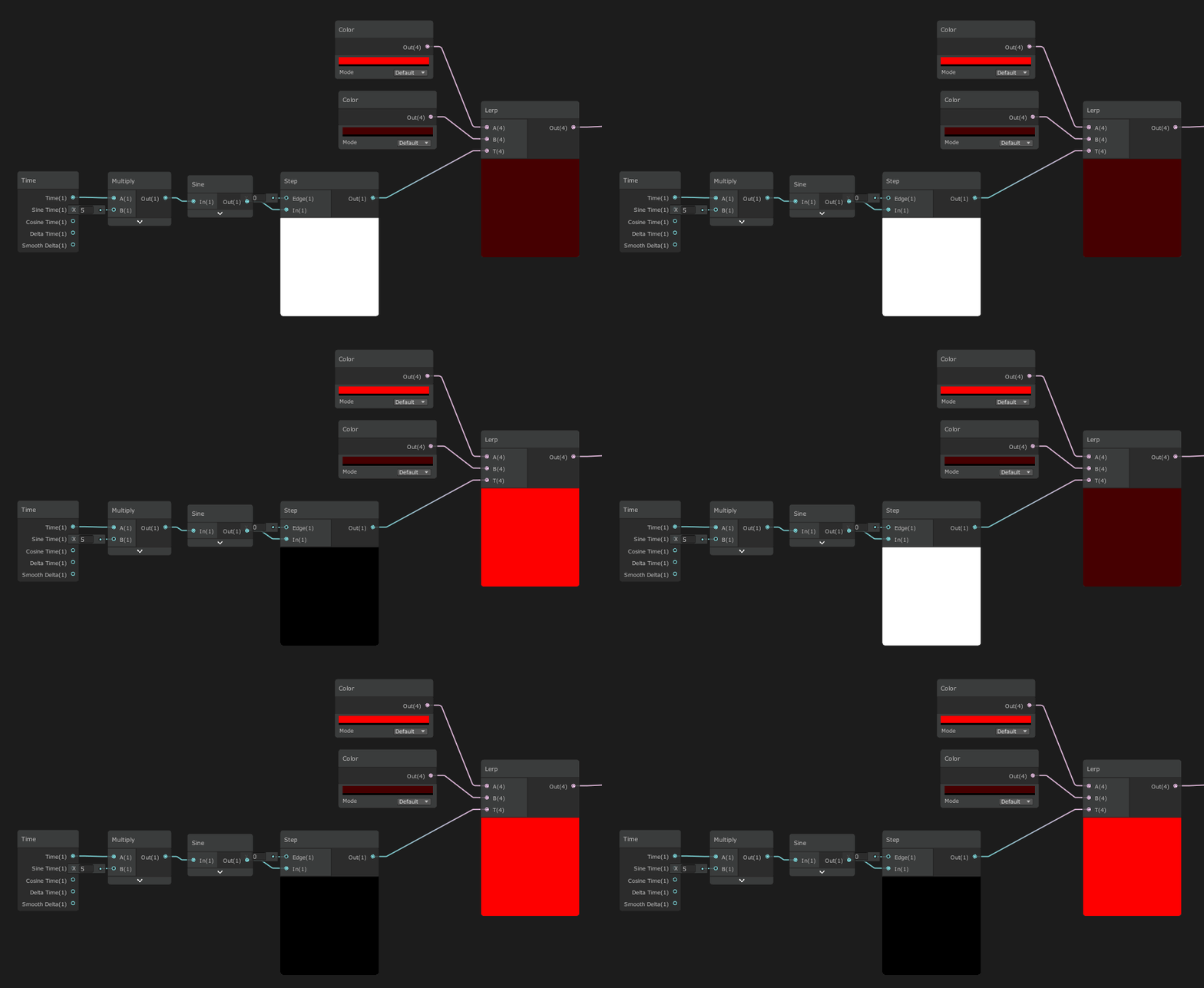
hi guys, so i need some on-off blinking glow effect, but there's a long pause at start and end (like have easing in and easing out in anim), how to make it more straight ?
 thick fulcrum
I just animate emission using the animator, no need to have a new shader. can make it fast, slow sharp or ease in out etc.
wraith wing
anyway hot to do that?
vocal narwhal
@wraith wing Adding delta time doesn't make much sense in this case. Perhaps try something like this? I'm not sure what exactly you're looking for
That step would have an Edge of 0 to have equal black vs white timing
rapid acorn
Or make a varibale multiple with the glow colour and access that variable to flip between 1 and 0 in updated function via C# script.
wraith wing
@wraith wing Adding delta time doesn't make much sense in this case. Perhaps try something like this? I'm not sure what exactly you're looking for
@vocal narwhal i'm use delta as limit, because won't completely dark., ok thanks, i'm gonna try it...
 fathom plinth
@wraith wing if you don't want it completely dark you can put that output into a lerp, where you can then choose the colours https://i.imgur.com/48YtQoe.gifv
 fervent tinsel
just found out about this:
SG got it's own productboard: https://portal.productboard.com/8ufdwj59ehtmsvxenjumxo82/tabs/7-shader-graph
Product roadmap and feature requests. Welcome to our product portal.
(there was one for URP before)
wonder what they really meant by this one: https://portal.productboard.com/8ufdwj59ehtmsvxenjumxo82/c/50-ui-integration-with-shader-graph
You will be able to use Shader Graph to create custom UI shaders.
(only under consideration atm, so don't get hopes up)
wraith wing
@wraith wing if you don't want it completely dark you can put that output into a lerp, where you can then choose the colours https://i.imgur.com/48YtQoe.gifv
@fathom plinth thank you so much, it's what i looking for (well without step), because seems better if there's transmission...
grand jolt
im using the default directional light and my shadows are completely black but the video im watching hes using default and his is light soft shadows. how can i get something like that? https://prnt.sc/rgovti https://prnt.sc/rgow23


 devout quarry
Anyone know any reasons?
@silent timber it would take a lot of work to implement and is not a priority at the moment
 silent timber
:<
rapid acorn
@grand jolt camera and light being used have some shadow configuration... Check them out
 devout quarry
@fervent tinsel thank you for the product board link
I knew it was coming, didn't know it would be so soon
it's nice
I wonder if they will actually move features up/down based on votes
fervent tinsel
I hope they'll add HDRP some day to that board
 nova needle
I have a world made out of tiles (one tile is probably as but as a minecraft chunk). But it won't be infine. How should I create the meshes for the world. I want the tiles to be able to change colors (I could do this through the Color array and using or writing a shader that uses the color array). What should I do:
- One big mesh for the whole map
- Small chunks (say 5x5 tiles), with different meshes (for the height), and different color arrays (for different colors) but the same material
- Every tile is its own entity/mesh (all the same mesh now, just different positions at which the meshes are rendered) and a different color property (now color is just a material property, not the color mesh array, which maybe makes it easier somehow?)
Any help appreciated, I just don't want to spend a lot of time doing the wrong thing in case one of the ways is obviously better
 zenith shadow
I have a vertex/frag shader that writes into the depth texture. To do so, I used a fallback (diffuse or vertexlit), cause unlit shaders won't write into depth texture themselves.
My issue: the texture has transparent pixels and I want to cut them, but I can't stop the fallback to write the depth anyway.
Noticeable because of the glitches in the depth of field.
 stone sandal
man we can’t sneak anything past @fervent tinsel haha
we will keep it updated as best we can as we’re working on items, and votes from the public will be taken under consideration during task prioritizing. can’t make blanket promises, but we do want to hear what you guys want in a more organized way c:
zenith shadow
Can I exclude a shadow caster pass via LOD or a similar mechanism?
It doesn't work as-is and I don't find more explanation about that exception so far.
fervent tinsel
@stone sandal you know if HDRP is getting their own? 👀
stone sandal
no I have no idea haha
fervent tinsel
it's cool to have some stuff like that
I like that it's more loosely timed, no strict dates
the old unity roadmap kinda failed there as it was more tied to actual engine releases and there wasn't like anything but r&d and then target engine versions
stone sandal
we also like that it’s more loosely timed, cuts down on the people trying to plan their development around hard promised dates that are actually loose commitments that might change
fervent tinsel
and prevents people crying out aloud on forums for unity "breaking promises" 😄
it's bit harsh but that happens a lot
stone sandal
indeed. the reason it’s not advertised on the forums yet is we’re gathering progress shots and designs to add images to the cards, so it’s clearer what’s being worked on
fervent tinsel
this is related to the SG refactor, right? https://portal.productboard.com/8ufdwj59ehtmsvxenjumxo82/c/52-master-stack-and-stage-blocks
We're going to replace fixed-function master nodes with a flexible stack of shader features. You'll be able to build graphs that work on URP & HDRP simultaneously, and we're going to make it easier to understand your shader's performance through clear stage separation.
stone sandal
it is! it’s stage 2 following the targets branch I was able to get merged last week
fervent tinsel
yeah,was about to ask about that as I didn't see that level functionality in the initial PR
kinda bummed about GDC but I totally understand the situation
can just imagine we miss a lot of presentations for upcoming stuff because of this
anyway, it's cool if we get back some nice way to do both HDRP + URP shaders, like mentioned on that card
on the earlier versions, you could just swap the master node, but that option's been long gone
stone sandal
it’s a work in progress! there’s a lot of back end cleanup to make it possible
fervent tinsel
looking forward to it 🙂
 slow herald


I think I took too much acid🙃
#indiegame #indiegames #gamedev #indiedev #indiewatch #IndieGameDev #gaming #indie #IndieDevWorldOrder #madewithunity #unity3d https://t.co/JQfPGWfyrB
Twitter
grand jolt
I made a shader that can render circles with infinite zoom, no pixelation
devout quarry
Signed distance field?
grand jolt
no

Wolfram|Alpha brings expert-level knowledge and capabilities to the broadest possible range of people—spanning all professions and education levels.
@devout quarry here is a snippet
            half4 frag(v2f i) : Color
            {
                float value = ((i.uv.x - .5) * (i.uv.x - .5)) + ((i.uv.y - .5) * (i.uv.y - .5));
                half4 color = (step(value, .25) * _Color) + (step(.25, value) * half4(0, 0, 0, 0));
                return color;
            }
you can actually simplify this
            half4 frag(v2f i) : Color
            {
                float value = ((i.uv.x - .5) * (i.uv.x - .5)) + ((i.uv.y - .5) * (i.uv.y - .5));
                half4 color = (step(value, .25) * _Color);
                return color;
            }
This is a signed distance function though right?
length(p) - s
With s being the radius of the circle
1/2 in your Wolfram case
devout quarry
Alright neat
https://www.iquilezles.org/www/articles/distfunctions/distfunctions.htm here's a whole list if you didn't see the page yet
Tutorials and articles of Inigo Quilez on computer graphics, fractals, demoscene, shaders and more.
These things are really cool and very useful
devout quarry
These are the most advanced things I made with signed distance functions, but the limits are endless and 3D is a beast I haven't touched
grand jolt
sprite components... do they have a hidden mesh filter and renderer?
i think ill try to make components for each shape
would work like a sprite
but how do I handle the mesh without needing the filter and renderer?
@devout quarry
this channel disappears when I leave it.
I need to go to #🔎┃find-a-channel to find it again
@desert orbit
 desert orbit
@grand jolt Right click on the server icon in the left and toggle hide muted channels
desert orbit
Just uncollapse the category the channel under then. (keep hiding unchecked)
devout quarry
@grand jolt I don't know anything about a sprite component. I made those with just a quad so they do have a mesh filter/renderer
grand jolt
anyone knows why I get this on the shaders? "Could not create a custom UI for the shader 'SyntyStudios/Blood'. The shader has the following: 'CustomEditor = ASEMaterialInspector'. Does the custom editor specified include its namespace? And does the class either derive from ShaderGUI or MaterialEditor?
UnityEngine.GUIUtility:ProcessEvent(Int32, IntPtr)"
 low lichen
@grand jolt That means you got that shader from someone using ASE (Amplify Shader Editor) to make that shader and you don't yourself have that asset in the project.
low lichen
Does it not show any properties for that material then?
grand jolt
do you mean this?
low lichen
So it's just a warning in the console?
low lichen
I doubt it's because of this warning though
grand jolt
they look like this
low lichen
Are you using URP or HDRP?
regal stag
I imagine that warning isn't why the shader isn't working, but you could likely open the shader file and remove the CustomEditor line
low lichen
@grand jolt Is this asset pack URP compatible?
umbral prairie
I have water ocean asset, screenshot:
It has shaders
I need to add a texture to it
Like in example below:
Is it hard/long to do that? It's probably possible to just sample texture like caustics/foam
How many hours would it take for someone who knows how to code shaders?
I have no experience at all with that
low lichen
It depends if you count the time researching ways to achieve this effect
The code shouldn't end up being more than a handful of lines
umbral prairie
isn't just texture sampling to color, just like foam/caustics work enough?
@low lichen
low lichen
Looks like there's some distortion going on there
umbral prairie
You mean here?
If yes, it's just that the texture applies on top of the waves too, and they are super small, but they are still there. So on the positions where the water height is higher it looks sort of distorted
My new water ocean asset has waves too. So it will probably work fine
@low lichen
It should at least
Your eye just can't spot the waves on the image without the texture because it's plain color
there is distortion there too
low lichen
There's a difference between a texture mapped on top of the waves and a texture getting distorted by the waves. The two won't look the same.
I'd have to see this effect in motion to determine which it is
umbral prairie
@low lichen https://youtu.be/K-wJavLUzBM
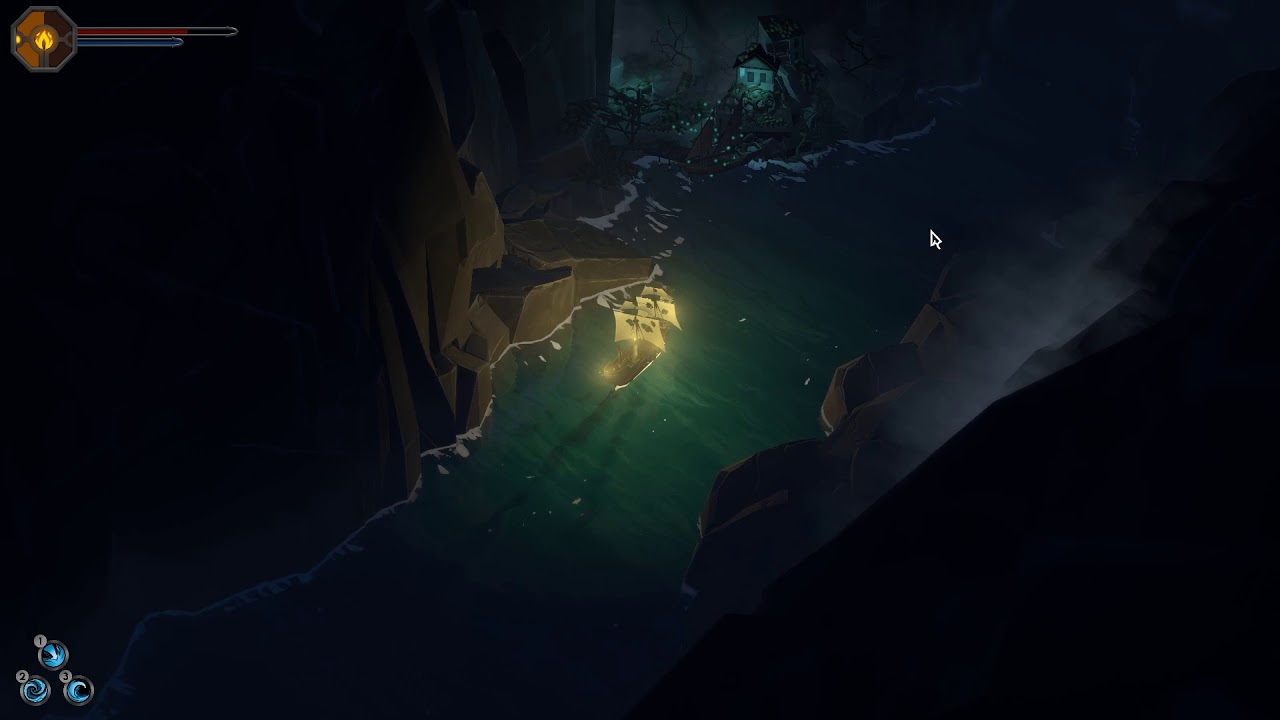
Is this video fine or should I make video with ship not moving?
low lichen
So you already have a shader that does this?
umbral prairie
Yes, the problem is that I have to transfer my project to URP
And this shader is for very old water asset
which is deprecated
I can't use it with URP
but I have to change to URP because I need VFX Graph
low lichen
Are you trying to recreate it in Shader Graph?
umbral prairie
No, I'm just using another water system, called Crest Ocean System
It's even better with the functionality than my older asset. It just doesn't have this effect
on my older asset, Ultimate Water System, I achieved this effect by applying decal on top of the water
but it doesn't work with Crest because decal is not applied to waves
I think it can be achieved with changing water color/shader though. Developer of Crest told me so.
@low lichen
low lichen
You're better off asking the developer then.
umbral prairie
I asked him, but he doesn't have time to guide me through the whole process
He said he doesn't have experience with projections/this kind of effects
This was his idea to sample texture
I mean, foam is applied on the waves too so it should work
But I have to ask other people with experience
low lichen
Well, it's gonna depend on the shader. If you can get the world position of the fragment, then you can build a UV from the XZ position and use it to sample some repeating texture.
umbral prairie
That sounds just impossible to me honestly, I don't understand what it means. Would it be hard to learn some basic shaders from scratch and do it myself or I would get further hiring someone? I'm experienced with C# programming in Unity but not graphics programming
Problem with hiring is that we have problems with financing, and I need this particular piece of work done to show investors/publishers that we can achieve what we want on newer Unity versions, to get financing
And I'm like out of money completely
I can probably try to learn shading
but I don't know how much would it take
I need just this one stupid effect, and I don't want to spend 1 month learning shading for it, because I need to do other work too
low lichen
Have you looked at the shader for the water?
I'm assuming it's shader code rather than a shader graph, right?
umbral prairie
yeah, shader code
Yeah I did look into it
I don't understand anything written there... Yeah, it samples texture, but I don't know how to work with it
It normalizs stuff, samples normals, saturates, computes, I'm completely lost
low lichen
Is it anything similar to the open source one?
https://github.com/crest-ocean/crest/blob/master/crest/Assets/Crest/Crest/Shaders/Ocean.shader

GitHub
An advanced ocean system implemented in Unity3D. Contribute to crest-ocean/crest development by creating an account on GitHub.
umbral prairie
I'm currently using this one, as I heard it's similar in the URP version, so if I could change here I will be able to change there
So this is the one I was looking into
low lichen
It'll definitely differ in terms of lighting, but probably identical otherwise
umbral prairie
Any idea what to do with this one?
If I can change this, I can probably figure out URP too later.
low lichen
Well, it does have float3 worldPos : TEXCOORD7; in the Varyings struct, which is the data that the fragment/pixel shader gets
And I can see that it's being used for the foam
https://github.com/crest-ocean/crest/blob/ac1020cbaea9df7a1122a33a372003f2602940dc/crest/Assets/Crest/Crest/Shaders/Ocean.shader#L479
And you can also see that it's using input.worldPos.xz, like I mentioned before.
umbral prairie
Okay, so what does it mean and how I can use it?
low lichen
Do you just want to have a transparent texture that you blend on top?
low lichen
That's doable. You can see the line where the foam is added to the overall color of the pixel here:
https://github.com/crest-ocean/crest/blob/ac1020cbaea9df7a1122a33a372003f2602940dc/crest/Assets/Crest/Crest/Shaders/Ocean.shader#L513
So you'd want to modify col before this line so that it doesn't blend on top of the foam
umbral prairie
Oh, that's neat
low lichen
First thing you should do is just add the texture property for this transparent texture
All the properties are defined at the beginning of the shader file.
It's in a different syntax than the actual shader code.
umbral prairie
Yeah, I see it
low lichen
You should be able to find some other texture property, copy paste it and rename the variable and display name
umbral prairie
How is the texture property named there?
I see many "TEXCOORD"
But that's not it as I understand
low lichen
Then you haven't scrolled up far enough
Here's the texture property for the foam texture:
[NoScaleOffset] _FoamTexture("Texture", 2D) = "white" {}
umbral prairie
Yeah I also found caustics
[NoScaleOffset] _CausticsTexture("Caustics", 2D) = "black" {}
Okay, got it
What is the "black" or "white"?
can't it support different colors?
low lichen
So the variable name is _FoamTexture, which is the name used in the shader code, it's labelled Texture in the material property and the default texture is just a 2x2 texture filled with white pixels
That's what "white" is
Just the default texture if no texture is selected.
umbral prairie
Oh I see. Yeah.
low lichen
There's a couple of strings you can choose from. Get ready for a lot of magic strings and functions in shaders that you'll just have to figure out by looking at documentation
umbral prairie
Okay.
low lichen
[NoScaleOffset] is an attribute like in C# that just says that the texture property in the material inspector shouldn't show any Tiling and Offset settings
But for your texture, I'd say we do need that
low lichen
So just pick a place to define your texture property, maybe at the bottom, give it a name and just make the default texture "white" for now.
It's not going to be empty, so it doesn't really matter
umbral prairie
Okay
low lichen
Now before you can use a property in the shader, you have to define it in the global scope, so not in any function.
The shader code is in HLSL, and the type for a texture is sampler2D
umbral prairie
_StylizationTexture("_Stylization", 2D) = "black" {}
Like that?
oh, white
Yeah
low lichen
@umbral prairie That looks valid. You should see it in the material inspector now.
low lichen
"black" would probably be more correct, so if you have no texture, it'll not show up at all
umbral prairie
Yeah
I see it
and tiling and offset
uniform sampler2D _CameraDepthTexture;
Is this global definition?
low lichen
Yes.
umbral prairie
I don't see where foam/caustics are defined though
low lichen
The uniform part is optional and I never use it, so it'd be enough for you to just add sampler2D _StylizationTexture;
There's a couple of .cginc files that are being included in this shader
Using the #include "file" format
#include will literally just paste the code in that file into the shader during compilation, so I think OceanFoam.cginc has a sampler2D _FoamTexture; in it somewhere
umbral prairie
Where should I define it? Is it important? This _CameraDepthTexture is defined somewhere at the bottom of the script
low lichen
You have to define it before the function you'll use it in is defined
In this case, we want to use it in the Frag function, which is the function that is run for each pixel and decides what color the pixel will be.
umbral prairie
sampler2D _StylizationTexture;

            half4 Frag(const Varyings input, const float facing : VFACE) : SV_Target
            {
                const bool underwater = IsUnderwater(facing);
                const float lodAlpha = input.lodAlpha_worldXZUndisplaced_oceanDepth.x;
So like this?
low lichen
Yeah, that's fine.
umbral prairie
Okay, that's something already
low lichen
Okay, so now we need to decide where to sample this texture and apply it to the color.
I can see some lighting functions being called in the Frag function. I think we should sample the texture before all that.
umbral prairie
Okay
low lichen
Actually, I'm just seeing the Reflection part
It makes sense the foam is applied after/on top of the reflection
What about this stylization texture?
umbral prairie
Not sure, but you can see in the gameplay video that it reflects the lighting, and the reflection is not affected by the texture
I think reflection should not be anyhow ruined/changed/distorted by the texture
It just changes the color of the water
low lichen
Okay, I'd say we should try putting it here
https://github.com/crest-ocean/crest/blob/ac1020cbaea9df7a1122a33a372003f2602940dc/crest/Assets/Crest/Crest/Shaders/Ocean.shader#L488
We can move it somewhere else later if that doesn't look right
umbral prairie
Okay
low lichen
That line fortunately comes right after this col variable is defined, which is what ultimately gets returned as the pixel color.
So we can just modify this value and it should look right
In fact, why don't you try modifying it to some solid color:
col = half3(1, 0, 0);
That should make the ocean completely solid red
low lichen
Amazing
It'd probably look a little better if you changed that to multiply, so:
col *= half3(1, 0, 0);
That will set the green and blue channel of the color to 0 while leaving the red untouched.
umbral prairie
For some reaosn it became purple
It has a console exception
Unexpected "*="
Syntax error
It's probably
low lichen
Hmm, weird
low lichen
*= should be valid, but you can try that too
low lichen
I guess there's not much red to begin with in the ocean
umbral prairie
Oh yeah I got it
I just returned the old code
which was blue
so it's not red because no red in the color I've set
Yeah, sorry
low lichen
Anyway, we'll just continue with the texture
umbral prairie
Okay
low lichen
To sample a texture in a shader, you use the tex2D function.
This function has 2 parameters (and some other overloads we'll ignore). The first takes a sampler2D, the texture, and the second is a float2 uv.
umbral prairie
Yeah, I see
low lichen
It expects the UV to be from 0-1, where 0,0 is the bottom left corner and 1,1 is the top right. (top and bottom might be swapped around, but doesn't really matter).
If the texture is set to repeat in the texture import settings in Unity, then any value over this range will just repeat, so 1.1, 1.2 will become 0.1, 0.2
The UV we're gonna use is the world position of the pixel, specifically the X and Z position of the pixel.
Luckily, the Frag function already has access to the world position in input.worldPosition, so we should be able to do something like:
half4 stylization = tex2D(_StylizationTexture, input.worldPos.xz);
So, float3 is the same as Vector3, just 3 floats.
half3 is like float3, but it has half the precision.
So instead of each float being 32-bit, they are 16-bit.
So you'll get slightly less accurate colors, but it won't be very noticable and it'll be faster to compute for the GPU.
umbral prairie
Okay, I see
low lichen
Usually lower precision values are used for color, but higher precision is used for UVs and positions.
That's why worldPos is a float3 instead of a half3
So now we have a variable containing all 4 components of our texture, RGB and alpha.
We can try just setting col to the rgb part of our texture:
col = stylization.rgb;
Hopefully, you'll see your texture getting mapped onto the ocean.
umbral prairie
Wait a sec, I have some sort of invalid world position error
Maybe I wrote something wrong
low lichen
I wrote input.worldPosition at first, but edited to input.worldPos
I just wrote the variable name wrong
low lichen
Alright, almost there then.
You might notice that the tiling and offset settings aren't changing anything
Let's fix that.
umbral prairie
Tyling is kind of weird then
Yeah....
Haha, you're knowing even without seeing
yeah, it's weird
Looks super weird
low lichen
So Unity will pass the tiling and offset values in a single float4 variable, where the xy are the XY of the tiling, and zw are the XY of the offset.
The name of this variable is {TextureName}_ST
So in this case, _StylizationTexture_ST
So you need to add this variable to the global scope, so just after you define the texture:
float4 _StylizationTexture_ST;
Done
low lichen
Like I said before, lots of magic string and variable names
umbral prairie
Well it's not that hard actually. I imagined it will be harder
It takse a lot of sense, It's just trying to calculate what pixel color is
I defined this texture
But tiligin still doesn't work
low lichen
So now comes a little bit of vector math. We need to modify our uv, input.worldPos.xz, with this tiling and offset somehow.
The tiling is pretty simple, we just need to multiply the uv with the tiling XY, so:
half4 stylization = tex2D(_StylizationTexture, input.worldPos.xz * _StylizationTexture_ST.xy);
For offset, we add _StylizationTexture_ST.zw to this multiplied UV value:
half4 stylization = tex2D(_StylizationTexture, input.worldPos.xz * _StylizationTexture_ST.xy + _StylizationTexture_ST.zw);
So now both tiling and offset should work.
umbral prairie
Yeah, it seemingly does
low lichen
Alright, now we need to replace our col = stylization.rgb; line with something else, so that it blends properly.
If you scroll down and look at how the foam is added, you'll see it's using the lerp function
low lichen
Have you used lerp before in C#?
umbral prairie
Yeah
low lichen
Oh saturate is just a clamp between 0 and 1
umbral prairie
Oh okay
low lichen
You could also use the clamp function, but I believe saturate might be accelerated on some GPUs
But the compiler probably just replaces your clamp with a saturate if that's the case
umbral prairie
What is 1. -? Why is "." added right after 1
col = lerp(col, scatterCol, saturate(1. - exp(-_DepthFogDensity.xyz * pixelZ)));
Oh that's with underwater
Here is foam:
                #if _FOAM_ON
                col = lerp(col, whiteFoamCol.rgb, whiteFoamCol.a);
Well, this is clearly a person that is used to coding in GLSL, the OpenGL shader language.
There, it doesn't automatically convert integers to floats
So just a 1 would be invalid. 1. will be interpreted as 1.0, so a float.
But in HLSL it doesn't matter.
umbral prairie
col = lerp(col, stylization.rgb, stylization.a); is it right?
umbral prairie
What's the difference between this and multiplying the col with texture rgb?
low lichen
Well, lets say the stylization texture was fully red, so the values would be (1, 0, 0, 1)
And lets say the ocean is fully blue, so (0, 0, 1)
umbral prairie
Multiplying would make it black?
low lichen
Multiplying these two would end up doing 1 * 0, 0 * 0, 1 * 0
So yeah, black
Lerp will actually blend these two, so you'd end up with a purple at 0.5
umbral prairie
Aha, I see
low lichen
The visibility of the stylization texture is determined by its alpha. So right now, if you wanted it to be less visible, you'd have to edit the texture to make it more transparent.
umbral prairie
What color does the original texture need to not blend? For example if I want some parts of the sea to stay the same as original shader color, and some parts of it to be changed with texture?
low lichen
Yeah, like I said, it's the alpha that determines that.
umbral prairie
Like if I have chunks of "ink" on my texture, but between them is normal water color
Won't alpha make the "ink" part more transparent too?
Oh, or do I change it only on some pixels somehow?
low lichen
Yeah, it's just a texture, so each pixel has its own transparency/alpha value.
low lichen
If you'd like, you can also add another property to control the overall transparency of the texture
So you'd just multiply the stylization.a with that property
umbral prairie
And it seems to be affected by height of the waves, so if I have a whirlpool texture is clearly lowers a bit on it
Okay, I see
It's actually not that hard!
I will be able to learn shaders myself if that's how it works
low lichen
Yeah, I'm realizing now that editing existing shaders is a very good way to learn
umbral prairie
It's probably easier than creating new ones
low lichen
There's a lot of boilerplate code you have to write to get a working shader.
And you never write it all by hand, you basically always start with some template shader.
umbral prairie
But I heard that there are also shaders which have multiple threads
and you like, have to code in different threads
is it in Compute Shaders?
I was scared of that
low lichen
Well, you're already multi threading!
The shader is just a program that is run for each pixel that the object takes up on the screen
And the GPU runs this shader in parallel on many many cores
The hardware is specifically designed for it
umbral prairie
So it determines itself. I see. I think I've just seen some people manually defying which threads to use or smth
like with [x, y, z] before the function
smth like that, I'm not sure
low lichen
Yeah, that's compute shaders
And it's thread groups that you're controlling there.
I don't understand it either, but I've written many compute shaders
low lichen
I basically always use [8, 8, 1] and that seems to work okay
If I'm running the compute shader on a 2D texture, then the z remains at 1
If I was working on a 3D texture, then I'd do [8, 8, 8], but I've never had to do that yet.
umbral prairie
3D texture? Texture for 3D object, or like 3D texture?
low lichen
I think it's basically choosing how many to batch on each core
low lichen
Yeah, just a 3D texture. It's just a bunch of 2D textures layered on one another
umbral prairie
Oh, I see
low lichen
Like an array of 2D textures
low lichen
No, I wouldn't say so
umbral prairie
Pixel ones seem to be straightforward enough, they are just determining the color of pixel
low lichen
You can use compute shaders for anything
The functions themselves never return anything, but the function can assign values to global variables
That you can then read from script
A compute shader can also read and write to textures on a pixel basis
umbral prairie
So it's basically just "calculation" shader, which doesn't work with graphics, but rather does something with data
Right?
low lichen
Yeah
So a very simple compute shader would be:
#pragma kernel FillWithRed

RWTexture2D<float4> res;

[numthreads(1,1,1)]
void FillWithRed (uint3 dtid : SV_DispatchThreadID)
{
    res[dtid.xy] = float4(1,0,0,1);
}
RWTexture2D means a texture property that is readable and writable and <float4> means each pixel is a float4, rgba.
I took that from the documentation
they are using (1, 1, 1) as threads, but I'd assume that (8, 8, 1) would be better.
As in, run faster.
The dtid is like the x, y, z index for this pixel.
So you can imagine it like 3 nested for loops.
low lichen
And writing to the texture is like writing to an array, where instead of the index being an integer, it's 2 integers, x and y.
low lichen
HLSL has this cool thing where you can write .xy or .xyz or xz or .rgb, .rgba or any combination of those to get a float2 or float3 or however many components you want out of a larger vector.
There's no difference between .xyz and .rgb
You can choose whichever makes more sense in the context
umbral prairie
Oh, with same results
low lichen
Yeah
umbral prairie
It's all very interesting
What would you recommend to learn this more?
More editing shaders? 😄
low lichen
For general concepts around graphics and rendering, I'd recommend this series from catlikecoding
https://catlikecoding.com/unity/tutorials/rendering/part-1/
A Unity Rendering tutorial about matrices and transformations. Part 1 of 20.
It doesn't go into shaders until the second part
umbral prairie
Okay, I see
low lichen
You can see the overview here
https://catlikecoding.com/unity/tutorials/rendering/
A collection of tutorials that cover how to write your own shaders in Unity.
It goes through a lot of topics
low lichen
No problem! I hope I've ignited some interest in shaders in you. They're a lot of fun to learn and mess around with.
umbral prairie
Btw, if we're here already, can I ask you one more question? One another thing which I want to do with graphics programming - getting particle data from each particle of VFX Graph each frame and transferring it to another external shader. Is that even possible? It seems to be that it's logically possible, because if data is there - then it can be read... But I've read some answers from Unity developers saying you can't get ParticleBuffer(as I know buffer is something responsible for particle data) even from another GPU shader.
It will be probably much harder to realize, but I just want to know if it's theoretically possible or what's going on here
As VFX Graph is made on GPU, I want to somehow just transfer data from GPU to GPU
Should I dig into it more? Or that's something that is impossible? @low lichen
low lichen
What did you have in mind to do with that data?
umbral prairie
I have a screen space fluids shader
which takes particles info and draws whole fluid
I want to render fluid basically
but with VFX Graph you can't do that because particles can't "Blend" together
low lichen
Hmm, so each pixel on the screen would loop through every particle to determine what the color of that pixel should be?
That sounds pretty heavy
umbral prairie
No idea how is it made, but it works relatively well with Shouriken particle system
Performance is good
low lichen
What's it called?
umbral prairie

Unity Forum
Hello, everybody.
I am veryexcited to recommend my new plugin SSF Particle2Fluid Shader Util. It is dedicated to rendering particle data into smooth...
It's a new plugin
There was an old one, but this one seems better
It also states "Currently, on each frame, particle data is transferred to the GPU. If anybody has a GPU-based particle system and manages to extend the input as guided, the framerate can be higher.
"
https://ssf-p2f-shaderutils.readthedocs.io/en/latest/advance_topics/extend_inputs.html
and here is some info about extending inputs
Developer told me "It's possible to extend particles input by following our documentation as long as its particle data is on gpu and is in the form of Compute Buffer."
low lichen
Well, you wouldn't be able to access the buffer from the VFX directly in the shader. I've been using the term global scope, but really it's local to just the shader itself.
So you'd have to get a reference to the ComputeBuffer in C# and pass that to the screenspace effect.
I don't know if that's something VFX Graph exposes
umbral prairie
isn't there source code there? Can't it be exposed myself?
source code available"
it's opensource as far as I know
low lichen
Yeah, source code should be available, so maybe you can
umbral prairie
Why didn't they include smth like this already? Exposing something doesn't sound too hard
Or is it probably harder than changing from private to public? haha
low lichen
I'm looking through the source now
umbral prairie
FluvioFX which is basically fluid simulation based on VFX Graph seemingly uses these particles positions in its calculations
but I'm not sure
low lichen
I think it's just shader code that is included in the VFX Graph itself as a custom node
And all the particle data is already available there, obviously
umbral prairie
Oh
Yeah
Makes sense
Okay, then maybe it's possible to include screen space fluid rendering to VFX Graph as a custom node or something?
It would probably take more work
but I don't need that now, I will be able to hire a graphics programmer for that later I think
low lichen
No, I don't see that being possible
low lichen
The ComputeBuffer is probably somewhere in some script that can be exposed
umbral prairie
I don't get why not exposing it by default
low lichen
Though, you would need to convert it into the struct type that the fluid plugin is expecting it in
umbral prairie
It just needs position
it also has radius and color but I guess it's always the same
Can I also restrict the area of the screen where calculations for possible pixels are made?
I have CPU simulation alongside
So I have a good(not supper accurate though) prediction of the world space zone where these particles are
low lichen
For what calculations?
umbral prairie
Well you said that each pixel will need to calculate color and test if there is fluid there
I'm saying that I always know where is(approximately) the water
So I can set boundaries
like that it's in right corner of the screen
or left corner of the screen
so that not all pixels of the screen check for particles, but just parts of the screen based on the worldspace of the zone(maybe defined by collider) where particles can be
low lichen
Well, screen space effects are literally just quads being rendering directly in front of the camera with some shader.
So you can move and resize that quad anywhere you want
umbral prairie
And that will save performance for me, right?
low lichen
Yeah
low lichen
I've been looking for something without much luck
umbral prairie
I guess I will just ask unity developers about that
There is forum for that
They said liek 1 year ago
that they plan to expose particle buffer for external GPU shaders
they said "it may be coming soon"
But I didn't hear any news about that from then
low lichen
It's possible that it's hidden away in some native Unity code, not in the C# package code.
umbral prairie
I thought all the VFX Graph code is opensourced
low lichen
I know some stuff for SRP is in native code
Which makes sense, since it has to integrate with the internal render pipeline
umbral prairie
Well, fine. I guess I'll just wait for their answer
Hopefully they will integrate that soon enough
they said "soon" 1 year ago
low lichen
Yeah, looks like a lot of VFX stuff is just bindings for native implementation
So unfortunately doesn't appear possible now
umbral prairie
Well, as I said, fine, will ask them
I can use shouriken particles for now
Wait, but doesn't it have a renderer exposed?
I mean, why can't I somehow port screen space fluids renderer there?
It renders the particles somehow?
Native VFX Graph I mean
low lichen
A compute shader generates mesh data from the particles
And then that is drawn on screen
umbral prairie
Oh, so it's different algorithm
low lichen
You want to avoid sending data from the GPU to the CPU as much as possible
Because it can take some time
umbral prairie
I also found that issue from Fluvio develeper who was concerned about that too https://github.com/fluviofx/fluviofx/issues/6

GitHub
Currently, we have no renderers other than the default. While this is fine for gasses, we may want to look into providing some examples of nice fluid renders. I'd love to get additional hel...
But I couldn't understand what she means
Yeah, but I mean, if they expose ComputeBuffer I probably can send data from GPU to GPU?
because that's what I need to do
low lichen
Yeah, if they expose it
umbral prairie
https://github.com/Unity-Technologies/ScriptableRenderPipeline/pull/2709 there is also this, but it's probably not particle buffer, right?

GitHub
Purpose of this PR
This PR implements the first version of a system that will allow external system to get access to internal depth, normal and color buffers.
Only plugged in for VFX systems for no...
low lichen
No, that's just textures
umbral prairie
Yeah I see
will be waiting for them then.
Thank you!
Can I add you on discord?
low lichen
Sure
low lichen
Time for bed.
low lichen
I recommend it! Good night.
grand jolt
anyone knows how to make this selectable in a shader that I made with the shader graph?
grand jolt
nvm figured it out, by adding a property in the shader graph
 raw dock
Hey guys, I need some help
I made a simple drawing scene with the help of Graphics.Blit
And I want to make some kind of eraser, but it wont let me "Blit" black color, or 0 alpha
I want to be able to "erase data" from the render texture you see up to the left, has anyone any ideas? please
Here is the shader I'm using,
Shader "Unlit/DrawTracks"
{
    Properties
    {
        _MainTex ("Texture", 2D) = "white" {}
        _Coordinate("Coordinate", Vector) = (0,0,0,0)
        _Color("Draw Color", Color) = (0,1,0,0)
    }
    SubShader
    {
        Tags { "RenderType"="Opaque" }
        LOD 100

        Pass
        {
            CGPROGRAM
            #pragma vertex vert
            #pragma fragment frag

            #include "UnityCG.cginc"

            struct appdata
            {
                float4 vertex : POSITION;
                float2 uv : TEXCOORD0;
            };

            struct v2f
            {
                float2 uv : TEXCOORD0;
                float4 vertex : SV_POSITION;
            };

            sampler2D _MainTex;
            float4 _MainTex_ST;
            fixed4 _Coordinate, _Color;

            v2f vert (appdata v)
            {
                v2f o;
                o.vertex = UnityObjectToClipPos(v.vertex);
                o.uv = TRANSFORM_TEX(v.uv, _MainTex);
                return o;
            }

            fixed4 frag (v2f i) : SV_Target
            {
                // sample the texture
                fixed4 col = tex2D(_MainTex, i.uv);
                float draw = pow(saturate(1 - distance(i.uv, _Coordinate.xy)), 215);

                fixed4 drawCol = _Color * (draw * 2.0);
                return saturate(col + drawCol);
            }
            ENDCG
        }
    }
}
Here is the csharp function for Graphics.Blit
void Update() {

        if (Input.GetMouseButton(0)) {
            if (Physics.Raycast(cam.ScreenPointToRay(Input.mousePosition), out hit)) {
                    drawMaterial.SetVector("_Coordinate", new Vector4(hit.textureCoord.x, hit.textureCoord.y, 0, 0));
                    RenderTexture temp = RenderTexture.GetTemporary(splatMap.width, splatMap.height, 0,       RenderTextureFormat.ARGBFloat);
                    Graphics.Blit(splatMap, temp);
                    Graphics.Blit(temp, splatMap, drawMaterial);
                    RenderTexture.ReleaseTemporary(temp);
            }
        }
        if (Input.GetMouseButtonDown(1)) {
            if(paintRed == true) {
                drawMaterial.SetVector("_Color", Color.blue);
                paintRed = false;
            } else {
                drawMaterial.SetVector("_Color", Color.red);
                paintRed = true;
            }
        }
}
I'm very new to shaders, but I would also like to replace the color completely when drawing instead of blending them! Any pointers would be greatly appreciated!
vocal narwhal
you're adding your colours together, so when you pass black in, ie. 0,0,0, that does nothing
perhaps you want to lerp based on the alpha of the brush at any fragment
raw dock
alright yea, that makes sense!
I had this idea that I could start with an all white render texture but then I can't add more color information since it's already white 😂 damn
grand jolt
what if u use black color in the render texture to erase the other colors
its like you are trying to hide them
devout quarry
What does it take to make a shader VR compatible?
low lichen
@devout quarry There are some macros you need to add. To support single pass instanced, the most "extreme" VR rendering trick, you can follow this guide
https://docs.unity3d.com/Manual/SinglePassInstancing.html
This will also make it work in Single Pass. And Multi Pass should work regardless.
low lichen
Shader Graph shaders should automatically support VR.
devout quarry
That's neat
low lichen
Unless you're doing something very custom screen space thing in them or something
fervent tinsel
GitHub
Purpose of this PR
Under Construction
Checklist
Update changelogs
Update documentation
Add tests
Testing status
Manual Tests: What did you do?
Opened test project + Run graphic tests locall...
fervent tinsel
just opened computer and checked the PRs 😄
but been tempted to write a small desktop tool to just poll these and give me notifications :p
stone sandal
you know more about our PRs than i do
 tranquil fern
I followed a dissolve shader (graph) tutorial on youtube, but I want to only have this run one, and also notify me when it's done. I want to use it as a "death" animation. Is this possible?
low lichen
@tranquil fern You should expose a property that controls the dissolve amount and set this property from script. Then you know yourself in this script when it has finished.
tranquil fern
@low lichen I'm not sure if I follow. Can I have conditionals in shader graph?
low lichen
You're clearly not following, because there's no need for conditionals for this
tranquil fern
lol
low lichen
Can you screenshot what your dissolve shader graph looks like now?
tranquil fern
I don't know. I'll take a picture and fax it to you.
Lemme clean up a bit, it's all tangled
low lichen
Okay, so you'll want to get rid of the Time node, because we don't want this to be controlled by time, but by a float property.
Where 0 means it's not dissolved and 1 means fully dissolved.
low lichen
Through script? Sure.
You're just setting the material float property to something slightly larger each frame
regal stag
You'll want to remove the Remap node too, assuming the input will already be in the 0-1 range.
tranquil fern
Should I use -1, or get rid of the remap?
Haha ok
@low lichen I thought these run on gpu, so I wasn't sure if that would work. But good to know.
So then I can just lerp myself
Hey, that'd make an awesome shirt. "Go lerp yourself"
This makes me wonder if I can apply shaders like these over existing materials. Could I just dissolve any existing material? Or is that not how shaders work.
regal stag
Not how shaders work
tranquil fern
Then this shader is useless. Was still fun though 😄
regal stag
It's not totally useless, but if you want to dissolve an existing material, you'd have to copy that dissolve functionality into the existing shader. (or if that shader isn't a graph, you'd probably have to recreate it).
tranquil fern
I'll figure out how to do that. So far, I couldn't even get it to use the same colour. But I have to start somewhere.
I liked learning how to code shaders more than this tbh
Easier to mess up, but more fun.
regal stag
Personally I prefer shader graph as I find it much quicker to use and like seeing previews. Technically you can still code shaders for URP, but it's a bit different from the Built-in pipeline.
Can't use surface shaders in URP though, only the vert/frag ones.
regal stag
If they used the surf function then that's probably why, yeah
tranquil fern
Yeah. Ah well.
regal stag
That's not the only change though. URP Shaders are supposed to use HLSLPROGRAM instead of CGPROGRAM, and the shader library from the render pipeline packages, rather than the Unitycg includes. Although I think shaders using the cg stuff will still compile fine.
tranquil fern
Uhu... Almost all of that just went flying over my head.
I was working with hlsl, but that's where my knowledge ends.
Regarding shaders of course :p
_renderer.material.SetFloat(DissolveAmount, _dissolvedValue);
This seems to not do anything. DissolveAmount is:
private static readonly int DissolveAmount = Shader.PropertyToID("Dissolve Amount");
The number (_dissolvedValue) is going up but... It's not updating in the inspector
regal stag
You likely need to change the reference of the property in the shadergraph blackboard. It doesn't just use the property name.
regal stag
You can change it to something more readable, e.g. _DissolveAmount or whatever
tranquil fern
Good idea. Are there any conventions?
regal stag
I could be wrong but the Vector1_A483BF4C might change between shadergraph versions if it's not changed.
Usually properties start with "_", but other than that, there's not really any other conventions that I'm aware of
tranquil fern
Cool. Thanks for the help 🙂
So... To make some sort of "impact" effect, when a bullet hits a character, should I also use this same approach to make it blink "white" for example?
Or is that not really something one should solve using shaders?
regal stag
Yea, could use a property to control an impact effect like that too.
grand jolt
Helllooo
tranquil fern
How would I go about doing that? Looking at my graph I'd say... I need some sort of conditional (but not conditional) to change the albedo
Like a slider between two values, except the input is a boolean. Or, 0/1.
regal stag
You can use a Lerp node, to interpolate between two colours (e.g. albedo output and white), with the T value as a property to control it.
tranquil fern
That's better than what I was doing
I was using the Blend node
With "overwrite" mode
And hooking up the bool to opacity... Wait, is that a bad approach?
regal stag
Well, technically the blend node does use a lerp, and actually the overwrite node should be equal to using the lerp.
Can you even hook a bool straight into the opacity?
tranquil fern
So the blend node with overwrite mode set is the same as lerp?
Can you even hook a bool straight into the opacity?
No
I just tried 😅
But you know, could also use a vector 1
regal stag
stone sandal
booleans do not auto-convert in shadergraph
regal stag
Yeah you'd need to use a Vector1
regal stag
I have this link bookmarked : https://docs.unity3d.com/Packages/com.unity.shadergraph@latest
tranquil fern
It would be really nice if I could use a bool though
Is there a node to convert bool to a number?
regal stag
That way it always points to the latest version, and I can easily search the node library on the left to look stuff up. I think you can also Right-click nodes in shadergraph to look at their documentation.
regal stag
I mean, I don't think there's a difference using a Vector1. You can just set it to 0 or 1 using SetFloat() from a C# script
Technically I think bools are even floats behind the scenes
regal stag
Ah lol. Well if you really wanted to use a bool you'd probably have to use a Branch node.
tranquil fern
Whaaaat. That's so cool
stone sandal
it'll add a ternary operator to your shader
but that is the intended workflow right now
tranquil fern
Did you build shader graph or something? You seem to know all the things
regal stag
Haha no, I've just been using it for a while now
stone sandal
(psst.. i build shader graph :p) but cyan is super awesome
 simple frost
Yeah its all spara
tranquil fern
The technical artist is a new concept and role in the game industry, and acts as a link between the artists and the programmers working on a game. They are something of a hybrid between an artist and a programmer.
I just learned something.
Again.
Can you please make unity suck so I stop finding it so much fun and can get back to the real world?
grand jolt
So, is it possible to animate a transparent texture? I have a mesh that I want to move
tranquil fern
There's no SetBool() on material. So me wanting it to be a bool is perhaps a bit silly.
regal stag
Yeah, as I mentioned before it's a float behind the scenes, so you need to use SetFloat(), it's just using a [Toggle] property drawer to show as a toggle/checkbox in the material inspector.
@grand jolt In shadergraph, or code? And what do you mean by animate, and how does moving the mesh relate to the texture animation?
grand jolt
@regal stag I have a mesh that's supposed to be some particle fx for a fireplace and its smoke that's mean to be moving, but I want to animate it
tranquil fern
Is there something like "make pbr graph from this material's shader"? So I don't have to recreate the whole thing myself?
stone sandal
no, we cannot automatically convert shaders into graphs, you have to rebuilt it by hand
tranquil fern
Piece of cake 😄
 native cobalt
i'm being asked to write a combination silhouette/outline shader in unity. i've written shaders for offline renderers before, but less experienced writing them for unity. the common tutorials i'm finding for "outline shaders" are a bit problematic because my object is not a single mesh; it's comprised of quite a few individual objects. is there an up-to-date resource on how this sort of thing is done now?
by combination outline/silhouette i mean that there is a thick outline that surrounds the objects as a whole, in screen space, and then thinner interior outlines that are likely driven by the camera and object normals.
 spiral agate
instead of using expensive tessellation and vertex offset, i want to use a not-sample-based parallax, which distorts the UV accordingly to the camera
first half of the video represents vertex offset (as a fair comparison i displayed the clean texcoordUVs)
the second half is using parallax (subtraction or addition of the same shape that i used for vertex offset, depending on tangent space view dir)
any help appreciated
simple frost
are you asking for specific help with doing the parallax mapping?
your math looks almost correct, could also alpha clip if going beyond the 01 uv space
 balmy thicket
Working on a shader for blending terrain tiles with other nearby tiles. For this to be useful it needs to figure out what to blend to on its own. For example if placed next next to another tile it would attempt to blend with that. How would I go about getting this information to the shader? I could make a editor script that adds when placing, but I imagine there's a better solution. Also if no texture is found I'd prefer if I could check for this and default to only showing one texture without any form of blending. Thank you!
An example of different things all blending with "grass"
Also - any thoughts on handling multiple neighbours? This is hardcoded for one, but there can be up to 8
balmy thicket
Regarding performance, would it make more sense to render all possible combinations out or use the shader?
 tall chasm
Can shader graphs take in sprite instead of texture 2D as a prooerty?
Because I'm using Texture Pack to pack my sprites. So my materials that uses shaders which needs texture are on separate drawcalls. I'm trying to optimize batching
spiral agate
@simple frost yes, i would like to get a believable result
only thing what i would want is the 'cut' to move with the red line, instead of 'not at all'
please add me on discord, it may be easier to explain in a voice call and with screenshare
simple frost
right so thats what I meant with the clip outside the 0 to 1 range
spiral agate
hmm, seems like you know a solution for it, what can i do?
simple frost
if your uv coordinates go outside of the range of (0,1) then you set alpha to 0 and make sure alphaclip is toggled on
this is a nice tutorial on it https://www.youtube.com/watch?v=LKhGqKYOmbo

This is a tutorial on using the Parallax Mapping in Unity Shader Graph
Checkout my new Floating Islands Asset:
https://assetstore.unity.com/packages/slug/162431
My Material Pack:
https://www.assetstore.unity3d.com/#!/content/136692
Node Code:
https://github.com/anaseinea/P...
they arent doing the alpha cutoff though
spiral agate
wow thats actually impressive, thanks for the tutorial 😄
simple frost
there also should be a builtin node for parallax occlusion mapping in HDRP if thats the SRP you are using
unsure about URP
spiral agate
yeah well, but it uses samples, i thought it is calculated
POM is not what i am looking for
simple frost
oh my misunderstanding, then how are you passing in height?
spiral agate
currently like this:
float2 Offset702 = ( ( 0.0 - 1 ) * i.viewDir.xy * calculatedHEIGHT ) + uv0_someoffset;
simple frost
where is the calculatedHEIGHT coming from? the clip should still fix the cutout issue so long as youre not uv tiling
spiral agate
just some random thing that i made for demonstration and debug
float calculatedHEIGHT = ( max( ( 1.0 - ( abs( ( uv_TexCoord533 + float2( 0,0 ) ).x ) * 4.0 ) ) , 0.0 ) * 2.0 );
@simple frost yes that might be right, but there is a different problem that i am having
to visualize, i need PINK not RED
for some reason its not moving at all, thats the issue
i am messing around with it for the whole day, but i cannot think of any solution for that :/
i'll give it a try again in an hour, maybe someone will reply until then
balmy thicket
Did anyone have thoughts on my shader questions?
 tough loom
I may need a quick help with transparency
When I used my image as a albedo map, it's normal, but when I set the render mode to transparent or fade, the texture begins to glitch.
How do I fix this? I just need my PC to fade a bit so that people could see the floor below.
 distant pawn
i recently found out how to use the SRP features and have been playing around with them. Is there away to recreate the Unity toon shader they made for lwrp and have it work the same way but use a shader graph. I know how to apply a shader to the whole scene, but I can't figure out how to get the scene texture (or whatever the camera outputs to be rendered) to posterize in the shader. How can I do this?
 amber saffron
@distant pawn Would this help ? https://github.com/Unity-Technologies/UniversalRenderingExamples/wiki

GitHub
This project contains a collection of Custom Renderer examples. This will be updated as we refine the feature and add more options. - Unity-Technologies/UniversalRenderingExamples
distant pawn
not really
regal stag
If you are using a Blit to apply a shader as a screen effect in a custom URP feature, it sends the source texture into the _MainTex property.
regal stag
Yeah, you will likely want to use the Unlit Master node and need to create a Texture2D property with the "_MainTex" reference.
distant pawn
oh. so if I change the reference to that, unity will automatically apply the MainTex to the property?
or do I need an external script/shader?
regal stag
You are looking to apply a shader as an image effect, over the camera's texture, right?
Or are you using a feature to override the material used for rendering objects in the scene
distant pawn
i trying to recreate ghis effect in shadergraph https://youtu.be/joG_tmXUX4M

Download the full example here: https://ole.unity.com/toonoutline
Just the two shaders alone: https://ole.unity.com/toonoutlineshadersonly
it doesn't work in urp so I am trying to remake it the only way ik how
regal stag
Right yeah, so it's a image effect
It uses the "Blit" feature to apply the shader/material to the screen. https://github.com/Unity-Technologies/UniversalRenderingExamples/tree/master/Assets/Scripts/Runtime/RenderPasses
distant pawn
ok
regal stag
When you use the Blit command, it automatically sends the source into the shader's _MainTex. As long as you are using that feature and the _MainTex property (with it exposed), the shadergraph should work.
 woven plover
hey i was wondering if if there is a reason against the standard shader? i heard hdrp or URP are far more capable but tbh i dont know jack shit about shaders and dont wanna really get into it
rapid acorn
They have rewritten the whole rendering pipeline in order to make it more plug n play type, means you can customise a lot of things about rendering.
woven plover
so im fine using standard?
i am using hdrp right now by following some YT tutorials without knowing what im doing and i ran into problems bc the tool i use for creating materials (materialize) cant give me detail maps with albedo so all mats are super glossy
 umbral tulip
how do i make a texture on a 3d object not stretch when i scale it
i want it to tile
low lichen
@umbral tulip Are you going to be scaling it dynamically at runtime?
Or do you just want to pick a tiling amount that is then fixed?
 gleaming moss
@umbral tulip scale texture coordinates by inverse of world scale
spiral agate
@balmy thicket in your case it would be better having fewer texture inputs than rendering them out
grand jolt
Can someone tell me how to make the inner part of this also be able to be transparent?
The outlines can do it, but I want the inner part to be able to fade out completely by setting the alpha value on that
Ok I think I found the solution
Changed to this :

//Surface shader
Tags{ "Queue" = "Transparent" "IgnoreProjector" = "True" "RenderType" = "Transparent" }

CGPROGRAM
#pragma surface surf Lambert noshadow alpha:fade
hey shader peeps, feel free to check out our new Shadergraph Roadmap! https://portal.productboard.com/8ufdwj59ehtmsvxenjumxo82/tabs/7-shader-graph
Product roadmap and feature requests. Welcome to our product portal.
fervent tinsel
ah nice, the images are now up 🙂

still trying to understand from that gif how this will allow reusing the graphs between urp and hdrp
I'm guessing it's just handled on the background based on the settings as there's no clear master node anymore?
simple frost
So this is only part of the full solution - we also have the task of pipeline dependent nodes in conjunction with this that will help
fervent tinsel
I can see it keeps the "master node" inputs intact while swapping between the shader graph types, but in that gif these are all under URP selection
anyways, I'm just curious
this setup does feel closer to how UE4 materials work btw
simple frost
yeah so I obviously dont want to get too into implementation as we are still figuring the best way to handle things, but the goal is to make it clear per pipeline what is supported vs what isnt in a similar way
stone sandal
the example there also doesn't have HDRP present because we haven't finished that work yet :p hence, in progress
balmy thicket
@spiral agate so you'd wager that performance would increase with fewer textures but a more advanced shader?
 rich echo
Hey how do I access Global textures on a shader using Shader Graph ?
regal stag
If you create a property and untick the Exposed option, it should use global ones
rich echo
I did that, but it is saying it wasnt properly initialized
oh yeah, forgot to mention, I am trying to do it using Custom Function Node
regal stag
Are you sending the texture in via an input? Or just trying to use the property in the custom function itself?
rich echo
here
Just simply trying to sample it
I dont like nodes, so I avoid using for trivial stuff such as sampling
but it doesnt work I have no idea why
regal stag
Right, so you could either specify the texture as an input parameter, and create a property in the shadergraph blackboard to send the texture in. E.g. like this image
rich echo
I was trying this but meh, doesnt work
regal stag
Or, if you want to specify it in code purely. I think you need add this to the top, outside the function :
TEXTURE2D(_Texture);
SAMPLER(sampler_Texture);
#endif```(replacing _Texture with whatever property reference you are using)
@rich echo You can't just add the property to the blackboard, it would need to be passed into the function as a parameter. If you don't want to pass it in, use the above instead.
rich echo
@regal stag Just putting that on top of the file fixed haha. Thanks ma dude 👍
regal stag
Ah right yeah, the #ifdef SHADERGRAPH_PREVIEW is only needed if it's already in the blackboard.
simple frost
@rich echo @regal stag this might actually be a bug, could you give some more info on what the error was?
regal stag
I don't think it's a bug, it's just that you can't just use the texture property without defining it first
simple frost
@stone sandal and I think we remember testing that this should work
stone sandal
the blackboard should be defining it properly in the generated shader though..
regal stag
Right, last time I checked it wasn't generated for the previews though
That may have been a while ago now though
regal stag
Ah yeah, looks like they are now
rich echo
I generate the code, it had a definition of the texture, but I wanst able to access it using Custom Function
simple frost
right could you give us the error?
like the specific error
because that should be supported
regal stag
Unless they are using an older shadergraph/urp version?
spiral agate
@balmy thicket well, ram usage that is, your textures reminded me of a android game
rich echo
Shader error in 'Shader Graphs/TerrainBase': undeclared identifier '_BrushDepthTexture' at Assets/Main/Shaders/TerrainBase.cginc(12) (on d3d11)
All I did was to create a property in the BlackBoard and try to access it through Custom Function code (a global texture set with Shader.GlobalTexsomething)
stone sandal
what version of the packages are you using?
regal stag
It's working in 7.2.1, at least for me.
simple frost
okay random thing
rich echo
so yeah, ignore all that, imma update when I have the guts
simple frost
can you try renaming the .cginc to a .hlsl?
stone sandal
well, iirc it should work in that version too
regal stag
I just tried using .cginc, and it errored, so that might be it
simple frost
whelp that sounds like a bug to me
regal stag
Hmm.. although now it's fine
simple frost
oh good
stone sandal
cyan what did you do haha
simple frost
thats what a programmer wants to hear 😆
regal stag
I don't know D:
regal stag
😅
rich echo
can you try renaming the .cginc to a .hlsl?
@simple frost Well, it worked, but not instantly, I had to "reload" the shader by closing and editting and saving and so on. But now I am able to access it
SO I am gonna stay away from .cgincs
simple frost
okay so .cgincs may be a bug
regal stag
I think you are meant to use .hlsl anyway
simple frost
the reload is not a bug, you need to force a re-read of the file
but yes .cginc should still be supported as a file extension
thank you lovely people for helping us catch that 
regal stag
Ah yeah, it's just the node not updating. Hiding the preview and opening it again seems to fix it, as well as saving and reloading the entire graph.
fervent tinsel
cginc definitely has worked before
regal stag
The cginc actually works fine, it's just when you create the property it doesn't seem to update the node.
fervent tinsel
I know this because I have a repo that use that for custom function node
stone sandal
oooh yes that would do it, you need to force the preview shader to regenerate for the custom function node to declare the property
so either declare your property before adding the custom function node, or force the preview to reload
regal stag
Super confused me for a second when it didn't work then starting working.
stone sandal
side effect of async shader compile i think
fervent tinsel
btw, was it hlsl extension that doesn't even launch visual studio if you double click it in the editor?
fairly certain cginc does
regal stag
hlsl launches visual studio for me
fervent tinsel
ah, wonder if it was the other way around then 🤔
and I'm now talking about unity editor, not windows explorer
regal stag
Btw, this is probably something very minor, but could there be a way to switch between the 2D/square previews and 3D/sphere previews on nodes? Sometimes I use something like the Position node, and all the nodes after it show the sphere previews. Even when splitting the position and only using one axis, or putting them into a Vector2.
It's not a big deal but I would prefer to be able to see the 2D version sometimes.
I think it also always shows the 3D preview on Subgraph nodes (and all nodes connected after it), which is a little annoying too.
stone sandal
you should request that in the roadmap 😉
devout quarry
ooh I'd like that as well. I use 2D preview far more
rich echo
OMG I spent 3 hours trying to fix a shader Blit delay bug on my code just to realize all I had to do was to move it 3 lines down 😩 enough of unity for today
simple frost
been there
 deft mango
any ideas why this doesn't loop flawlessly?
https://cdn.discordapp.com/attachments/493511507192184882/689705489331912781/unknown.png
https://streamable.com/j5jyg


I realized it should be uv.x -= 1; because the uv is from 0 to 1, but it doesn't help at all
vocal narwhal
probably because your image is set to clamp and not repeat
 calm carbon
Gonna ask this before I go to bed, maybe I'll get some luck when I wake up. In the URP Lit.hlsl, there is a checkbox that allows you to set Alpha Clipping on and off. Looking through the Editor GUI code, looks like this sets the _AlphaClip property (float) and disables another keyword. I tried doing that manually by adding that property to my shader and setting the value from the material, but I didn't observe any difference setting the float to zero or one. Any ideas?
devout quarry
Try changing alpha clip on the master node
Don't use it as a property with that exact name
Make the property like 'alpha clip', as a slider between 0-1 and use it to control the alpha clip setting on master node
 delicate badger
Hi all, I try to make a Blur effect behind the GUI but I'm on HDRP and none of the tuto I found works with HDRP. I try to adapt this one in https://www.youtube.com/watch?v=sDG4XR-83X4 But without success.
Someone already did this kind of job for HDRP?

Watch updated version in URP here: https://youtu.be/NLgrHFCF3oU
00:20 Setting up the scene
01:16 IMPORTANT setup for the blur
02:36 Start working in ShaderGraph
05:55 Duplicating the texture for Positive offset
10:20 Making the Negative offset
13:26 Full Graph
13:48 Testing
1...
fervent tinsel
@delicate badger that style of graph should work in HDRP
what issues are you having?
ah, it might not have that cameraopaque texture as global?
in HDRP, you can also make custom passes and custom pp passes to blur the whole screen if that's preferrable
and then render ui in later pass
regal stag
You should be able to use the Scene Color node, rather than the camera's opaque texture property
fervent tinsel
if scene color node has uv input, then yes
ah it does
so yeah, it's kinda dumb to even use some magic gbloal value then 🙂
regal stag
Yeah, that tutorial is probably old, before the node was available.
fervent tinsel
I did fullscreen blur some time ago using hdrp custom pass like this: https://discordapp.com/channels/489222168727519232/517108768933281843/618743529572663310
tbh, I don't know if that depth is even needed there
also no idea if that CustomPassSampleCameraColor still exists
fervent tinsel
HDRP has also HD Scene Color
regal stag
What's the difference with the normal Scene Color node?
Oh, it lets you access mip levels of the texture
Would that work for a cheap blur effect then?
low lichen
I doubt mip maps are being generated for the camera opaque texture.
regal stag
They aren't in URP. But in HDRP the scene color node uses a different texture, which I believe does have different mip maps.
For URP you can also specify a downsampling for the opaque texture on the pipeline asset, but I think that replaces the texture entirely so you can't access the full resolution if you use it.
tall chasm
Anyone knows how I can select which game object in the hierarchy is doing a draw call from the frame debugger?
I'm trying to hunt down which game object is doing which draw call
But apparently I'm bad hunter cos I can't seem to hunt anything down
regal stag
I think the Frame Debugger will only select a gameobject for "Draw Mesh (object name)". If it's a batch of multiple objects, it won't select them.