#archived-shaders
1 messages · Page 133 of 1
 lime meteor
 low lichen
You can create a RenderTexture at runtime and blit to it
lime meteor
ooh, that sounds like it should work, thanks
 devout quarry
I have a normal map applied to some water because I want those shiny spots in the middle where the light hits the water, however I don't want all of the 'bumps' in the water, I just want it to be flat, how should I do this?
The way I'm doing this now is just sampling a normal texture, put it through a normal strength node to control the strength and then into the normals of the master node
devout quarry
I'll fake it with the light direction maybe
 grand jolt
I have a shader question. Let's suppose I have an island with various objects with different shaders. The whole world is black and white but there are lamps that have spherical areas of influence. And objects inside the areas gain their colors back. How should I do that?
 rustic dragon
sub surface scattering can 'soften' that harsh lighting too @devout quarry
grand jolt
What do you mean? PBR/Lambert etc? Standard rendering pipeline, no SRP.
 meager pelican
Yeah, that's what I mean.
grand jolt
I have RealToon, so I want to use shaders from there.
meager pelican
Lambert lighting is pretty easy, for example. So you could do that, but covert to B&W if out of range.
IDK what RealToon does so you're on your own there.
Then there's shadow casting impacts to decide on if any.
grand jolt
I don't want shadows and want a sharp cutoff for the areas.
Do you suggest abusing shadowless lights somehow?
meager pelican
You might just want to roll your own lighting model. Yeah, you have to decide if you want to implement your own lighting (I'd be tempted) and just pass an array of lights. Sounds like it's "lit" if any light is in range. IDK if you have combined intensities or not, etc. Depends on your use-case.
It all depends.
How is the B&W stuff lit? I mean you want some lighting right?
What would a B&W sphere look like? A circle or a sphere?
grand jolt
I'm undecided about lighting honestly. A sphere would make the background sky non black&white and all objects inside colored with their original textures.
Maybe I should emulate the forward rendering 4 lights setup and pass the closest 4 areas to the shader?
But in any case I won't be able to use 3rd party shaders right?
Can I add my special discoloring pass to existing shaders and replace the colors? Never touched them before.
meager pelican
I think for this kind of thing, you end up using your own shaders for your own specific needs. But you may be able to customize other shaders to fit your model, Procrustes.
I suppose it might be possible to implement some form of selective B&W post-processing pass for anything out of range.
grand jolt
I see, thanks.
meager pelican
But I still don't know how B&W things are "lit" in your world. Is there some main directional light. Is it a flat-cell-shaded toon type of thing?
grand jolt
I don't know yet.
I don't want colored and black and white objects to have different lighting.
So I think I'll try packing the 4 closest areas into 4 vectors and add a shader pass to shaders I already have that tests for distance from vertex to area and desaturates color if it's not inside any of them. That way I can use whatever for ligthting.
Basically like how Shade4PointLights () works.
But making the skybox partially colored is still a problem. Something something stencils?
meager pelican
A skybox is a separate shader. You should be able to do what you wish. What do you want, not colored or colored or what?
grand jolt
When you look through a sphere, the sky should have its original color.
meager pelican
My post vanished. Sec
So a magic color sphere that changes anything you see through/behind it? Because the sky could be 100 miles away!
grand jolt
Only the sky. Actual objects/terrain should use a distance check.
meager pelican
Well, the skybox (as you probably know) is its own shader and has basically it's own shader pass after the opaque stuff is drawn, but before transparent. You can do what you wish with a custom skybox. But you might just want to stencil where you end up drawing color so you skybox knows how to color itself. Guessing here maybe someone else has a better way.
grand jolt
Stencil test won't override depth test right?
Hol up, apparently ZFail configures that, good. Thanks @meager pelican that's all of my problems solved.
meager pelican
Yeah, but IDK that stencil will work when I think about it. 😉
You might have to do your own mask routine or something. Or you're going to have to do multiple passes, one for colored and one for B&W.
I'd have to play with it.
grand jolt
.
meager pelican
OK, @grand jolt Just spit-balling here.
So you could do a ONE PASS thing for the coloring of the meshes, and then do a special pass to stencil out the areas that are within the radius of the lights in screen space, then draw the skybox. So you'd still have your distant objects that are B&W but the sky beside/behind them colored. Or maybe you can build that test right into the skybox shader itself, IDK.
grand jolt
I think stencil testing in the sky shader is pretty much a given.
Really tempted to get up from the bed and make the whole thing right now.
 velvet flame
Beginning to shaders, just finished my ASCII camera shader !
 native garnet
Sweeet
velvet flame
Thank you :x
meager pelican
@grand jolt
I think stencil testing in the sky shader is pretty much a given.
Thing is, IDK if you can set it in the pixel shader to be on or off. You can set the stencil to happen or not for the pixels that the mesh shades, but IDK that you can have a manual test/set in the frag() function.
So to do stenciling for what you color, you'd have to draw everything in two passes, one with B&W (reset stencil) and the other in color (set stencil bit) and that means double passing everything. UNLESS you can compute where the lights would be in screen space, like I mentioned above. That might be a separate pass (say stenciling a 100% transparent sphere of light-radius), or maybe you can just compute it in worldspace -> screenspace and decide if that pixel would be colored or not. The skybox shader is basically a screenspace thing. I hope this makes sense. I also hope others will chime in.
Ideally, you want to do your effect in as close to one pass as you can. So having to pass all objects twice sucks.
 median thistle
hi I was wondering if anyone could help me with an imported mesh. When i look at it in paint 3d, the inside shows a texture but when its in unity it does not. Is there a way around this?
grand jolt
@meager pelican it works
Fortunately I only have to do 2 passes with color and greyscale for skybox. For objects I can just add a function call at the end of frag that checks lamp positions passed through shader properties(no stencil buffer needed for this).
 kind juniper
@median thistle that's more a render pipeline than shaders imo. Unity doesn't render the backside faces by default. You either need to duplicate the faces and invert their normals in your 3d software, or look into your rendering pipeline. I'm not sure completely whether it's possible to draw the back faces just by manipulating shaders. Even if it is possible, it's probably gonna be the hardest solution.
 languid lichen
Hi everybody. I just decided to import the Lightweight Render Pipeline into my existing project in order to create forcefield effects per one of the Brackeys tutorials. However, I noticed that the project initially had all materials pink. I did the research of course and found that the materials needed to be upgraded to use the pipeline. That was fine - I did just that. Some of the materials didn't upgrade immediately. That was also kinda frustrating, but I worked with it. I was able to make MOST of the materials reflect the HLR kinda material I had created after re-importing the models, however it seems that on some parts of these models, the material seems to be there, but then when I press the "Play" button to play the game, my material on these few parts are pink. Has anyone else had this kind of problem?
Sorry folks. Moving to render-pipelines
grand jolt
@meager pelican I did it. Objects color is basically this float4 gray = grayscale(color); float4 endColor = gray; for(int i = 0; i < 128; ++i) { float3 pos = _LampPositions[i]; float radius = _LampRadiuses[i]; endColor = lerp(endColor, color, distance(worldPos, pos) < radius); } return endColor;
meager pelican
Very cool! Maybe (just floating this out there) you can vectorize your 2 reads by making it a float4...so xyz = position, and W = radius. Then you only need the one lookup. Might be faster.
grand jolt
Oh yeah, true.
low lichen
I can't help but feel like some kind of stencil setup would be more performant. The 128 count for loop looks a little worrying
meager pelican
Also passing in the actual# of lights might limit your loop
low lichen
As well as the distance, lerp and conditional
meager pelican
They could make a pass for the light spheres, stencil, and then use that. Also for the skybox. But the problem is the distance between the back of the spheres and the horizon, that's still black and white outside of the light radius. So a flat stencil doesn't work. Per their specs.
low lichen
I see. That's a little confusing that the skybox breaks that rule
meager pelican
Yeah totally.
I once had a similar vision of a game that colored things as you went, but it was persistent.
grand jolt
Hello, I am having some issues regarding the water material in Unity
can anyone help?
This suggests that conditions are mostly okay https://stackoverflow.com/questions/37827216/do-conditional-statements-slow-down-shaders

Stack Overflow
I want to know if "if-statements" inside shaders (vertex / fragment / pixel...) are really slowing down the shader performance. For example:
Is it better to use this:
vec3 output;
output = input*...
Basically I am experimenting and trying to find a style for a game where you fly as a bird and light up a black and white island with colors. So it's crucial that when you're flying through an already lit area it doesn't make the whole world colored.
meager pelican
From what I saw, you don't actually have a conditional. I'm not sure how that code you posted works, frankly. But if it does, cool.
grand jolt
Is anyone here able to help me with my issue or no?
meager pelican
@grand jolt You'd have to state your issue first.
low lichen
Frankly, it's unlikely you'll find anyone who's willing to join you in screenshare if you don't explain the issue at all. How would anyone know if they can even help you?
grand jolt
I am having an issue with the water in Unity
such as the water going full black and stuff when I put shaders on it etc.
and some shaders doing nothing.
low lichen
"the water". You say that as if Unity has some "water" feature.
low lichen
So it's a plane with a material on it?
grand jolt
It's water
I plave the water
and try to place shaders etc
but it's messed up
Mate it is too hard to explain.
low lichen
Unity doesn't have a "water" object. Water is usually made with a plane with a water/ocean shader on it.
meager pelican
I don't use unity's water shaders. so IDK.
low lichen
With that attitude, I doubt anyone will
grand jolt
ok
meager pelican
@grand jolt This suggests that conditions are mostly okay
Depends. We're talking about some form of "if", basically. The ?(): operator (cheaper), or ifs...whatever. Blocks of code!
What happens is that if ALL CORES that are processing a square of the screen (like pixel shaders in an 8x8 group) (massively parallel computing after rasterization) can all skip the if or the else, then it isn't bad. This can happen when, for example, you pass a uniform in that the condition is for. Or all 64 cores happen to have all-true or all-false.
OTHERWISE, since all cores share the same program-counter (PC), they will ALL execute both sides of the branch, with some being masked off, and others not, depending on the conditional result. So basically all code gets executed from a timing perspective. All sides of the branch(es).
grand jolt
In other words, don't look at the generated final shaders and hope for the best 😄
But considering how common lerp and step are used in shaders I think the compiler will do fine in my case.
meager pelican
Yeah, but you have to count instructions executed. You're doing that loop 128 times.....so it adds up.
You're better off passing in the # of lights as a uniform, and limiting the loop count. Just 2 cents.
 shadow magnet
i've trouble portting one of my image shader in glsl to hlsl unity shader
float mag(float2 pixel, float2 spacing)
{
    float tl = pixelIntensity(tex2D(_MainTex, pixel + float2(-spacing.x, spacing.y)).rgb);
    float tm = pixelIntensity(tex2D(_MainTex, pixel + float2(0, spacing.y)).rgb);
    float tr = pixelIntensity(tex2D(_MainTex, pixel + float2(spacing.x, spacing.y)).rgb);

    float ml = pixelIntensity(tex2D(_MainTex, pixel + float2(-spacing.x, 0)).rgb);
    float mr = pixelIntensity(tex2D(_MainTex, pixel + float2(spacing.x, 0)).rgb);

    float bl = pixelIntensity(tex2D(_MainTex, pixel + float2(-spacing.x, -spacing.y)).rgb);
    float bm = pixelIntensity(tex2D(_MainTex, pixel + float2(0, -spacing.y)).rgb);
    float br = pixelIntensity(tex2D(_MainTex, pixel + float2(spacing.x, -spacing.y)).rgb);

    float x = tl + 2. * ml + bl - tr - 2. * mr - br;
    float y = tl + 2. * tm + tr - bl - 2. * bm - br;

    float xt = tl + (2. * ml) + bl;
    float xtt = - tr - (2. * mr) - br;

    return sqrt((x*x) + (y*y));
}
float mag(vec2 pixel, vec2 spacing)
{

    float magX = 0.;
    float magY = 0.;

    float tl= pixelIntensity(texture(iChannel0,pixel + vec2(-spacing.x,spacing.y)).rgb);
    float tm= pixelIntensity(texture(iChannel0,pixel + vec2(0,spacing.y)).rgb);
    float tr= pixelIntensity(texture(iChannel0,pixel + vec2(spacing.x,spacing.y)).rgb);

    float ml= pixelIntensity(texture(iChannel0,pixel + vec2(-spacing.x,0)).rgb);
    float mr= pixelIntensity(texture(iChannel0,pixel + vec2(spacing.x,0)).rgb);

    float bl= pixelIntensity(texture(iChannel0,pixel + vec2(-spacing.x,-spacing.y)).rgb);
    float bm= pixelIntensity(texture(iChannel0,pixel + vec2(0,-spacing.y)).rgb);
    float br= pixelIntensity(texture(iChannel0,pixel + vec2(spacing.x,-spacing.y)).rgb);

    float x =  tl + 2. * ml +  bl - tr - 2. * mr - br;
    float y =  tl + 2. * tm +  tr - bl - 2. * bm - br;

    return sqrt((x*x)+(y*y));
}```

the one is a port of the second function in glsl to hlsl but output are differentin glsl shadertoy the shader work but in unity no
I think it's the way in handle the tex2D function in hlsl
 mild sleet
what does "vertex normal" and "vertex tangent" on the shader graph master node do? I can't find any documentation
devout quarry
I misread your question oops
but yeah the normal and tangent vectors of that vertex
I haven't used them though
 meager pelican
@shadow magnet Does this help any?
https://docs.unity3d.com/Manual/SL-PlatformDifferences.html
 shadow magnet
@meager pelican i should a followed up my question, i found the error, a variable was "null"
everthing was pitch black i should a think that in the first place
mild sleet
@obtuse loom thanks for the illustration, but I still can't tell how to use them. What happens when I feed something into them? Aren't they dependent on the vertex positions? What if i try to set vertex normal = vertex tangent?
 obtuse loom
Dependent on vertex positions -> No (but they are recalculated for skinned meshes if they are deformed by bones).
If you set a vertex normal = vertex tangent, your lighting will look all wrong.
(since vertex normals are used for lighting)
Vertex normal is the direction that point on that surface is facing.
It's typically orthogonal to the surface
or close to that
the values they return are like Vector3(0.2,0.9,0.1) or something
(they may or may not be normalized depending on a number of things)
Am I helping?
obtuse loom
normals would typically be used for lighting, for rim-light / fresnel effects
 final helm
Did I do something dumb to not have the red square around the green one by the end?
I don't know what to use instead of Multiply node for pairing two shapes.
devout quarry
add them
obtuse loom
Or lerp
obtuse loom
Lerp two colors as A and B with the rectangle as T
devout quarry
ah yup I prefer acid's solution
 regal stag
Was going to say the same thing
To be clear why Multiply doesn't work, you have values of 0 (black) in the first node, and anything multiplied by 0 will just be 0.
final helm
Yes that's what I understood, thank you 😉
mild sleet
@obtuse loom
with your explanation (and some images/diagrams i found on google) I think i understand now. I managed to get a sphere to look sorta like a cube
thanks alot 🙂
final helm
What do I have to do next so that my shader enables tiling? I tried things here and there with Tiling and Offset and Fraction nodes but I couldn't manage having something working.
regal stag
Use Tiling & Offset -> Fraction -> UV Input on the Rectangle node
final helm
Thanks, will give a try
regal stag
You can also use a UV node -> Multiply node instead of the Tiling & Offset
I don't like the name of the Tiling & Offset node. It's more like Scale & Offset.
It only causes tiling when sampling textures that have the Repeat mode on the SampleState
obtuse loom
It's scale in reverse though
I mean you would expect bigger scale -> Bigger texture
or...
meh it could go either way
regal stag
It could be interpreted both ways yeah
final helm
Just added the specified nodes, but how to make it 1 square = 1x1.
Because if I put absolute values in the Tiling and Offset node, it just gives one time these split squares.
regal stag
I'm a bit confused about what you are asking
devout quarry
so increase the tiling amount
final helm
in the worldspace
regal stag
Ah I see, as in 1 square for each unit
final helm
yup
final helm
okay
devout quarry
regal stag
You'll need to Split the world position and use the X and Z values (aka R and B) in a Vector2
final helm
@devout quarry sure but I did not want it by absolute values
yes
thanks, thanks, thanks you all I will do
obtuse loom
also you don't need those multiplies and the 1 minus stuff
just plug one color to A, the other color to B and the rectangle to T
regal stag
Yeah, the lerp will use A if T=0, and B if T=1
It will also linearly interpolate (blend) between the A and B inputs if T is between 0 and 1, but you aren't inputting any values like that
final helm
Great, this became much simpler now
is there any node similar to this one as I can't find it
regal stag
I believe that's a custom node @devout quarry has made/is using
devout quarry
yeah ignore that it's a keyword
regal stag
Ah right, that would explain the On/off
obtuse loom
You don't need it I think, just put the output of the combine to a fraction and that into rectangle
devout quarry
indeed
regal stag
Yeah that keyword node isn't doing anything, just passing the values through depending on whether the keyword is enabled or not
devout quarry
yeah no need, I just had that screenshot lying around 🙂
final helm
This tool looks absolutely insane and powerful. This gives so clean results in no time
really impatient to dig into it
obtuse loom
Is the Swizzle node broken? It seems I'm unable to switch any outs to anything other than Red.
It seems the answer is yes : https://issuetracker.unity3d.com/issues/shader-graph-only-one-entry-in-dropdown-when-choosing-color-channels-for-swizzle-node
How to reproduce: 1. Open the user's project 2. Open "New Shader Graph 1" in Shader Graph 3. Create a Swizzle node (Right-click ->...
... That's from a year ago
Ah... unity..
regal stag
@obtuse loom Don't create a swizzle node then connect it, instead, drag out the Vector4 from a previous node and select Swizzle from the dropdown. It auto-connects and seems to actually work properly then.
obtuse loom
You're right, it works this way, thanks @regal stag
regal stag
Closing and reopening will also fix it
obtuse loom
I guess you can't specify if you want certain calculations to be done in vert eh?
regal stag
I don't think so, that has been something I've been wondering too.
 winter sphinx
Hellow, someone can help me to delete this weird dots on a static image shader?
 silk sky
I'm triyng to make a multi texture shader, can somebody tell me how to use masks in shadergraph?
devout quarry
@silk sky how would it be multi texture, based on what should the textures be applied?
silk sky
I have black and white masks
devout quarry
Put the mask into a lerp node, texture 1 into A, texture 2 into B and output into albedo
silk sky
now i'm having issue with displacement textures
im using sample LOD but the node still doesnt connect to the master
silk sky
pls help
devout quarry
show the graph
silk sky
Hope you can read
devout quarry
which master port do you want to connect to?
 amber saffron
You're using Tex2DLOD on the displacement map, but you lerp it with a regular Tex2D => this can't be connected to the vertex position
silk sky
but iirc displacement must be sampled with lod
am i wrong?
also even with regular sample it doesnt connect
amber saffron
That's the issue, you're using a regular sample there 🙂
When you shouldn't
You're lerping two height using tex2DLOD, with the mask that uses regular sampler
silk sky
oh so the issue is that the texture mask isnt "LODsampled"?
amber saffron
very likely yes
amber saffron
Sure ? I don't see why it wouldn't work
silk sky
it disappear if the multiplication factor is not 1
I i was wrong it disappear in anyway
k fixed, needed to add the position of the obj
with the displacement my texture detach on UV cuts, is it just a bad uv map issue or theres a problem with the displacement in shader?
amber saffron
Depends on how you're working :
- Are you using the normals for displacement ? => do you have any hard edge / normal break there ?
- Do the displacement texture tile properly at those UV cuts ?
silk sky
I'm using the displacement texture information + the object position
I shouldn't have any hard edges there
grand jolt
So my Unity game looks different on different Android devices...
The shaders are all target 2.0.
Wtf.
low lichen
@grand jolt Different in what way?
grand jolt
@low lichen Darker colors.
White looks yellow.
Also, they look weirdly cut, when on higher end devices they fade out.
meager pelican
Are the road-strips calculated, or is it coming from a texture?
If calculated, may be floating point precision/calc differences between devices.
lighting could be messing it up too.
grand jolt
@meager pelican I am going to send you the entire shader in DMs.
It is vert-frag with built-in light. Very simplistic.
meager pelican
You're better off publishing the shader, as I can't reproduce your error. Maybe pastebin. Then others can see it. If I run it on my desktop here, it's a higher end device so I won't see it.
Just note that half/fixed/float differences matter on lower end devices. On higher end, they all end up being floats. That might be a factor.
The other thing is that Unity shaders might change lighting calcs for diff devices, but you said you're doing your own calcs....so....it's on you to check on each device. Maybe just casting some things to full floats or halfs will help you.
https://docs.unity3d.com/Manual/SL-DataTypesAndPrecision.html
amber saffron
@silk sky "The texture information", but does the texture properly tile where you have those holes ?
grand jolt
@meager pelican There are a lot of calculations.
I just want to show you the shader code itself.
low lichen
Hmm, that's a lot that could possibly cause different color
grand jolt
Any universal tip?
Like changing floats to fixeds?
Oh, I can just change EVERYTHING to floats.
@low lichen Last question! Better change everything to floats or everything to halves?
Performance does not really matter in this case.
meager pelican
Then floats.
All that HSVtoRGB and back again is going to cost you precision too. And time.
Even if just temporarily, changing to floats will tell you if that's where the problem is.
meager pelican
🙂
 green zephyr
Hi, is it normal that shaders are not recompiled on the spot after changing their code? Being able to immediately see the effects was very useful.
Now I only see the changes after reimportingh
low lichen
They should. The only time they wouldn't is during play mode.
green zephyr
Oh, well they used to change in play mode too!
low lichen
I do remember that. Not sure when that changed or whether there is a setting for it.
green zephyr
I'll look in the settings then maybe it is there somewhere
 uncut robin
Hey, I can't create a 2D renderer under Create->Lightweight Render ->Rendering ->Pipeline despite installing the latest LRP. Any help please?
Hmm nvm 6.5.3 isn't the latest at all mb
Still can't find it with 6.9.2 ...
low lichen
You sometimes need a minimum Unity version to be able to use the latest version of a package
uncut robin
I'm under 2019.3 and 2019.2 is the one you can start to use it with according to Unity doc
regal stag
@uncut robin If you're using 2019.3, you should be able to access the Universal Render Pipeline instead. It's what LWRP was renamed to, it's separate in the Package Manager. It has newer versions which should contain the 2D stuff if LWRP doesn't.
uncut robin
Thanks man, I'll get on it
regal stag
Also note that if you install URP, since it's a separate package you'll need to manually uninstall LWRP.
uncut robin
What do you mean by "manually"? Also, which package would that be, I can't see an explicit "Universal" renderer, I only got Hybrid Renderer, Core RP Library, High Definition RP, Lightweight RP, and Unity Render Streaming
regal stag
@uncut robin There should be a package in the Package Manager listed as "Universal RP", near the bottom. By manually I mean that you'll need to uninstall the Lightweight RP package, or you'll have both versions installed at the same time.
amber saffron
If you happen to open a project with LWRP in Unity 2019.3, it should auto update to Universal
uncut robin
Can't find it =/, I have 2019.3.0a8 installed is it too old? I updated not so long ago though
amber saffron
(well, kind of)
uncut robin
@amber saffron Well why can't I find the 2d Renderer then 😢
amber saffron
Grab a newer unity version
uncut robin
Yeah I'll update
uncut robin
@amber saffron @regal stag Got the latest version and it shows up, thanks for the help
Hmmm what would be the new node for the one that was Albedo though? Color doesn't render anything or maybe that's just in preview
regal stag
The Color has an alpha component, make sure it's not 0, or it will be fully transparent/invisible.
uncut robin
Holy why would be at 0 by default T_T Idk how you figured that out so quickly but thanks
regal stag
Haha... I don't know why it's 0 by default. A few others have had the same problem so it jumps to mind.
uncut robin
That makes sense ^^
 peak anvil
do someone know how to make a shader made with shader graph affect a whole tilemap as a unit, it seems to affect each square separately and it is driving me crazy
the material on a single sprite sprite:
when add to a tile map:
low lichen
@peak anvil You likely will have to ignore the mesh UV and make your own UV based on the world position or something similar.
So don't use the UV node, I assume
low lichen
Use the Position node and use that as the UV instead.
Object or World should work
You will likely have to adjust the Tiling
uncut robin
Hmmm I selected my shader on my material, but nothing happens and it's just white. What am I missing?
(Sry if those are noob question I just got into shaders)
regal stag
@uncut robin Is this for a Sprite Renderer?
uncut robin
Yes
regal stag
You need to create a Texture2D property in the blackboard (reference as _MainTex) and have a Sample Texture2D node in order to use the sprite from the renderer.
uncut robin
Ok I'll watch a tutorial I think I'm missing a lot of things that weren't in the tutorial I'm watching since it's in 3D thanks
peak anvil
@low lichen thanks for answering you mean replace the whole UV for position? like this?
I'm afraid that with that I just don't have any effect at all as the whole thing is being applied to the UV
regal stag
@uncut robin In case you can't find a video, this might be a good starting point. From there you can manipulate the texture output colour as you want. I think there's also a colour on the Sprite Renderer which can be applied by multiplying the texture output with the Vertex Color node.
low lichen
@peak anvil I don't understand what you mean. UV is usually just a Vector2 that is 0-1 and tells the shader what part of the texture to sample. Are you saying that your effect relies on the UV of the tilemap, which is based on the cells?
I thought the whole point was you didn't want to use the UV from the tilemap
peak anvil
yes, I'm basically creating a effect on the floor, some sort of relief (I can give it any sprite and it will draw the relief with that sprite shape on the given position), works perfectly with "whole" sprites, doesn't work at all on tilemaps
uncut robin
@regal stag Thanks 🙂
low lichen
@peak anvil I don't know what you mean by relief.
peak anvil
it is hard to show in a screenshot because it is some sort of glass effect with a little movement that makes it visible
low lichen
Then that effect should definitely not rely on the mesh UV
peak anvil
I did try it with other approaches and failed miserably, no idea of how to make a sprite become "glass" otherwise
any tips for it?
grand jolt
What am I supposed to use for modifying rendering in playmode as well as editmode? Like for example if I need to set global shader properties every frame for my custom shaders to use so that I don't need to enter playmode to see the effects.
low lichen
grand jolt
Update with ExecuteAlways is only called when something in editor changes.
peak anvil
@grand jolt I think you mean this?
low lichen
That's just how the scene view works. It doesn't render at a fixed framerate constantly
grand jolt
It doesn't?
low lichen
No, it saves resources by only rendering when necessary
grand jolt
@peak anvil nah, I need to keep updating the global color palette from script every frame.
Alright, I'll go back to ExecuteAlways then.
low lichen
There are ways to get it to update more frequently
grand jolt
There is a queue update method but I'm not sure if I should use it for that.
I guess since I change the palette from the inspector it's fine to rely on change triggered Update.
What's the optimal way to detect how lit a thing is in a shader and show 1 color when it's lit and another color when it's not lit with no midtones?
So basically have hard shadows that make objects change their colors?
low lichen
If you only need the directional light, then you use the dot product of the light direction and vertex and fragment view direction
grand jolt
No, I actually need a shitton of point lights.
devout quarry
Read this

Unity Technologies Blog
With the release of Unity Editor 2019.1, the Shader Graph package officially came out of preview! Now, in 2019.2, we’re bringing even more features and fun...
"working with multiple lights" section
will loop through the lights
grand jolt
I'm using the standard pipeline.
low lichen
Not quite, because additional lights, like point lights, will be rendered additively on top of the object.
devout quarry
you're right
Unity Forum
Hi . I would like to access the properties of lights in a shader. Properties like positions, attenuation , etc.
I know I can access them up to 4 point...
low lichen
So you'd have to have a script that knows of each light and their properties and pass that information to the shader
devout quarry
this thread has some more info
meager pelican
@grand jolt I'm no longer sure of what you're doing, but you may have a design problem. You sure you want to use lights? Do the lights move with your bird, or are they persistent? or what?
low lichen
And then skip the forward add pass completely
uncut robin
Ok, so now my shader and material look good, but it renders black in-game. I guess it's an upgrade from it being white but still very far from what I was looking for xD
uncut robin
I meant in scene view mb
grand jolt
@meager pelican ah, I decided that color areas won't be visible enough from bird's view, so now I want harsh shadows and make objects totally white with black contours when lit and totally black with white contours when in shadow.
Huh, so can't get all the lights in the standard forward.
devout quarry
okay well what does your graph look like? just a texture into the albedo? Have you assigned a texture in the material slot?
Color properties are initialized to black so maybe something is not set up there?
meager pelican
@grand jolt Are you sure you want to use lights to decide if colored or B&W? Is that really what you want, or is that just your "method of doing it"...if you know what I mean.
devout quarry
good questions to ask yes
grand jolt
I need shadows so yeah.
uncut robin
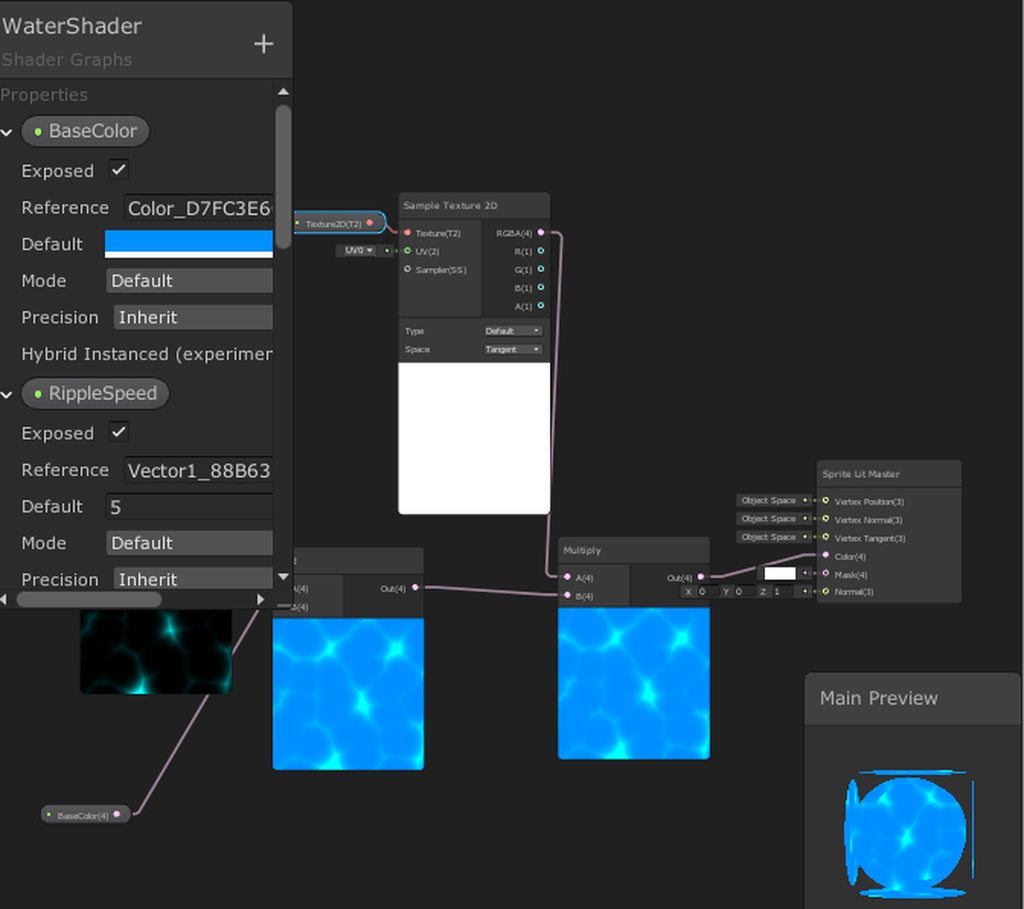 devout quarry
and what does your material inspector look like @uncut robin ?
meager pelican
When we last left our intrepid hero, @grand jolt , he/she was creating a game with a bird that flies through the environment and switching everything nearby from B&W to color. Or whatever. This is really independent of lighting and shadows (that you said you didn't really need last time 😉 ) 😄
uncut robin
grand jolt
I did say I was experimenting.
uncut robin
Btw, are textures and sprites the same thing in 2D?
grand jolt
I just have this image in my head of flying through the sky and clearly seeing areas where you've been and where you haven't, so now I'm here.
devout quarry
hmm I don't see any immediate issues limmunite but since the material is lit, be sure to check if lighting is turned on etc?
not sure
low lichen
@uncut robin A sprite always has an underlying texture, but it has additional information as well, such as how the mesh should appear or 9-slicing stuff.
To the shader, it's still just a texture like any other.
uncut robin
Ok thanks 🙂
meager pelican
I just have this image in my head of flying through the sky and clearly seeing areas where you've been and where you haven't, so now I'm here.
OK. Good. And I've been here too, so we have common visions!
I'm just joshing you a bit, but in a friendly way. Hang on.
uncut robin
Also, I need light? O.O. I'm not really experienced in this so I'm gonna look into it
meager pelican
@grand jolt
Alright. Let's say there's these two ways of coloring things in your game. Method A and Method B. So maybe A is B&W and B is colorized.
I have questions first.
If I look at the landscape, no bird, and it's all Method A...do you see what you would see in a B&W image? Like on an old B&W TV or something? So gradations of light, brighter on the "sun" side of things, and darker when facing away, and with shadows cast on the ground and other objects?
grand jolt
The idea with black and white was everything unlit and handpainted so no real shadows.
regal stag
@uncut robin You are using the Sprite Lit Master, so yes, you'll need a light in order to see it (and I think it only works with the "2D" lights). If you don't want lighting, use the Sprite Unlit Master node.
meager pelican
OK, so next question....
What if you save the game. Turn off the computer. Come back tomorrow.
Is the bird-path still lit? Like it lasts 30 seconds.
Also, does the bird's effect fade away after a time, or is it perm?
grand jolt
Oh, you just fly past small lights and they become permanently lit and then you activate some giant lamp(lighthouse, some artifact etc) and the area becomes fully lit permanently.
Or maybe small lights fade away slowly until you activate the big one, I dunno, haven't made the game yet 😄
uncut robin
@regal stag I think I'll do that for now. From what I've seen, lights seems kinda awesome, but I'll save that for later.
meager pelican
Oh! Bird activates lights, lights make effect. I'm OK now. Yeah, you need a poop-ton of lights.
grand jolt
Exactly.
meager pelican
I wouldn't use real lights. Or even fake lights.
grand jolt
Can't have cool shadows without lights.
uncut robin
Before I just redo everything, is there a way to copy paste parts of my old shader?
meager pelican
I'd have a main directional light, with shadows. But only Type B would receive shadows.
unless you really need individual lights with their own shadows (ouch)
grand jolt
I do 😄
regal stag
@uncut robin You can highlight nodes by dragging and copy them via Ctrl+C, then paste via Ctrl+V. You can also just create another Master node in the graph you have though, then right-click the new master node and set it as the active one.
grand jolt
Something something inevitable migration to deferred rendering.
low lichen
@grand jolt You say shadows, but you don't mean objects casting shadows on other objects, do you?
grand jolt
I do mean that.
low lichen
So you want to have realtime point light shadows?
uncut robin
Ho, for some reason Ctrl+V doesn't work, right-click->paste does
meager pelican
OK, shadows are one of the most expensive things to render in a way, because you have to render the shadow map from EACH light's perspective. You don't have to color things though, but you have to project the shadows into the scene. So if you have 500 lights, that's going to be 500 shadow casts...within light radius. Ouch
grand jolt
Yeah. I think I'd probably want shadows on like 20 closest lights, they're not visible from a long distance anyway.
meager pelican
It sounds like that's what he wants.
low lichen
Point light shadows are even worse, because they can't be rendered with one camera
grand jolt
Or I migrate to deferred and say yeet.
low lichen
Realtime shadows work the same way in deferred
uncut robin
@regal stag Yay it works, thanks a lot for your help (and patience) =). One last thing, time doesn't go by when the game isn't in play mode is that normal? not really a problem just curiosity
grand jolt
I see that URP lights have a shadow distance setting.
Wait, then what was the benefit of deferred again?
low lichen
Additional lights are not done additively, but in a single pass with a post processing step
grand jolt
But that's not applied to shadows?
low lichen
The shadow maps themselves are rendered the same way as forward
meager pelican
😄 Shadows. Expensive.
low lichen
They are just applied differently
regal stag
@uncut robin If you enable this setting in the scene view it should make Time increase while not in play mode. It's likely disabled by default for better performance while editing the scene.
grand jolt
Only. Closest. Lights. With. Shadows @meager pelican
I'm not gonna hit the big switch that says I'll take infinite shadow distance please.
meager pelican
Yeah, I see that now. If you can get away with 20 or so (your number) then maybe not too bad.
low lichen
Point light shadows requires rendering the scene 6 times in each direction into a cubemap.
meager pelican
lol
uncut robin
@regal stag Makes sense, thanks
grand jolt
So in summary I should just use URP and not bother with deferred.
meager pelican
The lol is 20 x 6 = 120 (your original count of lights in array)
grand jolt
Look. I'm here to experiment so my dead cold heart feels some sort of emotion that's not related to UI programming okay. I'll see what I can do 😄
low lichen
If you don't need a single object to be affected by more than 4 lights, then deferred won't have much improvement over URP.
meager pelican
It sounds really neat, @grand jolt
grand jolt
Maybe. Shit, URP is not in stable yet? Grrr, I'll have to use LWRP then.
Or is 2019.3 stable enough?
meager pelican
<Insert mental image of the 10 foot pole I'm not touching that question with> here.
grand jolt
Are you an LTS kinda guy?
meager pelican
Well, not really. But 2019.3 is BIG and New.
grand jolt
Alright. Back to the Stone Age I go then.
devout quarry
URP is production ready afaik
meager pelican
Hey, if it works it works. I'd prototype it up. If you don't really need new features, then don't use them. But if you do, you do.
grand jolt
Darn it you had to say it mid project creation.
devout quarry
I would take Unity's 'production ready' with a grain of salt but I'd give it a try
regal stag
I haven't had any huge problems, but you can always update from LWRP later if you need a feature that's only in URP.
grand jolt
I just hate using legacy things cause it makes me feel like I'm missing out on something 😄
devout quarry
Same, I'm always on the latest 🙂
grand jolt
Oh, it's got bigger light limit. Here I go then.
regal stag
Hmm.. although.. in URP have they added point light shadows yet?
meager pelican
Is the bird flicking on a light persistent? (Survives power off and restart game kinda thing)
grand jolt
If I add saving, sure.
meager pelican
OK, so you conceptually have these lights. And they illuminate a radius. And you'll (for efficiency) just select the 20 closest ones.
So now your main design problem is that the shadows are cast from sphere lights. Right? Otherwise, the coloring thing is easier.
grand jolt
Yes.
meager pelican
And for persistence, you "only" need to track if each light is on or off, or if the master one is on.
You're going to have to mock it up and check performance and see if you can pull off the shadows.
Otherwise, if you give up on the point light shadows, as a design compromise (not saying you must) then it all gets much easier.
grand jolt
Shit, 6 point lights with hard shadows in a forest full of trees is 45 FPS.
low lichen
On the standard render pipeline?
grand jolt
I stacked 5 terrains together.
Yeah, forward as well.
Granted, it's all standard PBR shader.
But still.
Hmmm, maybe there's a reason no AAA game has huge landmarks shining on things 😄
I'll go no shadows for now and make pretty contours first then.
meager pelican
Do the lights actually show up as game objects? (I'm guessing yes, so the player knows where to fly the bird to turn them on). But if they're just for effect and are location based and invisible, there might be options.
grand jolt
Bonfires, windows of old buildings, paper lanterns, crystals, something like that.
meager pelican
OK, and if you want shadows, they have to be from each point-light? Because that's the main problem.
If you made all shadows from a main directional light, and just let the point lights "color" things, but not impact shadows, you can have shadows cheap. But it won't look right from each light's perspective.
 fervent tinsel
@devout quarry I'd take URP officially released once 2019.3 leaves beta
devout quarry
But LWRP was declared production ready and URP was just a name change from LWRP right?
 weary patrol
yup
 tardy hazel
URP ended up being a bit more than a name change, IIRC there were some breaking API changes in there as well
And the ability to use the separate PPv2 stack was removed (though that's being added back in)
 stone sandal
universal is a name change and continued development of the lightweight render pipeline c:
devout quarry
so in theory it should be production ready like lwrp was?
stone sandal
the breaking change could've and likely would've happened without a name change too, it was more coincidence that they happened at the same time than a signifier of a whole new package
devout quarry
ah
tardy hazel
Production-ready depends mostly on what features you need
There are some aspects where there isn't feature parity yet, but I think for many use cases it's already good enough
 worthy ridge
How could I make objects appear correctly inside a glass sphere material? I'm using cubemaps for reflection / refraction.

I am using an inverted Fresnel as an alpha to "see inside" the sphere mesh, but its not a good solution.
low lichen
@worthy ridge I'm not sure which part you're talking about. You have the reflection working fine, but what isn't working?
silk sky
Idk if this is the right channel but does exist a way to "hide" UV seams in unity? maybe via shader?
worthy ridge
@low lichen I have the reflection working just fine, basically a cubemap going showing through the emission channel.
@low lichen i want to have a mesh inside the reflective "shell" that shows through even though its inside
low lichen
You mean transparency?
You have to have ZWrite Off and Tags { "RenderType"="Transparent" "Queue"="Transparent" }
Assuming you're not using Shader Lab
devout quarry
Unity terrains seem to do this distance based vertex count change, is this tessellation?
If so, is something similar possible in shader graph? I know tessellation is not supported but is there some other way to improve performance by reducing quality on far away pixels?
low lichen
Looks like tessellation
devout quarry
Or can you do this vertex count reduction by script?
low lichen
You're just using a regular Terrain component with a custom material?
low lichen
Are you using HDRP?
devout quarry
URP!
low lichen
You've checked the wireframe of the terrain with your own shader and it's uniform?
Now that I think about it, tessellation wouldn't really look like this, unless it's being controlled by script per chunk
devout quarry
Oh sorry for the confusion, I am using a Unity terrain with the regular shader on it I think and I saw tessellation. Now I want to do tessellation on a different shader that is my own (water)
low lichen
Tessellation is usually used to add detail, not improve performance
devout quarry
But so you don't think it's the built in TerrainLit shader that's doing any tessellation, but rather the terrain system doing something chunk-based by script?
low lichen
I'd have to look at the built in shader. It's pretty easy to spot if it's using tessellation.
devout quarry
Alright I'll be sure to check that!
low lichen
If you can't use tessellation, you could split your water plane into a grid of planes and swap out different subdivided plane meshes based on the distance
devout quarry
That's a nice idea
And I'm using world space UVs anyways so there would be no seams
great
regal stag
Well, even if using world space UVs there could be seams if the vertex count of the edge doesn't match the plane next to it.
low lichen
True. Maybe one hack to fix that is to make all the different plane meshes have the same subdivision on the edges and only simplify the center?
regal stag
Yeah something like that might work
 patent lodge
Hi guys, anyone know where I can find the built in shaders for 19.3? I can only see downloadables for 19.2 and below.
 soft harness
how would one do this?
low lichen
That can be done with stencils
soft harness
how do you use stencils?
low lichen
The shader needs to specifically include it.
The idea is that the texture that the camera renders to has an extra invisible buffer that can contain any 8 bit integer value. Custom shaders can write values to this buffer, any 8 bit integer they'd like, and then other custom shaders can set themselves to only render where the stencil buffer is equal, less than or greater than a specific value
So you'd have a quad where the screen is which is writing to the stencil buffer a specific integer, like 1. Then the writing on the wall has a custom shader that only renders where the stencil buffer is set to 1
low lichen
I don't know what the clipping system is
soft harness
when the camera gets too close to an object, the object get's cut away
 worldly breach
is there a way to get the current interpolation weight in the fragment shader?
low lichen
No, that's not something the stencil buffer can do
worldly breach
e.g. it interpolates between two vertices and sends the current position to the fragment shader, but is there a way to get the current lerp value 0.0-1.0 it's using to interpolate the vertex/color etc.?
and is there a way to get the min/max vertex value?
so basically is there a way to interpolate manually?
meager pelican
The thing is, it's a weighted THREE-valued calc for the result. Because three verts.
So you could assign a 0 to one vert and I suppose 1's to the other two, and get some kind of idea. Or maybe a float2 with X's and Y's set appropriately.
grand jolt
I brainstormed ways to pack baked overlapping lamp shadows into a single texture and damn it there's only a way to pack 4 lamp ids and there can only be 255 lamps 😭
low lichen
So it can be baked? That changes everything.
grand jolt
A lamp can be either on or off.
That's why I'd need a custom meta pass that writes lamp id instead of shadow gradarion and then objects would sample it and mix in the lightmap if the corresponsing lamp is enabled.
But none of this shit is perfomant or even possible for more than 254 lamps.
meager pelican
If you don't do shadows, I can get you as many "lamps" as you want/need.
grand jolt
I know. I just tried to think of a way to pack shadows together with lamp ids when baking.
I could make a handrolled lightmap per lamp but luuul that'd be so many texture samplers luul no.
low lichen
Could one object potentially be receiving shadows from multiple lights?
meager pelican
You an re-use samplers. But it's still going to suck, because memory coherence goes to crap.
low lichen
Or are the separated far enough?
grand jolt
If author them that way I guess no.
Alright, is there some AO on drugs that's good enough to emulate lighting?
low lichen
That won't give you shadows
grand jolt
I know.
low lichen
If you just need a lot of lights, go with deferred
grand jolt
Won't solve the dynamic shadow problem.
low lichen
How would AO solve the shadow problem?
grand jolt
Pretty object edges, good enough 😛
meager pelican
OK, AO you might just fake with a baked map and dulling it down.
And if you're not doing shadows, depending on your degree of pickiness, you probably don't need actual lights either...or you can bake them. But the coloring thing is really a voxel bitmap of "is colored or not". Now, you can build that into the meshes too on the fly if you want instead of voxelizing 3D space. Either way, you only have to deal with changes when a light goes "on". Otherwise it's a lookup every time, pre-computed result. Presumably.
grand jolt
So like keeping a lightmap texture, have objects just sample it and then lamps just blit a circle into it from OnEnable?
I don't think I know how to do that.
meager pelican
Well, you could modify the mesh vertex attributes to flag colored or not.
Or you could have a function to lookup into a 3D bitmap.
Either way, when you turn on a light, you'd have to update something to flag the colored stuff.
grand jolt
There are 3d textures? owo
meager pelican
Yes, but you don't need one. Just a big array is probably fine. And check your hardware requirements.
It's a calc to lay out 2 or 3 D stuff into linear memory.
grand jolt
looks inside PC yeah, that's uh definitely a DX12 capable GPU.
meager pelican
lol
meager pelican
The idea is to not have to loop though all the lights every frame, but to flag things as colored or not.
Maybe.
grand jolt
But won't that mean it will look like vertex lighting cause the state will be per vertex instead of interpolated per pixel?
No idea what I said.
meager pelican
Yeah, maybe? Depends on how you do it. And how small the triangles are. And you can cheat. So for things that are 100% lit, flag them and early out on those, and only calc nearest light for the edges.
OR
Maybe just store the nearest light index in the triangle and do your distance calc, but you won't have to loop through all of them to figure it out.
OR
Get more creative than I have. The idea is that if you have to do the same dang thing every frame and 500 times, then maybe you can pre-compute something.
grand jolt
I think caching the closest lights is the most feasible for me. None of them move a dang inch anyway.
meager pelican
At least that way, there's only one light lookup and one distance calc per pixel, since you precompute the light's location by polygon. In fact, the light lookup might be in the vert, and only the distance in the pixel shader.
meager pelican
Nah. But if you manage to figure out your shadows dilemma, let us know. 😉
grand jolt
Actually for some reason I assumed that lightmap has only vector4s packed into it. I wonder if that's true.
Sure.
meager pelican
Actually, the distance calc may work in the vertex shader too! Then it can interpolate and you only need to know the threshold (light radius) and do a comparison. Might get real fast that way.
@grand jolt
Spit balling here.
grand jolt
Will do.
meager pelican
And I was just thinking about this, you may have to do it dynamically, only for the "on" lights or something, because you could have a closer light that is off so you don't want that one, and also account for overlaps for on's that span a triangle! Maybe. Oy.
You'll have to get creative. If I steer you wrong, it's because I'm spit balling, and I'm not you and don't know your exact requirements.
 vague urchin
Hey guys, I can't get Graphics.DrawMesh to work, its sort of an odd problem, I can see the mesh being drawn in the scene view and even in the camera preview, but in the actual game view its not being drawn. Im drawing with Graphics.DrawMesh(waterMesh, new Vector3(pos.value.x, pos.value.y, pos.value.z), Quaternion.identity, waterMaterial, 0, null); so it should be drawing to layer 0 (Default) as I understand it
vague urchin
I should mention, Im using the HDRP
 dark flare
@vague urchin do LayerMask.GetLayer("Default")
the layers are a bitmask, not an integer
 orchid peak
So I see that Surface Shaders are not supported by the URP, how are HLSL shaders expected to interact with the lighting model? Is the idea to write custom nodes for shadergraph, and use that to build lit shaders? For some things working in code is a bit more straightforward. I haven't dabbled much in URP, looking to upgrade my project in the coming months
dark flare
is there any way to use RTX in unity in the old render pipeline?
amber saffron
No Yes. But there is no documentation on it, and you have to do it all by hand from scratch.
 wraith radish
Any ideas? plx Hit dead end in forums
amber saffron
I think I already so this somewhere, and the answer was that if the errors don't alter the rendering, than you should ignore it
obtuse loom
Yeah, are there actually any visible issues? @wraith radish
@orchid peak you're supposed to use ShaderGraph, yes. Writing shaders directly is much more complicated with URP/HDRP
low lichen
Writing lit shaders. Unlit shaders are written exactly the same.
obtuse loom
Eh, not really, at least not if you want them to play well with SRP batcher.
fervent tinsel
do old unlit shaders still work with URP?
I know they used to work with LWRP
but they never worked with HDRP afaik
obtuse loom
Haven't tried it recently but I think they should work
maybe with very minor changes? Not sure.
But if you're going to go with URP, you'd want them to play well with SRP batcher
and that's a whole process
fervent tinsel
anyway
obtuse loom

The Universal Render Pipeline brings with it long-awaited accessibility and performance improvements to rendering in Unity.
Speaker:
Yilmaz Kiymaz - InnoGames GmbH
Learn more about the Universal Render Pipeline: https://on.unity.com/2mmIawj
fervent tinsel
even if the old unlit shaders work on URP, they are still written in different way
fervent tinsel
I did
but none of this really concerns me as I don't even use URP, just curious if they still work like they used to
obtuse loom
My impression is that if you generally use unlit shaders and you are not willing to edit them to take advantage of URP features, you might as well stay with built-in
fervent tinsel
using few legacy shaders here and there is fine IMO if they still work and don't result it perf regressions you can actually measure
for example we just fixed the old ppv1 motion vector shader to work with HDRP
it doesn't use same convention as HDRP shaders do for movec passes
but it's still functional today
porting it to current HDRP conventions would take a lot more time that potentially could be wasted if they change their setup again
so, gotta pick your battles
obtuse loom
Sure, that sounds reasonable. I was more specifically talking about URP, where if you are not willing to put in the work to have better performance, URP doesn't have much to offer. HDRP does.
 feral coral
Hey Guys, Anyone know what file format is needed for the 3d textures in Shader Graph
Unity Forum
With Build-in, I was using a texture3D by injecting it into the shader (see how to here)
Shader Graph have a node to get a 3d Texture, but I can't...
obtuse loom
@feral coral https://docs.unity3d.com/Manual/class-Texture3D.html
"3D Textures can only be created from script."
feral coral
yes, this is what's written in the shader doc, and that's what im currently doing for my written shader
but with Shader graph, when you click on the texture, it promp a UI
obtuse loom
I'm guessing it looks for 3D Texture files that you saved as an .asset
vague urchin
Im trying to expose a Texture2D displacement map from Shader Graph in an HDRP Lit shader, however setting the texture from code doesn't seem to work at all. This is the code im using:
        waterMaterial = Resources.Load<Material>("Materials/WaterMat");
        waterMaterial.SetTexture("Texture2D_9B872A9", WaterGenerator.displacementResources.displacementMap);
where the Texture2D_... is the reference given in the Shader Graph
(If I set the texture from the editor before runtime it works and I can see the texture being passed to the shader in renderdoc for example)
do I have to call SetTexture every frame?
feral coral
no it's not @obtuse loom 😦
obtuse loom
Really? That seems wrong.
I'll play around with it a bit too.
@vague urchin why are you loading the material from Resources? Can't you reference it in the scene directly?
feral coral
I have a .byte file and a .asset file that is generated from the script unity provide
and none of them works 😦
vague urchin
Im generating displacement maps at runtime so I cant do it in the scene
obtuse loom
Not sure why that's a problem?
vague urchin
As in Im writing to RenderTextures in a script, I dont have a texture to reference other than the one I create in code
obtuse loom
sure, but I'm wondering about this line @vague urchin " waterMaterial = Resources.Load<Material>("Materials/WaterMat");"
so you apply that material then to your mesh?
vague urchin
Im drawing with Graphics.DrawMesh atm, Im trying to use DOTS/ECS so that is why Im just not loading it in a Monobehaviour
obtuse loom
Don't know, I think it should have worked.
vague urchin
Hmm it seems I might be doing sometihng silly since it does load the texture if I call SetTexture every frame
I might be setting the texture before its created or something.. lol
obtuse loom
@feral coral https://forum.unity.com/threads/how-to-use-texture3d-in-shader-graph-properly.588361/ Here someone mentions "uses a C# script to create the 3D volume, and save it as a Unity asset."

Unity Forum
I have a 3D Volume Renderer....similar to what is mentioned in this thread......
obtuse loom
@feral coral someone here mentions .cubemap but that doesn't sound right to me https://forum.unity.com/threads/texture2d-as-well-as-texture3d-are-ignored-when-saving-prefabs.588109/
Unity Forum
Hey, I am using 2018.3.b10
I have a field like this:
    [HideInInspector][SerializeField]
    public Texture3D Texture3DSerialized;
And it...
feral coral
let me try
i've tried .byte, .asset, .dds
Nop, it doesn't work
maybe it's how I generate it atm
obtuse loom
maybe that stuff at the end
var otherSerializedObj = new SerializedObject(this);
otherSerializedObj.FindProperty("Texture3DSerialized").objectReferenceValue = texture3D;
otherSerializedObj.ApplyModifiedProperties();
not sure what he's doing exactly
feral coral
for now it's really a dump of a bit array
vague urchin
Is there any way I can simply fetch a texel from a texture like doing texture.Load in hlsl in Unity shader graph? I dont want to sample the texture I simply want to look up a value
meager pelican
"looking up a value" that is stored in the texture IS sampling it.
low lichen
They mean they want to read a pixel value directly using pixel coordinates
vague urchin
I dont want to use UV values (since they dont exist) and I dont want any interpolation
low lichen
I doubt there's a node for it, but I'm sure you can make a custom node with that functionality.
meager pelican
You can set it to sample a point. But the UV amounts to an index into the texture. That's why it's a Texture2D or a Texture3D or whatever.
Just divide the index by width/height.
Or don't use textures to store data. There's that too. You can use buffers instead.
vague urchin
yea ideally Id use buffers, textures are just convenient for visualization to see that stuff works the way it should
Ill try setting the UV's manually by dividing maybe that works
thanks
meager pelican
The other way is to use buffers, but if you want to SEE the results, then just create a debugging material that "draws" the results of the buffer onto a quad. Kind of the reverse operation of the lookup.
vague urchin
yea maybe that makes more sense, do you know if there is any performance considerations when writing to texture2D vs structed buffers on the GPU?
is it similar regardless?
meager pelican
WRITING? Ideally, you do as little of that as possible. Mostly you want to be concerned about reading.
Writing...that's a much larger topic. Depending on your needs. If you just write once, not bad. But if you dynamically need to update things, and particularly if one shader core can update various locations, you have to deal with atomics and shared memory accesses so you don't stomp on things.
vague urchin
well I am writing displacement textures every frame, Im porting this from my Vulkan project in which everything with sync is quite explicit, I was hoping Unity would handle some of that for me but yea
meager pelican
Think massively parallel processing with multiple processors writing to memory at once.
It all depends on how you write it.
If each core can "own" a chunk, that's not too bad. You can update using compute shaders. Or from C#, that's handled for you, but it will vary as to results depending on system and capabilities....how much data you're shipping over the bus each frame.
Because in C# you update a local buffer, then ship the whole thing up.
But reading it back is a pain, you don't want to have to do that if you can avoid it at all.
But to answer your original question, IDK if updating a structured buffer is more or less expensive than updating a texture2D.
You need a bench test of both things apples to apples data.
vague urchin
Yea Im using compute shaders to write to the textures, then I want to use them directly in the frag/vertex shaders which is why Im battling with shader graph atm
to fit the vert/frag shaders I wrote manually
meager pelican
Is it one shader/material on one thing? Or can you benefit from SRP batching?
vague urchin
It will probably be a single material since its just for the water
meager pelican
That video AcidArrow posted today (above) shows you how to wedge a standard shader into URP probably works for HDRP too. ?!?!?! Lemme get you a time index.
6:01 am.
The thing is you lose batching and stuff. But you can just manually edit ShaderGraph too. But then you "own it". So you can use it as an inital code-generator if you can't do the UV stuff/SB stuff you want directly.
And check out custom notes if it's not supported directly in SG too, then you can continue to use SG.
vague urchin
yea Ill have to take a look, lots of things Im not 100% sure on. Thanks a lot
meager pelican
🙂
vague urchin
btw Im a bit confused as to what the difference between sample2D and sample2D LOD is, I read that the LOD one samples in the vertex shader and the other one in the fragment shader, so I think if I use the non-LOD one I wouldnt be able to use it for displacement or?
Slightly confused about this terminology too not sure what it has to do with LODs
low lichen
LOD refers to what mip map level to sample the texture from
vague urchin
Yea, unsure how that relates to whether or not the texture is sampled in the vertex or fragment shader though?
low lichen
The tex2D function will automatically choose a mip map level based on the size of the fragment vs the size of the screen.
You don't have that access in the vertex shader so you have to explicitly choose a mip map level
So tex2D can't be used in the vertex function, but tex2D and tex2Dlod can both be used the the fragment shader
uncut robin
So I may have been very stupid and upgrade all my materials to be lit, anyway I can revert? It's kind of a pain to change the default material every sprite I add
vague urchin
Is there a way of passing data from the vertex shader to the fragment shader in the shader graph? I need the original position in the fragment shader, not the interpolated one which it gets
obtuse loom
I don't think so @vague urchin
vague urchin
Would a sub graph asset help with this or how would I go about doing stuff like this then?
(Would be kinda sad if its the only part that makes it not possible lol)
 lime viper
I'm pretty sure that it does not pass the interpolated vertex position unless they recently changed that
within graphs that is
worldly breach
i have a float2 in my shader v2f struct. so basically 2 vertices with let's say float2(0,1) and float(0,0). then it should interpolate between these values. but somehow when i check in my fragment shader if the value is ever 0,1 or 0,0 it never happens. like it's not starting to interpolate from max/min value but inbetween
is that normal behaviour?
test
wtf i can neither delete or edit the post
some how this works:
man and i can't paste anymore. lol just going to paste in a codebin
somehow the first works, the second doesn't
so basically it starts interpolating from >0.0f if the vertex value is 0.0f
ok i guess that's how fragment shaders work
vague urchin
@lime viper You may be right, I think the issue was elsewhere
 fading pumice
(shader graph) i want to use a texture for vertex displacement but i dont know how to. can you guys help?
obtuse loom
@fading pumice just get the normal object space position and a texture and do math between them?
regal stag
@fading pumice In order to use a texture for offsetting vertices, you need to use the Sample Texture 2D LOD node. Then something like this (if you want to only offset the Y coordinate)
fading pumice
ok
regal stag
Assuming your texture is a black/white heightmap
fading pumice
yes
regal stag
Then yeah, the above should work. The Subtract shifts the 0-1 range of the texture output into -0.5 to 0.5, to ensure the offset vertices are still centred at the object's origin. You can also Multiply it with a value to increase/decrease the strength of the offset if required.
fading pumice
i copied the above and it worked thanks
regal stag
Since it's in Object space, scaling the object in the Unity inspector will also adjust the amount it offsets.
orchid peak
@obtuse loom thanks for the info yesterday 👍
obtuse loom
You're welcome
 real seal
if i have downloaded and imported free water shader from unity asset storee , how can i apply it to my terrain or model ?
This is how it looks like
the shader
devout quarry
You should create a material first
then select the shader you want from the shader list
then apply the material to a plane
vague urchin
Im trying to figure out why my normal map causes detail to be completely off on my water, it looks very blurry up close, like here:
The normalmap has the same dimensions as the displacement map which is 512x512, rendered on a 512x512 mesh
any ideas would be very appreciated, not an expert on rendering sadly
 vale pivot
I have a two pass shader that I'm trying to pass data between. Based on my research thus far, it seems the solution is to use a grab pass, so render the model in the first pass, capture to a grab pass, then I can sample the texture in the second pass to get the data I need.
This works fine... except I can't figure out how to control the contents of the pixels my shader didn't render. I see I can change when it renders with Tags, but I can't get it to render before the background itself, and even if I could I don't see a way to pre-fill the background on that specific pass.
I need to do this as the second pass samples areas I may not have rendered in the first pass, and the background data causes issues with the math
Is there a way to solve this with grab passes (ie, render my first pass before literally anything else, including the unity background, and with my own clear colour), or is there a better approach to transferring the data from the first pass to the second?
meager pelican
@vale pivot I don't understand what you're trying to accomplish as a result. But you could try rendering it in geometry-1. Spit-balling. I think it will render before normal geometry. You could stencil it too, to just get its outline so you can separate it from the rest of the background easily.
@vague urchin is it flagged as a normal map on the importer?
vague urchin
@meager pelican No since Im generating the normalmap in a 32bit RGBA texture, I tried flagging it as a normal map but that doesnt work at all
Ive just tried calculating the normal map using central differences but this results in an even worse visual so I think theres something off elsewhere
vague urchin
What I think might be happening is that Im sampling my normal texture with the position and not the interpolated values from the fragment shader
meager pelican
Yeah, if you're not importing it, I guess that won't matter. 😉 Didn't remember that you weren't importing it.
 uncut karma
@vague urchin yea that screen looks a bit like vertex sampling, was it sampled in the vertex shader? If doing world position passed through to the fragment shader it may look better but you might want to multiply the coordinates for tiling
Depends on what 1 texel (pixel) in the normal map is meant to be sized at in meters
vague urchin
I just tried passing UVs to the mesh and using those in the pixel shader with no luck :/ same result
I think maybe its just a problem that Im using a 512x512 normal map and rendering on a 512x512 mesh, maybe the ratio has to be less like having a smaller mesh for that size normal map
or something
uncut karma
Yea if the mesh is 512meters you'd be getting 1pixel per meter
vague urchin
hmm yea shit this might be the reason it looks so bad
I have a hard time reasoning about scale when working with stuff like this lol 😦
uncut karma
If you do times 10 then you'd get 10 texels per meter for example, could hook it to a parameter to feel it out (texture tiling)
vague urchin
Im really confused, using a 20x20 mesh with 512x512 textures it still looks like this
vale pivot
@meager pelican To explain the higher level goal: The first stage is rendering out vertex normals, the second stage samples the normals from a few points. It doesn't really matter what form I get the normals in as long as I can sample a few different spots, and I can differentiate points on the model from ones that aren't.
 gritty siren
https://cdn.discordapp.com/attachments/497874004401586176/666850484983955456/unknown.png
im trying to add post processing effects
but its blanked out
like i cant change anything
can someone help ;-;
 fervent tinsel
@gritty siren either check those checkboxes individually or hit that small "All" link
 slate patrol
I have a bit of a trouble understanding compute shaders. I would be glad if anyone could clarify some stuff for me
So, you schedule a compute shader with a defined amount of thread groups (in DispatchCompute method, foe example), which will effectively mean how much "tiles" your compute shader will execute. Is that right?
If so, then what is the [numthreads] supposed to do in the CS code itself? Does it correspond to the amount of wavefronts/threadgroups or threads of a wavefront?
How is the work even scheduled for them then?
What even executes the kernel? Is it executed by a thread or a wavefront?
 lucid elm
Hi! My shader works if 2 sprites uses it, but not if only 1 uses it, is this a bug?
https://prnt.sc/qnxbf8
I get different results from having 1 sprite in the scene or 2 (using same material) no matter what I try.
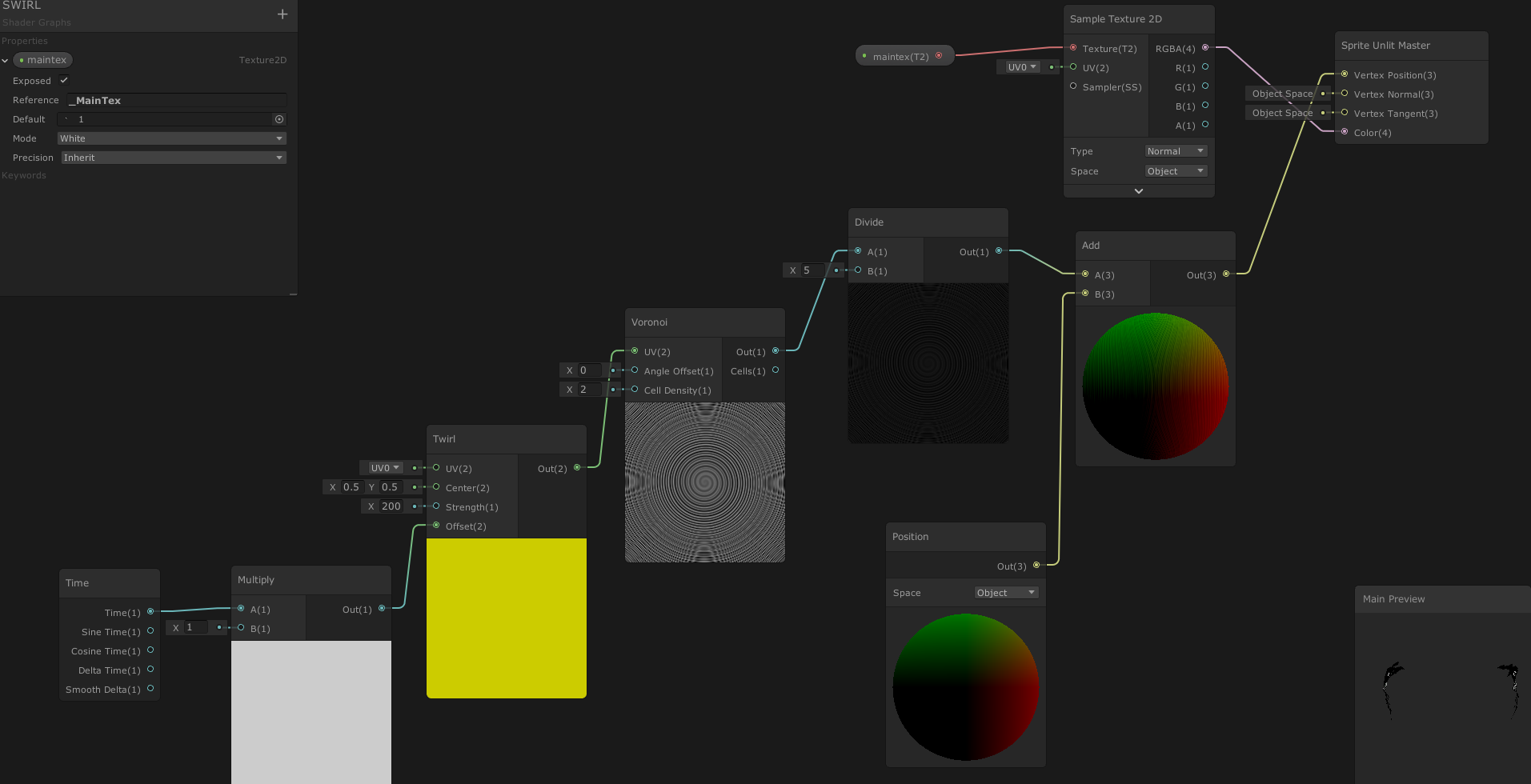 slate patrol
Sprite meshes are batched so the Object space changes depending on the pivot origin of the whole mesh. So if you have one sprite present the pivot will stay, but adding more will create a different mesh with different positions which will in turn shift the object space positions @lucid elm
lucid elm
Thank you Kolyasisan, my not so very elegant solution to this was to instantiate an extra sprite in the scene and set scale to 0.001
amber saffron
There might still be an issue there : even with batched sprites, I don't see why the shader would act differently, as the graph is only adding an offset to the vertex object space position.
Moving the pivot should not affect the rendering.
Scaling or rotating it maybe 🤔
slate patrol
You may be misunderstanding some terminology. Object space is the position of a vertex before the MVP transformation (so the mesh's AABB is stretched to the screen's). Because mesh changes constantly its object space also changes @amber saffron
MVP matrix is what scales and rotates the mesh, based on its object-space verticies.
lucid elm
I tried removed the transform.localScale from my sprite gameobjects, now the results from the shader are consistent, not the result I wanted, but I can work around it.
amber saffron
Yes, but the graph is basically doing objPos = objPos + A, meshes beeing batched or not, I don't see why it should break.
Anyway, if a workaround was found, that's ok
Except, like I said, if the sprites are scaled/rotated, in that case, the "sensible" part of the model matrix breaks when batched
slate patrol
If you have one sprite on screen the non-transformed model would be something like this, with the green part being its "pivot"
Two batched sprites will produce a different mesh with a different pivot.
Untransformed positions are now shifted and the addition will not behave the same
I don't think shadergraph supplies an already transformed value in the object-space variant of its position node
amber saffron
This is only shifting the origin of the space, adding a constant vector to all of the vertices here will still end to the same result "in theory"
Yes, that's the last point that might affect the final result, not sending the transformed vertices after batching to the shader 🙂
slate patrol
What values does the Vertex Position output requires? Last time I checked it required viewport transformed verticies in it, not object-space ones
In case if it requires object-space verticies, then yeah, that's a bit of another story
amber saffron
object space
slate patrol
Alright that actually is a bit strange
amber saffron
iirc, it has always been object space
fervent tinsel
@gritty siren right under text "lens distortion" on your image
It is grayed out
But it works.. It is just "select all"
devout quarry
🤷♀️
 faint notch
I am using a light as a child on my character with a light cookie, but this is too expensive on mobile. Any clever ideas on replacement shader I could use instead to give a glow on all assets where my character walks? (think of it as a torch) A simple additive shader works for the ground plane - but will not light up walls. I do not need shadows, working with URP and Shadergraph in 2019.
I was thinking maybe using a depth height map could work, to project a plane with texture ontop of the environment.
slate patrol
I've been wondering about something...
Shaders can do branching. It may be costly because if threads inside a warp take different branches then all of them are going to be executed, wasting performance if the overall divergence is too high.
That's pretty much clear.
But what's the overhead of a branch itself?
I mean, of the declaration of the if-else statement and the cost of the branch instruction.
 real basin
I don't know specifics but my understanding is that on older hardware any sort of branching is expensive, but on modern hardware it's not really a problem (provided that the divergence isn't huge like you said)
slate patrol
Then I want to know how much exactly does it take on a modern SM5.0 hardware (provided that it is dynamic branching and not predicated)
vale pivot
Honestly it's going to be hard to measure as shader compilers will convolute your code in ways that are entirely non-obvious
If you really want to know, your best bet is going to be to instrument your specific application to see what the impact is, or better yet use a tool designed for analyzing shader performance. (As a note: All of the tools for this, as far as I know anyway, are incredibly esoteric and a complete pain to use.)
But even then it's likely to vary by GPU, platform, etc.
 dusky yarrow
I'm trying the Introduction to Shader Graph tutorial on Unity Learning, but I'm stuck in at the first step. Is there some package I need to install or some other magic setting I need to get rid of this error?
AH! I think I've got it. I created a pipeline renderer asset, and set it in the graphics tab. it seems odd that it isn't mentioned in the tutorial though.
vale pivot
Is there a way to check an arbitrary position in the stencil buffer?
Increasingly it looks like the only way to solve this is with render textures, which appear to require I attach a behavior to every object with the shader to manage the command buffers.
Which would be more than a little annoying given I need this behavior for the entire scene
It would also generate tons of unnecessary command buffers if I'm understanding things correctly. This could be a simple two pass render across the whole scene
faint notch
@vale pivot Have you looked at custom render textures?
vale pivot
In a nutshell: The first pass writes normal values for every mesh on screen. the second pass then renders things like normal; but needs to sample normal data from the first pass for a few tricks
vale pivot
This is new to me. I'll read through the docs and see if it'll help
faint notch
Not sure what you are trying to do, but they are very useful
vale pivot
Looks like these don't get vertex data.
Yeah, v2f_customrendertexture doesn't include the data I need, and you're required to use it; so these textures like aren't generated/updated at the rendering stage I need
faint notch
What do you want to do?
vale pivot
I'm trying to sample vertex normal data from multiple positions in the frag shader
The only way I can think to do this is to render the normals to a texture in the first pass, then read them back from somewhere in the second.
I'm using a grabpass right now, which mostly works, except I can't initialize the background so the shader does weird shit around the edges
Another option might be to peek the depth buffer, but I don't know if this is possible either
Increasingly looks like there's no "clean" way to do this. The secret might lie in renderers and command buffers, I'll have to dig through more docs though. At a glance this stuff looks super heavy handed and a pain to manage for a whole scene, but I might just be reading the docs wrong.
meager pelican
Your vertex shaders (if using custom materials) can store whatever data you need. Your dilemma, not that I know what you're doing at all, seems to be that you want to use "other/normal" materials, and somehow grab vertex normals outside of the current polygon.
Yes/no? So this ends up being some form of post-processing, or late-processing, with the majority of the screen already rendered.
FYI - If you can use view-space normals instead, you can set the depth texture to have them.
https://docs.unity3d.com/ScriptReference/DepthTextureMode.DepthNormals.html
You can also construct a normal manually, this is often done in ray-marching situations where geometry doesn't exist. The idea is to depth-sample several adjacent points, and construct a surface normal from that. Usually at least 3 points.
 grand sun
this type of blending is just Multiply with a mask right?
regal stag
Probably a lerp between the two sampled materials, using a mask as the t input.
grand sun
yeah i guessed so, i'm wondering how its possible to get really clean harsh lines without needing to uv map them

like the grass edges here
but im pretty sure these are from uv maps
regal stag
Yeah that's probably a tilebased uv map thing
grand sun
Hmm
regal stag
If you want a harsh line, you could have a mask texture which is a gradient, then step the result
Possibly even use vertex colours
regal stag
This might be a weird example, but the advantage of using a stepped gradient is the result is much smoother, than a texture that is just black/white pixels and can be much smaller in size and retain quite a bit of detail.
(haven't got a pixel version to compare it to, but this is only 64x64 pixels)
vale pivot
@meager pelican Thanks! I actually might be able to get away with view space normals. I'll give it a shot when I get home.
meager pelican
🙂
 tardy spire
I hacked together a rounded box shadow shader by using Amplify Shader Editor and then making some changes to a copy of the generated shader file. It works fine, but I need it to support fading in/out its alpha via canvas groups.
Is this a hard thing to do? Here's my current shader for reference: https://hatebin.com/rnkuaoqorz
Currently the alpha remains unchanged until the alpha of the Canvas Group is set to 0
regal stag
@tardy spire I'm not familiar with the canvas group, but after some googling I think it changes the alpha value in the Vertex Colour, which you are already passing through to the fragment. So, You should be able to multiply color.a by IN.color.a to make it fade.
tardy spire
Thanks @regal stag that works perfectly!
patent lodge
Smoothstep is pretty useful for creating those sharp gradients. you can feed it a 0-1 gradient which you can then remap into a smooth gradient between say 0.5 and 0.6
grand jolt
Why would a transparent material display fully black on mobile?
low lichen
@grand jolt What is it supposed to look like? A transparent black? And how transparent?
grand jolt
@low lichen No, it was those lines again.
On high-end devices they displayed pure black.
When I changed the shaders to pure floats.
low lichen
I don't understand. Did you fix the problem yourself?
grand jolt
@meager pelican got the thing up and running(even though none of the optimizations to do calcs in vert produced correct results so it's all testing lights in frag). https://twitter.com/ExtraBeatrate/status/1217898952051298304?s=20

Realised that maybe b&w vs colored areas won't be very obvious from the bird's eye view. Now I'm experimenting with this kind of style. #gamedev

 Twitter
low lichen
Twitter
low lichen
@grand jolt Thought I was looking at a fractal pattern at first glance :P
grand jolt
Yeah, I'll have to experiment a lot to get rid of trees becoming visual noise at distance.
 elfin quartz
Shader Gods help me!
I'm trying to put a vertex progam in a surface shader. I know this is doable.
Its meant to read in some prebaked vertex AO from the models
If I declare a _MainTex_ST I get this : redefinition of '_MainTex_ST'
If I dont declare a _MainTex_ST, I get :undeclared identifier '_MainTex_ST' at line 46
Shader link : https://pastebin.com/FL6PXqfm

Pastebin
I think if I declare my own vert program, I need to transfer the UVs even for a surf shader, right? The AO shader that comes with the AO baking asset is a vert/frag shader, with no lighting, so I'm trying to splice it into a surf shader to get lights
meager pelican
. This can be used for things like procedural animation and extrusion along normals. Surface Shader compilation directive vertex:functionName is used for that, with a function that takes inout appdata_full parameter.```
https://docs.unity3d.com/Manual/SL-SurfaceShaderExamples.html@elfin quartz It is not necessary to handle the uv_MainTex yourself if you have a custom vert function.
@elfin quartz Adding a vertex function doesn't override any behavior in the generated surface shader, only adds an extra function call in the generated vertex shader.
And for the record, I didn't know this already. I just compared the generated shader code and found this to be the case.
soft harness
how would you make a character made of a liquid, and have a dripping effect?
grand jolt
@low lichen The problem is not the previous one.
A material just completely fails at rendering on a mobile device.
On a high-end one, so it is not precision errors (which got fixed, btw).
 tall chasm
Hi guys, I'm new to unity shader. I downloaded some open source shader scripts which works great but I want to bring them over to shader graph. I'm not familiar with what codes reflect to which nodes in the graph. Can someone help me with this https://pastebin.com/27dgawV3 ? Once, I get familiarise with how they are related to each other I can start doing it on my own.
Pastebin
 south matrix
Hey group - does anyone know how (or if possible) to access the stencil buffer when using shader graph?
I've seen how you can add a 'render feature' and mess with the render queue that way, however it causes issues with depth sorting doing this.
Seems I might go back to doing shaders the good ol' way I think! haha
faint notch
@south matrix dont think the stencil buffer is exposed in shadergraph yet, but should not be to hard to add the Stencil { ... } in your SubShader - just right click and show generated shader
Been a while since I did it, but it did work - there is probably tutorials you can watch if needed.
south matrix
Hey thanks @faint notch - I'll give it a crack!
low lichen
@grand jolt What shader model is the shader targetting?
grand jolt
2.0.
low lichen
@grand jolt Are you doing anything special in the shader? Can you share it?
grand jolt
@low lichen https://pastebin.com/KhTV332h The toon transparent shader thing.
elfin quartz
@low lichen thanks for info
devout quarry
@tall chasm It's not an answer to your question but if you're interested I have an outline shader in shader graph you could take a look at.
 mental bone
Hey is here a good place to ask about shadergraph?
amber saffron
Yep, you're in the right spot
mental bone
So, I'm making a shader that I will use for both the static env and characters so I want to use the KeyWord node to create a variant of the shader if it is using the baked GI or not. Problem is I cant figure out how to connect the node correctly
Right now I have this and it seems to work https://gyazo.com/c27947f2ae0fc24bf682dd9ff0146fae

but I dont know if this removes the sample GI code from the characters shader
amber saffron
I don't think so
Just plug the baked GI node to the "On" input of the keyword node
mental bone
Branch wont create variants I think?
amber saffron
and any "off" value to the other
(sorry, I was to fast and corrected my message, no branch)
mental bone
so since I dont have a case when its Off I can just leave it to be "0" right? I did what you said and it works the same. thanks. I think the variants will be correct now and the character variant will not sample the baked GI
amber saffron
🙂
mental bone
I get the logic behind it now haha. I'm still getting used to using nodes. Thanks again
ah Just tested a build on the device and the performance is like before I added the baked GI node so it seems to be 100% working.
grand jolt
So suppose I want a custom lighting shader to use stencils when you're outside a light's range and do light tests in frag when you're outside.
Suppose I make those 2 in different shader passes. Would constantly enabling and disabling shader passes from script kill perfomance if I'd have an island with like 10000 objects with that shader?
Ah wait, scratch that, stencil would make literally anything behind it highlighted. Dammit.
meager pelican
When we last left our intrepid hero Beartrate, she/he was marking each polygon vertex with any light that was within range and was "on". In C# since they're static and only have to be done when the light(s) are turned "on". Stored in the meshe's UV data. Like UV2 or UV3 or UV8 or whatever.
So then our hero could tell, with lookups, if a polygon is lit or not. That same test would work for shadow passes too. The frag would check the distance to get a smooth outline, and maybe several checks one for each vertex, in case multiple lights lit the polygon.
It's hard, because the mechanic isn't per-polygon but per pixel.
Or worst possible case is it check against 500 lights per fragment. Per pass (shadow passes included). But if you don't store something per-polgon and figure i out, you'll end up bogging it all down...I think. And as you say, a simple stencil with a circle around the light won't work as it will light everything.
If you want per-pixel results, you have to calc per pixel somehow. So you have to offload as much of the one-time work as possible to a one-time process, and do as little as possible per pixel per frame. Shadows too.
:2c:
And this situation sucks: (transparent circle represents light radius)
So you may have to store the most overlapping light per vertex and check if on/off.
But whatever you do, you have to do it for shadow passes too.
grand jolt
@meager pelican I'm not sure if potentially rendering 2000 lights into a "lightmap" every frame to account for on\off switches will be fast.
Also writing a UV packer that assigns those UVs sounds hard 😄
Also it's not 500 lights. I settled on 128 lights per object max. They're sorted by radius in descending order before passing them to the shader and the rest are thrown away.
The only object impacted by this many lights will be the terrain of the whole island.
The rest will get like maybe 2.
meager pelican
I didn't say calc it all every frame. I said flag the mesh vertex data once, when you turn lights on. As far as terrain, you may have to bite the bullet on that one if you can't partition it somehow. IDK.
The idea is to calc-once if you can, somewhere. Since I'm assuming your camera position/angle can change in the game, you can't just map it out once. But maybe if it doesn't, you can. Anyway, somehow, you want to decide lookups once if at all possible, not 128 times per pixel per frame.
BUT...if you find that you can do it, go ahead. IDK. It all depends. 128 lookups and distance calcs per pixel sounds pretty expensive.
grand jolt
I don't know yet, but maybe I'll just ride this out by decreasing the max lights count and dropping lights outside the camera frustum and lights with radius less than some threshold in camera viewport pixels.
meager pelican
Maybe you could invert the whole thing, and assign "voxels" to your world, and figure out what lights impact what voxels, and do some kind of pre-computed tree structure that you could do a lookup into (b-tree, oct-tree, etc) such that you can "find" the relevant lights quicker. That tree could be computed as static data for your scene if the lights don't move.
Again, spit-balling. You have some pretty interesting requirements that are going to take some work to optimize.
grand jolt
I am planning to switch to filling octree in Start instead of doing N lights x M objects checks every frame at some point.
meager pelican
Is this statement true?
"My lights don't move, and my meshes are static, the lights are either on or off, but don't move or change radius. And no more than X lights overlap per polygon."
You could pre calc a <possible-light-list> for each triangle and store the index for the light in the vertex colors, for example. Do it all offline. That would cut it WAY down, and let you have as many lights as you want as long as they don't overlap too many times per polygon.
grand jolt
Color has 4 channels, only 255 possible values per channel. That locks me down to either 255 max lights on the whole map and 4 indices per vertex or 255255 max lights and 2 indices per vertex.
meager pelican
Unless you pass floats....
grand jolt
It won't be rounded by Unity during texture packing?
meager pelican
It's mesh color data. I think it passes floats. But if not, there's color 32 and bitwise stuff. OR you could use all three verts and vertexID, and make a list of 3 float4's and do whatever. So you'd use all three verts of a triangle to build up your list. So 255x255 x2 x 3 = 6 lights per triangle, 65025 lights. ????
amber saffron
All your discussions make me think of how we handles lights in forward in HDRP :
"Voxelize" the camera frustum, and for each voxel, store an array of 24 lights data. At rendering, the fragment shader grabs the proper array depending on the position, and loops through those lights
 robust reef
Anyone that could help with this?
meager pelican
Yeah. And you'd take that hit per frame, but at least it's not per pixel.
grand jolt
That's certainly an idea @amber saffron
meager pelican
The thing with his list is that it doesn't change. It can all be pre-computed. So do that per-voxel thing, but store the results once, game-gen, not per frame.@amber saffron
grand jolt
That totally sounds like forward+(Remy's remark).
robust reef
I don’t want to intrude in the conversation but could anyone give me a push in the right direction?
amber saffron
Why not per frame tough ?
@robust reef You probably want to look at how to use stencil in your shader
meager pelican
Why do a static thing 30 times per second?
Unless it's more optimized, I suppose. Maybe you can get the list smaller.


 grand jolt
With indices I'd have to pass literally all lights in the shader, and GPUs must have some kind of upper size limit to arrays right @meager pelican
amber saffron
I guess you need to filter out the walls shader/material to not do the stencil test
grand jolt
Thanks @amber saffron I'll put the forward+ suggestion in my notes.
meager pelican
How many damn lights are you going to have? 😉 :)
From what you've described so far, it's not even a color...it's a location and a radius. It's a lookup table....a structured buffer or whatever.
grand jolt
I dunno man.
meager pelican
That's one float4 per light.
grand jolt
It looks like vertex colors might be in RGBA32 format.
meager pelican
OK
meager pelican
x 3 three verts per polygon.
But if you can dynamically build it like Remy said, try that if you want. Might cut down on ACTUAL effective lights, but you'd have to do it every frame and you could still hit maxes with many lights on.
IDK your design issues and options.
grand jolt
Currently I also don't pass lights that don't intersect with renderer's bounding box, forgot to mention that.
meager pelican
Again, per frame. And that's fine if you want to do that.
But if your meshes and lights are statically positioned, that would seem like a lot of extra processing TO ME. YMMV.
 scenic bough
Hey all, I see the pinned tutorials but I'd like to ask just to be safe. I plan on applying for a job related to Unity shaders and I'd like to know of a place that I may check out to get a good understanding of how they work over the course of ~2 weeks or more. Anywhere anyone has in mind that would be a good place for this?
low lichen
@scenic bough I found this pretty helpful when I was learning shaders
https://www.youtube.com/watch?v=T-HXmQAMhG0
Another video/tutorial thing. This time about shaders. Still trying to find my voice and my style for future videos. Let me know what you guys think.
Get the shader code used in this video here:
http://danjohnmoran.com/Shaders/
Unity Documentation on Providing data to Verte...
scenic bough
ooh beautiful, thanks!
devout quarry
Is 'power' generally an expensive operation in shaders?
languid lichen
Hey, what is the equivalent of an alpha blended shader in LWRP?
languid lichen
It looks like "alpha blended" in LWRP is broken?
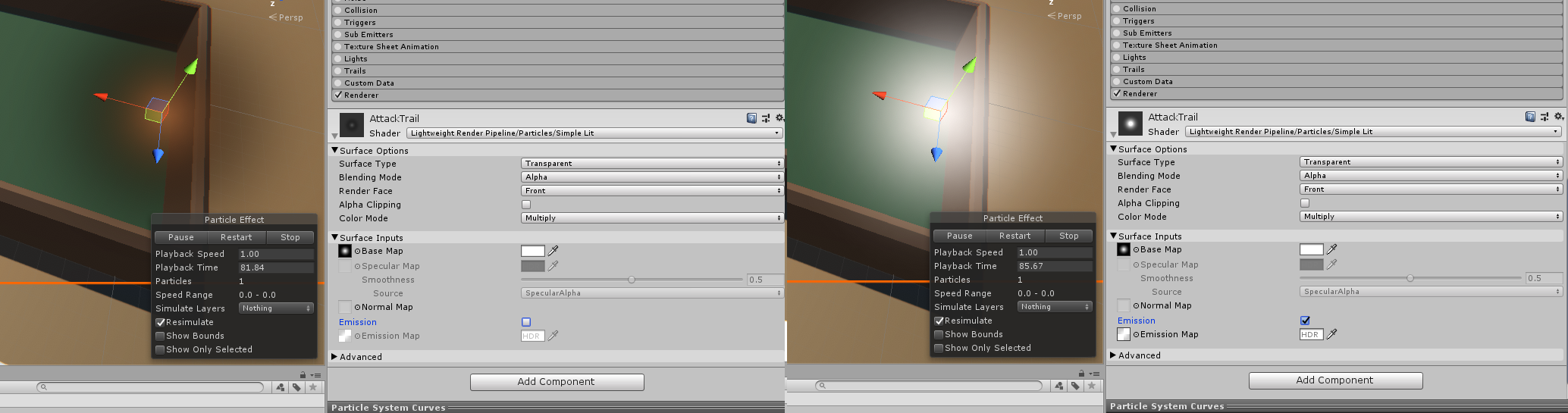
Unity Forum
Hi, Quick question about particles.
For some reason, when creating a particle system in 2019.1.0f2 LWRP i'm getting this dark aura on all my particles...
 royal silo
how can i make a texture independant?
so normal map or albedo does not affect it
i downloaded the default shaders and trying to edit them
this is what i need to achieve
this is what unity offers
meager pelican
Did you try an unlit shader? (Guessing)
languid lichen
@meager pelican I did use an unlit shader. Turns out that the tutorial I was following is really not the best for LWRP, from what I can tell. Instead of a black, white, and a transparent with fire shapes layer in GIMP, I stuck with the third alone, and I don't get any of the "black squares" and "edges" anymore. It still helps to follow the posts in the thread and choose "Multiply" and "Premultiply" instead of "Alpha." Why is a mystery to me, but eh it works.
meager pelican
Sorry @languid lichen I was talking to @royal silo (the post immediately above).
But glad you got it working. 🙂
languid lichen
Lol no worries man
meager pelican
@languid lichen As to the thread and the 'mystery'...
if alpha is busted it's busted-to-be-fixed (check version). But anyway, it's probably due to having a black albedo but an alpha that is non-zero. That's why your multipy works better. Also pre-multiply is basically assuming that you didn't have to do resultColor.rgb *= resultColor.a in the shader because it is pre-multiplied. The actual blend equation varies depending on options.
IDK that I explained all that properly, but you should get the idea, and that thread explained a lot too.
If you want to switch to a surface shader for testing, I have some code that basically lets you play with all the blend options if you want to see it (its basically enums and a blend statement).
 midnight falcon
that doesn't seem to work when I use the shader legacy shaders/Transparnt/Cutout/Diffuse
but it does work with the standard shader
when I use the standard shader the object looks a bit broken though, any ideas how to solve?
i'd guess i have to modify the standard shader so it mimics the old one, but i am not sure what configs I have to set for that
dusky yarrow
In Unity 5.x Shaders and Effects Cookbook P.44 the author says to use this #pragma statement:
#pragma surface surf Lambert alpha:fade nolighting
However, this results in a compilation warning
Unrecognized #pragma surface directive: nolighting
Is nolighting obsolete or is the book just wrong?
What should I be using instead?

Google Books
low lichen
@dusky yarrow Can't see that directive in the documentation
https://docs.unity3d.com/Manual/SL-SurfaceShaders.html
If you don't want any lighting, you can just write a vert/frag shader
dusky yarrow
@low lichen Me neither, I can only find one reference to it in the forums, which seems to imply that it doesn't exist and to use a different sort of shader thing.
I haven't got far enough through the book to know what a vert/frag shader is. The answer to the OP in the forum was to use one though.
low lichen
A surface shader ultimately gets turned into a vert/frag shader
If you create a new unlit shader, you'll get a basic vert/frag shader
dusky yarrow
@low lichen I'd have thought it was the Unlit Shader type.
Cool. Thanks @low lichen, looks like it's not me misreading then. It genuinely is just code that doesn't work.
 tranquil bronze
why does the characters shadows appear through the player
https://gyazo.com/2c8071349627e3ff60b9cba4df6f6434.png

how do i fix this
this is the srp
https://gyazo.com/1445e858fb5b654e8b1eb08e1fa93836.png

this has been annoying for a week now
nothing seems to work
what the srp does is make it so whenever the player cannot be seen, a different material is used to render the player
as seen in this video https://www.youtube.com/watch?v=szsWx9IQVDI&t=32s



Let's learn how to render characters behind other objects using Scriptable Render Passes!
This video is sponsored by Unity
● Download Project: https://ole.unity.com/occlusiondemo
● More on Lightweight: https://ole.unity.com/lightweight
················...
regal stag
@tranquil bronze I don't think you need the "RenderNormally" pass, you can enable rendering the layer via the Default Layer Mask, and change the Depth Test on the other pass to Greater, rather than Greater Equal. If I'm not mistaken, it should do the same thing, but also fix your shadow issue.
tranquil bronze
like this?
regal stag
Use "Greater" on the Depth Test
tranquil bronze
the character has the material for when its supposed to be behind walls
the normal material is not appearing
how can i fix it?
regal stag
Wait so the default material on the player is the one to appear behind walls, or is that the "AlwaysVisible" material on that pass?
regal stag
What material is on the player's mesh renderer?
tranquil bronze
default
regal stag
Hmm, it seems to be working for me
tranquil bronze
can u send an image
regal stag
Ahh, perhaps that was why that RenderNormally pass was used :\
tranquil bronze
back to square one then :(
regal stag
Well
You can have the extra RenderNormally pass, and also include it in the default layer mask
I think that way shadows will be handled correctly, but it does mean the object is being rendered twice. (well, 3 times, due to the behind-walls version too).
regal stag
@tranquil bronze This seems to work. Whether it's the best way I don't know
2 passes, but the Default Layer Mask also renders the object "normally", which seems to handle shadows properly
tranquil bronze
now the see through walls is gone???
im sure i got the same as you?
the rendernormally material shouldnt matter right?
regal stag
Yeah the second pass material doesn't matter
tranquil bronze
stilld doesnt work :(
regal stag
I have the same settings and it's working for me... maybe there's some differences with versions?
tranquil bronze
are you on 2020.1.0a16.1913?
regal stag
I'm using 2019.3.0f1 (URP 7.1.6), perhaps they updated it and it's changed how it works.
tranquil bronze
can u send a download of the project, ill try oppening it in my version to see if it works
if it doesnt then i did something wrong
devout quarry
In shader graph the scene depth allows you to get the depth of opaque objects in the scene, but is there a way to get the object normal vectors of the scene? So let's say I have some water plane, set to transparent, is there a way for me to get the normals of the objects below the water just like scene depth would do for depth but then for normals?
regal stag
Isn't getting the normals what the outline shader does @devout quarry
@tranquil bronze I can't really send the project. I'll try installing the newer unity version and test it
devout quarry
Yeah it is, but for that I have to generate a depthnormals texture since URP doesn't generate it
so I guess there is no way to get the normals without generating the normals data
regal stag
Yeah, I think you'd have to generate them the same way
devout quarry
too bad that URP does not generate the normals data..
I believe that's the reason why we don't have ambient occlusion yet
 vocal hull
I am having two simple effects: one applies noise to a texture and the other one masks it with "rays". When I put those two materials on a SpriteRenderer (using custom script) they overlap with each other. Is there a way to "multiply" two materials so that, in this case, I would have noise applied only to masked areas?
And I just saw this on feature comparision between built-in and unversal renderers.