#archived-shaders
1 messages · Page 131 of 1
 rustic dragon
@willow pike you are building these meshes right?
 amber oxide
how can i ignore that
 willow pike
Yeah I do but I'm really hoping to not have to edit the UVs constantly. Building the entire game's terrain out using Probuilder on even grid increments.
rustic dragon
best bet is to either control the UV's or build a tri ridge with the tools, give them a diff material, etc
amber oxide
sorry for dividing, could somebody help me
i want to use the alpha channel but also want to be models look like will be upper one, when the Alpha is 1
willow pike
Sweet thanks @rustic dragon hopefully I can get this working using your graph
rustic dragon
@willow pike I don't know if my graph will help though with the different heights, but hopefully it gives you some ideas
willow pike
Hmm yeah I'm almost wondering if it will be easier in the end to use a separate mesh of grass to hang over the edges
This would save me a lot of time building out the maps though
rustic dragon
@willow pike yeah, a cap would be pretty easy, or just a tri ridge/edge loop, etc
willow pike
The thing is the shader slightly changes the surface color of the grass so the player can easily distinguish when cliffs are above them in top-down view
rustic dragon
there might be some edge finding math that would work, but it'd probably throw things along most edges :o, with the tools you are using, can you do a quick bevel?
@amber oxide what does alphatest do?
willow pike
Yeah I can probably bevel the tops
see the grass surface changes color, so if I use a mesh to create the grass overhangs I'll need to use lots of custom colors for each different cliff height
Which is why having the edges masked would be super nifty 🙂
rustic dragon
are those colors always the same height?
amber oxide
@rustic dragon sorry what's alphatest?
willow pike
rustic dragon
@willow pike if those heights are always the same, for the diff colors, I have another idea
amber oxide
the screen shot means, when i add the alpha to #pragma, it shows models inside
willow pike
I'm multiplying a very subtle gray over the surface based on the height of the objects
rustic dragon
@amber oxide yeah, just wondering if you replaced 'alpha' in that line with 'alphatest', what would it look like
amber oxide
ah
rustic dragon
@willow pike I think you might be able to project a mask from the side of that whole thing, dropping some grass edges with a tileable texture
amber oxide
@rustic dragon when i use alphatest, o.Alpha doesn't affect anything
willow pike
That sounds perfect! No idea how to do that tho 😛
rustic dragon
@amber oxide ok, you'll have to wait for a more experienced shader person, but it does look like your model is inverted, which is weird
rustic dragon
@willow pike are those steppes always the same height?
willow pike
The terrain height varies in units of 4 at a time
I probably won't stack more than 4-5 chunks vertically in any one scene
rustic dragon
yeah, this might not work either, damn
I'd personally look into either adding a ridge along the top, like an edge loop, or managing the UV's so you can do more accurate shader stuff
willow pike
Yeah that sounds the most effective way
thanks for helping me think through this, really appreciate it
rustic dragon
no worries, send an update when you got it working 🙂
willow pike
Will do!
amber oxide
just to up(already post this on upper side),
i need to use the alpha channel(o.Alpha) but i want it look like upper one when the o.Alpha is 1
 left pivot
@faint notch sorry but what did you mean with after HSV I can't get it done. I can say I am noob on this. After colorspace conversion, R is dark, B is mid, G is highlight right? How can I smoothstep it 3x ? I don't understand that part.
 faint notch
@left pivot im on my way out, but as you see grabbing the blue will give you the values
left pivot
aight So blue is dark?
faint notch
@left pivot btw. do you need this only applied to one particular model? since you are new with shaders - there is an existing post fx you can use aswell, not sure if you are aware of that
left pivot
@faint notch thing is I am using vertex colours. I need to do it in different manner.
I want ambient colours to get blended with my vertex colors at will.
It needs some amount of shader knowledge that I lack but I need it bad.
I have three colours from ambient. 1 is coming from light itself so it affects highlighted parts, 1 is for mid-tones and 1 for ground (bouncing lights).
 south topaz
Hi! Anyone who knows a good course / tutorial series on shaders which cover the basics but really explain why something is used? Most things I find are only explaining how to use something and not why. If it's even properly explained in the first place D:
 vivid valley
@south topaz this is pretty good starting point
 winter acorn
Hi. Any one got any good idea on how to aproach making realistic volumetric clouds in unity that are optimized and effecient?
possibly with raymarching or particle systems
 grand sun
in shaderlab how can i offset vertex positions by up world vector? rotation always seems try ruin my plan 😩 😅
 orchid peak
@grand sun convert the position to world space, then add onto the Y axis
you can convert an object space vertex to world with unity_ObjectToWorld
orchid peak
correct
 steel notch
So I'm trying to make a Blur Shader that will Blur sprites placed behind it. Preferably through Shader Graph.
How can I do this?
 arctic sierra
is there a way to get the max number of uniforms allowed?
 tranquil bronze
I made a shader following a tutorial but all I get is a pink texture, what did I do wrong? https://pastebin.com/LmtzZRs1
rustic dragon
@tranquil bronze the tags seem to be it
@tranquil bronze I commented out and it worked
 maiden hamlet
Hey, I'm trying to pass some simple structs between a Compute shader and C# using a AppendStructuredBuffer. When I try to copy the data out, and look at it, it seems to only contain the first value I appended to the buffer.
(this code looks pointless because it is, I'm just trying to get data going between the two before I do any real code)
https://hastebin.com/tomejebaso.cpp
https://hastebin.com/ihugahococ.cpp
The output of this is:
tranquil bronze
thanks @rustic dragon
rustic dragon
not sure why though 😮
 south matrix
Hi all!
I'm writing a stencil shader to punch a hole in a mesh. It's working great except I'm still getting the real time shadow falling on the stencil area.
Any pointers to how I can resolve this?
I have a feeling I need to subtract the stencil from the depth pass or something...
left pivot
Hey there. I am trying to multiply Shadows-Midtones-Highlights with defined colors. Am I doing it right? Can anyone walk me through it?
This is currently directly multiplying things but I don't feel it is right and I am in control 😄
rustic dragon
what is going into that colorspace conversion?
left pivot
RGB of Vertex Color
rustic dragon
a color I imagine?
left pivot
yeah
rustic dragon
so you painted some vertex colors on the object?
left pivot
yes, I want to affect colors by their tones. Highlights will be colored, mid-tones and shadows also.
rustic dragon
or is that some lighting data you are retrieving?
well first thing is going from RGB to HSV and using those 3 channels is not what think it might be
left pivot
Yeah feels like something is off
rustic dragon
it just splits up the color input into Hue, Saturation and Value(brightness), so multiplying those by colors will not do much correctly
left pivot
Right now it colors different parts but not really shadows or anything.
Am I after Value?
rustic dragon
you will have to get the lighting pass somehow, are you doing that?
if it's just vert colors you are getting, that only reads what the vert color values are on the mesh, they don't change with lighting
left pivot
no there is no lighting in this shader right now
it's a pbr master
Actually light color affects it automaticly right now
rustic dragon

Unity Technologies Blog
With the release of Unity Editor 2019.1, the Shader Graph package officially came out of preview! Now, in 2019.2, we’re bringing even more features and fun...
you see this?
left pivot
yes, it uses B value of HSV conversion.
After that how can I decide which is Highlight, Mid or Shadow?
rustic dragon
so you have that Calculate Lighting node?
left pivot
nope. I have nothing about lighting.
rustic dragon
yeah, you'd need that stuff first to isolate the areas on the visuals you want to change color or texture on, masks basically
left pivot
how can i get that mask? I think it'll be 3 colored. White/Grey/Black
rustic dragon
it's in that tutorial, you have to make a custom function node with some actual shader code to get the different parts of the lighting
left pivot
let me try
rustic dragon
cool
 amber saffron
I re-read 3 times what you tried to achieve with the vertex color, but still don't get it
left pivot
I don't know if it is just about vertex color though. I have a very basic vertex color shader. Combines RGB into color to albedo input, alpha to alpha in master node.
amber saffron
So you just want to do vertexColor * albedo ?
left pivot
no I am using vertex colors as albedo color.
it just works in that way. I'll bake lighting data into vertex colors alpha in 3ds max.
with this I have shadowed parts
mid tones and highlights
How can I separate them and multiply it with color I don't know.
I tried sampling a sharp gradient
but after that I am stuck again because I cant get shadow parts or highlight separately. If I multiply it with any color it just colours everything.
amber saffron
Okay, I see now.
You'll need to mask the shadows / mid tones / highlights in the shader, tint them separately, and then re-combine everything
left pivot
yes.
amber saffron
The HSV conversion node was a good start to get the overall intensity (the V part) of the color.
Next you need to work with it to have 3 masks
Basically, it could be :
- 0<v<1/3 => shadows
- 1/3<v<2/3 => mid tones
- 2/3<v<1 => highlights
left pivot
That's right. How can I compare V value in that sense?
amber saffron
let me doodle some stuf ...
left pivot
Thank you good sir.
amber saffron
Probably not the best way to do it and probably not accurate to "real" color correction but :
left pivot
Thank you I'll try that now.
amber saffron
The different color inputs must be in HDR, and a mid-gray value corresponds to no change
 tall chasm
Hello, I have a couple of questions:
- Can shader graph be used with standard render pipeline? I upgraded to LWRP in 2019.2.9f1 but my models are having weird artefacts in both the Scene and Game.. So I downgraded back to the standard render pipeline which doesn't have those issue. But the shaders I made following tutorials online have this warning dialog.
- How do we reduce the opacity of shadow? I want to make a the roof of a small house fade out when my player approaches it in a top down game.
Thank you for any help.
left pivot
@amber saffron I did it it seems working with HDR colors but I need a better model to test it truly
Let me see
amber saffron
@tall chasm :
- Yes, shadergraph is for SRPs only.
- Semi transparent shadow is currently not supported in SRPs
tall chasm
@amber saffron
- Sorry, it's only for SRP? But I was able to use it fine in LWRP. Or did you meant to say its only for LWRP? Because the warning dialog appeared when I dropped back down to SRP.
- Ahh ok. In that case, how do I make my shadow less "blacker"/"darker"?
left pivot
@amber saffron It works. It tints grey parts, dark parts or unpainted parts differently.
Thank you!
amber saffron
@tall chasm Sorry for the shortcut : SRP = LWRP / URP / HDRP as opposed to the built-in renderer
To have less dark shadows you need a sky that adds ambiant light to your scene.
Adding a sky in the lighting window an hitting "bake" to compute the global ambiant should be enough
tall chasm
@amber saffron No worries! I'm still new and unity is really overwhelming. I get it now. When I mentioned SRP I was referring to the build-in one, sorry about that.
Ok, I'll test that out.
 tardy spire
I'm trying to make a simple outer glow for a globe. I made this shader and it looks fine in the preview, but when I put it on a default quad it's completely black. Is there a reason it would look fine in the preview, but not in the scene?
 devout quarry
not sure what's wrong, but I can tell you that this graph shows the correct result on a quad in my project
tardy spire
so weird. i changed it to this and it works fine
 regal stag
It looks like unexposed variables don't use the default value in shadergraph, they use 0 instead.
tardy spire
really? damn
i just unexposed the variables in my new version and it appears you're correct
wowee
regal stag
I think that's how Global shader properties are done though, so I guess you could set the global variables in a C# script using those references.
tardy spire
gotcha, thanks 👍
regal stag
If they aren't going to change, probably easier to just use nodes rather than properties to define them though
tardy spire
yea, i just wanted to have names for them 😔
regal stag
Could use groups to name the node in a way
devout quarry
Or what I do sometimes which is maybe bad practice
Use a subgraph with no inputs and 1 output
And then you can name it however you want
And then you could store the subgraph under a 'variables' section or something
But again maybe not the best use of them haha
regal stag
Haha. I guess the generated shader might not be any different using subgraphs.
devout quarry
I always do the same with custom function nodes, so it has a name instead of just 'custom function'
I really prefer it that way
regal stag
Yeah I usually just leave it as a Custom Function but I wish the name of the node just changed based on the function passed in
devout quarry
Yeah that would be nice indeed
regal stag
I should definitely use sub graphs more often though
rustic dragon
a single node group with it's name isn't horrible, if more of a space taker
maiden hamlet
Why would an AppendStructuredBuffer from a compute shader return the same value no matter what you do?
Specifically, the first one appended to it.
The shader: https://hatebin.com/nsdevguiur
Oh!
So. It had something to do with using multiple threads to do this?
I think I made the buffer size too small.
nevermind lol
 lavish kernel
Hello everyone! Sorry for interrupting, but I might require some help. I am currently trying to create 2d character creator where the modular playermodel will use the skeletal 2D animation. The thing is, I still don't know how I could possibly apply clothes on the model. I feel like adding another layer would make the sprites clip. Therefore, I feel like the only way is through shaders. Would it be effective to have for example a shirt texture that would then overlay the sprite of the torso ?
willow pike
Anyone know how I can control the shadows of this cloud shape I'm casting onto my terrain? I want it to be significantly lighter but keep the intensity for other shadows (trees, cliffs etc). It's just a plane with a texture on it. People have recommended using cookies or the projector but neither are supported in URP.
 silver moat
Random idea, though I'm not an expert so there's probably many different ways around it to achieve what you want.You could go all the way and try to work with different shaders for elements, such that they write different stencil values (for example, Trees would write a 1, Cliffs would draw a 2, etc), and then try to substitute your current method of using a plane for using a Post-Processing Effect that checks the stencil and depth and projects the thing onto it.
But again, I am not an expert in this, so there is most likely a much more elegant solution to your case.
willow pike
Right yeah that makes sense. Hmm. I’ve had a lot of problems using depth in my game since it’s orthographic. I’ve gotten it to work on water foam surfaces but it seems to break when I use it on more than one object or anything at a different vertical height.
I love having access to shader graph but it really sucks how many features aren’t supported in the URP
silver moat
I feel you. I tried to get into ShaderGraph last week, and I said to myself "I'll try to follow one of those tutorials on how to make Breath of the Wild cell-shading with rim lighting and Shadow Attenuation!" but then I discovered that all of those are only for the LWRP...
Shadergraph has a lot of potential, but right now custom lighting and other very specific features are only a thing of people with very high skill.
 low lichen
@willow pike I think ambient occlusion should help with showing depth. If anything, the shadows make the scene more confusing.
Maybe if the shadow is moving across, it would show the geometry of the scene better.
willow pike
Well they definitely do make it more confusing right now. At low opacity they should give the look I'm going for. Something to break up the geometry.
silver moat
Post-processing could be a way of balancing the color/light balance in your game as well.
willow pike
They will be scrolling across like slowly moving clouds
silver moat
Hmmm... Doesn't the plane have options to manage the shadow strength?
low lichen
Ambient occlusion will differentiate between inward corners and outward corners.
silver moat
I feel like the option should be there, on the renderer
low lichen
No, the way shadows are done, there's no way to do that.
silver moat
A shame...
willow pike
Yeah definitely planning on adding some AO and more post processing. Currently have my post processing turned off.
Appreciate the help ya'll. Will see if I can find a solution.
 fading pumice
i need help with adding transparency to my water shader, can you guys help?
low lichen
@fading pumice Shader Graph or regular shader?
fading pumice
hang on
@low lichen shader graph
idk if this helps
@low lichen do you know how to do it?
im very new to shader graph
low lichen
@fading pumice Have you tried looking it up? "shader graph transparent" or something like that
I haven't used Shader Graph much
fading pumice
yes and found nothing
low lichen
There should be an option somewhere to choose between Opaque and Transparent
low lichen
@fading pumice If you hover over the PBR Master node, you should see a gear icon. Click that and there you can switch from Opaque to Transparent
fading pumice
ok
low lichen
I just looked up a shader graph tutorial and found that
fading pumice
it gave me these @low lichen
wait dosent matter im ok
@low lichen it didnt do it
i set it to transparent and changed the colour but it didnt work
regal stag
Once you've set the Surface to Transparent you need to alter the Alpha input on the Master node. 0 = fully invisible, 1 = fully visible.
fading pumice
ok
regal stag
If you want it based on your Colour properties, Split the property and take the A output.
regal stag
I can't really tell what is going on in that image. Have you got two overlapping planes on those squares maybe?
rustic dragon
@willow pike you could just have all the materials in your game accept a cloud texture to just multiply against everything, with world coordinates and some shift
@willow pike late the part I see 🙂
willow pike
Yeah that's a good idea. Of course now I'm stuck trying to get my post processing to work again.
I didn't realize til now but since upgrading to URP from LWRP none of my post processing effects are working
tried reinstalling and making sure it was enabled in pipeline settings and it all looks good
regal stag
Were you using the Post Processing V2 stack?
regal stag
Yeah I think it's not supported in URP. It has it's own post processing now. There's a "Volume" script which can be attached to objects
willow pike
Oh man thank you, I never would have realized this
regal stag
e.g.
willow pike
You've saved me again @regal stag 🙂
rustic dragon
shader ninja
willow pike
While I've got you, was wondering if you had any idea why using your Ortho camera solution for depth foam I've had difficulty getting the foam to show up on multiple pools of water? Basically different tiny pools at different vertical heights.
The foam disappears and flickers in different places. Ended up just making custom meshes for my foam for now.
regal stag
Also unlike PPV2, you don't need an additional script on the camera, but you do need to enable the Post Processing option, which is also where Anti-aliasing options are.
One problem with this newer post processing is that it doesn't support custom effects like PPv2, although you can sort of create your own via a custom renderer.
I haven't really tested the foam thing that much, I was unaware there was an issue with multiple heights @willow pike
willow pike
Yeah it could have been something I screwed up in my graphs. Since I'm using evenly incremented tileable objects to build my game, adding custom foam isn't really that big of a headache
just wasn't sure if you knew what would be causing that
regal stag
@willow pike Hmm, I could be wrong but it seems to be working fine at multiple heights for me?
willow pike
I'll have to enable it again and capture what's happening, I'm sure there's more to it
it only flickers when I move my character/camera
regal stag
I'm moving the camera in the editor and it doesn't seem to flicker
willow pike
In play mode too?
regal stag
Yeah
willow pike
Hmm idk haha 😓
My water is also semi transparent, not sure if that has something to do with it
had refraction and other effects on top
regal stag
How are you doing refraction?
willow pike
Honestly I'll have to look and get back to you. I have sort of a frankensteined shader graph made from a combo of yours and some of the water shaders Minions Art made on her Patreon page
regal stag
Haha fair enough
willow pike
I'm trying to learn a ton of stuff at once with this project and definitely just kinda throwing stuff together without knowing what I'm doing lol
Is there no way to use the debug layer with the new post processing volume?
Was a nifty way to get depth of field working nicely
regal stag
Nothing wrong with throwing stuff together, it will help you learn
I didn't really use the PPv2 stack that much, I'm not sure what you mean by debug layer
willow pike
It was an overlay effect you could use to see where different post processing effects would be rendered to the camera. Like a red overlay that would be more opaque where the blur was strongest on depth of field for example.
regal stag
Oh cool, I haven't seen anything like that in the URP post processing
maiden hamlet
 viral pollen
is it possible to use visual shader for water or something without lightweight RP? lightweight RP wont let me import some other packagages like Unity Particle package without ruining the material.
the splash particles are just transparent squares. so many times i had to config the particles to fit LW RP and honestly i wish i didnt have to use it. i just need to create some water
low lichen
@viral pollen Shader Graph only supports LWRP/URP and HDRP. There are third party visual shader editors for the built-in render pipeline, like Shader Forge and Amplify.
viral pollen
sahder graph doesnt come standard right out of a fresh unity project right?
rustic dragon
well if you start a project with LWRD/URP or HDRP it will, but if you don't, you'll have to go third party, Amplify Shader is your best bet
 little glen
if i used standard shader (with built in default pipeline) exclusively for pc / mobile
what is the best way to speed up the build
my big project is compiling shader variant for more than 30 minutes
some them are just basic albedo only
some are using emission only
while some are specifically for PBR with albedo, normal, and metallic
i just wondering if anyone have tips for this, at least to reduce build time
im doing project that will be built on multiple project platform (since switching big project is a nightmare)
 kind juniper
Yeah, I have long building times too, although I don't have that many different shaders in the project. Tried different suggestions found online, but in the end nothing helped...
Thankfully, I only need to build once in a while.
low lichen
@little glen @kind juniper I've been using a combination of shader variant collection and Shader Stripper
https://github.com/SixWays/UnityShaderStripper

GitHub
Modular utilities for shader stripping to drastically improve Unity build times - SixWays/UnityShaderStripper
Using just shader variant collection didn't seem to work very effectively, but giving shader stripper the variant collection works
kind juniper
I used variant collection, but not the Shader Stripper. Will give it a try, thanks!
low lichen
You can also setup blacklists in Shader Stripper. For example, I blacklist all post processing shaders for mobile, since I don't use it on mobile.
 proven sundial
Any quick thoughts from a shader guru here on how to scale a non-uv (triplanar) texture from center and out, not edge.. Kind of?
As you can see in the above, by changing the size, the iimage gets off-set.
rustic dragon
well you do have the offset, I imagine you want to always scale from the center of the bitmap?
proven sundial
Yes.
rustic dragon
I actually demonstrated that to somebody a few days ago, let me find it
proven sundial
So I can quickly change size, without re-adjusting the offset.
Fantastic. You seem to be around to help a lot of people! Good man! 🙂
rustic dragon
heh, on break right now so there is time 🙂
devout quarry
@proven sundial I love the look of that project
rustic dragon
@proven sundial so this will probably have to be tweaked to work with triplanar, but I send a screen asap
the UV's for this one are just the mesh UV's on a plane as of now

in action
the graph
proven sundial
Nice, could you try to run me through the logic of that vector1, subtract 1, multiply .5, vector2 series of nodes?
@devout quarry Thanks. Here's a bonus shot for ya 😉 !
rustic dragon
@proven sundial I will try, but to be honest, I am kind of a try it, log it and see if it works, then repeat 😛
but at first glance it does seem weird 😮
so basically that subtract 1 and them mult by .5 is for the offset
keeps it in the center
so I needed 'center' to be 0, then anything above that to be half
made that a V2 then offset the UV's after the scale, I added another offset just now on the bottom, which might be able to be worked into some other place, that I don't know
proven sundial
Tweak, save, test, tweak is my solution too, but I'm so glad came in here to ask. Would have been stuck in spagetti for days before trying your solution above. Not much of a math head to begin with..
I'll copy it as best I can and let you know how it goes!
rustic dragon
cool, let me know how it goes
devout quarry
to help with logic I would use a tiling and offset node instead of multiply/add
personal preference 🙂
and also, I believe you don't need to split/combine, but you can plug in vector4 into vector2 slot
and xy will be used automatically
and lastly the property is a vector1 so does not need to go in an extra vector1 node I think
all details though haha
rustic dragon
yeah, there is probably a node for that 😮
@devout quarry you know I was just thinking about that v4 straight into a v2, nice
oh, a v1 can go directly into a v2 slot and the value will be in both x and y?
regal stag
I believe this might be a simpler solution
Likely the same logic involved in @rustic dragon's version
proven sundial
Back in for a breather.. Notice the new posts.. God I love getting some help when I'm out of my comfort zone! Gonna try that real quick Cyan.
regal stag
@devout quarry I don't think you can plug a Vector4 straight into a Vector2 node. It contains two vector 1 inputs and if connected will only take the x component of the Vector4 in both.
Unless you mean putting a Vector4 into the UV(2) input, which would work fine, but any nodes before then would be dealing with a Vector4 also.
devout quarry
I meant like in your graph
I think
like the vector4 input in subtract node
or doing like this
regal stag
Okay, yeah
devout quarry
not a vector2 node but a (2) input in some node
 storm cloud
hey im working on a shader, which at first didnt cast shadows, so i just added usepass vertexlit/shadowcaster. but is there a similar thing to let the object cast shadows on itself?
faint notch
Add fullforwardshadows addshadow to your #pragma @storm cloud ?
https://docs.unity3d.com/Manual/SL-SurfaceShaders.html goto shadows and tesselation here for more info
storm cloud
alright ill check that out
storm cloud
the page gives the example "#pragma surface surfaceFunction lightModel [optionalparams]" but i dont have that, I only have #pragma vertex vert and #pragma fragment frag
regal stag
@storm cloud This page might be of use : https://docs.unity3d.com/Manual/SL-VertexFragmentShaderExamples.html
It has a 'Receiving Shadows' example near the bottom for vert/frag shaders.

It might be easier to switch to a surface shader as linked above though, as they can deal with lighting and shadows for you. (assuming you are using the built-in pipeline)
storm cloud
yea i guess, but i made a cel shader and i used a unlit base for that
i guess i could try to do the same thing in a surface shader
orchid peak
@storm cloud I highly recommend just using a surface shader, @neat hamlet has a ton of them https://twitter.com/minionsart/status/886934392295350272?lang=en
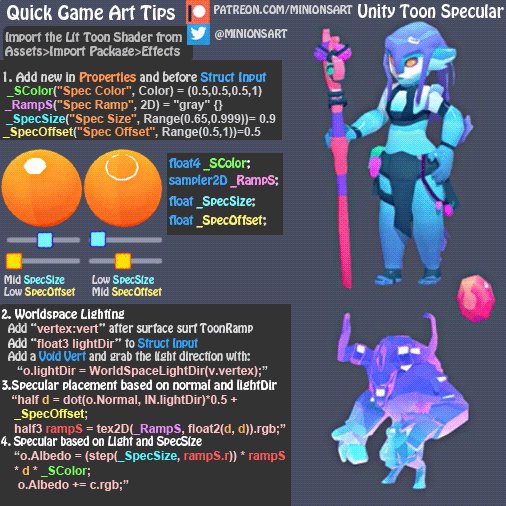

Adding specular to the @unity3d Toon Shader! Code and Spec Ramp in first reply :) #gamedev #tutorial
More stuff > https://t.co/FqAsMb9Plg https://t.co/s20meX02UM
Retweets
218
Likes
745
 Twitter
if you want to learn how to do it at a lower level, I have a tut that does it from scratch: https://roystan.net/articles/toon-shader.html
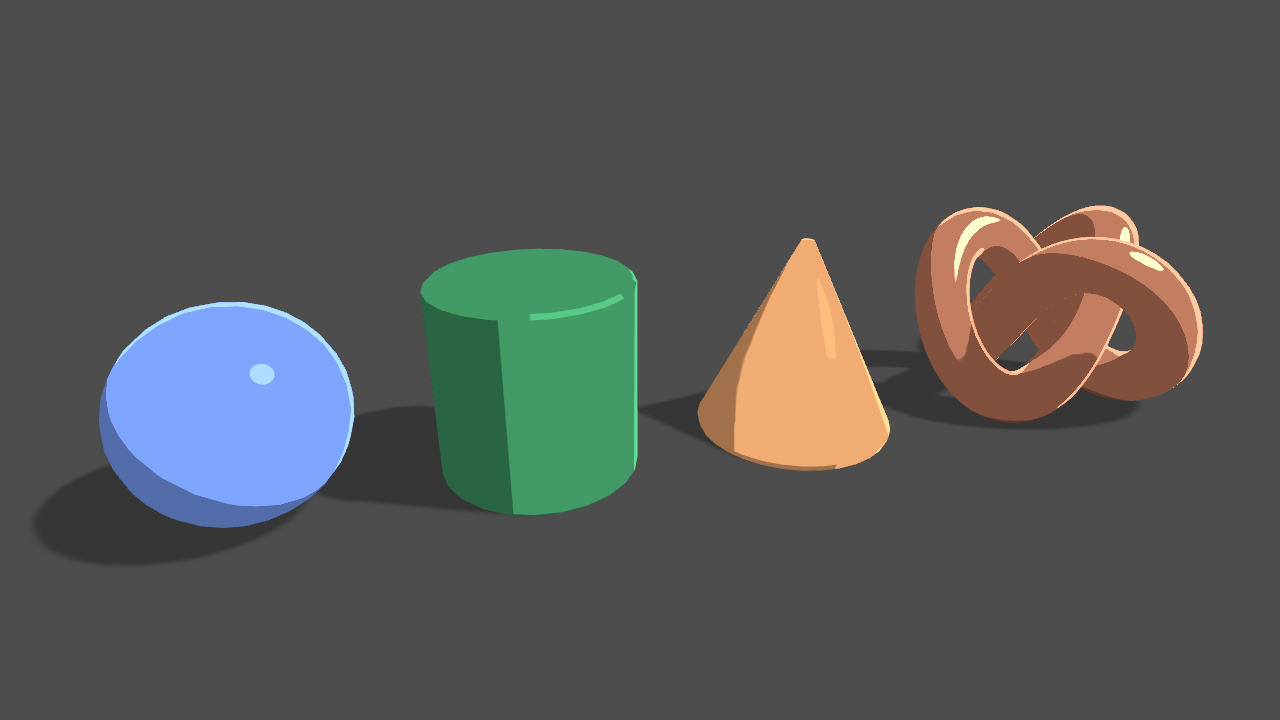
Learn to write a toon shader for Unity engine with specular reflections, rim lighting and shadow casting.
storm cloud
thanks! ive seen that second one before, ill try it out
 tribal locust
Anyone very familiar with Grab Pass? I'm trying to create a reflection shader (for a water effect), and it mostly works, except for one issue: when the camera scrolls vertically, the contents of my reflection change. It doesn't happen when the camera scrolls horizontally, so I think it has something to do with my "flip Y uv coordinates" part of my shader.. thinking I might need to do some math involving the world Y position, but I don't have the slightest idea what math specifically. Here's how it looks:
Shader looks like this (built with Shadero, a typical node-based shader editor):
 lapis vigil
I upgraded a project to LWRP but my Terrain is still using the old shaders. How can I tell Unity to change the shader for my Terrain to the LWRP shader? (I have done the Upgrade Project Materials step.)
I may have figured it out by going into Terrain Settings and creating a new Shader. LWRP > Terrain > Lit
 sage ingot
I downloaded a shader that'll allow double-sided materials, but sadly it doesn't let me disable reflection or speculars like other shaders
faint notch
I am using custom lightning to be able to cast shadows in my Unlit Master node (shadergraph) which works fine. I'm trying to separate shadows into casting to other objects, and receiving shadows so i can control that on each Material - like you can for PBR and other URP/HDRP shaders. Does anyone have an idea how I could achieve this?
This trick does not work in URP unlit, https://forum.unity.com/threads/turn-off-receive-shadows-on-custom-pbr-graph-lwrp.657814/
Unity Forum
Hi, standard LWRP "Lit" and "Simple Lit" shaders have a checkmark for turning off "Receive shadows" (see below. There needs to be something similar for...
Which makes sense since I'm adding my own shadows from my custom lightning hlsl function, guess i have to try and seperate the shadows on the hlsl custom source somehow
faint notch
Figured it out
 worldly breach
hi. i'm using the snoise from the unity mathematics lib
but somehow it repeats itself
is that supposed to be?
faint notch
@devout quarry Yeah, all boolean keywords you want exposed must be suffixed, from docs: To expose a Boolean Keyword in the Material Inspector, its Reference name must include the _ON suffix https://docs.unity3d.com/Packages/com.unity.shadergraph@7.1/manual/Keywords.html
 shrewd wave
Hi, so i'm currently trying to add an SRP Shader to a character model, but the inspector comes up with the error that my material does not have a _MainTex property. I attempted to remediate it with the srp property as follows:
(I added a _MainTex property with a reference of _MainTex)
For some reason it still says i do not have a _MainTex property, does anyone know how i would be able to fix this?
devout quarry
Can you show a screenshot of the error?
shrewd wave
yep
"Material does not have a _MainTex texture property. It is required for SpriteRenderer."
rustic dragon
you aren't using _MainTex in the shader
drop it in and use it for albedo and opacity I imagine
devout quarry
that's indeed the issue
shrewd wave
its not allowing me to connect the property to albedo for some reason
devout quarry
sample the texture
using the 'sample texture 2D' node
then connect the rgba (4) to albedo slot
shrewd wave
ok cool, and then you said i have to connect it to opacity too?
rustic dragon
pretty sure, not done a lot of sprite stuff
shrewd wave
is there a node opacity is under?
rustic dragon
it's the a channel of that texture sampler he had you add
oh that's right, you have to split
stuck in unreal mode :p
devout quarry
I'd do the vector4 output of sampler -> split
then do alpha to opacity
then use a 'combine' node or 'vector3' node
to combine x,y,z again into a vector3 to put in albedo
or you can put the vector4 output directly in the albedo slot and x,y,z will be used automatically
since albedo is (3)
rustic dragon
it does expose the a
rustic dragon
yes, you are horrible 😛
devout quarry
I feel shame 😉
shrewd wave
so what do i connect the split to and the sample texture to?
rustic dragon
just make the A channel from the Sample Texture 2D, go into the opacity
regal stag
It's possible that the error occurs because the _MainTex property you created isn't set to be Exposed @shrewd wave
shrewd wave
on the post i saw it told me not to add the exposure, I'll check that out
regal stag
That said, I don't know whether shadergraph works with the Sprite Renderer in that version, it looks like a LWRP preview version?
shrewd wave
I don't have the error anymore, but my character model is still a black box
shadergraph is working for unity 2d right now
regal stag
You also seem to be using the Fresnel Effect node. It uses mesh normals so is unlikely to work with sprites.
shrewd wave
so should i delete the fresnal node and use tint to alter that color?
rustic dragon
what are you trying to do?
shrewd wave
just trying to make a red glowing hue for the character model
rustic dragon
like bloom?
shrewd wave
yeah
regal stag
Do you mean a glowing outline? Or tinting the entire sprite colour?
shrewd wave
yeah glowing outline
rustic dragon
I imagine cranking up the emissive and post processing the heck out of it, but you'd need some control over what part of the sprite you want to 'glow'
shrewd wave
I already have a tinting feature
my original plan was to create a still image animated effect for the player model (chowder effect), and the pipeline is as follows:
would this still be plausible with unity 2d?
regal stag
I'm not too familiar with sprite rendering / 2D, but I can't think of any reason why that wouldn't work
shrewd wave
ok i guess ill try it
id imagine ill still have to have the _MainTex property so ill keep that
yeah there were no external errors but it still appeared as a black box
rustic dragon
can you show it?
shrewd wave
rustic dragon
sorry, I mean the graph
shrewd wave
rustic dragon
material for that sprite?
shrewd wave
it does have one error I found in the shader saying that the "output value for 'shadowvortex' is not completely initialized
rustic dragon
is that related to that material?
I'd either put a brighter texture into that slot, or for test just put a color into the albedo
regal stag
@shrewd wave You're trying to put that stars texture over your sprite right?
shrewd wave
yes
regal stag
I believe you will need another texture property in order to achieve that. The SpriteRenderer will fill the _MainTex property with the sprite's texture
regal stag
You can name it whatever you want, it's not too important unless you want to set it via a C# script
rustic dragon
make your own for that, the name shouldn't matter here, except if you want to acces it
oh, I should look up before submitting 😛
shrewd wave
ok so i deleted the _MainTex and instead created a new texture2d and added that property to the sample texture node
rustic dragon
I think you need _MainTex, the idea is you add another texture 2D sample and overlay them
rustic dragon
you have 2
regal stag
This should help clear things up
rustic dragon
yeah, I was just capturing that, you are quick
shrewd wave
and then that all goes to albedo correct?
rustic dragon
or emissive, whatever you want
regal stag
Yeah, you'll also need to Split it to obtain the Alpha component
Well, or use the A output on the sample texture node
rustic dragon
yeah, the one that contains the alpha, which is _MainTex
regal stag
The multiply actually might want to use the A output on the top one too, so that the sprite colour isn't used. Depends on what effect you're trying to produce.
rustic dragon
you don't need that split into the alpha
just go from A to opacity
sorry, A to Alpha 🙂
shrewd wave
so split A to Alpha?
rustic dragon
just do this
regal stag
Was about to do the same thing, now who's quick 😅
shrewd wave
oh so do you not need the split
rustic dragon
who is the Usain Bolt of screen captures 😛
 languid stream
Hey, I'm not entirely sure this is something I can do, but I'm struggling finding an answer.
Essentially, I instantiate an object that acts as a mask, but I want the mask to fade over time. I haven't been able to figure out how to go about doing this. Been slamming my head trying to think of ways haha. Would I need to write a custom shader since the Sprite Mask component doesn't seem to have the option to fade.
Here's a visual representation of what I'm trying to do.
regal stag
You only need the Split if you are going from a Vector4 (pink line) to a Vector1 (blue line). @shrewd wave
rustic dragon
@languid stream why do they need to be separate gameobjects/sprites?
@languid stream you could do the layer mask in a shader on the same sprite for sure
@languid stream and fade that mask like you want via script
shrewd wave
Okay, so i just added sample texture a to the alpha
I do still have the error that the output of the shadowpass vortex is not completely initialized
rustic dragon
might be something else? like not related
regal stag
Not really sure what that is, it's likely a bug since you are using a preview version
shrewd wave
just to make sure, lwrp's preview package is compatible with unity 2d?
languid stream
Here's where I'm trying to implement it. Currently the dots just get disabled after X amount of time, but I'd want them to fade first before for a nicer feel.
I wouldn't know how to fade the mask since the Sprite Mask component doesn't have any methods or properties related to alpha.
shrewd wave
because thats what ive been using
rustic dragon
@languid stream ah nice effect, how is that setup?
languid stream
It's essentially an object pooler of these mask dots and two tile maps with different color tiles. The green tilemap is visible inside the dot mask that gets enabled and placed on mouse point. But the mask fade would make it look so much better 
regal stag
@shrewd wave I'm not sure, the LWRP preview is quite outdated. I'm using the Universal RP (which is what LWRP was renamed to), in Unity 2019.3.0f1, it appears to have Sprite Lit/Unlit Master nodes so might be better, although they do say they are Experimental.
languid stream
I tried to do something like an animated mask that would shrink, but wasn't able to do that either. So I figured I'd try to fade, thinking it'd be easier.
shrewd wave
@regal stag do you think there may be something wrong with the actual image?
regal stag
@shrewd wave Which image are you referring to?
shrewd wave
the stars image
rustic dragon
@languid stream not sure how you are doing that, so you have a separate 'mask' sprite and overlays the green fill?
regal stag
@shrewd wave I don't see what problem there would be with it. You could try a different texture, but the graph should work. If it isn't working, you might need to look into updating your Unity & LWRP package version.
shrewd wave
ok cool
if that doesnt work my last resort would me making some sort of sprite mask i guess
sage ingot
I downloaded a shader that'll allow double-sided materials, but sadly it doesn't let me disable reflection or speculars like other shaders
rustic dragon
probably just make smoothness 0
 warped field
anyone know how to make independent texture animation in a shader without amking a new material
devout quarry
what do you mean exactly @warped field with without making a new material?
I think 1. You modify the shader to animate the texture or 2. You leave the shader as it is, but apply the animation as a post processing effect
rustic dragon
I need to learn how to read 😛
warped field
well I meant like a sprite animation where you have 1 character running and one idle sort of like Duke nukem 3d or Doom
but I'm also applying this rule to make vertex animations with a custom bake Vertex color map
warped field
then problem with sprite sheets is size limitsand I cannot put everything in sprite sheet not ever per monster
silver moat
Bit of a late response but.. Your best bet would be to have sprites swapped out by code rather than to let a custom shader animate everything. Let's say you want 4 frames of a simple animation for when your character is looking forward and to the player. When you want to stop displaying a forward sprite, swap it all together with a new spritesheet texture that has the direction you want
 meager pelican
@languid stream
It's essentially an object pooler of these mask dots and two tile maps with different color tiles. The green tilemap is visible inside the dot mask that gets enabled and placed on mouse point. But the mask fade would make it look so much better
So you have this pool of "dots" and you want to age them out. That's pretty much done on the C# side, IMO, as they're going to be separate objects. Just record their date-time as they're drawn and age them, and expire them out of the pool when they get too old.
I suppose you could have a custom shader that had a center and radius or something, or expanded the masked area to figure out the outlines.
if you want it to fade instead of "pop", then the age or the inverse is the transparency% of the max. Or whatever method you want to set the alpha.
The interesting thing was the outline covering all of them, around the outside.
:2c:
low lichen
@languid stream I don't know how you're doing the masking, but usually a mask is binary, so you can't fade it.
If it's a custom shader on the tilemap, then you could lerp between two color schemes or textures using a mask texture
If you're relying on the stencil buffer for the masking, it's just not possible.
rustic dragon
be brave and dither it!
low lichen
It's not uncommon to see in this art style, so that's maybe not a bad idea.
rustic dragon
yeah, some kind of cool alpha test pixel effect might work for sure
low lichen
I just noticed now you mentioned you're using the Stencil Mask component, so then yes you are relying on the stencil buffer.
meager pelican
You can fade the BLENDING, just not the binary op of masking. IDK why you'd want to when you have an outline around the mask, but you could fade the colors.
In the example given, the "dots" were aged out over time. And an outline was drawn, presumably with the net results of the stenciling.
If he had a multi-bit mask, he could store the age in 16 levels, or something. I suppose, if he doesn't want overlap on transparencies. I'm not sure what he's really after.
rustic dragon
is that some git or perforce thing?
devout quarry
I have no idea, could be, it always stays greyed out though, can't seem to activate it
rustic dragon
yeah, like in unreal you have to purposely set up the perforce usage until those things are active
devout quarry
it seems that 'check out' is indeed version control related
rustic dragon
wonder which one
devout quarry
yup that must be it then, thank you
rustic dragon
but that is a great thing for the future, do you see that elsewhere on any other assets?
what version is that?
devout quarry
I'm on 7.1.6
rustic dragon
is that a shader graph version? I don't recognize that
rustic dragon
I usually wait for releases, but .3 looks interesting
devout quarry
7.1.7
is also there
but I haven't seen it released on my version
gonna check out 2020.1 alpha in a second to see if there is anything new
rustic dragon
are those usually really crashy?
devout quarry
I've had a few crashes maybe, but nothing too bad really, my experience with the beta/alphas has always been positive
rustic dragon
you just looking as a curiosity, or for some other use?
devout quarry
I initially checked out 2019.3 for the new UI design and now I can't go back 😉
And I usually check out latest versions specifically for new URP/shadergraph stuff
rustic dragon
ah, UIElements good stuff?
devout quarry
I don't mean UIElements, I mean the editor redesign
rustic dragon
oh, haha, yeah that 🙂
left pivot
Hey all, on Unlit Graph after NdotL my shadows are too dark when compared to PBR master. How can I degrade them a bit?
devout quarry
the shaded part of your object?
devout quarry
I'm not 100% sure what you mean
but with this
you can control the color of your shaded part as well as the smoothness of the transition
left pivot
oh, let me see this.
Is smoothstep right thing here or my values are weird? @devout quarry
devout quarry
Use 0 for Edge1 and a value between 0 and 2 for Edge2
these values
give me this result
left pivot
oh you went with it all the way 😄
devout quarry
I added a quick highlight yeah
left pivot
thank you. It's not working on my vertex color shader yet but we'll see about that.
shadows are thanks to you though.
yeap, got it working now. @devout quarry thank you there mate.
devout quarry
lovely
also if you want see something neat
I applied some of this blinn-phong shading to a raymarched sphere
and it looks very similar to a real sphere
regal stag
Nice work
devout quarry
thank you
languid stream
@meager pelican @rustic dragon @low lichen
Thanks for the thoughts. I really do appreciate it. The outline is actually kind of interesting. The dot is in two parts, the mask and then the outline. The outline is visible outside of the mask so it’s more like a pseudo outline formed by all the dots together with only the border of the combination of the dots visible due to the mask.
Thinking about what Carpe said, the fade would look strange. This doesn’t seem to be a shader question anymore, but since you all understand the context, would there be anyway to possibly animate the mask via script? Like multiple mask components and enabling/disabling them over a period of time?
The idea just came to me while I was typing this up. Hah
low lichen
You could try shrinking them
languid stream
I’d probably prefer the enabling/disabling (if possible) to retain the pixel grid rather than shrinking. But I can try just to see how it looks visually.
 slate patrol
Hmmmm, I wanna get a bit in-depth on some on a particular case
Let's say that I have a deferred light shader (let's say a directional one for now that is drawn as a fullscreen quad, just like in vanilla unity)
Let's say that I can hypothetically calculate the light attenuations with dot(normal, lightDir) and the shadow attenuation so I effectively get an attenuation mask.
This allows me to use clip() early on the attenuation and early-out of the execution. Taking the modern PC/Console hardware in mind, this'll mean that if the entire tile will get clipped, then they all will early-exit and the work will be skipped.
However, I'm not too sure about this situation
Do you think that this is a good strategy considering that such a shader will be used for modern hardware and that there's no translucency/SSS involved? What are the benefits and the downsides?
low lichen
I don't know enough about the impact of clip on modern hardware to give you an answer on that. But it seems like a very quick thing to test, once you have that light shader setup. It's not like you have to know this right now to structure your shader differently, right? It would just be one extra clip line.
slate patrol
Well, yeah, but I find it very difficult for me to test such things. I don't have a relatively low-end GPU to test it on and my current GPU is just too beefy to work with. When I profile one time I get one results and the next day, without any changes, they're all different. So until I'll get a more suitable GPU for such things the only thing I can do is to do what's supposedly the best for the hardware.
Strange thing is that I get such varying results on all kinds of profilers, NSight and PIX included. It's just a pain
 grand jolt
I just created a new project for the lightweight render pipeline (with the example scenes), then added a new BPR shader graph and it stll tells me that the render pipeline is not compatible
Anyone knows a fix for this
Alright fixed it lol
meager pelican
@languid stream would there be anyway to possibly animate the mask via script? Like multiple mask components and enabling/disabling them over a period of time?
I'm not sure what exactly you mean by "multiple mask components" but if you read up on the stencil buffer that I think you're already using, you'll find you can have several bits for your use if you don't care about lighting. So after the lighting pass, you can have the camera clear the stencil buffer THEN draw your stuff. You could, for example, use different bits for different masks. If that helps. See Unity's doco. There's a bunch of options, read masks, write masks, incr, decr, compares, sets, etc.
languid stream
@meager pelican Thanks for the explanation! I ended up using a script that would animate the mask for me since mechanim can't directly interact with the mask sprite. Here's the result. I think it looks better than the fade.
languid stream
It’s gonna be a rpg/real-time fighting/bullet hell/ MS paint combo with an upgrade tree haha. I’m just getting the gameplay skeleton framed out right now though, so very early stages.
I’m very unsure of its identity right now, so anything could change.
languid stream
I haven’t posted up anything about this game in particular, but it should be in my profile.
devout quarry
if anybody has any idea about this, please tag me I can't solvei t
solve it
To reproduce: 1. Open the attached project; 2. Upgrade SRP packages to master branch; 3. Open "New Scene"; 4. Make sure GPU instanci...
I'm still having the issue, even without gpu instancing enabled..
devout quarry
Oh wow
The issue was caused by this
Apparently you can't name the reference _AlphaClip
regal stag
Looks like the generated code uses that, so it gets confused with the same name. Glad you found the solution, Good to know.
devout quarry
good find
luckily the other ones don't seem like keywords I would use accidentally haha
winter acorn
Hi. is it worth recreating the entire terrain system your self for more control and less limitations,etc... and is the best aproach using shaders
winter acorn
its for a studio. i work at a studio
Im a 3d environment artist. unity limits us with a couple of features. just wanted to get some opinions
 ripe viper
Ah; then maybe, yeah... Sorry, I failed to take the advice to check my assumptions. 😦 If it's getting in the way, then it's a real possibility.
winter acorn
its fine.
Thanks for the reply though. I feel like it might be worth it so we could control terrain maps more,etc... for example personally i would prefer more detailed map options. not just detail,normal and color
ripe viper
The caveat is that replacing a fundamental piece means you can't use tools that are built to use that normal piece. Like things that are built to use Unity's nav mesh have trouble when you replace it with A* Pathfinding, or such. So there's a cost to replacing it, in that you have to adapt other tools that you might also be using. For most folks it's not worth it, but for a studio it might be.
winter acorn
And currently im having to use splatmaps which unity doesnt really handle so well at all. felt like maybe there is a better way of texture the world procedurally. but not sure if you can make shaders for the unity terrain with out actually making a terrain system of your own where you can control how shaders work. Im not a shader programmer so i dont know im just assuming. maybe there is a way to proceduraly texture with the unity terrain
well we do use navmesh. so it might not be worth it. AI is a big deal in our game
ripe viper
Ahhh... Texturing the terrain might be a very different answer... I think you should be able to procedurally generate a texture that applies to the terrain. Those parts are...separate enough, I think.
meager pelican
Depends on what you're doing. As I understand it, many just use meshes instead, bypassing the terrain stuff. Then you can customize each material/shader. It all depends, needs, tool-sets, etc.
meager pelican
No way you make it one single mesh! Oi! You break it up into reasonable chunks. Otherwise you'll hit mesh-size limits. And besides, you end up having to do frustum clipping on too much of one-big-mesh.
winter acorn
yet alone performance would suck if it was one mesh
no way for us to do occlusion culling
meager pelican
^^ I don't understand your first sentence.
Navmesh doesn't require terrain that I know of.
I use a grid of meshes, and dynamically have them too (as in also, besides the static ones) since environment is destructible. Rubble is dynamically dropped into meshes in a grid shape, for example.
It all depends.
I don't know what you're doing. If you, as you say, are having limitations with terrain, and that part of the engine doesn't do what you want, do it differently. You should be able to make meshes and shaders to do what you want, whatever that is.
winter acorn
@meager pelican it requires baking. but where are you going to place trees
unless we make a script to place trees
should be easy
then yea we dont really need a terrain at the end of the day
meager pelican
I don't think occlusion culling is dependent on terrain either.
winter acorn
@meager pelican it isnt. i really think your not understanding what i type xD.
Im saying that if we some how managed to use a huge mesh as terrain we wouldnt be able to oclusion cull parts of that mesh cause we would oclude the entire mesh then
but if we tile. then we would be able to
meager pelican
Oh, yeah. But I'm not suggesting that one-big-mesh thing anyway. 😉
 dim river
So I made a pretty simple dissolve shader using shader graph. It looks great on a capsule mesh. I had however hoped to use it on my players for death / respawn animations - only I was under the assumption I could just throw it on the top level game object and it would cascade down. Unfortunately that isn't the case, and my player model is made up of a bunch of different game objects, mesh renderers, etc.
If I want to dissolve my entire player, would have to apply the material / shader to all of the separate meshes?
orchid peak
@dim river each mesh would need to have that material applied, yes
meager pelican
^^ Right. Because (@dim river ) a material IS a shader+Settings. So a dissolve effect would come from the shader that is bound to the material(s).
 silk sky
I'm making a level on a floating island, can you suggest me some tutorials on how I could make a cloud shader for cover the section below the land?
rustic dragon
@silk sky probably some more clever ways, but a way I know of is to apply the 'fog' gradually on the models materials based on the height of the world
silk sky
Dunno, fog seems kinda cheap and also too much dark for the level i'm making
I will surely use it when the player fall down but as aestethic piece a shader would be better
I've found a 40min tutorial so ill give it a shot ^^
rustic dragon
@silk sky yeah, check those tutorials, what I was thinking of is
 quick wigeon
I have a unique problem with Unity Shader Graph Editor. I am trying to make a 2D sprite dissolve, but the problem is that for some reason, colors don't work
Like any time I add any color at all, it just becomes invisible
or well, anything the color touches
I make an outline for the dissolve but I gave it a color, no outline.
Multiplied the texture by the color to get a tint, no texture
regal stag
@quick wigeon Is the alpha component of your colour set to 0?
quick wigeon
No
It shows it in the small previews, but when it goes to the output, it gets funky
regal stag
The default value of that Color property has an alpha value of 0, it's shown by the black bar below the green
regal stag
Alpha refers to transparency. If you multiply by 0, it will output 0, and be fully transparent.
rustic dragon
@regal stag knows what he's talking aboot
regal stag
What Master node are you using? Is it the "Sprite Lit/Unlit" one?
quick wigeon
yes
regal stag
And your "Sprite" property, can you show the settings of that property
quick wigeon
regal stag
That looks fine
Ah wait. Check your Material, I think the alpha component of the colour is probably 0 again. When changing default values in shadergraph it doesn't update the values on the material that were previously created
quick wigeon
Ok, should reiterate
the sprite shows up
but the dissolve doesn't
It shows in the preview, but not in the actual scene
regal stag
Okay. Could you screenshot the material inspector values though?
quick wigeon
First, here is to show the material and the game viewport
nevermind
fixed it
forgot to expose the texture property and save it
Ok, another problem
It works fine for still sprites, but when I play an animation, the dissolve just jumps around in a weird way
regal stag
Hmm. I'm not too familiar with 2D animation.. But I assume it's jumping around because it uses the UVs to sample the texture to obtain the correct sprite to display.
If the noise you use to do the dissolving is based off fragment position rather than UVs though, it shouldn't jump around, hopefully.
Try sampling the noise like this
@quick wigeon
Or possibly with the Position in Object space, if you want the dissolve effect to scale with the sprite. You can also leave the Tiling and Offset set out if you want, it's just so you can adjust the tiling/scale, but I guess the noise node has a scale too.
quick wigeon
The concept is it is one image with the sprite on it
and it cuts out parts of that image to animate it
regal stag
Yeah, that was my assumption
So because your noise is sampled using the entire texture's UVs, and the animation jumps to each sprite, the noise is also jumping.
quick wigeon
So do i use what you said first, or last
regal stag
Use the Position node. It's probably better to just use Object space, but test both out and see which you prefer.
quick wigeon
kk
regal stag
Basically in Object space, the noise will follow, rotate and scale with the sprite object. While World space, it won't.
Both (should) work, it just depends what effect you want to create
regal stag
It might only react to these 2D lights? Not sure how they work, I can't even seem to put them into the scene.
Ah, you need to be using the 2D Renderer apparently, and assign it under the URP Pipeline Asset.
I usually work in 3D and haven't had time to try this 2D stuff out. 😅
quick wigeon
ah ok
 vocal lantern
I have a question specifically about compute shaders on mobile VS PC. My shaders work fine on PC but on mobile threads (somewhat randomly) fail to execute. Anyone ever seen an issue like that?
I can't find anything on google
This is the only model I have set up. I tried censoring it but I think I made it worse? || https://cdn.discordapp.com/attachments/371347717030412298/663513666984869899/Gif_505.gif || Dark blue is good, the main kernels ran. Black or bright blue means one kernel or another failed

It is very random. Changing the number or nature of dispatches seems to affect it, for better or worse. The mobile processor is not overloaded FYI. (And again, on desktop it's totally fine)
 pale lantern
@vocal lantern // I don't think mobile devices even support compute shaders
grand jolt
Hey guys, I'm learning compute shaders at the moment, is their a good reference for hlsl?
devout quarry

HLSL shaders are made up of variables, and functions, which in turn are made up of statements.
grand jolt
thanks that is what I was looking for
vocal lantern
@pale lantern they do. And the system worked fine before I added more complexity and dispatches
pale lantern
Oh, I was wrong. It is supported on some devices
How many dispatches? @vocal lantern
vocal lantern
atm I think 9 or 10
Problems started (I think) when I tried going from 3 to 6
wait actually it's 18 to 20 atm
But atm if I run it at around... 12 dispatches, the thread failures are pretty minimal. It's pretty random
@grand jolt if you're making compute shaders for unity this is quite a good tutorial and source code https://www.reddit.com/r/Unity3D/comments/7ppldz/physics_simulation_on_gpu_with_compute_shader_in/

reddit
gif of what we will do Introduction In this tutorial I'll explain how to use compute shader to perform...
 urban urchin
I have a question about constant buffers.
In the shaders, you can use "CBUFFER_START"/"CBUFFER_END" to group shader variables together. However, how do I deal with alignment/padding when setting this data from C#? (ComputeBuffer.SetData).
Do I need to take the packing rules of each graphics API into account? (when using OpenGL I guess this becomes a uniform block with std140 layout?), or are there any utility functions that can help me do this in a better way?
Example:
in the shader I create a cbuffer consisting of a combination of fixed3/fixed4/etc. In c# I create a similar "struct", and upload the data through ComputeBuffer.SetData(...). How can I make sure this works on every graphics API?
 shadow magnet
how does compute shader work with a RW struct buffer ? I don't understand how i can acces an element of this buffer if the numthread is lower that the size of this buffer
silk sky

SUPPORT THESE TUTORIALS https://www.patreon.com/cg_matter
MY WEBSITE https://www.cgmatter.com
In this fast blender tutorial I show you how to quickly and easily create procedural crystals with controls for color, shape, size, and surface properties (driven by materials).
Is this effect replicable with Unity PBR?
silk sky
I've already made it in Blender, wanted if I can replicate the same nodes
 plucky bone
@shadow magnet You have a SV_DispatchThreadID that should be what you need
rustic dragon
@silk sky replicating that procedural, tessellated displaced mesh stuff would be difficult and really not needed for something like that, the surface quality itself I imagine you could get close though
 sweet stone
Did anybody finish Part2 of TheArtOfCode's Mandelbrot Explorer? I am stuck at 8:09 where he writes a line that is supposed to make escape pixels black, but it's doing nothing for me, the color is still there.
https://youtu.be/zmWkhlocBRY?t=489
Worse, while the program is "working" with no errors most of the time, but every couple of minutes I get this error popping up:
Curl error 56: Receiving data failed with unitytls error code 1048578
It doesn't stop Unity but it makes me wonder if it's related.
Did anybody get it to work and could I 👀 your code for it?
Or better, if you got stuck also, how did you solve the problem?
Thank you

Twitter: @The_ArtOfCode
Facebook: https://www.facebook.com/groups/theartofcode/
Patreon: https://www.patreon.com/TheArtOfCode
Part 1:
https://youtu.be/kY7liQVPQSc
This is the second of two videos in which we will create a Mandelbrot fractal explorer. In this video we'll ad...
left pivot
Hey @regal stag been following along the distorted force field of yours. My intersection doesn't work. Everything is same. Am I missing something?
regal stag
@left pivot Have you got the 'Depth Texture' option enabled on the LWRP/URP Pipeline Asset?
left pivot
Yes I did. I did the simple one first. It works same as yours. Distorted's intersection doesn't work.
Master node options are set too.
object's scale is 1 also.
regal stag
What component is on the Split node on the Scale? It's a little hard to see from the image quality but it looks like an "A"?
regal stag
Yeah
left pivot
R I meant. yeah
regal stag
It's a Vector3, so doesn't have an alpha component, so multiplying by 0 rather than the scale
regal stag
It looks like the scale is off, possibly because I used a custom mesh with a different scale or something. Try putting 0.5 in the Multiply after the split.
left pivot
oh, that did the trick. That scale thing is confusing though. Maybe I should provide a script that sends scale to shader to multiply with this value?
thank you though.
regal stag
That might work better, and probably better for performance too, as the Scale output on the Object node isn't exactly cheap.
It does this behind the scenes.
                             length(float3(UNITY_MATRIX_M[0].y, UNITY_MATRIX_M[1].y, UNITY_MATRIX_M[2].y)),
length(float3(UNITY_MATRIX_M[0].z, UNITY_MATRIX_M[1].z, UNITY_MATRIX_M[2].z)));```oh they build scale each time not feed it directly.
regal stag
Yeah, using a property and sending it in would probably be better
Especially in this case where we don't even need all 3 axes, we just want the sphere radius
left pivot
Yeah, maybe calculation's sake I should use a custom mesh also and feed a property into it.
And your blog is so good. Keep it coming please. I really enjoy them. Not to replicate it but trying to learn by it.
regal stag
I used a custom sphere mesh, as Unity's default one isn't subdivided that much which is quite noticeable if the forcefield is quite big. More vertices is also better looking for the vertex offsetting later in the post.
regal stag
No problem, happy to help 🙂
tranquil bronze
why do i keep getting this error with custom functions


i copied and pasted from here https://pastebin.com/4P3WV4EY

Pastebin
it just decides when it wants to work for somereason
regal stag
I could be mistaken, but I believe when using String mode you can't include the entire function (like the void FunctionName_float(parameters){}) in that box, only the actual Body of the function. If you use the File type instead, you can then point it to a source file which then needs the entire function.
@tranquil bronze
tranquil bronze
thanks
quick wigeon
How do I make a material that transitions from one to the other with a slider or number
regal stag
@quick wigeon Use a Lerp node. It interpolates between two values using a third variable between 0 and 1.
quick wigeon
Oh thanks
regal stag
You won't really be able to transition between two entirely different materials, but you could combine both into one shader, and use a Lerp to pick which one to display.
quick wigeon
I also have a material that transitions the alpha of the material using a dissolve effect, how do I plug the lerp node into that
Let me know if I need to show the material
regal stag
Are you saying that the alpha is separate from the colour? If so, you can either combine them first (like into a Vector4/Color rather than Vector3 which doesn't have an alpha component), or use another Lerp node (probably easier).
regal stag
What are you trying to do with this?
quick wigeon
Im showing the material, as I am having trouble understanding where it goes. Like, does it go near the sample texture node, or like the muliply node
regal stag
Sorry, I'm a little confused. What exactly are you trying to achieve? You mentioned "material that transitions from one to the other". Is there another material that you are using that you want this one to change into?
tranquil bronze
im trying to follow this tutorial https://blogs.unity3d.com/2019/07/31/custom-lighting-in-shader-graph-expanding-your-graphs-in-2019/ but i ran into a problem
Unity Technologies Blog
With the release of Unity Editor 2019.1, the Shader Graph package officially came out of preview! Now, in 2019.2, we’re bringing even more features and fun...
my materials arnt recieving shadow data
the cube on the left uses my shader graph, right is normal
quick wigeon
I haven't made it yet. For now, Ill make a tinted version of the texture then transition to that tint using the dissolve
tranquil bronze
this is the sub shader for the main light
why isnt the shadows appearing??
im using the custom functions from the tutorial
even with saturation it doesnt work
rustic dragon
are you sure their examples throw shadows?
doesn't look like it in those images they have on that page
regal stag
@quick wigeon Okay, I'm hoping this helps clear up what the lerp does. Imagine the Slider node is your Dissolve input, when set to 1, it lets through the Color, while set to 0 it shows the texture fully. The Color/Texture outputs are both Vector4's. The Color could be replaced with another texture or tinted texture output for example.
tranquil bronze
there is also this video which is the same as the blog https://www.youtube.com/watch?v=DOLE4nrK97g, here they show shadows @rustic dragon
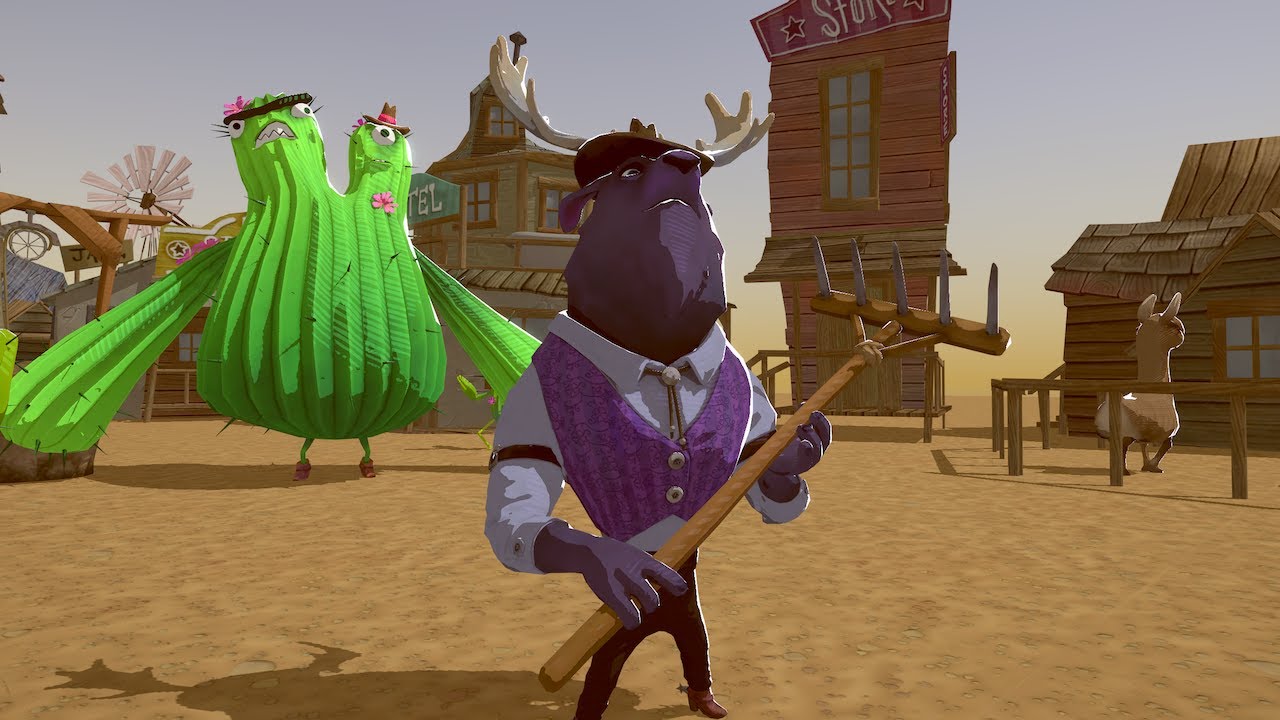
Learn how to write a custom lighting shader for a stylized look that can easily be shared across multiple assets.
Speaker:
Ciro Continisio - Unity
More about Shader Graph: https://on.unity.com/2oDQCbi
Slides available here: https://www.slideshare.net/unity3d/learn-how-to-...
at 11:15
regal stag
@tranquil bronze I can't seem to get the custom function nodes working right now, but you could check here : https://github.com/ciro-unity/BotW-ToonShader/blob/master/Assets/Shaders/CustomLighting.hlsl
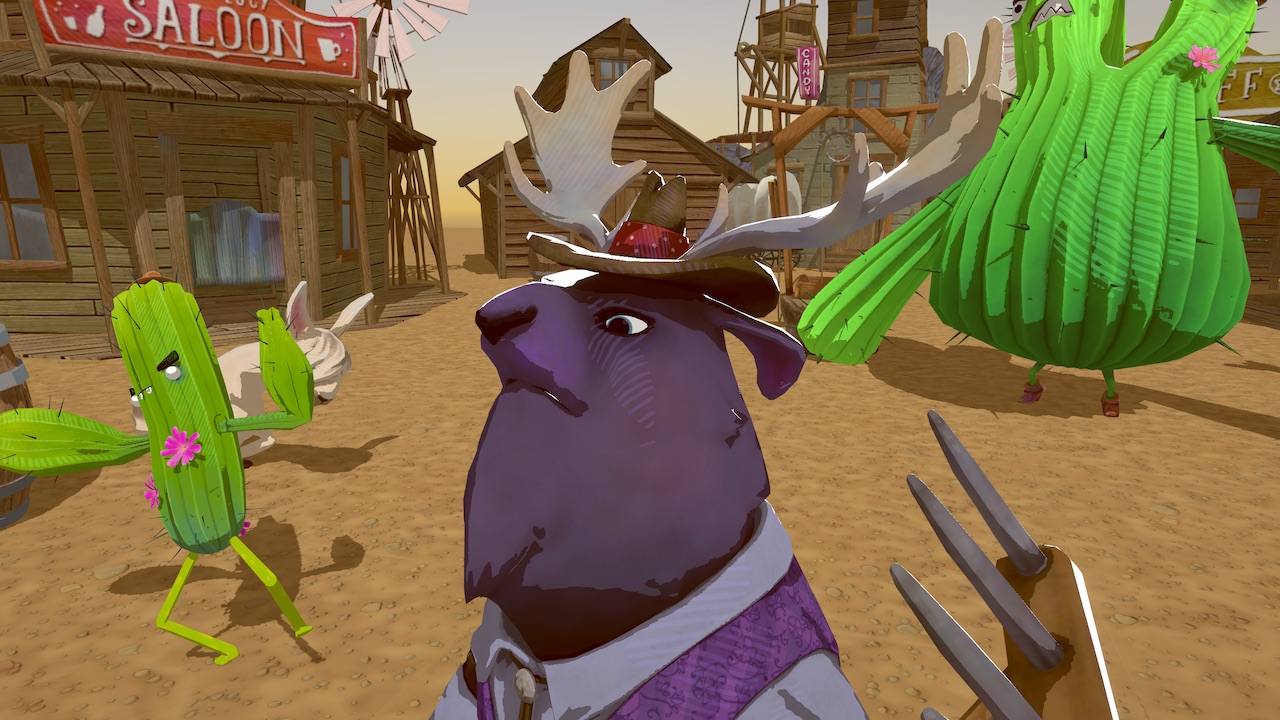
GitHub
A recreation of Zelda: Breath of the Wild's toon shader in Unity, using Shader Graph - ciro-unity/BotW-ToonShader
It contains the hlsl used in that video. Maybe there are some differences between that and the blog post
regal stag
@tranquil bronze Just tested the MainLight_float function from what I just linked, and it's receiving shadows fine for me. I'm using Universal Render Pipeline in Unity 2019.3.0f1.
Graph looks like this in case your interested.
rustic dragon
maybe his cube had shadows ticked off on the renderer, what else in a shader could do that?
regal stag
Hmm, I just noticed some issues when zooming out though. The shadows seem to move around weirdly.
rustic dragon
I don't think the moose guy in that creator kit he showed has the same type of materials on it
it's just doing some dot product to get some rim stuff
regal stag
@rustic dragon I don't know what shader the moose guy is using. I just linked the lighting functions that were included in the project which appears to include shadows.
It just used that as the preview image for the link
rustic dragon
ah
 crimson stone
what do i have to do to update a hdrp shadergraph shader via script in realtime?
whatever i tried so far didnt work
rustic dragon
do you know the name of the parameters?
rustic dragon
so you don't have one you made, you want to update properties in the out of the box ones?
crimson stone
i made a new shadergraph shader, and that works fine except it doesnt seem to update in the game
rustic dragon
show what you are trying, send us the names of the parameters, etc
crimson stone
i know the parameter names and can read and set them
so you're saying what i do should already be working?
rustic dragon
do you have the proper material reference in game?
are you wanting to change a specific instance of it or the original?
crimson stone
i have 2 material instances with that shader that are supposed to update
its a vehicle which headlight and taillight brightness are supposed to go up when i need them
regal stag
What code are you using to update the properties?
rustic dragon
yeah, please show that, and how you are getting the reference to the material
crimson stone
        {
            Material instance = updateData.material.lightMaterialInstances[i];

            instance.SetFloat("_IsHeadLightEnabled", 1f);
            instance.SetFloat("_IsTailLightEnabled", 1f);
}```i know that it does find the specific material instances, and it does update the properties
rustic dragon
so the material on the gameobject is changing in game in real time?
rustic dragon
I mean to the #'s in the material in the inspector, do you see those change?
rustic dragon
so in the material you have in the project, (not running in game or an instance), if you change that float from 0 to 1, you see a change in the material sphere preview?
crimson stone
no, since i'm only updating the instances on the vehicle
rustic dragon
I just want to make sure your material/shader is set up properly, that 1f truly means 'on'
so you don't need instances, just go to the material in the project, select it and alter the parameter
crimson stone
while the "headlight" and "tail light" bools are off in the base material
which is how its supposed to be
setting the base material parameter doesn't work either
maybe the emission is not bright enough, if there even is any
rustic dragon
then the shader is broken
yeah
sorry, not broken, just not quite right, show the graph
crimson stone
how would i set the emission then?
rustic dragon
did you set the proper keyword?
rustic dragon
it is in the page I sent
but I don't know if that's it
you basically need to see the change you want to see in the base material
crimson stone
i didnt think thats needed on non-standard shaders
rustic dragon
so get that working
regal stag
Yeah I think that's just for the built-in pipeline standard material
regal stag
If your values are changing, I assume the references are set correctly in the shadergraph blackboard?
crimson stone
yes
regal stag
Could you show a section of the graph where the properties are used
rustic dragon
but does the value of 1f really turn it on
regal stag
The bool might be active, but the shader might not be set up properly to use the bool
rustic dragon
yeah, if you change that bool and you don't see anything change in the material in the project, it's probably not doing much
crimson stone
changing the bool on the shadergraph blackboard works
and changing the bool on the material instance works too, updates in the preview window
rustic dragon
show the names of the properties in the graph
crimson stone
rustic dragon
I mean the names in the blackboard, where you added the parameters
crimson stone
ah
rustic dragon
just want to make sure what you put in the string for the SetFloat isn't in the wrong format or something
regal stag
You could remove those Multiply nodes and put the intensities into the True input on the Branch, but that won't fix your issue, just cleans up the graph a bit.
regal stag
Yeah, shadergraph bools are actually floats behind-the-scenes
rustic dragon
so, just to make sure, when in the game and you turn on the headlights, if you select the headlight object and look at it's material in the inspector, is that value 1?
crimson stone
yes
rustic dragon
and if you make it go to 0 (in the game), you don't see a change in game?
crimson stone
nothing happens in the game if i change any of those values
i can even remove the textures from the material instance, still no change
regal stag
Are you sure that material instance is definitely the one the mesh renderer is using?
rustic dragon
you might not be selecting the instance in game?
crimson stone
how would i make sure that its the used instance
rustic dragon
select the object in game during play, and look at it's material in the inspector
crimson stone
i loop through the list of materials on the vehicle skinned mesh rendererer and get the ones i need from there
rustic dragon
I mean on the object in the game during play, select in the hierarchy and see what the current material settings are
crimson stone
i do practically the same on another material, which is the carpaint i set to a defined color in Start() and it works
custom shader too
and yes, its indeed the right instance
with the changes made
do shadergraph or hdrp even support updating textures at all
crimson stone
        {
            Material instance = updateData.material.materialsList[i];

            if (instance.GetFloat("_UpdatePaint") == 1f)
            {
                updateData.material.paintMaterialInstances.Add(instance);
            }

            if (instance.GetFloat("_UpdateLights") == 1f)
            {
                updateData.material.lightMaterialInstances.Add(instance);
            }
}```that works
regal stag
How is updateData.material.materialsList set?
crimson stone
updateData.material.materialsList = updateData.material.meshRenderer.materials;```I thought so
crimson stone
something wrong?
regal stag
meshRenderer.materials returns a copy of the materials I believe. Any changes made to them won't be written back to the original materials on the renderer.
crimson stone
but it works on the paint materials i mentioned earlier
just not on the light materials
regal stag
Actually I could be wrong, I think I misread the docs page
crimson stone
yeah
meager pelican
I think it's...if you even reference .material it makes a new instance and returns one. So always reference .shaderedMaterial unless you want to clone the material instance.
Which might be what you guys just said. :p So don't even reference .material unless you want a unique material instance and everything that comes with that (like breaking instancing and batching in some pipelines). The .materail getter basically makes a clone if it doesn't have a unique instance already. Messes everyone up, but it's there for historical reasons, and it's a feature. ;)
:2c:
regal stag
Yeah I always just use sharedMaterial.
crimson stone
i cant have that if i want to be using multiple cars with different colors
rustic dragon
yeah, you need the reference to the instances
meager pelican
That's what "instancing" does. Material property blocks. And still use a sharedMateriel to get batching. But see differences on other new pipelines.
rustic dragon
yeah, if you change a property on sharedMaterial it'll change them all
after instantiation into the game, you just need to get a reference to the material on the Renderer and change it when you want
crimson stone
isnt that what i'm doing
meager pelican
You need to see the docs on GPU instancing.
And then use sharedMaterial.
I'm pretty sure.
meager pelican
Unless you don't care about batching. Then basically, you're making a new materail for each "car".
What pipeline are you using (sorry, not following all the way back)
regal stag
They are using HDRP
crimson stone
hdrp
like i said, at this point i'm not even sure what i want to do is currently supported
regal stag
Both material references and using Material property blocks should work, the latter is probably a better choice though as then you don't need multiple instances.
meager pelican
OK if memory serves, that groups by shader, not material instance. So now IDK.
But if you don't need unique instances of materials by car, better for memory that you don't make them.
rustic dragon
he wants to turn on and off the headlights, which should be done per car
crimson stone
but how do i add material property blocks to a shadergraph shader
rustic dragon
you shouldn't have to, what you are doing should be working, not sure why
crimson stone
¯_(ツ)_/¯
rustic dragon
if you are saying you are able to change other properties on these materials but the isHeadlightOn isn't working, then either that 1f value isn't doing anything, or the name of the property you are trying to reach is spelled wrong
crimson stone
but the reference works, it changes accordingly in the inspector of the material instance
rustic dragon
I'd have to see deeper into the scene, seems strange
crimson stone
i'm just gonna create a new one and check step by step
i'll figure it out eventually
rustic dragon
emission seems weird
crimson stone
i just found out there's an emission node i wasn't using
maybe that will change something
rustic dragon
I can't get that to work either, maybe that keyword needs to be enabled
meager pelican
Sorry, I don't want to mess you up. Having these three pipelines gets confusing, and I should have asked you which one you were using. Batching is different between them if IIRC.
So for HDRP, is the material class different than it is for Standard? Or just the attached shaders?
There's an upgrade-materials function, so I'll have to look that up. I was thinking the materials class spanned the piplelines, but maybe not since the attributes are different. So do you end up with a unique material class for each pipeline, and thus it might behave differently when you reference .material on the game object? The Doco reads like there's only one material class, and the shaders are just different (and the pipline logic in the engine too).
I hate this. I'm going to go crawl away now. I know how it works for standard.
crimson stone
for how long will hdrp be experimental?
crimson stone
what does a proper emission map look like anyway?
is it black and white or do colors work?
rustic dragon
so lwrp works fine
two of the same spheres with the same material, instantiated and the one on the right has it's bool changed
rustic dragon
I coudn't get emissive to do anything in the material, let alone be able to switch it off/on in script
regal stag
Is there perhaps a setting somewhere that disables it in HDRP? I seem to have it working fine.
I'm using a slightly older version though, so I'm just updating to see if there's any changes
crimson stone
there are so many badly documented hdrp properties
rustic dragon
maybe something in the pipeline
I tried adding the keyword to the material (through debug) but that didn't work on my end
grand sun
Hey folks, how can i make gradients in a shader without a texture look up?
grand sun
ah yeah, i was more wondering if theres any math expressions or anything that makes that
and in code
devout quarry
and he says "And for "general knowledge", this is exactly what the sample gradient node is doing, but with up to 8 color and alpha in code with a loop "
so this is what you're looking for I think
grand sun
but i guess i can just use the Y channel of a UV for one i guess
devout quarry
What I use is a color gradient field in my material editor -> convert gradient to texture -> sample texture
regal stag
If you need a vertical gradient from black to white, then yeah, UV.y will work
grand sun
but isnt it then more expensive for you to use a texture sample in the end @devout quarry ? or
did you follow me recently on twitter @regal stag ? your profile pic and name looks familiar
devout quarry
I guess maybe, but it's just very convenient to use a color gradient in my material inspector
and I convert it to like a 256 by 1 pixel texture
then samplle
grand sun
ah thats fair
rustic dragon
Texture Samplers should be more expensive and they have a limit, so using the UV math is a great way
grand sun
thought so! 🙂 thanks
whats the maths for a gradient thats peaks at 0.5 and fades at 0 and 1?
rustic dragon
in Unreal at my work, the shader cost is rarely an issue, but samplers are
grand sun
just an inverted distance with 0.5? or something more clever
devout quarry
@rustic dragon So using like noise is preferable over textures for performance?
devout quarry
Is there like a good article or resource somewhere where I can read about shader performance, I know very little about it
regal stag
@grand sun I do follow you, can't remember when I followed though. You might also have seen me on twitter, I've made a bunch of shaders using shadergraph in URP.
grand sun
but depends how detailed your noise is
rustic dragon
@devout quarry honestly that one I don't know, I don't think unreal has noise, usually noise is easy to pack into some other textures which is always a good thing to do
rustic dragon
I'd say the gradient thing is a no texture choice for sure, but noise might be a toss up, I wonder if anybody has really audited the noise in unity
regal stag
It also depends on what platform you are targeting. Generating noise for mobile isn't going to be good, a texture would be a lot better.
rustic dragon
you are right @grand sun , haven't used it 😮
yeah, we don't do mobile, just the lowest is really XboxOne
 tame topaz
Has anyone been able to build with a custom pass volume, in HDRP 2019.3? It's crashing immediately.
rustic dragon
it's a toss up sometimes on what to use as far as texture vs more complex shader, if you really get up there in samplers (like for characters or terrain), sometimes some extra math to make it under the limit is smart, but if you are well under the limit, textures are good especially if you can pack them
devout quarry
so packing something in RGBA really is a x4 speed increase compared to using 4 textures?
or is the unpacking some extra overhead or something
rustic dragon
yeah, 1 sampler vs 4 samplers is always good
one note, if you have 6 samplers, don't do RGBA and RG, make sure to do RGB and RGB
adding an alpha doubles the cost of the texture 😮
devout quarry
I gotta write this down lol
orchid peak
@devout quarry you can actually see this in the way normal maps are stored, which is why you always have to run UnpackNormal to convert it to a direction
Unity Forum
Hello !
I really don't understand the UnpackNormal( ) function...
Let-alone the code inside "UnityCG.cginc" ...
inline fixed3...
rustic dragon
yeah, A is the most uncompressed, but for RGB it's G, so put your roughness/smoothness maps in there
devout quarry
ah cool thankyou roystan
grand sun
@rustic dragon as a tech artist do you find yourself writing shaders or just using the shader graph?
rustic dragon
shader graph, the programmers don't usually want us making shaders 🙂
grand sun
ah thats interesting
rustic dragon
I am more on the art side btw, don't do any c++ or anything
grand sun
rigging?
rustic dragon
tech artists 'can' do shaders, we come in all shapes and sizes
more world gen and optimization guy, audit assets, pipeline stuff, and some tools
grand sun
yeah haha, i am taking my steps to go further towards being a "tech artist" and just figuring out what i need to do
orchid peak
@rustic dragon how large is your team? Curious about how shader graph is holding up in real world settings
devout quarry
me too
rustic dragon
@orchid peak we use unreal at my work
devout quarry
ah
rustic dragon
btw
orchid peak
ohhhhhhhhhh
rustic dragon
at least the game I worked on