#archived-shaders
1 messages · Page 129 of 1
 devout quarry
 fluid lance
(Shadergraph newbie question)
Did someone know why I cannot link these two node?
fluid lance
Is there any way to convert float4 to float3?
 plucky bone
No clue tbh
 regal stag
It should do it automatically, that's likely not the problem
It's probably something to do with the nodes being in different vertex/fragment stages of the shader. Try disconnecting the Position input on the master node, then connect them, then connect the master node again
It might be that you need to use the Sample Texture 2D LOD node though, I think the Sample Texture 2D one can't be in the vertex stage
fluid lance
I cannot connect to position master note 😅
regal stag
Yeah sorry, use the Sample Texture 2D LOD node instead
regal stag
No problem 😄
 thick umbra
even though I have kind of seamless texture
and in preview window I can clearly see my object will removed perfectly
in unity scene, when I create sphere, its not what it looks like in preview
look at this
I do have this kind of areas which shouldnt be there based on preview
or my texture
regal stag
That might be because it can only offset vertices, and the mesh used doesn't have vertices to offset in the exact places where you want them. Not sure why the preview looks different though, I guess it might not use the same mesh.
regal stag
Maybe try a custom sphere mesh, with a higher vertex count. Also if you know you want to offset vertices around the sphere like that, use a "UV sphere" rather than an cube-deformed (like Unity's default sphere mesh) or icosphere type mesh.
devout quarry
@regal stag idk.. same exact shader, just downgraded Unity from 2019.3.0f1 to 2019.3b12 and with that also downgraded a minor SRP version
and weirdness is gone
oh well at least the problem isn't with my shader then
regal stag
Oh wow, interesting.
@devout quarry I've been trying to do some tests, I'm using 2019.3.0b4 with URP 7.1.5, and the Scene Depth node output seems to just be flat grey on an android build for some reason. What versions of the SRP are you using?
devout quarry
Was using 7.1.5 or 7.1.6 on 2019.3.1.0f which was giving me bad result on android build
now using 7.1.1 on 2019.3.0b12 which is giving expected, good result on android build
regal stag
Can't seem to get it working, oh well, glad you got it fixed anyway.
 waxen hollow
Hi how i set my shader(lit sprite) up to work with the ui mask ?
waxen hollow
or are there any examples for creating a stencil shader with shadergraph ?
 rotund olive
Hi, I have searched for this for a while but I still can't find it. I have a raw HLSL shader from another project which has Vertex and Fragment stages. The VS passes custom data (4x Vec4) as output parameters to the FS. Can anyone tell me if this is possible in Unity Shader Graph with custom nodes? What terms do I even search for to find information on this?
 amber saffron
Answer is : no
@rotund olive ^
@waxen hollow There is no stencil in shadergraph directly, but in URP for example you can use a custom renderer to overwrite the stencil state
waxen hollow
@amber saffron is there a way to use it with custom code node ? I just want to use the masking functionality from the ui.
amber saffron
Neither
rotund olive
Thanks @amber saffron
waxen hollow
ahh damn, thx.
 echo badger
This is a thing related to shaders, so I think it goes here(?).
I am trying to figure out how (if it even is possible) to convert a Shader to a string in C#.
 low lichen
@echo badger You mean a string that contains the shader code?
echo badger
@low lichen yeah. Like you can create a shader through C# using ShaderUtil.CreateShaderAssset('shaderlab code string');. But I want to be able to get the shaderlab code string from a shader.
low lichen
@echo badger It's possible, but only in editor. The original shader code will not be available in a build, since it's compiled.
Is that fine?
echo badger
Yep
low lichen
You can use AssetDatabase.GetAssetPath and give it a Shader, which will give you the path to the .shader file relative to the project. Then you just use File.ReadAllText, since the shader is just a text file.
@echo badger
echo badger
@low lichen Oooh, duh. I can't believe I didn't think of/realize that. Thank you very much!
echo badger
@low lichen So it seems that doing File.ReadAllText reads the shader as some type of compiled version sadly. Any one got ideas on reading it as a shaderlab style?
low lichen
@echo badger If you open the same shader file in notepad, do you see the same thing as what you're getting with File.ReadAllText?
echo badger
@low lichen nope, I get what I get when opening it with Visual studio, normal looking shader code.
low lichen
@echo badger Can you give me an example of what you're getting through File.ReadAllText?
echo badger
Sure, I get ~1200 lines of this
Then ~300 of this
That sort of stuff goes on for about 6000 lines
low lichen
That doesn't make much sense to me. Can you show me the code that is getting the shader path and reading it?
 lone thunder
alright so, noob question surrounding Cg and emission. I've spent a good couple of weeks trying to figure this out; I have the following meta pass for a basic emission colour effect:
            Pass
            {
                Name "META"
                Tags {"LightMode"="Meta"}
                Cull Off
                CGPROGRAM
                #pragma vertex vert_meta
                #pragma fragment frag_meta2
                #pragma shader_feature _EMISSION
                #pragma shader_feature _METALLICGLOSSMAP
                #pragma shader_feature _DETAIL_MULX2

                #include"UnityStandardMeta.cginc"
                fixed4 _GIAlbedoColor;
                float _GIAlbedoColorMultiplier;
                float4 frag_meta2 (v2f_meta i): SV_Target
                {

                    UnityMetaInput o;
                    UNITY_INITIALIZE_OUTPUT(UnityMetaInput, o);
                    fixed4 c = _GIAlbedoColor;
                    o.Albedo = _GIAlbedoColor.rgb;
                    o.Emission = _GIAlbedoColor.rgb * _GIAlbedoColorMultiplier;
                    return UnityMetaFragment(o);
                }


                ENDCG
            }
No matter what I seem to do the emission in the resulting light bake is very....weak. I'm assuming I've screwed something up, but can't figure out for the life of me what it is. Can anyone else point out my error?
echo badger
@low lichen okay so it does read it properly. But when I use ShaderUtil.CreateShaderAsset it generates a shader with all that broken code....
 grand jolt
sorry for bugging you guys but this is the only active channel. where can i get help? im trying to know which version of unity I should install, because im having an error installing assets
low lichen
@grand jolt Try #💻┃unity-talk
grand jolt
aight
low lichen
@echo badger Are you sure ShaderUtil.CreateShaderAsset does what you want?
I can't find any documentation on it
There's an optional bool that defaults to true. Something about precompiling variants. Have you tried disabling that?
echo badger
@low lichen The heck... I swear I was just reading the docs for it earlier... I can't find them though.
echo badger
@low lichen Okay, so I can create a shader using StreamWriter and simply saving it as .shader works. Not ideal, but it will work.
My only thought with shaders made using CreateShaderAsset is that maybe it is the saving to an asset using AssetDatabase.CreateAsset is messying it up. But no idea how to debug if that is the case.
grand jolt
hey bros
im trying to use the devassets fps sand arena, but whenever i play it it turns super pink
idk why, but i think its an issue with shaders
grand jolt
nvm fixed it
devout quarry
Cyan if you read this, turns out the issue after all was the graphics API I used. In my old project, OpenGLES3 was put below Vulkan, but in the new project, Vulkan was put above OpenGLES
and apparently the order in that list determines which one will be used. On Vulkan it works fine, on OpenGLES3 it does not. Now I need to figure out what the differences are between Vulkan/OpenGLES3 and how to account for it.
but at least I know the cause for sure 🙂
 uncut karma
@echo badger just curious was the shader you're reading one intended for shader graph? That could be why it has the extra stuff
echo badger
@uncut karma nope, just standard pipeline. And it isn't that it has extra stuff, it seemed like it was compiled code. I mean it was over 5k lines for a 100 line shader.
 oak sandal
Pretty new to Unity/not sure this is really a shader question... I'm pulling in a lot of images from the web and sticking them on meshes at runtime. With hundreds of images things start to slow down and the memory footprint gets big (this is a PC only application). I don't mind if loading images/adding new images isn't instantly visible, as long as the application remains snappy
Do you think trying to create/update an atlas at runtime would work? Or...
Would padding the images out so they're a power of 2 in width and height before saving them locally, then dealing with the padding with UV tiling work?
grand jolt
Hello,
I'm struggling to make a working Sprite shader working when the _MainTex is packed into a SpriteAtlas. I did add "CanUseSpriteAtlas"="True" but it still doesn't work.
What should I do ?
low lichen
@oak sandal How are you currently downloading and loading the textures?
oak sandal
@low lichen Is it OK to paste code directly in here? It's about 7 lines
low lichen
Sure, just wrap it in a code block
oak sandal
                Texture2D newTexture;

                newTexture = new Texture2D(texture.width, texture.height, TextureFormat.RGBA32, true);
                newTexture.SetPixels(0, 0, texture.width, texture.height, texture.GetPixels());
                newTexture.Apply();

objectToAddMaterialTo.GetComponentInChildren<Renderer>().material.SetTexture("_ink", newTexture);```Hey, it worked! Discord is nifty
That's the important bit, I think
I have a custom shader doing some small things, if that matters
waxen hollow
Im using 2two Clipping planes to mask out ui elements but what i see in Editor and Play mode is different https://streamable.com/1ieaj

thats my clipping sub shader
im using Sprite Lite Master shader^^
any idea why this is so offset ?
amber saffron
Hey, random question here !
I'm building up a kind of library of utility nodes in shadergraph.
What would be usefull for you ?
 marble lance
node that can grab GBuffer textures
amber saffron
Okay hum ... I nodes that I can do with the actual set of nodes (Idea is to share them as subgraphs, so everybody can see how it is build)
devout quarry
@amber saffron panner node
Simple but would be nice addition
Depth fade node also
Those are the ones I have in my project right now that are pretty generic
Oh
Grain node?
Like input grain texture and color and output another color with grain and then have some intensity input as well
I use that one in my project too
Main light node is useful as well (with direction, color, attenuation etc)
Afaik that's not possible with the current set of non-custom nodes though
I also have nodes in my project that decode depth/normal from a depthnormals texture
A parallax node maybe
Those are the main ones I use
waxen hollow
yeah parallax would be nice
devout quarry
I love the idea btw Remy, would this be like a public place where subgraphs can be shared? Or your personal GitHub or unity GitHub?
marble lance
but parallax node is already there
devout quarry
It is?
marble lance
or you about scrolling based on camera position
devout quarry
I can't find a parallax node
And yeah offset UV based on view direction
Like input an UV and a height
Get new UV's
marble lance
it was added in hdrp 6.6.0 https://i.imgur.com/ACEhZgp.png

uh, only readed your messages now
uv scrolling parallax is definitely not here
devout quarry
Ooh yeah and I don't use hdrp so I've never seen the words parallax before, it would make for a nice additon!
And this is the decode depth normal node
But since depthnormals aren't generated in URP this would be useless but I think the texture is generated in hdrp?
amber saffron
Yeah, the parallax node is HDRP only, for ... reasons (maybe just that the dev didn't pay attention).
i'm doing this as a hackweek project. For the moment it's fully internal, but it might get public after 🙂
I'm working on a debug node, to display a value
devout quarry
Oh lord
amber saffron
Really need to be tidied up, but it works
amber saffron
Used as a node event without beeing connected, it will display a value that was inputed (in the node preview)
Can be helpfull to debug stuffs
devout quarry
Ah! That's pretty cool yes
marble lance
yeah it would be good for checking is value clamped or not
amber saffron
I like how in unreal a lot of node are indeed subgraph, and you can open them to see how they are made, and even make you own versions of those
devout quarry
Yeah that's true
amber saffron
Here's an other use of the debug number node, a level design shader to display coordinates :
devout quarry
Haha love this
I didn't know hackweek was going on
Can't wait to see everyone's projects
amber saffron
It's a smaller hackweek than the big one we do usually. Only graphics 🙂
Some eye candy stuffs might get out
amber saffron
@viral shadow You can already have a look here : https://github.com/Remy-Maetz/ShaderGraph_Doodles

GitHub
Contribute to Remy-Maetz/ShaderGraph_Doodles development by creating an account on GitHub.
The one I'm working on is using the same logic, but I'm also handling exponent notation.
 viral shadow
thanks
 stone sandal
man @amber saffron makes us look so good 😍
 dark flare
is there a shader keyword for determining if an object being drawn is in a static (or dyanmic?) batch?
@ me
 tranquil zephyr
Any ideas on how to achieve an effect like a 3d program's Boolean function, that would "cut out" a part of a different object it's intersecting with?
Would this even be possible with a shader?
 severe musk
Does anyone know of good resources for learning to write shaders for Unity (and especially the new SRPs)? Video courses would be amazing but books would work too
And a follow-up: Any good VS Code or TextMate grammar definitions for proper syntax highlighting of Unity shader code?
 meager pelican
@dark flare IDK about the shader side, but on the C# side there's this: https://docs.unity3d.com/ScriptReference/Renderer-isPartOfStaticBatch.html
So maybe set a material property to true or something (if that doesn't break the batch). Or change the color or something, if for debugging.
 dark flare
too bad material property blocks can't enable keywords, hmm
tranquil zephyr
@dark flare Not sure if this is what you're looking for, but you can use the DisableBatching tag to tell a shader to not use batching at all.
https://docs.unity3d.com/Manual/SL-SubShaderTags.html
dark flare
no, i want batching
meager pelican
I did a "show batching" thing a few years ago. Lemme go find it, but I think it's on the C# side.
meager pelican
@dark flare Do you want this for debugging, or production, or what? What if it's in an editor script or something?
meager pelican
OK, you can apparently detect dynamic batching in shaders because their Object2World matrix is the identity matrix. Per here:
http://wiki.unity3d.com/index.php/DetectDynamicBatching
Haven't tried it lately, but I remember it worked back then (that's not my wiki entry, to be clear).
For the static batching, I literally ended up traversing all game objects, checking isVisible and also isPartOfStaticBatch and then rendering it with DrawMesh() calls from the C# side. But I suppose I could have passed some "flag" in a UV or something. It was during the StaticDrawCamera's OnPreRender event that I added DrawMesh calls to a commandBuffer.
So I ended up managing to "see" static and dynamic batching, and in differing colors. Dynamic modified from that wiki using a camera with replacement shaders.
Of course, batches change every frame....
I don't think it was incredibly performant. Further, I think you could use an event...like there's some "onVisible" or "willDraw" or something, too lazy to look it up right now. Might be able to avoid traversing all objects. But I didn't care for what I was doing.
@dark flare
uncut karma
@tranquil zephyr stencils could help get close, other option w/o mesh modification is raymarching and signed distance fields
 deft mango
so I take all directional UVs
oh.. your working outlines, then, please :p
if they're for 2D
deft mango
then I sample the texture on every UV
 deft mango
thanks, this will help
but I would still like to know why my thing doesn't work
I tried to copy my shaderlab shader as closely as possible
this is the last piece on the shadergraph
check if combined sampled alpha >= 0.1 and return normal color (for edges) or 0,0,0,0 for non-edges
this actually helped a lot because your code is a great example for how to use the methods I need to use 🙂
thanks @devout quarry
devout quarry
you can put the code in a custom function node btw
I prefer that way over nodes because it becomes a mess sometimes
and is more clear
deft mango
yeah I tried it but had trouble figuring how to have it accept my method
and didn't think of passing a Sampler so it complained and I gave up :p
devout quarry
ah right, well the code I sent you works with such a node
deft mango
do I need to do anything special to have ShaderGraph recognize it?
this is the code on my .hlsl and I'm getting a bunch of errors about i
oh right made it float and it's fine 😅
still doesn't work though..
https://streamable.com/zg394 I guess my Texel Size is wrong..
 deft mango
ok apparently it doesn't need texel size on uvs at all lol
maybe special behaviour on 2D shaders 🤷♂️
devout quarry
@low lichen
I want to thank you again for this explanation
I redid my node calculation using this description and drew it out with some visual diagrams and it makes a lot of sense now
drawing it out in paint helped a lot actually, like all the vectors
deft mango
Just realized I just needed to divide by Texel.xy instead of multiplying
thanks again
amber saffron
I would suggest using a loop instead, for sampling around the pixels. This would allow for more settings on the precisions
I did something like this here : https://github.com/alelievr/HDRP-Custom-Passes/blob/master/Assets/CustomPasses/Selection/Shaders/02_Selection_Fullscreen.shader
Save precomputed offsets in a table, and loop through it for sampling the texture multiple times, depending on the precision you want (here you choose between 4, 8 or 16 samples)

GitHub
A bunch of custom passes made for HDRP. Contribute to alelievr/HDRP-Custom-Passes development by creating an account on GitHub.
A better optimized option would be to precompute the outline directly in the texture, using the alpha channel for example.
Supposing that your sprite is opaque (or, alpha cut), use a alpha cutoff value of 1, and plot the "distance to the sprite" as a distance field in the alpha (you can easilly do this in photoshop with a simple outer glow layer mask) .
Then you just have to do comparison in the alpha channel to know if your drawing the outline (a < 1) of the object (a=1).
 lone stream
@amber saffron are you still working on SG Doodles?
amber saffron
I update it from time to time
deft mango
@devout quarry here it is at its current state ^^
https://streamable.com/hzq0a

I'm having trouble with the texelSize tho.. it seems to be different even on objects within the same sprite-sheet o.O
can u guys spot any fatal mistakes here? https://hastebin.com/ezoyokefil.cs
lone stream
@amber saffron May i request flowmap SubGraph to be included in it?
amber saffron
Noted
rotund olive
Anyone here good with procedural texture generation? I'm trying to create an image like this. The gradient circles are intended to be heightmap for a hemisphere.
I've been banging my head against the desk for 2 days now trying to figure it out. I've tried offset grid, parallelogram corners and barycentric co-ordinates but I just can't figure it out!
If anyone has seen a shadertoy doing something like this please link me! 🙏
deft mango
this image is so psychedelic
do you have the function that draws one of these circles?
rotund olive
yeah, hang on
actually I drew those in Inkscape, but I have a shader where I had it semi-working
deft mango
semi-working will do 👍
amber saffron
One of those circle is simply a distance function
rotund olive
sorry it's Shader Graph
deft mango
oh lol rip
rotund olive
I've switched to Shadertoy now, but not got the hemisphere func in yet
amber saffron
You should try to split the UVs in an hexagonal tile
deft mango
👍 or use a distance function to draw one circle and repeat the UV
waxen hollow
Hi, how to resize a texture without those color stretches ?
rotund olive
I think I could do it in a loop, but doing it in pixel shader is causing me many problems - in my head of course
deft mango
I would use use a 01Sin(uv * scale)
01Sin meaning a Sin node processed on the (whatshisname) node (...sec)
Remap node
rotund olive
@waxen hollow add a Sampler with Wrap set to Repeat if you want it repeated
waxen hollow
@rotund olive yeah just tried that, i dont want to repeat
deft mango
Sin(uv * scale) goes on the in input
@amber saffron about the snippet you posted.. you're using _ScreenSize to calculate uvOffset
isn't that the equivalent of _MainTex_TexelSize in sprites?
amber saffron
Yes. The snippet is for a screen space effect
rotund olive
@waxen hollow what Do you want? to zoom in a portion of the texture? if so just use Tiling < 1, i.e. Tiling 0.5 will zoom half the texture
deft mango
I'm trying to draw X extra pixels on textures with same transform.lossyScale (and from the same spritesheet so same ppu)
this is my scanning https://hastebin.com/pezuyozumu.cs
waxen hollow
I want to combine 2 textures one as a background an another in the middle
deft mango
I tried all the ways in the commented sections but for each sprite it draws a different amount of pixels no matter what
rotund olive
@waxen hollow ok that's a bit unusual to do in a shader, but you need to lerp between the two textures, the lerp input describing when the inside UVs are between 0 and 1
if <0 or >1 select the outer texture
waxen hollow
ok gonna try that^^ thx
amber saffron
@rotund olive
rotund olive
wow, awesome @amber saffron
amber saffron
Grab it here
I was curious to try it
Still a bit ugly and some magic numbers there, but it works
rotund olive
thankyou very much Sir, I will go through it with a fine toothed comb
devout quarry
Is it possible to make a subgraph NOT have a preview dropdown?
amber saffron
You can fold the preview.
New utility node !
Yeah, I kind of stole the idea from an other engine ... 🤐
regal stag
Nice work Remy 👍
rotund olive
@amber saffron I had some minor glitches with your method which I could not resolve; in the end I went a completely different route after being inspired by IQ (of course).
Quite a simple shader in the end.
amber saffron
Ha, true, I could have use a min function like here
good catch
But it's basically the same idea
rotund olive
yep, thanks for the help 🙂
 stoic mist
is there a performance difference between rendering 1000 things that use the exact same material, versus rendering 1000 things that each have their own material but use the same shader (AKA only their properties are tweaked)?
sorry - let me clarify that they use the same shader and texture maps, and only properties like floats/ints are changed
low lichen
Yes there is. Objects with the same material can be batched. Different materials, even if they are using the same shader, break that batching.
If you really need to render so many objects with similar materials, you should look into GPU instancing
stoic mist
even if only like a float/int is the only difference between the two shaders?
ive used GLSL and changing "uniform" values didn't cause a batch flush
low lichen
Yes, if it's not the same exact material, even if it's 2 materials with same properties, it still breaks batching.
stoic mist
thats ... strange
 lime viper
 charred dock
renderer.lightmapIndex, is just the index of LightmapSettings.lightmaps the object will use the maps from, right?
deft mango
hey
is texelSize same as textureDimensions in Shader Graph?
It's set by the application if it's present in the shader - it is the size of a texel of the texture in question, in other words, if it's a 1k x 1k texture, both x and y will be 1.0/1024.0
alright, good..
so that's a misworded thing in Shader Graph because it returns about 1/_MainTex_TexelSize (also, with precision errors)
stoic mist
@lime viper thanks, checking it out!
lime viper
No problem
stoic mist
This is sort of indirectly related to shaders -> In a 2d project, I noticed when adding a "Sprite (2D and UI)" texture that it defaults to Mesh Type = Tight.
I assume this is to reduce fillrate/overdraw, but it also drastically increases the number of verts.
In general, is it a better trade off to draw more triangles, but fill less pixels? I remember reading somewhere that modern computers can draw like a million triangles or something 😄
My last project (made with libgdx/java) was definitely bottlenecked by fillrate, so I'm hoping to learn more about this
and note that I'm only working in 2D right now
lime viper
In short usually yeah
there are a few caveats, for instance if the triangles are so small they are less than a pixel it starts getting expensive, if the triangles have a complex shader on them, or if they require CPU input to bottleneck them
stoic mist
my current thoughts are that the graphics card can basically draw X triangles without it being a bottleneck, and if I WASNT to make use of those triangles (and drew all sprites as quads) that i'd be losing the fill-rate "gain" of drawing sprites as meshes
ahh interesting
in my previous project I had big trees where probably like 70% of the sprite had 0 alpha... seems a big waste
lime viper
yeah, but if your pixel shader has an early out that cost might be largely mitigated, though 70% is still pretty high
stoic mist
what do you mean by early out? basically having the first line check for alpha close to 0 -> discard?
i have experience with GLSL shaders, but still learning the setup for Unity - was testing out my own barebones shader and thats when I noticed the whole Mesh Type = Tight thing on sprites
and thanks for the help btw 🙂
lime viper
Yeah in theory you could do something akin to a depth test against the alpha, though branching in shaders doesn't necessarily save you anything because the GPU's will often try to just do the work anyway through their optimization. And that's the crux of it, can't execute on geometry that doesn't exist
stoic mist
hah, right
kinda switching topics here... but another thing I've been wondering about for a while is how 2D games usually ignore depth, and draw things "back to front".
Wouldn't it save on overdraw/fillrate to use some form of depth testing (basically testing if the destination pixel is already opaque, and if so discard) and to draw from front to back instead?
lime viper
I've not dealt with a bunch of 2D stuff, but going back to front allows for better transparency support, traditional may be because of older engine limitations with regard to number of sprites they could draw and how big they could be
stoic mist
fixed4 col = (_MyColor.rgb, tex2D(_MainTex, i.uv).a);
is there a way to swizzle like that? I want col to be the "rgb" from MyColor and the "a" from the tex2D
but I'm getting a warning thats basically saying the comma in there might not be intended
ok it looks like i can cast it like this with the fixed4 in front:
fixed4 col = fixed4(_MyColor.rgb, tex2D(_MainTex, i.uv).a);
Does that cause any extra instructions?
 upbeat topaz
I've been trying to combine a depth fog shader with a wave/ripple effect, but it leads to this weird see-through problem above the pillars
probably that both moving the vertices and applying the fog happens in the same shader, so is there a way to get rid of that effect? as in shader code it could have happened sequentially, but I couldn't find a way to get it to work in shader graph
 feral karma
Alright, Im a newbie in Unity so go easy on me 😂
Any proper guide to setting up decal shaders using shadergraph?
upbeat topaz
I don't think there is one, unless you are using the HD render pipeline, which does have decals by default
also, I think I fixed my issue by using an "absolute" node after subtracting screen position from screen depth
upbeat topaz
is it possible to get linear eye depth to vertices that were moved in shader graph?
regal stag
@upbeat topaz I believe that's a bug in LWRP. I think it was fixed in 7.1.1 (URP only maybe?). Check the package manager for any updates. If there isn't any, you might need to update the Unity version first.
upbeat topaz
ah, thank you very much
devout quarry
Why is the output of the gradient noise node not clamped between 0 and 1?
does that make sense?
why are some values of the gradient noise output > 1?
is that by design?
deft mango
what can I do to draw past the texture's uv ?
use non-object space as vertex position I guess
but isn't there anything better..?
 rustic dragon
is that a quad or something, how is that drawn?
deft mango
it is a quad
rustic dragon
so you want something to draw where there is no surface?
deft mango
exactly 😛
rustic dragon
you'd have to add some surface I imagine, even if you displaced that quad it'd just push the texture out there too
what are you trying to acheive?
deft mango
drawing outlines of any width without having to create a new texture :p
rustic dragon

This is a tutorial that show three ways to achieve the outline effect in Unity 3D using Shader Graph, sadly three of them are not that nice/good Buy my LWRP ...
this kind of thing?
deft mango
well.. this is an internal line, so no
also, for 2D
I'll send an example

I made this by creating new textures for each sprite, with bigger texture dimensions
but... well I would like it to be a drag&drop solution / a standalone shader
I think I found out a solution... I can use another texture to sample from (the original one) and draw on the main one
rustic dragon
I'd have the alpha on the sprite have a ramp with the true 'edge' of the sprite and extending out to the highlight edge, then in the shader use that to create the highlight glow and doing a remap or a clamp on that same map (a threshold) to get the main sprite alpha
something like this, here is the alpha on the sprite, this has just a simple pixel edge thing going on for the 'outline'
here is the sprite with the 'outline' turned on
deft mango
cool
I can find the edges from the alpha, but I cannot draw as much as I can since the rect of the texture ends a few pixels around it
rustic dragon
another example of using a ramp, here is one that is an internal 'glow'
with the glow
yea, you'd have to have your texture include that extended part
or you'd have to do what you are doing and include a 2nd sprite with fatter rect bounds
deft mango
hm.. just gotta remap the new texture's UV to my original texture's UV for the shader to sample properly
yup.. the idea I got is that I can use the shader on a secondary texture (big enough dimensions) for the outline
and inside it, sample from the original texture
but ohwell I already need a head bandage lol 🤕
rustic dragon
why not just include the ramp in the original sprite alpha, the pure 'white' part of the alpha becomes the true sprite edge, then then more greyscale ramp beyond that becomes the glow, with shader fun you can make those work, but you'd need the texture to include both the true sprite edge and the ramp extending out
deft mango
I'd like to make it a standalone shader
I mean.. it won't be standalone either the way I thought it
but I want no additional work (or things to keep in mind) to be needed when I want to add it
 turbid swallow
You shader people are nuts. Anyone got a good absolute beginner shader tutorial?
low lichen
@turbid swallow https://www.youtube.com/watch?v=T-HXmQAMhG0
Another video/tutorial thing. This time about shaders. Still trying to find my voice and my style for future videos. Let me know what you guys think. Get the...
 wide quarry
I have a hole prefab which I render to appear to be a hole using the stencil buffer
however, shadowing and shading are completely broken on it
as visible here
the hole rim does not shadow at all, and the floor shadows in the wrong place
the hole prefab is located underneath the floor
enabling or disabling shadow casting on the floor plane has no effect
the shadows appear to float on top of the hole as well
low lichen
@wide quarry It's gonna be something related to the shadow pre-pass. Have you used the Frame Debugger before?
wide quarry
I have not
low lichen
Then it's a good time to learn it! It's very helpful
It's in Window/Analysis/Frame Debugger
Hit play and then enable the frame debugger.
Then you'll see every step of the frame rendering process, including the steps required to get shadows working
Shadows work by getting a depth texture from the point of view of the light source. It uses this depth texture to determine what the light hits and doesn't hit and so what is and isn't in shadow.
wide quarry
Ok I have that
is there a particular part of this that I should focus on?
I see the depth prepass
low lichen
Ah, you're running URP/LWRP/HDRP?
wide quarry
LWRP
low lichen
The "Render Main Shadowmap" pass is what you're interested in
wide quarry
this is what I see
low lichen
If you click on one of those "SRP Batch" under that, you should see a different view in the Game View
It would probably be easier to understand this texture if you setup a spot light with shadow and disable the directional light
Otherwise there are many other objects in the shadow map and its hard to pin point the problem
wide quarry
Ok I placed a spot light and disabled the directional
I also enabled shadows on the light and increased the intensity
do I need to restart the game to see the results?
low lichen
No. Do you have baked lighting?
Curious why we're not seeing a shadow from the spotlight
Are you sure your LWRP asset has shadows enabled for additional lights?
wide quarry
yes I baked lighting
it takes my computer 40 minutes to bake the light map
since it's an old laptop
I have a mix of baked and realtime
some assets are marked static to get baked lighting and the ones that move get the realtime
low lichen
We can skip that process for now. As long as the spotlight is set to realtime with shadows and the LWRP asset has additional light shadows enabled.
low lichen
Do you see any shadow from the spotlight?
wide quarry
No
I advanced the game forward a few frames as well
After Render Opaques, I use a series of layers to render the hole
first it draws the hole mesh
then it marks the front
then it replaces the front part with the floor
low lichen
The problem is probably because the shadow pass doesn't "see" the fake hole, so the shadows don't match
And that's because the shadow pass happens so early and you only render the hole after opaques
wide quarry
would changing the order help?
low lichen
It's a little weird that you render the floor normally and then you render the hole and then the floor again
Couldn't you render the hole first and then the stencil and then the floor?
low lichen
But the floor is already rendered in the first step and then rendered again in the last step
Or am I mistaken?
low lichen
Try without it
low lichen
Hmm, weird
wide quarry
perhaps it's an issue with how my 3 passes are set up?
I think the reason is the holes only render when they are behind something
so when the floor is not initially rendered, the holes don't render
this is using the depth test
if I disable the depth test in the first pass, I get this
low lichen
I haven't used the LWRP renderer features enough to be much help
wide quarry
Ok
amber saffron
So, it's only a combination of other stuffs done during the week, but I like how it ended up together : https://gyazo.com/4c978137cf37f0070fd637e44c73204d
 turbid swallow
cool hole @wide quarry
stoic mist
can you not type like 3 lines of code?
 vocal narwhal
@stoic mist surround your code with three backticks
stoic mist
hah thank you, i had done a single
            {
                float4 vertex : POSITION;
                float2 uv : TEXCOORD0;
};```I understand that vertex is being set to POSITION and uv is being set to TEXCOORD0, but why does it use the colon symbol ":" instead of equals symbol "="? Just curious about the syntax
lime viper
I believe it's because it's associating a keyword to the data, not assigning a variable. Not sure why they opted for that encapsulation, maybe the hope was that more re-use could happen with standardized keywords. It might also just be holdover from early fixed function pipelines
 hollow knot
Have you heard that the shader pipeline as we know is about to change in next version?
stoic mist
@lime viper thank you
@hollow knot are you talking about URP? or something else?
oh hah, just stumbled upon what its called... a "binding semantic" construct
deft mango
does anyone know how to add more whitespace to a texture on the borders using Sprite.Create ?
amber saffron
And here is the combined result of making shadergraph nodes forone week : https://gyazo.com/e039daa1a95a659af50f70ac3e919d94
 low lichen
@river wharf Hello. This effect is very similar to decals, so you can try looking that up.
Decals can be easily done when using the deferred rendering path and a little more work for forward
 river wharf
Thanks MS - I've got some more learning to do I guess. Was hoping to learn more of the basics before getting into shaders 😉
low lichen
Then I would wait a bit before doing this effect. Focus on getting the gameplay right, first.
@river wharf It's clearly tile/grid based though, since the outline is jagged
The player visibility part, at least
 tawdry zodiac
Tooling question: what are some good tools for editing shader's code? With intellisense, help, quick preview, etc. Twist: on a macOS 🙂 I'm just learning how to do all the things and would appreciate some supportive tooling.
dark flare
install windows and visual studio :p
gamedev on mac is going to be a nonstop struggle, don't bother
its not what you want to hear but it is what you need to hear
 noble tree
game dev has been perfectly fine for me on a mac. sounds to me like you just don't like mac. VS Code + Unity console have helped me with shader code, though it's not as ideal as a shader editor with the features you mentioned. the closest thing i can think of is Shader Graph, which is node based, but you can export a SG file to be somewhat readable. that's how i got started.
dark flare
lol
 grave mauve
I never use the vertex and fragment shaders, I just use pure compute shaders at this point.
 fervent tinsel
looking at hd lit SG on 8.x
these probably were on 7.1.x already, I haven't really used SG in a while
the thing I'm wondering here is that what is that vertex tangent for?
I can undertand the normal being there as that is very much needed
 stable charm
Hi all, i am researching if there is the possibility to run a Time of day lighting system with (fake) athmospheric scattering on an Oculus Quest.
what i already tried: uSky, Time of Day, Enviro, Weather maker, Skymaster, Azure
i am not capable of writing such a shader on my own - where would be the place or the guy to commision such a job ?
Any ideas ´?
fervent tinsel
if you tried all those and none of them worked, I'd expect the commission cost for such to be super high
 gilded lichen
@stable charm this is pretty involved, technically, as you will not be able to have any kinds of post processing on Quest to stay in performance limits; most of the tools you mentioned are for Desktop and some might run on high-end mobiles, but not mobile VR.
Basic outline of what I'd do if I needed that:
- replace parts of the URP pipeline with custom fog and light calculations (fake scattering, custom fog depending on what you need)
- make custom shaders that support the above properties and also for example night vs. day color grading per vertex or per pixel in shader
- combine that with single directional light + probably custom procedural light probes to get good-looking lighting
The "shortcut" is to just take URP as-is, just find good presets for single directional with shadows + fog settings, and have the night vs day conversion in a subgraph you use for every shader.
Feel free to DM me if you have questions
stable charm
thank you for the fast reply! Have to understand that and come back 😉
meager pelican
"Time of day" itself is just settings on the C# side (light position, color, intensity, ambient, etc). Atmospheric scattering is a large topic with several components, but you can break them out depending on what effects you want. I had a skybox that did it for sunsets (Rayleigh scattering). Then there's occlusion/blueing for long view distance, etc. You basically want a custom lighting solution, maybe not even PBR if you want to save cycles, and then just implement whatever you can do with the "quickest" cheats you can get away with. Hell, hard code lookups in tables if you need to, and approximate based on time of day.
If you want heavy stuff like good looking clouds from whatever asset, and volumetric lighting, etc. etc. etc. You're probably dreaming on mobile XR. In another decade, sure. But now? Dubious.
But if you have a custom lighting model, you can do what you want in terms of cheats within reason, because it's your model. Not for the faint of heart though.
:2c:
deft mango
how can I save part of my shader's pass and reuse it in other passes?
I want to run this thing 8 times with a couple of variable changes per pass
https://cdn.discordapp.com/attachments/493511507192184882/652866251923652620/unknown.png

I only need the UnlitVertex method to be exposed and the rest to be #pragma'd or something, like this
https://cdn.discordapp.com/attachments/493511507192184882/652867117296648208/unknown.png
 low lichen
@deft mango You can use #include to make the compiler paste everything inside a file into where the include is before the shader is compiled.
stable charm
@gilded lichen @meager pelican thank you. I want to do a slow flight over a terrain and end in a beautiful evening sky. Without fog/Athmospheric scattering, an important emotional component (Depth and nature) is missing.
The sky doesnt have to be physical accurate and the terrain is more stylized low poly looking. There is no need for sun shafts or any kind of Clouds.
The Problem with just using Fog is the Horizon as you cant hit it with joust one color. otherwise it would be sufficent.
visual cue - athmosperic skies
meager pelican
The distance fog type of calc might fake the blueing effect of the atmosphere if you exclude the skybox area and only blue the terrain. When I did it, I changed the color based on light intensity.
Rayleigh Scattering is a calc based on sun position, I think there's a few implementations with varying results, but you can do that in your skybox shader.
stable charm
i see . what i like is that it blends all to the sky
i dont like that hard horizon line
gilded lichen
you can either modify the fog to sample a cubemap (if you have a complex cubemap), or, again a cheap solution, have a part of a tilted cylinder going around your scene with a smooth gradient and fadeout to both edges that you also control. That will cover such areas but only works in specific scenarios (as the one you have in your pictures).
stable charm
@gilded lichen Thank you for the suggestion
 warped field
having a issue with making a projection based shadow I got most of it ready except making the UV work where it projects like aa decal but it's not a decail I am trying to figure it out in shader graph but can't find any tutorials straight forward
meager pelican
@stable charm IIRC, I used a gradient so I could adjust the intensity with that, and it ended at the color of the horizon at the sun location, so it cast sun color (like yellow or reddish), but it's been a while since I played with it. It was depth gradient based, and a fairly cheap texture lookup. A lerp might even be cheaper, but less adjustable, since Unity's gradients allow you to put colors at many points.
 ocean spade
is there a way to have sub graph nodes use the quad preview like on left instead of the sphere preview?
stoic mist
I'm trying to get the "world position" of the current pixel in the fragment section of a vert/frag. Can't find direct information/example on how to do it
low lichen
@stoic mist Usually you get the world position of the vertex in the vert function and pass that to the frag to interpolate
@stoic mist To get the world position of a vertex, you multiply the unity_ObjectToWorld matrix with the vertex position.
stoic mist
thank you!
I swear i've seen like 10 different things
Ok so I see the "mul(unity_ObjectToWorld, v.vertex)"
and so I'm guessing I'll need to add something like "float2 worldPos : TEXCOORD1" to my v2f section
to pass it in
low lichen
Yes, except float3 instead of float2
stoic mist
oh, for some reason I was thinking TEXCOORDs had to be float2 ?
i thought they were coordinates for textures (?)
low lichen
They can be anything up to float4
stoic mist
nice...
low lichen
You can use it to store anything
stoic mist
sweet
low lichen
You can read more about it here
https://docs.microsoft.com/en-us/windows/win32/direct3dhlsl/dx-graphics-hlsl-semantics

A semantic is a string attached to a shader input or output that conveys information about the intended use of a parameter.
stoic mist
huh, why is "float4 vertex : SV_POSITION" a float4?
it isn't just a 3d position?
thanks, checking that list out - that helps a lot
low lichen
The fourth value I think is always 0 or 1 depending on if it's a position or direction
And that changes how the matrix multiplication modifies the value
stoic mist
when you spend 2 hours trying to make a simple 'distortion' effect using a normal-map... and then realize your normal map wasn't set to wrap mode repeat 😢
#justnewbiethings
stoic mist
            {

                v2f o;
                o.vertex = UnityObjectToClipPos(IN.vertex);
                o.uv = TRANSFORM_TEX(IN.uv, _MainTex);
                UNITY_TRANSFER_FOG(o,o.vertex);


                o.worldPos = mul (unity_ObjectToWorld, IN.vertex);

                return o;
            }

            fixed4 frag (v2f i) : SV_Target
            {

                fixed4 col = fixed4(tex2D(_OffsetTex, i.worldPos.xy).rgb, tex2D(_MainTex, i.uv).a);

                // apply fog
                UNITY_APPLY_FOG(i.fogCoord, col);
                return col;
}```I can't for the life of me figure out why that is appearing as red/white instead of matching the colors in the _OffsetTex
vocal narwhal
Normal maps are packed into a texture which looks like that when viewed
vocal narwhal
you can pass it to UnpackNormal(... and it should be fixed
stoic mist
so... when I use the normalMap.rgba values, are they "correct" still?
like, is it just how its viewed that is different?
im trying to use that water-texture to distort a sprite
was having lots of issues so i simplified it to literally just sample the water-texture
and thats when I came up with that red/white
ill check out the UnpackNormal
ohhhhhhhhh, so I just needed to switch the Texture Type back to Default
so Normal Map is actually doing other stuff behind the scenes...
aka its specific to Unity's usage of a normal map, i assume
vocal narwhal
Yep
stoic mist
fking thank you so much
i would have sat there forever
trying to figure that out, lol
stoic mist
if the vertex shader is only calculated at each vertex, what happens when you pass data from the vertex shader into the frag shader? Does the frag shader interpolate values between the vertices? 🤔
stoic mist
well, I now understand how vertex-tinting and vertex-lighting works
AHH, I've used GLSL before and did not realize thats what varying was!
warped field
I think I got it with shader graph and projection shaders
but I'm having a issue multiplying it all
 slender night
How do you handle having 2d sprites in a 3d world? I wanna be able to walk behind 3d environments and in front of them, but it becomes all glitchy, 2d sprites appearing in front of 3d mesh even though it's behind it.
I solved this before but I don't remember how. It was on my old harddrive which crashed. I think I made a custom sprite material or I edited something in the sprite shader script. Any idea how?
I think I recall:
-duplicating default sprite shader
-changing one thing in the script
Or something else. idk.
devout quarry
@ocean spade
yes but afaik you will have to modify the shadergraph code
but you can if you really want to
ocean spade
can that be done just by right-clicking -> show generated code -> make change + save ? @devout quarry
devout quarry
ah no that would be the code of the shader, it doesn't have anything to do with how the node shows
you need to modify the SubGraphNode.cs file
to do this
in project window go to packages
find shader graph
right click>show in explorer
then open this folder
go to Editor>Data>Nodes>Utility>SubgraphNode.cs
and change previewmode
so it returns Preview2D mode always
but I don't really recommend doing this though :/
ocean spade
oh okay so this will enforce it globally regardless of built in node or sub graph
devout quarry
You're messing with code you didn't write so you never know what might go wrong haha
ah no I think this will only be for sub graphs
so all subgraph nodes will have a 2D preview
devout quarry
yeah it does
it's small enough change, it won't do any harm I think
but then when you update shader graph through package manager, your changes are lost I think
You can also create your own custom nodes this way as if they were 'built in'
ocean spade
hmm, so i did the change, saved, but dont see the actual change to the node preview yet, so i quit and reload unity and it overwrites the line back to what it was PreviewMode.Preview3D
devout quarry
that's weird, so you saved the script and you didn't see Unity recompile or something?
and yeah one sec try this
ocean spade
oh wait yes, it works
i forgot i switched on manual recompiling
so it does work, only it has to be done everytime i load unity lol
that's good enough for now, i hope they add setting the preview as an option though
thanks very much @devout quarry
it probably seems small but this is seriously helpful to me haha, i've been messing around with some massive graphs so converting parts to subgraphs is really useful, but then the way it changes the preview to 3d (and then all subsequent nodes in the chain to 3d too) has made subgraphs impractical to use without blindly making changes
devout quarry
hm I thought in package manager there was a way to enter like a dev mode where you could basically copy the package to your project and edit it as much as you want as like a 'local branch' of the package
ah right, what shaders you been working on?
Just this morning I added a simple relay node that just outputs it input, it has cleaned up some graphs where I had a lot of lines intersecting
and ah right @ocean spade if you want the changes you make to be persistent, move shadergraph from packages to your assets folder, that will fix it I think
but again I don't want to recommend this haha
ocean spade
yeah that sounds like something that would break other things
i'm okay with this for now, i leave unity open all the time anyway 😌
only really close it when i wanna update (or windows wants to update)
 rotund laurel
is it possible to move a vertex up by shader on a quad
as in that it moves only over the Y axis
I have a character textured to a quad but I only want the top 2 vertices to move to create a breathing effect
I sadly cant use shader graph.
devout quarry
maybe offset the UV's?
but if you only move the top 2 vertices, the character will be stretched a bit right?
rotund laurel
yea but thats fine
its something for the background
just to give it a bit of movement so it doesnt look like a static plane
I'm just struggling how I could only get the top part while keeping the bottom part at the same position
vocal narwhal
just offset it multiplied by uv.y
bigger y will move, zero y will not
If your Uvs aren't set up to make that work you either need to author them, author vertex colours, or a texture
 pine lily
I want to create something like this: https://www.shadertoy.com/view/4tlBRM just with 2 texture files moving at different speeds/directions.

I've got this as a base: https://pastebin.com/afUMj6Vq
but I can't figure out how to make the normal move
I've tried to change it from the maintex to the normal map: https://pastebin.com/2aEbM57k
but that doesn't work T_T
 hidden burrow
Hello all you wonderful shader magicians ;)
Is it possible to create something like in the picture, on the right
in ShaderGraph?
(PBR master node, drawing a single color in the shape of a mesh [rather than a shaded single-color albedo])
I've tried lots of things, and it seems totally simple, but I'm just lost :X
hidden burrow
Yes, I could do this with UnlitMaster. But in most cases I do want the mesh to be lit :X
hidden burrow
Lets say I want to be able to transition between the two states with one material.
plucky bone
No clue then
hidden burrow
Ooh, hey, that could work!
hidden burrow
Thanks for this. Digging for shading tutorials now. Cheers! 🙂
devout quarry
you'll need to access the light direction
how to do that is outlined in this blog post

Unity Technologies Blog
With the release of Unity Editor 2019.1, the Shader Graph package officially came out of preview! Now, in 2019.2, we’re bringing even more features and fun...
hidden burrow
Just found that one. Brilliant! Thank you 🙂
devout quarry
good luck!
hidden burrow
Wow...it worked, I can lerp between the shading from the custom node, and a completely flat color. Thank you so much 😄
hidden burrow
Coming right up. Basically I wanted to make objects fade-in from a solid color background, but without using transparency. Eh...it's a long story. Anyway, your idea made it work exactly as I hoped.
devout quarry
btw using this unlit node and doing shading yourself is really useful for more stylized artwork
here for the stone materials I use same technique
but with a hard cutoff between lit/unlit
allowing me to have light grey and dark grey, while keeping the cartoony look
hidden burrow

Fading from a solid color to a shaded, textured state.
Yes, looks like there's a good chance we'll switch to this method.
In the video the material is opaque the entire time. I guess I could have changed the background color to highlight the method. But you get the idea 😉
meager pelican
That's really cool :)
Of course, it will only work against a solid background color though, so if you overlap objects, you're really after alpha-fading, not color-transition. :2cents:
rotund laurel
I have a shader that lets my army go up and down but now they all move at the same time up and same time down. Is there a way to make it that they all just loop on different times ?
so they dont all go up on the same time but some are going down some up etc.
meager pelican
There are a few ways.
Somehow you want to pass unique information for each "person" in the army. The most often used way is Material Property Blocks. That lets each mesh have its own data per instance, and can still benefit from instancing (batching).
https://docs.unity3d.com/ScriptReference/MaterialPropertyBlock.html
 mild frigate
hey, is there any alternative to make water foam without accesing zdepth? I can't access that property because I'm in ortographic view
plucky bone
Pregenerate a texture
Unity Forum
I came across this cool shader effect (shader code inside the link). The depth buffer fading effect works well on perspective camera, but not with...
Apparently you can still get depth to work with an orthographic camera
mild frigate
wow great thank you! now just convert that code to shader graph, will be fun
mild frigate
alright 🙂
devout quarry


I've never used the Orthographic projection, but depth effects work slightly differently. I was asked about it on the official Unity discord, and after some research got it working, so might as well share a small thread here too. 🙂 #unity3D #shaders https://t.co/ng67JlV...
Likes
323
 Twitter
I have my own version for depth for shader graph, so if this method doesn't work for you, you can pm me
but I think the version above should work!
mild frigate
thank you so much guys! I appreciate it
devout quarry
good luck, tag me with the result please, would love to see
mild frigate
yup, I'll
 echo sentinel
hi everyone, i have a question regarding shaders(not shader graph) that is coded, i have a custom shader set up with a color map (from an asset from the store) but it does not allow lighting, the shader is for a sprite , any ideas how i can integrate lighting into it?
 tame topaz
Quick question: are image effects possible with the current HDRP?
 hexed portal
sorry to add a third question to the pile but: is it more efficient (i.e. less overhead) to add a "flashing" effect to an unlit object via shader than to adjust material brightness? i feel like it would be, but not sure
warped field
shader is more customizable
Trying to fake lighting with getting fuzzy sprites from the view of the effects camera but it's always odd how it does not always work correctly when from a projectio I'm attempting to fake shadows and lighting to avoid draw calls.
warped field
never mind no need
seems now with lightweight rendering pipeline it don't need to worry about diffrent light sources for some reason I did 100 point lights and caused alot of issues with performance mounths ago but I get that is sorted now
 unkempt perch
Hi guys
I read the Custom Lighting in Shader Graph blog post. But I'm wondering how can I get shadow casting within shader graph.I followed the article but couldn't get shadows on the meshes
 dreamy girder
Quicky I hope, looking for a shader that slow fades the texture. Want to use it to put a grass layer on top of a rock layer and it will fade from the grass so it looks like one is fading into the other
Any ideas?
 visual escarp
does anyone if there are any performance gains from using secondary 2D textures on a sprite (ie adding normal map inside sprite editor as a secondary text) as oppose to just plugging it into the shader itself in the inspector? I would imagine it just plugs it in automatically for you... so essentially should have same performance?
uncut karma
Should be the same, how many texture samples/reads are used in a shader is the general perf consideration
visual escarp
on that note.. the automatic sprite packing system unity has.. doesn't seem to affect draw calls... i'd imagine that when i atlas all the sprites I'm using they would drop.. but doesn't the sprite packer essentially do this?
uncut karma
Not familiar with the sprite editor but maybe it serialize in a more flexible way, unless underthe hood it's just assigning to a material associated with the sprite
visual escarp
i think it is.. because currently its options are _NormalMap and _MaskTex... (essentially it use to require you to type in the name EXACTLY how it was found in the shader or it would break, now its a drop down item)
 gloomy oasis
hiii ! Does anyone would know if it's possible to put a shader on different objetcs from a list but not every object? Like, I have to to a shader to indicate to the player something is hiding in an object, for the moment it's a game object who moves in the differents objects from the list, anyone would know if i'ts possible and how please?
devout quarry
@amber saffron what's the repo for your text-shaders?
like the debugging one you did
where you generate text
amber saffron
@devout quarry Yep, no magic here 😄
amber saffron
Also, I guess that you're looking at the version on my personal repo. I made an update on it last week, and hope to release it publicly soon with all the other nodes I showed.
devout quarry
awesome!
is this equal to fwidth?
abs(dFdx(p)) + abs(dFdy(p))
is what I found online
did I convert to shader graph correctly?
amber saffron
Seems correct
note that fwidth also exists in HLSL. There is no node for it in shadergraph, but nothing prevents you to make your own custom function node for it.
amber saffron
No idea if you'll gain something performance wise tough 🙂
devout quarry
yeah I think I'm just going to put it in a sub graph
lately I've been growing my subgraph library
ultimately I would like to try to render text
without a texture
should be possible right? With the SDF route
amber saffron
hohooo ... that one of my project in the long list of stuff to do
amber saffron
Text SDF is basically what TextMeshPro does, and it's still using textures (to store the SDF)
amber saffron
And it might come in the future for render pipelines with dedicated shadergraphs
The experiment that I'd like to do is to implement this in Unity : https://wdobbie.com/post/gpu-text-rendering-with-vector-textures/
Instead of storing the font as a mask or SDF image, it stores the glyphs vector data, and is then doing pure vector rendering on GPU
That's way more coslty, but you'll have a "real" pixel perfect font
dreamy girder
Any idea how I can get a shader or something to help me replicate that kinda merge from grass to stone?
amber saffron
I'm pretty sure the wind waker example is just a proper texture
Else, it's lerping from a texture to the other, eventually using a mask
 exotic urchin
Is there a way to do back face culling in shader graph?
amber saffron
Yes
exotic urchin
Nice, do you have a link, resource or some more information @amber saffron
amber saffron
check that :
exotic urchin
Is there a way to expose the options from the master node to materials?
amber saffron
If you're in HDRP, you can control the face culling for transparent, or in the more general PBR (and unlit), you can use double side rendering and manually cull the faces using the "is front face" (a bit ugly and unoptimized, but works)
exotic urchin
I am in the LWRP
by default I haven't made anything double sided unless it's needed
but I only have that option
amber saffron
Is there a way to expose the options from the master node to materials?
Once again, HD will indeed expose it in the material, but if you go for the "is front face" route, you can build yourself a bool property to toggle the culling
exotic urchin
Maybe I need another coffee, not sure where I should be plugging the 'is front face' option. I am also very new to Unity. So this is still a bit foreign to me @amber saffron . So thank you for being patient
amber saffron
Did you really look at my previous screenshot ? 😄
exotic urchin
lol, gets up and goes and gets coffee, after flipping desk
sorry mate. Thank you again
 warm sky
Does anyone know why is there big pixels on my materials when i use a normal map ?
I did the textures by using substance painter and exported it with the hdrp template on 4K
amber saffron
Wrong import settings in the normal ?
could also be grain in the alpha of the mask map (smoothness)
 twin fulcrum
Hi I'm hoping someone could help me out with this issue. I'm currently trying to create a "flash white" effect on a 2D sprite that I've instantiated at run time. I've been told a shader is the best way to go. Could someone kindly give me a hint as to how to apply a 2D shader at runtime? Every time I try, the sprite disappears 😦
Am trying to apply this:
Unity is the ultimate game development platform. Use Unity to build high-quality 3D and 2D games, deploy them across mobile, desktop, VR/AR, consoles or the Web, and connect with loyal and enthusiastic players and customers.
rustic dragon
you shouldn't have to apply any shaders at runtime, you just create a sprite shader that has a parameter for the 'flash', and then change that parameter at runtime in the material itself
 near valve
You could get fancy and use another texture to determine where on the sprite will light up too
A bitmap really
rustic dragon
https://docs.unity3d.com/ScriptReference/Material.SetFloat.html use something like this to change the parameter in the shader you either get (like the one in the link you gave) or one you create in the shader graph
 violet pier
Hello, i'm trying to control the value from post process stack V2 by script, but i cannot find a sample or doc of this, do you have an idea how to do it ?
warm sky
@amber saffron their is no grain in my maps and i used the default import settings
i even created a new mat for testing
amber saffron
default is not always the best, as for a normal map, there is a specific setting in the importer
@warm sky ^
 tame smelt
hey all I'm working on an HDRP project and I want to make an invisible ink shader that only reveals a texture (a hidden message) if it's illuminated by the player's flashlight. I found one example that does what I need, but it's done on the standard rendering pipeline: https://www.youtube.com/watch?v=NcAfNty16BA
More about Amplify Shader Editor - https://tinyurl.com/y4u78yuy Learn how to create a cool light reveal effect that displays a texture only when lit by a spe...
 molten dragon
Have you tried it with ShaderGraph? I (at the first look) cant see a reason why this shouldnt be working in HDRP...
stoic mist
Hey guys, I'm working on a 2D "water reflection" shader effect that requires rendering the same sprite at two different times in the rendering process (once regularly, and then flipped upsidedown for the reflection). I've created the shader in another game engine, so I understand the concepts and everything - but I feel like I'm missing some key info specific to Unity. I know that the Sprite gets rendered based on its Sorting Layer. So how could I render the same sprite, lets say, in two Sorting Layers?
Not looking for an in-depth response, maybe just some keywords for me to google
stoic mist
Seems like one way to do it is to add a child-gameobject, and put another SpriteRenderer on there, and set it to another Sorting Layer. Would that be really inefficient though? 🤔
warm sky
@amber saffron do you have any advice about how i should setup my map ? :/
amber saffron
Texture type : normal Map
warm sky
oh ok i feel embarrassed ... it worked ^^'
i dont know why i didnt see this texture type before
But tanks a lot @amber saffron !
tame smelt
@Deryl the guy in the video is using an asset with custom settings that are only available for the standard pipeline so I can't use his method in shadergraph
molten dragon
Well i havent found a Setting wich isnt available in Shadergraph... Some of them are named different, but i guess all of them are available
lime viper
Anybody seen an Alpha to Coverage shader for LWRP or URP?
tame smelt
@molten dragon I solved it with a pretty lucky find, I used Light Layers to make sure that only the player's light can illuminate the hidden messages and I set the metallic scale of the surface texture to the max
uncut karma
@stoic mist one approach I'd try is marking sprites that should be reflected by a renderingLayerMask or similar, then drawing only that layer in a custom reflection pass or image effect (depending on legacy or URP) which puts the result in a render texture that other materials can use
stoic mist
@uncut karma thanks for the info! I didn't know renderingLayerMask existed, I'll be checking it out and other related info. Appreciate the advice 🙂
 uncut gyro
Hello there
I am currently learnings about compute shaders
And i am working on 3d fractals
Can someone help me in understanding this?

GitHub
Contribute to SebLague/Ray-Marching development by creating an account on GitHub.
(ik what ray marching is)
 vocal grail
Hi. Does anyone know if there are any performance benefits to using sincos(), as opposed to just using sin() and cos()?
Thanks!
uncut gyro
No problem!
meager pelican
@vocal grail A lot of these things are implementation-specific, but I'd assume if you need both that it is at least potentially more efficient than using both separately. Ultimately that's what benchmarks are for when targeting specific hardware and why you need to test across devices. In short, some implementations could be good, others crap, but the idea is to get both results more quickly when you need both.
It may not be supported for (very old) older hardware:
https://developer.download.nvidia.com/cg/sincos.html
sincos is supported via an approximation (shown above) in the vs_1_1, vp20, and arbvp1 profiles.

sincos is unsupported in the fp20, ps_1_1, ps_1_2, and ps_1_3 profiles.```
https://developer.download.nvidia.com/cg/fp20.htmlRay marching is just a technique that gets used to find where a ray might intersect something, typically by using a binary search. If you implement it in a shader, just be warned that it’s not efficient in a shader to exit loops prematurely. So set a fixed iteration count.
near valve
On mobile but let me see if I can view it
So the very last function in there is the ray march piece. The middle piece is doing mandelbrot in 3D spherical coordinates
It also contains a link to a blog article explaining exactly how it works. How you derive the distance estimator function.
amber saffron
118
It sets the color of the pixel at coordinate (x, y) of the "Destination" render texture
near valve
Yeah @amber saffron is on the money
This is a cool blog in that code. I am duplicating my own version of an old GPUGem article in unity and it’s helpful
echo badger
I am curious, is there any way to see performance of a compute shader?
amber saffron
I you see smoke coming out of your computer, the compute shader is too heavy
meager pelican
Jiffy Pop on the GPU heat sink! Rate of popping = heaviness!
echo badger
Cool! I love learning about these Industry Standard tricks, and methods.
meager pelican
Did you try the profiler and/or frame debugger?
The other thing you can do is look at manufacturer specific debugging and profiling tools. There's docs in the unity manual about debugging shaders, including for render-doc and pix. IDK off the top of my head which have good timer measurements or not, I know the debugging tools I use show that and also wave occupancy and such. But that's from the GPU manufacturer's tools.
uncut gyro
hello again
i am trying to wrtie fractal based on this code
what should i use for
gradient
?
@near valve
near valve
That’s the gradient of the distance estimator function. It’s being used to compute the normal
lone stream
Anyone know how to sample Directional lightmap now?
the raw unity_LightmapInd texture
because unity shader compiler keep overwrite the shader code when i tried to sampling it manually :/
uncut gyro
(bumping my question)
rustic dragon
@uncut gyro xDir and co. should just be floats
 mental sentinel
out of curiosity, do you know if it's possible to add a hlsl file into Shadergraph?
like I would do in HLSL with #include "blablabla.hlsl"
lime viper
@mental sentinel This covers the custom nodes: https://blogs.unity3d.com/2019/07/31/custom-lighting-in-shader-graph-expanding-your-graphs-in-2019/
Unity Technologies Blog
With the release of Unity Editor 2019.1, the Shader Graph package officially came out of preview! Now, in 2019.2, we’re bringing even more features and fun...
 mental sentinel
@lime viper thx! so I can link a file with a function inside, and in this hlsl I can include another one? is that right?
I want to access to a matrix inside an hlsl file from the HDRP
(to be fair I want to detect in VR if I'm rendering with the left or right eye)
lime viper
I believe so
uncut gyro
@rustic dragon do you have any ideas now?
mental sentinel
will try it, thx
rustic dragon
@uncut gyro all I can think of being odd (not too up on the shader ladder), is that xDir, yDir and zDir seem like they should be just floats, not float3s
nm, I see where they need to be f3's, so I don't know, sorry
uncut gyro
Btw, who should i ping for help in shaders?
Who is the "server shader specialist" ? :P
@rustic dragon
mental sentinel
@lime viper it works thanks, but now I can't find a way to get the matrix from the file
is there any way in VR HDRP to know if the render is done in left or right eye?
rustic dragon
@uncut gyro not sure, you will just have to see who responds


 lime viper
glad it works, I'm afraid I don't know enough about HDRP VR, you might ping the VR channel, or the Render-pipelines. If you are doing multi-pass you might be able to determine it based on the pass number you are on.
mental sentinel
single pass instanced, because HDRP requires it (not instanced = atrocious fps)
rip me
lime viper
yeah I've definitely not delved into that in URP either
 swift forge
HI guys i made a outline for my game but i cannot see the the outline, can you guys help me
devout quarry
maybe we can
show some results/shader nodes/shader code etc, what you expect, what you see etc
 sand wasp
Does anyone know how to convert from world position to screen position?
 orchid peak
do you want pixel position, or view space?
orchid peak
ahh if this is shader graph I can't help ya, but for HLSL this page shows how to use VPOS
sand wasp
Well, im using custom function nodes and HLSL here and there. Graph is just good for seeing changes in real time.
orchid peak
then hopefully that will help! I haven't dabbled in SG much, since the new pipelines seem to be a bit of a WIP
sand wasp
In theory, the UnityObjectToClipPos(float3 pos) function should be what I'm looking for...
Wait, that's object space...
orchid peak
note that that won't give you a position in pixel space, but rather in clip space which is in the -1 to 1 range (or 0-1, can't remember right this moment)
Learn OpenGL . com provides good and clear modern 3.3+ OpenGL tutorials with clear examples. A great resource to learn modern OpenGL aimed at beginners.
-1 to 1 it is
sand wasp
I'd just have to remap it I suppose
orchid peak
are you trying to sample a screen-space texture (like a depth map)?
sand wasp
I'm applying a texture to a sphere. for learning purposes I'm just using the provided checkerboard node. But instead of UV space, I'm using screen space to create a flat effect
What I'm trying to do is offset or rather center it on the screen position of the gameobject
orchid peak
ahh okay, so you wouldn't need the actual pixel positions, just any kind of view space coord that is centered around the object's 0,0
orchid peak
this seemed like a fun lil challenge that was harder than it should be
I'm sure there's a simpler way
not sure if that's what you're looking for, but at least might help point you in the right direction
sand wasp
Ooh, that's exactly what I wanted to do I think.
amber saffron
@terse abyss Here it's more for asking for help than asking for pre-made stuff.
If you're making your own heat wave effect shader and have troubles implementing it and want hints, be descriptive and explain us what you did / doesn't work.
If you want a ready to use shader with material setup and textures, go to the asset store.
 terse abyss
Oh sure
 daring patrol
i'm trying to make a fog plane. i read that you're supposed to use "Particles/Alpha Blended". but i can't seem to find it in the shader tab.
devout quarry
Fog plane?
@daring patrol you using shader graph?
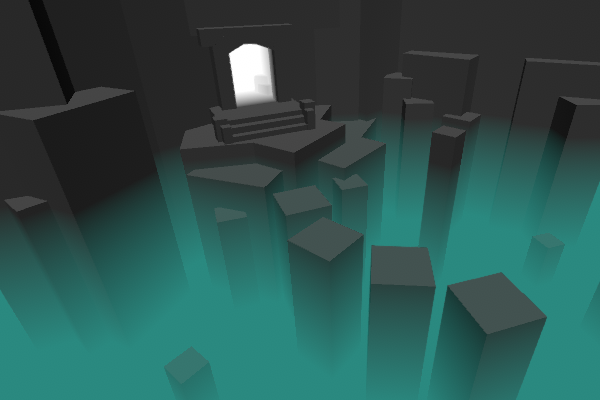
Intro This post includes two examples to produce fog shader effects. In both cases, the shader is applied to a flat plane or quad where the alpha of the surface is altered based on depth values to …
daring patrol
yo, thanks
 deep hemlock
Hi guys ! I'm new on this discord ! My name is Valentin and I'm a 3D artist. I'm working on a project in HDRP 2019.2.
I'm struggling to understand how the fresnel node works. I have the impression this node only works with the front faces.
It doesn't compute the backfaces. I would like to get the fresnel effect on the backface aswell (because my material is transparent).
Do you know can I fix this ?
regal stag
@deep hemlock Try using a Branch, with the Is Front Face node as the Predicate input to invert the Normal Vector input into the Fresnel for the back faces. I think that might fix it
deep hemlock
@regal stag thx for the answer ! I get the spirit of your solution ! But how do invert the normal vector ?
regal stag
@deep hemlock Use the Normal Vector node, put into a Negate node, then into the Branch false input, and the Normal Vector not inverted into the true input.
 delicate badger
@regal stag You save our day :)))
deep hemlock
@regal stag Thx man !
daring patrol
have been trying to make this fog shader work. but i can't figure out why it isn't working. I followed every step of this tutorial: https://cyangamedev.wordpress.com/2019/12/05/fog-plane-shader-breakdown/
Intro This post includes two examples to produce fog shader effects. In both cases, the shader is applied to a flat plane or quad where the alpha of the surface is altered based on depth values to …
regal stag
@daring patrol Is the master node set to Transparent? Also since it uses the Scene Depth node, you need to enable the Depth Texture option on the LWRP/URP Asset (or override the option on the Camera).
daring patrol
the surface is set to Transparent and blend is set to Alpha
and on the camera Depth Texture is set to: Use Pipeline Settings
@regal stag
regal stag
Yeah, if it's set to "Use Pipeline Settings" it uses the option on the Lightweight Pipeline Settings Asset, where it might be disabled.
daring patrol
when i just set it to "On" it also doesnt work
regal stag
Okay, check the inspector on the material, what is the value of the Color property?
daring patrol
the color is just blue
regal stag
What about the alpha value of the Color, Does it have a black or white bar below the colour?
daring patrol
i just set the alpha to 1 and there is a little bit of a fog effect
but there isn't really much of a fog effect
regal stag
Okay good, now you should be able to adjust the Vector1 property. Smaller values means more fog, try 0.3 or something
daring patrol
wow it works, thank you so much
regal stag
No problem 👍
 glass jasper
Does anyone know how I can have several textures (face, skin, clothes etc.) on one object? (3D)
daring patrol
@glass jasper what program did you use to make the 3d model
glass jasper
blendeer
daring patrol
you could add different materials to different faces (skin, face, ect)
glass jasper
no I need on face 3 layers
Unreal has this feature too
why cant I do it in unity?
I need 3 layers (face, skin and clothes) which all have some parts transparent and tho you see at this parts the skin looking through @daring patrol
low lichen
What is the feature called in Unreal?
daring patrol
i don't know how you could do it unity. but i guess you could bake it all into one texture in blender
glass jasper
idk but I saw a guy having it
I need a cloth and skin selector
tho
Im stuck rn 😐
low lichen
Then it's not a feature in Unreal, it's probably a custom material/shader he made.
low lichen
I think I've answered this twice now, but I'll try again. You need a custom shader. Do you want help with writing this custom shader?
glass jasper
yes
I heard shader graph from ya often now
but I never did something like this
I just want tht it is easy changeble
changeable
daring patrol
@glass jasper found this on unity forum:https://answers.unity.com/questions/22961/multiple-textures-layered-in-a-single-mesh.html
Unity is the ultimate game development platform. Use Unity to build high-quality 3D and 2D games, deploy them across mobile, desktop, VR/AR, consoles or the Web, and connect with loyal and enthusiastic players and customers.
glass jasper
this didnt worked
daring patrol
oh nvm then
daring patrol
the face might be unwrapped incorrectly
glass jasper
@low lichen I need help with custom shader
no
it works fine when you select the skin
and y r the transparent parts black? @daring patrol
daring patrol
there is an option in the material inspector but i forgot what it's called
daring patrol
i'm searching for it
glass jasper
thanks a lot
lone stream
Say anyone know's why surface shader on webGL build giving me this error? No precision specified for (float)
low lichen
@lone stream Does it prevent you from building or the shader doesn't work in a build?
lone stream
the shader doesn't work in build
and browser just spammed me with those error on the console log
low lichen
Which Unity version are you on?
lone stream
2019.2.15
daring patrol
@glass jasper you could just drag the texture on the mesh. it creates a shader on the mesh. and then you can set the "Surface Type" to Transparent.
glass jasper
lol it works all 😄
only problem: its pixelated
and it wasnt in blender @daring patrol
glass jasper
@daring patrol ?
It works now but the clothes and eyes r now a bit transparent so you see the skin through how can I fix tht=
anyone?
daring patrol
i don't know why it would do that
maybe the texture itself has a bit of transparency on it.
glass jasper
I set the mode to transparent thts why
but when I put it to opaque its no longer with transparent parts 😐
@daring patrol D:
daring patrol
you could try adjusting the alpha value
glass jasper
hmm
 lilac dagger
Does anyone know how to maybe create a shader that gives of a neon lighting to it? Im trying to make something look like this
stoic mist
not sure if its what you're looking for but this has some 'glowy' effect to it: https://www.youtube.com/watch?v=Ar9eIn4z6XE
● Check out Bolt: http://ludiq.io/bolt/download
The time has come... Let's explore Unity's new Shader Graph!
♥ Support Brackeys on Patreon: http://patreon.com/brackeys/
··················································...
meager pelican
https://learn.unity.com/tutorial/introduction-to-lighting-and-rendering#5c7f8528edbc2a002053b532
See the "emissive materials" section for an example.
Or google "unity neon shaders" for others.

Unity Learn
In this tutorial we will give you an overview of how lighting works with Unity's real-time Global Illumination engine. We will walk you through the different lighting techniques available, explain how to setup your project for lighting and then explore the various tools at yo...
lilac dagger
Thank you!!I would try it out!
 high scarab
Hi, I am a bit confused if I can achieve refraction effects in Unity like this: https://www.creativeshrimp.com/create-realistic-ice-lighting-book-02.html
Basically all online resources are teaching me to bake textures, or they just don't do any physics based calculation. If I am right, I have to a) bake textures and do other monkey patches or b) do ray tracing in HDRP?

Creative Shrimp
Discover how to create realistic ice, glass, or a bottle of whiskey in Blender. Four tips that will help you to create awesome ice material.
But the refraction is recursive in the example I linked above. I don't know if there are feasible techniques other than ray tracing can do the job. I read Keijiro's old project he was using a texture on water drops to fake refractions too. https://github.com/keijiro/UnityRefractionShader/blob/master/Assets/Pseudo Refraction Shader/Shaders/Pseudo Refraction.shader

GitHub
Pseudo refraction shader for Unity. Contribute to keijiro/UnityRefractionShader development by creating an account on GitHub.
dark flare
Everything in games are an approximation of the real world, if you're looking to simulate it realistically you probably won't find much help specific to unity about it. If you're just trying to approximate, I recommend just starting with a passthrough grabpass and experimenting yourself
@high scarab
 willow summit
can someone help me?
the white cube is suppost to render the screen but it doesnt is there anything im doing wrong?
render the screen as in use what the camera sees and put it into the albedo....
high scarab
@dark flare thank you, I think grab / blend are basically the same here as long as they don't do recursive job in one pass
also shadows are handled separately so it should be hard to get the same effect as the link above. I'll have a look at HDRP!
rustic dragon
@willow summit I believe you have to change a parameter in your pipeline, Opaque Texture to 'On', or you can do that in the camera itself
 sullen elk
Hello there, I wanna use a Shader as a background for my 2D game. What's the best way to do that?
devout quarry
What do you mean?
Use a shader as a background
Have like a background plane?
Or the skybox?
What do you want displayed on this background?
A cool thing you could do if it's 2D, is just have a plane that follows the player around and on the plane you display things using world space coordinates
sullen elk
just a background that is generated by a shader (and maybe reacts to music and stuff)
and i'm asking what's the best way to do that. right now I'm trying a world space canvas, with a raw image
yes it's supposed to follow the camera, since the player should basically be able to go anywhere