#archived-shaders
1 messages · Page 115 of 1
 fervent tinsel
HDRP uses camera relative rendering. This means that there is a good rendering precision even far away from the origin of the world. This has an impact on all the shaders used with HDRP.
 broken field
it is both camera relative and reverse depth
holds up for pretty much any draw distance thrown at it
builtin just cannot render my game in that respect sadly
 devout quarry
I'm creating/testing so many graphs to get the best depth values
I'm gonna dream in nodes tonight
bottom left is most promising atm
is view space the same as eye space?
and if so, why is the naming not consistent in shader graph
 frigid zinc
where are those terms used?
devout quarry
the 'position' node has a 'view' space as well as 'object', 'world', and 'tangent'
and the scene depth node has an 'eye' sampling mode
so I was thinking that eye and view were related
and in the documentation of the scene depth node they refer to 'eye space units' as well
so that implies that there is an 'eye space' and a 'view space'
and eye/view sound related to me
so I'm confused in how they are different
frigid zinc
documentation doesn't really explain what an 'eye space unit' is
so i have no idea
but it's a distance, not an angle
or position
so not the same as you would get from position node

Game Development Stack Exchange
I am reading a book about 3D concepts and OpenGL. The book always talks about world space, eye space, and so on.
What exactly is a world inside the computer monitor screen?
What is the world space?
defined here but i'm not sure i get the definition lol
sounds like eye space is close to the same thing as camera space
if not the same thing
frigid zinc

Stack Overflow
As I am learning OpenGL I often stumble upon so-called eye space coordinates.
If I am right, you typically have three matrices. Model matrix, view matrix and projection matrix. Though I am not ent...
another attempt at defining
devout quarry
thank you, gonna read these tomorrow morning
frigid zinc
looks like Eye space is also the same as UNITY_MV
Model View matrix
if this second one is right
so it's not exactly same as view, it's a combination of object and view
yeah this kind of confirms it: http://www.songho.ca/opengl/gl_transform.html
It is yielded by multiplying GL_MODELVIEW matrix and object coordinates.``` stark hornet
Is it possible with shaders to count how many pixels of a mesh are being drawn?
So for example if I have a quad and use a discard function to not draw pixels within a circle radius, is it possible to check what % of pixels of the quad I discarded?
And get that percentage value to an external script as a variable?
frigid zinc
i honestly can't say i would know how to do that
if a shader can modify external variables i'd say you could
but I have a feeling you can't
or if you could it would probably slow things down considerably
stark hornet
Seems the closest thing to what I asked would be to generate a pixel color histogram with compute shaders which feels like it would take quite some processing power... And since I want that for every object and probably a couple of times per second.... Seems like it's a nope
 still carbon
There might be a better approach in general to your goal. What is it you're trying to achieve game mechanic wise?
 brazen comet
Hi shader people ! Quick question : I have a two-pass shader made in amplify that works well but is obviously not compatible with HDRP. So i'm heading toward creating again in Shader Graph , but is it able to do multi pass ? Everything will be compatible with HDRP and LWRP then ?
 main blade
anyone have any experience with ray tracing?
I am trying to get a mesh's uv with the Moller Intersection
devout quarry
I'm going to create a water shader tutorial
I mostly make this break-down for myself but I think it could be useful for others too
I'm at depth based water colors and opacity, and foam lines
I'm still going to add animated foam textures and water displacement, after that I'll share it
stark hornet
@still carbon I made a shader that "reveals" whatever surface it touches. Now I need to check what % of the surface it has revealed to do other stuff based on that
stark hornet
@supple root no, it works with any non-concave mesh
 supple root
ohkk
stark hornet
I still need to fix it in order to work with concave meshes
 sand perch
@stark hornet the histogram you're talking about might be doable, that's how they do part of the auto-exposure in AAA games
they produce a histogram of the whole screen as a postprocess,
stark hornet
@sand perch yeah it definitely seems like a good tool to use with the output of the whole screen
but it seems it would not be ideal for what I want, which is have 1 histogram per object that takes into account also the faces of the object that face away and are occluded by other objects
I will probably end up doing a solution that doesn't use shaders for that. Maybe something like, take into account the radius or bounding box of the object holding the shader and do calculations to check how much of the surface is covered by it
stark hornet
Question about draw calls, batching and geometry: When doing dynamic batching on multiple objects with the same shader, does the GPU have to process the geometry for both anyways?
Dynamic batching: for small enough Meshes, this transforms their vertices on the CPU, groups many similar vertices together, and draws them all in one go.
the docs say that, does that mean for example 2 vertices in the same place get treated as one? I mean in the sense that the GPU only processes one
frigid zinc
no
it just combines the meshes into one draw call
so instead of Draw Mesh A: 1 draw call
Draw mesh B: 1 draw call
it's
Combine meshes A and B : 1 draw call
stark hornet
so the geometry get taken into acount anyways, right?
stark hornet
I see...
frigid zinc
if they removed vertices based on some arbitrary distance it would lead to visual artifacts
and you dont' want that
stark hornet
@frigid zinc yeah that makes sense
frigid zinc
tools like blender can do that, because they have you to fix any problems
stark hornet
I'm testing performance for shaders using : A) 1 sphere with 1 shader that has 3 passes and B) 3 spheres with 1 shader each with 1 pass on each shader
frigid zinc
but an automated pipeline has no way to know what is correct and what isn't
so they don't do it
stark hornet
with B I can batch all the drawcalls but seems pretty much the same performance as A
I guess that's because the triplicated geometry on case B
frigid zinc
yeah you wont' see much gain from such a small sample size
you need to test with several hundred meshes
then you'll see the difference
stark hornet
yeah I'm doing stress tests with 4000 objects
I see a bit of performance increase with B when using simple meshes like cubes
frigid zinc
with perfect batching you'd see it go from 4000 drawcalls to 1
and the difference should be pretty substantial
but there's a LOT of things that break batching
so you may not be getting the batching at all
you should check the stats window and see
you should see the "Number of drawcalls saved through batching" change when it's on or off
stark hornet
with One shader and 3 Passes I get this and results in average of 61 fps
With 2 shaders and 1 pass each I get this and results in average of 75 fps
Option B seems to give better results, and even less verts/tris to process? even tho the actual number of meshes in the scene with option B is the double of option A
when using 1 shader with 3 passes on a cube I get this geometry count: 36 triangles and 72 verts
when using 1 shader with 1 pass on a cube I get this geometry count: 12 triangles, 24 verts
does that mean that for each pass I am creating a new "copy" of the geometry of the mesh?
that is the tris/vert count from the Stats window
frigid zinc
you're processing the same data more than once
so it counts that as 'more verts'
technically it just means 'more operations on the same verts'
but it's the same amount of work as if you draw the same mesh 3 times
so either way of defining it works
1 shader with 3 passes = everything drawn 3 times
2 shaders with 1 pass = everything drawn 2 times
so of course the second is going to be faster
stark hornet
I see, so I'm just better of with option B that lets me do Dynamic batching on all the objects even tho I have more actual gameObjects that I have to take care off (I was avoiding doing this approach because I'm not sure if it would casue issues when moving thousands of them at the same time via script)
frigid zinc
question is why aren't you testing with 3 shaders with 1 pass, for a real apples to apples comparison?
stark hornet
@frigid zinc Option B is just the result of trying to separate the 1 shader 3 passes into different shaders for the purposes of batching
I ended up not needing one of the passes this way
so I got to the same result with 2 shaders with 1 pass each
devout quarry
shader graph question
frigid zinc
ok then sounds like that would be the way to go
devout quarry
If I have a remap node that remaps to 0-1 and a clamp not after that one that clamps to 0-1
frigid zinc
a pass saved is performance earned
devout quarry
I can just remove the clamp node right
frigid zinc
sounds like you could @devout quarry
stark hornet
@frigid zinc thanks a buch for taking the time to answer my trivial and somewhat repetitive questions! 😊 I'll go back to keep on learning shaders and rendering stuff so I don't need to flood this discord channel with questions that often!
heh 😅
frigid zinc
np 😃
broken field
If using SRP please do evaluate your decision differently
because with SRP batcher, you're batching per shader not material etc, and dynamic batching can often lead to less perf if CPU bound
(try with and without instancing etc)
frigid zinc
if your CPU bound you have other issues heh
but i get what you're saying. in any event since he's hand coding his shaders, I assumed he's on Legacy.
I would like more info on that though if you can provide it. I've read nothing to suggest Batching works differently on SRP. They only say it's faster. @broken field

or maybe you're thinking of the "SRP Batcher" which is a whole other thing:

Unity Technologies Blog
In 2018, we’ve introduced a highly customizable rendering technology we call Scriptable Render Pipeline (SRP). A part of this is a new low-level engine ren...
stark hornet
@broken field @frigid zinc yeah I'm hand coding my shaders and using de default rendering pipeling. I don't know ANYTHING about SRP, LWRP or HDRP
all I can guess is they give more control to decide what renders in which order and stuff like that?
I was just using Unity 2017 until a couple of days ago, when I updated to 2018.3 I gave a quick read to some of the new stuff and saw the new rendering pipelines mentioned a couple times but for now I haven't read anything about them
frigid zinc
yeah it's a whole new pipeline written from the ground up
better in every way you could say
but breaks compatibility with just about everything that used Legacy
so that's the downside
you can't really hand code shaders, but instead you need to use Shadergraph
which is similar to ShaderForge/Amplify for legacy
broken field
if you are a DIY enthusiast then SRP is for you
the legacy (builtin) renderer is well featured but quite old > a decade of cruft
they have been removing and cleaning it up best they could over the years but it's what it is, it is pretty good
frigid zinc
it's fine but there's always new techniques beinge developed
broken field
but for learning the guts and doing your own, builtin is a bad choice.
frigid zinc
and it's good Unity is rebooting using them
broken field
its far too distant from hw
frigid zinc
ehhhh i don't agree with that
abstraction is good
for starting out
best place to learn
broken field
I would probably suggest a SRP based off LWRP because it is a lot simpler than builtin
frigid zinc
then you can start diving into the guts
honestly for me LWRP is a non-starter
it's missing too many basic things
(but then again I don't go for no phone games)
broken field
it's true it's simpler but if you bake everything it can still look nice I think
frigid zinc
no decals, no planar reflections, no translucency what else
i forget all the stuff it doesn't have lol
no skin or hair shader i bet
aniso?
i think that's why i like legacy
there is no limit to what you can do with it
from the lowest low to the highest high
funny enough, SRP seems very rigid and inflexible, which considering why it was created, is ironic
sure i could 'write my own SRP' but i'll get on that as soon as I become a millionaire and can afford a team of devs 😛
broken field
SRP is very open though if you copy it you can take it wherever you please, its super simple for the LWRP version at least
it's just a bunch of loops basically
frigid zinc
maybe you're right in that respect
broken field
you can feasibly write your own 2D renderer from scratch in an hour if you wanted :P
you, not a beginner that is
frigid zinc
i only dove into LWRP enough to find Yannis' shadow setting
but it didn't really seem that simple
i feel it would take months to really know the code backward and forward enough to seriously modify it
maybe weeks, I tend to overestimate how long things take 😛
broken field
LWRP has most of the complexity in the shader which tries to bond valve's vr forward technique with something else and I think it kind of falls short in a number of areas but I get why it exists: LWRP is really only here because HDRP's proper goal would've been in 2 years time not end of this year, and in 2 year's time most things will be running on HDRP without performance issues (like any AAA renderer basically)...but that's too long, too far etc, so they made LWRP - at least that's what I took away from looking at the dev processes at Unity.
frigid zinc
makes sense
broken field
ideally unity should've just focussed on keeping builtin nice and optimised instead of doing LWRP
builtin for mobile + vr + anyhing and HDRP for the next gen nuts
because ultimately LWRP will just be discarded in the end or used for a template to design new games with
I get that its faster if you use it as intended within it's limits but for fast mobile games you will end up with similar real world perf if you just throw a few simple vert shaders or unlits at builtin
I mean I shipped a few mobile games with the old builtin which was frankly much slower than today and those were 60fps
frigid zinc
yeah i already see that everyone using LWRP want to push it beyond it's limits heh
broken field
all I needed to do was write a few classic simple frag/vert shaders and avoid surface shaders
yeah LWRP is just an awkward stop-gap to me. I do like what it represents but it's not more useful for more people atm
had amplify shader editor not existed, LWRP would be mandatory for a lot of people
broken field
LWRP is faster if your games's conditions require most of LWRP
but it's turning out most people don't have those exact conditions
broken field
its funny, a lot of optimisations in HDRP are quite similar to what I did when I wrote all the vert and frag shaders from scratch for ps vita
they reuse everything and do some foul tricks
it's not all perfect utopia code :P
frigid zinc
devious minds think alike i guess 😛
broken field
but my "renderer" back then had no per pixel lighting
instead we focused on having higher poly counts (no extra passes so it's safer) and vert lighting
i had subsurface scattering working fine on this primitive device
if you could call it that - it's per vert so I already had the light passing right through the meshes by distance to vert, so for "sss" it was just a matter of controlling how much one wanted to occlude that light on the far side of the object
a dot and an exposed multiplier was all it took, plus multiply by vertex red or such to control where
frigid zinc
yeah that's the basic way to do it
broken field
primitive ways but so so fast
and really quite nice looking on a small screen you know?
There's not much reason for overkill on mobile, vert lit is actually sufficient given good shadows and some fairly nice lightweight post fx
unless you are 12 with an earring and hipster hair with a $2000 mobile phone that has a screen the size of a4 paper
heh i'm arguing against lwrp while arguinf for lwrp
shrugs
frigid zinc
hehe
for phones it's fine as you say
i'm just not interested in making phone games
99% are free
and i seriously doubt many pay for the paid ones
and i find ads morally reprehensible 😛
stark hornet
for what you say seems like the new Scriptable Render Pipeline could be good to increase rendering performance
as of now, how hard would it be for a beginner like me to adapt a bunch of hand written shaders to use the new rendering pipelines ?
broken field
its fastest because it does absolutely nothing at all where builtin does a lot of stuff if you like it or not
but it does only qualify if you make your own shaders of course
(for your case I mean)
stark hornet
but it would require to substantially change a bunch of stuff in the de code in my shaders, right?
it's not just a matter of plug and you are all set
at least that's the impression I'm getting from reading what you both said about the SRP
stark hornet
hmmm... I see, for now it seems I'm better off with the legacy pipeline and shaders because I'm still learning how to properly and "efficiently" write my own shaders
and most of the beginner-friendly resources online seem to use the legacy stuff
and to be honest I don't know how much time it would take me to properly learn SRP in order to make good use of it
I didn't even know how a shader worked 6 months ago 😅
broken field
yeah people don't realise that it's not something that just happens but rendering a triangle in a specific way with a little program
pixel by pixel
:D
being on this side of the fence, i'm grateful I don't look for "how was that done" any more when I play games
I stopped doing that around the end of 16 bit
stark hornet
Question about Stencil Buffer and ZTest:
Does ZTest Greater affect the order in which objects write to the Stencil Buffer?
Or the writing to the Stencil Buffer happens in the order of the Render Queue regardless of whatever the ZTest is?
frigid zinc
Unity's documentation says this:
How should depth testing be performed. Default is LEqual (draw objects in from or at the distance as existing objects; hide objects behind them).
it uses the term 'existing objects' which would lead me to believe it's just modifying how the things already rendered are interpreted by this shader's operations. So that wouldn't change the render queue at all, just changes what portions of the current object are drawn.
stark hornet
Yeah makes sense
I guess the Stencil Values get writen as long as their pixels are visibles
frigid zinc
yes depending on the results of the test mode you specify
stark hornet
Is there a way to pass data between 2 shaders? For example passing the world position of a pixel from one shader to another?
frigid zinc
basically the only thing i could find on this is this:
Regardless of each APIs terminology, you need to write to an intermediate buffer and pass that buffer to the next shader program. A widely used technique is to render to a texture and pass the texture into the next shader. Most of the advanced effects are implemented using a variation of this technique most; notably all of the deferred renders use this to generate of what is called a G-Buffer that contains several info about the geometry in the scene (Position, Normals, Tangents) all those are output of the geometry pass of the deffered render and encoded in buffer.
stark hornet
@frigid zinc thanks! I'll do some research on G-Buffers
frigid zinc
well that's just an example
G-Buffer is something maintained by the deferred rendering path
it's not really something you can use for your own purposes.

Unity Forum
Hi,
I'd like to save the PBS deferred G-Buffers to disk, I want to use the resulting textures in PBS materials. Is this possible without writing a...
as explained here you can access the g-Buffer and save it's data to a texture, but if you tried to write to it, you'd be altering the whole overall scene, not just whatever your shader is working on
think of it as an intermediary screen buffer.
basically the only real choice is to write your data to a texture and pass that to the next shader.
stark hornet
@frigid zinc so what I could use is something like Render Textures?
I was under the impression those were only to capture the whole screen
I would need something to capture the pixels of 1 texture and transfer them to another
frigid zinc
as I understand it, it wouldn't be any different than the texture you input
a model h as UV space and the surface is mapped in that space
so your diffuse is a single texture for any surface
if you write your output buffer indexed by UV in the same way, your data will be a single texture mapped in UV space, in similar fashion
so whatever you're doing, you would have a pixel per pixel to use in the next shader
i hope that makes sense
stark hornet
yeah it makes sense,
but I am not entirely sure how I could do that with my current situation
frigid zinc
yeah honestly I've never had need to do that, so i have no idea on how to accomplish it
but it sounds like you'd probably want a RenderTexture as an input so you can write your data to it
and then that same texture as an input to the other so it can read the data from it
stark hornet
I have this as the result of a couple of stencil masks and what I need now is to take that result and put it into a different shader so I can play better with the Depth Buffer
So I'm exploring different ways of achieving that
an idea I had was maybe create a new texture at runtime using Texture2D.GetPixels and Texture2D.SetPixels
frigid zinc
problem is how would you pass data to such a script so it can setPixels
the writing has to occur within the shader afaik
there's no way you can avoid doing this? reading and writing is going to have overhead as well
 atomic echo
Ooof shader graph is fighting me on this one.
Trying to make a simple panning texture in the distortion distance.
Worked for a bit, now it just outputs solid color.
stark hornet
I need to play around with my approach to stencils so maybe I can avoid the problem I'm having, which is for that result in the screenshot I posted: I have to provide an initial geometry(cube) with ZWrite On to obtain that result, but that also occludes other objects using the same stencil masks...
frigid zinc
this page talks about rendertextures and how to write to them from a shader
and second example is for reading i think
no second is for 'initializing' the rendertexture
i guess reading is the same as any regular texture
stark hornet
@frigid zinc thanks for the link! I'll give it a go
stark hornet
what is the uniform keyword used for in shaders?
I'm making a shader that has an array of float4 for scrolling through colors but using the uniform keyword or not doesn't make any difference
uniform float4 _Colors [5];```I set the arrays from an external script
myMaterial.SetVectorArray("_Colors", colors);```the Nvidia CG website says this:
The uniform qualifier indicates the source of a variable's initial value. When a Cg program declares a variable as uniform , it conveys that the variable's initial value comes from an environment that is external to the specified Cg program
So from that I assume the "uniform" keyword serves to mark a variable in a shader that comes from outside the shader? But it doesn't seem to matter in my shader, works either way
still carbon
I recall hearing that all variables are uniform by default for unity CG compilation
stark hornet
@still carbon oh! That could explain why it doesn't make any difference
for now I'll keep using the uniform keyword as a reminder that those variables come from outside the shader
but I wonder, is there any situation where using that "uniform" keyword really matters? or any situation where not using that keyword will break a shader?
frigid zinc
yeah I have seen all the various stuff and never really saw the point of it half/float/uniform it doesn't seem to matter
i know 'half' is half precision but I've never really seen it explained why you would want that
stark hornet
besides what Invertex said about them being automatically set to uniform by Unity, the only explanation for using it I could find online is this:
because it's safer in the long term and more maintainable. Maybe down the line Unity might change up their compiling so that they are not uniform by default, then a bunch of your shaders might need updating
still carbon
Which was a forum comment by me too 
stark hornet
lol, nice
broken field
variables like fixed and half are still compiled to fixed and half depending on target platform (usually mobile, if the particular mobile supports it)
but fixed is mabye just float on desktop gpus
frigid zinc
yeah i should probably read up on that stuff to understand it better
 uncut karma
@stark hornet i recommend using LWRP..lol. or at least looking into it in a test project and experimenting with stencils. With legacy depending on what you need you may end up with a weird workaround or less efficient solution, the nice thing with LWRP is it can be modified without much trouble once wrapping your head around how it is intended to function, and overall it gives a bit more insight into how a frame gets rendered if you're interested in the renderin/shader side of things
it does make sense though that most of the resources online are based around legacy stuff so it could be better for figuring things out
personally i think all the shader code in LWRP is better formatted and easier to read, and the core shader library of helper functionality/macros is way better organized than the old unity built in shader stuff
maybe also read this tutorial for a very high level idea of render pipelines too if you do look into LWRP a bit, https://catlikecoding.com/unity/tutorials/scriptable-render-pipeline/custom-pipeline/

A Unity Scriptable Render Pipeline tutorial about creating a custom pipeline.
(i dont recommend actually using that tutorial for the basis of your own render pipeline though, its more just to understand the core functionality Unity provides and reference it against LWRP)
stark hornet
@uncut karma yeah that's pretty much the issue I'm experience right now with Stencils and the default pipeline, there's some cases where I am like "oh I would like to use the Depth Buffer in this specific and arbitrary way" or "oh man I wish I could have more control over how Stencils and Depth writing and reading work with each other here" so I end up with solutions that are too rigid and cumbersome to make them work efficiently
I'll look into LWRP more as a learning tool than anything else because I doubt I will be able to achieve by myself a good enough Render Pipeline that works better than the legacy
But definitely might be worth the time to do a couple tests just for the sake of getting a solid grasp on rendering related topics
My priority for now is focused on improving my knowledge of shader coding with the default pipeline, and I definitely need to get on learning lightning related stuff because my knowledge of that is pretty much nonexistent apart from some basic concepts that I picked up here and there while learning shader coding 😅
Thanks for the link! I'll take a look at it
 prime gazelle
i'm using two plane with mobile/cutout shader but when i'm facing one of them transparent plane for the other grass is visible how do i get rid of it
broken field
I'm surprised that a mobile "cutout" variant even exists.
given that cutout will be slow on tiled gpus
frigid zinc
speaking of Moble and GPUs
I did get around to researching about the usage of half/fixed/uniform, and all the other variable types
and it all boils down to performance on mobile
The half and fixed types only become relevant when targeting mobile GPUs, where these types primarily exist for power (and sometimes performance) constraints. Keep in mind that you need to test your shaders on mobile to see whether or not you are running into precision/numerical issues.```so for PC it doesn't matter what you use, it will all end up as regular float anyway
but it does matter for mobile, using the proper types can improve performance and energy efficiency.
devout quarry
SG suestion
So I generate noise (top left node) and I want to add the white spots on top of a blue color
but as you can see it also adds the black part of the noise
how do I make it so that only the white spot's get added onto the blue color?
frigid zinc
I don't see how it could be adding black, since that's zero
zero + number will always = number
not black (zero)
frigid zinc
unless there's some bug with the add node
devout quarry
and this is when I add something similar
but in the form of a texture instead of noise
frigid zinc
yeah that looks more like what I would expect
 somber bolt
Anyone successfully using PostProcessing v2 on Mobile? If so, could you share notes?
All I get is a black screen, I think the same as this bug report
https://issuetracker.unity3d.com/issues/ios-post-processing-stack-v2-on-ios-with-a10-or-lower-chip-gives-just-a-dark-screen
To reproduce: 1. Open users attached project "PostProcessingStack.zip" 2. Build for iOS 3. Deploy the Xcode project to an iOS device...
frigid zinc
remap is only outputting a Vector1
but it's being cast to a vector4
maybe a problem with that
try using a node to ensure Alpha (the 4th number) is always 1.0
that could be the issuse
i'm sure they have a vector building node
 stone sandal
also worth double checking that your generated noise doesn't have any negative numbers in it, that could be creating weird behavior in the add node as well
devout quarry
I'm remapping to a 0-1 output
I'll try checking if the vector1-vector4 is the issue
probably is
stark hornet
what is more performant in a shader? these are 2 simple examples but I intend to do this with at least 1000 items
         {
             output._WorldPositions[i] = mul(_MyMatrixArray[i], worldPos);
}```or:
output._WorldPositions[1] = mul(_MyMatrixArray[1], worldPos);```idk man this add node seems broken
frigid zinc
what did you try to fix it?
@stark hornet I'd say the difference is probably minmal. but it's not unusual for people to 'unroll' loops for better performance. of course the code is larger in that instance.
devout quarry
I tried building a new vector, and
so my texture gives me these outputs right
alpha is 1
so I tried building a vector4 with my noise
a vector4 with an alpha that's 1
and it's giving me the expected r,g,b,a values
but tbh I think something else is the issue, because the blue color that I wanted to add the texture onto also change's color when I add the texture
so I don't think my noise output is the issue but something else, gonna investigate a bit
frigid zinc
i'd make sure your remap is remapping to 0-1
devout quarry
yep it is
frigid zinc
because the only other thing I can think of is that it's not
or that there's something wrong with add (but that seems unlikely since it works with the other input)
frigid zinc
hmm
frigid zinc
so maybe remap has a problem
stark hornet
@frigid zinc so le'ts say I do a for loop in a vertex shader with a couple thousand items... would I see a noticeable performance hit?
what alternatives exist to not use for loops in shaders?
frigid zinc
I don't really know the statistics on that
stark hornet
i've read somewhere that sometimes people use "step" to avoid loops in shaders
but I may be remembering incorrectly
maybe that was for conditionals
frigid zinc

Computer Graphics Stack Exchange
I am wondering what's the best way to integrate a dynamic loop function in a shader?
First, it seems that dynamic arrays are not possible. So, is it better to create a maximum size array and only ...
from that answer it seems the compiler may do unrolling for you anyway
unrolling is really the only way to not use a for loop that I know of
also I think this is sound advice from a page I found
unlike on cpu where unrolling small loops should increase execution time on older gpu its better to use loops for more compact code instead of unrolling them, thus saving more instruction for later calculations. but current shader models support many of gpu instruction so loops are not good or bad, but either how and in what context they are used.
i'd probably not fret over it a lot
stark hornet
hmmm, I see
frigid zinc
the compiler will do what is best for the case
stark hornet
@frigid zinc thanks for the info! I'll do some stress tests with 10k items in multiple contexts and see what happens
frigid zinc
ok, have fun 😉
stark hornet
hope my GPU doesn't explode or something! 🙃
 wraith tide
Hey guys, quick question. Is there a way to force unity to render a certain shader using an unlimited amount of per-pixel lights?
Surface shader
stark hornet
I'm having a weird behavior with variables in a shader that are not declared inside the Properties block and are declared in the Subshader block, their values seem to not persist when certain conditions are met (for example tabbing out of the Unity Editor)
I have this variable on a shader uniform float _ArraySize; and I'm getting weird behavior when minimizing Unity or tabbing out to the desktop
Here's step by step what I do with that variable and what is happening afterwards
1. I click play on the Unity Editor and the application starts
2. On the Start method of an external script I set it to 5 myMaterial.SetFloat("_ArraySize", 5)
3. On the fragment shader I use the variable to check if it matches either value 0 or value 5
4. _ArraySize matches 5, fragment shader works as intended
5. I tab out of Unity or click on my second screen or minimize it. Then I come back into Unity
6. _ArraySize matches 0 and as a result the shader stops working
why are those variables being reset to 0 whenever I minimize Unity? It doesn't happen when I put that float on the Properties block but I'm also using arrays which are not supported as Properties in shaders, so I loose all the data of the arrays whenever I tab out of Unity
somber bolt
Anyone know if there is a way to modify a Shadergraph file with actual Shader code? ie I need my Shadergraph file to have stencil functionality and add this to Properties
[Enum(Equal, 3, NotEqual, 6)] stest("Stencil Test", int) = 3
and this to every SubShader
Stencil {
Ref 1
comp[stest]
}
devout quarry
@frigid zinc water shader starting to look pretty
the sine wave is kinda boring though
broken field
add more sines with different times
devout quarry
yes! Gonna look into 'gerstner' waves too
I see that term a lot when it comes to water
broken field
that's just a technique to make waves peak instead of hump when they join
better for ocean?
I made this simple demo to play with different parameters of Gerstner waves to find out what they are capable of and what they are not.
fervent tinsel
broken field
The vid merely shows the effect it has
 broken field
I assume alex means that effect, but might not know it's for that effect :D
it's not so useful for smaller bodies of water and can be skipped i think
though it is nice isnt it?
devout quarry
yeah I saw gerstner in the catlikecoding article too
I'll try some sines with offsets first
and for refraction
can it be as simple as offsetting the UV's at random spots?
like squeezing and stretching them
devout quarry
LWRP
broken field
just read the buffer it should be present before transparent pass
(opaque buffer)
and blend that tex
frigid zinc
@devout quarry I think you broke reddit 😛 : https://www.reddit.com/r/Unity3D/comments/b80wyk/this_subreddit_recently/
devout quarry
haha, yeah it was posted few hours after I did
I like the meta posts on that subreddit
frigid zinc
saw your posts, I recognized your demo scene lol
brazen comet
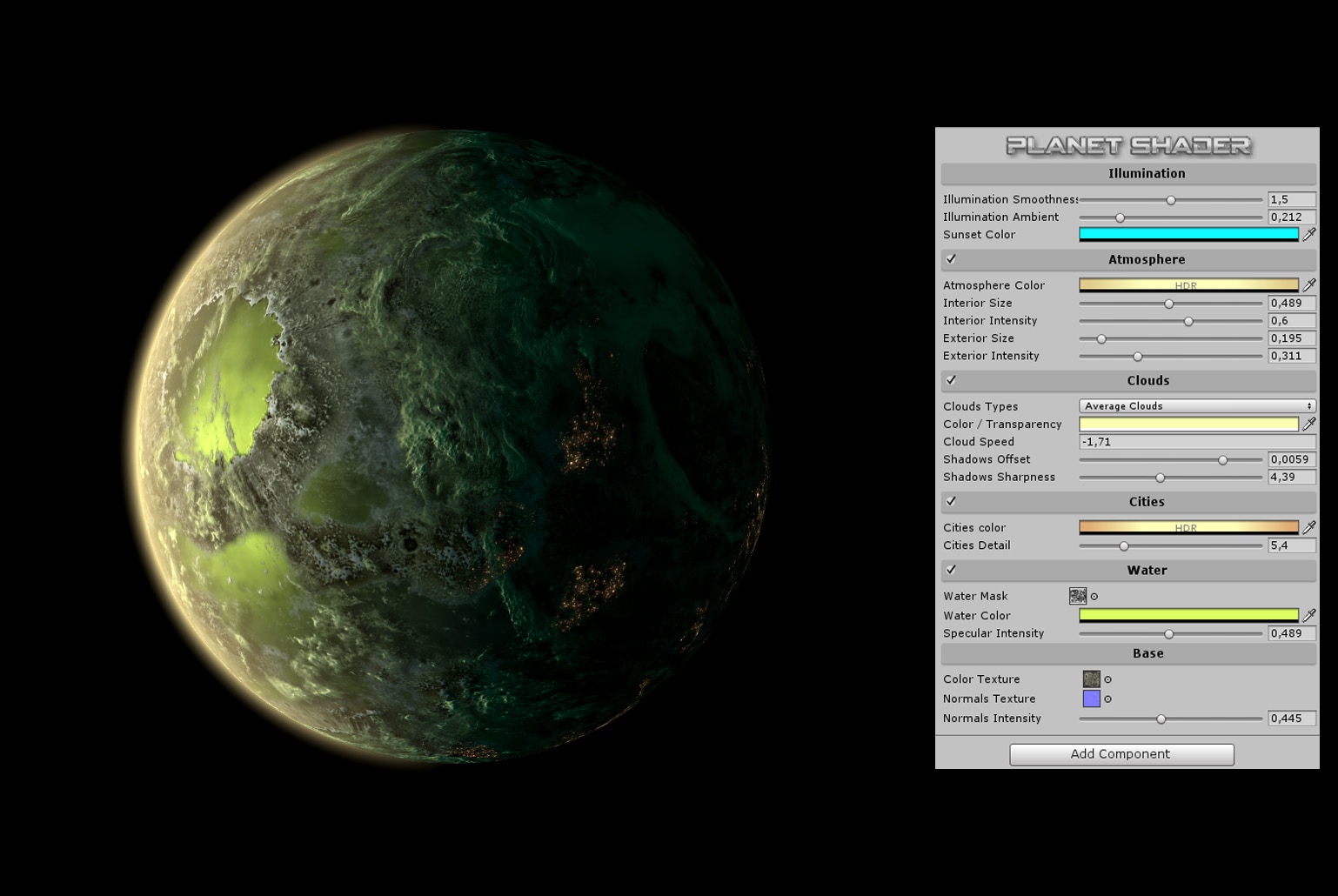
Upgraded planet shader and it's custom editor I made from my old package in the store : https://i.imgur.com/7FBPEjL.jpg
It's 1 mesh / 1 material , with a 2 pass shader made with amplify. There is no directional or point light in scene , only a Game Object to set the illumination direction, all the shader is Emissive and should run on mobile (exept for the ultra high res cloud texture , it will need to be downsized)
This update will reach the store in at least 2 weeks, not before.
 frigid zinc
looks gorgeous.
brazen comet
Thank you , I've put all my heart in it.
broken field
that's a very nice planet shader, the best
 mellow falcon
I can't seem to find the document to convert existing custom shader to the new SRPs, does they exists yet?
broken field
yeah click the documentation link in package manager for the package
but conversion is not realistic outside of shader graph
add a custom function node if you need more control
 grand jolt
Hello,
I'm trying to fake spot a light in a 2D game that influence a portion of the screen depending of it's position and it's range. It works-ish but I'm not quite satisfied because my game is not exactly top-down so the light shouldn't be exactly a circle. So far my shader just compute the distance of the pixel with the light position and if it less than the light range the computation continue. So the area effect is always a circle.
Is it possible, having a global angle that represent my game "perspective" to compute/know how a "circle" would looks like and be able to know if a pixel is inside this shape ?
still carbon
@stark hornet that's pretty strange, I know that when you place it in properties, that serializes the values on the material so they can get re-applied whenever. Perhaps if it's not a global set variable it loses that data when context is lost? I've had the opposite experience with global texture arrays where unity doesn't like the size changing on them unless you've restarted unity itself!
mellow falcon
@broken field does you mean this: https://docs.unity3d.com/Packages/com.unity.render-pipelines.lightweight@5.10/manual/upgrading-your-shaders.html. I also checked the other related packages, this is the closest I could find, but is only talk about built-in shader
grand jolt
Images can talk better than words, so here more "illustrated" explantions : https://forum.unity.com/threads/shader-graph-drawing-an-ovale-based-on-the-distance-between-two-points.654499/

Unity Forum
Hi !
I’m pretty new to shader graph, and to shaders in general. I'm stuck in a math problem and I don’t have a clue on how to manage it.. Here’s the...
any help is welcome.
😃
 amber saffron
I answered, with blindly writen pseudocode
But basically, an ovale is a sqashed circle, so you just have to scale the difference of the two vectors on one axis, and then compute the distance.
That's way more effective then trying to do something based on the angle.
On the other side, if you need non axis oriented elipses, that's getting a bit more complicated.
 mental sentinel
+1 @amber saffron I would say the same answer
grand jolt
@amber saffron thanks ! Would it be possible to compute the squash factor depending of the light range and the "angle" ?
amber saffron
Yes, you can do that in c#. In fact, only the angle is needed here, as you want to scale an axis to have a "non uniform circle"
mental sentinel
if you have more than one light it gets complicated
you will need arrays I guess
grand jolt
Yes. That' an other problem. So far they are declared hard-coded in the shader.
amber saffron
Remember my advice about making a "compute light" node for a single light, and use multiple of them and a texture/array to pass the light values ?
grand jolt
Yes I do remember. Not sure how to create the light node, the API about custom node are about to change from what I have read. But I thought it would be possible to "pack" all my current "compute light" node into a subgraph and having multiple of those and feed them with arrays. Each arrays would represent a same type of data, one for light position, one for light range, one for light colors etc. Does that make sense ?
Extra question: is it possible to pass textures through array ? I did not find a way to achieve that?
amber saffron
I was more talking about a subgraph for the light node.
I'm a bit confused right now if Shadergraph already has an input for float1/2/3/4/matrix array (can you confirm?).
If not, you can use a single texture as input instead of an array, as basically, a texture is an array of pixels/colors, and those a simply vector4 datas.
grand jolt
yes, there is those arrays !
So what you meant is that I can write textures data in array in order to pass all of them into the shader ?
amber saffron
No, I had the other way around in my head.
grand jolt
Meaning ? The goal of those textures is to define for each light a different "ramp texture" so I thought that each "light" would know its texture and at initialisation send all those textures int the shader to feed all light sub-graph.
amber saffron
Well, you don't have texture array for the moment, so you have to send it to the shader in an other way.
Since your can't use global shader properties (for the moment), you'll have to use a shared texture.
One thing could be to manipulate the texture in c# to store all the data you want.
For example, with a 130x20 pixels texture, you could store in each line of pixels :
- 1 pixel for the position
- 1 pixel for the rotation or other data (you have 4 values)
- 128 pixels for the color ramp
And thus, store 20 lights, here.
amber saffron
For pure 2D, yes.
grand jolt
I'm not sure we are talking the same thing right here. I think arrays exist in shader graph so I thought to use them to send data to the shader. When I was talking about textures I meant a real texture used by the shader to compute the "ramp" effect. So like the position or the color, the texture is a "light" property. So I need (if possible) to set this property two.
But what you are saying, I guess, is that if arrays (float1 etc.) does not exist shader graph side, I should use a texture2D property in the shader in order to write required data inside it.
Am'I correct ?
grand jolt
@amber saffron Ok, so I just checked and there is not array float or vector in the shader graph. Surprisingly there is a Texture2D array property but not sure I can use it.
So I need to go the way you proposed. I want to be sure I get it right. Let's say I have a "fake light" script that I put on every object I want to act like a fake light. This script would have properties such as:
- range
- color
- ramp texture (1x128)
Then I would have a FakeLikeController script that will retrieve all FakeLight scripts. t That script would have a Texture2D property, for example 10x123 and every frame it will retrieve fake light position and properties and write them inside its texture2D and then set that texture in the Shader ? Am'I right ?
I guess I can monitor what have changed between two frame for not having to re-write all the controller texture data.
stark hornet
@still carbon from what I've been reading seems like it's possibly a serialization issue with Unity for shader variables declared outside the Properties block. It seems certain event changes like OnApplicationFocus, OnApplicationPause and probably a bunch of others are causing the shader variables to lose their values
I guess Unity assumes those values are meant to be set every frame, which Im avoiding to save performance so I guess I will have to manually set them again whenever something causes them to lose their values. Any other variables I will place them on the Properties block, but with arrays I can't
amber saffron
@grand jolt Yes, that's what I had in mind
grand jolt
Thanks ! I will investigate that solution so.
Extra question: is it possible to "dynamically instantiate" sub-graph ? That would allow me to just have as much sub-graph as fake lights.
broken field
Is it possible to access the current jitter of the camera in regular scripts or in shaders? I quite fancy jittering my alphatest amount each frame to see if it can improve AA
or maybe it doesn't matter much, who knows
amber saffron
@grand jolt I don't think you can do that, sorry 😃
amber saffron
@grand jolt Also, your scripts that store datas per light, quick tip : you don't have to use a texture for the ramp, just use a gradient, and sample it when creating the texture in the "global" script 😃
grand jolt
Got it ! thanks !
devout quarry
anyone got the custom function node to work in shader graph?
specifically when referring to another file
@broken field
I see you used them?
broken field
I briefly dabbled but probably won't be enough to give you great help. I liked your tweet on water, cool tip :D
devout quarry
thank you 😃
amber saffron
That might help you in the near future @grand jolt (and possibly a lot of other people) :
grand jolt
Yep. Thanks !
amber saffron
It's already in the github repository, and will be comming in next package release for 2019.2
devout quarry
the documentation lacking immensely though 😢
amber saffron
wow, how did I miss that
fervent tinsel
I think it might have been in 5.8 already
but 5.10 definitely has it
because I'm using it here https://github.com/0lento/OcclusionProbes/tree/2019.1-hd-sample

GitHub
Unofficial Occlusion Probes Package, requires Unity 2019.1+ - 0lento/OcclusionProbes
@devout quarry you can see file example here: https://github.com/0lento/OcclusionProbes/blob/package.hd/Include/OcclusionProbes.cginc
oops, fixed the link now
broken field

Unity Forum
Hi,
I am having hard time achieving refraction using HDRP Lit shader. First for transparent objects, Surface type needs to be "Transparent" & Blending...
just highlighting an issue with latest 6.6
hdrp reflection bug
fervent tinsel
@devout quarry and here's example on how you can use it on SG itself:
the screenshot is actually from different project so don't wonder about the Assets path on that one
devout quarry
.cginc file 😮
fervent tinsel
the one I linked was in package
well, that's just what I named it
could be anything
hlsl
shader
etc
amber saffron
*.magic
devout quarry
and can you change the 'custom function' name?
devout quarry
too bad
fervent tinsel
it'll always read "custom function
devout quarry
tyvm for the help, gonna try this out immediately 😃
fervent tinsel
well, it's not really that bad
just do what I did there
put the whole thing in subgraph
and use it as new node
it's reusable then
recent SG versions support subgraph nesting so you could have as many nested as you want
it's no issue
there is one issue with the file thing that one has to be aware though
you can't include same file on multiple different custom function nodes
like, if you want to have multiple functions you call in same include file, that's broken atm
I have filed a bug report for it but there's no ETA for fix
so, if you need something like that today, you just have to have new shader include file for each custom function node
devout quarry
yeah so why would I use custom function nodes if I can use subgraphs?
fervent tinsel
this is why I ended up with this mess https://github.com/0lento/OcclusionProbes/tree/package.hd/Include
GitHub
Unofficial Occlusion Probes Package, requires Unity 2019.1+ - 0lento/OcclusionProbes
devout quarry
Can't I just make the 'custom function' through nodes
fervent tinsel
you can
amber saffron
loops
fervent tinsel
but you can't do everything in SG
devout quarry
ah I see
fervent tinsel
or some things are just needlessy complicated
fervent tinsel
in my case, I just wanted to read the public variable, SG subgraphs don't support it
 devout quarry
a lot of nodes instead of a one-liner
fervent tinsel
if you'd do the same on SG only, you can only get global parameters from the main graph, not from subgraphs
I wish it wasn't so
but you can work around it with the file include
also
SG hasn't exposed all shader commands
so if you need something that's not there, no biggie, put custom function node and write the shader code for it yourself
devout quarry
I think I'll prefer custom function nodes over subgraphs
with custom nodes I'll learn to code real shader code
broken field
not same thing
you put the custom node inside a subgraph.
the subgraph is then shared across all your other graphs if you choose
think of it as a container not just for nodes but also for hlsl
its not a "hider" but a "re-user"
because sub graphs become assets in the project
It sure becomes handy then to just add that subgrah like a regular node in any other shader you do...
 echo badger
I have been trying to figure out how to do a foliage interaction shader using Shader graph. The part I am unsure of how to do is how to get the position of the object that would be pushing the vertices.
fervent tinsel
@echo badger you know unity does have a demo for that
oh wait it was on vfx samples
echo badger
It does?
broken field
for vegetation bending at it's simplest, make a vertex shader that moves verts away from an xyz position you pass in.
frigid zinc
for shaders your character script should set a global shader variable that contains the character's current position.
broken field
you do this by getting a direction by subtracting the vert world pos from the pos you pass in
broken field
yeah start there... then solve the additional problems as they crop up
dont try to solve the entire thing first, just get verts reacting first
so get it reading a position you pass in first
frigid zinc
the shader can then read the variable and know the character position.
echo badger
Thanks hippo. But I figured that was the basic idea. I was just not sure how to get the position though.
broken field
As ceebee mentioned above
frigid zinc
I just told you how
echo badger
yes thank you.
broken field
use a string for now, give it an imaginative name
"MyDogsButtAsHeScratchesThatItch"
frigid zinc
heh
broken field
or "PlayerPos"
when you can access it inside shader you can move onto grabbing the world-space position of a vertex
you could prototype this in c# first
to get he maths right
if you want
frigid zinc


Interactive grass using an array of object positions! #gamedev #unity3d #vfx
Shader code + script for multiple objects in first reply :)
More tips and shaders >> https://t.co/FqAsMb9Plg https://t.co/7LnXmCs6PI
Retweets
772
Likes
3091
 Twitter
mini-tutorial
Object Position would be your character position
echo badger
Yeah, that is a good tutorial.
stone sandal
minion's art is great for bite-sized info chunks, she's started porting her shader stuff into shader graph too
echo badger
Using Shader.SetGlobalVector. How would I access it then in shader graph? Would I use the property name from setglobal as the name in reference in shader graph?
amber saffron
If i'm not wrong, if you declare a property with that name in the blackboard, you can access it
stone sandal
declare property, make sure that the "exposed" check box in disabled, and name the reference name with the property name
will only work if it not exposed on the blackboard
echo badger
Got it. Is there a better way to do this if I want it to react to quite a few different objects and not just the player?
For example NPCs
There has to be a better way than just have like 1000 properties
frigid zinc
you can set a global array
instead of just a single vector
have the shader iterate over that
but will be more complicated
echo badger
SG doesn't seem to support arrays right now
frigid zinc
her tut mentions multiple objects as well
oh well, then I dunno. odd they wouldn't support that
might could take it 99% of the way with SG
then add that part in by hand
or wouldn't custom nodes work?
echo badger
I remember a overview article about a similar shader mentioning drawing the interactable objects onto a separate texture
frigid zinc
if you scroll up to around 8AM Remy and 0lento were talking about custom nodes in shadergraph
lets you insert raw HLSL into the node graph
echo badger
Hey thanks.
I was looking more at the idea of drawing objects on to a texture and using that, for the vertex displacement. Looks like I would need to use a grab pass and an ortho camera, probably with render layers only rendering the objects that can interact with the foliage? Though I am not sure how to get from the texture to using it for the actual interaction part.
stark hornet
I'm having trouble using an array in my shader. I have this array (declared on the main body of the pass): uniform float4 _WorldPositions [100];
I'm trying to modify it in the vertex program vertexOutput vert(vertexInput input) {_WorldPositions[i] = mul(_MyMatrixArray[i], worldPos); }
and then use the result in the fragment programfloat4 frag(vertexOutput input) : COLOR { if (length(_WorldPositions[i].xyz) > 0.5) }
But it doesn't seem to give any result. It works fine if I declare the array in a struct like this and then pass it through the vertex and fragment programs
float4 _WorldPositions [100] : TEXCOORD1;
But that limits the size of the array to 32, if I exceed it it gives me this error ps_4_0 input limit (32) exceeded
any ideas why I am not able to "modify" the values of the array on the vertex program and use the result in the fragment program if I define it on the main body of the pass instead of inside a struct?
stark hornet
*** Nevermind it seems that I glanced over the fact that "uniform" variables cannot be changed inside a shader, they need their values to be initially provided by an external source and remain constant throughout the execution of the shader
stark hornet
@broken field does HLSL have "varying" variables?
what exactly are they?
and how are they used in Unity?
can't find any info on that
stark hornet
oh so the variables defined inside a struct with semantics like POSITION, COLOR, TEXCOORD, etc?
stark hornet
I see
I have a question related to that, regarding how data is passed to the fragment shader
If I have this conditional on the fragment shader using an array of float4 with the semantic TEXCOORD1 that is defined on the Vertex to Fragment struct(v2f)
if (length(input._WorldPositions[i].xyz) > 0.5)
will it work in exactly the same way if instead of that input._WorldPosition[] I provide the data from an outside script?
instead of having it as an interpolator on the v2f struct?
because I just read this on the Unity docs: The values output from the vertex shader will be interpolated across the face of the rendered triangles, and the values at each pixel will be passed as inputs to the fragment shader .
and it kinda made me doubt about what I'm trying to do
My initial assumption is that it will work, because all I need is to make this calculation outside the shader, and then use the resulting float4 on the fragment shader:
output._WorldPositions[i] = mul(_MyMatrixArray[i], worldPos);
multiplying a matrix by a float4
but there's so many shader concepts I'm not familiar with that sometimes I make assumptions based on my lack of experience... so I don't know what to assume anymore 😅
 still orbit
so youre setting this data from C# either way?
just read it in the fragment shader, interpolators have a cost
and should only be used to move vertex attribute data into fragment
so for example if you need clip space and world space position in fragment
youll calculate both those in vertex and use two interps
because theres 0 point calculating the world pos per fragment (the result will be the same) and the interp is likely cheaper than the ALU cost of doing it in fragment
oooh sorry I didnt read your snippet
yea yours is a murkier case and depends on the rest of the shader complexity
but likely its worth doing it in vertex
otherwise youll be doing arr.Length amount of muls per fragment. Likely pretty costly.
stark hornet
@still orbit as of now I have a shader that discards pixels based on their world positions, I supply an array of matrices from external objects into the shader via a C# script, I take each of those matrices in the array and multiply them with the world positions in the vertex program
then I store the results in an array of float4 and pass that into the fragment shader, which performs discards based on that
for now I use the array as TEXCOORD1 on the vertex to fragment struct
but that limits a lot the size of the array I can use
so I'm trying to do that externally to support more items in the arrays
still orbit
whats your target platform?
stark hornet
Windows
still orbit
use a read/write structured buffer instead
itll limit your minimum target to (i think) shader model 4.6?
but should be fine for your case, just a general nono on mobile
stark hornet
Thanks for the advice! I don't know much about buffers tho
any specific info on what I should research?
is that a "compute buffer" ?
I googled "read/write structured buffer" and most of the results seem to be about compute buffers
still orbit
hold on let me find you an example
its not very documented

GitHub
Demo Project using the Lightweight Render Pipeline from Unity3D - Verasl/BoatAttack
ergh, this isnt RW
its kinda complicated and i dont have any info at hand :/
gonna need some serious googlin'
stark hornet
yeah it seems kind of like a weird topic for a beginner like me
any info on that to get me started is greatly appreciated tho! 😃
frigid zinc
https://docs.microsoft.com/en-us/windows/desktop/direct3d11/direct3d-11-advanced-stages-cs-resources

Several new resource types have been added in Direct3D 11.
GameDev.net
Hello I have a little question about the UAVs in directx. I read some explanations about UAVs but there are always 2 types of buffers for input and output in the examples. For my implementation I need a buffer that is only used in the shaders, so I use a pixel or compute shad...
these both seem to talk about structured buffers
A read/write buffer that can take a T type that is a structure.
but it does seem to be pretty esoteric
still orbit
yea its not exactly friendly documentation 😛
stark hornet
since we are talking about variables in HLSL shaders... I wonder, is there a limit to how many variables I can put on the Properties block of a shader?
can't test that until tomorrow
still orbit
I think there is, but i think its like 256 or something ridiculous
stark hornet
well.. if it's 256 I could maybe take advantage of that
but I assume putting that many could cause my shader to perform worse?
still orbit
ok youre not talking about properties block?
stark hornet
yes
still orbit
thats just the block at the top where they assign shaderlab properties to uniforms
stark hornet
im talking about the block at the top of the shader
stark hornet
just asking in case I can experiment with that to see how that behaves in the shader
but I guess that would be pretty much the same as having a uniform array instead of 100 variables in the Properties block
still orbit
yea you dont need them in the properties block
that just links material data to uniforms
stark hornet
hmm I see
I wonder if I could provide float4 from a C# script and interpolate them manually in that script before passing them to the fragment shader...
I still don't fully understand how the data output from the vertex shader gets interpolated for the fragment shader
still orbit
its part of the GPU pipeline
stark hornet
in the sense as, does ALL data get interpolated or just positions?
still orbit
all data you put into the v2f struct gets interpolated
the GPU pipe knows where each fragment is in relation to the three verts of its triangle
so it linearly interpolates all the data in that struct between the vertices
stark hornet
oh
 vocal narwhal
in the space of the triangle
vocal narwhal
which isn't a space in the shader sense 😛 but yeah
still orbit
yea, explains the concept though i guess 😛
stark hornet
thanks for the clarification 🙃
do vertex and fragment programs accept more than 1 struct as input?
still orbit
yes
stark hornet
so could I technically create a bunch of structs in the following fashion and pass them through the vertex and fragment programs?
float4 _WorldPositions [10] : TEXCOORD1;
};```theoretically yes but why?
stark hornet
because I'm trying to use an array of float4 with a size of let's say 500
so would it be possible to divide that into a bunch of structs each one with an array with the maximum number of interpolators permitted?
or does the shader complain about max interpolators in the shader overall?
stark hornet
haha yeah I guess not
still orbit
even if it compiles that shader will be your entire frame budget 😛
vocal narwhal
sounds fun 😛
stark hornet
well if my GPU explodes I won't say that you didn't warn me xD
thanks for the help anyways guys! I think I still need to do more research on how to use arrays of data in shaders efficiently
I will pray to the shader gods for their blessing 🙏🏽
broken field
nvidia cg brotherhood
grand jolt
@amber saffron I'm trying to start to work with textures to store data, but I do not find how it is possible to read textures values inside Shader Graph. I need to iterate though each row and each column but did not find nodes that can do that. Am'I missing something ?
 toxic mango
hey everybody, I'm trying to do rendertexture with camera, but I'm encountering a problem.
I'm working on AR scene where the background is drawn with a shader with
Tags { "RenderType"="Background" }
on a camera with clear flags set do Depth Only, and nothing is being rendered.
Do you know of any way to properly render everything, including Background? I can't have the stuff from shader obstructing 3D scene, as I'm trying to overlay AR objects on top of real world stuff.
toxic mango
btw, the scene looks good in the application itself, just rendering to texture doesn't work
which is what puzzles me
devout quarry
in shader forge there is a 'refraction' slot in the master node
is there something similar in shadergraph?
amber saffron
@grand jolt There's not magic to read texture value apart from using sampler and calculating your uvs 😃
@devout quarry There's the index of refraction in the HDRP lit master node.
grand jolt
@amber saffron I do not understand, sorry. How can read specific pixel or range of pixels using a sampler ? Like you told me, I could have a row per light, first column position, second column color and 128 next column the ramp texture. How can I do/read that using a Sampler ?
amber saffron
Let says you want to read the value of the bottom left pixel in a texture of 128x16. You need to sample the texture at the UV coord : 0.5/128 , 0.5/16
And generaly speaking, to sample a single pixel the uv coord is :
x = ( 0.5 + pixel.x ) / size.x
y = ( 0.5 + pixel.y ) / size.y
grand jolt
ok. But that means to use a sample texture2D node with a sampler node for each pixel I want to read. So even for one light it means putting 130 x 2 nodes (at least) in the sahder graph
that's crazy, I must be missing something here 😃
amber saffron
not so much no
In the example we had the othe day, you'll need one sampler for the first pixel (position), one for the second (other datas), and one for the gradient.
You don't need to sample all the pixels for the gradient, you just do it like a regular gradient texture (just add a small offset)
grand jolt
Hum, how ? what ? The ramp texture is meant to be used in the fake light subgraph, so this subgraph need that ramp texture.
Actually it's used in the sub-graph to get the right pixel according to the computing distance. But maybe I can calculate that before the subgraph and then send it to to the sub-graph. Need to check that.
amber saffron
I'm getting confused with your confusion now 😄 I tought that you had one ramp texture per light.If not, then your light data texture can be much smaller
grand jolt
Ha ha
yes, I have one ramp texture per light
this ramp texture should be pass in a sub-graph in the shader
so it means at some point to read 128 pixels
Am'i right ?
amber saffron
But like I said, you don't have to pass one ramp per light, it could be store in the lights data texture.
And to sample the ramp, you don't need to sample all the pixels, you just sample a single one (with interpolation).
That's what you already did with the previous method, right? You don't sample each pixel of the ramp texture.
grand jolt
Now, I'm very confused :-)
Each ramp texture won't be a straight gradiant, there would be specific parts with different flat color in order to have a cartoon effect. So I don't think I can interpolate something.
In my previous method I just sampled one pixel, yes, but to sample that one pixel, in my sub-graph, the sub-graph needs to have the access to the ramp texture <- that is exactly what I don't know how to do.
amber saffron
I'm pretty sure you interpolate. Your ramp texture is set to linear interpolation right ? You sample in it by using the distance as UV.x (or something like that), and this value can be "between" pixels.
You can store the ramp in the light data texture. Like I said in my previous example, let say that for each row you have pixels 1 and 2 that store data, and the rests that store the ramp (ramp is unidimentional and doesn't need more than one pixel).
Then you can sample the ramp by doing this :
uv.x = lerp( 2.5/size.x, (size.x-0.5)/size.x, distance );
uv.y = ( 0.5 + lightIndex ) / size.y;

rampValue = SampleTexture( dataTexture, uv );
ok, so I compute the ramp value before the sub-graph. At least this is what I understand and it makes sense for me.
amber saffron
Yes
grand jolt
I'm relief to say that I'm not confused anymore 😅
amber saffron
Yay
grand jolt
Shaders really are a weird, strange and scary realm !
amber saffron
Naaah, it's fun !
grand jolt
I guess so 😃
If I want to really optimize memory, can I store 4 pixel of my ramp texture in one pixel of the shader texture ? My ramp texture is in grayscale, so RGB value are always equals and the alpha is always 1. So with one value I can re-create the whole pixel RGBA values. Does that make sense ?
amber saffron
It makes sense memory wise, but then you'll need to do some uv trick to still profit from the interpolation.
grand jolt
indeed
amber saffron
But honestly, I doubt that on such small texture size you should worry about memory
amber saffron
Like, iven at highest precision (32 bits signed float per component), the data for 32 lights would be 0.5 MB
grand jolt
One last question : should I used one big texture or separates textures in order to not have to re-write and re-send unmodified datas ? For example, tramp textures won't change, they can be write and send just once in one specific big texture in the shader. So i could have one big texture for ramps and one big texture for positions and datas.
amber saffron
You could separate in multiple textures depending on the precision you need (float 32 for position data, and unorm (255 values) for color)
And this also answers your previous question 😃
grand jolt
ha ha ! thanks 😃
devout quarry
does the view direction node act differently in HDRP than LWRP?
stark hornet
I'm trying to measure world distances in a shader, and I'm getting weird results with the distance() function in the shader
distance(myGameObject, input.worldPos);
this should return the actual world distances from each pixel to the origin of myGameObject, right?
this are the actual results that I'm getting, on the left the actual world distance measured on a C# script and on the right the values I'm getting in the shader distance function
is there something I'm missing?
here's how I calculate the fragment world position in the shader output.worldPos = mul(unity_ObjectToWorld, input.vertex);
frigid zinc
well remember that worldPos is going to be the location of the vertex, not the object.
so an object might be at 1,1,1 but lets say the object is a cube, and the pivot is at geometric center, the vertices will be at 0.5, 0.5, 0.5 etc
assuming cube is 1 meter in scale
stark hornet
I was under the impression that when I pass that "worldPos" into the fragment shader the values get interpolated automatically
frigid zinc
it does
but doesn't change the fact object location != vertex location
if a cube is at 1,1,1 vertice X for instance will range 0.5 to 1.5
and yes it will interpolate between that
not sure how to visualize this for you
stark hornet
but it seems to actually return a consistant world position with that, even if it doesn't measure the EXACT world position
because when I move, scale or rotate my object everything moves along with the object
frigid zinc
not sure then
stark hornet
correction, moving and rotatin matains, scaling does not
stark hornet
one sec, I'll post giff
frigid zinc
well I G2G hopefully someone else can help
stark hornet
no worries 🙃
so It seems that output.worldPos = mul(unity_ObjectToWorld, input.vertex); is actually returning a consistent world position for each fragment
but the distance() function on my frag shader does not return distances in real world space... they are kind of weirdly exponentially increased
still carbon
@stark hornet calculate in the vert output.worldCenter = mul(unity_ObjectToWorld, float4(0,0,0,1)); and then in frag do distance(input.worldCenter, input.worldPos); ?
stark hornet
@still carbon alright I'll test that out, gimme a sec
@still carbon that acts just as if I put the "intersection" on the origin
the distance function still measures with it's weird values
which are the same as when using any other location in the world
seems the closer to the origin the more innacurate the values are
 rotund tusk
myGameObject is a float3? what is your expected behavior
stark hornet
I use an array of Float4 on a C# script and I populate it like this:
intersectorsPositions[i] = intersectionsParent.transform.GetChild(i).transform.position;
I want the distance() function on my shader to match the actual distance on the world space of the objects that I pass into the shader
the closer to the point I pass into the shader (the origin of each myGameObject)
the more inaccurate the value
for example measuring on 100 world distance
the shader measures almost 100
rotund tusk
so, as you scale the object, do you want the intersection positions to move too?
stark hornet
nope, I want the object holding the shader to not affect the shader at all
the only thing that affects is the positions I feed into the shader as myGameObject, which are just empty gameobjects
correction: they are positions taken from the transforms of empty game objects
so they should not affect the shader at all when scaled or rotated, only when moved
everything seems to be working as expected, except the values that the distance() function in the shader return
rotund tusk
ok. what if you do
a world distance of 0.1 equals a value of 0.005 in the shader. and a world distance of 100 equals almost 100 in the shader
which is kinda weird to return that exponentially increased value
I'll test what you posted, gimme a moment
stark hornet
nope, the default HLSL distance function
Returns a distance scalar between two vectors.
I also tested the Lenght function, with the exact same results
rotund tusk
how are you getting the actual values that distance returns?
like the ones you showed in your table
stark hornet
measuring them in the scene with a C# script
or placing small gameobjects as markers
rotund tusk
is that the GPU value though?
stark hornet
I'm debugging the distance that the shader gives with this in the fragment function:
{
    return col;
}```if you want to compare the distance from you empty gameobject to each pixel rendered on your clip gameobject
ah
stark hornet
exactly
rotund tusk
how are you getting myGameobject out of your float array
stark hornet
here is the actual line of code in the shader: float dis = distance(_IntersectorsWorldPositions[0], input.worldPos);
and I pass the values into the array in a c# script with this line:
intersectorsPositions[i] = intersectionsParent.transform.GetChild(i).transform.position;
that is an array of float4
rotund tusk
are the empty GOs the children of your clip GO?
rotund tusk
(asking all these questions so i can better understand what you are trying to do)
stark hornet
no worries, ask all you want I will answer promptly 😛
I'm gonna try the line with the square root that you posted above, brb
still carbon
does the result change at all if you do the object to world pos calculation in the fragment? (I can't imagine why it would, short of having vertex interpolators set... but)
rotund tusk
sqrt is probably the same output. you mind sharing your fragment function?
stark hornet
@still carbon how could I do that? same as in the vertex shader with a mul()?
still carbon
yeah
stark hornet
sqrt give a different output, and also the distance values seem to be not consistent with actual world distances
one sec I'll clean up the frag shader and I'll post it
it's full of commented out code xD
rotund tusk
sorry it should have been
float3 disp = input.worldPos - myGameObject;
float dis = sqrt(  dot( disp, disp ) );
    float4 col = tex2D(_MainTex, input.uv);
    float dis = distance(_IntersectorsWorldPositions[0], input.worldPos) - 1;

    if(dis < _Threshold){
        return col;
    }
    discard;
    return float4(1,1,1,1);
}```@rotund tusk I'll try that, one momento
OH SHIT
rotund tusk
you're subtracting 1 here?
float dis = distance(_IntersectorsWorldPositions[0], input.worldPos) - 1;
I think that is it!
one sec I'll do more distance checks, but I believe you provided the answer
rotund tusk
distance should function the same as the code i posted
still carbon
yeah, seems like the -1 would be the culprit here
rotund tusk
that "-1" looks fishy haha
still carbon
has little effect around 100, but big effect when doing 0.1 compare
stark hornet
the -1 was just to make the values start at 0 instead of 1
the results were pretty much the same, weirdly exponentially increased distance measures
instead of lets say 101 it would be 100, and instead of 1.0055 it would be 0.0055
but it was the same results
BUT your code snipped solved it!
float dis = sqrt( dot( disp, disp ) );```so does
float3 disp = input.worldPos - _IntersectorsWorldPositions[0];
float dis = sqrt(  dot( disp, disp ) );
not behave like
float dis = distance(_IntersectorsWorldPositions[0], input.worldPos);
?
stark hornet
nope
they have both "consistence" within themselves
but the sqrt approach gives actual world distances
I'm still puzzled by the behaviour of distance()
can't wrap my mind around it
it should be the same as your code snippet
rotund tusk
yathis is weird. distance should be doing a sqrt. it should end up compiling to the same instructions
stark hornet
hmmm...I've seen people use distance with a return type of vector(float3) instead of scalar(float)
could that be it?
Im using a return type of float
atomic echo
Return type of hlsl distance is scalar.
Returns a distance scalar between two vectors.
stark hornet
here's an example of code from Minionsart (posts a bunch of shader tutorials on twitter) with distance() returning a vector
float3 sphere = 1 - saturate(dis / _Radius);

float3 sphereNoise = noisetexture.r * sphere;```don't know what that code actually does, I haven't tested that
rotund tusk
probably makes use of parallel computations
stark hornet
https://pastebin.com/FiDzFixp here's her full shader code


 rotund tusk
gpu might do that already but having dis be float3 and using it in the following computations enforces that
so the components for sphere and sphereNoise are evaluated simultaneously
rotund tusk
float3 distance = distance() probably maps the scalar to each component. like
float3 dis = distance(...).xxx
so I guess the results of all the calculations with those vectors end up with each .x.y.z on the albedo values
I see
still carbon
distance() seems consistent 🤷 https://i.gyazo.com/530c65385718a4221beb9f7200045789.mp4
rotund tusk
using float3 will make use of SIMD unstruction sets
atomic echo
Yeah apparently HLSL can auto-promote a scalar to a vector.
Back to your original question... I don't know how distance() is screwing up... but maybe the inputs are confused about your vector size? Like maybe you're accidentally inputting float4s instead of float3s?
rotund tusk
ya. promotion happens from scalar to vector and i think demotion happens for vector to scalar ie
float x = float3(0, 1, 2);
results in x = 0
i'll have to double-check that
@atomic echo that is a great point
still carbon
yeah that'll result in 0
rotund tusk
try
float dis = distance( myGameObject.xyz, input.worldPos ); // assuming intput.worldPos is also float3
this is what happens with distance() in the shader
everything is at origin, nothing is parented, scaled, or rotated
still carbon
float dist = distance(_IntersectorsWorldPositions[0].xyz, input.worldPos);
clip(_Threshold - dist);
return col;``` if you just do it simple like that?one sec, I'll test, but I believe it will give that same weird distance measurement
yeah, exactly the same
maybe it's the way I populate the float4 vectors on the C# script?
intersectorsPositions[i] = intersectionsParent.transform.GetChild(i).transform.position;
that's a float4 array
rotund tusk
try changing it to a float3[] in the shader
rotund tusk
smells like a bug with setting float4[] uniforms
still carbon
strange that would be the issue though, were you not using .xyz in the distance() like the last couple example showed?
stark hornet
so what could be happening with that float4 float3 difference?
rotund tusk
ok so you have it working with float3[] and distance?
stark hornet
yeah
rotund tusk
without the - 1 thing
stark hornet
yeah no -1 there
gonna try also leaving it as float4 in the shader and feeding the last values of the float4 in the C# script as 0 and also as 1
to see what happens
yeah the result also changes
                                                   intersectionsParent.transform.GetChild(i).transform.position.y,
                                                   intersectionsParent.transform.GetChild(i).transform.position.z,
1);```that gives both same distance in world than in shader
rotund tusk
still very weird that the output would be different
stark hornet
with a 0 on that last line it gives weird different distances there
still carbon
well just to clarify as I didn't see an answer, you made sure to only use the .xyz in the distance() function right? cause if you were using distance on the full float4 I could see why that would happen
stark hornet
no I just passed the full float4 as it was
still carbon
yeah that's the issue
stark hornet
not the .xyz
rotund tusk
actually ya. that would give you different values
stark hornet
ohhhhhh
rotund tusk
do the .xyz
stark hornet
one sec, testing, brb
rotund tusk
but the issue is because of the promotion of float3 to float4
still carbon
float4 distance compare is a valid application tho
stark hornet
yes indeed, .xyz = real distance / not .xyz = weird distance
still carbon
just not for this kind of distance
atomic echo
Yeah but make those conversions explicit lol
rotund tusk
promotion would be like this:
float3 x = float3( 1, 1, 1 );
float4 y = x; // y now = float4( x, 0 );
I can't believe I've wasted all your time like this with this stupid oversight
still carbon
@atomic echo well the promotion in this case I believe is the Vector3 position from C# side being promoted to v4 and have a .w value that doesn't fall in line with vertex world pos. So how would that be enforced I guess
atomic echo
nah it's fine @stark hornet lol
stark hornet
🙏🏽 I would kiss you all in the forehead If I was in the same room as you
stark hornet
so all has to do with the .w value of the float4 when taken from a raw vector3 position
right?
because giving the vector4 with position.xyz + 1 in the last place as the .w value worked fine
atomic echo
You could just split it out into a float3
still carbon
yeah, the vector4 you'd get from the ObjectToWorld in the shader would have a w = 1 value, but the position you're feeding from C# side is only vector3, so fourth component defaults to 0
stark hornet
I see
thanks a lot to everyone who helped me with this, not only I got a working solution with different ways of doing it, but also got now a better understanding about vectors in shaders and the HLSL distance function
really, thanks a bunch 😊 beginners like me would be fcked without peeps like you
still carbon
@atomic echo Guess d3d11 errors too 😛
stark hornet
what would be more performant in theory? the HLSL distance() function or doing manually the sqrt of a dot?
I've read the HLSL functions are optimized and it's recommended to use them
instead of handcoding those kinds of things
can't find the full code of distance() from HLSL but found the one on CG Nvidia
{
  float3 v = vt2 - pt1;
  return sqrt(dot(v,v));
}```