#💥┃post-processing
1 messages · Page 10 of 1
 broken birch
 honest loom
Thing is I can't even profile it properly..
The render thread is near enough constantly doing nothing.
We're talking around 3-5 ms whilst the CPU is kicking up around 18 - 20 ms.
When I take a look (in a scene with nothing but a cube and a plane) the only response I get is Grfx.WaitForPresent and Player loop.
 cobalt wing
if your GPU isn't powerful to begin with, even smaller effects can have notably perf cost
broken birch
radeon pro 560x benchmarks
so for a modern title it should do quite well under load
cobalt wing
looks like it's around that 1050 perf indeed
honest loom
Oddly enough it'll run BOTD at 30 FPS..
broken birch
something running that should do the demo scene a bit better than 60fps
honest loom
Defo.
cobalt wing
do you actually profile the stuff in build or in editor
honest loom
Both.
cobalt wing
anyway, you say it's caused by PP
honest loom
With a tendency to completely ignore whatever the editor tells me.
Player loop and GRFX.Waitfor
cobalt wing
yeah but you earlier said it runs fine without PP?
cobalt wing
so, can't you just disable all effects from PP and enable then one by one to see which ones stall the game the most
?
or is it stalling even with empty pp stack?
honest loom
Already done that..
One sec, I didn't check that.
Hmm, I switched everything off and I gained 5 FPS.. Then I deleted the post process volume from the scene and it doubled.
cobalt wing
and you didn't have PP AA enabled before you deleted it?
on the script that goes into camera
TAA can have real perf impact too but I wouldn't expect it to be that big
honest loom
I used SMAA>
broken birch
SMAA does not work on HDRP I thought
really it's best waiting until 2019.1 beta, that's when we will have upgraded HDRP with V3
 fervent kite
Hey, just dropping by to talk quickly about hdrp/bloom (obligatory disclaimer: bloom isn't finished, it's quite unstable in motion).
Bloom in HDRP is energy conserving and behaves as it's supposed to, compared to v2 that has a classic additive bloom. It is not a "glow" effect.
Everything blooms when it goes through a lens, it just a matter of using a correct value scale. If you use physical values for everything as you're supposed to with HDRP, it will work just fine :)
Recommended values are between 0.1 and 0.3 for intensity. Use higher values if you like to put vaseline on your camera lens or are trying to emulate a very low end lens (think plastic or old school Lomo lenses).
The "glowing blue can of paint" posted a few days ago isn't possible in real life (it's basically the same as trying to create a real life light saber... In plain day light)
HDRP is going full physical, so if you're trying to cheat physics, obviously you'll need to cheat physical values as well 😃
(also fwiw I'm not sure that workbench template has been updated to use physical values at all, so it's probably a bad starting point for latest HDRP...)
TAA can have real perf impact too but I wouldn't expect it to be that big
SMAA is more expensive than TAA, and TAA itself is pretty cheap (we're talking sub-1ms on a base PS4 at 1080p).
cobalt wing
@fervent kite since you are here, do you know about why SSR and MSAA are not working together? like what is the restriction that prevents that atm on HDRP?
also thanks for the explanations, the hd template is from early december so it's not been updated yet
and for the blue can of paint.. 😄 the intent was to get something to glow but you are right, things don't glow anywhere that much on bright daylight 😃
cobalt wing
also, would love to know is PP AA settings are coming back? all the tuning settings (which are kind of important for TAA) got removed when we moved to PPv3
fervent kite
no idea about MSAA & SSR, haven't touched that
as for PPAA settings, there's no plan for them to come back as they introduced more confusion than it's worth (I've seen people use TAA with jitter spread put to 0.... Which basically means "no TAA") and more importantly it complexifies the rest of the HDRP as TAA is used in other places (SSR, Volumetrics, DOF, etc to name a few)
these are specifically tweaked for the current TAA implementation (and still being tweaked to this day)
adding settings to tweak how TAA works would make this an impossible task for us & users
(also, maintenance hell, which is one of the reasons why we removed SMAA at the moment)
cobalt wing
I loved that SMAA though 😢
I still haven't done proper tests with the PPv3 TAA, on PPv2, I had to dial down the default settings a lot or it would have just ghosted unacceptably on movement
this is kinda my biggest fear when not having the settings available
I have a use case where TAA really struggles a lot, high speed vehicles with shiny bits on noisy (gravel) surfaces, most TAA implementations just hate that in general (PPv2 one did as well)
SMAA didn't remove all the aliasing but it didn't have similar ghosting issue.. and FXAA just softens everything
fervent kite
FXAA is like putting oil on the screen anyway...
all TAA are ghosty, any kind of screen-space anti-aliasing is bad anyway but well, technical limitations 😃
TAA mainly ghosts on highly contrasted backgrounds (like a dark character moving in front of a bright background)
One thing they did on Uncharted 4 to work around that was to just discard TAA on tagged surfaces, but this meant their artists had to manually tag all the surfaces where it would potentially ghost (and they forgot a lot of them as you may have noticed if you played the game)
I don't like that solution either :/
I kinda like SMAA too, especially for flat shaded looks where it works fairly well. But it's a pain to maintain and it's quite expensive (3 full screen passes)
(also keep in mind that hdrp/postfx is barely tested at this point, it's a moving target and far from being done, there still are a lot of optimisations quand quality improvements we can do now that we're not as limited as we were on the Standard Render Pipeline)
cobalt wing
I know about the extra SMAA passes from porting 3rd party SMAA port from older UE4 to newer versions (and in Unity's case, I'm actually more worried about the end result than the actual cost as people can always opt out from expensive AA on PC)
oh
I have one last question (I swear I don't have more right now)
PPv3 extendability? is there anything there now that lets you hook in your custom PP effects like on PPv2 or is it still WIP/on the planning stage?
I'm sure this will pop a lot on the forums too once HDRP 5.3.x is getting that promoted status on packman
fervent kite
HDRP is experimental/preview anyway, I definitely wouldn't use it for production until it's marked as being officially released 😉
about custom PP effects
yes, there are a few todos in the code already for that
it's just not done yet as it's not a priority right now. But it will be in before release.
cobalt wing
ah, thanks for the insight 😃
broken birch
@fervent kite my game is stylised - should I not use HDRP? currently in 4.9 we find that it has the right bloom and the right visuals for us, but if we can't achieve a similar controllable bloom that would be a little dissapointing :)
Also the majority of Unity's customers do in fact make stylised, not realistic games. Not saying you shouldn't do what you do, but never design out the possibilities for a stylised look... I have been assuming Unity have that in mind too but, had to be mentioned.
We also used the TAA options to make things slightly less sharp which played nicely with dynamic resolution or our dithered alpha, and now those are removed too.
I understand where you guys are going, but I'm not sure if I can keep walking with you on it.
It's looking like our real solution would be to take a deep dive into changing a lot of post effects by the sounds of it - or removing them.
Not worried about the TAA, but have pretty big concerns about not being able to reach stylised visuals at all.
(Currently I can with HDRP)
fervent kite
Ok so wrt TAA, the hardcoded values are now jitter strength 1 and sharpen is pretty much disabled, so that should actually work in your favor 😉
As for HDRP, you can definitely do stylized looks with it, "physical" just helps making things coherent
I've seen artists in the office here do some heavily stylized stuff with latest HDRP
I mean, look at Pixar & Disney... And they're full-on PBR
So I'll say the following: if what you get in the version of HDRP you're currently working with is good enough for your needs, by all means, use it! The end goal is to make a game anyway, so use what works for you
Also, you can definitely do "light saber in daylight" style glows in a fully PBR environment although it will require some "hacks"
afaik we still have a few things to do for VFX related features (because VFX artists like light sabers style particles)
But I know someone pushed an option on materials recently to unlock the emissive from pre-exposure, meaning you can just go nuts with values in material and make them glow unrealistically
And I'd just like to point out that HDRP is meant to be used for high/ultra quality stuff... There's also LWRP 😉
Finally, I know it's not the answer anyone is looking for, but if you need a specific set of rendering techniques to achieve the look you want (which would be totally understandable), well... They're called "Scriptable Render Pipelines", it's in the name, they are meant to be stripped to pieces, modified & tuned for ultra specific projects.
But between LW and HD I do believe you can already achieve a lot (well, "will be able to achieve" considering they're not done yet)
broken birch
Exactly - our game is pixar looking, I just want to be able to preserve that, and felt that the wording of your previous post here was dangerously veering toward "we'll make it too hard to pull PBR toward something like overwatch, which uses bloom very stylistically, even in place of actual lights"....
I'm just anxious to keep the style we have with HDRP already, and the bloom comment made me think "huh, we can't have glows?"
"emissive from pre-exposure, meaning you can just go nuts with values in material and make them glow unrealistically" << this is what I needed to hear! yep, we need the unrealistic bloom - and let's face it, hollywood go really unrealistic to make things look realistic at times. Heck, Iron man's armour isn't even slightly realistic (it would be invisible at night if so)
it's one thing to chase realism, but quite another to use it. Film (and games) use what I like to call practical realism, so we need dials to tweak.
fervent kite
Definitely, and I'm all for artist-driven / stylized oriented features... But that's not me you need to convinced 😉
 timber summit
Is there any overhead for a moving density volume?
broken birch
I don't mean effort to add, but more like.. please be careful of preventing 😄
For example Unity capped blendshapes years ago when the competing engines had blendshapes uncapped, and now the technical debt of that bad decision has to be undone with another option in player settings 😦

Unity Forum
Could be early impressions but I don't really like how the new HDRP bloom filter unsharpens the whole image. I know the new filter is supposed to be...
still, that's what I'd expect from V3, very similar to Sonic Ether's bloom (which was probably physically based too?)
fervent kite
Somewhat, yes, although SE's had some shortcomings but in principle it's the same sort of effect
broken birch
Yeah I have no problems with it - with SE's just pumped more into emisssion
I guess I should set lights to real lux values etc
fervent kite
That's pretty much how HDRP is supposed to be used 😃
it's really deeply integrated in the core of HDRP, everything expects physical values
broken birch
yep I want to use it like that - just worried I'd be prevented from going a little wild with it if I wanted, like pixar or such
I mean you can make some pretty amazing stylised cartoons in the real world with a few models and the right lighting after all, right?
fervent kite
(Pixar uses physical values for everything, down to materials and camera/lens simulation)
Yep, it's just a different workflow
@timber summit not sure, I'm not familiar with how density volumes work
cobalt wing
just tested the PPv3 TAA in motion, oh my 😄
yeah, that's not on the table at all like that (will see later on if one could tweak the SRP itself for this), now it's just really noticeable trails behind the fast moving objects
but like mentioned earlier, my use case isn't really that suitable for TAA to begin with
broken birch
Please let me know when it's safe to upgrade to 2019.1 - that is, HDRP is ready for my love.
(which includes V3)
cobalt wing
well, that still depends on what you do with it, I'm really not using this in a way most games would use 😃
while I do get the arguments for hiding the TAA setting, I feel that the dynamic slider (whatever it was called) would still be very necessary. On my use case, it's way more acceptable to get less / no AA in motion for parts that would just ghost otherwise as that ghosting.. that's just not acceptable at all
broken birch
I left it on default to be honest, I only experimented with the jitter being larger to reduce pixel crawl
is your issue because you use VR?
cobalt wing
oh, I don't want to use TAA for VR, if you know what chase camera looks like any racing game, that's my issue (you also occasionally see the trains on other cars if you drive close by)
broken birch
you mean the trails?
cobalt wing
basically noisy surfaces and high contrast with combination of speed is poison for TAA
ghosting yes
it leaves noticeable trail behind
broken birch
yeah typically AAA games don't care. because they have motion blur anyway. It's just fine.
in fact AAA is usually just some sort of smear that costs 100-200m
cobalt wing
there are ways to reduce this on art side but it's still kinda issue
broken birch
seems to me you need forward+ and a nice MSAA solution
cobalt wing
yeah, like on HDRP ;D
broken birch
no really 😮
cobalt wing
both work there, even today
broken birch
regarding forward in HDRP... why does it exist?
cobalt wing
for flexibility and VR (so you get MSAA)
broken birch
I get we need forward passes but why is there a non-deferred mode?
cobalt wing
that's actually what I use atm
broken birch
whats the performance differences?
I have a serious amount of decals going on as well
cobalt wing
I'd expect it to be tad faster in my use cases but I haven't really benchmarked it
in editor it seems to be around the same ballpark with deferred
my issue here is that atm you can't use SSR with MSAA, the moment you enable MSAA, SSR drops off
I've asked around but haven't gotten answer why they do it, mainly tried to get answer if it's some specific technical limitation but I guess I just have to find out this the hard way 😄
I suspect they expect most people using MSAA being VR users or something, and you shouldn't really use SSR in VR
broken birch
VR really just needs painfully expensive hardware, there is only so much you can do optimisation wise
cobalt wing
yeah, I don't really expect them to put SSR for VR at all 😄
but in my case, I'd want MSAA + SSR on desktop mode
broken birch
raytracing using nvidia chips would be nice but we would need more than the 30fps we'd he left with since its resolution would have to be really high in VR
the noise, even with denoising would be immediately noticable
cobalt wing
peaked into SRP repo: cs sanitazedFrameSettings.bitDatas[(int)FrameSettingsField.SSR] &= !reflection && renderPipelineSettings.supportSSR && !msaa && !preview && !stereo;
broken birch
huh
cobalt wing
they straight up disable SSR if msaa is there
broken birch
its because unity doesn't want to peg itself into a corner with it like crytek did
cobalt wing
that was from older commit but it's similar now
broken birch
the whole HDR resolve with MSAA problem thingy
everything has to be designed with it in mind
best avoid it
actually also the high quality shadows option still does not wok
in HDRP. Is it forward only?
cobalt wing
it did work when I tried it
(in deferred at least)
I haven't tried it on these 5.3.x packages but I tested it when they put the PRs in on the WIP branch
broken birch
maybe I don't know what I'm looking for, since the shadows are pretty awesome quality anyway
cobalt wing
I prefer High (which is PCSS)
broken birch
may as well leave it on low (since I'm super happy with it there)
is PCSS significantly different in framerate?
is it heavy I mean?
I'd bench but i can't be dealing with build times 😄
cobalt wing
should be higher cost but I meant that I prefer it visually
broken birch
I wonder what medium is?
cobalt wing
I would still put these all as options
low and medium are both PCF
I'm not a huge fan of hiding the methods behind generic names
would prefer them calling them what they are
broken birch
TBH i think I would prefer HDRP team feezes development for HDRP on anything except the latest alpha, until 2019.3 - this way they can focus on what matters.
if they are brave this will help the concentrate their time better
it's not really inconveniencing people
cobalt wing
Very High shadow setting is basically this: http://jcgt.org/published/0006/01/03/paper-lowres.pdf (for shadow part)
broken birch
currently they worry about 4.9 etc... why? I don't care. It's the same as 4.8 or 4.6 for 99% of testers. If they use analytics it would probably reveal most people stay on template :/
cobalt wing
I get the 4.x thing
broken birch
I see yeah PCSS perhaps works nicer if you have quite-low shadow resolution
cobalt wing
they still can backport some improvements there as it hasn't drifted too far away and that's still going to be the version people will have for 2018 LTS
broken birch
yeah it just seems silly though given we both know HDRP has to change quite a lot still before it finally settles into it's 2019.3 mutant form, so why bother backporting?
sometimes I think unity cares a tiny bit too much
in fact I bet unity didn't really want to have HDRP out this early in public anyway
cobalt wing
people still love to have something to play with, 4.9 isn't borderline unusable atm, it's still probably the most stable HDRP they've made so far
broken birch
BTW about the SRP batcher, kind of interesting how that works
go about optimising slightly differently
per shader or something
cobalt wing
btw, this has the shadow filtering settings described: https://github.com/Unity-Technologies/ScriptableRenderPipeline/blob/HDRP-tier-2-manual(.md)-documentation/com.unity.render-pipelines.high-definition/Documentation~/HDRP-Asset.md

GitHub
Scriptable Render Pipeline. Contribute to Unity-Technologies/ScriptableRenderPipeline development by creating an account on GitHub.
Medium     Point/Spot: PCF 5x5 (9 taps). Directional: PCF Tent 7x7 (16 taps).
High     Point/Spot: PCSS. Directional: PCSS.
Very High Improved Moment Shadows.```also... I just disabled the !msaa from framesettings and I now get MSAA with SSR 😄
but I very much doubt Unity added that just to let people have less options, there must be something that breaks with this
broken birch
do you have tone mapping etc?
cobalt wing
yes, but haven't tried every filter
broken birch
hdr on camera and all that of course
"Improved Moment Shadows."
excuse me while I have a moment to myself
 marsh frigate
worst thing is the isHDR toggle being off on cameras in a forced HDR environment .__.
cobalt wing
I actually have no clue what setting we are now talking about
marsh frigate
I'm just chiming in with minor annoyances 😛
is any of this new stuff screen size independent? or have any options that enable such behaviour
It's frustrating working in the film/TV space and going to render at a higher res and having to adjust every parameter to make it close to what you saw at lower res
broken birch
Yeah most things like DOF are resolution sensitive to an extent
I would simply just take the highest and lowest supported res and make 2 profiles then just lerp between
marsh frigate
yeah, I've done some stuff like doing it externally
but then you have two stacks anyway, the internal and external
cobalt wing
@broken birch re: Bloom (I saw the thread on the forums)
there was lot of similar discussion on UE4 forums when they moved their tonemapper to ACES around 4.15 as they actually changed their bloom at the same time. The "glow" around emissive materials got reduced by big margin there too (even if you manually opted out of ACES)
people were shocked by the whole change at first as it changed how we looked at things there, but people still adapted eventually to the new systems
on the new PPv3 Bloom, what I saw from fiddling the material settings, that emissive exposure control (on material itself) does make it pretty artist friendly to spoof the physical approach
definitely give it a try before getting too worried
broken birch
Thanks for the heads up - I was already pretty sure about that having used sonic ether's physically based bloom. I used to pump up emission and it basically (with flaws) worked like that.
Which is why I was pretty sure it was OK really, just the problem is you have to pump up emission and all that, and that shits on GI
so it's not cut and dried and UE4 is immune to the issue lurking
To solve that you would need to adjust your whole pipeline to compensate to get a glow around something that isn't supposed to crap all over GI
So no, you can't get the same result.
I'm OK with compromises and I've accepted this - we can tonnes in other ways - VFX, etc
but the issue will still remain with GI
cobalt wing
ah, that can indeed crap on baked lighting and gi
I dunno if you can tweak some of the emissive values without them affecting the bakes
(probably not but worth trying)
broken birch
And really, films are not realistic. Pixar frequently does break reality. For example I suggest googling how marvel studios handles materials, such as iron man's suit. This is fake and not PBR correct.
It's one thing to design out incorrect PBR and another thing to prevent stylised adjustment. I only request preventation doesn't take place.
cobalt wing
I can immediately come up with hacky workaround on the baking issue (I'm really good at thinking stupid ways to bypass limitations)
you can bake the thing with emissive values you like and then boost then at level start up from the materials themselves
broken birch
(I'm all ears, but really, unity shouldn't force us to do more work by removing one float value :/)
The amount of work that your workaround requires for a typical full game is not worth the gain back so I would likely just have to write something
cobalt wing
I know it's not ideal, but I said I'm good at coming up with stupid workaround ;D
broken birch
😄
cobalt wing
does the project build rebake lighting?
I don't think it does
because if it doesn't, you could make some editor tool for baking, like if you know all emissive values need to be dialed down to specific values. you could just make a button that serializes all materials emissive values and dials them down and start the bake, then dials up the materials values from the stored values right after
broken birch
It will do if you were on auto (which I am not)
and there are a few cases like changing target platform of course
If Unity allows boosting emission but not affecting the GI for it then we hit paydirt but I'm not sure how that will work.
I mean
we want 1 value for gi emission and 1 value for render emission
we need 2 emission values, and its really just making the whole thing slope sideways
if Unity thinks that AAA or car manufacurers will be pleased with this, they they will find it's not the case because everything on TV isn't PBR correct, it only works up to a point before things need an art director's frown
I suppose the only real concern I have now is the GI, if we get that sorted - I am happy
cobalt wing
having some extra control on the PPv3 would still feel more ideal, even if it's not physically correct at that point
broken birch
It's not chman we have to convince though 😉
cobalt wing
it feels like the concern is that people will use it without realizing what it does and then Unity games using HDRP will not look "as correct"
broken birch
We have to go to the source! the grand master of the pixel, natalya tatarchuk herself. If we throw ourselves at her mercy then it could happen
cobalt wing
I still don't like things being dummed down so people can't break things
could be just some option under advanced
broken birch
Absolutely.
cobalt wing
like that TAA, I can't even consider it like that (but of course I can modify it myself from sources just fine so that's still on the table)
broken birch
Antialiasing is changing though, at some point it'll just be ML based I guess on GPU... if not already
current antialias is just basically a set of tuned parameters and thats really not going to cover things as well as having 2048 tiny little artists figuring out the best neighboring shade to use
but <1ms on ps4, thats really nice TAA perf
FXAA is still the king I guess for performance
cobalt wing
I'm not really getting hopes up on the ML thing nvidia has right now, but I also haven't seen it in action either
DLSS is still ultimately temporal AA in a way so I'd expect it to still ghost too
also those final fantasy screenies didn't really convince me (they had some really awful sharpening effect on DLSS)
broken birch
Well it's only temporal due to the desire to keep it cheap, which is a real problem with 4k displays. 4k doesn't remove requirement for AA because it's typically a resolution for larger displays
Maybe we just have to accept a higher budget for AA in VR
trim fat elsewhere
cobalt wing
heh, well, I had to try
(tried merging and running https://github.com/Unity-Technologies/ScriptableRenderPipeline/tree/sg/new-api on 2019.1.0b1)

 jade raft
Wrong channel 😉
But @cobalt wing if you want to try it youll need to actually use the branch as is and not try to graft it. Its based on the last common ancestor of 19.1 and 19.2, and as such will require quite a bit of merging...
cobalt wing
oh rats, I should have posted on shaders, my bad 😄
and hmmm, it should run on 2019.1 then, I'll test
jade raft
it will yes, i have it open in front of me on 19.1.0a14
looks like you tried to graft it to latest though? Theres a big refactor collision there...
cobalt wing
yeah, I know the version you mentioned for the branching too
yes, I merged it with release/2019.1
it's some commits ahead 5.3.1
jade raft
yep
cobalt wing
just curious to see where this is going 😃 will try the branch as is now but will still wait until it's mergeable before doing any real experiments with it 😄
oh, this was the base version that doesn't like texture streaming and alpha clip values 😄
(it works on next run)
jade raft
yea this branch is not ready for PR yet 😛
its missing some key features
anyway, we should move channels if you wanna talk about it
cobalt wing
HDRP 5.3+ just ignoring PPv2 will cause so much confusion soon. There's already a lot of forum posts where people have spent long time trying to hunt down why it doesn't work (only built-in PPv3 works there but people will not always go looking into scene volume settings to find this out on their own)
I wish Unity will add some check on future PostProcessing (v2) packages so it'll throw a warning on console if people try to run it on HDRP 5.3+ (you'd think Unity can detect that from PP package?)
 late fossil
I discovered one thing, post processing is broken on camera with non 0 vevport rect position
Without PP:
With PP:
And with some color grading volume:
cobalt wing
@late fossil what version?
not that I'd have solution for that but it will tell more if people know what you are using
cobalt wing
2.1.3?
late fossil
Yep
cobalt wing
built-in renderer, LWRP, HDRP?
late fossil
built-in

GitHub
When custom Viewport Rect. values are set on the Camera, the rendered image moves/shifts up. The viewport rect. values = Set Post-process layer = NOT added to the Camera The viewport rect. values =...
I'll probably try to work this out tomorrow
 safe gulch
Post processing is really slow on mobile. even with the lightweight render pipeline... Any tips ? There's a big drop in the fps
 timid bramble
Does Unity have an integrated auto Depth of field feature?
 dapper urchin
@safe gulch it's unlikely that PP will be fast on mobile, no matter what settings. iirc, the scene is pretty much being rendered twice or more with PP
 unreal raptor
@timid bramble Unity has the Postprocessing Stack, which includes among other things, Depth of Field.
you can install the Postprocessing Stack from the package manager
timid bramble
@unreal raptor i know, but right know the DOF is only a fixed value and doesnt adjust to the distance of objects to the camera
unreal raptor
well sure you have to implement that part yourself
but there's plenty of people who have done implementations

Gist
DoF AutoFocus for Unity's new postprocessing stack - StackDoFAutoFocus.cs
this is one I picked off google
cobalt wing
botd also has it's own autofocus system
I haven't checked how isolated it is from the PP though
(I mean, if it just adjusts the existing DoF filter or if they've built a totally new thing for it)
broken birch
You also have to be clear what version post stack (V2 or V3) etc
unreal raptor
yeah I made the assumption he was on v2, most people are on 2018
what is BOTD?
ah nevermind, I figured it out, Book of the Dead.
broken birch
Big Old Tart :D
unreal raptor
lol
 balmy star
@safe gulch There's an asset called Sleek Render which worked really well for me. It's made specifically for mobile so barely to no drop in fps!
safe gulch
@balmy star yes I saw it, it looks good, the only thing I'm waiting for is the compatibility with the light weight render pipeline (not supported yet)
balmy star
@safe gulch ohhh ok gotchu
cobalt wing
Customization of PPV3 should come for 2019.2.
quote from SebLagarde in https://forum.unity.com/threads/hdrp-new-post-processing-extending.624166/#post-4229698
meaning, no custom PP effects for HDRP on 2019.1 unless you modify the HDRP sources directly
 quaint rune
will PPV3 be only for SRPs?
quaint rune
cool, is it volume based? we find that the volume blending features of PPv2 have overhead even when only having one
cobalt wing
PPv3 is currently only for HDRP 5.3 and newer
they have plans on making something similar for LWRP but now it's HDRP only (and integrated to the HDRP package itself)
and it has volumes, yes
it uses HDRP's scene volumes for everything now
no idea on realtime blending though
(like, I never tried if it does linear blends or if it's just on/off kinda thing when you enter the volume)
 fluid fern
Volumes are not HDRP specific.
Yes PPV3 uses those volumes.
It does blending.
broken birch
I love unified volumes, but people really need to accept and learn what an override is, so they don't make 100 volumes with ALL the options... imagine that! :D
So our usage pattern with 5.3+ volumes is that I create a default all-in volume that sets the tone for the whole game and has all the best average options set that serve as the base.
then creatively, we only need the occsional specific tweak so there might be just a volume for tweaking the light and it only has that on it,... or using a classic grading volume when entering a new area
personally, I love the system
Even have them for screen transitions too since the blending is perfect for it - way less code (and ideally would be a graph or something because why even code that....)
 cobalt minnow
Does anyone know if it's possible to change the order of the post processing. For example, not applying AO to bloom?
unreal raptor
my gut reaction is no, you can't change it. the old effects stack was piecemeal, and it was so easy to mess things up by putting them in the wrong order, so I think they kind of 'made sure' things would be put in the right order with the newer effects.
but there may be some super duper hidden advanced mode I don't know about that allows changing order.
try several combinations of controller buttons to see if you can unlock it 😛
cobalt minnow
LOL
Okay, well I'll keep digging. Otherwise, we'll probably just bake AO or something. >.>
Thanks!
unreal raptor
np
@cobalt minnow, I just checked
it seems you can alter the order, by what order you add the effects to the profile
at least the order they show in the settings
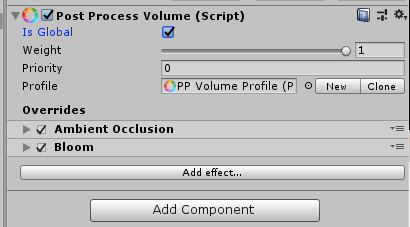
i'm not sure that actually changes the order they are applied
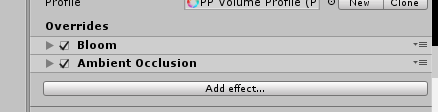 cobalt minnow
We tried that, but they come out the same. 😦
unreal raptor
ok, good to know
fervent kite
You can't change the order of how post-processing is applied, it's hardcoded for multiple reasons (optimizations, logical order, etc). The order in the UI does not reflect the rendering order.
For example, not applying AO to bloom?
AO is a lighting effect, not a post-processing one, and as such it's applied during the lighting pass way before post-processing kicks in. Soooo AO is not "applied to bloom"
broken birch
in the dark times before V1 post stack, when post effects were layered on the camera, it was possible to order them if they weren't hardcoded to have a specific pass. Every time I saw people's screenshots of their component based post effect stacks, millisecs died forever
Even swaying and crooning, the faithful worshipped asset store for salvation and it was offered but only fleeting and infrequently, poor balm for fevered early man
 ashen glen
Hmm, what's the reasoning behind making the various PPv2 effect classes sealed despite the methods being overridable? It would have been nice to be able to just extend them and override things as needed to alter or add to behaviour
broken birch
I would guess at the time they thought it would allow them to make future changes without breaking code, but a we've seen they've broken it anyway with V3 :D
cobalt wing
@broken birch about this https://forum.unity.com/threads/ao-artifacts-with-cropped-viewport-hdrp-5-5.633406/
I think that's just from SSAO not having more screen space on cropped setup
I could be wrong though
you could probably battle it a bit by rendering it little bigger and just putting bigger black bars using UI rendering on top
(yes, that's hacky)
broken birch
hmmm
broken birch
going to trigger @olento with this link about antialiasing https://youtu.be/KvN0w51xYdY?t=519

Join Alex for a detailed breakdown of the PC version of Shadow of the Tomb Raider, complete with Xbox One X comparisons - plus some RTX action! The latest Ni...
broken birch
TAA is vey nice here but the resolution scaling is a bit crap
tried lanc and catmull upscale filters too
it's because I want to run the game at 900p ish not 1080p (and equivalent for higher)
its a little blurry in TR, but I'm ok with that
 cobalt frost
Hi all, I'm using a post processing stack v2 in built-in pipeline. I notice that only FXAA antialiasing mode works, others make no difference whatsoever. Are those two reserved for hdrp/lwrp or are there some aditional steps I must have missed? I'm on deferred render path but it doesn't seem to change with forward either. I am rendering depth texture on the camera
cobalt wing
@cobalt frost they work on built-in renderer
you sure they don't work?
did you examine the results in game view when you actually play the game (in editor or in standalone)?
some effects don't apply unless you run the game
cobalt frost
To be honest no, I'm only checking scene view at the moment, but fast approximate aa gave results while others didnt (in scene view) I should check out game view right away
Yep.. It works in game view.. Thank you 😄
cobalt wing
recent HDRP version / 2019.1+ lets you apply PP AA in scene view too, but that's pretty new thing
I don't expect them to backport that to built-in but who knows
cobalt frost
Now that I've checked game view.. Looks like screen space reflections work nicer in scene view than game view, how come?
Scene view
game view
cobalt wing
different size of the window?
but IMO PPv2 SSR isn't really usable in the first place
cobalt wing
Unity Forum
[IMG]
This is a a new screen space reflection effect I made.
It is based on the "Stochastic Screen-Space Reflections" presentation by Tomasz...
cobalt frost
Thanks as always @cobalt wing !
cobalt wing
np
that one is bit noisy even after filtering but it's the best I've seen for built-in renderer
unity's cinematic effects SSR comes second but it's really perf heavy
one in PPv2 is totally unusable on all scenes I've tried it
it just doesn't do what it's supposed to do
cobalt frost
I guess you could use it for static scenes, but yeah
 fresh canopy
I'm trying to achieve a look similar to this.
what steps would I need to take to get it?
I'm aware in the second picture theres an extreme amount of vignette
(I don't want that much of it :P)
cobalt wing
depth of field, vignette, bloom and tonemapping etc
cobalt wing
all the mentioned things work on all Unity's renderers, including built-in and LWRP
by tonemapping I mean things like ACES
broken birch
If you don't know what pipeline to use then you should only use builtin or LWRP, because HDRP is fraught with danger and will eat you if you don't know what you are doing (you don't because you are asking!) :)
(because HDRP is still a long way before it's complete)
so... builtin for lazy times and LWRP if your post processing needs are very small and you are mobile or VR focused... but it will lack a lot of post effects compared to builtin.
cobalt wing
hmmm, interesting: ```SebLagarde said:
For LW PPV2 should still be compatible (so you could chose between V2 and V3).```
I'm guessing they didn't want to do that for HDRP as it's already complex enough to maintain with one setup
 languid briar
LW supports most of the PPv2 features, except Ambient Occlusion, Motion Blur, and Screen Space Reflections. Motion blur and AO are on the roadmap. It won't support SSR.
 acoustic lake
How to set cubicle or rectangle lighting sources in real time lighting x) ?
broken birch
SSR is hardly missed if one has excllent probe coverage, and if it's a great rig, you can also bake probes in realtime, so the loss of SSR is hardly great.
cobalt wing
that is, unless you bolt your camera on top of fast moving object that has reflective surface 😃
I dunno how fast it is now but every time I've tried realtime capture for one probe, it's been totally out of the question, perf wise
broken birch
Why not just not do VR. use those little coloured red+green glasses
unreal raptor
or those polarized ones that work on any video image, you ever seen those?
they transform any horizontal motion into 3d by slightly delaying the light reaching one eye
and since the lenses are clear, there's no strange color effects
broken birch
or those images which require you to cross your eyes to see it pop
ashen glen
I wonder if a better type of probe system could be made for non-square room shapes... Where you'd lay out mesh points like you do light probes, at the angle changes of the perimeter of the room and it generates a mesh from that and bakes a texture to it using a camera at every surface angle outward with frustums adjusted to suit the difference in angle between adjacent faces on this mesh to create a fairly consistent texture across it representing the room...
Then you could just take your reflection ray, transformed to the probe space and sample from where it hits on the custom mesh 
It wouldn't capture dynamic content like SSR does but it would avoid the off-screen data issue it faces.. and then layer SSR on top for only dynamics (and static objects with some special flag on them for stuff sitting inside the room)
 chilly chasm
Sounds too complex already. That is when you start to love RTX. Makes all these things so easy.
ashen glen
Yeah it's more complex, I'm just imagining it being a more performant option though. RTX is definitely ideal functionally.
 ionic kindle
Hello, i've got a little question, since I don't know much about post processing shader creation.
Custom post processing effects don't seem to work well with Unity's temporal anti-aliasing - they shake as expected, but they don't get anti-aliased. Would refactoring those effects to be Post Processing Stack compatible fix this? Or is it a different matter?
cobalt wing
looking at HDRP PPv3's TAA, I don't think they check for too big motion vectors anymore here
in PPv2, we could set the motion blending aka The blend coefficient for a fragment with significant motion. Controls the percentage of history sample blended into the final color.
but looking at the TAA shader code, I don't see anything like that here
they've swapped the previously manually adjustable weighting setup with this: Feedback weight from unbiased luminance diff (Timothy Lottes)
makes one wonder why as you'd think it would be best to have both regardless
I traced down PPv2 doing essentially this:cs float weight = clamp(lerp(stationaryBlending, motionBlending, velocityLength * 6000.0), motionBlending, stationaryBlending); color = lerp(color, history, weight);
where PPv3 does this:
float weight = 1.0 - abs(colorLuma - historyLuma) / Max3(colorLuma, historyLuma, 0.2);
float feedback = lerp(0.96, 0.91, weight * weight);
color = Unmap(lerp(color, history, feedback));```seems he writes a lot of papers on variable tonmapping and such
it's probably some technique that eliminates the need for manual tuning
AMD employee it seems

Live voyage through a collection of low-level and advanced GPU programming topics with a focus on unconventional thinking. Starting with an interactive look ...
specifically from this part of this talk (unbiased luminance diff)

GitHub
Temporal Reprojection Anti-Aliasing for Unity 5.0+ - playdeadgames/temporal
found the video from this TAA implementation in the 'thanks to'
cobalt wing
some of those magic numbers were const or defines so they weren't all hardcoded but weren't tweakable from runtime either
I just simplified the end results on the code snippets I pasted so it may have appeared they just put those numbers there
anyway, those 0.96 and 0.91 are feedback defines
one could probably try to put lower on the other value to see it it would make the TAA drop out earlier on bigger changes
unreal raptor
i trust unity knows what's best 😛
ashen glen
playdead's TAA has always been really nice
marsh frigate
set the emission value high enough to go above the bloom threshold
I'm fairly certain you can do the same with albedo, but someone can check me on that
ashen glen
if it's forward rendering I believe outputting albedo above 1.0 is how it's done, and if deferred there's an emission buffer you write to which was SV_Target3 or 4 I think
cobalt wing
@unreal raptor PPv3 TAA is totally useless for me with it's exposed settings (on/off by the time I write this), hence looking into tweaking it manually
They removed smaa for being too resource heavy, yet it was the best pp aa they had for fast moving objects
I'm afraid they go to ue4 route where you only get acceptable aa if you have some static screens or dont have fast moving objects/foliage
It is great for screenshots :p
broken birch
to be honest i'm finding that it's super acceptable for me
not vr though
in fact V3 is a massive improvement in perf and AA this end although I don't mind a slightly blurry visual because game is console and meant to be played on a TV at suitable distance
unreal raptor
sad to hear they removed SMAA. They should let devs decide what is too heavy. Every game is different.
cobalt wing
well, they never officially supported SMAA, but it did work to the moment they removed it :p
I do get their POV on this as they probably think FXAA and TAA are enough alone for non-VR games
unreal raptor
as long as we can make our own custom effects to plug in, it's all good
cobalt wing
SMAA needs 4 passes and I think also extra buffer so it consumes more GPU RAM
unreal raptor
yeah i mean, fair enough. As long as it does the job.
cobalt wing
I dunno, I'm not sure they let us do that
unreal raptor
i never liked the idea of rendering the game at double the resolution just to shrink it though
sounds performance heavy to me
cobalt wing
PPv2 was extendable but I don't think they exposed the required things to make PP AA with it
or maybe nobody just cared to do it
unreal raptor
yeah maybe not, I didn't see that anyone ever did it
cobalt wing
oh you mean SSAA?
that's not really going to work on modern games unless you make super light to render graphics otherwise
unreal raptor
maybe, there's one I know where they render at high rez and then scale it down
cobalt wing
and then waste it all on AA :p
unreal raptor
i thought it was FXAA
unreal raptor

Wonder what anti-aliasing is in games and whether or not you should enable it? Is anti-aliasing even worth it? We'll explain all that right here.
yeah it's SSAA
cobalt wing
FXAA is still better than nothing but it's not great
and everyone is focused in TAA nowadays
which makes me sad as I can't stand TAA's artifacts
unreal raptor
it's a shame MSAA only works on forward
cobalt wing
well, HDRP works nicely on forward so that's not an issue
unreal raptor
hehehe
cobalt wing
also more correctly
unreal raptor
well in my current iteration i need Deferred.
cobalt wing
but I can't use MSAA on desktop with it as current HDRP can't run SSR with MSAA without huge artifacts
unreal raptor
but if enough shaders could be converted to forward HDRP versions, i guess it wouldn't matter to use Forward
cobalt wing
I'm super happy that Unity gives HDRP's forward that big focus
in UE4, forward was afterthought and Epic stopped giving more love to it after they got it done and shipped Robo Recall
unreal raptor
i see
cobalt wing
again one good example why it's not always that great that UE4 is driven by Epic's needs
it great when they have to have some feat, they just implement it and everyone gets it
but new development is always super focused only for what their own games need
and now that is Fortnite
unreal raptor
yeah, double edged sword
if only paragon had been a hit
they would be going a complete different direction lol
cobalt wing
paragon really moved UE4 forward a lot on high end graphics front
unreal raptor
yeah it was a very pretty game
i played it a bit. But man did people complain about it
then again, people complain about everything 😛
same stuff about balance in any PVP type game
unreal raptor
it was mostly flash, little substance
broken birch
So what can unity do to fix the AA problems you're having, Olento? obviously if it's not suitable they would know about it, right?
cobalt wing
keep SMAA around, allow adjusting the max velocity you allow for TAA to not apply it for parts that will inevitably ghost badly, allow SSR with MSAA 😄
my ultimate AA would be MSAA with TAA on top of it with settings that make sure it can't ghost
for lower scalability settings, I'm fine with FXAA as lower end option but would want at least some setup that doesn't put jaggies if you can afford to run it
I don't really say these would be problems, it's just what Unity gives out of the box is not ideal for me
I mean, I could just ship with FXAA only (which is currently the only option out of the box which I could accept on PPv3), but anyone who knows anything about AA knows FXAA isn't all that great (doesn't stop from shipping games with it)
and SMAA alone is nice improvement over FXAA, it doesn't fix all aliasing though
broken birch
Just seems like there must be an official reason for removing it?
cobalt wing
Official reason is "it was never supported on HDRP"
fervent kite
Spoiler alert: SMAA should be coming back soon
marsh frigate
Oi! Surround your spoilers with || to ||I'm kidding||
fervent kite
I know, but it's not really a spoiler 😉
marsh frigate
As my spoiler said 😁
ashen glen
That's great to hear, SMAA has such a nice and stable AA look without being super heavy performance wise. And GPU memory is growing quite a lot and will continue to so 🤷
cobalt wing
that's great to hear!
I really like SMAA as it's a nice compromize
there's no ideal AA solution out there atm, everything got some major downsides
like, TAA can be ideal for some games that are not suffering from it's ghosting
but if you have use case where it can ghost, it's really hard to fight it
FXAA kinda blurs everything, it feels more like soften filter to me but of course that will also blur the jaggies too
SMAA doesn't remove all jaggies but it's sharper than FXAA, I find the results to be somewhere between FXAA and TAA on static scenes but a lot more stable than TAA when things are in motion
broken birch
Olento = ||SMAA fanboy||
broken birch
lol
languid briar
😹
broken birch
I like TAA though. Not having problems with it. So I'll keep my cruddy little hand-drawn castle of cuteness
 alpine swallow
I dont like TAA, its very blurry and almost entirely kills vfx and particles
And ghosting
Maybe because particles in hdrp dont have motion vectors
i dont know
cobalt wing
@alpine swallow 2019.2.0a7 release notes had this: VFX: Added needed core behavior to support MotionVectors.
so, maybe soon(tm)
alpine swallow
nice
chilly chasm
Hey everyone, quick question: How do I exclude the sky from post processing? I need to increase exposure and not turn my sky to white.
cobalt wing
what renderpipeline?
for example HDRP's sky setup lets you adjust sky's exposure additionally
chilly chasm
lwrp
ionic kindle
Does anyone here have any experience creating custom effects for the Post Processing Stack?
broken birch
Only for V2 and only for non HDRP, because that's all changed forever now here.
V3 doesn't exist really, it's just build in HDRP post and we can't mod that yet.
ionic kindle
@broken birch In fact I have just that in mind - V2 and no HDRP. I've got a little headache. I'm trying to make an outline effect based on something I found (http://xroft666.blogspot.com/2015/07/glow-highlighting-in-unity.html) in PPS and I'm having trouble understanding the difference between the way that script handles its command buffer and the way it should be done inside the PPS script. I kind-of refactored the script for PPS, but it doesn't work and the example by Unity (https://github.com/Unity-Technologies/PostProcessing/wiki/Writing-Custom-Effects) is sadly just too simple to give me any clue about what I've done wrong.
First of all, what's the difference between the Blit function I saw so far and the BlitFullscreenTriangle used in the PPS example? Is there a reason why this extension is used here instead of regular Blit. Sorry if it's a stupid question - I'm absolutely new to shader scripting and post-effect creation.
GitHub
Post Processing Stack. Contribute to Unity-Technologies/PostProcessing development by creating an account on GitHub.
cobalt wing
yeah, you can still use PPv2's custom effects on 2018.3's HDRP
it's just 2019.1 and onwards you are forced to ditch that work
I'm actually double bummed about ASE now supporting PPv2 shaders as I'd love to make custom PP stuff
broken birch
well custom node stuff hopefully will expand to pluggable post
cobalt wing
I dunno about that
main issue right now is really that PPv3 hasn't got any extendability yet, and seems like it will only get first iteration on that next summer (altho we might get some early versions for 2019.2 alphas/betas)
 graceful spear
maybe shader graph for post process in the future?
cobalt wing
probably
broken birch
TAA has problems with first person weapons using that fov shadergraph trick
some kind of mild shimmer
chilly chasm
Unity is in a transitional phase that causes a lot of headaches... PR promotes things that in reality, are not production ready. i.e. HDRP. Yes, bright future, but quite convoluted present... and that needs to be addressed fast...
ionic kindle
Is anybody able to answer my question above? Also got another one:
I can see in the referenced glow script (non-PPS) that the command buffer gets set with everything just once (or whenever important settings change). On the other hand, in the PPS example the rendering code lies within the Render function, which gets called every frame. Why is that?
Is calling all those Blits, messing with Render Targets, etc. actually executing those methods or just adding them to the command list so they get executed independently?
cobalt wing
@broken birch it probably messes up the motion vectors for taa
That is the only explanation I can guess it could have as otherwise it is just a PP thing, it doesnt know about underlaying shaders
But if the motion vectors are computed for the tiny gun, that would explain it
You can spoof unitys motion vectors manually if you want. PPv1 had an example for it (still worked on PPv2 when I tried it)
I probably ahould check if I can still apply that for current HDRP
quaint rune
@ionic kindle the BlitFullScreenTriangle is just a wrapper around a "manual" blit done with drawmesh, setpass, etc but with a custom triangle mesh instead of a quad (a big triangle with two corners outside the screen so it covers it). I think it has got to do with optimization in some GPUs?
And yeah the PPv2 rebuilds all commandbuffers every frame even if no settings change, when only some commands really need to. We changed it a bit so that they are only built at enable (except for taa i think) for optimization purposes.
cobalt wing
heh, I had to try this
it does work, and took like few minutes to setup this but yeah, it's soft alright
I'd actually want to try TAA + FXAA or TAA + SMAA if I can setup TAA to not ghost first
in ideal case, I'd just get different AA effect on pixels TAA can't cope with but I don't even know where to begin in doing such setup
I mean, sure, could just use the same math in the other AA pass to check if TAA skipped them but there would have to be some transition
broken birch
keeps silent
cobalt wing
TAA looks amazing :p
but it's a static scene
you can't beat TAA in static stuff, it's almost perfect
broken birch
AA is where VR spends a lot of frame budget
cobalt wing
but it really softens a lot of details that shouldn't be softened
broken birch
FXAA is cheap as chips but the point here is SMAA alone is insufficient, I think so you need both
cobalt wing
foliage looked like crap with this double pass
broken birch
oh?
cobalt wing
it blurs the leaves a lot to a point it starts to look fake
broken birch
TAA or?
cobalt wing
nah, this hacky combo
broken birch
oh it's a hack. I expected something native
cobalt wing
TAA is fine as long as the leaves don't move :p
broken birch
TAA is OK if the contrast difference for the leaves is fine...TAA sucks when light and dark are neighbours
cobalt wing
SMAA + FXAA? it's a total hack, took me few minutes to just hook the passes in and fix the UI 😄
you can just run all kinds of passes there if you want
having something more sophisticated is another thing...
by default Unity just runs one PP AA
but there's nothing stopping you from running them all one after another if you want
ionic kindle
@quaint rune Thanks for clarifying some things! I didn't have time to work on this for past days but I suspect the reason for the effect not working after being put into a PPS has something to do with the lack of context.source and context.destination that need to be used to properly streamline the RTs.
alpine swallow
i think the amount of blur in SMAA + FXAA combo beats even TAA blur honestly
chilly chasm
Well one of the best AA assets for Unity is based on TAA. But I really hate the standard implementation.
https://assetstore.unity.com/packages/vfx/shaders/ctaa-cinematic-temporal-anti-aliasing-pc-vr-106995
BEST SPECIAL EVER! NEW UPDATE V1.6, NORMALLY $195 NOW ONLY $75 FOR TWO WEEKS UNTIL 13th March, SAVE OVER 60%
COMPLETE SINGLE PASS STEREO SUPPORT IN VR and LATEST STEAM VR SUPPORT!
DOWNLOAD THE FREE EVALUATION DEMOS NOW CTAA PC DEMOS
CTAA VR DEMOS OCULUS & V...
cobalt wing
I can't really say if that's best, it looks like it suffers from exact same things I dislike about TAA
it's no coincidence that Livenda doesn't even ship any demo that's typically hard for TAA
they only show mostly static scenes with no foliage and slow camera pans
- it's livenda 😄
they could go into radio silence for years without any warning
chilly chasm
There are not many other of this quality really. And I have tried theirs with foliage. My problem is the foliage itself and the lack of a decent SpeeTree equivalent shader in LWRP.
Otherwise the tool did fine with foliage.
unreal raptor
yeah their pricing is terrible too. I got it, but only because it was 70% off at the time.
chilly chasm
It is still at a very good price. And they did respond to me very fast and even gave me their next version in advance to try.
unreal raptor
they do really need to update it to PP stack. if they don't i probably will
cobalt wing
PP stack is old already
unreal raptor
well PP3 of course ;p
chilly chasm
I think you should talk to them, they are actually very responsive. At least they were when I contacted them. Very helpful.
unreal raptor
by the time i get around to that, PP3 should be ripe and ready
unreal raptor
probably about 3 years from now :p
cobalt wing
3-year plan 😄
unreal raptor
is when i'll get to it
cobalt wing
(if you saw my comment on #💻┃unity-talk)
unreal raptor
yes 😛
chilly chasm
I hear all you guys talking about things that are not supposed to be used for production and I have started thinking you are hobbyists.
unreal raptor
if you've ever done any game development you'd know pretty much 50% of any game isn't 'ready for production' but people don't have time to finish things. games must ship!
chilly chasm
Why not, I didn't say it as a bad thing, I simply mean that you can't give someone production advice having the mindset of a hobbyist.
unreal raptor
as long as it works, it's good enough.
you can't develop a game with a mindset of expecting perfection
cobalt wing
again, making assumptions 😃
chilly chasm
mmm having made so many games, and knowing that with some we had to use the same engine without updates for a year until that version matured, I am not so sure using early versions is good advice.
cobalt wing
many people working in the industry have mindset of only using decade old things they've learnt to use
unreal raptor
the fastest way to mature a technology is to use it.
it's how feedback is generated and things get fixed.
chilly chasm
That is not true really. They all play with all sorts of things in their private time.
cobalt wing
this industry moves rapidly though, so better keep along the ride IMO
chilly chasm
Yeah it doesn't really move as rapidly as you imply.
unreal raptor
I've heard the stories of people who used Unreal Engine 1.0
cobalt wing
what do I imply?
unreal raptor
it was total crap, and yet, many commercial and popular games shipped on it lol
cobalt wing
I've actually advised everyone directly asking me if HDRP is ready for production that it isn't
chilly chasm
I mean it hastaken almost a year to see LWRP becoming mature, and HDRP will take almost as long. So from the moment SRP is introduced to it being mature enough for usage in full feature parity with the standard pipeline that is a VERY long time.
cobalt wing
it's not a released package so if you jump aboard today, you need to be aware of the risks
full feature parity is kinda nonsense term in this context though
unreal raptor
yep, and if you're fine with those risks, more power to you
chilly chasm
Yeah, hence, NOT production ready. Good for hobby. 😃
cobalt wing
they specifically don't want to make HDRP work like old renderer in Unity
unreal raptor
not every game needs every possible feature to be completed.
chilly chasm
Yeah it really depends on the features you need.
unreal raptor
now ECS, that's something i really don't expect to see any production game using yet.
chilly chasm
Feature parity means being able to do the same things in a production environment.
cobalt wing
yeah, ECS is way less mature than HDRP right now
unreal raptor
because it's such a huge divergence from the regular way of doing things and it's very much in flux and feature poor atm
chilly chasm
We are in fact using ECS in our project but only for limited things.
cobalt wing
it's horrible pick for production right now 😄
every new versions makes you restructure your project due to API changes
chilly chasm
You can tackle some small things with it.
cobalt wing
and it's lacking half of the feats you'd need with it
chilly chasm
You do not have to update. 😉
cobalt wing
yeah, but if you take that same mindset, it's a hobbyist tool right now 😄
chilly chasm
Indeed it is.
cobalt wing
I really don't like the split like that
unreal raptor
but full disclosure, I'm still on Standard pipeline and don't plan to move to HDRP in the near future. I'm still waiting for it to mature.
chilly chasm
That is why we are only using it for minor things. Nothing of importance.
unreal raptor
so i get where you're coming from
cobalt wing
if you used UE4 during first two years
chilly chasm
Still provides a minor performance boost where we need it.
cobalt wing
you would have needed to call it hobbyist engine for the first two years as it was that limited and evolving
but you know it makes zero sense
chilly chasm
I did call it a hobbyist engine the first two years 😄
cobalt wing
lol
chilly chasm
I have been using Unreal since version 2.0
UE4 was not really something new and exciting for me as it was for countless hobbyists who had not even tried UDK.
Unity was and still is something to really look for. But this latest shennanigans with SRP are really not improving my opinion of it.
cobalt wing
why are you against SRPs?
chilly chasm
I am not against it.
cobalt wing
it does give you more power as a dev
chilly chasm
I lov eit.
chilly chasm
But they should have kept it under wraps for longer.
cobalt wing
why?
I love their current approach on betas and previews
heck, even alphas
you don't have to use that stuff
chilly chasm
I do not want more power as a dev. I want more power as an artist.
chilly chasm
And to be honest, right now UE4 is really looking a lot more artist and designer friendly.
cobalt wing
it was never about development but tooling
chilly chasm
Of course. It always is about the tools.
cobalt wing
not for programmers though, no engine on the market can offer you everything out of the box
unless your game is super simple
chilly chasm
And right now the tools of Unity are all over the place, and the old tools have kind of remained stagnant.
New tools are in, but because they are half baked the asset store does not support them.
At the same time, since new things are about to come out, developers do not invest time to create new tools for the asset store or radically improve their old tools.
It's a catch 22.
cobalt wing
I dunno, all tools go through similar things
for example UE4 did for the first years
big changes are always PITA in transition
and Unity has never been fast on transitions
chilly chasm
Sure, but that was 2 years in a period of 15 that I have been using it 😃
chilly chasm
Oh I think it is much faster than Unreal, but right now their efforts are split between maintenance and invention.
cobalt wing
UE4 moved fast on the first years too because it had to
as for the tooling, yes, UE4 is more consistent all around it
for artists point of view, I can see it being more appealing
but it's also super hard coded for almost all systems
chilly chasm
They are both pushing hard to outdo each other in what they do best. And that has worked better for Unreal than Unity at this point.
cobalt wing
which makes Unity stand apart when you actually have to develop with it
chilly chasm
Unity is pushing to become better than Unreal in Performance and Visuals, and Unreal is pushing to become better than Unity in being artist friendly.
cobalt wing
if I thought UE4 was better pick for my current project, I'd be there using it
I have like zero brand loyalty, I pick the best tool for the job 😃
I've also evaluated HDRP throughout 2018 before moving into it
it wasn't really worth the risk year ago
but it does work for my purposes now
chilly chasm
Absolutely, and I think Unity is the best one for mine, too, but the problem is it is hard to find good developers for Unity these days. Too many hobbyists. They get bored easily.
cobalt wing
can't say it works for everyone though
chilly chasm
No tool can work for everyone. That is why there are so many tools 😃
cobalt wing
yeah, that's also why I always tell people to try the alternatives themselves
like, even Blender 😄
chilly chasm
Absolutely.
I am not going to use Blender after so many years of 3dsmax, I would have to start learning from scratch, BUT it is the first tool I suggest to beginners.
cobalt wing
I get annoyed almost every time I open it
and I've opened it a lot during last 15 years or so
it just doesn't work like my mind works
alpine swallow
did you try 2.8?
cobalt wing
almost every other 3D tools is more logical
chilly chasm
Me too 😄 But they have done so many amazing things with it.
cobalt wing
even zbrush
I tried the beta
but I'm not really looking to swap
I'm fine with the tools I have now
chilly chasm
haha I remember zbrush before they made it a sculpting tool. It was a graphics tool to make Christmas and Easter cards 😄
alpine swallow
i am actually very impressed with what they have done with ux and usability in 2.8
cobalt wing
last time I opened blender, I couldn't even figure how to pan the view without googling it
but that's me and blender
I spend more time on google figuring out how to use it than actually using it 😄
chilly chasm
but UX is almost the same really. Just the UI has changed.
 ebon drift
Don't worry if you can learn Unity you can learn Blender
cobalt wing
I don't want to learn it
chilly chasm
no waayy Unity just makes sense.
cobalt wing
it's so against all logic 😄
chilly chasm
Indeed it is.
ebon drift
I learnt Blender when I was 16 without too much issue after a week or two of following tutorials. I'm in my 20s and have been struggling to learn C# for months.
cobalt wing
I'm happy to pay for tools that work more my way
chilly chasm
That has nothing to do with usability though 😄
cobalt wing
don't get me started on Blenders hierarchy mass select thing
you know, the lasso tool, on item list...
ebon drift
I just mean in a getting used to it and learning sense.
alpine swallow
yeah, same. but its a lot better now. shortcuts way more intuitive and logical
ebon drift
I found modelling a lot simpler to get into than coding, but I've always been a more visual guy.
chilly chasm
It's ridiculous.
cobalt wing
blender is fine if you've never ever used any other 3d modeling tool before
as then you don't have to forget basically everything you already know to be able to use it 😄
chilly chasm
Sorry. But after having used almost every 3d tool out there, Blender and Zbrush despite being amazing tools are really retarded when it comes to usability.
ebon drift
I might have had the benefit of getting my start in dev making maps for Half Life 2 in Hammer
So I'm used to jank
cobalt wing
and it's basically funky like that because it's used on pen + they just keep adding feats without thinking about restructure
chilly chasm
Zbrush requires you to import 3D objects as brushes, and you modify them using alphas 😄
cobalt wing
yeah, that's stupid
Zbrush core doesn't do that
I'd want that on full too
I never use the 2.5D mode
chilly chasm
It doesn't matter really. What matters is the result, and if you are a production professional, how fast you reach the best results.
cobalt wing
tbh, I haven't checked if they put option for that now (but I doubt it)
I don't really agree on that being pro thing only
alpine swallow
naming is very frustrating in zbrush. 3d objects = tools and subtools
cobalt wing
if you work even on a hobby thing, you have limited resources
you need fast workflows to finish
chilly chasm
yeah all that jazz. Still the tool that made perfect sense (mudbox) failed.
alpine swallow
and perfect engine (stingray)😔
chilly chasm
For most hobbyists, it doesn't matter when you finish really.
cobalt wing
I never liked mudbox
chilly chasm
Stingray was not a perfect engine, but it was a great companion for 3dsmax.
alpine swallow
yeah it was a joke
cobalt wing
mudbox is still around
I dunno why

Autodesk has announced the release of Mudbox 2019.
chilly chasm
Mudbox was created mainly using the same concepts and tools a real sculptor does. If you give it to a sculptor it automatically makes sense.
alpine swallow
i am still waiting for 3d max death
chilly chasm
Most people were not real sculptors though 😄
hehe @alpine swallow you will wait for a very long time.
alpine swallow
most likely
chilly chasm
It still is their #1 modeling tool. Entertainment is just one part of their market.
I am a member of their testing team. I test maya, 3dsmax, mudbox and other tools.
Mudbox came out with some great new features btw. A bit too late, as Zbrush already presented them as their own, but still they delivered.
alpine swallow
did he have remesher from start? i cant remember
chilly chasm
Yeah they did.
And they still have some features that zbrush doesn't.
But they have really fallen behind in users. It's a tiny userbase these days, mainly in high end film production studios.
ashen glen
The only real thing Mudbox has advantage for now is the direct texture painting aspect, as ZBrush is still polypaint based. After the few years of Mudbox being basically dead I was really hoping they were finally going to release the Mudbox-like tools they teased for Maya years ago, but then we get this uber disappointing Maya 2019 release after 2 years of no major release lmao. They really need to step it up and release it this year, Blender putting some pressure on them finally.
 tight glade
haha, why are you waiting for Max to die? @alpine swallow
 indigo pewter
Hey, could someone point me how to fix this?
I'm using ambient occlusion from post processing stack
And when I point the camera down it, well.. does this ^
Also this is unity terrain with default shaders on ground/grass
chilly chasm
AO doesn't do that afaik. Something else may be happening.
indigo pewter
I've got only color grading and AO enabled, and when I disable the AO it fixes that 😦
Tweaking the AO settings doesn't help
Allright, got it, I had AO baked in the lightmapping settings which was interfering with the PP
chilly chasm
Hmm I typically use both. And I still do not see that happening. But if it fixed your problem that's great.
ashen glen
Yeah those two things shouldn't really be conflicting... Especially since it seems you're losing your camera's anti-aliasing as well. Might need to update your unity patch version and see if there's a newer post processing package
@indigo pewter
indigo pewter
Yeah, false alarm, I've just noticed it still persists
chilly chasm
I have no idea what is happening there, but it looks like something you are using for the effect is coming "out of screen" and the effect stops. This could be the pivot point of an object going out of screen, and in some cases causing the effect/animation function to stop.
chilly chasm
I want to create a post filter that is similar to a process I some times do in photoshop and really improves the result. Is there a tool like SG that could help me do that in LWRP?
It's a very simple few steps process.
unreal raptor
I don't know about LWRP but making camera effects in the standard pipeline was fairly trivial
using UnityEngine;

[ExecuteInEditMode]
[AddComponentMenu("Image Effects/Frost")]
public class FrostEffect : MonoBehaviour
{
    public float FrostAmount = 0.5f; //0-1 (0=minimum Frost, 1=maximum frost)
    public float EdgeSharpness = 1; //>=1
    public float minFrost = 0; //0-1
    public float maxFrost = 1; //0-1
    public float seethroughness = 0.2f; //blends between 2 ways of applying the frost effect: 0=normal blend mode, 1="overlay" blend mode
    public float distortion = 0.1f; //how much the original image is distorted through the frost (value depends on normal map)
    public Texture2D Frost; //RGBA
    public Texture2D FrostNormals; //normalmap
    public Shader Shader; //ImageBlendEffect.shader

    private Material material;

    private void Awake()
    {
        material = new Material(Shader);
        material.SetTexture("_BlendTex", Frost);
        material.SetTexture("_BumpMap", FrostNormals);
    }

    private void OnRenderImage(RenderTexture source, RenderTexture destination)
    {
        if (!Application.isPlaying)
        {
            material.SetTexture("_BlendTex", Frost);
            material.SetTexture("_BumpMap", FrostNormals);
            EdgeSharpness = Mathf.Max(1, EdgeSharpness);
        }
        material.SetFloat("_BlendAmount", Mathf.Clamp01(Mathf.Clamp01(FrostAmount) * (maxFrost - minFrost) + minFrost));
        material.SetFloat("_EdgeSharpness", EdgeSharpness);
        material.SetFloat("_SeeThroughness", seethroughness);
        material.SetFloat("_Distortion", distortion);
        Debug.Log("_Distortion: "+ distortion);

        Graphics.Blit(source, destination, material);
    }
}
you just make a shader to do whatever you want done, and blit it to the camera

example of the shader used with that
just a std vert/frag
I have no idea if this works with LWRP but i'd hope something like it still does
chilly chasm
So perhaps I could also do it in SG? I am not a programmer. The only tricky thing is detect edges really. There rest is silly. just an overlay and screen.
I take the final render, do a detect edges, desaturate it, and apply on top (blend) in Dark mode. Then on top of that I apply an Overlay of the final image at 30% and another on top as Screen mode
This balances the lighting, and covers up various shading mistakes and artifacts such as specular butterflies on the edges.
 sharp wharf
Hi all, I came back with another issue :p
On one of my project, I could not have the deferred fog option on my camera :
(the one on this picture), did you already get this issue ?
marsh frigate
Seems like it's there, further settings are in Window/Rendering/Lighting Settings
also you don't have a layer tagged for your post process volume
which you should be using if you have a volume, and the volume should also be on that layer
sharp wharf
for the layer it's ok I know that ^^. My issue is that the Deferred Fog is not displayed
marsh frigate
Oh right, you meant you don't have those settings - I'm pretty sure they moved fog to volume settings but all this totally depends on what version you're running
sharp wharf
but with the same version, but 2 project different, one I have this options, the other not
sharp wharf
ok the problem appears when you start a project without the HDRP package then you add this package manually ...
chilly chasm
weird AO issue. I get correct AO in the Scene viewport but when I hit play without a headset, AO goes all over the place in the play viewport. (VR project) any suggestions?
cobalt wing
hmmm
this anamorphic bloom effect
it's faked on the tech demo, right?
I don't think you can do that on current HDRP PP + it doesn't look like PP effect in motion
broken birch
SEE I KNEW IT WAS CHEATING!
wags finger in the air
it's probably just the bloom texture
maybe even vfx
cobalt wing
I'm curious how they did it tho
even when I'm not really going to go for JJ Abrams look myself 😄
marsh frigate
It could just be keijiro's
there's a version with the stack I think but I can never find it
I once remade it for the stack and then I think found the version with the stack :/
broken birch
he has highly manicured eyebrows, and when you get past a certain age it's a losing battle
 foggy arch
I want his attache case
fervent kite
pretty please, stop calling that an "anamorphic bloom/flare", it's not 😄 That's not what anamorphism looks like at all (unless you have a pixel size of 9000:1 instead of 1:1).
it's called a "streak"
and doing that in postfx isn't the best way to do it (performance wise), using a scaled screen-space sprite is generally a lot faster 😃
marsh frigate
Looking it now that's definitely what's been done as well, there's a lot more detail than a post effect would give
cobalt wing
@fervent kite didn't even PPv2 had anamorphic slider for bloom? 😄
and yeah it doesn't seem like PP
btw, I knew someone would get triggered for that anamorphic bloom term 😄
fervent kite
v2 had it, and hdrp/postfx has it as well, although it's linked to the physical camera anamorphic parameter
also used for DOF in hdrp/postfx
(although DOF still needs work)
broken birch
it's pretty good now but only if it's fed a high quality antialiased source image
 tranquil cloud
Did the way that projection matrices are handled change in 2018.3? Old code in 2018.2 would just modify the Camera.projectionMatrix and it would be enough to adjust what was rendered. Did something change?
Ok so the new Post Process Layer overwrites my custom projection matrices... fun. 😦
Yup, known issue with the new Post Processing stack. Hopefully there's workarounds.
unreal raptor
I looked up Camera.projectionMatrix because I was curious what it was used for, but the documentation page is not very descriptive
what are you using that for, I'm curious for a real-world example
tranquil cloud
We use it for a specific cutscene to shift from ortho projection into a perspective projection, but there's plenty of other use cases (tilt shifting, etc)
unreal raptor
ah ok, I know tilt-shift from photography
tranquil cloud
Yeah it's mostly used for non-game purposes since the standard projection matrices are usually enough for most use cases.
unreal raptor
I see, and yeah for the PP to overwrite that, I can see how that would be a problem
is that PPV2 or PPV3 you're seeing that issue on?
tranquil cloud
I believe PPV2 (is v3 out of preview?)
unreal raptor
yeah PPV3 is built into HDRP
tranquil cloud
Ah so not out of preview yet.
broken birch
it never will be until HDRP is, it's built in
2019.3
same is happening for LWRP too
V2 is legacy now
I guess it makes sense if you want to make the most of the individual pipeline :)
unreal raptor
doesn't matter as long as they give a way to make your own effects
otherwise may as well not use it and use your own PP stack
 lucid flicker
hi, i have exponential fog in my scene and it works great on the editor but it is buggy in the android build of my game(some of the meshes don't get fog) what is the problem
ashen glen
@fervent kite @cobalt wing umm, excuse me, that's not anamorphism, this is
(damnit I just realized the date on those comments so this looks like terrible timing haha)
 icy furnace
That face of that kid that is second to the right
icy furnace
are several post processing layers going to make framerate drops?
i mean
post processing volumes
unreal raptor
i don't think so, you're usually just going to be in one at a time
and should you be in two at once, it's simply going to blend the settings between the two
so either way it's just going to be the cost of whatever effects are enabled at any given time
volume is just a trigger with settings
fresh canopy
You're able to apply post processing to only specific layers right?
I'm having issues where unless I click Is Global, no effects take place
cobalt wing
layering setup is the most confusing part on the PP stack v2
basically you want to setup the global volume and PP layer script on camera to use same layer, Unity's examples put these in postprocessing layer
fresh canopy
wait just to go on a different topic for a moment
I cant for the life of my get Depth of Field to work
it just blurs everything or nothing
no matter what I set
marsh frigate
Should work 🤷
Also no you cannot apply to separate layers. The layer it uses is unrelated to how it applies
If you uncheck is global then it becomes a volume
And is blended to if the camera is in the volume
fresh canopy
is there anyhting specific I need to do with Depth of Field?
how would I just get the background blured?
set the focus distance to the players distance from the camera?
and then what?
late fossil
Can you enable post processing volumes for scene camera? It would be usefull for fly cam in editor
marsh frigate
@late fossil There's a button at the top of the scene view that looks like a mountain in a picture frame. That contains a post processing checkbox for the scene view that will enable when the button is depressed
late fossil
That's not what I'm looking for
Post Processing Stack has this concept of blending between volumes, but it works only with actuall game camera, and you need to move it inside a volume to see volume's effects
unreal raptor
you could just put a flycam script on your camera and press play, and fly around in the game view.
marsh frigate
Huh, I thought the volume blending did work for the scene view - could be wrong though
unreal raptor
to be honest I don't know if it does or not, never have used multiple volumes yet
broken birch
I thought the forums were cleaner before and had a go at unity's community then realised I'd just lived too long inside the MACHINE.. .
 prime delta

 cobalt wing
came across this http://www.klayge.org/material/4_11/Filmic SMAA v7.pdf
(Filmic SMAA - Sharp Morphological and Temporal Antialiasing from Siggraph few years ago)
wonder if that still ghosts, apparently it's only been used on some Call of Duty's
fervent kite
all temporal methods ghost, it's inherent to their concept
and yes, this one does as well (I was in the room when it was presented)
it's an improvement over the previous SMAA T2x, except they didn't provide a fancy source header like they did for the original SMAA
and it's a looooooot of work to implement
cobalt wing
I can imagine 😄
and yeah, temporal methods do tend to ghost, you can detect cases when it would typically do that and opt out the temporal part then?
for example, in "regular" TAA, you can just not apply the filter if the movement vectors are too big etc?
of course movement amount doesn't necessarily mean it'll automatically ghost as it depends on the material beneath it
in my case, I can tell immediately the places in game world where the thing would ghost, like if I put a chase camera, I can even draw a mesh volume where it will always ghost, could just draw that to stencil and use something else for that part
of course, that's super game specific then 😃
@fervent kite btw, do you know if MegaCity ever worked with TAA?
the project we got has AA disabled
and enabling TAA on that HDRP version doesn't do anything good for the demo
fervent kite
They didn't have motion vectors, so no TAA
cobalt wing
hybrid renderer doesn't support that?
fervent kite
also, "detecting edge cases" isn't that easy and more often than not you need level builder support for it to be efficient
cf Uncharted 4
they ended up adding a tag on "bad objects for TAA" to exclude them from TAA
if you played the game, they forgot to put it in quite a few places...
and it ghosts horribly
cobalt wing
yeah, this is what I meant by having some mesh volume
fervent kite
it's not that it doesn't support movecs, it's just that they weren't implemented at the time 😃
cobalt wing
we are talking about MC now, yes?
fervent kite
The "tag" thing is quite game specific though. We're adding it for "point" particles right now (with the VFX editor)
yeah
sorry, going over two discussions at the same time, things get messy 😃
cobalt wing
yeah, it's my fault really
anyway, would be nice to get some ability to tag things for HDRP TAA too
but I guess it's up to user to implement it
we'd need some guide on how to use the stencil on HDRP tho
you guys use it internally for some things, wouldn't want to write stuff that would break things there
fervent kite
yeah we have no plan for that right now, maybe later down the road it would be nice to have but it's highly dependent on the pipeline and the level building workflow (tooling dependencies etc)
it could be hacked in pretty easily for a specific project, but making it generic enough that it works for all projects with properly integrated tooling support is always a different story 😉
cobalt wing
in my case, it's just anything behind fast moving vehicle that has camera follow behind it 😃
that's the worst case scenario on my projects
fervent kite
heavy contrast between the car and the road?
cobalt wing
the ground materials are noisy, TAA doesn't cope with it
even emissive lights trail in bright red behind it
also same with chrome bumpers
fervent kite
yeah that's the typical fail case for TAA
cobalt wing
yes it is 😃
fervent kite
adding motion blur would hide a bit :p
cobalt wing
this is why I'm happy SMAA is back
cobalt wing
many people want to disable MB in games like this 😃
but it has very MB like effect on it's own, just not that nice :p
current HDRP TAA ghosts way more than the PPv2 one tho
it's not got the dynamic slider option anymore
in PPv2, you could dial it down on dynamic stuff so this didn't happen
fervent kite
that's the reason why Playdead mixed TAA and MB, to hide the ghosting (because their TAA ghosts a lot by default)
cobalt wing
I checked the TAA code on HDRP PP and that part of the algo doesn't even exist anymore
fervent kite
the implementation is slightly different, and parameters are baked in for now (although you can still play with defines)
cobalt wing
I saw some values on the top, didn't try to adjust them
fervent kite
TAA is... TAA. I'd like to rewrite a big chunk of it at some point but priorities.
these values are the ones you had the in UI in v2
fervent kite
GitHub
Scriptable Render Pipeline. Contribute to Unity-Technologies/ScriptableRenderPipeline development by creating an account on GitHub.
cobalt wing
thanks for the info
fervent kite
these two are the two sliders (static/motion) from v2
cobalt wing
yeah, I saw those two specifically, just wasn't sure what effect they drove
but yeah, TAA seems like bottomless rabbithole when people try to fix the side effects
Epic has improved theirs for years and it still ghosts
it's better than nvidias own TXAA atm tho
you'd think we'd have all around robust AA solution by now but here we are 😃
cobalt wing
but isn't DLSS temporal too?
super sampling will never work as people just rather use the processing power for other things 😃
cobalt wing
that's not what I took away from nvidia dev site description before: DLSS requires a training set of full resolution frames of the aliased images that use one sample per pixel to act as a baseline for training. Another full resolution set of frames with at least 64 samples per pixel acts as the reference that DLSS aims to achieve. At runtime, a full resolution frame with motion vectors is required in addition to the input image to be anti-aliased. The motion vectors are used to temporally transform the previously anti-aliased frame to align with the current frame, enabling the algorithm to use temporal information. Training also requires a variety of scenes from the game in order to generate the best results.
that says The motion vectors are used to temporally transform the previously anti-aliased frame to align with the current frame, enabling the algorithm to use temporal information
I can't find recent version of that description on the website anymore tho as it used to be on different part of the site before, that was from very first info that we got officially about DLSS when it got released.
so what I take from that chapter is that DLSS itself processes the AA effect using the ML thing, but still pass the previous frame results around
I'm not rendering engineer tho so maybe I misunderstood what that means
fervent kite
Yeah there are conflicting info on what's going exactly behind the scene, I remember the talk at Siggraph about it last year, they didn't say anything about temporal re-projection and showcased a pure ML workflow
I've never worked with DLSS yet so I don't know if there are multiple variants or not (might be the case)
that said, when you have 64 samples per pixels and a supersampled source, ML alone should work fine to keep it temporally stable (or you're moving the camera too fast to see it fail anyway even without MB).
cobalt wing
tbh, I've not been super impressed by the real comparison shots between DLSS and TAA