#🔀┃art-asset-workflow
1 messages · Page 48 of 1
 sullen plank
 eternal raft
Do you have a question about asset creation, tools etc.?
@sullen plank no.
i can't make materials for game.
i sent message to know who can help me.
sullen plank
You've been told already, there's no recruitment on this server.
 reef sundial
 timber wind
Hey, I need someone that owns Sketchup for a small thing I need, please hit me up when you own it.
 hybrid storm
Hi, my name is Elio and I’m a project manager. I began working about a month ago with a team of 5 people on a really interesting mobile game. However, we need some help in level design and in a few animations. If any Graphic Designer or Animator is interesting in helping, please do let me know. You will get credited and probably paid if the game is successful 😋
 eager mist
does anyone know how I can create an interior of a vehicle
a cockpit for example
do i do it the same way i would create a normal model or would there be possible issues with scaling?
 random cedar
@eager mist just do it like you would with a normal model, then scale as needed in unity
or if you have the original vehicle model, import it to your 3D program, then model the inside, then export the that new model and it should fit perfectly
eager mist
ok thx
eager mist
Nice!!
eager mist
neat
 wary eagle
Thank you!
wary eagle

ArtStation
Vertical grip & PIRAT laser system.
All done for French Foreign Legion mod for 'Squad'.
wary eagle

ArtStation
Game ready rafale B model.
Done for FFL mod on 'Squad'.
Yes, it's a low-resolution mesh It's quite far from the players' POVs.
 normal garnet
wow
 rigid storm
How can I rotate things >180 degrees in one motion with Blender animation?
i.e. spin something more than half a rotation
random cedar
R > Select Angle (x,y, or z) > 180 @rigid storm
 mystic robin
see that spoon? made that without the tutorial 😎
 vivid beacon
😎 🤯
 umbral grail
 white flint
I need to model some basic 3D models (think cubes, discs, capsules and boxes), but I need to model them to relatively precise dimensions. What are some simple 3D softwares you can suggest for modeling? I am struggling with blender to even hit the right scale etc; I think I'd need something a lot simpler for this quick type of modeling I want to perform.
white flint
https://youtu.be/lC0RX92UWJ4 <--- going through this list.

The are a lot of 3D software out there and most of them are not easy to use, so today we've got a list of easy and simple 3D software for you if you want to create your own 3d models without having a lot of experience.
1_Meshmixer
Mesh mixer is a free 3D software from autodes...
random cedar
@white flint blender has ways to be precise
https://www.youtube.com/watch?v=ZI49VIcISaw&list=PL6Fiih6ItYsX3qdwhEyd77zy82bM-I8t1 might help you out

Ever wanted to do Hard Surface modelling in mm in blender. I explain quickly and clearly how to set up blender in millimetres to do precision modelling.
If you have any questions please leave them in the comments below and I'll do my best to get back to them as soon as I can...
white flint
Blender has probably 99% more features than I need.
I like Wings3D in a way.
I get totally lost in Blender.
I was pretty good in Quake3 Radiant and with SabreCSG in Unity, the latter is too unstable though last time I used it.
But a constructive solid level editor is hardly a decent modeling software.
Most subdivision modelers really don't mesh (haha) with how my brain perceives space and how my hands want to select and modify stuff.
It's more of an accessiblity problem than an "unwillingness to learn" problem, I've been dabbling with 3d modeling since the 1990s and I still don't have a tool that's really fast and elegant to model simple, primitive level shapes. (Wings3D is closest so far, but it's pretty old technologically)
solved it with Wings3D so far, I wish it wasn't a sub-object though. Maybe I can change my conversion workflow so it bakes the entities together
 wooden flint
hi some times when i weight paint my amature disapears. it is not hidden. what should i do. this is in blender
wary eagle
Someone wanna take a flight?
 thorny wasp
Does anyone here have an active maya licence at all? theres a model i want but its in .ma format, if someone could download it and export as fbx for me?
 errant plover
Link?
rigid storm
When I import my Blender animation to Unity, one rotation is along the wrong axis
I think it's because Blender has the Y and Z axes in different places
but how do I fix this?
Also, why is my model's pivot completely displaced? I set the origin of every single object in Blender to 0,0,0
All the individual meshes have the correct origin, but for some reason, the model as a whole doesn't
Ok, not my whole mesh, but my armature
Why is my armature's origin displaced?????
ok, I just moved the armature in blender, but I still dk why that happened
 tame lynx
Does anyone have a good 3d voxel art software for unity?
errant plover
You have to apply the location in blender, before export.
 tough vigil
Some practice
wary eagle
Nice gas bloc here! 🧐
eager mist
Hey, I'm trying to import a model from Blender into Unity. Everything looks fine in Blender, but upon importing I get culling issues
errant plover
Make a video
 inland gate
Question,
When I am importing a town or little something I made in for example Blender to Unity
Is it better to have like one large mesh collider for the whole thing
or to just check "Generate Colliders" for every individual mesh I import
I know generally the more colliders = the more physics checks, but is a large mesh collider better for performance?
(I prefer a seperate collider for each mesh as I don't have to rely on grouping everything together 🙂 )
errant plover
Make colliders for each mesh. Cude or sphere where you can, generate for the rest.
 brisk horizon
Is there a built in FBX exporter?
What I really want is to directly apply my vertex color changes made in Unity to the mesh. ProCore does something similar but saves to a .asset file
 vague violet
import package @distant rivet
brisk horizon
@vague violet what is the package name?
 junior stone
fbx exporter
 finite barn
any help on rigging this? i cant find any tutorial on how to rig something like this
eager mist
throw it into mixamo
junior stone
mixamo is unlikely to be able to rig that
finite barn
i get errors in mixamo
junior stone
as I expected
finite barn
it says to place the markers on the model or something like that
as I expected
@junior stone do you have any idea on how to do it?
junior stone
what does it tell you
finite barn
ok wait i will try one more time
they should go here righta/
and without fingers
@junior stone
brisk horizon
@junior stone I can't find "fbx exporter" - any idea where I should be looking?
junior stone
@finite barn its legit telling you how to set it up on the right on their model
but im pretty sure that rig is not gonna be decent, you ll need a custom thing cuz your parts are all detached
brisk horizon
@sullen plank Thank you
 floral pendant
hey guys for some reason my window's glass is appearing as green on one side,it would be great if you guys can help me
junior stone
I have the idea they are flying but their propellors are static
my brain does not compute
@wary eagle
wary eagle
I've use an high FPS camera, that's why! 😄
We'll use a rotating texture for the game version. 😉
junior stone
if you upload the model somwhere you shoud probably animate it! (like sketchfab)
a rotating texture 
why not just animate the model?
detach it from the main model and make it a child, rotate however much you want depending on the speed of the plane 🙂
wary eagle
Nope, because it's for a mod, and we have to use the already in engine mechanic.
junior stone
aha, constrained environment
wary eagle
Also it's quite a low-importance model, it's used only for close air support, something that you don't see a lot during the game! Let me send you an example of the rafale I've done some weeks ago!
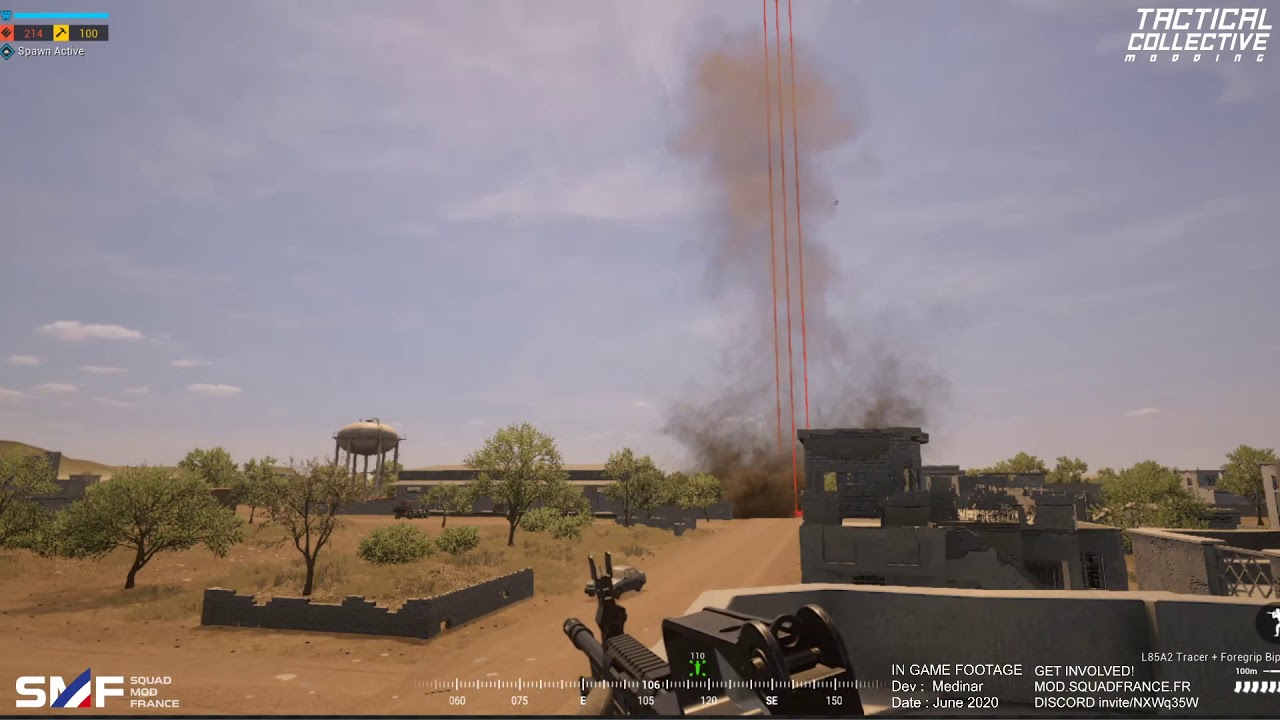
 gritty reef
With propellers moving at that speed, would the limitations of frames per second interfere with desired effect? Like IRL propellers take on a whole new shape/appearance when viewed by the human eye.
junior stone
you can probably fake that effect with some clever texturing
wary eagle
Yeh, I think about that too, also if someone have a freeze or something, that will result in a non-moving blade.
That's why it's way better to just use a rotating plane, with the turning bales baked on it! 🙂
Let me show you the actual in-game one!
When the SDK will be up to date. 😅
tough vigil
Could someone help with this topology?
wary eagle
Most of it looks fine, you just have to clean the top inclined part to avoid polygons density when subdivision!
tough vigil
Yeah, it’s the top part that’s causing the issues. It looks fine, I just think it could be neater
wary eagle
Can we have a closer looks to this part?
Also if you plan to bake it, you better have way smoother beveln or you will not be able to nitice the bake.
tough vigil
It’s mirrored, and I want it to be full quads
Is there a better way to go from 5 faces at the top to 1 at the bottom?
wary eagle
gritty reef
That's a pretty much flat surface, right? You can probably start merging vertices pretty easily and clean it up a bunch
tough vigil
It’s completely flat yeah, and I’m trying to make it all quads
wary eagle
you don't need that much geo here:
junior stone
if its an isolated area you can get away with an ngon 😉
as long as you inset it and make sure its flat
wary eagle
Ngons will not be a proble here yeh, but you better learn using only quad, and use Ngons as last ressort
tough vigil
And the top 5 are needed cause of a circle cutout at the top, it’s the edge loop from that
junior stone
I would not mind having that end up an ngon, but indeed its not a good idea to depend on it
wary eagle
hmm, any chance you send the model?
tough vigil
I could make the top of the circle at the bottom dense geometry from the top but it wouldn’t be fully circlular in the subdivision
And sure
wary eagle
FBX would be great!
junior stone
i honestly wouldnt even have made those lines merge tbh. or do they mess up the inner shape?
nvm its rounded on the inside
ignore what I said
tough vigil
tough vigil
I couldn't figure out how to add one, cause the edges of it need to completely fill out that section
wary eagle
Manually is the best way!
junior stone
you might have to manually cut that edge for it to look right
wary eagle
So you'll have this edge flow like that:
gritty reef
I was having a problem similar to that and I didn't even think of adding a loop around it like that. I think you might have actually solved a problem of mine lol
tough vigil
I may start over with this as reference, but a little lower res. The rounded areas dont need this much geometry
wary eagle
So no more nightmare here:
junior stone
should also kinda space out those control edges so its more equally subdivided
you dont need that many edges on the side for it to look that sharp
tough vigil
They arent control edges on the top, it's from the top of that circular cutout
junior stone
they are creating a very hight poly density nonetheless
but that rly only shows when you make a wireframe layered render, but it does look cleaner if you space it out and have equal sized polygons
junior stone
clean
wary eagle
That will same you a lot of poly here:
junior stone
tho you did create a pole on both sides with 5 lines going in 🙂
wary eagle
?
junior stone
gritty reef
rekt
junior stone
I helped 
wary eagle
Haha
junior stone
its been 2 years since i ve done high poly
maybe I should do some
been busy working on my game, mainly coding. while learning handpainted textures
made me sloppy on my PBR
wary eagle
I've just done this 😄
gritty reef
oh wow, that's cool
How do you keep the interior from bumping up your polycount substantially when you bake it and put it into a game environment?
I assume you wouldn't want backfacing on your paneling unless it's going to be opened
junior stone
i think there is a shell modifier in cinema4d
gritty reef
Ohh I gotcha
wary eagle
gritty reef
I assumed it was segmented up like that in the LP as well and was wondering what the interior added to the model
But I see what you're doing now
junior stone
the sizing of the propellers seems a bit wack, could be perspective tho
they look very different sizes
its probably perspective
tough vigil
@wary eagle That looks really good, but I was trying to avoid vertical lines from there cause of how it might effect the circular hole just below it
gritty reef
The angles make my brain happy
tough vigil
Is cinema 4d better than blender?
wary eagle
*Different
gritty reef
It's definitely more pricey hahah
I usually tell people that Blender is a great start until you figure out where you want to go with your career in 3d. As an amateur myself, I started with 3ds and then moved to blender because I couldn't afford a subscription of 3ds without the student license.
Now I'm just trying to get good at the basics of modeling and later on, if I decide I want to try to go pro, will probably move to whatever is standard for the studio I'm joining.
Since things like topo and style carry across all 3d platforms, you can get good at it for free in Blender 🙂
wary eagle

ArtStation
Game-ready Polikarpov I-16 model.
Done for the Red Chapter mod on 'Post Scriptum'.
Yes, it's a low-resolution mesh smiley It's quite far from the players' POVs.
gritty reef
I'll give it a like when I get home and can access my acc 😄
wary eagle
Haha thank you mate!
tough vigil
Is there a way to move a vertex along an edge AND snap it level with another one at the same time?
Cause you can go gg for one, and g + x + ctrl for the other
gritty reef
The way you're describing it, those are two conflicting actions. If you're sliding on an edge, the vertex won't be able to move off of that edge
tough vigil
As in, move the red vertex so it's under the green one, but still have the black edge be flat?
gritty reef
ahh I see what you mean now
let me play around on blender real quick and see if I can find a solution for you
eager mist
does anybody know if there is a way in blender (or maybe in unity, via c#) to perform convex hull decomposition? i mean like- take a torus, and click a button to turn that torus into several convex collider meshes that can then serve to make concave-looking collisions even on a rigidbody (basically i wanna do this; but do it myself and for free, so that i can use it also outside of unity: https://assetstore.unity.com/packages/tools/physics/collision-mesh-generator-convex-decomposition-154904)
tough vigil
The only way I can think of is to separate the green vertex and knife project it onto the black edge
@eager mist could you just separate each of the rings of the torus into separate rings?
eager mist
i could. i can do that manually i suppose; i just wonder if theres any more automated way
the torus is just a simplistic example though. i plan to do this with significantly more complex shapes
tough vigil
Just alt click every other ring and separate to another object, then join the 2 objects?
eager mist
yeah. again i know how to do it manually; but its a pain for more complex stuff
gritty reef
So you're basically trying to achieve this, right?
tough vigil
Yeah
I managed to do it with slanting the red face with ctrl, cause the black face was 45 degrees so it snapped to the same
gritty reef
Yeah, I'm not finding an easy way to do it. I would imagine someone has put out a plugin for it, even if it's not built in.
tough vigil
One?
wary eagle
tough vigil
But wont the top or the bottom be more smoothed out?
wary eagle
If you plan to bake it, that's what you want!
You need to be way smoother than the real one.
inland gate
Does Unity has automatic LODs?
vague violet
you need to right click in the scene manager and click import new package then click the fbx file @brisk horizon
 lethal tangle
how would I offset faces so that the outside parts are exactly 2 meters? The whole square is 12x12x1.
I put a 2x2 square in the corner to try and hand measure it, and it seems to be around 0.33 on the thickness value.
junior stone
@tough vigil that is so much better
@inland gate no it does not
@lethal tangle there should be an amount of inset in the bottom left corner
lethal tangle
?
junior stone
seems not than huh
gritty reef
@lethal tangle Turn on snap to grid, pres numpad7 to go to top view with your face selected, set your viewport shading to Wireframe, eyeball your inset to about 2m, then press 2 to switch to edge select and move the edges so they snap to the grid.
Idk if there's a faster/easier way of doing it, but that's the fast dirty way I figured out.
lethal tangle
owo
gritty reef
your cube also looks to be 24x24x2 as well, so your scale might be a little off
Each square of the grid is 1sq meter iirc
Hope that's what you were asking for 🙂
lethal tangle
well my 2x2 in the corner covers 4 squares in each direction
also yes thank you, it works. 😄
lethal tangle
I'm having some trouble bevelling a pentagonal trapezohedron.
Even though I select everything in the mesh, it seems to be ignoring some parts.
 glacial vector
Might be some double vertices? what effect are you trying to achieve?
lethal tangle
smoothing the edges. And nwm I fixed it. I noticed I completely f'ed up the shape anyway so I redid it using a different method, and now the bevelling works fine.
lethal tangle
How exactly does Unity define polygons?
this is the data in Blender
as far as I know, (tris / 2 = polygons). and mine would equal 238 which is within the maximum limit.
 near lotus

Available on the Unity Asset Store: https://assetstore.unity.com/packages/3d/environments/landscapes/frozen-tundra-environment-pack-167811
PC Demo Builds: https://www.dropbox.com/sh/f429izoi1uikvj7/AACtQWolZUbex0lNpda1GD4ma?dl=0
Supports:
Unity 2019.3 and higher
High Defini...
finished my video
 exotic crow
I'm using Unity 2019.1. LWRP. Does anyone know how to fix this. Grass is one object, sorting doesn't work correctly. Same thing happening in Unity 2019.3 URP
near lotus
Hmm, if it's an alpha cutout I don't think the shader should be set to transparent as well.
But I'm not sure how shader graph in urp works 🤷
exotic crow
Thank you, I thought it has to be transparent. And for some reason I had to expose property of AlphaClipThreshhold for it to work. It works now.
inland gate
Question,
I am working with the Unity terrain system:
If I wanted to basically shape the terrain to basically match the map design I have on a map
How can I get a simple aerial view of my terrain?
Because the terrain is huge... Idk how I can work with it in a ground view
 mental kernel
Can someone guess who is this guy.
?
I'm making a 3D model of KSI.
https://www.instagram.com/tv/CBybnuunkDC/?igshid=li5xe1p8a6fl
Welcome back to Instagram. Sign in to check out what your friends, family & interests have been capturing & sharing around the world.
thorny wasp
Is this alot of vertices and stuff for a model? wondering if its performant enough to use in my game?
 sonic phoenix
Can anybody help me understand this?
A 3D mesh says it has 24,800 verts when see it on the inspector
but when I use the Stats on the Scene, that mesh is adding 170K Verts
How come?
 hallow wadi
Can some one help me with animation adding to models pls
just message me privately so we can talk
errant plover
Yea, ya'll gotta post some screenshots or video or something.
hallow wadi
ok
thx
How do we fix this non-sense:How do we make the animation to run on the model?
 arctic nymph
question is there any cloud asstes that i could find that could give the effect of my setting taking place very high in the sky
 desert pawn
finished
junior stone
I fkn love zbrush @desert pawn
desert pawn
it was part 3d max
desert pawn
i could have done a lot more in max but it was fun still
junior stone
I think armor is fine to make with sudb modelling, but organic shapes like that character are prob more convenient to sculpt
desert pawn
i think with a little more creativity i could have done most of it with boxmodelling+turbosmooth even most of the organic detail
but i forced it because im learning zbrush and wanted to see how that tool works
also i think some things were faster to do in zbrush
junior stone
oh for sure, organic shapes, even with turbosmooth are hell
desert pawn
but if youo look really close im still not getting the surface really smooth
theres not that much organic going on anyway
the curves are quite geometric
maybe the feather stuff
and the cloth
junior stone
yeah fair
I would argue to sculp the spaulders
but it rly boils down to preference
desert pawn
its never as precise
with a bit of practice it looks very good and i think its always faster to sculpt, much more intuitive
junior stone
very true
desert pawn
i just hope i get good enough for commisions eventually
apart from this my main hobby is not starving
junior stone
uhm, if thats the level you are at. you could probably find people to get commisions from
just gotta be sure to market what youve made
junior stone
I'm not sure. I suppose showcasing there is good. but I would say twitter is good to get yourself out there
artstation portfolio could be nice. or sketchfab for that matter @desert pawn
could also look at sites like fiverr if you need a platform, tho im not sure if I'd advise that since I havent done it
junior stone
yeah fiverr has a nice process of doing stuff, not sure how cgtrader works
you'd need to compare the platforms
desert pawn
ill have to check it out
junior stone
if you have a nice looking portfolio, people will probably ask for commision. just be careful about the obvious cheapskates trying to skimp stuff of you
desert pawn
i also want to improve as much as i can, but portfolio projects take a lot of time, so my ideal to "learn as i go" but so far i have found nothing, not even entry level stuff
also it hink my skills are assymetrical
i know much more about modelling than anything else
i should at least be decen in texturing and maybe rigging
junior stone
there is a rly big market for handpainted texturing and PBR imo
desert pawn
yes, i have to learn a bit of that
junior stone
gotta be honest, character modelling is not my strong suit. I try to keep it to hard surface
desert pawn
this is basically my portfolio so far, plus that figurie
with these two being my bets ones i think
but they are unfinished
junior stone
thats some good looking geometry, just looks a bit highpoly to be for a game
junior stone
that the architect VR thing?
desert pawn
im an architect so i started 3d because of that
no it was at first meant to bea way to take a still image from it
junior stone
ah right, you went from autocad to 3dsmax then?
junior stone
fair, I was tought 3dsmax in school. but am having to use blender cuz u know. 3DsMax EXPENSIVE
desert pawn
yeah, but theres student license for max
altough blender is really good
once i learn it completely i may swithc
junior stone
there are student licenses but I have my bachelors so its not rly applicable @desert pawn
desert pawn
never late to start studying something else XD
junior stone
I rly enjoy blender cuz im more of a programmer and technical artist. the scripting and open source stuff is rly nice to use with python 🙂
@desert pawn
desert pawn
yeah thats what my programmers friends usually tell me
for anything programing related better to go open source
 lucid abyss
how do i add a rottation when a key is pressed?
 chrome lily
So I've this 3d static character in a scene and a canvas. I can scale the canvas according to the aspect ration and resolution. But doing that completely changes the position of the 3d character. How do I fix the character in one place in the canvas?
junior stone
@lucid abyss thats more a question for #💻┃code-beginner since this is mostly for visual 3D modelling stuff 🙂
eager mist
if i want to create a spaceship with a cockpit, does the cockpit need to be a part of the model?
junior stone
@chrome lily you've added a 3d object to a canvas?
@eager mist yes, but depending on y our needs it might need to be separate. If you need to be able to eject the pilot I would separate the model. otherwise its just modelling how its mostconvenient
chrome lily
you've added a 3d object to a canvas?
No its on the scene
But if the aspect ratio changed the character moves out of its place
junior stone
yeah cuz 3d objects are relative to the camera, not the canvas
you can render the 3d model to a texture and add that to the UI tho @chrome lily
chrome lily
you can render the 3d model to a texture and add that to the UI tho
Can I render it transparently? I mean I don't want the BG of the Character, I have my own custom BG
junior stone
@chrome lily im not sure if it ll be performant. but you can make a bright pink background and use a shader to filter out the colored background
im not sure about specifics on it, but I have seen systems like that
chrome lily
OK, do you have any idea how they do such a thing like Character Customization? My scene is basically a Character Customization screen. So I need the character in one place. There must be some other simpler way no?
junior stone
uh, thats a separate question isnt it?
you need to have the objects you wanna have editable in the files and enable disable the ones you wanna see. thats kinda it
chrome lily
I just ended up fixing the camera to the character, so even if the aspect ration changes and the character moves, the camera moves with it
junior stone
that also works,
eager mist
do i start with the interior first?
because i already started working on the exterior
lucid abyss
can someone help me with blender
 tame horizon
anybody willing to help me fix some textures on a toon that blew up i cant seem to do it alone i have the old one for ref and the new one + all the color and this is being done for business so u cant keep or use the toon but id be greatful
(its going to be a VRM ) so u will need the vrm plug in i have it and a link if needed @ or pm me pls
old right new left pls help
 maiden tangle
it's not exactly 3d specific but how do you guys think I could go about color managing in unity emulating filmic blender?
it's such a new thing for me I've been going by blenders defaults and it's such a screaming improvement I have to know how I can get similar results in unity
hdrp I get but is there any resources known for this kind of thing? not seeing much
 rapid echo
Completed a new 3d art using Blender. Thank you for viewing!
.
https://twitter.com/FarrukhAbdur/status/1276050672815874048?s=20


Recently did a #dtiys based on a concept from @Isa_sketches Used 2.83 new updates which are greatly improved and overall better performance. Made with #b3d #substancepainter
Artstation: https://t.co/3mIWvGa5Gb
#blender3d #gamedev #indiedev #blender #polycount https://t.co/mR...
 Twitter
junior stone
Twitter
junior stone
@rapid echo talent and practice, man thats impressive. I love it!
rapid echo
Thank you very much! @junior stone
rapid echo
Yes, I noticed it. I am not sure why it is not working. But Thank you for viewing on twitter.
junior stone
always on the lookout for something to motivate me!
tho i am very curious
is that sculpted?
rapid echo
Yes, first I sculpted and then poly modeling over it to generate the clean mesh. Usually I use remesher which helps to generate the cleaner low poly mesh.
junior stone
dayum. Ive only rly done subd hardsurface in blender but thats dope as fk. textures look def handpainted and rly nice! do yu have the model by any change uploaded to a viewing site? im interested in the topology 🙂
rapid echo
This is a wireframe this might give a small idea of the topology.
There is subdivision modifier added over the low poly mesh so the mesh may look dense.
junior stone
that looks rly damn clean. did you model it in that pose? or did you Tpose it and move it into position with a bit of mesh deform for the pocketed hand
rapid echo
Actually I modeled in that pose. There was just going to be one pose so I modeled in that way. The deformed look came after posing with sculpting tools 😄
junior stone
it wasnt meant for games so thats totally fine 🙂
rapid echo
Yes, this was more like a demo project to check the sculpting tools lighting other things how it can work. Understanding of workflow.
junior stone
you could honestly upload an image of the topo on artstation as well. people are usually interested in that too 🙂
or use a sketchfab embed
that would work too
rapid echo
Yes, I will update the page. Good idea. Thanks
For the sketchfab I might not be able to do at this time as shaders and lighting might need to be redone, baked and the look might get different
junior stone
hmm good point, im not sure about how sketchfab handles custom shaders. otherwise a 360 diorama could also work if you render it out in blender perhaps? @rapid echo
rapid echo
Yes, I have used sketchfab before, it works well in most cases and there are less settings. I will see how I can convert the model properly so the overall look remains same.
junior stone
I would argue to give it a little scene that fits the character and give it smt to stand on. but its perfectly fine as is too
thats about the only thing I can say about it, in terms of feedback. cuz I feel the pose and character have some graffiti style theme. I would love to see that in front of a wall she spraypainted or smt maybe 🙂
rapid echo
Some good ideas for the spraypainted wall. Thank you for your suggestions. I might give this a try. 🙂
Do you also do 3d?
junior stone
I used to during college, but I have been slacking a bit after graduating and more into coding for my unity game as I have a friend doing the modelling for the most part 🙂
rapid echo
Great to know that. Good team you have there. Unity has nice features for 3d content creation even within the editor. I have used mostly probuilder for level building.
junior stone
I've used probuilder, but mostly for grayboxing. after we are done checking level flow I use a modular level building style!
rapid echo
Exactly that is how I have also used.
Ok, need to go. I'll catch up later. Nice talking with you @junior stone Take care!
junior stone
have a nice day! feel free to tag me if you wanna show me an update or have a chat! 🙂
 bronze mango
I'm working on a fan-made map for the Skater XL game and I'm trying to find ways of braking up my tileable textures to make repetition less noticeable, what I know so far is layered materials with vertex painting/material blending, decals and detail masks. Any other way of doing it that I'm not aware of?
https://streamable.com/t4nbh3

 supple geyser
Hi. I was wondering, what would be the best solution to render text above a npc in a 3d game and would it be possible to have the text as a 3d object itself to sync position so that the text is moving with the character.
glacial vector
You got al the most common techniques listed there @bronze mango 👍
You can add a TextMeshPro Text component to a gameobject and place it above your object @supple geyser
eager mist
anyone know how to align a mesh with a slope?
floral pendant
hey guys,my material is transparent but still the light isn't passing through it,it would be great if u guys could help me out
bronze mango
Thanks @glacial vector
gritty reef
@rapid echo That's an absolutely fantastic model. Excellent, excellent work man 😮
rapid echo
Thank you so much! @gritty reef Happy to hear you like it.
eager mist
how can I insert the selected mesh into the ring next to it?
basically merge it
or rather connect it together
lethal tangle
the only way I know is, snap to vertext, move the mesh over the ring until they're aligned, then remove doubles by distance.
though not sure if that would actually connect them properly or at all
eager mist
@eager mist
@eager mist tried merge distance, for some reason the ring gets wonky
essentially, i want to copy this part and paste it in the rear section of the model
but it sticks out when i just duplicate that element
nvm figured it out
 loud flicker
Good evening, I wanted to show you the model that I completed a little while ago. I have already used it and I have to do the textures on substance ... Criticism? Tips? Thank you!
 open summit
Greetings,here is a great sword name's Zeldris sword if someone can give me an emoji if its good or not 🔨
 fluid oak
@open summit The design is interesting but the flat unlit/untextured look doesn't really fit the rest of the scene.
open summit
yeh i knew it
fluid oak
Also I keep picturing the weilder stabbing themself with that side bit.
glacial vector
Solid modelling @loud flicker 👌 look forward to seeing it textured
 static grove
Hi ! i was wondering, do you know how to put a fps player on my unity project ? like a something that i will be able to move ?
junior stone
@static grove You create/use a character controller or a combination of rigidbody/collider to make one
 potent kestrel
Hey hey people,
Got a questions about topology. Are there any industry standard requirements for face topology to be accepted into project? Or is there any universal topology that should be used in 3D characters?
I know each face is different, but I mean most standard humanoid face.
Should we even bother to do topology by hand or just use 3D character creators like MakeHuman etc.?
gritty reef
Really it comes down to being well practiced, keeping your topo clean and readable, and sticking to quads while modeling.
From what know about character workflow, people usually sculpt the character with something like Blender's sculpt tool or zbrush and then they clean up the topology by hand and with plugins.
Beyond that, the world is your oyster
lethal tangle
How can I calculate the angle of a face from the mesh origin, in Blender? In x, y, and z
so that the Z points towards that face in Unity when those rotations are applied (I think).
gritty reef
@loud flicker That looks really good! How do you get the tread design done so flawlessly? I've got a motorcycle I'm still tweaking and haven't really messed with the treads yet. https://media.discordapp.net/attachments/698261221987582053/720371901507305642/unknown.png?width=482&height=427
 open summit
good
wary eagle
Quite an huge WIP since the last time. 😉
gritty reef
Got some whitewalls on your war machine I see
classy
awesome textures though. Nice realistic rugged feel to it
junior stone
@wary eagle defo needs more grunge
splattering on the bottom is good but the front is a bit lacking 🙂
wary eagle
That still a fairly recent WIP 😉
 icy whale
What's the poly limit for unity?
Like when will you start to see performance drops with high poly models?
gritty reef
@eager mist
The trigger guard should be a single width piece, you'll be hard pressed to find one where the interior has a totally different shape from the exterior. Glocks have a slide, not a hammer. If that piece on the rear is the rear sight, it should be closer to the surface of the gun and it wouldn't be at an angle like that.
On the note of the slide, it looks like there's a little divet there at the front of the barrel where it looks like you might have a slide but I can't tell.
Finally, the grip will usually flow into the upper of the pistol, so you won't have that sharp transition that can hurt your hand when you fire it.
lethal tangle
How can I get the values of a normal as a rotation? So that I can paste it into Unity.
sullen plank
You can raycast it in Unity and create and save a rotation from it
lethal tangle
There's a problem with that approach. I'd have to somehow make a raycast for each of those tiny faces, then copy the normal data. That shape on the screenshot has 4 of those tiny faces, so that's 4 unique raycasts that have to pass through them. In total all my shapes have 60 faces I need the normals of.
fluid oak
The normals should be saved in the mesh data

Though unity stores normals on vertices
So you'll have to take the normals of each corner and combine them to get the face normal
fluid oak
Good design is always harder than it seems
eager mist
I am re-doing the whole design, this time internals first
eager mist
can anybody help with a HDRP issue? im trying to convert my project over to HDRP and all has gone well so far but this TV screen is wrong. the glass is part of the same mesh as the opaque part of the TV; and i have an actual screen behind the glass which im gonna be using to show video clips- the glass just makes the tv see-through though
i've been playing with the sorting layers and stuff but nothing has worked so far
wait nvm- it turns out the underlying material of the actual screen being not converted yet, is the issue.
dang why do i always ask for help then end up figuring it out? XD
 hexed sundial
im terrible at blender but its my first day so..... this is all i could make a refridgerator
i made it in 30 seconds
wait how do you save a project in blender
i lost my refridgerator 😦
 dark tulip
i'm currently modelling my main characters clothing and i want her to have a little bit of sex appeal (chest area)...does the right one look alright?
lethal tangle
Woooow
errant plover
Depends what her character is doing.
dark tulip
an action, adventure RPG so she will be doing everything from chopping trees to combat and everything in between
 untold wing
If you ask me, I like the one in-between. Not too much, not too little. Strikes a happy balance without being too distracting, but you still get something nice
thorny wasp
Bois, is anyone able to edit a texture for me? Would be much apprechiated
eager mist
Im trying to use these assets that are pre made how do I insert them without them being a static model? Here they are:https://assetstore.unity.com/packages/templates/systems/basic-helicopter-system-27229 and https://assetstore.unity.com/packages/3d/props/weapons/low-poly-fps-pack-free-sample-144839

Use Basic Helicopter System from GAPH to elevate your next project. Find this & more Systems and templates on the Unity Asset Store.

Elevate your workflow with the Low Poly FPS Pack - Free (Sample) asset from David Stenfors. Find this & other Weapons options on the Unity Asset Store.
loud flicker
@loud flicker That looks really good! How do you get the tread design done so flawlessly? I've got a motorcycle I'm still tweaking and haven't really messed with the treads yet. https://media.discordapp.net/attachments/698261221987582053/720371901507305642/unknown.png?width=482&height=427
@gritty reef THERE ARE tutorial

#3DModeling #3DAnimation
In this video I will show you yet another technique to model a tire ( or tyre ) in Maya.
A big thank you to Renderhub for sponsoring this video.
If you are looking to buy or sell 3D models then check out http://www.renderhub.com
+++++++++++++++++++++...
@loud flicker That looks really good! How do you get the tread design done so flawlessly? I've got a motorcycle I'm still tweaking and haven't really messed with the treads yet. https://media.discordapp.net/attachments/698261221987582053/720371901507305642/unknown.png?width=482&height=427
@gritty reef
make it more realistic by trying to increase the polygons, make a high poly. If then you have to do it for a video game then it's fine
Solid modelling @loud flicker 👌 look forward to seeing it textured
@glacial vector
I have to learn to use substance
glacial vector
Solid work :) I recommend the official tutorials from allegorithmic if you’re new to it
lethal tangle
So you'll have to take the normals of each corner and combine them to get the face normal
@fluid oak that would take like 100 times longer than Fogsight’s suggestion.
lethal tangle
The best thing I've found so far is Python scripts from ~2014, with no confirmation (in their source) on whether they work with the newest versions of Blender.
hexed sundial
that motorcycle is really good 👍
 pulsar sentinel
can someone explain me why my normal is flipped on the red area?
I'm using 3ds max
hexed sundial
can anyone give me a tutorial for complete begginers on how to use blender because im in need of help
 raw wharf
@hexed sundial go for Blender Guru's Donut Tutorial, along with his Chair tutorial
hexed sundial
ok thanks
raw wharf
they are kinda awesome
fluid oak
@pulsar sentinel Have you checked to see if the mesh's normals are actually flipped?
In that area
pulsar sentinel
they aren't
It seem that the uv shell is fliped
but I don't know haw to patch it
fluid oak
I don't use max
but can you just open the UV editor and flip those polys in the uv map?
eager mist
if this is the gun mount of a turret, does the gun need to be a separate mesh?
 limber plank
does photon cost money for online multiplayer? I am a little confused because a lot of people told me it doesn't but here it sais different, ping me if you know the answer. thanks
wary eagle
errant plover
@limber plank depends, what do you need it for? There is probably a free solution out there.
@eager mist set the 3D cursor where you want the object to pivot. Then set the Transform Pivot Position to 3D cursor. Press R and rotate away.
sullen plank
@eager mist Use bot channel, don't spam here
eager mist
o
ok
any ideas as to why the subdivide bulges out like that?
only happens at the bottom
eager mist
nvm already fixed it
errant plover
Dear God, I hope you are going to clean up that geometry
errant plover
All of it. You have a lot of useless faces.
Whats that being used for? Video game?
errant plover
Youll get there, lol.
In edit mode, select all, press X, select Limited Dissolve. That'll clear up some of those unneeded faces.
eager mist
nah fuck this man this model is fucked i cant fix it
errant plover
Edit Mode, Select All, Space bar to search, look for Shade Smooth
Or you can set them for the entire object, in object properties. Normals > Auto Smooth and then set the angle you prefer to shade smooth.
 mighty hound
you could also ( object mode right click shade smooth with your object selected)
 bleak kayak
 fallow oracle
Hey, where can I go to learn about 3d art, or is anyone down to chop it up in dm? I'm coming from a 2d background and looking into low-poly
eager mist
@errant plover shade smooth makes everything look like butter though
Any ideas how to fix that?
errant plover
Let's see what you mean.
eager mist
yeah no matter what I do it keeps coming out bad
wary eagle
You need 1 island by smooth group.
eager mist
which means?
wary eagle
You don't want seams if you don't have an hard edge.
eager mist
eager mist
im not entirely sure how to
wary eagle
I don't know on blender sorry!
eager mist
just mark a seam across the surface?
wary eagle
You need a seams on it yea
eager mist
for some reason one of them keeps coming out circular
wary eagle
And now you need it to be straight.
Taht will save a lot of space, and gain a lot of pixel fake quality.
eager mist
wary eagle
 eager mist
there is a seam here but idk why it doesnt come out straight
wary eagle
align with pixel always give a fake better result
Hmm, have you try the Blender documentation?
eager mist
I tried looking it up with no result
wary eagle
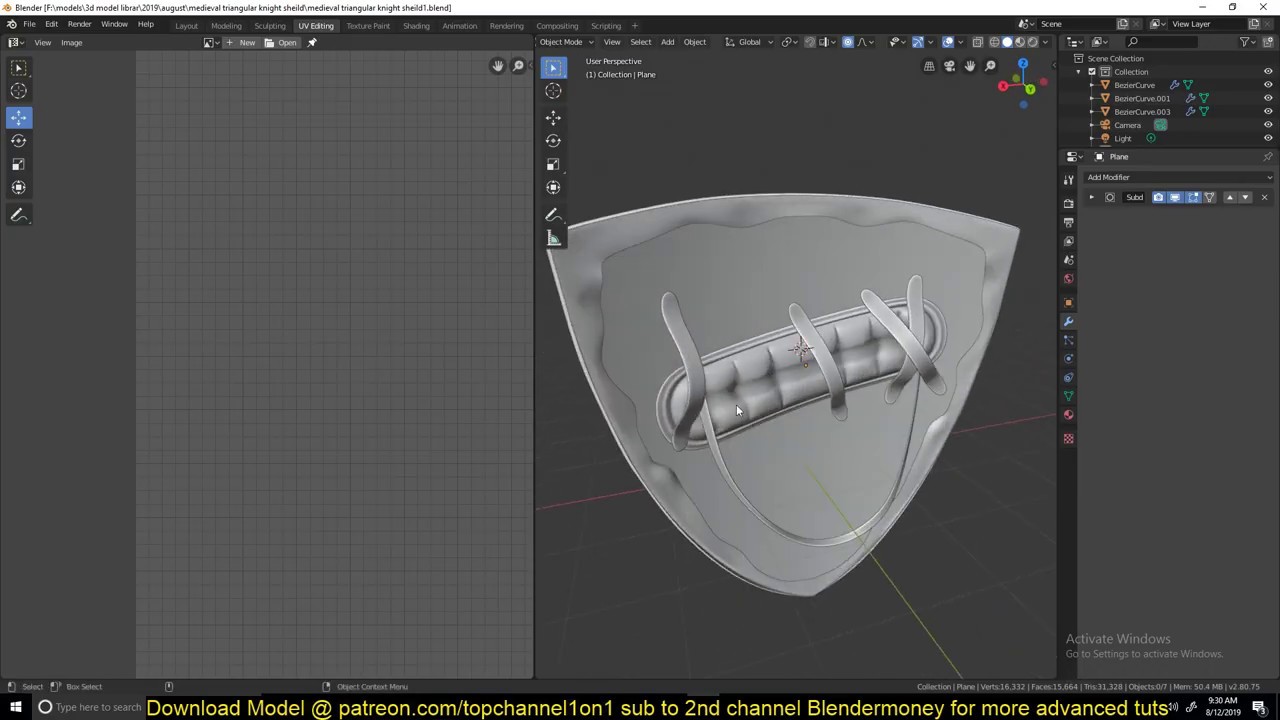
blender advanced training hard surface modeling
https://www.youtube.com/watch?v=aKK2E-pxg4A&list=PLYKnBP50d35KMOrH1kdptqWyM-nOzWwtz
intermediate to advanced blender free training course
https://www.youtube.com/watch?v=tF6BiHTataI&list=PLYKnBP50d35LX8JKABYRAdzyJnIruOL9b
blend...
eager mist
looks like this right now
wary eagle
Better, but still need to straight up those circula shape.
eager mist
yeah
eager mist
ugh im still having trouble with this
eager mist
i found an issue
for some reason this comes out as a circle in the UV
even though there is a seam
 oblique forum


Finally getting the hang of 3D and UV unwraping. Did up this truck based on the Pokemon Saph/Ruby/Emerald moving truck at the start of the game. #Blender3d #lowpoly #pixelart #gamedev #madewithunity https://t.co/ZMLLRf8EXD
Twitter
glacial vector
Ah I recongise it immediately!! Lovely @oblique forum
eager mist
is this UV okay for a nose cone?
near lotus
I usually put a split down the other side of the cone as well for less stretching
lethal tangle
https://justpaste.it/93egc Anyone any ideas?
errant plover
@eager mist Yes, it's fine. I know it looks odd but you will have less detail there anyway.
eager mist
yeah
i made a quick reference graphics and it's grey so
is it better to use the built-in texture painting tool or an external tool?
eager mist
anybody know of a way to get blendshapes working on skinned mesh renderers/renderers with bones? they dont by default; (discovered that a while ago) but i need to figure out something so i can make an animated character have facial expressions and stuff. there is an asset that does it but i dont wanna buy anything currently; kindof budget tight
eager mist
nvm; man idk why i didnt figure it out before- but apparently the reason my belndshapes failed before is due to the use of a subsurface modifier in blender, which couldnt be applied to a mesh with shape keys- therfor the keys didnt import to unity
guess characters will have to be modeled without subsurf or have subsurf applied before keys....
errant plover
You probably shouldn't be using Subdivision surface for game assets.
fluid oak
@coarse lagoon Looks like you have two copies and the outer one has inverted normals?
 coarse lagoon
@fluid oak thats my first ever model!! D: i dont know how to fix that
fluid oak
Neither do I; I don't even know what program you made it in
eager mist
how can I have a rocket exhaust flame effect?
eager mist
how can i have this flame be slightly transparent
 chilly oracle
So, it's time for me to learn blender for the first time to make a character much like a "blocky Rayman".
Any tips on good starting tutorials for character creation?
eager mist
how can i rotate an object slowly?
in animation
without changing the frame rate
or is this dependent on the frame rate and amount of frames only
gritty reef
Sugarspoon wandering into the #🔀┃art-asset-workflow domain. What a day
Unfortunately I don't do any character stuff, so I can't help. I'm all hard surface.
There were a few people recently who posted some absolutely incredible characters, you could try scrolling up a ways to grab their names and ask if they could point you in the right direction @chilly oracle
chilly oracle
I started playing with DOTS and terrain generation using several Noise levels, which is more fun in 3D...so yeah, need to make myself a cute little character. But there are so many tutorials so I don't know which person to follow on youtube for the good tutorials 😄
gritty reef
Ohh nice! I need to get into trying to make characters for my own project
but it's new and scary lol
chilly oracle
I just don't want to be that guy who takes a Brackeys tutorial and learn all the outdated and wrong stuff xD
gritty reef
don't blame you there
eager mist
is it ok to have overlapping UVs if overlaps are separated by different materials? one mesh with couple materials, will it cause problems in baking?
 tranquil void
Yeah, if the overlaps don't belong to the same materials, they can't affect each other.
 sleek spear
Guys it looks like my metallic map is being ignored
metallicness is affecting the whole mesh, ignoring the metal map
 wanton vigil
I'm trying to add a gesture based item toggle to my avatar but I'm having an issue with it.
After adding the "Game Object.Is Active" (unchecked) component to the hand gesture in the animator, and disabling the object in the hierarchy, it doesn't work in VRC.
But it works perfectly in Unity.
Also if I do the same thing, but in reverse (where the item is off by default but appears on gesture), then it works as expected in VRC.
Does anyone know what's going on with that?
 lavish breach
Would it be unwise to use pro-builder to modify/create 3d props beyond just environment design?
 dire ermine
working on cartoon style haunting house model 👀
gritty reef
👻
 flint terrace
Nice model
 trail laurel
can someone tell me how to add vertical vertice to a cylinder
creating has only one vertice option and that just segments the radius and not the height
gritty reef
@trail laurel Are you using Blender?
trail laurel
i'm assuming there isn't an automatic tool
gritty reef
Not when creating it, that I'm aware of.
 crude topaz
hi guys , this is my second blender model ever , any advice how i i could improve it?
loud flicker
Good evening, I decided to make a gramophone on Maya. Before proceeding with UV and Texture I wanted opinions / advice. Thank you
eager mist
that looks dope!
I have wanted to learn 3d design for a bit; would learning Maya be better than learning Blender, which one would be a good beginner program?
 fossil zephyr
@eager mist
my personal choice is blender because:
it's free
widespread, meaning there is a lot of help in case you don't understand something
not too complex
if you follow a few tutorials, you'll be capable of creating your own 3d designs without help. even though I'm somewhat experienced with blender, I still keep learning with it.
as for other programs, I really don't know much about Maya. you could definitely look on YouTube for that.
eager mist
does anybody know how to embed materials into an fbx via blender or substance painter?
i'd like to import my FBXs into unity without the hassle of all the material creation and importing textures and stuff
errant plover
Just save the .blend inside your Unity Project directory.
eager mist
not an answer to my question at all.
blend files do work but my texturing workflow requires fbx and as such i do not use .blend in my assets directly
 ebon canyon
So, it's time for me to learn blender for the first time to make a character much like a "blocky Rayman".
Any tips on good starting tutorials for character creation?
@chilly oracle maybe this playlist will help?

Enrol here to get the free 3D character and rig: http://thilakanathanstudios.com/3d-cartoon-character-series/
In the next series of videos, you will learn the secrets to creating cartoony style character in Blender!
New videos will be dropping out 2x a week (Sundays and Wedn...
vivid beacon

ArtStation
2 day project creating a Gibson Les Paul in Blender! Hope you like it!
 vernal orchid
Recently discovered MagicaVoxel and its workflow/style really suit my vision for a game. However, I don't want to waste my time building epic worlds if they won't run. Am I wasting my time with MV or are there tools to decrease vertices and such?
eager mist
guys how would you make a wheat / grain / rye / oat 3D model?
i want to simulate a bunch of them, so lowest polygon count possible
should i make it in blender or unity?
should i use the tree tool of unity?
 glossy stream
How can I fix the mesh because in Blender i see all correctly?
gritty reef
Looks like you've got flipped normals.
glossy stream
Do you think it's because i don't recalculate normal in Blender?
gritty reef
It's just something that happens if you extrude the "wrong" way and aren't aware of the issue. Just go into blender, select your mesh, and flip normals. You should be fine
glossy stream
I'll try. Thanks
gritty reef
In case you're not sure where to go for that
chilly oracle
So I've been thinking about using MagicaVoxel to create my model for a Cube World type of game, but I'm curious how it would work with like custom skins and rigging the thing.
1# : Can I rig/animate the entire thing in unity as long as I got the models?
2# : Can I make some sort of PNG think like minecraft uses to set up skin support for even more complex models?
chilly oracle
Solved #2 with UV mapping my model.
Still looking for an Answer for #1 though
 lusty reef
Any 3d artists here who would like to join a fun project? We are 6 people rn, 2 being 3d artists and we need more. The game will be free so there will be no pay, just for fun . Dm if interested 😄
eager mist
how do you make realistic models? I can only make models with solid color textures
fluid oak
@lusty reef You say 'fun' a lot for a project that you give absolutely no details on.
 lean chasm
How can I apply the right arm's rotation to match the left without breaking the prefab instance?
lusty reef
@lusty reef You say 'fun' a lot for a project that you give absolutely no details on.
@fluid oak I mean i will give details if you're interested
fluid oak
@lean chasm Is this in an animation, or?
lean chasm
I was just using Robot Kyle to test out some active ragdoll stuff
But it looks like the code that I use to update the hinge joint target position only works on the left arm with applied rotation
I’ll probably have to just break the prefab instance but I’d rather not screw anything up
fluid oak
If you are using IK, then each arm has a different IK command
errant plover
@eager mist Grab a texture off Google, slap it on a plane.
 light meteor
I made this model in blender and im trying to do the materials in unity how can i make one texture 3 colors (the grass, dirt, and snow on the island)
junior stone
@light meteor you want a material per color or one material for all of it?
light meteor
either works but the island is only one model
junior stone
if you unwrap that and let blender render out the material to that UV you can probably set the texture material to it and it should work
@light meteor
light meteor
I'm new to this, and i tried to unwrap it before but i couldnt get it to work, how would you suggest to do this
@junior stone
light meteor
ok ill try it, thanks!
eager mist
anyone know some free basic shape mesh packs anywhere?
Like pyramids, diamonds, Icosahedrons, general shapes
fluid oak
I think unity has one for free
rapid echo
Making new plant room in blender. Work in progress. Thanks for viewing! :)
https://twitter.com/FarrukhAbdur/status/1278980862613360641?s=20

Sharing a new work in progress. Making a room with plants :) 🌿
#b3d #gamedev #indiedev #blender #blender3d #polycount https://t.co/gbPZlIHHfZ
Likes
242
Twitter
eager mist
nice
thorny wasp
Does anyone here use 3DS Max? i need a .max file exported as .fbx
 azure ether
@thorny wasp in the past I've just downloaded 3DS Max and ran it in trial mode to export files on occasion if that's feasible for you
and then uninstalled it immediately after lol
thorny wasp
@azure ether i dont want to start a trial for a singular model aha
azure ether
@thorny wasp i certainly didn't want to either but you gotta pick your poison sometimes ¯_(ツ)_/¯
azure ether
I've found it's rare that if someone else helps me convert a file that it's ever "right" on the first (or second) try given how many export options and fbx versions there are. ...And the online conversion services are limited, or behind pay walls and still fallible. so, yeah it feels lame and silly, but in my experience it's almost always been more efficient (and self sufficient) to use a trial version of a DCC software myself to export from a native/proprietary 3D format properly.
eager mist
Question. When you guys make models in blender, do you unwrap each face to get the best looking texture angle? How do y'all do it?
azure ether
@eager mist https://youtu.be/illIxYKb-1k

In the next 25 seconds you'll know everything you need to create your first automatic UV map in Blender 2.8! Hope it helps!
If you enjoyed this video, please don't forget to like and subscribe for more content! You can find my entire Blender 2.8 Speed Tutorial series playlist...
you can manually unwrap and UV map a model as well of course but this is a good place to start

Blender tutorial about how to UV unwrap in Blender, so that you can texture your model.
Download the model: https://drive.google.com/open?id=0B8PFSrI9B3iwanNtYWp3eFU4V28
Texture: https://www.poliigon.com/texture/metal-corroded-heavy-001
---------------------------------------...
this video goes deeper
eager mist
Thanks @azure ether
azure ether
@eager mist ultimately either way it's the conceptual equivalent to cutting your model open like a paper shell and laying it flat in one or many pieces to paint it in 2d, then putting it back together in 3d.
eager mist
@azure ether will this help me with making my textures appear nice on models?
I don't want my textures just stretch willy nilly
azure ether
@eager mist yeah that's exactly why you UV map an unwrapped mesh. to avoid warping / stretching when UV mapping with projection
UV unwrapping maintains the highest detail, best angle of texture projection for every face on your mesh
azure ether
@eager mist i couldn't tell you, sorry. that's up to you and highly dependent on the mesh and art style etc.
i'm more of a programmer anyway honestly ¯_(ツ)_/¯
 brave spindle
Hi there. I have a character that I modeled and rigged in Blender, and then exported to FBX to use in Unity. However, it looks like something about the transition is slightly off - the weights that I see in Blender are not what I'm seeing in Unity, and so pieces that I carefully weight-painted to avoid clipping are in fact clipping in Unity.
I am using URP. And bizarrely, this seems to happen only in URP - when I created a test project with the standard Unity renderer, the results much more closely resembled what I had in Blender. I am using humanoid animations, if that makes a difference. Any idea as to what can be going on? As of right now, my workflow is 'do a full export from Blender, import to Unity, guess-and-check to see if weight paint looks reasonable, go back to Blender, tweak something, export again', and it's very slow.
Here are some examples:
The rig / idle pose in blender.
Imported model using the default renderer
Imported model with URP. Note that the scarf clips into the shawl a little on our left side
(there's some other weirdness around the center part of the shawl too, at the chest)
vivid beacon
 brave spindle
I fixed my problem: I needed to set 4 bones for skin weights in Unity (under Project Settings -> Quality). The default is 2. I have no idea why this works, but it does.
thorny wasp
@azure ether i got the model converted online. it looks amazing but the textures that it came with (seperate pngs.) Dont work on it. so i think i have to properly export it from 3ds max . i cant create a trial. it wont let me ive tried xD
 rocky blaze
Hey guys. Which do you prefer? Creating terrain in unity, then making it low poly, or making the low poly terrain in blender, and importing into unity?
For example. I do the normal terrain first, and then I export it as an obj, put it into blender, and make it low poly there, import back into unity
I'm wondering if making the low poly terrain would just be faster if I where to make it in blender :/
 frigid spade
Hi guys! can anyone help me with understanding smthin please :)? When I am exporting an FBX file from Fusion 360 to Unity im having modeling/texture issues
thats a prototype for a robot hand for example
when I import it as FBX in unity, it comes in like that
does anyone had that issue before ?
thorny wasp
Still looking for someone who uses 3ds Max.
rocky blaze
Good luck with that haha
I usually see people use Maya, or Blender more. Maybe even Cineman4D
eager mist
When people make realistic models, do they use textures off the internet, or make their own?
vivid beacon
It’s usually a combination
ArtStation
2 day project creating a Gibson Les Paul in Blender! Hope you like it!
Like for this that I made I used wood textures from google
But for metal and the body of the guitar I made the texture w nodes
In blender
@eager mist
eager mist
wait so you can make the texture just by using nodes?
what about carrying the node textures to unity?
vivid beacon
Not sure that should all be included in an obj or fbx but I’ve had problems with textures not exporting properly
Nodes in a 3D program like blender
eager mist
so theres nothing wrong with using textures off google for your game?
eager mist
products
vivid beacon
I’m not sure the rules if you are completely transforming a texture from google
It might also depend on if u sell it for money
Probably something to look up
eager mist
well how do you create real textures? I know with photoshop but im a noob
so i dont completely know how
vivid beacon
Well I’m pretty sure most textures are in some way derived from images
I mean unless ur looking to hand paint a realistic texture lol
eager mist
i am
 fierce torrent
Hi guys, I need help, I have a list with few game objects inside and I want to set every game object inside the list, to get a parent, I also have another list with few game object that I want to make parents to the first list
I tried this ran = Random.Range(0, 5);
items[ran].transform.parent = slots[ran].transform;
in the items there are few game object, while in the slots there are game object that should be parents to game objects in items
eager mist
@vivid beacon
vivid beacon
Well I don’t hand paint textures but if you’re doing it without an image I don’t see how it’s practical
I’m not an expert tho so I would look up the copyright rules
eager mist
oh ok
vivid beacon
Sry I couldn’t be of more help
 urban wind
3 questions for character modelers
1 ) references? self-made or otherwise
2 ) cubes, spheres, or cylinders
vivid beacon
I’m not really a character modeled but starting with a subdivided cube is recommended I believe
And for references if it’s based on an original character make it yourself but you can use online references without guild
Guilt
eager mist
Does this wood texture look realistic on this model to you guys?
I'm trying out new stuff
errant plover
Looks like absolute trash. No offense. It's fine if you aren't going for realistic.
eager mist
I am
errant plover
I would focus on the top face of the desk. That's what players will see the most. Have that take up most of your wood texture. Or is that hand painted?
eager mist
its a texture i found on textures.com
eager mist
how can I position this knife so it's laying on the edge of the bowl
errant plover
Select the object and press G to grab. Is that what you mean?
eager mist
no, I mean putting it at the edge
so that it is laying down on it
like this, where red is the knife
errant plover
You just gotta pick it up with G and rotate with R. Im assuming you are new to Blender?
eager mist
yeah I know I can rotate it with R, but how can I place it in such a way that the blade is touching the bowl
Anyone know why it has a white outline?
eager mist
@errant plover i used URP and now all i see is pink
rocky blaze
@eager mist you have to make the textures compatible with the render pipeline you are using
Its easy to change them
eager mist
@eager mist someone legit told you, select the knife hit G and u can choose an axis by pressing(x,y,z) and then get it where u want then rotate and do the same..
Like ur better off hand placing it then simulation
rocky blaze
Hey! Somebody with a 3D artist role. Can you give me advice for a second?
eager mist
What’s up
rocky blaze
Alright, so I am in a bit of a dilemma about creating my low poly terrain
rocky blaze
I'm not sure if I should just make the terrain in unity, import into blender, make it low poly there, and then import back into unity, or just make the ow poly terrain in blender, and import it into unity natively
Yea, its for a scene, but its going to be used for gameplay aswell
eager mist
Just make it in blender
Sculpt it in blender with dynotopo on
If it starts to look TOO high res then throw a decimate modifier on it until u get the low poly look u want
By adjusting the slider
Make sure when ur sculpting to have dynotopo on tho otherwise sculpting is a nightmare
rocky blaze
Yea I thought so, I got confused because somebody told me I should be using pro builder instead of blender haha
eager mist
If it’s something small use blender forsureee, u can get a lot cooler details way faster in blender
Something super large maybe use proB or in engine tools
rocky blaze
You think I can get away with using blender by using a room to room level system?
Sort of like in zleda?
eager mist
Mmm I don’t see why not, might be tricky in the sense of scale tho, if it’s too big I wouldn’t
Smaller scenes like houses or islands u should be fine
With blender that is
All I’m saying is I wouldn’t suggest working on a whole world in blender
Better off procedural gening that to save some time
rocky blaze
Do you know any assets? that will allow me to paint a mesh in Unity? That may be the deal breaker for me
eager mist
Mmm not to my knowledge I’m more of an unreal kinda guy so I can really help to much besides modeling actual assets/models
errant plover
@eager mist I think you are worrying too much. Unless this is for a close up image render. However, you can enable vertex snapping. Top of your viewport, click the magnet. Then select Vertex in the box beside it. You will probably have to change the origin point of the dagger as well. Honestly, its easier to just eyeball it and zoom in.
@eager mist Start a new project 3D URP. Easiest way to get started with URP.
eager mist
@errant plover @eager mist ok thanks for advice
 twin nebula
does anyone else feel like maya lacks features?
i typed in maya abstract art in youtube and get almost zero results.
a friend of mine is trying to make those c4d type abstract pieces and i wanted to show him a quick example of how i would do it. but then i started looking into maya more to see if its possible to do cool deformer stuff like ive seen in blender..
couldnt find anything on it
eager mist
Nice
errant plover
Looks great!
eager mist
the blade didn't come out shiny because of lighting
 humble whale
ok so i have this guy
in the editor he looks like this
when i export as a .obj file i get
i import the .obj in unity
i get a prefab
this
the .png is the texture
when i use the texture
(drag and drop it in the boi)
he's ugly af
eager mist
is modelling vehicles hard?
humble whale
depends of what level of realism you want
i can model an ugly voxel car in 2minutes
eager mist
with a reference like this for example https://tanks-encyclopedia.com/wp-content/uploads/2015/04/T-70-blue.gif
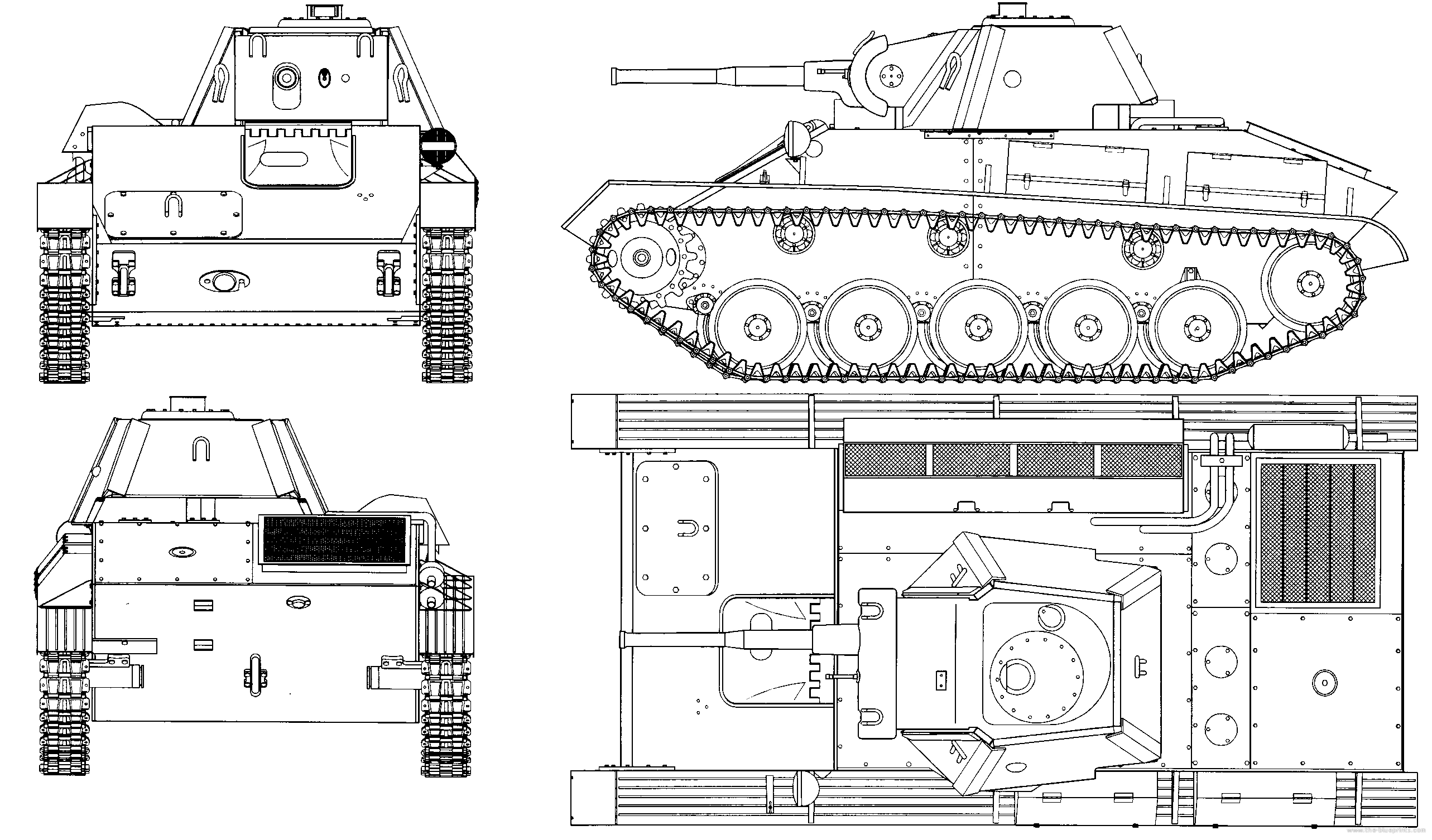
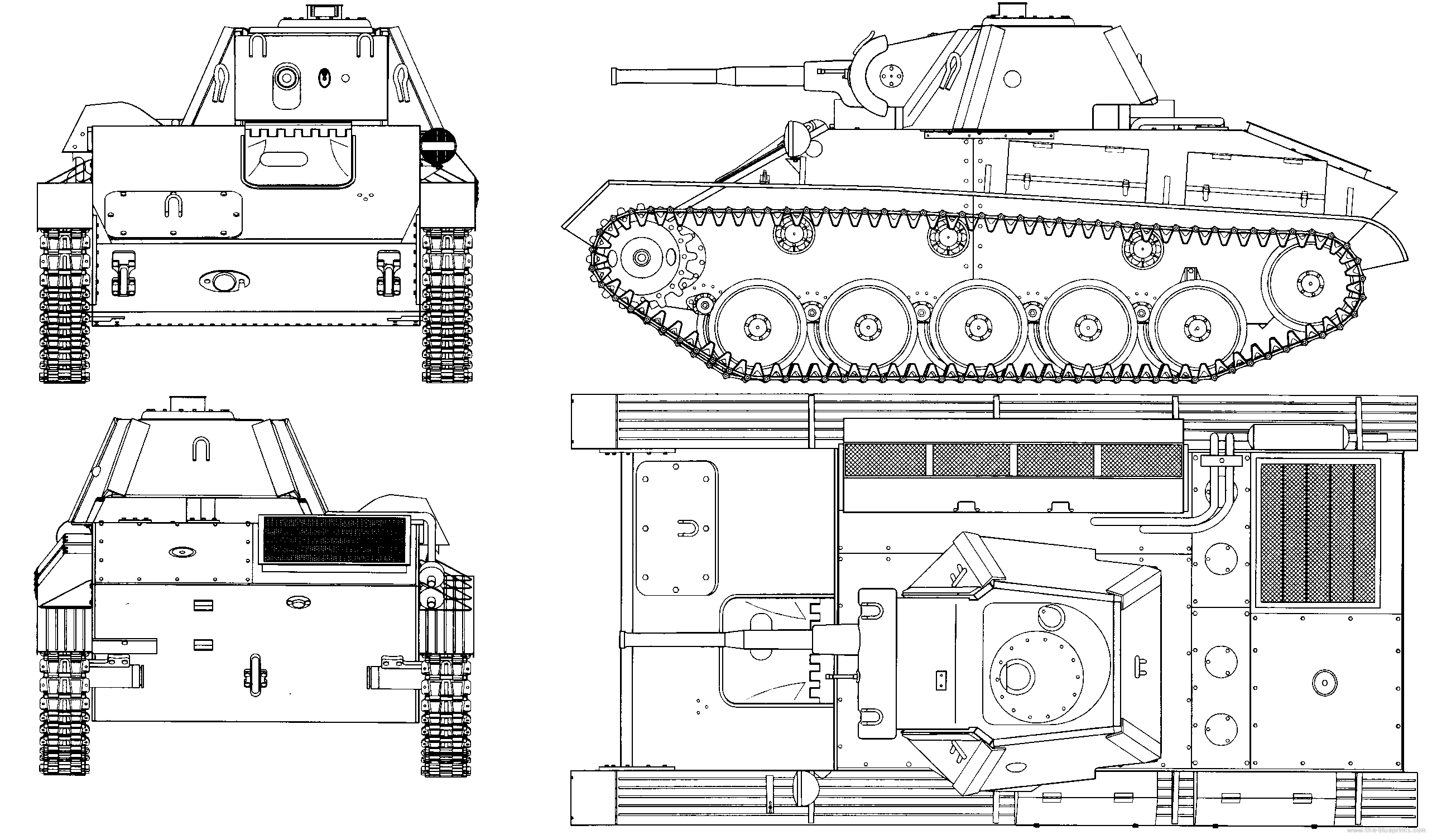 humble whale
you asked a question...
it got burried with other questions , and nobody came...
 worthy mirage
Hey, I have a question: Is there any way I can convert multiple fbx files to prefabs (already everything scaled)
 viral trellis
@humble whale you can fix your problem by changing the pixel interpolation somewhere, maybe in project settings
I forgot exactly where
 rancid hawk
does someone have a tutorial on an fps game? for beginners
humble whale
thxx
humble whale
does someone have a tutorial on an fps game? for beginners
@rancid hawk not here
inland gate
Unity is the ultimate game development platform. Use Unity to build high-quality 3D and 2D games, deploy them across mobile, desktop, VR/AR, consoles or the Web, and connect with loyal and enthusiastic players and customers.
^ if anyone can answer this, it'd be very much appreciated 🙂
eager mist
anyone have a guide on modelling humanoids?
azure ether
i got the model converted online. it looks amazing but the textures that it came with (seperate pngs.) Dont work on it. so i think i have to properly export it from 3ds max . i cant create a trial. it wont let me ive tried xD
@thorny wasp you may need to make a "burner" email account if you've signed up for the trial before. Just make a new gmail account, it takes 5 minutes probably less
you will thank me later --there's very few people sitting around waiting to convert 3ds files for other people. and even if you find somebody, it's almost guaranteed it's gonna be some back and forth process that will take multiple attempts ( if the other person even has time for that ) you could iterate on much faster yourself even if you've never used 3ds max... it just entails trying different export options until you get it exported correctly for your needs.
 cursive pawn
Teaching myself zbrush. Spent about an hour on this today and didn't use reference (I should have) -- I know a few things need changing / adjusting
rocky blaze
@cursive pawn Good job mate. He sort of looks like Aang
cursive pawn
Haha it kinda does. Thanks!
vague violet
What yall think? https://cdn.discordapp.com/attachments/685617526088007681/729499023442182214/characternotrigged.PNG

 rocky blaze
Yo yo, does anyone know a way to set a linear direction for a prefab to be placed in Polybrush? I'm trying to place trees on a hilly area, and it just turns out weird looking when I paint them on a sloped area
frigid spade
Testing some animations 🙂
worthy mirage
Hey, I have a question: Is there any way I can convert multiple fbx files (exportet from blender) to prefabs (already everything scaled)
Suggogestern um 19:42 Uhr
vivid beacon

ArtStation
RGB keyboard and mouse design. Made with Blender Eevee. Hope you like it!
junior stone
those reflections on the buttons are throwing me off @vivid beacon
vivid beacon
Hm ig it doesn’t match the body
 round gale
sorry im super new here, but is pro builder included in the free version of unity? (@ me pls)
junior stone
@round gale yes, in the package manager
eager mist
@humble whale Go to the image's settings in Unity, and change it from Bilinear to Point
@eager mist You'll need some modeling skill in something like Blender
I'm not sure how it would turn though
Probably would need to use bone animation
humble whale
thank you
eager mist
@eager mist ugh
let me rephrase
how can I make rivets in blender
on a surface
the tank is just an example
eager mist
There's many ways you can do it
there's not really any particular way
it depends on what it's used for
okay i tried doing rivets with face instancing and for some reason they are fucking huge
nvm fixed it
errant plover
I wouldn't model them. @eager mist I know its probably a bit out of your skill set right now, but I would recommend using a normal map. Take a look at this image. You can get all the lighting effects from actual bricks, without all the costly geometry. Two triangles here.
Heck, you could even bake the texture with them modeled in. Then remove the rivet geometry before export.
eager mist
Oh I see, I wanted to try and model a T-38 tank which has a decent chunk of rivets on its hull
errant plover
If you do end up sticking with geometry, use something very simple, like this. They will be so small and far away, that you can get away with a simple shape.
eager mist
The tank in question
So I could just not model the rivets and use a normal map instead?
errant plover
Yes, or a far simpler model for the rivets. Here are the shapes I made from above.
I dont know. You get the idea I think. Just don't use the rivets you originally made.
eager mist
yeah
hold on, from what i've looked up i'd need to make two models for a normal map, one low and one high poly, is that right?
vivid beacon
@eager mist damn that looks good tho 😳

ArtStation
Toaster made for a game I'm modeling for! Made with Blender Eevee for the first image and Cycles for the second. Hope you like it!
 sonic cloud
Hey all!
Just started to learn 3D modeling, I would love to hear your comments and feedbacks for my first rodeo,
 wanton vigil
Could anyone recommend a good tutorial for changing the clothing on a finished avatar?
I've got the FBX files for some outfits from various Nitro assets that I'd like to try. But I'm not sure what the best way to make everything fit the body mesh and look right is.
Thanks!
errant plover
@sonic cloud Good start.
sonic cloud
Thanks @errant plover ! Do you have any points to be made? I would love to have a feedback ❤️
errant plover
Keep it simple like you are. Then add more details as you go. Some people get too caught up in details.
sonic cloud
Amen to that! I've tried to do things before as well, but only once decided to go simple I had the opportunity to call something being "done"
errant plover
@eager mist I am actually not sure. I haven't used a normal map in years, lol. This guy explains how to do it in under a minute. https://www.youtube.com/watch?v=0LuEqvO9QsE
eager mist
uh huh, thanks
 naive swallow
Hello. I'm having an issue with UVs in an imported model. Wondering if anyone's seen this before? The model in question is from sketchfab https://skfb.ly/6yoRR
When I import it into Unity the UVs are different to in the sketchfab preview.
I tried toggling the "Swap UVs" import setting but nothing changed. Anything else I should check on the Unity end?
 tidal cairn
ok so Im not a blender guru
naive swallow
👋🏻 @tidal cairn
tidal cairn
naive swallow
thanks
tidal cairn
herees the panel thingy
naive swallow
Yep, got that far