#🔀┃art-asset-workflow
1 messages · Page 42 of 1
 humble barn
Hi! Quick question, I just imported a .fbx model made in blender, and wanted to see if the blendshapes had imported properly, but they show up like this (sliders have no circle thingy)
Anyone got any clues? The mesh even disappears when I animate it!
 glacial vector
We've had this at work before and I thiiiink it was because the blendshapes were keyframed. But i was not the one who fixed it. I'll try to remember to ask and ping you tomorrow @humble barn
humble barn
Ooh, I'll look into that, thanks!
 halcyon lantern
Why is the branch texture now showing up doe?!
https://gyazo.com/c0f51cf3d5f2b82227a56dd3b6497918

How do i get this exact tree into unity?
https://gyazo.com/162b0010c137a40ef2065684ba0f4342
 halcyon lantern
How do I do that? Im a total newbie
I just started today
I have a texture folder with all my textures including the branch texture
But they still arent showing up for some reason
glacial vector

Unity is the ultimate game development platform. Use Unity to build high-quality 3D and 2D games, deploy them across mobile, desktop, VR/AR, consoles or the Web, and connect with loyal and enthusiastic players and customers.
halcyon lantern
@glacial vector I cant change anything in it
https://gyazo.com/25cdc72dda0241ed313a6d3e33335a27
 glacial vector
You need to make a new material. You can't change the imported one
halcyon lantern
I dont know how to make a new material
And why does the tree texture work but not the branch texture?
 tidal cairn
you can hit Extract Materials
and then work with the extracted mats
this makes them edit-able
halcyon lantern
I dont see Extract Materials
tidal cairn
click the model, go to the Materials tab
halcyon lantern
Yeah
But Tront when I imported the tree
The tree bark texture worked but not the branches.. Why is that?
tidal cairn
because its transparent probably
glacial vector
You might wanna watch an introduction to unity video if you're brand new
halcyon lantern
Yeh
U recommend a video?
I have seen a couple of videos explaining how to import blender to Unity
But still dont understand
They are either using a older version of blender or Unity
glacial vector
Brackeys has a lot of good videos covering a broad range of topics https://www.youtube.com/watch?v=IlKaB1etrik
halcyon lantern
yeah I actually watched that a couple of hours ago
I watched a youtube tutorial on how to apply texture to a material and that aint working either.. What am I doing wrong?
https://gyazo.com/c565d7d60c5b008474dc9dc11cea7ecc
 halcyon lantern
I have no idea..
I just did what the dude in the video said
I don't know what the heck I'm doing
I just want my tree inside unity
humble barn
@glacial vector fixed it, turns out that Unity doesn't take kindly to blender blendshapes that use vertex groups as a mask
glacial vector
Oh I see. Do you have to change your workflow then @humble barn?
humble barn
A bit. The vertex groups allow me to f-up the entire model, but the blendshape will only affect anything within that group in the end, so it's like a mask. I just have to do a lot of clean up now, because of many "dirty" vertices that are outside of those masks, and then remove the masks, and I should be golden
 lean vale
not sure where to post this prefab/material-related question.
I got a prefab of an fbx file (that's a level map) 8 different children empties each with multiple meshes. Each of those meshes have anywhere from 1 to 6 different materials.
I recently added a material to one of those meshes and re-exported it from Blender.
Upon import, the material isn't added to the mesh in the prefab, but all the original materials are offset by 1 (because of the newly added material).
Is there an easy way to somehow refresh the prefab so it adds the new mat in there? Or do I have to manually reapply every single mat for each mesh?
Edit: If I manually add an extra mat to the mat element array for the mesh, and just reapply each of the mats for said mesh it seems to work. If anyone knows of a better way, please say! Thx.
lean vale
Diff question:
Anyone know how to make it so the Unity FBX exporter doesn't consolidate vertices on exported meshes? I got some trees. The leaves are 2 separate planes with vertices in the same position but their respective normals are facing in opposite directions. On export, the verts in the same pos get combined so I end up with only 1 triangulated plane.
 rapid echo
Completed a new 3d art in Blender. Thank you for viewing!
https://twitter.com/FarrukhAbdur/status/1227435219218829312?s=20


Finished a new #drawthisinyourstyle scene based on the wonderful art of @natnatart. Used Blender's new sculpting features for this. Thanks for viewing! :) ✨
Arstation: https://t.co/KZt5JsAIiK
#b3d #blender3d #blenderart #dtiys #gamedev #indiedev #polycount #SubstancePainter ...
 Twitter
 eager mist
Hi
 digital mortar
hi
eager mist
@lean vale Im using it too without success
 round cedar
Is there a way to quickly edit the color of a texture painted on a terrain?
This sounds like the dumbest question ever.
tidal cairn
you mean like tinting it?
or just straight up painting on it because then you might as well open photoshop?
round cedar
Yes just tinting
@tidal cairn I'm a very new user, excuse me for the dumb question.
I see how to do that with a .mat but not a .terrainlayer
tidal cairn
its not a dumb question
terrains in unity are weird
tbh Im not sure how you'd do it. Ive been in shadergraph so long I always just say use that
😛
eager mist
Made a Log Hammer! 🌿
eager mist
🥰
 cinder saddle
Hi everyone ! - nice hammer !!! - How do you turn this mesh into its own thing rather than being in a prefab with its material (just imported fbx)
I just don't want it to spawn as a prefab when drag and dropped and don't want to use this material like at all, ever, maybe I'll give it a new one later but right now I just need him to be a mesh
I thought I could easily unpack that but somehow its not possible through right click options i think
 crimson vector
I don't know where nav mesh related stuff goes
for some reason my ai character can't walk onto other objects
It shows the place as walkable, but...
so confusing
the wierd part is that it works only when it's not directly linking to the other object
a straight on connection he refuses to cross
but if it's disconnected he thinks it's fine to run across
tidal cairn
oh thats quite strange indeed
crimson vector
it gets even wierder with a gap
he seems to prefer jumping across instead of walking wierd guy
cinder saddle
Your first geo is flat all vertice on same Z axis?
cinder saddle
all the time navmesh is the same ?
crimson vector
yeah i think so unity shows it as connected
cinder saddle
okay show us your collisions then :p ?
crimson vector
the first image i sent shows what it's showing me
cinder saddle
I'm guessing your collisions have an offset
crimson vector
collisions ill check
cinder saddle
Making it collide and not go on the platform on the first shot, working when its jumping lower etc maybe a tiny offset but enough to get you stuck
crimson vector
there's no offset to the collider nor the objects
cinder saddle
Im discovering pro builder atm tbh so if you find i ll love to read the answer aha
Btw. Why the Probuilder assets do not show in Hierarchy? Are we supposed to convert them to 'actual geo' afterwards?
crimson vector
they are in the hiarchy named "cube" normally
cinder saddle
Show inspector for the tiny block ?
crimson vector
it's not really tiny
it's about x 2, y 0.1, z 2
but i found out why it was doing this
the players collider decided to somehow get lower than the nav mesh agent's ground checking distance
cinder saddle
ah the little bastard
crimson vector
it's wierd because i distinctly remember putting it above it
anyways thank you for trying to help me <3
round cedar
I'm trying to use enviro to create clouds but it doesn't render in octane, why is that so?
There's a lot of stuff I don't understand.
eager mist
eager mist
Hi guys
 hidden laurel
i have a prefab with a light on it, but sometimes when i place more than one of them the light just stops working. anyone know why?
 potent tinsel
@eager mist Thats epic ngl
 fluid oak
@hidden laurel in your render settings is the light limit set too low? If you delete the one light that is working will the other one start working?
cinder saddle
Good evening ! Has anyone ever done or used a POM+PDO shader ? Trying to reproduce this from previous UE4 project : https://forum.unity.com/threads/pom-pdo-setup.824121/
Unity Forum
Hi !
Has anyone examples or even better a setup to share for POM + PDO materials ?
I discovered this in Unreal and really would like to use it too in...
eager mist
hey there im trying to have a cube follow the mouse position but whenever i start it it will follow the mouse and send the cube flying towards the camera.
using UnityEngine;
using System.Collections;

public class dragObject : MonoBehaviour
{
    public GameObject objToMove;

    private float raycastLength = 100f;

    private Camera cam;

    void Update()
    {
        Vector3 mousePos = Input.mousePosition;
        Ray castPoint = Camera.main.ScreenPointToRay(mousePos);
        RaycastHit hit;
        if (Physics.Raycast(castPoint, out hit, Mathf.Infinity))
        {
            objToMove.transform.position = hit.point;
        }
    }
}
lol does it have a collider?
the raycast is hitting the object
and it moves it closer
and the raycast hits the object again
and lol zooop
you can use a layermask too if you need the collider for some reason
@eager mist
 maiden tangle
would be a #💻┃code-beginner thing I would assume
 junior stone
@eager mist I love your artstyle!
eager mist
Hi
hidden laurel
is it possible to have planes with 2d sprites act as if they are in 3d space, so objects that are behind other objects cant be seen through the on in front?
maiden tangle
Yes I've seen that done but it sounds like your issue is with layer sorting not the sprite itself
to use a sprite with a plane you would have to mess with the materials
hidden laurel
just placing a sprite in the air does the same thing (love your spacecraft btw!=
maiden tangle
Yea I'm sure I've seen a tutorial on that, like a material shader that uses sprites..?
hidden laurel
there is sprites/diffuse but it has the same issue
maiden tangle
hm someone in #archived-art-asset-showcase might have the answer 🤔
hidden laurel
changed it to standard(specular setup) w cutout rendering mode and it works fine
eager mist
@junior stone low poly style and simple colors is my favorite style
it just looks nice
junior stone
I do the exact same style xd
junior stone
@eager mist do you unwrap or use color palettes?
As in unwrap and color or make squares and fit your uvs on there. Using one texture for multiple meshes
eager mist
@junior stone do you use colour palettes?
junior stone
I do y
eager mist
very nice
junior stone
makes all objects work with a single drawcall
 misty valve
is there anyway to change the directiona light shape in the sky to a square?
eager mist
How can I get started making humanoid models for unity?
Build up will power
👴
Just modeling a plane to make it look like a model, extruding it, and adding mirror modifier, is it that easy?
 lyric pewter
Is there a way to create some arbitrary plane from 2 vectors and find an intersection of that plaen and another 3rd vector?
This plane would have to be determine dynamically on the fly during run time
digital mortar
https://youtu.be/Uh4ZTlK9xls i didn't make this but i just thought it looked cool

Here is a video from my 2Pac model(Rendered in real-time). I am making a tutorial on Polypaint in zbrush for this project that will be released soon on my youtube channel. Hope you like it, cheers.
Music : All Eyes On Me - Tupac
https://www.instagram.com/hossein.diba
https:/...
glacial vector
@eager mist ... no it's not that easy. It depends on the style you're going for as well. There are tons of tutorials on youtube about this, I would recommend looking at that first
 glacial elm
@eager mist look into sculpting using either Blender, Zbrush, or Maya. Personally I would say you should learn Zbrush since its industry standard. But it's not the easiest to get used to. It's very unorthodox. So What ever works for you really
 jaunty vessel
my animation works fine in blender but is all warped in unity
any fix?
the legs bend in the wrong direction, the cycle doesn't loop correctly, the forward and backward strides are different
but in blender i have none of those issues
 old snow
i had similar issue, i think if you set Generic rig instead of Humanoid it should look like your blender animation
@jaunty vessel
well but in my case my animation was just a bit clunky not weirdly broken like yours
 dense blaze
How do I make the selected thick?
 steep radish
Anybody know how to make a material that stays in place while the character moves? Like in Chowder
Or Kassadins sword in League of Legends
glacial vector
That's called a world aligned texture
steep radish
Awesome! Will search it up
had no idea what to search haha
Lifesaver @glacial vector
glacial vector
Yeah that's the worst 😄 hope you find somwthing
glacial vector
Yeah? You'll need a custom shader for it
eager mist
Heyaa.. anyone wants to rig a model for me :)
 sweet copper
Is there a way to make a Material "3d" in Unity ? Such as this.
If so how can i ? I downloaded a folder with 7 files for 1 material but i can't get it to have the same result as above
But when i mix them into a "basic" material in Unity i get this
glacial vector
That's called displacement, which needs tesselation to work. It's pretty expensive. An alternative is using parallax occlusion mapping, which creates an illusion of depth, but doesn't push the geomety out like that
sweet copper
Is that linked with the "xxxxx_ambienOcclusion" i have ?
glacial vector
No. When you have a material with depth, you would use the height map for that
glacial vector
No, this is not possible with the default shader. There might be some shaders in the asset store for this
sweet copper
i'll search for that, thanks 😃
steep radish
@glacial vector yeah I'm gonna script it tomorrow
 wicked basin
how would i connect the orange dots in blender without weird clipping and things happening?
maiden tangle
Select two of closest distance to eachother, go to vertex tab (upper middle) > merge vertices
@wicked basin
 limpid socket
How would I go about creating a grid on a plane like this?
maiden tangle
Appears there is a grid, could you elaborate? @limpid socket
wicked basin
@neat elbow thank u
maiden tangle
So you are using that pic as reference I'm assuming, you would need a grid texture (literally could be made in paint)
limpid socket
thanks! I didn't know how to phrase it
maiden tangle
Glad I was able to help🙂
 unreal wagon
hey everyone! I'm new to Unity and I just learned about the Input System that's in preview rn
do you know if the Input System can be used for a mouse look in an FPS game? I'm currently reading the documentation on it
for the UnityEngine.Input.GetAxis portion here https://docs.unity3d.com/Packages/com.unity.inputsystem@1.0/manual/Migration.html
and I'm ... pretty lost
 chilly ridge
i dont know what any of that means but thanks lol
also does anyone know how to remove this?
maiden tangle
soooo annoying I agree.. the "fix" is right clicking the prefab, unpacking it then editing / resaving
@chilly ridge
would love a more permanent fix, if that's possible.
junior stone
the tree bark is a bit flat looking at it from this side, but I like the minimalist art
 north halo
maybe you're right, but it doesn't look that bad if you think that this is my first model
junior stone
by no means is it bad 😄 im just telling you that its better to make a model look interesting from all angles. especially the one you showcase
north halo
i'll work more on my future projects, thanks (also on screenshots of my work)
junior stone
try to make the model not look like a piece of paper ^^ other than that its nice 😄
junior stone
I fucking LOVE that art style
eager mist

junior stone
maiden tangle
(careful, he’s got fish badges on his flipper slippers)
now to get him into sp! wip 🙂
eager mist
wow cool style! nice character : )
maiden tangle
thanks buddy! 😄 love the hammer you posted earlier
I need to get better at hand painting stuff, great way to stand out
eager mist
north halo
a decent model, would like to see something like this in csgo or anything (yes, i know my models are shit and i call this decent)
eager mist
⭐ Rev Share⭐ Looking for one 3D Animator / Modeler to help us finish a Action Role playing game project. We don't need a lot of characters modeled and animated, at very most 2 characters and 4-5 animations.
The foundation of the work is finish and built we just have some polishing left to do and some set ups. Very very promising project with great potential. It will be worth your while 🙂 . DM me for much more info. ! ! (genre : Fantasy ,Medieval,Mystery, Ancient) That kind of stuff.
 livid ice
With dealing with weapons, multiple weapons with arms, is it best to have each weapon have their seperate arm and animations? And then when switiching weapons change the mesh out?
Or would I have one arm model, and guns, but in blender animate the guns with the arms seperately but on export only export the gun as seperate and arms but when playing they'd match up?
 quick copper
im not sure if this is were it goes, but, for me to input a default package how do i do it
it only appears custom packagfe
tidal cairn
@quick copper dont post in multiple channels and they're all custom now buddy
maiden tangle
@livid ice I've seen it mostly done with different arm/animation per weapon but I'm sure it's viable having the same arm.
steep radish
does anybody know why when i import things into unity, the shadows become extremely darkened?
tidal cairn
@steep radish got a screenshot?
my guess would be you havent baked lighting yet
but I dont wanna just guess
steep radish
Ive added terrain tool and some terrain textures
and soft shadows are on
@tidal cairn
tidal cairn
my guess is you havent baked any lighting
so you're not getting the right ambient from the skybox
the shadows will get a lighter blue hue from the skybox when baking is done
if you dont want to wait you can do what I do....
you can just disable all the gameobjects while baking and then turn them back on
steep radish
Where do you find auto generate lighting
tidal cairn
this will cook the ambient n shit without waiting for ambient occlusion/rays to actually bounce
Window >Lighting
althought it might have moved
I think its now Window > rendering > lighting
steep radish
Thanks
Its just its never looked like this before. Shadows were always there and didnt need baking
Maybe its because of the normals?
maiden tangle
you can change shadow intensity
steep radish
Cant believe i missed that ay
 grand whale
I'm having some issues for some reason the objects at a distance have weird lines going through them, does anyone know the cause of this?
 heady meadow
Hey, is there any1 working solely on screen tablet? I have a hard time deciding between screen size (20 for huion) vs better tablet overall (cintiq 16). Like using max, substance and zbrush in general.
eager mist
how do you make things look like in super mario?
 patent lodge
Hey guys
i'm in the need of some help !
with something rly basic, i feel a bit stupid right now
Oh wait
no it's ok
 cyan stirrup
@heady meadow I really liked my Huion GT-191 but I haven't sculpted in a long time. So i got rid of it. I think if i went back i would rather get a screenless intous pro or something
heady meadow
I have a screenless tablet and I hate it. I fell in love with borrowed GT-191 but the colors are so bad it drives me mad.
If I could get cintiq 19,5" it would be perfect 😛 but im stuck with 20" new Kamvas pro or 16" cintiq (with much better display) and I just dont know what to do
@cyan stirrup
maiden tangle
@heady meadow I'm working on a huion 191 gt, no complaints beyond needing a pen charger replacement (super fragile, at least in my model)
(working in unity / blend/sp/zbrush)
honestly it's a size larger than I would need, a bit bulky (cintiq definitely has the upper hand on portability).. colors yea not a huge fan, managed to get used to it Ig
 neon wedge
Is it still true that you can't create 3D text in Unity? Could I use TextMesh Pro and then use ProBuilder on that to extrude text?
 willow nebula
You can't do that because TMP text are just quads rendered with a cutout shader, not real geometric glyphs
heady meadow
@maiden tangle although im looking for newer one - the V2. I have borrowerd this old one and colors are shitty. And people talk about terrible ghosting
eager mist
@grand whale maybe turn down your smoothness on those materials, it makes them more reflective
neon wedge
Microsoft 3D Paint to the rescue then. First time it'll have ever been useful.
 gritty reef
@junior stone Does your text generator function the way @neon wedge is asking?
junior stone
no im using mesh prefabs and combining them into a single mesh
based on an index on a dictionary I serialized
gritty reef
I meant would he be able to use it for what he wants lol
gritty reef
bad wording, sorry
neon wedge
@junior stone I'm looking for quick and dirty over nice and correct here. It's just for a presentation, I thought it would be cool to do it in Unity because i hate PowerPoint (I usually hand draw my slides).
junior stone
why are you wanting to complicate it like that for a presentation?
Im not sure I understand why you want too make it so complicated becuz ppt is boring @neon wedge
neon wedge
Just because I enjoy it and it might be more engaging for the people watching.
I think I'll have a wee character running from one bit to another.
 grand whale
@eager mist will try when i get back to work tomorrow thank you!
livid ice
With dealing with weapons, multiple weapons with arms, is it best to have each weapon have their seperate arm and animations? And then when switiching weapons change the mesh out?
Or would I have one arm model, and guns, but in blender animate the guns with the arms seperately but on export only export the gun as seperate and arms but when playing they'd match up?
( Asked yesterday but hoping for more opinions )
eager mist
^ I'd love to know as well
 craggy cargo
Ok im lost this is basic stuff. How do i pan my camera using touch without changing the y value of the camera. I have an orthographic isometric camera in my scene that i want to be able to pan around the scene using touch or mouse. I want the panning to be 1:1 with the mouse or finger but i can only manage that by allowing the camera to move in the y axis. This makes it clip through the ground and doesn't look good. Is there an easy way of fixing this that im missing or do i have to set the cameras y to something big so you dont notice
maiden tangle
deag'
junior stone
thats some weird lighting
maiden tangle
lol yea heavy wip, thinking of going with a darker metal as well
old west red dead kinda vibe Idk
maiden tangle
 north arrow
Little sketch I did the other day 😄
gritty reef
@maiden tangle nice gun 🙂
 wary eagle

ArtStation
Singer Sewing Machine,
4K texture set,
36000 Triangle.
gritty reef
And then there's this showoff
wary eagle
Yes for the feet!
junior stone
for the table I mean
wary eagle
Spline then polygonal by Zbrush.
junior stone
yeah I figured, smooth model mate 😄 you done a sketchfab upload so people can look at angles instead of renders?
wary eagle
In coming! 😉
junior stone
pretty sure you can embed that in artstation. tho im not 100% sure
wary eagle
Yep I can
junior stone
awesome
that way I can judge you on all aspects of it 
jk, you may want to spend more polygons on the large crank on the side. when you zoom in that much on a render it shows a bit low poly
how long did you work on this btw? @wary eagle
wary eagle
Almost a week!
junior stone
thats pretty alright for a model like that
maiden tangle
you guys ever stumble on your old workings? this is back when I first got into unity years ago 😄 I was heavily inspired by old console graphics like the sega, then kind of wanted to put my own modern twist on it with the train station area.. anyway:
gritty reef
that's really cute 🙂
maiden tangle
gritty reef
love the little stylized cars
maiden tangle
thanks! I know right haha so smol
I liked those condensed slices
way back in the day where you had to go to the edge of the screen to move areas
junior stone
thats a choice nowadays, you can still do that 😄
maiden tangle
I think it'd be a great to bring that back agreed 🙂
gritty reef
Maplestory 2 has a format soooort of similar to that.
much larger areas, but they're segmented apart
and in a similar perspective
maiden tangle
back when I only knew how to vertex color lol.. no idea where I was going with this stuff
junior stone
thats a very overall green texture
maiden tangle
zombie?
yea Idk dude it's weird how I still relate to what colors I chose back then, cave story was big on my mind I think, everything sort of blended together in my projects haha.. good times.
but yea- my colors were definitely too dull to be distinguishable lol, cs did a much better job 😆
junior stone
xD
dense blaze
Should i call this "Grocery Store" instead of supermarket?
junior stone
If I want to assemble a 3d scene, should I do environment modelling in 3dsmax and export the base mesh, then add the interactable props and and go from there. or add all smaller parts into unity and create my environment in there?
maiden tangle
I know people use probuilder in unity to rough out level design, I guess it depends on your situations requirements for things like gameplay or detail.. Unity is definitely more suited for importing external assets imo, to each their own
@dense blaze grocery is probably more universal, but if you want to go further call it like Super Foods lol
junior stone
@maiden tangle im gonna mix a bit of both, depending on what I need for a specific model. I will need to test both approaches and see wht works besst
dense blaze
@still plover xd. I have made the store a looootttttt bigger. Eventhough there is only this cashier counter and this tiny parking plot i get 15-20 fps. Guess how much fps i will get when my game is finished xd
maiden tangle
Yeah definitely need to stay optimized working with that many objects
In a finished superstore that is
dense blaze
yup. that will take more then 8-12 months to finish the game
 safe drift
Hey everyone! we just uploaded our new Western Pack, you can get a small free sample of two models in our patreon:
https://www.patreon.com/atomicosstudio
If you became a patron, you can get the basic, half or full version of the pack which contains 52 assets :D
you can also get it on our cgtrader page:
https://www.cgtrader.com/3d-models/various/various-models/western-pack-vol-1
consider becoming a patron! we will be uploading packs every month! 😄

Patreon
Become a patron of Atomicos Studio today:
Read 10 posts by Atomicos Studio and get access to exclusive
content and experiences on the world’s largest membership
platform for artists and creators.

CGTrader
Model available for download in # format Visit CGTrader and browse more than 500K 3D models, including 3D print and real-time assets
 ruby cosmos
Code
eager mist
true
eager mist
The super thin Unity phone.😉
junior stone
@eager mist nice product design xD
@maiden tangle that alrdy exists, its called a bendable iphone
just gotta sit on it for a bit, works every time 0% of the time
maiden tangle
nah like, fruit rollup lmao
bending just seems cheap imo
obviously the technology has come a long way all that lol
junior stone
excpet with iphones ye
normal phones have, iphones are still using outdated hardware
maiden tangle
samsung on the ball
junior stone
they also made a flip-smartphone
maiden tangle
yea saw that
feel like it's almost too soon for that to be cool but what do I know
junior stone
the idea was good, the execution was trash
innovation 100, practicallity / execution 0
eager mist
@junior stone Thanks.
junior stone
where did you render that? @eager mist
eager mist
In Blender
junior stone
I figured it would ve been that.
eager mist
I just started with Blender two month ago and it's a lot of fun. 🙂
junior stone
Im struggling to get a nice render in blender
still gotta really look into render settings
but I've been using 3ds max for years in school. after graduating Im having a hard time navigating blender...
gritty reef
When I post my shit I just take a screencap of the model in the modeling window lmao
because I haven't checked render stuff yet
That's a really pretty render @eager mist
eager mist
Thanks 🙂
My first attempt with Blender was 2.78 but after a week I stopped with Blender because I could't remember all this shortcuts and the UI was a mess. With 2.8 and the new UI it was easy for me to start with Blender.
 young spire
2.8 seriously is godsend
As a blender user since like 2015, it's the best update ever
young spire
It's so pretty and functional
 young spire
You want REAL bad ui, go look at blender 2.4
gritty reef
I actually went with a student license for 3ds max after trying Blender and the UI was just god awful
junior stone
I ve been doing 3dsmax, UI been the same since 2010 or smt
gritty reef
Recently switched to Blender since my student license is coming to an end
junior stone
nothing changes
gritty reef
3ds has their shit down, it's a solid interface that works, no reason to overhaul it
young spire
While that's nice because you never lose anything, Max is also garbage er inferior uhm less flexible than blender
junior stone
for sure, and lets not forget the most important part
FUCKING EXPENSIVE
the only reason I use it is becuz mt workplace pays the license
gritty reef
I used it because I could get it on student license for free (despite not studying in design, so that was cool)
No way would I ever pay the price they demand for it
junior stone
i honestly dont know how they stay in bussiness with that price
gritty reef
Professional studios who will pay out the nose just to say they paid for industry standard software
same way Adobe stays in business
junior stone
but adobe has actually a reasonable price for creative cloud
again, I dont need to pay for it myself, but 15/month isnt that bad
eager mist
life is short
I will make indie games without even texturing anything
nothing more than flat colors
unless I need a specific prop that requires a normal map
flat colored props with URP
looks amazing
🍻
junior stone
flat colors are a way of life. so nice
junior stone
just got the latest version of blender, Im not seeing that new UI?
junior stone
is there a snap to surface for meshes dragged into the scene?
its annoying having to drag em in and fix em all the time
willow nebula
Only if the mesh has a collider
A kind of workaround is drag in scene, hold shift and start to use move for a free move, then release shift and hold V to snap on vertices
junior stone
that ll have to do. I could also probabvly add a meshcollider when I add them to the scene?
willow nebula
yes, but don't forget to remove it if you don't have a use for it
junior stone
ima hook into the onscenechanged event . or how do i get the mesh that was added to it?
selection changed?
@willow nebula
willow nebula
junior stone
thats what i was thinking about
willow nebula
This one is probably better : https://docs.unity3d.com/ScriptReference/EditorApplication-hierarchyChanged.html
junior stone
hmm there are hideflags, but no GameObject reference that was added, thats a bit of a shame
junior stone
eager mist
Nice scene, you make this?
junior stone
I just did y
junior stone
made it to test fbx exporter. might convert it to gltf and drop it in a webGL window on my website
eager mist
In 3d art we tend to get so focused on coolness that we also tend to forget that gamers will just spend a few seconds in X area of the game
junior stone
true that
this isnt for a game tho. it ll be native in the browser as a showcase on my portfolio 😄
 bronze kite
Hey how can I stop the mesh data optimization because it's taking so long
eager mist
It's long the first time you launch a scene
 mint night
Has anyone else had this issue before? Every time I import this rigged model into unity the arms/feet are completely reversed but the rest of the body is good https://gyazo.com/cc6df5fbb7b958a59593596156805126

errr, ignore the ugly floating armor bits, I've been struggling with this same issue for the past week and didn't reattach it
eager mist
with Blender?
mint night
yup!
eager mist
have you made sure to apply scale and rotation
eager mist
is it animated?
mint night
nope, its just a really simple rig

it should be facing like this in blender https://gyazo.com/8cb103627ea3c8d4bd4d5c39ffef0232
 eager mist
that's very strange!
mint night
I think unity hates me x3
the arms and legs used to have IK handles that coould be the issue, but I removed the IK handles manually and also used a plugin called CATS that cleans up IKs it finds anywhere
eager mist
hmm it's hard to tell what's wrong without looking at the file, do you think i could have a quick look?
eager mist
okay
mint night
eager mist
model looks fine to me whaat
eager mist
xD
mint night
I even tested to see if maybe unity was changing the position based on the angle of the bones
but still broken arms/feet
mint night
hmm, maybe its something to do with unity needing extra end-bones
eager mist
ah yes maybe, i think there's options for that when exporting fbx
Personally, I think 3D portfolios and Game Art are extremely countradictory
 peak python
i know this is a dumb question but im just starting out and i want to know how to fix a model to the player
eager mist
Companies trying to recruit the best artists, but best artists doesnt mean best production artist
Production work isnt necessarily AAA
or pretty
can be quite boring
But you need to ship a game
not a portfolio scene
are you able to type in one message?
mint night
me?
peak python
cough
eager mist
XD
Are you saying you got notifications On?
🤨
no i'm just saying you type a wall of text a lot
Are you thanking me for keeping the wall active?
🥴
mint night
I think I"ll just go put my question on stack overflow
mint night
thank you!
eager mist
Did you make a mistake?
peak python
no
eager mist
Please honor your name
peak python
i am the mistake
eager mist
what's ur problem @peak python ?
peak python
how do i fix a model to my player? @eager mist
eager mist
what do you mean?
peak python
like lock it on to your character
eager mist
usually you parent the main camera to the player model
you drag it onto the player in the Hierarchy
peak python
ok
eager mist
Depending on what you want to do, you might actually need to code it
Certain things are not very compatible
And if it isnt compatible it might jitter/vibrate on screen
eager mist
@peak python Did you fix your thing
 solid sky
can someone help me out here. Im using Wiggly wizards Movement script for my game and I can't stay connected to slopes. I just keep bouncing off them until I stop moving.
Script:
https://pastebin.com/SKnr1YLL

Pastebin
And this is the Players components.
solid sky
^Ignore this^
eager mist
Is this script expected to hug slopes on the way down?
Is this a matter of the script / Character Controller not being set up correctly or are you asking for help implementing downwards movement on slopes?
solid sky
A mix
junior stone
Does the Unity FBX exporter not allow for material embedding? Im trying to convert my scene to gltf but I need the materials
junior stone
@maiden charm its not that i mind doing it there, but its annoying for people with code issues that dont care about art
@maiden charm having said that, the amount of faces wont matter if you unwrap it properly. make sure you have enough faces to set the geometry and unwrap + texture accordingly
eager mist
Guys, do you have any good tutorials/tips on doing actions lines in 3d animation?
 worn slate
I'm trying to import a .blend file and I just get this https://i.imgur.com/l45ywhN.png
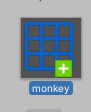
I get the same thing when trying to import an fbx file
junior stone
what are you expecting?
worn slate
It is the basic blender suzanne monkey and it doesn't seem to be importing the mesh at all
I tried importing an fbx file instead but same thing
Maybe I'm not importing it right? I haven't used Unity in years but from what I remember I'd either just drop it into the assets explorer or save the file directly on the filesystem and unity could use it
I've tried different meshes and even fbx files off the internet and they all give me this blue grid. If I click on one of them, all of them get selected at once
junior stone
probably corrupted data, try a different export of fbx version
worn slate
It seems to be an issue with the Linux editor
I committed these files and pulled on windows and unity began importing
 iron flare
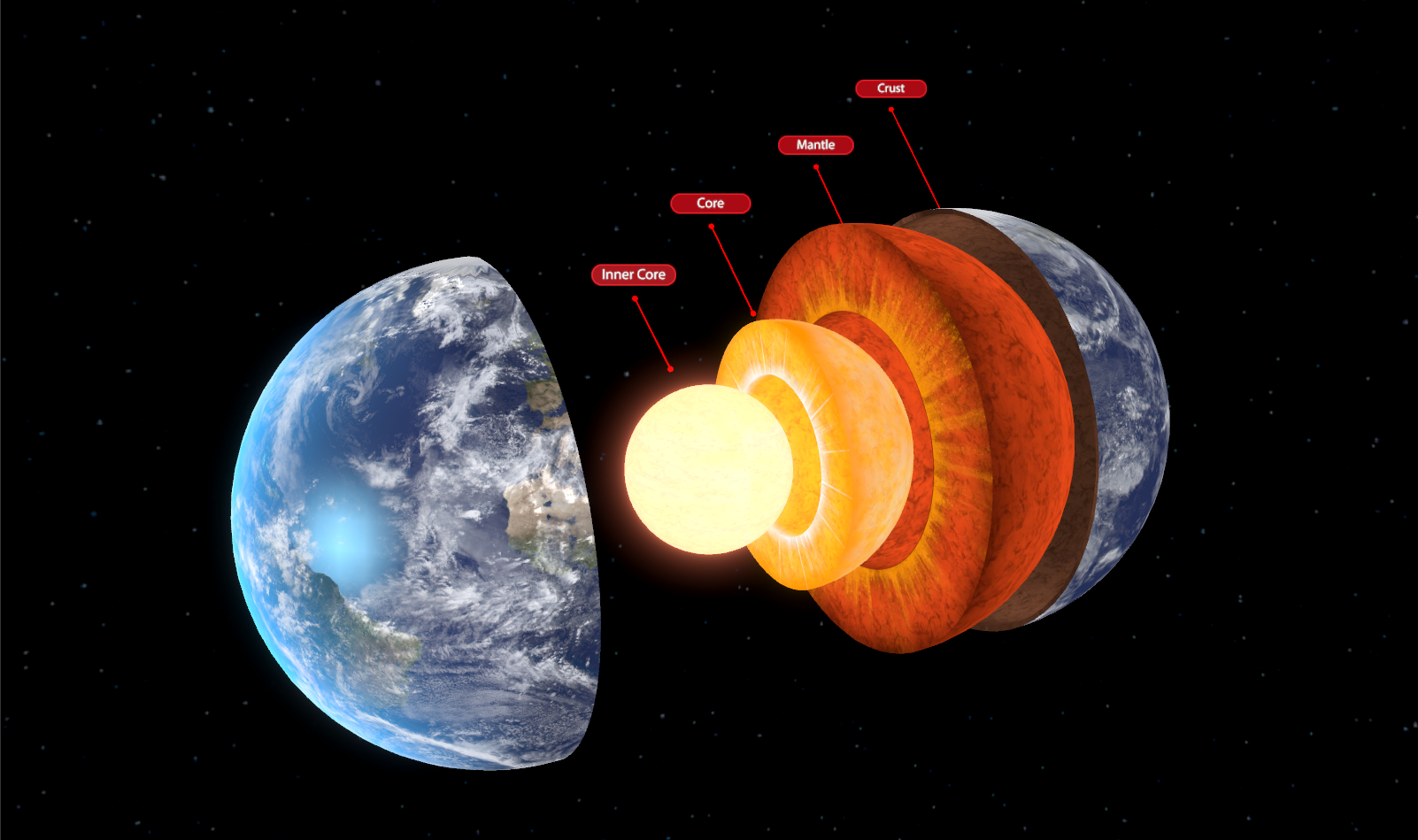
Asset almost ready for the store.. Layers of Earth : https://i.imgur.com/xIXSZ3H.png 
 eager mist
rapid echo
eager mist
rapid echo
Work in progress!. Sculpting in Blender and Realtime Eevee. Thanks for viewing :)
https://twitter.com/FarrukhAbdur/status/1231111512355409920?s=20

Making a caterpillar scene, sculpting in Blender using realtime Eevee. WIP. 🌿#b3d
#3d #gamedev #indiedev #blender #blenderart #blender3d #sculpting #substancepainter #polycount https://t.co/1jrxMwx2Ti
Twitter
old snow
What is the best way to set up clothing if you want to continuously keep adding new stuff ?
rapid echo
I think you are referring to character customization. @old snow
You can have a base cloth shirt pants as separate meshes and swap with different presets of cloths which have other stuff already over it.
or another way would be place each new item asset to see how it fits properly over the cloth parts before, define places that can have items and add them when needed.
Depending on character design and his base you will need to have customized 3d model items. Just some ideas.
 boreal blaze
Does anyone know if its possible to edit the prefabs little 3d preview icon? Like rotate the model around to see it better?
maiden tangle
That's how it normally is, unless you've offplaced the model in the prefab hierarchy?
 split bone
is it possible to ccreate a curve between two vertices in a mesh?
 sick glen
hey guys - just a quick q - I am trying to show off some character art in the Unity engine, specifically HDRP. are there any good resources to recommend for material setup, getting models into engine etc?
I'm going to be experimenting with it anyway but don't know a massive amount about HDRP
eager mist
maiden tangle
@sick glen It's a pretty drag and drop interface, especially if the project is created with the hdrp integrated. Have you tried youtube?
@eager mist Great colors there, nice gun 🙂
eager mist
thanks appreciate it 👍
 bold scroll
eager mist
bold scroll
eager mist
Guys, do you have any good tutorials/tips on doing actions lines in 3d animation?
sick glen
@ david yea I probably should, thank you! I will now
 jovial bay
so im trying to make a model and rig in with blender, ive made an armature and a base model, and when i export the file as a .fbx it shows up in the asset manager as a taped box that doesnt do anything
what do i do?
 long pivot
Hello somebody know 3ds max here? I failed for having a double sided mesh 😦
long pivot

COGT2443 Animation and Rendering with 3ds Max
Materials and Mapping
so I made Double Sided Material, in 3ds max it's worked and not in Unity 😦 thanks ❤️
eager mist
Made some trees. Can I get some feedback?
 hoary shuttle
looks beatiful but I thing the tree in the middle needs a bigger treetop
eager mist
Is it hard making reference images or am i just thinking it's hard when its not?
@eager mist Depends what they are for
What style are you going for?
Well a cartoony kind of style
@eager mist
Wait why would you need reference images for that?
Ah cartoony 3d
You can easily punch something together in like a minute
Just do the rough shape of the item then use that
No need to go into great amounts of efforts when its not going to be used beyond that and is a simple guideline
Should I draw out facial features too like lips, eyes, etc?
Im absolutely terrible at characters and mainly do objects
But since they are such large parts of it you probably should
You can always use google for a reference image
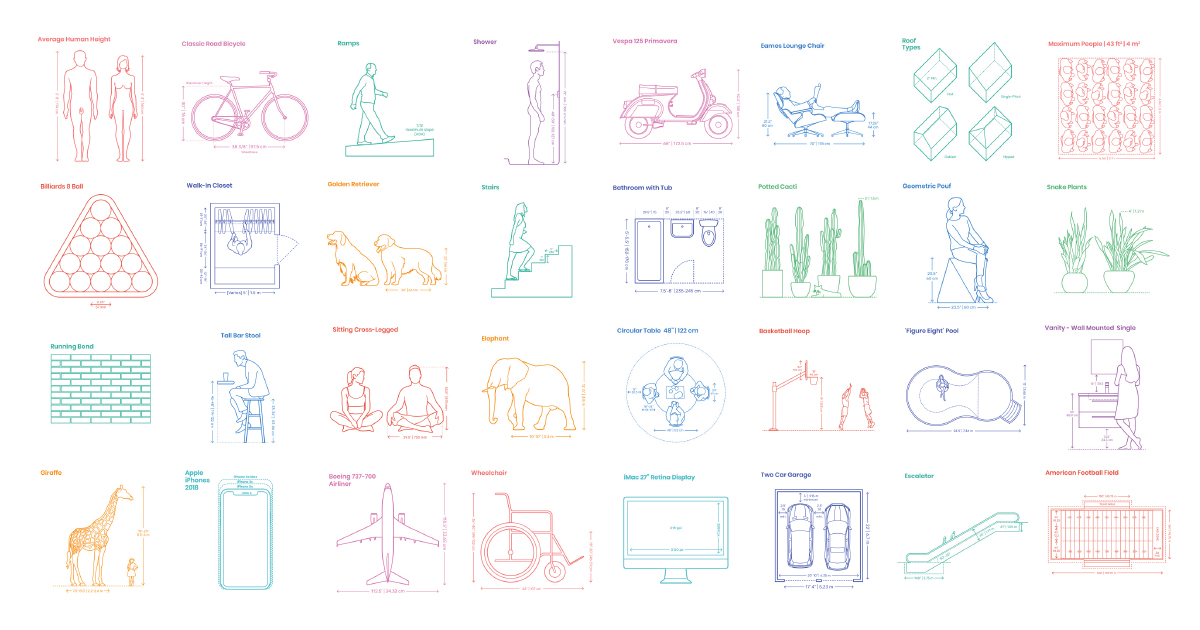
A comprehensive reference database of dimensioned drawings documenting the standard measurements and sizes of the everyday objects and spaces that make up our world.
@eager mist I use this quite frequently
Some fantastic images on here for references
Even stuff like picnic tables
Thousands of them all for free
You can even compare sizes
Usually always some nice trivia too
Cant recommend it enough
 molten forum
hello
eager mist
Hi?
 radiant snow
does anyone know this compiler error
 inner coral
@radiant snow
You seem to have typed "Horizantal". The default axis is named "Horizontal". That should fix it up for you if you haven't figured it out yet.
maiden tangle
some of my favorites from a recent mobile commission, strictly non-texture
considering doing something with this miner guy, went through a few changes till he liked the result- then client never paid for em.. he didn't get him either lol.
 outer cedar
maiden tangle
outer cedar
maiden tangle
thanks! appreciate it 🙂 was fun to do
err a mobile game of some sort
wasn't told the details, might just upload him somewhere so someone can make use that'd be pretty cool.
 viral trellis
does scaling meshes in Unity affect performance? I'm currently dealing with a model from a client which was made in Revit, and all the models are scale 100
 noble mural
Finished this low poly piece yesterday - 1990 Mazda RX-7 S5
I plan to import this into unity soon and then work on a small animation yesterday
wary eagle
https://www.youtube.com/watch?v=qKpfhKASofY
https://www.youtube.com/watch?v=eKuImTNGsEs&feature=youtu.be
😃

Speed modeling of a Sewing Machine in Cinema4D, Enjoy!
Unity Asset Store : https://www.assetstore.unity3d.com/en/#!/search/page=1/sortby=popularity/query=publisher:30263
Similar channels :
https://www.youtube.com/channel/UCGJCGeuwqkwMgoxABsURTjA

Speed Texturing of a Sewing Machine in Substance Painter , Enjoy!
Unity Asset Store : https://www.assetstore.unity3d.com/en/#!/search/page=1/sortby=popularity/query=publisher:30263
Similar channels :
https://www.youtube.com/channel/UCGJCGeuwqkwMgoxABsURTjA
hoary shuttle
Did anyone knows how to use the Joystick Pack so that I can move a cube? I looked for tutorials but they didn´t work. I use Unity 2020.1.0a24
fluid oak
@eager mist don't use auto configure- set the connection position for the join yourself.
Auto NEVER seems to get it right for bone chains.
 thorn ridge
Hey folks. I'm looking for someone who is extremely familiar with vertex data and the issue with vertex ordering in Unity 2019. I have some questions.
fluid oak
@thorn ridge You might as well just ask your questions.
thorn ridge
They're very specific and I don't want to clutter this place up with that kind of stuff.
I'm working on something and I don't know a whole lot about how this sort of thing works, so I'm trying to learn and possibly find a good solution.
potent tinsel
What do I do when my blender model that I dragged to unity doesnt load?
I can't do anything
 pallid fractal
try exporting to FBX instead
thorn ridge
@potent tinsel Exporting as an .fbx then importing would be the best way, I think.
potent tinsel
I see ty very much
long pivot
Hello I have a problem here, my work is to improve some meshes in Unity (better topology and UVS etc) So I exported fbx files, closed Max or delete the mesh, reimport the fbx I saved, well the fbx imported is like ~ 96x bigger than the original one in 3ds MAX ... this is a big problem since now all my fbx are not the same size now and it's very difficult to adjust them since I don't know exactly the size differences :'(
The strangest thing is I used the default settings export FBX in MAX.. Maybe someone here have a plugin who export properly fbx file in 3ds Max? thanks ❤️
willow nebula
Could it be that you exported the fbx in string file and not binary ? That could easilly explain the size difference
eager mist
 honest tide
Nice gun!
eager mist
Thanks mate
 nova panther
Any ideas for a easy very simplistic room or box that someone bad at design could put together. I'm open to any ideas it's just for my first game idea so I'm trying to focus more on the gameplay. If anyone thinks they have any tips or ideas you can dm me or @ me here
potent tinsel
First try at making a car, is still not finished.... god https://gyazo.com/cd943fc1ce5a6a2256a4741197b4f00b?token=9529beee8cc07e005df32db98c277b2a


back
 austere seal
Both car has the same material color but the car on the left is dark, does anyone know how to fix this problem?
 orchid lark
hey guys, im tring to add some veriaty to my game with vertex paint, however for some reason all copies of my mesh recive the vertex paint instead of each asset getting diffrent colors, any way to fix that?
maiden tangle
If you paint asset A with a red and green color, duplicating it won't change the fact it's a direct copy of asset A
 ionic shore
Hey guys
Just wanna get some opinions
If in my game I have a texture atlas, and at any given time I have 2 different artists modifying half of the atlas at any time. Is there any system I can create to make sure that they do not conflict with each other?
We use Sourcetree for version control
 azure ether
@ionic shore i don't know of any version control systems or tools that allow for merging image/texture files or any other binary file for that matter.
ionic shore
Hmm, guess I'll just have to make do with whatever I have for now then
azure ether
your only option may be to split up that giant texture atlas into separate parts. as many as needed that you are confident only one artist would ever need to work on one file at a time. and either split up the meshes / UV maps to accept multiple textures, OR add some automation in your asset import / management process to merge those separate files into the large texture atlas required to render the model(s.)
@ionic shore AssetGraph may be helpful in managing that process https://docs.unity3d.com/Packages/com.unity.assetgraph@1.6/manual/index.html
ionic shore
Ooh this is interesting, havent seen this before
Thanks, I'll check it out!
 wet marsh
What's the best way to make tank tracks? Can't find anything useful.
eager mist
hey can anyone help me with modeling characters
Depends on the question
I've modeled a few... but nothing AAA
Zbrush - High poly
In-Game, low poly
@eager mist
Thankfully now with Blender you can do both 3D sculpting, if required, and polygonal modeling.
Your 3D model will look bad if, to begin with, you don't have a decent concept to work from.
So if you aren't particularly good at 2D design, you might want to get help from a volunteer or pay someone to make you some character designs
Talking about model sheets
@eager mist thanks for the help coukd you help me?
could
Advices is as far as I will go.
ok
Got enough on my plate.
There is nothing you cannot learn.
any videos you would reccomend
Not really
Anything that would help you learn the fundamentals of Blender
Polygonal modeling
And 3D sculpting
The rest is up to your skill level
That said... this might be useful
The classic 3D modeling workflow for games
http://skilljutsu.com/views/gamedev-art-intro-to-3D-modeling-for-games.html
The different 3D modeling workflows
http://skilljutsu.com/views/gamedev-art-3d-modeling-techniques.html
You need to understand those workflows.
During your 3D modeling session, you'll face certain problems and you'll use some of those workflows to work around them
 obtuse basin
Hello I’m trying to learn how to use unity I’m trying to make a office In 3D I don’t know where to start
obtuse basin
Is pro builder a application? Blender is a pain at least the last time I used it
 paper jay
pro builder is packages
maiden tangle
Try blend 2.8 @obtuse basin , It's gone through a massive overhaul
maiden tangle
Mobile lp concept.. Might remake with a hp
eager mist
austere seal
gritty reef
Looks like a caprice classic. I had one of those 🙂
 deft gazelle
eager mist
deft gazelle
eager mist
@eager mist nice pistol
rapid echo
Completed a caterpillar scene in Blender using realtime eevee Thanks for viewing :)
https://twitter.com/FarrukhAbdur/status/1233226235351912448?s=20

Completed the caterpillar scene. Used Blender, realtime Eevee and substance painter. I hope you like it :) 🌿 #b3d
Artstation: https://t.co/xV66DHdtTB
#3d #Blender3D #blender #blenderart #gamedev #indiedev #eevee #SubstancePainter #polycount https://t.co/v7s0dqOlT9
Twitter
eager mist
@eager mist thanks man appreciate it
 undone holly
hi guys, I'm new here and I came asking for help with some issue, where should I go to ask for help, please?
Alright, I hope this in the right chat for that request : https://youtu.be/-EKUxQ41tZM

On the mesh you can see that while using the different blendshapes, the smoothing just breaks, and I don't know how to fix that issue, btw the model is rigged already.
glacial vector
In your mesh import settings, do you have your blend shape normals set to Calculate @undone holly?
undone holly
Oh! let me see, and thanks for the response @glacial vector
glacial vector
No worries. It should be set to Import
undone holly
Alright, I'm not sure where to find that setting...
glacial vector
Click on the mesh in the project window and it's under the mesh tab
undone holly
Okay sorry I just looked around and feel a bit stupid for not finding it, are we still in Maya or Unity?
glacial vector
In Unity
undone holly
Okay
 limpid abyss
is it possible to get that type of rendering (that is full isometric 2D in the video) using 3D only nowadays ?

I absolutely love this place, probably due in part to fun memories of doing Tomb Runs online to level up with my friends :] Anyways, I manage to take all the wrong turns, but in this place I don't mind. It's great exp and lots of wide, open rooms for my traps to incinerate thi...
 mossy trail
hmm maybe use orthographic camera type
limpid abyss
yeah I'm doing some testing with that camera type, but so far my results are not as great as in the video
I'm used to do it in 2D, that's why I'm wondering if it's even possible to do that in full 3D or if that will bring other limitations
the main issue I have is how thing appear and disappear when they get on the camera like that : https://www.youtube.com/watch?v=ApcAiTQwZEY&feature=youtu.be
 willow nebula
issue with the camera near plane
limpid abyss
if I increase the distance, I loose all the shadows
willow nebula
decrease
 willow nebula
I don't know what the "distance" you're setting is, I was talking of the Camera component "near plane distance"
or "near clip plane"
limpid abyss
thanks, that's already better, but still "burned" on the corners of the screen

scaling down everything helped improve on that issue
fluid oak
@limpid abyss If you look up how they actually did the fake 3d effect in diablo 2, it is pretty amazing
 gritty reef
I didn't realize it was 2d. I assumed it was just early 3d
fluid oak
It used 3d rendering(textured polygons) but not a 3d world
gritty reef
That's so cool
fluid oak
It was 2d the way unity 2d games are- flat sprites rendered to quads facing the camera
It's pretty unique, I think
limpid abyss
yeah it's full 2D, I've actually reconstructed part of the original game using the original assets, and now I'm looking into if it's worth it to switch to 3D or if that's gonna break the gameplay somehow
2D works very well for that kind of game, but converting the 3D models to sprites is really a pain
fluid oak
Well, they did it because the game had to work equally well without 3d mode
Only like, a tenth of the audience had 3d cards that could do the 3d mode at the time? Maybe less.
limpid abyss
there is no 3D mode in diablo 2
there is the perspective mode, but everything in that game is only playable in 2D
fluid oak
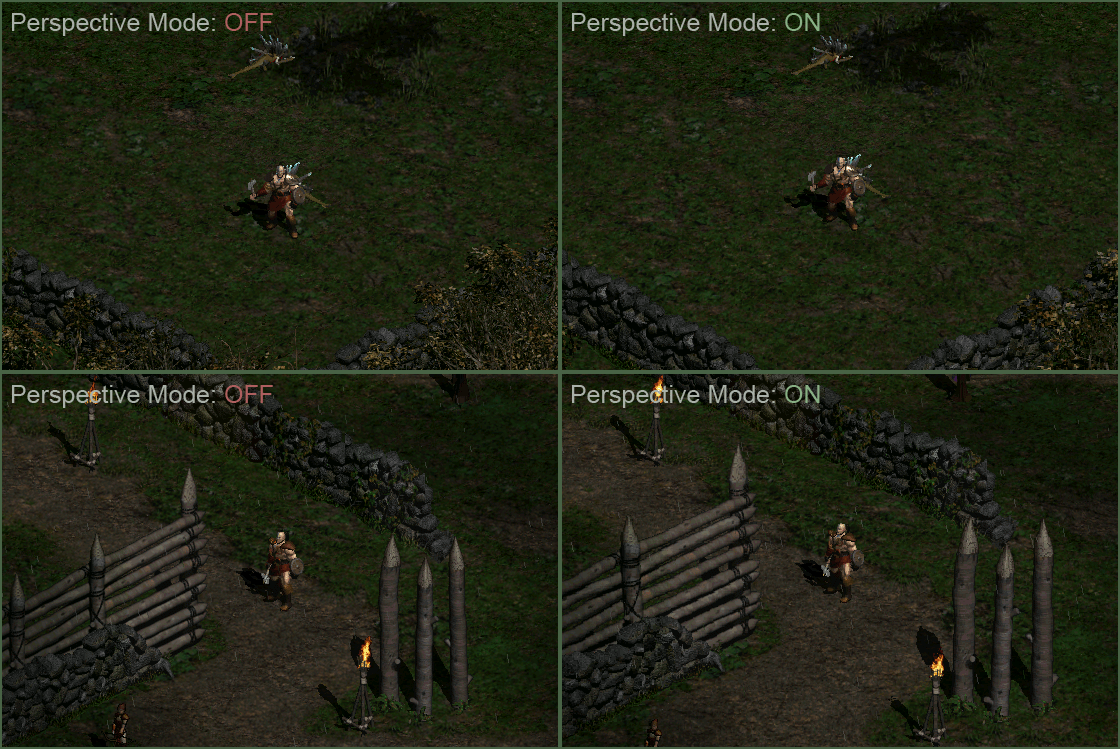
Read up above- perspective mode is still entirely 2d, but rendered using 3d hardware. That's why you needed a 3d card to activate that mode.
limpid abyss
ah my mistake, I miss read you
maiden tangle
very cool, I think the hands are a little long though (maybe it's just perspective? mid one)
 whole fog
I have been messing around with Crash Bandicoot crate textures to get a handle on UV texture editing. Hows it look
I admit it looks pretty N64 esque almost
whole fog
how could I make it a bit more PS1 looking you think
 lone reef
Does anyone know how to import a .glb model into unity? I am working with a partner who handles the artwork and modeling, while I do the code. He sent me a .glb file because the shaders were not working with unity in fbx format. Is there a package I can import that allows me to use .glb? I found UnityGLTF by KhronosGroup, which is what my partner told me to use, but I have no clue how to install it. Any thoughts?
whole fog
I have been trying to make my crate more accurate but I can't get the texture to size properly
anyone have some advice here?
nvm managed to fix it with a bit of UV editing
for some reason I can't seem to paint the sides on right
when I ever I try it just turns into a darkened mess
anyone know where I am messing up?
eager mist
Typically, 3D artists don't use Blender to create textures.
They would use something like Substance Painter or Substance Designer.
potent tinsel
^
wary eagle
@maiden tangle I think the sleeves give this impression of length, because it is exactly the same model as the other two. 😉
 dusk bear
Does anyone here have an idea what could be causing this issue when using a blendshape, where the nostrils and mouth of the model become "deformed". It's even more noticeable after applying shaders. This issue does not occur in Blender or Maya, but only in Unity. I also tried sending the model to others, and the same problem didn't occur to any of them. It seems to be a project setting, but I can't figure out what.
eager mist
Can you change the quality setting under it
dusk bear
@eager mist Yes, I tried that, but it doesn't help unfortunately (1 bone, 2 bones, 4 bones)
eager mist
Can you try to set your project to unlimited
but if this is a morphmap of some sort, might not do anything
dusk bear
Set what to unlimited? I'm rather new to Unity
dusk bear
Thanks, but unfortunately that doesn't help either
eager mist
crap
dusk bear
@eager mist Found the issue. I had to adjust blend shape normals. It was set to calculate. Thanks again for trying to help!
eager mist
👍
austere seal
 near lotus
 barren patio
hey! im really new to Unity.
im wondering how I could get all the squares on this grid material to always be even regardless of what I put it on?
like how it is on the ground
near lotus
You'll need a triplanar shader most likely
barren patio
near lotus
You'll need a triplanar shader with that property.
barren patio
so this shader I have on this material wont work huh
and bloom would be put on the camera?
near lotus
Look up Post Processing Volume in the package manager
neon wedge
Why does my character keep falling down?
The pole sticking out the front is just so I can see which way is forward; it hasn't any colliders or rigid bodies on it.
The only script is to move the chatacter:
[RequireComponent(typeof(CharacterController))]
public class Character : MonoBehaviour
{
    private CharacterController _characterController;
    public Vector3 _gravity = Physics.gravity;
    public float _speed = 5;

    private void Start()
    {
        _characterController = GetComponent<CharacterController>();
    }

    private void Update()
    {
        var move = new Vector3(GetAxis("Horizontal"), _gravity.y * deltaTime, GetAxis("Vertical"));
        _characterController.Move(deltaTime * _speed * move);
        if (move != Vector3.zero) transform.forward = move;
    }
}
I added the box on the base because I thought it might have bee the curved base of the character controller.
eager mist
lol
XD
First of all.
Your CharacterController is already a collider 🙂
You also have a CapsuleCollider
Remove it
Remove that base
@neon wedge
Chop chop mayte
neon wedge
Thanks @eager mist Ah. Didn't realise there was one implicitly there.
I've removed the collider and the base, but my guy is still drunk and faceplanting.
eager mist
is there any place where you touch rotation?
CharacterController shouldnt faceplant
so you did something
lol
Does anyone have suggestions for good 3d model programs?
BLENDER
Yes it's hard to learn
They all are.
Just download Blender
neon wedge
@eager mist I've definitely done something.
neon wedge
GOT IT! I'm not affecting rotation directly, but I am setting the forward property on the transform to the move vector which has 0 for the y-axis.
neon wedge
Changing the transform.forward = move to transform.forward = move + transform.forward solves the problem.
Thanks @eager mist.
eager mist
Cant you just say transform.forward += move?
You can do whatever you want XD
Power to you
barren patio

GitHub
Unity's standard shader with triplanar mapping. Contribute to keijiro/StandardTriplanar development by creating an account on GitHub.
I found this shader
how could I implement it into my project?
is there an easy way to import from the git link or do I have to download it and manually import it
pallid fractal
@barren patio if all you want is the shader then download the .shader file from here and put it somewhere in your assets folder: https://github.com/keijiro/StandardTriplanar/tree/master/Assets/Triplanar/Shaders
GitHub
Unity's standard shader with triplanar mapping. Contribute to keijiro/StandardTriplanar development by creating an account on GitHub.
if you want the whole thing with materials and all unzip the whole thing in your assets
well, unzip the github assets folder to your assets, or a subfolder of that
 rustic abyss
Hi, i want create isometric map with 3d assest. For create map the tilemap work eith 3d models?
 unreal raptor
so how do you draw/color on 3d objects?
 winged summit
Hi, I have a particle effect that is meant to be applied in pretty long lines (pic) the problem I have is that when the line gets longer the texture stretches a lot and becomes pretty ugly, is there any other way to solve this other than higher res texture/tiling?
https://cdn.discordapp.com/attachments/532260045887373352/683769028128276543/unknown.png
winged summit
Huh the link should be working
Tile it?
It's a line renderer BTW
Since the pic isn't working anymore
 timid dagger
How do I stop my object from sliding after movement stops? (My object slides a little after movement stops)
 loud bone
Does anyone use houdini for procedural stuff?
eager mist
🗿
timid dagger
can anyone help me here? I'm trying to load sprites from a spritesheet into an array but with no luck.
public Sprite[] sprites = Resources.LoadAll<Sprite>("sprite/mariospritesheet");
maiden tangle
#💻┃code-beginner @timid dagger
 digital frigate
Can anyone here do simple 3D animation rendered into 2D sprites? (Flags waving, simple foliage)
neon wedge
Can I use an svg as a template to create a 3D object?
e.g use this SVG of a cog to make a 3D cog?
digital frigate
Well, you can extrude any 2D image into 3D with the right tools, actually
You'd still need to do adjustments to make it look nice though and not blocky later though
neon wedge
@digital frigate Not as simple as pasting and clicking extrude then?
digital frigate
That's how extrude works. If you want your cog to simply pop out, extrude is the way to go. But afaik cogs are tad curvy at the edges
neon wedge
@digital frigate That's all I'm looking for. Does it need to be done in another bit of software or is there a nice extrude button in Unity?
digital frigate
Never looked for it in unity. If there's none, pretty sure you can do it in blender or any other decent 3d software
neon wedge
Fusion it is then! Thanks @digital frigate, that saved me several hours of faffing about.
fluid oak
@digital frigate what sort of animation, more specifically?
digital frigate
I'm making a 2.5D mobile game; graphics are in 2D, but I'd love to give the illusion of 3D using layers and pre-rendered sprites. Since I use 2D LWRP renderer, there's practically no way to make cloth physics; it would be too expensive anyway, so I'm thinking for doodads such as flags in the wind, it's better to get looping pre-rendered sprites to achieve the cloth effect, if possible within my budget and timeframe. Please do tell me if such effect is not ideal, though, as I'm still not 100% on board with this plan.
fluid oak
@digital frigate a lot depends on the style you're going for. Do you have any examples?
You can definitely do some cloth-like 2d animation in unity with skinned sprites, but that is pretty limiting when it comes to perspective so a lot depends on the specific look you're going for.
digital frigate
@fluid oak yeah. Do you know monument valley? I'd imagine that it'll be similar to the doodads within that game...
neon wedge
@digital frigate Does the 2D shader let you do flag effect type stuff?
fluid oak
If you mean like the flags in this scene https://youtu.be/Yy2bXqs0x3o?t=219

A beautiful puzzle with stunning visuals and relaxing soundtrack. A must have for puzzle lovers.
Get More PC and Mobile Gameplay - Subscribe ➜ https://goo.gl/wtP5AI
In Monument Valley you will manipulate impossible architecture and guide a silent princess through a stunn...
Then there are a lot of easier ways than prerendered
Using an actual 3d object would be easiest, but a skinned sprite could handle that quite easily too.
glacial vector
yeah, you could animate it in your 3D app and just run it as a looping animation, but you could also animate the vertices in the shader
fluid oak
Or just a UV based 2d distortion, yeah
glacial vector
It would need to be 3D in monument valley and not prerendered, because the perspective changes
fluid oak
I believe they said(and correct me if I'm wrong, @digital frigate) that that was just an art style reference
But yeah, this was done 100% in unity with a mix of 2d and 3d https://i.imgur.com/llQbtsf.mp4
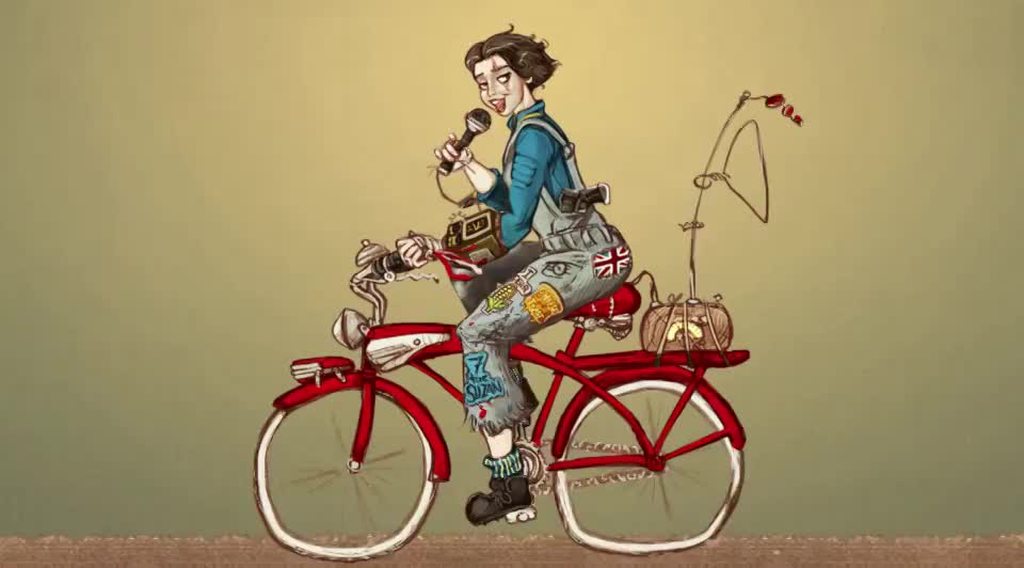
The wheels and chain were 3d meshes made by script, with UV animation, and the rest is 2d skinned sprites.
digital frigate
Heh. Thanks for the input, guys. It's 3am at my place and can't really focus
That's pretty cool
Heard that ori and the blind forest was also made that way
Yeah afaik monument valley uses 3D models for everything
fluid oak
This one on the other hand is 100% 2d animation, but stuck on a 2d quad in a 3d scene in lwrp https://i.imgur.com/pMMiqCp.mp4
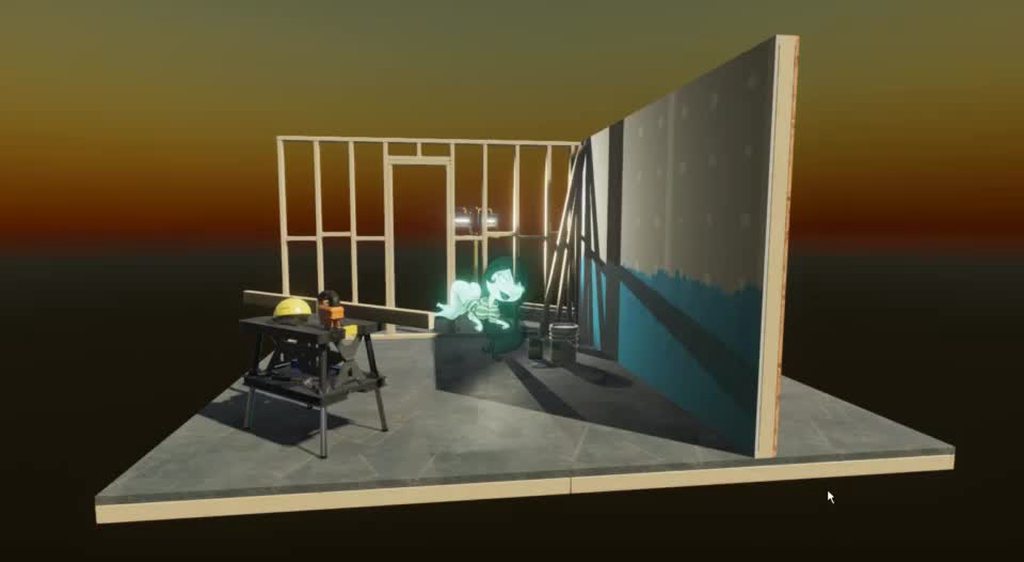
So for such simple movement that is entirely possible.
A rippling flag could probably be done a million ways, really, so it all comes down to what is easiest for you.
digital frigate
Yeah. I saw some 3D rendered into 2D animation earlier today. It had motion blur, and looked extremely wonderful, which is why I'm going to try the pre-render path. I think it'll be really hard to manually draw blur, or to do it with shaders.
 storm raven
Hello i heard yall like 3rd dimension can one of you dm me some 3d car models (Low Poly) i could use as a refrence making mine cuz im just ok with 3d modeling
 dire ermine
pallid fractal
dire ermine
pallid fractal
@storm raven find some on blendswap
loud bone
Hey does anyone know any good 3d courses for blender?
eager mist
imma call this map "Freedom" 
does anyone know why i don't have a display panel option? i want to make the skeleton visible through the model
using a human armature rig
disregard my question, i figured it out
its a drop down
i dont use blender anymore but thats my guess
yeah silly me was looking for 'display' but it was called 'viewport display'

 kind fog
Hey, this seems to be a dumb question, but I'm trying out probuilder and for some reason "Set Pivot" doesn't seem to work, either because I'm using it wrong or I don't understand it's functionality
When I choose a vertex or edge or face in the appropriate mode and click on "set pivot", the object pivot doesn't appear to change
What am I doing wrong?
kind fog
OK, nvm, it does work, I just didn't get, that the visual transform pivot thing is not the same as the actual pivot
glacial vector
You can change transform gizmo placement by pressing Z
kind fog
Ah ok, thanks
wary eagle

ArtStation
Low Poly Soldiers made for the Unity Assets Store!
All models are around 4K tris and use a 1K Albedo map only.
Guns and ground are not included in the package.
 wintry lark
@eager mist I think it's to late to answer but you need to put your bones/skeleton in X-ray mode to see it through your model. To do it I think you need to first select your armature then go to the armature property (in the properties panel) then go to "viewport display" and check "in front" or something like that
gritty reef
Well that's vaguely creepy
 night socket
best way to create clothes for a 3D character?
I've been trying to make clothes for my character for a while but I've been having trouble with clipping (skin clips through clothes)
atm I just duplicate the parts of the mesh that would be covered by a shirt, duplicate and separate it and then change some stuff to make it look more like clothing
Weight painting it is too time consuming and can lead to even more problems
pallid fractal
mask the parts that are fully covered by clothing
 zealous glacier
Hello!! It's possible to use the turbosmooth from 3dsmax to unity? Thanks!
heady meadow
@zealous glacier well, you just export fbx with applied turbosmooth.
Normally you'd want to retopo the turbosmoothed model and bake the highpoly maps into lowpoly model.
 frozen shard
anyone in here know how to make a cone where i can apply the unity projector material onto from above? currently made a simple cone in blender, but the material doesnt get displayed properly on in it. does work on the standard unity 3d objects.
frozen shard
got it to work, uv maps :)
 languid pulsar
Anyone know if multi scene occlusion culling works in 2019.3.3?
 terse herald
Recreation of Roc, one of the 8 cut colossi from the original Shadow of the Colossus.
fluid oak
Nice!
 torn vine
Does anyone have a good idea how to make a Character Creator for a Player Character
 edgy totem
basically I used brackey's beginner tutorial, and I finished it but switched to HDRP after. Transferring all my assets to the new HDRP Project from the old one, it completely messed it up. The player is supposed to slide on the floor, but it goes through. Any help? https://prnt.sc/rcb26f
Does transferring assets to a 3d template project to a hdrp one break the physics?
 vestal dust
quack
junior stone
@vestal dust when his arms are up they look like ears xD very nice stuff!
 white goblet
just working on my hero model 🙂
 mossy quest
eager mist
mossy quest
eager mist
im following this tutorial https://www.youtube.com/watch?v=_QajrabyTJc

Let's see how to get an FPS Character Controller up and running in no time!
REGISTER with APPTUTTI: https://www.apptutti.com/partners/registration.php?utm_source=brackeys&utm_medium=social&utm_campaign=brackeyssponsor1
LEARN MORE: https://www.apptutti.com/corporate/?utm_sour...
but it assumes i know how to set up the platforms
how do i do that?
fluid oak
Add a cube, stretch it to the size you want? Or find tutorials that aren't Brackeys >.>
eager mist
Why use cubes instead of planes?
 knotty yarrow
he also uses a package manager for building objects
 sonic oyster
is brackeys like frowned upon or smthn
knotty yarrow
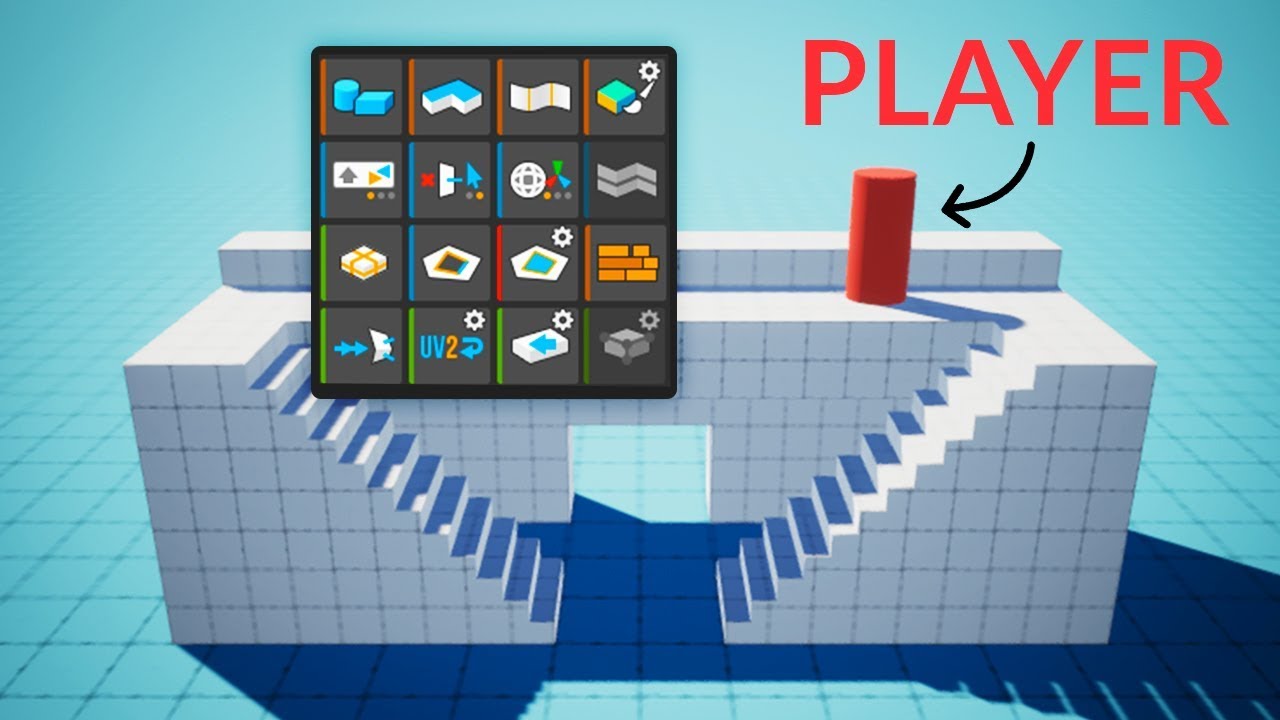
Here's how you can easily create levels in Unity using ProBuilder!
This video is sponsored by Unity.
● Download the Project: https://ole.unity.com/pb_brackeys
● Learn more about ProBuilder: https://youtu.be/PUSOg5YEflM
♥ Support Brackeys on Patreon: http://patreon.com/brac...
I don't think so
His tutorials really helped me
 fresh juniper


 maiden tangle
what references are you using?
I like the mallet/chisel
you would normally have some kind of support for the legs on the bottom left one if they're so spread out
fluid oak
@sonic oyster in the other channel we get so many people who can't get one specific tutorial of his to work, because it uses other scripts he didn't mention in the video.
So I just get a bit annoyed about that >.>
north halo
can someone teach me moddeling? i tried making a 3D simplistic character model but i just don't have any idea where to start, how to do different things and so on...
sonic oyster
there are lots of blender basics tutorials on youtube
 weak mountain
I want to start character game design, where could i find a good tutorial
white goblet
how is this practice?
fluid oak
Better than I can do
But I'd definitely smooth out those thighs, avoid the 'frontbutt' look 😄
eager mist
Hello everyone! I'm currently working on an FPS game. I imported a character model from the AssetStore to experiment with it (screenshot). The character has a weapon called "AssaultRifle".
I noticed that for some reason it is impossible to rotate this weapon in any way - neither through a script nor in the Scene tab. This is a problem because it makes it impossible to let the weapon follow the cameras x-rotation which is essential for an FPS game in my opinion.
My question: Is there some sort of setting which prevents any rotation of an object which might be enabled for this prefab? Or is there any other reason why I can't rotate the weapon? Rotating the whole prefab works in any direction.
Feel free to @ping me when replying. 🙂
pallid fractal
probably the rigidbody?
eager mist
This drives me crazy. I just noticed that I can't move this and all other objects in the scene for some reason at all.
Oh, I removed the rigidbody and it still remains the same, rogue_code.
pallid fractal
oh 😦
eager mist
moving any object in the scene just changes the Position value of the Transform tab, but its actual position remains the same.
pallid fractal
never encountered that
pallid fractal
oh, it's because it's skinned, I think
eager mist
Does it affect it somehow?
pallid fractal
yeah, the bones override your local transform
eager mist
oh
damn it
okay thanks. I guess there must be a way to move/rotate bones then, right?
eager mist
I don't have any bones in there.
pallid fractal
it's everything under and including "Hips"
that's the armature
each transform is a bone
eager mist
Ah okay!
Thanks. So there must be some sort of reference to the weapon under the "hips" tab?
pallid fractal
I think it's those arm position ones
pallid fractal
🙂
eager mist
🤦♀️ omg, sry for the stupid question and tysm!!
pallid fractal
not stupid at all
eager mist
this made me go crazy for days now 😅
pallid fractal
what's the name of the asset @eager mist ?