#🔀┃art-asset-workflow
1 messages · Page 41 of 1
 junior stone
 cursive sail
Don’t have one and fine with trying out anything for start
junior stone
ok
My first assignment when I got into 3D was this

Kyoto day-time city scene diorama made for the 3D lowpoly exam in my university. We were restricted to use only classic shading models (like diff/spec) and were told to target older generation graphics.
Modeled in 3Ds Max and textured using Photoshop. Edited texture photo sou...
not mine ofc, but thats the idea
cursive sail
Damn that looks fantastic
junior stone
@cursive sail basically, you make a street with 3 houses
style of your choosing
add a few props around and try to make a nice looking scene
cursive sail
One question guys, is it too late for me to start drawing/modeling and get decent/good? Im 16 and barely can make a stickman drawing
Feels like most people that are my age are like 100x better
junior stone
I started when I was 18, going to unviersity
its never too late to start tho
all it is, is persistance
 next kindle
nah 16 is fine
usually you dont get taught these kinds of things in school unless you go to a specific uni or college for it and by that time you're generally around 18 or older
junior stone
(Like I did)
next kindle
so anything you learn before that is only extra knowledge
cursive sail
Oh okay awesome yea im willing to stop programming for a while to learn to draw/model
so I can put in a decent amount of hours a week
Well thanks, for letting me know
next kindle
yah its good to try out a lot of different things anyway, you dont have to focus on 1 thing
maybe you'll enjoy modelling a lot more than programming
junior stone
you might*
cursive sail
Who knows
 gritty reef
I started learning programming but enjoyed the limited modeling I was doing along with the programming courses and eventually switched my interests fully to modeling.
junior stone
try and think about what you want to tell a story in the scene. think about composition. make a small list of items you would like in the scene. look for reference on those items. A LOT OF REFERENCE. and make the models.you dont even have to do the whole scene. just doing a few elements of it is a good start to start modeling
@cursive sail
next kindle
true its suprising how much you can take from just looking at photos of stuff and trying to recreate it
junior stone
do not try to make it super realistic, go for a half life 2 style texture
once you understand UV unwrapping and texturing you can improve the quality
#knowledge
😄
next kindle
ugh textures are a whole other thing 😛
junior stone
its part of the pipeline 😄
 elder iris
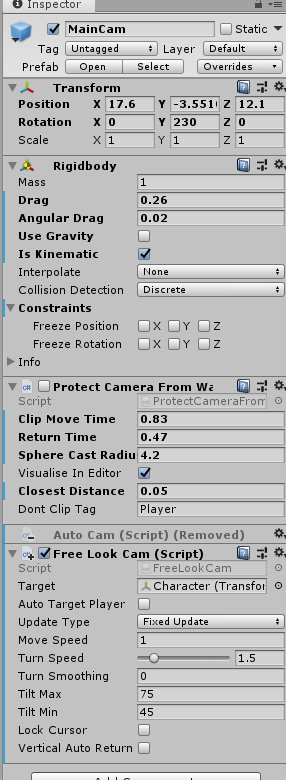
Why does my camara like zoom in like that and clip in https://i.imgur.com/78I3Jlx.gifv
 junior stone
dunno, pebkac? how are you moving the camera
 junior stone
never used unity packaged assets, wont be of any use here Im afraid
elder iris
fixed it
 ornate panther
Is there a way to move the pivot point? I have no idea why its there :p
forget it im stupid
 half aurora
rate this gun (isn't done yet tho), for a beginner
 olive skiff
pixel 3d he he
 fallow gate
Okay, so i realized that for me, when updating 3d models in Unity, for some reason i have to delete the original 3d model asset from unity first in order to be able to import the updated version.
Reimport doesn't do that i guess.
 lucid seal
Would this be the right place to ask about possibilities n' such?
I'm looking to make a 3d RPG like Legend of Dragoon, so I've already got plenty of ideas on what I want to accomplish.
I'm trying to figure out how I'd go about the Ps1-era 3d combat seen in LoD, FF7 and FF8. Creating a separate 3d environment for the battle area and placing the party in a line, that seems like the basic setup, but getting characters to rush directly in front of the enemy and perform their attack animation, then jump back to original position... that's what concerns me for now.
I don't wanna be a pest, btw, so for now I'm just asking, y'know, "Is that doable?"
fallow gate
Don't you just make then run a to b then attack when in range then run back b to a?
 elder pecan
does anyone just know how to make gravity a fall and not a teleport. Heres my script
lucid seal
I dunno. A lot of my knowledge of LoD's coding is logical guesswork based on what I can see.
elder pecan
dang all the Unity Helpers like just signed off
 hallow canopy
the entire west coast of US and canada is either in the process of leaving work, getting home, or making dinner
 eager mist
It's 8:45PM in Montreal now. Kind of late.
Kids are going to bed
🤫 Free time for parents
Time for Unity
elder pecan
Chris im 14 lol. I just started 3 days ago.
 fluid oak
Also, y'all are asking in the wrong channels
this is an art channel, none of the programmer types will even see it unless they happen to glance in here
You'd probably want to ask those questions in #💻┃code-beginner or #⚛️┃physics
lucid seal
Apologies.
junior stone
@lucid seal its doable, anything is. but as with anything as well, its a lot of work
 pine path
Does anybody have any materials or tutorial on how to achieve a "hypercasual" aesthetic?
They look like they have no material but if I do the same it doesn't look right
example
 random dirge
Isnt that just the lighting? I dont think such a look is done purely with materials
pine path
I don't know. I've been a 2d game programmer all my life. Materials, lighting and quaternions are still spooky to me 😦
random dirge
Well you asked in the right channel at least :)
 dense blaze
is there anyway i can make the camera move in blender like in unity?
 wary eagle
So you need a Factory asset? Done in 6hrs haha.
https://www.youtube.com/watch?v=KWVUYtuVues&feature=youtu.be

Speed modeling of a low poly Factory!
Unity Asset Store : https://www.assetstore.unity3d.com/en/#!/search/page=1/sortby=popularity/query=publisher:30263
Similar channels :
https://www.youtube.com/channel/UCGJCGeuwqkwMgoxABsURTjA
dense blaze
how to make transparent material in blender?
gritty reef
For all those people who find it more convenient to bother you with their question rather than search it for themselves.
 cloud dirge
Hi! Can I make grappling hook with character controller, not rigidbody?
fallow gate
Excuse me sirs and ladies
I have a shield like so
It has metal pieces that don't use an image texture
but the wood is an image texture
so how do i up it into unity without it coming out like this?
 potent wraith
@fallow gate you have several options. You can assign several materials to different parts of the object in blender and make sure that in unity the mesh also uses several materials.
Or the better option is to bake all of the objects texture into one texture that contains both the wooden and the metal parts.
 verbal osprey
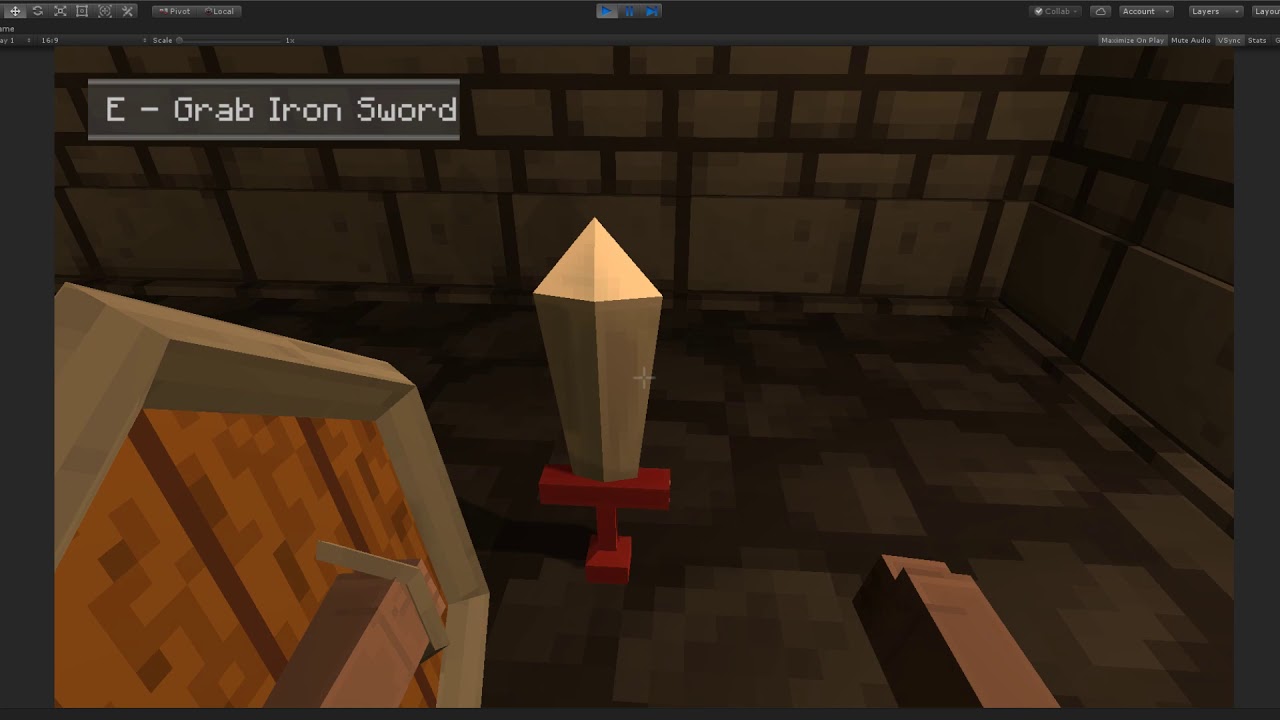
I am using blender to texturize models and the color of the textures looks different in Look Dev mode. Should I keep in mind how the color changes or in Unity will the color look exactly like in the texture?

 fallow hamlet
eager mist
fallow hamlet
eager mist
A friend of mine, Floatharr✨, just posted his process of sculpting a turtle in Blender. You uses a wide variety of tool to pull it off. It's neat.
https://www.twitch.tv/videos/541525122
 north tinsel
Hey im looking for someone to help me with my 3d voxel game with art and stuff
not my thing really
 glacial elm
@eager mist Hi. What would you concider to be a good poly limit for a redwood tree. realistic. but game ready
fallow gate
@fallow hamlet my friend did the code so he gets at least half the respect.
eager mist
@glacial elm
That answer is always going to be relative to your performance budget
You need to know approximately what the is and how much poly an asset such as a tree should have
Do you have a forest?
or is it a city with 4 trees?
glacial elm
@eager mist its a forrest. and i did mention realistic. meaning im going from average to high end pc:s
the tree its self is over 70 meters (230 feet)
,etc.....
ive managed to settle it to 13 - 15k but now relized that speed trees unity measurments suck and are not realistic. they are based on generic unitys instead of meeters or any normal unity. Which ment i had to do some math and testing to kinda figure out how the measurments worked. 1m = 4.866 absolute units.
so when i relized that and adjusted size the poly count sky rocketed to 23k. and im trying to get another artists view on how they feel on poly limits of such a large tree
 near lotus
I would go anywhere from 2K to 30K on LOD0 depending on the use case
There is just so much to consider
Is the player only ever going to see it from the ground?
Will they be able to walk right up to it?
Is it a slow paced walking simulator where detail is everything, or is it so fast-paced that you won't be able to ever see detail?
My method for trees from a first person ground perspective is to have a moderate poly count base trunk (1-2k) with tessellation, and then extend the trunk into fairly lowpoly branches
Without tessellation, I would triple or quadruple my polycounts probably
But I love detail
near lotus
Well you could be talking about a flight sim or something.
glacial elm
@near lotus its a MMO. I work at a studio. The studio poly limits on such large trees are up to 20k. im below that. But just wanted to see what others think
its fine i think i got it though
near lotus
Alright.
Speaking of trees, I redid this one and made it better
Still has tessellation cracks I have to remove
near lotus
Yay! Thanks

I make video game and 3D art things.
Check out my Dropbox for 4K renders: https://www.dropbox.com/sh/t451dx139q5fuoa/AACrGhlVa5GuDUbhjaQO5dDVa?dl=0
Tweets
83
Followers
129
 Twitter
I have a bunch more stuff on my twitter
north tinsel
ill check it out 🙂
 potent tinsel
Beautiful
 weak raven
okay, bit of a noob question, but I want the 4 corners to stay sharp on this subdiv surfaced plave
I tried adding extra loops to the edge, but it keeps rounding
potent tinsel
Did you xtra loopcut all the parts of the edge?
near lotus
Do you want them totally sharp?
weak raven
yes
near lotus
No bevel at all?
weak raven
no, 100% sharp
near lotus
So you add loop cuts and move them allll the way to the edge
I wouldn't do that for a game-ready object, but it works for a highpoly
near lotus
weak raven
omg thx. i was using the wrong damn tool 😮
near lotus
ctrl + R in blender
 wise vine
Simple yet really complex question.
At school we work with Blender, but I've always drooled at the sight of Zbrush
So, Blender vs Zbrush?
 modern wraith
what is going on
im on mix
what am i supposed to use
and when i change the mode and paint those weird glitches happen
no matter what mode
glacial elm

@near lotus @eager mist
How its looking atm. im waiting for the guy im working with who lives in california and has seen redwood trees to tell me if its too big. but in all cases thats the tree. on about 19k polies
near lotus
Doesn't look like 19k polys to me. The polygons should be concentrated at camera height.
glacial elm
@near lotus it is. redwood trees are very complex.
and ive omptimized that shit out of it.
its just the shear size that is killing polies.
a redwood tree is from 250 feet up to 360 feet. (70 - 73 meters average) and have a 10 to 15 feet radius on average

another vid but with it being smaller. still same poly count. its mostly just the clusters causing that though. the clusters are very lowpoly even on LOD0 but a redwood tree has many many clusters on it so its more the amount that is making the clusters take a bit over 10k
glacial elm
@near lotus
north tinsel
I need someone to make me voxel art 😦 i cant do the animation side of it
 versed ridge
Ive wanted to ask this questions to 3d artists for a while... does anyone else feel like Maya/Blender is overly complicated and kind of hard to use? Like if there was a better 3d modeler out there would you switch to it? Or are you using a different program?
I feel like its time for a new program to come out, one that's way more simple and streamlined, intuitive, and is geared towards realtime models/animation
for a while Ive contemplated trying to make one. Besides the fact that its not easy, I've refrained from attempting to do so because my end goal isn't to start a 3d modeling program company, but to create content enjoyed by players/viewers ie. games. But now thinking about how pixar had to create their own software (renderman) to make their movies, I'm thinking its more practical than I did before.
glacial elm
@versed ridge they aren't. just needs the person to not be lazy and actually learn xD
fluid oak
@near lotus I'd love to know more about how you did that, it looks amazingly good
wise vine
@versed ridge Its so complicated because it is a very sophisticated program intended for professional use. There is a lot to learn, but its also extremely powerful.
This is like saying that Photoshop is too complicated, why not use Gimp
well because Photoshop is 100x more powerful
eager mist
@versed ridge
Blender is great. It's also free.
If you want user-friendliness and better 3D modeling tools.
Try MODO.
Modo is more that 3D app that veterans at one point end up using, because it's very 3d modeling centric.
DOOM 2016 was modeled primarily with MODO. MODO was developed by former LightWave 3D devs who wanted to do something better.
Since, MODO has been used for films and games. Films like Iron Man, Pixar films, etc.
near lotus
@fluid oak About 800 pics of a tree run through Reality Capture to obtain a 60 million poly highpoly mesh. Bake that down to a lowpoly mesh, remove lighting, add tessellation and displacement map, make beautiful in HDRP with an HDRI and directional light, tonemapping, contact shadows, etc.
Also bring into substance painter to apply the tiled terrain grass texture to the base of the tree to help blend it in
That can alternatively be done with the layered lit shader but painting it onto the base texture directly is cheaper
eager mist
MODO is still not very well known in the industry, unless you are familiar with big names such as Tor Frick.
The most common 3D apps in the industry are really Maya and 3DS MAX.
Blender is super popular because it's the ''free'' one.
And it is now in a really good spot, in terms of features.
In 2020, you can't go wrong with any of them.
They are all great.
It's not the 90s anymore...
wise vine
Where does zBrush fit into all of this
eager mist
Zbrush is mainly for Character Artists.
But it is used more and more by environment artists
wise vine
In what areas is it 'better' than Blender
eager mist
zbrush is a 3d sculpting app
not a full feature 3d app
the tech behind is faking 3d poly so it can run millions without issues
wise vine
Yeah it uses points in space rather than vertices, right?
eager mist
blender is all around app and old school 3d polygons
wise vine
Ive noticed
eager mist
they found a way to do it
their way
modo has sculpting too but it sucks
it is really a sub-d modeling app
wise vine
does anyone use Mudbox?
eager mist
many are switching to blender noew because it is NOW well rounded
Mudbox... is nt used much
notably because zbrush takes most of that market
hands down the best at it
In reality...
If you are a pro at Zbrush... you are a monster artist
But this is where Blender comes into play with his new 3d sculpting tools
You still need to decent rig to sculpt in blender
but if you do ... you can do a lot
wise vine
alright, thanks, its all clear!
eager mist
It's a living project, but... it's free. There is some important information to know in there. For aspiring devs.
http://skilljutsu.com/views/gamedev.html
wise vine
Are you linking this for me?
eager mist
Just putting it out there. It answers several questions I see in here all the time.
What a production looks like, what are the different career, what apps should I use, what are the 3d modeling workflows, how do I guide players
etc.
It's somewhat like a FAQ
wise vine
If I have a torus shaped mesh in unity
can I scale it so it gets thicker?
Its a gold ring that is too skinny
 rancid jackal
how to rotate object around point with quaterions?
rancid jackal
Ok I tricked that in the way I want.
next kindle
place it in an empty game object
and you can make it rotate around that
thats a simple trick 😄
fallow gate
Yesterday I made a really thin chest in blender then someone told me to use solidify which worked perfectly then I drew a pixel texture and lined up the UVs pretty nicely. https://cdn.discordapp.com/attachments/411626250352721930/671141091998957568/IMG_20200126_154822.jpg
 rancid jackal
@next kindle I did exactly that 😄
wise vine
I have to fill in the top spaces in this 'evil pandoras box'
any ideas?
I want it to look cool but I can do intricate sculpting, I dont have the time (its for an assignment)
 chilly oracle
@wise vine You could do a flat intricate sculpture, imagine a flat face looking up? A pandoras "box" (was really a jar btw) is a philosophical view of something containing evil/misfortune. What is depicted on the top can be whatever you desire, personally I would do some pattern, slightly raised, maybe with some physics element like metal rings. It also does not look like the box has any look yet, intentional?
Maybe like that but with more depth.
 steep radish
Why is my scene taking 13 hours to bake
I made my terrain into static, is this normal?
steep radish
);
eager mist
Good day, I have a problem with OC, after calculating and setting an object as occluder, I get green lines behind the objects anyway and smaller objects are rendered even if they should not. What am I doing wrong?
 shrewd mortar
Hi all, I am experiencing slow game loading time, when i start the game on my laptop with unity editor everything is good and the game load instantly since i have quite strong laptop but once i build the app and install it on my Android phone the loading time is approximately 10-14 seconds, I tried to disable all my code that runs on Awake and on Start or Update and the loading time is still the same. What would be the best way to track/debug the problem for this kind of thing?
eager mist
Maybe try Profiler to see what happening and what have long loading?
shrewd mortar
I even disabled everything and left only the terrain and directional light and it still takes 10-14 seconds to load
next kindle
have you tried it on multiple phones? just to make sure its not your phone?
shrewd mortar
yup, tried it on mine which is Galaxy S9+, tried it on S10+ and Galaxy Note.. all are good devices so that is what bugs me
 outer halo
Fun question for Maya folk.
We have a single FBX that we're turning into a prefab and spawning these a bunch of times (lets say 100) in Unity. Each one will have their own IDs, (001, 002, etc.).
Each of these will have their own animations that essentially move them from their pointA to a pointB.
What's the best way to export these animations from Maya?
We're hoping to do this with some automation such that we dump the animations into the resources folder and apply them (by name) to each of the objects. Therefore, kind of want to avoid having to frame split a single Take001 anim.
I guess the question is, can you export only an animation from Maya? Therefore, we'd have 100 animation exports that we dump into the resources folder to pull from?
wise vine
@chilly oracle As a big fan of Greek Mythology, I am aware of the story of Pandora and her vase of evil spirits. I actually planned this to function as a Pandoras Box, funny you spotted that! Im planning to have it open up with an animation and have evil 'shades' escape from the inside.
By now I've gone with something else for the top spaces because I have limited time and skills. Here is what I have so far:
Im currently doing the painting in Substance Painter, Im going for Jade + Purple Metal. I'll post again when I've finished painting.
fluid oak
@outer halo if you use the right naming convention, Unity will only import the animation and append it to the original model.
 and name them with the convention modelName@animationName.fbx. For example, for a model called goober, you could import separate idle, walk, jump and walljump animations using files named goober@idle.fbx, goober@walk.fbx, goober@jump.fbx and goober@walljump.fbx. When exporting animation like this, it is unnecessary to include the Mesh
 in these files, but in that case you should enable the Preserve Hierarchy Model import option.```
For FBX files, you can export the Mesh in a Model file without its animation. Then export the four clips as goober@_animname_.fbx by exporting the desired keyframes
for each (enable animation in the FBX dialog).```Tree Stump asset I've created with Blender :^)
 wary cloak
Looks nice 🙂
 glacial vector
You'll either want to blur that, or increase the sample count
wise vine
Ah, my classmate told me to change the samples. Its standard on 128, so he changed it to 2, which he said was fine
Ive now done it on 10, and it does look much better
I'll try again on more, thanks!
glacial vector
haha yeah there's a middle ground there
wise vine
What would you recommend?
This is not for professional production, but I do want good results (for portfolio etc)
glacial vector
Idk whatever keeps the render time low but gives good results. Maybe 16 or 32
wise vine
cool, 32 it is
gritty reef
Nice stump @eager mist 🙂
eager mist
ty 🌿
wise vine
@chilly oracle
Still gonna do an effect when it has opened, but the mesh, textures, and materials are done
junior stone
@wise vine is that an hdr background?
wise vine
@junior stone yep, from HDRI Haven
 river oracle
Any way I can get the first image looking more like the second one in Unity?
The OG game was made in Unity so if that helps idk
 compact moth
hi guys i'm looking for someone because i wanna create a small 3D game
just for somedays thats not for ever
like 2 or 3 days
thats a FPS
not very impegnative
or else
im at the start point
i've got some variables but not so much
 rapid echo
I completed a 3d art for Meet Mat 2 with Substance Painter. Thanks for checking it out.
https://twitter.com/FarrukhAbdur/status/1222756949722370048?s=20

Completed my #MeetMat2 entry. It was a great learning experience. Thankful to @Substance3D for the contest opportunity. Also big thanks to everyone for all the feedback and motivation :)✨
#gamedev #indiedev #substancepainter #gameart #polyc...
 Twitter
gritty reef
Twitter
gritty reef
That's absolutely fantastic.
eager mist
 dire ermine
Working on shed model
gritty reef
@dire ermine I absolutely adore that style. Fantastic model
stylized is my jam hahah
@sharp elm You might want to ask that question over in #archived-art-asset-showcase or #💻┃code-beginner, I don't think 3d will be the best place to get replies 🙂
gritty reef
From the looks of your screenshot, it'll belong in the 2d section.
junior stone
actually textures can go here i think. the channel descritption is "related to 3d" so its correct
eager mist
4k image btw
eager mist
@eager mist Be my artist xD
uhh what are you doing?
Lol I was joking, someone like you probs will want to be paid.
uhh what are you doing?
Cube Race
cube race?
Yeah, wana see a quick gameplay?
dm me]
kk
 opaque kestrel
anyone wanna make a game
eager mist
Gun Game?
 grizzled sorrel
how do i use .sbsar files in unity
 pallid fractal

Open Beta Release: Be sure to back up all work and projects before upgrading or using the plugin.
Before using the plugin, please read our documentation for upgrading projects and Substance materials.
Upgrade information
The Substance plugin enables the use of Substa...
 near cloak
Does anyone have tips for making a better 3d model
This was my first gun model
With probuilder

 maiden tangle
Try blender 2.8! It's a lot of fun once you get the hang of the UI, way more guides and tutorials on youtube regarding it as well.
eager mist
@near cloak
You really should use Blender to model 3D objects.
Or 3DS Max, Maya or Modo.
eager mist
Looks good
But maybe, it would be more relevant to post how it looks in game either in First-Person or Third Person
@maiden tangle looking good!
 rain cobalt
can anyone familiar with blender help me with 1 problem that i am facing
rain cobalt
@near cloak i just messaged you

 dapper gyro
Has someone run into this before? The bones for the hair piece are being warped, but in Blender they're straight. Additionally, all other bones are importing fine though. If I remove the bones, it imports straight as expected as well.
 gusty arch
Does anyone know how to get real world a curate terrain in unity 2019?
maiden tangle
There's a couple solutions on the unity asset store, one of which "Real World Terrain" that seems to have good results.. @gusty arch
eager mist
Currently texturing a tree for my game 🌝
 sharp elm
is nice
 odd moat
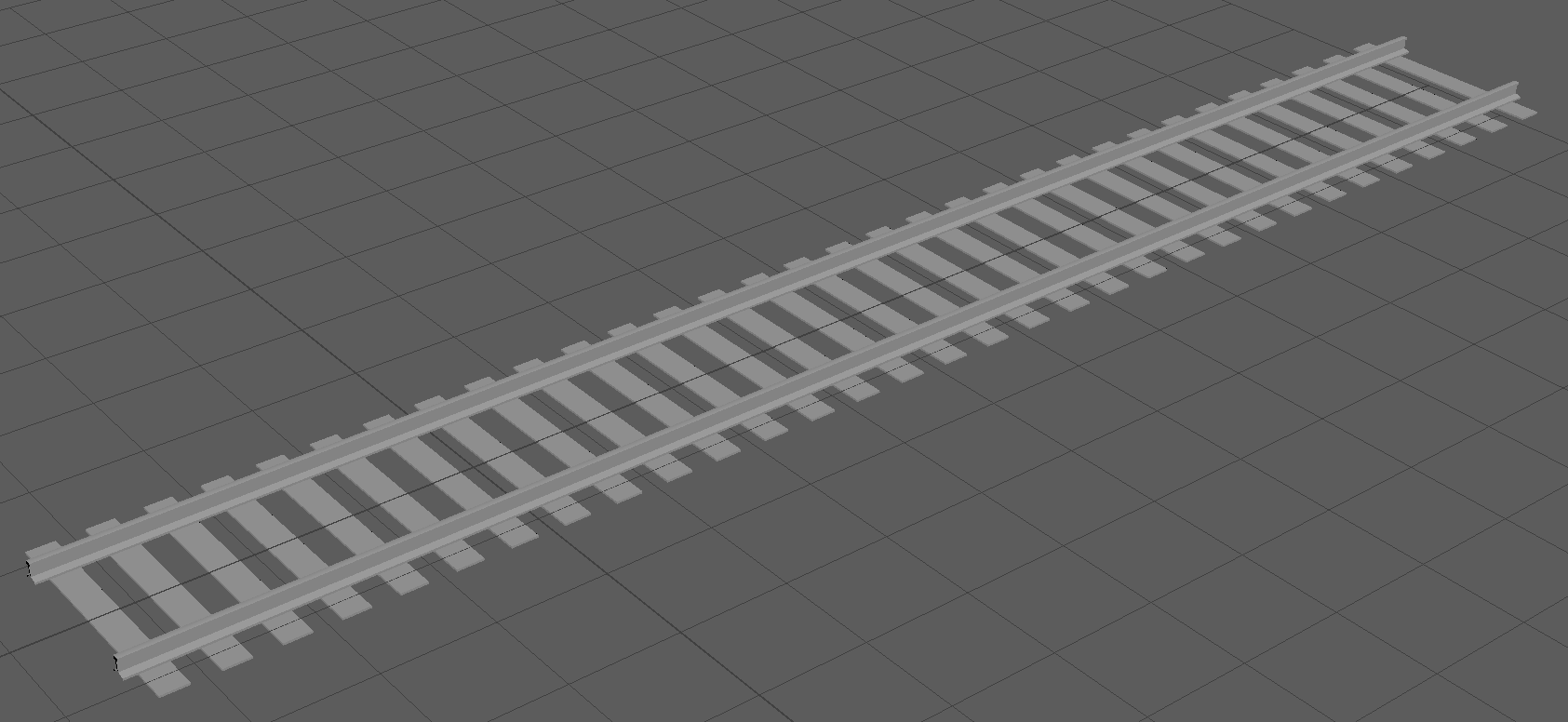
This is a 1 meter long railway, i need feedback on the planks holding the rails together https://i.imgur.com/iYVICQv.png
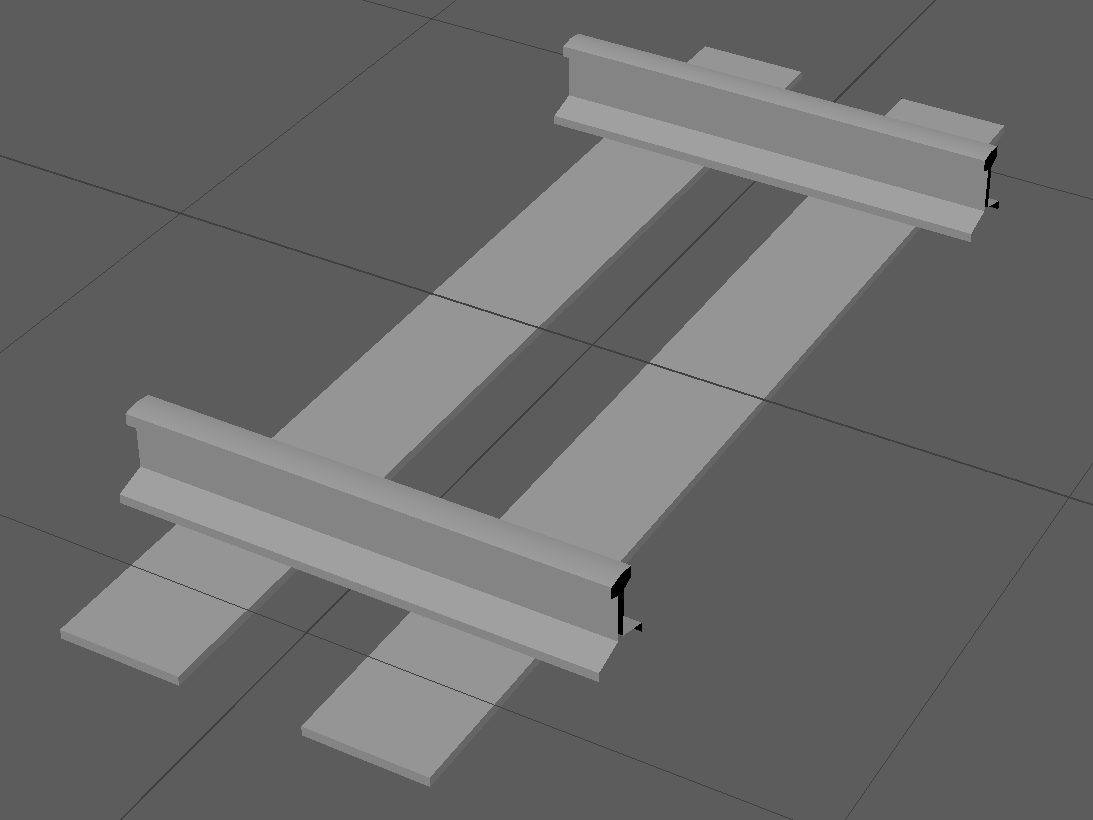
Like should i have less or more planks, change their width? etc etc
gotta be perfect yknow
gusty arch
@maiden tangle I need it to be exactly like the real world
So um guessing sat imagery
next kindle
@odd moat i think the amount of planks would depend on how big you want your pieces to be. Size wise it looks fairly okay but it might be easier to see if it was a longer chunk of track.
the wood planks look a bit too flat for me but they'll probably be like 'in the ground' when actually played in a world anyway so that shouldnt be too much of a problem i think
odd moat
@next kindle Heres a longer one https://i.imgur.com/hzHgFgl.png
 maiden tangle
@gusty arch
https://www.mapbox.com/unity/
https://gomap-asset.com/
both can use sat images
 odd moat
And yeah the planks will half under ground so you wont be able to tell ingame
eager mist
odd moat
sexy knife btw
gusty arch
@maiden tangle can go map be used to texture 3d
Like this
With the buildings too
What about about mapbox
 vivid girder
nice map
near cloak
Omg @gusty arch that's hawt
 stiff stone
eager mist
stiff stone
eager mist
not quite seems good to me,
to flat of a sides,
you use high poly cylinders in a low poly model 🤔
 neat scarab
If u guys export textures to unity with substance painter - what do u do? I guess u guys choose "unity metal gloss " export preset. Thats ok. But do u use roughness or glossiness inside substance painter? Cuz standard is roughness.
fluid oak
@dapper gyro are the hair bones in blender using any modifiers that might not be exported to unity?
dapper gyro
@fluid oak Not that I am aware of, they appear to be setup the same as all of the other bones
fluid oak
Because hair is often set up in different ways from limbs
dapper gyro
Her other hair rigging isn’t warping in rotation and they’re set the same is what I meant
Going to try re-rigging from scratch and see how that goes. Maybe there is something I’m just not seeing
 halcyon widget
[Comissioned work] Looking for someone to help setup an anime hair look for my up and coming game using Unity Toon Shader. Anyone familiar with this shader DM me.
eager mist
something i started yesterday and wrapped up today
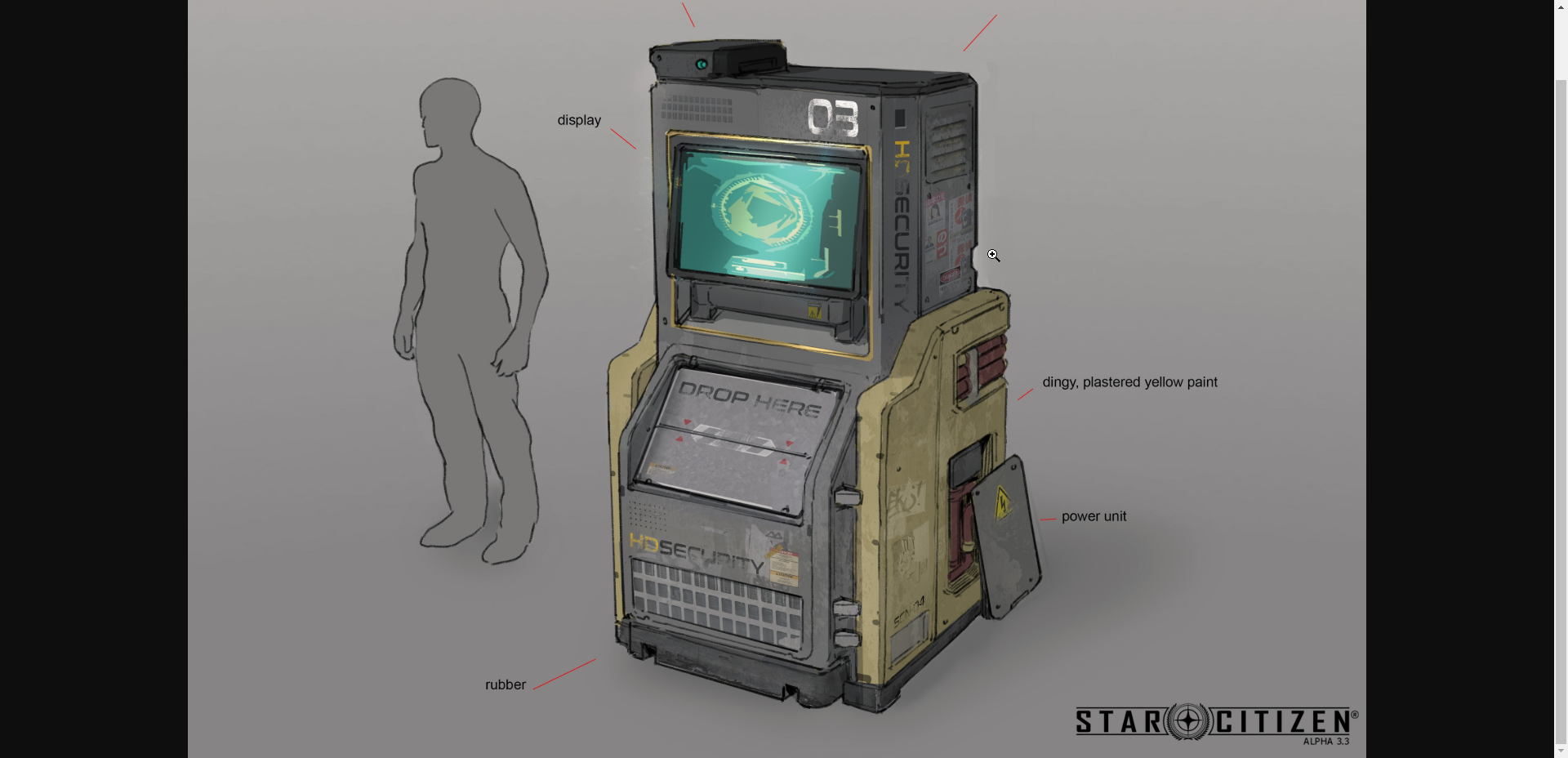
heres the concept piece
nice work yo! got a cool sci-fi ish vibe to it
Thanks 🙂 Glad I captured that feel, the concept is from star citizen 
 versed oriole
Question I couldn't find a proper answer to yet: 3D modelling apps like Blender, Maya, Modo all support mesh instances in the FBX file format. Unity seems to recognise these as well, at least according to the hierarchy. (For example, a quad, a cube and 19 instances of said cube made in modo lead to 1 mesh-item for the quad and 1 mesh-item for the cube with 20 gameobjects total all referring to the cube mesh in the mesh renderer)
But how is that mesh item being handled by Unity / the GPU. Does it make a (noticeable) difference whether you have 1 mesh item or 20? Or are these instances all converted back to whatever the mesh is and treated as unique items?
In other words: What are the pro's and con's of using mesh instances for the specific case of realtime rendering in Unity?
glacial vector
@neat scarab glossiness is just inverted roughness. Painter handles that in the export
junior stone
@versed oriole AFAIK the meshes are just imported together but are handled separately. but its not that big of a difference having 20 meshes of 100 vertices or one of 2000 (this is to scale ofc)
glacial vector
Yes, quite. The memory footprint of the mesh will be smaller. But that's not really a huge problem unless you have very complex meshes. When it's on-screen, instancing doesn't help on the amount of verts unity has to render
versed oriole
Okay, so it doesn't really matter that much and is more of a workflow thing then. Thanks a lot! :)
Sometimes, little questions keep me from actually getting down to the work because I still tend to "over-optimise"... ^^
junior stone
all I can say about that is
dont
I had to load a revit file a while back. that was just hell
had to optimize everything, that I figured out revit files are like doublesided modelled. like double polygons
versed oriole
Ew.
junior stone
that single model was 30 million vertx...
because it was all planes, there was no actual geometry. EVERY 4 VERTS WAS A DIFFERENT OBJECT
versed oriole
Hahahaha
junior stone
i gave it back to the architect like. NOPE FK YOU xD
versed oriole
Nah, I was just thinking about kitbashing and modular approaches for level design.
junior stone
oh for that it should be fine
just make sure you have good collision meshes
how complex are these meshes you are making?
versed oriole
Right now just blockouts, I'm not a 3d artist, just a programmer who slowly dives into 3d modelling and animation.
Just trying to keep everything as performant as possible. ^^
junior stone
on performance then, I w ould like to recommend smt xD
versed oriole
Always aiming for the "FPS OVER 9000!" effect.
junior stone
make sure you have a mesh for visual and collision, separately
if you have a cable on a wall, it wont need collision
versed oriole
Yeah, I thought about using LOD2s as mesh collider as a rule of thumb.
junior stone
I like that, could even be an LOD3 depending on complexity
dunno what style / lighting model you are going for
versed oriole
I'm aiming for stylised realism, just a prototype of a potential remake of a game I used to love and play, which got canned by Ubisoft in 2016 (passion project)
But as I said, for now it's just a blockout.
junior stone
i mean, getting the game blockout and flow right is the first step. after that you add meshes to add detail and make it look good
gritty reef
One of my favorite 3d youtubers (Where I learned most of what I know about 3ds) has started working with Blender now!
https://www.youtube.com/watch?v=p56nY74bSzs

Gumroad - https://gumroad.com/arrimus3d
Patreon - http://www.patreon.com/Arrimus3D.
Artstation - https://www.artstation.com/arrimus3d
Business - 3dtut@protonmail.com
Giving me a thumbs up and subscribing and clicking the bell shows you find my videos helpful. Thanks...
 iron flare
Exported the meetmat from substance to Unity so I would be able to make a custom shader and animate the radar. Worth it.
 tropic willow
For 3D animated models from Maya, is .mb file preferred, or .obj file?
elder pecan
How do I make a terrain turn the color of a material (Not a texture)
eager mist
@terse reef
What app do you use for 3d modeling?
Why are there curves? Is this a high poly?
 terse reef
@eager mist The app is Rhino. A beast of a 3d modeling software. The curves are isocurves or bsplines that describe the surface geometry.. this is a nurb model and not a mesh, so I can export a mesh at various resolutions.. so this can be very high poly
fluid oak
@iron flare wow that looks cool
 edgy totem
Applying a texture onto my material makes it pink, anyone know how to solve?
 wicked briar
What would be the best way to implement a shooting system with a rotation system on mobile?
gritty reef
@wicked briar #💻┃code-beginner or #💻┃unity-talk might be a better place to ask that unless you're asking specifically about models and rigging them.
wicked briar
Okay, thanks
sharp elm
@edgy totem prehaps missing texture or wrongly setup texture
elder pecan
anyone simply just know how to apply materials onto terrain
 untold edge
Anyone know why the texture isn't sticking out at all like a PBR material should?
maiden tangle
@elder pecan It's in the last option in terrain tab, gear icon, change to custom material.
 willow nebula
@untold edge Define "sticking out" ? Are you expecting some sort of displacement ?
maiden tangle
@untold edge I would suggest checking the heightmap, it's incredibly low is it not?
in the textures themselves
mess with the normals as well
untold edge
I actually did go back and do that @maiden tangle @willow nebula however I’m starting to figure out that a more long term problem is taking pictures of things that tile together nicely
maiden tangle
Sorry do you mean the long term solution is taking tile pics? I would suggest checking out quixel :)
But also, there are some tools in most modern photo editing software that allows you to create seamless tiles with a given photo, I'm not saying it would work for things as strict as bricks but it's helped me a lot when I was going that route
@untold edge
you definitely want that consistency in whichever style you go that's for sure! something I'm working on at least
untold edge
Well I’d rather take my own pictures if I can, maybe I need to look into these tile software programs
@maiden tangle I know it’s probably a dumb thing to try and get all the images myself but if I can find a way I should be good
maiden tangle
To each their own :) ps/gimp have plenty of ways to make things tile be it manual adjustment or noise splattering etc
junior stone
to make textures I usually use this xD http://www.boundingboxsoftware.com/materialize/index.php
I hope that link is correct, cuz net security wont let me load the page at work
This newly released, completely free tool, enables you to quickly create several different material maps from a single image, with real time preview, editing and more.
Create Height, Normal, AO, Edge, Metalness and Smoothness maps in just seconds with interactive preview, all...
@untold edge
junior stone
I mean, whats your strategy for creating tiling textures @untold edge
untold edge
I literally started with PBR materials/textures last night so I've not figured that out yet
I just went outside today, took a picture of a wall and later figured out that tiling will be a big problem
junior stone

Textures.com
Textures for 3D, Graphic Design and Photoshop 15 Free downloads every day!
if something is not tileable, offset it in photoshop (or any other tool) with 0.5 on x and y
fix the tiling and repeat until satisfied
junior stone
if you have a texture for pbr its square right?
you offset it by 1/2 of its width
or height
and you fix the part where they used to have an edge
untold edge
I really wish I wasn't so new at this and understood what this all means lmao
junior stone
what part isnt clear? 😄
untold edge
Well I've no idea what a clone stamp is....
junior stone
well, you take information aka clone, and stamp it somewhere else aka paste
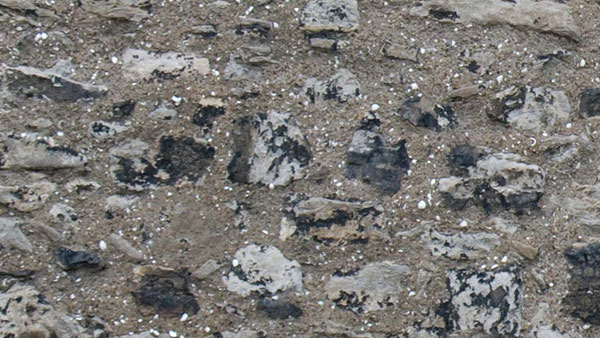
Steve Caplin shows how to make a bigger background for your Photoshop images with a simple solution that you can use to make any texture seamless.
untold edge
so I offset the image by 0.5, which I'm assuming means I move it over to the right by half?
junior stone
this seems to explain the gist of it
junior stone
most of the textures on the site I sent you are tileable, but sometimes you need to do it yourself
untold edge
Yeah they have a tab 'Seamless' which I think is the same thing
Just one other thing, when I create a material, it makes me specify how many tiles it should be. So if I put it on a 1x1x1 cube it has the same amount of tiles compacted into that cube as if I put it on a 50x50x50 cube
junior stone
thats more like a statement than a question tho. What are you asking here?
@untold edge
untold edge
Well is there a way where it auto scales
so if it's 1x1x1 - it tiles 3 times
but if it's 4x4x4 - it tiles 12 (3x4) times
junior stone
thats called world space uv mapping
untold edge
Okay so clearly there's a lot I still need to learn xD
untold edge
hmmm interesting mystery...
 mortal wing
anyone had this problem before? a mesh looks fine in maya but in Unity it's as if blend weights are turned off, we checked the quality settings in unity and blend weights is set to 2 bones, plus, it only happens on that mesh, the rest of the character is fine
EDIT: So it turns out it's because in the Quality settings in Unity, blend weight was set to 2 bones only, but the 3d model had about 5 bones painted in its skin weight.
glacial vector
Have you changed the import settings from 'calculate' to 'import' @mortal wing?
mortal wing
the what? are you talking about the normals?
the normals in the import settings have always been set to import, the normals/tangents look fine, it's the skinning in that mesh I'm having a problem with
dire ermine
🤔
eager mist
I like the overall look
but you went really strong on making edges stand out
It feels a bit forced
As in... two separate color palettes
instead of 1
mortal wing
hmm yeah there's moss on the bricks but the wood part near it seems unaffected
 frail egret

ArtStation
This Game Done In 48hrs For Global Game Jam 2020. Asset And Textured Within Given Period Of Time. Main Thing Is To Maintain Low Poly And Low-Quality Texture. Hydrogen Pump, Gas Can, Fridge, Fire Extinguisher Were Modeled By Teammates Texture done by me. Most Of The Model Done...
dire ermine
@eager mist Thanks, yes you are right it is too much on the edges, will fix it 😉
untold edge
I'm having trouble with PBR textures, I made one with Materialize and it looks good but when in unity it's completely flat
In unity^^
Materialize
willow nebula
It's because the standard shader doesn't do displacement
If it's the "inflate bricks" that you're looking for
junior stone
@untold edge as @willow nebula said, there is no displacement in the default shader, only normal. You need a different shader model if you want displacement, im not sure which, if its even there by default. You may need to make a shader for it
untold edge
oh shit really
junior stone
normal just makes it look like it has depth, heightmaps actually apply depth to a model
if you look at it from the front and with lighting it should look way better than the way you are looking at it now
Do you know what a normal map actually does @untold edge ?
untold edge
pretty sure it shows the angle that that piece is pointing
junior stone
a normal map is a collection of those vectors for every uv coordinate, it is not the angle itself 😄
untold edge
Well I know the basics, I just thought Unity had it in build where it will displace just like Materialize
junior stone
which in turn alters the orientation of the UV coord and makes it look as if the UV location is in a different position
not by default
pretty sure the PBR model in shadergraph has it, but i wouldnt be suprised if its not
untold edge
Soooo I need to try find a shader that works with displacement?
junior stone
yes
willow nebula
Don't know if it's an option, but HDRP has one. It does mesh and/or pixel displacement
 fiery plinth
Hello guys ! I have a quick question. What's the best way to generate collisions for Imported meshes ? Create UCX in 3ds max or generate them in Unity ?
junior stone
high rez mesh (LOD 1) -> low rez mesh(LOD 2) -> ... (LOD X) -> collision mesh (LOD X+1)
untold edge
Right yeah so Unity uses pixel displacement and Materialize does not
junior stone
@fiery plinth
junior stone
in that case you migh tjust be able to do a set of colliders from the LOD 1. depends on the amount and complexity
 untold edge
Anyone know how to install HDRP?
junior stone
@untold edge should be in package manager
@fiery plinth in that case just generate collision with MeshCollider and it should not be too bad
untold edge
Yeah I found it in the end @junior stone I really need to remember to delete my questions if I found the answer sorry! 😄
Okay so I got HDRP working (pretty sure anyway), I set the displacement on my material to Vertex instead of pixel but then it displaces the entire material - so basically shoves the wall forward instead of the individual bricks in relation to the height map, I'll try upping the contrast and see what happens but it seems as if it's still 2D
It didn't make any difference rip
untold edge
there's two options:
pixel displacement
vertex displacement
surely they can't be the same
junior stone
you need pixel dispalcement to displace pixels of the UV. vertex displacement is for objects with altered geometry
you are trying to edit the texture, so use pixel
untold edge
Well I want the bricks to stick out and the cement to stay, pixel makes it look like that if you're looking straight on but it doesn't actually do it
I thought vertex was more what I saw in Materialize where it actually does stick out
junior stone
think about what you are doing
vertex or pixel displacement
if you displace the vertices of a plane what happens to the plane?
untold edge
Well I assumed that unity uses the texture maps to divide the plain into more verticies and then move them
junior stone
thats not a thing unless you do it manually by subdividing
untold edge
Yeah I just tried that in blender
so subdividing does work
however would it then be better just to make a brick wall as a mesh or still better to use PBR material with a heavily subdivided mesh?
junior stone
it depends if you want people to be able to press their face to it
the closer they are to the mesh, the more I would detail the mesh
untold edge
Yeah but how bad will the performance be if I do the subdivide way
junior stone
depends on the scale of your scene.
that mesh in itself wont impact taht much, but if you have millions of polygons in a scene you might see some slowdown
untold edge
I'm very tempted to make an art style similar to Unturned - then just have bigger maps and more dynamic things to compensate
willow nebula
@untold edge If you don't want to subdivide yourself the geometry, look for the HDRP/LitTesselation shader, it will do subdivision for you
Alternatively, when using pixel displacement on the HDRP/Lit, enable "pixel depth offset" and it will appear "like" if the brick wall had a real volume where it overlaps an other mesh.
eager mist
I have a problem importing my fbx model with animations
this is the error description
UnityEditor.ModelImporterClipEditor.FindNextAvailableName (System.String baseName) (at <6f28216fea9f453abf2e05b770ed3ee4>:0)
UnityEditor.ModelImporterClipEditor.MakeUniqueClipName (System.String name) (at <6f28216fea9f453abf2e05b770ed3ee4>:0)
UnityEditor.ModelImporterClipEditor.AddClip (UnityEditor.TakeInfo takeInfo) (at <6f28216fea9f453abf2e05b770ed3ee4>:0)
UnityEditor.ModelImporterClipEditor.SetupDefaultClips () (at <6f28216fea9f453abf2e05b770ed3ee4>:0)
UnityEditor.ModelImporterClipEditor.OnEnable () (at <6f28216fea9f453abf2e05b770ed3ee4>:0)
UnityEditor.AssetImporterTabbedEditor.OnEnable () (at <6f28216fea9f453abf2e05b770ed3ee4>:0)
UnityEditor.ModelImporterEditor.OnEnable () (at <6f28216fea9f453abf2e05b770ed3ee4>:0)``` wheat apex
Would love to know which one you like most A. or B. and why?
gritty reef
A. I like rounded corners
junior stone
A, but some of the buttons on the blue side are not fitting with the red side imo
feels weird that everything is rounded, and the arrows are straight
probably a preference on my part tho
gritty reef
He's consistent with the buttons, so I don't see it as a problem. I'd be bothered if some of the buttons are rounded and some aren't.
wheat apex
Interesting, yeah there is aspects of both which bug me a little, I like the clean look of B's lines, and I like the shape and volume of A... lol
Not exactly happy with layout on buttons on red side, however it is just a small background prop.
untold edge
Does anyone know why Emissive Light from an object doesn't work the same as say a spot light? And if there's a way to make it so they are the same?
willow nebula
You'll need to bake the lighting for that.
Lights = direct lighting
Emissive = indirect lighting
untold edge
I did
it's really...REALLY bad @willow nebula
The light is emitting from an object on the ceiling of that little room there, and it finished baking with this result
This is an image of a normal spot light (though it's in the middle of the large room as seen on the ss) - it's not even finished baking but looks well..yeah
fluid oak
Light objects are an entirely different process from emissive surfaces
willow nebula
Yes, also, baking isn't a magic process that "will make stuff look good"
I suggest that you look at some tutorial on unity light baking and lightmapping
 sage obsidian
Hello fellow programmers! I just downloaded unity and i want to make a game but I've no idea what to do! I was wondering If anyone is willing to help me with learning the basics! In the past I've used construct 2 to make games and I know a little python
 shadow mauve
hey all! for people using unity with maya: do you import your maya scenes directly into unity, or do you export from maya to FBX and import the FBX to unity? i've seen people using both, but not sure if one is more highly recommended compared to the other.
ah ok, to answer my own question, via the unity docs (https://docs.unity3d.com/Manual/3D-formats.html): "Warning: Unity converts proprietary files to .fbx files as part of the import process. However, it is recommended that you export to FBX instead of directly saving your application files in the Project. It is not recommended to use native file formats directly in production."
so it sounds like you should only use maya scenes when prototyping
eager mist
thoughts on text being on the side of the supressor?
something like "5.56mm Carbine"
eager mist
⭐ Looking for one 3D artist to help us finish a Action Role playing game project.
The foundation of the work is finish and built. Just need a bit more work and polishing and. Very very promising project with great
potential. It will be worth your while. DM me for much more info. ! ! ⭐ Rev Share (genre : fantasy , medieval)
untold edge
Anyone know what's causing the light to break through the seams of the wall?
eager mist
Here's a Character I was originally going to use for my Game not sure if I will yet :^) made with Blender
 vestal kelp
Cool!
 reef lodge
I'm using polybrush and I want to use the texture painting. I thought I needed to use the Probuilder/Diffuse Texture Blend shader, but Polybrush doesn't recognize it.
I went to the documentation, and its telling me to use this shader: ProCore/Polybrush/Materials/Standard Texture Blend, but it does not exist nor do any of the parent folders
 primal scaffold
(not sure if this is the right place for this) is there any good tutorials on how to make textures?
 drowsy thicket
I have a 3d model I'd like to use in unity. Last night, while working on attempting to animate it, I learned that it didnt have any bones and needed to be rigged. At that point I realized it was alot more involved than I knew. What kinds of tools dont have a big learning curve when it comes to rigging? I know Blender is probably go to answer but I wouldn't mind knowing of any other paid options that might get me back in to unity and focusing on moving the game forward vs modeling.
I found puppet3d last night too, looks like it can rig about anything is appears to be easy to use.
 tidal cairn
blender is the obvious answer
if you can afford it, learn maya
but literally anything you use for rigging isnt gonna be easy
theres a reason people get paid to do just animations
 light bloom
hey, im like BRAND new to unity, like, i have a little capsule with a camera inside of it off a tutorial on youtube, looking for someone who knows the ins and outs of unity and can help me, preffereably over mic, my goal is to make a game that people can enjoy and have fun jumping around and interacting with objects. dm me if you can help me please. 😛 thanks for your time (yes this is my first time creating a game, and yes i think this is a HUGE and probably imposible but i wanna try still, AND yes im chosing to make a 3d game for my first game :P)
tidal cairn
@light bloom why not just make pong?
light bloom
@tidal cairn bc thats boring
 thorny wasp
i would try learning the fundamentals yourself before asking people for help
light bloom
im trying.
 tidal cairn
sounds like #gamedev
light bloom
can anyone help me😩 😩 😩 😩
thorny wasp
what is the issue😅
light bloom
uh. not knowing how to work this mostly :p
thorny wasp
https://www.youtube.com/watch?v=Iz22-o7l6bc here you go @light bloom do this

Making Snake in Unity Playlist: https://www.youtube.com/playlist?list=PLzDRvYVwl53ucaUs0YGfyyKXdgqh5OtiK
Grab the Project files and Utilities at https://unitycodemonkey.com/video.php?v=Iz22-o7l6bc
In this series were going to make Snake in Unity, it's a simple game which make...
 steep wolf
hey guys, anyone know/have any good placeholder textures (like a grid effect) for 3d platforms and boxes? im looking for something like the valve default texture but i cant find one
or something like this
tidal cairn
I mean probuilder comes with one of those
you could also just get the shit from source/hammer
tidal cairn
🥄 🥣
eager mist
eager mist
reef lodge
Do we talk about shaders here?
tidal cairn
 young thistle
hey guys, i think this is the channel to ask for help. short terms i got a problem with snapping objects together in unity.
If this is the wrong channel, sorry about that.
tidal cairn
whats the problem @young thistle
young thistle
well a question and a problem. Firstly i have a prefab and i'm just wondering is it possible to use the V function to snap it to objects? i am currently just selecting all the objects in the prefab and doing it this way but i'm just wondering if there is an easier way to do it secondly when i paste a prefab and do select all and position it with snapping it seems to be off by the slightest bit where i can see through the gap if i move and look at the gap.
young thistle
?
eager mist
 chilly oracle
Looks very detailed, going to use it in a game or as a cutscene thing? @eager mist
eager mist
Modeling isn`t everything.
You need to take into consideration texturing too.
Unless...
You use flat colors like I do. 😆

 placid kindle
@eager mist mmm I do hand painting in blender, in fact I do everything in blender and occasionally I help myself with KRITA, but for example this is a sample that I just started, hand painting with Layers in Cycles
eager mist
2.7 ewwwww
placid kindle
@eager mist it's my own fork an works well, do you have your own fork of blender ?? ooh you don't have it, I'm very sorry, forget that you are just a common user trying to make a game that is not going anywhere, well I get paid to improve things of blender 2.79c, or I'm sorry once again, you just came to version 2.79b and you think you're better because you use 2.8, what a shame, when you get an AAA model let me know and then I'm interested in what you think
eager mist
@placid kindle i use 2.81...
its kinda pathetic how literal u took that statement ngl... and imagine thinking, someone thinks there better for using a more recent version of a software, can people not have opinions in ur world? Also I can link u my art station if u wanna give me a follow lol.
eager mist
bubblegum skull 💀
placid kindle
 river marsh
I need some help with a unity project im working on if anyones still on
junior stone
@river marsh are you talking about needing help on a project to make it, or an issue you need help with
river marsh
i have a issue
junior stone
so... what is it xD
junior stone
sure
junior stone
the black could be inverted polygons
river marsh
how would i fix that
junior stone
you flip em in modelling software
river marsh
the eye textures are spose to be completely transparent
junior stone
you'll need to boot up blender or something similar and check the mesh for issues
junior stone
im gonna assume you didnt make that mesh, does it look like that where you found it?
river marsh
yea
i just dragged it into unity and thats what it looked like
im currently trying to get it into vrchat
junior stone
might have something to do with the character tools for VRChat in that unity project. Im not sure what this is other than a wrong UV map
river marsh
ok
 sullen plank
@wary eagle Please don't advertise outside of the appropriate channels #📖┃code-of-conduct
 sly path
Is there any further documentation regarding the fbx import when it comes to visibility ? I have a hidden object in 3ds max however importing the fbx doesn't turn off the mesh renderer as the import setting hints.
junior stone
I just got a model from an artist I commissioned. but she used 3 different texture maps. is it worth it to retexture it to map them al in 1 uv space instead of 3 different texture channels?
 near canopy
junior stone
near canopy
junior stone
that was the plan, I was just wondering if it was necesarry or not
shouldnt hurt tbh
1 texture is better than 3 when it comes to adding meshes to a project
ty
 bronze kite
 fluid quiver
In Blender, how do you use the "Tweak Left" keymap? I tried left-clicking and moving the mouse, but all that does is start a selection box.
eager mist
hell yeah man nice job 🌚
i wonder what it would look like with smooth faces xD
(smooth shaded)
junior stone
im going for a very low poly stylized version, that screenshot is in 3dsmax. so i dont have cell shading there rly
eager mist
very nice
junior stone
this is more or less my inspiration
eager mist
i love low poly yo
eager mist
nicee, will have to update us when you have some animations!
eager mist
xD same
eager mist
I main at art but more general with coding and other stuff
junior stone
I wanna learn 2d stuff. but i ve never gotten further than spritesheets for particles
eager mist
aw yeah! that's a good start I reckon, can always expand to bigger graphics along the way
and learn all the fundamentals xD
junior stone
I am also working on a game where I want a flame particle. but im conflicted whether I wanna do a 3d flame or 2d spritesheet with billboarding
my particle knowledge is unreal engine sourced tho. but cascade and shuriken are both nice particle engines
eager mist
I haven't dug into particles yet but 3d flames sound cool and would be more realistic
junior stone
you can also assume it ll be the same style as the image I linked before 😄
eager mist
ahh true! I could possibly see flames with that style haha
junior stone
a 2d flame might come of weird in that setting, so i should probably go 3d
eager mist
yeah that's what i was thinking, the 2d flames would look out of place sort of, it could work though if there were other 2d animations/graphics in the game maybe
junior stone
the only 2d animations will be UI and billboard in the city section
eager mist
could experiment with tiny cubes for a 3d flame 👀
junior stone
thats what i ll probably do
eager mist
🔥
 drifting pine
Hey, anyone there who can help me
junior stone
@drifting pine https://sol.gfxile.net/dontask.html
drifting pine
Okay...
junior stone
its just my go-to answer when that is said tbh. im not trying to be rude
whatcha need?
drifting pine
I was trying to follow a brackeys tutorial on a 3d character controller and i copied the script practically verbatim and unity just REQUIRES a “,” at a spot
I put a comma there and it still wants a comma there
junior stone
not quite sure you are in the right channel in that case #💻┃code-beginner might be better
drifting pine
Oh, thank you
junior stone
@eager mist dont multipost
 hardy shadow
@eager mist Please stop spamming or you will be banned from the community
eager mist
Please tell me how to import from magical vortex to unity
junior stone
has it occured to you I might not know how to do it?
hardy shadow
Delete your posts please
junior stone
thx @hardy shadow, sorry to bother. but I think I had to
hardy shadow
Not at all 🙂 thanks for the ping
eager mist
Ok
junior stone
trying to keep it civilised in here, even tho im just a member
eager mist
We are all friends here
hardy shadow
We're all part of the community  no such thing as "just" a member
eager mist
What's your age
junior stone
24
eager mist
IAM 13
junior stone
if I delete a mention, does it still highlight the chat for them?
I removed the mention on Fogsight since you took care of it
eager mist
it will remove the highlight for them
junior stone
ok, good. i dont like bothering them unnecesarily
hardy shadow
They'll still get the notification, but the highlight will disappear 🙂 don't worry though, all sorted!
 junior stone
so uh, what even is magica vortex, google is coming up empty
i assume its a voxel 3d editor but I cant find it
eager mist
what a lit name
junior stone
did you mean magicavoxel? @eager mist
@eager mist https://www.voxelmade.com/magicavoxel/ this might interest you actually xD
eager mist
Looks cool I'll have to try it out 🌚
Hi
I gonna show it to you
@eager mist
ok
One minute
junior stone
yup thats magicavoxel
eager mist
But how to import to unity
junior stone
you export an fbx or obj file
eager mist
I will try
junior stone
as with any 3d software
eager mist
junior stone
how do you even go from magicavoxel to magical vortex tho...
eager mist
It's don't let me
junior stone
my man pixels
eager mist
But it's don't want
junior stone
i ve got idea whats on your picture, its blurry as fk xD
eager mist
I now because I haven't focused at it

Unity is the ultimate game development platform. Use Unity to build high-quality 3D and 2D games, deploy them across mobile, desktop, VR/AR, consoles or the Web, and connect with loyal and enthusiastic players and customers.
this answer may help you yung fish
And now
junior stone
yung fish xD
junior stone
hahahaa
junior stone
get owned @eager mist xD
 junior stone
no, you are paper mario wiki
junior stone
01110011 01100101 01101110 01100100 00100000 01101000 01100101 01101100 01110000
eager mist
That you have send
It looks like a benary
I understand it
F••• out
what does it say?
eager mist
xD

Super Mario Wiki
Paper Mario, known as Mario Story (マリオストーリー Mario Sutōrī) in Japan, is a role-playing game developed by Intelligent Systems for the Nintendo 64, and was later re-released for the iQue Player and Virtual Console.
Paper Mario has the player taking control of Mario on his quest t...
x(
junior stone
dats a nice render
junior stone
doofenschermitz evil incorporated
eager mist
What
junior stone
you're too young to get that reference
sullen plank
sullen plank
!mute 674600059832369154 60
 lilac edgeBOT
 Legendary_GAMER9999#2868 was muted
junior stone
@sullen plank I am aware, we were helping him. but got insulted...
so it kinda went off the rails...
@eager mist did you render that cube or just google an image?
cuz that looks dope af xD
junior stone
i ve been using 3dsmax since I got out of school with knowledge of it and never learned blender
the UI just feels weird to me
the scripting however, OH BOY
eager mist
I haven't had the chance to use other industry standard apps, used Blender for years though love it Blender 2.8 got a big ui update so it's much better than it's previous self haha
junior stone
i just keep messing up with the shorcuts and mouse interactions since they re different from max
i know blender has a setting for it to match tho, but still
junior stone
you hand painting those textures?
eager mist
yes : )
junior stone
oooooooh
eager mist
HAHA 😈
junior stone
I have a wacom and substance painter, pls help Natho-sempai
oof, i got distracted and went full otaku there
eager mist
oof substance is so good i wish i had it
junior stone
uh
eager mist
one day
eager mist
I texture with Blender tho
junior stone
Buy 3D-Coat license: ✓Professional ✓Educational ✓Floating ✓3DCprinting ⏩Windows, Mas OS, Linux supported — Prices & Comparison
100 dollars, amateur license
not sure what a 3dc prnting license is
eager mist
that's pretty cool will bookmark for later 🌚
junior stone
if you are a student, you can get a free substance license
eager mist
hell yeah
junior stone
yearly renew as long as you study
and you get discount after you r done
its like 70 a year or smt
substance > 3dcoat tho
all the way
what are you gonna study 😄
eager mist
Game Art & Animation yo! that's what I would like to study atm haha
junior stone
where are you doing that? sounds interesting
eager mist
would be at AIE
junior stone
oh its an online campus
eager mist
no no on campus : )
junior stone
interesting
https://www.digitalartsandentertainment.be/ I did here, its all round good for everything with games. nr1 game dev worldwide last year 😄
The DAE curriculum educates you to become an entry level technical artist for the international game or VFX industry
eager mist
ooo cool!
junior stone
but where did you learn to hand paint like that?
eager mist
yesss
junior stone
dude how do you even get started on that
eager mist
that's a tough question xD
junior stone
I know how to unwrap, texture and stuff. its just the "how to handpaint" part
eager mist
it's pretty much like painting on a normal canvas but 3d, gotta study textures and materials understand them and practice painting them
junior stone
god im in for some hardcore learning curve
eager mist
mm yes digital art is a big subject as is art in general xD
I only just got into making and texturing game assets since like December 2019!
some work 🌚 https://www.artstation.com/nathostevenson
 junior stone
ooh
as a programmer I dont rly use artstation. I have my portfolio but tahts a WIP atm
eager mist
artstation is awesome so much amazing work on there
junior stone
artstation and sketchfab
eager mist
what type of project are you working on rn may i ask?
generally curious
yess i wanna upload to sketchfab one day
junior stone
story driven game with player based decisions having consequences on the story 😄
my elevator pitch:
The game is an rpg game where you try to keep the balance between the two dimensions. Where player choices are central, but the world can also be influenced by AI.
eager mist
oh nice! sounds pretty cool 🙂
junior stone
I dont know yet if i am going to release it for free or not. but with just 2 programmers its rough to even make stuff...
junior stone
still looking for a 3d artist ||cough please help cough||
junior stone
to get an idea for the style you can kinda look through here
https://assetstore.unity.com/?q=synty studios&orderBy=0

Discover the best assets for game making. Choose from our massive catalog of 2D, 3D models, SDKs, templates, and tools to speed up your game development process.
(not the simple assets tho)
the POLYGON - Title ones
eager mist
very NICE
junior stone
im still looking for an artist to help out xD I can do every aspect, but am concerned about the time investment if I do
and commisioning it all is not an option... that d be insanely expensive
if I do end up selling it, i will do it revshare tho. but first im making a demo to see if people are even interested
eager mist
hmm you would need a lot of models right?
junior stone
well, I do have a fair amount from the synty store
eager mist
nice xD
junior stone
those are a good base, but I wont have everything ofc
if you are interested I could invite you to the discord server, if only to check it out
(need to add you as friend for that, im not putting that link in here. and I have dm disabled cuz spammers xD)
eager mist
i am some what interested 🌚 sure i'd like to see
 humble barn
Hi! Quick question, I just imported a .fbx model made in blender, and wanted to see if the blendshapes had imported properly, but they show up like this (sliders have no circle thingy)
And if I change the values by hand, well...
Using blender 2.8 and Unity 2019.1.8f1 btw
Has anyone run into this before?
 halcyon lantern
Hello 😄 When importing a model made in blender the textures wont show. Why is that?
In blender:https://gyazo.com/7e34d01b278f290ac1991571d9ba5da0
In unity: https://gyazo.com/060b69b4dea7f52a600d468cd863dfe1

 junior stone
is it worth it to get the substance painter subscription or should I get the 2020 version from steam?
its like 100 euros cheaper, but only updates to 2020
how much does substance actually change with updates in you guys' experience?
eager mist
@halcyon lantern you need to import your individual textures into Unity and then create materials with them then add the materials to your object
halcyon lantern
@eager mist How do I do that? Im totally new to Unity
eager mist
Create a folder called Textures in your Assets folder & import your textures there
then a Materials folder and create materials there
halcyon lantern
@eager mist Thanks!
halcyon lantern
Why does this happen?
https://gyazo.com/147b0c0886fc29c47a1ccd60ae0e901d
I followed this tutorial: https://youtu.be/y7PdiGXbrD0?t=47


Learn how to Create a Low Poly Tree in this Blender 2.8 Tutorial in 1 Minute! Perfect for Game Engine use. Download Tree Model on Patreon: https://www.patreon.com/cggeek
HELP US ACHIEVE OUR GOAL OF PLANTING 20,000,000 TREES!
PLEASE DONATE ! - https://teamtrees.org/
Low P...
halcyon lantern
There is yeah
junior stone
ooh