#🔀┃art-asset-workflow
1 messages · Page 39 of 1
 limber field
 glacial elm
ok. then its defintly that you want to shade it flat. but i dont think im too knowledgable with how to do that since your scripting it in unity and i have no idea what you really mean by that. there are many ways to script. so ima let the tech artist help xD
if it was in blender then just highlight the object and press t
on the left a menu should pop up. just click flat
limber field
then in unity, just make sure you import the normals, not recalculate them
glacial elm
@neon wedge got it?
 neon wedge
@glacial elm I see your screen shot there.
neon wedge
@glacial elm OK, so it's literally a boolean switch.
I'm gonna try the Blender thing, then try importing the normals.
There's so much to learn.
@glacial elm Looks like Blender doesn't support .mesh files.
glacial elm
yea it doesnt
neon wedge
Can Unity export/convert? I'm assuming not, but it's worth a shot.
limber field
I think you can hack unity spitting back out an fbx if you are making meshes in the program, but why do you want to do that?
neon wedge
@limber field Just for fun. Actually it's because I know C# but don't know Blender and it looks big and scary whereas C# is nice and friendly.
limber field
@neon wedge are you doing procedural or script made meshes?
neon wedge
@limber field scripted. Nothing non-deterministic, just make the mesh and save it to the hard drive.
glacial elm
blender is very friendly trust me
if you want il just save you the trouble and give you the fbx of the mesh you want xD
limber field
neon wedge
Generation code
glacial elm
I've made much more complex models, this is just a pyramid so you can have it if you want
paste the code on pastebin if you want to share it
neon wedge
Thanks @glacial elm.
neon wedge
@limber field That looks like it's ideal!
 eager mist
did you just call Blender ''friendly"? 🙂
glacial elm
😂
limber field
I think there are mesh formats you can probably write to that are ascii also, but that'd way too fun 😛
neon wedge
@glacial elm I learned what UV is yesterday. Do the default bodies have a UV map?
glacial elm
i dont understand what your question is really
limber field
@neon wedge https://assetstore.unity.com/packages/essentials/fbx-exporter-101408 there you go
NOTE: The latest Unity FBX Exporter is available in Preview via the Package Manager from Unity 2018.3+. This version here on the Asset Store is not the most recent, doesn't have the newest features, and will eventually be removed.
The Unity FBX Exporter package makes it sm...
limber field
@neon wedge yeah, the blender primitives have UVs
neon wedge
Amazing. Thanks @glacial elm!
glacial elm
np
neon wedge
@limber field Sorry, I meant the Unity ones.
limber field
they do too
glacial elm
@limber field Not really no. the blender main shapes dont have preset UV's
Unity does though
limber field
wow, really, maya does, that alone is worth the 300$ a month!
glacial elm
lol
well not really. its fairly easy once you practice and its not too annoying. plus there is smart UV so i could smart UV anything if its not for production and i dont care how its textured
at the end of the day you could do triplanar texturing in substance painter and just mask the parts which you want to be rotated a bit differently. xD. i dont advise it. but its doable
glacial elm
u use modo huh
neon wedge
Microsoft 3D Paint FTW.
glacial elm
xD lol
eager mist
Turns out... I use Blender now.
eager mist
I do have a MODO 903 as backup.
limber field
maya, not great UV's though 😛
limber field
I go back to Lightwave . .
glacial elm
blender 2.81 keep that away from me
i stuck to 2.79. i like it WAY BETTER for production
eager mist
You dont like random crashes??
eager mist
Not even folders
glacial elm
i dont like the fact that some of the hot keys have been changed. and most of the plugins if used dont work on 2.8
eager mist
more like wtf is this
eager mist
Modo works with folders
neon wedge
Actually, my tetrahedron is rendering the same as the other Unity primitives.
eager mist
works great
eager mist
I dont even know what to call that in blender
glacial elm
i like this more. this is how it is in 2.79
you just click one and there you got a new layer you can work on seperatly
and you can work on multiple at once too. same in 2.8 but not shitty folders
neon wedge
Can blender generate meshed via script?
neon wedge
Cool. Next thing to build is an octahedron and I don't want to have to do it by dragging vertices with the mouse.
 pallid lily
idk if i should ask in animation or here, so sorry if this is the wrong chat
glacial elm
thats a animation question
would copy it, delete it from here. and paste it in animation if you want a answer
pallid lily
alright thanks, doing rn
glacial elm
xD. np man
@limber field 😂 i love how i told him that. and went straight to animation and answered his question lmao
limber field
oftentimes asking a question helps you figure it out
glacial elm
the thing is i knew what his issue was. but just wanted to answer it in animation not here cause some mods can be a pain
limber field
oh, you answered it
 sacred root
When you try to make a futuristic looking building for your game and end up making a 1960's hotel
limber field
retro future, nice
sacred root
Would be a nice building for Left 4 Dead
 fierce eagle
sacred root
fierce eagle
sacred root
Defiantly
limber field
is that for a game? how do you plan on using it?
sacred root
Well, I've decided to make some renders of some models as I'm going to attempt to get a publisher or investor for my project
glacial elm
@sacred root nice. I actually have been thinking of just working on a environment showcase just for fun and to showcase on my CV. if you got experience too and got some time to spend for a hour or so a day. we could probably colab and put them out on our port folios.
would be worth it
sacred root
@glacial elm sorry for the late response.
If you are willing, I'd like to collaborate with you. I'm working on a game demo and I have the coding part covered by me, but my skills are lacking in modeling. So we can work together. I can use the models to help present the project and you can use your models for your portfolio.
DM me if you are still up for it
And I ended up giving up and turning it into a 60's hotel
glacial elm
@sacred root oh. yea thats kinda not what i was thinking xD. I wanted another experienced 3d modeler so we could make something to showcase on ports like just a environment not a game. but would have done it if not i already worked on a game for a studio
sacred root
Ah, no big deal
 sacred root
I should take a few days off and learn modeling a bit more in depth so I can make stuff like this
glacial elm
this takes way more than a couple days to learn trust me xD
sculpting,baking,texturing,modularity. The foliage its self is a pain
glacial elm
@sacred root i makem
substance designer for making them. substance painter for making them if they are steel based or just texturing the materials i made. I even photoscan some time
sacred root
Alright, good to know
glacial elm
np
eager mist
Depends
Everyone is different.
Some people will take 30 years to get good at something that someone else can get good at in 1 year.
As much as I can do my own concepts, I'll never be as strong as Tor Frick (who design 3d stuff on the fly directly in his 3D viewport) or specialized 2D/3D concept artists.
My brain just isn't wired that way.
And it's important to know and acknowledge what you are naturally wired for.
I think it's totally possible to learn how to reproduce the image above. It's not a difficult task if you have references.
That's very different from recreating similar scenes totally from scratch
 wide elk
Hey guys, not sure if this is the place for my question, but is Probuilder intended for prototyping only? From a performance point of view
limber field
@wide elk I'd say yes, or at least for a base of geometry that you could add detail models to
 rotund karma
wanna know something sad
wide elk
@limber field I'm wondering what the production workflow is - modular level pieces in a modeling package exported into Unity and then build the level that way?
limber field
for structures that is a smart way doing tilesets, build things out of pre-fabricated 1 to 4 meter chunks
for reuse, better culling and instancing, and better variance for less memory
wide elk
@limber field thanks, that makes a lot of sense. I'm basically tossing up different ways of making levels with a focus on performance, I'm looking at this approach, Probuilder and also 3rd party CSG plugins (RealtimeCSG) I'm not sure how well the rest play with occlusion culling
 amber walrus
@regal light Might need to set the texture in material settings
 regal light
where the fuck is material settings
amber walrus
Material Properties
amber walrus
Unless you run 2.8 😛
regal light
where
amber walrus
Image texture
regal light
where
amber walrus
Ffs look at my screenshot
limber field
yeah, this is going well 🙂
amber walrus
Indeed
amber walrus
regal light
ok object is imported
new problem :)
why is it white unless it's under a shadow
the light surface hella reflects
wide elk
So does anybody use any CSG plugins for production? Or just export modular blocks out of Blender?
amber walrus
Tried Probuilder?
wide elk
@amber walrus yes, but I think it's more suited to prototyping, not production. I've read some threads about it not playing nice with Unity's occlusion culling
amber walrus
My understanding was that you could produce clean stuff with it
 dense blaze
does someone know a good engine for 3d modelling? I want to make a crawling ghost
a easy one
wide elk
@amber walrus I think there's an open ticket with Unity at the moment about an occlusion culling issue with Probuilder
 dire ermine
 spice lion
Hey, I am importing my model from 3DS Max, and it has 138 vertices, when I import it to unity it jumps to 188 vertexCount anyone know what is happening?
limber field
unity can count verts in different ways, things like UV shells, split normals (faceted edges) etc, I wouldn't worry about the #'s unless you see a visual artefact you don't like
 keen ermine
is there a more efficient way of making the collisions for this except just pasting box colliders and adjusting the size and location
limber field
if you really need to have physics objects go through the slats and bounce around, yes
keen ermine
alright
any way to make this tidier? like have it one folder or something like that
limber field
one folder?
there are no compound colliders in unity, though there is one in the asset store
keen ermine
and what would be the efficient method?
limber field
that is as efficient as it should be if you want that kind of physics action
what do you want to happen?
keen ermine
what i want to happen is i want to have rigid bodies on the shelves and then a cube can push the shelf over and the boxes inside the shelf also fall out etc
the box colliders made it work basically perfectly i was just wondering if there's a more efficient way of getting a collider for such an object
limber field
you have it right then
the only think you 'couldn't' do with that set up is script a collision on it, as you can only have one collider of each 'type', and making child gameobjects is a mess
glacial elm
@limber field Hi. So my team thought that it might be a good idea to give unreal engine a shot and try to decide if we need to switch to reach our goals,etc.... but there is this wierd error we got. The animator isnt here today so thought i can ask you. Unreal is saying: multiple roots have been found, unreal only supports one root bone. (Im trying to import the character mesh)
limber field
@glacial elm sorry, not that experienced with the character or skeletal mesh stuff, we have a separate team for weapon and character rigging. What does your hierarchy look like though?
glacial elm
to be honest i think i should wait for him. Its not my job either but he isnt here today. Shouldnt waist my time on it. And neither should you. thanks for wanting to try though
limber field
but try stuff with the hierarchy, maybe names are weird, etc
glacial elm
true. il see what i can get going
limber field
yeah, sometimes there are non existent visual gaps, do you see them in game?
 hidden whale
Yep
limber field
isn't probuilder pretty nailed to the grid when you place things and move faces around?
limber field
ah, maybe have them clip into eachother a bit, not sure
thought that icon bar on the top left was probuilder
hidden whale
Thats progrids
glacial elm
i can see many parts you could just bake for optimization xD
eager mist
Is that the finished typo for that lamp?
 tidal temple
Lunar Pillars from Terraria in 3D (made in Blender, textured in substance painter) https://www.youtube.com/watch?v=k5vSMpa_HOU

Lunar Pillars in 3D, which shows how horrifying Terraria would be in Real Life.
Skip to 3:46 if you don't want to watch me make it
🡆 New? Subscribe: https://www.youtube.com/channel/UCv07KD2HKHRKD80hcsu9LOA?sub_confirmation=1
🔔 Enable Notifications So You Don't Miss a...
 dawn ember


Bitmap Biplane
Based on the British Avro 643 Cadet!
#PixelArt #LowPoly #Blender3D #B3D
View on Sketchfab: https://t.co/vc2rP2AXgx
(Free Download) https://t.co/t06vHi1M2j
 Twitter
My first time using pixel-art in 3D!
spice lion
@limber field you said unity can count verts in different ways (UV shells, split normals etc), I edit the mesh using a point cache I loaded so I need the point cache to match the model vertices, how can I found out what unity does in order to prevent them/doing the same thing for the point cache(?) or maybe something else that could help me
If anyone could help me too that would be great, this is the original question:
Hey, I am importing my model from 3DS Max, and it has 138 vertices, when I import it to unity it jumps to 188 vertexCount anyone know what is happening? (I am trying to animation a model using point cache, but there is a vertices mismatch)
eager mist
no it wasnt a game asset
just a high poly lamp 😜
dense blaze
where do you guys make materials and textures?
limber field
@spice lion what are you trying to do here in unity with this model?
 willow nebula
@limber field Two ways to have the same number of vertices in your 3D soft and Unity :
- split ALL the triangles in the soft
- No hard edges and no uv stiches
 minor escarp
Hope this is the right channel, but i'm new to Unity and i'm using the Polygon Starter pack from Synty and.. i hope this isn't a stupid question but how do i pose a model. They are pre rigged and everything i believe, i just want to pose it so it would stand still. It's stuck in a T pose now
limber field
@willow nebula this doesn't test out, I have a a sphere with no hard edges and no UV splits (planar) and the vert #'s are different, could be different in other packages, have to test
there might be settings to match them, unsure
willow nebula
@limber field also double check to disable "generate lightmap uvs" in the mesh import settings
limber field
@glacial elm so when do you get kicked off this Discord 😛
glacial elm
Thats exactly what i was thinking 😂
limber field
@willow nebula my settings which are not changed from default on my version 2019.2.15f1
willow nebula
Okay, something else must be happening here 🤔
limber field
I can check blender too
glacial elm
but to be honest i do like both. I just like ue4 a lot more for graphics cause of the better lighting engine mostly. And unity cause i used it a lot and i enjoy c# more than blueprints. but honestly its impresive how quick blueprints are. a player movement script i make in c#, which i've optimized a 100% completly i believe. That script is about 40 - 50 lines. blue prints took 4 nodes
@limber field btw about your issue. dont worry about it. tris is whats important at the end of the day. Your tris (polies) are perfectly fine
limber field
@glacial elm yeah, blueprints can be helpful and are great for design level stuff like some interaction stuff, you'd just need some c++ to add nodes and to expose stuff the designers need
glacial elm
true
limber field
@glacial elm actually verts are what it's about when doing point cache stuff
limber field
no, he was doing some point cache stuff I guess and noticed the #s were different in the verts from 3D app to unity
glacial elm
hmmm. i think i know whats wrong
quads get split into triangles. So each vertex count increases by *3.
And it happens even more often when you have stuff like lighting involved. Thats cause of normals being calculated
limber field
even with smoothed it's the same, it's probably the way the mesh is stripped is different
glacial elm
Are you using any modifiers?
limber field
no
I've noticed this in the past, but it was not a big deal as I was manipulating the mesh in unity not trying to match, things from 3D app to Unity. But if they want to do blendshapes unity will handle it all and it should be fine, not sure why you'd want the #'s to match anyways
glacial elm
@limber field did you try exporting another file format even though it doesnt make sense
But to be honest. it's just that unity counts verts defirantly
limber field
what else does unity accept, obj?
glacial elm
yes
limber field
I was going to try blend later
limber field
thought maybe it's an fbx thing, but I really just think it's the way unity processes incoming meshes
eager mist
You are supposed to triangulate meshes before export.
Always.
In most apps, there is a tool for this.
eager mist
If you dont triangulate yourself before export, the game engine might flip edges in an undesired direction. That is all...
limber field
yeah, not talking edges or triangles, talking verts
limber field
nice and helpful
eager mist
more like... 3d apps and unity arent the same. yep. it is true 👍
limber field
well a person on this channel asked a question of why that was happening, I answered, don't know why this is an issue
eager mist
it isnt
for hours was an observation.
not a complaint
jeez
🤣
If this server is active.
im good
limber field
well anyways, it's probably a format thing like this https://en.wikipedia.org/wiki/Triangle_strip
A triangle strip is a series of connected triangles, sharing vertices, allowing for more efficient memory usage for computer graphics. They are more efficient than triangle lists without indexing, but usually equally fast or slower than indexed triangle lists. The primary rea...
 rapid yarrow
Hi everyone, I have a question for you, I bought a 3D asset from the Unity Store, mainly 3D weapons. I want to use them in a commercial project and now I wonder if they are legal copies at all. I asked the seller of the assets the same question and he gave me the tip not to use the official names and that such assets (3D weapons) are often copied and it is tolled.
What are your experiences when you create 3d assets and these are similar to existing items. How do you deal with it, do you get legal advice and what do you do when you sell them?
What would you advise me to do?
 idle halo
@rapid yarrow ask a copyright lawyer, and google copyright law is the best advice i can think of. If some one creates something to be a replica of a copyrighted work, let say 'micky mouse', Disney could have legal grounds to enforce their copyright. However, if the model looked 'similar' and was named 'Ricky Rat', then you can differentiate on the grounds of 'parody' or an 'original work'. The unity asset store allows a customer to the downloaded assets into unity for their game project without issue, however, it doesn't grant permission to resell the assets in another package, or on another store, pretty much just to 'use in game'. My advise is to create original stuff to cut down on the risk of having to deal with copyright infringement.
an example of the differentiation, take a look at knock off sodas and products at the super market. they walk a fine line.
eager mist
it is case by case
imagine if everything was copyrighted
would be ridiculous. how would you make games, films and 3d films
cars and guns
something to worry about
interesting read
https://rodriqueslaw.com/blog/how-use-brands-and-products-film

Rodriques Law PLLC
Trademark law serves to aid consumers in identifying and differentiating between brands, as well as to protect the trademark owner’s goodwill and reputation.
Fun fact. Epic Games got troubles for the copied dance moves in Fortnie
eager mist
but apparently you cant own dance moves
 violet swallow
hi all; I just tried to import a fairly basic blender model into a new unity scene
It seemingly totally lost an individual surface, isn't properly importing the materials / textures, and is culling some wall meshes
it appears to be a total disaster and I don't even know where to start fixing this.
limber field
hi @violet swallow, can you show the model?
violet swallow
Sure! here are comparison pictures.

This is the model in blender
- lighting (which is fine if I lose)
Here's what I'm seeing in unity: https://cdn.discordapp.com/attachments/481622976408715274/664302603689263114/unknown.png

Note that the cone surface is completely lost
limber field
so some areas are inverted? or just not there, like those back walls, are they facing the other way?
do you see it in wireframe view?
limber field
yeah, you need to flip them if you want them facing in, your walls are all facing out
make sure in Blender you always have backface culling on
violet swallow
so from that camera angle in wireframe view I don't see those walls
but if I spin it I do seem them
limber field
yeah, you need to flip those faces
unity by default culls backfaces with the materials, which is something you want to do
so in blender you need to turn on backface culling and flip those faces
violet swallow
@limber field okay cool, I'll work on that
what about the materials / textures just totally being messed up
limber field
so in wireframe do you see that cone at all?
for the textures and materials, I honestly just do my own, I tell unity to only give me the mesh, don't import anything else, then I make my own materials and import the textures, set those up, etc
somebody here might have a better plan for getting unity to always get those right, I just don't have any luck
limber field
oh, I see, that is strange, export it on it's own for a test
what kind of objects are those 'Light' ones, do they come into unity as lights?
violet swallow
@limber field here it is in unity (highlighted):
limber field
oh, maybe that isn't supported, you might need to bake it down to a mesh
if you make a new blender scene and import that FBX you made, do you see that Surface object?
can you show also your Import settings for the asset, click on the 'stockroom' object in the project (not the one in the scene) and on the right show this
violet swallow
@limber field yeah it'll be a minute sorry, got caught up in something
spice lion
@limber field I am trying to animate a mesh with point cache animation, so my point cache animation has 138 points each frame, but the mesh after importing it to Unity comes to 180-198 depends on the import settings (and believe me, I tried them all)
spice lion
I did, this package is lacking features I need and it is only used in the editor rather at run-time
@willow nebula From my experience with the package you can't load an external alembic file
eager mist
Guys I want to buy gpu which gpu is good for 3d and render fast
 junior stone
nvidia rtx 2080ti
eager mist
Does anyone know how to use the project settings input, please
willow nebula
 eager mist
no
I am getting these problem where it deletes a command I put in.
someone please help
heres what happens, look at Jump and positive Button
I then press enter
willow nebula
And by typing "space" ?
eager mist
is when I type anything or anywhere in these setting.
willow nebula
does it also disappears when you type "space" full lower case ?
iirc, those fields are case sensitive
eager mist
oh, then where does it fit
willow nebula
I'd say #💻┃unity-talk
hidden whale
So i ran into an issue while creating my map, Every time i snap 2 objects together, Using the vertex snap tool in unity, Theres a small gap between the 2 objects, And its driving me crazy.
https://gyazo.com/5bbe1437099a9dfb48ba2e0435feab0a

 unreal raptor
Ok I have a problem I’d love help with, if anyone knows what to do, I’ve tried writing some really basic codes to start off with, and nothing I write is going through to unity, I have been saving all my work as well
I saw on YouTube something about external script editor and when I went there I saw this
Anyone know what I should do?
Do I have to download one of those to make it work?
limber field
@unreal raptor look at the pinned messages on the channel #💻┃code-beginner for how to set up visual studio with unity
unreal raptor
Thank you, I’ll look into it...I really know nothing about this stuff so I’m excited to find all this out
 hallow rover
Hey I would need a hand, I want to make invisible walls around a track (image) and i tried using blender but i didn't manage (used a plane that follows a bezie curve)
glacial elm
@limber field
Hi man. what do you think about this redwood tree material i just finished. realistic?
i feel like something is missing
@eager mist
glacial elm
unreal raptor
Finally got visual studio to work and tried a simple code to make it say “hello” in the console and still completely unresponsive
Any help?
glacial elm
wrong chat
unreal raptor
Where should I go?
glacial elm
unreal raptor
Its on the 3D thing so I thought I’d was ok here, thank you sharku
limber field
@glacial elm looks good, what kind of maps you got plugged in there?
 harsh crag
Hi! I've a quick question. 🙂
I've got a camera that's sending data to a render texture.
The hope is to take a sprite and plop it right in front of the camera, one that would ostensibly take up the whole screen
(it's to be an overlay)
So, to that end, I made a sprite that's 428 x 240 (roughly 16:9), and placed it in the same spot as the camera. I then set the camera's clipping plane to a distance of 0, and set it to be orthogonal
The render texture is also 428 x 240
I also set the size of the orthogonal camera to 1
The problem is: the sprite seems like it's too big -- it clips off the edge of the screen
.... how should I go about fixing this?
limber field
how are you overlaying it?
harsh crag
Oh! I am using a script I found on a tutorial that is doing the heavy lifting there
https://assetstore.unity.com/packages/tools/particles-effects/post-processing-texture-overlay-147951

This package adds a new layer for the post processing in the scriptable render pipeline. You can use this package with the lightweight render pipeline and the high definition render pipeline.
You have the option to overwrite the rendered image with a texture. You can defi...
that one
limber field
ah, not familiar with that
harsh crag
no worries. 🙂
I have a workaround for now -- I set the size to 1.2 for the camera, but ... I don't know why it works and it bugs me
eager mist
Unity is performing better than what I anticipated
And Im really happy with that
Getting 50 fps
violet swallow
@limber field hey so you were right about the surface normals
@limber field last night. Also, I updated unity, and it did manage to import the conic surface that was totally missing last time
limber field
@violet swallow you got it worked out, or still some work?
nice, so it accepted that special surface
violet swallow
@limber field finally, the materials did transfer; the problem is that the lights that my modeler made in blender were insanely bright in unity, and blocked the textures / mats
if I click the scene lighting button in the "scene" tab I can actually see the textures
like by turning scene lighting off
when I run the game, it goes back to being black and white, but I haven't actually deleted lights. That's the next step: deleting or modifying the lights. It won't let me right now because apparently the full .blend is a single prefab
violet swallow
and it says "children of prefab instance cannot be deleted or moved, and components cannot be reordered"
"you can unpack the prefab instance to remove its prefab connection"
limber field
yeah, what I usually do is build my own prefab from the parts, so I unpack them
but it'll break the connection from blender to unity
limber field
you mean to unpack the prefab?
or you can open up the prefab by double clicking the one in the project, then you should be able to edit the contents
glacial elm
@limber field i got base color,metalic,specular,roughness,nirmal,ambient occlusion, height map thats connected to paramaters of flat tesselation.
One issue though. It feels plasticy
junior stone
plasticness is mostly an issue with the brightness of the texture i think
glacial elm
@junior stone well does this image feel plasticy?
junior stone
Maybe a little. Have you used real life reference to compare? That might help to decide
might also help if you look on a tree model instead of a cylinder. you could have a bit of a biased vision
glacial elm
@junior stone hmmm.... i got one of my colleagues at the studio to photospurce a red wood tree and i tield it,etc.... so its based of a real bark image
I did think if it might look different on a tree. So i made a quick block out of a tree to try it out.
This was the result with the block out
junior stone
I think it looks weird. but that might be because the bark texture is too perfect
there are mainly 2-3 colors on it. light and dark brown and black shadows.
glacial elm
Needs more damage?
junior stone
pretty sure that would look good. unreal shaders should be able to help with a bit of an overlay
junior stone
yeah you need a bit more detail in your mesh and add some moss
glacial elm
Well my plan was to later when im using speedtree il add a noise map to have more of a 2d displacement feel on the tree so it isnt just a smooth cylinder. But im trying to set up the material first
junior stone
you can see the color being in different layers on the trunks as well
glacial elm
Yea but those are photoscans. I could maybe create multiple instances with slightly different noise seeds if i add noise and some different color layers.
junior stone
you should probably do the speedtree step with the material together when you get some kind of forest. now you are just blindly staring at a tree. I assume you will have more than one
glacial elm
Yes
junior stone
it ll give you a more representative view of a forest if you do the speedtree step before the materials
glacial elm
Ight. Il try that first then. Goina be annoying. Redwiid trees are complex. Specially the clusters
Thanks though
junior stone
interesting geomtry and a good unwrap are the first step to get a nice looking mesh 😄
i usually make a clay view of my geometry and check based on that if it looks interesting and readable
if its just a blob of meshes, there is a problem and you need to check your level design
glacial elm
Hmm.. il give that a shot. If it wasent for optimization then it would have been easy. But i need to use plane images effeciently so the models would be cheaper with out loosing detail and realisim
junior stone
you are using LODs right?
glacial elm
@junior stone yes
but whats the point if i have 10 trees in very short distances which each is about 20k. too much. so im thinking a average of 8k
junior stone
that really depends on the target platform, I cant answer that
glacial elm
@junior stone pc
it can handle more. but the studio wants people with standard pc's to be able to play it. so around a gtx 1060 to run it fairly smoothly
junior stone
should you really be optimising before you even get most things in the scene tho?
having said that, are you making this for a game or video? I can tell you are doing it in UE which is fine. but I do wonder
glacial elm
@junior stone game. i work at a studio and switched engine very recently
i usually optimize as much as possible now. so later when everything is done. i can focus on polishing more than reoptimizing all models.
limber field
8k for only 10 trees close to you isn't much, I'd invest in more triangles near the base to get more shape, make a few sub materials that have different coloring, moss cover and some different size on the grain, use some vertex blending to get some variation on the surface
glacial elm
kinda what im thinking of doing atm
limber field
you can mask it with a texture too, either way
what does your roughness look like btw?
also, look into some subsurface scattering for trees, while they aren't 'skin' or something, they have a lot of flakes on the micro surface and you can do some cool stuff with it looks wise
glacial elm
i had one. but i felt like it wasent really proper. so i added a constant instead
this is the image i made tile
glacial elm
no for spec im using a map
id say this is more like .7
sorry i ment .3
just from the greyscale of the map
limber field
a constant of .5 is usually good, from what I understand spec is one of those things you don't mess with
glacial elm
ive heard of that too yea.
Its just that unreal shaders are fairly different so still getting used. But sooo much better results its insane.
limber field
some values from their site, but it's really up for debate, but the idea is you don't want to stray too far from .5 or you'll get weird lighting or none at all
glacial elm
no offense to unity. I still used it before and im part of the community. but they're kinda like apple now. very late on tech
specular works as the opposite of roughness. so white for roughness means rough. and dark means not so rough. offcourse depending on scale of grey. but lighter is stronger basically. while spec works the complete opposite. so the map im using should be around .3 or .4 just by looking at it. but sure il add a scalar paramater instead on spec and try that
might even re enable my roughness map. what do you think?
limber field
I'd stick to .5 for spec, and add a mult on the roughness map to mess with it until you like what you see
you can mess with the contrast on the roughness too, just to get a few hotter spots to help the lighting really make it pop out
glacial elm
il do that and screenshot to get some more opinions
limber field
I think the big thing is the variation you were talking about, and some more detail on the bottom of the trunk with it's 'roundness'
glacial elm
hmm. thats also another part but i feel like that can be achieved at any point so im not too woried about it atm. trying to see if the texture works good as a redwood texture or ima have to source from more images.
limber field
you can do some color/luminance variation in a few ways in the shader, for the moss that would be good source to get mossy bark
glacial elm
ive made procedural moss materials before in designer i could probably use one. or you think i should photosource moss too and everything nature related
as a env artist i feel maybe going down the photosource path for nature might be better
and faster for production
limber field
yeah, do procedural moss to get it going with either vert color layer blending, or some mask driven layer blending
glacial elm
actually. if i can add a color overlay to the tree in 3d space not as a entire material tile with in the same shader. then i could probably achieve different colors on the bottom trunk very easily
limber field
yeah, use Blend Overlay node and some mult and offsets
and definitely dirty up that roughness surface and play with contrast on it
glacial elm
yea. even some noise would work fine i think to mask overlay. but how would i addem to tree in world space not in UV tile space
hmmm....... thats a tough one xD
limber field
why?
glacial elm
well i have no idea how to add textures to tree world space in ue4
limber field
not world space
limber field
not sure what you mean
it's a texture mapped to the UV's of the mesh
you showed it to me
glacial elm
yes. let me explain
well. a material tiles. i dont want the couple of different color overlays on the bottom trunk at the start to be tiled all up the tree
so to do that. i have to add those textures to the tree from the bottom to a specific range. so it doesnt tile with the rest of the material
does this make sense to you?
@limber field
limber field
that is why you use masks
you can do a height based masks, but your textures would still use the UVs of the mesh
glacial elm
you suggest using masks would be better.
glacial elm
vert blending might be better for performance
glacial elm
ima have to decide on this one. i might try this function i just found. localalignedtexture
limber field
a lot res mask can be better for tri counts, but you are adding a sampler and memory on that end
yeah, give it all a try 🙂
glacial elm
👌 ight let me just see if the spec and roughness worked out first though xD
@limber field
limber field
roughness should clamp to 1, and with 1 it's going to not have any roughness at all, just matte, I think you should have some shininess
glacial elm
@limber field its multiplying. so technical 4 isnt the actualle value
you said to re enable the roughness map so thats why
i can make it a constant again if you want
limber field
oh, it's a mult
glacial elm
yea
glacial elm
il try to clamp. only issue is that the map isnt consistent strength. so its not really clampable
but from trial and error. i noticed that 3 is where roughness stop doing anything.
limber field
just use a saturate node
glacial elm
so if i devide the map input by 3 then run it through a clamped multipled it should work
limber field
the idea is you don't want your math to take any value out of 0 to 1
or you can get weird results
mult is cheaper I heard 🙂
limber field
what are you dividing?
glacial elm
the input from the roughness map
cause i noticed that at 3 it locked. no more changes
limber field
nah, just roughness into the mult A
glacial elm
when i did that. 3 was 1 in strength
limber field
then just mess with the roughness value, just saturate after the mult
sorry, confused 🙂
glacial elm
well. from trial and error i noticed that from just pure mult i got 3 as the max value
limber field
mult of 1 should do nothing
then you go down or up to modify the existing roughness texture
glacial elm
so if i devide the source image strength by 3 before runing it into a mult. then i got the strength of the roughness map by 0.1
meaning if i clamp the value to 1. then 0 is = 0 and 1 is max range
limber field
give it a try, just make sure that you bake your changes into the roughness map so you can nuke that math in the shader
glacial elm
il make sure to go full kim jon ung on that math xD
limber field
do it!
willow nebula
Hey aren't those screenshots from Unreal ? 😄
glacial elm
yes
xD
@limber field slight error but worked. i had to devide by .3 not 3. now it works
0 is 0 in roughness and 1 is 1 in roughness.
MATH
there
limber field
petrified!
glacial elm
xD
limber field
so now dial in time
but don't be afraid to mess with the contrast on the actual texture too
sometimes having a bit more range on the roughness can help a lot
limber field
look at it with differently lighting angles
your surface is generally pretty bright, so it might be hard to see
glacial elm
@willow nebula is it a problem if we discussed unreal too xD. i just noticed your staff. if it is then we can stop but we usually discuss just about everything in this 3d part of the chat tbh xD
limber field
uh oh, we are in trouble
glacial elm
xD
i doubt it tbh. he seemed chill.
if it was one of the annoying staffs then we would have been in trouble. but remy is a chill guy. if we're doing something wrong he'll just tell us and not just kick us
willow nebula
No problem at all, it was a pun 😛
glacial elm
xD there we go. thanks man
limber field
some of us use both!
glacial elm
yea. mostly just me and u though xD
limber field
I am sure there are many that use other software professionally and hobby in unity
though I have done a few 'tests' in unity professionally
glacial elm
yes. but im talking about who are active
i was working with unity professionally but lets be honest. for most work that needs up to standards market ready games with a tight budget or tight deadline. ue4 is more set up for that so far. unity seems to be making a comeback but its very slow
limber field
unreal isn't some magic elixir though, depends on the game you are making
I think if you don't need to dig too deep into the source or anything, unity is better as it just has more things that are easy to modify by users than unreal, unreal is much more of a black box
glacial elm
from my experience as a env artist. I felt like ue4 had a much better lighting engine
the hdrp engine is better than the old unity lighting engine but its still in preview
I feel like the multithreading in ue4 is better than the job system
and personally. i do enjoy the unlimited creativity we get as artists in ue4 compared to unity. Both are perfectly good for any job. But still feel more comfortable with ue4 for realisim since it doesnt require completly new pipelines or buying very expensive assets to get similiar results.
thats my opinion though.
limber field
yeah, I was talking more general dev, but for getting assets imported and easily looking good I think you are right unreal offers a more simplified path
glacial elm
well unreal gets a shortcut of a path yes. it doesnt expect you to reinvent the wheel for fairly standard results. they supply you with what you need to get going and anything else you want you can still make but the basics that dont have to be redone every single time for every game are already there for you. I've achieved decent results with unity. But as i said. much more work for barely similiare results
 wary eagle

ArtStation
FN P90, made in Cinema4D.
Textures were created with Substance Painter.
Renders are done in Marmoset Toolbag 3.
glacial elm
@eager mist well. not like that xD. look up splatter maps. thats the best way in my opinion.
If you used world machine then it should be fairly easy
eager mist
?
what is that also I already got my map
i just want to import the textures
but it has like 6
can anyone help?
limber field
is your 'map' just a big mesh?
limber field
so is it 4 materials?
limber field
when you click on the mesh, how many material slots are there
limber field
click on the mesh and look in the inspector on the bottom
limber field
click on the mesh, not the parent transform
eager mist
limber field
do you have the mountain prefab in the scene?
eager mist
cause
glacial elm
and why does it feel like you (rocinante) are trying to make using a mesh some how ok.
eager mist
why not
limber field
@glacial elm what do you mean, I just want him to get what he has working
maybe it's a distance mountain or a facade
you don't know
limber field
ok, then use terrain gen
glacial elm
see. he is proving against you 😂
god damn it man, chill
im very triggered at pseudo though acting as if its not a big deal
limber field
who are you talking to now?
glacial elm
well the chill was to you
limber field
ok, you need to stop talking to me like that
eager mist
what
glacial elm
do you feel like the word relax would have been better?
eager mist
ok what is going on
glacial elm
if so il gladly say that instead. im trying to just understand. Why under any situation we who already got experience would want to give some one that said they need help as a beginer bad habbits.
using mesh instead of terrains means no sort of proper culling
the texture map can not possibly be high res enough to fill the map properly
he cant use the foliage brush or wind properties in any way.
limber field
getting his mesh he wanted to be texture right is one thing, using the proper procedures for world and terrain is another
glacial elm
its fine. im sorry if i offended you. we good now?
im just trying to emphesize a part you might have not noticed. he wants it as a map
limber field
doesn't matter really, you can lead him to the proper way
glacial elm
its fine. you can do that too cause i know that you know. it was just a misunderstanding
@eager mist how did you make that mesh.
world machine?
eager mist
no just found it on sketchfab
eager mist
?
eager mist
what..
glacial elm
you donwloaded some one elses mesh
eager mist
ye what is wrong with that
glacial elm
just learning?
eager mist
yeah kinda, i can use the mesh though
in the license it is under
it says that i can use it
if i give credit
glacial elm
im not talking about license.
glacial elm
how will you learn proper procedure if you're just trying to fit parts that have nothing to do with each other to try and learn. im not being a jerk. Im just very confused by the way you got to this. Here's what i think you should do to properly learn. loop up world machine. learn how to use it from YT.
export a height map in to unity
eager mist
i am more interesting in programming
glacial elm
and then because you took the proper way of making a map. you will end up with a better looking map
eager mist
not creating maps
glacial elm
ok. again. opinion. use a plane to start programming on. or. il generate a quick terrain for you now and send you a link to a vid to learn how to import it
and then you can focus on programming
glacial elm
so it is for a game
glacial elm
xD. still. try to understand what im trying to tell you. using a mesh will not even get you close to good results
eager mist
how come
glacial elm
unity comes with a set up terrain system which give you proper resolution so it doesnt look all glitchy.
texture painting
and foliage (tree,grass,etc...) placement brush. using a mesh.
eager mist
i see
glacial elm
is like fliping unity off and it ends up giving you no proper texturing cause you need way too high res images
eager mist
the game is basically a wave based zombie killing game
glacial elm
Im still very sorry if i offended you. but i get very easily mad when i see inproper procedures with no reasoning behind it @limber field
glacial elm
im a env artist with a team to handle any ways so i loose tempers some times. hope we're still good man
eager mist
i just want a big map
 sullen plank
@glacial elm Please don't force your opinions as facts. This isn't constructive discussion.
limber field
@glacial elm it's fine, he's new so just learning how to get a mesh properly in the engine is important and a good first step
glacial elm
im not forcing. im telling him facts
@limber field well i dont disagree but honestly, using a mesh is just way too complicated for any one starting off in my opinion
there are way too many problems to run in to. while the terrain is much simpler.
willow nebula
Adding my own opinion here :
- if you don't care about AAA graphics and want to prototype, use the mesh. Else learn how to use the terrain system in unity.
- You can already start prototyping with this mesh (add a mesh collider)
- From what I see in your screenshot, there seems to be missing informations here or something, as apparently the mesh needs 5 materials to apply the 5 textures (or it is using some udim tricks, and then you need to write a shader 🙂 )
glacial elm
import height. and paint. done. not much more than that for a person just starting to enjoy them selfs for a while
@willow nebula also. unity has a limit to how big objects can be too. so a huge mesh like that could have disapeared at any time if he over scaled it and then that would have been a hole new problem to try and figure out on forums if we didnt know now that he is using a mesh.
@eager mist read what remy said. I agree with that
personally. and you decide.
if you want to use a height say so, or to use a mesh, say so too. and if mesh then rocinante can get back to helping you or something,
he's a tech artist. he probably would know the problems you might run in to if you use a mesh
limber field
is world machine free or have a free version?
Create vast 3D landscapes of realistic procedural terrain with the premier tool of professional game developers and artists. Download World Machine.
eager mist
looking for a medium sized one which is not that opens o zombies can't spawn in the air like magic, they will have to get to you throw entering somewhere
limber field
seems kind of fun, and you can import the height map for terrain if you want
eager mist
ill def. check wm
glacial elm
@limber field yes wm has a free version where you can do anything but can only export 513 by 513
not much of a issue in unity since unity terrain size is seperated from terrain res.
limber field
513? weird number
eager mist
alr i generated a terrain
glacial elm
in wm?
glacial elm
great. just look it up on YT. there are plenty of vids
eager mist
this is not what i want ill look for some other models
willow nebula
You can also use this get real world data
https://terrain.party
limber field
terrain party, nice name
eager mist
idk if I am going with the right choice of game though which is frustrating
junior stone
is there a big performance difference between having 100 large meshes (single object export) from blender or a lot of meshes that are combine to get the same effect but in a prefab?
Essentially 100 meshes, or 100 prefabs with the same polycount but split into lot of objects in the hierarchy
limber field
@junior stone prefabs with instanced meshes are a good way, especially if there is a lot of reuse, save on memory and if you batch the draw calls would be decent (you'd hope, if they are static too).
combined meshes can be less draw calls, but they don't cull as well as individual objects, and will cost you an arm and a leg with memory loading and streaming them (if you stream).
junior stone
thats a good point, I hadnt considered culling and drawcall batching. I do plan to have them change at times when events happen, in which case it would have to replace the entire thing with a new mesh
limber field
totally, you can keep only the ones you need to 'move' non-static too
junior stone
since it can be the butterfly effect more or less, something you do can affect a scifi model to turnj it into a medieval one
so a scifi lab can become a magic workshop kinda deal
limber field
just make sure they have good LODs and inexpensive colliders, and prefab it up
@junior stone yeah, I think there are instance replacers for that too
or you could write one for your prefabs
junior stone
Should I replace the meshes or the prefabs?
cuz i can keep a reference in an SO on a mesh that handles the swapping, its just a matter of what is the best efficiecy wise
limber field
meshes are easy, though you'd need to update the collider if it's not a box or something primitive, or at least check to make sure they update, maybe meshcollider will update itself if you swap out a mesh in the meshrenderer
or meshfilter
give that a try, sounds like that'd be an easy way to propagate things fast from style to style
junior stone
the game is more in the style of a choice based adventure, it wont be that heavy on colliders.
Wondering if I should be preloading the meshes that could need to be swapped in when a choice is made similar to pooling
thx for the help, time to make some meshes to get myself started with level design
limber field
@junior stone yeah, I do pooling like that for a dungeon game of mine, where I build the mesh, but the same idea I guess could be done
though I don't know if the old meshes would go out of memory fast enough or not cause a glitch, loading new ones, etc
junior stone
hmm. would I need to clean those meshes up before I assign a new one to the gameobject? or will the GC handle that is the question. however thats hard to speculate. I ll need to test that
limber field
yeah, honestly that doesn't sound like a good idea
 primal scaffold
is there a way to make Terrain smaller?
glacial elm
@primal scaffold yes.
glacial elm
alright. So. when it comes to terrain. You typically wont use the scale tool
primal scaffold
oh
glacial elm
yea i noticed you used it xD. its fine. il tell you how to scale the terrain properly now
primal scaffold
should i delete this and put a new one?
glacial elm
or just set scale to 1
junior stone
resetting the transform should be sufficient
glacial elm
yea. set scale to 1 on all of the axis
All you gotta do is go to the settings of the terrain in the inspector
and then scroll down and change width and height
thats where the setting are for the terrain. the button on the far right
glacial elm
👌 you're welcome
junior stone
I never actually used the unity terrain
how does it hold up compared to stuff like gaia?
glacial elm
@junior stone Well. Gaia is nice for some generation and stuff like that. But the unity terrain is fairly good if you use it with terrain generators like World Machine and take time to make good splatter maps to assign textures properly,etc... But personally i do think that Gaia offers some very nice features that the Unity terrain doesn't really offer. But as I'm trying to say, if your question is can it make decent results. Then yes it can definatly give fairly decent results.
junior stone
I got gaia sometime with humble bundle and used it since then. mabe I should look what unity terrain can do on its own as well
seems appropriate channel, there is no world building room. so this would be closest I think
primal scaffold
ok
glacial elm
@primal scaffold lighting settings
glacial elm
Its fine. I can show what I've gotten done with just the unity terrain before if you want examples
@junior stone its in the lighting settings yes.
junior stone
that d be nice, im currently looking on youtube as well
im also tempted to use probuilder
so many packages to try, so little time
glacial elm
its really just intresting for block outs and stuff like that. Would'nt use it for production personally
junior stone
yea, i ve heard that before.
oh also I found a neat little tool for 3d asset management, not sure if you ve heard of this before

Connecter
Connecter app is the world's only out-of-the-box asset management tool for 3d artists. Download it for free and enhance your work!
glacial elm
that might be good for my work at the studio. Level designer would have a better idea of what to import
junior stone
I have all my assets in this thing. when i need smt I have a database to pull from. its rly nice when I am doing level design
you can even make custom thumbnails and stuff.]
make renders and use them as thumbnail
junior stone
even has blender and 3dsmax render tools xD
oooh
now the real question, is that swaying grass? xD
glacial elm
thats why i never kept going with making it work in unity hdrp and ended up switching back to standard and now we're on UE4 final decision
its ok results. But way too much work to get ok results.
junior stone
I do need to make renders for like 3000 assets for my library. so thats not a fun one xD
fair enough
ooooh hang on. I can just use the unity generated previews and assign those to the mesh previews
glacial elm
true
 tidal flax
Can anyone help me out with a blender->Unity question I have
junior stone
I need to make some environments for my portfolio again, need to save some time on that xD
what you need blender to do?
tidal flax
So, I'm having an issue where one of my animations on a character is not saving to the FBX file.
junior stone
bit of a bad habbit i ve noticed on many help-desk ish discord servers lol
glacial elm
ikr
@tidal flax when exporting check on the left settings if you're exporting animations too
glacial elm
you're exporting 5 animations in one file?
junior stone
hmm. I dont usually do this so idk. I make a skinned mesh and make my skeletal animations separate. afraid I cant help here
tidal flax
How do you export animations seperate?
glacial elm
I had to help my animator a lot with things like this back when we used unity so i got some experience xD
junior stone
you make one animation per file
glacial elm
@tidal flax by making them in seperate projects. or. when exporting. Select one animation in blender then export. and in the settings. click selected object only check box
junior stone
I usually have them in the same project for blending, but export them separately
glacial elm
yea. exactly what i tried explaining xD
junior stone
I did not get that lol
glacial elm
its fine. I didn't explain too well
junior stone
hehe, it got the point across tho
hmm these renders might need some more work. just the unity view isnt that good
I need them a bit higher quality xD
might need to do some scripting in blender for it
eager mist
So... little mythbuster here
SETUP
Camera shader = Vertex Lit
All materials for both examples = Vertex Lit
1 directional light in the scene
RESULT
13 materials (flat color) per character (51K millions tris / 70K verts) = 57 fps
1 texture per character (51K trtis/ 33K verts) = 32 fps
I was genuinely surprised
13 materials (flat color only) Vertex Lit per character assigned to polygons
Compared to...
1 texture Vertex Lit assigned to each character
Same UV map for both
Posting this because most people assumed that 13 materials on 1 character (same mats for all chars) would significantly drop performance compared to using just 1 texture for all of them
In both scenes... there are like 1,035 characters on screen
limber field
I guess the 13 materials one is batching well since they are the same material, and the one texture sampler added for the 1 material version is the framerate eater.
the double verts on the 13 materials is interesting though, I guess that happens to be the submesh math
eager mist
I can't say. I assume that the materials I use are so light, they made this technique more relevant. But if the 13 materials were heavier, the opposite would occur.
Maybe with more lights in the scene as well, the end result would differ.
junior stone
I would love a little extra input on a question I asked yesterday. Related to generating mesh previews, where would be the best location to render them to get the best result. Should I take a rendertexture from the camera in unity or do I render a preview of my 3d objects in modelling software (3dsmax, blender, substance painter etc...)
I tried using the assetpreviews and storing them, but they are kinda low rez and I dont have much control about how it is rendered
 grizzled sorrel
junior stone
grizzled sorrel
junior stone
please dont cross post the same question in different channels... Im already trying to help in the coding channel
eager mist
thoughts on the milicrate? gunna be an ammo crate in this project im working on
1k polys
one 2k texture UV map
junior stone
is this just a diffuse texture?
junior stone
hmm, was going to say that your case looks a bit bland
wherever I look on it, it looks the same
eager mist
to save UV space I mirror a lot of things, put on something like this the dents and such are completely different
i did the mirroring in the modeling phase to get higher texel density
but i get what u mean
junior stone
save uv space? are you doing more than one mesh in that uv?
I usually just hit the magic unwrap button n 3dsmax, works well enough to bring into substance painter
eager mist
theres around like 9 meshes in that object?
i used blender and they have the smart UV unwrap but i perfer to do it by hand now cause i tend to get seems in the middle of bad spots
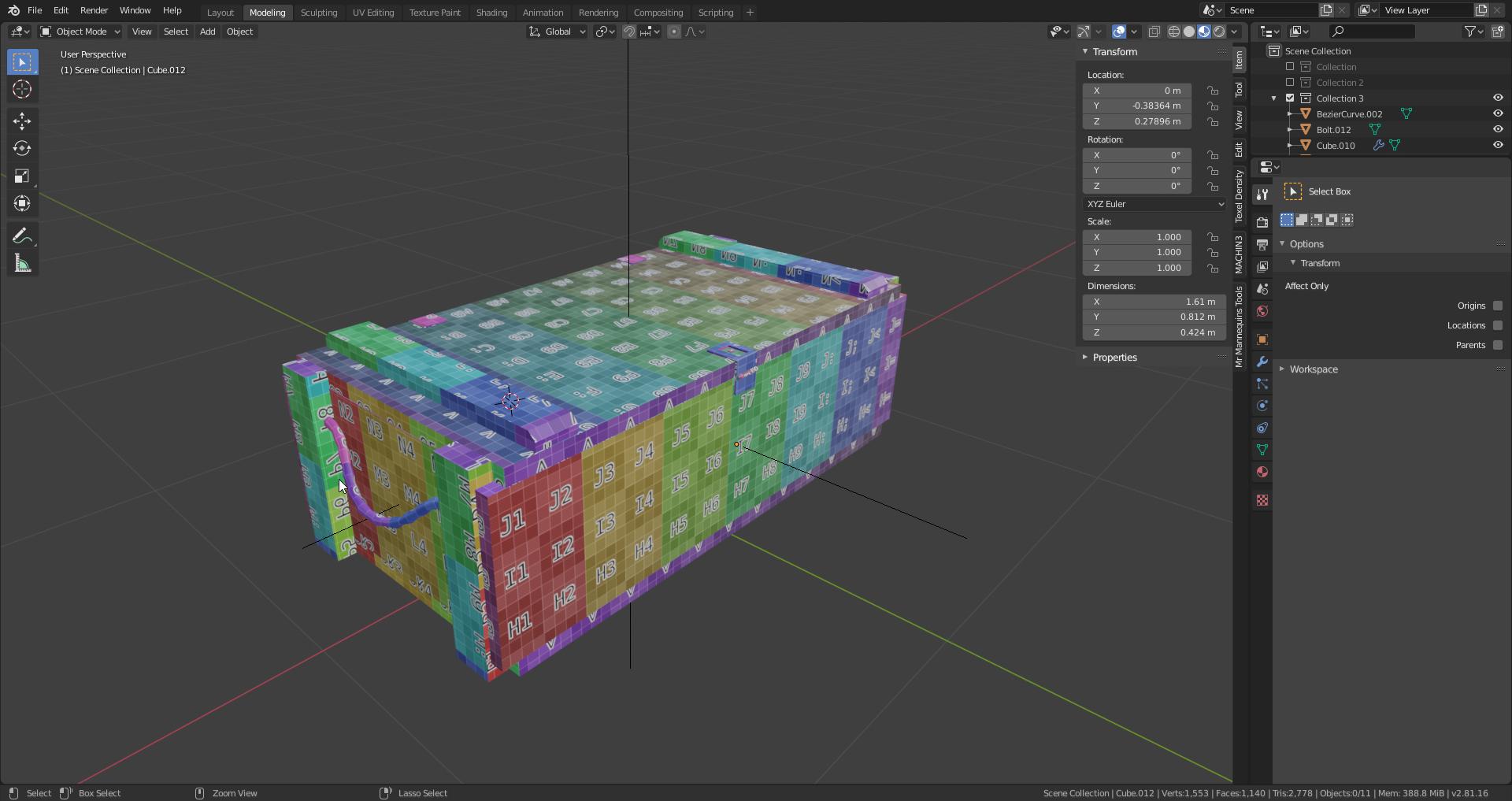
this is the LP
junior stone
thats one way of doing it, you could also leave a bit of space in between and make textures slightly larger than the actual uv-islands
did you doa high poly bake on this for the normals? or is that not what you want in terms of details
eager mist
yeah i was gunna lower the texel density on the bottom to make it even more HQ on the top bits but i havent decided if it gunna be static in the game or moveable
oh
junior stone
(not familiar with orm btw)
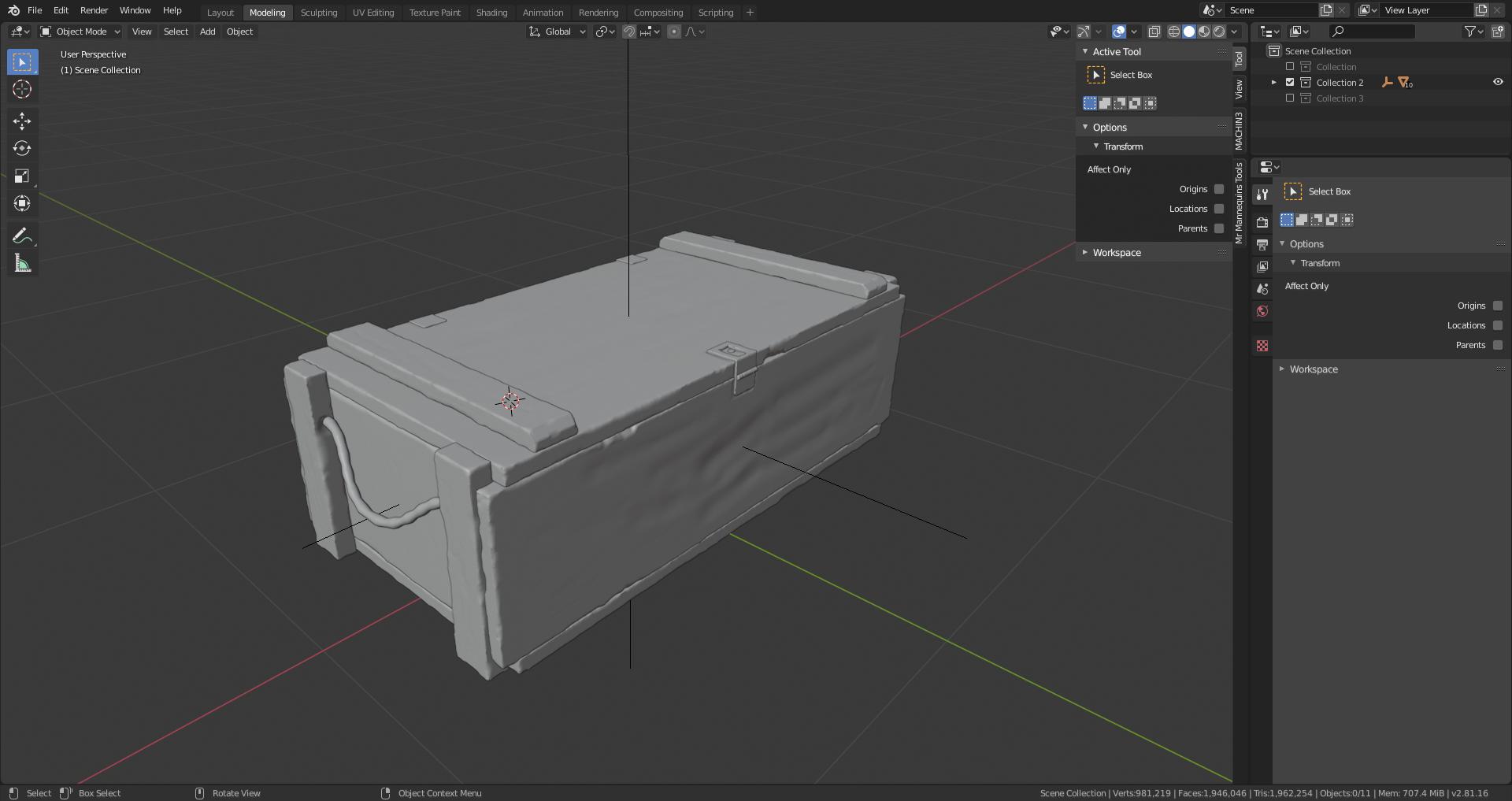


 junior stone
did you drop it off the stairs lol
junior stone
those lines are kinda wonky
eager mist
they are being smoothed and and auto smoothed
junior stone
ah right
maybe what you could try. but its a pretty big time investment... is adding splits in the wood
so its not a flat surface
in the sense that someone took an axe, or a crowbar and tried to open it
eager mist
i think ill try that with a on new project, cause i would also have to fiddle with the LP and make it so its also split enough for the HP to have an affect
yeah i gotcha
still learning how to make the HP look good on the LP without risking poly count
junior stone
be mindful of polycount, but dont overthink it
eager mist
tbh i rather have a 1k box that looks pretty good then a 3.5k box that looks great
yeah forsure
junior stone
character models sometimes have into the millions of polys
eager mist
yeah HP tho
junior stone
still 300k or smt low poly
eager mist
the HP of the crate has 1.9m
junior stone
as long as it looks pretty its all good
eager mist
HP doesnt really matter poly count wise, all that matters is the LP and if it will look okay
exactly
junior stone
if you are doing a HP bake to LP make sure you champfer even in low poly
a 90 degree angle is hard to smooth
eager mist
true, something ive realized with this
junior stone
Sketchfab
Use Sketchfab to publish, share and embed interactive 3D files. Discover and download thousands of 3D models from games, cultural heritage, architecture, design and more.
i like taking a look at existing models, refernece for good wear and tear.
dont copy tho 😄
junior stone
so yea
 raw sedge
yup
raw sedge
so setting origin wont move the object
huh interesting
there must be more geom on the left side?
junior stone
it moved the origin to a bit of a weird place
raw sedge
try center of mass
junior stone
ah right, polygon density
raw sedge
anyway so center of mass isn't weighted on verts, it is weighted on volume
should be better off for you
so as I was saying
blender's UI is just a GUI for its API
so literally all of this is stuff you can trigger in the API
raw sedge
as much as you can, you want this to be a "hands off" procedure
junior stone
love open source projects xD
raw sedge
so centering on center of mass, that's braindead simple and now means when you set the transform to 0,0,0 (press N and clear out the locations -- type 0 while hovering over them) it should be fairly central
junior stone
its halfway through the floor if I do that. makes sense since we centered the pivot
junior stone
I need to only center what i assume is y-up so x and z
raw sedge
z-up
junior stone
that the same as unity?
raw sedge
welcome to not unity land :P
raw sedge
anyway, it doesn't really matter about it being below z-0
junior stone
tho unity can do that on import so meh
raw sedge
because there isn't really a floor there
junior stone
fair
raw sedge
and the framing and vertical position is more up to where the camera is
junior stone
I do need the pivot to be fixed on the meshes as well... so yeah thats another thing I might do
junior stone
most of the tileable things arent centered
they are on the corners
cuz snapping of tiles
raw sedge
oh are these renders going to need to be precisely positioned so the images themselves will work as textures or something?
junior stone
lemme just kinda go through what exactly I am trying to achieve
raw sedge
I was envisioning some garry's mod prop thumbnails tbh
(even though that did it in realtime if I recall correctly)
junior stone
- Import the mesh (1 by 1)
- Center pivot in x and y (vertical axis remains on ground)
3 move pivot to center of world
4 align camera
5 assign material
6 make render (like 250x250 or so idk)
7 export mesh with new pivot
8 remove mesh from scene
junior stone
thats what I am going for, but 3000 times xD