#🔀┃art-asset-workflow
1 messages · Page 33 of 1
 spiral canyon
Hey, I got a quick question if anyones here. When I export a blender file to .fbx and import it into unity it loses its materials and is grey. I use cycles materials, does anyone have any ideas why this happens?
spiral canyon
Alright, I'm guessing the best practice is to use blender render materials then?
Yeah, I guess I could do that. It would have the same effect
just a little tedious :p
 ruby scarab
Really fine work, Retro!
 rapid echo
I made this plant 3d artwork in Blender using eevee realtime. Thank you for viewing.


I made a new plant 3d artwork in #Blender3d realtime 🌿
#artistsontwitter #b3d #gamedev #indiedev #polycount #eevee #succulents #realtime #gameart #blender #3d https://t.co/KLFWWL9eYq
Likes
388
 Twitter
 white goblet

 unkempt scroll
Hi guys i just want to share with you my latest work (Game of thrones style Knight)
programmes used : Maya,Substance painter,Zbrush,Mari,Xgen,V-Ray
 short laurel
hello, how can i apply an "MTL" onto an obj? i have the folder with all the textures as wel
white goblet
you have to click and drag on the object in the scene
I'm just looking at my animations lol
 visual meadow
@unkempt scroll looking great dude, u got artstation?
unkempt scroll
@Benji#1876 Right now no but i'm thinking to create one
visual meadow
ye u should, especially when you can make this quality models
 lyric pewter
Any 3D graphics generalist looking to collaborate on a game?
white goblet
hey, so I made a plant, and gave it a custom leaf particle in blender, but for some reason the leaves don't show in the engine. latest stable version of unituy
white goblet
I can't find any documentaiton on google about importing particles from blender
white goblet
like how can I make this in unity? I can only import the body of the plant
unity only shows this
white goblet
how does one do that?
thanks. also how can I adjust the shadows in unity? do I just mess with the sun?
I had another 3d question: I can't get materials to import in blender files. do I need to make uv maps of the materials?
white goblet
ahhhh ok thanks
do you know of any free material making apps I can work with for unity?
white goblet
yes.
and when i use the motion blend tree with two animations for my character, it distorts the scaling for some reason
white goblet
it does this when it should not
 sullen plank
What do you mean? btw it looks like at least the trunk on your plant has normals flipped. Also setting shadows to double sided usually fixes light leaking through the seams.
white goblet
ok. i think it was just a mispelling in the controller script. and I did not realize that about the plant
sullen plank
in Blender in the edit mode select all faces and Shift+N to make them consistent.
white goblet
ah I just flipped normals
odd. it renders like this in blender, but in unity it's flipped normals
sullen plank
It's double sided shader probably. You can render it in Unity using double sided as well.
sullen plank
On the MeshRenderer Cast Shadows > Two Sided
 dire rock
I feel a bit dumb for asking this. But I got a very low poly rock. And I want to make a stylized texture for it where the edges are highlighted. I want to do the edge highlighting semi-automatically. But to do so I need to get some sort of texture map containing the edges. But I can't figure out which map I need and how to get it.
white goblet
also if anyone knows a tutorial for working with unity and blender together I would be happy. please dm 😃
dire rock
Btw for double sided rendering there is a setting in the default unity material for it
 green island
how to make a grid in 3D guys ? can you help me
white goblet
particular, rigging and animation/dope sheets in blender for unity
 split hound
how is blender for sculpting
would rather not rip more food out of my poor savings account for zbrush
rapid echo
@split hound Blender is good in sculpting and best it is free. You can get decent results.
However, you should keep saving for future because Zbrush is really best. I have used both. There are some features in ZB which are very powerful. One issue I had in blender during sculpting was slower performance when working in high res meshes which ZB can handle more efficiently. Still try both. Trial is version is available for Zbrush give a shot 😃
 reef solar
where do i go to get help on poly brush?
rapid echo
Hi @reef solar
Check this page for Polybrush. At the end there are links for tutorials and documentation also.

Unity
Learn about the many features of Polybrush, which lets you blend textures and colors, sculpt meshes, and scatter objects in the Unity Editor. It’s now part of Unity, with ProBuilder and ProGrids.
 eager mist
Hi everyone i have an issue with my material on my imported 3D OBJ :
Every 3D model generated by Unity accepts my material (you can see the difference between the Cube's material and the door material)
The "image" material doesn't seems to work on my own OBJ, can someone help me to find how to fix it ? Thanks
 iron flare
Maybe it has something to do with the handle UVs ?
eager mist
how can i check for it ?
iron flare
Since the cube is 1m unit width , and 0-1 UV it is more detailed
You courld increase by 10 your tiling in the material
just to check it out if you see details appearing
iron flare
if "Metal_12" is the same material on your door , set the tiling x y at 10 instead of 1
and check if your door has now details in the metal
eager mist
Ok i try
iron flare
But first , are you sure both of the cube and door share the same material ?
eager mist
yes in my inspector it is not the same because i tried another material for testing
(i'm juste applying the material right now to all elements)
No it changed nothing :/
here is the material settings
do you have another idea ?
Here are my 3D files's config
https://answers.unity.com/questions/1142368/why-does-my-model-not-display-proper-material.html --> Same problem here

Unity is the ultimate game development platform. Use Unity to build high-quality 3D and 2D games, deploy them across mobile, desktop, VR/AR, consoles or the Web, and connect with loyal and enthusiastic players and customers.
eager mist
can someone help me ?
 left hollow
Same solution? No/incorrect UV Coordinates?
 frosty steppe
A Hat in Time x Shin Godzilla.
SHIN CONDUCTOR!
left hollow
I like it.
But shouldnt the sharp edge of the blade be brighter and cleaner than the rest?
 open aspen
Does anyone know if theres a way to keep unity from trying to import blender files? I want to keep the blend files in the assets folder, but I want to export them to FBX manually.
 stoic zephyr
@open aspen Check out the “Hidden Assets” section on this page: https://docs.unity3d.com/Manual/SpecialFolders.html
open aspen
thanks @stoic zephyr
eager mist
if i get the wacom mobilestudio 16 with windows builtin, will I still need a desktop rig? I already have a laptop
would mostly be for modeling, rigging, mostly 3d work.
 keen steeple
So pretty!
 granite pasture
so just starting out with 3d modeling was wondering if mecanim rigging will work with this sort of model?, still need to do leg part
 amber walrus
Mecanim should work with anything, but humanoid rig needs to match specific bones
 nova tundra
@granite pasture, after you've modelled this, since it's quite detailed, you should bake the detail onto a less detailed version of the model as a bump map and such, so you don't hog up the vertices and VRAM.
granite pasture
alright thanks for the help @nova tundra @amber walrus
nova tundra
No problem. Also, it looks like the parts of the arms are different meshes... is this the case?
granite pasture
im using sculptris then converting it to blender and reducing vertices
no just havnt molded them fully yet
nova tundra
Ah, okay. Blender, especially 2.8 does have good sculpting tools tough. May I ask why you're not using them?
granite pasture
couldnt quite get the hang of blender but this model is what i did on my first day sing sculptis
using*
granite pasture
jesus making the legs is alot harder then i thought lol doesnt look robotic at aall looks so human...
 near lotus
 upper marlin
how do i make a material stick out like this?
it has a heightmap which is what im assuming is what does it but in unity it still looks like a round sphere
near lotus
Tessellation or parallax mapping.
upper marlin
@near lotus how would you set that up?
near lotus
If you're using the Standard render pipeline, look up tessellation or parallax shaders.
You can find them on the asset store or on github or whatever.
There are many options.
upper marlin
i have a shader that can do that but im not sure how to like
make it work
turning this on doesn't really do anything
 pseudo minnow
Why in blender is 0 the rotation and Unity tells me that it has -90 rotation in X ??
sullen plank
Your parent or object itself most likely turned around or has not applied rotation settings. When importing from Blender to Unity models only have front and back switched.
sullen plank
Ctrl+A and apply Rotation and Scale on the object before exporting.
pseudo minnow
@sullen plank
i am a 3d designer I have advanced level in 3d modeling, but I have no experience in UNITY, my field of modeling is architectural not in game engine
sullen plank
Yep
pseudo minnow
I apply this all the time, if I did not, my textures would not be good
sullen plank
If that doesn't work recheck FBX export settings. But AFAIK Unity ignores Axis settings there and only issue is 180 flip on Y axis, not aware of any 90 degree flips.
sullen plank
Never used with .blend files. When exporting FBX with !Experimental transform settings models are pretty clean with correct rotation and scale.
pseudo minnow
@sullen plank I understand, but in reality I need to solve this technical problem since I work in a project that requires it
sullen plank
Sorry, don't have old Blender installed to test. New one has incompatible blend files anyway it seems.
pseudo minnow
@sullen plank the version of blender does not imply any change in the construction of the file blend technically the file blend is a compressed structured of information and data, it can be done with any file of any version of blender superior to 2.5
I am also a computer security programmer or hacker as they want to call my trade
even so I appreciate the effort to help, I will continue looking for answers before turning directly to unity
sullen plank
@pseudo minnow It seems it's a thing with .blend files, all individual models are -90 on X. Tested on Unity 2019.1 with Blender 2.79. Suggest using containers to correct this or export as FBX to have clean models.
And yes, Blender 2.8 blend files are not supported at all.
pseudo minnow
@sullen plank :the worst I've seen
as far as I understand it may be that unity and blender have different axes systems, this would be one of the conditions but not the problem, I would like to solve it, since I do not intend to use blender 2.8 since I have my own fork UPBE blender 2.79.5c R1c56 , I would also like to work with unity so I would like to solve this.
I will use FBX up while I work on a solution for this problem, maybe sell blender if unity I do not fix it is very rare, for an engine with so much support and development to leave a loose end like this is embarrassing
near lotus
@pseudo minnow Blender and Unity use different up axis. Blender is Z and Unity is Y. Unity will auto-rotate your imported model so that it's oriented properly, which is why it rotates it 90 degrees.
pseudo minnow
@near lotus jejejejej
I found out 5 minutes ago in a very quick reading of uniti
remember that what you just commented, that blender uses z as different than most 3d engines, and work on the solution can be corrected with a few small changes in the blender exporter to unity, maybe it does not intersect anyone but Hare is a challenge for me and I like to finish what I start
Thank you very much for reading and responding, now I can apply a solution
 bold osprey
Hey guys when I import animations from blender I get this weird effect on the legs. Eveything in Blender looks fine tho.
sullen plank
make sure all modifiers were applied before creating animation
pseudo minnow
@sullen plank @near lotus
thanks again, now i can use a simple blend object
SOLVED
2 houers to sove this, is a good time
 tropic obsidian
hey is it possible to change my movment in the editor from arrow keys to wasd?
just in the editor not for my in game charcter
and if this is the wrong place to ask where should I go?
sullen plank
answered in #💻┃code-beginner
 faint falcon
If you are in need of some concept art, I recommend this: https://www.instagram.com/grazzik_art/
She is doing my jobs ... have incredible talent.

250 Followers, 444 Following, 91 Posts - See Instagram photos and videos from Graziele Mendonça (@grazzik_art)
 heady mirage
Does anyone know of a good course to teach 3d game graphic design in unity?
 wary fjord
merhabalar aq
 floral summit
how would i wrap a uv testure around an object properly in unity?
 obtuse oyster
Documentation
Probuilder: https://docs.unity3d.com/Packages/com.unity.probuilder@latest/index.html
Polybrush: https://docs.unity3d.com/Packages/com.unity.polybrush@latest/index.html
Progrids: https://docs.unity3d.com/Packages/com.unity.progrids@latest/index.html?preview=1
Alembic: https://docs.unity3d.com/Packages/com.unity.formats.alembic@latest/index.html
USD: https://docs.unity3d.com/Packages/com.unity.formats.usd@latest/index.html?preview=1
FBX Exporter: https://docs.unity3d.com/Packages/com.unity.formats.fbx@latest/index.html?preview=1
GIT
MeshSync: https://github.com/unity3d-jp/MeshSync
Delighting Tool: https://github.com/Unity-Technologies/DeLightingTool/blob/master/Assets/DeLightingTool/Documentation/De-LightingTool.pdf
Videos
Probuilder Tips & Tricks: https://www.youtube.com/watch?v=OpvExpSIuIQ
Roadmap
https://resources.unity.com/unity-engine-roadmap/3d-world-building
Troubleshooting
My model appears inverted/see-through/transparent
https://help.vertx.xyz/?page=Graphics/Models and Materials/Models/Inverted Normals
 teal pecan
I made a weapon bone to hold things, here how it looks in blender with a weapon parented to said bone
And here is how it looks when i pickup a weapon in unity
Why is there some kind of offset in the rotation of the bone ?!
the arms are a .blend, its how it looks out of the box without any changes
Its really annoying to animate like this what you do in blender wont look the same in unity
 copper locust
I'm super new to unity, and I'm trying to make a table have an accurate collider. Whenever I add a mesh collider, it does not work at all. Can someone tell me what I'm doing wrong?
 safe maple
what do you mean by "it doesn't work at all" ?
teal pecan
havtha add a mesh to the component
lyric pewter
Could anyone help me with this issue I posted on Unity forum?

Unity Forum
Rather than trying to explain this complicated issue, I decided to shoot a video explaining what it is about.
[MEDIA]
How do people usually solve...
 civic mesa
Scene I'm working on :
 sour lark
looks nice.
 ripe zephyr
does anybody know how to make UniVRM work?
lyric pewter
Any graphics generalist willing to collaborate on a revenue share project? If you are interested, please PM me.
 pastel adder
Hey I have a quick question about this toolset, I just want to make sure I’m correct before I purchase it. https://assetstore.unity.com/packages/tools/animation/vertex-animation-tools-128190 I used lattice deformations to fit my characters eyes into their sockets in blender. (They’re oblong eyes)
This will allow me to use the animations (for the lattice eyes) I already made for them in blender-in unity right?
Alternatively if anyone has a cheaper alternative (that doesn’t involve shape-keys for eyes) id appreciate that

Before install 3.1 please delete previous instalation
Vertex Animation Tools is an robust toolset for import and fast playback any kind of vertex animation .
WebGL demo:
Compressor (7mb)
Towers(6mb)
Flowers(15mb)
Sail Ship (61mb)
Key...
 mental plover
I have question regarding UMA, i tried to make a simple wardrobe slot, but it ended like this. I tried fixing the scaling and etc, but this is the best i can make, previously everything is worse without the scaling and rotation fix. I'm using Blender
this is the mesh of the supposed wardrobe slot
 tawny vale
Hello everyone ! I have a problem when importing Bezier Curves from Blender to Unity. I would like to import this wave but it doesn't seem to correctly import the curves
near lotus
Deformations won't be imported into Unity like that. You need to use blendshapes or an armature.
rapid echo
Made this Wooloo theme artwork in Blender using eevee. Thank you for viewing.

I made a #wooloo theme artwork in #Blender3d 🐑
#artistsontwitter #b3d #gamedev #indiedev #polycount #pokemon #PokemonSwordShield #gameart #realtime #eevee #3d https://t.co/dv5pC1pCKV
Twitter
 bright cairn
 wet seal
hey all, i'm entirely new to doing 3d level design and such.. and i'm just wondering how i would go about designing simple levels using probuilder. mainly.. i have no idea how much i should be trying to extrapolate from one object... like do i build a floor out of one block, a walls out of others, stairs out of their own block, etc? or do i try to keep the number of objects made as small as possible?
 vivid sinew
Do what is necessary first, optimizations come later.
 shy lake
And then optimizations never happens because you always set it for later. ;)
ruby scarab
@bright cairn What do you need?
 silver imp
hi.
question for shader artists
what tools do you use to create maps?
the one you use to sample stuff like noise, etc.
 marsh loom
Guys, how would you go about creating large numbers of crowds, that will be seen up close?
They don't have to do anything other than small/subtle animations
Think ghosts
ruby scarab
@marsh loom If you don't have a crowd system in place I'd go with LOD's, there is a lot you can do that way without loosing performance.
marsh loom
I actually figured out the what, I need to figure out the how! A perimeter in which I will spawn people and they will despawn if out of the perimeter...it's first person so I can use some visual tricks 😃
 hollow flare
hello some one have arms please
shy lake
has arms
hollow flare
can you give me please
 lethal hollow
Just started this guy an hour ago...
ruby scarab
@hollow flare See here:

OpenGameArt.org
There's kind of a lack of 3d arms for a first person view on OGA so maybe this crude first attempt can perhaps even be useful to someone. As of yet it's only rigged, hopefuly someone will give animating a shot, as I still need to practice and learn a lot. The rig uses IK and ...

CGTrader
Model available for download in # format Visit CGTrader and browse more than 500K 3D models, including 3D print and real-time assets
 vast sage
Anyone know if Unity supports N-Gons?
hollow flare
thank you
 willow nebula
@vast sage Unity only displays triangles, it's the modeling apps that are in charge to converting ngons to triangles when they export.
An AFAIK, all do it.
civic mesa
Try changing shadow bias @eager mist
eager mist
nice
civic mesa
Nice
eager mist
double nice
 mystic briar
I don't know why, but a model I'm trying to import a model from Blender to Unity and it's missing some faces.
Does anyone know why this is happening?
sullen plank
Your normals could be flipped. Select all faces then Shift+N and export again
sullen plank
It's Blender shortcut to recalculate normals. You have to be in edit mode with the faces selected
mystic briar
I've done that but there was no notable change in Blender
 limber condor
@sullen plank @mystic briar Could this be caused by the mesh compression setting in the unity Import settings?
mystic briar
How do I access the mesh compression setting?
limber condor
It would be in the inspector when you select the model in the explorer
mystic briar
What setting should it be on?
limber condor
I would think off
sullen plank
Resetting export settings wouldn't hurt. Also if you want to make sure it's not flipped normals https://blender.stackexchange.com/questions/100196/viewing-normals-in-blender
mystic briar
Off was the default setting, and I got the result above.
sullen plank
It may have problems recalculating normals automatically if there are anomalies with the mesh, like extra vertices.
limber condor
@mystic briar I don't have unity right now and Im also out of ideas, so all I can reccomend is what @sullen plank says
mystic briar
Thank you, that actually helps a lot!
They are indeed inverted.
But it seems the that Shift+N hotkey is not working for me.
sullen plank
If it's not working, then it can't figure out where is the in and out side of the mesh
mystic briar
Hmm
 worn rover
Ya flipping the normals doesn't really change the model in blender. On my screen, the gray just gets slightly lighter. Does ur model look good in Unity now?
 low pebble
Made this a long while back, based on a fallout concept
eager mist
👌
 past field
anyone using blender and been working with skinned mesh here?
is there any solution to avoid addition armature root object when importing fbx from blender?
eager mist
It is recommended to have a mesh with a maximum of 4000 faces, but how many total faces of all the meshes in the scene could you have? I have a lot of individual rocks with an average of 40 faces, 300 of these rocks would add up to 12,000 faces ... and I do not know how this affects my performance.
help ?
civic mesa
Ummm this is quite complex qustion. I don't know where they recommend to have max 4k faces ( I mean, characters in a mobile game can easly have ~12k). There is some max poly number for mesh to be included in batching process (thats ofc. for static meshes). What is/are your target platforms?
@eager mist
eager mist
I remember seeing an unity article where it was recommended and my platform is PC
the rocks use the same material and are static
@civic mesa
civic mesa
If it's PC, Polygons is not something you should worry about. You should be ok with 1-2mil polys on screen. The bigger problem is the amount of objects. Its better to have one mesh that has 12.000 faces than 300 unique meshes that have ~40 polys each. Read about batching. It should help you.
@eager mist
eager mist
@civic mesa well, is that some case if I start to join meshes these would have more than 1 material and I read that it is advisable to have only 1 material per mesh, for this reason I separate my meshes, example I have a spring with 3 different meshes, if I mix them, will have a single mesh with 3 materials, what would be the best option?
 hazy yacht
Hey guys, I'm making a game on an alien planet, but I want the plant and animal to feel "natural" .
My idea right now is to take interesting biological features from nature and use them in the art for my creatures. The only examples I can think of right now are:
- Bioluminescence
- Translucent skin
Any other ideas?
civic mesa
@eager mist I recommend reading this 😃 https://docs.unity3d.com/Manual/OptimizingGraphicsPerformance.html
@hazy yacht Well since it's nature ... how about borowing some features from plants ... like regrowing parts of its body, growing for 100s of years and beeing colossal?
 river echo
hey all, if anyone could point me in the right direction? I'm trying to cut odd shape holes in a 3d mesh during runtime.
I've looked up mesh slicers but most only cut in a plane. I also followed this persons tutorial (https://www.youtube.com/watch?v=z1r7VjgufJ8).
but only able to cut holes from a plane.

Holey Mesh Batman! Sorry couldn't help myself. If you are looking for a way to edit a mesh at run time and remove individual triangles by clicking on them, t...
 grizzled bone
you're going to have a really bad time with cutting holes in meshes in Unity. i've spent many hours trying to figure out something similar to you want. boolean mesh operations are probably similar to what you want, but the results may not be very good, depending on the mesh.
https://github.com/karl-/pb_CSG
@river echo
another option is a stencil shader to fake the hole. physics will be a bit more difficult though
river echo
yup been at it for a while now. I'll take a look at boolean mesh operations, it looks promising, but I hope it can handle more complex mesh. Hmm i might be able to get away with a fake hole with stencil shaders. thanks for the help ! @grizzled bone
 upper ferry
Is there something that I can use to add a sprite mask to a 2.5D scene with 3D character models like this? So the police car in the foreground would be placed above the characters when they move behind it?
eager mist
face need some work but everything else looks good to me
The eyes are a little dopey. They oughta be closer together, maybe something like this..? (cruddy edit, but somewhere around here)
I like the general design and wind waker aesthetic though
the way the arm itself bends near the body bothers me a lot, like its broken.
 quartz pivot
thanks for the feedback, Will fix soon.
quartz pivot
I went with very simple eyes. I think it's fitting for the style.
 edgy totem
Sorry I am a complete beginner to unity, how do you put a picture on a panel instead of a solid color?
mystic briar
Shift+A, to create an Empty>Image
And in this menu, select your image from a file
Oh wait you said unity, not blender oops
my bad
 runic meadow
I was about to say
in that case you gotta
Well I don't know exactly what problem you're having but I take it just dragging an image over the source image portion of the panel's image component isn't working?
runic meadow
Can you click on the image you're trying to use and take a ss of what it looks like in the inspector?
so like this stuff
edgy totem
Ok

 runic meadow
Ah ya, that's prob why
when putting an image on a panel, you need to make sure the Texture Type is Sprite (2D and UI), might be called something different on 3D projects but it needs to atleast say UI
edgy totem
Oh thanks
runic meadow
sure thing, lemme know if it works
edgy totem
it worked, thank you so much!
runic meadow
npnp 👍
mystic briar
If I wanted to make a model move in Unity with Character Controls, do I have to create the animation in Blender, or is there a recommended way of doing it?
civic mesa
@mystic briar If its a simple model like those in minecraft for example - you can animate that in Unity. For anything more fancy, I would recommend using other app (like mentioned blender). You need to rig your character anyway and I don't think blender is capable of doing that (unless its 2D char).
mystic briar
I see, thank you! I'll look into other apps.
civic mesa
Maya is the most popular one for animations
 supple narwhal
 prisma summit
anyone using realtimeCSG?
 valid salmon
@quartz pivot looks great
eager mist
Hello i need a suggestion please look in #archived-game-design
 proper elbow
I'm using Blender to craft building floors for a procedural city generator but I'm running into issue with Scale and Position when exporting the FBX from Blender and importing into Unity. Any pointers or common mistakes I may be making? I'm a newb at Blender and a newb+ at Unity.
eager mist
@supple narwhal nice dementor
 pastel owl
Hi guys, just wanted to share my latest practice model. I wanted to practice the entire 3D character creation workflow from concept to the final game ready character. C&C will be appreciated.
This character would be a "third person character" in the game, how many materials and/or texture sets you think is efficient for current gen PC games on Unity? This one has 5 materials, and I`m thinking if that is to much 🤔 https://www.artstation.com/artwork/xzK0W1

ArtStation
Practice sci-fi game character.
I have created the HP Sculpt inside Zbrush, Marvelous Designer for cloth elements, Blender 2.8 for retopology, UV unwrap, rigging, skinning and posing.
Substance Painter for baking and texturing.
Marmoset for rendering and the turnable anima...
pastel owl
Thank you 😃 But aside braging I'm also very curious about my material count question. At my studio I`m making game characters and at the moment we are kind of winging it, but it would be great to know the industrie standard when it comes to characters 😃
 limber geode
Done this, during the last 2 weeks. Thanks in advance.

ArtStation
Hello everyone, here is a small scene that I realized for an art-test. I spent 8 days on it while learning unity 2019 and the post process V2. Have fun and tell me what you think!
 crimson siren
thanks to Probuilder
 solid lily
@limber geode is there a download link or smthn?
 vestal dew
Quick question: a friend of mine is building a 3d scene with modular sections he modelled himself; he noticed that at the edge of each section though there are some unsightly seams that don't seem to go away
We tried setting all the textures to clamp and rebuilding the lighting but the seams don't seem to go away
Also consider that all the sections have the same exact size
Aside from putting up wall beams all over the seams, what else can be done to remove these seams?
eager mist
How can i let my third person character enter a edys vehicle physics car?
is their atutorial for it?
 spring niche
@pastel owl Late response I know and only kind of answers your question but it completely depends on your target hardware, amount of characters etc.. If you're game is aimed at high end PC, you could have 30 materials at 200k polygons with ten chars in a scene plus another eight million poly's worth of enviro stuff and a metric ton of other materials , the PC's would hardly break a sweat.. If you went for console / mobile / intel graphics machines you'd probably want to aim far lower.. Test, test, test some more and you'll easily find out.
pastel owl
thank you for the answer 😃
 lunar dagger
@vestal dew it sounds like light is coming through gaps maybe? I see this in 3d rendering sometimes. Rebuild a module with a small overlap and see if it fixes. If so rebuild modules. If not, keep digging.
 crimson vector
I'm unsure if this fits here,
is there a way to measure my 3d models boobie size in engine?
grizzled bone
not exactly appropriate but you can measure the distance between vertices
vestal dew
@crimson vector need some context info:
-are all the models made by the same person or with the same method?
-if yes, are they procedurally generated?
-Do bigger boobs have more vertices?
-Anime or realistic?
And also, is the size assesment supposed to be continuous or once in a while?
@lunar dagger No, it's not like that, more like the surface normals breaking up on the edges, as if they were different separate planes rather than a continuous shape
crimson vector
Ok, @vestal dew
The models are make in a program called Vroid studio.
They are partially procedurally generated by the program, but I make the character details.
hmm, let's see... well, the boobs tend to get really big if you pull the slider all the way to the right so, yes?
theyre anime girls, but im not sure that really matters.
I only plan to do this once, to define my characters info more.
and for @grizzled bone's answer
I tried that i came up with
Boobie Length: 2.13 inches
Booble Height: 2.96 inches
Boobie Width: 3.48 inches
but that's like square, and not at all accurate
vestal dew
How did you get those calculations? Did you write a script in Unity?
crimson vector
I made a script to place on two objects and made them reference eachother while calling "Vector3.distance" every frame with [ExecuteInEditMode], setting a float to the distance found.
it's really simple.
[ExecuteInEditMode]
public class differ : MonoBehaviour
{
    public differ d;
    public float e3;

    void Start()
    {
        if (d != null) {
            d.d = this;
        }
    }

    void Update()
    {
        if (d == null) return;
        e3 = Vector3.Distance(transform.position, d.transform.position);
    }
}
I made the script quick with no intentions of ever using it again, so that's why the variables are named like that
vestal dew
mhhh, it looks like there's an easier way of doing this, if it can be considered easy, but it doesn't involve Unity
you can import the model into Blender and, I can't believe I'm saying this, you have to cut one boob out, or at least copy/paste it as a different object
then bring up the Print3D menu and use the buttons there to obtain the precise size, this assuming the model gets imported to the right scale
here's some help https://blender.stackexchange.com/questions/63113/is-it-possible-to-display-volume-of-a-mesh-object/63117

Blender Stack Exchange
How can I display volume of any mesh object?
I can display length of an edge, the area of the face, but nothing for volume. Is it possible?
crimson vector
ooh
 light summit
With this discussion my day is complete
eager mist
how can i make this look better? (in regards to material)
vestal dew
@eager mist the UVs seem unevenly distributed: the big face (circled red) has a lower resolution compared to the smaller part (circled orange)
and notice how the faces running along the middle are all squished horizontally
Redistribute the UVs on the model, for starters
mystic briar
Does anyone know why people can't see my blender model that I imported as an assets into Unity, if they open a collab project?
 granite shadow
how can i make faces like this flat, is there any tool?
mystic briar
@granite shadow Select and delete the two faces plus the edge between them, select the 4 vertices, then press F to create a new face
granite shadow
@mystic briar there's no edge it's only one face i fixed it by moving vertices the problem is there is so many faces like that
 sharp crow
Yea.... not very good... so many problems when it comes to moving, and not sure how to fix certain abnormalities... such as his arms sink in, or his chest rips apart...
vestal dew
@mystic briar those people must have Blender installed too, because Unity hooks into the local Blender installation to make the .blend import work
mystic briar
I thought as much, so one them installed Blender, but still couldn't see it.
vestal dew
@granite shadow delete the face and keep the vertices, then connect the opposite vertices with an edge and fill the missing faces
there must be a name for that situation
I don't recall it right now
mystic briar
Do they have to have Blender previously installed before downloading the project?
vestal dew
@mystic briar no, just ask them to click right on the assets and do a reimport
assuming Blender is installed
vestal dew
You're welcome, I also had issues with that when switching PC, I had almost released an app with invisible assets because Unity won't complain
like, silently fails
mystic briar
hahaha
vestal dew
@granite shadow Ok, it's called a concave quad, and it happens when the vertices of a quad do not lie on the same geometric plane
civic mesa
what kind of model?
civic mesa
Ummm
you need to either re-model it, use double sided material or make non-transparent windows
@eager mist
or maybe the model has more materials than listed in Unity and it simply doesn't render them
eager mist
its hard
civic mesa
try different shader types
but it looks like it's using more materials than Unity 'detected'
civic mesa
first i would select your model and in Mesh Renderer componet increase the number of materials
civic mesa
this is just to check if there's no "invisible" mesh inside the vehicle
It's kinda strange to have just few parts of the interior
eager mist
yeah indeed
and thanks
i duplicated the mesh
but when i remove texture it removes of the original mesh too
hope someone can help me wit thsi
civic mesa
send me the mesh
civic mesa
I'm mostly interested in the mesh
eager mist
Oh u like it ? 😄
its for my game belgian police sim
A police sim settled in Belgium
If u are interested always welcome to join my discord :p
civic mesa
I was thinking about checking what happen to the interior, but the game sounds good too. I'm glad it's not and USA city again xD
eager mist
Yeah that's whats unique about it xD

Discord link is on it (cant send here bcs rules 😦 )
371kb/s
current uploading speed xD
here is the download of mesh
finally
spring niche
Anyone using Houdini as their main DCC?
 woven aspen
I model hmu
edgy totem
So i made a model in blender and exported it and its in my assets. I have a shape that the player controls, but i want to replace that shape with the model I made. How can i change the shape of the model?
 pallid fractal
find the GO with the (Skinned)Mesh component on it in your current shape, and replace it with your blender model @edgy totem
eager mist
what is this
how i get my materials back iaccidently exported all my materials
never mind
edgy totem
@pallid fractal sorry, is it okay if you could take a screenshot of where the GO is? Sorry I am a beginner at unity
 open vine
@eager mist so weird seeing that Belgian police van haha
Gonna share this game with my friends, looks cool
civic mesa
@edgy totem I think He ment GameObjects 😛
edgy totem
Oh thanks
eager mist
I made this character today for my plan to be unity racing game
 left lintel
Working on an options menu and sfx, opinions?
https://twitter.com/AtirumStudios/status/1150958545765978112


Implementing sound effects 🎶 and an options menu ⚙️ do you think it works⁉️#gamedev #gamedesign #madewithunity #indiedev #indiegame https://t.co/dfw9pZMtPL
Twitter
civic mesa
@left lintel Animations and sound effects great
Not sure what to think about the viusal side of it
I like that it's simplistic but there's something about the shapes, font and colors that makes it look blockout-ish
 sacred hound
@left lintel its beautiful, I love the animations, it smooth, the sounds fit perfectly
i would say your hard work payed off, its about done just add alittle more echo-y sounds you know more
like a xylophone
i wouldnt alot after that all you need is to put it on googleplay or apple store and the next challenge becomes marketing
its a bit hard to market
games
you have to pay thats the problem
left lintel
Thanks @sacred hound still got a bit more work though :/
@civic mesa blockout-ish?
civic mesa
Damn, it's going sooo slow :
 karmic breach
So guys... I just tried sculpting.. and apparently I can.. I was always lazy to try and thought I cannot.. then I went and drank a beer
for some reason some thoughts came up and was like, why dont i try? Opened blender, took metaballs, combined them, subdiv, and started to sculpt out of my head.. never did before ever, I thought i wouldnt be able to..
https://i.imgur.com/PZEf8iI.png
https://i.imgur.com/IEIri66.png
https://i.imgur.com/wvUkvhZ.png

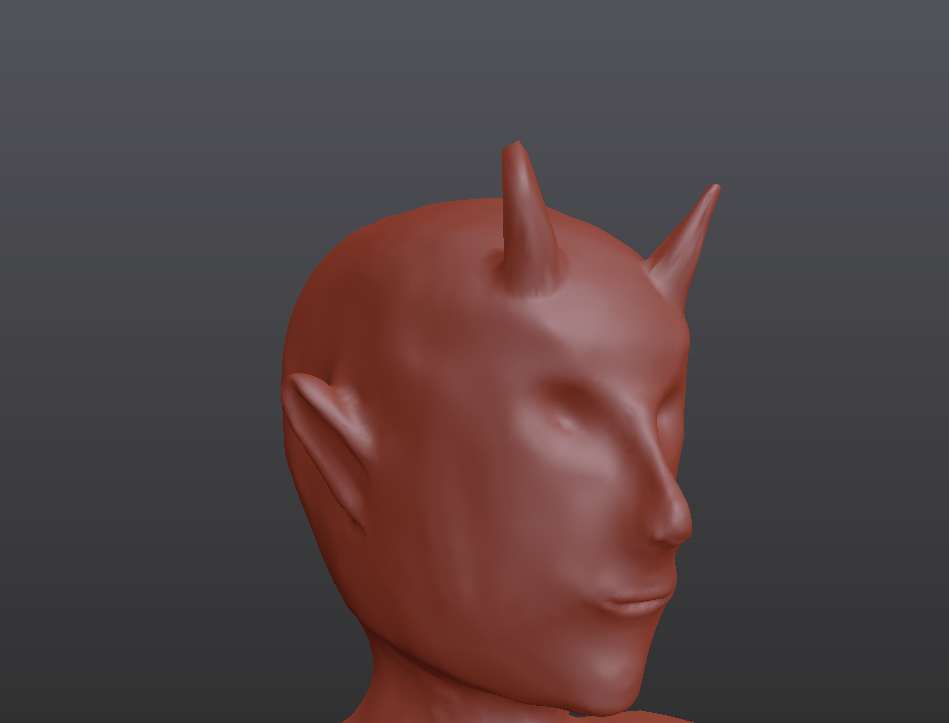
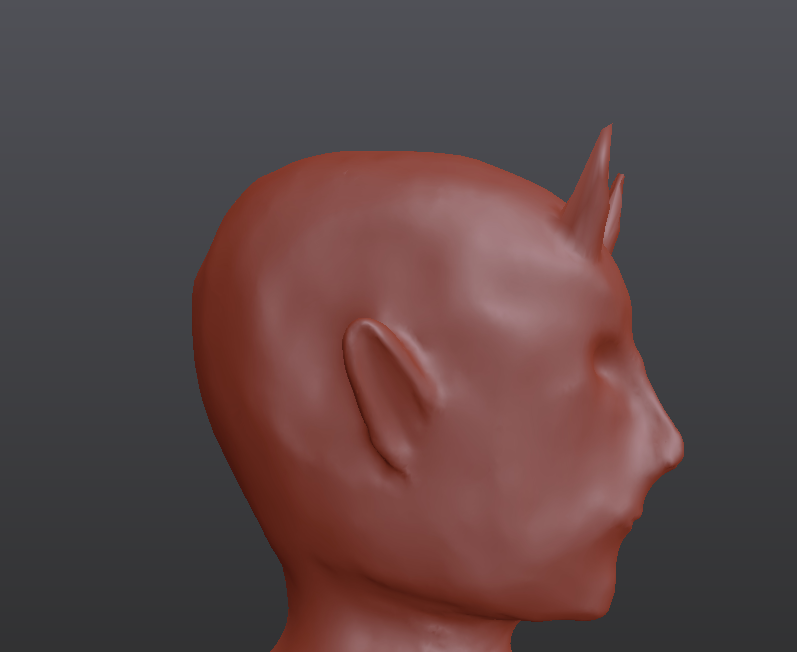
what do you think for the very very first time sculpting?
i tried to be as anatomically correct as possible from my mind, when it comes to the shape of the head
It felt like some hidden thing came up and I actually enjoyed it, it felt like its something I can actually learn til professional level later
 polar elk
The proportions could use some work
its a bit too long depth wise in the 3rd pic
but yeah sculpting is useful, especially for organics
 celest spindle
Heyo, Does anyone know why the orange light from underneath the cauldron is coming through the mesh?
Its sealed geometry
Been having trouble with it for ages now
Have tried baking and messing with different shaders
Its in LWRP latest release
Hmm I seemed to have fixed it for now
Was as simple as forgetting to check if the lights were baked or not
civic mesa
@hazy yacht You should probably ask in a programming section
 grizzled sorrel
For IKMovement how do you position the fingers? Like I need them to grip the object
rapid echo
Trying some new things with Blender and Eevee. Thanks for viewing :)
https://twitter.com/FarrukhAbdur/status/1152054193240399872?s=20

I made this one using #Blender3d realtime🦊
sketchfab sculpt view: https://t.co/P7iUOUU65S
#artistsontwitter #gamedev #indiedev #eevee #realtime #b3d #polycount @Sketchfab https://t.co/Cc5jm9zjZY
Twitter
 craggy spindle
 vestal dew
@karmic breach don't wanna burst your bubble, but everyone is good at sculpting monster heads; you must start from the overall shape of the head, before adding any features
then you should model the face planes
There's a book named "Anatomy for sculptors", you should start from there
 placid kindle
what happen with my model ?
before if it appears, in the unity 3d viewer you see, but here it does not appear anymore? I could have moved some configuration unconsciously and I did not notice at what time ?, I must also say that before if it appeared, I was testing many times how to export it to correct the problem of scale and rotation, in the end I exported it in fbx and if it worked but now that it I exported it again it didn't work anymore
could someone help me with this?
 gentle folio
Try resetting its position @placid kindle it is ~71k meters away.
placid kindle
@gentle folio thanks to answer , but reset which position? where is that done? in blender or in unity?
gentle folio
In the transform the XYZ set each one to 0
Or click on this cog and reset postion
@placid kindle
placid kindle
@gentle folio thank you so much for the tip
before reading, I started to click everywhere and then double click on the cube and it appeared centered on the screen
gentle folio
Your welcome 
placid kindle
😬 see u
civic mesa
@placid kindle Donno how blender works, but remember to have the mesh in the middle of the scene :P. Also with "z" you can swap the pivot point from the one set in blender to a one in the center of the object. Also "F" will center the camera on a selected objects. I hope that extra info will get useful 😛
gentle folio
What is with the gimmace face Batou?
placid kindle
@civic mesa yes thanks, i make a addon in blender to change the axis an correct the scale and rotation
@gentle folio I like it more than the smiling face
when model I place the origin in the lowest part of the mesh centering it so that the vertices of the lower part remain in 0,0,0
gentle folio
Ah
 halcyon merlin
https://gyazo.com/d43d3561dd6a128eefa3feb757264311 Rushing a low poly B-17 Never works 😭
 eager mist
material import appears gray
sacred hound
can i see the material of the object
sacred hound
no
eager mist
what then?
eager mist
eager mist
sorry, havent used unity for years
sacred hound
is ok
eager mist
but its not on the list?
sacred hound
if its in the assets folder you can drag and drop
sacred hound
so is the model look better
sacred hound
does she have eyeballs
eager mist
yes
sacred hound
click on the eyeball
eager mist
sacred hound
and also drag drop their material albedo to the texture
eager mist
blender view
how do i click on the eyeballs when it selects the whole anywhere i click on the model?
sacred hound
hmmm can i see the list of objects in the scene
its properly there
like a child or somethin
if its not there
eager mist
where? (again, sorry, no years of usage)
sacred hound
you should find more white spheres in the asset folders
sacred hound
hmmmmmmmmmmmmm
eager mist
sacred hound
click the right arrow
eager mist
sacred hound
on the model
eager mist
sacred hound
i use godot i dont really do unity
wait while a unity admin tries to help you
you can also try to tag them
if they dont show up
sacred hound
woah you got it
eager mist
yup, broken shaders thats what it is
eager mist
k
sacred hound
personally i just resize it
to 256 x 256
but thats just me, (warning sometimes when you resize you have to readjust the uv)
 zinc tide
256x256 ? outch ... it low quality ...
I develop for PC ...
eager mist
how do i add colliders to avoid this part from clipping through the chest?
using DynBones
 drowsy harness
Does anyone know why the material is just a smooth color on my mesh I created? The cube is the material I'm trying to use, but the end result is just a color on the mesh. (not sure what channel this would go in)
 celest crown
Assuming the material is fine, you probably need to UV unwrap the mesh
If it's not unwrapped then the whole mesh would be just sampling the pixel at 0,0 of the texture, which is why it's one flat colour
drowsy harness
How would I go about UV unwrapping in script?
celest crown
it's a procgen mesh? or an asset in the project? I think there's an auto unwrap option in the import settings if its an asset
I'm not sure about UV unwrapped a procgen mesh though
celest crown
Well, the easy part of the question is that you need to set the UVs using the myProcGenMesh.uvs property. The hard part is working out what values to put in the uvs buffer
drowsy harness
UV unwrapping was the case. Thanks!
celest crown
No worries 👍
 rocky junco
does anyone know if i can add bones and animate a model in unity?
 shadow canyon
I am getting these weird shadows, help!
zinc tide
hi all, I would like to know which kind of compression did you use on your texture / normal map and co ?
we totally disabled compression but now we used 8go of memory to load our map so it's not playable :p
any advice to proper use compression ?
 stark falcon
Thanks!
eager mist
what is this
 dusk matrix
@eager mist if you didnt do that already, configure avatar yourself by pressing "configure"
spring niche
Started working on a city for a 3D battle shmup.. Only started 7 hours ago but it's coming along okay so far.
Very, very early days so be kind :)..
spring niche
spring niche
What?
eager mist
Easyroads 3D
 elfin sparrow
@shadow canyon Your weird shadows look like they may be a overlapping polygons in the UV map, I would try ticking the "Generate Lightmap UV's" when inspecting the model.
 static gale
i need help
so i edited this in prefab
and when i tried to load it
it becomes like this
why is that
gentle folio
Do you have any lights in your scene?
 dusky abyss
The lighting is different
spring niche
Also mess around with the normal bias.
You can get "edgey" shadows due to this or even come across banding issues if you leave it default some times.
For saito's issue, looks like ambient lighting differences.
Still not sure what easy roads has to do with anything, for better control / different types of roads I model them all by hand.
spring niche
Depends, if you just want something relatively basic a spline based road tool would be best.
Like easyroads lol.!
If you want archways, add ins, multi-decal spread etc. then use a modelling app.
 native kindle
Hello! I have a question about avatar customization. I am working on a 3D game that has customizable avatars. We will have a female and male character model, and customizations will mainly be limited to the head and face, so the main body shape and size of the models will remain constant. The game will also contain equipable and swappable clothing (Shirts, jackets, pants, hats, et cetera).
So, what I want to know, is if there is a way to have clothing pieces we create work with both Male and female avatar models. Hats are a non-issue, but we want to prevent having to model 2 versions for most clothing items if possible, since we will potentially have a massive catalog; Are there any suggestions for how to go about doing this? Thanks!
eager mist
@spring niche
Well
Easyroads, if iwant merge 2 roads in each other i got y fighting
or z fighting idk
spring niche
In the DCC / 3D package I usually snap to edge / vertex which stops it or I'm really careful.
Although my setup is based on a city so it's not all that complicated, when you start having miles and miles of road / complex twists and turns everywhere just go spline it's far easier.
 whole fog
I am mainly looking at them for reference
gentle folio
@native kindle I think this article might help you https://www.patreon.com/posts/creating-simple-22650450
native kindle
@gentle folio This article is incredibly helpful, thanks so much!!
gentle folio
Your welcome
 signal stag
Hey everyone, I created a cool model of an island in Blender following this tutorial (https://www.youtube.com/watch?v=0lj643VmTsg), and although it looks great in Blender, parts of it appear white when I import it to Unity (the ground and the water). I think this may be due to 2 things :
- the ground was painted using Blender's vertex painting, and apparently this is problematic with Unity
- the water used a custom Blender node-based shader to give it a transparent/glossy look
Therefore I have two questions :
- how to make my vertex-painted colors appear inside Unity ?
- is there a way to import to Unity the node-based shader I created in Blender for the water ?

Learn how to create a Low Poly Island in this Beginner Blender 2.8 Tutorial! Skillshare: https://skl.sh/cggeek3 (This link offers 2 free months of Skillshare...
Here is what it looks like in Blender
And here is what it looks like when I import it to Unity
 deft lagoon
baking the textures (search on youtube) and importing them with the model into Unity should work
You can't import blender shaders into Unity
sullen plank
You'll need vertex shader for this. Haven't exported from Blender, but I've seen some tutorials illustrating this.
You can find one or how to make one for the default pipeline. It's easy to make one yourself in ShaderGraph.
pallid fractal
there's a menu there, Pose, I think
under there you should have "Enforce T-pose"
eager mist
https://gyazo.com/7ff086688d50f1a6241b6e3c10b72b0d this piece of hair
 dire rock
What is the standard way to do grass? I tried the terrain grass. But that seems very sparse. And doesn't see, like there is a way to add a shader to it. I also saw that you can do a geometry shader, and have the grass entirely in that.
I tried to do some googling on the subject. But didn't find a lot of info on the subject. Any suggestions?
whole fog
I decided to also experiement with creating environment prefabs in blender
for some reason my castle wall texture is sideways
also for some reason when I applied the texture to the opposite wall it looks far more zoomed it
whole fog
I just thought isnt is possible to subdivide planes into multiple sections with blender
I am thinking of this to perhaps allow for tiling
whole fog
starting over with castle experiment I am trying to think of how to make the two walls look more seamless
I keep trying to rotate it but I keep getting this error
civic mesa
make the texture tillable and fill the whole UV with the plane
 floral swallow
I can art stuff for people
dusk matrix
who said art who said can
civic mesa
@whole fog Yes, tileable, where there texture seamlessly repeat itself.
 hard idol
any ideas why my height map tessaltion makes it look like this?
I guess does anyone know anything about tessellating unity terrain.
eager mist
fists not forming properly
tawny vale
Hello everyone ! I tried to import an model with bones constraints from Blender to Unity. But the imported asset does not have any constraint (even when I check import constraints in importing settings). Does Unity imports constraints on bones from Blender ?
deft lagoon
I think bone constraint is a blender thing
tawny vale
So it is not possible to import constraints applied to bones ?
deft lagoon
I think it's not possible to export them outside of the .blend format, might be wrong
drowsy harness
Would anyone happen to know how I could make this material not look like it was tiled? I'm trying to use the material on a large mesh without any stretching.
 muted pelican
i need help changing rotation of pivot inside maya. i have lots of these same objects that need it
 zenith shale
@muted pelican You can press D and change the rotation
 mellow cypress
 trail oasis
wip
 floral zenith
I want to make a boost on my car like Rocket league but there is no tutorial for that
Can anyone direct me to a tutorial please
@ me so I'll be able to see the msg faster
 shadow wedge
anybody knows the best way to implement liquid physics in Unity? (rigidbody and so forth are way over, but with particle system - they cannot interact with each other or can they?)
willow nebula
Like fluid simulations ? There is some stuff on asset store or the forums
Maybe something like that would be a good choice ? : https://assetstore.unity.com/packages/tools/utilities/uflex-59843
uFLex integrates NVidia Flex with Unity3D.
FleX is the new GPU accelerated particle simulation library aimed at physically-based visual effects. The core idea of FleX is that every object (such as rigid body, soft body or fluids) is represented as a system of particles co...
 torn harness
Nice
open vine
If I were to create a cliff, what would be the preference between making the cliff out of several meshes and combining the mesh into one, versus making the cliff out of 1 mesh
It's kind of a weird question but maybe there are some aspects I'm not thinking about
whole fog
If I were to make N64 style levels woudl Unity Pro Builder be an ideal method?
Or should I build the levels in Unity
 stiff patio
Quite happy with the progress on this. Still need to bevel the edges of the shell and put a fake inside then texture
Considering i have never messed with curves stuff like the fans and fan protector >.>
dusk matrix
@stiff patio consider turning screws into random position since you have to sell your soul in order to screw the screws as good as here
stiff patio
Yep that is one other thing i wanted to do that also bothered me :D thanks for the reminder though nearly forgot
 forest ice
anybody familiar with creating custom meshes in Unity?
Is duplicating vertices really the only way to get any sort of hard edge?
Or is it possible to somehow dupe the renderer into using polygon normals
although I don't know that that might look like 😃
willow nebula
@forest ice You can use DDX/DDY functions in the shader to "force" having polygon normals, but dupplicating the vertices is probably easier if you're making your own mesh
forest ice
@willow nebula yeah, I ended up googling some more and hitting on a shader that uses those functions, however I couldn't get it to work beyond flat shading for every polygon regardless of angles. I ended up rewriting the mesh generation to duplicate the necessary vertices instead.
Still kind of frustrating since I figure there is literally a hard physical edge there that "should" be possible to utilize, but I guess if that's not how Unity does things it can't be helped 😃 Thanks for taking the time!
 wary root
so i exported a model from blender and for some reason the scale is 100 and it looks all messed up
any idea how i can fix the scaling perm?
it makes the model smaller
so when i try to scale it up it doesn't work
what he looks like 1x1x1
sullen plank
@wary root You have to apply rotation and scale in Blender to the model and then when exporting there's !Experimental! Apply Transform checkmark when exporting FBX, it will have 1:1 scale in Unity
eager mist
@wary root apply the rotation position and scale and make sure that the geometry is not inwards
eager mist
@stiff patio aint that a nice suspicious grey PSU that will blow up any second now
 limber meteor
If you're sure about that.
 jaunty verge
This is modern voxels
Like from majicavoxel
It's just 3d pixels
I see polygons in that pic
Man
The term back in the day was voxel, but it's a raycasting engine
The modern is the pic shown
@limber meteor
This is awkward
...
Cya
limber meteor
Uh..... See you?
limber meteor
Yeah.... Off this.
jaunty verge
... we all learn things every day I guess?
I can't contain the level of awkwardness in this convo
Why is this happening
Why...
Welp I'm gunna go now for real
limber meteor
Either way, that at work.
limber meteor
Final product.
wary root
anyone have some dynamic bone settings for the back of a jacket
and a chain?
bc this keeps whipping around
 clear lily
I have a problem
So i made a cylinder and made a script for it to walk
and i did some terrain
and added a rigidbody
But if falls
on the ground
cuz my terrain has some bumps.
willow nebula
That would fit more in #💻┃unity-talk but : have you locked the rotation in the rigidbody to prevent falling ?
 worn wagon
Looking to hire someone who's a 3d generalist, we have a terrain that needs populating with rocks, foliage, towns environment/particles and paths, ect. We have plenty of assets ready to go but may need texture tweaking. We're doing semi realistic medieval fantasy. You'll need extensive portfolio before considering speaking about cost. This would be short term. Please message me your portfolio, CV and anything that would benifits your application.
 fast fractal
What program should I use to create and paint models?
eager mist
to create something like 3ds max or blender
fast fractal
Thank you
low pebble

ArtStation
A scene I'm making to practice my props and environments modelling/texturing. Setting this scene and props up in Unity.
Still WIP.
Gonna have more stuff coming, but this is what I've gotten so far since a week ago.
All the models and textures were done in 3DCoat 4.9 and Blen...
Had a week on this, and pretty happy with how it is for now
 maiden tangle
wow looks great!
i always loved scenes that had that sorta little big planet "pseudo real" look like you have with the tree props and such
eager mist
damn that barrel tho @low pebble
 lilac yarrow
does the position of my bow on screen look good?
civic mesa
@lilac yarrow Hard to tell without arrow or shooting animation
by shooting animation i mean arrow flying to the target
maiden tangle
Slowly getting the hang of things in painter, lots to learn haha.. crazy coming from toony style to this it's exciting!
https://gyazo.com/1ce7258a95fdc4e804a4c8be2a6c4ac2

 foggy vine
can someone explain if it's better to let Unity batch 2 different models (grouped together | same material) or to just combine the 2 beforehand?
maiden tangle
I believe the less work you push unity to do regardless it will be faster in this case, beforehand i would think but im no wizardd
eager mist
Combining is better @foggy vine
foggy vine
but wouldn't combining them like this create issues?
willow nebula
Not more then having them batched together
 granite saffron
hey, is now better use Blender Eevee instead Cycles right? So we don't have to bake to have all the materials
*to have all the materials in Unity
 ebon ermine
@foggy vine
the answer is a bit more difficult. Overlaps dont cause issues. And if your model looks similar to what you have there its better to combine it manually. The problem arises if you for example merge the entire terrain with lots of houses etc. Because unity can handle object culling before combining them and sending them off to the gpu... so stuff thats always seen together should be merged and otherwise might be better of left apart
@granite saffron it doesnt really matter. Because in both cases you will need to rebuild the materials in unity.
Really eevee is just a nicer way to preview your materials in realtime. It wont help you create all the textures/shaders. (except in the sense that you can preview the textures while painting them)
@foggy vine i guess i should add that the combining that unity does, doesnt work like a boolean. it just puts all the meshes in there and doesnt worry about overlaps.
granite saffron
@ebon ermine okey, thanks. The good point is that with Eevee and with a plugin in unity, the materials appear. Without baking before in blender. Is just amazing
foggy vine
@ebon ermine thank you
 violet wedge
Ops? Its supposed to be based on the M3 GTR from Need for Speed Most Wanted / Carbon
low pebble
A saturday project ☺
 abstract ember
I've got two separate objects for one figure, a torso and legs; how do I weight paint across the two objects so they bend together instead of coming apart at the waist? (in maya)
pallid fractal
that sounds like it would be tricky to do @abstract ember
maybe if you join them first and skin them (auto or manually) then separate them after
 naive ravine
is there a way to do mesh subtraction in unity? i want to punch some holes in my ground without building a new model for each level
maiden tangle
probably a plugin for it nothing built in that handles custom mesh deformation no
naive ravine
oof
 charred dust
I need some help again. I have this issue where on one side of the mountain instantiated trees are detecting the angle correctly and destroying itself if the angle is too steep. But on the other side, I think the trees are detecting the angle of the terrain, but they are not destroyed if the angle is too steep.
 uncut pivot
Hey folks,
Not sure if this is the right place to put this (but I didn't see a jobs channel)., but I'm looking for a contract 3D Environment Art Generalist for an iOS / Android game I'm working on (made in Unity). All experience levels are welcome to apply. You can find out more on our website at: https://productionsofdust.com/jobs/ If you have any questions, feel free to send me a message here or via email. Cheers.
 night socket
Why the hell is my exported textures from substance painter not fitting on my mesh WHICH WAS ALSO EXPORTED FROM SUBSTANCE PAINTER
there is no tiling on the materials
I'm using the textures correctly
and as I said, I exported the mesh from substance painter that I textured (to make sure that I was using the right version of my model)
it makes no sense
I haven't changed the UVs AT ALL since I started texturing
I export the textures and mesh from substance painter, put them into Unity (removing all old versions of the textures/model beforehand so I don't get confused) and create a material for them
they don't fit correctly
why?
 alpine mural
Hey guys, not sure if this is the right place to post this but does anyone know of any good blender tutorials or streams? Ive been playing around with making 3d models but I feel like I'm missing a lot
pallid fractal
@alpine mural try this guy's youtube channel: https://www.youtube.com/user/mediagabbitt

YouTube
This channel is about games design and game art. I use Blender, Photoshop, Krita and a few other programmes. My tutorials are mainly about How to use Blender...
alpine mural
Thanks ❤️
 nocturne vapor
Hey all 👋 Hoping someone can help me understand why my model that has a cloak looks fine in T-Pose but during a walking animation it seems to bend the mesh in a weird way. How can I fix that?
 hybrid jacinth
i got a job for a 2d/3d artist. The game is a skill-based multiplayer. If interested send me a PM!
native kindle
Anyone know any good free Asset Store packages I can use for trees, rocks, and environment prefabs in general?
I am looking for something mid-poly: Not low poly and not super high res either; Thanks!
whole fog
I have been running into issues importing blender models directly so I just convert them to .FBX
I thinks it's due to a bug with the latest version of Unity
And Blender
 exotic valley
Can someone help me out with parallax occlusion when it comes to textures. Can this only really be used in tiling textures like terrain? The problem I always run into is that at the borders of these textures, it's really obvious when the occlusion shifts things across the border
abstract ember
this is probably a dumb question, but I know it's fairly easy to get seamless textures on a cube
but I'm trying to get seamless textures on a 1 x 0.5 x 1 "halfcube"
is there an easy way to make textures without squishing the sides 🤔
 soft hill
@abstract ember what are you trying to build? it might be down to the uv mapping
I have a problem with smooth materials reflecting light that isn't there. Reflection probes kind of help, you can see the left side of the image where the reflection probe ends and the issue begins, and I'd rather not fill the scene with probes, unless that's the cheapest solution?
 calm tapir
pretty sure this is the place to ask, I want to turn culling off to fix visible gaps in my model, but it messes with the textures. Not sure whether or not it's supposed to, but is there a way I can fix it? It adds weird squares
as opposed to culling being set to 'back' and the texture being normal
 crisp escarp
Hi, i am new on this discord but i search a 3d object maker (i am french... but i speak english...) for a 3d project, it is a war project. So, if you want to work on this project, you must can modeled bullets, weapons, and a map. If you are interessting, please contact me in private
whole fog
Unity Forum
So recently I was doing this tutorial series on how to create a 3D platformer and I have just gotten to the part where you import models and...
I am not sure why not all of my animations are importing with the model
open vine
with probuilder, how would I make something like this?
so the corner of a street
specifically the external row of stones
that are all placed end to end in a curve
whole fog
I making this N64 logo in Blender as an experiment but for some reason the colors are not showing on the cube itself even when I hit assign
did I do something wrong?
I am doing this to get better accustomed to the new blender interface
can anyone tell me if I messed something up
okay I figured it out now I feel like an idiot
 lusty flint
@whole fog try click there and select - textures
whole fog
done
 sturdy scaffold
Nice. :3
sturdy scaffold
I like the new ui
whole fog
took me a bit to adjust to it but I like it too
before I mainly used the older blender on steam
I decided to uninstall that and download it directly from blenders website since the steam version does not work with Unity
sturdy scaffold
Okay. I used original the very first blender versions. Then they made the first 180 turn change with it and got totally lost and stopped working on blender. But the new version made me come back to it
Is blender already better than Maya?
whole fog
I am not familiar with Maya so I cant say
before I got into blender most of my 3D modeling experience came from Autodesk Inventor and Creo/ProE which is what I used in school and college
sturdy scaffold
And I fear I have to reduce the amount of faces for my monsters. But I also need to finish the boots and legs for it
I also will use the pockets I build just as a textur orientation and delete the mesh of it later
low pebble
wip but here's a blowtorch
i've never used one before, only seen through pictures
They usually look pretty old/banged up
maiden tangle
nice, substance painter?
whole fog
Now in 60fps
whole fog
I decided to examine the fbx file in Blender and what the heck happened to the skeleton
whole fog
okay so I updated to 2019.2.1 and I can actually import blender files properly now
abstract ember
nice
whole fog
Still need to figure out why not all the animations are importing with the model though
sullen plank
@charred dust Please don't multipost in the future
 fluid vapor
anyone have on tips on how I could improve the model? kinda new to modeling
I like the disproportionate look he has so I dont mind the long arms or oversized head
 simple oar
Sorry for the stupid questions. How do I use a texture to paint a surface texture?
simple oar
Thx
simple oar
I downloaded the model pack. There are many of them, when I try to drag one of them onto the stage, everyone appears. How to fix it?
What am I doing wrong?
willow nebula
That's only one model (one model asset file), with multiple objects inside. You can't drag & drop only one object, but once you've put all of the in the scene, you can separate them
 gritty reef
@fluid vapor Hard to say without knowing the style you're going for. I would say add some hips so the legs fit into them nicely instead of just looking like they're clipping into the torso. Some feet might be nice, and maybe add some slouch to the shoulders to break up that flat across shoulder/chest area. If the arms/legs are going to bend, some more easily visible joints might look good as well.
willow nebula
@fluid vapor Not totally related, but I'd recommand that you switch to the new version of Blender (2.8) so you won't have to experience the huge UI change, as you're starting from clean bases.
fluid vapor
oh I probably havent updated blender in a while lol
 nimble dawn
guys, i download this free asset for an offroad car, i need to dettach it's wheels tho..... can some one help? i have zero 3d skills and no tools at all
i need this so i can make the wheels work separately
lyric pewter
So I have this guy I have been working on for almost 3 months now. With the prototype I built, I was lucky enough to find some senior graphics guy to come on board. We are both new to Unity and trying to see if there is a way to quickly apply some shaders or something to quickly change and test look and feel of the game graphics. You know how you have those filters for photos on the Instagram app to try on different look and feel effortlessly? Is there a way to do this with 3D assets in the scene?
 muted kite
you tried with PostProcessing?
 inland mica
I thought my confusion with exporting from blender was all in the past.
But I think my brain is about to explode at this point...
First off. What does this second sentence even mean? :
"The main body mesh(es) of a vehicle should be oriented such that the positive z-direction points out from the grille, and the positive y-direction points up from the roof.
Suspension objects (not the meshes) should have their positive z-directions point out from the sides of the vehicle they are on, and their positive y-directions towards the roof."..?
How can the Positive Z axis point forward (direction of grille) on one object, and Out the side of that in a child object? I cant make that work in my head or using a Empty GO
And then there's the issue of at all getting the model into Unity with thee right forward axis..
 clear sable
Alright, I've got this organic metal character
I want his hand to look the same, but I want these "extensions" of his hand (for holding larger objects requiring 2 hands) two be procedural in blender
How do I accomplish this?
eager mist
so i'm new to unity and i'm attempting to import these materials into my project:
http://devassets.com/assets/general-textures/

Bring your game to life with these AAA PBR materials! The pack features a collection of over 50 textures, including albedo, normal, metallic and height maps.
however, they look like this when applied to a stretched object
and i can't find the corresponding option to switch from clamp to repeat
any suggestions?
 elder oyster
hey all, I'm having trouble understanding the importing of prefabs. every time I import an .fbx it has a little "file" icon over the blue prefab icon. and when I double click it, it doesn't open in prefab mode, it opens the model in paint3d. can anyone tell me what I'm doing wrong?
I'm exporting from 3ds max
I don't get it, shouldn't I be able to import this from 3ds max and then open it in prefab mode and edit it there
clear sable
How do I get this to not look like a lightsaber lol
gritty reef
@elder oyster If you've already got your asset in your folder, you can right click > Create > Prefab Variant and it'll make a prefab copy that you can open in the prefab editor.
I don't know if that's the "proper" way to do it, but it works 🤷
granite shadow
is there anyone using blender 2.8 stable? i can't find the particle system.
 hollow ridge
@granite shadow it is in the properties area, it has like 2 lines that intersect
3 lines*
Into a large point
 vast granite
How to make a texture in unity not streched on a rectangular baseplate?
sturdy scaffold
given my monster new boots and a placeholder hammer.
gritty reef
Your monster scares me.
gritty reef
It's got the clown vibe going and clowns are horrifying lol
sturdy scaffold
Oh. Allright. He can be evil and good. I have different color swaps for him and under the mask is his real bunny face
gritty reef
So is he a bunny/fairy/jester? Do you have any lore thought up for that or is it just off the top of your head?
Also, working on learning to make modular assets for building levels, here's my second attempt at a wall set!
https://media.discordapp.net/attachments/536638836164395017/613939049517940740/Modular_Walls_2.png?width=863&height=432

 cosmic terrace
Hi everyone, i was just getting to build my big "map" in unity, and i wonder what kind of tools and stuff you guys recommend from the asset store. Stuff that can build shapes and maybe stairs etc. I've heard of probuilder. Is that a good tool for a beginner? Is snaps good?
sturdy scaffold
@gritty reef
He is the smallest of a 4 group of jesters/clowns. But he is just not as funny and neither as popular as all of the other clowns. This made him drown in sorrow and grief. So his darit companion in his mask took over to fulfill his dream in a aggressive distorted way. To took over the whole circus and be the biggest clown ever with a show were he is the only star in.
His obsession to act overshadows the need for him to defeat the heros. what will happen to him in the end of the fight depends on the heros. Will it be a drama or a comedy.
gritty reef
That sounds hella cool
sturdy scaffold
darites are somekind of nature spirit in that word. depending on how they get raised they and their user can turn into monsters or guardians that resemble either holy beasts or demons. that monster is more based on baphomet.
trying to make a game. I got now 3 scripters. just not enough artist, writer or 3D designer.
gritty reef
Ahh gotcha.
I'd be happy to model some small stuff for you, but I'm only about 3 months into seriously working with 3d and brand new to unity.
 stuck ingot
@eager mist just dont set a texture, and set the albedo colour to whatever you need.
https://youtu.be/tREVjd9jx3I
Anyone got any idea why this mesh is following my camera??? i just ran combine meshes on it, no scripts are active - the editor is in play mode cos i just used that to tsst the combining, but its paused! The object shouldnt be able to move, but it is!

(As if that wasnt wierd enough, the mesh should now be one piece, but only one part is following the camera!)
gentle folio
What is the parent object for the cut mesh?
 frail egret

ArtStation
Just Did This Model Using Reference And Got Inspired From Pubg Game. I Modeled Using Blender, Textured With Substance Painter, Plants Imported From Speed Tree. Cloth Simulation Done On Blender You Can See That On The Left Top Corner. I Hope You Like It Follow Me For More Posts.
elder oyster
Hello, can anyone please tell me how to properly configure my detail meshes? I can get them into my terrain but the texture UV shows up screwed up. Do I need to use a special material shader like you do with grass and trees?
I'm making them (rocks) in 3ds max and importing using a .3DS file
faces are being shaded wrong and such
eager mist
Hi,
I have a bit noob question:
I need to create a 3D plane, which is not a rectange (exactly it's a trapeze). Can somebody help me?
eager mist
If you have a 3D program like Blender or 3Ds Max then you can easily create it there
If not there's a asset in Unity Assets Store called Polybrush
I think you can do what you want to with it
whole fog
I cannot figure out why all my animations are not importing into Unity from Blender
gritty reef
@eager mist What small cat said ^^
Doing a plane is super super easy stuff so even without ever opening the program before I'm sure you can do it with ease. If you want to take the super simple route, you can create a plane, add more width/length segments and move the vertices or edges around to suit your needs.
whole fog
can anyone tell me why my array is not following my curve correctly
nvm I figured it out
whole fog
Been doing this tutorial for an ice cream cone hows it look
whole fog
does anyone know how to undo weight painting
eager mist
May anyone help me with 3d mouse rotation?
whole fog
like there is supposed to be a use node checkbox here but I am not seeing it
can anyone help me
like why cant I find the new button to add a new node
Use Nodes is enabled but why am I not seeing the new button in the shader editor
nvm
alpine mural
Hey, are there any written tutorials for node shades? I've been playing around with them but I just don't get it at all lol
 wary eagle
Updated to the asset store.
 dim moon
 safe river
Hello, does anyone know how to fix this weird lighting? It looked alright in blender, but now the colors are completely off https://gyazo.com/e8d195ea18fa73484890deabdc638f3b

Like I know I can do it in this tab, but for some reason it's greyed out https://gyazo.com/1b9f1ac02a83367ed95dbaaa54b20fc7

 glacial vector
You need to make a new material for it @safe river, then you can edit the properties
safe river
Oh I already found the sollution, but thank you anyways
gritty reef
@dim moon Hella cool shotgun there man
dim moon
@gritty reef thanks mate for the feedback
whole fog
can anyone tell me why my scene isnt showing in the render layers box
I accidently closed out without saving now I cant get the render layer to show up
never mind
here is the finished ice cream
hows it look
gritty reef
Coolio!
 young spire
Tasty
gritty reef
Oh dang, I love that minimalism style
That's the style I'd like to work with when I get into unity a bit heavier
 topaz crow
hey guys why does this happen when i transfer unity animations to blender they supposed to be arms i thought once i import it back to unity it would fix itself because i imported it to UE4 just to test and UE4 managed to fix it but unity doesn't
gritty reef
I would not be the one to tell you, but that looks wild
topaz crow
it supposed to look like them arms
 narrow venture
Asset that will be in the unity store soon! https://www.youtube.com/watch?v=rVUatwWne3I


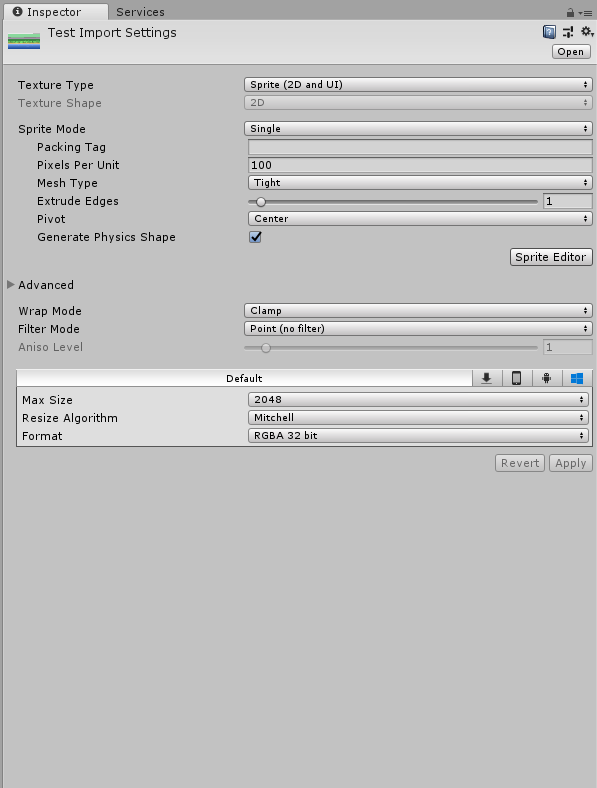


 narrow venture
ty!
 uncut grail
Hey, are there any good tools for mass-converting from glTF file formats to something like .OBJ?
Or FBX? Or anything?
I have like 600 and I just can't make myself import them to blender one by one and do it by hand