#h1-tech-support
1 messages · Page 21 of 1
 tawny moth
Pyre was the same for me until I added the following launch options to it but it still feels bad to screw around to have a decent framerate on games my machins should be crushing.
/NoFixedStep=true /SwapInterval=0
 grizzled narwhal
had an unfortunate bug pop up in a run just now. was using dusa's companion in the megaera fight (with extreme measures on) and the fight ended before she went away. after the fight her projectiles homed in on me and dealt damage, causing me to burn a death defiance.
 jovial grotto
My game crashes during dialogue, and can't be run from steam directly. I have to go to the .exe itself and I've tried everything I could find
any suggestions?
 golden crystal
Steam wont offer me a Refund because the game was open on a Black screen for longer then 2 hours i am ineligible..
so im stuck with a unplayable game i can't even refund :/
🙏 to random god
 chilly quarry
That definitely sounds like a steam support issue, it didn't correctly flag your account as owning the game?
golden crystal
I have no idea but they wont fix it put in multiple reuqests and nothing... i'm not paying another $35 aud thats just too expensive for me rn
 shy hornet
Had a bug with Dusa companion. I used it in the fight vs Theseus and Asterius and the fight ended before the companion duration was up. Dusa's projectile then homed in on me and dealt lots of damage to me.
 rain cradle
F10
 ionic hamlet
yeah but really, how helpful is a screenshot and "i don't know how i did this and can't replicate it"
 pulsar yarrow
I spawned Chaos gate in next room and it also had Infernal Trove, when I started the Infernal Trove it didn't close the Chaos Gate.
During the Trove was on btw. I didnt screencap cuz I was trying to kill them fast.
 compact kayak
You're supposed to be able to leave even when Trove is active. They've added more lines like 'Oops, got to go'.
 opaque niche
Hi, did you guys ever had a bug where the screen freezes but the game keeps going?
 sharp narwhal
@golden crystal I mentioned it before but you're welcome to reach out to us at support@supergiantgames.com if you haven't already, and we'll see if we can get the game running for you!
@grizzled narwhal We're aware of that issue and looking into a fix; you can report bugs in-game using F10!
@jovial grotto I think I emailed you about that issue yesterday morning after seeing your bug report - that's a problem with the x86 version of the game only. You have a 64 bit operating system, so you should be able to run the x64 version, which doesn't have the issue you described. If you can't run the x64 version either, you can follow the steps in #h1-tech-fixes which have a few troubleshooting suggestions.
@shy hornet We're aware of that issue and looking into a fix; please report bugs in-game with F10!
@ionic hamlet Reports through F10 are always more useful to us than messages on Discord, even if it may not feel like it! You can also include videos in your F10 reports by uploading clips to streamable or a similar service and then pasting the links into the text of your report.
Either way, we are aware of that issue and looking into a fix.
@opaque niche If you're on Steam, try disabling the Steam overlay. Right-click Hades in your library > Properties > General > uncheck "enable the steam overlay while in-game"
chilly quarry
I think you missed my question regarding controller icons the last time - is there any known issue for Right Thumbstick icon in keybinds being invisible when using Steam's XInput detection?
sharp narwhal
I have seen people mention here that the reload key icon for the gun wasn't showing up properly - might be the same thing? Go ahead and report it.
chilly quarry
I did a while back. Was asking if it was known in bug tracking.
Was before Long Winter and I don't think I was in this server at the time, so I'm not sure if any f10 logs are open for that issue. I believe that may be the same issue - reload is Right Stick click by default, yes? @sharp narwhal
sharp narwhal
Left stick, on Xbox controller anyways
chilly quarry
Hmm. Whichever one it is, one of the sticks shows up with no icon
Will reconfirm later on, maybe temp bind bug report to a face button to capture screen
 jade glen
not sure why but hades had some memory leak issue and then crashed
also all progress of that run was lost
had no sound in dialogue/interactions, then crashed a short while later in final boss
i think this is a one time thing, but not sure why it happened
 shadow urchin
When i picked up the Dionysus boon that gives nectar. Nectar spawned outside the area. So i can't pick it up
 frosty tiger
I don't know if anyone mentioned it before but if you have reduced movement speed,then the player doesn't stand on the boat(Asphodel) but moves further in the lava and then the animation of the boat goes on.
golden crystal
@sharp narwhal Contacted support like i was asked , All they asked for me to do was run a .exe?? what this had no impact on my refund or anything seemed useless...
sharp narwhal
I figured if you can't get a refund, we could at least try to get the game working for you, regardless of issues on the Steam side
golden crystal
😢 well unfortunately nothing worked and im stuck with it , i paid $35 for a black screen
 summer jacinth
Hi! Don't know if anyone had this but I had a bug where the SFX of the Charged Volley upgrade keeps on looping infinitely in all encounters + House of Hades after my first charged shot?
 meager basin
Hi i have a problem with megera fight. When she speaks, game just crashes. What should i do?
sharp narwhal
@summer jacinth Yes, that's a known issue and we're looking into it - please report bugs with F10 in-game!
@meager basin Are you playing the x86 version of the game?
@chilly quarry I'm trying to look into that controller issue now - I've found a few reports in our database of the issue you were describing, but I've never actually used any of the Steam input settings or anything myself. How do you have it set up / what are you using that's causing the problem?
chilly quarry
@sharp narwhal I'm using a Steelseries Stratus XL controller set up as a standard XInput controller via Steam's auto detected config. It's working properly - binds right and works - but the issue is that anything I rebind that thumbstick to has no icon anywhere.
It's just one big conspicuous blank spot on keybinds, and the other stick shows fine.
sharp narwhal
Gotcha, thanks
@chilly quarry It's a missing texture for the Steam Controller button prompt - I'd never seen it before because I wasn't using Steam's Xinput settings specifically for my xbox controller. Thanks for the tip!
 undone slate
Hello, I encountered what I think is a bug. Icewine got removed after I upgraded Trippy Shot from epic top heroic with Euredyce's buff. I had the plain Trippy Shot afterwards until the end. Got a screen shot if needed.
sharp narwhal
Report bugs with F10 in-game please!
undone slate
Couldn't find how to link a screenshot with the f10 feature, so I thought Discord would be a viable place to share it. If you dont need it, alright then. !!!
rain cradle
f10 sends screenshot, your save and all text you write inside the bug reporter
Devs can much easier debug it from the f10 report than other method of reporting
I remember they wrote they can debug straight from the f10 report.
undone slate
I learned about the F10 feature after I finished my run. I screenshotted the situation with Steam screenshots. Couldn't link the Steam screenshot with the F10. Anyway, the situation is pretty clear and easy to reproduce.
 misty plank
i purchased all the lounge upgrades before i got dusa's favor, it won't finish now, is there anyway to circumvent this besides starting a new game?
 drifting echo
Is it normal that in 19 runs since I began the game I never encountered Thanatos once?
 copper bronze
drifting echo
copper bronze
drifting echo
ok, thanks! Do I have a chance to encounter him now?
 burnt pilot
all progress lost? i played yesterday and no problem. today i open the game and there is no saved file??
 chilly kelp
check the save folder, Documents/SavedGames
 grizzled dust
so i just beat the elysian boss but now im stuck doing the charging animation for some reason
of course just attacking got me back but something to mention
chilly quarry
Is there anywhere to ask for non-Hades tech support?
 cinder totem
Hey Felis! Not in the server here, but if you shoot us an email at support@supergiantgames.com we can still help you out. 👍
chilly quarry
Alrighty, it's about the Transistor soundtrack - will fire that off now.
 tepid shale
im having a issue with hades the auto save feature is not working on steam and a message keeps popping up ever 10 seconds making the game unplayable
 swift lintel
Whatever bot adds the initial reactions to posts in #hades-feedback seems to be having issues.
tepid shale
it keeps saying "cannot save to storage device" and ive had no issues with saving in any other game. ive already done all the steps in the tech fixes and that didn't work and ive white listed it with my antivirus
sharp narwhal
@swift lintel Yep - windows update restart knocked the bot out, should be back up soon.
@tepid shale If you run the game outside of Steam as administrator - Program Files\Steam\steamapps\common\Hades\x64, then right-click Hades.exe and select "Run as Administrator" - do you still have this issue?
@grizzled dust We're aware of that issue and working on a fix. Please report bugs in-game with F10!
@misty plank The quest should still progress as normal. If you do a couple runs and it isn't completing, report it with F10.
tepid shale
ill try it real quick but i was fine with it at first but since the game auto saves so often i cant really play the game when the message pops up every 10 seconds
grizzled dust
oh right, thank you
tepid shale
ok i tried that and the message still popped up and its still not saving i used f10 to report it i just really would like to try the game out today but saving is pretty integral of the experience
this is the message
sharp narwhal
You tried changing controlled folder access in Windows Defender for your Documents folder? https://support.microsoft.com/en-us/help/4046851/windows-10-allow-blocked-app-windows-security
tepid shale
yayyy i figured it out! i had it white listed in my antivirus but it still was labeling the auto save as suspicious activity thank you so much now i can play in peace 🙂
sharp narwhal
Good, glad to hear it!
 grand rapids
bruh my progress suddenly disappeared. The only thing I can do is redo the whole thing again
 rigid meteor
did you check #h1-tech-fixes
grand rapids
for the profile.sav.bak thing i still do have the normal profile.sav
do i still do the same thing?
grand rapids
there is like ctrls and ctrl.bak, sjson,sjson.bak, temp.sav and temp.sav.bak
grand rapids
okay thanks for helpin tho
 warm osprey
hey question, my ds4 controller is doing this thing where the connection isn't stable so i lose control of the game; i've been told to turn off vibration to see if it improves but it doesn't, is there a controller that works better with hades?
rain cradle
My xbox one controller connected by wire does great job even with vibrations.
warm osprey
alright, i'll give it a shot
 spiral mason
Hello, I just bought the game a few hours ago. The title screen loads with no problem, but when the narration starts, the FPS drops dramatically, and it takes minutes to end that scene. After that, the game starts with incredibly low FPS, making it impossible to play
I've already tried everything in the tech/fixes channel. My drivers are up to date, the Nvidia panel configuration is optimized, and the game is running in windowed mode, with the Steam overlay deactivated
I don't know what else to do
spiral mason
Yep, is unplayable. Also did everything I found in forums including:
- Setting it in the highest priority on the task manager
- Changing Nvidia Control Panel options
- Limiting the amount of processors the game can use
Really don't know what else can I do. I think I will be asking for a refund if I can't get the game going soon enough
spiral mason
My pc:
- Intel G4560 3.5GHz
- 16 GB Ram
- GeForce GTX 1050ti
- W10 x64
(Still unplayable, already ran out of forum posts to try)
 naive pollen
So I haven't really like the level of music, it's completely drowned out by the sfx and such, but when I decided to just lower everything but music to a very low level in the settings, I found the music volume level is always tied to sfx setting. Please fix this!
rain cradle
Nuncha, your issue can be CPU, but i dont think it could limit the fps by that much that you cant play it
there must be something else
 tame topaz
What else are you running in the background? Is your harddrive full or being constantly accessed read/write?
spiral mason
@tame topaz Only Steam, not even the web browser is open. CPU usage Is low until I open the game (3
(3 to 8%).
Plus, I run a lot of waaaay more demanding games with a lot of stuff on background and 0 issues
rain cradle
did you tried turn off vsync, its an amd fix for their drivers, but maybe worth to try ?
spiral mason
@rain cradle Yep.
Disabled Vsync, enabled FXAA.
When that alone didnt work, changed:
Maximum pre-rendered frames to 1
Preferred refresh rate to “Highest available”
Power Management to "Maximum performance”
Threaded optimization ON
To no avail
tame topaz
What's your monitors refresh rate?
spiral mason
@tame topaz 60 Hz
tame topaz
Is that the rate you're expecting?
Like I have a 144hz monitor but I had been running it for like 6 months at 60hz
which made it seem like it was severly underperforming
spiral mason
It has always worked perfectly at 60Hz.
I don't think the refresh rate has anything to do with it. It really looks like a processor issue
rain cradle
I have 4cores/8threads. if i disable hyperthreading then its performing bad. your cpu is 2 cores.
 weak moat
I did a search back and didn't see anything related to the issue I am having, so here goes: I got the game a few days ago (loving it) and had only been playing it with a controller. When certain animations would activate, the FPS would tank down to around 5-10 max, and then spring right back up to 60 after the animation completed. I noticed it first when petting cerberus, but it's also on pretty much any charge animation, when Hades speaks to you (red screen), certain screen transitions... I chalked it up to early access bug and reported it, but here's the kicker: when I clicked back into the game after reporting the bug, my mouse click caused the spear to charge its spin attack and the game didn't slow down... so then I played with keyboard and mouse for a few minutes and experienced no slowdown whatsoever. So it appears to be related to my controller... has anyone experienced that before?
swift lintel
Reaction bot seems to be having trouble again in #hades-feedback. The reactions are in reverse order on some posts. I'd be surprised if some people aren't voting the opposite of what they intended without noticing.
rain cradle
styxbot is down
windows updates kill him
So moderators add the reactions by manual way
sharp narwhal
@weak moat Yes, it's a known issue that vibration on wireless/bluetooth controllers can cause lag and mini-freezes. We're working on improving compatibility; in the meantime, turning off vibration in the game's settings may help some.
weak moat
@sharp narwhal thank you, that does seem to line up with when I experienced the lag. I will try it in a couple hours and report back.
spiral mason
@sharp narwhal Any help for my issues?
I just want to be able to play this game
sharp narwhal
You can send a DxDiag.txt report with a description of what's going on to support@supergiantgames.com and we'll take a look to see if anything jumps out. Generate the report by running DxDiag.exe and clicking "Save All Information", more details here: https://support.microsoft.com/en-us/help/4028644/windows-open-and-run-dxdiagexe
spiral mason
@sharp narwhal Thanks!
Will do so
 meager plover
I haven't been able to toggle to the house contractor windows. I have completed all of the run chamber upgrades, just in case those needed to be completed first and still nothing. Feel free to throw me somewhere else if this isn't the right place.
 digital vigil
Hello! Not sure if this is the right place, but I was going around fulfilling the fates prophecies and the one for Athena seems to have an issue.
On my last run I got the last one I was waiting for from Athena (purchased from Charon in the last area (River of Styx I think?), and she gave me, finally, Divine Protection. Yet upon dying and returning to the prophecies desk, it says I have still got to get that boon.
any suggestions?
 restive fulcrum
When trying to unlock Zeus's aspect on the shield of chaos my game froze and crashed. I tried pressing F10 to send in a report but it completely stopped responding. It played the unlocking sound effect over and over.
I did take a regular screenshot and I'm not sure how or where I could submit a bug report with the actual screenshot of what happened.
Because as far as I'm aware when pressing F10 it will only use the image of the game at that exact point in time.
 lean patio
I am super pumped to have beaten Hades for the first time today! Since that happened however, all my runs have to be with the "pact", I like the pact itself but the last two runs I've made with it have crashed partway through (once in asphodel and once during the theseus/asterius fight) and then I get fully reset back to the start of the run (Weapon Room) with all my progress undone (prophecy choices).
Any ideas how I can manage this? It's super frustrating to not get any credit for what I pull off on my runs now, I can't be certain it won't just crash the game back to my desktop.
Also a minor bug (the icon doesn't appear over the last Demeter boon I need to complete the prophecy "Rare Crop" in this case)
grand rapids
Still can't use my old save. I tried restarting the computer, just opening and closing the game over and over again. I do have both profile.sav and profile.sav.bak so i don't really know what to do
 dense willow
While playing Hades on my bluetooth controller and all 3 times while I was using the spear, I experienced an issue where the game would almost freeze (though the enemies would still move and I would still take damage) but I'm unable to move. It often seems to coincide with hearing the constant charging sound of the spin attack. It wouldn't let me move again until I turned off the controller and entered KB+M inputs. It wouldn't let me enter KB+M inputs until the controller was disconnected.
When I went into controls, at one point during this issue, I saw the controls briefly switch to keyboard before instantly switching back to controller inputs even though I wasn't pressing anything on the controller. I assume the game is registering repeated controller inputs of some kind?
The problem is I'm not sure if this is a bug with the game or an issue with my controller. Is this a known issue? I don't want to replace my controller if it turns out it was a game bug.
rain cradle
Using wireless controllers cause issues. It's know. If you have Xbox one controller plug it with cable and will be fine. At least for me.
Another fix is to turn off vibrations in settings. It's a first step.
 cold moon
i got a weird one with my controller
game seems to crash when it's plugged in, but works fine when it's not
rain cradle
Do you got an Crash report window?
cold moon
no, it just freezes/returns to windows
 zinc wolf
Got to the point where talking to Meg about being more lienent on a certain miserable shade just straight up crashed the game. First time I've had this issue.
lean patio
I tested a little more, it seems like the increased boss difficulty pact seemed to be causing my crashing to desktop issue, I've tried on other pacts and with other weapons and had no issues, I'll update as I do further testing
sharp narwhal
@lean patio Have you tried verifying your installation through the launcher?
@zinc wolf Are you playing on the x86 or x64 version of the game, do you know?
lean patio
@sharp narwhal Yes, I did before beginning testing today, no additional files needed to be downloaded. Thus far the problem seems isolated to the boss difficulty pact option (which is a shame because the bosses are so much fun in this game, I really enjoyed the fury fight)
sharp narwhal
It's strange that it's isolated to that pact option, that really sounds like a corrupted script file.
lean patio
@sharp narwhal I can notify you if it happens again, but steam gave me a %100 on my verification
lean patio
either way, I was able to smack down hades again, so I was satisfied
I have not restarted
sharp narwhal
@cold moon This sounds like it could be a crash caused by the generic controller driver, EZFRD64.DLL. You can check this Steam forum post for instructions on how to uninstall and reinstall drivers: https://steamcommunity.com/app/373420/discussions/0/217691032449212208/

Hello everyone, I would like to share a possible solution for users that are not being able to use "generic" controllers to play D:OS on Windows 10. The main issue occurs when the game is trying to load the library EZFRD64.DLL, which is added to your system through the driver ...
HPG, try restarting and verifying again. I've seen several instances of folks saying Steam gave them a clean bill of health and then when they restarted, it found issues
lean patio
@sharp narwhal I will let you know the results
sharp narwhal
@dense willow Yes, compatibility with bluetooth controllers is a work in progress. Turning off vibration in the game's settings may improve performance.
@grand rapids There are some steps you can try here: https://supergiantgames-kb.groovehq.com/help/hades-missing-or-corrupted-save
Check here if you had a save file that's now gone missing, or if your save data looks wrong or won't load.
@restive fulcrum Try verifying your installation through the launcher. Are you playing on the x64 or x86 version of the game, do you know?
@digital vigil Not sure - I haven't encountered that issue myself but there may be a more specific bug. Please report bugs in-game with F10
@meager plover As in, you can't click over to the other pages? Are you using keyboard and mouse or controller?
 hasty trellis
Could someone help me figure out why Hades is crashing? It seems to happen randomly (although it's never occurred while in the home/base area).
I have latest video drivers and windows updates if that helps.
The crash semi-freezes the game for about 1-2 seconds then just goes straight to desktop with no errors.
restive fulcrum
@sharp narwhal
I tried to figure out how to verify which version I'm playing, but I'm not sure which launcher you're referring to.
Nor could I find how I'm supposed to verify which version I'm playing through googling myself.
(I can find both versions in my computer files in my SteamLibrary, but that still doesn't tell me which version gets launched.)
Could you explain to me or link me to some resource that explains how I can verify my installation?
rigid meteor
it shows in the top right 🤔
sharp narwhal
@restive fulcrum
As long as you're launching through Steam, it should be choosing the version that's best for your computer, so no need to worry about that probably.
To verify your installation, right-click Hades in your Steam library > Properties > Local Files > Verify integrity of game files. This will check to make sure there are no corrupted or missing files in your installation.
@rigid meteor That's the patch number/game version, not the architecture the game is designed for.
rigid meteor
yea i realized with ur msg that's not what he was asking, i read "version i'm playing" and assumed it was that
mb
sharp narwhal
It's fine!
If you wanted to double check whether it was running from the x86 or x64 .exe, you can start the game, use ctrl+alt+del to open up the task manager, go to the "Details" tab, scroll down until you find Hades, right-click > Properties, and it should list the file location under the general tab
restive fulcrum
@sharp narwhal
Alright. It seems it's running x64.
sharp narwhal
Cool, not a memory issue then.
restive fulcrum
Once I started up the game again it let me unlock the aspect just fine. So I'm not sure what caused it.
Just to be safe I turned of steam overlay as well as controller vibrations in the options. (Even though I'm playing with a keyboard.)
sharp narwhal
Alright - let me know if you run into that issue again!
restive fulcrum
Will do. ^^
zinc wolf
@zinc wolf Are you playing on the x86 or x64 version of the game, do you know?
@sharp narwhal x64
I restarted my computer and was able to advance again, did a few more runs with no problem, may have been something my side.
 turbid flower
Hey, last month I reported an issue concerning my game crashing on start up with the debug log noting 2 instances of "failed to load required game files", I also send a mail detailing everything. Could I ask what the status of that issue is?
sharp narwhal
Looking at it now 👍
lean patio
@sharp narwhal Second validation showed no errors, I'll try another run with the boss mod on and let you know if I encounter the same problem
not immediately mind you
 covert snow
The game freezes constantly, usually when I take damage
Really destroys the flow of combat
 inner venture
What are the specs of your computer?
 candid flame
I'm having the same issue with the game freezing when taking damage. Just now it crashed after having taken damage.
 frosty gulch
just got a message that says "stream was unable to sync your files for hades with the stream cloud."
i haven't connected hades to any other device apart from my computer. should i be worried, because im really worried. (it's maintenance tuesday nvm false alarm)
hasty trellis
I'm still having the crash to desktop issue with no error. Specs are w10 64 pro, threadripper 2950x, gtx 1080, 64gb ram 3200. All drivers are up to date and I don't have crashing issues on any other games.
frosty tiger
Hello, I sent support last Friday and I'm still unanswered, I would be very grateful to hear about any news about my strange performance problem with the game, thanks.
sharp narwhal
We don't work weekends and most of the office was off Monday - it may be a few more days!
frosty tiger
OK I'll wait this week, thanks.
 silk birch
I can play through the game, but whenever I try do an Infernal Gate my game picture will freeze, but not the game itself. I can still move my character around and hear him getting hit, but the game would be frozen on me dashing or attacking something. Is there anyway to fix that?
 terse bolt
Having a great time playing this, but there's a big frame-rate drop from Asphodel onwards. From 60fps (I guess) to well under 30. Kind puts me off playing. Any plans to bring performance in line on later stages with the first biome? Anything I can do to help it?
 faint beacon
was halfway through the hades fight and the game just straight up crashed! my main theory on this is that the egs launcher just wanted to randomly restart and decided it should take down hades with it
covert snow
@inner venture
rain cradle
sharp narwhal
@silk birch That's a known issue that came up sometime during the latest major update; we're still looking into what causes it. Could you submit a report from your game with F10 mentioning the issue?
@terse bolt There are some suggestions for improving performance, especially on AMD cards, in #h1-tech-fixes .
@faint beacon I'm sorry to hear that! Did it freeze or just crash to desktop?
covert snow
I already tried those solutions, neither worked
sharp narwhal
Do you use a wireless controller?
faint beacon
It was a freeze, then black screen, then crash.
 cobalt flare
When i click my save it only show the clear save file option even when i didnt click on the trashbin icon and i ended up deleting my save files. Happened to every save file on slot 1 ( even new one i created). Any suggestion ?
silk birch
Now my game wont even load. It will start it up, the loading would start then stutter and cut to a black screen.
cold moon
@sharp narwhal sorry i didn't thank you earlier... so, thanks! 🙂
 tepid wadi
I have a problem where 10-15 hours into a save file it begins crashing randomly in the middle of runs. There were no problems until it began crashing. This has occurred on two separate save files so it shouldn't just be a one time thing. Does anyone know what might be causing this?
 fair bison
Audio has been completely disabled in my game, and I have no idea why. Nothing I’ve done has allowed me to turn it back on again, and I know it’s not an issue with my PC
chilly quarry
Say, uh, @cinder totem I sent an email as you suggested but haven't received a reply in a week. I'm not sure if something went wrong.
cinder totem
Thanks for letting me know! I'll DM you for a bit more info and see if I can get you some help today. 👍
 upper nexus
Hey guys, my game isn't updating, stuck on version 0.23
@upper loom Do you know anything about this issue ? ^
Im playing from Epic Games Launcher
covert snow
Game still freezes when taking damage
rain cradle
Try manual update by verifying files
 lyric obsidian
Hi need someone to clarify for me, is every heat suppose to give you 1 extra bounty? I skipped from 1 heat to 10 heat and only got 1 titan blood out of it - is it bugged?
 remote copper
so each individual heat level for each weapon will give you all the sets of the bounties
if you skip ahead
say 10 in your case
heats 0-9 will still give you the extra bounties
you just need to set it to that heat first
provided you hadn't already set it to that heat for that weapon and gotten the bounties
there's a slight sound bug with the chiron bow and I think Demeter's Special enhancer?
whenever you use it the area gets filled with a redundant and annoying insect-like noise
the source of the sound is proximity based and will fade the farther you are away from it
however it's also persistent from area to area
lyric obsidian
ok thanks!
remote copper
(additional notes about the sound bug: it goes away upon quitting to main menu and reentering, but inevitably reappears later)
 proven crow
Hi, I saved my game last night after the second boss, and now my game file is corrupted and crashes when I try to load the session. Can anyone help me recover my save file? I don't care about the run, but my progress is important of course..
sharp narwhal
@proven crow Verify your installation through the launcher. There's instructions in #h1-tech-fixes
@remote copper Yes, we're aware of that sound issue and looking into a fix; please report bugs in-game with F10!
remote copper
ahh okie
sharp narwhal
@upper nexus Make sure that you're logged into the correct Epic account
proven crow
The game launches, it's when I load the save file.
sharp narwhal
@fair bison Could you check your sound devices and make sure the proper ones are enabled and that there are no issues with them? Also, if you're using headphones that have surround sound or something similar, that may be interfering.
@proven crow Yes, this is a semi-frequent issue especially with Steam installations after some patches; the game will crash after defeating a boss and then the save will crash on loading.
@tepid wadi You can do the following and email us with more logs at support@supergiantgames.com, we'll take a look to see if anything obvious jumps out as potentially causing issues.
- Search for Event Viewer in the start menu, go to Windows Logs > Application
- Select all of the "Error" events you can find related to Hades
- In the Action menu bar, choose "Save Selected Events"
- Run dxdiag.exe and generate a report by clicking "Save All Information". (More detailed instructions here: https://support.microsoft.com/en-us/help/4028644/windows-open-and-run-dxdiagexe)
- Attach the .evtx file and DxDiag.txt to an email and send it to us!
@silk birch That sounds like it could be a separate issue; there are some fixes for black screen on startup in #h1-tech-fixes , could you give those a try? Let me know if they don't help
@faint beacon Alright, I see - I'm not sure logs would help us out much since freezes tend not to be logged by windows in much detail. I'm sorry for the inconvenience - if the game continues to crash or starts to crash more frequently, let me know and I'll see what I can suggest!
fair bison
I ended up leaving the game alone for a day and when I came back to it audio was working again! Thank you though.
sharp narwhal
Oh, ok, good to know!
There is a sound bug where some dialogue can be muted that can sometimes be very persistent, though I'm not sure what would've caused the entire game's sound to go out
If somehow a lot of sounds got queued and then played at the same time it could've maxed out the sound channels
@covert snow Could you run DxDiag.exe and generate a report with "Save All Information" (https://support.microsoft.com/en-us/help/4028644/windows-open-and-run-dxdiagexe), then email the DxDiag.txt to support@supergiantgames.com with a description of the issue? We'll take a look
fair bison
When I checked the settings the bar said “audio disabled” and I couldn’t change the setting back. Audio for the rest of my PC was working fine. I also got stuck in a room at the same time so I just left it but I’m glad it’s all back to normal again
proven crow
Thanks for the quick reply! I renamed the Profile1.sav.bak file to Profile1.sav but still crashes...
sharp narwhal
@proven crow Did you verify your installation?
It Used to Work... (Verifying the Game Files)
Sometimes, issues can happen when downloading game updates. If the game isn't working properly for you, try verifying the game files:

On Steam:
· Right-click on Hades in your Steam Library
· Select 'Properties...', then select the 'Local Files' tab
· Select 'Verify Integrity of Game Files...'

On Epic Games Store:
· Locate Hades in your Library
· Click the three-dots symbol near the game title, and select 'Verify'

This may alleviate some issues, especially if you recently downloaded an update. ```hey, i just had a powersurge while playing, now my save reads this. Can this be saved?
sharp narwhal
Check here if you had a save file that's now gone missing, or if your save data looks wrong or won't load.
turbid flower
Worked, you're my hero, again 😄
sharp narwhal
Hey there, what's up?
 sharp hare
Hi! i don speak english very well, Sorry if you dont understand this.
i will put a "(?" when a word or an expresion isnt correct jjaja
When i reach the asphodel my game bug and the texture doesnt load(?, i try to restart the game, start a new run and a lot of things, and i dont want to unninstal de game becouse i dont know if my progres will be saved.
in the first level de textures are fine.
Thanks So much!
here is an screenshot
sharp narwhal
You should verify your game. Are you using Steam or Epic?
sharp hare
Steam
but i alredy verify
; (
the game is playable, but is very difficult becouse of the lava
I did not reach the next stage yet
so idk if is buged to
sharp narwhal
Could you find the DebugLog.txt file and send it to me in a private message? It should be in your Documents\Saved Games\Hades folder.
sharp hare
Here it is
sharp narwhal
Thanks! It looks like your version is very out of date - your log is from 24897, and the game right now is on 25138
sharp narwhal
You should still try updating - if you were verifying your game, it should have given you the latest version.
sharp hare
I will try to restart steam
sharp narwhal
Did you buy the game through Steam, or did you buy it from Epic?
sharp hare
Steam detected the last version
so i am downloading
I hope the problem is solved
idk why steam didnt detect the last version ; (
sharp narwhal
I don't either! I'm glad it's downloading.
sharp hare
; )
 spare panther
Lava shades
proven crow
@sharp narwhal It worked, thanks
chilly quarry
Is there any specific way to get performance logs for FPS drops and hitches?
My hardware isn't hitting full utilization on COU or GPU, and generally takes less than half of the available resources, but it still gets massive drops from some attacks like spammed cluster rockets.
 fallen crow
games not launching at all.
drivers are updated followed every thing posted on hades-tech-fixes
other people have been having this problem for the past 2 weeks
i bought it last night so i can still refund
rain cradle
can you try manually set your dedicated gpu to run the game ?
also try verify files as the text says. Did you tried it ?
fallen crow
Yup tired both.
Also Turned steam in game overlay off
Used launch options to launch it windowed full screen.
Still nothing
@sharp narwhal ?
sharp narwhal
@fallen crow Perfect timing! We just figured out what causes this issue.
Go to your regional and language settings - there should be options to change number and date formats. Make sure your "decimal separator" is set to , or ., and NOT to '.
This issue will also be fixed in the next patch if you would rather wait a few weeks

Your Microsoft Windows regional settings will influence how your date/time, numeric, and currency data types appear when you apply formatting options.
fallen crow
@sharp narwhal
What a weird cause for this issue. But im no programmer.
Yeah its good now.
Time to show dad whos the boss around these parts
rain cradle
yeach and it just for the count down to next patch
 swift perch
Hi! I am not good at English. So I want to use a translator to ask questions. I bought a game from Epic Games. However, the game cannot be executed after installation is completed. I turned on the computer, reinstalled the graphics driver, and reinstalled the game. Is there any way?
fallen crow
Maybe you have my issue
@Horizontally Gifted Boi Perfect timing! We just figured out what causes this issue.
Go to your regional and language settings - there should be options to change number and date formats. Make sure your "decimal separator" is set to , or ., and NOT to '. @swift perch
swift perch
Thank you for your help. But can you explain it in more detail? @fallen crow
fallen crow
Control Panel --> Region --> Additional Settings --> Decimal Symbol then change it to .
@swift perch
swift perch
Thank you. But my problem is not solved. Thank you so much for your help. @fallen crow
sharp narwhal
@swift perch Try installing the latest C++ redistributable. https://support.microsoft.com/en-us/help/2977003/the-latest-supported-visual-c-downloads
swift perch
@sharp narwhal I tried as you told me, but it's not resolved, so I'll proceed with the refund and buy it again from Steam. Thank you very much for your help.
 short haven
Hi, I sent an email to support@supergiantgames.com on the 13th and haven't yet received a response about the issue I'm having. The game hangs intermittently while playing, and takes a long time (up to a few minutes) to reopen afterwards for some reason. I don't get an error from Hades itself, just the one from Windows saying the program stopped responding. I've tried all I could from the tech fixes channel, as well as a memtest and sfc. I've been considering completely reinstalling Windows to see if the problem persists, but was wondering if there might be anything else I can try before I do that. I'm playing through Steam using Windows 10 Pro 64-bit.
i7-6700k, 1080 TI, 16 GB RAM
 radiant hatch
hi, hope this is the right channel for this
what should be done in order to import a save file from the cloud? steam doesn't automatically install it for some reason and the game doesn't detect the files
 velvet dune
I have encountered an issue today (after not playing for about 2 weeks), where I cannot see any symbols in the game. I sent a bug report. Is there a quick fix for that issue, yet?
second example of my issue
sharp narwhal
@velvet dune Verify your installation through the launcher. Instructions are in #h1-tech-fixes
@short haven I'll check the status of that on Monday.
short haven
@sharp narwhal Thanks
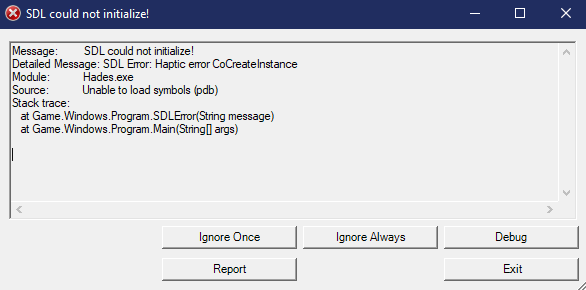
 stuck mason
Game won't start for me and gives this error message. I ran through the common issues in #h1-tech-fixes and nothing worked.
 livid herald
hi, i just got the game this afternoon at my friend house and i really enjoy playing it. I just re-dowloading it and now i cant find the save file. How can i fix this. Thanks
rain cradle
Tell your friend to send hades save from him pc. It's in documemts/saved games /
 dawn lava
@rain cradle what is this SDL link exactly?
My mate is having the same issue as Bloodzure
rain cradle
It's cross platform soft to access system mouse, keyboard, gamepads etc
Someone had error which says it can not load so I recommend updating or installing it
dawn lava
Ok cheers mate
stuck mason
Thank you I'll try this out if the error comes up again but I just got home from work and it just let me start it now hmm  @rain cradle
 fervent hatch
Why is my FPS limited to 40? The game feels horribly unresponsive
nvm restarting PC helped
chilly quarry
@sharp narwhal Is there any known issue for Minotaur autograph sidequest being broken? Mine is a bit busted. I got the autograph conversation but keep getting the "you don't have it yet" from Hypnos.
sharp narwhal
Not that I know of - report it and I'll check your text record and if it seems wrong I'll bump it up.
chilly quarry
Alright, does that show you the records if I haven't triggered the event recently?
Like, is it lifetime event flags for the entire save?
Because I'm nowhere near those convos, had them ages ago
sharp narwhal
It's lifetime, yup
chilly quarry
Excellent. Will send it over
chilly quarry
@sharp narwhal Sent, with my discord name (will prob do that for easier reference in future)
sharp narwhal
thanks!
 ashen widget
upon completing the money infernal trove and claiming the prize, for some reason it also spawned a nectar on the ground near me which I was able to pick up as well
was that a bug?
sharp narwhal
@chilly quarry Don't worry, it's not bugged - there are some precursor conversations you haven't seen yet
I'd recommend ||letting yourself get killed by Theseus a few times||
short haven
@sharp narwhal Were you able to check the status of that support email? I realized I didn't include my Discord username in the email
sharp narwhal
Ah, sorry, I was going to - could you DM me the email address you sent it from? Thanks
Had a busy day yesterday 😅
short haven
No problem
frosty tiger
Hello, could you check my problem? I sent the problem on February 14 as appropriate but I still haven't received an answer, thank you.
sharp narwhal
Did you send an email or an F10 bug report?
sharp narwhal
Ah, F10, right?
frosty tiger
yes
 full crater
pls be safe, keep ur email secure 👍
sharp narwhal
I'm looking at it now
frosty tiger
Thank you, there I describe that I have no problems with sending a video or making a transmission here, to see with MSI Afterburner the problem more specifically, if necessary 🙂
sharp narwhal
So, we've kept your report on hand to look at as we're generally improving performance and optimization for the game. Reports like this will be part of what we use to determine where we need to troubleshoot, so thank you for submitting it.
I'm not sure I can suggest much in the way of fixes or further action right now, though - hopefully as we continue to polish and improve the game's performance, issues like this will become less severe and less frequent.
frosty tiger
All right, I agree. Would you like me to send you a Benchmark? It may help, although I suppose the community has already done so.
With all the love and respect I feel for the game, unfortunately I could not play like that, it shows too much on the screen and to limit the frames in smaller quantities I do not feel that it is very honorable.
Anyway, thanks.
rain cradle
Whats your pc?
frosty tiger
-RX 580 8Gb
-FX 8320 4.2 Ghz OC
-16 Gb Ram 1600 Mghz
-Evga 600W B Plus
-Motherboard MSI 970 Gaming
-Windows 10 Pro version 1909
- SSD 120 Gb Kingston
-HDD 1 Tb WD 7500Rpm
@rain cradle
Basically at any time the game without using many almost resources, constantly raise and lower the fps disproportionately, with differences between 40 fps on average, you can go from 40 to 75-80 easily by simply moving the character in any area of the map.
MSI Afterburner informs me that the CPU and GPU never reach 100% (which is logical) Vram, all normal ram. It is the only game that works like this. In fact when I ran it for the first time and noticed that "lag" on the screen I worried thinking it was the PC, but then I did some tests with witcher 3, Red dead Redemption 2 and everything was perfect.
chilly quarry
Hmm. I was having a similar problem the other day.
rain cradle
Czy sprawdziłes zakładke z rozwiązaniami #h1-tech-fixes ? Masz niestety kartę graficzną AMD, która nie lubi sie z OpenGL (cos jak DirectX) , Dobrym rozwiazaniem jest wylaczenie Vsync w ustawieniach Radeon.
Did you check #h1-tech-fixes ? Unfortunately you have AMD card, which dont like OpenGL ( something like DirectX). A good solution is to turn off Vsync in Radeon Settings.
frosty tiger
I have always had Vsync deactivated in radeon, I don't like it, I prefer to do it from the games menu if necessary. Interestingly here there is no such option.
rain cradle
Check it. It must show "Vsync = OFF, always" for the game.
frosty tiger
Really, I'm sure. I am very careful in those aspects, even a little picky
but I will check it once more equally, because the values I have are "global" for all games, I try to configure it for that game exactly, maybe there is a difference
rain cradle
Well then there is not much we can do with it. SGG games like Bastion, Transistor was fine with it as these was ok even with 30fps. Now when Hades is much much more dynamic the openGL issue which is AMD driver for the API is real pain .
If you are somehow more tech then you can try linux. AMD openGL driver is a lot better. My laptop with 2500u does stable 70-80 fps during game. But at least for me it creashes sometimes, but hope to fix it 😛
jade glen
(spoilers)
wait, there's an ||autograph dialogue regarding the minotaur? i haven't lost to thesus in forever so that dialogue won't come up at all?||
frosty tiger
Guys are not going to believe it, I set the "always activated" Vsync in Radeon and now I am EXCELLENT! Super fluid reached frames of up to 133 fps! how strange is life
I don't know what to say, but THANK YOU! Now if you enjoy Hades to the fullest! I'm just starting 🙂
logically I am going to limit myself to 75 since it is the frequency that my monitor gives. I will do it with afterburner himself
but there is something that really has me thinking, when I do basic attacks, I notice how the graphics of the game look a little more blurred for 1 second, as if the resolution will be lowered
frosty tiger
There you can see the difference well, it is very strange
In everything that are the edges and cobwebs it shows much more, when attacking
oh it seems to be a known problem, but I am playing alone in 1080p
 fast flume
i don't think that artemis' boon is working. i have the rare and epic mirror buffs maxed out, and i picked her item after the first boss. both biome 2 and 3 had my first boon be not hers, and when i do get one of hers, it's got two normal strength versions. i feel like (but am not sure) i saw the same thing last time i picked her boon as well.
chilly quarry
@fast flume That's just RNG
And restarting a game gives identical seed if you give up midway
fast flume
well, the text on the gift doesn't match the behavior in game, since i'm getting other gods first. either the text or the behavior should change to match the devs' intent
chilly quarry
ha, I found the repro steps for freezing zag in an animation
be holding a specific animation as a boss dies
sharp narwhal
@fast flume God Keepsakes only apply to one biome, i.e. you can only use them once per run. If you equip a keepsake before Asphodel, get an Artemis boon, then keep the keepsake into Elysium, you won't get an Artemis boon first thing in Elysium. There's a use counter under the keepsake in the UI sidebar that should tell you if it's already been used up.
If the keepsake isn't following that behavior, it's a bug and you can report it with F10 in-game.
fast flume
that's good to know; thanks. i hadn't realized it was once per run. i'm fairly certain that i wasn't getting one for the first biome, but i'll pay more attention and report via F10
 urban oasis
Is it something known/documented that having the game fullscreen (not borderless) in a secondary (or third) display makes it very stuttery?
sharp narwhal
It depends; usually dual/multi-monitor setup issues are very dependent on how your setup is put together, what the refresh rates on your monitors are, other programs you may have running, etc.
sharp narwhal
👍
 violet pebble
Does anyone know how to get the AMD Overlay to work with Hades? Would be nice to be able to save clips and stuff when playing. Steam Overlay works just fine
sharp narwhal
What's the issue with it?
violet pebble
When pressing the hotkey (Alt+T for me) the overlay wont show up and my screenshot/record last 1.5 min keys also do not work. I've resorted to playing in windowed mode and having my AMD recording always be on and not just in game but i'd prefer to have it work in Hades fullscreen also
violet pebble
i do have win 10 but i think i've turned off the xbox dxr thing, ill try that thanks
 coral edge
I've been having some sound issues, including missing voice lines. Is there a way I can provide a log?
 pliant hollow
Didn't know if anyone would be able to help me with something. I went on a trip and signed into my steam account on a friend's computer so I could play some Hades. My save files weren't on their computer so I had to make a new save. When I returned home and on my personal computer, my Hades save was replaced with the new one I made on vacation. Has all my progress been erased now?
urban oasis
probably, that sucks D:
I've noticed steam sync issues too, like, when my girlfriend started playing using steam family sharing on my computer but her steam account, it overwrote my save, then uploaded it to my steam cloud when I next tried to play, effectively destroying it.
luckily I'm paranoid about losing data and made a copy of my save before letting her play, but still, that's not good :L
 stiff beacon
this is bad, dudes
 edgy heron
Hello there. Is there any way I can import a former Hades save file into a Steam bought game?
Let's say i used to play on my uncle's computer and I don't feel like starting the game over if i buy the game :<
rigid meteor
in the documents folder there's a Saved Games folder with Hades save file in there
just copy that from your uncle's computer into yours
edgy heron
it does work independently from game version (pre winter update) & wether it comes from a different source?
thanks!
rigid meteor
it worked for me in that same case yea
edgy heron
maybe we have the same uncle 
thanks anyway!
chilly quarry
I cleared 8 heat with two weapons, and did not get the ||statue of Skelly or the Prophecy for it.|| Skelly's bond was only forged afterward. Am I missing some conversations, or do I have to clear 8 heat again, or is my game busted?
 coarse viper
Hey folks, I'm struggling to get my game to run very well. I've got an AMD Radeon RX 5700 XT and saw the post in fixes about certain AMD cards. I changed those settings and it helped quite a bit, but in areas with a lot of enemies it starts to jump around and chug at a terrible FPS. Is there anything else I'm able to do to try and improve the performance, or am I out of luck until future patches?
 broken sundial
Hades seems to have crashed and saved the place I was in, but every time I try to launch my save file, it crashes again. I'm hard-locked there. Is there some way to edit my save file's data so that I don't have to delete it and restart?
sharp narwhal
Had you just defeated a boss when it crashed?
broken sundial
the first chamber after leaving tartarus, the one before you start fighting in Asphodel? I was just leaving that
I had the Aspect of Chiron with the bow, and I had the Frost Bitten Horn with the Fidi Chthonic companion
which... I'm not sure that matters or not.
sharp narwhal
Try verifying your installation
It Used to Work... (Verifying the Game Files)
Sometimes, issues can happen when downloading game updates. If the game isn't working properly for you, try verifying the game files:

On Steam:
· Right-click on Hades in your Steam Library
· Select 'Properties...', then select the 'Local Files' tab
· Select 'Verify Integrity of Game Files...'

On Epic Games Store:
· Locate Hades in your Library
· Click the three-dots symbol near the game title, and select 'Verify'

This may alleviate some issues, especially if you recently downloaded an update. ```It is still occurring it would seem.
After the crash report screen goes away, I'm left on this screen. I can still press escape and go back to the main menu, but I can't do anything on this Save in this state
broken sundial
Okay, I was able to save my file and stop this from happening by messing with the save file a bit. I renamed the Profile1.sav file to Profile2.sav so that it would be moved over to the second slot, and I'm in the same spot it crashed as before, but it's working now. Trying to use the first slot with the same data still causes crashes. This is very odd.
 vocal iris
I am having the same issue
I cannot go past asphodel, it crashes each time
I've deleted the save and started again and it still crashes after i beat meg and try to enter asphodel
 echo snow
You should try renaming your save like Smar did above and see if that helps
vocal iris
yeah, it worked, weird!
 tawdry hawk
Hello. I have a problem loading Hades. When I launch it from the Epic games launcher, it closes the launcher and the icon at the bottom tab for Hades comes up. Then it goes away without opening the window for the game and brings back up the Epic Games launcher. I've had this problem before the update that had Elysium. I uninstalled and reinstalled the game and launcher as well as made a shortcut link to launch Hades on my desktop. Any suggestions?
 little tinsel
less about needing help and more a bug report; talked to dusa and started her social event scene in zag's bedroom only to have thanatos' event trigger and play simultaneously
spare panther
Thandusa
spare panther
Rejcepted
 lost breach
There's no way to turn off the aim assist is there? Actually drives me insane on keyboard and mouse.
chilly quarry
Think it's an option
 pearl raft
Hi. I just died two times in a row and started on the same see each time. Is this a big?
spare panther
same see?
 woeful kayak
is there any way to keep the audio playing in the background when I tab out of the game?
i run it in windowed mode.
 zealous apex
Hello. May I ask something about Hades, please?
When I take a screenshot of the end score table that shows your boons and stuff for that run, it just takes a screenshot of a random moment in that run. Is that a bug or something or am I the only one experiencing it?
For example; this was supposed to be the screenshot of the end score table after killing Hades. I was very surprised to see this when I pasted the screenshot. I am very sure that I did not take a single screenshot in the run except the end score table. This is not a one-time thing for me, it happens all the time.
sharp narwhal
My guess might be that your clipboard ran out of space, and the screenshot wasn't copied to it? But not sure
It should've been saved to your Documents\Saved Games\Hades folder regardless
@little tinsel Yes, that's a known issue that should be fixed in the upcoming patch. You can report bugs in-game using F10!
@pearl raft Are you sure it was the exact same seed? Sometimes runs can look similar at the start.
Also, if you "give up" on a run, when you start back from the training room, your seed will be the same as the run you abandoned. So if you were giving up from the pause menu, that wouldn't have changed your seed.
@lost breach There's an option to toggle aim assist in the game's settings menu.
@tawdry hawk There are some things you can try in #h1-tech-fixes , though I think it's most likely you need to install or reinstall the latest C++ redistributable
 still ember
Hello, i have a bug but i don't know if it's caused by my (quite used) controller or by the game: the controller vibrates non stop until i unplug it. ||So far it seems like i get this bug while playing with the Adamant Rail, but i'm note sure if this is a coincidence or not|| This happened twice so far. I'm using an xbox 360 controller and i'm playing via Steam. I wanted to know if anyone else experienced this issue?
zealous apex
@sharp narwhal Well at first I too suspected the same but I am quite sure I never took another screenshot. If that was the case there wouldn't be a screenshot of a random moment in the clipboard. And I unfortunately didn't find any screenshots in the folder 😦
 rose wolf
Hello, I'm new to the server and I didn't find and pinned "known bugs" list
Is there any?
rose wolf
Thank you!
It's less of a tech bug and more of a UI bug
but I don't know where to report it
rain cradle
hit f10 in game
rose wolf
ok!
zealous apex
By the way I solved the screenshot issue by unticking the "Borderless" box in the options.
 gritty apex
 placid pawn
I've been playing for a little over a month, and the game has run great until about a week ago.
Periodically the frames will hitch (but the game continues, allowing enemies to hit me or for me to take extra damage on a trap because I stopped moving).
I didn't update or change any drivers or hardware, and I have since verified the game files (it said nothing was wrong). The only thing different that may or may not have coincided with the problem is that I was running another Steam program at the time that it began happening; however, it has continued even if Hades (and Steam) are the only apps I have running (aside from the usual background stuff).
The game ran smooth as can be until recently. I've played on various heats, weapons, boons, and it never had happened. Now it happens every session (seemingly) regardless of place/weapon/etc. Every 10 seconds or so, I lose a half second.
placid pawn
I'm guessing this is inadequate information? The situation is very bizarre and has only happened while playing Hades.
 lean wagon
Anyone know what the encoding of the .sav files is?
rain cradle
Search pluto on reddit -- hades reddit to be clear
lean wagon
Very interesting. Thank you. I'm not able to intuit the encoding from the source code, though. Looks like maybe it's UTF-8, and Pluto is just skipping the unknown characters as though they were whitespace or something.
Oh! It's addressed in the reddit post. Skipped right past it and went to the source 😛
The serialization format is totally custom. The game implements much of it's content in lua, and much of the save data is defined and tracked within the lua context. A large portion of the savefile is a straight dump of the lua interpretter state, serialized by a library called luabins. As part of this project I also wrote a library to serialize/deserialize luabins data in python, and you can see that here.
chilly quarry
@placid pawn Been having similar problems. I wonder if it's connected to anything like Windows updating or Steam.
Do you ever notice any Steam interaction like friend list notifications around it?
 serene moss
guise can I trade my Epic Games license for a Steam one?
 rotund ether
Hi im have trouble getting any of the companions are the events random or am i missing events? Thanks for making one of my favorite games!!!
placid pawn
@chilly quarry I haven't. It occurs more frequently than any steam or windows notifications.
chilly quarry
Damn.
I'm not sure what causes it either.
was just wondering if windows updates could have affected it
placid pawn
How long have you experienced the issue?
chilly quarry
Last couple weeks tops?
placid pawn
Hmm. Afaik there haven't been any game updates during that time, yeah?
Does your experience match my description? Intermittent frame hitches (but otherwise it runs fine)?
placid pawn
It has kind of seemed like it coincides with enemy actions/VFX but it also happens during the transitions between regions.
chilly quarry
yeah, some enemy actions seem to just make the game choke
 empty marlin
Hi i want to play the most recent update of hades but when i try to update it on the Epic Launcher, it says its on the latest version (the launcher says its on version 22033-x64 and the thumbnail show the recent update, but my game is stuck on the superstar update)
rain cradle
Most of patches are 8-9 gb, the whole game is 10gb. If you want to have current version then remove it from disk and install again. The save is in documents so it will be safe.
For extra safe you can make a save backup, its in documents /saved games /hades
empty marlin
I uninstalled the game but now it is saying that i have to buy it again off the Epic store
chilly quarry
Huh... you're going to need to contact epic for that
empty marlin
if i chose to purchase the game on steam will the save files that i was using on my epic version work?
choose*
sharp narwhal
Yes, they will. You should make sure you're logged into the correct epic account too, @empty marlin
 loud gust
hey, i open my game on epic and it's not updated. When i restart EGS, it doesn't make any changes, can someone help me ?
 lusty linden
sow, hewwo~
i have a bit of a problem, i played the game for now 82hrs. on steam and run into a problem.
I normaly dont have a problem with flashing lights or something like this, but i had it like yesterday that the ares boon that my special ability get the delay dmg. And the big red light that came up everytime i used it jumped into my eyes, not so hard that i got any worse problems but it was really ....weird since my eyes everytimes tried to look at the red bloob.
(sorry for my bad english x,D)
so my question is, is it wanted to light like that ? and if yes, is there a way for me to dimm the light?
much love ♥
 thin yew
Hey, just a quick question. Are savegames on EGS local? Because I just got my self a new system and it seems thus, because my save game is gone.
rain cradle
Egs doesn't have cloud saves if it's what you are asking
thin yew
yeah, well damn
rain cradle
You can find saves in documents /saved games /hades
Also what do you mean by new system?
thin yew
swapped out pretty much all components
new motherboard, new drives, new everything
swapped out pretty much all components
seems like i gotta put in my old drive then and go fishing
while i am here, is anybody else having issues with cursor sens in the game? its substantially slower for me, then on my desktop
than*
rain cradle
Turn off mouse lock
 old pollen
Hey just a quick question but as i was playing today I'd leave the respawn area get in front of hades then the game would just die. like screen will freeze and I cant play at all. Still registers as moving and interacting but the screen just doesn't move.
sharp narwhal
@earnest hinge If your save was corrupted by your computer crash, you may be able to follow the steps in #h1-tech-fixes under "If Your Game Crashes and You Lose Progress" to restore it.
@old pollen If you're playing on Steam, try disabling the Steam overlay
· Select 'Properties...'
· Toggle 'Enable the Steam Overlay while in-game'```The hitching issue I mentioned the other day seems to be getting worse (or is just more noticeable today). I've noted a few specific times it happens (though it doesn't always happen during those moments):
- opening a menu/choosing a weapon/boon
- when enemies change states to attack
- transitioning between regions
It generally skips a couple frames, resulting in my last input not going through- so like I hit dash to avoid a lout, and it freezes, then resumes with the lout having hit me, and I didn't dash.
I cannot emphasize enough how this didn't happen before about two weeks ago. The game ran smooth as butter until then. I haven't made any hardware changes or software updates in that time (that I'm aware of), and hitching like that only occurs in Hades. Skyrim runs perfectly fine, for instance.
 twin parrot
If you get a boon from Chaos That makes Zagreus Slower while at Asphodel, Zag will a ctually miss the boat to the next area, and will float on the lava near the boat.
 forest plank
can u help me with something?
i had downloaded hades a long time ago and i reset my pc because of a problem, when i downloaded hades again i couldnt find the old save file and there are only empty ones. how can i find and use my old save files? thanks for your help
urban oasis
What do you mean by reset your pc @forest plank ? Wiped the hard drive? Downloaded the game on what platform?
forest plank
so i wiped the hard drive exept of some files i didnt want to delete and then i downlaoded epic game store and then hades back to my laptop that runs on windows 10
urban oasis
Well I think you'll have no luck then. egs has no cloud saves, and if you didn't specifically keep the save file before wiping the hard drive, there's nothing to do...
forest plank
poop
urban oasis
(except Agressive/costly/complicated data recovery procedures but that would be overkill for restoring a game save)
I'm sorry for you, that sucks :/
forest plank
can i ask you something?
once i downloaded hades on my friends pc
and mysteriously there was my save file on his pc
was is a bug ?
it*
urban oasis
Okay so googling it just informed me that apparently there are cloud saves on the egs O.O
I read there wasn't here a few days ago
so there goes for trusting random strangers
forest plank
lol
urban oasis
that said, if downloading the game didn't download your save, I don't really know what to do
I'm not very knowledgable about the egs
urban oasis
I found a tweet from SG dated January 23 that confirms the game does not support cloud saves on the egs at that time
So I really don't know how your saves could have ended up on your friend's pc, that's weird.
forest plank
well thanks a lot for your time man i appreciate it
urban oasis
no worries
sorry I couldn't help you
You could try asking someone that is at the same level of progress that you for a copy of their save If you don;t want to replay from the start
forest plank
i can do that?
urban oasis
I think? I don't see a reason why the save would be user-locked or whatnot? I haven't tested it though. And you still would risk to miss some dialogue events and/or have some things to do again.
chilly quarry
@forest plank if your friend still has that copy, just find the save
 wicked goblet
 surreal stratus
same
I tried streaming hades one day and i just kept on lagging
it caused me to mess up a potential clear at styx
I just AOe'd the mobs and died to hades
rolled a legendary boon for artemis
 golden grove
Morning ya'll I was playin a round of hades today but experienced some pretty bad glitches I think? Most of them were during asphodel especially the Hydra fight where there was a super long delay when using sisyphus where the screen froze, a moment where the screen was frozen but I could still dash. After the run, when I returned to the house of hades, the congratulation notification was there but semi-transparent. Which culminated in this, when the run was finished and I tried exiting the game.
old pollen
i had the same but just in the house of hades. didnt get that bad just froze with the trasnition still could run interact and dash but just couldnt see
 smoky bluff
Greetings,
I just bought the game and wanted to play it. But my mousecurser keeps flickering/disappearing whenever i move it. When it's sitting still it's fine though. I tried running it in different combinations of fullscreen/windowed/borderless and on several different resolutions on different monitors but to no avail. "f.lux" is not installed, YoloMouse is closed. Doesn't matter if Mouselock is turned on or off.
I'm running a 3 Monitor setup with the following monitors:
- BenQ EW 3270U (4K/60Hz) - primary Monitor
- BenQ EW 2730V (1080p/60Hz) - secondary Monitor
- LG Flatron E2742 (1080p/60Hz) - tertiary Monitor
PC Specs if needed:
-Asus X99-A
-Intel I7 5820k
-16GB Kingston HyperX Fury 3600
-RTX 2080Ti
Bios and Graphics drivers are up to date.
Hope somone can help 😦
swift lintel
Can I request that a certain bug NOT be fixed? XD
rain cradle
Setharial turn off mouse lock in settings
 opal comet
Hello. I got the error message: Progress cant be safe on this Storage medium. Also my main Profil is gone, but its still in my saved games. What can i do to fix this?
 ebon dragon
the game works weirdly with print screen so i can't really get a good screenshot mid fight, but it's almost every fight that Aspect of Hera locks all the bloodstones outside of the map
so that I can't retrieve them even if I see them
it kind of destroys the fun of playing my favourite build
like the ones in the bottom right
it's the worst with Aphrodite's Crush Shot
smoky bluff
@rain cradle That doesn't help in the slightest sadly :/ tried that before already. just forgot to mention it
sharp narwhal
@opal comet This is usually caused by Windows Defender controlled folder access, or by your antivirus software in general.
Certain antivirus software may cause this type of issues. If you see the error message Settings for current profile are corrupted, and cannot be read. Default settings restored.', this is the likely cause. To resolve the issue, whitelist the game in your antivirus software, or allow access to your Documents folder in Windows Defender.

Ensure that you have the following folder: Documents\Saved Games\Hades

Windows 10 users can look for additional information here: https://steamcommunity.com/linkfilter/?url=https://support.microsoft.com/en-us/help/4046851/windows-10-allow-blocked-app-windows-security

Follow step 5 here (https://windowsreport.com/access-is-denied-windows-10/) to disable OneDrive sync for the game's save folder.```@ebon dragon There's currently a known issue where Chain Shot combined with Hera Aspect sends your loaded casts out of bounds. There's also an issue with Aphrodite Cast specifically where it almost always goes out of bounds if you fire it at walls. Both of these issues have been fixed, and the fixes will be rolled out with our next major update on March 10th.
You can report bugs in-game with F10; this is our preferred method of receiving bug reports, since it automatically sends us a screenshot, your description of the problem, a copy of your save file, and non-identifying diagnostic information to help find and fix the bug.
chilly quarry
https://cdn.discordapp.com/attachments/198553698450800640/686159893673279508/unknown.png @sharp narwhal Just curious, is it a known issue that turning on God Mode uh... monkeys with your clear records? It erases clear times and best heat, apparently, but keeps... your streak and your actual clear record. And brings them back when you toggle God Mode back off, which is just weird.
 ebon dragon
just realized something and have to test it
if you pick a keepsake from a god to get their boons, then go out, give up mid run, then change the keepsakes when you respawn
you get the same boons
sharp narwhal
@chilly quarry God Mode clears are counted separately from regular mode clears on the victory screen. Your streak and total clear count will be unchanged, but per weapon you'll have separate counts for God Mode vs regular mode.
 rocky bear
Hi! Ive recently started playing Hades. Finished the second zone and then the game crashed.
Now each time i load my save, the game just crashes
Any ideas on what might help here?
chilly quarry
Ah, okay, I didn't know that was intended.
sharp narwhal
@rocky bear Try verifying your installation through the launcher.
· Right-click on Hades in your Steam Library
· Select 'Properties...', then select the 'Local Files' tab
· Select 'Verify Integrity of Game Files...'

On Epic Games Store:
· Locate Hades in your Library
· Click the three-dots symbol near the game title, and select 'Verify'```1 min, let me try this
rocky bear
yeah, seems to work. thanks!
 dreamy ocean
There seems to be quite a gamebreaking bug that makes it all a bit too easy.
Flurry Slash, the one that allows for continious attacks, when you press Q it gives you an autoattack reset. When you hold the Leftmouse Button and spamming Q, making Flurry Slash, which is already pretty fast, MUUUUUUUUUUUUCH faster.
Together with Cursed Slash and Weaken makes it for a run that's far too easy.
 woven notch
Not sure if this is a bug but with the new spear, when you get a power for the special attack then get Charged Skewer and if you then accept an exchange for a different power for the special, the charged skewer barely charges as it's very exteded. As you can see from the screenshot that is how long the range is after just clicking it.
 fair swift
I'm having a mouse issue that isn't quite input lag. Let me preface by saying that I've never been a f.lux user, so it's not installed on my PC & I have disabled the mouse lock in settings already. My graphics drivers are up to date.
The issue with the mouse is that randomly it'll skip a few frames. It's easy to tell because in the menu & in game, I can spin my cursor in a small or wide circle & notice a significant chunk missing in the cursor trail at random periods of time.
I'm on a desktop with an Intel i7-8700k 3.7GHz Processor - GTX 1080 GPU & Acer XF270H B 144hz monitor - Windows 10 Home - Logitech G403 Mouse with updated drivers
I've tried messing with V-Sync options in the NVIDIA control panel, I've tried all combinations of windowed, borderless & fullscreen settings, nothing that I can seem to think of or read about has fixed this issue for me. :(
 viscid bison
New Hades owner here, have already tried verifying files, and reinstalling. The game has pretty bad microstutter. Standing still the game is fine, the second I start moving I get tons of microstutter, it's almost consistent which I have not seen in other games that have given me this issue.
chilly quarry
@viscid bison Have you installed an OS or driver update recently?
I got horrible hitching... after a wonky Bluetooth driver install
 calm swan
Hi! So, I have been trying to delete a save file for quite some time now, but everytime I delete it, it's still there the next time I open the game.
rain cradle
Best way is to delete it in decuments/saved games /hades and then saves 2 for example
 heady crag
It has been 3 or 4 times now that I can't interact with Thanatos in the lobby, that's odd, I didn't get that bug on my last game which wasn't in hell mode
sharp narwhal
@heady crag There's a bug where sometimes if you gift Thanatos Ambrosia or Nectar in the field, you won't be able to interact with him back at the house. This has been fixed in the upcoming patch.
heady crag
Ok thanks
 upper pike
Guys I changed my key settings and turned off attack at mouse cursor but the admant rail special shoots at my cursor
frosty tiger
I don't see or can search for it so I will just ask, I sended the bug report for it too. Have anyone meet the bug of invincible Minotour fight? It seems to be connected to the chill effect
 ebon sable
for some reason I'm getting no audio
the setting for determining whether my computer's speakers or some other device should be producing audio is gone?
 winged fractal
so this happened third time in a row. anyway to get out of here? Crashes when I activate boon
sharp narwhal
Submit it please
 lethal wigeon
uhmmmm am i missing something
winged fractal
i did
sharp narwhal
We'll undoubtedly have a hotfix soon
@lethal wigeon Start a new run, it'll show up.
winged fractal
is there a way to get out of here or should i just wait for a hotfix?
sharp narwhal
Just wait - shouldn't be too long
winged fractal
cool thanks:)
lethal wigeon
ok, thanks
 supple sequoia
How do i change the output where the sound comes from?
Cuz in the new update there is no setting like that anymore
rain cradle
After each update its recommended to finish one run, even just go to first room and die. To generate new save on new patch. Then everything could work better.
yeah, I'm looking for that too
supple sequoia
Ok
ebon sable
alright, gonna stand and let some wretches kill me
rain cradle
You need to change output in windows mixer
It's hard to access on windows 10, though
 runic flax
after update Zag is constantly running to the top left corner, when I go into controls menu it constantly flips between listing keyboard controls and gamepad controls
rain cradle
Don't have have any controller plugged?
runic flax
don't have a controller
ebon sable
also having an issue where hitting right on ps3 controller pad is parsed as down
rain cradle
Try replug both kB and mouse
 trail tinsel
Malwarebytes detected Hades as ransomware xd
cinder totem
Yeah unfortunately due to its name it gets caught! Here are some steps for you:
`If the Game Won't Start or Read/Write Save Data
Certain antivirus software may cause this type of issues. If you see the error message Settings for current profile are corrupted, and cannot be read. Default settings restored.', this is the likely cause. To resolve the issue, whitelist the game in your antivirus software, or allow access to your Documents folder in Windows Defender.
Ensure that you have the following folder: Documents\Saved Games\Hades
Windows 10 users can look for additional information here: https://steamcommunity.com/linkfilter/?url=https://support.microsoft.com/en-us/help/4046851/windows-10-allow-blocked-app-windows-security
Follow step 5 here (https://windowsreport.com/access-is-denied-windows-10/) to disable OneDrive sync for the game's save folder.`
sharp narwhal
@winged fractal Should be fixed. Check for an update
winged fractal
fixed!! thank you for the fast fix thats awesome
 cedar pewter
Was removing the dpad from being used in menus on purpose?
 lament lotus
Hi! After the patch the game does not recognize my controller. Anybody with the same problem?
sharp narwhal
Please report that with F10 and we'll look into it!
cedar pewter
Mines working except for d-pad why im asking if it was a intended before reporting
Wasnt sure if its a bug or not
rain cradle
Replug, relaunch
cedar pewter
Hm thats a wierd bug. Replug didnt work but relaunch did
though i launched on epic first and steam second so that might be it also
rain cradle
As game had to refresh data probably
sharp narwhal
We changed some input processing which might be causing this. Please report with F10 and then try the launch command /UseNativeGaInput=false
You can see how to use launch commands in #h1-tech-fixes
upper pike
my game crashes when the first fury boss starts talking
 pulsar gull
after the update my xbox controller's buttons are messed up- my right joystic moves not my left as normal, my start and select do not do anything and attack/cast/dash buttons are swiched. this is despite having the correct buttons in the controls menu
sharp narwhal
@upper pike That's an issue with the x86 version of the game only. If you have a 64-bit operating system, please try running the 64-bit version of the game. It will be located in (launcher directory)\Hades\x64.
@pulsar gull Report in-game with F10, please
 torpid bobcat
Game crashed when i clicked on a chaos boon
sharp narwhal
@torpid bobcat That's been hotfixed. Close out and update your game.

 dull kelp
My game crashes when I interact with Hades or Nyx.
sharp narwhal
@dull kelp Are you playing on the x86 or x64 version of the game, do you know?
dull kelp
I don't, let me check
 dusty spire
after the update my xbox controller's buttons are messed up- my right joystic moves not my left as normal, my start and select
We changed some input processing which might be causing this. Please report with F10 and then try the launch command/UseNativeGaInput=false
@sharp narwhal Tried this and the game crash everytime i start now
sharp narwhal
Alright, thanks for letting me know, I'll look into that
 errant granite
Is the new update live? I don't see it on Epic Store
dull kelp
@sharp narwhal I'm running the x64 version
sharp narwhal
Is the game creating a bug reporter window?
dull kelp
No, it just stops responding
sharp narwhal
Load the game and send a report with F10 and I'll look into it
dull kelp
Thank you.
sharp narwhal
Preferably from inside the House before you talk to Hades or Nyx
dull kelp
Will do
errant granite
@rain cradle there is no such option for me, i see only : go to shop, make shortcut, auto update(checked) and uninstall. Also I dont see any notification from Epic that there is new update for Hades (which i usualy am able to see). Restarting Epic and my PC didnt help :V
I'll probably just wait a bit and see what happens
torpid bobcat
 trail vale
Not sure if tech support related - but Meg's model is a lot more low res than Zagreus, is this an issue with my computer?
 hollow prism
wasn't sure where to point this out, but http://puu.sh/Fj7Li/800cb62e45.jpg

banner is correct, title still says long winter update
for steam library
sharp narwhal
@torpid bobcat Report all bugs with F10, please
rain cradle
Seav, you had mid game save. You need to start new run as the current one holds old bonus
sharp narwhal
@dull kelp I'm not able to reproduce the issue you're having on my copy of the game. Could you try verifying your installation and seeing if that fixes the issue?
torpid bobcat
Start a new run ? Oooh okay
cinder totem
Thanks @hollow prism !! Should be fixed shortly.
sharp narwhal
@dusty spire Sorry about that, try both of these commands: /UseNativeGaInput=false /UseNativeControllerEffects=false
upper pike
I ran on 64bit but stops responding so i sent a bug report
sharp narwhal
Alright, thanks
errant granite
Still cant download any content from Epic Store after numerous restarts. Like the update wasn't live yet on the platform. In menu game it still says one day to update.
Okay I got it this time. Don't know what was the problem though
 wooden seal
Hi! After the update i can no longer play the game. When start the game from steam i get into the loading screen before getting into the main menu, but it only loads to 30%-35%. After this the game freezes and crashes. I have read the troubleshoot FAQ and tried the solutions, but nothing seemed to work.
rain cradle
Verify data, maybe during update it get downloaded uncorrectly
wooden seal
I have verified 4 times
rain cradle
What language you played?
wooden seal
default, english
rain cradle
You can send bug report from documents/saved games /hades to supergiants. I believe that they will fix it
As bug report did not showed for you
dull kelp
@lusty roveris I went and interacted with Nyx without touching Hades and it worked okay. If it happens again I'll verify my installation.
hollow prism
has zagreus' general movement changed at all with this update? i'm finding that aiming his trajectory either just with walking or with weapon moves feels less smooth
i don't think i'm imagining it, but it may be something with my controller perhaps
 cunning bronze
Game not recognizing my controller (DS4), crashes if I plug it in/out while the game is running ):
(Steam Input is off for the game, btw)
 proper relic
The game sees my ds4 controller as xbox and if I unplug it it crashes
wooden seal
So I just tried starting the game without my controller plugged in and i got into the main menu
 abstract snow
I’m having some issues with the night night download, anyone else having problems?
sharp narwhal
Please report all controller issues with F10 in-game and mention what you're using!
proper relic
so I pressed F10 mid game, game just crashed and nothing else popped out. Yeaaa... I might sit this one out for a few days chief. Wish you luck fellas
 dim spruce
@proper relic can you try adding to your launch options: /UseNativeGaInput=false /UseNativeControllerEffects=false
Instructions for adding launch options can be found in #h1-tech-fixes
cunning bronze
Instacrash before reaching title screen with /UseNativeGaInput=false for me
both /UseNativeGaInput=false /UseNativeControllerEffects=false seem to work, could reach title screen and controller is recognized
dim spruce
Thanks @cunning bronze glad to hear!
 honest crystal
@proper relic can you try adding to your launch options: /UseNativeGaInput=false /UseNativeControllerEffects=false
@dim spruce It's helped! Thanks!
proper relic
I'll try it, gimme a minute
using /UseNativeGaInput=false /UseNativeControllerEffects=false I reached the early access message. The controller is not recognized (Hades doesn't respond to inputs at all), despite Steam seeing that I am using a ps4 controller. After pressing F10 the game completely freezes and doesn't respond
cunning bronze
Dunno if it's a side effect of those parameters or a patch change, but rumble is way weaker than it was before btw, thought it was worth pointing out
dim spruce
ok sorry to hear @proper relic we'll keep investigating
 proven grail
Hi just having an issue with codex, the stars of new content are staying at screen
proper relic
Take your time, it's a big update, this much is expected
sharp narwhal
@cunning bronze That may be a side-effect of a fix for rumble on wireless controllers. You can report that it feels weaker to you in #hades-feedback
 lucid barn
One problem similar with Ulhart's problem above keeps on happening. Whenever you try to interact with anyone in Hades House, sometimes game stops. This seems to be happening when player tries to interact before the character's graphic action, such as Dusa's waving her mops or Achilles short talk which is showed in subtitles, is not finished. Since the game literally stops, I can't even send bug reports. This happens even in memory scene, which makes me impossible to progress on stories.
sharp narwhal
@upper pike @dull kelp @lucid barn Are you playing in English?
lucid barn
No, in localized language, Korean.
sharp narwhal
Alright, please send a report with F10 before your game freezes but after you load up your save, if you can
pulsar yarrow
I opened Codex and the new info stars are still present
sharp narwhal
F10 please
pulsar yarrow
It vanished in next room
 short goblet
So, i have a trouble in this update. Game start to recognize a gamepad but i dont have a gamepad and start to switch between keyboard and non-existing gamepad
 timid mural
there is a lot of dialogue not translated into french especially since the winter maj
 spark verge
yep, i have the same issue as tjways
 gleaming comet
Having an issue where the game is unable to save access to storage device. I've added Hades (game folder and save folder) to firewall and run as admin, nothing changes. Already F10'd it because if I press A it autokicks me to the bug report screen, but maybe I'm just missing something obvious.
 opaque coral
So uh, Epic Games is not giving me the patch 🤔
sharp narwhal
@short goblet Report with F10 and mention what controller you use please
 vivid bluff
I'm also having a gamepad related issue after this update. In my case the game doesnt recognize my dualshock 3 anymore.
opaque coral
Restarted the client a few times already, even the computer
short goblet
@sharp narwhal i dont use a controller....
sharp narwhal
Oh, sorry, I see that now - could you still F10?
short goblet
yep
sharp narwhal
@vivid bluff Same as above, please F10 and mention the problem you're having and your controller type
@gleaming comet Have you disabled controlled folder access through Windows Defender?
vivid bluff
ok
 mellow mountain
is anyone else having problems starting the game with proton after this update? before I'd get to the loading screen, but now it's not getting that far
 fading kite
this makes two of us
fading kite
in steam the update didnt appear until i restarted it, idk in epic
sharp narwhal
You're logged into the correct account, right?
opaque coral
I'd think so, I only have one 😄
dull kelp
@sharp narwhal Yes, I'm playing in English
@sharp narwhal It just happened again after finishing a run and talking to Achilles, so I'm going to verify my installation now
mellow mountain
aha! i've got an error
sharp narwhal
@dull kelp Alright. I've gotten a few reports like this and so far they're all from machines that are running the minimum required amount of RAM for the game, which is leading me to believe it may be an "out of memory"-type issue. Going to continue looking into it
Got something else for you to try - try reducing the game's resolution and playing in windowed mode
to 720p, preferably
 flat dagger
Game crashes when I talk to Sisyphus
dull kelp
@flat dagger that's the issue Ellis is referring to in the reply above
 shell otter
I'm having a similar gamepad issue to other people, when I load the game up with my ds4 connected through bluetooth the game stutters a huge amount and eventually just freezes completely. playing with mouse seems to be working completely fine though
short goblet
@sharp narwhal so, what about my report?(non existing gamepad problem) i really cant play because of this
cold moon
hi folks, i think the update messed up my controller inputs
sharp narwhal
Try using the following launch options and see if it helps: /UseNativeGaInput=false /UseNativeControllerEffects=false
cold moon
have to use both sticks to move zag
sharp narwhal
@shell otter @cold moon Report with F10, mention your controller model, and then try the launch options above
shell otter
will do
cold moon
you mean this: /UseNativeGaInput=false /UseNativeControllerEffects=false ?
sharp narwhal
yes
cold moon
okidoki
mellow mountain
@fading kite so I'm trying protontricksing dotnet48
dull kelp
@sharp narwhal is changing the resolution to 720p worked, thank you. *
short goblet
@sharp narwhal so, it worked
 brazen wadi
Try using the following launch options and see if it helps:
/UseNativeGaInput=false /UseNativeControllerEffects=false
@sharp narwhal This worked for me.. ty! ❤️
sharp narwhal
Good! Please still submit reports about your controller or keyboard not working with F10 so that we can see what things are breaking specifically
brazen wadi
Yup, done
gleaming comet
Can't find a controlled folder access option where Microsoft says it is, but Windows Defender is off anyways. We're running Norton 360
lucid barn
@sharp narwhal Already in windowed mode, changed to 720p resolution, but still the problem keeps on happening.
gleaming comet
Only Windows Defender Antivirus option left seems to be a periodic scan
sharp narwhal
@lucid barn Are you running a lot of extra programs on your computer right now?
chilly quarry
Has anyone else had high amounts of stutter/hitching in the House of Hades specifically?
lucid barn
No, only the game is running. I even turned this discord off when I play the game
chilly quarry
Been getting no real lag in the main game areas, but the House keeps hitching, especially just before dialogue starts.
shell otter
launch options seemed to work for me too, ty!
 spiral oxide
Is this a place to report bugs?
Mine isn't a big one. Its just that I can play the harp without seeing it in the flashback
rigid meteor
F10 in game is the way to report bugs
spiral oxide
thx will do
gleaming comet
@sharp narwhal Solved. Just had to find the equivalent in Norton (Antivirus -> Data Protector), which I frankly didn't realize existed, and add Hades as an exception. Weirdly enough this wasn't an issue until this patch, and I've been playing since ~August. Thanks for the point in the right direction!
 slow roost
Try using the following launch options and see if it helps:
/UseNativeGaInput=false /UseNativeControllerEffects=false
@sharp narwhal This worked for me as well! I did submit the F10 bug report
sharp narwhal
Thank you! All of these reports have been very helpful
mellow mountain
the error I got starting the game on linux (using proton 5.0.3) is
Byref marshalling of delegates is not implemented.
  at (wrapper managed-to-native) GSGE.Native.SetupCallBackForInput(GSGE.Native/SCREEN_GET_FRAME_CALLBACK&)
  at GSGE.Code.GUI.Input.Controls..cctor () [0x00007] in <76aa770895c94de9b6b3fc9955e751b8>:0
  at GSGE.App.Initialize () [0x00194] in <76aa770895c94de9b6b3fc9955e751b8>:0
  at Game.Windows.Program.Main (System.String[] args) [0x01163] in <c58140553190486aa6b3c28f85028a3b>:0 RAM usage: 84% (~3 GB available or 3594362880 bytes)
installing dotnet48 with protontricks seems to have fixed this, but it's not a solution I was overly fond of last I tried it
dull kelp
@sharp narwhal same thing happened here. It crashed when I encountered Eurydice
mellow mountain
@rain cradle does that fix the stuttering?
rain cradle
The last time I played that was using lutris
 mint iris
i don't know where to ask so i think i should do it here
is there a bug report categorie and i am just not seeing it, or isn't here one ?
 sturdy saffron
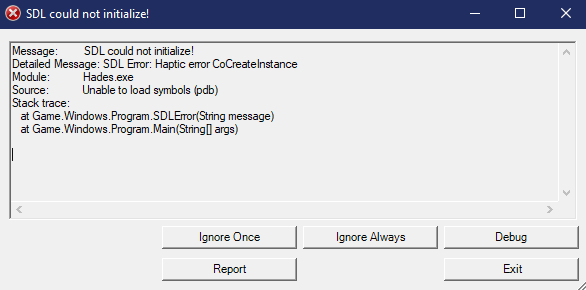

 mellow mountain
yeah, dotnet48 is not a solution- it kills performance
sharp narwhal
@mint iris You can report bugs in-game using the F10 key
@dull kelp Alright, noted - sorry that didn't permanently fix it.
You've played the game before this update with no issues, right?
mint iris
thanks Ellis :)
flat dagger
Updated my graphic card drivers just in case, restarted my pc and all
Didn't crash after meeting Sisyphus for the first time, but on the second run, it's happened again
sharp narwhal
Try running in windowed mode, 720p, and close any nonessential processes
 keen zinc
Hello, I have a tiny issue with hades game. I had it before the patch though. When I launch the game my mouse sensitivity drop and I'm forced to manually increase it.
frosty tiger
yo talking about crashes, i can't pass the new flashback i keep crashing while examining the papers it's kind of annoying
sharp narwhal
@keen zinc Have you turned off "Mouse Lock" in the game's settings?
@frosty tiger Same advice as above, run in 720p windowed and close nonessential processes
frosty tiger
tried this but it doesn't work
keen zinc
@sharp narwhal thank you ! didn't know that option was also controlling the sensitivity
frosty tiger
Is it already known how to play the flashback with out crashing?
it's only with the flashback i think i'm going to wait for it to be fixed
dull kelp
@sharp narwhal yes, have been playing it since it came out
 dreamy yoke
uh
flat dagger
Try running in windowed mode, 720p, and close any nonessential processes
@sharp narwhal Nope, still crashes
 wanton pond
I'm having an issue this update, it loads me in the first room of a run where i saved, after killing everything, and can't continue onto next room, game CTDs after entering. And can't refresh run without enemies.
sharp narwhal
Is it crashing to desktop, no bug reporter? @frosty tiger @frosty tiger
frosty tiger
Yes program wont respond
sharp narwhal
@dreamy yoke Are you playing the x86 or x64 version?
 cursive hamlet
Hi i Have an issue with controller. With new patch i cannot use it. In steam i see ot, it works in overlay. All that i can do in game - push PS button and move cursor with right stick. I already revoot PC and steam and comtroller
dreamy yoke
@sharp narwhal how could i check that?
sharp narwhal
@wanton pond Report with F10 if you can, please
 crystal oracle
@cursive hamlet same issue here
sharp narwhal
@dreamy yoke Send a bug report with F10, include your Discord name, I'll check for you
@frosty tiger @frosty tiger Do you know how much RAM your computers have?
@cursive hamlet Send a report with F10, mention the model of your controller, then use the launch commands /UseNativeGaInput=false /UseNativeControllerEffects=false
dreamy yoke
@sharp narwhal ight found it it is 64 yes
@sharp narwhal btw it started happening after update
flat dagger
4 here as well
sharp narwhal
Right. So 4 GB is technically min-spec for Hades which means your performance was always going to be a little shaky. Something happened this update that's pushed 4 GB out of the min-spec range for now. We're looking into why it's happening
frosty tiger
Ah thanks
flat dagger
Okay, thanks
lucid barn
The same problem happens even in boss fighting. When I don't wait until Alecto's short talk(or laugh) ends and start communicating by pressing spacebar, game cracks.
frosty tiger
thank you very much sir
sharp narwhal
If you only have 4 GB of RAM and you're seeing these dialogue crashes, managing how many processes are running on your computer, playing windowed/low res, etc. may help but don't seem to be fixing the issue completely
frosty tiger
I notice its when 2 dialoges are triggering. Like the narrator and hades
If that helps
dreamy yoke
@frosty tiger and it crashes right?
frosty tiger
After it yes
frosty tiger
i crash purely just on the flashback for myself
wanton pond
@sharp narwhal nvm i tried switching to windowed 720p mode and it gave me a report on antivirus about a change to the temp.sav file and i allowed it, then after an uncomfortably long black screen it loaded next room. I went back up to fullscreen and it works. Something about the update changes the save file that irks antivirus it seems?
flat dagger
So I switched it to windowed 720p, turned off all the processes I could, and it still freezes and crashes
dull kelp
@sharp narwhal thanks for the answer and patience
cursive hamlet
@cursive hamlet Send a report with F10, mention the model of your controller, then use the launch commands
/UseNativeGaInput=false /UseNativeControllerEffects=false
@sharp narwhal Thank ypu it works @crystal oracle
sharp narwhal
No problem. Really sorry for the inconvenience. This has been an issue on the x86 version of the game, so I guess it's not too surprising to see it climbing up into min-spec territory as the game has gotten bigger... @dull kelp
 cloud scaffold
Hey there - I just downloaded the update. How do I start playing with the new content? I can't find the new weapons etc
flat dagger
Leave the house to have a run and die
cloud scaffold
gotcha
flat dagger
The weapon should appear when you enter the house again
dull kelp
@sharp narwhalIt's okay. If you don't find a fix for this patch, would it be safe to assume that the next patch would fix the problem, considering the stated goal for the next couple of months?
frosty tiger
huh nvm, i think that whenever i talk to a character there's a slight chance i crash lmao
sharp narwhal
@dull kelp That would be the hope, yes!
 tired cedar
The weapon should appear when you enter the house again
@flat dagger In ny case, I still didn't see it
cold moon
oh hey the controller stuff worked! thanks team!!
 muted kelp
Maybe it's just me but this update stopped me from being able to use the directional pad on my ps4 controller
cloud scaffold
Looks like you were right @flat dagger thanks for the help
 minor falcon
Several crashes during conversations with different characters in House of Hades.
Random crashes mid run when accepting boons, when talking to Chaos.
Thanatos in asmodel: after i won, he dropped reward in lava near edge of map, then he waited for me to talk on the edge in lava, took me couple minutes to find him, and then game crashed during conversation.
Also, boon arts and some monsters(fatsos) look worse (low res) after last patch.
sharp narwhal
@minor falcon This is an issue on computers with 4 GB of RAM. We're looking into a fix, but for now, the game is going to be unstable.
minor falcon
@sharp narwhal Thanks for the answer. Had zero issues with previous version, game was very smooth. Good luck guys
 still maple
No clue if this has been mentioned before. But in the ''Close at Heart'' prophecy(the one about equiping all keepsakes), the third one is noted as ''MetaPointHealTrait''. There's no keepsake with this name and I'm guessing it's supposed to be the Black Shawl.
sharp narwhal
@still maple Please report in-game with F10!
opaque coral
It's pretty weird how it doesn't crash if theres only one dialoque. But multiple just boom it 😄
sharp narwhal
Yeah, it's related to one of the sound components we use. Previously it was only showing up in certain situations, but seems to have been getting steadily worse.
opaque coral
Gotta have precise timing and patience to get through the flashback I guess. For now
still maple
@sharp narwhal Right, my bad! Reported it in-game just now.
sharp narwhal
Thank you!
still maple
You're very welcome
chilly quarry
@sharp narwhal Is that part of the reason lots of passive dialogue seems to make the game hitch in the House?
sharp narwhal
Not...sure! Guess we'll find out 😄
mellow mountain
so am I doomed at the moment since I'm stuck playing via proton?
('probably yes' is a fine answer, I'd just like to have a clue either way)
 bitter mulch
Just like to add that I had the same controller mapping problems as others and changing the launch options resolved it 🙂
 orchid bridge
So since the latest update the game keeps setting off my anti malware program as ransomware??
orchid bridge
Malwarebytes in this case
sharp narwhal
Alright, thanks - you should be able to whitelist Hades with Malwarebytes locally. We'll make a note that we're getting recognized by it again and reach out to be whitelisted if it's a persistent issue
orchid bridge
Yeah I whitelisted it, it's just odd that it'd be picked up
sharp narwhal
There's malware with "Hades" in the filenames, so we get misrecognized often
orchid bridge
Ahhhh
 true knoll
Game crashed on me in room 9 of Tartarus. Couldn't hit F10 and had to end task in task manager. Not sure what caused it but was using benefits package and a ton of the lil guys had spawned
sharp narwhal
We reached out to most companies to be added to the whitelist, but the new update could've messed the recognition up
true knoll
Had just picked up a Scyllascion too
 light briar
After the update the game is acting weird as if a controller is plugged in and the stick moving in one direction while no controller plugged in. is there a way to force the game in keyboard mode?
rain cradle
There are few lines of command line which should force game to use different input system
let me find them
/UseNativeGaInput=false /UseNativeControllerEffects=false
the command line is in settings in steam as well as EGS
 torn tartan
Hey i Cant see the new talents of the mirror, what can i do to see them? already saw the new weapon tough
light briar
@rain cradle Sadly that doesn't fix the problem game still detecting controller input
 daring fractal
Playing it on PC here, the game seems to be crashing every 5 mins.
rain cradle
some people resolved the issue with controller by replug (m/k) and restarting game
light briar
ill try that
rain cradle
K` do you get any bug report?
daring fractal
No, it just crashes and closes and i'm back to windows
mellow mountain
@torn tartan button to the left of the talent
daring fractal
@rain cradle cool will send it
light briar
@rain cradle I fixed it, It was a Virtual hid conflict so had do disable it
frosty tiger
My Sisyphus Knave-King's Sentence is gone from the Broker? 😩 Do I need to reactivate the Quest (Favor)?
sharp narwhal
@daring fractal Does your computer have ~4 GB of RAM?
daring fractal
16GB
 reef cobalt
has anyone got this newest update running on proton 5.0.3? it crashes for me roughly once per room
sharp narwhal
Alright, yeah, I'll check your ticket in a bit
daring fractal
@sharp narwhal Let me know if you need my dxdiag or anything else as well happy to help you
sharp narwhal
Yeah, I'll email you back 😄
daring fractal
😄
frosty tiger
Hello, I'm trapped in the training room and can't go back to the bedroom or leave to start the game since the second I leave the area my game goes black and crashes. Does anyone know why or can help troubleshoot?
reef cobalt
actually scratch my last comment, seems like it crashes whenever I leave a room
sharp narwhal
@frosty tiger Try verifying your installation through the launcher
 steel blade
Hi, um game crashes when I'm in the new room? In the event when I have to go over everything in there. Every time I click on a new one game goes poo.
frosty tiger
@sharp narwhal I have and I've reinstalled the game and also update drivers and it still hasn't worked
sharp narwhal
@steel blade How much RAM does your PC have? Have you been seeing crashes elsewhere?
steel blade
8G ram, no I even finished a run but when I try to do the event it crashes
sharp narwhal
Alright. @treaty and @steel blade , follow the instructions i'm about to post and email support@supergiantgames.com
@frosty tiger
frosty tiger
ok
sharp narwhal
2. Once the Event Viewer is open, click the dropdown menu on the left for "Windows Logs", then select "Application"
3. Click on the error entries on the right to highlight them and view the details of the error. Look for errors that mention "Hades" or "Hades.exe"
4. Hold down Ctrl and then click to select all of the "Error" events related to Hades
5. In the Action menu bar at the top of the screen, choose "Save Selected Events". This will create a ".evtx" file that contains all of the errors you highlighted
6. Next, run dxdiag.exe and generate a report by clicking "Save All Information" at the bottom of the window. There are detailed instructions here: https://support.microsoft.com/en-us/help/4028644/windows-open-and-run-dxdiagexe
7. Attach both the .evtx (error log) file and the DxDiag.txt (DxDiag results file) to an email and send it to support@supergiantgames.com```@sharp narwhal All the error level stuff don't contain Hades or Hades.exe and when I tried to find Hades or Hades.exe it said there were no event that contained that specific string
sharp narwhal
Alright - send the DxDiag and your debug log, then. It should be located at Documents\Hades\Saved Games
frosty tiger
alright I sent it in
sharp narwhal
Thanks!
 spare echo
I am having some SERIOUS audio balance issues
Whenever Zagreus speaks I can hear him fine, but anyone else I'm stuck reading text boxes for
if i press my ear to the speaker and listen REAL close i can make out Hades' voice
actually it's only been Achilles and Hades so far. I could hear all the other gods and bosses, I think
 covert flare
^
 copper phoenix
So I just lost my safefile.
Crash happened, lost everything. Epic Game Store Solution from the Tech Fixes channel did not work
 kindred nova
Hi, seems ican't get the sysyphus trinket... i'm quite far on my run and i still haven't get it
 fervent terrace
just an update on an issue I've been having since the previous patch, my game keeps freezing in erebus/infernal gates = S
I guess at this point I should wait until the June update, since they are improving performance and optimizing the code right?
 scarlet bay
Just had a ctd during the new dream sequence where you're working in the office. Didn't lose the cinematic for good, though.
dim spruce
@fervent terrace we are looking into your issue and have follow-up patches planned in the near future so hopefully can get it resolved soon. we appreciate your patience in the meantime!
scarlet bay
Okay, actually it's crashed on me for the fourth time in this cutscene. It's technically not a ctd, but rather it just freezes and has to be end tasked
fervent terrace
nice, thanks for the update!
 forest chasm
Am crashing as well after update. Loaded my file- can't turn back to the House without crashing and when i try to proceed forward into erebus, crash after clearing the first room
 hushed hornet
I joined the discord to report the same issue as Whyy
 tawdry socket
Anyone else having problems with NPC audio?
Zagreus is voiced fully but everyone else is muted
 wicked umbra
- voices don't work fully;
- freezes during the new memory cutscene and i can only close the game by killing it in the task manager.
 loud swan
I've noticed since the update that my triggers (Xbox One wireless pad) have extremely small deadzones and I keep triggering my summon on accident because of it. Anyone else notice this or know of a solution?
 woeful quest
The game freezes when I attempt dialogue in the House of Hades
dim spruce
@woeful quest @wicked umbra @tawdry socket try adding /AllowVoiceBankStreaming=false to your launch options. instructions for setting launch options can be found in #h1-tech-fixes
wicked umbra
Will try, thanks!
woeful quest
I think it worked! Thanks a bunch.
rain cradle
- Next, run dxdiag.exe and generate a report by clicking "Save All Information" at the bottom of the window. There are detailed instructions here: https://support.microsoft.com/en-us/help/4028644/windows-open-and-run-dxdiagexe
- Attach both the .evtx (error log) file and the DxDiag.txt (DxDiag results file) to an email and send it to support@supergiantgames.com
There is easier way to do it , just click win + r and put the command line there.
dxdiag /dontskip /whql:off /64bit /t c:\dxdiag.txt
after 15-20s the dxdiag file will shows up on C drive.
dreamy yoke
uh
game seems to freeze
whenever i start a dialogue and someone is talking in the background
 gilded light
So weird thing just happened to me. My antivirus malwarebytes just reported the Hades.exe file as ransomware while I was in the middle of a run.
dim spruce
@dreamy yoke try adding /AllowVoiceBankStreaming=false to your launch options. instructions for setting launch options can be found in #h1-tech-fixes
dreamy yoke
okie dokie
gilded light
just for more context on my issue. this happened when loading the room Patroclus is in. I verified the game files via steam and was able to relaunch. I will advise if it happens again.
mellow mountain
@reef cobalt you might be able to get it to run with proton if you protontricks dotnet48, but
you'll tank your framerate and introduce stutters
gilded light
update on my issue. It just happened again this time in Tartarus. I'll just be playing and then all the sudden my anti-virus will popup saying ransomware detected and quarantines the Hades.exe file.
sharp narwhal
Have you tried whitelisting the .exe with Malwarebytes?