#h1-tech-support
1 messages · Page 16 of 1
 pastel salmon
 valid zephyr
For those that are concerned about losing your save data and progress, please set up File History within Windows 10. A Google search will provide you with easy instructions on how to do this using a shared folder or thumb drive. This way you can always recover your save data with the click of a button.
 thorn forge
Hey I am not sure where to post this, but it is a very minor bug. I was facing one of the 3 fates (the one the yells murder all the time), and I just had a visual issue where my middle death defiance didn't show, it was just a visual thing. after I killed her and went to the next room it was back.
 flint compass
please report bugs in-game with F10 when you encounter them!
thorn forge
oh thanks!
 proven crater
where do i find the save files? i am switching computers and dont want to start over
 sharp narwhal
User/Documents/Saved Games/Hades/
proven crater
thank you
 jovial lance
Error hades CLR20r3
sharp narwhal
Please try the following launch option:
/UseNativeOpenGLRenderer=false ``` rain cradle
U can write the launch option in epic settings , choose hades (at the bottom is game list) select the additional line arguments and write the /UseNativeOpenGLRenderer=false there
jovial lance
Ty I will try
jovial lance
Didnt work, this error again(
 rotund nova
Im losing my save data and progress I just dont understand what to do at all...
 sly mist
hey I emailed you guys like to weeks ago with an error report just asking if you guys got it or not
thorn forge
Hey I already submitted a ticket with f10, but is there any other reason why I wouldn't be able to go into the chaos realm?
sharp narwhal
Nope. Known issue, reloading your game should fix it!
 brisk drift
the jolted debuff doesn't trigger on the final boss though the use of scintalising feast and static charge
sharp narwhal
Scintillating Feast not applying Jolted is a known issue, but for future reference, if you see issues in-game, please report them using F10!
brisk drift
Would have done that but final boss needed full focus plus using controller XD
sharp narwhal
👍
brisk drift
any chance of implementing the functionality to make the push of the touch pad on ps4 controller a keybind?
sharp narwhal
I don't know! It's worth suggesting in #hades-feedback if it's something you want to see.
 opal walrus
Made it to the final boss. Hit F10 to report the lag that ensued. Game crashed. :|
I tried repairing my install last time the bug reporter crashed the game... apparently that's not it
 pure fossil
plz korean language....ㅠㅠ
 nocturne onyx
will hades be release to steam on December 10?
 full crater
yup!
 hardy marsh
(pls dont make fun of me im new to computer gaming 😦 ) im getting a new laptop soon (which will run games much faster thank GOD) but will i have to repurchase hades for that one
full crater
if you load up ur account it should be there, but not your saves!
epic doesnt have cloud saving for hades yet i dont believe, but you could always email the file over!
hardy marsh
ok!!! perfect
i only just bought hades so im not worried about the saves
thank you so much
flint compass
you can always back up your saves if you would like yo keep your progress, theyre located in Documents/Saved Games/Hades
 carmine hatch
My primary save file was completely deleted. I have bought a new computer and the save file exists on the old one but not the new.. i thought it was backed by a cloud but now that this problem exists what should i do ??
flint compass
do you still have your old computer? if so you can transfer it from the old to the new one, from the filepath I mentioned in the message just above
carmine hatch
how do i back it up though?
 surreal pike
Copy the file Documents/Saved Games/Hades on to a flash drive or other device
Cloud save is being rolled out slowly by Epic so there are a few hiccups with using it still
 frosty tiger
What FPS counters have people been using in Hades?
 kind yoke
Hiya, not sure if this is where I should bug report, but realized I should copy what I said in the other channel here:
Okay I think i just ran into a heavy bug with the hades fight (2nd life bar)
I had charm and weak on both my dash and attack (shield) so it was charm for days, hades was being a pushover until he tried to summon his vases - HE DIDNT STOP SUMMONING THEM. I got stunlocked as he non-stop kept making vases and I couldn't do much to get away. It seemed like interrupting his vase making just got him into a loop of making vases?
surreal pike
Hey! Bugs can be reported in-game with F10! This channel is more for Hades-related computer or controller support
rain cradle
@surreal pike msi afterburner
surreal pike
?
rain cradle
oh bad i had to call @frosty tiger
frosty tiger
Thanks. I don't have any MSI hardware, will that matter?
 inner echo
Hello Guys, I need your help. I played at Hades on my laptop since months and now I get a real PC and installed Hades on it. Unfortunately, I've got low FPS playing on it. I fint it weird since I don't get that low fps on other games like Overwatch, PUBG, etc...
Do you have any fix to it ?
 civic igloo
I heard AMD GPUs have problems with OpenGL
inner echo
I have a NVidia GTX 1660
(Sorry if I don't get all what you're saying, I'm Belgian and usually speak french)
Ho yhea and, if I don't move, I don't get any problems with my fps it's only when I start attacking or dashing into ennemies
rain cradle
Check if game runs on the dGPU rather than Intel graphic or Vega graphic iGPU if you have Ryzen
civic igloo
If it's desktop, Integratet GPU is turned off automatically... Low fps might be caused by outdated drivers (NVidia Drivers version might hace significant impact for framerates in games - that's why NVidia like to make new release of drivers while bigger game is released)
 subtle aurora
@inner echo if you need a french translation just message me : )
 boreal hare
Hey everyone, my game keeps crashing when I start it! Has anyone had the same issue?
sharp narwhal
There are some solutions you can try in #hades-tech-fixes-old !
 weak lion
i just got a new pc.. and install hades. and forgot to get my old save files for hades from my old pc.
guess is back to the grind had almost eventhing unlocked D:
flint compass
if you still have access to the old PC, the save is located in Documents/Saved Games/Hades
sharp narwhal
@misty lotus did updating your game fix the issue?
 patent zephyr
Need some help, guys.
Lost my safe-file, the fix in #hades-tech-fixes-old did not help
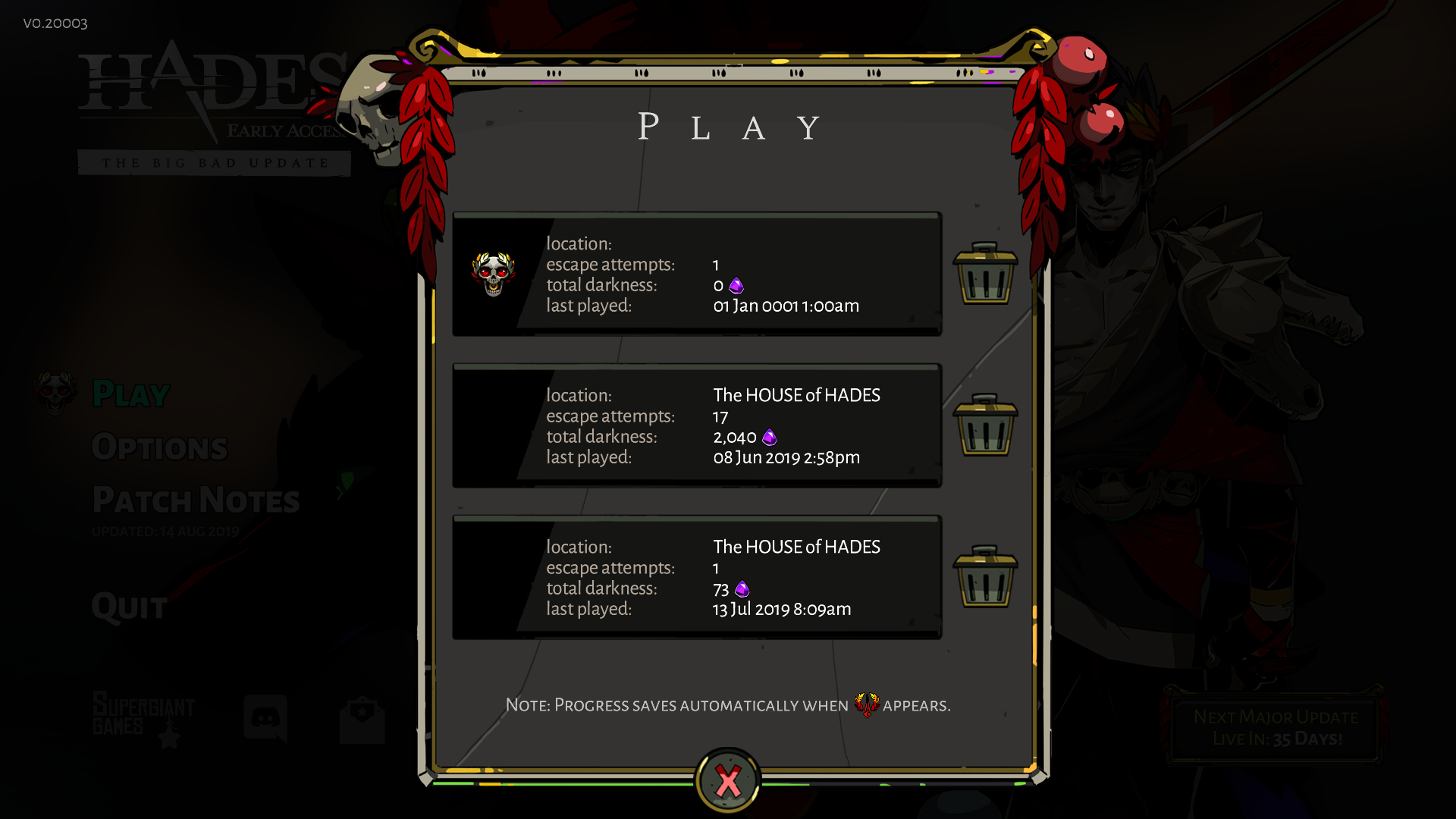
needless to say, it's the first file
sharp narwhal
No leadup to it at all? No crashes, computer resets, etc?
patent zephyr
Played a game 2-3 days ago, recorded it as usual, left the game in skellies room as I usually do.
Nothing unusual in that regard.
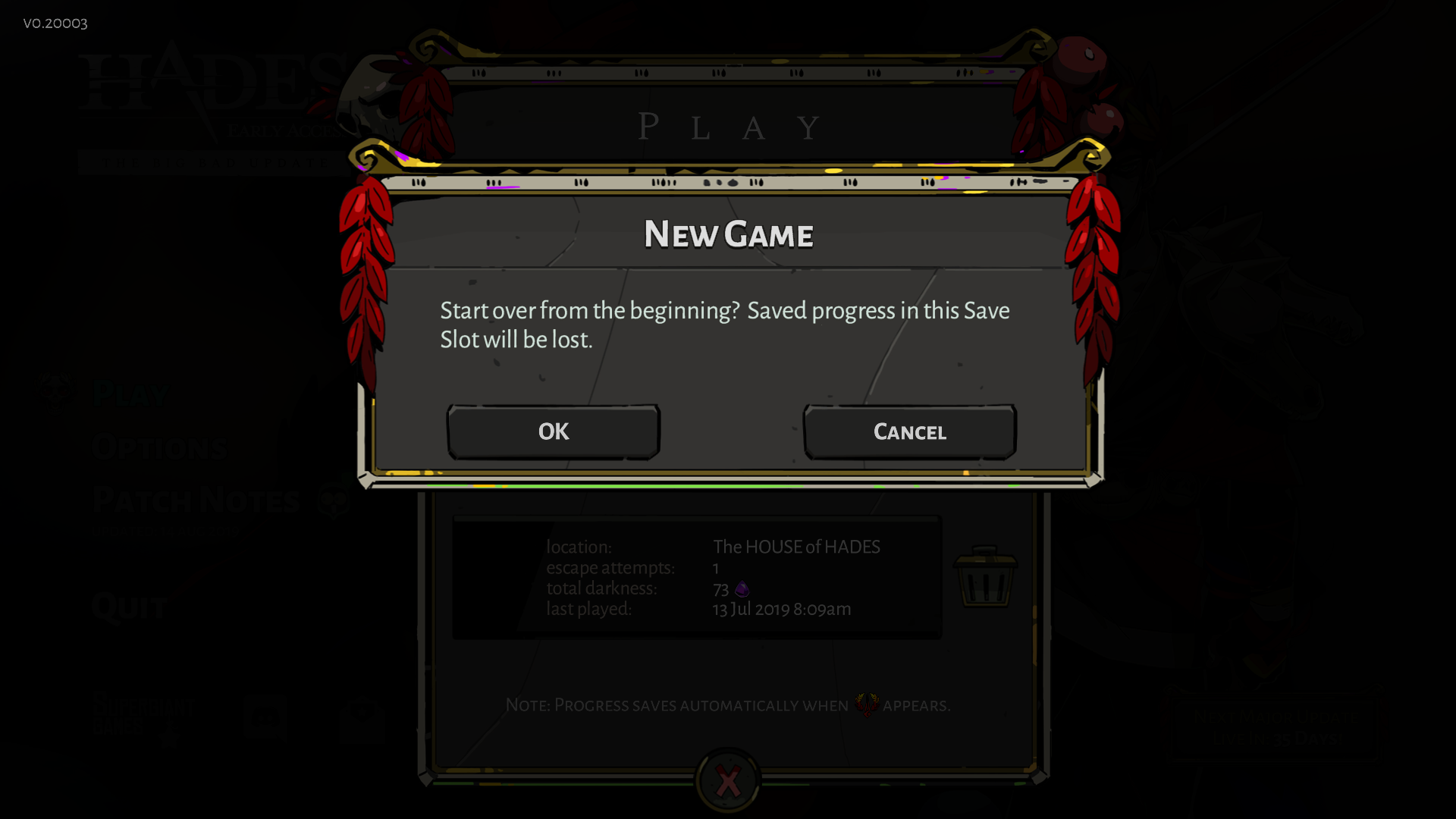
When I click on the safe file, it asks me if I really want to start a new safe-file.
sharp narwhal
When I load it into my game, it tells me the save data has been corrupted
Which...yeah, clearly
patent zephyr
 sharp narwhal
Right, I'm assuming that because it was corrupted and the game can't read it, it's trying to clear it out/start a new save
patent zephyr
So what do I do?
sharp narwhal
I don't know, whatever got your save also got your backup file...I can pass it along to see if anything can be done with it or if they can at least get any info about what happened, but I don't think anyone's really going to be in the office until tomorrow.
patent zephyr
I'll be damned
patent zephyr
Anybody here who help me with this issue now?
 sage knot
sharp narwhal
sage knot
sharp narwhal
@sage knot you can report bugs in-game using F10!
@patent zephyr Supergiant is in Pacific Time on the west coast of America. It'll be another 5 or 6 hours before anyone is awake and at work.
patent zephyr
Six hours then.
flint compass
i dont know how far in in the game you were before your save was wiped, but i'm assuming you played quite a lot. maybe you could download haelian's save from speedrun.com? i havent downloaded it for myself but im pretty sure it should have all keepsakes maxed, all story progress, all of the mirror, all heat statues, etc.
patent zephyr
Yeah, I think Haelian would be the closest to me.
I had a 120 heat clear, 9 to 10 Fated Authorities and all Keepsakes maxed out
flint compass
seems like a pretty good solution then
and it was his wr, so youll also get a pretty good run as compensation for your save being deleted lol
heres a link to the page https://www.speedrun.com/Hades/resources
Hades - Resources
patent zephyr
Thanks for that safefile. It is overall fairly similiar to my own. Only things missing are some maxed out keepsakes and...my 120 heat clear
flint compass
seems like they were reset with the big bad update. im sure you can do it again!
patent zephyr
I already did it in the Big Bad Update once. And that was all I wanted to do in this update. Damnation.
sly mist
just confurming you guys got my email sent it like a week ago happy to wait just wanna make sure it got though
 earnest wasp
i believe the giants just recently got back from pax, so they might still be catching up on stuff!
sly mist
Oh of course I toldly forgot about that mb
 errant oasis
Just reporting a visual health bar bug, you can see it in the Twitch clip after a few seconds. https://clips.twitch.tv/ShinyNeighborlyPoxJKanStyle
 full crater
hey, you can report bugs in game w  !
!
errant oasis
I'm not the one playing though 🙂
full crater
OOPS sorry bout that
errant oasis
No worries. Enjoying this guy https://www.twitch.tv/chimera_o but first time I'd ever seen that bug happen so I snagged a clip.
sharp narwhal
This is a known issue and there's a fix in the works! Thanks for reporting.
patent zephyr
@sharp narwhal What was the cause for that? It seems to pop up against Hades quite often, but I have seen it in other instances too.
Sometimes, I have seen Zags health bar vanish in Tartarus for a while too.
sharp narwhal
I don't know what causes the bugs, I just pass them on. ^^;
 vocal vortex
when megaera is speaking to hades about sending ''them'' here hades says they are alreddy ''on'' there way but insted of on it says ''en''
sharp narwhal
That's "en route", a French term common in English to mean "currently going somewhere"!
 onyx abyss
Hi! I've been playing Hades for a while now and everytime I open it, it says file is corrupted. I checked hades-tech-support and saw Documents/Saved Games/Hades but is non-existent in mine, only Pyre's. I'm not sure if it has something to do with Epic Store.
sharp narwhal
If you don't have a save folder at all despite having played Hades before, it must have gotten deleted or destroyed somehow. Sadly, I don't know what would have caused that - it could've been a number of things - but if your folder is entirely gone, there's not much you can do but restart.
 wet drift
A small note on controller support - if the controller disconnects during play (dead battery/bt connection interruption/etc), the game will immediately switch to KM controls and continues. If possible, it might be better if the game paused on when an input device drops - this lead to a rather unfortunate death when my controller battery died.
wet drift
Also, on v20003, during the fight with the first fury, she can occasionally appear to glitch, making her appear to do a quick series of disconnected animations while remaining in the same place. For lack of a bitter description, it looked like like the old n64 geddan glitch.
sharp narwhal
You can report glitches as they happen in-game by pressing F10!
wet drift
Ah, alright - does that work from the pause screen as well (if I'm battling with a controller, can I pause, tap F10, and resume), or do you need the game running to capture the glitch?
sharp narwhal
It works from the pause screen!
Hitting F10 will pause your game while you send a report in, too
But once the report sends it'll resume
I think we're aware of/have gotten feedback about the controller disconnect before, but for future reference, feedback about things that don't seem like bugs goes in #hades-feedback - you can read the pinned post there for instructions on how to use the channel 
wet drift
Will do. Do you want me to resubmit the feedback there?
sharp narwhal
If you want to, sure!
wet drift
Ok - thank you!
 robust dust
hey, I'm not sure this is the right thread, but feedback won't let me comment so here goes!
full crater
pssst to comment in feedback check the pins
robust dust
...I don't know what that means...
sharp narwhal
There's a whitish-gray "pushpin" icon at the top of the screen for each channel. Go to feedback and click on it to see a pinned post with instructions on how to gain access.
robust dust
ok, thanks!
 daring token
Hi there, is there any option to improve performance in game, like tune down some graphical setting?
sharp narwhal
There are no options in-game to adjust the things you might traditionally be looking for, like resolution settings, Vsync, etc. You can check #hades-tech-fixes-old for some other suggestions that might help, like playing in windowed mode; it also has instructions for checking that the game is running on the right graphics card.
valid zephyr
For those that are concerned about losing your save data and progress, please set up File History within Windows 10. A Google search will provide you with easy instructions on how to do this using a shared folder or thumb drive. This way you can always recover your save data with the click of a button.
Please be proactive about this. Without some sort of backup or file redundancy in place, you risk losing your data without the ability for recovery.
frosty tiger
Is there any way to save my run? Game bugged out once I cleared a room, supposed to get a boon from Hermes but it doesn't appear. Can't grab it if I try to pick it up in the area it's supposed to be in. Can't go to other rooms, and quitting will end my run. Is there anything I can do other than abandon? Already submitted as a bug btw.
surreal pike
Tbh you could just close the game and try the room again?
frosty tiger
I thought closing would start the run over
surreal pike
Does it say “quit” or “give up”
frosty tiger
Give up
surreal pike
Hmmm, that means you haven’t killed an enemy in the room usually
Alternatively though just close the game via task manager
That will force it to go back to the most recently saved point (likely the beginning of the room, or the moment the boon appeared)
Should help fix minor bug issues preventing you from picking up the boon
 flint inlet
Give up means that you have taken damage on the current encounter
sly mist
what is you guys support email
 tight peak
rain cradle
tight peak
rain cradle
720p should playable
I have vega 8 laptop and it runs okey but there are 2 facts, first vega suck in opengl (engine of the game), second vega 8 is way more powerful.
Overall you should have similar results as me haha
 wooden spruce
I need some help, I had to format my PC and forgot the saves, is there anyway to get them back?? (don't really want to unlock everything again 😩 )
rain cradle
That's depends what do you mean by format. If you did real format then no way. If you just reinstalled system then go to windows.old /users/your_username/documents/game save/hades
And copy it to your actuall library
 cobalt kite
So I'm having trouble getting my controller to function with Hades, has something changed recently?
sharp narwhal
Shouldn't have. There have been Windows updates recently that may have messed with your settings and such
cobalt kite
I didn't think so but I'll look around
 visual summit
bloodshards not increasing with rarity for chaos, i.e common rare and epic chaos boons all locked at +1
known?
 copper bronze
 toxic trout
i just checked the patch notes and at one point it did say “grasp (chaos): reduced max possible bonus”
grasp being the bloodstone ammo increase
so looks like it’s not a bug
 mental snow
So even after following all of the "Game Won't Start" fixes, I still can't get Hades to launch after installing again after my computer drive had to be wiped. I see the icon pop up on the task bar, and then it goes away and nothing happens shortly after.
 pastel geyser
How can i save my game?
surreal pike
It auto-saves every time you die or change rooms!
pastel geyser
I tried but its not
sharp narwhal
Your anti-virus software (windows defender, probably) may be blocking access to your documents folder; there are instructions in #hades-tech-fixes-old to whitelist the game
mental snow
So I went through all the tech fixes in that chat, and I still can't get the game to launch. I submitted an email with the important stuff to the support email but still no luck.
rain cradle
heads up , C++ redistributable helped @mental snow . Also that was what i recommended not first time as solution. Would be great if it was added to tech-fixes
https://support.microsoft.com/en-gb/help/2977003/the-latest-supported-visual-c-downloads
The link gives downloads to all versions. x86/x64. I recommend to install all the way to 2012/2010
This article lists the download links for the latest versions of Visual C++.
 restive gust
umm, i've tried messing around for a while now but overall i'm only mildly computer literate so i can only spitball a lot of stuff; my problem is my mouse cursor blinking in and out, it seems to affect the sensitivity too, causing drag. i've tried all the links provided in "tech-fixes" but none of them are available for download anymore, i can't find the "KB3140743" update at all, and Mouse Lock was never on to begin with. please help 
restive gust
of the actual issue? i'm literate enough that i could stream and clip it but pepega enough i don't actually know how to capture for an upload on imgur
nvm i just figured out where the record feature in streamlabs goes to. told you i was stupid.
that happens throughout the game, it's a bit more obvious on my monitor. the recorded version just has the basic cursor override it more
rain cradle
It's direct link to windows catalog with updates
Will look into your recording next day. I'm mobile now
restive gust
when i tried to install after download it came up with this
rain cradle
Win+R, type winver and enter, the update is for version 10586 (or around, don't remember exactly)
If you have any higher version of windows the solution is not for you, cuz it's already patched
restive gust
version 1903 (OS Build 18362.388)
 smoky pecan
I pressed F10 too report a bug and nothing happend, game just froze, how do I report this? ^^'
sharp narwhal
Did the game crash to desktop?
smoky pecan
no froze so I had to alt +f4
sharp narwhal
Sometimes the F10 window won't pop up correctly, you can try pressing Alt+Tab
smoky pecan
Yes sir I will try that! 🙂
sharp narwhal
You can also do the following, from the tech fixes channel
"Known Issue:
- The Bug Reporter window will sometimes not appear. Please close ProcessCapturer.exe via Task Manager:"
 smoky pecan
Thanks it worked now 🙂
 spring orchid
well the game is crashing at the first 5 seconds should i report it here?
sharp narwhal
Is it producing a bug report window?
sharp narwhal
You can just click to submit the bug report
If it's producing a bug report window
For the crash, I mean; there should be an option to submit
 static geyser
i found this fail in the dialogue with achiles after the first game in this patch
all the dialogue was like this
sharp narwhal
@static geyser are you playing in a foreign language?
static geyser
nop
 rapid tundra
Wow, can't believe Zagreus would really say something like that. #CancelZagreus
static geyser
english
sharp narwhal
hmmmm
sharp narwhal
😂
sharp narwhal
yeah change it and that should fix it
but hit the F10 bc we've been tracking that issue in foreign languages too
sharp narwhal
no problem, thanks for the report!
 glacial coral
Im having frame rate issues. Did the update change the graphics or something? It looks a lot nice but Im getting a hard stutter and graphical lag. Is there anyway to optimize performance?
 austere talon
sharp narwhal
austere talon
sharp narwhal
F10 please!
rain cradle
yes, only english is not affected, I played in Polish and had the issue too
 lavish sorrel
pretty often issue rn huh?
full crater
hes taking a page from tisis book
rain cradle
report via f10 and switch to english in settings, issue with non English languages
lavish sorrel
yea, did it already
should i report that too?
oh, wait
that one i mean
always forget that screenshots work wierd with hades
rain cradle
sure report, they group the report and let them faster find solution
 sweet bison
how to report bugs?
found a way to teleport of the map with the spear
nvm, turns out im able to scroll up and read like an adult
 wintry tulip
f10 in game is for bug reports. Also just submitted one on an unbreakable urn after 2nd boss. Tried all my attacks on it, submitted the report, and spitefully attacked it again and it broke. need a button that says 'bug resolved after I told on it'
sweet bison
well im in the same room again in another run right this moment
and its still possible to go out of bounds
so definitly a bug
 thin sparrow
Just thought I would mention that Malwarebytes is detecting the game as ransomware
sweet bison
well it certainly holds my time hostage
rain cradle
known 😄
thin sparrow
Sounds good then.
rain cradle
set it ignore the one
thin sparrow
Yeah I personally fixed it, but just thought I would mention it so if it was on SGG's end rather than maybe an Epic issue, they would be aware.
 pure ferry
Is there something to do to unlock the New Pact of Punishment ?
I can't interact with it, even after completing a run
thin sparrow
Does it not appear when you start a new run?
As soon as you go through the door to Tartarus, should say something like "prepare"
rain cradle
you need to kill last boss
thin sparrow
Ah, I thought that is what you meant when you said you completed a run. Whoops!
pure ferry
No worries, even Zagreus said something about the pact like "What happened to the pact of Punishment ? Ç
sweet bison
he does, but he also talks about the new pact in the courtyard later but i dont have it (as i have not beaten the game yet)
sharp narwhal
Heads up: if you're having trouble unlocking the Pact and you feel like you should have it by now, please F10 and we'll take a look at it!
sharp narwhal
The 6th weapon isn't in the game yet. You can see what's upcoming by checking the roadmap from the main menu!
static geyser
the 6th weapon no, i mean the aspects for every weapon
theres 3 unlucked at least for me
the 4th one had to be unlocked or its something for the new versions?
 north jungle
is there a preferred bug report method for hades?
static geyser
pressing f10 when the bug happens
north jungle

sharp narwhal
Oh! no 4th aspect at this time either, no
static geyser
ty for help ^^
 halcyon creek
yeah is there any way to fix this pact of punishment stuff? I have no freakin chance with the stuff I used to farm still on... I like difficult games but no healing, double hit immunity, more dmg, just sounds to much to play through the game to make it EASIER again....
opal walrus
my last save was in Zag's room. I tried to go back out to the main hall and this happened
sharp narwhal

thanks for reporting it!
opal walrus
when I reloaded I was in the main hall 👍
 young pendant
anyone getting screen tearing as of the latest patch?
opal walrus
still crashing when I open the bug reporter (in this case, due to sudden major lag)
 barren sage
I reinstalled Hades/updated the game for this patch, and don’t have any of my old saves. Is that supposed to happen, or is that my cloud saves messing up?
Or is Hades not one of the supported cloud save games?
 fast nova
So I continued a run (pre-patch) this was one of my rewards:
is this normal for this situation, and shouldn't matter since this is early access?
 dense rune
That reward would have been Heat, but  was removed as a collectible resource
So that's probably why it's blank in your continued run
visual summit
you guys might want to check the odds on the multi-ammo for artemis and her legendary boon now scaling boon, ive gotten bonus ammo now 4 times, and not seen the other one once
 pliant portal
my friend is struggling because he had a lot of pacts of punishments going before the latest update and the effects are still lingering and he cant remove them. he also hasn't beaten the final boss yet and I heard that gives access to the new pact of punishment system?
regardless, he's stuck trying to beat a nearly impossible game at the moment and he doesn't want to have to start a new game.
 bright comet
Hi, game crashes every time I want toi interact iwth trader I belive. No errors, just freezes.
 chilly rune
Think there might be a bug in current patch. If you had a pact of agony on before the patch, it's still on but now you cant adjust it since was removed from your room. Probable should reset any existing pacts?
bright comet
the issue above seems to be save related as on new save slot everything is fine
 hushed zephyr
i'm not able to use the pact of punishment anymore and i dont want to attempt to defeat hades with out removing the affects of it.
i could make a new save file but i put so much work into the mirror already and i just don't want to do it over
 ionic spear
The game just crashed after exiting the final boss room and the cutscene played
 covert otter
same issue as Nitek, crashes every time
sharp narwhal
@bright comet and @covert otter : if the problem only occurs when interacting with the Broker, ignore him for now. Do a normal run without interacting with the Broker, die, and return to the House and see if it's still happening!
covert otter
ok, doing a run now, will check when i die
just beat Meg for the first time 🙂
It opened no problem after doing a run
 spiral flax
Idk if this is under tech or what, but I just saw on stream that final boss' pulse didnt break his vases. Death Insurance pact was on, but dont think that affects it. Any clarification on whether this is intended?
sharp narwhal
If it seems wrong to you, F10 to report it as a bug and QA will look into it
spiral flax
Alright thanks!
 wispy basin
Hello, team.
Hades gives me the dialog about the new Pact of Punishment, but there's nothing in the courtyard for it, and I can't remove the conditions already on my character. Is this a bug, or do I need to unlock something?
... actually, reviewing the thread now I see that it's later unlock.
Surely there's a way to remove conditions from the old build?
sharp narwhal
Hi there Frogurt, the old heat carrying over and making the Pact inaccessible is an issue we're aware of and looking into. You can press F10 to report that, and other bugs, to us!
Sorry about the inconvenience
 cursive granite
I've already submitted a bug report, but having the issue with the game freezing up when talking to the trader. I have tried a dozen times, and only once was able to speak to him without the game freezing up. Since trading resources was one of my favorite parts of the game, this bug is a deal-breaker for me.
sharp narwhal
@cursive granite This is a backwards compatibility issue because Heat was removed from the game. It's temporary - if you go on a run, die, and return to the House, you should be able to use the Broker no problem.
cursive granite
@sharp narwhal I wish that were the case, and it worked once. But after that, no matter what I do, it crashes the game. Also, this wasn't on an existing save, but a new run through.
sharp narwhal
Hm!! That's very odd indeed. Sorry the common solution didn't work for you - we'll take a look at your report soon.
hushed zephyr
i still see the heat in the top right corner of my screen during a run does that mean that the pact of punishment is still in affect?
sharp narwhal
@hushed zephyr There's a bug right now where saves that had Heat active when loaded into the patch are unable to turn the Heat off. We're looking into it 👍
hushed zephyr
thank you
barren sage
Does Hades support Cloud Saves? I thought it did, but my saves prior to reinstalling the game are all gone
 craggy willow
It doesn't currently, but hope it does soon
barren sage
Aaah, got’cha. Shame, but oh well
 lusty thistle
Hello, I saw on reddit that the new patch had dropped. I have mine on Epic Games set to auto-update but it has not done so. What steps should I take to update the game?
 cinder totem
Hey Pianoman! In your library, Hades should have a settings menu (a cog or a ... button depending on you selected format). In that menu, select "Verify" and it should start downloading the update. 👍
lusty thistle
When I select the cog, the options I am presented with are "Create a shortcut", "Auto Update"(ticked to enabled), and "Uninstall" Thanks for the help Caitlin
 burnt cloud
Reward spawned in lava, what do i do?
burnt cloud
ok
 prisma jackal
Hi! Hades worked fine for me, two days before the last major update. However, both with the major update and the subsequent minor patch, it crashes on start. I seemingly didn't install anything else in these few days. What do I do?
Things that didn't help:
- uninstalling and reinstalling Hades
- moving safe files and config to another location
- reinstalling graphics driver
- verifying installation via Epic Games launcher
sharp narwhal
Hey Gassa, I assume when it crashes it's crashing to desktop without a bug reporter?
prisma jackal
Yeah, just a generic Windows crash message after a second or two since launch, like:
Hades has stopped working
Windows can check online for a solution to the problem.
-> check online
-> close
-> debug
The debug.log file in Saved Games folder just contains the directory and the version
sharp narwhal
You can check the error log by searching for "Event Viewer" in your windows search bar, then clicking "Windows Logs" > "Application" in the left sidebar and looking for Hades-related crashes
prisma jackal
hmmm, thanks, that sheds some light:
Application: Hades.exe
Framework Version: v4.0.30319
Description: The process was terminated due to an unhandled exception.
Exception Info: System.DllNotFoundException
at Game.Windows.NativeOpenGL.OpenGLInitialize(OpenGLInfo ByRef)
at Game.Windows.NativeOpenGLRenderer.Initialize()
at Game.Windows.Program.Main(System.String[])
Exception Info: System.SystemException
at Game.Windows.Program.Main(System.String[])
sharp narwhal
Try this in the launch options on Epic Launcher: /UseNativeOpenGLRenderer=false
You can find them by going to your settings (little gear in the bottom right) and opening the game settings for Hades
Click the checkbox for "additional command line arguments"
prisma jackal
I just ran the Hades.exe with the argument, same error, same thing in event viewer.
(debug.log now:)
=== START ===
P:\data\Games\Hades\x64\Hades.exe /UseNativeOpenGLRenderer=false
v0.21873 10-10-2019
 pseudo drift
I can't earn bounties. It worked fine last night, but now even if I beat a boss with the right heat, I will just get Darkness. I've tried this on 2 runs and one of them I completed. The heat requirements didn't update and I didn't get a fresh set of bounties.
sharp narwhal
Sorry about that! It's a known issue with this patch, we're looking into it now
Gassa, if that launch option isn't working independently or through Epic, you can follow these steps and send a report to our support email:
Please notify support@supergiantgames.com and attach Windows Event Viewer information as follows:

1. Search for Event Viewer in the start menu, go to Windows Logs > Application
2. Select all of the "Error" events you can find related to Hades
3. In the Action menu bar, choose "Save Selected Events"
4. Run dxdiag.exe and generate a report by clicking "Save All Information". (More detailed instructions here: https://support.microsoft.com/en-us/help/4028644/windows-open-and-run-dxdiagexe)
5. Attach the .evtx file and DxDiag.txt and email us!```I think someone had some success recently with updating their C++ redistributable, too, so you can give that a shot
prisma jackal
Much thanks for the support and the pointers, Ellis! Next I'll try updating my C++ redistributable and .NET framework, if that fails, I'll write an email to support.
sharp narwhal
As a heads-up, support may be a little slow since we're still ironing out the wrinkles from this patch, but I hope you get it worked out!
burnt cloud
Did not earn a bounty even though I met the heat requirements
sharp narwhal
Hi there, we're aware of this issue and looking into it. In the meantime please report bugs using F10 in-game
 wooden crow
Just started playing hades again and I got 2 runs in but my mouse disappeared completely
restarting the game doesn't fix it
sharp narwhal
Send a bug report with F10; I think we've had a couple reports of that, we're looking into it
wooden crow
Just did. I know yall are workin really hard on the game but this is a real bummer. I was just getting back into it and having fun but now I basically can't play it.
prisma jackal
Updates didn't help, so I wrote an e-mail with .evtx and dxdiag as suggested above (as in my case, the game crashes before being able to report bugs via F10).
opal walrus
I'm getting the "Audio disabled! Please update your audio driver" message again. I have the latest driver already- I just checked and Dell hasn't put up a new one for my model since I last updated it in August, and if I try to update through Windows it says I already have the current version Updating my nvidia drivers fixed it, which is odd since that's my graphics. But if anyone else is in a similar boat, try that.
rain cradle
It is not odd. All Nvidia, AMD and Intel graphic drivers include audio drivers too.
 tall shadow
Hi, in which of these threads am I supposed to report a bug?
full crater
none of them! use f10 on the game to open the bug reporter
tall shadow
I took a screenshot of the bug but moved on, the bug reporter take a screenshot of where i currently am so I cannot show the bug
 cinder yacht
Hey there, I seem to have lost my save after the Superstar Update. Anyone know how I may be able to recover it?
sharp narwhal
There are some suggestions in #hades-tech-fixes-old, but if those don't work, I'm afraid it's probably gone
cinder yacht
Ok ill take a peek thank you.
Gave renaming the save file a shot no dice. I think I goofed and clicked through when loading up which created a fresh save in the slot where my regular save was.
 knotty falcon
whenever i try to save i get a popup that says unable to save progress in storage device
sharp narwhal
Your antivirus might be blocking access to your documents folder. Check out #hades-tech-fixes-old for tips on how to whitelist the game
knotty falcon
Thx so much already in love with the art style
 manic flicker
I cannot seem to unlock weapon aspects. I watched a youtube video and it showed these purple spheres after you pick up a weapon, but they do not appear, the weapon is simply greyed out. Any suggestions?
toxic trout
have you acquired a chthonic key yet?
toxic trout
no problem!
sharp narwhal
Check around the courtyard some more. If you don't see the Pact, do a run (you don't have to do a complete run, just leave the House), die, and return to the House and you should find it.
 glass summit
restart a game worked 
flint compass
F10 it, i suppose?
 unreal siren
I did
it popped in front of me and when I went to grab it
it warped into the lava
 pulsar garden
So, I was just playing the game using the repeater (I forgot the name of it I'm sorry) and when I was done with a room, I reloaded the repeater. I didn't get any reward from the room and the markers for leaving the room are not showing up.
wooden crow
I had that happen a couple times with the Rail too. Keep checking I always found the item it just spawned far away with the Rail
pulsar garden
ok
I checked the entire room I don't see anything
Nvm it just randomly appeared out of nowhere right in front of me
And the entryways opened up now
Problem solved
Thanks @wooden crow
wooden crow
yea not sure what it is but I only experience that on Rail runs and it was mostly in Asphodel with items that blended in with the orange of that realm
pulsar garden
I just started using the Rail
But yeah, the item, which was a heart, just appeared out of the lava
spring orchid
someone else cant play since the new update? the game keeps crashing everytime i touch start,and yes i reported everything with f10 i just want to know if is only my problem or other ppl have it
 cinder spade
i got it too, but not to early like you. Mine happened after a few encouters
sharp narwhal
@void canyon If the game isn't creating a bug report window when it crashes, you can see what the issue is by looking at Windows Event Viewer and checking "Windows Logs" > "Applications" on the left sidebar.
You may be able to tell from those logs what's going on, but you can also follow these steps to email Supergiant support:
Please notify support@supergiantgames.com and attach Windows Event Viewer information as follows:
1. Search for Event Viewer in the start menu, go to Windows Logs > Application
2. Select all of the "Error" events you can find related to Hades
3. In the Action menu bar, choose "Save Selected Events"
4. Run dxdiag.exe and generate a report by clicking "Save All Information". (More detailed instructions here: https://support.microsoft.com/en-us/help/4028644/windows-open-and-run-dxdiagexe)
5. Attach the .evtx file and DxDiag.txt and email us!``` void canyon
I had to close it forcefully by tab manager because it was flashing dark and white on my screen
it didnt crash automatically
more like first the image freezed, but the actual game kept running on the background, and when I try to move away from the frozen screen, it starts flashing
sharp narwhal
Oh! Alt+Tab might help?
Force-closing often clears runs due to a failsafe meant to keep people from save-scumming
void canyon
alt tab is what I used to try to get away from frozen screen
sharp narwhal
I see...at least if it's a screenshot issue that seems less likely to be permanent or unfixable
Do you play in windowed or fullscreen?
void canyon
oh, that makes sense, but also destroy my run
it was a really good one... pretty bummed out about it actually..
my 145th
150th is you count the crashed ones
i play in fullscreen mode
sharp narwhal
I understand; if it makes you feel better, the random seed for the run should be the same
Try playing in windowed mode?
sharp narwhal
There is! It's in the display settings on the main menu
void canyon
im also looking around for that bug report to send you
where do I find windows logs?
sharp narwhal
Use the search bar; type in "event viewer"
If screenshots are causing the problem though, I think just playing on windowed mode will probably fix it and it's likely to be a display issue of some sort
You're not playing on 4k, are you?
void canyon
I wish, my screen isnt this advanced xD
sharp narwhal
Alright, just checking 😂
void canyon
what should I do in situations such as this?
one time I actually managed to beat the remaining 25% life of last stage hades, take the reward and force crash after he got back home, that way it wasnt erased, but i wasnt able to guide myself to the reward and to the exit this time
sharp narwhal
Your run has been "reset" - if you start the run again with the same setup, you should get the same things offered to you when you start again, so hopefully you can have something close to the run you lost
frosty tiger
having a problem where the run is going good an my computer handles everything before freaking out and getting 6 ish fps until i restart the game.
void canyon
oof
thats tough
i was took a hidden rewarda from chaos early on and have no idea which path I took aside from first boons
frosty tiger
only happened once so its not a big deal but i thought that you guys might want to know
i'm only a few hours in
sharp narwhal
F10 when you're experiencing heavy lag, helps us pinpoint places that need optimization
frosty tiger
k. will do
void canyon
ah
one more thing
everytime I try to bug report with F10, it shows a pure black screenshot in the report instead of the game, what do I do here?
sharp narwhal
That sounds like it's probably the same display issue as whatever's causing your problems with screenshots
Make sure your display and graphics card drivers are up to date
Like I said, playing in windowed mode might help too
void canyon
I found no erros related to Hades there
just a ton of Bonjour ones
sharp narwhal
Hm! Well, try updating and playing around with your display settings. I hope that'll fix it
 grand rapids
Hey guys i can't play the new update! i already have the epic launcher in auto update made sure if i can update it in anyway. im sad now
earnest wasp
Make sure you verify the game files! https://epicgames.helpshift.com/a/fortnite/?s=epic-games-store&f=how-do-i-verify-installation-of-game-files&l=en

Epic Games | Support Center Support
To verify the installation of game files, navigate to the game in your Library and click on the cog icon.Once open, click Verify in the drop-down navigation.After the verification, the launch opt...
This should help you get the update downloading
grand rapids
Thanks got it working
frosty tiger
having extreme lag at a specific room. I didn't get the bug report to send before the game locked up on me though
surreal pike
@safe geode verify your game! Litvac posted a handy guide to it just a few scrolls up
 safe geode
Hi guys how i can transfer my save file to different PC i bought new one and i want to transfer it?
sharp narwhal
Your saves are stored in User>Documents>Saved Games>Hades
You can copy the entire Hades folder over to your new machine
safe geode
Appreciated it
 limber timber
After entering the last zone, the asset textures were missing, making the area look black. The entrance, main hall, and the area after entering a chamber door remained black. After interacting with the chamber door, the door regained its texture when I walked through it. First time encountering this bug (after about 20 times in this area). NPC's retained their texture.
Quitting back to main menu didn't fix it. Quitting the game and reopening DID fix it (returning it back to normal).
I may have just run out of memory on my comp near the end of the run (since the SSD is near it's limit), but thought I should mention it for in case.
(Also, after reading comments found there's a way to get bug reports, something I'll keep in mind for the future, if I ever encounter any 👍 . Keep up the awesome work yall)
limber timber
^ After posting this, reentered the game and only a few textures were missing this time (when before it had returned to normal). This time sent the bug report 😉 .
I tested this out more by opening and closing the game 10 times. Only occurred 1 out of 10.
Further areas acted normally 👌
sharp narwhal
Have you tried verifying your game files?
 devout quarry
I hope this is the right channel:
I switched monitors and could no longer alt tab to the window when I played my first game on the initial major update (day of release).
I met Eurydice in Asphodel and was right outside Final Boss. I had to task manager kill the game and I lost all progress from that run.
Since then, I've done close to a dozen runs and I've yet to be offered a door to Eurydice. Is she very rare, is there a prerequisite I'm somehow missing, or is there some sort of bug?
sharp narwhal
There are no prerequisites for meeting Eurydice. She appears randomly in Asphodel, like Sisyphus does in Tartarus and Patroclus does in Elysium.
She shouldn't be absurdly rare, but I have gone 5 or 6 runs without seeing her before.
If you've been "giving up" runs instead of finishing them or dying, your random seed won't be reset, which means you'll see about the same rooms every time you do a run after giving up. I don't know if you've been doing that, but if you have, that could be why you aren't seeing her.
devout quarry
I have not been giving up runs, but that's good to know about the seed. If I don't see a "!" room in Asphodel over the next handful of runs I'll F10 and go from there. Thanks!
pulsar garden
This is a minor bug, but whenever Zag opens the door to Styx, he keeps clipping through the door
toxic trout
@pulsar garden please report bugs ingame using f10!
 soft sedge
not sure if i am in the right section for this but is it normal that i'm only getting darkness after boss kills even though the map shows me that i should be getting purple keys / diamonds ?
tried searching on the web but apparently nobody has that issue at least i cant find an answer
lusty thistle
Hello, I am stuck on the 9AUG2019 "The Big Bad Update"
I have auto update enabled but it is not auto-updating. Is there a way I can manually update or reset something so it auto-updates?
frosty tiger
Go to your Library page, click the triple dots option on Hades, click on "Verify".
lusty thistle
"Verify" does not appear when i click on the gear
frosty tiger
Are you currently running Hades?
frosty tiger
All that I've got left that I can think of is unchecking and rechecking auto-update or reinstalling. Sorry.
lusty thistle
Guess i'll reinstall then, small price to pay 🙂 Thank you for your help
frosty tiger
No problem.
lusty thistle
How do I reinstall once i've uninstalled though..because it's not showing it's available like it does on Steam..it just takes me to the page to purchase the game again
frosty tiger
When it's grayed out there's no big "Install" button?
lusty thistle
It removed it entirely from my Library..
Guess at this point I wait for a member from Supergiant.
My stuff is all sorts of jank
lusty thistle
Yeap it's still gone
lusty thistle
Plz halp Supergiant
flint compass
try sending a support ticket to epic?
lusty thistle
Okay.
sharp narwhal
@lusty thistle Make sure you're logged into your Epic account and not somebody else's
 tribal crown
more a fisual bug but i have noticed that the armor bars (of enemies) turn red for a second, the exact same colour as the normal health bars. this isnt something major but i thought i let you guys know
surreal pike
Report in-game with f10 please!
frosty tiger
I'm getting consistent crashes at the end of a chamber and I don't think I have a way to get Give Up.
opal walrus
Is there any way to bypass the "Audio disabled! Please update your audio driver" thing? My audio driver is already up-to-date and so are my Nvidia drivers (which had turned out to be the culprit last time.)
Reported it in-game; the bug reporter didn't crash this time 👍
lusty thistle
@ellis I am an idiot. Thank you very much.
opal walrus
Reinstalling drivers didn't help, btw
opal walrus
Huh. It's working again. The only driver I was out-of-date on was the wireless so updating that can't possibly be what fixed it?
prisma jackal
Hi @sharp narwhal . As a follow-up, the patch-notes channel states that there will be no more updates till December. Still, the game does not start for me since the Superstar update, even with the latest patch (the same DLL load error). I shot an e-mail to support a few days back, and got no reply there so far. What to do next?
 thick lava
@prisma jackal Try updating Intel drivers: https://downloadcenter.intel.com/download/24971/Intel-HD-Graphics-Driver-for-Windows-7-8-64-bit?product=52214
Drivers & Software
Intel® HD Graphics Driver for Windows* 7/8-64-bit
Even if you have a dedicated GPU, if you have integrated graphics on your chip at all (e.g. an i7) sometimes this can cause problems creating an OpenGL context
prisma jackal
@thick lava Installed the updated Intel driver, rebooted, but it didn't seem to help... thanks for the tip, anyway! Anything else I can try updating? 🙂
The error is still this:
Application: Hades.exe
Framework Version: v4.0.30319
Description: The process was terminated due to an unhandled exception.
Exception Info: System.DllNotFoundException
   at Game.Windows.NativeOpenGL.OpenGLInitialize(OpenGLInfo ByRef)
   at Game.Windows.NativeOpenGLRenderer.Initialize()
   at Game.Windows.Program.Main(System.String[])

Exception Info: System.SystemException
   at Game.Windows.Program.Main(System.String[])
(as shown in Event Viewer)
thick lava
Does event viewer specify which DLL is missing?
 brisk ferry
if i buy early access on epic do i get it on steam somehow too cause i wanted to play it now rather than in december but it would be nice to have it on steam for sharing purposes
 rotund depot
hey i could use some help. i played for the first time in a few months today and realized how much i missed the game (you guys are the best, i love all your games. life was just busy) but for some reason, my game won't update past the march major update?
sharp narwhal
Hey there! This may sound silly, but are you logged into the right Epic account?
rotund depot
You might be right, I
sorry sent to soon, I'll check!*
Thanks!
Yeah that worked! Apparently I bought it on my old account without realizing I mixed up. Can't wait to play the new updates, thanks so much! : D
sharp narwhal
No problem, glad I could help!
void canyon
okay, im legit gonna die
i have no idea what triggered it, it was working perfectly for like 10-12 runs
and now Im talking to Eurydice and the game screen froze
I got a really nice build and was going to get the Pom Porridge along Sweet Nectar
if I move the weird flashing will start and Ill have to force quit the game
I already did everything you said, any clues of what to do?
void canyon
sorry about the overreaction
i managed to guide myself through sound, open the menu and exit the game through the Exit option
I later opened it back again and everything was fine, ill try to use this from now on, its better to re-do one fight than the whole run
also, I know maybe the interaction isnt there because it would be unbalanced, but is it on purpose that Sweet Nectar doesnt affect Pom Porridge?
 craggy light
Malwarebytes thinks the Hades.exe is ransomware and quarantines it.
happened when i entered a new area in the game.
flint compass
please check #hades-tech-fixes-old ! @craggy light
 copper kestrel
Was something done with mouse input in one of these second or third mini-patches after the initial one? Haven't changed settings or my mouse but it feels sluggish and wrong suddenly
 fathom zephyr
I have no clue what to do. The game is not recognizing my controller as a controller but rather is using it like a mouse so I can half use it to accept and cancel but I cant move around it moves the mouse cursor instead. I have tried to disable steam controller but its not on my steam and doesn't recognize Hades as a game to add to my steam library. I use to be able to use this controller without any problems
 leaden moth
Can I make it so that while using a controller, my character will move with the left joystick, and aim with the right joystick?
And if that's suppose to be the case, I tried using a switch pro controller.
sharp narwhal
@hearty kernel That sounds like a bug; if you see it again, could you report it using F10?
 hearty kernel
@sharp narwhal 👍
frosty tiger
Ran in to a problem, small problem
If you open the codex too quickly after clearing a challenge room (where Hades gives you harder anymores or you have to survive for x seconds) you cannot leave the room as in the door assumes there are still enemies or something of the like going on.
flint compass
report that with F10 please!
frosty tiger
thank ya
 twin olive
I can't run the game. It shows the game is running in my taskbar, I can hear the game sound and my cursor changes, but the game screen never shows up.
 boreal radish
Hei everyone! Can we port the game when the it will be on avaible on steam?
frosty tiger
You can add it as a non-Steam game, but to get complete Steam functionality with it you'll need to repurchaseit.
 digital vigil
Heya, just started playing today, unlocked the spear and was having a really good run, then on a difficult chamber where I was on a floating barge in the second area, it crashed the game.
THis pretty much stopped the game in its tracks and I actually had to restart my pc to be able to use it again.
When I come back, it's put me to before the run started, so everything I got has been lost. Is there no mid-run autosaves?
Shame as well as I beat the first boss first time and was feeling pretty good. Now I just think I'll put it down for a while
sharp narwhal
@digital vigil There are mid-run saves. The game saves before and after every chamber, and you can stop in the middle of a run to take a break if you'd like. In the case of hard crashes, the game usually resets to the point it was at before you started your run. This is to prevent people from abusing save states by hard-closing the game using task manager, etc.
I'm sorry about the crash though - you can report it to support@supergiant.com using steps in #hades-tech-fixes-old if you'd like.
If it makes you feel better, your random seed will be the same as it was for your run with the spear, meaning there's a good chance you can pick up the same boons etc. as you had before the game crashed
digital vigil
Cheers Ellis, is there no way currently to differentiate between a hard crash and a close via task manager to combat that?
I'll give it another go later, really like the spear though, much better than the sword or bow (IMO)
Once I have the time (need to get back to work after my lunch hour) I'll write the defect report and send it over
sharp narwhal
Thanks! You'll want "Crashes without F10/Bug Reporter", right near the bottom of the channel.
 narrow estuary
just had the same bug as PopTrogdor, kinda sad to lose progress for a good run :/
 crude hearth
Hi. Ever since I changed from my Xbox 360 controller to a bluetooth connected Xbox One controller, I'm unable to get the game to use it. It works fine for my Steam games and the Xbox accessories app. Any ideas?
sharp narwhal
Bluetooth and wireless controllers have known connectivity/compatibility issues; we recommend using wired controllers for the time being!
crude hearth
Ok, thanks.
 round kraken
Hey im trying to buy Hades but it wont let me?
surreal pike
What storefront are you using?
round kraken
epic sadly
surreal pike
Hmmm
round kraken
it just wont do anything after i hit buy now
and the website one is just saying loading order forever
nvm got it working i think
surreal pike
Ah, alright!
leaden moth
Is increased dash attack damage suppose to increase the dash attack for bow? It is not for me.
flint inlet
It increases your charge speed
If you shoot that faster charge shot it counts as a dash attack
You need to begin charging during the dash though
leaden moth
more "dash damage" was not increasing the charge speed or the damage.
just attacking from a dash increased the charge speed, which was the same before and after getting increased dash attack damage
flint inlet
that attack should count as a dash attack, and get the increase from dash attack related boons
 midnight nova
hello guys, i need help please 😦
sharp narwhal
What's the problem?
midnight nova
i will probably have to wipe out my entire pc because win10 store is a buggy mess. as far as i know, hades has no cloud saves, so i need to find the game folder not to lose anything after a fresh install
in other words: where is the save file stored so i can keep it safe?
sharp narwhal
User>Documents>Saved Games>Hades
You can copy and paste the entire folder and it will preserve your saves and settings
midnight nova
thank you 😦
 vital aspen
Hi!
Got a problem :(
I purchased the game yesterday and played 5hours in a row without turning off the game. When I restarted the game, all progress was lost.
How to solve this problem ?
flint compass
hey @vital aspen, please check out #hades-tech-fixes-old and see if anything there solves the problem!
digital vigil
Since EPic Games Launcher has added Cloud saves, does Hades now automatically support it? If so, why aren't my saves available on another machine (and yes, it is enabled on both machines in the settings)
sharp narwhal
Epic is rolling out cloud save compatibility gradually. It's not available for Hades yet, though it is available for some games on the platform.
digital vigil
Shame! Wanted to give it another go at my lunch hour at work, no worries!
 echo vine
Is there any way to turn on the debug display just for fun? I can see all the code for it, but I just can't figure out how to enable it.
 sour sail
If I buy Hades from the Epic games store can I transfer the saved data to steam after it releases there? (I don't mind buying it twice)
 scarlet lodge
Hi, for the past two weeks I had been starting hades only for it to not be updated on my pc. Today I tried uninstalling, but when I went to the library to reinstall it I realized it wasnt there anymore, same for a lot of other games. Has anyone had the same issue?
flint compass
are you logged in on the right account?
scarlet lodge
it was that, i don't know why i have two accounts 
 sinful wasp
I had this same thing when I came back to the game recently after a hiatus, did the exact same string of events as you, scared the bejeezus out of me until I realized what was happening
 pearl cave
hmm...I appear to be stuck
In Elysium one of the ghosts got across the wind-river thing and then kinda walked off screen
And I can't follow, and since I was doing a run with the sword, I can't attack with any range
I can no longer see them, but they've assumed archer form and I just see them targetting me, but then they don't hit me
Anyone ever see something like this happen? They're right in that spot on the leftish
bottom leftish
:/ aww well... rip that run
sharp narwhal
For future reference, you can report bugs directly to us using F10 in-game when you see them! It sends us a screenshot and save file so we can try to find the issue.
pearl cave
oh sweet! ty 🙂 will do
I just still have it just kinda magically hoping the guy will pop out
Thanks for the help!
 somber fern
Didnt bug report it but clipped it
 leaden moth
I've had him go perma invuln on me once before lol
 copper escarp
Hello,somebody can help me? I can't take any spell or buy something in the shop. How fix it?
sharp narwhal
Please report the issue with F10 in-game and describe what the problem is!
 sage vessel
Hello, I am currently having issue with mouse not responding in game properly. I had this issue months back but it got fixed. Somehow Its now returned this patch..
 prisma topaz
is there anyway to get save data back i believe while cleaning up my computer i might have deleted my saves or it might be a bug, ive got 42 hours of progress just missing at this point
 young shadow
So I just reset my PC, and since then the Aim Assist doesn't seem to be working anymore. Anyone have any suggestions?
 timber thunder
Hello did anyone had problems with the game closing as soon as you open on EGS? That never happened before and now I can't play the game at all.
Updated all drivers and the dependencies, didn't work
Also tried reinstalling the game and the launcher, didn't work too.
sharp narwhal
Some folks with this issue have had success in updating their C++ redistributable
timber thunder
Oh gonna try that, report back with the result.
It worked! Thanks! It should've proced an error message or something. Maybe add to the tech fixes list?
sharp narwhal
CTD doesn't create asserts from within the game, but Windows does log the errors in its Event Viewer - unfortunately, even those logs tend to be sort of vague. I'm glad that fixed it for you!
timber thunder
The weird thing is that usually in the case of Steam it procs the installation of this package, but I don't know if this is developer side or distribution platform side.
prisma jackal
Hey again, more on that old issue of mine, when the game doesn't start for me.
The event viewer says, in particular,
Exception Info: System.DllNotFoundException
   at Game.Windows.NativeOpenGL.OpenGLInitialize(OpenGLInfo ByRef)
And it doesn't matter whether I try the command line option /UseNativeOpenGLRenderer=false or not. Which looks strange.
So, the question now is: what is the proper way to pass the option, and does it work at all in the recent builds?
The ways I tried were:
- Additional command line arguments in Epic launcher
- Command line proper (
Hades.exe /UseNativeOpenGLRenderer=false), both x86 and x64.
rain cradle
Win + R, dxdiag enter, what's your gpu driver?
prisma jackal
I've sent dxdiag to support already, they were not able to help.
GPU: I have Radeon 7900, and integrated Intel HD 3000 (disabled). Updating drivers to both didn't help either.
The game started not working for me since the Superstar update.
The question right now is, how do I pass the "no native OpenGL" option? Or perhaps how do I know whether the game acknowledged the option.
Because, as it is calling a native OpenGL initializer, looks like the option does not make it to the engine.
rain cradle
You can try creating shortcut to hades.exe and at the end of it add the line with use nativ open gl
prisma jackal
@rain cradle Same with the shortcut. No better than a command line.
 raven gazelle
Can someone update the rest of the upgrade info and appearances on the Aspects on https://hades.gamepedia.com/Heart-Seeking_Bow and https://hades.gamepedia.com/Shield_of_Chaos? and also the aspect 'appearance' on https://hades.gamepedia.com/Eternal_Spear and https://hades.gamepedia.com/Stygian_Blade?
full crater
Hey, this is off topic for tech support- discussion channel is fine, though, thanks!
sharp narwhal
@midnight scarab Hey there, that sounds like a bug! It'd be helpful if you reported that with F10 in-game when you see it.
 midnight scarab
@sharp narwhal My bad, will remember to do that next time I play, thanks!
 loud talon
Just installed the game on a MacBook pro 2015 running windows 10. The game opens to a black screen and then immediately closes. :(
intel i7 4770hq CPU @ 2.20ghz 2.20ghz
intel iris pro graphics 5200 driver
sharp narwhal
There are some solutions in #hades-tech-fixes-old you can try!
 signal furnace
Hi, i havent played hades for, maybe, two weeks, but today came to make some runs, and as i launched game, i realized, that my whole progress has been vaporized! Can you please help me? It is hard to come to terms with this, because i nearly completed contract of punishment and mirror progress, and killed hades 2 times in a row
 limpid cobalt
guys I need help asap
just yesterday I played Hades
but today, when I resumed my Ruiner download...Hades wasnt installed?!
but when I checked the directory...the files are all still there
when I click to install hades it wants to install all the 8 gigs again!
did I just loose my entire game progress??
sharp narwhal
Are you logged into the right Epic account?
If it just wants to reinstall, it shouldn't touch your save files, but if you're worried, you can always copy your Hades folder, put it somewhere safe (in a different directory), and then reinstall.
limpid cobalt
i am, it's never logged out
okay, got it
but isn't this weird?
when i click to install it even tells my hours of gameplay
are the save files only in my native setup? like, doesn't it also save online addressed to my account?
sharp narwhal
No, there are no cloud saves for Hades
Epic is rolling out cloud saves gradually, but they haven't been implemented for Hades yet.
 zenith spindle
I guess Hades doesn't like spiders and he cursed you.
 queen goblet
Hi, I have been playing Hades for a week now and after starting the game up today my progress was wiped. Is there some form which I can retrieve my files and does anyone else have had similar issues?
 static anchor
so i bugged the game
asphodel, adament rail reflect on attack
wave dudes killed themselves
now im stuck
perma locked in a room
sharp narwhal
It's likely that your reward spawned offscreen somewhere; this is a known issue that sometimes occurs in Asphodel that we're looking into
Generally it will appear after some time
Also, for future reference, the game has a built-in bug reporter that you can use by pressing F10!
sharp narwhal
It sends a screenshot and a save file to us so we can investigate the issue
 sharp narwhal
Thanks!
 marsh plover
Can I transfer my save file from Epic to Steam in the future?
 frigid crater
If I run the game through steam (which I have to in order to make my Steam controller work) it launches an old version of the game for some reason... Anyone know anything about this?
sharp narwhal
Do you have the latest version when you run it through Epic?
Also @marsh plover you'll probably be able to use the same save file location - I don't know for sure, but the game dictates its save directory. Even if Steam uses a different save location, you should be able to just copy your save from its current location in Documents over to wherever Steam saves to and loads from.
The save itself should work regardless since it's the same game and the same system, just different platforms
frigid crater
yeah if i run it through the epic launcher its the correct version
i noticed I had the game installed in two places, probably because I changed where epic launcher games were rooted... anyways it was the same with both of them..
Both of them had old versions if not launched through the epic launcher... So then maybe I have it in a third place, where the launcher is launching it from? But I cant find it anywhere else.. And I can't seem to be able to find a reference to the game files through the Epic Launcher settings.
Oh I actually found it in a third place now, and that seemed to work correctly... Geez.. It be nice if you could actually check where the files associated to games in the launcher were located 😛
sharp narwhal
Weird!! I think if you went to Control Panel and looked at your list of installed programs, it would've shown you where they were installed?
I thiiiink you can check your default install directory in Epic settings too but don't quote me on that, I don't have my laptop right now to check
frigid crater
I can't find it at least, if you can.
Maybe it's in some text file somewhere or something like that.. It's clearly not somewhere where it's plain to see at any rate... Never noticed how much better the dash feels now until i switched from an old to new version like this 😛
marsh plover
No, I'm just asking cause I wanna buy the game on Steam, but I cant wait so I'm decided to buy it on Epic and transfer the file in the future, plus I can support SuperGiant 🙂
sharp narwhal
Yeah! Sorry the version question was directed at Anton 😄 Should've been clearer about that.
surreal pike
You should be able to use the same save files regardless of which platform you use thankfully!
marsh plover
Yes!!! Thank for the confirmation guys
leaden moth
idk if it was a bug or not, I just had a heat room in which more than 20 waves of enemies spawned, and it they wouldn't stop spawning until after I took a hit, after which they stopped spawning more. I haven't had this happen before.
 real zealot
is aphrodite working ok i haven't seen her in like 3 days played like 10 runs
 cursive flume
@real zealot I think you just have bad luck
I've been getting her a few times in my runs
Whereas I haven't seen pos in prob 8ish runs now
 fossil merlin
lol same i hadn't seen zeus or athena since my first run. just took about 15 runs to see them again vv
 fallen hedge
few days ago i wanted to play Hades after maybe week or two not playing it and i found that all my progress and saves disappeared. And its not for the first time. Is that a known problem ? And how can i maybe get it back and what could possibly provoke that ? How can i prevent happening it again ?
flint compass
you can try the things listed in #hades-tech-fixes-old, but if they dont work, to prevent it you can only back up your saves in the future :( due to the nature of early access these things happen
if it doesnt work and you dont want to restart again, let me know, i can send you a save
 potent zealot
I experienced some audio glitches when I loaded my save and was in asphodel. The music didn't play for one encounter then went normal till styxs when there would be weird audio cuts then booms of sound. When back in the house some of the voices went appearing even though they were ones I had heard voiced before. I'm not sure why this happened or if its a glitch and not my system??
sharp narwhal
@potent zealot This is a known issue that we're looking into. Closing out of the game and starting it back up should fix it!
cursive flume
Just want to make this known
A chaos portal spawned under non destroyable things on the stage
sharp narwhal
Cool, if you're still in the room, could you report that using F10?
cursive flume
Thank you. If I notice it again, I'll F10 it.
 soft relic
Hey guys, I've just download the game and I can't start it. Like the game instant crash. I've alrdy restart my computer uninstall the game, put my firewalls off nothing work. If anyone know my problem and can help me please ? Thx.
sharp narwhal
Try updating your C++ redistributable: https://support.microsoft.com/en-gb/help/2977003/the-latest-supported-visual-c-downloads
This article lists the download links for the latest versions of Visual C++.
soft relic
I've download 2019 ones thank you the game work now 👌
 queen pasture
Heya, I didn't play Hades since Dionysus Update. Today I downloaded it again and my progress is deleted. Is there any way I can fix it.
 rare kettle
hey i was doing a run and i was in asphodel, doing really good then i picked up a power pom and my game froze and i cany get it to do anything. i could not even give up, i was forced to restart my computer for the window to close and lost all my progress.
 patent nest
Hi, it appears to me like Artemis' dash boon does not do any damage like it should?
sharp narwhal
Artemis' dash works a little differently from other dash boons. It buffs your dash attack, instead of doing damage in an area like other dash boons - attacking with your weapon immediately after dashing should give you the benefits listed by the boon (increased damage, some critical chance).
leaden moth
If you're using the bow, the bow currently isn't getting any dash attack damage bonus
patent nest
Thank you, that makes sense 😂
 solid tinsel
So I needed to get a new pc because the old one died on me. I'm still waiting for the new one, but need some information. The specs are AMD Ryzen 5 2500U 2.00 GHz, graphics AMD Radeon Vega 8, 8GB RAM and an SSD disk. Reading the game requirements, don't think that the graphics card will hold very well, but the other stuff will compensate. Does someone have similar specs or lower, that can give me some feedback, so I can know if the pc can hold on?
I hope that this is the right forum to ask this 😇
rain cradle
What exactly model? I have matebook D14 and it runs hades at 40-70 FPS
At 900p
The important note is that the ram must be dual channel
Then it will be fine
If you can take an mx150 Nvidia model
solid tinsel
Well it's a Lenovo IdeaPad 330s-15arr-482. The RAM has a speed of 2400Mhz and is a DDR4
And I think that the can reach like 3.5 GHz if I use the pc on high performance
Sorry, 3.5 GHz with some boost clock
rain cradle
The problem with AMD cards is that openGL works bad on them. So it works at 40-70 FPS but getting mx150 give you twice many FPS
solid tinsel
The stuff that made me worried was that is an integrated card. But when I bought the laptop, I investigated a bit and looked at some tests and it can play some games pretty well (altough not on the hightest quality and the latest ones). I'm not an expert on computer stuff, but if you say that I can manage to play fairly well, it's fine by me
 astral dagger
@patent nest the bow used to get the dash attack bonus, it was super broken
 warped hamlet
Are hades saves stored on the epic account? or if i lost my harddrive i lost all my hours of grinding?
rain cradle
Stored in documents folder
warped hamlet
whats the name of the folder it saves it in?
flint compass
Documents > Saved Games > Hades
warped hamlet
thank you
 noble walrus
Is the update live on the Epic Games launcher yet? If not, how do I check?
sharp narwhal
It's not; it will be announced here when it's live
cinder totem
And if you miss the announcement for some reason/the update doesn't begin automatically, you can always select "Verify" from the menu attached to the game in your library, which will check if your game is up to date. 👍
noble walrus
Oh cool!
 thorny trout
Are we talking atleast not a day away regarding the update? If that can be disclosed
sharp narwhal
The update will be today, "soon" according to announcements channel
thorny trout
Is the game really supposed to have volume levels different for each save you have? When pressing "Play" and hovering over saves, and going to a new save slot, the sound is max volume then, and the other are at the sound level that you set them at when ingame~ Seems a little weird to me~
sharp narwhal
Settings - for volume, captions, controls, etc - are locked to profiles, yes
leaden moth
I'm curious if controllers might get aim direction and movement direction split between the joysticks.
 frail rain
I'm getting crashes on startup following the update
sharp narwhal
Crashes with a bug report window?
frail rain
Yup. After clicking launch the game jumps immediately to the bug report window
sharp narwhal
Alright. As long as you submitted it, we'll look into it and hopefully have a fix up quickly
frail rain
Thanks for that
frosty tiger
is this normal https://i.imgur.com/5IRckte.png


Although the download % keeps progressing veeeeeery slowly, the graphics are not moving at all and it just shows "reading" as the only active action ( see pic)
like even if I pause it they don't drop all to 0 or anything
and it's taking ages which it definitely shouldn't for something that size
 forest plank
how do i fix this?
i ve tried to open it again but nothing
so i fixed it by going to the next round
 near lily
Me too @frail rain
I was able to play a few Styx encounters, but when progressing to the next room the game just crashes immediately, and then I get the bug report window
sharp narwhal
Thanks for your reports - we're looking into the crashes, will hopefully have fixes out soon!
narrow estuary
had the crashes since last patch, but now i get them regular with reset the complete progress of the actual run. even got one just as i entered to fight hades and woosh crash and run reset :>
sharp narwhal
With or without a bug report window?
 naive basin
does anyone have a save file that they could give me? lost about 70 hours of progress :/
narrow estuary
no bug report window just crash to win
sharp narwhal
You can follow these steps in #hades-tech-fixes-old to send us an email with the details and we'll look into it:
Make sure your system has this C++ redistributable installed:
https://support.microsoft.com/en-gb/help/2977003/the-latest-supported-visual-c-downloads

Please notify support@supergiantgames.com and attach Windows Event Viewer information as follows:

1. Search for Event Viewer in the start menu, go to Windows Logs > Application
2. Select all of the "Error" events you can find related to Hades
3. In the Action menu bar, choose "Save Selected Events"
4. Run dxdiag.exe and generate a report by clicking "Save All Information". (More detailed instructions here: https://support.microsoft.com/en-us/help/4028644/windows-open-and-run-dxdiagexe)
5. Attach the .evtx file and DxDiag.txt and email us!```Have send it; hope you find the bug. Sadly no sense in playing until got fixed, if every progress get resetted.
 grizzled needle
that's not meg...
 feral wren
hey I just got back to the game since January
my save had me in my room
the moment I walked out I got a bugsplat
giving a black screen
and that happens as soon as I load game now
has anyone else gotten this?
sharp narwhal
If you submitted a bug report, we'll look into it and have a fix ready soon
 unique belfry
Hello, I made the download I launched the game but I don't have any saves. Can I do something or is my progression lost?
 charred trench
@sharp narwhal had the same roblem as Cenoroid, sendt a bug report. It did seems to be only my 2 previous savegames, the new one i made to tested worked fine and i could move back into the main room(my two other files are now effectivly softlocked as they autosaved in the main room in the house)
 minor skiff
I paused my game, tabbed over for a moment to another app, came back and now I can't hit Continue. The controller stopped working, tried keyboard. Nothing works. How do I report this?
charred trench
F10 on PC
sharp narwhal
@charred trench I think you're experiencing a different crash. Looking into it
minor skiff
Even F10 isn't working.
sharp narwhal
@feral wren A small hotfix went out recently - check and see if your saves are loading now
charred trench
one of my savegames suddenly started working but other was still broken apparantly
charred trench
main save is the one that started working so thats nice so i can actually have a run before bed :)
sharp narwhal
Alright, another small fix - you should be on 23623 now
if you're still crashing on 23623, report again
charred trench
ill have a look once it actually shows up and is downloaded
 half marten
Im crashing on 23623 in two fun ways: on my main save i cant start a run, and on my other save it crashes when i try to load it. Ive already reported via the tool, is there anything else I can do or just wait for fixes?
sharp narwhal
I'm seeing a lot of crash reports but they're all from 23622
half marten
Huh, my in game version is 23622 but epic launcher says its 23623
charred trench
yeah no download for 23623 for me either so or atleast its 23622 ingame but laucher says 23623 as max said
sharp narwhal
Checking with an engineer, just a sec
Try restarting your Epic client to force the update?
charred trench
not sure about forcing as i don't see an option for it but tried restarting the client a few times already
sharp narwhal
Noted.
half marten
Force quit the launcher and still no update. Would a full reboot possibly work?
 stark ferry
Same problem. in game 23622 in epic launcher 23623. Crushing when start run after weapon room
 modern coral
I got no crashes right after update but it just downloaded a small update and now crashes every time 
sharp narwhal
Sorry yeah we're working on it! Looks like the fix may not have pushed through
Thanks for your patience
charred trench
no worries we are here to help you guys test out and report problems anyway
unique belfry
Well it seems that I have lost all my progression. Anyone else got that?
modern coral
Emm, no 
sharp narwhal
Aaaalright one more go around this, should be another small update and then give it another try, y'all
sharp narwhal
Great! Good to hear
half marten
Cool, no more instant crashing on 23623. Should i be getting 23624 soon?
 cerulean stirrup
just confirming the "start of game crash" issue here - appreciate you're all working on it, I've been there on the "production release day launch issue" train, sending all the best solidarity for everything being sorted ✊
sharp narwhal
It'll say 23624 in the Epic client but probably 23623 in-game
 ripe slate
the graphic updates to be the goofy face
sharp narwhal
potato, potahto
ripe slate
updated*
charred trench
ah yeah right thats correct its 23623 ingame
ripe slate
so whatever is the goofy face patch is working lol
modern coral
It says 23623 in my client and crashes stopped
half marten
Cool, thanks so much! I really appreciate the help
modern coral
Thanks😋
cerulean stirrup
confirming it's working for me now - thanks!
charred trench
now if we only could have cloudsaves aswell :P, got 2 pces that i need to manually transfer savegames between and saw that main pc had outdated file. Guess that would be nice for people that apparantly lost saves aswell (having backups). But i guess thats a feature request that devs should be aware of by now.
craggy willow
My epic says 23624 and still unable to start a run...
near lily
No longer crashing! Thanks for the swift fix.
opal walrus
I'm not getting the option to update to 23624. Glad it's not just a me problem at least
oh wait i have it, just got thrown off by it being one less in game
I get crashes trying to load my save when I launched the game manually, it seems to be working through the launcher though
opal walrus
although i do kind of want to start a new save to see some of the earlier-game changes (e.g. how to unlock Orpheus) 🤔
frail rain
Just verified my install via the Epic Games launcher and the game loaded
 sage rock
Mine says it's 23624 in the epic client but it crashes almost instantly when I launch it. I've tried verifying and restarting clients and doing windows updates but no success. My event viewer shows an .net runtime error.
sharp narwhal
Try updating your C++ redistributable: https://support.microsoft.com/en-gb/help/2977003/the-latest-supported-visual-c-downloads
This article lists the download links for the latest versions of Visual C++.
 stuck hearth
So... this is an interesting one. I just entered the snakestone miniboss room, and the screen sort of blacked out. I hit pause, and the screen is just a flickering image of the weapon room from before I started the run, but paused. I can still hear the sound effects when I arrow through the options, but the image doesn't update. If I unpause, I can hear the miniboss fight continuing in the background. I still hear my attacks and actions, everything is still happening, but I can't see anything. Just this
I assure you I am not actually paused in the weapons chamber, haha
 patent bronze
Hi, I just got a new pc and I'm wondering how can I transfer my progress
flint compass
@patent bronze the saves are located in documents > saved games > hades, transfer the files to the new pc!
patent bronze
oh okay thank you @flint compass
sage rock
@sharp narwhal That did it! thank you!
visual summit
are saved games linked to epic games or a physical file on the hard drive?
sharp narwhal
Physical file. They're saved in Users>Documents>Saved Games>Hades
Epic is rolling out cloud saves gradually but they aren't available for Hades yet.
 shut island
So here's my situation: I backed up all my files on a hard drive last week and since then I had to delete all my files and reinstall everything. are my save files from last week compatible with the new update? Do I need to change anything or just copy over my backed up files?
sharp narwhal
Your save files should be compatible, yes. You can just copy them over!
shut island
It's not working for me 😦
sharp narwhal
What's happening?
shut island
So I'm on linux and running the Epic Game Store with Lutris. The game opens up fine, but the saves are not there
I tried to start a new game and then it crashed
sharp narwhal
I assume since you're running on Linux you'll probably have to do some finessing with the directory where the save files are located
Fair warning, I know very little about Linux
But I'd assume the game is trying to read from and write to a directory that's formatted differently on Linux than it would be in Windows - e.g. Users>Documents>Saved Games>Hades
Unless it was working fine before, in which case can you replicate the way you had it set up to work on Linux previously?
shut island
No I'm also new to Linux (hence the wiping the computer)
I'll see if I can find the folder it's looking for
sharp narwhal
I'd look to a Linux support forum for ways to work with games with set save directories
Or just tips on running Windows games on Linux more generally
My own advice is going to be pretty limited
shut island
haha yeah that's what I've been doing the last 48 hours
trying to get all my games to work again
Thanks for the help 🙂 I'll hit up the channel again if I find a solution
sharp narwhal
👍
shut island
@sharp narwhal Will a crash report help with figuring out how to get it working?
sharp narwhal
If you want to submit one you can, to see if it's another issue, but I really don't know what we'll be able to do in terms of forcing the game to work on Linux
shut island
I was thinking just in terms of seeing why it crashs when I try and start a new game. I sent one it just in case it had something to do with the save file locations.
Keeping on to work on it 🙂
 devout sandal
Hi. Are there still known issues with performance on higher resolutions? I have a computer that should be able to run this fine, but there is a noticeable delay in responsiveness at higher resolutions. This is full screen and borderless
sharp narwhal
@shut island I'm not seeing your bug report in our database unless it's a NativeOpenGL issue; is the report window that's popping up a window from Hades, or is it a system bug reporter?
shut island
From Hades
sharp narwhal
Hmm
shut island
Screenshot?
sharp narwhal
Could you pull it up and let it crash again and send me a- yeah, a screenshot would work
sharp narwhal
ah, ok yeah so yours was the nativegl issue
I'll bump that over to Dexter and see if he knows what's up
You don't have to submit it, I found yours!
shut island
Thanks!
Hounestly feeling so special, not used to getting to actually talk to game devs and getting a response. Thank you for the support 😄
sharp narwhal
No problem!
rain cradle
well on Linux using another source I was only able to run the game , click start, choose save (yeach the app create normal enviroment so I just go to documents/saved games and copied mine here) and watch an black screen with freeze. So I had to kill process in manager .
Did not triedmore cuz this took me like 3h. But if Hades will feature linux support im gonna install linux Again becuase openGL runs so much better ( like twice many FPS) on AMD gpus.. Anyway Im looking for Switch release if there will be such possibility
 somber dust
Hi, on .23623, having an issue where loading any of my files gives me just a black screen. Sound (And subtitles) still seem to be working though; wherever I am on both saves I seem to have the railgun.
 hexed arch
Had this pop up. [Didn't know Tisiphone talked in third person!]
sharp narwhal
opal walrus
oof, tried to start a hellmode run and this happened as soon as i went through the first door
(i have plenty of memory, although it looks like waterfox is taking up half of it actually so i'll try closing that and get back to you)
 topaz venture
So, my game hasn't updated yet, i live in brazil, is the update available for my country? (Already tried to uninstall and install) My version is 0.23623!
 ember quartz
i'm on chamber 18. the floor is lava. i've cleared the entire room, yet the exits are locked. is anyone else having this issue?
or am i missing something?
 keen hamlet
So I know I should report bugs with . I do. But my laptop just died so I can't for a bit. ^^" Figured I'd post here and then go and report it tomorrow as well.
The issue is that my resources/rewards/whatnot are not displaying (except for nectar and darkness but that could be due to use / early pickup) until I pick a new one of a specific category up. Essentially, keys don't exist on my screen until I pick up a new key. Same for gems, diamonds, blood, etc. This happens every time I start a new run. They just don't display. Obviously they still exist, even when I don't pick one up on a run, because I can exchange them in the house as per usual. But on the runs the right side of the screen's empty.
sharp narwhal
@topaz venture 23623 is the current version
@ember quartz You're probably seeing a bug where your room reward spawned at a distance from you in Asphodel. Look around
@keen hamlet Resources no longer display by default during runs. You can open the boon menu to see how much you have of everything. The only resource that should display by default during runs is nectar
stuck hearth
Question. Should I be seeing the Welcome to Hell release art on the start up screen like with all of the other updates? Because it does say "Welcome to Hell" update but no art. Super minor, does not affect gameplay at all, just seemed strange
ember quartz
@sharp narwhal it ended up spawning waaayyy off in the fire and i died getting it :(
sharp narwhal
I'm sorry! If you see that happening again, could you please ?
ember quartz
yes!
 robust arch
Hello, i have a big problem with the game and i don't know what else to do
When i load the game, the menu works fine but when i get into the game the frames drop at 3-5 fps and the cpu usage for the game drops to 3% but if i tab out the cpu usage goes back up until i tab into the game again.
It started to happen a long time ago, around 2-3 months now so i just gave up on playing but i'd like to play the game now and i was hoping for a fix after the update
sharp narwhal
Hi, have you made sure that your graphics card driver is up to date?
robust arch
Yes, both graphics card driver and windows updates
sharp narwhal
If you have more than one graphics card, you should also make sure in the graphics card's settings that Hades is set to run on the better card by default. You can see some steps to do that here: https://www.techadvisor.co.uk/how-to/pc-components/how-set-default-graphics-card-3612668/

Tech Advisor
We show you how to set a default graphics card in Windows 10, be it Nvidia or AMD.
robust arch
I only have one graphics card, i also tried to change the display from fullscreen borderless to fullscreen and subsequently to bordered at different lower resolutions
 tribal kelp
Hello,
I have a problem, I reinstalled Hades on my new computer and the controller I use is no longer recognized by the game while on my old computer, it is operational. The controller works too because my computer shows me that he is connected. I don't know where the problem comes from and it's annoying because I only have this controller and I can't see myself playing with my mouse and keyboard.
robust arch
So in the menu the game works fine, no lag, no frame issues, no cpu issues but once i load either a new game or an old save, my frames go down to 3-5 fps, the audio is fine and the cpu usage for the game drops to 3% as opposed to 60% when in the menu so the frame rate issues might stem from the cpu use dropping to 3% and not related to the graphics card
sharp narwhal
@tribal kelp Try reinstalling the drivers for the controller on your new machine. Is it a standard console controller?
@robust arch Could you send an email about the issue to support@supergiantgames.com? And follow these steps to attach DxDiag information to the email, please:
4. Run dxdiag.exe and generate a report by clicking "Save All Information". (More detailed instructions here: https://support.microsoft.com/en-us/help/4028644/windows-open-and-run-dxdiagexe)
tribal kelp
It's an horipad switch controller. I don't know if it's a standard controller or not but it's pretty basic I think
a wired controller exactly
 hoary glade
For some reason my controller doesnt work on Hades , it works on Steam but not in game ?
I have the drivers installed
My playstation three controller works but Xbox one doesnt haha
sharp narwhal
Is your Xbox One controller wireless?
hoary glade
No
tribal kelp
I reinstalled the drivers but it still doesn't work, the game does not seem to recognize it
 cyan warren
Hello everyone. I have run into a situation where the game freezes when I try to talk to Charon in his shop at Asphodel. This could be reproduced by reloading the save. This is first time Hades has ever glitched for me, so please let me know if this is a known bug or if I should report this. (Read the #readme-first and searched for 'freeze' with no avail). I also recall that there was a button dedicated to creating an error report - would someone care to remind me which one it is, please?
(Oh, it is F10, okay, neverming the last question)
cyan warren
me too slow ))
 west swan
talking to charon crashes the game. Im pretty sure it has to do with the "meet al chthonic" achievement in the new achievements table
sharp narwhal
It's only in some instances! We're looking into that crash now, will hopefully have a fix soon
west swan
great, thanks!
leaden moth
Dash attack damage up still isn't increasing the bows dash attack damage.
also, speaking with Charon doesn't register for my Meet al Chthonic scroll quest.
 warm salmon
Someone encountered that game randomly start stutter every 1,5s when entering room until game restart/next encounter?
l'm launched MSI Afterburner to track my rig condition when this happens.
 lament fiber
hunting blades produces random crashes in the small styx chambers if you instantly cast 3-6 after entering the room
maybe its "too much sound effects" going on - the sound is stuttering first
only had crashes with hunting blades never with any other playstyle so it has to be related
sharp narwhal
 please!
 dreamy rapids
talking to charon crashes the game. Im pretty sure it has to do with the "meet al chthonic" achievement in the new achievements table
I have the same problem, I'm currently in chamber 32 in Elysium. Everything was fine until I got the Fates list, if that's a cause of problem.
sharp narwhal
We're aware of that issue and working on a fix!
dreamy rapids
If it helps, the game doesn't crash, when you have a proper dialogue with Charon. (the "!" mark)
 teal bough
I dont know if that fits here but i dont know where to put it so imma try here. I just ran into a Problem i had a few months ago too, but it got fixed right away. I´m currently playing with an xbox 360 wireless controller on PC and now i cant navigate in the Controls(bc somehow its always switching between mouse and controller even tho i tried plugging out my mouse) and my B-Button does dashing and casting at the same time and i cant change this. This happened after the Patch today.
sharp narwhal
There are known issues with using wireless controllers to play Hades. We'll be evaluating those issues long-term; for now we recommend using wired controllers!
warm salmon
dang it - this happens too often. Need send by email?
sharp narwhal
Yes please!
warm salmon
@sharp narwhal can l just add answer to letter? or better send new one? (previous contain same error)
sharp narwhal
Oh, if the old one has the same error don't worry about it! We'll continue to look into it, one is enough
warm salmon
well not same 1:1, but too "system.outofmemory"
sharp narwhal
@fresh pebble have you been talking to Achilles and not getting the conversation from him?
If so could you F10 so I can look into it?
 dire trout
I'm getting a hard crash whenever i try and go to elysium. (F10 not working) cursor is still visible but can't tab out or anything.
Additional info(hades voicelines don't trigger before the hangup happens and using chaos shield)
sharp narwhal
And alt+tab isn't showing any other open windows?
If F10 isn't appearing, you can also try this with ctrl+alt+delete:
+ The Bug Reporter window will sometimes not appear. Please close ProcessCapturer.exe via Task Manager
dire trout
Alt tab and ctrl alt delete aren't working (kinda the reason i'm calling it a hard crash/hangup(
sharp narwhal
Alright. Close out however you can and then check Windows Event Viewer; you can save the crash logs there and send them to us at support@supergiantgames.com
Please notify support@supergiantgames.com and attach Windows Event Viewer information as follows:

1. Search for Event Viewer in the start menu, go to Windows Logs > Application
2. Select all of the "Error" events you can find related to Hades
3. In the Action menu bar, choose "Save Selected Events"
4. Run dxdiag.exe and generate a report by clicking "Save All Information". (More detailed instructions here: https://support.microsoft.com/en-us/help/4028644/windows-open-and-run-dxdiagexe)
5. Attach the .evtx file and DxDiag.txt and email us!```Would tile data layer issues fall under that? Sorry not tech savvy.
sharp narwhal
I don't think so, that sounds like an issue with your computer - you can google solutions and see if those help
Sorry for the slow reply! Discord has been down all afternoon.
dire trout
thats the thing, i've tried it on both my laptop and pc. both crashed trying to get into elysium
dire trout
yeah i copied the save data but the crash reset the run back to the house of hades.
would the game updating mid run do anything to screw up the file?
sharp narwhal
It shouldn't have, no
dire trout
kk. running the verify thingy on hades now.
warm salmon
Charm can mess up Theseus "lvl2" pathfinding. Now l just drinking tea and watching how he hugs a pillar. this?
sharp narwhal
Yes please!
toxic trout
he can't find the reverse pedal that's all
warm salmon
@toxic trout 😂
wooden spruce
Humm I might have a bug here, Zagreus said that orpheus was in the hall but he isn't there, even did several runs to see if he appeared
sharp narwhal
yes, please report that with F10!
 dusty glacier
Hello there! Anyone know if I can copy my save file from an old SSD to my new SSD? If so where do I put the files?
dire trout
C:\Users[user name]\Documents\Saved Games and just plug the whole hades file in there
dusty glacier
Thank you!
 exotic ravine
Souhh, when I try to launch Hades, it just doesn't launch. Epic says it's running for a couple seconds, then it just stops. Nothing opens, nothing happens. I haven't player the new update. Any ideas?
sharp narwhal
Try updating your C++ redistributable: https://support.microsoft.com/en-gb/help/2977003/the-latest-supported-visual-c-downloads
This article lists the download links for the latest versions of Visual C++.
exotic ravine
That didn't seem to help... even restarted after I downloaded
burnt cloud
Hi, after you open a treasure chest and then finish it, the game no longer let's you quit (save and quit) and instead it says give up even though you cleared the room. I assume this is a bug
 crisp turtle
Hello, what happened to the mouse sensitivity in HADES? 😩
 desert otter
My game is softlocked and my save seems to be ruined, as Zag is stuck outside the map and can't reach the exit. Is there a way to hack my save to reposition Zag inside the map?

reddit
Posted in r/HadesTheGame by u/oneanddoneforfun • 1 point and 1 comment
desert otter
Even if there was a way to just die and end my run, I'd be fine. Is there a suicide command or something?
sharp narwhal
@desert otter Sorry about that! Can you report with F10 in-game? One of us will take a look at it soon
desert otter
After dash-spamming around yo find the holes, I found my way back. I reported everything in F10.
(*TO find the holes)
sharp narwhal
Thanks! Glad you got back!
 dapper pollen
Hello! New player from a couple of days ago here. Maybe this is a dumb question to ask here, but I am noticing that every time I clear Last Boss, my weapon clears are all 0 but that last one I used. This reflects too in the Master of Arms fated prophecy list, that never fills up. I am positive I have cleared a 0 Heat run with every weapon at least once, and a couple of 1 Heat. Am I doing something wrong?
sharp narwhal
Hi there! This is a known bug when clearing the game using God Mode. We're looking into it!
dapper pollen
Ahhh, I see! Thank you very much ❤️
pseudo drift
The Legendary Chaos boon "Defiance" either is supposed to say "Replenish +1 Death Defiance", but still says "Gain +1", or it just doesn't work.
sharp narwhal
It is indeed supposed to give you one additional death defiance.
one more than however many you have from the mirror
pseudo drift
It's there now, when I went into another room
 trim rivet
I played extensively in alpha, almost completing everything available up until this last release. I loaded the game up today after taking a month break and my save file is gone. Has this been a problem for anyone else? Any known fixes? I check my C:/User/Document/Save Data file and there wasn't anything there.
flint compass
There’s some things in #hades-tech-fixes-old that might help @trim rivet
 minor garden
Well, I needed to reinstall windows on my pc and then I lost all my progress in Hades, which was quite big for me.
Anyone know if there is something I could do now?
cinder totem
Hey @minor garden , sorry to hear that. Hades save files are only stored locally, so the reinstallation must have wiped the files. There's no way to recover your game saves at that point, but I know that the Hades speedrunning community keeps some save files on hand as resources (so runners can all start with the same access to unlockables). If they're up to date, you can use one from here: https://www.speedrun.com/Hades/resources
Speedrunning leaderboards, resources, forums, and more!
minor garden
Ow, thank you @cinder totem , that will help me a lot ❤️
cinder totem
My pleasure! Make sure to thank the speedrunning community too! They're entirely independent from us, but I know more than one person whose saves they've.... saved!
minor garden
Hahahahahah, good pun at the end.
I'll, thank you so much
 viscid crag
Hello! I need a little help  I installed the game on steam and bought the Soundtrack DLC (because who wouldn't want to listen to Darren's Sweet music all day long) but can't find the files of the soundtrack anywhere, anybody could help me with this matter ?
burnt cloud
Hades launch Icon seems really blurry at normal res. This is from the steam install
 potent sun
Hey all it seems the game keeps crashing upon steam start up on trying to start a new game any suggestions?
sharp narwhal
Hi there! We have some tips in #hades-tech-fixes-old you can try. I'd suggest making sure the game is running on the correct graphics card, and updating your C++ redistributable.
hoary glade
Can you transfer your save from Epic Games store to the Steam version ?
thin sparrow
@hoary glade Yep, you sure can!
sharp narwhal
Saves should be in the same folder no matter which version of the game you play, so your progress should be right there when you boot up the Steam copy, and vice versa!
hoary glade
Yesss , thank you ❤️
robust arch
I still can't play the game and i have sent an email to support with the event file and dxdiag log around one week ago or so
It's been more than 6 months since i've been able to play the game
 lethal stag
Does the F10 hotkey work for Steam version too?
sharp narwhal
It should be, yes!
lethal stag
Nice
 lean pivot
Hello,
EGS version - will it work with Steam Controller?
cinder totem
Hey @lean pivot , yes it will! If you experience any issues with it, we have some steps to follow in #hades-tech-fixes-old, under the header line "My controller won't work"
lean pivot
Yeap, got it working, thanks!!!
 cold moss
There is no mouse sens option is there? I find basic sensitivity extremely low, so I have to change my mouse DPI every time I want to play the game. Would be very good to have this option in-game.
cinder totem
Thanks for the feedback @cold moss ! If you check out the pins in #hades-feedback and get the early access role, you can post the suggestion in there for others to see and vote on! It's a more surefire way to make sure the team sees it and considers it for the future. 👍
cold moss
Thanks, I wanted to post there, but didn't know, how to get the role.
wooden spruce
did the bug of orpheus not appearing even though zagreus said that he was there got fixed? I saw there was an update
sharp narwhal
Hi there! We're looking into the issue of the voice line playing when it isn't supposed to. However, Orpheus no longer appears spontaneously in new saves, so that by itself isn't a bug.
Previously his appearance was tied to the number of completed runs, but that's no longer the case.
wooden spruce
ahh so what's the trigger now then?
humm I might find that out, so that there are no spoilers here :p
sharp narwhal
Check around the House some!
 manic rain
hihi, can i launch the game with low specs via launch options on steam? i currently have to make do with a toaster setup and i get sound but can't actually see the main menu
sharp narwhal
@manic rain There are no adjustable graphics options for Hades other than window size. Updating your graphics driver may fix the display issues; check #hades-tech-fixes-old for more info and #hades-faq for minimum specs
manic rain
ah, ye, mb, i saw on steam forums right after that the codes apparently are the same and it's basically all been answered already, sorry. 🙃 stuff's fixed! maybe let morgan know to remove specifications of the launch options being for epic launcher in #hades-tech-fixes-old, if they're the same in steam, as that confused me. thanks though!
 sturdy stream
Okey I just spend little over 4 hours in just released steam version and have some bugs to report:
-When I speed in labyrinth and try to jump in to next chamber asap i have this glitch/clipping effect as my character is doll attached to the fun.
- There is no animation for my spear when im going to next chamber if i left the spear laying somewhere (the crystals have this animation where they float towards me
- Sometimes I get the (-) goods aid points even if i dont have the perk - happens mostly if i have perk in previous game
- (Not really a bug but) the fire after slaying hydra have resolution like it was pulled from 80's :/
- Not sure if that supposed to be like that but its very irritating so Im posting it here - the shield Elysium warriors (my most hated enemies in whoooole game, those shields are op as...) have shock wave which also goes through walls... dont know if it supposed to be like that but that's annoying
- When dummy will be forced summoned (buying the weapon before he appears naturally) we have (!) but we cant speak with him
Hope it will help 🙂
Love the game bought it within 20 min from appearing on steam (great thx for the Pyre gift), love your work (have all the games and bastion even 2x on GOG and steam) keep it that way :))
full crater
hey there, please use f10 to report bugs in-game!
 outer vale
Hi, so uh, I just bought the steam version and I can't see my cursor (except for situations like pressing my windows key, then I can actually see it with hades' skin) I tried toggling fullscreen mode, not sure what else I can do.
sharp narwhal
Do you have Mouse Lock turned on in the settings?