#h1-tech-support
1 messages · Page 14 of 1
 distant basin
distant basin
distant basin
@sharp narwhal I got it to work thanks
 sharp narwhal
👍
 icy burrow
i cant play this game offline why? it sucks and i jsut want to know how to just incase :/

 dense rune
You can play offline, just launch from the .exe
icy burrow
how du
dense rune
Find your Epic Games install directory, and it will be in Epic Games\Hades\x64\Hades.exe
icy burrow
tyty
 tall valve
I got black screen
Sound is there and buttons seem to work via sound effects but I can't see
Was working when the update downed
dense rune
Have you tried the fix(es) in #hades-tech-fixes-old ? https://discordapp.com/channels/456889434672201729/521144863023169536/521145565455581195
tall valve
Thanks
 stark mirage
Big performance hit with these skills, using the shield if it matters
My assumption is that it's simply all the things happening on my special hits (Rupture, double knockback, plus the amount of enemies being hit)
sharp narwhal
Hi, when you're experiencing a lot of lag or dropped frames, please use F10 to report it! seeing what combinations of effects and rooms cause lag helps SGG target which things need to be optimized ^^
stark mirage
And now it was too much knockback.
He's not dying from the lava either
And I will try to remember that next time @sharp narwhal
 crude peak
Anyone else have their mouse sensitivity being really wierd in the main menu?
sharp narwhal
Have you checked the mouse fixes in #hades-tech-fixes-old ?
 frosty tiger
hey, i just bought hades, but for some reason when i use my controller, i acn only roll and shoot my bow? when i try and disconnect my mouse, the right stick controls the cursor, but i stll can't move
 thick lava
@frosty tiger What controller are you using?
thick lava
Try closing Steam and re-launching the game. Sometimes Steam can interfere with controller input
usually it's helpful, but not always
If you set up custom bindings through big picture mode, those won't carry over to Hades. I'm unfamiliar with your specific controller, but that's where I'd start
frosty tiger
didnt work, but i'll try and restart my pc just en case
frosty tiger
so apparently the shortcut u get after installing the game isn't the real one, could add it to steam after finding the .exe from the game files
 slender osprey
So the game just crashed and I lots a whole run. I was in far in Asphodel with some really good boons so i was more than a little dissapointed 😞. I am using an old laptop but i still think it shoudl be fixed?
Otherwise the game has been great so far, i'm really enjoying it 👍
sharp narwhal
Did the game generate a crash report?
slender osprey
nope
Thats why i messaged on here
And now when i'm playing the the framerate is dropping quite a bit
sharp narwhal
for lag, check #hades-tech-fixes-old for some startup options that might help
you can find details about the crash by doing a DxDiag and looking at the Windows Event Log - it's currently the weekend, so SGG isn't online, but you can probably talk to Dexter about the crash during working hours (10 am to 6 PM pacific time, M-F). Details on how to view the event log and dxdiag can be found here: https://discordapp.com/channels/456889434672201729/520430049003044864/558852665795280896
slender osprey
Ok i'll try these things, i was just informing the ea so they can try and fix it, hopefully it was just a one off 😁 Tell the devs thanks for making such a great game!
frosty tiger
soo sometims when i load my game it cant load completely and i can hear the sound but noting els
any fix on this?
thick lava
@frosty tiger Are all your graphics drivers-up-to-date? Do you have integrated graphics that might be overriding your GPU? Try some of the black screen troubleshooting tips in #hades-tech-fixes-old
frosty tiger
yes all are up to date
everyting is fine just sometims
the game will not load completely
btw i have a question before when u have the reflect ability (boon) u can throw back the bombs or mines at the enemy why can u do it now? is it a bug or is it intentional
 marble sparrow
couldn't before can now or could before can't now? I know before you could.
frosty tiger
yea before you could now u cant
it just throws them in the air
the mines i mean its funny to see theyr shadows fly in the map
the bombs just completely despaired
marble sparrow
I was wondering about that myself actually, I haven't used deflect a ton this patch but a couple times I noticed that the bombs didn't seem to deflect the same way as before.
frosty tiger
and another question if i can ask why when u have the titan toppler skill whit the shield weapon u cant charger your attack the moment u leave the dash animation u have to wait like 1-2 sec before u can charge your bull rush
is it intentional cus i dont play it often i play when i see the big changes so i can see what's new
 manic harness
For the bull rush question; you have the capability of canceling the bull rush at 50% of the distance drawn when the rush activates
They have been playing around with the canceling period over the past patches
But you are currently action locked for the first 50% of the distance when you release the bull rush
frosty tiger
i dont mean that i mean the interaction whit the titan topper skill and bull rush
normally when u dash u can bull rush the moment u left the dash animation but its not the case whit titan toppler
u have to wait 1-2 before u can activate it and u have to attack first ( 1 normal swing whit the shield ) before it even chargers
its not some major bug or what ever but its kind of weir
thats why i ask
manic harness
Video clip would be useful if you have one
 sour barn
I was able to reproduce, give me a bit.
sour barn

During gameplay, with the Shield of Chaos equipped, and Zagreus has received Athena's Titan Toppler blessing, if the user presses the Dash button, and immedi...
Also occurs with the Spear, but not the Bow.
dense rune
Bug reports should be submitted in-game using the F10 bug reporting feature. You can include links to video and images there as required, and it automatically sends a screenshot with it as well (based on the current gamestate when you press the button). You can also annotate this screenshot with your mouse, but there's no undo feature that I'm aware of
Though I understand this is just reproducing someone else's bug, so ¯_(ツ)_/¯
frosty tiger
well i didnt know 😄
to be honest and ty for the info i can easy do it again cus its 100% chance
but as i said i wwas just wondering cus i dont know if its bug or not
 rapid finch
Has anyone else noticed any significant performance issues when using Dionysus' Nasty Dash boon in crowded rooms? Hydra/Timed Survival rooms, especially?
sharp narwhal
If you're experiencing a lot of lag, you should report it with F10! it helps the team target areas that need more optimization
rapid finch
Will do! I want to give it a few more goes before I do. I've gotten some severe lag in busy rooms a couple of times, and I think I've had Nasty Dash every time it happened, but I'm not certain it's what's causing it.
frosty tiger
Hey just jumped on the server for one question: HOW CAN I BUY YOUR GAME??? I have no credit cards. Can I buy your game with a gift card of some sort?? Please help me give you my money!!!!
sharp narwhal
I believe you can pay on the Epic Store using a paypal account, but I could be wrong!
If you have Paypal, you can pay directly from your bank account, no card needed.
But re: gift cards, the Epic Store doesn't currently have a gift card system, I don't think.
dense rune
You can absolutely use Paypal, yes
You can also buy a pre-paid credit card at a store and use that
sharp narwhal
Oh yeah that's a good idea!
 chilly gate
Hi, i have a little problem.... I have a i3 8100, rx 580 (8gb), 8gb bla bla, but the fps drop until 30, and when they're not in 30 they are in 40 or 45 fps, someone can help me?
sharp narwhal
Hi, the first thing you should do is check to make sure that the game is running on the proper graphics card
Hades has a tendency to default to onboard graphics rather than the nice souped up graphics card
chilly gate
That?
sharp narwhal
Yyyyyes, I don't read Spanish but that looks right
chilly gate
Jajajaj i'm doing my best with the english, if you read something that doesnt sounds good is not my fault jajajaja
sharp narwhal
👍
chilly gate
I put the game in high performance, that means the game will be work with the dedicated gpu
But, the problem did not solve with that... for some reason in the game the gpu dont pass the 40% of use, and the cpu the 55% aprox
sharp narwhal
Hmmm
Ok, try using this launch option: /UseNativeOpenGLRenderer=false
2. Scroll to the bottom until you see Hades.
3. Expand Hades
4. Click "Additional Command Line Arguments"
5. Type Launch Options into the text box that appears```Alright. Those are the only two main suggestions in #hades-tech-fixes-old for framerate issues; an engineer may be able to take a look, but since it's Sunday, the Supergiant team isn't at work. They'll be around Monday from 10 am to 6 pm Pacific time, so maybe you can check in again then?
chilly gate
Ok, thanks for the patience with the language jaja
dense rune
Running in borderless windowed mode may help as well
 autumn hare
hey
I'm planning on getting hades
my gpu is out for RMA atm tho
how playable is hades on intel uhd 620
 median scroll
When I try to change the resolution it doesn't allow me
I've uninstalled the game twice and I still get a black screen
 rugged spade
<@&456908176877551658> hello guys, I'm having a error in my Hades, the error code is LS-0013 and I have all drives updated including directX
 frozen adder
Hey there. Unfortunately us mods don't have the answer for you right now. I'm sure SGG will be able to assist you once the week starts back up.
sharp narwhal
@median scroll check #hades-tech-fixes-old for several things you can try to fix black screen
@autumn hare you can find the game's minimum specs in #hades-faq , and if you look online and compare your intel card benchmarks to those for the one listed as the minimum there, it'll probably give you an idea of how the game will run
median scroll
I need to change my laptop screen resolution to 1080p so a black screen won't happen my laptop is 3000x2000
dense rune
@median scroll You can change the resolution in the launch settings (Epic Launcher). Instructions here: https://discordapp.com/channels/456889434672201729/521144863023169536/521145565455581195
dense rune
@rugged spade You can try the following to resolve error LS-0013 (Epic Launcher error)
• Exit the Epic Launcher (right click on Epic icon in system tray, select exit)
• Navigate to your Hades install directory — by default this should be in C:\Program Files\Epic Games\Hades\x64\Hades.exe unless you've manually changed the install directory
• Right click on Hades.exe and select Properties
• Go to the Compatibility tab and uncheck `Run this program as an adminstrator`
• Relaunch the Epic Launcher
• Launch Hades
 limpid halo
You can also launch hades directly
median scroll
It worked @dense rune but I can't play fullscreen now
dense rune
You can try running it with /FullScreen=true, but it might not work. Unfortunately fullscreen is often part of the problem when you're having display issues with Hades
Or just try changing it from inside the game, if you got it to launch
median scroll
I tried both but didn't work
dense rune
One of the devs might have more things for you to try when they come around, but for now you might just have to live with playing non-fullscreen if you say that worked
 chilly spruce
I have never had frame-rate issues after playing for many hours. I have an i7 and a GTX 1070. However, this one build seemed to cause a lot of lag for some reason. It seemed like once I got the raptured effect is when it all happened. Maybe Its nothing or unrelated IDK.
sharp narwhal
if you're having lag spikes with certain effects or in certain rooms, please report it with F10!
 ornate heath
I dont get Attack boons from Olympic gods anymore, like at all, even if its the only ability without a boon.
I think it started after i got two attack boons from Chaos before getting one from other gods, and couldnt get any until the rest of the run. And now in all of my games attack boons just dont appear.
 toxic trout
it’s more likely to just be unlucky rng, but if you’re concerned you could always try repairing the game through the epic launcher
chilly gate
Any engineer online?
sharp narwhal
@thick lava
chilly gate
??
sharp narwhal
He's an engineer. Could you restate your issue?
thick lava
What's up?
sharp narwhal
@chilly gate
They were having some serious issues with lag after trying everything in tech support;
thick lava
If it's this i3: https://ark.intel.com/content/www/us/en/ark/products/126688/intel-core-i3-8100-processor-6m-cache-3-60-ghz.html
Intel® Core™ i3-8100 Processor (6M Cache, 3.60 GHz) quick reference guide including specifications, features, pricing, compatibility, design documentation, ordering codes, spec codes and more.
Guess I'd see if installing the game on an SSD makes any difference, and would verify that the game isn't choosing integrated etc.
sharp narwhal
Yeah, they checked that it was set to run on the Radeon card
thick lava
Yeah if all of the off-the-shelf solutions aren't working, it's likely known performance issues that we're constantly working on
I'd be curious to know if it drops mostly during combat, or if it's always locked at 30 (and, I'd like to know what program is being used to measure the fps)
chilly gate
nop, the drops are during the combat, in the hobby the game work at 60 fps with no problem
 subtle drum
I know that this isn’t hades but can you help me with transistor because when I try to open it. it does absolutely nothing just the blue circle next to the arrow for a few seconds then nothing
thick lava
@subtle drum I'd try these steps first: https://supergiantgames.groovehq.com/knowledge_base/topics/transistor-wont-start
If none of that works, email support@supergiantgames.com
subtle drum
So the thing is that I have it downloaded on the epic games launcher not on steam
sharp narwhal
If the launcher doesn't have a stable internet connection, it won't run the games
Also, if the launcher is closed when you're trying to launch the game from its shortcut, the game won't launch
You should be able to run the game directly from its .exe file in Program Files\Epic Games\Transistor (I assume)
That would bypass the launcher.
 dusk geyser
hey, I just swapped from GTX 1060 to RX 570 and the frametime is spikey, did I miss something or there is a solution for this? I did turn off vsync and I don't know what else I can change to fix frametime
framtime looks like this now https://i.imgur.com/g5PP4ol.jpg
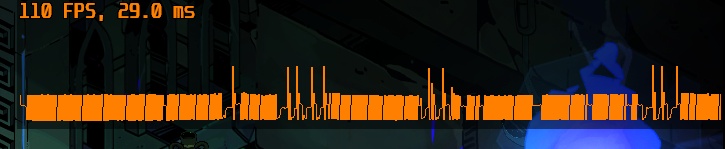
the fps is connected to the speed of the gpu, if I turn down core speed, the fps will go down slightly, if I put it up, it will go up too
but it doesnt get rid of spikey frametime
the frametime is fine in main menu or esc menu, its only skipey during the gameplay
sharp narwhal
I think someone else was having issues with their Radeon card having inconsistent framerates too - if it's something consistent, @thick lava might be interested in that
 light smelt
Hi all, I've just bought Hades but am having a bit of trouble with it. As soon as I launch I'm getting ridiculous mouse lag coupled with beeping. I'm not sure if this is a problem with the game itself or something else but I've never had it happen before and it stops as soon as I close the game (keyboard works fine as long as I'm not trying to use the mouse)
Any suggestions would be appreciated
sharp narwhal
There are some suggestions for fixing this issue in #hades-tech-fixes-old !
light smelt
I have gone through them, nothing there seems to help
light smelt
I have resolved the issue, thank you
 little raft
I'm not sure where else to stick this but I appear to have gotten stuck in Asphodel. I have Poseidon's double knockback on the spear, as well as the spear bounce hammer upgrade, and upon clearing this room nothing has dropped or opened, and lava keeps sending out patches of fire and smoke as if enemies are still on screen. I'm assuming something got knocked back so hard it's stuck in the geometry of the level, but it's hard to say. This was a super fun combo and I'll hate to lose this run, so I hope this is resolved in the future.
 surreal pike
Hey, this sounds like a bug! Please report this in-game using f10
little raft
Ahhh okay i will if i encounter it in the future
 echo lodge
Hi! My friend is streaming for me Hades on discord and sound from it is V E R Y choppy but sometimes it repairs itself. Quite often when this is happening, turning borderless and fullscreen option on and off helps though not always. Every other program/game/whatever works properly. Do you have any idea is it our or games fault?
sharp narwhal
Discord has had issues with Hades pretty frequently. I think I remember hearing that playing in windowed mode can help?
echo lodge
That's happening in windowed mode accually! When he turns on and off fullscreen then it gets back to normal for few minutes :V
 inland kraken
Hello! I'm having a problem in Hades, a strange problem: using a controller (in my case xbox one via bluetooth) the fps vary a lot between 130 and sometimes even below 30, in the main hub, turning off the controller the fps return to 144 fixed, without ever going down. is there a known fix to the problem? Thanks in advance for your reply.
ps: i'm playin at 2k resolution, and downgrading the resolution lower even more the fps count.
thick lava
This is a known issue, and unfortunately there's no workaround at the moment other than to hardwire your controller
 lunar lily
Hello there! I've picked up Hades again for a stroll! Been having a blast, but lately I've been getting significant frame drops whereas I never had them before the last major update. Wondering if I might assist in tracking this down if it hasn't been tracked down already.
dense rune
Hey BicycleWalrus, have you tried this fix already? https://discordapp.com/channels/456889434672201729/521144863023169536/557641922798288908
lunar lily
Looking for the right file to edit
dense rune
It's not a file to edit, it's a launch option in the Epic Launcher
1. In the Epic Launcher open the Settings Menu
2. Scroll to the bottom until you see Hades.
3. Expand Hades
4. Click "Additional Command Line Arguments"
5. Type Launch Options into the text box that appears
Worked brilliantly! Thanks @dense rune
dense rune
Glad to hear it! Happy hunting!
 iron forge
Hello! I’ve had the issue for the past couple weeks that when I launch the game I get only a black screen, the music and the in game mouse on the screen... I can’t proceed any further or get the video to work. I have a fairly new pc that plays new games well. I’ve uninstalled and reinstalled, updated drivers and everything. It’s been a couple weeks and I’m a bit frustrated because the game is completely unplayable for me. I’ve emailed supergiant support already with no reply. Help!
dense rune
Have you tried launching the game in windowed borderless?
iron forge
How would I do that? I hate the epic games store... I don’t know how to do anything on it and I feel like it lacks these options but maybe I just don’t know how
dense rune
Instructions in this post from #hades-tech-fixes-old https://discordapp.com/channels/456889434672201729/521144863023169536/521145565455581195
iron forge
Thank you, I’ll try
iron forge
So, that worked. But, so I can’t play in full screen anymore?
 thin sparrow
If you set the resolution to the same size as your monitor it will still take your full screen up.
But it won't be IN fullscreen.
iron forge
Ok. Thank you
 rain cradle
how to turn off vsync?
 torn nimbus
Would someone be able to give me some pointers for manually transferring my progress over to my pc?
Caitlin suggested it was possible and to come here for advice on it
 lone nacelle
C/Users/(your user name)/Documents/Saved Games/Hades
torn nimbus
just a straight copy works?
no annoying anti-cheat things to get around?
lone nacelle
look there, just copy-paste your savefiles to your new pc (via a pendrive or uploading to a cloud)
yep!
i had to do it recently, had no issues
 analog fjord
Should just need to copy it over 😃
torn nimbus
cheers
crude peak
OKe your 'Mouse Lock' option in settings, still causes the mouse to feel very weird in the new patch, its less so than before, but still notice, I can work around it using the 3rd party open source application 'Borderless gaming', is there any information I can give you to help solve it once and for all?
 winged fractal
so when playing hades my mouse pointer always flickers from the in-game mouse pointer to the just regular pc mouse pointer
any idea on how to fix that? Its been like that since it first came out
analog fjord
#hades-tech-fixes-old has some options
 unreal parrot
when I try to play hades the screen just turns black and although i can hear the music i can't do anything else. I tried restarting and updating every possible driver that i thought of but nothing works. Please help me guys i wanna play the new patch.
analog fjord
Be sure to follow this guide to ensure that the game is using your nVidia card, and not your onboard Intel card:
https://www.techadvisor.co.uk/how-to/pc-components/how-set-default-graphics-card-3612668/
After that, make sure that your Window power settings are set for High Performance while running Hades. Ensure that the monitor running the game is connected to your nVidia video card on the back of your computer.
If there is no option to select your GPU, you will have to manage it in the BIOS. Disable Intel HD and make sure you set PCIe as the default for graphics in the BIOS, don't leave it at Auto

Tech Advisor
We show you how to set a default graphics card in Windows 10, be it Nvidia or AMD.
That is from #hades-tech-fixes-old
 short star
Hey Morgan et al! I'm playing with the nintendo pro controller for the first time and I'm super happy to see that the game supports it! So far the main problem I'm running into is that the game registers B as the interaction button in menus instead of A, even though i mapped interactions to A. I don't mind getting used to it, but is there a way to fix that?
again it's only in menus, it works just fine out in the world
thick lava
Yeah this is a known issue, sorry about that
short star
no problem! as long as people know I can get used to it :)
 ionic sandal
Hello everyone, im pretty sure that it is not the best place but still i think devs should know and hey maybe someone already encountered the issue and was able to fix it. Long story short me and my gf are trying to buy the game but once at the end of the transaction in the Epic Store Launcher it says there was an error transaction voided nothing specific, multiple cards, enough money in them, different computers, different IPs, nothing. Now, i know that it is Epics job to solve it or to report to, but we already did so and they could not care less. Point being is that i`m sure that its not only 2 people having the issue so i guess it is in the interest of Supergiant too to see this solved or at least know whats up. Did anyone already encounter this issue and spoke of it?
dense rune
People have mentioned issues with purchases on the Epic Store, yes. Unfortunately I don't think there's anything SG can do about it
 flint compass
If you guys have paypal try buying it through there, it worked for me
 honest hinge
Are there any fixes to reduce the fps loss when going for zeus and dio builds? especially with the new zeus zap after attack effect
It was unplayable for me
analog fjord
This launch option may help
/UseNativeOpenGLRenderer=false
 tawny ridge
I experienced that too, was just talking about it on the discussion server, reducing the resolution didn't work, before the update everything was fine
honest hinge
I will try, and report back
tawny ridge
How do I change that launch option?
analog fjord
Directions are in #hades-tech-fixes-old !
tawny ridge
Thanks
honest hinge
M, if you're trying to find launch options, go to epic game settings, scroll to the bottow and tick "Additional Command Line Arguments"
honest hinge
@analog fjord Using /UseNativeOpenGLRenderer=false has completely removed the fps drops. (1080ti with latest GEFORCE driver; 430.39)
I will let you know if problems resurface
 mystic flint
@analog fjord There seems to be a very common bug of the game not realizing there are no enemies left even though the counter is at 0 (such as during trials), this is extremely frustrating and resulted in me having an entire great run nullified as if it never happened T-T (tried to close and open the game instead of giving up). So far this has only happened in the new act and with the egg enemies so i assume it's related to those. I used the sword special attack which made the eggs fly around alot, but im not sure that they flew out of bounds as as i mentioned even during a trial the "enemies left" counter hit 0 but the game didn't continue.
analog fjord
Please report bugs like that using the F10 in-game bug reporter. Thanks!
icy burrow
if i uninstall epic games or uninstall hades to reinstall if does it delete all of my progress? asking because i want to update it but Epic games say cannot find D dive but i dont have one its labeled K
dense rune
Nope, your saves should be safely located in Documents\Saved Games\Hades
icy burrow
ty
dense rune
If in doubt, backup that folder
icy burrow
thanks alot (not sarcastic lol)
 austere olive
I still do not have the update 😦
sharp narwhal
Probably an issue with your Epic Launcher - have you restarted it?
austere olive
yeah i tried dat, then i tried re-installing the game, but when i uninstalled i wasn't given the option to re-install.
sharp narwhal
Hmm, you'll probably want to take it up with Epic Support - there's only so much we can do about the Launcher here. Some people may have suggestions though
 wintry raft
Is.... The game just supposed to close when you beat theseus ?
Doesn't seem like that's right
sharp narwhal
Doesn't sound right, nope. Did the game generate a crash report or anything?
wintry raft
It didn't, which is what's weird
sharp narwhal
There might be something in the event manager. You can view event logs by following these instructions:
https://discordapp.com/channels/456889434672201729/520430049003044864/558852665795280896
sharp narwhal
@thick lava would be interested
 hushed garnet
Is there anything in particular I need to do to download today's update? I'm on PC, and the Epic Games Launcher has auto updates turned on
wintry raft
then you have it
sharp narwhal
It should download automatically
hushed garnet
But I've opened and closed Hades several times, and I'm still on the Murder Death Kill update
So autoupdates SHOULD be working, and me having an issue is out of the ordinary?
austere olive
yeah i had the same issue
dense rune
Try using the "verify" option in the cog on Hades in the Epic Launcher
I recall someone in the past had an issue with not updating and "verify" being missing because Epic somehow removed the game from their account so they were no longer considered to "own" it
And thus couldn't verify or update
So I'd make sure that didn't happen for you
hushed garnet
Curious. My Settings only has Create a Shortcut, Auto Update, and Uninstall. So it looks like that isn't the issues
austere olive
yeah that happened to me 😦
dense rune
Then you'll have to contact Epic support
austere olive
look in your purchase history, see if Hades is on there
hushed garnet
Oooh...I think I figured it out
I think someone else on my PC is the one who originally bought the game, so it'll only update if THEIR account launches the game!
Thanks everyone for the suggestions! I'm off to see if I can't get that update installed ^_^
dense rune
Ah, that sounds logical
wintry raft
https://pastebin.com/Ks8MfkKB here's the issues hades encountered in the event viewer

Pastebin
icy burrow
feel free whenever to reply or what ever but i encountered another problem and i dont know where its coming from but
whenever i open up hades to play it i get the constant beeping and mouse lag during the menu and it also happens a few time during ingame too but idk why it happens i played another game but this didnt happen only in hades idk why but wanted to throw it out there if it is related
sharp narwhal
Hi, there are solutions for this listed in #hades-tech-fixes-old
dense rune
Last post in the channel
icy burrow
ty
 strong sedge
having an issue where Zag wont run smoothly, almost as if my input is flickering

using keyboard, tried changing the controls and unplugging controller/restarting game
 sonic epoch
Just got stuck in Elysium because the game thought there were enemies left in the room although there weren't. Probably wasn't an enemy stuck in the wall (I ran around for like 5 minutes attacking the walls). Had to give up. If I encounter this problem in the future, are there better and more detailed ways to give you guys feedback?
sharp narwhal
Use F10 to report bugs!
sonic epoch
oh okay. easy enough^^
sharp narwhal
It is; make sure that you're logged into the right Epic account, that your internet's working right, etc. and try restarting the client
if you're still having issues, contact epic support
 cerulean flame
okie
my sister is the one with the game but she says because epic is not a drm I can still play it even though im not on her account
and it updated previously
sharp narwhal
You can play offline, that's true, but in order to update the game you have to be logged in to her account and have an internet connection
sharp narwhal
once the update is complete, you can log out again
no problem!
 warm prism
I just beat the minotour, and in the chamber afterwards after killing all enemies the game still thinks there are more remaining and the doors won't open. Do I need to give up my run to fix this?
 grand karma
Uhm, so last night I was playing with my Xbox Controller. The pc still recognizes it (i can play other stuff with it) but hades ignores my inputs and just pretends I didn't connect a controller... Anyone experience this before?
surreal pike
Have you tried changing your control settings in options?
grand karma
yeah, it won't show the controller at all
I'll try rebooting my pc...
Well, that did the trick, guess I'm just happy it did? :p
surreal pike
Whatever works! Glad you found a solution.
 timid minnow
So, for the past week whenever I'd launch the game it would open up and immediately stop responding, but since the update this has happened EVERY time. I've tried to verify the game files, uninstall and reinstall the game, uninstall and reinstall Epic, launching it directly, as normal and as administrator, restart my pc, updated my drivers and did everything again.
The furthest I've gotten at the point of writing, is to the "Early Access" popup before the main menu screen (and I got here by launching the game as administrator for the 3rd time).
Anyone got any ideas to help me?
 astral lake
Hi guys.
Since the update (today) my game lag... it's literraly unplayable after 20-25 chambers. Any solution ?
dense rune
Try setting this launch option in the Epic Launcher https://discordapp.com/channels/456889434672201729/521144863023169536/557641922798288908
astral lake
ok, i try this. tks sir
astral lake
tks, it's work !
lunar lily
Just a quick heads up -- I have the command line: /UseNativeOpenGLRenderer=false added which addressed my performance issues after Update 3. However, Update 4 has reintroduced these performance issues in a big big way -- particularly when using the Adamant Rail. Makes the game almost unplayable.
Noticed significant performance decreases and FPS dropping to 5fps when using Adamant Rail, particularly with Dionysus, and Posiedon Boons (but generally speaking, once the FPS drops occurs, it's as though everything begins causing these issues).
thick lava
@timid minnow Have you tried the /UseNativeOpenGLRenderer=false trick in #hades-tech-fixes-old ?
timid minnow
I have, didn't do any noticeable difference
 real gorge
I have encountered a bug where you get a soft lock after bouncing one of those eyeball enemies out of bounds in Elysium. As the enemy spawns, you can hit it and it will bounce a little further without taking damage yet. If you hit it hard enough/enough times, you can see it bounce around the room like crazy, some times it will be high up and all you see is the shadow going around the room. It then despawns and you are stuck in the room after that.
lunar lily
From my brief interactions with the new build, it seems to me that the /UseNativeOpenGLRenderer=false command line isn't being properly inserted -- or that it isn't properly impacting the launch condition of the game.
There were noticable texture differences when I used this command line argument after Update 3. This time, it's as though we are using the native open gl rendered. IT's as though the argument isn't being applied at all.
thick lava
Noticeable texture differences? Can you elaborate? The two renderers shouldn't differ visually
analog fjord
@wintry raft Looks like you ran out of memory! Try quitting non-essential programs to free up more memory 😃
surreal pike
@real gorge bugs should be reported in game with F10! This channel is for computer hardware/software issues that may prevent you from playing or streaming the game
 red dawn
I didn't know save game was local :_D and i lost all my progress
toxic trout
well there's not really anything to be done, if you don't have access to your old files
 grand rapids
got a good set of items that i was having fun with..... but then this happened 
sharp narwhal
Please report that with F10 if you didn't already!
grand rapids
ok i submitted it hope that it gets fixed
unreal parrot
I checked and I am 100% sure that the game is using my nVidia card , but my screen is still black . After poking around a bit I discovered that I can actually select stuff from the main menu and even choose my save . The only problem is that and I am only able to do all this by listening to the sound and looking at the cruisor , which is the only thing appearing on screen . It appears as if the game is running but i cannot get a visual . I really have no idea what is going on. Please help.
dense rune
Did you try setting your launch options to be windowed borderless? Instructions in #hades-tech-fixes-old
 fresh hornet
Hello all!
First of all, really good job @verbal glade ! As I did with every other of your games, I enjoy every last bit of Hades ! =)
I checked the threads and topics and I think it's in here I'm supposed to post so here it goes (I think you guys use some Jira, Mantis or else):
- Using the special ability while dashing change the position where the special ability is cast (with adamant rail it's easily reproduced)
- Taking damage from boss' projectiles after taking him down (during the black screen) is a bit frustrating :P (especially the big salva from hydra)
- There are monsters (gorgons) sometimes that are waaay out of the "playable area" and flee and sometimes get stuck behind environment and you must go into the lava to end them
- Poseidon's rage sometimes get stuck behind props (especially candles/mushrooms in hydra boss) and you have to do a combination of direction to get out
- Sometimes monsters (witches) are hidden because of first plane environment (maybe a glow could do the trick)
- Bosses that are impervious are not always well displayed (Alecto and Tisiphone notably) are sometimes impervious but the shield has some tint from the character
- Flurry with Stygian blade, infinite ammo on Adamant rail, equivalent on Coronacht, Aegis should probably work like Varatha's flurry : attack while left click is down ? (for mouse's sake! ^^' )
That's all for now, if those feedbacks are already listed somewhere I apologize! I know you have already loads of stuff to do but if I can help with some Q&A from France then here I am 😃
sharp narwhal
@fresh hornet Thanks for the feedback, but the best place to report bugs is actually the game's built-in bug reporter! you can open it with F10 and it will send save information and a screenshot to the SGG team so they can track down the issue
analog fjord
@grand rapids Were you standing near there or in the lava when you killed the last enemy in that room?
Possibly while using Sea God's Rage?
austere olive
I still don't have the update, ticket sent to Supergiant about 24 hours ago, still no response :\ I think my only option is to just buy the game again
sharp narwhal
Supergiant or Epic?
austere olive
I have sent tickets to both, have only herd back from Epic.
sharp narwhal
Supergiant can't really do anything about Epic Launcher issues
Game downloads, purchases, etc. are all Epic-side issues
austere olive
yeah, and I just want to play the game, been looking forward to this update for awhile. Love every Supergiant game, beaten them all. If buying the game again is my only option, so be it.
hopefully I don't have to buy it again every update lol, but i will if i have to.
grand rapids
@analog fjord nah i was using tempest flourish with razor shoals. I also wasn't near to the lava at all when i killed the last guy
 main oracle
Hello! I am at the second Elysium chamber, I killed all the enemies but the doors won't unlock, is there anything that will let me continue my run?
sharp narwhal
People have been reporting this issue a lot, I'm afraid there probably isn't a way to progress. Please report the bug using F10; I'd suggest suiciding using the traps after that
 molten rose
Game just stopped responding (cycling sound, stopped image, and after alt-tab or two - just gray screen and Windows "has stopped responding" message) when I tried to pick up Darkness after finishing a room in Elysium, no crash log, no report window, no nothing. When I reloaded, I was at house of Hades, before start of the run
When it happened I had +200% Darkness from Chaos, and I just picked up Poseidon +75% of rewards, might have something to do with this
 chrome drift
Did the event in Elysium and the heart dropped in the river where I couldn't grab it
sharp narwhal
Hi there, please report issues like this with F10 - give a description of what happened to lead to it spawning there and it'll help SGG fix the bug!
chrome drift
I already quit out tho 😛
sharp narwhal
Fair, but for future reference!
chrome drift
for sure. I didn't see F10 listed anywhere on a splash screen or anything so it's good to know the shortcut
frosty tiger
am i the only one with fps drops after the update?
toxic trout
no
 worn patio
nah, elysium dropped my fps when i enter

 ornate snow
This kind of problem happened to me twice since the update and one time, the last mob disappeared with no chance to finish the chamber in Elysium
surreal pike
When these types of problems come up please report them with the in-game bug reporter using F10!
 warped yew
ok sorry !
 pallid basin
I have reported this bug that happened to me multiple times and it just kills the run and I have to restart again :'(
analog fjord
Thanks! We hope to release a patch some time soon that addresses this!
 stoic pagoda
This lonely soul was pushed away for Elysium by Poseidon's cast. Also it crush my run X)
Supposedly, it was from here
Perhaps, it was Athena's sword
toxic trout
f10 to report bugs like that
stoic pagoda
ok
analog fjord
We just released a patch that hopefully fixes it!
 brisk hemlock
Need help captions always turn themselfs back on even if i turn them off they only turn on again after i get to the starting screen
analog fjord
Try deleting the file Profile1.xml from Documents\Saved Games\Hades DON'T DELETE Profile1.sav though!
strong sedge
same issue as before this patch for me, but i didnt really get a response last time

zag cant walk, unplayable
the first walk around skelly in this gif is diagonal inputs, those make him walk in a squiggle. the second is single key inputs, those make him stutter.
have tried everything i can think of on my end, reinstalling gam/launcher/drivers/killing every other process/trying different keyboard
 viscid pecan
I wasn't sure if this was a bug (with the displayed text) or just a really unlucky roll on the reward as I imagine there's some variance there.
analog fjord
You probably have a Chaos Boon active that is preventing you from gaining gold.
viscid pecan
Whoa! How'd all this egg end up on my face!? That makes sense then.
dusk geyser
are there any known issues with radeon/freesync? I swapped gtx 1060 to rx 570, removed drivers with DDU and installed latest radeon drivers but the frame time changed from constant (normal, almost the same all the time) to this crazy mess and is all over the place... it was like that before new patch too. it only happens when I'm in game, the frame time is constant when I open tab menu, esc menu, stay in main menu etc, so the game itself makes the frametime crazy
dusk geyser
and it only got worse in new zone... uh
analog fjord
@dusk geyser Is this happening after playing for a while, or as soon as you load the game?
dusk geyser
as soon as I can control character
the moment the game is paused or rather I cant control the character, its fine
for example alt tabed out of focus now is almost constant
escape menu pause is fine too, you can see the "stuttering" go away after pausing
I'm sure it was fine with gtx 1060 so my guess is vsync/freesync limiters on rx570 or something similar but I turned all I could off and couldn't fix it
 peak tendon
Hello! Is there any way to restore my saves for Hades? cuz I reinstalled my Windows and lost them
dense rune
Unfortunately not, if you didn't make a backup. Epic Games does not currently support cloud saves (though it's on their list of features to add)
 orchid stream
Hello 😃 My game client crashed and now I can't launch anymore. I also can't uninstall as Windows tells me I don't have permission to the x64/hades.exe file. Is this a Windows problem?
sharp narwhal
If you go directly to the program files folder, can you run the game by clicking the exe file?
C:/Program Files/Epic Games/Hades/
orchid stream
I can't. The logo isn't there on the file either so it looks corrupted. I was able to reinstall Hades on a new location and get into the game but now I have just this file sitting there and I cant delete it
sharp narwhal
That's odd...does your computer have multiple accounts on it or anything?
orchid stream
Nope. Fresh Win10 install as of last week too
I tried to take control of the file as well and that failed.
sharp narwhal
Hmmm. I'm not sure! I'd guess it might have something to do with Epic's permissions, but I don't know.
 humble onyx
Anyone else have the hardware cursor and the regular cursor at the same time? Now if you don't move the cursor you only see the hardware cursor, but if you move it slowly you can see it flicker back and forth, and if you move it fast, you can clearly see the regular cursor interspersed.
sharp narwhal
This issue has been reported yeah - have you tried the mouse fixes in #hades-tech-fixes-old ?
humble onyx
I dont have any slowdown as long as I leave mouse lock disabled. It's just a minor visual bug really
frosty tiger
I'm experiencing fall of performance even on Asphodel and scenarios that were previously before. Was this expected in this update?
 ionic wing
My game has frozen the last 7/7 runs, all at varying times. Once was when Thanatos showed up for the first time, once in the House of Hades, twice on Megara, others at random points either during combat or at the end when I'm considering what door to go through. I've even totally reinstalled; it doesn't crash, just stops responding. Sometimes it will start responding again in 2-4 minutes, but not every time. I've already done what's listed in #hades-tech-fixes-old
 mellow fernBOT
Thanks for reporting a game freeze! The most common solution to this issue can be found in #hades-tech-fixes-old
 regal dome
hey guys ive been having an issue when the game starts up sometimes
When i open it up, I get a black screen but I can hear the rest of the menu sounds and it sounds like I can still move around in the main menu
Usually when i close it and restart it, I can see the loading screen and the game runs fine.
Ive tried the fixes in #hades-tech-fixes-old but I still get issues.
 rare knot
hey can someone tell me how to recover my save from my old pc to my new pc ? It look's like its not linked on the epic game acc
toxic trout
it's in your documents folder
rare knot
ow ok ty
toxic trout
Saced Games/Hades/Profile1.sav or whichever slot you were using
 patent bronze
Hi, I reported this before but it wasn't fixed in big update so I'll remind it again; Whenever my Xbox One S wireless controller disconnects or loses signal a bit, frame rate goes to almost zero. It comes back up after I pause the game somehow and wait for my controller to reconnect but it is really weird
 grave wyvern
One quick question
I have a 4k monitor and cant seem to run the game at all in either windowed or bordered
windowed it wont be visible at all basically
and windowed there's massive screen tearing and framerate loss
help?
sharp narwhal
@DenverN.#9207 There are known issues with 4K; have you tried the fixes in #hades-tech-fixes-old ? Make sure your graphics drivers are also up to date
@patent bronze Yeah, wireless controllers have had some issues with the game; I don't know that there's a fix for it right now. I'd suggest just using a wired controller instead
I assume you're not using Steam Controller, but if you are, turn it off and install native drivers for the controller
 misty sigil
Hi! If I experience dramatic lag during a fight, is that something I should F10 for after the fight is over?
or should I try to do it during the fight itself for best info?
sharp narwhal
I think after the fight is fine!
misty sigil
👍
sharp narwhal
Thanks for the report!
 spring orchid
I would like to say that in the second time I arrived at the new area after killing the hydra, my game turns black and I could only see the numbers of the hud , obviously I died and when i turned back to the menu again i only could see the hud and not the screen of the new update.
 untold sandal
Does your saved games get synced with the epic games launcher?
untold sandal
Sweet thank you, was hoping installing it on another machine didn't wipe them.
DO I copy the entire folder over?
untold sandal
Also, has anyone had much luck running it on linux?
untold sandal
I ask because I can get it to run pretty much fine until I hit a couple of maps
dense rune
I haven't heard of anyone successfully running it on Linux, no. That's not to say it hasn't been done, I just can't confirm
And yes, you can just copy the folder
That folder being Documents\Saved Games\Hades
 tacit flax
Is there a fix for rag involuntarily sprinting in random directions? it happens randomly and the amount of time it lasts is also random...
sharp narwhal
Sounds likely to be an issue with your keyboard or controller. Make sure your drivers are up to date, etc.
untold sandal
@dense rune Well I've played a few hours running it now, crashes when enetring new rooms sometimes but overall playable until I hit a map where it crashed everytime.
tacit flax
@sharp narwhal my drivers are up to date, what other things do i think to look out for?
sharp narwhal
Are you using keyboard and mouse, or controller?
tacit flax
keyboard&mouse
sharp narwhal
Do you have an alternate mouse or trackpad you could try, to see if it's an issue with that one specifically?
tacit flax
i don't unfortunately...😫
sharp narwhal
Oh dear...how about a USB controller?
I still think it's an issue with your hardware, since I haven't heard anyone reporting issues like this before, but if you don't have any spares, you could try the mouse fixes in #hades-tech-fixes-old , like disabling mouse lock in settings
You could also make sure you don't have "sticky keys" turned on on your keyboard, which can sometimes happen by accident. That would be in your keyboard settings in control panel
tacit flax
problem fixed i think, reinstalling mouse driver worked, thanks!😁
 main plaza
Does anyone have a problem like I do?
I launch the game and it stops on the loading screen but I can hear the main menu music playing in the background
 muted shadow
I've been having issues with input lag with hades using a controller. There are times when I'm playing and then for a few seconds I can't move Zagreus. After a few seconds, the remote seems to be playing normally again. The controller is a wireless xbox controller with adapter for Windows 10. I changed the batteries, so it's not that. When I start up the remote, some sort of c++ error window pops up but the remote still works.. I also have broken spear point equiped if that makes a difference
sharp narwhal
There have been several reported issues with wireless controllers; if you have a cable, I'd recommend just using it wired instead
Make sure the drivers are up to date as well
muted shadow
sadly... I don't have one, I'll try the keyboard for now. I'll give the drivers a look too. thank you @sharp narwhal
 obsidian lava
How do you launch from offline? Tried launching the .exe file and it didnt work
dense rune
The .exe is precisely how you launch offline, not sure why it's not working for you
I suppose make sure you're launching from the appropriate 64- or 32-bit .exe?
obsidian lava
Lemme try
obsidian lava
It worked! Taking it out of it's respective file probably messed stuff up
dense rune
Oh, yeah, that probably would mess things up
sharp narwhal
if you want to easily access the .exe, you're best off right clicking and selecting "create shortcut", then putting the "offline shortcut" on your desktop @obsidian lava
then you can use that instead of epic's "online" shortcut
obsidian lava
Ah thank you!!
 full light
Hello everyone
I dont really know where I should write this so I took what i thought was the closeset.
In the last update I started getting huge lag on the new level it got close to unplayable. anyone know a fix? or should I wait it out for later updates and hope they iron it out?
thx in advance
sharp narwhal
@full light there are some fixes for performance issues listed in #hades-tech-fixes-old - try those!
rain cradle
Does anyone also have issue with amd apu? Can not get more than 30fps during gameplay. R5 2500u. Gpu clock can go as high as 1100mhz but hades stay on 200mhz no more
sharp narwhal
Make sure the game is running on your AMD card rather than default graphics; there's a guide here: https://www.techadvisor.co.uk/how-to/pc-components/how-set-default-graphics-card-3612668/
Tech Advisor
We show you how to set a default graphics card in Windows 10, be it Nvidia or AMD.
rain cradle
I have only integrated gpu which is vega 8
Almost as powerful as MX 150
It's weird cuz I can play warframe 60fps on medium at 1080p
untold sandal
For those that are interested, I can get Hades to work fairly well (still stuck on a room that always crashes so my save is "stuck") Wine 4.8 seems to run it fine. Going to mess about with proton if I can get offline launching working
Offline mode doesn'
t seem to carry on saved games
nvm forgot to give wine a directory
untold sandal
Got the offline to work as well as through the ep launcher but still no gold solution 😦
crude peak
can anyone confirm or deny if "C:\Users\USERNAME\Documents\Saved Games\Hades" is still where the game is saved or has it been moved to somewhere else?
dense rune
That's still the place
crude peak
thanks
 tawny trail
i think i need some help getting roles lol
dense rune
Looks like the bot is just asleep
sharp narwhal
Yeah; Proxy is out of our control, so it's probably getting maintenance done or something. I'm sure that bot's dev team is on it
 pseudo yew
Hey guys. I am having some problems with the game. I submitted an issue with the in game bug reporter, however I would like to take a more hands on approach, what do guys think would be the best bet. In here or on reddit perhaps? Anywhere else?
sharp narwhal
It depends what issues you're having - could you be more specific? We have a lot of quick fixes in #hades-tech-fixes-old for common issues, and for more complex things, an engineer may be able to help you
pseudo yew
Absolutely, and thank you for replying!
I looked through the tech fixes, unfortunately without any luck.
To be honest I don't even know if it is a problem with Hades.
So, here's what wrong.
When I launch the application and it runs for about 30 seconds to a minute everything freezes, mouse-input, keyboard-input, the screen. Everything except for the sound. The sound (music) keeps playing. It freezes for about 10 or 20 seconds, and then everything is back to normal for about 30 seconds, then it all freezes again.
At first I thought it might be a windows update thing. Some windows patches has been known to cause odd errors, so I updated to the latest version.
Then I updated my graphic drivers.
Then I uninstalled my anti-virus as it was hogging a lot of resources when the game was running.
I tried all the quick fixes from discord, running the application i window-mode, unlocking the mouse.
I discovered, by coincidence, that if I run the game whilst having an android phone plugged into the computer, and the game freezes -- if I then disconnect and reconnect the phone it kind of forces a refresh and the system unfreezes ... for about 30 seconds, then it freezes again.
Sometimes after I exit the application the freezes persist. Which is why I am uncertain that it has even something to do with Hades.
I can only reproduce this behavior with Hades, however, no other application or game -- as far as I have tried.
I have read a lot about freezes both in here and on reddit, however, nothing like what i am experiencing. The behavior is the same throughout the entire game. Nothing special on exit or when loading or going between rooms. Its always the same.
sharp narwhal
That is indeed very odd! Have you tried running the game directly from its .exe file, or is this behavior from the Epic shortcut?
pseudo yew
I have, its all the same.
I just saw another windows update come in though. Let me restart and see if it by offchance would do anything.
huh, would you look at that. I runs fine now :S
That is so weird. Thanks for taking the time to help me out.
It might just be temporary but for now, I will take it!
Thanks a lot.
sharp narwhal
No problem! Let us know if you have more issues
pseudo yew
Perhaps SuperGiant knows I have no more exams since today, and they wouldn't let me play during the time leading up to them.
sharp narwhal
Heheheh
 full crater
absolutely
sharp narwhal
Hope it keeps running smoothly for you!
pseudo yew
yeah me too, thanks!
Hm, I spoke too soon. But the freezes are much more infrequent and are rather short. Its actually playable now. I'll have to do some more testing now that I another state of the system. I'll report back with my findings.
 potent talon
so I just got a new computer and found I've lost all my data for the game, is there anyway to recover them online?
sharp narwhal
No, sorry, the Epic client doesn't have cloud saves yet
If you have your old computer still, you can transfer the files manually
analog fjord
@pseudo yew I read your original report and was pretty baffled. I'd try reinstalling your GPU drivers. It almost sounds like a hardware issue to me. Sadly you're the only person we've heard of experiencing this so far, so I'd suspect your computer more than anything, especially if it continues after quitting the game!
tawny trail
test
frosty tiger
Hello everyone. I am running Hades on the integrated Vega11 of a Ryzen 2400G with 3Gb of VRAM allocated out of 16Gb of DDR4 RAM at 3000mhz (and that's about all my pc). This iGPU is capable of running Hades at 60 fps at 1080p, I am sure of it. Still, every time I encounter an enemy the fps drops to 30 - 40, also in some rooms where there are no enemies. This happens at 1080p and also on 720p. I am pretty sure it's not my hardware or drivers (everything is up to date and installed in a clean manner). What do you guys think? It's still playable nevertheless, and really awesome btw.
 brittle aspen
Can i ask on which file do you find your save files i need to transport them manually to keep my progress and i can't seem to find them
brittle aspen
Thank you so much i ve put countless hours in that save file i ll check it right away
Checked and it was there thanks again!
 floral quarry
How does this play on older laptops?
I've got one with sli m650GT it plays Dead Cells fine
sharp narwhal
You can see the baseline specs required in #hades-faq , I believe
floral quarry
yea thanks
frosty tiger
is a vega11 not capable of running the game at 60fps or is optimization still being worked on?
sharp narwhal
Optimization is always a work in progress, since the game is in Early Access - you can compare your specs to the minimum specs listed in #hades-faq
frosty tiger
well, mine are well above that
I have a ryzen 2400G with 16gb of ddr4 and 3gb allocated to the vega11
sharp narwhal
Other than double checking to make sure the game is running on the dedicated graphics, all I can think is that yeah, optimization is still being worked on
frosty tiger
I don't have a dedicated gpu, I run all my games on the integrated Vega11. It can run cs:go for example, full detail at 100+ fps, so I really don't think my hardware is the cause
sharp narwhal
Alright, it's just a common issue, so it's worth asking
frosty tiger
It can play hitman at medium detail so I don't think Hades should break a sweat on it
Anyway, I will wait and see if further updates fix anything. I would really appreciate if APU performance is something the devs are looking into. These AMD APUs are pretty wide spread and they are made exactly for games like Hades, Transistor...It would be a real shame if I had o buy a dedicated GPU when the integrated one should run it just fine.
frosty tiger
my fps drops from 60 to 30 ish every 20 seconds, especially when I encounter enemies. No matter the resolution
 reef turtle
hello i just got back to hades and i have a problem with mirror of night dmg buffs
sharp narwhal
What sort of problem? If you've encountered a bug, you can report it in-game using F10
reef turtle
i have maxed mirror but buffs dont applay
nither shadow presence nor boiling blood
i got it, took points out and in and its working
 plush pine
Heyo, I bought Hades a while back and it would just straight up freeze every time I tried to get out the window so I left it alone for a while, and then when picked it back up earlier today it somehow ran perfectly fine but now it's freezing right when I try to pick up where I left off.
mellow fernBOT
Thanks for reporting a game freeze! The most common solution to this issue can be found in #hades-tech-fixes-old
 split river
Hello, I bought the game yesterday and the game won't start, I was only able to launch it 1 time yesterday after some tries but now he doesnt start anymore
sharp narwhal
@split river Is this happening when you try to run the game from the Epic Launcher and/or the shortcut made by Epic when it installed the game? If so, try running the game from its .exe file directly instead - C:\Program Files\Epic Games\Hades
split river
@sharp narwhal Hello thanks for the answer, it's happening even if I try to run the game directly from the directory, also I was able to make it working but I had to let the Hades.exe runs for like 15/20mins before the game starts
sharp narwhal
Have you verified your installation through the Epic client? Something might be weird there
floral quarry
I'm in 1680x1050 resolution the game plays in a letterbox will they add a fix for this?
I know it's a weird resolution but it works
 oblique turret
I'm using Windows 10, and the OS mouse speed seems to increase when I quit the game. Am I the only one with this issue?
 lethal yoke
I'm unable to use controller with the game. Please help
I can't find any specific post regarding controller setup either
toxic trout
what controller are you trying to use?
lethal yoke
Wireless
Nevermind figured it out
The controller had shut down while the game launched
😓
toxic trout
np!
 devout sandal
Hi. I have a 4k monitor and the game was lagging, so I turned down my resolution. Now the game launches with a black screen
I went into the epic launcher settings menu and added launch options in an attempt to manually set the resolution, but I'm not sure how to actually change the launch options
Disregard that second message. I was about to figure it out. But I still seem to be having issues with Fullscreen.
devout sandal
And lag
 long mauve
quick question. I can pick 3840x1080 for my displey but the game never changes to that view. Is it something I'm doing wrong?
 worldly oyster
Hi. I have a very fast PC: 9900K, 2080 Ti, Gsync screen. No stuttering or frametime problems on any of my other games. Yet I installed Hades and while the framerate remains relatively consistent (118-120 fps), there is a noticeable, and very annoying, stutter that appears to coincide with frame time spikes. I've tried everything I can think of, including enabling/disabling vsync, same with G-sync, changing max pre-rendered frames, full screen mode, windowed mode, using mouse/keyboard, using controller. I always have the stutter, and it's constant. Can anyone help me troubleshoot this, please?
sharp narwhal
@devout sandal 4K support is a work in progress; in the mean time, there are some console commands and display options you can try in #hades-tech-fixes-old
 odd grotto
Is there a way to hide the version number (i.e. VO.17446) in the top left of the screen?
toxic trout
not as far as i know!
 serene pier
Is there any way to get rumble working on a Dualshock 4 while keeping the Playstation button prompts? I have Steam closed & am connecting by Bluetooth
 clever tartan
Running into the sticky mouse lock issue. The suggestions in tech-fixes do no apply. Starts as soon as the game is launched so I cant get past the menu. Basically it lags and beeps. I reinstalled win 10 last week and I'm using a logitech g502
 muted zenith
Is there anyway to force the game to launch in window mode?
sharp narwhal
Try using the launch option /FullScreen=false, i'd guess?
 main moat
I tried the graphics card fix and Hades is still freezing the visuals but allowing me to hear and move and interact with the menus and such. It also is occasionally flickering violently while frozen.
mellow fernBOT
Thanks for reporting a game freeze! The most common solution to this issue can be found in #hades-tech-fixes-old
sharp narwhal
Try using the launch options listed in #hades-tech-fixes-old
main moat
Thank you! That seems to have worked
sharp narwhal

main moat
and it reverted to doing it again >.<;;
 dark otter
hi, jsut got the game an loving it. one issue though, when usin an xbox controller i get serious stuttering in game
its doing it with mouse and keyboard to
the cpu usage goes from 15 to 2% then back up
any ideas
 haughty flower
Is there any way to make the game not freeze constantly during gameplay? I've tried all the fixes.
mellow fernBOT
Thanks for reporting a game freeze! The most common solution to this issue can be found in #hades-tech-fixes-old
sharp narwhal
@dark otter Are you using a wireless controller?
sharp narwhal
Was the controller's receiver still plugged in when you switched to MKB?
dark otter
nope
sharp narwhal
🤔 Well that's about all the suggestions I have - I know wireless controllers in general have caused a lot of grief and strange bugs, so I'm not surprised to hear you're having trouble...maybe someone else has some advice? SGG will be back in the office on Monday PST and may have some suggestions too
dark otter
yeah, im ok waiting. the game is so much fun and for on;y £5 in the epic sale it's worth holding on to
does fell like something that should be addressed rather quickly though as most the people i know use bluetooth controllers and would probably refund it
 empty marlin
has anyone else had an issue where they enter your bedroom and megera is standing there and your desk has a key on it but you cant move and the courser has disappeared? I've completed 85 runs and defeated the bone hydra on my last run if that means anything
toxic trout
that was the first time you beat the hydra, i take it?
empty marlin
yes
toxic trout
hey @sharp narwhal , you might have a better memory than me on this - there's dialogue from zag when you unlock the pact, right?
sharp narwhal
"What's that on my desk?"
toxic trout
yeah
sharp narwhal
event conflict, huh?
toxic trout
it sounds like the game's getting its wires crossed
sharp narwhal
I thought that might be the case
empty marlin
zag says that line for me but nothing else happens
toxic trout
what i think is happening is that the game can't decide which event to play - talking to meg, or revealing the pact on zag's desk - so it sort of botches both of them and softlocks
hmmm
sharp narwhal
that sounds like a reasonable guess
can you hit F10?
Wizard I mean - or are all your controls locked?
empty marlin
ill try
sharp narwhal
at the very least it should be bug reported, haha
an edited script file may be able to get you out of the softlock
change the conditionals on the meg convo
toxic trout
i'm looking at it now
sharp narwhal
you could just add some random conditional - the lounge convo with than for example
toxic trout
@empty marlin - when you load your save, what room are you in?
hopefully the game hasn't autosaved you into the bedroom 🤔
empty marlin
when i load the save I'm running into zag's room, but stop when i would normally be able to move
toxic trout
right.... 
 tardy wind
Hello, Just to report a bug i had. When i putted my game in fullscreen and borderless the game crash when it load a new room or when i die. But the game works perfectly when i play in fullscreen.
 spiral junco
Hi Hades team, I "deadlocked" the game by pressing E to start a run while an arrow of my bow was hitting the training skeleton, now I am in front of the first boon but I can't take it since the game considers I'm in battle ("Foes nearby!" message), I could give up and start again. Didn't manage to reproduce it though 😅
 forest basin
hi! i'm a new french hades player and my game never save ! i lost everything when i quit the game !
toxic trout
@forest basin Hi! Have you tried the solutions listed here? https://discordapp.com/channels/456889434672201729/521144863023169536/521229208714739712
 tacit anvil
I think I was at 19 runs, and now no save, any solutions somewhere?
 odd zenith
so, are anyone else here having an issue where after a few runs, every character but Zag stops voicing his lines in conversation dialogue?
it's happened to me 3 days in a row, usually happens after a run or two
actually, if I alt-tab out of the game and alt-tab back in again, the lines play
but I have to do it every time a character that isn't zag talks
analog fjord
I've been trying to figure out what causes that to happen for ages. If you can figure out what causes it to start happening I'd love to know.
 cosmic oyster
I don't have a screen, but I just had a convo with Thanatos at the House. Zag says something along the lines of "I would like to see what it's like for myself." But the text says something else entirely. I just can't recall what it was because I click it by before I realized what I was reading DDX.
But if this'll help ya http://prntscr.com/nr7jyu
sharp narwhal
@cosmic oyster Thanks! If you encounter bugs like this again, you can report them in-game using F10
cosmic oyster
Oh whoops! I didn't realize F10 did a thing. Thank ya! 
floral quarry
NO fix for the forced letter boxing with 1680x1050? it looks zoomed out too, 16:10 is still a viable aspect ratio on PC
lethal yoke
@odd zenith yeah it happened with me as well
tacit anvil
Anything we can do for a dissapearing save? does it have cloud saving?
sharp narwhal
No cloud saving, sorry - there are some tricks that could recover your save in #hades-tech-fixes-old
dark otter
Anyone have a foxe for Bluetooth connections causing massive lag spikes in game?
thick lava
Sorry, that's a known issue. Unfortunately there's no workaround at the moment (other than to play wired in)
 wet garnet
Alot of people including myself are getting horrible horrible framedrops since last patch, while it used to run like a breeze. People think it's a memory leak. Have the devs adressed this?
thick lava
Are you on v0.17446?
wet garnet
Yes
thick lava
Okay, thanks for letting us know. If the frame spikes are localized to a particular area, that would also be helpful to know
toxic trout
I've noticed weird framerate issues after entering rooms - most notably in Elysium, but also, to the point where the screen stays dark for a few seconds when entering boss rooms - and also when beginning a run, if I try and take the boon/hammer before the Tartarus text has had time to appear on screen, which didn't happen prior to the Beefy update
dark otter
@thick lava is it something that's actively being worked on ? a lot of people use bluetooth controllers now
wet garnet
When I try to use a weapon in the storeroom it's the worst (as in goes down to 10FPS) during fights. It's completely random, some fights will be crazy and i'll get a steady 60fps other times it's a few enemies and it drops to 20. I don't even use a bluetooth controller
thick lava
Thanks for the added info on where the frame drops are. I'll log a bug for it. @dark otter If you're playing with an XB1 controller, I have a bug for that in the works -- if you have a different controller, please let me know
dark otter
Yeah it's an xbox one s controller, thanks for the fast reply
 short vault
I have a large (43") and a small (24") monitor.
If using mouse and keyboard, the mouse cursor size stays the same on both monitors regardless of the resolution used. The mouse cursor can be easily lost in the game world details on the larger monitor.
I understand that controllers are recommended at this point, but apart from this issue there are no problems with using mouse and keyboard for playing the game.
Suggestion: add a mouse cursor size option in the menu.
The only other issue I have faced with mouse and keyboard controls is that keyboard input cannot be used to interact with menu items i.e when selecting boons, but that is not a major issue since menu interactions don't happen during combat.
thick lava
What's the resolution of the larger monitor? My guess is Windows 10 display scaling is contributing to the problem
short vault
It is 3840x2160, but the game cursor stays the same even if I set the game to 1080p.
thick lava
We use the system cursor, so it should stay the same size regardless of resolution
I have a 4K monitor here, lemme check
short vault
It does! The physical size is rather same on a 1080p 24" monitor and 43" 4K monitor. On desktop this is not an issue, because the real-estate can be used to show more of any program or multiple programs at once. It's just more real estate. While when playing the game, the game will appear to be "more zoomed in" on the 4K monitor (for the same screen real estate) while the cursor size stays the same.
Changing to 3x scaling fixes the issue, but this needs to be set every time the game is booted. The cursor will appear slightly blurry, but it will be similar relative size of the game view as it is on the 24" monitor.
thick lava
Interestingly enough, increasing the pointer size in settings had no effect for me. Duly noted
short vault
Scaling fixes it though I think an option would still be a better idea than having to set scaling every time the game is launched.The game window is fixed size regardless of resolution and monitor size, and cursor is used differently in a game and on the desktop.
I just posted the picture for clarity, it's not a critical issue and scaling can be used to fix it. I mostly play on controller anyhow, but it's just something I noticed. I do use the same cursor size across all monitors on desktop. It's just that with most programs larger monitor means more space for toolbars. Inside the game, on a larger world the game will appear more zoomed in and objects are bigger, but the cursor size stays the same.
Nevermind with the keyboard in menus thing though, I don't know why I couldn't use it to interact with menus before, but it seems I can. :()
 stray tusk
The error of the explosion + entering another room was fixed?
frosty tiger
I have an issue where when I go to the mirror to upgrade my stats it goes up by 2 levels if i have enough darkness to do it and so the only way i can get 1 level is to spend my darkness on something else so I only have enough to get 1 level of it and then remove it from those other traits, but if I don't have enough for 2 levels then its fine. I tried running the game at 60hz instead of 144hz to see if that fixed it but same issue
 celest pagoda
Hmm, I seem to be stuck in Asphodel because I think a Charmed enemy killed the last one and died itself, now the exits are locked and there is no reward spawning, anyone else faced the same issue?
sharp narwhal
There have been issues reported at various points during dev with rewards not spawning; give it a good look around and if you can't find it, please report the bug with F10
celest pagoda
Alright, thanks
sharp narwhal
Include details about what happened - hopefully SGG can figure it out and patch it
👍
frosty tiger
anyone having issues launching the game?
i'm stuck on this but the game doesn't start
never had that issue before
 valid zephyr
Strange. It's working fine for me. Have you tried rebooting the computer? If that doesn't work, possibly uninstalling and reinstalling the game (make sure to create a backup of your save files).
frosty tiger
already did all those
my gpu kernel crashed earlier and I did a fresh uninstall and reinstall of the drivers on safemode
all other games and apps work
only hades is having an issue

sharp narwhal
Does the bare .exe file work if you dont try to run it through epic?
frosty tiger
oh yea let me try that
it took a really
really long time to launch
but it did launch from the .exe
sharp narwhal
Sweet
frosty tiger
I wonder what the issue is
everything else runs like before if not faster after some cleanup that I did
sharp narwhal
Since you had to redo everything with your gpu, have you made sure that the game is running on the right settings?
sharp narwhal
🤔
valid zephyr
Perhaps try to revert Windows to a previous Restore Point if you have that feature enabled
Should fix any registry and app issues, etc
Saved me before
frosty tiger
hmmm I did some registry cleanup with ccleaner and restarted my pc
tried to launch through epic
and it launched like usual
🤔
sharp narwhal
🤷
frosty tiger
I mean that's great I guess but I wonder what the issue was
sharp narwhal
Yeah...well if the registry cleanup fixed it, maybe something was still just a little out of wack
Can you review a log of what was changed?

 sharp narwhal
oh well!
you could revert back to earlier windows and do the whole shebang again fgshfkg
 fathom hill
I've read the sticky notes, didn't find my issue so I hope someone can help me, it's very simple and not a big deal.
In the mirror, or in the heat toil, I just cannot only add "+1" to any upgrades, neither can I subtract "-1", it always goes 2 by 2 points, and it has been a while it's not only with this update it's really odd.
Also when I just boot the game, the very very first "+1" that I do works, but after that I can only do it 2 by 2. I tried fullscreen, windowed, borderless, Graphic card 1080 up to date... if you could help :)
sharp narwhal
Someone was talking about a similar issue earlier...very odd. I'd say bug report it with F10?
But 🤔 I'm not sure
Like to me it sounds like a hardware issue
A sticky input or something
fathom hill
I'll report it with F10, thank you
But if it's an issue with the mouse that click twice, I should have noticed the issue before right?
On my desktop, on my browser... I guess
sharp narwhal
Yeah...I assume you tried the mouse settings and such in tech fixes
fathom hill
Yeah, i tried to disable mouse lock, it didn't change anything
going to try some other fixes, reading the forum posts about mouse lag/beeping even though my mouse is not lagging, will see
with a controller it's working flawless btw, but I prefer mouse/kb
 agile cloak
Hey! I just bought the game. Launched it, started without any issue, the title screen was smooth. As soon as I launch the game, and the first cutscene begins, the whole thing slows down and starts to stutter. I tried waiting for the cutscene to finish, after that the game remained in that state, which I would say is unplayable. I tried the game on my laptop, and found no issues there. My PC has an AMD Radeon 285X GPU. I hope somebody can address the issue and help me. Thanks!
sharp narwhal
Hey there! Have you made sure the game is running on the proper graphics card? There are tips for that in #hades-tech-fixes-old
agile cloak
Oh, I thought those were nVidia specific problems. I've tried some of the fixes there, but not that. I'll check it now.
According to task manager the game uses the proper graphics card.
sharp narwhal
Alright, I assume your graphics drivers are also up to date?
agile cloak
yes
sharp narwhal
Alrighty. My other suggestion, just because the Epic launcher can cause issues, would be just to give running the basic .exe file a shot - it should be in Program Files/Epic Games/Hades/x64
agile cloak
Should I close the launcher completely?
sharp narwhal
No, that's not necessary
sharp narwhal
🤔 I'm not sure! Were you able to find the .exe?
agile cloak
Yes, the game is installed on drive D, while the launcher is on drive C
I ran the .exe anyway, the problem is still there
I will try to reinstall the launcher and the game on the same partition
sharp narwhal
Alright. If you continue to have problems, an engineer would probably be interested in seeing your DxDiag, but the Supergiant staff are off for the weekend - regular work hours are weekdays, 10 am to 6 pm Pacific Standard Time
agile cloak
I reinstalled everything. The problem persists.
dark otter
@agile cloak you using a wireless controller? That did it to my game
strong sedge
i had an unresolved issue i mentioned here that i have now resolved, zag's stutter step walking was being caused by a keybaord repeat rate setting above "Default"
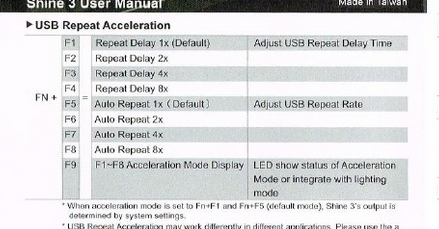


returning this to default rate fixed the issue i was having since beefy update
strong sedge
🙏🏻 didnt see anybody else with that issue but maybe helpful somehow
sharp narwhal
You have a Chaos curse active that hides room rewards
 hasty owl
ah that explains it never done the hidden curse before
sharp narwhal
for future reference, if you encounter a bug in-game, you can report it using F10!
hasty owl
oh cool thanks
celest pagoda
getting a lot more crashes today, almost every time it starts, hangs up and freezes.. sometimes immediately (splash screen), sometimes in the middle of a run.
mellow fernBOT
Thanks for reporting a game freeze! The most common solution to this issue can be found in #hades-tech-fixes-old
agile cloak
Hello! Yesterday I have posted an issue here about the game being very stuttery except in any kind of menu. I seem to have found what's causing this.
sharp narwhal
Oh? Please share!
agile cloak
It seems like my controller somehow messes with the game. It's a simple speedlink controller, wired.
When I unplug, the game runs without any issue.
sharp narwhal
Hm! It's possible that the game doesn't support that controller specifically; major console controllers (PS4, Xbox, etc.) don't have issues.
That's useful to know!
agile cloak
I see. I will try an xinput emulator, see where that goes.
sharp narwhal
I assume you made sure its drivers were up to date and such, right?
agile cloak
Not with the controller. Completely skipped my mind to do that. I will try some things and report back.
sharp narwhal
👍
agile cloak
Yeah, I've tried emulating, drivers are up to date. The problem didn't go aeay
away*
 fallen sandal
I've been having a lot of framerate issues too and I'm using an official Xbox controller. That being said it's wireless, so that might be the issue, since it was mentioned earlier? (I've been trying to pinpoint what might be the cause but so far all I have is wild guesses)
 lost parrot
The Hades FAQ on the SG website answers the controller question this way:
Does Hades have controller support?
Yes! The game should automatically work with PS4, Xbox, Switch Pro, and other XInput controllers. If you run into issues, try disabling Steam Controller support in Steam.
Could anyone explain why it mentions Steam?
toxic trout
iirc, steam controller support can mess with keybindings that the controllers use, so disabling it would likely fix those problems
don't quote me on that though
lost parrot
Oh. Interesting.
 lyric walrus
is there a trick to get the xbox controller to work ingame?
sorry just seen the post
how do you dis able steam controller everything i see does not really help
valid zephyr
I'm thinking based on the changes made in modern Windows versions and how games are programmed nowadays, if your controller doesn't have native XInput support then it's probably going to cause your more headaches than it's worth. Logitech makes inexpensive Xbox clone controllers if you are interested in saving a bit of money. (last time I bought one they featured an XInput <--> DirectInput selection switch on the back)
main plaza
Game seems to crash on random occasions while dashing
fallen sandal
Okay I just tried plugging my Xbox One controller in with a USB cable and played for about two hours. Smooth as butter, no framerate issues whatsoever. So on my end that was the issue. Weird, but I'm glad it's something so simple.
valid zephyr
I'm glad some of these issues are being pinpointed down to controller issues and are getting resolved.
sharp narwhal
Yeah, and re: better support for wireless controllers, it is in the works!
 random fog
Hi everyone, small question it's maybe me but I think I didn't meet aphrodite in like 10 runs now, I usually take her first since her weak effect is quite helpful with a lot of heat and I stalk her since I need to offer her some ambroisie for my last item so I'm quite sure more my attempts =/
sharp narwhal
It's almost definitely just bad RNG - you'll run into her again eventually
random fog
humm hope so I will try again a couple of time and come back in a few attemps
valid zephyr
It happens to me sometimes too. I had maybe 3 or 4 runs with no Aphrodite. She finally reappeared and I got her 5 times in a single run. Just RNG.
 carmine galleon
Having issues where using the Mirror of Night I can only upgrade skills in increments of two even though I’m only clicking once. I’ve tested to see if it’s my mouse, and the mouse itself seems to be fine
sharp narwhal
Do you have a controller, and if so, do you still have the issue when you use it? (not to say you should switch to controller, but just to make sure this is only a mouse issue)
 lucid osprey
i got this issue where sometimes my mouse like doesnt appear on the game (it literally swallows it) then i get loud ass beeping, is there a fix?
sharp narwhal
Check #hades-tech-fixes-old , there are some suggestions there
 muted harbor
my game just crashed during a run is there a bug report place i can email?
full crater
yes, please press f10 while in game to bring up the bug reporter!
random fog
I just had a weird bug, during the last battle after defeating one of the two boss my HUD bugged during my rebirth animation (I had 2 and just used one) and my hud showed me no skills activated (like if i started the adventure and no health bar (I still had my rage bar) once I finished the fight evrything came back (sorry no capture my software for printscreen showed me my character in front of the boss door don't know why)
sharp narwhal
That is strange! For future reference, you can report bugs like this using F10 in game - you don't need capture software
random fog
oh ok thanks 😃
 patent zephyr
I went into a shop in Asphodel, as the screens transitioned, the game crashed.
I can't restart the game
Tried the fix about changing the safefile name from the tech-fixes section in here but it didn't work.
Other safe files still work
thick lava
@patent zephyr Are you able to submit a bug report when the crash occurs?
patent zephyr
I am and I did
sharp narwhal
@carmine galleon @frosty tiger If you're still having trouble with the Mirror of Night only incrementing in units of 2, could you please report that in-game with F10 so we can try to track down the issue?
frosty tiger
okie
sharp narwhal
thanks!
carmine galleon
I've already done that yes, I figured I'd also report it here
sharp narwhal
👌
 upbeat tide
I had an interesting bug where I activated the Ares Wrath and at the same time dashed against a destructible pillar. The game thought that I was still casting the Wrath ability while colliding with the pillar canceled both the animation of the blade-spinner as well as its hitbox while allowing me to remain impervious. Assuming that wasn't intentional.
 vast gull
you can report bugs in game using f10!
 rancid river
Hi there, I ran into a bug and decided to record it. Dionysus' DoT would do crazy damage, if it hit an enemy in the explosion's range (source: Explosive Return). The damage over time worked normally, if the enemy wasn't hit by the explosion.
 round depot
The game stutters a lot if I launch it through the epic launcher. It works fine if launched from the main game folder (hades.exe). Any help?
sharp narwhal
If it's Epic, it could have something to do with your internet connection, or just with having more processes running on your machine; you could try running the Epic Launcher as administrator but tbh I'd just suggest to run it outside the launcher if it's causing issues. The launcher's only necessary for downloading updates.
round depot
Thanks for the reply, ill keep running the game outside the launcher. I guess that the epic launcher is not well optimized yet or it is just too demanding for my pc 😄
 brisk topaz
Hello! I am very much enjoying the game, but I have stumbled into an annoying bug. When the game is running over 60 FPS, the buttons in the Mirror and Pact double triggers, making it rather difficult to assign the correct amount of points.
Hello! I am very much enjoying the game, but I have stumbled into an annoying bug. When the game is running over 60 FPS, the buttons in the Mirror and Pact double triggers, making it rather difficult to assign the correct amount of points.
sharp narwhal
Please report that when it happens in-game with F10! We're aware of an issue like this and more reports will help track it down
toxic trout
........hey, we've had people reporting double-clicks in the mirror/pact in the past few days. it's interesting to maybe have a cause
brisk topaz
When I set my monitor to 60 Hz, the problem goes away, so at least there is a workaround. I hope this helps.
toxic trout
press f10 while ingame to report it!
brisk topaz
Yes sir! I have just done it
 plain hedge
Hello guys! I'm really loving Hades, and the first runs it was performing great, but now the game consistently crashes at some point of each run (usually on Asphodel). It freezes and I can't even report the bug with the F10 thing. After crashing, when I start again sometimes it just loses the whole progress of the run and other times I can continue from the same room, but looks like the run is corrupted anyways because it tends to crash again at pretty much the same point.
Is there any way I can help you to track and solve the crashes? Like sending you logs, recording a video of the run or something..?
sharp narwhal
Windows generates error logs that could be helpful, but @thick lava would know more about that.
thick lava
@plain hedge You can email your save file to us at support@supergiantgames.com since it sounds like it reliably crashes when you try to load it. Any errors related to Hades that you can find in Event Viewer would also be helpful!
plain hedge
Thanks for the quick answer @thick lava !
Yeah, it's probably related to the save file, because I've even tried to reinstall the game but the crashes still go on. I will send you the files so you can check them out.
About the Event Viewer, it definitely shows some stuff about Hades, but I'm not familiar enough with this program. Can I export the errors to some text file so it's readable? Or what information are you exactly looking for? Also, it's in Spanish, I'm not sure if that's a problem.
thick lava
I usually just ask people to copy the content of the *General tab. I believe there's an XML export feature under Details, but I don't find it very useful
What's the .NET Runtime error? I don't recognize the error code in the screenshot you provided
plain hedge
Here you go, this is the .NET Runtime error General tab:
Aplicación: Hades.exe
Versión de Framework: v4.0.30319
Descripción: el proceso terminó debido a una excepción no controlada.
Información de la excepción: System.Runtime.InteropServices.SEHException
en BinkLib.Bink.BinkDoFrame(IntPtr)
en BinkLib.Bink+Movie.GotoFrameInternal(System.Object)
en GSGE.Code.Helpers.WorkerManager.WorkerTick(Int32)
en GSGE.Code.Helpers.WorkerManager.WorkerThread(System.String)
en System.Threading.ExecutionContext.RunInternal(System.Threading.ExecutionContext, System.Threading.ContextCallback, System.Object, Boolean)
en System.Threading.ExecutionContext.Run(System.Threading.ExecutionContext, System.Threading.ContextCallback, System.Object, Boolean)
en System.Threading.ExecutionContext.Run(System.Threading.ExecutionContext, System.Threading.ContextCallback, System.Object)
en System.Threading.ThreadHelper.ThreadStart()
thick lava
Okay, thanks. This verifies that it's the same error. I'll log this
plain hedge
Cool! Still want me to send the Save Files to the mail, right?
thick lava
Yes, that'd helpful, as well as your DxDiag information. I'm not sure we'll be able to reproduce this given what the error code is, but it can't hurt to try!
plain hedge
Alright, email sent
Do you think deleting the save files and starting a new game would be useful? Actually that save only had 2-3 hours and I don't mind to reset if that means I can play the game
thick lava
It's possible. If you haven't tried a full restart, I'd do that before deleting saves
plain hedge
Okay, I will. Well, thanks for your help, you've been really nice! Also, keep up the good work with the game, it's awesome (:
 terse pebble
Hii guys, every time I turn on the game, I can only play for a brief while, then the screen freezes ( the game still runs in the back). I can restart the game but it always gets stuck at the same room and I need to get myself killed and then restart the game. I was unable to proceed in the game because of that. Is it something that happens to more people or is it just me? Also, is there any way to fix this? I run a Dell XPS 13.
mellow fernBOT
Thanks for reporting a game freeze! The most common solution to this issue can be found in #hades-tech-fixes-old
 lilac hedge
Hey don't know if it's been talked here before but I'm experiencing a serious frame drop after upgrading my card from asus 750ti 2gb to asus dual oc rx580 8gb, that's a serious upgrade to be having issues I didn't have. Any ideas to help me?
 proper mesa
Hey, not sure if it's come up but I just had my save file reset on me.
I might have miss clicked somewhere going in (playing on gamepad though so seems unlikely), or it might have had to do with the fact that I had put me previous run on pause twice.
Looking at the menu again I might have miss clicked. :/ Might recommend for gamepad users the addition of a requirement to hold down the button to confirm a save reset
 last bloom
Found an issue where the Codex pop-up windows does not close properly. Fixes after you load a different room. I was able to replicate it by opening the codex (hold C) tabbing between different types (alternately tapping A and D repeatedly) and closing the codex (pressing C again, but still tapping A and D) . Screenshot included.
sharp narwhal
Hi there, did you report this in-game too using F10?
sharp narwhal
👍
@lilac hedge Have you made sure all your drivers and such are properly changed and updated after the upgrade? You may also need to redo any graphics card settings, and make sure Hades is running on the proper card.
@terse pebble If it always sticks in the same place, it sounds like something could be missing or corrupted. Try verifying your installation through the Epic launcher
 polar gulch
hello, i just started playing the game and im getting slow downs upon loading into every area, it takes some time until the area goes smooth, like it takes all the enemies and the character to at least play their animation once before it gets smooth. It repeats that behaviour upon every new room i get into. Not sure if its the texture resolution is too high but I would like to lower it down if its possible, but theres barely any graphical settings i can config in game so I'm wondering if there's some ini or xml files that contain those parameters that I can adjust? Im on PC btw
sharp narwhal
No, there are no adjustable graphics settings. Playing in windowed mode may help, as might playing the game directly from its .exe file rather than through the Epic Launcher.
polar gulch
oof
sharp narwhal
You can also make sure, especially if you have an Nvidia graphics card, that the game is running on that card. There are instructions to check for that in #hades-tech-fixes-old
polar gulch
im running on a amd rx580 :)
solved the issue by running in 1680x1050 instead of 1080 😓
 steep nimbus
Hi i'm having some problems with the xbox controller
sharp narwhal
Is it wireless?
steep nimbus
yes
sharp narwhal
There are compatibility issues with wireless controllers right now; it's being looked into
If you have a wired controller or keyboard, those are your best bet
steep nimbus
Oh okay, thanks
sharp narwhal
👍
 granite hawk
Sometimes my mouse and keyboard controls go out at the same time, idk if thats an input problem on my part or just a bug
lilac hedge
@sharp narwhal yeah I clean installed my new AMD drivers after uninstalling my old NVIDIA one in safe mode and I don't have any issues in any other games, only hades. Should I reinstall Hades?
sharp narwhal
Might be worth a shot. Someone earlier said changing resolution helped too
lilac hedge
didn't work 
taking the res down to 1600x900 worked but animations are blurry now, swapping back to 1920x1080 is a nono
 novel elk
is it normal for sprites to appear this low res compared to the backgrounds?
 fast nova
Before I submit a bug, after Than leaves, there is this constant "slicing" sound; is that a known issue?
sharp narwhal
Haven't heard about it myself - go ahead and report it!
 shrewd sinew
My homing shot from Artemis' legendary boon is just orbiting around the enemies. Similar to this: https://www.youtube.com/watch?v=OX5U9KY6ZMY

In Sonic Adventure 2, after colecting the Ancient Light, I used the Light Speed Atack and this video shows what happened.
sharp narwhal
Please report bugs when they happen using F10!
rain cradle
since 3 months i was wondering why hades works for me in 30fps while gpu usage was 30-40 % , finnaly entered to AMD Radeon settings and turned off Vsync .... 90fps , 99% gpu usage
50-70 fps in game on vega 8 iGPU (2500u AMD)
wish i had freesync here
rain cradle
Also tried on 2400G on my desktop Vega 11 makes 90-150 fps while with vsync its had problem to hold 60fps
wonder hot the performance will looks in upcoming patch
how*
thick lava
@rain cradle Both of those machines have freesync?
 wet latch
hi my music stopped working during my run
works on main menu but even when i restart the game it still isnt working
i havent tried a new run yet, tho
sharp narwhal
Have you reported it with F10?
rain cradle
@thick lava yeach they have but the screens I have don't :(
 hollow matrix
"Hey, not sure if it's come up but I just had my save file reset on me.
I might have miss clicked somewhere going in (playing on gamepad though so seems unlikely), or it might have had to do with the fact that I had put me previous run on pause twice."
I just had the same issue. Started up my game, clicked my save file and suddenly was on a new game. My save file was gone. It's very, very unlikely that I clicked both delete file and the confirmation prompt without seeing either of them. I don't mind starting over but I wouldn't want this to happen to someone else.
frosty tiger
Hey, sorry to hassle. I was wondering if someone could help me out i've been trying to get my gf hades as a gift, but i can't figure out a way to gift it on the epics game store, is there another way for me to do this?
surreal pike
Unfortunately Epic does not have a gifting system yet, you would have to buy it from her Epic Account.
frosty tiger
I'm unsure how well i can do that as a gift. I it wouldn't be a surprise anyway.
rain cradle
If you have Hades, get pendrive and copy Hades to it. No DRM. If hope we could later buy the game on steam or supergiants site
surreal pike
Hades is DRM free, however the file shortcut created in your desktop will be to the epic games store shortcut, not the game itself.
You can find the actual game in your file explorer and create a direct shortcut to it to avoid having to be connected to the internet.
Upon the full release it will be available on other platforms though, so waiting till then is a valid option too!
 vague dragon
My save just turned into a brand new save due to some bug. What can I do to recover my save file?
rain cradle
Idk mine sync to one drive what make it available on all my devices up to date
But probably no way to recover it due of bug
 weak beacon
anyone else experiencing crashes?
toxic trout
you don't need to ask in three separate channels
thick lava
@weak beacon If you're crashing and not seeing the bug reporter, you can email us support@supergiantgames.com
sharp narwhal
@vague dragon there are some things you can try in #hades-tech-fixes-old
vague dragon
Didn't help. The backup file is also a new save now.
vague dragon
The tech fixes FAQ says: "Try renaming Profile1_temp.sav.bak to Profile1_temp.sav". This did not help.
But someone on reddit said to rename Profile1_temp.sav. and Profile1_temp.sav.bak into Profile1.sav. and Profile1.sav.bak. This did help and my save was restored.
vague dragon
It's also crucial to not finish a run in this brand new game or it will save over the temp files.
 vapid crypt
Could someone check on this for me? https://www.reddit.com/r/HadesTheGame/comments/bxzy0n/hades_install_from_epic_game_store_is_showing_up/ Just installed today and closed in middle of playthrough. I can provide the logs from malwarebytes if needed

reddit
0 votes and 1 comment so far on Reddit
thick lava
@vapid crypt Sometimes antivirus will flag Hades (erroneously). You should be able to ignore this and/or prevent Malwarebytes from flagging Hades in the future
 elder zinc
i dont know where to report a bug so im doing it here, in asphodel sometimes when i clear a room the screen or HUD shakes and my chamber reward teleports randomnly and it's very hard to find it.
frozen adder
You can report bugs in-game using F10!
frosty tiger
So i'm streaming hades, and i want to be able to alt tab to my chat or to click on my chat in stream without the hades music disappearing each time
is this possible?
If so how
if it were steam i would be able to edit variables in the settings
but i can't do that in epicgames launcher
flint compass
it's been feedbacked! i think its being looked into?
flint compass
yeah its not far up in the feedback channel, its been Acknowledged
frosty tiger
command line argument
yeah i was just wondering does epic games need the command to be inputted differently
Because i should be able to do it manually
but i can't figure out what's different about epicgames and steams commands
flint compass
sorry i dont know the launcher very well, maybe if you google it there will be something?
frosty tiger
if you go into steam for example and right click a game in your library and do 'view properties' 'set launch options'
but i don't know if i need to somehow write down that it's for a launch option
i've tried googling it, but it's too specific for any search results to come up
toxic trout
your google-fu is weak, then ;P
lemme just test this to see if it'll actually work
welp, nothing broke but adding the line in didn't work properly either
frosty tiger
Yeah
because it's not being read properly, or being utilised in the correct area
I'm looking into the epicgames config files
to see if i can manually input it
but i'm not sure where i'd put the executable
It seems like it might be more on 'hades' side than epicgames since when hades is in the background the entire picture/animation stops moving, as if it were paused.
 modest orchid
Helllo i Have a problem in the game :
The game backups but the backup locations are still empty
and when i start the games
A message appears and tell me that my profile is corrupt?
Ok i found the problem this is my windows defender the problem sorry ^^'
 proper idol
Hey, I found that if I "Give Up" during an attempt and start over, I get the exact same boon options and rooms. I don't know if that's intentional or not, but seems like something that takes away from the randomization factor.
Also, I found that if I get hit during an attempt ||wherein I have used the Pact of Punishment,|| it gives me invulnerability for a brief second when I take damage. ||I don't have the keepsake that gives me that equipped.|| Is that intentional?
toxic trout
the first one is because the seed isn’t reset on a “give up”
the second is because zag is briefly made invulnerable if he’s hit by a lot of damage at once
 edgy shale
Hades is no longer showing that its installed on Epic, even though its in the directory and I can launch it via the .exe
If I click "Install" on Epic it says the directory has to be empty
Not sure what caused it, all my other games are fine
fast nova
Anyone ever cast Ares' wrath and actually not turn into the blade before?
It happened so quick I couldn't F10 it
sharp narwhal
I actually saw that bug pop up last night but my friend was playing and I didn't want to interrupt her
fast nova
hmm, just got it to repeat again
 fast kelp
Hello, ich have a perfomance problem.
Hello, ich have a perfomance problem. My FPS are stuck at 60 or lower for no reason. I dont know how to fix this problem.
 golden raven
keep having this popup whenever i open the game, then it sends a report and immedately closes the game. any fixes?
 mint ocean
it is update day, maybe they're in the middle of patching the game atm
golden raven
afraid its been happening for a few days now
sharp narwhal
@golden raven Most likely, you have antivirus software like windows defender that's blocking the game's access to your documents folder, where it's trying to create save files. Whitelist Hades with your antivirus software and that should clear it up
 earnest wasp
I think if you're still having problems after trying Ven's fix, I'd just wait to get the update first before reporting it just in case. You can report directly in the game using F10!
 alpine hazel
So i was just playing the game and i get stuck here. Any help?
toxic trout
oh dear, that’s another person he’s decided to be mean to
valid zephyr
Please report with F10 if the game caused you to get stuck. Also, try to exit to main menu and restart the game to see if it saved your progress and will allow you to continue unstuck.
winged fractal
i already did everything in hades-tech-fixes and my mouse, only when playing hades, flickers between the default windows mouse and the hades mouse pointer
 somber fern
Using Hermes trinket got Zeus first?
Might be a glitch might just be me not knowing how the game works
toxic trout
hermes's keepsake doesn't guarantee seeing him
toxic trout
read the description
somber fern
Yep did ignore me 😃
 magic matrix
HI after downloading patch game doesnt open anymore
what do please
ill try to re install
 lean solar
hey since the new patch came out my game is stuck at 2 fps
 copper kestrel
Check tech fixes from Morgan
 minor pond
Can someone help?? I just brought up Hades by the Epic Game Launcher to play the exciting new update, but my save file isn't even there!!!! It's totally gone!!!!!!!
copper kestrel
That might solve your issue
@minor pond try running epic launcher as admin, that's what I have to do
As much as I don't like it
lean solar
huh, my controller wasnt even turned on, just the USB plugged in
and it still made it my game run on 2 fps
minor pond
@copper kestrel how do you do that??
copper kestrel
@minor pond Right click the program and click "Run as Administrator"
 shy comet
@copper kestrel Thanks, that's what I suspected happened to me as well but I am currently battling the same issue @magic matrix has.
copper kestrel
Ouch, did it not work?
minor pond
I'm trying it!
magic matrix
@shy comet has what?
shy comet
That the game doesn't open anymore.
minor pond
Zades it didn't work!!! 😦 😦 😦 😦 😦
copper kestrel
@shy comet Oh wow, that sucks.
minor pond
The same thing happened with Bastion 2 years ago...my save vanished for 3 days before reappearing, and I'd no idea why....
magic matrix
oh sorry i was reading your message as 2 different messages
copper kestrel
@minor pond You did make sure to exit the epic launcher first right? Like not just collapse it to the toolbar?
minor pond
yeah!
copper kestrel
Hmm, that's too bad. That's the only fix I had because it has been that way for me from the first time I played
minor pond
This is terrible....I had so much Darkness, and conversaion progress.....
and all the weapons....
maybe it'll work if I reboot my computer?!??
copper kestrel
You could try verifying the game files as well like someone suggested for something else, but I am not sure if that's a common fix for the save game issue
Just thought it may be worth a shot
minor pond
I have no idea how to do that lol XP
should i pose this problem in a different channel??? would that aid it in any way???
copper kestrel
I haven't done it either, think it was within the Epic Launcher and you click the gear button
I don't have the launcher in front of me, so I can't walk you through specifically, sorry
minor pond
aw thanks for helping anyway 😄 😄
flint compass
yeah, click the gear icon below the game banner
it should have a "verify files" option
copper kestrel
Maybe, might be worth a try at verifying the files, maybe try searching for your issue as well, but barring that it would probably be a new issue worth reporting
minor pond
oh, I see it. Should I click verify?
thick lava
@minor pond What's your antivirus provider? Is it possible your save files have been quarantined?
(I'm assuming you haven't switched PCs)
shy comet
@magic matrix It was actually two different messages, two issues
- missing save file (most probably just account-related because I ran it as admin at first and then as regular user)
- game not running, just a black screen like it's starting and then I get thrown back into the Epic Store, no sign of the game running. I have tried all the #hades-tech-fixes-old I could find.
minor pond
Possibly?? Um I'm not sure which one I have, LOL, I'm pretty sure I have one my brother tech-wizard installed for me 😛
thick lava
Check Documents\Saved Games\Hades and see if anything is there
thick lava
Feel free to DM me a screenshot
minor pond
there's"active profile" twice.
Debug Log and 2 "Profile 1"....
but they all have today's date....
that seems like sign of a reset to me....
shy comet
Update: Launching x64 .exe doesn't work (same issue), launching x86 .exe works. My system is x64, though.
magic matrix
@shy comet oh im having the second thing happen to me too
im re installing rn tho
so ill update back in like 20 minutes
shy comet
@magic matrix I'll probably be in bed by then so feel free to @ me if reinstalling helps, thanks.
thick lava
Does the x64 version bring up the bug reporter, or does it hard crash?
shy comet
No bug reporter in my case.
minor pond
just tried re-starting my computer, it didn't work...
shy comet
It works only if I run x86 .exe. But that showed an error on the first launch which I (stupidly) didn't screenshot.
thick lava
Are there any Hades-related errors in Event Viewer?
Search for Event Viewer in the start menu, go to Windows Logs > Application
shy comet
Thank you for showing me a thing I didn't know Windows had, there are several, in fact.
Pasting them now.
There were too many to post in plain text, language is Czech, btw.
 quick stream
Is this the place for bug reports?
flint compass
no, bug reports are submitted using F10 in-game!