#technology
1 messages · Page 61 of 1
 stone wave
 subtle hawk
something something WX
 severe falcon
so many cores
stone wave
We compare the AMD Ryzen 9 3900X with the AMD Ryzen Threadripper 2990WX with a wide selection of benchmark tools and data to help you choose the right processor, for your computing needs.
severe falcon
do we have quad hyperthreading yet?
subtle hawk
my server eats those cores for breakfast
stone wave
single thread mb
but either way the R9 is like half the cost
so unless you know you need the TR
I'd stick with the R9 or an i9
 flint bobcat
Either I make a new build and change the current to a server, or upgrade it

Idk what to do with a server anyway
severe falcon
i need to figure out how to do mutlithreading in python
stone wave
Anyways I'd get an R9 3900x over the i9 9900k personally. http://hwbench.com/cpus/amd-ryzen-9-3900x-vs-intel-core-i9-9900k
We compare the AMD Ryzen 9 3900X with the Intel Core i9-9900K with a wide selection of benchmark tools and data to help you choose the right processor, for your computing needs.
Unless Intel drops the price accordingly.
severe falcon
aria thats for programs and it depends on what the program does
flint bobcat
stone wave
depends some stuff don't use that many cores/threads
flint bobcat
Oh
subtle hawk
games, single
severe falcon
the CPU thing is hyperthreading
stone wave
but Yamato mUh FuTuRe PrOoFiNg
severe falcon
yeah but my python programs love hyperthreading
subtle hawk
oh please
 stone wave
but yeah i'd get which ever one is a better deal personally
severe falcon
if its for gaming then yeah go for single threads unless its just a really good deal
flint bobcat
I don't game much
stone wave
What do you do that requires something in the tier of an R9 or i9?
subtle hawk
then wtf do u do
severe falcon
well if you learn how to do multithread programming then it wont matter for that
subtle hawk
on a pc
stone wave
I can't even peg my i7 7700k
subtle hawk
lowkey aria just wants to blow money and doesn't know on what
subtle hawk
and we're telling you
flint bobcat
Yeah I read
stone wave
The mid tier stuff R5 and i5 is good enough for 99% of people.
subtle hawk
like 1440p or 4K gaming at max
severe falcon
be like me and blow your money on this
flint bobcat
Get me sinon
stone wave
Yamato gonna dan.
subtle hawk
ye sinon is good civ
severe falcon
no but she has the forbidden lovechild between P90 and AR-15
stone wave
Anyways after you get that case and PSU first thing I'd get would be some better RAM and a graphics card.
flint bobcat
Is my current ram bad?
 flint bobcat
severe falcon
anyway aria, get a good CPU and dont worry about hyperthreading or not, then just do multithreading with your programs
subtle hawk
if u wanna flex and literally play anything you want, get smth like a RTX 2070 Super
at 1080p it should max out p much any game
stone wave
brother gonna need more than a $50 PSU to run that shit
subtle hawk
outside of the most demanding brand new AAA titles
stone wave
those got like 100w TDP
and i dont think either even come with stock heat sinks
which usually means you go get your own and you better not skimp
subtle hawk
they do
flint bobcat
Wait why TF does it show on Newegg for $500
severe falcon
tfw you multithread your program and your rpi gets 4x the performance boost
stone wave
I got a dual tower dual fan CPU cooler before I switched to an AIO
subtle hawk
supply aria
stone wave
shit is the size of a mini itx mobo
subtle hawk
not everyone has the same stock
stone wave
Aria if you can buy a graphics card and if you choose Nvidia go EVGA.
stone wave
If you're in the US hands down best warranty.
subtle hawk
wut
flint bobcat
I'm gonna go for a 1070 ti or 1080
stone wave
1660ti
subtle hawk
GPU
flint bobcat
stone wave
that might be an option
subtle hawk
what are you doing
stone wave
Yes Yama?
severe falcon
nah you gotta go for that PNY GPUs
subtle hawk
you want GPU, you go clap smth like Asus or MSI or Gigabyte
EVGA GPUs always have issues
stone wave
Asus is a pure no-go for me.
Shit customer support and dog shit RMA
Might as well order from Alibaba
flint bobcat
severe falcon
PNY makes ram, then they tried to make GPUs and they didnt even put my card on their website because its that bad
flint bobcat
@subtle hawk https://www.amazon.com/MSI-GeForce-RTX-2060-VENTUS/dp/B07MC23VS4 something like this?
severe falcon
well either that or they have a special deal where its only best buy can sell it
subtle hawk
yeah ventus is a decent card
stone wave
Gigabyte is good overall
subtle hawk
I run Asus monitor, motherboard, GPUs and they all live happily
stone wave
MSI's high end stuff is good
subtle hawk
had to RMA my 1060
got a upgraded one instead
in 48 hours
and the motherboard can overclock the CPU to high heavens without breaking a sweat
stone wave
I've never heard of anyone who had to RMA to EVGA have an issue.
ASUS on the other hand
oh boy
severe falcon
only thing i had to return was my corsair ram that came dead in the package
flint bobcat
What does rma mean
stone wave
EVGA will try to send you an identical product but if they don't they just send you the next available item up either a factory OC model or the next gen.
subtle hawk
Asus shitty consumer laptops? ye
flint bobcat
Oh dang that's p cool
subtle hawk
all of them do that
subtle hawk
since it's p rare to get a faulty in warranty product
subtle hawk
not that bad
severe falcon
im fairly certain ALL support is a joke
subtle hawk
nuff said
only in US ppl actively use reddit for stuff like that
here we have our own forums and stuff
stone wave
and me and Aria are in the US
subtle hawk
¯_(ツ)_/¯
stone wave
not like i can recommend him buy Galax or Palit
subtle hawk
when it comes to raw perf and longevity I always went with Asus MSI or Gigabyte
stone wave
but yeah DoA HW is kinda rare now a days when buying new
severe falcon
Corsair seems to be good for quite alot of parts, at least from personal experience
subtle hawk
I get RAM from either OEMs if it's for servers
stone wave
What do they make? Cases, RAM, AIOs, KB+M
subtle hawk
or from G.Skill
severe falcon
they also make PSUs
but thats the only part ive seen fail other than my ram stick
subtle hawk
not all
flint bobcat
What do you think about this https://www.amazon.com/CORSAIR-Vengeance-3000MHz-Desktop-Memory/dp/B07D1XJWSJ
stone wave
That RAM is high profile so if you some how end up deciding to get an air cooled CPU cooler make sure it will fit first
severe falcon
Vengeance is the ram ive been using for 6 years straight now
stone wave
also I think you should spring for at least 3200 mhz
if you're gonna just get new RAM
severe falcon
yeah one of mine is without its heatsink cuz the cpu cooler was too thicc
subtle hawk
ye 3200 or 3400 MHz RAM
stone wave
If you want RGB I think the Corsair Vengeance PRO or G.Skill TridentZ are the prettiest
 flint bobcat
I like the sleek design of the trident ones
subtle hawk
I have 2x16 in my pc
stone wave
That's a look alright...
subtle hawk
of Trident Z
severe falcon
when can i vajazzle my VRAM though?
stone wave
sleeved PSU cable with RGB fans and all that shit?
RGB PSU cables 
make a rainbow vomit PC
subtle hawk
severe falcon
i dont have any rgb
flint bobcat
Yeah they look nice
flint bobcat
Wdym @stone wave
severe falcon
yama made his comp thanos
flint bobcat
How balls to the wall am I going?
flint bobcat
Just unplug heat sink and cooling and it'll melt u
stone wave
How much money are you throwing away at computer stuff, is what I'm asking.
stone wave
cause some of the useless shit that just makes your computer pretty is expensive
flint bobcat
White
stone wave
its cause its usually for a white case with a white mobo and white sleeved cables
kinda like my garbage but better executed https://i.vgy.me/AHsuDB.jpg
 severe falcon
white tax is real?
stone wave
white PC parts cost more is what I'm saying
severe falcon
oof
stone wave
subtle hawk
are those ML fans
flint bobcat
https://www.amazon.com/Corsair-LL120-120mm-Light-Lighting/dp/B075VGN4M1 isn't this the same thing
subtle hawk
LLs and MLs are different
stone wave
No they're LL120 RGBs
subtle hawk
ah
severe falcon
bruh thats also amazon, where its illegal to have different colored things be the same price
stone wave
though the ones on the AIO are higher spec than the loose ones you buy for a case
or so i've been told
stone wave
(the lighting on them are very mildly warmer)
from my AIO fans and the case fans i bought
subtle hawk
the AIO might have 140mm ones
stone wave
no they're 120mm
subtle hawk
idk they all look the same to me
flint bobcat
Can rgb be black
subtle hawk
wut
stone wave
yeah
subtle hawk
no
stone wave
its called off
stone wave
Aria gets a black light cause he thinks it's black.
then realizes there are stains everywhere

severe falcon
we do not have black hole LED technology
flint bobcat

stone wave

severe falcon
and actually the "black" on rgb is just a really hard to notice white
stone wave
imagine Aria buying RGB everything just to leave it off
severe falcon
at least thats how the actual individual bulb looked when programming with rpis
subtle hawk

severe falcon
pig is here to instruct us how to make black hole leds
severe falcon
put rgb on your AR-57 Asuna
flint bobcat
rgb PSU cables
stone wave
Discord RGB theme when!?
flint bobcat
Pepega
severe falcon
discord white theme is just setting rgb to (256,256,256)
subtle hawk
RGB PC speaker
stone wave
For some reason this reminds me... I really want an audio graphic visualizer.
Like and old school hi-fi stack
If my little Chinese chip amp/DAC had a tiny little graphic visualizer it'd be perfect.
severe falcon
oh ah
stone wave
heck i'd iike an analog VU meter
severe falcon
i found a good vizualizer mod for windows media player and it made this cool flame shape
stone wave
For some reason I kind of want an external one.
But too much effort to setup an old school equalizer.
severe falcon
unfortunately they premade my LCD screen to use characters instead of being a pixel matrix
so i cant make it do cool stuff
subtle hawk
@stone wave https://youtu.be/X71RTSegUL4

If you like to see your music - here are some more options. Affiliated links to items shown in this video: Analog VU Meters in enclosure UK https://ebay.to/2...
stone wave
Gimmicky but I find them cool.
 tame topaz
@flint bobcat remind me what your specs are again?
flint bobcat
Ignoring the dead PSU, ryzen 5 2500g, B450M-PRO mobo, with Skywalker 1x8GB oc'd to 2933mhz
tame topaz
Skywalker?
V-Color?
Storage?
@flint bobcat yeh I'm asking everything like storage, cooler and stuffs
flint bobcat
Yeah v color
Storage was gifted by mith, it's a 500GB ssd m2
Cooler is stock wraith
flint bobcat
My monitor is Spectre , and my kb and mouse if some offbrand place
Yeah mith is awesome
tame topaz
NVMe or just SATA?
flint bobcat
Uh I installed it directly onto the board
tame topaz
Just tell me the name
flint bobcat
It's sata, brand is sabrent
tame topaz
SATA alright
Meh, the game is still very lacking in parts but I suppose this is close.
The Matrexx 55 is suprisingly good-looking despite the lack of a PSU shroud.
flint bobcat
I thought the first image was real LOL
tame topaz
lol
Good ol PC Building Simulator...
No 2400G so used the 1400 instead.
Similarly, no 1660 Ti so used 1070
flint bobcat
It's interesting , because the current PSU with the case I have is on the top not the bottom of the mattrex case
tame topaz
Cool
subtle hawk
you can build mine if you want 👀
tame topaz
Game still has no Zen+ nor 2060 tho
subtle hawk
it did last time I do it
tame topaz
Huh
subtle hawk
hm it's installed in my laptop maybe I can check it now
tame topaz
Man I gotta buy this thing legit some time
It's just gonna be updated almost forever
As new generations come
subtle hawk
nvm scratch that I had to update steam
and I'm not going to waste 200mb of mobile data for that
tame topaz
oof
subtle hawk
maybe I'll try offline mode
 umbral onyx
I would like to know if projects made by unity education could be converted to personal for profit use.
severe falcon
@umbral onyx im fairly certain that the ToS you signed to use that version of Unity makes them entitled to 100% of profits made until you actually buy unity
 quartz atlas
wait what
iirc the free vers of unity makes you slap their logo onto the final product
they dont take any $

severe falcon
oh right unity is free
subtle hawk
@severe falcon you're mistaking unity for unreal
severe falcon
no unreal is also free
i just heard educational version and assumed it was like matlab
subtle hawk
methlab
severe falcon
with how the syntax and standard functions work, they wouldve had to be on meth to make them
 stone wave
can't tell if this is overkill
but i needed a larger non-SSD drive for games and shit that won't be going on my SSD
(the drive is getting shucked)
severe falcon
10TB for $200
almost as good as the deal i got from walmart 5 years ago
stone wave
yeah just got to tape up some of the pins to get it to work outside the enclosure
10TB WD white label with 256 mb of cache from the looks of it
severe falcon
i got a 3TB toshiba at walmart that was usb 3.0 external
but heres the good part
500GB = $60
1TB = $90
2TB = $120
3TB = $120
and then i just broke the shell and had a 3TB internal drive and a USB 3.0 attatchment for any drive
flint bobcat
Is the speed good
severe falcon
its probably 7200 rpm like most
stone wave
nah its 5200RPM
but at that density it doesn't really matter
my 8TB 5200 RPM WD Reds transfer at over 110 mb/s
severe falcon
wait megabytes or megabits?
severe falcon
thats only 115 megabits per second
stone wave
its a mechanical hard drive
my 7200 RPM Seagate Barracuda are about as fast
in terms of transfer speeds
severe falcon
wait then why did 6 gbps sata come out well before SSDs were affordable?
stone wave
yea
SATA III is like 10 years old
IDK if the drives that used SATA III were coming out then
cause you know shit is backwards and forwards compatible
severe falcon
well yeah but usually they upgrade the speed to see results
in this case the market that would use 6 Gbps didnt even exist yet
stone wave
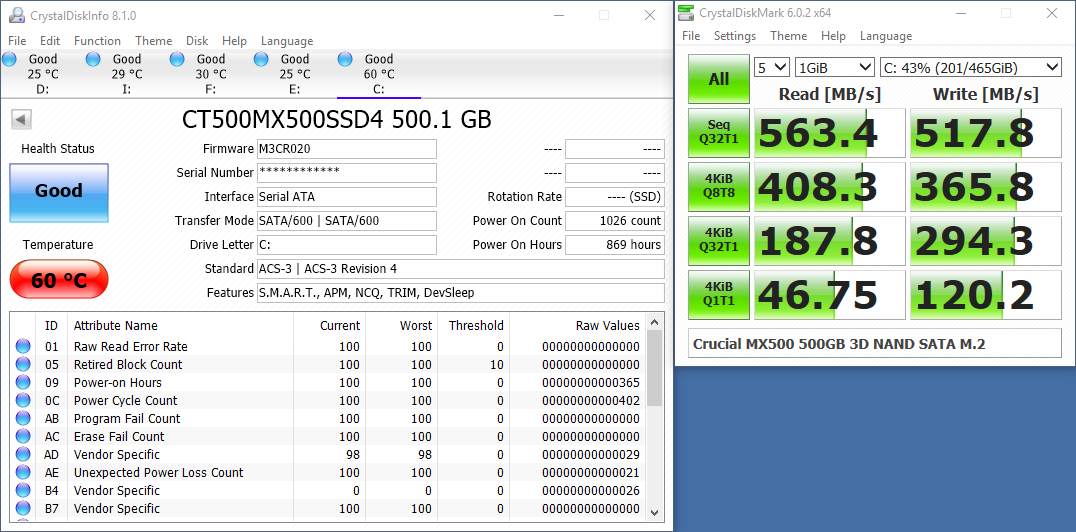
Here's a m.2 SSD over SATA https://i.vgy.me/qgmD3G.png
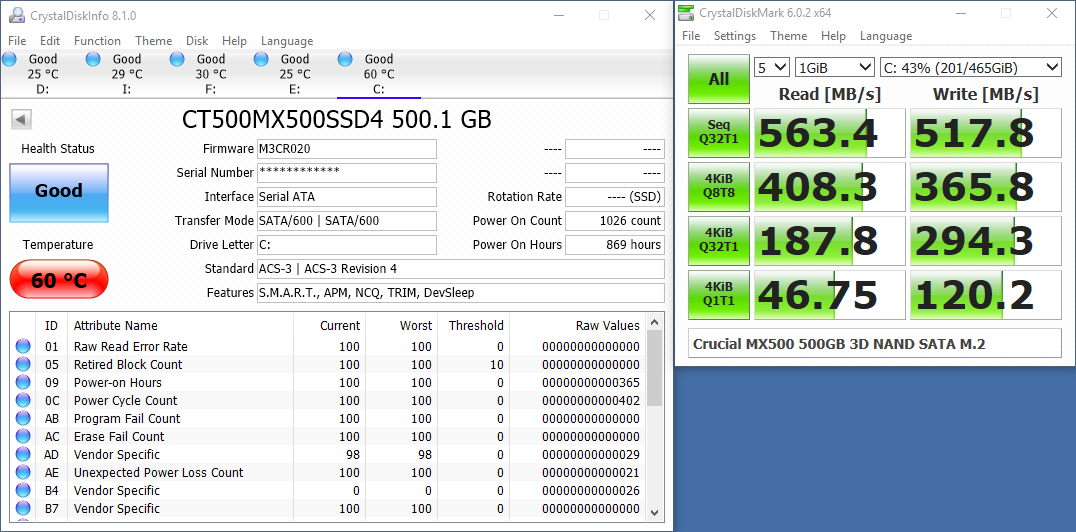
I don't think single HDDs are touching that speed even in their dreams
severe falcon
oh so the sata speeds are like ISPs you only get like 4% of what they say they can do
stone wave
if you have enough drives in a stripped array you can get mechanical hard drives to transfer at 600 MB/s or me perhaps
but I ain't Yamato and I don't have 800 TB+ of storage

severe falcon
wait so why has sata been 3 gpbs for like a decade and the top of the line setup cant even hit 1 gbps?
severe falcon
well yeah
yeah but the average consumer wasnt buying them so why would the average consumer mobo have them?
well avg consumer in this case is gamer
stone wave
IDK how the standardization happens gut they probably needed to incorporate new tech/compatibility and up the transfer speed standards while they're at it
Think of it like USB 2.0 and USB 3.0
severe falcon
well yes but the thing is those actually run at their max speeds or at least close to it
like they wouldnt make USB 4.0 if the fastest USBs couldnt max USB 2.0
i mean aside just from being able to charge more
stone wave
PATA maxes out at around 133 MB/s
It's a standard, when they release it there may be very little that can take advantage of it but the idea is it will allow manufacturers to take advantage of it.
severe falcon
yeah but it sounds like HDDs will NEVER be able to take advantage of it
severe falcon
yeah but they standardized it when the tech that could actually use it was just about worth its weight in gold
stone wave
I would imagine it's an issue of roll out and that it doesn't cost much more than SATA II if anything at all.
SATA is backwards compatible, but take for example microUSB and USB Type-C
Many device manufactures are still holding out and using mircoUSB.
stone wave
And the ZIF connector on SATA II and SATA III are the same essentially in regards to backwards and forwards compatibility.
Like USB Type-A across the various USB versions.
severe falcon
my only question is: why does usb b even exist
stone wave
For my desktop mic.
severe falcon
excuse me what?
stone wave
Try finding a USB-B 2.0 cable...
severe falcon
your desktop mic is a printer?
severe falcon
oh yeah my scanner is usb b 3.0 and i had no idea what it was until i saw the blue
stone wave
severe falcon
uhhh thats not usb b
severe falcon
and micro screwed it up by flipping
stone wave
microUSB 3.0 was shit
But yeah: 2009
https://www.networkworld.com/article/2267770/first-512gb-ssd-drive-offered-for-sale.html

Network World
Commercial solid state drives (SSD) have finally started reaching the capacities found in the hard disk world, with the release of a new 512GB drive from U.S. storage startup Super Talent.
tame topaz
@stone wave march of technology. Now those kinds of capacities can probably be found for like idk, double that of a 1TB drive?
this shit is under 1500 lul
tame topaz
alright I stand correct 1.5 times
subtle hawk
technology = /r/buildapc?
subtle hawk
@subtle hawk not only
it can be anything tech related
phones, pcs, rockets, ships, satellites
you name it
subtle hawk
Do you guys buy only second hand GPU?
Seems to make sense like buying used cars
I have a couple brand new GPUs
Pretty expensive
stone wave
Kinda risky IMO considering how many were used for alt-coin mining.
subtle hawk
it's fine
since the cards still have warranty
you save like 25% of the cost
sometimes more
stone wave

stone wave
Peptol Bismol and some strange purple shit.
tame topaz
@flint bobcat ay aria how's the PC
tame topaz
Ah
flint bobcat
My parts are coming soon
Mfw, the case was out of stock so it got extended to august 5th
tame topaz
Well rip my ram's currently being RMA'd lol
 flint bobcat
Ahh
Well at least my new PSU is coming tomorrow
And im starting my job on Tuesday
8 hours first day 
That's $96 in 1 day
tame topaz
Nice
 violet nexus
guys
uhhmm
whomst good at using windows server 2016
the DNS Manager
i wanna ask what is the forwarding look up and reverse lookup thing
apparently i want this one to be the primary dns
and the other is secondary but i dont know how to do that
subtle hawk
@violet nexus what do you need the DNS server for
tame topaz

Notebookcheck
AMD's VP of Radeon Scott Herkelman recently revealed in an interview that the company keenly observed NVIDIA's launch of the RTX 20 Super series and revised the pricing of the new RX 5700 series GPUs to undercut NVIDIA's RTX 2060 and 2070 Super GPUs. The initial pricing of th...
10/10 article title
stone wave
Remember taxes are a thing if your job isn't under the table.
I think most employers ball park the taxes and deduct it from the wages accordingly but you'll still have to balance it out (pay anything owed, or file a tax return if it was overpaid).
severe falcon
what happens when your comp has a stroke right when you click
 stone wave
you should be able to handle it just follow the pinout diagram that's silkscreened on to your mobo and match the connectors on the case for the front I/O
aside from that everything else you've done before
 dusty thorn
I can finally start 
tame topaz
@dusty thorn tfw Fractal doesn't exist here
dusty thorn
I feel you
dusty thorn
@subtle hawk like every step?
 valid acorn
Not bad for the budget
subtle hawk
@dusty thorn welcome to the mid high end
dusty thorn
Thank you 
subtle hawk
I'm thinking of switching out the case to something beefier to fit in custom water cooling parts
dusty thorn
Mainboard is in
subtle hawk
you should probably peel off that sticker
subtle hawk
it's triggering me soooo hard
dusty thorn
Almost finished
subtle hawk
what is that cable hanging out left of the heatsink
tame topaz
Fan cable?
tame topaz
oof
dusty thorn
Finished
I hope it looks okayish now
Still have to finish the cables in the back tho
Btw my first build
tame topaz
ay that looks slick from the front
Great work
meanwhile my own cable management is a slight mess
dusty thorn
Thanks 
dusty thorn
And it lives!
flint bobcat
 quartz tide
Does playing games via flashdisk without copying are dangerous ?
subtle hawk
flashdisk
you mean USB stick
and no it's not dangerous
it's just gonna be slow as hell
unless it's a very old game
stone wave
It works but yeah slow, and if you're read/writing to it a lot for some reason you might end up wearing down the flash drive.
If you gotta play games off an external device over USB I'd recommend something like the Samsung T5.
violet nexus
what de fok
how come that the bandwidth is asymmetric even after i put a limit

subtle hawk
because it's not the way it works?
subtle hawk
Laughs in duplex
flint bobcat
I got my case 
tame topaz
shiny?
flint bobcat
Yeah
tame topaz
yeah at first I did laugh at the fact that it doesn't have a PSU shroud
But after I build inside it in PC Building Simulator enough times I eventually grew into it
umbral onyx
Making softbody breast physics is a pain
I don't know how to handle the collision
since unity only updates during a velocity movement

severe falcon
you force unity to update
umbral onyx
The other thing I can't really understand how to work out is keeping the volume
severe falcon
post screenshot
 severe falcon
so her boobs are sagging and dont have collision?
severe falcon
then what do you mean by keeping the volume?
umbral onyx
So I push a few vertex in the boobs
then shift it
But the boobs shrank rather than being pushed to a direction
I magine a water baloon filled with water
severe falcon
thats cuz you need to have the boob spread out
idk if unity lets you inject code into the engine but that might be how you have to do it
subtle hawk
Why does the ram price is diving like crazy, its around 35-40$ on my country right now. Both pc and laptop type
subtle hawk
hm
I might be looking to upgrade my laptop's storage
it uses SATA M.2 and 1TB module is like $110 now 
still, is it possible to image the whole drive and restore it to larger drive?
stone wave
image it to an external drive with clonezilla?
stone wave
err what case you got?
flint bobcat
Matrexx 55
stone wave
on the bottom of the case where the PSU goes is there space?
idk how to explain it well
cause i just sort of automatically now
flint bobcat
Yeah but do I install with the fan up or down
flint bobcat
Uh so down?
stone wave
probably
ok is there a fan filter where teh PSU goes?
that you can pull out
if so fan side down
flint bobcat
stone wave
like if the fan gets blocked by solid metal with no holes than fan side up
yeah fan side down
stone wave
4 screws
stone wave
usually the Philips head ones with an hexagonal shaped head
flint bobcat
Also I got hella of these
flint bobcat

flint bobcat
First time installing CPU so
stone wave
note the hex head (hexagonal shape)
violet nexus
I dont have computer ahaha im bad at that
flint bobcat
Yeah that black one
stone wave
cause it's kind of obvious if the threads engage
or if you're just stripping the threads
flint bobcat
So these are uses for the side?
stone wave
?
stone wave
screws go in to those holes yes
the PSU may have more screw holes than the case that's normal
you just need 4 of the holes screwed in
but to be needlessly specific they're #6-32 x 6mm phillips hex-head screws
Those are what you want for the motherboard.
To the left is a standoff, it may be another color either bare metal or brass colored.
Those you want to match up to where your motherboard holes line up with the case and hand tighten them to the case.
Note that they might not even be needed depending on the case.
stone wave
?
flint bobcat
Oh wait nvm
stone wave
Anyways to secure the motherboard to the case/standoffs you want to use M3 x 4mm pan washer head screws.
stone wave
Unlike the earlier screws that have a hex head these are circular with a washer head
They're this shaped.
You really only need to remember what they look like
not the actual specs, unless you need to order a bunch for some reason
stone wave
do they fit?
flint bobcat
I guess
stone wave
like if you try to remove the PSU, it's not coming out is it?
flint bobcat
Well only 1 fit
stone wave
Cause normally these hex heads are what I use for the PSU as well as optical drives, disk drives and the case side panels.
flint bobcat
Where do I find those
stone wave
The round pan washer heads are for the motherboard
flint bobcat
Cant I only install 1 fan
stone wave
For comparison on the left is a hex head, a pan washer head and a thumb screw.
stone wave
and if you're finding the fan screws annoying, they are.
stone wave
connect the case front panel I/O to the motherboard
flint bobcat
Wait am I installing mobo now?
flint bobcat
Do I remove psu?
stone wave
nah
flint bobcat
So u say I can't install mobo directly into case right?
flint bobcat
Is this a stand off?
flint bobcat

stone wave
and see whats missing
flint bobcat
Wait wait I need to remove mobo first
stone wave
and add in the ones you need into the holes you need
remember to transfer the rear I/O panel
cause if you forget the motherboard and cables plugged into it are coming out
(bang it towards the inside of the case with the back of a screw driver, cause the shit is sharp and you might cut yourself if you use your hand)
stone wave
install the rear i/o panel into the new case first
im emphasizing this cause i've forgotten that shit a few times myself
and it's a PITA
stone wave
yeah check to see if there are any places you can add standoffs to
stone wave
just add them in
you should have a few extras when you got the case
just hand tighten them in place
subtle hawk
also hm where did you get the SSD again
subtle hawk
crucial stick
stone wave
where ever you need them
subtle hawk
oh nvm
stone wave
when you test fitted the motherboard you notice which holes did not have standoffs
subtle hawk
I just remembered someone sent it to you
flint bobcat
In these holes?
stone wave
?
flint bobcat
Cause I used different screws in old case
subtle hawk
yeah
flint bobcat
I didn't use those on old case though
tame topaz
Uh no
flint bobcat
tame topaz
You put that under
flint bobcat
You just said
stone wave
they keep the motherboard OFF of the case
that's why they're standoffs
then you screw the motherboard into the standoffs
with the pan washer head screws
thats why i was telling you to test fit the motherboard to see where you need additional standoffs to be installed
tame topaz
flint bobcat
I screw the stand offs into the case
stone wave
yes
subtle hawk
is that a pun for Mexican standoff
tame topaz
yes
stone wave
 flint bobcat
@stone wave ok installed all standoffs
stone wave

install the motherboard
and screw the motherboard into the standoffs
(make sure that I/O shield is in place
stone wave
they're all tiny to me
they're like the ones you used to screw in the PSU in regards to size
but instead of the hexagonal head they have round (pan) heads
stone wave
look for these motherfuckers
flint bobcat
stone wave

tame topaz
Remove the back panel
stone wave
lmao aria
tame topaz
Unscrew it?
stone wave
we thought you installed the motherboard on top of the cables
tame topaz
Like
stone wave
unscrew it and remove the panel
tame topaz
Look at the end of the case and you should see 2 thumbscrews for the other side panel
stone wave
its either regular Philips screws or thumbscrews
tame topaz
Unscrew those and pull the panel out
It's thumbscrews
(Source: used this case multiple times in PC Building Simulator)
stone wave
it's a $40 case i can't be certain
flint bobcat
Uh
tame topaz
?
stone wave
I'm treating it like a 1998 beige box
tame topaz
Why what
flint bobcat
Was talking to mith
stone wave
lol
stone wave
i mean im pretending it's an older case with no thumbscrews, no wire management and no deburring done on the metals
you gonna need that to plug up the powerbutton too
unless you really like jumping your PC
flint bobcat
Nah I hate that shit
tame topaz
i wanna build in a biege box some time tbh
stone wave
i want that sleeper build too
flint bobcat
Where the thumbscrews at
tame topaz
Gib photo of case back
flint bobcat
Oh I see it
stone wave
but yeah i kinda wanna do up an old Gateway 2000 case
cause i cant bring myself to buy and hack up an old IBM
stone wave
we after them l o n g bois
flint bobcat
Ok I see HDD LED
stone wave
you're gonna love this next part
flint bobcat
tame topaz
Make sure the thing is behind the case then insert it back out
stone wave
undo that zip tie
tame topaz
Make it a little neater
tame topaz
Heard the thing is kinda narrow tho
tame topaz
So managing cables might be a tad bit harder
tame topaz
tbh you'd benefit us all by just video chat
No just untangle them all for now
Worry about where to stow them away later
flint bobcat
Ok I untagles
 tame topaz
honestly I'm just waiting for the day paru comes to the dark side lel
stone wave
wdym?
stone wave
you're looking for these little shits
tame topaz
Might as well begin with the big boi 24 pin
flint bobcat
That's from the PSU?
tame topaz
Mith's are from the case
24 pin's from PSU (the largest cable)
Route them to the hole nearest to the connector (at the right side of mobo) then connect
flint bobcat
Now I see why cable management is important
stone wave
I got long cables and ample space on the otherside of my case
flint bobcat
Phone is about to die soon, so nah
stone wave
i was trying to explain which direction his PSU faced depended on the case
and i was drawing a blank
on how to verbally describe it
tame topaz
Alright for the 24 pin cable
flint bobcat
I connected 24 pin
stone wave
tame topaz
Show us
flint bobcat
stone wave
 tame topaz
Btw you inserted the hard drive and SSD yet- HEY NO
flint bobcat
What
tame topaz
Ah
stone wave
lazy mode on
tame topaz
Alright lemme just think this throug here
stone wave
cpu
tame topaz
Route that cable into the big hole right on the side of the PSU and then through the middle thin hole to the side of the mobo (24 pin)
stone wave
route that in a hole towards the bottom of the case
and have it come up on top over the mobo
 tame topaz
ugh this is hard
tame topaz
8 pins
stone wave
shove them in to the case hole towards the bottom
and pull them up from the otherside
flint bobcat
Well i found CPU pin
stone wave
and shove them back into the side where the motherboard is
flint bobcat
But Id get what u mean
tame topaz
stone wave



 stone wave
notice how the cables come from the otherside of the case?
tame topaz
there's a lever that you have to push on on the cable while pulling out
Yeah the 24 pin is pretty tight
HEY I HAVE AN IDEA
I'll open up PC building sim to make a quick visual reference
Sound good?
hold on
flint bobcat
tame topaz
Alright, yep
tame topaz
Pull on the cable to make the loop a bit tighter
tame topaz
Pull towards PSU
flint bobcat
Got it
tame topaz
That said just hold on
tame topaz
You got the hard drive in yet?
stone wave
do you want to use it?
tame topaz
If you want to use it then sure
flint bobcat
No
violet nexus
aria goin ssd