#bug-reports
1 messages · Page 26 of 1
 main tartan
 grim idol
Im also stuck on the loading screen now, didnt happen before the hotfix
 tired sundial
I'm stuck in the loading sceen too :"<
 spare summit
I've got a report of that as well
 warm hound
 boreal condor
Already reported.
 wide iron
anyone has trouble connecting to server unless using VPN when connected to wifi?
boreal condor
I'm in SEA, not using VPN. Working fine.
wide iron
using my ISP wifi always gives me 'check your connection' error. it's either using VPN or broadband service
Indonesia using Indihome ISP. hopefully somebody can give the workaround of this
 slate needle
I'm also stuck on the loading screen after the hotfix
 hasty dove
Same here
main tartan
After I had the loading screen error, I rebooted the emulator and got a repair request. Now everything is fine
hasty dove
I just gotta wait till the new one
Because no matter how many times I try I can't get past this
 last dew
 vagrant trellis
stuck on loading screen after download from google play
vagrant trellis
havent bind the account...
hasty dove
Welcome to the waiting room
vagrant trellis
i dont wanna delete the app
slate needle
we're pretty much waiting for a new hotfix now
vagrant trellis
ahh okay then
 twin rune
android users are stuck there, all of us
hasty dove
Probably missing these urgent missions
vagrant trellis
will my game data deleted if i uninstall and reinstall?
 wicked veldt
.repeat 120 If you encounter a bug that is not listed in #known-bugs , please use this google form to report any bugs/translation issues in the game to make sure that all of the necessary information is provided https://goo.gl/forms/YVtYNnG7PWsYEuSn2. Also, if you can, reproduce the bug with log mode enabled and take a screenshot of your screen immediately after the bug occurs. Instructions on enabling log mode can be found here https://www.youtube.com/watch?v=p1Yl9InTWzk&feature=youtu.be
If we need additional information from you, we will tag you in this channel. Please refer to the pinned messages for full details! Thank you Commander!

Google Docs
 dusty beaconBOT
🔁 Repeating **If you encounter a bug that is not listed in #known-bugs , please use this google form to report any bugs/translation issues in the game to make sure that all of the necessary information is provided https://goo.gl/forms/YVtYNnG7PWsYEuSn2. Also, if you can, reproduce the bug with log mode enabled and take a screenshot of your screen immediately after the bug occurs. Instructions on enabling log mode can be found here https://www.youtube.com/watch?v=p1Yl9InTWzk&feature=youtu.be
If we need additional information from you, we will tag you in this channel. Please refer to the pinned messages for full details! Thank you Commander!** every 0 day(s), 2 hour(s) and 0 minute(s).
vagrant trellis
okay2, thank you
 pale patio
@wicked veldt ahhh now that you mention it, it did happen aroujd 11 pm pdt. Awesome ty, good to know
 pearl sequoia
infinite loading screen after the update, again, it's the second time that I have to clear data and redownload it again. great, incredible 👏
 pearl sequoia
makes sense 👍
twin rune
if you redownload the game loads?
pearl sequoia
yes, luckily I've binded my account
wicked veldt
@pearl sequoia I'm presuming you've already redownloaded the game and that it works now, but if it happens again enable log mode as it's trying to load and record a video or take a screenshot when it gets frozen
slate needle
I'll try doing that then
pearl sequoia
good luck then, bless your internet quota
slate needle
there's no quotas here thankfully
vagrant trellis
ok im trying clear data now....
slate needle
I'm on wifi
 fathom bison
fix my stuck in loading issue
slate needle
alright screenshot taken will send it through the form
fathom bison
using vpn though its stupid 
fathom bison
using wifi didnt work, using data didnt work, using vpn work smh 
 carmine python
So if I clear my data with a non-binded account I can log in still? Surprising.
 royal coral
Unable to select for +10 to snack purchases in dorm.
 carmine python
App Store time again huh
 spice vapor
Pls, fix the bug that you can't play with mobile data ussage even with vpn, you can't. Only with wifi T_T
royal coral
Woops
wicked veldt
@spice vapor @fathom bison I don't get that error on iOS
slate needle
I'm on android too and both mobile and wifi work
but I still get stuck
on the loading screen

nothing to do with time or version tho
spice vapor
I already reported when It was CBT with the form. Is annoying when you are away from home . And yes, in Android
wicked veldt
I think the stuck on loading screen bug and unable to retrieve latest version bug are two different bugs
fathom bison
im reporting the problem too
slate needle
ye it seems to be
fathom bison
i hope its get fixed hmm
wicked veldt
@fathom bison enable log mode and post the screenshot here of what it shows when that error pops up, or upload a video of the whole thing and post the link here
 spice vapor
Another shot this time with log if helps
carmine python
I'm so hesitant to actually delete data because of FGO flashbacks XD
fathom bison

 real snow
The confirmation to change a guild name isn't in english, didn't think to save a screenshot, sorry!
wicked veldt
@slate needle So wait after that log thing you eventually got in
wicked veldt
Ah
slate needle
5 or 6 times
wicked veldt
weird
 thick vessel
They did a good job on cleaning the text wrapping/warping. But they missed a spot.
wicked veldt
It's known that it's not wrapping correctly still
but I think changing the font helped readability a lot regardless
fathom bison
hmm i still stuck
wicked veldt
It might just be that your cell signal isn't good enough
carmine python
Did you delete data?
 south wigeon
Anyone here have trouble with audio file? If i download audio file my game keep crash when i sortie
slate needle
the crashes I got seemed to be memory related
once I restricted background processes it started crashing a lot less
 wet falcon
the game here doesn't leave the loading screen...
i just tried updating in-game then it got stuck on the installation
I assume it installed though because the game no longer asks for installing extra data
south wigeon
My phone have 4gb memory. I dont think its memory related
Its just strange. Because i play jp with audio file. Doing fine. But na version keep crash if i download audio file
wicked veldt
What happens if you visit this in your web browser @fathom bison blhxusgate.yo-star.com:80
(on your phone)
south wigeon
So i just play with ship muted
slate needle
I also have 4gb ram velvet so it was pretty damn weird
I had like 1.5gb leftover before starting it and it was still crashing
once I limited the background and went up to 2gb free it stopped
south wigeon
Crash because you download audio?
fathom bison
@wicked veldt i cant open that so ip blocked ?
spice vapor
In my case that link says "noCmd"
fathom bison
its loading forever though
wicked veldt
Are you using android or iOS Esaa?
fathom bison
android
 frail cobalt
https://cdn.discordapp.com/attachments/474210478311211029/480021101401997312/unknown.png
^ happened to me when i'm using wifi '__') sometimes with mobile data..
yes, my city/country's mobile data much better than fiber optic/wifi..
 spice vapor

 near herald
Why will it not connect to Wi-Fi when everything else on my tablet is?
fathom bison
so some ip didnt work hmm
frail cobalt
'___') we'll i'll wait for 30 Aug.. if i still can't play then.. i'll be sad T_T)
i hope there's SG server provided, since our ping to US/NA server is 200ms, SG is 20ms, ID is 2ms '__')
 proper ridge
@frail cobalt Sorry for this
frail cobalt
nah it's fine :3
 frail cobalt
AL is good enough to release for SEA :3 ❤
proper ridge

near herald
Pls this really annoying.
 frail cobalt
unlike some other game that intentionally block/not releasing for SEA XD
spice vapor
Is weird And frustating
wicked veldt
It's weird though, afaik this doesn't happen to iOS users
wet falcon
anyone know about any .apk downloads of the game in other sites?
dusty beaconBOT
wet falcon
i know about APKpure, was gonna mention it just now
proper ridge
It seems it will occur in SEA regions
wet falcon
the base .apk file somehow doesn't work here (?)
proper ridge
We are checking the CDN too
wet falcon
is that actually normal?
proper ridge
Thank you all for your patience!
wet falcon
i'm having issues actually updating the game
spice vapor
Wifi its all perfect. But mobile data its imposible, even if you already looged in with wifi if you swap to mobile data its over x(
proper ridge
in APKpure?
wet falcon
yes
wet falcon
am i supposed to redownload the entire .xapk every single time? or should the .apk itself work?
proper ridge
@wet falcon log mode screenshot plz
wet falcon
how do i do that
wicked veldt
(FYI, I use iOS so if you guys have questions about Android I'm probably not the best person to ask)
log mode video is in the channel description

On any screen, hold your right thumb on the right side of the screen and then pinch the fingers of your left hand together. Not my video, provided to me by a...
spice vapor
That's why i pósted the log screenshot too if helps
I want to play away from home without wifis
proper ridge
yes, we could locate the issue much more easily with your logmode screenshot
Thanks
spice vapor
Im from Spain too btw if helps xD
proper ridge
spice vapor
Dowloaded in PlayStore without problems too
wet falcon
I tried clearing the game data to fix the "hanging in loading" issue
then it simply gets stuck in that screen
which... forced me to download the entire .xapk before
dammit, i'll try that again then
near herald
I downloaded it from play store and it still keeps saying that it cannot retrieve update info yet the game is larger than what the 774 mb base is , so what is the problem.
 junior frigate
i remember getting hit with the infinite loading issue when i was playing the jp version as well after an update
 paper briar
Looted a T3 rammer clearing 1-4; item not showing up in storage. Should I try a reinstall?
near herald
It is just frustrating since I have been waiting for this game since July, yet it will not work
now that is out.
wicked veldt
@paper briar You got a blueprint, not the actual equipment
proper ridge
@near herald Could you kindly open the log mod and take a screenshot plz?
 fallen swallow
Hello, i am experiencing a bug, is this the right channel to post it?
near herald
How do I take the screenshot?
proper ridge
fallen swallow
First two pics are some graphics bug, there's this white box thingy all over the screen
The third and last pics are loading problems, for some reason it keeps loading no matter how long i wait
proper ridge
Could you kindly tell me the brand and model of your phone plz?
fallen swallow
Xiaomi Redmi 3 Pro
near herald
It is a tablet, Galaxy Tab A
proper ridge
And may I ask where you installed the game plz?
fallen swallow
QooApp
near herald
GooglePlay
junior frigate
stuck in the infinite loading game hell, phone is a pixel 2 xl
downloaded from playstore
proper ridge
@near herald @junior frigate May I ask if you've update the newest version in playstore plz?
@near herald Thank you
@near herald This log helps, I'm on it
junior frigate
oh, there's a separate update aside from the hotfix?
fallen swallow
So.. how about me?
junior frigate
okay, works now
 hot forge
@proper ridge idk why my bug (Supply Shop) only happen to me, but another players didn't experiencing that bug
Should I reinstalling again my Azur Lane?
junior frigate
time to turn the emergency sirens off 
proper ridge
@hot forge Have a try plz
hot forge
Ok. I'll try
proper ridge
that's tooooooooooo weird that our devs confirm they never have seen that bug before
fallen swallow
Are you talking to me or other ppl?
proper ridge
@fallen swallow May I ask if you have rooted your phone plz?
fallen swallow
No, my phone is not rooted
proper ridge
@near herald @junior frigate May I ask if your phone is rooted or not?
@fallen swallow Thx
near herald
What you mean rooted?
fallen swallow
Should i try reinstalling the game?
proper ridge
@fallen swallow Yes please ,sorry for the bad experience we've brought to you
junior frigate
phone isn't rooted
proper ridge
Okay, thanks!
fallen swallow
Alright, I'm going to try to reinstall the game in like 1 and a half hours, I'll come back once I've reinstalled the game
Oh, and before the white box bug happened, i was switching back and forth between the game and discord
near herald
How do I check if my tablet is rooted?
hasty dove
So it seems like I'm the only one with the hash file check
proper ridge
@fallen swallow Thx
hot forge
@proper ridge It's works 😃
proper ridge
@hot forge Great!
hot forge
@proper ridge maybe you must tell everyone who have bug like me to try reinstalling their Azur Lane
proper ridge
Oh you are the newest version
@hot forge I can't promise it will fix all the issues acutally
hot forge
@proper ridge yup. Maybe oldest version making the bug fixed
@proper ridge yeah, I know.
proper ridge
Yes, I will
near herald
@proper ridge will uninstalling and then reinstalling fix my problem. Everything else can access Wi-Fi except for Azur Lane. Did it just not install properly?
proper ridge
@paper void not the latest version
I suppose you did not update the game in playstore yet?
 paper void
Yes
proper ridge
or you download it from QOOAPK or APKpure?
@paper void Update it will fix the loading issue
@near herald Dear commander, I can't promise it will fix this issue by re-installing, but it may fix it.
hot forge
@proper ridge ask, what is redeem code on guild?
This code will earn a special reward or something?
hot forge
@proper ridge sure. Mention me if done
 ashen inlet
i don t know if this is a bug but it always crashes when i try to load it up i use an Ipad 2 is that device too old?
 forest marlin
after update 4mb i got stuck on loading screen
wicked veldt
do it again but enable log mode and post the screenshot here
ashen inlet
me load up the game again and enable log mode?
wicked veldt
but I guess you can try that too lol
wicked veldt
depends on how fast it crashes
ashen inlet
it loads up
then lets me select a server
but after it gets to 100% or near there on the second loading screen it always crashes
hasty dove
I'm not seeing my exact problem for others so
hot forge
After supply shop crashed fix, it's changed to when battle begin with enemy fleet, suddenly crashed my game and restart with automatically
ashen inlet
tried to screen shot it the moment before it crashed but i am thinking it might be my device cause it didnt take a screenshot till after it crashed guess it doesnt work on ipad 2
wicked veldt
@proper ridge might be good to check these out
@hasty dove submit that with the bug report form also
same with you Crystal
hot forge
@proper ridge sorry for mentioned you again. But can you checking my problem again after your job done?
Thank you
@wicked veldt already
hasty dove
Ok
proper ridge
Okay
hot forge
Yeah, i Can't sortie/battle against enemy because this bug
proper ridge
@forest marlin Could you please send us the lod-mode screenshot plz?
proper ridge
@forest marlin May I ask where you download the apk please?
near herald
@proper ridge I reinstalled from Google play yet it still says that i need to check my network connection
ashen inlet
this is what i get right before it crashes
proper ridge
@near herald Noted, thanks
hasty dove
Well I submitted everything but the screenshot I shared already
forest marlin
ah i think because im still not yet update my apk
proper ridge
@forest marlin  yeah that's possible
hot forge
Huh, reinstall again 😴
proper ridge
@hot forge Gems compensation confirmed
I will send you via in-game mail
For the player who could not login, I will compensate later, dm ME!
hot forge
@proper ridge ok. Maybe I should reinstalling again my game. And I'll report again about where did this bug move after settling on world battle
proper ridge
@hot forge And what's the brand and model of your phone again?
near herald
@proper ridge since the pre-registration bonus will only last until the 22nd or so, if this problem is not fixed then will people who have been trying to get on since yesterday not be awarded anything despite trying?
proper ridge
@near herald I will send you manually
 indigo cedar
I got the same loading bug on my game too, I'm running Android on OnePlus 6. It stopped working right after the 4mb update
hot forge
@proper ridge still same. Xiaomi Redmi Note 4 (Mediatek processor)
indigo cedar
How do we enable log mode?lmao
proper ridge
hot forge
@indigo cedar thumb right side hold the phone, and two finger slide betwen up to down and down to up at side left
proper ridge
indigo cedar
Got it, will try
 buoyant hemlock
whats up with the stuck loading screen?
hasty dove
Make sure you check #known-bugs and make sure yours is unique
hot forge
@buoyant hemlock already try with VPN?
indigo cedar
I'm p sure it's bc of the update
buoyant hemlock
ah i just downloaded the new update
indigo cedar
Cause I was just playing earlier
And when I went outside and downloaded the update it stopped working
Here's my logs
buoyant hemlock
oh is yours also stuck on the loading screen?
 coral fern
Same, after i download the hotfix
 robust sedge
I just click the back button
hot forge

 azure timber
Node 4 is still called Sukura fleet in hard mode, and also is Myouko supposed to be spelt Myoukou? I need a Japanese speaker to confirm, but I believe the first ō makes an ou sound, but in the ending ō the u is slightly more silent.
I spent gems on a clan name and it doesn’t align with the spelling, so now I look like a fool
hot forge
@azure timber already report by other players before
boreal condor
Yes, the ō is usually written as ou. However, pronunciation wise, the ō just means a longer o.
 solar parrot
I got stuck too here my log
buoyant hemlock
it hurts unfortantly
 stray locust
No migrate code functionality yet the phrase is here on this display
 dense canopy
twitter bind works
hot forge
@stray locust reference from older jp/cn/kr server, but yostar making us easily for bind our account via Twitter or Facebook than with code (where easily your account gone)
buoyant hemlock
ah i think your point is that there is no function yet it states there is a function like that?
stray locust
Ding ding
buoyant hemlock
i thought so
stray locust
Is minor, but i feel like reporting a "bug", so yea
buoyant hemlock
no worries, i am just here to wait for anything from the loading bug thing
stray locust
Stuck on loading game like yesterday fiasco? @buoyant hemlock
buoyant hemlock
yea unfortunately, just hearing if there is any solution or a new update to fix it
stray locust
Nothing other than reinstall, which i unfortunately did yesterday
Seems like it happens to player who's still ingame when the update is released
buoyant hemlock
ah alright, i was thinking to try the reinstall to see if it would work
stray locust
Try this, rename the azur folder, uninstall, then rename back, install the app again
Yesterday i renamed the obb folder without renaming files in data folder = redownload everything in the end with slopokes net
 zealous dagger
error 100814 on fb linking ?
stray locust
I think i should be able to avoid redownloading everything if i can keep the azur folder in data directory
Android btw
buoyant hemlock
ah alright
stray locust
Just to save some redownload hassle
buoyant hemlock
thanks man
stray locust
Er don't thank me yet, i haven't confirmed myself whether renaming can save us from redownloading all the files
 wind jetty
I seem to have lost Lexington's Gunshot from my Dorm.
proper ridge
If you get stuck on loading screen, you may need to update the game into the latest version.
1.Download via playstore - click the update in the store
2.Download via other markets such as QOOAPK and APKpure, have to wait till they synchronize our latest apk in playstore
buoyant hemlock
Re-installed game on Nox. Go to recover account via Twitter bind. Get error code saying my account is not binded to my twitter account. Twitter-approved Apps says otherwise.
 rustic thorn
im prretty sure this is a bug but im confused regardless secc need ss 2 pics
but i got 3 stars?
 hasty tinsel
On Hard mode.
rustic thorn
thats the point of the second pic....
hasty tinsel
Yeah, the mission requirements specify in Hard mode, your second picture is Normal mode.
rustic thorn
but it says hard mode?
junior frigate
you press that button to swap to hard mode
hasty tinsel
If your pic was on Hard mode, we'd be able to tell immediately because of oddly-colored background.
...Also, there'd be a counter above the difficulty setting.
rustic thorn
i thought that was saying it was on hard mode, sorry
near herald
@proper ridge to be clear, when you say stuck on loading screen , you are not talking about the problem i am having correct. Because if you are, there is no update on GooglePlay. If not then ignore this.
proper ridge
@near herald Yep, different from yours
near herald
@proper ridge ok then
hasty dove
Like the one I have
 north lark
In commissions , when i go to urgent , the pictures are flickering with the seconds timer also the requirements scrolltexts are resetting with every second tick https://puu.sh/BfRvw/5beca3d761.gif
 hasty dove
While everyone has like Wi-Fi problems
I got
Already submitted it tho so I just wait
near herald
I believe it has to from there end since every other game I have on my tablet requires internet access.
And I can play them
 wheat quest
why there isnt a option to login to facebook account before game start? now i am forced to redo all tutorial again before i can get to main game? i dont want to be forced to make a new chracter name
all because game was stuck in loading....
 wintry palm
Idk if this problem has been noted but I havent seen it and I reported it during the CBT, my collection furniture disappears after I log off, I lost 4 so far and its happening to others as well, I hope sometime in the future we will get them back
proper ridge
@wheat quest there is
wheat quest
nevermind i found it now and it worked
 scenic vessel
wheat quest
scenic vessel
wheat quest
i am back to the account with facebook
wintry palm
@scenic vessel york's text has been already been reported ;o
scenic vessel
alright sounds good
fallen swallow
@proper ridge tried reinstalling, still bugged out, but was able to go to a stage.. then i got another bug, it kept loading no matter how long i wait
proper ridge
brand and the model of you phone please? I remembered this bug
fallen swallow
Xiaomi Redmi 3 Pro
wintry palm
@sharp pier it should be in your dock ;o
 sharp pier
Ima restart the game maybe that’s why
wintry palm
from what I understand its been reported but the ship will be in your dock and everything end up good
 desert monolith
Sometimes i receive my notifications about clearing a commission 1-2 minutes too early.
The time on my phone is synchronized so that isnt the issue
 rough elm
So has this happened to anyone else
I'm trying to purchase gems on IOS
I have $21.15 on iTunes and I'm trying to purchase the $19.99 pack
But it says I have insufficient store credit
rough elm
Ahhh, thank you
 frosty gyro
I sure do enjoy no tax 
wicked veldt
@stray locust I think that's been brought up as either a suggestion or a bug report (the migration code reference when there's no migration code)
FYI the quantity selectors work for me in iOS now (for buying dorm food). If you're on android let me know if they work for you
 distant garnet
Anyone heard anything about collection furniture disappearing out of the dorm?
I know I put a bug report during cbt for it but it just happened again
rip my beaver poster forever
wintry palm
I put in a report aswell but got no word back on it
 ruby cave
Getting an infinite loading problem with AL when I tried to login in the morning
slate needle
a lot of people got that one
mine fixed itself randomly
I'm still not sure why
and it seems to be android only
buoyant hemlock
Probably known already, but been stuck in "loading game" when trying to play
started happening right after the game asked for a download today
buoyant hemlock
did try that, yes
slate needle
so you're having the same issue I was having
mine was getting stuck until after resetting the game some 5 times it misteriously went through
I still don't know why
buoyant hemlock
Huh
Guess I'll try that too. More or less expect it out of beta, so no big deal. Either way, just wanted to report it
slate needle
ye it's been happening since early on today
buoyant hemlock
sent in a bug report for that twitter issue I had
Not a fancy detailed bug report, but i think ky gets the point across
 marble wasp
In Archive
 fair stag
So uh
For a while I couldn't get past the Elizabeth splash load screen
Then I tried updating
And update couldn't install
And then I reinstalled
And got stuck in a black screen after the 3 logos
Now I'm reinstalling again to see if my issue still happens
frosty gyro
@marble wasp been reported twice
marble wasp

 brave sun
My login worked after I cleared app cache (not data), force stopped the app and restarted my phone.
Throwing it out there just in case
fair stag
Yeah I tried that too but didn't get fixed
brave sun
Ouch, I wish you luck
fair stag
Okay issue got fixed on 2nd reinstall
buoyant hemlock
@fair stag did it work
 maiden lava
I think I'm the yutz who first reported that misspelling. lol
 supple hawk
Stuck loading forever
supple hawk
clearing cache did not work
 ember garnet
I see the crash when deploying a newly built ship is still here
slate needle
it happened to me too and there's people that are still affected by it
some ppl fixed it with reinstalls
mine fixed itself for no discernible reason
it's pretty funny that the hotfix to fix the stuck loading screen made the loading screen get stuck for other ppl tho
ember garnet
Ok now the crash is for anything
supple hawk
guess I'll wait for it to be fixed
ay I fixed it with the google play update
bless
 wispy glen
Yeah I had that issue on my phone, the infinite loading one. Bug reported it. For the meantime I'm just playing on an emulator.
 wary basin
Omg
Yesterday had the infinite loading bug, fixed it, and today the patch caused it again
wicked veldt
I don't think we're entirely clear as a whole what actually causes the loading soft lock other than it seems to be android specific
slate needle
I wonder if everyone was getting the index out of bounds or not for it
 elder mantle
Reported it in the google form, but the app is crashing for me the moment I tap on the twitter icon on the login screen.
Tried multiple times, even reinstalled entirely
wispy glen
Yee I was getting array index out of range
Well as recompense for it not working on mobile the game gave me hood so, I'm okay with this
elder mantle
Facebook icon doesn't make it crash, but it does restart it
...Clearing cache fixed it, not sure why
Should've tried that before, sorry
buoyant hemlock
i just wished my nox saved my account info since android seems to be recovering fully unbound accounts just fine.
if you fully uninstalled AL
for a fresh reinstall
wind jetty
I still haven't gotten my Lexington's Gunshot back. It just seemed to have vanished.
 sharp mural
Typo on 1-4: Kaga at the start of the boss fight states They managed to break through our outter defences over 'outer'.
 north flume
sharp mural
north flume
sharp mural
Ah, nevermind thank you.
 hardy basalt
north flume
hardy basalt
north flume
Don't think so
buoyant hemlock
The game gets stuck on this screen and I waited like 10 min and nothing happened...I don't really want to reinstall cause I bought some gems and j didn't link the account
 willow python
I have the same issue. In the known bugs it doesn't say anything else other than it's known. I also didn't link, I just would like to keep my name.
willow python
Ah okay. 👌
 willow nexus
Bug: Game randomly crashed and the Beavers Forever wall decor suddenly disappeared from my dorm inventory
slate needle
don't forget to send it through the form
it's on the channel description
also fuji if you're on android(it's where the bug is showing up) reinstalling the game doesn't wipe your account
somehow
I'm not sure why
north flume
It's bound to your Google Play account I'd guess
willow python
Cool, I'll give it a shot
north flume
restart the game
 sonic tangle
Ok thanks
willow python
@slate needle that worked for me. Thx
 tiny pine
slate needle
tiny pine
slate needle
good to know dood
I'm only going from what I've seen today since a lot of ppl seem to have that issue
 edgy plover

 neon knot
Is anyone else unable to play 2-1?
I am getting stuck in the battle loading screen when engaging the first enemy escort fleet.
(Android, bluestacks)
wicked veldt
@buoyant hemlock restart your game
buoyant hemlock
i didnt have to as i was able to get through the chapter afterwards by letting fleet 2 be
just wanted to put that there
wicked veldt

most errors like that can be fixed by restarting the game which is why I suggested it
buoyant hemlock
For more info on the soft lock,I'm using Android P
buoyant hemlock
is the Armor part of the stats screen just supposed to say "Armor" and nothing else? I remember it actually saying Light Armor, Medium Armor, or Heavy Armor in the CBT. As of right now the only way for me to see a ship's armor type is on the dock screen with the quick stats display, unless I'm doing something wrong.
wicked veldt
spare summit
Does anyone have an Intel Atom armv7a and have this working?
I'm trying to narrow down the cause of this startup crash
buoyant hemlock
not sure how I missed that, I skimmed it and didn't see it, used CTRL+F and discord search didn't pop up with anything, sorry lol
 high slate
wicked veldt
high slate
wicked veldt
not implemented yet
wicked veldt
it will come with the Oath update
Because that is theoretically the screen from which you would oath your ship
spare summit
I have it to Friendly, so it does accumulate
 clever thorn
having a friend stucked at, she already tried restarting game and restarting her phone
wicked veldt
You should change your name to Read #known-bugs before asking
👀
Possible solution is to reinstall the game though, I'll add that to #known-bugs
 manic olive
Hi, it might off topics. I've just bought trade license 30 days. The apple payment is succeeded but nothing happen in the game. Anyone know where i should report it?
wicked veldt
Nothing WILL happen yet
I think you get your thing at reset every day
If you haven't gotten anything within 24 hours go ahead and send an email to customer support
?techsupporten
dusty beaconBOT
If you experience a specific technical issue, such as a bug not encountered by others or an issue with a purchase., please email al.cs@yo-star.com, al.cs2@yo-star.com, or al.cs3@yo-star.com with your device model, operating system, user id, user name, and issue.
wicked veldt
And submit a bug report also
clever thorn
alright gonna do that navi
and as well
leave the log picture if it's good for something
manic olive
I mean i will receive 500 gem immediately after buy trade license 30 days but i receive nothing so i will report it to customers service later. Thank you.
wicked veldt
Hmm
Are you sure it's not in your mailbox @manic olive or that it didn't automatically get added to your account?
I don't remember which one it's supposed to be
 manic hemlock
DISAPPEARING POSTERS https://i.imgur.com/GYICNxJ.png
had indy and beaver poster - android
manic olive
Yup thx
 radiant geode
This happens randomly on the first frame when I go to the home menu
its very spooky
frosty gyro
o_o
radiant geode
I have a video of it happening also
radiant geode
radiant geode
It looks like all of her poses are loaded at once or something
radiant geode
not an emulator, its my Galaxy Note 8 by Samsung
 bitter ridge
Huh.
My Oppo R9s never made that problem
Which, I'm currently playing AL on
JP and EN
 frozen robin
Madal should be Medal
radiant geode
I don't know what to call it lol
frosty gyro
@frozen robin already reported
frozen robin
oh. i did check the known issues but i didnt find it.
frosty gyro
I know but its already been reported
wicked veldt
Still known
 round terrace
Heya sorry if this was already reported, but I seem to be stuck in the update screen except the bar won't even start
 fading gyro
should i still report random crashes that i did in closed beta? i have to play on my spare phone to not have those issues
round terrace
wicked veldt
@fading gyro If you're still experiencing them sure, but it's not as helpful if you can't consistently reproduce them
@round terrace it's in #known-bugs
I literally don't know how to get people to stop reporting it
fading gyro
it's completely random so i can't replicate the cause. it can crash in 30 seconds to 10 minutes at any part of the game. even the login screen.
i tried checking the console screen but it wipes after a crash
wicked veldt
If it's completely random, it could be a device issue.
fading gyro
only thing I've noticed so far is a few people using Motorola phones, and having Android 7.0
wicked veldt
But yeah, if you can't reproduce it, it's not super helpful. You can still submit a bug report though. Maybe your device is just too underpowered or something
fading gyro
anyone else using 7.1.1 with no issues?
ive played on CN with no issues, so I'm not entirely sure.
buoyant hemlock
Sent in a bug report about this. Anyone else got an issue with collection furniture disappearing from the dorm after you redeem it?
wind jetty
@buoyant hemlock Nope! I lost my Lexington's Gunshot as well.
buoyant hemlock
Sorry to hear, mate. I really liked that furniture too :/
wicked veldt
Go ahead and report it, but I do think it's a known issue
frosty gyro
should give people a gag joke role if they report something in #known-bugs
 languid belfry
Is it just me or is does the game get big lag spikes very often during battles. I dont think its my device since its got pretty good specs
frosty gyro
just u p sure
 spare dock
it says that u can get atago from construction in archives but i believe u actually cant?
spare dock
i've asked people in help, apparently she is ingame, but not in construction
and scrolled through trophy and ingame chat for atago, never seen her
frosty gyro
trophy?
you know not every ship has been pulled yet
and the ingame chat only logs pulls when you are online
spare dock
not a single atago and when i looked up atago in discord, multiple people say she isnt out yet
so idk
 rotund violet
might have to wait for first event
 wind halo
rotund violet
wind halo
rotund violet
for Atago/Vampire/PoW
wind halo
my game bricked during tutorial
game forces me to press dock and gear, then the first equipment, then freezes
any known fix
wicked veldt
Submit that as a typo @topaz umbra (and please set your nickname to start with 3 alphanumeric characters per the server rules)
wicked veldt
idk what to tell you man
 proper ridge
@hoary hinge May I ask where r u from please?
And the brand & model of your device plz
 hoary hinge
i live in PDT time zone
proper ridge
Okay
hoary hinge
Samsung Galaxy S7 Edge
proper ridge
👌
hoary hinge
@proper ridge so, i reinstalled and the same thing happens
are there any other known fixes
or im just pretty much screwed lol
hasty dove
ok for some reason my data is ok now
 median gyro
I'm reporting on behalf of a friend who isn't in this server. He encountered loading freezes when the game was opened today while it function yesterday. Timezone CDT, Phone Model is Google Pixel 2 XL. Notable mention the OS is Android 9.0 Pie.
Log Screenshot: https://cdn.discordapp.com/attachments/480262625498759168/480262747721039892/Screenshot_20180818-002621.png
Edit: I am unsure if this is the so call infinite loading that the patch suppose to fix
 proper ridge
Noted!
@hoary hinge Hi, I will DM you later providing an APK designed specifically for you, could you try that please?
Hope that would work
hoary hinge
@proper ridge so, i turned on my mobile data, and it works fine now
but, i'd like to play w/o using my data
so hopefully the APK will work
😄
proper ridge
Oh
wicked veldt
There is a hotfix APK in #known-bugs for those of you experiencing the infinite loading/cannot retrieve version info issue in #known-bugs
(AL Official please tag everyone who needs it it's 3:01 AM and I need to go to bed  )
)
proper ridge
Dear commanders,
If you are running into this issue "Not able to retrieve latest version code", you could swith between mobile data and wifi to have a try first.
It it does not work, try this apk, it should help.
https://drive.google.com/open?id=15wF8JHuCJRdI8W2m5nqgKT8XsHRzf4I4
Thanks!
@hoary hinge By the way, could you do me a favor please?
hoary hinge
sure
proper ridge
I'll DM you
 fluid swallow
eh? isn’t this supposed to be active today?
frosty gyro
its broken
fluid swallow
SHIMATAAAAA!
 tiny brook
Yeah and other one thats shown as active aint startable xD
hoary hinge
ya, i just PMd Official about it
 lost cargo
not sure if this is a bug or something but Bismarck's camoflage level is over 9000!
also this
RIP Laffey
frosty gyro

lost cargo

 compact arch
@proper ridge
I believe the Japanese plane names aren't correctly translated.
彗星 should be "Yokosuka D4Y Suisei", not "Comet", even though that is what it literally means.
I haven't seen the other planes, but please check over them if possible.
proper ridge
@compact arch Noted! Thank you for this!
compact arch
Specifically:
流星 = Aichi B7A Ryūsei
烈風 = Mitsubishi A7M Reppū
 reef torrent
 bronze dirge
today is saturday
yet we can still enter maritime attack
but cant start battle
should be urgent ops instead
@proper ridge
north flume
I don't think you need to tag intern-kun for every mistake you see, just submit the bug report
bronze dirge
pretty serious bug
 merry solstice
Was about to say the same thing about the Daily
buoyant hemlock
some of the dailies aren't getting completed (the defeat enemies fleet ones)
thick vessel
This isn't anything broken, but I would like the app icon to not follow the default icon shape settings. For example, the other game apps just ignore it and use their own shape. The only way to get the default AL app icon is to change all my icons to square.
thick vessel
Absolutely. Google Pixel XL 1. Android.
proper ridge
Okay noted!
buoyant hemlock
So, it seems someone in other chat was right. Dailies starts 1 hour later. And it seems that the "destroy enemies fleets missions" starts getting completed too 1 hour late, but the others missions can be completed normally.
 lunar jay
My connection is good but when i open AL, there's no any data traffic
pale patio
Might be your service carrier
lunar jay
Trying VPN then
proper ridge
Vpn works or not?
fathom bison
my issue about unable to retrieve latest version fixed by keep restarting modem to change my ip. my front ip before was 36 then when changed into 125 suddently fixed
so im assuming some ip cant access the game
thats why my vpn worked before
 maiden galleon
im guessing the people who got the latest version error is from SEA region? cause our server is out on 30th so we can't access NA server now?
 worthy narwhal
Not sure if reported yet in OBT but the “If you mainly aim your battleships’ guns...” tip in one of the loading screen still says mainly instead of manually
maiden galleon
still got the same error by the way, even with the new apk . Only works when i use mobile data, doesnt work when i use wifi
proper ridge
@maiden galleon Hmm
Noted, could you kindly provide some details of your network plz? I will DM you
maiden galleon
ok
 polar umbra
USS Arizona Cello disappearing from dorm
 coral vigil
Unsure if this is related to the above, but I think either it’s not clear what happens to collection furniture, or some of mine is now missing; example below of the collected Lexington’s Gunshot, but it’s nowhere to be found
buoyant hemlock
Anybody else had this problem? I try to do a stage with my fleet, and everytime I try to battle an enemy ship (I'm on Stage 2-3, tested on 2-4 also) it gets stuck at 0.00% and it crashes and restarts, I can't do any battles without it crashing :\
 fair ridge
I have the same problem as Kai. Problems connecting when using mobile network. But no problems on wifi
It works when i use a VPN but it drains a ton of battery time...
frosty gyro
I did
south wigeon
I play fine without audio data. But if i download audio data and sortie game just crash
buoyant hemlock
Downloaded the 400MB one.
south wigeon
Yeah that one
buoyant hemlock
That is true, the crash is only happening after I finished downloading the audio data, worked fine before.
frosty gyro
its fine for me
south wigeon

I cant play
So its not just me then
I try to report this yesterday but no answer
 timid sail
Game is stuck at loading. Already tried reinstalling the game
frosty gyro
#known-bugs @timid sail
buoyant hemlock
Apparently, can't recall doing anything else other than downloading the 400MB update while playing and suddenly it crashes everytime I try to battle.
polar umbra
You don't care about our dorms getting ugly intern-senpai 
south wigeon
@proper ridge yeah. I already tried it 3 times. Clear data when i crash and download audio again and crash again
So i just play without sound atm
proper ridge
@coral vigil Bug confirmed, we are fixing it
@south wigeon We are digging into it, so hard to locate the issue
south wigeon
@proper ridge thx😊
proper ridge
@south wigeon Sorry for this bad experience
hot forge
@proper ridge so, that's why when at Supply shop, next world map (and this time when checking San Diego on Dock) suddenly restart because after download audio files
proper ridge
@hot forge In my opinion, audio files conflict/corrupt
hot forge
@proper ridge I see. I'm glad someone noticed about that bug located
Gems Compensation again again? 
joking
buoyant hemlock
Oh yep, seems like the 400MB audio is the problem, after clearing the data like Velvet said, my game works fine now.
frosty gyro
💎
hot forge

buoyant hemlock
 prime vale
I haven't run into this issue myself yet.
 pure pier
I downloaded the last apk from #known-bugs and the "unable to retrieve latest version" error still happens when i use phone data, dont know if anyone said this already
buoyant hemlock
I put this in my dorm and after some time I got back into the game and it disappeared from my wall in the dorm. When I checked the items in dorm it is not listed, as if it disappeared.
It did not happen with my other collection items. It seems only this one is affected. Also, relaunching the game did not fix the issue.
And I read through this channel and it seems that other collection items are also affected by this issue.
 fossil meteor
I purchased the Trade License and Google play registered the purchase (I have the receipt screenshot) , but the game didn't gave me anything.
north flume
I remember seeing something about it, I'll try to find it
if you're talking about materials - you'll get them at the beginning of a new day. If you didn't get gems and still can buy license in the shop - contact support
?techsupporten
dusty beaconBOT
If you experience a specific technical issue, such as a bug not encountered by others or an issue with a purchase., please email al.cs@yo-star.com, al.cs2@yo-star.com, or al.cs3@yo-star.com with your device model, operating system, user id, user name, and issue.
fossil meteor
I didn't get the gems and still can purchase the license
north flume
then you should e-mail them
fossil meteor
On it
 brisk moat
regarding the "unable to retrieve latest version" error when running the game on mobile data, is there a ios fix for the client or is it only for android so far?
median gyro
How fast am I suppose to get the gem after license purchase?
May have a similar case on my hand right now
wicked veldt
@bronze dirge @fluid swallow Not sure what the problem was specifically for you guys but don't forget to restart your game clients at server reset to make sure it's synced. That can cause some things to be enterable that shouldn't be and vice versa.
@coral vigil known bug that collection items disappear. I think it's in #known-bugs
@buoyant hemlock @south wigeon I'll add " sometimes after downloading additional audio data, the game will crash when you attempt a sortie"
@brisk moat You are the first person I've heard of experiencing the version error on iOS. I play on iOS myself and haven't had any problems
@fossil meteor @median gyro Definitely submit a support ticket. I think a third person had that issue as well with the subscription not awarding the 500 gems instantly so I'll add that to #known-bugs
And I hope all of you have submitted reports via the form as well
median gyro
Noted
brisk moat
ok, will fill out a report since its a new case for ios. in a nutshell it only happens when i try to connect on mobile data. i'm able to connect through wifi or through using a vpn while on mobile data.
 errant thunder
I've had a furniture disappear from my dorm. It seems to be collection furniture
 pseudo yew
Miss the portreits when I have lost internet connect
errant thunder
^same as deltenman. It seems any collection furniture that isn't a Ship Model disappears
near herald
@proper ridge I think the problem for me is my internet service provider. Other WiFi works for me but not DishNet, so that might be something you need to look into
wicked veldt
Everything between this message and my last message is already known
bronze dirge
problem was already fixed
pseudo yew
@bronze dirge may be, but I still haven't the portreits
 keen jasper
It's gone, feelsbadman
 crisp dune
Reported: Exeter's line when she's neutral with you is her line when she's at "Disappointed"
 severe bobcat
Madal
 warm cave
hm ... I got that memorial anchor from collections, placed it in my dorm, removed it again, and now it's gone
can't find it in my inventory
which is a shit bug in two ways - a) I hate losing collectibles and b) there's no way for me to try and reproduce it
wicked veldt
@warm cave #known-bugs
 surreal bridge
Hey I don't know where to post this but Android 9 will cause the infinite load bug on Google Pixel 1. I've reverted and it fixed the bug again
buoyant hemlock
@surreal bridge get a full log of the game
warm cave
@wicked veldt I still gotta write a ticket if I want it back, right?
wicked veldt
Uh, yeah probably.
fossil meteor
OK, already send the report using the form, @wicked veldt.
Couldn't take a screenshot of the error message because of how fast it was.
Also send the email earlier.
wicked veldt
sounds good
north lark
https://puu.sh/BgqlL/5c543c9ff5.gif eugens eyebrows flicker in the dorm when you pick her up
 wicked veldt
submit that under animations
 gentle talon
so what do i do if collection items disappear from dorms?
wicked veldt
?techsupport
dusty beaconBOT
Use ?techsupportjp to see how to contact JP's tech support. Use ?techsupporten to see how to contact Azur Lane EN's tech support.
wicked veldt
?techsupporten
dusty beaconBOT
If you experience a specific technical issue, such as a bug not encountered by others or an issue with a purchase., please email al.cs@yo-star.com, al.cs2@yo-star.com, or al.cs3@yo-star.com with your device model, operating system, user id, user name, and issue.
 zinc reef
Can't expand notifications by swiping down so it's always cut off. Galaxy S8+ Android 8.0
wicked veldt
Make sure to submit that in the bug report too
zinc reef
Done
 nocturne patio
@wicked veldt Should I still post here if I've already submitted on the google report form?
nocturne patio
Gotcha
nocturne patio
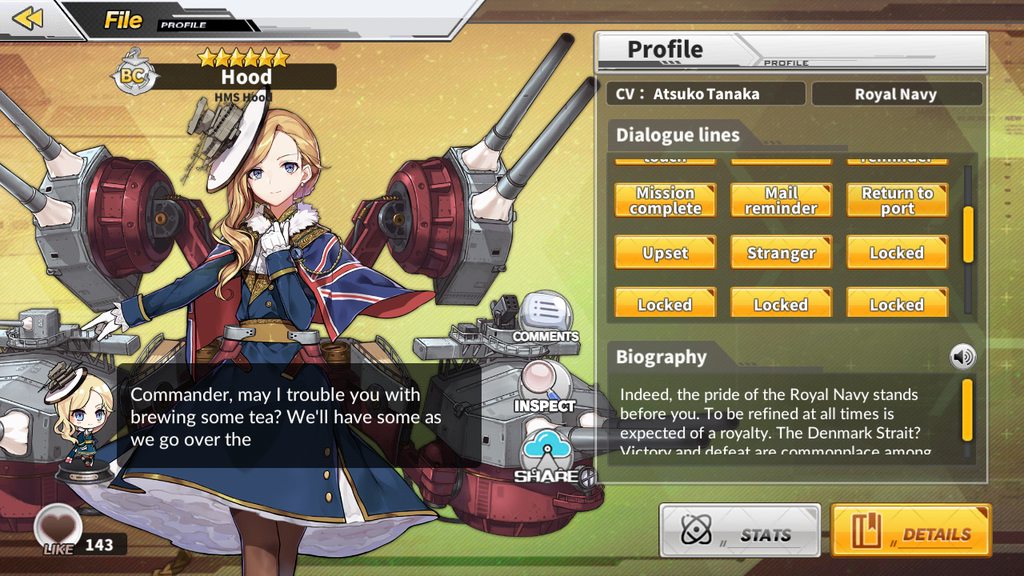
Hood's Return to port line cut off in both Main Menu and Archives https://imgur.com/a/HEJLc9A
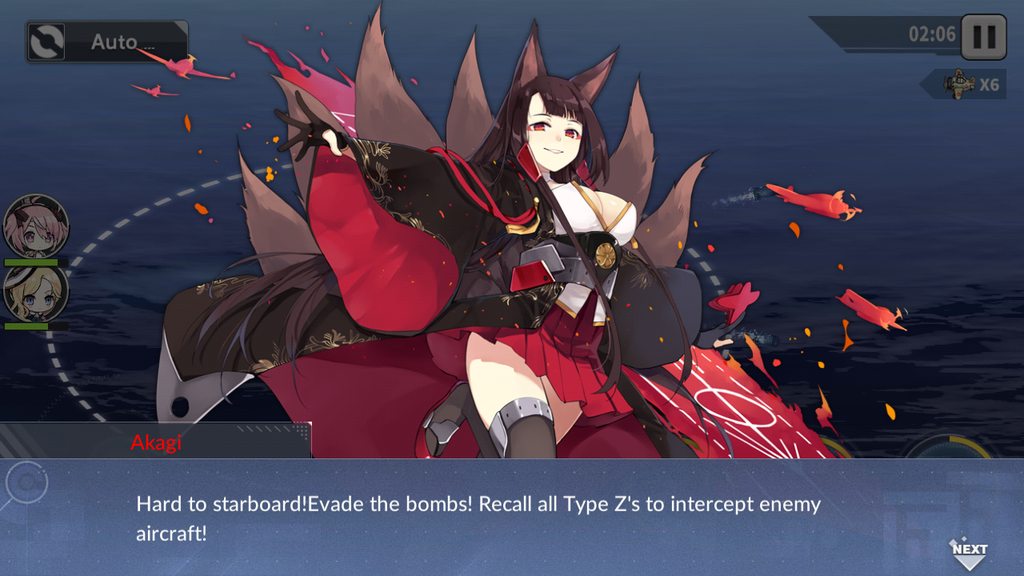
Super minor punctuation issue (missing space between ! and Evade) in the 3-2 boss story event https://imgur.com/a/UDO4vdy


 nocturne patio
Np 👋
wicked veldt
also @nocturne patio can you include one more alphanumeric character in your name? the rule is that all nicknames need to start with at least 3 alphanumeric characters
nocturne patio
👌
wicked veldt
ty
 tough relic
My ships went to another kuso teitoku house D:
jokes aside, they're selected but they're not there
also not getting exp
when I try to change ships
 gilded violet
uh, my game doesn't starts i only get the initial logos and then a black screen
i already tried re-installing trough different sources
frosty gyro
known issues
@tough relic ever think to restart ur game
thats how you fix it
when it will be fixed in a whole though is unknown
tough relic
They way you word stuff is pretty damn rude, but yes it fixed it. It also helps that most of those sentences came with a screen shot another being a single line in the middle of no where.
frosty gyro
the dorm is just very broken
getting an error with a number pretty much means to just restart the game
and maybe you would be surprised by how many people dont ever consider to restart their game
its a lot
 quasi yoke

Got her from build, unsure if it's an issue on my end or not
spice vapor
So , the unable to retrieve the versión bug in Android with mobile data its still happeing with the new APK? X/
median gyro
I haven't test it yet, let me try
Function for me. Can you enter log mode and screenshot it here?
 sudden wolf
unicorn can fly 
median gyro
Unicorn grew up so fast sniff
frosty gyro
@quasi yoke #known-bugs
quasi yoke
aight
north flume
I guess there's no point reporting translation mistakes known from CBT, right?
buoyant hemlock
I checked #known-bugs before asking and my bug isn't there. For some reason, when I want to register my surname, it doesn't confirm it(the button works I tested with too short and too long) it just doesn't do anything when I try to create my surname any ideas pls?
median gyro
My guess either it is taken or there is a hidden space somewhere
median gyro
Wait, you mean the button just stop working when you want to confirm?
buoyant hemlock
no i mean it doesn't do anything
the only reactions i got is when i confirm without writing, create a name too short(1 letter) or too long (max characters)
median gyro
But Tiro just make it derp...
buoyant hemlock
I can try DeadlyMage
still doesn't do anything
i can click the button to infinity but it doesn't do anything

frosty gyro
no one with the name Tiro
median gyro
I assume it is a client-server communication issue. You have good connection right?
buoyant hemlock
yep
frosty gyro
I would say restart but the beginning tutorial zzzz
buoyant hemlock
and yeah really don't wanna do the basic thing again XD
 quaint stone
For the longest time I haven't been receiving daily/weekly quests, leaving only two quests in my entire list, and I was told to just keep leveling up and they'll show eventually
buoyant hemlock
and yeah really don't wanna do the basic thing again XD
quaint stone
Isn't there anything else I can do about it?
buoyant hemlock
restarted crossing fingers so it will work...
 barren ledge
that's exactly what they just said
north flume
It looks like you didn't finish tutorial tbh
With your main one being "enhance gear"
north flume

median gyro
If Sandy fairy pop up, you're on track again
north flume
How hand-hold-y tutorial is - I'm actually surprised you managed to break free from it
quaint stone
Pretty sure it happened multiple times lol
I'm not sure how that happened
But yeah, I got 'em all now
north flume
nice
quaint stone
Cheers, guys
median gyro
Murphy's Law: Anything can happen will happen
north flume
maybe you still should report that one as broken tutorial, but I dunno
north flume
buoyant hemlock
tyvm 
quaint stone
Thanks
north lark
https://puu.sh/BgzkO/b6b18807f4.png the text with belfast in crush affection :


Recently i've come to enjoy YOUR troubled look a little.
 heavy sparrow
Anyone has report this...
So after you get Furutaka for the first time, the app will restart. And if you go to dock and open furutaka details/equip, the game will restart too
dusty beaconBOT
 north lark
did it 
wicked veldt
@heavy sparrow on iOS at least I don't have that issue
hot forge
@wicked veldt in Android because from Audio Files. It's already noticed by any players. And Intern senpai still digging into that audio files
wicked veldt
Hmm, so I guess same problem, different symptom?
Because the one I know about crashes the game at sortie
hot forge
Yup. Crash at sortie, supply shop and dock (for me especially at san diego while checking her equip, also when get her from construction, suddenly game crashed) is source from downloading audio files at option menu
heavy sparrow
Yeah I think its because the audio
hot forge
@heavy sparrow try to clear data (make sure you have bind your account with Twitter / Facebook account) and playing without downloading the audio files
And feels the difference between using audio files
heavy sparrow
Or dont ever touch furutaka 👌
hot forge
@heavy sparrow also me, don't touch san diego 😅
heavy sparrow
I think different device different problem huh
hot forge
@heavy sparrow yup.
heavy sparrow
Because i dont have issue with sandy
hot forge
@heavy sparrow but you with Furutaka
heavy sparrow
Yeah
 last sparrow
So i got the network issue on loading screen when using mobile data and there are answers for pc and android but is there one for ios?
hot forge
Try using VPN
Maybe your locate mobile network is problems for access NA server
last sparrow
Shouldnt be the case tbh cause i played fgo when it was only NA server
Anyways which vpn should i use?
Give it a try regardless
hot forge
@last sparrow try using Turbo VPN
last sparrow
Lay downloaded it
Kay*
Is there any catches to usin it cause i never used vpns before
Game works fine once its connected
@hot forge thanks
hot forge
@last sparrow you're welcome
brisk moat
@last sparrow i had that same issue for iOS as well. what firmware are you running?
brisk moat
running 11.4.1 on 6s+ and having the issue as well. able to run it on wifi or through vpn while on mobile data.
not sure if its the server side or telco side issue thats causing the ip to be blocked
 wet star
chapter 4 have no story or they didn't put it in the game yet? i cleared ch4 but didn't see any story
wicked veldt
I don't actually know. I never paid attention to the story in jp
buoyant hemlock