
#Video problem
11 messages · Page 1 of 1 (latest)
 worn sigil
 maiden anvil
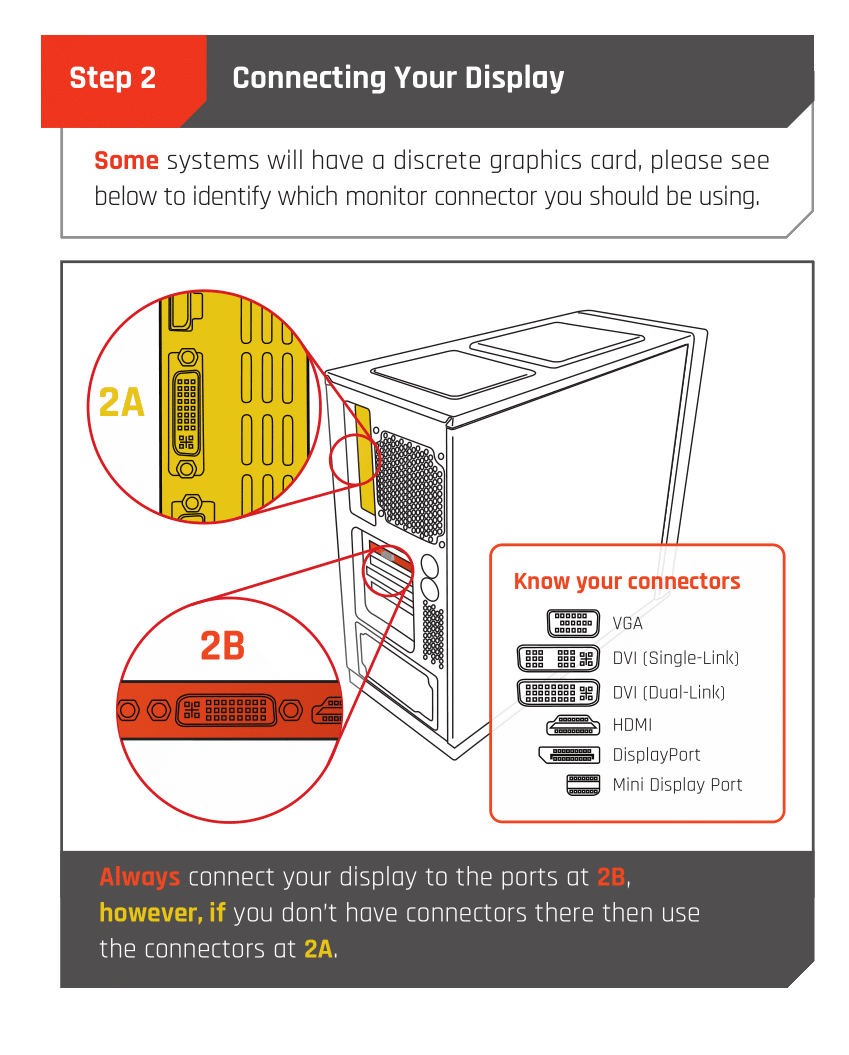
Is the monitor cable plugged in to the GPU or the motherboard?
worn sigil
The gpu
 lyric zincBOT
 Monitor Cables
If you have a discrete GPU then you need to plug your monitor cable into the graphics card, not the motherboard. This can be found on the Quick Start Guide which was emailed to you, or you can download it with the /tag guide command.
 CyberPowerPC UK 🔸 0333 323 7776 🔸 https://www.cyberpowersystem.co.uk
 outer flower
can you take a picture of your computer?
worn sigil
Yea sure c:

I disconnected everything else thinking the hdmi from the xbox affected or something
outer flower
are you sure the cable works?
worn sigil
I believe so, it came with the monitor and I never used in my life, but I can look for another one to try
lyric zincBOT
 :tada: Congrats @worn sigil, you levelled up to 1! :tada: