#PC issue
3 messages · Page 1 of 1 (latest)
 lean aurora
 woeful steppeBOT
Thread Created!
To provide the best level of support possible, please make sure you have provided as much information as possible.
This could include:
🔸 The problem you're facing
🔸 How frequently the issue occurs
🔸 Any pictures or videos of the issue
🔸 Related error codes or log files
🔸 Any further comments which to help us resolve your problem
Please bear in mind that this forum is for support from the community; the official customer support team can be contacted via phone and email.
☎️ 0333 323 7776
📧 [email protected]
woeful steppeBOT
 Resetting CMOS
:one: Shut down your PC and unplug the power cord from the wall.
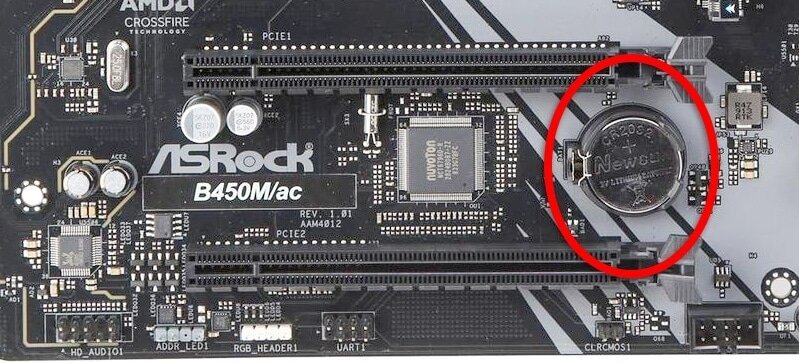
:two: Locate the CMOS battery (see the image below). On some motherboards, you may have to remove the graphics card in order to access it.
:three: Remove the CMOS battery from the motherboard by pressing down on the clip and pulling the battery out.
:four: Hold down the case power button for three seconds while your PC is unplugged.
:five: Install the CMOS battery back into the motherboard and plug the power cord back into the wall.
:six: Plug in and turn on your PC.
A video guide is also available below
 CyberPowerPC UK 🔸 0333 323 7776 🔸 https://www.cyberpowersystem.co.uk