#Ethernet port faulty, and missing a 2nd HDMI port.
22 messages · Page 1 of 1 (latest)
 crude sedge
What do you mean some USBs are broken? The one on the motherboard?
Are you plugging into the video card?
 peak juniperBOT
 Monitor Cables
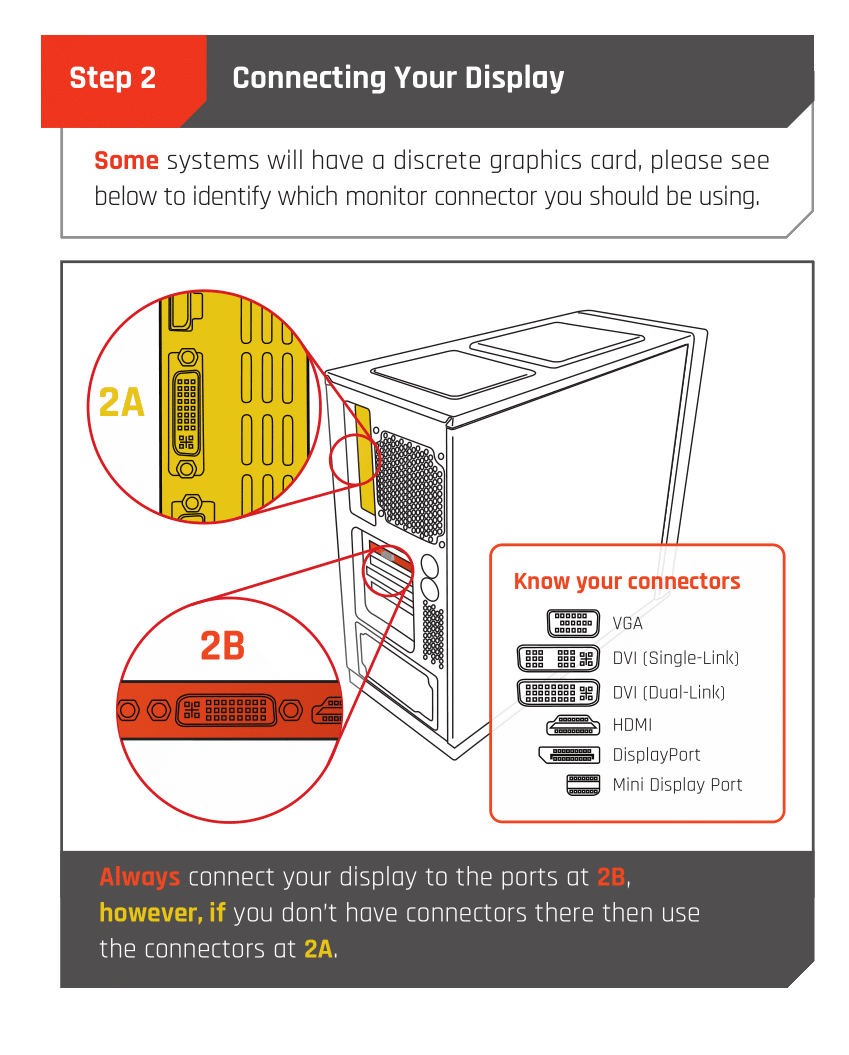
If you have a discrete GPU then you need to plug your monitor cable into the graphics card, not the motherboard. This can be found on the Quick Start Guide which was emailed to you, or you can download it with the /tag guide command.
 CyberPowerPC UK 🔸 0333 323 7776 🔸 https://www.cyberpowersystem.co.uk
crude sedge
CyberPowerPC UK 🔸 0333 323 7776 🔸 https://www.cyberpowersystem.co.uk
crude sedge
Also - most GPUs are 1x HDMI and 3X DP
crude sedge
You can't use the one on the motherboard due to your lack of IGPU
You need to use display port.
I need the model not the chipset.
About the USB ports, you can contact CPUK for repairs
peak juniperBOT
Customer Support
:telephone: 03333-237776, Option 1
:e_mail: [email protected]
:clock3: Monday - Friday, 9:00am - 5:30pm
Please ensure to include as much information about your query as possible, and ensure to include your order number if you require after-sales support.
CyberPowerPC UK 🔸 0333 323 7776 🔸 https://www.cyberpowersystem.co.uk
crude sedge
And the freezing
peak juniperBOT
 :tada: Congrats @gray bluff, you levelled up to 1! :tada:
crude sedge
Thanks, I'll try to find a driver for that
ASUS PRIME H610M-K D4 Intel® H610 (LGA 1700) mic-ATX motherboard, DDR4, PCIe 4.0, M.2 slot, Realtek 1 Gb Ethernet, HDMI/D-Sub, USB 3.2 Gen 1 ports, SATA 6 Gbps, COM header, RGB header, and 5X PROTECTION III. PRIME H610M-K D4 caters to daily users and all builders looking for well-rounded specs and a range of options for performance tuning via in...
It's not really an issue if you use display port.
It's superior HDMI probably, you can pick up an adapter if your monitor doesn't have it. Also, I wouldn't use IGPU and GPU together regardless, not sure if people do though.
About the ethernet, not sure what you mean.
Follow the link and download the LAN driver.
About the freezing and usb ports, maybe contact CPUK
No problem 
Okay, up to you on that part
If things happen don't hesitate to contact CPUK or continue the thread