#PC WONT BOOT
16 messages · Page 1 of 1 (latest)
 umbral trail
 surreal river
I know it might seem stupid but is the power supply turned on?
Also, my PC takes a while to turn on so I usually wait like 5 seconds than hold the power button, some motherboards are weird
umbral trail
I've had this PC for about two years now. The power supply is plugged on and over tried plugging it in to different sockets.
Could it be something to do with it being too cold? I left my rooms window wide open last night while it was freezing and my PC felt rlly cold
That's like the only thing that could have happened lmao I haven't touched it from last night when it was qorking
It sounds ridiculous but I sont know what else it could be
¯_(ツ)_/¯
surreal river
What motherboard do you have?
You can clear cmos if theres a button but I doubt it
 quaint arrowBOT
 Resetting CMOS
:one: Shut down your PC and unplug the power cord from the wall.
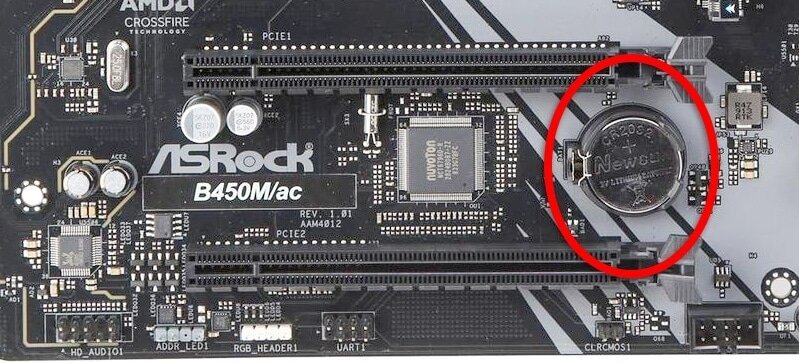
:two: Locate the CMOS battery (see the image below). On some motherboards, you may have to remove the graphics card in order to access it.
:three: Remove the CMOS battery from the motherboard by pressing down on the clip and pulling the battery out.
:four: Hold down the case power button for three seconds while your PC is unplugged.
:five: Install the CMOS battery back into the motherboard and plug the power cord back into the wall.
:six: Plug in and turn on your PC.
A video guide is also available below
 Cyberpower UK 🔸 0333 323 7776 🔸 https://www.cyberpowersystem.co.uk
umbral trail
Cyberpower UK 🔸 0333 323 7776 🔸 https://www.cyberpowersystem.co.uk
umbral trail
I can try haha