The walk priority is movement, the idle is core and the block idle is just the 2 arms with keyframes + it's action priority.
What am I doing wrong?
I want the block animation idle to immediately pop up when holding f, not have to be updated with a new animation. + I want the blocking hands to still show up during walking.
Pay attention to the stop block and initiate block in the video. Initiate is me holding F, stop is letting go of F.
#Animation not updating as should (with priorities)
5 messages · Page 1 of 1 (latest)
 pearl rivet
local function blockInput(input) -- walking function
    if input.UserInputType == Enum.UserInputType.Keyboard then -- if Key on Keyboard is pressed
        if input.KeyCode.Name == "F" then -- if key pressed is F
            isBlock = true
            print("Initiate Block...")
            script.Parent.Humanoid.WalkSpeed = 8
            script.Parent.Animate.idle.Animation1.AnimationId = ("rbxassetid://11149751462") -- idle animation
        end
    end
end
local function stopBlock(input)
    if input.UserInputType == Enum.UserInputType.Keyboard then -- if Key on Keyboard is let go
        if input.KeyCode.Name == "F" then -- if key let go is F'
            if isBlock == true then -- if blocking
                isBlock = false -- stop block
                print("STOP BlOcK")
                script.Parent.Humanoid.WalkSpeed = 12
                script.Parent.Animate.idle.Animation1.AnimationId = ("rbxassetid://11149877425")
            end
        end
    end
end
UserInputService.InputBegan:Connect(blockInput) -- Event for tapping F (BLOCK)
UserInputService.InputEnded:Connect(stopBlock) -- Event for letting go of F, (STOPPING BLOCK)``` amber stump
 ** You are now Level 4! **
pearl rivet
https://devforum.roblox.com/t/animations-not-updating-when-id-has-been-changed/1081489/8
this is all I've found, and frankly it's quite danting to me
DevForum | Roblox
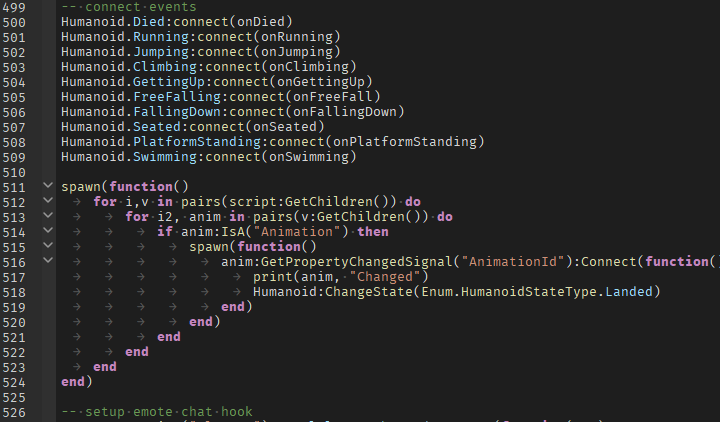
Okay, so I found a solution. How to works, is it checks if an ID was changed for any Animation Instances in Roblox’s default animate script then changes its humanoidStateType to update the animations, so I grabbed the animate script and added the code under the “connect events” as seen in the image. I don’t know if this is the most efficient wa...