guys, i'm having trouble trying to download skyfactory at my modpack:
Traceback (most recent call last):
  File "/home/gabriel/Downloads/LinuxCurse/main.py", line 169, in <module>
    main()
  File "/home/gabriel/Downloads/LinuxCurse/main.py", line 17, in main
    jsonsearch = json.loads(modreq.text)
  File "/usr/lib/python3.9/json/__init__.py", line 346, in loads
    return _default_decoder.decode(s)
  File "/usr/lib/python3.9/json/decoder.py", line 337, in decode
    obj, end = self.raw_decode(s, idx=_w(s, 0).end())
  File "/usr/lib/python3.9/json/decoder.py", line 355, in raw_decode
    raise JSONDecodeError("Expecting value", s, err.value) from None
json.decoder.JSONDecodeError: Expecting value: line 1 column 1 (char 0)
 red patio
 in the top left.
 in the bottom left.
 short imp

 opal cipher
 bitter dawn

 lyric crescent

 green raptor
 queen storm

 surreal zinc
 valid phoenix
 primal summit
 final rune
 signal ridge
 distant girder

 young bone

 button next to the
 digital roost
 modest sable

 restive burrow
 gritty ivy
 stark oar
 last shell
 fleet bear
 spiral egret
 sacred nacelle

 button by
  ruby aspen


 menu.
menu.
 rustic hearth
 shy epoch


 short kernel
 or BETA


 fallen loom


 hollow beacon

 ebon musk
 proper flare


 shut halo

 leaden scroll
 lean yew


 elfin wolf
 tough obsidian
 upper root
 covert gale

 unborn basin
 amber viper
 noble hinge


 onyx vessel
 crisp plank
 trail nacelle
 zenith patio
 from
from  livid swan
 eternal mirage
 void chasm

 stuck oar
 steel arch
 ocean gull
 storm verge

 ivory elbow

 eager heart
 hallow zephyr

 dark rock

 fading wing

 hoary copper


 cloud arrow
 brittle fox

 elder quail
 rancid plover
 polar depot
 glass marsh

 fringe ridge

 novel basalt
 bleak bridge

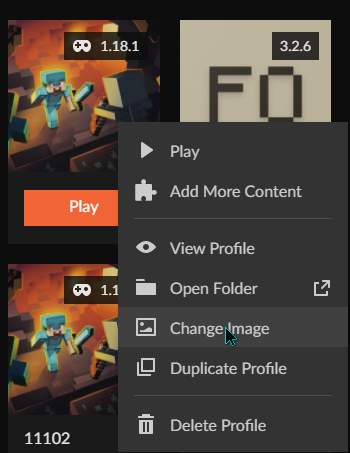


 stable kettle
 wet frigate
 celest jacinth

 crystal roost
 quaint vigil


 coral atlas


 flat shuttle
 prisma grove
 winter ice

 remote cypress
 storm hawk

 gloomy oasis
 light fiber

 gusty adder
 faint river
 earnest radish

 lime estuary

 karmic stream
 trim compass
 lyric lake
 maiden hearth
 wide rune
 slow river
 twin nacelle
 scenic lynx
 bronze loom

 wooden slate
 worn reef
 wheat pewter


 fallow spoke
 peak flint

 fickle apex

 stiff radish


 scenic snow
 grim valve
