<:overwolf:857375414002384916> How to get Overwolf logs! <:overwolf:857375414002384916>
#🔥︱curseforge-support
1 messages · Page 559 of 1
 red patioBOT
 lyric crescent
send that
lyric crescent
scroll down
 torn sundial
oh k
well i dont have the overwolf folder but i have the curseforge folder
lemme send
hopefully thats the right file
lyric crescent
3. Send us these folders (you can compress them to a ZIP file if they are too big)
lyric crescent
k passed this on to the OW team to look at.
torn sundial
ok
wait i think u just need to pass the second one since the first one is inside the second one anyway
lyric crescent
it's fine, they'll figure it out
torn sundial
ok
torn sundial
ok lemme try
 lilac grove
spam msgs from this server
 torn sundial
 unborn basin
Try changing it to /{yourusername}
unborn basin
Try changing it to /{yourusername}
so that did work, but its weird that the other packs installed fine on the shared volume
 torn sundial
so that did work, but its weird that the other packs installed fine on the share...
torn sundial
torn sundial
so that did work, but its weird that the other packs installed fine on the share...
i presume i can copy it to the instances folder on the shared vol and it would work?
lyric crescent
lilac grove
spam msgs from this server
use discord's report button, then disable dms from this and any other public server if you dont want scam dms.
lilac grove
yeah I just did just thought you guys should know about it
 tawny sand
good afternoon everyone, I have a problem with Curseforge I cannot find a nuber of mods while I look for them
lyric crescent
for example?
tawny sand
TotalRp3 for world of warcraft
lyric crescent
I don't have access to the wow stuff, or any idea how it works. Hopefully someone else knows what the issue may be.
 opal cipher
tawny sand
TotalRp3 for world of warcraft
opal cipher
tawny sand
TotalRp3 for world of warcraft
Can you find it, if you put 75973 in the search bar?
opal cipher
No clue. :D
lyric crescent
i assume it's not detecting the instance properly. using the id isnt really a solution, and may not even work correctly.
tawny sand
opal cipher
No clue. :D
can you also give me the TRP extended addon since you are there
opal cipher
Indeed, how did you search for it, @tawny sand? Could you show the search, as you searched for it first?
And then try searching for Total RP 3, in case you didn't have spaces in your search
lyric crescent
unless it's just that one addon, but you said a number of addons werent showing
unborn basin
torn sundial
i presume i can copy it to the instances folder on the shared vol and it would w...
I wouldn't use any folder that uses any kind of cloud
opal cipher
tawny sand
can you also give me the TRP extended addon since you are there
100707, but try searching for Total RP 3: Extended or Total RP 3 Extended
torn sundial
unborn basin
I wouldn't use any folder that uses any kind of cloud
uhh no its not a cloud folder
its just a volume that i use to share data between macos and windows
unborn basin
Oh you have 2 OS installed?
torn sundial
yea
 proper horizon
Anyone know why curseforge lag? when I look for modpacks or other stuff it lags too much
torn sundial
have never had that problem before iirc
torn sundial
unborn basin
So it is more of a permission thing I'd say
yea could be
unborn basin
We'll look deeper into it, thanks
torn sundial
ok np
unborn basin
torn sundial
ok np
Let's try something
Can you select the same folder for your modding folder? (Under the Addons tab in CF's settings)
Lmk if you're available for a quick test @torn sundial
unborn basin
unborn basin
Can you select the same folder for your modding folder? (Under the Addons tab in...
Can you?
unborn basin
Do you have by any chance Minecraft Dungeons installed?
torn sundial
nope
unborn basin
Can you try repairing folder permissions?
 torn sundial
ok lemme try
wait i dont see that option tho
where is it
unless its here in the minecraft tab since i dont see it
 unborn basin
Can you PM me?
torn sundial
ok
oh i cant tho
oh wiat
oh yea i cant
can u dm me instead
oh wait i turned off allow pm
just turned it on
you can dm me
 oak grove
Hey, I keep getting told that this modpack made by my friend has an invalid profile.
MC, 1.12.2, curseforge
proper horizon
Anyone know how to fix curseforge client lag? I can't even look for modpack from the lag soon
oak grove
proper horizon
Anyone know how to fix curseforge client lag? I can't even look for modpack from...
Just kinda like that as dar as i can tell.
proper horizon
The beauty is that it is the only application open to have this absurd lag
 queen storm
oak grove
Hey, I keep getting told that this modpack made by my friend has an invalid prof...
queen storm
oak grove
Hey, I keep getting told that this modpack made by my friend has an invalid prof...
How did he make it?
oak grove
Curseforge app
lyric crescent
you on mac?
lyric crescent
open the zip and screenshot the contents
oak grove
 lyric crescent
can they import this?
oak grove
Yep, so can another person.
lyric crescent
what does it say when you do it
oak grove
Selected zip file contains an invalid profile. Learn more
lyric crescent
can you install packs from the app normally?
oak grove
yep
lyric crescent
?owlogs
red patioBOT
<:overwolf:857375414002384916> How to get Overwolf logs! <:overwolf:857375414002384916>
lyric crescent
send that
lyric crescent
have you tried a pc restart?
oak grove
yeah
lyric crescent
looks like an issue with your internet. are you on wifi or vpn?
oak grove
wifi, and no
lyric crescent
can you try without wifi
oak grove
Not really.
lyric crescent
!webclient
red patioBOT
WebClient errors are from networking issues to your computer. You can try a few things to fix it:
- Restart the computer.
- Restart your router/modem.
- Try another internet source like a hotspot, wired connection or moving closer to the WiFi.
- Pause/Stop other things using the internet. (Streams, music, etc)
- If this still doesn't work, try again in an hour and hope your connection is stable.
lyric crescent
other things you can try
 odd rock
can someone tell me why when i try to install a mc modpack i get a "Could not create SSL/TSL secure channel"
lyric crescent
are you on wifi or vpn?
odd rock
wifi
lyric crescent
try the things in the bot message above
 grim willow
hi, my friend is trying to install curseforge client but it keeps failling, it said ask help here
lyric crescent
!getcf use the 2nd link
red patioBOT
Looking to install the CurseForge app?
<:windows:798410728188936222> Windows
Minimum Requirements:
- OS Version: 7 (64 bit), 8.1, 10, 11
- 64 bit Required.
- 350MB storage space.
- Microsoft .Net 4.8
- Intel/AMD quad-core CPU
- 8GB ram
Download: https://download.overwolf.com/install/Download?&PartnerId=4047
If you are having issues with the installer use the URL below to install Overwolf then go to the app store to download CurseForge.
https://content.overwolf.com/downloads/setup/latest/regular.html
<:mac:798410654418862130> Mac
Minimum Requirements:
- OS Version 10.14 or newer.
- 64 bit Required.
Download: https://curseforge.overwolf.com/downloads/curseforge-latest.dmg
:penguin: Linux
Minimum Requirements:
Yes.
Download: :person_shrugging:
grim willow
ill send him ty
ok he installed the app but when he tries to install curse forge it put error :/
lyric crescent
They should be here to tell us the issue then
 craggy scarab
is there anyway to make cf not remove manually installed addons for wow everytime it refreshes and checks for updates/updates something?
i need those manually installed addons for another addon that is installed via cf in order for it to work properly. sadly only the cf website shows them but not the client and the download in client button also does nothing but opening the client.. means i have to manually install them. but then everytime it refreshes the addons it also removes everything that was manually installed
 balmy plank
Still having this issue, did you fix it @west pollen ?
 digital roost
I noticed that the CurseForge app uses a Minecraft Launcher completely different from the main one you'd get from the Minecraft official site, meaning I can't access my Modpacks through the official launcher provided by Mojang Studios.
What I want to know is to how can I put my custom profiles into the main Minecraft Launcher?
lyric crescent
what launcher? screenshot it
digital roost
lyric crescent
what launcher? screenshot it
This launcher

The one CurseForge app uses looks exactly the same but they're different
lyric crescent
..that is the official launcher, i dont understand the issue
digital roost
I didn't explain that right hol' on
What i meant is
I wanna put my custom profiles into the official launcher
lyric crescent
you dont, intentionally.
normal minecraft folder setup cant handle separate profiles, that is why curseforge uses it's own install and folder setup
digital roost
So technically I have to use Curseforge's launcher as if it's the official launcher?
 wide fern
Hello! im having some trouble finding certain addons on the curseforge app. For example I'm trying to download the "LootAppraiser" addon which i can find on the curseforge website but it isnt showing up on the app. this is happening with other addons like TSM which i cant find on the app either. Any help would be GREATLY appreciated
lyric crescent
is this for wow?
wide fern
yes
lyric crescent
on the addon's webpage there is a project id, try typing that project id into the searchbar on the app and see if that lets you install it
craggy scarab
lyric crescent
on the addon's webpage there is a project id, try typing that project id into th...
for me this one works and should also solve my problem with manually installed addons
since i dont have to manually install them anymore
digital roost
and i cant open modpack profile to add more ram, it just crashes
 lyric crescent
?mc-installfix
red patioBOT
- Click on the Minecraft Tab on the Left side of the CurseForge App.
- Click
 button next to the
 Create Custom Profileoption. - Click

Repair Installationoption. - Play game.
NOTE: You will not lose any modpacks or worlds, These are saved in the Instances folder. DO NOT TOUCH THIS FOLDER OR YOU WILL LOSE EVERYTHING
lyric crescent
?mc-path
red patioBOT
Change your install path to the following:
For Windows: C:\CurseForge
-Go to C:\ drive. Make a new folder. Name it Curseforge.
For Mac: /Users/Shared/CurseForge
If Minecraft is not installed in CurseForge App:
- Click the
 in the top left.
 - Select Minecraft from the list of games.
- Select the
Advancedoption and pick the folder you just made. - Click
Continue.
If Minecraft is installed in CurseForge App:
- Click the
 in the bottom left.
 - Select the Minecraft tab.
- Click
Change. - Select the folder you just made.
:no_entry_sign: Minecraft Files should NOT be installed inside the following locations :no_entry_sign:
:no_entry_sign: .minecraft folder.
:no_entry_sign: OneDrive folders.
:no_entry_sign: Desktop folder.
:no_entry_sign: Drive roots I.E. Directly into the C:\ drive.
:no_entry_sign: iCloud enabled folders.
:no_entry_sign: or any other cloud saved folder.
:no_entry_sign: or folders with non-English characters in them.
If any of the above are in the path you need to change/move it!
 fleet bear
digital roost
Its not working
fleet bear
digital roost
Its not working
Cant verify mc version means you need to relaunch the app. Close out of the app totally and restart it.
lyric crescent
You should not get into the habit of deleting uploaded files as it will mess up anyone who uses your project. Archiving it should be enough as it will be removed from view but not mess anyone else up.
To delete something you need to archive it first then view all files and select it.
 pulsar island
lyric crescent
You should not get into the habit of deleting uploaded files as it will mess up ...
pulsar island
lyric crescent
You should not get into the habit of deleting uploaded files as it will mess up ...
ok from where to archive it
lyric crescent
click the file
pulsar island
lyric crescent
click the file
ok got it
digital roost
lyric crescent
?mc-path
Thanks! ❤️ its working
 upbeat junco
it is literally skyfactory and i have uninstalled and installed multiple times
and it doesnt even crash
it just dont open
 low trout
Hi, download version 1.12.2 of minecraft and the game does not choose the nvidia graphics card. Someone knows how to solve it and if he knows Spanish better.
lyric crescent
?mc-videocard
red patioBOT
How to set minecraft to use your videocard
Got NVIDIA?
 balmy plank
Hello @fleet bear @heavy willow sorry to tag you but has been days of this problem, to whom should I adress it to? Ive opened a ticket in Overwolf and they couldnt say whats wrong
once you search for an addon it wont be found
lyric crescent
#📛︱rules 5, dont randomly tag people
we've been looking at this issue a bit today, but it needs to be adressed by the OW devs, there is nothing we can do about it.
balmy plank
Im desperate and have asked here several times and just get ignored over minecraft stuff as I said Im sorry
theres no news or announcement or statement or a tiny reply here 😦
lyric crescent
there is nothing to announce
"there is some issue with WoW" isn't really announcementworthy
 viral briar
Have to just be patient and it’s not a huge issue to need announcement for as not everyone has the issue
balmy plank
perhaps something like "We are experiencing some conflict with some users not being able to fulfil their addon search at WoW Addon section we are looking into it"
lyric crescent
if you want to help, list examples of addons that you cant search
balmy plank
Ive had this issue for I could dare to say a week
balmy plank
lyric crescent
if you want to help, list examples of addons that you cant search
Here?
balmy plank
Ill just paste the list of addons which are a LOT, and Im sure will be a few, but if it helps, Ill do it
fleet bear
If we cant help you then you dont get a reply as theres always a sea of stuff going on.
It should be fixed here in a day or two or we will have a confirmation on the issue.
balmy plank
Thank you Clay, sorry if I'm annoying or anything and I don't want to be rude but there's a difference in skipping a request several times and ignoring it, than just saying something like "We are looking into it" and affected people stop bothering 😦 once again sorry, I will post the few addons I don't find, but I'm sure there's a lot more
fleet bear
We dont have any WoW focused support members as nobody that plays sticks around here for anything other than coming to complain about issues.
That doesnt help either as we cant physically confirm issues.
balmy plank
I understand this, I just want to help
lyric crescent
Join the thread and post the list. You can send your logs there as well for the devs to review.
fleet bear
I've tried to help a few people with the problem but if we dont know what's going on not much we can do.
balmy plank
Ok, hopefully I can help, Yamza I dont have logs, I restored my PC to brand new trying to fix this, reinstalled wow, overwolf, curseforge and windows itself
but I will post the list right away
fleet bear
Join the thread, list out the problem projects so the issue can be verified.
You can replicate the issue and post new logs too.
 gloomy pollen
hello guys, i can't dowload curseforge app :/
I've been waiting like this for hours
 lyric crescent
!getcf try the 2nd link
red patioBOT
Looking to install the CurseForge app?
<:windows:798410728188936222> Windows
Minimum Requirements:
- OS Version: 7 (64 bit), 8.1, 10, 11
- 64 bit Required.
- 350MB storage space.
- Microsoft .Net 4.8
- Intel/AMD quad-core CPU
- 8GB ram
Download: https://download.overwolf.com/install/Download?&PartnerId=4047
If you are having issues with the installer use the URL below to install Overwolf then go to the app store to download CurseForge.
https://content.overwolf.com/downloads/setup/latest/regular.html
<:mac:798410654418862130> Mac
Minimum Requirements:
- OS Version 10.14 or newer.
- 64 bit Required.
Download: https://curseforge.overwolf.com/downloads/curseforge-latest.dmg
:penguin: Linux
Minimum Requirements:
Yes.
Download: :person_shrugging:
red patioBOT
╰( ͡° ͜ʖ ͡° )つ──☆*:・゚ *˜”*°•.˜”*°• Many Help •°*”˜.•°*”˜* <:curselit:796985620550385705>
Please provide a description of your issue with as much detail as possible. If you have an issue with a mod or modpack, tell us the name. Explain what you can see happening. Be specific!
 Tell us what is happening, we already know it "doesn't work".
Avoid using words like "it", tell us exactly what "it" is.
Don't assume anyone knows what you are talking about, be specific.
Tell us what you expected to happen.
Provide screenshots or video if possible.
Provide a log if possible. ?mc-log
 lyric crescent
are you on wifi?
 brisk ocean
thats without cable right?
lyric crescent
yes
brisk ocean
lyric crescent
are you on wifi?
no
red patioBOT
<:overwolf:857375414002384916> How to get Overwolf logs! <:overwolf:857375414002384916>
gloomy pollen
lyric crescent
!getcf try the 2nd link
ty bro
brisk ocean
i cant to the final step
lyric crescent
why
lyric crescent
send the file here
brisk ocean
 digital roost
anybody know if i can run crused forge on a early 2009 imac
brisk ocean
lyric crescent
digital roost
anybody know if i can run crused forge on a early 2009 imac
!getcf
red patioBOT
Looking to install the CurseForge app?
<:windows:798410728188936222> Windows
Minimum Requirements:
- OS Version: 7 (64 bit), 8.1, 10, 11
- 64 bit Required.
- 350MB storage space.
- Microsoft .Net 4.8
- Intel/AMD quad-core CPU
- 8GB ram
Download: https://download.overwolf.com/install/Download?&PartnerId=4047
If you are having issues with the installer use the URL below to install Overwolf then go to the app store to download CurseForge.
https://content.overwolf.com/downloads/setup/latest/regular.html
<:mac:798410654418862130> Mac
Minimum Requirements:
- OS Version 10.14 or newer.
- 64 bit Required.
Download: https://curseforge.overwolf.com/downloads/curseforge-latest.dmg
:penguin: Linux
Minimum Requirements:
Yes.
Download: :person_shrugging:
lyric crescent
brisk ocean
why did you zip a screenshot and send it. can you please follow the instructions i sent you if you want help.
digital roost
well i got the app installed on el captin
red patioBOT
:bug: Reporting via Website :bug:
Can't open the app or would rather use the website? You can do so here: https://support.curseforge.com/en/support/tickets/new
Fill out the form with accurate detailed information, "It doesn't work" isn't helpful! What exactly doesn't work and why doesn't it work should be easy to answer!
Make sure to upload your Overwolf logs with the Upload File option on the ticket, information on how to get these logs can be found here https://support.overwolf.com/en/support/solutions/articles/9000176827-how-to-get-your-overwolf-logs
lyric crescent
cf = curseforge
lyric crescent
what the ticket is about, you know, the subject of the ticket
 plain tartan
So this may be slightly off topic…. But it may also be curseforge related…
I don’t understand what was causing this….
Prior to the moment I took the picture the thing where Google chrome is now was Overwolf using less then a MB/a


Something about this doesn’t add up…
lyric crescent
yea, why you would use a phone to take a picture of a computer 😛
and also cut off important context
plain tartan
Sorry…
Also because I turned off all apps on my computer to try and figure out what caused the drive the be at 100% business
upbeat junco
Hey
When I open a modpack and click play on minecraft launcher it does nothing
It dont crash or anything, just dont open
Can someone help me?
lyric crescent
?mc-installfix
red patioBOT
- Click on the Minecraft Tab on the Left side of the CurseForge App.
- Click button next to the
Create Custom Profileoption. - Click
Repair Installationoption. - Play game.
NOTE: You will not lose any modpacks or worlds, These are saved in the Instances folder. DO NOT TOUCH THIS FOLDER OR YOU WILL LOSE EVERYTHING
lyric crescent
plain tartan
Also because I turned off all apps on my computer to try and figure out what cau...
?ticket-app
red patioBOT
:bug: Reporting via the CurseForge App :bug:
-
Click the
 icon in the bottom left.
 -
Select

Open a Ticket. -
Fill out the form with accurate detailed information, "It doesn't work" isn't helpful! What exactly doesn't work and why doesn't it work should be easy to answer!
-
Make sure to upload your Overwolf logs with the
Upload Fileoption on the ticket, information on how to get these logs can be found here https://support.overwolf.com/en/support/solutions/articles/9000176827-how-to-get-your-overwolf-logs -
Submit!
 plain tartan
Again I wasn’t entirely sure if it was related to Overwolf or CurseForge… I just had nowhere else to ask at the moment… apologies
plain tartan
Right now I’m trying to remove some AVG Secure browser or something that I don’t know how got on there… I think it happened when I was following someone’s instructions to set up my server via my own Pc
upbeat junco
plain tartan
Again I wasn’t entirely sure if it was related to Overwolf or CurseForge… I just...
It is a common windows 10 problem I think
lyric crescent
its not
plain tartan
Meanwhile I don’t even know how to tell my friends to connect to the server I payed money for :/
But I think Brair said Bisect has its own discord
lyric crescent
you give them the ip, but that is definitely not related to CF
plain tartan
Right right yeah no sorry I’m rambling
(Also I think the IP section was blank when I was on the page for my server last)
 upbeat compass
Hello. My modpack update has been "under review" for 2 days now. How can I get someone to review it?
lyric crescent
!status
red patioBOT
Project Moderation Time
Project/File moderation is done on these days unless otherwise mentioned:
Sunday, Monday, Tuesday, Wednesday, Thursday: <t:1631170800:t> - <t:1631199600:t> (Your time)
Friday, Saturday: No Moderation!
Projects are moderated First in, First out. If you submit late in the work day, it will likely get left until the next day!
New Projects or anything flagged for manual review: 1-3 Working Days
Updates to approved projects not needing manual approval: 1 Hour
Changes will only show in the app if the project meets the requirements in the ?sync command and up to 24 hours has passed from when it was accepted.
upbeat compass
Thanks for the information. I submitted it in the middle of the day on Monday.
lyric crescent
time is relative
upbeat compass
I also know of several projects that were updated and approved after me.
lyric crescent
which is possible, yea
upbeat compass
First in, First out
So there's an issue.
So how do I get someone to look into it?
lyric crescent
please fully read the message
upbeat compass
I did.
lyric crescent
If the projects did not need manual approval then they can be done before ones that do. That's why there are two times mentioned.
upbeat compass
So there's no indication that it was flagged for manual review, but it could have been flagged. And if that is the case, it can take up to 3 working days.
Gotcha.
That's really unfortunate because there are some necessary changes in the update.
 solar raft
Good afternoon, how i can add my project in your CurseForge launcher, that all players can see and download it?
 cedar stag
how do i check line of sight between 2 coords?
a file is missing
additional.ogg
just read error
lyric crescent
solar raft
Good afternoon, how i can add my project in your CurseForge launcher, that all p...
?mc-packshare
red patioBOT
There are two ways to share a modpack you've made with others...
Export and Share - For Friends to Small Groups.
- Click the Icon for the modpack.
- Click the button next to play.
- Click

Export. - Select the files that should be included.
- Send the zip to the people that want it! They can follow the instructions in
!mc-installpackto install the pack!
Upload to Curseforge - For Public Release to Everyone.
This options will make your pack public to EVERYONE, it comes with extra requirements and will take some effort to set up.
- Go to here: https://www.curseforge.com/project/432/4471/create
- Fill out the information with a proper description of the pack. This should allow anyone to understand what the pack is.
- Click the Icon for the modpack in the CurseForge app.
- Click the button next to play.
- Click
Export. - Select the files that should be included.
- Open your Project you made on the CurseForge site and Upload the file you just made.
- Wait for Moderation & Sync so it can show up in the client! (See
!syncfor limitations)
solar raft
lyric crescent
?mc-packshare
My english is so bad, do you have discord for RU community?
lyric crescent
no
red patioBOT
Sync and your Project.
CurseForge App and site do not share the same requirements! You can find things on the site but this does not mean it will be in the app!
For a mod to show up in the app:
- Projects MUST have a file marked as RELEASE
 or BETA
- Projects MUST be APPROVED
- Projects MUST have a file marked for the GAME VERSION SELECTED/LOADED
- Projects CAN'T be EXPERIMENTAL
- Projects CAN'T be ABANDONED
Files can take a while to show up in the app. If your files still have not shown up either your project is new and you have yet to mark a file as Release/Beta or there is issues with the sync system making it slow.
Vote this issue up if you would like to know when the last sync was! https://curseforge-ideas.overwolf.com/ideas/CF-I-1617
solar raft
lyric crescent
?mc-packshare
thx
solar raft
lyric crescent
no
- Projects MUST have a file marked for the GAME VERSION SELECTED/LOADED
what is this?)
I can't figure out where to find it
fleet bear
When you make a profile in the app it will only show you mods for that game version.
1.16.2 will see 1.16.2 mods only.
This doesn't apply to modpacks.
solar raft
ok
 odd pendant
Silly question but i've been working on a 1.12 minecraft pack thru curse, and im at the point where i have about 150-200 mods (testing out stuff so it's constantly changing) and the pack is nearing finalization
But for some reason it seems like at this point, whenever i add a mod, 6 others disappear and i don't notice until i see they're not there in mod list or jei
So i go to reinstall them, and it turns into a game of wack-a-mod where things keep removing themselves
Is this a bug, or is there incompatibilty between mods and this is automatically done on purpose?
I can understand the latter, except the mods that are disappearing are ones I KNOW work together
For instance, aether1, atum, and twlight forest all disappeared at the same time which I found to be a strange coincidence
this time around biomes o' plenty uninstalled itself twice in a row
final question: is there any easy way to export a list of mods in a pack so i can quickly compare each time i make changes? I'm worried i won't notice im missing something important like tinkers or enderio
lyric crescent
There is no incompatibility detection, just sounds like that profile is bugged
odd pendant
well that's a shame.. do you think exporting the profile and then importing it would fix that?
lyric crescent
Dependency mods get removed if you remove mods which have dependencies, but adding mods shouldn't be removing mods
odd pendant
yea i'd understand if library mods are appearing and disappearing
lyric crescent
You can try exporting it, importing it and working with that but there's no way I can tell you if that would fix the issue as I've not heard of it before
odd pendant
worth a shot i guess
Although that is one thing i should mention, when i tried to export it earlier i got some sort of warning saying not all the mods in the pack are.. authorized on curseforge? I wasn't sure what that meant
I only have mods that are on curseforge and i installed them all via the launcher

here's the actual error
lyric crescent
Check your mod list for any  icons, or mods that are called "project"
 lyric crescent
Next to the file name I think
fleet bear
its in the export window
odd pendant
i don't see anything next to the file names
all that's in the export window is the above error
odd pendant
Huh
I exported the profile, imported it, and now mekanism is missing when it wasn't missing before the export
I'm gonna do this the hard way and write down every mod then manually install them all again
Maybe a completely fresh start will fix things
upbeat junco
Can someone say where do i put the zip file on the minecraft files after extracting a modpack?
red patioBOT
Looking to install the CurseForge app?
<:windows:798410728188936222> Windows
Minimum Requirements:
- OS Version: 7 (64 bit), 8.1, 10, 11
- 64 bit Required.
- 350MB storage space.
- Microsoft .Net 4.8
- Intel/AMD quad-core CPU
- 8GB ram
Download: https://download.overwolf.com/install/Download?&PartnerId=4047
If you are having issues with the installer use the URL below to install Overwolf then go to the app store to download CurseForge.
https://content.overwolf.com/downloads/setup/latest/regular.html
<:mac:798410654418862130> Mac
Minimum Requirements:
- OS Version 10.14 or newer.
- 64 bit Required.
Download: https://curseforge.overwolf.com/downloads/curseforge-latest.dmg
:penguin: Linux
Minimum Requirements:
Yes.
Download: :person_shrugging:
 urban wasp
Hi ! Tell me, before when I put a mod ID in the mod finder it sent me straight to the mod page but not anymore. You too ?
 lyric crescent
what is that for
urban wasp
To go faster
urban wasp
This morning, I will put the ID of a mod (we find the ID on the web page), I entered and it took me directly to the mod page
 lyric crescent
link
lyric crescent
looks like something is wrong with that mod specifically, i will pass this on to the curseforge developers
urban wasp
okey !
lyric crescent
you can still find it with a normal search for now
lyric crescent
that does work
 jagged cedar
pokechu22.test.begradle:begradle:0.2.7:fg2
lookin for repository for this
it is down
any way to download it and manually isntall it
fleet bear
jagged cedar
pokechu22.test.begradle:begradle:0.2.7:fg2
!notcf
urban wasp
Can I send my crash report here ? ^^
 pale wedge
how do i fix java.lang.RuntimeException: Invalid id 4096 - maximum id range exceeded.
lyric crescent
install a mod to extend the id range
pale wedge
what mod does that...
urban wasp
do you have an idea ? 😦
 signal ridge
Install the mod JustEnoughItemIds to fix the " Invalid id 4096 - maximum id range exceeded" in 1.12.2
 urban wasp
signal ridge
Install the mod `JustEnoughItemIds` to fix the " Invalid id 4096 - maximum id ...
urban wasp
signal ridge
Install the mod `JustEnoughItemIds` to fix the " Invalid id 4096 - maximum id ...
Me ?
pale wedge
lyric crescent
install a mod to extend the id range
didnt work
pale wedge
signal ridge
Install the mod `JustEnoughItemIds` to fix the " Invalid id 4096 - maximum id ...
nope nothing
bruhhh
[20:10:42] [Client thread/FATAL]: Minecraft ran into a problem! Report saved to: C:\Users\NOUSER4U\curseforge\minecraft\Instances\Afk LITE\crash-reports\crash-2021-10-20_20.10.42-client.txt
the heck is this supposed to mean
java.lang.IllegalAccessError: tried to access class org.spongepowered.asm.mixin.transformer.MixinProcessor from class net.minecraftforge.fml.common.Loader
at net.minecraftforge.fml.common.Loader.handler$zza000$beforeConstructingMods(Loader.java:1142)
at net.minecraftforge.fml.common.Loader.loadMods(Loader.java:594)
at net.minecraftforge.fml.client.FMLClientHandler.beginMinecraftLoading(FMLClientHandler.java:232)
at net.minecraft.client.Minecraft.init(Minecraft.java:467)
at net.minecraft.client.Minecraft.run(Minecraft.java:3931)
at net.minecraft.client.main.Main.main(SourceFile:123)
at sun.reflect.NativeMethodAccessorImpl.invoke0(Native Method)
at sun.reflect.NativeMethodAccessorImpl.invoke(NativeMethodAccessorImpl.java:62)
at sun.reflect.DelegatingMethodAccessorImpl.invoke(DelegatingMethodAccessorImpl.java:43)
at java.lang.reflect.Method.invoke(Method.java:497)
at net.minecraft.launchwrapper.Launch.launch(Launch.java:135)
at net.minecraft.launchwrapper.Launch.main(Launch.java:28)
fleet bear
!notcf
red patioBOT
Your question is not related to CurseForge owned/maintained features or services.
Please use the appropriate game room by getting a game role from #786424115535544350 or use #👽︱game-support for help.
CurseForge does not make or maintain any of the content or games used on the site or app. Just because it's on the site/app does not make it a problem with CurseForge. Move rooms as requested, arguing about it will result in you being removed from the discord.
signal ridge
urban wasp
Me ?
yes you too
urban wasp
Doesn't work
pale wedge
fleet bear
!notcf
it is tho?
 desert trail
When searching for a mod on CurseForge there's only one page. This has been happening for at least 3 or 4 months now.
on the website
also why was the fabric category removed
 next dew
I think the new Patreon link isn't working properly 


unless that's supposed to be a wildcard
nope. even weirder
 urban wasp
"The game crashed whilst initializing game
Error: java.lang.RuntimeException: Duplicate stat id: "TranslatableComponent{key='stat.entityKill', args=[TranslatableComponent{key='entity.slenderman.name', args=[], siblings=[], style=Style{hasParent=true, color=null, bold=null, italic=null, underlined=null, obfuscated=null, clickEvent=null, hoverEvent=null, insertion=null}}], siblings=[], style=Style{hasParent=false, color=null, bold=null, italic=null, underlined=null, obfuscated=null, clickEvent=null, hoverEvent=null, insertion=null}}" and "TranslatableComponent{key='stat.entityKill', args=[TranslatableComponent{key='entity.slenderman.name', args=[], siblings=[], style=Style{hasParent=true, color=null, bold=null, italic=null, underlined=null, obfuscated=null, clickEvent=null, hoverEvent=null, insertion=null}}], siblings=[], style=Style{hasParent=false, color=null, bold=null, italic=null, underlined=null, obfuscated=null, clickEvent=null, hoverEvent=null, insertion=null}}" at id stat.killEntity.slenderman
Code de sortie : -1"
digital roost
I can only search for modpacks on the curseforge app, not specific mods
does anybody know how to fix this
signal ridge
digital roost
I can only search for modpacks on the curseforge app, not specific mods
?mc-installpack
red patioBOT
How to install modpacks with the search features in app.
- Open the

Minecraftsection of the app. - Click the top search bar where it says
Search for modpacksOR Click theBrowse ModpacksTab. - Find the Modpack you want to install and click install on it.
- Wait for CurseForge app to download and unpack all the required files.
- Once finished, click
Play!
How to install modpacks from a Export. (Custom/Private/Site downloaded Modpack zip)
- Get CurseForge App if you don't have it, use
!downloadfor a link. - Get the exported modpack from CurseForge or someone else,
!mc-packshareexplains how to make them. - Open the
Minecraftsection of the app. - Click

Create Custom Profile - Click the
Importoption. - Find the file you just downloaded in step 2 and select it.
- CurseForge app will now attempt to download and unpack the modpack. If it fails, try steps 4-6 again.
- Once finished, click
Play!
 red patioBOT
How to install mods in CurseForge App.
- Click
+ Create Custom Profile - Name it, select the required Minecraft version, select the Forge version (usually the highest number), click
Create. - Click the profile icon.
- Click
Add More Content - Search and install the desired mods.
- Start the game!
How to install mods not on CurseForge.
- Right click the profile picture or Open the profile and click the Icon next to the play button.
- Click

Open Folder. - Drag the mod(s) into the
modsfolder. (Note: Some mods will require others, to run. Make sure to read the instructions for the mod!) - Start the game!

 silent temple
upbeat junco
and it doesnt even crash
silent temple
upbeat junco
and it doesnt even crash
it doesnt actually crash but there is a crash log that appears
it happened to me maybe like a week ago with mceternal
 fading yew
hey, how do these server packs work? can i host a local modded server with it? i wanna play Last days of Humanity modpack with my mate
lyric crescent
!notcf
red patioBOT
Your question is not related to CurseForge owned/maintained features or services.
Please use the appropriate game room by getting a game role from #786424115535544350 or use #👽︱game-support for help.
CurseForge does not make or maintain any of the content or games used on the site or app. Just because it's on the site/app does not make it a problem with CurseForge. Move rooms as requested, arguing about it will result in you being removed from the discord.
fleet bear
next dew
I think the new Patreon link isn't working properly <:thonkeyes:6463640352305971...
It's not done yet. They need to do some changes to get it working correctly.
upbeat junco
silent temple
it doesnt actually crash but there is a crash log that appears
where I can see it?
silent temple
crash reports in your minecraft folder
 errant plover
are all mods on teh website in the curseforge app itself?
like, i cant find tinkeres construct
anyone?
lyric crescent
? mc-installmods
red patioBOT
How to install mods in CurseForge App.
- Click
+ Create Custom Profile - Name it, select the required Minecraft version, select the Forge version (usually the highest number), click
Create. - Click the profile icon.
- Click
Add More Content - Search and install the desired mods.
- Start the game!
How to install mods not on CurseForge.
- Right click the profile picture or Open the profile and click the Icon next to the play button.
- Click
Open Folder. - Drag the mod(s) into the
modsfolder. (Note: Some mods will require others, to run. Make sure to read the instructions for the mod!) - Start the game!
errant plover
lyric crescent
? mc-installmods
thank you so much i was making a modpack for me and my friends to play and i coudlnt figure it you. I appreciate it!
 sleek junco
hi
 kindred spire
yo im making my own modpack for mc 1.16 forge
im on curseforge where i can upload files for it
how do i do this so that the creators of the mods dont get mad at me and stuff
im honestly only doing putting it on curse to make it easier for my friends to download it im not trying to make this a big popular global thing
so if theres an easier way to do that where i dont have to go thru all the extra steps of contract and licensing things then lmk bc im not necessarily trying to make it public unless ppl r interested or something
errant plover
kindred spire
yo im making my own modpack for mc 1.16 forge
if you're making a modpack the mod creators shouldn't get too mad for it tbh, don't take my word for it but im like 80% sure becasue of all the other modpacks out there with like redstone flux in them and stuff.
As long as you're not saying the assets inside the mod were made by you i think youre fine
errant plover
kindred spire
well how do i make the modpack then
Do you have the curseforge app?
kindred spire
Im on the site. theres like a download button... and what am i gonna do just upload all the jar files i downloaded from all the other pages? that seems like it would be breaking some kind of ownership thing
kindred spire
uh ok
sleek junco
My problem is that it's been between 2 and 3 months since I created a project for Minecraft resource pack and my project is not accepted, and the sentence that is written is like: "This is a new project. Until approved by a moderator, the project will not be visible to others, and its files will not synchronize across CurseForge." and I've already looked in the help tab, and I haven't found a solution for this problem, I was wondering if the time they take to accept a new project is 3-4 months. I'll send you a screenshot...
 lyric crescent
kindred spire
uh ok
lyric crescent
kindred spire
uh ok
? mc-packshare
red patioBOT
There are two ways to share a modpack you've made with others...
Export and Share - For Friends to Small Groups.
- Click the Icon for the modpack.
- Click the button next to play.
- Click
Export. - Select the files that should be included.
- Send the zip to the people that want it! They can follow the instructions in
!mc-installpackto install the pack!
Upload to Curseforge - For Public Release to Everyone.
This options will make your pack public to EVERYONE, it comes with extra requirements and will take some effort to set up.
- Go to here: https://www.curseforge.com/project/432/4471/create
- Fill out the information with a proper description of the pack. This should allow anyone to understand what the pack is.
- Click the Icon for the modpack in the CurseForge app.
- Click the button next to play.
- Click
Export. - Select the files that should be included.
- Open your Project you made on the CurseForge site and Upload the file you just made.
- Wait for Moderation & Sync so it can show up in the client! (See
!syncfor limitations)
lyric crescent
sleek junco
My problem is that it's been between 2 and 3 months since I created a project fo...
Did you upload a file?
sleek junco
yes
lyric crescent
Was it approved
sleek junco
 lyric crescent
That says 24 minutes
Anyway projects don't get approved until there is an approved file. Also this will not be visible to people if you only include an alpha version
 small rock
Can a mod dm me? Someone is trying to sell me illegal services to me that is on this server
lyric crescent
Send a screenshot and use the report feature on discord
small rock
Screenie here?
lyric crescent
Yes
small rock

 stiff swift
lyric crescent
That says 24 minutes
stiff swift
lyric crescent
That says 24 minutes
This is my phone account
lyric crescent
??
lyric crescent
small rock
That account isn't here.
stiff swift
it's because I uploaded it just now I just wanted an answer, thank you
small rock
 stiff swift
lyric crescent
??
stiff swift
lyric crescent
??
it was just to let you know, I marked it to say something else but I gave up and forgot to unmark the message
lyric crescent
It's not here. They left 7 minutes ago.
stiff swift
if you're finding the writing strange, it's because I don't know much English and I'm using Google translator
small rock
Ah. I guess discord doesn't update the mutuals that often
 upper root
Yeah, its reccomended you just turn off dms for CF, they join dm and leave pretty much instantly
pulsar island
hey how do add image in my project description nerver mind got it
 solar sigil
wait, do all CurseForge API endpoints require an API Token? Even just the ones to get a list of mods/games?
 swift wyvern
I need help with my app
queen storm
swift wyvern
I need help with my app
What help?
queen storm
solar sigil
wait, do all CurseForge API endpoints require an API Token? Even just the ones t...
Correct
solar sigil
queen storm
Correct
eh, 👎
queen storm
🤷♂️
swift wyvern
im having trouble getting minecraft to launch
queen storm
You just said it worked...
swift wyvern
i was confused
queen storm
What is happening then?
swift wyvern
it keeps getting to a point in installing the mod pack then stops responding
same mod each time
queen storm
Which mod?
queen storm
Is that after hitting play? When is this exactly?
swift wyvern
the game will launch and it gets to the instal procses of loading up
queen storm
!mc-ftb
red patioBOT
We do not provide support for FTB Modpacks or the FTB App.
If you are looking to play FTB modpacks use the FTB launcher.
https://www.feed-the-beast.com/
Any Overwolf FTB launcher issues you have should be directed here:
https://github.com/FTBTeam/FTB-App/issues/426
swift wyvern
thank you
 neat inlet
The status of the file <.zip>) has been changed to Rejected
Notes:
The following files do not appear to belong to any mods on the approved Non-CurseForge list:
mods/enchvil-1.7.2-V1.1.jar
It's in the third party mods list.
why is that being rejected?
 upbeat compass
My server files were marked as rejected. There are no craftbukkit/spigot/etc plugins. The upload is a zip containing the ATM server starter and a curseforge export that the server starter can use to make a server.

3 days wait for "manual review" to get a bs rejection by someone who obviously didn't even look at the files.
neat inlet
I'm in a similar boat
neat inlet
It's probably my 4th time submitting my pack now.
queen storm
upbeat compass
My server files were marked as rejected. There are no craftbukkit/spigot/etc plu...
Can you show a screenshot of the contents?
upbeat compass
queen storm
Can you show a screenshot of the contents?

And here are the contents of the inner zip.
queen storm
Why is there a zip in your zip?
 queen storm
Does the overrides contain a resource pack?
upbeat compass

Yes, inside the global_resource_packs folder.
I've added Vanilla Tweaks.
This was previously approved.
queen storm
neat inlet
The status of the file <.zip>) has been changed to Rejected
Notes:
The followin...
Forwarded to staff
queen storm
upbeat compass
This was previously approved.
It is a very weird system, will see if I can get somebody to look at it
upbeat compass
I would greatly appreciate it.
But more importantly, the actual update has been waiting for 3 days now.
This is just the server files, which I could just link from elsewhere.
neat inlet
Do you need any info about my pack or anything?
queen storm
@upbeat compassSeems that you can't put zips in zips anymore
upbeat compass
It worked last week, so I'll assume they changed their policy this week.
Moving forward, I won't add it like that.
Thanks.
upbeat compass
queen storm
<@!76364944093745152>Seems that you can't put zips in zips anymore
Now the modpack update has also been rejected for the exact same reason. There are no craftbukkit plugins. Datapacks and resources packs are .zip format. So not being able to upload .zip files in the overrides folder means that you can't include datapacks which are a crucial part of how minecraft works in 1.13+. This does not make any sense.
 queen storm
This does not make any sense
No, it does not, I totally agree on that
upbeat compass
To be clear, I know that you are a community moderator. So I'm not beating down your door in anger.
I know it probably comes off as a bit frustrated and that's not with you.
queen storm
upbeat compass
To be clear, I know that you are a community moderator. So I'm not beating down ...
Your tone is still civil, not seeing it as a personal attack.
upbeat compass
Ok good.
I don't really know what to do. Some people have suggested I just re-upload the files. But then wouldn't it just trigger the same issue?
I'm not going to gut my modpack content because the system doesn't recognize core gameplay files.
queen storm
It would trigger the same issue, I hope that somebody will come along and manually approve it
upbeat compass
How can I get someone to manually approve it?
And then, it would need to be manually approved with each update.
Makes me not want to use this platform.
queen storm
Already poked people, and it is a thing we want gone as well
upbeat compass
Thanks for poking someone about it.
I just realized that it nuked my changelog description too. WTF
nvm I found it in rejected status.
Anyway, I'll go complain somewhere else. Have a nice day.
 gloomy basin
im trying to get some old addons I had for wow a while back and I cant find anything when I search for them
like It is only showing me details damage meter but I know there are more damage meter options
viral briar
they may not have a version for the version you are now on , if you say "a while back"
or that may be the only one available for that version
or indeed could be related to the stuff going on. who knows
gloomy basin
but shouldn't it still show it to me?
im not sure why but I downloaded a details castbar addon and then it said it was out of date so i deleted it to re install then it didnt show me it as a option even
viral briar
as i'm doing" all categories" and don't have wow installed I see all this.
when searching "damage meter"
 gloomy basin
I see a ton of stuff just normally but If I search for "Details" I only get 4 options
Recount is one specific thing that im trying to get but it wont show that for me
neat inlet
I didn't even resubmit my pack, and I just got this 20 minutes go. Original rejection I posted was 2 hours ago.
The status of the file Progressive Survival (Progressive Survival) has been changed to Rejected
Notes:
The following files do not appear to belong to any mods on the approved Non-CurseForge list:
overrides/mods/enchvil-1.7.2-V1.1.jar
Please see https://authors.curseforge.com/knowledge-base/game-specific-support/3279-non-curseforge-mods for full details.
If you have any questions please contact our support team https://support.curseforge.com.
25 mins ago
not sure what's going on here
 turbid nova
enchvil is probs not a mod on cf
upper root
neat inlet
The status of the file <.zip>) has been changed to Rejected
Notes:
The followin...
See the original message ^^^
neat inlet
no, it's not. it's on the approved list. I posted a screenshot of it earlier.
upper root
I would assume one of the higher ups sent it for a resubmission and it failed again
neat inlet
That would make sense I guess.
 vital dove
upbeat compass
Now the modpack update has also been rejected for the exact same reason. There a...
vital dove
upbeat compass
Now the modpack update has also been rejected for the exact same reason. There a...
seeing as you have a server starter script (and assuming that you are able to change it when needed) you could do the following in the mean time:
Try putting any zipped folders in as a normal directory instead, you could try zipping them inside the script before the server is started and delete the original directories after that
It's kind of a dumb workaround, but it should work on paper in the mean time
 sand kiln
how buy ads in curseforge?
 frozen monolith
Hello, I have question about publishing modpack. When I use modpack from CurseForge its not a problem. But when I use 3rd party mods - there is problem:
The following files belong to CurseForge-hosted projects, and should therefore not be added directly to zip files:
overrides/mods/Aunis A4.8.jar (there now more mods, like vending machines, advanaced holograms, galacticraft...)
These files should, instead, be referenced in the manifest.json file generated by the Twitch Desktop App during a profile export.
How can I solve this problem? I would like to use these mods and share it with "my minecraft server comunity".
 strong thunder
my server has crackpack 3 as the modpack, is it possible to remove some of those mods to improve the performance?
lyric crescent
!notcf
red patioBOT
Your question is not related to CurseForge owned/maintained features or services.
Please use the appropriate game room by getting a game role from #786424115535544350 or use #👽︱game-support for help.
CurseForge does not make or maintain any of the content or games used on the site or app. Just because it's on the site/app does not make it a problem with CurseForge. Move rooms as requested, arguing about it will result in you being removed from the discord.
lyric crescent
frozen monolith
Hello, I have question about publishing modpack. When I use modpack from CurseFo...
!reject-cfhosted
red patioBOT
The following files belong to CurseForge-hosted projects, and should therefore not be added directly to zip files:
-
Remove any mods listed in the error message from the profile you exported. Then reinstall them with the CurseForge app. DO NOT drag and drop files from the site.
-
Export the profile again, open the new zip that was just made. Check for the
overrides/modsfolder. If you still see any mods in that folder do the step above again for each mod. -
Upload the zip once complete and no more mods show in the
overrides/modsfolder.
frozen monolith
How can I add to this modpack mod that I cant found in App?
lyric crescent
is it a modpack or a mod
frozen monolith
I creat modpack - with mods like mekanism, jei... These I can find in app, but there also mods that I can´t find in your app. With those mods are problems.
lyric crescent
like what
frozen monolith
Vending blocks, aunis unoffcial, galacticraft, core for galacticcraft, core for vending blocks, advanced holograms...
lyric crescent
galacticraft isnt even on curseforge
viral briar
galacticraft is on its own website outwith curseforge
lyric crescent
send links to the other mods you cant find
vending blocks is abandoned, so you will not find that
lyric crescent
no
pale wedge
what version is ur modpack
frozen monolith
1.12.2
lyric crescent
aunis doesnt have a release file so you wont find that
frozen monolith
Ok thank you for your help
digital roost
hey can i make a suggestion for the app
queen storm
!feedback
red patioBOT
<:CFidea:798388634972717066> Have an idea on how to improve CurseForge? <:CFidea:798388634972717066>
CurseForge is looking for great ideas and user feedback! Get into the CurseForge Community by providing some feedback and voting on what's important to you!
Think some game should be supported? Post an idea and explain why!
Got a to die for feature idea? Let's hear it!
Location In-app
- Click the button on the bottom left of the app.
- Click on

Suggest a Featureoption!
digital roost
queen storm
!feedback
thx
digital roost
is it possible to make a custom launcher for a fabric modpack
queen storm
Custom launcher?
digital roost
right, I gotta elaborate. Sorry for that
so a launcher which launches a fabric modpack
I want this so I can just give myself a minecraft launcher type app that launches a certain modpack
my friends*
they dont want to do curseforge or anything like that
queen storm
No, just use curseforge
 royal lion
I have a problem with the Curseforge-Installer as soon as i start the installer it gets deleted. What am I supposed to do?
queen storm
!getcf Use the second link
red patioBOT
Looking to install the CurseForge app?
<:windows:798410728188936222> Windows
Minimum Requirements:
- OS Version: 7 (64 bit), 8.1, 10, 11
- 64 bit Required.
- 350MB storage space.
- Microsoft .Net 4.8
- Intel/AMD quad-core CPU
- 8GB ram
Download: https://download.overwolf.com/install/Download?&PartnerId=4047
If you are having issues with the installer use the URL below to install Overwolf then go to the app store to download CurseForge.
https://content.overwolf.com/downloads/setup/latest/regular.html
<:mac:798410654418862130> Mac
Minimum Requirements:
- OS Version 10.14 or newer.
- 64 bit Required.
Download: https://curseforge.overwolf.com/downloads/curseforge-latest.dmg
:penguin: Linux
Minimum Requirements:
Yes.
Download: :person_shrugging:
royal lion
Yeah that helped thanks
digital roost
i only have Microsoft version of Minecraft will i have to buy java to use curse forge?
queen storm
Mods will require the java version, Curseforge also supports bedrock
digital roost
thanks man
 shadow fox
can some1 please tell me what is missing from this modpack to make it not run ?
lyric crescent
?
shadow fox
ive got a custom modpack zip file thingy and i cant load it as a custom profile
lyric crescent
why not
shadow fox
idk it says its missing stuff
lyric crescent
so tell what it says
shadow fox
"Selected zip file contains an invalid profile."
lyric crescent
where did you get the zip
lyric crescent
then it probably isnt made to be used on curseforge and wont work. ask the person who made it how to use it
 hearty fossil
Hello, I am downloading forge but I do not have the logo displayed on my computer desktop which forces me to reinstall the software to be able to use it
do you know where the problem comes from ???
lyric crescent
hearty fossil
Hello, I am downloading forge but I do not have the logo displayed on my compute...
!getcf try the 2nd link
red patioBOT
Looking to install the CurseForge app?
<:windows:798410728188936222> Windows
Minimum Requirements:
- OS Version: 7 (64 bit), 8.1, 10, 11
- 64 bit Required.
- 350MB storage space.
- Microsoft .Net 4.8
- Intel/AMD quad-core CPU
- 8GB ram
Download: https://download.overwolf.com/install/Download?&PartnerId=4047
If you are having issues with the installer use the URL below to install Overwolf then go to the app store to download CurseForge.
https://content.overwolf.com/downloads/setup/latest/regular.html
<:mac:798410654418862130> Mac
Minimum Requirements:
- OS Version 10.14 or newer.
- 64 bit Required.
Download: https://curseforge.overwolf.com/downloads/curseforge-latest.dmg
:penguin: Linux
Minimum Requirements:
Yes.
Download: :person_shrugging:
 silent fulcrum
hey so I tried installing minecraft on curseforge but it said "An Invalid folder path was chosen 'C:'
lyric crescent
?mc-path
red patioBOT
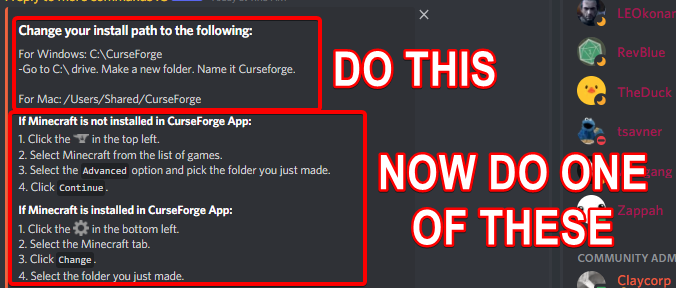
Change your install path to the following:
For Windows: C:\CurseForge
-Go to C:\ drive. Make a new folder. Name it Curseforge.
For Mac: /Users/Shared/CurseForge
If Minecraft is not installed in CurseForge App:
- Click the in the top left.
- Select Minecraft from the list of games.
- Select the
Advancedoption and pick the folder you just made. - Click
Continue.
If Minecraft is installed in CurseForge App:
- Click the in the bottom left.
- Select the Minecraft tab.
- Click
Change. - Select the folder you just made.
:no_entry_sign: Minecraft Files should NOT be installed inside the following locations :no_entry_sign:
:no_entry_sign: .minecraft folder.
:no_entry_sign: OneDrive folders.
:no_entry_sign: Desktop folder.
:no_entry_sign: Drive roots I.E. Directly into the C:\ drive.
:no_entry_sign: iCloud enabled folders.
:no_entry_sign: or any other cloud saved folder.
:no_entry_sign: or folders with non-English characters in them.
If any of the above are in the path you need to change/move it!
silent fulcrum
lyric crescent
?mc-path
so I did the first one for windows and it still doesn't work
lyric crescent
what did you do
silent fulcrum
I went to the C:/ drive made a new folder and named it Curseforge
lyric crescent
and then selected that folder with the app?
silent fulcrum
HUH?
I put curseforge in it?
the app wasn't in it
and it still doesn't work
even when it was in it
lyric crescent
please read the instructions
silent fulcrum
I did what it said
I went to C: drive made a new folder and named it Curseforge
lyric crescent
it says more than that..
lyric crescent
🤦♂️
 lyric crescent
 silent fulcrum
ok so I did it
and I tried downloading the mod for it
like the mod that I picked
and it is stuck on download
lyric crescent
mod, or modpack
silent fulcrum
Modpack
red patioBOT
WebClient errors are from networking issues to your computer. You can try a few things to fix it:
- Restart the computer.
- Restart your router/modem.
- Try another internet source like a hotspot, wired connection or moving closer to the WiFi.
- Pause/Stop other things using the internet. (Streams, music, etc)
- If this still doesn't work, try again in an hour and hope your connection is stable.
silent fulcrum
oh yeah now i can play it
my internet was off for my pc
for some reason
it happens to me
thanks yamza
👍
also as a question
can I put like texture mods on a modpack?
lyric crescent
Click the modpack, Add more content, resource packs
need to do this first though
?mc-modifypack
red patioBOT
How to add/remove mods in a modpack.
- Click on the picture of the modpack.
- Click the

Add More Contentbutton, IF this button is not there, see below before continuing. - Find the Mods, Resource Packs or Maps you wish to Install and click
Installon them. - Wait for all the required mods to be downloaded.
- Start the modpack.
How to Enable/Disable content management for modpacks.
- Click on the picture of the modpack.
- Click on the button next to the
Playbutton. - Click on

Profile Options. - Check the
Allow content management for this profileoption if you want to edit the content of the modpack, uncheck it to disable.
NOTE: The Allow content management for this profile option is what allows you to Delete, Disable, Update or Install any Mods, Resource Packs or Maps managed by CurseForge. It must be on to modify any of them! (Currently)
silent fulcrum
meh I can use normal minecraft texture pack because its still okay
and also all my texture packs are mostly for pvp hypixel so it wouldn't help me in normal minecraft with the modpack
jujutsu kaisen mod pack is pretty cool ngl
lyric crescent
#💬︱general-chat for random conversation please
silent fulcrum
sorry
 worldly minnow
Can i make my Modpack unlisted or smth on cf ?
so only people with a permission can download it ?
lyric crescent
why even have it on curseforge then?
worldly minnow
to have the option to make it public afterwards. I wanna work together with them the modpack, but i dont want to upload a profile and stuff all the time. So they only have to update the pack
you know what i mean? :D
I cant publish it openly for now
lyric crescent
You can set all the files to alpha, then only people with a link will see it. but it also doesnt sync with the app. better to just upload it when you're actually ready for it to be public.
worldly minnow
Ah ok, thx! :3
digital roost
Im using overwolf to run curse forge, i downloaded a mod pack for minecraft, what is my next step?
lyric crescent
press play?
digital roost
Oh its as simple as that
I dont got to change shit in my pc settings like the other programs ive tried
Awesome
lyric crescent
uh...huh?
digital roost
I tried using multi mc
lyric crescent
the only thing i've seen any similar program want you to do is install java
digital roost
Yeah but its my first day on a computer so that was a challenge
Im not very gifted in the tech department
lyric crescent
no one is gifted in tech, it's just experience. you'll get it 😉
digital roost
Thanks man. I got my first computer yesterday, ive always wanted to play modded minecraft
lyric crescent
?MC-LOG
red patioBOT
Sending logs for support.
- Right-click the modpack profile icon OR click the button in the modpack profile.
- Click
Open Folder. - Open the
logsfolder. - Drag and drop the FILE named
latestORdebuginto discord.
digital roost
Nvm im on mobile rn
lyric crescent
?mc-installfix
red patioBOT
- Click on the Minecraft Tab on the Left side of the CurseForge App.
- Click button next to the
Create Custom Profileoption. - Click
Repair Installationoption. - Play game.
NOTE: You will not lose any modpacks or worlds, These are saved in the Instances folder. DO NOT TOUCH THIS FOLDER OR YOU WILL LOSE EVERYTHING
lyric crescent
you can try that, but without a log i cant know the issue
digital roost
Im on mobile so i cant but it sorted itself. How do i delete a mod?
It says the one im trying to delete is locked.
lyric crescent
it wont delete is the game/launcher is open. might need to restart the computer
 runic wind
Why does CurseForge complain about my server.jar for my Server Pack?
"The following file versions have been removed from CurseForge: server.jar"
It's a normal 1.17.1 server jar that works perfectly...?
lyric crescent
you cant upload custom jars
more clearly, the only .jar files that are allowed are mod files
 serene lodge
anyone know how long it takes for curseforge to do the payouts with points for paypal? dont mean to be impatient or anything but its been about an hour
runic wind
lyric crescent
more clearly, the only .jar files that are allowed are mod files
I uploaded 2 other server packs and they worked just fine, I'm not sure I understand what you mean, since you can't launch a server without a server.jar
lyric crescent
you cannot include a forge jar, or a vanilla minecraft jar. the person installing the server needs to do that themselves
lyric crescent
serene lodge
anyone know how long it takes for curseforge to do the payouts with points for p...
!rewards
red patioBOT
Question about the rearwards program?
Rewards TOS:
Enabling 2FA for rewards:
runic wind
lyric crescent
you cannot include a forge jar, or a vanilla minecraft jar. the person installin...
Cool cool, this wasn't an issue 1 month ago so I'm only guessing it's some new thing, which is pretty nonsensical
lyric crescent
show me where you uploaded those previously
lyric crescent
okay, will forward this to the curseforge team
digital roost
i've got a question about this message, what does it mean and how can i fix it

it would be cool if someone could help me
upbeat compass
vital dove
seeing as you have a server starter script (and assuming that you are able to ch...
This isn't actually an issue. The issue is that curseforge thinks that datapacks included in the export are craftbukkit plugins. This is entirely ridiculous as datapacks have been part of Minecraft for years now.
lyric crescent
Did you include any resource packs?
upbeat compass
Are you implying that if I removed the resource pack, the datapack would be allowed? Because if that's the case, I will load my resource pack using kubejs.
But the datapacks can't be loaded that way as they would overwrite each others "pool_additions" folder.
lyric crescent
I know the CF system flags resource packs incorrectly. It could be that, assuming you included any.
upbeat compass
Ok I will try to just include the resources in kube, which I know works.
I'll let you know if it doesn't work actually so you know for future reference.
lyric crescent
actually, would you mind sending the zip as is
upbeat compass
In here?
lyric crescent
or dm, either way
neat inlet
queen storm
Forwarded to staff
what should I do about this rejection? looks like it might have been resubmitted by someone on your end last night only to be rejected for the same reason.
lyric crescent
issue was sent to staff, hasnt been replied to.
neat inlet
thanks. also, will it only give one reason for a rejection at a time? in other words, if there's really say , 4 issues, will it only identify them 1 at a time?
lyric crescent
it can reject unapproved mods and jars that should go in the manifest at once, no idea beyond that
!mc-installmods
red patioBOT
How to install mods in CurseForge App.
- Click
+ Create Custom Profile - Name it, select the required Minecraft version, select the Forge version (usually the highest number), click
Create. - Click the profile icon.
- Click
Add More Content - Search and install the desired mods.
- Start the game!
How to install mods not on CurseForge.
- Right click the profile picture or Open the profile and click the Icon next to the play button.
- Click
Open Folder. - Drag the mod(s) into the
modsfolder. (Note: Some mods will require others, to run. Make sure to read the instructions for the mod!) - Start the game!
neat inlet
if it's not on curse, I don't think it's going to show in the list in the app. If you followed the instructions, it should load when you launch the pack
lyric crescent
it wont show up, since it's not a curseforge mod
as long as it's in the mods folder it will be loaded (or crash)
neat inlet
you're loading a 1.7.10 mod with 1.17 if i'm seeing that right
lyric crescent
you are 😂
it should have crashed
Syndicate, you should make a ticket on your issue to make sure it's not lost.
!ticket-site
red patioBOT
:bug: Reporting via Website :bug:
Can't open the app or would rather use the website? You can do so here: https://support.curseforge.com/en/support/tickets/new
Fill out the form with accurate detailed information, "It doesn't work" isn't helpful! What exactly doesn't work and why doesn't it work should be easy to answer!
Make sure to upload your Overwolf logs with the Upload File option on the ticket, information on how to get these logs can be found here https://support.overwolf.com/en/support/solutions/articles/9000176827-how-to-get-your-overwolf-logs
 tulip cove
i cant launch this for some reason, i have it downloaded in my D drive because my C drive gets too full from mods, could that be it?
 red patioBOT
<:overwolf:857375414002384916> How to get Overwolf logs! <:overwolf:857375414002384916>
tulip cove
uninstalling and reinstalling worked
 pine garnet
HOW DO I DOWNLOAD
red patioBOT
Looking to install the CurseForge app?
<:windows:798410728188936222> Windows
Minimum Requirements:
- OS Version: 7 (64 bit), 8.1, 10, 11
- 64 bit Required.
- 350MB storage space.
- Microsoft .Net 4.8
- Intel/AMD quad-core CPU
- 8GB ram
Download: https://download.overwolf.com/install/Download?&PartnerId=4047
If you are having issues with the installer use the URL below to install Overwolf then go to the app store to download CurseForge.
https://content.overwolf.com/downloads/setup/latest/regular.html
<:mac:798410654418862130> Mac
Minimum Requirements:
- OS Version 10.14 or newer.
- 64 bit Required.
Download: https://curseforge.overwolf.com/downloads/curseforge-latest.dmg
:penguin: Linux
Minimum Requirements:
Yes.
Download: :person_shrugging:
 opal cipher
!mc-path
red patioBOT
Change your install path to the following:
For Windows: C:\CurseForge
-Go to C:\ drive. Make a new folder. Name it Curseforge.
For Mac: /Users/Shared/CurseForge
If Minecraft is not installed in CurseForge App:
- Click the in the top left.
- Select Minecraft from the list of games.
- Select the
Advancedoption and pick the folder you just made. - Click
Continue.
If Minecraft is installed in CurseForge App:
- Click the in the bottom left.
- Select the Minecraft tab.
- Click
Change. - Select the folder you just made.
:no_entry_sign: Minecraft Files should NOT be installed inside the following locations :no_entry_sign:
:no_entry_sign: .minecraft folder.
:no_entry_sign: OneDrive folders.
:no_entry_sign: Desktop folder.
:no_entry_sign: Drive roots I.E. Directly into the C:\ drive.
:no_entry_sign: iCloud enabled folders.
:no_entry_sign: or any other cloud saved folder.
:no_entry_sign: or folders with non-English characters in them.
If any of the above are in the path you need to change/move it!
 sudden field
Is there a reason why I cant download the app? It either stops the download and say virus scan failed or it stops the download and says that the download failed, even if i turn off all firewalls and antiviruses
 plain pike
Any idea why my games aren't getting recognised? I tried the scan and also manually choosing the folder but it just says invalid folder
digital roost
Any idea whenever i run skyfactory4 my pc blue screens? i have a gaming pc with 2 tb of ram idk why it keeps bluescreening any tips?
mainly for staff
@grand umbra
sorry for pin g your online staff thats not on do not disturb
anyone?
signal ridge
digital roost
anyone?
First #📛︱rules 5, second prove you have 2tb of ram
digital roost
miscalculated i have 1.5tb
signal ridge
screen shot
digital roost
how do i take 1?
signal ridge
Win or mac?
digital roost
Win
signal ridge
Windows key + Shift + S > then Ctrl + V here
digital roost
 signal ridge
... Thats storage not Ram
digital roost
oh
im stupid XD
listen i just got a pc
i have no idea what alot of this stuff is
but do you know why every time i run SF4 it bluescreens?
signal ridge
Go to the search bar on your task bar > search system info > open system information > Look on the right for Installed Physical Memory (Ram) > tell me what that number is
signal ridge
How much ram did you allocate to sf4?
signal ridge
!mc-ram
red patioBOT
How to set Global Minecraft RAM value.
- Click the icon in the bottom left to open settings.
- Click the Minecraft tab.
- Scroll down.
- Slide slider to recommended ram range as seen below.
 signal ridge
Have you done this in the cf app at all?
signal ridge
hmmm
digital roost
so my pc doesnt bluescreen
signal ridge
Originally figured your pc was bsod due to over ram. But I dont think its the case. However would need a picture of your bsod (phone pic likely)
digital roost
uh im kinda scared to get another last time my pc wouldnt turn on for a day lol
digital roost
alright!
signal ridge
Win 10 yes?
signal ridge
Seeing if there is an easy way to pull up the logs for set crash. bsod usually share a number code.
signal ridge
This happen with any pack?
digital roost
just SF4
signal ridge
So you have tried others?
signal ridge
It did load tho?
digital roost
both did
SF4 is my fav
i have a whole thing on der
im tryna figure out how to fix it bluescreening
signal ridge
so wait sf4 boots and you can play it?
signal ridge
Then this isnt really a curseforge issue. Sounds like something is wrong with your pc
signal ridge
If it does blue screen again take a picture with a phone and ping me.
digital roost
okay thank you so much!
 left junco
which folder do i set for mc
because ive tried like a lot of folders and it keeps saying invalid
signal ridge
!mc-path
red patioBOT
Change your install path to the following:
For Windows: C:\CurseForge
-Go to C:\ drive. Make a new folder. Name it Curseforge.
For Mac: /Users/Shared/CurseForge
If Minecraft is not installed in CurseForge App:
- Click the in the top left.
- Select Minecraft from the list of games.
- Select the
Advancedoption and pick the folder you just made. - Click
Continue.
If Minecraft is installed in CurseForge App:
- Click the in the bottom left.
- Select the Minecraft tab.
- Click
Change. - Select the folder you just made.
:no_entry_sign: Minecraft Files should NOT be installed inside the following locations :no_entry_sign:
:no_entry_sign: .minecraft folder.
:no_entry_sign: OneDrive folders.
:no_entry_sign: Desktop folder.
:no_entry_sign: Drive roots I.E. Directly into the C:\ drive.
:no_entry_sign: iCloud enabled folders.
:no_entry_sign: or any other cloud saved folder.
:no_entry_sign: or folders with non-English characters in them.
If any of the above are in the path you need to change/move it!
 wooden hemlock
so how do i get the modpack i made to show up on the CF app? it got approved on the 19th at 6:10am EST
signal ridge
wooden hemlock
so how do i get the modpack i made to show up on the CF app? it got approved on ...
link your pack from the site
wooden hemlock
in here?
signal ridge
yes
wooden hemlock
 signal ridge
Can edit the file and change it.
signal ridge
Click files tab > click the files name > click edit
wooden hemlock
thank you
 mild fractal
Hey my friend is dealing with an issue where one of the ads is blocking their screen completely and they can close it.
Any ideas of what to do?
 charred knot
I keep getting 'data freezing' or something then the game just stops when I try to launch betterminecraft forge 1.16.5 with optifine, anyone know a way around this?
fleet bear
charred knot
I keep getting 'data freezing' or something then the game just stops when I try ...
!notcf
uhhgg
bots dead
fleet bear
mild fractal
Hey my friend is dealing with an issue where one of the ads is blocking their sc...
What..?
mild fractal
Idk. Something about an laptop ad that takes up there screen or something. More wondering if anyone else was experiencing this
fleet bear
how about they come here with the issue then...?
 fleet bear
then i'm unsure how we are going to help someone that doesn't want it
gloomy basin
is curse forge still having data issues?
lyric crescent
dunno, is there an issue?
gloomy basin
I still cannot find certain addons for wow that I know were there 4 months ago
lyric crescent
go to the thread #900427656808525865 and describe the issue please
 quasi bough
I need support anyone online?
Okay goood
i have a weird problem
the curseforge app says that the local disc C is invalid
and idk why
i think the app thinks that it is a file type for some reason
 neon spruce
I have mine in a folder on disc c, I had the same issue when I first installed it. I was merged into a Microsoft account and now Minecraft won't load through curseforge is this a known issue?
lyric crescent
? mc-path
red patioBOT
Change your install path to the following:
For Windows: C:\CurseForge
-Go to C:\ drive. Make a new folder. Name it Curseforge.
For Mac: /Users/Shared/CurseForge
If Minecraft is not installed in CurseForge App:
- Click the in the top left.
- Select Minecraft from the list of games.
- Select the
Advancedoption and pick the folder you just made. - Click
Continue.
If Minecraft is installed in CurseForge App:
- Click the in the bottom left.
- Select the Minecraft tab.
- Click
Change. - Select the folder you just made.
:no_entry_sign: Minecraft Files should NOT be installed inside the following locations :no_entry_sign:
:no_entry_sign: .minecraft folder.
:no_entry_sign: OneDrive folders.
:no_entry_sign: Desktop folder.
:no_entry_sign: Drive roots I.E. Directly into the C:\ drive.
:no_entry_sign: iCloud enabled folders.
:no_entry_sign: or any other cloud saved folder.
:no_entry_sign: or folders with non-English characters in them.
If any of the above are in the path you need to change/move it!
lyric crescent
neon spruce
I have mine in a folder on disc c, I had the same issue when I first installed i...
? mc-login
red patioBOT
Minecraft Logins
CurseForge does not handle or touch the Minecraft Login.
You must own JAVA Edition
If you have a DEMO button instead of a PLAY button in the launcher you are logged into an account that does not own the game. CurseForge requires you to own the game to use it.
Follow the steps in the pictures below. If you bought Minecraft after October 2020 or you have transferred your account you will use a Microsoft account.
Otherwise you must use a Mojang account until you transfer it!

 dim moth
About how long does it take for CF to respond to malware reports? There's been a MC Mod project up for almost 3 weeks, first reported at minimum 2 days ago, thats just a blatant discord token grabber
lyric crescent
DM me info on it
 craggy sequoia
Need help
 lyric crescent
? mc-path
red patioBOT
Change your install path to the following:
For Windows: C:\CurseForge
-Go to C:\ drive. Make a new folder. Name it Curseforge.
For Mac: /Users/Shared/CurseForge
If Minecraft is not installed in CurseForge App:
- Click the in the top left.
- Select Minecraft from the list of games.
- Select the
Advancedoption and pick the folder you just made. - Click
Continue.
If Minecraft is installed in CurseForge App:
- Click the in the bottom left.
- Select the Minecraft tab.
- Click
Change. - Select the folder you just made.
:no_entry_sign: Minecraft Files should NOT be installed inside the following locations :no_entry_sign:
:no_entry_sign: .minecraft folder.
:no_entry_sign: OneDrive folders.
:no_entry_sign: Desktop folder.
:no_entry_sign: Drive roots I.E. Directly into the C:\ drive.
:no_entry_sign: iCloud enabled folders.
:no_entry_sign: or any other cloud saved folder.
:no_entry_sign: or folders with non-English characters in them.
If any of the above are in the path you need to change/move it!
 wise tangle
Hey guys, I just launched curseforge today and get this. But I have no idea what could be different, I launched it yesterday and had no issue.

I tried restarting my computer and it did not fix it
 merry peak
So whats up with all this extra crap needed to run mods on minecraft now? Is there a way to NOT link my microsoft account and still play minecraft?
I used to use the twitch app to get into Skyfactory4 but now I cant even get twitch app to see I have minecraft installed.
 slow basin
i have a fresh install of both minecraft and curseforge, but i cant get it to recognize that i have minecraft installed
am i missing some step?
fleet bear
wise tangle
Hey guys, I just launched curseforge today and get this. But I have no idea what...
did you try any of the fixes in the "learn more"
fleet bear
merry peak
I used to use the twitch app to get into Skyfactory4 but now I cant even get twi...
Twitch app doesn't have minecraft modding anymore.
fleet bear
slow basin
i have a fresh install of both minecraft and curseforge, but i cant get it to re...
It doesn't use what you have installed. Click on the game to set it up
 stiff jolt
Hello!
I was on curseforge attempting to use the relations tab to get required libraries and such for mods (Minecraft) and encountered an ad for Omen Laptops that stops me from click anything.
If I do click something, it immediately takes me to their website. I tried using a different web browser (I usually use Safari but switch to Google Chrome if I think Safari is acting buggy) and found that no matter how many times I reloaded the page or opened new ones the same ad would pop up and prevent me from opening anything.
What should I do? For the mean time I could look up the library mods by name but all mod relation tabs seem to have this issue.
There's also no button to close the ad, so it's stuck there.
I can access the pages I want if I'm fast enough to click them before the ad loads, but other than that I don't see an obvious way around it.
red patioBOT
Looking to install the CurseForge app?
<:windows:798410728188936222> Windows
Minimum Requirements:
- OS Version: 7 (64 bit), 8.1, 10, 11
- 64 bit Required.
- 350MB storage space.
- Microsoft .Net 4.8
- Intel/AMD quad-core CPU
- 8GB ram
Download: https://download.overwolf.com/install/Download?&PartnerId=4047
If you are having issues with the installer use the URL below to install Overwolf then go to the app store to download CurseForge.
https://content.overwolf.com/downloads/setup/latest/regular.html
<:mac:798410654418862130> Mac
Minimum Requirements:
- OS Version 10.14 or newer.
- 64 bit Required.
Download: https://curseforge.overwolf.com/downloads/curseforge-latest.dmg
:penguin: Linux
Minimum Requirements:
Yes.
Download: :person_shrugging:
stiff jolt
Gotcha, that'll work if the issue persists, thank you!
opal cipher
I'll report about the ads thing though, thanks for reporting it!
stiff jolt
√√√
I think it's supposed to open a vid that you can close (as it just did it on another page) but seems to not be doing that in the relations tab specifically. It's treating the page as if the video is loaded when it's not.
Anyway, have a great day/night depending on where you are!
 fleet mirage
So me and my friend want to create a modpack together on the curseforge app but how can we edit it together?
 rich flint
can't - would need to trade export file back and forth or each work on separate things
 vagrant crow
awwww :(
fleet mirage
aww okay thank you
rich flint
i mean you can still collaborate on making a pack - it just needs to be put together manually.
vagrant crow
yeah ty tho
rich flint
(then made into an export file)
fleet mirage
thank you!
 fickle smelt
i have a question that may or may not sound very confusing
ive been trying to set up a stoneblock server for about 2 hours now and every time i lauch the server it says it cant find the Jar file that is in the folder and instantly close out. I have tried reinstalling the server and reinstalling overwolf with curseforge with it and nothing has helped. I have tried messing around with the server settings and yet nothing works, I have tried installed and reinstalling several different java's and nothing has worked and so i have come to support to hopefully get sent in the right direction on how to set up my server properly.
red patioBOT
Your question is not related to CurseForge owned/maintained features or services.
Please use the appropriate game room by getting a game role from #786424115535544350 or use #👽︱game-support for help.
CurseForge does not make or maintain any of the content or games used on the site or app. Just because it's on the site/app does not make it a problem with CurseForge. Move rooms as requested, arguing about it will result in you being removed from the discord.
rich flint
fickle smelt
ive been trying to set up a stoneblock server for about 2 hours now and every ti...
get the minecraft role in #786424115535544350 and use MC channels to talk about server running - as you don't run server packs from the curseforge launcher.
queen storm
!mc-installpack
red patioBOT
How to install modpacks with the search features in app.
- Open the
Minecraftsection of the app. - Click the top search bar where it says
Search for modpacksOR Click theBrowse ModpacksTab. - Find the Modpack you want to install and click install on it.
- Wait for CurseForge app to download and unpack all the required files.
- Once finished, click
Play!
How to install modpacks from a Export. (Custom/Private/Site downloaded Modpack zip)
- Get CurseForge App if you don't have it, use
!downloadfor a link. - Get the exported modpack from CurseForge or someone else,
!mc-packshareexplains how to make them. - Open the
Minecraftsection of the app. - Click
Create Custom Profile - Click the
Importoption. - Find the file you just downloaded in step 2 and select it.
- CurseForge app will now attempt to download and unpack the modpack. If it fails, try steps 4-6 again.
- Once finished, click
Play!
 cosmic mist
oh thx
 dry coral
hello i cant find the rest of the MaxDps add ons for the other classes were they removed?
i have the zip files downloaded but they wont pop up still
cosmic mist
!mc-packshare
red patioBOT
There are two ways to share a modpack you've made with others...
Export and Share - For Friends to Small Groups.
- Click the Icon for the modpack.
- Click the button next to play.
- Click
Export. - Select the files that should be included.
- Send the zip to the people that want it! They can follow the instructions in
!mc-installpackto install the pack!
Upload to Curseforge - For Public Release to Everyone.
This options will make your pack public to EVERYONE, it comes with extra requirements and will take some effort to set up.
- Go to here: https://www.curseforge.com/project/432/4471/create
- Fill out the information with a proper description of the pack. This should allow anyone to understand what the pack is.
- Click the Icon for the modpack in the CurseForge app.
- Click the button next to play.
- Click
Export. - Select the files that should be included.
- Open your Project you made on the CurseForge site and Upload the file you just made.
- Wait for Moderation & Sync so it can show up in the client! (See
!syncfor limitations)
opal cipher
!notcf
red patioBOT
Your question is not related to CurseForge owned/maintained features or services.
Please use the appropriate game room by getting a game role from #786424115535544350 or use #👽︱game-support for help.
CurseForge does not make or maintain any of the content or games used on the site or app. Just because it's on the site/app does not make it a problem with CurseForge. Move rooms as requested, arguing about it will result in you being removed from the discord.
 vivid arch
huh
opal cipher
But, as for moderation of an updated package, not until earliest sunday. No moderation will be done until sunday. And from there, it's up to 3 work days.
queen storm
If it is an actual server: ask the owner
 torpid fern
there's a WoW addon that's been abandoned by it's author, and they're uncontactable. It's open-source licensed, so modifications aren't a problem, however the community that uses this mod can't publish fixes to some severe bugs, and users are still downloading the old version via CurseForge.. is there something we can do to get the old addon removed, gain access to the account, or somehow replace the existing listing with one we can update?
 upper sonnet
hey im stuck wondering why it keeps saying invalid folder path even though I use the default path for it
queen storm
upper sonnet
hey im stuck wondering why it keeps saying invalid folder path even though I use...
!mc-path
red patioBOT
Change your install path to the following:
For Windows: C:\CurseForge
-Go to C:\ drive. Make a new folder. Name it Curseforge.
For Mac: /Users/Shared/CurseForge
If Minecraft is not installed in CurseForge App:
- Click the in the top left.
- Select Minecraft from the list of games.
- Select the
Advancedoption and pick the folder you just made. - Click
Continue.
If Minecraft is installed in CurseForge App:
- Click the in the bottom left.
- Select the Minecraft tab.
- Click
Change. - Select the folder you just made.
:no_entry_sign: Minecraft Files should NOT be installed inside the following locations :no_entry_sign:
:no_entry_sign: .minecraft folder.
:no_entry_sign: OneDrive folders.
:no_entry_sign: Desktop folder.
:no_entry_sign: Drive roots I.E. Directly into the C:\ drive.
:no_entry_sign: iCloud enabled folders.
:no_entry_sign: or any other cloud saved folder.
:no_entry_sign: or folders with non-English characters in them.
If any of the above are in the path you need to change/move it!
queen storm
torpid fern
there's a WoW addon that's been abandoned by it's author, and they're uncontacta...
!ticket-site
red patioBOT
:bug: Reporting via Website :bug:
Can't open the app or would rather use the website? You can do so here: https://support.curseforge.com/en/support/tickets/new
Fill out the form with accurate detailed information, "It doesn't work" isn't helpful! What exactly doesn't work and why doesn't it work should be easy to answer!
Make sure to upload your Overwolf logs with the Upload File option on the ticket, information on how to get these logs can be found here https://support.overwolf.com/en/support/solutions/articles/9000176827-how-to-get-your-overwolf-logs
torpid fern
so, file a ticket regarding an abandoned addon that we wish to take over updating?
fleet bear
That's the only option but it's unlikely.
torpid fern
I'll just start a new project with a name that gets picked up when searching for the old one then
fleet bear
That's generally the way to go
 coarse ibex
Curseforge can't find mc dungeons
 vital dove
How was it installed? via the store I assume?
opal cipher
Do you have it from the Microsoft Store? In that case it won't work currently.

 west folio
gamepass doesnt count
coarse ibex
Wdym?
opal cipher
The issue is that the Microsoft Store/Xbox App installs Minecraft Dungeons in a path, that is very restricted, so CurseForge cannot (currently) access it.
coarse ibex
Is there any way I can get WASD without using curseforge then?
opal cipher
I don't know how to install mods into Minecraft Dungeons, so I can't answer that. Sorry.


 tawdry nacelle
i am trying to figure out how to use the api
doesn't matter what i try i always get to the not found page
queen storm
What API?
tawdry nacelle
curseforge
i was tring to use hte support page

CurseForge Support
We're here to get you informed on everything you need to know about CurseForge, including helpful guides and troubleshooting articles to back you up when you get in a pickle
but still can't figure it out
queen storm
 terse reef
how do I fix this error?
 red patioBOT
Change your install path to the following:
For Windows: C:\CurseForge
-Go to C:\ drive. Make a new folder. Name it Curseforge.
For Mac: /Users/Shared/CurseForge
If Minecraft is not installed in CurseForge App:
- Click the in the top left.
- Select Minecraft from the list of games.
- Select the
Advancedoption and pick the folder you just made. - Click
Continue.
If Minecraft is installed in CurseForge App:
- Click the in the bottom left.
- Select the Minecraft tab.
- Click
Change. - Select the folder you just made.
:no_entry_sign: Minecraft Files should NOT be installed inside the following locations :no_entry_sign:
:no_entry_sign: .minecraft folder.
:no_entry_sign: OneDrive folders.
:no_entry_sign: Desktop folder.
:no_entry_sign: Drive roots I.E. Directly into the C:\ drive.
:no_entry_sign: iCloud enabled folders.
:no_entry_sign: or any other cloud saved folder.
:no_entry_sign: or folders with non-English characters in them.
If any of the above are in the path you need to change/move it!
terse reef
what's the problem with this path?
 opal cipher
Depends if that username contains something that isn't english characters only, would be my guess. But I can't say for certain, since it's censored
terse reef
it is english only
opal cipher
Can you access the folder manually?
terse reef
yeah
opal cipher
Hm.. No clue about that then. Try launching CurseForge as admin, because in that case, it was started as admin at one point, and then it needs to be started as admin all the time.
 mighty parcel
so when i create a mc modpack it all goes great but the second i try to launch the game it crashes
the play button opens the mc launcher normally but the launcher just wont open minecraft
even if it's a single mod
help pls
 hybrid heath
how do i get curseforge to update to 14.23.5.2847 i went to curseforge website and downloaded and installed it but minecraft still says i dont have it after restarting
opal cipher
hybrid heath
how do i get curseforge to update to 14.23.5.2847 i went to curseforge website a...
!!=
red patioBOT
Wording is important!
Forge = Minecraft Forge, This is a modloader often just called "Forge".
Fabric = Fabric MC, this is another modloader, just called "Fabric".
CurseForge = A Website/App that has content for games.
Mods = Individual mod files.
Modpacks = Multiple mods put into the mods folder or downloaded from CurseForge.
These are not Interchangeable! Please use the correct terms as it allows us to help you faster!
hybrid heath
sorry, forge wont update
opal cipher
I'd suggest using CurseForge to play modded minecraft, as it solves modloaders (Such as Fabric and Forge), and there's modpacks that you can play.
!getcf
red patioBOT
Looking to install the CurseForge app?
<:windows:798410728188936222> Windows
Minimum Requirements:
- OS Version: 7 (64 bit), 8.1, 10, 11
- 64 bit Required.
- 350MB storage space.
- Microsoft .Net 4.8
- Intel/AMD quad-core CPU
- 8GB ram
Download: https://download.overwolf.com/install/Download?&PartnerId=4047
If you are having issues with the installer use the URL below to install Overwolf then go to the app store to download CurseForge.
https://content.overwolf.com/downloads/setup/latest/regular.html
<:mac:798410654418862130> Mac
Minimum Requirements:
- OS Version 10.14 or newer.
- 64 bit Required.
Download: https://curseforge.overwolf.com/downloads/curseforge-latest.dmg
:penguin: Linux
Minimum Requirements:
Yes.
Download: :person_shrugging:
digital roost
digital roost
it says connection error when i try to install
.
hybrid heath
im using curseforge, but when i try to load minecraft it says i need an updated verison of minecraft forge
hybrid heath
ok
opal cipher
digital roost
.
Are you on WiFi? If yes, connect with a network cable. If not, reboot your computer.
mighty parcel
mighty parcel
so when i create a mc modpack it all goes great but the second i try to launch t...
it's been like this since yesterday
opal cipher
mighty parcel
it's been like this since yesterday
!mc-log
red patioBOT
Sending logs for support.
- Right-click the modpack profile icon OR click the button in the modpack profile.
- Click
Open Folder. - Open the
logsfolder. - Drag and drop the FILE named
latestORdebuginto discord.
mighty parcel
the thing is it happens on every modpck
digital roost
anyone can help me whit this ?
 hybrid heath
@opal cipher Here is the screenshot you asked for
 vital dove
digital roost
anyone can help me whit this ?
vital dove
digital roost
anyone can help me whit this ?
Windows or Mac?
digital roost
windows
opal cipher
hybrid heath
<@!139126154492641282> Here is the screenshot you asked for
Did you make the pack yourself?
hybrid heath
No
opal cipher
digital roost
anyone can help me whit this ?
!mc-path
red patioBOT
Change your install path to the following:
For Windows: C:\CurseForge
-Go to C:\ drive. Make a new folder. Name it Curseforge.
For Mac: /Users/Shared/CurseForge
If Minecraft is not installed in CurseForge App:
- Click the in the top left.
- Select Minecraft from the list of games.
- Select the
Advancedoption and pick the folder you just made. - Click
Continue.
If Minecraft is installed in CurseForge App:
- Click the in the bottom left.
- Select the Minecraft tab.
- Click
Change. - Select the folder you just made.
:no_entry_sign: Minecraft Files should NOT be installed inside the following locations :no_entry_sign:
:no_entry_sign: .minecraft folder.
:no_entry_sign: OneDrive folders.
:no_entry_sign: Desktop folder.
:no_entry_sign: Drive roots I.E. Directly into the C:\ drive.
:no_entry_sign: iCloud enabled folders.
:no_entry_sign: or any other cloud saved folder.
:no_entry_sign: or folders with non-English characters in them.
If any of the above are in the path you need to change/move it!
vital dove
digital roost
windows
what drives do you see in "my computer"?
Edit: it's actually called "This PC" @digital roost
red patioBOT
Please visit the project page for the content you posted about and look for a way to contact the developer.
Somewhere on the page there is usually a method of contact. Look for one of the following things:
Issuestab like the image below.- Discord link.
- Twitter link.
- Comments section below the project.
If no contact method exists you will either have to remove the project or find a solution on your own.
 mighty parcel
wait it wordked out of nowhere
 fluid tangle
Hello! We have dependency on Geckolib
[[dependencies.feywild]] modId="geckolib3" mandatory=true versionRange="[geckolib-forge-1.16.5:3.0.33,)" ordering="AFTER" side="BOTH"
But when installing Feywild it installs the fabric version of geckolib.
on the cf page we selected the forge tag, and the correct geckolib version, but still it installs the fabric version.

 red haven
hi, anyone knows why when i start my modpack, everytime it says downloading 4.35mb and it keeps downloading up to 9mb before launching the game, everytime 😮
vital dove
red haven
hi, anyone knows why when i start my modpack, everytime it says downloading 4.35...
Can you add any context to this?
Is it downloading in curseforge, do you get to the minecraft launcher
Is it a curseforge pack or did you make it yourself?
red haven
vital dove
Can you add any context to this?
Is it downloading in curseforge, do you get to ...
sorry yes, it goes to minecraft launcher and it that one that downloads
Its a pack I made myself that is super basic
just tried with all mods off, it does the same
vital dove
cool
 gleaming grotto
Im trying to play a modpack but evry time i try to play it says unexpected issue occured
vital dove
red haven
just tried with all mods off, it does the same
what about the vanilla launcher?
vital dove
gleaming grotto
Im trying to play a modpack but evry time i try to play it says unexpected issue...
I've got issues, but you've got them too 🎵
What about some context, coming from youuu? 😉
red haven
vital dove
what about the vanilla launcher?
hmm.. sorry if it is not clear, when i launch curse, then minecraft modpacks (even with no mods on) the launcher starts, i press play and it tries to downloads 4.35mb and goes on until double then finally launches the game, any idea why?
vital dove
red haven
hmm.. sorry if it is not clear, when i launch curse, then minecraft modpacks (ev...
Not immediately no, does it also happen if you start the launcher without using CurseForge?
 dreamy drum
On the main page it says "become an author and get rewarded" what are the rewards?
red haven
but gonna have to download all assets first, quit and restart to test in situation.
the issue is that everytime i use minecraft's modpacks i have to keep downloading stuff, and seem like a bug as it downloads more then the starting objective. but maybe it is a minecraft issue, i have no clue
 dire gorge
Hello, Can anyone help me with a firewall issue? I'm trying to run a 1.12.2 Forge server with no mods but I can only connect to the Public IP when I turn my firewall off. However, When switching it to a vanilla 1.12.2 server I can connect to it just fine through the Public IP and with the firewall on. Java is being allowed through the firewall, so I'm not sure what is blocking the connection.
vital dove
red haven
but gonna have to download all assets first, quit and restart to test in situati...
you can check if it's a minecraft issue by starting the launcher without using the CF app
queen storm
dreamy drum
On the main page it says "become an author and get rewarded" what are the reward...
Paypal and amazon money
queen storm
dire gorge
Hello, Can anyone help me with a firewall issue? I'm trying to run a 1.12.2 Forg...
!notcf
red patioBOT
Your question is not related to CurseForge owned/maintained features or services.
Please use the appropriate game room by getting a game role from #786424115535544350 or use #👽︱game-support for help.
CurseForge does not make or maintain any of the content or games used on the site or app. Just because it's on the site/app does not make it a problem with CurseForge. Move rooms as requested, arguing about it will result in you being removed from the discord.
red haven
on the process but as i never use it i gotta download 95mb
 wild escarp
Slightly uncertain about if I'm posting in the right channel or not. Probably not, but here goes;
I just got an email from twitch, asking me to update my tax information as the irs form I signed expires December 31st 2021. That was for payouts from the curseforge author rewards program, and I'm a Norwegian citizen.
But twitch has nothing to do with this anymore, do they? Isn't it all Overwolf now? So I should just ignore the email from twitch, right? 😮
Hm. Maybe I should have put that in #824087449399328828
 fallow whale
hey im new to mindcraft-mods and i dont know how to install mods or shaders
any help?
another thing Curse Forge does not have all the mods on the site?
vital dove
fallow whale
hey im new to mindcraft-mods and i dont know how to install mods or shaders
any ...
!notcf
red patioBOT
Your question is not related to CurseForge owned/maintained features or services.
Please use the appropriate game room by getting a game role from #786424115535544350 or use #👽︱game-support for help.
CurseForge does not make or maintain any of the content or games used on the site or app. Just because it's on the site/app does not make it a problem with CurseForge. Move rooms as requested, arguing about it will result in you being removed from the discord.
 grave garden
hey can anyone help? curse forge isnt actually loading. I came into an issue when playing minecraft with the mysterious lag glitch thing, so I deleted everything, and im having problems with redownloading curse. It keeps saying "oops, thats not supposed to happen!"
fallow whale
vital dove
!notcf
my apologise
grave garden
grave garden
hey can anyone help? curse forge isnt actually loading. I came into an issue whe...
I think I mightve fixed it
 frank cliff
Hey can someone help? I'm having problems downloading the newest update. Wenn I open curseforge it says "download now" and "later" but whenever i click on download nothing happens.
vital dove
frank cliff
Hey can someone help? I'm having problems downloading the newest update. Wenn I ...
Tried restarting?
frank cliff
yep
vital dove
frank cliff
yep
And restarting the whole computer?