#🔥︱curseforge-support
1 messages · Page 481 of 1
 solemn sparrow
 mossy plume
How would I do this? I'm able to run vanilla MC fine, able to run Optifine MC fine, but I'm for some odd reason unable to run any modpacks now for some reason due to this; how would I go about fixing this? I understand it saying "reinstall MC", but would this mean I have to physically uninstall MC and reinstall it? or is there a way to throw MC into the Curse folder?

nvm, I just looked up a few scrolls and found my answer 🙂
Thank you turtle bot thingy 🙂
 tepid hound
Hi, I am having an issue with adding the wiki link to my modpack. Instead of linking to www.swamptalk.tech (which is what I put in the box), it links to https://www.curseforge.com/minecraft/modpacks/www.swamptalk.tech which isn't anything
Not sure why it does this, as other people seem to be able to link to their websites fine
Nvm u have to add https://
 fleet bear
Is delayed due to the server down time that happened. They will go out this coming week.
 deft basin
I cant goto the curseforge websire
*website
I cant access the curseforge website
whyyyy
 abstract minnow
Its just super slow right now
deft basin
why tho :/
abstract minnow
¯_(ツ)_/¯
abstract minnow
It'll fix eventually
 digital roost
is the site ok?
 proven flume
For me the website isn’t working idk why
 tulip summit
for me too
 cold fiber
yea
tulip summit
 prisma skiff
curseforge is down
prisma skiff
curseforge is down
I think they already noticed
 crystal summit
DDoS??? lol
prisma skiff
how does a server timeout happen in 2021
tulip summit
there are multiple reasons.. and in 10 years there are still multiple reasons
I was able to access a mod page now 🙂
 steady river
the website aint working
fleet bear
yes,
steady river
why
fleet bear
no idera
 cerulean depot
Theri $5 Digital Ocean droplet timed out
 bold basin
 cerulean depot
lol
deft basin
cerulean depot
Theri $5 Digital Ocean droplet timed out
lol
 worn surge
Can someone send me the app
fleet bear
!getcf
 red patioBOT
Looking to install the CurseForge app?
Todo: Place system requirements here.
<:windows:798410728188936222> Windows
<:mac:798410654418862130> Mac
Linux
:person_shrugging:
worn surge
oh
prisma skiff
middle of the night for the curseforge team... wtf is curse CHINA??
fleet bear
Israel
 shadow elbow
is the website down or is my internet connection just really bad?
 autumn hatch
I'm trying to open the curseforg website and I don't know why it's not letting me open it
crystal summit
autumn hatch
I'm trying to open the curseforg website and I don't know why it's not letting m...
its a prob with the servers
running crap
autumn hatch
crystal summit
its a prob with the servers
Wdym?
 desert flax
The servers are down, that's what he means
digital roost
yeah the servers are down, the site times out or loads the homepage. the site works for me but its slow
autumn hatch
Ok
digital roost
wait the site went down again?
yes
not again
its up now, but really and i mean REALLY slow. atleast for me
 native crater
yeah its up, although super slow as vikkivuk said
 unique sleet
its not even loading for me
digital roost
there should be an option to upload files via the curseforge app
autumn hatch
digital roost
there should be an option to upload files via the curseforge app
So like the entire curseforge app is the website itself?
digital roost
or there should be an curseforge developers thing idk
ayo
is curseforge website down?
kind of
up but really slow
autumn hatch
In a way
digital roost
how do i download minecraft mods through the app?
 viscid sparrow
how do i play just 1 mod and not a whole pack?
fleet bear
!mc-installmods
red patioBOT
How to install mods in CurseForge App.
- Click
+ Create Custom Profile - Name it, select the required Minecraft version, select the Forge version (usually the highest number), click
Create. - Click the profile icon.
- Click
Add New Content - Search and install the desired mods.
- Start the game!
How to install mods not on CurseForge.
- Right click the profile picture or Open the profile and click the
 Icon next to the play button.
 - Click

Open Folder. - Drag the mod(s) into the
modsfolder. (Note: Some mods will require others, to run. Make sure to read the instructions for the mod!) - Start the game!
 viscid sparrow
thanks
worn surge
What if I use fabric-
worn surge
Oh
desert flax
Yeah considering my setup for MC uses multiple directories, this app won't work for me
fleet bear
The app uses it's own directory.
 stiff stone
hey off hand question, is the site still down for maintenance
stiff stone
ah thank you
fleet bear
worn surge
What if I use fabric-
You need to use jumploader and install the fabric stuff with it.
desert flax
So pretty much the app installs to it's own directory, and I can't move the mods to my own directory?
fleet bear
That doesn't even make sense. The app doesn't use your vanilla install
Why would you continue to use the vanilla install for mods if you have the app..?
desert flax
I have multiple versions
fleet bear
of what...?
desert flax
Minecraft
fleet bear
There's only one launcher
desert flax
Different versions so I can for instance make old seeds and move them through by updating
prisma skiff
fuckin hell... this chat
fleet bear
So... you just make multiple profiles
digital roost
website down again?
prisma skiff
Clay.. it must be tough
desert flax
fleet bear
So... you just make multiple profiles
YES.
digital roost
of course it is
y'all dont read the annoucements before typing here about the site?
fleet bear
perhaps you should TRY the app before dismissing it.
desert flax
But the app only allows one profile
fleet bear
No it doesn't
desert flax
for different games, yes
fleet bear
I have ~30
autumn hatch
digital roost
y'all dont read the annoucements before typing here about the site?
You speak thy truth
desert flax
Also I use the default launcher
digital roost
im confused by this The Life Vested Sailor
fleet bear
Again, Install the dammed app and look at it because you clearly have no clue what you are talking about.
desert flax
Rude
fleet bear
Yes it is, you consistently saying it doesn't do X because you refuse to look at it when it 100% does is also rude and annoying.
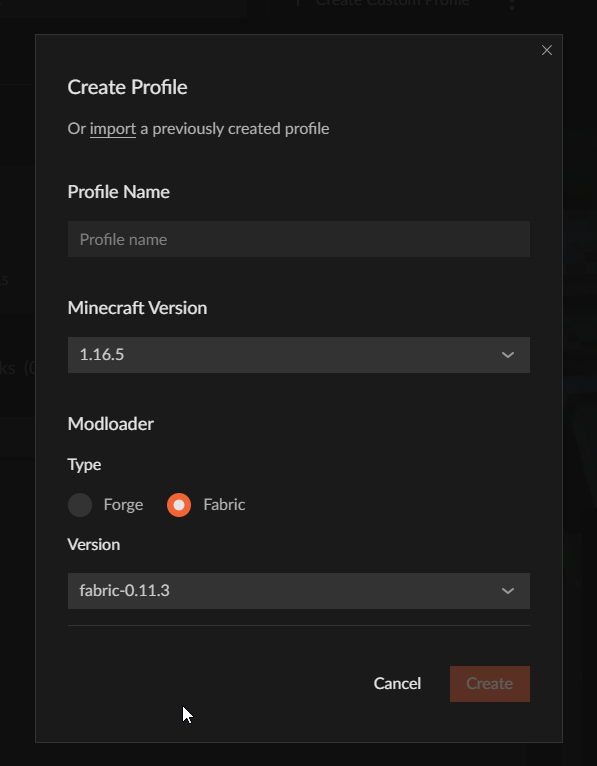
 last narwhal
how do i download specific mods from the launcher
fleet bear
see?
last narwhal
like from the app
 slender zinc
website down?
last narwhal
yep
unique sleet
yes
digital roost
read the announcements bruh
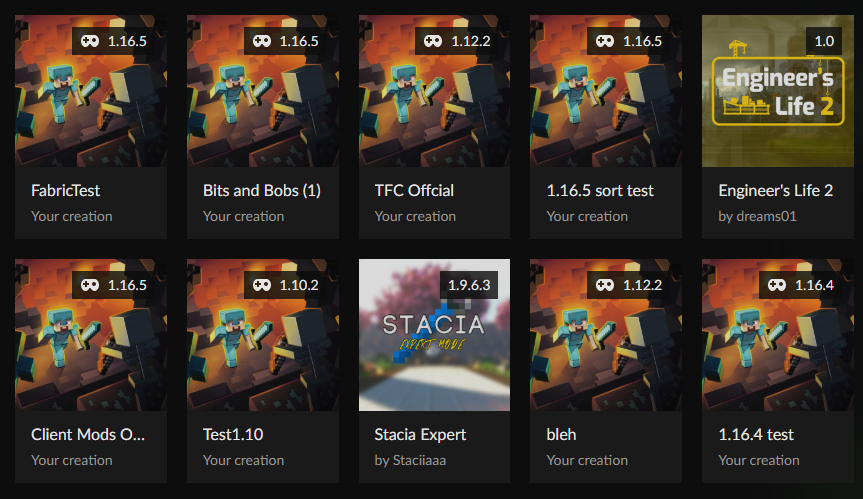 desert flax
So I could use the profiles I already have?
 lavish helm
me when cant find mod on app and website is down
 livid burrow
yes website is down, app sucks with seperate mods, and i want my stalactites to finish my goddamn modpack
 trim cipher
multimc op tho
fleet bear
If you transfer the files from them to ones you made in the app, yes.
lavish helm
does anyone know if Mob Dismemberment mod is 1.16.5?
unique sleet
yeah i want nei but i cant find it on the app
lavish helm
oh sorry
desert flax
So I have to pretty much find where the mod was placed, and move it to where I'm doing things?
fleet bear
unique sleet
yeah i want nei but i cant find it on the app
You can only see the mods that are marked to work with the version of the game you installed in that profile.
 subtle meadow
how much we need to wait for the site?
unique sleet
it does work for the version that i want
fleet bear
then are you using the get more content button?
fleet bear
desert flax
So I have to pretty much find where the mod was placed, and move it to where I'm...
you right click the profile and click open folder.
then you open the folder for the instance you have in the vanilla launcher and copy the folders over
desert flax
And that takes me to the folder the CF app makes, and I just move the files from there... alright.
subtle meadow
i got to make a server of dimension zero.. But i can't download the server files, is it possible using the curseforge app?
unique sleet
oh shit i found it ok bye
 alpine abyss
unique sleet
alpine abyss
unique sleet
i did not expect the icon for the mod to be a cat though
fleet bear
subtle meadow
i got to make a server of dimension zero.. But i can't download the server files...
I don't believe you can get server files via the app, it just redirects you to the site that's currently broken
desert flax
So my final question, is the Overwolf app that comes with the CF App necessary for the CF App to run?
 viral briar
Yes
digital roost
desert flax
So my final question, is the Overwolf app that comes with the CF App necessary f...
yes
subtle meadow
So basically i got to wait for the site to work again?
digital roost
why would it be installed if it wasnt
digital roost
subtle meadow
So basically i got to wait for the site to work again?
if you only want to play mods then just use the app
desert flax
digital roost
if you only want to play mods then just use the app
but then why would I have an app installed on my machine I'll never end up using?
 slim thunder
desert flax
but then why would I have an app installed on my machine I'll never end up using...
slim thunder
desert flax
but then why would I have an app installed on my machine I'll never end up using...
by using curseforge you're using overwolf
digital roost
desert flax
but then why would I have an app installed on my machine I'll never end up using...
in moments like this
for me its easier using the app instead of manually downloading everything
fleet bear
CurseForge app uses the Overwolf app to run. Similar to any game launcher/store system.
viral briar
Nothing wrong with overwolf keeping things they run centralised with their own program
desert flax
okay...
digital roost
My game keeps freezing, I'm running this at 60-120 fps, 30-50% CPU usage. It doesn't crash, it just freezes and goes again. It's annoying and I want to fix it.
desert flax
Oh this is modpacks only?
 vocal cypress
we cant make servers rn?
digital roost
digital roost
My game keeps freezing, I'm running this at 60-120 fps, 30-50% CPU usage. It doe...
isnt that #🧱︱mc-other-help
fleet bear
desert flax
Oh this is modpacks only?
!mc-installmods
red patioBOT
How to install mods in CurseForge App.
- Click
+ Create Custom Profile - Name it, select the required Minecraft version, select the Forge version (usually the highest number), click
Create. - Click the profile icon.
- Click
Add New Content - Search and install the desired mods.
- Start the game!
How to install mods not on CurseForge.
- Right click the profile picture or Open the profile and click the Icon next to the play button.
- Click
Open Folder. - Drag the mod(s) into the
modsfolder. (Note: Some mods will require others, to run. Make sure to read the instructions for the mod!) - Start the game!
fleet bear
vocal cypress
we cant make servers rn?
Curseforge doesn't provide servers.
vocal cypress
i mean get server packs
digital roost
digital roost
isnt that <#768367574001778729>
I just need help.
vocal cypress
while the site is down atleast
fleet bear
You can copy the files from the client install
and then manually get and install forge
desert flax
I see.
digital roost
digital roost
I just need help.
depends how strong your pc is, if you have too much mods then that is the issue, since i also have more than 60 fps but if i have too much mods i will still have 60 fps just that it will freeze overtime.
digital roost
digital roost
depends how strong your pc is, if you have too much mods then that is the issue,...
It didn't do this before, My PC should be able to run this easily, yet it does not.
its a hardware issue
you can try cleaning the pc idk if it helps, didnt try it and i dont know your installation so i cant help that much.
fleet bear
#👽︱game-support or #🧱︱mc-other-help please
digital roost
digital roost
you can try cleaning the pc idk if it helps, didnt try it and i dont know your i...
This is a fresh copy of Windows 10
It literally only has discord and curseforge on it
continue in #🧱︱mc-other-help
also software in most cases has nothing to do with this
and by cleaning it i meant physically
I'm going inside of mc help now
lavish helm
how do i share a profile with people?
fleet bear
!mc-packshare
red patioBOT
There are two ways to share a modpack you've made with others...
Export and Share - For Friends to Small Groups.
- Click the Icon for the modpack.
- Click the button next to play.
- Click

Export. - Select the files that should be included.
- Send the zip to the people that want it! They can follow the instructions in
!mc-installpackto install the pack!
Upload to Curseforge - For Public Release to Everyone.
This options will make your pack public to EVERYONE, it comes with extra requirements and will take some effort to set up.
- Go to here: https://www.curseforge.com/project/432/4471/create
- Fill out the information with a proper description of the pack. This should allow anyone to understand what the pack is.
- Click the Icon for the modpack in the CurseForge app.
- Click the button next to play.
- Click
Export. - Select the files that should be included.
- Open your Project you made on the CurseForge site and Upload the file you just made.
- Wait for Moderation & Sync so it can show up in the client! (See
!syncfor limitations)
 bleak aurora
the entire website is down it wont load for me
 flat charm
whenever I try to install a mod by clicking on the install button it says ; cannot read property 'id' of null how do I fix this ?
 cursive eagle
how can i download the app when the website is down
fleet bear
!getcf
red patioBOT
Looking to install the CurseForge app?
Todo: Place system requirements here.
<:windows:798410728188936222> Windows
<:mac:798410654418862130> Mac
Linux
:person_shrugging:
cursive eagle
ty, im assuming i just extract files after
digital roost
grey screen pls help 😦

is this related to website down?
no
minecraft launcher has nothing to do with curseforge
Why it's grey screen there but normal launcher works??
fleet bear
!mc-installfix
red patioBOT
- Click on the Minecraft Tab on the Left side of the App.
- Click button next to the
Create Custom Profileoption. - Click

Repair Installationoption. - Play game.
NOTE: You will not lose any modpacks or worlds, These are saved in the Instances folder. DO NOT TOUCH THIS FOLDER OR YOU WILL LOSE EVERYTHING
crystal summit
fleet bear
!mc-installfix
ah claycorp always has the answers
fleet bear
80% of the time I do
digital roost
there is no repair installation option
crystal summit
digital roost
there is no repair installation option
there is
 crystal summit
digital roost
crystal summit
digital roost
not in this
crystal summit
in this
 fleet bear
try reading the instructions again 😉
digital roost
Oh thank you
fleet bear
crystal summit
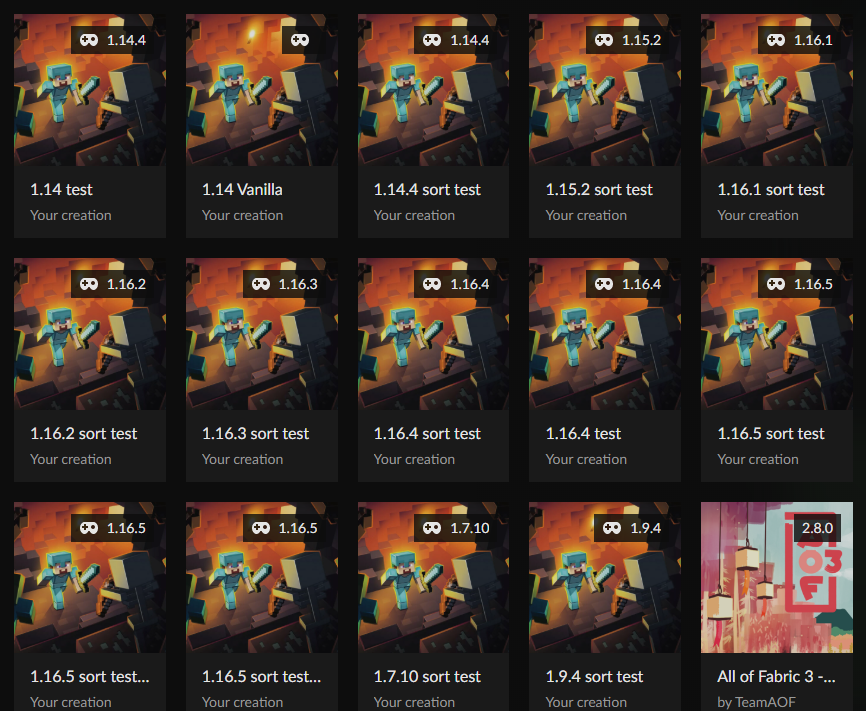
dont mind my cringe modpacks
At least your not testing stuff :/
https://i.imgur.com/hFCRpfd.png
 digital roost
is the website down rn i cant get on it
digital roost
oh i thought i got my ip banned just worryed
crystal summit
its like 11pm in uk rn
digital roost
its almost 1 am for me
crystal summit
digital roost
its almost 1 am for me
poland or russia?
 idle badger
it’s 3:40 here
digital roost
crystal summit
poland or russia?
none
crystal summit
idle badger
it’s 3:40 here
OMG 3AM CHALLENGE GONE WRONG!!!
digital roost
3:40 pm
digital roost
raven dissapointed
crystal summit
idle badger
3:40 pm
OMG 3PM CHALLENGE GONE WRONG ALSO #🥑-off-topic-chat
fleet bear
It is all times in the world at a given moment in time.
And yes, #🥑-off-topic-chat would be best for this
 pearl fox
so the website is down..
how do i find out if my modpack has been approved on the app?
digital roost
you cant i think
fleet bear
you don't
it hasn't been approved either as it currently just was the weekend for CF
In the next day or two it should be approved
pearl fox
alright thx
digital roost

whast that ><
i dont know what language is that
oh nvm
half of it is english
the mod tech reborn has errors
i need help with something
just type what you need
strange cuz i played this modpack today but okey, i try to delete this mod
the thing at the bottom
 fleet bear
digital roost
the thing at the bottom
fleet bear
digital roost
the thing at the bottom
exit the app and restart it
digital roost
i did like 5 times
 novel scarab
Anyone know why the website isn’t loading
digital roost
now is this one, what's wrong witht he mod packk? after all the effort i took to build my city ;w;

now its the get off my lawn mod
its still doing it

the website is fucked rn
i reset it and even ran it by adminastrator
 balmy elbow
Question. I have purchased minecraft and downloaded cursed forge. However whenever I launch through cursed forge it comes up as a demo? Help??
 lavish grail
Does Curseforge support terraria mods yet?
digital roost
balmy elbow
Question. I have purchased minecraft and downloaded cursed forge. However whenev...
you need to log into the minecraft launcher
i gtg its 1:14 am
im gonna fall asleep on my pc lol
balmy elbow
digital roost
you need to log into the minecraft launcher
Then what?
digital roost
balmy elbow
Then what?
restart the curseforge app and try again
bruh
every program installer requires admin
balmy elbow
digital roost
restart the curseforge app and try again
It is still saying that it it a demo.
digital roost
digital roost
Noooooo, curseforge is down again 😦
Yeah, I came for information but I also came to stay.
Good to know my PC isn't the problem.
hello when will website be up?
 visual current
digital roost
fleet bear
<#525372338653626389>
visual current
digital roost
fleet bear
<#525372338653626389>
thank you
 dawn sky
Hi I am currently playing Minecraft whit Valhelsia 3 but i am only having about 15 to 20 FPS and i dont know why can someone please help me?
no whit out the pack i am around 200 FPS
 tough sinew
is it me or are the servers down
digital roost
hey how do i activate the mods?
 digital roost
not only the website zzz
 jolly smelt
mh can anyone fix it?
jolly smelt
its a website problem
native crater
it'll take time, just be patient
jolly smelt
k
 tepid solar
ALT+F4 will fix it.
 floral sedge
anyone have antique atlas forge?
 lone charm
i cant use the app. i noticed the website wasnt working, is the app down too?
 echo chasm
 yo sus bro
 rugged tree
anyone having issue with website
shits loading insanely slow
nvm just read this shit def down
digital roost
why doesnt work? 😦
dawn sky
i installed optifine and now i have about 60FPS but Thanks anyways
lone charm
i keep getting errors lmao
 idle ibex
f joined the disc just to report this lmao
digital roost
x2
lone charm
@dawn sky if you need more, make sure your max framerate is at unlimited or 120, something higher and not vsync
digital roost
somebody cassually havs ichunutil 10.4.0?
 ebon jewel
Hey guys, is there a solution to the curse forge installer not running when double clicked?
 glad silo
i need help, when i go to the curseforge site, it is INCREDIBLY slow and takes forever to load each page. it only happens on the site
idk what to do
 graceful yoke
i cant start anything on curse idk whats happening someone help me pls
lone charm
its down
digital roost
admins halp
graceful yoke
annoucements only says that the site is down, but i cant start anything on the launcher tho
livid burrow
so iv'e been wondering if you can download sperate mods from the app? cause i am making my own modpack with the site
 rain horizon
@graceful yoke your best bet is to delete curseforge then overwolf and reinstall it if your curse app is broken
but you will loose your modpacks
graceful yoke
ye i ll do try that even tho i just installed it
digital roost
livid burrow
so iv'e been wondering if you can download sperate mods from the app? cause i am...
yes
rain horizon
first
livid burrow
digital roost
yes
i need to find this then
rain horizon
then go into overwolf and download curseforge from overwolf app
thats the way it fixed many so far
@graceful yoke
graceful yoke
okok thanks
ebon jewel
Does installing curse forge through the overwolf app work if the standalone curse forge doesn't install?
livid burrow
digital roost
yes
it only shows modpacks :/
rain horizon
@ebon jewel it should overwolf is a separate thing from curse
 half wyvern
Is anyone else having the stupid NaN Undefined glitch?
rain horizon
yeah
half wyvern
I'm about to rip my hair out, i can't install half of the darn mods.
rain horizon
path is install path to your game/mods
graceful yoke
still isnt working i dont know what to do ☹️
 iron umbra
the cursed forge website isnt working it just infinity loads. It was working fine yesterday
red patioBOT
Hey there, it is Curseforge, not "Cursed forge"
 urban bloom
 digital roost
Is it me or is curseforge being slow right now? and how do i fix it?
digital roost
digital roost
Is it me or is curseforge being slow right now? and how do i fix it?
website down
digital roost
digital roost
Is it me or is curseforge being slow right now? and how do i fix it?
curse forge just got down again
I see
 deep tangle
so basically me and my friends are trying to make a custom profile for our server. Everyone else can play on the server fine but whenever i try to play the mods are a .toml file instead of a zip so whenever i try to add custom profile it just closes immedietly and brings me back to the normal screen
fleet bear
deep tangle
so basically me and my friends are trying to make a custom profile for our serve...
Are you using CurseForge app to make it and share it?
deep tangle
yes
fleet bear
did you import it?
deep tangle
yes i did
fleet bear
can you take a screenshot of the files you are talking about and importing
deep tangle
 deep tangle
i know
but whenever i try to do that
it just closes
normally the config is a zip
idk why it isnt for me
deep tangle
no, for some reason when i try to download it it becomes a folder
fleet bear
are you zipping just the config or whole folder
fleet bear
Then get a new file from the people who made it
deep tangle
nothings happened
fleet bear
post the file you are getting from them here then
deep tangle
fleet bear
This is exactly the file they gave you?
deep tangle
yes
fleet bear
You didn't do anything to it?
deep tangle
nope
 smoky fable
hi!, is the website down?
fleet bear
They gave you a bad file or your computer is messing it up. This won't import at all
fleet bear
smoky fable
hi!, is the website down?
 devout moon
hi, is the page down? because i cant enter
 royal nest
why wont curseforge work is it just me or is it everyone
 uncut vale
its everyone
smoky fable
are they under attack?, or they are overhauling something?
uncut vale
i cant use it either, been down for a while
not sure when it'll come back up
smoky fable
uncut vale
i cant use it either, been down for a while
not sure when it'll come back up
smoky fable
does the app work fine?
deep tangle
fleet bear
use that file
Nope same things happening
deep tangle
alright thanks anyways
royal nest
fleet bear
Your computer is breaking the file then
your ssd might be corrupting the file
happened to me once
smoky fable
is there a way for the app to download individual mods instead of modpacks for minecraft?
 slate scroll
is curseforge not working?
smoky fable
because that is pretty useless
smoky fable
slate scroll
is curseforge not working?
slate scroll
it's taking forever to load the page
deep tangle
royal nest
your ssd might be corrupting the file
how did you fix it?
fleet bear
smoky fable
is there a way for the app to download individual mods instead of modpacks for m...
!mc-installmods
red patioBOT
How to install mods in CurseForge App.
- Click
+ Create Custom Profile - Name it, select the required Minecraft version, select the Forge version (usually the highest number), click
Create. - Click the profile icon.
- Click
Add New Content - Search and install the desired mods.
- Start the game!
How to install mods not on CurseForge.
- Right click the profile picture or Open the profile and click the Icon next to the play button.
- Click
Open Folder. - Drag the mod(s) into the
modsfolder. (Note: Some mods will require others, to run. Make sure to read the instructions for the mod!) - Start the game!
royal nest
deep tangle
how did you fix it?
got a new ssd i am not really a computer guy
deep tangle
oh its ok
smoky fable
royal nest
got a new ssd i am not really a computer guy
uh
i doubt your pc corrupts the file, its a zip file, you could try to do a md5 checksum to see if it really corrupted the file
unless you got a virus, but i doubt it
fleet bear
uninstall it and reinstall it or exit the app and relaunch
 cedar stump
did you really have to @ everyone tho?
 latent fern
they tried lol
royal nest
meow
cedar stump
is 36.1.12 out?
there is a mod for this private mc server me and my friends play on, and it requires 36.1.12
latent fern
is it possible to download mods from the app or just the website?
cedar stump
for 1.16.5
latent fern
thanks!
digital roost
hi
smoky fable
cedar stump
is 36.1.12 out?
we on 36.1.5 fam
digital roost
what does that mean
cedar stump
smoky fable
we on 36.1.5 fam
wat
smoky fable
cedar stump
wat
.25*
cedar stump
I am launching that rn, hopefully it supports the mods i wanna use
smoky fable
cedar stump
I am launching that rn, hopefully it supports the mods i wanna use
you'll be dissapointed
 red pagoda
So I guess I see that the website is/was down and having some problems today, but would/should that be affecting my ability to install Curseforge? Went through the site. Followed the download installer. Overwolf pops up.... but can't add Minecraft as a game because of an invalid file path and I have no curseforge folder on my computer to try to make it be the right path... ?
smoky fable
red pagoda
So I guess I see that the website is/was down and having some problems today, bu...
oh, yeah the app is pretty retarded and there are some specific paths you can specify, like the root of your harddrive, or the installation folder of your game
you will also need to create a profile which will limit he mods you'll be able to download
 granite yoke
I miss forge, without the curse thing, or twitch, just, forge
 lyric crescent
Uh forge still exists bro
red pagoda
I enjoyed the Twitch thing a bit... This is my first time trying to use any of it since they made the swap. The thing just absolutely blowing my mind is how i cannot get this to work. Im not even getting a proper install screen. I go from "install this!" to "cool, you didnt specify anything but here's the app"
The only files on my computer seem to be the installers... not what it should be installing... and yet.. i have a menu for Overwolf?
fleet bear
red pagoda
So I guess I see that the website is/was down and having some problems today, bu...
!mc-path
red patioBOT
**Minecraft Files should NOT be installed inside the following locations
.minecraft folder.
OneDrive folders.
Desktop folder.
Drive roots I.E. Directly into the C:\ drive.
iCloud enabled folders.
If any of the above are in the path you need to change/move it by following the instructions below!**
If Minecraft is not installed in CurseForge App, start here.
Click the  in the top left.
Select Minecraft.
Click "Edit".
Move to the "Continue here:" section below.
If Minecraft is installed in CurseForge App, follow these steps.
Click the  in the bottom left.
Select the Minecraft tab.
Click "Change".
Move to the "Continue here:" section below.
Continue here:
Make a folder in the root directory called CurseForge.
Select the folder you just made.
The text box should show something like the following:
For Windows: C:\CurseForge
For Mac: /Users/Shared/CurseForge

 covert mural
Is there an ETA for when the Curseforge site will work properly again?
smoky fable
nope
red pagoda
Minecraft is currently on my C:\ProgramData\ -----> \Minecraft Launcher path. So It's origin isn't a problem. I don't think. I would love to install it in the CurseForge App, except to install I need a valid path, which I can't get for some reason.
smoky fable
red pagoda
Minecraft is currently on my C:\ProgramData\ -----> \Minecraft Launcher path. So...
click on the help button
it shows you no valid path selected, click on it and read the page
 fallen loom
red pagoda
Minecraft is currently on my C:\ProgramData\ -----> \Minecraft Launcher path. So...
fallen loom
red pagoda
Minecraft is currently on my C:\ProgramData\ -----> \Minecraft Launcher path. So...
That's not where the launcher goes by default... did you put it there?
smoky fable
put effort
 silent karma
How to use the curseforge app for searching for singular mods?
fallen loom
?mc-installmods
red patioBOT
How to install mods in CurseForge App.
- Click
+ Create Custom Profile - Name it, select the required Minecraft version, select the Forge version (usually the highest number), click
Create. - Click the profile icon.
- Click
Add New Content - Search and install the desired mods.
- Start the game!
How to install mods not on CurseForge.
- Right click the profile picture or Open the profile and click the Icon next to the play button.
- Click
Open Folder. - Drag the mod(s) into the
modsfolder. (Note: Some mods will require others, to run. Make sure to read the instructions for the mod!) - Start the game!
red pagoda
smoky fable
put effort
I mean... How do you think I found a discord page? The site recommends a default path that includes the term "curseforge". I don't have a folder anywhere on my computer named "curseforge", despite how many times ive tried installing it. I cannot tell you how or why, but it is not following anything close to a traditional install.
 fallen loom
You're looking for an existing folder rather than setting the path and having Curse create it or creating it yourself?
red pagoda
fallen loom
You're looking for an existing folder rather than setting the path and having Cu...
It's not allowing me to create anything. It very desperately wants to find something.
fallen loom
Do I need to make a video showing you how to make a directory in Windows?
red pagoda
Normally no, but apparently my brain just is not cooperating today. However the way you just phrased that may have made the hamsters spin, so just a sec,
FFS. Force creating the path worked. Thank you
My hamsters are pleased.
red pagoda
I hyperfocused on "can't find the path" and didn't think to make the path
digital roost
nothings loading on curse forge for me
fallen loom
Please don't spam
digital roost
who
fallen loom
Take a quick look at who's trying to meme it up within the last 60 seconds /\
 lone iron
it dead?
silent karma
lone iron
it dead?
Currently, yes
digital roost
fallen loom
Take a quick look at who's trying to meme it up within the last 60 seconds /\
i literally just came here to ask whats going on but ok
lone iron
understandable have a nice day
fallen loom
digital roost
i literally just came here to ask whats going on but ok
No, I was telling you to take a look, not saying it was you...
digital roost
oh
silent karma
digital roost
i literally just came here to ask whats going on but ok
You are trying to put your problem in a shitposty way
digital roost
nah
fallen loom
digital roost
if pog say yes
No, Duck... I was referring to the second posting of this
digital roost
i just say things in a funny way
Sorry for question but how long do i have to wait for a normal loading speed?
 fast axle
Is Curseforge down or something?
fast axle
fallen loom
<#525372338653626389>
thx
fast axle
digital roost
Sorry for question but how long do i have to wait for a normal loading speed?
depends on the pc ig
since better pcs are gonna have shorter loading times
digital roost
Can i download normal mods with the app or only modpacks
fallen loom
Clay, can we get the bot to just respond to "down" as a term and have it spit out #📢︱news ?
digital roost
fast axle
depends on the pc ig
I mean the servers are slow as f*ck at the moment
fast axle
fallen loom
Clay, can we get the bot to just respond to "down" as a term and have it spit ou...
Would make sense
lol
not clay
but like
do that
fallen loom
digital roost
Can i download normal mods with the app or only modpacks
?mc-installmods
fast axle
cause I left this disc and joined to check lmao
red patioBOT
How to install mods in CurseForge App.
- Click
+ Create Custom Profile - Name it, select the required Minecraft version, select the Forge version (usually the highest number), click
Create. - Click the profile icon.
- Click
Add New Content - Search and install the desired mods.
- Start the game!
How to install mods not on CurseForge.
- Right click the profile picture or Open the profile and click the Icon next to the play button.
- Click
Open Folder. - Drag the mod(s) into the
modsfolder. (Note: Some mods will require others, to run. Make sure to read the instructions for the mod!) - Start the game!
lone iron
is there any way to download mods without using the site
fallen loom
?download
red patioBOT
Looking to install the CurseForge app?
Todo: Place system requirements here.
<:windows:798410728188936222> Windows
<:mac:798410654418862130> Mac
Linux
:person_shrugging:
fast axle
lone iron
is there any way to download mods without using the site
app lol
lone iron
fast axle
app lol
any other ways?
 fast axle
lone iron
any other ways?
fast axle
lone iron
any other ways?
lmafao
digital roost
fast axle
app lol
There you only can i install modpacks
fallen loom
lone iron
any other ways?
Errr, Wine?
fast axle
Linux users typing 200 lines of code to pen google chrome
lone iron
fast axle
Linux users typing 200 lines of code to pen google chrome
yay -S chromium but ok
lone iron
is there like a public curseforge api or something that i can just curl to get a download
fallen loom
afaik the API is private and changes frequently, to the bane of many third party tools
fleet bear
yes
fast axle
How do I download individual mods on the curseforge app?
fleet bear
!mc-installmods
red patioBOT
How to install mods in CurseForge App.
- Click
+ Create Custom Profile - Name it, select the required Minecraft version, select the Forge version (usually the highest number), click
Create. - Click the profile icon.
- Click
Add New Content - Search and install the desired mods.
- Start the game!
How to install mods not on CurseForge.
- Right click the profile picture or Open the profile and click the Icon next to the play button.
- Click
Open Folder. - Drag the mod(s) into the
modsfolder. (Note: Some mods will require others, to run. Make sure to read the instructions for the mod!) - Start the game!
 main hearth
Is it just the website down then? I can use the app to download mods?
fleet bear
yes
main hearth
@fleet bear Great, thank you
 proven ore
whenever I open mine craft the title screen is glitching around and i start flying when in the world
fallen loom
!notcf
red patioBOT
The question you are asking about isn't related to CurseForge. Please use the appropriate game rooms by getting the role from #786424115535544350 or use #👽︱game-support for help.
This room is only for CurseForge Owned & Maintained features/services.
proven ore
I dunno Tf going on, was fine til about a week ago
fast axle
and once I have the mods I want is there a folder where I can find them in?
nevermind
found it
fallen loom
Are you not running the game through Curse?
fast axle
fallen loom
Are you not running the game through Curse?
No, since I'm making a modpack and have some mods that aren't on the website
fallen loom
Well imo it would be easier to put the non-curse mods in the curse mods folder
fast axle
How do I do that?
fleet bear
you drop the mod in the mod folder like everything else?
fast axle
oh ok
and I can still ZIP it and send it to my friends as a modpack for a server
if I do this?
fleet bear
yes
 wild willow
hello
 brazen cobalt
Site is clapped for everyone else too right?
brazen cobalt
Most people know about the error 500 something screen but i also just got this
 fallen loom
HAHAHAHAHAHA
rugged tree
I got that too
brazen cobalt
ill just disable the mod i need this dependency for for now.
 warped imp
brazen cobalt
Most people know about the error 500 something screen but i also just got this
warped imp
brazen cobalt
Most people know about the error 500 something screen but i also just got this
Just need F5
Minecraft Page load so slow...
brazen cobalt
I've refreshed it many a times
livid burrow
it was up andddd its down again
 fleet bear
digital roost
even with my own creations
fleet bear
digital roost
even with my own creations
I take it you aren't logged into the Adrik user?
digital roost
I am
fleet bear
if you where then you shouldn't be getting the error
digital roost
Is there anyway for me to download the files of the mod?
digital roost
fleet bear
if you where then you shouldn't be getting the error
Hmmmm
fleet bear
!mc-path You can follow this and move it out of the user space
red patioBOT
**Minecraft Files should NOT be installed inside the following locations
.minecraft folder.
OneDrive folders.
Desktop folder.
Drive roots I.E. Directly into the C:\ drive.
iCloud enabled folders.
If any of the above are in the path you need to change/move it by following the instructions below!**
If Minecraft is not installed in CurseForge App, start here.
Click the in the top left.
Select Minecraft.
Click "Edit".
Move to the "Continue here:" section below.
If Minecraft is installed in CurseForge App, follow these steps.
Click the in the bottom left.
Select the Minecraft tab.
Click "Change".
Move to the "Continue here:" section below.
Continue here:
Make a folder in the root directory called CurseForge.
Select the folder you just made.
The text box should show something like the following:
For Windows: C:\CurseForge
For Mac: /Users/Shared/CurseForge
digital roost
fleet bear
!mc-path You can follow this and move it out of the user space
Ahhh thanks!
Wait a minute
I think it's something wrong with my computer or account
It is linked to my old pc for some reason
fleet bear
uh what?
digital roost
Idk
It's legit linked to my old pc
Is there a way for someone to send me the files of the mod
fleet bear
That's not how computers work...
digital roost
?
digital roost
fleet bear
That's not how computers work...
It's like actually linked to my old pc
So I can't access the files here
Hmmm
fleet bear
again, that's not how it works at all
fleet bear
just change the folder location
 rigid arch
Ok i have a question on minecraft mods if i go to view all versions of tinkers construct in files it will tell me there is a Internal Server Error and ive tried over the last few hours so i was just wondering how long it will take to get back to working being its server side
rigid arch
ok thanks i thought it was just for that mod for some reason
 broken wind
Hey I've got this bug Idk if it is to do with the wifi but every device i use to go onto curseforge.com (the web browser), it loads and doesn't stop loading to no end. Can someone please help with this? Idk if I need to provide like a screenshot for an error message or what but i need help ;-;
 mental sinew
broken wind
mental sinew
broken wind
thnx soz
 versed island
why do the mods say "Version: NaN Undefined"? It's slightly annoying since I'd have to click on the mod itself and go to versions to download it instead of being able to install it right away from the list of mods
 fleet bear
its a bug due to changes for the fabric support that's coming
versed island
oh ok thanks
 honest sphinx
helo your computer has wirus

 zenith garnet
Curse forge seems to have another hardware issue
Other sites load in 1-2 seconds, while curse forge needs an entire minute
But it loads
 ruby cargo
same
its extremely slow
it was loading a minute ago but now its giving me error 524 again
zenith garnet
Oh
autumn hatch
anyone have JEI for 1.7.10?
zenith garnet
Maybe it's a RAM Overload then
 digital wolf
the site is also acting up for me and my freinds rn
autumn hatch
digital roost
that's NEI
have a link? for one that works, cause the ones im trying arent
fleet bear
!notcf
red patioBOT
The question you are asking about isn't related to CurseForge. Please use the appropriate game rooms by getting the role from #786424115535544350 or use #👽︱game-support for help.
This room is only for CurseForge Owned & Maintained features/services.
 uneven lotus
website is working really badly, very long loading and errors sometimes
and i cant download anything apparently
works sometimes
 elder quail
 novel scaffold
ruby cargo
novel scaffold
ruby cargo
cant delete a comment it gives me 403 errror
fleet bear
That's been an issue for like 2 years.
fleet bear
You cant. Just edit it and delete the contents.
 austere steppe
 queen storm
Rule 10
 vocal nebula
When playing modpacks from the app is it usually really buggy? i know its in beta just trying to be sure
queen storm
What is buggy about them?
vocal nebula
all of them
or at least all the ones ive tried
nevermind im just gonna go to bed gn
queen storm
!notcf
red patioBOT
The question you are asking about isn't related to CurseForge. Please use the appropriate game rooms by getting the role from #786424115535544350 or use #👽︱game-support for help.
This room is only for CurseForge Owned & Maintained features/services.
 stiff summit
thanks
 wary helm
It gets better everyday
 queen storm
wary helm
It gets better everyday
queen storm
wary helm
It gets better everyday
O no, things are broken sometines.
Check the export before uploading
wary helm
queen storm
O no, things are broken sometines.
Check the export before uploading
Do i need to delete all files from the overrides file?
queen storm
You need to restart curseforge and export again
wary helm
queen storm
You need to restart curseforge and export again
It outputs the same file with the same content everytime
queen storm
There was a way to fix that, not sure how though
wary helm
now i only have one mod in the overrides File and this is a mod which isnt available over Curse Forge
Now it should be accepted right?
digital roost
I can't run this forge server jar and I'm not sure why. Eula is on true and I tried a fabric server jar and it worked just fine. Anyone know a fix?
queen storm
wary helm
now i only have one mod in the overrides File and this is a mod which isnt avail...
Yes
queen storm
digital roost
I can't run this forge server jar and I'm not sure why. Eula is on true and I tr...
!notcf
red patioBOT
The question you are asking about isn't related to CurseForge. Please use the appropriate game rooms by getting the role from #786424115535544350 or use #👽︱game-support for help.
This room is only for CurseForge Owned & Maintained features/services.
 mossy current
!updatemappings
viral briar
What are you looking for?
queen storm
mossy current
!updatemappings
That looks like a forge discord command
mossy current
Ah, wrong server?
mossy current
Yeah, I noticed that XD
viral briar
😂👍🏻
mossy current
Actually, do you know the name for it? Or maybe have a link? Would be much appreciated
queen storm
mossy current
Actually, do you know the name for it? Or maybe have a link? Would be much appre...
digital roost
i have a weird issue with my curse launcher were some mods cant be installed while pressing the button forcing me to go download them manually
queen storm
digital roost
i have a weird issue with my curse launcher were some mods cant be installed whi...
Click the mod, go to versions, install from there
 ripe token
Hi, I have problem with setup minecraft on curseforge, its said 'invalid folder path'. I tried to change the path to %appdata%, but its still says 'invalid fol..'. What can I do, please?
queen storm
!mc-path
red patioBOT
**Minecraft Files should NOT be installed inside the following locations
.minecraft folder.
OneDrive folders.
Desktop folder.
Drive roots I.E. Directly into the C:\ drive.
iCloud enabled folders.
If any of the above are in the path you need to change/move it by following the instructions below!**
If Minecraft is not installed in CurseForge App, start here.
Click the in the top left.
Select Minecraft.
Click "Edit".
Move to the "Continue here:" section below.
If Minecraft is installed in CurseForge App, follow these steps.
Click the in the bottom left.
Select the Minecraft tab.
Click "Change".
Move to the "Continue here:" section below.
Continue here:
Make a folder in the root directory called CurseForge.
Select the folder you just made.
The text box should show something like the following:
For Windows: C:\CurseForge
For Mac: /Users/Shared/CurseForge
ripe token
thx
 hoary umbra
Hi, I downloaded the CurseForge launcher to download mods for minecraft. Where can I change modpacks to mods? I can't find the button.
queen storm
! mc-installmods
red patioBOT
How to install mods in CurseForge App.
- Click
+ Create Custom Profile - Name it, select the required Minecraft version, select the Forge version (usually the highest number), click
Create. - Click the profile icon.
- Click
Add New Content - Search and install the desired mods.
- Start the game!
How to install mods not on CurseForge.
- Right click the profile picture or Open the profile and click the Icon next to the play button.
- Click
Open Folder. - Drag the mod(s) into the
modsfolder. (Note: Some mods will require others, to run. Make sure to read the instructions for the mod!) - Start the game!
 novel quiver
Every time i try to launch my modpack it never actually goes to Minecraft... It's just kinda stuck or something. I tap on the play button (inside the Minnecraft launcher) and it seems to launch the game, but i can never play the game
 thin mural
Ok stupid question time possibly - doing my own modpakc (Awesome app btw, way nicer than the web interface) - but when searching mods, sometimes there's a TON of matches, when I'm looking for something like "Better End" and it's hard to find the one I want - is there a way to make it search to specifically find those exact terms instead of relevancy ??
 unborn basin
novel quiver
Every time i try to launch my modpack it never actually goes to Minecraft... It'...
unborn basin
novel quiver
Every time i try to launch my modpack it never actually goes to Minecraft... It'...
Where do you get stuck?
 unborn basin
When does it come up?
 white knot
After entering the password to log into my computer
unborn basin
white knot
After entering the password to log into my computer
What?
novel quiver
unborn basin
Where do you get stuck?
I get stuck right after i have pressed start on the Minecraft launcher
white knot
unborn basin
What?
Yeah. Right after restarting.
unborn basin
novel quiver
I get stuck right after i have pressed start on the Minecraft launcher
?mc-logs
red patioBOT
Where to find the log on the CurseForge Client.
Right-click the modpack profile icon OR click the button in the modpack profile.
Click Open Folder.
Open the logs folder.
Find the file called latest.log and drag it into discord.
 unborn basin
Yes, I understood
novel quiver
okay
unborn basin
Please send logs...
white knot
Uh what just happened. The screen is all black and it won't even show desktop.
unborn basin
white knot
Uh what just happened. The screen is all black and it won't even show desktop.
I am not sure I can help you with that, and also I didn't really understand when do you see that error, does it happen when you just launch CF ?
Or when you try to launch a modpack? Or when you are trying to download something?
Throw me a bone here
white knot
When i launch any mc modapck it shows that error. And it doesn't launch .
unborn basin
Is this the first time you are trying to launch a modpack?
white knot
Nope. Has done it before. This problem showed up a couple weeks ago.
unborn basin
Can you run vanilla?
white knot
Yes
novel quiver
I will just wait until you have finished your conversation
unborn basin
novel quiver
I will just wait until you have finished your conversation
That's some good manners, but you can feel free
novel quiver
okay
i cant really "drag" the lateest_log into Discord, but i can Windows-Shift-S it if you want
novel quiver
Here it is
unborn basin
You made it
novel quiver
indeed
unborn basin
Can you please change modding folder and try again?
Change it to something like C:/Curseforge
unborn basin
Open CF's settings (little cog icon @ the bottom left)
unborn basin
Now go to minecraft
novel quiver
yes
unborn basin
You see you can change your modding folder?
viral briar
Yeah
novel quiver
okay
I have done that now
what do i do now then
?
So i changed my modding folder, but it seems that all it did was to relocate the CurseForge modpacksearcher to the newly made folder. Which in turn did nothing... I seems
pls help
do i put my modpack into the new C:/Curseforge folder?
unborn basin
Try installing a modpack and running it now
 peak pine
My file is processing for 4 hours already, do anyone know why it's taking that long? It's 2x big as an other mod I've that took 30 minutes to process.
 novel quiver
Thank you so much @unborn basin
unborn basin
novel quiver
Thank you so much <@!724559318288039937>
Sure, hf
peak pine
Is there maybe a known issue with processing at the moment or something?
 opal cipher
!status
red patioBOT
It is 02:51PM on Sunday for CurseForge my dudes.
Project Moderation Time
Project/File moderation is done on;
Sunday, Monday, Tuesday, Wednesday, Thursday: 10AM - 6PM GMT+2
Friday, Saturday: No Moderation!
This process is First in, First out. Thus files submitted late in the work day may not be checked until the next work day.
New Projects or uploads requiring manual approval: 1-3 Working Days
Updates to approved projects not needing manual approval: 1 Hour
File sync to the Curseforge app may take up to 24 hours after approval.
peak pine
opal cipher
!status
It's not under review.
 young mauve
Is there any alternative for optifine, that I can upload to curseforge in modpack?
 meager mist
Depends what feature of optifine you want
 past hawk
peak pine
Is there maybe a known issue with processing at the moment or something?
past hawk
peak pine
Is there maybe a known issue with processing at the moment or something?
I'm having issues too, new version's stuck for an hour already. Ah, it's not auto-reviewed maybe? So I have to wait until Monday, ok
queen storm
What is it on then?
digital roost
how long does it take for a modpack to be approved to curseforge usually
queen storm
!status
red patioBOT
It is 03:24PM on Sunday for CurseForge my dudes.
Project Moderation Time
Project/File moderation is done on;
Sunday, Monday, Tuesday, Wednesday, Thursday: 10AM - 6PM GMT+2
Friday, Saturday: No Moderation!
This process is First in, First out. Thus files submitted late in the work day may not be checked until the next work day.
New Projects or uploads requiring manual approval: 1-3 Working Days
Updates to approved projects not needing manual approval: 1 Hour
File sync to the Curseforge app may take up to 24 hours after approval.
 delicate heath
؟

 forest flint
hi, idk what am i should do in this screen pls help

 scenic moth
Each time i try and play with a modpack the game either crashes or it will get to the main menu but say they havent found mods or that the mods need fabric then it wont respond when making a wolrd
 queen storm
forest flint
hi, idk what am i should do in this screen pls help
queen storm
forest flint
hi, idk what am i should do in this screen pls help
! mc-path
red patioBOT
**Minecraft Files should NOT be installed inside the following locations
.minecraft folder.
OneDrive folders.
Desktop folder.
Drive roots I.E. Directly into the C:\ drive.
iCloud enabled folders.
If any of the above are in the path you need to change/move it by following the instructions below!**
If Minecraft is not installed in CurseForge App, start here.
Click the in the top left.
Select Minecraft.
Click "Edit".
Move to the "Continue here:" section below.
If Minecraft is installed in CurseForge App, follow these steps.
Click the in the bottom left.
Select the Minecraft tab.
Click "Change".
Move to the "Continue here:" section below.
Continue here:
Make a folder in the root directory called CurseForge.
Select the folder you just made.
The text box should show something like the following:
For Windows: C:\CurseForge
For Mac: /Users/Shared/CurseForge
forest flint
thank you so much !
peak pine
queen storm
! mc-path
By me it's as default on D:\TwitchGameData\Minecraft
delicate heath
Thank
 sonic topaz
I can't download mods for 1.7.10 latest forge. It's a my app problem or someone else having it?
hoary umbra
is it possible in the curseforge launcher switch modpacks to mod? Minecraft
red patioBOT
How to install mods in CurseForge App.
- Click
+ Create Custom Profile - Name it, select the required Minecraft version, select the Forge version (usually the highest number), click
Create. - Click the profile icon.
- Click
Add New Content - Search and install the desired mods.
- Start the game!
How to install mods not on CurseForge.
- Right click the profile picture or Open the profile and click the Icon next to the play button.
- Click
Open Folder. - Drag the mod(s) into the
modsfolder. (Note: Some mods will require others, to run. Make sure to read the instructions for the mod!) - Start the game!
queen storm
sonic topaz
I can't download mods for 1.7.10 latest forge. It's a my app problem or someone ...
Click the mod, go to versions tab, hit install
sonic topaz
Thanks, now works
 fading egret
Hey! I saw the message about the processor being down & that being the reason for longer processing times.
I have a modpack that's been pending since last night, should i resubmit or just keep waiting?
 novel vortex
Hey, I'm looking to start a little server just for me and my friends with mods but I don't quite get it? Does the client-side mod also go in the server's mods folder or do I need to have a separate server file? E.g. I have this mod that I want to play but it only has 1 downloadable file, being: ...mod_1.8. Does this file go both in server and client?
 rocky saffron
Does anyone have a good Mahou tsukai mod pack available?
 worldly widget
hey i need help with something
fading egret
novel vortex
Hey, I'm looking to start a little server just for me and my friends with mods b...
Yea the mods files should match on client side & on the server.
There are a few exceptions that only go on either the client OR the server but usually the mod will tell you in the desc. It's safe to assume most mods are for both the client (you) & the sever
novel vortex
thx so much
 onyx dirge
hello i have a problem with my curseforge when i make a new instance and install mods some mods are installable but a lot of them arent does anyone know how to fix this i tryed reinstalling but that didnt work
 lime gyro
good day
I wanted to know what are the rules 2.4 and 3.2
viral briar
@onyx dirge click the mod and then click versions and install it from there
viral briar
The install on the page of showing list of mods for a few mods is bugged
 timid plinth
Hello everyone, I have a problem that minecraft of 12.2 mods does not work for me (the forge 14.23.5.2855 is my version that put error 0) and the one of 15.2 works for me, what do I have to do
can you tell me please
zenith garnet
Random question: What are the curseforge server hardware specifications?
lime gyro
@heavy willow@fleet bear I wanted to know what are the rules 2.4 and 3.2
unborn basin
lime gyro
<@!263668605218979840><@!117433042401886214> I wanted to know what are the rules...
Stop, there is the #📛︱rules channel
lime gyro
unborn basin
Stop, there is the <#777323206884327484> channel
I need rule curseforge
this
 unborn basin
Looks like a copyright issue, what are you trying to upload exactly?
 rancid condor
Is there anything I can do if the processing of my mod update takes very long? I am used to it being done in like 5 minutes but it's already processing for 40 minutes now.
queen storm
rancid condor
Is there anything I can do if the processing of my mod update takes very long? I...
And even then it is still 1-3 working days
rancid condor
Must have missed that announcement, thank you
onyx dirge
anyone know what to do?
 viral briar
lime gyro
this
viral briar
lime gyro
this

 thin mural
Is there a way to set the Java Version + JVM Args to be something else permanently? Instead of having to re-enter every time I relaunch a modpack ??
all I can find is setting the memory
viral briar
with the curseforge app?
thin mural
yea, nvm, I just found it 😄
viral briar
yeah there is a section for minecraft as a whole there 🙂 good you found it 👍
thin mural
though, doesn't let me use OpenJDK Java versions 😦
meager mist
You just find it and link it
thin mural
in the settings? there's no option for that, or am I looking in the wrong place?

doesn't even use the 16 version selected, defaults to 8 ... so I'd have to set it in the launcher on every launch from the CurseForge app
though wanted to use OpenJDK 11 (16 crashes some mods anyway)
meager mist
11 isn't a good idea either
thin mural
11 so far has increased my performance by over 30% so ...
autumn hatch
which one supports 1.7.10 NEI or JEI?
meager mist
Not enough items
autumn hatch
do you have a website that can download nei when the curseforge website is still being worked on?
queen storm
autumn hatch
do you have a website that can download nei when the curseforge website is still...
Site works though...
viral briar
site was back working as usual as of 9 hours ago, just needed a little kick 😆
 wooden root
so i downloaded some addons but how do i activate them in game ?
queen storm
wooden root
so i downloaded some addons but how do i activate them in game ?
Which game?
wooden root
wow classic bc
autumn hatch
Ok then can someone help me on how to show the items on the right?
 queen storm
wooden root
wow classic bc
queen storm
wooden root
wow classic bc
Aren't they always active?
queen storm
autumn hatch
Ok then can someone help me on how to show the items on the right?
Might have it disabled in the options for creative
autumn hatch

so then how do I download a file that is compatible with 1.7.10 even thoe they show 1.2.2
meager mist
Press o
autumn hatch
meager mist
Press o
didnt show it
autumn hatch
meager mist
It shouldn't be off by default though it's odd
I disabled it and it still shows blank
meager mist
What's at the bottom of you scroll down?
autumn hatch
tools
autumn hatch
meager mist
What's at the bottom of you scroll down?
profile recipies
meager mist
Top right press global
autumn hatch
what next?
meager mist
Show picture
 meager mist
Of the options
autumn hatch
meager mist
Of the options
So I did apply it to creative and it still dosent work
meager mist
Send a picture of your options after having pressed global
autumn hatch
Idk what I did but its enabled in creative now
timid plinth
What I can do to solve this 

 charred panther
i have the same problem,
autumn hatch
timid plinth
What I can do to solve this <:grass:795906775852515338>
my guess is either its a mod thats not up to date or something about the version
queen storm
Rule 10
digital roost
Okay, im getting an Exit Code -1 thing, how can i fix it? Everytime i launch forge 1.16.5
timid plinth
autumn hatch
my guess is either its a mod thats not up to date or something about the version
It only happens to me in version before 14.0
 lucid mural
Hey, is there way to obtain Minecraft Modpacks icons 64x64, visible on pages, with web api or something?
 mystic sail
"a java exception has occurred"?
digital roost
When I try to start "All the Mods 6" it says " could not verify minecraft version" anyone know how to fix this?
queen storm
digital roost
When I try to start "All the Mods 6" it says " could not verify minecraft versio...
!mc-installfix
red patioBOT
- Click on the Minecraft Tab on the Left side of the App.
- Click button next to the
Create Custom Profileoption. - Click
Repair Installationoption. - Play game.
NOTE: You will not lose any modpacks or worlds, These are saved in the Instances folder. DO NOT TOUCH THIS FOLDER OR YOU WILL LOSE EVERYTHING
 cobalt valley
hey, i am playing tekkit classic reloded and the vein miner is not working
fleet bear
!notcf
red patioBOT
The question you are asking about isn't related to CurseForge. Please use the appropriate game rooms by getting the role from #786424115535544350 or use #👽︱game-support for help.
This room is only for CurseForge Owned & Maintained features/services.
 heavy maple
Hello, so I had installed Sky Factory 4 by darkosto and played around 7 months ago. I had wanted to get back into playing again and when I click play Error code 0 pops up. I tried looking it up but I can't find the fix for curse forge
digital roost
When I click on repair installation it says "Failed to repair installation: Minecraft is currently running" but Minecraft isn' t running. It' s so weird.
queen storm
digital roost
When I click on repair installation it says "Failed to repair installation: Mine...
Restart your pc
queen storm
heavy maple
Hello, so I had installed Sky Factory 4 by darkosto and played around 7 months a...
 worn fable
HI
 unborn jolt
when i load up a eddited version or rlcraft i get this error "Failed to write core dump. Minidumps are not enabled by default on client versions of Windows"
 hoary sedge
hello, idk what doesthis mean, if this appear my file is rejected?
The status of the file XXX (my modpack) has been changed to Rejected
File is a duplicate of an existing file. XXX on XXX
?
cold fiber
on the curseforge website, the screen just zoomed in. how do i fix it and zoom back out?
thats fulll screen

used to be zoomed out a bit
unborn jolt
cold fiber
on the curseforge website, the screen just zoomed in. how do i fix it and zoom b...
see the magnifying glass in the url with the + sign click that
hoary sedge
File is a duplicate of an existing file. XXX on XXX this mean if i have a mod in my modpack == of a mod on curseforge i cant publicy my modpack?
hoary sedge
hoary sedge
File is a duplicate of an existing file. XXX on XXX this mean if i have a mod in...
notification of the problem

anyone know something?
red patioBOT
There are two ways to share a modpack you've made with others...
Export and Share - For Friends to Small Groups.
- Click the Icon for the modpack.
- Click the button next to play.
- Click
Export. - Select the files that should be included.
- Send the zip to the people that want it! They can follow the instructions in
!mc-installpackto install the pack!
Upload to Curseforge - For Public Release to Everyone.
This options will make your pack public to EVERYONE, it comes with extra requirements and will take some effort to set up.
- Go to here: https://www.curseforge.com/project/432/4471/create
- Fill out the information with a proper description of the pack. This should allow anyone to understand what the pack is.
- Click the Icon for the modpack in the CurseForge app.
- Click the button next to play.
- Click
Export. - Select the files that should be included.
- Open your Project you made on the CurseForge site and Upload the file you just made.
- Wait for Moderation & Sync so it can show up in the client! (See
!syncfor limitations)
rocky saffron
Are there any good Mahou Tsukai modpacks anyone knows aside from ATM 6


 fleet bear
unborn jolt
im having issues when i load up a mod pack i get this error message
fleet bear
unborn jolt
im having issues when i load up a mod pack i get this error message
!mc-installfix
red patioBOT
- Click on the Minecraft Tab on the Left side of the App.
- Click button next to the
Create Custom Profileoption. - Click
Repair Installationoption. - Play game.
NOTE: You will not lose any modpacks or worlds, These are saved in the Instances folder. DO NOT TOUCH THIS FOLDER OR YOU WILL LOSE EVERYTHING
unborn jolt
it crashed again
 heady lily
Look I saw on tiktok that there were visible enchantment but had curseforge maybe a texture pack that Has visible enchantments?

Something like this
fleet bear
heady lily
Look I saw on tiktok that there were visible enchantment but had curseforge mayb...
fleet bear
unborn jolt
it crashed again
can you post the file here then?
unborn jolt
fleet bear
can you post the file here then?
the error log?
fleet bear
the one it made when it crashed yes.
Try removing orecruncher
also make sure to log out and log back into the vanilla launcher.
 loud parcel
Friend Cant Join My Server And They Keep Getting This Error
 fleet bear
!notcf
red patioBOT
The question you are asking about isn't related to CurseForge. Please use the appropriate game rooms by getting the role from #786424115535544350 or use #👽︱game-support for help.
This room is only for CurseForge Owned & Maintained features/services.
rocky saffron
@queen storm thanks
unborn jolt
fleet bear
Try removing orecruncher
i removed it and readded the mod and it works ty
fleet bear
👌
fleet bear
with CurseForge?
digital roost
you need to install mc first
 hollow briar
digital roost
you need to install mc first
hollow briar
digital roost
you need to install mc first
i do i want to test out mods for a modpack
but when i go to try to open forge.exe or .jar it wont open
fleet bear
Are you using CurseForge
hollow briar
yes
red patioBOT
How to install mods in CurseForge App.
- Click
+ Create Custom Profile - Name it, select the required Minecraft version, select the Forge version (usually the highest number), click
Create. - Click the profile icon.
- Click
Add New Content - Search and install the desired mods.
- Start the game!
How to install mods not on CurseForge.
- Right click the profile picture or Open the profile and click the Icon next to the play button.
- Click
Open Folder. - Drag the mod(s) into the
modsfolder. (Note: Some mods will require others, to run. Make sure to read the instructions for the mod!) - Start the game!
 lavish panther
anyone know how to fix my curseforge not downloasding
hollow briar
ok so i cant install any mods
fleet bear
lavish panther
anyone know how to fix my curseforge not downloasding
show the error
fleet bear
hollow briar
ok so i cant install any mods
explain
hollow briar
i click install but it dose not install @fleet bear
fleet bear
click on the mod name, go to the version tab and install from there
hollow briar
how do i install mads manually
fleet bear
read the above post
hollow briar
there is 2 mods i want to add that is not on CurseForge
fleet bear
read the post above on how to install mods
rocky saffron
nice
 halcyon frost
how do i fix this? it says it every time i try to install a modpack

 near igloo
yah me to
halcyon frost
its only on my desktop
near igloo
how can i make a server and make my friends join?
halcyon frost
i tried this shit with my school laptop and it worked first try
near igloo
i have it to i want to install a mod and it won't work
halcyon frost
lets hope we get help ;-;
near igloo
but how can i join my friends in a mod
halcyon frost
i think u make a server?
near igloo
with money?
fleet bear
halcyon frost
how do i fix this? it says it every time i try to install a modpack
Exit the app and open it again
fleet bear
near igloo
how can i make a server and make my friends join?
!notcf
red patioBOT
The question you are asking about isn't related to CurseForge. Please use the appropriate game rooms by getting the role from #786424115535544350 or use #👽︱game-support for help.
This room is only for CurseForge Owned & Maintained features/services.
fleet bear
are you on wifi?
halcyon frost
mhm
halcyon frost
near igloo
with money?
yes
red patioBOT
The question you are asking about isn't related to CurseForge. Please use the appropriate game rooms by getting the role from #786424115535544350 or use #👽︱game-support for help.
This room is only for CurseForge Owned & Maintained features/services.
fleet bear
try getting closer to the source or use a wired connection
halcyon frost
i have a miniature router that plugs into my pc if that makes any sense
near igloo
fleet bear
!notcf
so like that i make a server?
fleet bear
halcyon frost
i have a miniature router that plugs into my pc if that makes any sense
try another source.
fleet bear
near igloo
so like that i make a server?
Use another room like the command says.
halcyon frost
the dumb thing is, i have my school laptop connected to the same wifi and it doesn't get that problem
near igloo
like i go #👽︱game-support ?
halcyon frost
yes
fading egret
Hey! I saw the message about the processor being down & that being the reason for longer processing times.
I have a modpack that's been pending since last night, should i resubmit or just keep waiting?
It has already been downloaded but its stuck on "under review".. JW if I got the dude that was taking a nap 😂
fleet bear
under review is not processing.