#ror2-tech-support
1 messages · Page 56 of 1
 drifting wind
It has shown up once before, but it does not currently
 mild ridge
If the server machine has restarted at any point the port forwarding may need to be redone
As the machine would have a new IP on the LAN
drifting wind
Hmmm
I the machine hasn't been restarted since he set up the server, and he just double-checked to make sure the IP is current
He's askign if it matters if he has the file "server_pregame.cfg"
I believe he gets a message when he starts the server up that references that file
drifting wind
Hmmm
If he has steam_server_heartbeat_enabled = 1 do you know why the server wouldn't be showing up publicly?
mild ridge
If traffic can't be delivered to the server machine on the configured ports Valve's master server won't be able to communicate with it to get the information it needs to list it
I'm pretty sure this is somehow a network configuration issue
drifting wind
Yeah it seems likely
mild ridge
Maybe it's a firewall thing or another application is using the port
drifting wind
He's restarting the server machine and we'll re-check everything
 wide parcel
Do you have to have a copy of the game on the server machine?
 compact pewter
That shouldn't matter, you can play the game on the same machine as the host and play with other people just fine, plus you don't need the game installed for the server to run
mild ridge
The dedicated server is standalone
wide parcel
This is the last lines I get on the console, is this normal?
mild ridge
These are all normal
 near gust
Ghor, any thoughts on having clients send their name to a server as backup when the steam lookup fails (for example, on dedicated servers)
 red holly
[unknown]
compact pewter
it's a known error
red holly
harb is that what your r2ds essentials does?
compact pewter
there's no fix for it rn
drifting wind
So now we aren't able to connect to a hosted server at all
The control displays
"The prefab 'ArenaMissionController' has multiple NetworkIdentity components. There can only be one NetworkIdentity on a prefab, and it must be on the root object." for both of us
compact pewter
are you trying to play on the same wifi?
compact pewter
I would restart the server and or the server machine's router
drifting wind
We aren't even trying to go through a server anymore
just connect to each other directly
compact pewter
you could try setting up an open nat/port forwarding the ports for ror2
 proud kite
Hello @mild ridge, a few days ago you helped me debug my crashes which were also related somehow to my BSODs... I switched my RTX 2070 Super to a GTX 950 which my friend gave me for testing because I was convinced that was causing the crashes and BSODs. I just had my game crash again with the GTX 950. For some reason the log file sees the previous GPU but I figured you'd be able to make more sense out of it. I'm attaching my logs again, hopefully you'll be able to point me in the right direction, perhaps it's the mobo/CPU?
compact pewter
"UserName: 'ass'" kek
 timid forge
yes that is my name
compact pewter
"ass All Over"
 vocal lichen
Does the same friend cannect just fine to other people? Is it specifically your connect to each other?
@astral kite
@astral kite yes he does and so do I its only lagging when we are in a game together and we live in the same country
we are really bummed out, since i bought this for us to have fun, and it worked for one day now we cant play together anymore 😭
 zealous niche
Howdy there. I've been enjoying ya'lls game for a bit so far, but I've run into a bit of a snag. I'm trying to see how the game would perform at max settings, and I seem to be able to change the options in graphics, but not video.
I've tried fooling around with a few things, like installing Visual C++, Verifying the game cache, opening up the config through notepad and manually changing the starting resolution (It seems starting the game after changing the config file reverts the resolution back to my 'default' so to speak, which is 1440p), but I can't seem to get it to stick. When I change the resolution ingame, it gives me the option to accept video settings, but as soon as I swap to another tab in the settings menu it defaults back to 1440p.
I'm running an Nvidia GeForce RTX 2070 Super, and my Processor is an AMD Ryzen 7 3700X. I've double checked my drivers just incase, and they seem to be up to date. I'm looking to try and fool around with it again, but do ya'll folk have any idea what might be causing the screen resolution to be 'stuck' so to speak?
 mellow cobalt
Dedicated server is getting stuck on First-Time Profile Configuration
I've set it up via SteamCMD and copied over my config files from my personal computer to the server I have.
 steady topaz
@vague fossil Restart your steam clients, try to run the game.
After you both done that - drop files here:
Logfile
C:\Users\USERNAME\AppData\LocalLow\Hopoo Games, LLC\Risk of Rain 2\output_log.txtError, log and crash.dmp should be there:
C:\Users\USERNAME\AppData\Local\Temp\Hopoo Games, LLC\Risk of Rain 2\crash.dmp
mellow cobalt
I should add the installation on my personal computer works fine and startup but not on a fresh OS install of win10.
mellow cobalt
Same thing.
Stuck on that same step and no steam works ip discovery.
I got it working but I'm not sure if it will work for everyone.
- delete the "headless=" from the boot.config file
- start server.
- wait for error about visual C++ 2015 not being installed. ALT+F4
- download visual C++ 2015x64.exe
- launch installer and find out it is already installed
- relaunch server and steamworks IP is discovered and is joinable
I don't think this is necessary but the tool shouldn't require this BS to get it running.
**If there is a way to pull logs or get any useful data please message me and I will be happy to provide. **
 violet field
has anyone had a problem with their character just looking up and spinning in circles
steady topaz
@violet field if you have some gamepads, hotas, wheels or other controlllers plugged in - unplug them.
If you have vjoy installed - uninstall it.
 young trail
Has anyone found a way to deal with random lockups? The game freezes for a few seconds every so often regardless of difficulty, video settings or install location. My specs are all good, and I don't have Nvidia card 🤔
 lime snow
that could be bc of garbage collection
get the stutterstunter mod and check if it makes a difference
 copper raven
So, I just reinstalled the game, and now the game will not recognize any profile. Please help?
 plucky imp
@copper raven check and see if it duplicated your profile on the main menu click your name.
copper raven
It won't show any profiles at all. Even if I create a brand new one, it won't show up in the list if I click change profile.
plucky imp
do you use any mods?
copper raven
I was before, but like I said this was a brand-new install.
I completely uninstalled, and then reinstalled the game.
plucky imp
hmm im not sure why then. you could try adding the mods you had before to see if that for some reason fixes it but i doubt it. sorry I personally cant help if its not seeing even newly made profiles.
copper raven
It's alright. Thanks for trying at least. Do you know anyone that might be able to figure it out?
plucky imp
no but dropping the output_log in here wont hurt. ghor sometimes pops in here later in the day and looks at things.
C:\Users<UserName>\AppData\LocalLow\Hopoo Games, LLC\Risk of Rain 2
if appdata doesnt show enable hidden folders
copper raven
Here's the log. Maybe someone smarter than me can figure out why it won't use any profile XML?
I believe it's that NullReferenceException near the very end, since that popped up at exactly when I tried to make a new profile.
plucky imp
doesnt seem corrupt but looks like a parsing error. if you send your save i can look at it but i cant make promises.
steady topaz
@copper raven have you deleted any leftofvers from mods in game directory?
copper raven
I deleted the entire folder.
steady topaz
@copper raven Undead asked you for those xml profiles.
You will find it here:
C:\Program Files (x86)\Steam\userdata\<YOUR STEAM ID>\632360\remote\UserProfiles
copper raven
For some reason, the game refuses to acknowledge this file exists, even with a fresh install
steady topaz
This profile contains data added by mods, game thinks its a corrupted file maybe? I am not very familiar with how game reacts to those kind of data.
I guess you can create new profile and edit it to add achivements and ulocks manually.
copper raven
The thing is, it worked fine with the mods. But when I tried to use the mod manager recommended by thunderstore.io, it suddenly stopped working entirely.
I'm really confused by what would cause that.
Also, the game refuses to acknowledge new profiles either.
steady topaz
It never sees it? like there is no red profiles when you chose one?
steady topaz
Try to create new one, dm me the file, ill add my content to it and then send you back. Lets see if it works
huh
 ebon meteor
Is this the place to tackle the memory leak issue?
plucky imp
@copper raven sorry i fell asleep. your save looks normal, im not sure why its failing to parse profiles. Have you tried reinstalling or verifying files since it stopped loading? I know you said its a fresh install but maybe try agian?
@steady topaz if the content (mods) is not there it gets deleted from the profile next startup like it was never even installed.
steady topaz
@plucky imp we talked in dm. It seems his game sees the profiles, but cant read them. Sometimes log catches:
Failed to load file "/UserProfiles/36babb15-8375-4a7b-9979-4b03d7dfe63d.xml" (85344B)
Exception: System.Xml.XmlException: Data at the root level is invalid. Line 1,
position 1.
but game doesnt show any profile, even corrupted one. Also nul reference appears alot in the log, where it tryes to get the values for controller mapping etc, that stored in the profiles.
We tryed propper wipe and fresh install.
Last log:
plucky imp
yeah its failing to parse them and im not sure why, the xml looks correct.
steady topaz
yep, gave him mine and eddited them to fit in. No luck
plucky imp
you cant use other profiles from other people
steady topaz
i made him create a new one and eddited it with mine unlocks. Not all, just enough to be destinctly different.
plucky imp
at least the times ive tried i couldnt
ah
i dont think it would back a difference but did you ask if his windows is up to date? @steady topaz
steady topaz
well, @copper raven sometimes your vcs can get corrupted by the updates or with other games installers. Try to install both of those again, for 86 and for 64: https://www.microsoft.com/en-us/download/details.aspx?id=48145
If it says that there is already same version installed go to your programs and components and uninstall all vcs that contain 2015-2019, 2015, 2019 in the name and try to install those files from the link again.

Microsoft Download Center
The Visual C++ Redistributable Packages install run-time components that are required to run C++ applications built using Visual Studio 2015.
@plucky imp i saw the game acting very wierdly with those files corrupted, but what else it could be?
plucky imp
Not sure tbh, he's the first ive seen with this error. It's usually related to (i think) an improper call function to read the xml so it doesnt see it as xml but like is said, havent seen anyone else with it yet, just duplicated profiles or an un-updated mod.
copper raven
At this point i've tried everything. Even reinstalling vcs didnt do anything
I'm gonna restart my pc and hope for the best
Not even that worked. I give up.
young trail
@lime snow Thanks for the reply, but stutterstunter unfortunately didn't help :C
ebon meteor
Ok well, this has got to be the place to discuss the crippling memory leak. After 4 installs, and then resetting nVidia override settings, and then turning off bodies I was able to play the game again. however it slowly deteriorates until it's down to 5 fps after 70 minutes. Even starting a new game doesn't help, the program itself is drained. Now today, I am at 5 fps by 30 mins. I have rarely played this game where I didn't crash by the end of it. Not sure what to do. Is this a known issue?
 jovial inlet
have you checked both your cpu and gpu in terms of ram usage?
if either is at their limit the game can be very laggy
ebon meteor
It was running 30-60% for both (I think). I have 32 gb of ram though
jovial inlet
alright so that was clearly not the issue, post your output log in here
the pins in #ror2-bug-reports-pc state where to find them
vocal lichen
hello, im still with the issue that my connection with one specific person is unplayable, while it was the first time now we cant fix it no matter what we tried.
lives in the same country, ive tried with many other ppl from many other countries all works fine, just not with him
steady topaz
@vocal lichen You need 7777 port to be open for the game to work properrly. On both, your and his routers.
No firewall blocking connections.
If you're not able to reach those two conditions you can try a workaround: https://discordapp.com/channels/417739215355510784/559902278018924557/724218038651453511
vocal lichen
@steady topaz thanks finally some direction :d i dont get it fully but ill try to figure it out and hope it works.
 trim cloak
I dont necessarily know if its a bug or just an issue on my end (so I also asked in #ror2-bug-reports-pc ) but every time I try to up my fps to 144fps, the moment I leave the settings menu it just defaults back to 60fps, and this happens every time i open the settings menu
ebon meteor
Lots of wild stuff in here
plucky imp
@ebon meteor this may seem like a stupid question, but do you use a controller?
ebon meteor
Not stupid, I was playing RoR2 with one for a bit, but stopped using it, I keep it plugged in th0
plucky imp
I'm not 100% on this but try playing without it connected.
ebon meteor
Any suggestions would help, it's midnight here, but I'll try a run tomorrow. Thanks 🙂
plucky imp
aside from the generic errors at the bottom it mentions Rewire having and active input but its not initializing. I'm not sure if that would cause it but it's the only out of place thing I can see.
vocal lichen
@steady topaz in my firewall settings it says that all files involving risk of rain 2 are allowed, when i look at ports i dont see something along the lines of 7777 tho
 cinder grotto
Just bought the game and cant seem to get it to start. I get stuck in the first loading screen.
 dusk cloud
beginning today my mouse keeps leaving the game to my second monitor. It's not happening with any other full screen games. Anyone else have that issue or know how to fix it?
 tough cloud
The picture should explain my problem
There’s a duplicate account and two corrupted one that I didn’t add
 slow jewel
Is the new character captain out for ps4?
 midnight inlet
No Donuts
mellow cobalt
@slow jewel
 minor anvil
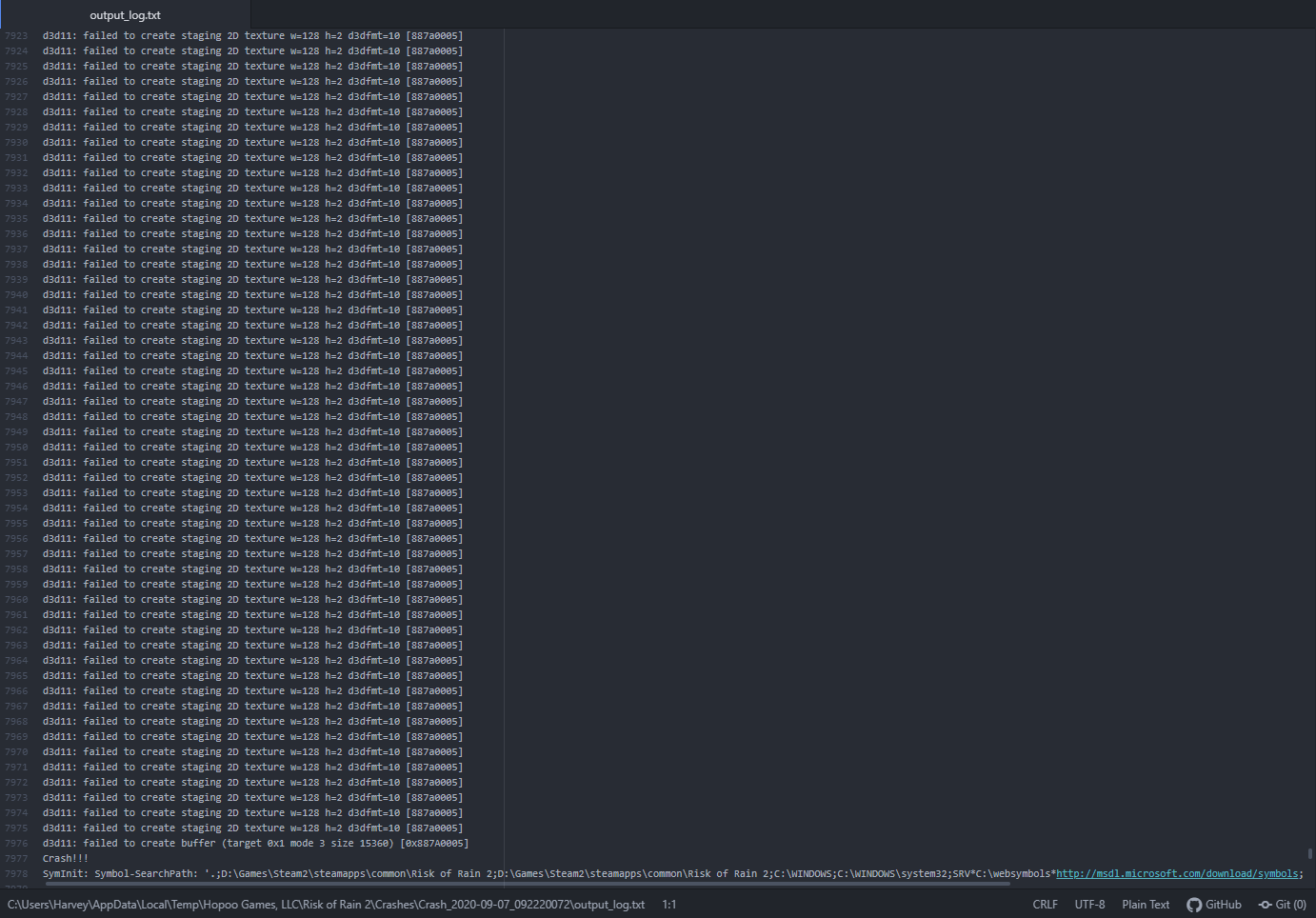
Seems like other people have been having this issue as well, possibly related to RTX Driver issues, but i've tried reinstalling the latest driver, and even rolling back to older versions (dumping the shader cache so it can be rebuilt, fresh install of the game, etc.) but nothing seems to fix it. Any way around it? https://i.imgur.com/OOyCxPl.png
 plucky imp
if you want to remove you mean then go to where saves are located and delete them, just make sure its the right one @tough cloud
C:\Program Files (x86)\Steam\userdata\X\632360\remote\UserProfiles
 hallow zinc
My cousin and I recently got this game and we really enjoy it, but we're having some extreme issues trying to play together. His internet isn't very good, but it shouldn't be so bad as to cause the issues it's currently causing. First and foremost, whoever isn't hosting can select their character but it won't show up on their own screen, only on the host. Secondly, when we are able to get past the character select lobby (which we haven't been able to this morning,) the non-host is always a minute or two behind. When they die, their character keeps shooting and doing things on the host's screen for minutes until they finally die.
We aren't using mods and his bandwidth is mediocre, good enough to play other games like CK3 or whatnot, but RoR2 is giving us these crazy issues. When the host drops in in the escape pod, the other player doesn't, and it often says in chat that they disconnect and reconnect before loading in. When the other person finally loads, they do so in spectator mode.
plucky imp
youre not the first person with this issue, i believe the only work around currently is to setup a dedicated server @hallow zinc
hallow zinc
We've tried revalidating, deactivating firewall, etc, and nothing thus far has worked. We're trying rn as I type and currently, this is the situation:
Understood. We'll look into that. Thank you
hallow zinc
So, neither of us are really tech-savvy enough to properly port-forward, and I'm having troubles understanding how to set up a dedicated server. How do we work around this issue?
plucky imp
@compact pewter sorry to bother you but you seem to be the person that knows about setting up servers.
hallow zinc
Anyone? Please? I've spent hours trying to get this to work now, and because of a bug (?) multiplayer is entirely unplayable.
compact pewter
what's up?
plucky imp
@hallow zinc doesnt lag as host but the other players do i suggested to set up a dedicated server but i dont personally know how and know you do/helped people with it before. @compact pewter
compact pewter
I'd follow the steam guide by hopooo but instead of the bat they mention use this bat and modify the path to where you want to install your server (current bat is broken from that guide)

How to Host, Join, and Configure a RoR2 Dedicated Server!...
tough cloud
No mods, me and a friend spawned in as Lumarians... how would that happen?
Like it said, nobody had any kind of mods
 unique tinsel
I built a multiplayer server through the community guide. The server is working at the beginning of the startup, but after a period of time, such as this one day later, it can't be connected. Here is the log file.
compact pewter
I would use a program like game server manager to automatically reboot your crashes/hung up server

Takes you through the process of setting up a Killing Floor 2 server with Game Server Manager which automates things & provides a host of useful tools & features to make running your server ea
this is a kf2 setup guide, just replace all kf2 with risk of rain 2 and you should be good to go
 strange pivot
Sorry if this has been posted, but under Settings > Video > Resolution there is a setting for the refresh rate (60, 100, 120, 144Hz) I have a 144Hz display, but whenever I set the refresh rate to something other than 60Hz, it simply goes back next session or even when go back to the settings again. Am I doing something wrong or is there something else I need to do?
 brisk dune
how do i delete game profiles?
compact pewter
they're located in the risk of rain appdata folder iirc
Sorry if this has been posted, but under Settings > Video > Resolution there is a setting for the refresh rate (60, 100, 120, 144Hz) I have a 144Hz display, but whenever I set the refresh rate to something other than 60Hz, it simply goes back next session or even when go back to the settings again. Am I doing something wrong or is there something else I need to do?
is your moniter actually set to 144 hz?
by default when you buy a higher than 60 hz moniter it's on 60 hz by default
you need to open up your graphics card software and change that
then try in game
brisk dune
they're located in the risk of rain appdata folder iirc
@compact pewter i cant found it :O
compact pewter
enable viewing of hidden files in file explorer to see the appdata folder
brisk dune
already found it thanks
 rancid sail
Idk why but i Started RoR2 in Offline and my Safefile was curupted and idk why i dont want to lose my Progress 😖
Pls Help
I got every Survivor, every Item accept the Monsunskins (i only had Huntress) and for Huntress all Quests done and 12 of 16 Artefacts
I dont wanna do that again from Zero 😖
compact pewter
restart your whole computer and try again
steam offline mode is dangerous, I've had the same thing where I've lost a save and it's not recoverable usually
best just to keep periodic save backups
rancid sail
Ok ill try it :/
Holy shit i love you 😖
It works they back to normal 😊
Tysm Mythical
130h saved
 wintry otter
is it legal that aureolate didnt drop a seed?
rancid sail
I would back it up somewhere just in case
@compact pewter
I already did it with the 2 Copies i did earlyer they got the curuption gone and work fine
compact pewter
noice
strange pivot
is your moniter actually set to 144 hz?
@compact pewter Yes, it's set to 144hz
I'll try again
compact pewter
I would just leave the framerate at unlimited
 lilac forge
hello when i try to start up the game on steam, it appears as if its loading then reverts back to its normal state and no game loads. ive tried uninstalling it and redownloading it already, so i dont know what else to do
strange pivot
@compact pewter I got it to work. Set the refresh in windows, then restarted. Thanks
 humble umbra
i don't understand why i can't redownload the game again even thou my pc does have the specs and ror is supported on windows 7
is there anything i can do?
cuz i have updated all my drivers and such
i don't know if it's a steam issue or not
it says invalid platform but i don't know what does that mean
plucky imp
@humble umbra try this https://support.steampowered.com/kb_article.php?ref=3134-TIAL-4638
Article "Clear download cache"
plucky imp
the only other thing i can suggest other than upgrading to 10 is to try reinstalling steam
invalid platform means its downloading for an os you dont have or it thinks you have.
humble umbra
but it doesn't make any sense
since windows 7 is supported it should tecnically work
compact pewter
Yeah but it's generally harder to get good tech support when you're using an out of date, no longer supported os, when people usually use windows 10 or linux
(no longer supported by microsoft)
humble umbra
dang
it's strange though, because before i resetted my pc (since it had a big problem and i was 1 week without it) the os was still windows 7 but i could run games like ror, yakuza 0 or destiny
compact pewter
Are you using 64 bit windows?
also did you ever solve the problem you were having before?
humble umbra
i think i'm using 64 bit
also did you ever solve the problem you were having before?
well the problem was a white screen of death that basically made me reset the principal hard disk
compact pewter
You could just have a corrupt hard drive
humble umbra
that's why i resetted it
compact pewter
there are 32 and 64 bit versions of that
humble umbra
32 bit
compact pewter
The game isn't supported on a 32 bit os
humble umbra
i don't think there's any way i can update 32 to 64 right?
compact pewter
no just a whole new os install
I reccomend moving to windows 10 while you're already doing it
but either way make sure you choose 64 bit
try using the windows media creation tool from microsoft
humble umbra
gotcha
 gleaming laurel
🚪
 tropic briar
still no fix for the 0:00 lobby connection bug
absolutely appalling, it's been a month
 unborn merlin
Is it a known bug for randomly fading to black, back to the menu in multiplayer?
tropic briar
no, you join and the entire menu is bugged, it shows 5 artifact menus on the right, you can't click anything, and the ready timer is at 0:00
it's pretty common, scroll up and I've found 9 or so screenshots of the same thing from different people
unborn merlin
Also, is there a good information resource for dedicated server configuration? I feel like the steam guide is very inadequate, only how to set one up, not how to actually configure one.
 mild atlas
 mighty creek
Anyone else have trouble picking up items sometimes when they're playing modded ror2? It happens maybe once or twice a run, but only when I am playing modded. I could enable them one by one to test it, but that would take a while as I've got a lot of mods pff.
 clear pecan
Hey guys, the game keeps crashing for me saying some unity error, any known fixes?
plucky imp
@mighty creek if you have sharesuite try disabling it. if not, just disable the mods that effect items in any way.
unique tinsel
My server can't recognize players' name correctly. Their names are displayed as [unknown] in lobby, and the names displayed in sharesuite mod are all "???" Does anyone know how to solve this?🙂
unique tinsel
I used the GSM, but it still doesn't work, because sometimes the server list shows that 4 / 4 players are in the game, but the game log shows that the players are disconnected. In fact, they are disconnected. So GSM won't restart the server, even if it crashes.
heres the logfile
 old crow
My server is up, all ports are open, still not showing in server list... So tired.
compact pewter
did you set up a static ip and forward the ports?
I used the GSM, but it still doesn't work, because sometimes the server list shows that 4 / 4 players are in the game, but the game log shows that the players are disconnected. In fact, they are disconnected. So GSM won't restart the server, even if it crashes.
@unique tinsel you need to set a port for gsm to check for the restart
if the game is closed then it will restart
it works for me (I am the one who suggested gsm here lol)
Either way I'm making a steam tutorial for risk of rain 2 servers going over the same stuff as official, plus automated restart, updates, and how to use mods on your server
it should be up sorta soon
 elfin edge
at random, sometime after an hour into my risk of rain 2 run, my pc just goes to a black screen with no sound with no warning. there is no consistent time when it happens, but if i get far into a run, it always does. does anybody know how to fix this? its really annoying and ruins all of my runs. also it is impossible to record because i have to restart my pc to get my computer to do anything again.
i have a pretty good computer and the pc doesnt seem to be getting super hot or anything
this has never happened with any other game
pls let me know if you have a solution
 broken silo
so I'm a dummy and accidently uploaded previous save history from my 2nd computer to Steam's cloud sync. Now, a lot of my progress / unlocks have been deleted. Any remedy for this? Or am I screwed
 empty kite
How do I edit the files of my game? I accidentally deleted my game files by running the game with mods
 haughty sable
So I'm trying to host a server, and I've been able to see the server appear on the server list yet none of my friends or even me can connect to it. I get the error "the prefab 'arenamissioncontroller' has multiple networkidentity components. There can only be one networkidentity on a prefab, and it must be on the root object. Attempt to send to not connected connection". During this my screen goes black like it's trying to join before it sends me back to the main menu. Any solutions?
compact pewter
did you set up a static ip and port forward?
because you'll almost always be able to see it
even if outgoing traffic isn't happening
old crow
did you set up a static ip and forward the ports?
@compact pewter the server is running on a dedicated server. It does not need any port forwarding. I finally managed to get my server working by copying some DLL from Steam Client to root directory of dedicated. So there is clearly something broken is RoR dedicated software. With a fresh install SteamWorks simply does not work
But atleast it works
compact pewter
If your server "does not need port forwarding" then you most likely have upnp automatic port forwarding on in your router. I know you say you needed that to run you're server. I never said you didn't, I just said that I didn't and most people don't. Not sure why this magically fixes something, if I had to guess there was a dependency you didn't have installed that most people did
also I was not answering you when I said that, I was answering the message directly above mine
old crow
also I was not answering you when I said that, I was answering the message directly above mine
@compact pewter oh okay, my bad 😄
compact pewter
Now that I think about it
that probably means your steamcmd or download of the server was done incorrectly
old crow
What I did is:
old crow
Installed steamcmd in C:\steamcmd and added that folder to my system's path, so other game can access it
compact pewter
No need to add it to your system path
old crow
then installed the game with app_update command from Steam (like I always used to do with other games)
compact pewter
You should check out the official guide
compact pewter
nothing wrong with that, but there's no need to add it to the system path afaik
I use it for many servers and see no point
old crow
If you don't, you need to puth the path of the executable steamcmd in every script you use
put*
So if one day you decide to change where steamcmd is installed, you break literally everything
old crow
Yeah symlinks works too
Nevermind, this is how my script install the game:
Nothing special here, I wonder how can I install it in a wrong way. Especially, when a lot of people are complaining about the same problem on Steam forum
compact pewter
"if I had to guess there was a dependency you didn't have installed that most people did"
old crow
Those are the files I needed to copy
compact pewter
yeah my server doesn't use those as I've said before
not sure why you need them tbh, but we actually have different bat files
old crow
I wonder which dependency, I installed all vcredist
that the game is installing client's side
I also have all those .NET 3.5 to 4.8
compact pewter
it could be something that wasn't added in when you install the server, occasionally needed dependencies can fall under the radar so some people won't have em while others will have them from other games
might matter, might not, but yours isn't set to validate the server
old crow
Validate does nothing special
it will just checksum all files to check if they match the version on steam servers
compact pewter
It's very helpful actually
old crow
yeah but it erase config files
compact pewter
autocheck for corruption is very nice for long running server and you should be using server.cfg which is user created and not installed by the server so it wouldn't be overwritten
there's other cfg but those work the same as above
compact pewter
I've had problems when I haven't used it for killing floor 2
and that game takes forever to update
old crow
Yeah, when there is a lot of small files and a lot of update in a short amount of time, sometime steam goes mad
By the way, thanks for your time 🙂
 low agate
im trying to host a server but this happened (doesn't fix it even if i try to restart the game, restart my pc or delete the files)
 stone jackal
Hi all. Is there anyone can help with configurating dedicated server?
haughty sable
Update on my troubleshooting: I can get my server to show up on the internet tab and the LAN tab, but at the moment I can only connect to the LAN tab. Should my sv_port value be different than 27015? And do I just change that value in the server.cfg file?
Is everyone's sv_port value 27015?
compact pewter
you will be able to connect locally, you need to setup a static ip and port forward the ports like I said before for people outside of your connection to play. Have you done this?
haughty sable
Hm, I think I need to setup static ip. When I check ipconfig/all, it is saying DHCP Enabled = Yes which I think means my ip is still dynamic and not static
 trim trench
No
DHCP is a auto-assign by your router to a local IP, DHCP does nothing for a external IP
haughty sable
Okay, I might need some help with static ip. I've gone to control panel -> network and internet -> network connections -> right clicked on the wifi -> opened properties of internet protocol version 4. Now it's telling me to enter ip address, subnet mask, default gateway, preferred and alternate DNS server. Is this the right path or do i sound crazy?
haughty sable
This seemed to be the correct way to have a static ip, but now I can't access my router's webpage with this new static ip. Not sure what to do
compact pewter
your router's webpage is the same after changing your ip
if I had to guess you set it up incorrectly
try finding some tutorials
but yeah that is the right path, just probably put a bad dns server in or somethin
haughty sable
Yeah I think that's what happened, looking up some tutorials now
haughty sable
Okay! Just set up static ip successfully and I can connect back to my router's website. Now do I just use 27016 and port it to my new static ip?
haughty sable
Wait I might've just done it, when entering the ports I did the port range to be 27015-27016 and that connected me on the internet tab of servers
 sage yew
Has anyone had issues like this when joining a lobby not being able to hit start or interact with any menus?
I've tried a lot of things but from experience, I can't join player hosted games that are x/4 but anything like x/8 upwards that I think are dedicated servers I am able to join so maybe its something to do with connection?
compact pewter
Wait I might've just done it, when entering the ports I did the port range to be 27015-27016 and that connected me on the internet tab of servers
@haughty sable the best way to test is to have someone not on your wifi connect, you should also change the steam port from 0 to something else and forward that to
0 can cause problems sometimes
haughty sable
@compact pewter Okay. I'm having a friend try in a bit to connect. Do I change the 0 value to anything specific? Just an open port to forward too?
sage yew
You guys are talking about port forwarding ye, would this be relevant for a fix?
compact pewter
That is what you would use to port forward
just make sure you set up a static ip first
sage yew
Any idea why the error though, the top range has to be same as bottom?
 random atlas
 narrow cave
Hello, I have a 3900x and RTX 3070 Super. On level 8+ Monsoon FPS drops to less than 40 sometimes, is this normal? On maxed settings.
narrow cave
cool ! Thanks
 abstract surge
Already got the 3070 
narrow cave
2070* Rofl
 indigo relic
yoo 2070 gang
haughty sable
Update on my server: my friend was able to join and we played a few stages with no problems. We then tried spawning stage boss, then it just kicked us back the main menu. When I check the log on console commands, i see "attempt to send to no connected connection" "timeout" did my server just go down for a second? We also had a blue portal spawned so idk what issues that might've had either
compact pewter
probably an error on your friend's wifi it seems
haughty sable
Why would it kick us both out of the game if it was my friend?
I think it might've been on my side for that to happen. Server might've lost connection for a second or something
 odd venture
Has anything been mentioned about potential vulkan/dx12 support for RoR2?
compact pewter
@haughty sable yeah are you connected via ethernet?
haughty sable
I am not, I'm using a wireless internet adapter by usb
compact pewter
so ethernet to usb?
if you're not wired to your router you can experience a lot of connection problems regarding servers
haughty sable
hmmm okay hopefully i can find a way to get it wired. That's good to know though, thank you.
 simple elbow
Dont think it would help. I use an ethernet cord directly from my router and me and my friend have great ping, yet we still experience lagspikes and disconections.
It might be the servers because we play just fine on other games.
compact pewter
An ethernet cord would definitely mitigate any connection issues given the error they have
also this person is hosting a server not just joining other servers or playing with friends via multiplayer
as in dedicated server
simple elbow
Oh, my bad. Just saw that he was having troubles that sounded like the ones me and my friend have been having for the past few days. Sorry again.
compact pewter
no need to be sorry lol, it's just a different situation
clear pecan
@compact pewter It's basically every run at the moment, unity error just happens and game crashes
compact pewter
Hey guys, the game keeps crashing for me saying some unity error, any known fixes?
@clear pecan what is the error?
clear pecan
I'll try and get it to crash and take a screen shot, it says "Unity error" and a random code before crashing
compact pewter
there should be a log somewhere in your install or in the appdata folder for the game with details
 safe quest
I think i know how to fix this
go to network reset
and then click reset
then restart computer
and it should work
 tiny abyss
game crashes as soon as i open it
ive verified game files multiple times and i still can't get it to work
 red magnet
My game crashes every run
i can't finish anything
mostly at the 40 min mark
crashes with this error message every time:
UnityPlayer.dll caused an Access Violation (0xc0000005)
in module UnityPlayer.dll at XXXXXXXXX.
 quaint pendant
hello guys, well my friend has a problem that appears this error when he is playing with me multipleyer, the error does not appear when he is the owner of the host. What can it be ?@crisp lotus https://media.discordapp.net/attachments/628009809614209076/753594700233179166/20200910_093556.jpg?width=887&height=499
 minor anvil
unless you include the crash log or stack trace of the error, the picture doesn't mean much.
there's a pinned message in #ror2-bug-reports-pc for where that's at
 alpine swift
I have been having issues with performance since the latest patch released. My FPS is uncapped but seems to only reach 30 max when the run gets close to the first loop, especially in co-op. After a while it becomes completely unplayable. I have tried adjusting the graphic settings down with no luck and ensured that there are no programs(other than discord and antivirus) running in the background. Is anyone else having this problem? @me
compact pewter
You could put an exception for the game files in your antivirus. Alot of antivirus like Avast and Mcaffee have a lot of false positives (all of them can though)
 cinder steeple
i need help hosting a dedicated server. ive gotten the portforward setup and server running but i cant join it and neither can anyone else. when trying to join, it says version differs from local to remote? any way to fix that?
im using shared items as a mod for it.
steady topaz
@cinder steeple unmodded clients or steambuild mods?
plucky imp
bepinex changes the game version number you need to be modded too
cinder steeple
but when i mod the game, the server browser becomes blank and nothing can be found, not even my own server
so how am i supposed to be modded and play when the game wont let me when its in the modded version.
how are people hosting modded servers that unmodded clients can join?
plucky imp
im not familiar with modded servers sorry but you can try this. https://thunderstore.io/package/frostycpu/UnmoddedVersion/

Thunderstore
Changes the version string to its unmodified counterpart, allowing you to play with unmodded clients.
make the server run that
im not sure how unmodded clients would work though since when my friend tried joining me with that it just kicked him.
also, the modding discord would be a better place for this. you can find it at the top of thunderstore's site
cinder steeple
well there is a whole bunch of modded servers that are dedicated that anyone can join that are using shared items
ill test the UV in a sec
see if that helps
plucky imp
dm'ed you the modding discord invite
cinder steeple
@plucky imp they where no help
but
i figured out how to disable ismodded completely with dnspy and use mods where ever
no need for dedicated server anymore lol
steady topaz
@cinder steeple Remove the line on how you did it. Do not share this info. Its forbidden to do what you did by devs.
But i guess its fine, if it isnt affecting other players. Make shure all your clients know that it is modded.
Also note that if you running host with a bunch of mods for not modded clients there likely will be accumulated desyc and other problems. It is recommended that host and clients have the same mods installed with same configs.
 empty gale
I have a question
why does Solus Probe appear as a mob?
 hollow vine
Is it common or a known issue for errors in multi-player on console? Or for a player to drop and then everyone else returns to the character select menu alone, then further removed to the main menu? Even when the person who originally dropped is not the host?
Seems me and my friends can rarely get beyond 30-40 minutes of game play. We're on ps4.
 wise scaffold
trying to get the TooManyFriends multiplayer mod to run but whenever I load the game up modded it gets stuck on a black screen during the intro cutscene. I've looked around for solutions to this, do any exist?
 fallow cypress
can i talk about modding issues here?
 inner valve
Is it common or a known issue for errors in multi-player on console? Or for a player to drop and then everyone else returns to the character select menu alone, then further removed to the main menu? Even when the person who originally dropped is not the host?
Seems me and my friends can rarely get beyond 30-40 minutes of game play. We're on ps4.
@hollow vine We are having the same issues too, but on PC, and the crash happens almost instantly, going to try verifying integrity game files and see if it fixes
 young shell
Anyone know why my game locks on 60hz when I have someting running on my second monitor? Ingame settings say the game is running on 144hz. This only happens in RoR2. It worked fine one time just after I updated my gpu drivers but after that it just went back to not working again.
 burnt siren
I’m trying to get ROR2 working on a school laptop - it’ll launch, stays black for a second, and closes. I never see anything about the title.
I can’t install Steam on the laptop, so that’s not an option. I took ROR2 from my common folder, did I do it wrong?
 pale smelt
Does anyone know a fix for this? : Two of my friend which play on the same Network can't play in any party in Risk of Rain, whenever we start a lobby they get dced
compact pewter
You need to port forward the game for your computers on the same wifi to play them on the same wifi
@pale smelt
 narrow kiln
So still no fixes to the multiplayer issues on pc? Literally only happens with me and two other people distance of service doesn't matter. Dedicated servers will work but that is a bigger headache thannit should ever have to be
Even after finally setting up a dedicated server, we can only seem to do it in Linux windows does not work us for whatever reason. We have to reset the server after every run. And if the run takes over 60 minutes there is once again horrific lag
 latent turtle
The game's been crashing on me within 30 seconds of starting a run for the last 4 days. Already tried un/reinstalling, running as admin, checking video drivers and antivirus. Running a Dell Inspiron laptop that's ~4 years old with NVidia card. Anyone else encountering this? It worked fine for the first 300 hours I put in, not sure why it's suddenly started crashing. XD
I've posted this issue in #ror2-bug-reports-pc, as well, but I wasn't sure whether this would be the more appropriate channel. I can attach crash dumps, the output log, or a screenshot if that would help.
compact pewter
Use the display driver uninstaller program then reinstall the graphics drivers meant for your specific gpu. I know you said you checked the drivers and it could literally be only this game giving you issues, but a clean install, checking for updates, or updating drivers is known to go wrong from time to time due to leftover files and other stuff. DDU program makes sure this is done better
plucky imp
@burnt siren you can't run the game without steam, that's why it closes.
ebon meteor
The game's been crashing on me within 30 seconds of starting a run for the last 4 days. Already tried un/reinstalling, running as admin, checking video drivers and antivirus. Running a Dell Inspiron laptop that's ~4 years old with NVidia card. Anyone else encountering this? It worked fine for the first 300 hours I put in, not sure why it's suddenly started crashing. XD
I've posted this issue in #ror2-bug-reports-pc, as well, but I wasn't sure whether this would be the more appropriate channel. I can attach crash dumps, the output log, or a screenshot if that would help.
@latent turtle Hey nocnoc, this is happening to me. The game is not running well and crashes within a few minutes or world change, but in Multiplayer I crash within 15 seconds
burnt siren
E
I finally managed to get ROR2 launching on the school computer
and I’ve hit another hurdle.
I need VC++ redistributable
which just cannot be installed on my computer, if I bypass the admin permissions needed to launch, there’s a second admin check on the install button
and there’s no portables :sadcat:
 hallow sinew
is there any failsafe to items falling off the map? a red item just fell off in Bulwark's ambry because the chest was too close to the edge
 leaden thunder
The prefab 'ArenaMissionController' has multiple NetworkIdentity components. There can only be one NetworkIdentity on a prefab, and it must be on the root object.```Having a lot of issues connecting to each other's lobbies. Often the other will straight up get rejected before joining the lobby, other times the joiner can't see his own selected character
and once in 20 years we can actually play but get disconnected while playing after like 10 minutes
We have everything portforwarded and firewalls turned off
latent turtle
@ebon meteor happens to me on single and multiplayer, regardless of character, artifacts, difficulty, etc. Always within 60 seconds of starting. Honestly considering factory-resetting my computer and seeing if that helps. 🤣
 frigid thistle
Despite having a high-end PC and low settings, I'm getting awful frame drops that make the game unplayable in multiplayer. My friend that I was playing with was not experiencing any issues.
 stuck cobalt
How to join the game ?
 cinder dawn
hey im kinda a pea brain and i would really like to get help to portforward and play ror1 online because most tutorials i found were really old or really unclear.
 light fiber
How to join the game ?
@๖̶̶̶ζ͜͡fatsealON9#2613 what platform you on?
 crisp tangle
Where can I send a crash report to be investigated? I've been having CTDs in multiplayer while hosting and joining other games, roughly 10-30 minutes into a game. I've done full reinstall of the game and DDU'd and reinstalled my GPU drivers.
 astral kite
My game crashes every run
i can't finish anything
mostly at the 40 min markcrashes with this error message every time:
UnityPlayer.dll caused an Access Violation (0xc0000005)
in module UnityPlayer.dll at XXXXXXXXX.
@red magnet
I have a very similar issue myself.
I personally cannot play this game without multiplayer. (Multiplayer so I can rejoin after the game crashes assuming my friends are still alive... ).
 drowsy dust
I cannot play risk of rain. My game crashes about 30 seconds after i leave the drop pod.
latent turtle
@drowsy dust sounds like we're having the same issue. I'll let you know if I find anything out!
drowsy dust
wait whats your graphics card
im using a 1024MB ATI AMD Mobility Radeon HD 5800 Series
maybe it has something to do with that?
latent turtle
I'm on GeForce GTX 960M, and it's never given me an issue before
drowsy dust
ok, thanks
latent turtle
@drowsy dust I filed a ticket with Gearbox (from the link in the pinned message). You might want to do the same if you haven't already. Figure a trend of people having the same issue will draw more attention than an isolated incident.
plucky imp
@drowsy dust It's your graphics card, it's under the minimum recommended and by a good amount, if your graphics arent already lowest with corpses off try that. could also try -force-d3d9 in launch option but idk if that will make a difference.
drowsy dust
i ran it with a 750 ti though
plucky imp
750 ti has 2gb vram yours has 1gb and the recommended card has 1.5
drowsy dust
oh
why did i run worse with 750 on lowest though
this cpu is a downgrade as well from old pc
but it runs risk of rain smoothly
plucky imp
uhh im not sure, i didnt problem when i had a 750 ti. the 750 ti should also be better than the amd you have.
but given the specs of the amd one and the fact that in the output_log theres a shader function the gpu doesnt support. I'd expect troubles with it.
drowsy dust
im genuinely not sure how this thing runs games better than my old pc
but i was getting 10 frames on it
plucky imp
that i can't say, you didnt mention if you are up to date so make sure your gpu has updated drivers.
drowsy dust
i updated drivers, and it didn't work
plucky imp
what your cpu
drowsy dust
Intel Core i7 740QM @ 1.73GHz
plucky imp
well, its not the greatest comparing to the recommended either but I'd still say its a gpu problem.
plucky imp
what was it
drowsy dust
thank you undead
plucky imp
the force dxd9 worked?
drowsy dust
think so
plucky imp
well thats good, yeah is 100% shaders since like i said earlier, it said in the output log your gpu didnt support a function it was trying to call. wasnt sure if dx9 would fix it.
odd though since your gpu is dx11
burnt siren
Is there any way to make ROR2 even more low spec friendly? Everything is as low as possible, including resolution.
astral kite
not really... What is your limiting resource, GPU? You really cant do much other than "Maybe" kill some CPU process
(Try out Stadia? Since RoR2 is heading there? )
 fresh lichen
I'm getting really bad frame drops (my game will freeze for 5-7 seconds). Any fix to this?
 timid bramble
i cant use my switch pro controller
every time i try to key bind it says "no gamepad detected" or something like that
 plush treeBOT
@timid bramble, We have two known solutions for the topic 'no gamepad binding'. Would you like to view them? (Y/N)
timid bramble
y
plush treeBOT
@timid bramble,
This issue occurs when Windows is reporting a gamepad, joystick, or other input device providing a non-neutral input. This is usually caused by:
- Having a gamepad, flight stick, HOTAS, pedal, racing wheel, or any other kind of non-keyboard/non-mouse input device plugged in. Simply unplug the device from your computer.
- Having vjoy installed. If you've ever tried to use a GameCube controller with your PC, you probably have it installed. Opening your computer's Device Manager window should allow you to disable or uninstall it.
timid bramble
vjoy was uninstalled a long time ago and the only things i have plugged in are my controller and mouse
this problem started months after i started using my controller seeemingly at random
ah nevermind it just started working somehow
latent turtle
@drowsy dust, this is probably a more extreme fix than is useful, but for unrelated reasons, I did a factory reset of my computer today and reinstalled windows and everything else, and now my RoR crashes have stopped!
 stoic wing
my game is crashing as soon as i launch it and shows a small window named Risk of Rain 2 - Unity 2018.4.16f1_e6e9ca02b32a
i can "fix it" by uninstalling steam and installing it again
but only for the first time i launch the game
after that the same crash happens
does anybody know anything about this? i was playing yesterday no problem
 tall lynx
Yo dude
Help
My game is going nuts with all these screen tearing
Never have happened before
For more info,please refer to the latest posted thread about the curse-or
 supple ledge
crisp tangle
supple ledge
crisp tangle
Anyone able to read crash output logs for ROR2 to figure out the cause of the crash, or is there a place I need to send it to?
 hoary rover
my game crashes on startup and i have tried updating my drivers, reinstalling my game, viewing integrity, running in compatibility mode, going on steam in administrator and it doesn't work
compact pewter
use ddu then install driver specific drivers from scatch
tall lynx
Anyone able to read crash output logs for ROR2 to figure out the cause of the crash, or is there a place I need to send it to?
The unity crash?
 formal flame
Occasionally my game becomes very stuttery with the only fix being exiting out
happens with or without mods
 ember haven
I'm also having seemingly random crashes after about an hour of playing the game. I have an i7 9700kf, rx580, and 16 gb of ram if that helps. Any help would be appreciated
Not sure if you need the error log too so here it is
crisp tangle
@tall lynx Yeah the crash dump files generated by ROR2
 storm falcon
@crisp tangle I sent my crash dump files and output logs to contact@hopoogames.com It's been sort of back and forth with some troubleshooting, so far I haven't been able to find whatever is the thing that's causing the crash tho buuut (don't know if it's placebo) I kinda have gotten a bit more stable runs.
Might want to check out the gearbox support link that's in the pinned comments too.
 heavy pumice
So my game keeps freezing up for 1-5 seconds randomly every 1-2 minutes, anyone have any tips to fix it?
heavy pumice
I should mention im on pc
crisp tangle
I sent my report to the hopoogames email, hopefully they can give me some information on the nature of the crash.
 cinder wedge
yo i downloaded some mods but my friends cant play with me cuz they cant run mods (low end pc) and im trying to uninstall my my mods but idk how can ayone help
like i uninstalled from the ror2 folder and my pc
but the scripts thing still pops up when i load in
 swift flame
anyone have an issue with input lag on their mouse when in game? Even in the menu it doesn't feel smooth. tried lowering all my settings and it still happens. Would love any and all help. Thanks!
steady topaz
@cinder wedge Wipe this folder, check the integrity of files with steam (this will redownload the game back)
C:\Program Files (x86)\Steam\steamapps\common\Risk of Rain 2
Never ever use manual instalation of mods again. Use r2modman mod manager instead. Refer to this video, its super easy: https://youtu.be/MTQ-tbVU8-o
@swift flame check on framerate with steam overlay fps counter. You will find it in your steam settings.
If your framerate is fine you need to lower your mouse polling factor. If you dont know what that is and never changed it - update your mouse software.
 strange pier
Multiplayer doesn't seem to be working for me and my friend
swift flame
@steady topaz Thank you!!
 fallow oriole
Hello, I'm having an issue with my audio that keeps stuttering. I looked up online for a fix, however, since I play on linux I was not able to find how to disable spatial sound. Additionally my nvidia settings does not seem to have the options as described on the common fix tutorials. how can I fix it?
 valid crag
will there ever be cross platform play?
 hardy oar
I set my settings lower often but they automatically seem to reset to their default after a short amount of time, the screen size and refresh rate especially
please help, the game gets really laggy later on when more enemies start spawning and I'm hoping to remedy that
cinder wedge
thank you goo
 north plaza
dedicated server for linux?
 unborn herald
having issues when i try and join for multiplayer, any fix for this?
minor anvil
would help to describe your issue
 marsh gyro
@steady topaz You tried to help me out with an issue of my PC shutting off randomly while playing this game as if someone had pulled the cord
Well it happened on another game so I dug into the issue a little further and apparently that's a known issue with my GPU (Vega 64). I know you mentioned someone else had that issue in the past and we concluded that they were amd and that the issue may be someone around that.
If you remember this person, could you ask them what GPU they have? I may have a solution for them if we have the same GPU
 hoary current
howdy folks, save file corrupted. I have done no modding or anything, only one profile/xml file, first time this has happened. no idea how, no crashes or anything. any ideas?
Just checked out the xml file, it's totally blank. lol. what is happening
 astral lily
on switch whenever I go into local co op it disconnects my switch from wifi, and we can't play without wifi yet the game turns it off when we go into multiplayer, why??
if I try turning the wifi back on it just comes up with "unable to proceed while the software is using wireless communication"
 wicked flame
yo i dont really know where to ask but my 262 hour profile just got corrupted and id be very appriciative if anyone could help me or atleast point me towards someone who could or somewhere where i can get the help i need, thank you
plucky imp
@wicked flame First check if your profile duplicated, on the main menu click your name at the top right.
wicked flame
it isduplicated
plucky imp
@wicked flame select the other one it should have your progress
wicked flame
it does not
well if i were to not have a duplicate what would be the steps i have to do?
plucky imp
i'll dm
 naive ocean
Has anyone figured out any of the unity crash issues, seems like no mater what i do my game crashes to a unity error
 neon narwhal
i just bought the game, played for 4 hours, and everything got deleted, please help
naive ocean
@neon narwhal look at the pinned messages, i think there is a fix for that in there
 flat forum
hello, just bought the game and crashing on startup, drivers up to date and verified game files, any helps?
damn i guess not
 outer ermine
Hi, i will start my own dedictated ROR2 server.
I use this following command to run it :
docker run -p 27015:27015/udp -e R2_SV_PORT=25000 -e R2_HEARTBEAT=1 R2_HOSTNAME='FR VENEZ ICI' avivace/ror2server:latest
But i cant see my server in the ingame server list
Anyone has solution ?
 hard lake
Hea, I wanted to play some with the share suite mod but I am having trouble getting unmodded to join
does anyone know how to do that?
I know its possible, I was in a game not long ago
minor anvil
@outer ermine can you manually connect to the server through the ingame console?
CTRL + ALT + ` to open, and connect "<SERVER_IP>:27015";
if you're using a kitematic docker container, be sure to check the settings for the container in kitematic
also...it probably doesn't like that you're running it on one port and exposing another as the server "27015:27015/udp -e R2_SV_PORT=25000"
you likely don't need to have R2_SV_PORT if you're only planning on running a single instance, but you should try setting that to the same port you're running the server on
 willow crane
Ik this is ror1 related, but is the first game capped at 60 fps?
 steel pecan
Hey, I'm getting this error when I try to connect to my dedicated server via the in game console:
The prefab 'ArenaMissionController' has multiple NetworkIdentity components. There can only be one NetworkIdentity on a prefab, and it must be on the root object.
I checked and the port I chose is forwarded correctly
I also get a ton of errors about shaders and stuff when I start the server
 ember thicket
 serene glade
Me and my friend just bought the game today and we are unable to join the same session. We can party up under multiplayer, but whenever one of us launches the game to the character select screen, it gives the other a black screen for several seconds then boots to the main menu. Help would be appreciated, thanks.
minor anvil
You both need to join the "access url" (the internet facing address) not the docker url and port. Docker's ingress is automatically assigned addresses by an internal "bridge network".
By Default, the main address for Docker containers is "172.17. 0.0" with the ports varying for the individual containers.
The RoR server's ports for the container by default are like "32773" or "27015"?
So your host address could be "172.17.0.0:27015"
And your guest internet facing would be "your.internet.ip:27015"
if you want to check if docker's forwarding correctly, you can enter docker ps into your console, should give you a list of all the containers and their status, including ports
should look something like https://i.imgur.com/loyCJuE.png

be sure it's forwarding "->" ports.
You cannot join with localhost, must use the ip published by Docker. In Docker, the ingress network is created automatically, and addresses assigned, when the service is started up.
should probably just do it this way, which seems to work https://steamcommunity.com/sharedfiles/filedetails/?id=1938378081
How to Host, Join, and Configure a RoR2 Dedicated Server!...
outer ermine
should look something like https://i.imgur.com/loyCJuE.png
@minor anvil Which command you use for this result ?
minor anvil
docker ps
minor anvil
The one they list in the guide
I didn't do anything out of the ordinary
If you're not comfortable faffing around with console commands, you can use Kitematic to run the container
Has a friendly GUI
outer ermine
I'm completly lost 😓
I have been read all guide and github tutorial to launch my own server but when i launch my server. He cannot be on game serverlist
minor anvil
The in-game server list is a bit broken anyway
If you want it to show up in the steam server list you'll probably have to use the steam guide I posted
outer ermine
@minor anvil
You can confirm, my command is correct :
docker run -p 27015:27015/udp -e R2_HOSTNAME='FR 1 SERVEUR' -e R2_HEARTBEAT=1 -p 27016:27016/udp avivace/ror2server:latest
minor anvil
I can't test for myself, but that seems to follow what the guide lays out
keep in mind that you should use the server browser in steam, not the ingame one, since the filters seem to break it sometimes
Since it's Docker, it won't show up as a LAN connection, it'll be in the Internet tab
you can manually try and join it through the console
connect "172.17.0.0:27015"; in your instance
could be 172.17.0.1 , but i'd imagine docker would connect you either way
 orchid flame
So actually you are banned of the room if you are joining for the third time.
I got a lot of lags so i got kicked three time due to it. Now i can't join the room because apparently you can't join a room after being kicked three time.
 brave hare
Hi! The game works fine, but it go on 0.1 fps when I just click on "Multiplayer" in the main menu. After 30 sec I see "create lobby" and "join lobby" down left. Can someone help me please? I can stream it if necessary.
 night sage
Hey, got a question. I'm playing on the Switch version and I don't get the boss portal at stage 5, 10 so on... I only get the normal portal without the stone henge around it. I can't beat the boss, just loop my run. Any idea how to fix it?
 vast furnace
thats called the primordial teleporter
by default it will take you to the boss
if you interact with the edge before starting it it will instead loop you
if you the blue portal instead on that stage then you will go to newt's and then loop, regardless of what you set the tp to
this would probably be a better conversation for #ror2-game-questions though if I am understanding your issue right
night sage
No, i don't even get this kind of Teleporter, I don't have the stone heng, it's the normal Teleporter as on any other stage
This happened in every run I did, I'm guessing it's a bug
I'm only able to loop my run, and I'm not able to get to the boss because the stone henge is missing entirely, hope that clears things up
vast furnace
oh yeah I misread lol
so many people get confused by the primoradial tp
that does sound like an issue
night sage
Yeah I get that haha, but I already asked a friend who is pretty informed about ror2 and he said I should write u guys here, I'll try to reinstall it later and see if the issue still exists, do u know if my savestates will be deleted then? I'm not that far into the game but it would be sad, I'm playing on the Switch:)
vast furnace
I'd be careful with reinstalling yeah
maybe just wait it out and see if they patch it or something
but im no expert lol
night sage
Okay, is there any way to contact the devs about this issue? It's a pretty gamebreaking bug I think
vast furnace
switch bugs would go in #ror2-bug-reports-console I think
and maybe try to take a picture of the normal tp on stage 5
night sage
I'll do that, thank you!
steel pecan
@minor anvil was that message for me and Samuel or was it for Kuriann
minor anvil
You guys. At this point, I'd suggest either using the integrated steam server method or using Kitematic as a GUI for Docker, since it just gives you the access url right there next to the container
Also allows you to change and set additional environment parameters with the gui
You also don't really need to worry about the GPU and shader errors, since the server doesn't use or care about them.
 high orbit
Me and my friend just bought the game today and we are unable to join the same session. We can party up under multiplayer, but whenever one of us launches the game to the character select screen, it gives the other a black screen for several seconds then boots to the main menu. Help would be appreciated, thanks.
@serene glade
Hey, seems like we are having the same problem with my friend. Unfortunately we're playing on Xbox and we can't seem to find a way to get it to work. I've scoured the internet searching for people experiencing similar issues on consoles but it seems like we're the only ones in this situation, any help?
 kindred mango
I'm not sure if this is a common issue, but I'm trying to play with somebody on PS4 and nothing is working. Invitations work fine, and we both get to the "Joining lobby" screen, and we then either get booted back to the MM or nothing happens at all. We can see each others' names in the top right, but otherwise, nothing shows that we're connected.
 brazen cairn
@serene glade
Hey, seems like we are having the same problem with my friend. Unfortunately we're playing on Xbox and we can't seem to find a way to get it to work. I've scoured the internet searching for people experiencing similar issues on consoles but it seems like we're the only ones in this situation, any help?
@high orbit
Hey I'm the said friend. We both have the same routers and have forwarded the same port to our Xboxs which happens to be the by-default port in the Xbox settings.
We got it working for a few games last week but now it doesn't work anymore and yet we haven't changed anything to our setup. Our public IP adresses are the same, so are our Xboxs local IPs and of course the console port.
Any help is appreciated, thanks :)
By "same routers" I mean same brand, similar model and same IAP
I'm not sure if this is a common issue, but I'm trying to play with somebody on PS4 and nothing is working. Invitations work fine, and we both get to the "Joining lobby" screen, and we then either get booted back to the MM or nothing happens at all. We can see each others' names in the top right, but otherwise, nothing shows that we're connected.
@kindred mango
You most likely need to tweak your routers settings by forwarding ports to your console. This might help: https://portforward.com/risk-of-rain-2/
kindred mango
okay, thank you! i'll try it!
steel pecan
@minor anvil I am using that tutorial you linked and I downloaded it with SteamCMD, haven't touched any docker stuff at all; would that be worth looking into if I can't get the steam one to work?
compact pewter
they're identical
minor anvil
Docker's just used to be the container for the server
compact pewter
steam title version and steamcmd version I mean
minor anvil
If Debian systems or command line work doesn't worry you, its a fun and more flexible approach
You can always use Kitematic to put a GUI to all the Docker work, removing the need to even use a cli
Use w/e works for you, but I've seen people have less trouble with the steam tool
I use docker because I already have it running 24/7 for other projects
 hardy hawk
Risk of Rain 2 lowers the volume of my whole Windows whenever I open the game. It persists even if I close the game. This only happens if i connect my headset through the dualshock 4 which is connected to my pc using a micro usb cable. Audio returns to normal if I just connect it to the rear panel. Any possible fix? I'm using my headset as a mic so I need to connect it to the controller.
plucky imp
@night sage Switch/consoles aren't on the same updates as pc yet. You don't have 1.0 patch so you can only loop till consoles get the update.
compact pewter
@hardy hawk just get an auxiliary cable extender so you can use it with your back panel
cost like $3
 upbeat echo
does anyone know why I'm getting so much lag in private matches with a friend in steam? its not my wifi, i already checked that, i have been playing with my friend for a few months and now we basically can't, the host can play well, but the other person literally cannot move, but for some reason we can join public matches and everything is just fine, can someone help me?
minor anvil
Have you tried having a different friend (or even yourself) host? If they've poor upload speed, that'd degrade everything outside of the host's experience
 strange narwhal
im getting 16 fps in the menu rn on a 2080ti and a i79700k, any idea why?
compact pewter
it probably is your wifi
try port forwarding for the game, open nat, direct connection, etc.... @upbeat echo
the host should be the first to try this, but alternatively one of you could make a custom server and just use that
which would still need port forwarding btw
 viscid echo
@selebi#9734 I have the exact same crash on startup issue. Lots of people are but no one's giving concrete answers how to fix it
 vast hamlet
trying to update and download mods on r2modman, and they wont update or download (always get stuck at some percent), any idea how to fix it?
compact pewter
trying to update and download mods on r2modman, and they wont update or download (always get stuck at some percent), any idea how to fix it?
@vast hamlet asking in the ror2 modding discord is probably your best bet
I tried to link it here but it deleted the message so I guess that's a no go
serene glade
Update to me and my friends case if anybody is wondering: Closing the Discord application seemed to fix our connectivity problems
Tested it many times and it never worked with Discord and almost always worked without Discord running
brazen cairn
@high orbit
Hey I'm the said friend. We both have the same routers and have forwarded the same port to our Xboxs which happens to be the by-default port in the Xbox settings.
We got it working for a few games last week but now it doesn't work anymore and yet we haven't changed anything to our setup. Our public IP adresses are the same, so are our Xboxs local IPs and of course the console port.
Any help is appreciated, thanks :)
@brazen cairn
Update: it works again without us having to change anything to our setups 🤷🏻♂️
 winged folio
Hey does this game have performance issues when using Ryzen?
Doesn't matter what settings I use, the games performance is poop after a few waves.
compact pewter
just a problem with how the game works
try using the mod stutterstunter
or the mod qhere you can leave and then continue a run
outer ermine
Hi, what's the portforwarding list (execpt SV_PORT) to run a risk of rain server ?
outer ermine
@minor anvil ?
outer ermine
@minor anvil Thx 👌
 lament shore
Hi, I'm having a problem where on PS4 I'm unable to connect to any of my friends, is there a way to fix this?
quaint pendant
hi guys I wanted to take a question: how do I open a server with more than 4 players? for example when you are looking for a server in Risk of rain, servers with more than 10 players
minor anvil
you edit the server configuration file to be more than 4 players
quaint pendant
mind explaining how I do it?
minor anvil
You using the steam dedicated server or the docker?
both of them have a configuration file in their home directories that you cann edit
should have a variable called R2_PLAYERS that you can up to w/e number you want
minor anvil
no, you should already have a configuration file
should be called "server.cfg"
How to Host, Join, and Configure a RoR2 Dedicated Server!...
for the steam dedicated server, the variable's called "sv_maxplayers" apparently
also, apparently the steam install doesn't have a server config file before it starts, so you'll have to make one
There's a section in the guide for doing exactly that, so just follow that
quaint pendant
ok thanks a lot for the help
 sour granite
For some reason, Risk of Rain 2 cannot detect any input from my keyboards. I have checked my drivers, I have made sure that other games can detect it, I've uninstalled/reinstalled and I've verified the integrity of the game files. Nothing has worked. Anybody got ideas why this isn't working? (please ping me in your response if you know anything about this issue)
 shell widget
Good afternoon folks. I just got this game and am trying to figure out how multiplayer works. I created a lobby and invited a friend. With two people in the lobby I then joined a public game, but only I joined. My friend stayed in the lobby not knowing I joined a game. And then I tried to quit the game which took me back to main menu and out of the lobby altogether. Am I just not understanding how these menus work?
Once in a public game the only options to leave are back to main menu or quit to desktop? I don't seem to be able to go back to server select or to a lobby
orchid flame
How do i enable this teleporter? I could sound very dumb.
 spare bane
There's a 3x3 grid nearby the teleporter
Fill that in with a code then use the computer below the grid to activate the portal
viscid echo
It's for unlocking artifacts.
 coral monolith
Any linux users been having issues starting ROR2 within the last week? Friend and I tried earlier but get an error suggesting an update issue, yet it was running fine yesterday. Fixed mine witha reboot but no such luck on the other end.
SPECIFICALLY says we're missing an executible file, but said file defnitely exists within the specified path. Wondering if it's a pointer issue or some shit
compact pewter
probably be more help if you post the exact error or a picture of it here
 normal iron
hey my dedicated server doesn't seem to be appearing on the server list but the ports are forwarded
coral monolith
Exact error text: "An error occurred while updating Risk of Rain 2 (missing executable) : /home/... /Steam/steamapps/common/Risk of Rain 2/Risk of Rain 2.exe"
I'm guessing it's something silly that a journeyman like myself can't yet grasp. I'll be keeping at it and post whatever solution I find, silly or otherwise.
 oblique fiber
Yo can I get any help if I accidently deleted my profile? Thanks to steam overlay triggering the profile selector
 knotty abyss
what's the default huntress dash speed?
i broke the game and cant fix it
i think it was 5f, but even now it doesnt end
vast furnace
like blink?
steady topaz
@knotty abyss there is many places where you can chage constants. Its might be speed multiplyer (One of many) or exact skill parameter.
Can you give the exact name?
knotty abyss
this one
steady topaz
@knotty abyss
public float duration = 0.3f;
public float speedCoefficient = 25f;
idk why, but sometimes discord on this particular channel cant handle text markdown.
steady topaz
Shure, delete the pic, we're not allowed to share dlls of the game on this discord server.
knotty abyss
oh ok
knotty abyss
@knotty abyss
public float duration = 0.3f;
public float speedCoefficient = 25f;
@steady topaz i put it into dll and it didnt work
dash is still infinite
ill reinstall the game
steady topaz
@knotty abyss Likely you changed something else too. You can delete the file and check on integrity of the game files with steam.
knotty abyss
already
it worked
idk how do i make the dash longer
cuz it instantly becomes infinite
even at 0.4f
steady topaz
I guess you better to ask on modded discord server for dirrections on this.
 autumn bobcat
ok so i have been playing ror2 for mabye 6 months and ever since i started my cursor has been reallllllly laggy and i was wondering if there is anything i can do to help this
steady topaz
@autumn bobcat Check on your framerate with steam overlay.
If you see framedrops while you move your mouse - reduce the polling factor for your mouse. If you never increased it or do not know what it is - update your mouse software.
autumn bobcat
ok
ok so uh i forgot to mention that its not only the moouse causes the lag but it just all lags in general
@steady topaz
steady topaz
Well, you should 1st identify if its performance issue or not. Look at the fps counter, if it drops below 60 - those are performance problems.
If it drops only if you move the mouse - that is polling rate beeing too high for the game.
For performance problems you need to check your pc specs if they fit for the requirements of the game. There is some unsolved cases where beefy pc cant run the game with decent fps no matter the settings.
 inner anvil
wait how can I edit dlls directly? didn't know I could tbh
compact pewter
Exact error text: "An error occurred while updating Risk of Rain 2 (missing executable) : /home/... /Steam/steamapps/common/Risk of Rain 2/Risk of Rain 2.exe"
I'm guessing it's something silly that a journeyman like myself can't yet grasp. I'll be keeping at it and post whatever solution I find, silly or otherwise.
@coral monolith are you absolutely sure you're looking at the right file path?
also do you have permissions set to be able to read/write to the directory?
coral monolith
@coral monolith are you absolutely sure you're looking at the right file path?
@compact pewter I'll double check, but yes. I definitely have that set on my machine but I'll do that as well when I head over for tech support of my own. That's a valid call.
viscid echo
My game was having a Unity crash a few days ago, reinstalled windows and a bunch of other things, and got ROR2 working again but tonight it crashed again 😫
viscid echo
My log file has loooots of texture issues, it look like
viscid echo
Okay I fixed it. For anyone having some issues with unity crash on startup, just try a driver rollback. I have the latest drivers, and the version before them, but I still kept crashing
I rolled back drivers to a few months back, when I definitely was playing the game fine, and now I can play it fine again
knotty abyss
wait how can I edit dlls directly? didn't know I could tbh
@inner anvil no u cant. Forget what i posted
And yeah @steady topaz thanks a lot, now i can finally play huntress with triple long dash
 frigid crescent
Hey, so I've being play RoR2 since beta, and the game was runnig normally, but than, I upgraded my Processor (I3 5000 to I7 9000) And then it started crashing. The game would freeze and after 30 seconds it would give me a blue screen. I thougt it was my GPU over heating, so I just Bought a new graphics card. The game still crashes, and this is very unfortunate since is my favorite game to play. I really hope to find a solution here, Since I resarch all about it, and I can never find a solution. (My drive is on the latest update, I meet all the requiriments to play the game, I have plenty of memory and for some reason RoR2 is the only game that this happens) Thank you
steady topaz
@frigid crescent there is a known issue with XMP memory profile. For some unknown reason game doesnt like when XMP profile set on 1 or 2. Try to disable it from your BIOS. You might want to google how and what XMP is.
frigid crescent
@steady topaz Thank you so much, I will update you!
 flint stratus
Me and a friend are having a very specific issue that we have already posted to reddit to try and get some feedback but haven't got any responses. We were redirected here by the risk of rain modding discord. This is the link to our problem. https://www.reddit.com/r/riskofrain/comments/izk152/lobby_broken_when_connecting_to_friend/
reddit
1 vote and 0 comments so far on Reddit
steady topaz
 tidal agate
how do reconnect?
 hasty crystal
Hello, the game always crashes about 1 min in if i run the game at 120 or 144hz ( as my monitor is set)
hasty crystal
if i cap it at 120 or 144 fps**
plucky imp
@tidal agate Close it and reopen, Thunderstore api goes down sometimes so you maybe have to wait a bit.
steady topaz
@hasty crystal try older drivers. Its impossible to figure out why this crash occurs judging only by this error.log.
Drop output log, error and crash here, devs might figure it out.
C:\Users\marcus\AppData\Local\Temp\Hopoo Games, LLC\Risk of Rain 2\Crashes
viscid echo
Older drives worked for me so it's definitely an option, despite the fact the opposite is said by nearly everyone
steady topaz
@orchid flame installed mods manually?
@orchid flame Wipe C:\Program Files (x86)\Steam\steamapps\common\Risk of Rain 2 folder entirely.
Check of interity of game files with steam. It will download those files back.
Simply by uninstalling the game - it wont delete modfiles.
Then you go to https://thunderstore.io/package/ebkr/r2modman/ and download it. Install it and run.
Refer to this video on how to use it: https://youtu.be/MTQ-tbVU8-o


The old instruction video had issues with installing so i made a new one!
have fun!
 noble peak
so ever since 1.0 or the game realease the game barely runs on my pc. before then it was 100 percent fine running at 60fps with medium graphics but 1.0 makes it so even at the miniumum graphics i still have massive lag
could anyone know whats causing this?
my gpu is a NVIDIA Geforce GTX 1050
steady topaz
@noble peak not a laptop?
Well, i am going to sleep now. Dont think i could help in this case. But if is a laptop check under power settings that your pc isnt throttled down when its unplugged from the power. Some people have reported that for some unclear reason they had cpu throttled down to 5% max usage.
And in general:
Newer drivers (Or older, if its already on uptodate version)
Check thermal readings, if you capped at 80 degree c - that's thermal throttling, you need to clean the fans and maybe reapply new thermalinterfaces.
Check that you have your power settings in nvidia control panel set to performance for your gpu.
Disable vsync from the game and cap the game to 60fps with console ctrl+alt+` command fps_max 60.
It might be related to CPU usage, check that your cpu running on stable and decent core speed with cpu-z program.
viscid echo
@noble peak disable your g-force overlay
 thin dragon
Anyone know how to fix my game, whenever i launch it it crashes after a couple of seconds
viscid echo
Black screen with an annoying beeping audio loop, then later you get a unity crash error?
 remote valve
My game has been crashing a lot lately with a Unity error, seemingly at random. Anyone know what the deal is
 abstract pagoda
Anyone knows how to fix the multiplayer issue?
As soon as i accept the invite from my friend i land in the character selection but i cant choose my character. FYI i already tried verifying my file integrity and i also checked my firewall settings
 humble crescent
what Mods cannot play with non-mods? (i played with a guy with mods, and i wasnt modded yet)
plucky imp
@humble crescent Technically, all mods with that mod that allows you to play with unmodded clients but not all mods will work, only client side mods will work if they aren't host and if they are host it will cause problems with other players depending on the mods they have.
humble crescent
@plucky imp what mod is it?
that lets you play with unmodded
nermind i found it lmao
 soft sapphire
Does anyone else have ROR2DS lock up their server?
I try to remote in with Parsec and it stays locked, then I have to connect with Pulseway to Ctrl Alt Delete the server to unfreeze it, when that happens tho the current run crashes the ROR2 server. Any ideas on why that is?
 grizzled shuttle
Can someone please tell me when 1.0 is being released on xbox? I know it's probably out of the developer's hands at this point. But I sincerely am getting a little bored out here.
plucky imp
@grizzled shuttle Fall is all we know
grizzled shuttle
Thank you @plucky imp
I will stay patient. Can't wait to finally fight Mithrix!
 fast cargo
Risk of rain 2 was running fine at a good 60-80 FPS a day ago, now the main menu alone has an FPS of like 10
Specs:
GeForce Gtx 1010
6 Intel i5-9300H CPU 2.40ghz cpus
Stl1000lx015-1u7172
I’m pretty new to computer specs so tell me if that info helps
On a laptop btw
inner anvil
maybe you could dust it off inside, there's a lot of guides on youtube for that
fast cargo
Idk I was getting like 60 FPS yesterday and it was fine but thanks for the tip I’ll try it
fast cargo
+cleaning a pc internally is extremely intimidating
fast cargo
None of my other games seem affected
steady topaz
@fast cargo Ror2 is very depended on single core cpu performance. If there is any throttling involved, thermal or power ones - cpu speed goes down and this slows down whole performance.
You need to check if your game is fine when laptop's charger is plugged in.
Also check for temperatures, if gpu/cpu (ushually thermal interfaces are connected into single unit) stay around 80 degree C. That indicates of thermal throttling and you need to clean the cooling unit from dust and fur.
remote valve
Game is constantly crashing with a unity error, what's going on? No other game I play crashes like this. I literally can't even play anymore
 lunar geyser
My game crashes on launch with the unity error, i updated my driver recently and tried running as admin, etc.
inner anvil
maybe downgrade your nvidia driver (if you have a GeForce card) to previous version?
 tough pendant
Hello. Im trying to set up a dedicated server and i keep getting a "Warning: wrong connectionId in received user packet" error. I have my ports forwarded, and had it working a little bit ago. Was able to connect properly. Had to reboot the server and now it doesnt show up in the Steam server browser. If i'm not logged into my Steam account that I use to play the game, it gives me this error. I can't play the game at the same time as the server is running due to this, which defeats the purpose. Can I run the dedicated server without having to log in or am i going to need to buy the game again to have another instance?
tough pendant
Nevermind, i think i figured it out. Wasnt running as an administrator somehow....
 rough dew
Hey, I got a problem, i bought the day yesterday and it played perfectly with almost all settings maxed, but today I get like 20 fps with everything on low settings, tried running Steam & RoR in administrator, didn't change anything, it's running on the good GPU I don't know what to do
rough dew
I tried a rollback to my old nvidia drivers, it's a little bit better but still not great
plucky imp
@rough dew if you have any overclocks (including XMP Profile) try disabling them.
rough dew
@rough dew if you have any overclocks (including XMP Profile) try disabling them.
@plucky imp I don't.
 ionic kelp
I've been playing RoR2 on my PS4 for a little while now, love this game by the way, but there is a couple issues I'm having. One of which that pops into my head and is really frustrating me, kinda discouraging too, if I'm being completely honest. It's when I'm trying to unlock MUL-T's power saw ability. I know what I have to do and have tried several different ways more than a dozen times to do it but nothing seems to work. My most recent attempt was just to load myself up with defense items to keep me alive, getting the Imp Overlord down to about 20% health, then hitting it with the Preon Accumulator for the final blow, at point blank range no less so I wouldn't miss, and killed it. I know I hit it, but still nothing. Is there something I'm missing? Is it a bug? I don't know. If anyone can help, that would be much appreciated. Any hints or information would be great!
Thank you in advance.
 vivid vortex
I am having problems on PC. Every time I try to play multiplayer I get kicked out after 5 mins or so of playing I get kicked and get a message saying "Steamworks Authentication failed or was revoked" I haven't had this problem with any of the other games I have been playing and I have already done what steam has recommended. If you know a way to help me it would be much appreciated.
 dense wasp
@ionic kelp power-saw unlock is broken and unobtainable on console, this is being fixed on 1.0 for console.
ionic kelp
@dense wasp any idea when that update might be coming out?
dense wasp
fall.
ionic kelp
Thanks
 supple narwhal
this always seems to happen where these "brambles" only pop into existence once they're in front of me and mess up me swinging around as loader. what graphics setting should I increase to make these more visible?
 analog sand
Hi all, I'm trying to mod the game and have my friends join my lobby but it's not working. Do they have to install the same mods too? I've been joining modded multiplayer lobbies as vanilla and it works, but this isn't working...
plucky imp
@analog sand You all need the same mods, r2modman as an export/import profile function for easy mod sharing.
analog sand
I see... How was it possible to join multiplayer lobbies with share mods as a vanilla player?
plucky imp
I believe dedicated servers are different than client to client connections. Not entirely sure how it works, don't host one myself.
analog sand
I see... Thanks for the help!
 ornate marsh
hey, hoping someone can help me with this one. Can't really play the game for long before it bluescreens my pc with the "WHEA_UNCORRECTABLE_ERROR". Only happens with this game, i've tried every graphics config, checked heat and voltage of my components and they were fine. only started after the artifacts update. I adore this game and it really bums me out to be unable to even finish a run 😦
steady topaz
I see... How was it possible to join multiplayer lobbies with share mods as a vanilla player?
@analog sand Dediservers, or hosts used unmodded clients mod that allows vanila players to join. In most cases it isnt affecting clients in a bad way. But other mods, especially that interact with clients will go off of sync. This leads to crashes.
Person above told you everything right, use same mods and configs (import profile with a code, it makes shure configs and mods are the same)
analog sand
ty!
steady topaz
@ornate marsh this might indicate damage of hardware. Given the game is cpu heavy and have some problems with ram of some players - check that your cpu is running fine, with stable core speed and voltage.
Disable any overclock you made, or other software that affects it.
Disable XMP memory profile from bios.
Check your hdd for errors and damaged sectors. If you're able to swap some componets to run tests - do so.
Otherwise i suggest you to ask on pc forums about that, it doesnt seem like this particulr problem is a game fault to me.
ornate marsh
ok, i'll try. i already tried with gearbox support and checked my system with no errors and i doubt it is faulty hardware since this is the only game that has any issue with it, i hope i can solve it with this or i'll just have to give up on the game. but of course thanks for the help.
 tender gull
Im trying to play multiplayer with my friends and it wont let us. it loads us into the initial lobby but when we move to the next step i get kicked. how do i fix this?
steady topaz
@tender gull Restart steam, both of you. Retry to connect.
If doesnt work open 7777 port in your router, or use upnp. Retry.
If doesnt work again - you can try direct connection and lan emulation: https://discordapp.com/channels/417739215355510784/559902278018924557/724218038651453511
 untold briar
Question for the discord. I saw there was a specific group for MUL-T but is there one for REX or other characters?
tender gull
@steady topaz i can join any multiplayer game without a problem. my problem comes from when my friends and i try and play together
steady topaz
@tender gull That's might be because of firewall or ports blocked on your friends side. If you both use radmin - it installs a virtual network adapter wich it can controll and talk back to your router. It's also gives you a relay server. While adding on delay (ping) its reliable and easy solution when you already tryed opening ports and direct connection doesnt work for you.
tender gull
we are using radmin and we are still having issues. when we do load into the game tother ( we are 1 of 17) we popcorn everywhere and eventually one of us times out, usually not the host
 ruby frigate
hi. my game isnt reading saves or storing them in the proper spot and i cant find out where they are stored
steady topaz
@tender gull You're able to play separatly on other servers? Any mods involved?
 charred epoch
Hey i have a question why do i randomly die and all it tells me is i died from the planet ??
Ik im on switch but still if it is a bug it should be fixed
near gust

Risk of Rain 2 Wiki
The Fuel Array is a single-use equipment in Risk of Rain 2, added in the Scorched Acres Update.
The Fuel Array can only be obtained during the first stage, by interacting with a hatch on the back of the escape pod that the player spawns from.
Activating the Fuel Array will cau...
 robust temple
Hi. Is there some mod to remove aura effects from NPC (just graphical part, reduce it) ? Or something else i can do.
Problem is :
After playing 210-240min game starts spawning some strange elites with "green"(not these that debuffs healing) auras. From that moment i can play about 3-30 seconds until game crashes(hangs)(there was some lucky runs, where i killed them right in time to reduce PC load, but it solves nothing (GC, manual RAM optimization are useless)). Any version of game, on boths PCs =(
8gb ram on last try on both PCs
GTX 680 \\ GTX650
FX6350 \\ FX8300
10-15 Worship Unit (these orb mobs) with that aura and FPS reduces 5 per second till game hangs.
That how it was last time. These can be any mobiles, i think problem is in "Too many effects!" =((
I need to cut them out somehow.
Any version. Single on multi. Mods or without. - hangs when it gets to interesting part of run.
Using this item probably can give me same results at any moment of run (10-20 uses probably, never tried to hang game on porpoise but it has similar freezing effects that i can face when these aura-mobs spawns on map)
 soft elm
@charred epoch: he needs help with switch stuff. Just tagged him if he needs any more help.
 slate seal
guys a friend cant join to my lobby or anyone else's, problem persists on vanilla and modded any ideas?
tender gull
@steady topaz no mods just normal vanilla game. there is no corruption in the files. i already forwarded my ports, changed my NAT to open, and i still cant play with my friends. Yet i can play multiplayer with others as long as we weren't invited it seems.
essentially random people
steady topaz
@tender gull okay, see this game have no central server its p2p with connection thru any suitable steam server. Once you host a game - you become the server for every connected player. Players are isolated from eachother, only interactions they can make to eachother are going thru host. If one client player have bad connection - only he gets disconnected.
Based on what you told the problem must be on your friends side. Something blocks the connection from you to him or back. You're able to connect thru steam, but can be connected directly. Radmin must have solve this issue with its own network adapter, but it seems something blocked the radmin from doing so. It might be windows defender. Ask your friend if he gave the permission to the game with brandmouer or defender. If he have any antivirus that can block the connection.
tender gull
We have lowered our security on our routers. we allowed all connections and our firewalls set to allow everything. still not working
orchid flame
My firewall already allows the apps to run (both Risk of Rain 2 and Radmin)
steady topaz
@tender gull @orchid flame well, i had something like this with borderlands 3, we could not connect with any kind of connection this game could work of. We're a 3 street apart from eachother and have same ISP. Different OS, but no issues with other games. We didnt bother much about and refunded.
If you have any movement with that situation id like to hear what you did. But unfortunatly i can not help you with that.
orchid flame
Thanks for your time. I appreciate the help
tender gull
ok. thanks for your time and trying to help us
slate seal
guys a friend cant join to my lobby or anyone else's, problem persists on vanilla and modded any ideas?
should be obvious but this is on pc
 mental ore
Hello, having some issues here. I play on pc but im trying to use a controller. I cant use the right stick to look around for some reason. Also all the abilities say UNKNOWN. If I go into setting to try and remap, It still says UNKNOWN.
 ripe dagger
I'm trying to play with my friend, me both have good internet but whenever we start a game it gets really laggy any way to fix this?
 native hamlet
My friends video settings are not saving when he changes them. He had his game on 29hz, and when he changes it to 60 and clicks apply and accepts the warning button thing. He comes off the menu and goes back on it and it says its on 29hz again. What is the problem here?
 odd shadow
so I just got a new monitor which goes up to 165hz but Im playing at 144hz and would've liked to change this in-game as well. However when I change it to 143hz and press apply, the moment I go from another menu back to that video menu it will be back at 163hz
wot gives
My friends video settings are not saving when he changes them. He had his game on 29hz, and when he changes it to 60 and clicks apply and accepts the warning button thing. He comes off the menu and goes back on it and it says its on 29hz again. What is the problem here?
@native hamlet oh I have this exact problem then I guess!
 floral furnace
Could you please confirm the maximum native resolution and framerate of Risk of Rain 2 on Stadia please? 🙂 Thanks!
 potent plank
how does one disable vjoy devices if there...are none
 loud blade
Lost all of my progress in the game. Don’t know if this is a known bug but it kinda sucks
 lethal kraken
Im very new to this game about 5 runs now
I noticed that there is no way to change the difficulty for the game, I tried easy mode but it just drops me in the game as medium difficulty
I also noticed the game is kinda hard to find the teleporter I don't see why it doesn't deserve a "marker icon" similar to the turrets...
I didn't know if this is the right cha nek to share this or does this go directly to #top-feedback-archive ??
 rancid moon
I'm running into a problem with sound. Both music and SFX keep cutting out randomly for 0.5-2 seconds. I've confirmed that it's only with RoR2 and not an issue with my headphones or sound setup. Anyone know what might be cause/fix? I tried googling but couldn't find a fix. It seems to happen on the first run and seems to go away after alt-tabbing a few times.
viscid echo
@lethal kraken the portal has a large aura of particles around it that can be seen from any part of the map. Just not through walls. The point is you're supposed to look for it tho
 topaz mesa
how do i play multiplayer with mods enabled? I see people are hosting modded lobbies, but when i have mods enabled multiplayer doesnt work.
 olive lily
I have a problem where my game overnight have studers from the title screen and in game i dont know what happened all i did was move to a place where my internet connection is 20mbps down and 10 up is it good enough ? or is the game rely on a bigger bandwith and speed
I just looked at the numbers of frames im pumping and only 54fps ( gtx 1080, I7-7700K, 16gb ram) i mean i have the hardware to push well above that
I just dont know where to look. I play other games and they run like butter im just really confused
olive lily
i need halp
inner anvil
there could be a lot of factors, have you cleaned out your computer inside? just dust it off a little bit, scan it with malwarebytes as well, the game might be using your integrated graphics instead of your gtx 1080
olive lily
the inside was cleaned 3 months ago and malware its not likely
for the integrated graphics not sure cause i saw it use my gpu at 30% in task manager and it was my 1080
inner anvil
did you Overclock your CPU and or GPU?
inner anvil
hopefully you don't have an Intel stock cooler yeah? those generally suck and can underperform sometimes
olive lily
no hyper evo 120
inner anvil
if you are bored, clean it up inside then remove the overclocks and test risk 2 again
you could also try Crystal disk info to see your hard drive/ssd health but I doubt that's the problem. If you don't have a lot of disk space remove unnecessary files, empty the recycle bin, delete everything in %temp% and skip everything that you can't delete
maybe check the temperatures in game with MSI afterburner and HWinfo?
olive lily
No temp problem
Man im playing insurgency sandstorm at 2k high 144 fps i don't see the problem anywhere but logic side
Turning off all over overclovk seems to have fixed it
But why
inner anvil
weird question, do you have an rgb Razer mouse and or keyboard?
olive lily
Keyboard
inner anvil
try turning off its rgb before playing, see if that might work
olive lily
Well rn its working
plucky imp
game doesnt like overclocks for w/e reason
inner anvil
for me it was no problem i guess it's on a per CPU/GPU basis
olive lily
Cpu or gpu side
olive lily
I only used the autooverclock
Well a gpu oc doesn't affect it
Should I report in bug?
plucky imp
they are aware, thats one of the things they recommend trying if the game is being weird. as for if they can fix it idk.
inner anvil
also auto Overclock might've screwed up, in general I don't recommend overclocking without a lot of knowledge
olive lily
I know a bit of stuff but basically the oc maintained cpu at his boost speed at all time
plucky imp
unless youre going for 144h 4k or w/e or doing competitive theres really no need to.
plucky imp
cpu should auto boost by itself if it has the function for it and isnt overheating.
anyway, i came a bit late but glad your game is running now :p
olive lily
yeee it fixed the same issue for Genshin impact
inner anvil
good stuff
olive lily
thanks yall
 prisma ledge
uh I've been playing this game for a veery long while now, but for some reason I cannot launch it anymore
already reinstalled it
game starts up, black screen, crash
anyone knows what may be going on?
 signal rose
Are you playing modded?
prisma ledge
I've tried both vanilla and modded
signal rose
Idk then
plucky imp
if you didn't read above, if you recently overclocked disable them.
prisma ledge
mhm
plucky imp
I could look at your log but instant crashes before the game loads don't usually reveal much from the log alone.
C:\Users<UserrName>\AppData\LocalLow\Hopoo Games, LLC\Risk of Rain 2\output_log.txt
 onyx apex
 icy hornet
Can anyone help me i bought the ror bundle on didc for ps4 but I can't seem to download ror2 I have more than enough storage but it juat won't install ill just click on it and it does nothing ror1 works fine tho
compact pewter
Is there a way to have config subdirectories for servers so I can have one server install but run multiple servers?
orchid flame
I still need help with this, can anyone please assist? https://discordapp.com/channels/417739215355510784/559902278018924557/761398150396510228
 hot wharf
My feedback in the feedback channel has no thumbs up emoji, nobody can like my feedback. Please fix
dense wasp
wot
 fallen timber
I got blacklisted from the game suggestions thing cause I said “penis an” one time while high can I he unblacklisted pls
dense wasp
what
dense wasp
dyno goes down
vast furnace
sometimes bot no work
dense wasp
bot no work good, get better bot
fallen timber
No like it never works for me tho
Someone did something to my account that made the bot not react
vast furnace
works for me now
compact pewter
lol don't get high and do dumb shit 😂
vast furnace
^
dense wasp
imagine not being high off sleep deprivation
kinda cringe
ngl
 fervent slate
Game won't let me do anything, everything says "NO GAMEPAD BINDING"
the most I can do is hit space/enter which gets me past the cutscene and into single player but thats about it.
plush treeBOT
@fervent slate, We have two known solutions for the topic 'no gamepad binding'. Would you like to view them? (Y/N)
fervent slate
y
plush treeBOT
@fervent slate,
This issue occurs when Windows is reporting a gamepad, joystick, or other input device providing a non-neutral input. This is usually caused by:
- Having a gamepad, flight stick, HOTAS, pedal, racing wheel, or any other kind of non-keyboard/non-mouse input device plugged in. Simply unplug the device from your computer.
- Having vjoy installed. If you've ever tried to use a GameCube controller with your PC, you probably have it installed. Opening your computer's Device Manager window should allow you to disable or uninstall it.
fervent slate
is there a way to temp disable it without straight up deleting it? I use it for other games.
steady topaz
@fervent slate so far people who had problems related to vjoy have to uninstall it completly for ror2. You can try to disable it in device manager since it emulates a device. But people who i suggested it before told me that it didnt work for them.
fervent slate
I had no issues with it on my old laptop which makes this all the more strange tbh. Thank you though @steady topaz
steady topaz
Yeah there is a couple of strange things with current state of the game, devs are a small team and they picked already exited engine for the game. I guess it have some impact on that. With time this will be resolved.
fervent slate
Alright I uninstalled it but still can't play the game
compact pewter
go into the steam controller settings and enable the generic controller and the type of controller you're trying to use, then plug the controller in/connect and launch the game
@fervent slate
fervent slate
Playing on keyboard and mouse
compact pewter
I'd delete the settings config and try again
maybe it will generate a new config without the vjoy stuff in mind
 fringe orbit
cpu should auto boost by itself if it has the function for it and isnt overheating.
@plucky imp
Hello ! I saw that you mentioned auto-boost of a CPU in game. But why is it so unstable ? I noticed that when i allow my CPU have speedshift function in game it goes from low to high and back to low and that's during whole gameplay and fps goes from 14 to 86 then back to 15 then back to 60. Is this gonna be fixed because as i can see this function has been in game for a really long time and that's the reason why game is so laggy and unstable...because of that auto boost thing ! Because if i turn off speed shift on my CPU and let it go all 4000hz then game runs great BUT if it overheats it starts throttling.
Will that be fixed or not ?
or what i mean by fixed is 'Tuned' or 'improved'
fringe orbit
Hmmmm, i tried to update BIOS and it seemed to help :0
Though i noticed the further i go the less resources it uses
plucky imp
@fringe orbit Was gonna say bios update but you already did it.
As far as the auto boost, its a feature, personally never messed with bios aside from forcing ram when xmp didnt work but I'd imagine you could turn it off somewhere in the advanced layout.
Now will it get fixed? Depends if hopoo has control over it. I don't play many games (that i'm aware of) that run unity or if its a common problem for unity games. If it's just a ror2 thing i'd imagine they could fix it if they found out the cause of why overclocks/boosts do it.
With that, everyone's machine if different. example, I have an rtx card which apparently causes problems for some people but I don't have any, My ram is technically overclocked and my cpu boosts to 4.2 for gaming and bigger loads but I run the game fine. For some people this causes crashes for others it fine.
fringe orbit
Well i have laptop RTX 2060 Overclocked and undervolted CPU though yeah after updating BIOS it fixed, though sometimes i have thermal throttling stuff :c
plucky imp
that might be case airflow or a stock cooler?
fringe orbit
Well i mean yeah it's a laptop it has terrible cooling 😅
plucky imp
oh lol
fringe orbit
As every laptop does :c
plucky imp
could try turning off what you have for the gpu to see if it helps with heat, i have a 2060 and it runs the game fine at normal clocks.
hot wharf
In feedback and ideas, what does the red emoji mean? I really don't know
jovial inlet
@hot wharf it means people see the feedback as inappropriate or incomplete. this goes for stuff like troll suggestions, or halfed baked ones that need some more work.
also, next time ask it in #ror2-feedback-discussion
inner anvil
don't be salty about downvotes 😔
hot wharf
I tried to change my idea to be appealing. The same 3 people downvoted anyways
And I do now realise that people just go around and downvoted very post they see. Guess I'm just unlucky
compact pewter
Any way of having multiple server instances without having multiple server installs?
I know this is probably possible as I've done it for other steam game servers such as for Killing Floor 2
 worn cipher
read #ror2-bug-reports-pc would appreciate some help figuring out what the shit is going on here lmao
worn cipher
what port @compact pewter
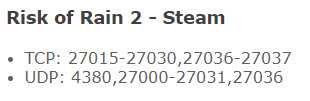
multiplayer worked before even with him, it broke recently for some unknown reason
i doubt port forwarding is the issue in that case
compact pewter
All of those ports, and connection problems are weird. What you're saying sounds like port forwarding would fix it even if the issue doesn't occur all of the time
and make sure to setup a static ip first
and after use a port checker to make sure the ports are open
are you and your friend on the same wifi?
worn cipher
no, we live in the same state/province if that helps
compact pewter
nah I was just wondering everything I said still applies
 compact pewter
you need to disable that and do it manually
worn cipher
It must be an issue with his end then
pulled a random stranger from LFG and it worked fine
weird
worn cipher
nevermind we somehow got it to work
steady topaz
@compact pewter @worn cipher Some ISP give you static ip only if you paid for it. Mine does. Sometimes i am unable to use port sensitive software, but after the session (24hrs) provided by IPS expires (or router rebooted) they give another session with another ip on another gate that allows to forward ports and works fine.
If you're unshure what fixed it - it might be similar. If this happens again without you changing anything - try rebooting your router.
steady topaz
NO GAMEPAD BINDING
plush treeBOT
@steady topaz, We have two known solutions for the topic 'no gamepad binding'. Would you like to view them? (Y/N)
steady topaz
Y
plush treeBOT
@steady topaz,
This issue occurs when Windows is reporting a gamepad, joystick, or other input device providing a non-neutral input. This is usually caused by:
- Having a gamepad, flight stick, HOTAS, pedal, racing wheel, or any other kind of non-keyboard/non-mouse input device plugged in. Simply unplug the device from your computer.
- Having vjoy installed. If you've ever tried to use a GameCube controller with your PC, you probably have it installed. Opening your computer's Device Manager window should allow you to disable or uninstall it.
steady topaz
@opaque widget ⬆️ Read
 opaque widget
awesome thx
 sharp bluff


