Last night while I was playing in late game with lots of items and three other players, i noticed I was getting a reallllly bad frame rate drop. I have 144 frames most of the game but after a couple of hours my frames were dropping to below 20. I have a 2070 super and a gpu monitoring software that was letting me know the gpu was at a comfortable 37% load and only 45 degrees celsius but for some reason was struggling hardcore with late game RoR2. Is there a reason for this that someone has found and solved? I'm just confused because this should not be giving my gpu a hard time like it was.
#ror2-tech-support
1 messages · Page 51 of 1
 karmic lynx
Also, no matter how many times i try to change the resolution of my video in the game settings to 144hz, it always reverts back to 60hz. I'm not sure how to make 144hz and save the settings. I hit apply and accept afterwards everytime but it continues to revert back to 60hz every time i reopen the video settings
 valid vortex
Hey guys,
I have two monitors.
primary - laptop, 240Hz, usually use for gaming
second - BenQ 60Hz, usually use for discord and other stuff
sometimes midrun everything goes black and the game is "in background"
I then have to move the game to the other monitor and back to the primary one to get it back to foreground and that I actually can play.
RoR2 is the only game where this happens
I already tried to change the settings of the primary monitor from 240Hz to 60Hz, but it still occurs.
any suggestions?
valid vortex
nobody?
 haughty night
Idk, i got laptop display 60hz and benq xl2411p 144hz and this never happen
Maybe try turning your laptop display off while player or see if windows/fullscreen/borderlessfullscreen works (I play borderless)
@valid vortex ^^^
haughty night
@karmic lynx 1. Make sure your moniter is in 144hz
2. Turn vsync off
3. Change the fullscreen mode
Other issue:
Your probably cpu bottlenecked
valid vortex
@haughty night thanks for the reply
Idk, i got laptop display 60hz and benq xl2411p 144hz and this never happen
it's switched for me
my laptop monitor is the one with the higher Hz
but RoR2 is the first game that has this issue
Maybe try turning your laptop display off while player...
I will try that later
...or see if windows/fullscreen/borderlessfullscreen works (I play borderless)
It seems that the settings don't get applied
e.g. can't change resolution or change Hz ingame
 quick ledge
@pallid ibex Ping is ridiculously high, 2000ms+ but only in risk of rain... speed test and other games and apps are working fine so I know its not my internet, any idea why?
 orchid flame
@carmine arrow @mild ridge I'm playing with Tyceron. So when I stopped hosting and he hosted our game, he stopped lagging and my other friend and I began to.
 steady topaz
@quick ledge @orchid flamePinging dev less than 15hrs before 1.0 update isnt very helpfull.
Game is p2p, there is no central server.
However game uses steam servers (any) to pass connection. Whoever the host - got 0 ping. Clients rely entirely on this host upload speed. Speedtest isnt going to show you actuall speed between you two. It shows you speed to closest server only.
Things you can do:
Restart steam both - this helps in most cases.
Use direct or lan emulation connection types.
Setup a dedicated server
Wait till update, it brings in lobby system.
 mild ridge
it might be an issue with the steam p2p networking infrastructure we built the game on
steady topaz
@orchid flame @quick ledge
Check this also: https://discordapp.com/channels/417739215355510784/559902278018924557/724218038651453511
mild ridge
there's a debug feature shipping in tomorrow's update that might work but as far as I'm aware the game's networking was working fine until one day something changed without us updating anything, which I suspect would have to do with how Valve has Steam delivering p2p traffic
I expect other steamworks p2p games would have similar issues, like tabletop simulator
steady topaz
Ghor i have a question about engine version, are we going to have another engine update?
mild ridge
I don't know
this coming update will still be using the same engine version but as for future updates I can't say for sure yet
it's hard to get the green light on that due to stability concerns
steady topaz
ah, it seems alot of people had random crashes with very similar log entrys. I know nothing about all this stuff.
I think you missed this:
https://discordapp.com/channels/417739215355510784/559902278018924557/735491402838048908
Also i have seen you replying to someone with rtx gpu that you havent heard of problems with this gpu family.
Nothing new on that?
It seems alot of people have issues related to crashes on startup or random crash. And most of them have some rtx gpu.
mild ridge
@steady topaz I think I saw that specific message. we don't use the tilemap feature at all. I'm pretty sure that error occurs due to a driver issue
steady topaz
Last one i asked about:
NVIDIA GeForce RTX 2080 SUPER (ID=0x1e81)
d3d11: failed to create staging 2D texture w=128 h=2 d3dfmt=10 [887a0005]
d3d11: failed to create buffer (target 0x1 mode 3 size 36640) [0x887A0005]
Crash!!!
Ah, gotcha. Thanks. I asked those people who i havent managed to help to make a propper report here and attach files if this happens after update too.
Well, hope it gets fixed.
Cant wait for the new stuff you guys give to use in 1.0!
mild ridge
😄
 crude barn
Heya, each time I start up the game, my profile has gone and I have to make a new one. Any ideas?
 icy imp
Is there a way to delete a profile without forever disabling Steam Cloud Sync?
 stray dock
Was just checking out my Risk of Rain 2 files and realized I don't see a "Memory Log" folder anywhere.
Is that bad?
 halcyon meteor
Has anyone had this strange issue where if they launch Risk of Rain 2with a controller connected, no other app will be able to use the controller till you restart your PC?
 jolly shuttle
Ghor, if you don't mind, I have a few questions specifically for the developer. Will there be any optimization improvements in 1.0? Also, are you planning on launching the game in Geforce Now? RoR2 was already there for a while, but for some reason it was removed :\
 warm nebula
anyone knows how bigthe update will be - in MB or GB - because trying to solve internet issues would be nice to know the size before its out
 near gust
all gearbox games were pulled from geforce now, @jolly shuttle
licensing probably ended
jolly shuttle
@near gust are they planning to renew the license or did the developers not even mention it anywhere?
near gust
It's publisher issue not something on Hopoo Games' end
jolly shuttle
ah, okay, got it, thank you
 worthy token
is there a way to turn down graphic settings before going into the game? my pc is currently a mess and doesnt allow me to get into the options ingame
steady topaz
@worthy token C:\Program Files (x86)\Steam\steamapps\common\Risk of Rain 2\Risk of Rain 2_Data\Config Edit it with notepad.
Make a copy beforehand
worthy token
Appreciated, thanks
the only file in there is server_startup.cfg, is that the file to edit?
 wheat field
I would really appreciate help with the slowdown I've been getting for the game. It's nigh unplayable with the amount of delay it has.
I have no idea what the problem is. It works properly sometimes when I plug in my external Graphics card but that's the only time it works if at all, and before that my current card (GTX 1060) worked perfectly fine. The slowdown starts in the menus and does not leave.
 daring nimbus
Strange, the price hasn’t been increased on the store page and I see a BOGO deal that ends at March 30th.
 open cargo
Hello I have a problem where when I first got it it worked fine but now it lags so much I can’t play it is there any way to fix this
Same skilled summoner
wheat field
Is there anyone that I should ping to get help with this? I just wanna play the game again...
open cargo
I want to play to rip
worthy token
just wait for now
open cargo
Ok
 uneven sail
Anyone know why my friend is getting "No Gamepad Detected" yet he's playing mouse and keyboard?
 drowsy pawn
was just about to ask that myself
 hard meteor
anyone have issues crashing on startup?
 dusk sluice
Yeah I'm getting crash on startup too
drowsy pawn
@uneven sail does your friend happen to use vjoy?
hard meteor
@dusk sluice did you happen to use r2modman?
i deleted my files and it seems to have fixed my crash on startup
wheat field
well, if at any point someone can help me with the massive lag please ping me...
 stone thorn
So i've had this issue for a few months but never saw this channel, but for some reason, for a friend and I, we can't join each others games, the host gets a screen by themselves and the other player gets what the picture is above.
 tired schooner
Yo for some reason my game has bloom even though I turned bloom off? It's lagging my game quite a bit...
open cargo
Same with skilled summoner
stone thorn
@sly nova let me know if you find anything, I think we're having the same issue
 sly nova
Will do
dusk sluice
@hard meteor nope, never used any mods
 plush egret
¨so i cant use my m+kb. Its telling me i have a controller plugged in
i dont have any such things
sly nova
I have Hamachi but it's not activated
stone thorn
Cause I powered it off and my friend was able to connect
plush egret
my mouse is just lagging in place in the middle
 warm saffron
i have a bugg where i cant controll the meny at all with my mouse and keyboard i have to connect my controller for it to work. anyone else got this problem?
it says [NO GAMEPAD] everywhere even when nothing is connected to the PC
sly nova
I will try exiting it completely and see if it works, cheers
stone thorn
Yep, we just tested it and its hamachi
sly nova
Will let you know if it works
orchid flame
yup @warm saffron same here
plush egret
@warm saffron same as me, just i have a mouse in the middle
stone thorn
Need to let Devs know about that, don't wanna ping them though
plush egret
and its locked to the middle
stone thorn
Oh wait, bug reports
orchid flame
welp, not playing then i guess
plush egret
you mean for our problem or the hamachi probem?
 chilly raven
anyone else cant lunch the game after the update? it try to lunch it. it shows a black screen for like 5 secs and then it closes the game
 grand needle
Yeah me too
plush egret
Im trying to dissable and enable any and all "usb controller" in device manager ill report back with findings
chilly raven
help ?
grand needle
gonna try verifying files maybe that will help
chilly raven
i tried it. doesnt help
grand needle
awh
chilly raven
nice
grand needle
worked for mme
chilly raven
guess i wont play the update
grand needle
yeeey
chilly raven
wtf
 civic wind
It's almost like the game should work with joysticks plugged in 😮
chilly raven
dude wtf
warm saffron
it's almost like the game should work without joysticks plugged in 😮
 viscid bough
So I'm having the issue of the game lagging hard.
Not quite sure if it's an update thing or not, but it's only the game that's lagging.
 silent yacht
help the game launches into a black screen i hear things like beeping noises and music but then a unity window pops up and the game crashes
 elfin mulch
is there documentation about the new dedicated server config?
 thorn grove
im stuck on the new island map
i keep jumping of the edge and it is respawning me on the same place
 wary flame
Hey, my resolution won't change to 144hz. Every time I press "apply" and go back to check if it has worked, it hasn't changed
 formal charm
I used to run the game around 50 fps in 720p (lowest settings) but since 1.0 I cant even get 30 at 800*600 (still lowest)
orchid flame
hello if a player got disconnected can they join again?
 fresh lake
Hey, my friend and I have lately run into the bug that some others are also reporting, but nobody seems to know a fix - if we both want to join a lobby, the host can select the character, but cannot ready up, while the other person is unable to pick anything nor do anything else. We were able to play normally a month or so ago, and then this issue just appeared out of nothing.
We checked our Firewalls, everything that others have been suggested to try, we uninstalled, verified game files, etc. nothing works. We never used mods nor used hamachi, just played together on steam without issues.
 nimble pawn
BanditoL
To everyone looking for tech support, here is a link to Gearbox's customer support page. Hopefully this can help with some of the more obtuse problems! https://gearboxsoftware.zendesk.com/hc/en-us/categories/360001615171-Risk-of-Rain-2
try this @plush hill
 neon whale
is anybody else getting frame drops after the new update
 plush hill
@nimble pawn what exactly am I supposed to be looking for in here? I don't see anything that would help me fix my problem
 warm moss
i never used mods and i am getting instant crash to desktop everytime i launch the game, what do?
nimble pawn
plush hill
yeah I already did that my man good fellow
I want instant gratification not to wait the update came out I'm tryna play NOW
silent yacht
okay so i can run the game on intergrate graphic (with maxium lag it feels like) but i cant on my graphics card anyone know why this is (GTX 1050)
warm moss
i can't even launch the game
 novel copper
Uh, i reforged 2 green item to be prioritized in 3d printer, and when used to get a legendary it used 5 of them even tho i only got 2
so if i reforged only 1 green , i could have traded 1 green for 1 red xd
orchid flame
I keep getting this popping up trying to launch the game and then it just crashes
silent yacht
yes i get that too when i launch with my gtx 1050 graphics card. i can launch on intergrated but it lags so hard that its not even worth it
orchid flame
my game froze on the new update. I could still hear everything and my friend could see me moving.
got this too
formal charm
is anybody else getting frame drops after the new update
@neon whale I did get drops, quite crippling
silent yacht
i tried to change the launch setting to, windowed it just crashed, borderless this happens, fullscreen the same as borderless (note i have launched the game with and without stuff running in the background no difference, also steam overlay is off, as it crashed another game)
 slow ledge
Alright, I got a doozy. Whenever I start up risk of rain, it doesn't even open. I hear audio, but I can't see anything. It appears as a white bar as if it was an application open. I've done everything. I've been experiencing this for about two weeks. I hoped the update would self-fix it, but nothing has worked. See image for what it appears like.
 sullen bloom
Hey I want to ask if someone has performence issues? After artifacts update game was running very bad and after 1.0 fps is even lower, i play in 720p with all settings low on acer nitro 5 with GTX 1050. Anyone has the same issue?
neon whale
yes i have a 1060 and have frame issues
 robust plover
Hey is anybody else having audio issues after the update?
Crackling audio galore, fps seems to be okay
 turbid crag
I'm having that frame issue as well. From the title screen to gameplay, everything is laggy in solo play
slow ledge
Anyone have a clue what could be causing my problem to happen? I've searched almost all the discussion boards and nothing is similar to what I'm experiencing
sullen bloom
@slow ledge maybe you should reinstall the game
slow ledge
I've done that. Countless times.
 jade viper
I didnt go to the moon with the primordial teleporter, is there something I did wrong?
sullen bloom
@slow ledge maybe change resolution in config
slow ledge
Did that
neon whale
you probably changed location to loop, @jade viper
slow ledge
As I said, I've done tons of shit to try and fix it. Nothing has worked.
jade viper
huh
sullen bloom
@slow ledge I really want to help, I hope this works
https://steamcommunity.com/app/632360/discussions/1/1768133742956098205?l=portuguese

Problems & Fixes PROBLEM The camera is always pointing down, or I'm getting weird input latency! FIX First, try unplugging and then replugging your controller. If that does not fix it, look under Device manager and make sure there are no controllers. If you have VJOY or HOTAS ...
slow ledge
Already searched over it. Every solution didn't work.
sullen bloom
well... I hope they release hot fix or something
slow ledge
It's not crashing.
It's just... Starting as this weird white bar. I hear the game music and everything, and pressing enter gets rid of the disclaimer that it's in early access or whatever.
So the game is running, I just can't see anything.
Don't even get me started on how it added two hundred hours for some reason to my play time.
At least I think it did. I don't know, but I don't remember having 500 hours on the game.
 slow ledge
Yeah.
This happened after I was playing multiplayer with one of my friends. Game ended, I went to get some food, came back and it was stuck on a screen. I Alt-F4'd and closed the game. Next time I tried to open it, it wouldn't open. It would just go to the white bar.
~2 weeks ago
warm moss
anyone else unable to launch the game at all? it immedietly crashes with no error. i have never used mods before so the message in announcements does not apply to me
slow ledge
I just pray they release a hotfix or something. Nothing I've done has worked. 
orchid flame
So i've been consistently getting disconnected from multiplayer lobbies with this message appearing, has anyone else experienced this before or have any solutions? or is this a problem with my own connection
slow ledge
Updating my graphics drivers, seeing if that's the cause. Haven't tried that yet.
 neat wolf
hey can someone help me, my friends keeps having problems with joining multiplayer lobby, its bugged and he cant click ready or select a character, does someone know what to do?
slow ledge
I think that might have done it! Hold on for confirmation!
warm moss
i updated drivers and it did not help me. i just wanted to play the game man 

 ebon barn
I was also struggling with getting the game to launch, have a 1050Ti, updated my Steam client, game works now, maybe try updating as well?
slow ledge
Sadly I lost all my profile data, but that's fine 
 vagrant fable
My game didn't launch at first, it crashed on start up - I updated graphics card driver, disabled firewall, rebooted PC - viola. The reboot somehow made it work after the previous steps. Just in case it helps someone else.
 uncut forum
Has anyone been able to get the game to display at 144 Hz? I used to be able to, but with this new update, it seems to be locked at 60.
 robust viper
been encountering this error since the game first launched: Unity 2018.4.16f1_e6e9ca02b32a
anyone have a similar problem/ know what to do?
 hollow sage
hello i need help. i tried to unlock a character in my save file and now it says the profile is corrupted
i tried to do <unlock>Characters.Acrid</unlock>
and now its corrupted even after removing it
 barren canopy
Since 1.0 I cant use mouse and keyboard, my mouse always drifts downwards anyone knows a fix?
uncut forum
@robust viper I just turned of g-sync/freesync in Nvidia control panel and that fixed it
robust viper
@uncut forum not on nvidia, amd
uncut forum
I think there's a similar setting in Radeon Software
You'll have to look for a setting for Freesync and disable it
robust viper
cool, ill look into it
 fast stirrup
alright so pairing gorag's opus with gesture creates an unbearable sound bug and the item does not trigger at all
 echo flume
orchid flame
echo flume
orchid flame
How can I reduce lag on ROR2? My computer is pretty old, so that may be part of the problem.
 wooden hatch
I think there is something wrong with Dedicated Servers
in my case both 27013 and 27014 should be listening but they are not
27013 is the game port
27014 is the steam query port
 full viper
ever since i upgraded from 8GB to 16GB of ram, the game fluctuates between 40fps and 60fps randomly it seems - it was consistently 60 before (also happened before the update)
 lucid girder
I have a question, will be hotfix for optimization, my game became kind of lagging mess, i drop my graphics and with low/ultra graphics i have low fps (sorry for bad eng btw)
 finite siren
My nintendo switch is currently not responding to the new update and continues to stay in the previous state. Is this intentional and the switch update come in later dates? Or do I need to keep trying to update search at varying times?
 lusty cobalt
Hi guys i just get this game on PC and it stuck black screen at beginning what should i do ??
//I run with ryzen5 3600 and rx570
open cargo
@finite siren the console updates are later
finite siren
OK! Thank you.
 torpid venture
This is what I get upon startup
I see the hoodoo logo, but afterwards it's just this
open cargo
Does anyone know if there is gonna be a hot fix for lag
torpid venture
Anyone know how to fix?
 regal agate
So I'm having a slight issue with installing 1.0, namely that my game hasn't updated and still shows version 4892828 with no new content visible. Steam shows no available updates for the game, and upon launch I still get the warning about "Early access". Anyone know what's going on?
 coarse fern
The dedicated server hasn't worked for me since last patch. I uninstalled everything and reinstalled it to try again. Upon starting the dedicated server, a command prompt appears, seems to load up, but then opens up an instance of the game in a lobby, with all the characters locked and no other things to interact with on the screen. The server also doesn't appear in the steam server browser, or the in-game multiplayer browser. When I attempt to join that server, I receive the following error: http://prntscr.com/txyizy
Strangely, if I try to join by using my Ipv6 address instead of Ipv4, I do get connected to a lobby, but it doesn't let me interact with any of the UI elements, so I can't change characters, set artifacts, or anything else. Here's a screenshot: http://prntscr.com/txyoxv
I've tried removing the "headless=" line in the boot.cfg document, which also opens a command prompt that seems to load up further than the other one, but then starts to repeat the following:
  at RoR2.Networking.GameNetworkManager.ClientSendAuth (UnityEngine.Networking.NetworkConnection conn) [0x0000c] in <bab8bae562cc4f6392059e38906d5a8c>:0
  at RoR2.Networking.GameNetworkManager.OnClientConnect (UnityEngine.Networking.NetworkConnection conn) [0x0001d] in <bab8bae562cc4f6392059e38906d5a8c>:0
  at UnityEngine.Networking.NetworkManager.FinishLoadScene () [0x00016] in <42c37d49d97b482091ab8a042de4bcf4>:0
  at UnityEngine.Networking.NetworkManager.UpdateScene () [0x0003e] in <42c37d49d97b482091ab8a042de4bcf4>:0
  at UnityEngine.Networking.NetworkIdentity.UNetStaticUpdate () [0x0000a] in <42c37d49d97b482091ab8a042de4bcf4>:0

(Filename: <bab8bae562cc4f6392059e38906d5a8c> Line: 0)```

Any ideas? I'd really like to host a game with 4+ players.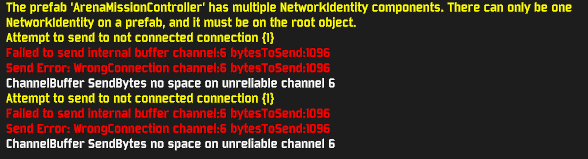

 distant portal
Has anyone found a fix for unity crashes yet? Last time I asked I was just told they would be fixed in a unity update around the end of March, but I still get them frequently. I have the lowest graphics settings possible, and I've already scrolled through the channel and tried the things others have recommended like turning off FreeSync, but still nothing works.
orchid flame
my game keeps freezing one me, still have thee audio though, i wasnt even in a run i was reading the logbooks
 fallen stirrup
I lost a bunch of progress with the new update... I lost 3 of the character unlocks as well as many of the skill unlocks I had. Any ideas how to fix this?
orchid flame
like the game literally just keeps freezing all the time
After new updare i think game become unstable. As once i could play with my 60fps even with full screen of enemys now i can bearly walk around with lowes setting on.
literally less than a minute after launching the game and it freezes again
chilly raven
this update is so buggy they must put out some hot fix patch or something
 barren steeple
Hi guys, I'd like to report a bug on the final boss stage, I was playing online with 2 other people and there comes a || fork in the road where there are moon basins on the left and lunar pods on the right. Well I could see like 10 lunar pods and 21 lunar basins while my discord buddies could only see 3 of each. I also tried one of the empty lunar basins several times and it consumed items but didn't reward anything. The basins that I could see but my buddies couldnt were empty, as in no item floating above them. ||
|| The only other explanation I can think of is them being some lore thing like "broken basins that don't get used in the shop" or something, but if my buddies couldn't see them I don't think that's the case. ||
 trim trench
@coarse fern Having the same problem as you, no idea whats happening
 ebon agate
anyone have any success in getting dedicated server to show up in the browser?
 topaz gyro
have people been getting some connectivity issue since the new update
coarse fern
Nope. It looks like quite a few of us are having trouble getting the dedicated server to work. I can't find any info on the reddit, in here, or elsewhere online about how to get it working. Which is strange, because I KNOW that people were playing with it just last patch.
ebon agate
i cant get the console to open on the dedicated server anymore
yeah i cant even get into my own server anymore :?
 cloud stone
@wooden hatch this is a known issue with dedicated servers, they dont heartbeat properly the master server i think, will be fixed next game update
@coarse fern @ebon agate
ebon agate
thanks man
coarse fern
Thanks, that's helpful. I just wanted to make sure it wasn't anything I was doing wrong on my end. I hope I'll be able to host it soon.
trim trench
Nice to know it's not just me going insane at not being able to host a dedi server
ebon agate
i have a nooby question tho, i have single port forwarding on my router set to
External Port: 27016 Internal Port: 27015
it work(ed) this way, but should they be set this way? or both the same?
thanks
trim trench
Thats called a port range and it does work indeed
Do we know when 1.0.1 will come out tho?
ebon agate
Yeah I mean it works but I don't understand why it's set that way or if it has to be or even should be set another way. I want to ensure it shows up in the server browser
trim trench
If its a dedi
its broken and won't work till 1.0.1
Or at least people hope thats the case
 somber girder
hey all I have a question for ya, was wondering if anyone else has had a similar issue or if anyone might be able to help me figure this out! So the game launches and loads just fine however it does not detect my mouse or keyboard properly. I am unable to navigate the menus with keyboard and mouse (only backspace and enter are detected in menus, mouse not at all.) when I plug in a controller I can navigate and start a run however everything shows as "unknown" for each action/ability. my mouse is detected in game however snaps back to the downward most position at all times. When I use a controller the buttons all seem to work but the sticks dont do anything, so I cant move my camera or character at all on controller. I had this issue with the last version of the game and thought the 1.0 update might solve things but unfortunately I'm a bit stuck haha. I've checked all of the keybinds in the menu and they are all mapped, also tried to uninstall and reinstall the game to see if that helped but I'm still a bit stuck.
sorry for the giant message, I'm just looking to be able to play again. Thanks in advance for any help!
somber girder
no just a ps4 controller and a keyboard
coarse fern
@ebon agate Wait, so you ARE getting it to work, it's just not advertising to the Steam server list? Mine isn't working at all.
wooden hatch
I only get that when my hotas is plugged in
do you normally play with pS4 controller? if not try disconnecting it and restart the game.
somber girder
nah I'm a keyboard/mouse only guy
only plugged in the controller to see if anything would change haha
ebon agate
@coarse fern no i meant it worked on the last update, im getting the same issue as you
 pearl relic
I've been getting this error for a while. Thought it would be fixed in the full release but it still happens. There's nothing happening that causes this that I know of, but the game will crash immediately after showing this.
 winged zenith
Yes saves are just XML text files
 real grail
is anyone else getting lag when playing multiplayer?
 cloud horizon
my game keeps crashing relatively early into a run. this is the second run in a row that ends like this. the first one i was on stage 3 right after killing a boss and this run i was about to kill the tp boss
real grail
see like if i host or if i play solo i get no lag, butttt if My friend hosts we all get lag but him
and this isnt like my internet is bad
because it happens for all of us when we each try to host
 vagrant creek
I can barely play in multiplayer, 1 frame every 2-3 sec is reallly nice, used to run well before 1.0
vagrant creek
I even tried lowering setting, fixed nothing lmao
real grail
same lmao
vagrant creek
Atleast my turret can help while i cant
real grail
true true
cloud horizon
just crashed again right as i start tp
 steel tapir
When I launch RoR2 from steam it gets locked to a black screen, not responding.
I’ve reinstalled, verified, removed bepinex, all that
I just have no idea what else to try
 young stag
did the game get some sort of anti-cheat? whenever i open up the multiplayer join game thing, it starts some "unity" thing up and then crashes
if i make my own lobby it seems to work
distant portal
I'm having the same problem as TheReese
 neat carbon
is the issue with [NO GAMEPAD BINDING] thing resolved before I ask a stupid question
coarse fern
Update to the dedicated server testing: People can join me when I run it without "headless=" but we can't change characters, artifacts, etc or start the game.
distant portal
@pearl relic I dunno about you but I've been having that problem since the game started in early access
I could never find anything that might help, a user here once told me that a unity update around march 30 would fix it but it didn't change anything
neat carbon
what is vjoy and why does ror2 hate it so much
distant portal
me fucking too man
orchid flame
every single run just about, happened 6 times yesterday
orchid flame
i want to be able to play the game for longer than a half hour at a time
distant portal
i haven't gotten anyone to seriously address this issue here either
i might just email
orchid flame
i've had so many good runs like this one that were ended by this
orchid flame
like if you keep scrolling up you can see a bunch of posts about this same issue
 open hinge
As of 1.0 playing multiplayer has a huge delay, Is anyone else having this issue?
orchid flame
i've had minor delay with my friend, he would kill something and get the money or buy a chest a bit before i saw it
open hinge
It took around 45 seconds for an engi turret to place for me.
orchid flame
oh dang
open hinge
Thats with him hosting, With me hosting he sees enemies far behind
Our pings are both fine, and it was flawless prior
 novel ferry
for some reason my game feels like its capped at 60fps 
vsync is disabled obviously
tried different methods as well
no luck though
orchid flame
@distant portal what graphics card do you have
open hinge
Check if your nvidia cp or amd equiv isnt capping it
distant portal
I have a radeon rx 570
 novel ferry
of course
open hinge
Strange
 simple jacinth
so i unlocked a bunch of chars in the game and now i loaded it up today and all my chars are gone?????
what is going on here
 lusty monolith
So I just started my first 1.0 game and it looks quite nice. I turned the AA and SSAO to the max but it seems as though the difficulty bar isn't smooth like the HP bar
restarting the run didn't help
 leaden rain
In Join Multiplayer Game menu it shows already-started games regardless of "Show Started Games" checkbox... Does this happen to anyone else? Any way to fix? Can't find a lobby that isn't already mid-game...
 candid pike
So I just started my first 1.0 game and it looks quite nice. I turned the AA and SSAO to the max but it seems as though the difficulty bar isn't smooth like the HP bar
@lusty monolith i got the same thing! weird.
 mossy burrow
Hi Hoppoo!
My friend and I are at the end area and we got onto the island where all the item pools are, and my friend has no mobility, She can't reach the main path anymore, are we stuck and have to redo a run?
candid pike
okay first of all it's really cool that you can turn the texture resolution all the way down to 1/128 so that the game looks like an abstract painting, but also it's not solving my problem of having a bunch of random lag spikes for seemingly no reason
these are new to the update for me
am i alone in this?
 brazen gazelle
Is there any known work-around for having a friend join a multiplayer lobby? He gets black screen every time he tries to join me
And anytime he can make it in to the game he can't ready up or anything
leaden rain
i think devs didnt test the new multiplayer/matchmaking system enough before 1.0

 split locust
im assuming theres no way to get my progress back since i had all of my saves on a previous drive and steam didnt cloud save automatically so when i wiped my drive it reset my progress?
im ok with unlocking everything again its just really annoying to have to go and do again
 dense crag
put all the codes in the notepad
 cedar crater
Help
 slim egret
I went into the multiplayer menu and saw that the UI was way bigger. This made me unable to create a lobby. Is there anything that fixes this?
 woeful dust
I noticed someone else already mentioned it but I didn't notice a fix - I'm running a 144hz monitor but the game is locking itself to 60 FPS. Was there a solution to this problem?
orchid flame
Anyone got an invite to the RoR2 modding discord, i want to edit my save file for the RoR2 and unlock everything
 spice sorrel
@candid pike, I am having massive perf issues as well cant maintain 60 fps on a rtx 2080 and i7 with 32gigs of ram
dropping to high 30s and laggy af
candid pike
it's weird how the performance on this game seems to be totally different for everyone i ask
spice sorrel
ive been playhing it since day 1 and I have never had this kind of performance
it's unplayable for me
spice sorrel
@candid pike do you use mods?
candid pike
none
spice sorrel
huh
i just removed and tweaked settings again a little, play with Vsync and the manual fps limiter
that may have fixed it for me
ive got Vsync off and
everything on the other Graphics tab is maxed
woeful dust
143 hz?
 median steeple
recently playing i crashed hard i had the same crash report as eewalktub i have An amd CPU which i don't believe is causing the problem and a AMD gpu rx 5700 that i think is causing most of my crashes i've updated drivers restarted game reinstalled game checked files and more. i've only been crashing while playing. never in the main menu do i crash i have tested it. i also don't know where the dump files/crash log is made i have forgetten how to navigate to it
distant portal
i have similar specs to you and i get the same crashes
 cedar talon
How to enable QuickPlay? The option is missing completely, I only have access to Server Browser. I just want to hop in, have fun and hop out. How to unlock qiockplay?
 wind spruce
So in the final stage, if you fall off the map, you get teleported to a side island. It appears that without movement specific items, you are stuck here forever.
Does anyone know how to fix this?
woeful dust
Jump back?
wind spruce
You cannot.
The island is too far away.
There is no booster, there is no path. Jumping off only throws you back onto the island.
I was having a really good run up to this point. It is now ruined.
 dawn axle
I crash 100% of the time when clicking 'Join Multiplayer Game'
cannot access server browser
orchid flame
the game is really fun but i'd like to be able to play it
cedar talon
There is nothing on the server browser, you lucky to have access to QuickPlay. Enjoy it.
dawn axle
Nobody has quickplay, they got rid of that
cedar talon
I dont have the fucking Quickplay and can only access server browser witt it having like 20 servers at best
dawn axle
server browser is the only option and I crash when trying to open it
cedar talon
What? OMG, thats an instant refund. Thank for letting me know
Gotta freaking love devs that think people want to go through a hassle of looking manually for players to play with....
 echo stump
anyone know how to play this on a mac? I used to play on Geforce now but its since been removed
cloud stone
@cedar talon congratulation, you are the only person ever who thought Quickplay was fun and enjoyable and not filled with bad people who steal items and randomly leave game, don't forget how if the host left the game the progress was basically canceled !
dawn axle
Ok weird, I can host multiplayer games and they work fine. however, I cannot click Join Multiplayer Game or it crashes
and I agree. I've always preferred server browser to quickplay
cedar talon
@cloud stone Gatekeepers like yourself are the cancer of Early Access titles. You dont like it? Dont use it, have fun in your Server Browser
@cloud stone No one forces you to, but how dare you take the option from others
cloud stone
the option is still there
cedar talon
It is not
cloud stone
when you create the lobby it gets into the server browser, it co-exist with dedicated servers
you can filter with game that are only in lobby still
cedar talon
When I hit Join - It opens Server Browser, when I hit Create - it just creates a server for server browser. There is NO quickplay
cloud stone
it ends up like the exact same
I hope you realize that, its just not named like before
cedar talon
I dont care how its named, the functioning of actual matching players together is gone
cloud stone
If you are so entitled with your single trash button experience where you have 0 choice on the artifacts chosen, game rules, and so on, feel free to code a mod that will randomly select a server from the list 👍
you are in the minority
cedar talon
Typical gatekeeper
cloud stone
You can also pay me, i can code it for you
cedar talon
" I dont want it, therefore it should not exist"
cloud stone
it'll be expensive though 🙂
How dare the devs give me more choice
I mean you can't even realize how its better in every point, I guess the discussion ends here
 worthy gyro
cant join lobbies help me plz
 sweet hill
 wraith bobcat
I can't create lobbies. When I click "create lobby" it does nothing
orchid flame
I can't either
 sand swan
i think steam might be down
it was saying i was disconnected when i checked the friends list
wraith bobcat
restarting steam fixed it for me
 elfin blade
 dapper basalt
When the price will be increase ?
 gusty tulip
To everyone that wants to have a nice run, don't pick up "soulbound catalyst" (red item) and "Forgive me please" ("FMP", use item) in the same run. It will make an endless loop of spawning FMP. No computer can stand it.
sand swan
thank you my guy ^^
 bitter sierra
It didn’t update for me :/
 fiery python
sane
same*
the game looks exactly the same and there are no new things inthe logbook
bitter sierra
I’m gonna try restarting my computer
 grave viper
I alread ydid and nothign changed
bitter sierra
That sucks, I’ll try anyway
grave viper
Go for it, hopefully it works for you
bitter sierra
Did it still not update for you?
fiery python
is it not working for you @grave viper
grave viper
Nope, my other three friends got it but not me
bitter sierra
F
 dry raft
Any solution for the frame drops people are getting?
bitter sierra
Better computer?
dry raft
Literally fuck off...
bitter sierra
Ok
grave viper
Take that back, just got the option to update while I sat here staring at it
dry raft
If the game ran fine before that's clearly not the problem dickhead
 prime osprey
fellas is there any fix for this or am I gonna have to spend the next hour or so getting the majority of my achivements again?
bitter sierra
I mean with a bunch of new stuff it might be
dry raft
Cool. Good to see this community is fucking useless 🖕
fiery python
lol mad
prime osprey
damn bro, you're more toxic than acrids saliva
bitter sierra
No I think it’s just me that’s fucking useless
trim trench
Nah
Its combat here who's useless
If your pc can't run it, its a problem with 'your' pc
not the game as i was getting 0 frame drops on a 7 year old pc
bitter sierra
If he’s experiencing lag, my laptop’s not gonna handle the update very well
trim trench
As said, 0 fps loss
 snow nymph
update still hasnt appeared for me
 novel zinc
Imagine even having the new update
 simple ermine
Dang the update does not be showing up
 midnight ruin
does someone else have issues when trying to connect to the lobby with a friend?
novel zinc
Been waiting 10 minutes to say that lmfao
bitter sierra
I don’t have it yet either but I’m restarting my computer
novel zinc
I've restarted, reinstalled, and verified the files
bitter sierra
F
prime osprey
Is there any way to fix this?
 opaque peak
Not really
trim trench
No, its corrupt meaning your xml is corrupt meaning your sol
So ya gotta spend time regaining all the achievements
prime osprey
alright time to any% speedrun all my stuff back I guess
bitter sierra
Can’t you go into the files or do some commands to get stuff without doing anything?
trim trench
If the XML is corrupt, no
bitter sierra
No I mean on a new account
Still no update
Nvm I got the update button as I posted that
snow nymph
saME
novel zinc
kms
bitter sierra
I think the solution is to say “I don’t have the update” a few times
novel zinc
I don't have the update, I don't have the update, I don't have the update
A dev appears behind me
opaque peak
My update didn't show up for a bit but when I verified integrity of game files it started downloading
prime osprey
bruh i'm biggie sad
 scenic kiln
hey that's happening for me too
 sweet wraith
i just reinstalled and im stuck on ver.4sometthing verified files restarted my pc and nothing
scenic kiln
i did all that too
novel zinc
Yeah, it seems to be a fickle mistress. It just appears when it wants...
 valid siren
My game says that i am version 498282 or some nonsense. Any way to change to V~1.0 beyond restarting steam?
novel zinc
read above
valid siren
care to summarize?
novel zinc
To answer your first question, no there isn't
valid siren
appreciate ti
valid siren
well if it helps, you could have started with that andswer and didn't have to do "read above"
so -1 validation
sweet wraith
so we just wait ;-;
valid siren
another -1 for continuing to be rude XD
scenic kiln
^
novel zinc
Ima go play my updated game XD
prime osprey
ok I might've fixed the profile with a TEENSY bit of copy pasting from the broken profile
valid siren
thanks @scenic kiln
prime osprey
n op e
 pliant panther
My computer blue screens this game 40 ish minutes into a run. I can't understand why, but my computer runs other games like siege great, but this one just craps itself
 swift shore
When I check steam it isn't telling me there is an update for RoR2, I even tried uninstalling/reinstalling and it's still in beta. Any ideas how to fix this?
 small prawn
ok cool, its not just me
 vital raptor
since the new update came out my computer would start to run the game then crash before anything shows up, it would just show a black screen before shutting down. any fixes?
 keen lake
How do I fix the low framerate on RoR2?
 vivid epoch
does anyone know how to get all the characters easily? i got a code a while back that worked for me but my friend wants all the characters now too
 lament grove
why arent i getting the 1.0 update
steady topaz
@lament grove restart steam
lament grove
stil no
 waxen mesa
hey so me and a friend are trying to play a game and its telling us that we have different versions of the game, we both got the update. it says i have version 1.0.0.5 and that he has version 4892828 (which doesnt even seem like it should be a version number)
lament grove
did a compleate reinstall and still nothonmg
keen lake
@vivid epoch Huntress: 3 worlds. Artificer: Buy in the Bazaar. Rex: Repair with Engineer. Mercenary: Obliterate. The rest idk.
 fickle gale
vital raptor
fickle gale
vital raptor
how would one know if thy have the update? i cant even open up the game without it shutting down after a blackscreen.
 indigo dust
check your downloads in steam and see if its scheduled for update
i just did that
idk if its gonna work.. but its installing
 thorny marsh
yo apologies if this isn't the right place to ask, but any idea why RoR2 will hang at a black screen simply playing the intro after installing bepinex?
never happened with the older mod loader
vital raptor
oh i see that as well
near gust
@thorny marsh at the top of Thunderstore is a discord link, we can give you extensive mod techsupport there
thorny marsh
thank you
 thick canopy
i cant get the game to update
ive
restarted steam
uninstalled and reinstaled the game
deleted all mods
deleted dedicated server stuff
anyone have any other ideas
woeful dust
Verify game files?
 barren axle
Same for me, did the same things too. Didn't even had mods.
vital raptor
nope we are all having the same problem, and verifying game files dont do anything
thick canopy
what is verifying game files
vital raptor
the last update that steam shows is the update from apr 21
 shrewd cliff
hi, quick question: I bougth the game the 10th but now it is on a discount, i thougth the price would increase, should i request a refund and rebuy the game before the discount expires?
barren axle
properties -> local files -> verify
thick canopy
trying now @barren axle


 barren axle
Very pog, enjoy your games guys!
barren axle
Ye
 tardy flax
Is there an updated dedicated server guide somewhere?
 dry haven
I cant launch this fucking game all i get is not responding on start up
vital raptor
yeah i restarted my computer twice and verified the files multiple times
 solar scroll
I can't seem to connect to my friends with the new matchmaking system, anyone know how I can fix this?
gusty tulip
join by steam?
vital raptor
;-; in druid, still can't run the game
it would be better if i got a crash report but since it crashes before the game loads it wont show.
coarse fern
@ebon agate @trim trench A friend got the dedicated server working by doing the exact same steps I did. His works but mine doesn't. As far as I can tell, the only difference is that upon starting the server, I get these errors and he doesn't. Idk if you are are also getting these errors, but if you are, perhaps there's a GPU issue? I've already updated my drivers and restarted. It's either that or the server_pregame.cfg. Do you guys also get these errors?
https://media.discordapp.net/attachments/71810538614562816/742903560508932217/unknown.png
https://media.discordapp.net/attachments/71810538614562816/742903460110008431/unknown.png

 dawn axle
where are the .dmp and .txt crash files stored?
 fiery glen
im having difficulty getting 1.0 to run using mouse and keyboard, can anyone help with this?
 sacred narwhal
the announcement says to delete the bepinex folder before updating but my folder is completely empty, is there another folder I should be deleting? I use mods
orchid flame
@dawn axle Logfile
C:\Users\USERNAME\AppData\LocalLow\Hopoo Games, LLC\Risk of Rain 2
Error and crash.dmp should be there too, but if not - check
C:\Users\USERNAME\AppData\Local\Temp\Hopoo Games, LLC\Risk of Rain 2
dense crag
Can't join my friend just a black screen when I attempt to do so. Any work around?
 next pike
I have a question I have more then the specs required to run risk of rain and I have a wired internet and i still lag even when i lower all my graphics to minimum, and updated all my graphic cards, does anyone know how to fix this?
 gray sequoia
I'm having similar lag, and I was running the previous versions perfectly fine
 junior socket
pretty sure this update broke something
gray sequoia
Like, I'm only seeing 1 shot out of the Huntress Multishot, and occasionally none of them, very often.
Which.. dats not good.
next pike
yeah and for me it is very hard to control my aim and usually it is pretty good
gray sequoia
I also noticed that I have the same "Stuck at 59hz" Refresh rate thing going on, which might be why things are feeling funny.
fiery glen
i cant even play, it's forcing me to use my control pad, has the score overlay stuck on, and i only know how to play this game using M&K BUT none of the mouse or keyboard controls work except for esc bringing up the pause menu.
orchid flame
Hi so sorry to interrupt you guys... But has anyone ever encountered this before? I can't move, and no animations are playing for merc.
 tawdry quarry
Why does ROR2 require so much load on GPU? lowest settings and in menu runniing at 50% +
gray sequoia
Yea, Its stressing my 1660 as well, when that never happened before.
next pike
oh that happened for loader too i don't know how to fix that
brazen gazelle
My friend and I can't get into a game together, does anyone know if there's a way to fix this?
sacred narwhal
I noticed the game still lacks a setting for fullscreen exclusive. I still have to use the -window-mode exclusive launch option, and then alt-enter out of fullscreen and then alt-enter back in to fullscreen for it to actually go exclusive
getting under 70fps before alt-entering out and back in, steady 120fps (in a new game anyway) after on my 120hz monitor and 1080Ti GPU
Would be really nice if the game just supported it natively. I understood when it was in EA that it wasn't a priority but is it wrong to expect the complete game to have it?
perhaps this belongs in feedback
 unborn cliff
@mild ridge hello hello! not sure if you remember me, but I'm having similar issues like last time again 😦
(or at least it looks like it)
the issue last time was unity trying to access lower mem address
 lethal wolf
Is anyone having trouble with the multiplayer connections? My friend and I are having a lot of stuttering issues when we get into the game together
tawdry quarry
Having bad multiplayer connections when it was not like this before, has anything been confirmed that the update has messed some stuff up?
topaz gyro
i kinda been having that as well
 sterile drift
Same, we're having 5+ second lag from input to response. Worked fine yesterday before the update
 keen lagoon
how do i remove mouse acceleration
 jovial tartan
Why is this game so demanding on the CPU?
And is there a way to reduce it so my fans don't sound like they're about to explode 😂
orchid flame
Particles
jovial tartan
Already at minimum settings on everything
orchid flame
what cpu?
jovial tartan
Intel(R) Core(TM) i5-7300HQ CPU@2.50Ghz, 2496 Mhz, 4 Cores, 4 Logical Processors
orchid flame
hmm
jovial tartan
8GB RAM and using a NVIDIA GeForce 1060Ti graphics card if that's relevant
orchid flame
I have a Ryzen 5 2600, not having that many problems...
I don't know how that compares to yours sorry
jovial tartan
Np, but it's only this game which makes my fans go into hyperspeed
orchid flame
yeah late game do be like that
jovial tartan
Everything else I play doesn't kill the fans this much
Genuinely worried they might start sizzling lol
It worked better before the Artifacts update (was playing on max settings and everything) but after that my FPS went to shit even on Stage 2
orchid flame
damn
also sorry again to just leave but I'm just about to do the captain fight lmao
like fight for captain
 obtuse grove
constant crashing on an RTX 2070 Super, Ryzen 7 3700x, 16gb ram... I used to run this game on my laptop in beta just fine, what happened?!?
 late raft
Anyone else having issues playing as captain and using the Gorag's opus?
fiery glen
found my output_log file and reading it it states that it is looking for 3 different DLLs in the Mono folder which should be found in the Risk of Rain2_Data folder and failing to find those 3 DLLs it falls back on only loading Xinput1_4.dll. i'm wondering if the missing Mono folder and its contents are the cause of players not being able to use K&M?
 cloud marten
so i just installed the new update and i dont have a hud i need help, i looked at the settings and i have the hud opacity all the way up the hud scale is at 100% and i have in game hud on
obtuse grove
Anyone else getting Unity crash errors?
median steeple
same here :(
obtuse grove
I've tried everything I could find online, the crashes are now so bad I can't even make it to the game menu
median steeple
oh i am having a different issue i am crashing only in game and not in the main menu >_>
obtuse grove
It was crashing in-game, but now it's gotten so bad that I can't get it that far
I read some posts from 7+ months ago that there were issues with this game with AMD processors, I'm on Ryzen 7, but someone just recently said they're on Ryzen 5 and playing just fine so I have no idea what the problem is
I'm now able to get in-game but it doesn't take long before it crashes
task manager reporting MASSIVE GPU spikes right before and after the crashes, I'm on a 2070 Super so it's not like this is some obsolete hardware
 nimble salmon
SInce I updated the game, I can't open it properly, it results in this * a tiny window, does anyone know How to fix this, uninstalling the game doesnt work
orchid flame
haha you'll never guess
my friend says that whenever it happens always lines up with his lag spikes
i just want to play the game
 quiet steeple
I am having an issue where every time I join a multi player lobby, I immediately get sent back to the home screen. Does anyone know what the issue might be? I assume it’s something to do with my network, but a lot of other multiplayer games I play work fine.
orchid flame
Like devs do you have anything about that unity crash? Do you know anything about it or are you working on it? I just want to know if there’s anything you know about it.
orchid flame
Please just say something
barren steeple
My game audio is really low even when all my audio stttings are maxed out, does anyone know how to fix this?
Nevermind
 solemn gate
SOS: we jumped off near the end and are on a red item island near the boss. How do we get off with an engineer?????\
orchid flame
Hi is there a way to reset my game back to normal? I added mods and now i dont wanna use them but the game wont even load
 whole aspen
@solemn gate your run is dead, sorry.
@orchid flame either re-install, or ask the modding discord.
orchid flame
i tried to reinstall but now the game wont even load
 pseudo gale
I'm having performance issues regardless of how high or low my settings are, before this patch the performance was great but after it has tanked massively
uneven sail
Seriously? What a bug. Have the same thing, Engineer is stuck on the island near the final boss and we're all in the blue ring... He keeps respawning back on the island
Worst part is... HE IS HOSTING
Is there actually no way for him to get back here?
Nope, absolutely bricked. What a fun game. Waste of a 50 minute run woo
pseudo gale
Nevermind I fixed my fps issue by uncapping my fps
 warm jay
Can someone help me with my corrupted file? ive done everything the "verify integrity of game files" reset my computer nothing works
 tame solstice
Hello
I seem to be having trouble with my game. I got it earlier today, and was playing it with my friends, who were hosting - running perfectly fine for 3 hours or so.
Now it's starting to crash after a couple minutes in game singleplayer, and sometimes crashing my PC. I've tried almost every possible common solution you can throw at it; verifying integrity, reinstalling, restarting, updating drivers, but it's still crashing.
what do
warm jay
Pain.
 storm falcon
I have somewhat the same issues, the game keeps crashing, froze my PC once, screen froze with music and audio still, and most of the times the game freezes and closes itself after some time. :/
(already uninstalled/reinstalled the game)
orchid flame
Same thing keeps happening to me
 amber niche
Im not entirely sure if this is he place for this but i'm unable to start on the new update despite having the MVCR. I already went through uninstalling and reinstalling for all of the packages and it didnt change anything with the issue, wondering if there was any insight into this
 feral skiff
who else??????
near gust
@feral skiff r2api isn't yet updated for the new gameversion. We're working hard on it, and will have a release within a day
near gust
mmhook, sharesuite's dependency, is provided by r2api
warm jay
Can someone help me with my corrupted file? ive done everything the "verify integrity of game files" reset my computer nothing works
i dont want to reset all my stuff i had almost all the characters even my main that will take a long time since its 10 lunar coins
Pain.
 young quartz
Did you ever use mods?
warm jay
Nope
young quartz
Not entirely sure. Sounds like some kind of basic corruption, but I'm honestly not sure as of how to resolve that
 ashen vigil
Just reinstall the game. You can use a save editor to fix your file I think
warm jay
Just reinstall the game. You can use a save editor to fix your file I think
@ashen vigil I have. where can i get this save editor?
dm me the save editor pelase
ashen vigil
For all those people who find it more convenient to bother you with their question rather than search it for themselves.
warm jay
cant you get banned for that all im finding is "HOW TO UNLOCK ALL CHARACTERS"
2020 CHEATS
or something like that
ashen vigil
Lol no. That's not cheating. Steam can't detect it, Hopoo doesn't care.
Just consider it a "mod."
warm jay
alrighty
 blazing ermine
Any one having trouble using game capture to stream this game?
 eternal furnace
Hi all, was hoping 1.0 was going to fix all my issues, but i'm still getting trash FPS (<20) with huge gfx lag spikes every few seconds. Graphics are set to lowest, I have an i9 and a 1080ti etc so hw isn't the issue. Any suggestions?
I have ensured vsync is disabled in the nvidia control panel like suggested in the faq
 weak frigate
Is the "show Started Games" Filter broken?
All games I join with the filter off are already started games on the server browser.
Anyway I can see non started games to join?
 north plaza
how about the support of a Linux server?
 honest falcon
has anyone else been having issues hosting or connecting to multiplayer games after 1.0?? friend and i have NEVER had this issuue n it seems that its a netcode issue??
north plaza
I didn't have the issuue too
 wintry grail
@topaz yarrow #ror2-bug-reports-pc
 topaz yarrow
Moved it
valid vortex
Hey guys,
I still have the issue that missing everything goes back.
I tried windowed mode, tried to change settings for the game in my Nvidia control panel.
Always when it happens and I'm hosting the game freezes for my mates.
The only thing that helps that I can play again is moving the game with win+shift+⬅️ or win+shift+➡️ to another monitor.
I have a RTX 2070 Max-Q.
Does not know if this info helps.
Also changing video settings in-game does not work.
 mossy crag
Anyone here that can help me? Im trying to enable cheats via the console but whatever i do it stays on 0/disabled. Did they remove access to the console cheats?
honest falcon
has anyone else been having issues hosting or connecting to multiplayer games after 1.0?? friend and i have NEVER had this issuue n it seems that its a netcode issue??
@honest falcon
 lime blade
Was ther eany fix found for the crash on linux when opening multiplayer server? I saw that its happening to many people now
orchid flame
Anyone else have an issue with multi monitor/gsync setups where you have to disable all other monitors for the game to actually output over 60hz?
fairly sure its a unity related issue not specific to ror2 though
 night matrix
 zenith gyro
Does anyone have the same issue as me when trying to join/launch multiplayer lobby ? If so does anyone know how to fix it ?
 bright gorge
Don't know if this is the right channel but I'm currently stuck at below 1 fps, I have forgive me please with 2 gestures, 4 fuel cells, and I picked up a soul catalyst. I'm killing so many enemies every Tick that I'm now dropping more than 5 dolls at every possible moment and I'm amazed the game hasn't crashed yet but
north plaza
how about the support of a Linux server?
valid vortex
fairly sure its a unity related issue not specific to ror2 though
@orchid flame until now ror2 is the only game that has issues for me.
Even other unity games are working
 ember basin
Sorry for repost, but this probably belongs in tech support I think.
Really strange. I have 60+ hours in RoR2 on steam. I resinstalled for this update and launch the game, only to find that once the game goes to the black screen it closes itself before the title. Verified game files and it didn't help. There's also no error or anything for me to go off of. It just closes itself.
 marsh zenith
Hello, I have issue with fps. My fps in main menus is 20 fps even ingame. I have a 1060 nvidia gpu. Any suggestions for a fix?
 drowsy nacelle
can someone try to connect to 99.46.72.244:27015 for me :L, I want to see if my dedicated server is running
Was ther eany fix found for the crash on linux when opening multiplayer server? I saw that its happening to many people now
@lime blade
yes! I somehow discovered it myself... I'm using the Proton 5 compat tool
the fix.... manually run the "Risk of Rain 2.exe" in the /home/user/.steam/steam/steamapps/common/Risk of Rain 2 Dedicated Server...
it generates some needed logs, and then run it through steam, and it seems to work
lime blade
Thanks! Hugely apreciated!
drowsy nacelle
sure! np, always here to help other linux lads.. speaking of, would you mind trying to connect to 99.46.72.244:27015? running it on linux rn, and I also want to make sure my network rules are active
lime blade
I am not at home sadly so I cant try that now. I will send you a pm when am ready and if you still need help.
drowsy nacelle
alrighty! thanks for the gesture! i'm just trying to make sure its working globally :|
near gust
@drowsy nacelle works
drowsy nacelle
awesome!!!!! thanks!!!!
near gust
if you are having issues seeing multiplayer servers in the server browser, the default max ping is 0. and since no server have a ping of zero...
near gust
Change the max ping from 0 to something reasonable like 60
The intention was probably 0 is *, but it didn't get pickep up
drowsy nacelle
ahh gotcha gotcha
ember basin
No help for only RoR2 not being able to launch inside steam? 😦 Reinstalling running compatability, none of it works. So weird since I played just fine previously.
near gust
Cna you right click ror2, and go to "browse local files" and take a screenshot of your folder?
ember basin
near gust
looks normal to me, but can you delete the entire folder, then verify integrity through steam
ember basin
near gust
Steam can only delete automatically files itself placed, so this will get rid of any artifacts that might mness things up
drowsy nacelle
so... in the steam "master server" browser, it's still not showing up in global, but it is showing up on the LAN tab, which is weird to me because you were able to connect directly from the ingame console
either that, or I dont know where to set the max ping for it
near gust
what's the server name?
drowsy nacelle
"PGO RAIN LADS"
ember basin
Manually deleting and reverify worked. Appreciate it.
near gust
can't see it either in the ingame browser. Make usre 27026 is forwarded to your server, as that is the steam heartbeat
drowsy nacelle
🤦♂️ im idiot, yep, that's probably the problem my bad lol
near gust
Goo luck
 bright inlet
The game chugs hard even with lowered resolution
If nothing is happening, 60 FPS. Every single monster spawn seems to cause an FPS drop down to 30 or worse
Teleporter events are especially bad
It seems to be completely unrelated to graphical fidelity, so I'm presuming something about the actual game logic is causing the performance drops
Game chugs at sub-40 FPS with only occassional rises to proper 60fps even at 1280x720 res.
Stage 1, 3 minutes in, the blue stage I forgot the name of oops
there's not many monsters spawned in at all
Game drops to 20 FPS during first teleporter event 1 minute in.
Monsoon
 abstract surge
What are your specs?
bright inlet
sec
Processor AMD FX(tm)-6300 Six-Core Processor 3.50 GHz
RAM 16 GB, 64bit Windows 10 OS
Graphics Card NVIDIA GeForce GTX 1050
1920x1080 monitor
gray sequoia
I'll add to that. I have a I5 Haswell Refresh, 32GB Ram, a 6GB 1660, and am experiencing drastically similar drops in performance.
I was having no issues on previous patches
bright inlet
I don't remember having it be this bad in Artifacts update
if there's a way to roll back I can test it out
seems like there isn't tho
abstract surge
I'm not sure then, I haven't had framerate issues at all
because both of your specs seem more than fine
 placid elm
Have you tried a fresh install of RoR2? I haven't personally experienced issues with RoR, but I know other games can have issues with old installations over time.
placid elm
RoR2 uses steam cloud for saves
bright inlet
Alright, good to know
placid elm
You can check the date of the last Risk of Rain 2 cloud save in your steam account if you are worried https://store.steampowered.com/account/remotestorage
Just find "Risk of Rain 2" on the list and click on "Show files". It will have a date
 coarse verge
My friend is having a major issue, he can't use or see his mouse, it seems to think he wants to use gamepad when he doesn't even have one and says [NO GAMEPAD BINDING] anywhere this is supposed to be input, we've tried everything from reinstallation to editing and deleting save files
halcyon meteor
Why does Risk of Rain 2 hijack your controller even after you exit the game?
I have to restart my PC every time to use the controller for other games.
bright inlet
Reinstalled the game, same issue persists.
placid elm
@bright inlet that sucks. You should probably create a ticket then, you can do that here: https://gearboxsoftware.zendesk.com/hc/en-us/categories/360001615171-Risk-of-Rain-2 (small orange link below the title).
coarse verge
Problem solved, some odd driver running in the background was fooling the game to think it was running gamepad, disabled it in device manager
 sly parrot
Oh my god...
Someone help. Since the release in 2019, I can't play normally. The new patch is the new name for the crash, but everything always happens at the same time
 wintry citrus
Entering the multiplayer server browser crashes the game on linux 😛
 next cliff
My Friends can't connect to my Multiplayer game
placid elm
@sly parrot when was the last time you reinstalled the game?
valid vortex
is there a documentation for
- the dedicated server (setup, commands, etc)
- console commands
wheat field
Is there a place where I can submit an official support ticket?
placid elm
@wheat field Yes, here https://gearboxsoftware.zendesk.com/hc/en-us/categories/360001615171-Risk-of-Rain-2
wheat field
Thanks
placid elm
Small link under the title
 thorn rain
Are crashes auto-reported?
 gloomy comet
anyone having problems with frames after the 1.0 update?
placid elm
@gloomy comet a few people have mentioned they are having lower frames after the patch. If a game reinstall doesn't help, consider submitting a ticket with some more info for them to take a look at
abstract surge
A few people have been yes, not me personally. But yeah what PG5K said
sly parrot
@placid elm never
placid elm
@sly parrot give it a try and see if it helps! But from what I could gather the Unity error is usually related to PC issues rather than the game
If it doesn't help just tag me
 sullen temple
i beat the game and it didn't save ;-;
placid elm
@sly parrot RoR2 uses steam cloud saves, so it should be safe. You can check when your last save is from in your steam account here: https://store.steampowered.com/account/remotestorage
 regal beacon
anyone know of a way to play RoR2 on mac?
 mellow gull
Any idea why the game takes up 90% gpu (shown in task manager) when I'm in survivor selection? Wanted to watch a stream while waiting for mates and my pc didn't like that
orchid flame
dev's please can you fix this issue, the game is literally unplayable. the chances of this not happening is so damn low, please fix it
 ornate folio
^
orchid flame
i can't stand it anymore it's happening dozens of times per day
placid elm
@orchid flame you should probably submit a ticket with that info: https://gearboxsoftware.zendesk.com/hc/en-us/categories/360001615171-Risk-of-Rain-2
orchid flame
ok thanks man
placid elm
@mellow gull mine uses a lot of GPU in the selection screen as well. I assume it renders a lot more than you might think in the background. The FPS is also not limited when you are tabbed out, so that doesn't help
orchid flame
I put in the gearbox ticket
placid elm
Great to hear. Hopefully it helps them come closer to a solution
orchid flame
probably not since no one goes on gearbox anymore, the forums are still talking about early access
placid elm
The gearbox forums are pretty barren, true. But the zendesk ticket should reach them just fine!
orchid flame
ok thanks bro
 muted jacinth
does anyone know if the mouse latency issue has a solution? looks like its been around for years... my buddies just got the game but he's running into it and it's pretty unplayable.
hes tried turning down the gfx/no other controllers plugged in/other similarly demanding games run fine on his box.
placid elm
@muted jacinth have you tried this https://steamcommunity.com/app/632360/discussions/1/2141966124571832282/
 faint pond
is it safe to install mods on 1.0?
near gust
yes, but no point yet. We're still in the progress of updating r2api
placid elm
@muted jacinth does it happen if he plays solo as well?
muted jacinth
it happens starting in the menus
we haven't yet gotten to play the actual game
i thought it was a gfx issue cause it was happening just in the menu but resetting/minimizing everything doesn't seem to fix. alas. thanks anyway
placid elm
@muted jacinth have you tried lowering the resolution significantly and turning off v-sync, just to see if performance has anything to say at all
muted jacinth
he's minimized all the settings, and turned off vsync, and reinstalled, and rebooted
and he has no controllers plugged in
i just found a reddit thread that says that someguys mouse was being recognized as a controller? so i'm gonna ask him to check that when he gest home from work today
placid elm
@muted jacinth graphics settings are one thing, but changing the resolution to the lowest reduces my GPU usage by 50%, so it was just to see if it actually changed anything for the better (just to completely rule out the performance). If lowering the resolution does nothing, then it would be hard to believe it's related to his PC not being able to handle the game. Sounds like a good idea with the controller thing. Reinstalling mouse drivers could also be an option, but again it seems like a weird issue overall so it's hard to say.
placid elm
Good luck!
sly parrot
how can i make a steam cloud backup of ror2?
 odd harness
game crashes on startup, tried whats pinned
placid elm
@sly parrot if you right click on RoR2 in your library and go to properties, you should be able to see if it's enabled in the "Updates" tab
@odd harness is it a fresh install?
odd harness
yeah
sly parrot
and now I can delete game?
placid elm
If it says you have e.g. 120 KB stored, then it should be fine yes @sly parrot
sly parrot
ok, thx
placid elm
@odd harness long shot, but you can try editing the config to make the game start in windowed mode instead of fullscreen. You can find the config in your steamapps: C:\Program Files (x86)\Steam\steamapps\common\Risk of Rain 2\Risk of Rain 2_Data\Config\config.cfg (your path might be a bit different)
You want to look for the line that contains window_mode and change it to window_mode Window;
placid elm
Any errors or does it just disappear?
sly parrot
how can we call a hero under the pseudonym PG5K? @placid elm
odd harness
just disappears
placid elm
@sly parrot I am no hero!
placid elm
Haha
@odd harness do you have any experience with looking in the event viewer on Windows? There might be some information if the application just crashes. You can open Event Viewer by using Windows Key + X and selecting it from there. Then you want to look in Windows Logs -> Application
placid elm
That looks about right yeah. It says the issue is with xinput1_2.dll. Seems like it's a dll related to DirectX
odd harness
What should I do to fix that?
 lone hawk
My game was be crashed too, and i have faulting module: mono-2.0-bdwgc.dll
faulting module path: D:\G\Steam\steamapps\common\Risk of Rain 2\MonoBleedingEdge\EmbedRuntime\mono-2.0-bdwgc.dll
i may say you any data in error
placid elm
@lone hawk Is it your first time playing? In other words a fresh install?
placid elm
@lone hawk so you could play just fine until you picked up the item?
lone hawk
Not really, first I reinstalled the game and the third time it started
well, maybe it happened because of me, lately my second disk sometimes stops being recognized by the OS
placid elm
Hmm I suppose. Can you try to play the game again and see if the same error happens?
If it's the same game file causing the crash again, it would probably be best to create a ticket on it
 onyx talon
Sorry to interrupt, but I am trying to remove BepInEx from my game files. I am thinking about just uninstalling and reinstalling the game to completely purify the files. Will all of my game data be saved if i do this?
placid elm
The issue @odd harness was having was solved by replacing the xinput1_2.dll file in system32 with a working one. It was corrupted for some reason. Just an update in case anyone runs into the same crash on startup issue, or a similar issue with another directx dll.
 jovial inlet
@onyx talon yes, save data is stored seperately
onyx talon
@onyx talon yes, save data is stored seperately
@jovial inlet got it, thank you so much
jovial inlet
np
nimble salmon
does anyone have this problem where they cant open the game properly? it opens this tiny window
jovial inlet
@nimble salmon do you have any controllers plugged in or other programs running in the background?
jovial inlet
And is there any sound playing?
nimble salmon
from the game, no
what happens is when i go to the window, the mouse gets stuck in the center of that tiny window
jovial inlet
post the output log here
nimble salmon
where can I find that?
jovial inlet
pinned in #ror2-bug-reports-pc
nimble salmon
 storm pagoda
So... how can i join a non started multiplayer game? the filter in server list seems to not work and i can only spectate games 😦
 regal plover
Is it just me, or the game is way more laggy after the last update? I had to put everything on low and it still makes me struggle
tame solstice
So... how can i join a non started multiplayer game? the filter in server list seems to not work and i can only spectate games 😦
@storm pagoda hit refresh
fiery glen
i believe the missing Mono folder and contents might be causing the issue, i have a Logitech F-310 and X-56 HOTAS connected and the game is trying to use all connected control options at the same time.
nimble salmon
@jovial inlet are you looking into it?
jovial inlet
oh im sorry, i do not have much knowledge on how the output logs work, someone who does know will look at it later
i simply wanted to remind you to post it here so the devs/people helping have a better understanding
nimble salmon
ok thanks, but how long would it take for them to take a look
valid vortex
ok thanks, but how long would it take for them to take a look
@nimble salmon hey
this might help:
if my game "crashes" and everything went black the game itself is in a state like it is minimized
if I move it withwin+shift+⬅️orwin+shift+➡️, then it's back maximized again
nimble salmon
I tried that, thanks but i doesnt seem to work
fiery glen
@nimble salmon are you using any launch options?
nimble salmon
well no, Im opening it off of steam
fiery glen
well, i figured out why my game couldnt let go of the controller option, my HOTAS wasnt zeroed so it was forcing the game to ignore mouse and keyboard
nimble salmon
is that relavent to my problem
fiery glen
no but it IS relevant to the multiple other players experiencing controller/M&K related issues
 remote ocean
@fiery glen how did you fix that ?
fiery glen
turns out my HOTAS is zeroed at max throttle, used the "set up USB game controllers" windows 10 app to check for idle axis etc
 hallow bronze
anybody else having crashes? my game crashes after about 20 minuts in the game
remote ocean
@fiery glen Thank you , did not work out for me though. I just removed every (controller related)driver except the normal ps4 one and unplugged every controller attached to my PC and it seems to work now 🙂 atleast mouse and keyboard inputs are getting recognised now lol
fiery glen
part of the problem is that it loads a general X input so anything that has any kind of X input compatibility ignores being disabled
for instance my F-310 is designed specifically to use X input so that windows can treat it like an Xbox controller
 hasty wind
the game takes a huge amount of power since the update and cpu/gpu get really warm really quickly. just me?
 rain field
my game is also ridiculously straining on my pc since the update as well, i have something like 45% cpu usage on the main menu
regal plover
Same, I'm having huge fps drops midgame. My pc is shit, but it used to run fine with some quality on graphics, now even with everything on low, it struggles to run the game well
 keen crest
regal plover
keen crest
regal plover
People having struggles with FPS after the update, are you guys using Nvidia as your graphic cards? I saw someone on Steam Forums talking about how it seems to only affect Nvidia computers, so it would be interesting to gather some data right now
 languid turtle
Where is the bepinex folder...?
rain field
@regal plover yeah, i have a 1080 ti personally and ive had 0 performance issues before this update
next pike
yeah it affected me too and i have a Nvidia as well
 loud marten
having same issue as @keen crest
 pallid heart
Yep, I'm having problems with fps too, and my graphs are Nvidia as well
loud marten
😔
 past wing
Has the 1.0 patch fixed all the multiplayer issues people were experiencing?
Prior patch seemed to be causing a lot of network issues for folks, lag, crashes, etc.
 uneven ice
my guys, my game will crash at startup after the update, im thinking its because of mods i had installed previous to the update but now i cant find any mod folders where they used to be, anyone have similiar issues?
 fast saddle
i hope that fix multiplayer soon
uneven ice
ok nvm the mods thing i just said, i just did a fresh install after uninstalling and the game still crashes on startup
drowsy nacelle
Has the 1.0 patch fixed all the multiplayer issues people were experiencing?
Prior patch seemed to be causing a lot of network issues for folks, lag, crashes, etc.
@past wing
I feel no difference really, when lag happens things continue to float away, no damage numbers, etc
also definitely have to ask, if other people are running it with steam proton in linux, does your game immediately crash if you go to the Multiplayer -> Join Multiplayer Game screen?
 royal glacier
read through just a little, but wanted to add another person with Nvdia that gets constant freezing after the update. Not sure what happened but its like every ~20 seconds, even at early stages where I have low mob counts and no items.
 dense plover
i have a problem, i cannot see any games in multiplayer browser, only started games
 brave hearth
😔
@loud marten I have the same bug....
dense plover
if i press :"hide incompatible games" then i see alot of games, but i cannot join them or they started already
i just joinned incompatible game and i even chose hero, but im spectateor
 fringe crow
hello multiplayer shows 0 lobbies...dedicated server is empty
brave hearth
refresh
 nimble dagger
Any one know how to fix risk from using 85+ of my gpu each time I play it. This has never happened before in any previous builds of the game, until 1.0 came out
 edgy nebula
Having a problem the game keeps saying unknown profile and no gamepad detected. i dont have a controller hooked up im trying to play on M+KB
 abstract grove
How are people starting 16 player servers?
edgy nebula
 still pike
has anyone else had mithrax just be completely immune to damage?
spent 70 minutes only for him to be immune and unkillable during the last stage
 crisp lotus
Anyone have experience with changing the language files? I tried changing the text but for some reason now the entire game's text is all caps w/ underscores
 granite sage
Anyone have any issues with randomly tanking FPS? Completely fine until latest patch. Now even the RoR menu screen stutters from 180fps down to 15, then back to 180fps again. Same happens in game seemingly at random.
 gritty egret
Would also like to chime in here by saying I am having fps issues since 1.0. Had really bad dips down to around 25-30fps on stage 1, with very little going on. Before I could easily go a loop before experiencing anything like that. i7 6700HQ, 970M 3GB, 16GB RAM
granite sage
For a menu screen, there should be no reason for these dips.
And then a second later back to normal. Game stutters on menu, character select, ingame. Magnified with 4x players as the game goes "not responding" in windows and just hangs.
And it isn't performance related. There's actually code in the game causing the stutter @pallid ibex . Game is unplayable until fixed.
gritty egret
Yeah @granite sage This needs attention ASAP please @pallid ibex
 low flume
How do I get off this stupid island?
 hybrid marsh
hey so my friend played with some guy and didn’t know it was a hacked lobby and unlocked everything instantly... is there a way to revert?
orchid flame
Did he get all the achievements?
hybrid marsh
he unlocked all the characters
orchid flame
I say make a new profile I guess
hybrid marsh
oof
granite sage
I've played around with it pretty extensively. Graphic options don't make any difference, neither does V-SYnc or changing frame limits so it isn't graphics related. Neither setting CPU affinity to single core, or small cores makes a difference so it isn't a single/multi-threading issue, and neither does setting process priority change any outcome, so CPU clock speed is not an issue either. I first noticed constant freezing on MP modes, as MP seems to amplify this issue (5-6s game freezes, triggers "Not Responding in Windows" before it recovers again), and thought it may be a wifi thing, but then discovered it happens in Single player, and on the menu. Only thing I can think of is there's an issue with the game code somewhere causing a hang like RAM garbage collection etc.
Either way, the FPS is really struggling this update for seemingly no reason. Can't find any rhyme or reason to it.
 storm crescent
ive been on scorched acres with whats likely my best run so far for about 30 mins
I cant find the teleporter
ive looked everywhere
 loud linden
sometimes it's under the bridge type things, I know I've spend 30 mins searching for it a few times when it came out
 civic blaze
So my friend is stuck on that item island, and we were trying to use the console to set his position to where I was, but we need to enable cheats, and we can't figure out how to set cheats = 1
I don't know if we're just being dumb or something, but any time we try to change it it always stays at 0
 oblique oasis
10/15 HF valided but 3 dont do the recompense
granite sage
@gritty egret @keen lake Don't supose you're on AMD CPU's are you?
storm crescent
ok so I failed my mercenary run that I got stuck on
cause I died to the planet
BUT i started an artificer run and I now have 13 goat hoofs
orchid flame
Yeah I can’t get farther than 30 minutes I to a run without the unity pop up crashing my game
 violet mantle
How to find random lobby, like before patch? i see 0 no matter what
gritty egret
@granite sage no, Intel i7 6700HQ
 prime plinth
i am on the last level as the engineer in a online lobby and i was teleported to the island where you can get green and red items but i am stuck and cannot get off of it
orchid flame
i got stuck inside a container in Rallypoint Delta, is there any way to get unstuck
granite sage
@gritty egret I seem to have fixed my issue by manually updating and running my Chipset drivers.
prime plinth
I have no idea why it teleported me to this island and now i am completely stuck
orchid flame


 granite sage
@keen lake Might be worth looking up your laptop drivers from Dells website and giving those a go.
keen lake
How do I install them? Sorry if I'm asking too many questions, I literally only play games on here and don't consider any upgrades.
orchid flame
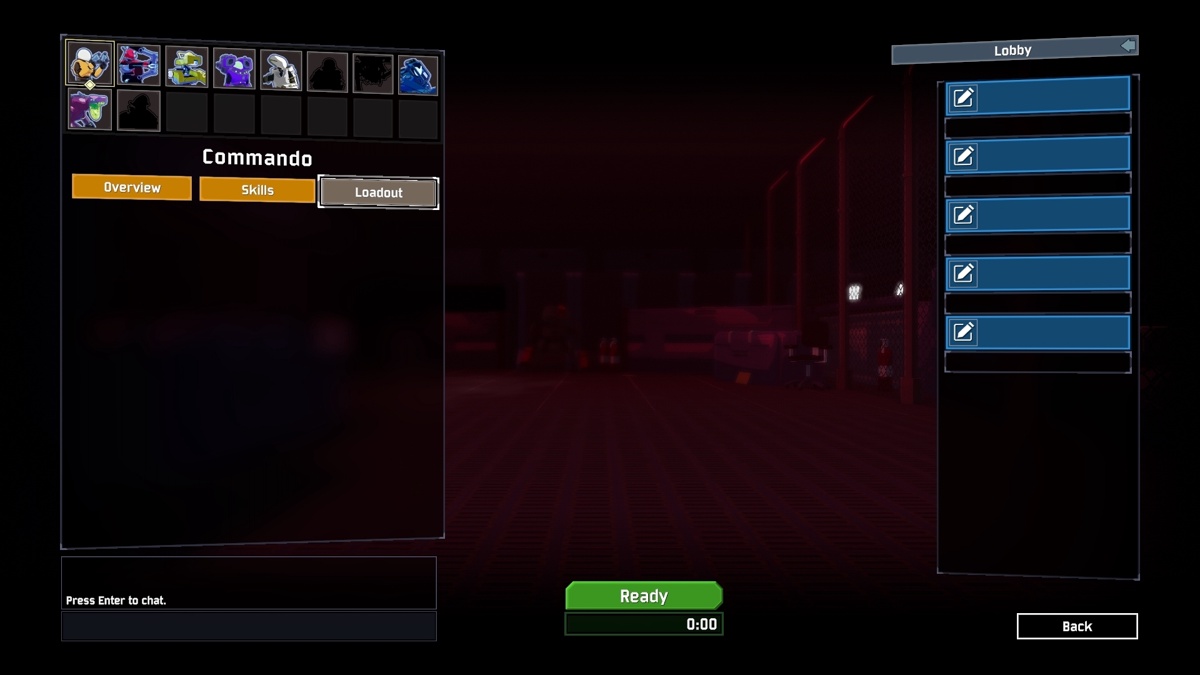

My friends screen and the artificer one is me. How do we fix this?? They're in my lobby but unable to interact with anything and thus preventing us for starting the game.
 manic nymph
My friend and I are getting crazy lag trying to play together right now; even in the character select. Whoever is hosting will be fine; but whichever one of us joins has lag. I'll click through the characters. and itll stay on commando for 45seconds before flicking through them in the order i selected the icons. Ingame the person that's lagging starts the game spectating and then will get their pod like a minute later. Then its a solid minute of input delay to open the pod. Are servers just really overloaded rn?
We are on different sides of the country (OR-NJ) which may be part of it
hybrid marsh
@manic nymph have y’all reinstalled the game and or restarted your game
or computer
 finite pagoda
I'm actually having that same problem right now, with us being in the same country. Tried restarting the game, computer, modem. Reinstalled, verified. Nothing.
keen lake
@granite sage Framerate.
 craggy ferry
Does RoR2 have anything for the colorblind?
 mortal eagle
Hey how can i host 5 players?
drowsy nacelle
set the max players to be higher
@mortal eagle
also... for some reason in the bazaar between time, after buying some lunar items, the server began to spit out a lot of errors
mortal eagle
Im having issues getting the dedicated server working , is there a download?
steamcmd doesnt seem to download it
granite sage
Nope. Drivers didn't actually solve it. Issue came back within 5 minutes 😦
manic nymph
@hybrid marsh yeah tried all that on both ends
hybrid marsh
i’m pretty sure it’s a peer to peer connection not to a server... so the fact y’all are far apart is probably the problem
 astral badger
i invite friends through steam, but they either cant connect or lag when in game
 true sinew
It may just be my machine but I'm getting these huge lag spikes too as soon as stage 1 or 2 😦 Makes the game pretty much too frustrating to play unfortunately, never had this issue before 😦
keen to hear if anyone has a fix (tried the driver etc. updates, reinstall/restart the works) ❤️
 potent forge
So I last played RoR2 quite a long time ago and it had a nice quickplay where it would match you up with other people, you'd vote on difficulty and away you go,. This seems to have been replace with just a server browser that's horrible? I have show started games unchecked and after trying to join games for the past 30 minutes every one has been in progress. Am I missing something or does it just not work well?
split locust
uh, i just beat the game a session or two ago, unlocked a lot of stuff after getting my progress wiped from moving pcs (steam didnt sync), i just opened the game again and every single one of my unlocks are gone? i love this game but whatever this glitch is is making it unplayable for me
median steeple
crashed apparently the error of the logs for are talking about how it's trying to acess a file but can't find it or isn't allowed to do so >->
split locust
i still have the steam achievements and everything, but no items or survivors
really hope i can get a response, otherwise my progress is just gonna be wiped every single time i restart the game
 young steeple
I just lost my entire save file after unlocking the captain and ive had continous crashes with the same image @median steeple when i play mercenary at all
split locust
deleted save file gang
 vital zealot
My friend installed the game today and every time she tries to play her entire PC has crashed multiple times, about every 10-20 minutes. We played a few other games to test and things were fine for hours so it's definitely because of this game.
She has updated her drivers and also verified the game files. Every time she starts the game again she also has to create a new profile, it's like her save data gets deleted every time.
She doesn't have a crashlogs folder but this is the output log:
orchid flame
Devs come on you gotta at least say something about this, almost every post here is about that crash like do you know what’s going on? Are you fixing it?
split locust
considering how many crash issues we're having, theyre probably working overboard if anything lol
median steeple
its the same crash so far consistently with FPS issues as well
split locust
exactly, so im assuming theyre already looking for a fix
i just hope theres a way to get all my progress back
median steeple
uhh its located in the local appdata files under Temp >.> i believe is wher you will find the crash logs/output file
 pine jewel
alright, just making sure before i boot it up, i deleted the bepinex folder located in the risk of rain 2 folder and validated files. is that all i need to do before launching?