#ror2-tech-support
1 messages · Page 48 of 1
 unborn cliff
thanks alot
I'm not sure what caused this to happen, during my first week everything was smooth as butter (1-2 hours of uninterrupted run), then it became really bad at some point
I can't remember if I updated my 1650 maxq driver or not, I think I did at some point
not sure why unity is trying to access 0xc0000005
ram isn't overclocked, but I did do a stable undervolt (I've tried adding .05V to see if it helps)
 mild ridge
@unborn cliff all of these seem to be the same/similar crashes. when we create an object like a character, vfx, item, prop, etc. it's usually done by copying a dormant original object that was loaded from disk. for some reason your game is crashing when trying to do this on what's probably one specific object. have you already tried validating your game files through steam?
you may have a corrupted file where that object is stored
unborn cliff
yeah, i've tried validating/reinstalling the game
where's it trying to loda from? maybe it doesnt have read access to it?
mild ridge
it should just be the Risk of Rain 2/Risk of Rain 2_data/ folder. that's where all of our assets are packaged
this is the first time I've ever seen this crash
unborn cliff
That's odd, none of the permissions look out of place
I've tried revalidating, none of the files needed to be redownloaded. should I delete the folder you mentioned and let it re-fetch?
mild ridge
worth a shot
unborn cliff
about the unityplayer.dll trying to access that memory address, is that an issue?
iirc lower addresses are reserved
I'm redownloading now, I'll get back to you if it fixed my issue here
mild ridge
it's currently the issue. it's being told that some sort of information it needs is in a region of memory it doesn't have permission to, so it goes to fetch it and then you get a crash due to a memory acccess violation
it just so happens that it's getting this bad address when it's trying to create some object
google is unfortunately not really producing any useful results for the name of the unity engine function that's causing the crash
unborn cliff
if I take a screenshot of the pop up (with some random text on it), would that help? or is it already in the crash.dmp
mild ridge
the output_log.txt files are providing a little more context, it looks like the object in question is some sort of vfx
it's already in the crash.dmp, I think
unborn cliff
i gave all users full permission on that data folder
just in case it's permission issue
weird though, does it say what vfx specifically? it doesnt seem to be happening consistently
mild ridge
I don't think it's a permissions issue. If that were the case the object would have never been able to load into the game when you start it, among many others.
unborn cliff
i redownloaded the folder, i'll let you know if i run into any issues again after this
mild ridge
it doesn't say, it seems to be some effect the host player's machine is telling your machine to spawn
unborn cliff
i'm usually the host during our multiplayer runs
mild ridge
if you can trigger it in singleplayer though I might be able to get a better idea
oh weird
unborn cliff
yes it happens in singleplayer too
but i'm not sure if i have the error log for that
i can dump you the rest of my error logs from other days if that helps?
mild ridge
I can take a look
unborn cliff
I can't remember which one of these are triggered during my singleplayer runs, sorry
I can try playing solo and see if the issue pops up again
mild ridge
I can see in one of these that it appears to be an effect that's created when a character gets stunned
unborn cliff
I can't remember if the exceptions happened happened during a certain event, ror2 can be quite chaotic
but it doesn't happen EVERY time I get stunned for sure
mild ridge
there's a different crash in one of these, it seems to be nvidia related
unborn cliff
does steam file validation check for file existence or its contents too?
mild ridge
both
unborn cliff
which date is the nvidia issue? i remember reinstalling the graphics driver
unborn cliff
ah yes i definitely updated my driver after that date
I'm doing a solo run and see if anything pops up
mild ridge
looks like it also crashed when trying to create the visual appearance/model of a projectile, too
unborn cliff
it's getting quite late so maybe i'll try again tomorrow for a longer test
mild ridge
yeah, sorry wish I had any tips on what to look into
idk what it could be if not an overclock screwing with memory or a corrupted file
and usually the former generates seemingly random crashes, not one that's so consistent
 tacit gyro
if it was an overclock it would be random each time right
mild ridge
yes
unborn cliff
maybe i should do aida64 and see if i see anything wrong with my ram
tacit gyro
and if it was a corrupted file it should be the same problem each time probably
mild ridge
if it was a corrupted file steam should be able to catch it
tacit gyro
try verifying
mild ridge
but it seems like the game's been validated and reinstalled multiple times
unborn cliff
nope
mild ridge
I'm not seeing the usual footprints of any mod in the logs
tacit gyro
very old modding leaves files in the ror folder
even wheen uninstalling but that was basically only the first 3 weeks wheen modding existed
mild ridge
I'm seeing something about turbo mode enabled in here
not sure what that's about but it is a candidate
mild ridge
you could also try checking for a BIOS update if you haven't already
someone had their crash issue fixed by doing that
tacit gyro
bios updating is allways good it allowed me to go from 2400mhz to 3066mhz on my ram lol
unborn cliff
ok my mobo does have a bios update
tacit gyro
you can update from inside the bios most likely
mild ridge
🤞
unborn cliff
weird though, it never happened until recently
i never upated bios inbetween the first playthru and now
tacit gyro
may also be windows install bricking
unborn cliff
but i'll give it a shot, it's good practice anyway
mild ridge
yeah, I've been noticing an influx of engine crash issues since the artifact update. we updated the engine from 2018.3 to 2018.4 to try to fix a physics crash issue but it seems to be somehow a bit more touchy with memory stuff
tacit gyro
you can also try sfc -scannow
unborn cliff
Ok I've successfully flashed my bios, will try again tomorrow (solo runs)
Thanks alot @mild ridge for working till this late
it's not everyday you have devs help you troubleshoot realtime
❤️
mild ridge
👍
 orchid flame
hows your day @mild ridge
 fickle pulsar
Is this the right place to talk about modding?
fickle pulsar
Any time I try to install mods with r2modman it throws a null pointer exception
orchid flame
oh that sucks
 near gust
@chilly basin
 chilly basin
@fickle pulsar
- Browse data folder in the settings and wait for file explorer to open
- Close the manager
- Delete the config folder
- Relaunch
 young quartz
@fickle pulsar Which mods are you even using???
chilly basin
Are you still getting a null pointer exception?
young quartz
This seems like a pretty unique error. This mod is actually giving multiple exceptions.
fickle pulsar
BepInEx, R2api, ItemLib, BanditReloaded, ClassicItems, RoR1ItemRework
I tried with just BepInEx, same issue
young quartz
ItemLib?
Isn't that.. deprecated?
Which version are you using?
Unless you mean the version directly installed into R2API. In that case, nothing wrong there.
young quartz
I've never used mods before, but from what I can gather, you don't need ItemLib. R2API has its own implementation of it.
0.1.3 is the deprecated version that was updated 8 months ago.
fickle pulsar
oh it worked
young quartz
Did removing that do the trick?
chilly basin
If you're using r2modman, just click the Start vanilla button
It'll launch with no mods
young quartz
Nice, just make sure in future that you're not installing deprecated mods.
 balmy remnant
Hey @mild ridge, I just tried to host game and my friend got the crazy +3s lag again, I figured that i'd post the output logs if you'd see anything weird. we never started the game, as it was clear something was wrong since changing charter took more than few seconds. I'll post mine and his logs.
my log (sorry its big)
his log
unborn cliff
@mild ridge bios update didn't help 😢
 craggy crest
dont know if this is a bug but all of the sudden the menu is running so laggy any fixes?
i fixed it
 rain wolf
hi guys i have Q key item for what we need or how it work or what give you i don't understand  👀
👀
orchid flame
it spawns a little box in the next stage after getting it(after every other stage)and you can open it to get a item
 frail nacelle
Hey I can't join any lobby. At the character selection screen it just keep showing me this.
I can't play with friends or random people. Is there a fix?
Can't find a proper one on forums
Also, I do see people in lobbies, but people don't see me.
fickle pulsar
I'm getting this error now. I don't have deprecated mods, what is going on now?
@young quartz
unborn cliff
@mild ridge bios update didn't help 😢
this was a solo run as we discussed yesterday, I've updated bios, ran memtest to see if there's anything wrong, couldn't find any clue
mild ridge
@unborn cliff looks like it crashed when a lemurian was trying to create the effect for charging a fireball in its mouth
unfortunately I'm running out of ideas
unborn cliff
same
i'm doing my best verifying that my laptop isnt stupid
because it seems that not many people are having this issue
fickle pulsar
can you take a look at my crash?
mild ridge
@fickle pulsar this message isn't indicative of a crash but it does seem to be a startup error. it's related to loading your loadout from your save file. it looks like you were previously using a skin that you don't have anymore
near gust
If you provide your entire logfile, Skitter, I might be able to help you better. It's located in your bepinex folder
near gust
If you've used any custom skills mod ,try installing that one again and setting the skills back to the default ones before uninstalling
fickle pulsar
Haven't used one of those either. What hapened was that I installed drop in multiplayer and then it stopped working
@near gust should I just wipe my profile?
uh it works now
this is weird
near gust
Magic
fickle pulsar
i didnt even DO anything
unborn cliff
(Filename: C:\buildslave\unity\build\Runtime/Export/Debug.bindings.h Line: 45)

Fallback handler could not load library C:/Program Files (x86)/Steam/steamapps/common/Risk of Rain 2/Risk of Rain 2_Data/Mono/data-00000171C4EAD070.dll
Fallback handler could not load library C:/Program Files (x86)/Steam/steamapps/common/Risk of Rain 2/Risk of Rain 2_Data/Mono/data-00000171B81DB850.dll
Fallback handler could not load library C:/Program Files (x86)/Steam/steamapps/common/Risk of Rain 2/Risk of Rain 2_Data/Mono/data-00000171E02AD020.dll
Searching for compatible XInput library...
still the same issue, error fetching stuff from the data folder
this makes me sad
young quartz
@unborn cliff That's not an error.
It definitely looks like one to the uh, "untrained eye"?, but that will not be the cause of crashes.
unborn cliff
@young quartz these are the latest 3 crashes, first one was triggered on a group run (me as host), the remaining 2 on solo runs
if you can take a look, that would be great
young quartz
Is your game modded?
unborn cliff
nope
i tried reinstalling, verifying, doing memtest to verify ram is ok
since it was trying to access 0x0000005 or something
i definitely have enough ram
unborn cliff
yeah, but at random
so i really have no idea what's going on
i talked to ghor about this and it varied from vfx to spawning whatever entities that caused those crashes
it's different every single time
 potent gazelle
absolute legend, providence corrupted his game to prevent him from killing innocent creatures
young quartz
yeah, it's an instantiation error
i would jump to the cause being memory as well, considering that your game is running into memory access violations when creating entities
unborn cliff
I guess I'll just sit here and wait for future updates then
That will hopefully (somehow) makes things not crash anymore
:'(
or play on my work laptop
@potent gazelle literal gOd RuN
young quartz
new difficulty- your game has a 1% chance to crash each time an enemy spawns
 uncut aurora
you wouldn't make it past the 2nd stage lol
orchid flame
you wouldnt even play the game
 whole shell
Okay, I have this
error
It is not clickable, and the background is playing, I have gone through all of the stickied solutions as well as some classic repairs, like compatibility and run as admin
any advice would be appreciated
balmy remnant
@whole shell I got that error when I had old mod thingies installed, have you tried deleting entire game folder and reinstalling? its so small after all, shouldn't take long
whole shell
Thank you for the response, I unfortunately do not have any mods installed
I have not done that, but i am currently checking all of my drivers again
I will take that step next if this bears no fruit
balmy remnant
hey @mild ridge, any ideas regarding the lag thing?
mild ridge
I didn't see anything out of the ordinary in those logs
 sharp kettle
Hello, I have the vJoy drivers for Gamecube controllers on my PC and it forces my player to always look down unless i disable it, even if i use a different controller or M&K, is there a way to fix that or has anyone else mentioned it?
mild ridge
@sharp kettle as far as I'm aware the only solution is to uninstall or disable the driver in your device manager
sharp kettle
truly unfortunate but i understand
mild ridge
it's sending weird inputs to the game that the game views as legitimate gamepad inputs so there's not much to be done
sharp kettle
Fat L
mild ridge
@balmy remnant if you or a friend is willing to port forward one of you could try doing that and hosting with the other player connecting directly via IP in the console
that would get around the relay servers issue
balmy remnant
i could do that, in fact, i think I already got the ports open
mild ridge
you'll want to forward port 7777 to your machine
young quartz
EARLY_ACCESS_DISCLAIMER
 plush treeBOT
@young quartz, We have two known solutions for the topic 'EARLY_ACCESS_DISCLAIMER'. Would you like to view them? (Y/N)
young quartz
Y
plush treeBOT
@young quartz,
- If you are using mods, your mods are likely out of date. Uninstall your mods and try starting the game again.
- If you have never used mods, the issue is fixed by installing Visual C++ Redistributable for Visual Studio 2015. Download the installer here and choose x64 if prompted to choose between x64 and x86. If the installation fails with the message "0x80070666 - Another version of this product is already installed." please uninstall Visual C++ Redistributable for Visual Studio 2015 (and 2017 if you have it) and try reinstalling it. Link: https://www.microsoft.com/en-us/download/details.aspx?id=48145

Microsoft Download Center
The Visual C++ Redistributable Packages install run-time components that are required to run C++ applications built using Visual Studio 2015.
young quartz
@whole shell See the bot's response.
balmy remnant
oh, so its different from dedi port. I'll look into it
mild ridge
then your friend would need to use the command connect My.Ip.Goes.Here:7777 in the console, which can be opened with ctrl+alt+~
you could also host a dedicated server instead if you want
that would use 27015
whole shell
I have attempted both of these solutions, thank you tho
balmy remnant
so dedi's are fixed?
young quartz
Can you send your output log?
mild ridge
@whole shell when you tried installing VCR2015 did it say it failed to install because it's already installed?
young quartz
Go to C:\Users\<UserName>\AppData\LocalLow\Hopoo Games, LLC\Risk of Rain 2\output_log.txt
mild ridge
@balmy remnant dedicated servers should be fixed as of the patch a couple weeks ago
whole shell
yes since i have the 2017 thru 2019 installed
mild ridge
@whole shell you need to uninstall it and reinstall it
young quartz
Oh-
mild ridge
if you get that error it's not enough
young quartz
Yeah, you need to uninstall version 2017
mild ridge
2017 will block 2015 from installing for some reason but you need 2015
whole shell
what the hell
mild ridge
so you have to install 2015 first then you can install 2017
whole shell
okay give me a sec
young quartz
Shouldn't we make a new pinned message on EARLY_ACCESS_DISCLAIMER since the old one is outdated?
plush treeBOT
@young quartz, We have two known solutions for the topic 'EARLY_ACCESS_DISCLAIMER'. Would you like to view them? (Y/N)
mild ridge
@young quartz probably, just gotta get around to it
young quartz
yeah, just that the channel's description may point people to pins, then poof, they deleted their save files
mild ridge
yeah
whole shell
yo if this fixes it thank you, but this is also somekind of weird bull
young quartz
actually, @whole shell
you said you "already attempted the fix"
where did you see the fix, out of curiousity?
whole shell
young quartz
ahhh
whole shell
that version reccomended the latest version
which i figured wouldnt be an issue, because why would it be
young quartz
i see
the newest version usually seems to be the best, but if you're a game programmer
whole shell
look i dont pretend to understand game development, I am just venting a 3 hour troubleshooting session
young quartz
no, i'm not, i'm just having a joke with
myself i guess
whole shell
i fully understand that stable is way better
young quartz
but yeah, i'll have a look on the subreddits
i wanted to know where you found the fix to see if i could correct anything, it's annoying for people being lead down the incorrect path, like you have
whole shell
 plush treeBOT
@whole shell, We have two known solutions for the topic 'EARLY_ACCESS_DISCLAIMER'. Would you like to view them? (Y/N)
 hollow oak
 unborn cliff
is it known that win10 build 18363 is stable/unstable? I'm still trying to fix my crashes (memory access violation when trying to load from ror2 data)
Because I remember updating my windows at some point before ror2 starts crashing
I'm using 1650 maxq on v445.87 (latest WHQL)
should i roll back my win10
seems a bit drastic
frail nacelle
Is someone knowing anything about my problem? I posted here twice, but no one has anwered me.
Even a "You can't play at the current state of the game" is okay.
 hallow raptor
Is there a way to disable controller detection for the game?
 steady topaz
@frail nacelle are you around? got some workarounds for your problem.
 zealous hound
Hello Everyone! I am here to report an issue that doesn't seem to fix from uninstalling and reinstalling to verifying game files. Is getting a black screen common around here? XD
Also is it possible for someone to tamper with ur game when you play online? This started occurring when the game crashed when i was hosting a game and hitting the teleporter to the next stage. Happened about 30 mins ago
if any1responds about this issue I have plz @ me ty
this also pops up at times when i launch it
 cinder plume
so from what I gathered, you tried re-installing it and also verifying the game files, correct?
@zealous hound
zealous hound
yes correct
cinder plume
so, it may be your saves, since those aren't affected by either of those
so what you can try, is to go to C:\Program Files (x86)\Steam\userdata[insert number here]\632360\remote\UserProfiles
zealous hound
so I may have to delete my files and start over?
cinder plume
depends
try to go there, and take any file out, put them on your desktop or something
and then try to launch the game
if it does launch, that means your save is basically gone
zealous hound
hmm same issue I cut and paste the save to my desktop still have the same issue
cinder plume
mhh
then it's probably not a problem linked to the game, you may wanna check your drivers
zealous hound
the drivers are updated to the latest and checked my nvidia control panel to see if any problems lied in there. Everything seems good.
cinder plume
any crash reports?
zealous hound
I tried running it again and I was getting really bad frames and then it went to black screen.
cinder plume
k
 royal stratus
@zealous hound are you using windows?
zealous hound
Uhh yea that seemed to have fixed it
zealous hound
Restarting Windows seemed to have fixed it
I have an RTX 2070 i'm fine with hardware lol
cinder plume
okay
royal stratus
enjoy the game 🙂
zealous hound
Ty guys for helping me fix this issue I really do appreciate it truly. You guys are a big help to the community.
@cinder plume @royal stratus
cinder plume
no problem
 tawny arrow
Idk of this is the right place to ask this but does anyone know if there is a planned Linux version of this game
I'm trying to transition from windows to Linux and it's the only game I'm really beat up abt not being able to play on the new OS. I can still easily play it on windows I have dual boot set up, but I was just wondering if it was planned at all
 azure cargo
I don't know if it's because of mods that we have or whatever, but for some reason our equipment seems to disappear randomly. It seems to only happen when we have gesture of the drowned, and our equipment will just random disappear. We have quite a few mods, but it doesn't seem like any we have would do this intentionally, and I'm not sure how it'd be bugged in that way. Hopefully this is the right place to ask, it's all I can think of.
near gust
If you are using Rein's general fixes, that is a feature
orchid flame
never mind
near gust
Besides, Ghor reads every message here anyway, so no need to ping them
orchid flame
still never mind
potent gazelle
even then he should've gone to #general at least
it wasn't relevant to this channel at all
orchid flame
ok its gone
azure cargo
Oh. Okay. Thank you Harb! Also your mods are great.
 turbid stratus
If I get the beads of fealty and kill tip-tip will I still get the skin on monsoon?
turbid stratus
im assuming I have to kill tip-tip?
orchid flame
also when you get the lunar coins you get an additanial 5 because of obliteration
yes
 wintry yarrow
 orchid flame
yes
mild ridge
@near gust I don't read every message. I'm definitely putting a lot more time into this than usual right now though it is a little hard to keep up with sometimes
?connection
plush treeBOT
@mild ridge,
If you are unable to fully connect to another player try restarting Steam. This should fully close any Steam connections that might still be open with any other players, which can cause the game to fail to open a new connection. If this doesn't work, make sure everyone in the group has configured their firewalls to allow traffic for RoR2 and Steam and that nobody in the group is using a VPN.
mild ridge
@frail nacelle ⬆️
@hallow raptor nope
@tawny arrow there are no plans at the moment but last time I checked the game was reported as running extremely well through Proton

Proton and Steam Play game reports for playing Windows games on Linux
tawny arrow
thank you ghor I will definitely try it out!
 elder mortar
me and my friend keep trying to play with each other but after about 2 minutes of play it kicks me out the game and then says its for an unspecified reason
mild ridge
@elder mortar that's usually related to your steam auth data expiring. I'd suggest you try restarting steam
elder mortar
ty this has helped
 shell zealot
stuck in here and i cant start the game, i already reinstalled the game twice, deleted the character files and nothing
 sick canyon
are your drivers updated?
shell zealot
yes
mild ridge
EARLY_ACCESS_DISCLAIMER
plush treeBOT
@mild ridge, We have two known solutions for the topic 'EARLY_ACCESS_DISCLAIMER'. Would you like to view them? (Y/N)
mild ridge
y
plush treeBOT
@mild ridge,
- If you are using mods, your mods are likely out of date. Uninstall your mods and try starting the game again.
- If you have never used mods, the issue is fixed by installing Visual C++ Redistributable for Visual Studio 2015. Download the installer here and choose x64 if prompted to choose between x64 and x86. If the installation fails with the message "0x80070666 - Another version of this product is already installed." please uninstall Visual C++ Redistributable for Visual Studio 2015 (and 2017 if you have it) and try reinstalling it. Link: https://www.microsoft.com/en-us/download/details.aspx?id=48145
Microsoft Download Center
The Visual C++ Redistributable Packages install run-time components that are required to run C++ applications built using Visual Studio 2015.
mild ridge
@shell zealot ⬆️
shell zealot
Ty I will try it
 fathom frost
anybody know of an issue where your headphones are messed up? the left and right channels are swapped and everything sounds really close by
didnt happen with my last headphones, just started with the new ones
already updated my drivers as well
young quartz
Is this Risk of Rain related, or a general issue?
Perform a quick sound test in your Sound settings menu.
 arctic plover
So me and a friend were doing amazing in a drizzle run, and suddenly we instantly die. Stage 4, and my friend is using Engineers Walking turrets, and they had been dealing most of our damage. We go to fight the boss, an imp overlord spawns, and then my friend dies first. Its not gradual death like a boss would do to you, im talkin snap your dead. I assume it was just the boss, but then i die instantly as well, but to a ukelele projectile. Our ending screens show this; I died to unknown enemies, and my friend died to one of his turrets. We are playing on ps4, so no artifacts are at play yet. Why did they turn on us?
Is this a bug/glitch?
unborn cliff
@mild ridge seems like I fixed my issue, by doing the following:
Windows update
Bios update
Reinstall the game
Verify
Clean install nvidia
Added exception to firewall and defender
Not sure which one did the trick, probably adding exception. Seems like 48min without crashing is a success for me
Thanks for helping me the past few days!
unborn cliff
Yeah one of the combinations of the things i did finally worked
Or maybe it's just sheer luck

arctic plover
Is there any explanation on my issue above?
 sharp notch
Gamepad inputs are all marked as unknown whenever there is supposed to be one, my camera continuously looks down and can tell that is also the gamepad control's fault, whenever I try to use my mouse it constantly gets moved to the center and can't see it stopping me from selecting anything without a controller.
 south cosmos
i have a solid 20sec+ delay on multiplayer where everything happens 20 seconds later for me and the game is unplayable. my internet is fine in all other games and doesnt lag but for some reason the multiplayer experience in this game is unplayable for me currently. is there any fix or any possible fix?
steady topaz
@south cosmos This game is p2p with steam servers as a middle point, wich means connection goes from host to clyent and back. There is no central server, your connection depends on distance and quality of connection chain: you>provider>steam server>provider>host and back.
Some hosts have not enough output bandwidh to support more than 1 clyent.
Try looking for other host.
If it lags roughly the same on every host you join - check ping ``+ctrl+altto open console andping` for rtt=999ms where numbers represent ping in miliseconds.
Try rebooting steam, it ushually helps. If not - check that your router or firewal doesnt block connection, open 7777 port.
If nothing from above helps - play with friends with direct connection or lan (lan emulation works too)
south cosmos
it has been happening on multiple different occasions so it isnt really cuz of steam
steady topaz
@south cosmos i insist on rebooting.
south cosmos
i tried both and neither of them worked. so maybe emulating lan is only option
orchid flame
hey um @mild ridge someone was playing a run in ror2 today and they pinged a lunar coin and this poped up on thier screen
why is it there
tacit gyro
Modded
young quartz
Definitely modded.
 slate robin
orchid flame
slate robin
orchid flame
So. I play risk of rain 2. It nukes my GPU for some reason literally in the 90's telling from my task manager. But I still wonder why it nukes my computer. My other games, for example: Black mesa, doesn't go pass 30% gpu.
After trouble shooting for a bit. It was the frame rate. Setting it to 120 fps just nukes your computer.
 timid raven
@mild ridge Hello, there was a unity error for a long time. Thank you very much for your help. The problem was in RAM. Even though the error was only in ror2, it was enough to check her memtest. Replaced under warranty in the store, the problem disappeared. Thank you very much! I apologize for my English 😄
 random turtle
Hello, I cant open the console on Pc.. tried reinstalling already, still does not work.
 coarse remnant
How can I get 4 player co op for risk of rain 1 on xbox, do we have to do something special?
near gust
random turtle
Thank you!
mild ridge
[NO GAMEPAD BINDING]
plush treeBOT
@mild ridge, We have two known solutions for the topic 'no gamepad binding'. Would you like to view them? (Y/N)
mild ridge
y
plush treeBOT
@mild ridge,
This issue occurs when Windows is reporting a gamepad, joystick, or other input device providing a non-neutral input. This is usually caused by:
- Having a gamepad, flight stick, HOTAS, pedal, racing wheel, or any other kind of non-keyboard/non-mouse input device plugged in. Simply unplug the device from your computer.
- Having vjoy installed. If you've ever tried to use a GameCube controller with your PC, you probably have it installed. Opening your computer's Device Manager window should allow you to disable or uninstall it.
plush treeBOT
@mild ridge,
Risk of Rain 2 uses Steam P2P networking. While this allows for easier connections without the need to forward ports, certain conditions can still cause problems. If Steam cannot establish a direct connection between you and another player it will resort to using a relay server to deliver your traffic and this can often add delay. If you are experiencing more than a second of latency it's very likely that your traffic is having to go through a relay server instead of directly between you and the other player. Make sure nobody in the group is using a VPN and that all players have their firewalls set to allow traffic for both Risk of Rain 2 and Steam.
mild ridge
@south cosmos ⬆️
sharp notch
Lol I do have vjoy thx
mild ridge
@timid raven glad to hear! Thanks for the update 😄
orchid flame
yo ghor you should make a advertise channal for people to advertise stuff
south cosmos
ill see if it works
orchid flame
also im not @ ghor because he will read it i think
mild ridge
I don't really think that's a good idea
orchid flame
ok just asking
sharp notch
Yup that was it, thanks for the help!
 agile sundial
my whole ror2 window changed to this. anyone know why? really spooked me real quick
young quartz
?????????
That's.. uh.. that's what happens when your game attempts to display a webpage but.. wha?
tacit gyro
Does the game even have webpages at all
 glad tinsel
I've owned ror2 for about 3-4 months and since i've owned it i randomly have crashes, my screen freezes and then a unity crash appears and my game closes. The crashes are completely random and can happen either 5 mins into a run or 3 hours into a run. This has meant I can never play solo and I have to play with friends as I can rejoin when with friends. I though it may just slowly fix itself but the crashes still happen. I have a 1080 and a ryzen 5 1600 with 16gb of ram so i dont think my specs are the problem.
If anyone knows of any fixes or has similar problems please let me know. Thanks.

This clip was taken earlier today and shows my game just closing due to unity crash. I have a second monitor and it shows a unity engine icon on the task bar when the game freezes.
 wise kraken
orchid flame
wise kraken
orchid flame
well dang that sucks
mild ridge
?files
plush treeBOT
@mild ridge,
Output Logs
While the game is running, it is continually writing to a file called output_log.txt. This file can help us get more information about the issue. If possible, please upload the file here. The file is usually located at:
C:\Users\<UserName>\AppData\LocalLow\Hopoo Games, LLC\Risk of Rain 2\output_log.txt
Crash Dumps
If the game crashes it will generate a Dump file. Similarly to output_log.txt, it can help us track down the source of the crash. Please upload your crash dumps here if possible. The file is usually located at either:
C:\Users\<UserName>\AppData\Local\Temp\Hopoo Games, LLC\Risk of Rain 2\Crashes\crash.dmp
or
C:\Users\<UserName>\AppData\LocalLow\Hopoo Games, LLC\Risk of Rain 2\Crashes\crash.dmp
mild ridge
@glad tinsel please upload your crash.dmp file if possible ⬆️
@wise kraken you may have a GPU, motherboard, or RAM issue. Make sure your graphics driver is up-to-date, your BIOS are up-to-date, and that you don't have your RAM overclocked
mild ridge
@glad tinsel The issue seems to be consistent between the two logs, which makes a RAM issue less likely. I'd suggest making sure your graphics drivers and motherboard BIOS are up-to-date
glad tinsel
@mild ridge I have multiple crash logs that I can send if needed? And I have uninstalled all gpu drivers and reinstalled recently and my drivers are fully updated.
mild ridge
@glad tinsel including your motherboard BIOS?
and yes, if you have more I can take a look at them
glad tinsel
@mild ridge I have updated my bios in the past but looking to update to most recent version soon, and I will send the other crash logs in a moment. Thanks for the help
mild ridge
@glad tinsel I took a look at all of these and they all seem to report an error occurring in unity's memory allocator
this is the first time I've seen this specific issue. If updating your motherboard BIOS doesn't solve the issue then I'd suggest you do a RAM test and also make sure your RAM isn't overclocked.
glad tinsel
@mild ridge i'll try updating my bios and ram test tomorrow and let you know if it fixed it, really appreciate the help!
mild ridge
👍
orchid flame
So Im not really getting the FPS id expect, im getting around 40% gpu usage and 50% cpu usage, capped at 60fps but dropping to to around 30 often so fps seems sluggish/stuttery
Gtx1060
Core i7 8750h
8gb ddr4(around 70% usage)
Running on an ssd
Doesnt seem to change early/late game, its consistently crap
steady topaz
@orchid flame Get new drivers, disable v-sync, set fullscreen mode.
Some people reported that having power setting from n-vidia control panel set to performance helps.
steady topaz
@orchid flame Check if you having fps drops while moving your mouse or pressing keys. You can turn on fps counter from steam overlay.
orchid flame
Im using a controller, but i have the overlay for fps with Nvidia, doesnt seem to make much difference
Drops seem a bit random
steady topaz
Is there a pattern? can you definetly say that drops occur after certain time passed? Lets say each 30sec?
orchid flame
No its early and late game, and just short drops
But cpu and gpu usage is low
Tried full and non fullscreen
steady topaz
So its not the 3 problems i guessed to be.
orchid flame
I'd accept it being a laptop i7 if cpu was pegged but its not being throttled or high usage
Still running a consistent 4ghz
steady topaz
50% cpu usage is not what i getting, it around 15% for me. i7-4790k
Cant really say much about that, but people who much-much better at this told that RoR2 is single core cpu heavy.
orchid flame
Actually not even really enough usage to boost my cpu much
Just tested it with monitor usage open and was getting 20ish%
steady topaz
But there was alot of reports of performance problems related to 1060. We better to start with that.
So.. idle and 20% loads?
orchid flame
steady topaz
Thats fine. Look for gpu issues.I dont think that your fps gets down because of cpu. Try older drivers.
 blissful creek
Anyone else having trouble with multiplayer?
 echo matrix
i am
 shut maple
I am having a weird stuttering problem, happens more or less once every second and it's accompanied by a strange "reset" in physics animations (such as Artificer's clothes) despite the game running at 140fps or more
 fallen bloom
@jaunty glen HUD scale ?
 jaunty glen
yeah
 normal mirage
@mild ridge Any plans to enable “tilt to aim” on PS4?
fallen bloom
Guys , why is risk of rain only using 20% of my gpu and cpu ? And only 2 ram as well
 arctic lantern
I'm having issues with ROR2, whenever starting a game it'll just crash. I've done a completely fresh install of it. Also i get artifacting in the title screen
https://cdn.discordapp.com/attachments/296488992000573441/710198902879551528/unknown.png
 mild ridge
@normal mirage I'm not involved with the console port but I do think it would be cool to see if we could arrange for it to be done.
normal mirage
That would be a game changer. The controller is very cumbersome with stick aiming
mild ridge
@wise kraken oh, I thought it was a Windows bluescreen at first glance. My bad. You might be able to get more information out of posting this in #ror2-bug-reports-console
@orchid flame The game is mostly single-threaded, so unfortunately it can't use very much more than ~16.7% of your six cores. If your CPU is running at 4GHz though that should be plenty to run the game smoothly at 60 FPS until much later into the game. Does turning down any of your settings improve performance at all? You might be able to narrow down if it's a GPU or CPU issue by trying all of the settings, as they should list which device they're more impactful on in their descriptions in the menu.
 frank shoal
I had Ai post for me because of the 10 minute post penalty upon joining. I have artifacting (some particles flash big on the screen for a frame) and choppy frames in the title screen, and a few seconds after joining a single or multiplayer lobby i'll crash. It all started when I tried to fix a fullscreen stuttering issue. However, my game if a completely fresh install. I'm running a 5700xt and it runs fine otherwise with no artifacting anywhere else.
I was using fullscreenizer last night to fix the stuttering and I did a full game without any issues. I only started having problems today. I'm on Radeon 20.4.2
Sometimes, ill get an error like above when i crash and other times ill have my risk of rain window just go fully black. one crash had my entire computer freeze and my secondary monitor flashed green which was weird
Thank you for the help if you have any; I'll provide more info as needed
mild ridge
@blissful creek @echo matrix what are the specific issues you're experiencing? Is it trouble with connecting or is it trouble with latency/lag?
@shut maple are you using mods by chance?
@frank shoal if you can upload any crash.dmp files I can take a look at them and see if anything stands out
?files
plush treeBOT
@mild ridge,
Output Logs
While the game is running, it is continually writing to a file called output_log.txt. This file can help us get more information about the issue. If possible, please upload the file here. The file is usually located at:
C:\Users\<UserName>\AppData\LocalLow\Hopoo Games, LLC\Risk of Rain 2\output_log.txt
Crash Dumps
If the game crashes it will generate a Dump file. Similarly to output_log.txt, it can help us track down the source of the crash. Please upload your crash dumps here if possible. The file is usually located at either:
C:\Users\<UserName>\AppData\Local\Temp\Hopoo Games, LLC\Risk of Rain 2\Crashes\crash.dmp
or
C:\Users\<UserName>\AppData\LocalLow\Hopoo Games, LLC\Risk of Rain 2\Crashes\crash.dmp
frank shoal
I'm looking for a crash dmp file now
there isnt one?
Hold on, ill just see if i can crash my game
mild ridge
yeah, I'm looking at this output log and it cuts off suddenly. ususally when there's an engine crash it shows a special message at the end of the log and mentions the location of the crash.dmp file it generates. It may be that whatever caused the crash couldn't be caught by the engine so it could generate a crash.dmp.
it might be an issue from third-party software. Try removing/disabling fullscreenizer and restarting your computer and see if the issue still occurs
frank shoal
The output log changed
and recognized the crash this timethe last time i alt F4'd it because black screen
so the last one was probably empty because of thaty
mild ridge
oh yeah, this has the info
frank shoal
the crash is super easy to reproduce, just start a game and it crashed within 5 - 10 seconds
mild ridge
Apparently you're getting almost exactly this crash: https://steamcommunity.com/app/264710/discussions/0/1696048879947746807/

I cannot post on the main forums as there seems to be a delay of 1 day. If I start Subnautica, the game loads for a while, a black screen pop ups with the version information at the top, then the game exits. I bought the game just now, so the latest version. * Windows 10, late...
I wonder if AMD released a bad driver last night and it installed automatically?
shut maple
@mild ridge I get the stutters with no mods, but there's actually a mod that fixes them called "stutter stunter" (https://thunderstore.io/package/Rein/StutterStunter/)

Thunderstore
Thunderstore is a mod database and API for downloading Risk of Rain 2 mods
frank shoal
I was running risk on it last night.
mild ridge
weird. the crash is definitely coming from your driver
mild ridge
@shut maple yeah, I was going to suggest that if you're using mods since the presence of mods can sometimes make the issue worse, but it can still happen without them
blissful creek
@blissful creek @echo matrix what are the specific issues you're experiencing? Is it trouble with connecting or is it trouble with latency/lag?
@mild ridge We're just unable to get other people into the lobby. We're using the steam version of the game and we went through all the troubleshooting steps, but we're just unable to get in eachothers or any of our friends lobbies. Accepting game invites just keeps you on the main screen.
mild ridge
?connection
plush treeBOT
@mild ridge,
If you are unable to fully connect to another player try restarting Steam. This should fully close any Steam connections that might still be open with any other players, which can cause the game to fail to open a new connection. If this doesn't work, make sure everyone in the group has configured their firewalls to allow traffic for RoR2 and Steam and that nobody in the group is using a VPN.
mild ridge
@blissful creek ⬆️ these are the newest troubleshooting steps for connection issues. we haven't updated the pinned messages yet
blissful creek
@blissful creek ⬆️ these are the newest troubleshooting steps for connection issues. we haven't updated the pinned messages yet
@mild ridge Thank you much, I'll give it a whirl!
frank shoal
@mild ridge Reinstalling drivers not only fixed the issue but also fixed the stuttering that made me mess with my game in the first place. Thanks!
mild ridge
@frank shoal glad to hear! 😄
 crisp lotus
is there a way to get sound files? like to find the sound effect for a void reaver dying or a malachite spawning?
orchid flame
Hello, so me and my friends are having an issue where when we join games like each others or even those in lfg it either brings us to a black screen or kicks us to the menu. We tried steam invites and clipboard ID. Clicking quick play it just sits there and loads forever. I notice a few people with the same issue on the steam community but found no resolution.
 meager canopy
Any reason that Risk of rain won't max out my GPU? I'm running a 2080ti and it maxes out around 70% usage, even though it isn't hitting consistent 144fps. I'm also running an amd 3900x
mild ridge
?connection
plush treeBOT
@mild ridge,
If you are unable to fully connect to another player try restarting Steam. This should fully close any Steam connections that might still be open with any other players, which can cause the game to fail to open a new connection. If this doesn't work, make sure everyone in the group has configured their firewalls to allow traffic for RoR2 and Steam and that nobody in the group is using a VPN.
mild ridge
@orchid flame ⬆️
@meager canopy you might just be bottlenecked by your CPU
the 3900x has a base clock speed of 3.8GHz which is more than enough to run the game at a stable 60 but I'm not sure about 144
orchid flame
ok I will try this out thank you. No one is using VPN and we have played before in the past we will give a shot with restarting steam
@mild ridge That worked. Some processes of steam where hidden in the task scheduler but I was able to join a quickplay game. Thank you for your help! Love your game been playing since the release of the first one
 nimble crane
My game is crashing every time I hit continue after ending a run (PC)
orchid flame
how do i fix this? ive tried uninstalling all mods and the game itself but to no avail
 chilly siren
you need that mod to get it running, in the same page of multitudes there is a link to that mod
 pulsar night
how do i get the death sound audio from the game? im trying to create sicc content from clips
hello, i am trying to create a video with deaths synched to wii shop music, all i am missing is the isolated death sound audio, how do i get it?
i have tried an asset bundle extractor but couldnt find any audio
 livid parrot
:ottparty:
steady topaz
Ghor, is there any solutions you have for bad framerate on good rigs?
 tranquil kite
my game game crashes after i see this
i tried reinstalling also updated my graphic card and restarted mypc
mild ridge
@tranquil kite @nimble crane if you upload your crash.dmp file I can take a look at it and see if anything stands out.
?files
plush treeBOT
@mild ridge,
Output Logs
While the game is running, it is continually writing to a file called output_log.txt. This file can help us get more information about the issue. If possible, please upload the file here. The file is usually located at:
C:\Users\<UserName>\AppData\LocalLow\Hopoo Games, LLC\Risk of Rain 2\output_log.txt
Crash Dumps
If the game crashes it will generate a Dump file. Similarly to output_log.txt, it can help us track down the source of the crash. Please upload your crash dumps here if possible. The file is usually located at either:
C:\Users\<UserName>\AppData\Local\Temp\Hopoo Games, LLC\Risk of Rain 2\Crashes\crash.dmp
or
C:\Users\<UserName>\AppData\LocalLow\Hopoo Games, LLC\Risk of Rain 2\Crashes\crash.dmp
mild ridge
@pulsar night the audio assets aren't stored as standard unity assets, they're stored in wwise sound banks. I don't know much more than that. you'd be better off asking in the thunderstore.io discord I imagine.
@orchid flame the simplest way to get rid of all mods is to find your risk of rain 2 folder and delete everything in it. uninstalling the game only removes the files that installing put on the machine so it'll leave the mods behind and when you reinstall the game they'll come back.
@steady topaz that depends on a lot of things. what is your target framerate, 60/120/144? and what framerate are you actually getting and how far into the game? looking at your CPU and GPU usage while the framerate isn't what you'd expect is also a good way to check where the bottleneck is
tacit gyro
@pulsar night you can find the wwise TXTs with the soundnames and ids in C:\Program Files (x86)\Steam\steamapps\common\Risk of Rain 2\Risk of Rain 2_Data\StreamingAssets\Audio\GeneratedSoundBanks\Windows. should be in global.txt but maybe not youll have to look around and then wheen you know the ID you gotta extract the bank or the wem file depending on if you find a wem file with the ID. can find extractors online.
atleast hopoo didnt remove the Txt's for wwise or everything would be alot harder
steady topaz
@mild ridge Asked for AdmiralAlec's case|
Gtx1060 Core i7 8750h 8gb ddr4(around 70% usage) Running on an ssd
We tryed for him: reinstall, checked drivers, VCs, log doesnt contain anything usefull. Correct GPU used by game.
Disabled Vsync and set to performance from Nvidia control panel.
No wierd input devices with high polling rates.
Framerate bad from eraly to late game. No matter what happens with players and enemys.
Alot of similar unsolved cases on reddit.
Maybe you got some similar problems showed on testings?
People stuck with that for about when game came out.
Should point out that bad framerate in this case means below 30.
mild ridge
it definitely shouldn't be 30 with those specs. I also did respond to AdmiralAlec with a suggestion to try reducing settings to see if any issue could be pinpointed
tacit gyro
ram tooslow to keep up?
steady topaz
We couldnt increase or decrease fps he gets. Someone suggested to force -useallavailablecores launchsetting, it helped to them. But not in this case.
Game simply doesnt use gpu on full potential.
mild ridge
it looks like he mentioned low CPU usage but I checked against the CPU he listed and it looks like it might already be using as many CPU resources as it can
steady topaz
@tacit gyro ddr4?
tacit gyro
well ddr4 says basically nothing it goes from 2000 to 4000 lol
mild ridge
@orchid flame The game is mostly single-threaded, so unfortunately it can't use very much more than ~16.7% of your six cores. If your CPU is running at 4GHz though that should be plenty to run the game smoothly at 60 FPS until much later into the game. Does turning down any of your settings improve performance at all? You might be able to narrow down if it's a GPU or CPU issue by trying all of the settings, as they should list which device they're more impactful on in their descriptions in the menu.
@mild ridge
just quoting this to bring it back down to the bottom of the chat here
tacit gyro
i use 3.8ghz and i can run at 140fps stage 1
mild ridge
I am actually curious for him to try using keyboard and mouse and seeing if that helps performance at all. I don't know why that would be an issue but it is a less common use case of the PC version
steady topaz
@mild ridge my cpu is slightly better at single core performance than his, and mine never gets more than 40% load on single core. My game runs perfectly.
https://cpu.userbenchmark.com/Compare/Intel-Core-i7-8750H-vs-Intel-Core-i7-4790K/m470418vs2384

Based on 541,036 user benchmarks for the Intel Core i7-4790K and the Core i7-8750H, we rank them both on effective speed and value for money against the best 1,227 CPUs.
tacit gyro
is there any load at all wheen idle on desktop?
mild ridge
if it turns out there's a difference in performance between the control setups that actually provides something to look into
steady topaz
@tacit gyro i got ddr3 4gb tottal with 1600. No issues.
tacit gyro
ohgod
steady topaz
is there any load at all wheen idle on desktop?
@tacit gyro
https://discordapp.com/channels/417739215355510784/559902278018924557/709966903170564146
tacit gyro
isnt it just downclocking because idle?
steady topaz
Shouldnt, let me check mine
tacit gyro
does it still say 1.1ghz with game open?
guess ghor has to rewrite the game with multithreading support now 
steady topaz
@tacit gyro Well mine doesnt throttle down when you're ingame and playing. But does throttle down to 1.4gh when you're in main menu. We should look into what his readings is.
tacit gyro
Well if it goes to 4ghz its fine but if his is stuck at base throttle we have our problem
steady topaz
I am currently trying to contact him to see if it is.
tacit gyro
I mean it would make sense just looking at the fps numbers that hes stuck at ~1ghz
 outer blade
Is it useful to post debug console errors like null- reference exceptions or array out of bounds errors
mild ridge
I'd say so
outer blade
Let me go grab it then
So this was on a modded server in the lategame and I noticed that much of the lag lined up with when I received these errors in my console, along with the sync attempts
wanted to know if this was a mod issue
the recalculatemaxstocks through to fixedupdate lines spammed a whole lot whenever it was lagging
and sometimes it lagged less severely while spamming this
mild ridge
it's most likely a mod issue
otherwise there's so much network traffic that stuff is getting lost and the game expects the existence of things that never got created
tacit gyro
Yeah no thats 100 percent a mod issue i see an on.update in there
mild ridge
wait, where
outer blade
thought it was related to network stress from having to sync >4 players but still got that one with only four
that sz:15 pos:15 number changed a lot
but the first one caused far worse lag
mods were 16 player, unmodded clients can join, debug toolkit, and the only artifact was Evolution.
and it didn't seem to happen early much until both the enemies and players had a lot of items
which is what made me think it could've been related to evolution, or the game spawning too many enemies
steady topaz
@outer blade unmodded clients and toomany friends doesnt go well together. Its better when all clyents and host have same mods installed.
Watch thishttps://youtu.be/NwpWQ9Ydno0

huge thankyou to goo from the ror2 discord for the quick instructions on how to get this done!
hope this makes it easy for a few of you to install and join!
here are the files needed below:
MOD PAGE
https://thunderstore.io/
MODMANAGER
https://thunderstore.io/package/ebkr/r...
outer blade
ah, ok
mild ridge
well the second set of messages that appeared is what happens when the game tries to read and apply a network message and it fails for whatever reasons so it skips the entire rest of the packet. it doesn't seem as impactful on the performance because it's literally the networking system giving up on a network message
tacit gyro
I mean the logging itself can cause laag if it happens every frame
mild ridge
we don't officially support more than 4 players so I would consider this beyond the scope of what we would look into
outer blade
alright, thanks anyway
tacit gyro
Itll work fine wheen everyone has it installed correctly
Just will laag from literally having more than 4 players
tacit gyro
Well i can see errors apearing too with more than 4 players wheen everyones using the same skills or stuff
More than 4 players is very out there
Anything can happen at any time
outer blade
are you a modder too?
tacit gyro
Not in code
steady topaz
@outer blade Well..
tacit gyro
I do the wwise and the unity but not the code
steady topaz
@outer blade ill send you invite for modded discord, its better to ask for help with mods there.
outer blade
thanks
 cloud stone
endgame with 16 player lobbies always end up like this @outer blade as far as I know
the network just can't keep up, with the amount of messages being sent
 tight blade
im having a problem i cant join my friend and he cant join me when we try to join it just darkens the buttons and sits on the multiplayer screen we have tried reinstalling verifying the game but still cant join each other and we cant join any quick play lobbies eather
<@&559786374228738069>
 severe ridge
we are not here for tech support my dude
 velvet creek
Please don't ping us for tech support, we're not here for that
 velvet comet
What they said
tight blade
sorry i looked in rules and saw nothing against it so i thought you could help me find someone who can
steady topaz
?connection
plush treeBOT
@steady topaz,
If you are unable to fully connect to another player try restarting Steam. This should fully close any Steam connections that might still be open with any other players, which can cause the game to fail to open a new connection. If this doesn't work, make sure everyone in the group has configured their firewalls to allow traffic for RoR2 and Steam and that nobody in the group is using a VPN.
steady topaz
@tight blade try this ^
tight blade
thank you
 dense tangle
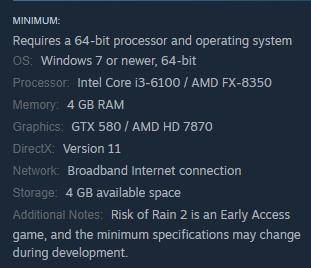
Would anyone have an idea of how well these specs could run RoR2? I already own it on Switch, but the prospect of mouse and keyboard sounds lovely
 tranquil stirrup
I'd think you'd be ok, just probably low graphics
https://i.imgur.com/Kl1uSMm.png
@dense tangle you match the minimum requirements
 dense tangle
thank you, I don't mind low graphics at all
tranquil stirrup
you're just mildly under the video card rating
so theres a decent chance you'll get a lower framerate than you're used to on the switch
dense tangle
that makes sense, thank you!
tranquil stirrup
anyone have any tips for setting up a dedicated server?
https://i.imgur.com/6o4FxYG.png
I've forwarded the port and tried having people connect but they aren't able to and it doesn't show up on steams server list, only under local
 mild ridge
I think to get the game to show up on the server list you need to have 27016 forwarded as well
and you need to forward for both TCP and UDP, TCP alone won't do it I think
tranquil stirrup
https://i.imgur.com/THOll1S.png
tried that out, still doesn't seem to work, I am getting this error though
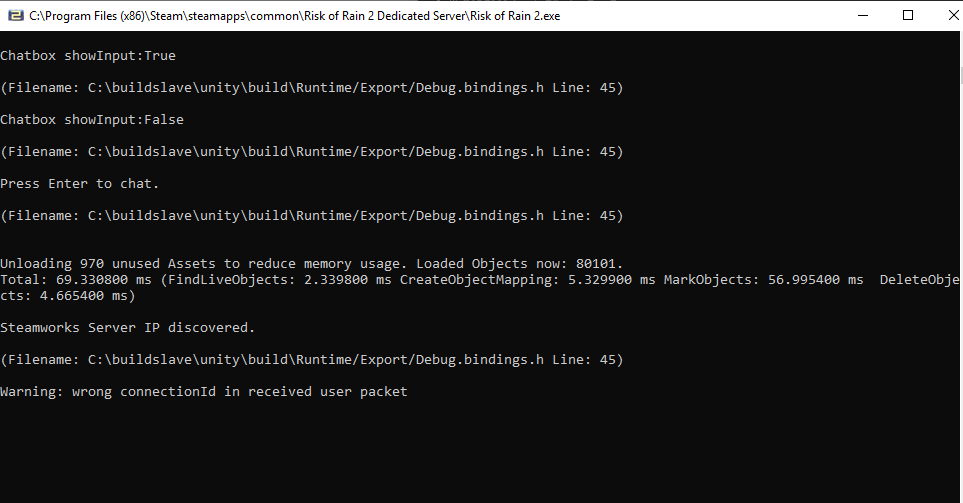
Not necessarily an error but a warning
mild ridge
wrong connectionId in received user packet I think means that the server browser or a player tried to query your game info but the traffic was directed to the port the game uses for game logic (27015 in this case)
tranquil stirrup
Yea it does it whenever I refresh my lan on the serverlist
glad tinsel
@mild ridge Btw I think updating the BIOS helped with the crashes I had, no crashes thus far, thanks for the help!
orchid flame
@mild ridge Im getting frame drops and stuttery performance, im getting low cpu and gpu usage.
Its an i7 8750h and gtx 1060 6gb and 8gb ddr5.
Cpu seems to be bouncing down speed, but its not hitting temps that would be throttling (65-70c)
Apparently this was a potentially similar issue
mild ridge
@glad tinsel nice!
@orchid flame you might want to check for any sort of intel gaming/performance management software on your system that's throttling this. it could also be windows power saving settings.
 little cave
Hi there, I was wondering if anyone knows how to fix the problem of progress being wiped on xbox one. I've been playing for a week now and my profile has started wiping itself every day or two. It's just my account that is wiped, all the other accounts on my xbox have no problems. Any help would be appreciated.
mild ridge
@little cave you might have more luck in #ror2-bug-reports-console
little cave
Sounds good. I will try there
 fossil spade
young quartz
fossil spade
young quartz
You fell out of range, there's no fixing it.
The game doesn't attempt to teleport you back if you fall out of range in certain scenarios.
From that point onwards, there's no getting back.
 orchid gust
Ok so every time i start the game and play for like 1 minuet and sometimes 6 minutes, the game freezes my whole computer and leaves it with a frozen screen with green pixels scattered in bunch
it doesnt happen to any other game
and at this point ive narrowed it down to the game
 magic stone
@orchid gust That is almost definitely a hardware fault with your GPU. I would definitely check if it is under warranty.
 tough ginkgo
Me and my friend bought RoR2 for PS4 recently. When we try to play multiplayer the game just says "Joining lobby...". At some point it disconnects. No matter who makes the invite, this is always the case. If we try to play QuickPlay together it says that X/4 players etc. but when the QuickPlay lobby starts only the one who made the invite goes to the lobby and other player just gets "Joining lobby..." and eventually disconnects. The two random players can be seen in the QP lobby. What can we do?
 timid ravine
Hi, I've been getting this weird stutter recently when playing, it ruins my runs sometimes (I'm playing on pc [CPU: i7-7700HQ | GPU: GTX 1050])
south cosmos
how do i open the command thing
console*
on nordic language keyboard
and how do you play a specific seed?
 bright sail
I am on ps4 and my main menu is completely blank, I hear the music and the background isn't frozen, but the options like single player and multiplayer don't appear. I have tried uploading my data and deleting the application and "restoring licenses". When I looked around on the internet I saw people saying that deleting all of your game data would fix it, but I have put a lot of time into this game and I really would hate to lose all that to a glitch. I am sure there is a fix because if it was a guaranteed data loss it would've been patched a while ago. What do I do to fix this?
 civic python
How do I update my drivers?
 foggy hazel
 open spruce
Im on PC, trying to get into a multiplayer session with just my friend, but it keeps on doing a weird glitched screen
the character select is all fucked up and i cant click anything
young quartz
?latency
plush treeBOT
@young quartz,
Risk of Rain 2 uses Steam P2P networking. While this allows for easier connections without the need to forward ports, certain conditions can still cause problems. If Steam cannot establish a direct connection between you and another player it will resort to using a relay server to deliver your traffic and this can often add delay. If you are experiencing more than a second of latency it's very likely that your traffic is having to go through a relay server instead of directly between you and the other player. Make sure nobody in the group is using a VPN and that all players have their firewalls set to allow traffic for both Risk of Rain 2 and Steam.
 jolly plover
Is there a way to change relay servers, or try again at a direct p2p connection?
steady topaz
@jolly plover restart steam, both you and your friends. Do what autosupport told you.
If nothing worked - try: https://discordapp.com/channels/417739215355510784/559902278018924557/702730015166693417
@south cosmos didnt i told you how to open the console before? ctrl+alt+` the last key might be different for you keyboard layout. You gotta find it on your own. Try buttons under esc and around enter.
 solemn cedar
Hi anyone have any idea why my character won’t stop moving I’m now stuck against a wall and can’t only use my equipment for some reason
steady topaz
To get and play on specific seeds you need mods, specifically DebugToolkit by harb. List of commands for this mod you can find with help command
@solemn cedar checked input devices? Do you use controller?
solemn cedar
I’m on PS4 I’ve tried most of what I can think of eg pausing the game and unpausing turning of my controller trying to use abilities the lot
steady topaz
Oh well, cant help with that. Make shure your controller isnt broke 1st. Id terminate that run to check if nothing broke with my console for shure.
solemn cedar
I really don’t want to end my run tho that’s the thing I’ve beat my personal best and got a crap tonne of good items but idk
steady topaz
this game isnt about the wining anyway...
 surreal hemlock
trying to connect to friend and version mismatch comes up, but we all have the same mods
any ideas?
orchid flame
hey @mild ridge i have a question why when i was playing today i hit a bomb in the snow stage and got a boss item(playing with sacrifiece artifact)
like how
mild ridge
the only thing I can think of is if you're playing with mods. there are no boss items in the sacrifice drop table.
bright sail
I am on ps4 and my main menu is completely blank, I hear the music and the background isn't frozen, but the options like single player and multiplayer don't appear. I have tried uploading my data and deleting the application and "restoring licenses". When I looked around on the internet I saw people saying that deleting all of your game data would fix it, but I have put a lot of time into this game and I really would hate to lose all that to a glitch. I am sure there is a fix because if it was a guaranteed data loss it would've been patched a while ago. What do I do to fix this?
orchid flame
actually yes @mild ridge i was playing with mods so that question was basicly already anwsered
so sorry
steady topaz
@surreal hemlock unmodded clyents mod installed.
 pliant remnant
Hey I bought this game on ps4 3 hours ago and I start it for the first time and my actually I'm stuck on the first loadings screen I did not hear anything and my screen is black any one help?
 upper rock
Hi everyone, i bought this game on steam few days ago, and I cant even get into the menu, i was stucked in a white screen. Can I get any help or is there a guide for dealing with this problem? thanks!!
pliant remnant
So it's a global problem in multiple platforms nice
 proper horizon
 upper rock
i think it shud be some problem from years, i saw a lot of forum with this problem but none of their ways work for me
 tardy hemlock
is there a way for 2 people with mods to join a game together?
 idle arch
My friends and I are having issues with the peer 2 peer, we played when it first came out and had no issues...anyone know what could be causing this?
I've port forwarded etc, but nothing.
young quartz
@upper rock You shoyld probably send your input logs.
upper rock
@young quartz u mean the one in the game files?
young quartz
Yeah
C:\Users\<UserName>\AppData\LocalLow\Hopoo Games, LLC\Risk of Rain 2\output_log.txt
young quartz
@upper rock That's where it's located
 severe wasp
p
 potent tusk
Hey i have a proplem installing the new update. My ps4 cant find it. Do i need to do something or is it just for pc. Can someone tell me please.
young quartz
@potent tusk Artifact Update is only for PC.
The console versions all have Hidden Realms.
Console version is ported by a different company- they are not released side-by-side.
potent tusk
So are you saying that there is Another release date for console.
young quartz
Artifact Update has no release date for console just yet.
potent tusk
Oof. Thanks for the help:)
 pale minnow
does anyone know how to fix the fact that the game just wiped away all my progress in the game for no apparent reason?
 static vigil
It's possible if you're playing on two computers, and if steam is backing up the saves to a cloud, it could confuse the two and replace it with a new file @pale minnow
Having a bug with Steam telling me to install the game but I already have it installed?
If i boot the game from the folder it works, but steam is still telling me to download it
although the one thing I'm noticing is the game saying it's on "ver. 0"
also am unable to use quickplay, infinite loading
 kind garden
hey i think this is the right thread. i've played 200h and it's my first time having this issue. the game isn't seeing my mouse (keyboard too? can't tell, i can't start a run). i have a USB controller that seems to be taking command but it's still happening even with my controller unplugged
uh nevermind it appears it was seeing my gamecube controller and by wiggling the joystick on it i was able to start using my mouse. i dunno. lol
orchid flame
nice
 jovial inlet
@static vigil what could be possible is that steam thinks the game is saved elsewhere. check your folder management. if those are all correct, i'd recommend deleting the folder (Risk of Rain 2) and re-installing. Save data is stored seperately so you will not lose anything in that regard
orchid flame

 chilly crown
So i can play the game perfectly fine. Everything works and i can play to about 10-25 minutes in, when the pc freezes. Just happened after the artifacts update, but we were able to play a few 3 hour runs before this started happening (when we were using artifacts more often) my pc is quite new and doesn't have this problem with any other game.
young quartz
@chilly crown Any bluescreens?
orchid flame
my water texture is pink can someone help?
chilly crown
Nope. It just freezes and then turns off
 ornate yacht
hello. Me and my friend are having an issue playing co-op steam. The person that connects experience terrible lags, the host-person is fine. We both tried hosting the lobby, in both cases the one who connected was lagging. We both have 90~100mbs connection and appropriate PC specs. Is there any way of fixing it?
orchid flame
this happens only on my pc my water is pink and its not suppose to be like that can someone please help
 versed olive
did you already try verifying file integrity? that kind of hot pink is (usually) a missing texture
 cinder pond
I really need help. Risk of rain 2 on ps4. Every time I start the game up it loads until the actual menu screen. It doesn’t show up at all. Love this game sm I just wanna play again ):
upper rock
@young quartz do you need me to copy & paste to you? or i jz find smtg and chg it
this is the output log from my pc
orchid flame
everytime i start the game, the main menu doesnt show up. im on ps4 btw
 shadow moon
Hey guys so I recently wanted to start playing RoR2 again and when i started the game I did't see the cursor so I plugged in my controller and started the run, but my character is running downwards at all time and I can't stop it. I tried to unplug the controller, reinstall the game even reinstall Windows and it keeps happening. Anyone got the clue what can I do with that?
steady topaz
@shadow moon
PROBLEM The camera is always pointing down, or I'm getting weird input latency!
FIX First, try unplugging and then replugging your controller. If that does not fix it, look under Device manager and make sure there are no controllers. If you have VJOY installed, please uninstall it!
shadow moon
I have xbox 360 controller in my device manager and when I disable/uninstall device it tells me to restart the computer. After restarting I looked into the Device manager again and the controller is still there like nothing ever happened
steady topaz
I am pretty shure that controller device got some settings saved that push stick alittle all the time. You gotta get rid of it, but i dont know how exactly. Someone will shurely know that.
shadow moon
Should I wait for someone else here to answer this question or write on Gearbox support?
 fervent dragon
How do we disable artifacts in multiplayer?? I dont like playing with mobs dropping items etc. and ppl use them in every match I play
steady topaz
@fervent dragon you can vote for artifacts. If there is more downvotes on artifact or no votes at all - it gets turned off. There is no way to disable artifacts. You have to ask people not to use specific ones with chat.
fervent dragon
Bruh
orchid flame
Hi, I think(?) this is the right thread. So, I made a Hungarian translation for the game, and some of the characters (i.e. 'á', 'é', 'ó' etc.) appear as '?' in the Item Logs, even though they appear as they should in other languages, and even in other menus when I use the Hungarian translation, except the Logs. Do you have any idea why that might be?
upper rock
@young quartz guess i just cant play this game.....
young quartz
Your output logs don't seem to point to anything @upper rock
According to this, the game opened and shut down regularly.
upper rock
could it be the game resolution? how can i chg from the outside
young quartz
 pale pier
I've got the problem of RoR2 not accepting any inputs from mouse or keyboard.
I don't have vjoy installed or any controller adapter connected
bottem right corner says something with "no gamepad", but it overlaps with other things. I've looked online for solution but all they say is to uninstall vjoy, which i did and nothing changed.
pale pier
😔
young quartz
[NO GAMEPAD BINDING]
plush treeBOT
@young quartz, We have two known solutions for the topic 'no gamepad binding'. Would you like to view them? (Y/N)
plush treeBOT
@young quartz,
This issue occurs when Windows is reporting a gamepad, joystick, or other input device providing a non-neutral input. This is usually caused by:
- Having a gamepad, flight stick, HOTAS, pedal, racing wheel, or any other kind of non-keyboard/non-mouse input device plugged in. Simply unplug the device from your computer.
- Having vjoy installed. If you've ever tried to use a GameCube controller with your PC, you probably have it installed. Opening your computer's Device Manager window should allow you to disable or uninstall it.
young quartz
I know you already acknowledged these fixes
pale pier
Yes
young quartz
Is Windows detecting any at all?
pale pier
I can check that via usb-gamecontroller setting, right?
That is... odd. I don't have vjoy installed anymore, why is it still showing up in this tab?
pale pier
I'm sorry, I'm not very tech knowledgeable. Do you mean device? Or what exactly do you mean with devlice?
If I search for anything with vjoy nothing showes up
I uninstalled it via CCleaner
 runic pebble
Um, I have been having issues with the Early_Access_Disclaimer bug and I followed the step to fix it, but I looked in the folder and there just isn't an xml file
plush treeBOT
@runic pebble, We have two known solutions for the topic 'EARLY_ACCESS_DISCLAIMER'. Would you like to view them? (Y/N)
runic pebble
y
plush treeBOT
@runic pebble,
- If you are using mods, your mods are likely out of date. Uninstall your mods and try starting the game again.
- If you have never used mods, the issue is fixed by installing Visual C++ Redistributable for Visual Studio 2015. Download the installer here and choose x64 if prompted to choose between x64 and x86. If the installation fails with the message "0x80070666 - Another version of this product is already installed." please uninstall Visual C++ Redistributable for Visual Studio 2015 (and 2017 if you have it) and try reinstalling it. Link: https://www.microsoft.com/en-us/download/details.aspx?id=48145
Microsoft Download Center
The Visual C++ Redistributable Packages install run-time components that are required to run C++ applications built using Visual Studio 2015.
runic pebble
Both of those have not worked
well, I haven't used mods because I haven't been able to start the game
and I tried changing the visual studio
 vale hazel
has anyone had this problem where they can't join their friend? We literally can't play together because of this. Neither of us have mods installed/
mild ridge
@runic pebble when you tried to install Visual C++ Redistributable for Visual Studio 2015 I'm guessing it had a message at the end saying it couldn't install it because it was already installed, right?
?connection
plush treeBOT
@mild ridge,
If you are unable to fully connect to another player try restarting Steam. This should fully close any Steam connections that might still be open with any other players, which can cause the game to fail to open a new connection. If this doesn't work, make sure everyone in the group has configured their firewalls to allow traffic for RoR2 and Steam and that nobody in the group is using a VPN.
 spring zealot
can anyone help with this pls, I've been crashing alot recently, but only on risk of rain 2
orchid flame
do you have certain mods on
because some mods can cause the game to crash
i think
 karmic jungle
hey i decided to mess around with a mod today and it broke my controller support. anyone know why this might happen? i dont know what i did. the mod worked fine i just couldnt use controller
orchid flame
idk maybe you should try reconfig it
spring zealot
if you validate the files it will get rid of the mod, try your controller, if it works then it's just the mod, if not it's a bigger problem
spring zealot
yeeeaaa... idk either it just started after the big update with all the new moves and skin
orchid flame
hhhhmmmm well idk but i hope it starts working again
spring zealot
same here, thx
orchid flame
well have a good day
spring zealot
u 2 m8
karmic jungle
i rebooted it (a second time) and it seems to work fine now. dont know why it wasnt working before.
do you know if there is a command list or something for the mods? i downloaded a mod for acrid poison and the mod says there are values i can change, but it does not say where or how to change them
its really fun, but rather OP. Id like to try to balance it a little for myself
 uneven marsh
My friend and I are unable to connect to each other to play. Restarting everything and verifying cache didn't help
Quick play seems to work though
Anyone have ideas for me? 🙂
steady topaz
@uneven marsh You and your friend need to restart steam.
@uneven marsh You also could try direct or lan.
https://discordapp.com/channels/417739215355510784/559902278018924557/702730015166693417
 maiden pecan
@mild ridge please guys don't make a teammate as host , we need servers so the game wont disconnect !!!!!!!!!!!!!!!!!!!!!
steady topaz
There are servers for the game. Dedicated ones. P2P with steam was implemented so most of people could play together. It isnt devs fault that host lost connection.
maiden pecan
Yeah but we need something new , when the host is disconnected the lobby session moved to other one so the game continue and not everyone will be disconnected because of the lobby owner.
 primal rain
fact, but like.. #ror2-feedback-and-ideas
steady topaz
Its very easy to imagine and say, but actually very hard to implement. All networking done on servers side and server connects every clyent together. What do you think gonna happen when host glitches and tryes to pass all that networking data with sync to another clyent so he could become a host? Nothing good.
maiden pecan
i know it's hard , but they need to give it a shot like tom clancy's ghost recon wildlands they already implemented that
steady topaz
Game already supports reconnection. If clyent lost connection - he can reconnect and play. If host loses the connection and then regain it - clyents able to reconnect. But if host loses connection and quits - networking data lost.
maiden pecan
It's not that big about sync network data , as i saw in that game, the game pauses while sync data and move to another host better than losing all the game
steady topaz
@maiden pecan
https://discordapp.com/channels/417739215355510784/559901453834256404/659590807514513418
https://discordapp.com/channels/417739215355510784/559901453834256404/588602895948054538
https://discordapp.com/channels/417739215355510784/559901453834256404/575487421840490496
https://discordapp.com/channels/417739215355510784/559901453834256404/563199030218457108
If it's not that big - we would have it right away.
mild ridge
@maiden pecan we've already released a dedicated server tool
@spring zealot crashes like this are usually resolved by 1) making sure you don't have your RAM overclocked or have any gaming performance management software that's overclocking it 2) Making sure your graphics drivers are up-to-date 3) Making sure your motherboard BIOS are up-to-date
almost all crashes are solved between the three of these iirc
spring zealot
@Ghor Im actually updating my motherboatd bios right now, 3 yrs out of date : P
mild ridge
aha!
spring zealot
thx
primal rain
G
 dense musk
Hello.
I tried every troubleshooting for "early_access_Disclaimer" including tried to install and reinstall 2015/2017/2019 and fixed/connected my time to microsoft,i dont have a save file because its my first run,i gave special firewall permissions to the game including TCP AND UDP.
plush treeBOT
@dense musk, We have two known solutions for the topic 'EARLY_ACCESS_DISCLAIMER'. Would you like to view them? (Y/N)
dense musk
N,i tried everything,including reddit solutions
orchid flame
@mild ridge Thank you very much!
upper rock
@young quartz OMG FINALLY I CAN SEE THE MENU SCREEN, after all finally!!!! THANKSSS
orchid flame
umm
young quartz
@upper rock It was a resolution issue?
upper rock
@young quartz i tried to switch resolution again, however I could not enter the menu again, it continue showed black screen
currently using 1600×900x60
steady topaz
@upper rock What the path your game installed to?
Should be:C:\Program Files (x86)\Steam\steamapps\common\Risk of Rain 2
Also check that you got "C:\Program Files (x86)\Steam\steamapps\common\Risk of Rain 2\Risk of Rain 2_Data\Config\autoexec.cfg" And its not flagged as read only.
young quartz
That's weird. At least it's fixed
upper rock
@steady topaz hi goo, ya my game was installed to that directory and the autoexec.cfg was not flagged as read only
very weird, but its a good start
steady topaz
in the log you uploaded there is error regaring of that config file missing (or unable to read)
Could not load config /Config/autoexec.cfg: Could not find file "C:\Program Files (x86)\Steam\steamapps\common\Risk of Rain 2\Risk of Rain 2_Data\Config\autoexec.cfg"
Id check if any antivirus prevents read from that file. Havent seen such thing before.
If some non english characters in the paths of game files or steam files this could be the case. But if you say that your game installed with default paths - i have no idea what's wrong sadly.
upper rock
Fallback handler could not load library C:/Program Files (x86)/Steam/steamapps/common/Risk of Rain 2/Risk of Rain 2_Data/Mono/data-0000016451BB2720.dll
Fallback handler could not load library C:/Program Files (x86)/Steam/steamapps/common/Risk of Rain 2/Risk of Rain 2_Data/Mono/data-0000016451D64020.dll
Fallback handler could not load library C:/Program Files (x86)/Steam/steamapps/common/Risk of Rain 2/Risk of Rain 2_Data/Mono/data-0000016483830080.dll
Searching for compatible XInput library...
this is what left on the output file
steady topaz
That's elvish to me, but it suggests that your game having troubles reading gamefiles. Maybe check your HDD for errors. Crystaldisc could help with that.
upper rock
i run crystaldisc on my laptop, currently good status shown for my HDD
is it possible due to no SSD in my laptop? because few weeks ago my SSD just went haywire and boom it gone, i reinstalled my windows on my HDD and it took me a hard times. it happened during the current quarantine of COVID19
now there is a funny thing, my game is actually running, however my game screen is still blank. I tried to stream it on discord and it turns out there is actually images on it, my fren could watch the game whereby i cant
young quartz
@steady topaz @upper rock That error is basic.
Fallback handler fails to load libraries sometimes, it's quite generic, and doesn't mean anything. Quite a lot of output logs get that isuse.
 floral sierra
In what file you can change the lunar coin number?
 unique adder
having trouble fixing this issue. I'm getting framtime spikes up to 33.3ms every 5 seconds like clockwork, which leads me to believe it's the infamous Unity GC stutter. Lowering my fps from 144fps to 120 seems to lengthen the time inbetween spikes, which leads me further to believe it's some form of garbage collecting. I've tried installing the StutterStopper mod, which supposedly halts all garbage collection until the load in betweem realms, but the issue still persists. What might cause my system to react so adversely, and how might I fix it?
orchid flame
huh
 jolly tiger
Every time i lauch the game it gets stuck at this screen
near gust
?EARLY_ACCESS_DISCLAIMER
plush treeBOT
@near gust, We have two known solutions for the topic 'EARLY_ACCESS_DISCLAIMER'. Would you like to view them? (Y/N)
near gust
Y
plush treeBOT
@near gust,
- If you are using mods, your mods are likely out of date. Uninstall your mods and try starting the game again.
- If you have never used mods, the issue is fixed by installing Visual C++ Redistributable for Visual Studio 2015. Download the installer here and choose x64 if prompted to choose between x64 and x86. If the installation fails with the message "0x80070666 - Another version of this product is already installed." please uninstall Visual C++ Redistributable for Visual Studio 2015 (and 2017 if you have it) and try reinstalling it. Link: https://www.microsoft.com/en-us/download/details.aspx?id=48145
Microsoft Download Center
The Visual C++ Redistributable Packages install run-time components that are required to run C++ applications built using Visual Studio 2015.
near gust
@jolly tiger
jolly tiger
thx
 marble sapphire
since downloading the new update ive had a lot more frame rate issues
jovial inlet
@marble sapphire in what situations? does it change from map to map or is it a consistant issue? maybe your graphics card settings for the game have reset after the update?
marble sapphire
consistently, worked fine until the new update, have updated my drivers and everything
 paper mortar
I fell through the floor of the scorched place or whatever it’s called but I didn’t die (for extra information I was commando)
It was a multiplayer game but the other person didn’t go through the blue portal
runic pebble
I have attempted to uninstall and reinstall all of my Visual C++ programs and I am continuing to have the same early access error
 twilit sandal
my game wont launch, its just a black screen then it crashes. i bought ror2 a few days ago and i played it when i bought it. when i wanted to play the next day the problem started. i have updated my graphics drivers, reinstalled the game and disabled my anti virus but nothing seems to help. can any1 help?

 hasty mantle
I can't play multiplayer at all. Upon joining a game, the top right player menu doesn't show up or update and when inviting other players to my game, it shows up as no one joining. Upon starting a game, either the other players games are booted out when I host and nothing happens at all when someone else starts up the game.
 outer karma
Found a fix for my problem just needed to restart steam
unique adder
If anyone has some insight to what might be causing my issue listed above, that'd be awesome ❤️
 tepid saffron
@mild ridge Hey there. My game for the last few updates has had some mad low fps. Even in just the menu. I am not sure what has caused this issue because before, I played something like 10 to 20 hours without a problem. I can't seem to find any information on any forums on this issue. Please help, my family is starving.
hasty mantle
Nevermind, clearing the download cache solved the issue.
plush treeBOT
@mild ridge,
Output Logs
While the game is running, it is continually writing to a file called output_log.txt. This file can help us get more information about the issue. If possible, please upload the file here. The file is usually located at:
C:\Users\<UserName>\AppData\LocalLow\Hopoo Games, LLC\Risk of Rain 2\output_log.txt
Crash Dumps
If the game crashes it will generate a Dump file. Similarly to output_log.txt, it can help us track down the source of the crash. Please upload your crash dumps here if possible. The file is usually located at either:
C:\Users\<UserName>\AppData\Local\Temp\Hopoo Games, LLC\Risk of Rain 2\Crashes\crash.dmp
or
C:\Users\<UserName>\AppData\LocalLow\Hopoo Games, LLC\Risk of Rain 2\Crashes\crash.dmp
mild ridge
@unique adder someone here earlier had some sort of gaming performance management software installed that was throttling their CPU clock down during gameplay
might be worth looking into
@twilit sandal please upload your output_log.txt if you can
unique adder
@mild ridge I keep my CPU at a fixed clock, so i doubt it's that, GPU as well if that's any help
mild ridge
@unique adder if StutterStunter isn't solving the issue it's probably not the GC.
not really sure what else it could be though, maybe disk I/O? or some other application that runs an expensive operation at regular intervals
it could also be another mod if StutterStunter isn't the only one you're running
unique adder
Only running StutterStunter, and also have tried running the game on both an NVMe M.2 and 7200rpm HDD. While in some games I do experience the odd stutter here and there, in my months of research trying to fix the issue it seems it's an inherent issue with NVidia drivers. However this game is the only one that appears to show stutters as "rhythmic" as the graph above.
Maybe I installed the mod wrong?
mild ridge
Maybe? I don't know though. Even at 144hz the gc shouldn't be such an issue
you could try it at 60hz to see if that improves things any further to help isolate a cause
 tame kiln
uhhh... when i closed RoR2, it opened up unity editor... is that bad?
young quartz
@tame kiln Do you mean it full-on opened up Unity Editor, or did it show the error message?
tame kiln
no i closed it while loading
RoR2 is still working
what scares me is that i dont have unity installed...
young quartz
I don't think that what you opened was actually Unity Editor.
tame kiln
then what
young quartz
Error messages have the window title "Unity [version number]".
tame kiln
It did not have a window.
young quartz
In that case, I have no idea what you could have opened. How do you know the Editor launched?
tame kiln
when i closed RoR2, another app opened and how i know is because, of my taskbar and it had the unity logo.
here i go back to using godot, yay...
 supple jolt
Does anyone know why my start screen looks like this?
plush treeBOT
@young quartz, We have two known solutions for the topic 'EARLY_ACCESS_DISCLAIMER'. Would you like to view them? (Y/N)
young quartz
Y
plush treeBOT
@young quartz,
- If you are using mods, your mods are likely out of date. Uninstall your mods and try starting the game again.
- If you have never used mods, the issue is fixed by installing Visual C++ Redistributable for Visual Studio 2015. Download the installer here and choose x64 if prompted to choose between x64 and x86. If the installation fails with the message "0x80070666 - Another version of this product is already installed." please uninstall Visual C++ Redistributable for Visual Studio 2015 (and 2017 if you have it) and try reinstalling it. Link: https://www.microsoft.com/en-us/download/details.aspx?id=48145
Microsoft Download Center
The Visual C++ Redistributable Packages install run-time components that are required to run C++ applications built using Visual Studio 2015.
unique adder
I did a reinstall of stutterstunter, looks like I forgot to add the R2API, however the issue still persists. However, in regards to the fps decrease thing, as I stated in the first post the intervals between frame skips widen the less fps is being produced
Also I tried monitoring the frametime in RTSS rather than the MSI Afterburner graph, and it only seems to be spiking up to 8ms rather than 7.2 like usual
However the pauses seem pretty big still so maybe the RTSS results are averaged out.
vale hazel
when we play monsoon we always get this level with like 30 brass contraptions as the boss
anyone know a good way to deal with those?
twilit sandal
@mild ridge whats that and how do i find it? (output_log.txt)
unique adder
I think I might just do a full system reset at some point
near gust
@unique adder https://thunderstore.io/package/Harb/LighterPatcher/ might help
 unique adder
is this to speed up mods or is it meant to optimize the base game?
near gust
MMHOOK_Assembly-Csharp contains a lot of extranous types that take a lot of processing power to handle, this patcher strips all types that aren't required by any plugins.
Like we generate an event for every method call in the game
This patcher removes all events for methods that aren't being dependent on by mods
unique adder
I'll try this out
okay i honestly have no idea what fixed it but i just combined a bunch of random settings in the display tab and it somehow worked
i previously tried using vsync and it didn't do anything but now i'm just not getting the stutters anymore
well hey, at least it's working now!
near gust
Wooh
 paper patrol
I would really need some help with a crash i get, it's a unity crash. It happens pretty much directly when i launch the game. I hope you're able to help me. Would like to play the game i recently bought. I played 6 hours straight yesterday when i bought it and i loved it.
Best regards
Gizzle
tepid saffron
@mild ridge sorry for the late response. I can't seem to find the output_log.txt file for RoR2. Am I just dumb?
plush treeBOT
@mild ridge,
Output Logs
While the game is running, it is continually writing to a file called output_log.txt. This file can help us get more information about the issue. If possible, please upload the file here. The file is usually located at:
C:\Users\<UserName>\AppData\LocalLow\Hopoo Games, LLC\Risk of Rain 2\output_log.txt
Crash Dumps
If the game crashes it will generate a Dump file. Similarly to output_log.txt, it can help us track down the source of the crash. Please upload your crash dumps here if possible. The file is usually located at either:
C:\Users\<UserName>\AppData\Local\Temp\Hopoo Games, LLC\Risk of Rain 2\Crashes\crash.dmp
or
C:\Users\<UserName>\AppData\LocalLow\Hopoo Games, LLC\Risk of Rain 2\Crashes\crash.dmp
mild ridge
@paper patrol if you can upload your output_log.txt and crash.dmp files I can take a look at them and see if anything stands out
 split linden
<@&559786374228738069> The above.
 hearty bronzeBOT
 PowShredder#4967 was banned
severe ridge
please dont ping the mods for tech support
 wispy pollen
oh no did not mean tpo ping that sorry...
Im sorry wanted to see if there is a supporter role
near gust
@wispy pollen
 short spruce


 twilit sandal
when i try to open my game, theres just a black screen and then it says risk of rain 2 is not responding
it has been like this for a week now and i have done everything people have told me to do to fix it without succes
 tawny maple
Hello, I have a problem. When I try to play with my friend It lags a lot. In the select lobby selecting characters take like 10 secs. Abilities are used 5 sec of pressing the button. Is there any way to fix it?
 undone grove
@tawny maple the host (you or your friend) is downloading something 😉
or you are not on the same continent
mild ridge
@short spruce your uploaded files indicate an issue with your nvidia graphics drivers
make sure they're up-to-date
@twilit sandal please upload your output_log.txt file. check my last message to you in this channel, the procedure for finding the file is right below it
?latency
plush treeBOT
@mild ridge,
Risk of Rain 2 uses Steam P2P networking. While this allows for easier connections without the need to forward ports, certain conditions can still cause problems. If Steam cannot establish a direct connection between you and another player it will resort to using a relay server to deliver your traffic and this can often add delay. If you are experiencing more than a second of latency it's very likely that your traffic is having to go through a relay server instead of directly between you and the other player. Make sure nobody in the group is using a VPN and that all players have their firewalls set to allow traffic for both Risk of Rain 2 and Steam.
mild ridge
@tawny maple ⬆️
twilit sandal
@mild ridge i managed to get it working, thx alot <3
 tight dust
is steam down for anyone else?
 dapper rain
I can't seem to join on my friend right now either
tight dust
@dapper rain yeah its gotta be steam their servers just exploded
 woeful zephyr
Hello, um, a friend and I are trying to play modded together, and we can get into a character select lobby, but when the host starts the game, the non-host is left still on character select
 robust shell
Some guys games crashed and now theyre unable to join back, how do I let them join back?
mild ridge
@robust shell they should just have to right-click your name on steam and select "join game"
robust shell
that didnt work for whatever reason
but i ended the game already so theres not much point to stay on this any further
 clear gust
Hiya, so I some how launched the config file and accidentally set the game to the wrong monitor. How do I relaunch the config exe to fix that?
 mystic cliff
im having issues getting people in the same lobby. clipboard code isn't working, and neither is using steam (by then joining with or without invite)
 buoyant perch
hi, so, just bought the game recently, and I can't even get to the main menu. I get the "this game is still in prerelease" message, with the stone golem, and the continue button is greyed out. Not only that, but I can't find the game file that I'm supposed to find so I can modify the .xml file or whatever it is that I need to fix
mystic cliff
this should help. look at the top of this image for a "map" of the files to go through
buoyant perch
okay, and then what?
buoyant perch
I know how to get to the files. I also know how other people have fixed this problem. Supposedly, my problem has to do with a corrupted save file. Except I've never played, and when I go through the steps I found put out by the developers, there's no .xml file for the game. I'm just super frustrated
mystic cliff
hmm
buoyant perch
yeah