#ror2-tech-support
1 messages · Page 30 of 1
 austere geyser
btw im getting these pics by joining a quick play match and continuing to soft lock
 orchid flame
linux yus!!!
Totally pointless to attempt multi-play over satellite connection, you think? :p (I'd imagine the latency would be what the kids call 'the suck'?)
but I also have not played a game online since Quake 3 so, not sure
 vague ginkgo
cant connect to any host and i my friends cant join my host
 gusty flower
Is there any way to host 6 players without downloading random dlls?!
 tame sluice
me and my friend played multiplayer for about a week or two but it wont allow us to join each others lobby now is there a reason for that
if anyone knows a fix pls inform me
 indigo saffron
I heard there was a program to simplify modding RoR2. What is that?
Cause I just want to get shared items working for my sessions
austere geyser
its easy to get share items to work
indigo saffron
Last time I tried, I didn't get it to
 obsidian eagle
Not sure if this inquiry belongs here. But here goes anyway. I have all of my graphics settings set to Ultra. Performance is perfect. 120+ fps and heat generated from my machine is just fine and the GPU load is on average low 40s, high 30s. I have a RTX 2070. For whatever reason?? When im in the multiplayer menu and Im watching my control center? all of a sudden my GPU load skyrockets to 95%+ and sits at that load until i exit that menu, or proceed to start the game. Why does this happen?? Why does the multiplayer menu of all things make my GPU take a massive dump on itself?
i will shortly put this post into feedback, but i was suggested to take this up with tech support first.
Though because this is such a minor problem, and only noticeable if i linger on the multiplayer menu and does not affect the game itself, I'm still concerned and wondering if there's something wrong with the multiplayer menu.
should i include this into bug reports?
or change it I guess.
 ebon kraken
my girlfriend has a strange problem; whenever we start a run, the moment she exits the escape pod, she automatically places a shield ( ). She does not press shift in the process at all. This does not happen when pressing E to interact with other objects. all control bindings are unchanged from default. why would this be happening?
 ebon sable
My friend is unable to join my private lobby, and when I accept my friend's invite, they are unable to start a private lobby. Is there any way to solve this issue?
 smoky osprey
@ebon sable does your screen look like this?
 light swan
im having the same issue eccept us it just keeps us at main menu helpp
<@&559786374228738069> do any of you know about this issue and how to resolve it?
orchid flame
gimme 5 min and i can help 😄
light swan
thank you
 hushed urchin
Mods aren't devs or tech support
light swan
sorry about that, i got confused and needed help i apologize!
 solemn solar
The new patch didn't happen to break thunderstore.io mods did it?
 opaque mantle
Does the TS handle mod problems or no?
orchid flame
Im not sure if this qualifies as tech support But this is the only place I could think it could go but out of curiousity how was the feedback channel set up is it s public bot or a private custom one.
Nvm I'm a idiot
 young sorrel
hey y'all, i was playing earlier with unlocked characters, now that profile is corrupt and gone, how do i fix it?
orchid flame
@young sorrel repair game if that helps
 clever tree
hey i just sarted the game and I can´t click continue in the early_access_disclaimer, there´s no music and the mouse is the windows one not the game one
young sorrel
i tried that, didn't work
It still tells me all my save files are corrupted
I’ve tired everything
 stray dawn
Hey guys, my friend bought Ror2 today, and every time he tries to launch it, a window will pop up for a split second, then it just closes/crashes. We've uninstalled/reinstalled, verified game cache, restarted PC, updated graphics card, and turned off firewall, but still no solution. Does anybody know a solution? Please DM me if you have any pointers. Thanks!
 merry sandal
i was wondering if there was anyway to fix this but me and my friend cant play together, everytime he joins my game he cant select or lock in and everytime i join his same story. and even when it does somehow work he cant play and everything he sees is very delayed.
 hollow acorn
@merry sandal im not a mod or anything but this sounds like a connectivity issue, do you guys live far away? Or have bad internet in general?
 raw spade
@merry sandal That's a network issue, not a game issue. Check your network speed and have your friend check his using something like beta.speedtest.net
merry sandal
both of us live close to eachother and have good internet the game bugs out when we try and play we played with eachother yesterday
PING ms
12
DOWNLOAD Mbps
114.95
UPLOAD Mbps
5.17
his is similar
 quartz frigate
So I got the game today and I was able to download it just fine from steam, but when I went to play it, it gives me a black screen for a couple of seconds and then it goes back to my desktop. I have tried uninstalling it and reinstalling it in other places, verifying the cache, restarting my computer, and updating my graphics card but it still won't launch. Does anyone know how to fix this?
smoky osprey
@orchid flame who should we contact about tech support? I've posted my issue twice and pinged a dev but I've gotten no response
 faint flower
hey guys do you know if non modded ror2 can join modded ror2 ?
it was working yesterday, but for some reason today it says that my friend's version is "MOD"
 clever palm
What am I looking at here?
 south jacinth
I have the same issue as @merry sandal with my screen looking exactly like the one @smoky osprey posted
orchid flame
@south jacinth can you repair RoR2 and close steam and then reopen it and look if that work´s
south jacinth
That didn't work, I'm reinstalling now to see if that fixes it
orchid flame
Last time we fix it by restarting steam 😄
 sly merlin
orchid flame
sly merlin
orchid flame
np mate 😄
 waxen thorn
hey, my game won't start at all
i played a little bit after the update so the update hasn't broken it, i verified my game files already and everything's fine
orchid flame
Restart steam that fix it 😄
merry sandal
@south jacinth did that work of u
orchid flame
@merry sandal it work for 4 player now 😄
merry sandal
I’m trying it now
orchid flame
k tell me if it works
merry sandal
Also what is repair? Idk what u mean by that is that an option on steam
orchid flame
yep
 winged cedar
Has anyone been experiencing the game crashing and leading to a full computer crash and/or bluescreen when attempting to play? Started happening for me after swapping up to a pc with 9900k+RTX2080. I usually can't get past the first stage before the crash occurs, sometimes the sound will continue playing while the screen is black until I restart the computer. (Alt+Tab, CTRL-ALT-DEL are not functioning in this state)
south jacinth
It started working for me after everyone in my group restarted Steam
 static shoal
ive been doing quick play and getting into hacked lobbies. items spawn on us and tons of enemies right off the bat that insta kill
 errant bolt
Getting an intermittent but persistent crash mid gameplay -error box with bar pops up, then the program shuts itself. Any ideas?
 grizzled rain
My game uses only 1GB of ram even if it needs more resulting in very low fps on later stages. I have 8GB ram which is more than enough. If anyone knows how to let the game use more ram, please tell me.
 golden vessel
is it weird for a pc with 16gb of RAM + 1060 6GB GrapCard to chug / minor freezing everytime i pick up an item?
tried to reinstall the game and setup the nvidia graphics thing to maximize performance from there and still does it
 west kettle
@grizzled rain how do you check the RAM usage of the game? I think i'm getting the same issue as you, although up until now i had figured it was the CPU acting up
grizzled rain
@west kettle you can check it through task manager but I found out the ram isn't the problem, I don't know what's causing it
west kettle
Try checking your GPU, my setup isn't great, but my issue is that the game constantly switches between running smooth at 60 fps, and stuttering at 10 fps. I figured it wasn't the GPU because of that, so i checked both the temperature and the speed of the GPU, and both goes especially bad on the 4th stage (Hell)
 wise spruce
Has anyone else had a problem with survivors and monsters not showing up in the logbook?
 lusty cargo
I'm not sure what the deal is, but I haven't experienced any performance issues until now. The UI is super slow and so is the game. Hopefully it self-resolves, but for now, it's really quite bad. At one point, I couldn't even get past the Early Access Disclaimer screen.
 abstract dome
 elder siren
What are your specs?
orchid flame
Just restart steam ;D
orchid flame
gj mate 😄
quartz frigate
I've been having that same issue but just restarting steam hasn't been working
 forest rampart
been asking this for some time now bc i'm not unlocking the items i should.... if u edit the save file can u still unlock the items or it locks them all?
elder siren
@quartz frigate Try to start steam as an admin maybe?
 spark granite
i have been getting unity crashes mid run since the past week or so when i got the game
 jagged kernel
Hey, I've got a problem, which doesn't really influence my game experience pretty much, but it's still a bug. So, my Logbook doesn't work as it's supposed to do. I'm almost 30h into the game and the only monster I have in my Logbook is a lesser wisp
elder siren
Thats not a bug
You have a chance to get a drop that gives you this Logbook entry you dont get it instantly 😄
 dense ruin
Hey, was wondering if there's a solution to having more chest spawn because right now when playing multiplayer i seem to be getting 0 chests?
elder siren
I dont think so especially if you are joining a random game
orchid flame
@spark granite Fix it by pressing alt + enter when you start RoR2 it switch between windowed mode and full screen this can help
 half palm
does anyone else feel like infusion only stacks to 100 and multiple stacks do not increase health further?
 proven prawn
I had crashes ever since the last update. They happen at complete random, but sometimes i can trigger it by tabbing out and in again. The screen freezes but everything else still goes on doing things and then after like 5 seconds it crashes to desktop. Also happens in the menus. But in the menus it doesnt crash to desktop only the picture freezes.
elder siren
@half palm I had it in my run and more stacks of infusion got me more healthj
half palm
i found a 3d printer with infusion and I already had a stack that was at 100 hp. printed about 4 more and never got anymore health
elder siren
Thats weird maybe sometimes it works sometimes it doesnt
 astral glacier
Hey guys, me and a friend currently are having trouble joining lobbys. When one of us accepts an invite nothing happens. Via clipboard it's possible to join, but only one person can see the lobby. If the lobby leader then starts, only he gets in the character select but the other one gets a black screen and then gets back to the main menu.
orchid flame
dam so many ppl have that issue
elder siren
Are you starting a Private lobby first and then inviting them or do you invite them first and then start the private lobby?
astral glacier
We tried both and both didn't work
elder siren
Have you restarted the game and different hosts?
astral glacier
Yes we restarted the game and steam multiple times
orchid flame
@astral glacier problem solved 😄
golden vessel
there seems to be some connection problems in ror, i can't join my friend nor he can join me after character selection
 cold flume
have you tried turning it on and off again?
golden vessel
bruh
cold flume
maybe try blowing inside of the cartridge?
 arctic dragon
Hey is anyone having a problem with their pc/laptop overheating playing the game? I've turned down the res and gfx settings but my laptop still goes over 80c in the menu
west kettle
@arctic dragon I've got a similar issue, causes my CPU to slow down to a point where the game is literally unplayable
 steel hatch
My mouse keeps going to the top left of my screen and whenever i move it it keeps going back there. anyone else been having the same trouble? i searched through some forums to remove "Vjoy" in my device manager but i cant even locate it
 subtle lotus
Gamervandaag om 20:44
Nah, when I try to start it up the screen goes black and then the application closes after a while and I am back where I started - looking at my Steam library.
my friend has some problems anyone knows what it is?
steel hatch
Mouse problem didnt even fix when i uninstalled and then reinstalled the whole game
 woeful cosmos
Since the last patch my game has been running awfully, albeit my pc isnt the best but before the patch i was running fine at 60 on low but now i'm at a consistent 30 or below fps, anyone know any improvements I can make other than hurr durr get a better pc?
arctic dragon
@west kettle Have you tried turning the settings down?
steel hatch
nvm my idiot ass forgot to unplug the controller. i am ashamed
west kettle
Everything is on the absolute lowest setting. Which is also why i suspected the issue being related to CPU and not GPU
That actually brings me to a bug with the settings. if i turn LOD bias down, it quickly resets itself to ultra. this doesn't impact performance really, but it sure is annoying. Same thing goes for the "show damage numbers" in the gameplay section. (albeit way less)
 sterile rover
heyo, anyone else getting an issue where you can't join your friends lobby?
elder siren
I think you need to have copied the "clipboard id" or whatever you want to call it first
 shrewd arrow
also it says my lobby is friends only
maybe thats the problem?
nvm found the issues
orchid flame
why i always get server closed message? this make no fun
 abstract ridge
Does anyone else experience something where the background volume/monster noises fade in and fade out? Like someone has their fingers on the fader switch and is moving it up and down rhythmically?
 uncut plaza
Me and 2 friends are having issues getting the game to start once we all ready up, timer just sits at 0. tried it all singleplayer and each person with one another, just all 3 together seems to be a bit oof
 karmic hornet
my friend consistently gets a unity window popping up mid game that starts to load something sometimes crashing his game
 unkempt sandal
hello i need help in this error and how do i fix it?
karmic hornet
@unkempt sandal PROBLEM I can't get past the first screen, and it says EARLY_ACCESS_DISCLAIMER.
FIX Please make sure that your Window System Clock's Timezone is NOT Invalid. If that does not fix it, please uninstall THEN reinstall VC++ 2015, shown here https://www.microsoft.com/en-us/download/details.aspx?id=48145

Microsoft Download Center
The Visual C++ Redistributable Packages install run-time components that are required to run C++ applications built using Visual Studio 2015.
 still prairie
I still have the game running incredibly poorly due to what I can only guess is bad optimization, the game uses less and less of my GPU as it goes longer, I start with fine FPS and it just slowly drops for each minute spent in the game as
My memory is fine
My CPU is fine
My GPU is fine
Not a single part of my rig is stressed or really being utilized by the game at all, it also doesn't matter what my resolution is or what my settings are
lowest of the lowest settings? same issue
highest settings? same issue
literally no difference
also yes I've following the tips in the pins, still no fix
The game just over time drops how much of my GPU it is using and it makes no sense
 fervent surge
@still prairie pc specs? OS ?
 sharp stirrup
Have same issue as malthe
Spec: gtx 1060 6gb i7 6700hq 16gb ram
still prairie
@fervent surge GTX 970, 16 GB ram, i5 4460, windows 8
karmic hornet
is there a fix for the unity shader error?
 devout oak
I posted this in #ror2-feedback-and-ideas but I wanted to ask in here as well. Is there a link floating around somewhere to donate to the developers of Risk of Rain 2? I want to donate to them to help this game grow even more. It's the best game I've played this year and I love it just as much as Borderlands 2, personally one of my favorite games.
 grave violet
I have such a weird issue where my husband and I both play together, we both use the same type of PC, are on the same internet, same everything and his game constantly lags and freezes, and sometimes disconnects him even though my game is totally fine and having 0 issues.
Weird that only some people are having performance issues and others aren't. 
sterile rover
@shrewd arrow what were the issues?
 topaz matrix
I'm currently on Ubuntu 18.04 and I run RoR2 using Steam Proton. The first week I've played this game, I've been able to run this game perfectly fine. A few days ago, however, I've been encountering this error (DX11 could not switch resolution): https://imgur.com/wT2Ec69
All the fixes I've seen for this error are exclusive to Windows (i.e. disable full-screen optimization). I haven't encountered this error in ProtonDB either. What else can I do to fix this?
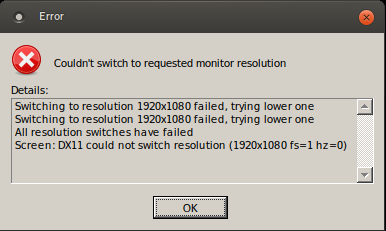
Specs:
OS: Ubuntu 18.04.2 LTS
KERNEL: 4.15.0-47-generic
CPU: Intel Core i7-7500U @ 2.70GHz
GPU: NVIDIA GeForce 940MX
GPU DRIVER: NVIDIA 418.56
RAM: 8 GB
 timber igloo
Has anyone encountered an issue on linux where certin assests don't load?
Im using Mint 19.1 Tessa 64-bit if that helps
MATE version 1.20.1
topaz matrix
@timber igloo what is your driver version
You need latest Nvidia drivers for assets to load properly (assuming you're using Nvidia)
timber igloo
ah
I know im using a 2 month old version let me check which one it is
nvidia-driver-390
timber igloo
Cheers man, thanks a bunch!
topaz matrix
No prob!
 gray trout
When my friend and I try to join each other, the character select screen is bugged and who ever joined the other one can't pick a char or ready up.
We've played together in the past without issue. Just started today
 hollow stirrup
Is there a way to disable the aim assist with mouse and keyboard? Sometimes it's really hard to hit close range targets cause the bullets aren't going where I aim
 lime marsh
When my buddy launches the game in full screen, his Display Driver Crashes and his screen goes black till he reboots, tried an older driver and it still does it, only fix we have found so far is going into geforce experience and setting the game to run in window mode, which fixes the issue but it's not how he wants to play 😦
 violet moth
just got my lunar coins to unlock the Artificer
no Artificer spawned for me, what do
violet moth
cool thanks
lime marsh
I did it with a friend who has it unlocked, but I was party lead not sure if that matters
 unkempt bramble
unsure if lead affects it, but it definitely works when alone.
 south orchid
Am I the only one who keep getting "Server has shut down" ??
orchid flame
it means your host disconnected, I think anyways
 vast torrent
this is getting really annoying -_-
its getting to the point where its not how far can i get until i die its how far can i get until the game crashes
orchid flame
Have you tried verifying your game files? If that doesn't work try a fresh install.
 grave lotus
My graphic setting aren't saving. Everytime I launch the game, it start in 3840x2160 and I have to manually change it to 2560x1440. If I close the game and reopen it, it launch in 3840x2160 again. Anyone know what's wrong with it?
south orchid
@orchid flame thats dumb, i played a full game of solo game just fine
why cant it switch host when my dumbass host die and left
orchid flame
I'm sure a fix is in the works if that's what I am suspecting it is. This is still early access afterall.
 dense plover
i keep having an issue where my game, on startup, will turn both of my monitors off. The game is still running, because I can here it, but everything else seems to turn off. After a couple of restarts it will work, but its really obnoxious to have to keep turning my computer on and off again in order to get it to work
lime marsh
My buddy with same issue has 2 monitors hooked up as well
I get a feeling it has something to do with that
timber igloo
@topaz matrix shot in the dark are you still here?
topaz matrix
@timber igloo Yep
 idle trail
Hey wondering if it is not saving my progress because it is still early dev or if this is a problem?
 pine sequoia
had to unbind all of the controller controls in order to play with mouse and keyboard but this "no gamepad binding" is still showing on everything. any idea how to fix it?
 remote burrow
is your controller plugged in? if so, try unplugging it
 spark anchor
My buddy is trying to join but the thing is he can't join unless he changes his NAT restriction, but if he does, he starts lagging a lot, is there another way to fix this iissue?
 dawn mantle
I do
 hexed snow
lower every setting but resolution to minimum
dawn mantle
already had
sometimes reaching 60 fps, a lot of times dropping under
any launch options i can do?
hexed snow
reaching 60 fps? do you have a limit on max fps or vsync enabled? turn it off
 steel pawn
Not sure where else to post this but the revert button to reset settings to default doesnt work for me.
 versed flicker
hello, myself and a friend are trying to start a game with the two of us, but on her screen it just says "locked in" and on mine it says "ready" clicking either doesn't do anything. how do i start?
figured it out, she didn't even create her account haha... she just accepted my invite to the game without ever seeing the main screen of the game.
lime marsh
nothing to help with the Display Driver Crashing and screen going/staying black till reboot? 😦
 dull cairn
um so i got a corrupted game file and i thought no big deal i just started a new profile and went thru it again and got all the characters and then i logged on today and i only have the characters from my first run
 restive egret
musn't have saved to steam cache
dull cairn
so how do i get it to do that
restive egret
steam settings somewhere, or dont alt+f4 or insta close game next time
If you want your stuff back, just google risk of rain cheats. it'll take you through how to
orchid flame
I got this when I open the game for the first time and there isnt any background music and sound. Singleplayer and multiplayer isnt working.
I reinstall the game twice and this is still happening to me
Validating its file isn't working either
Anyone know how to fix this?
 late trail
I was playing last night and once I got to the third stage my entire PC went black and crashed out. System logs said it was from a memory dump. Now it happens consistently when I reach the third stage, anyone know what could cause this?
Ive got an i5, 2070, with 16gb of Ram
 junior fjord
So, for some reason i cant invite friends to a game, and if i get invited the game tends to drop me right away. Ive uninstalled and reinstalled and it worked for a day but now im back to being unable to invite people or be invited and have it stick. please help
 lucid scarab
Hey i recently bought the game but refunded the game due to a radeon driver bug(?) where i would have to change mode from graphics to calculation, essentially requiring a reboot to play the game. If i didnt do this the game would periodically crash. Anyone know if this is still an issue? Really want to buy and play the game again but dont want to reboot pc to play. Any working fixes or workarounds maybe?
 sleek sage
Question: I use Right Mouse for moving forward, but the game won't let me configure that. Who can I bring this up to in hopes that it gets addressed in a future patch? Or rather, the game won't let me use Right Mouse for forward and S for backwards at the same time.
 tidal marten
Using discord server, but none of us can hear each other
pine sequoia
any idea where controller settings are in the files? plugging in a controller changed nothing and ima try disabling controller entirely
 sand bronze
I'm having a problem launching the game, it instantly goes into Not Responding mode and a few second later just shuts down
Help appreciated
late trail
thanks again!
orchid flame
np mate 😄
 hollow cipher
ok for some reason i'm just completely unable to start a run? once i click singleplayer the game lags a wee bit, and when i go to start a run, the screen fades to black while everything on the character select screen is still able to be clicked. It eventually freezes and locks up my entire computer. Any idea to why this is happening?
 wraith jolt
does anyone know where to put save files?
orchid flame
@hollow cipher fixed 😄
 sinful wadi
hey i always have the problem that my character just runs backwards makes the game unplayable for me
i think its an input from somewhere(because instead of the actual buttons under the skills it says "unknown") but i cant seem to find it i have nothing else than my mouse/keyboard connected
pine sequoia
so @sinful wadi i had a similar issue where i just couldnt press anything and would just look up, im almost positive what it means is that the game "recognizes" that a controller is connected and defaults to its controls. The way i fixed it is that i unassigned all of the controller options and turned aim sensitivity to .1 for controller as well and it seems to work as a good band-aid solution until i can find out how to completely disable controller.
orchid flame
@pine sequoia we test that atm but he still have the issue
pine sequoia
well then just typing out loud here, but have u tried disabling the keyboard controls as well just to see if thats what is causing it? or maybe connecting a controller and seeing if u can move?
 ornate egret
hey fellas
i'm unable to open up my console in game
i use the ctrl + alt + ` command but nothing happens, even with holding it down. any ideas?
wraith jolt
@velvet creek @wintry yarrow , please kick out @shrewd arrow from our voice chat, he's just deafen and muted. and been there for 20 minutes now.
voice chat 47
 sterile cipher
i need some help so I just got a new Pc and the one im currently on has my RoR2 profile on it if i delete it will my profile be deleted or do i have to download it onto a USB or something
i just dont want to restart
 rugged tiger
anyone here know how to get sharesuite mod to work?
 trim briar
Im in a game and cant move
sterile cipher
have you tried unplugging your keyboard and plugging it back in, it might be the problem @trim briar
 hushed hound
I tried restarting discord but the new poll is still not there pls help
 velvet comet
Have you also tried force closing discord @hushed hound ?
 formal nimbus
I don't know if this is the right place, sorry if it's not: often my character gets stuck moving forward by itself without any input (I literally have my hands away from the keyboard, and they keep moving forward). I have a suspect my keybinds are in conflict for whatever reason (I remapped almost all of them since I play left handed) but I'm not sure, anyone else has encountered this problem?
 wanton shale
is sever down?
 dusk rock
hey, i have a problem, whenever i pick up an item the game freezes for 1-2 seconds... and after a while, the game freezes entirely and can not even be shutdown by taskmanager. at first i thought its because of early access, but none of my friends/streamers i watched seem to have those issues, any suggestions?
wraith jolt
someone please kick @orchid flame from voice chat 47, he is voice raping the whole voice channel
@wintry yarrow
 terse pike
Hey, I have an issue: The game crashed on start up.
Description:
On loading the game, I load into the early access splash where my screen will rapidly go black, the monitor losing signal, and my PC's fans go to full RPM
I still have audio and can continue talking to my friends on discord, a few windows error noises will play, but I'm unable to anything else.
I am also able to alt+F4 out of the game before the crash happens.
Current status:
Nothing has worked, or remotely affected the issue so far I have tried:
Updating Drivers
Disabling Steam overlay
Turning off Wallpaper engine
Turning off firewall (With restart)
Un-installing and re-installing the game
Downclocking my GPU (It has no base overclock)
Verifying integrity of game cache (No issues)
Things I'd like to try, but haven't found out how:
Launching into a stable/smaller windowed mode
Launching with V-sync
Specs:
CPU: AMD ThreadRipper 2950x, 16 Core, 32 Thread 3.5Ghz (4.4Ghz Turbo)
RAM: 32GB (4*8GB) 3000Mhz G-Skill Trident Ram
GPU: Asus GTX 1060 6GB
Storage: 2TB Samsung SSD
sterile cipher
Sorry to bother you but i have a serious question, I am currently changing computers and I was wondering will my profile be deleted if I swap PC's or do I have to download it onto a USB and transfer it over. Once again sorry to bother you. -Sincerely Skills
 gusty cargo
Encountering a strange issue that only started since the latest patch - while playing at random intervals ( can be on stage 1, or stage 11) my FPS will suddenly drop to half of what's normal. Closing ROR2 down and starting it up maintains the same issue (the menu is much choppier). If I restart the computer FPS returns to normal though... is this a known or reported issue? Are there any workarounds I can do so it doesn't keep killing me run?
 spare quest
Whenever I start the game it goes to a black screen and then crashes is this happening to anyone else?
 opal crescent
@spare quest did you try to restart steam or your pc
@gusty cargo do you have an fps limit on?
 gusty stratus
multiplier hasnt worked at all for me

this keeps happening and when it doesnt i cant join quickplay queue and my friends cant join me
opal crescent
try having him make a lobby and quiting out of ror2 and join him through friends list
gusty stratus
ok
 sterile zephyr
hi, I have a bug, when i open the game it says "Early_acces_disclaimer" and nothing works, all titles have underscores like "title_mutiplayer" and buttons dont do anything
gusty cargo
@opal crescent Nope, no limit on it. It just happens at random intervals
sterile zephyr
same problem Lasagna got
opal crescent
what are your graphics settings @gusty cargo
gusty cargo
Mainly high, although I already tried the last time the drop happened to drop everything to low settings and it didn't have an effect on it
My settings also haven't changed since I started playing (on launch) and the problems only started ~1.5 weeks ago
 bright copper
@sterile zephyr have you tried verifying the install through Steam?
sterile zephyr
yes, tried that, uninstaling and re instaling multiple times too
bright copper
Did you notice this suddenly occur while you already had the game open?
 shy schooner
Hey, the same problem started happening today for me and a mate too
we played yesterday without a problem and wanted to play another round now but the info board on the top right just vanishes after trying to join
bright copper
@sterile zephyr @shy schooner there's a pinned message about this issue, I just noticed.
shy schooner
already saw that pinned msg,but the strings are fine for me :/
bright copper
also in #ror2-bug-reports-pc there's this, might help them narrow it down further
Output Logs
While the game is running, it is continually writing to a file called output_log.txt. This file will help us get more information from the bug. If possible, please upload the file to Discord with your submission. 'The file is located at:
C:\Users<UserrName>\AppData\LocalLow\Hopoo Games, LLC\Risk of Rain 2\output_log.txt
opal crescent
@gusty cargo does this happen with other games? , and check your cpu and disk percentage and if it keeps happening after you restart your pc then its either a game issues or something to do with your drivers maybe but you should ask around.
bright copper
@shy schooner what do you mean the strings are 'fine'?
gusty cargo
@opal crescent Not happening with other games, nope... I was actually trying to track my CPU/ memory usage and didn't notice anything out of the oridnary. I will try updating my drivers though in case maybe that is the issue, but odd that it happens all of a sudden with the last patch. Thanks for your help
bright copper
let me see what mine look like real quick, there might be a specific one
huh i only have one. id say delete all but one first and see what shows in the game, then try the pinned message by pasting a fresh save file into that leftover XML
sterile zephyr
allright, seems like the other xml were the profiles i created beore, delted them all and created a new one
bright copper
sounds good, report back with results!
sterile zephyr
didn't work :c
by any chance does not having windows service pack 1 update installed cause any trouble?
bright copper
I'm not sure, I'm no developer :(
but keeping everything up to date is always a good step to take
sterile zephyr
ok, thanks for the help
bright copper
no problem, sorry i couldnt help you resolve it
 unborn zodiac
Anyone having problems with the shared pickup mod not allowing multiplayer to actually drop you in? Tried playing with a friend of mine that I think has it and it's just leaving me in the lobby
 untold nacelle
My friend is having issues where he can't load his profile and the game keeps making him create a new profile losing his progress. Is there any work around or fix tyo this?
sterile cipher
Sorry to bother you but i have a serious question, I am currently changing computers and I was wondering will my profile be deleted if I swap PC's or do I have to download it onto a USB and transfer it over. Once again sorry to bother you. -Sincerely Skills
unborn zodiac
You can upload your save file to your USB then move it to the correct location when you reinstall
@sterile cipher
unborn zodiac
one sec I'll find the filepath
Local disc > Program Files(x86) > Steam > Userdata > (It will be a bunch of numbers but that is your steam ID) > 632360 > remote > UserProfiles > (if you only have one profile made in ROR it will be here but not by the name you chose)
@sterile cipher
unborn zodiac
it should be yes
you should be able to open it and it tries to open in a windows like tab if you don't have an xml editor, will show your profile info
sterile cipher
i just see a bunch of stats so i think i did it right thank you
unborn zodiac
if you see that you are at the right file and anytime
dusk rock
anyone got a fix for the "lagg/freeze on item pickup"? its really annoying
dusk rock
😦
 hazy rapids
server or singleplayer @dusk rock
re-download game cache files? other than that no idea
 marble galleon
Where can I fill a proper bug report (like on github) and get a notification it is looked at, or keep in touch to provide more feedback? The sole information that somone have read and is investigating would be sufficient for me. : )
Bug-reports is many times quickly bloated with duplicated entries of one problem.
 lament horizon
There isn't such a place.
 dense pawn
I read that you could open console by pressing ctrl+alt+' but it doesn't seem to be working for me or my friends
dusk rock
@hazy rapids both... idk what to do anymore its really disruptive
hazy rapids
@dusk rock i dont have much experience with problems like these... if u checked ur game chache on steam, then try a full reinstall
other than that no idea (maybe a problem with ur keyboard/controller but probably not since its the only game it happens in)
 violet whale
My profile corrupted and I lost everything any idea how to fix that?
dusk rock
Ill try thanks
timber igloo
Any linux mint users have issues with massive frame rate drop when picking up items?
Everything else runs fine after I updated my graphics card driver, (nvidia 418) but for some reason every single time I pick up an item my game feels like it almost crashes
and if it helps: Linux Mint 19.1 Tessa 64-bit, MATE 1.20.1 is what im running
hazy rapids
@dusk rock tell me if it wrks
dusk rock
I will, tomorrow, its almost 5am here 
hazy rapids
oh rip
 rustic valve
Is it known that the vJoy driver causes strange mouse acceleration issues sometimes, and if so, are there plans on a fix?
timber igloo
@dusk rock oh I'm having the same issue! should have read the previous messages first lol
@dusk rock Just curious what keyboard/controller do you use when you play
I heard mention that some drivers for the corsair strafe don't play nice with linux but nothing solid
 hushed rapids
any updates on the enemies not spawning bug?
happens every run when im like 180 mins in
 glacial shell
can i ask for help on risk of rain one here?
i cant get people to join me on multiplayer and yes ive portforwarded and opened firewall
opal crescent
@glacial shell have you tried hamachi?
glacial shell
i dont want to download hamachi
 worn inlet
Is the a way to get back a corrupted save ?
 granite kindle
i cant the f* enemies and its so annoying anyone know whats going on
 jagged nacelle
Where is the game save located I'm about to reformat and I wanna make sure its backed up.
 runic schooner
C:\Program Files (x86)\Steam\userdata\113199292\632360\remote\UserProfiles
@jagged nacelle
 earnest cloud
What is the file location for game crash logs? The location listed in the pinned message does not exist.
violet whale
<@&559786374228738069> (sorry if I'm not supposed to ping) my profile corrupted, is there any way to get all my stuff back with out grinding again?
 unborn meadow
Wdym corrupted?
violet whale
Uh it lost all my progress I had all the characters available and I did all the quests to unlock the items
unborn meadow
First time I see an issue like this, can't help, sorry
orchid flame
give me 5 min
violet whale
Oh, no rush I didn't think I'd get help this fast I was about to go to sleep tbh
But thank you for the fast replies. :)
orchid flame
i will DM then and look what we can do 😄 i got some tricks 😄
violet whale
Ty 🌟
 hollow blaze
Heard theres a fix somewhere for not being able to start games
as in it not exiting the pod
Anyone?
dusk rock
@timber igloo using mouse + Keyboard (roccat cone and razer blackwidow chroma )
orchid flame
hey guys i have a question about RoR
why can't i take in-game screenshots
@orchid flame did you try to Tab out or put it on windowed and take a screenshot ?
hmm i might have but i don't remember at this point
im talking about ror1 (sorry if this ain't the right place to ask)
yehr i knew that 😄 thats why i ask about that you can also use Gyazo
test it
whats that
I dm you
okay
 grizzled palm
My game boots up to a black screen
and then crashes / never loads up.
Just started doing this after the newest update, would appreciate some help with this, thanks!
 uncut bloom
I bought the game yesterday and played for a while, unlocking Mul-t, huntress and the mercenary but when i opened the game again today I think it deleted my profile or something because it prompted me to create a new one and everything that I unlocked is gone. Is there anything I can do about this?
 calm wasp
Hello, I'm running well above the system requirements with a RTX 2080, AMD Ryzen 7 2700X and a g-sync monitor, yet further on into the game the FPS starts dropping off to about 30. Help?
dusk rock
cant fix that, its an performance issue with the game, the devs are addressing it
orchid flame
@uncut bloom fixed 😄
uncut bloom
❤
lime marsh
@grizzled palm do you have a second monitor hooked up?
 novel verge
my friend has an issue that doesn't let him past the early access screen. he cant click and there's no text. been like this since launch
lament horizon
@novel verge There is a (possible) solution listed in the pinned messages, has he tried that?
novel verge
hes tryed it. no luck
 wise pawn
For some reason I can never sprint no matter how many times I press ctrl
 fallow goblet
eyy, just want a confirmation on fps drops once you start progressing past 1 stage. is it AMD specific issues, or across the board? everyone else in my session runs intel processors and seem to be doing okay
gusty cargo
@fallow goblet I'm experiencing something similar... does the FPS persist after the run? For me it happens randomly and the only way to fix is to restart my CPU
fallow goblet
it happens alwasy past stage 1, i go from holding around 140ish to like 30-40 fps. lowered literally everything and now it doesnt go lower than like 45, but still
restarting pc usually does nothing
gusty cargo
Even the menus are laggy for me in my scenario
fallow goblet
i assume theyre aware of it already, just figured id see if it was just those of us who are running amd chips
 feral compass
For some reason i am not able to play multiplayer. I cant join on friends, and if they join on me they get sendt to a black screen. Multiplayer have worked fine forever but for some reason it wont work now. I have tried reinstalling, verifying files, allowing it through firewall, disabled firewall completely, disabled antivirus, and it still wont work.
 sullen plank
I have the same problem right now
feral compass
Probly worth to mention, when i click "enter quickplay" it jsut says "not in quickplay que", and the party icons in the top right doesent show up at all either
lucid scarab
I have this issue where in combat many sounds kinda pulse, like every second the audio fades in and out. dont notice it in the menus but it gets very disorientating in combat because it feels like what running a fk ton feels like you know, every heartbeat makes you deaf for a second.
orchid flame
@feral compass Fixed
 steel raft
So i've spend at least 30 coins on the Artificer so far, and still haven't unlocked him...? What's up with that.
Best/ quickest tech support! Thank you.
 nova socket
i am also experiencing the same problem as ąжµяℓɨƶ
 ashen blaze
it is impossible to get out of the box in frost point delta with blink
im playing mercenary and i blinked into the box
am i just doomed
 potent sierra
a friend of mine also has the problem that ąжµяℓɨƶ and sandhawk has
 surreal aurora
i seem to can't choose any characters during the multiplayer
i can join the server see who is on the server but when i get to the character screen this is all i see
grizzled palm
I fixed it! I just had to restart my PC.
 quiet lodge
Over 100 hours played and all of a sudden my cursor decides to not stay locked inside screen.. anyone know why this might be happening?
I've reinstalled the game / restarted my computer / unplugged & replugged montiors/mouse .. no luck
 humble oxide
Just wondering if any devs or anyone else might know how to get the game to go into 'exclusive' full screen mode? I'm still having some input delay. I've already disabled Windows full screen optimizations in the .exe properties, disabled game mode, game bar, etc. I've also tried deleting registry subfolders that Windows uses to force non-exclusive FS, but it still won't go into exclusive. Any ideas?
 vagrant furnace
Hey, I just spent all last night playing with a friend and now all my progress is lost (loading game for first time since). Any ideas what may cause this? He hosted the game.
quiet lodge
No help on cursor issue?
 cosmic quiver
Low FPS when too much stuff is on the map. Any tips other than lowering settings?
@fallow goblet same issue with AMD chips here
opal crescent
@cosmic quiver trying lowering the corpse left on the map in settings
@vagrant furnace theres something talking about your problem in the pinned section
vagrant furnace
okay thanks!
 stray moon
Not sure if intended or not but using the Helfire Tincture WITH the Transcendence (Convert Life to Shield) puts the Helfire Tincture damage to 1 ( was 150 ish before buying the item in the shop). My guess is its a bug since it doesn't say anything in the Item's tooltip. I thought the damage scaled with your level, which makes it very good for starting items.
anyone has that happened to them?
opal crescent
@stray moon bug reports :0
stray moon
Thanks for checking, I dont think it makes much sense and so im pretty sure its a bug, right?
opal crescent
sounds like it yeah
quiet lodge
any one have advice on what to do or where to go to get this resolved?
opal crescent
@quiet lodge stay here til you get an answer ask people who have had the same problem and what they did or look it up
 rapid wasp
So this may be a dumb question, but joining a clipboard lobby doesn't work?
 daring gull
Anyone else having issues with rebinding to mousewheel down? It keeps binding to mousewheel up for me
quiet lodge
@opal crescent already done tons of digging to no avail. only solution was downloading a third party cursor lock, just kind of silly to have to use it when then had worked fine with no issues for the past 100+ hrs ive played lol
opal crescent
yeah its been happening more often where peoples games are fine then it starts acting up for seemingly no reason
quiet lodge
@opal crescent 99% its a unity issue, only time i've ever had the problem was with games using unity shrug just never have found a solution
opal crescent
i agree its just that the engine is never going to recieve and improvements
rapid wasp
NGL i am severely confused on how to use the clipboard content
i just keep getting Invalid Lobby ID, i have no idea where to enter the numbers for the lobby at either.
opal crescent
@rapid wasp i have no idea either im sorry
stray moon
Bug: I had 1xCorpsebloom with 1xRejuvenation Rack with the Gnarled Woodsprite On use. I picked up 1xShaped Glass, my healing over time went down to 15 per tick (from the on use Passive), I then got a 2nd Corpsebloom and my healing over time went down to 7, instead of going up as the tooltip from the Corpsebloom says it "Doubles" your healing.
So far i've encountered 2 bugs in 2 runs lol
devout oak
- #ror2-bug-reports-pc
- Is the healing ticking faster than it was before
stray moon
Its hard to say but maybe it is
and yeah i put the same thing in #ror2-bug-reports-pc
 lucid anchor
im having audio issues. When the game starts i hear nothing and it seems like the audio is going through speakers instead of my headset. I tried disabling and re-enabling the audio channel under the sound settings but it doesnt seem to work every time.
I'm debating just buying speakers so i can at least hear the game instead of fighting with it to come through my headset every time
 remote oxide
@stray moon doesn't hellfire scale with your health, though?
 pseudo scaffold
Hey my friends and I are trying to play together, but the lobbies keep bugging out and then kicks all of us when we try to play a game, showing a black screen and then bringing us back to the menu. Any idea how to fix this or is this is a recent bug?
stray moon
@remote oxide it would be kinda stupid tho wouldnt it? I first thought it scaled with you level which would make more sense
 devout oak
Helfire tincture 
remote oxide
no worries
 sand swan
hey my buddy was a malfunctioning mouse when he is in game it keeps aiming down and on the title screen it goes sonic mode can you helpÉ
feral compass
how do i fix the screen freeze on item pickup thingy? Like, when i pick up an item every now and then the screen will freeze for a split second. Have had tons of runs ruined because of this, and its starting to get annoying. Im on 16gb of ram, AMD Ryzen 5 1600 processor and Gigabyte GeForce GTX 1060 3GB Windforce graphics card
 shut vale
hey im trying to get my xbox or ps4 controller to work on pc but its not recognizing it in game
is there something i turn on in game to switch over to controller mode?
calm wasp
help please!! the boss has just dissapeared!
timber igloo
@feral compass I haven't seen any suggested fixes but from what I can tell a lot of people are having the same issue (myself included)
Another problem I am having is the game not closing properly
feral compass
hella annoying problem tbh
feral compass
windows 10
timber igloo
ah interesting, I didn't start having the issue until I started playing in linux
feral compass
whats ur specs?
timber igloo
GTX 1050ti, intel 3.5ghz skylake, 16gb ram
 lime bobcat
is there anyway to fix the insane de sync/ lag with mobs and my hits not registering ?
feral compass
hmm is it nvidia problem maybe?
timber igloo
it could be but I also run windows 7 and the game plays like butter on that
I'll have to test it out again later
@lime bobcat what's your set up?
lime bobcat
i5, 1060, 16gb ddr4
timber igloo
OS?
timber igloo
Are they random lag spikes or does it happen when you do something in game?
lime bobcat
my friend said he isnt lagging but my attack arnt going out and it takes 30 sec to 2 mins to open chest aswell as during boss fights the boss;s stay still for 30 secs then i insta die when the game catchs up
after stage 2-3 it starts happening
this is making it un playable
feral compass
is this in multiplayer?
lime bobcat
yeah,
timber igloo
Could be a network issue
lime bobcat
my wifi is top doller though and it shouldnt be that bad because of wifi. :/
and dont know just got the game today only played 4-5 games co-op with a friend
but it has happend every game
timber igloo
Do you normally host?
lime bobcat
no he is hosting
feral compass
jump in singleplayer and check if you can
timber igloo
Could be him
feral compass
could be him yeah
timber igloo
I would see if you can recreate the issues in single player and if you can't then I would just host the matches from now on
feral compass
if you host and your friend starts lagging, then you know its his connection
timber igloo
^this
feral compass
actually, @lime bobcat, are you able to launch the game right now or is this a bad time for you?
 past pier
is there any way to disable gamepads?
lime bobcat
im on the game now mid game
feral compass
ok, pop me a private msg when you are done, then we can test if its your friend
past pier
i used to use this program called vJoy which basically allows you to use a gamecube controller, but for some reason i can't uninstall it and it's always emulating a virtual gamepad now
usually it's not a problem, but for this game it is. it likes to think there's a controller plugged in even though i'm using keyboard/mouse
makes the game unplayable because my mouse cursor is stuck as a gamepad controller
past pier
thanks, i ran the regular uninstaller but it didn't seem to do this
 lost lily
i seem to be stuck in a party(?)
if i start quickplay, i appear alone, but theres three people in my "party"
 hot carbon
@orchid flame I have same issue, none of us can join multiplayer lobby with each other but it worked last week. Just goes to black screen then gives up and goes to main menu
 patent barn
okay so, I'm gonna try and see if a reinstall of the game will help with a texture issue I've been having
do I need to back up my save data, or will it be safe?
 gilded rune
Hmm is there a way to fix the weired split-lag/freeze on item pickup or when changing the sliders in the options menu?
orchid flame
hey, does anyone know how to use the TwitchVotesItems mod?
 rancid jewel
Is there other people that have freeze since last patch ? That's weird
Will it be patched soon ?
 wintry hearth
Hey anyone know if I am allowed to play with mod and produce content with it?
 tulip crane
The continue button is not lighting up
I've tried verifying and reinstalling, and nothing
 heavy needle
Hi. I cannot find my save-file. I tried closing and reopneing Steam and re-verifying the files. Worth noting I cannot find a userdata folder under Steam in C: (where I have Risk of Rain installed) but I can find it in D:, however, RO2 save-files are not there.
rancid jewel
Steam, userdata, 'number' , 632360, remote, userprofile, the file inside is the save @heavy needle
heavy needle
I figured it out. I have two steam folders, whereas one of them is older. So i was lookign at the wrong one. Thx anyways 😃
rancid jewel
Aha 😂 good
timber igloo
I have been having an issue with the game crashing at the main menu when I try to quit to desktop on linux. I was wondering if this was a known linux issue or a specific bug that I'm experiencing.
for clarity the game just doesn't close when I quit. I hit exit and everything freezes and I need to force stop for the game to close
 ashen plover
Are slowdowns common for other people? When there's a lot of stuff happening I'll drop to 40 sometimes even 30fps, but CPU and GPU utilization will hover around 40%. I'm running on gtx1080ti and i7-5960x
orchid flame
I had no problems yet i have a gtx1050ti and a i5-8400
when do you have lag about what time in game??
 sweet venture
I personally started getting weird lag spikes about 90 minutes in, only on the final hell level though
 tough cargo
@timber igloo try to reinstall
 tranquil jewel
i cant do mutliplayer?
i cant join/invite people to lobbies
i got the game an hour ago and i can only do singleplayer
when i join the quickplay que it says im not in it?
orchid flame
@tranquil jewel look on the pinned messages and look if something help's
 limber frost
See if you can join a clipboard queue
109775241000137441
copy than and then hit join clipboard queue and see if that works
@tranquil jewel
orchid flame
@tranquil jewel fixed 😄
tranquil jewel
by blacklist
 sharp fiber
Heya, just bought the game and 5 sec after I started, I noticed cursor was going outside the game window, tried looking for solution and found something about hotas and vjoy, seems I have none of those. Any suggestions?
feral compass
are you running any other fullscreen applications besides the game on a second monitor?
 silver ibex
hey guys, the Join Clipboard Lobby is greyed out. i have an ID copied and everything, but it wont even let me click it.
(im running vanilla, never modded my game at any point either btw)
orchid flame
@silver ibex did you copy paste the full number ?
silver ibex
nvm i got it to work. it just stopped being greyed out for some reason
guess i just had to wait it out?
orchid flame
#lag ;D
tranquil jewel
10/10 stars
sharp fiber
@feral compass no, only discord and RoR2 atm
feral compass
you running fullscreen, windowed, windowed fullscreen?
sharp fiber
was trying fullscreen and windowed, same result really, game still didnt keep the mouse inside game window
feral compass
hmm thats weird. try to use an application that locks your mouse to a screen maybe?
sharp fiber
yeah I am looking around for it atm, not sure if multiple monitors with the nvidia software is causing it.
 frozen spruce
anyone have a fix for not being able to select character/ join game in multiplayer? I've restarted and verified files on both computers.
 pearl abyss
I am having the same problem ^
feral compass
take a back up of you save file, remove the one in the folder, verrify files, launch the game and when you do, click alt + enter twice to go out and in to fullscreen mode. Thats what fixed it for me. @frozen spruce @pearl abyss
this is where the savefile is located
 wet ore
why is it whenever i open up the game, the game resets its resolution to the biggest it can have?
it's really annoying at htis point
orchid flame
Why is my mouse always moving onto my other monitor? im in fullscreen but whenever i move my mouse to the right to aim it goes off the game
 marble aurora
I'm having a weird issue where if I open the game it stutters and lag horribly to the point of being unplayable
I've tried to reinstall to no avail
 hardy moth
Anyone else have their GPU at max utilization anytime RoR2 is open? I've tried a restart and reinstall and still getting this issue
 hardy magnet
Hey is anybody successfully recording their game with plays.tv? I can't figure out how to make it work for the life of me
 charred parcel
Having a bug where occasionally video input fails. Audio is still present, and others still see me in game, but my monitor claims there is no input.
Most frequent occurrence are if I move my mouse rapidly on the settings menus (discovered while trying to change settings) and after a period of time in the Lunar Portals.
I've toggled Mouse Acceleration, Restarted PC, Verified game files, Uninstalled and reinstalled game.
Problem began occurring around the 16th or 17th.
 marsh crater
cant seem to play with my friend, either game lobby is greyed out and cant start, i start the match frozen unable to start or i'll get a black screen in between levels, both sides have validated files with no change
 weary vessel
Has anyone had an issue with the steam controller not keeping keybindings between rounds?
 tawdry forge
Having invite and multiplayer issues. Checked out the faqs and did a bunch of google searching. Figured here might be my last stop for some help.
-Tried a few fixes like port forwarding, even though it says it's not needed. (Did this after other fixes, one of the last things I did)
-Did the ip passthrough on my router (lotta ATT users talked about that so I did it)
-Restarted game and router
-Tried inviting a friend while he didn't have the game started (Which worked for me and another friend once before, no dice this time.)
Is there anything I'm missing? Or is it just a known issue right now.
pseudo scaffold
Yeah a lot of people are having that issue, but nothing is being said about it. Idk 😦
 placid moss
can anyone here give me a hand? my computer doesnt seem to like this game... it wont launch properly, im getting 1 frame per second and no audio
 modern quail
Is there any idea on how to overcome this issue? This is immediately after I start the game
 dawn lava
@modern quail make a New user
dawn lava
You are creating a New character so yes
@modern quail a mod Will probably talk to you and you guys Will figure something out
 manic cedar
May you please unban ratwind#3965 he was just trying to get my attention didnt mean to spam
 crimson crystal
Ah I see other people are having the same issue with the multiplayer suddenly black screens. It is just weird cause even after the update we could play together for a bit now suddenly we can't connect to each other at all.
 rough bay
So the issues regarding multiplayer players not connecting is a common issue rn? Because me and my friend are having that issue
crimson crystal
Seems to be getting more popular. Haven't really heard any type of fixes at the moment sadly.
 oak drum
Anyone ever had the ingame HUD be way bigger than what its supposed to be?
 proud pulsar
Hello
I'm trying to play with a plugged in XBONE controller, but I'm not able to get the right analog stick to work correctly
It was pointing at the floor at first, then I went into the settings and now its pointing at the sky. Seems like its locked straight up/down and I cannot look around at all.
Is this a known issue? Anything I can try to correct this from the settings menu?
 hasty marsh
Hey! I'm having trouble with my view in game, I keep looking down. Like, the game actively draws me to look at the ground and I'm unable to look anywhere else. It reads my input, but the game resists it. I tried uninstalling and reinstalling, rebooting, verifying game files, unplugging the mouse, using controller, everything. I just installed the game. My mouse works with any other game, and doesn't direct itself downward. Anybody have any solutions?
@proud pulsar
proud pulsar
looks like we both have the same issue. I am not able to get around it
hasty marsh
same. I've tried a lot. doesn't seem to be a huge issue with others
read somewhere people fixed it by deleting controller drivers. Didn't work for me. @proud pulsar
proud pulsar
I think I'll just wait for a dev to reply with an official word instead of screwing with my computer
 violet dome
Quick question, hopefully one of you can help. I have progressed so far in the game looking for a gold altar. i finally found it but enemies have stopped spawning so i cant get enough money to purchase it. any ideas?
 sullen jetty
Has anyone else gotten lag spikes randomly all of the sudden?
I looked into things on my PC and internet and didn't find any issues
 vast laurel
@proud pulsar @hasty marsh my friend and i both had the same problem. my friend fixed it by unplugging one of his controllers and i fixed it by unplugging a wacom tablet. pinned messages shows similar suggestions and also says that you should uninstall vjoy if you have it installed
rancid jewel
@sullen jetty jes I also have it
I fixed that by installing the game on my SSD and not HDD 😅... Idk why
 upper aurora
My game always crashes when I try to start a singleplayer game. Has anybody an idea why that is?
orchid flame
Hey, has the issue with saves being wiped been resolved? I have a buddy whose gotten burned by it and am wondering if there's fix
 obsidian stump
is it just me or there's a lot of randomly disconnecting from online multiplayer games?
 plain pilot
I haven't seen that at all for myself.
wraith jolt
@orchid flame there is a mic spammer called @orchid flame in voice chat 47
please help remove him .
@unborn meadow
orchid flame
bruh
 wispy panther
is there currently a problem with matchmaking ?
 teal perch
hey can anyone help me ? my friend cant start the game and we dont know what to do
 shut schooner
try closing the game then start it
 fervent stag
my risk of rain game keeps crushing my whole computer. the only error I can find when I start back up is Desktop Window Manager stopped working. My GPU fans go to 100% and the screen goes black as I slowly lose sound
 errant patio
<@&559786374228738069>
velvet comet
?
errant patio
one of my friends got his account banned from this discord
he was wondering whether or not he could appeal this ban
velvet comet
Don't tag us for that.
orchid flame
dm me about it, i'll deal with it @errant patio
teal perch
@shut schooner we tried everything updating drivers turning off anti virus programm and so but nothing helped yet
well updating drivers we tried it ^^
 blazing gorge
Hi I'm having an issue with a single PC, I don't own it but I have reasonable access to use it for gaming( the computer is my partner's Partner's computer) I am having a problem with the mouse buttons the game treats that computer like they're always being pushed down and so it auto-fires those abilities non-stop, I've looked into every setting i can in trying to resolve this but i cannot figure it out, they do have a pair of Flight simulator controllers hooked up to it which caused a strafing issue i was able to sort out but after pressing and trying every button on both of the controls i cannot for the life of me figure out what it the cause of the issue
Some advice or help in this department would be helpfull
 cold carbon
Hello everybody. Does anybody know why you can't play with friends? Like, i can go in quick play right? But if my friend invites me and starts quickplay i cannot see the models. It's the same way around. Tried uninstalling. Firewall is enabled. You name it. Reinstalled it literally like 10 times. It just doesn't work <@&559786374228738069>
cold carbon
I mean, moderators. I guessed you would be nice. Well some of them probably are, you ain't, that's for sure. My bad, im sorry.
velvet comet
Pinging Mods is for issues in chat, not for Tech-Help.
cold carbon
Alright
 deft cobalt
i am having the same issue
ashen plover
After some testing I only get fps issues in multiplayer, the gpu utilization drops to 30% and I'm getting between 40 and 70 fps. In singleplayer I get between 70 and 120 fps, with between 40%-80% gpu utilization. Wish I could just cap the framerate and have consistent frampacing, but I've gotten some terrible framerates trying to do this (with equally low gpu util).
 swift lance
Why won't my game save my 144hz settings instead it just reverts it back to 60hz?
 floral sundial
anyone else having weird mouse acceleration issues?
 glossy bolt
Hey I have the EARLY_ACCESS_DISCLAIMER issue. Does anyone know how to fix this. I'm unable to play
glossy bolt
I've done the pastebin thing too
 bleak blaze
Im not sure if this has to do with tech-support, but does anyone know why I join a clipboard lobby, I cant select a charecter, or even see the people who are in the lobby with me.
tawdry forge
Any news about invites or multiplayer issues?
Posted about it yesterday but I'm not able to match through quickplay or get a friend to join my lobby successfully at all still.
Didn't know if it was a known build issue, or is there an additional trick I can do to get it working, aside from the ones I posted earlier.
 foggy magnet
When you try to join a lobby nothing happens right ?
i'm having the same problem :v
 velvet frost
I just black screen and then back to the main lobby
tawdry forge
That's one result, yeah. It's either that. Or if you try accepting an invite from out of game, the invite just brings you to the main menu or to the multiplayer screen, but not into a party with them
 jolly ruin
I haven't been able to Join any kind of multiplayer lobby at all.
Making my own private lobby or getting invited to a friend's Multiplayer menu / lobby don't work, I just either sit on the main menu or occasionally it loads me into the multiplayer menu with most of the buttons grey'd out.
Quick play also doesn't seem to do anything. It says 'Not in quickplay Lobby' for a while before the Multiplayer menu flashes and it greys everything but the top option out. Which changes to Join button, but clicking on that just puts a spinning wheel next to it and doesn't seem to do anything else.
Even tried copying a friend's little clip-code and using that and I just got the same multiplayer-Menu screen with grey options
I've tried verifying, and uninstall/reinstalling. I even used Netstat and gathered all the port addresses the game and steam services run through and made exceptions/forwards for them all. .
But really the behavior hasn't changed.
foggy magnet
I got it to work
 abstract trail
working now
foggy magnet
Just restart steam :v
abstract trail
just restart steam
tawdry forge
I've restarted the entire computer my man
foggy magnet
"_" i reinstalled the game first then i restarted steam
it must be a different bug then
tawdry forge
Yeah I restarted and then also uninstalled and reinstalled, so I have no idea
Lest the issue was fixed right this second. So I'll try closing and restarting steam again
Well you said the magic words cause it worked this time out of all the other times now lol
So I'll back that up and say to anyone else still have the multiplayer issue. Try restarting steam this time.
velvet frost
my friend and I killed all steam processes and then relaunched the game and it works
 stuck escarp
How would I join someone non-modded if I am using bepin?
 silent raptor
anyone had any issues with the mods for ror2? i get an error telling me failed to load mono on my attempts to launch ror2
abstract trail
@stuck escarp you can't
stuck escarp
I just moved the file and it worked
pseudo scaffold
Tried restarting steam, multiplayer still broken
 iron pine
Restarting steam fixed multiplayer for me and a friend
 tiny lagoon
What scripting language does the game run on?
 agile spoke
for some reason ever since a few days ago my game will randomly drop so low it hits single digits and becomes unplayable, anyone else have this issue?
ive noticed that before it starts happening i see a lot of blood textures popping up on the ground
 dire hill
There seems to be quite a lot of bottlenecking in the game, temps will go high but utilization remains low much of the time, and certain rendering options break it (my machine drops frames like mad with shadows on at all, blood textures seems plausible considering)
 digital cairn
Having problems joining clipboard lobbies, anyone got some advice?
 glad birch
Has anybody had a problem where the game starts with nothing but black screen, and simply crashes with no error after 2-3 seconds of menu song?
glad birch
I am asking, because none of the fixes I've seen have fixed it. Graph drivers are updated (Nvidia Geforce GT650M, is what I have, driv. version is 425.31), resolution changing, disabling borderless window with window-exclusive, fiddling with various resolution related settings in the config, trying to go windowed via alt+enter etc. None has helped.
Actually sometimes, the launch screen (With the early access disclaimer) comes up, and then the game minimizes before crashing sometime down the line
plain pilot
@glad birch You need to provide info.
Motherboard, CPU, GPU, Driver Versions
@glad birch most common is motherboard sound driver conflicts with gpu sound driver
if you're using your hdmi output for sound, uninstall the motherboard sound driver, or disable it in device manager (only a test, and this is a guess at a likely failure)
glad birch
@plain pilot Of course, I'm on a Samsung NP550P5C laptop with a Windows 7 64-bit Home Premium OS. It has Intel HD Graphics 4000 (Integrated, *Which runs the game without problems, but low performance) and NVidia Geforce 650M gpu (On driver version 425.31, updated today) (Which is the one causing problems.) The provessor is an Intel Core i7-3610QM @2.30 GHz, with 8.00GB RAM and a 500gb Samsung EVO SSD
plain pilot
also as for frames, some monitors are incorrectly configured. For example my 4K screen sets up as 59 hertz, and that refresh rate just doesn't play well with anything. 60hz fixes it every time I reinstall (every month or so)
@glad birch so you're probably relying on the motherboard's sound chip, probably disable/uninstall the nvidia sound driver as a test.
also, don't bother with trying to set nvidia graphics settings for games, let the game manage its own graphics settings.
also, see if you can play in full screen versus windowed
AND, what's your region?
does your internet connection have packet loss? (test it) regular old ping and speed tests should work.
the laptop hardware/software you described sounds relatively common and general, should probably work fine, but I'd be concerned with Windows 7 compatibility going down over time.
glad birch
Full AND windowed works on integrated, no problems. Switching the graph. processor to the nvidia one makes it so the game simply doesn't display anything at all, but a black screen/white screen. I do have a pretty horrible connection, from Turkey and it tends to have issues with packet loss occasionally. My problems aren't with joining a lobby or playing though, as they are fine enough (With the expected latency issues) when I'm using the integrated solution. I do not have any NVidia sound cards installed, I think the sound driver on my computer is realtek. Will try disabling it and launching the game, although I do not really see that helping.
plain pilot
@glad birch NVIDIA gpus often have sound card built in to support HDMI audio. Just make sure that's not installed/enabled.. Then I want you to reset nvidia configuration. Try not using nvidia "experience" just the display driver.
You're probably using/relying on the realtek audio for your laptop's sound generally. Might want to leave that.
glad birch
I've uninstalled the "Nvidia Experience" when I updated my graphs driver earlier today. Yes, I've been using realtek ever since I had this laptop. I'll go ahead and check device manager/services etc to make sure what's aforementioned isn't installed. All my Nvidia profiles and settings have been set back to default now
 sterile thicket
Whenever i pick up a new item wich i didnt have before the game freezes for a second or two, anyone else have this problem?
glad birch
Looks like device manager shows nothing but "Intel(R) Display Audio" and "Realtek High Definition Audio". Nothing to do with Nvidia anywhere(Sound-wise), including programs, services and devices.
plain pilot
@glad birch sure, it'd probably be under audio devices. You might also see a checkbox option when you install/reinstall nvidia drivers.
Make sure it's up to date of course, from teh Nvidia website itself (don't trust windows to update graphics drivers for you) -rolls eyes at microsoft-
@sterile thicket You playing the game on a hard drive?
glad birch
I've updated it through Nvidia's website this morning, it's THE latest version. I was not asked anything about sound drivers when installing it. (A clean installation, mind you.) . And yes, audio devices is where I've checked. Nada
plain pilot
should be fine then.
@glad birch Okay, try these.
Right click ROR2 in steam and hit "verify game cache/files"
Then when you run ROR2, disable vsync
Then we should check if there's any log outputs from ROR2 that might describe why the black screen happened.
glad birch
Verifying cache right now. Vsync is already disabled through config. Where should I look for logs?
plain pilot
@glad birch %appdata%\..\LocalLow\Hopoo Games, LLC\Risk of Rain 2
glad birch
@plain pilot
plain pilot
@glad birch Did you try starting a game? That looks like you only opened the title screen
glad birch
Yes, that's what I've done. Because all I get when game launches is the black screen, prior to a crash.
plain pilot
@glad birch I'd like to see the log after you get a black screen
glad birch
That log's what I got after starting the game, getting the black screen and then crashing.
I'll do it again
plain pilot
There might be a way to get more debug output from the game, I dunno
glad birch
If I switch the game to Integrated graphics through Nvidia's driver settings, the game works and I can play it without issues. But as you could guess, there are no errors to study when that happens. (Alongside the low performance to be naturally expected from integrated)
Here you go, same deal.
plain pilot
@glad birch well unfortunately, I've hit a point where I don't know how to assist you further apart from spending a lot of time.
You might wait for someone who knows how to help you get more log output that's helpful.
But I expect Unity (the game engine) to support more debugging/log tools, and possibly debug access on some level, but that takes skill/experience to really figure out.
sterile thicket
@plain pilot yea
 high cedar
What could the causes of a corrupted save file be?
 vernal summit
Hi, is there a way to disable the screenshake/headbopping when playing commando and using double tap? got screen shake disabled in the gameplay options but doesnt seems to have any affect when playing commando
 long olive
Good evening. Just coming here for a simple question. I bought the game a few days ago on G2A. Does it change anything for the dev ? I mean, do they get less money or something ? Thanks to anyone who could answer this question !
 bitter bluff
Could anyone tell me if they've experienced fps drops for the host then huge delay for everybody when playing in a private party ?
sterile thicket
So i moved my game to my SSD but the game still freezes a bit, less then before though. any ideas?
when opening chests
plain pilot
@bitter bluff once, yes
@sterile thicket sounds like a disk io issue. Like the item it's getting from the chest hasn't loaded into memory yet. but I would expect them to load the itemset into memory ahead of time.
sterile thicket
any idea how i could fix that? or is that more of a performance issue?
@plain pilot Doesnt seem to bad?
 austere bluff
having difficulty getting a moderator, I have a player in my VC being abusive
sterile thicket
do <@&559786374228738069>
velvet comet
I am in
deft cobalt
multiplayer isn't working, are the north america servers down or something?
plain pilot
@deft cobalt What does not working mean? What do you do, and what fails?
@sterile thicket When you say freezes a bit, what do you mean, exactly?
- Need details, what exactly are you doing?
- How long does it occur for?
- What does the freezing look like?
- Does it cause effects visually, sound?
- Does it happen in single/multiplayer ?
sterile thicket
@plain pilot i pick up an item in the game, the screen freezes for less then half a second the music still continues it happens in both single and multiplayer
deft cobalt
none of the multiplayer options work, when i try quick play, it says im not in queue, when a friend invites me and i accept, im still on the main menu. when i invite my friend, he sees a black screen for a few seconds then it takes him back to the main menu
 lime rampart
alright so right now I can't get my taskbar to disappear with RoR 2, game is in fullscreen already but the taskbar stays up
 gilded berry
Why is this happening
This is literally the kind of movement that is
That is LITERALLY all I was doing
Yet in game you can see it fling around like it's on meth
Absolutely frustrating
 glossy acorn
dont you get a free copy for a friend when you buy the game?
thats what i was told at least
gilded berry
not anymore, also ask in another channel this is tech support
glossy acorn
kinda is tech support. like where my key. bought it like when it first came out
gilded berry
No, no it's not.
glossy acorn
kinda is. where my key
gilded berry
Hey @tame hinge Do you possibly know why my menu is flipping out?
I can't reasonably click on anything and it's really frustrating
The gifs I post show the hyper movement and then normal movement, resetting game does nothin
If you don't, is there anyone I should ask? I'm super annoyed because I was hoping to stream some of this.
pearl abyss
Me and my friend have been having trouble with joining on eachother in game
whenever he tries to join me he isnt loaded in past the character select
and whenever i try to join him i cant leave the pod and am stuck in first person
anyone else having these problems?
 velvet creek
@glossy acorn Whether you got your extra key, assuming you bought the game when the deal was still going on, is between you and Steam rather than here.
You're gonna want to take that up with Steam support, and also make sure that you actually did buy it during the bogo deal
glossy acorn
@velvet creek okay thanks ill check on that i just dont know where id go on there but ill figure it ouot
velvet creek
You'd have to have bought it before April 1st, if I'm not mistaken
Since it was only going on for the first two days
Just find your way to your purchase history and make sure that part's true before going to Steam support
 bitter sierra
my game is instantly closing on bootup any help
gilded berry
Restarting my game did not fix the problem I posted earlier.
pseudo scaffold
Still can’t play with friends 
gilded berry
So, I've determined that the issue involves the program not taking control over the mouse properly in that it's able to slide out of the window and onto other windows and lose focus. This doesn't happen in game, only in the menu.
@carmine arrow If you're around, do you have any idea what could be causing this mouse issue in the menus?
This is annoying as hell, sorry for bothering in any case.
In fact, it doesn't even recognize the mouse losing focus.
I think this might actually be a bug
! Figured it out
charred parcel
Having a bug where occasionally video input fails. Audio is still present, and others still see me in game, but my monitor claims there is no input.
Most frequent occurrence are if I move my mouse rapidly on the settings menus (discovered while trying to change settings) and after a period of time in the Lunar Portals.
I've toggled Mouse Acceleration, Restarted PC, Verified game files, Uninstalled and reinstalled game.
 thorn bridge
Im having a bug when i try to play on mp the screen turn black and after some time i cant choose any character or even mark as ready
 shut kindle
Hey I'm stuck on Aurelionite, his HP bar wont go down even with the beacons rebuilt and he cant kill me even when im standing still ?? idk what to do to end my run
 hardy valve
when I'm playing the game my mouse can go out of the window in the middle of playing and click on my other monitor, bamboozling me. I've tried restarting, making it going fullscreen, making it windowed, making it fullscreen again, and changing resolution. Help pleaseeee
If I want to play the game now I can only rotate to the right (my other monitor is on the left of my main one)
and now I've tried deleting and reinstalling and it does nothing
 alpine hamlet
are you running any mods?
hardy valve
yeah nevermind Im just retarded and for some reason gungeon was running in the background, closing it fixed it
 slate minnow
so I think the game is treating my mouse as both a mouse and a controller for some reason. If I touch nothing my character just runs directly toward the screen, but I can still move around and jump and shoot, I just constantly move towards the camera. It shows all my hotkeys as UNKNOWN, but I can still activate all of them by pressing the keyboard keys I usually use
after further experimentation if I unplug and plug my mouse in every time I boot up the game the problem goes away
 ocean cloud
if any mods are on that could help me with my problem i would appreciate it, When playing multiplayer with a certain friend we have a lag for whoever is not hosting. With other people it is fine but with him someone is always lagging.
 limber sky
@lime rampart Restart your windows explorer in task manager
 young swift
hi, when i collect items my game freezes for like a second. Its very annoying when youre currently fighting some mobs... Same happens with achievements. Any fixes for this?
 sonic basin

 gusty cargo
Has anyone else been experiencing a massive drop in performance at random intervals (generally within the first 5-10 min of play)? Before the drop everything is running smoothly but then FPS drops to ~1/3rd. Even if I quite and start the game again the FPS drop persists (even in the menu screen). If I restart my computer it fixes it temporarily, but once again drops within a few minutes of starting a game. Prior to the last patch RoR2 ran fine... and it even ran fine for the week following it's release which is puzzling.
It just happened again and I'm attaching my output_log from just loading up the game and experiencing the bad performance just being in the main menu - does anyone see anything suspicious that may point to the culprit?
orchid flame
Hi, does anyone know how to fix this multiplayer join bug? When I attempt to join a quickplay game, if i am not the party leader I cannot ready up or select a character, it will then kick me from the lobby after a short amount of time
Here is a screenshot
 devout ibex
each time when i pick up an item my game freezes for .5 second, do you have any ideas how to fix it? the game is installed on SSD, i have 8GB RAM and intel i5 6300HQ 2.30GHz
 cloud hull
Whats your gpu?
devout ibex
geforce 950
cloud hull
Your gpu might be holding you back a little bit, but don't quote me on it.
Have you tried lowering the in game settings?
devout ibex
yeah, it' on the lowest possible
 river dagger
is there anyone here tech savvy
 timid mauve
What do you need?
cloud hull
what's struggling in the game for you exactly?
river dagger
frames
timid mauve
Can you show me a screenshot of device manager?
cloud hull
Have you lowred the in game settings?
timid mauve
He's got a 1050, he shouldn't have to
cloud hull
You probably want to make sure that you are using the dedicated gpu and not the intel igpu
river dagger
what would you like screenshoting bom
cloud hull
if you pc came with software for switching back and forth
river dagger
boom*
timid mauve
I just want to make sure that that nvidia driver is actually properly installed
 hallow leaf
that looks like a laptop cpu am i right?
cloud hull
yeah
cloud hull
expand display drivers
timid mauve
^^^
river dagger
timid mauve
Do you know what your thermals are like during gameplay?
cloud hull
Ima place my money on that its using the igpu. What frame rate do you get in game?
cloud hull
What temp does it reach in game?
river dagger
i honestly never looked
cloud hull
You should do that real quick
river dagger
Would you like me to boot it up?
cloud hull

timid mauve
Pay attention to which one heats up faster as you play the game
cloud hull
cpus don't throttle until they hit 80C roughly right?
hallow leaf
depends if intel or amd
cloud hull
I'm paranoid and keep my cpu/gpu under 65C
river dagger
My cpu just jumped to 72
timid mauve
72C?
cloud hull
ofc :p
river dagger
river dagger
why has my gpu gone red like that?
cloud hull
I think it means its running as fast as the memory can go
river dagger
ok be back in 10
cloud hull
I can't wait until this game is runnable on igpu's
timid mauve
RoR2 on a stick
cloud hull
pls
river dagger
man it just went to 82c
timid mauve
The CPU?
cloud hull
is the core clock lower now?
seeing an 80C+ makes me spooked, even though they can handle it fine
river dagger
yeah the cpu
cloud hull
Is the cpu's Mhz lower now?
river dagger
has not changed
cloud hull
What's the gpu sitting at for temp and clock speed?
cloud hull
is it laggy right now?
timid mauve
Alright
hallow leaf
how do u check your fps?
timid mauve
Let's try something
cloud hull
odd, It doesn't sound like your being thermally throttled yet, but after an extended time you probably will
river dagger
has in build gforce
timid mauve
Close the game and go to the nvidia control panel
river dagger
ok
cloud hull

There’s nothing more frustrating to a top gamer (outside of bugs in a game) than dropped frames in a video game. If you’re playing a competitive multiplayer game like PUBG or Fortnite, where up to 100 people are simultaneously competing, dropped frames can be the differ...
timid mauve
Go to the 3d settings tab
cloud hull
So he has the nvidia card selected, im lost now
timid mauve
Real quick, can you right click on the risk of rain exe and click "start with graphics processor" if you have the option
river dagger
timid mauve
Hmmm
Just try it with the nvidia card and then tell me what happens to the thermals
Also, if the VRAM gets maxed out, let me know
cloud hull
his nvidia gpu was hitting over 80C when he ran it before
so it definetly was being used
cloud hull
My friend plays on a 1050ti, and another on a 750ti(2GB vram). so i don't think vram would be an issue, but you never know.
cloud hull
lemme go look at that again, i didn't pay attention
Looks like his screenshot was showing the memory clock speed maxing out. Am I reading that wrong?
timid mauve
No, you're right
Wait, dumb question
Doughnutboy, does it do this with other 3d games?
cloud hull
I'm betting on drivers now. (I'm out of ideas)
cloud hull
🤔
cloud hull
You do have a good gaming laptop
When is the last time you updated your drivers for the gpu. It's worth a shot checking I guess
timid mauve
Hmmmm
cloud hull
In the nvidia control panel, can you see if v-sync is enabled
if so, turn it off
vsync bad
timid mauve
Another stupid question, when was the last time you did a windows update?
river dagger
it auto updates
so it should be the lastest one
i have found something odd tho
how come my display is not being used by my graphics card
cloud hull
I think that's normal?
Since it only uses the nvidia gpu for high intensity applications
river dagger
but the 1050ti has more vram
cloud hull
its a power saving feature
river dagger
why use 128mb when you can use 4gb lol
tbf its never unplugged because i dont do lan partys im a family man lol
cloud hull
Its a power saving feature, just how they work
I'm honestly so confused about this. It's a universal issue with all your games lagging
river dagger
yeah i sturggle to get a steady 40fps
struggle
i thought this card would piss all over most games tbf
cloud hull
it does
This is a system specific issue. My friends use the same card to play high end games
river dagger
i upgraded my ram so it was 16gb from 8
I have no idea i literate to a certain point then, its blur to me
like gpu overclocking and all that, i can just maintain
brb
ok im back
any ideas hivemind?
 woven star
@river dagger is your monitor plugged into the GPU or the motherboard?
river dagger
its a gaming laptop
woven star
What laptop is it?
river dagger
Rog asus
timid mauve
Is it only steam games?
timid mauve
Can you open up task manager and give me a screenshot of the performance tab
cloud hull
of your only having issues with risk of rain, your normal then.
cloud hull
40fps after the first few stages is normal
My rx580 drops down to 20-30 fps late game
timid mauve
It's all games for him though
cloud hull
he said 40fps above
So I'm thinking there is a lack of agreement on the definition of lag, or the expectations i guess
 covert thicket
Is the gpu overclocked?
cloud hull
hey Dough, what are the other games you've played that have lagged for you?
timid mauve
Uh oh
river dagger
whats up?
timid mauve
Why are 8 gigs of ram taken up idling
cloud hull
inb4 firefox
timid mauve
And your GPU at 53%
cloud hull
it likes to eat 2-3Gb's of ram
timid mauve
Not 7 gigs though
cloud hull
i think he meant thats the usage while pubg is open
if that's what he meant when he said pub
timid mauve
The screenshot
river dagger
i have risk of rain open
cloud hull
ahh
river dagger
sorry hang on
cloud hull
My 16Gb system sits around 4-6 GB's of ram usage while idle. Windows 10 makes full use of that extra ram if you give it to it
7GB's is nothing to worry about, esp with firefox open lol
river dagger
timid mauve
Do you want to start playing with config files, or does anyone else have a good lead?
Oh also,
You can just paste into discord
You don't need to use paint
cloud hull
I might ask for help in a programming discord I chill in. Couple thousand people hang out there, so one might have some insight.
I'll let ya know if anyone wants to help
river dagger
sound
river dagger
ugh 92
timid mauve
That isn't too bad for 6 gigs ram idling
cloud hull
Yeah, its 10/10 normal
timid mauve
What's wrong with this thing?
cloud hull
I havn't the faintest clue, but im trying to read around on some forms
I want to figure this thing out, because it makes me mad that I can't fix it
I mean the real last idea I have, is doing a clean driver install for the gpu

How can I perform a clean installation of my Nvidia drivers?
some easy to follow steps, since i have no other ideas
cloud hull
huh, didn't notice that, weird
river dagger
Partitioned the drives so it would be cleaner for install, games films and the like
timid mauve
Three partitions on one drive?
cloud hull
Fair enough
timid mauve
Why not use explorer? Now there's three partition tables
river dagger
i like firefox
gusty cargo
Just played a game where during stage 2 teleporter my FPS dropped from 80-100 to ~20. I didn't notice any spikes in CPU/RAM usage and I'm attaching the output log if anyone can help me figure this out... dying to play this game but I've been unable to for the last 2 weeks or so
cloud hull
Is that a re-producible issue for you?
gusty cargo
Yep
Happens every time I play
Before the last patch it didnt happen though
I imagine something changed that is casuing it
cloud hull
you might want to put it in the bug report channel then. maybe
gusty cargo
Yeah, hope it's an acknowledged bug and will be fixed soon - thanks