#ror2-tech-support
1 messages · Page 21 of 1
 silver ibex
once i invite my friends more of the time they cannot choose difficulty and character
and we cant play together
 raven ridge
sorry i cant help, it may be a verify game files problem though
silver ibex
i tried
steam_appid.txt file missing and it is downloaded
though it gets deleted once i start the game
 jagged lichen
@unreal lava use bootcamp and install windows 7. The game is like 3gb so you dont need a ton of space
 spring cedar
Hey, I already have 16 hours and I'm a massive fan. I convinced some friends to download this wonderful game and was playing with them when all of the sudden my game crashed. I waited then alt f4'ed then steam and discord and Spotify all died. Then my computer froze so I shut off my PC and turned it back on. When I got back everything was ok except when I booted up the game I was stuck at the "Thanks for playing" screen with my cursor as the normal windows arrow not the usually in the menus. I've uninstalled, reinstalled, verified, closed, opened, everything through steams end, and everything else I can think of. Please help.....
 drowsy nymph
@vague kite
The time frame is over.
The deal was until 12PM, not AM.
Still, sucks to hear that though,
 vague kite
Ah I see
 digital jacinth
i lost my save file. is there any way to restore it?
 fossil geyser
@carmine arrow hey developer, I simply just cannot launch the game. I've update my GPU drivers, reinstall the game, restart the desktop, disable any antivirus and none of these worked, the game is shown on task manager but nothing happen
 sleek stone
Every time I complete a level and use the portal in a multiplayer match with my friend it just goes to a black screen for me and eventually kicks me to main menu
 icy dome
hey lads, where's the config files for this game? i'm trying to see if i can force the anti aliasing off
 pine crescent
I can't see my HP bar over my head, who do I talk to about getting this bug fixed?
 deep timber
icy dome
deep timber
icy dome
nevermind, i'm blind, i found the config file - hope i can turn off AA somehow :)
... nope, doesn't seem to be an option. if anyone has any clue how to do it please let me know
 manic fossil
hello, having problems connecting to my friends lobby after 1st connecting playing 2 lvls game crashed now i can connect and play with them, i can get in to the lobby only the names of the ppl im playing with load the character models dont load and after about 2 - 3 mins i pushed back main menu.
 slate torrent
issue with multiplayer, when i click quick join it says im "not in the queue" and "invalid lobby id", and if someone invites me the buttons get greyed out but nothing else happens even tho for them i show up, and when i try to invite they immediately get kicked out of the lobby
help would be appreciated
 desert smelt
Making a party and starting a private game sends me to a 2 second black screen then immediatly brings me back to the multiplayer lobby screen, while the party members stay stuck in black screen for 10-15 seconds and get kicked out the party. Also i dont know if they are related but after that happens i can no longer see the Give Leadership button besides their names.
 humble kiln
Hello, yesterday i bought game and dont received 2nd copy of DRM, any solutions?
 patent jackal
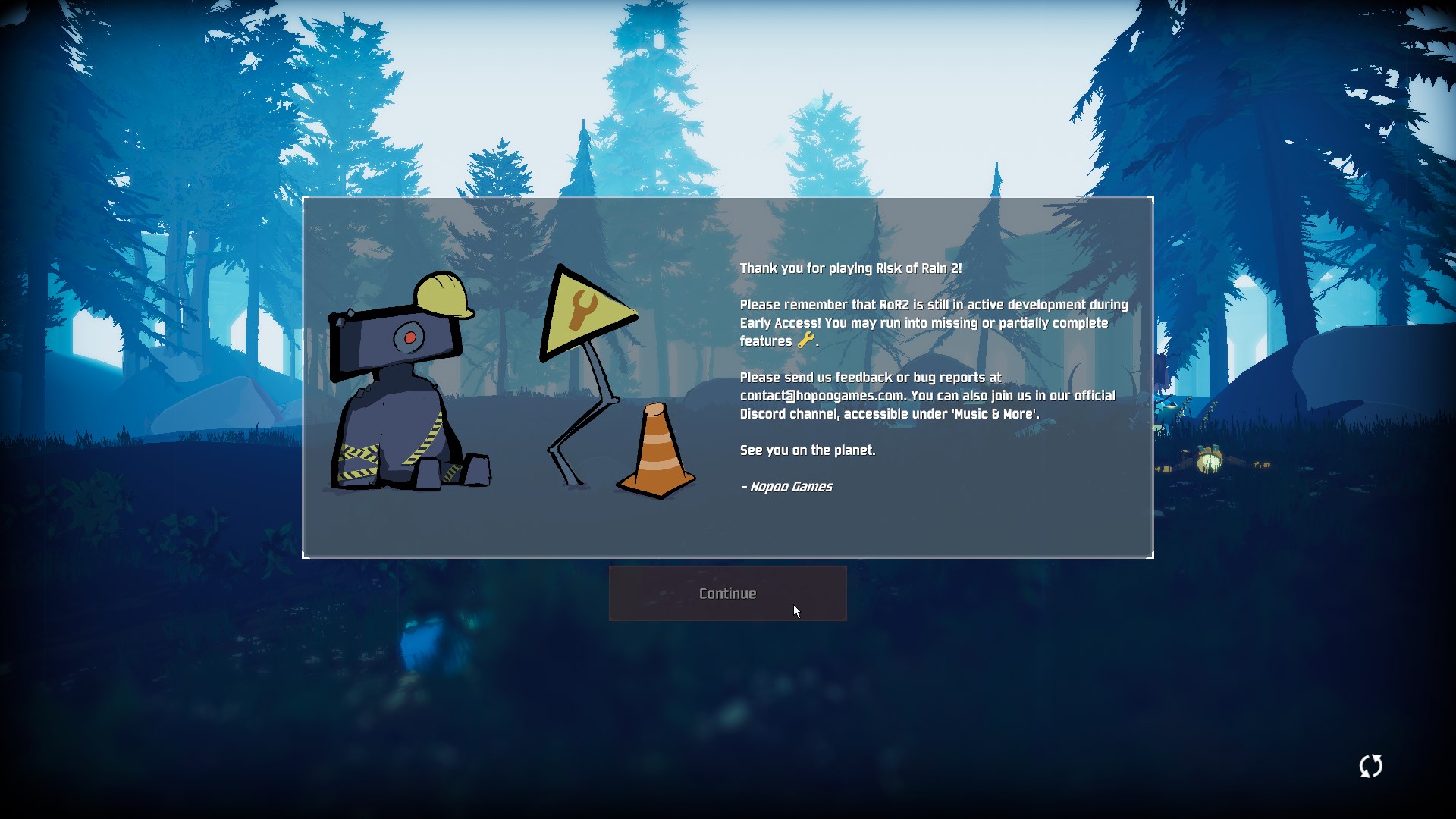
Hello, could someone tell me if it's normal that I can't click the continue button? I can't access the game.
The continue button remains disabled
 frozen reef
Does anyone else's profile get deleted every time they close the game? I have to restart every single time, never gaining progress and it's making me not want to play anymore
 serene iron
Yeah a little. Honestly it's the Ice Level that had the biggest issues fps-wise. Rest is at least okay for me
 nocturne phoenix
I start the game with a nice 200 fps then by level 8 it's just a clusterfuck of like 4 worms and 15 fps
 slow mica
hey guys, i recently bought the game because i love risk of rain 1 and i gave the free copy to a friend. when i invite him though his screen turns black and then he gets kicked back to the main page. when he invites me and i accept i just stay on the main page or whatever page i was currently on. We verifyied out files and it still does that. I dont know what we are doing wrong. any help is apperciated
 spice dust
I cant get past this screen lol
 eager robin
@slow mica I would see if restarting Steam resolves that issue
slow mica
okay thanks! and if that doesnt work do i just start crying lol
 ancient sun
Hai~ Would like to ask if anyone else is encountering a half second freeze everytime they pick up an item?
 frozen matrix
hi, I want temporary to do translation for some items into Japanese because I found some files that make it possible, but I noticed there is no Chinese characters font. Is there any reason to not including font?
 sinful trail
Lower resolutions work fine. But larger resolutions than my default just dont do anything, and it reverts when I change screens
 neon idol
can anyone help me with this error ?
patent jackal
Got the same problem, and didn't find how to solve it
neon idol
oh man , i just buy this game yesterday
i haven't play it until now
patent jackal
PROBLEM I can't press the Continue button in the title. It also may say EARLY_ACCESS_DISCLAIMER.
FIX
We've generally narrowed down the issue to your Save data being corrupted. This may be caused because you shut the game down abruptly or another issue occured. Please note that this will wipe your save file contents. If you want, back it up elsewhere.
First, make sure Risk of Rain 2 is closed.
Restart Steam.
Next, locate the folder that your userprofiles are saved in. This is typically in
C:\Program Files (x86)\Steam\userdata(ACCOUNTNUMBER)\632360\remote\UserProfiles
There should be an xml file in there with a bunch of random characters, i.e
2919dc8a-fd4c-4c3c-bd7d-8aeeac67b831.xml
Open the .xml file in Notepad. Go to https://pastebin.com/BQkjgRrK and copy the contents of the Pastebin INTO the .xml file, REPLACING ALL THE EXISTING CONTENT. Press Save.
Reopen the game in Steam.

Pastebin

Problems & Fixes PROBLEM The camera is always pointing down, or I'm getting weird input latency! FIX First, try unplugging and then replugging your controller. If that does not fix it, look under Device manager and make sure there are no controllers. If you have VJOY installe...
 round lily
multiplayer still not working
spice dust
@patent jackal i tried that already but it still doesnt work :(
sadly its really late and ill try tomorrow
again
 timber copper
@deep minnow ask again here. It's more likely to be answered
 summer pollen
why is game so heavy on cpu ?
im runing 7820X 4.5Ghz and getting up to 50% usage :D
also fps goes to sh@t at late game
timber copper
Probably because it's an early access game. And the second one is true of RoR1, and pretty hard to get around as eventually the FPS will drop because of how RoR is
 subtle perch
bought the 2 copies on steam only got 1 copy is this a steam problem or nah?
summer pollen
i now its EA but still didnt expect from pretty simple game to go this hard on cpu :D
i thought that could be issue
 lunar vector
I got really confused when you said EA and just realised it means Early Access and not the company
summer pollen
xD
lunar vector
Though the ragdolls seem to be shitting on the engine more than CPU
summer pollen
hell no :D
lunar vector
I have a ryzen 5 2600 and I've never gone past 40% usage but fps dropped anyway
(its probably a gpu bottleneck but still)
timber copper
You can lower the amount of corpses and if they wait to be off screen to disappear, that should help
lunar vector
I'm hoping for some better video settings so my gpu doesn't have to die when I get past the 3rd stage
timber copper
I mean, it's likely an optimiation error, just that you can lower your settings in the mean time
 halcyon seal
I fulfilled the condition to unlock huntress then didn't unlock her
does it have to be single player?
 acoustic herald
Multiplayer not working?
 tall current
^ same issue. nobody can ready up and then eventually get kicked out of the lobby
 barren sable
round lily
barren sable
round lily
Multiplayer hasn't been working for many players since day1
 wheat nacelle
any way to avoid getting your entire screen turned to black when fighting the electro worm?
round lily
Issue still not addressed. Can't play with my friends at all. Both Private and Quick don't work. Can't press ready at all and our characters in the lobby are invisible.
 frigid yew
Sometimes during my run, my wasd keys will get stuck even when i'm not pressing them, as in, i'll continue strafing right even though my hands are off the keyboard and stuff like that
is this an issue with the game or my comp?
 prisma sinew
Is there anyway to get more frames? I have everything on the lowest settings, but from stage 4 im getting 8 fps in fights.
GPU = GTX 1070
CPU = I7-7820X 3.60 GHz
frigid yew
have you tried disabling shadows, or other graphics related stuff?
prisma sinew
Yeah I think almost everything is on the lowest setting
 eager patio
Hello. I can't unlock the Artificer. I have the lunar coins but the shop doesn't have her crystal prison there.
I think it's because I was present with someone who bought her in multiplayer.
Or do Prismatic Runs not allow you to unlock characters?
 warm hamlet
Hi guys, love the game but i have one issue... i didnt get my free copy of the game that i can give to a friend or in this case my brother, just wondering if theres anything i can do about this because i was really looking forward to playing it with him
 meager quail
I think sometimes artifactor doesnt show up in show. Just brought a friend in. And I saw her but he didnt
 dense atlas
Maybe dev could extend the promotion for 1 more day?
meager quail
I already ahd her but I still saw her. We tried again the next teleportor and she showed up
 flint lantern
hey a friend and i are broke af, i was planning on getting him a free copy thursday when we get paid, but i didn't know the sale ended yesterday...
my friend just bought it now, but what are the chances of him getting and extension of 7.5 hrs on the deal?
if it helps, we ran RoR1 into the ground, i continued to play it hard when i had no internet travelling EU
 amber sigil
 tawny sonnet
Anyone keep getting kicked from game and sent to main menu?
 still arch
Anyone else have a good computer but lags?
 chilly vortex
Maybe that's the correct place to ask... All my models are invisible, is there any fix to that? I tried to play with the settings but nothing changed
 sonic forge
Well I bought the game and I got it with an extra copy so i gave it my Friend.
My Game works perfectly but the Game of my Friend is Buggy.
When he opened the Game he couldn´t move the Mouse and so he couldn´t press the Continue Button.
The Continue Button was also Grey the Hole Time.
We did all the Things they telled us to do in the FAQ for Game Issues, he restarted his pc, he deinstalled and installed the Game 3 Times, he Relauchned Steam a bunch of Times so u are ur last Hope. ^^
 wraith venture
@sonic forge check the first pinned
sonic forge
didnt work as i said
 shrewd lily
Hey, my friend just bought this game and when he tries to enter the game there is a black screen and then it crashes
flint lantern
hey, i just sent an email to "spacegame2012", i really hope you get the chance to read it, as even if you can't help, it should be a decent little read
thank you very much
 pseudo hemlock
yesterday playing with friends about 4 hours.
today all progress is gone and profile was deleted.
 humble linden
 polar pagoda
any solutions for the item pick up freeze bug
 hardy ginkgo
nothing i've seen so far
polar pagoda
damn, makes it a pain to play with it
 wicked arrow
I've tried a lot of stuff but nothing seems to fix it for me either 😦
polar pagoda
weird that its only for some people
wicked arrow
word. I'm the only one out of 10 or so friends who picked up the game who has the issue.
polar pagoda
i wonder if its some background program
wicked arrow
its hard to say, I try and shut down everything everything I can when I go to play the game just to see but to no avail. Threw it on my ssd tried all the stuff people suggest for better frame rates but unfortunately nothing fixes it for me :/
polar pagoda
you have virus protection?
wicked arrow
yeap
polar pagoda
you tried turning that off?
wicked arrow
not yet no, just seemed hard to believe it could be causing the issue. But I guess it couldn't hurt
polar pagoda
ive got Kaspersky so if you do thats a common that might cause it
wicked arrow
hmm I see, I'll admit I don't have high hopes (just cause of the amount of crap I've already tried) but I'll most certianly give it a go
polar pagoda
there has to be something in common between the people that have the issue
warm hamlet
sorry guys im retarded i just missed the date my bad
flint lantern
for the sale? me too
pretty silly, i just supposed it would last a bit
kicking myself
 worn vault
hey if somebody knows how to solve the crash on start up problem can you dm me?
shrewd lily
when i open the game there is a black screen and the game crashes and i noticed that the file "steam_appid" gets deleted everytime i open the game
shrewd lily
FOR EVERYONE ENCOUNTERING THE EARLY_ACCESS_DISCLAIMER/BUTTON NOT WORKING
We've generally narrowed down the issue to your Save data being corrupted. This may be caused because you shut the game down abruptly or another issue occured. Please note that this will wipe your save file contents. If you want, back it up elsewhere.
- First, make sure Risk of Rain 2 is closed.
- Restart Steam.
- Next, locate the folder that your userprofiles are saved in. This is typically in C:\Program Files (x86)\Steam\userdata(ACCOUNTNUMBER)\632360\remote\UserProfiles"
- There should be an xml file in there with a bunch of random characters, i.e 2919dc8a-fd4c-4c3c-bd7d-8aeeac67b831.xml. Open the .xml file in Notepad.
- Go to https://pastebin.com/BQkjgRrK and copy the contents of the Pastebin INTO the .xml file, REPLACING ALL THE EXISTING CONTENT. Press Save.
- Reopen the game in Steam.
Please let me know if this works - we will be patching the game in the future to work around this, but for now this should at least let you enjoy the game.
Pastebin
warm hamlet

 orchid flame
and then after another rejoin it happened again
 cerulean badger
nope does not work
orchid flame
I'm pretty comfy with ROR2 running great with proton :3
lucky, when i can't even play 😦
cerulean badger
So steam_appid.txt disseapers when starting the game up that might have something to do with the Button being greyed out thing, only parameter in steam_appid is 632360 which is the folder with the user profiles. If steam_api64.dll is missing i also get the EARLY_ACCESS_DISCLAIMER Message.
orchid flame
@cerulean badger if you will find anything, hit me up
please
because i miss playing this game with my friend
cerulean badger
me too have not found anything
 pearl cliff
getting error while playing any fixes on these things ?
 deft phoenix
try resetting your timezone in the windows time settings
cerulean badger
commen bug sadly no fix that works reliably as far as i know
 ionic viper
 vestal portal
Anyone else have issues with audio? Mine sounds like constant reverb and low quality in general.
orchid flame
Redownload? Verify?
 hoary flower
did both
 lime hearth
already reloaded/deleted all risk of rain from regedit
hoary flower
@orchid flame if that was to me
did both
tried only deleting language file and verifying again
still same
 woven vapor
Ya'll think there might be issues with intel CPU's?
I've seen a lot of comments on 8th cpu's getting a lot of stutter in fights
 sacred spruce
@marsh portal dummy
woven vapor
Ryzen seems to get consistent framerated though
hoary flower
same problem with some settings as well other the achievements and items
missing capslock i letters
all over the place
lime hearth
@carmine arrow
how to fix it?
https://media.discordapp.net/attachments/559902278018924557/561913628719316994/unknown.png
https://media.discordapp.net/attachments/559902278018924557/561913674210607115/unknown.png?width=1618&height=910
i spent 44h this game wtf?
@glacial crageloper

 orchid flame
ANY TIPS ON FIXING THE BLACKSCREEN?
 fathom bay
I have a problem, when opening up the game i just get this blank screen.
 covert coral
posting here also in case it's a tech issue and not a bug
One of my friends can't "load" into the game lobby, as in his character select is invisible and he cannot ready up, whenever one of us hosts he's the only one affected by this and when he tries to host everyone except for him is affected.
visual below
fathom bay
Tried reinstalling, validating the files, uninstall and reinstall VC++ 2015, did the save thing.
 jovial pebble
do i need vc++ 2015? i only have 2005, 2008, 2010, 2012, 2013, 2017
i have the same issue with multiplayer so maybe thats the reason. gonna install 2015 and see whats what. just surprised steam wouldnt install it default if its needed
hoary flower
@jovial pebble i did
didnt fix it
what was your problem tho
mine was missing texts
jovial pebble
well i cant even install 2015 says there is a different version already installed
jovial pebble
mine is when joining multiplayer lobbies they dont see me in the lobby and i cant use chat. cant press ready and if they ready i get removed from the lobby and the game starts without me
 marble burrow
^ I'm actualy trying out stuff with that. Like, uninstalling most versions. :V
jovial pebble
but why would i wanna deinstall 2017 for 2015 that will just cause more issues with other games
then id rather wait for a fix lol
jovial pebble
fair enough
marble burrow
Dosent do shit for me doh. Dosent fix the Menu laybeling errors :B
hoary flower
@jovial pebble first
i thought my problem was
because of my computer's language
since we have letter ı
which isnt an english letter
its small version of capslock i
which is the missing letter in my game
but some of those capslock i letters are there only some of them are missing
which is why its pretty interesting
also no problems on language folder
jovial pebble
goddamn my logfile is long already
hoary flower
 fading horizon
TFW RoR2 crashes with a null pointer dereference under Proton on Linux 😭
 restive pasture
My game is crashing, black screen, then it closes, no errors at all, here's everything i tried:
Reinstalling
Updating drivers
Verifying cache
Restarting my pc
Disabling the overlay
Disabling anti-virus/firewall
Nothing works, what do i do?
jovial pebble
the most consistent stuff in my log is "no vertex shader" and "xinput_4.dll"
 hot flint
Hey, I am getting weird mouse problems. Right away in the main menu, the sensitivity was near 0. Took literally a minute to move to the options button. Started a game and it keeps looking down
Unable to play right off the bat because of it
jovial pebble
ive seen someone yesterday with the same or simmilar issue thank a guy for the fix. maybe scroll up and see for your self i sadly dont remember the name.
shrewd lily
hey i tried many solutions but none worked, my friend bought the game and whenever he tries to open it there is a black screen and the game just crashes we tried many options, ALT + ENTER, updating drivers, reinstalling, verifying files, disabling anti viruses, disabling fire wall, none worked but everytime he opens the game there is a file that gets deleted called "steam_appid"
hot flint
I will start scrolling thanks
restive pasture
wow thanks for the response yall
fading horizon
@restive pasture did you check the pinned message in the bug report channel that tells you where all the paths to the logs are
orchid flame
@shrewd lily I have the same problem... but my WHOLE computer crashesh 😄
BLACK SCREEN PROBLEM FIX ANYONE?
 blissful veldt
@hot flint I had a friend who had the game bug out when he had a controller plugged in. And it fixed itself when he plugged it out
fading horizon
C:\Users\<UserrName>\AppData\LocalLow\Hopoo Games, LLC\Risk of Rain 2\output_log.txt <--
hot flint
No controllers themselves plugged in but I do have the x360 wireless adapter deal plugged in
hot flint
worth a shot
restive pasture
orchid flame
Hai i unlocked the sword guy yesterday and now logged into my account
and it didnt save
i basicly lost him
is there a way to get my files back ?
fading horizon
@restive pasture If you're reporting a bug it should go in #ror2-bug-reports-pc so the devs can find it
 eternal pulsar
Im having an issue where my game dosent start it just goes to a black screen and then says "Risk of Rain 2 has stopped responding" whenever i open the game
hot flint
@blissful veldt Still not working...
blissful veldt
No idea then. 😦
eternal pulsar
anyone know how te fix me issue?
fading horizon
@restive pasture 99% chance that the accented e in your username is causing the dynamic library loader to fail. Do you have a user on your system without diacritic characters in the name?
restive pasture
No, But i could make one/change the current one, right?
fading horizon
Yeah maybe, I've never done it before.
If you can do it, I guess it's worth a shot
def report this bug though
Plenty of people are gonna play with accents in their username
 gray frost
anyone here with the disclaimer button not working?
hot flint
Alright, this mouse bug is extremely stupid. I have plugged in a controller to play like that, disconnected every usb device except my mouse and keyboard, restarted my PC a few time, and reinstalled twice. I haven't even played the game yet. Very frustrating...
 terse gull
this chat is useless
it was for devs to help with bugs
but they did not expect so many people to buy the game
so rip
fading horizon
@terse gull the game has one programmer. we all have to have some patience and try to help them stay organized.
terse gull
game is made of a team of 4 i think
fading horizon
I guess paul and duncan but chris from my understanding does assets
Which isn't bad but it's not gonna help fix programming-related bugs
terse gull
chris said he wrote most of the code in game
 short carbon
Hi ! Theres a friend of mine that said whjen you buy the game there's an extra copy with it
Where can I find this extra copy ?
fading horizon
@short carbon until yesterday at noon PST
terse gull

At PAX 2018 I was lucky enough to sit down with Duncan and Jeff, two of the three Hopoo Games dev team to ask some questions about the demo I had just played...
it in the interview
i been following them for awhile
so i know alot
short carbon
@fading horizon So it isnt Buy one get one anymore ?
 hearty glen
Hi, i have an issue where the screen luminosity drop drastically inside the game ; changing the window focus put back the pc original luminosity, but going back to the game it fades again to almost dark. Has anyone encountered this too by chance ?
fading horizon
I don't think so. It was good until Mar 30, 12p PST
terse gull
it not buy one get one free anymore
fading horizon
@terse gull you're right that the firehose approach here seems pretty challenging to manage
terse gull
ended yesterday
 cold path
I have a problem in single-player where my screen will freeze but everything in the game is still going on. Am able to tab out fine, but can't keep playing the game. The game crashes after a few seconds of that.
terse gull
oh justamirage
that happend to me to
the game crashed
it just a crash
simply as that
cold path
It's happened 5 times
cold path
It has happened most of the time I've progressed to the 3rd stage or so in singleplayer :L
Multiplayer is fine
cold path
Yeah, it there a log of what'll be in the new patch yet?
short carbon
Shoot !
terse gull
well no but they do say some of the stuff that going to be in it
some is the start up bug
char being coruppted
cold path
I know it's early access I just wanted to make sure it wasn't something on my end lol
cold path
Where's the dev blog?
fading horizon
http://hopooo.tumblr.com/post/183824942129/hopoo-games-development-thoughts-1 is the best summary of their initial impressions for upcoming dev work

HOLYMOLY
O
L
Y
M
O
L
Y Uh, ok. First, I just wanted to say from the whole team how absolutely floored we are with the reception so far. I was personally hoping for something to match at least half of...
terse gull
read that
 worn wind
Hey, so, is bloom locked on for everyone else?
fading horizon
Ironically my experience has been pretty smooth as long as I'm not trying to play it on proton/wine 😛
I imagine most of the crashes are hardware/driver/environment specific
 fluid glacier
multi play so high ping i no play game fix how?
but singel play is very well
i want multi play with my freind T^T how fix plz plz...pl..p...p..lz...
fading horizon
@fluid glacier how do you know it's high ping
I can't remember seeing a ping display but maybe they patched already?
 feral moat
i want to play the game but i can't get pass the starting screen of the disclaimer. tried everything nothing worked plz help
feral moat
what do you do then
fading horizon
See the pin in #ror2-bug-reports-pc if you're reporting a crash
feral moat
just w8 for an update?
jovial pebble
ok vc 2015 didnt change anything for my multiplayer bug. anyone know where the save file is located?
fading horizon
Also the disclaimer issue is addressed in the pins to this channel
feral moat
but that didn't work for you neither right?
fading horizon
If you have tried the steps in the pinned message faq and they don't work, it's worth reporting a bug in #ror2-bug-reports-pc
 winged ridge
its been reported multiple times...
ive even tried sending them an email
but their inbox is full
fading horizon
Right, it's 4 people, early access, and the game came out 2-ish days ago. So they'll get to it when they get to it.
But what you can do to help them is let them know what's happening on your system if their workaround doesn't fix it for you
feral moat
like I understand but tomorrow and today night is my only off time'
i really really want to enjoy the game
winged ridge
like i said...
i tried to email them..
their inbox is full
i have to wait for them to get online on discord
fading horizon
I imagine that they're not on discord because they're fixing bugs
winged ridge
lol except they were yesterday for hours answering stuff in this channel
fading horizon
So leave a message for them in the bug report channel. Like, you've played an early access game before, right?
fading horizon
DayZ, Rust, Oxygen Not Included, etc. etc.
They all have gamebreaking bugs in the first release and they get fixed, they just take time.
TBH ROR2 is one of the more stable early access games I've played
 tame crypt
btw what is TBH?
fading horizon
to be honest
fading horizon
np
fading horizon
Yep. "gamebreaking" includes startup crashes
The only advice I can give is to follow the steps they give you even if you think they're pointless and to make sure they get your log in the bug report channel
 arctic spire
quick question about the main menu.
arctic spire
GPU gets HOT in the main menu
feral moat
you go in uninstall application settings, find your newest VC++ 2015/2017
fading horizon
@restive pasture boom
restive pasture
That was crashing my game
fading horizon
@carmine arrow not sure if y'all are tracking that issue: special characters in usernames causes dynamic library loader to fail leading to startup crash - venigamiz posted their log earlier
feral moat
and i restarted my pc of course
fading horizon
Worth pinning the solution workaround
jovial pebble
why do i not see the pins in the discord channels here? lol
fading horizon
@jovial pebble top right of the chat window on desktop/web, the vertical pushpin icon next to the bell and the two people
jovial pebble
ah sweet ty
thats so wierd. i did install vc++ 2015 now and nothing changed. then i tried to reset the savegame because it might be corrupted who knows. now when i delete my savegames i get the stuck at desclaimer screen.
fading horizon
They have a pastebin with a pristine save file
fading horizon
5. Go to https://pastebin.com/BQkjgRrK and copy the contents of the Pastebin INTO the .xml file, REPLACING ALL THE EXISTING CONTENT. Press Save.
@jovial pebble
jovial pebble
yaeh im trying that now
fading horizon
If it doesn't work then it doesn't work @winged ridge - there may be two different issues here
both crashing at the same spot
If their faq steps don't work for you then the diagnostic info (output log, crash dump, steam system info) in the #ror2-bug-reports-pc channel will be helpful to them
shrewd lily
what issue are u having ?
jovial pebble
welp the pastebin at least let me get past the early access screen again but nothing i changed did fix the multiplayer issue
i guess its a wait and hope for a fix kind of situation
fading horizon
What's the multiplayer issue?
jovial pebble
im just not realy in the lobby baiscly. players dont see me in i cant type in chat or ready up
fading horizon
Weird. Screenshot that and send it to the bug report channel with an output log
jovial pebble
and i did reinstalling, restarting, dont use an av or windows firewall, did install vc++2015 and tried with a new savegame so yeah
yeah good idea.
fading horizon
There are definitely lots of multiplayer bugs right now. One that I noticed was the "game starting in 70000 sec" thing
Based on the devblog they are having to do a lot of thinking about how to fix those bugs
jovial pebble
yeah. ill try if connecting via zero tier one works since i remember there was multiplayer issues in ror 1 aswell where a bunch of people could only play over tunneling softwares
fading horizon
It's just very hard to do realtime netplay correctly- and to debug it properly. Messages arrive out of order or not at all. Network connections drop and you have to decide whether to punish people with bad pings/unstable networks or distribute the consequences among people with perfectly good connections.
Also based on the fact that the discord has almost gone over 9000 users, I'm wondering if their servers are starting to buckle
 tawdry hamlet
Hey when I play ror2 the game will crash in the middle of the game, if anyone know how to fix that then thank you
fading horizon
@tawdry hamlet check the pins here for frequently reported bugs. if none of the steps work for you, #ror2-bug-reports-pc has instructions in its pins for reporting crashes
tawdry hamlet
Ok thanks
fading horizon
Lots of people are reporting crashes mid-game, the dump file (instructions in #ror2-bug-reports-pc) is probably the most important thing you can give the devs
tawdry hamlet
alright
fading horizon
it'll help them identify what part of the code is causing the crash
 south slate
Hey when I woke up to play this morning I noticed my main profile isnt there anymore
fading horizon
sounds like a bug to me
 toxic aspen
Man
 cursive shard
whenever I launch RoR2 it makes me create a new profile
toxic aspen
Me and a friend have been trying to get into a game together, but we can't seem to both "join" a lobby
 brisk coral
also cant join lobbies currently
 sand hawk
cant join lobies
orchid flame
everytime i open the game my profiles get reset and all my progress is lost
brisk coral
no online multiplayer it seems 😦
winged ridge
how
jagged lichen
I tried forcing pp_bloom to zero in the config.cfg and nothing.
gray frost
@orchid flame how did you fix it?
orchid flame
the problem appeared again
after i opened my game again
idk how this game actually works, lol
 flat fog
So does anyone else get a massive lag spike when they loot an item?
orchid flame
and i noticed it happens with russians mostly
 opal compass
I have a question that is not directly about RoR2 but to do with RoR2 not showing up in my Discord Library even though Discord is detecting me as playing it when I do have the game open. Was hoping someone might have a solution so I can get it on my discord library for quick launching
 wary kindle
@carmine arrow i just bought the game today after i came home from pax and i didnt get a free copy
 river saffron
free copy was only if you bought before noon PDT on march 30th
orchid flame
basically i need to reboot my pc everytime
i want to play the game
that's what i got
to not get the continue error
🤷
wary kindle

We are expecting some BIG announcements from Gearbox's panel at PAX East 2019. Tune in here to see what happens! The stream starts at 11am PT. Borderlands Te...
that sucks because i had no oppurtunity to buy as I was there
 ruby nymph
WE NEED 6 MAN VOICE CHANNELS NOW
wary kindle
i didnt see the date thing because at pax we only got to see the screen with randy in front
Im hoping a devs sees this and can help me out
because I had no idea and really want to play this with a friend
 inner turret
does anyone know if I buy the game again as a gift will I also receive another bonus copy?
 gusty nimbus
My game keeps crashing my computer! its just a random thing from what i can tell. any ideas? my computer does a full restart when it happens
 near gust
bogo is over, Plaziel
inner turret
oh
river saffron
Hey! I bought the game from steam yesterday (30 Mar, 2019 @ 7:30am PDT). If I saw correctly, there was a promotion ending at noon PDT that implied I'd get a free second copy of the game. I can't find it at the moment. Usually there is a code I'd send to a friend so he could redeem it on steam. Is the procedure any different? Where can I find my second copy?
near gust
it should be in your steam inventory
 steel yew
Does this game have anticheat? I wanna play with the code but dont want to get banned.
 hexed snow
It does not
 river saffron
@near gust It's there! Thanks!
 main marsh
Hey there, ive played a few rounds of ror2 however inevitably at some point my screen will turn black (while the game continues "in the background") i can move, use abillitys and even open the menu, however short of restarting the game nothing seems to "fix" it, does anyone know if this is a known bug or if i should report it as such?
 sick skiff
Do they have a bug tracker? I want to trace the multiplayer issue(s) going on so I know when it's good to try again?
hexed snow
No, they are currently using Discord for that, which is terribly inefficient
hexed snow
they mentioned bugtracking and updates in #announcements
 raw night
Hello guys i have an issue same as lots of people cant join lobbies cant press ready singleplayer is fine but multi lobbies i cant join. I narrowed it down to my internet connection. when i connect the internet using lan cable issue persists but when i connect with wifi i can join just fine is there any connection techy people that can help me to narrow it further 😄
 hollow stirrup
Hello,
I played last night for 2 hours and unlocked a few characaters.
Today I log in and it prompts me to make a new profile as if this was the first launch of the game. I made a profile and appear to have nothing unlocked. Presumably it didn't save last night? Known issue?
main marsh
This was in pinned messages
hollow stirrup
Thank you, will report if successful
 wide bloom
Sorry if this is a common issue, I'm kinda new here. I've checked the pinned messages and don't see my issue, so I might as well post it here. My friend and I have been playing a couple round of multiplayer, however when we get back to the first stage, the environment around me would be frozen and I would eventually go back to the title screen. I tried hosting the game myself, only for him to have the same results that I did when he had been hosting. Please help, as this has been interfering with our runs. Thank you!
lime hearth
@carmine arrow
how to fix it?
https://media.discordapp.net/attachments/559902278018924557/561913628719316994/unknown.png
https://media.discordapp.net/attachments/559902278018924557/561913674210607115/unknown.png?width=1618&height=910
i spent 44h this game wtf?
sick skiff
@raw night wifi doesn't use ports if that's a hint for anything. I'm encountering that issue too, but I'm certain it's a problem on how Steamwork connect works
 jaunty portal
@pallid ibex and @carmine arrow Hello, I tried to message you directly, but it wasn't possible due to your privacy settings, so I'll write it directly here: Are you looking for an italian translator for your game?
 haughty thicket
Why does it seem like I'm the only one with horrendous server lag?
When I play online, I get anywhere between 2 - 6 seconds server lag
I have awesome internet and don't get problems like these with other online games :/
sick skiff
Hopoo responded to a Chinese translation with " send an email to contact@hopoogames.com", might as well do it too, devs don't respond too much in this channel
Don't blame them since they probably have a lot on their plate xd
main marsh
Do you have an agressive firewall @haughty thicket ?
sick skiff
@jaunty portal
jaunty portal
@sick skiff thank you so much for telling me this! much appreciated 😃
 worthy jasper
can a teleporter sometimes not spawn in a map?
 slow pier
so anyone was able to fix inability to start coop multiplayer ? when i create a game and my friend connects he can't choose a character (don't see the model), and on my part i don't see his ready status at the bottom
haughty thicket
@main marsh I have Windows firewall, does that count?
sick skiff
@worthy jasper haven't heard of that bug, try looking for little red bubble effects if you're having trouble finding the portal
@slow pier no dev solutions, but someone said wifi works for them since no ports
If you guys are LAN you guys have to deal with Steam connect ports which has 10/10 documentation 🙃
 smoky tapir
has anyone else had the issue of your game being stuck looking down?
slow pier
weird
haughty thicket
So I have to open a port just because I'm hardwired to my router? WUT?
main marsh
Probably not the firewall causing it then =/
haughty thicket
yeah
I tried turning it off temporarily and no change
Ugh, this is frustrating
sick skiff
Port forwarding doesn't have anything to do with latency
If you're lagging, either your GPU/ PC is crapping out (check usage) or you actually do have bad connection
Note RoR2 isn't really optimized, if you ever play singleplayer past 100+ minutes, you'll lag regardless of how sick your rig is
 ionic forge
I cannot move camera with my mouse and no my controller is not connected
main marsh
Does ror2 rely on p2p?
ionic forge
I can use skills on mouse but I can't change the camera
sick skiff
Delete VJoy if you have it installed?
ionic forge
I don't have it
 waxen elk
hi, we are having trouble joining each other, any fixes?
 normal delta
@main marsh yes
ionic forge
game worked perfectly fine like for 2 days
sick skiff
Ror2 uses Steam's solution to connections, and I haven't looked through their awful documentation, but it's probably p2p
Optional port forwarding hopoo pls
main marsh
Im just thinking if @haughty thicket plays with a friend who has a poor connection, it wont matter how fast his own is...
sick skiff
 I just want to play with friends
haughty thicket
I get lag no matter what unless I'm playing on LAN
main marsh
=S
sick skiff
Well yeah I gave a one sided view, but yeah if host* has terrible net, people will lag
You can test by hosting and having people test join you
 robust viper
Anyone getting unity errors on launch...every single time?
hollow stirrup
When trying to fix my save game, I was told to verify game files and I am getting this repeatedly.. it's also not fixing me
hoary flower
@hollow stirrup what is your problem btw ?
 river pecan
The game is being weird and laggy when I try to play with 3 people, what the frick
sick skiff
@robust viper make sure your drivers are up to date and do a clean install of your game if they are?
robust viper
All drivers are up to date, have tried reinstalling the game. @sick skiff
hollow stirrup
Upon reloading I lost my save game entirely, then when I went to verify files I get that^^^
THEN I was stuck behind the early access button not allowing me through... a machine restart and copying the XML file fixed it but I lost my save
kinda ticked but I guess I am resolved for now? Starting anew, hopefully I won't lose my save a second time. 😦
sick skiff
Is corrupted save random? Or have you found a trigger like save editing?
hollow stirrup
I played for 4 hours last night, and tried playing just now and when loading the game I was prompted with "welcome, please make a profile"
like nothing was saved at all
mimicing a first-launch
sick skiff
@robust viper not a dev for this game, but unity problems usually stem from GPU, if restarting everything isn't working, try parsing your crash log/ output log to see what the errors are actually doing
 fickle dew
hello, I'm having problems related to the game's startup. Every time I try to enter the game, I get greeted with a black screen and a never ending loading.
I've already reinstalling the game, and even restarting my pc and also updating my drivers
 wet glen
does anybody have any potential fixes for the game simply not starting/showing up on launch? I have a friend who I gifted a copy to, and when he launches the game, no window actually shows up. The .exe appears in Task Manager, but nothing on task bar. He's tried all of the fixes in FAQ, and none solved it
haughty thicket
okay I just bypassed my wifi router, that was the culpret!
works like a charm now
guess I have to buy a new one
robust viper
@wet glen similar issue that I’m having. The only thing the game actually shows is a unity error
wet glen
i don't believe he gets any error when launching, which i suppose it part of the problem being so....problematic
there's no code to search by
fickle dew
i'm in the same boat, my friend who bought the game works like a charm, but not mine, he gifted it to me
it worked like only once since I installed it
 pallid pelican
is there any way to turn on true fullscreen? No matter the settings it's always in borderless
ionic forge
any idea about the camera issue I have?
I cannot move camera with my mouse.
No controller is not plugged.
I already verified game integrity and re-installed it.
I can use skills with mouse but can't move the camera
and no I don't have vjoy installed
main marsh
Interestingly @hollow stirrup I have a different issue, however i just did an integrity check on steam and get the same thing about the "1 file"
frigid yew
Anyone happen to know why my W key keeps getting stuck in game? Literally only my W and sometimes D key, all the other keys work. The issue persists even after i've closed the game, and i have to wait for about a minute before my W key starts working again. It only happens in this game and I've noticed it usually happens when i hold the keys down for extended periods of time. It's really annoying because the game registers it as me holding down the W key even if i'm not pressing it, meaning I can't run backwards, i just stand in spot if i try to move back.
 sharp island
can't click help
frigid yew
@sharp island check pinned messages
 old talon
ok, I know this has been asked a ton of times, but does anyone have ANYTHING to recover a save from the continue button bug
any fix without wiping my save?
my computer keeps shutting down, nothing I can do it about it
just lost my 10 hr save because it diid it again, really dont want to start again
will take any suggestions besides save wipe because thats my last resort
i had just unlocked merc and engineer in the same run, didnt even get to play them
 peak raptor
 fallen grove
@carmine arrow hey I have a question for if you'd be willing to give me some time
@pallid ibex if you would be willing to help either
Sorry for pinging you lads
 narrow pond
has anyone encountered an issue where the game is capped at 30 fps, even if the cap is turned off in settings?
narrow pond
@orchid flame ty
orchid flame
did it work?
narrow pond
@orchid flame yep, lol
 lament horizon
@fallen grove Probably better to just ask, maybe other people can help you out.
frigid yew
Not sure if this belongs in bug or Tech support but I've found that if i press multiple buttons simultaneously (If i try to sprint while strafing right and also firing my primary and secondary abilites) it causes some buttons to get stuck, as in they won't respond even if i press them again... is this an issue with my laptop or the game?
fallen grove
I'm willing to make a bot that helps with telling people what certain items do and stuff. Leaving the specifics for if they decide to move to DMs @lament horizon
frigid yew
But, that's the whole point of the logbook in the game, isn't it?
fallen grove
Well if the game isn't open or something
I mean it's just a QoL thing for in the server
If they don't want it, it's fine. Just trying to make things easier ig
Type a command with the name of an item it tells you what it does
Or type in a command on how to get a character, it says
What bosses do etc etc
So people can use it as a reference if they're chatting or something
 brittle folio
I'm getting very not great FPS in certain levels despite the settings (both low and ultra give about 35 fps in places) with:
GTX 1070ti
Ryzen 1700x
32GB RAM
Not really sure what I can do to make it any better
frigid yew
Turn off V sync, for more info check the pinned messages @brittle folio
fallen grove
I would message them directly, but since they're smart and don't want a bunch of spam in their DMs, it's disabled
So, here's to hoping they look I guess
orchid flame
too many unique cases of the same thing happening but
not yet an announcement of what it is
 pine pelican
anyone here know how to turn off bloom ingame ?
i've tried through config bu it still stas checked when i launch
old talon
i dont think that its possible at the moment
pine pelican
alrighty then thx, what about ways to increasefps
old talon
does anyone know if i can copy my current (corrupted) save file and back it up for later when the update fixes the continue button bug
you on a low end machine?
pine pelican
i've got everything on low fps desn't change even when i set it to high or change res it stays the same
robust viper
Still can’t get the game to launch. Trying now on a second machine. Unity error as soon as I try to launch the game.
pine pelican
i've got GTX960M, i7 -6700HQ 2.60hz 16gb ram
even my buddies have trouble and they have rtx cards and i9
old talon
well, i run this on an imac at the moment, from 2012, and it runs fantastic. Some people have said turning vsync off has helped, if not im not sure what to suggest man
robust viper
Has anyone found anything about these unity errors at launch?
pine pelican
i've tried everything even high priority but nothing changes the fps
orchid flame
Why is it when i try to join a game that I was disconnected from, it shows a black screen and stays in menu
pine pelican
plus my VFX culling bias in the graphic settings keeps reseting to ultra every time i launch
 rich iris
There a reason Ror won't pick up on streamlabs?
 leaden turret
I'm noticing that myself. I think it's just a matter of my PC getting old, but there are plenty of times where starting up the game has sent my computer into a critical failure state, causing it to reboot
Which is weird, since it normally runs smoothly otherwise
Might just be my PSU not giving out enough power
On an unrelated note, I can't seem to generate the in-game cursor?
Will re-install and see if that fixes things
 jagged oriole
is anybody else having issues joining lobbies?
 dire hill
Mine is not old at all. It's a very new laptop.
 marsh blaze
I cannot get my FPS to go over 59 ? anyone having this issues
winged ridge
cool so i literally did an entire reformat of all the drives in my computer so literally a COMPLETE FRESH INSTALL and im still stuck on the disclaimer screen SO its literally the game and the disclaimer screen that needs to be fixed as i know for a sure fact it is not my pc
dire hill
is it capped...?
marsh blaze
nope
I tried windowed and fullscreen nothing
Its the worst lag ive ever seen no setting is fixing it
marsh blaze
it caps at 59 but the game is laggy as ell
old talon
is frame limiting on?
 unreal lava
anyone know if it will be available for Mac soon?
marsh blaze
v sync is off too
old talon
what about vsync?
@unreal lava install bootcamp
best decision i ever made
you'll never ask that question again
dire hill
weird
old talon
check if vsync is on in your nvidia control panel
and the game
if it is, turn it off
dire hill
The game has issues on higher grade hardware, that it doesn't on lower end. Very strange
unreal lava
@old talon I have a Mac 21.5 mid 2011, I don't think bootcamp is available for my version
correct me if I'm wrong
old talon
it should be, both my imacs are from 2012 and I've had bootcamp on both of them since purchase
check your utilities folder, buy a copy of windows 10
as long as its intel based im pretty sure it should be fine
 gilded prairie
anyone here figured out a fix for character constantly running to the left
marsh blaze
turned off vsync in nvidia still notihng
old talon
and in the game?
marsh blaze
both off FPS limiter oFF
marsh blaze
set at full screen
 distant warren
Question, how does one start a public lobby?
old talon
SAME
winged ridge
@orchid flame i feel the same because i just reformated and STILL have the problem
old talon
i've just backed my save up and im gonna not bother with progression till its fixed
frigid yew
@gilded prairie I've finally found someone who's got the same issue as me. From what i've noticed, pressing multiple keys as the same time will "stick" some of the keys. you have to press the buttons you previously pressed to undo the "sticking" for me i keep running forward without pressing anything
winged ridge
i feel like at this point they should just remove the screen and add it as a little bubble in the main menu
old talon
i literally cannot avoid it no matter how many times i fix it because my computers internal psu is fucked so it shuts down randomly
lost my ten hr save earlier, was devastated
gilded prairie
@frigid yew my issue happens from the second the game starts
orchid flame
@winged ridge its definatel soemthing about the way their stuff saves information, i managed to fix it once, which resulted in loosing all my progress but im not willing to do it everytime i close and re-open the game lmao
old talon
make sure you dont close the game while you're in game
 cedar lodge
Mouse acceleration and mosue not staying in the window, any tips?
old talon
quit out from the main menu
frigid yew
@gilded prairie does the issue persist outside of the game? Like if you try to type, does your D key have any issues?
winged ridge
@old talon what do you not understand about CLEAN REFORMAT
my whole computer was wiped
old talon
STEAM CLOUD
winged ridge
like it does
old talon
try it the instructions on the pins
winged ridge
I HAVE NO SAVE FILE
old talon
see if it works
gilded prairie
@frigid yew Nope. I thought it was gamepad related at first but I've since unplugged it and still nothing.
winged ridge
you dont think i have?
orchid flame
except they are
you can freely edit your profile give yourself unlocks and whatnot lol
old talon
your issue is the unclickable continue button right?
frigid yew
@gilded prairie ah... I can only really sugges you reinstall drivers or restart your device, otherwise sorry mate, i still have the issue as well
old talon
and you went into your program files, wiped the xml folder and pasted the fresh info from the pastebin link?
because that worked for me
winged ridge
yes
old talon
anmd it works every time I have this bug
orchid flame
@winged ridge do the workaround they posted on steam with replacing stuff in the *.xml file
old talon
which has been like 4 times since release
marsh blaze
Update.. I turned off my G-sync on my monitor and now it works fine
winged ridge
i have dont literally everything
 empty mica
Im getting full 3-5 second freezes whenever I pick up an item or whenever I get a milestone announcements (the ones that pop up at the top of the screen). I'm running the game at max settings full 60 FPS. Literally only getting problems when picking up items or getting milestone announcements
winged ridge
done
gilded prairie
@frigid yew Yup. Tried everything 😦 I'm just coming in here once a day to ask about it just in case. I can't play with this issue sadly.
winged ridge
omg i have literally done this fix like 120 times and it never works
old talon
make sure you wipe the original xml file, if you don't have it
uninstall the game
reinstall it
launch it
winged ridge
ive done it several times since reformating
old talon
close it
winged ridge
i literally reinstalled windows
old talon
xml files should come baclk
empty mica
he didnt
old talon
maybe try turning steam cloud back on
empty mica
hes exagerating
winged ridge
lol yea right let me show you
old talon
flipper, have you turned steam cloud back on with a fresh install after doing the fix in the pins?
winged ridge
no because that has a corrupt file saved
old talon
keeping it off doesnt stop the issue
no
thats your problem
uninstall
reinstall
launch
do the fix
orchid flame
the xml file wipe worked once and i lost my progress, now i restarted the game and once again stuck at the same place as before, im assuming i will once against loose all my progress when i do that again, im not saying im any good with archer lady but i'd like to have my progress saved to actually enjoy the game so tl;dr, no the xml wipe doesn't work
old talon
turn it on
try again
it being off has made absolutely no difference for me
but turning it on seems to be part of the solution
old talon
you did all that in that time?
winged ridge
IVE DONE IT BEFORE
old talon
have you kept steam cloud off the entire time?
old talon
it really shouldnt have even been on your list of options
winged ridge
anything you can think of i have probably tried
old talon
you tried doing these things IN ORDER THOUGH
winged ridge
why would it matter if steams base files or anything doesnt exist on my computer
and im getting the screen for first install
it should not matter
old talon
turn off steam cloud, fresh install, launch the game, open the game, close the game. xml files should refresh, do the fix, turn steam cloud on
launch the game
why are you so unwilling to keep trying fixes instead of just complaining that it doesnt work?
im trying to help you my dude
you're in the tech support channel
winged ridge
because you are like the 12th person to tell me to try this
marble burrow
^
old talon
maybe that should tell you something, it didnt work for me either until i followed the instructions to a t and now it works literally every single time
spice dust
im having a similar problem, but a second xml file shows up and cant continue, i made a new xml and everything, no luck
the second one seems to have settings files
marble burrow
I know my HDD has some trouble reading some other DLLs. I cant play some games like, Apex Legends,Doom and Destiny 2 for exemple.
old talon
i literally have to do this fix every single day now sometimes multiple times a day to fix this because of my PSU problem
marble burrow
So merp. Dunno if a chkdsk would help.
old talon
why does it not even work for you after a reformat, if it works for me regardless of all of that?
because a reformat does not affect the steam cloud
thats why you do it in order
try it, maybe it wont work? I don't know
sorry for trying to help jeeze
old talon
@orchid flame fix it with the fix (if it works) and just play without bothering about progression
thats what im doin
 lofty iris
Hey, so i cant really join my friends game and we have tried a few different ways to do it. well i can join just nothing shows up for me
old talon
get to play the game without having progress wiped
 quiet shoal
So I lost my save progress, and I tried to edit the new save file. Does anyone know why it's not working? Steam cloud saves perhaps?
winged ridge
@quiet shoal scroll up alittle youll see every fix ive tried does not work
orchid flame
lol andy the progression is what makes this game great tho
old talon
@spice dust making a new xml file never worked for me, it literally only worked if I replaced the contents of the xml file already there
open it in notepad, select everyhting and yeet it
paste in the new stuff
spice dust
it worked for me at first
but then the second xml kept showing up
i tried deleting and disabling steam cloud but no luck
old talon
i guess you cant really risk breaking your game at this point, so i guess empty out all of the xml files and replace them>
literally just gasping at straws there
but might be worth trying
old talon
damn, sorry to hear that
yeah, im about to do this fix for like the 4th time the past 2 days lol
spice dust
i played for 12 hours straight
spice dust
daaamn
old talon
sucks
i had literally just unlocked engi and merc in the same run
ucky as hell
never got to use them
spice dust
same here lol
old talon
damn the loss is real
seems like you might be able to edit save files though
i might do that and just get my progress back
spice dust
i hope i can edit the save file to get my progress back
old talon
dont mind doing the logbook stuff again
spice dust
yea lol
quiet shoal
thats my problem, editing the current save file doesn't seem to unlock anything
unless i have to play a game for it to load? idk
spice dust
yea welcome to the club lol
old talon
yeah not sure, did you find a guide somewhere?
i'd be interested to try editing my save to get my progress back becaue then every time I get the bug I can just do that
and not lose any progress
till they fix it
@orchid flame it is, but im only talking about unlocking the things you've already got before this bug
so you reset your save and edit back the things you had before
= no lost progress effectively
you still worked for that stuff
for example ill be editing in all of the characters becasue I did unlock all of them before my save was wiped
only lost them because of the bug so
 full knot
So anyone else unable to get past the first screen?
quiet shoal
I pasted an item unlock line into all the files and still no unlocks
spice dust
yup
quiet shoal
should i disable steam cloud
full knot
The continue button is not highlighted
full knot
How?
spice dust
one sec
- First, make sure Risk of Rain 2 is closed.
- Restart Steam.
- Next, locate the folder that your userprofiles are saved in. This is typically in C:\Program Files (x86)\Steam\userdata(ACCOUNTNUMBER)\632360\remote\UserProfiles"
- There should be an xml file in there with a bunch of random characters, i.e 2919dc8a-fd4c-4c3c-bd7d-8aeeac67b831.xml. Open the .xml file in Notepad.
- Go to https://pastebin.com/BQkjgRrK and copy the contents of the Pastebin INTO the .xml file, REPLACING ALL THE EXISTING CONTENT. Press Save.
- Reopen the game in Steam.
@full knot
 paper aurora
I'm having problems with launching my game
lofty iris
So, im having an issue joining a game with my friends, i cant see the lobby
old talon
reep i dont know if that will matter, im not really an expert
but if wiping the og copy of your save works for steam cloud
then that probably should
make sure you're not adding any extra characters or spaces by accident because stuff like that has to be exact
@quiet shoal
quiet shoal
the unlock text lines had spaces in front of them
should I not be adding spaces to the ones i add?
old talon
i honestly have no idea but try both
see if either works
in my experience with other games editing config files and such, you usually have to be perfectly accurate
no extra spaces
no caps
im no IT expert though
full knot
@spice dust theres 3 xml files
old talon
open the bottom one with text pad @full knot
select everything in it and remove it
copy everything from the paste bin document into that file
save, close
spice dust
open them all and check for similarities @full knot
 wheat yacht
Can't click continue when you start the game?
full knot
yup
 cosmic quiver
what are the best graphics settings for look + performance?
quiet shoal
I have no idea, but maybe it's a resolution problem and the actual area you need to click is elsewhere
I've had stuff like that happen in other games
full knot
Ive tried running it on 2 seperate monitors, its not a res issue
wheat yacht
Have you tried having a friend invite you to a game? Might put you straight into the lobby
Just thought of that 🤔
empty mica
Im getting full 3-5 second freezes whenever I pick up an item or whenever I get a milestone announcements (the ones that pop up at the top of the screen). I'm running the game at max settings full 60 FPS. Literally only getting problems when picking up items or getting milestone announcements.
Any idea if this is tied to a grpahics settings?
dire hill
Where do you get game logs?
cerulean badger
@old talon Just tried it with deactivating steam cloud and reactivating it worked ty
dire hill
Specifically, is there a way to collect performance logs
 tough shell
I tried to join Co-Op with a friend on my steam list, didnt work. Tried the Quick Play thing, didnt work. I tried to join their lobby, they tried to join mine, nothing worked. We both restarted twice and still nothing has worked.
orchid flame
hey when i try to enter quick play, it just says invalid lobby id
 sharp ether
orchid flame
sharp ether
orchid flame
i dont have that problem. but sounds bad


 uneven summit
me too
i just got here to ask about this
it was working perfectly yesterday and i can't play now
wheat yacht
Yup same lol I got the game yesterday and was only able to play it once
quiet shoal
uh
I had the greyed out continue button with no music just now
after uninstalling and re installing
turning on steam cloud save fixed it
but I still don't have all my progress 😦
I really don't want to unlock backup mag again, it was so obnoxious to do
uneven summit
i have steam cloud save on and it says nothing is stored even though i was playing yesterday
robust viper
nobody else getting unity error every time the game is launched?
wheat yacht
Cloud is on, still can't play :/
 tawdry karma
so steam overlay doesn't work and i cant join my friends
quiet shoal
It's weird
I pasted my old profile with the unlocks into userprofiles folder
but the game wasn't loading it
it only loads from steam cloud
which would explain why pasting items that I unlocked isn't working
tawdry karma
what can i do to play with friends i accept invite but never join
old talon
try hosting
tough shell
same thing happened to me dark_assassin
tawdry karma
sucks
orchid flame
guys, the people in voice chat helped me, i just had to verify the game and restart the game
and then i was able to play online and with friends
 hollow edge
is the way to to make the game run in fullscreen mode not borderless window?
I think the game is running in borderless
orchid flame
idk but whats the difference?
 subtle heath
umm guys i checked my output log and it says failed to create staging 2D texture w=128 h=2 d3dfmt=10 [887a0005] like a few hundred times in a row
what does that mean
 gloomy copper
Anyone else having issues with mouse lag? I’ve only experienced it in ROR2. Everything else (Borderlands for example) runs fine. Any suggestions?
empty mica
you running a high end system?
 cerulean kindle
So i am having an issue in which my game is stuck at the welcome page. I tried a fix but it wiped my save. I undid it for the time and I'm wondering if there's a fix that I can do without wiping everything
 torn light
might be a stupid question, but a buddy and I can't start a game together. If I host it, he gets blackscreened and kicked from the private lobby and if he hosts it same happens to me. We have a third friend who can join us perfectly fine. Any idea what might be causing this?
orchid flame
So i currently try to join multiplayer games and i keep being stuck on this looping screen


i don't know how to enter the chracter select lobby
and it just goes on for a while and when i finally join i'm alone
 south quartz
Issue with controllers not being able to ping + having to rebind to do it every time
 midnight ore
is anyone having issues with multiple people playing on the same internet? cause we can have 2 people playing but it takes up so much bandwidth even with us so close that we cant have 3 people playing in the same house
 twilit pagoda
Hey guys, I cannot play Multiplayer, I can join or host a private lobby but the ready button doesn't work. Only when I'm the only player does the game start the countdown and the actual game.
To clarify I can start the countdown when I'm the host, but my friend gets kicked at 10 seconds left on timer
gloomy copper
@empty mica nah just managing to use my laptop while I’m away at college
 nocturne vortex
Is there a way to do local multiplayer yet?
midnight ore
a lot of people have asked but idk
i havn't seen anything about it that isnt complicated
like himachi
 waxen trout
@twilit pagoda try to restart your router
midnight ore
@haughty thicket how did you do lan?
@orchid flame i saw you knew about hamachi and lan, how exactly do you suggest setting up hamachi lan
twilit pagoda
@waxen trout I'm currently using my phone as Wifi, maybe that is the source of the problem because it has a strict NAT afaik
 brittle gull
Why doesn't your game lock the cursor to its window in fullscreen mode? This is infuriating. I refuse to play the game like Zoolander.
 fathom oasis
I launched the game again today, after unlocking multiple characters. Upon joining a game i noticed that my progress has not been saved. Any help would be appreciated! :D
gray frost
@green topaz how you make it even work?
 orchid cloud
So guys what i shoud change in Settings
 green topaz
idk
it smostly based on luck for me i guess @gray frost
like sometimes it jus doesnt work at all
then i try later and it works
and i heard you can change it from cloud save or something like that but that could reset data which I have no intention of doing
 tribal quarry
Question: Me and a buddy just completed the 3rd teleporter event and then died during the 4th. however i did not unlock huntress. do i need to be the leader in order to unlock?
orchid cloud
Clar emmm i Think no
tribal quarry
yeah i didnt get her :[ sad day
orchid cloud
I think that for get her is achievement too
tribal quarry
Yeah. none of us died
orchid cloud
🤔🤔🤔🤔
tribal quarry
so not sure. but its alright. ill get her again soon
old talon
@green topaz check the pinned messages, make sure that you follow them exactly, and do not make a new xml file, replace the contents of the existing one
if you have any questions tag me
should work
orchid cloud
Did you get other characters?
tribal quarry
no. I had just started playing.
old talon
you should get her as soon as you complete the teleporter event, once you activate the teleporter it should immediately unlock
if not im not sure why
orchid cloud
So if it’s your 1st game then in next you will get her
gray frost
@old talon ive tried the pin messgae fix for the disclaimer but it still doesnt work
tribal quarry
oh i have to launch again?
old talon
continue button bugged for you? @gray frost
orchid cloud
@old talon right
gray frost
@old talon Yes
gray frost
@old talon Ive tried 5 times
old talon
once it is done installing, launch the game and then close it
make sure you do it in order
that should give you new xml files
then turn off steam cloud
then go to your xml files, open the third one down in text edit
 warm forum
i keep getting "1 file failed to validate and will be reacquired " but it never fixes the file? I also reinstalled, but it's still doing the same thing
old talon
notepad* empty it by deleting everything, paste the contents of the pastebin inside
 wary ingot
hey guys, my computer is below specs, but I've seen people with worse pcs capable of running it at really low settings, however I have this problem (the game is unplayable as well), anything I can do to fix it? still have to try reinstalling
old talon
save it and then reenable steam cloud
then relaunch the game
i do that in order and it works every time, if it doesnt for you im not sure what to suggest, sorry man
wheat yacht
@old talon is that a confirmed fix 👀 I’ve tried literally everything but that