#ror2-tech-support
1 messages · Page 20 of 1
 maiden isle
 light walrus
@maiden isle you can, but the sale for 2 copies is over
light walrus
Ended 3 hours, 30 minutes ago I believe
 viscid spruce
30 mins ago actually
light walrus
30 Minutes? Oh my bad, converted it in my head
 dire hill
@pallid ibex this is what I mean - it's running mostly on the integrated graphics chip and offloading some work to the dedicated, instead of using the full GPU potential to render effects at higher fps. My clean driver install fixed a problem with low (below 60) framerate, but now I peak at 90-110 on high settings.
 tacit ginkgo
@chrome slate Program Files (x86)\Steam\userdata\your ID\632360\remote\UserProfiles
 chrome slate
ty
 orchid flame
I am VERY irritated, I was playing Risk of rain 2 just fine with friends since I got it, my pc then crashed, got back on and started to join a game, we tried a lot of stuff, and whenever we even get to join, it'll show me a black screen, then redirect me to the main menu
tacit ginkgo
changed every graphics and display settings once
orchid flame
I wish
 thorn salmon
Same
viscid spruce
They probably do look but theyre overwhelemed most likely.
There's thousands of us and only 3 of them IIRC
 rotund field
They do sometimes, it looked like. But there's so much going on that I'd imagine its hard to keep up
dire hill
hopoo was up here earlier, just a bit swamped
tacit ginkgo
hopoo where here few minutes ago
viscid spruce
Not to mention all the people reporting bugs and issues already known. or repeating the same bugs over and over lol. Check the Pinned messages people!
Read the prior chat too!
orchid flame
Offer expires March 30th at 12PM PT.
 marble burrow
orchid flame
marble burrow
orchid flame
now
 south flume
hello, i bought risk of rain 2 before the offer expired and i got my free gift code, but now i can't find it in my inventory?
nvm just found it
fudging
steam
tacit ginkgo
😃
 atomic swallow
Anyone have multiplayer issues, i cant quick play or join friends through clipboard and steam invites, MP is broken for me and 3 friends
orchid flame
I was playing multiplayer fine for awhile, and now it's just crapping on me
rotund field
I've got the same problem Dwag
orchid flame
Like I said, all it will do is someone will join, black screen for that someone, then it will redirect them to the main menu
But it could be because my pc crashed while the game was up
viscid spruce
When I was playing with a friend, if my pc crashed while I was connected to their lobby, I couldnt reconnect. They had to remake the lobby and reinvite me.
 craggy coyote
how do i give my second copy of the game to my friend
 civic estuary
Has anyone here seen / heard of a backscreen loading issue? I've yet to see the main title card.
~~
-I've tried lowering resolution from 1440p --> 1080p
-Disabling / enabling multi-monitor setup
-looked for config file to change resolution settings, but could find / non-existent.
viscid spruce
@orchid flame Yes. The offer is over because it's past 12:00 PT
orchid flame
@Tyrinus#6599
viscid spruce
Yes, the offer is over. Steam didnt update their page.
orchid flame
does not end
viscid spruce
You can buy the game but not get 2 for 1.
craggy coyote
i bought it before the time limit so how do i send it
orchid flame
@pallid ibex
viscid spruce
Send it in inventory as a gift to afriend @craggy coyote
 steel cape
Has anyone encountered / fixed an issue where after starting a game all bindings show as "UNKNOWN" and the character is just auto firing (basic M1 attack)?
 graceful minnow
I cannot buy the game again on steam to gift to new friends
I bought one for myself and gifted a friend and would like to buy 2 new copies
tacit ginkgo
offer ended.. sry mate
viscid spruce
Offer ended. Cannot buy game again if you bought for yourself. Game is not buyable as a gift.
viscid spruce
Game is not buyable as a gift.
viscid spruce
Probably something to do with early access? Or the deal that was goin g on
viscid spruce
Most configuration seem to be broken.
 radiant quiver
ah, okay
viscid spruce
It is quite early in the early access. I'm sure thinga will get fixed eventually
 queen ivy
the continue button on the welcome screen is grayed out for me.
i already played the game. paused it to eat when i came back it had crashed. tried uninstalling and verifying game files.
anyone know a solution?
viscid spruce
Check the pinned messages
queen ivy
thanks brøther
 cosmic cradle
Have I missed the buy one get one free deal? Just tried to purchase it a few mins ago, but it wouldn't let me through checkout and the buy option disappeared, it's come back up but I'm not seeing anything about the free gift
 sick prairie
@marble burrow seems to have worked, thanks!
 tawdry hamlet
hey when i play ror2 sometimes my game would crash, does anyone know how to fix that?
orchid flame
you need to be a bit more precise i guess
 round lily
Anyone managed to fix the multiplayer?
 lusty monolith
Why am I unable to buy the game through steam? there's no prompt to add it to the basket
 lethal bear
Is the game no longer purchasable? The button disappeared for me
lethal bear
I had it in the cart, made a mistake with my card, but when I fixed it, it was no longer available.
lusty monolith
at what time did you check back?
lusty monolith
What did you do to fix it?
lethal bear
Refreshed my client
lusty monolith
I'll try that then
 uneven helm
I was just having the same issue, I restarted the steam launcher and that seemed to have fixed it
lusty monolith
It's back but I guess the buy one get one free deal is over
uneven helm
Seems like it
 spare gale
Purchase button gone for me after rebooting Steam, but it is for the friend who just decided they wanted it so w/e.
lusty monolith
Now it's 17 euro for 1 copy
 subtle dragon
@pallid ibex Hey, Hopoo, I have an issue concerning Risk of Rain 2, but none of the aforementioned pinned or previously mentioned bits of advice (restarting computer, updating drivers, et al.) have worked. I attempted to send you an e-mail at contact@hopoogames.com but apparently my e-mail did not send, with a follow-up automated e-mail citing that the e-mail I sent was unable to be delivered, on account of "mailbox (contact@hopoogames.com) is over quota temporarily". I am unsure of why this is.
I've taken the time to ask others here for help, as well as trying to further troubleshoot my issue in order to accurately pinpoint it, but to no avail. I've searched through the whole of the Discord server for anyone with similar issues, as well as checking the Steam Discussion forums (both in general and in bug reports), with no success either. It isn't even the gameplay itself; the game plays perfectly fine, minus the occasional "clip through the terrain" hiccups and the once-in-a-full-moon "I can see and interact with something that someone else in my group can't" issue.
My problem specifically comes with starting the game up, exiting the game from the main menu, as well as opening and closing the Steam API (for inviting friends to join me, or for checking Steam Guides and so on), and my entire system freezing for no discernible reason for well over a minute at a time. It has nothing to do with a lack of memory, or insufficient computer system specifications, or even a lack of hard drive space, either. I have seen no one complain about this very specific issue, and thus I can't ask for most help in trying to figure it out as my game is not crashing at all, and thus I can't generate any sort of error log that would help further narrow down the issue for me.
 tired epoch
so when i try to join my friends lobby then i cant select any characters or ready up and none of the models load. we've tried a bunch of stuff and it happened last night. it was weird because it happened before but after just trying again and again it worked but now it wont. has anyone found a way around this? we use hamachi also
 pallid ibex
@subtle dragon what are your specs/OS? It seems like a read/write, like your hard drive is kinda dying out, but most likely not
 obsidian echo
My profiles aren't saving
subtle dragon
Let me grab my Speccy real quick. My hard drive isn't close to dying out for a few more good years, no I/O disc errors whatsoever, thankfully. I also tried attaching the output_log.txt file to my prior e-mail, but again, that didn't really send.
 icy lava
@subtle dragon I hit the same thing
subtle dragon
icy lava
My machine blue screened while I tried to hard shutdown in this state
Error was something about memory
as if the game was taking too much memory resources
subtle dragon
I haven't had any BSODs whatsoever for myself, Silent. I couldn't really say anything about that.
icy lava
prior to my trying to hard shutdown it was identical to your description
subtle dragon
I mean just this morning, I made sure to double down on uninstalling and reinstalling the most stable, up-to-date GPU drivers I have, and I had absolutely nothing else running in the background (other than a Chrome tab to write up my e-mail), and the game still gave me the exact same problems as when I first purchased it.
dire hill
Huh. Why isn't it identifying your ram?
 spiral spoke
Where is the RoR2 save located? I want to create a backup.
subtle dragon
I honestly don't know, but the RAM is perfectly fine. It's just some Corsair Vengeance sticks, DDR4–2133.
I'm also using a slightly older version of Speccy, so it could possibly be that, too.
 manic plume
i can't host or join multiplayer lobbies with friends? but it was working literally 2 days ago?
what changed
 warm pagoda
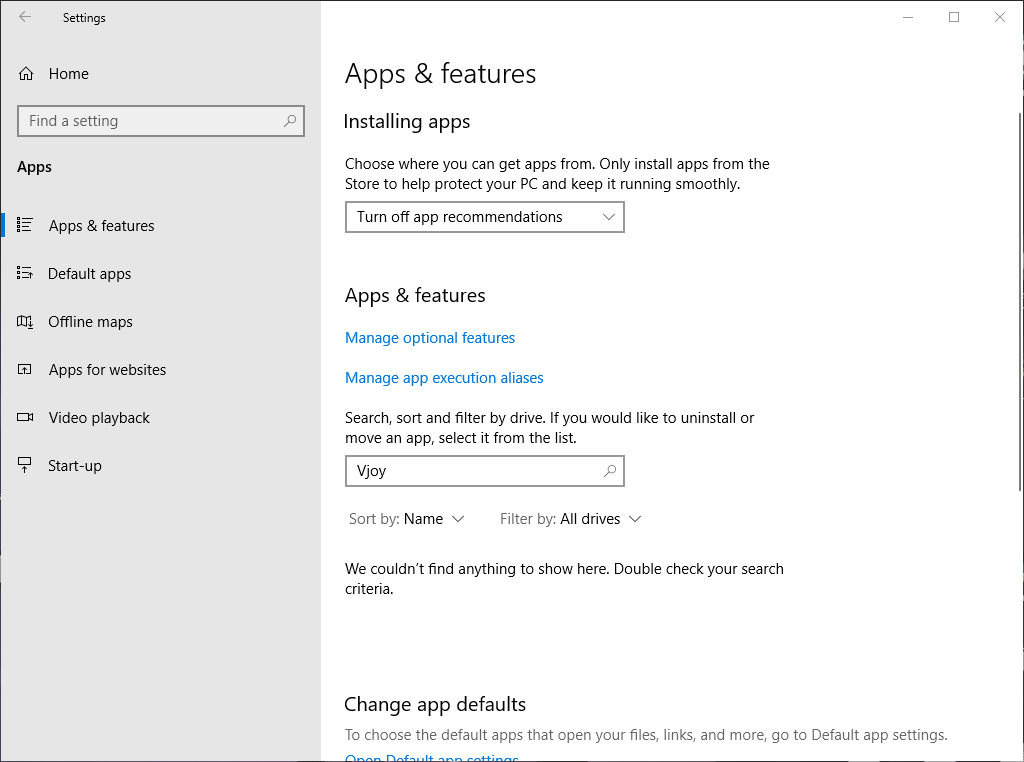
https://i.gyazo.com/d30409cad17853f0e0441e1e820ac891.mp4 So err how do I keep my mouse on the screen, I don't have Vjoy installed (https://i.gyazo.com/f15234f309b208142305f70640037736.png) and am not sure how to fix this.... Please I don't want to use a controller for this
Edit: I have re-installed twice

 tribal vine
I experience a stutter every time I pick up an item, does anyone has the same problem?
 fathom bridge
So idk if people get this problem that you are in a 20minute run and your game crashed your computer does anyone know why this happens
manic plume
is there any actual tech support here, or is it just problems lol
 ancient cosmos
Hello, my friend and I just did the Celestial Portal thing to unlock the Mercenary. My friend failed all the jumps, but I did it and got to the Oberlisk and killed myself. We both got the achievement. My friends character unlocked. Mine did not. Is there anyway to fix this? We have been playing for 6 hours trying to unlock it and now it's gone for me.
 severe parrot
still am stuck looking down, havent been able to fix it and its been 4 hours of searching and changing things, nothing
 tough stream
Anyone know how to add a friend as a player in private lobby? It looks like they're stuck as a spectator
tacit ginkgo
@tribal vine yeah some ppl have that bug and as far as i can say its is a known bug. Ive tried some possible solutions and the only thing that helped a little bit was to close any programs. This didnt fix the freeze, but made i a lot smaller (from .5 to .2) sry for no fix
subtle dragon
@pallid ibex I posted my computer specs above in a small screen capture, do you need anything else?
tribal vine
@tacit ginkgo okay thanks, good to know I'm not the only one and it's a known issue
 fading lintel
I play the game in windowed 1600x900
everytime i relaunch the game it resets to 1920x1080
windowed still
anyone know of a fix
tawdry hamlet
@fading lintel something happens to me but for audio
tacit ginkgo
@fading lintel have you tried manually changing it in the config.txt?
fading lintel
negative - will try, but i mean I shouldn't have to do that - it should just save,
tacit ginkgo
ofc 😄 but wheres a will, theres a way ^^
its not working for me either, at least for the refresh rate..
 sick skiff
anyone know where logs are for this game? I'm having problems connecting with a couple of my friends
I can connect with someone on the same network, and apparently to randoms using quickplay, but not sure why when certain friend's host, or when I invite those friends, we can't see each other in the room
orchid flame
Is this just for me and my crew or are the servers real damn slow
 stuck storm
was fine here
sick skiff
I assume it's a Steam connection thing since we don't need to forward ports anymore, but forwarded and exceptions in firewall for Steam and still nothing jesus, I just want to play with friends 
severe parrot
i have the looking down bug but ive done all the suggested fixes and nothing has worked for me, ive been waiting all day to play the game but its just unplayable until i can fix that. any other suggestions for fixing it?
 stark viper
My friend and me cant click Ready to start a multiplayer game. Anyone know the issue?
sick skiff
You guys don't see each other's character selection?
stark viper
yes
sick skiff
Exact issue I'm having with like 2 of my friends, I can start with someone on the same network, but chances are the issue is probably with how Steam connect works since we use that in this game
if only we can get our own port again, I could just port forward rip, idk why Steam connect doesn't work with some of my friend's/ with me
 frank flume
My Internet games still don't work
please add optional port forwarding
*joke don't do that
 ruby surge
Hi I have a problem with my controls, it's unplayable.
My mouse sensibility is messed up, it goes fast when I move slowly.
Also in game it won't stop from aiming downward
severe parrot
^^
 coral python
Just a damage number question. A magma worm just one hit me with the fireballs which they expunge is that intended and am I just bad or?
sick skiff
game discussion question? this is support
ruby surge
I need something to fix this mouse/controller problem, it doesn't seem to happen to everyone
severe parrot
ive asked 4 times over today with no answer
ruby surge
what problem you have ?
severe parrot
same problem
sick skiff
@ruby surge you tried the pinned solution?
ruby surge
I haven't tried anything yet
severe parrot
wait lmao try the pinned solution
 sharp blaze
i have the same problem guys
 barren sable
@pallid ibex @carmine arrow
ruby surge
I removed the controller
severe parrot
i tried the pinned solution but nothing helped me
ruby surge
so I assumed it had nothing to do with it
severe parrot
disable vjoy if you havent
barren sable
Why are things invisible in the bazaar
i went there to buy the vindicator and she wasn't there
yet my friend could buy her
ruby surge
mmh, I do have vjoy
severe parrot
disable it
 civic axle
buy 1 get 1 free ended?
severe parrot
yes
civic axle
:(
ruby surge
yeah, problem solved, it was effectively vJoy, which I didn't even turn on
just removed the drivers entirely
coral python
@sick skiff ok ill post it there ty xd
 ember crane
Guessing the game has some issues with running on pcs with lower IPC/ single threaded preformance
in terms of keeping frame rate solid
I have the same GPU as a friend of mine (gtx 970), but an fx 8350 where he has a i7 7700k, and especialy in the portions with more going on like second loop hell, frame rate chugs for me, but not as much for him
not realy tech support as much as a huh something to consider
 woeful junco
https://i.imgur.com/El0L4SZ.jpg
anyone else get this bug? or should I just go report it
I cant press continue
 sick skiff
yeah probably, RoR1 had a ton of issues with that too, they don't optimize a lot of the calculations
@woeful junco did you try the pinned solution?
woeful junco
yup
sick skiff
I guess report it ¯_(ツ)_/¯
woeful junco
i tried reinstalling it again and clearing everything so I thought maybe this is a different bug but RIP
 warm nebula
any support about game crashing all the time? 😦 for one hour crashed like 10 times. ror2 exe has stopped working and back to desktop
 somber grove
my guess is all these crashes are a symptom of the game using way too much gpu power
and people with underpowered gpu will be hurt even more
ive said this a bunch of times in here the game is using 3x more gpu power than it should be and the more you play the more it uses
 brazen island
I can't really find a way to stop Steam seeing ROR2 as "running". Can't launch it because it already sees it on but no processes are to be found.
stuck storm
restart xD
brazen island
Restarting steam works but it is not a real solution
 chrome schooner
Is there a fix for the game lagging/crashing for a second on item pick up?
 abstract tendon
Having a broblem that i cant find any solution to so i guess i'l just ask here. i have played a lot today and sydenly now with a new friend when i try to join him or he tries to join me the host goest to character creation and the one who is joining gets black screen and goes back to main menu. Any fix for this?
 raven oxide
So Im trying to get a friend into my game and hes family sharing a friends copy and he cant join any lobbies for some reason
 nova kernel
I'm having the same issue, I cannot join lobbies and neither can my steam friends
raven oxide
Now we cant connect to each other at all black screen then boot to main menu
 wispy grove
anyone having an issue playing with friends? im trying to do my first multiplayer match with a friend in private game but once either of us clicks "start private game" it black screens for the other, and kicks them out
raven oxide
Ya right now
wispy grove
my friend often has issues connecting with other games as well
we cant play smash online for example
 lost ember
Anyone know a way to force my GPU to actually run at its boost clock? For some reason this game is only using 30-40% of my 2080ti, so later on I get some pretty bad frames (3440x1440 after about 30min drops to 30fps or so)
and because it's using so little of the GPU, it never kicks into full gear. Well, it does on the main menu
1350MHz in game, 1950MHz at the main menu and every other game I play
wispy grove
not hearing anything about the black screen issue in the bug reports is kinda annoying
(on steam)
 paper flax
Does someone know how to fix tech-issue?? Each time I pick up an item I get freeze for a sec aprox.
severe parrot
I still have the bug where I'm constantly looking down at the ground, disabled vjoy and made sure no controllers were attached yet im still having the issue, does anyone have any idea whats wrong?
ive looked around but vjoy is the only thing they talk ab out
chrome schooner
Every time I pick up an item my game skips for 1-3 secs or stops responding for 4-5 seconds at worst. I have uninstalled and reinstalled and lowered al;l graphic settings. have 1080 ti and 24 gb ram.
otherwise the game runs perfectly
 slim estuary
Hi im stuck in the start screen cant press continue
 loud herald
Does anyone know why my game freezes for a sec whenever i pick up an item?
paper flax
same here xd
 burnt spear
Having a problem where my game cant load up my save file
stuck storm
PROBLEM My save file disappeared!
FIX Please restart steam and then Right Click "Risk of Rain 2" -> Local Files -> Verify Integrity of Game Files. The save file should come back from Steam Cloud.
burnt spear
the save files I made are all still there just whenever I launch the game again it prompts to make a new one
and doesnt detect older ones
tried to put my friends userprofile in the folder but it still doesnt detect it
C:\Program Files (x86)\Steam\userdata......\632360\remote\UserProfiles
 tardy pine
Hi! Need help. I can not press the button "Continue" it is inactive
 fair quest
I'm trying to do multiplayer with my friend but it won't let us ready up? any help?
 gray frost
@tardy pine same here
sick skiff
I put up a bug report for it @fair quest, probably a problem with Steam connect
orchid flame
Yo everytime i try to play it gives me this
 halcyon fjord
Hello, I just purchased ROR2 after spending over 100 hours on the first one with my friend! I just wanted to know if the buy one get one free offer was still up (I haven't receives any codes on steam) ! I was really hoping to play multiplayer with my friend as this is something we'd like to experience together! I hope I'm not too late! It's 22:30PM 30th March UK 😃 Thank you, I'm super stoked to play the game! I watched a first impressions video and seeing the wandering vagrant in 3D was insane!! you've done an amazing job. Well done!
gray frost
@halcyon fjord you have to gift it for the free promoi
orchid flame
it happens 3 seconds after i load into the game
severe parrot
ive been trying to email them but its not working at all and nobody has any suggestions for my bug :/
sick skiff
Unfortunately no real fix for it since we're default for Steam connection now, so we don't have options for port forwarding anymore, Steam connect is garbage sometimes
halcyon fjord
@gray frost I've already purchased it, have I messed up!? 😄
gray frost
@halcyon fjord nah if you wanna get the free copy for a friend all you have to do is go to the game page on steam and gift it
@halcyon fjord i think thats how, not sure tho
halcyon fjord
@gray frost I've just checked it out, it just prompts me to pay again. 😦
sick skiff
The one to gift in your inventory if you bought the buy 1 get 1 free, if you don't have it, you might have bought it too late?
gray frost
@halcyon fjord did you buy it before 3/30/19 12pm?
halcyon fjord
It's 3/30/19 22:38 (UK time)
orchid flame
Can anyone help me with this crashing problem?
halcyon fjord
@sick skiff I hope not 😦 I just paid for it so I can play with my friend.
 pastel crag
Hi, for whatever reason I cant join or friends cant join me via steam. Ive tried with people on the same network and elsewhere and I have AT&T Fiber. I can invite or be invited and it just doesnt do anything at all
 empty mica
my game freezes up for 2-3 seconds almost every time i pick up a new item or I get an achievement/milestone. any idea?
im runing game at max settings, full 60 fps
sick skiff
@pastel crag are you getting connection errors?
pastel crag
nothing that im seeing @sick skiff
empty mica
rx780 intel i56600k
sick skiff
you mean you can't join the lobby or anything? via code clipboard or steam friends?
pastel crag
Correct ive tried that as well both ways
sick skiff
drop your output_log.txt in a pastebin and share, you can redact your name if you care
or you can try seeing if it's a firewall issue
 winter wraith
is the buy1take1 period over? just bought it right now
stuck storm
yep
winter wraith
big oof
pastel crag
@sick skiff where is the log file at?
sick skiff
C:\Users<UserrName>\AppData\LocalLow\Hopoo Games, LLC\Risk of Rain 2\output_log.txt
 jovial pebble
was there any fix found so far for not beeing able to join multiplayer lobbies properly? (not beeing able to chat ready up while in a lobby)
besides restarting the pc checking ports/firewall and reinstalling the game?
stuck storm
have you checked your AV is not blocking it?
sick skiff
nah I put up a bug report for it just recently, there's a couple for it already
pastel crag
@sick skiff
jovial pebble
i dont use a av
 urban vortex
is it intentional to be unable to disable bloom
orchid flame
I doubt it. But it's also an issue for me too. I'd really like to turn it off
somber grove
@urban vortex no a dev was in here yesterday and said it will be fixed in next patch
 wicked mango
Known bug
 modest citrus
I'm running into camera/mouse issues. mouse is able to leave the bounds of fullscreen, and camera gets stuck pointing to the floor using mouse and using controller. Any thoughts?
tacit ginkgo
you can disable bloom via config.txt.. i dont know if it actually works tho sry :/
unable to tell the difference
wicked mango
@modest citrus check pins
orchid flame
Can someone help me with the unity crashes please
tardy pine
Hi! Need help. I can not press the button "Continue" it is inactive
 glossy remnant
Having issues connecting to a Friend's game. It black screens us then throws us back to the main menu.
 wheat silo
Hi! I purchased the game today, a little while ago actually, and was wondering where I could find my second copy code, if I received one?
orchid flame
bro that deal is over
jew ass devs made it last like 5 seconds
it ended 7 hours ago
glossy remnant
Click on your name in steam and check your inventory if you have it
@wheat silo
calm down there @orchid flame
wheat silo
@glossy remnant Thanks! I must have missed it then as it's not there. Thank you anyways.
 small nebula
my friends and i all live pretty close to each other, in the same state and like an hours drive away at most, but its super laggy whenever we try to play together, anyone know how to fix this?
 vital yacht
anyone having problems with keyboard input not working properly? Can't get out of the pod at the beginning
 steel mortar
For some reason starting last night, trying to play multiplayer makes my screen black, am big sad
 light field
After I select single player the menus disappear and nothing happens. It lingers on the background indefinitely.
 fickle chasm
is there a fix to the starting menu bug?
 hexed portal
Anyone have a fix for not being able to join friends in multiplayer?
stuck storm

Problems & Fixes PROBLEM The camera is always pointing down, or I'm getting weird input latency! FIX First, try unplugging and then replugging your controller. If that does not fix it, look under Device manager and make sure there are no controllers. If you have VJOY installe...
warm nebula
@carmine arrow my game was crashing all the time (RoR2 exe has stopped working) and seems like damn radeon cant handle some of the graphic settings (while i dont have problems with other games) and since a lowered or turned off most of the things ( maybe it is just one particular thing, but I stopped almost everything) game stopped crashing. I was able to play and enjoy the game :D. I am not sure if this is well known issue - graphic settings of games and radeon, but just in case someone else has problem - that seems to solve it 😄 Great work, I had doubts that I would love RoR2 as much as I love first one - but i was wrong 😄 both amazing 😃
 left wharf
so i have checked, all of my controller are unplugged, have made sure, and uninstalled vjoy. My camera still is always pointed down on my laptop, i have even tried verifying game files and reinstalling twice
 gentle lark
so my account is deleted wtf?
 small stratus
@gentle lark
PROBLEM My save file disappeared!
FIX Please restart steam and then Right Click "Risk of Rain 2" -> Local Files -> Verify Integrity of Game Files. The save file should come back from Steam Cloud.
gentle lark
ty @small stratus
 next dome
me and a friend are trying to play together and he keeps getting black screens when trying to connct to online matches
 polar pagoda
Any fix for the freeze on item pick up?
next dome
anyone have a fix for multiplayer blackscreens?
 eager robin
Try restarting your Steam to see if that fixes the issue.
 golden basalt
My bud and I missed the promotion by a few hour because we didn’t see anywhere that it ended at noon until now. Is there anyway I can still get a free key? I can show proof of purchase.
 gilded prairie
anyone discovered a fix for the character constantly runing to the left
 torn bronze
Dumb question, how do I go about redeeming the extra copy?
polar pagoda
should be in your steam inventory @torn bronze
 robust viper
GfxDevice: creating device client; threaded=1
d3d11: failed to create factory (80004005).
GfxDevice: creating device client; threaded=1
d3d11: failed to create factory (80004005).
Crash!!!```
posted this in bug report, just looking to see if anyone knows why this happens. happens every time i try to launch the game@polar pagoda Lo and behold, there it is. Thank you for the help.
polar pagoda
no problem
 thorny gale
Okay so for the multiplayer black screen fix, you just have to restart steam. Worked for me at least
orchid flame
if I play quick match I'll get thrown back to main menu either in lobby or ingame. does anyone know what it could be
Does anyone know how to fix the unity crashes?
 covert epoch
Is this a me exclusive problem or everyone? can't seem to find an RoR related process in task manager either. Only way to kill it is to close steam
torn bronze
@covert epoch At first I mistook "me" as Windows Millennium operating system reference. You scared me.
covert epoch
rofl
Oh god I did have it at one time
for about a month? before we had to install XP
 waxen trout
Black screen multiplayer, didn't work for my friend. He already restarted Steam, his computer, verified files integrity, reinstalled the game stilll can't connect
covert epoch
@waxen trout I wonder if this could still be a network issue, since technically we have player hosts
waxen trout
could be
covert epoch
@waxen trout wanna try connecting to a lobby I make together and see if it works?
waxen trout
sure
covert epoch
give me one sec here. I doubt ill make a good host, but itll at least verify your problem
 green tinsel
I keep getting this bugg every time i start a run today where my camera locks straight up and all my skilles are set to unkown is there a fix for that
covert epoch
@waxen trout see if he can connect to this link 109775241001014404
for lobby ID that is
 heavy path
My friend and I live in the same country and have the same internet "specs" but doesn't matter who hosts, eventually the game desyncs very badly where in the connected player cant shoot anything or is 5-20 seconds delayed. 10mb line so 1mb upload.
 dry widget
I'm having a problem joining game's with my friends. It gets as far as the second lobby then no one can join or change there champs. any idea on fixes? I've repaired the game files, restarted my router and turned off my firewall with still no change.
 west vale
I've read somewhere that the devs are fine with unlocking the characters via editing the files, is this true?
sick skiff
@dry widget several bug reports on it, it's probably something on Steamwork connection, I've also forwarded Steam connection ports, and nothing, output logs doesn't seem to give out too much information on it either
sick skiff
@west vale pretty sure that's on you, it may be an online game but it's not like you're having an advantage over anyone by editing the save file for the characters until prismatic trials get rewards, but even then, character unlock isn't even difficult, I doubt they care enough to deal with it

 old hawk
hey, bougt the game at like 10:30 ,still on 30th of march but i still havent gotten the extra copy. did i miss something or?
sick skiff
uh I'm not a dev, but I can try to help you, is this crashing during gameplay? if it is, link output_log
orchid flame
where do i find the output log?
sick skiff
C:\Users<UserrName>\AppData\LocalLow\Hopoo Games, LLC\Risk of Rain 2\output_log.txt
orchid flame
sorry bro thought you were a dev since you were helping everyone
sick skiff
nah dev's have the Developer role, it's only Paulthegoat and Hopoo, devs are afk right now
orchid flame
Uh there's alot of shit in here
 boreal flax
hey im looking at that save fix thing and in the userprofiles i have 3 xml files is that my 2 previous broken saves lol
orchid flame
what part do i put in?
sick skiff
@old hawk if you got the copy, it should be in your inventory under your gift tab, otherwise, check your time zone and send a report to them if you think you missed it
eager robin
@orchid flame, Users will be the account that you're logged into on your PC currently
sick skiff
he @ the wrong person
anyways, if you crash everytime, you can get a clean log by deleting everything in it, save and exiting the file, then relaunching the game
and send it after the crash event happens
orchid flame
d3d11: failed to create staging 2D texture w=128 h=2 d3dfmt=10 [887a0005]
d3d11: failed to create staging 2D texture w=128 h=2 d3dfmt=10 [887a0005]
d3d11: failed to create staging 2D texture w=128 h=2 d3dfmt=10 [887a0005]
d3d11: failed to create staging 2D texture w=128 h=2 d3dfmt=10 [887a0005]
d3d11: failed to create staging 2D texture w=128 h=2 d3dfmt=10 [887a0005]
d3d11: failed to create staging 2D texture w=128 h=2 d3dfmt=10 [887a0005]
d3d11: failed to create staging 2D texture w=128 h=2 d3dfmt=10 [887a0005]
d3d11: failed to create staging 2D texture w=128 h=2 d3dfmt=10 [887a0005]
d3d11: failed to create staging 2D texture w=128 h=2 d3dfmt=10 [887a0005]
d3d11: failed to create staging 2D texture w=128 h=2 d3dfmt=10 [887a0005]
d3d11: failed to create staging 2D texture w=128 h=2 d3dfmt=10 [887a0005]
d3d11: failed to create staging 2D texture w=128 h=2 d3dfmt=10 [887a0005]
d3d11: failed to create staging 2D texture w=128 h=2 d3dfmt=10 [887a0005]
d3d11: failed to create staging 2D texture w=128 h=2 d3dfmt=10 [887a0005]
d3d11: failed to create staging 2D texture w=128 h=2 d3dfmt=10 [887a0005]
d3d11: failed to create staging 2D texture w=128 h=2 d3dfmt=10 [887a0005]
d3d11: failed to create staging 2D texture w=128 h=2 d3dfmt=10 [887a0005]
This shows up like
endlessly
eager robin
are your drivers up to date?
orchid flame
yeah they are
sick skiff
what's your specs?
boreal flax
i found a fix for my save problem
think it was because i didnt have cloud save feature enabled so it wasnt grabbing a save from the cloud
orchid flame
AMD FX 6300 and a RX 560 @sick skiff
 delicate tapir
I also have the game not closing properly @covert epoch
delicate tapir
but none of my data saves
delicate tapir
yeah
covert epoch
do you have steam cloud saves on?
delicate tapir
i should but i dont think it can go to a cloud if it cant save
covert epoch
I've been able to save fine, everything after a run death, or run finish has saved properly for me
so if yours isnt saving
I'm assuming it must be something steam cloud related
like its relying on cloud data, or not relying on it
delicate tapir
ok ill look into it
covert epoch
trying turning it off, or making sure its on
and see if you get different results
make sure you end a run by dying or something, see if you tracked stats change
 rough osprey
Issue:
Close the game, steam still says "running" after I close it. I go to task manager and I don't find any process that seems related so I gotta close steam and open it again to make it run.
covert epoch
@rough osprey Same thing I've been discussing.
rough osprey
Oh, I see, well I did the closing Steam and it fixes, but it's kinda a bummer
covert epoch
I bet you one of these windows processes does close it
I'm gonna try and figure out which
 harsh fox
i should be able to run this game flawlessly but the game stutters
and yes drivers are up to date
any ideas
thx'
 icy barn
is there anyway to boost FPS?
my game drops to like 4 FPS on abyss
on LOWEST possible settings
like i love this game, im having loads of fun
but playing PowerPoint Simulator 2019 isnt that great
rough osprey
Well, Devs say in community update that they'll be looking into all of you high end PC gamers that are having troubles
icy barn
i wouldnt say i have a high end tho
icy barn
i have a i7 7700 HQ + 1050
rough osprey
Shit, I'm higher end 😬
 ancient pendant
guys I would like to know why I did not win the free copy of the game, in steam it was marking that I would win and I did not win yet, any1 know? 😦
icy barn
its a laptop
rough osprey
Well, not higher in preocessor but I have a 1060
icy barn
but like i can run Witcher 3 on medium settings at a solid 40 FPS
rough osprey
The BOGO ended at 12 pm PT
icy barn
but abyss turns the game into PowerPoint no matter the settings
rough osprey
Well, this game's not a graphic mastercraft so you should run it just fine.
rough osprey
I mean, I have an i3 8100 and a 1060 on 8GB and mine is doing just fine, and I haven't got my last Nvidia update
So yeaaaaa.........
somber grove
so i did some testing and research with friends with various setups all of us have good cpus and gpus
this game uses almost no cpu
which is a huge problem
i suggest the devs offload some of the load to the cpu
because right now its like 95% gpu load
icy barn
jesus
somber grove
go test for yourself
in game your cpu load is like 25-30%
gpu load is like 80%
or higher
icy barn
im lazy ill take ur word for it
somber grove
and as you play
the gpu load goes higher and higher
so if u are in like a 70 minute game
your load will be like 100%
icy barn
can the devs control that tho? cuz they're using unity i believe
somber grove
which obviously then causes temp problems
and just for reference
i have a 1080 and my friend has a 2080 these are powerful cards
this game should not be maxing out those cards
somber grove
the gpu load is whats scaring me
because right now
the game is literally like a giant fucking benchmark tester for your gpu
it must insane stress on gpus
rough osprey
The devs better rebalance this bad boy cuz the friend I gifted my free copy to ain't got that Uber PC
somber grove
also there is the menu bug
icy barn
same here lol
somber grove
the menu right now causes 90% gpu usage
icy barn
fuck me jesus
rough osprey
Holy shit
 rough osprey
Jesus fuck
somber grove
and again i tested it with multiple people
so i know its not just my pc
also before anyone says anything that was fps capped at 60
not uncapped fps
 tepid ingot
anybody having random freezing during the gameplay?
tepid ingot
i figured it was my heat, but even at 70 degrees, it's freezing for 30 seconds up to indefinitely until i have to alt-F4
somber grove
thats whats causing 90% of the problems
tepid ingot
ah
somber grove
the longer you play
the gpu will eventually get to max and freeze
and if u have a shitty gpu
it will max out much earlier
since i have a 1080 i can play for a while
but if u have an underpowered card u could maxa out on like level 4
rough osprey
Menu thing?
tepid ingot
sometimes it freezes between the 2 minute markk
rough osprey
I have the one MSI program but never got around using it, I'm kinda a noob at it
rough osprey
And Geforce is doing shinanigans not letting me update it
somber grove
in the menus like the menus before you enter the game
the game is literally using almost max power of your gpu unless you have vysnc on and are capped at 60fps
if you dont have vysnc on
your gpu will literally max out on the menus
i dont mean it will overheat
tepid ingot
ah so vsync, as crappy as it might be, helps with the GPU load?
somber grove
i just mean the load is nearly 100%
its important to understand
fps cap will NOT fix this issue
only vysnc will
i dont know why
tepid ingot
yep sounds good
somber grove
i think its a game bug
rough osprey
I could check itwith the task manager in the performance tab
somber grove
sure go ahead master
tepid ingot
ill have to test to see if its the GPU load that's causing my freezes
somber grove
check your gpu usage on the menu
in task manager
im curious
explosive 2 minutes in freezes
i dont think is gpu load
the gpu freezes tend to happen level 3/4 and beyond
depending on your gpu
tepid ingot
ill check, usually my mouse will completely disappear
im thinking it might have something to do with playing with a controller? but maybe not
somber grove
i have heard there were issues with controllers
but my main concern is this gpu thing because IN THEORY
if someone was to afk at the menus
rough osprey
Yep
rough osprey
Ansolutley insane
rough osprey
It just locked in 100% in 3D use
somber grove
yup
rough osprey
My poor 1060
rough osprey
Just booted the damn thing
somber grove
now watch master if u join
a game
it will go down
the menus literally stress your card more than the game
it makes no sense
rough osprey
I'll check that later,I got food bound to arrive soon and I'm hungry
somber grove
the game still uses ashitload of gpu as well more than it should
but thats a diff problem
 quiet pine
Can't stop running forward and to the right for no reason. Can't run left or backward or stop at all. Anyone able to help? It happened when starting my first multiplayer game. Alt-F4'ed the game and started another. Worked until I died then I respawned auto-running forward and to the right again. Tried unplugging keyboard and keypad, killing Synapse 3, and using a controller. Still kept happening. Any advice?
covert epoch
Trying to compare processes between when the RoR is closed but still running and not
still can't find it anywhere in the task list. or anything that looks suspect
the main differences are steam services like steam webhelper etc
somber grove
what do you mean
covert epoch
@somber grove The issue is that after running RoR2, and closing it. Trying to launch again will give a steam popup for "Failed to launch game, (App running)
somber grove
oh
covert epoch
But since it's not in the task manager list, you can't close it
 candid plinth
anyone figure out how to disable bloom in graphics settings?
somber grove
ive seen people having that bug u arent the only one
and no tiger
its not possible
covert epoch
So there must be some other task keeping it open
somber grove
have to wait for patch
candid plinth
kk thanks
somber grove
currently its bugged
covert epoch
just trying to figure out which task
somber grove
the bloom needs to come asap because playing this game too long literally makes me sick sam ewith my friends
and its the bloom doing it
it like hurts my eyes
 gentle pulsar
try turning down your monitor's brightness
somber grove
its not that
 near ginkgo
Trying to start RoR2, the game gets stuck at 2.8 k memory in task manager and wont launch, any fix?
 fair rock
Sorry if you have, but have you tried validating the files through steam?
near ginkgo
ya, restarted twice and validated both times
fair rock
Hrm, not sure. Sorry then. Maybe check the pinned messages?
covert epoch
@near ginkgo if you have any antivirus stuff running that may be preventing it from opening, you could try turning those off
near ginkgo
ya im turning them off now, saw the pinned message
covert epoch
@fair rock we have pinned messages?
 serene drum
Im sad. The game frozed, and when i reopened I LOST ALL MY PROGRESS AND SAVE 😦
 magic hazel
Whenever I launch my game, I cannot get past this screen. No inputs are being recognized, with or without controler input. Any ideas?
fair rock
Yea
covert epoch
@magic hazel normally you only have to wait about 2 seconds to click on that continue
fair rock
The pinned has Uhhh, FAQ bugs and fixes
magic hazel
@covert epoch no luck on that
covert epoch
@magic hazel and you've verified game cache already?
viscid spruce
Oh thank goodness someone else is getting that damn error message
d3d11: failed to create staging 2D texture w=128 h=2 d3dfmt=10 [887a0005]
d3d11: failed to create staging 2D texture w=128 h=2 d3dfmt=10 [887a0005]
d3d11: failed to create staging 2D texture w=128 h=2 d3dfmt=10 [887a0005]
d3d11: failed to create staging 2D texture w=128 h=2 d3dfmt=10 [887a0005]
d3d11: failed to create staging 2D texture w=128 h=2 d3dfmt=10 [887a0005]
d3d11: failed to create staging 2D texture w=128 h=2 d3dfmt=10 [887a0005]
d3d11: failed to create staging 2D texture w=128 h=2 d3dfmt=10 [887a0005]
d3d11: failed to create staging 2D texture w=128 h=2 d3dfmt=10 [887a0005]
d3d11: failed to create staging 2D texture w=128 h=2 d3dfmt=10 [887a0005]
d3d11: failed to create staging 2D texture w=128 h=2 d3dfmt=10 [887a0005]
d3d11: failed to create staging 2D texture w=128 h=2 d3dfmt=10 [887a0005]
d3d11: failed to create staging 2D texture w=128 h=2 d3dfmt=10 [887a0005]
d3d11: failed to create staging 2D texture w=128 h=2 d3dfmt=10 [887a0005]
d3d11: failed to create staging 2D texture w=128 h=2 d3dfmt=10 [887a0005]
d3d11: failed to create staging 2D texture w=128 h=2 d3dfmt=10 [887a0005]
d3d11: failed to create staging 2D texture w=128 h=2 d3dfmt=10 [887a0005]
d3d11: failed to create staging 2D texture w=128 h=2 d3dfmt=10 [887a0005]
magic hazel
@covert epoch Verified cache, reinstalled, and the basics
fair rock
Cus they do the big break for some reason.
magic hazel
Deleted then verified configs
magic hazel
@covert epoch mine will not. My cursor also does not change to the RoR one
covert epoch
interesting
I wonder if its not being recognized as an active window
Have you checked if any antivirus stuff is running, anything that could interfere with the game process?
 clear pecan
my menu is broken can anyone help
covert epoch
@magic hazel oh hey, your issue is pinned actually
fair rock
Update your VC++ runtime thingy
covert epoch
@magic hazel
 carmine aurora
Hey im in the middle of a dizzle run. First stage after loop and the teleporter didn't spawn. I even went over the map and past locked doors.
covert epoch
@carmine aurora Is it the water level?
 iron yew
is the 48 hr deal still goin on?
covert epoch
@carmine aurora I've yet to see a teleporter not spawn anywhere. I've legit spent 30 minutes looking for one before in the water stage. Usually just underwater.
But one time was actually in a cave to the side hidden away in a little inlet
carmine aurora
if it is in a wall it would be pretty fa because I can't even find any particles.
viscid spruce
Theres a little ledge in first level across a narrow little "bridge". You can drop down to it and a teleporter can spawn there. Theres also a like jump booster in that area. Its hidden away IMO
carmine aurora
you mean the ledge where the lunar alter can spawn? i checked there
viscid spruce
Hard to explain ehat i mean
Yeah a lunar thing spawns behind a rock there. Well therrs a ledge i didnt ever see in that area too
Its like upper level is a rock and a tower. Behind a rock is a lunar spaen. Lower level has kinda nothing and a jump boost geyser thing lol
carmine aurora
ill try to find that spot
 leaden wasp
i got all the video fixes enabled but im still getting BAD Choppy lag
viscid spruce
If I were playing I'd make a screenshot but im commuting home.
 trim mesa
yo one of my buds seems to not load in whenever we play
and whenever he hosts nobody else can load in
carmine aurora

Steam Community: Risk of Rain 2.
carmine aurora
FOUND IT
viscid spruce
Not there but close by. But you may have checked already. Thered a small ledge
Oh
Was it near where i was talking a out?
carmine aurora
it was where you said
viscid spruce
Nice yeah i had missed it one time thinking there was no teleporter lol looked for like 20 mims
carmine aurora
welp learned a new spot.
viscid spruce
My issue with the gamr is when i activate a teleporter a texture error happens and crashes my pc/graphics card.
carmine aurora
i know they want the teleporter to be more hidden but mabey after being in the same stage for so long is starts to add more flair to be seen
viscid spruce
Yeah i wish that or a map of the area that fills in when you explore
Oh well, I can only hope a few more people have my same issue and a dev sees it to fix. I feel its low priority though sinve so few have the issue
 quasi frigate
having an issue with multiplayer where i invite my mate or he invites me and when i join its just a black screen then takes us back to home screen, anyone having the same issue
 dry verge
Me too Fez
near ginkgo
updated graphics, turned off antivirus, restarted, reinstalled, no luck. 😦
light field
I removed all MS C++ and just dl'd the 2015
restarted computer
redownloaded
restarted computer
and it worked
 timber yacht
this is a really annoying issue
 tall plover
Any idea on how to fix my character perma looking down? Using KB/M
near ginkgo
did you look in the pinned messages, it talks about that
tall plover
My brain no work good, mb
near ginkgo
lol
 normal grove
I'm guessing the fact that bloom can't be disabled is a bug
tepid ingot
heh well i learned that Nividia control panel automatically selected my integrated graphics to run RoR2
boy is that a night and day difference now with freezing
 flint abyss
How do i get discord overlay onto the game?
normal grove
While the game is running, go into your discord settings and have discord recognize it
Assuming it isn't already recognized by disc
flint abyss
gotcha
normal grove
I think the overlay might not be enabled by default so check that too
 digital plume
Humm i have problem...
When i play singleplay is ok but when i start multiplay it crash game
 fringe patio
I can't turn off bloom, I've tried disabling it in the config file, it just reverts when I load the game back up even with steam offline
 pure goblet
Is it just me or does RoR2 always fail to validate 1 file?
 old talon
mine fails to validate one file, brought it up to the dev yesterday
 little cedar
is it too late for the bogo deal?
orchid flame
2late
little cedar
rip
 jagged jacinth
anyone else having issues with controls?
 feral sequoia
Hey all, BOGO offer was purchase by March 30
Did that mean yesterday? Or buy by today. I didnt get a second copy
pure goblet
It was 12pm 30th March Pst afaik
feral sequoia
ah ok must have missed the fine print
 nimble belfry
It ended like 7 hours ago.. first 48 hours only.
feral sequoia
thanks for info
serene drum
when i bougth from steam was writing that i would get, and didnt
sad
only sad moments with this game
and no answer from support or refund
serene drum
the game cant even handle crashes. I lost my save with 4 hours of gameplay
that VERY bad
even for a early
 signal hearth
Hey, my mouse keeps floating up to the top left of the screen, any suggestions?
nimble belfry
Yeah, I'm workin with a few issues with the game right now... the two major things are that verifying game file integrity ALWAYS finds one bad file, even if I do it twice in a row.. and multiplayer likes to not work, unless I turn off steam cloud and delete my save file, but then that resets everything so I don't want to do that. I think a fix for this is coming soon.
 fringe kernel
@serene drum they are aware, the next patch will fix this issue
serene drum
they are aware of losing all your save?
for just no reason
the more time i play the more bugs it haves
nimble belfry
It was reported, yes. They know.
Sucks for me right now I'm sitting in a Teamspeak with my friends, listening to them play, but I'm out because I got the "save file works, but seems to prevent multiplayer bug" that a handful of people have reported.
I think the fix that makes the save files become corrupted/deleted will fix my issue too, because the problem is definitely connected to the save file. If I erase it and turn off steam cloud so it's forced to start a new profile, it works.
 burnt portal
How do you fix a problem where a friend joins a lobby but it doesn't say that they're connected which results in them not seeing their character and not being able to ready up?
if anyone can help
serene drum
its seems the game cant handle many hours of gameplay. the first hour everything runs perfect. Then it started... Lag between the players, the game freezing, and the crash with lost of save. I wish the refund but cant because of the 2 hours rules
nimble belfry
@burnt portal That's the problem I'm describing just above.
It seems to be connected with the game crashing and messing up the save file in some way.. because if you remove the save file and disable steamcloud, it should work... but you lose your unlocks
burnt portal
damn...
 finite night
@cobalt osprey @severe ridge @carmine arrow I've uninstalled, I've verified the files, and I've done all I know, but I can't get my friends to join my lobby, and I can't join theirs. None of us can use the Quickplay or anything like that. -- It keeps saying "1 file has failed to validate" every time I validate it after launching the game. Same thing happens to my friends.
nimble belfry
@finite night Backup your save file, delete it, disable steam cloud in the game properties, and try it like that. 90% guarantee it'll start working. Fix is coming soon.. there seems to be a lot of bugs related to the save file.
finite night
Oof
I don't care bout my save files lol, I got all the characters in a single run, I just want to play with my friends
nimble belfry
problem is you lose all your stuff.. so it's less of a solution, and more like a "try this, to prove it works" sort of thing..
serene drum
well you can lose all your stuff without doing anything like me too
soooo
whatever
finite night
I just deleated the whole file. I don't mind redoing the grind
nimble belfry
The save file is located in C:\Program Files (x86)\Steam\userdata(your account ID number)\632360\remote\UserProfiles\ and in there you just backup and delete the XML file if you want to try.
it's not in the main game folder
 weak monolith
Hey guys, I was looking to buy the game for some friends, but did the buy one get one free deal go away? I thought it said it was good through the 30th of March?
 terse gull
i know how to fix that carlz
 winged ridge
I have the same problem and i cant get into the game after the continue disclaimer screen im stuck on it and just did the same stuff you told @finite night
terse gull
when you try to play a game online can you see your char or ready up?
finite night
yes
nimble belfry
@weak monolith It was for the first 48 hours. It said in the psot that it ended at 12pm PST which is noon in california.. itw as like 7 hours ago
terse gull
@finite night i found the fix for that
finite night
Okay what is it
 wraith yarrow
Is anyone familiar with an issue where extremely nice gaming rigs are only getting like ~20 FPS and their GPU/CPU usage is reaaallly low, but other people's crappier machines can play it at 60+ FPS just fine?
terse gull
you must have hamchi and just make a party from that
wraith yarrow
I can't figure out what I'm doing wrong
weak monolith
@fast nimbus Crap I see :/
finite night
oh
terse gull
i have hamchi
finite night
Hamachi. Again?
finite night
We're supposed to be past hamachi ;-;
terse gull
and im glitched to
serene drum
@wraith yarrow they are having issues with high end machines
wraith yarrow
damn
terse gull
hamchi was my only solution to playing with him
wraith yarrow
So it's confirmed it's a game issue though, and not just me missing something?
burnt portal
Hypothetically, how would one play through hamachi?
burnt portal
like if me and my friend are in the same server do we just invite regularly orr///
terse gull
you invite regularly
you must press privite game tho
because the people that's not in your hamchi server will just not have the char screen
and will leave
winged ridge
@finite night are you able ot play the game at all?
serene drum
"" Pleasantly surprised with people saying performance is good - have to narrow down why it runs poorly on some high-end machines"" @wraith yarrow
finite night
@winged ridge Yes I can play single player and the trial just fine
finite night
but the Multiplayer refuses to connect to friends
wraith yarrow
@serene drum thanks, good to know
terse gull
just use hamchi
nimble belfry
Runs beautifully for me on my 5-year-old machine.. aside fro mthe multiplayer issue I'm having.
wraith yarrow
my siblings can play it with perfect framerate on their older machines, with like 750 Ti cards
I have a 1070 and an i7 and I get ~15 FPS in boss fights
winged ridge
Anyone know what i have to do to play the game at all cause im literally stuck on the opening screen not the main menu but the disclaimer for early access
terse gull
flipper
winged ridge
i was able to play and unlock everything i have 40 hours already i nthe game
 restive pasture
game's crashing on startup, black screen, 5 seconds later it crashes, tried everything, updating drivers, downloaded sketchy programs online, verifie game cashe
winged ridge
i already deleted my file
restive pasture
what the fuck do i do
terse gull
did you delete your profile?
winged ridge
yes
terse gull
did you reinstal?
winged ridge
yes
terse gull
rip game breaking itself bug
winged ridge
it wont even let me click continue
nimble belfry
I love how it says one file fails the integrity check every single time, even if I do it twice in a row without even opening the game lol.. such a good game, but so broken..
winged ridge
even after moving the install file
DEVS HALP
WTF
i love how it says 1 file will be reaquired
then nothing happens
👍🏻
terse gull
NANI
orchid flame
just delete the hole game and reinstall XD
winged ridge
i did..
terse gull
he said he did
winged ridge
its like the game has never touched my pc
orchid flame
talking about Profile
winged ridge
i can try it
winged ridge
send me the xml text in a message
orchid flame
@terse gull make a new one copy that one 😄
 fallow zinc
can anyone help me? i teleported into a new level and now i cant stop falling through the map
orchid flame
Buddy had a problem installing the game. He opened it up and was basically met with this.
@fallow zinc known issue only option = die or quit or hope that you get respawn on map
when trying to open single player
 ember drum
@orchid flame When in doubt verify game cache
orchid flame
@orchid flame can you repair ? and test if that works
He did try that already
He tried reinstalling as well.
winged ridge
Yea im just stuck still even with no profile
orchid flame
mhm
 distant pollen
Is this the right channel to ask about the free extra copy in?
terse gull
flipper
distant pollen
Yea same
orchid flame
mhm
@ember drum He tried verifying again, 1 file failed to validate, but upon opening the same problem arose
terse gull
if you need a new profile
 storm cave
I was reading that it was first 48 hours
terse gull
storm cave
That’s kinda buns
terse gull
just take everything out of the id folder and put it in place where the user profile was
ember drum
I highly advice against downloading a random google drive file
terse gull
you can read what in it
orchid flame
PP want to help why they should hack some one
terse gull
well see
distant pollen
Yea if im not mistaken I thought it said "offer expires March 30th 12:00 PM PT"
ember drum
yeah that was last night
orchid flame
You're getting your AM and PM mixed up
eager robin
The promotion ended today at 12 PM PT
orchid flame
It's okay, I make the same mistake all the time.
So my buddy still hasn't resolved his problem. I suggested deleting his files and verifying again.
mhm
eager robin
@orchid flame did your friend follow the steps pinned to this channel
 modern mulch
In-game, my mouse lags by half a second or so.
orchid flame
ooooh
let me send that to him
@modern mulch put the dpi higher ?XD
or lower 😄 and get the sec time
fallow zinc
so i can sometimes walk on parts of the map that are low, but will fall through if they get higher
eager robin
Changing the DPI won't fix the latency issue Banana_Peel is having.
finite night
@terse gull How can I get my friend to join me while using Hamachi?
eager robin
@modern mulch take a look at the pinned message and see if you'll be able to resolve your issue.
finite night
yes
terse gull
create a server in hamchi
finite night
We are in a server
finite night
Alright, we'll see how that goes then
terse gull
also invite me i want to play to
finite night
Isn't working
throws up papers and flips the table
Nope
Still not working
So I guess my friend and I just can't play it together or with anyone :/ until some update comes
 nocturne phoenix
Is anybody else having low performance with decent rigs? I have an RX480 with a relatively old but serviceable FX8320 CPU and I get like 20fps during boss fights.
finite night
Alright
terse gull
nvm you turned off dms lol
finite night
oh here
terse gull
also what your steam name so i can add you
finite night
okay pm me
modern mulch
Restarting my computer didn't work for my seemign latency issue. and all of my controllers are unplugged - it's just keyboard and mouse
 sonic relic
i'm getting this weird issue where my game stutters and fps drops like crazy, but ONLY in single player and prismatic mode. when i play multiplayer, my fps is great.
orchid flame
@modern mulch did you test other setinngs ?
sonic relic
is this something other people are having?
orchid flame
like make something lower or higher
orchid flame
yehr just test if it helps to change something there
So, he tried the pinned, but it didn't seem to work for him. He had two saves though?
"Didn't work
Did it to both of my saves,"
Should I just have him try it again?
modern mulch
I can't find it in the menus
eager robin
@modern mulch what kind of mouse do you have?
 hushed jay
hello guys, i was playing RoR2 since yesterday and everything was fine till today, when i opened my game i got this error message: "1 file failed to validate and will reacquired" i already tried verifying the cache and reinstalling the game.
 tawdry owl
same problem as well
 tawny crypt
Game crashed just now and its asking me to make a new profile
terse gull
computer
there a profile corruption
glitch
going on
you need to back up your profile
as in copy it
and put it in another folder
orchid flame
Alright, so my buddy tried the pinned solution twice but with no luck. Is there any other solution out there?
terse gull
solution to what?
orchid flame
 drowsy nymph
Yeah I'm the person having the issue.
I changed the stuff in my save files like the instruction said to both of the profiles, but it still didn't work
orchid flame
Oh, hey shotgunz
tawny crypt
where would i find my profile folder or file?
drowsy nymph
C:\Program Files (x86)\Steam\userdata(ACCOUNTNUMBER)\632360\remote\UserProfiles"
the xml files with a bunch of random characters are the save files
tawny crypt
Thanks
orchid flame
@ember drum
 jagged lichen
smh guys just do this to fix the framerate
 rustic badger
anyone fix the bug where the game just boots to a black screen and hangs?
I updated graphic drivers restarted computer verify cache uninstall and reinstall
rustic badger
i dont have any save data i cant boot the game at all
jagged lichen
vcredist 2015?
rustic badger
what
drowsy nymph
Me? I already did the stuff in the pinned message.
Didn't work.
jagged lichen
What OS are you using? Is it up to date?
rustic badger
win10 all the way upgraded
i did a search of the discord and there seem to be several people having the issue currently and the stuff in the pinned message is def. there because other ppl have the issue, but i guess theres just no fix yet
 sand compass
This isn't exactly game tech support, but the blog post said that BOGO was happening until 12PST, and I didn't get a second copy when I purchased just now.
rustic badger
pm not am
winged ridge
@carmine arrow i just tried to send an email to the support email but it immediatly says its full
 steady zealot
Which file has the unlockables?
I want to edit it to unlock an item manually
Since game glitched and did not give me my unlock
 supple wave
Do we have a fix for low fps on computers above the reccomended specs? I dont by any means have a god pc, but my friend is running it at 40+ fps and im running at 5-15. :(
 keen venture
IDK if this is the place to post about my issue, but whenever I play ROR 2 it is smooth for about 5 minutes and then becomes extremely choppy and stutters quite a bit. After I exit the game, the client continues to be choppy and stutters a lot, and it doesn't go away until I restart ROR 2, where the issue happens again. I've been scouring the internet for downloading up to date drivers for my GPU and CPU but it doesn't seem like anything has been working, and I'm not quite sure what to do about it.
 shrewd fable
holy shit i was literally about to post this
same exact problem
i have a 1070 gtx
 drifting tendon
im having a weird issue where all the keybinds say "unknown" and it makes it so i cant stop looking down
orchid flame
can somebody tell me if theres some sort of anti aliasing for this game?
not a fan of the jitters and pixel edges
keen venture
i have an AMD HD radeon 6900 series, not sure which one of them I have, but yeah idk if its a driver issue or something else entirely
 sterile inlet
Not sure whats going on here, but this game really likes to disconnect me from Voice channels in discord
 minor flax
Is it an issue with being dropped from games ?
 frozen reef
So idk why but RoR 2 will not save my profile. Every time I start the game I have to start over and create a new one
 formal garnet
I'm not getting over it.
winged ridge
@formal garnet im right there with you
been dealing with this problem for almost 4 hours
jagged lichen
Check system clock

7 million locations, 46 languages, synchronized with atomic clock time.
tawny crypt
is it possible for a stage to not spawn a teleporter?
winged ridge
didnt work @jagged lichen
jagged lichen
@tawny crypt could be a bug. Also it might be super hidden. I'd love a debug button with an arrow to point to where the teleporter is.
 vivid pewter
jagged lichen
vivid pewter
jagged lichen
Lag spike I guess
 flat canyon
So question, I bought a copy and was told i can gift my brother so i dont see anywhere to do so
flat canyon
yeah was told if i bought it its within 2 days.
wow lame.
might just refund than lol
drowsy nymph
Sorry, stuff happens.
 sleek stone
So I've been trying to play a private multiplayer game with a friend, but any time they try to join they are booted back to the main menu with no message or anything after a few seconds.
Any fixes?
trim mesa
get someone else to host
 fathom cedar
Hey, I just bought a copy of this game thinking I could still take advantage of the Buy one Get one offer... I didn't realize the offer ended at midnight :/ Is there any possibility I could get the free copy for my friend???
I was going to buy it earlier but I got caught up, I didn't even realize this at checkout...
 fossil geyser
Guys I simply just cannot launch the game. I've update my GPU drivers, reinstall the game, restart the desktop, disable any antivirus and none of these worked, the game is shown on task manager but nothing happen
flat canyon
IF THERES A WAY TO GET A GIFT STILL, i THOUGHT IT WAS MIDNIGHT MY TIME... OOPS CAPS SORRY
 raven ridge
have you full uninstalled it?
@fossil geyser gone into the steam folders and deleted its folder completely?
also i dont think there is a way sadly
 tame timber


 fathom cedar
I've logged literal days on ROR1 and I'm super excited for this game, I'll leave positive reviews everywhere just please let me get that extra copy 😢
fossil geyser
@raven ridge yah i have full uninstalled it
 unreal lava
Will RoR2 be available for Mac?
fossil geyser
ive verified like 3 times
fossil geyser
nope
raven ridge
just launches into nothing?
 vague kite
I just bought Risk of Rain 2 after getting my paycheck, its still march 30th and I didnt get an extra copy? Does anyone have any insight?
 shut basalt
hmmm anyone experiencing random game crashes?
 regal agate
Is ror2 still 2 for 1 on steam store?
fossil geyser
yah apparently there should be a file named 632360 something
raven ridge
it is not
regal agate
dang
fossil geyser
ive disable auto time zone
 hazy sky
Idk if its for this subject but my save just got rolled back to nothing a.k.a deleted
 ebon socket
Anyone experience random crashes but when you open up your game again it won’t let you past the early access screen?
fossil geyser
@raven ridge what should be name of the file for ROR2 under userdata?
raven ridge
where do i find it i can tell you
fossil geyser
where u installed steam and there should be a file named userdata
vague kite
Is there someone I can ask about not getting an extra copy? I feel a bit cheated out of the March 30th deal since its still march 30th where im at...
raven ridge
time zones
vague kite
Wait I just found that the time zone is PST, and its not even march 31st in PST
jagged lichen
@unreal lava Mac port is on the "to-do" list afaik.
Full, official release is in 12 months.
flat canyon
@tame timber yeah i may refund cause of it not sure .. sucks lol
vague kite
@cobalt osprey Could you help me? I bought the game within the time frame for a free copy and didn't receive a free copy...
unreal lava
@jagged lichen Damn, it would be tragic if I have to wait a year to play it just bc I am on Mac lol
 silver ibex
hello guys i am in need of help with the game here can anyone help?
raven ridge
depends on what it is
silver ibex
well i see its early access