
#ror2-tech-support
1 messages · Page 18 of 1
 wraith tartan
wraith tartan
wraith tartan
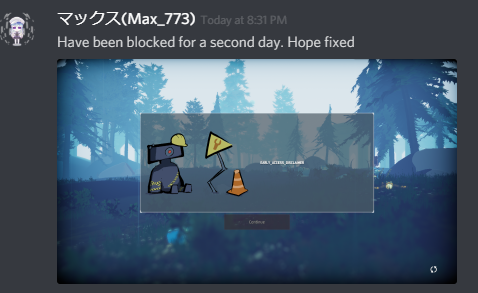
PROBLEM I can't press the Continue button in the title. It also may say EARLY_ACCESS_DISCLAIMER.
FIX
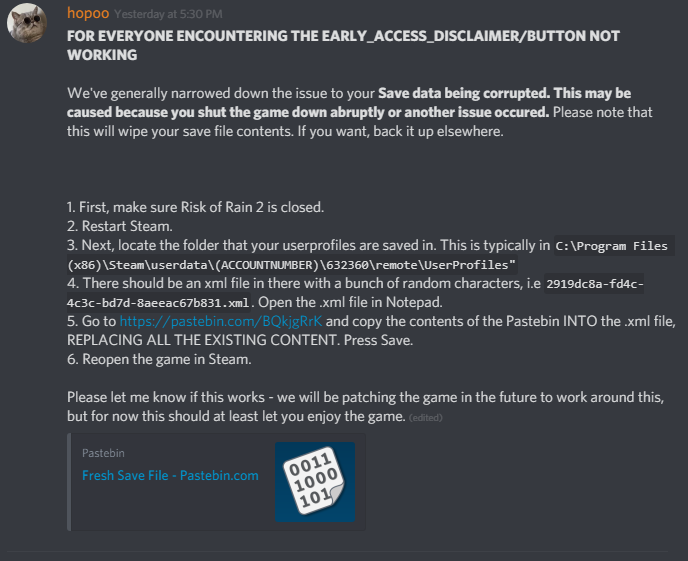
We've generally narrowed down the issue to your Save data being corrupted. This may be caused because you shut the game down abruptly or another issue occured. Please note that this will wipe your save file contents. If you want, back it up elsewhere.
First, make sure Risk of Rain 2 is closed.
Restart Steam.
Next, locate the folder that your userprofiles are saved in. This is typically in
C:\Program Files (x86)\Steam\userdata(ACCOUNTNUMBER)\632360\remote\UserProfiles
There should be an xml file in there with a bunch of random characters, i.e
2919dc8a-fd4c-4c3c-bd7d-8aeeac67b831.xml
Open the .xml file in Notepad. Go to https://pastebin.com/BQkjgRrK and copy the contents of the Pastebin INTO the .xml file, REPLACING ALL THE EXISTING CONTENT. Press Save.
Reopen the game in Steam.
Please let me know if this works - we will be patching the game in the future to work around this, but for now this should at least let you enjoy the game.

Pastebin
this one is more accurate for ur problem @tropic silo
 tropic silo
aight ty
 marble burrow
The "fix" by the devs dosent work for me. Well,
The EARLY_ACCESS_DISCLAIMER that is.
tropic silo
ill go look
 sharp depot
these fixes dont work for my issue
 vagrant creek
i can't play multiplayer with my friends ?
 lyric bough
@wraith tartan didnt work for me
wraith tartan
:/ idk what else we can do
lyric bough
we can wait, thats it
sharp depot
for how long tho
wraith tartan
idk
sharp depot
cause ppl that bought this game and cant even get pass launch
tropic silo
ay thanks
lyric bough
until they fix it.
 sharp depot
theres ppl that cant even play in the first place
 noble orchid
for some reason when i launch the game it refuses to let me past the this is work in progress tm cont
 orchid flame
I want to report an issue . Is this the place?
lyric bough
@carmine arrow this needs to be hotfixed asap
vagrant creek
my multiplayer black screen error ?
 sterile iris
so i unlocked a couple of characters and items last night while playing
but i booted the game up and apparently i've lost everything
what's up with that?
orchid flame
Like, my cursor is lagging more than a whole second behind my mouse inputs
sharp depot
agreed, @carmine arrow theres ppl that bought the game that cant play at all or even get a disclaimer screen
orchid flame
I know I don't have the best specs, but I can run games like for honor, overwatch and apex as long as I turn down the graphics
This game is literally unplayable at the moment
noble orchid
https://i.imgur.com/eQFp8H7.png welp time to wait
 orchid flame
sure
orchid flame
woah
 dry flax
@orchid flame it might be your gpu is maxing out because that happens to be but then i just need to wait it out and then i can play again. I would also say i have decent specs so like it could just be bad optimization
orchid flame
Oh well that's good. At least the music works lol
orchid flame
I think my specs are decent except for my gpu
sharp depot
@orchid flame yea but no video, nothing to see
sharp depot
@orchid flame litterally game breaking
orchid flame
haha yeh
lyric bough
ur game cant break if it wont start 
orchid flame
So should I refund, or wait it out? Actually I'm not even sure I can refund since I got it during a special
lyric bough
yes you can refund. refund and buy when its fixed.
sharp depot
i was given it
lyric bough
not talking to you
 maiden saffron
Is there a continue button fix?
sharp depot
yea but the point was to play with my firend'
cant even do that none the less launch it
lyric bough
literally the only thing you can do is wait for a fix
 sharp totem
@maiden saffron look at the pins
maiden saffron
TY
sharp depot
i dont see why i should wait for a "fix" when other ppl with shittier comps then mine can play
lyric bough
okay, lets count your options:
- wait
 finite whale
Have you never played a game in early access before lol?
orchid flame
Maybe I can get some one to pay half the cost, since I got a free gift copy
I feel like that's a good deal
sharp depot
but my thing is why is it only half the ppl can actually launch n play when the other half cant
makes no sense4
at all
like they all the same game files
finite whale
thats what you risk with early access
orchid flame
I guess it's not optimized for certain machines
finite whale
just gotta wait for patches
orchid flame
oki
sharp depot
not optimized for certain machines?
finite whale
If its just like the first, it will be fixed soon
orchid flame
I'll try it this time
sharp depot
lets think about that
i have an i7 and a gtx
some one else have just an i5 and something lower then a gtx 800
and can play
orchid flame
Well you might actually be a special case, I won't claim to know why it won't work
sterile iris
i can lay and my secs are definitely below average
sharp depot
my case in point
we all have the same files
and all hardware reads the code the dame
same*
finite whale
I have the new GTX 1660 Ti with one available driver and it works fine.
just luck of the draw. Thats the difficulty of coding for PC. Every single setup is different
 mild ridge
@sharp depot have you sent us your output_log.txt
sharp depot
where is that located
mild ridge
check the pins in #ror2-bug-reports-pc
sharp depot
i dont see it in there ghor
finite whale
C:\Users<UserrName>\AppData\LocalLow\Hopoo Games, LLC\Risk of Rain 2\output_log.txt
 hardy ginkgo
has anyone posted a fix/workaround for the '' minor freeze when picking up an item'' problem?
finite whale
I havent seen one, same thing happens to me
sharp depot
 warm nebula
My game keeps crashing every time when teleport is activated. Any suggestions? restart, reinstall game, verify files, turn off anti virus program, google it, asked people in multiplayer do they have this issue
mild ridge
@warm nebula please check the pins in #ror2-bug-reports-pc for how to send us your output_log.txt and crash dumps
warm nebula
ok thank you
 worldly seal
hey, why do I keep fucking crashing.
Just got the game.
Launched it.
screen as black as the children starving in Africa.
Then it just crashes without loading anything.
I've done extensive research. Tried multiple possible solutions.
Turned up with nothing.
EDIT: I don't even have a crash output file because I'm pretty sure the game doesn't make one until I actually am able to play and crash. It legit shows the game file open then just boops out of existence. Is it imitating my father?
sharp depot
@mild ridge i posted it
 gilded rune
Good Day - perhaps someone might be able to help me. Every time i try to change a setting in the menu or when picking up items i get serious gamelag for up to 1s
Any ideas?
 prisma obsidian
anyone know how to fix being stuck on this screen I can't click continue or the refresh button uninstalling reinstalling did nothign and i've verified game files
mild ridge
@sharp depot I can't find anything out of the ordinary in the output log. The engine hasn't reported any issues loading.
finite whale
Try spam clicking continue. I just had that and it just appeared grayed out
mild ridge
I'd say try making sure your drivers are up-to-date
sharp depot
@mild ridge i did they r uptodate
like i was saying
idk how ppl with lower specs can play
but i get this issue
finite whale
Probably because you have a notebook, NVIDIA is a bit iffy with those drivers.
finite whale
They have little competition so they dont need to quality control
 hollow cradle
Anyone being able to play in Quickplay?
 pallid ibex
@prisma obsidian check out the pinned topic for fixing corrupted save files
sharp depot
@finite whale it shouldnt matter, the encoding and decoding happens all the same
reguardless of GPU
finite whale
no it doesnt?
mild ridge
what encoding and decoding?
finite whale
every computer with different components processes things differently
also you arent streaming so there should be no encoding
sharp depot
well how the code is handled n read from files
and sent around
its a base code
that is read
so it being AMD or Nivida shouldnt matter
the read the dame
same*
finite whale
its different for every system. Thats why even AAA games from bethesda, a huge studio, cant clear all the bugs
 grim cloak
So I just bought this game but I'm wondering if I should refund. I understand it's EA but this is ridiculous. My FPS is literally <30 in the main menu and changing the graphics settings and resolution does absolutely nothing
pallid ibex
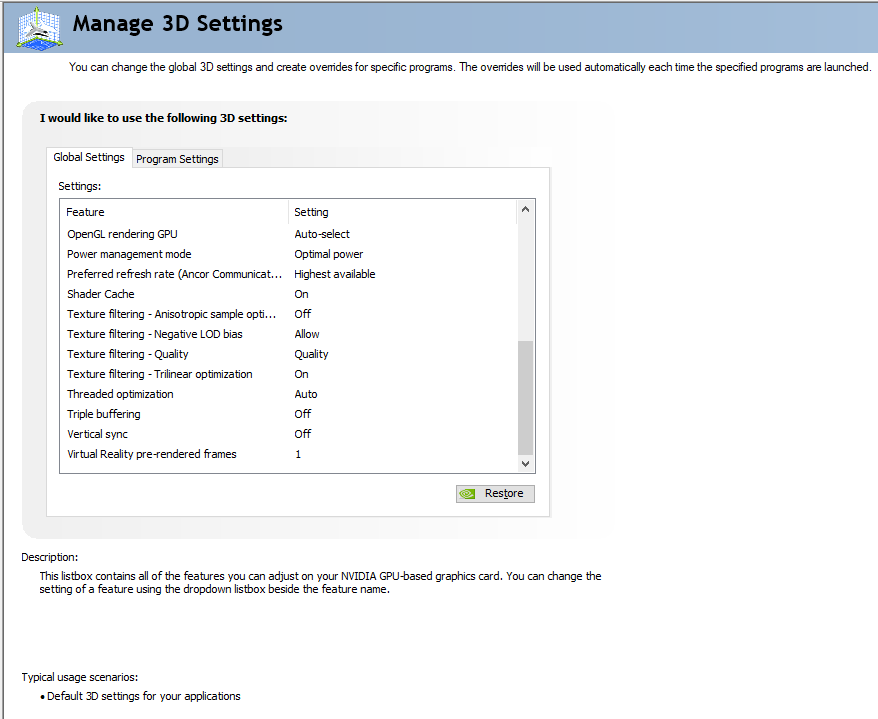
@grim cloak check out the pinned topic for performance, possible nvidia settings
sharp depot
@mild ridge but yea the issue i run into is just a white screen with the music playing. but i know the "steam_appid.txt" file deletes after every launch
grim cloak
My V-sync is already disabled in Nvidia's Global Settings as I use a G-Sync monitor
and this machine should not have issues running this game
sharp depot
where those settings located @grim cloak
finite whale
right click desktop and click NVIDIAControl Panel
 lyric bough
@pallid ibex the corrupted save fix did not work for me. i tried saving as ANSI, UTF-8 and UTF-8 DOM. i am still getting
XmlException: Invalid character in the given encoding. Line 1, position 1.
@mild ridge I've installed newest drivers, I've rebooted my computer and I have vsync off, and my FPS remains below 30 regardless of my settings. What else is there to do
gilded rune
hmm strange
pallid ibex
@sharp depot whats your OS and hardware specs
gilded rune
my windows is reporting Ereignisname: RADAR_PRE_LEAK_64 for riskofrain2.exe
sharp depot
@pallid ibex windows 10 core i7 gtx 970m
 quiet tartan
When i invite a friend and he clicks play game it just doesn't do anything. Any way to bypass this also the clipboard feature doesnt work
pallid ibex
This seems to be a recurring issue with unity games in win10 on a particular service patch https://steamcommunity.com/discussions/forum/1/1480982971174752598/
 gilded rune
i got the 1809 win10 :/
 wind flame
Hey, I was wondering if you can still go through the normal 2 hour refund process of steam if you buy during the sale? I am not trying to exploit the system of get a 'free' extra copy of the game while refunding the base one, I will happily keep the extra copy in my steam inventory to be removed if I get the refund if that is possible.
The reason is I am running on a non-gaming laptop (my gaming rig broke and it seems unlikely I will be able to afford to fix it/get a new one for at least a few more months), it can run most non-AAA games so I think it should run fine, but there have been a few less intensive games that are unplayable while other more intensive games like overwatch run fine on low settings.
Worst case scenario, I could wait until the 2 for 1 sale is over, but I would much rather take advantage of the generous deal so my girlfriend and I can play it together if possible.
Thanks for any help you can offer.
pallid ibex
AFAIK yes @wind flame
 iron plume
Uh i need help, whenever i go into a game my mouse pulls violently down and i cant look up
pallid ibex
"For the record, I had the same issue and came upon this thread. My laptop has a Nvidia GTX 860M and an Intel Integrated Graphics adapter. What I found that fixed this issue was to go into the Intel Control panel and switch the 'Scaling' option from "Maintain Display Scaling" to "Maintain Aspect Ratio"
Now all my Unity based games seem to be running fine, where as before I got that exception in them after the Windows Fall Update. So, seems to NOT be an NVidia thing, but a Intel thing. Hope this can help someone out. "
@iron plume check pin
 shadow mural
game won't start up at all for me
starts to load on the black screen then shuts down
pallid ibex
@shadow mural check pin for startup crash
iron plume
Thank you :)
shadow mural
i played just fine yesterday for four hours
sharp depot
which option in the intel control panle
pallid ibex
the 'Scaling' option from "Maintain Display Scaling" to "Maintain Aspect Ratio"
sharp depot
in display, 3d, video, power?
 unkempt shadow
Hey, sorry if this question was already answered, I'm new to this server. I just got the game with my friend and I can't join his private lobby. I can't even join quickplay and all I get is "Invalid Lobby ID." Any help?
 wraith pier
got the same problem as Travis
 plush arrow
Not sure if this is tech support, but if i purchased the game before 12pm pt and got no information on a key, how do i know i have it and how to i give it to a friend? thanks
finite whale
if it was on steam, check in your items @plush arrow
orchid flame
It it possible to set the fps limit past your monitor refresh rate?
sharp depot
@mild ridge and @pallid ibex i turned off vsync in GTX control panel and the scaling in the intel and nothing still a white screen
finite whale
for a fps drop buffer or what?
 modern dust
I can't join my friend's lobby
They can join mine but I can't see them and if I try to start a private match in that state they get a black screen and eventually get booted to main menu
quick play gives invalid lobby id
unkempt shadow
Same problem, Pomf.
orchid flame
Just to reduce input lag
modern dust
implying
orchid flame
Anyone know of a workaround?
sharp depot
nope
=/
im getting irritated tho
promising looking game and cant even get a screen to load
is it me or am i reading ALOT of cant find or run in this
mostly .DLL files
 hazy dune
any nvidia control panel settings I should try to keep a higher framerate? i drop to mid 20s when fighting the boss in the underworld and sit at 40s in the snow area. im really low end with only a GTX880m
 eager robin
@hazy dune Have you attempted to disable Vsync?
hazy dune
yep
eager robin
What are your graphics settings set to in-game?
sharp depot
@mild ridge i have disabled vsync, and the scaling options and nothing
=/
sucks man
eager robin
Ah
hazy dune
and I cant turn off bloom
eager robin
Is that the only thing you have set to Ultra?
hazy dune
im hoping over time there may be optimization updates and such
sharp depot
im hopping for an update soon so i can at least play
hazy dune
oof
sharp depot
yep
hazy dune
hopefully a dev can help you out
 loud dust
I can't join my friend's lobby
They can join mine but I can't see them and if I try to start a private match in that state they get a black screen and eventually get booted to main menu
quick play gives invalid lobby id
 vestal sun
@loud dust Same problem for me i can't even play quick play
 blissful moth
lads I can't seem to get ror2 to run in exclusive fullscreen. no matter how many times i alt enter or check and uncheck fullscreen it is in windowed fullscreen, capped at 60fps on a 144hz monitor (no matter what hz setting i choose), and feels very laggy
any idea how i can force it to actually be fullscreen?
quiet tartan
@loud dust same here
 jaunty sage
ok this glitch why does it happen
i spent all day trying to get a character
once i get there
blissful moth
if i reduce the in game resolution rather than actually filling the screen it gives me black borders round the outside
jaunty sage
the game kicks me to the title
quiet tartan
just press alt enter
blissful moth
alt enter makes literally no difference. the game is giving me "fullscreen windowed" rather than actual exclusive fullscreen
 languid rover
game makes my PC heat up really quickly, any idea why/how to fix it? my PC is usually in the low 30s (C) but it peaked at around 44C and it kept rising until i closed the game @ me if anything
 astral tusk
 wet fox
Pls dont be mad. I promise I won't do it again...
 winged gorge
Is this the best channel to report PC reboots? Or the bug report?
vestal sun
any mods gonna reply to these or are we on our own
 wraith halo
I assume this is where i go for help? I’m playing with a wired ds4 and every time it disconnects, which is all the time, it wont connect back to the game unless i close the game.
 trim trench
What are the ports for risk of rain online, to be able to join and host servers?
Can't join servers without having my ports open for some reason
wraith halo
RoR or RoR 2?
trim trench
RoR2
If i have my ports closed in my router, i can never join servers
Like friend servers if i try to do "join game"
wraith halo
Can’t help, i know nothing about routers.
 bitter sigil
So playing ROR2 is fine until I reach the third level I only get like 5 FPS but my cpu and gpu usage is under 30%. I'm using AMD and have already turned off cool and quiet, cpu power limiter in bios as well as the ulps.
wet fox
@trim trench RoR2 uses Steamworks P2P Networking. Try opening these ports:
UDP remote port 3478
UDP remote port 4379
UDP remote port 4380
trim trench
Will do
 proven jolt
Any fix for the multiplayer issue ?
blissful moth
ok so if any of you are having issues forcing the game into running above 60fps and it isn't using exclusive fullscreen, i fixed it by dragging it onto my other monitor, which is 60fps, uncapping the fps there, then dragging it back and turning fullscreen on and off, and it is now no longer locked at 60
not sure what's going on there but it works
proven jolt
we are struggling to get into the same lobby with my friend
wraith halo
Are you on steam?
 true ether
so I can't get past this screen I think it has something to do with user data but even a full whipe of the game will not let me get past it
proven jolt
yes
wraith halo
Just invite your friend to a private lobby
 tough cargo
Online servers does not work ?
proven jolt
does'nt work
he gets blakc screen
and when I try to join him nothing happens
sometimes we see each other in the others lobby but it's just a display and the other one is still in the main menu
 rain mauve
@proven jolt both of you validate your files and restart pc, normally fixes issues
proven jolt
he can get in a quickplay, but not me
will try that immediatly
will tell you if it worked
looks like it WORKED
You are the real mvp
❤
 trim sand
i am having the same issue of being stuck looking down
hazy dune
just...what do i do to help my FR
 eternal stratus
anyone else getting a lag spike when you pick up an item?
 loud marlin
@eternal stratus I was about to ask about this, also it's happens in both multiplayer and singleplayer
hazy dune
i have everything almost to the lowest I can, so i doubt lowering them would help much
eternal stratus
@loud marlin Yeah I was hoping it was MP based but it doesn't appear to be. My friends aren't having any issue
loud dust
We now have a solution for the multiplayer issues
Me and My friend figured out that sometimes Risk of Rain doesn't always put the port settings through your firewall, so you need to do it by hand.
 odd stirrup
Hi there when I join Im stuck looking down
orchid flame
This is my resolution, I'm at the lowest graphics settings and I'm still lagging so much I can't play past stage 2
 jolly summit
how do i do that my good sir? @loud dust
unkempt shadow
Also make sure you validate your files.
 ashen hemlock
Hey, I'm trying to buy more copies of ROR 2 to give to a few of my friends. Steam isn't letting me do so. Does anyone have a workaround or something?
 viscid narwhal
loud dust
viscid narwhal
loud dust
- Open your control panel, and navigate to the windows defender firewall>>Advanced settings 2. From there you need to right click on inbound rules and select new rule>>port>>UDP>>All local ports>>Allow Connection>>leave domain, private, and public boxes checked>>Name it something you can remember. 3. navigate to the rule you just made, right click select properties>>Programs and services, under the programs sections select this program and make it navigate to your risk of rain.exe file. 4. Repeat step 2 and select TCP instead of UDP then repeat step 3. apply and save and your good to go.
@jolly summit ^^^^^
@modern dust ^^^^
unkempt shadow
@hollow cradle ^^^
modern dust
that fixed absolutely nothing
jolly summit
I agree
Fixed nothing
When i try to connect with him I am able to get into his lobby but when he starts a private match or does quick play i get a black screen then after around 20 or so seconds of black screen i get sent to the main menu
proven jolt
I checked the game cache then restart my pc and everything worked after that
just in case, it might help you !
jolly summit
Will try!
 sharp fossil
Every time I close the game I lose my progress. I recently unlocked Huntress and wanted to take a break, so i closed my game. I came back to play it again it said it was running regardless of the fact that it wasnt (lmao). I had to exit my steam, and when I re launched it was like I was a new profile again...
im not sure if its steam because it hasnt happened like this before on any other game
 glacial patrol
Hey just bought the game - when i start up my mouse pointer is super laggy/not responsive, i join a game and im stuck looking straight at the ground
Seems like its thinking I have a controller plugged in or something but I dont
Thoughts?
 raw night
@glacial patrol check the pinned messages
 latent quarry
@jolly summit @proven jolt didn't work for and my friend 😦
ashen hemlock
I Figured it out! ROR2 is listed on humble bundle right now, and if you buy it, it will give you two steam keys you can send to your friends
 rigid beacon
Hi, any idea why was the progress resetted?
 muted palm
My "Invite Friends" button in Multiplayer isn't working. My friend has to invite me 😦
 sand rock
When I load into a game, all of my binds in the bottom right say "unknown". I am constantly stuck shooting, periodically I will use my ability and become stuck in a loop of that. I have tried verifying game files, uninstalling, using a controller. What can I do to stop this
 humble linden
@muted palm try rebooting pc
 buoyant tartan
Yeah, like some others I lost my progress from yesterday as well. I got asked to make a new profile like I had never played and lost all my items and class unlocks.
 odd axle
profile got deleted from yesterday, i was on less than 12 hours ago and now all my progress is gone
is this a ongoing bug or something?
rain mauve
try this
 wicked yoke
I cannot get my controller to move my character forward or backwards anytime during the game. Everything else works just no forward and backward movement
 boreal prairie
I cant join my friends lobby or game or anything that has to do with the multiplayer. Does anyone have a solution
 young trellis
Hey everyone, me and my friend have been trying to play together, but we face an issue where the game's host will run it fine but the other will have extreme lag, no matter who's hosting. Is it something to do with our connections?
rain mauve
@boreal prairie Validate your game files and restart your pc
latent quarry
@rain mauve I've done that and the same issue happens
 tepid ingot
any idea on what version of the unity engine this was made on?
rain mauve
You can alter the text file, its just 0's and 1's just be honest with what you unlocked and it's basically the same thing
odd axle
oh okay, where abouts is the text file?
 uneven dragon
multiplayer kinda works here
but one of my friends just can't connect
he doesn't show up on lobby
and on his screen, no one but him appears
already verified game and restarted pc, nothing happened
latent quarry
Same @uneven dragon
 outer salmon
everytime i start a game, my character is constantly looking down. I try to look up then it goes straight down. Also whenever i move my mouse, my mouse cursor moves on the other screen
any fix?
 stuck forge
Well, I got the EARLY_ACCESS_DISCLAIMER problem as well. Difference is I don't have user profile at all. There is no 632360 directory anywhere. Also I got the problem the first time I booted the game up.
 silk verge
so my friend can launch the game, but everytime he tries to start a singleplayer game or join our lobby his menu just fades out and he can't do anything
not really sure how this works
 thick radish
read pinned message @outer salmon
 ebon haven
me and my friend are having issues trying to play multiplayer whenever i try to invite my friend and start a private game he gets kicked back to the main menu
anyone else having this issue?
 jade moss
just requested a refund of the game, thanks for nothing. Can't even get this game to work.
 formal grove
anyone around got a spare copy?
 empty mica
friend is havign an issue with his controller. he has a 360 wired pad plugged in and it seems like the mouse and gamepad are being registed at the same time
anyone got a solution
?
 pliant dragon
So I bought the game already and want to gift another copy to a friend
Meaning more than the one you get for free with the game
however Steam does not allow me to buy the game again as a gift
(United States)
 old adder
^
Having the same issue
I dont mind buying just 1 copy of it not 2
I just wanna gift it
pliant dragon
Same dude
orchid flame
Steam itself is the issue with that.
humble linden
yeah
old adder
any way to wrok around it
 mortal bear
this will most likely be resolved when the 2 for 1 deal expires
old adder
work
 cobalt prawn
Having the same issue as another above, trying to join multiplayer with my friends and get kicked back out to the main menu as soon as an invite is accepted. Trying to join via code results in the same. Anyone find a work around?
humble linden
did you tried the reboot?
empty mica
should i type my problem in again?
humble linden
what was your problem again?
empty mica
friend is havign an issue with his controller. he has a 360 wired pad plugged in and it seems like the mouse and gamepad are being registed at the same time
anyone got a solution?
just told him to unplug his mouse
and hes havign the same problem
cobalt prawn
Is the reboot method in the pinned or something? Not seeing it
humble linden
@cobalt prawn reboot means turning your pc off and on
mortal bear
it will always register everything plugged into your pc. If he's using a controller why is the mouse being registered a problem?
 somber grove
anyone else getting insanely high gpu usage on the game menus im talking like 90-100% ive asked alot of people they all having it
empty mica
it automatically moves the reticle to the middle of the screen
cobalt prawn
Wow I love being smart, do you think it would work if just one person rebooted or would all attempting to join have to do it since we're all having the issue?
empty mica
@mortal bear
he cnat use his controller because its moves to the middle of the screen
humble linden
well, it fixed my problem. you're free to try whatever if you're that smart as you claim to be.
 wheat pagoda
Can not even play with a friend because the ui bugs out for who ever joins the host
cobalt prawn
Oh, sorry not insulting you Space I'm making fun of myself for being dumb and not knowing what reboot was
somber grove
99% of the bugs people are experiencing on this game right now are because its using 3x more gpu than it needs to be using
mortal bear
i don't have a controller to test it atm, but restarting/unpluging and plugging controller back in/verifying game cache even might work
somber grove
i dont know why this game was optimized in a way to use so much gpu
mortal bear
worst case scenario is, as you said, unplugging the mouse
empty mica
unplugging/repluggin doesnt work
unplgu the mosue doesnt work either
will tell him to verify cache
 junior pivot
have any of you restarted your PC since installing the game>
mortal bear
is he playing full screen or windows/borderless?
empty mica
I have @junior pivot
junior pivot
Restarting fixed a LOT of my issues
pliant dragon
So I can't buy any more copies till the BOGO is over?
humble linden
it seems like so
empty mica
that isnt a technical issue
empty mica
its a steam issue
pliant dragon
buy it
mortal bear
gifts are tradeable after 30 days if that's what you mean
empty mica
askign for gifted copies isnt for tech support
pliant dragon
ok
let me delete that
and go back to asking about how i cant buy the game a 2nd time
So currently it says the game is unable to be gifted in my teritory
is this a bug or something
?
mortal bear
again, a steam issue
humble linden
probably steam bug or it's actually getting legion locked
orchid flame
Steam just won't let you buy it for someone else while the deal is active.
humble linden
go contact steam support for that problem
pliant dragon
well I don't see any other BOGO games out there so if anyone would know about this issue it would be the ROR2 community since its the most popular BOGO release at the moment
empty mica
anyway, still havign controller issues
pliant dragon
just wondering if anyone else has had any luck buying a second copy
mortal bear
try big picture? @empty mica
empty mica
tryign to get tech support for my controller issues
pliant dragon
@empty mica contact the controller manufacturer, its not a tech-support issue
empty mica
I will tell him @mortal bear
orchid flame
Likely since how would that work?
Gift it then they get the free copy gift?
You get the free copy and they get the paid one?
It'd just be odd.
pliant dragon
Nah just a singular copy, I buy them the game, they don't get a extra gift i.e. BOGO
mortal bear
I can't understand if he wants to BUY another copy for someone or can't gift the free one he got lol
empty mica
he wants to buy another copy and gift that
pliant dragon
I cant purchase it as a gift to trade it to someone
mortal bear
You will be able to after the 2 for 1 deal is over. If you don't want to wait, buy it on Humble Bundle
Simple as that
humble linden
I'm getting similar legion lock too
pliant dragon
@mortal bear 
humble linden

Humble Bundle
Special Offer SummaryThe classic multiplayer roguelike, Risk of Rain, returns with an extra dimension and more challenging action. No run will ever be the same with randomized stages, enemies, bosses, and items. Play solo, or team up with up to four friends to fight your way ...
pliant dragon
buying on humble bundle gives you a steam code?
humble linden
yep
mortal bear
yes
orchid flame
In other news, it seems RoR2 crashes on startup and the pins were 0 help.
Disappointing, loved the first game and was hoping to see a bit of the second.
mortal bear
windows/drivers up to date?
I had a game constantly crash at startup because my windows wasn't updated
orchid flame
Windows is the latest I can get, my bluetooth driver is outdated but I doubt that affects it.
mortal bear
Try verifying game cache again or running the game as administrator.. Uninstall and install in a different directory?
orchid flame
Tried the first 2 already, I'll see about the third.
Well that's interesting.
Apparently I can't delete the risk of rain 2 game folder, says I'm not admin/owner.
I'm the only admin.
somber grove
would someone be willing to help me test a bug real quick will be take under a minute you need to have gpu usage/temp monitering software
 wraith yarrow
There is a hidden "administrator" account that has more access than you; just in case things go wrong
but it still shouldn't lock down a game folder?
mortal bear
@somber grove i would but i can't get msi to work with ror2
 wraith yarrow
isn't that a screen cap of someone else's error
 wraith yarrow
¯_(ツ)_/¯
mortal bear
@somber grove sure what do you need
 sweet laurel
@ashen sky sor I missed the pinned message, I'm tring. It may help
 ashen sky
is there a
new pinned message?
the only way I've been able to log in is to create a brand new steam account
which is pretty lame
 sweet laurel
sad
 sweet gazelle
Friends cant see me in their lobby and the game kicks me out once the timer runs out
is this an issue on my end?
 hoary frost
wait how do I gift my friend the copy
mortal bear
go to your steam inventory and send it
hoary frost
oh sick thanks
orchid flame
yeah same thing happening to one of my friends, they join and can't click anything and their character doesn't show. they get kicked after a while
 distant trench
Hey so I'm trying to do a private lobby with friends but the lobbies keep bugging out and no one can join each other
Does anyone have a fix for this?
rain mauve
Validate files, restart pc
distant trench
Alright that's what we're all doing, thanks
 rustic meadow
ok so, i had the "early access" error and fixed it with the pinned solution, but now i lost all my progress and i'm kinda bummed by having to unlock the characters again, is there a way to do unlock them that won't corrupt my save?
mortal bear
There is a guide on Steam, but it's basically cheating
I'm not sure if you can get banned for it
rustic meadow
the devs say it's likely to corrupt the save game, too
they say they're ok with save editing, but that particular way will probably corrupt the save file
rustic meadow
which one is the way that won't corrupt the save file? XD
 wanton nexus
?
mortal bear
Check pinned Zozuh
wanton nexus
oki
mortal bear
@rustic meadow I think the one by Bossk is the correct one
rustic meadow
where do i find that @mortal bear ?
oh ok i found it in the steam guides
isn't that the method that the devs said would corrupt the save file?
i guess i'll just backup the xml and try
rustic meadow
i think i'll backup the xml and try, i want to play with the merc and unlocking it again would be a chore 😄
it took me like a 1 hour run yesterday
to find the damn celestial portal XD
 vital turtle
Guys, I open the game played for an hour and close it. Opened it again e my progress was lost, I did something wrong?
orchid flame
Hello there! I am having a rather unique issue.
yesterday the game ran fine while i played it for hours and hours.
I went to get on it today and the fps is now below 15 while in game.
Its fine in menus, ive reinstalled the game, restarted my comp, all sorts of things.
 stray surge
after quitting my game out it says its apparently still running?
orchid flame
@stray surge Open your task manager and kill the game process
 wanton bolt
i'm at @orchid flame's friend, figured out the connection issue. I'm behind a "weird" network topography (double NAT - router -> router -> internet), apparently the game doesn't like that. connected directly via the first router and worked just fine
 digital plume
Single play is fine, but multi play breaks down as soon as it starts.
how to fix it
 glad kayak
I am having issues with fps and stuttering when moving the mouse, both in game and whilst in the menus, the game was running smoothly without issues yesterday.
Any ideas?
 cunning ridge
How to turn off bloom? Im having trouble.
sharp depot
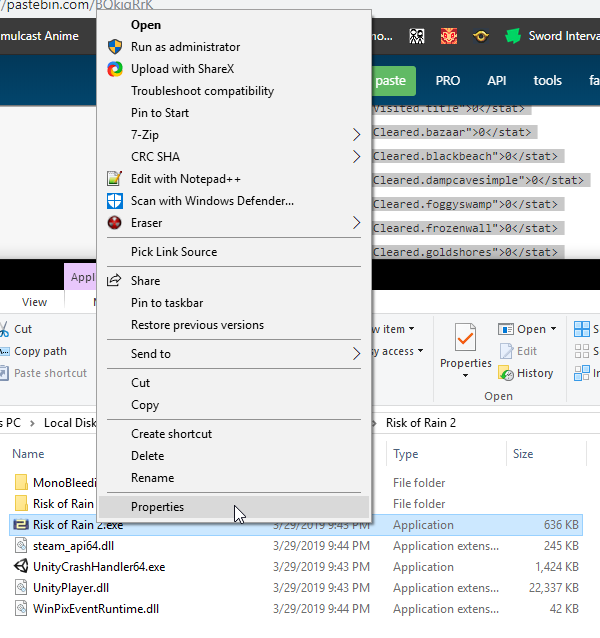
For those having white/black screen issues. I found a temp fix. Right click the ror2.exe and run with integrated graphics. For some reason it is not responding to any of the gpu's. @pallid ibex @carmine arrow @mild ridge
cunning ridge
Like i click it then it immediately checks it again. I went to the cfg file and everything. It will not let me turn it off.
 ornate dagger
Friend and I are attempting to connect to one another. We can get into the initial lobby, but attempting to go further results in a black screen and boot back to menu.
 bright pawn
I played like 30 minutes this morning just fine, but trying to start up now and the game is maxing my GPU 100%, and causing major lag, stuttering, mouse control issues, etc. Is there anything causing graphic optimization issues? I have a 1070 so this should not be happening
Is it just too many players online?
 stoic cliff
same lmfao @ornate dagger it freaking sucks
bright pawn
@glad kayak sounds like we have the same issue. can't figure out why
ornate dagger
gonna try restarting the pc. validating showed one file missing @stoic cliff will lyk
sharp depot
For those having white/black screen issues. I found a temp fix. Right click the ror2.exe and run with integrated graphics. For some reason it is not responding to any of the gpus
orchid flame
@bright pawn Dude same problem
Ive not seen any other mention of it
but I have the same fucking problem
nothing fixes it
bright pawn
its gotta just be server overload or something. there's like 60,000 players online right now in a brand new early access game
sharp depot
Right click and use the integrated CPU graphics it will run
orchid flame
lets see
 gusty stratus
hi there
i cant see up
my game is always pointed at the ground
and my mouse moves across the screen like its sonic
sharp depot
For those having white/black screen issues. I found a temp fix. Right click the ror2.exe and run with integrated graphics. For some reason it is not responding to any of the gpu's. @hopoo @Paulthegoat @Ghor
sharp depot
Go to the ror2.exe in the steam app
eager robin
@gusty stratus There should be steps to fixing this issue. One sec
 unkempt bramble
Yo I've got something weird going on
unkempt bramble
Same issues with joining lobbies/unable to see them in the lobby and unable to change from commando.
But if I join my brother's lobby, it's fixed
I can't join any friend's lobbies though, issues still present.
sharp depot
@orchid flame it work?
eager robin
@gusty stratus see if you can resolve it by following the steps listed here https://steamcommunity.com/app/632360/discussions/1/1768133742956098205/
Problems & Fixes PROBLEM The camera is always pointing down, or I'm getting weird input latency! FIX First, try unplugging and then replugging your controller. If that does not fix it, look under Device manager and make sure there are no controllers. If you have VJOY installe...
orchid flame
@sharp depot I am not having the option pop up on steam or on my right click for integrated graphics
ornate dagger
@stoic cliff After a restart, it looks like I can make it into quickplay. going to see if it works w friends now.
sharp depot
@orchid flame vilu got a go to local files and do it
orchid flame
 unkempt bramble
@ornate dagger did you verify cache>restart>open then quickplay?
bright pawn
Yeah same
unkempt bramble
I make it into quickplay, but I cannot see other lobby members (their avatars)/press ready
mild ridge
If you're having the black screen on connect issue you need to restart steam. Please pass that information along to anyone further who has the issue
eager robin
Alrighty!
mild ridge
That should help the community when we don't have the time to
ornate dagger
Thanks @mild ridge !
bright pawn
@mild ridge My GTX1070 is being maxed to 100% even on loading screen and intro menu. major cursor and input lag, stuttering, etc
sharp depot
bright pawn
it didnt happen this morning at all when I played
somber grove
for people having high gpu usage issues set your in game vsync to half (this will half your fps but it has been the only fix i have foudn to lower fps usage)
it should be fine if you can maintain high fps
orchid flame
How do you get that option? i dont have it
somber grove
its under video options in game
mild ridge
I can't do in depth support for anyone right now, just wanted to get that known fix out there so hopefully we don't have to keep checking in over the weekend
unkempt bramble
@mild ridge issue is when I create a lobby, I can change character etc, but everyone cannot select their own and their characters are not visible. If I join, I have the same issues as others trying to join my own lobby.
It's only fixed if I join brother's lobby (same internet)
sharp depot
@mild ridge i found the issue, games exe isnt responding to GPU graphics cards
eager robin
@orchid flame that option exists in the Nvidia Control Panel
orchid flame
Ah, Totaly understand. Thanks for the help Ghor.
bright pawn
@somber grove setting vsync to half did nothing
orchid flame
@eager robin okay ima go look right now thanks
somber grove
@mild ridge i have found a very urgent bug regarding fps and the main menu that could lead to hardware problems for people is there anyway i can speak to you in dms its kind of important
bright pawn
well, not nothing, it's moderately better, but still totally unplayable
mild ridge
That happens if you join a game too quickly from another game I think. Try backing out for a moment and rejoin. We'll be looking into that issue further
orchid flame
@eager robin You know what submenu i can do that in?
bright pawn
this isn't rejoining a game, it's opening my game in the first place. immediately maxing gpu on the menu
orchid flame
And yeah the half vsync seemed to help? like not alot. 15 fps instead of 10
eager robin
@orchid flame should be in the Desktop menu of the control panel
somber grove
before half vsync this gmae was literally maxing out my 1080 after it hovers around 60-70% which is still high for what this game is but its alot better
granted i have 120 fps instead of 300 but it is what it is
mild ridge
@bright pawn that's to @unkempt bramble
bright pawn
my cursor lag is so severe even with half vsync that I can't play it. it's like half to a full second behind...and ok sorry ghor
i know yall are running around like crazy
unkempt bramble
@mild ridge this is on fresh start up, and during this period I waited ~5mins
with no changes
somber grove
ghor can you speak with me in dms please its not a tech support question its an issue that i want to make you aware of just too long to type here trust me its important lol
it will save you alot of headache
mild ridge
Alright.
eager robin
@orchid flame were you able to find that option?
orchid flame
@eager robin I beleive the issue is, after looking some more, that I dont have an integrated graphics card. I have my GTX, but i have no other GPU
 bright pawn
Wait so where's the choice to run with integrated gpu?
eager robin
Sorry that didn't help out!
bright pawn
I went to local files but didn't see it
orchid flame
@eager robin Totaly fine!! thank you for the attempt
bright pawn
maybe ill just see if the problem resolves itself in the morning
orchid flame
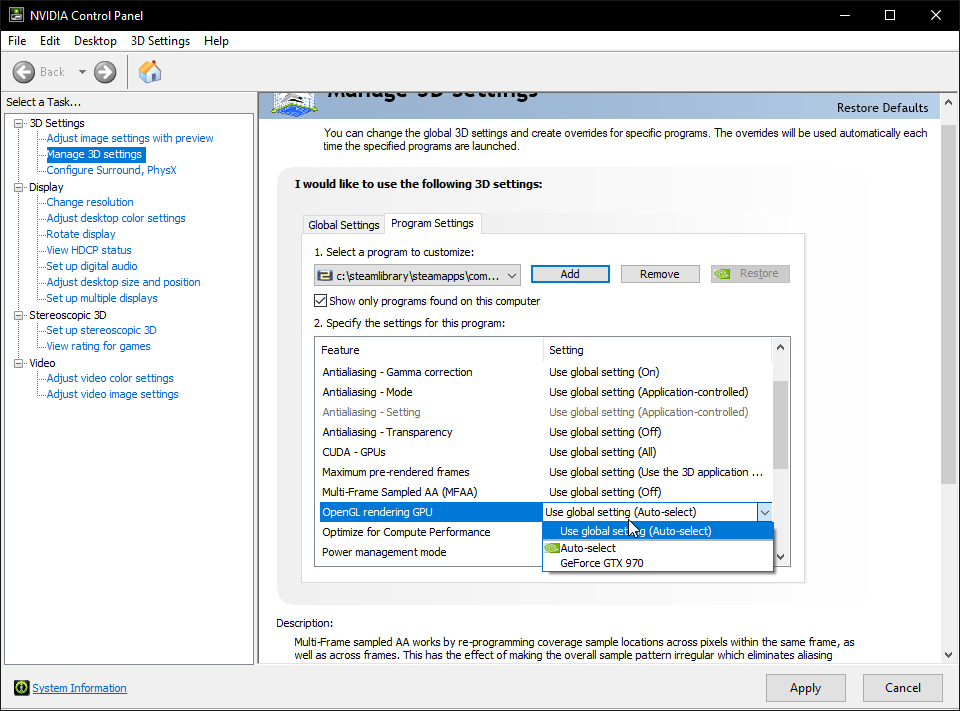
@bright pawn Go to your control panel and navigate to where you see in my screen shot
gusty stratus
why does the screen fix itself when you try to look around
orchid flame
it will tell you if you have another graphics option
sweet laurel
@mild ridge I'm sorry but I the pinned solution for EARLY_ACCESS_DISCLAIMER didn't work for me , because I don't have a folder called 632360 or an xml file. I copied the txt file into new folder I created and renamed the file with 2919dc8a-fd4c-4c3c-bd7d-8aeeac67b831.xml and still blocked with the screen, hope for help
gusty stratus
i tried unplugging it whats next turning it on and off??
 amber pollen
Hiya so every time I play, the character looks down and when I try to look up my sights go back down to my feet
I'm not sure why its happening
eager robin
@amber pollen have you tried using the steps here to fix your issue https://steamcommunity.com/app/632360/discussions/1/1768133742956098205/
Problems & Fixes PROBLEM The camera is always pointing down, or I'm getting weird input latency! FIX First, try unplugging and then replugging your controller. If that does not fix it, look under Device manager and make sure there are no controllers. If you have VJOY installe...
amber pollen
I'll try that thank you
gusty stratus
@amber pollen let me know if that works cause i had no luck
eager robin
Big Tofu, you weren't using any controllers were you?
unkempt bramble
@mild ridge is this the identified issue where to fix you use verify>restart pc? I've tried this multiple times.
gusty stratus
no im just using my wireless keyboard and mouse
amber pollen
IT WORKED!
unkempt bramble
I can change overview etc, but cannot click ready nor change character.
eager robin
awesome! @amber pollen
gusty stratus
must be nice
 winged saddle
help plzzzz
bright pawn
bizarre. suddenly the game is working fine. i didnt do anything
orchid flame
. . .
winged saddle
ok so i purchased the game on steam and want to gift my second copy but i dont know how!
eager robin
@winged saddle should be in steam inventory
orchid flame
Can you come over to my house and use my comp so your magic existence will fix my game?@bright pawn
bright pawn
sounds dumb but have you restarted your PC entirely
and steam
i mean, its still using a LOT of my GPU...like 80%. but 80% is better than 100%
winged saddle
XOXOXOXOX thanks dude
eager robin
no problem! 😃
 fair mulch
So i got a issue with trying to host a lobby with my friend where whoever was the one invited gets stuck on a black screen when we go to join the lobby on character select
orchid flame
Yes, i restarted my comp, i reinstalled the game a few times, deleted all files on my pc relating to it and installed
fair mulch
i realize i should have put this into bug report
orchid flame
i updated drivers, i lowered settings
bright pawn
sucks man. wish I'd found the magic fix
orchid flame
the works
orchid flame
i am at the point where the IT guy has to get his manager who actualy knows computers to come help
lol
 supple wave
I am running a AMD R9 280 GPU, with a i7 cpu, but my game never goes above 20 fps (even at 800x600) (i havent capped it) Is there any 'fix' to help improve fps?
glad kayak
@orchid flame
Let me know if you find a fix, still having the same issue.
orchid flame
Yeah I def will
@glad kayak Did you try swapping it to use your integrated graphics card instead of your main?
that works for some folk
doesnt work for me cause i dont have one
sharp depot
I take it it worked vil
orchid flame
Nah
sharp depot
Rip
orchid flame
I dont have an integrated so its oofcity
sharp depot
Oooooooof
fair mulch
@eager robin didn't work and issue persist
glad kayak
Trying that at the moment, my integrated graphics doesn't show up in nvidia control panel so I'm looking at another way to force it to use integrated
@orchid flame
orchid flame
mmk!
@glad kayak Make sure to talk to @sharp depot he knows more about that fix than me
Hey there, Im trying to set up a multiplayer lobby with my friend but neitehr steam invites or lobby ID's are actually getting either of us into the same lobby
 obtuse flower
^ I'm also having this issue
 broken condor
I'm not getting any audio in my game.
sharp depot
U have to path navidia to the game. Then there's a arrow tab to say use intagrated graphics @glad kayak
Under 3d settings
glad kayak
I've looked there already, thanks.
My integrated graphics isn't showing up in the drop down menu.
I've checked in display adaptors under device manager to confirm my integrated graphics is working
@sharp depot
sharp depot
Odd
What about right clicking the exe for ror
There should be a drop down there
Asking what graphics to use @glad kayak
junior pivot
@orchid flame Did you already fix your multiplayer not working?
glad kayak
No option @sharp depot
 jovial pebble
@junior pivot not sure about him but i still havent figured out a way to play multiplayer. tried pretty much everything at this point. restarting, reinstalling and firewall settings.
sharp depot
Win 7 compat mode @glad kayak ?
glad kayak
Tried win 7 and win 8 compatability mode already @sharp depot
sharp depot
Hmmm
 misty oxide
anyone having fps issues with RX 580?
i sometimes get to 25 fps when theres lots of stuff going on, while on other games like RE 2, apex, I can keep a smooth 60fps at all times
"PROBLEM The game is running really poorly or hotly - even though my machine is good.
FIX Please make sure that V-Sync is disabled in your Nvidia Control Panel, and that your Graphics Drivers are up to date!"
I dont use nvidia, so i cant desable it on nvidia control panel, and my drivers are up to date
orchid flame
AMD uses catalyst or something as their control panel.
 whole meteor
so I'm constantly looking up...no controllers installed...no vjoy...nothing.
can't play
misty oxide
@orchid flame how do i access that?
orchid flame
Beats me, last time I had amd was years ago because of issues like that.
Try using google?
 blissful stone
hey so when I play all I see is placeholder text throughout the game is there a fix for that?
eager robin
@blissful stone there should be a fix for that here https://steamcommunity.com/app/632360/discussions/1/1768133742956098205/
Problems & Fixes PROBLEM The camera is always pointing down, or I'm getting weird input latency! FIX First, try unplugging and then replugging your controller. If that does not fix it, look under Device manager and make sure there are no controllers. If you have VJOY installe...
blissful stone
so it's telling me I should reinstall C++ but my computer has a newer version than 2015. Do I need to go back from 2017 to the 2015 version?
 wicked swan
hazy dune
wicked swan
hazy dune
wait...c++? my computer just installed something like that for the first darksiders
hazy dune
and then i tried to play once and i was having HUGE fr issues, like 5 fps from a lizzard shooting me
 modern salmon
is there any kind of ban system in place for fucking around with CE
glad kayak
Found a debug log in the game files with this inside:
[0330/130706.866:ERROR:settings.cc(325)] Settings version is not 1
 polar pagoda
Is it a know issue to get a freeze when picking up items?
 dawn falcon
hey guys
ii am having the DISCLAIMER issue
but i have no save files since my game has not started once yet
 rancid breach
anyone know if they fixed the first screen not working
 sullen pilot
quick question. Sometimes when I open the game, it defaults to 1920 x 1080 even though I change the resolution to 1600 x 900. Anyone know the issue?
supple wave
I currently can't play in more than 5 fps :( its the only thing open has there been a fix for low fps? i'm legit on minimum graphiics ingame :( practically unplayable
 remote bone
I keep disconnecting out of game. I have 10hrs logged as played the game, as more than half of it was lost to disconnect.
 earnest oracle
on the 2nd level cant find the teleporter. been in this level for about 40 min. search out of bounds. Found a secret. but no teleporter 😦 enemies cant kill me at "Very hard"
jovial pebble
@earnest oracle it might be hidden on a ledge i was looking for a tp on my first map for 30 minutes then found out its on a ledge i didnt see where i could drop down to
is it the forest tile level?
jovial pebble
no i mean is it a foresty area with the cave and stuff?
earnest oracle
cave
jovial pebble
because i had that issue on that level and it ended up beeing on the small island you get to over a bridge and there on a ledge down below
dawn falcon
FFor anyone havin g the EARLY_ACCESS_DISCLAIMER ISSUE! i fixed it by reinstalling the game to a different drive!
at least wroked for me
stoic cliff
i can finally connect to my friends game but while the frames are fine, its incredibly laggy? i can move around perfectly but all the enemies take like, a million years to update?
earnest oracle
finally i died ^^
 granite edge
when I verify files it says 1 file is not valid but it won't reinstall the file. A full reinstall does not fix the issue. Any ideas?
 half smelt
so like i went to buy my friend a copy of the game and it wont let me?
like i dont even want a free copy
i just want to buy him it as a gift
 dusk ocean
Just gonna put this here: has anyone figured out how to stop the save file from being deleted randomly?
 obsidian pond
Hi I am trying to get local multiplayer working
And I can't figure out how to get it to work
I start a private game
and it only lets one character pick
how do you set it for a second character?
 glossy wave
[Bump] Multiplayer issue here too
My friend's in our team but his character doesn't connect to the game, his name is in the party but he cannot play with us. It's the button issue, but the fix didn't work.
 boreal tapir
hey guys , quick question , i'm from romania , at checkout is says this game is not giftable from your territory , will i still receive a key to send to my friend as part of the promotion ?
 woven birch
I THINK the promotion is why you can't gift it right now.
Don't take my word for it, though.
 simple drift
no errors or anything, just the person cant choose a character
they cant click ready
and it doesnt say they connected in a chat
glossy wave
Having the same issue right now
simple drift
a lot of people seem to be experiencing it
ashen hemlock
For those that have been having save file issues, keep in mind that if you're one of the many who altered your save data to unlock all characters, it's very possible you corrupted or damaged something.
 versed juniper
My suggestion would be to check your firewall and maybe to a PC restart, but I'm no tech expert
simple drift
these people havent
glossy wave
First time playing
versed juniper
Are you two significantly far from eachother? @glossy wave @simple drift
glossy wave
Both in the same country
simple drift
he's played with me before
glossy wave
same city
simple drift
weve tried both
versed juniper
The way I got it to work was my friend invited me BEFORE he made a private match
 tired rock
how to fix early access disclaimer guys ?
glossy wave
Ill try that but Im pretty sure i did
versed juniper
Could also be a problem with steam overlay
I know for some games, accepting an inv using shifttab breaks some stuff
eager robin
@dusk ocean Hey, there's a pinned message in this channel that may help you resolve your save file being deleted.
glossy wave
When my friend hosts the game nobody connects to the chat, when I host it others and me can click ready but my friend cannot. Something's blocking him
eager robin
@tired rock Check out the info here to see if this will fix your issue https://steamcommunity.com/app/632360/discussions/1/1768133742956098205/
Problems & Fixes PROBLEM The camera is always pointing down, or I'm getting weird input latency! FIX First, try unplugging and then replugging your controller. If that does not fix it, look under Device manager and make sure there are no controllers. If you have VJOY installe...
dusk ocean
Thank you
versed juniper
@glossy wave can either of you use QuickPlay?
eager robin
np!
 storm lantern
I tried loading a quickplay session but I got booted back into the main menu
versed juniper
Hmmmm
Ima be honest, and I've said this before, I know almost nothing about coding
But, maybe it could be the res you're playing in? Or rather, full screen/windowed
storm lantern
I'll try reinstalling Visual C++ Redist
versed juniper
Full screen does some weird stuff sometimes
storm lantern
1920x1080 fullscreen 60hz
versed juniper
In other games ^
storm lantern
I'll try windowed, thanks
versed juniper
Try it on windowed
Oh oh
@storm lantern @glossy wave
Also if we can't fix this, it'd be super useful if you could post your problem with some specifics in #ror2-bug-reports-pc
 candid torrent



 glossy wave
He had an issue with repairing the game. some file is missing and it doesnt repair itself
@versed juniper Sure
versed juniper
@glossy wavemaybe try deleting files in the game directory, then do a repair. Obviously this has a high chance of breaking your game, meaning you'll have to reinstall, and, I know nothing about this game's code so I can't say what to delete
At this point doing that and or a full reinstall would likely fix it, if not help the most
@candid torrent Others are having that too. Try repairing missing files, and if it doesn't allow download of the missing file, reinstall the game
glossy wave
He already reinstalled it once, trying to come up with new ways of working it out
for now he'll try on another PC
versed juniper
Oh damn, that sucks :/
glossy wave
But thank you Nic for answering, nonetheless
 gleaming garnet
finally l can play ror2 with torrent
versed juniper
Could be a problem withOS? I ran it on win 10 with no issues
glossy wave
win10 there too
lyric bough
so what is cloudStorage supposed to be? steam's cloud?
versed juniper
Also, np Cathetic. Even if it doesn't work, I do suggest waiting on updates for the game since early access yada yada
But honestly, this game is great in coop, so trying to see if it's fixed every week or new update would be a good idea
@lyric bough yeah that's steam could save or whatever you call it
lyric bough
hmm
oh yeah youre right
RoR2Application.cloudStorage = new SteamworksRemoteStorageFileSystem();
oh god yes
deleting the remote storage fixed my savegame issue
thank god
and i could overwrite the standard profile with my backup ❤
versed juniper
What was the issue?
lyric bough
idk i just disabled the steam cloud saving and apparently it works now
it probably tired to always load the corrupted profile from steam cloud
versed juniper
Ah probably
lyric bough
time to play some risk of rain again ❤
versed juniper
👍 have fun
dusk ocean
How did you fix the issue?
lyric bough
alter the game's code
dusk ocean
How
eager robin
The steps to delete the save file are pinned up top in this channel.
lyric bough
yeah sure they are but they dont work for some people
dusk ocean
Yeah I verified game cache and it didnt restore my file :/
 dire hill
Anyone else on laptop run into the game auto selecting the Integrated Graphics instead of GPU with Optimus?
lyric bough
yea because the file is not in your game cache
dusk ocean
I'll just go the hopeful fix and restart
I just dont want to progress again and have it delete itself again
lyric bough
well why didnt you make a backup
dusk ocean
Of my original save file?
lyric bough
ye
dusk ocean
Was I supposed to assume that turning off my PC would delete all of my progress?
lyric bough

eager robin
Quint0ni0, were you able to navigate to that file path and it didn't work for you?
dusk ocean
The fix in the linned messages with pastebin is to make sure it doesn't happen again, not to restore my original save
versed juniper
I don't think there's a way to restore a save
dusk ocean
Exactly
So I'm trying to figure out a way to make it not happen again that isnt me backing up my save every single time I play
versed juniper
Other than making sure not to hard shut-off the game, you can't do much
dusk ocean
I might just wait until its patched then honestly
versed juniper
Sounds like a plan. I understand your frustrations
I expect they'll fix a lot of bugs next update
So hopefully you won't have to wait too long
dusk ocean
Fingers crossed :]
 pure goblet
Is RoR2 meant to be rather system heavy?
versed juniper
It's very easy to run
Unless you're having technical issues
Like, I'm saying it shouldn't be hard to run
But bugs could make it so
pure goblet
Just keeps freezing. I've had to turn down a lot of the options
versed juniper
Check your CPU usage while playing the game if you can. Take note of when it spikes
pure goblet
Yeah I have been. Its at a consistent spike when playing to both CPU and Memory
 patent thunder
Im only one having little frezzes when taking any artifact?
versed juniper
@pure goblet just when playing in general?
Like, have you noticed any patterns of when it freezes? Maybe when you kill a lot of enemies, look somewhere, etc?
Oh also, if it's using a lot of memory, it could be a memory leak
pure goblet
In general its pretty high up. It does spike a bit when I kill a lot of enemies/Boss fights.
versed juniper
My suggestion is to
Lower the amount of bodies allowed on screen (should be an option somewhere)
Repair the game files
And if all else fails, reinstall
Also, play around with the res a bit maybe
pure goblet
Thanks. I'll give it a shot tomorrow. Its fairly late here. Its weird because I definitely have the specs to run it and whatnot
versed juniper
Good luck!
If all fails, just wait for an update to the game. it's a really great game, so trust me, it's worth it
And have a good sleep
pure goblet
Yeah. I have been able to play it, despite losing some progress. (nothing to major) Thanks for the assistance. I appreciate it!
versed juniper
No problemo
polar pagoda
any fixes for the freeze on picking up items yet?
patent thunder
@polar pagoda nope, having same problem, also framerate drops when encountering too much enemies
polar pagoda
doesnt seem to be happening to everyone, friend has zero issues
patent thunder
@polar pagoda Strange
 hybrid kelp
Hi, i have a reoccurring issue every time I try to queue up with another person. Once I head into the character selection screen, a black screen appears and I get kicked from the lobby soon after which makes it impossible to play with friends at the moment.
 still prairie
I'm just having general FPS issues honestly. No matter what I do, no matter at what resolution, if my settings are low or high, and my drivers and so on are updated.
It is okay at first but still lower than it honestly should be and then as the game goes on (regardless of enemy count) it just gets progressively worse over time until it's at like 2-3 FPS.
My CPU, memory and GPU are never under any pressure or pushed at all, GPU load at like 10-20% when this is happening.
Both singleplayer and multiplayer as well.
CPU - Intel Core i5 4460 @ 3.20 Ghz
RAM - 16,0GB Dual-Channel DDR3 @ 798MHz
Mobo - ASUSTeK COMPUTER INC. H97-PLUS (SOCKET 1150)
GTX - 4095MB NVIDIA GeForce GTX 970
Again, game settings don't change it, this happens when everything is as low as it can get too
lyric bough
 my i7 3700 + gtx 1060 handles the game perfectly fine
i dont experience any fps issues at all
 boreal crane
Malthe are you overclocking at all? and are your drivers updated?
also just a side note, saying you don't have a problem won't solve others problems
boreal crane
when do you start dropping frames or is it constant
still prairie
At the start it goes from around 60 (got it capped to 60 since that's my monitor's limit anyway) and dips to 45~ sometimes
and then as the game progresses it just goes lower and lower
until it's a consistant <10 FPS
boreal crane
the game isn't heavily optimized and that's because of the large creature count and large amount of stuff that has to be handled by the computer 10 fps does seem quite low but that might be due to the lack of processor power and low speed on your ram
still prairie
Eh, I don't think the ram speed explains this
nor processing power
it's not creature count or amount of stuff happening
it gets worse as the game goes on, even when teleporting to a new map and before anything is happening
dire hill
I'm also dropping frames, it's not remotely that bad though - tele fights drop to 45, then it goes back
still prairie
it's still at sub 10 later on, with nothing happening
unkempt bramble
I literally cannot play with other people unless I'm joining a lobby which came from the same internet as mine
._.
dire hill
For my part it doesn't actually push CPU usage to full... it just runs absurdly hot on CPU
orchid flame
Yeah the game needs to be optimized more, but I can't really nitpick because it's literally been out for like 2 days
I get performance issues and I have a pretty alright setup
dire hill
spikes up to like 90+ degrees on my CPU - i7-8750H is a hot chip, but only a few games really go this insane (Monster Hunter World because piss poor thread usage, this is coded much better but isn't optimized very much yet)
orchid flame
Don't get me wrong, the game is incredibly fun, but the lag when I'm late game have caused me some deaths
hello, i played more than 6h straight yesterday, and today when launching the game, i find no save file and it ask me to create a new one
dire hill
On latest drivers, vsync off. It still goes pretty hot
going to see if reapplying my undervolt will fix it for now, but I think it does need some patches
orchid flame
Give it time for patches
I'm sure the devs are working on something
nvm i looked the pins
dire hill
Does anyone get big drops on a desktop?
Am curious to see if it's a laptop power issue
 potent crest
i cant seem to play multiplayer anymore
obsidian pond
Does anyone know about local multiplayer and how to make it work?
orchid flame
Does anyone know why private lobbys arent working?
 thorn salmon
^^^^
orchid flame
Only the host can click ready
thorn salmon
Oh, I have a different issue. Quickplay doesn't work and a private lobby with friends doesn't work either. I've tried using the Lobby Id copied to clipboard and joining my friend's game on steam.
orchid flame
How does it not work?
thorn salmon
Clicking the option to use the lobby id in your clipboard doesn't change anything, no response from that screen. Joining my friend's game on steam also doesn't do anything, doesn't even go to the lobby screen.
This is oreyeyedjink btw, changed my username
orchid flame
just like risk of rain 1?
thorn salmon
I would hope not to download additional software to use features that should be in the game
orchid flame
😦 Unfortunately risk of rain 1 multiplayer never worked properly without hamachi
From the way things are going it might take a while for the devs to get round to fixing private multiplayer
orchid flame
just private multiplayer i believe
 round lily
Me and my friend can't play. We get in to a lobby but can't click ready. Both in quickplay and private.
orchid flame
Yea
i got the same problem with Gerrard
but only for private lobbies
anyone whos not the host
cant click ready
 edgy beacon
qick question. I wanted to buy risk of rain 2 as a gift for a friend but steam wont let me. is it somehow restricted in the eu ?
round lily
Where are you from Coon
orchid flame
NZ my dude
round lily
hm, interesting. I am from Bulgaria
I was thinking it's related to certain IP addresses but idk
orchid flame
make sure your NAT is open
round lily
@edgy beacon Mate, if you buy the game now you get 2 copies
maybe that's why you can't gift currently
Just buy one for your self and gift the extra copy
edgy beacon
yeah I allready send my copy to my brother
but I wanted to also gift the game to someone
humble linden
It's just 2 for one locking gift buying until event ends
round lily
Well then, I suggest you wait out a few hours or a day for the promo to end so you can get a regular 1 copy
humble linden
Just wait for 2 for 1 to end
edgy beacon
ok thank
thorn salmon
Update - I tried Quickplay and it moves me to a private Friends Only lobby
humble linden
🤔
orchid flame
????
If that were to happen usually it just says invalid Lobby ID and dosent let you join any lobby
dire hill
@edgy beacon gift steam card so the person can buy, get copy to give in their region
round lily
How to change lobby so that it's not friends only
edgy beacon
problem is I allready loaded 20€into my wallet @dire hill
round lily
The 2for1 will be over in a few hours 😃
humble linden
Yep
round lily
So, no multiplayer for us for no specified reason what so ever.
simple drift
@round lily
 carmine galleon
i cant invite my friends.. what should i do..
simple drift
my friend was getting the exact same thing
hamachi fixed it
we checked firewall and everything
i could play with my friends
and he could play with his brother
round lily
Me and my friend have totally different machines, live in different parts of town and have different internet providers