#Alpine Faction
1 messages · Page 4 of 1
 desert crown
 gaunt lotus
well i fully believe that you think you had it for this reason
but it's verifiable on a technical level
like this is something that can be evaluated/determined objectively
desert crown
i understand that
but a year ago it was the opposite for me
i will swear on alot of things
 brave crown
well I really can't comment on what may have been the case on different server versions in the past (and I don't even know what game version the servers you're referencing would have been running), but what you're saying should never have been true, unless some game version was messing up client detection in a really unlikely way
I wouldn't dispute that you and/or others thought it worked that way in the past, but I can't see it ever having been true
In any event, it's definitely and verifiably not true now, and that's all that really matters at this point :p
desert crown
._.
gaunt lotus
i could only see this being a thing if some server host was running a different, external voting method or possibly on older PF? or pf gold servers
but that would have been way longer than 1 year ago
and they would have needed to, for some reason, exclude 1.2 clients specifically from voting
which wouldn't make a lot of sense
brave crown
The only reason that RFSB which identifies itself as a 1.2 client (or a PF client, they look the same at this level) has ever existed is because someone wanted to use a browser but not have it known that they were using a browser
desert crown
I don't have the words to explain what has happened.
but i am 100% confident in the past.
brave crown
you are either remembering incorrectly, or you had incorrect information given to you back then, which you are correctly remembering (but it was still wrong back then ) 😛
desert crown
idk why i would get a hacked version if it was to aid/block votes.
but no you misunderstand
ive opened that one before
and sat in servers
and not been able to affect a vote
like
this is a memory burned into me
i wouldn't have that client otherwise
idk what has happened
but i know what i was doing
brave crown
desert crown
and not been able to affect a vote
Unless there was some private server version available which excluded RF1.2 clients (which I'm not aware of ever having existed), you mixed up the two RFSB versions
AFAIK the only reason any server version has ever excluded a connected client from a vote was because it identified itself as a browser (or Alpine thought it was a bot, but that's very recent)
desert crown
sigh
i suppose
its possible
i renamed it
when i got the other one
but i have no memory of that
gaunt lotus
welcome to old age
brave crown
🤷 it doesn't matter why they were mixed up ultimately, but just use 5.1.4 in the future and there are no issues anywhere
desert crown
gaunt lotus
welcome to old age
🙁
gaunt lotus
my memory is like a container with storage shares attached to it, and the shares are all run by different companies
brave crown
Alpine specifically allows browsers to connect even if the server is running settings/gamemodes that are brand new and unsupported in old versions... because browsers don't do anything that compatibility would matter for. But I can't extend that same allowance to pre-Alpine 1.2 clients because they don't support the functionality
so any browser that identifies itself as a browser is fine 🙂 And I've gone through and built detection for every browser version I know to exist except those where it's impossible to do so, because they falsely identify themselves as RF1.2 clients
brave crown
It's all good, but just yeah that's why that browser can't connect to the KOTH server but RFSB 5.1.4 can without issue 🙂
desert crown
i didn't even know there were versions
i jsut thoguht it was the same programme
with a tweak
brave crown
I don't know if it looks any different visually - probably doesnt
desert crown
no
 thorny pumice
desert crown
but i am 100% confident in the past.
thorny pumice
desert crown
but i am 100% confident in the past.
Time is cyclical and you've gone all the way around but everything is just slightly off from the original one.
brave crown

thorny pumice
 desert crown
thorny pumice
Time is cyclical and you've gone all the way around but everything is just sligh...
desert crown
thorny pumice
Time is cyclical and you've gone all the way around but everything is just sligh...
something like that
brave crown
so, uh, question... have any mappers ever found a difference between the "One Way" keyframe movement type and the "Lift" keyframe movement type?
I was having a tough time trying to separate the functionality for the two. Then I discovered that my "Lift" keyframes were reading as "One way" keyframes and I couldn't figure out why. Thought I had a bug.
Then I found a line in the code that reads movers from RFL files on map load...
if ( mci.keyframe_move_type >= MKMT_LIFT )
mci.keyframe_move_type = MKMT_ONE_WAY;```
So uh, unless this is handled somewhere else differently, the game _literally_ is changing "Lift" movers to "One way" when the map is loaded lol crude oyster
brave crown
so, uh, question... have any mappers ever found a difference between the "One Wa...
crude oyster
brave crown
so, uh, question... have any mappers ever found a difference between the "One Wa...
I have never used a lift mover because I have never known what was supposed to be different about them lol. Ping pong, loop, and one way, seemed to be fine to cover any scenario. 😛
brave crown
well... it seems like setting "Lift" never did anything anyway 😛 it just changed it to "One Way" when loading lol
I think it would make more sense personally to have lift work like one way, but only move one segment per activation
as opposed to one way which goes from start to finish
crude oyster
Maybe volition had plans for lift but just never got around to finishing it.
Yeah that could possibly be useful and something we don't have an easy way of doing currently.
brave crown
yeah, agreed on both
crude oyster
brave crown
yeah, agreed on both
Actually think thats the exact behaviour I wanted for my teleport destination selectors in galileo 2. Got it simulated using a bunch of mover pause and other events but would have been handy to just be able to set to lift instead. 😛
thorny pumice
I thought it did work like that, but clearly my mind is not recalling well. 😄
 boreal ether
@brave crown shouldnt you update this for next game night
 brave crown
boreal ether
<@185856114506727434> shouldnt you update this for next game night
brave crown
boreal ether
<@185856114506727434> shouldnt you update this for next game night
Yes, yes I should :p thanks for the reminder. Will do it when I get home
brave crown
boreal ether
<@185856114506727434> shouldnt you update this for next game night
done, thanks again
 wraith comet
brave crown
done, thanks again
wraith comet
brave crown
done, thanks again
I think fetching this from a wiki page is a really smart and simple solution.
brave crown
I fixed the "Force Orient" option on movers for when Alpine's new mover code is used (ie. when "Legacy Movers" is unticked in level properties)
this option crashed the game if used with translating movers in the stock game. I am also just removing the flag at level load if "Legacy Movers" is on, simply to avoid the crash. But the new functionality won't apply
Also, I'm not aware of a function of "Force Orient" for rotating movers in the stock game (though it didnt crash like translation movers). In Alpine movers mode, rotating movers with "Force Orient" ticked will maintain their orientation throughout the rotation
brave crown
this is what force orient with rotating keyframes can do
brave crown
Good news 🥳 Just pushed what I'm hoping is the last required changes to the mover code, at least for AF 1.2
(assuming @crude oyster is not able to break my code in his testing :p )
There is still a todo list for AF 1.2, but it's getting smaller and smaller by the day. I always avoid giving specific dates, but it's getting close now 🥳
 glacial storm
brave crown
Good news 🥳 Just pushed what I'm _hoping_ is the last required changes to the m...
glacial storm
brave crown
Good news 🥳 Just pushed what I'm _hoping_ is the last required changes to the m...
Nice to know. Btw, what's the status on DX11 renderer progress. It still has some visual differences compared to DX9 render and also some performance issues and lack of AA options
Also I noticed that the RF client comparison page still only lists Dash and doesn't list Alpine Faction there.
desert crown
@fast crescent #1376930844597551146 message
brave crown
glacial storm
Nice to know. Btw, what's the status on DX11 renderer progress. It still has som...
DX11 has had a bunch of improvements in AF1.2 and the only outstanding issues I'm aware of are lack of AA support and lack of static mesh vertex lighting - have you identified others?
also some performance issues
Could you expand on this? 😮 As far as I am aware, DX11 should perform better than DX9 virtually 100% of the time, are you saying there are currently performance issues with DX11?
RF client comparison page
Good call, I kind of forgot that page existed... whoops. Yeah, will get that updated with AF 1.2's release
glacial storm
@brave crown This performance issue
brave crown
Oh right
did you test the AF 1.2 beta by chance?
I didn't do anything specifically about that in the 1.2 beta but a bunch of DX11 changes were implemented, so I'm wondering if you have the same issue there
i havent noted that issue myself either so it's hard to know exactly what's causing it for you :\
glacial storm
I will check AF 1.2 beta. My results were from AF 1.1
brave crown
actually wait, you know I do have that issue 😮 I just never noticed before
in glass_house on AF 1.2 in DX11, my FPS is in the 4000-5000 range without scoped, with sniper scope it's in 2000-3000
glacial storm
brave crown
i havent noted that issue myself either so it's hard to know exactly what's caus...
Probably not easy to notice when you have a powerful GPU, since the fps caps at 240
Oh wait, you can uncap fps?
glacial storm
brave crown
in glass_house on AF 1.2 in DX11, my FPS is in the 4000-5000 range without scope...
In that case, what are the fps in DX9
brave crown
for me? sec
glacial storm
For me in DX9, the numbers barely change at all
wraith comet
Oh, right. I should download the Beta probably. I've been too busy yelling expletives at my computer while writing code.
brave crown
3000-4000 both scoped and non-scoped, though scoped does seem to hover in the 3000 range more than unscoped
glacial storm
brave crown
in glass_house on AF 1.2 in DX11, my FPS is in the 4000-5000 range without scope...
Whereas in DX11, even your frames drop quite a bit. Just that 2000 is still a huge number 
wraith comet
brave crown
in glass_house on AF 1.2 in DX11, my FPS is in the 4000-5000 range without scope...
Literally unplayable. How dare you.
brave crown
Hmm, it seems as though AA is being applied in DX11 already, just the launcher won't let you select it

and the performance impact isn't even that high, which is cool
DX11 with 8x MSAA
Level: l14s1 Average frames per second: 2063.14 min: 7.99 max: 4065.04
DX11 without AA
Level: l14s1 Average frames per second: 2282.24 min: 8.24 max: 4504.50
same test with DX9 for comparison
DX9 with 8x MSAA
Level: l14s1 Average frames per second: 1266.93 min: 8.94 max: 2518.89
DX9 without AA
Level: l14s1 Average frames per second: 1279.90 min: 8.68 max: 2754.82
you can probably always force AA via driver settings and application profiles
perf hit with AA should be minimal in RF because there's so much gpu headroom
glacial storm
brave crown
Hmm, it seems as though AA _is_ being applied in DX11 already, just the launcher...
@brave crown btw, I tested AF 1.2 and the performance issue with scope still remains. Also the AA is not being applied in DX11 for me
brave crown
glacial storm
<@185856114506727434> btw, I tested AF 1.2 and the performance issue with scope ...
If AA is not being applied in DX11 at all, that's I am expecting a hardware limitation. I did have to manually set the registry key myself to have it work on my system though. I couldn't select it in the launcher
glacial storm
Also, I noticed that Kava Aesir section gives much less performance in AF 1.2 than in 1.1 (using DX11 in both cases)
In 1.2, I am getting performance closer to the DX9 renderer
brave crown
Hm that one is interesting, and surprising. Well, I suppose Alpine 1.2 is doing mesh lighting for skeletal meshes and 1.1 wasn't, so that might explain a dip
glacial storm
Quite a dip actually from 80-ish fps in 1.1 to 45-ish fps in 1.2 🥲
I get around 40ish fps in DX9
brave crown
interesting, here are my results for that map:
AF 1.1, DX9:
Level: rfrev_kva00b   Average frames per second: 363.14   min: 19.66   max: 1277.14```

AF 1.2, DX9:
Level: rfrev_kva00b Average frames per second: 362.17 min: 9.13 max: 1270.65```
AF 1.1, DX11:
Level: rfrev_kva00b   Average frames per second: 1113.86   min: 18.87   max: 2481.39```

AF 1.2, DX11:
Level: rfrev_kva00b Average frames per second: 946.71 min: 19.17 max: 2145.92```
brave crown
https://www.redfactionwiki.com/wiki/Mapping_with_Control_Points
WIP tutorial on how to make control points for KOTH/DC/REV
Control Points are used as objectives in the King of the Hill, Damage Control, and Revolt game types added in Alpine Faction v1.2.
The process to create these is very straightforward.
brave crown
thank you @crude oyster for all the testing you did of the movers 🥳 I really appreciate it!
I'm also very happy that we're hopefully done with needing to work out issues in the mover code before AF 1.2's release 😄
desert crown
@brave crown
brave crown
desert crown
<@185856114506727434>
what were you doing when this happened?
desert crown
i literally just clicked spectate lol
brave crown
well thats interesting lol
it happened because the camera was invalid
now why is the question 😛
FP spec?
desert crown
so we were in DR2
and
spirit said he didn't know hwo to do a section
so i killed myself
entered spectate
clicked to him
crash
brave crown
crashed when you got to him or just when you entered spec at all
desert crown
when i got to him
brave crown
ok
yeah im not sure why the camera was invalid at that point - it seems like maybe he landed and the game tried to play the landing sound while you were switching but before the camera was actually set
should be able to safely handle that to prevent a similar crash in the future though
brave crown
desert crown
<@185856114506727434>
fixed this crash, in theory it should be extremely rare, but there's a fix in for it anyway
desert crown
 appreciate
desert crown
Runners Rally PO2
 brave crown
are you in dx9 or dx11
added a new command - sv_restrict_status, to allow a server to quickly understand which clients are able to play in their server based on features and such. I figured this was a necessary thing to add so everyone can understand what's going on - I look at this daily and there are still enough moving pieces that I get confused sometimes 😛
 brave crown
It does but dx9 should have been fine so there probably is an entry that needs to be added
desert crown
brave crown
desert crown
Runners Rally PO2
one of the ugliest run map end rooms in history is now slightly less ugly
 crude oyster
When making breakable windows with a custom glass texture, would having RF use the custom texture on the shards or having a way to specify the shard texture to use on each window, be in the realm of possibility for Alpine? 🤔 Want to have some breakable stained glass windows, but when the window suddenly changes to a completely different window when it shatters, it ruins the effect. 😛
desert crown
@brave crown
this happened on the config for spectate 
also worth noting the crash reverted the settings maybe
brave crown
what were you doing? this crash is in the shadow rendering code, I have never seen a crash there before
desert crown
so i had renamed and moved mouse sense but it went back to default i had before
i was just roaming a map in freecam @brave crown
brave crown
desert crown
also worth noting the crash reverted the settings maybe
crahses always revert settings, the settings is saved on exit, if it crashes that doesnt happen :p
desert crown
ah
brave crown
yeah that one I have absolutely no idea
looks like it crashed trying to look up faces to render a player shadow on
desert crown
would the map help?
brave crown
dmsoepowerb1.rfl I can see it :p
desert crown
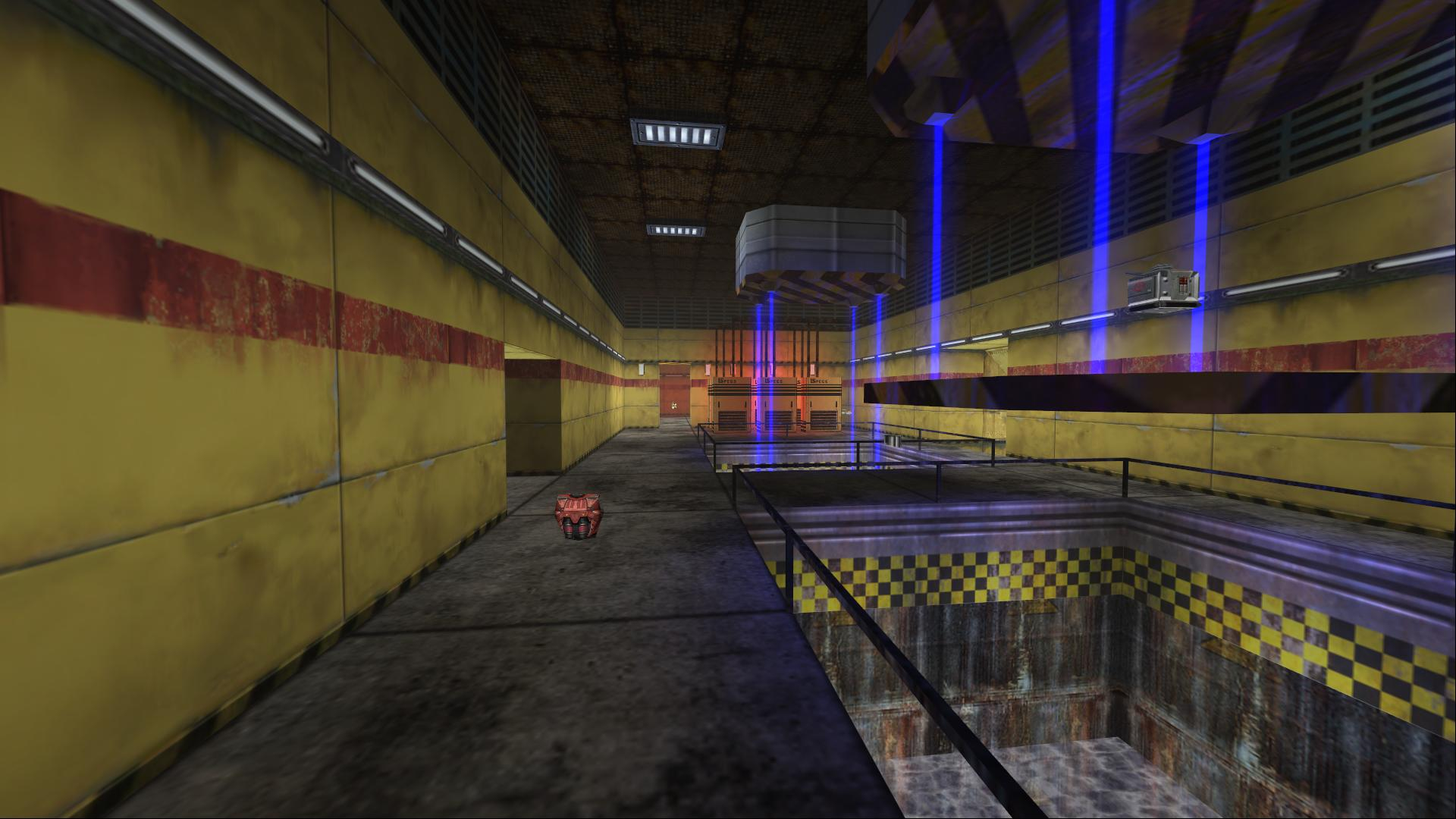
FactionFiles
SoE Power Station is a port of the map Power Station (dm2) from the game Soldier of the Empire by Fragmaker.
oh
brave crown
Yeah that one is going to be a 🤷 unless it continues to happen lol
I'm not aware of any new code that interacts with this area of the stock game at all. I don't know what happened but it's something obscure
desert crown
is what it is 
brave crown
probably an issue in the stock game if I were to guess, just based on what I'm seeing
desert crown
fair enough
ok exited game
new sens for spectating is 0.025
(usually it was 0.05)
brave crown
@green cobalt DX11

 green cobalt
@brave crown my hero
brave crown
https://dedi.alpinefaction.com/
Updated this page with all the new stuff
boreal ether
You got more map info, ie the date the map was made?
brave crown
boreal ether
You got more map info, ie the date the map was made?
the map_info_ext command prints that stuff
as well as anything from mapname_info.tbl
boreal ether
I know it does. But too lazy to tippy tappy type that
brave crown
The problem is where else to put it - there is the short-lived text at the bottom when loading a new map, but having that always show when scoreboard is up would interfere with the spectating text
I don't know anywhere to put it on the scoreboard.. granted, I do plan to optimize the scoreboard in AF 1.3 so there might be a place for it at that point
That being said, I'm not sure the value in having map_info with limited info and map_info_ext with extended info. Those could probably just be the same command
@boreal ether where would make sense to you? I'm definitely not opposed to making that info more readily available but it needs to be in a way that doesnt look bad and overlap other stuff :p
brave crown
oh, this didnt actually crash
 brave crown
the process was hanging and you held alt (which always forcibly closes a hung process)
desert crown
i see
brave crown
and you held alt which forced it to kill itself
brave crown
yeah
desert crown
oh well ^_^
 fallow valley
brave crown
https://dedi.alpinefaction.com/
Updated this page with all the new stuff
fallow valley
brave crown
https://dedi.alpinefaction.com/
Updated this page with all the new stuff
i just clicked on this link, scrolled thru and went "what the fuck"
brave crown
fallow valley
pretty cool to see though
brave crown
yeah i hope it'll make it easier for people to configure servers 🙂
I use it myself for our servers too :p
boreal ether
brave crown
<@281858219050008577> where would make sense to you? I'm definitely not opposed ...
leave it for next release
also, donno if you wanna fix this. not critical: The gap
 brave crown
I feel like that's probably just a scaling issue since this menu was never supposed to be rendered at such a high resolution lol
but I can see if there actually is a weird offset on that slignment
putting a team indicator on the spectate name box at the bottom

auto now auto scaling the spectaee name box based on the length of their name
so it wont overflow like it always does when people have long names lol

 gaunt lotus
two flags is weird
but one flag might be weird too
idk
maybe one flag with a border
thorny pumice
1 flag would make me think the player being spectated has the flag, so 2 or none I think?
brave crown
the issue is that rf uses the same icon both to indicate "player has this flag" and to indicate "player is on this team" lol
I thought this was the easiest way to clearly communicate the info though - i think itd look weird to have 1 :\
Could maybe just change the text to
Spectating (RED):
Goober```Good news - my to-do list for alpine 1.2 is officially down to less than 5 items :p
At this stage it may be possible to release this coming weekend. I'm not committing to that, but it's possible
crude oyster
brave crown
https://dedi.alpinefaction.com/
Updated this page with all the new stuff
Will dedi's still be able to be created the classic way or will I have to learn all this new stuff for my quick map tests? 
brave crown
In alpine 1.2 you'll be able to launch dedis the classic way with very limited features. It may be fully deprecated after that.
The new way is just... Better :p for many many reasons. For your purposes, with the new method, you don't actually have to specify anything you don't want to change, so configs are stupid simple
 fast crescent
brave crown
At this stage it _may_ be possible to release this coming weekend. I'm not commi...
fast crescent
brave crown
At this stage it _may_ be possible to release this coming weekend. I'm not commi...
Don't worry about timelines - anyone with good taste realizes that 1st priority is RF CTF MATCHES
brave crown
@crude oyster re your latest issue on glass shards: automatically using the glass pane texture would definitely look odd because it wouldn't be shattered at all :p setting a custom texture may be in the cards for down the road though. For 1.3 I have some work I am hoping to do on destructible brushes anyway so it would probably be a good time
brave crown
@crude oyster I believe you and a few other mappers have asked for the ability to multi link with 1 key press 😛
thorny pumice
brave crown
Could maybe just change the text to
```
Spectating (RED):
Goober```
Why not just use the team colour for the player?
Red text for Red Team, Blue for Blue Team?
brave crown
I considered that, but that doesn't seem particularly friendly to anyone who has any level of colourblindness :\ I also think tbh it could hurt the readability of the name text to anyone
maybe it is the best option though, idk
gaunt lotus
that might be the best option I'd think
there was an item that I raised a while back where we talked about making it so at the HUD would have team dependent colors so if you're on team red the hud is red and so on
but in an ideal world the player would be able to pick what colors they would want for that and it would determine the team's colors and stuff as well
all that to say this could be something where you implement the color and then down the line it becomes customizable
brave crown
Good point. Honestly, might be a good idea to just set the colour(s) now, use them here, and then over time work to spread that out over the other HUD elements
If the colours can be customized, my fears kinda just go away :p
crude oyster
brave crown
<@447137348162158593> re your latest issue on glass shards: automatically using ...
I don't think it would look that odd, not all glass gets a million lines through it when it breaks, some break in big shards. So you'd just be getting that look cuz you have all the physical big shards still it turns into. 🤔 Would definitely look better then changing to completely different looking glass when it breaks. 😛
crude oyster
brave crown
<@447137348162158593> I believe you and a few other mappers have asked for the a...
Indeed! Nice, that'll definitly speed up editing. 😁
boreal ether
brave crown
<@447137348162158593> I believe you and a few other mappers have asked for the a...
Wtf. This is the devil's work.
brave crown
crude oyster
I don't think it would look that odd, not all glass gets a million lines through...
True there could be some use cases for that to be sure, I just don't think it would be the norm :p
Being able to customize the shatter bitmap is the best solution for sure, then the mapper decides that
brave crown
in case anyone was ever curious (I was lol), the decisionmaking on whether you can create a link is:
- If source is a trigger, yes
- If sourse is an event, yes
- If source is a nav point, only if destination is an event
- if source is a clutter, only if destination is a light
brave crown
also made the errors given during attempting to create links far more descriptive
 thorny pumice
brave crown
I considered that, but that doesn't seem particularly friendly to anyone who has...
thorny pumice
brave crown
I considered that, but that doesn't seem particularly friendly to anyone who has...
If they have problem with coloured text, they'd have problens with the coloured skins 😅
brave crown
absolutely, some people do :p
but yeah, coloured text is probably just the best option
i implemented it like that for now at least
desert crown
@brave crown just got to the point where i crashed and can confirm this was an alt-tab moment,
 brave crown
Alright - in just under the wire, but the final new gametype for Alpine v1.2 is now done.
Escalation - a symmetrical control-point based tug-of-war style gametype with either 3 or 5 control points
(it's virtually identical to 3CP/5CP from TF2, if you're familiar)
brave crown
snuck this RED change into 1.2 - something I've wanted personally for a while 😛
I don't like the way the button looks though, will figure out how to lay those buttons out better tomorrow
 glacial storm
Btw I recently was watching RF PS2 playthrough and I noticed that on PS2, the entities have proper shadows instead of blob shadows like in the PC version. Any way these can be added in Alpine?
wraith comet
glacial storm
Btw I recently was watching RF PS2 playthrough and I noticed that on PS2, the en...
IIRC I asked this a few years ago for Dash and the answer was "Maybe?". It seems to rely on some PS2-specific tricks from how Rafalh explained it. But I could be wrong.
Rafalh wasn't interested in implementing it, but Goober might be more open to doing so. Kinda depends. I can't imagine it'd be easy, though.
I imagine that you could get a very close approximation using projected shadows via the model's lowest LOD.
(You don't actually have to use the model's lowest LOD though. That's just a common optimization technique for this.)
desert crown
@brave crown myself and @burnt parcel were talking about the flashlight and we're wondering it theres a way we can control when and where the player would be able to get it?
rather than just having it from the start immediately cuz its a button
 burnt parcel
(having the hotkey toggelable as an on and off state as an event for example)
So you can disable it entirely, or turn it on at specific areas
brave crown
Hm. Technically you could already disable it entirely - you can control the colour, intensity, range, and radius in MAPNAME_info.tbl. But you can't use it at all then.
So, ok a few things:
Headlamp_Statecan be used to toggle the flashlight on/off using event activation instead of the hotkey (not the same as what you're saying, but just to mention)- I would be up for putting a "Allow flashlight key by default" checkbox in level properties, and if it's off, the flashlight hotkey doesn't work. I'd also be down for an event - maybe
Set_Gameplay_Rulesor something - which lets the mapper control whether the flashlight hotkey can be used (event name being generic so it could be used for other things in the future) - The bigger issue with this plan is that there's no way to include the status of that in the savegame file. I do have a plan to revamp the savegame file in the near future and add compatibility with stuff that is missing it currently, but that won't be in this release
brave crown
glacial storm
Btw I recently was watching RF PS2 playthrough and I noticed that on PS2, the en...
Anything is possible with the requisite work of course 😛
My understanding is that the code that the PS2 version used for full mesh shadows was removed from the PC version entirely. Probably because whatever they were doing didn't work properly across GPUs (PS2 was easier in that way because the player's GPU was predictible)
That being said, implementing mesh shadows would be a nice feature. It's definitely not making it in AF 1.2, but it could be considered for 1.3 perhaps. You should submit it to the AF github repo as a feature req so its not forgotten about 🙂
#1376930844597551146 message
Oh @desert crown @burnt parcel sry meant to tag you on the above
brave crown
does this top toolbar look workable?
I reduced some string lengths (meters -> m, Camera Speed -> Camera, etc.) and shifted everything a bit to the left, so the buttons all fit on the UI when its put into a window
 desert crown
brave crown
Hm. Technically you could already disable it entirely - you can control the colo...
desert crown
brave crown
Hm. Technically you could already disable it entirely - you can control the colo...
yeah - the real reason we're curious is so we could start a mod with it off, then pick up a physical torch and be able to turn it on
wraith comet
brave crown
Anything is possible with the requisite work of course 😛
My understanding is t...
Do you think you would look at whatever you have from the PS2 version/Demo to reimplement it, or instead do something a bit more predictable like projected shadows via mesh/LOD as texture?
I don't actually know how the PS2 shadows worked on a technical level.
brave crown
wraith comet
Do you think you would look at whatever you have from the PS2 version/Demo to re...
I have no idea how it was done there, but if I were reimplementing it I'd just do it new rather than trying to restore 25 year old code :p
burnt parcel
brave crown
Hm. Technically you could already disable it entirely - you can control the colo...
As far as the savegame thing, cant you do the old syncing tricks we did in multiplay to get around that? Lets say a player saved the game in a section that was light on, I could use a space phone connected to a counter that would track the objects remaining instead? Its jank, but nothing that the old RED hasnt already trained me to do. Otherwise, yeah giving the mapper control in the context of a SP mission would be huge. If the player finds a flashlight, then they can use it. Then perhaps later that flashlight breaks, or is lost, then I would disable it. Event controlled lets me choose when its used and leaves a lot of the logic up to the other events.
wraith comet
brave crown
I have no idea how it was done there, but if I were reimplementing it I'd just d...
That's what I was going to suggest lol. I would personally do projected shadows. You could do them from the lowest LOD too if you want some extra optimization. It's the easiest way to do this.
It would pretty much give the same look more or less.
If we're considering this though, it would also make sense to implement the model darkening from death by fire. Which was also in PS2.
brave crown
burnt parcel
As far as the savegame thing, cant you do the old syncing tricks we did in multi...
Yeah you can - you could also use a persistent goal to store the value as well tbh
I'm not opposed to adding the functionality now before the save game support exists for it, would be straightforward to handle that later on
gaunt lotus
i think for shadows and most other gfx, probably worth establishing a cutoff that that should only be dx11 most likely
otherwise you are burning time implementing it on both sides
also... if mesh shadows were available in MP, it would be gameplay affecting (in the same way shadows in csgo and cs2 are a bigger deal than they were in 1.6) as they will project around corners and stuff, which has never been a thing in mp
not that this is a reason to not implement them, but because there's no good way to gate the behavior otherwise it would probably need a sv_meshlighting or something parameter to enable/disable
brave crown
Yeah, a dedicated server configurable setting same as whether screen shake removal is allowed
desert crown
brave crown
I'm not opposed to adding the functionality now before the save game support exi...
plz ty
gaunt lotus
brave crown
snuck this RED change into 1.2 - something I've wanted personally for a while 😛...
i could see myself making some maps with this, since it reduces the friction of figuring out wtf i just did on iterations
the only problem is that i would need to find... a numpad
i dont think i have a numpad in this house
this is a numpad free location
brave crown
usb numpad time
brave crown
c'mon mapping's more important than that
brave crown
gaunt lotus
i could see myself making some maps with this, since it reduces the friction of ...
and yeah on this - I got very quick at placing a dummy respawn point, launching the game and starting a listen server on my map lol but it's very tedious compared to just hitting a button
gaunt lotus
is there a keyboard shortcut for this and play multi? 👿
brave crown
there is not - F7 and F8 are for play and play(camera) in SP, but no hotkeys currently for the multi versions
there could be though. Any suggestions? :p
gaunt lotus
F9, F10?
brave crown
https://www.redfactionwiki.com/wiki/RED_Hotkey_Reference
RED's hotkeys are already pretty saturated lol
This page will list all known RED Editor hotkeys and a short explanation of what each does.
but F9 and F10 seem free
at least based on docs
will need to actually check the code
gaunt lotus
how about you just put RED into the game
so that we can map sauer style
like dignified human beings
that create things with their camera directly
brave crown
Question for the mappers out there - currently Alpine RED sets a default level ambient light of 0,0,0 on a new rfl file when you begin creating a level
Stock game sets 40,40,40
I changed it to 0,0,0 because that matches moreso what other level editors do, but I'm second guessing myself because its a deviation from the norm. Does anyone have thoughts on this?
Of course the mapper can set it to whatever they want after that, the question is just about the default value for a new rfl file
brave crown
@crude oyster @burnt parcel @nimble sierra @boreal ether would you mind commenting on the above? It makes no difference either way to me, just want to go whichever way makes the most sense/reduces unnecessary steps for everyone 🙂
boreal ether
40,40,40 by default for me.
should be Lighting , Save, Pack, play, etc in this order.
 brave crown
good point
boreal ether
also is it possible to make the UV unwrap editing window larger like it was in pure faction
brave crown
 brave crown
boreal ether
also is it possible to make the UV unwrap editing window larger like it was in p...
brave crown
boreal ether
also is it possible to make the UV unwrap editing window larger like it was in p...
possible yes, im not sure off the top of my head how easy it would be though
is the UV unwrap window in the stock editor PF sized or AF sized
boreal ether
the uv editor in AF is stock/legacy size
 boreal ether
yeh boi !
ricky asked for the buttons to be changed too

AF vs PF
not sure if you want to put the build button up there too? like in PF:
 brave crown
space is at a premium up there, think I'll leave that one off
everyone knows to press space anyway realistically
brave crown
 boreal ether
be cool if you can allow head lamps in Multi would be limited by server settings of course.
brave crown
technically I could allow it - I specifically disallowed it. But the reason I did that is because they're not synced for clients, so no one else can see your headlamp turned on :p
without netcode to sync it and some way to show on the third person player model that the player is using a headlamp/flashlight, it would just be too wonky
gaunt lotus
yeah you'd need to either attach another model to the existing ones or modify every character
brave crown
yeah
gaunt lotus
maybe we add that to the roadmap for 1.4... the skins, casino, and misc gambling update
brave crown
hats
desert crown
gaunt lotus
maybe we add that to the roadmap for 1.4... the skins, casino, and misc gambling...
Don't forget the option to add subway surfer in the corner
gaunt lotus
yep
desert crown
ui_zoomerrot
crude oyster
brave crown
<@447137348162158593> <@223211306851893248> <@78691364396601344> <@2818582190500...
I'd say 40 is a better starting point. Pitch black where there isn't a light isn't something you'd likely come across in most real life situations, there's usually some ambient light spill. But doesn't really matter that much, it takes all of 2 sec to change haha.
brave crown
Yeah I think I'll set that default back to 40,40,40
of course the mapper can always change it, but yeah, good point
brave crown
gaunt lotus
F9, F10?
this is done - Play in multi is bound to F9, and Play in multi (camera) bound to F10
burnt parcel
brave crown
Question for the mappers out there - currently Alpine RED sets a default level a...
I think that 0 is too dramatic. Existing in a space where there is dim light is better than no light. Maybe 20 or something if you wanna adjust, but 0 feels like I am working in the opposite direction and might be less helpful if I wanna do quick bakes and lightly see anything. IDK though, its not the end of the world or a big problem if it was either or.
gaunt lotus
i wasn't asked but i'm not sure why you'd change it at this point anyway tbh
brave crown
My initial thought was that it made sense to do so because that's what Unreal, Unity, Hammer, etc. all do (no global illumination/ambient light unless configured)
which I don't think is bad reasoning, but when it isn't a problem as is, probably best to leave well enough alone
burnt parcel
Maybe offering a global RED setting for lighting, like we have for default textures and their resolution. That way I can tune it to always be that way at my own preference
brave crown
Yeah that was my next thought 😛 Adding new RED user preferences isn't something I have the framework in place for though (yet), so that'll have to get bumped to later
I do have some more RED UX things I intend to work on for AF 1.3 as well, like subdirectory support in user_maps\textures to create multiple Custom categories in texture mode for better organization
burnt parcel
Yeah that would be amazing to sort my own custom textures instead of the janky system I have in place now
brave crown
And automatically adding assets referenced by room effects, Swap_Textures and Switch_Model events, and the level default geo texture, to the packfile when generated
brave crown
burnt parcel
Yeah that would be amazing to sort my own custom textures instead of the janky s...
100% agree. a lot of this is stuff that I personally want to use, so I'm definitely motivated to make it happen 😛
glacial storm
brave crown
Anything is possible with the requisite work of course 😛
My understanding is t...
Done.
Also submitted another request. Having weapons sway when turning, like in the PS2 version
brave crown
I think most of 1.3 is going to end up being UI/UX improvements, between the game and the editor, tbh
that is something I did have working at one point (I have a video somewhere of it), but unfortunately it seems like the PC FP weapon model files lack the right prop points to properly support it 🙁
Might revisit it at some point though, technically I could add those prop points. It'd be a pain though
glacial storm
brave crown
Might revisit it at some point though, technically I could add those prop points...
Gotcha. But does that mean that if a mod implements custom weapon models, those wouldn't work right with the weapon sway option? That could be a problem.
brave crown
Custom weapon models almost certainly wouldn't work properly with a feature like that regardless of how well it works with the stock models
@glacial storm here's the video of what I had working before
gaunt lotus
the only way that it could is if the settings for the sway were exposed in .tbls
brave crown
it works fine for these models, but for the Assault Rifle and some other FP models, it didn't work right
gaunt lotus
but that's gonna get messy probalbvy
brave crown
brave crown
<@474574999215407125> here's the video of what I had working before
watching this now I'm realizing all the movements are probably inverted from the direction they should have been lol
glacial storm
brave crown
watching this now I'm realizing all the movements are probably inverted from the...
I think the vertical movements are fine in that video. The left/right movements do look inverted tho.
 nimble sierra
brave crown
<@447137348162158593> <@223211306851893248> <@78691364396601344> <@2818582190500...
nimble sierra
brave crown
<@447137348162158593> <@223211306851893248> <@78691364396601344> <@2818582190500...
I've always been fine with the stock settings, but I do enjoy more darkness.
brave crown
burnt parcel
As far as the savegame thing, cant you do the old syncing tricks we did in multi...
this is all done now btw 🙂

 burnt parcel
brave crown
this is all done now btw 🙂
burnt parcel
brave crown
this is all done now btw 🙂
TY for being a badass
boreal ether
when is release for the newer AF Red Editor @brave crown
brave crown
it will be with AF 1.2
boreal ether
and you don't have a release date for that, if i remember rightly from GN
brave crown
I intentionally avoid giving specific dates because I don't want to miss them :p Assuming no major issue is found, as of now, I am expecting AF 1.2 to be released within the next week +/- a few days
What I may (probably will) end up doing is cluing up all the features in the next day or so, then releasing a RC build for people to try out (basically a second beta), so if there are any important bugs remaining, they can be found and fixed before the full release next weekend-ish
brave crown
https://www.redfactionwiki.com/w/index.php?title=Alpine_Faction_Release_Highlights
I put this page together because there's a lot in this release and anyone who's not following this channel daily might otherwise miss something they'd find handy
thorny pumice
brave crown
<@474574999215407125> here's the video of what I had working before
Not keen on this, especially because the gun doesn't lineup with the reticle/where you're going to be shooting. Or does it only affect idle?
wraith comet
thorny pumice
Not keen on this, especially because the gun doesn't lineup with the reticle/whe...
It doesn't affect idle, but it only applies when you're turning your head and it doesn't actually change where you shoot. It's only visual.
It's meant to essentially simulate the inertia caused by moving around stylistically. RF1 PS2 and RF2 PS2 had it, but you could also disable it.
wraith comet
brave crown
watching this now I'm realizing all the movements are probably inverted from the...
No, you had them correct. That's how it works in PS2.
The horizontal movements were intentionally inverted by Volition.
This is also how the sway works in the PS2 version of RF2.
Your current implementation of sway is actually much closer to the RF2 implementation because while the sway directions are shared by both games, RF1 had a bit of semi-complex animation blending or interpolation going on to smoothen out the sway, and RF2 doesn't.
Just some interesting info I wanted to point out.
If you want to see what I'm talking about in action, the easiest way is to load up either game in PCSX2, load into a multiplayer match with no bots, and move your head around a lot while paying very close attention. You'll notice these things I'm outlining above. Additionally, RF1 seems to have some interpolation on the first person walk cycle bob animation that is missing on PC that timed the bobbing to the player's footsteps. You'll also notice that the footstep sounds on PC are out of sync with your actual steps, unlike PS2.
This is why the bobbing animation on PC is a lot more "jerky" compared to the smooth bobbing of the PS2 version.
(RF2 also lacks this bobbing interpolation and footstep sound sync on console, just like how it lacks the animation blending/interpolation. But it looks fine in RF2 because the bobbing animations were designed for this.)
thorny pumice
wraith comet
It's meant to essentially simulate the inertia caused by moving around stylistic...
I get that, but to make it accurate the gun should be firing where it's "wandered" towards. When I say idle, I meant non-firing, but yeah.
wraith comet
thorny pumice
I get that, but to make it accurate the gun should be firing where it's "wandere...
It does also apply when firing if you're turning while firing, but I don't think it's that big of a deal really, since accuracy is being abstracted for the sake of stylization. (And you could turn it off).
thorny pumice
That's my point, I don't think it makes sense logically. I understand the concept, just for Me, it's a change too far. I'd deffo want it disabled.
wraith comet
That's respectable. I'm just saying that it isn't really supposed to make sense logically. It basically boils down to: They wanted to simulate inertia, but realized that gameplay-wise it would be a bad thing to change the gun aiming position when doing so, so it's sort of ignored for the sake of visual flair.
(In practice though, i find it's not very noticeable and just looks like your shot fired where you were aiming while in the process of turning, and then your gun's barrel swayed away from that position after the shot.)
(They put in some work to try and mask the fact that it doesn't completely logically line up.)
(But if you're looking really close, you can still tell. Usually only if you are intentionally spinning around in a circle and shooting.)
(I know this is very pedantic and shows that I have spent far, far too much time analyzing weapon sway in a 20 year old game. But I'm putting it out there in-case the information is useful later on.)
gaunt lotus
the key thing for me here is that while the effect is cool when you're playing with joysticks, it's because joysticks do not offer direct control over your movements except within a narrow range. when you're turning by holding the stick in one direction, the game is essentially playing itself in that the camera will continue to turn at a rate defined by whatever your sensitivity value is. when you let go of the stick, the camera slowly decelerates and then stops. the weapon model animating accordingly helps the player feel out and gauge the timing of the stick movements they're making. it's not a very realistic effect or approximation of how aiming weapons actually works, because you do not (or really should not) sway when aiming weapons IRL - you learn to pivot while keeping a fixed shooting stance.
but when you aim with a mouse none of the above is true. you are always in direct and total control over the camera's movements. if you tried to adjust the sway animation so that it was responsive proportional to your camera's movement, it would look ridiculous. so it has to be bound to some fixed range of motion which will only appear somewhat correct some of the time. the wider that range of motion, the more ridiculous it looks. in the video above, assuming that you were aiming with a mouse, it would look and feel completely absurd to me. when you aim with a mouse - if you have the gun models on, those become an additional (fixed) reference point for you to judge your aim/camera movements based upon. there's a reason that like, very few if any major FPS games past the early console era have weapon sway on their gun models like this.
that's not to say that it shouldn't be an option in the client. it would be cool to be able to approximate the PS2 versions gameplay on the PC build - especially for singleplayer or people that want to play with joysticks. and for steamos/windows handheld gaming where playing the emulated version probably eats more battery than the pc build.
brave crown
there's a reason that like, very few if any major FPS games past the early console era have weapon sway on their gun models like this.
While I agree with the core of your point, I'm surprised to see you say this. I'm pretty sure every modern CoD (at least those that I've played) do this, as well as most if not all Source/Source 2 titles
gaunt lotus
i dont think any of those games have anywhere near as much sway as above
apex, ow, cs, even the new battlefield does not
brave crown
oh ok the magnitude is probably lighter for sure
gaunt lotus
i mean its almost non-existent
if anything
they do have lots of bobbing animations
and gun models are often reflective or have lighting according to the env, so that can make it seem like sway sometimes
brave crown
https://youtu.be/Me43XXHeblw?t=18
this video is something totally unrelated from my YT channel, but at this timestamp he's turning while staying still with the AK and there is a minor amount of weapon sway applied, though yeah it is done differently. RF's was almost certainly done for the GoldenEye-style fine aim mode on PS2 first and foremost, other games I think tend to do less pointing of the barrel during the sway and more just lagging the movement of the full weapon model slightly behind the speed of the camera movement
 gaunt lotus
yeah this is a lot less visually disruptive
brave crown
actually, that type of "sway" is probably totally workable with what is available in RF. I'm pretty sure the reason it doesn't work right on some guns (AR, etc.) PS2-style in PC RF is because there's some "barrel" dummy missing from the model, so it's just moving the full weapon model rather than the end of it
yeah, it just kind of makes the weapon model feel less static
from memory CoD4 did kind of a blend between RF PS2 style and CS2 style, but it's been a while since I played that
boreal ether
whats chance of npcs ever working in rf mp
brave crown
It's certainly possible to do, but it would be a huge amount of work, and is not something I personally really plan to spend the time on. Chances are difficult to gauge - would depend on if someone was motivated
I'd certainly help someone who was willing to take the lead on implementing that into Alpine, but it's not something I personally think is worth spending the enormous amount of time on
brave crown
@crude oyster fingers crossed that I've finally got static mesh lighting working in DX11 lol. Still needs to be tested some more to make sure there's no weird niche issues but...
Dx9:

DX11:
 boreal ether
@brave crown does Dm-Distant Weep work in DX11 ?
brave crown
did it not before? 😮
brave crown

oh i see what you mean
This is dx11 in Alpine 1.1, the screenshot above is DX11 in Alpine 1.2
 crude oyster
brave crown
<@447137348162158593> fingers crossed that I've _finally_ got static mesh lighti...
crude oyster
brave crown
<@447137348162158593> fingers crossed that I've _finally_ got static mesh lighti...
Awesome! 😃
boreal ether
seems to work ok in the beta, but also in the beta if you load the lobby map. the weapons are all dark and light meshes
brave crown
boreal ether
seems to work ok in the beta, but also in the beta if you load the lobby map. th...
Yeah this that im showing now is as a result of work I did today, the beta was better than 1.1 (not as dark) but it didn't support vertex lighting
Also found out today that when rendering meshes, Rf applies a 2.0 scale to level ambient light in SP but a 3.2 scale in MP
If anyone else has ever wondered why meshes are darker in SP than mp that is why lol
boreal ether
is that be mistake or did they have a reason for it ?
crude oyster
brave crown
Also found out today that when rendering meshes, Rf applies a 2.0 scale to level...
So can this be set to 2.0 for both so I no longer have to do 2 sets of lights? Been doing 1 for lighting calculation for the baked in geometry light maps then disabling those and enabling a second darker set before saving which would be the one that gets applied to meshes in game. 😛
crude oyster
brave crown
<@447137348162158593> fingers crossed that I've _finally_ got static mesh lighti...
Is dynamic lights working on meshes in the pipeline? That scene would look even better if the dynamic light fire flicker also affected the meshes around the fire instead of just player model. 👀
brave crown
boreal ether
is that be mistake or did they have a reason for it ?
Not a mistake, it was intentional
brave crown
crude oyster
So can this be set to 2.0 for both so I no longer have to do 2 sets of lights? B...
Turning it off globally no definitely not :p but it could be a map setting
brave crown
crude oyster
Is dynamic lights working on meshes in the pipeline? That scene would look even ...
It's something I'd definitely like to do, not promising it for 1.2 but I would like to. It will definitely be dx11 only though
crude oyster
brave crown
Turning it off globally no definitely not :p but it could be a map setting
That'll do. 😛 actually instead of just being a 2.0/3.2 checkbox being able to set a totally custom number for the map could allow for more unique looks.
wraith comet
gaunt lotus
the key thing for me here is that while the effect is cool when you're playing w...
I do agree with this. I think it might actually be helpful to have an adjustment for the sway intensity for anyone trying to approximate the console version. That way, you can adjust it to feel about right for you.
Something I am keeping in mind, though, is that Goober's current implementation is pretty early. So it's a bit more extreme than the sway usually looks in RF1 by default.
(It's pretty close to the RF2 sway though. Probably a bit too strong but close.)
@brave crown If you can get this working before I get the new Steam Controller, I will gladly canonize you into my book of legends.
brave crown
@crude oyster
crude oyster
brave crown
<@447137348162158593>
Woo! That was quick! Went from no guarantees for 1.2 to having it done 3h later haha.
brave crown
turned out to be super easy 😛
crude oyster
brave crown
turned out to be super easy 😛
You even got dynamic lights working on keyframe brushes as a bonus! 🥳
brave crown
i didn't even try to do that :p i guess the renderer sees them similarly
oh the fire pit is a keyframe?
crude oyster
brave crown
oh the fire pit is a keyframe?
Yeah I think it's the only thing in that scene that isn't a mesh haha. just a classic brush keyframe swap in and out. 😛
brave crown
this map where everything is a mesh turned out great for testing my dx11 mesh lighting stuff lol
crude oyster
brave crown
this map where everything is a mesh turned out _great_ for testing my dx11 mesh ...
Awesome, glad I could help! haha
gaunt lotus
very cool, hope there's a cvar to turn it off :>
brave crown
well, the dynamic light cvar :p
crude oyster
So is dx11 performance only marginally better then dx9 now and all the gains were just from lack of lighting? I get 200fps on this map in dx9 and 1100fps in dx11 on 1.2 beta. But looks like you are only getting around dx9 fps now, or do you just have a ton of stuff running in the background atm? 😛
brave crown
i do have a zillion things open, and i was also recording :p I mean, applying lighting is going to be a bit of a performance hit for sure but it shouldn't be astronomical
crude oyster
brave crown
i do have a zillion things open, and i was also recording :p I mean, applying li...
Ah. Well guess we'll have to wait and see with 1.2 public beta 2 how much more FPS headroom I have to work with now. 😛
boreal ether
brave crown
i didn't even try to do that :p i guess the renderer sees them similarly
does this mean it will show gun flash on distant weep ground?
boreal ether
Also i noticed that the scorch mark decal was showing through the mountain on DX11, cant repeat it on DX9. Also i noticed the jump pad didn't seem as powerful sometimes, cant remember of it was to do with DX11 or the 1.2beta dev build of AF https://youtu.be/dOLqv6KtpDg?si=8SYRNXoJtNniH3b5
 brave crown
boreal ether
does this mean it will show gun flash on distant weep ground?
brave crown
boreal ether
does this mean it will show gun flash on distant weep ground?
that's a mover right? in theory it should then yes
brave crown
boreal ether
Also i noticed that the scorch mark decal was showing through the mountain on DX...
The scorch mark yeah that's a bug - not one I think is super high priority, but definitely a bug
the jump pad shouldn't be affected by AF 1.2 or DX11 specifically. It might be affected by framerate, though, and your framerate would definitely be higher in DX11
brave crown
 brave crown
@boreal ether I deleted the map_info_ext command, map_info now just lists all the info on the level
 brave crown
AF 1.2 is on track for an RC release most likely later tonight
squeezed in a few last minute things like populating the listen server map selection list for RUN mode with whichever of the known RF run maps the user has installed
 brave crown
Few last minute things that needed to get clued up - RC will likely be bumped to tomorrow. The idea is to release an RC this weekend which should be feature complete for the full release. Full release slated for next weekend (before GN), assuming no major issues are found in the RC.
I also just updated https://dedi.alpinefaction.com/ so now it has everything that can be configured for dedicated servers in AF 1.2 🥳
crude oyster
brave crown
Few last minute things that needed to get clued up - RC will likely be bumped to...
Wouldn't it be better to let ppl do game night with the RC and wait til after GN for the full release, because GN is when ppl are probably most likely to come across issues? 🤔 GN is the only time I actually play the game instead of just editing lol.
brave crown
That's not a bad idea tbh lol
brave crown
Here's Alpine Faction v1.2.0-rc1, ready for testing - everyone welcome! 🥳 (PLEASE GIVE ME FEEDBACK)
IMPORTANT NOTES - READ BEFORE DOWNLOADING
- This is a Release Candidate, which means that in theory it should be ready for a full release. The purpose of this RC release is to identify any bugs before the "proper" release. My intent is for the "proper" AF v1.2 release to happen in about a week.
- If you notice bugs, please let me know in this thread so they can be handled before the full release.
- DO NOT overwrite your stable Alpine 1.1.0 install with this. Put it in a different folder.
- DO NOT use the in-game server list favourites function to favourite the FF KOTH test server.
- For those of you who play matches in the match server, please continue using Alpine v1.1.0 stable for matches, not this RC. For all other purposes, feel free to use this RC.
- For level designers - while the level editor in this RC should be fully stable, there is a very small chance that maps made using this RC could become corrupt if a bug is discovered. Please, test the editor and report any issues if you find them, but always keep a backup of your map using the stable AF v1.1.0 editor just in case.
Now for the fun stuff:
- The
FactionFiles.com [KOTH]server is online, and all other FF servers have been updated to this RC as well (except Match - that will come later) - I've put together this wiki page to summarize the key improvements in AF v1.2, please take a read through it: https://www.redfactionwiki.com/wiki/Alpine_Faction_Release_Highlights
The full changelog for Alpine is here if you'd like to read about the new features and bug fixes: https://github.com/GooberRF/alpinefaction/blob/master/docs/CHANGELOG.md
brave crown
brave crown
Here's Alpine Faction v1.2.0-rc1, ready for testing - everyone welcome! 🥳 (**P...
crude oyster
Found something DX11 can't render but DX9 can in the RC. Or perhaps DX11 fixes a bug I've been using in a few maps to have no collide brushes without them needing to be keyframes? 🤔 I hope that's not the case . 😛
I have this pond and in order to create a more realistic water effect where it gets more murky the deeper it gets and you can't see bottom from the top, and can't see out of the water when your at the bottom, I added multiple detail face brushes with the water texture every 0.5m or so. So it basically becomes less and less transparent the deeper you go because of all the layers. The faces are all set to show sky so they are visible but have no collision. Looks as expected in DX9 but in DX11 they all vanish and you can see straight to the bottom.
It's in that map I sent you that we were using to test the new keyframe behaviours, if you want to take a look.

 crude oyster
brave crown
i do have a zillion things open, and i was also recording :p I mean, applying li...
crude oyster
brave crown
i do have a zillion things open, and i was also recording :p I mean, applying li...
The DX11 results are in, 1100fps down to 480fps now that there's mesh lighting. Still 2.4x more performance then DX9 though, so time to double the map detail! haha 😛
crude oyster
That new override static mesh amb light scale has some weird effects... Both screenshots in SP (therefore default would be 2.0) Without the override trees look normal, with the override but set to 2.0 it should look the exact same but instead the trees get all these bright glowey patches. 🤔


One more oddity. Static lights don't seem to fully work on player model in DX11? This is a circular spotlight, 0.4 intensity with 0.4 intensity also at max range, <0, 64, 128> colour, to simulate moon light. In DX9 the player is lit and coloured as expected but in DX11 there's no colour. 🤔

 crude oyster
One more DX11 bug, rotating skyboxes no longer rotate. 😛 Also I did have 1 instance where a texture with alpha on a face brush in the sky, rendered the alpha as black instead of transparent, but I can't duplicate the bug, so must have just been a freak occurrence.
brave crown
crude oyster
One more DX11 bug, rotating skyboxes no longer rotate. 😛 Also I did have 1 ins...
ok so @crude oyster a few things :p
- A one-off not rendering alpha in the sky is unexpected, I've never seen that, but if it's not reproducable it will be next to impossible to nail down as an issue 🙁 If it happens again and we can reproduce it I will look into it
- Do rotating skyboxes work in DX11 in AF 1.1 (or even the other AF 1.2 beta)? Need to confirm which issues are bugs and which issues could potentially just be functionality that doesn't exist yet
brave crown
crude oyster
One more oddity. Static lights don't seem to fully work on player model in DX11?...
this is expected - static mesh lighting is working properly now, but skeletal mesh lighting doesn't yet support everything from dx9. It's less noticable, but there is still a bit to do on that front (that may get bumped to AF 1.3)
brave crown
crude oyster
That new override static mesh amb light scale has some weird effects... Both scr...
This... surprises me, looking at the code 😮
Do you mind sending me this map?
brave crown
crude oyster
The DX11 results are in, 1100fps down to 480fps now that there's mesh lighting. ...
to confirm though, your FPS does go back up when r_meshlighting and dynamic lights are switched off, right?
brave crown
crude oyster
Found something DX11 can't render but DX9 can in the RC. Or perhaps DX11 fixes a...
That's uhh... O.o
I didn't know that ever worked lol
But to make sure I'm undertanding correct... you set the faces to "Show Sky", but they still are visible? O.o that does sound like a bug, since "Show Sky" should make them invisible in all cases
crude oyster
brave crown
ok so <@447137348162158593> a few things :p
- A one-off not rendering alpha in ...
The rotating skys don't work in AF 1.1 DX11 either, so guess a feature yet to be programmed.
crude oyster
brave crown
this is expected - static mesh lighting is working properly now, but skeletal me...
Ah kk
crude oyster
brave crown
to confirm though, your FPS does go back up when `r_meshlighting` and dynamic li...
That command and turning dynamic lights off does disable everything but seems to have no effect on fps.
crude oyster
brave crown
That's uhh... O.o
I didn't know that ever worked lol
But to make sure I'm unde...
It only works when the texture applied to the face has an alpha channel. When it does the face is still visible but just has no collide. Currently its the only way to have a no collide scrolling texture because scrolling textures don't work on keyframes. Also the only way to emulate a scrolling liquid texture by putting the face just above the liquid, because the scroll properties in room effects also don't work.
crude oyster
brave crown
This... surprises me, looking at the code 😮
Do you mind sending me this map?
Here's a quick test map that duplicates the funky effect.
brave crown
ty
brave crown
crude oyster
Here's a quick test map that duplicates the funky effect.
this issue should be fixed - totally my bad lol
I'll send you a new AlpineFaction.dll so you can confirm
sent
brave crown
https://dedi.alpinefaction.com/
Updated this to add the one outstanding feature I wanted to use as a server admin but was missing lol

btw I'm not sure who was in the KOTH server earlier but I hope they will see this: Yes, if you use the v1.2 beta, the capture meter on KOTH/DC points will be a little wonky. It still functions as it should (since that's controlled by the server), but graphically on your client the bar will jump a little. That functionality has changed a little since the beta - if you update to the RC (or the eventual full AF 1.2 release), it'll fix the issue for you 🙂
 zinc quiver
@brave crown thanks it was me and alex and i just told him :>
brave crown
Sounds good! Redalex or another Alex? (Curious)
zinc quiver
not redalex, i only know him as alex and afaik he doesnt have discord :>
brave crown
ahh ok
boreal ether
Any chance of getting double speed in free camera spectate by pressing shift ?
brave crown
0 chance of it just being statically bound to shift (especially since shift is often bound to crouch, which sinks you down in spectate)
I can look into how difficult it would be to have some hotkey increase the free cam speed though
probably the jump key would be best tbh
boreal ether
@brave crown getting green light on mesh. changed back to DX9 and works fine. this started to happen since the AF beta
 boreal ether
yeh goober, its to do with ambient light properties. change it to anything but the default and you will see

seems to work fine using latest beta RED level editor
 viral light
brave crown
probably the jump key would be best tbh
viral light
brave crown
probably the jump key would be best tbh
if you do anything with the jump key please make it go up
idk what other key to suggest for increasing the speed though...
add a new bind?
crude oyster
brave crown
0 chance of it just being statically bound to shift (especially since shift is o...
If you do a double speed bind, perhaps a half speed bind as well, for slower more cinematic camera moves. 👀
brave crown
boreal ether
<@185856114506727434> getting green light on mesh. changed back to DX9 and work...
This is in rc1?
Or the beta
brave crown
boreal ether
yeh goober, its to do with ambient light properties. change it to anything but t...
this is what I get on both the RC and the beta? 😮 You just set the level ambient light and calculated lights, right?

 brave crown
crude oyster
If you do a double speed bind, perhaps a half speed bind as well, for slower mor...
brave crown
crude oyster
If you do a double speed bind, perhaps a half speed bind as well, for slower mor...
 gaunt lotus
hey
just make the scroll wheel adjust the camera speed
ez, no problem, glad i could help
menu means u wont want to use it bc it would show up when recording
brave crown
not if the hud is turned off :p
but also the menus are just for configuring it
gaunt lotus
yea but no way u want just one speed
brave crown
the menus let you set a default camera accel value and a modifier value
brave crown
the default applies all the time, modifier value applies when you hold the key
I'm not convinced it would be tbh having used it - it's not the speed, it's the acceleration
would be simple to rig up and test how it feels though i can do it later
but I'm pretty sure the way it is already is going to end up feeling better
gaunt lotus
i mean you are going to be using the mouse to move the camera anyway
if you can scroll up to go faster or down to go slower
brave crown
yeah, which is why the default modifier key is the same as ping location :p
gaunt lotus
it would very easy/intuitive while moving the camera
and you are not stuck using 1-2 fixed speeds
brave crown
i definitely will try it, but I'm not convinced it's going to actually feel better to use
crude oyster
gaunt lotus
just make the scroll wheel adjust the camera speed
I was actually just thinking the same thing, instead of fixed speeds have a button that adds 25% to the current speed and one that subtracts 25% from the current speed and one to reset back to default. So if it was J K L. One tap of L would be 1.25x speed, another would bring it to 1.5x speed another would bring it to 1.75x, another to 2x, etc. K would reset it back to 1x speed. Then one tap of J (when at default speed) would be 0.75x, a another would be 0.5x, another 0.25x. From there maybe just cut in half, so 0.12x, 0.06x, 0.03x..
Mouse wheel works too. Maybe click down on wheel to reset.
viral light
is fire button used in spectate?
gaunt lotus
yeah to switch players
viral light
free spec
thorny pumice
gaunt lotus
just make the scroll wheel adjust the camera speed
Still waiting for the scroll wheel to be usable when picking maps in MP.
viral light
no need for speed adjust in player spec
gaunt lotus
true
viral light
thorny pumice
Still waiting for the scroll wheel to be usable when picking maps in MP.
i was actually going to suggest this and forgot lol
gaunt lotus
the day that works i'll uninstall rf reflexively
thorny pumice
viral light
i was actually going to suggest this and forgot lol
Pretty sure I mentioned it a long time ago, would be a nice QoL update
gaunt lotus
not because it wouldnt be good
but because i will be convinced my client has a demon in it
thorny pumice
gaunt lotus
but because i will be convinced my client has a demon in it
Useful UI tweaks? What sweet manner of hell is this!?
brave crown
I think that's within reach now tbh
wraith comet
I actually do second Nick's suggestion of trying the scroll wheel for speed. Splinter Cell's PC ports did that to let you control Sam's movement speed, and it felt pretty great when you got used to it.
I imagine it'd be more intuitive for a disembodied camera even.
viral light
that's what unity does for scene view wasd cam
although i hated it in splinter cell pc
gaunt lotus
scroll wheel with a reset/neutral bind
100%
and if you make Q and E the camera turn binds as well you can do some real drone shit
actually nevermind, just make the free cam spec drone controls
wraith comet
viral light
~~although i hated it in splinter cell pc~~
Fair enough lol. I did too. It grew on me though.
brave crown
Yeah im warming up on scroll wheel control lol I'm out now but I'll try it when I'm back
viral light
yeah let us launch a drone and also customize the colors...
burnt parcel
Hey I may just be uninformed, but does AF have an ability to mirror complex brushes now?
brave crown
burnt parcel
Hey I may just be uninformed, but does AF have an ability to mirror complex brus...
in RED you mean?
It's not built in to RED, but the update I'm working on for my REDUX tool does allow you to mirror geometry (from an rfl or rfg) across an axis (and export the mirrored geometry as an rfg)
I need to clean up the code a bit before releasing it, but I can send you a test build if you want to try it out
burnt parcel
Thats awesome, yeah a mirror of geometry would be dope
brave crown
yeah it opens a lot of doors
especially for KOTH maps - mirrored maps tend to work super well in KOTH in other games, I expect RF will be the same
I'll send you a test build of REDUX to try out, be aware of course that it may have bugs. If anything doesn't work as expected, let me know in #1376912225578647592 🙂
burnt parcel
Yeah will do. Im playing around with maps with Intharth, and he said you came up with something for it. Got really excited 😛
brave crown
😛
yeah I was making a blockout inspired by Lijang Tower Control Center for KOTH gameplay testing, and I realized I would rather spend the time that I would have spent manually mirroring that map, just building the functionality so I'd never need to do that again lol
brave crown
viral light
i was actually going to suggest this and forgot lol
@thorny pumice
brave crown
Now the question is - how many other scrolling content panels are in the game lol (they all need to be supported separately)
save game, load game, message log, autoswitch priority, control binds
uhh I think that's everything?
thorny pumice
brave crown
<@426759953890541588>
Amazing, really nice improvement.
thorny pumice
brave crown
save game, load game, message log, autoswitch priority, control binds
uhh I thi...
Server list, not that you need to do it often.
brave crown
thorny pumice
Server list, not that you need to do it often.
Right! Yeah I forgot the one that is accessed more often than all the others
though you are right - it's not often you actually need to scroll on it these days
brave crown
anyone happen to have a savegame file with enough message log entries to actually be able to scroll in the box? I do not :p
@desert crown ?
brave crown
nvm, reducing resolution to 640 does it lol
brave crown
Scroll support is done for message log, create server map list, join server list, save game, load game, autoswitch priority, control binds list
Thanks @glacial storm ! 🙂 appreciate it, but I managed to get by with reducing my resolution haha
glacial storm
brave crown
to confirm though, your FPS does go back up when `r_meshlighting` and dynamic li...
BTW I tried the r_meshlighting command in Kava's aesir section and it doesn't seem to affect FPS much at all in either DX9 or DX11 renderer. So there seems to be some other change that caused the lower FPS for me in DX11 render in 1.2 vs 1.1?
Also, I mentioned the scope causing fps drops. I think it is with every translucent entity causing fps drops. I even get major fps drop when opening the Quit Red Faction prompt in menu (likely due to the translucent buttons?)
See fps difference


Funnily enough, the chain fence in RF's tutorial doesn't cause any FPS drops.
gaunt lotus
i think transparency is one of those things that's generally surprisingly "hard" to render
brave crown
It definitely is, and alpha on faces in the world geometry is typically lighter than alpha on gui elements
gaunt lotus
presumably the GUI is all CPU
brave crown
That'd be my guess
glacial storm
Also, going in water in training level and I am getting even heavier fps drops.
Going from 240 fps outside to about 40 fps in water
gaunt lotus
goober do you think Reaper would be able to use the profiler thing? I dunno if that's disabled for some reason on non-debug builds or what impact it being available would have generally
gaunt lotus
brave crown
<@426759953890541588>
lol @ the sounds... new fidget toy
brave crown
gaunt lotus
goober do you think Reaper would be able to use the profiler thing? I dunno if t...
It's not disabled, he should be able to use it
d_profiler
glacial storm
brave crown
`d_profiler`
Could this help

 gaunt lotus
well i guess it confirms that yeah being in the water is for some reason slow as hell for you
brave crown
wow - proxtec process all jumps from 90 us to 25k holy
gaunt lotus
surely that's a bug of some kind
like there's no way you get ps2 framerate here
I dunno if you can debug without a uhd chip yourself (may even need that specific one)
desert crown
sorry ive been asleep for 12 hours 🤣
wraith comet
brave crown
<@426759953890541588>
Finally.
desert crown
now if only we could scroll RED textures 😏
thorny pumice
desert crown
now if only we could scroll RED textures 😏
Calling Dr. @brave crown , calling Dr.Goober.
glacial storm
brave crown
wow - proxtec process all jumps from 90 us to 25k holy
Is there any other way I can help in debugging this?
Btw I have to mention this. My laptop also has a "discrete" GPU (it's Radeon 530). But calling it a discrete GPU is an overstatement since it's only marginally better performing than the iGPU (Intel UHD 620) while being more power intensive.
Why I hadn't mentioned before, it's because I was not able to make Dash / Alpine Faction use the Radeon GPU. I could only select the IGPU.
But now I noticed that when I set the renderer to DX11, I can actually select the Radeon GPU as well (which I can't when setting the renderer to DX9).
However, setting to the Radeon GPU seems to cause almost no impact to performance in-game. I still get the same-ish fps and same slowdowns.
brave crown
glacial storm
Is there any other way I can help in debugging this?
Btw I have to mention this...
can you do the same test (with d_profiler in and out of water) on DX9
(on UHD, same as the DX11 test)
glacial storm
brave crown
can you do the same test (with `d_profiler` in and out of water) on DX9
Easy peasy at DX9

Also I noticed that the lighting on the first person weapon models is static in DX11, but is dynamic in DX9
brave crown
glacial storm
Also I noticed that the lighting on the first person weapon models is static in ...
That is known - not yet supported in DX11
brave crown
@glacial storm this is what an AI tool I was looking at had to say about your issue:
Make sure the UHD driver is current and running in “Maximum Performance”/discrete mode where available; older Intel drivers often have slow D3D11 dynamic-texture uploads.
is there a max performance mode for your driver?
desert crown
@brave crown i can't remember if we talked about this ( i think we did but i may be totally off ) did you change it in AF so that a TC didn't need to use L1S1 to start on new game? or did i totally misremember something
brave crown
im pretty sure there's a setting in one of the af_ tbl files for that
desert crown
so if i wanted L1S1 to still be there (mines) I could put a map in front of it that works for New Game
brave crown
assuming my memory is right yes
but be careful because the game does have some hardcoded behaviour for l1s1
desert crown
whats that?
brave crown
if you want to include l1s1 as a level in your mod, it's probably best to make a copy of it like l1s1_mine.rfl or something and load that instead
brave crown
desert crown
whats that?
the intro.bik video playing at the start for sure lol
maybe something beyond that too idk
desert crown
ah well that's fine tbf you can just skip the bik
but yeah if theres more would be good to think ahead
brave crown
you probably dont want that playing if l1s1.rfl is just a level in the middle of a campaign
desert crown
ye
brave crown
yeah I did - $First Level Filename in af_game.tbl specifies it
I know there is also a stock game field to specify it in game.tbl, which doesn't work. I did a net new one rather than fixing that field to work, because I'm 100% sure there are some mods out there that changed that field, it did nothing, so they released as-is. I didn't want to break those mods by just suddenly making the field work properly lol
desert crown
I ask because of a potential "Bingo" Red Faction Client - where I put all the maps connected to a single room (so like in a circle 1 - 20) which would make a "Bingo" playability standpoint much more likely for people to want to do i think
brave crown
ohh gotcha
desert crown
the only question i have at that point is do the end of the levels all link back in to that room or not 
brave crown
like a lobby sort of thing - ala Quake's difficulty/campaign selection area
desert crown
something like that yeah
for the harry potter bingo client, they just start in the castle with all the levels pre-unlocked so you can go wherever

was trying to think of how it works for RF and the best i can come up with is a lobby that just attaches to every level start
glacial storm
brave crown
<@474574999215407125> this is what an AI tool I was looking at had to say about ...
Well I was looking at this. I have a Dell Inspiron 5570 laptop and it's from 2017. The drivers are from 2021 and it doesn't seem like there are any newer drivers for this.
Likewise, the AMD gpu has drivers from 2022 and doesn't have newer drivers either
brave crown
:\
glacial storm
Also I have the power settings set on max performance when plugged in, which is what do when I play games
brave crown
Hm, one thing I am surprised by though, it seems the fog underwater is what's causing the severe performance issue you see (at least it seems that way) - do you get the same impact in maps with fog normally?
like ctf02.rfl for example

 desert crown
load it in SP
brave crown
load it in single player
brave crown
map ctf02.rfl from the main menu
desert crown
or that
glacial storm
but these are my fps. Not as bad as in underwater but still seem to have some performance loss
i'll load in sp
brave crown
glacial storm
but these are my fps. Not as bad as in underwater but still seem to have some pe...
yeah, I'm guessing thats because the fog isn't as thick as underwater :\
brave crown
thats probably not a fair test because that map has basically nothing in it except fog
glacial storm
 desert crown
oh
glacial storm
Also the scope performance murder

 brave crown
unfortunately I'm not sure that is actually avoidable :\ from the profiler it doesnt seem like its based on the scene at all, it seems like it's the rendering of the fullscreen semitransparent bitmap
from what I'm reading, some GPUs (especially fairly old integrated ones) just seriously suffer with DX11 performance :\
given the drops you're seeing are not being seen on other GPUs (at least, not to NEAR the same extent), really thinking that might be what's going on here :\
glacial storm
brave crown
from what I'm reading, some GPUs (especially fairly old integrated ones) just se...
Possibly. Although tbf, I also play UT99 with the DX11 renderer and in that, I do get somewhat (think 10-15%) better performance compared to DX9 renderer
In worst case, I can still stick with DX9 renderer for RF
desert crown
integrated graphics cards are a fucking nightmare
dealt with it on a laptop up till 2018
absolute trash
glacial storm
desert crown
integrated graphics cards are a fucking nightmare
I agree. I am just too poor to get a proper gaming pc
desert crown
🙁
gaunt lotus
it may be worth trying dxvk
but I'm not sure how much per you're actually losing because of the integrated gpu
brave crown
new dedicated server feature for vote level
 desert crown
so you can vote to them during GN or what o-o
brave crown
no, gn will continue to have vote map disabled lol
this is so for example you can run a server with 9000 maps in the multi folder, but some guy can't come into your CTF pub and vote to change the level to dm-300run
desert crown
oh you got me im doing that 
brave crown
someone did it in the ff dm pub and willson's ctf server this morning lol
thats what made me think of this
desert crown
lol
gaunt lotus
or restrict to map rotation
brave crown
i was originally going to do map rotation but this gives more flexibility - to have maps in the folder thta can be voted for but are not on the rotation
restrict by prefix is a good call though
gaunt lotus
yea its more flexible but also more of a pain in the ass to setup
i guess u can just copypaste
the rotation
so nbd
brave crown
desert crown
just make a CTF server stick to CTF
this isnt an issue gametype wise, just don't enable vote gametype
desert crown
oh
brave crown
but for the maps yeah, a prefix restriction would be good
brave crown
gaunt lotus
restrict by gamemode/level prefix

https://dedi.alpinefaction.com/
updated
desert crown
brave crown
BTW - anyone who has downloaded the RC, I'd encourage you to play GN with it. Please do let me know if you experience any bugs or anything. I'm hoping to release AF 1.2 either tonight or tomorrow, but that will depend on if any major issues are uncovered of course
crude oyster
brave crown
BTW - anyone who has downloaded the RC, I'd encourage you to play GN with it. Pl...
Did you say there was some DX11 performance improvements you made after RC? The only oddity I noticed was players seem to have much more of a performance impact on DX11 vs DX9. For pasture DX9 I go from around 220fps no players to 120fps with players, in DX11 I go from 550fps no players to 170fps with players. 😛
brave crown
yes, some improvements were made after the RC - I'm not surprised players had such a huge effect either :p
they still will have a substantial impact (they're more complex meshes, plus they have bones and animations, etc.) but it should be less
gaunt lotus
u would see a bigger drop relatively
that's kinda normal/expected
the perf impact of the extra players is probably mostly not a DX issue
viral light
Donald B's in the place to give me the pace
He said my man JD is on freebase
The boy JD was a friend of mine
'Til I caught him in my car tryin' to steal an Alpine
desert crown
 viral light
 brave crown
https://www.factionfiles.com/ff.php?action=file&id=8302
And we are released 🥳
FactionFiles
Alpine Faction is an actively developed, free, and open source patch/modification for the 2001 FPS game Red Faction. It's not a source port, but its goals and features are similar to what you might expect from one. Alpine Faction is a fork of and uses Rafa...
boreal ether
omg ! the scroll in the multi player map selection feels so good !
fast crescent
@brave crown is there a way to make the new damage numbers smaller?
boreal ether
@brave crown so on DX11 ive determined that the max dynamic lights allowed is 8
brave crown
fast crescent
<@185856114506727434> is there a way to make the new damage numbers smaller?
there is not - any smaller than that and they'd be very difficult to read I think 😮
That said, we are planning to do a lot of configuration items like that - scale for basically every HUD and UI element - soon, so that will come then
you can change the colour (and opacity) of the numbers with ui_color_damage_notify though
fast crescent
brave crown
there is not - any smaller than that and they'd be very difficult to read I thin...
ok cool ill try, but those numbers really are huge for me and too much of a distraction so i turned them off lol. they could be half the size and still EZ for me to read - maybe u guys are just too used to BIGHUD?
crude oyster
How does Escalation work? Haven't heard any chat about that game mode. 🤔
fast crescent
brave crown
you _can_ change the colour (and opacity) of the numbers with `ui_color_damage_n...
i tried and it said "damage notification color override is not set"
brave crown
fast crescent
i tried and it said "damage notification color override is not set"
You need to provide a color code
Either hex or RGB
If you don't have hex colors on hand you can do RGB in this format
ui_color_damage_notify "255, 255, 255, 255"
Using 0-255 for each of RGBA
fast crescent
oh ok ill look into that at some point
also might have a possible minor bug to report
 brave crown
crude oyster
How does Escalation work? Haven't heard any chat about that game mode. 🤔
brave crown
crude oyster
How does Escalation work? Haven't heard any chat about that game mode. 🤔
Escalation is symmetrical capture point. Basically the same as 3cp/5cp from tf2. You capture the points in a line, you can only capture the point 1 point away fron yours. Win when you control all
fast crescent
icon next to player shows him as a spectator?
brave crown
oh O.o
was he free look spectating when the last map ended by chance
I think there's a bug where it can keep you in spectate status if you end the round in free look
fast crescent
not sure
it was romek he is in server now playing matches
happened in the next map they played as well
ill ask him
fallow valley
@brave crown how does one install alpine faction from the zip, i feel like i could just figure this out myself but i thought it'd be worth asking, i know in dash faction i could make a folder named DashFaction in the same folder as RF.exe and symlink DashFactionLauncher.exe to RedFaction.exe but does anything differ in alpine faction regarding this
brave crown
fallow valley
<@185856114506727434> how does one install alpine faction from the zip, i feel l...
So, first - unless you have a really good reason to use the zip, using the installer is a much better idea
If you do use the zip though, no nothing is different... though, you do not need to make the folder anywere near your RF.exe file. (You also didn't need to in Dash)
fallow valley
i'd rather do a folder because its cleaner this way
but its also prone to breaking cause my script to setup dash faction automatically broke apparently nvm
crude oyster
brave crown
Escalation is symmetrical capture point. Basically the same as 3cp/5cp from tf2....
Ah I see. Have not played TF2 but think I get it.
fallow valley
brave crown
So, first - unless you have a really good reason to use the zip, using the insta...
do you suggest i should be keeping dash and alpine faction here
for context this is luxtorpeda which is a steam play compatibility layer to help install native source ports on windows-only steam games and recently allow for community patches that would still run in proton

only reason why i'd think i would want to keep dash faction is for MAYBE the pure faction anti cheat
fast crescent
brave crown
was he free look spectating when the last map ended by chance
he wasn't sure, but wont take too much time to test what u said lol
gaunt lotus
ahh i was trying to remember luxtorpeda earlier lol
fallow valley
yeah
gaunt lotus
PF's AC is not terribly valuable these days and to my knowledge not in use by any server
dash's implementation of it was also not a complete parity of PF's IIRC
fallow valley
i might just do only alpine faction since having both options would confuse the user
brave crown
correct, PF's AC is not in use by any server currently (and I doubt it ever will be again to be honest)
gaunt lotus
wait, aren't you the user?
oh wait are you writing something for luxtorpeda users here?
fallow valley
yes
gaunt lotus
okay cool makes more sense
big ups
goober, natalie and I briefly scratched our heads at thinking up a consistent way/route to point steam deck users towards getting alpine set up
fallow valley
i have an idea how i would do the URLs
i'll do it tomorrow but my idea was to have a shell script available to setup the URL handlers on steamapps/common/Red Faction/ which user can just run once
#!/usr/bin/env xdg-open
[Desktop Entry]
Type=Application
Name=Red Faction Join URI Handler
Exec=steam://run/20530//-game -url %u/
StartupNotify=false
MimeType=x-scheme-handler/rf;
rough example but this doesn't work me think
crude oyster
I found a bug in the DX11 Static mesh lighting that wasn't in the RC. It seems now when there are multiple instances of the same mesh in a map, one of the meshes is dictating the lighting for all other instances of the same mesh, instead of each mesh calculating its own lighting based on its relationship to the light. If you look at the red and green cylinders with the skulls on top, in the RC both sides had the correct lighting where the bright side is towards camera, but in the Final the lighting is being flipped to the back side on one of the cylinders/skulls. DX9 also has the correct lighting like RC1. They are all the same model, just the heart one and red ones have a swapped texture as well. To test this theory I rotated one of them and that flipped the lighting on the 5 other pillars in the map. 😛 It doesn't seem to be the lowest UID one, maybe just the first one to load in?
 wraith comet
@brave crown What would need to be done to fix the silencer mesh?
crude oyster
boreal ether
<@185856114506727434> so on DX11 ive determined that the max dynamic lights all...
I can confirm, max 8 in DX11 vs max 32 in DX9. ☹️
wraith comet
crude oyster
I can confirm, max 8 in DX11 vs max 32 in DX9. ☹️
Wow, I did not expect that.
crude oyster
wraith comet
Wow, I did not expect that.
Me neither. Thought it would have allowed the same amount or more.
crude oyster
Found another bug. When at least 2 rotating movers are active, gun dynamic muzzle flash lights don't work anywhere with the new mover code. I was confused why muzzle flash lights weren't working in the map I'm working on, after converting to 1.2, but now I'm assuming its because all the swinging bodies are in constant motion and were upgraded to the new mover code. This problem was also in the RC, I just never noticed while we were testing the new movers.
Here's the test map that shows the bug. Fire on level load and get gun light, use key to start the movers then fire and no more gun light. Check off legacy movers and gun light works again while movers moving.
brave crown
Thx for the notes guys - this is exactly why DX11 is now in "testing" status 😛 It is mostly stable and works properly, and what's left to do on it is moreso stuff that won't be noticed at first glance. Now that more people can actually use it because it works mostly properly, we can get these things discovered and fixed up 🙂
brave crown
wraith comet
<@185856114506727434> What would need to be done to fix the silencer mesh?
What specifically do you mean by that? (there have been multiple issues that your message could describe :p )
boreal ether
brave crown
Thx for the notes guys - this is exactly why DX11 is now in "testing" status 😛 ...
yeh np goober, you done some fine work with AP dynamics lights arnt overly critical but does put the cherry on top. no pressure is what im saying.
brave crown
crude oyster
I found a bug in the DX11 Static mesh lighting that wasn't in the RC. It seems n...
it would be the first one to load, yeah. This issue makes sense - it's a huge performance optimization to only load vertex data once per mesh. It just needs to track each instance individually rather than each mesh name :p
wraith comet
brave crown
What specifically do you mean by that? (there have been multiple issues that you...
Oh my bad, the first person silencer mesh's lighting after it is attached to the first person pistol's viewmodel.
After attachment, it is a bit overbright. It's been a consistent issue for years. PS2 didn't have this issue.
And it's only the attached silencer mesh, before attachment has correct lighting in accordance with the rest of the pistol.
I have no clue why this happens. It's the only mesh that does this.
To see it in action, use the alt fire to attach the silencer and watch it get too bright after it's properly attached to the pistol.
During the animation of attaching or detaching, it's fine.
brave crown
wraith comet
I have no clue why this happens. It's the only mesh that does this.
I have not looked, but I feel like it's likely that the mesh is being swapped out once attached for a new mesh rather than a component of the FP mesh used during the anim
re: the dynamic light count... ok so...
I did fix it, but it seems to require upping the pixel shader version... now, that's not an issue with any even remotely recent hardware, but it does affect compatibility with super old systems. This is what ChatGPT tells me about compatibility
Personally I'm of the mind that this is a pretty fair expectation to set for being able to run DX11 mode, whereas DX9 mode remains available for anyone with super old hardware (though, given Alpine has a min OS version of Windows 7, there's very, very low likelihood this would affect anyone who can actually run Alpine from the beginning lol)

 crude oyster
brave crown
Thx for the notes guys - this is exactly why DX11 is now in "testing" status 😛 ...
crude oyster
brave crown
Thx for the notes guys - this is exactly why DX11 is now in "testing" status 😛 ...
Well the muzzle flashes being shut off map wide when rotating movers be rotating affects dx9 and 11. But not a huge deal, just means players shooting will be harder to spot. 😛
brave crown
I was talking about the 8 dynamic light limit specifically :p
Since that issue affects dx9 too I'm guessing it's a stock game bug
crude oyster
brave crown
Since that issue affects dx9 too I'm guessing it's a stock game bug
It's just a new mover code bug. Doesn't have the issue when using legacy mover code.
brave crown
O.o it's very weird for mover code to affect dynamic light rendering at all tbh :p
But yeah, will need to look into that
gaunt lotus
brave crown
re: the dynamic light count... ok so...
I did fix it, but it seems to require u...
yeah this is 100% fair IMO, the only oddity being that the DX11 mode is using stuff that isn't all DX11, but i think that's somewhat common for games anyway
desert crown
My Current Requests for future spectate improvements (just to write here im pretty sure ive listed it on the github)
-
Crouch support so i can see when people crouch and aim at peoples heads
-
Placement for static camera with hotkey (though honestly with the speed controls now its way easier to fly to a spot and do it for 20 seconds)
-
Spin control so i can set up a spin manually without the alt-tab trick
-
I think i would like it so that If we break the chatbox with kills id LOVE for a way to be able to just see the person im spectatings kills - may not look as interesting in the chat but the videos are not about reading the chat and would be a much cleaner kill confirm
fallow valley
gaunt lotus
goober, natalie and I briefly scratched our heads at thinking up a consistent wa...
GitHub
Closes #2716.
I feel like I could've worded few things here bit better but overall it does the job
i've got alpine faction client itself and URI handlers for rf: and af:
except user has to manually run the script for urls cuz i felt like doing like dat
fallow valley
fallow valley
https://github.com/luxtorpeda-dev/packages/pull/2718
ok this has been pushed
u can now tell linux users to just install luxtorpeda for alpine faction
brave crown
that's awesome! Great work 🙂
@fallow valley btw that error that person posted on your PR - that normally happens when you don't have the right RF.exe specified, or if you don't have the game installed, or if the RF.exe it's pointing to is not in the game directory
brave crown
crude oyster
I found a bug in the DX11 Static mesh lighting that wasn't in the RC. It seems n...
this is fixed (before and after screenshots)


dynamic light limit is also fixed (same as dx9 - 32), but as I said this does also include dropping support for DX11 on super old hardware

 wraith comet
brave crown
dynamic light limit is also fixed (same as dx9 - 32), but as I said this does al...
wraith comet
brave crown
dynamic light limit is also fixed (same as dx9 - 32), but as I said this does al...
I agree with this. The likelihood anyone would need DX11 that is running on such old hardware in the first place is pretty low. DX9 should be more than sufficient.
They've also likely been using DX9 all this time if they've ran Dash Faction before, and it was fine. So I don't see this as a problem.
gaunt lotus
well, i mean, it's not that they would need it
they literally can't lol
i actually dont think it would even work with shader model 3 right now as is
brave crown
yeah, the only cases where support is now dropped are:
- Player selects DX11 renderer; AND
- Player's system has GPU architecture that doesn't support d3d 10_0
Idk if DX11 worked before under those circumstances to be clear, but it tried to lol
now it won't
wraith comet
Yeah lol, that's why I said "low". Never know, maybe there's some hardware out there that it'd run on. But I don't think those edge cases are particularly important if they do exist.
It's not like DX9 has bad performance anyhow. It runs fairly well. Probably more than well enough for what anyone playing on older hardware would even be capable of doing in the first place.
Personally, I'm just waiting for you to announce that you've gotten it working via WebGL so we can play Red Faction in our browsers like you can with Quake. /j
gaunt lotus
i don't think it would work at all because it's presenting under dx11
which those cards cant do
viral light
the intent is that one day you'll be able to fly through maps on ff, although that won't be using any original rf code
gaunt lotus
presumably the gfx drivers would jsut refuse to launch the process
wraith comet
Probably, yeah.
brave crown
gaunt lotus
presumably the gfx drivers would jsut refuse to launch the process
Yeha I expect that's what'd happen
Either that or it'd launch and just die
gaunt lotus
it doens't really matter what it actually does with dx features at that point to my understanding
wraith comet
viral light
~~the intent is that one day you'll be able to fly through maps on ff, although ...
This is extremely cool, by the way.
viral light
it already works i just have problems with lightmaps 
wraith comet
Are they borked or just not working literally at all?
brave crown
viral light
it already works i just have problems with lightmaps <:sadge:953222144802828308>
shit i was going to look at this with you wasnt i
viral light
borked, i have some misunderstanding about how they're applied to the geometry
wraith comet
I'm trying to become more knowledgeable about rendering and lightmapping techniques, so if you end up figuring it out, maybe post about it? I'd love to know more about how RF handles applying them to geometry.
One of my goals at the moment is to get to the point where I can actually help contribute to the Alpine Faction repo, but my C++ isn't anywhere near good right now.
I'm still very much in the phase of trying to learn and refine the knowledge I think I know about anything.
@brave crown Would you mind if i asked you some questions in DM, and whenever you have the time you can let me know? I'm curious about a few things regarding rendering and some other misc technical details in Alpine.
brave crown
if it's something I can answer sure
for the hell of it, I asked my handy and normally very helpful AI assistant to implement full mesh shadows
I think it took "full mesh" a bit too literally


 shut vector
Hey @brave crown , thought of a nice feature you could do if possible for RED. Since there is new game modes now and we are not up to speed what the prefixes are for them, could you do like a drop down menu in the save file part of RED that we can select for that prefix?
So it will list
DM
CTF
etc
brave crown
Idk how practical it would be to have a prefix dropdown, but some guidance for sure makes sense, hm.
For reference, the prefixes are:
dm
ctf
koth
dc
rev
esc
run
(same as the abbreviation in the listen server create game panel)
but yeah, hmmm I'm not sure the best way to implement that. At minimum documentation on the wiki is required though
shut vector
Cool, yeah just so we know and understand them and what they are. Took me a while to pick up KOTH, Which is King of The Hill.
Not sure what DC, REV or ESC are because im thick 😅
brave crown
I need to do more wiki docs on them in general :p
shut vector
Haha no problem 😊
brave crown
https://www.redfactionwiki.com/wiki/Alpine_Faction_Release_Highlights
For reference though

Below are the most important highlights from each major Alpine Faction release. This page assumes you are already familiar with Red Faction, and prior versions of Alpine Faction, and is intended just as a "quick start guide" to summarize key features for each release.
IMPORTANT: This is not an exhaustive changelog!
This page only has what I feel...
the highlights are here and it lists the gametype names 🙂
just not what they are
 silk tinsel


 glacial storm
ESC sounds like Escape (as in the keyboard key lol)
fallow valley
gaunt lotus
<:wtfamireading:1447648972490670181>

Enjoy the videos and music you love, upload original content, and share it all with friends, family, and the world on YouTube.
second person view in action
desert crown
wait wasn't there a game that did that
where you are playing the car behind you but you're actually the car infront
fallow valley
fallow valley
second person view in action
timestamp 4:27:28
fallow valley
desert crown
where you are playing the car behind you but you're actually the car infront

NEW 2-HOUR DOCUMENTARY: https://youtu.be/oy3wEeeW8mk --~--
❗ Want to help add subtitles in your language? ❗ Click here: https://amara.org/en/videos/xRRIPPz6Vo28/info/this-is-what-a-second-person-video-game-would-look-like/
Go to https://nordvpn.org/babylonian and use coupon code "babylonian" for 70% off a 3 year plan - plus 1 month free!
Sig...
i believe this was the video
desert crown
YEAHHHHH thats it!
 wraith comet
brave crown
Idk how practical it would be to have a prefix dropdown, but some guidance for s...
wraith comet
brave crown
Idk how practical it would be to have a prefix dropdown, but some guidance for s...
In order to list the existing run maps, you manually added detection for them, didn't you?
brave crown
Yeah lol
The RUN listen server create section lists anything with the run prefix, plus the list of known previously released run maps on ff (well, any you have installed)
desert crown
sorry the last thing i forgot to add to my Spectate wish list was Third person anims in POV - i just watched my last video back to get some inspo for next video and i see the sniper and PR in particular lack visual flare because there is no "recoil" animation
brave crown
it was really annoying me for the FPS counter to go off the side of the screen when it goes to the 1000s lol
they're now aligned with the AMMO counter and do not shift as the value changes
Also implemented a ui_fpsavg command, which takes ms as input. If set, it updates the displayed value every X ms, with an average framerate from the past X ms, rather than showing the current FPS value each frame (which can be tricky to read, especially when it gets super high)
 brave crown
For fps you mean?
Was also thinking it might be useful to have the top level in/out numbers from netgraph over here
gaunt lotus
yeah
well i think the in/out count is not that useful really
since bw usage is always very low
but netfps in and out or graphed would be really good
wraith comet
brave crown
it was really annoying me for the FPS counter to go off the side of the screen w...
That's definitely an improvement. Much better in terms of space usage.
crude oyster
Any way to do many to one links with the new multi linking feature in RED? It handles going from one thing to many things fine but not many things to one thing? Like I want to do 20 switch_models to 1 mesh but it just wants to take the first switch_model and link it to everything else. 😛
crude oyster
Also I found a much more serious issue with the new mover code then muzzle flashes not working... It's actually making player models completely invisible when 2 or more rotating movers are active..
crude oyster
What's even stranger is if I am the host of the listen server I get no muzzle flash when movers moving but the other player doesn't disappear, but if I am the guest on the listen server the other player disappears when movers moving but the muzzle flash still works. If I join with a third client, only the hosts player model disappears. On a dedicated server it's the first player to join in that disappears. 🤔 So that means when I release my map that uses the new mover code, 1 lucky player will get an invisibility hack haha. 😛 Hopefully that will be me because I usually have the lowest ping at GN muhahaha. 😆 Will make Graveyard even spookier when there's a spooky ghost no one can see except for the floating name and shadow, roaming around killing people. 👻
crude oyster
On a related note, I just got an idea for a new game type.. Ghostbusters! haha. One or a couple invisible players vs everyone else, who will win? It will be a hit because bustin makes you feel good! https://www.youtube.com/watch?v=0tdyU_gW6WE
 brave crown
crude oyster
Any way to do many to one links with the new multi linking feature in RED? It ha...
brave crown
crude oyster
Any way to do many to one links with the new multi linking feature in RED? It ha...
Any way to do many to one links with the new multi linking feature in RED?
No, the current system is just one to many, though what you're looking for is certainly possible. Would just need to figure out a way to integrate it into the workflow. A checkbox to toggle between one-to-many and many-to-one mode? idk
brave crown
crude oyster
Also I found a much more serious issue with the new mover code then muzzle flash...
O.o this is... pretty much the weirdest thing I've ever seen 😮 It's not even something I would have thought to test because the two seem entirely unrelated. Will definitely have to look into this though, thanks for reporting it
crude oyster
brave crown
> Any way to do many to one links with the new multi linking feature in RED?
No,...
Yeah that would work or even a different hot key then k, that instead of linking the first selected to everything after, it links everything before to the last selected. 🤔
brave crown
right
Shift+K maybe would work? (i haven't checked if that's already used yet)
Shift + K     Break links of all selected objects ```

nvm lolYeah I'm in the same boat, didn't think to test things not even related to keyframes when we were debugging the new code. 😛 NP!
crude oyster
brave crown
Shift+K maybe would work? (i haven't checked if that's already used yet)
Lol yeah don't replace shift k, I use that one a lot haha.
Alt+K? Don't think that is something, if it is I've never used it.
brave crown
Ctrl + L Edit link properties of selected object
I did not know about this hotkey lol
pretty handy though
viral light
you tend to learn all those hotkeys after you do one or two maps with hundreds of events lol
brave crown
crude oyster
Also I found a much more serious issue with the new mover code then muzzle flash...
I found and fixed this issue - was the same issue that was causing dynamic lights to not work on meshes in that scenario too, so that's now fixed too
It's a clientside issue though, so unfortunately there's nothing I can do about AF 1.2 clients experiencing the very strange bug. I have been giving some serious thought to putting out an AF 1.2.1 at some point in the next little while though (before work begins in earnest on AF 1.3), which would fix the handful of noted bugs and add some additional config items that have been requested (ability to scale damage numbers for example). Will have to see
desert crown
hm
watching back my Game Night spectator footage im noticing that sounds seem to be desynced again slightly?
Shotgun is where its most obvious
just an empty sound and a dead guy
brave crown
I've never done any work on syncing sounds 😛
Can you give an example?
desert crown
sure
sound desync was fixed in the past when you updated the weapon counters and ammo thing (like with the rockets and the vfx)
where the server thinks they reloaded but they didn't on my screen so they are just firing blank sfx
brave crown
Ohh ok that's what you mean - that has nothing to do with sound 😛
Looks like the shotgun alt fire anim isn't playing - the ammo is correct. In the cartoon town clip I'm not sure how Gryphon died outside the house, maybe there was a reload in there? The gun fires in the house fine and at Hendrix fine. I know there is an issue with the shotgun specifically where there's a discrepancy between the TP animation and the actual reload time, that could be what's happening there
If I remember right, the third person shotgun reload animation is what decides whether your client thinks the other client can fire (so, would dictate the FP spectate behaviour)
desert crown
i mean he died because you shot him 😛
brave crown
so if your client still thinks he's reloading, even if he's not, that would explain what's happening here
desert crown
is there a way to fix that ? O_o
brave crown
it's been months since I looked at it but assuming my memory is right, not really, not without either hardcoding a value or making a new third person reload anim
crude oyster
brave crown
`Ctrl + L Edit link properties of selected object `
I did _not_ know about ...
Neither did I lol. Saves an extra click when editing links. 🥳
brave crown
@fast crescent and a few others who felt the damage notification text is too big in AF 1.2, there is now a ui_scale_damage_notify command that can be used to scale the text, from the default (1x) to way too small (0.5x) to way too big (3x)


 desert crown
coming soon™
I think he said the names are a bit big aswell though i personally disagree
brave crown
There's a separate command for scaling those as well
desert crown
gotcha
gaunt lotus
u can also turn the names off
gaunt lotus
ye i get that
i never liked how the names don't appear from some angles even when you're aimed correctly, or they take time to pop in
just distracting
desert crown
fair
brave crown
agreed
desert crown
also the way the letters jolt from black/white shades 😛
brave crown
and yeah you can turn both kinds of player name labels off - the "look at" labels and the team labels that render through the world
gaunt lotus
it would be kinda cool if you could swap the teammate labels for little chevrons or something
desert crown
sometimes the letters are different shades
brave crown
desert crown
sometimes the letters are different shades
in AF 1.2? that should be fixed now I thought
desert crown
hm
gaunt lotus
like i guess in comp i might want the team names but for pub team games... there's no way i'd care who my teammates actually are lol
desert crown
maybe i wasn't paying attention
i was watching 1.1 footage last night
might be a me thing
will have another look later
wait i can't vote for CTF even though its on the server?

its on the rng randomiser though
brave crown
?
desert crown
i thought the server worked with multiple game modes now
brave crown
it does?
desert crown
so why isn't it voting to it?
brave crown
you're voting for a particular map and being told the server doesn't allow you to vote for that map
nothing to do with gametype
desert crown
then which version of WL can i vote to
cuz i tried 2
lol
nvm its swapping to ctf anyway
brave crown
(for the record, voting to change gametype is vote gametype TYPE [MAP] :p )
brave crown
desert crown
then which version of WL can i vote to
that server restricts voting to the maps that are on the rotation
desert crown
and yeah names seem fixed
 brave crown
I can't remember off the top of my head if a WL is on the rotation
you can check with F5
desert crown
thats alot of text i wish i could search XD
fast crescent
@brave crown MY INTRO SCREEN IS SNOWING?!?!!?? ON MARS?!?!!?!?
brave crown
👀
crude oyster
Any chance of upping the particle emitter limit? I need moar! lol. 127 just ain't enough when every light source in a map is a torch that needs fire, smoke and sparks. 😛 Upping the Ambient Sound limit would be nice too, 25 also isn't enough. 😛
crude oyster
Also any way to get a bolt emitter to move yet? The targets can move but the bolt source can't. ☹️ Anchor_Marker and Anchor_Marker_Orient don't seem to be able to move bolt emitters like they can particle emitters.
brave crown
KOTH, DC, REV, RUN, ESC
 slow yarrow
what is simulation distance
brave crown
Welcome to the Red Faction Quick Start Guide!
Simulation dist - Set the maximum distance at which animations will be played for skeletal meshes.
crude oyster
I guess I'll take that as a no on both accounts lol. 😝
boreal ether
crude oyster
Also any way to get a bolt emitter to move yet? The targets can move but the bol...
thats interesting , i would have thought that would have worked.
crude oyster
Just noticed a bug with DX11 and dynamic lights on meshes, it seems in a some instances the dynamic light is rendering on the opposite side of the mesh it should be. In my map with 1 huge dynamic light in the center that flashes on and off for lightning, when it comes on, half the mesh trees around the perimeter are having the wrong side of the tree light up. However if I change the light to a regular static light, it then lights the correct side of the tree meshes. This is with the last 1.21 dev I was sent but 1.2 and 1.2 beta also have the same issue. 🤔 Might be that same instancing issue you solved before for static lights just not applying the fix to dynamic lights? Although one of the trees with the wrong dynamic lighting is the only one of its kind in the map. Unless the instance is based on the clutter it was before the switch model. 🤔 Edit: Seems like all my trees are pulling their dynamic lighting from another source, I was able to rotate a bunch of them to have the wrong side light up. Stock clutter trees and switch model meshes. So the ones that looked right were just a fluke that their bright side happened to be facing the light source. 😛
viral light
the af install button thingie is fixed cc @nimble sierra @boreal ether
crude oyster
Here's a quick test file with just stock assets that duplicates the issue. Currently the only light source is a big dynamic light in the center of the map the covers the whole map and only the trees on one side of the map have the correct lighting. By just unchecking the dynamic flag and re saving and packing map, now all the trees have the correct lighting.
brave crown
crude oyster
Any chance of upping the particle emitter limit? I need moar! lol. 127 just ain'...
It's something I can definitely look into at some point, but limits like that are typically very tricky to increase. No promises, but I'll look
brave crown
crude oyster
Also any way to get a bolt emitter to move yet? The targets can move but the bol...
The anchor events cannot currently move bolt emitters no - I'm not sure if there's a reason they wouldn't be able to do though. Again, will need to take a look. This one is probably more straightforward to do, but I won't know until I get into it
brave crown
crude oyster
Just noticed a bug with DX11 and dynamic lights on meshes, it seems in a some in...
This makes sense - it's a different issue than the other one, but I believe it's fixed (will send you a build so you can confirm)
Essentially, the static mesh rendering shader wasn't normalizing local face normals to the world normals, so the dynamic lights were shown on the side of the mesh that it thought was pointing toward the light, but it wasn't properly oriented in the world so it was wrong sometimes
https://github.com/GooberRF/alpinefaction/commit/f8cea33a1e6dec4e60d92ed33169edeb49809555
all good 🙂
GitHub
…mals, which resulted in dynamic lights on static meshes not always facing the correct direction
https://github.com/GooberRF/alpinefaction/blob/master/docs/CHANGELOG.md
Man, most of the 1.2.1 bug fixes in the changelog so far are strictly DX11 related 😛
That's a good thing though, as DX11 creeps closer and closer to "recommended" 🥳

GitHub
Community patch for Red Faction (2001) with modern features and many bug fixes - GooberRF/alpinefaction
crude oyster
brave crown
https://github.com/GooberRF/alpinefaction/blob/master/docs/CHANGELOG.md
Man, mos...
Yeah I think there's only a couple things left before DX11 can do everything DX9 can do and more! 🥳
brave crown
yep! Apart from some debugging features like "show rooms in different colours" (which honestly are not a priority at all - those work in DX9 already for debug purposes), I think the only outstanding issue I know of is mesh lighting for third person weapons
crude oyster
brave crown
yep! Apart from some debugging features like "show rooms in different colours" (...
And rotating sky's not working. 😛 Also can we get a no player collide flag for detail brushes? 🤔 Since my trick to do that without keyframes doesn't work on DX11. (also has to support scrolling textures and proper transparency the same way a detail brush does, like my trick did, since keyframes don't. ) Edit: Scrolling textures on keyframes actually works now in DX11, but still need a way that works in both DX9 and DX11.
brave crown
@boreal ether
 boreal ether
brave crown
<@281858219050008577>
boreal ether
brave crown
<@281858219050008577>
so much better dont you think? was it easy to do?
brave crown
not too bad, and yeah absolutely
@boreal ether do all of the light options in the 1.0 version of RED actually work
I think Runtime Shadow and Fade do not?
boreal ether
fade works i think, thats how i got them to pulsate i think? havent tested it in a while
brave crown
oh hm, i can't remember, that would make sense though
I'm pretty sure runtime shadow doesn't do anything (I don't know of anything in the game it would do)
boreal ether
ill have to have another look at it later on to fully grasp what does and what doesnt. ill have to test in DX9 as 11 is unstable
boreal ether
the light are iritic in DX11
brave crown
huh 😮
boreal ether
*erratic
brave crown
they should work fine other than only supporting 8 of them at a time (in the build you have)?
boreal ether
i noticed they didnt work as well in DX11 when pulsating. i need ot make a new light lest room. lost my original in over written hard drive
brave crown
Weird, they should. Yeah let me know.
They do look different (nicer) in DX11 though
boreal ether
ok they seem to pulsate real nice in DX11
if you test dx8 9 you will see it flickers but in dx 11 it doesnt
ok fade works. with fade off, the light just blinks. with fade on, it pulsates
dropoff makes very subtle change which i showed a few years ago.
#workshop message
brave crown
yeah dropoff definitely works but you're right it's subtle
so I think it's just runtime shadow that doesnt work?
boreal ether
runtime shadows doesnt work, wouldnt know what to test it on
also i noticed the player shadow "blob" has gone, even when its turned on. did you remove it in alpine ?
brave crown
crap... looks like they may have removed the functionality for some of the fields in addition to the input boxes :\
 brave crown
boreal ether
also i noticed the player shadow "blob" has gone, even when its turned on. did y...
brave crown
boreal ether
also i noticed the player shadow "blob" has gone, even when its turned on. did y...
Huh? O.o it works for me?

 brave crown
there never has been a shadow underneath the player in first person? Has there? O.o
I'm 99.99999% sure that has never existed
 brave crown
that's your player character though
make an entity it should have a shadow
drop_entity guard2
desert crown
boreal ether
lol the picture reminded me of this
 desert crown
🤣
desert crown
do i need to redo the shortcuts ini@brave crown
i redid them when i got new afaction
and made the shortcuts from the correct folder
but opening them still gives me the dev build

this is the correct alpine reg directory
this is what i get when i open
 brave crown
The shortcuts need to be pointing to the right alpine launcher but if they are it should launch 1.2 fine