#faq

1 messages · Page 1 of 1 (latest)

hardy lavaBOT
#
Frequently Asked Questions
`●` Is this the official My Hero Academia server?

No. While we are partnered with Discord and the MHA Fandom Wiki, this server is fanmade and is not affiliated with Horikoshi, Studio BONES, or any other party that is associated with the franchise.

`●` How can I send images / gifs / external emojis?

Embed/Upload permissions are granted once you obtain a level 1 role. You will gain levels naturally after chatting for some time.

Note that any link you send in #general will get automatically deleted except for Discord emoji/sticker links (discordapp.com/emojis).

XP Details
`●` How can I gain XP faster?

You receive 1 XP every 2 minutes of text activity, and 1 XP every 3 minutes of voice activity. Note that XP Farming is not allowed.

In addition, you can get XP rewards for boosting the server, earning Bonus Roles, or winning server events.

`●` How do I change my name color?

Your name color will change based on your roles, which you can learn more about in #roles. You are able to check the level roles colors in [#bot-depot's pins](#bot-depot message).

If you'd like to change your role path, use the command >restart roles in #bot-depot, and follow the process to >level up to a new path.

Level Perks
`●` What rewards do I get for hitting major level milestones outside of a new role?

LV 1: Gives the ability to embed links, attach files, add reactions, and use external emojis/stickers in most channels, use voice chats without push to talk, and access to the LV 1 channel in the Voice District.
LV 5: Gives the ability to create Polls in most channels and access to the LV 5 channels in the Voice District.
LV 15: Gives access to #quirk-roles where they may choose a quirk role to receive additional color choices, and gives the ability to stream in most channels in the Voice District.
LV 35: Gives access to #ultimate-roles where they may choose an ultimate move role to receive additional color choices.
LV 60: Members may contact us through #ticket-support to request a custom social command for Gaius Cicereius+. Give details on the command's name, wording, and specific usage. The request must be both positive and productive.
LV 70: Gives the ability to use Voice Messages, 2 minutes at maximum and spam and filter rules still apply.

How to Report
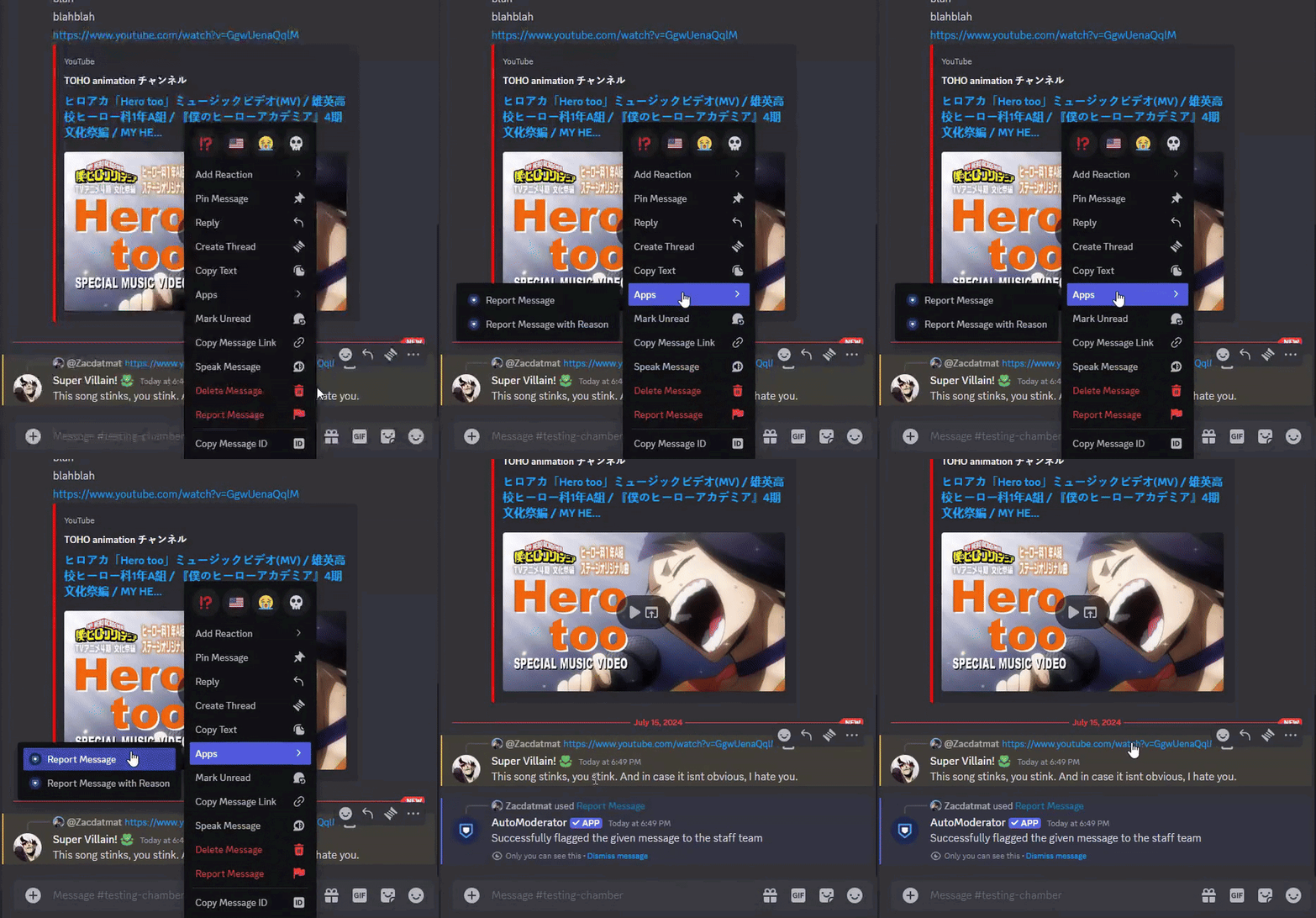
`●` Computer Method

Hover over a message until 3 horizontal dots appear and click them (or simply right-click the message). Hover over Apps until the sub-menu appears, then click on Report Message.

How to Report 2
`●` Mobile Method

Long hold on a message until the menu appears. Scroll down the menu to Apps and tap on it for the sub-menu to appear; then tap on Report Message.

Artwork Sourcing
`●` How do I source my artwork?

Method 1: Go to Google Images, and click on the Search by Image icon GoogleLens. Upload a file, drag and drop a file, or paste a URL to an image (URL is Desktop Mode only), and click Search. Look through the results and find where the image likely originated.

Method 2: (Desktop Only) In the Google Chrome browser, right click an image you wish to search, and press "Search Image with Google". Look through the results and find where the image likely originated.

More details can be found on Google's Support Article for Reverse Image Searching

#
Server Filtration
`●` Why are my messages disappearing?

This server uses a chat filter that automatically blocks or deletes certain words and phrases. Some swears are allowed, but the more insulting ones are not.

Do not try to evade the filter by changing the spelling / substituting letters / etc. Staff also have access to chat logs, which show all deleted and edited messages.

`●` What words are filtered?

Here is a brief overview of some of the items on the filter: Slurs, NSFW, illegal drugs, acts of self harm, Fuck when used as an insult or in a suggestive manner, Bitch, directed insults (you asshole, you're a dumbass, etc.), ship names, copy-pasta/spam, pirate sites, cracked clients, advertising phrases, & pinging @here or @everyone.

Staff/Community Team Recruitment
`●` How can I join the staff team as an Intern?

Staff applications are currently closed. When they open back up, there will be a link below where you can apply.

`●` How can I join the Art team?

Art Team applications are closed until further notice. If/when they re-open, there will be a form below allowing you to apply.

`●` How can I join the Event or Dev team?

Applications for those teams are open 24/7! We are not always actively recruiting people, but we look through applications for when we need additions to those teams. You can apply using the forms below!
Event Team Application Form
Dev Team Application Form

Staff Team
`●` What are the staff team roles & how can I contact them?

Server administrators are <@&414243386804142080>, moderators are <@&417845417204514816>, and helpers are <@&781707955837337650>. You are free to mention or direct message one of them if they are online.

Keep in mind that we also have https://discord.com/channels/414234792121597953/1425978837946208256 to contact us directly!

`●` List of Staff

<@&414243386804142080> - @hearty wagon, @winter mica, @mortal knot, & @marble anvil

<@&417845417204514816> - @fresh grail, @sage linden, @viscid charm, @near verge, @mint sable, & @eternal kiln

<@&781707955837337650> - @real scarab, @royal gust, @modern heath, & @void mulch