#pc-build-help-and-tech-talk
1 messages · Page 115 of 1
 vapid crypt
Oh its easily gonna be the same price as the 2080ti
 abstract kite
cause what im sensing is
 torn ferry
$700 for the 10700k on Amazon.
vapid crypt
Just look at the pricing now for Turing, and reflect it onto Ampere
torn ferry
Yes.
abstract kite
3080 is basically the new IN for mid end
 fleet canopy
Just settle for a 3080
abstract kite
and gonna cost 500-600
vapid crypt
The 80 cards for a while has been using mid range dies technically
abstract kite
3080 mid end , 3080ti high end, 3090 top tier high end , new RTX TITAN
vapid crypt
That doesn't make sense 
 vapid crypt
They're all in the high end
Mid range has never been 700 bucks I don't care how much Nvidia inflates prices
torn ferry
What PSU wattage would I need for 8700k and 2080?
vapid crypt
I mean when the 2070 launched it was 600 for the FE model
torn ferry
Can you find what wattage the PSU is without opening the case or is there no app that tells you the wattage?
vapid crypt
That's insane
abstract kite
700W is sweetspot
fleet canopy
750W
fleet canopy
Boo
abstract kite
xD
fleet canopy
750W
abstract kite
700W
vapid crypt
650W+ you won;t typically have issues running most things
fleet canopy
Also yeah you might have to open the side panel to look
vapid crypt
Might want a bit more considering the new high end cards will draw over 300w
abstract kite
kk well im fucked then
torn ferry
When would you ever need anything above 1000?
abstract kite
im selling my pc
fleet canopy
Don't do it now fool
torn ferry
I assume 1000+ is for SLI builds?
fleet canopy
1000W for like
vapid crypt
That's if you're trying to keep efficiency curves at a maximum or something, or for High End desktop builds
fleet canopy
For pretty overkill stuff yeah
abstract kite
welp
vapid crypt
Also SLI is conceivably dead, the second card does nothing outside of certain tasks
torn ferry
Gamdias makes PSUs, what?
abstract kite
as my 1070 OCED is like 301W
vapid crypt
From recent leaks its TDP is 320W, TDP isn't the same as energy used
So it would be higher than that
vapid crypt
So yeah something like 350w or 375w
torn ferry
What should I have if I intend to upgrade to 3000 series GPU when it releases?
torn ferry
Best Buy is trolling me.
abstract kite
so if i got for the new card, and my current psu is not gonna be enough im fucked... no one would wanna buy my pc...
torn ferry
There is no way a Corsair RMx 850W PSU is available now to be shipped.
vapid crypt
Just replace the power supply
abstract kite
if i sell my pc right... i probs will have a hussle
see
i dont have money
no need to shit talk me for having money for gpu and not psu
im aware of it
vapid crypt
I mean yes
abstract kite
the only reason why i went for 650W gold is cause i thought it wouldnt matter for new gpu releases
vapid crypt
I have a 750W so If I really wanted I could get anything, but I don't intend to ever go for a high end card
abstract kite
im going only for a 3080 to play most games at ultra at 120 fps or more
torn ferry
How do I know if the RMx I am looking at is the 2018 or 2019 model?
vapid crypt
RMx is 2018 RM is 2019
abstract kite
the model pictures are fucked up i know
torn ferry
Is RMx still good?
vapid crypt
Sure
torn ferry
Can you paint a PSU without damaging it given you cover the fan, power plug, and connector ports?
vapid crypt
Why even bother?
abstract kite
im probs gonna go for 850W if i get new pc build
vapid crypt
You won't see it unless you have the rear of the case constantly in view
torn ferry
Are the Riing Quad fans good?
abstract kite
go for corsair fans
fleet canopy
LL120 are great
torn ferry
QL fans "In Stock on June 18".
vapid crypt
Depends on the drive
vapid crypt
I believe they use high quality nand that doesn't slow down based on capacity
torn ferry
Do I just need LL120 fans and not the QL120 fans?
abstract kite
oki
vapid crypt
The cheaper NVMEs do slow down a bit when filled up
 sick reef
It will always get slower when it fills up, just not by the margin that poor quality one's do.
abstract kite
i noticed my samsung 850 evo
slowed down quite a bit
but might be limited due to HDD + SSD
fleet canopy
Any 2.5" will
But it really, really doesn't matter
Cause you're literally never going to fill that up entirely unless you can't really manage to keep it like 100GB free
vapid crypt
Right
vapid crypt
I haven't exceeded like 40% on my drive
fleet canopy
I need like another terabyte
vapid crypt
Any size could be enough
fleet canopy
Poor me, never uninstalling games like ever
vapid crypt
If you're willing to constantly reinstall stuff
abstract kite
XD
i only play like
Rocket league, r6s, tarkov
gtfo
etc
so like overall 5-6 games?
me: sims
fleet canopy
I barely play a lot of games, yet I have so many I leave installed
Makes my steam library feel a lot less empty
vapid crypt
I tend to move games to the HDD if I'm not playing it as much anymore
vapid crypt
With enough Cache its no big deal
Especially since the Hard drive doesn't have the OS on it
So it won't have that slowing it down
abstract kite
what do you mean cache
how can i cache it
or checl
i dont think i have cache on it
vapid crypt
Hard Drives naturally have Cache on them
abstract kite
think i deleted it or smth
vapid crypt
So after loading something off the drive once, it will use that cache to load it up faster next time
fleet canopy
Samsung evo is really not what you wanna go with overall comparing price/performance
vapid crypt
Uh should be over 100 bucks
vapid crypt
Well the Sabrent Rocket is 149 at 1tb
fleet canopy
But I remember the pro is like 100$
Those are like pretty good drives
There is like the P1
vapid crypt
They have the Rocket Q for like 120 or something
That uses lower quality nand though
fleet canopy
They're just too much overall
abstract kite
didnt expect this much of a price XD
fleet canopy
Because samsung is a fucking money whore
abstract kite
ok whats on par with 970 evo pro
vapid crypt
They have the best memory so there's your premium
torn ferry
Are the Samsung M.2s even good?
fleet canopy
They're very good, they're overprice though imo
abstract kite
^
vapid crypt
They have a pcie-4 model as well
fleet canopy
Literally the only reason why I dislike Samsung
 brisk badger
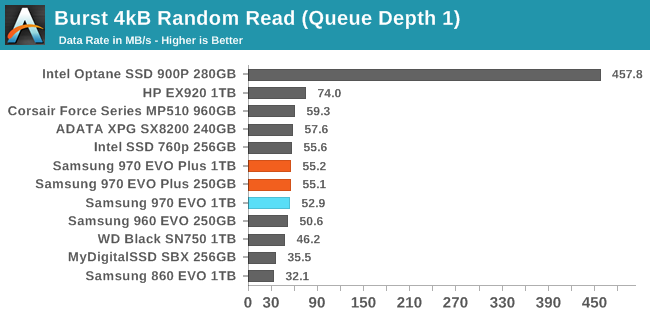
What drive is the best for random read/write speed?
vapid crypt
abstract kite
sabrent wont slow down right
fleet canopy
Cause if not, then don't even worry about that
fleet canopy

vapid crypt
They use quality nand I'm more than certain
fleet canopy
Intel P1
vapid crypt
And p1 is good, but its cheaper quality
vapid crypt
I have the 660p from Intel
fleet canopy
You're only gonna game on it anywyas
abstract kite
@vapid crypt pick the best quality and price in between those
like smth thats not 200$ XD
fleet canopy
Literally you could just compare loading with an M.2 and 2.5", no fucking difference
vapid crypt
Those are just brands
vapid crypt
I mean I could look through I suppose
fleet canopy
Just buy P1 1TB and call it a day
fleet canopy
No care
abstract kite
but i also dont want top notch
fleet canopy
It's no difference in gaming
abstract kite
nah gaming is fine
im talking about
overall performance
during first yr
and next yrs
fleet canopy
Overall performance, hm
brisk badger
I am looking for a (ssd) drive to host multiple OS's. So I want the highest possible random read and write speed. I don't find a good comparison or chart. I am not looking for the normal throughput (sequentiel read and write)
Anyone knows more? I think Intel Optane are the best in this regard?
fleet canopy
Samsung Evo Plus @brisk badger
vapid crypt
Intel has a 665p but I have no idea how that performs from 660p
abstract kite
I'm out. I don't speak Basic Rocket Science
fleet canopy
Course, it's pretty expensive
fleet canopy
Oh it looks like it's 130$ for that
abstract kite
well im willing to give like upto 200$
brisk badger
yea, looks like I found the missing hardware
fleet canopy
Get a 2TB Samsung QVO I guess @abstract kite
abstract kite
tf is QVO
abstract kite
bruv
fleet canopy
"The QVO uses a cache to help speed up performance with write operations, but when that cache becomes saturated it gets very slow. The EVO operates in a similar way, but then the bottleneck hits you don't notice as drastic a drop in performance."
torn ferry
If I am using a 360mm radiator and 6 120mm fans for the other slots, how should each one be oriented?
fleet canopy
You're not going to fill up the whole goddamn thing anyways
torn ferry
Isn't it top radiator blowing down, then side and bottom as exhaust?
fleet canopy
Depends on the case
torn ferry
For the O11 Dynamic XL.
fleet canopy
For mine with O11 Dynamic, I pretty much have it going up
Intake on bottom, top is exhaust, side radiator is intake
vapid crypt
WD Black SN750
torn ferry
@fleet canopy am I correct? Intake is blowing inside the case, and exhaust is blowing outside the case?
fleet canopy
Yeah
vapid crypt
They're both the same price
torn ferry
I was thinking top radiator placement intake, side intake, and bottom exhaust?
abstract kite
sabrent looking kinda fire tho
😄
im still a graphic biach
or looks
considering the parts
 eternal cairn
It's better if bottom is intake.
eternal cairn
Top is exhaust.
vapid crypt
Mount the rad on the side
eternal cairn
As for the side, you can do whatever.
torn ferry
I don't know if I should find QL fans since most of the fans will be exhaust it seems.
abstract kite
im deff gonna need a new pc then lel
vapid crypt
Intake bottom, exhaust top
Um I don't know what's the best take for a rad in that case
vapid crypt
I guess intake?
vapid crypt
You could do push/pull intake
abstract kite
gonna mount my kraken x73 on front
eternal cairn
If there's a slot on the side for a radiator, use that. If not, use the top.
abstract kite
vapid crypt
Oh yeah I just found out that Phanteks budget brand Metallicgear, they made a ripoff O11 Dynamic 
fleet canopy
kek
abstract kite

vapid crypt
I'm more of a fan of the P120 Crystal though, its an o11 but different
vapid crypt
Its like 100 bucks
vapid crypt
I didn't even know Zalman made cases
vapid crypt
I only know them cause they make uh heatsinks
I guess a while back they made a pretty good one... albeit weird looking
abstract kite
any good corsair 570x alternatives
vapid crypt
vapid crypt
In Zalman?
vapid crypt
Oh why is that?
vapid crypt
That sounds like a different issue altogether
abstract kite
it probs was
vapid crypt
And the 212 evo isn't the end all be all of Air cooling
abstract kite
cause i had that pc pre bought
vapid crypt
Its prolific for its good performance at a low price, that's about it
Now you can get cheaper coolers that perform better
And naturally the bigger more expensive coolers are really good
abstract kite
pog
nice i can get it for like 110€
which is not at all expensive
- looks good
how good is it at air control tho
vapid crypt
Air Flow is fine, its not out of this world; but it won't choke the system or anything
torn ferry
What is the differenced between the 460x and the 570x?
 lilac geyser
about 110x
sick reef
460? I thought it was just 450 and 470.
torn ferry
There's a 460x, the 570x, the iCue 465x, and the Crystal 680x.
sick reef
Oh right, cases.
torn ferry
All of the cases seem to have an issue with RAM clearance though when trying to mount a top AIO.
Is anyone able to find the 465x anywhere?
@fleet canopy I just found the worst price gouging ever.
ROG Helios PC, anyone?
They're charging $4000 for an RTX 2080 and 9700k build.
 strong whale
USD?
strong whale
review bomb incoming lol
torn ferry
USD.
strong whale
you already finna know people will still buy it at that price
vapid crypt
"$4000 Pc wow I bet it will last 10 years!" - Someone who doesn't understand PCs
fleet canopy
That sounds more like sarcasm
vapid crypt
Which now that I say that Timmy Joe did a video covering that exact sort of topic
And he looked back on a 10 year old PC that cost 5 grand
5 grand Canadian so https://www.youtube.com/watch?v=_NIJchm2zzo
 proper wren
vapid crypt
proper wren
vapid crypt
That doesn't stop it from functioning, but basically 3 pin connector stops you from controlling the speed of the fan
I think it just runs at full speed
eternal cairn
I think a 4-pin connector is for AIOs.
vapid crypt
Um I don't think that would change anything as far as overheating is concerned
Is it the GPU that's overheating?
Yeah I wouldn't mess with that, what are your temperatures in the first place?
If you don't know what's overheating you can't solve it
eternal cairn
Check the temps on HWMonitor.
brisk badger
Verify first if your pc actually is overheating before doing the next steps
fleet canopy
MSI Afterburner has a built in temperature monitor
So you could turn it on, go to a game that has some benchmark mode, and run that
It's also a bonus to put in CPU/GPU loads as well
abstract kite
my game started lagging and now it just keeps kicking me out when i try to rejoin
restarted pc and router, still not working
fleet canopy
Is this the first time happening?
abstract kite
yes
 clear quartz
oh boi unreal engine 5 looks good
clear quartz
doubt it'll impide the glorious PC master race
fleet canopy
Hah
brisk badger
Consoles is what hold technology back. Without them, games and hardware would be much more advanced
 worn rock
 merry bay
SSD's being standard on next-gen consoles gives relief for all the various forms of "loading corridors" I was forced into
where you can tell there's no content, but they're there to hold you hostage for a little bit.
Some games are just simple doors that won't open until it's loaded or adaptive animations that slow down if it's not loaded in fully.
found myself speedhacking in many singleplayer games in order to get past similar things. So nice to skip fluff sometimes
in a lot of cases decent PC's are loaded in way before those "loading corridors" are done keeping you hostage, hence speedhacking
sick reef
3-pin connector for fans are 12V, ground, and tachometer.
4-pin connector for fan are 12V, ground, tachometer, and PWM.
3-pin connectors are controlled by varying the 12V feed. 4-pin connectors are controlled via the PWM signal.
sick reef
Having to solder cables onto connectors for them, you try make certain you get them right so nothing bad happens.
Fun fact of the day:
Fans needs a certain voltage to start spinning. Effective power range for a 3-pin is around 40%-100%, and isn't linear to fan speed.
Effective power range for a 4-pin is 0-100%, and works often linearly to fan speed.
This is because PWM means that it feeds 12V in pulse waves on intervals.
You can simulate PWM function on a 3-pin fan by feeding it 12V, then controlling that feed with a Pulse wave simulating controller. This often does not work at the high frequencies of a 4-pin fan, and will be perceptibly/audibly oscillate, but it gives you more control over the 3-pin fan output without having to replace it.
brisk badger
are all fans 12v? I remember having 9volt fans or I think of something else
probably 12v is normal
sick reef
12V is the norm for computer fans, but you can have fans run between I think 1-48V.
A fan connector on a controller or motherboard will output 12V max.
Another benefit of 4-pin is that you can control the fan separately from where you feed it.
You can connect a lower voltage output to a higher voltage fan without anything breaking. But you can't connect a higher voltage output to a lower voltage fan, as that will most likely kill the fan, and eventually short a fuse in the motherboard.
brisk badger
hmm may sound stupid but how does the mainboard or the output know if this a 12volt fan or 9v etc
i assume the mobo can varry the voltage output?
or is that fix 12volt
< bad when it comes to electricity
< works for the company representing all electricians in the country
sick reef
It usually doesn't. It is only possible to vary the Voltage this with a DC controller, 3-pin.
A 4-pin will feed 12V constantly on the power line.
You could probably run a 9V fan on 12V, but it's similar to overclocking. And it's also not guaranteed to work.
It can interpret Tachometer values, but that in turn depends on what kind of a tachometer it is. Two-lap, or one-lap, and as you imagine, you can get half value, real value, or double value, depending on if it interprets it wrong.
The motherboard will only measure the power the fan pulls, when it comes to how it varies voltages. So if the fan shorts, it will safety break the power to the fan by a permanent, or resettable, fuse.
also kek
But yeah, it depends fully on how the motherboard handles the fans. If it only does PWM, it will always feed 12V. If only does DC, it will vary depending on the settings.
Most often, on a connection that can automatically be either PWM or DC, it looks for if it detects a PWM signal as to which mode it sets itself to.
brisk badger
I have an usb to molex cable. On the molex I have 1-3 fans attached. Am I crazy?
don't know how much the usb charger can deliver
sick reef
Internal usb or usb a?
sick reef
USB provides 5V, and the amperage is dependent on the limit of the adapter itself.
brisk badger
but that would be okay right? Fans would just spin much slower
sick reef
The amperage is in turn the voltage of output, divided by the internal resistance of the fan.
Yeah, it should be fine. I think you would be hard pressed to even hit 0.2-0.3A.
If the fans are 12V to begin with.
It should say on the charger how many amperages it delivers.
Like "Max x amp"
Molex is 12V, ground, ground, 5V, so you're probably only even using 2 pins of that molex adapter.
brisk badger
i can tell when at home, I don't remember now
yea 2 pins only
had to be creative, needed pc fans outside of a pc case 😛
sick reef
It's amusing, because purely technically, it's 12V, 5V ground, 12V ground, 5V.
Yeah, it shouldn't be too bad. I assume it's not any even close to power hungry fans.
brisk badger
is there any devices that use molex today anymore?
can only think of old drives and dvd or cd drives
sick reef
I'm not really certain. It's a good connector, though, because you can get 3 values from it without messing about too much.
brisk badger
it is. a bit fat but good and it sat tight once connected
sick reef
I think SATA power only runs 12V and ground, with some data lines.
Yeah, it's a good connector. I was talking about how you can pull 5V, 7V, and 12V from it, so you could actually create a basic 3 stage fan controller from a regular molex, with a few couplings.
Ah, no Sata power actually has all three internal voltage values, so it would technically have more options.
sick reef
You connect the device from the 5V into the 12V.
Kind of
It's weird stuff I used to do math on in school, but it is, since there is a resistance between them, not a short.
The difference in voltages being, yeah 7V. There is a lot of this when you work with 3-phase, not to mention phase shifting.
 fallow shard
Hi, I just wanna say GTFO currently runs beautifully using Proton(Valve) on Ubuntu <3
Just in case people were considering giving it a shot
 grand ivy
Gtfo runs decent on a samsung smart fridge
brisk badger
It runs linux so its not impossible
 stable wyvern
Hi, I just wanna say GTFO currently runs beautifully using Proton(Valve) on Ubuntu <3
Just in case people were considering giving it a shot
@fallow shard what distro, which version of proton, and what workarounds? The unity engine would always crash on all versions of proton. Had most up to date kernels (via ukuu) and using padoka ppa
It was same result with the oibaf ppa. Could never even get the game to to load screen
fallow shard
uname -a
Linux mbox 5.4.0-33-generic #37-Ubuntu SMP Thu May 21 12:53:59 UTC 2020 x86_64 x86_64 x86_64 GNU/Linux
running proton 5.0-8
edit:
lsb_release -a
No LSB modules are available.
Distributor ID:    Ubuntu
Description:    Ubuntu 20.04 LTS
Release:    20.04
Codename:    focal
worked out of box honestly
stable wyvern
Interesting. I had it on a fresh install of mint 19.3, kernel 5.7, and latest updates for padoka/oibaf (tested separately). Unity engine would start, then silent crash to desktop
fallow shard
oh, hardware ig if that matters? i7-4790k - gtx 1070 w/ nvidia-driver-440
oh thats weird
what gpu/drivers are you using?
stable wyvern
Tested it using every single version of proton except the new 5.0 one since it wasn't out yet.
Threadripper 1950x
Vega 64 8GB
Padoka ppa (first test)
Oibaf ppa (second test)
fallow shard
aaaah gotcha, that might do it(not sure ngl, but possibly)
yeah im not sure about those amd drivers but idk, im sorry, i wish i could've been more of a help. I'm sure there are other amd peeps that know more than I do that can help you though!
vapid crypt
Um though I do have an AMD card, I am unfamiliar with their implementation in Linux distros. I've always heard the drivers were better on Linux though.
brisk badger
people running games through linux are (crazy) heroes
okay proton made it easier but still
vapid crypt
Its certainly advanced further since 5 years ago I'm sure
brisk badger
yep with proton it's definitely better.
Still sometimes spending an hour or two installing a driver
which could be my inability ofc
vapid crypt
If it gets to a point where there's almost no issue I would consider just using a linux distro exclusively
brisk badger
it has both pros and cons. Windows IMO is still okay for home usage/ to play games etc
it really is more the company that sucks not the product (anymore)
vapid crypt
Anyway to rule out any driver problems, I think its pretty universal to just wipe drivers and re-install
That tends to solve driver problems
stable wyvern
The oibaf and padoka ppa are the latest builds of the mesa drivers for AMD cards. I tested it doing a fresh install of 19.3 and installed the drivers from oibaf, updated everything, downloaded gtfo, then tried to run it using each version of proton. Unity engine silent crashes to desktop.
I clean wiped the drive, reinstalled 19.3, installed padoka ppa drivers, then repeated the process. Unity engine still silent crashes to desktop. No errors generated
I was linux but had to dual boot windows to play GTFO
 vapid ice
 abstract kite
GTFO runs great on Arch Linux with the non-free Nvidia drivers!
torn ferry
How much of a difference are Cherry MX Speed switches from Brown?
vapid crypt
Speed switches are tactile with faster travel time right?
torn ferry
1.2mm compared to 2mm.
vapid crypt
Well there's your difference right?
vapid crypt
No idea, you can buy a sample kit to test it
torn ferry
Cause I'm unsure if I should just buy the K70 MK.2 that is white or just buy Corsair's White PBT Doubleshot Keycaps to put on my K95.
sick reef
It feels off.
I never got used to them.
I often accidentally rested my fingers on them, without noticing.
Didn't make too much of a difference for games. I couldn't get the accuracy I wanted.
vapid crypt
I've only ever used Outemu Blue switches, can't say I would prefer to try something else
abstract kite
Y'all seen the new 3080 cooler leak?
I'm getting very interested in how this is going to work
vapid crypt
TBF its a couple days old and we've been getting a steady stream of leaks this week
abstract kite
Tinted I'm not always here to chat lol
At this point Nvidia might as well just go ahead and announce the card
at this point they're just playing the waiting game to see how long they can hold out before Big Navi drops.
abstract kite
Still aiming for a 3080 if they don't fuck up the cooler and keep it competitively priced, but I'm open to seeing what AMD has in store with Big Navi.
vapid crypt
The cooler seems interesting, I still wouldn't be one to buy brand new hardware without letting any problems get fixed after some time though
Unless I were making a brand new PC with nothing on hand or something
We should hear official info about Big Navi in September
Should be the same for Nvidia maybe
Unless they have a chance earlier on
 muted relic
My friend is looking for a 4K Build for Under or around $2,000 can anyone help with a list> ?
 jade ermine
3600 - 16gb - B450 - 2080Ti
vapid crypt
I would wait until Q4 this year before building anything
The 3080 is looking like a monster that will crush 4k and who knows what Big Navi holds. AMD already promised disrupting the 4k market earlier this year
vapid crypt
If you're wondering why its that speed, I think Ryzen splits it between the two CCXs on the die
Though that must not be XMP you should set it right away
vapid crypt
Oh hmmm I'm wrong apparently it displays as half because it splits between the two sticks in dual channel config
vapid crypt
Curious that means every time someone showed a screenshot at full speed it means they were running single channel
proper wren
feels bad man
vapid crypt
Do you happen to have a kit of Corsair Vengeance LPX?
vapid crypt
Oh okay
I figured since that was like one of the most popular kits cause of price/performance, that's what I got so
proper wren
problem is
vapid crypt
Was able to overclock to 3200 at C14
proper wren
it was at 2133 for 6 months without me knowing
I forgot to change the settings when I bought a different mobo lol
vapid crypt
Yeah that would slow things down something awful, if you had nothing to compare it to you wouldn't know any better
vapid crypt
It be like that sometimes 
abstract kite
That PSU is overkill
vapid crypt
Not only is the PSU overkill, but that motherboard is not sufficient for an R9
 late sorrel
Also, get 3600Mhz
vapid crypt
The cheaper MSI X570 boards have crap VRMs for the money
abstract kite
MSI X570 motherboards are just a letdown tbh
vapid crypt
If it isn't a Tomahawk, or above 300 bucks its not good
vapid crypt
Though I suppose if the Power Supply is there for efficiency curve and adapting for those 300W monster GPUs I can kind of understand it
eternal cairn
Don't buy a GPU yet.
vapid crypt
I thought this was supposed to be a 4k machine
fleet canopy
Is it only for gaming? @muted relic
vapid crypt
That's a new one
It actually performs really well
I think uh 7 degrees from a comparison I saw with the X62
Woah I just noticed he picked the FE model for the 2070
vapid crypt
Uh its just some of the stuff there is overpriced and not budgeted well like the power supply and RAM
Well I tried to improve it, I did step up the graphics card. But seriously, wait till Q4 this year. AMD and Nvidia are releasing new graphics cards by October. https://pcpartpicker.com/list/mkRCQq
abstract kite
^ For sure
fleet canopy
Yeah but is he really going to actually use it fully?
He could just get a 3600 and then buy a 4900X when it comes out or whatever
vapid crypt
Maybe, that doesn't matter too much. Its a non compromising part
It will be fast enough to handle any graphics card at 1440p and up
vapid crypt
If it fits in the budget, its worth it
vapid crypt
Not too sure about the case though, but its kind of hard to get your hands on a decent cheap case atm
late sorrel
see, that’s why I’m okay with buying a 3600 to replace my system
most likely, I’ll be in a great money position & be able to go all out for the 3080/Navi & 4800x
vapid crypt
6900XTX
late sorrel
and, I’ll be in a good position for server cpu
muted relic
@fleet canopy Yea bro its only for gaming
And thanks guys ima go back and change it up
vapid crypt
I sort of made some changes so you could judge it for yourself, its an improvement for sure
muted relic
Link ?
vapid crypt
muted relic
Sweet thanks bro ^
vapid crypt
Huh
There's listings for the new X570 Tomahawk but they're all sold out 
If I could find one maybe I would get one instead of upgrading my case and cooling
fallow shard
@abstract kite https://discordapp.com/channels/408196129470152705/584808651164745809/720770019960815696
That looks kinda like a 3d print ngl 
||i know it's not, just looks funny||
 still kernel
Is this the channelf or troubleshooting or bug help? or can sonmeone point me to it if its not
vapid crypt
If its troubleshooting regarding GTFO go to #gtfo-technical-support
still kernel
gotcha ty
vapid crypt
However if its a general computer thing this ones fine
torn ferry
I wish Corsair made their white K70 keyboard in more switch types other than MX Speed.
 limpid bone
help me out, let me know what would me better for doing basic tasks and gaming https://pcpartpicker.com/list/
vapid crypt
That link isn't right
torn ferry
Yea, it's not right.
Links should have a string of numbers/letters instead of "list".
vapid crypt
torn ferry
Yea. like that.
vapid crypt
Copy the link at the top there like so
vapid crypt
Well one thing I want to point out is that motherboard's MSRP is like 170
So I wouldn't pay that much for it
Its a good board for the money though if you can actually get it at MSRP
And I see you're trying for a white theme too
limpid bone
lol yes
vapid crypt
Alright, well there's certainly a better way of going about this
First of all the H510 Elite isn't worth it, if you're willing to spend that much on a case go for a white Lian Li O11 Dynamic, you gotta account for fans in the budget though
As it comes with no fans
muted relic
how come yall not grilling him like how yall did me lol
vapid crypt
Who grilled you, we grilled the list 
late sorrel
also, aio bad
fleet canopy
AIO cool
Ish
Could pay for a cheaper one that performs better
But this one is apparently very good
vapid crypt
Uh I wouldn't say better but the same at least
fleet canopy
Yeah
vapid crypt
What's with the 4tb drive?
fleet canopy
game
vapid crypt
I just think if you want a secondary drive for that, it should be 7200rpm
limpid bone
games
vapid crypt
And I'm pretty sure at that size you're not gonna find it at that speed
limpid bone
so at 2t?
fleet canopy
Unless Modern Warfare keeps pushing 30GB updates
vapid crypt
Better off getting 2tb now I would say
muted relic
LOL
fleet canopy
1.4TB game
eternal cairn
People who don't delete their old games they never play.
fleet canopy
Like me
vapid crypt
Yeah I do tend to move stuff off the SSD to the second drive
fleet canopy
Hm
vapid crypt
Oh okay, just bear in mind the Coolermaster H500 should be around 120 normally
vapid crypt
Used to be an even 100 but they up the price from tariffs
fleet canopy
Mm, fractal design https://pcpartpicker.com/list/tHCgf9
vapid crypt
@limpid bone Is there any reason you went with 32gb of RAM? Cause you said it was just for regular stuff and gaming right?
muted relic
He trying to be OP
limpid bone
lol a bit
vapid crypt
Yeah well unless you're doing some kind of editing work in addition, be it video, blender renders or something
That really wouldn't be utilized
Like at some point we might need that overhead for games, but its as easy as buying 2 more sticks later
muted relic
You feel the burn @limpid bone
 near widget
uhhh my pc is getting way hotter on this patch than last patch
fleet canopy
Hm
near widget
is anyone else having this issue?
limpid bone
I just sometime keep a lot of stuff rounding in the background like keeping 20 tabs open and programs im working on for school
muted relic
Damn 20 tabs you mean porn
vapid crypt
Here's a solution, stop using Chrome
limpid bone
but i like chrome lol
late sorrel
firefox gang
vapid crypt
GANGGANG
near widget
my gpu is
vapid crypt
But in any case, typically when tabs aren't active they get loaded into the page file and don't use up RAM
muted relic
Damn i might have to hit that 'uninstall' tonight
vapid crypt
Well that's how it should work
But I think Google lost that somewhere when they were spying on people using Incognito
muted relic
Places tape over camera
vapid crypt
Well I don't know if its that level of spying, but despite what they've said they do track your history with incognito and will advertise you stuff you're searching
Okay so I don't normally load a crap ton of tabs but out of curiosity I just opened 20 tabs, duped youtube a bunch of times and this is how much memory it reserved
Anyway I suppose it would be higher if they were all on proper videos maybe but I doubt it would be that much
Your budget is within 2 grand right?
muted relic
LMFAO
vapid crypt
I can't pull a miracle
muted relic
So he should just get ps5
vapid crypt
I mean its your money
Though honestly I wouldn't even consider buying any graphics card atm anyway, new ones are coming out by October
limpid bone
what you think about it
well i can wait on the gpu, but should i get everything else
fleet canopy
There's even new CPUs coming out as well, it's better imo to wait really
vapid crypt
That's true, actually it could add even more price/performance to the old stuff as well
Cause that 3700X will start falling to the low 200s like immediately once the new stuff is announced
In any case... uh https://pcpartpicker.com/list/WbFHFG
muted relic
Damn they be doing pc gamers dirty
torn ferry
Are EATX motherboards a waste of money?
fleet canopy
Not if you're going to use EATX
torn ferry
What is EATX mainly used for?
vapid crypt
So I mean hang on to that list, change things later on. But this should give you an idea on how much you might spend
torn ferry
Is the iBuyPower Snowblind case not available anymore?
vapid crypt
I don't even think you could buy that outside of getting a computer from ibuypower
limpid bone
would you get a build from them?
vapid crypt
I wouldn't recommend it
limpid bone
over priced
torn ferry
They're OK but not great.
fleet canopy
Would never recommend a prebuilt at all
vapid crypt
Its just a quality control thing
torn ferry
If you want quality, I'd probably build one which is what I want to do.
And ditch my prebuilt.
vapid crypt
You have no control over what parts they use
torn ferry
Take an axe to it maybe.
vapid crypt
Especially if you get one of those straight from a retailer
torn ferry
And isn't iBuyPower and CyberPowerPC the same company?
limpid bone
you didn't like the case i picked lol @vapid crypt
vapid crypt
Uh yeah the thing is
If it were a 70 dollar case, it'd be fine. At 150 bucks, its just a bad choice. Cause the thing is its no different in terms of performance from their regular H510
Which is 70 bucks
vapid crypt
The P400A is a great case though, 140 is a tad inflated I think it should be like 100
But what are you gonna do
torn ferry
How are the other sites like Origin PC, Maingear, Digital Storm, etc.?
vapid crypt
I suppose if you wanted a cool white case with a glass front panel something from Corsair would be fine. They don't choke off the air flow in the 465X for an example. Just can't find them in stock atm
vapid crypt
Looks rather cramped
muted relic
LOL y'all always find something to say
 fresh ginkgo
it is a little cramped but it all fits
vapid crypt
I mean I could say nothing, but what would be the point
torn ferry
Is hardline cooling difficult to set up?
I know soft tubing is probably easier since you can just connect it anywhere you need it to go, but I'm pretty sure with hardline you have to plan the loop?
fresh ginkgo
if your trying to do it for the first couple times then yes but the more you do it the easier it gets
torn ferry
Is water cooling more expensive than an AIO or air cooler setup?
Cause you need waterblocks for CPU and GPU, radiators, tubing and fittings, reservoir and coolant?
torn ferry
How do you bend the tubes for hardline?
vapid crypt
You aren't technically required to cool both, but sure if you wanted to go all out
torn ferry
Do they come already shaped or do you need to use some kind of tool?
vapid crypt
But you could just do a single rad and cool just the CPU, leave the GPU on air
torn ferry
What would benefit more from custom water cooling?
limpid bone
@muted relic said he want everything water cooled
torn ferry
The CPU or GPU?
fresh ginkgo
lets just say i spent 700 usd in just water cooling
muted relic
Pocket change
limpid bone
@muted relic yeah alright, you want to build my pc for me then 😂
fresh ginkgo
not really pocket change
it was a pretty penny but 100% worth ity
altough one of the fittings decided to leak 2 days later and fry my power supply
got lucky that was the only thing
this is the before pic
stable wyvern
Mine
1950x
Vega 64 8gb
32gb ram (this was during the samsung price gouging, cost me almost $800 💀 )
vapid crypt
Good God
stable wyvern
Ddr4 3200
stable wyvern
13 if I remember correctly
vapid crypt
I've never seen it at that CAS for XMP
stable wyvern
It was pure price gouging by samsung. They slowed production to jack up prices
vapid crypt
C14 sure
stable wyvern
Actually, I think you're right about the C14
vapid crypt
Could certainly get it lower though
stable wyvern
Originally I wamted to get the 16gb sticks and max out all 8 slots for 128gb ram, but it would've been $2K+ for ram alone. Screw that
fleet canopy
CL13 isn't yet available I think? Not at that time I guess
fleet canopy
Maybe
vapid crypt
3200 C14 is just what they have it set to work at for XMP
Just for example the memory I have is advertised to run at 3000 C15, I oc'ed to 3200 and have the CL at 14, but the rest of the timings are looser
stable wyvern
Yeah, I stuck with the stock memory settings. I don't understand enough to tune it properly
vapid crypt
Neither do I, but there's a calculator that makes it simple
fleet canopy
You can watch the techquickie and learn in 4 minutes
vapid crypt
Ryzen Dram calculator
stable wyvern
Oh? I'll have to check it out
vapid crypt
That includes TR actually
stable wyvern
I'm debating whether to get a 3990x
fleet canopy
If you're patient, 4900X or 4990X kek
stable wyvern
Have one rig with a hypervisor running 4 VMs and thin clients
 stark plover
Any thoughts on this psu https://www.amazon.com/Thermaltake-Toughpower-750W-256-Color-PS-TPG-0750FPCGUS-R/dp/B01N4C39AR
vapid crypt
I wouldn't buy it at those prices
stable wyvern
Then a couple other VMs for media, and family members
vapid crypt
Seeing as something like that should be no more than like maybe 120 bucks
stable wyvern
Save money and skip the rgb
stark plover
Newegg got it for 130 according to pcpartpicker
lemme get the sauce to a good psu then
vapid crypt
Well you wouldn't see the RGB unless you have a specific case that allows you to
stable wyvern
Check microcenter. They usually have decent deals
vapid crypt
Oh I understand
stark plover
im getting it for the wattage, rating, price, etc
fleet canopy
lol rgb on psu
stark plover
CPU will be a ryzen 3600, gpu not sure but midrange
stable wyvern
I got my modular Corsair 850w 80 gold for $35 off. Paid about 140 after tax
stark plover
Just trying to get the rest set up
vapid crypt
And last I checked cause I was browsing earlier
fleet canopy
So like a 5700XT
vapid crypt
The Coolermaster MWE Gold PSUs are in stock at Best Buy
stark plover
Im trying to beat a evga 750w at 160$
I saw that but i wasnt sure about CM as a psu brand
¯_(ツ)_/¯
vapid crypt
Oh apparently its sold out
stable wyvern
Probably a rebadge
vapid crypt
At least at Best Buy
vapid crypt
Its a decent power supply from what I can tell
I would recommend the one I have, but its basically extinct atm until Bitfenix ships em out again
stark plover
smh why pcpartpicker says some items in stock
but the newegg page says not avaiable
I would recommend the one I have, but its basically extinct atm until Bitfenix ships em out again :phaWesker:
@vapid crypt aight thanks ill dm shipping address since ur giving away psu
vapid crypt

vapid crypt
The gold ones should be good
stark plover
Or would it be best to just up price for this https://pcpartpicker.com/product/P7pmP6/thermaltake-toughpower-gf1-pe-850-w-80-gold-certified-fully-modular-atx-power-supply-ps-tpd-0850fnfagu-1
wrong link
vapid crypt
Though I would advise caution
stark plover
vapid crypt
Cause Thermaltake are assholes and they won't honor warranties from Amazon
stark plover
gg
vapid crypt
Specifically for the PSUs
Basically if you didn't buy it directly from them, or straight from a retailer or e-tailer that warranty may as well not exist
vapid crypt
Yeah Bitfenix Whisper, like I said its extinct atm
vapid crypt
Hmm not bad
stark plover
Whenever Im on the B&H site it just feels like something like bed bath and beyond and then i wonder why im looking for pc parts there
vapid crypt
I mean if you can legit get that its a good unit, I got the 750W for like 100 bucks last year
stark plover
"This item ships direct from the distributor"
It says that
I assume itll be a legit model
Ive never used B&H but since its on pcpartpicker, its a legit site yeah?
vapid crypt
Well that's not what I meant, but fine
stark plover
oh
vapid crypt
People sleep on B&H clearly
stark plover
what did you mean
like
get it from there vs ebay or something
legit makes it sound like im going to a black market or the dark web for a psu
vapid crypt
Its 1AM and I'm running on a can of monster from 6 hours ago, I might not make sense atm 
stark plover
thats fair
jade ermine
crazy how they are supposed to launch zen3 this year too
vapid crypt
Well not really, its just 7nm yields are so great they're taking advantage of that now
They effectively have a ton of 3950X tier silicon on hand, so what better than to refresh the lower parts
Also allegedly it might be possible to overclock the infinity fabric to 2000mhz according to the guy that made the dram calculator https://twitter.com/1usmus/status/1264803081667174400
vapid crypt
Get your B-dies
vapid crypt
I'd have to get some myself at some point after upgrading
jade ermine
swapping to XT model might be fun just for the hell of it but in reality i just end up waiting for next gen
i mean im running 3900X right now so it would be just out of curiosity

vapid crypt
Its effectively gonna be a 12 core 3950X
lilac geyser
XT cpu and gpus, anyone else confused?
vapid crypt
A bit, but it would only get really confusing if they continue to refresh cpus with that tag later
Though at the same time the Graphics card always have a prefix of RX while Ryzen has a prefix of either like R3/5/7/9
vapid crypt
There's a lot of different reasons for that happening unfortunately, is it shutting down after launching any other game?
 stable goblet
I am so happy to see someone else is having the same issue
im running an i5-8400 and 1080
i push 144 frames with high to mid settings
abstract kite
no other ran into that issue no
just GTFO
I suspect it could be because of Vangurd
vapid crypt
Ah the legal Rootkit
stable goblet
LOL
vapid crypt
I say legal but I mean come on
late sorrel
Vanguard didn’t stop me from playing gtfo
stable goblet
No i can play
abstract kite
But I deleted GTFO not planning to install it until it comes of early access cuz i get an unstable 55 fps with a 1060
stable goblet
but after maybe one or two hours the pc will shutoff
vapid crypt
Strange
stable goblet
then i try to join in or reconnect and it jsut keeps shutting down and rebooting
abstract kite
ye my pc just rebooted
vapid crypt
Have you checked your temps?
stable goblet
yes
abstract kite
They are golden
stable goblet
my pc cool as a cucumber
late sorrel
shoot vanguard then
abstract kite
my temps are good
stable goblet
i have run heavier games at ultra for hours at a time
i can play apex for 10 hours straight
its literally just this game
abstract kite
my pc never shut down before other than when i was overclocking
so i shat my self when i saw the RGB turn off
stable goblet
and it's dissapointing cause I just got it and I really fucking like this game so not being able to play is frustrating
late sorrel
what do your logs say?
could you post the gtfo logs in this chat?
see #bug-reporting for path
vapid crypt
I recall another person having an issue like this back when the game came out, in that case it was a hardware issue. The Fan in the power supply was dead, was overheating tripping its protection. Not necessarily the case here but yeah
late sorrel
just wondering if it’s game related or not
stable goblet
did he have a corsair cx750M
vapid crypt
I don't recall, but its not like its impossible to happen on any unit necessarily
abstract kite
I have an EVGA 750GQ
vapid crypt
If its not happening elsewhere it might be something else though
stable goblet
I was watching videos
as you do
and this guy had the same psu
siad it was giving him issues that it could run games and stuff but if he stress tested it it would shutdown the comp
said it might be a capacitor issue
late sorrel
huh, that kind of thing was happening to me too
vapid crypt
Corsair CX series
vapid crypt
They had a recall of their SF power supplies recently
That's something else entirely but still
And black screens wouldn't that be related to drivers?
abstract kite
they still could be corrupted
stable goblet
I might just take my whole system to a repair place to check it out
its new maybe 6months old I might still have the warranty
abstract kite
try factory reset
stable goblet
but that is work I rather not have to deal with