#pc-build-help-and-tech-talk
1 messages · Page 83 of 1
 abstract kite
 steady solar
GRRRRR
abstract kite
No u
steady solar
Tiny tiny
abstract kite
Now you are getting to personal >.>
steady solar
😛
 brisk badger
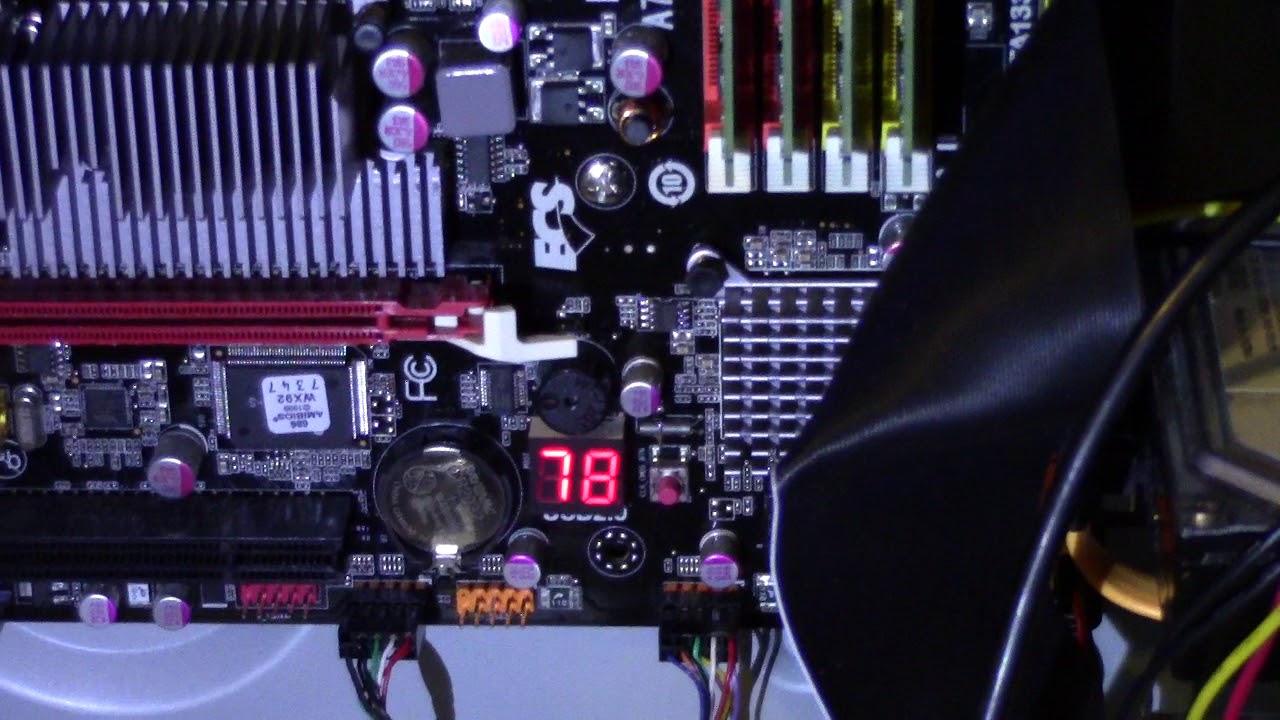
you have any LED error code on the mainboard?
"boot drivers" I don't know what that means but I can tell you that drivers are loaded when windows is booting and if you have issues getting a picture on your monitor while starting your PC I think you have issues with the bios / whatever happens before Windows boots. Unless the screen goes of when entering the Windows boot logo
abstract kite
Well when...
Hold on let me get his name
When @ornate ginkgo fixed my computer the first time he went into my I guess video drivers and deleted and reinstalled them and easy fix.
brisk badger
Yes but even with broken video drivers you can get into the bios. the bios doesn't need a video driver
abstract kite
So you want me to flash my Bios?
brisk badger
drivers are made for the windows OS, so the OS can communicate with the hardware properly
no, check for an error code if you have any on your mainboard
abstract kite
How?
brisk badger
some small LED 'screen' on the mainboard? Many usually have them
something like this
 merry bay
that's a fairly high end feature usually
even led indicators with labels are semi-rare
brisk badger
Then get a PCI debugger card. They are great and cheap
I dunno else. Try with as few used ports as possible. Reseat RAM, make sure mounting pressure of CPU is fine (mostly is but I seen stuff). Check if the fans spin different
merry bay
That's actually something I would've loved to have on many occasions. Thanks for the idea
brisk badger
https://www.ebay.com/itm/2-4-Digit-3-in1-PCI-E-PC-Analyzer-Analysis-Diagnostic-USB-Card-POST-Card-TOP/253167600778?hash=item3af1f7048a:m:mlZTh88e1KWALKv9YpEBCwQ
(not affiliated to the seller) some cheaper debugger cards
costs like 2 usd with shipping. I would say it's almost mandatory for pc enthusiast, or if you work with different mobos
abstract kite
Let me unplug all my USBs and try to boot up my PC
brisk badger
but really LED error codes on mobos are not a thing today?
merry bay
The three of my friends I helped troubleshoot had none. Their builds spanned over the past 1.5 years.
mid range builds
only help was the speaker
i'm sure it's only getting more common nowadays to include troubleshooting LED's at least
abstract kite
So
I unplugged all my USBs and the PC booted right up with no problem.
I also made sure to reseat my Display Ports and Power Supply Plug.
steady solar
So it worked @abstract kite
merry bay
I think I recall talking about setting boot priority for USB a week or two ago. Could it be a leftover setting trying to do that? It barely makes sense, but doublecheck your boot priority in BIOS to be your OS drive
abstract kite
Idk
steady solar
Hapcher is just defective shit
Find out what it is that won't let you boot
Probs keyboard
If it was prioritising usb it'll still boot to bios
Galerus it shows a number on screen when can't boot right?
Like 99 probs
merry bay
it might just be stuck on "press any key to boot from USB" and not continuing for some strange reason
abstract kite
Tbf I never even flashed by BIOS once on this PC.
merry bay
Or it could be trying to boot from a USB that doesn't have media
But it should post okay in that case
abstract kite
So attempt to flash Bios?
steady solar
It's one of your peripherals
merry bay
no? Didn't you say you can boot fine after disconnecting things a moment ago?
steady solar
What keyboard does you has
abstract kite
Cyberpower.
steady solar
Mouse?
steady solar
Seeing
abstract kite
It booted albeit a bit skower
steady solar
But all good?
abstract kite
Yep
steady solar
Alright so keyboard is defective
abstract kite
Hmm
steady solar
You can plug it in
And use it fine
It just won't boot when it's plugged in
Inconvenient unpluggin and plug in
Or u can get new
Or see what they say
steady solar
Stopping you from booting
Perhaps something to do with onboard memory
I never fixed that problem
But it comes up alot
merry bay
I would still check the boot priority and put USB in the bottom of the list. If that doesn't help, look through BIOS versions, likely fixed with updates.
It really does sound like it's trying to boot from your keyboard or something along those lines.
abstract kite
That would be funny
merry bay
After your booted plugging the keyboard back in should work fine.
Just starting the pc is a pain
abstract kite
How do I set priority list without flashing BIOS?
merry bay
UEFI should still have mouse support or another keyboard
abstract kite
Fuck. 
merry bay
You could use your mouse there, it's wonky but it should work
steady solar
What u press on mouse to get into bios
merry bay
True, overlooked that one
abstract kite
Gonna need to wait till Thursday than.
merry bay
You could be that guy and ask your neighbors if they have any keyboards lying around for an hour or a couple 
abstract kite

Yup figured as much.
I restarted my PC one more time without my keyboard in and Displays failed to boot.
@cheese#0458
steady solar
Is there a number in the corner @abstract kite
abstract kite
What corner?
merry bay
His mobo doesn't have a display
abstract kite
On a side note though
steady solar
Pc fans?
abstract kite
Everything inside the case such as fans, heatsink, MOBO and GPU are on.
steady solar
Alright
Reboot again
Maybe take out the mouse too
On 2% so if I die just keep trying stuff
But it is something with usb stuff
 sick reef
FeelsPCHMan
abstract kite

abstract kite
Gdi
Now its not wanting to boot displays at all
I unplugged my Headsets this last boot and now its coming on
My headsets were the last USB
sick reef
The part of the CPU lanes dedicated to your peripherals, USB, internal USB, SATA, U.2, and often M.2, is called PCH. When it isn't working properly, it shuts down all of itself.
abstract kite
Labcat in not exactly fluent in what you just said... Could you repeat that?
Is what you are saying if say a USB Port is bad the CPU just says "Nope" and doesn't work for anything?
brisk badger
have you tried to use other ports for the keyboard? The contact on the keyboard look fine?
it's funny. For over a year my PC also complains about a defunct USB device and wont boot (since I have a LED error code I am aware of it haha) and I simply press the reset button and it boot afterwards just fine xD One would assume it would load default BIOS settings but nope
abstract kite
I have not tried it
 late sorrel
wait what's going on?
abstract kite
Whenever I boot up my PC with any USBs on it my Displays fail to boot up.
brisk badger
no what really would help in his case is to disable POST self checks
abstract kite
Dunno how or what that does
Also how dare you assume my gender its 2020 come on now
brisk badger
if a monitor does not output video, the BIOS has failed the initial POST checks
abstract kite
So I should update my BIOS?
brisk badger
just find out what device is causing the issue
use different plugs, make sure they are physically okay (no bent cables, contacts fine)
idk how you always fall back to updating your bios
let's say it like this; it's a mechanism of your computer because it has identified a peripheral device which does not meet the criteria to boot and therefor it blocks you from booting to probably prevent damage
most likely the device is totally fine
abstract kite
Tbh I don't think the B450 Tomahawk was made for the Ryzen 3000 series straight from the box.
late sorrel
did you change the boot order though?
abstract kite
I have not
brisk badger
updating the bios is useful but I would first fix the other issue
late sorrel
no, in your bios
abstract kite
Ik
late sorrel
change the bios boot order
brisk badger
you said you can boot with no USB devices
you said you cannot boot with the keyboard plugged in
did you reorder your cables?
brisk badger
with windows he means the harddisk windows is located on
brisk badger
he funnily cannot use the keyboard, at least from what I gathered by now when booting
late sorrel
lol what
abstract kite
I mean
abstract kite
SOMETIMES it boots
abstract kite
I should do this now while you guys are here
I can text through my phone...
Or I can give my PC a break.
brisk badger
probably yea else we just run in circles
brisk badger
lol
abstract kite
And its on
late sorrel
why are you flashing the bios
abstract kite
You just said to change boot order in the BIOS
Top ones are System Status > Advanced > Overclocking > M-Flash > Security > Boot > Save & Exit
merry bay
What does Boot show?
brisk badger
With flashing, people usually mean to 'update' the version of the BIOS
brisk badger
also RTFM
abstract kite
late sorrel
go down to #7
select it
and then replace the top one
I think, it's been a minute since I touched my bios
abstract kite
Can you check?
late sorrel
I'm not at home right now
I mean, If you wanna wait 7 hours, sure
but it's not too hard to do
abstract kite
I don't want to end up accidentally bricking my system.
merry bay
This is a very minor setting. There's no risk changing boot orders.
late sorrel
lol you won't
brisk badger
May I ask why he or she has to change the boot order if you could approach it differently and ask him or her whether he or she has another Boot Media (USB, CD etc.) connected
abstract kite
So change #7 to #1?
abstract kite
I did
late sorrel
It seems like the bios isn't happy with the usb devices\
brisk badger
IMO it won't change anything. Why would the screen refuse to go on when galerus boots from the USB stick
abstract kite
late sorrel
Wait, they're booting from usb?
brisk badger
no, just as example
changing boot order IMO has nothing to do with the issue
The BIOS makes a POST checks where the PC fails, it won't boot
abstract kite
I thought it was..
brisk badger
well it's not bad, now that you are here you can change. just remember to change again if you need to boot from USB one day
or cd
abstract kite
So should I leave the boot order like that or change it back?
late sorrel
I think leave it
brisk badger
keep, it doesn't make a difference. may slightly boot faster because it doesn't check the other sources
 median moon
allow me to transform your post into a meme
ahem
print ("Hello World!")
what my parents think i'm doing:
abstract kite

merry bay
Save the change imo. It would be an interesting case if it made a difference.
abstract kite
Lets see
brisk badger
also don't forget to test multiple times. as you mentioned earlier you said you sometimes can boot and sometimes not
late sorrel
my brain went 'oh lol the bios has fucked up the usb things'
brisk badger
usually a boot order issue is persistent, so with every reboot you have the issue
merry bay
From the looks of it. It tries to boot via USB without any media connected. Doesn't know how to handle failure and just borks itself. In theory if it fails or detects no media would just skip USB
late sorrel
that's what I assumed
brisk badger
POST (Power On Self-Test) checks (what happens before you get a signal) are much more 'fragile'
late sorrel
but that makes sense
abstract kite
Hm
brisk badger
can be fixed with checking cables, ports and reassigning
or disable POST entirely in bios, not really recommended
abstract kite
So
merry bay
I recall a week of two ago telling Galerus to change boot priority to USB. Had no such issues before that, so it was an extra reason to suspect it actually matters.
late sorrel
ah
abstract kite
Every time I boot up the computer the Display acts like it wants to come on, but just doesn't and reverts to the "No Signal" screen.
late sorrel
you've checked drivers and shit right?
abstract kite
My GPU Drivers?
brisk badger
drivers are not loaded before windows
I mean, idk why we run in circles, when you almost found out the issue yourself
abstract kite
...sorry?
brisk badger
you removed all USB cables and what happened?
abstract kite
Its not booting displays.
brisk badger
you said earlier without USB devices you can boot just fine
abstract kite
All USBs are not plugged in.
Yeah and I also said I was skeptical that fixed the problem.
So I booted again and it didn't work.
brisk badger
you booted again with no USB ports being used and it did not output any video signal
brisk badger
ok that info was lacking, or I did not understand it
you have a reset button on your case?
abstract kite
Yes
brisk badger
can you press it after it hangs
just wondering if it will hang again or if it will allow you to boot
maybe flashing your bios is really recommended. With flashing bios I mean updating the version of your bios
abstract kite
This is like what happened before when it hanged like this pressing the reset button twice typically works... Sometimes not.
brisk badger
so only video signal is connected when you tried booting? No USB, no other external cables attached.
abstract kite
I mean my Ethernet Cable
brisk badger
if you can really verify that nothing external is connected and the video cable is fine, then the issue lies somewhere in your bios. It's not your drivers, this is wrong because drivers are only needed to communicate with windows and windows boots after the bios is finished doing it's thing
yea that's fine, I never seen an ethernet cable provoking this
maybe flashing your BIOS helps as you said once that your mobo was not thought for your CPU or something along the lines
most likely your mobo vendor allows you to update the bios from within windows, then just make sure there wont be any power loss during that time.
if you need to create a bootable device to flash the bios then that requires some more time and discipline so you dont screw up
Maybe people have other suggestions. I think a bios update would be the next step I do
You can also disable the "POST Checks". Your bios makes some checks at every boot if your PC is fine if it's detecting something bad (like the issue you have) it prevents you from booting. It also prints out the error code but your mobo doesn't let it display so to really know what the issue is you need one of these PCI Debugger cards
brisk badger
Why I am sure that the issue you are having is related to the POST checks is because the POST checks happen before the video can output any signal. THis meant to be like that. If your monitor does not output any picture, it's very likely an issue with the BIOS or in rarer cases, in issue with the GPU / Monitor / cable
yes this guide is good
one note because I don't want to be responsible in case you are bricking your mobo BUT you have currently issues with the bios booting. I have no idea if that can influence your BIOS updating progress but I do not think it will do any harm
brisk badger
Your mainboard actually has a Debug Code called "EZ Debug LED"
yes the guide is good
brisk badger
I would have done it. I can't tell you if it helps. I can't tell you if it bricks your mainboard because of the current issue you are having sometimes with booting up but I think it doesn't matter. I had to repair totally corrupted bios and even solder bios chips on mainboards and it all worked fine
abstract kite
For a reference I am running BaseBoard version 1
These BIOS Updates tell me nothing.
Also if I do end up bricking it I can just go and buy a new MOBO
Only like $112
¯_(ツ)_/¯
brisk badger
Version 7C02v19
- Support Ryzen 3000 series CPU.
Ryzen 9 3900X/Ryzen 7 3800X/Ryzen 7 3700X/Ryzen 5 3600X/Ryzen 5 3600/Ryzen 5 3400G/Ryzen 3 3200G
it will work fine
don't you have a ryzen 3xxx ?
abstract kite
Yeah a 3700x
brisk badger
I think your current BIOS does not officially support those CPU's
so it's good in any case
take the one highest up (Version 7C02v1D)
then follow the guide in the youtube video
your bios will look afterwards very different, difference: https://www.msi.com/page/mb-beta-bios
abstract kite
abstract kite
?
brisk badger
shouzld be easy to do, may need to format USB stick to FAT32, dunno how MSI handles this
late sorrel
yeah that one
abstract kite
I mean Tinted, if it aint broke than dont try to fix it
merry bay
If everything functions as expected, it's advised to avoid flashing your BIOS.
brisk badger
usually true but there is some nice stuff in those bios updates
brisk badger
Improved system boot up time
Improve memory compatibility
Support OC Profile
Fix RAID issue.
Support Ryzen 3000 series CPU.
late sorrel
oo
merry bay
Can have unexpected behaviors in some cases. Worst case you'll go a version down
late sorrel
I have linux on an m.2 so boot time isn't that bad
brisk badger
my midrange mobo, it not only has LED debugger, but also dual bios
late sorrel
though I don't think my mem is officially supported
brisk badger
it's gonna be fine, just don't lose power :p
abstract kite
Sooo
Real talk
What if I go to update it and the PC Fails to restart?
Well the Displays
late sorrel
then I guess windows is dead
brisk badger
if the issue persists, then something is odd but I still suspect a peripheral device messing up
I would learn how to interpret this "MSI EZ DEBUG LED"
it actually tells you on the mobo the error
brisk badger
did you flash it?
abstract kite
So
This is what I am looking at
I pre-load the new version of BIOS
I restart the PC as the BIOS does and the displays fail to load
I am kinda Shit outta luck
brisk badger
na, once the PC reboots the flash is completed
99%
never seen a BIOS that continued to flash after a reboot
and the first BIOS I touched was from 2004 or so. Ancient with no real backup solutions
reboot, enter bios, go to the flash settings, flash a like pro flasher, wait to be finished, restart. If it hangs, reboot again and be mad it didn't work. If it boots, shutdown and reboot again to verify
brisk badger
you may need to format your USB stick to be FAT32 and not NTFS
brisk badger
no, just reboot the machine. Also not sure if the file has to be in D:\ meaning it should be D:\bios.rom and not D:\7C92v1D\bios.rom
abstract kite
So do I hard reboot the system?
brisk badger
yes, format the USB stick to FAT32 and place the rom file directly in the usb stick without sub folders
some mainboards require the USB stick to be at a specific port, i don't know in your case but mostly it doesn't mater where
 vapid crypt
I think the only time you're required to plug it into a specific USB port is if you're using the Bios flashback function that a lot of motherboards have now
I believe the Tomahawk does have this feature, it lets you flash the Bios without having to boot into it
abstract kite
There is a button on the back iirc
vapid crypt
Yeah that's the flash button
abstract kite
But I gotta get back into the computer itself
vapid crypt
I believe the I/O shield shows which USB port is required for it
vapid crypt
You already flashed it?
abstract kite
I tried to.
vapid crypt
From the Bios right?
vapid crypt
What do you mean?
abstract kite
brisk badger
I think because USB stick not using FAT32, or it doesn't understand sub folders
abstract kite
It isn't using FAT32
 brisk badger
haha.Well don't worry the flashing hasn't started before
brisk badger
my mouse, after 5 or 6 years of working started to make double clicks for no reason. I am also baffled
welcome to electronics
abstract kite
Gonna let it rest for 10 minutes
vapid crypt
I've had that issue before
median moon
my $200 headphones no longer consistently work in the left ear after only a year :D
vapid crypt
I remember looking stuff up, apparently there's a way to purge static build up with Logitech Mice anyway; and that solves the issue
brisk badger
:O
In my case (razer), a simple firmware upgrade of the mouse solved the issue
but instead of doing research, I opened the mouse, cleaned everything, checked the cable, checked every port, checked every driver
merry bay
Glorious mice include an option in their software to increase the debounce time in-case the double-clicking issue manifests
brisk badger
@abstract kite yes exit and reboot
@merry bay on my research I found out that Windows also has an option like this
abstract kite
God this shit is annoying
brisk badger
yup, and once you are done I can recommend you to flash your vBIOS of your 5700 XT. my 5700 XT no longer crashes my system or games anymore while discord is open and runs gifs forever
vapid crypt
Did you update to the newest driver?
abstract kite
There is a vBIOS?
vapid crypt
Cause I heard it fixes most issues
vapid crypt
It's 20.2.2
abstract kite
Yeah I don't have that one.
vapid crypt
Yeah I read it works for most people, but there are still some problems
brisk badger
not sure if it helps with blackscreen issues in discord, browser etc
abstract kite
Ah I see
vapid crypt
I haven't updated since I don't have any issues as it is
abstract kite
This is karma for telling people to not buy the 5700XT
vapid crypt
What? 
abstract kite
Told people to not buy the 5700XT because its drivers suck something fierce. This is AMDs punishment.
median moon
me, running a 1660Ti with no problems:
late sorrel
me, running a RX570 without any problems
vapid crypt
I've heard of people having issues with Nvidia drivers, they're just not prevalent. Soon enough Nvidia will have a bad driver, be fixed in like a week and then everyone will forget about it 
median moon
you vs. your crush
abstract kite
@brisk badger do I need to have the file or 7.Zip file
brisk badger
file only, not zipped
brisk badger
double click on the folder and paste the content of it on the USB stick
abstract kite
brisk badger
yes take these files and paste it onto your USB stick
brisk badger
good luck 🙂
brisk badger
odd. did you format the USB stick to be FAT32?
abstract kite
Maybe click on it?
brisk badger
you can try yes
abstract kite
That's it
Its updating
I'm gonna give it sometime to itself
And...
Seems like a No
It went to 100% restarted
So it it safe to hard boot?
@brisk badger
brisk badger
if it it's done with flashing and said it and rebooted and still no signal then you are fine to plug the power
sad it did not help. Next what I would do is to check where MSI hides this "EZ LED DEBUGGER" and try to interpret it. It may tell you the exact error
abstract kite
Is it on my MOBO or in Software somewhere?
abstract kite
Fuck I gotta open up my computer...
brisk badger
xD
maybe same time reseat, change the ram DIMMS
it's weird but I often seen problems solved by doing this
abstract kite
They are slotted in 1 and 3
brisk badger
take em out, swap the rams and put them in 1 and 3 again
maybe blow a little bit so dust does not reach the contacts
vapid crypt
They should be in 2 and 4
vapid crypt
Sure, you might have to re-enable XMP though
abstract kite
XMP
 elder fog
turn off your pc before changing slots
abstract kite
Yep
vapid crypt
Its the default overclock setting that the memory is rated for
Otherwise it'll run at a slower speed
abstract kite
How do I renable that?
vapid crypt
Its a setting in the Bios, its generally labeled XMP profile or something like that. Its under overclocking settings for memory
abstract kite
Top ones are System Status > Advanced > Overclocking > M-Flash > Security > Boot > Save & Exit
Well that may have cganged
 dense wasp
I built a computer at work today :0
abstract kite
What's the GPU?
dense wasp
Down with the RGB it seems ..
vapid crypt
Rainbow Puke! 
late sorrel
doesn't look too bad tbh
only 3 sticks though?
yuck
oh wait I suee
fan's covering it
vapid crypt
Nah not at all, just teasing the RGB
abstract kite
Can I just reslot my RAM Sticks on a carpet?
late sorrel
lol
vapid crypt
You mean with the computer in the case sitting on the carpet?
abstract kite
Yes.
vapid crypt
Well it shouldn't be a problem technically, but it might be better just to find a table
abstract kite
Okay
dense wasp
🤷🏻♂️🤷🏻♂️🤷🏻♂️
abstract kite
I’ve rubbed my GPU on carpet just to prove that static electricity as its feared is false.
It still works.
late sorrel
yeah it's a very low chance
dense wasp
@late sorrel that’s 4 sticks yeah, 32gb 3600mhz 😉
vapid crypt
They've improved static protection a lot
abstract kite
^
abstract kite
Do it
vapid crypt
Not meeting min requirements, let's get this potato going
abstract kite
I see that fractal case, Ludvig.
Meshify C or Define C?
dense wasp
The whole computer is pretty fancy.
3800x, 32gb ram, 2080ti, nvme os drive.
Define C bearz!
dense wasp
Aye they are neat.
Nice guys as well, fellow Swedes and all
dense wasp
Yeah, same more or less.
All the 10cc comps are Fractal
And they sent me 10 new cases so I guess all the new ones will be as well 🤷🏻♂️
abstract kite
Current is in a Meshify C.
3700X, 32GB 3600mhz, 1070
dense wasp
That will make do for a while yet! Nice rig
abstract kite
10cc has risen higher on my “respect chart” for using fractal cases LOL
dense wasp
I’m really looking forward on building my small form 3950x + 2080ti build 😅
Going with a louqe ghost for that tho
Almost have all the parts now
abstract kite
Post pics when you get everything
Thats gonna be sick
I’m waiting on the RTX 3000 series, then I’m jumping to a 3950X as well
dense wasp
It’s pure overkill for me, the 9900k would have more sense, but wth
I had the opportunity 🤷🏻♂️
abstract kite
Overkill for me too, but hey, why not lol
I feels thats the main question most enthusiasts of anything ask
“Well, why not?”
Why not get that intel optane drive
Why not get that 3970X
lol
dense wasp
True,
I’m usually in the “before the price jump, then one down” category.
So it’s fun being able to build a real beast for once
dense wasp
I’m seriously planning a 3990x build, with 4x gpu and too much ram, to play gtfo I’m VMs
Sexy ram Gal 😉
abstract kite
I’m of a similar mindset if I’m honest. I got the 3700X because it was just as good as the 9900K in a majority tasks, but cheaper overall
B-Baka!
That ram is too lewd
dense wasp
😂
abstract kite
@abstract kite I see a wraith cooler
What cpu 👀
@brisk badger Is that what you were talking about?
That little dime like thing?
Yes
thats the battery
late sorrel
oh the battery
dense wasp
That’s the battery, yeah
abstract kite
Pull that and the BIOS will reset itself
brisk badger
google: "msi ez debug led"
dense wasp
Yeah, clearing the CMOS can help some weird ass problems 🤷🏻♂️
abstract kite
Ryzen builds on first boot will take a while to go through POST
Theres nothing wrong
but the initial initialization will take some time
initial initialization... thats a mouthful
dense wasp
I noticed that today!
I was like, wtf it’s not booting .. but it’s all spinning up nicely etc
brisk badger
he has the issue of the pc sometimes not booting / no video output. so far we did:
- change boot order
- updated bios
- unplugged all peripheral devices
nothing helped
dense wasp
And no error prompt
abstract kite
Yea it can take a while
No idea why
But that’s something with Ryzen I guess
¯_(ツ)_/¯
dense wasp
🤷🏻♂️
late sorrel
I was okay with my 2600
it just booted and was fine the first time
I fucked up plugging the power switch into my mobo though
so it didn't work for like 5 minutes lol
abstract kite
I’m on my second 3700X, but its treated me more than well
dense wasp
Huh, that is strange wooza.
Not booting, yeah clearing the cmos could help.
But only not booting? Not any BSODS?
I got a couple of 3800xs and 3600xs to play around with from AMD, so it’s nice
brisk badger
my guess would be that it fails the POST check. usually when the POST check fails, there is no video output cause the POST operates before video output is sent
abstract kite
Perhaps updating my GPU Drivers would help?
brisk badger
no, drivers are loaded with windows. it surely helps in general but not specifically in this case
'proper' mainboards have this neat LED error code thingy that tells more but Galerus mainboard lacks this but has some other LED debugger called "msi ez debug led"
which may tell more why it does not boot
brisk badger
it's located somwhere on the top right galerus
abstract kite
Whats the debug LED flashing though
These fans could use some cleaning...
Caked in dust
Seems pretty straightforward
brisk badger
abstract kite
So I just need to look how many lights are on as I boot?
dense wasp
Yeah they usually blink or so
abstract kite

Alright let me finish cleaning some of these fans.
In the mean time, Ludvig congrats on that award 10 Chambers got. Do you think you'll get nominated for a GOTY too?
dense wasp
Thanks bud!
Oh, I don't expect anything like that 🙂 we're only a EA game and all
abstract kite
Alright RAM is reseated, Fans cleaned
@vapid crypt should I flash BIOS immediately?
vapid crypt
You haven't done it yet?
abstract kite
Not just yet
vapid crypt
Is it booting?
abstract kite
Its my DRAM light that's coming on
@brisk badger
Oh my
One of the fans are not blowing
In starting to just give up
vapid crypt
Reseat the RAM, it might be loose
dense wasp
try with 1 stick as well
vapid crypt
So to be sure the sticks are seated properly, with both of the little switches opened; push down on the stick with two fingers equally on both ends
Until you hear the clicks
 fleet canopy
Hm
vapid crypt
Great 
vapid crypt
If its booting it might not be necessary
If you're having any other issues, maybe it could help
brisk badger
i thought you did update the bios
abstract kite
I did
dense wasp
here's to hoping it lasts
abstract kite
@vapid crypt told me to reseat my RAM from 1 and 3 to 2 and 4 after that I may need to do something the BIOS
vapid crypt
Right, enabling the XMP mode
Or at least ensuring its still enabled if it already was
Dunno what kind of RAM it is, so 
vapid crypt
I mean specifically what speeds and timings its rated for
abstract kite
Like 2700 iirc
merry bay
Galerus I think you keep using the phrase "flash BIOS" wrong. It's causing a bit of confusion 😅
To flash your bios means installing a different BIOS version.
Looks like you say it when you mean "going into your BIOS" or "enter your BIOS" something along the lines
dense wasp
I think actually updating the bios was part of the error search 🙂
then they cleared the CMOS as well
@abstract kite you can see in the BIOS what the memory is running atm as well
abstract kite
I see
Restarted my PC again it gave "No Signal" again but in a couple seconds it booted immediately to the Windows Login Screen.
sick reef
Clearing CMOS is always a good way solve issues.
abstract kite
CMOS?
sick reef
"Complementary Metal Oxide Semiconductor", apparently.
On a PC, it's the thing that keeps track of your hardware setup.
Like how much RAM you have, and where it is, what CPU, GPU, PCI-e cards, etc.
vapid crypt
So your Bios might look different, but this should give you an idea of how to check the speed of the RAM and to check and enable XMP if you must
steady solar
@abstract kite all good now?
abstract kite
Should be... I'm gonna restart and open my BIOS.
steady solar
What was the problem
sick reef
Life
vapid crypt
Compooters
vapid crypt
Well looks the same with how they organize it yeah, otherwise its cosmetically different
Actually you know what if anything its better that way
abstract kite
H-Hentai!
vapid crypt

vapid crypt
It should be under the overclocking tab
abstract kite
Its warning me.
vapid crypt
Odd, where's the XMP setting
abstract kite
abstract kite
No. I do not.
vapid crypt
Oh okay, well it might be fine since it might be running at XMP anyway. 2666 on some Kingstom RAM that looks like that I could kinda believe
abstract kite
Isn't that really slow RAM?
vapid crypt
Kinda weird that you can't confirm it though, maybe if you click down on some of the RAM options I dunno
Uh slow for Ryzen yeah
 vapid crypt
This was a pre-built system right?
abstract kite
It was
vapid crypt
I could see them skimping on the RAM then
abstract kite
Than I gutted it and replaced everything inside
vapid crypt
Including the RAM?
abstract kite
Yeah
vapid crypt
So do you recall what the exact RAM you got was?
abstract kite
Old MOBO was DDr3
I don't know the exact model of it
Thank you everyone for helping me so much
steady solar
Ram clocks to whatever
abstract kite
@late sorrel You okay?
late sorrel
yeah it worked
abstract kite
Welcome to the club! 
Why'd you flash your BIOS though, I thought you were nto having problems?
late sorrel
I wanted to
 tardy tinsel
Feel so dumb because i know nothing about building computers

I just go to a store and say "build me a gaming computer" and then I throw my money at them
abstract kite
Ladies and gentlemen, AMD Software that I cannot close. This software has censored my Desktop Icons and I cannot click them.
late sorrel
noooo
fleet canopy
Haha fucking nice
I guess desktop icons are now very NSFW
You’re lucky it’s been censored, or you could have been banned
tardy tinsel
What are you talkin about?
steady solar
Komputer
tardy tinsel
I obviously know how to plug a computer in to turn it on
steady solar
Ye that how u build
tardy tinsel
I don't know what parts to get
tardy tinsel
I'm talking about graphics card, processor, getting the right motherboard, and what tower is the right size to hold all those parts in
steady solar
See processor socket
Match with motherboard socket
See mother board size
Match with case
fleet canopy
Or just use pcpp
Just know that not every part is listed
Should give you general of whatever
steady solar
Yep plug in
fleet canopy
I suppose you’re not from America, so I can just generally recommend you a GTX 1660, Ryzen 3600 (stock cooler is good if you no overclock), 2x8GBDDR4 3200-3600MHz CAS 16, B450 Tomahawk MAX for automatic support for ryzen 3000 ( no bios update need ), Intel 660p or Western Digital blue (NVME if you can afford it) 250GB ( OS boot ), 1-2TB western digital blue HDD (drive size is your choice), Corsair Carbide series spec 03 (what I own, can fit a 2070 Super and size is mid tower, supports ATX), and you can fit in 4 120mm fans into case (2 front, one top, one back fan), a 600-700W PSU rated 80+ gold (very good for you, or you can opt in for a bronze for more affordability), it’ll run 1080p 144Hz ( they go for 150USD low ), keyboard and mouse depends on how you like them (big, small, finger grip or palm grip, whatever shit has on it)
Anyway I’ll be leaving, I hope this helps
steady solar
What the fuck
vapid crypt
Hwat
abstract kite
So I am looking into a nice form-factor build that is able to hold a regular sized GPU such as the 5700XT and the like.
Any suggestions?
vapid crypt
What uh form factor are you thinking?
late sorrel
you could probably do itx and up
abstract kite
So I am looking into a nice form-factor build that is able to hold a regular sized GPU such as the 5700XT and the like.
ITX to EATX. It’s really your preference.
The NZXT H1 has me going 👀
late sorrel
mini-itx would be hard to do
abstract kite
Not really
H1 solves most of the issues that a majority of SFF builds have
I really like that case
But
Really?
Piece of Aluminum worth $350?
You’re getting an AIO and a 650w SFF gold PSU with it
Youre paying for three parts
Oh wow
All you need to buy is ram, storage, cpu, mobo, and gpu if you dont already have it
all I would need is the MOBO
Its a pretty good deal, if you price out the parts the case is really only $120
What system are you running? Intel or AMD?
I can hot swap everything from my current build
Full AMD
What chippo
Ryzen 7 3700x
Hmm
These are really your only two options for X570 ITX. Neither are bad though.
vapid crypt
You want to see an ITX case that will fit anything
 red tangle
 median moon
wewlad
sick reef
If a price for something you see as basic, or too simple is too high then simply craft it yourself. Especially regarding computer cases.

dense wasp
Meshify build today
 median spindle
What are we discussing in this channel?
 void perch
That's petty Ludvig
late sorrel
noice
dense wasp
I left the plastic on for Anders who is going to use it 😅
 exotic rampart
Enough storage for GTFO? 8x2TB 🌚
void perch
@exotic rampart you into servers too? Did you see my server build?
exotic rampart
@void perch got heaps of them, anchored 48 pieces today in DC
void perch
Nice. My server at home is 20 cores 2.6ghz, 192 GB of ram, 12*3TB, and a 2TB ssd for my database.
exotic rampart
That’s honestly really nice
Most of my personal servers are Dual Xeon 2650’s with 2.7 GHz and 128 GB Ram and 14 TB Storage each
Also @void perch most of them are Lenovo or Dell btw 😉
A rare few are 64 GB Ram
Also share pics of your home server ❗
void perch
late sorrel
lol it's just vibing in the corner of your living room
you can add a shelf for your 20 controllers
void perch
It's more slid fully in now but yeah. My security cameras have good view on it
abstract kite
Might want to call ludvig, lewdvig because this is extremely NSFW. 
abstract kite
I still can't believe RAM effects your Case Fans from turning on... makes no sense to me.
 lament fiber
Is anyone here an AMD overclocker? If so I have a few questions I would like to ask you.
dense wasp
@abstract kite it woke up like that!
abstract kite
I'm sure. 
lament fiber
Just get a naked/inverted case and put in in a mid sized dog kennel to keep pets off it and you are golden.
I have pets so that ITX case above would be bad. I'd have a cat sleeping on top of it when I get home.
abstract kite
Get one of those Tempered Glass cases with lewd animations on it.
lament fiber
Better yet a 3d holo image
merry bay
If it's hot, it should by default ramp up the fan speeds. Can check the fan curve in afterburner's settings. If you want to adjust it to speed up the fans earlier.
abstract kite
Make sure all fans are spinning too and not being blocked by cables that can be in the way.
Also make sure the fans that need to push air in and out are facing the right directions.
Oh and when checking fans check the mesh/AIO panels for Dust build up and clean it if need be.
That includes your GPU exhaust nd CPU Heatsink.
 rancid kindle
Ok people. My brothers esports org needs your help
They can't install "Origin"
They just set up these PC's
They used for 10-20 mins fine
Then they ALL (theres multiple) stopped working
They all also got this
They've tried "sfc/scannow" whatever that is
Didn't find anything
Sorry for quality
abstract kite
So the PC itself is fine, but your Origin account is not working?
rancid kindle
Apparently. I have no idea I'm trying to copy info from their group chat into here
The "ssd isn't showing, have to install windows on the hdd"
They said the install is painfully slow but working
Ok that was all 2h ago
abstract kite
So
rancid kindle
Just now they've managed to make it run but it takes 5mins just to launch the game (this is the esports apex team)
abstract kite
They only have one SSD no HDD?
rancid kindle
They're using an HDD
abstract kite
Hm
rancid kindle
Now keep in mind I have no idea what any of this means (maybe a little but not much)
abstract kite
If the HDD is going super slow it could indicate failure and potentially corrupted files OR they need to defrag and clean their registry.
That could potentiality fix the problem regarding that.
rancid kindle
Ok awesome now how would they do that? Idk if they'll know how or not (I definitely don't)
abstract kite
They need to locate their C drive > Right Click > Properties > in a tab there should be a Defrag button and a Disk Cleanup.
rancid kindle
Ok sounds perfect I'll relay that to them thank you
abstract kite
Send pics pls
rancid kindle
Ok they will try that soon and I'll come back here if anything 💪
They said they're more worried that the SSD isn't even an option
Even with it being plugged in and out
Doesn't show up on the Bios
Or when installing windows
Want me to find out which mobo and ssd?
abstract kite
Hmm
Its a possability that SSD may be faulty...
Hm
Have they tried plugging in the SSD cable into another slot on the MOBO?
Is the SSD connected to the PSU? Is it the main Drive or is it a Slave?
rancid kindle
This would involve taking the pc apart to check I guess?
Because they said they'd rather just deal with the 5min startup than taking it apart
abstract kite
That's like saying that your cars tire is flat and you have the equipment to fix it, but instead you drive on that flat tire.
rancid kindle
Lmao ok I told them that
 copper zealot
Basically they need to go into bios and change their boot order to UEFI Secure boot if it is win x64 or if it is legacy use legecy boot and adjust boot order to the proper HD / SSD at the top of the list
It depends on what they used to install the Operating System. If it is windows 10 and pretty new stuff, UEFI Secure boot is probly defaulted.
Also have them disconnect any USB sticks and or external components that could be seen as a hard drive. But boot order in bios should fix that
 vale adder
hey guys so everytime i try to play gtfo i get about 4 minutes in and in bluescreens my computer. i was wondering if theres any way to fix this or if my games just bugged
fleet canopy
That could be your RAM I guess
vale adder
i have 16 idk if that matters though
copper zealot
update drivers
 cyan rampart
-EVGA GeForce RTX 2080 8GB Graphics Card
-Intel Core i7 9700K Processor 9th Gen BX80684I79700K
-Asus ROG Strix Z390-E Gaming Motherboard
-Corsair Vengeance LPX 16GB DDR4 RAM 3000
-EVGA 650 GQ 80+ GOLD Power Supply
-WD Blue 500GB SSD
-Seagate BarraCuda 2TB Hard Drive
fleet canopy
Gidjsjh
 lime tartan
ouch
lime tartan
yesyes uwu
cyan rampart
And I know nothing about it :3
fleet canopy
2080 is one of the top end
lime tartan
jsjsjsjss uwu
fleet canopy
Like below 2080 Super and 2080 Ti
CPU is also one of the really good gaming CPUs too

 fleet canopy
Like it used to be the discount 9900K for gaming lol
Now people just buy the Ryzen 3700X since it’s cheaper and affords similar/higher performance
fleet canopy
You have a really good PC though, I wish I had these specs myself lmao
But I’m good off with my i7 7700K and 2070 Super
cyan rampart
I mean, cost me an arm and leg. But really wanted something good for gaming and since im going in animation
fleet canopy
Just gotta switch out the cpu at one point o: but it’s a great pc uwu
fleet canopy
You’re welcome
median moon
for now i am content with my 1660ti and beyond happy with the 3800x
you bet your ass i'm going broke when ampere comes out though, i'll probably go for a 3070 or a blower 2080ti if they get super cheap
late sorrel
hell yeah
abstract kite
@median moon Keep in mind that with the corona virus and stuff, we might not get 3000 soon
maybe
but it's pretty weird now
late sorrel
I’m considering seeing how the 3070
Lines up
median moon
well yeah i'm not expecting it soon
late sorrel
I have a friend who@might be anle@to@aell@his 1080ti for profit
late sorrel
Thanks to corona
abstract kite
Oh for sure
I might have scored a 2080S
dont know yet
but if I get it I'll be holding off on 3000
median moon
i mean as long as it runs 1440p minecraft with VM shaders and a 512x resource pack at 80+ fps
hook me up
definitely not anymore @late sorrel
abstract kite
@late sorrel it was
late sorrel
ah yeah
abstract kite
but no one knows now
abstract kite
Psh 1440p Minecraft you need 4k Ray Tracing
median moon
i have
median moon
a 1660ti
abstract kite

median moon
please stop bullying me
abstract kite
1660ti guud
570 best budget card for the price
If you have a 1080ti than I will bow to you
median moon
why 1080ti.
abstract kite
or was it the 1060 
late sorrel
Along with a 2600
abstract kite
The 1080Ti, despite its age still out preforms a 2070Ti and a 5700XT regarding shear FPS
late sorrel
None the less I might give up on 3k then and just get a 3700x and a 2070S
abstract kite
Thats a great combo
Well
You may get some bottle necking iirc
I think like 5% though 
late sorrel
Oh, so is it real 3800x hours then?
abstract kite
3700x bottlenecking a 2070 
abstract kite
Yea there's no bottleneck that I'm aware of
I remember one of you guys telling me I would have slight bottlenecking with my CPU and if I got a 2070TI
median moon
3800x hours
abstract kite
Wasn't me that's for sure
median moon
woooooo
late sorrel
it was
abstract kite
was waht
median moon
discord did an oopsie
late sorrel
^
median moon
reposted my message on corona delays
abstract kite
huh
median moon
ok so, tryna run a 570 with my 3990x...
abstract kite
Don't panic everyone! 1 day passes and 1 confirmed death Washington State Declares state of emergency