#pc-build-help-and-tech-talk
1 messages · Page 34 of 1
 late sorrel
 chrome chasm
I barely see the diff in 2k/4k. There is one, but not worth it for the performance you need.
 fiery nacelle
4k more apparent / useful for 32" and up screens
fiery nacelle
below that, a 1440p is very sharp for almost all
late sorrel
4k is a main selling point for TV's
chrome chasm
2K 240hz monitor
fiery nacelle
240 frames - definitely need the 2080 ti haha
 fleet canopy
The human eye can’t see above 23 FPS
fleet canopy
Lmao
late sorrel
this is a false fact
fleet canopy
I’m not that dumb
 hexed horizon
bro if you a person saw 100FPS literally the wind blowing in your face would blind you temporarely
late sorrel
oh good
hexed horizon
checkmate
fiery nacelle
"HOW CAN MIRRORS BE REAL IF OUR EYES AREN'T REAL"
fleet canopy
I can easily see difference between 30 to 60 FPS
late sorrel
well
chrome chasm
Look at the test monitor 60hz vs 240hz
late sorrel
I mean, I prefer getting closer to 100
hexed horizon
actually, I don't give a shit about frames
if a game can be locked to 30 imma do it, because uncapped 45FPS can make my mouse laggy
late sorrel
I'm gunna get a 144hz monitor anyway
fiery nacelle
oh 144 is VERY nice my man
late sorrel
as long as it's freesync
fiery nacelle
trust me
hexed horizon
remember the old times
fleet canopy
I’m also getting 144
hexed horizon
i used to have a CRT up until 2015
late sorrel
oh wow
fiery nacelle
if your PC can keep a near constant, say 120 frames per second fed to an IPS/VA monitor with backlight strobe / black frame insertion - the experience is fantastic
fleet canopy
I don’t there’s that much difference in price with 100 to 144
hexed horizon
no shit
late sorrel
I had a CRT back in 2008
fiery nacelle
so surreal
hexed horizon
i had a CRT from 2000 to 2015
fiery nacelle
@hexed horizon weren't you looking for a 1080p 144Hz 24" monitor too?
the other day
chrome chasm
https://www.amazon.ca/dp/B07FDDR4MN?ascsubtag=7bf39913-dcad-4d1a-9f4d-18fbac4dcf3d&linkCode=g12&tag=ignonelinkca-20&th=1 Anyone found a better one?With both 2k and high hz with 1ms
hexed horizon
i will buy one once GTFO is released
tho i'm not planning or replacing until this shit breaks
fleet canopy
What the hell is that price
late sorrel
That's CAD
fleet canopy
What is 790 Canada dollars to USD
late sorrel
it's like 650 iirc
hexed horizon
62 donuts
late sorrel
lmao imagine being 2k and getting a lawsuit
chrome chasm
XD
fiery nacelle
@chrome chasm that one is a TN-panel, if you don't mind
fiery nacelle
@chrome chasm there are 27" monitors out there with IPS panels, 1440p, 144/165Hz for slightly more - not sure of the model numbers
Viewsonic too used to sell these - then probably newer models emerged
I have been quite behind the latest models
chrome chasm
I gotta stop looking at this. make me wanna spend more money XD
fiery nacelle
haha yeah
chrome chasm
See ya lol
fleet canopy
Take care
 north bronze
Ayy received the case
Small steps
I did NOT think the side panel was actually glass but holy shit it's gorgeous
I thought it'd be plastic stuff
chrome chasm
👌
 dense wasp
neat
north bronze
probs gonna get the PSU, Motherboard and CPU Cooler next
hexed horizon
👍
 fleet canopy
God damn is it good looking
north bronze
@late sorrel coolermaster h500
atx
wired it up with my old components (ew), the airflow is great and i love the look
nom
 urban gulch
mine's 530 lul
north bronze
if I get my entire build with everything except the gpu, and then switch later on, would i need to reinstall windows for a clean install?
old is gtx 1060
new is rx 5700 xt
dense wasp
Thinking about getting an NZHT H500 for my next build
dense wasp
ah yes
it was the H510, ofc
the newest one
don't know the difference between them though, but I havn't done any research
th H510 Elite is sweet as well, a bit on the expensive side though
 sick reef
If I ever switch case, I'm probably switching to another server tower that I convert.
dense wasp
😅
I have some builds I want to do,
I'd like to build a Louqe Ghost S1 as well, it's a nice chassi.
 hexed horizon
bad
fleet canopy
Should have gotten 5700 XT smh lol but really, that’s pretty great to hear!
fleet canopy
Kek
dense wasp
wireless gaming mouse vs wired
worth getting a wireless?
go!
hexed horizon
Hamborgor 🍔
fiery nacelle
@dense wasp if it must be wireless, it should be a Logitech Gaming one haha
Their Lightspeed tech is so much better than the rest
And their hyper low energy but high performance HERO sensor too
 wheat magnet
I have been using wireless mouse, and I have been really, really content with it. It gives you a lot more wiggle room, the cable does not get in the way or restrict the movement I'm trying to do with my wrist, and if I have to reposition my mouse suddenly while in game, it has no restriction or wire weighting it down. but to be fair, im using a standard office mouse for gaming lmao
fiery nacelle
standard wireless Logitech using their dongle?
wheat magnet
I use hama sir
fiery nacelle
oh I didn't know they made mice
 fiery nacelle
thought it was more focused on audiovisual and stage equipment
wheat magnet
It's a really great mouse
wheat magnet
I mean I guess yes. It's bigger than most small mouses, but not proper mouse sized
so i guess medium?
it fits into my hands perfectly thou
never had any wrist pain or anything like that
fiery nacelle
standard wireless is ok for casual non-FPS gaming
I used to have a Gigabyte ECO xxxx wireless mouse
wheat magnet
It's good for FPS as well tbh.
fiery nacelle
biggest drawback of standard office wireless for most non-pro gamers is the input latency and refresh rate
switch to a wired gaming mouse at > 500MHz or similar Logitech Lightspeed wireless
there is a difference, albeit rather pricy
however, of course, the difference is more apparent if our PC can hit 60fps consistently - at an average closer to 30 fps, it's harder to "feel" the difference
dense wasp
I've never used a wireless one, figured I should know what people are using, and get one
the logitech ones seem good
fiery nacelle
oh there is an EXCELLENT gaming mouse dedicated channel we all should see
RocketJumpNinja
covers almost EVERYTHING one would want to know
chrome chasm
If you going wireless, I recommend anything that come with a double battery, soo you can easily switch on the fly when one goes down.
fiery nacelle
oh the Logitech latest ones have in-built Li-Ion packs
with a charging cum signal cable
I think the current goal is as lightweight as possible
especially important for FPS players
@dense wasp
Logitech has this guy as part of their testing team too
chrome chasm
Wow this guy has the most mouse
fiery nacelle
oooh yeah
blew a WHOLE LOT of money on mouse
could probably write them all off as "business expenses" maybe?
haha
Making money off Youtube channel as a side business
It's impressive that the gaming peripheral companies like Logitech include his feedback into their design process, alongside a whole lot of pro gamers of course
He's a pretty excellent twitch FPS gamer - Quake series
his website
chrome chasm
Finalmouse sold out
chrome chasm
680$ CAD for that mouse due to sold out XD
fiery nacelle
68 USD is ok I suppose for a limited production mouse
very light
Another cheaper mass manufactured alternative is the Cooler Master MM710
chrome chasm
The one I got is fine. it is a bit big for my hands but i'm not an heavy fps competitive player.
fiery nacelle
can't get them here though
we're stuck with the usual brands
at least Logitech sells at a reasonable "conversion" compared to USD pricing
chrome chasm
Yup saw it, The mouse and keyboard from CM might be my next purchase if those I have stop functioning.
fiery nacelle
due to socioeconomic factors, the buying power here is way much less
chrome chasm
I guess you will pay a lot for shipping if you purchase from USA?
fiery nacelle
so much less so that even a Logitech G304 is viewed as an "ultra" luxurious high end product
oh they sell locally here too
just that the median wage earner here earns like 15k USD annually
for most commonly available PC hardware, it's usually the same between buying locally, or buying from Amazon USA and shipping it here
for some PC hardware, it can be cheaper to purchase from Amazon USA and ship it here - ESPECIALLY if there are discounts or deals
usually smaller lighter items like SSDs, etc.
chrome chasm
Do they sometime offer free shipping? And I guess price isn't adapted with regional pricing?
fiery nacelle
free shipping from Amazon or Newegg is usually limited to the states unfortunately.
For PC Hardware, no special regional pricing, unlike Steam games
Usually the factor I use is USD conversion rate + 10% sales tax + 10% again
that 10% to cover the relative inefficiencies of having so many middlemen in our market distribution here - could be higher though
kind of ODD that the origin countries of products shipped to the US are much nearer to us
oh well, logistics inefficiencies here too
oh at least we do get Intel chips for slightly cheaper (but why not AMD???) than the states
being that these chips were historically packaged here
well either here or in Vietnam, Costa Rica, etc
 plucky tangle
@fiery nacelle I used a wired g pro, I have smaller hands, so I like it.
 naive anchor
im just asking if anyone knows when early access launches
hexed horizon
No dates.
It's planned to come out in 2019, as the Steam store page indicates.
But I'm pretty sure that will change.
 cursive cape
I'm pretty sure no one cares but I thought I'd share I'm getting this case in 2 weeks 🙂 https://www.amazon.com/dp/B07JD431D5/?coliid=I3EKZKINTJFFAG&colid=2861YFVCCGHB&psc=1&ref_=lv_ov_lig_dp_it
late sorrel
ooo that’s pretty nice
dense wasp
Neat!
plucky tangle
A glass top case would terrify me. My cats use my case as a spring board on occasion.
 short prairie
They don't really make glass ones, more likely it's hard plastic or acrylic
 dire scaffold
Anyone know anything about audio scrubbing? My friend has a question and I am not qualified to answer because I have no clue
 pallid cedar
mine is 100% tempered glass, and that other thermaltake is tempered glass as well.
this is mine https://www.amazon.ca/Thermaltake-CA-1I7-00F1WN-01-Tempered-Vertical-Computer/dp/B074ZN21M8/ref=sr_1_2?gclid=EAIaIQobChMIiZvvjZiY5QIVjLbICh1gQArZEAAYASAAEgJ33PD_BwE&hvadid=284063380699&hvdev=c&hvlocphy=9000014&hvnetw=g&hvpos=1t1&hvqmt=e&hvrand=14415166051774812173&hvtargid=kwd-372023523351&hydadcr=24917_10283276&keywords=thermaltake+view+71+tg+rgb&qid=1570933712&sr=8-2
pallid cedar
it's a beast
pallid cedar
I guess I can post a pic in the memes section, one min
link to my complete workstation build in pc part picker https://pcpartpicker.com/b/cKV6Mp
cursive cape
Oh yeah I chose it cause I wanna show off the inside haha
pallid cedar
that's what it's good for :p
north bronze
is one gram of thermal paste enough for one application on a ryzen 3700x?
hexed horizon
i'm pretty sure the CPU model doesn't have anything to do with it
idunno, the size of a pea they say
is enough? i guess
north bronze
probs
sick reef
It's for threadripper you might just need to use more of that gram, to cover a larger area, if I remember correctly.
north bronze
I'm starting to go crazy over just a PSU issue
does the corsair rmx 650W Gold have the additional 4pin 12v connector or not?
i feel like all the answers im finding are vague 👀
that's a 4+4 right? it should fit into the CPU's power slot + the additional 4 pin 12v connector?
sick reef
CPU power slot is an 8 pin, or 4 pin?
pallid cedar
@north bronze https://www.youtube.com/watch?v=nWu2tcm4wL8
north bronze
@sick reef apparently 4+4
sick reef
4+4 is pretty standard.
north bronze
so that psu should be good right?
sick reef
I do not know, if you have an extra 4 pin on the MB, then I dunno with the PSU.
sick reef
So you do not have more than one CPU connector on that PSU?
north bronze
eh decided to go for a seasonic gx 650w
80+ gold rating and it has the additional connectors
late sorrel
nice
north bronze
fully modular
north bronze
it's great yeah
north bronze
👌
fleet canopy
How exactly do I have to find a pre-overclocked CPU?
fiery nacelle
Pre-tested?
fleet canopy
No like
fiery nacelle
fleet canopy
I remember that someone said you could order a CPU that has already been over clocked
So I don't have to do the OC myself
fiery nacelle
Oh yeah they pre test it to rate the max / typical overclock
fleet canopy
w0t
sick reef
Yeah, siliconlottery buys CPU's, delids them, then benchmarks them for what they are capable of, then resells them.
Meaning, you'd know how much it could overclock.
But since overclocking is done by the MB with the CPU, you'd have to buy a combo that isn't reset, or have someone do it for you for money
 inner lily
 shy gale
Hey ive been wondering if you have any idea like really any idea what type of computer can run this because of the testing that is coming and my gaming laptop is broken
I do usually run to LowSpecGamer for help but this is just going to be alpha testing so ...
basicly my current laptop is somewhere around stone age i mean it can run TF2 pretty well but
hexed horizon
Check your specs on userbenchmarks.com
And we'll let you know
All tho the game will run on toasters
shy gale
fokin hell man i have 940mx which is basicly 200% worse than gtx 660
hexed horizon
940mx?
fleet canopy
Oof
hexed horizon
CPU ?
shy gale
nah laptop gpu
shy gale
7200u
hexed horizon
i5 ?
shy gale
yep dual core
hexed horizon
Hmm.
shy gale
not sure i wouldnt really try dx12 on this gpu
hexed horizon
Could possibly run the game.
We'll see.
Well, GTFO should be more CPU heavy game, maybe not actually.
shy gale
well everything is left to luck i guess
i will get a new gaming laptop but that will probably take some time and im worried that the testing phase will be over by then
fleet canopy
So
A friend of mine is trying to connect a USB WiFi adapter
He said something about needing to download something
hexed horizon
Right. Cuz your name means something in Hungarian so I wanted to know.
shy gale
it means sausage
hexed horizon
Anyways, uhh... gaming laptops? Yeah, if you move a lot
But honestly I wouldn't recommend a designated gaming laptop
I mean, with desktops you are always better.
 dusty pumice
Buys laptop 2 years later can heat marshmallows with it
shy gale
i know but subjectively i like laptops more and i would have to buy a monitor
and keyboard as im thinking about it not a bad idea
hexed horizon
Yes, technically you would get 6 more inch on your screen that way
Well, I don't know how large the laptop screens are, especially for a gaming laptop
shy gale
15´6
fleet canopy
Probably like 15"
fleet canopy
Mhm
hexed horizon
Well, you decide.
hexed horizon
I used to play on a laptop for a bit
I mean I have an older monitor that's 19", and it's honestly nice. I used a 24" for a bit, not sure I probably would get used to it, but I gave it to my bro, because of another reason.
shy gale
well before i bought the gaming laptop i did my research so it wouldnt overheat however
it arrived with a faulty gpu ...
shy gale
no ...
hexed horizon
What
shy gale
they denied it
hexed horizon
Why not?
fleet canopy
Big F
hexed horizon
Where'd you buy it
shy gale
i noticed it about 1 month in because i thought it was normal to shut of games in the middle of playing it the first hour
and then needing to restart it to work properly again
also it disconected my gpu when that happened
and i couldnt update my drivers ...
idk money things i would say
hexed horizon
how much was it?
shy gale
they arent really big on refunding this type of stuff it was 1050e
hexed horizon
in €
shy gale
yep
but there is a law
that if they dont send a letter in 30 days about this
they will have to refund
shy gale
i did but they just reseted the software to factory and its done
hexed horizon
What? That's all?
shy gale
they sayed nothing was wrong with it but many people i asked told me it was actually faulty
well if i want more info i would have to get the laptop back
hexed horizon
Where is it?
shy gale
its in the shop for about a month now in 2 days they will have to refund it
shy gale
i know alredy got another one on the watch much cheaper
860e with only 8gb ram tho
but otherwise it should be the same
1060 8300-H
i5 8300-H
oh also on this laptop ive been having problems with discord that it will only transfer my voice for a limited time and then i have to rejoin the channel
plucky tangle
Errrrr
Sounds like an issue with discord not the pc. If its working for even a little, it just sounds like a software thing
shy gale
OH BOI
my laptop is back and the gpu is working perfectly fine
after only software reset ...
so they fucked it up so bad i didnt want to believe it was only software problem but it was, good
fiery nacelle
hopefully it's a permanent fix
 urban gulch
Oh you got new internet huh
late sorrel
I have 80down 5 up
urban gulch
500/50 for me
chrome chasm
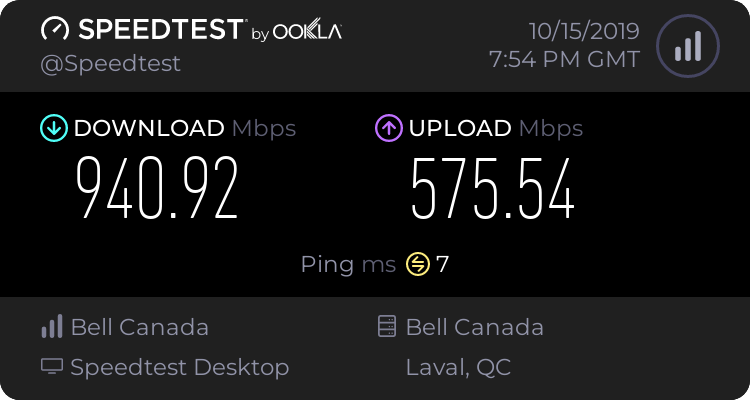
I'm supposed to have 1000/1000. But even with the cable plug-in I don't reach it.
this is wired
https://www.speedtest.net/result/8677048309.png
 late sorrel
that's literally like 15 times faster than mine
chrome chasm
When fiber finally reach your door it will look similar.
 gentle lion
plucky tangle
gentle lion
plucky tangle
I have a 100/100 line. Literally no real need to have more unless you do design work
 void perch
Anyone have recommendations for a gaming mouse for someone with sweaty hands?
late sorrel
I can’t recommend a specific mouse, but I’ve found that a palm grip based mouse is much easier to use
I have cold and clammy hands myself, but I don’t have any issues as long as I can use my whole hand to hold/push down the mouse
void perch
which model do you have?
late sorrel
I personally have an M65 Pro, but I can’t tell you if it’s performance in regards to other mice
With the mice I have around me at the moment, I can tell you I find that as long as it fits my hand, I have no issues with it
also, the M65 doesn’t have like rubber on it, so it is a bit slippy
also, I won’t reccomend it because it’s too small for my hands and I find myself gripping it harder which does tire it out
void perch
hmm, thanks.
late sorrel
I can tell you what to look for, just don’t have it myself 
fleet canopy
I used to have roccat tyon, is very nice but idk about sweat hand
Might work for you though
void perch
haha i have a roccat kone and hate it
it's also double clicking when I single click (randomly) which is annoying as hell
fleet canopy
Oof
late sorrel
ono
fleet canopy
I never had that problem myself
Except the middle mouse button
Holy shit it was annoying
void perch
I'm sure they are good mice, just a bad experience for me, so would rather find a diff brand.
fleet canopy
It was a different mice though I believe
late sorrel
I've never had an issue with mice with a sweatier hand, my issues are more of gripping the mouse and not being too small to get my whole hand around it
that's my last 2c
fleet canopy
Corsair probably has good mice
late sorrel
Corsair has a good manufactoring stuff in my opinion
late sorrel
OH THAT
fleet canopy
Corsair is best for peripahekn however it spell
late sorrel
I've got some friends who have corsair keyboards/mice and they've not had any issues
I bought a K55 and the rgb has stopped working
fleet canopy
L
late sorrel
but then again, I've not like unplugged it and or fac resetted it
mouse is still going great though
late sorrel
just wish I didn't grip it so hard
also I've become reliant on the sniper button on the side
I personally wish it had a free-wheel function on the scroll though
I came from a first gen MX Master, so it was very weird to get used to
fleet canopy
I just use two buttons on mice
late sorrel
smh you don't use the forward/backward buttons??
fleet canopy
Extra is mainly good for browsers
late sorrel
they are really useful if you know how to use them
for switching weapons and stuff
you gotta learn it though
which is a pain
fleet canopy
I use 123 for switching weapons
late sorrel
I find that taking my hands off of the movement keys disrupted my gameplay
fleet canopy
Ring and index finger does it well
I mean, it does kind of do
But mainly it’s a great weapon switch into
late sorrel
anyway I kinda wanna get a new mouse now
fleet canopy
Imo
late sorrel
yee
fleet canopy
I need new keyboard
And a mousepad with wrist rest
Headphone as well and a mic ;w;
Headphone I’m just gonna give up on fixing
Not as loud as it used to be
fleet canopy
My keyboard is missing one key, which is fine
It’s not very important anyways
Oh yeah
The damn numpad is useless as well
And it’s one dirty as hell keyboard
Like
0 num doesn’t work
void perch
Decided to go with this guy, let's see how it handles.
https://www.pcgamingrace.com/products/glorious-model-o-minus-matte-black
late sorrel
that looks really nice
do tell how it goes
I need to get a new one anyway, I can't be giving myself carpal tunnel // exhausting my hand from gripping so hard // it being too heavy
void perch
remind me in a week, will let you know
 patent kite
mouse with pockets for cookie crumbs? 🙃
fleet canopy
No
But they do have what’s supposed a ‘water-proof’ keyboard or something
In general I mean like any food or drink gets spilled
late sorrel
oh god I should have removed the weights in this long ago holy shit
it's so much lighter
fleet canopy
Lmao
That reminds me
It felt so weird using my brother’s girlfriend’s DPI mouse preferences and it was so damn weird trying to do anything
late sorrel
xd
fleet canopy
And when my brother tried to play siege once on my.DPI he was like ‘why do you have it this much?’
Siege DPI is like
late sorrel
moooooood
fleet canopy
Kind of wild
fleet canopy
My mouse DPI is set to 1000 or 1500
Siege is at like
factory set dpi
And when I have to get my grip right
Oh boy
late sorrel
oh lmao I found why my keyboard had no lighting on
fleet canopy
No download the keyboard menu setting or turned off the light?
My keyboard doesn’t have RGB, just white
Lol
I set it to a quite dim light, if I take a picture though, it looks like the sun
late sorrel
I turned the brightness down
fleet canopy
Very nice
So I said I was gonna get a 5700
With checking the prices
5700 is 380
Pretty close to XT 410$
late sorrel
it's the best on the market for a 5700XT rn
fleet canopy
Since you’ve said it’s been good in durability
fleet canopy
Kek
late sorrel
it's 450
or 445
First, Radeon graphics cards don’t support real-time ray tracing like GeForce RTX 20-series GPUs offer—but in return, they offer you more traditional gaming performance for your money. The Nitro+ routinely outperforms the GeForce RTX 2060 by double-digit percentages. And while ray tracing is picking up steam and looks incredibly impressive in the right games, only a small handful of titles support the cutting-edge lighting technology at this point. Second, the Nitro+ is a big card, measuring a full foot long and a bit over two slots deep. That’s necessary for a card this powerful to run so cool and quiet though.
^ the "only drawbacks" paragraph
fleet canopy
Well
late sorrel
It's still the "flagship" for the 5700XT's
fleet canopy
I had the sapphire nitro pulse on list lmao
Maybe there wasn’t a nitro+ when I first added
late sorrel
440usd
fleet canopy
Might be less
I checked amazon and uhhh
Fugawugaluga the egg online store thin
Newegg
I saw most fan cooled XT for 410-425$
late sorrel
egg store has it at $469.99
late sorrel
yeah it does
fleet canopy
Fucking shit is way more expensive idfk why
late sorrel
that's like 30usd over MSRP
fleet canopy
Despite those prices, both shopping carts on amazon and Newegg was at 1470-1480$ and Newegg was 3$ less pricy I think
Some parts I had to get as close as I could to what I had picked
Lowest price found on pcpartpicker for nitro+ was 467.XX$
And it was a Store I’ve not heard of
late sorrel
what's the name?
late sorrel
juasdhasdasdasd bullshit
fleet canopy
Actual price is 449.99$
late sorrel
oh
fleet canopy
Shipping it is 15$ plus
late sorrel
almost might as well go buy a 2070 at that pric
e
(then again, you are getting higher performance)
fleet canopy
Amazon is basically Fuck having people pay for shipping!
5700 XT is getting better than 2070S
Checked userbenchmarks, it’s all there
fleet canopy
I mean, sure
The games are having focus to one kind of company
But like
It wouldn’t matter
It’s still a fuckton better than a 1060 3GB lmao
late sorrel
true
tbh, I would reccomend getting a 2070 if you're spending the same as a 2070S
oh wait
wtf am I on
2070Supers are like 500+
fleet canopy
I haven’t seen a 2070S priced at 450$ good AMD sir
And 2070 is like
Isn’t that more weaker
late sorrel
I'm gunna shut up now
fleet canopy
Hah
late sorrel
what you've got right there is the best for what you're spending
fleet canopy
I also never really understood how to get pre OC’d 3600 yet as well
 fleet canopy
lol I never did and couldn’t figure out overclocking
late sorrel
you can't get a cpu pre overclocked


 late sorrel
your bios controls the speed of the chip usually
fleet canopy
And I can have help with overclocking from you people 
fleet canopy
Depends if your GPU is powerful
Just leave it at that if you got like
A 570 or 580 Kek
late sorrel
yeha
which I do
and any upgrades will be with a different CPU
Kinda hoping to get an x570 mobo next time around
for that spicy PCI-e 4
fleet canopy
You might
late sorrel
or is it 5
late sorrel
anyway, I'd be getting the Nitro+ 5700XT so I don't think my 2600 would like me so much
anyway
I'll just make it a server
fleet canopy
Yeah
Also most PSU will be able to connect to all of PC parts, correct?
I just wanna make sure
late sorrel
yeah
just make sure you get a high enough wattage and the right cables if you go modular
fleet canopy
650 PSU on me Kek
fleet canopy
And not modular, impossible to rid of cables unless cut
fleet canopy
I have 650
G3 or G2
I’d just go for a new one tbh cause
The wiring job is so shit I don’t think it’s so good anymore :)
plucky tangle
With a power supply, more is better. You dont want to be on the line or even close.
fleet canopy
I know
It’s just that I thought I could probably reuse my G2-3 650W PSU
But I’ll probably need a new one since overclock probably takes more power and too close for me
Rather it’d be 300 or more
 bronze cloak
650 is plenty for most stuff these days, if you want to be safe you can go up to a 750. There’s nothing wrong with being “near the line” so long as you aren’t over it. Not to mention the G2 and G3 are outstanding PSUs.
The worst you’ll see is some lost efficiency because PSUs are most efficient at 50-70% usage
You could theoretically run a 3900X and 2080 ti system on a 650W unit, and the performance of both is mainly dictated by cooling. Spikes above the rated wattage are also acceptable to a certain degree.
fleet canopy
I mean, that’s true
I might be fine but for me, I’d be anxious how it handles when it’s pretty below 300W of Max usage
After all, they aren’t too expensive
plucky tangle
If you are even close you should just buy a higher psu. Also alot depends on the rating obviously, because a 650 plat or gold will do better then a 750 silver or bronze. But if you are close to max threshold, that can be really bad for your system. Even though most rating companies compensate by saying things require a little bit more for some headway.
 copper zealot
Ok gais my build is ready for alpha 3900x 32gb ram 1080ti on MSI x570 with SSD's for both OS and Storage
Let the games begin!
fleet canopy
It’s a gold GW+ 650W G3 PSU
And I’ll assume you have the 3900X and 32 GB for tech work
copper zealot
Yup, i am a systems engineer/animal rescue/ other
It is for virtualization of environments, video editing, and NVR for cameras for our animals
sick reef
When it comes to principles behind power supply units, constantly utilizing more than 80% of total capacity with decrease capacity and age it early.
But that's also under the pretense "constantly".
copper zealot
actually i'm running a 3900x and 1080ti on 750 or 800 watt PSU gold if i remember right, but the 650 would drag with multiple hard drives and other peripherals which is why you want to get a bit higher
Going Bronze+ instead of Gold for the power supply may be the better option and price for the build
While it won't stay there ALL the time, it will handle the spiking better than and underpowered PSU if it is taking hits
Under-volting can cause just as much damage in some occasions than over-volting if the piece of equipment is going in and out (blue screens+)
If you did go 650 watt it would need to be a gold + rated and it may occasionally have issues with spiking literally blue moons at that
sick reef
Best option is slightly oversized wattage and gold/more than gold rating
"Saving money" on PSU usually means that when anything bad happens, everything bad happens.
The lower the rating, the cheaper parts, the more variance in power output, as in it evens out spikes less.
copper zealot
All in all i think the i486 with the turbo button would be the best way to go. You could also go with the old school AMD processor that you could scratch the chip with a pencil led and essentially "overclock" it. Don't mind the boards you could solder if you had the utensils. Then all you would need is a Radeon Pro and 350w bronze. For days
sick reef
I do have a PCIe Pentium 2 and/or 3. Unsure if those can be made to work, though.
north bronze
i'm going for this PSU https://www.amazon.fr/dp/B077J9QTDR?tag=pcp09-21&linkCode=ogi&th=1&psc=1
650W, fully modular, Gold
bronze cloak
@plucky tangle would you please explain how it would be bad for the system? If a PSU is rated for 650W, even if your system peaks at 660W for a moment it’s not going to damage anything. And if it’s pulling below the rating... well, that’s what it’s rated for.
urban gulch
If you got a PSU and it's above it's max. consumption, then the PC shuts off 🙂
.. or a blue screen, depends.
bronze cloak
PSUs have over current protection, yeah, but that’s designed for sustained power draw in most cases. I’m not saying you should build a system with an inadequate PSU, but 650 is technically adequate for most consumer applications. It’s only once you get into the really high end with lots of drives that it becomes and undeniable issue.
fiery nacelle
get higher power supply than calculated via summation of power consumption of each part to account for transient spikes in power demands
good PSUs should be able to sustain short term loads slightly higher than their rated wattage
fiery nacelle
OPP (Over Power Protection)
The over-power protection (OPP) kicks in when the power we pull from a PSU exceeds its maximum rated capacity. Usually, the manufacturers give a little room for overpowering the PSU, so the OPP threshold is set to 50 to 100W (in some cases even more) above the maximum rated wattage of the PSU. In single +12V rail PSUs, where OCP is meaningless in most cases, OPP takes over its role and shuts down the PSU in case the +12V rail is overloaded.
So if one has an GTX 1070 (typically rated at 150W TDP) paired with an i7 6700 (non-K) rated at 65W TDP, add-in an nvme SSD, budget motherboard, and 2 sticks of 8GB DDR4-2666...
We can get away with sticking in a PSU rated at say 300 watts?
urban gulch
Mhmm.
fiery nacelle
It might seem so
Adding up 150W + 65W would come up to 215W, far less than 300W, even adding in the SSD, mobo and RAM would not hit say 250W average power consumption
But look again at #media-and-memes
urban gulch
Yeah, i saw.
fiery nacelle
Kinda shocked me out off my own chair when I found out
Whilst the averaged power consumption of the individual card, yes kinda matches the TDP at 150W for the FE edition and 180W for the MSI Gaming X edition...
Take a look at those spikes
The GTX 1070 FE can spike above 200 watts, whilst the MSI Gaming X edition can touch 300W power spikes
far above the typical GTX 1070 TDP rating of 150 watts
Perhaps this explains why AIB partners put somewhat seemingly ridiculous amounts of PCI-E power supply inputs on their cards, up to 2x8 pin connectors (to supply 2 x 150W = 300W) for innocuous mid-ranged cards that are say advertised with TDPs of 200W which should on paper be satisfied by a single 8 pin PCI-e power connector + PCIe slot (150W + 75W = 225W)
So having issues with game / graphics / framerate delivery stability? crashes? glitches?
might want to look again
-
Give plenty of margins for power supply, especially when calculating in AIB-version of modern GPUs (i.e. factory overclocked)
-
Pay attention to the number of PCIe power connectors on the card - gives you an indication of how much power delivery the AIB vendor expects for rock solid stability / performance
-
Use separate PCIe power cables for each PCIe power connector, not two branches from the same cable - yes, most modern PSUs are single railed however it's not the rail overload that we are concerned about but rather the total current drawn by a single set of PCI-e power cables for TWO 8-pin connectors
.
Having said that, I think most enthusiast level PCs or less can be satisfactorily catered for by a good quality PSU of 600 watts rating.
probably even a system with a Ryzen 9 3900x and AIB RX 5700XT
 gritty venture
Got any issue and ill have to write a bit separated, because it might shut down by the time im down writing lol
Was playing a game with a friend earlier, and suddenly the screens blinked and i couldnt get a picture back. Sound was kind of okay, music of the game was playing but nothing else. I could hear my friend on discord
Every time i tried to run a game, it would just blink and not work. PC stays turned on.
I swapped to another GPU, but the problem is the same, however i could run a game of CS bots when i switched to windowed mode. Other games would black screen in menus, and last crash happened on desktop. Any ideas?
sick reef
Try uninstalling your drivers fully and reinstalling them.
When it comes to power supplies, I am not one for minimal margin. If you want the least amount of issues, you don't make them matching, or as close, especially to things like TDP that mean very little, unless you aim to run it all with stock settings, no turbo/boost, and aftermarket cooler.
TDP isn't wattage, and it only resembles the wattage in the very specific setup they made for the specific CPU.
And for the calculation of power draw, it is dependent on the settings of the CPU, the efficiency of the heat spreader, and the accumilative heat, and the effect that has on the CPU.
Also, if that is true about power pins, then it's 12V150W, which is ~12A per socket, and probably not fully unreasonable.
north bronze
one step closer to getting my complete build
got the case, psu's coming, and i'll probs grab the ram next
that way I can buy everything except the GPU next month (no biggie, I'll use my 1060 3GB and wait for another month to get the 5700XT)
sick reef
Make sure to check for deals on GPUs. They pop up a little bit everywhere sometimes.
Managed to buy a lot of my stuff pretty cheap due to it.
As in, deals on electronics, or just specific stores with very low prices.
north bronze
Amazon had the 3900X for its msrp of 450E this morning. Had to go to work, but once I finished I was ready to jump on it since it mostly sells for 650-700E because of the shortage
aaaand it was gone
guess I'll stick to the 3700X I planned for 😦
sick reef
Got my antec PSU for 240€ something, plat, 1300W, grossly oversized now that I'm not running dual OC 1080 Ti, but not expensive for such high capacity.
north bronze
was gonna ask why you went overkill but then I saw dual 1080 TI
sick reef
Have you looked at other amazon sites than amazon.fr and see if they ship to france?
Well, if I am to run my Dual 1080 Ti overclocked as much as I can, my 7940X at maybe 4.9GHz all cores, and with single core boost, and a few hard drives, and a bit more, it'd pull a lot.
I know I found my antec in some weird store in the UK that shipped here, as an example. Through pricerunner.
north bronze
nice
north bronze
Aight thinking about something, would this be a good idea?
- RX 5700XT -> RX 580
- Ryzen 7 3700X -> Ryzen 9 3900X/3950X
I'll be mainly using my build for game development on UE4 and some gaming too. Game dev mostly on the programming side (more cores, less of me eating junk food while watching VS2019 compile for ages)
late sorrel
depends if you’re rendering something GPU based vs cpu based
what do you do for your game dev stuff?
modeling?
north bronze
I'm on the programming side
 magic anvil
Anyone have a fix for my issue?
I recently bought an MSI RX 5700 XT ( Reference) and every now and then my monitor just goes black and comes back. However sometimes it just goes completely black and I'm forced to shutdown my PC via the button which I hate doing. I have found a slight fix in which I'm forced to drop the monitors frequency from 144Hz to 60Hz and so it's stable. This defeats the purpose of having this monitor though. I have tried re-installing drivers, even to the point of sacrifing one of my SSDs as a secondary boot to see if a fresh install of windows would help, but even so doing this I'm still getting the same issue.
late sorrel
how are the temps?
chrome chasm
Try to restart your graphic drivers too.
magic anvil
T-junc seems to be on the cooler side during heavy gaming sessions
i heard the T-junc seems to be one of the issues
it's currently like this while play destiny 2
https://gyazo.com/8f3c8bc1162c319a9e0b73fd50dc7d31
late sorrel
that’s hot
magic anvil
im not sure what this error codes mean
https://gyazo.com/9340f0072721ac344e41003b56d8a6cb
https://gyazo.com/77316bdd10e9423731002d65675fb920
https://gyazo.com/cc33d1826210509d6d45d094eb008f34
the last issue was 3 days ago and that's when I dropped my monitor's frequency down to 60Hz
and it's been stable since
gritty venture
oh boy
let me tell you
ive been struggling all day and yesterday with my black screens of death
and that comes up with livekernel
You happen to run nvidia with recent drivers?
pallid cedar
your graphics card is running too hard
temps are too high, and black/flashing screen typically means it is struggling to render the image
do you notice artifacting during gameplay as well? small white flickers?
85 degrees is the max temps for typical gpus
I'm gaming right now on Insurgency Sandstorm at full settings on an RTX 2060 and my temp is only 52 degrees
late sorrel
I mean, a reference MSI 5700XT doesn’t have a good cooler
pallid cedar
and if the gpu is struggling, that makes sense why it can't run 144Hz stable
reference blower coolers are fine, if you have adequate case cooling
late sorrel
typically, yes
pallid cedar
unless their case is choking airlfow, there is no reason why Destiny will put the temps at max
gritty venture
Well im having a similar problem
pallid cedar
either the card is boosting for some reason, or it's faulty
gritty venture
For me the problem started out of nowhere, just sudden blackscreen
this reinstall i managed to run the game for 3-4 minutes before blackscreen again. Second time i didnt even reach the character select screen
pallid cedar
is your cpu overclocked?
gritty venture
No overclockings, fresh windows install multiple times, tested several GPUs
different slots, RAM, HDD/SSD
pallid cedar
what cpu?
gritty venture
4690k
pallid cedar
if your cpu isn't stable, it'll crash or black screen
gritty venture
Its stable, i ran stress test on it and its fine
pallid cedar
it's an old, discontinued processor
gritty venture
The weird thing is that the system ran fine for a little bit while a friend was over to look at the problem, and an AMD gpu with catalyst did seem to work fine
gritty venture
And reinstalling the GTX afterwards worked fine, but for minutes before it started BSOD again
4-5 minutes
pallid cedar
a "stable" check for stress test is the average game session length.
If you game for several hours, test for several hours
at min, 10 min test with AIDA64
def sounds like your issue is CPU related.
your cpu is a ddr3 based desktop cpu, kinda obsolete
gritty venture
Hmm i was told to not run it for long as it was 100%
pallid cedar
by who? haha, that's silly
sick reef
Adequate case cooling for your average consumer PC 
pallid cedar
you only stop a stress test after you reached your time mark, or unless the temps are getting too out of hand before it automatically shuts off
gritty venture
Its just really weird how it SOMETIMES works for a bit, and it seemed to work fine with furmark for a bit
pallid cedar
furkark is a GPU stress test, not cpu
gritty venture
Yeah
sick reef
Also, obselete meaning anything to someone without an option to make it obselete to themselves.

gritty venture
got a recommended CPU stresser for windows?
sick reef
Does his?
gritty venture
thanks ill give it a go
sick reef
If his motherboard uses DDR3, is DDR3 ram obsolete to him?
pallid cedar
his mobo prob uses DDR3, but the tech is obsolete, no support
DDR4 time
compatibility issues arise under new software with DDR3
sick reef
Does that matter in his situation, where he has the motherboard that uses DDR3?
Compatibility issues, yes, if that now is the case.
pallid cedar
his proc is old, discontinued. No support, no future updates for new software or games etc.
and with him getting BSOD it is most likely a cpu issue
sick reef
Unlikely to cause BSOD without component failure. Not fully impossible, but unlikely.
Speaking specifically DDR3.
pallid cedar
his proc i old, hardware failure is possible
the cpu is struggling though
wherever is causing it to struggle
voltage, pins, bosst clocks etc
sick reef
My 4790K struggled as well, before I switched out. But I dunno if that was a MB issue, or just that I used old AIO and old standard paste
pallid cedar
and BSOD can be caused by less than component failure
as simple unstable clock can make it crash
windows 10 is a special boi
his is a 4690k
sick reef
It can, but ram in and of itself is what I spoke of and specified.
pallid cedar
and I've been speaking of his proc
the fact that he has DDR3 ram just proves it's age
sick reef
The fact that it is a 4690 proves its age.
pallid cedar
yes, that too
sick reef
They are both from the same era, and it is why they are coupled.
pallid cedar
I'm aware
gritty venture
My rig is mad old for sure, i was planning to upgrade for black friday
pallid cedar
I'm simply pointing out that they are obsolete tech, and there are numerous software compatibility issues with those older proc systems
gritty venture
a while left for that though
pallid cedar
just an unfortunate circumstance of age it seems
could even be a faulty PSU not giving enough stable power
gritty venture
Ive thought of that, but if theres a failure with the PSU, wouldnt the system shut down?
pallid cedar
not necessarily
a pc can run with minimal power, when doing harder tasks it uses more, so when the psu can't give more than say, 250W when it's a 500W, then you can't push the system without causing crashes, shut-downs etc
depending on the power usage of your components, of course
late sorrel
that’s right, an i3 530
pallid cedar
AMD 3820 APU
sick reef
Obselete is a term that carries little value in this, is what I imply. It does not aid, constructively observe nor interject. It would be equal to saying "get a new one".
pallid cedar
which is valid criticism when speaking of old tech that has no support
sick reef
Does it help?
pallid cedar
he can remain on that system if he chooses, just with little to no support so it is not advised
So yes, it helps
dusty pumice
So many people in this discord are running on old tech without support
dusty pumice
^
sick reef
It helps you.
It is better to simply advice an upgrade, than to state obsoletion.
pallid cedar
never said there wouldn't be problem son new systems
gritty venture
but, sure. Mine is older so i accept there will be more problems than what they will have
pallid cedar
if somehting needs an upgrade, it is obsolete...
sick reef
No.
pallid cedar
you're taking offense to a term, idc really
dusty pumice
How are we taking offense of the term?
pallid cedar
obsolete definition is : no longer produced, out of date.
it fits fine,m regardless of your sensibilities towards it
enough
dusty pumice
You stated its obsolete like 5 times or more already
pallid cedar
because it is an apt term to use.
sick reef
So if I use up my toothbrush, it's obsolete?
pallid cedar
is there an issue with sing a correct term?
wow
if that model of toothbrush is no longer produced, then yes
learn the definition and come back I guess :/
no longer produced or used; out of date.
"the disposal of old and obsolete machinery"
sick reef
The term isn't wrong, but it's useless in the situation. Non-descript.
pallid cedar
obsolete does not mean unusable
different terms
it's not useless, it explains a problem with lack of support for a piece of tech that he is having issues with
sick reef
Does that help him?
dusty pumice
I mean if you want to have a discussion about terms like one of the mods would say take it to general chat
pallid cedar
the best advice is to upgrade from the obsolete tech
not a big deal like you're getting all wokred up over
whatsoever
buh-bye
sick reef
That's better. The advice obviously the same without stating the obvious, as it is simply clear from the age of it.
pallid cedar
I really don't care how badly you want to argue semantics.
sick reef
Only one.
pallid cedar
it doesn't help
I don't know for sure if he was aware it was obsolete tech, until I told him.
Am I supposed to read his mind and know that he already understands it's no longer produced or supported?
chrome chasm
Please guy chill down a little.
chrome chasm
All of you.
pallid cedar
I was done, having to keep clarifying myself to folks here
chrome chasm
Something obsolete mean it no longer serve any purpose at all. If it can still serve a single task, it is not obsolete but limited in application. Now please calm down and change subject. thanks.
pallid cedar
obsolete does NOT refer to it being usable or not
it refers to still being produced
sick reef
Obsolete is right under his definition as well, but there is a term for obsoletion personally, as well.
 steady summit
GUYS
pallid cedar
a fridge can be obsolete, no longer produced, being 30 years old, but still work
Im done.
steady summit
drop the topic please
pallid cedar
google it
gritty venture
Well in other news im 10 minutes into stress test and its working fine so far
pallid cedar
good sign
gritty venture
I just cant wait to toggle GPUs and have the BSOD pop up right away
sick reef
That does sound like a power draw issue.
gritty venture
Ill have to try another PSU tomorrow
Its just weird how switching out parts made it work fine for a bit, and another time it works for 3-4 minutes, and then sometimes it BSODs after a second or two
sick reef
If the PSU is going bad, it could handle low-intensity workloads until it starts to run hot, as of which it would perform worse.
If it is getting really bad, it can be highly varying capabilities.
gritty venture
Makes sense, maybe theres a test that checks PSU for this
Aye
Toggled gpu in the tester, and it went BSOD
pallid cedar
well, def a gpu issue then
actually, could still be power
what kind of psu is it? and how old?
gritty venture
Corsair RM650, 2015
gritty venture
Heh yeah. He was over earlier and we "fixed" it. So we didnt test it
pallid cedar
lol, been there
give that a shot, see if that helps. If it does, you know what needs replacing
gritty venture
Ill ask if he can come over tomorrow again, if not ill have to pull one out of the other pc i have
aye
for now ill try to run my AMD card again and see how it runs, i guess
Thanks for helping Spartan, hopefully ill swap the PSU and thats it 😫
 flint lantern
@Mayo I'm talking about nigh all games
fleet canopy
Ah, okay
I meant like
I figured the 5700 XT could reach 100-150 due to it being a gpu supposedly for 1440p gaming
flint lantern
It does really good in most games, in some games it could be a 50 FPS difference
But it never drops below 60
gritty venture
hm well. Switched to my radeon card, and have had stuff running completely fine for the past 6 hours. I guess its some kind of weird Nvidia problem 😕
Will turn off and see how it runs later
gritty venture

fleet canopy
The NoVideo 2080 Shitter is the best card for getting 999+ frames on Black Screen
gritty venture
👌
Its been working flawless, but now shutting down and installing windows updates, i have a feeling it will break down 
chrome chasm
What AMD offers better? A slightly lower price? Ho yay it run hotter, take more power, less optimized game, can't reach 2080 power, has the same freaking problem with screen going black. Enough with the fan-boyish already. Both card are great for what they do for their range and costumer target.
fleet canopy
Lol calm down
I’m not fanboying either
I totally would go for a 2070S but I don’t see the point in having ray tracing
I have a PC that isn’t even close to what the most recent releases have been
And hell I’d go for either one depending on perf and price
chrome chasm
There a more civil way to discuss product, Like your last message could have been That happen with Nvidia card to get bad driver and get stuck on black screen
fleet canopy
I was making a joke about the name
chrome chasm
Nvidia 2080S is a good card for getting 999 FPS on black screen
fleet canopy
NoVideo is the word I used to refer the recent problem
If I did have enough money for a pretty great build, and the price wouldn’t be a problem, I would go nVidia and either AMD or Intel depending on their percormance
dusty pumice
Novideo percormance
late sorrel
exactly
fleet canopy
Now don’t take it too hard, I understand that it’s pointless going for just one side because I know AMD offers great price on cards, but I also know NVidia offers good performance for quite a price
late sorrel
don’t forget that the 2060S and the 2070S are literally terrible for what you pay
fleet canopy
Except ray trace
late sorrel
you pay 50-100USD just for RTX and other gimmicks
fleet canopy
5700 XT is slightly better than 2070S by 2-4% which I know isn’t much, but proves their price on the performance
chrome chasm
Yay it is bad, at this point you just go AMD or l060/1070
fleet canopy
1060 3GB isn’t great for me now lmao
late sorrel
they’re cheaper at this point
also don’t forget that the RX570 is literally cheaper for the same thing
oh yeah actually I belive novideo won the war on the RX570
I apologize
but hey, at least the 2060S and the 2070S are defeated
fleet canopy
5700 XT performance but with ray tracing