#gtfo-technical-support
1 messages · Page 11 of 1
 mellow pelican
 languid ruin
The Alpha and Beta keys no longer work @mellow pelican
The game has to be purchased as it is in Early Access.
mellow pelican
oh right, she was playing it up until yesterday :/ ok
 blissful mauve
Anyone know how to fix the bug with "Network Error: You Need an internet connection to play GTFO. I've tried everything from re-installing, verifying gamefile integrity,deleting a file and hotfixing, running out of steam as admin. Any help is much appreciated
 frail prawn
If you haven't purchased the early access version, and you are trying to launch the beta, it won't work as the game is at its early access state now, and the beta has ended. This message usually pops up if you try to launch that version instead of the early access one which you need to buy on steam
If you do have the early access one and it gives you that message restart steam, and if that does not work restart your PC. I personally had it say I have no connection on the early access version before with good internet, and restarting the pc solved it
blissful mauve
Thank you, Im using the bought version (Early Access) from steam. I just restarted my PC seeing if that fixes it.
Restarting has not worked 😦
@proper grove So far, all the recommended fixes are not working
blissful mauve
One second
 proper grove
Take your time ^^
proper grove
is ok, don't worry ^^
blissful mauve
@proper grove any other ideas? Cause im spent lol
proper grove
give me a minute ^^
Can you try to close steam, turn off firewall, and start steam again and try it again?
blissful mauve
Just to confirm to you that I am in-fact the correct version.
Got it one moment. and Take your time I appreciate all the help
proper grove
hehe thank you ^^
 reef zenith
i have a black screen on start, are there any fixes for this?
i already tried
- alt+enter
- alt+enter several times
- installing latest drivers
proper grove
hi invalid user!
reef zenith
ayo
proper grove
can you try to verify the game via steam?
reef zenith
did that too actually
the game used to work back in alpha
then after an update this happened
proper grove
do you start the early access?
reef zenith
nope
proper grove
ok.
@blissful mauve Can you try to close steam, turn off firewall, and start steam again and try it again?
wasnt sure if you saw this ^^
reef zenith
ill try to verify again
blissful mauve
@proper grove I see you have your hands full atm. Lol I did see it thank you. I turned off all my firewalls. and restarted steam. Did not work. Then i tried going into the firewall it self afterwards and confirming that GTFO is allowed through it. Still no luck. Currently re-verifying integrity once again.
proper grove
hehe is ok ^^
blissful mauve
Okay, reverified, ALL firewalls are turned off. Im restarting my PC now and seeing if that does it.
blissful mauve
Sooo the rinse and repeat method of: Verifying Game files, Turning off Firewalls, And a complete PC restart seemed to have fixed it. But it took multiple attempts and eventually it fixed. Anyway I appreciate All of your help Lavars seriously. Hopefully this gets fixed sooner than later.
 light haven
can't connect mic & headphones on discord. it's prolly something simple i'm missing. suggestions?
 noble jolt
Check your discord settings. Make sure the output/input are both the same you use in other applications/the defaults.
light haven
thks will give it a try
noble jolt
 somber locust
hey all, i am having a problem with connection to friend lobbies. while i have successfully hosted several games and connected to some friends' lobbies, a buddy of mine just purchased the game and has been unable to connect to my lobby (and vice versa). the lobby will appear on the "Join Lobby" list, but when we try to join, we are placed into what appears to be an empty lobby with four "+ invite" slots -- no visible player or character models. any suggestions would be appreciated.
somber locust
after completely restarting routers and disconnecting VPNs, we are able to connect with a slight delay. it appears to have been a general connectivity issue for one of us that just presented itself as described above for anyone's future reference
 ornate dirge
mouse keeps going out of screen bounds
proper grove
hi! can you try to tab out and tab in again?
@ornate dirge
Thank you @somber locust !!! They already investigating this problem.
 heavy wraith
Has anyone been having issues where when you hold W you cant move until you release the key and press it again? It's gotten me killed a few times and initially I thought it was related to my PTT key (mouse 5) but even playing on voice activation its still happening.
proper grove
mhhh that's a new one ^^ do you have a controller plugged in by any chance?
heavy wraith
I did not, maybe it was a one off because it hasn't happened in any sessions previous to now.
it only happened when after/while crouching.
proper grove
you may accidently changed something in the keyboard settings
heavy wraith
Maybe, I'll take a look, hope thats the case
proper grove
@ me if you don't find anything
ornate dirge
Yeah @proper grove I tried that
proper grove
ok, what fullscreen mode are you on?
ornate dirge
Exclusive full screen
 bitter rose
another thing is if you have a GTX 650 Ti or the equivalent you can actually run the game on lowest settings at 720p@40-50fps
proper grove
ok opsid, do you have more than one screen?
@bitter rose Yes, you also can get more FPS with some tricks ^^
bitter rose
not surprised the game is beautiful yet simple with static textures and an enclosed environment makes it easier to run than most games
proper grove
Yeah they got a lot out of unity, and they may do more with it :)
bitter rose
probably one the best engines they could've used if they do want to expand their horizon to consoles
ornate dirge
I have three
proper grove
hey @ornate dirge Sorry for the late response, i had to read into the problem. What Mouse do you use?
ornate dirge
G pro wireless
proper grove
do you have a software for that?
 fresh sun
Hello
fresh sun
Can smone help me fix an issue in the game ?
proper grove
Let us see if i can, what is the problem
fresh sun
So my left side of the screen is like cut off
proper grove
Do you have a screenshot for me?
fresh sun
hold on, i will make one
proper grove
a photo would be better i guess
proper grove
ok, it's probaly an easy fix. i'm gonna write you a pm.
proper grove
Fixed problem with @fresh sun Resolution fix
ornate dirge
I can just not run it but my DPI is wholly controlled by it
proper grove
yeah, i just want to see if it works ^^
so we can find out why your mouse behaves like it does right now
proper grove
I try my best ^^
 onyx void
Good job!
proper grove
hi @onyx void what do you need help with :P
onyx void
Haha. I’m the helper here ^^
Question is what do you need help with!
I’m like a senior
proper grove
you can be my trainee if you want. You are old enough x3
 karmic lark
hey guys, looking to stream this game for a few friends, but im seeing a high usage of my gpu without streaming is this game just super GPU hungry? tried changing all the settings and not much makes an impact. any advice?
im running a GTX 1070 and its using on average 80-85% CPU
proper grove
What software do you use to stream?
karmic lark
stream labs obs
proper grove
ok, go to obs settings, and look for decoder (should be video) what encoder do you use atm
karmic lark
NVENC
proper grove
Your options are hardware, nvenc and software?
proper grove
ok, software is normally "the best" to say it the easy way
also i write you a pm with a little "hack" to may get some frames out of the game ^^
karmic lark
should be fixed, will let you know if not 🙂
proper grove
just @ me if you need something ^^
 bleak saffron
@proper grove Hey, I asked two questions yesterday about cpu usage and nobody responded to it.
Any chance you'd be able to answer those or should I wait for the devs to return from holidays?
Also, I'd certainly be interested in any "hack" that gives fps improvements :p
proper grove
hello @bleak saffron i may can help you ^^ let's start with the specs ya running :D
im the non official tech support. So don't be to harsh :P
bleak saffron
I've got a 7700k @ 4.9ghz, 16gb ddr4 @ 3733mhz and a gtx 1070ti @ 2000mhz, game on a ssd
I've also got a 240hz monitor, so I'm aiming for 250fps+ and play on 720p, all low settings
while not too rarely I get the frames I like, too often i'm limited by the cpu, and i can drop all the way down to 100fps with like 40% gpu usage
kk 🙂 I'm aware this is more of a @ dev question
proper grove
naw this is fine
i just have to tell you that this is an Early access, and improvements may come with the next patches
ok, 240Hz are... crazy.
We can try the "hack" how i call it, but you won't get a lot out of it. Also i would tell you
FPS aren't everything :D specially in GTFO.
You should go for higher settings but less FPS, but at the end your choice ^^
i'm gonna write you a pm.
 trail forum
y'all got any dates for the next updates ?
trail forum
thx
proper grove
no problem ^^
 quaint crypt
@forest crag yo, my computer is randomly shutting down like you did, did you ever fix it?
or did anyone ever know of this issue
I'm running benchmarks and such and it seems like it's just a GTFO issue so far
proper grove
it's shutting down? like in ... turning off?
quaint crypt
Toast sounds like he had the same issue
I just installed a 2070 with a 750W power supply. have an i7 8700k
proper grove
ok.
Just to be sure:
Is The Hardware new?
did you tried other games?
did you tried a stresstest?
quaint crypt
2070 and power supply are new. I'm about to run 3Dmark to really test out the system to ensure it's not a power supply thing
I ran the heaven benchmark a second ago, everything seemed fine from that
proper grove
When you restarted your pc, did it something? like a peeping sound? told you something went wrong? anything?
quaint crypt
no, my pc kinda just restarted itself in a sense
just ran 3dbenchmark's test, all good, no restart
I'll try turning down the graphics and such
proper grove
mhhh. i may be gone for a little, but i don't forget you :D
I would see what happens if you use a stresstest
quaint crypt
I just restarted the game, lowered all the graphics and everything, computer still resets, so I would just have the devs be aware that this may be an issue
proper grove
Please write a bug report, and add your log files please!
 slender quiver
silly question, is there not a default flashlight or am i missing something?
slender quiver
that's the thing, i do that, and nothing happens
proper grove
Try to check your settings.
slender quiver
i did that as well, no bind that i could find for it
proper grove
Give me a sec.
slender quiver
take your time! im looking too
proper grove
i send you a pm
slender quiver
sure sure
proper grove
Problem with @slender quiver fixed!
 solid mesa
Just faced a bug with my crew where we finished the B2 "Officer" mission and at the end 2 people got to the end screen while the other 2 remained in game. The 2 that got to the endscreen completed the mission while the other 2 had to leave lobby and did not get the mission complete.
proper grove
yes this is a known bug, they are working on a fix, all people can play the next levels as long as the host has them unlocked
proper grove
mainly on B2, it can ocur on others as well.
solid mesa
Thanks for the info. If we complete levels beyond B, those that did not get the completion, do we still get 'complete' progress on the following levels?
solid mesa
Alright. Thankie!
proper grove
If you have more question, just ask me ^^
 celest mist
Me and 3 other players collected all the keycards in B1 and it only let the host leave
We were stuck there
and when we closed the game and went back in it said that B1 was not complete
Oh, nvm
proper grove
Yeah i just explained that :D thats a bug that can ocur, the devs are already taking a look into it ^^
 vagrant patrol
me and da boys just finished the first mission thing but when we went to the extraction the leader got stuck on the extraction survived screen
cant even return the players to lobby
 magic kite
Hey um
One of my friends joined me, we were gonna CO-OP on the admin, but it wouldnt release him from his cage on his end.
Is there something he's gotta do to be released or?
Because I got out of my cage just fine, seeing as it was automatic.
light haven
still can't connect mic and headphones. checked user settings and all seems to work. mic check, when it shows up, works fine.
 atomic silo
its automatic @magic kite
 forest crag
@quaint crypt I did! Turned out that my power supply wasn't enough because the fan was broken.
 jagged granite
another instance of the level not completing here
we finished C2, two people extracted to the completion screen, two stayed in the level and didn't get the completion award
 mighty cipher
Right after launching the game my screen says that there's no HDMI signal
And my GPU fans are spinning at Max speed
RX580 8GB
Event Viewer "Display Driver amdkmdap stopped responding and successfully recovered"
Has a 50/50 chance
light haven
going to unload the game. is there a way to sell it?
 proper bear
I'm only running 8 frames when I'm in the game for some reason. It was fine for the entirety of yesterday and this morning, but started acting up after I lagged out of one lobby?
jagged granite
it does that for me until I restart it
 brave sluice
lol
 limber nebula
Anyone know if its possible to change your character name in the game? like reset your game?
 desert bronze
@limber nebula probably change your steam nickname?
 spice relic
just booted up the game and I stumbled upon this issue: https://prnt.sc/qhyavv
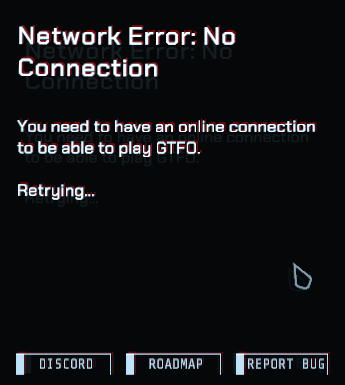
I'm connected to a wifi network
 vocal radish
Did you started GTFO Beta?
spice relic
yeah
vocal radish
thats the old one
You need to (in case you havent) buy GTFO on Steam and then start "GTFO"
 exotic flax
Anyone else experienced the game not completing on C1?
like even after running to extraction and security scan and all that
 meager pebble
hello! Im trying to translate EN into other language,could dev help me?
proper grove
@exotic flax known issue. they are working on it
mighty cipher
I have a weird bug that always happens when I load A1, like graphical bugs. One time it was super bad motion blur, yesterday was screen tearing (Can show Screen Shots) but when I load other maps such as B1 and below its completely fine. I load up other games, fine. I restart my PC and the A1 Problem is still there... I don't get it... Any thoughts?
proper grove
i would like to see the screenshots please!
proper grove
does it only effect the screen? or do you see the lines when you take a screenshot ingame?
proper grove
ok, thanks
mighty cipher
I didn't take any screenshots with like the Snipping tool so
proper grove
you can press the "PRNT screen" button and paste the picture somewhere
or with F12 with steam
mighty cipher
Yeah, I am not home atm.. So big oof on my part.
proper grove
not sure. I need more info.
mighty cipher
Okay
 exotic zealot
My game crashes in the drop pod when I load into a mission, it makes it unable for me to play. I've tried uninstalling, deleting the game folders from %AppData% then reinstalling. I've updated my drivers. I've lowered the graphics as far as possible. Nothing is working. Anything else I could try?
proper grove
hi @exotic zealot can you do me a favour and try to launch the game, press alt+enter and try to start a solo game to test it?
exotic zealot
Yeah, gimme a second
proper grove
take your time
proper grove
ok, did you tried to verify the game files via steam?
proper grove
ok, give me a minute
exotic zealot
okay
proper grove
i write you a pm ^^
 formal pawn
everytime i start a mission the whole game amplifies the volume and makes it way too loud. Is there a way to fix this? Adjusting the audio levels doesn't help at all. It's like it's 500% volume at the start of the game and when booting the game up
proper grove
hi! What volume ist your master sound set at?
formal pawn
it's set at 100% in windows and 50% in game
proper grove
ok give me a minute!
 fair wave
Do I still get to play with people in other servers
proper grove
you still can play with others all over the world... even though it could cause problems caused by the ping :D
 wispy barn
@formal pawn does the volume normalize out after you finish loading into the expedition? There is a sound effect when the game initially loads that is louder but it should be more normal otherwise
proper grove
he ingame atm :D i said he can hit me up with a message when he's done ^^
 rotund warren
So, I gave the game a whirl last night, and had a issue of being unable to change from fullscreenwindowed, to true fullscreen. Ill try to change it again once I'm home from work, but is this something that needs changing from a text file?
rotund warren
Ye, once I'm home. ~1 and a half hours.
 teal abyss
hello game has recently started spiking my gpu to 100% and crashing game at medium graphics, no problems when i first got game. gpu is 1660ti
proper grove
ok thank you! i hit you up with a pm, we can try something ^^
 grizzled topaz
Is this screen burn-in effect intentional in the menu?
I mean the gray shadow of the white areas that's offset below
proper grove
you can turn it of in the hud settings
"hud Skewing"
oh nvm
you mean the effect.. yeah. that's intentional
grizzled topaz
yuck 😦
 flat dock
We busted down this door and for whatever reason every enemy that spawned just got stuck on it idk why
proper grove
hi! would you please write a bug report? you find the link in the #bug-reporting channel. Thanks for sharing.
i would like to know if they interact in any way, or if you can "open" the door (press the button)
flat dock
The door was busted out
It had C foam on it but i was showing newer players how to break down a door
We triggered the patrol enemy in Z50 and ran back to bottleneck and that is what we saw
proper grove
oh ok. interesting
flat dock
Ill try to recreate and get another bug report going tomorrow but ive gotta go to bed
proper grove
That would be awesome! appreciate it! if you need help with it let me know
 zinc ingot
Found a glitched box that was supposed to have an ID but it didn't. B-1 https://cdn.discordapp.com/attachments/260590325880324097/662528546505228290/unknown.png
proper grove
you sure noone took it?
you still can ping it, even if someone took it.
if not, please use #bug-reporting and the link there to report it ^^
zinc ingot
We did ping it and confirmed that it was the correct box and that there was still one ID left in it. Just wanted to let yall know. Also is there an unstuck command?
proper grove
no sorry, no unstuck command yet! if you would pinpoint the position, the devs can learn out of it
 tawny egret
hey is there an easier way to bug report other than https://10chambers.atlassian.net/secure/CreateIssue.jspa?issuetype=10006&pid=10001 ?
proper grove
it's the easiest way for the devs.
tawny egret
okay thanks, its just not that easy to screen record for me
proper grove
If you need help with anything, i'm still here for aprox 4-5h
tawny egret
okay i have like 2 gliches on d1 and one spot that you cant get out of
proper grove
ok
tawny egret
do you mind helping me create a bug report for them?, i dont have any screenshots or recordings of it..
tawny egret
there is a few
one if a wall clip glitch where you get inside a wall
could you help me recreate this stuff?
tawny egret
okay
ima friend you, im gonna be on for a few more hours, if you have any sparetime, you can give me a call
proper grove
sure!
tawny egret
hey i have a question is the latest version of gtfo Early Access | v19087 or BH | v19087
proper grove
give me a second! I double check :D
Early Access V0.1
Cortex NI R:L17 19087 (ingame)
so yes @tawny egret :D
tawny egret
? as in yes to both?
proper grove
why both, sry i'm a little tired.
tawny egret
oh its okay, i was just asking cuz i had to report a bug 😛
 crisp needle
anyone got the glitch where your aim spasms up and down and shit
proper grove
I heard about it. Happens rarely... even though you can trigger it pretty easy.
proper grove
Thanks @heavy cove Really appreciate it! Even though you scared the short out of me ^^ You help a lot
mighty cipher
dont forget about james the totally alive striker
 heavy cove
I could find many more potential OP spots around areas like B1 where there are many cylinders and high places, but I'll have to clear them out with a team before I'll be able to take my time in finding them
proper grove
ok, it would be awesome if you could explain HOW you (try t) find these spots (what are you looking for etc.).
heavy cove
Are you a dev lavars?
proper grove
@mighty cipher and please! this is the only room i beg you not to meme around
proper grove
no but i'm helping them out ^^
mighty cipher
showing how they made it
heavy cove
Ah ok
mighty cipher
or like got there
proper grove
i provide them with infos, help players etc.
I'm the official-nonofficial-techsupport
heavy cove
I kinda died on that run so if I'm ever gonna make a video about them, I need a full team of 3 other players with me who'll help me clear out the area, and then I can showcase how I find these spots, what I look for and how I get to them
proper grove
@heavy cove Today won't work for me, but i could help you like tomorrow :D
heavy cove
I've got plenty of time
proper grove
awesome ^^
heavy cove
I'll get to reporting the bugs rn
proper grove
Awesome! Appreciated!
heavy cove
Finished my reports
proper grove
Nice!
heavy cove
I hope I'll get some sort of reward for this ;^)
proper grove
Yes, a bug free game >:D
heavy cove
Well that's a reward everyone will get
proper grove
What does it say?
proper grove
did you updated your drivers?
mighty cipher
its working now
proper grove
ok
mighty cipher
one of my member got issue and when i kicked him, it works XD
wispy barn
Yeah during the drop is when the game loads so if they have a slow connection or computer it can take a while order hang if there is an issue with one player.
mighty cipher
it needed him to restart the game
mighty cipher
has anyone had an issue where you don't get the third box on rundown screen to join a lobby?
 autumn seal
Uuuuh
Me and my squad just got Dced from our game
Only the host stayed in
Is it their fault or the games fault? We just lost an hour and 30 minutes of progress T_T
The fact we can't join back in progress is....extremely irritating XD
wispy barn
You should be able to join back. If they are on your friends list you should see the lobby available or use existing lobby code if you know it.
Since it doesn't let you join back something likely happened to the host that caused you all to get disconnected but the game doesn't realize they disconnected as well (my guess).
At that point if you can't join back host will also need to restart the game. The game is peer to peer networking so it relies on everyone having a decent connection especially the host
 stiff mortar
Ok so, Hello first of all. A friend of mine purchased the game and we wanted to play it. we also tried it allready and for whatever reason it just dissapeared from her Library
she has it installed but theres a Buy button instead of a Play button
wispy barn
@stiff mortar for that have then try restarting steam. If that doesn't work logout and back into steam on the computer. Lastly they'll need to contact steam support as we dont have any control of that
stiff mortar
We tried all of that besides contacting the Steam support, Just wanted to try if someone had similar issiues
Anyway still thank you for Helping. Have a nice day/evening
bitter rose
I actually experienced the bug where you stay in the game after extraction
I actually left and got completion because the host force exits the game
 stark narwhal
My friend is having a hard time connecting to my lobby, both our internets are pretty good, is this a consistent problem for this game?
Like I'll accept his invite and it will say that I'm in his lobby and he just won't be there, or vise versa
wispy barn
Can you both do a speedtest.net and let us know the results
 cobalt helm
20ms 477mb Down and 22mb up
stark narwhal
ping 44 , 71 down and 17 up
stark narwhal
when we finally get it to load we get stuck right before we drop down
like right before you exit the pod we just get stuck there
okay now we loaded in but we cant see each other
 charred sky
71 download?
 atomic knot
hey guys how can anyone join my game
 neat frigate
you have to either send them your lobby id, or you can invite people via steam friendslist
 buoyant flare
looking for help with an issue I've been having only while running GTFO, I blue screen and get the stop code MACHINE_CHECK_EXCEPTION
I have verified integrity of game cache with no issues, reinstalled the game, changed hard drives, ensured graphic's drivers are up to date, and I've most recently been tracking CPU and GPU temp's all of which have been in acceptable ranges.
as far as specs go:
CPU: i79700k
GPU: GTX 1070
MOBO: MSI MPG Z390 Gaming Edge
RAM: Corsair DDR4 32GB
PSU: Corsair RM 750X
also of note, I am running dual monitors both at 1080p
 azure saddle
me and my friends experience massive desync when playing when my friend from france hosts im from germany do you know what could be the problem ?
 somber mountain
internet
azure saddle
hm but we both have good internet and all the other guys in the lobby also have desync
azure saddle
hm
proper grove
hi
 vague kayak
Yesterday, in a game with friends, one of them was invisible to me and i couldn't use meds/ammo/etc on him. Anyone else had this?
 obtuse night
what API does the game use?
proper grove
Unity
 robust trail
Just completed c1 with my squad and it bugged so it didn't complete even tho we escaped it! Give me my win! please?
robust trail
then give me my win...
proper grove
please follow the steps descripted there ^^
robust trail
Dude, i'm not playing the c2 before the GIVE me the completion, i finished it, payed for this game, give me what i expect from it
proper grove
I cant give you anything.
You can play the next level when the host has finished it
i mean unlocked*
The game is Early access, and stuff will occur ^^
 misty star
This game is in Early Access
Steam warns you that this game is not finished and contains bugs and glitches
If you want to play an unfinished game, dont get angry about bugs
misty star
The devs are on holidays
robust trail
the least they could do is make it so i can progress
misty star
Sorry that they have lives
robust trail
ehm.... no shit boomer
misty star
Programming is hard and complex. This ""simple to fix"" bug as you say goes deep into a code and is not easy nor fast to fix. They also dont want to release an update every day for single bugs. They will gather them and release one update with a lot of fixes
robust trail
i never said it was a simple fix
proper grove
ok, please don't use this channel to discuss ^^
robust trail
tell me when i said that
 trail blaze
Game fine for anyone else? Our group "finished" D1, it lagged out, 2/4 got it listed as completed and now the game is freaking out
trail blaze
All the loadouts just said "machine gun", everyones headgear was glowing blue and there was a clicking sound constantly going off
proper grove
On the extraction screen?
trail blaze
On the menu screen after the lobby closed itself
proper grove
oh ok, would you mind following the steps for the extraction bug? #known-issues
trail blaze
Alright, thank you
proper grove
I thank YOU!
trail blaze
Nono, I thank YOU
trail blaze
I'll try, gotta run it again :>
 rose crown
so i just have a bug.. i cant move anymore and cant react with anything
proper grove
Are you the host?
rose crown
and it works again
strange bug
i was locked in the terminal
when someone else wrote exit it worked again
and yes i am the host
rose crown
my bio tracker has now 87% as i used a tool kit on myself by accident 😄
proper grove
well...
I hope they fix this ^^ Not sure if someone made a bug report about this, but i think so
rose crown
ah well i will share them later 😄
wispy barn
The bio tracker taking a tool refill is not intended and is known by the devs. It's on their radar.
bitter rose
imagine being angry about bugs in an early access game 
proper grove
happens.
bitter rose
i would expect the worst at the least in early access games honestly
proper grove
well, not the place for discussion :P
bitter rose
ye
 left oyster
Is there any fix for my issue? Every time I launch the game the 2nd time, it freezes within 5 seconds of launching no matter what I do. The only fix is to follow the steps for crashing with a GTFO-Unity window, which I don’t think is my issue. I’ve done that 3 times and the first time I launch the am game, it’s perfect. It’s just the second time I launch the game, I get this issue. Any recommendations?
proper grove
did you already restarted your pc? just to be safe?
left oyster
Mhm, restarted my PC, tried restarting Steam, same issue
left oyster
mhm
I'll do it again but every time I've done it, it just returns "All files successfully validated"
proper grove
ok. good to know
left oyster
I like the game, it's just that in order to play it I have to reinstall it, which isn't a good experience y'know
left oyster
k
 frosty leaf
I am getting pretty poor performance (about 20 fps) with my system which seems odd to me. Any suggestions on how to make things run more smoothly?
proper grove
Yeah i write you a PM with something we can try ^^
frosty leaf
Awesome, thanks!
 gentle carbon
Hiya! I'm having issues getting above 80 - 90 FPS. I have an i7-8700 and a 1080 with a 120hz monitor. I was hoping to drop some of my graphic settings for higher frames per second
However, no matter if I have the graphics on High or Low, it still keeps me capped at 80 - 90 FPS. I have max framerate at unlimited and I believe v-sync off, both in the game and in Nvidia settings. The only thing that boost it is turning down the FOV, and that only increases it by about 10 FPS
Does anyone know how I could uncap it, or is this a problem affecting everyone?
proper grove
i write you a PM. We can try something ^^
gentle carbon
Okay, thanks!!
mighty cipher
Hmm just experienced an issue in the terminal where the cursor was stuck below the screen. Doing 'cls' helped reset it though.
Unsure where to see known bugs, in case it's better to report things there.
 quasi rover
@gentle carbon having similar issues with my build. Although I only have an ryzen 5 1600 and a 1060. The only time I get above 100 fps is in lobby. Have you found a fix?
proper grove
yeah i helped him, send me a screenshot of both your setting screens, and i take a look
@quasi rover
gentle carbon
Mine was because I set my Max Queue Frames to 0. Lavars helped me set it to 4 and that boosted it up 💙
I think it also introduces a little latency, but that's okay hehe. I'm running 130 - 150 FPS now instead of 80 - 90
quasi rover
Mine are set to 2
gentle carbon
I think @proper grove can help ya out if you're still having issues!
I'm gonna go eat, hehe
gentle carbon
Oh sorry for stealing him then, I was playing B2 with him 😆
quasi rover
Ohhh lol
gentle carbon
Hopefully he can help! If he's not around later, I can swing by and tell you what he told me, see if that helps
Talk to ya in a bit!
proper grove
im here :P
quasi rover
Is stretch Res possible?
quasi rover
Anddd im having more issues, although the game appears on my primary monitor the settings appear on my second...it also is running at 60hz now when previously was at 144hz
GTFO is only displaying on my second monitor even after unplugging it...
proper grove
Check your screen settings on windows. It may changed your main screen
 compact loom
I'm having an issue where the black and darker areas of the game look fuzzy and like static, is anyone else having this issue or knows how to fix it?
 grim vessel
Hello
Can someone give me a activation code please
I didnt received a code
For the game
quasi rover
...where did you buy the game from?
wispy barn
@grim vessel you would need to buy the game from steam. Product keys are not provided for free.
quasi rover
Thats what you get from buying it from a shady website
grim vessel
I don't have money
I just search on internet and i download free but it need activation code
quasi rover
.... obviously....
You can't get GTFO for free
It's almost impossible to pirate free games
By you pirating the game, your not supporting the Devs.
Just be a good person and buy there product
quasi rover
Then don't get the game
grim vessel
How about buyying account steam
quasi rover
?
What.
Get money, but game on steam, support devs, play fun game. It's not the most difficult process to understand
grim vessel
Hmmm
quasi rover
Cannot play game without paying for it
quasi rover
There is a sale on rn
grim vessel
Are gtfo gonna get discount?
quasi rover
Just but the game...it's like 50ausd
compact loom
I'm having an issue where the black and darker areas of the game look fuzzy and like static, is anyone else having this issue or knows how to fix it?
proper grove
No sorry, i think that's a light-engine bug. As far as i know. I will keep you updated if i find anything out
@compact loom ok: Devs are aware of it and take a look into it! So let's hope there's a fix soon ^^
 pearl nexus
@compact loom i have that when the settings are lowered
Not when they are good quality though
compact loom
I have it at high quality, should I lower them?
proper grove
@compact loom hi! could you let me know your Hardware please?
compact loom
i7-4770 and a GTX 1660
proper grove
ok, What are your max render queue frames set at?
And what is the CPU culling set at?
compact loom
lemme check
proper grove
Take your time
compact loom
it's set at a quarter into the bar, I think it may be my crappy TV that I'm having to play on because my monitor broke, I can't actually make out the number
mighty cipher
A friend of mine has a issue where he shoots the sniper and the recoil makes it so he starts spinning around and it's impossible for him to aim I think it's his graphics card because it's a I3 Intel card
proper grove
@mighty cipher an intel 3 Graphics Card? That's a new one :P
That's actually a bug. Normally a restart fixes it.
mighty cipher
no my friend has played 5 hours of the game and he has restarted the game
also it doesn't affect me for some reason
mighty cipher
he's not here
proper grove
You can give him the link ^^
mighty cipher
k but he's not on
proper grove
no problem. He can @ me or just leave a message here ^^
mighty cipher
k
 keen pawn
Is there a way to disable the text parallax?
 white radish
not to my knowlege
keen pawn
It makes me motion sick =(
wispy barn
yeah there isn't a current way to disable that effect, but you can suggest it using #gtfo-game-suggestions
proper grove
@keen pawn
keen pawn
Im playing on 90 fov, but i had this same issue with the division 1, they had this parallax on text and its the same thing with 3d glasses in the theater, it gives me motion sickness
 glass terrace
 white radish
Don't think so
proper grove
@keen pawn ok good to know! Just make a suggestion and it may get added ^^
white radish
but, #gtfo-game-suggestions because that would be good @glass terrace
keen pawn
=) thanks
 fluid coyote
Hello, I have a problem. I'm unable to join lobbies, all I get is 4x invite icons. Can anyone help?
fluid coyote
Thank you
proper grove
Tell me if you keep having problems ^^
fluid coyote
Sure will
gentle carbon
I've been seeing that joining a friend's lobby through Steam or the game often has problems like that, to the point where it even glitches out the entire lobby
I'd try sticking to joining via the code for now
 languid burrow
It feels like the monsters are animated at a lower framerate, they get super choppy sometimes. Is this a known issue?
quasi rover
Is there a way to turn down the muzzle fkash, it's way to bright and I'm blinded by it everytime and it gets irritating after long periods of time
gentle carbon
@languid burrow That can be because of ping. If the host lives a long distance away or has bad internet, it can look that way
mighty cipher
This guy's fun at parties, but terrible at sneaking. (lol)
Happened after climbing a ladder in the first mission.
proper grove
Yeah that's an animation bug. The devs are aware of this one ^^ My favourite bug so far tbh ^^
mighty cipher
heh heh
 normal fox
I can't seem to hear or be able to talk to anyone in these discord chats
 jagged roost
@normal fox did you check your default audio devices through your windows settings and through discord settings?
and does the issue only happen on this server?
pearl nexus
I constantly get a max of 24 or so FPS on lowest settings with these specs. whats the problem? (sorry that its norwegian)
 torn parcel
That screenshot does not have your gpu? Might be helpful to include that when asking about graphics
If you don’t have a gpu installed, well...that’s your problem
torn parcel
You were in the right spot, just make sure to get the gpu as well
pearl nexus
well I have had it like this for 3 years without a gpu in that case
torn parcel
Oh you don’t have a gpu for sure? Well yeah like I said that’ll be it then
pearl nexus
idk
torn parcel
What other games do you play?
pearl nexus
oh well its most likely there cus this was prebuilt by msi
cus idfk how to build a pc
pearl nexus
idk how the games are compared but with everything on max on CSGO I get 70+ fps
while gtfo I get a constant 15-25 fps
worse when there are enemies around
ive verified the files nothing is wrong
devs please help me 🥺
torn parcel
“Need” is a relative term
But prebuilt MSi should have one
CSGO is far less performance intensive than gtfo or other current games are
Unless for some reason you run csgo with every nonsense thing turned up even though it makes little graphical difference and even then
pearl nexus
I see little graphical difference on GTFO too except for maybe textures
but im not gonna act like i know this stuff
I just know that I have friends with almost the same specs that run gtfo on lowest on around 100 fps
they have tad better cpu and graphic card I think
torn parcel
Well it starts by showing your gpu and then work from there
Kinda hard to say without knowing anything about your gpu
pearl nexus
aight
mighty cipher
@pearl nexus open GeForce and see what graphics card u have
pearl nexus
ik I have gtx 1060
mighty cipher
Updated drivers
pearl nexus
I just got 200 fps menu and start of a game I got 40-80 fps
mighty cipher
Are your drivers updated
pearl nexus
then I turned graphics down (cus they were suddenly maxed idk why) and then I got back to 20-34 fps
a tad better than earlier tho
mighty cipher
When u load into a game it puts what your graphics can handle
pearl nexus
I literally just updated them
no it doesnt cus my settings dont change everytime I go in a gmae
so thats incorrect
mighty cipher
No when u change it it won’t
When u first load a game it puts the recommended for your pc build
mighty cipher
Make sure it’s not capped
pearl nexus
which means
mighty cipher
Make sure your FPS isn’t capped
pearl nexus
its on infinite
mighty cipher
Is vsync on
pearl nexus
off
mighty cipher
What’s ur monitor refresh’s rate
pearl nexus
120 hz if thats what u want
mighty cipher
Cap it at 120 FPS
pearl nexus
ok
mighty cipher
And do high settings
pearl nexus
why?
mighty cipher
It will release stress
pearl nexus
Now Irelaunched the game and instead of the last 200 fps stable I have 100 fps stable
on menu
mighty cipher
Cause I capped ur FPS
So your monitor will refresh at its rate
And in video settings make sure the last 2 video settings are off
They ruin the look of the game
pearl nexus
what should my cpu culling workload be on?
mighty cipher
Wym
mighty cipher
Dm me a ss
pearl nexus
dunno what that is either
bitter rose
it also might be playing on your integrated graphics card
make sure the game is set to play on your laptop
https://www.youtube.com/watch?v=mTbbG7QBDig

Switch from Intel to Nvidia! If you have a laptop or other computer using 2 graphics card this is the tutorial for you. When Intel graphics is included some games and software run using it, but if you have a dedicated stronger Nvidia or AMD card you want to make sure windows ...
proper grove
@pearl nexus like i said before, it's your CPU that bottlenecks your FPS.
 open vine
anyone elses game crashing before it start with a Unity loading error?
 delicate oracle
So I didn't see this in the know issues so it might be something new. I noticed it in the menu and thought it might be a graphics issue but I lowered the settings to make sure and it still seemed to do it, moving the mouse will make the game stutter a little. It also did this when entering a match. You can walk around and there are no issue but as soon as you move the mouse the game stutters again. I don't think I noticed it happen when looking down a sight. I'm running an egpu with a rtx 2070 super. First though it maybe its the egpu connection
proper grove
Did that happens even after resarting the PC?
delicate oracle
I have not restarted it but it was shut down and the first thing I did was start up gtfo so its not like its been on for an extended period of time or anything
proper grove
What window mode you use?
delicate oracle
Full screen window
I turned off vsync and it seems to help a little
Actually I think that did it. I still seems stutter a little in the menu though
proper grove
What kind of screen do you use? Does it have G-sync or freesync? What's the refresh rate on it?
delicate oracle
It does not have *sync and I think the refresh is 5ms but I would have to verify that really quick
delicate oracle
5ms RT and 60Hz
proper grove
Are your FPS limited ingame? (not V-sync)
delicate oracle
After flipping off vsync and letting it run for a few in both a match and menu it appears to be fine. So that came enabled as soon as I started the game. Would that be because of rtx card maybe?
proper grove
normally that's not a problem
delicate oracle
I have no idea if they are limited
proper grove
You can find the settings in "advanced"
delicate oracle
Just found that as you said something. Its set to infinite
proper grove
ok thank you!
if you encounter any further problems, let me know, and i will take a look ^^
delicate oracle
Awesome. Thanks for the help! This is my first time playing the game too and I figured that was a little unusual to have right after starting up the game
 young pilot
kk so i set it to 60 but its still hitting 120
proper grove
mhhh send me your settings file, i take a look
i write you a DM where to find it
mighty cipher
What's CPU culling workload?
proper grove
It pulls some workload from the gpu
mighty cipher
So if it's higher it uses more cpu to run the game betteR?
proper grove
you can phrase it this way.
mighty cipher
Alright thank you!
 unreal wasp
wispy barn
unreal wasp
wispy barn
@unreal wasp that is a known issue of the game is unable to load you to a lobby. Make sure the lobby you are trying to join isn't full and try restarting the game.
proper grove
And/or restart Steam as well ^^
unreal wasp
lol u use to have a desiny ghost as ur pfp didnt u @wispy barn
wispy barn
@unreal wasp yeah, I've rotated a lot of pfp lately. This is still Destiny
unreal wasp
oh yea its the robot for leviathan forgot his nam lol
if u ever want to paly some time add me @wispy barn
 coral fjord
does anyone have this bug where this mouse just drifts off into one direction with no input?
quasi rover
Only in GTFO?
quasi rover
I would say it would be mouse acceleration but you say it does it without physically touching your mouse
There could be something under/on-top of your sensor.
coral fjord
Yeah, what really throws me off is if i alt tab or open anything else the mouse doesn't move
but in gtfo menu or in game it'll just drift up and left
 carmine isle
@coral fjord you wouldn't happen to have a gamepad plugged in?
mighty cipher
hey Every time when i start the game, the games Loading.... and than it say "u need to have an online Connection"
proper grove
Do you start the beta?
mighty cipher
ye
mighty cipher
:c
coral fjord
@carmine isle that was it!! for anyone who has this mouse drifting problem, I had my ps4 controller plugged into my computer via usb and unconnecting my ps4 controller fixed the issue.
carmine isle
sweet 🙂
mighty cipher
Where can I go to find an explanation for what the options in the advanced video settings do?
proper grove
What do you want to know :D
The render queue frames sets a "puffer". The max CPU load does what it says. It put's more workload on the CPU
mighty cipher
idk.
just more like, how some games have an explanation on what... ssao is or something
proper grove
Do you want to know what SSAO does?
 true oasis
I know it's some type of ambient occlusion, but I don't know exactly what the point of it is when there's regular AO.
proper grove
so, there's no super easy explanation. To keep it easy you could say that SSAO ensures that the individual properties of a 3D object are also taken into account when casting shadows. It's an attempt to simulate realistic shadow casting. while AO works a little bit different.
true oasis
But AO is simpler though.
proper grove
AO is better for static objects. SSAO is better for moving scenery (like light through a big fan f.e.)
true oasis
Which we have yet to see.
proper grove
Actually there's an Example in B2, at the last door
 normal prism
hey not sure if this is a good spot to post this but cant post in bugs chat there is a glitch on B2 were they can get stuck behind walls on stairs
 jagged drift
So ive been having this problem where on slight occasion where my game basically has a seizure. other players see me spinning in mad fast circles. Is this an actuall issue or just a system bottleneck?
My specs:
AMD FX-8120
16GB DDR3
Radeon RX 570
proper grove
There's a bug where, when you use a zoom-sight, that happens. Often a restart fixes it
jagged drift
it normally stops after a few seconds. and yeah the zoom-sight matches up. nice to know. Thanks!
grizzled topaz
would be nice to be able to votekick people from voice or whatever
proper grove
The feature is yet not available, so a suggestion is the best way to let the devs/admin see that this feature has a demand
And if you want to report a player, you can do that via @rose thicket
Other ways are not possible for now
wispy barn
@grizzled topaz If you would like to report a player, such as someone abusing voice channels please send a message to @rose thicket and our mod team will assist.
 opal peak
Joining my friends, i get an empty lobby with +Invite buttons.. 😦 They cant join me either.. any idea?
I cant even open my own lobby.. it just refreshes the page when i try to..
proper grove
hi! did you restarted Steam already?
 pearl scroll
Hey @opal peak, have you tried to restart your PC?
If so, I'd try to reinstall the game
proper grove
maybe doesn't work
Can you do me a favour and try to use your phone as internet access point?
pearl scroll
When you say refreshes the page, does it just kick you back to the main screen?
pearl scroll
Sure, feel free to call me and I can check it out
Otherwise, I'd restart your PC, and see if that works
If not, I'd uninstall the game and delete the folders at C:\Users\USERNAME\AppData\LocalLow\10 Chambers Collective\ and C:\Users\USERNAME\Appdata\Local\Temp\10 Chambers Collective\
Then reinstall
 keen trout
hey guy i buy this game with my online banking i pay 297.000 for the game and 10.000 more in my steam acount so the total for this game is 307.000 and when i refund i only have 280.000 what wrong with this guy
proper grove
Hey @keen trout what currency we talking about?
wispy barn
You'll need to ask steam about that. The devs have no insights to payments.
keen trout
i buy a lot of game with my online banking but is the first time i see it's over price
just want to ask anyone have this proplem
wispy barn
That's a steam issue, gotta ask them
pearl scroll
You can access steam support with the help tab on the upper left of the steam client, you'll see steam support under there @keen trout
proper grove
@pearl scroll while you at it, you can read the backlog to this problem too. I had some people with this problem as well. So you may get help with it
pearl scroll
Sure, I'm in vc 19
I'll take a look around probably tomorrow @proper grove, getting pretty late here
proper grove
D:
pearl scroll
<3
 spark grove
Hi, is there a little lag (like body awareness) when you move you're mouse or is it my hardware (I'm just at minimum requirements) ?
proper grove
How many FPS do you get?
spark grove
Around 40fps, minimum details at 1920x1080
proper grove
ok, could be that the "low" fps make you feel that way. Normally there is no "movement-lag"
The only thing is if you could make a video to show the problem ^^
spark grove
Maybe I can lower my resolution and try to get 60fps to see if it's still present ?
proper grove
Yeah, why not ^^ Any info helps
spark grove
OK, tried at 1280x720. I get a "solid" 65fps (don't laugh at me...) but same feeling. I think it's my brain tricking me.
pearl scroll
Is it just in GTFO? Certain monitors can have delays depending on the mode they're set to
spark grove
I didn't feel it in Apex Legends or Doom 2016. After playing with settings in GTFO, it might be related to "max queued frames".
Or a great excuse to spend that much money on a hardware upgrade 😄
 molten narwhal
Nvidia drivers? Make sure you turn on the Low Latency Mode
proper grove
@spark grove Send me a screenshot of both setting screens, i just want to go sure ^^ Also it would be nice if you could phrase your problem with other words, i just want to be sure we don't take any nonsense steps x3
 cerulean plover
do i get the sound back if i beat the game or is it gonna be a dlc?! cuz sounds disappear after a few min every round
pearl scroll
Do all sounds cut out for your PC or just for the game?
And if just for the game, does it happen randomly a few minutes in, or after you do something specific?
spark grove
@proper grove using Low Latency Mode of my Nvidia drivers solved the problem as @molten narwhal suggested. Thanks.
 craggy crane
Hi @proper grove, maybe you remember me asking for help back on 27 December. The problem was: when initiating the cage drop (alone or with others), it just kept going down indefinitely but never arriving. We solved it! You suggested to check the network/router, and indeed that was the problem. GTFO ran on a laptop with a seemingly slow wifi card; when changed to cable Ethernet, it just worked. Just wanted to let you know. Thanks for your help!
 latent citrus
What's with this i have steam and internet connection? Are the GTFO servers down? Is there an update 😮?
 errant night
Hey guys
My buddy can't join us in a lobby
when he joins nobody is in it, including him, and when we join his it's the same thing
he's tried verifying the files already, is this an uninstall only solution?
note
he's also uninstalled it
same issue
 robust obsidian
@wispy barn ^ hes in need of help
errant night
yeah, any help would be great! We're at our wits end ):
To bring further attention to this issue
I just messaged 3 other people
who had this issue and brought it up before
and no one has figured it out yet
 acoustic kindle
lobbies are so broke cantt even play. lucky tto gett a party all in and when you do it bugs out on tthe drop in. what a fuckin joke
 toxic totem
@wispy barn hi i just bought the game on steam and i downladed ot for 3.3gb then it had me download another 3.3gb now its doing it a third time can you help me please
wispy barn
Sounds like the Steam download is becoming corrupt. Have you tried restarting steam, restarting your computer, reinstalling Steam at all? What about completely deleting all the GTFO Steam folders and try a download again?
toxic totem
i restarted steam it still wants to do a third update
my GTFO folder says its 9.5gb is that the size its supposed to be if not ill redownload from scratch
wispy barn
after extracting the download it'll be about 9-10 GB
what if you launch the game, does it run?
toxic totem
right now it wont run as it has steam saying its updating
but if i launch from the folder i get a no network error
wispy barn
at the bottom right does it say beta or early access?
toxic totem
Early Access v0.1
wispy barn
Alright, that is EA which is good. Can you try uninstalling steam, deleting that GTFO folder. Restart PC, reinstall steam and try a download again.
toxic totem
should i finish this last 3.3 update then?
wispy barn
nah cancel it
toxic totem
alright
wispy barn
also before uninstalling steam clear the steam cache: https://support.steampowered.com/kb_article.php?ref=3134-TIAL-4638
 late imp
So I launched the game today and for some reason the red text in the settings is severely blurred now. Anyone know a fix? I've tried turning Hud Skew and Pixelation to 0%, but haven't noticed any difference.
proper grove
what resolution have you set?
late imp
1920x1080
proper grove
ok can you restart it please?
late imp
Restarted and the issue is still present
proper grove
is it blurred ingame as well?
late imp
The HUD itself?
proper grove
@craggy crane Super thanks! Appreciate the update on the info ^^
@late imp yes, and/or other texts
proper grove
that is kinda weird, would you mind sending me a screenshot of the problem please?
late imp
@proper grove
proper grove
Ok i have to swap devices, for me it looks ok, but i want to check ingame give me a little bit
Can you try the Pixel perfect settings on 100% please?
(restart the game after changing to be sure the changes take effect)
@latent citrus YOu tried to start the beta, you have to start the Early access version! If you haven't you have to buy it ^^
pearl scroll
The bottom right is EA, did the beta say that too?
pearl scroll
Does launching the old beta version show the early access at the bottom right tho?
proper grove
No sir!
pearl scroll
Got it, thanks
latent citrus
@proper grove Not in the beta
latent citrus
i have the EA version
proper grove
Dont start the GTFO Beta exe... it's only called GTFO! ^^
latent citrus
it's been working fine until ~noon today
proper grove
oh frick. I'm stupid, my bad xD
latent citrus
it says early access v0.1 on bottem of screenshot
proper grove
yeah.... ._. ok. Let's work on this problem
latent citrus
yeah
proper grove
ok. Did you tried the standard procedure? Restarting pc, verifying the files
latent citrus
let me try all that
proper grove
Thank you!
latent citrus
i just launched it after lunch again after quitting and it said that so though it was something on the devs end
proper grove
No. They will announce such stuff in #game-announcements ^^
latent citrus
@proper grove it didn't work :/
proper grove
Ok, try to disable your Firewall.
latent citrus
huh cant
when i go to firewall in control panel and click on it control panel stops responding 🤨
proper grove
🤔 mhhh that's not normal
latent citrus
yeah that's weird af
proper grove
ok give me a minute
latent citrus
yeah anything even notifications around firewall won't let me turn it on
so weird
no virus' or anything like that wtf
proper grove
ok i write you a PM.
latent citrus
its working after restart 🤷♂️
pearl scroll
Is the firewall still not working? I'd check up on that if it's still broken
 hasty herald
Hey everyone. Question, I quit the game but its still running and wont stop aha
proper grove
How do you quit the game?
hasty herald
ok I cant actually stop the game at all aha
proper grove
How did you quit the game?
hasty herald
I went to the top right and hit quit in game
proper grove
ok, can you open the task manager?
hasty herald
yup
proper grove
Do you see GTFO.exe?
hasty herald
nope, nothing like that
proper grove
to be sure please click on "Name" to sort if in alphabetical order.
hasty herald
yup. nothing there
proper grove
So does steam say it's running?
hasty herald
yes
hasty herald
did that aleady. booted saying it was still running
proper grove
you closed it via Task manager?
hasty herald
yup
proper grove
Ok. Before we do anything else, please restart your pc as well!
hasty herald
oh, it finally stopped
proper grove
Ok good!
hasty herald
took 15 minutes lol
now lets open and close and see if it happens again
ok, looks like it closed right away this time. All good I think
proper grove
Ok good! If you need support again let me know ^^
toxic totem
@wispy barn hey forgot to say thank you earlier for helping me with my issue so thank you very much for your help, even tho I made a oopsie and forgot to backup my steam games tho lmao
(Sorry if this breaks any chat rules)
 mint bone
Anyone had any issues of pinging certain items and the ping comes from an already opened box?
mint bone
Okies, cool. Pinged a box for 1 keycard and it gave me a completely different one
was super confused xD
 frosty gate
issue where game crashed and game wont restart. computer has been restarted and no luck
 lucid mulch
Anyone know if the grainy textures are expected? If i go closer to them and shine a flashlight on them, they go better.
open original and expand to original size to see.
Girder, Water box and the wall are really grainy, so are the floor while the stone wall is a lot better.
proper grove
That's a problem with the light engine. I don't know when they fix it ^^
 vocal tulip
Morning / evening to all.
Thinking of buying the game, but I wanted to know if anyone with similar rig tell me how the game will run?
i7-7700HQ 2.8 Ghz
GTX 1060 6GB
16GB RAM
vocal tulip
Sad they couldn't fit a better processor. I would gladly pay more for it.
I've heard rumors that optimization is good! Should I expect big drops?
proper grove
Can't promise anything at this point. Like i said... your CPU is kinda like a Wood-wheel on a sportscar x3
proper grove
keep me updated
vocal tulip
Thank you for the help! I'll let you know how it goes!
 deep aurora
So we either got a bug or someone in the party was hackerman, because we randomly got 4k health in the middle of a fight
 topaz thistle
he was the hacker BTW 😂
proper grove
hey @deep aurora
It will be extremely helpful to the developers if you can provide us log files from when this happened. To get the log files do the following steps:
- Press the Windows Key and the R key at some time. This will open a "Run" dialog.
- Inside put the following in: %localappdata%..\LocalLow\10 Chambers Collective\GTFO
- Press enter. A new file explorer window will open.
- If you were host there will be a file with a date and timestamp that ends in "MASTER". If you were not the host there will be a file with a date and timestamp that ends in "CLIENT". You will need to close the game for these files to show.
- Please send the relevant log file that matches the date/time of when you experienced this bug and matches if you were host or not to @wispy barn.
So they can take a look into it, and maybe find the "hacker" or the "Bug" ^^ would be extremly helpul
deep aurora
Not gonna lie I was suspecting you Niggath, I don't care because it was harmless fun but if you did that in a C2 or D1 it would pretty much ruin the game and waste a lot of time, so don't do that if it was you.
topaz thistle
If u think it was me do dare to do what @proper grove told u to do xD 
deep aurora
F to pay respects
topaz thistle
Might be you xD im clean AF🕵️♂️
proper grove
you both can Send the log files.
topaz thistle
im clean i have nothing to prove 👐
proper grove
has nothing to do with proving, it has to do with finding what caused the problem
 potent panther
I hope i can find hackers in the next rundown
So i can help with logfiles
And recording 👀
wispy barn
The devs are aware some people are hacking the game/cheating and they are committed to furthering the anti cheat efforts. If you suspect someone of cheating please send all info to our @rose thicket .
Let's get this back to technical support now please.
somber mountain
proper grove
@dim mountain do you start the beta or the early access?
 dim mountain
beta
proper grove
The beta is no more.
You have to buy the early access version now
dim mountain
Ahh okay
 frail crow
do hackers get punished at the moment?
 noble otter
Is their an Admin on?
@wispy barn
My friend is trying to join me and he can't
What can I do to fix that?
 vernal river
@noble otter Did he copy the code?
vernal river
You don't, You copy the code to your clipboard then when you open the game and go to the Rundown it'll say something like Join "Username" rundown. The text will be in a red box
noble otter
I don't see the red box
vernal river
Did you get the code to join?