#🔧-legacy-troubleshooting-🔧
1 messages · Page 30 of 1
 chilly lodge
Sorry Paco, it started when we were figuring out that it was origin causing the issue connecting to servers
 pale pike
dont worry about it!
 loud ivy
I'll depart on that note, glad you got running kenson, good working with you bacon. thanks for saving me $30 on the epic store!
chilly lodge
we'll know for sure if it still works tomorrow 😉
 neat thorn
Thanks Rusty! We did awesome!
chilly lodge
I've added a 'Trouble Connecting' addendum to my blog post promoting the server I play to let people know to try closing Origin if it doesn't let them join. 😃
neat thorn
Good idea!
chilly lodge
had to cut my stream short at like 2 hr since the server would not show yesterday. I had 6 hr planned haha
but now its working again, so I'm all good 😃
 jade kestrel
I can't see US official server 3, has anyone else had this problem? I have restarted the game and changed up the filters to see if it appears on a refresh but no luck.
pale pike
you tried this solution @jade kestrel?
No server found solution :
At the top left of Steam you’ll see a little button labeled “Steam”, left click that and select settings > in-game > and adjust the dropdown menu at the bottom to around 1000. You may need to tinker around and find the magic number that works for you, afterwards simply hit ok and launch The Isle.
 amber tide
Uncheck the official filter and type in “Official US”
jade kestrel
Second one worked thanks, I'm wondering if lots of people are having this issue because its weird that only 23 people are on
neat thorn
^^^ That.
amber tide
Glad we were able to help Swiss 😋
 void otter
lol tried what you said swissbeats, and got it on an infinite searching for server loop (got the server not found issue too) @jade kestrel
neat thorn
At the top left of Steam you’ll see a little button labeled “Steam”, left click that and select settings > in-game > and adjust the dropdown menu at the bottom to around 1000. You may need to tinker around and find the magic number that works for you, afterwards simply hit ok and launch The Isle.
Open an Administrator Command prompt by typing "CMD" in your taskbar search box and right click > run as administrator.
Once the command prompt is open you will want to enter these 3 following line:
ipconfig /flushdns
netsh winsock reset
neat thorn
What all do you have running right now? Just Steam? Or other things too?
void otter
Steam, Discord.
Windows defender
Also, I'm running the Isle as administrator @neat thorn
neat thorn
Do you have the firewall enabled on your modem or router?
void otter
yeah
neat thorn
Try shutting it off for testing
void otter
k
Didn't worked, by the way, i told you that i can see the serveres in the steam server browser but not in game @neat thorn
neat thorn
Oh right, forgot about that.
neat thorn
have you completely nuked both Steam and The Isle?
If you back up the SteamApps folder you won't have to install the other games again
void otter
same
my game is destroyed xDD too bad i can't refund
150hours on this to get a bug/issue that doesn't allow me play
neat thorn
I highly doubt it's on The Isle's end
If it were, more people would ask about.
I hate to say this but the issue is most likely on your end since the Steam Server Browser can see servers
neat thorn
Weren't you using McAfee?
neat thorn
Yeah but McAfee has a habit of leaving bits behind
that can do things
SO does NOrton
and others
void otter
so what can i do
void otter
wait nuking steam and the isle won't change anything since i already did it lmao
@neat thorn
amber tide
@sonic cargo this would be the best channel for your issue
Please verify the integrity of the game files
 sterile hornet
My recordings sometimes wont save.
How do I fix that.
Please tag me with the response.
amber tide
Replays are disabled by default on servers. You'll need to find a server with them enabled. T to record, T to stop. The recording indicator currently doesn't function properly.
@sterile hornet
 civic dune
is this where i go if i have a problem?
 modern spear
ye
well it depends on what kind of problem it is but most belong here
so just write it here
civic dune
alright well.. for some reason nothing is loading properly? i mean i get like 3 servers but the couple im looking for arent there. but other people are on? im looking for Isla Nycta 4 and nothing pops up, i even looked for The Bio Isle and nothing came up. i checked my wifi, i restarted my laptop, i checked steam for updates, nothing?
 wintry kelp
I also have trouble with minimal servers being available to me (most not even in my region). I came here to ask for help.
I've even tried reinstalling the Isle but that didn't help either. Despite being in the U.S., most of the servers available to me are from China
civic dune
i get China, Russia, Australia, Germany, Japan, Korea, 1 or 2 US , and other ones that are literally written in another language
wintry kelp
Oh wow! XD
I have about 5 China ones, 2 Aussie ones, a "Brasil" one and sometimes a European one
I've been wanting to get on official servers because one of my friends say they're the best
pale pike
@wintry kelp @civic dune make sure you have all filters unchecked and search for your specific server name using the search box, i.e: "Nycta" "Official US"
civic dune
oh yea brazil too, i have a lil bit of everywhere but like, the ones im familiar with and i know people and stuff its like they dont exist yet, on the DCs theyre all talking and gaming as usual on that server
done that
pale pike
have you tried the steam max ping setting?
wintry kelp
Idk what the Steam max ping is
I’ve tried contacting support through email but t always says the address doesn’t exist
sterile hornet
@amber tide No Ik that, but for some reasons my recordings wont save.
They will say their recording but they aren't.
And sometimes it does work, but then it cuts out some footage.
pale pike
@wintry kelp this is what I was talking about
No server found solution :
At the top left of Steam you’ll see a little button labeled “Steam”, left click that and select settings > in-game > and adjust the dropdown menu at the bottom to around 1000. You may need to tinker around and find the magic number that works for you, afterwards simply hit ok and launch The Isle.
sterile hornet
Can u help me too Paco?
wintry kelp
I’ll give it a shot! Thank you!
amber tide
The regular recording doesn't work properly, you would get better results with the auto recording, or using a third party app to record
@sterile hornet
 keen spade
So I turned my steam thing down to 1,000... Even to 250, I cant find /any/ servers or connect through friends or through the steam server list..
amber tide
Do you by chance have Origins/UPlay installed?
@keen spade
Open an Admin Command Prompt
type ipconfig /flushdns
then netsh winsock reset
Restart your computer and then re open the isle
keen spade
I have both of those installed, havent opened them in forever
@amber tide
amber tide
Make sure they're not running in the background, but you can follow the directions after that.
Also with the steam ping, you have to play around with the numbers
keen spade
Ah, didnt know that. I'll try 3000 as well then
@amber tide - Tried the flushdns and winsock reset, nothing still
sterile hornet
@amber tide I do use the auto recording.
amber tide
And you're using it on a server that has it enabled @sterile hornet ?
sterile hornet
Yes.
amber tide
Add theisle.exe to your anti virus/firewall exclusion list, and verify the integrity of game files @keen spade
keen spade
@amber tide All is done already, I am reinstalling and seeing if that works, if not.. I only got one other idea, but odd thing is this worked on April 1st.. Since then it just has fucked up
Havent changed anything either
amber tide
Sounds like something is blocking it from finding servers on your side
keen spade
Yeah, but dont know why
amber tide
Uninstall origins/uplay? Make sure their process isn't running
Actually, before you uninstall, turn off your firewall/AV and try searching
Try searching through the in-game menu and the steam server browser
keen spade
Tried that and it would never connect me, no idea..
chilly lodge
rip @neat thorn that didn't seem to fully fix it. Origin's closed, server isn't showing again today xD
keen spade
@chilly lodge What Nvidia drivers do you have? (If Nvidia)
keen spade
@chilly lodge I dont know why but since I updated to latest drivers.. I have had this issue, so thought it could be that.
chilly lodge
Game ready version. Don't use the new creator one
keen spade
Oh I got game ready too
 woven schooner
I open the Isle. I click on my favorite server. It doesn’t load up and gives me a black screen, doesn’t matter how long I sit and wait. So, I join a different server and it works perfectly. Yet, sometimes that different server black screens and the other one works. Anyone have any idea what’s up?
(I did look this up, no helpful solutions.)
chilly lodge
Have you found a driver version that works better? @keen spade
keen spade
@chilly lodge No. Was just thinking maybe it could be the drivers that cause the no servers found issue / unable to connect if going through steam or friends
chilly lodge
Been having the issue for like 4 or 5 days now
wintry kelp
@pale pike; IT WORKED!!! Thank you so so much!!!
neat thorn
@chilly lodge something is blocking it. Might be in the router, might be in your machine but something is using the port you use to connect to that server
OR, someone ELSE connected to the router is using that port
chilly lodge
Nope, I'm the only one here for the last 3 weeks
neat thorn
Have you checked your Resource Monitor network section to see if anything is using that port?
chilly lodge
what were the ports again?
neat thorn
14020 for that server
IIRC
Ip address and port: 104.223.91.138:14020
it would be worth opening a command prompt and trying to ping it
chilly lodge
without port it pings fine
neat thorn
If you do a tracert, how many hops before it hits your public IP address?
chilly lodge
so do the tracert to that ip?
neat thorn
yes
chilly lodge
so to the first ip in the list, it says <1 ms
neat thorn
and the next one is your public ip address?
Ping time is kind of irrelevant at this point
chilly lodge
lemme double check
it doesn't look like it is going to pub ip next
I went to 'whats my public ip' since I wasn't sure
neat thorn
DM me the address, that might be the NAT that the other guy was talking about
chilly lodge
dm the tracert results?
chilly lodge
wont let me dm it to you
neat thorn
wut lol
 silk wind
So I just logged into one of the Isla Nycta setvers and my ping was over 700. On most servers my ping is over 300, is this normal? It seems pretty high.
amber tide
The actual ping number in-game is not an actual representation of your real ping, not sure why it displays like that, but the ping difference from server to server depends on how far away the server is being hosted from you.
@silk wind
pale pike
@gusty badger first off you do not tag devs, it's like the first rule.
Here is something you can try to attempt to fix a connection lost issue :
Open an Administrator Command prompt by typing "CMD" in your taskbar search box and right click > run as administrator.
Once the command prompt is open you will want to enter these 3 following line:
ipconfig /release
ipconfig /renew
netsh winsock reset
Then restart your computer and try playing on a server.
 gusty badger
let me try that right now
restarting computer now
@pale pike The servers still won't show up
amber tide
Fox what's the specific error, I didn't get to see the first message you posted cause of the tag @gusty badger
gusty badger
So ever since we got a new router here at my house, I haven't been able to get all of the servers to load. When I load up the isle, it changes from having around 10 servers to 2 to sometimes 0. It changes every time and almost all of the servers are empty
I know it's the router here because it works at my dads house perfectly fine
amber tide
Are you using the same computer?
gusty badger
yes, I bring my laptop @amber tide
amber tide
Is your router's firmware up to date?
And do you know if it has the ports forwarded to allow access
gusty badger
@amber tide uh.....
amber tide
lol alright, what router do you have
gusty badger
😂 let me go look
amber tide
😉
amber tide
You should be able to go to 192.168.0.1 on the web browser, login and there will be options there to update
The username and password should be on the router
gusty badger
let me see
amber tide
Some routers auto update their firmware upon login
gusty badger
still working on it, my mum forget the username and password to our account to get onto the website so we're on the phone with mediacom
I can't find where to update it
gusty badger
can we get into a private call? this is overwhelming. I have no idea what I'm doing @amber tide
amber tide
Okay
 wise kettle
Game is saying kicked from server host closed the connection
amber tide
Open an Administrator Command prompt by typing "CMD" in your taskbar search box and right click > run as administrator.
Once the command prompt is open you will want to enter these 3 following line:
ipconfig /release
ipconfig /renew
netsh winsock reset
Then restart your computer and try playing on a server.
wise kettle
uh
 halcyon shore
hello, i was wondering if the servers were down or if my game just isn't generating a list for servers?
 bitter roost
@lapis snow @manic oasis If you need issues troubleshooted, come here.
 lapis snow
ok
ty
do u maybe know an awnser
is an update coming or why cant i see any
servers
bitter roost
I don't but I am sure you will find help. Just post your issue.
 fallen token
I seem to be experiencing the same issues. I can’t find any servers, none are showing up, yet I was playing the isle last night just fine and dandy
 round moat
Steam is having issues at this time.
lapis snow
ok
 ebon granite
Same here
halcyon shore
thanks for the update!
round moat
Best bet is to keep tabs on Steam's status whether it's up or down, some users may be unaffected due to their location/server. For many.. it's down (even for me). 😅
 weak sparrow
I can't find any sever even after closing the game out and refreshing multiple times. Anyone have a clue why?
round moat
See what I just posted above you, @weak sparrow
weak sparrow
o okay thank you
 potent holly
Same here
fallen token
well im glad to see that im not the only one experiencing this current issue
 keen plank
Hey guys am I the only one who suddenly can't see any servers?
weak sparrow
i have a stream status up and it says most of the sever are back because most of them were offline a minute ago
amber tide
They should be coming back up now
round moat

Steam is having issues since 09:14 AM EST
https://t.co/vwECC0j68C
RT if it's down for you as well #steamdown

 Twitter
keen plank
Twitter
keen plank
now I can see them
amber tide
Steam is kind of fragile right now so be patient.
round moat
Just a hiccup, should be fixed soon enough
bitter roost
@honest river Come here to have your issue troubleshooted matey.
 honest river
@bitter roost i have fx 8300,game constanlty freezes and when i try to send messange to someone it freezes again,trying to change colors freezes to,70% of playing are freezing i dont have any idea what is it,i was trying high priority and sound off but it dont work for me
neat thorn
It's a known issue with AMD FX processors and UNreal Engine
It's kind of out of the Devs hands until Unreal has a fix
But here's a workaround posted in the ofrums

Anyone know when the skin system and alt+tab might be getting fixed? got to say it's not really fun sitting there for 3 minutes just to change one color.
@honest river
wise kettle
kicked from server
host closed the conenction
honest river
i'm having that problem as well
neat thorn
Steam has been having issues this morning and is down for multiple areas
Might just have to be patient on this one
honest river
i can't find any server
 wanton slate
^same
 earnest rapids
Same
wanton slate
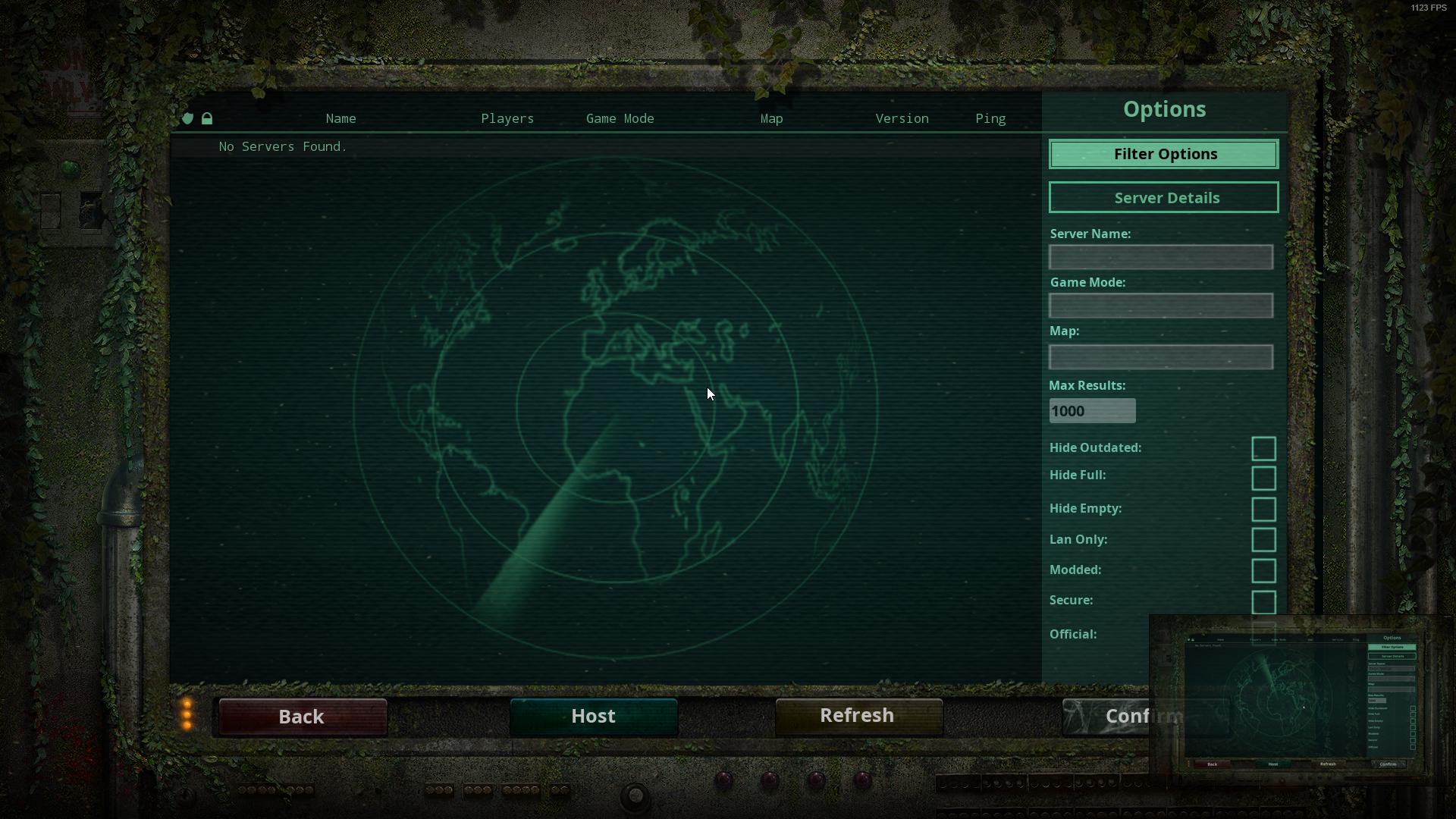
 timid terrace
It's likely the issues that Steam has been having today. It's doing it for me too.
Just wait a while for them to come back.
wanton slate
I have this issue all the time.
Tbf
Half of the time it takes me roughly 5 minutes to refresh, then my DNS etc fucks around
timid terrace
You might be one of our server connectivity issues guys, then
wanton slate
I cant open any webpages, when i am refreshing the serverlist
Then suddenly, the serverlist comes up & i can open webpages again 😄
timid terrace
If you continue having that problem after the servers seem to come back from their tantrum here, just shoot us a message in here and we'll try to help.
wanton slate
Sometimes i need to restart the game after having played for 6 hours, before i can refresh the serverlist.
Its in general, this has happened since January - but its only the isle it happens with
No antivirus, No DNS issues normally, No firewall, even tried to change to OpenDNS
 rustic crescent
I'm having trouble finding any servers as well. BUT I know for some people this helps (Not today):
Go to steam, settings, ingame, and at the bottom is should say "In-game server browers: Max pings / minute. Standard is 5000, drop it down to the next lowest and try again. the lowest means it takes a LONG time to find a server, but it will find it.
Have to be out of the game to 'set' it before it'll start working
it sounds like today it's a steam side issue and the ping won't help.
timid terrace
Steam appears to be having a tantrum for me. So I'm just gonna wait.
wanton slate
I have tried it - i've tried 1500, 500, 500, 2000 over the last few months.
BOth ingame & on steams own
The isle server browser seems to cause alot of issues.. Sometimes i cant refresh ingame, but i can refresh it on steams own server list
But then when i connect from steams server list, it doesnt let me join ingame.
Most of the times it takes me roughly 5 minutes to actually join a server, then it works fine - like..
I've played competitive CS for so many years, and other games.. Its only the Isle that seems to completely neglect my DNS & shut everything down for multiple minutes.
then it opens again & works fine.
I don't know what data it attemps to pull from the internet, but its pulling something that causes some sick stuff to happen on my router perhaps, since both OpenDNS & my providers dns cant handle it 😄
(Even after a format its the same)
timid terrace
Hmm
There's a fix in here that I dunno if you've tried?
"Open an Administrator Command prompt by typing "CMD" in your taskbar search box and right click > run as administrator.
Once the command prompt is open you will want to enter these 3 following line:
ipconfig /release
ipconfig /renew
netsh winsock reset
Then restart your computer and try playing on a server."
 somber frost
Also can't find a server. 😦
timid terrace
Likely having the issue with Steam. Just wait a bit. @somber frost
wanton slate
I tried both Flushing & renew dns 😦
I'm a pretty nerdish around these areas sadly - and its only The Isle that does this.
WoW, Other steam games, refreshing the server lists 100000 times a second in csgo, dota, Battlefield etc never has done this
but as soon as i refresh The Isles serverlist, my entire internet just goes on a trip - i can still hear my friend on discord completely fine, just cannot refresh serverlist, open webpages etc.
so the isle somehow fucks my DNS servers up
timid terrace
Huh.
I'm not really one of the more tech-savvy moderators, so I don't have much additional help to offer.
wanton slate
😄
timid terrace
Karth or Paco would probably know more, if you can catch them online.
wanton slate
And i used to do some Unreal coding aswell - as this game is created upon, and i don't exactly know when it just fucks around.. if its my router causing the issue atm
My friend whom i play with can just go mayham on refreshing her server list, with no issues :D
Where i gotta restart my game a couple of times, wait for my DNS to come back up
 naive creek
can see any servers
timid terrace
Steam's having a server outage. Just gotta wait for them.
Edit: Steam appears to have recovered. Try refreshing now if you were previously not seeing servers. Might take a little bit for them to appear.
chilly lodge
I've tried all the fixes ghost, dns changing, flushing, clearing, restarting pc, changing steam ping limit, changing how many servers Isle picks up, literally everything I can short of a game reinstall or pc reformat, I haven't been able to see my main server for 3 days now.
It's a very widespread issue now it seems. There's like 4-5 people on the servers discord also unable to see it.
silk wind
how do I join the Isla Nycta discord server?
timid terrace
That's not really a question for troubleshooting, but I can DM you a link.
 visual ether

Steam Status
Displays status of Steam client, Steam store, Steam community, Dota 2, TF2 and CSGO
steam status
timid terrace
@visual ether Unable to find servers?
visual ether
yeah
cant find isla nycta or risen realism
i see all the other severs tho
servers
i tried everything
from restarting my pc changing the max resaults
looking at file integrity
timid terrace
Make sure to untick all filters, set "Max results" to 500, search for them in the search bar
Also have you tried this?
No server found solution :
At the top left of Steam you’ll see a little button labeled “Steam”, left click that and select settings > in-game > and adjust the dropdown menu at the bottom to around 1000. You may need to tinker around and find the magic number that works for you, afterwards simply hit ok and launch The Isle.
visual ether
also u cant change the max resaults to 500 theres always a 1 there
timid terrace
Mine is 500.
visual ether
100 worked tho
for me if i hit backspace at much as i can
it goes down to 1
i cant change that number
timid terrace
Highlight it all and then type 500
timid terrace
👍
 edgy owl
after i play for about 3 min i get a unreal engine crash
 vast knoll
Hi sry i tried to google it but i can't find anything. I can't get the admin camera to work, even tried to change keyboard layout but just wont work.
timid terrace
@vast knoll Press \
vast knoll
there is no \ key without holding alt for me
timid terrace
Shift + \ places you down in the area below your camera, right-click teleports you forward, and the scroll wheel on your mouse is used to speed up/slow down
Hmm
You can rebind the key then
It should be "SpectatorMode" in settings
vast knoll
I'll check it
omg there is one, i didn't even checked because i found in google you can't
thanks ^^
edgy owl
if unreal engine crashes is that my end or the server end?#
timid terrace
You mean when you crash-to-desktop and the Unreal Engine bug reporter pops up?
edgy owl
yes
timid terrace
It's normal for the bug reporter to pop up but not the CTD
Is it doing it every time you try to play?
edgy owl
no its now been a whyle
pale pike
depends why it crashes
 severe path
this is probably a really stupid problem, might be my fault. i'm trying to join unofficial servers (i can connect to the official ones just fine) and there's one i've been trying to join for a while. every time i try to find it on the browser i'm unable to, and if i have a friend join to let me join off of them i get the "Client out of date. Please restart steam and update and try again." message. however, last night i was able to get on no problem, only to find that now i all of a sudden can't? it's not like the server updated last night. sorry if this is a stupid, already fixed problem.
pale pike
let us know your system specifications by following this
https://gyazo.com/8c1cac40ec65c922d4950386d9d19aba @edgy owl

@severe path restarting your pc and running steam as administrator could help
severe path
alright, i'll give that a shot, thanks for the suggestion 
edgy owl
Computer Information:
Manufacturer: Micro-Star International Co., Ltd.
Model: MS-7B48
Form Factor: Desktop
No Touch Input Detected
Processor Information:
CPU Vendor: GenuineIntel
CPU Brand: Intel(R) Core(TM) i3-8100 CPU @ 3.60GHz
CPU Family: 0x6
CPU Model: 0x9e
CPU Stepping: 0xb
CPU Type: 0x0
Speed: 3600 Mhz
4 logical processors
4 physical processors
HyperThreading: Unsupported
FCMOV: Supported
SSE2: Supported
SSE3: Supported
SSSE3: Supported
SSE4a: Unsupported
SSE41: Supported
SSE42: Supported
AES: Supported
AVX: Supported
CMPXCHG16B: Supported
LAHF/SAHF: Supported
PrefetchW: Unsupported
Operating System Version:
Windows 10 (64 bit)
NTFS: Supported
Crypto Provider Codes: Supported 311 0x0 0x0 0x0
Video Card:
Driver: NVIDIA GeForce GTX 1060 6GB
DirectX Driver Name: nvldumd.dll
Driver Version: 25.21.14.1967
DirectX Driver Version: 25.21.14.1967
Driver Date: 3 17 2019
OpenGL Version: 4.6
Desktop Color Depth: 32 bits per pixel
Monitor Refresh Rate: 60 Hz
DirectX Card: NVIDIA GeForce GTX 1060 6GB
VendorID: 0x10de
DeviceID: 0x1c03
Revision: 0xa1
Number of Monitors: 1
Number of Logical Video Cards: 1
No SLI or Crossfire Detected
Primary Display Resolution: 1920 x 1080
Desktop Resolution: 1920 x 1080
Primary Display Size: 62.99" x 35.43" (72.24" diag)
160.0cm x 90.0cm (183.5cm diag)
Primary Bus: PCI Express 16x
Primary VRAM: 6143 MB
Supported MSAA Modes: 2x 4x 8x
Sound card:
Audio device: LG TV (NVIDIA High Definition A
Memory:
RAM: 8134 Mb
Miscellaneous:
UI Language: English
Media Type: Undetermined
Total Hard Disk Space Available: 953253 Mb
Largest Free Hard Disk Block: 895406 Mb
OS Install Date: Jan 01 1970
i can run the game on epic fine
neat thorn
Your hardware specs are fine. If you go into Event Viewer, WIndows Logs, Application, look for a red circle even concerning a Driver or The Isle and post it here
If there's nothing there, try the System tab
edgy owl
i found a bunch of red dots/errors
neat thorn
Anything relating to Unreal Engine or The Isle or a graphics driver?
Around the time the crash happened?
edgy owl
- <Event xmlns="http://schemas.microsoft.com/win/2004/08/events/event">
- <System>
<Provider Name="Application Error" />
<EventID Qualifiers="0">1000</EventID>
<Level>2</Level>
<Task>100</Task>
<Keywords>0x80000000000000</Keywords>
<TimeCreated SystemTime="2019-04-06T19:19:09.422562600Z" />
<EventRecordID>676</EventRecordID>
<Channel>Application</Channel>
<Computer>DESKTOP-1IFVHQE</Computer>
<Security />
</System> - <EventData>
<Data>TheIsle-Win64-Shipping.exe</Data>
<Data>4.20.3.0</Data>
<Data>5c941817</Data>
<Data>nvwgf2umx.dll</Data>
<Data>25.21.14.1967</Data>
<Data>5c8de8f7</Data>
<Data>c0000005</Data>
<Data>0000000000ca262b</Data>
<Data>1a50</Data>
<Data>01d4ecac3e3ddc9a</Data>
<Data>C:\Program Files (x86)\Steam\steamapps\common\The Isle\TheIsle\Binaries\Win64\TheIsle-Win64-Shipping.exe</Data>
<Data>C:\Windows\System32\DriverStore\FileRepository\nv_dispi.inf_amd64_c5dc31c3a136544a\nvwgf2umx.dll</Data>
<Data>a9306389-3353-4447-8945-575f3c9b9b17</Data>
<Data />
<Data />
</EventData>
</Event>
no clue if thats what u after
neat thorn
Yep
look slike
brb
Ok, what I would do is a clean install of nVidia drivers. Download and double click to install, choose Custom Install, check the Clean Install box
If that doesn't fix it, roll back to version 416.94
Or the previous version
edgy owl
and i find the drivers online?
neat thorn
nVIdia.com - Support
NOt support, drivers
Download the latest GeForce drivers to enhance your pc gaming experience and run apps faster. Automatically scan your PC or search the driver database for compatible GPU drivers.
edgy owl
download the automatic driver update?
neat thorn
Choose your driver from the drop down menus under that
WIndows 10, GTX 1060 6GB
Here, this one
edgy owl
do i uncheck the above boxes or just the clean instal?
edgy owl
done
neat thorn
I would restart and try playing again to see if it happens
neat thorn
Welcome!
neat thorn
Not the firewall
same error?
@edgy owl Try turning off shadows in game settings
Also verifying Steam game files
lastly, did you build this yourself? What wattage is your power supply?
I found another vague reference to ram being installed in the wrong slots for dual channel, worth looking into also
edgy owl
i did build it today actualy and the power suply is 500
neat thorn
PSU should be fine
edgy owl
ram is instaled in 1 and 3
neat thorn
Is that what the mobo manufacturer recommends?
edgy owl
Z370-A pro
neat thorn
Yeah, I have the manual
just downloaded it
RAM should be A2 and B2
So looks like 2 and 4
edgy owl
correct
neat thorn
K
edgy owl
so would it help to run the game on all high instead of epic?
 regal oak
I accidentally left my game in windowed and now it crashes before it even starts. I've tried everything. Reinstalling, shortcuts, etc. Is there a way I'm missing that I can fix it so the game boots in full screen again?
edgy owl
alt enter?
neat thorn
Delete the SaveGame folder in Appdata
C:\Users\YourUserName\AppData\Local\TheIsle and delete the Saved folder inside
edgy owl
maybe i should try that for my prob
neat thorn
Are you running in Windowed mode?
regal oak
That one didn't work for me. I deleted and the game didn't even try.
neat thorn
Um, hang on
@edgy owl you can also try loading up settings and clicking Windowed Mode - Apply, then Fullscreen Mode - Apply and see if that fixes it
@regal oak try right clicking and Run as Administrator
edgy owl
well it dind do it yet so maybe its the shadows
but how will they affect it?i dont get it
neat thorn
Very well could be, that's an issue with nVidia and some games
I don't get it either, I just know it works sometimes
edgy owl
also vsync only takes affect on fullscreen right?
neat thorn
I'm honestly not sure on that one
regal oak
I am the administrator. I'm not getting that option.
I tried opening Stream as administrator because that's all I got. And tried to open the game. Barely opened.
neat thorn
So what happens? Screen flashes up and then disappears?
regal oak
Unreal Engine 4 Crash Reporter pops up.
regal oak
Yes
edgy owl
yeah thats the prob i have..i play for about 15 min and that comes up and closes the game
regal oak
Now I can't even get the windowed screen to pop up. The Isle program logo pops up and then it goes straight to the crash report.
edgy owl
so if thats the case then shadows is not the issue?
neat thorn
UKAsh, for you it probably is
Wistful has a completely different issue
that I'm looking into the file to change to make it fullscreen again
edgy owl
ah
pale pike
@regal oak resolution can be manually edited if you navigate to
C:\Users??\AppData\Local\TheIsle\Saved\Config\WindowsNoEditor
then open ''GameUserSettings'' in a notepad
try this
neat thorn
It's not resolution, it's Windowed mode vs Fullscreen mode
neat thorn
Where is that line?
I'm in that file and can't find it at all
Might have to be added?
neat thorn
I don't have issues, was just looking at my own file to help Wistful. Was looking for that line and couldn't find it. 😃
pale pike
i mean if wistful doesnt see the line too my bad
regal oak
I tried to replace it because it seemed mine was perhaps messed up trying to mess with Reshade but it still won't open now.
Sorry, was trying to restart my computer to try to help with things.
regal oak
I deleted the reshade files
And copied the settings from El Paco
It's a miracle. I thought I had undone everything. But I went back and double checked and made sure I uninstalled the settings. It's working and it's full screen. I'm sorry for the trouble but thank you for the help.
neat thorn
Glad you fixed it! I wasn't really sure where to go from there.............
What exactly did you do?
Remove everything from ReShade?
amber tide
Yeah reshade messes with certain files and sometimes corrupts
regal oak
I reinstalled it and acted like I was going to mess with the settings and it's like you already have settings saved. Edit or uninstall?
honest river
Anyone else getting an EU4 error when trying to play? I was playing earlier with no issues, and then The Isle crashed giving me the EU4 error message. I've tried a ton of troubleshooting and cannot seem to get it figured out. Any advice?
neat thorn
Let's start here please: https://gyazo.com/8c1cac40ec65c922d4950386d9d19aba
honest river
I'm trying to paste it here but i'm only allowed 2,000 characters.
neat thorn
Do it in sections then
honest river
Computer Information:
Manufacturer: Gigabyte Technology Co., Ltd.
Model: AX370M-DS3H
Form Factor: Desktop
No Touch Input Detected
Processor Information:
CPU Vendor: AuthenticAMD
CPU Brand: AMD Ryzen 7 2700 Eight-Core Processor
CPU Family: 0x17
CPU Model: 0x8
CPU Stepping: 0x2
CPU Type: 0x0
Speed: 3194 Mhz
16 logical processors
8 physical processors
HyperThreading: Supported
FCMOV: Supported
SSE2: Supported
SSE3: Supported
SSSE3: Supported
SSE4a: Supported
SSE41: Supported
SSE42: Supported
AES: Supported
AVX: Supported
CMPXCHG16B: Supported
LAHF/SAHF: Supported
PrefetchW: Unsupported
Operating System Version:
Windows 10 (64 bit)
NTFS: Supported
Crypto Provider Codes: Supported 311 0x0 0x0 0x0
Video Card:
Driver: NVIDIA GeForce RTX 2070
DirectX Driver Name: nvldumd.dll
Driver Version: 25.21.14.1634
DirectX Driver Version: 25.21.14.1634
Driver Date: 10 10 2018
OpenGL Version: 4.6
Desktop Color Depth: 32 bits per pixel
Monitor Refresh Rate: 60 Hz
DirectX Card: NVIDIA GeForce RTX 2070
VendorID: 0x10de
DeviceID: 0x1f07
Revision: 0xa1
Number of Monitors: 2
Number of Logical Video Cards: 2
No SLI or Crossfire Detected
Primary Display Resolution: 1920 x 1080
Desktop Resolution: 5360 x 1440
Primary Display Size: 18.74" x 10.55" (21.50" diag)
47.6cm x 26.8cm (54.6cm diag)
Primary Bus: PCI Express 16x
Primary VRAM: 8191 MB
Supported MSAA Modes: 2x 4x 8x
Sound card:
Audio device: Speakers (2- Logitech G430 Gami
Memory:
RAM: 16331 Mb
Miscellaneous:
UI Language: English
Media Type: Undetermined
Total Hard Disk Space Available: 2136036 Mb
Largest Free Hard Disk Block: 1907513 Mb
OS Install Date: Dec 31 1969
Game Controller: None detected
VR Headset: None detected
neat thorn
Your video card driver is out of date
Start there
I'd recommend downloading GeForce Experience while you're at it
helps remind of driver updates
honest river
Ok, i'll definitely download that right now. I'll post here if I have any further issues/questions. Thanks a ton!
neat thorn
Welcome!
If you have further issues, try setting Shadows to low
If you play fullscreen, set VSYNC to ON
honest river
Ok, can do. Thank you!
neat thorn
Welcome!
pale pike
could also be the game trying to use the integrated gpu
neat thorn
Even if they were playing earlier with no issues?
Also, I don't think the Ryzen 2700 has an integrated GPU?
honest river
Ok, I updated the video card driver and I'm still getting the EU4 error code. I've been trying to troubleshoot this for a couple of hours now. I've tried going into admin properties and tried to restart the Winsock connection settings, I've gone to the Steam discussion section and tried to see if anyone else had this issue. I've tried uninstalling and reinstalling Steam and The Isle and nothing has seemed to work.
neat thorn
DO you play in Fullscreen mode?
honest river
Yes, I do play in full screen mode. I just tried to see if it would work in windowed mode, and still getting the error code.
neat thorn
So, I would set VSYNC on and Shadows to LOW in the graphical settings
Can you play at all before it crashes?
honest river
Sometimes it crashes before I can even get to the home screen, and sometime I can get into a server and view the server message and then it will crash on me.
neat thorn
Here's what I would try: WIndowed Fullscreen mode, VSYNC on, and Shadows LOW in the graphics setting
Set these in the First menu
without clicking play
honest river
this is a bug of the map or what?
neat thorn
@honest river yes
honest river
thanks
honest river
Ok, I'll try. The game has been crashing before I can get to the first menu screen, when it's booting up the game. I will launch the game now and try and see if I can fix it. I'll let you know.
lol
pale pike
you're right bacon , they don't . I got it confused because it stated ''Number of Logical Video Cards: 2''
neat thorn
Yeah, the diagnostic info shows that because you have two physical connections to monitors
It's weird. I had to google Ryzen to be honest
pale pike
same lol , some of their CPU does have integrated card tho
neat thorn
They do! I found out those processors end with a G
honest river
As soon as i hit the settings button to change those, it crashed. Could this be an issue with my actual PC? Or is it the game? Would my PC give me an EU4 error code if it was causing the issue or just the game would?
pale pike
you can also try to manually edit the settings through editing the ini files
C:\Users??\AppData\Local\TheIsle\Saved\Config\WindowsNoEditor
then open ''GameUserSettings'' in a notepad
should be looking for these line :
[ScalabilityGroups]
sg.ResolutionQuality=100.000000
sg.ViewDistanceQuality=0
sg.AntiAliasingQuality=2
sg.ShadowQuality=0
sg.PostProcessQuality=2
sg.TextureQuality=2
sg.EffectsQuality=1
sg.FoliageQuality=0
you can copy paste those to replace yours , I play on pretty low graphics
neat thorn
Do you use Reshade or another program to change quality settings?
honest river
Sorry, I was away from discord for a minute. No, I don't use reshade and do not use any other programs.
neat thorn
I would also recommend setting your desktop resolution to 1080p
I noticed it's at 1440, might be some weird conflict there.
Also, did you restart after the driver update?
honest river
ok, I'll try the resolution no. And yes, I did restart the computer after the driver update.
I changed the resolution, it crashed as soon as I entered a server and got to the welcome message. Also, the only servers I could see at all were the isle official EU servers. I couldn't see any other servers.
 worldly forge
idk if anyone else has had a problem but for the past three days i have not found US 1, US 2, or US 3. I have been trying to get on cause I have a Full grown Allo on 1 and a full grown dilo on 2. I have tried refreshing well over 200 times for about an hour each, I have also exited out of the game multiple times and even restarted my PC and still have not seen any US servers, do you know what I can do?
neat thorn
@worldly forge Open an Administrator level command prompt. Right click, Run as Administrator. Type ipconfig /flushdns. Then, netsh winsock reset. Then, restart your computer
Also, if you have the Official Server box checked, uncheck it
I should have you do something else first though........
Steam - In Game
In Game Server Browser Max Pings to 1000
@honest river For your server issue, try the last two lines of the above post
worldly forge
could i go in discord with you? @neat thorn so you could walk me through this
neat thorn
Try the Steam fix first
Open steam, at the top Click Steam
Then settings
Then In-Game in the new window
Bottom of the window is In Game Server Browser, set it to 1000
Click OK
Launch The Isle and see if more servers show up
If that doesn't work, DM me and I'll walk you through the command line
worldly forge
lets see if it works, looking for US servers now
neat thorn
I wouldn't have any of the filter boxes checked. It should be OK to use a search term but even that doesn't work right sometimes
worldly forge
WOW it worked!! thank you so much @neat thorn !!
I havent seen these servers in three days
neat thorn
Welcome!
honest river
Well @neat thorn , I'm still having no luck fixing the issue. I turned down my settings, turned off VSYNC and i previously tried the winsock reset and just now tried it again, along with the ipconfig/flushdns. I'm really hoping that it is not my actual PC but, i literally only bought my PC for the Isle and have NOTHING else downloaded to it other than what came on the computer as well as discord, steam and Cities skylines, because I wanted to see if that game was affected at all. It ran smoothly. Like I said, not sure what I need to do now. Maybe i'll wait it out a couple of days to see if it somehow fixes itself.
neat thorn
Don't give up yet, let me look at this for a minute
Any Windows Updates right before this happened?
pale pike
are you getting any specific error # when UE4 crashes?
honest river
There were no updates right before the crash. When the crash happened, I though maybe that it was because I didn't have the latest updates so I did some updates that were found when checking for them. and here is the error that I am getting. From what i can see, there is no specific error code.
neat thorn
Hang on, I remember a Dev posting a way to get an error code since that window doesn't give you one
Give me a minute to find it
Right click The Isle in your Steam library > left click properties > local files > browse local files > TheIsle > Binaries > Win64 > launch TheIsle-Win64-SHipping.exe and tell me if you are prompted with an error that is different from the fatal error, and what it says.
Are you running MSI Afterburner or overclocking your GPU?
honest river
no i am not running MSI afterburner or overclocking. I just did your steps up above and the game so far has not crashed. I am currently on a server and it is running smoothly. I still, however cannot see any of the official servers, or other servers I usually play on. Am I going to have to access the game that way from now on to play without crashing? Also, I did the ipconfig/flushdns and netsh winsock restart just a short while ago and i'm still not seeing servers. I don't have the official boxes checked and have no server names in the search box, but i still can't see specific servers.
neat thorn
WIth regard to the servers, try the following
Open Steam, at the top click Steam, then Settings
IN the new window that pops up, choose In game
At the bottom of that screen, for In Game Server Max Pings set it at 1000
honest river
Ok, so far so good! I can see all of the servers I normally play on. Will I need to access The Isle through the TheIsle-Win64-Shipping.exe from now on to avoid crashing?
neat thorn
Well, since we didn't figure out exactly what the issue was, I'd say yes. I'm not 100% sure why it's working the way it is but hey, it's working!
May want to create a shortcut for that EXE on your desktop
honest river
Done and done. Shortcut created. I appreciate you taking time out of your day and gameplay to help me get this working. You're the bees knees! Thanks a ton @neat thorn
neat thorn
You're welcome!
neat thorn
@chilly lodge Any luck with the server changing ports?
@edgy owl if you still have issues, this worked for someone else. Right click The Isle in your Steam library > left click properties > local files > browse local files > TheIsle > Binaries > Win64 > launch TheIsle-Win64-SHipping.exe
@sterile zinc this is troubleshooting
What's up?
 sterile zinc
ah i didnt notice this existed
okay so the issue randomly resolved itself now but for the past day there were either no servers or the server menu never finished loading. then when i tried to host my own it just went black (with audio)
neat thorn
Ok, the Host button is to host a solo server, just you, no one else
sterile zinc
ik
neat thorn
Ok
For the servers, I have a fix for that
Try the Steam fix first
Open steam, at the top Click Steam
Then settings
Then In-Game in the new window
Bottom of the window is In Game Server Browser, set it to 1000
Click OK
Launch The Isle and see if more servers show up
sterile zinc
ok
 candid wind
Has anyone else had deathmatch servers completely disappear? It seems to be replaced with progression for me now, which I didn't even realize was still in the game. Tried re-installing but its still as if deathmatch never existed, I don't get the option to select it anywhere and searching for it shows no results.
neat thorn
Open steam, at the top Click Steam
Then settings
Then In-Game in the new window
Bottom of the window is In Game Server Browser, set it to 1000
Click OK
Launch The Isle and see if more servers show up
have you tried this?
candid wind
Will try it rn
 signal heart
Hi there, it's been a good 2 years since I've played this game. It used to run perfectly, now, every time I go to load in a server it just crashes. Even on all low settings. My computer is a literal toaster so I keep everything on low, it used to be enough
neat thorn
Yikes, things have changed in two years. I would first start with updating any and all drivers. If that doesn't work, post your system specs please
signal heart
no, when you see it... don't make fun
signal heart
Computer Information:
Manufacturer: Dell Inc.
Model: Inspiron 23 Model 5348
Form Factor: Desktop
Touch Input Detected
Processor Information:
CPU Vendor: GenuineIntel
CPU Brand: Intel(R) Core(TM) i5-4460S CPU @ 2.90GHz
CPU Family: 0x6
CPU Model: 0x3c
CPU Stepping: 0x3
CPU Type: 0x0
Speed: 2893 Mhz
4 logical processors
4 physical processors
HyperThreading: Unsupported
FCMOV: Supported
SSE2: Supported
SSE3: Supported
SSSE3: Supported
this ?
candid wind
@neat thorn Thanks for the help, worked out
signal heart
okay, will do, didn't want to spam crazy
Computer Information:
Manufacturer: Dell Inc.
Model: Inspiron 23 Model 5348
Form Factor: Desktop
Touch Input Detected
Processor Information:
CPU Vendor: GenuineIntel
CPU Brand: Intel(R) Core(TM) i5-4460S CPU @ 2.90GHz
CPU Family: 0x6
CPU Model: 0x3c
CPU Stepping: 0x3
CPU Type: 0x0
Speed: 2893 Mhz
4 logical processors
4 physical processors
HyperThreading: Unsupported
FCMOV: Supported
SSE2: Supported
SSE3: Supported
SSSE3: Supported
SSE4a: Unsupported
SSE41: Supported
SSE42: Supported
AES: Supported
AVX: Supported
CMPXCHG16B: Supported
LAHF/SAHF: Supported
PrefetchW: Unsupported
Operating System Version:
Windows 8.1 (64 bit)
NTFS: Supported
Crypto Provider Codes: Supported 311 0x0 0x0 0x0
Video Card:
Driver: Intel(R) HD Graphics 4600
DirectX Driver Name: igdumdim32.dll
Driver Version: 10.18.10.3379
DirectX Driver Version: 10.18.10.3379
Driver Date: 12 20 2013
OpenGL Version: 4.2
Desktop Color Depth: 32 bits per pixel
Monitor Refresh Rate: 59 Hz
DirectX Card: Intel(R) HD Graphics 4600
VendorID: 0x8086
DeviceID: 0x412
Revision: 0x6
Number of Monitors: 1
Number of Logical Video Cards: 1
No SLI or Crossfire Detected
Primary Display Resolution: 1920 x 1080
Desktop Resolution: 1920 x 1080
Primary Display Size: 20.08" x 11.30" (23.03" diag)
51.0cm x 28.7cm (58.5cm diag)
Primary Bus Type Not Detected
Primary VRAM: -2016 MB
Supported MSAA Modes: 2x 4x 8x
Sound card:
Audio device: Speakers (2- Logitech USB Heads
Memory:
RAM: 8092 Mb
Miscellaneous:
UI Language: English
Media Type: DVD
Total Hard Disk Space Available: 944518 Mb
Largest Free Hard Disk Block: 753984 Mb
OS Install Date: Dec 31 1969
Game Controller: None detected
VR Headset: None detected
signal heart
okay, and idk if i even can update drivers btw
neat thorn
Your graphics driver is 6 years out of date.
This is a new one, download and install it
Drivers & Software
Intel® Graphics Driver for Windows* [15.40]
neat thorn
That's what I'm looking at
hang on, researching your CPU
The one on the bottom, 4th gen
signal heart
202.89MB?
neat thorn
No, download should be 174.63
Hang on, let's try something else here real quick
Let's do this so you get the right driver

Intel
The Intel® Driver & Support Assistant helps keeps your system up-to-date by detecting when updates are available.
That's the intel driver support, follow the steps after Download Now
It should update any and all Intel drivers
I don't want to get you the wrong driver
signal heart
download it?
signal heart

 neat thorn
You're awesome!
signal heart
it scanned, i went to go launch it and it didnt do anything lmao
oh im downloading the updates now @neat thorn
signal heart
only two but it's saying they are a dual band wireless thing and a wireless bluetooth thing. they don't sound useful lol
signal heart
lmao
neat thorn
So, while those download, let's look a bit more
signal heart
okey
neat thorn
Drivers & Software
Intel® Graphics Driver for Windows® 10 [15.40][4th Gen]
OH, you're Windows 8.1?
Man, I need to read more
This one then
Drivers & Software
Intel® Graphics Driver for Windows 7*/8.1* [15.36]
First on the left, .exe 121.6 MB
neat thorn
Hmm, ok back to the drawing board
signal heart
okey
neat thorn
let's go to Dell
At the bottom, Intel HD Graphics driver, after you choose WIndows 8.1 64 bit at the top
Or you can try the Detect Drivers button if you want to update everything
either way should work
signal heart
ye
signal heart
okey
signal heart
Restarting
chilly lodge
@neat thorn they haven't gotten home yet. Should've arrived an hr ago lol
neat thorn
I m eant the server owner
If the admin changed the port
since others are having issues also
chilly lodge
oh, yea he said he'd look into it
haven't gotten a confirmation of if he did or not yet
chilly lodge
rip. he did say he'd like to affiliate/partner with my community tho 😛
 supple crag
after the server crash i can no longer launch game, i keep getting this error. i have tried reinstalling the game and still keep getting same problem. wondering if this is a bug
signal heart
IT WORKED @neat thorn THANK YOU
pale pike
@supple crag Running the game executable as administrator should clear that crash apparently
edgy owl
@neat thorn will i need to open it up through that every time?
pale pike
@edgy owl if the regular .exe still crash you then yes you're probably safer to use the win64.exe
edgy owl
ok thanks
keen spade
I am still getting the No Server issue.. I tried different steam settings from 5,000 down to 250, nothing, I reinstalled cleanly twice, I tried booting a server from the steam server list, didnt work.. Tried to connect via friends, didnt work.. Nothing is working at all. I have it clear through the firewall, I tried without firewall/antivirus...
edgy owl
host closed the connection?
 torn smelt
Any way to keep the sound going in the game when we alt-tab?
 orchid perch
any time i tried to join any server it says you kicked and it says host closed the connection whats going on
edgy owl
just got the kernel-power error 41 😦
neat thorn
@keen spade Open an Administrator Level Command prompt
Type ipconfig /flushdns
Then netsh winsock reset
Then restart your computer
@orchid perch same as above
neat thorn
@edgy owl that means a shutdown with no BSOD. At this point it sounds like hardware. If you're connected to a power strip or surge protector, plug directly into the wall. Also, might be worth testing your RAM.

Test your RAM with MemTest 86+
edgy owl
thats a lot of steps to do
neat thorn
I know
But at this point it looks like hardware
not software
RAM, power supply, motherboard and CPU are suspect
edgy owl
oh god
neat thorn
If there's no BSOD, that means a hardware shut down or lock up
edgy owl
well i had a blue screen with a 😦 face on it saying oops something went wrong
neat thorn
Oh you did?
go into the event viewer and pull it up, it will tell you a 0x0 code and a file name
edgy owl
yes
- <Event xmlns="http://schemas.microsoft.com/win/2004/08/events/event">
- <System>
<Provider Name="Microsoft-Windows-Kernel-Power" Guid="{331c3b3a-2005-44c2-ac5e-77220c37d6b4}" />
<EventID>41</EventID>
<Version>6</Version>
<Level>1</Level>
<Task>63</Task>
<Opcode>0</Opcode>
<Keywords>0x8000400000000002</Keywords>
<TimeCreated SystemTime="2019-04-07T12:50:55.990198900Z" />
<EventRecordID>1267</EventRecordID>
<Correlation />
<Execution ProcessID="4" ThreadID="8" />
<Channel>System</Channel>
<Computer>DESKTOP-1IFVHQE</Computer>
<Security UserID="S-1-5-18" />
</System> - <EventData>
<Data Name="BugcheckCode">313</Data>
<Data Name="BugcheckParameter1">0x3</Data>
<Data Name="BugcheckParameter2">0xfffff806804a2f90</Data>
<Data Name="BugcheckParameter3">0xfffff806804a2ee8</Data>
<Data Name="BugcheckParameter4">0x0</Data>
<Data Name="SleepInProgress">0</Data>
<Data Name="PowerButtonTimestamp">0</Data>
<Data Name="BootAppStatus">0</Data>
<Data Name="Checkpoint">0</Data>
<Data Name="ConnectedStandbyInProgress">false</Data>
<Data Name="SystemSleepTransitionsToOn">0</Data>
<Data Name="CsEntryScenarioInstanceId">0</Data>
<Data Name="BugcheckInfoFromEFI">false</Data>
<Data Name="CheckpointStatus">0</Data>
</EventData>
</Event>
neat thorn
There should be an event before that that caused the shut down
that's the shutdown notification
edgy owl
u mean in aplications?
edgy owl
well i have loads of errors
could be anyone
- <Event xmlns="http://schemas.microsoft.com/win/2004/08/events/event">
- <System>
<Provider Name="Microsoft-Windows-DistributedCOM" Guid="{1B562E86-B7AA-4131-BADC-B6F3A001407E}" EventSourceName="DCOM" />
<EventID Qualifiers="0">10016</EventID>
<Version>0</Version>
<Level>2</Level>
<Task>0</Task>
<Opcode>0</Opcode>
<Keywords>0x8080000000000000</Keywords>
<TimeCreated SystemTime="2019-04-07T13:29:44.396044700Z" />
<EventRecordID>1365</EventRecordID>
<Correlation />
<Execution ProcessID="1032" ThreadID="1100" />
<Channel>System</Channel>
<Computer>DESKTOP-1IFVHQE</Computer>
<Security UserID="S-1-5-18" />
</System> - <EventData>
<Data Name="param1">application-specific</Data>
<Data Name="param2">Local</Data>
<Data Name="param3">Launch</Data>
<Data Name="param4">Windows.SecurityCenter.WscBrokerManager</Data>
<Data Name="param5">Unavailable</Data>
<Data Name="param6">NT AUTHORITY</Data>
<Data Name="param7">SYSTEM</Data>
<Data Name="param8">S-1-5-18</Data>
<Data Name="param9">LocalHost (Using LRPC)</Data>
<Data Name="param10">Unavailable</Data>
<Data Name="param11">Unavailable</Data>
</EventData>
</Event>
so the blue screen means its software?
neat thorn
Honestly, at this point, I'd recommend making a post on the Windows TEN forums where I pulled the l;ink for MEMtest
OR TomsHardware
edgy owl
ok
neat thorn
Based on what I've read regarding the text you posted, you'll need to run MEMtest and some other things. I'm not terribly familiar with that software so I'd recommend someone with more experience than I have in that realm
edgy owl
if i reconect the ram will that help?
also if its ram related it should cause the prob on all games correct?
neat thorn
Not necessarily
If the RAM only has one bad address slot, it may or may not be triggered by other games
You can try reseating the ram
and also, Admin level command prompt
sfc /scannow
this will check for and replace corrupted windows files
Refresh my memory, brand new PC you bought just for The Isle?
edgy owl
my old laptop kept overheating and i built a pc
neat thorn
Gotcha
edgy owl
for everything not just the isle 😃
so if i play another game and does the same its def the ram?
neat thorn
no, not necessarily
neat thorn
Things need to be tested to figure out what is causing the issue
Welcome to building your own PC! Unfortunately this happens sometimes
I would highly recommend posting on the Microsoft Windows forum, Windows TEN forum or TomsHardware so someone can help you narrow this down
Unfortunately it's not an Isle problem, it's a hardware or driver problem
neat thorn
LOL!
Once you work through this, you'll know even more about your PC. it's a learning experience, don't let it get you down
neat thorn
Use the first error you posted here this morning to start a new thread on one of those forums. The one with Bugcheck 313.
it's good that Windows files are fine
But that also means more deep testing
edgy owl
btw just throwing it in here for future fix possibilities..i just ran mdsched.exe to test ram and no issues were found
neat thorn
Yeah, that's not a very thorough test but it can catch some issues
Compared to Memtest it just scratches the surface
edgy owl
ah
neat thorn

Original title:"Kernal Power Problem" Installed windows 8 on day of launch and since have been getting on average 3-4 crashes per day with the following "Windows Kernel Power Problem" Event Id 41 and
Two threads I've found with a similar issue, if those don't fix it, please post on one of those forums for more help
keen spade
@neat thorn I had tried that release and so on before too
neat thorn
release and renew?
keen spade
Yeah
neat thorn
That doesn't do anything, just assigns your computer a new IP address
You need to /flushdns
keen spade
I did that too
Only thing I havent done is port forward
Which I will try now, but what are the ports if anyone knows?
neat thorn
Ok, slow down here
Do you have your In Game Server pings set at 1000?
Through Steam?
neat thorn
Your server results in The Isle set at 1000?
neat thorn
I need you to do the other commands again and restart.
Admin Level Command Prompt
ipconfig /flushdns
netsh winsock reset
Then we'll try something else
keen spade
Will try it in a bit as on a call at the moment, thank you for helping so far though
neat thorn
If they still don't show, check the Steam Server Browser to see if they show there
keen spade
I had tried through steam browser and they all show, it just wont connect when it launches the game
neat thorn
Ok, try it again after the command prompt commands
There's still more things to try. If you can see them in the Steam Server browser it's not a port issue. 😃
keen spade
Ah okay, thank you. I'll let you know when I do it, may be a bit due to call though
neat thorn
That's ok.
I may or may not be here, I have some things to do myself. Make sure exceptions are added to not only Windows firewall but also your Antivirus firewall if you have one. Another thing to try is Right click The Isle in your Steam library > left click properties > local files > browse local files > TheIsle > Binaries > Win64 > launch TheIsle-Win64-SHipping.exe
keen spade
@neat thorn Just tried the ipconfig and all that, didnt work again sadly
I have all .exe's and folders excluded on my Bitdefender and on my firewall I have The Isle and the Win64 one excluded
Its odd that it wont connect to the servers with the Steam Server browser, as I see them clear as day there
@neat thorn I found out my issue, I have a Maximus Formula z390.. So it has the 5GB Aqua ethernet port.. Server list doesnt work on the 5GB Ethernet port but works on the standard Intel port.. Any idea why on that? Otherwise I can play as long as on the standard Intel port
amber tide
What speed is the standard intel port? Have you checked for the 5gb one maybe having closed ports?
@keen spade
keen spade
Intel is 1GB, the Aquanita is 5GBe.
Neither have any ports closed as I could see stuff in steam server list
Just wouldnt let me join servers or see them in the game on the Aqua one
amber tide
Interesting, well glad you were able to solve it
 thorny tide
Hello,
My friend is currently having an issue with The Isle, and she wanted me to ask about this issue for her.
She went to open the game, and it gave her a message saying it needed to install DirectX, despite the fact it was already installed. When it was finished, The Isle launched. After literally a second of running, it crashes, and continues to when she keeps attempting to open it.
She can't launch any other Steam game, either.
Her tag is NightlightTheTapeEater#8047 if she has to be DMed
Any help from anyone is appreciated
amber tide
Tell her to post here so we're not going through a middle man please
She'll probably have to uninstall directX and clean install it again
 tidal jewel
Hello, yes. It is I. So basically I’m in the steam menu and when I double click on The Isle, supposedly going to run it, it says next to the title “Running” for about..a second and right after that itll say “Syncing” and then like after a millisecond Itll say nothing and there’s no message or anything. Whenever you try again, it does the exact same thing. It doesn’t run the game, it doesn’t do anything. We have tried what you have suggested already, but it hasn’t worked.
amber tide
Have you ever been able to play the isle?
tidal jewel
Yes
It’s something to do with the startup files. There’s a file missing in there that it’s searching for that’s preventing DirectX from running smoothly
amber tide
You can't play any other steam game?
Right click The Isle in your Steam library > left click properties > local files > browse local files > TheIsle > Binaries > Win64 > launch TheIsle-Win64-Test and you should be prompted with an error which you can compare to the solutions below, if the error does not match those listed below
See below:
-
api-ms-win-crt-runtime is missing from your computer.
This error simply means that your Windows is lacking critical security updates and will be solved by downloading and installing any/all missing Windows updates. -
msvcp140.dll is missing from your computer.
Your system is missing the latest Microsoft C++ Redistributables. You can download them here: https://support.microsoft.com/en-gb/help/2977003/the-latest-supported-visual-c-downloads Download & Install both the x86 and x64 versions. Afterwards restart your computer.
This article lists the download links for the latest versions of Visual C++.
If none of the solutions above solve the issue, An uninstall / clean install can fix this issue. When you uninstall, delete the Isle folder in Steam Apps to make sure any remaining files are gone.
tidal jewel
I’m working on it. I have Niche-A genetics survival game as well, but for some reason that runs
It says that X3DAudio1_7.dll was not found
Also XAPOFX1_5.dll was not found
neat thorn
microsoft says to download and run this
For the audio file
For the other one, this: https://www.microsoft.com/en-us/download/details.aspx?id=35

Microsoft Download Center
The Microsoft DirectX® End-User Runtime provides updates to 9.0c and previous versions of DirectX — the core Windows® technology that drives high-speed multimedia and games on the PC.
by chance, when was the last time she played it and what video card does she have?
neat thorn
Ok, just checking
tidal jewel
Wait wait wait
Back up
I played it last week on my old laptop, I just got this new laptop today
tidal jewel
We’ve done all windows updates.
We’re working on audio updates
amber tide
Sounds good 👍
tidal jewel
Okay so. One of the files is working. The first one.
The second one failed to download
It needs the one with the _7.dll
tidal jewel
Thanks
So like the game started which is good
But there was no audio
That’s why
neat thorn
@atomic valve IN here
A Dev won't directly answer you
Is the server you're connecting to an older version?
 atomic valve
I honestly dont know
neat thorn
Well, what version does it say in the server list?
atomic valve
Its the current version from what my friend said
neat thorn
Trying to see if I can find it now
neat thorn
RIught click the Isle in Steam, choose Properties. Then click the Local Files tab and click Verify Integrity of Game files
atomic valve
i did that
twice then, unistalled, restarted pc then reinstalled
and still having this issue i honestly dont understand why
neat thorn
I went back and searched through the channel looking for this. People post they have the issue, then leave and don't post what fixed it
Try joining through the Steam Server Browser
Steam - View - Servers
At the bottom, click the Change filters list and choose The Isle, then find your server and click Connect
If that doesn't work, I may have another option to try
atomic valve
ive been doing that also after i couldnt find it in game any more
neat thorn
And.....same issue?
atomic valve
yup...
neat thorn
Ok, let's try the other workaround
atomic valve
im all ears
neat thorn
Close The Isle if it's running already first!
Go to your Steam folder - Steamapps - Common - The Isle - The Isle - Binaries - Win64 - TheIsle-Win64-Shipping.exe.
atomic valve
still havin the outdated
neat thorn
On windows 10?
atomic valve
yes
neat thorn
Click the magnifying glass icon and search for %localappdata% then click on the folder in the Right Pane
Scroll down to and delete The Isle folder
atomic valve
Wouldnt that delete the isle all together?
neat thorn
no
not in the Appdata folder
Just your user profile and some config things that will get redone when you join a server
neat thorn
C:\Users\YourUserName\Appdata\Local is the folder path
May have to hit View at the top, OPtions on the right, CLick the View tab on the new window and choose Show Hidden Files, FOlders and Drives down below
atomic valve
the isle folder has been deleted
neat thorn
Try agian
atomic valve
im saying i delete the isle folder you told me to delete
amber tide
Yes so start up the isle and try it again
atomic valve
oh gotcha
neat thorn
I know you have the right version of the game from your screenshot so.....we have to be close
atomic valve
HEY IT WORKED!! THANK YOU SO MUCH @neat thorn
neat thorn
WOOT! You're welcome!
honest river
<@&505047238674874368> I don't want to tag anyone too busy for this. I hope this isn't too much of a pester--- but what do we do if we catch a hacker in our server? (It's not an official server. It's one of the servers I own.) We have video recording, and they have been vac banned before as well
pale pike
yeah if you have legit evidence of it sending it to punch is the way to go
honest river
gotcha! thank you <3!
 remote palm
Yes, my old computer broke and now I have to use a older and worse computer, but still can handle The Isle
neat thorn
That message means that your Video Card doesn't support DirectX 11. Which means you have to upgrade hardware before you can play the game
What video card is it?
remote palm
Oh gotcha, well, now I can't even play my second favorite game
neat thorn
Sorry! If it's not a laptop, can you put your video card from your newer computer in?
remote palm
Nah, old Computer and Its my family computer, which means I have to pay another $1,000 just to play the game.
amber tide
Or you could fix the other computer which should be cheaper hopefully
neat thorn
So, what broke on your old computer? Surely it's not $1000 for a single part.
amber tide
And if that message is coming up, you more than likely won’t be able to play a huge amount of games on that computer unfortunately
remote palm
The whole screens all broken up, and I think the touch screen ability is damage after I punched it while loosing my safe file for a big project I was working on
neat thorn
Oh, it's an All In One. Yeah, those aren't cheap to fix
remote palm
Exactly. I really can't afford to pay it as well because my family doesn't have a lot of money
I'm a teen btw, which means I can't get a job and only get paid at least $2 just for chores, and I'm still in school.
neat thorn
I had a job at 15, part time on the weekends
neat thorn
Oh, well then. Might be worth investigating a new screen for the All In One
could be as cheap as a couple hundred dollars
remote palm
The thing is, my parents don't buy me stuff anymore
And I only have $31 left
So it's gonna take at least 3 years just to repair a simple screen
Actually looking at it though it seems the screen just might be broken, and that's a laptop, and if I look at the pricing of the screen amount of money, I think it may be enough. To be continued later on
neat thorn
If it has an external monitor port, maybe you can use that?
 half urchin
official us 3 doesn't show up in the server selections
 kind kindle
@half urchin Do you have official servers ticked on as a filter?
For some reason this server specifically has some issues with that filter. I'd try looking up The Isle Official US 3
With no filters.
kind kindle
No worries, happy to help.
edgy owl
@neat thorn after I installed Windows when I first built the pc went in the bios and enabled something like threading for the ram and increased the voltage on them..and then increased the actual power supply within the bios..I set them back to default yesterday and I had no problems with any other game yet..would that be a reason of my problem running the Isle?
neat thorn
@edgy owl very well could be.
void otter
Got my game stuck on a infinite loop searching for a server.
neat thorn
Ran into an issue yesterday where one network card worked and the other didn't for someone else. Have you tried ethernet?
void otter
Huh, Nothing changed,
@neat thorn
still trying to find a solution for the no server found thing BTW;
void otter
yeah.
neat thorn
Are you using a VPN?
void otter
No.
Also, is it normal that there is a ton of "TheIsle" in my firewall?
@neat thorn
all of them share the same path
neat thorn
Right, I have more I think because I run my own server
I would remove all of those and start up The Isle again
neat thorn
And it didn't ask you to add anything to the Firewall>?
void otter
yes it did. I checked both.
neat thorn
Private and Public?
void otter
yes.
void otter
Two entries right now.
neat thorn
One for The Isle.exe and one for Win64-shipping.exe?
void otter
Uhm, both are for the win64-shipping.exe
neat thorn
Ah, ok we're getting somewhere. Add another manual entry for TheIsle.exe located in your SteamApps, Common, The Isle folder
void otter
Do i set it as an exclusion?
neat thorn
In WIndows Firewall?
Just click the Add Another APp button, browse to the Path, choose the EXE, chekc both network types and click Add
wow
typing fail
Or is this an Antivirus firewall?
void otter
windows firewall
neat thorn
Yeah, follow my steps above
void otter
did it, still "no server found"
neat thorn
Are you doing this with the program running?
neat thorn
yes
neat thorn
Ok, so to review, Steam Max Server pings is 1000 right?
and they still show in Steam Server browser?
void otter
yeah
neat thorn
Antivirus?
neat thorn
Ok
Is your network set to private or public?
RIght click your connection, Open Network and Internet connections, click WIndows Firewall in Blue near the bottom. On the next screen, click the ACTIVE network, then turn the firewall OFF.
neat thorn
If this is a home network, I'd recommend Private BTW
If you're on Public WiFi from somewhere else, keep it Public
BRBm, 10 minutes or so
void otter
aanndd no, still not working
neat thorn
With everything that we've changed I'd do the IPconfig again
Admin level command prompt
ipconfig /flushdns
netsh winsock reset
neat thorn
What happens if you load TheIsle-Win64-Shipping.exe instead of The Isle.exe?
edgy owl
do i need to worry if my gpu uses 100% of it?
edgy owl
100% of it power..while running the isle my cpu was at 60% and gpu at 80-90%
if its running at 100% would it cause any harm?
neat thorn
No. What GPU is it?
edgy owl
gtx 1060 6gb
neat thorn
100% power or 100% load? Are you in Resource Monitor or Task manager?