#🔧-legacy-troubleshooting-🔧
1 messages · Page 20 of 1
 oblique kayak
 lilac thistle
Ah, glad to hear. Tag me if you have any issues.
 lunar scarab
@wicked elbow i changed to dev branch and back and now it works
 wicked elbow
Oh nice, glad you got it!
 sour shore
How do you delete the saved folder? I must have missed a pinned somewhere..
 pale pike
@sour shore
can be found here :
C:\Users\AppData\Local\TheIsle
C:\Program Files (x86)\Steam\steamapps\common\The Isle\TheIsle
 honest river
is this right ?! => TheIsleServer-Win64-Shipping.exe /Game/TheIsle/Maps/Landscape3/Isle_V3?listen?game=Survival?MaxPlayers=100?port=7771?queryport=27011 -log
sour shore
@pale pike thank you so much!!
 frail mountain
Anyone here know how to fix so i can use scent, i have tried deleting the saved folders and reinstall the game, but still dosent work
 pearl oxide
You're probably deleting the wrong Saved folder
The correct one is under C:\Users\<Username>\AppData\Local\TheIsle
 molten pagoda
I somehow can't nest anymore. I always pick female skin and wait till I'm full adult but when I press the hotkey I set the BuildNest on it doesn't work. I already reset my settings and deleted my Saved folder but it still won't work. Does anyone know what I can do?
 stuck rock
@molten pagoda what dinosaur at what growth stage?
 wise delta
Asking for someone else:
Someone reported to me that they were unable to delete their replays, and that they cannot find their "saved" folder to do it manually. Anyone know what could be going on there?
pearl oxide
The replays, I think, are stored in the older Saved folder location
If they delete that folder (the one found in the Steam directory) that should clear out their replays too
wise delta
Yeah that's what I told them to do but... They say they can't find it?
molten pagoda
I was Para at full growth.
lilac thistle
@wise delta Tell them to right click The Isle in their Steam library > left click properties > local files > browse local files > TheIsle > delete the "Saved" folder.
wise delta
Thanks. I'll translate that for them when I get home.
If they can't find that then there's nothing I can do haha
 chilly cairn
Only 6 servers are available to me on the dev branch server browser, none of which have any players. I was able to join every server perfectly two days ago. Any info? I have none of the server filters checked.
honest river
Whenever I tab out of my game the game freezes and it can last for a couple seconds to a few minutes, sometimes I crash from the server with a 'connection timed out' message or the game unfreezes until I tab out again. Was wondering if there's any way to fix this? This happens on any server I join too.
 manic stream
I can’t seem to connect to any servers with thenyaw island as a map. My pc is pretty old though, any ideas what to do?
 sturdy coral
"I was banned from dev 4 for hide in the water, i really didn't know the existence of this rule. I would like to know if i can be unbanned. Now i know it and i wont do it again." @lilac thistle
 cinder abyss
@sturdy coral DM me, we can discuss your ban there
 quartz grotto
I have problems
I am on official
this is before nightvision
this is after
pictures were taken 1 minute apart as i was chased down by a rex
need help asap, night's are very dark
 drowsy needle
quartz grotto
drowsy needle
quartz grotto
yes
cinder abyss
Post processing is the one setting I'd always keep at epic.
Or at the very least high.
So it could very well be that.
I'd recommend you get on the dev-branch, though.
 leaden trout
What're the rest of your specs?
quartz grotto
@leaden trout
Operation system
Windows 10
CPU
Intel Core i5 4210U @ 1.70GHz
Haswell ULT 22nm Technology
RAM
6,00GB Dual-Channel DDR3 @ 798MHz (11-11-11-28)
Motherboard
LENOVO VIUU4 (U3E1)
Graphics
Generic PnP Monitor (1920x1080@60Hz)
Intel HD Graphics Family (Lenovo)
2047MB NVIDIA GeForce 840M (Lenovo)
ForceWare version: 388.13
SLI Disabled
 wheat holly
The last patches seem to have broken scent for one of my friends they have deleted the save folder but it did nothing
Anyone got any other ideas?
stuck rock
You will need to reset your settings to have access to the new keys, so click the Reset button in the settings area and restart your game.
wheat holly
And it worked for them Ty!
lunar scarab
With the new update my controls who were fixed are broken again, i removed saved file and didnt seem to help also a reinstalling didn't help. 2 move forwards and move rights and i cant keybind them.
 signal hatch
You have to reset them in the game panel and configure them again.
 gloomy grotto
I'm experiencing severe lag issues, with ping up to 1000. Seems like others on the leaderboard are experiencing lag too, to some degree.
gloomy grotto
And now my graphic settings seems to be locked at Epic, the same problem with my jokes
stuck rock
@gloomy grotto can't change them mid-game anymore due to it causing too many issues, but you can change them on the main menu, the lag issue is a server problem im working on fixing asap
gloomy grotto
Oh ok my bad didn’t know, it makes sense. And good to know you’re on the case. Happy working!
 potent belfry
Any Admins having problems with the commands to see names across the whole server, using spectator and opening the console?
I can't seem to do anything since the update, I've reinstalled twice.
Nvm, got it to work by deleting Saved Folder, resetting everything three times for w/e reason then it started working
 vast sluice
sadly I can't play on the original servers anymore like the dev branch the shadercache file is happening with the original branch :/
vast sluice
http://prntscr.com/kgeiei the update is basically keeping me from playing

 thorn kestrel
@vast sluice that message looks to me that you have a graphics card that does not support shader model 5, so that means you have a below minimum specification graphics card. the update isn't keeping you from playing, its likely your hardware is the problem. post your PC specs if you are having issues too, it helps narrow down issues
vast sluice
Computer Information:
Manufacturer: LENOVO
Model: G-on-go
Form Factor: Laptop
No Touch Input Detected
Processor Information:
CPU Vendor: AuthenticAMD
CPU Brand: AMD Phenom(tm) II P820 Triple-Core Processor
CPU Family: 0x10
CPU Model: 0x5
CPU Stepping: 0x3
CPU Type: 0x0
Speed: 1795 Mhz
3 logical processors
3 physical processors
HyperThreading: Unsupported
FCMOV: Supported
SSE2: Supported
SSE3: Supported
SSSE3: Unsupported
SSE4a: Supported
SSE41: Unsupported
SSE42: Unsupported
AES: Unsupported
AVX: Unsupported
CMPXCHG16B: Supported
LAHF/SAHF: Supported
PrefetchW: Unsupported
Operating System Version:
Windows 7 (64 bit)
NTFS: Supported
Crypto Provider Codes: Supported 311 0x0 0x0 0x0
Video Card:
Driver: ATI Mobility Radeon HD 4200 Series
DirectX Driver Name: aticfx32.dll
Driver Version: 8.970.100.1100
DirectX Driver Version: 8.17.10.1129
Driver Date: 4 29 2013
OpenGL Version: 3.3
Desktop Color Depth: 32 bits per pixel
Monitor Refresh Rate: 59 Hz
DirectX Card: ATI Mobility Radeon HD 4200 Series
VendorID: 0x1002
DeviceID: 0x9712
Revision Not Detected
Number of Monitors: 1
Number of Logical Video Cards: 1
No SLI or Crossfire Detected
Primary Display Resolution: 1366 x 768
Desktop Resolution: 1366 x 768
Primary Display Size: 18.98" x 10.67" (21.73" diag)
48.2cm x 27.1cm (55.2cm diag)
Primary Bus Type Not Detected
Primary VRAM: 256 MB
Supported MSAA Modes: 2x 4x
Sound card:
Audio device: Speakers (High Definition Audio
Memory:
RAM: 3838 Mb
Miscellaneous:
UI Language: English
Media Type: DVD
Total Hard Disk Space Available: 122001 Mb
Largest Free Hard Disk Block: 33255 Mb
OS Install Date: Dec 31 1969
Game Controller: None detected
VR Headset: None detected
thorn kestrel
bout the only thing there that is above minimum is your hard drive space, I'm a little surprised you've been able to run it for this long 😕 you'll need a hefty upgrade or a new PC to run the game, there is next to no chance it will every run again on that machine
vast sluice
it's a built in graphics card i can run the game on low settings with no trouble
gloomy grotto
@vast sluice Maybe try to update windows
vast sluice
my computer is able to but last time it tries to update to 10 it failed and I heard 10 has malware along with possibly bricking my laptop 🤔 maybe windows 8?
signal hatch
Win7 is enough, I play with it.
But a good graphic card is needed, although I still have my "old" GTX 670 and play in Epic mode for all 😄
vast sluice
so it's the graphics card that's the issue
sadly I can't replace it since it's inside the laptop and can't be removed
 indigo peak
Omg what. @signal hatch are u under the recomended specs in game?
lilac thistle
@vast sluice DM me your specs.
Oh nevermind, you posted them earlier.
Yeah.. Your system is massively below the minimum specifications listed on our store page, I'm surprised the game even ran originally.
signal hatch
@indigo peak Yes for the graphic card.
My specs :
i7-3930K @ 3.20GHz
32 Go
Win7 Pro 64 bits
GeForce GTX 670
Motherboard : ASUS P9X79 DELUXE
indigo peak
But ur cpu is above?
signal hatch
The graphic card spec is far more important 😄
indigo peak
Computer Information:
Manufacturer: Hewlett-Packard
Model: 500-313no
Form Factor: Desktop
No Touch Input Detected
Processor Information:
CPU Vendor: GenuineIntel
CPU Brand: Intel(R) Pentium(R) CPU G3240 @ 3.10GHz
CPU Family: 0x6
CPU Model: 0x3c
CPU Stepping: 0x3
CPU Type: 0x0
Speed: 3093 Mhz
2 logical processors
2 physical processors
HyperThreading: Unsupported
FCMOV: Supported
SSE2: Supported
SSE3: Supported
SSSE3: Supported
SSE4a: Unsupported
SSE41: Supported
SSE42: Supported
AES: Unsupported
AVX: Unsupported
CMPXCHG16B: Supported
LAHF/SAHF: Supported
PrefetchW: Unsupported
Operating System Version:
Windows 10 (64 bit)
NTFS: Supported
Crypto Provider Codes: Supported 311 0x0 0x0 0x0
Video Card:
Driver: NVIDIA GeForce GTX 745
DirectX Driver Name: nvldumd.dll
Driver Version: 24.21.13.9882
DirectX Driver Version: 24.21.13.9882
Driver Date: 7 30 2018
OpenGL Version: 4.6
Desktop Color Depth: 32 bits per pixel
Monitor Refresh Rate: 60 Hz
DirectX Card: NVIDIA GeForce GTX 745
VendorID: 0x10de
DeviceID: 0x1382
Revision: 0xa2
Number of Monitors: 1
Number of Logical Video Cards: 1
No SLI or Crossfire Detected
Primary Display Resolution: 1920 x 1080
Desktop Resolution: 1920 x 1080
Primary Display Size: 20.91" x 11.77" (23.98" diag)
53.1cm x 29.9cm (60.9cm diag)
Primary Bus: PCI Express 16x
Primary VRAM: 4095 MB
Supported MSAA Modes: 2x 4x 8x
Sound card:
Audio device: Högtalare (High Definition Audi
Memory:
RAM: 12227 Mb
Miscellaneous:
UI Language: English
Media Type: DVD
Total Hard Disk Space Available: 951562 Mb
Largest Free Hard Disk Block: 276195 Mb
OS Install Date: Jan 01 1970
Game Controller: None detected
VR Headset: None detected
Heres my specs. Im still heavily confused how I was able to run the game off dev branch fine. But on dev branch (which now is live) I constantly get freezings for about 1 sec each, worse are 10 seconds when im close to other players. I have not much lagg at all. My only issue is the strange freezing. I can run on low and epic with no big difference on lagg, the freezing is the same. I mean, I can run ARK with no freezings so why do I get it here...?
signal hatch
I don't know.
I had freezing too at epic when I went on a new server and had to lower some, but after an update and a wipe everything was again OK.
Do you stop everything that is unnecessary when you play ?
Look at what is also running in background.
 clear sonnet
( hey i forgot how to fix the smell thing bc i cant smell in the public branch)
( what folder is it ? and how do i get to the folder ?)
indigo peak
oh ok. Ye I thought it must've been Discord that ''slowed'' it down for some reason, but nope. I've tried to only have the isle up and play. No difference. I also have audio stuttering in game and even in main menu. like wtf
signal hatch
In fact, your graphic card is much less powerfull than mine from the official specs :
https://www.geforce.com/hardware/desktop-gpus/geforce-gtx-745-oem/specifications
https://www.geforce.com/hardware/desktop-gpus/geforce-gtx-670/specifications
And your CPU too, only two harts and no hyperthreading. Mine has 6 harts, 12 logical with the hyperthreading.
So, comparing our computers (I built mine) is not interesting.
The comparaison should be done with a computer more like your's 😃
Check out the latest NVIDIA GeForce technology specifications, system requirements, and more.
Check out the latest NVIDIA GeForce technology specifications, system requirements, and more.
signal hatch
Q doesn't work ?
signal hatch
No more file to delete.
Reset from the panel and restart your game.
indigo peak
oh ok XD ..Im not sure what harts and hyperthreading really do/is. Not an expert in sepcs...
Sounds like theres nothing to be done about it. Good thing im building my own very soon (with a lil help) But thx anyway
...But y does my game freak out the most when im in combat with someone/near players  ... dam 🥔 pc...
signal hatch
Too many datas to process ?
Sorry, I meant heart, not hart.
Hyperthreading is like having twice the number of heart your processor have, but logically, not physically.
indigo peak
its wierd, It could just half a year ago..
ah ok (I thought so) xD
and sometimes its ok with more players around wth
 boreal sapphire
My friend is having a hard time programing WASD controls into her computer, for some reason her forward and backward are both set to W by default ?
lilac thistle
@boreal sapphire Try this:
Right click The Isle in your Steam Library > left click properties > local files > browse local files > TheIsle > delete the "Saved" folder and re-launch The Isle. It'll reset everything back to default, the folder itself will refresh upon launch.
boreal sapphire
I'll give it a try, thank you punch ! : )
 strange marsh
Hey i have a major issue with the game atm. I am playing the game normal and randomly all sound cuts out of my headset and what ever direction i was looking at my camera locks in that direction while my dino continues to run. At this time i can take my hand of the keyboard and the dino still moves on its own. My dino will just move in what ever direction i move my mosue with my camera angle still locked in the direction i was looking at. This usually happened between 30 - 40 secs. its starting to drive me crazy. Can someone Pm me and help please.
 pliant mica
Just go through and check these locations for me to make sure. The first one should be located in C:\Users\ {Your Username} \AppData\Local\TheIsle
I'll get the second location while you check that one
The second one is in, as mentioned:
C:\Program Files (x86)\Steam\steamapps\common\The Isle\Engine
And the final one is:
C:\Program Files (x86)\Steam\steamapps\common\The Isle\TheIsle
@pearl oxide can you pin this for the others that had this problem and me bc it happened again and it took a while to find it
lilac thistle
Let's see, @strange marsh DM me your system specs. Look in pinned messages and follow the system spec gif
 split sand
Where can I find my replay folder?
lilac thistle
@split sand Right click The Isle in your Steam library > left click properties > local files > browse local files > TheIsle > Saved > Demos
 cedar raptor
If i try to join a server i get a fatal error can somebody please help me fix it?
lilac thistle
DM me your system specs using the gif in pinned messages
cedar raptor
like send you a screenshot?
split sand
@lilac thistle the map is empty, even tho I have like 4 replays. Replays have been in that folder before, but not anymore. That’s why I asked xd
lilac thistle
Hm, I'll take a look
split sand
I got help from a mod on a server. I could find them but not in the way u showed me
Wanna know where I found them?
So I searched up the %appdata% folder - local - theisle - saved - demos. Then all replays appeared.
lilac thistle
Ah, appreciated.
 sacred rock
When I try to switch back from dev branch to legacy, after the download gets finished I try to start the game but it says missing executable, I don’t know what this means, can anyone help?
 celest yacht
cant see any dev servers just random servers @lilac thistle
lilac thistle
@sacred rock Usually that means your anti-virus may be detecting the .exe as a false positive, try adding an exclusion for your Isle folder.
@celest yacht In pinned messages you'll find a common solutions thread, try the two missing server solutions found there and tell me if you have any improvements by following those.
 neat gust
I can't currently smell, and its not listed in key bindings.
stuck rock
@round wind if your GPU only supports Shader Model 4 its below minimum spec and no longer supported due to material updates in the past few months
 heady roost
hi there ,so i cant use scent any one got idea how to help me, i looked for this saved folder but i dont have it..
 round wind
looter
I have support for up to 5 generation of shaders before the update of the game all worked on high settings now everything has risen
I like to play this game but now I have to throw it very sad
lilac thistle
How to revert to Default Options/Controls: https://gyazo.com/76eb2e3dcac7f029fa01db2761ecc4d0

@neat gust @heady roost Try following that gif instead.
^
@round wind What are your system specifications?
 tepid saffron
I need help. I cannot access a specific server, Pangaea EU, on the public version. Some people can see the server when they go on The Isle, and some can't. Some can't see the server in the Steam list, yet they can still play the game. Here is the screenshots of me trying to add the game to favorites and list it. The server is not down because people are playing it, right now.
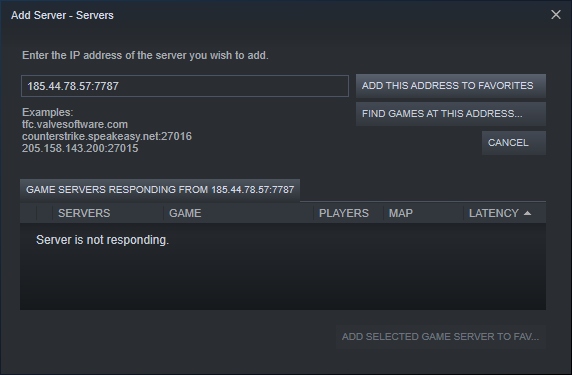
Someone tried to invite me to the server and it sent me to the title screen.
lilac thistle
@tepid saffron Have you tried the two missing server solutions found here? http://steamcommunity.com/app/376210/discussions/17/1693788384133493388/
 tepid saffron
Yes, I have tried the server solutions. The Isle and Steam bypassed my firewall and the only server refusing to show up is the one I'm trying to access. Additionally, someone tried to invite me to the server to play, but The Isle sent me to the title screen without a message.
round wind
processor Intel(R) Pentium(R) CPU B960 2.30 Ghz
Operational 8 GIg
video card Intel(R) HD Graphics
Аll worked until the game was updated without lags at high settings and now can not enter
tepid saffron
https://i.imgur.com/5jjAuuH.png This is still an issue... What can I do?
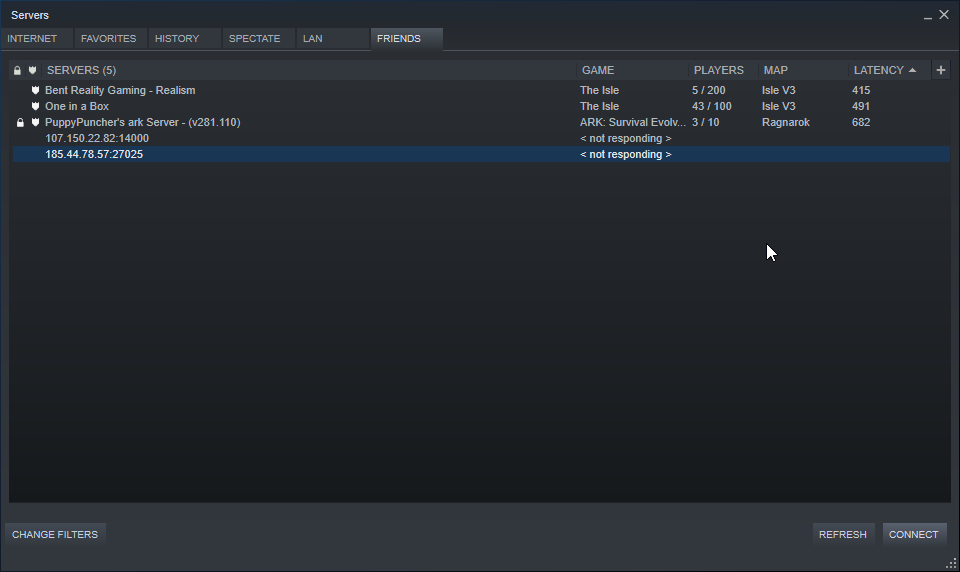 stuck rock
@round wind what are your specs? if your GPU supports SM5 and you see that error, try completely reinstalling the game (uninstall on steam, then go delete the install folder and start a fresh install) and make sure that your primary GPU is setup correctly and its not using your CPU, and make sure the steam launch options are blank
 amber matrix
I know there's a certain file to delete when I cannot smell things, but I can't find it. Can someone tell me how to find it?
lilac thistle
@amber matrix Try doing this instead https://gyazo.com/76eb2e3dcac7f029fa01db2761ecc4d0
amber matrix
Noice, many thanks
heady roost
help me plz,i cant make scent work i deleted and reinstalled game i tried to reset options it wont work
and i dotn have any folder called saved
heady roost
i did it and still cant use scent
 zealous pilot
My issue is too long to type up on discord so
honest river
sound of my game does not work, the game mixer is activated, I checked the integrity of the files, I downloaded the game again and it does not work.
please help me
lilac thistle
@honest river Tried hitting the reset button in options?
zealous pilot
@proud crater Yep, twice now , i just did this morning
 vapid cradle
I am stuck in a hole with water on dev-4 which is just too deep to do anything.
<@&401466542140817419>
cinder abyss
Be on in just a few
lilac thistle
@honest river http://steamcommunity.com/app/376210/discussions/17/1693788384133493388/ - See the missing server solutions here
honest river
<@&401466542140817419> None of the devs servers will show up for me, help please. Is that normal?
lilac thistle
See the message above yours.
honest river
yep i do now.
 fringe comet
I am having problems with DV_TestLevel crashing my game. Whenever i enter ANY server with DV_TestLevel as the map. The Game sputters and crashes, saying something about a Fatal Error.
However the other 2 maps work just fine
lilac thistle
@fringe comet DM me your specs
 timber cloud
I'm having some serious lag issues. Before the update I was able to run the game smoothly, now I've got all of my settings right down on low and I can barely move. I know it's a long shot, but I was wondering if there were any suggestions! Thanks so much. Tex.
 ember sonnet
Hello, I have a problem on my side with the controls.
https://i.imgur.com/gsRpDNZ.jpg
Twice forward and twice right.
I use a AZERTY on my part.
And it should go like that:
Z = forward
S = backward
D = Right
Q = Left
problem is whenever I try to place S for the second forward. It automaticly place it to the first forward. While the second forward adopt the Z.
Same problem for right direction.
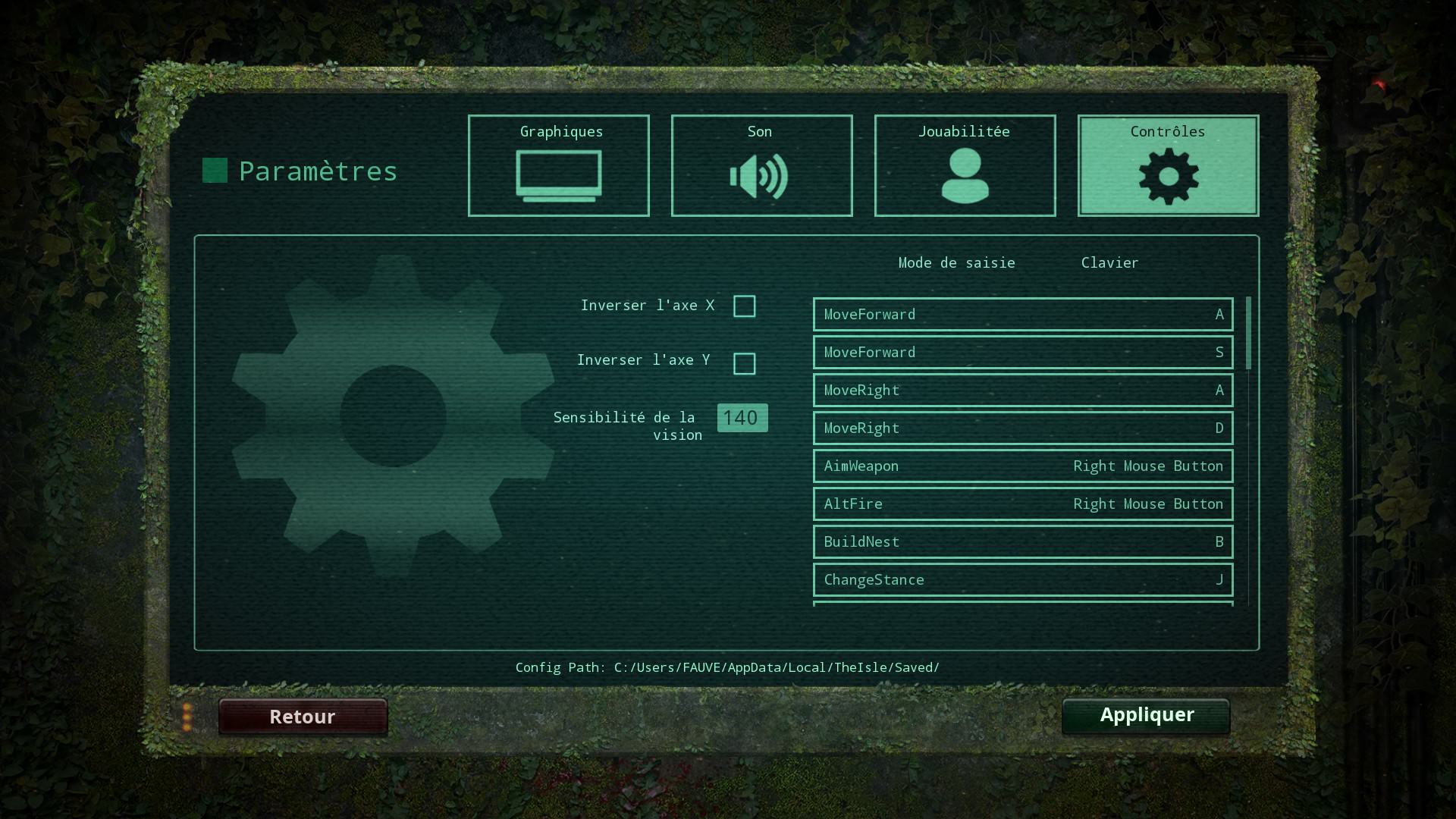
Resetting the controls or deleting the saved data didn't not helped in anyway
to get the correct controls
lilac thistle
I'd suggest a clean reinstallation, uninstall your game, delete The Isle folder left over in steamapps > common > then reinstall your game.
ember sonnet
Already done, twice.
Didnd't solved a thing. I have the same problem on my main computer.
Currently trying again to change the controls. Each time it swap them.
trying to directly change the input in the app date files
gonna be the third try
And nope
still cannot move left!
lilac thistle
Hm.
ember sonnet
Maybe if I change Right to left?
lilac thistle
Which Saved folder are you editing?
lilac thistle
Tried deleting it?
ember sonnet
but directly the main one
lilac thistle
Delete that, plus the one in your Steam files as well.
ember sonnet
already done twice
the same time I uninstalled the game
I'm in a place it would take me hours to redownload everything.
lilac thistle
Strange, first time I've seen this issue be so persistent.
ember sonnet
Well I'm French and I have a huge case of badluck when it come to bugs! 😄
and even when it come to connection. First connection on the very first server I tried ingame. Spawned as a juvenile trikes in the middle of a fight between a spino and a T.REX.
changed from Forward to Backward and Right to Left
gonna tell if it work.
And Nope!
lilac thistle
The clean reinstall is all I can recommend for now then
ember sonnet
And is the thing I've already tryied and I am no longer in the capacity to download the full game all over again....
I call it discrimination towards the AZERTY! As a compensation I want a T.REX that breath fire and shot lazer out of his eyes! (damn for an april fool that would actually be hilarious)
Ho well, gonna try AGAIN that....
Third time the charm like they say...
thanks anyway for trying to help and have fun! I'll... Wait I guess....
(dreaming of a fire breathing T.REX that shoot laser out of his eyes. Actually, give the possibility for every dinosaur to breath fire!)
signal hatch
@ember sonnet Tu parles des dino Gods pour admin qu'il y a eu à une époque 😃
En ce qui concerne les commandes que tu essayes de changer, elles sont en double parce que la première est pour le clavier et la seconde pour la manette.
Donc, change la première.
ember sonnet
La première change le fait que je vais à l'avant et ne résout pas le soucis.
dans tous les cas de figure je me retrouve avec des commandes qui ne sont pas au bonne emplacement.
et puis maintenant je dois download pendant 7 heures. -_-
signal hatch
Alors utilises les touches telles quelles sont. Après tout, WQSD sont aussi proches que QZSD.
Tu peux rapprocher la touche night en remplaçant N par X.
Et il faut reconfigurer les touches 1,2,3,4 pour le son car prévues pour un clavier QWERTY.
Ou alors, tu passes ton clavier en QWERTY pour le jeu.
ember sonnet
je ferais sans doute ça. Mais purée...
7 heures de DL. T_T
je suis à un B'N'B! Merci du coup de main en tout cas! Thanks for the help!
signal hatch
Tu as le chanel french si tu veux de l'aide en français (dans International) 😉
C'est quoi B'N'B ?
 proud crater
Someone on the main server I play on said their scent didn't work. They'd set scent to J, then set it back to Q, but they couldn't make it work. After they reset all their keybindings to default it worked just fine.
Is there something about the game files that make it so if you try to customize your settings it messes up functionality?
 hollow spoke
I'm having a problem with the game telling me that my computer doesn't meet minimum requirements but it definitely does and I've tried deleting the game and reinstalling it. But it still says it and it still doesn't allow me to log into servers either. It freezes my game when I try to basically
lilac thistle
@hollow spoke DM me your system specifications
vapid cradle
<@&401466542140817419> Stuck again. Dev 4.
 vocal pelican
I'm having problems with scent right now. I know my keybind is set to Q for it, but the animation won't play when I press it letting me know it's working. I've also tried deleting the saved folder to see if it would fix it, but nothing appears to have changed.
lilac thistle
@vocal pelican You need to hold it
lilac thistle
@vocal pelican Tried hitting the reset button in controls?
vocal pelican
Yep. Still nothing
 inland osprey
when i tried to load into a server its like an infant loading screen and i don't know how to fix it and i you know how please tell me I already tried to uninstall then install it again please help me i love the game but i cant play it
can someone please help me with this problem
lilac thistle
What are your system specifications?
Follow this: https://gyazo.com/8c1cac40ec65c922d4950386d9d19aba
 inland osprey
thank u so much
lilac thistle
@vocal pelican Try deleting your hidden saved folder located in your Local files.
inland osprey
what do i do once i copy all text to clipboard
lilac thistle
Copy it in small sections then post it here
inland osprey
so u want me to send past it here
lilac thistle
yes.
inland osprey
Computer Information:
Manufacturer: Hewlett-Packard
Model: HP Beats 15 Notebook PC
Form Factor: Laptop
Touch Input Detected
Processor Information:
CPU Vendor: AuthenticAMD
CPU Brand: AMD A8-5545M APU with Radeon(tm) HD Graphics
CPU Family: 0x15
CPU Model: 0x13
CPU Stepping: 0x1
CPU Type: 0x0
Speed: 1697 Mhz
4 logical processors
4 physical processors
HyperThreading: Unsupported
FCMOV: Supported
SSE2: Supported
SSE3: Supported
SSSE3: Supported
SSE4a: Supported
SSE41: Supported
SSE42: Supported
AES: Supported
AVX: Supported
CMPXCHG16B: Supported
LAHF/SAHF: Supported
PrefetchW: Unsupported
Operating System Version:
Windows 8.1 (64 bit)
NTFS: Supported
Crypto Provider Codes: Supported 311 0x0 0x0 0x0
Video Card:
Driver: AMD Radeon(TM) HD 8510G
DirectX Driver Name: aticfx32.dll
Driver Version: 13.352.1004.0
DirectX Driver Version: 8.17.10.1267
Driver Date: 4 6 2014
OpenGL Version: 4.3
Desktop Color Depth: 32 bits per pixel
Monitor Refresh Rate: 60 Hz
DirectX Card: AMD Radeon(TM) HD 8510G
VendorID: 0x1002
DeviceID: 0x9999
Revision Not Detected
Number of Monitors: 1
Number of Logical Video Cards: 1
No SLI or Crossfire Detected
Primary Display Resolution: 1366 x 768
Desktop Resolution: 1366 x 768
Primary Display Size: 13.54" x 7.60" (15.51" diag)
34.4cm x 19.3cm (39.4cm diag)
Primary Bus Type Not Detected
Primary VRAM: 768 MB
Supported MSAA Modes: 2x 4x 8x
Sound card:
Audio device: Speakers (USB PnP Audio Device)
Memory:
RAM: 7364 Mb
Miscellaneous:
UI Language: English
Media Type: DVD
Total Hard Disk Space Available: 952017 Mb
Largest Free Hard Disk Block: 676212 Mb
OS Install Date: Dec 31 1969
Game Controller: None detected
VR Headset: None detected
inland osprey
there u go
lilac thistle
Will check in a sec
lilac thistle
@inland osprey It seems that your system is far below the minimum requirements listed on our store page, what is most likely happening is that your system is unable load the map before the server assumes that you've timed out, therefore it ejects you.
inland osprey
so is there a way to fix it
lilac thistle
You'd need a better computer
inland osprey
iv had the game on this computer for awhile and i used to play it
lilac thistle
That's because the game had less content than it did now, hence it's easier for systems below those requirements to run it. The minimum requirements are what you should have by the time we're out of Early Access.
gloomy grotto
A 16.5 GB update showed up for me this evenning, I checked the news to see what this huge update was all about but nothing was shown there. I then let it finished updating, but it immidiately changed 16.5 GB into 2.5 GB, then I let it update, changed into 5.0 GB, continue to extend the updates everytime I finish one, what's going on?
 dapper grail
I have problem with optimization, frezzes and etc.
My system:
i3 4170 3.7GHz
MSI RX 550 2GB
12RAM, 4GB and 8GB 1600MHz
Windows 7 HOME x64
thorn kestrel
@dapper grail
Your CPU is likely your bottleneck, it may struggle with the load as development continues.
Try lowering your settings, especially effects & audio quality and close all other tasks/programs while running the game (discord, chrome, etc.) and see if performance improves.
Your graphics card is a little light on video memory but otherwise is inline with the minimum spec on the store page - dropping your textures setting or render scale may help.
RAMs OK
You may need to look at upgrading your CPU & graphics card in the lead up to v1.0 release to keep everything running well and not on low settings
Personally I'd say the CPU upgrade is more vital, gaming on a dual core meant for office machines is not ideal
 fiery igloo
So, would someone like to help me understand my system, and why how it used to be able to run shit on high/cinematic, but now it can barely run shit on medium? Specifically on this game, I lag an insane amount now.
I'd rather not fill this chat with my system specs, so I'll wait for someone to ping me in response to do that.
 broken breach
Hey so my firneds having an issue
she keeps getting this error code upon launch
The global shader cache file 'C:/Program Files(x86)/steam/steamapps/common/Obduction/Engine/GlobalShaderCache-PCD3D_SM4.bin' is missing.
Your application is built to load COOKED content. No COOKED content was found; This usually means you did not cook content for this build. It also may indicate missing cooked data for a shader platform(e.g., OpenGL under Windows): Make sure your platform's packaging settings include this Target RHI.
Alternatively build and run the UNCOOKED version instead.
Fatal error!
 pliant lodge
posted this in bug reports, but every time i exit a game and rejoin, these two circle thingies always pop up. i have a surface pro 4 (basically a tablet computer), so im assuming that it'll sometimes happen? any way to get rid of these?
can provide more information if needed.
they're like weird controller buttons.. i can move the inside circles around sometimes. kinda like a joystick. just wanna stop getting them
stuck rock
hmm, i think it's because you have a touch screen, ill look into the issue
 fathom grail
@help @everyone i am haveing probloms hosting a sever no one can join there haveing errors plese help .
 crystal gulch
Hey, my scent hasn't been working and I was wondering how to fix it? I've had a few people tell me to go and delete my save files, but I can't even find them. Help please!
lilac thistle
@crystal gulch
Open File Explorer from the taskbar.
Select View > Options > Change folder and search options.
Select the View tab and, in Advanced settings, select Show hidden files, folders, and drives and OK.
Afterwards, at the bottom left of your taskbar there should be a white search bar. Type %APPDATA% in there and open your %APPDATA% folder.
At the top you'll see the filepath, click "Appdata" to go back to the actual Appdata folder, then to local > TheIsle > delete the "Saved" folder.
crystal gulch
Thanks!!
 heady cloak
Had a custom PC built with a brand new graphics card. Radeon 560, but the point is that my old Nvidia that was almost 7 years old was able to run the game a few months ago. I'm having the same problem as Jon. Witcher 3 can run on high. ARK can run on high. Dark Souls III, Bioshock:Infinite, XCOM, Cities: Skylines....All on high or cinematic. I'd also like to know how I can fix my frames. Same as him, I'm also on medium graphics but just for this one game @lilac thistle , Aliens218 suggested I talk to you about this one? I unchecked vsync and smooth FPS, I'm fullscreen, graphics are up to date, and DVtest level is okay when I host. The Isle v3 and Thenyaw still give me freezes around 5 seconds, on an inconsistent basis. Any advice? I can send you my specs
 frigid sluice
Why is it when ever i play the game and bite ingame, my game exits Fullscreen Windowed/Fullscreen and turns back into windowed mode
not sure if it's a bug with the game because after this happens, i go to settings and it says "Windowed" even though it was on Fullscreen/Fullscreen Windowed.
 twilit shadow
Does anyone know how to fix scent because mine doesnt work
lilac thistle
@heady cloak Could you post your system specifications?
Follow this: https://gyazo.com/8c1cac40ec65c922d4950386d9d19aba
twilit shadow
does anyone know how to fix it
heady cloak
@lilac thistle
Computer Information:
Manufacturer: Gigabyte Technology Co., Ltd.
Model: X58-USB3
Form Factor: Desktop
No Touch Input Detected
Processor Information:
CPU Vendor: GenuineIntel
CPU Brand: Intel(R) Core(TM) i7 CPU 950 @ 3.07GHz
CPU Family: 0x6
CPU Model: 0x1a
CPU Stepping: 0x5
CPU Type: 0x0
Speed: 3064 Mhz
8 logical processors
4 physical processors
HyperThreading: Supported
FCMOV: Supported
SSE2: Supported
SSE3: Supported
SSSE3: Supported
SSE4a: Unsupported
SSE41: Supported
SSE42: Supported
AES: Unsupported
AVX: Unsupported
CMPXCHG16B: Supported
LAHF/SAHF: Supported
PrefetchW: Unsupported
Operating System Version:
Windows 7 (64 bit)
NTFS: Supported
Crypto Provider Codes: Supported 311 0x0 0x0 0x0
Video Card:
Driver: Radeon RX 560 Series
DirectX Driver Name: aticfx32.dll
Driver Version: 24.20.13001.1010
DirectX Driver Version: 24.20.13001.1010
Driver Date: 8 2 2018
OpenGL Version: 4.5
Desktop Color Depth: 32 bits per pixel
Monitor Refresh Rate: 59 Hz
DirectX Card: Radeon RX 560 Series
VendorID: 0x1002
DeviceID: 0x67ff
Revision: 0xcf
Number of Monitors: 1
Number of Logical Video Cards: 1
No SLI or Crossfire Detected
Primary Display Resolution: 1920 x 1080
Desktop Resolution: 1920 x 1080
Primary Display Size: 26.65" x 15.00" (30.55" diag)
67.7cm x 38.1cm (77.6cm diag)
Primary Bus Type Not Detected
Primary VRAM Not Detected
Supported MSAA Modes: 2x 4x 8x
Sound card:
Audio device: Speakers (Realtek High Definiti
Memory:
RAM: 12286 Mb
Miscellaneous:
UI Language: English
Media Type: DVD
Total Hard Disk Space Available: 2554910 Mb
Largest Free Hard Disk Block: 2022377 Mb
OS Install Date: Dec 31 1969
Game Controller: None detected
VR Headset: None detected
 craggy pecan
im having trouble as well seeing servers
Computer Information:
Manufacturer: To Be Filled By O.E.M.
Model: To Be Filled By O.E.M.
Form Factor: Desktop
No Touch Input Detected
Processor Information:
CPU Vendor: AuthenticAMD
CPU Brand: AMD FX(tm)-8350 Eight-Core Processor
CPU Family: 0x15
CPU Model: 0x2
CPU Stepping: 0x0
CPU Type: 0x0
Speed: 4000 Mhz
8 logical processors
4 physical processors
HyperThreading: Supported
FCMOV: Supported
SSE2: Supported
SSE3: Supported
SSSE3: Supported
SSE4a: Supported
SSE41: Supported
SSE42: Supported
AES: Supported
AVX: Supported
CMPXCHG16B: Supported
LAHF/SAHF: Supported
PrefetchW: Unsupported
Operating System Version:
Windows 10 (64 bit)
NTFS: Supported
Crypto Provider Codes: Supported 311 0x0 0x0 0x0
Video Card:
Driver: Radeon (TM) RX 480 Graphics
DirectX Driver Name: aticfx32.dll
Driver Version: 24.20.13001.1010
DirectX Driver Version: 24.20.13001.1010
Driver Date: 8 2 2018
OpenGL Version: 4.5
Desktop Color Depth: 32 bits per pixel
Monitor Refresh Rate: 144 Hz
DirectX Card: Radeon (TM) RX 480 Graphics
VendorID: 0x1002
DeviceID: 0x67df
Revision: 0xc7
Number of Monitors: 2
Number of Logical Video Cards: 2
No SLI or Crossfire Detected
Primary Display Resolution: 1920 x 1080
Desktop Resolution: 3840 x 1080
Primary Display Size: 23.54" x 13.23" (26.97" diag)
59.8cm x 33.6cm (68.5cm diag)
Primary Bus Type Not Detected
Primary VRAM Not Detected
Supported MSAA Modes: 2x 4x 8x
Sound card:
Audio device: Headset Earphone (Corsair VOID
Memory:
RAM: 16353 Mb
Miscellaneous:
UI Language: English
Media Type: Undetermined
Total Hard Disk Space Available: 1181235 Mb
Largest Free Hard Disk Block: 161329 Mb
OS Install Date: Dec 31 1969
Game Controller: None detected
VR Headset: None detected
i cant see the official servers
 remote light
so i have this fun issue that my move left and back are gone and it doubled move forward and move right ive already uninstalled and reinstalled and its still there so
 wintry spire
Try and remape it in settings ?
 brisk compass
Did you click reset and restart the game?
 hot sage
@lilac thistle if thats allright.
 hidden sundial
My scent did the same thing i deleted my save file and attempted to reinstall multiple times and still wont work
remote light
would love some #dev help here
lilac thistle
This has worked for some, hasn't for others. Try this:
Open File Explorer from the taskbar.
Select View > Options > Change folder and search options.
Select the View tab and, in Advanced settings, select Show hidden files, folders, and drives and OK.
Afterwards, at the bottom left of your taskbar there should be a white search bar. Type %APPDATA% in there and open your %APPDATA% folder.
At the top you'll see the filepath, click "Appdata" to go back to the actual Appdata folder, then to local > TheIsle > delete the "Saved" folder.
remote light
guess i just dont get to play anymore then
 open coyote
ok so over the past week or so when i look for servers i can only see like 800ping ones until i refresh a bunch of times then i can finally see some servers that arent ridiculous in ping but now i cant even get official to show up and im in the US with very good internet can anyone help
 violet pine
Can someone help me
I try to launch The Isle but even though it says its running it doesn't launch then it goes back to saying "The Isle" in the steam library
It doesn't start up at all
proud crater
- make sure you're connected to the internet
- does your system meet the minimum requirements?
- verify game files
violet pine
yes my system does meet the game requirements and I am connected to the internet
thanks let me see if verifying this game makes it better
open coyote
ok so over the past week or so when i look for servers i can only see like 800ping ones until i refresh a bunch of times then i can finally see some servers that arent ridiculous in ping but now i cant even get official to show up and im in the US with very good internet can anyone help
lilac thistle
@open coyote Check the missing server solutions found here: https://steamcommunity.com/app/376210/discussions/17/1693788384133493388/
@violet pine What are your system specifications?
Follow this: https://gyazo.com/8c1cac40ec65c922d4950386d9d19aba
 lime notch
I have this error when starting the game the following components are required to run this program microsoft visual c ++ 2015 runtime, what do I do? Thank you
lilac thistle
@lime notch Run a Windows update, that usually fixes it
craggy pecan
@lilac thistle im still having issues seeing only official servers
lilac thistle
@craggy pecan Did you try the missing server solutions found in the thread I linked earlier?
craggy pecan
@lilac thistle i have the latest drivers installed and i can join off a friend if they are in the server already
lilac thistle
That doesn't answer my question, have you tried the two solutions for missing servers found in the thread I linked earlier?
craggy pecan
the anti-virus is a non issue
lilac thistle
And the solution below that?
craggy pecan
checking now went to 1000 and seems to work thank you
lilac thistle
👍
honest river
Hey! i kinda need help with the isle ;-;
So... my scent doesnt work for ANY survival dino! and when i checked the keybinds in settings there wasnt even a scent thing to re-bind
im really confused and i cant find anyone who can help
please help
anyone?
???
lilac thistle
@honest river Open File Explorer from the taskbar.
Select View > Options > Change folder and search options.
Select the View tab and, in Advanced settings, select Show hidden files, folders, and drives and OK.
Afterwards, at the bottom left of your taskbar there should be a white search bar. Type %APPDATA% in there and open your %APPDATA% folder.
At the top you'll see the filepath, click "Appdata" to go back to the actual Appdata folder, then to local > TheIsle > delete the "Saved" folder.
honest river
thank you! :DDDD
 tribal hamlet
i have a question for someone who is trying to download the game, they said their missing the global player cache file??
tribal hamlet
this is what they see
their computer is a dell if that helps?
lilac thistle
@tribal hamlet Follow that system spec gif I linked earlier and paste your specs here
tribal hamlet
its not mine. its a friends
open coyote
Thank you @lilac thistle that fixed it
lilac thistle
@tribal hamlet Have your friend send me their specs
 thin jewel
I cant find dev 4
only thing that appears as i refresh is EU servers
and apparently the dev 4 i found is not legit
lilac thistle
Scroll up and check the common solutions thread I linked
thin jewel
yup neither of those fix the problem
lilac thistle
Have you tried all the various ping settings?
thin jewel
yes
lilac thistle
What anti virus do you use?
lilac thistle
Exclude the Isle's folder not the .exe
lilac thistle
In that case last thing I can suggest is do a manual restart of your router
lilac thistle
It's a networking issue on your end, these things happen randomly.
lilac thistle
 plush ivy
And i swapped the game back to the public branch
lilac thistle
Public and dev are on the same version.
lilac thistle
Click that link and check the solutions for missing servers.
 placid galleon
It seems like US 1, Dev 1 and a few other official servers are saying they're up, but they're unreachable to log in
brisk compass
Yeah, afaik servers seem to bug out after a certain amount of days being up. around 8 or 9 maybe more. That's just my experience though.
 severe bluff
Aight so
except for them test servers
Isle V3 and that other map wont load
like it will eventually timeout
and say connection lost n stuff
think i allowed the isle on firewall
ima just give a quick test of it
 narrow turret
a friend can;t post on here and is having trouble.
whenever i try to open up the game it says this
The Global shader cache file 'C:/Program Files (x86)/Steam/steamapps/common/TheIsle/Engine/GlobalShaderCache-PCD3D_SM4.bin is missing
idk how to get it back
then it says
Alternatively builda dnd run the uncooked version instead
i tried re-downloading the game, and checking my files
any ideas?
 little rapids
@cinder abyss @kind tusk
Post your issue here, Maddie.
Aliens, I think I've seen you help with this one, but personally idk how to address it.
cinder abyss
Got a DM from them ^^
 hot acorn
i cant sniff ingame for some reason and had the saved folder deleted now it refuses to return and still cant sniff 😦
and im playing on dev 4
cinder abyss
Awesome! ^^
 hallow token
Right, did a exclusive for the firewall and what not but the game refuses to find a server. It oddly takes a moment freeze at the server selection screen before running normally.
Basically: Trying to find a server and join it, but have been trying for about three hours with no luck despite having followed thread guidelines.
@ With answer/help.
 royal steppe
I normally get decent performance in serves but at times my ping can take off into the 700's and higher and i get really bad rubber banding. I dont believe its my computer but maybe some of my ingame settings. So: what does VSync do? Should I enable or disable this? What about FPS limit? What should this be set to? Im not well versed in these sorts of things and maybe tweaking my stuff around will help?
hallow token
Seems to have fixed itself, oddly enough.
 cinder elm
Same Twilia, little freeze once you hit server selection then having to spam refresh to find some/most servers.
Not the firewall though because that takes all of them off the list, instead of just some (plus I checked and everything for the isle is checked in my firewall).
 warm ridge
<@&401466542140817419> so im having issue with joining dev 3 (joining a friend) why is it i can see and play on dev 4 but not on dev 3?
when it does finally give me a join screen through joining it shoves me to offical 4 with me being the only 1 on it.
cinder abyss
Untick official in server browser @warm ridge
warm ridge
only thing thats ticked is hide empty however its irrelevent if its ticked or not
even gone as far as verifying integrety cashe on steam. hell its eeven a fresh install to play with my friend
warm ridge
<@&401466542140817419> ideas?
cinder abyss
Someone else was having this issue. They had to refresh so many times to get it to pop up
Also try changing max results from 1000 to 5000
It took me a few refreshes as well
Probably about 13
warm ridge
ill do the refresh thing but even so if your joining directly off steam friends list shouldnt it bypass the menu refreshing?
cinder elm
It's a bug rn Drogoth.
You know you have it because when you hit the server selection screen it'll lag a bit.
You just gotta spam refresh and hope it comes up soon.
 crimson hull
People can't find our server? They refresh have our name in the search box and still nothing. Sometimes they go througha friend find the server name but end up on a completly different server. Any help on how to find our server?
boreal sapphire
Why are my graphic settings all locked on epic ?
I can't change them, I need them to be closer to medium or low.
is there a way i can change my settings down from epic ?
<@&401466542140817419>
boreal sapphire
alright, thanks Aliens !
cinder abyss
No worries.
 digital snow
k thx
cinder abyss
Mhm. Let me know if it works
cinder abyss
Haha
digital snow
imma turn it on again
 rustic niche
@cinder abyss good evening to You!) Could you please spare some of your time to answer a question related to an issue im having with my newly bought the isle server?
 tacit drum
<@&401466542140817419> I know this really isn't troubleshooting but I felt like it was appropriate to put it here since I didn't know where else to place this question. How do I get access to the Region2 and ae-001 maps? Are they in like the legacy branch or are they for testers?
pearl oxide
I believe they are no longer included in the game files
tacit drum
Ahh ok
rustic niche
@pearl oxide Excuse me, could you help me out with an issue regarding ai?
pearl oxide
Probably not, but what's up?
rustic niche
@pearl oxide I have a weird issue with the ai on my newly bought server.
It has 100 slots, and ai behaves weird at times.
It starts spawning at a certain place in HUGE numbers and they all just stand there bugging the server and the ping.
my server is the second biggest server agter pangea, i went there and people told me that they have very same ai issue
pearl oxide
Which map are you playing on?
pearl oxide
Hmm, no I'm not familiar with that issue but I can ask around
rustic niche
@pearl oxide please ask around! I saw people over at Pangea server saying that there is the same issue with ai
proud crater
I've heard that there's a bug with the ai spawns when a server gets over 90 people online. More than 90 people and ai either doesn't spawn at all or spawns in clumps
rustic niche
@proud crater well that is litteraly very bad
cause popular servers like mine are suffering
 clever orchid
boreal sapphire
clever orchid
boreal sapphire
I'm experiencing extreme ping spikes on dev 4, and dev 3. This isn't happening on ANY other servers, and my ping will jump up to 800 on dev 4, then hold at a steady 200-300. It's really frustrating for me to play on such a high end computer only to lag and rubber band around. On other servers my game runs perfectly. What am i doing wrong/ how can i fix this?
sometimes its so bad, textures on my dinosaurs wont even load
little rapids
@clever orchid What server are you on?
hallow token
Right, the finding a specific server and the server selection screen freezing is still a major issue.
hallow token
I do hope this will be fixed soon, has made playing on servers I enjoy impossible.
 heady jasper
hi, when i try to open the isle, the game says: The global shader cache file 'G:/R6/steamapps/common/The Isle/Engine/GlobalSHaderCache-PCD3D_SM4.bin' is missing. Your application is built to laod COOKED content. No COOKED content was found. what can i do?
 azure geyser
Would anyone know how I solve this?
honest river
system specs?
azure geyser
amd fx6300 hyper x 8GB gts 250
How can I change the settings without entering the game?
honest river
I don't think your PC is going to be able to handle the game
the minimum card requirements is a gtx760
signal hatch
I play Epic with a GTX 670
azure geyser
How can I change the settings without entering the game?
honest river
they're running a 250
you'd have to be in the game to change the settings and even on min settings you prob wont be able to run it
azure geyser
there is no other way to change out of the game
honest river
Not that I know of. Unless Steam secretly added some feature to change settings without being in game
azure geyser
in folders do not have this option?
honest river
ok so ive had this problem in game for a while and its that my sense doesn't work no matter what. I tried changing it multiple times and nothing worked
can someone help me?
there was a way to change settings in the uhh config file or w/e iirc but idk if that's still a thing
i dont think it is
azure geyser
I've played this game until without a graphics card. There's a way to change the resolutions ... pk in the message itself, it says it's for everything in the bass
 worn pike
https://i.gyazo.com/c0b656de84d747a8908ca5bcd90ca575.gif @honest river
 honest river
thank you
worn pike
this should reset your controls and have scent work for you
worn pike
👍🏼
honest river
@azure geyser you were playing the game with no graphics card?
honest river
did you just get that card recently?
@worn pike ight so when i do get the files and click on the isle folder, it only comes up with saved, content, binaries
worn pike
No saved folder?
azure geyser
I played on the i5 processor
honest river
and hit reset settings
it does the same thing as deleting the saved folder
then restart your game and it should be gucci
i did that already and nothing is working
worn pike
@lilac thistle
azure geyser
worn pike
Mercy doesnt have a saved folder
lilac thistle
oh
do this
Open File Explorer from the taskbar.
Select View > Options > Change folder and search options.
Select the View tab and, in Advanced settings, select Show hidden files, folders, and drives and OK.
Afterwards, at the bottom left of your taskbar there should be a white search bar. Type %APPDATA% in there and open your %APPDATA% folder.
At the top you'll see the filepath, click "Appdata" to go back to the actual Appdata folder, then to local > TheIsle > delete the "Saved" folder.
the real saved folder is in your hidden files
honest river
no no, i do have to saved folder but more stuffs keep on popping up
its being a butt and my flippin sense isnt work >:c
azure geyser
no stand @lilac thistle
honest river
??
lilac thistle
Do what I told you
And what?
Deleting the second Saved folder in your hidden files fixes your scent
azure geyser
I was able to erase
cinder abyss
Believe you can skip deleting that saved folder by going into settings, and pressing reset
 broken garnet
@azure geyser is it a gtx card? have you downloaded geforce experience, cuz it seems ur GPU doesnt have a driver
azure geyser
gts 250
broken garnet
Havent heard of gts? but its sounds like gt series, just download geforce experience and then click drivers in geforce experience and it will find the right driver and u can download and install from there.
honest river
@lilac thistle thank you!!
azure geyser
I've done this
honest river
if you installed the drives and you can't run the game its because the card doesn't meet the system requirements
if you were able to run it without the card with your onboard graphics then idk take the card out I suppose P:
idk what motherboard you have but its possible the onboard graphics can handle the game better than whatever that card is
broken garnet
Its sounds like a bad card, gt series is just for people who want to load images on websites
u should get a gtx card
 viscid gulch
Hello, I'm experiencing frequent crashes because my 2GB GTX 670 seems to be running out of VRAM. I Used to play on high settings 1080p before one of the recent updates without problems. Now even on all low 1600x900 and resolution scale set to 60% my VRAM is maxed out giving me the occasional crash, especially once morning sets in on Thenyaw. Is anybody else experiencing similar issues? My drivers are up to date and the card, despite being fully utilized almost all the time, runs nice and cool at around 62°C. Also occasionally my computer seems to be running out of RAM as well when I'm playing the game. I have 8GB DDR3 1333, no bloatware or anything running in the background, and yet my game crashes with windows prompting me to close the game because of RAM overflow...CPU is FX 8320 and I'm on Win7. I understand I probably need to upgrade some components. I am just a lil confused reading about people playing with 670s and even 660s on high settings and/or 8GB of memory without problems when its not at all the case for me
signal hatch
I'm also playing with a 2GB (GDDR5) GTX 670, 1920 x 1080, all EPIC, but have a i7-3930K CPU (3.20GHz) and 32 Go (don't remember wich one) wich might help to run the game.
I'm also on Win7.
boreal sapphire
I have no issue runnung the game but I'm still experiencing extreme lag due to high ping, and the textures are not loading on my dinosaur or on the foliage on thenyaw at all. V3 seems to be fine sometimes but for whatever reason thenyaw refuses to run smoothly. No matter the graphic setting. Im running on a brand new ASUS i7 gaming laptop that runs other games perfectly on max settings.
Why is my ping only high when running the isle ??
honest river
All of you are playing on systems that don’t meet the min system requirements.
lilac thistle
^ primarily your GPU's are your bottlenecks.
@boreal sapphire PM me your system specifications.
Follow this: https://gyazo.com/8c1cac40ec65c922d4950386d9d19aba
signal hatch
@honest river I never said I had problems to play The Isle 😃
I play it with a GTX 670 at Epic level, wich means that the GPU isn't the only possible bottleneck.
honest river
Yes, having a 6 core CPU helps to a degree. It’s the same reason I was able to run epic settings with a 760 card for so long. But my 760 was min system reqs. Your card is only 2GB and it’s below system reqs. Your CPU doesn’t matter if your card is that old and only 2GB. You’re still going to bottleneck.
I’d recommend upgrading your card
viscid gulch
@signal hatch see that is whats so confusing. yes your CPU is much more powerful than mine but that shouldn't affect VRAM usage. I know i need to upgrade but its still weird that others don't have similar issues.
signal hatch
@viscid gulch Yes, it's like another program il leaking memory in your GPU VRAM.
proud crater
Chrome has gotten REALLY BAD about hogging memory lately, jus' sayin' in case u happen to have Chrome open at the same time as The Isle
honest river
Chrome uses RAM not your gpu
signal hatch
That's what I was going to say 😃
Could he be infected by a prog using his GPU for mining ?
honest river
That’s very unlikely.
signal hatch
Can even his GPU be used for that ?
honest river
Also prob worth noting that AMD CPUs aren’t the same as intel. A 6 core AMD CPU isn’t going to be as powerful as a 6 core Intel CPU. Or 8 core in Wunder’s case.
 old jetty
I played on 1060 but i often drop to 40 fps
honest river
@tepid saffron if you can get on official servers I would just play on those tbh
tepid saffron
Bu those have no rules on them.
honest river
its prob a connection issue with whatever private ones you're trying to get on
tepid saffron
I don't like getting run down by trikes just because they see me.
I just wanna go on a moderated Thenyaw server with global chat with a max 100 players.
honest river
hi i watch so many video and my game is not same like athor players why ? and i didint have all dino and skins .. can anyone help me with taht ?
brisk compass
Probably looking at old videos, skins are only a mod thing atm and mods are borken so nothing is really wrong with your game.
old jetty
yeah the affinity will wiped sports killer
 charred pike
Scent is non-existant in my controls for some reason and I can't hold Q to use it. How to fix?
And there's no "Saved" folder in the "TheIsle" file.
Fixed by reseting settings and relaunching game
charred pike
Already fixed but thx
wicked elbow
@umbral wigeon
Pinned messages, check through to later ones and they’ll have the path to that hidden folder to look for
 pliant pagoda
Why everytime i open an server my game gets fatal error?
lilac thistle
@pliant pagoda DM me your system specs: https://gyazo.com/8c1cac40ec65c922d4950386d9d19aba
pliant pagoda
Ok when i turn on my pc i send you
pliant pagoda
:D
 ripe surge
thank you @pale pike
pliant pagoda
@lilac thistle sent
 real marten
I cannot seem to find the official dev servers. I have only official selected, and max results 1000, but I can hardly find them at all.
And I am on dev branch
 lavish field
real marten
lavish field
real marten
Its been going like this for about 10m now.
 thorny apex
uhhh,,, my game wont start in fullscreen
ive applied the setting like 5 times now
closed the game
opened it
and it automatically goes back to windowed fullscreen
setting wont change in-game or from the menu
's just stuck.
 opaque crescent
mmm got a weird problem all
friend and I cant group anymore
we send invite but it doesnt appear.
real marten
I still cannot find official servers.
Does anybody have any help on this issue? At all?
 blazing lily
@real marten if you uncheck Official do you see other servers
real marten
Yes
blazing lily
try typing 'the isle' in the name box and what do you get
with Official unchecked
the isle no quotes
got a meeting. i will check back in a bit
real marten
Just one unooficial server
 dim notch
I'm unable to use scent, and im unable to rebind it in settings because its not there
Nvm, I've found a fix
 sharp frost
Possibly a stupid question, but I've got a new dedicated server and I've set my steamID as admin in the config files, but its not registering me as such and I (obviously) don't have any access to admin commands.
ServerName=DesoWilde
bFamilySharing=true
bServerDatabase=false
bServerGlobalChat=true
bServerProgression=true
bServerBattleye=true
ServerAIMax=20
bServerAIPlayerSpawns=true
bServerGrowth=false
bServerScent=true
ServerDiscord=DesoWilde
+ServerAdmins=76561198099116338
+ServerAdmins=

[/script/theisle.igamemode]
ServerStartingTime=1350
bServerDynamicTimeOfDay=0
ServerDayLength=20
 crisp quarry
Hrm
My game just crashed with an error stating it ran out of video memory
Never happened before
brisk compass
@sharp frost Remove the + from behind ServerAdmins=
sharp frost
Yeah I figured that out, thank you!
crisp quarry
Got the crash again
And also my chat and insert character screen stopped working
Wait I had my hud off
Insert still isn't workin tho
👀
 boreal valley
How do I get in to my admin settings for a game to allow it to do things? as it says login in is blocked by admin
honest river
Hey guys, my friend is having a problem opening up their game, it gives them this
The global shader cache file 'C:Program Files(x86)/Steam/steamapps/common/The Isle/Engine/GlobalShaderCache-PCD3D_SM4.bin' is missing
Your application is built to load COOKED content. No COOKED content was found; This usually means you did not cook content for this build. It also may indicate missing cooked data for a shader platform(e. g.,OpenGL under Windows): Make sure your platform's packaging settings include this Targeted RHI.
Alternatively build and run the UNCOOKED version instead.
Any idea how to fix this?
brisk compass
@boreal valley Ignore the login on the main menu.
boreal valley
Will do. @brisk compass
 rustic cedar
"VAC check timed out"
every time I try to join a server
I tried restarting my Steam and PC but it didn't work
lilac thistle
@rustic cedar Restart Steam as an administrator rather than normally, that error is just a hiccup error.
sharp frost
hey, is there a working list of admin commands somewhere? like.. what the actual available weather is, etc etc?
brisk compass
do /help ingame as an admin to see the full list
sharp frost
yeah I have that list there, I guess my real question specifically was the weather
..just kidding again, my coadmin was typing things wrong 👌 dont mind me
brisk compass
All good
 mental gust
Hey, so.. I apologize, since I'd just joined- but can anyone help me on an issue as to why my servers are showing up as completely different than others? Like. My friends usually play on either One In A Box (the sandbox) or PANGAEA, and none of these are showing up for me. I've tried reinstalling the game, forwarding my ports, restarting my router, refreshing multiple times, restarting my computer, etc. Nothing seems to be working and I'm starting to feel discouraged on playing it.
proud crater
@mental gust possible fix:
uncheck all the search criteria boxes on the right of the screen,, and just type the name of the server you want to play on into the search bar
also: you're on PC, right? We lost Mac support a while ago
mental gust
Yes, PC. Also, it's definitely not the criteria boxes.
Here. For instance.
phdfsgjo
Wrong message xD
These servers show for me- but NONE of my friends get the same ones.
I get funky ones with like.. Wrong names, and some are based in Asia?
But I'm in the US.
The deathmatch server for One In A Box is there, but. None of the others show.
proud crater
i got all these in my game just now; it's showing you EVERY isle server
up to the right where it says "Name:" type PANGAEA or One In A Box
proud crater
...how's ur internet connection?
when i first started playing my internet was okay for web browsing but couldn't handle an online rpg
lilac thistle
@mental gust See the solutions here: https://steamcommunity.com/app/376210/discussions/17/1693788384133493388/

It's most likely you need to adjust your ping rate.
honest river
does anyone know how to fix this?
 final cedar
Not sure if it goes here, and I did a search before posting this, but is there a way around snagging the wrong person when you use the /goto, or /bring command. For example. If I use /bring "thor" or /bring thor (without the quotes), it takes me to ThorSkarr instead of the player with just the name Thor.
brisk compass
I don't believe so, from my knowledge at least.
lilac thistle
@honest river Check pinned messages for my system spec gif then DM me your specs
@final cedar Not really outside of getting them to change their name
@final cedar Though you can teleport nearby someone manually just by moving your observer camera where ever you want to go then press shift and your observer key at the same time.
And it'll teleport you.
final cedar
Ooh, okay, thank ya!
honest river
have never been able to play this game. i get to the opening screen/credits/dev whatever and then the screen goes black before showing any menu to play? am i screwed?
lilac thistle
@honest river DM me your system specs.
remote light
ugh my video file is too big
https://youtu.be/B7Hn75tZSjc once i got into the game the movement is not being controlled by me minus mouse control turning it. also lost all left and forward movement in the settings trying to change the graphics options i am single clicking the options. also in game chat is single hit of both enter keys on my keyboard the chat window opens then instantly closes again

short video of bug's with my controls even after resetting the setting to default and deleting the save folder and verifing the games files
lilac thistle
@remote light Open File Explorer from the taskbar.
Select View > Options > Change folder and search options.
Select the View tab and, in Advanced settings, select Show hidden files, folders, and drives and OK.
Afterwards, at the bottom left of your taskbar there should be a white search bar. Type %APPDATA% in there and open your %APPDATA% folder.
At the top you'll see the filepath, click "Appdata" to go back to the actual Appdata folder, then to local > TheIsle > delete the "Saved" folder.
remote light
Lol we went thru this already punch
 rapid cairn
indeed. Well I was, dead now.
neither holding e or click e did anything and even tried restarting. Parasaurolophus.
 soft warren
ok so what are you now?
rapid cairn
nothing. in menus
soft warren
oh, maybe join a server and try again
soft warren
so your looking at water and holding down e?
rapid cairn
yes
soft warren
maybe.. go to settings and the controls tab
and just make sure that "Use" is set to e
if that doesnt work.. idk what else i can say to help
 slow needle
Water is a lot more of a reliable test than food
rapid cairn
still nothing. even tried switching to another key
thorn kestrel
What map/server are you on?
You can't drink sea water and not every plant is herbivore food.
Hold Q to scent, it'll highlight drinkable water and edible vegetation.
pale pike
@remote light have you tried a clean reinstall?
remote light
Yea this has been a reacurring issue for me it will somehow fix itself eventually it always does just super annoying at this point
honest river
Does anyone else's PC stutter/freeze when launching TI, and also when joining a server or is that just me 
lilac thistle
@honest river I assume you recently updated your Windows?
honest river
nope, still running windows 7 lmao
lilac thistle
Ah was gonna say theres a stutter issue with the latest W10 update for pmuch every game
I'd say see if your GPU drivers are up to date
honest river
they should be but I'll double check
Hmm there was an update from a few days ago but installing it didn't help sadly
 scarlet oyster
I was wondering if it is possible to rebind keys for controller? and if so could someone help me with it?
lilac thistle
@scarlet oyster Controller support isn't fully implemented yet, for the timebeing I'd suggest using mouse & keyboard.
@broken moat Bugs go in #401465476661641217
 upbeat bay
Okay, so occasionally I’ll get a “No servers found” message, and even after restarting my PC and checking my firewalls and even doing something you, Punchpacket, suggested trying on a steam thread, it still isn’t working and I can’t figure out what the issue is. It was fine last night.
lilac thistle
@upbeat bay I assume you mean this thread? https://steamcommunity.com/app/376210/discussions/17/1693788384133493388/
lilac thistle
I'd suggest the ping rate solution, try all of the various ping options.
Also ensure your filters are empty on the server browser, exception being the max results at the top should be set to 1000.
Also brb
upbeat bay
Alright.
Got it. Seems like 3,000 is the lucky number for me.
Thanks for your help.
upbeat bay
Well, it was working, but I’m lagging so much that playing is nearly impossible.
pale pike
@scarlet oyster have you tried running the game with Steam's Big Picture and remapping your controller keybind to emulate keyboards input?
brisk compass
Can you explain your issue more? No one can really help with just "I can't run it"
pale pike
@left pewter you should provide the error message given as well as your pc spec
 merry spear
Got a question about something that happens when im in game. When i play i have a box around me of shade. A number of other players that share screenshots do not have this 'box of shade' but I do. Is there something in my settings that needs to change to get rid of this?
this image is from a friend
and this is from mine. if you can see the line of shade
Not sure what this is tbh 🙃
probably something so so simple too
pearl oxide
What are your Shadow settings?
 hallow wedge
My friend is having problems with her game. Whenever she loads it there is no "sounds" even when she loads in too a server.
 indigo phoenix
So.... I guess paras auto walk now....
Resetting the controls and settings didn’t work, nor did re-installing it
Nor is the mouse on auto scroll
 rich trellis
so im not sure why but i can not see any of the official servers
 short kiln
Hi, I have a fatal error upon launch, was wondering if anyone could help me as the forums bought me no closer to a sollution.
lilac thistle
Will assist you folks in a sec
 kind ruin
XD i got stuck in a hole on dev 4 and /stuck isnt working (yes i was sitting down)
rich trellis
im still unable to see the dev servers and im not sure why i tried verifying the files and even uninstalling and reinstalling
lilac thistle
@left pewter If you're still using the same system you PM'd me with the otherday that's why.
You need a stronger computer.
@rich trellis Try the solutions here: https://steamcommunity.com/app/376210/discussions/17/1693788384133493388/
rich trellis
ive tried both the solutions for trying to fix the servers but i am still unable to see the dev servers. i can see all the other servers available but not the official dev servers.
honest river
My mouse scroll doesn't work so I can't scroll down the chat (which usually loads way way after the newer messages)
The issue is that the keys I have for "scrolling" up and down the chat don't work either
pale pike
have you tried rebinding the keys to something else?
 paper sorrel
I'm having trouble, aaaa. I tried rebinding my sprint key to 'r' and could not get sprint to toggle off after starting to sprint. I put it back to left shift, but I'm having the same problem. I can't stop sprinting once I start.. even after I changed it back to the original keybind. Also tried using the reset button, it had no effect.
I tried to find the ini file by googling the path and it seems that the thread I found is outdated.. so I'm not sure where to find the file. I editted all permissions to show everything for the files, still don't see it. D:
Should I just reinstall? Lmao.
lilac thistle
@paper sorrel Open File Explorer from the taskbar.
Select View > Options > Change folder and search options.
Select the View tab and, in Advanced settings, select Show hidden files, folders, and drives and OK.
Afterwards, at the bottom left of your taskbar there should be a white search bar. Type %APPDATA% in there and open your %APPDATA% folder.
At the top you'll see the filepath, click "Appdata" to go back to the actual Appdata folder, then to local > TheIsle > delete the "Saved" folder.
I'll update that thread later tonight
@honest river ^
 paper sorrel
@lilac thistle Thank you so much. ;_; I'll see if this works! 😄
lilac thistle
yes
paper sorrel
Okay
honest river
will this mean I won't have to tinker to change my control again? 
paper sorrel
@lilac thistle That worked, thank you so much. 🙌
lilac thistle
Np
Reset Controls/Controls not working properly | Method Two
Open File Explorer from the taskbar.
Select View > Options > Change folder and search options.
Select the View tab and, in Advanced settings, select Show hidden files, folders, and drives and OK.
Afterwards, at the bottom left of your taskbar there should be a white search bar. Type %APPDATA% in there and open your %APPDATA% folder.
At the top you'll see the filepath, click "Appdata" to go back to the actual Appdata folder, then to local > TheIsle > delete the "Saved" folder.
 wheat gate
Does anyone know what this means? It pops up when I try to watch a replay and suddenly my scent won't work. I'm not sure if both have any relevance with each other. I don't play on nay servers that use mods. Also I couldn't scroll down therefore was unable to read the end of the message
 left pewter
I can’t get the dev branch bata to run on the isle
How do I get it to run on widows ten
I have a laptop
 thin flicker
@wheat gate for scent do the fix on pinned messages to reset your controls and for the replay, that's because the replay was made when the server you were on had a mod
You'd have to enable the mod to see the replay, or it just doesn't work
 versed chasm
@wheat gate I got that message when i tried to view a replay that was taken on the r2 map after it was removed from servers, maybe youre trying to view something that was taken on an outdated map ?
wheat gate
Hmmmm I shouldn’t be as those replays are only a few days old and very recent and there has been no changes to the map I was on @versed chasm I was on thenyaw when those replays were taken
versed chasm
ooh interesting :/ no idea what couldve caused it then. ive only ever gotten that error once
 jade pine
I can't hear ingame audio (most notably footsteps) if the source is beside or behind the camera. I have tried with and without digital surround settings, as well as with and without stereo and mono turned on. I use a wired USB gaming headset with all up-to-date drivers. Audio sources must be within or just to the sides of my screen otherwise they are completely silent, even if they are sprinting around feet behind me.
 molten delta
I may have to just make the sound more boring to accommodate a wider range of speaker types, since for some reason audio focus seems to just go completely wrong for a subset of users that have no common thread. It's already disabled for footsteps, though I can't remember when the latest update went out, so that change might not be in your hands just yet. I'd be curious if after the next dev branch build you still have this issue with large dinosaur steps in particular.
@jade pine be sure to let me know if the problem persists after the next version goes out.
jade pine
@molten delta will do, I'll leave a note to remind myself. thanks for your feedback.
proud crater
i can pick up sound from all around but NOT from directly behind me
not sure if that's intended or if my headphones are messing up
 surreal flower
I also have that issue ^
 carmine drum


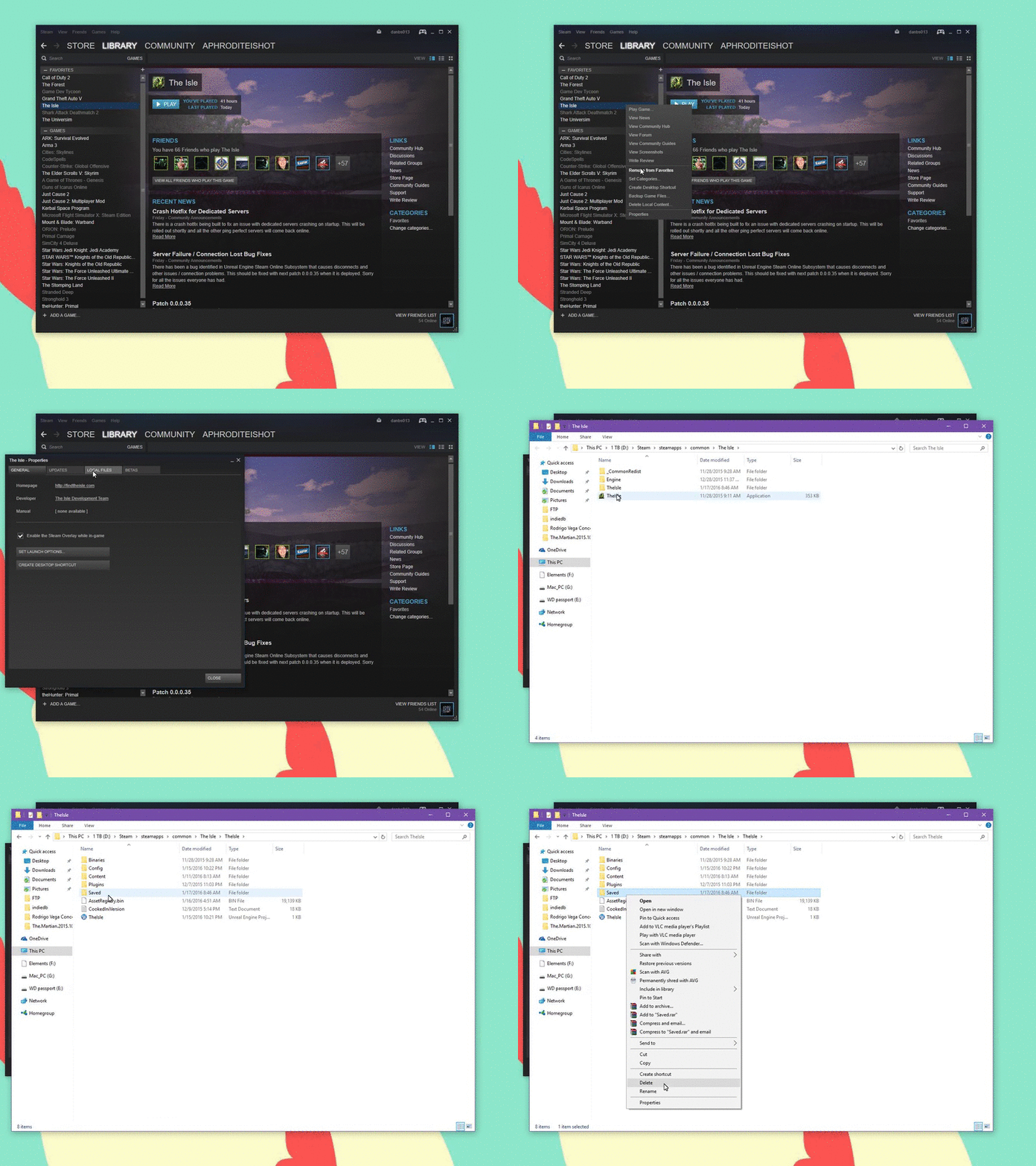 brisk compass
If you mean the login button on the main menu, ignore that. Just press play.
lilac thistle
@앙대요#5280 ^ Ignore the login button, press play instead
 mild raft
How to smell in Game? I just press J or Q and nothing happen :/
 ruby vale
hold q
@mild raft
if it still doesnt work try the method in the recent pinned message
mild raft
I hold Q and nothing happen. Maybe You mean reset control?
 gloomy moat
i have the same problome and i cant find a way to fix it
 high bloom
he got banned punch
ruby vale
@mild raft you can try resetting it through the settings in-game i guess, but the method in the latest pinned message can also help
 humble steppe
My friend is trying out the game on their pc, but while joining the server, the loading is really, REALLY long,
it takes really long and still she didn't even get into game because of the loading, her internet is good
and I'm sure it's not because of it, can anyone help me with it?
molten delta
are they running the game on an SSD or regular old hard drive? solid state drives generally have much better performance / load times. depending on if you're joining the V3 map though it will probably take a while to get in regardless, particularly the first time, since there's a lot of shaders and tiles for it to compile initially.
 brittle olive
Hey DEV team. I have an adult rex that doesn't stop running. i tried sitting, i tried relogging, i tried reinstalling the game. i even swapped keyboards. please help.
nvm its all good keep up dah good shit
 placid hedge
People, good night, I play the isle here but I do not understand why it appears that my system does not meet the minimum requirements to play properly, I think it is the processor or the operating system, before the last update did not appear this message , I recently acquired more ram memory, to get 16 gigs and to supply this possible lack of memory, I do not know what it can be anymore, because all the needs above the minimum have been met.
PS: sorry to post here, is why I did not find a topic of doubts.
http://prntscr.com/kypma2
I would like to better understand how these minimum requirements are evaluated, I am a systems analyst and can respond with technical content that will answer my question, thank you! 😃


 pale pike
@placid hedge your Intel Core i3 2120 is only a dual core where as the minimum requirements ask for a quad core processor
 quartz bay
is anyone else having trouble finding servers? Even the official servers seem to be missing for me.
pale pike
@quartz bay try the 2 solutions under "no server found" of this thread
https://steamcommunity.com/app/376210/discussions/17/1693788384133493388/
molten delta
@jade pine / people with issues hearing behind them in-game, please post whether you're using a surround sound headset / headphones. There's apparently an issue with Unreal Engine 4 in that 7.1 surround speakers don't work correctly, dropping channels from the mix. It's been fixed and come back a few times from the looks of things.
If you're experiencing this problem, there's a workaround you can attempt which is changing your speaker configuration in the windows sound settings. Right click the volume icon on the taskbar and set the speaker setup to Stereo instead of 7.1. It's possible that 5.1 may work, but given the spotty support of surround sound in Unreal there's no guarantee.
for OS versions older than Windows 10 you might need to open the playback devices settings and configure it in there, as shown here..
lilac thistle
 misty dragon
My game stucks in loading when i try to host, even in Testlevel ç.ç
rich trellis
not sure how it happened but i can not see any official dev servers but i can see all the others.
pale pike
At the top left of Steam you’ll see a little button labeled “Steam”, left click that and select settings > in-game > and adjust the dropdown menu at the bottom to a higher value. You may need to tinker around and find the magic number that works for you. launch the game and try refreshing server list a couple of times see if it works
@rich trellis
rich trellis
its at the highest it can be. so would i need to go lower?
pale pike
you can always try to see if it changes anything
saw a few people on the forum saying 500 was their magic number
also, do you have any filter activated on your server list?
pale pike
👌
lilac thistle
@misty dragon DM me your system specs.
 true ridge
im having a problem where i try to switch to the legacy version, and it gives me an error saying that it can't find the isle.exe file
"An error occured while updating The Isle (missing executable) : C\Program Files (x86)\Steam\steamapps\common\The Isle\TheIsle.exe
though im looking in the folders rn and i did find the exe so maybe its nested down too low?
i tried uninstalling/reinstalling but it kept throwing up the same errors
pale pike
legacy branch isnt available right now
boreal sapphire
<@&401466542140817419> my friend got sucked into a black hole and is now walking backwards , after getting out ...
he tried relogging and the problem wasn't fixed
wise delta
safelog, close game, open game, re-log.
A simple relog won't work.
If -that- doesn't work, get back to us.
lilac thistle
@true ridge Generally that means your anti-virus is most likely preventing the launch by detecting your .exe as a false positive, try excluding it.
boreal sapphire
@wise delta he tried that and is still walking backwards : /
boreal sapphire
okay, thank you <33
@lilac thistle sorry to bother you, my friend got stuck in a "black hole" and after getting out, he can only walk backwards. is there something else he can do to fix this?
his keybinds are all fine and things were normal until this hole
pale pike
if the issue is present on all server and not just the one he fell in the black hole, it might just be about that reset button in settings / deleting saved folders, no?
 true snow
None of the dev servers are showing up for me? I'm specifically trying to find Dev 3, I have none of the filters checked, and I have "Dev 3" typed in the search bar. Other servers show up, but none of the official/dev servers. I've validated my files, my game is up to date, I've tried joining off of a friend and it boots me into a server by myself, I've restarted my Steam, my laptop, and I don't know what else to do. Please help 😦
lilac thistle
@true snow See here, try the two missing server solutions: https://steamcommunity.com/app/376210/discussions/17/1693788384133493388/
lilac thistle
Ensure that you've got all the filters unchecked on your server browser
true snow
They are all unchecked
lilac thistle
And that you've tried all the different ping settings in your max steam ping rate.
Some settings work better for others.
true snow
I increased the ping (didn't know how to do that at first) and it finally showed. Thank you ❤
lilac thistle
👍
split sand
Is it possible to play on the legacy branch? When I updated to that version it says that a file is missing
This is what comes up when i try to start the game
lilac thistle
@split sand Generally that means your anti-virus is most likely preventing the launch by detecting your .exe as a false positive, try excluding it.
Legacy may be unavailable however
 round moat
@lime charm see the recently pinned messages in this channel to help you with your scent issue.
 lime charm
i have already tried that. " I have gone into the local files and deleted both "Saved" folders there and also tried verifying the game files. "
pale pike
@lime charm all i can think of is to try a clean installation of the game if both deleting the saved folders and the reset button doesn't work
also, the 2 folder you deleted, one of them was in your appdata, right?
lime charm
yes. one by going through steam, the second by going through %appdata%
i'll do a clean install then, just to cover every base
pale pike
@lime charm theres something else we might try, do you mind writing me in dm?
lime charm
it's fine, i can try crap tomorrow. Making dinner and playing with kids, this is frustrating me to no end right now
i'm not trying to come off as offensive. So i'm sorry if it sounds that way
pale pike
no worry
 hollow hatch
whenever I play the game, on both v3 and thenyaw (while thenyaw has this problem more) my game begins to lag in a particular way. For instance, I will be getting 60fps for 3 seconds, then it will spike down to 50 frames for one second.
On thenyaw, the game will sometimes freeze for a full minute or so.
Idk if it's just my computer or a game wide issue?
boreal sapphire
I have the same issue Pesky, especially on thenyaw. I will be getting perfect frames for a while, then suddenly my frames drop and sometimes the game freezes for a bit.
lilac thistle
DM me your specs
 inland dock
hey, can someone help me?
pale pike
it is a bit weak tho, if not already on low settings, try setting your game graphic down a bit
inland dock
the thing is that the game does not allowing to enter :/
pale pike
its not even starting?
pale pike
after looking a bit more into the 920m,i believe your card is way below minimum requirements, you should consider changing it, or see with punch if there is a solution to your crashes.
inland dock
yeah @pale pike I tho the same, how ever its so strange cuze it functioned well 10 days ago 😦
 vague iris
Having trouble getting one particular server to appear. Tried several methods such as checking game files through steam, adding the IP to my favorites, deleting the save folder, fiddling with the In-Game server browser pings, changing the filters while looking for the server, and even trying to set custom launch options. No luck. Any suggestions?
 unborn atlas
i cant find any dev servers and when i join through a friend it uh sends me to official us 3
pale pike
@unborn atlas
At the top left of Steam you’ll see a little button labeled “Steam”, left click that and select settings > in-game > and adjust the dropdown menu at the bottom to around 1000. You may need to tinker around and find the magic number that works for you, afterwards simply hit ok and launch The Isle.
value can differ from person to person, it says 1000 but try all value
unborn atlas
oh alright thanks
pale pike
@vague iris
add an exclusion to your firewall/anti virus
vague iris
Its already been added
I also tried re-installing just in case there was some weird filter setting
pale pike
do you have any port forwading set in your router?
@vague iris also try a simple modem/router reset by unplugging it and leaving it with no power for a few seconds
@amber sonnet , #🔧-legacy-troubleshooting-🔧 is the right channel to use for any issues happening outside of being in game. also tell your friend to try this
At the top left of Steam you’ll see a little button labeled “Steam”, left click that and select settings > in-game > and adjust the dropdown menu at the bottom to around 1000. You may need to tinker around and find the magic number that works for you, afterwards simply hit ok and launch The Isle.
value can differ from person to person, it says 1000 but try all value
 visual palm
anyone have any ideas why when I go to press confirm to join a server it clears the server list and doesn't do anything?
 amber sonnet
@pale pike thank you 😃
brisk compass
@visual palm In my experience it means the server got borken and needs a restart.
visual palm
what if that happens with any server I try?
I feel like that is something with my computer
visual palm
give me a few minutes
boreal sapphire
@brazen sparrow here
lilac thistle
o/
 brazen sparrow
Hi i just need some help on launching the game
It stated your system doesn’t state system requirements
Or computer
Its been stuck on this for a while now
lilac thistle
@brazen sparrow DM me your system specifications: https://gyazo.com/8c1cac40ec65c922d4950386d9d19aba
brazen sparrow
Computer Information:
Manufacturer: Dell Inc.
Model: Inspiron One 2330
Form Factor: Desktop
Touch Input Detected
Processor Information:
CPU Vendor: GenuineIntel
CPU Brand: Intel(R) Pentium(R) CPU G2020 @ 2.90GHz
CPU Family: 0x6
CPU Model: 0x3a
CPU Stepping: 0x9
CPU Type: 0x0
Speed: 2893 Mhz
2 logical processors
2 physical processors
HyperThreading: Unsupported
FCMOV: Supported
SSE2: Supported
SSE3: Supported
SSSE3: Supported
SSE4a: Unsupported
SSE41: Supported
SSE42: Supported
AES: Unsupported
AVX: Unsupported
CMPXCHG16B: Supported
LAHF/SAHF: Supported
PrefetchW: Unsupported
Operating System Version:
Windows 10 (64 bit)
NTFS: Supported
Crypto Provider Codes: Supported 311 0x0 0x0 0x0
Video Card:
Driver: Intel(R) HD Graphics
DirectX Driver Name: igdumdim32.dll
Driver Version: 10.18.10.4358
DirectX Driver Version: 10.18.10.4358
Driver Date: 12 21 2015
OpenGL Version: 4.0
Desktop Color Depth: 32 bits per pixel
Monitor Refresh Rate: 59 Hz
DirectX Card: Intel(R) HD Graphics
VendorID: 0x8086
DeviceID: 0x152
Revision: 0x9
Number of Monitors: 1
Number of Logical Video Cards: 1
No SLI or Crossfire Detected
Primary Display Resolution: 1920 x 1080
Desktop Resolution: 1920 x 1080
Primary Display Size: 20.08" x 11.30" (23.03" diag)
51.0cm x 28.7cm (58.5cm diag)
Primary Bus Type Not Detected
Primary VRAM: -2047 MB
Supported MSAA Modes: 2x 4x 8x
Sound card:
Audio device: Speakers (Logitech USB Headset)
Memory:
RAM: 3969 Mb
Miscellaneous:
UI Language: English
Media Type: DVD
Total Hard Disk Space Available: 465992 Mb
Largest Free Hard Disk Block: 371176 Mb
OS Install Date: Dec 31 1969
Game Controller: None detected
VR Headset: None detected
having huge lag problems as well
pale pike
you dont even meet the minimum requirements to run the game, look no further
brazen sparrow
what should i do to meet the requirements...
pale pike
you need to upgrade your processor to a quad-core.
your RAM is too low and should be ATLEAST 8g.
get a gaming graphic cards too
you should be aiming to match these requirements
brazen sparrow
And do you know how long this might take
pale pike
you can have this done by tomorrow, its all up to you. depends if you buy those parts online or at a store. if you build it yourself or by someone else
honest river
Can anyone help me? I cant find any of the Official dev servers
pale pike
@honest river
At the top left of Steam you’ll see a little button labeled “Steam”, left click that and select settings > in-game > and adjust the dropdown menu at the bottom to around 1000. You may need to tinker around and find the magic number that works for you, afterwards simply hit ok and launch The Isle.
 runic moth
Hey I can’t seem to get into the Dev branch. Idk if this is just me or a thing happening to all, but if it’s me how should I fix it?
pale pike
dev branch is not available right now, it's not just for you
lilac thistle
@runic moth Dev branch and public are on the same version right now.
So switching between them doesn't actually change your game version.
runic moth
Oh I see, thank you for the response
lilac thistle
No worries, if you need anything in future feel free to tag/dm me.
runic moth
Thank you kindly
honest river
Hey there. I have a vac ban on the isle cuz cheat engine was still open.
Next minute I started the isle I had a vac ban and I saw that cheat engine was open but I used it for my summer car is there any reason why this happens to me if so can it be removed?
pearl oxide
VAC bans are extremely difficult to repeal, you have to deal with Valve directly regarding them if I remember correctly.
honest river
Okay. Stupid valve lol. Eyy @pearl oxide thanks for the fast response where can I contact those people?
pearl oxide
Valve? Valve is the company that owns Steam. Should be some contact info somewhere inside their application
honest river
Ow yeah I get that. But I thoght u said them so I thaught u ment someone specific
pearl oxide
No, just Valve customer support in general should be enough. They can redirect you if necessary
pale pike
doubt they will lift the ban, im 3000+ days in on the vac ban (on css) and still refuse
round moat
@woeful stream I may have led you astray, I can't seem to find the image for the server/ping rectification. Try playing with the drop down 'In-Game server browser: Max pings / minute' as shown here in your Steam settings:
Change the automatic (5000) setting to 1000 and so on, this often helps people find the servers.
left pewter
Hi
Does the legacy bata of the isle work
Like the servers and such
I can’t access the servers on there
How do I get on the servers
 gleaming rain
hi folks... as soon as i would like to join dev4 server i get a "VAC check timed out" error/message... does anybody know what i can do?
@lilac thistle sry to bother you... 😉
gleaming rain
thank u very much
 edgy fjord
Restarting doesn't always work, it's weird. Sometimes just keep trying to connect until it connects.
Happened to me 5 or so times in a row, then didn't.
edgy fjord
Happening to me now. Coooool.
This is definitely development related. It started happening out of nowhere.
pale pike
its an issue with steam and not the game itself
edgy fjord
Steam development.
You know how they always release an update that fixes one thing and breaks 5 more.
But if what you say is true, you'd think it would affect more people.
4 times after going admin.
👍
Time for the 5th.
7 attempts later. Yeah. I'll be back when this is fixed.
lilac thistle
@edgy fjord It is a Steam related error, generally to do with your internet connection or an administrative problem. Restart your computer, your modem/router, etc.
It's not something we, or Valve can fix. It's an issue on your end you need to solve.
 uneven elbow
Hey so, are you still able to move the isle game window to your secondary display? I used to do it a lot back in prog, but now nothing happens when I press F11.
pale pike
i am unaware if there is an actual keybind for it but you can always set your secondary monitor as your primary before launching your game!
uneven elbow
Yeah I know, I just like to keep my busy applications (like Discord, web browser, Sai) on my smaller screen that's in front of me since I can read it better that way while I keep games on my secondary larger screen across the room.
I used to be able to do it easily before but not sure what's changed that it won't let me anymore.
 unique basin
I need help when ever i log into isle and try to go onto any server it doesn't give me anything about the client not responding and its just siting their just doing its thing to log into any server and i hate to ask but can someone help cause i don't know what to do
pearl oxide
Can you be more specific with what's going on?
If we're talking about the loading screen taking a long time, that's actually quite normal now, and I believe is a result of the AI on the server you are connecting to.
Sometimes it takes even a full minute or two
unique basin
yeah i've been waiting 30 minutes
pearl oxide
Hmm, that's pretty extreme
unique basin
i have all low settings to
pearl oxide
Is it the loading screen you're stuck on?
unique basin
yeah to get into the server i click continue on
it does the animation of the loading screen but its been 30 minutes should i try running steam ash admin
as*
pearl oxide
You could, I kind of doubt that would fix it though.
<@&401466542140817419> Is anyone else familiar with the problem our friend here is describing? It's actually a new one for me.
cinder abyss
What are your specs?
round moat
Try running the game as admin, if that doesn't work then hop into your Steam settings and change your max ping?
Sounds like a connection time out error
unique basin
k i will
pearl oxide
I was actually wondering if it even would be, since usually the game will kick you out of the loading screen if it's unable to connect.
lilac thistle
@unique basin What are your system specs? https://gyazo.com/8c1cac40ec65c922d4950386d9d19aba
unique basin
this Computer Information:
Manufacturer: Gigabyte Technology Co., Ltd.
Model: To be filled by O.E.M.
Form Factor: Desktop
No Touch Input Detected
Processor Information:
CPU Vendor: GenuineIntel
CPU Brand: Intel(R) Core(TM) i5-3570 CPU @ 3.40GHz
CPU Family: 0x6
CPU Model: 0x3a
CPU Stepping: 0x9
CPU Type: 0x0
Speed: 3392 Mhz
4 logical processors
4 physical processors
HyperThreading: Unsupported
FCMOV: Supported
SSE2: Supported
SSE3: Supported
SSSE3: Supported
SSE4a: Unsupported
SSE41: Supported
SSE42: Supported
AES: Supported
AVX: Supported
CMPXCHG16B: Supported
LAHF/SAHF: Supported
PrefetchW: Unsupported
Operating System Version:
Windows 10 (64 bit)
NTFS: Supported
Crypto Provider Codes: Supported 311 0x0 0x0 0x0
Memory:
RAM: 8063 Mb
Miscellaneous:
Total Hard Disk Space Available:  476388 Mb
Largest Free Hard Disk Block:  167653 Mb
OS Install Date: Dec 31 1969
You're missing the GPU section.
 neon frost
Does anyone have any idea what this is about? If so, what do you think is causing the issue and how do I make it stop happening?
pearl oxide
What are your system specs?
neon frost
Where do I go to check?
neon frost
Computer Information:
Manufacturer: Dell Inc.
Model: Studio XPS 8100
Form Factor: Desktop
No Touch Input Detected
Processor Information:
CPU Vendor: GenuineIntel
CPU Brand: Intel(R) Core(TM) i7 CPU 870 @ 2.93GHz
CPU Family: 0x6
CPU Model: 0x1e
CPU Stepping: 0x5
CPU Type: 0x0
Speed: 2926 Mhz
8 logical processors
4 physical processors
HyperThreading: Supported
FCMOV: Supported
SSE2: Supported
SSE3: Supported
SSSE3: Supported
SSE4a: Unsupported
SSE41: Supported
SSE42: Supported
AES: Unsupported
AVX: Unsupported
CMPXCHG16B: Supported
LAHF/SAHF: Supported
PrefetchW: Unsupported
Operating System Version:
Windows 10 (64 bit)
NTFS: Supported
Crypto Provider Codes: Supported 311 0x0 0x0 0x0
Video Card:
Driver: AMD Radeon HD 6900 Series
DirectX Driver Name: aticfx32.dll
Driver Version: 15.201.1151.1008
DirectX Driver Version: 8.17.10.1404
Driver Date: 11 4 2015
OpenGL Version: 4.5
Desktop Color Depth: 32 bits per pixel
Monitor Refresh Rate: 60 Hz
DirectX Card: AMD Radeon HD 6900 Series
VendorID: 0x1002
DeviceID: 0x6718
Revision Not Detected
Number of Monitors: 1
Number of Logical Video Cards: 1
No SLI or Crossfire Detected
Primary Display Resolution: 1920 x 1080
Desktop Resolution: 1920 x 1080
Primary Display Size: 20.00" x 11.26" (22.91" diag)
50.8cm x 28.6cm (58.2cm diag)
Primary Bus Type Not Detected
Primary VRAM: -2048 MB
Supported MSAA Modes: 2x 4x 8x
Sound card:
Audio device: Digital Audio (HDMI) (3- High D
Memory:
RAM: 8151 Mb
Miscellaneous:
UI Language: English
Media Type: DVD
Total Hard Disk Space Available: 705322 Mb
Largest Free Hard Disk Block: 246800 Mb
OS Install Date: Dec 31 1969
Game Controller: None detected
VR Headset: None detected
@pearl oxide
pale pike
your GPU drivers date from 2015, update em @neon frost
pearl oxide
@neon frost Your graphics card falls below the currently-listed minimum specs. It's unable to handle the load the game is trying to put on it, which is causing the crash.
round moat
@honest river
Change that drop down to something lower, such as 1000
This has been the main culprit for a lot of people, so try this out 😃
round moat
Awesome, game on!
proud crater
^ does the max ping fix help with lag at all?
thenyaw has suddenly become really laggy for me ._. like my game ran fine at around ~60 ping, then i took a break for two days and when i came back i was regularly getting 1000 ping
round moat
I'm not aware of that correlation, and you've tried cycling your internet?