#🔧-legacy-troubleshooting-🔧
1 messages · Page 11 of 1
 median lynx
Nothing
It does the same thing as it does on steam
Splahimage, then nothing
Would you like for me to send you my system specifications?
 lilac thistle
Go for it, follow this: https://gyazo.com/8c1cac40ec65c922d4950386d9d19aba - Then PM me your specs.

You'll need to copy/paste them in quarters due to discords character limits.
median lynx
Ok, post them here?
lilac thistle
Pm them to me
median lynx
Ok!
 left marsh
@lilac thistle well that did not work. I put it now on 250 and find a bit more, but still not everything
 sudden quail
http://prntscr.com/i0186m Anyone have a fix? 😃
 sudden quail
Yeah
I've tried reinstalling battle eyes a couple of times, the game opens find when opened without it.
fine*
lilac thistle
@sudden quail At the bottom left of your screen you should have a grey searchbar, type CMD into it. It should display something called "Command Prompt", right click that and left click "Run as Administrator" which after clicking ok/run it should appear as a blackbox.
Afterwards type "netsh winsock reset" without the " " and hit enter, wait a few seconds then restart your computer.
lilac thistle
hm.
Out of curiosity.. Right click The Isle in your Steam library > left click "Reset Game Settings"
sudden quail
It opens fine
lilac thistle
Able to join Official servers?
sudden quail
It tells me I need to restart with BattleEye. and then does the same error
lilac thistle
M'kay so it's definitely a BattlEye issue and something is preventing it from launching correctly.
What anti-virus/firewall do you have?
lilac thistle
Do you know how to add exclusions to Bullguard? Also your anti-virus often assumes control of Windows defender automatically, so that's fine.
sudden quail
yeah, i'll try adding an exclusion
lilac thistle
Exclude the entire Isle folder
sudden quail
its only letting me add individual .exe's
lilac thistle
Hang on a sec
I think this should explain it https://www.bullguard.com/support/product-guides/bullguard-desktop-protection-guides/antivirus/antivirus-settings.aspx
sudden quail
It's just refusing to do it, so I tried turning my antivirus and firewall to test, but it's still doing it
Ok, adding an exception finally worked lol
Annd still not working 😦
lilac thistle
Hm.
Have a look here: https://www.battleye.com/support/faq/ see if any of the solutions can help.
sudden quail
None work. I'll try reinstalling the game
lilac thistle
Try a clean installation, delete your Isle folder after uninstalling.
sudden quail
I will, thank you. 😃 I'll let you know if it helps
 valid river
hello. I have an issue. I have the same computer as my friend who can run and play the isle. But when I try to run it it always freezez and stops responding while I try to load in. I have restarted my computer and then i also tried to reinstall the isle bu tthat didnt help. Is there a way to fix this?
lilac thistle
@valid river You mean the game closes when you launch it, or it freezes when you join a server?
valid river
freezes when joining a server
lilac thistle
What are your system specifications? https://gyazo.com/8c1cac40ec65c922d4950386d9d19aba
You'll need to copy/paste it in quarters due to discords character limits per message
valid river
Okay one second.
sudden quail
Gah, I'm back. Clean reinstall has been done, but still the same issue.
lilac thistle
Hm.
I'll look into some previous threads that have had this issue, as I'm certain I've found solutions for this in the past.
sudden quail
Thanks 😃 I'll have a look back too
I couldn't find anything. Does the old Discord server still exist? I bet there's a fix there 😅
lilac thistle
Unfortunately no, but I'll find something, don't worry.
actually hang on a sec
Exit Steam then right click on your Steam shortcut and left click "Run as Administrator"
then try launching the game.
lilac thistle
That's odd. Something is preventing BattlEye from installing correctly.. Something permission related.
 hasty trail
yes
 worn pike
Whatsup?
worn pike
Guessing thats not an official server due to the modded map, have you checked to see if the server has been whitelisted to a steam group you'd need to be a member of before you play?
hasty trail
nope, let me see
worn pike
whats the server called?
worn pike
Np
hasty trail
its two servers actually
both of them wont work
they're called cookie jar
and survival instinct
worn pike
Mmmkay
 rustic cedar
hey uhhhhhhhhhhhhhhhhhhhhhhhhhhhhhhh when i try to go on a server that uses this one Nihilum map or whatever its alled, it doesnt let me join and gives me a pop up about how the map couldnt load
how do i fix it :/
worn pike
Give me a sec, lemme help Josh and I'll tag you 😃
worn pike
This one Josh?
worn pike
Mmmkay do you have the Grim Expanse mod subbed in your Isle workshop?
hasty trail
yep
hasty trail
wait
doesn't it load up automatically everytime you join a server that needs mods?
if so I did that
and I needa restart the game
hasty trail
alright
worn pike
@hasty trail Tag me when you're back
hasty trail
@worn pike it didnt work ;-;
hasty trail
yea
worn pike
cheers
worn pike
Whats the ping of the server you're trying to connect to?
lilac thistle
@hasty trail Are you able to join official servers or unmodded servers without an issue?
worn pike
It honestly sounds like a connection issue between you and the servers in question.
Have you played these same servers prior @hasty trail ?
hasty trail
well
it worked like
6 months ago
I had to get a new pc and that new pc I am using rn
and whenever I host a server for the map im trying to connect to it works
but when I join a server it just says connection to the server has been timied out
a server that haves the same map
 fading vale
are you sure the server isnt full? I get that message a lot when the server im trying to connect to is full
 valid wharf
Okay, so.... I just got this game after finally affording it, but I tried to launch it and it's not working. The first time it ran perfectly fine. Now it refuses to open...
 cinder abyss
I'll create a gif for you
lilac thistle
@valid wharf Two things you can do. Right click The Isle in your Steam library and left click "Reset Game Settings".
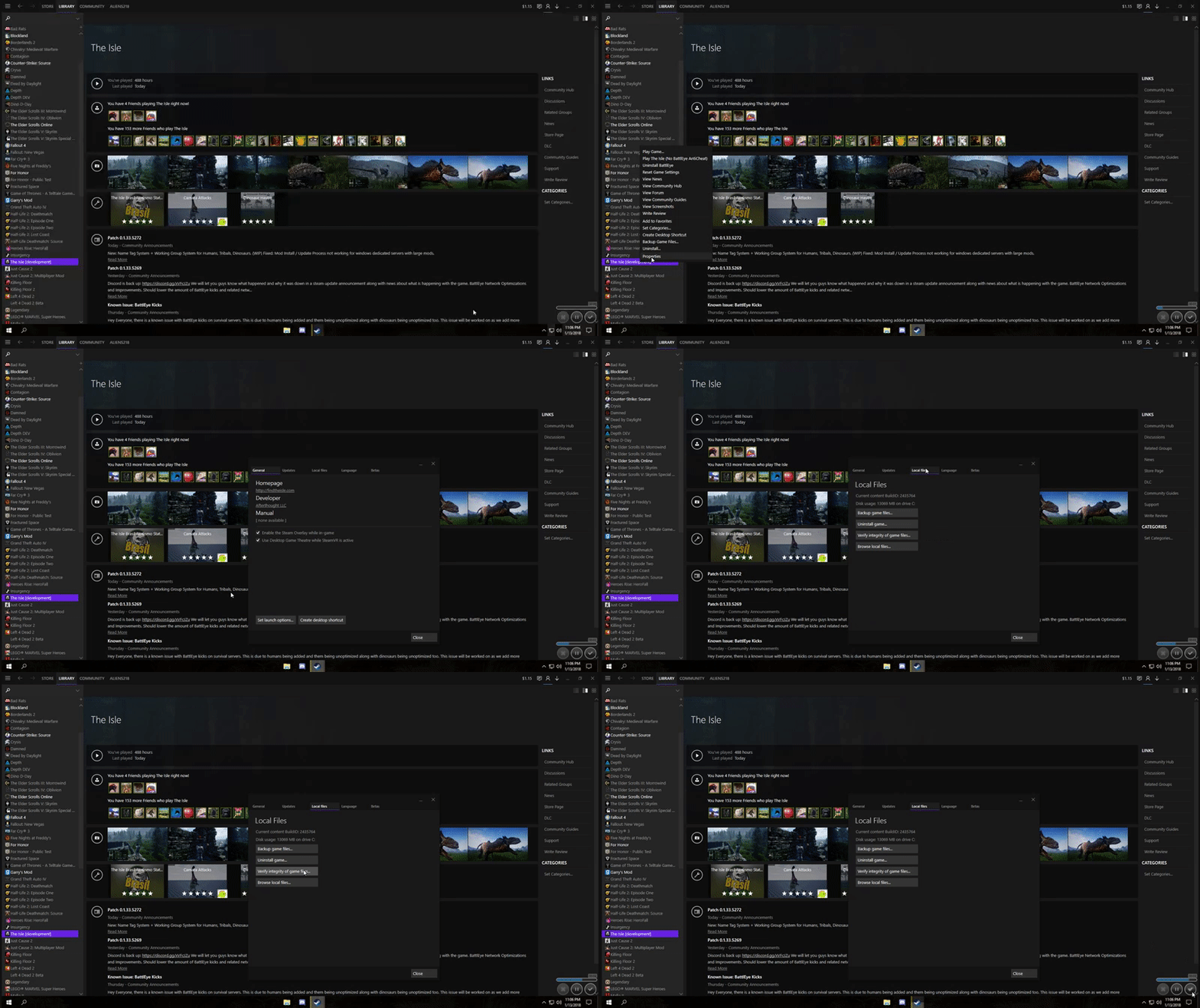
If that fails to work you can right click The Isle in your Steam library > left click properties > local files > browse local files > TheIsle > Binaries > Win64 > and launch the game via the .exe files (not the BE one) upon doing so you should be prompted with an error which you can post here.
 valid wharf
Well, let me try these. Thanks guys!
@lilac thistle Okay, so I'm on the game's Win64 files. How do I run the game with this...?
lilac thistle
Left click theisle.exe (not the BE one)
or well double left click it
and it should run
valid wharf
So, I tried that, and it said reinstalling the game might fix the issue...
lilac thistle
what did it say exactly
Word for word.
I'm going to assume it said MSVCP140.DLL was missing?
valid wharf
Yep.
lilac thistle
Let me fetch you a link
Download and install this https://www.microsoft.com/en-gb/download/details.aspx?id=48145 You'll want the x64 and the x86 versions.

Microsoft Download Center
The Visual C++ Redistributable Packages install run-time components that are required to run C++ applications built using Visual Studio 2015.
valid wharf
Okay, they're downloading...
lilac thistle
Afterwards install the x64 first then the x86
lilac thistle
What did they say?
valid wharf
0x80070666 - Another version of this product is already installed ...
lilac thistle
Does it provide you with any other options?
valid wharf
It says to go to the add/remove programs to reconfigure it...
lilac thistle
Oh ignore that
In that case just close it, and see if you're missing any Windows updates.
As that's most likely the issue then
I assume you're on Windows 10?
valid wharf
Yes.
lilac thistle
Do you know how to perform a Windows update?
valid wharf
Yes, and I check for updates... and it's up to date.
valid wharf
Like... three hours ago. Then I exited the game. When I tried to open it a sceond time, it never launched...
I literally bought the game in the evening...
valid wharf
Okay, I have them downloaded.
lilac thistle
Installed?
valid wharf
Yep.
lilac thistle
Does it work?
valid wharf
...Well, I'm reinstalling the game, so... I have no idea.
lilac thistle
Why are you reinstalling the game?
valid wharf
When it reccommended me to reinstall the game to fix the issue, I kind of did that.
lilac thistle
That error is just a standard microsoft error, it's basically prompting to you install the missing microsoft file.
Hence the links I sent
valid wharf
....Well I did it before you sent them on accident.
Then I realized that kind of later one...
0_0 Sorry.
lilac thistle
That's fine. Anyway, how long will it take?
valid wharf
Like 30 minutes or so?
...Yeah, it doesn't take long to install. Unlike ARK or.... ESO.
lilac thistle
In that case I'll head to bed as it's like 4:38am here, your issue should be fixed if those files installed without any issues. If not just tag one of my moderators and they'll take over, if any of that doesn't work feel free to send me a PM and I'll reply to it once I wake up.
valid wharf
Okay. Thank you so much for your help.
 pearl oxide
@valid wharf Are you having problems still?
valid wharf
Nope, it's running. Granted, I may need to mess with the visual setting to get it running smoothly.
Because it's on epic an it is... slow.
Like Puertasaurus slow...
valid wharf
...I am not, unfortunately.
But, I am running this on a laptop, so that might explain some of it.
pearl oxide
It means you probably have more limited hardware, but with a good enough setup you can still play easily. My laptop (which was stupidly expensive, don't ask how much) runs the game at about 80-120 fps most of the time
You're running Windows 10?
valid wharf
Yep.
pearl oxide
Do me a favor and press Windows+R, and then type "dxdiag" and press Enter
If it gives you a popup window just hit Yes
You'll wind up with a window with 4 tabs
valid wharf
Okay.
pearl oxide
I'm curious what your Processor (first tab) and your display device (second tab) is
valid wharf
Intel(R) Core(TM) i5-7200U CPU @ 2.50GHz (4 CPUs), ~2.7GHz
...that's my, um, processor.
valid wharf
Intel(R) HD Graphics 620
pearl oxide
Hmm, does it list a second device anywhere?
valid wharf
...Nope.
pearl oxide
Hmm... Unless I'm overlooking something, then your only graphics device is on-board. It's not a gaming laptop then
If that's the case, you unfortunately probably will always struggle with the framerate for this game
If you dumb down the settings as much as possible, including lowering the resolution, you might get it in a playable state, but that is the best advice I can offer in that case :(
When a computer is below minimum specs for a game this is what you're faced with
valid wharf
...Oh.
pearl oxide
If you really want to play the game, it's worth a try to see what you can do, but my only recommendation in this case is to use a machine that's designed to play games :\
Re-reading the conversation earlier, you said that it was working fine the first time you launched it?
 obsidian smelt
anyone know how to move the game from one monitor to another? it opens on my 2nd monitor which I dont want it on but I cant figure out how to move it
 hazy ingot
How do I update my AMD graphic driver
cinder abyss
http://support.amd.com/en-us/download @hazy ingot
hazy ingot
thanks
hazy ingot
no update
 lilac hound
my isle stops working before it gets into the sever: a bad_module _info ends up popping up, can someone explain to me why
cinder abyss
I'd say update video drivers, or Windows 10.
Force a reinstall of the GPU drivers if they're already updated.
lilac hound
last question than how do i do a force reinstall on the gpu driver
let me also say this problems seems to only effect me on officail us 2
lilac hound
NVIDA
 late tulip
Ok so I'm trying to figure out how to get this to stop happening. It boggles my mind why my computer does this, and it only does it for the Isle. I have duel monitors. One is a tv connected with HDMI, the other is a brand new monitor connected with DVI. Both hooked up directly into the 970 GFX GeForce card I have. Every time I start up the isle, the little box with the raptor and jeep show up on my monitor (Which is set up as the primary display) which is all good and grand. However, then the game loads up on my T.V. instead of my monitor. Now prior I had an older VGA monitor I had hooked up through an adaptor to the DVI port and thought this could have been causing the issue. But now I have a new monitor hooked up right. And it still happens. I can do Shift+windows key+arrow key to move it over to my monitor each time. But honestly I'd like to have it boot up normal like all my other games. Anything I can do on my end to fix this? or at least does anyone have an explaination to why this keeps happening? Mostly I just want to know why, totally boggled as to why it happens at all in the first place.
cinder abyss
https://www.geforce.com/geforce-experience/download @lilac hound
lilac hound
thanks
cinder abyss
np
lilac hound
fixed
late tulip
Yeah... well it doesn't keep me from playing the game so it's not like it's detrimental or warrents immediate attention. Just sorta if anyone else knew the cause it'd be cool to know why is all lol
not tag someone worthy of an issue
lilac thistle
@late tulip You can tag me for any issue you like, what's what I'm here for.
late tulip
Thanks punch. I just know you take care of so many issues for people, my issue seems minor compared to those who have game breaking ones. I just want to know why it never wants to display correctly on load up. It's not a big thing, I just have to readjust my graphic settings each time I load up to make it work right on the monitor I want it on is all. I really am just wondering why it does that more then anything else.
cinder abyss
Do you have both plugged into your GPU?
late tulip
yep
the isle is the only game that does it
and it's funny cause the little loading box with the raptor and jeep boots up on the correct screen, but then the game itself displays on the tv instead of the monitor every time and I have to force it over
lilac thistle
Last time I heard of an issue like this reset game settings fixed it.
You can do that by right clicking on The Isle in your Steam library and left click "reset game settings"
lilac thistle
Hm.
late tulip
Yeah, just sorta weird. Could just be my computer secretly likes to screw with me. lol
cinder abyss
Did you do a fresh reinstall? Meaning deleting all of the files left in steamapps/common @alpine tiger
 alpine tiger
Yes,
cinder abyss
Have you updated your GPU/Windows?
alpine tiger
I have, and nothing seems to work
cinder abyss
Try to force a reinstall of your GPU, and let me know how that works.
Other games launch correctly yes?
alpine tiger
only ARK, and Skyforge, Elder Scrolls online the ise are the only games that dont l;aunch
and ill go double check my GPU
cinder abyss
ARK, Elder Scrolls Online, and Isle all have splashscreens when they load.
I'm thinking that's not a coincidence.
alpine tiger
hmm
alpine tiger
weird
cinder abyss
Try to run Steam as administrator.
alpine tiger
ok
cinder abyss
So those two work now?
alpine tiger
Skyforge and ARK already ran fine
before hand too, The Isle and ESO havent
(mainly the isle)
alpine tiger
yes
ok
oh lord, they changed how to in W10 >.<
how to get to it*
do i pm the screenshot or just send it here?
cinder abyss
I'm not really sure on this one. @alpine tiger it's very odd that you've tried everything and nothing has worked.
Your specs seem fine
alpine tiger
h,,
cinder abyss
At this point I would recommend a fresh install of Windows 10 if you can
cinder abyss
I'll tag @lilac thistle so he sees it when he wakes up.
alpine tiger
ok
 surreal timber
So, I posted on the steam forums about a problem a couple of days ago and Punchpacket asked for system specifications, but hasn't really replied since then. How long does it usually take for things to get resolved there?
Sorry for being impatient, it is just that the problem that I am having is something that seriously impacts my ability to play the game :')
lilac thistle
@surreal timber PM me your forum thread
@alpine tiger Right click The Isle in your Steam library > left click properties > local files > browse local files > TheIsle > Binaries > Win64 > launch the game via theisle.exe (not the BE one), after doing so you should be prompted with a very specific error.. What does it say entirely?
 tawny sigil
I have this now sice a few days .. i tried reinstalling the game or changing the beta version but nothing could help.
And ingame when I host a game I cant move my view ... Everything works fine but its like I have no mouse attached
 warped light
I am not entirely sure if this is a bug or not, which is why I'm putting it here instead of bug reports. My unofficial , and recently modded server (empyris skin mod) is having a brand new problem with bodies despawning in about 8 minutes or less, despite the timer being set to 600. It was previously 200, and was working as intended. Then we switched to sandbox for Saturday and it seemed to break.. and now we're back in progression and it's still not working. If anyone had any ideas, or could point me in the right direction to look for more help, I would greatly appreciate it.
pearl oxide
If it's a modded server I'm actually not sure that I can offer you much help. It actually sounds like the mod is what's causing it, so to confirm that I would try uninstalling the mod and see if the issue is still there. If not, you may have to take it up with the mod creator
warped light
we've considered that and you may be right. We just weren't sure if we should talk to the devs, pingperfect, or the mod creators. It only seemed to happen after the last patch and coincidentally while we were in sandbox. we had the mod the day before in progression without any issue. but I will try them next, because I am aware it's very possible. Thank you for the quick response Souretsu
pearl oxide
Sure. If I can do anything else please feel free to DM or tag me
lilac thistle
@tawny sigil Do you have Windows 10 out of curiosity?
tawny sigil
Yup
lilac thistle
@tawny sigil At the bottom left of your taskbar you should have a grey search bar, type CMD into it and you'll see something called Command Prompt available in the search list. Right click that and left click "Run as Administrator", you'll most likely be prompted to click yes/run, do so. Afterwards you'll see a blackbox pop up, type "netsh winsock reset" without the " ", hit enter and wait a few seconds. Afterwards restart your computer and it should be fixed.
lilac thistle
Hm.
What does it say within the command prompt when you type that command? @tawny sigil
tawny sigil
that i gotta restart
lilac thistle
did you restart your computer?
tawny sigil
of course
lilac thistle
Hm.
Try restarting your computer one more time, if that fails to work we'll try something else.
tawny sigil
i just did ill try now to start the game
yes now it works .. it now doesnt have these green borders too
i think my compouter has problems with restarting
because now i restarted it manuely
thx for the help
lilac thistle
Happy to help
 dire topaz
Why wont AI spawn in my host server? I have it on survival mode and i increased the spawn rate in the saved gam.ini file
 honest river
The Isle won't download updates for me, it's stuck at this
pearl oxide
Try doing a clean installation, that usually does the trick when I have issues like that
Just remember to actually remove The Isle folder from your Steam folder before redownloading
honest river
Alright, thanks
pearl oxide
Yup, if that doesn't work feel free to tag/DM me
lilac thistle
That's generally not an issue with your installation per say, preallocating depends on the speed of your SSD/HDD.
lilac thistle
It's basically reserving the necessary space if I'm not mistaken, then afterwards it begins the update.
That's just Steam being weird, as we don't have control over that part.
honest river
So I just wait?
lilac thistle
Pretty much, generally restarting Steam does the trick if it's taking too long. But it's not actually in the download phase yet, it's reserving the necessary space.
honest river
Alright
pearl oxide
Oh Punch is right, I'm sorry I didn't notice that it was pre-allocating still
Yeah, the preallocating can definitely take a while sometimes. Even on my SSD it can take minutes for the Isle's updates to do it. Don't be alarmed by that
honest river
Oki doki
 royal steppe
Help im spawning in the sky and my screen is crooked. Really weird, restaring my game doesnt help
lilac thistle
@royal steppe Could you take a screenshot of your crooked screen?
royal steppe
Yeah
Oh
Well uh
Fixed itself i guess
I restarted for a third time and i wasnt in the sky
pearl oxide
Out of curiosity, was it the issue where your game screen is rotated 90 degrees? Or something else?
 swift lake
Tigerlily server?
pearl oxide
Like this picture from #401465476661641217 ? https://cdn.discordapp.com/attachments/401465476661641217/402557663742787584/20180115124028_1.jpg
 swift lake
Did it happen on Tigerlily server?
royal steppe
Yeah
royal steppe
Pretty funny though
swift lake
Sounds like they fiddled with some settings over there
worn pike
See if you can find out if they've altered any of the games gravity ect Couch?
They have their own discord n' stuff
royal steppe
There this one spinosaur on the server right now who spawned in upside down
I can try
worn pike
I have yet to see this same issue occur in official servers so I'm with Black on this, seems like they've toyed with their settings
pearl oxide
Agree
royal steppe
I sent them a message inquiring about the possible server change
They said they did not change gravity but changed hosts
Also said they would look into the problem tomorrow
pearl oxide
Cool. I still can't give you a definite answer on the cause, but keep in mind that if it doesn't happen on the official servers, then it's almost never going to be a problem with the game itself
I do hope they get whatever it is sorted out though
alpine tiger
@lilac thistle it says bad image on the message then a bunch of numbers and letters
lilac thistle
@alpine tiger Could you provide a screenshot?
alpine tiger
One moment :) do I pm it?
lilac thistle
Up to you
alpine tiger
its W10 yes,
lilac thistle
Let me fetch you a link..
alpine tiger
ok
lilac thistle
Go here: https://support.microsoft.com/en-gb/help/2977003/the-latest-supported-visual-c-downloads - Under the 2017 section you'll want to download the x86 vc_redist and the x64 vc_redist.
After you've downloaded them, install them both.
lilac thistle
Try launching your game
lilac thistle
Happy to help!
alpine tiger
😄
 analog bay

@lilac thistle i have no idea what this means but my game wont launch and this pops up
lilac thistle
@analog bay Check here: https://www.battleye.com/support/faq/
 broken pasture
so i just downloaded the game recently, this is what appears when i try to open it in the files instead of in steam due to previous failures of launching in the steam app
lilac thistle
@broken pasture That means you need to run a Windows update, check that you're not missing any updates.
broken pasture
ill try that, thanks
honest river
i cant download the game
it wont download
any mods have any ideas for me
 timber egret
Yo umm everytime i try playing the isle it start to run very slow and keep like if it was a scratch CD....whats going on (BTW) i just downloaded they game. Can it do with low space or something?
pearl oxide
@honest river can you describe specifically what happens when you try to?
@MarinesForLife2020#4006 What are your system specs? Do you know how to find them?
Sorry guys I like literally just woke up
lilac thistle
@honest river That's an issue related to Steam or your internet. Also you may want to check that it's not just preallocating which depends on the speed of your HDD/SSD.
honest river
Anyone know this problem, that a mod say its unloaded and needs a restart even tho I've restated the game and steam it wont work.
pearl oxide
What server are you trying to connect to?
Is it giving you an error when connecting to a server, or is it happening at some other point?
 blazing gull
So I’m unable to open the game. It does the cool new loading part, then just closes down. Any ideas?
lilac thistle
@blazing gull Right click The Isle in your Steam library > left click reset game settings. See if that solves your issue.
 half basin
i have a problem where the shadows are all over the place when i play the game both day and night. is anyone else having this issue?
pearl oxide
Can you provide a screenshot of what you mean?
half basin
yeah sure wait a sec
pearl oxide
Sweet thanks
half basin
Well I couldn't get any screenshots as it only seems to happen specifically at night time or on when shadows are set on 'low' but essentially everytime i move in-game the shadows start move around sporadically. When I'm standing still they move in a normal manner, however. If I wanted to capture it I'd have to take a video which I don't know how to do in-game.
pearl oxide
Ah, I think I understand
That is unfortunately something that happens with the shadows when they are at their lowest settings. Low Shadows and Medium are the same thing right now, and medium shadows get really twitchy. If your system can handle it turning shadows to High or Epic will fix it.
half basin
Okay, thanks. All I needed to know that it isn't my GPU failing or something like that
pearl oxide
Yup, no worries, glad I could clear it up for you
 gaunt urchin
i have a problem that my isle isnt updating for me and idk what to do
pearl oxide
Can you describe the problem in a little more detail?
gaunt urchin
like it says update queued but it isnt updating the game and ive been waiting for it to update
pearl oxide
What happens if you try to launch the game?
Steam should immediately try to update it if you launch it while an update is available
Otherwise it tends to do it on its own time
gaunt urchin
when i try to launch it it say preparing to launch the isle but it doesnt have any bars or an estimated time
pearl oxide
Does it actually boot the game up?
gaunt urchin
no
pearl oxide
From my experience issues like this seem to correct themselves by restarting Steam. If that doesn't fix it, reinstalling ought to
lilac thistle
No need to reinstall for that issue, it's most likely Steam just being slow.
pearl oxide
Fair enough
 lilac mortar
hey I can't play the game anymore without getting any flickering on my screen. I can play games normally, but every time I play the Isle, it just keeps flickering on the screen. I can't post images because it won't get caught, nor can I share screens because it stabalises and then when I turn off screen share it does the flickering again. I've tried uninstalling+reinstalling, tried deleting my saved files, tried switching to Legacy branch, just nothing is working to remove the flickering. I lag as well, but no one is having the same issue as me
pearl oxide
It flickers with the Isle specifically? Double check to make sure your drivers are up to date, I will ask around in the meantime
@lilac mortar what are your graphics settings in The Isle?
lilac mortar
graphic settings are set to Low Shadows and everything else but view distance (epic) to medium @pearl oxide
pearl oxide
Ah, yeah
I was thinking your screen itself was flickering, the way you were describing it
Right now, Low and Medium shadows are the same thing, and they are unfortunately very flickery
If you set them to High or Epic it should stop
lilac mortar
I tried
it got a little bearable but its still noticeable and I'm laggy as well but I'm not lagging
pearl oxide
What hardware are you running on?
pearl oxide
Hmm. Yeah, my old laptop had a 960M and struggled to run shadows turned up, especially at a higher resolution
lilac mortar
yeah it just has trouble with epic shadows
do I stop playing The Isle until its fixed?
pearl oxide
I can't make that call for you, but if you do want to play currently you may have to make additional concessions with your graphcis settings
If you're running everything at lower settings already you may have to lower the resolution further or even increase the scaling
lilac mortar
I can try and leave it for now, and just wait it to be fixed
pearl oxide
Hopefully future optimizations make it easier for you. I know you're a regular. Unfortunately this is the main downside to running on a laptop :(
lilac mortar
very unfortunate, but its much appreciated. I can afford to wait
 spiral egret
I can't update the game anymore since@patch !! I've verified game files, gone into legacy n back, n reinstalled game !!!! Is this a mac issue with new patch !!!
 timid terrace
@spiral egret someone was having that problem today and they literally just logged out of steam and back in and it worked
try that first
spiral egret
@timid terrace lol ty, but ofc before all I've done I did that first
timid terrace
hmm
spiral egret
It@keeps on dling patches
N not really doing anything
I've dled like 50 patches atm 😢
timid terrace
i doubt it's that drastic, just wait for punch and see if he can solve your issue
spiral egret
Ty
timid terrace
good luck
spiral egret
So now ive updated iOS, reinstalled steam, cleared download cache, changed dl location from Germany Munich to Germany Frankfurt n yet I can't update the client. And apparently the mod/devs don't care. Heavy hearted I guess I'll need 2 get a refund on steam
lilac thistle
@spiral egret What's your issue?
In the future tag us, otherwise we're most likely not going to see the question.
spiral egret
@lilac thistle hey, sorry but on other discord they don't let u tag mods
So didn't know if I can do it here
lilac thistle
Tag me all you want, it's what I'm here for.
spiral egret
I've tried everything, n the game client just won't update
Literally everything. Last step is a new pc but I lack the money
lilac thistle
What does it say? On the library, like update queued?
spiral egret
It says dling
It@shows its dling
When I go on manage dl
It doesn't do anything
Yet the dl@goes on 100%
lilac thistle
Does it say anything like preallocating?
spiral egret
Let me check for that again
lilac thistle
Ohh, sounds like you're referring to the unpacking stage. I.E when Steam starts writing everything to your hard drive.
spiral egret
Ok might be exactly
lilac thistle
When it comes to the Steam platform we have no control over that, generally it's to do with internet speed combined with HDD/SSD speed.
Think of it this way.. When your download is finished it needs to transfer/install that data to your hard drive, the speed of which your hard drive can transfer data somewhere is often the bottleneck. Take a screenshot of your download manager and I'll take a look.
spiral egret
K tu
Ty*
Well never had the issue before
It's the latest patch now, never had this problem
@lilac thistle
lilac thistle
Nothing in the download manager? That's odd.
spiral egret
Exactly
lilac thistle
I've seen this Steam issue before.. Let me find something real quick.
lilac thistle
Have you cleared your download cache?
spiral egret
Yes
lilac thistle
Hm..
spiral egret
I can try it again. Steam closes n reopens when I do that simply
lilac thistle
You're not in offline mode are you?
spiral egret
No xD
Guess wouldn't download the whole game in offline mode would it
Only thing is I have ofc family sharing, cuz of my alt dinos
This time it didn't even install anything just went into game
N still same error
lilac thistle
What does the error say?
spiral egret
N now it's updating again game with out anything happening
It's German but says I need 2 update
lilac thistle
Oh. Sounds more like Steam is syncing rather than downloading anything.
Where in-game does it tell you to update?
spiral egret
Ya it says really short synchronizing
Let me@show
Saying client is old
Game needs to be updated. Please restart steam and try again
lilac thistle
What branch of the game are you on?
lilac thistle
Are you able to join official servers?
spiral egret
Nope
I can try again but couldn't before reinstalling steam neither
It stays on 0%
lilac thistle
If that's the case it sounds like you might need to do a clean installation. Here's what you do, uninstall The Isle.. Then navigate into your Steam folder and manually delete The Isle's folder entirely. You may have corrupted content that is continuing to linger around, as uninstalling normally still leaves certain files behind.
spiral egret
Even on Mac? Since I drag all the files into the trash from library
lilac thistle
You're on Mac?
lilac thistle
That might actually explain it.. The latest patch for the mac version might not actually be out yet, as the build servers release at different times. Often the Mac lags behind.
When was the last time you were able to play?
spiral egret
Hmm any other Mac users having the issue atm ? I mean I know a lot people who use Mac
Last night
1 am ish gtm
lilac thistle
In that case sounds as if the patch for Mac hasn't come out yet, sometimes the builds like to spend like a day getting to 90% then end up failing.
lilac thistle
Naw, that's impossible.
spiral egret
Cuz I'd think other people would also have the problem with Mac. Guess I'll wait for next patch
With my luck next patch will take weeks 💔
lilac thistle
I'll ask a few other mac users if they are encountering the same issue, just gotta wait for them to come online due to timezones.
spiral egret
K ty. Asked on my Pangea discord but apparently no Mac user online
U mind tagging me if u get an answer from@other Mac users ?
lilac thistle
Yup, also feel free to tag/pm me if you've ever got any questions or such.
spiral egret
Ty. Sorry for the inconvenience.
spiral egret
Ty 👌 I'll be waiting for a tag ✅
lilac thistle
👍
 thorny flax
For some reason I can't see the US servers, only EU, is there a way for me to see US servers aswell?
pearl oxide
@thorny flax Change this setting if servers aren't appearing consistently: https://cdn.discordapp.com/attachments/401485101046693888/401561410959835156/unknown.png

Server search times will be slightly longer but more consistent
thorny flax
Will do, thanks!
 tall timber
ok so my game crash whenever i try to progress into anything. does anyone know what i can do to fix this problem?
pearl oxide
That's odd. Can you be a little more descriptive so I understand exactly what is happening?
tall timber
ok
so i was on a server called Isla Nublar and i was playing as a cerato. then i went to get something to eat and while i was afk they restarted the server. the server got restarted while i was still in the game and i got reset back to a herrera. after i got reset i could no longer progress to a cerato cuz the game thought i was playing as one. to fix that little issue i just suicided and restarted as a velo then went to herrera, cuz it does not take so long to get to cerato. well the problem is, after this ahppened... now when i click on Esc then progress everything is normal. but when i click on a dinosaur i want to progress into i get a little message and then the game shuts down. im gonna try again and type on here exacly what that message says
oh and i thought this problem only was for that server i was playing on, but i cant progress on any server now.. including the official ones
pearl oxide
Try verifying your game cache, do you know how to?
pearl oxide
Okay hang on I'll get you a picture
pearl oxide
Right click on The Isle in your Steam Library, and choose Properties
Then click "Verify Integrity of Game Files"
tall timber
hang on
pearl oxide
It will do a file check, if anything is corrupted it will correct it
tall timber
oki, ill try
pearl oxide
If this doesn't fix it, please tag me
tall timber
does it take a long time?
pearl oxide
Usually a few minutes
tall timber
ok. ill come back if it does not fix it
pearl oxide
Alrighty, I will be here :)
tall timber
it did not work 😦 @pearl oxide
pearl oxide
Okay. So we'll need to take it a step further. I'd like you to do a clean installation of the game. You won't lose any of your server progress, but it might reset your graphics settings
tall timber
reinstall the game then?
pearl oxide
To do a clean installation, first we need to uninstall the Isle, and then go into your Steam folders and delete The Isle's folder as well
tall timber
ok
pearl oxide
This is because when you uninstall Steam will leave some files intact, in case you wanted to play the game again
So we want to remove all traces of the game from your Steam folder, and then reinstall it
tall timber
do i click on uninstall battle eye or just uninstall
pearl oxide
Just uninstall
tall timber
ok done
pearl oxide
Now right click it in your Library, go to Properties and Local Files again
Click Browse Local Files, and delete the folder that it puts you inside, titled "The isle"
Once you do that, just install it again like normal
tall timber
i cant click on browse local files
pearl oxide
What do you mean?
tall timber
its there, but its not ''clickable''
lilac thistle
If you uninstall you can't access it via browse local files, has to be installed to do that.
Otherwise you need to go to the file manually via your steam directory
pearl oxide
Oh, makes sense
Right then, I'll get you the file path
The default is C:\Program Files (x86)\Steam\steamapps\common\The Isle
If you go into your file explorer and find that folder, delete it
 short oak
I have trouble finding the US official servers; I could play them like a week ago, but cant find em now
pearl oxide
You're able to pick up unofficial servers still?
short oak
yea, can see official EU servers, just not US, i tried changing download region but that didn help either
pearl oxide
have you done this already? https://images-ext-1.discordapp.net/external/0YlNBcinlDdPYLnAWseME6basLSm1bT7dC8nZTu-TGY/https/cdn.discordapp.com/attachments/401485101046693888/401561410959835156/unknown.png?width=474&height=376
 short oak
im trying, sec
pearl oxide
Sure thing
tall timber
cant acctually fin the file
short oak
worked, thank you very much ❤
pearl oxide
Anytime Noodle
@tall timber Try doing a search for the file, that will work too just takes longer
If you already know where your Steam folder is located, the path from that point will always be the same
tall timber
i did a search and nothing happened
tried to look manually but i cant seem to find it
pearl oxide
Steam should be located either in Program Files (x86) or maybe just Program Files
tall timber
im trying for a search again
pearl oxide
Actually, you said you can view Local Files for your other games, just do that, and then go up the file path until you get to where you need to be
pearl oxide
Yup yup
So once you delete your The Isle folder, reinstall like normal and that should fix it
tall timber
delete the whole thing then reinstall
tall timber
i dont need to restart steam or anything now. just reinstall?
pearl oxide
Just reinstall, yeah
pearl oxide
This should correct any and all issues related to the game software itself
So if this doesn't fix it, we have something else on our hands
tall timber
omg yes it took a fuck ton of time but its fixed now
pearl oxide
Awesome to hear man
 valid atlas
Um? Suddenly started just now. How do I fix it?
lilac thistle
@valid atlas Could you provide some context?
valid atlas
Twice I tried to join Nightshine-Deathmatch and it's given that to me. I was just in the server so I don't know why it's showing this now.
lilac thistle
Are you able to join official servers without issue?
valid atlas
I will check
lilac thistle
If so it's most likely an issue with their servers rather than the game
valid atlas
Loaded into EU 4 okay.
But why would it start all of a sudden when I was playing on the server only a few minutes before?
lilac thistle
No idea
timid terrace
I had that problem before, and verifying game files fixed it
May want to give it a try
valid atlas
I deleted my saved file and verified my game files twice. Didn't fix it. Now I'm getting it when trying to join US 3.
So it's a game problem now.
valid atlas
So I restarted my computer and that seemed to fix it for now. I was able to log into US 3.
warped light
Are entire servers going down just part of the kicks that are being experienced game wide right now, or could that be a separate issue .. like with pingperfect?
warped light
actually it just seems to be our server going down randomly. all we've done with it is update it each patch. 🤷 guess we have to talk to pingperfect
gaunt urchin
sorry if i havent been responding yesterday but i still have the problem where my game doesnt want to update i checked the downloads and it say preallocating
pearl oxide
Preallocating can take a while depending on a few variables. How long have you waited?
gaunt urchin
i just got on my desktop just now
pearl oxide
Hmm, okay. Give it a little while and see what happens. If you open another game it will pause your update to conserve resources. If you try and launch The Isle with an update queued it should start the process of updating immediately
gaunt urchin
was there an update today?
pearl oxide
Several, yes
lilac thistle
Even that's an understatement
pearl oxide
Deathly's been a busy man today
pearl oxide
Either way, try and let Steam handle the updates. If you notice anything particularly strange let us know here
 urban cradle
cant connect to any servers, can anyone help me out? it gives me a really long loading screen and just shits me back out on the main menu with an error about a timed out connection
it happens with every server, I've never encountered this before and it's not my internet
lilac mortar
so the flickering on my screen just keeps happening. I know we've tried about everything, and I just tried deleting my saved files and even reset the settings to epic, but now every server I log into, it starts flickering like as if its going all static like the main menu when you first start the game and I'm lagging on my end. My friends say that I'm not lagging to them at all.
lilac thistle
@burnt sonnet Try resetting your game settings.
@urban cradle Ensure that you've added an exclusion for the entire Isle folder to your anti-virus/firewall.
@lilac mortar As in shadows flickering?
lilac mortar
screen flickering
lilac thistle
Got V-sync on?
lilac mortar
nope
lilac thistle
Try turning it on
lilac thistle
You're welcome, generally V-sync will solve screen tearing issues as it'll lock your FPS count to a maximum of 60, very useful for monitors with a maximum refresh rate of 60.
lilac mortar
that's very useful. I'll keep it in mind
lilac thistle
@lilac mortar It might also be a good idea to set your smooth fps to 60 as well.
lilac mortar
can do!
 burnt sonnet
alright the problem's fixed
 tiny vale
I'm having the bad module issue as well -- tried going into steam and fixing fullscreen optimization and veritfying integrity. Any other suggestions?
I'll try restarting my computer as well
 royal hull
i cant equip bow as human when i press 1 😕
tiny vale
Yes I restarted and it didnt work
pearl oxide
Are you trying to play on a modded server?
pearl oxide
Sure what's up my dude?
pearl oxide
Alrighty
late tulip
Ok I'm running into an issue. I was trying to play on the A-001 map server. I was on there. all was fine. Then I got kicked off due to connection. Went to connect again and it said my game was out of date. Ok. Close the isle. No update. full exit and restart steam. No update. Go to load the isle, then it puts the whole loading show on wait to download the update. Go through that. Try again. Same thing, out of date. Close steam, restart steam. No update. Go to open isle, it wont load due to update.....but I cannot get it to 'update' normal means through steam. Anyone have any idea what I can do that isn't going to require a full uninstall/reinstall?
 shell pond
I'm also having the same issue as Shy, I updated the game for dev branch & it's saying i'm out of date, i'm not getting any other updates and i've been pretty good with keeping this up to date all day & as soon as a patch comes out as it is set to high priority.
pearl oxide
Hmm. Try verifying your game cache or reinstalling. This is probably not the ideal solution but it's the only one I'm able to think of, as I'm not too familiar with that one
shell pond
tried verifying already, reinstalling now, will let you know if it works or not.
pearl oxide
Sure, hopefully that does the trick
 wise island
I'm having an odd bit of trouble. Upon launching the game my game launches BattlEye as I've asked it to do, but BattlEye seems to hang upon start-up? Any ideas? I've verified the game cache already and uninstalled/reinstalled to no avail. The game runs fine without BattlEye (with the exception of getting kicked b/c of no BattlEye running, or straight up a server won't let me in without it running), but trying to start-up with it and I run into that hang-up

This is all I see
wise island
So I gave uninstalling the BattlEye folder a try, verified the game files again to get it back and it's now failing to install BattlEye. oi vay.
 proven gazelle
battleyes always been trouble since it appeared in the game world tbh imo ever since they started with ark now the isle its causing more frustration and trouble than its worth having
i understand games need an anticheat but just not this anticheat
pearl oxide
When you say you uninstalled the folder, did you like, actually uninstall it or did you delete the folder?
lilac thistle
@wise island Go into the BattlEye folder in your Isle folder, run the uninstaller for BattlEye, after it's uninstalled launch The Isle normally.
Also see here @wise island https://www.battleye.com/support/faq/
wise island
I tried that and that's where I was running into issues.
lilac thistle
According to this... That particular problem means you have something on your computer that is preventing it from launching.
wise island
Yeah last night I was in the process of rebooting the comp and sorting out if my windows defender was causing issue but it got too late so I went to bed. Atm power is off on my apt but when it's back I'll tinker some more.
lilac thistle
Aye aye, feel free to tag/pm me when you're back.
wise island
I had tried turning windows defender off too last night and it was still running ijnto issues reinstalling battle eye.
Ok thank you
wise island
@lilac thistle Whatever the reboot did, I returned made sure the windows defender was off (even though I tried that last night) and the game was able to I assume install battleye as im now in the game having told it to install. It must've been something fucky with my computer that needed a reboot. But the issue seems to have been resolved.
lilac thistle
@wise island Glad to hear!
pearl oxide
The tried and true method of turning it off, then turning it on again
wise island
basically xD
 worn forge
any reason why I keep getting kicked from all servers? My internet is fine, I'm very confused
I've tried both official and non official
my game is also up to date
nvm think it's fixed
gaunt urchin
ok for some reason the game is updating and now when i check the download when its preallocating i can see that the blue bar always stops when its updating everytime i turn off my desktop and turn it back on it does the same thing it updates then it stops idk why its doing that my internet is fine and everything
lilac thistle
@gaunt urchin Preallocating means it's reserving space on your drive, the process depends on the speed of your SSD/HDD.
late tulip
I had to uninstall Isle and I'm reinstalling it cause it still says I'm out of date on my game when trying to go to the A-001 map. Nothing else was working, not even turning it off and on again. I'm hoping a fresh install will work. Even went in and deleted 'The Isle' that was left when I uninstalled it just to be safe.
lilac thistle
@late tulip If you're behind an update just restart steam
late tulip
I tried that several times
and I even tried restarting the computer
I could connect to the other servers just fine, just not the AE-001 map.
lilac thistle
You're most likely on a different branch of the game then
late tulip
always said my game was out of date
wise island
are you on dev branch or legacy?
late tulip
I'm on the normal branch. not legacy.
lilac thistle
are you on mac
late tulip
Nope windows 10
lilac thistle
what version does it say you have on the main menu
late tulip
I figured fresh install was my best bet after trying everything else so I'm in the middle of that now
lilac thistle
Aye aye, tag me when you've installed
late tulip
Np. Will do. it's going to be a while. lol. 1.2mb/s
late tulip
@lilac thistle I think I fixed my issue. I wasn't aware dev branch was made public again in the beta's option. I knew it was something I did wrong rather then something wrong with the game.
just waiting for dev branch to download to test it out.
lilac thistle
Ah, that's most likely what it was.
late tulip
Yeah sorry for the waste of time.
lilac thistle
@late tulip It's not a waste of time at all, feel free to message me if you've got questions or need assistance. 👍
late tulip
thanks punch. You're awesome ^.^
gaunt urchin
sorry for responding but i get that but it pauses everytime when its updating even when its preallocating
lilac thistle
@gaunt urchin That's most likely it pausing to write information to your hard drive, which happens mid-download every so often.
 native grove
keep getting the "pending connection failure" error when trying to log into any servers (official and private)
the battleye laucher with the info (picture below) started poping up at the same time that this issue started (today after i downloaded last nights patches) but im not sure if they are related
i already went through the battleye faq to the blocked loading of file error
also verified file integrity
issue still appears (restarting my computer didnt fix it either)
native grove
issue fixed itself after the last patch
pearl oxide
Hmm, good to know. I'm not 100% sure on the cause though if I'm being honest
 zenith niche
This is kind of a dumb question, but I'm not super super smart with computers... just above average I guess. Anyways I just wanted to know if someone could check out my specs and tell me if I should be getting higher than 25 FPS on most maps with high settings.... And what the cheapest options to upgrade would be
lilac thistle
@zenith niche https://gyazo.com/8c1cac40ec65c922d4950386d9d19aba Follow that, copy & paste your system specifications either here or in a PM to me. You'll have to copy/paste it in quarters due to discords character limits.
 zenith niche
Awesome, thanks.... I'll PM it so I dont clutter this chat
 delicate ore
Does anyone have the issue where the game is set to boot in Fullscreen but it only fills the top-left of your screen? I can fix it by going back to windowed-fullscreen at which it filled the entire screen regardless, and then I set it to regular full-screen.
lilac thistle
@delicate ore Try this: Right click The Isle in your Steam library > left click Reset Game Settings
delicate ore
Thanks Punch!
 jovial geyser
my game keep crashing while logging into a dev 1 and 2 , it also gave me bad_module_info once
already tried resetting game settings and veryfing cache integrity
resetting twice seems to have solved the problem
nevermind, now crash even when while loading the game
 chrome basin
I hope anyone will help me, whenever i join a server and choose a dino my screen just freezes, i cant do anything and i havent play the game for like 3 months now because off this.
 verbal wren
aw damn
lilac thistle
@jovial geyser Is the issue still persisting?
@chrome basin Follow this:
PM me your system specs. You'll need to do so in quarters due to discords character limits.
native grove
Using p to switch doesn't work?
honest river
yep
native grove
Try reseting your game settings by right clicking the isle in steam and choosing the reset game settings option
chrome basin
@lilac thistle im N i n a on steam, i responded on your message there.
lilac thistle
Aye aye
@honest river Toot's message above yours tells you how to reset your in-game settings
honest river
oh okay i tought it resets some other settings... but yes i did i and it still doesnt work goddmn
lilac thistle
@honest river Ensure that you're joining an experimental server.
honest river
yeah it works now. i had to restart steam and reset the settings again
Thanks for help 😃
lilac thistle
👍
jovial geyser
@lilac thistle i've updated the game and it crashed while resetting the settings, second attempt while choosing a dino in hosted game
lilac thistle
@jovial geyser Follow this: https://gyazo.com/8c1cac40ec65c922d4950386d9d19aba PM me your system specs. You'll need to do so in quarters due to discords character limit.
pearl oxide
@wintry pond I would have linked you this earlier today if I weren't on my phone. Changing these settings should fix your issue of server lists being inconsistent.
https://cdn.discordapp.com/attachments/401485101046693888/401561410959835156/unknown.png
 cunning peak
okay, so uhm. I have this issue when I log into any and all servers. when i log in some black shapes appear all over my screen and i can't see through them at all
https://media.discordapp.net/attachments/405120761968197650/405179928271912980/unknown.png?width=832&height=468
https://images-ext-1.discordapp.net/external/GBXNC8yCKNvXk76XSD-DF5Xt5bC2Sxl7CRDjWwaSi7s/https/cdn.discordapp.com/attachments/351547253003124750/405124197556158469/unknown.png?width=832&height=468
https://media.discordapp.net/attachments/351547253003124750/405160675212787712/unknown.png?width=832&height=468
https://media.discordapp.net/attachments/351547253003124750/405126291247988736/unknown.png?width=832&height=468


screenshots of my issue-
I've tried:
Uninstalling and reinstalling the game
Verifying the game files
Resetting game settings
Restarting my computer
Updating graphics driver
nothing has worked so far
however, they don't appear when I'm in legacy mode
lilac thistle
@cunning peak What are your system specifications? https://gyazo.com/8c1cac40ec65c922d4950386d9d19aba - PM Them to me, you'll need to copy/paste in quarters due to discords char limit.
cunning peak
this was all after the patch earlier with the new models being put in
okay, should be sent!
 nova cedar
I'm having trouble getting my location to save as a tribal. I'm on US 4 (region 2). I've tried safe logging, quick logging, then reset my game settings. When I log back in, I'm back at my spawn point.
I had another tribal test to see if they could log out and save their location, and they were successful.
lilac thistle
@nova cedar I've experienced that myself a few times, I think it might just be a random bug now and then.
nova cedar
I tried logging out several times, and each time was the same result.
pearl oxide
I have no lead on that myself, but haven't noticed the problem either
So if others are not having the problem it might be fair to assume it's something on your end, at least from a troubleshooting standpoint
nova cedar
Yeah exactly, that's why I posted here, but for the life of me I don't know what it could be. Everything was fine before (and really always has been).
As a note, everything else saves just fine for me, but all of a sudden, tribal won't. I've been playing the hell outta tribal too, and only ran into this today.
pearl oxide
If you have the time and bandwidth, and don't mind doing it, you could always try doing a reinstall or clean install. At the very least, that will ensure that it isn't a problem with the game software at that point
nova cedar
Noted. I'm hoping to save that as a last resort.
pearl oxide
You said you tried Reseting the Game Settings as well as verifying your files?
nova cedar
I did, yeah.
pearl oxide
That is unfortunately about the extent of generic troubleshooting advice I can give, then :(
nova cedar
S'all good. A for effort.
pearl oxide
If it makes you feel any better I had to reinstall again too recently, but for different reasons
It's usually the most sure-fire solution for these random hiccups though
cunning peak
UPDATE: just logged in to see if the new patch fixed my issue and...
Trees are semi transparent now and I can walk through them ;-;
 wooden wren


 cunning peak
Yup
I honestly doubt it's me... I've tried literally everything I can do to fix it and no dice
nova cedar
So I reinstalled my game, but my tribal still isn't getting saved no matter what I do. :/
cunning peak
Still no luck with my issue rip. Been hoping it'd be fixed with patches
 wintry pond
@pearl oxide Really appreciate it, thank you!
pearl oxide
@nova cedar After trying repeatedly (to get more of a sample size) I can't seem to get Dev 1 to save my position as a tribal either, so it may not be you after all
nova cedar
@pearl oxide Not to pull anyone else down into this hole with me, but that's good to hear.
pearl oxide
All a part of identifying the problem, no worries
nova cedar
See if you can save or not on a normal official server as well if you would please. I know with me, I can't get a tribal to save on any server at all.
pearl oxide
I tried on Dev 2 as well, which is on region 2 instead of AE-001. It saved my position the first time I logged, but never did again after. Tried about a dozen times. I don't want to bog up this channel though, so if you have anything further regarding it let's just take it to #401465522815893506
 left orbit
Restarting computer does not help
Reinstalling the game did not help
Antivirus is turned off
Ran with and without anti-cheat
pearl oxide
Are any other games doing this?
This sounds like an issue with Steam rather than the game
pearl oxide
No spam guys
lilac thistle
@left orbit Do you have Windows 10?
lilac thistle
@left orbit Do you know how to bring up your command prompt (CMD) ?
left orbit
Yep
lilac thistle
@left orbit Sorry for the delay. Right, bring up your command prompt (run it as an administrator) and type "netsh winsock reset" without the " ", afterwards hit enter.. Wait a few seconds and do a manual restart on your PC.
jovial geyser
idk if it might be usefull to know but i discovered what was causing my crashes, i had -dx12 in launch option and i suppose the new engine version doesnt like it
lilac thistle
@jovial geyser Ah, that explains it. I hadn't encountered that issue for a long while, thank you for reminding me of the solution. It'll certainly come in handy with helping others 👍
jovial geyser
glad to be helpfull, and thanks for having tried to help me
left orbit
Okay
Wait pls
I do
Just restart the computer?
Thank u very much
My problem is completed
lilac thistle
@left orbit Happy to help.
@trim pier Have you tried adding an exclusion to your anti-virus/firewall?
 velvet quartz
I'm having a problem with modded servers, whenever i try to join a modded server the Pending Connection Failure message shows. Unmodded servers including official and unofficial are fine
 trim pier
I'll try that in a bit
trim pier
@lilac thistle Added an exclusion to malwarebytes and windows firewall still the same issue
mb for tag
lilac thistle
@trim pier You can tag me whenever you want, that's what I'm here for 😛
trim pier
alright, cool
lilac thistle
Hm, have you tried resetting your game settings?
trim pier
I'll try that now
Didn't work, going to do a quick PC restart and see where that goes
infact, it crashed this time
lilac thistle
Any error?
trim pier
Nope, but the restart fixed it. Thanks Punch
pearl oxide
Score one more for "turn it off, then turn it back on"
trim pier
yup
lilac thistle
Glad to hear it's resolved. Give us a shout if you encounter any more issues.
trim pier
Will do
 covert osprey
so.......how hmmmm
lilac thistle
@covert osprey Please keep bug reports limited to the #401465476661641217 channel, #🔧-legacy-troubleshooting-🔧 is for technical issues that we can provide active assistance with.
honest river
Also my Isle just randomly had uninstalled itself. It’s installed now but for some reason it had just randomly uninstalled.
cunning peak
I'm wondering if my issue has something to do with the foliage update from the patch with the new rex and utah models? I noticed while in the little developement map server that the glitching issue i'm having with the stretching black shapes and nearly invisivible trees only appeared near the tree section of the map
spiral egret
And again a patch is out which causes issues for Mac Users. At one point it's quite miserable to bring out patches which ruin the game for all the mac users! How about not rolling 10 patches out a week? This is a pain
Again it's not possible 2 update client
 worldly pebble
im having problems with the servers, i get various amounts of servers(none of which im looking for) depending on what settings i check, and most times half of the servers that do show up are in a language that i don't understand
lilac thistle
@worldly pebble Are you trying to find community servers or official ones?
worldly pebble
@lilac thistle official servers
cunning peak
For some reason my game isn't doing the updates when I try and launch it
pearl oxide
Can you describe what happens?
pearl oxide
Are updates disabled in any way for the game?
cunning peak
ohhh that might be it
just noticed it's set as "Always keep this game up to date"
But usually even with this set I have to launch the game to get the update
pearl oxide
Double check your updates settings in the Downloads section of your Steam Settings as well
"Always keep this game up to date" should be fine, that is the default for every game
 fallen stag
Having server issues. Server is through ping but doesn't show in the list unless it is refreshed numerous times. Ping claimed it is on the isle side and not on there and. Any ideas. Also posted in the servers channel
pearl oxide
One moment
Have you done this? https://cdn.discordapp.com/attachments/401485101046693888/401561410959835156/unknown.png
fallen stag
Yup
pearl oxide
Did you try lowering it further, to 250 too?
fallen stag
Ping ran a check and it shows in the steam list. And ya I did 250 as well.
lilac thistle
I'd say set it to about 1000 and set the max results on the actual Isle server browser to 1000, then refresh.
fallen stag
I'll give it a try. Thanks
honest river
If someone could hop over the the thread I made and find details on the issue im having that would be lovely! https://steamcommunity.com/app/376210/discussions/17/1693785669848712560/

 sweet dawn
lol. Why I got so many similar china servers? o.O
lilac thistle
@sweet dawn It doesn't filter by region, there is just lots of chinese servers. Just turn your max results up to a 1000
sweet dawn
ok. Thank you!
 compact badge
@trail hare try posting about the graphics problem here. Tell us what server it is on and what you have done to try to fix it so far
 trail hare
the sever is little foot and i updated the game a while ago and this just happend
i have not really tryed to fix it because how would you evn
pearl oxide
I actually kind of wonder if it's a driver issue
What are your system specs? And are your drivers updated?
trail hare
it would be strange if it was because my game has worked up until now
pearl oxide
The game's engine was updated recently, which may or may not have some driver compatibility issues
It's all about eliminating possibilities
trail hare
i have a quadro fx 3800 card
pearl oxide
Hmm. The minimum requirements for The Isle is a GTX 760 or better. Looking at some comparisons, that card is only operating at about 15% of what a 760 would do, putting it well under minimum requirements. But, I've seen others with this issue before, let me do a bit of research and I'll see if I can come up with anything
trail hare
ive manged to slipe by for so long , sucks no , well better make a quick trip to amazon
pearl oxide
It looks like in previous cases where this showed up, it was always on a rig that was below minimum specs. It may just be the video card unfortunately :(
As for the actual cause, I can't think of what would cause it besides the engine update or maybe the fact that Low shadows no longer does anything (it is the same as Medium atm)
trail hare
pearl oxide
Yeah I feel you man. Sorry I can't do more, but I'm calling it case closed for now
trail hare
thanks for sovlving the problem
velvet quartz
I am still having the same problem with modded servers not working and the connection already pending message poping up.
pearl oxide
Hmm. I can't guarantee I know a solution but I'll see what I can come up with. Tell me in as much detail as you can what the issue you're experiencing is, as well as anything you've tried to fix it
fallen stag
Anyone know or where I can find the command line to run the ae map was told it's available but not sure
velvet quartz
Sorry, um well any mod i use on any modded server ive tried (with the right mod) it simply gives me the Connection pending message. All unmodded servers work. I've tried restarting my game and system a lot and trying it without battle eye and with. Nothing has worked.
pearl oxide
Do you get the same result with unmodded, official servers? And are the servers you are trying to join occupied, and also using the correct version of the game?
Just eliminating possibilities here
velvet quartz
All unmodded servers, official and unofficial work fine, none of the servers i tried were full, and my game is always updated to the latest version.
pearl oxide
They weren't full, but were they occupied at all? And were the servers up to date?
velvet quartz
the servers were up to date and occupied.
pearl oxide
Hmm. I'll look into it, but in the meantime, you can try these if you have the time, as they fix most problems: Reseting Game Settings (via launching the game through Steam), double checking your security settings to make sure nothing is being blocked, reinstalling the game, or performing a clean installation (uninstall and then delete the The Isle folder from your Steam folder
velvet quartz
okay thank you
pearl oxide
I haven't found anything yet, but if I do I will let you know. If any of those things happen to fix it, I'd be interested in knowing as well, for future use
lol all good
Gonna do a bit of clean up
surreal timber
Hum. I should probably bring up my problem again, since I never got a working solution
So, I've got no sound in my game
Hrm
I think that I'll DM Punchpacket again
 grizzled laurel
i need someone's help .-.
lilac thistle
@grizzled laurel What's up?
grizzled laurel
i need someone to invite me to isle discord channel
because i cant open it
my mozilla not works
lilac thistle
You're in the Isle discord server.
Or are you on the browser based version right now?
lilac thistle
What happens when you try to join it?
grizzled laurel
nothing
lilac thistle
Sounds like you might've been banned from their server, your best bet would be contact one of their administrators.
 tough bay
I've tried hosting a game on the test level with experimental on (once on sandbox, once on survival) and it crashed my game both times
On the latest development branch
The loading screen still plays, but I believe that right when loading into the map the game crashes
Maybe I should have posted this in #401465476661641217
lilac thistle
@tough bay PM me your system specifications: https://gyazo.com/8c1cac40ec65c922d4950386d9d19aba
honest river
The same thing is happening with me ^^^^
late tulip
I was on dev branch earlier before I was kicked out due to an update to Dev Branch. Got busy with other things and now trying to get on. However neither of the servers show up for me now. Just says "No Servers Found". Are they down or am I having troubles? @lilac thistle I use Windows 10. I'm on 0.1.33.5527 - 2473226 (development) for the version as well. I've already restarted steam and my computer even to double check there wasn't another update but there is no update popping up for me.
lilac thistle
@late tulip Done the usual such as firewall exclusions and the likes?
late tulip
Honestly I don't think I have a firewall even set up. I'm not using an antivirus (I know, I'm terrible for it >.>) and I don't use windows defender. Never had a problem in the past so I've never even had to look into how to do that before.
I'm looking into how to do that though right now
Ok according to my thing. There are two 'the isle' listed and both of them are part of the excluded apps on the list
For both public and private so yeah. The Isle is excluded unless there's another program that needs added?
native grove
Windows firewall should be active by default
late tulip
Yeah. I googled it and looked
lilac thistle
@late tulip In that case try this. At the top left of Steam you should have a Steam button, click that and go to settings > in-game > at the bottom you'll see a dropdown box for something like... "In-game server browser" set that to 1000.
Then afterwards hit ok, launch up your game and set your max results on the actual isle server browser to 1000 and refresh.
 dapper orchid
Punch, I've got the demonstration for what I believe is a bug with the dev branch. I'll be putting it in #401465476661641217 because I don't think it belongs here.
lilac thistle
Aye aye
late tulip
Ok I did that. It didn't work. Though I sorta would have been surprised if that had. cause Dev only ever has the 2 servers right now. Unless that was to force it to relook in a different way then refreshing does? I can find the other servers just fine if I uncheck hide outdated. Now I only have 'hide outdated' checked, and official unchecked. And only a server named in chinese is listed.
So yeah I dunno...
lilac thistle
Oh you're on dev branch?
late tulip
Yeah. I included the patch number and stuff on my original post for what version I'm on and everything.
I restarted steam and my computer in case my computer was some how outdated but no update posted at all
lilac thistle
Oh.. In that case that's probably why. There aren't often many dev branch servers.
Outside of like Dev 1/2
late tulip
Right. neither of the dev servers are showing. So then they're down I take it?
lilac thistle
I don't think so
late tulip
Ok. lol. well Dev 1 nor Dev 2 show up for me.
lilac thistle
Got nothing typed into the filters right?
late tulip
nope
I can play around with all the different options and all the other servers and such will pop up correctly according to what they're listed under. But when I have just 'hide outdated' selected. Only a chinese server pops up. Dev servers don't even pop up when just Official is selected
lilac thistle
I'll update my game to dev branch and take a look
late tulip
ok. Sorry for the trouble. I hope that doesn't take you to long to switch, I know it takes me forever.
lilac thistle
No worries
lilac thistle
@late tulip So turns out they are down, they crashed earlier.
late tulip
ah! ok. lol. well i'm glad I said something then
lilac thistle
I can't restart them as I only have access to the normal branch servers, but at least it's not an issue on your end.
late tulip
yeah. And this lets you all know that there's something that happened with them at least too. Thanks for checking into it for me.
lilac thistle
Feel free to PM or tag me anytime if you've got questions or need assistance with something. 👍
late tulip
kk thanks a bunch ^^
zenith niche
Hosting a session crashes the game to desktop on Dev Branch
nvm I see someone is already on it in Bug reports
 tardy bolt
I've had a problem with The Isle lately, all my textures and graphics are not loading in right. Everything is green, and extremely bright, I just bought a PC and it happens on this, but my laptop doesn't do it. Anyone know why?
lilac thistle
@tardy bolt Last time I heard of this issue it's solved by right clicking The Isle in your Steam library and left clicking "Reset Game Settings"
Give that a try
tardy bolt
Ok thank you, ill give it a try
tardy bolt
@lilac thistle This did not fix the problem, it seems to happen only with lighted areas. For example the flashing lights on the loading screen have a weird texture glitch to.
lilac thistle
@tardy bolt Could you take a picture?
tardy bolt
@lilac thistle How do I post screenshot on here?
lilac thistle
Get the link of the screenshot and post it here, or upload it via the + button to the left of the chatbox @tardy bolt
tardy bolt
 lilac thistle
Huh, that's interesting. What are your system specifications? https://gyazo.com/8c1cac40ec65c922d4950386d9d19aba
You'll need to copy/paste them in quarters due to discords character limits.
tardy bolt
Computer Information:
Manufacturer: Hewlett-Packard
Model: HP Compaq dc7900 Small Form Factor
Form Factor: Desktop
No Touch Input Detected
Processor Information:
CPU Vendor: GenuineIntel
CPU Brand: Intel(R) Core(TM)2 Duo CPU E8400 @ 3.00GHz
CPU Family: 0x6
CPU Model: 0x17
CPU Stepping: 0xa
CPU Type: 0x0
Speed: 2992 Mhz
2 logical processors
2 physical processors
HyperThreading: Unsupported
FCMOV: Supported
SSE2: Supported
SSE3: Supported
SSSE3: Supported
SSE4a: Unsupported
SSE41: Supported
SSE42: Unsupported
AES: Unsupported
AVX: Unsupported
CMPXCHG16B: Supported
LAHF/SAHF: Supported
PrefetchW: Supported
Operating System Version:
Windows 10 (64 bit)
NTFS: Supported
Crypto Provider Codes: Supported 311 0x0 0x0 0x0
Video Card:
Driver: Intel(R) Q45/Q43 Express Chipset
DirectX Driver Name: igdumdx32.dll
Driver Version: 8.15.10.2302
DirectX Driver Version: 8.15.10.2302
Driver Date: 2 11 2011
OpenGL Version: 1.1
Desktop Color Depth: 32 bits per pixel
Monitor Refresh Rate: 59 Hz
DirectX Card: Intel(R) Q45/Q43 Express Chipset
VendorID: 0x8086
DeviceID: 0x2e12
Revision: 0x3
Number of Monitors: 1
Number of Logical Video Cards: 1
No SLI or Crossfire Detected
Primary Display Resolution: 1440 x 900
Desktop Resolution: 1440 x 900
Primary Display Size: 16.06" x 10.04" (18.94" diag)
40.8cm x 25.5cm (48.1cm diag)
Primary Bus Type Not Detected
Primary VRAM: -288 MB
Supported MSAA Modes Not Detected
Sound card:
Audio device: Headphones (High Definition Aud
Memory:
RAM: 8063 Mb
Miscellaneous:
UI Language: English
Media Type: DVD
Total Hard Disk Space Available: 301695 Mb
Largest Free Hard Disk Block: 229635 Mb
OS Install Date: Dec 31 1969
Game Controller: None detected
VR Headset: None detected